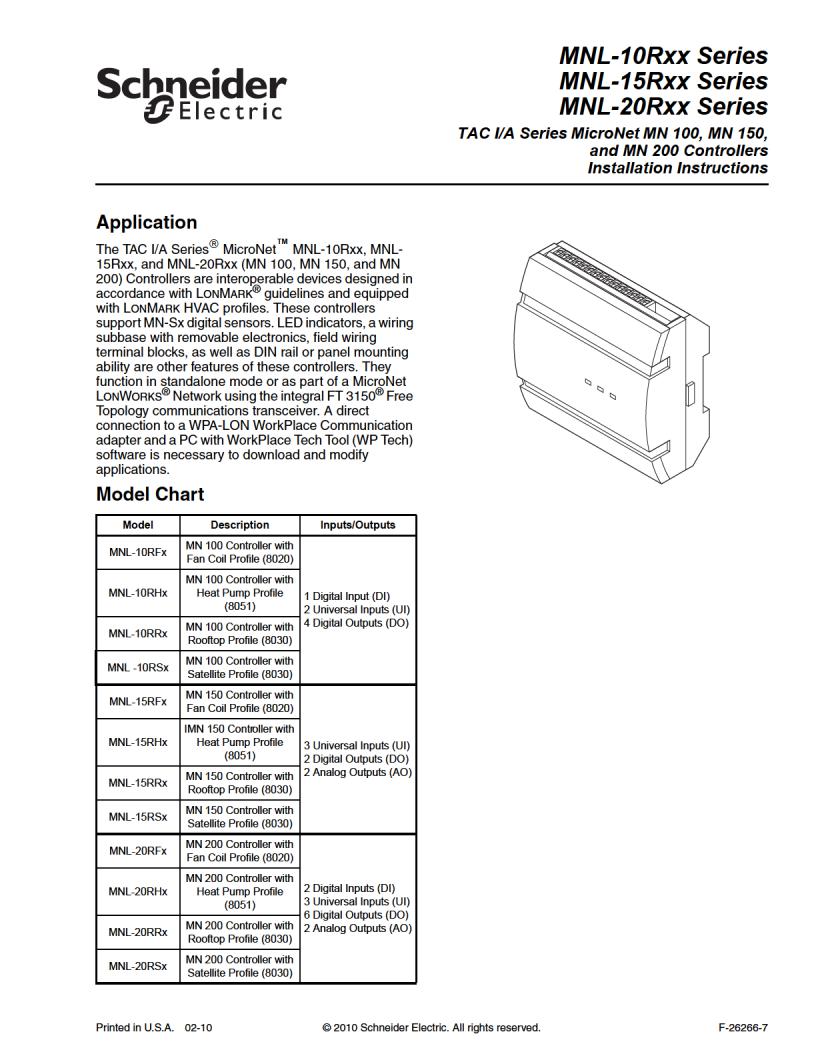
Schneider Electric MNL-10Rxx Series, MNL-15Rxx Series, MNL-20Rxx Series Installation Instructions
Page 1
Page 2
Applicable Documentation
F-Number Description Audience Purpose
– Application Engineers – Installers – Service Personnel – Start-up Technicians
– Application engineers – Installers – Start-up technicians – Service personnel
– Application Engineers – Installers – Service Personnel – Start-up Technicians
– Application Engineers – Installers – Service Personnel
Provides step-by-step installation and checkout procedures for TAC I/A Series MicroNet MN-Sx Series Sensors. Also contains instructions for sensor operation.
Provides an overview of the TAC I/A Series MicroNet System. It includes brief descriptions of the hardware and software components, and how they may be combined to create MicroNet networks and stand-alone systems.
Provides engineering and technical information for applying and using all aspects of WorkPlace Tech Tool.
Provides engineering and technical information to assist in designing a complete MicroNet controller system using different architectures, components, and software.
Provides step-by-step instructions for using WorkPlace Tech Tool.
Offers guidelines for avoiding equipment damage associated with improperly wiring devices of varying rectifier types. Contains instructions for identifying device rectifier type, guidelines for correctly powering devices of varying rectifier types, and examples illustrating proper power wiring techniques.
F-26277
F-26303
F-27254
F-26507
F-27255
F-26363
TAC I/A Series MicroNet MN-Sx Series Sensors General Instructions
TAC I/A Series MicroNet System Overview
WorkPlace Tech Tool 4.0 Engineering Guide
TAC I/A Series MicroNet Systems Engineering Guide
WorkPlace Tech Tool 4.0 User’s Guide
EN-206 Guidelines for Powering Multiple Full­Wave and Half-Wave Rectifier Devices from a Common Transformer
Installation
Inspection Inspect carton for damage. If damaged, notify carrier immediately. Inspect controllers for
damage upon receipt.
Requirements
(These items not provided)
Installer must be a qualified, experienced technician.
To o ls :
– Drill and bits for panel mounting screws – Digital Volt-ohm meter (DVM) – Static protection wrist strap
MNA-FLO-1 enclosure for connecting to conduit (optional)
Class 2 power transformer supplying a nominal 24 Vac (20.4 to 30 Vac) with a minimum
rating of 15 Va, 50/60 Hz per controller plus Digital Output (DO) loads (if same transformer is used). In European Community, transformer must conform to EN 60742
Terminators:
– One LON-TERM1 terminator required for each free topology segment – Two LON-TERM2 terminators required for each bus topology segment
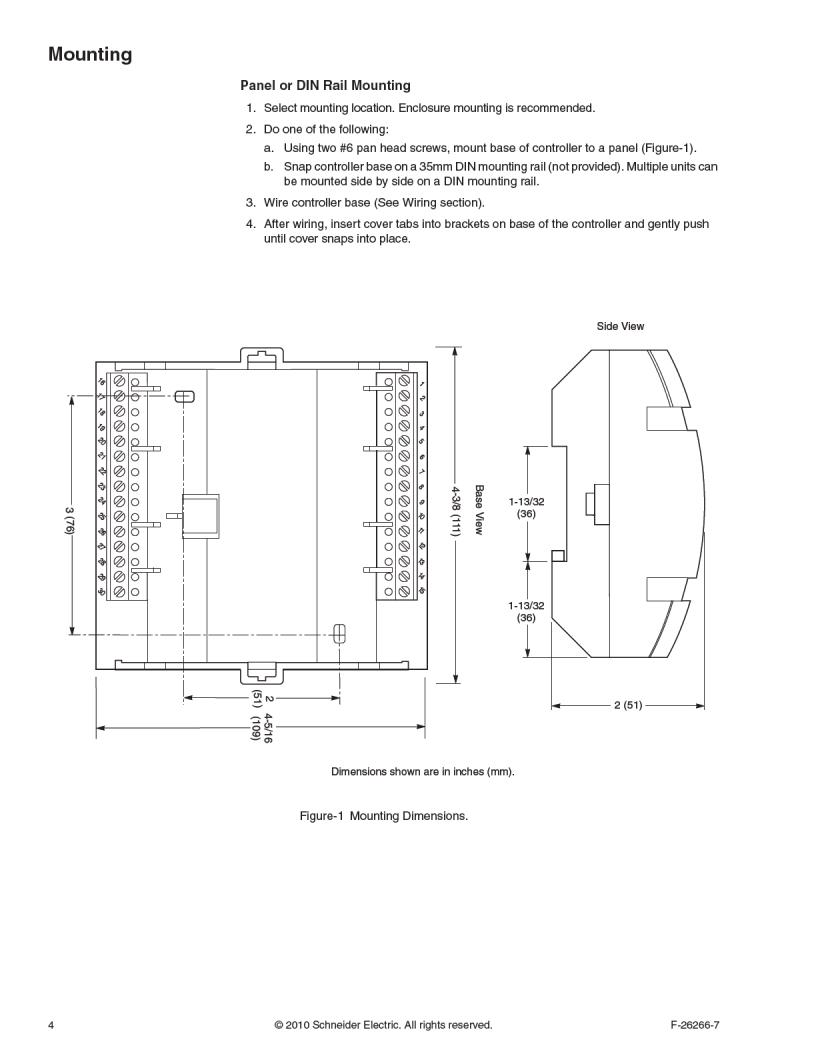
Two #6 pan head panel mounting screws or 35mm DIN rail for mounting
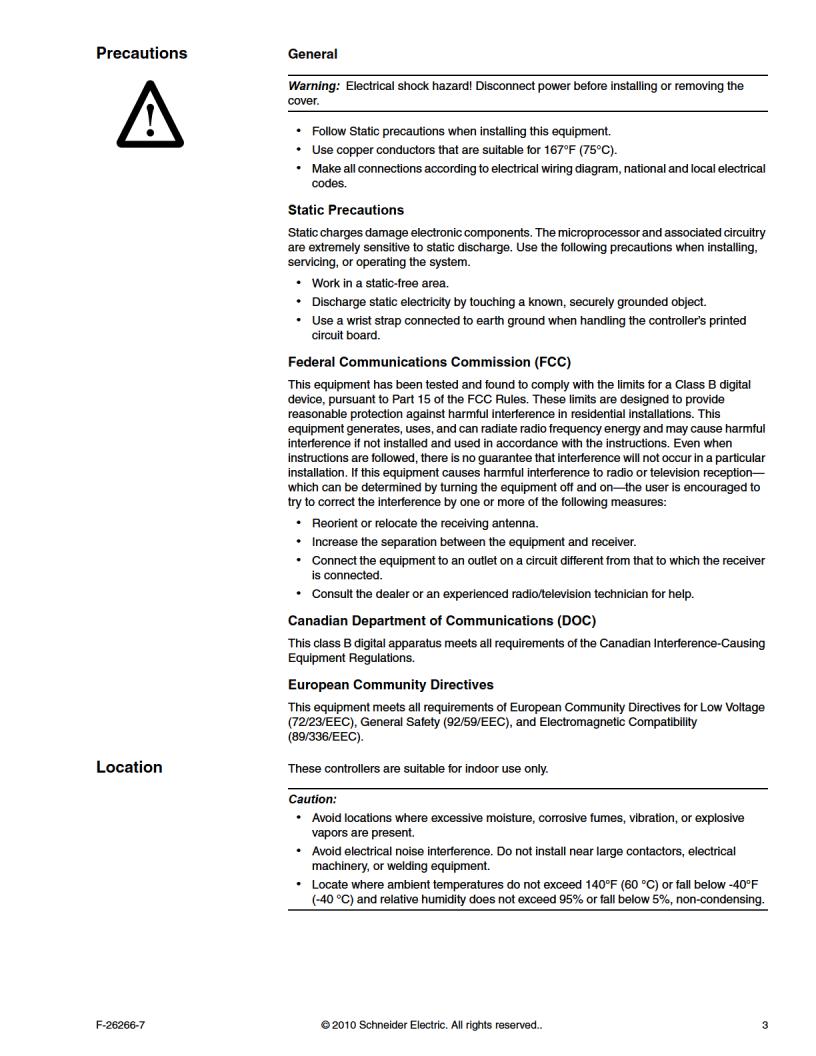
2 © 2010 Schneider Electric. All rights reserved. F-26266-7
Page 3
Page 4
Page 5
Page 6
Page 7
Page 8
Communications Wiring
Caution:
Communication wire pairs must be dedicated to MN-Sx (S-Link) and MicroNet
LONWORKS network (LON) communications. They cannot be part of an active, bundled telephone trunk.
Shielded cable is not required for S-Link or LON wiring.
If the cable is installed in areas of high RFI/EMI, the cable must be in conduit.
If shielded wire is used, the shield must be connected to earth ground at one end only
by a 470K ohm 1/4 watt resistor. Shield must be continuous from one end of the trunk to the other.
Communications wiring includes a connection between the controller and a TAC I/A Series MicroNet Sensor via the S-Link and a connection between the controller and the MicroNet LONWORKS Network (LON). An optional LONWORKS Network connection between the controller and one TAC I/A Series MicroNet Sensor is also possible.
Sensor Link (S-Link) Wiring
S-Link wiring powers and enables the MN-Sx sensor. The S-Link needs at least 24 gage (0.51mm), twisted pair, voice grade telephone wire. The capacitance between conductors cannot be more than 32 pF per foot (0.3m). If shielded cable is used, the capacitance between any one conductor and the others, connected to the shield, cannot be more than 60 pF per foot (0.3m). Maximum wire length is 200 ft. (61m).
Note:
Controller supports one TAC I/A Series MicroNet Sensor (MN-Sx).
S-Link wiring is polarity insensitive.
If conduit is used between a TAC I/A Series Sensor and a controller, the MicroNet
ONWORKS network and S-Link wiring can be in the same conduit, however, they must
L be separate cables.
S-Link wiring can be in the same conduit with UI, AO, and DI Wiring.
MicroNet LONWORKS Network (LON) Wiring
An approved Category 4 or 5, twisted-pair (two conductors) cable may be used for both connecting to the MicroNet LONWORKS Network and the optional LONWORKS Network connection between the controller and MN-Sx sensor. LONWORKS Network wiring is polarity insensitive.
Caution: Do not mix with UI, AO, DI or DO types of wiring. If conduit is used between a TAC I/A Series Sensor and a controller, LONWORKS Network wiring and S-Link wiring can be in the same conduit, however, they must be separate cables.
MN 100, MN 150, and MN 200 controllers use L
3150) and support polarity insensitive bus (daisy-chain) and free (all combinations of star, tee, and loop) wiring topologies. A maximum of 62 nodes can be connected per segment.
Note: See TAC I/A Series MicroNet System Engineering Guide, F-26507 to design a MicroNet L approved cable types.
ONWORKS TP/FT-10 network, including recommended topologies and
ONWORKS Free Topology Transceiver (FT
Use of the LON terminals to connect to the MN-Sx sensor permits use of the
sensor’s built-in LON Jack.
To preserve the integrity of the network, the LON wiring connecting a TAC I/A Series
MicroNet controller to an MN-Sx sensor must be run to the sensor and back, in daisy-chain fashion. A wire “spur” must not be used to connect the sensor to the controller.
While the MN-Sx sensor is not counted as a “node” in the LonWorks network
(LON), all LON wiring to the sensor must be counted when determining the length of the FTT wiring segment.
8 © 2010 Schneider Electric. All rights reserved. F-26266-7
Page 9
I/O Wiring
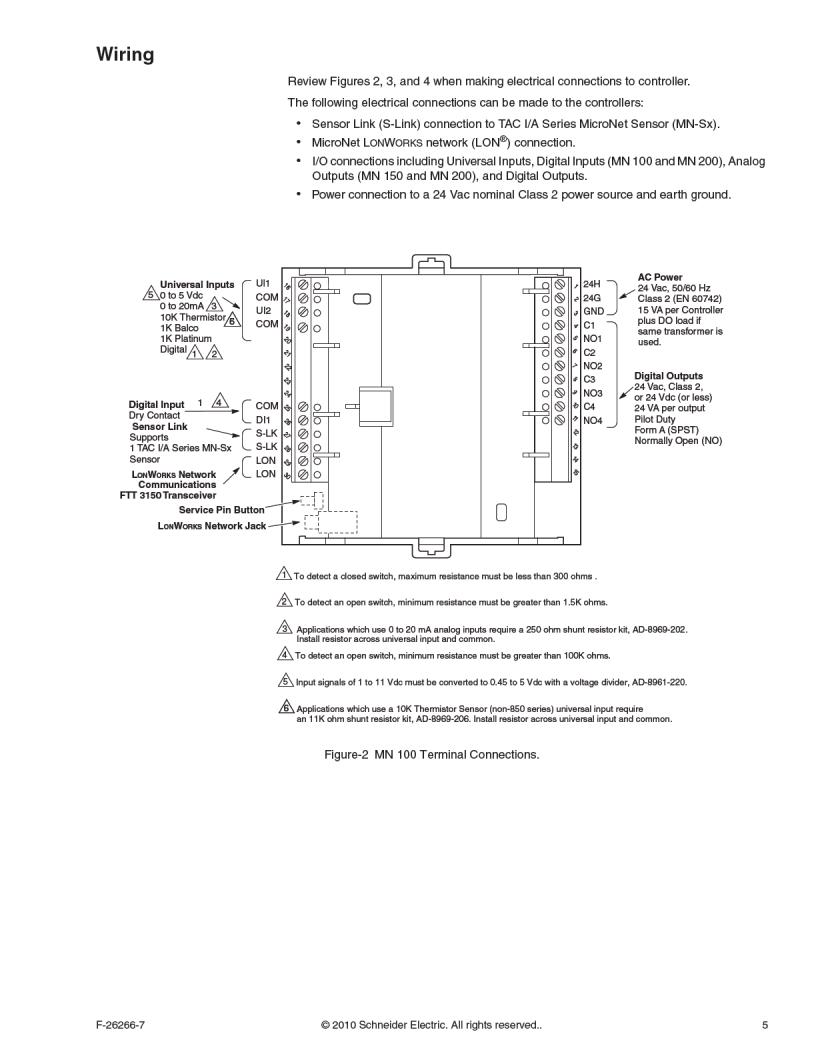
I/O connections include universal inputs, analog outputs, digital inputs, and digital outputs. See Figure-2, Figure-3, and Figure-4 for proper wire terminal information.
Caution: If shielded cable is used, connect only one end of the shield to earth ground at controller.
Universal Inputs (UI), Analog Outputs (AO), and Digital Inputs (DI)
Caution:
Input and output devices cannot share common wiring. Each connected device requires
a separate signal and return conductor.
Power wiring cannot share conduit with UI, AO, S-Link, LON, or DI wiring.
Note:
If maximum closed switch voltage is not more than 1.0 V and minimum open switch
voltage is at least 4.5 V, then solid state switches may be used for a UI or a DI.
UI, AO, DI, and S-Link wiring can share a single conduit.
UI, AO, DI, wiring needs at least 24 gage (0.51mm), twisted pair, voice grade telephone wire. The capacitance between conductors cannot be more than 32 pF per foot (0.3m). If shielded cable is used, the capacitance between any one conductor and the others, connected to the shield, cannot be more than 60 pF per foot (0.3m). Table-1 provides wiring specifications.
Table-1 UI, AO, and DI Wiring Specifications.
Connection
UI, AO, and DI
Gage
AWG (m m)
18 (1.02) 300 (91)
20 (.81) 200 (61)
22 (.65) 125 (38)
24 (.51) 75 (23)
Maximum Distance
ft. (m)
F-26266-7 © 2010 Schneider Electric. All rights reserved.. 9
Page 10
Figure-5 Analog Output Connections for 4 to 20mA and 0 to 10Vdc Actuators.
4 to 20mA Actuator
Controller Outputs
AO1
COM
AO2
+
-
Controller 0 to 10Vdc
AO1
COM
AO2
+
-
500
Controller
10K Thermistor (with an11K ohm shunt resistor)
UI1
COM
UI2
0 to 5Vdc Transmitter
Controller Inputs
Sensor Power Source
UI1
COM
UI2
+
-
UI1
COM
UI2
+
-
250
Sensor Power
4 to 20mA Transmitter
Controller Inputs
Configure controller input as 0 - 5Vdc
10 © 2010 Schneider Electric. All rights reserved. F-26266-7
Figure-6 Universal Input Connections for 10K (with 11K ohm shunt) Thermistor Sensor,
4 to 20mA Transmitter, and 0 to 5 Vdc Transmitters.
Page 11
Digital Outputs (DO)
Caution:
DO terminals accept one 16 gage (1.29mm) wire or two 18 gage (1.02mm) wires. The
selected wire gage must be consistent with the load current rating.
DO wiring cannot be intermixed with DI, UI, S-Link, LON and AO wiring.
MN 100, MN 150, and MN 200 controllers are Class 2 devices. Each digital output can
support up to 24 Vac/Vdc at 1.0 amp (24 VA) pilot duty.
Note: Digital Output wiring can be intermixed with class 2 power wiring.
Each DO is an isolated Form A (SPST) relay. If the transformer is sized correctly, the 24 Vac Class 2 Controller power source (Figure-7) may be used for load power.
Table-2 Relay Output Load Specifications.
Specification Value
Maximum Relay Contact Switched Output Voltage
Maximum Output Load @ 24 VAC, Pilot Duty 24 VA
Minimum Permissible Load 10.0 mA at 5Vdc
Maximum Off-state Leakage Current 3.5 mA
Minimum Cycles at Rated Load @ 0.4 Power Factor 300,000 cycles
a
Switched output voltage is equivalent to value of input voltage.
voltage at 24H
a
terminal
24 H
24 G GND
24 VacPrimary
Class 2
Transformer
Load
Load
Load
NO1
C1
NO2
C2
NOx
Cx
Figure-7 DO Loads and Controller Power Sharing Common Transformer.
F-26266-7 © 2010 Schneider Electric. All rights reserved.. 11
Page 12
Power Supply Wiring
Observe Free or Daisy chain topology when making connection to rest of network.
Caution:
MicroNet I/A Series Controllers are Class 2 only devices and must be connected to a
Class 2 source. Class 2 circuits must not intermix with Class 1 circuits.
This product contains a non-isolated half-wave rectifier power supply and must not be
powered by transformers used to power other devices containing non-isolated full-wave rectifier power supplies. Refer to EN-206, Guidelines for Powering Multiple Devices from a Common Transformer, F-26363, for detailed information.
Power wiring cannot be intermixed with LON, S-Link, UI, AO, or DI wiring.
Use a Class 2 power transformer supplying a nominal 24 Vac (20.4 to 30 Vac) with a
minimum rating of 15 VA at 50/60 Hz plus digital output loads (144VA using 6 DOs or 96VA using 4 DOs if same transformer is used). The supply to the transformer must be provided with a breaker or disconnect. In European Community, transformer must conform to EN 60742.
The Class 2 power transformer may be used to power multiple Class 2 powered devices
provided that the transformer is properly sized to power all equipment simultaneously and all devices contain the same type of rectifier power supplies or internal isolation.
The transformer frame must be grounded.
When powering multiple Class 2 devices from the same Class 2 power transformer,
polarity must be observed (24H connected to 24H and 24G connected to 24G).
Note:
Power wiring terminals accept one 16 gage (1.29mm) or two 18 gage (1.02mm) wires.
Power wiring can be intermixed with DO wiring.
Twisted or untwisted cable can be used for power wiring.
To preserve the integrity of the network, the LON wiring connecting a TAC I/A Series
MicroNet controller to an MN-Sx sensor must be run to the sensor and back, in daisy­chain fashion. A wire “spur” must not be used to connect the sensor to the controller.
Figure-8 and Figure-9 are acceptable wiring configurations.
Primary 24 Vac
Ground Frame
of Transformer
to Known Ground
Secondary
Class 2
MNL-10Rxx MNL-15Rxx MNL-20Rxx
Optional connection provides local access
1
to the L
ONWORKS network.
1
LON
S-Link
Figure-8 Single Controller Powered from a Separate Class 2 Power Source.
To rest of the LONWORKS network.
MN-Sx Sensor
12 © 2010 Schneider Electric. All rights reserved. F-26266-7
Page 13
Ground Frame of Transformer
to Known Ground
Primary
24 Vac
Secondary
Class 2
Class 2 Wiring
1
To rest of the LONW
ORKS
network.
MNL-10Rxx MNL-15Rxx MNL-20Rxx
1
MN-Sx Sensor
S-Link
MN-Sx Sensor
S-Link
MN-Sx Sensor
MN-Sx Sensor
2
Optional connection provides local access to the L
ONWORKS
network.
2
2
L
ON
L
ON
To other
MN 100, MN 150, MN 200, MN 440,
MN 620 and VAV controllers.
MNL-10Rxx MNL-15Rxx MNL-20Rxx
S-Link
2
L
ON
S-Link
2
L
ON
To rest of the LONW
ORKS
network.
Observe Free or Daisy chain topology when making connection to rest of network.
Figure-9 Multiple Controllers Powered from a Single Class 2 Power Source and Sharing
Communications in a Free Topology Segment.
F-26266-7 © 2010 Schneider Electric. All rights reserved.. 13
Page 14
Checkout
Mechanical Hardware Checkout
1. Verify wiring between TAC I/A Series MicroNet Sensor and controller is installed according to job wiring diagram and national and local wiring codes.
Note: Wiring of the S-Link and MicroNet LONWORKS network between the sensor and the controller is not polarity sensitive.
2. If controller is part of a MicroNet L network wiring between controller and other devices is installed according to job wiring diagram and national and local electrical codes.
3. Verify 24 Vac power is provided from a Class 2 power transformer and wiring is installed according to job wiring diagrams and national and local electrical codes.
4. If multiple devices are powered from the same transformer, verify wiring polarity has been maintained between all connected devices (24H connected to 24H and 24G connected to 24G).
5. If multiple devices are powered from a common transformer, verify all issues associated with powering multiple devices from a common transformer have been addressed.
Note: For more information, refer to EN-206, Guidelines for Powering Multiple Full-Wave and Half-Wave Rectifier Devices from a Common Transformer, F-26363.
6. Verify digital outputs are wired according to job wiring diagram and national and local electrical codes.
7. Make certain current requirements of the controlled device do not exceed rating of controller’s digital outputs.
ONWORKS network, verify the TP/FT-10 LONWORKS
Communications Hardware Checkout
1. Verify controlled equipment is in a manually controlled, safe state.
2. Place controller power breaker in the ON position. See job wiring diagrams.
3. Observe green Data Transmission LED (Figure-10) and do the following:
a. If green Data Transmission LED is steady on or blinking, go to step 4.
b. If green Data Transmission LED is off, check power.
4. Observe red Service LED (Figure-10) and do the following:
a. If the red Service LED is off or flashing, proceed with downloading an application
using WorkPlace Tech Tool and configuring the controller with a third party network management tool. Refer to WorkPlace Tech Tool 4.0 Engineering Guide, F-27254, for details on downloading applications.
b. If red Service LED is steady on, turn power to controller OFF, wait five seconds, and
turn power ON. If red Service LED is still steady on, turn power OFF and replace controller.
Red Service
LED
Amber Data Reception LED
Green Power and Data
Transmission LED
Figure-10 Location of Controller LEDs.
14 © 2010 Schneider Electric. All rights reserved. F-26266-7
Page 15
Table-3 LED Indication.
Indicator Context Status Corrective Action
Data Reception LED – amber Anytime
Data Transmission LED – Green
Service LED – Red
Anytime
Power-up The LED blinks once to indicate successful power-up.
Wink mode
Anytime
Anytime
Anytime
Anytime
Blinks when the controller receives data from the L
ONWORKS Network.
None required.
Remove the L connections from the controller and determine if the LED goes off.
On indicates a possible network connection problem, or a large amount of network traffic is present.
If the LED does not go off, replace the controller. If the LED does go off, check the network topology (connections to each node, rout­ers, terminators, etc.) and the amount of traffic on the network.
Off indicates that data reception is not taking place.
Blinks when the controller transmits data to the
ONWORKS Network.
L
None Required
On indicates that the controller is not transmitting data. On also indicates that power is being applied to the controller.
Off indicates no power to controller. Check power
Blinks (3 seconds on, 1 second off) three times to indicate physical location of the controller. If a sensor (MN-Sx) is
None Required
connected, its red occupancy LED will flash (1/sec) during the wink period.
On indicates that the neuron application is not running. Neuron applications are not field replaceable.
Replace the controller.
Use a third party network man­agement tool to commission the controller, or use the change state tool in WorkPlace Tech Tool (ver-
Blinks (1/sec) to indicate that the neuron application is loaded, but the neuron’s communication parameters are not loaded, are being reloaded, or have been corrupted. Neuron is considered unconfigured. Communication parameters cannot be configured by field personnel.
sion 4.0 or greater) to set the
®
Neuron
to the configured/on-line state. While the controller is unconfig­ured, WP Tech can be used to download an application, but at the completion of the download, WP Tech versions 4.0 and higher will restore the Neuron to the unconfigured state.
Use a third party network man­agement tool to commission the controller, or use the change state tool in WorkPlace Tech Tool (ver­sion 4.0 or greater) to set the
Off may indicate that the neuron application is loaded but the device is off-line. In this state, a pre-loaded HVAC application will not run.
Neuron to the configured/on-line state. While the controller is off-line, WP
Tech can be used to download an application, but at the completion of the download, WP Tech versions 4.0 and higher will restore the Neuron to the off-line state.
Off usually indicates a normal state. In this state, the controller operates normally, and you can download and/or run HVAC applications.
If the controller is able to accept and/or run a downloaded HVAC application, no action is required.
ONWORKS Network
F-26266-7 © 2010 Schneider Electric. All rights reserved.. 15
Page 16
Loading...