

Page 1
LED LAMP
Operation and Safety Notes
Z31043-BS 6
Page 2
GB / IE Operation and Safety Notes Page 4
Page 3
B
1
1 x 1 x
416
1 x
2
3
A
6
C
5
7
17
8
9
15
10
1114
1213
3
Page 4

LED Lamp
Safety
Intended use
The product is intended for use only as a decoration
and is unsuitable for lighting purposes. The lamp is
designed to be used in dry rooms and for domestic
purposes only.
Description of parts
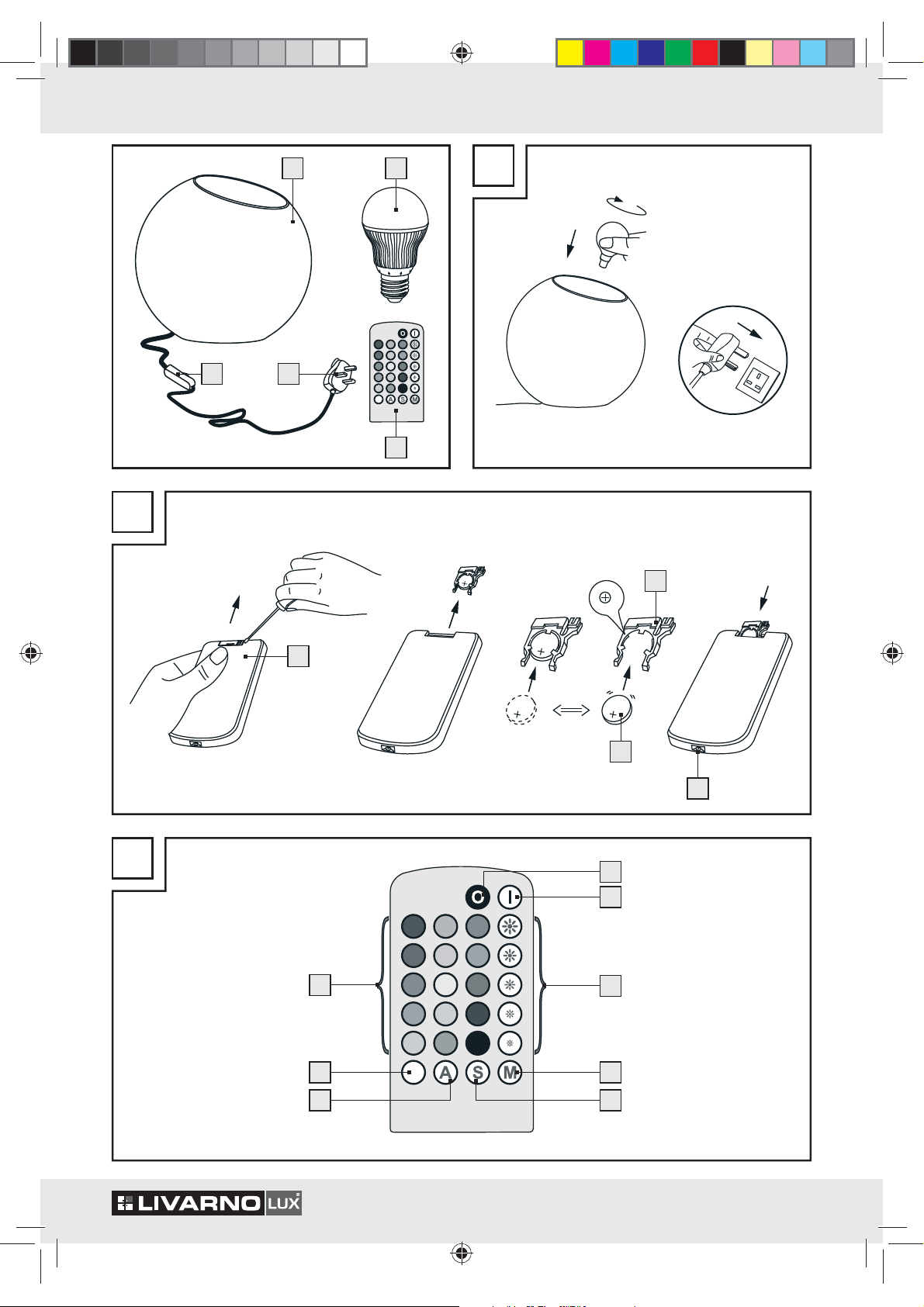
1
Lamp
2
Bulb
3
Remote control handset
4
Mains plug
5
Battery compartment
6
Battery compartment holder
7
Battery
8
0 button (Off)
9
I button (On)
10
Brightness buttons
11
M button
12
S button
13
A button
14
White light button
15
Colour buttons
16
On / Off in-line switch
17
IR diode
Technical data
Lamp voltage: 230 V∼, 50 Hz
Bulbs: RGB LED lamp, 230 V∼, E 27
Rated max.
output: 3.7 W
Protection class:
Dimensions Lamp: Approx. ø 18.5 x 17.5 cm
Battery (remote
control handset): CR2025, button cell, 3 V
Safety Information
In the case of damage resulting from non-compliance
with these operating instructions the guarantee claim
becomes invalid!
DANGER OF
DEATH
TODDLERS AND CHILDREN!
Never leave children unsupervised with the
packaging material. The packaging material
represents a danger of suffocation. Children
frequently underestimate the dangers. Please
keep children away from the device at all times.
This device is not a toy and should not be played
with by children. Children are not able to
stand the dangers that can occur
this device.
Children or other individuals who do not know
or have no experience of handling this device, or
whose physical, sensory or mental abilities are
restricted, must not use the device without supervision or instruction by an individual responsible
their safety. Children must be supervised in order
to ensure that they do not play with the device.
CAUTION! RISK OF BURNS! The lamp 1
and the bulb
the lamp
and the bulb to cool before you touch
them.
FIRE HAZARD! Fit the light so that
0.5 m
it is at least 0.5 m away from the
material illuminated. Fire can result
from the development of too much heat.
Do not look directly into the light from the lamp!
Dangers arising from the
use of batteries
are not intended to be in the hands of children.
Do not leave batteries lying around. They could
be swallowed by children or pets. In the event
of swallowing a battery, contact a doctor immediately.
AND ACCIDENTS FOR
under-
when handling
2
become hot d
uring use. Allow
DANGER TO LIFE! Batteries
for
4 GB/IE
Page 5

CAUTION! DANGER OF EXPLOSION!
Never recharge single-use
batteries. Do not short-circuit or open
them. Overheating, fire or destruction of the
batteries might result. Never throw batteries
into fire or water. The batteries might explode.
Avoid extreme environmental conditions and
temperatures as they may affect batteries e.g.
above radiators. Otherwise the batteries are
more likely to leak.
Exhausted or damaged batteries can
cause caustic burns upon
the skin. To avoid
this, always wear
contact with
suitable protective gloves in these circumstances!
Avoid contact with the skin, eyes and mucous
membranes if fluid is leaking from the batteries.
If you come into contact with corrosive battery
fluids, flush the affected area thoroughly with
clean water and contact a doctor immediately.
Remove the battery from the device if it has not
been used for a long period.
Make sure you insert the battery the right way
round (polarity)! The correct polarity is shown
inside the battery compartment.
Remove the exhausted battery from the device
immediately. Otherwise the battery is more
likely to leak!
Batteries must not be disposed of in the normal
domestic waste!
Every consumer is legally obliged to dispose of
batteries in the proper manner!
Keep batteries away from children. Do not throw
batteries into a fire. Never short-circuit them or
take them apart.
If you disregard these instructions and advice,
the battery may discharge beyond its minimum
voltage. Thus increasing the chance of leakage.
If the battery in your device leaks, remove it
from the device immediately to prevent the device
from being damaged!
Do not short-circuit the battery contacts.
Avoid the danger of
death from electric shock!
Before use, ensure that the available mains
voltage agrees with the operating voltage
specified for the product (230 volt ∼).
Every time before connecting the device to the
mains, check it and the mains lead for damage.
A damaged device presents a risk of loss of life
from electric shock.
Do not use the device if you discover it is dam-
aged in any way.
In the event of damage, repairs or other problems
with the device, please contact an electrician.
The device contains delicate electronic compo-
nents. The device could be damaged if it is
placed
in the immediate vicinity of equipment that emits
radio wave energy. This may include mobile
phones, wireless phones, CB radios, radio signal
remote controls or other types of remote control
units and microwave ovens. If you experience
faults, remove such equipment from the vicinity
of the device.
Never open any of the electrical equipment
insert any objects into it. Such interven
tions rep-
or
resent the danger of death from electric shock.
Never let the device come into contact with water
or other liquids.
Never touch the mains plug 4 with moist or
wet hands.
Protect the mains lead from sharp edges, mechani-
cal loads and hot surfaces.
Never use the device in the immediate vicinity
of a bath, shower or swimming pool.
If the lamp 1 is not to be used for an ex-
tended period (e.g. while away on holiday),
pull the mains plug out of the mains socket.
This lamp is suitable only for use
indoors.
You cannot control any other devices with the
remote control handset
3
.
5 GB/IE
Page 6

Use
Before first use, screw the supplied bulb 2 into
the lamp fitting. When doing this check that the
bulb is firmly and securely seated.
Set up the lamp on a horizontal, even surface.
Insert the mains plug 4 into the mains socket.
Press the On / Off 16 in-line switch to switch
on the light
Remove the battery insulation strip from between
the battery
of the remote control handset
Press the I button 9 to switch on the colour-
changing lamp.
Select the desired mode using the buttons 10 – 15
(see Fig. C):
– Set the brightness by using one of the five
different brightness buttons
Note: The brightness buttons cannot be
used in the automatic colour change mode
(button A
– Press the M button
of the light manually. With each new press of
the M button, the colour changes in
col
ours.
– If you store a desired colour during the
matic
by pressing the S button
will be displayed when the device is switched
on again.
– P
ress the A button to switch on the automatic
colour-changing function
– Press the button
– Press one of the colour buttons 15 to
into the desired colour directly.
Note: The remote control handset has a range
of 2 metres. Hold the remote control handset with
the IR diode
in the top of the light.
1
.
7
and the battery compartment 5
3
.
10
.
13
).
11
to change the colour
to different
auto-
colour or M mode changing sequence
12
. The stored colour
.
14
to change to white light.
change
17
at right angles to the opening
Screw the old bulb 2 out of the fitting
(see “Use”).
Screw a bulb into the lamp fitting. When doing
this check that the bulb is firmly and securely
seated.
Maintenance and cleaning
CAUTION! RISK OF ELECTRIC SHOCK!
For electrical safety reasons, never clean the
1
lamp
it in water.
Do not use solvents such as petrol and the like,
as they could damage the lamp.
P
ull the mains plug 4 out of the mains socket an
allow the lamp to cool for at least 10 minutes.
Use a dry, fluff-free cloth for cleaning.
Disposal
Contact your local refuse disposal authority for more
details of how to dispose of your worn-out product.
The device / article and its bulbs should be dis
of at an officially approved disposal cen
local communal disposal facility.
Observe the applicable regulations. If you are uncertain of what to do please contact your local authority’s
refuse disposal department.
with water or other fluids nor immerse
d
The packaging is made entirely of recyclable materials, which you may dispose
of at local recycling facilities.
Under no circumstances should the device / article and its bulbs be dis
posed of
with normal household rubbish.
posed
tre or at your
Replacing a bulb
Press the 0 button 8 to switch off the colour-
changing lamp.
P
ull the mains plug 4 out of the mains socket a
allow the lamp to cool for at least 10 minutes.
6 GB/IE
Faulty or used batteries must be recycled in accordance with Directive 2006 / 66 / EC. Please return
the batteries and / or the device to the available
collection points.
nd
Page 7

Environmental damage through
Pb
Batteries may not be disposed of with the usual domestic waste. They may contain toxic heavy metals
and are subject to hazardous waste treatment rules
and regulations. The chemical symbols for heavy metals are as follows: Cd = cadmium, Hg = mercury,
Pb = lead. That is why you should dispose of used
batteries at a local collection point.
incorrect disposal of the batteries!
EMC
7 GB/IE
Page 8

IAN 69002
Milomex Ltd.
c / o Milomex Services
Hilltop Cottage
Barton Road
Pulloxhill
Bedfordshire
MK45 5HP
UK
Model No.: Z31043-BS
Version: 09 / 2011
© by ORFGEN Marketing
Last Information Update: 09 / 2011
Ident.-No.: Z31043-BS092011-6
6
 Loading...