Philips EP1.1UAA Service Manual

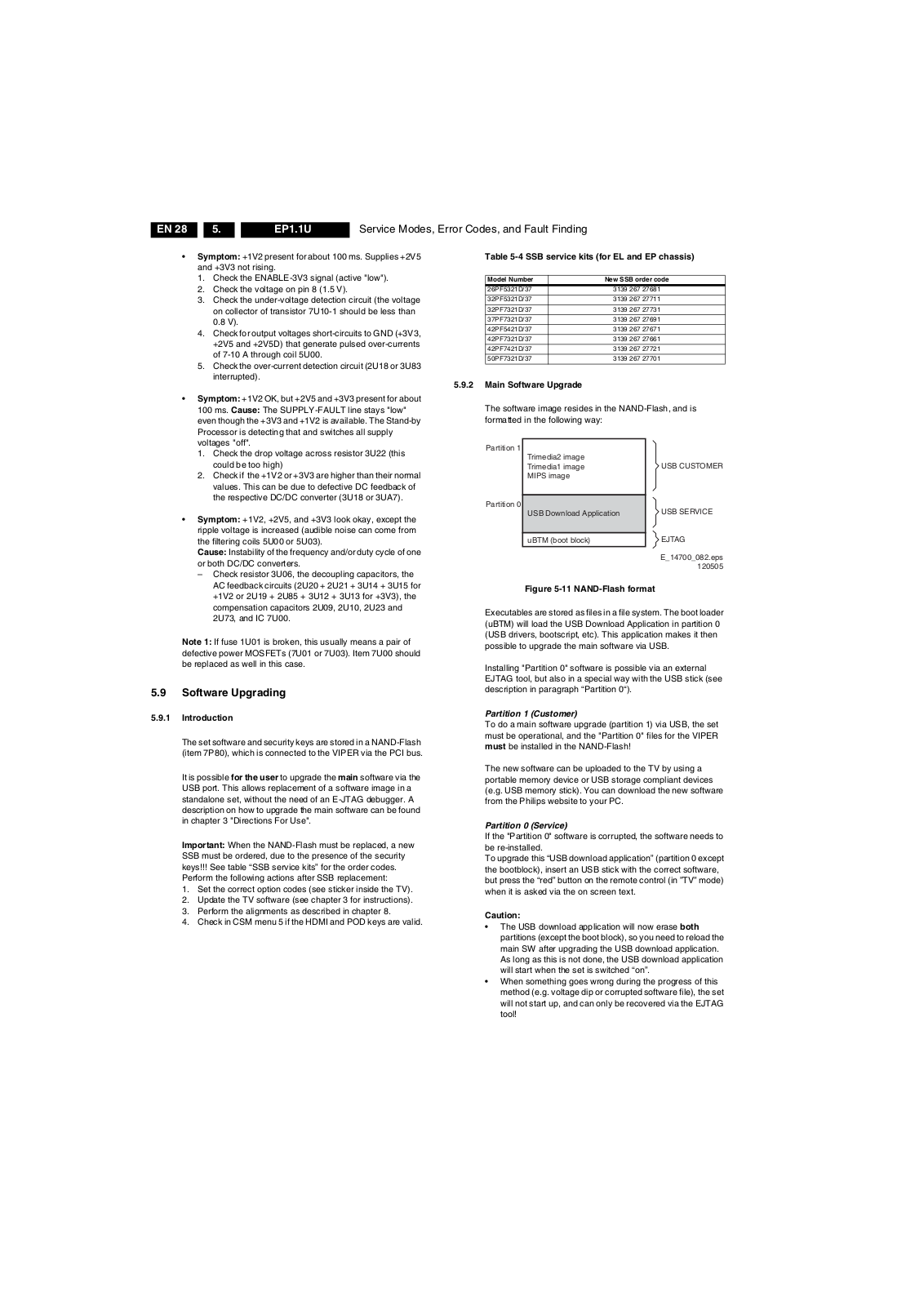
Page 1
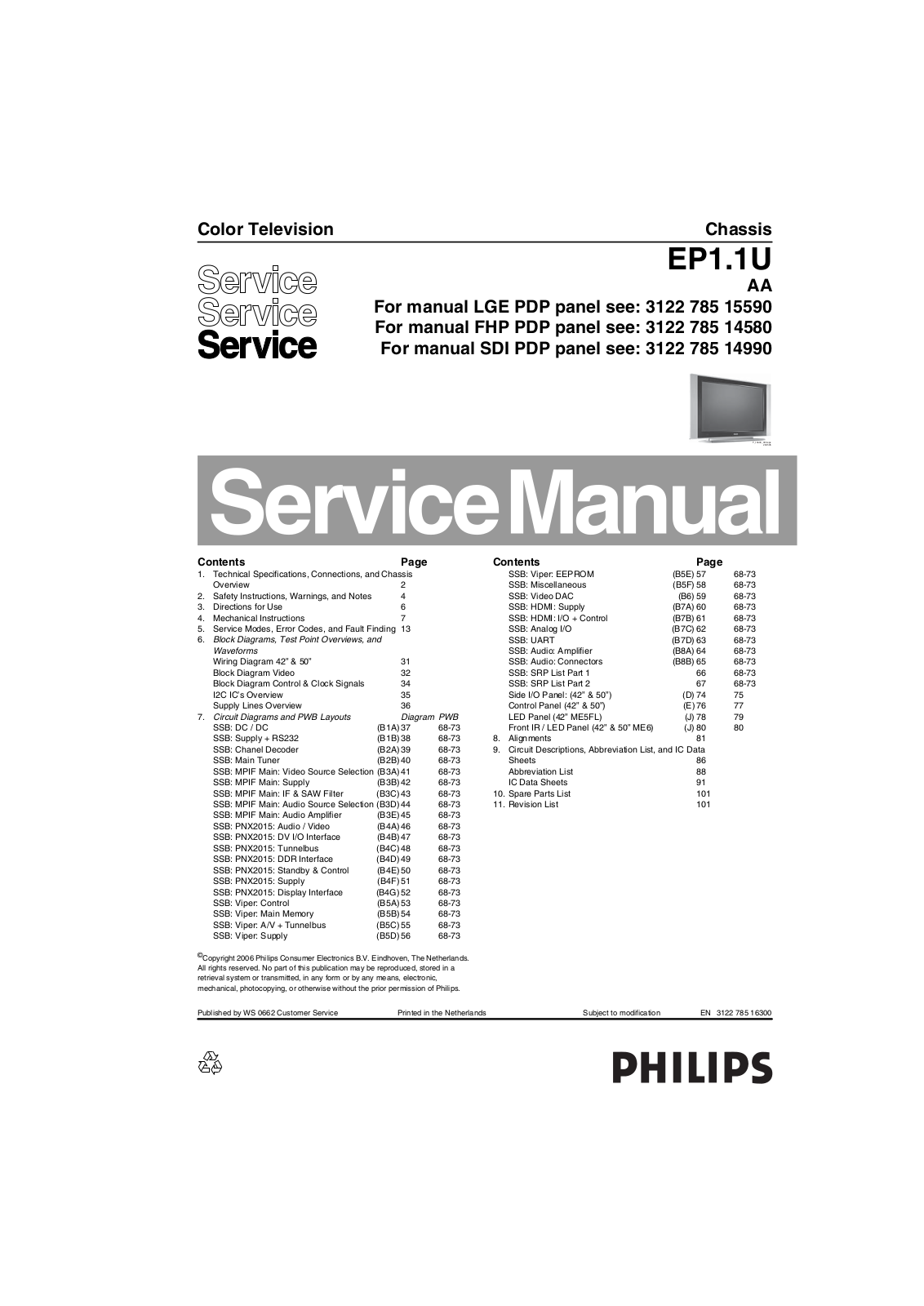
Color Television Chassis
EP1.1U
For manual LGE PDP panel see: 3122 785 15590
For manual FHP PDP panel see: 3122 785 14580
For manual SDI PDP panel see: 3122 785 14990
F_15400_000.eps
200505
Contents Page Contents Page
1. Technical Specifications, Connections, and Chassis Overview 2
2. Safety Instructions, Warnings, and Notes 4
3. Directions for Use 6
4. Mechanical Instructions 7
5. Service Modes, Error Codes, and Fault Finding 13
6. Block Diagrams, Test Point Overviews, and
Waveforms
Wiring Diagram 42” & 50” 31 Block Diagram Video 32 Block Diagram Control & Clock Signals 34 I2C IC’s Overview 35 Supply Lines Overview 36
7. Circuit Diagrams and PWB Layouts Diagram PWB SSB: DC / DC (B1A) 37 68-73 SSB: Supply + RS232 (B1B) 38 68-73 SSB: Chanel Decoder (B2A) 39 68-73 SSB: Main Tuner (B2B) 40 68-73 SSB: MPIF Main: Video Source Selection (B3A) 41 68-73 SSB: MPIF Main: Supply (B3B) 42 68-73 SSB: MPIF Main: IF & SAW Filter (B3C) 43 68-73 SSB: MPIF Main: Audio Source Selection (B3D) 44 68-73 SSB: MPIF Main: Audio Amplifier (B3E) 45 68-73 SSB: PNX2015: Audio / Video (B4A) 46 68-73 SSB: PNX2015: DV I/O Interface (B4B) 47 68-73 SSB: PNX2015: Tunnelbus (B4C) 48 68-73 SSB: PNX2015: DDR Interface (B4D) 49 68-73 SSB: PNX2015: Standby & Control (B4E) 50 68-73 SSB: PNX2015: Supply (B4F) 51 68-73 SSB: PNX2015: Display Interface (B4G)52 68-73 SSB: Viper: Control (B5A) 53 68-73 SSB: Viper: Main Memory (B5B) 54 68-73 SSB: Viper: A/V + Tunnelbus (B5C) 55 68-73 SSB: Viper: Supply (B5D) 56 68-73
©
Copyright 2006 Philips Consumer Electronics B.V. Eindhoven, The Netherlands. All rights reserved. No part of this publication may be reproduced, stored in a retrieval system or transmitted, in any form or by any means, electronic, mechanical, photocopying, or otherwise without the prior permission of Philips.
SSB: Viper: EEPROM (B5E) 57 68-73 SSB: Miscellaneous (B5F) 58 68-73 SSB: Video DAC (B6) 59 68-73 SSB: HDMI: Supply (B7A) 60 68-73 SSB: HDMI: I/O + Control (B7B) 61 68-73 SSB: Analog I/O (B7C) 62 68-73 SSB: UART (B7D) 63 68-73 SSB: Audio: Amplifier (B8A) 64 68-73 SSB: Audio: Connectors (B8B) 65 68-73 SSB: SRP List Part 1 66 68-73 SSB: SRP List Part 2 67 68-73 Side I/O Panel: (42” & 50”) (D) 74 75 Control Panel (42” & 50”) (E) 76 77 LED Panel (42” ME5FL) (J) 78 79 Front IR / LED Panel (42” & 50” ME6) (J) 80 80
8. Alignments 81
9. Circuit Descriptions, Abbreviation List, and IC Data Sheets 86 Abbreviation List 88 IC Data Sheets 91
10. Spare Parts List 101
11. Revision List 101
Published by WS 0662 Customer Service Printed in the Netherlands Subject to modification EN 3122 785 16300
Page 2
EN 2 EP1.1U1.
Technical Specifications, Connections, and Chassis Overview
1. Technical Specifications, Connections, and Chassis Overview
Index of this chapter:
1.1 Technical Specifications
1.2 Connection Overview
1.3 Chassis Overview
Notes:
Some models in this chassis range have a different mechanical construction. The information given here is therefore model specific.
Data below can deviate slightly from the actual situation, due to the different set executions.
Specifications are indicative (subject to change).
1.1 Technical Specifications
1.1.1 Vision
Display type : Plasma (SDI) Screen size : 42” (107 cm), 16:9
Resolution (HxV pixels) : 1024(*3)x768p (42”)
Min. contrast ratio : 10000:1 Min. light output (cd/m
2
) : 1200 (42”)
Viewing angle (HxV degrees) : 160x160 Tuning system : PLL TV Color systems : ATSC
Video playback : NTSC Cable : Unscrambled digital
Tuner bands : VHF, UHF, S, Hyper Supported video formats : 640x480i - 1fH
Supported computer formats : 640x480 @ 60Hz
: 50” (127 cm), 16:9
: 1366(*3)x768p (50”)
: 1300 (52”)
:NTSC
cable - QAM
: 640x480p - 2fH : 1280x720p - 3fH : 1920x1080i - 2fH
: 800x600 @ 60Hz : 1024x768 @ 60Hz : 1366x768 @ 60Hz
1.1.4 Miscellaneous
Power supply:
- Mains voltage (V
) : 110 - 240
AC
- Mains frequency (Hz) : 50/60
Ambient conditions:
- Temperature range (°C) : +5 to +40
- Maximum humidity : 90% R.H.
Power consumption (values are indicative)
- Normal operation (W) : 400 (42”) : 480 (50”)
- Standby (W) : < 1
Dimensions (WxHxD in inch) : 49.2x27.1x4.4 (42”)
: 56.1x30.9x4.4 (50”)
Weight, stand included (kg/lbs) : 40/87.6 (42”)
: 57/125.6 (50”)
1.2 Connection Overview
Note: The following connector color abbreviations are used
(acc. to DIN/IEC 757): Bk= Black, Bu= Blue, Gn= Green, Gy= Grey, Rd= Red, Wh= White, and Ye= Yellow.
1.2.1 Side Connections
1.1.2 Sound
Sound systems : AV Stereo
Maximum power (W
) : 2 x 15 W
RMS
1.1.3 Multimedia
Supported file formats : JPEG
USB input : USB1.1
:BTSC : Dolby Digital (AC3)
:MP3 : Slideshow (.alb)
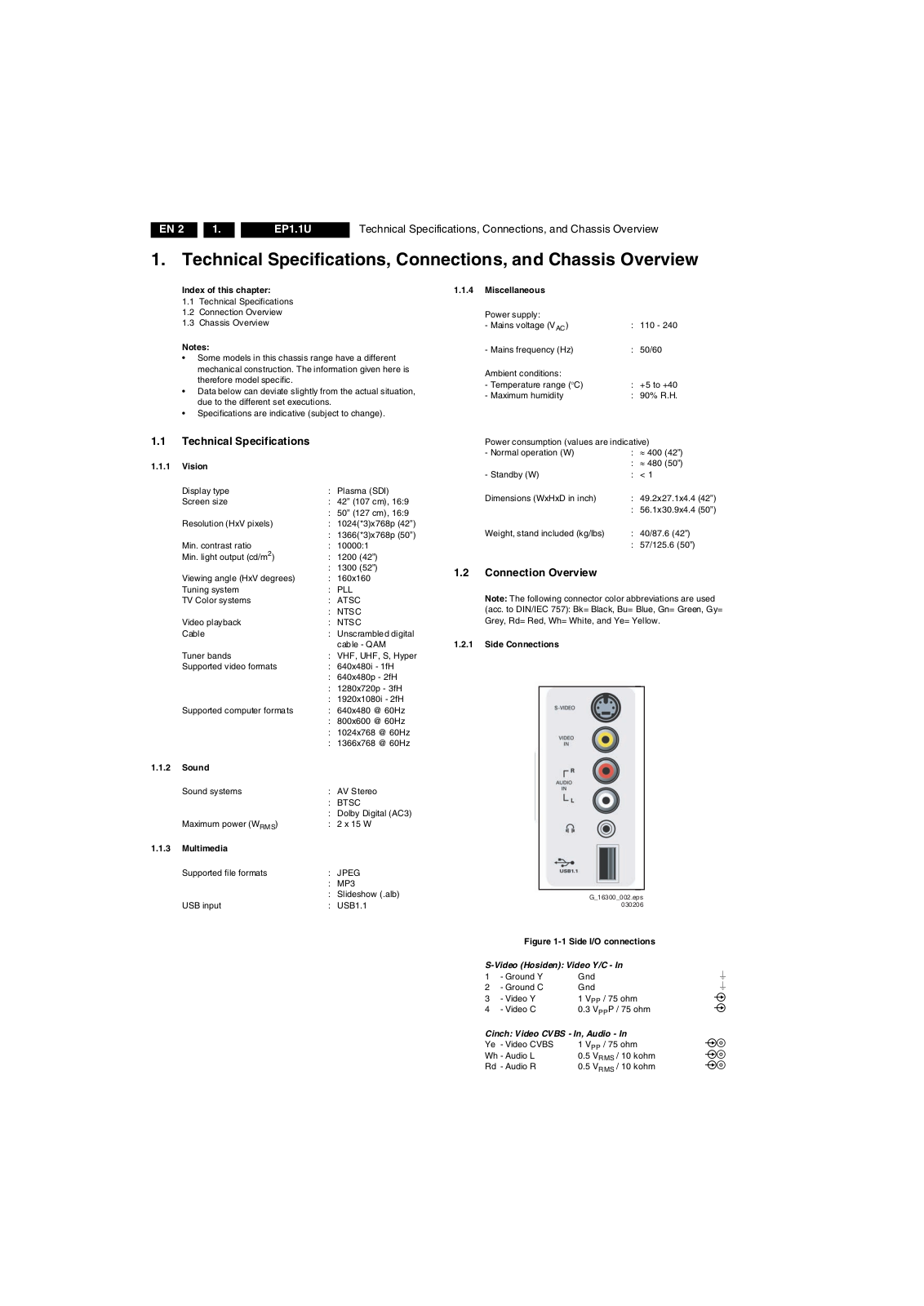
G_16300_002.eps
030206
Figure 1-1 Side I/O connections
S-Video (Hosiden): Video Y/C - In
1 -Ground Y Gnd H 2 -Ground C Gnd H 3 -Video Y 1 V 4 -Video C 0.3 V
/ 75 ohm j
PP
P / 75 ohm j
PP
Cinch: Video CVBS - In, Audio - In
Ye - Video CVBS 1 V Wh - Audio L 0.5 V Rd - Audio R 0.5 V
/ 75 ohm jq
PP
/ 10 kohm jq
RMS
/ 10 kohm jq
RMS
Page 3
Technical Specifications, Connections, and Chassis Overview
EN 3EP1.1U 1.
Mini Jack: Audio Headphone - Out
Bk - Headphone 32 - 600 ohm / 10 mW ot
USB1.1
1234
E_06532_022.eps
300904
Figure 1-2 USB (type A)
1-+5V k 2 -Data (-) jk 3 -Data (+) jk 4 -Ground Gnd H
1.2.2 Rear Connections (under side)
Figure 1-3 Rear connections (under side)
AV3 S-Video (Hosiden): Video Y/C - In
1 -Ground Y Gnd H 2 -Ground C Gnd H 3 -Video Y 1 V 4 -Video C 0.3 V
/ 75 ohm j
PP
P / 75 ohm j
PP
AV3 Cinch: Video CVBS - In, Audio - In
Ye - Video CVBS 1 V Wh - Audio L 0.5 V Rd - Audio R 0.5 V
/ 75 ohm jq
PP
/ 10 kohm jq
RMS
/ 10 kohm jq
RMS
G_16290_068.eps
300106
Rd - Video Pr 0.7 V Wh - Audio L 0.5 V Rd - Audio R 0.5 V
/ 75 ohm jq
PP
/ 10 kohm jq
RMS
/ 10 kohm jq
RMS
AV1 Cinch: Video YPbPr - In, Audio - In
Gn - Video Y 1 V Bu - Video Pb 0.7 V Rd - Video Pr 0.7 V Wh - Audio L 0.5 V Rd - Audio R 0.5 V
/ 75 ohm jq
PP
/ 75 ohm jq
PP
/ 75 ohm jq
PP
/ 10 kohm jq
RMS
/ 10 kohm jq
RMS
HDMI 1 & 2: Digital Video, Digital Audio - In
19
18 2
1
E_06532_017.eps
250505
Figure 1-4 HDMI (type A) connector
1 -D2+ Data channel j 2 -Shield Gnd H 3 -D2- Data channel j 4 -D1+ Data channel j 5 -Shield Gnd H 6 -D1- Data channel j 7 -D0+ Data channel j 8 -Shield Gnd H 9 -D0- Data channel j 10 - CLK+ Data channel j 11 - Shield Gnd H 12 - CLK- Data channel j 13 - n.c. 14 - n.c. 15 - DDC_SCL DDC clock j 16 - DDC_SDA DDC data jk 17 - Ground Gnd H 18 - +5V j 19 - HPD Hot Plug Detect j 20 - Ground Gnd H
AV2 Cinch: Video YPbPr - In, Audio - In
Gn - Video Y 1 V Bu - Video Pb 0.7 V
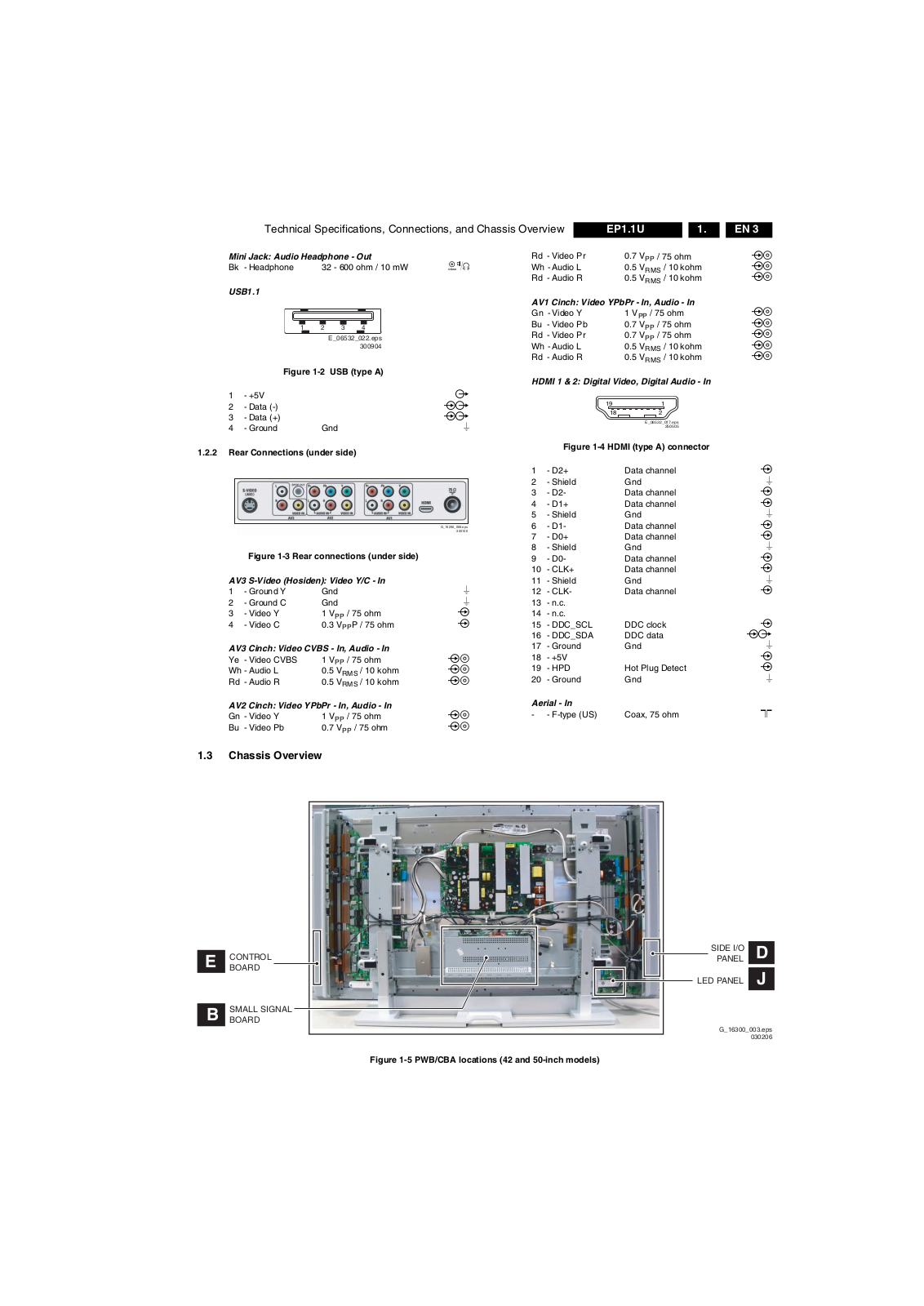
1.3 Chassis Overview
CONTROL
E
BOARD
SMALL SIGNAL
B
BOARD
/ 75 ohm jq
PP
/ 75 ohm jq
PP
Aerial - In
- - F-type (US) Coax, 75 ohm D
SIDE I/O
PANEL
LED PANEL
G_16300_003.eps
D
J
030206
Figure 1-5 PWB/CBA locations (42 and 50-inch models)
Page 4
EN 4 EP1.1U2.
Safety Instructions, Warnings, and Notes
2. Safety Instructions, Warnings, and Notes
Index of this chapter:
2.1 Safety Instructions
2.2 Warnings
2.3 Notes
2.1 Safety Instructions
Safety regulations require that during a repair:
Connect the set to the Mains/AC Power via an isolation transformer (> 800 VA).
Replace safety components, indicated by the symbol h, only by components identical to the original ones. Any other component substitution (other than original type) may increase risk of fire or electrical shock hazard.
Safety regulations require that after a repair, the set must be returned in its original condition. Pay in particular attention to the following points:
Route the wire trees correctly and fix them with the mounted cable clamps.
Check the insulation of the Mains/AC Power lead for external damage.
Check the strain relief of the Mains/AC Power cord for proper function.
Check the electrical DC resistance between the Mains/AC Power plug and the secondary side (only for sets which have a Mains/AC Power isolated power supply):
1. Unplug the Mains/AC Power cord and connect a wire
between the two pins of the Mains/AC Power plug.
2. Set the Mains/AC Power switch to the "on" position
(keep the Mains/AC Power cord unplugged!).
3. Measure the resistance value between the pins of the
Mains/AC Power plug and the metal shielding of the tuner or the aerial connection on the set. The reading should be between 4.5 Mohm and 12 Mohm.
4. Switch "off" the set, and remove the wire between the
two pins of the Mains/AC Power plug.
Check the cabinet for defects, to avoid touching of any inner parts by the customer.
2.2 Warnings
All ICs and many other semiconductors are susceptible to electrostatic discharges (ESD w). Careless handling during repair can reduce life drastically. Make sure that, during repair, you are connected with the same potential as the mass of the set by a wristband with resistance. Keep components and tools also at this same potential. Available ESD protection equipment: – Complete kit ESD3 (small tablemat, wristband,
connection box, extension cable and earth cable) 4822 310 10671.
– Wristband tester 4822 344 13999.
Be careful during measurements in the high voltage section.
Never replace modules or other components while the unit is switched "on".
When you align the set, use plastic rather than metal tools. This will prevent any short circuits and the danger of a circuit becoming unstable.
2.3 Notes
2.3.1 General
Measure the voltages and waveforms with regard to the chassis (= tuner) ground (H), or hot ground (I), depending on the tested area of circuitry. The voltages and waveforms shown in the diagrams are indicative. Measure them in the
Service Default Mode (see chapter 5) with a color bar signal and stereo sound (L: 3 kHz, R: 1 kHz unless stated otherwise) and picture carrier at 475.25 MHz for PAL, or
61.25 MHz for NTSC (channel 3).
Where necessary, measure the waveforms and voltages
with (D) and without (E) aerial signal. Measure the voltages in the power supply section both in normal operation (G) and in stand-by (F). These values are indicated by means of the appropriate symbols.
The semiconductors indicated in the circuit diagram and in the parts lists, are interchangeable per position with the semiconductors in the unit, irrespective of the type indication on these semiconductors.
Manufactured under license from Dolby Laboratories. “Dolby”, “Pro Logic” and the “double-D symbol”, are trademarks of Dolby Laboratories.
2.3.2 Schematic Notes
All resistor values are in ohms and the value multiplier is often used to indicate the decimal point location (e.g. 2K2 indicates 2.2 kohm).
Resistor values with no multiplier may be indicated with either an "E" or an "R" (e.g. 220E or 220R indicates 220 ohm).
All capacitor values are given in micro-farads (µ= x10 nano-farads (n= x10
Capacitor values may also use the value multiplier as the decimal point indication (e.g. 2p2 indicates 2.2 pF).
An "asterisk" (*) indicates component usage varies. Refer to the diversity tables for the correct values.
The correct component values are listed in the Spare Parts List. Therefore, always check this list when there is any doubt.
2.3.3 Rework on BGA (Ball Grid Array) ICs
General
Although (LF)BGA assembly yields are very high, there may still be a requirement for component rework. By rework, we mean the process of removing the component from the PWB and replacing it with a new component. If an (LF)BGA is removed from a PWB, the solder balls of the component are deformed drastically so the removed (LF)BGA has to be discarded.
Device Removal
As is the case with any component that, it is essential when removing an (LF)BGA, the board, tracks, solder lands, or surrounding components are not damaged. To remove an (LF)BGA, the board must be uniformly heated to a temperature close to the reflow soldering temperature. A uniform temperature reduces the chance of warping the PWB. To do this, we recommend that the board is heated until it is certain that all the joints are molten. Then carefully pull the component off the board with a vacuum nozzle. For the appropriate temperature profiles, see the IC data sheet.
Area Preparation
When the component has been removed, the vacant IC area must be cleaned before replacing the (LF)BGA. Removing an IC often leaves varying amounts of solder on the mounting lands. This excessive solder can be removed with either a solder sucker or solder wick. The remaining flux can be removed with a brush and cleaning agent. After the board is properly cleaned and inspected, apply flux on the solder lands and on the connection balls of the (LF)BGA. Note: Do not apply solder paste, as this has shown to result in problems during re-soldering.
-9
), or pico-farads (p= x10
-12
-6
),
).
Page 5
Safety Instructions, Warnings, and Notes
EN 5EP1.1U 2.
Device Replacement
The last step in the repair process is to solder the new component on the board. Ideally, the (LF)BGA should be aligned under a microscope or magnifying glass. If this is not possible, try to align the (LF)BGA with any board markers. So as not to damage neighboring components, it may be necessary to reduce some temperatures and times.
More Information
For more information on how to handle BGA devices, visit this URL: www.atyourservice.ce.philips.com (needs subscription, not available for all regions). After login, select “Magazine”, then go to “Repair Downloads”. Here you will find Information on how to deal with BGA-ICs.
2.3.4 Lead Free Solder
Philips CE is producing lead-free sets (PBF) from 1.1.2005 onwards.
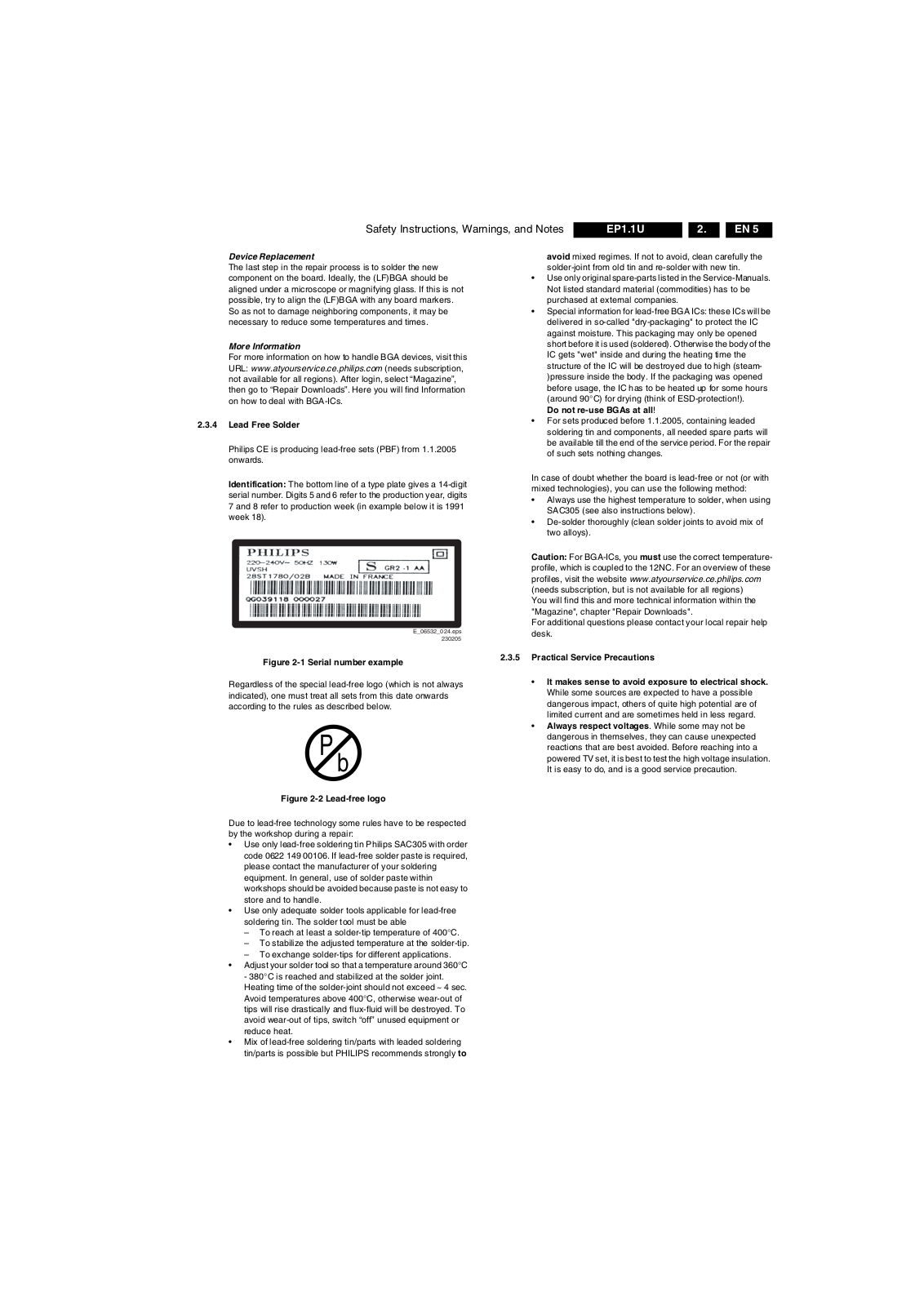
Identification: The bottom line of a type plate gives a 14-digit serial number. Digits 5 and 6 refer to the production year, digits 7 and 8 refer to production week (in example below it is 1991 week 18).
E_06532_024.eps
230205
avoid mixed regimes. If not to avoid, clean carefully the solder-joint from old tin and re-solder with new tin.
Use only original spare-parts listed in the Service-Manuals. Not listed standard material (commodities) has to be purchased at external companies.
Special information for lead-free BGA ICs: these ICs will be delivered in so-called "dry-packaging" to protect the IC against moisture. This packaging may only be opened short before it is used (soldered). Otherwise the body of the IC gets "wet" inside and during the heating time the structure of the IC will be destroyed due to high (steam­)pressure inside the body. If the packaging was opened before usage, the IC has to be heated up for some hours (around 90°C) for drying (think of ESD-protection!). Do not re-use BGAs at all!
For sets produced before 1.1.2005, containing leaded soldering tin and components, all needed spare parts will be available till the end of the service period. For the repair of such sets nothing changes.
In case of doubt whether the board is lead-free or not (or with mixed technologies), you can use the following method:
Always use the highest temperature to solder, when using SAC305 (see also instructions below).
De-solder thoroughly (clean solder joints to avoid mix of two alloys).
Caution: For BGA-ICs, you must use the correct temperature­profile, which is coupled to the 12NC. For an overview of these profiles, visit the website www.atyourservice.ce.philips.com (needs subscription, but is not available for all regions) You will find this and more technical information within the "Magazine", chapter "Repair Downloads". For additional questions please contact your local repair help desk.
Figure 2-1 Serial number example
Regardless of the special lead-free logo (which is not always indicated), one must treat all sets from this date onwards according to the rules as described below.
P
b
Figure 2-2 Lead-free logo
Due to lead-free technology some rules have to be respected by the workshop during a repair:
Use only lead-free soldering tin Philips SAC305 with order code 0622 149 00106. If lead-free solder paste is required, please contact the manufacturer of your soldering equipment. In general, use of solder paste within workshops should be avoided because paste is not easy to store and to handle.
Use only adequate solder tools applicable for lead-free soldering tin. The solder tool must be able – To reach at least a solder-tip temperature of 400°C. – To stabilize the adjusted temperature at the solder-tip. – To exchange solder-tips for different applications.
Adjust your solder tool so that a temperature around 360°C
- 380°C is reached and stabilized at the solder joint. Heating time of the solder-joint should not exceed ~ 4 sec. Avoid temperatures above 400°C, otherwise wear-out of tips will rise drastically and flux-fluid will be destroyed. To avoid wear-out of tips, switch “off” unused equipment or reduce heat.
Mix of lead-free soldering tin/parts with leaded soldering tin/parts is possible but PHILIPS recommends strongly to
2.3.5 Practical Service Precautions
It makes sense to avoid exposure to electrical shock. While some sources are expected to have a possible dangerous impact, others of quite high potential are of limited current and are sometimes held in less regard.
Always respect voltages. While some may not be dangerous in themselves, they can cause unexpected reactions that are best avoided. Before reaching into a powered TV set, it is best to test the high voltage insulation. It is easy to do, and is a good service precaution.
Page 6
EN 6 EP1.1U3.
3. Directions for Use
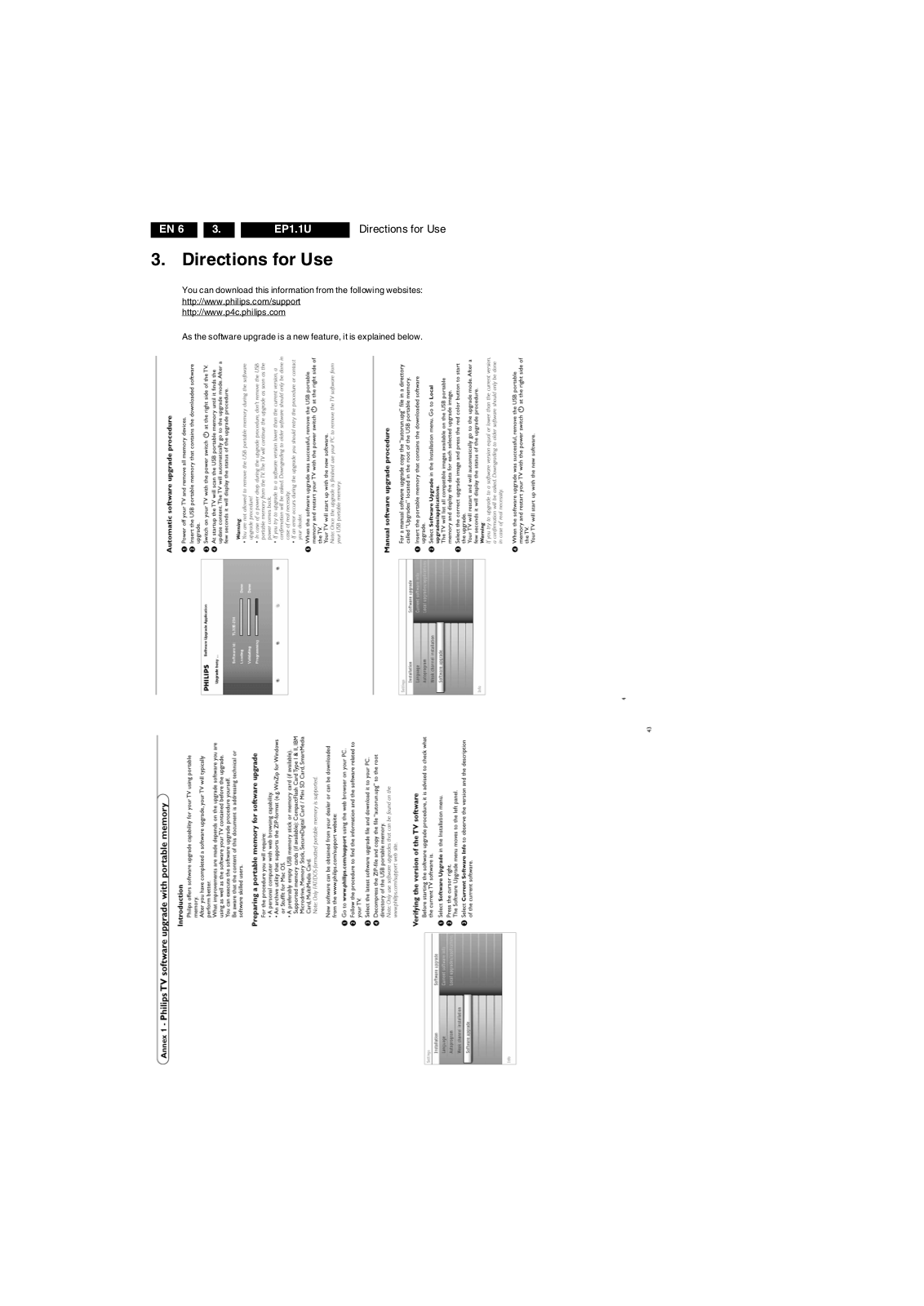
You can download this information from the following websites: http://www.philips.com/support http://www.p4c.philips.com
As the software upgrade is a new feature, it is explained below.
Directions for Use
Page 7
4. Mechanical Instructions
Mechanical Instructions
EN 7EP1.1U 4.
Index of this chapter:
4.1 Cable Dressing
4.2 Service Positions
4.3 Assy/Panel Removal
4.4 Set Re-assembly
Notes:
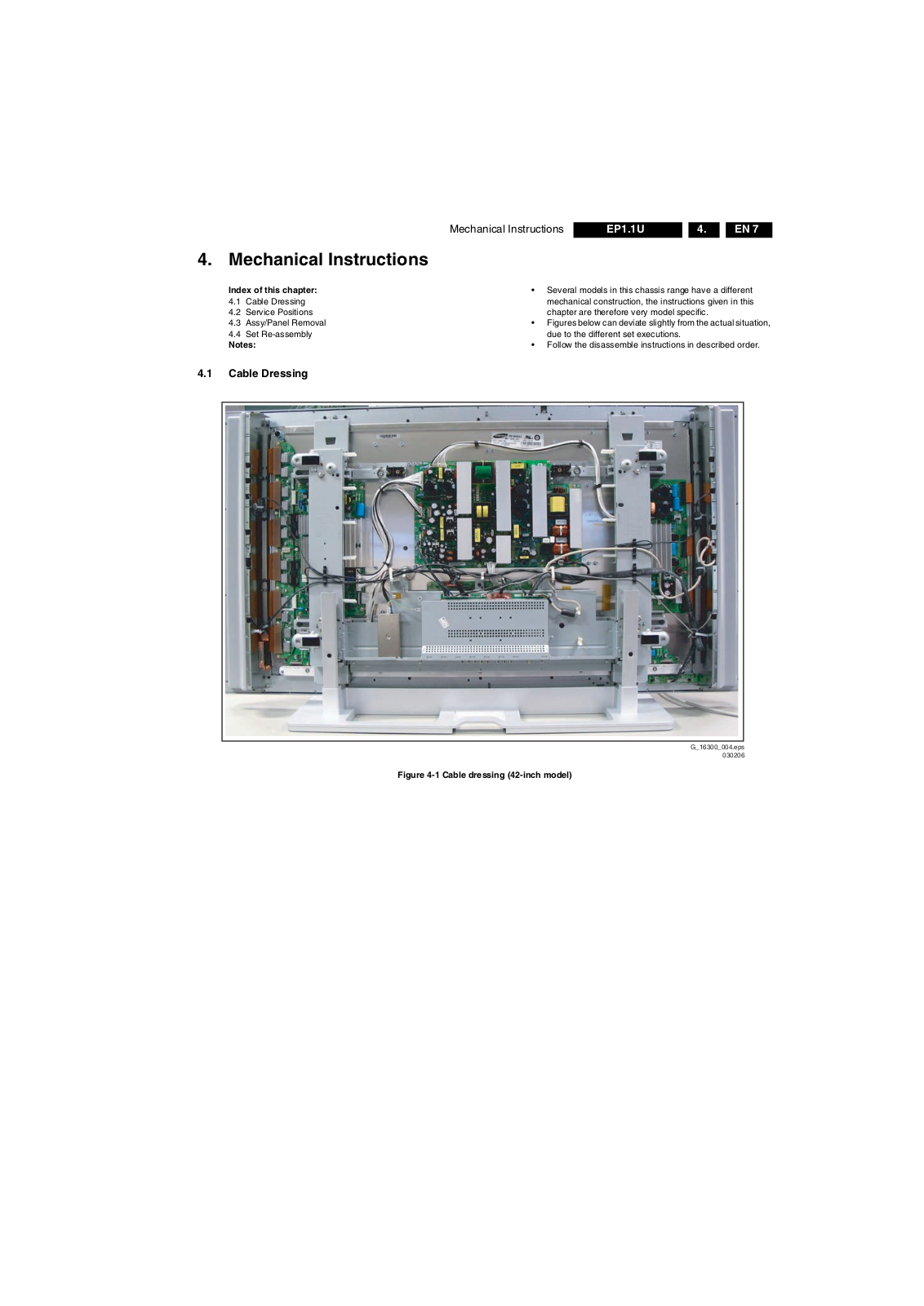
4.1 Cable Dressing
Several models in this chassis range have a different mechanical construction, the instructions given in this chapter are therefore very model specific.
Figures below can deviate slightly from the actual situation, due to the different set executions.
Follow the disassemble instructions in described order.
Figure 4-1 Cable dressing (42-inch model)
G_16300_004.eps
030206
Page 8
EN 8 EP1.1U4.
Mechanical Instructions
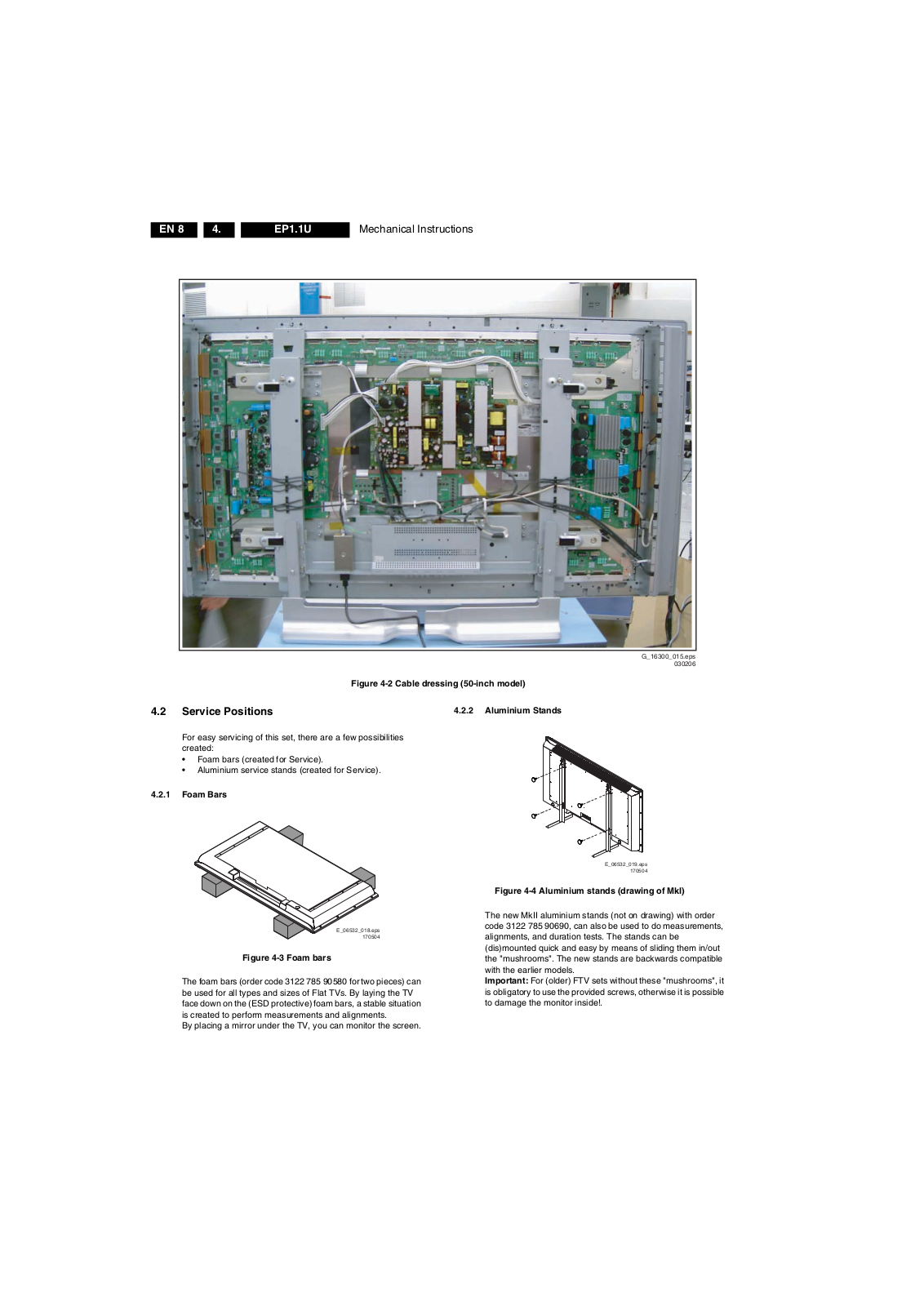
Figure 4-2 Cable dressing (50-inch model)
4.2 Service Positions
For easy servicing of this set, there are a few possibilities created:
Foam bars (created for Service).
Aluminium service stands (created for Service).
4.2.1 Foam Bars
E_06532_018.eps
Figure 4-3 Foam bars
The foam bars (order code 3122 785 90580 for two pieces) can be used for all types and sizes of Flat TVs. By laying the TV face down on the (ESD protective) foam bars, a stable situation is created to perform measurements and alignments. By placing a mirror under the TV, you can monitor the screen.
170504
G_16300_015.eps
4.2.2 Aluminium Stands
E_06532_019.eps
170504
Figure 4-4 Aluminium stands (drawing of MkI)
The new MkII aluminium stands (not on drawing) with order code 3122 785 90690, can also be used to do measurements, alignments, and duration tests. The stands can be (dis)mounted quick and easy by means of sliding them in/out the "mushrooms". The new stands are backwards compatible with the earlier models. Important: For (older) FTV sets without these "mushrooms", it is obligatory to use the provided screws, otherwise it is possible to damage the monitor inside!.
030206
Page 9
Mechanical Instructions
EN 9EP1.1U 4.
4.3 Assy/Panel Removal
4.3.1 Metal Rear Cover
Caution: Disconnect the Mains/AC Power cord before you
remove the rear cover!
1. Place the TV set upside down on a table top, using the foam bars (see part "Foam Bars"). Caution: do not put pressure on the display, but let the monitor lean on the speakers or the Front cover.
2. Remove all T10 screws around the edges of the metal rear cover: “parker” screws around the outer rim, “tapping” screws around the connector plate.
3. Remove the four "mushrooms" from the rear cover.
4. Lift the metal rear cover from the set. Make sure that wires and flat foils are not damaged.
4.3.2 Speaker Compartment Cover
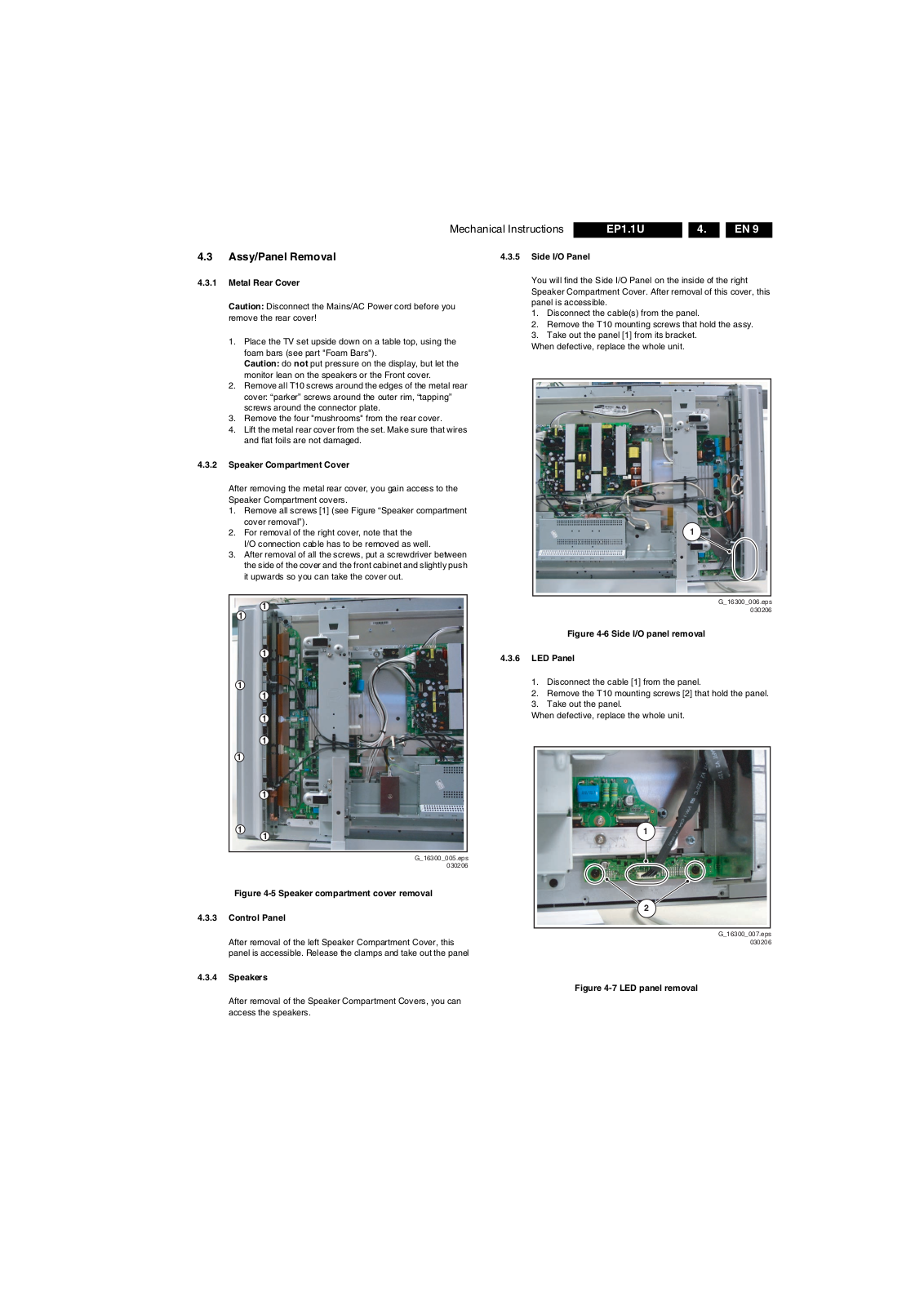
After removing the metal rear cover, you gain access to the Speaker Compartment covers.
1. Remove all screws [1] (see Figure “Speaker compartment cover removal”).
2. For removal of the right cover, note that the I/O connection cable has to be removed as well.
3. After removal of all the screws, put a screwdriver between the side of the cover and the front cabinet and slightly push it upwards so you can take the cover out.
4.3.5 Side I/O Panel
You will find the Side I/O Panel on the inside of the right Speaker Compartment Cover. After removal of this cover, this panel is accessible.
1. Disconnect the cable(s) from the panel.
2. Remove the T10 mounting screws that hold the assy.
3. Take out the panel [1] from its bracket. When defective, replace the whole unit.
1
1
1
1
1
1
1
1
1
1
1
1
Figure 4-5 Speaker compartment cover removal
4.3.3 Control Panel
After removal of the left Speaker Compartment Cover, this panel is accessible. Release the clamps and take out the panel
G_16300_005.eps
030206
Figure 4-6 Side I/O panel removal
4.3.6 LED Panel
1. Disconnect the cable [1] from the panel.
2. Remove the T10 mounting screws [2] that hold the panel.
3. Take out the panel. When defective, replace the whole unit.
1
2
G_16300_006.eps
030206
G_16300_007.eps
030206
4.3.4 Speakers
After removal of the Speaker Compartment Covers, you can access the speakers.
Figure 4-7 LED panel removal
Page 10
EN 10 EP1.1U4.
4.3.7 Small Signal Board (SSB)
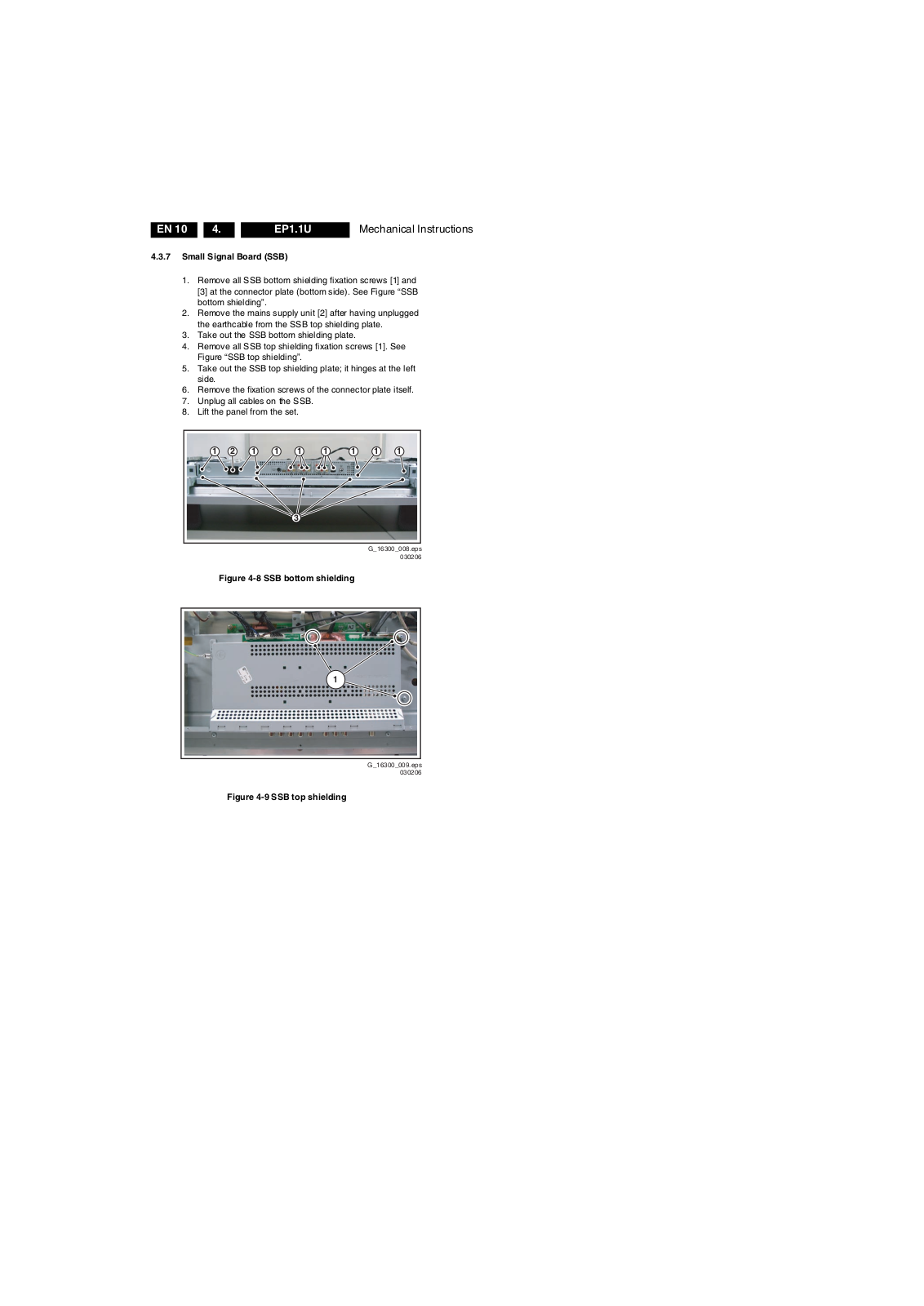
1. Remove all SSB bottom shielding fixation screws [1] and [3] at the connector plate (bottom side). See Figure “SSB bottom shielding”.
2. Remove the mains supply unit [2] after having unplugged the earthcable from the SSB top shielding plate.
3. Take out the SSB bottom shielding plate.
4. Remove all SSB top shielding fixation screws [1]. See Figure “SSB top shielding”.
5. Take out the SSB top shielding plate; it hinges at the left side.
6. Remove the fixation screws of the connector plate itself.
7. Unplug all cables on the SSB.
8. Lift the panel from the set.
1
21 1 1 1 11
1
3
Mechanical Instructions
Figure 4-8 SSB bottom shielding
1
Figure 4-9 SSB top shielding
G_16300_008.eps
030206
G_16300_009.eps
030206
Page 11
Mechanical Instructions
EN 11EP1.1U 4.
4.3.8 Plasma Display Panel / Glass Plate
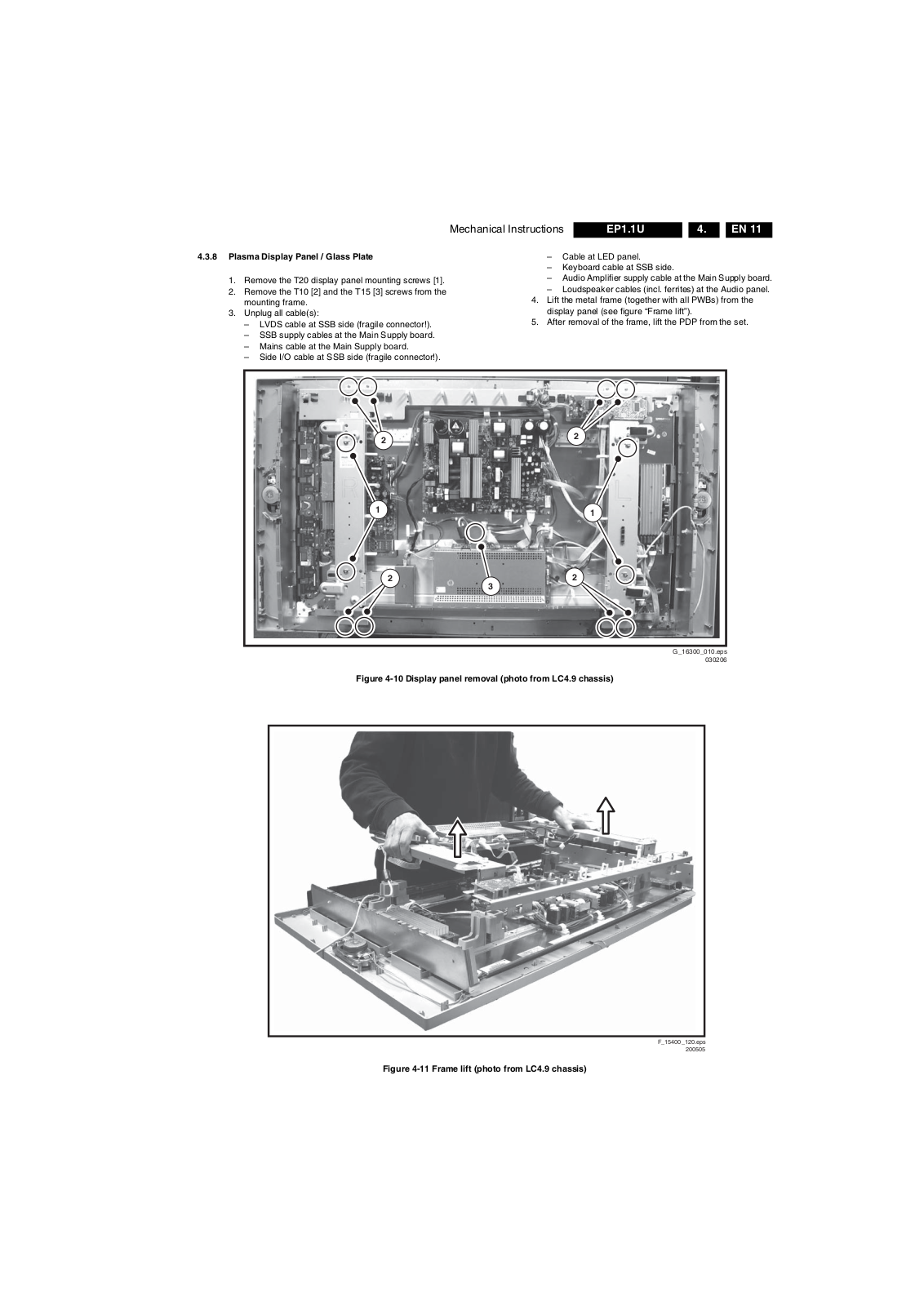
1. Remove the T20 display panel mounting screws [1].
2. Remove the T10 [2] and the T15 [3] screws from the mounting frame.
3. Unplug all cable(s): – LVDS cable at SSB side (fragile connector!). – SSB supply cables at the Main Supply board. – Mains cable at the Main Supply board. – Side I/O cable at SSB side (fragile connector!).
1
– Cable at LED panel. – Keyboard cable at SSB side. – Audio Amplifier supply cable at the Main Supply board. – Loudspeaker cables (incl. ferrites) at the Audio panel.
4. Lift the metal frame (together with all PWBs) from the display panel (see figure “Frame lift”).
5. After removal of the frame, lift the PDP from the set.
2
2
1
2
3
2
Figure 4-10 Display panel removal (photo from LC4.9 chassis)
G_16300_010.eps
030206
Figure 4-11 Frame lift (photo from LC4.9 chassis)
F_15400_120.eps
200505
Page 12
EN 12 EP1.1U4.
4.3.9 PDP Glass Plate
In order to remove/exchange the PDP glass plate:
1. Remove the PDP as described earlier.
2. Remove the LED panel [2] as described previously in this chapter.
3. Remove the T10 screws [1] from the mounting frame. See Figure “Glass plate removal (photo from LC4.9 chassis)”.
4. After removal of the frame, you can lift the glass plate from the set.
Mechanical Instructions
1
Figure 4-12 Glass plate removal (photo from LC4.9 chassis)
4.4 Set Re-assembly
To re-assemble the whole set, execute all processes in reverse order.
Notes:
While re-assembling, make sure that all cables are placed and connected in their original position. See figure "Cable dressing".
Pay special attention not to damage the EMC foams on the SSB shields. Ensure that EMC foams are mounted correctly.
2
G_16300_011.eps
030206
Page 13
Service Modes, Error Codes, and Fault Finding
5. Service Modes, Error Codes, and Fault Finding
EN 13EP1.1U 5.
Index of this chapter:
5.1 Test Points
5.2 Service Modes
5.3 Stepwise Start-up
5.4 Service Tools
5.5 Error Codes
5.6 The Blinking LED Procedure
5.7 Protections
5.8 Fault Finding and Repair Tips
5.9 Software Upgrading
5.1 Test Points
As most signals are digital, it will be almost impossible to measure waveforms with a standard oscilloscope. Therefore, waveforms are not given in this manual. Several key ICs are capable of generating test patterns, which can be controlled via ComPair. In this way it is possible to determine which part is defective.
Perform measurements under the following conditions:
Service Default Mode.
Video: Color bar signal.
Audio: 3 kHz left, 1 kHz right.
5.2 Service Modes
Service Default Mode (SDM) and Service Alignment Mode (SAM) offer several features for the service technician, while the Customer Service Mode (CSM) is used for communication between a Customer Helpdesk and a customer.
There is also the option of using ComPair, a hardware interface between a computer (see requirements below) and the TV chassis. It offers the ability of structured troubleshooting, test pattern generation, error code reading, software version readout, and software upgrading.
Minimum requirements for ComPair: a Pentium processor, Windows 95/98, and a CD-ROM drive (see also paragraph “ComPair”).
in the channel map and could be different from the one corresponding to the physical channel 3.
All picture settings at 50% (brightness, color, contrast).
All sound settings at 50%, except volume at 25%.
All service-unfriendly modes (if present) are disabled, like: – (Sleep) timer. – Child/parental lock. – Picture mute (blue mute or black mute). – Automatic volume levelling (AVL). – Auto switch "off" (when no video signal was received
for 10 minutes). – Skip/blank of non-favorite pre-sets. – Smart modes. – Auto store of personal presets. – Auto user menu time-out.
How to Activate SDM
Use one of the following methods:
Use the standard RC-transmitter and key in the code “062596”, directly followed by the “MENU” button. Note: It is possible that, together with the SDM, the main menu will appear. To switch it "off", push the “MENU” button again.
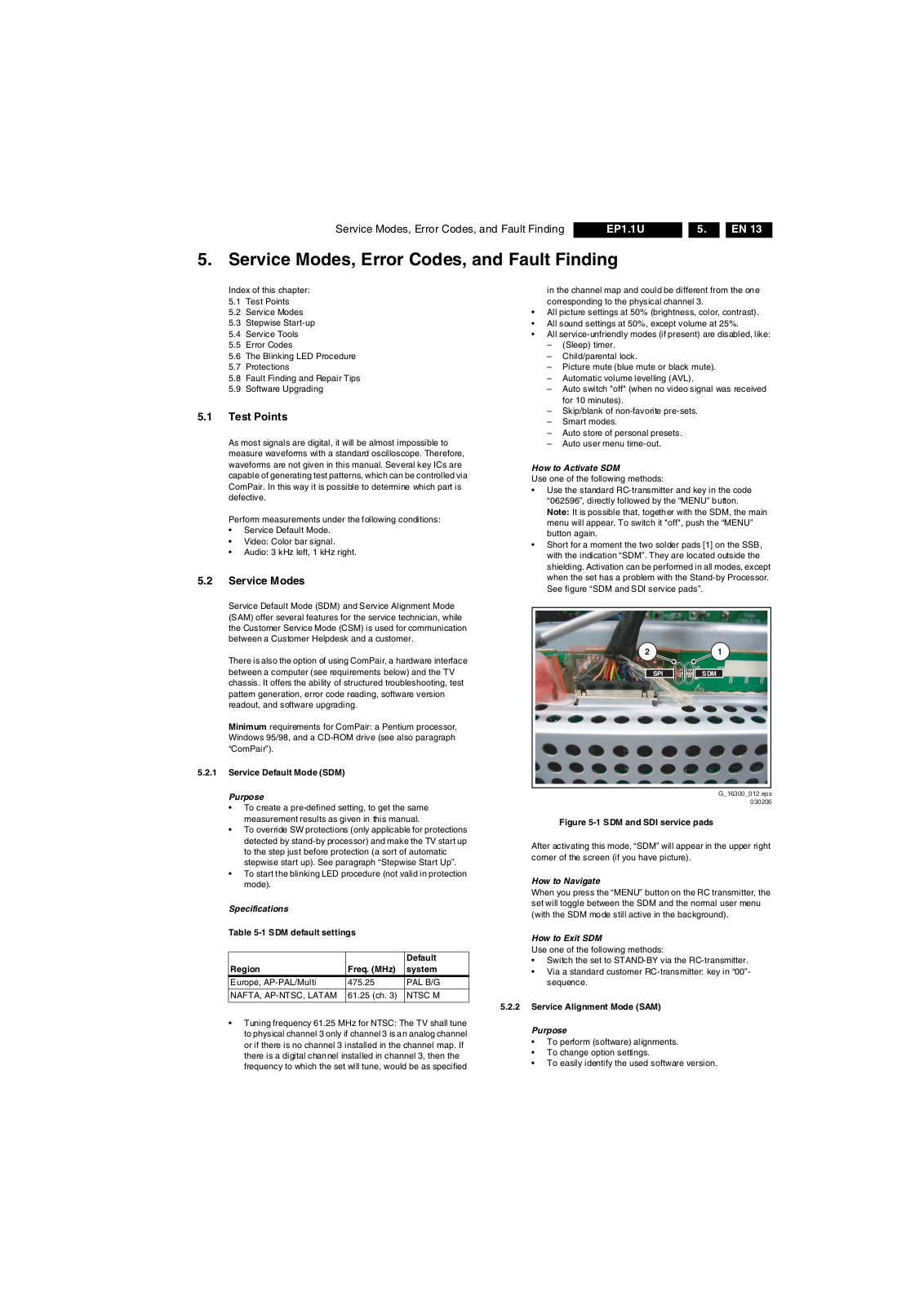
Short for a moment the two solder pads [1] on the SSB, with the indication “SDM”. They are located outside the shielding. Activation can be performed in all modes, except when the set has a problem with the Stand-by Processor. See figure “SDM and SDI service pads”.
12
SDMSPI
5.2.1 Service Default Mode (SDM)
Purpose
To create a pre-defined setting, to get the same measurement results as given in this manual.
To override SW protections (only applicable for protections detected by stand-by processor) and make the TV start up to the step just before protection (a sort of automatic stepwise start up). See paragraph “Stepwise Start Up”.
To start the blinking LED procedure (not valid in protection mode).
Specifications
Table 5-1 SDM default settings
Region Freq. (MHz)
Europe, AP-PAL/Multi 475.25 PAL B/G
NAFTA, AP-NTSC, LATAM 61.25 (ch. 3) NTSC M
Tuning frequency 61.25 MHz for NTSC: The TV shall tune to physical channel 3 only if channel 3 is an analog channel or if there is no channel 3 installed in the channel map. If there is a digital channel installed in channel 3, then the frequency to which the set will tune, would be as specified
Default system
Figure 5-1 SDM and SDI service pads
After activating this mode, “SDM” will appear in the upper right corner of the screen (if you have picture).
How to Navigate
When you press the “MENU” button on the RC transmitter, the set will toggle between the SDM and the normal user menu (with the SDM mode still active in the background).
How to Exit SDM
Use one of the following methods:
Switch the set to STAND-BY via the RC-transmitter.
Via a standard customer RC-transmitter: key in “00”­sequence.
5.2.2 Service Alignment Mode (SAM)
Purpose
To perform (software) alignments.
To change option settings.
To easily identify the used software version.
G_16300_012.eps
030206
Page 14
EN 14 EP1.1U5.
Service Modes, Error Codes, and Fault Finding
To view operation hours.
To display (or clear) the error code buffer.
How to Activate SAM
Via a standard RC transmitter: key in the code “062596” directly followed by the “INFO” button. After activating SAM with this method a service warning will appear on the screen, you can continue by pressing the red button on the RC.
Contents of SAM:
Hardware Info.A. VIPER SW Version. Displays the software version
of the VIPER software (main software) (example: EP23U-1.2.3.4_12345 = AAAAB_X.Y.W.Z_NNNNN).
AAAA= the chassis name.
B= the region: A= AP, E= EU, L= Latam, U = US.
X.Y.W.Z= the software version, where X is the main version number (different numbers are not compatible with one another) and Y is the sub version number (a higher number is always compatible with a lower number). The last two digits are used for development reasons only, so they will always be zero in official releases.
NNNNN= last five digits of 12nc code of the software.
B. SBY PROC Version. Displays the software version
of the stand-by processor.
C. Production Code. Displays the production code of
the TV, this is the serial number as printed on the back of the TV set. Note that if an NVM is replaced or is initialized after corruption, this production code has to be re-written to NVM. ComPair will foresee in a possibility to do this.
Operation Hours. Displays the accumulated total of operation hours (not the stand-by hours). Every time the TV is switched "on/off", 0.5 hours is added to this number.
Errors. (Followed by maximal 10 errors). The most recent error is displayed at the upper left (for an error explanation see paragraph “Error Codes”).
Defective Module. Here the module that generates the error is displayed. If there are multiple errors in the buffer, which are not all generated by a single module, there is probably another defect. It will then display the message “UNKNOWN” here.
Reset Error Buffer. When you press “cursor right” and then the “OK” button, the error buffer is reset.
Alignments. This will activate the “ALIGNMENTS” sub­menu.
Dealer Options. Extra features for the dealers.
Options. Extra features for Service.
Initialise NVM. When an NVM was corrupted (or replaced) in the former EMG based chassis, the microprocessor replaces the content with default data (to assure that the set can operate). However, all preferences and alignment values are gone now, and option numbers are not correct. Therefore, this was a very drastic way. In this chassis, the procedure is implemented in another way: The moment the processor recognizes a corrupted NVM, the “initialize NVM” line will be highlighted. Now, you can do two things (dependent of the service instructions at that moment): – Save the content of the NVM via ComPair for
development analysis, before initializing. This will give the Service department an extra possibility for diagnosis (e.g. when Development asks for this).
– Initialize the NVM (same as in the past, however now it
happens conscious).
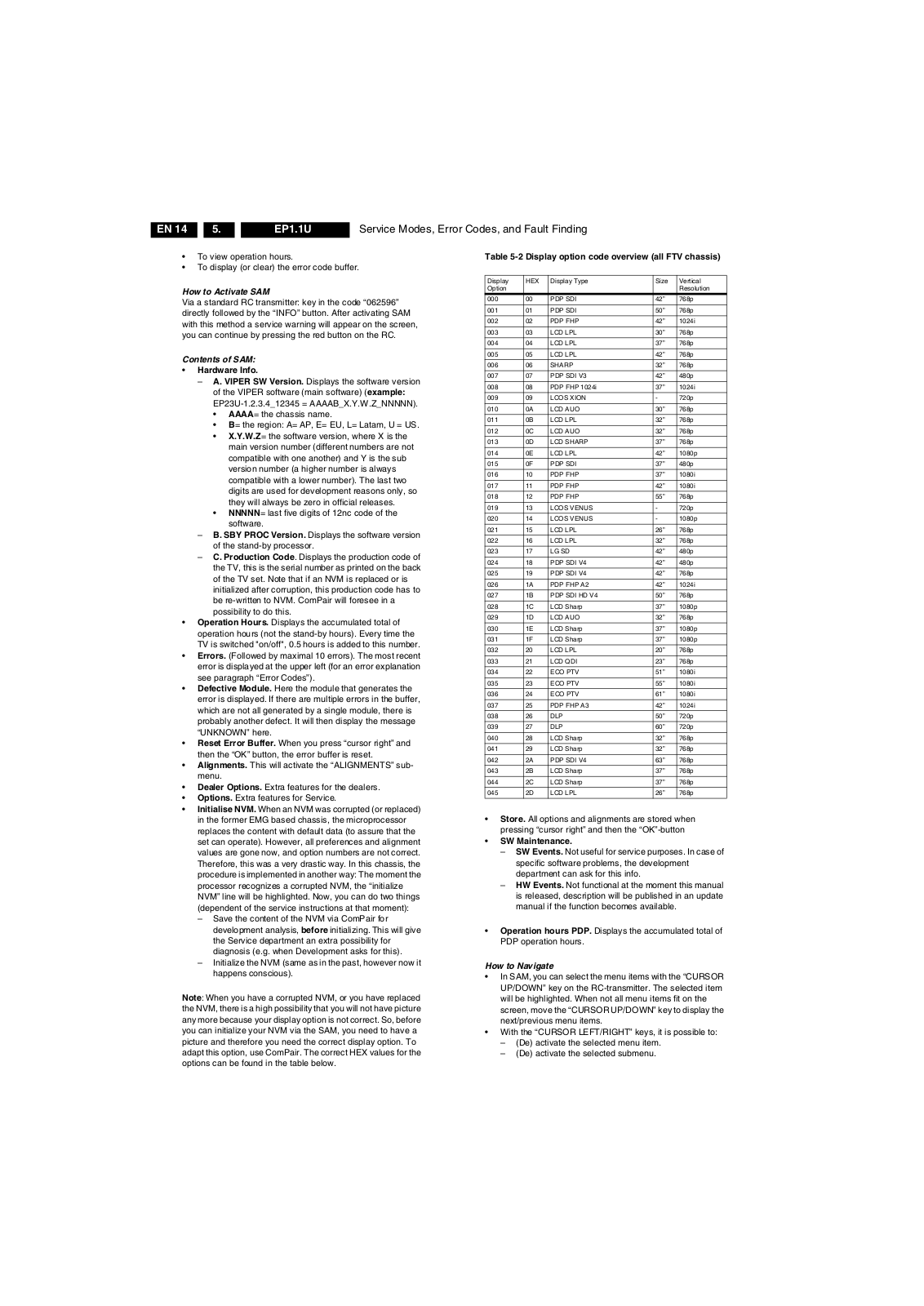
Note: When you have a corrupted NVM, or you have replaced the NVM, there is a high possibility that you will not have picture any more because your display option is not correct. So, before you can initialize your NVM via the SAM, you need to have a picture and therefore you need the correct display option. To adapt this option, use ComPair. The correct HEX values for the options can be found in the table below.
Table 5-2 Display option code overview (all FTV chassis)
Display Option
000 00 PDP SDI 42” 768p
001 01 PDP SDI 50” 768p
002 02 PDP FHP 42” 1024i
003 03 LCD LPL 30” 768p
004 04 LCD LPL 37” 768p
005 05 LCD LPL 42” 768p
006 06 SHARP 32” 768p
007 07 PDP SDI V3 42” 480p
008 08 PDP FHP 1024i 37” 1024i
009 09 LCOS XION - 720p
010 0A LCD AUO 30” 768p
011 0B LCD LPL 32” 768p
012 0C LCD AUO 32” 768p
013 0D LCD SHARP 37” 768p
014 0E LCD LPL 42” 1080p
015 0F PDP SDI 37” 480p
016 10 PDP FHP 37” 1080i
017 11 PDP FHP 42” 1080i
018 12 PDP FHP 55” 768p
019 13 LCOS VENUS - 720p
020 14 LCOS VENUS - 1080p
021 15 LCD LPL 26” 768p
022 16 LCD LPL 32” 768p
023 17 LG SD 42” 480p
024 18 PDP SDI V4 42” 480p
025 19 PDP SDI V4 42” 768p
026 1A PDP FHP A2 42” 1024i
027 1B PDP SDI HD V4 50” 768p
028 1C LCD Sharp 37” 1080p
029 1D LCD AUO 32” 768p
030 1E LCD Sharp 37” 1080p
031 1F LCD Sharp 37” 1080p
032 20 LCD LPL 20” 768p
033 21 LCD QDI 23” 768p
034 22 ECO PTV 51” 1080i
035 23 ECO PTV 55” 1080i
036 24 ECO PTV 61” 1080i
037 25 PDP FHP A3 42” 1024i
038 26 DLP 50” 720p
039 27 DLP 60” 720p
040 28 LCD Sharp 32” 768p
041 29 LCD Sharp 32” 768p
042 2A PDP SDI V4 63” 768p
043 2B LCD Sharp 37” 768p
044 2C LCD Sharp 37” 768p
045 2D LCD LPL 26” 768p
HEX Display Type Size Vertical
Resolution
Store. All options and alignments are stored when pressing “cursor right” and then the “OK”-button
SW Maintenance.SW Events. Not useful for service purposes. In case of
specific software problems, the development department can ask for this info.
HW Events. Not functional at the moment this manual
is released, description will be published in an update manual if the function becomes available.
Operation hours PDP. Displays the accumulated total of PDP operation hours.
How to Navigate
In SAM, you can select the menu items with the “CURSOR UP/DOWN” key on the RC-transmitter. The selected item will be highlighted. When not all menu items fit on the screen, move the “CURSOR UP/DOWN” key to display the next/previous menu items.
With the “CURSOR LEFT/RIGHT” keys, it is possible to: – (De) activate the selected menu item. – (De) activate the selected submenu.
Page 15
Service Modes, Error Codes, and Fault Finding
EN 15EP1.1U 5.
How to Exit SAM
Use one of the following methods:
Press the “MENU” button on the RC-transmitter.
Switch the set to STAND-BY via the RC-transmitter.
Note: As long as SAM is activated, it is not possible to change a channel. This could hamper the White Point alignments because you cannot choose your channel/frequency any more. Workaround: after you have sent the RC code “062596 INFO” you will see the service-warning screen, and in this stage it is still possible to change the channel (so before pressing the “OK” button).
5.2.3 Customer Service Mode (CSM)
Purpose
When a customer is having problems with his TV-set, he can call his dealer or the Customer Helpdesk. The service technician can then ask the customer to activate the CSM, in order to identify the status of the set. Now, the service technician can judge the severity of the complaint. In many cases, he can advise the customer how to solve the problem, or he can decide if it is necessary to visit the customer. The CSM is a read only mode; therefore, modifications in this mode are not possible.
How to Activate CSM
Key in the code “123654” via the standard RC transmitter.
Note: Activation of the CSM is only possible if there is no (user) menu on the screen!
How to Navigate
By means of the “CURSOR-DOWN/UP” knob on the RC­transmitter, you can navigate through the menus.
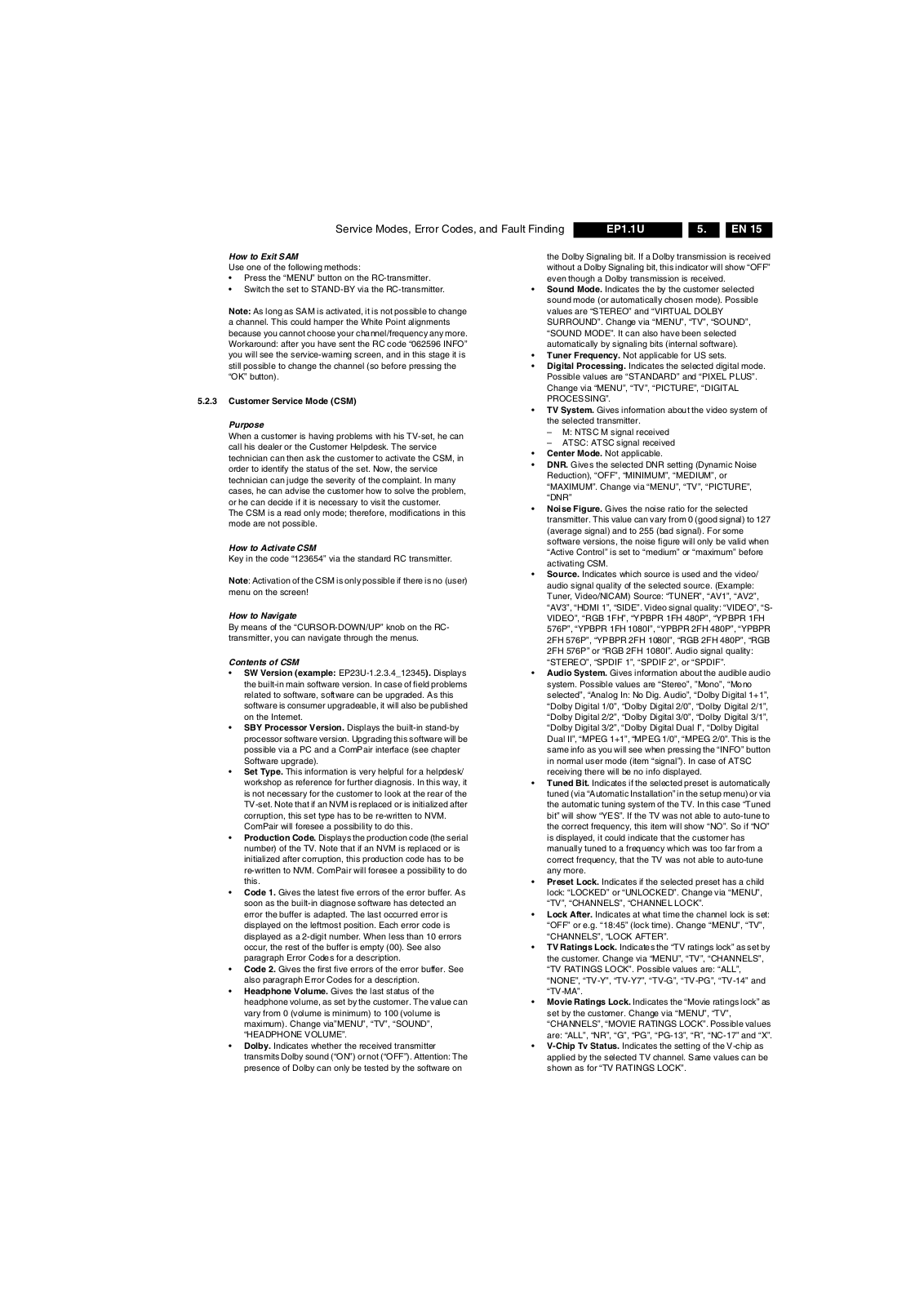
Contents of CSM
SW Version (example: EP23U-1.2.3.4_12345). Displays the built-in main software version. In case of field problems related to software, software can be upgraded. As this software is consumer upgradeable, it will also be published on the Internet.
SBY Processor Version. Displays the built-in stand-by processor software version. Upgrading this software will be possible via a PC and a ComPair interface (see chapter Software upgrade).
Set Type. This information is very helpful for a helpdesk/ workshop as reference for further diagnosis. In this way, it is not necessary for the customer to look at the rear of the TV-set. Note that if an NVM is replaced or is initialized after corruption, this set type has to be re-written to NVM. ComPair will foresee a possibility to do this.
Production Code. Displays the production code (the serial number) of the TV. Note that if an NVM is replaced or is initialized after corruption, this production code has to be re-written to NVM. ComPair will foresee a possibility to do this.
Code 1. Gives the latest five errors of the error buffer. As soon as the built-in diagnose software has detected an error the buffer is adapted. The last occurred error is displayed on the leftmost position. Each error code is displayed as a 2-digit number. When less than 10 errors occur, the rest of the buffer is empty (00). See also paragraph Error Codes for a description.
Code 2. Gives the first five errors of the error buffer. See also paragraph Error Codes for a description.
Headphone Volume. Gives the last status of the headphone volume, as set by the customer. The value can vary from 0 (volume is minimum) to 100 (volume is maximum). Change via”MENU”, “TV”, “SOUND”, “HEADPHONE VOLUME”.
Dolby. Indicates whether the received transmitter transmits Dolby sound (“ON”) or not (“OFF”). Attention: The presence of Dolby can only be tested by the software on
the Dolby Signaling bit. If a Dolby transmission is received without a Dolby Signaling bit, this indicator will show “OFF” even though a Dolby transmission is received.
Sound Mode. Indicates the by the customer selected sound mode (or automatically chosen mode). Possible values are “STEREO” and “VIRTUAL DOLBY SURROUND”. Change via “MENU”, “TV”, “SOUND”, “SOUND MODE”. It can also have been selected automatically by signaling bits (internal software).
Tuner Frequency. Not applicable for US sets.
Digital Processing. Indicates the selected digital mode. Possible values are “STANDARD” and “PIXEL PLUS”. Change via “MENU”, “TV”, “PICTURE”, “DIGITAL PROCESSING”.
TV System. Gives information about the video system of the selected transmitter. – M: NTSC M signal received – ATSC: ATSC signal received
Center Mode. Not applicable.
DNR. Gives the selected DNR setting (Dynamic Noise Reduction), “OFF”, “MINIMUM”, “MEDIUM”, or “MAXIMUM”. Change via “MENU”, “TV”, “PICTURE”, “DNR”
Noise Figure. Gives the noise ratio for the selected transmitter. This value can vary from 0 (good signal) to 127 (average signal) and to 255 (bad signal). For some software versions, the noise figure will only be valid when “Active Control” is set to “medium” or “maximum” before activating CSM.
Source. Indicates which source is used and the video/ audio signal quality of the selected source. (Example: Tuner, Video/NICAM) Source: “TUNER”, “AV1”, “AV2”, “AV3”, “HDMI 1”, “SIDE”. Video signal quality: “VIDEO”, “S­VIDEO”, “RGB 1FH”, “YPBPR 1FH 480P”, “YPBPR 1FH 576P”, “YPBPR 1FH 1080I”, “YPBPR 2FH 480P”, “YPBPR 2FH 576P”, “YPBPR 2FH 1080I”, “RGB 2FH 480P”, “RGB 2FH 576P” or “RGB 2FH 1080I”. Audio signal quality: “STEREO”, “SPDIF 1”, “SPDIF 2”, or “SPDIF”.
Audio System. Gives information about the audible audio system. Possible values are “Stereo”, ”Mono”, “Mono selected”, “Analog In: No Dig. Audio”, “Dolby Digital 1+1”, “Dolby Digital 1/0”, “Dolby Digital 2/0”, “Dolby Digital 2/1”, “Dolby Digital 2/2”, “Dolby Digital 3/0”, “Dolby Digital 3/1”, “Dolby Digital 3/2”, “Dolby Digital Dual I”, “Dolby Digital Dual II”, “MPEG 1+1”, “MPEG 1/0”, “MPEG 2/0”. This is the same info as you will see when pressing the “INFO” button in normal user mode (item “signal”). In case of ATSC receiving there will be no info displayed.
Tuned Bit. Indicates if the selected preset is automatically tuned (via “Automatic Installation” in the setup menu) or via the automatic tuning system of the TV. In this case “Tuned bit” will show “YES”. If the TV was not able to auto-tune to the correct frequency, this item will show “NO”. So if “NO” is displayed, it could indicate that the customer has manually tuned to a frequency which was too far from a correct frequency, that the TV was not able to auto-tune any more.
Preset Lock. Indicates if the selected preset has a child lock: “LOCKED” or “UNLOCKED”. Change via “MENU”, “TV”, “CHANNELS”, “CHANNEL LOCK”.
Lock After. Indicates at what time the channel lock is set: “OFF” or e.g. “18:45” (lock time). Change “MENU”, “TV”, “CHANNELS”, “LOCK AFTER”.
TV Ratings Lock. Indicates the “TV ratings lock” as set by the customer. Change via “MENU”, “TV”, “CHANNELS”, “TV RATINGS LOCK”. Possible values are: “ALL”, “NONE”, “TV-Y”, “TV-Y7”, “TV-G”, “TV-PG”, “TV-14” and “TV-MA”.
Movie Ratings Lock. Indicates the “Movie ratings lock” as set by the customer. Change via “MENU”, “TV”, “CHANNELS”, “MOVIE RATINGS LOCK”. Possible values are: “ALL”, “NR”, “G”, “PG”, “PG-13”, “R”, “NC-17” and “X”.
V-Chip Tv Status. Indicates the setting of the V-chip as applied by the selected TV channel. Same values can be shown as for “TV RATINGS LOCK”.
Page 16
EN 16 EP1.1U5.
Service Modes, Error Codes, and Fault Finding
V-Chip Movie Status. Indicates the setting of the V-chip as applied by the selected TV channel. Same values can be shown as for “MOVIE RATINGS LOCK”.
Options 1. Gives the option codes of option group 1 as set in SAM (Service Alignment Mode).
Options 2. Gives the option codes of option group 2 as set in SAM (Service Alignment Mode).
AVL. Indicates the last status of AVL (Automatic Volume Level): “ON” or “OFF”. Change via “MENU”, “TV”, “SOUND”, “AVL”. AVL can not be set in case of digital audio reception (e.g. Dolby Digital or AC3)
Delta Volume. Indicates the last status of the delta volume for the selected preset as set by the customer: from “-12” to “+12”. Change via “MENU”, “TV”, “SOUND”, “DELTA VOLUME”.
HDMI key validity. Indicates the key’s validity.
IEEE key validity. Indicates the key’s validity (n.a.).
POD key validity. Indicates the key’s validity (n.a.).
Digital Signal Quality. Indicates quality of the received digital signal (0= low).
How to Exit CSM
Press any key on the RC-transmitter (with exception of the “CHANNEL +/-”, “VOLUME”, “MUTE” and digit (0-9) keys).
5.3 Stepwise Start-up
The stepwise start-up method, as known from FTL/FTP sets is not valid any more. The situation for this chassis is as follows: when the TV is in a protection state detected via the Stand-by Processor (and thus blinking an error) and SDM is activated via shortcutting the pins on the SSB, the TV starts up until it reaches the situation just before protection. So, this is a kind of automatic stepwise start-up. In combination with the start-up diagrams below, you can see which supplies are present at a certain moment. Important to know here is, that if e.g. the 3V3 detection fails (and thus error 11 is blinking) and the TV is restarted via SDM,
the Stand-by Processor will enable the 3V3, but will not go to protection now. The TV will stay in this situation until it is reset (Mains/AC Power supply interrupted).
The abbreviations “SP” and “MP” in the figures stand for:
SP: protection or error detected by the Stand-by Processor.
MP: protection or error detected by the VIPER Main Processor.
Mains
“off”
- WakeUp requested
- Acquisition needed
Stand-by
(Off St-by)
- POD Card remove
- Tact SW pushed
- No data Acquisition required and no POD present
- Tact SW pushed
- WakeUp requested
- Acquisition needed
d
POD
Stand-by
On
Only applicable for sets with CableCARDTM slot (POD)
*
No data Acquisition
required and POD present
*
Off
Mains
“on”
Semi
Stand-by
GoToProtection
GoToProtec
tion
WakeUp
requested
- St-by requested
- Tact SW pushed
WakeUp
requested
Protection
Active
GoToProtection
F_15400_095.eps
020206
Figure 5-2 Transition diagram
Page 17
Service Modes, Error Codes, and Fault Finding
EN 17EP1.1U 5.
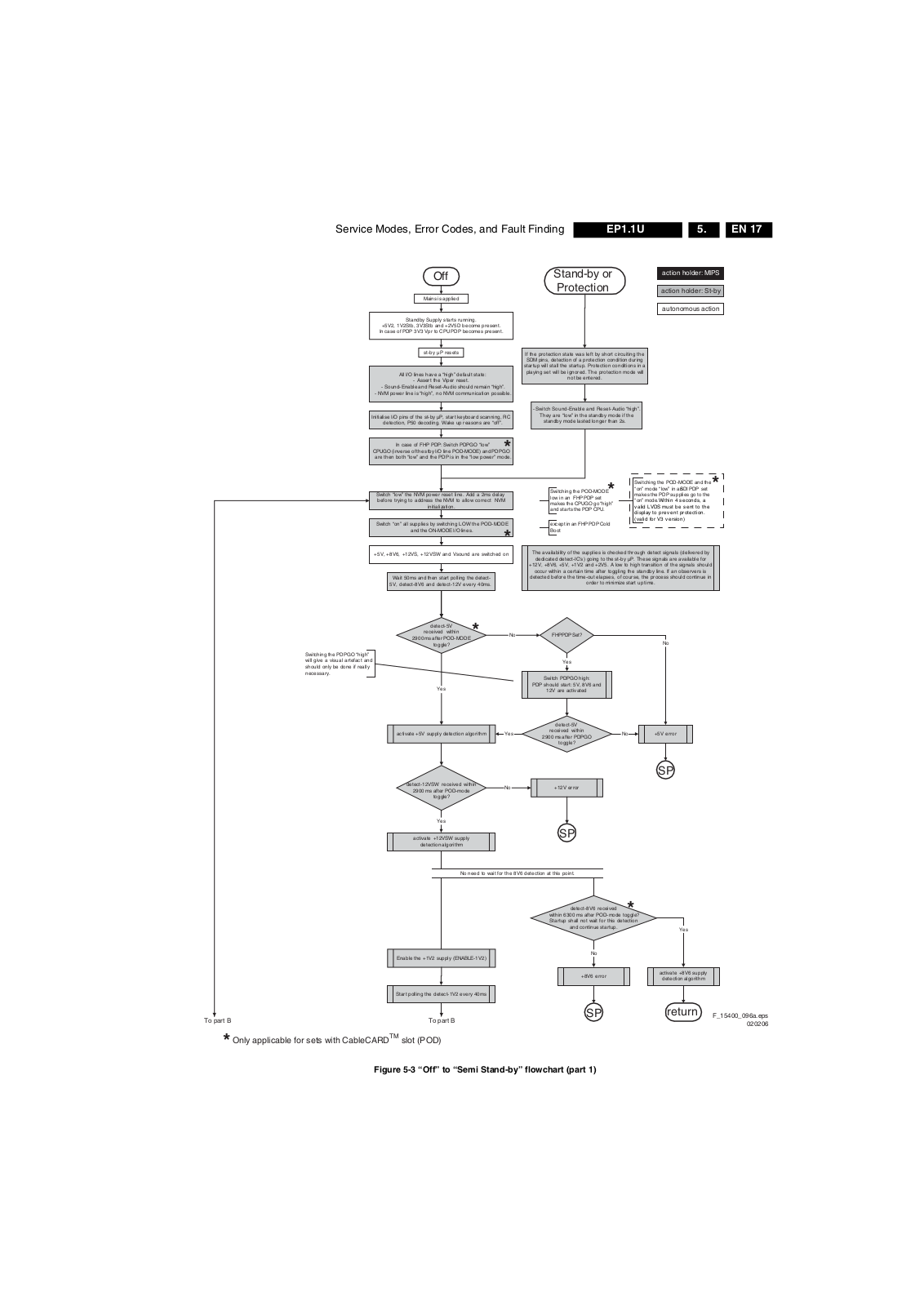
Off
Mains is applied
Standby Supply starts running.
+5V2, 1V2Stb, 3V3Stb and +2V5D become present.
In case of PDP 3V3 Vpr to CPU PDP becomes present.
st-by µP resets
All I/O lines have a “high” default state:
- Assert the Viper reset.
- Sound-Enable and Reset-Audio should remain “high”.
- NVM power line is “high”, no NVM communication possible.
Initialise I/O pins of the st-by µP, start keyboard scanning, RC
detection, P50 decoding. Wake up reasons are “off”.
In case of FHP PDP: Switch PDPGO “low”
CPUGO (inverse of the stby I/O line POD-MODE) and PDPGO
are then both “low” and the PDP is in the “low power” mode.
Switch “low” the NVM power reset line. Add a 2ms delay
before trying to address the NVM to allow correct NVM
Switch “on” all supplies by switching LOW the POD-MODE
+5V, +8V6, +12VS, +12VSW and Vsound are switched on
Wait 50ms and then sta rt polling the detect-
5V, detect-8V6 and detect-12V every 40ms.
initialization.
and the ON-MODE I/O lines.
Stand-by or
Protection
If the protection state was left by short circuiting the SDM pins, detection of a protection condition during
startup will stall the startup. Protection conditions in a
playing set will be ignored. The protection mode will
- Switch Sound-Enable and Reset-Audio “high”.
not be entered.
They are “low” in the standby mode if the
standby mode lasted longer than 2s.
*
Switching the POD- MODE and the
Switching the POD-MODE low in an FHP PDP set makes the CPUGO go “high” and starts the PDP CPU.
except in an FHP PDP Cold Boot
“on” mode “low” in an SDI PDP s et makes the PDP supplies go to the
*
“on” mode. Within 4 second s, a
valid LVDS must be sent to the display to prev ent protection. (valid for V3 version)
*
The availa bility of the supplies is ch ecked through detect signals (deliv ered by
dedicated detect-IC's) going to the st-by µP. These signals are available for
+12V, +8V6, +5V, +1V2 and +2V5. A low to high transition of the signals should
occur within a certain time after toggling the standby line. If an observers is
detected before the time-out elapses, of course, the process should continue in
order to minimize start up time.
action holder: MIPS
action holder: St-by
autonomous action
*
Switching the PDPGO “high” will give a visual arte fact and should only be done if really necessary.
detect-5V
received within
2900 ms after POD-MODE
toggle?
Yes
activate +5V supply detection algorithm
detect-12VSW received within
2900 ms after POD-mode
toggle?
Yes
activate +12VSW supply
detection algorithm
*
No need to wait for the 8V6 detection at this point.
No
PDP should start: 5V, 8V6 and
Yes
No
FHP PDP Set?
Yes
Switch PDPGO hig h:
12V are activated
detect-5V
received within
2900 ms after PDPGO
toggle?
+12V error
SP
detect-8V6 received
within 6300 ms after POD-mode toggle?
Startup shall not wait for this detection
and continue startup.
No
No
+5V error
SP
*
Yes
Enable the +1V2 supply (ENABLE-1V2)
Start polling the detect-1V2 every 40ms
To part B To part B
Only applicable for sets with CableCARDTM slot (POD)
*
Figure 5-3 “Off” to “Semi Stand-by” flowchart (part 1)
No
+8V6 erro r
SP
activate +8V6 supply
detection algorithm
return
F_15400_096a.eps
020206
Page 18
EN 18 EP1.1U5.
Service Modes, Error Codes, and Fault Finding
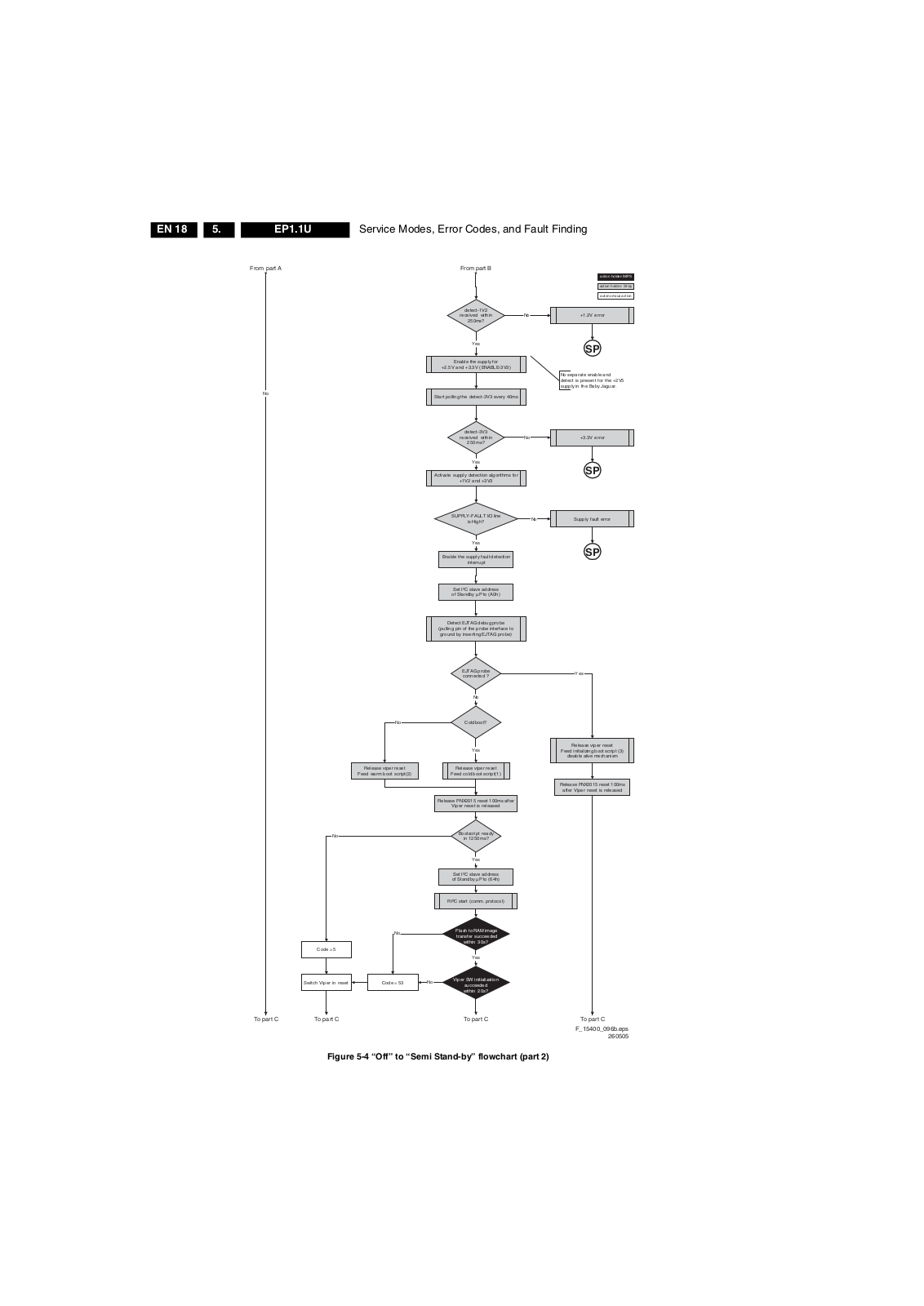
From part A
No
From part B
detect-1V2
received within
250ms?
Yes
Enable the supply for
+2.5V and +3.3V (ENABLE-3V3)
Start polling the detect-3V3 every 40ms
detect-3V3
received within
250 ms?
Yes
Activate supply detection algorithms for
+1V2 and +3V3
SUPPLY-FAULT I/O line
is High?
Yes
Enable the supply fault detection
interrup t
action holder: MIPS
action holder: St-by
autonomous action
No
+1.2V error
SP
No separate enable and detect is present for the +2V5 supply in the Baby Jaguar.
+3.3V errorNo
SP
Supply fault errorNo
SP
No
No
Release viper reset
Feed warm boot script(2)
Set I²C slave address
of Standby µP to (A0h)
Detect EJTAG debug probe
(pulling pin of the probe interface to
ground by inserting EJTAG probe)
EJTAG pro be connected ?
No
Cold boot?
Yes
Release viper reset
Feed cold boot script(1)
Release PNX2015 reset 100ms after
Viper reset is released
Bootscript ready
in 1250 ms?
Yes
Set I²C slave address
of Standby µP to (64h)
RPC start (comm. protocol)
Yes
Release viper reset
Feed initializing boot script (3)
disable alive mechanism
Release PNX2015 reset 100ms
after Viper reset is released
No
Flash to RAM image
transfer succeeded
within 30s?
Yes
Viper SW initialization
succeeded within 20s?
Code = 5
Switch Viper in reset
No
Code = 53
To part C To part C To part C To part C
F_15400_096b.eps
Figure 5-4 “Off” to “Semi Stand-by” flowchart (part 2)
260505
Page 19
Service Modes, Error Codes, and Fault Finding
EN 19EP1.1U 5.
From part B From part B From part B
Yes
Enable Alive check mechanism
from standby µP.
SDI PDP
Set?
No
FHP PDP
Set?
Switch “on” the LVDS output of
*
the PNX2015 with a correct
clock frequency within 4s after
Yes
switching the POD and “on” mode to prevent PDP display
supply protection.
These LVDS items are
SDI V3 displ ay only ! !
Yes
Send ST BYEN = 1
to PDP displ ay (I²C)
Wait until Viper starts to
PFCON = 1 VCCON = 1
communicate
3-th try?
Yes
Log Code as
error code
SP
Wait 10ms
Switch the NVM rese t
line HIGH.
Disable all supply related protections and
switch off the +2V5, +3V3 DC/DC converter.
Wait 5ms
switch off the remaining DC/DC
converters
Switch POD- MODE an d ON-MODE
I/O line “high”.
*
MIPS reads the wake up reason
Wait for the +8V6 to be detected if not yet present. (if
it does not come, the standby µP will enter a
protection mode, this is not a dead end here)
PWR-OK- PDP
received within 10s
after POD and “on” mode
toggle ?
Yes
Init SDI PDP
Switch LVDS back off if
end state is not the active
state.
Switch PDPGO “ low”
*
action holder: MIPS
action holder: St-by
autonomous action
No
Log display
error and enter
protection mode
SP
No
Start 4 seconds preheating timer in case of
a LPL scanning backlight LCD set.
AVIP needs to be started before the MPIF in order to have a good clock distribution. AVIP default power-up mode is Standby. The Viper instructs AVIP via I²C to enable all the PLLs and clocks and hence enter to Full Power mode.
Initialize PNX2015 HD subsystem
MPIFs should be initialized MPIF should deliver 4 observers: POR= 0; normal operation MSUP = 1: Main supply is present ASUP = 1; audio supply is present ROK = 1; reference frequency is present (coming from AVIP)
All observers present with correct state?
Yes
Initialize tuners and HDMI
Initialize source selectio n
Initialize video processing ICs
- Spider (if available)
No
Init FHP PDP
Log appropriate Observer error
Do not enter semi-standby state in case of an LPL scanning backlight LCD set before 4 s preheating timer has elapsed.
Only applicable for sets with CableCARDTM slot (POD)
*
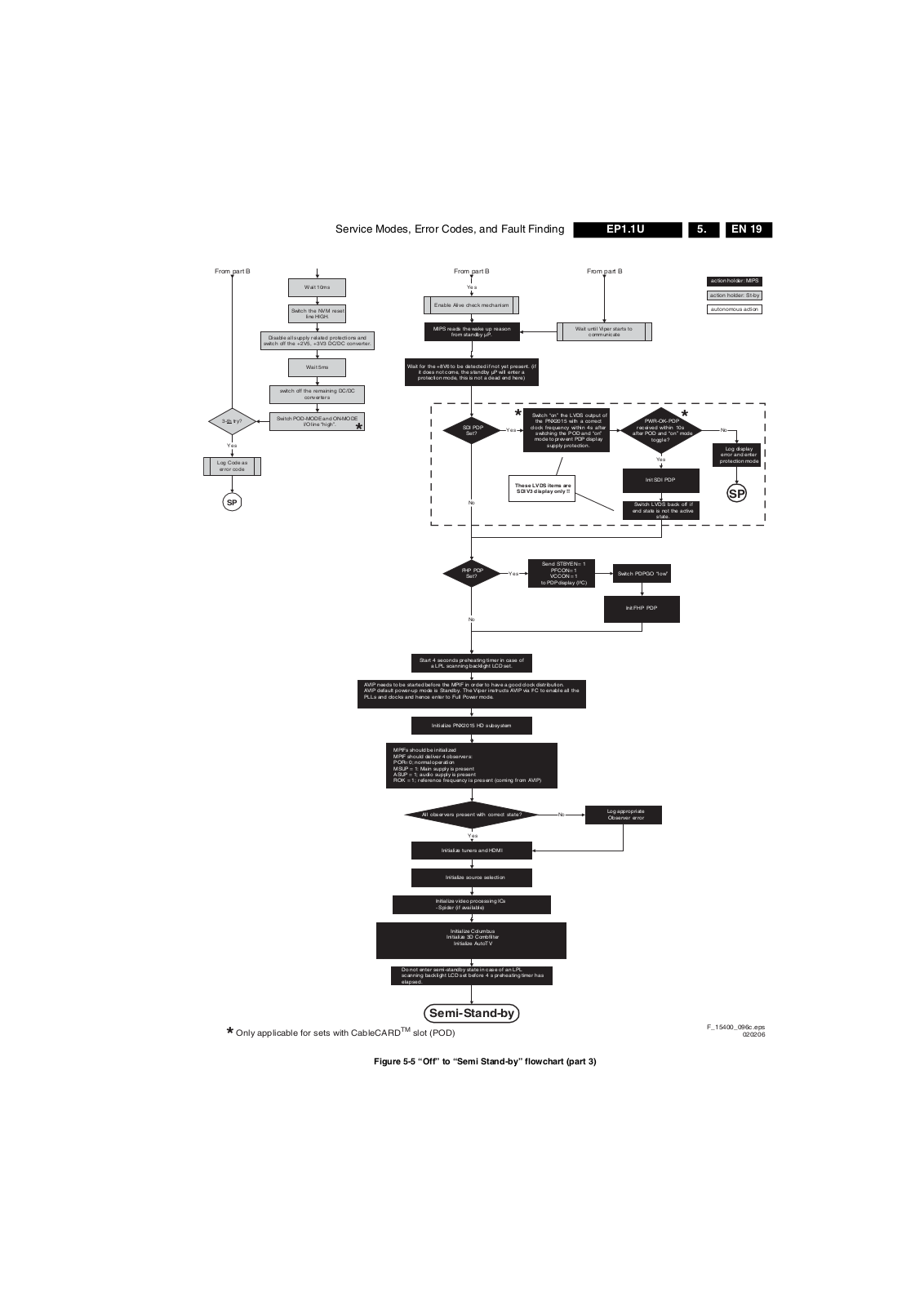
Figure 5-5 “Off” to “Semi Stand-by” flowchart (part 3)
Initialize Columbus
Initialize 3D Combfilt er
Initialize AutoTV
Semi-Stand-by
F_15400_096c.eps
020206
Page 20
EN 20 EP1.1U5.
Service Modes, Error Codes, and Fault Finding
42" / 50" SDI V4
action holder: MIPS
Semi Stand-by
action holder: St-by
autonomous action
RGB video blanking
and audio mute.
Initialize audio and video processing ICs and
functions.
Wait untill QVCP generates a valid LVDS
output clock
Switch “on” LVDS transmitter
(PNX2015) (if not already on).
Switch the SDI Picture Flag “low” to enable picture. 1.5
seconds later, the display will unblank automatically
and show the LVDS conten t.
Enable anti-aging
(if applicable).
Switch “off” RGB blanking after valid, stable video.
Switch Audio-Reset and sound enable “low” and demute.
Active
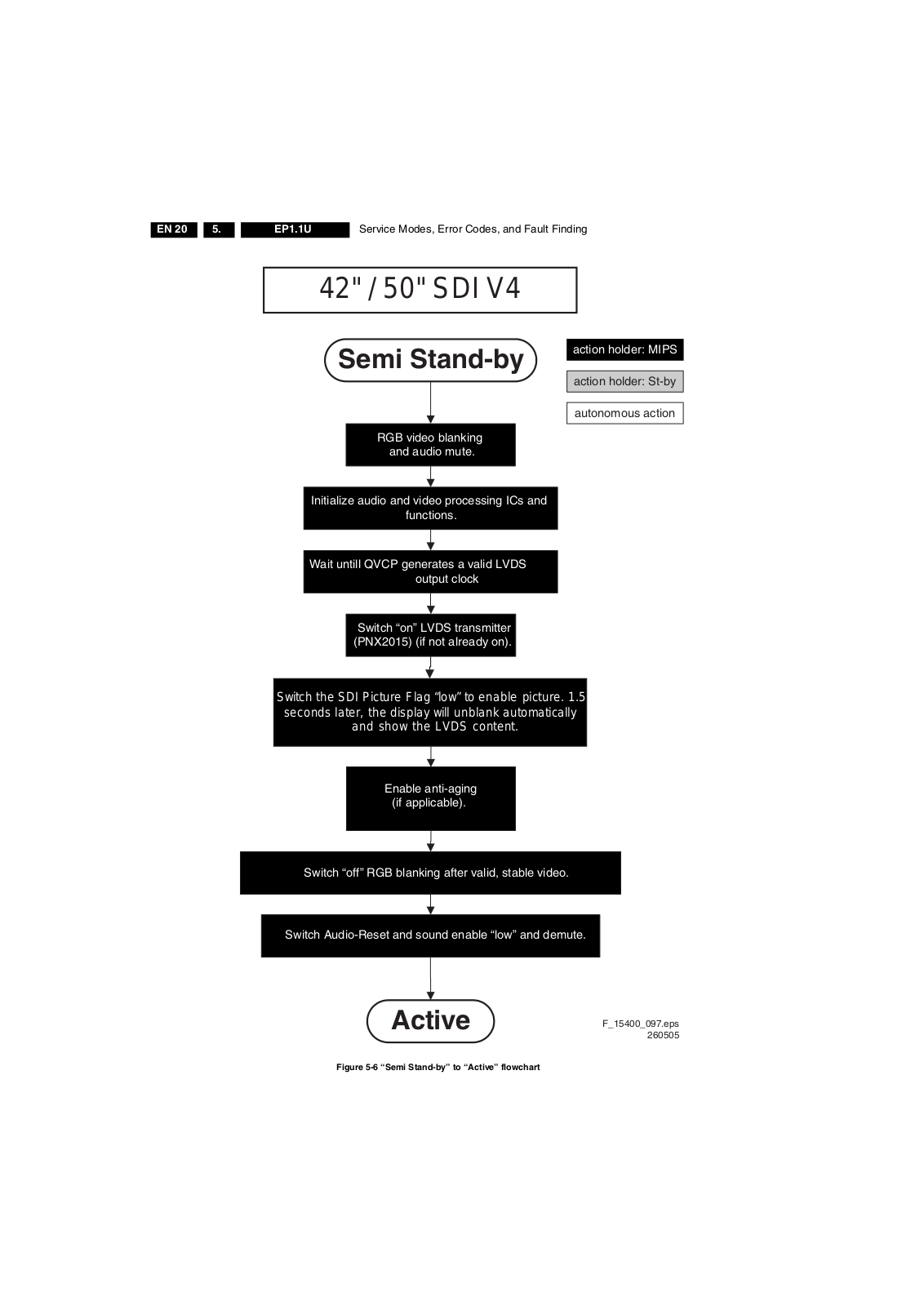
Figure 5-6 “Semi Stand-by” to “Active” flowchart
F_15400_097.eps
260505
Page 21
Service Modes, Error Codes, and Fault Finding
42" / 50" SD I V4
Active
Mute all sound outputs.
Switch RESET_AUDIO and
SOUND_ENABLE lines “high”
EN 21EP1.1U 5.
action holder: MIPS
action holder: St-by
autonomous action
Blank PDP display.
Mute all video outputs.
Wait 600ms to prevent image
retention
(display er ror)
Switch “off” LVDS signal
(PNX2015).
Switch the SDI Picture Flag “high” to prevent
testpattern display in semi-standby mode
Semi Stand-by
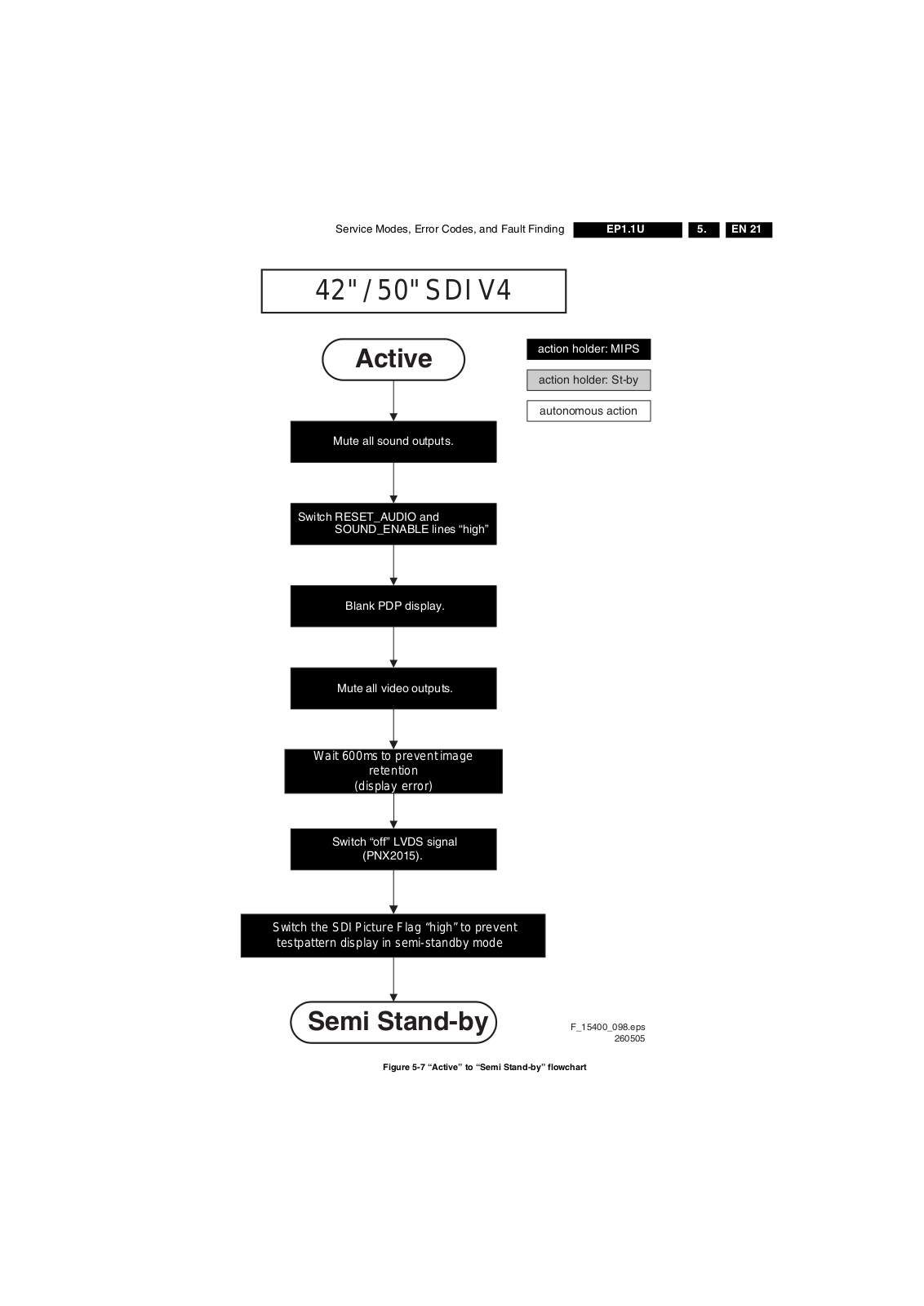
Figure 5-7 “Active” to “Semi Stand-by” flowchart
F_15400_098.eps
260505
Page 22
EN 22 EP1.1U5.
Service Modes, Error Codes, and Fault Finding
*
POD
Transfer Wake up reasons to the
Images are re-transferred to DDR-RAM from
Flash RAM (verification through checksum).
MIPS image completes the application reload,
stops DDR-RAM access, puts itself in a
sleepmode, and signals the standby µP when
the Stand-by mode can be entered.
DDR-RAM is put in self refresh mode and the images
are kept in the hibernating DDR-RAM.
Stand- by µP.
Wait 5ms
Semi Stand-by
action holder: MIPS
action holder: St-by
autonomous action
Important remark:
release RESET AUDIO and
SOUND_ENABLE 2 sec after entering stand-by to save power
Switch Viper in reset state
Wait 10ms
Switch the NVM reset line “high”.
Disable all supply related protections and switch “off”
the +2V5, +3V3 DC/DC converter.
Wait 5ms
Switch “off” the remaining DC/DC converters
Switch “off” all supplies by switching “high” the POD-
MODE and the ON-MODE I/O lines.
*
For PDP this means CPUGO becomes low.
Only applicable for sets with CableCARDTM slot (POD)
*
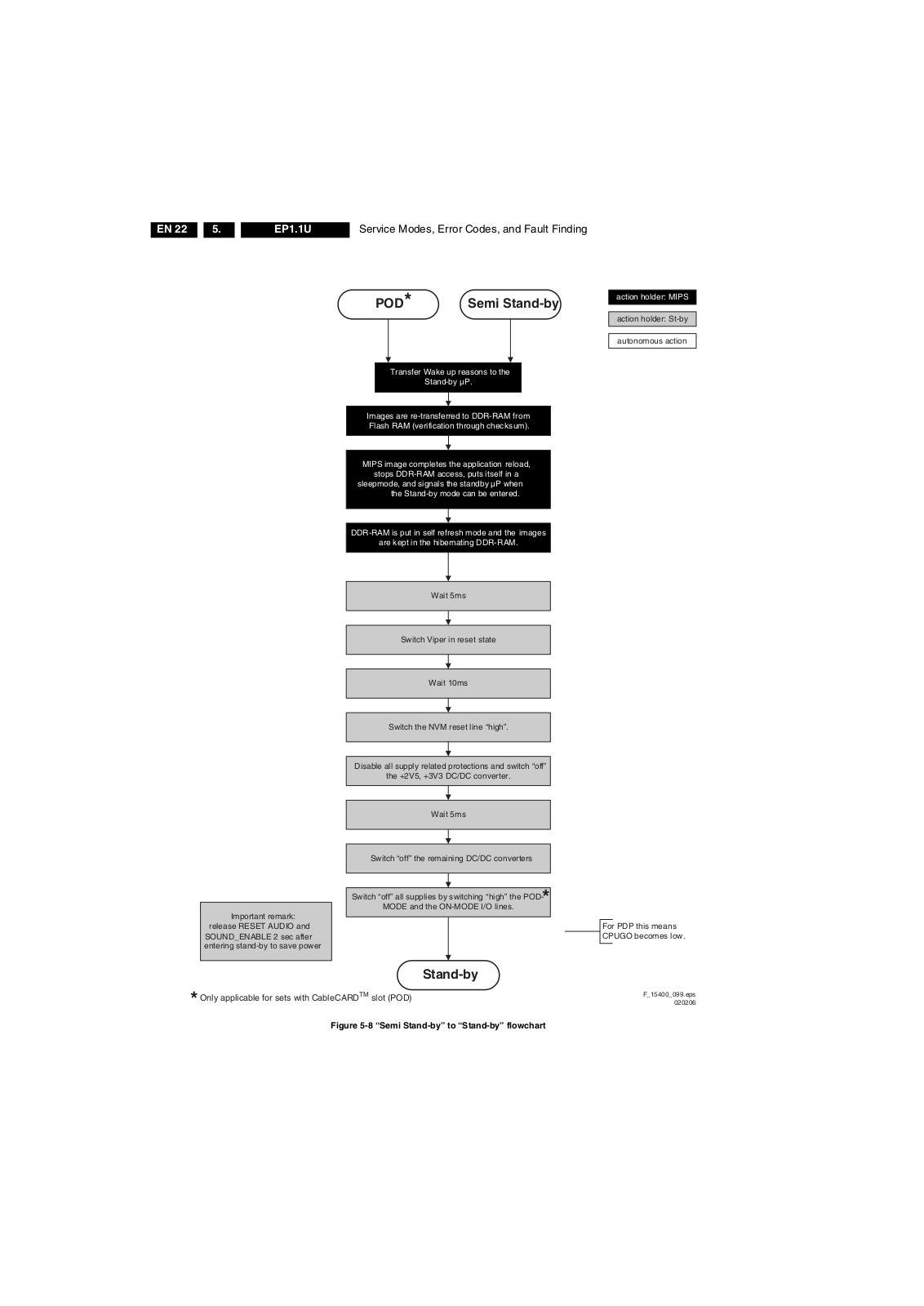
Figure 5-8 “Semi Stand-by” to “Stand-by” flowchart
Stand-by
F_15400_099.eps
020206
Page 23
Service Modes, Error Codes, and Fault Finding
EN 23EP1.1U 5.
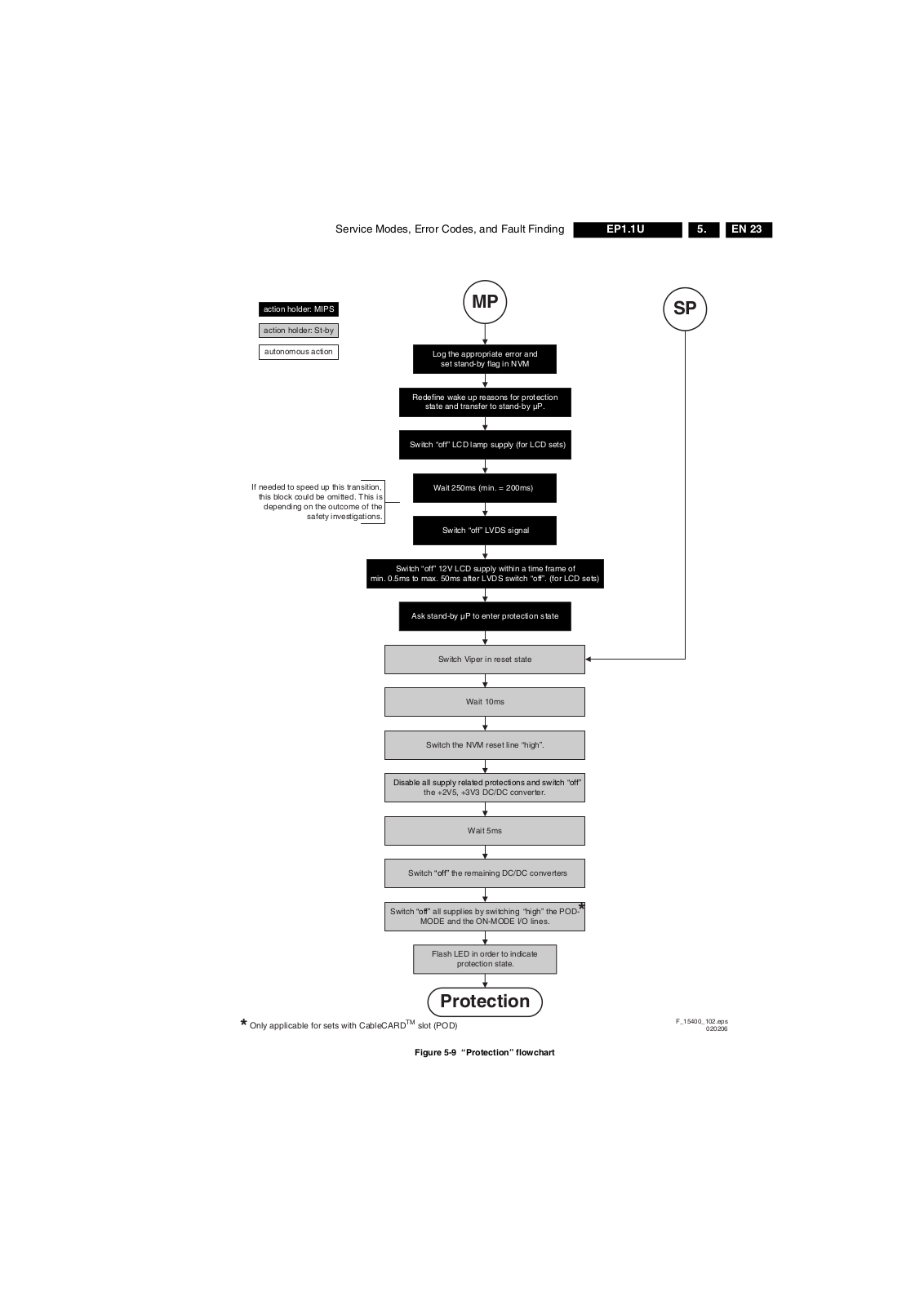
action holder: MIPS
action holder: St-by
autonomous action
If needed to speed up this transition,
this block could be omitted. This is
depending on the outcome of the
safety investigations.
min. 0.5ms to max. 50ms after LVDS switch “off”. (for LCD sets)
MP
Log the appropriate error and
set stand-by flag in NVM
Redefine wake up reasons for protection
state and transfer to stand-by µP.
Switch “off” LCD lamp supply (for LCD sets)
Wait 250ms (min. = 200ms)
Switch “off” LVDS signal
Switch “off” 12V LCD supply within a time frame of
Ask stand-by µP to enter protection state
SP
Switch Viper in reset state
Wait 10ms
Switch the NVM reset line “high”.
Disable all supply related protections and switch “off”
the +2V5, +3V3 DC/DC converter.
Wait 5ms
Switch “off” the remaining DC/DC converters
Switch “off” all supplies by switching “high” the POD-
MODE and the ON-MODE I/O lines.
Flash LED in order to indicate
protection state.
*
Only applicable for sets with CableCARDTM slot (POD)
*
Figure 5-9 “Protection” flowchart
Protection
F_15400_102.eps
020206
Page 24
EN 24 EP1.1U5.
5.4 Service Tools
5.4.1 ComPair
Introduction
ComPair (Computer Aided Repair) is a service tool for Philips Consumer Electronics products. ComPair is a further development on the European DST (service remote control), which allows faster and more accurate diagnostics. ComPair has three big advantages:
1. ComPair helps you to quickly get an understanding on how to repair the chassis in a short time by guiding you systematically through the repair procedures.
2. ComPair allows very detailed diagnostics (on I is therefore capable of accurately indicating problem areas. You do not have to know anything about I yourself because ComPair takes care of this.
3. ComPair speeds up the repair time since it can automatically communicate with the chassis (when the microprocessor is working) and all repair information is directly available. When ComPair is installed together with the Force/SearchMan electronic manual of the defective chassis, schematics and PWBs are only a mouse click away.
Specifications
ComPair consists of a Windows based fault finding program and an interface box between PC and the (defective) product. The ComPair interface box is connected to the PC via a serial (or RS-232) cable. For this chassis, the ComPair interface box and the TV communicate via a bi-directional service cable via the service connector(s).
The ComPair fault finding program is able to determine the problem of the defective television. ComPair can gather diagnostic information in two ways:
Automatically (by communicating with the television): ComPair can automatically read out the contents of the entire error buffer. Diagnosis is done on I ComPair can access the I ComPair can send and receive I the microcontroller of the television. In this way, it is possible for ComPair to communicate (read and write) to devices on the I
2
C/UART buses of the TV-set.
Manually (by asking questions to you): Automatic diagnosis is only possible if the microcontroller of the television is working correctly and only to a certain extent. When this is not the case, ComPair will guide you through the fault finding tree by asking you questions (e.g. Does the
screen give a picture? Click on the correct answer: YES / NO) and showing you examples (e.g. Measure test-point I7 and click on the correct oscillogram you see on the oscilloscope). You can answer by clicking on a link (e.g. text or a waveform picture) that will bring you to the next
step in the fault finding process.
By a combination of automatic diagnostics and an interactive question / answer procedure, ComPair will enable you to find most problems in a fast and effective way.
2
C/UART bus of the television.
2
C/UART commands to
Service Modes, Error Codes, and Fault Finding
2
C level) and
2
C commands
2
C/UART level.
5.4.2 LVDS Tool
Figure 5-10 ComPair interface connection
How To Order
ComPair order codes:
ComPair Software: ST4191.
ComPair Interface Box: 4822 727 21631.
AC Adapter: T405-ND.
ComPair Quick Start Guide: ST4190.
ComPair interface extension cable: 3139 131 03791.
ComPair UART interface cable: 3122 785 90630.
Note: If you encounter any problems, contact your local support desk.
Introduction
This service tool (also called “ComPair Assistant 1“) may help you to identify, in case the TV does not show any picture, whether the Small Signal Board (SSB) or the display of a Flat TV is defective. Furthermore it is possible to program EPLDs with this tool (Byte blaster). Read the user manual for an explanation of this feature.
Since 2004, the LVDS output connectors in our Flat TV models are standardized (with some exceptions). With the two delivered LVDS interface cables (31p and 20p) you can cover most chassis (in special cases, an extra cable will be offered).
When operating, the tool will show a small (scaled) picture on a VGA monitor. Due to a limited memory capacity, it is not possible to increase the size when processing high-resolution LVDS signals (> 1280x960). Below this resolution, or when a DVI monitor is used, the displayed picture will be full size.
Generally this tool is intended to determine if the SSB is working or not. Thus to determine if LVDS, RGB, and sync signals are okay.
How to Connect
Connections are explained in the user manual, which is packed with the tool.
TO
UART SERVICE
CONNECTOR
PC VCR I2CPower
TO I2C SERVICE CONNECTOR
9V DC
E_06532_021.eps
180804
How To Connect
This is described in the chassis fault finding database in ComPair.
Caution: It is compulsory to connect the TV to the PC as shown in the picture below (with the ComPair interface in between), as the ComPair interface acts as a level shifter. If one connects the TV directly to the PC (via UART), ICs will be blown!
Note: To use the LVDS tool, you must have ComPair release 2004-1 (or later) on your PC (engine version >= 2.2.05). For every TV type number and screen size, one must choose the proper settings via ComPair. The ComPair file will be updated regularly with new introduced chassis information.
How to Order
LVDS tool (incl. two LVDS cables: 31p and 20p): 3122 785 90671.
LVDS tool Service Manual: 3122 785 00810.
Page 25
Service Modes, Error Codes, and Fault Finding
EN 25EP1.1U 5.
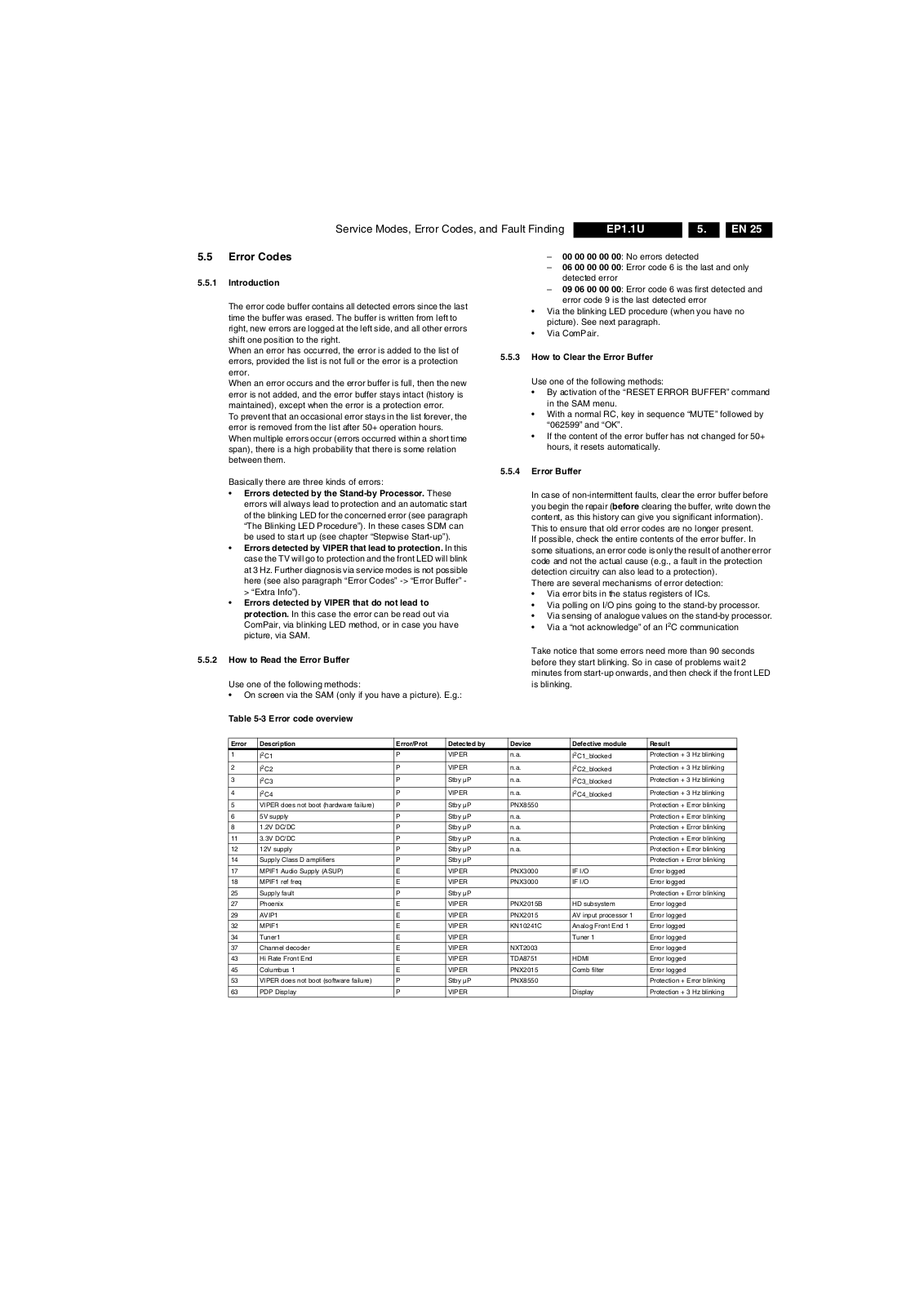
5.5 Error Codes
5.5.1 Introduction
The error code buffer contains all detected errors since the last time the buffer was erased. The buffer is written from left to right, new errors are logged at the left side, and all other errors shift one position to the right. When an error has occurred, the error is added to the list of errors, provided the list is not full or the error is a protection error. When an error occurs and the error buffer is full, then the new error is not added, and the error buffer stays intact (history is maintained), except when the error is a protection error. To prevent that an occasional error stays in the list forever, the error is removed from the list after 50+ operation hours. When multiple errors occur (errors occurred within a short time span), there is a high probability that there is some relation between them.
Basically there are three kinds of errors:
Errors detected by the Stand-by Processor. These errors will always lead to protection and an automatic start of the blinking LED for the concerned error (see paragraph “The Blinking LED Procedure”). In these cases SDM can be used to start up (see chapter “Stepwise Start-up”).
Errors detected by VIPER that lead to protection. In this case the TV will go to protection and the front LED will blink at 3 Hz. Further diagnosis via service modes is not possible here (see also paragraph “Error Codes” -> “Error Buffer” ­> “Extra Info”).
Errors detected by VIPER that do not lead to protection. In this case the error can be read out via ComPair, via blinking LED method, or in case you have picture, via SAM.
5.5.2 How to Read the Error Buffer
Use one of the following methods:
On screen via the SAM (only if you have a picture). E.g.:
00 00 00 00 00: No errors detected – 06 00 00 00 00: Error code 6 is the last and only
detected error
09 06 00 00 00: Error code 6 was first detected and
error code 9 is the last detected error
Via the blinking LED procedure (when you have no picture). See next paragraph.
•Via ComPair.
5.5.3 How to Clear the Error Buffer
Use one of the following methods:
By activation of the “RESET ERROR BUFFER” command in the SAM menu.
With a normal RC, key in sequence “MUTE” followed by “062599” and “OK”.
If the content of the error buffer has not changed for 50+ hours, it resets automatically.
5.5.4 Error Buffer
In case of non-intermittent faults, clear the error buffer before you begin the repair (before clearing the buffer, write down the content, as this history can give you significant information). This to ensure that old error codes are no longer present. If possible, check the entire contents of the error buffer. In some situations, an error code is only the result of another error code and not the actual cause (e.g., a fault in the protection detection circuitry can also lead to a protection). There are several mechanisms of error detection:
Via error bits in the status registers of ICs.
Via polling on I/O pins going to the stand-by processor.
Via sensing of analogue values on the stand-by processor.
Via a “not acknowledge” of an I
2
C communication
Take notice that some errors need more than 90 seconds before they start blinking. So in case of problems wait 2 minutes from start-up onwards, and then check if the front LED is blinking.
Table 5-3 Error code overview
Error Description Error/Prot Detected by Device Defective module Result
1
I2C1
2
I2C2
2
3
I
C3
2
4
5 VIPER does not boot (hardware failure) P Stby µP PNX8550 Protection + Error blinking
6 5V supply P Stby µP n.a. Protection + Error blinking
8 1.2V DC/DC P Stby µP n.a. Protection + Error blinking
11 3.3V DC/DC P Stby µP n.a. Protection + Error blinking
12 12V supply P Stby µP n.a. Protection + Error blinki ng
14 Supply Class D amplifiers P Stby µP Protection + Error blinking
17 MPIF1 Audio Supply (ASUP) E VIPER PNX3000 IF I/O Error logged
18 MPIF1 ref freq E VIPER PNX3000 IF I/O Error logged
25 Supply fault P Stby µP Protection + Error blinking
27 Phoenix E VIPER PNX2015B HD subsystem Error logged
29 AVIP1 E VIPER PNX2015 AV input processor 1 Error logged
32 MPIF1 E VIPER KN10241C Analog Front End 1 Error logged
34 Tuner1 E VIPER Tuner 1 Error logged
37 Channel decoder E VIPER NXT2003 Error logged
43 Hi Rate Front End E VIPER TDA8751 HDMI Error logged
45 Columbus 1 E VIPER PNX2015 Comb filter Error logged
53 VIPER does not boot (software failure) P Stby µP PNX8550 Protection + Error blinking
63 PDP Display P VIPER Display Protection + 3 Hz blinking
C4
I
P VIPER n.a.
P VIPER n.a.
P Stby µP n.a.
P VIPER n.a.
I2C1_blocked
I2C2_blocked
I2C3_blocked
I2C4_blocked
Protection + 3 Hz blinking
Page 26
EN 26 EP1.1U5.
Service Modes, Error Codes, and Fault Finding
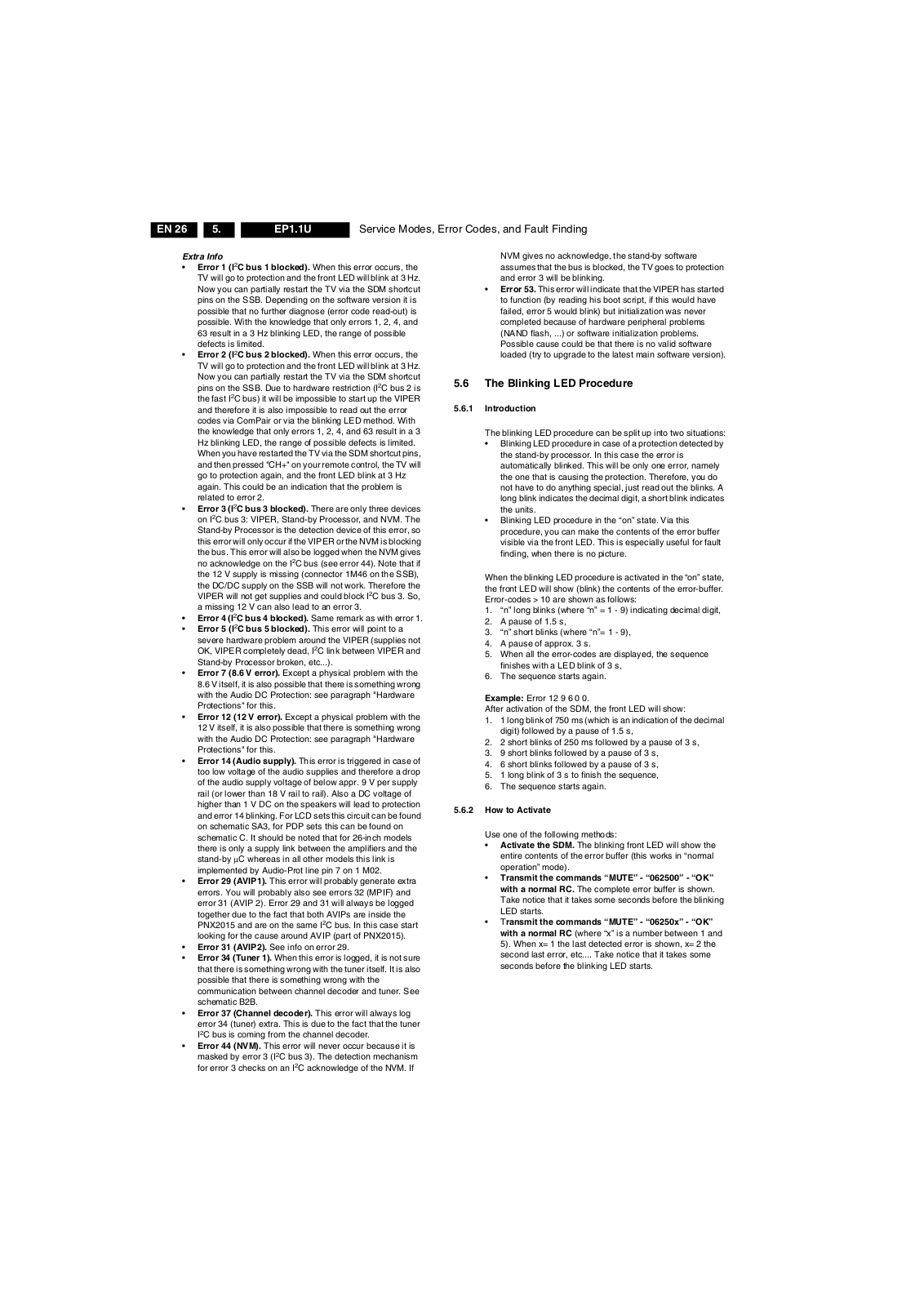
Extra Info
Error 1 (I
2
C bus 1 blocked). When this error occurs, the TV will go to protection and the front LED will blink at 3 Hz. Now you can partially restart the TV via the SDM shortcut pins on the SSB. Depending on the software version it is possible that no further diagnose (error code read-out) is possible. With the knowledge that only errors 1, 2, 4, and 63 result in a 3 Hz blinking LED, the range of possible defects is limited.
Error 2 (I
2
C bus 2 blocked). When this error occurs, the TV will go to protection and the front LED will blink at 3 Hz. Now you can partially restart the TV via the SDM shortcut pins on the SSB. Due to hardware restriction (I the fast I
2
C bus) it will be impossible to start up the VIPER
2
C bus 2 is
and therefore it is also impossible to read out the error codes via ComPair or via the blinking LED method. With the knowledge that only errors 1, 2, 4, and 63 result in a 3 Hz blinking LED, the range of possible defects is limited. When you have restarted the TV via the SDM shortcut pins, and then pressed "CH+" on your remote control, the TV will go to protection again, and the front LED blink at 3 Hz again. This could be an indication that the problem is related to error 2.
Error 3 (I on I
2
C bus 3 blocked). There are only three devices
2
C bus 3: VIPER, Stand-by Processor, and NVM. The Stand-by Processor is the detection device of this error, so this error will only occur if the VIPER or the NVM is blocking the bus. This error will also be logged when the NVM gives no acknowledge on the I
2
C bus (see error 44). Note that if the 12 V supply is missing (connector 1M46 on the SSB), the DC/DC supply on the SSB will not work. Therefore the VIPER will not get supplies and could block I a missing 12 V can also lead to an error 3.
Error 4 (I
Error 5 (I severe hardware problem around the VIPER (supplies not OK, VIPER completely dead, I
2
C bus 4 blocked). Same remark as with error 1.
2
C bus 5 blocked). This error will point to a
2
C link between VIPER and
2
C bus 3. So,
Stand-by Processor broken, etc...).
Error 7 (8.6 V error). Except a physical problem with the
8.6 V itself, it is also possible that there is something wrong with the Audio DC Protection: see paragraph "Hardware Protections" for this.
Error 12 (12 V error). Except a physical problem with the 12 V itself, it is also possible that there is something wrong with the Audio DC Protection: see paragraph "Hardware Protections" for this.
Error 14 (Audio supply). This error is triggered in case of too low voltage of the audio supplies and therefore a drop of the audio supply voltage of below appr. 9 V per supply rail (or lower than 18 V rail to rail). Also a DC voltage of higher than 1 V DC on the speakers will lead to protection and error 14 blinking. For LCD sets this circuit can be found on schematic SA3, for PDP sets this can be found on schematic C. It should be noted that for 26-inch models there is only a supply link between the amplifiers and the stand-by µC whereas in all other models this link is implemented by Audio-Prot line pin 7 on 1 M02.
Error 29 (AVIP1). This error will probably generate extra errors. You will probably also see errors 32 (MPIF) and error 31 (AVIP 2). Error 29 and 31 will always be logged together due to the fact that both AVIPs are inside the PNX2015 and are on the same I
2
C bus. In this case start
looking for the cause around AVIP (part of PNX2015).
Error 31 (AVIP2). See info on error 29.
Error 34 (Tuner 1). When this error is logged, it is not sure that there is something wrong with the tuner itself. It is also possible that there is something wrong with the communication between channel decoder and tuner. See schematic B2B.
Error 37 (Channel decoder). This error will always log error 34 (tuner) extra. This is due to the fact that the tuner
2
C bus is coming from the channel decoder.
I
Error 44 (NVM). This error will never occur because it is masked by error 3 (I for error 3 checks on an I
2
C bus 3). The detection mechanism
2
C acknowledge of the NVM. If
NVM gives no acknowledge, the stand-by software assumes that the bus is blocked, the TV goes to protection and error 3 will be blinking.
Error 53. This error will indicate that the VIPER has started to function (by reading his boot script, if this would have failed, error 5 would blink) but initialization was never completed because of hardware peripheral problems (NAND flash, ...) or software initialization problems. Possible cause could be that there is no valid software loaded (try to upgrade to the latest main software version).
5.6 The Blinking LED Procedure
5.6.1 Introduction
The blinking LED procedure can be split up into two situations:
Blinking LED procedure in case of a protection detected by the stand-by processor. In this case the error is automatically blinked. This will be only one error, namely the one that is causing the protection. Therefore, you do not have to do anything special, just read out the blinks. A long blink indicates the decimal digit, a short blink indicates the units.
Blinking LED procedure in the “on” state. Via this procedure, you can make the contents of the error buffer visible via the front LED. This is especially useful for fault finding, when there is no picture.
When the blinking LED procedure is activated in the “on” state, the front LED will show (blink) the contents of the error-buffer. Error-codes > 10 are shown as follows:
1. “n” long blinks (where “n” = 1 - 9) indicating decimal digit,
2. A pause of 1.5 s,
3. “n” short blinks (where “n”= 1 - 9),
4. A pause of approx. 3 s.
5. When all the error-codes are displayed, the sequence finishes with a LED blink of 3 s,
6. The sequence starts again.
Example: Error 12 9 6 0 0. After activation of the SDM, the front LED will show:
1. 1 long blink of 750 ms (which is an indication of the decimal digit) followed by a pause of 1.5 s,
2. 2 short blinks of 250 ms followed by a pause of 3 s,
3. 9 short blinks followed by a pause of 3 s,
4. 6 short blinks followed by a pause of 3 s,
5. 1 long blink of 3 s to finish the sequence,
6. The sequence starts again.
5.6.2 How to Activate
Use one of the following methods:
Activate the SDM. The blinking front LED will show the entire contents of the error buffer (this works in “normal operation” mode).
Transmit the commands “MUTE” - “062500” - “OK” with a normal RC. The complete error buffer is shown. Take notice that it takes some seconds before the blinking LED starts.
•Transmit the commands “MUTE” - “06250x” - “OK” with a normal RC (where “x” is a number between 1 and
5). When x= 1 the last detected error is shown, x= 2 the
second last error, etc.... Take notice that it takes some
seconds before the blinking LED starts.
Page 27
Service Modes, Error Codes, and Fault Finding
EN 27EP1.1U 5.
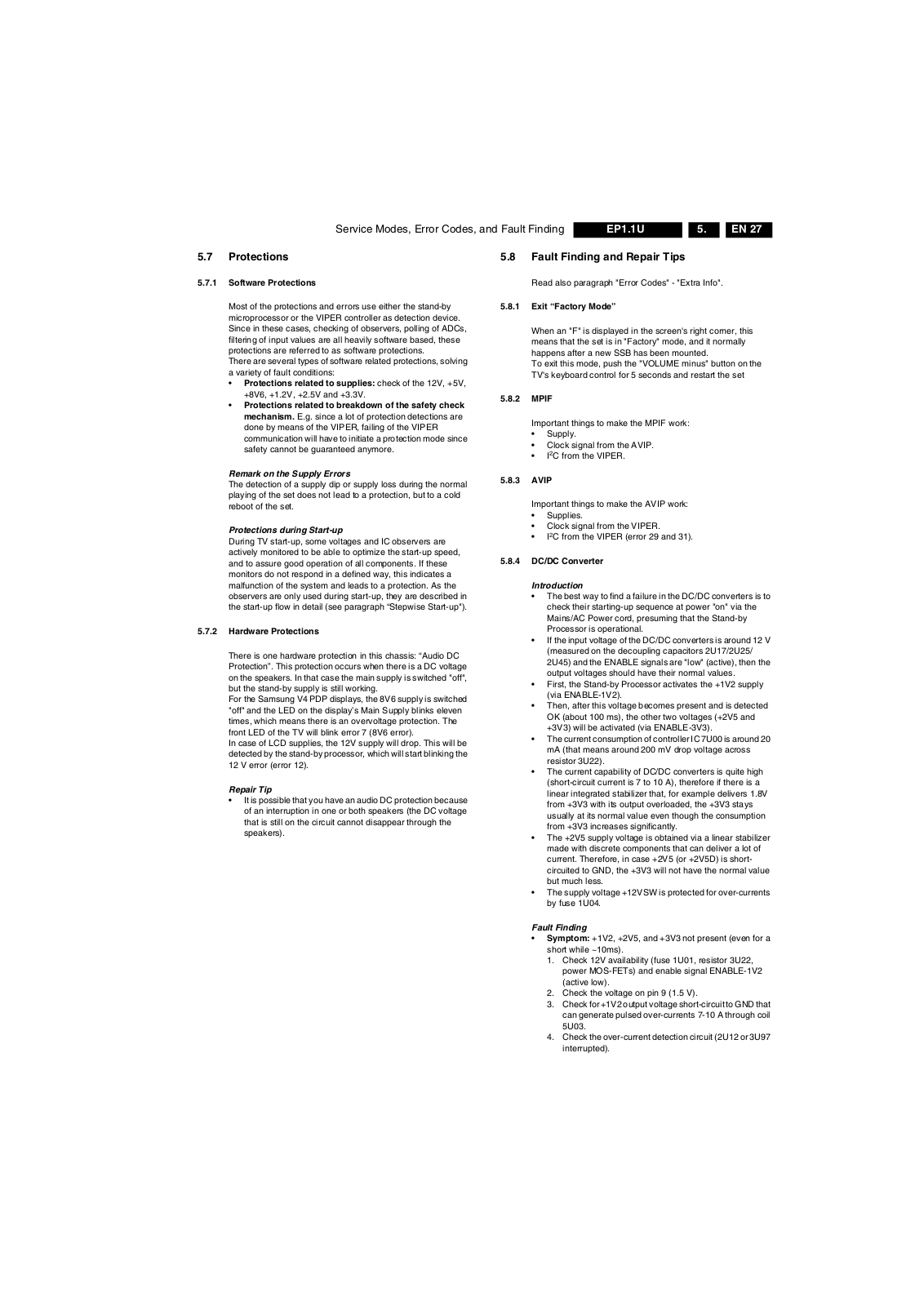
5.7 Protections
5.7.1 Software Protections
Most of the protections and errors use either the stand-by microprocessor or the VIPER controller as detection device. Since in these cases, checking of observers, polling of ADCs, filtering of input values are all heavily software based, these protections are referred to as software protections. There are several types of software related protections, solving a variety of fault conditions:
Protections related to supplies: check of the 12V, +5V, +8V6, +1.2V, +2.5V and +3.3V.
Protections related to breakdown of the safety check mechanism. E.g. since a lot of protection detections are done by means of the VIPER, failing of the VIPER communication will have to initiate a protection mode since safety cannot be guaranteed anymore.
Remark on the Supply Errors
The detection of a supply dip or supply loss during the normal playing of the set does not lead to a protection, but to a cold reboot of the set.
Protections during Start-up
During TV start-up, some voltages and IC observers are actively monitored to be able to optimize the start-up speed, and to assure good operation of all components. If these monitors do not respond in a defined way, this indicates a malfunction of the system and leads to a protection. As the observers are only used during start-up, they are described in the start-up flow in detail (see paragraph “Stepwise Start-up").
5.7.2 Hardware Protections
There is one hardware protection in this chassis: “Audio DC Protection”. This protection occurs when there is a DC voltage on the speakers. In that case the main supply is switched "off", but the stand-by supply is still working. For the Samsung V4 PDP displays, the 8V6 supply is switched "off" and the LED on the display’s Main Supply blinks eleven times, which means there is an overvoltage protection. The front LED of the TV will blink error 7 (8V6 error). In case of LCD supplies, the 12V supply will drop. This will be detected by the stand-by processor, which will start blinking the 12 V error (error 12).
Repair Tip
It is possible that you have an audio DC protection because of an interruption in one or both speakers (the DC voltage that is still on the circuit cannot disappear through the speakers).
5.8 Fault Finding and Repair Tips
Read also paragraph "Error Codes" - "Extra Info".
5.8.1 Exit “Factory Mode”
When an "F" is displayed in the screen's right corner, this means that the set is in "Factory" mode, and it normally happens after a new SSB has been mounted. To exit this mode, push the "VOLUME minus" button on the TV's keyboard control for 5 seconds and restart the set
5.8.2 MPIF
Important things to make the MPIF work:
Supply.
Clock signal from the AVIP.
2
•I
C from the VIPER.
5.8.3 AVIP
Important things to make the AVIP work:
Supplies.
Clock signal from the VIPER.
2
C from the VIPER (error 29 and 31).
•I
5.8.4 DC/DC Converter
Introduction
The best way to find a failure in the DC/DC converters is to check their starting-up sequence at power "on" via the Mains/AC Power cord, presuming that the Stand-by Processor is operational.
If the input voltage of the DC/DC converters is around 12 V (measured on the decoupling capacitors 2U17/2U25/ 2U45) and the ENABLE signals are "low" (active), then the output voltages should have their normal values.
First, the Stand-by Processor activates the +1V2 supply (via ENABLE-1V2).
Then, after this voltage becomes present and is detected OK (about 100 ms), the other two voltages (+2V5 and +3V3) will be activated (via ENABLE-3V3).
The current consumption of controller IC 7U00 is around 20 mA (that means around 200 mV drop voltage across resistor 3U22).
The current capability of DC/DC converters is quite high (short-circuit current is 7 to 10 A), therefore if there is a linear integrated stabilizer that, for example delivers 1.8V from +3V3 with its output overloaded, the +3V3 stays usually at its normal value even though the consumption from +3V3 increases significantly.
The +2V5 supply voltage is obtained via a linear stabilizer made with discrete components that can deliver a lot of current. Therefore, in case +2V5 (or +2V5D) is short­circuited to GND, the +3V3 will not have the normal value but much less.
The supply voltage +12VSW is protected for over-currents by fuse 1U04.
Fault Finding
Symptom: +1V2, +2V5, and +3V3 not present (even for a short while ~10ms).
1. Check 12V availability (fuse 1U01, resistor 3U22,
power MOS-FETs) and enable signal ENABLE-1V2 (active low).
2. Check the voltage on pin 9 (1.5 V).
3. Check for +1V2 output voltage short-circuit to GND that
can generate pulsed over-currents 7-10 A through coil 5U03.
4. Check the over-current detection circuit (2U12 or 3U97
interrupted).
Page 28
EN 28 EP1.1U5.
Service Modes, Error Codes, and Fault Finding
Symptom: +1V2 present for about 100 ms. Supplies +2V5 and +3V3 not rising.
1. Check the ENABLE-3V3 signal (active "low").
2. Check the voltage on pin 8 (1.5 V).
3. Check the under-voltage detection circuit (the voltage
on collector of transistor 7U10-1 should be less than
0.8 V).
4. Check for output voltages short-circuits to GND (+3V3,
+2V5 and +2V5D) that generate pulsed over-currents of 7-10 A through coil 5U00.
5. Check the over-current detection circuit (2U18 or 3U83
interrupted).
Symptom: +1V2 OK, but +2V5 and +3V3 present for about 100 ms. Cause: The SUPPLY-FAULT line stays "low" even though the +3V3 and +1V2 is available. The Stand-by Processor is detecting that and switches all supply voltages "off".
1. Check the drop voltage across resistor 3U22 (this
could be too high)
2. Check if the +1V2 or +3V3 are higher than their normal
values. This can be due to defective DC feedback of the respective DC/DC converter (3U18 or 3UA7).
Symptom: +1V2, +2V5, and +3V3 look okay, except the ripple voltage is increased (audible noise can come from the filtering coils 5U00 or 5U03). Cause: Instability of the frequency and/or duty cycle of one or both DC/DC converters. – Check resistor 3U06, the decoupling capacitors, the
AC feedback circuits (2U20 + 2U21 + 3U14 + 3U15 for +1V2 or 2U19 + 2U85 + 3U12 + 3U13 for +3V3), the compensation capacitors 2U09, 2U10, 2U23 and 2U73, and IC 7U00.
Note 1: If fuse 1U01 is broken, this usually means a pair of defective power MOSFETs (7U01 or 7U03). Item 7U00 should be replaced as well in this case.
5.9 Software Upgrading
Table 5-4 SSB service kits (for EL and EP chassis)
Model Number New SSB order code
26PF5321D/37 3139 267 27681
32PF5321D/37 3139 267 27711
32PF7321D/37 3139 267 27731
37PF7321D/37 3139 267 27691
42PF5421D/37 3139 267 27671
42PF7321D/37 3139 267 27661
42PF7421D/37 3139 267 27721
50PF7321D/37 3139 267 27701
5.9.2 Main Software Upgrade
The software image resides in the NAND-Flash, and is formatted in the following way:
Partition 1
Trimedia2 image Trimedia1 image MIPS image
Partition 0
USB Download Application
uBTM (boot block)
Figure 5-11 NAND-Flash format
Executables are stored as files in a file system. The boot loader (uBTM) will load the USB Download Application in partition 0 (USB drivers, bootscript, etc). This application makes it then possible to upgrade the main software via USB.
Installing "Partition 0" software is possible via an external EJTAG tool, but also in a special way with the USB stick (see description in paragraph “Partition 0“).
USB CUSTOMER
USB SERVICE
EJTAG
E_14700_082.eps
120505
5.9.1 Introduction
The set software and security keys are stored in a NAND-Flash (item 7P80), which is connected to the VIPER via the PCI bus.
It is possible for the user to upgrade the main software via the USB port. This allows replacement of a software image in a standalone set, without the need of an E-JTAG debugger. A description on how to upgrade the main software can be found in chapter 3 "Directions For Use".
Important: When the NAND-Flash must be replaced, a new SSB must be ordered, due to the presence of the security keys!!! See table “SSB service kits” for the order codes. Perform the following actions after SSB replacement:
1. Set the correct option codes (see sticker inside the TV).
2. Update the TV software (see chapter 3 for instructions).
3. Perform the alignments as described in chapter 8.
4. Check in CSM menu 5 if the HDMI and POD keys are valid.
Partition 1 (Customer)
To do a main software upgrade (partition 1) via USB, the set must be operational, and the "Partition 0" files for the VIPER must be installed in the NAND-Flash!
The new software can be uploaded to the TV by using a portable memory device or USB storage compliant devices (e.g. USB memory stick). You can download the new software from the Philips website to your PC.
Partition 0 (Service)
If the "Partition 0" software is corrupted, the software needs to be re-installed. To upgrade this “USB download application” (partition 0 except the bootblock), insert an USB stick with the correct software, but press the “red” button on the remote control (in ”TV” mode) when it is asked via the on screen text.
Caution:
The USB download application will now erase both partitions (except the boot block), so you need to reload the main SW after upgrading the USB download application. As long as this is not done, the USB download application will start when the set is switched “on”.
When something goes wrong during the progress of this method (e.g. voltage dip or corrupted software file), the set will not start up, and can only be recovered via the EJTAG tool!
Page 29
Service Modes, Error Codes, and Fault Finding
5.9.3 Manual Start of the Main Software Upgrade Application
Normally, the software upgrading procedure will start automatically, when a memory device with the correct software is inserted, but in case this does not work, it is possible to force the TV into the software upgrade application. To do so:
Disconnect the TV from the Mains/AC Power.
Press the “OK” button on a Philips DVD RC-6 remote control (it is also possible to use the TV remote in "DVD" mode).
Keep the “OK” button pressed while connecting the TV to the Mains/AC Power.
The software upgrade application will start.
When a memory device with upgrade software is connected, the upgrade process will start.
5.9.4 Stand-by Software Upgrade
It will be possible to upgrade the Stand-by software via a PC and the ComPair interface. Check paragraph "ComPair" on how to connect the interface. To upgrade the Stand-by software, use the following steps:
1. Disconnect the TV from the Mains/AC Power.
2. Short circuit the SPI pins [2] on the SSB. They are located outside the shielding (see figure “SDM and SPI service pads” earlier in this chapter).
3. Keep the SPI pins shorted while connecting the TV to the Mains/AC Power.
4. Release the short circuit after approx. two seconds.
5. Start up HyperTerminal (can be found in every Windows application via Programs -> Accessories -> Communications -> HyperTerminal. Use the following settings: –COM1 – Bits per second = 38400 – Data bits = 8 – Parity = none – Stop bits = 1 – Flow control = Xon / Xoff.
6. Press “Shift U” on your PC keyboard. You should now see the following info: – PNX2015 Loader V1.0 – 19-09-2003 – DEVID=0x05 –Erasing – MCSUM=0x0000 –=
7. If you do not see the above info, restart the above procedure, and check your HyperTerminal settings and the connections between PC and TV.
8. Via “Transfer” -> “Send text file ...”, you can send the proper upgrade file to the TV. This file will be distributed via the Service Organization.
9. After successful programming, you must see the following info: – DCSUM=0xECB3 –:Ok – MCSUM=0xECB3 – Programming – PCSUM=0xECB3 – Finished
10. If you do not see this info, restart the complete procedure.
11. Close HyperTerminal.
12. Disconnect and connect Mains/AC Power again.
EN 29EP1.1U 5.
Page 30
EN 30 EP1.1U5.
Personal Notes:
Service Modes, Error Codes, and Fault Finding
E_06532_012.eps
131004
Page 31
Block Diagrams, Test Point Overviews, and Waveforms
6. Block Diagrams, Test Point Overviews, and Waveforms
Wiring Diagram 42” & 50”
WIRING 42” & 50” SDI PLASMA
EN 31EP1.1U AA 6.
PLASMA PANEL
RIGHT
SPEAKER
PDP Y-MAIN
DRIVING BOARD
9P12
CN5003
8740
Shielding
8321
B
7P
1M02
8M02
8900
SSB
10P13
17404P1J02
1H07
14P
EJTAG
8J02
8740
9P10
5P
4P
7P
5P10
31P
LVDS
8P9
CN8003
CN8005
CN1M10
CN1M02
5P11
CN1M03
CN1M46
8G50
1M604P1G50
31P
PDP
POWER SUPPLY
CN8006
10P
10P
CN2026
6P
3P
1M21
1M01
31P
1G50
9P
11P
1M52
1M36
CN8001
2P3
8M36
8M60
8M21
PDP X-MAIN
DRIVING BOARD
8P11
CN4004
LEFT
SPEAKER
SIDE I/O
D
CONTROL BOARD
E
1M01
3P
8M01
5P
FILTER
AC/Supply
8187
1M16
3P
Compair
TUNER
LED PANEL
J
6P
1M01
11P
1M36
3P
1M65
4P
1M60
G_16290_013.eps
020206
Page 32
Block Diagrams, Test Point Overviews, and Waveforms
Block Diagram Video
VIDEO
MAIN TUNER
B02B
1T04 TD1336/FGHP
MAIN HYBRID
TUNER
CHANNNEL DECODER
B02A
7T22 NXT2004
DTV CABLE AND
TERRESTRIAL
RECEIVER
QAM 8VSB
Demodulator
FEC
Micro-
Controller
QPSK
Demodulator
MPEG_DATA
SIDE I/O
D
VIDEO
S VIDEO
ANALOG I/O
B07C
PR
PB
AV1
Y
VIDEO
IN
PR
PB
AV2
Y
VIDEO
IN
VIDEO
AV3
S VIDEO
IF-OUT
IF-1
IF-2
FM-T
IF-AGC
34
38
8
7
ADC
ADC
48
GPIO
7
ADC
29
30
DV1F-DATA(0-7)
1002 (1302)
1001 (1301)
1
3
5
4
2
1I04
1I03
1I02
(1I00)
1I01
1
3
5
4
2
12
1T01
14
1
15
14
SAW 44MHz
4 13
FAT-IF-AGC-MAIN
AUX-IF-AGC
FAT-ADC-INN
FAT-ADC-INP
FM-TRAP
IRQ-FE-MAIN
1T11 25M14
TO
B05C
VIPER
FRONT_Y-CVBS_IN
FRONT_C_IN
IF-ANA
7T13 LA7795T-E
2
7
8
3
in AGC COTROL
AV7_Y-CVBS
AV1_CVBS
AV2_Y-CVBS
AV2_ C
PR1
PB1
EN 32EP1.1U AA 6.
PMX-MA
B05
MP-OUT-HS
MP-OUT-VS
MP-CLKOUT MP-OUT-FFIELD
MP-OUT-DE
VIPER:
7V00 PNX8550
TUNNELBUS
7L50 K4D261638F
45
46
B05C B05B
MAIN MEMORY
VIPER
Tun n e l
B05C
AUDIO/VIDEO
2-Layer
secondary
video out
Dual SD
single HD
MPE2 decoder
250Mhz MIPS32
CPU
Scaler and
de-interlacer
1SD+1HD
YUV
Video in
Video
TS
router
Dual
con
acces
F27
F28
E30
E29
G26
DV-CLKIN
DV-OUT-FFIELD
DV-OUT-HS
DV-OUT-VS
DV-OUT-DE
TXPNXA-
TXPNXA+
TXPNXB-
TXPNXB+
TXPNXC-
TXPNXC+
TXPNXCLK-
TXPNXCLK+
TXPNXD-
TXPNXD+
TXPNXE-
TXPNXE+
DDR
SDRAM
128Mx16
Memory
controller
DVD CSS
2D DE
Temporal
noise redux
5 Layer
primary video out HD/VGA/
656
DV-OUT-VS
DV-CLK-IN
DV-OUT-DE
DV-ROUTMP-ROUT(0-9)
DV-GOUTMP-GOUT(0-9)
DV-BOUTMP-BOUT(0-9)
MM_DATA
MM_A(0-12)
C4
1H00
A2
27M
DV-ROUT
DV-GOUT
DV-BOUT
VIPER/PNX 2015:
B04G
DISPLAY INTERFACE
VDISP
5J50
5J52
5J54
5J56
5J58
5J60
CTRL-DISP1 CTRL-DISP2 CTRL-DISP3
CTRL-DISP4
SCL-I2C4
SDA-I2C4
MPIF MAIN:
B03
1A10
7
IF-ANA
7
6
out
7T12
N.C.
B07C
B07C
B05A
B07C
1M36 (1304)
1M36
2
2
4
4
B07A
( ) 26” - 32”
B07b
B07b
Y1
B07b
B03a
PR
B07b
PB
B07b
Y
B07b
B03a
B03a
B03a
B07A B07A
B07A
B07A
B07A
B07A
B07A
B07A
CONNECTOR
N.C.
N.C.
2
4
CVBSOUTIF-MAIN
AV1_CVBS
AV2_Y-CVBS
AV2_ C
AV7_Y-CVBS
FRONT_Y-CVBS
FRONT_C
HDMI +SUPPLY
1I06
1
18 2
19
HDMI
1B02
7A11
EF
1
3
4
6
7
9 10
12
15
16
19
ARX-HOTPLUG
8
3A17
5
107
108
99
100
120
123
126
1
ARX2+
ARX2-
ARX1+
ARX1-
ARX0+
ARX0-
ARXC+
ARXC-
ARX-DCC-SCL ARX-DCC-SDA
7B20
HPD-HIRATE
H-SYNC-VGA
V-SYNC-VGA
PR1
PB1
7A00 PNX3000HL
B03C
IF
VIFINP
VIFINN
SIFINP
SIFINN
CVBSOUTIF
B03A
SOURCE SELECTION
CVBS-IF
CVBS1
CVBS2
CVBS_DTV12
CVBS|Y34
C35
CVBS|Y48
C49
Y_COMB15
C_COMB16
R|PR|V_125
YUV
G|Y|Y_126
RGB
B|PB|U_127
R|PR|V_230
G|Y|Y_231
B|PB|U_232
B07B
B05A
Y
Y1
PR
Y
Y1
PB
SOUND
LPF
BPF
LPF
CVBS/Y RIM
C-PRIM
+
CVBS SEC
LEVEL ADAPT
CLAMP
INV. PAL
HDMI: I/O + CONTROL
7B50 TDA9975HS
180
RX2+A
179
RX2-A
174
RX1+A
Termination
173
RX1-A
resistance
168
RX0+A
167 162
161
131
128
control
RX0-A
RXC+A
RXC-1
RX2+B
RX2-B
RX1+B
Termination
RX2-B
resistance
control
RX0+B
RX0-B RXC+B
RXC-B
HSCL B
HSDA B
Line time
measuremebt
Activity
HSYNC
detection &
VSYNC
sync selec.
90 88
G/Y
Slicers
96
R/PR
94
81 79
68
66
G/Y
B/PB
ADC
TRAP
CLAMP
GROUP
DELAY
QSS
TO AM INTERNAL
LPF
PMALC
LPF
Yyuv
U
V
MONO SEC.
HDMI
receiver
QSSOUT
LPF
AUDIO SWITCH
A
D
Yyuv 2FH
A
D
2nd SIF A/D
Yyuv 2Fh
A
D
U,V
A
D
CLP PRIM
CLP SEC
CLP yuv
HDMI
Upsample
Derepeater
HDCP
Sync
seperator
Clocks
generator
MPIF
DATA
LINK
1
DATA
LINK
3
DATA
LINK
2
TIMING
CIRCUIT
B03B
SUPPLY
SUPPLY
DIGITAL BLOCK
CVBS-OUTA
CVBS-OUTB
STROBE1N
STROBE1P
DATA1N
DATA1P
STROBE3N
STROBE3P
DATA3N
DATA3P
STROBE2N
STROBE2P
DATA2N
DATA2P
Video
output
formatter
VHREF
timing
generator
I2C slave interface
14
28 35
44
43
19
22
60
61
62
63
50
51
52
53
55
56
57
123
46
40
2
1
201 207
144 143
+5V
SCL-DMA
SDA-DMA
N.C.
N.C.
STROBE1N-MAIN
STROBE1P-MAIN
DATA1N-MAIN
DATA1P-MAIN
STROBE3N-MAIN
STROBE3P-MAIN
DATA3N-MAIN
DATA3P-MAIN
STROBE2N-MAIN
STROBE2P-MAIN
DATA2N-MAIN
DATA2P-MAIN
HV-PRM-MAIN
N.C.
AV6_VSYNC
N.C.
DV4-DATA(0-7)
DV5-DATA(0-7)
DV4-CLK
DV-HREF DV-VR EF
DV-FR EF
SDA-MM-BUS1
SCL-MM-BUS1
PNX 2015: STANDBY
B04E
& CONTROL
7LA7 M25P05
512K
FLASH
CLK-MPIF
AV2_FBL
SPI-SDO
5
SPI-CLK
6
SPI-CSB
1
SPI-WP
3
1LA0
16M
B04
AK10
AH10
AG10
AJ27
AH12
AJ12
AK8
AH9
AK9
R4
R3
R2
R1
N4
N3
N2
N1
P4
P3
P2
P1
M3
M4
L2
G2
AJ9
PNX 2015:
7J00 PNX2015E
TUNNELBUS
B04C
AUDIO/VIDEO
B04A
AVP1_DLK1SN
AVP1_DLK1SP
AVP1_DLK1DN
AVP1_DLK1DP
AVP1_DLK3SN
AVP1_DLK3SP
AVP1_DLK3DN
AVP1_DLK3DP
AVP1_DLK2SN
AVP1_DLK2SP
AVP1_DLK2DN
AVP1_DLK2DP
AVP1_HVINFO1
MPIF_CLK
AVP2_HSYNCFBL2
AVP2_VSYNC2
DV I/O INTERFACE
B04B
DV4_DATA_0 T0 9
DV5_DATA_0 T0 9
DV-HREF DV-VR EF
DV-FR EF
B4E
STANDBY
STANDBY
PROCESSOR
See
Block digram
Control
DATA LINK 1
DATA LINK 3
DATA LINK 2
AVIP-1
AVIP-2
North tunnel
Memory
based scaler
Video MPEG
decoder
VIP
PNX2015
COLUMBUS
3D Comb
filter and
noice
reduction
B04D
DDR INTERFACE
VO-2
MUX
VO-1
LVD S_ T X
Memory
controller
South tunnel
DV2_CLK DV3_CLK
DV1_DATA(0-9)
DV2_DATA(0-9)
DV3_DATA(0-9)
RGB_HSYNC
RGB_VSYNC RGB_CLK_IN
RGB_UD
RGB_DE
RIN (0-9)
GIN (0-9)
BIN (0-9)
LVDS_AN LVDS_AP
LVDS_BN
LVDS_BP
LVDS_CN
LVDS_CP
LVDS_CLKN LVDS_CLKP
LVDS_DN
LVDS_DP
LVDS_EN
LVDS_EP
PMX-MA(0-12)
PNX-MDATA
(0-15)
MCLK_P
MCLK_N
TUN-VIPER-RX-DATA
TUN-VIPER-TX-DATA
TUN-VIPER-RX-DATA TUN-VIPER-RX-DATA
TUN-VIPER-TX-CLKN TUN-VIPER-TX-CLKP
DV2A -CL K
AF30
DV3F-CLK
AK28
From
B02A
CHANNEL DECODER
DV1F-DATA(0-7)
DV3F-DATA (0-7)
J29
J28
J30 J27
K26
B26
C26
A25
B25
D25
E25
C23
D23
B24
C24
E24
F24
PNX-MDATA
PNX-MCLK-P
A17
PNX-MCLK-N
A16
VIPER: MAIN MEMORY
B05B
7V01 K4D551638F
SDRAM 1
7V02 K4D551638F
SDRAM 2
VIDEO-DAC
B06
7G40 ADV7123KSTZ140
VIDEO
DAC
12 24
11
(Reserved for PTV)
1G50
1 2
3
4
12
13
15 16
18
19
21
22
24
25
27
28
7 8
FHP SETS
10
DDR
8Mx16
DDR
8Mx16
34
32
28
1P06 (26” LCD)
ONLY
G_16290_006.eps
B04G
AV-RO UT
AV-GOUT
AV-BO UT
(Reserved for PTV)
1 2
3
4
10
12
13 15
18
20
LVD S
CONNECTOR
TO SCREEN
21
23
26
28
99
2930
3031
020206
1D50
ANALOG OUTPUT
1
2
3
Page 33
Block Diagrams, Test Point Overviews, and Waveforms
Block Diagram Audio
AUDIO
MAIN TUNER
B02B
1T04
B02A
D
AUDIO IN
L+R
B07C
AV1
AUDIO IN
L+R
AV2
AUDIO IN
L+R
AV3
AUDIO IN
L+R
AV3
DIGITAL
AUDIO
OUT
TD1336/FGHP
HYBRID TUNER
7T22 NXT2004
CABLE AND
TERRESTRIAL
RECEIVER
SIDE I/O
1002
(1302)
ANALOG I/O
1I04
1I03
1I00
1I02
(1I00)
MAIN
DTV
12
DV1F-DATA(0-7)
L
R
FOR MORE MORE DETAILS SEE ALSO BLOCK DIAGRAM
VIDEO AND CONTROL
AUDIO-IN4-R
AUDIO-IN4-L
AUDIO-IN1-R
AUDIO-IN1-L
AUDIO-IN2-R
AUDIO-IN2-L
SPDIF-OUT1
IF-ANA
1M36
(1304)
( ) 26” - 32”
B03d
B03d
B03d
B03d
B03d
B03d
EN 33EP1.1U AA 6.
B4
AC3
AD3 AE3
AF3
M4
V3
V2
U2
U3
U4
V5
V4
PNX2015
7J00 PNX2015E
I2D
ADCAC12
ADCAC11
ADCAC10
ADCAC19
I2S
OUT
I2S
IN
PNX2015
DEM DEC
AVI P
ADAC1
AUDI O
PROCESSING
ADAC2
ADAC7
ADAC8
AH1
AG1
AB1
AA1
MPIF MAIN:
B03
1A10
2
1M36
6
6
8
8
AUDIO-IN5-L
AUDIO-IN5-R
B07c
B07c B07c
B07c B07c
B07c
B3f
B3f
AUDIO-IN1-R
AUDIO-IN1-L
AUDIO-IN2-R
AUDIO-IN2-L AUDIO-IN4-L
AUDIO-IN4-R
AUDIO-OUT1-R
AUDIO-OUT1-L
7A00 PNX3000HL
IF
B03C
VIFINP
107
7
108
VIFINN
8
99
100
128
127
70
69
SIFINP
SIFINN
B03D
L5
R5
85
R1
86
L1
83
R2
84
L2
80
L4
79
R4
SEE ALSO
BLOCKDIAGRAM
VIDEO
AUDIO SOURCE SELECTIOM
AUDIO SWITCH
A
LPF
D
AM SOUND
AUDIO SWITCH
(DIGITAL OUT)
LINE / SCART L/R
B05
AB29
MPIF
DLINK1
DLINK2
AUDIO SWITCH (ANALOG OUT)
VIPER:
7V00 PNX8552EH
B5C
SPDIF-OUT1
AUDI O AMPS
VIPER
DATA LINK
72 73
74
DSND
75
40
I2S_IN1_WS
I2S_IN1_SCK
I2S_OUT2_SD0
I2S_OUT2_SD1
I2S_OUT2_SD2
I2S_OUT1_SD0
I2S_OUT2_SD3
DATA LINK 1
DATA LINK 2
DATA LINK 3
DSNDR2 DSNDL2
DSNDR1
DSNDL1
CLK-MPIF
T29
T30
T28
T27
R30
U27
R29
I2S-WS-MAIN
I2S-BCLK-MAIN
I2S-MCH-LR
I2S-MCH-CSW
I2S-MCH-SLR
I2S-SUB-D
I2S-MAIN-D
AUDIO: AMPLIFIER
B08A
7D10-02
ADAC1
7D10-3
ADAC2
FEEDBACK
INV-MUTE
MUTE
MPIF MAIN: AUDIO AMPLIFIER
B03E
7A04-1
ADAC7
7A04-2
ADAC8
A-PLOP
MUTE
INV-MUTE
7D26
CONTROL
7D2O÷7D21
CONTROL
FEEDBACK-LR
FEEDBACK-RL
7D14÷7D16
CONTROL
CONTROL
AUDIO-HDPH-L-AP
AUDIO-HDPH-R-AP
+12_20V
7D18
7D18
-12_20V
+12_20V
7D23
7D23
-12_20V
7D10-01
7D10-01
U-VOLT-DETECT
LEFT-SPEAKER
7D11
PROT-AUDIOSUPPLY
CONTROL
RIGHT-SPEAKER
SOUND-ENABLE
7D25
CONTROL
MPIF MAIN: VIDEO SOURS
B03A
SELECTION
AUDIO-HDPH-L-AP
AUDIO-HDPH-R-AP
B05A
N.C.
B04E
1M36
AUDIO: CONNECTORS
B08B
Speaker L
1740
1M02
1
2
3
4
1
2 3 4
5
6 7
15W/8
Speaker R
15W/8
From 1M02
A
SUPPLY
OR
From CN1M02
PDP
SUPPLY
Headphone Out 3.5mm
LEFT-SPEAKER
RIGHT-SPEAKER
(-12-16V-NF)
-12_20V
(+12-16V-NF)
-12_20V
SIDE I/O
D
1M36
(1304)
10
11
7
SOUND L-HEADPHONE-OUT
10
11
SOUND R-HEADPHONE-OUT
7
DETECT
5M02
5M03
5M10
5M12
PROT-AUDIOSUPPLY
( ) For 26” LCD
5M11
5M09
1010
(1303)
2
3
5
( ) 26” - 32”
VIPER: MAIN MEMORY
B05B
7V02
7V01
HDMI +SUPPLY
B07A
1I06
1
2
18
19
HDMI
CONNECTOR
K4D551638F
2X DDR
SDRAM
8Mx16
PARX2+
AUDI O
MULTIPLEXED
WITH VIDEO
SEE ALSO
BLOCKDIAGRAM
VIDEO
MM_DATA
MM_A(0-12)
MAIN MEMORY
B05B
HDMI: I/O + CONTROL
B07B
7B50 TDA9970HS
RX2+ RX2-
RX1+
Termination
RX1-
Resistance
RX0+ RX0-
RXC+ RXC-
DDR
INTERFACE
HDMI PANELLINK
RECEIVER
Control
HDMI
receiver
Audio PLL
HDCP
Formatter
Audio FIFO
extraction
Audio
Packet
AA27
183
SPDIF-HDMI
SPDIF-HDMI
DV4- DATA
DV5- DATA
DV
INPUT
G_16290_007.eps
020206
Page 34
Block Diagrams, Test Point Overviews, and Waveforms
Block Diagram Control & Clock Signals
CONTROL + CLOCK SIGNALS
DV 1F - DATA
1M60
(1309)
11
22 33
44
CONTROL
B05
VIPER:
1M60
LIGHT-SENSOR-SDM
B02A
CHANNAL DECODER
1T11
D
SIDE I/O
4321
USB 1.1
CONNECTOR
E
TOP CONTROL
J
LED SWITCH PANEL
7T22 NXT2004
30
CABLE AND
TERRESTRIAL
RECEIVER
25M14
29
1005
(1308)
1
2
3
4
ON / OFF
CHANNEL +
CHANNEL -
VOLUME +
VOLUME -
MENU
+3V3STBY
DTV
3803
Not for 26” Sets
51
84
59
5000
(5300)
1050 (5301-5302)
1706(1313)
1703(1309)
1704(1310)
1701(1311)
1702(1312)
1705(1314)
6801-1
6801-2
7802
7808
IRQ-FE-MAIN
( ) For 26” - 32”
LED1
RED
LED2
GREEN
IR
SENSOR
LIGHT
SENSOR
DV1F-CLK
IRQ-MAIN
RESET-FE-MAIN
USB-BUS-PW
USB1-DM
USB1-DP
KEYBOARD
PC-TV-LED
LED-SEL
IR
AH16
A26
F1
AJ29
AJ28
AH27
C4
27M
1H00
A2
(1684)
( ) For 26” - 32”
7V00 PNX8550EH/M1/S1
A/V + TUNNELBUS
B05C
VIPER
CONTROL
B05A
MAIN MEMORY
B05B
B16A
1M01
1M01
22
1M21
1870
6
6
4
4
3
3
1
1
E30
AH19
AG25
K3
T2
T1
AG22
AB28
AK12
AJ12
AK5
AJ7 AA2
W2
D28
AD2
AD27
C27
AB27
D29
B5
C30 AD3
AD4
B28
A18
B18
CONNECTIONS A
LED1
LED2
DV-CLKIN
TUN-VIPER-TX-CLKN
TUN-VIPER-TX-CLKP
CHDEC-CLK
NAND
NAND-CLE
NAND-ALE
NAND-REn
NAND-WEn
NAND-SEL
PLL-OUT
PCI-CLK-VPR
HPD-HIRATE
SOUND-ENABLE
HDMI-COAST
M135-CLK
POWERDOWN-HDMI
M27-PNX
RESET-MIPS
DEBUG-BREAK
MM_CLK_N
MM_CLK_P
KEYBOARD
LIGHT-SENSOR
EN 34EP1.1U AA 6.
B04A
PNX2015:
7J00 PNX2015E
DV I/O INTERFACE
DV2A-CLK
DV3F-CLK
TUN-VIPER-RX-CLKP
B05E
VIPER: EEPROM
7P80 TC58DVM92F1
EEPROM (32Mx16)
16
17
8
18
9
19
STBY-WP-NAND-FLASH
3H06
B07B
HDMI: I/O + CONTROL
B07A
7B50
B08A
TDA9975HS/8/C1
124
HDMI
135
CONTROL
115
RESET-SYSTEM
B05B
VIPER: MAIN MEMORY
7V01
46
7V02
45
DDR
SDRAM
16Mx16
DETECT-1V2 (P2.0)
DETECT-3V3 (P2.2)
B04E
B01A
B01A
B07A
B08A
RC
DETECT-5V (P2.3)
DETECT-8V6 (P2.4)
DETECT-12V (P2.5)
POWER-OK-DISPLAY
SUPPLY-FAULT
PROT-AUDIOSUPPLY (P2.7)
LED1
LED2
LIGHT-SENSOR
DV4-CLK
2
DEBUG-BREAK
P50-HDMI
KEYBOARD
B04E
RC
AF30
AK28
M29
U30
U28
AK8
Y28
AG19
AJ21
AG21
AF16
AH17 AG17
AK18
AJ18
AH14
AG13
AG21
AG13
AG18
AK23
AK21
AG20
AK13
AH23
B04B
PNX2015
TUNNELBUS
B04C
DDR INTERFACE
B04D
DV I/O INTERFACE
B04B
STANDBY + CONTROL
B04E
J30
M4
A16
A17
AH10
AJ27
AH20 SDM
AJ12
AH12
AG22
AH15
AK16
AJ21
AH21
AH22
AJ16
AJ16
AG16
AJ16
AA27
MP-CLKOUT
16M
1LA0
STBY-WP-NAND-FLASH
ENABLE-1V2 (P0.2)
ENABLE-3V3 (P0.4)
RESET-MAIN-NVM
BACKLIGHT-CONTROL
UART-SWITCH (P0.7)
CLK-MPIF
PNX-MCLK-N
PNX-MCLK-P
SPI-CLK
SPI-WP
9P24
9P14
SDM
RESET-SYSTEM
RESET-AUDIO
LAMP-ON (P0.5)
RESET-PNX2015
B05E
B01A
B05A
B04A
B05E
B04G
B16A
B10D
B06
VIDEO DAC
7G40 ADV7123KST140
DV-CLKIN
B03B
MPIF MAIN: SUPPLY
24
7A00 PNX3000HL/N3
40
CONTROL
B04D
PNX 2015: DDR INTERFACE
7L50 K4D261638F
46
45
128Mx16
B04E
PNX 2015: STANDBY & CONTROL
7LA7 M25P05-AVMN6P
6
3
VIDEO
DAC
MPIF
E/W &
DDR
SDRAM
512K
FLASH
G_16290_011.eps
270106
Page 35
I2C IC’s Overview
I²C
VIPER: CONTROL
B05A
Block Diagrams, Test Point Overviews, and Waveforms
HDMI + SUPPLY
+3V3
B07A
HDMI: I/O + CONTROL
B07B
EN 35EP1.1U AA 6.
SUPPLY + RS232
B01B
I2C1-SDA
I2C1-SCL
7V00-5
SM PNX8552EH
VIPER
PROT
PROT
05
53
I2C2-SDA
I2C2-SCL
A25
C25
F26
E27
B27
D25
A29
A28
C2
AD4
AF29
AD26
3Q11
SDA-MM
3Q10
SCL-MM
TXD-VIPER
RXD-VIPER
EJTAG-TDI
EJTAG-TDO
EJTAG-TMS
EJTAG-TCK
JTAG-TRST
RESET-SYSTEM
3Q13
SDA-DMA
3Q12
SCL-DMA
VIPER: MAIN MEMORY
B05B
3H23
3H22
B01B
+3V3
3H05
3H04
7V01 K4D551638F
DDR
SDRAM 1
7V02 K4D551638F
DDR
SDRAM 2
PROT
01
PROT
02
1
18 2
19
2x HDMI
CONNECTOR
MPIF MAIN: SUPPLY
B03B
1I06
16
15
3B08
5 6
7B02
M24C02
EEPROM
3A14
3A15
43 44
7A00-3
PNX3000HL
MPIF
ERR
ERR
18
32
ARX-DDC-SDA
ARX-DDC-SCL
3B07
SDA-MM
SCL-MM
3Q11
PARX-DDC-SDA
3Q10
PARX-DDC-SCL
PNX 2015: STANDBY & CONTROL
B04E
3LF8
3LG9
AG9 AF9
ERR
45
JTAG-TRST
3LH3
3LH4
G5 G4
7J00-6
PNX2015E
CONTROL
AVI PCOLUMBUS HD
ERR
ERR
ERR
31
29
29
145
146
107
3LH1
B27 C27
3B60
3B61
142 143
7B50-1
TDA9970HS
HDMI
CONTROL
ERR
43
3LH0
ERR
27
SDA-DMA
SCL-DMA
AF11
AF21
AJ21
7L50 K4D261638F
JTAG-TRST
EJTAG-DETECT
RESET-SYSTEM
DDR SDRAM 16Mx16
B5A
CHANNEL DECODER
B02A
9T11
9T12
9U07
RES
7T23 PCA9515ADP
2
3
9T10
9T13
RES
3T53
6
7
JTAG-TRST
EJTAG-DETECT
EJTAG-TDI
EJTAG-TDO
EJTAG-TMS
EJTAG-TCK
RESET-SYSTEM
+3V3
3T54
3T52
3T51
43
42
RECEIVER
1H07
1
2
3
5
7
9
11
I2C-SDA-TUNER
I2C-SCL-TUNER
90
91
7T22
NXT2004
DTV
ERR
41
EJTAG
CONNECTOR
(FACTORY USE
ONLY)
B02B
MAIN TUNER
+5VTUN
3T28
3T25
3T22
3T23
9 8
1T04
TD1336/FGHP
MAIN
DIG TUNER
ERR
34
I2C3-SDA
I2C3-SCL
I2C4-SDA
I2C4-SCL
AE27
AG29
A3
B4
3Q15
3Q14
3H99
3H98
B05E
SDA-I2C4
SCL-I2C4
VIPER: EEPROM
SDA-UP-VIP
SCL-UP-VIP
PROT
03
7P80 TC58DVM92F1TGI0
EEPROM
32Mx16
+3V3
3Q03
3Q04
PROT
04
RESET-MAIN-NVM
7P18
8
VIPER/PNX 2015: DISPLAY INTERFACE
B04G
5 6
7P14
M24C64
EEPROM
MAIN NVM
ERR
44
SDA-I2C4
SCL-I2C4
+3V3-STANDBY
3LE3
3LE4
TXD-UP
RXD-UP
B05E
7LA7 M25P05-AVMN6P
DDR SDRAM 16Mx16
3LJ1
3LJ0
3LF0
AG26 AH26
AJ19
7J00-5
PNX2015E
AK19
PNX2015
STANDBY
ERR
26
3J31
3J30
ERR
64
(OPTIONAL ONLY PDP SETS)
3LE2
AG16
AF14
AG14
1G50
31
30
3LM7
+3V3-STANDBY
3LH8
3LH9
TO
DISPLAY
UART-SWITCH
SCL-UP-SW
SCL-UP-SW
3LC7
3LC6
B05E
VIPER: EEPROM
B5A
B4E
B4E
B5A
7P16
TXD-VIPER
TXD-UP
RXD-UP
RXD-VIPER
UART-SWITCHn
7P17
7P15 74HC4066PW
10
9
2
3
5
12
6
13
UART
B07D
8
11
1
4
TXD
RXD
3I10
3I11
CONNECTOR
COMPAIR
SERVICE
(UART)
1M16
1
3
2
G_16290_008.eps
300106
Page 36
Block Diagrams, Test Point Overviews, and Waveforms
Supply Lines Overview
EN 36EP1.1U AA 6.
SUPPLY LINES OVERVIEW
A
5V2
12V
PDP
POWER SUPPLY
CN8001
AC IN
~
1
2
3
AC_L
AC_N
VSND_+18v
VSND_-18v
B01B
CN1M46
74
17
28
99
11 10
CN1M03
95
46
711
112
313
1J02
B01a
B01A
B01b
+12VS
7U00
Control
B02A
B01a
B01a
B01a
CN1M02
6
5
2
1
B01a
+2V5
+3V3
+1V2 +1V2
+3V3
+12VSW
1M02
B08B
B02B
AUDI O
+12SW
SUPPLY + RS232
5U37
5U38
5U35
5U36
STANDBY
BACKLIGHT-CNTRL-OUT
LAMP-ON-OUT
DC / DC
1U01
5U02
1
16
7U01
7U03
7U27
+2V5
STABILIZER
5U00
5U03
CHANNEL DECODER
5T20
5T21
5T23
5T24
5T25
5T26
5T27
7T21
7T20
CONTROL
MAIN TUNER
7T10
IN OUT
COM
5T28
5T11
7U24
POD-MODE
7U28
7U25
+12VS
+5V2-STBY
+5V
+12VSW
+12VS
+12VSW
+3V3
+1V2
+2V5
+2V5D
+2V5
+2V5D-PLL
+2V5A-PLL
+2V5A
+2V5A-XTAL
+2V5A-ADC
+2V5F
+3V3
+3V3F
+1V2_ATSC
+1V2F
+12SW
+5VTUN
B01a
B03e,B04a, B05e,f
B03a,b,c,e, B04e,g,B05a, B06,B07a
B02a,B04a,e,f,g,
B05a,c,d,e,B06
B07a,b
B01b
B01b
B01b
B02b
B02b
B03e
B01b
B01b
B01a
B03b
B01a
B01a
B01b
B01a
B03b
B01a
B01a
B01a
B01a
B05f
B01a
B05f
B01b
B01a
B04g,B07c B01b,B02b, B03e,B04e,
B02a, B04a,d,e,f,
B04c,f,B05d B02a,B04e
B03c,d
MPIF MAIN: VIDEO SOURCE SELECTOIN
B03A
+5V +5V
MPIF MAIN: SUPPLY
B03B
+5V +5V
5A12
7A00
2
MPIF
MPIF MAIN: IF + SAW FILTER
B03C
+5V +5V
5A16
+5VTUN
5A17
MPIF MAIN: AUDIO SOURCE SELECTION
B03D
+5VTUN
+8V-AUD
MPIF MAIN: AUDIO AMPLIFIER
B03E
+5V
+5V2-STBY
+12VSW
7A17
7A05
VREF-AUD
PNX2015: AUDIO / VIDEO
B04A
+1V2
+3V3
+5V2-STBY
+12VSW
VREF-AUD-POS
PNX2015: TUNNELBUS
B04C
+2V5 +2V5
3L38
PNX2015: DDR INTERFACE
B04D
+1V2
+2V5
5L52
5L51
PNX2015: STANDBY & CONTROL
B04E
+1V2
+1V2-STANDBY
+3V3
+3V3-STANDBY
+5V
+12VSW
3L20
7A10
3L38
VREF-AUD-POS
VREF-AUD
+5V2-STBY
+5V2-STBY
VREF-AUD-POS
+2V5-DDRPNX
VREF-DDRPNX
+1V2-STANDBY
+3V3-STANDBY
+5VaM
+5VTUN
+5VbM
+5VTUN
+8V-AUD
+5V
+12VSW
+8V-AUD
VREF-AUD
+1V2
+3V3
+12VSW
VREF-PNX
+1V2
+2V5
+1V2
+3V3
+5V
+12VSW
B01a
B01a
B05f
B05f
B01a
B04d
B01a
B05f
B01b
B01a
B01a
B01b
B05d
B01a
B04c
B01a
B01a
B01a
B01a
B05f
B01b
B01b
PNX2015: SUPPLY
B04F
+1V2 +1V2
5LN1
+3V3 +3V3
+1V2-STANDBY +1V2-STANDBY
B04a
+3V3-STANDBY +3V3-STANDBY
B03e
+2V5 +2V5
+2V5-DDRPNX +2V5-DDRPNX
B04G
+3V3 +3V3
+3V3-STANDBY +3V3-STANDBY
+5V
+12VSW +12VSW
+3V3
B05A
+3V3 +3V3
+5V +5V
B03d
B05B
+2V5-VPR +2V5-VPR
B05C
+3V3 +3V3
VREF-PNX VREF-PNX
B05D
+1V2 +1V2
+2V5 +2V5
B05c
+3V3 +3V3
B05E
+3V3 +3V3
+3V3-STANDBY +3V3-STANDBY
B04f
+5V2-STBY +5V2-STBY
B05F
+5V2-STBY
5LN3
5LN0
5LN2
PNX2015: DISPLAY INTERFACE
7J04 7J08
7J07
CONTROL
VIPER: CONTROL
VIPER: MAIN MEMORY
3H52
3H50
VIPER: A/V + TUNNELBUS
VIPER: SUPPLY
5Q07
VIPER: EEPROM
MISCELLANEOUS
7M05
IN OUT
COM
7M06
IN OUT
COM
5J11
5M00
PLL-1V2
LVDS-3V3
PLL-3V3
UP-3V3
+5V
VDISP
VREFD-VPRDDR
VREF-VPRDDR
+2V5-VPR
+5V2-STBY
+3V3-STANDBY
+1V2-STANDBY
1M21
5
B01a
B01b
B01a
B01b
B07a
B07a
B01a
B07a
B07a
B07a
B07a
B01a
B05f
B05f
B08b
B08b
1M02
PSU
SUPPLY
VIDEO-DAC (OPTIONAL)
B06
+3V3 +3V3
5G10
+5V +5V
7G42
IN OUT
COM
HDMI + SUPPLY
B07A
+3V3 +3V3
5B17
5B11
5B12
7B25
IN OUT
COM
+5V
7B45
IN OUT
COM
1I06
HDMI
CONNECTOR
B07B
+1V8 +1V8
+1V8-PLL +1V8-PLL
+3V3 +3V3
+3V3-DIG +3V3-DIG
+3V3-AVI +3V3-AVI
+3V3-PLL +3V3-PLL
+3V3-APLL +3V3-APLL
B07C
+12VSW +12VSW
B07D
+3V3-STANDBY +3V3-STANDBY
B08A
+3V3-STANDBY +3V3
+12_20V +12_20V
-12_20V -12_20V
B05b
B08B
1M02
1
2
3
4
5
6
B07d,B08a
B04e,f,g, B05e
B04e,f
1870
5
J
18
HDMI: I/O + CONTROL
ANALOG I/O
UART
AUDIO: AMPLIFIER
3D43
7D24
5D16
AUDIO: CONNECTORS
5M10
5M11
5M12
5M09
LED PANEL
+3V3STBY +3V3STBY
5B18
5B10
+3V3DAC
+3V3-APLL
3V3-PLL
3V3-DIG
+1V8
+1V8-PLL
+5V2-STBY
+3V3-AV
+3V3-AVI
AIN-5V
VP
VN
-12_20V
+12_20V
B07b
B07b
B07b
B07b
B07b
B07b
B08a
B08a
G_16290_014.eps
010206
Page 37
Circuit Diagrams and PWB Layouts
EN 37EP1.1U AA 7.
7. Circuit Diagrams and PWB Layouts
SSB: DC / DC
0M96 H3 0M97 H4 1U01 A14 2U09 F3 2U10 G3 2U11 E7 2U12 C6
2U13 C2 2U14 A3 2U15 C4 2U16 A5 2U17 A5 2U18 C6 2U19 B8
2U20 D9 2U21 D9 2U22 C9 2U23 F3 2U24 B9 2U25 A11 2U26 D8
2U27 B8 2U28 B8 2U29 D8 2U30 E8 2U31 A6 2U32 B7 2U37 F9
2U41 E11 2U46 E13 2U58 B12 2U72 B11 2U73 D12 2U85 B9 3U00 C2
3U01 C2 3U02 C3 3U03 C3 3U04 C3 3U05 C4 3U06 C5 3U07 C6
3U08 C6 3U09 D6 3U10 C6 3U11 E8 3U12 B8 3U13 B8 3U14 D9
3U15 E9 3U16 E9 3U17 E9 3U18 D9 3U19 F9 3U20 D8 3U21 B8
3U22 A5 3U23 A6 3U24 A6 3U25 B6 3U26 B6 3U27 B6 3U28 B6
3U29 D5 3U30 D5 3U31 D4 3U32 E4 3U33 E4 3U37 G2 3U38 G2
3U54 D11 3U55 D10 3U56 D11 3U82 C7 3U83 C7 3U85 A3 3U86 A3
3U87 A2 3U88 A3 3U89 B2 3U93 D10 3U94 D11 3U95 E11 3U96 C7
3U97 C6 3UA1 B12 3UA2 B11 3UA3 D12 3UA4 D14 3UA5 D13 3UA7 E11
3UA8 D8 3UA9 D8 5U00 A8 5U02 A11 5U03 C9 6U11 E5 6U21 E8
6U22 D7 6U23 D8 6U25 D12 7U00 B5 7U01-1 A6 7U01-2 A6 7U03-1 B6
7U03-2 B7 7U05-1 C3 7U05-2 C4 7U07 E7 7U10-1 D4 7U10-2 D4 7U13-1 A3
7U13-2 A3 7U15-1 D10 7U15-2 D10 7U27 C13 7U28 D12 7U29-1 B12 7U29-2 B11
9U03 H14 FU01 A14 FU02 B4 FU03 A8 FU05 E13 FU06 C9 FU07 E12
FU08 D12 FU13 C7 FU18 F12 FU19 F12 FU23 A4 IU01 A14 IU03 B3
12345678910111213
B1A B1A
4
BC847BPN
2U13
GND-SIG
IU12
3U01
GND-SIG
3U87
3U89
7U13-2
IU20
3
7U13-1
10K
BC847BPN
2
IU03
10K
3U02
100n
220R
IU11
6
2
7U05-1 BC847BS
1
33K
GND-SIG
A
B
C
3U00
33K
D
E
10K
100n
2U14
3U85
IU62
IU63
6
1
3U86
10K
3U88
FU23
100R
IU09
3U03
10K
22K
3U04
GND-SIG1%GND-SIG
BC857BS
7U10-1
3U31
10K
3U33
10K
5
SUPPLY-FAULT
3U05
3
4
1
6
IU68
220R
IU08
7U05-2 BC847BS
2
IU66
FU02
IU07
2U15
GND-SIG
BC857BS
3U32
IU04
IU05
IU06
7U10-2
10K
GND-SIG
NCP5422ADR2G
IU10
100n
3U06
GND-SIG
4
3
5
2U16
4
7
10
8
9
7U00
39K
10R
3U22
IU24
1u0
14
VCC
BST
1
VFB
2
1
COMP
2
ROSC
GND-SIG
3U29
5
IU65
3U30
IU37
6U11
Φ
GATE
GATE
IS
GND
3
1K0
1K0
BZX384-C9V1
22u
2U17
IU31
1
H1
2
L1
16
H2
15
L2
5
+1
6
-1
1213
+2
11
-2
IU13
12V UNDER-VOLTAGE DETECTION
IU18
3U24
IU32
10R
IU19
IU15
3U09
3U25
6K8
3U23
4R7
IU17
2R2
IU16
IU25
2
3U27
3U07
6K8
2U12
7U01-1
IU23
10R
4
IU29
3U28
2R2
100n
78
SI4936ADY
1
2U31
3n3
7U01-2
3U26
4R7
SI4936ADY
IU14
2U18
3U10
3K3
IU36
6
5
SI4936ADY
3
IU30
7U03-1
2
3U08
3K3
100n
IU45
3U97
7U03-2
5
SI4936ADY
4
3
2U32
3n3
78
1
IU44
6K8
3U83
3U96
6K8
6K8
2U11
DC / DC
6
3U82
6K8
FU13
IU26
6U22
1u0
7U07
BC817-25W
BOOSTER
IU86
12V/3.3V CONVERSION
FU03
10R
100n
3U21
2U19
IU54
IU22
1n0
6K8
2U27
3U13
IU21
1n0
2U28
1K0
3U12
12V/1.2V CONVERSION
BAS316
6U23 3UA8
IU60
IU27
BAS316
68R
3UA9
68R
2U26
100n
3U11
220R
IU28
6U21
3U20
IU55
2U29
2U30
BZX384-C18
10R
1n0
1n0
5U00
10u
2U20
IU40
3U14
IU41
3U15
3U16
GND-SIG
22u
3n3
2U24
2U85
FU06
5U03
10u
100n
2U21
6K8
1K0
4K7
3n3
3U18
3U17
GND-SIG
220R
1K0
1%
2U22
22u
3U93
10K
7U15-2
BC847BS
IU58
3U55
10K
3
4
IU56
7U15-1
BC847BS
BC857BS
6
1
5
7U29-2
IU59
3U95
IU04 B4 IU05 B4 IU06 B4 IU07 B4 IU08 C4 IU09 C4 IU10 C5
IU11 C3 IU12 C2 IU13 D6 IU14 C6 IU15 C6 IU16 B6 IU17 B6
IU19 A6 IU20 A2 IU21 B8 IU22 B8 IU23 A6 IU24 A5
IU25 C6 IU26 D7 IU27 E7 IU28 E8 IU29 B6 IU30 B6 IU31 B6
IU32 B6 IU36 B6 IU37 E5 IU40 D9 IU41 D8 IU42 A12 IU44 C7
IU45 C6IU18 A6 IU54 B8 IU55 D8 IU56 D10 IU57 D11 IU58 D10 IU59 D11
IU60 D8 IU61 G3 IU62 A3 IU63 A3 IU65 D5 IU66 D4 IU68 E4
14 15
7U29-1 BC857BS
100K
2U41
2
3
c111
2
7U28
PDZ9.1-B
6U25
1u0
IU42
3UA1
IU79
FU01
1U01
IU01
420T3A
1u0
1K0
2U58
+12VSW
+12VS
+1V2
7U27
TS2431
IU80
2K2
1
3UA3
1
2U73
A3K
R
2
IU81
1n0
FU08
FU07
FU05
FU18
0V
+2V5 STABILIZER
3UA4
1%
1K0
47R
3UA5
1u0
2U46
+3V3
+2V5
+2V5D
ENABLE-3V3
5U02
10u
22u
2U25
1
100n
2U72
4
IU78
5
3
3U54
2
3U56
3U94
3K3
2K2
3UA7
1K0
6
3UA2
10R
IU57
PHD38N02LT
1K0
1%
IU78 B11 IU79 B12 IU80 D12 IU81 D13 IU86 A7 IU88 F9 c111 E12
A
B
C
D
E
F
G
H
3104 313 6095.3
1234567891011
3U37
GND-SIG
470R
1%
3U38
GND-SIG
IU88
3U19
100p
2U23
2U09
IU61
100p
6K8
2U10
GND-SIG
100n
0M96
0M97
2U37
22K
470n
FU19
0V
ENABLE-1V2
F
G
9U03
GND-SIG
G_16290_021.eps
H
010206
12 13 14 15
Page 38
SSB: Supply + RS232
Circuit Diagrams and PWB Layouts
EN 38EP1.1U AA 7.
1
23456789
SUPPLY + RS232
B1B B1B
A
B13B-PH-K-S(LF)(SN)
B
C
FOR FACTORY
USE ONLY
D
E
F
3104 313 6095.3
1J02
1 2 3 4 5 6 7 8
9 10 11 12 13
FU15
7U21
TS431AILT
FOR FACTORY
USE ONLY
123
FU11
FU14
FU17
3U74
3
5
0V2 0V3
3V2
K
A
GND-D
1K0
1
NCNC
2
FU04 FU10
FU20 FU21 FU22
2U48
REF
1H07
1 2
3 4 5 6 7 8
9 10 11 12 13 14
5-147279-3
100p
2U60
4
3U76
2U49
10n
1K0
100p
IU91
3V9
IU92
3U77
FU40
FU41 FU42
FU43
FU44
FU45
FU46 FU47 FU48 FU50
+3V3
2U50
1K5
100p
3U75
1K0
2U51
100p
+5V2-STBY
3U72
7U20 BC847B
2U56
FU49
5U36
5U37 5U38
100p
2U52
3U73
150R
IU90
+3V3-UART
16V
10u
5U35
3U47 3U48
150R
9U07
3U91
100R 100R
10K
FU16
2U53
+3V3
3U90
FU12
100n
10K
3U92
100n
2U40
2U54
JTAG-TRST
EJTAG-DETECT
EJTAG-TDI
EJTAG-TDO
EJTAG-TMS
EJTAG-TCK
RESET-SYSTEM
10K
-12-16V-NF
+12-16V-NF
+5V2-STBY
+12VS
BACKLIGHT-CNTRL-OUT
LAMP-ON-OUT
1u0
GLINK-TXD
TXD
RXD
GLINK-RXD
STANDBY
IU72
IU74
POD-MODE
9U15
RES
9U16
RES
IU75
IU99
IU73
IU87
2U63
100n
2U66
100n
+12VSW
100K
3U39
7U25-1
IU43
2
IU46
0V
IU93
IU94
IU95
IU96
IU47
3U42
47K
3U44
9U13
RES
RES
7U22
RS232
1
C1+
3
C1-
4
C2+
5
C2-
11 14
T1
10 7
IN
T2
13 12
R1
89
IN OUT
R2
9U01
9U02
47K
+3V3-UART
FU30
16ST3232C
VCC
Φ
OUT
GND
15
RES
RES
RES9U14
7U24 BC847BW
6
V-
2
V+
T1 T2
R1 R2
2U55
IU84
IU85
78
SI4936ADY SI4936ADY
1
100n
2U65
2U64
100n
100n
IU97
IU98
IU70
IU64
3U79
100R
4
100R
RES
+5V2-STBY+5V2-STBY
7U25-2
RES3U98
5
2U61
3U99
100R
3U81
100R
3
+5V
6
FU33
1u0
+5V
FOR
FACTORY
USE ONLY
1U02
45
B3B-PH-SM4-TBT(LF)
1U03
45
B3B-PH-SM4-TBT(LF)
RES
RES
RES
FU51
FU52
FU31
FU32
456789
1 2 3
1 2 3
G_16290_022.eps
010206
A
B
C
D
E
F
1H07 E2 1J02 A1 1U02 E9 1U03 E9 2U40 B4 2U48 B2 2U49 B2 2U50 B2 2U51 B2 2U52 B3 2U53 B3 2U54 B3 2U55 C7 2U56 D2 2U60 D2 2U61 C8 2U63 D5 2U64 D7 2U65 D7 2U66 D5 3U39 B7 3U42 B6 3U44 C6 3U47 B3 3U48 B3 3U72 C3 3U73 C3 3U74 C1 3U75 D2 3U76 D2 3U77 D2 3U79 E7 3U81 E8 3U90 E3 3U91 E3 3U92 F3 3U98 E8 3U99 E8 5U35 A3 5U36 A3 5U37 A3 5U38 A3 7U20 C3 7U21 D1 7U22 D6 7U24 C6 7U25-1 B7 7U25-2 B8 9U01 F6 9U02 F6 9U07 E3 9U13 C6 9U14 F6 9U15 E5 9U16 F5 FU04 A2 FU10 A2 FU11 A1 FU12 A3 FU14 A1 FU15 A1 FU16 A3 FU17 A1 FU20 B2 FU21 B2 FU22 B2 FU30 D6 FU31 E8 FU32 E8 FU33 B8 FU40 E2 FU41 E2 FU42 E2 FU43 E2 FU44 E2 FU45 E2
FU46 E2 FU47 F2 FU48 F2 FU49 F2 FU50 F2 FU51 E8 FU52 E8 IU43 B6 IU46 B5 IU47 B6 IU64 E7 IU70 E7 IU72 E4 IU73 E5 IU74 F4 IU75 F5 IU84 D7 IU85 D7 IU87 E5 IU90 C3 IU91 C2 IU92 D2 IU93 D6 IU94 D6 IU95 D6 IU96 E6 IU97 E7 IU98 E7 IU99 F5
Page 39
Circuit Diagrams and PWB Layouts
EN 39EP1.1U AA 7.
SSB: Chanel Decoder
123 9 10111213
B2A B2A
A
B
+2V5
C
D
CHANNEL DECODER
+3V3
+1V2_ATSC
5T20
220R
5T21
220R
IT30
5T23
220R
5T24
220R
5T25
220R
5T26
220R 5T27
600R
5T28
220R
2T30
2T31
2T33
2T34
2T35
FT20
+2V5D-PLL
10n
FT21
+2V5A-PLL
10n
FT22
+2V5A
10n
FT23
+2V5A-XTAL
10n
FT24
+2V5A-ADC
10n
FT25
+2V5F
FT26
+3V3F
FT27
+1V2F
E
+12VSW
+12VSW
FT29
8K2
3T42
IT45
7T20-1 BC847BPN
3T45
47K
F
+3V3
3T46
IT47
47K
47K
3T50
7T20-2
IT46
BC847BPN IT48
3T47
1K0
2T64
100n
+1V2
FT28
3
7T21 SI2306DS
1
3T49
47K
2
IT50
+1V2_ATSC
IT49
G
SCL-DMA
SDA-DMA
9T12
H
1T10
56
4 3 2 1
B4B-PH-SM4-TBT(LF)
RES
+3V3
+5V
9T11
4K7
3T563T55
IT52
IT53
+3V3
4K7
3T57
100R
100R
I
3104 313 6095.3
123 8 9 10 11 12 13
45678
100n
100n2T45
16V100n
2T44 100n
IT31
16V
1u0
IT37
IT32
10n
68p
3T38
3T39
2T36
2T46
NXT2004
29
30
OUT
4
VREF_N
5
VREF_P
6
INCM
7
INP
8
INN
37
PDET_COMP_IN
41
UC_EN
59
POWER_RESET
78
0
77
1
42
SCL
43
SDA
90
0 DATA_EN
91
1
89
2
87
3
86
4
84
5
48
6
47
7
98
BIAS_RES
IT36
33K
33K
3T58
PCA9515ADP
IT51
IT54
CHDEC-CLK
FAT-ADC-INP
FAT-ADC-INN
RESET-FE-MAIN
IRQ-FE-MAIN
I2C-SDA-TUNER I2C-SCL-TUNER
FM-TRAP
9T10
RES
+3V3F
2T67
8
7T23
VCC
3 SDA0 6SDA1
2SCL0 7SCL1
5EN
GND
4
9T13
RES
100n
100n2T37
100n2T39
2T38 100n
2T41 100n
2T40 100n
2T52
IT38
10n
RES
+3V3F
3T31
1
NC
1T11
25M14
33p
2T53
+3V3
4K7
RES
+3V3F
IT40
IT41
3T53
3T48
2T54
4K7
1K0
3T54
IT34
33p
RES
10n
2T58
3T44
220R
IT33
3T51 100R
1K0
2T65
I2C ADRESS=24/26
2T59
220R
68p
3T52 100R
16V1u0
2T62
2T56
2T42 100n
100n2T43
10n
2T57
3T41
16V
2T63
1u0
2T66
4567
+2V5A
7T22
AVDD
IN
OSC_XTAL
ADC
I2C_SLAVE_ADDR
I2C
GPIO
3
+2V5A-ADC
+2V5A-XTAL
+2V5A
+2V5A
+2V5A
21
26
959791011311
AVDD_ADC VDD2.5
AGND
13142025279699
12
+2V5A-PLL
AVDD-PLL
2
17
+1V2F
+1V2F
+1V2F
+1V2F
1623334552
VDD1.2
Φ
VSB/QAM
AVDD-OSC
DGND
192436394654576165727374757681
60
+1V2F
+1V2F
+1V2F
+1V2F
+2V5F
+2V5F
809218643244507079
63
DGND
82
+3V3F
+3V3F
+3V3F
+3V3F
VDD3.3
PDET_REF_OUT
MPEG
MPEG_DATA
838593
94
+3V3F
+3V3F
88
OSC_CLK
AUX
AGC
ERR
CLK
PKT_SYNC
SER_DATA
+2V5D-PLL
100
DVDD_PLL
NC
IF
RF
0 1 2 3 4 5 6 7
2T47 100n
15
22
28
35
34
38
40
49
51
53
55
71
3T35-1 68R
69 68 67 66
3T36-1 68R
62 58 56
100n2T48
AT35
3T40
1K0
3T43
1K0
3T37-4
45
68R
3T37-2
27
68R
18
36
68R3T35-3
18
36
68R3T36-3
2T49 100n
2T50 100n
100n
100n
3T37-3
36
68R
3T37-1
18
68R
27
3T35-2
4
3T35-4 68R
27
45
3T36-4 68R
2T60
2T61
IT01
68R
5
68R3T36-2
FAT-IF-AGC
AUX-IF-AGC
DV1F-DATA8_ERR
DV1F-CLK
DV1F-DATA9_SOP
DV1F-VALID
DV1F-DATA0 DV1F-DATA1 DV1F-DATA2 DV1F-DATA3 DV1F-DATA4 DV1F-DATA5 DV1F-DATA6 DV1F-DATA7
G_16290_023.eps
010206
A
B
C
D
E
F
G
H
I
1T10 H1 1T11 E6 2T30 A2 2T31 B2 2T33 B2 2T34 C2 2T35 D2 2T36 D8 2T37 D6 2T38 D6 2T39 D6 2T40 D6 2T41 D7 2T42 D7 2T43 D7 2T44 D7 2T45 D8 2T46 D7 2T47 D11 2T48 D12 2T49 D12 2T50 D12 2T52 E5 2T53 E6 2T54 E6 2T56 E7 2T57 E7 2T58 E6 2T59 E7 2T60 E12 2T61 F12 2T62 F7 2T63 F7 2T64 G2 2T65 G7 2T66 G7 2T67 H5 3T31 G5 3T35-1 G11 3T35-2 G12 3T35-3 G11 3T35-4 G12 3T36-1 G11 3T36-2 G12 3T36-3 G11 3T36-4 G12 3T37-1 F12 3T37-2 F12 3T37-3 F12 3T37-4 F12 3T38 G7 3T39 H7 3T40 F11 3T41 F7 3T42 F2 3T43 F11 3T44 F7 3T45 F1 3T46 F1 3T47 F2 3T48 F6 3T49 F3 3T50 F1 3T51 F6 3T52 F7 3T53 G6 3T54 G6 3T55 H2 3T56 H3 3T57 I3 3T58 I4 5T20 A2 5T21 B2 5T23 B2 5T24 C2 5T25 C2 5T26 D2 5T27 D2 5T28 E2 7T20-1 F1 7T20-2 F2 7T21 F3 7T22 E8 7T23 H4 9T10 G5 9T11 H3 9T12 H3 9T13 I5 AT35 E11 FT20 A2 FT21 B2 FT22 B2 FT23 C2 FT24 C2 FT25 D2 FT26 D2 FT27 E2 FT28 F3 FT29 F2 IT01 F12
IT30 B1 IT31 E7 IT32 F7 IT33 F6 IT34 E6 IT36 G8 IT37 E7 IT38 E6 IT40 G6 IT41 I5 IT45 F1 IT46 F2 IT47 F1 IT48 F2 IT49 F2 IT50 F3 IT51 H4 IT52 I2 IT53 I3 IT54 I4
Page 40
Circuit Diagrams and PWB Layouts
EN 40EP1.1U AA 7.
SSB: Main Tuner
12
34
5 6 7 8 9 101112
MAIN TUNER
B2B B2B
A
MAIN DIG TUNER C0
1T04
TD1316O/FGHP
B
C
+5VTUN
18
19
IT14
2T10
10n
FT10
D
E
F
OOB3RF_GC5SCL8SDA
+5V2AS
DC_PWR
4
1
IT11
2T25
10n
2T13
2T14
10n
2T18
2T26
180p 2T27
180p
FM-T
10n
FT12
3T28
TUNER
DNU
7
6
IT10
2T11
10n
10n
IT08
+5VTUN
3T23
4K7
IT27
I2C-SCL-TUNER
NC
VTUN
IF_AGC
IF_OUT
10
9
11
13
12
IT12
2T12
10n
2T15
10n
IT09
220R
3T27
3T22
+5VTUN
220R
3T25
4K7
IT26
I2C-SDA-TUNER
IF-ANA
FAT-IF-AGC
IF_114IF_2
FT15
1K0
17
+5VTUN
16
15
IT13
FT11
+5VTUN
100n
2T23
7T12
BC847BW
3T15
4K7
IT15
3T21
IT16
3T18
4K7
4K7
7T13 UPC3218GV
IT17 IT18
2 INPUT1
3
INPUT2
IT24
IT25
4
VAGC
2T22
10n
1K0
FT30
FM-TRAP
AT14
AT13
1T01
X7351P
44M
1
I
14
IGND
2 6
GND GND
11 13
OGND
O
AT20
7
8
4
9
AT23
2T19
10n
2T20
10n
3T29
AUX-IF-AGC
AGC CONTROL
+5VTUN
1
2T16
1u0
VCC
GND15GND2
8
OUTPUT2
2T17
10n
2T21
10n
IT19
IT22
FAT-ADC-INP
FAT-ADC-INN
7OUTPUT1
IT21
6
+12VSW
IT60
IT61 IT62
7T10
LD1117DT
OUTIN
COM
1
3T10
47R
3T20
47R
32
2T24
5T11
220R
1u0
+5VTUN
1T01 D5 1T04 B1 2T10 C1 2T11 C2 2T12 C2 2T13 C2 2T14 D2 2T15 D2
A
2T16 C8 2T17 D9 2T18 D2 2T19 D6 2T20 D6 2T21 D9 2T22 E7 2T23 E3 2T24 D12 2T25 C2 2T26 D2
B
2T27 E2 3T10 C12 3T15 C3 3T18 C4 3T20 C11 3T21 C4 3T22 E2 3T23 E2 3T25 E2 3T27 E2
C
3T28 E2 3T29 E7 5T11 C12 7T10 C11 7T12 C3 7T13 D7 AT13 D4 AT14 D4 AT20 D6 AT23 D6
D
FT10 C2 FT11 C3 FT12 D2 FT15 E3 FT30 E7 IT08 D2 IT09 D2 IT10 C2 IT11 C2 IT12 C2 IT13 C3
E
IT14 C1 IT15 C4 IT16 C4 IT17 D7 IT18 D9 IT19 D9 IT21 D9 IT22 D9 IT24 D7 IT25 D7
F
IT26 F2 IT27 F2 IT60 C11 IT61 C11 IT62 C12
G
3104 313 6095.3
123456
78910
11 12
G_16290_024.eps
010206
G
Page 41
Circuit Diagrams and PWB Layouts
EN 41EP1.1U AA 7.
SSB: MPIF Main: Video Source Selection
123456789101112
MPIF MAIN: VIDEO SOURCE SELECTION
B3A B3A
A
7A00-4 PNX3000HL/N2
123
126
119
4
5
8
9
15
16
6
25
26
27
30
31
32
49
48
47
54
64
59
SOURCE SELECT
CVBS_IF
AND DATA LINK
CVBS1
CVBS2
CVBS_DTV
CVBS|Y3
C3
CVBS|Y4
C4
Y_COMB
C_COMB
GND_VSW
R|PR|V_1
G|Y|Y_1
B|PB|U_1
R|PR|V_2
G|Y|Y_2
B|PB|U_2
VCC_DIG
GND_DIG
VD2V5
FUSE10
VCC_I2D
GND_I2D
CVBS_OUTA
CVBS_OUTB
STROBE1N
STROBE1P
DATA1N
DATA1P
STROBE3N
STROBE3P
DATA3N
DATA3P
STROBE2N
STROBE2P
DATA2N
DATA2P
HV_PRIM
HV_SEC
IA13
IA15
2212
60
61
62
63
50
51
52
53
55
56
57
58
46
IA18
45
22n
2A26
B
C
D
E
F
G
H
I
3104 313 6095.3
1234567891011
CVBSOUTIF-MAIN
AV1_CVBS
CVBS-IN
AV2_Y-CVBS
AV2_C
FRONT_Y-CVBS
AV7_Y-CVBS
FRONT_Y-CVBS
FRONT_C
AUDIO-IN5-L
AUDIO-IN5-R
AUDIO-HDPH-L-AP AUDIO-HDPH-R-AP
SDA-DMA SCL-DMA POWER-DOWN_BOLT-ON AUDIO-IN3-R
AUDIO-IN3-L
CVBS-IN
DMMI_B-PB-IN
DMMI_G-Y-IN
DMMI_R-PR-IN H_SYNC_IN
AV1-AV6_FBL-HSYNC
AUDIO-OUT1-L AUDIO-OUT1-R RC
V_SYNC_IN
HP-DET-R-DC SC-STANDBY ITV-IR-SW-RESET
1MM1
EMC HOLE
3A61
3A63
5A65
470R
100R
600R
IA10
2A15
22n
2A17
22n
2A31
22n
IA17
2A20
FC02
IA16
22n
22n
RES
RES
2A21
2A96
22n
5A10
+5V
5A11
+5V
AA47
1A01
1 2 3 4 5 6 7 8 9 10 11 12 13 14 15 16 17 18 19 20 21 22 23 24 25 26 27 28 29 30 31 32
33 34
AF732L-N2G1A
FA32 FA33 FA34 FA35
FA36
FA37
FA38
FA39
FA40 FA41 FA01
FA02
FA03
FA42 FA43
+3V3-STANDBY
FA44 FA45 FA46
0T120T11
0T13
2A95
2A29
2A32
2A94
22n
22n
FA11
IA19
100n
22n
2A27
FA12
100n
2A10
2A11
22n
22n
2A30
22n
2A12
2A16
22n
2A18
22n
3A60
470R
3A62
100R
5A64
600R
2n2
2n2
2A07
2A08
2A04
1n0
3A05
100R
2A06
75R
3A06
1n0
0T00
2A09
3A01
IA11
IA12
IA14
22n
75R
100p
2A25
2A13
FA25
FA26
FA27
FA28
FA29 FA30
100p
2A05
FA31
22n
RES
2A14
1M36
1 2 3 4 5 6 7 8 9 10 11
B11B-PH-K
1n0
0T10
22n
RES
2n2
2n2
2A24
2A23
75R
75R
3A03
3A02
+5V
7A20 BC847BW
3A04
2A97
100n
2K2
STROBE1N-MAIN
STROBE1P-MAIN
DATA1N-MAIN
DATA1P-MAIN
STROBE3N-MAIN
STROBE3P-MAINFRONT_C
DATA3N-MAIN
DATA3P-MAIN
STROBE2N-MAIN
STROBE2P-MAIN
DATA2N-MAIN
DATA2P-MAIN
FA10
HV-PRM-MAIN
12
13
G_16290_025.eps
010206
13
A
B
C
D
G
H
0T00 I3 0T10 I4 0T11 I5 0T12 I6 0T13 I6 1A01 F7 1M36 D5 1MM1 I2 2A04 F3 2A05 G4 2A06 H3 2A07 E3 2A08 E3 2A09 E3 2A10 B3 2A11 B3 2A12 B3 2A13 B4 2A14 B5 2A15 C3 2A16 C3 2A17 C3 2A18 C3 2A20 C5 2A21 C6 2A23 E4 2A24 E4 2A25 E4 2A26 E10 2A27 E8 2A29 D8 2A30 B3 2A31 C3 2A32 E8 2A94 C8 2A95 C8 2A96 D7 2A97 A11 3A01 G3 3A02 G4 3A03 G4 3A04 B11 3A05 G3 3A06 G3 3A60 D3 3A61 D2 3A62 E3 3A63 E2 5A10 D7
E
5A11 E7 5A64 E3 5A65 E2 7A00-4 A9 7A20 A11 AA47 H7 FA01 G7 FA02 G7 FA03 G7 FA10 D12
F
FA11 D8 FA12 E8 FA25 D4 FA26 D4 FA27 E4 FA28 E4 FA29 E4 FA30 E4 FA31 E4 FA32 F7 FA33 F7 FA34 F7 FA35 F7 FA36 F7 FA37 F7 FA38 F7 FA39 G7 FA40 G7 FA41 G7 FA42 G7 FA43 G7 FA44 H7 FA45 H7 FA46 H7 FC02 B6 IA10 B3 IA11 B4 IA12 B4 IA13 B10 IA14 B5 IA15 B10
I
IA16 C6 IA17 C5 IA18 D10 IA19 D8
Page 42
Circuit Diagrams and PWB Layouts
EN 42EP1.1U AA 7.
SSB: MPIF Main: Supply
12
B3B B3B
MPIF MAIN: SUPPLY
A
7A00-3 PNX3000HL/N2
MPIF-SUPPLY
E/W & CONTROL
B
C
GND_FILT
GND_RGB
D
GND_VADC
VCC_FILT
VCC_RGB
VCC_VADC
TESTPIN3
TESTPIN2
E
F
345678
100n
4V100u
2A43
5A12
220R
100n
AC40
5A13
220R
FA14
3V2
+5V
VREF-AUD-POS
VREF-AUD
+5V
SCL-DMA
SDA-DMA
IRQ-MPIF
CLK-MPIF
VOUTO
VAUDS
VDEFLO
VDEFLS
RREF
BGDEC
FUSE9
FUSE8
FUSE7
EWVIN
REW
EWIOUT
SCL
SDA
IRQ
XREF
ADR
FUSE6
FA13
3A10
3A11
3A12
5A14
220R
100n
3
7A10 BC847BW
2
560R
IA22
1K2
1K2
IA21
3V2
FA15
+5V
3A21
470R
IA20
1
3V9
1u0
+5V
2A38
1n0
+5V
3A16
FA16
IA23
1V4
10K
2A44
RES
2
3
20
21
IA24
+5V
FA17
3A13
47K
2A39
3A14
100R
2A45
IA25
100n
5A15
220R
100n
2A40
3A15
100R
1u0
2A41
13
7
33
10
23
11
29
34
14
28
35
18
24
36
IA26
38
IA27
37
IA28
44
IA29
43
42
40
39
41
9A10
2A42
2A35
2A37
10u 16V
IA30
A
B
C
D
E
F
2A35 A6 2A37 B6 2A38 B5 2A39 C4 2A40 C4 2A41 C4 2A42 D6 2A43 D6 2A44 E5 2A45 E4 3A10 B5 3A11 B5 3A12 B5 3A13 C4 3A14 F4 3A15 F4 3A16 E5 3A21 F6 5A12 A6 5A13 D7 5A14 D5 5A15 E4 7A00-3 B2 7A10 A5 9A10 A6 AC40 F6 FA13 A6 FA14 A7 FA15 D6 FA16 D5 FA17 E4 IA20 A5 IA21 A6 IA22 B5 IA23 B5 IA24 C4 IA25 C4 IA26 E3 IA27 E3 IA28 F3 IA29 F3 IA30 F6
3104 313 6095.3
1 2345678
G_16290_026.eps
010206
Page 43
Circuit Diagrams and PWB Layouts
SSB: MPIF Main: IF & SAW Filter
EN 43EP1.1U AA 7.
561234
789
MPIF MAIN: IF + SAW FILTER
B3C B3C
A
+5V
100n
2A47
IA37
112115
GND1_IF
GND2_IF
IA34
IA31
109
110
VCC_IF
DTVIFPLL
IF PART
GND_SUP
FUSE5
121
119
2A19
10n
103
DTVIFINP
DTVIFINN
TESTPIN1
124
IA35
104
CVBSOUTIF
DTVOUTP
DTVOUTN
VCC1_VSW
VCC_SUP
VCC2_VSW
2NDSIFAGC
DTVIFAGC
122
118
125
120
116
117
114
102
+5VaM
+5VaM
IA44
2A56
1u0
2A57
1u0
IA42
2A54
IA45
10n
3A17
100R
9A15
RES
IA38
+5VTUN
+5VbM
3
7A11
1
BC847BW
IA39
2
3A18
180R
2A51
CVBSOUTIF-MAIN
3A19
180R
330p
B
C
D
IF-ANA
AA46
5A18
5A16
560n
220R
2A90
10n
IA36
2A50
2 3
1 4 5 6 9 10 13 14 15 18
10n
+5VaM
I1 I2
GND
1A10
OFWM1967L
45M75
NC
+5VbM
3A20
390R
2A53
10n
IA43
5A17
220R
IA40
10n
2A49
7A00-2 PNX3000HL/N2
111
VIFPLL
107
VIFINP
108
VIFINN
99
SIFINP
100
SIFINN
101
SIFAGC
105
TUNERAGC
113
2NDSIFEXT
106
FUSE4
+5VTUN
IA41
2A52
100n
7
O1
8
O2
11 12 16 17
AA18
AA19
2A55
10n
FA20
2A58
10n
A
B
C
D
1A10 C2 2A19 B5 2A47 B5 2A49 B4 2A50 B2 2A51 C9 2A52 C3 2A53 C4 2A54 D7 2A55 D3 2A56 D7 2A57 D7 2A58 E3 2A90 C1 3A17 C7 3A18 C8 3A19 C9 3A20 C4 5A16 B1 5A17 B4 5A18 C1 7A00-2 C4 7A11 C8 9A15 C7 AA18 C3 AA19 C3 AA46 C1 FA20 D3 IA31 B5 IA34 B5 IA35 B6 IA36 B2 IA37 B5 IA38 C8 IA39 C8 IA40 C4 IA41 C4 IA42 D7 IA43 D4 IA44 D7 IA45 C7
E
3104 313 6095.3
1
2
3
45
67
E
G_16290_027.eps
010206
89
Page 44
Circuit Diagrams and PWB Layouts
SSB: MPIF Main: Audio Source Selection
EN 44EP1.1U AA 7.
1
23
45
678
MPIF MAIN: AUDIO SOURCE SELECTION
B3D B3D
2A60
+8V-AUD
1u0
IA47
2A61
1u0
2A62
IA49
2A64
100n
2A65
100n
IA51
100n
9A19
IA50
91
77
98
88
92
93
94
95
89
90
97
96
78
76
71
87
7A00-1 PNX3000HL/N2
VAADCP
VCC_AADC
VCC1_ASW
VCC2_ASW
MIC2N
MIC2P
MIC1N
MIC1P
VAADCREF
VAADCN
GND1_ASW
FUSE1
FUSE2
GND_AADC
FUSE3
GND2_ASW
AMEXTL1R1
17
AUDIO SOURCE SELECT
R3L4R4L5R5L2DSNDL1
R2
L3
85
83
81
86
84
82
79
80
128
127
DSNDR1
757374
DSNDR2
DSNDL2
72
LINEL
LINER
68
67
SCART1L
SCART1R
706966
SCART2L
SCART2R
65
A
B
C
D
+5VTUN
IA48
2A63
100n
A
B
C
D
2A01 E3 2A02 E3 2A33 E3 2A34 F3 2A60 A3 2A61 A3 2A62 A4 2A63 B3 2A64 B4 2A65 C4 2A66 E3 2A67 E3 2A68 E3 2A69 E3 2A71 F3 2A73 F3 2A98 F7 2A99 F7 7A00-1 A5 9A19 B4 IA01 F8 IA02 F8 IA08 E7 IA09 F7 IA32 E4 IA33 F4 IA47 A3 IA48 B3 IA49 B4 IA50 B4 IA51 C4 IA53 E4 IA55 E4 IA57 E4 IA58 E4 IA63 F4 IA65 F4 IA90 E4 IA91 E4
F
3104 313 6095.3
AUDIO-IN1-L
AUDIO-IN1-R
AUDIO-IN2-L
AUDIO-IN2-R
AUDIO-IN3-L
AUDIO-IN3-R
AUDIO-IN4-L
AUDIO-IN4-R
AUDIO-IN5-L
AUDIO-IN5-R
123 8
2A66
1u0
2A68
1u0
2A01
1u0
2A33
1u0
2A71
1u0
2A67
1u0
2A69
1u0
2A02
1u0
2A34
1u0
2A73
1u0
4567
IA53
IA55
IA57
IA58
IA90
IA91
IA32
IA33
IA63
IA65
IA08
IA09
2A98
1u0
2A99
1u0
AUDIO-OUT1-R
AUDIO-OUT1-L
IA01
IA02
EE
DSNDR1
DSNDL1
F
G_16290_028.eps
010206
Page 45
Circuit Diagrams and PWB Layouts
EN 45EP1.1U AA 7.
SSB: MPIF Main: Audio Amplifier
1234567
8910
MPIF MAIN: AUDIO AMPLIFIER
B3E B3E
A
B
C
D
E
F
G
VREF-AUD
A-PLOP
ADAC7
ADAC8
5
6
7A05-2
LM324
+12VSW
4
11
6A11
BAS316
IA72
3A25
680K
1u0
47K
3A26
2A76
IA81
7
2A86
3A41
1K0
10K
3A42
1n0
IA83
IA82
BC847BW
IA71
0V
3A43
7A08
1
10K
+5V2-STBY
1
3A23
3
2
3A51
27K
RES
3A31
15K
+12VSW
3A39
100K IA68
5V
3
IA73
2
IA76
RES
2A80
3
7A17 BC847BW
2
IA05
33R
1u0
IA77
9A01
+5V
84
2A79
3A30
RES 3A32
33p
15K
27K
7A04-1 TS482IST
1
FA21
2A87
IA97
+5V2-STBY
IA69
3A24
10K
3A27
IA89
IA74
33R
3A28
33R
16V 100u
2A78
IA88
9A02
+5V
7A04-2 TS482IST
84
5
6
2A84
IA79
2A85
1u0
IA80
3A36
RES
3A38
3A52
27K
RES RES 3A37
15K
+8V-AUD
1u0
33p
15K
27K
2A81
16V
100u
100n
7
2A83
IA78
FK02
3A33
33R
3A34
33R
FK11
7A16
BC817-25W
BC857BW 7A15
7A14
BC817-25W
IA75
IA92
IA70
AUDIO-HDPH-L-AP
3A29
1K0
AUDIO-HDPH-R-AP
3A35
1K0
A
B
C
D
E
F
G
2A76 B2 2A78 C5 2A79 C4 2A80 C3 2A81 D5 2A83 D6 2A84 E5 2A85 E5 2A86 F2 2A87 G4 2A92 G4 3A08 G2 3A23 A3 3A24 B7 3A25 B3 3A26 B2 3A27 B6 3A28 C6 3A29 C8 3A30 C4 3A31 D3 3A32 D4 3A33 D6 3A34 D6 3A35 D8 3A36 E5 3A37 E4 3A38 E5 3A39 F3 3A41 F2 3A42 F2 3A43 G3 3A44 G3 3A51 C3 3A52 E4 6A11 B2 7A04-1 C4 7A04-2 D5 7A05-2 E1 7A08 B3 7A14 D8 7A15 B7 7A16 C7 7A17 F3 9A01 B4 9A02 C5 FA21 G4 FK02 C6 FK11 D7 IA05 F3 IA68 B3 IA69 B7 IA70 B8 IA71 B3 IA72 B2 IA73 C3 IA74 C6 IA75 C8 IA76 C3 IA77 D3 IA78 D6 IA79 E5 IA80 E5 IA81 F2 IA82 F3 IA83 G2 IA88 C4 IA89 D6 IA92 D8 IA97 G4
H
3104 313 6095.3
18K
3A44
10K
2A92
3A08
123
1u0
4567
H
G_16290_029.eps
010206
8910
Page 46
Circuit Diagrams and PWB Layouts
EN 46EP1.1U AA 7.
SSB: PNX2015: Audio / Video
123456789
PNX2015: Audio / Video
B4A B4A
A
B
C
D
E
F
VREF-AUD-POS
ADAC1
ADAC2
ADAC7
ADAC8
DSNDL1
DSNDR1
I2S-MCH-LR I2S-MCH-CSW I2S-MCH-SLR I2S-MAIN-D I2S-SUB-D
I2S-WS-MAIN
CLK-MPIF
2LA5
3n3
2LA6
3n3
2LA8
3n3
2LA9
3n3
2L65
3n3
2L66
3n3
2J01
100n
AH1 AH2 AH3
AG1 AG2 AG3
AF1 AF2
AG4
AE1 AE2 AB5
AD1 AD2 AB4
AC1 AC2 AB3
AB1 AB2 AA4
AA1 AA2 AA3
AF3 AF4 AF5
AE3 AE4 AE5
AD3 AD4 AD5
AC3 AC4 AC5
W5
M4
Y5
U2 U3 U4 V4 V5
V2
V3
U1 U5
ADAC_CLK
ADAC1 ADAC1N ADAC1P
ADAC2
ADAC2N
ADAC2P
ADAC3
ADAC3N
ADAC3P
ADAC4
ADAC4N
ADAC4P
ADAC5
ADAC5N
ADAC5P
ADAC6
ADAC6N
ADAC6P
ADAC7
ADAC7N
ADAC7P
ADAC8
ADAC8N
ADAC8P
ADAC9
ADAC9N
ADAC9P
ADAC10 ADAC10N ADAC10P
ADAC11 ADAC11N ADAC11P
ADAC12 ADAC12N ADAC12P
I2S_IN_SD1 I2S_IN_SD2 I2S_IN_SD3 I2S_IN_SD4 I2S_IN_SD5 I2S_IN_SD6
I2S_SCK_SYS
I2S_WS_SYS
MPIF_CLK
I2S_SCK_XTRA I2S_WS_XTRA
AUDIO / VIDEO
7J00-7
PNX
2015
Φ
AVP1_DLK_VDDA
AVP1_DLK_VDDD
AVP1_DLK_VSSA AVP1_DLK_VSSD
AVP1_DTC_CLVSS
AVP1_DTC_VDD3
AVP1_DTC_VDDA
AVP1_DTC_VSSA AVP1_HSYNCFBL1 AVP1_HSYNCFBL2
AVP2_DLK_VDDA
AVP2_DLK_VDDD
AVP2_DLK_VSSA
AVP2_DLK_VSSD
AVP2_DTC_CLVSS
AVP2_DTC_VDD3
AVP2_DTC_VDDA
AVP2_DTC_VSSA AVP2_HSYNCFBL1 AVP2_HSYNCFBL2
AVP1_DLK1DN
AVP1_DLK1DP
AVP1_DLK1SN AVP1_DLK1SP AVP1_DLK2DN
AVP1_DLK2DP
AVP1_DLK2SN AVP1_DLK2SP AVP1_DLK3DN
AVP1_DLK3DP
AVP1_DLK3SN AVP1_DLK3SP
AVP1_HVINFO1
AVP1_VSYNC1 AVP1_VSYNC2
AVP2_DLK1DN
AVP2_DLK1DP
AVP2_DLK1SN AVP2_DLK1SP AVP2_DLK2DN
AVP2_DLK2DP
AVP2_DLK2SN AVP2_DLK2SP AVP2_DLK3DN
AVP2_DLK3DP
AVP2_DLK3SN AVP2_DLK3SP
AVP2_HVINFO1
AVP2_VSYNC1 AVP2_VSYNC2
I2S_OUT_SCK
I2S_OUT_SD1 I2S_OUT_SD2 I2S_OUT_SD3 I2S_OUT_SD4 I2S_OUT_SD5 I2S_OUT_SD6
I2S_OUT_WS
N5 M5 P5 R5 R2 R1 R4 R3 P2 P1 P4 P3 N2 N1 N4 N3 T6 T3 T4 T5 T1 T2 M3 M1 M2
H5 G6 J5 K5 K2 K1 K4 K3 J2 J1 J4 J3 H2 H1 H4 H3 K6 L3 L4 L5 L1 L2 G3 G1 G2
Y2 W1 W2 V1 W3 W4 Y4 Y3
STROBE1N-MAIN STROBE1P-MAIN
STROBE2N-MAIN STROBE2P-MAIN
STROBE3N-MAIN STROBE3P-MAIN
3JA2
DATA1N-MAIN DATA1P-MAIN
DATA2N-MAIN DATA2P-MAIN
DATA3N-MAIN DATA3P-MAIN
9J22
3J13
120R
120R
120R3J01
68R3J07
3J12
120R
0E02
IJ00
IJ01
IJ02
IJ03
9J24
AV2_FBL
AV6_VSYNC
I2S-MAIN-NDI2S-BCLK-MAIN
2J03
100n
2J06
100n
2J08
100n
2J10
100n
AV1-AV6_FBL-HSYNC
0E03
AV2_FBL
HV-PRM-MAIN
AV6_VSYNC
IJ04
IJ05
IJ06
IJ07
2J13
2J16
2J18
2J20
100n
100n
100n
100n
5J04
120R
5J05
120R
5J06
120R
5J07
120R
5J00
120R
5J01
120R
5J02
120R
5J03
120R
+3V3
+1V2
+1V2
+1V2
+3V3
+1V2
RESET-AUDIO
A-PLOP
FLA8
3L03
470K
IJ11
0V
+12VSW
IJ53
6J07
BAS316
IJ09
1u0
2LT0
3L01
3
1
7J01 BC847BW
2
IJ27
0V
IJ55
100K
2
IJ25
11V1
3L00
100K
6
7J02-1 BC847BPN
1
3L02
10K
IJ26
11V1
5
+5V2-STBY
IJ54
6J08
11V3
4
BC847BPN 7J02-2
3
0V
BAT54 COL
A
B
C
D
E
F
0E02 F5 0E03 F5 2J01 A1 2J03 A6 2J06 B6 2J08 B6 2J10 C6 2J13 E6 2J16 E6 2J18 E6 2J20 F6 2L65 D1 2L66 D1 2LA5 B1 2LA6 B1 2LA8 C1 2LA9 D1 2LT0 E9 3J01 E4 3J07 F4 3J12 C4 3J13 C4 3JA2 E4 3L00 E9 3L01 E8 3L02 E9 3L03 E8 5J00 A6 5J01 B6 5J02 B6 5J03 C6 5J04 D6 5J05 E6 5J06 E6 5J07 F6 6J07 D9 6J08 D9 7J00-7 A3 7J01 E8 7J02-1 F9 7J02-2 E9 9J22 C4 9J24 C5 FLA8 E7 IJ00 A5 IJ01 B5 IJ02 B5 IJ03 C5 IJ04 D6 IJ05 E6 IJ06 E6 IJ07 F6 IJ09 E9 IJ11 E8 IJ25 E9 IJ26 E9 IJ27 F8 IJ53 D9 IJ54 D9 IJ55 E8
3104 313 6095.3
123456789
123
G_16290_030.eps
010206
Page 47
Circuit Diagrams and PWB Layouts
SSB: PNX2015: DV I/O Interface
EN 47EP1.1U AA 7.
12 456
3789
PNX 2015: DV I/O Interface
B4B B4B
A
7J00-4
2015
PNX
Φ
DV INPUT
DV4-CLK
B
C C
DV4-VALID
DV4-DATA0_SOP DV4-DATA1_ERR DV4-DATA2_0 DV4-DATA3_1 DV4-DATA4_2 DV4-DATA5_3 DV4-DATA6_4 DV4-DATA7_5 DV4-DATA8_6 DV4-DATA9_7
DV5-DATA0_SOP DV5-DATA1_ERR DV5-DATA2_0 DV5-DATA3_1 DV5-DATA4_2 DV5-DATA5_3 DV5-DATA6_4 DV5-DATA7_5 DV5-DATA8_6 DV5-DATA9_7
DV-VREF DV-FREF DV-HREF
D
AK8 AH8
AG8 AK7
AJ7 AH7 AG7
AF7
AK6
AJ6 AH6 AG6
AF6 AK5 AH5 AG5 AK4
AJ4 AH4 AK3
AJ3 AK2
AJ9 AK9 AH9
DV_CLK DV_VALID
DV4_DATA_0 DV4_DATA_1 DV4_DATA_2 DV4_DATA_3 DV4_DATA_4 DV4_DATA_5 DV4_DATA_6 DV4_DATA_7 DV4_DATA_8 DV4_DATA_9
DV5_DATA_0 DV5_DATA_1 DV5_DATA_2 DV5_DATA_3 DV5_DATA_4 DV5_DATA_5 DV5_DATA_6 DV5_DATA_7 DV5_DATA_8 DV5_DATA_9
DV_VREF
DV_FREF
DV_HREF
DV1_CLK
DV1_VALID
DV1_DATA0 DV1_DATA1 DV1_DATA2 DV1_DATA3 DV1_DATA4 DV1_DATA5 DV1_DATA6 DV1_DATA7 DV1_DATA8 DV1_DATA9
DV2_CLK
DV2_VALID
DV2_DATA0 DV2_DATA1 DV2_DATA2 DV2_DATA3 DV2_DATA4 DV2_DATA5 DV2_DATA6 DV2_DATA7 DV2_DATA8 DV2_DATA9
DV3_CLK
DV3_VALID
DV3_DATA0 DV3_DATA1 DV3_DATA2 DV3_DATA3 DV3_DATA4 DV3_DATA5 DV3_DATA6 DV3_DATA7 DV3_DATA8 DV3_DATA9
AD28 AD29
AB27 AA30 AA29 AA28 AB29 AB28 AC30 AC28 AC27 AB30
AF30 AF27
AE30 AF28 AD27 AD26 AD30 AE26 AE27 AE28 AE29 AG27
AK28 AK30
AJ30 AH29 AG29 AG30 AH30 AG28 AH27 AJ28 AK29 AH28
33R 3LS1-2
33R 3LR9-3
33R
3LR9-1
3LS0-233R
33R 3LS1-3
33R 3LS0-4
33R 3LR1
33R 3LR0
33R
33R
33R
33R
3LR9-4
3LS0-3
3LS1-1
3LR9-233R
3LS1-4
DV2A-CLK
DV3F-CLK
DV3F-VALID
DV3F-DATA0_SOP DV3F-DATA1_ERR
DV3F-DATA2_0 DV3F-DATA3_1 DV3F-DATA4_2 DV3F-DATA5_3 DV3F-DATA6_4 DV3F-DATA7_5 DV3F-DATA8_6 DV3F-DATA9_7
MP-ROUT-0 MP-ROUT-1 MP-ROUT-2 MP-ROUT-3 MP-ROUT-4 MP-ROUT-5 MP-ROUT-6 MP-ROUT-7 MP-ROUT-8 MP-ROUT-9
MP-GOUT-0 MP-GOUT-1 MP-GOUT-2 MP-GOUT-3 MP-GOUT-4 MP-GOUT-5 MP-GOUT-6 MP-GOUT-7 MP-GOUT-8 MP-GOUT-9
MP-BOUT-0 MP-BOUT-1 MP-BOUT-2 MP-BOUT-3 MP-BOUT-4 MP-BOUT-5 MP-BOUT-6 MP-BOUT-7 MP-BOUT-8 MP-BOUT-9
A27 A28 A29 A30 B28 B30 C28 C29 C30 D27
D28 D29 D30 E27 E28 E30
F26 F27 F28 F29
F30 G26 G27 G28 G29 G30 H27 H28 H30
J26
7J00-2
PNX
Φ
OUTPUT INTERFACE
RIN0 RIN1 RIN2 RIN3 RIN4 RIN5 RIN6 RIN7 RIN8 RIN9
GIN0 GIN1 GIN2 GIN3 GIN4 GIN5 GIN6 GIN7 GIN8 GIN9
BIN0 BIN1 BIN2 BIN3 BIN4 BIN5 BIN6 BIN7 BIN8 BIN9
2015
LVDS_CLKN LVDS_CLKP
RGB_CLK_IN
RGB_HSYNC RGB_VSYNC
LVDS_AN LVDS_AP
LVDS_BN LVDS_BP
LVDS_CN LVDS_CP
LVDS_DN LVDS_DP
LVDS_EN LVDS_EP
RGB_UD
RGB_DE
B26 C26
A25 B25
D25 E25
B24 C24
E24 F24
C23 D23
J30 J27 J29 J28 K26
AJ10
TXPNXA-
TXPNXA+
TXPNXB-
TXPNXB+
TXPNXC-
TXPNXC+
TXPNXD-
TXPNXD+
TXPNXE-
TXPNXE+
TXPNXCLK-
TXPNXCLK+
MP-CLKOUT
MP-OUT-FFIELD
MP-OUT-HS MP-OUT-VS MP-OUT-DE
A
B
D
3LR0 D4 3LR1 C4 3LR9-1 D4 3LR9-2 E4 3LR9-3 D4 3LR9-4 D4 3LS0-2 D4 3LS0-3 D4 3LS0-4 E4 3LS1-1 D4 3LS1-2 D4 3LS1-3 E4 3LS1-4 E4 7J00-2 B7 7J00-4 B2 AJ10 D8
E
3104 313 6095.3
1
2
34
5
67
E
G_16290_031.eps
010206
89
Page 48
Circuit Diagrams and PWB Layouts
SSB: PNX2015: Tunnelbus
EN 48EP1.1U AA 7.
A
B
C
D
123
45
6
PNX 2015: TUNNELBUS
B4C B4C
7J00-1
2015
PNX
Φ
TUNNELBUS
R28 M30 M29
K28 K27 L30 L28 K29 N26 L27 K30 M27 N28 N27 P28 P27 N30 N29 R29
R27 P30 T27 R30 T28 T29 T30 U27 V27 V28 V29 V30 W26 W27 W28 W29
W30 U30 U28
M28
3L10 33R
3L12-1 33R
33R3L13-3
33R3L13-2
3L12-3 33R
3L14-1 33R
3L11-3 33R
33R3L14-3
3L11-1 33R
3L15
3L13-4
3L12-4
3L13-1
3L14-4
3L11-4
3L11-2
3L14-2
33R
33R3L12-2
33R
33R
33R
33R
33R
33R
33R
VREF-PNX
TUN-VIPER-RX-BUSY
TUN-VIPER-RX-CLKP
TUN-VIPER-RX-DATA0 TUN-VIPER-RX-DATA1 TUN-VIPER-RX-DATA2 TUN-VIPER-RX-DATA3 TUN-VIPER-RX-DATA4 TUN-VIPER-RX-DATA5 TUN-VIPER-RX-DATA6 TUN-VIPER-RX-DATA7 TUN-VIPER-RX-DATA8
TUN-VIPER-RX-DATA9 TUN-VIPER-RX-DATA10 TUN-VIPER-RX-DATA11 TUN-VIPER-RX-DATA12 TUN-VIPER-RX-DATA13 TUN-VIPER-RX-DATA14 TUN-VIPER-RX-DATA15
TUN-VIPER-TX-DATA0 TUN-VIPER-TX-DATA1 TUN-VIPER-TX-DATA2 TUN-VIPER-TX-DATA3 TUN-VIPER-TX-DATA4 TUN-VIPER-TX-DATA5 TUN-VIPER-TX-DATA6 TUN-VIPER-TX-DATA7 TUN-VIPER-TX-DATA8
TUN-VIPER-TX-DATA9 TUN-VIPER-TX-DATA10 TUN-VIPER-TX-DATA11 TUN-VIPER-TX-DATA12 TUN-VIPER-TX-DATA13 TUN-VIPER-TX-DATA14 TUN-VIPER-TX-DATA15
TUN-VIPER-TX-BUSY
TUN-VIPER-TX-CLKN
TUN-VIPER-TX-CLKP
+2V5
9LA8 9LA9
D2 C2
C4
C3 D3
C1 D1
D9 C9
D8
D7 C8
D6 C6
D5 C5
D4
C7
A1
B4 A4 F3 B3
E3 F2 A3 F1 A2 B1
E1
A9
B9
A8
B6 A6
A5 E4
B7
A7
TUNN_TX_BUSY
TUNN_TX_CLKN
TUNN_TX_CLKP
TUNN_TX_D0
TUNN_TX_D1
TUNN_TX_D2 TUNN_TX_D3 TUNN_TX_D4 TUNN_TX_D5 TUNN_TX_D6 TUNN_TX_D7 TUNN_TX_D8 TUNN_TX_D9 TUNN_TX_D10 TUNN_TX_D11 TUNN_TX_D12 TUNN_TX_D13 TUNN_TX_D14 TUNN_TX_D15
TUNN_RX_D0 TUNN_RX_D1 TUNN_RX_D2 TUNN_RX_D3 TUNN_RX_D4 TUNN_RX_D5 TUNN_RX_D6 TUNN_RX_D7 TUNN_RX_D8
TUNN_RX_D9 TUNN_RX_D10 TUNN_RX_D11 TUNN_RX_D12 TUNN_RX_D13 TUNN_RX_D14 TUNN_RX_D15
TUNN_RX_BUSY
TUNN_RX_CLKN TUNN_RX_CLKP
TUNN_REF
TUNS_TX_BUSY
TUNS_TX_CLKN TUNS_TX_CLKP
TUNS_TX_D0
TUNS_TX_D1 TUNS_TX_D2 TUNS_TX_D3 TUNS_TX_D4 TUNS_TX_D5 TUNS_TX_D6 TUNS_TX_D7 TUNS_TX_D8 TUNS_TX_D9
TUNS_TX_D10 TUNS_TX_D11 TUNS_TX_D12 TUNS_TX_D13 TUNS_TX_D14 TUNS_TX_D15
TUNS_RX_D0 TUNS_RX_D1 TUNS_RX_D2 TUNS_RX_D3 TUNS_RX_D4 TUNS_RX_D5 TUNS_RX_D6 TUNS_RX_D7 TUNS_RX_D8 TUNS_RX_D9
TUNS_RX_D10 TUNS_RX_D11 TUNS_RX_D12 TUNS_RX_D13 TUNS_RX_D14 TUNS_RX_D15
TUNS_RX_BUSY TUNS_RX_CLKN
TUNS_RX_CLKP
TUNS_REF
A
B
C
D
2L01 E5 2L06 F2 2L07 F3 2L08 F3 2L64 E2 3L10 B4 3L11-1 C4 3L11-2 C5 3L11-3 C4 3L11-4 B5 3L12-1 B4 3L12-2 B5 3L12-3 B4 3L12-4 B5 3L13-1 B5 3L13-2 B4 3L13-3 B4 3L13-4 B5 3L14-1 B4 3L14-2 C5 3L14-3 C4 3L14-4 B5 3L15 D4 3L20 F3 3L38 F3 3L39 F3 7J00-1 A3 9LA8 D2 9LA9 D2 IL03 E3 IL05 F4
E
F
3104 313 6095.3
1
+2V5
1n0
2L64
IL03
1K01K0
2L07
2L08
100n100n
3L20
47R
IL05
1V3
2L06
1u0
RES
3L38
3L39
23
1n0
2L01
E
VREF-PNX
F
G_16290_032.eps
010206
456
Page 49
Circuit Diagrams and PWB Layouts
SSB: PNX2015: DDR Interface
EN 49EP1.1U AA 7.
12
3
PNX 2015: DDR Interface
B4D B4D
+2V5-DDRPNX +2V5-DDRPNX
7J00-3
2015
A
PNX-MA-0 PNX-MA-1 PNX-MA-2 PNX-MA-3 PNX-MA-4 PNX-MA-5 PNX-MA-6 PNX-MA-7 PNX-MA-8 PNX-MA-9
B
C
PNX-MA-10 PNX-MA-11 PNX-MA-12
PNX-MDATA-0 PNX-MDATA-1 PNX-MDATA-2 PNX-MDATA-3 PNX-MDATA-4 PNX-MDATA-5 PNX-MDATA-6 PNX-MDATA-7 PNX-MDATA-8 PNX-MDATA-9 PNX-MDATA-10 PNX-MDATA-11 PNX-MDATA-12 PNX-MDATA-13 PNX-MDATA-14 PNX-MDATA-15
D
E
3104 313 6095.3
3L41
3L43
3L45
3L47
3L49
3L92
33R 33R
33R 33R 33R
33R 33R
33R 33R 33R 33R
33R 33R
3L40
3L42
3L44
3L46
3L48
3L91
3L93
2
C12 D12 D11 C10
D21 C21 D20 D19
C19 D18 D13 C18 D17
A11 B12 C11 A12 A10 B13 B10 A13 A18 B21 B18 A21 A19 C20 B19 A20
MA_0 MA_1 MA_2 MA_3 MA_4 MA_5 MA_6 MA_7 MA_8
MA_9 MA_10 MA_11 MA_12
MD_0 MD_1 MD_2 MD_3 MD_4 MD_5 MD_6 MD_7 MD_8 MD_9 MD_10 MD_11 MD_12 MD_13
MD_14 MD_15
PNX
Φ
DDR INTERFACE
MBA_0 MBA_1
MCKE_0 MCLK_N
MCLK_P
MCS_0
MDQM_0 MDQM_1
MDQS_0 MDQS_1
Mem_DLL0
Mem_DLL1
MM_VREF
MRAS MCAS
MWE
+2V5
3L51
3L52
5L52
220R 5L51
220R
100R
3L96 33R
33R3L95
1K0
22R
3L94
22R
ILN1
3L98
33R
IL04
2L62
D14 C13
C17 A16
A17 C14
B15 D16
A15 B16
E21 E10
C16
A14 D15 C15
3L90
3L97
33R
456713
33R
3L99
VREF-DDRPNX
PNX-MRAS
PNX-MWE
1n0
2L63
PNX-MCLK-N
PNX-MCLK-P
PNX-MDQM-0 PNX-MDQM-1
PNX-MDQS-0 PNX-MDQS-1
+2V5-DDRPNX
100p
PNX-MBA0 PNX-MBA1
PNX-MCKE
PNX-MCS-0
2L59
2L60
1n0
FLA9
100n
+1V2
5L50
30R
PNX-MA-0 PNX-MA-1 PNX-MA-2 PNX-MA-3 PNX-MA-4 PNX-MA-5 PNX-MA-6 PNX-MA-7 PNX-MA-8 PNX-MA-9 PNX-MA-10 PNX-MA-11
PNX-MBA0 PNX-MBA1
PNX-MDQM-0 PNX-MDQM-1
VREF-DDRPNX
PNX-MCLK-N PNX-MCLK-P PNX-MCKE PNX-MCS-0 PNX-MRAS PNX-MCAS PNX-MWE
+2V5-DDRPNX
2L55
2L57
100n
2L56
7L50
K4D261638F-LC40
29 30 31 32 35 36 37 38 39 40 28 41
26 27
20 47
3L21
560R
49
46 45 44 24 23 22 21
3L22
1n0
100n
0 1 2 3 4 5 6 7 8 9 10 11 AP
0
BA
L
DM
U
VREF
CK
CK CKE CS RAS CAS WE
IK01
560R
2L58
1
34
100n
18
VDD
A
VSS
48
33
3
9
Φ
DDR
SDRAM
128Mx16
66
6
12
VREF-DDRPNX
100n
2L61
3L56
3L58
3L60
3L62
3L64
3L66
3L68
3L70
3L89
1n0
PNX-MDATA-0 PNX-MDATA-1 PNX-MDATA-2 PNX-MDATA-3 PNX-MDATA-4 PNX-MDATA-5 PNX-MDATA-6 PNX-MDATA-7 PNX-MDATA-8PNX-MCAS
PNX-MDATA-9 PNX-MDATA-10 PNX-MDATA-11 PNX-MDATA-12 PNX-MDATA-13 PNX-MDATA-14 PNX-MDATA-15
PNX-MDQS-0 PNX-MDQS-1
15
VDDQ
VSSQ
52
2L50
55
58
2L51
100n
100n
2L52
61
14 17 19 25
NC
42
43 50
53
2
0
4
1
3L57
5
2
7
3
3L59
8
4
10
5
11
3L61
6
DQS
13
71
3L63
54
8
56
9
3L65
57
10
59
11
3L67
60
12
62
13
3L69
63
14
65
15
16
L
3L71
51
U
64
D
100n
3L50
2L53
100n
2L54
22R 22R 22R 22R
22R 22R
22R
22R 22R
22R 22R
22R
22R 22R
22R
22R
22R
22R
8910
10456789
PNX-MA-12
G_16290_033.eps
010206
A
B
C
D
E
2L50 A8 2L51 A8 2L52 A8 2L53 A9 2L54 A9 2L55 C6 2L56 A7 2L57 A7 2L58 A7 2L59 C5 2L60 C6 2L61 A9 2L62 E7 2L63 E7 3L40 A2 3L41 A1 3L42 A2 3L43 A1 3L44 B2 3L45 B1 3L46 B2 3L47 B1 3L48 B2 3L49 B1 3L50 B9 3L51 B4 3L52 B4 3L56 C9 3L57 C9 3L58 C9 3L59 C9 3L60 C9 3L61 C9 3L62 C9 3L63 C9 3L64 C9 3L65 C9 3L66 C9 3L67 C9 3L68 C9 3L69 C9 3L70 D9 3L71 D9 3L89 D9 3L90 B4 3L91 B2 3L92 B1 3L93 B2 3L94 B5 3L95 B4 3L96 C4 3L97 C4 3L98 C5 3L99 B5 5L50 C6 5L51 E7 5L52 E7 7J00-3 A3 7L50 B7 FLA9 C6 IL04 E7
Page 50
Circuit Diagrams and PWB Layouts
EN 50EP1.1U AA 7.
SSB: PNX2015: Standby & Control
1 7891011
23
456
12 13
PNX 2015: STANDBY & CONTROL
B4E B4E
A
B
C
D
E
F
G
H
I
3104 313 6095.3
12345
+3V3-STANDBY
3LA0
10K 10K
3LR4
10K3LA2
3LA3 10K
10K3LA4
3LA5 1K0
3L76 10K
3LA7 10K
10K3LC0
10K3LC2
3LC3 10K
10K3LC4
3LC5 100K
4K73LC6
3LC7 4K7
10K3LA9
10K
3LD0
10K
3LD1
3L78 10K
3LR2 10K
10K
3LD3 3LD4 10K
10K3LD5
3LD6 10K
10K3LD7
3LD8 10K
10K3L81 10K3LE7
3LE8 10K
10K3LE9
680R3LS2
3LC1
10K
3LC8
10K 10K3L82 10K
3L83
3LE5 10K
10K3LE6
10K3LH5 10K3LH6
M27-PNX
JTAG-TCK
JTAG-TD-VIPER-PNX2015
JTAG-TD-PNX2015-HDMI JTAG-TMS JTAG-TRST RESET-MIPS RESET-PNX2015
+1V2
+3V3
9LA2
ALB0
2LA2
3LC9
10K
ILB9
FLC2
RES
9P25
RES
9P15
2Q71
100p
9LA0 9LA1
9LA3
5LA3
600R
ILB5
+3V3
ON-MODE
POD-MODE
ENABLE-1V2
ENABLE-3V3
LAMP-ON
UART-SWITCH
2LB3 1n0
P50-HDMI
SUPPLY-FAULT
POWER-OK-DISPLAY
SCL-UP-SW
SDA-UP-SW
ILC3
DETECT-3V3
RESET-MIPS
RESET-PNX2015 9P24 RES 9P14 RES
2Q70
100p
FLB7
RESET-SYSTEM
RESET-AUDIO
DEBUG-BREAK
EJTAG-DETECT
RESET-MAIN-NVM
STBY-WP-NAND-FLASH
KEYBOARD
TEMP-SENSOR
SPI-PROG
SPI-PROG
10p
3LL8
330R
2LB1
3LL9
180R
3LJ3
10K
ILB7
100n
2LA4
RC
P50
SDM
P3_2 P3_2
SDM
LED2 LED1
100n2LB4
SPI-WP
+1V2
5LA1
ILB6
100n
Y29
Y28
Y27
Y26
AH11 AK11 AJ11
AG11
AF11
AA27
AD6 AE6
D10
Y1 Y30 AJ1 AJ2
ON-MODE
POD-MODE
ENABLE-1V2
ENABLE-3V3 LAMP-ON P0_6P0_6 UART-SWITCH RC P50 P50-HDMI SUPPLY-FAULT
POWER-OK-DISPLAY SCL-UP-SW SDA-UP-SW
DETECT-1V2
DETECT-3V3 DETECT-5V DETECT-8V6 DETECT-12V CTRL4-STBY
PROT-AUDIOSUPPLY RXD-UP TXD-UP
RESET-MIPS RESET-PNX2015 SDM LED2 LED1 RESET-SYSTEM RESET-AUDIO DEBUG-BREAK EJTAG-DETECT P4_4P4_4
RESET-MAIN-NVM STBY-WP-NAND-FLASH KEYBOARD LIGHT-SENSOR TEMP-SENSOR FRONT-DETECTFRONT-DETECT
SPI-PROG SPI-WP
600R
XTAL_SYS_VDD
XTALI_SYS
XTALO_SYS
XTAL_SYS_VSS
JTAG_TCK JTAG_TDI JTAG_TDO JTAG_TMS JTAG_TRSTN
RESET_IN
SDAC_VDDD SDAC_VSSD
NC_1
NC_3
NC_4
NC_5
NC_6
3L84
7J00-6
2015
PNX
Φ
CONTROL
3V2
RES
10K
ILC4
ILC5 ILC6 ILC7
3V2
3V2
RES
10K
3L85
SCL_COL
SDA_COL
SDA_HD
HD_EXINT1 HD_EXINT2
INT_HD1
INT_HD2
SCL_AVIP
SDA_AVIP
INT_AVIP1 INT_AVIP2
+3V3-STANDBY
RES
10K
3LA8
SCL_HD
3LB1
3LG2 100K
10K3L79
RES
RES
10K
AF9
AG9
C27
B27
F4 F5
C22 D22
G4
G5
A22 B22
ILB3
FJ40
RES
10K
3LB2
3LB3
3LF8
3LG9
3LH1 100R
3LJ2 10K
3LH3
3LH4
3LM0 3LR3 3LM2 3LM3 3LM4 3LM5 3L75 3LM7
3LG7 100R
3LG6 100R
3LG8
3LH8 100R
3LN0 3LN1 3LN2 3LN3 3LN4 3LN5
3LN6 3LN7
3LJ1 100R
3L77
3LJ5 100R
3LJ7 100R
3LJ9 100R
3LK1 100R
3LK3 100R
3L80
3LK5 100R
3LK7 100R
3LL1
3LL3 100R
3LL7 100R
3LL6
RES
10K
FLA6
100R
FLA7
100R
100R3LH0
+3V3
100R
100R
ILB2
100R 100R 100R 100R 100R 100R 100R 100R
100R3LG3
100R3LG5
100R 100R3LH9
100R 100R 100R 100R 100R 100R 100R 100R
100R3LJ0
100R
100R3LJ6
100R3LJ8
100R3LK0
100R3LK2
100R
100R3LK6
100R3LK8 100R3LK9 100R3LL0 100R 100R3LL2
100R3LL4
100R3LL5 100R
10K3LD2
AK15
P0_0
AJ15 AH15
AG15
AK16 AJ16 AH16
AG16
AK13 AJ13 AH13
AG13
AK14 AH14
AG14
AF14
AF16 AK17 AH17
AG17
AK18 AJ18 AH18
AG18
AK19 AJ19 AH19
AG19
AK20 AH20
AG20
AK21
AJ21 AH21
AG21
AF21 AK22 AJ22 AH22
AG22
AK23 AH23
AG23
AF23 AK24 AJ24 AH24
AG24
AK27 AJ27
SCL-DMA
SDA-DMA
SCL-DMA
SDA-DMA
IRQ-HIRATE
IRQ-HD1 IRQ-HD2
SCL-DMA
SDA-DMA
IRQ-AVIP
P0_1 P0_2 P0_3 P0_4 P0_5 P0_6 P0_7
P1_0 P1_1 P1_2 P1_3 P1_4 P1_5 P1_6 P1_7
P2_0 P2_1 P2_2 P2_3 P2_4 P2_5 P2_6 P2_7
P3_0 P3_1 P3_2 P3_3 P3_4 P3_5 P3_6 P3_7
P4_0 P4_1 P4_2 P4_3 P4_4 P4_5 P4_6 P4_7
P5_0 P5_1 P5_2 P5_3 P5_4 P5_5 P5_6 P5_7
P6_4 P6_5
P0.2 P0.3 P0.4 P0.5
P0.7
P2.0 P2.1 P2.2 P2.3 P2.4 P2.5 P2.6
P2.7
P0.0
67891011
7J00-5
2015
PNX
STANDBY PROCESSOR
Φ
MC_RESET
SPI_SDO
XTAL_MC_VDD
XTALI_MC
XTALO_MC
XTAL_MC_VSS
PWM1
SCL_MC
SDA_MC
SPI_CLK
SPI_CSB
SPI_SDI
PSEN
PWM0
ALE
EA
AJ25
AG25
100R
AF25
AK26
100R
AH26
AG26
100R
AH10
AG10
AJ10
AK10
AK12
AJ12
AH12
AG12
AH25
AK25
RES
3LF2
100R
10K
RES
3LF9
+3V3-STANDBY
3LE1
3LH2
3LF0
1LA0
3LH7
100R
3LE2
100R
FLA0
100n
2LB0
3LB6
16M
DSX840GA
BACKLIGHT-CONTROL
+5V
+12VSW
5LA2
600R
3LQ6
100R
1M0
RES
ALE
RESET-STBY
SCL-UP-VIP
SDA-UP-VIP
SPI-CLK
SPI-CSB
SPI-SDI
SPI-SDO
+1V2-STANDBY
PSEN
2LA0
22p
2LA1
22p
3LU8
1K0
3LV8
27K
EA
SCL-UP-VIP
3V5
3LU7
3LV7
ALE
EA
SDA-UP-VIP
SPI-SDI
PSEN
SPI-SDO
SPI-CLK
SPI-CSB
SPI-WP
ILB8
+3V3-STANDBY
2K2
3V2
10K
9J23
3LB7
3LB8
3LE3
3LE4
3LB9
M25P05-AVMN6
FLA1
FLA2
FLA3
FLA4
10K
3LB4
+3V3-STANDBY
10K
10K
4K7
4K7
10K
+3V3-STANDBY
7LA7
5
D
6
C
1
S
3
W
7
HOLD
DETECT-5V
DETECT-12V
DETECT-8V6
84
VCC
Φ
512K
FLASH
VSS
DETECT-1V2
POWER-OK-DISPLAY
+3V3-STANDBY
3LB5
2
Q
FLA5
10K
7LB5
10K
+1V2
3LU0
+1V2-STANDBY
3LT7
100K
ILD1
+3V3
7LB2-1
6
BC847BS
ILD2
3LT9
+1V2
1
3LU2
3
4
2
10K
ILD5
5
ILD3
10K
7LB2-2 BC847BS
3LU1
+5V
47K
+1V2-STANDBY
10K
13
+3V3-STANDBY
3V3
3LT5
BC847BW
ILD4
12
14
G_16290_034.eps
010206
14
1LA0 D9
3LK5 D6
2LA0 D9
3LK6 D6
2LA1 D9
3LK7 D6 3LK8 D6
2LA2 G3
3LK9 E6
2LA4 I3
3LL0 E6
2LB0 C9
3LL1 E6
2LB1 G3
3LL2 E6
2LB3 B3
3LL3 E6
2LB4 D3
A
B
C
D
E
F
G
H
I
2Q70 C3 2Q71 F3 3L75 B6 3L76 B2 3L77 C6 3L78 C2 3L79 C5 3L80 D6 3L81 D2 3L82 E2 3L83 E2 3L84 E4 3L85 E5 3LA0 A2 3LA2 A2 3LA3 A2 3LA4 B2 3LA5 B2 3LA7 B2 3LA8 E5 3LA9 B2 3LB1 E5 3LB2 E5 3LB3 E6 3LB4 E10 3LB5 B11 3LB6 D9 3LB7 A10 3LB8 B10 3LB9 C10 3LC0 B2 3LC1 E2 3LC2 B2 3LC3 B2 3LC4 B2 3LC5 B2 3LC6 B2 3LC7 B2 3LC8 E2 3LC9 C3 3LD0 C2 3LD1 C2 3LD2 B6 3LD3 D2 3LD4 D2 3LD5 D2 3LD6 D2 3LD7 D2 3LD8 D2 3LE1 A9 3LE2 B9 3LE3 B10 3LE4 B10 3LE5 E2 3LE6 E2 3LE7 D2 3LE8 D2 3LE9 D2 3LF0 B9 3LF2 D8 3LF8 G6 3LF9 E8 3LG2 C5 3LG3 B6 3LG5 B6 3LG6 B6 3LG7 B6 3LG8 B6 3LG9 G5 3LH0 H5 3LH1 H5 3LH2 B9 3LH3 H5 3LH4 I5 3LH5 E2 3LH6 E2 3LH7 B9 3LH8 B6 3LH9 B6 3LJ0 C6 3LJ1 C6 3LJ2 H6 3LJ3 H3 3LJ5 C6 3LJ6 C6 3LJ7 C6 3LJ8 D6 3LJ9 D6 3LK0 D6 3LK1 D6 3LK2 D6 3LK3 D6
3LL4 E6 3LL5 E6 3LL6 E6 3LL7 E6 3LL8 G3 3LL9 G3 3LM0 A6 3LM2 A6 3LM3 A6 3LM4 B6 3LM5 B6 3LM7 B6 3LN0 B6 3LN1 C6 3LN2 C6 3LN3 C6 3LN4 C6 3LN5 C6 3LN6 C6 3LN7 C6 3LQ6 C9 3LR2 C2 3LR3 A6 3LR4 A2 3LS2 D2 3LT5 G12 3LT7 G13 3LT9 H13 3LU0 H12 3LU1 I13 3LU2 H12 3LU7 G10 3LU8 G9 3LV7 G10 3LV8 G9 5LA1 G3 5LA2 C9 5LA3 H3 7J00-5 A8 7J00-6 G4 7LA7 D10 7LB2-1 H13 7LB2-2 I12 7LB5 G12 9J23 G10 9LA0 H3 9LA1 H3 9LA2 H3 9LA3 H3 9P14 C3 9P15 E3 9P24 C3 9P25 E3 ALB0 G3 FJ40 E5 FLA0 C9 FLA1 D10 FLA2 D10 FLA3 D10 FLA4 D10 FLA5 D11 FLA6 G6 FLA7 G6 FLB7 C3 FLC2 D3 ILB2 I6 ILB3 D6 ILB5 G3 ILB6 G4 ILB7 H3 ILB8 E10 ILB9 C3 ILC3 B3 ILC4 B5 ILC5 C5 ILC6 C5 ILC7 C5 ILD1 G13 ILD2 H13 ILD3 H12 ILD4 H12 ILD5 I13
Page 51
SSB: PNX2015: Supply
Circuit Diagrams and PWB Layouts
EN 51EP1.1U AA 7.
A
B
C
D
E
1
2
3
45
67
8
PNX 2015: SUPPLY
B4F B4F
2L80
2u2
2L81
2u2
2L82
2u2
B2 B5
B8 B11 B14 B17 B20 B29
C25 D24 D26
E2 E23 E26 E29
H29
L29
N13 N14 N15 N16 N17 N18
P13 P14 P15 P16 P17 P18
U26 U25
P29
R13 R14 R15
2L83
2u2
2L84
VSS_1 VSS_2 VSS_3 VSS_4 VSS_5 VSS_6 VSS_7 VSS_8 VSS_9 VSS_10 VSS_11 VSS_12 VSS_13 VSS_14 VSS_15 VSS_16 VSS_17 VSS_18 VSS_19 VSS_20 VSS_21 VSS_22 VSS_23 VSS_24 VSS_25 VSS_26 VSS_27 VSS_28 VSS_29 VSS_30 VSS_31 VSS_32 VSS_33 VSS_34 VSS_35
100n
2L85
100n
2L86
7J00-9
PNX
Φ
GND
2L87
100n
2015
100n
2L88
100p
VSS_36 VSS_37 VSS_38
VSS_40 VSS_41 VSS_42 VSS_43 VSS_44 VSS_45 VSS_46 VSS_47 VSS_48 VSS_49 VSS_50 VSS_51 VSS_52 VSS_53 VSS_54 VSS_55 VSS_56 VSS_57 VSS_58 VSS_59 VSS_60 VSS_61 VSS_62 VSS_63 VSS_64 VSS_65 VSS_66 VSS_67 VSS_68 VSS_69 VSS_70
2L89
1n0
2L90
R16 R17 R18
T13 T14 T15 T16 T17 T18 J6 U6 U13 U14 U15 U16 U17 U18 U29 V13 V14 V15 V16 V17 V18 AC29 AF29 AJ5 AJ8 AJ14 AJ17 AJ20 AJ23 AJ26 AJ29
1n0
2L91
1n0
2L92
1n0
+2V5-DDRPNX
+2V5
+1V2
E9 E11 E12 E16 E17
F10 F12 F16 F17
AA6
J25 K25 AB6
P6 R6
AB25
F22
F21 AA5
AE10 AE12 AF10 AF12 AF13
E20 E22
AA25
E5 E6 E7
E8 E13 E14 E15 E18 E19
F13 F14 F15 F18 F19
L26 M25 M26
N25 R26 P25
T26
R25
F9
F6 F7
C1V2_VDD_1 C1V2_VDD_2 C1V2_VDD_3 C1V2_VDD_4 C1V2_VDD_5 C1V2_VDD_6 C1V2_VDD_7 C1V2_VDD_8 C1V2_VDD_9 C1V2_VDD_10 C1V2_VDD_11 C1V2_VDD_12 C1V2_VDD_13
C1V2_VDD_14 C1V2_VDD_15 C1V2_VDD_16 C1V2_VDD_17 C1V2_VDD_18 C1V2_VDD_19 C1V2_VDD_20 C1V2_VDD_21 C1V2_VDD_22 C1V2_VDD_23
C1V2_VDD_24 C1V2_VDD_25
C1V2_VDD_27 C1V2_VDD_28
P2V5VDD_1 P2V5VDD_2 P2V5VDD_3 P2V5VDD_4 P2V5VDD_5 P2V5VDD_6 P2V5VDD_7 P2V5VDD_8 P2V5VDD_9 P2V5VDD_10 P2V5VDD_11 P2V5VDD_12 P2V5VDD_13 P2V5VDD_14 P2V5VDD_15 P2V5VDD_16 P2V5VDD_17 P2V5VDD_18 P2V5VDD_19 P2V5VDD_20 P2V5VDD_21 P2V5VDD_22 P2V5VDD_23 P2V5VDD_24
7J00-8
PNX
2015
Φ
SUPPLY
P3V3VDD_1 P3V3VDD_2 P3V3VDD_3 P3V3VDD_4 P3V3VDD_5 P3V3VDD_6 P3V3VDD_7 P3V3VDD_8 P3V3VDD_9
P3V3VDD_11 P3V3VDD_12 P3V3VDD_13 P3V3VDD_14 P3V3VDD_15 P3V3VDD_16
P3V3VDD_17 P3V3VDD_18 P3V3VDD_19
SB1V2VDD_1 SB1V2VDD_2 SB1V2VDD_3 SB1V2VDD_4C1V2_VDD_26 SB1V2VDD_5 SB1V2VDD_6 SB1V2VDD_7 SB3V3VDD_1 SB3V3VDD_2 SB3V3VDD_3 SB3V3VDD_4 SB3V3VDD_5
VDD_LVDS_1 VDD_LVDS_2 VDD_LVDS_3
VDD_LVDS
VDDA_SYS_PLL
VCCA_LVDS_PLL
VDDA_1_7_MCAB
VCCA_U5PLL
ADC_VSSA
ADC3V3VDDA
AVDD_MCAB
AVSS_MCAB
SDAC_3V3
F25 G25 H26 M6 N6 V6 W6 AF8 AA26
AB26 AC26 AD25 AE7 AE13 AE14 AE24 AE25 AF26
AE15 AE16 AE17 AE18 AF15 AF17 AF18 AE19 AE21 AE22 AF19 AF20
A23 A24 A26 B23
AE9 T25 V25 P26
AF24 AF22
V26 W25
AK1
+3V3
+1V2-STANDBY
ILN2
100n
2LS5
+3V3-STANDBY
LVDS-3V3
PLL-1V2
LVDS-3V3 +3V3 PLL-3V3
UP-3V3
+1V2
5LN4
600R
+3V3
+1V2
+2V5
+3V3
+1V2
+3V3-STANDBY
+3V3
2LN2
4V47u
2LN3
5LN0
600R
5LN1
600R
5LN2
600R
5LN3
600R
100n
2LN4
2LP0
ILN3
ILN4
ILN5
ILN6
100n
4V100u
2LN5
2LP7
2LR5
2LR8
100n
4V100u
100n
100n
2LN6
2LP8 2LP2
2LR2
2LR4
2LR6
2LR9
100n
100n
100n
100n
100n
100n
100n
2LN7
2LP3
2LP9
PLL-3V3
PLL-1V2
UP-3V3
LVDS-3V3
100n
100n
100n
2LN8
2LR0 2LP4
100n
100n
100n
A
B
C
D
E
2L80 E1 2L81 E1 2L82 E1 2L83 E1 2L84 E1 2L85 E1 2L86 E2 2L87 E2 2L88 E2 2L89 E2 2L90 E2 2L91 E3 2L92 E3 2LN2 A7 2LN3 A7 2LN4 A7 2LN5 A8 2LN6 A8 2LN7 A8 2LN8 A8 2LP0 B7 2LP2 B8 2LP3 B8 2LP4 B8 2LP7 C8 2LP8 C8 2LP9 C8 2LR0 C8 2LR2 C8 2LR4 D8 2LR5 D8 2LR6 D8 2LR8 E8 2LR9 E8 2LS5 E6 5LN0 C7 5LN1 D7 5LN2 D7 5LN3 E7 5LN4 E6 7J00-8 A5 7J00-9 A2 ILN2 E6 ILN3 C8 ILN4 D8 ILN5 D8 ILN6 E8
F
3104 313 6095.3
123
45
67
F
G_16290_035.eps
010206
8
Page 52
Circuit Diagrams and PWB Layouts
EN 52EP1.1U AA 7.
SSB: PNX2015: Display Interface
12345
B4G B4G
VIPER/PNX 2015: DISPLAY INTERFACE
67
10 1189
+3V3+5V
A
RES
RES
4K7
10K
3J40
3J41
IJ30
RES
7J10
BC847BW
IJ31
9J40
2J77
100p
IJ73
3J18
4K7
2K2
RES
3J20
1K0
3J28
5J10
*
220R
5J11
220R 5J12
220R
3J86
1K0 RES
IJ69
3J94
*
10K
2J57
100n
*
FJ13
*
2J71
*
100n
SML-310
RES
2J61
*
1n0
*
10K
6J06
VDISP
*
7J05-1
BC847BPN
+3V3
BACKLIGHT-CNTRL-OUT
+12VSW
6
RES
1
IJ72
3J22
BC847BPN
1K0
RES
+12VSW
3J15
2
7J05-2
+12VSW
47K
IJ76
4
IJ75
3J16
5
3J21
10K
15K
100n
2G35
3
9J21
RES
7J06
BC847BW
3J17
10K
IJ74
3J19
BACKLIGHT CONTROL
B
9J30
+5V
C
+12VSW
D
9J31
*
3J99
47R
IJ14
3J92
6J01
BZX384-C5V6
IJ15
*
*
7J04
SI4835BDY
IJ80
7J08
*
SI3441BDV
*
47K
*
7J07
*
2J76
*
1u0
3J25
IJ70
47K
BC847BW
*
IJ16
IJ68
VDISP-SWITCH
IJ32
LAMP-ON-OUT
IJ82
BACKLIGHT-CONTROL
AV-ROUT
LAMP-ON
AV-GOUT
AV-BOUT
MP-OUT-HS
MP-OUT-VS
GLINK-TXD
GLINK-RXD
ANALOG OUTPUT
E
+3V3
*
*
47R
3J42
F
G
H
CTRL1-VIPER
CTRL4-VIPER
CTRL4-STBY
ON-MODE
IJ18
IJ20
IJ23
IJ71
3J91
47R
3J23
47R
3J51
47R
3J55
100K
*
*
+3V3-STANDBY
*
4K7
3J52
*
*
2J37
100p
*
IJ81
*
3J56
100K
*
7J09 BC847BW
*
I
*
*
47R
47R
100p
47R
3J44
3J88
FJ12
FJ22
FJ10
FJ09
*
*
2J64
2J69
100p
100p
3J43
2J38
DISPLAY CONTROL
CTRL-DISP1
CTRL-DISP2
CTRL-DISP3
CTRL-DISP4
FHP SDI
IRQ
PDWIN
CPU-GO
PDP-GO
RESET
TXPNXA-
TXPNXA+
TXPNXB-
TXPNXB+
TXPNXC-
TXPNXC+
TXPNXCLK-
TXPNXCLK+
TXPNXD-
TXPNXD+
TXPNXE-
TXPNXE+
1
2
1
2
1
2
1
2
1
2
1
2
5J50
DLW21S
5J52
DLW21S
5J54
DLW21S
5J56
DLW21S
5J58
DLW21S
5J60
DLW21S
2J40
4
10p
3
2J41
2J42
10p
4
10p
CTRL-DISP1
3
2J43
10p
2J44
4
10p
3
2J45
10p
2J46
4
10p
3
2J47
10p
2J48
4
10p
3
2J49
2J72
10p
4
10p
3
2J73
10p
CTRL-DISP2 CTRL-DISP3 CTRL-DISP4
SCL-I2C4 SDA-I2C4
FJ24
FJ25
FJ27
FJ30
FJ31
FJ36
VDISP
FJ23
FJ26
FJ28
FJ29
FJ32
FJ37
100R3J30
*
100R
3J31
*
*
*
2J30
2J31
100p
3104 313 6095.3
1234567
8 9 10 11
12 13
5J20
120R
5J21
120R
5J22
120R
3J60
100R
3J61
100R
3J62
100R
3J63
100R
LVDS
CONNECTOR
1G50
1 2 3 4 5 6 7 8 9 10 11 12 13 14 15 16 17 18 19 20 21 22 23 24 25 26 27 28 29 30 31
33
32
FI-WE31P-HFE-E1500
100p
12 13
2J21
2J22
2J24 2J23
2J26 2J25
2J27
100p
100p
100p
100p 100p
100p 100p
FJ03
FJ04
FJ05
FJ01
FJ02
B9B-PH-K
FJ06
FJ07
1P06
32
0-1453230-3
1D50
1 2 3 4 5 6 7 8 9
1 2 3 4 5 6 7 8 9 10 11 12 13 14 15 16 17 18 19 20 21 22 23 24 25 26 27 28 29 30
31
G_16290_036.eps
010206
1D50 C13 1G50 F12 1P06 F13 2G35 D8 2J21 B12 2J22 B12 2J23 C12 2J24 C12 2J25 D12
A
2J26 D12 2J27 E12 2J30 I11 2J31 I11 2J37 H4 2J38 H4 2J40 F9 2J41 F9 2J42 F9 2J43 G9
B
2J44 G9 2J45 G9 2J46 H9 2J47 H9 2J48 H9 2J49 I9 2J57 D4 2J61 D5 2J64 H5 2J69 H5 2J71 B5
C
2J72 I9 2J73 I9 2J76 D2 2J77 C9 3J15 B7 3J16 C8 3J17 C8 3J18 C9 3J19 C9 3J20 D9
D
3J21 D8 3J22 D7 3J23 G2 3J25 D3 3J28 D4 3J30 H11 3J31 I11 3J40 A9 3J41 A9 3J42 F4 3J43 F4
E
3J44 F5 3J51 H2 3J52 H4 3J55 H2 3J56 I3 3J60 C12 3J61 D12 3J62 D12 3J63 E12 3J86 C4
F
3J88 F5 3J91 G2 3J92 C2 3J94 D4 3J99 D2 5J10 B4 5J11 B4 5J12 B4 5J20 B12 5J21 B12
G
5J22 C12 5J50 F9 5J52 G9 5J54 G9 5J56 H9 5J58 H9 5J60 I9 6J01 D2 6J06 C5 7J04 B3 7J05-1 C7
H
7J05-2 C7 7J06 C9 7J07 D4 7J08 C3 7J09 I3 7J10 B10 9J21 D7 9J30 C1 9J31 C1 9J40 B9
I
FJ01 B13 FJ02 B13 FJ03 C13 FJ04 C13 FJ05 D13 FJ06 D13 FJ07 E13 FJ09 G5 FJ10 G5
FJ12 F5 FJ13 B5 FJ22 F5 FJ23 G11 FJ24 G11 FJ25 G11 FJ26 G11 FJ27 H11 FJ28 H11 FJ29 H11 FJ30 H11 FJ31 H11 FJ32 H11 FJ36 H11 FJ37 H11 IJ14 C2 IJ15 D2 IJ16 D3 IJ18 G2 IJ20 G2 IJ23 H2 IJ30 A9 IJ31 B9 IJ32 B10 IJ68 D4 IJ69 D4 IJ70 D3 IJ71 H2 IJ72 D7 IJ73 C9 IJ74 C9 IJ75 C8 IJ76 C7 IJ80 C4 IJ81 H3 IJ82 C9
Page 53
Circuit Diagrams and PWB Layouts
EN 53EP1.1U AA 7.
SSB: Viper: Control
3H69
10K
+3V3
3H70 E8 3H71 D1 3H72 E7 3H73 B8 3H74 B8
100R
100R
100R 3Q13 100R
100R 3Q14
100R 3H98
9H03 9H16
EJTAG-TDO EJTAG-TDI EJTAG-TCK EJTAG-TMS
FQ50
100R
10K
10K
3H56
10K
3H55
FQ03
RESET-TM
10K
3H54
FQ52
9H05
FQ53
3Q48
3H57
3Q11100R 3Q10
3Q12
3Q15100R
3H99100R
3Q52
AF29 AD26
AE27
AG29
AE28 AD27 AF30 AE29 AD28 AC27 AE30 AD29 AD30 AB27 AB28
C4
A2
AD4
A25
C25
A3 B4
D2 C1 E4 D3 C2
D25 B27
A28 A29
B5 E5 D4 B1 E7 A5
A26
B25
D5 E26 D27 B29 B28 C27 E25 D26
F3
G4
E2
G5
F4
H4
F1 G3 F2 E1
3H75 B2 3H79 A8 3H80-1 D8 3H80-2 C8 3H80-3 D8
XTALO
RESET_IN
I2C1_SDA I2C1_SCL
I2C2_SDA I2C2_SCL
I2C3_SDA I2C3_SCL
I2C4_SDA
I2C4_SCL
JTAG_TDO JTAG_TDI JTAG_TCK JTAG_TMS JTAG_TRST
DBG_TDO DBG_TDI DBG_TCK DBG_TMS
GPIO0 GPIO1 GPIO2 GPIO3 GPIO4 GPIO5 GPIO6 GPIO7 GPIO8 GPIO9 GPIO10 GPIO11 GPIO12 GPIO13 GPIO14 GPIO15
SC1_SCCK SC1_OFFN SC1_RST SC1_CMD SC1_DA
SC2_SCCK SC2_OFFN SC2_RST SC2_CMD SC2_DA
QVCP2L_DATA_OUT0 QVCP2L_DATA_OUT1 QVCP2L_DATA_OUT2 QVCP2L_DATA_OUT3 QVCP2L_DATA_OUT4 QVCP2L_DATA_OUT5 QVCP2L_DATA_OUT6 QVCP2L_DATA_OUT7 QVCP2L_DATA_OUT8 QVCP2L_DATA_OUT9 QVCP2L_CLK_OUT
3H80-4 C8 3H81-1 D8 3H81-2 C8 3H81-3 D8 3H82 B2
VIPER REV C
CONTROL
45
3H84 E8 3H85 E1 3H86 E8 3H88 F8 3H89 F10 3H98 C4
7V00-5
PLL_OUTXTALI
M135_CLK
M27_CLK
PCI_AD0 PCI_AD1 PCI_AD2 PCI_AD3 PCI_AD4 PCI_AD5 PCI_AD6 PCI_AD7 PCI_AD8
PCI_AD9 PCI_AD10 PCI_AD11 PCI_AD12 PCI_AD13 PCI_AD14 PCI_AD15 PCI_AD16 PCI_AD17 PCI_AD18 PCI_AD19 PCI_AD20 PCI_AD21 PCI_AD22 PCI_AD23 PCI_AD24 PCI_AD25 PCI_AD26 PCI_AD27 PCI_AD28 PCI_AD29 PCI_AD30 PCI_AD31
PCI_PAR
PCI_PERR
PCI_STOP
PCI_TRDY
PCI_IRDY
PCI_FRAME
PCI_DEVSEL
PCI_IDSEL
PCI_CLK PCI_CBE3 PCI_CBE2 PCI_CBE1 PCI_CBE0
PCI_SERR
INTA
PCI_REQ PCI_REQ_A PCI_REQ_B
PCI_GNT PCI_GNT_A PCI_GNT_B
XIO_D8
XIO_D9 XIO_D10 XIO_D11 XIO_D12 XIO_D13 XIO_D14 XIO_D15
XIO_ACK
XIO_A25
XIO_SEL0 XIO_SEL1 XIO_SEL2 XIO_SEL3 XIO_SEL4
UA1_TX
UA1_RX
UA2_TX
UA2_RX UA2_RTSN UA2_CTSN
USB1_DM USB1_DP USB2_DM USB2_DP
USB_BUS_PWR
USB_OVRCUR
SYS_RSTN_OUT
3H90 B1 3H94 I7 3H95 I7 3H97 G1
3H99 B4 3Q03 B2 3Q04 B2 3Q10 B4 3Q11 B4
3Q12 B4 3Q13 B4 3Q14 B4 3Q15 B4 3Q16 H10
3Q17 I7 3Q18 I8 3Q19 F13 3Q20 H11 3Q21 H11
3Q22 G13 3Q23 H10 3Q24 F10 3Q27 B1 3Q29 F13
3Q48 B4 3Q52 D4 5H02 H11 5H03 G13 6H00 I7
6H01 F1 6H03 G1 6H07-1 G13 6H07-2 G12 7V00-5 A5
9H02 F3 9H03 C4 9H04 C1 9H05 F4 9H06 E3
9H07 D1 9H08 D1 FQ52 F4 9H13 D1 9H15 F3 9H16 C4
78910
4K7
4K7
3H80-3
4K7
22R
68R 22R
3H81-2
4K7
3H70
3H84 3H86 4K7
AH10
3H81-3
PLL-OUT
PLL-OUT
PCI-CLK-VPR
M135-CLK
M27-PNX
NAND-CLE NAND-ALE
0H00
4K7
NAND-D(8)
PCI-CLK-VPR
NAND-REn
NAND-WEn
4K7
+3V3
4K7
4K73H88
USB-BUS-PW
USB-OVERCUR
NAND-RBY
NAND-SEL
GLINK-TXD
GLINK-RXD
USB-BUS-PW
TXD-VIPER
RXD-VIPER
USB-OVERCUR
USB1-DP
USB1-DM USB1-DP
USB1-DM
USB-BUS-PW
USB-OVERCUR
RESET-MIPS
3Q17
PCI-INTA
PCI-REQ PCI-REQ-A PCI-REQ-B
3Q18
15K
+3V3
3H80-4
15K
4K7
3H81-1
3H79
3H74 3H73
4K7
3H80-1
3H80-2
D28
D29 C30
AK12 AJ12 AH12 AG12 AJ11 AG11 AK10 AJ10 AG10 AK9 AJ9 AH9 AG9 AK8 AG8 AK7 AJ5 AG5 AJ4 AH4 AK3 AJ3 AK2
AJ1
AH2 AG2 AG3 AG4 AF1 AF2 AF4 AF5
AH7 AF7 AK6 AH6
AG6 AF6
AJ6 AJ2 AD2 AH1 AK5 AJ7 AG7
AH10
AD1
AE1 AE2 AE4
AD5 AE3 AE5
AA3 AA4 AB1 AB2 AB3 AB4 AC1 AC4 W3 W4
IH16
AA2 AA1
Y4
IQ22
Y2 W2
E24 B26
F26 E27 C29 B30
AJ28 AH27 AF26 AK29 AJ29 AG27
AD3
3H72 100R
IQ27
3H24
3H25
IQ24 IQ25
FH12
4K7
3H94
RES
+3V3
NAND-D(8)
NAND-D(9) NAND-D(10) NAND-D(11) NAND-D(12) NAND-D(13) NAND-D(14) NAND-D(15)
NAND-AD(0) NAND-AD(1) NAND-AD(2) NAND-AD(3) NAND-AD(4) NAND-AD(5) NAND-AD(6) NAND-AD(7)
100R
100R
6H00
3H95
PCI-INTA
PCI-REQ PCI-REQ-A PCI-REQ-B
SML-310
330R
IQ28
IQ23
0H09
2H07
1n0
2H06
1n0
3H06
22R
3H89
1H20
0H05
0H10
+3V3
10K
IQ15
IQ16
IQ04
IQ03
3Q23
15K
3Q24
3Q16
AH10 A8 AH11 B2 FH12 H7 FQ00 H15 FQ01 H14
FQ02 H15 FQ03 E4 FQ04 H14 IQ24 G7 FQ10 G1 FQ19 C1
FQ21 C1 FQ22 C1 FQ23 C1 FQ40 B2 FQ41 B2
FQ50 D4
FQ53 F4 IH09 D1 IH16 G6
IQ03 H10 IQ04 H10 IQ15 F10 IQ16 F10 IQ17 G13
IQ22 G6 IQ23 G7
IQ25 H7 IQ27 F7
IQ28 G7 IQ30 F1
14 15
1M00
EMC HOLE
+3V3
+3V3
1K8
1K8
3H04
0H02
1MM3
EMC HOLE
10K
5H02
3Q21
22R
3Q20
22R
15K
DLW21S
43
12
SCL-DMA
SDA-DMA
SCL-MM
6H07-2
BAV99S
11 12 13 14
3H05
+3V3
+3V3
4K7
4K7
3H22
3H23
56K
3Q19
3Q29
POLYSWITCH
100K
3Q22
IQ17
+5V
6H07-1
BAV99S
+5V
+T
0R4
5H03
220R
2Q69
470u 16V
1M60
FQ01
FQ04
FQ00
FQ02
B4B-PH-K
1 2 3 4
15
0H00 B10 0H02 B11 0H05 C10 0H09 C10 0H10 C10
1H00 B2 1H20 B10 1M00 A11 1M60 H15 1MM3 C11
2H06 G10 3H24 G7 2H07 G10 2H08 A1 2H09 B1 2Q69 G14
3H04 B13 3H05 B13 3H06 A10 3H08 C3 3H10 D1
12
B5A B5A
VIPER: CONTROL
3H11 D1 3H16 C3 3H17 C3 3H22 C13 3H23 C13
3H25 G7 3H31 F1 3H40 E1 3H41 F1
3H54 F4 3H55 E4 3H56 E4 3H57 D4 3H69 D3
3456 11 12 13
A
2H08
27p
1H00
2H09
AH11
+3V3
9H04
27p
JTAG-TD-CON-VIPER
3H71
9H08 9H07 9H13
IH09
3H85
4K7
3H40
4K7
3H31
4K7
3H41
4K7
FQ40
3Q03
4K7
FQ41
3Q04
4K7
JTAG-TRST SDA-MM
JTAG-TMS JTAG-TCK
4K7
RESET-FE-MAIN
SOUND-ENABLE
3Q27
3H10
RES
+3V3
4K7
3H90
IRQ-MPIF
IRQ-AVIP
RES
FQ19
FQ21 FQ22 FQ23
4K7
+3V3
4K7
4K73H11
B
C
D
+3V3
E
+3V3
+3V3
6H01
BAS316
IQ30
3H97
0V
6H03
BAS316
4K7
+3V3
+3V3
FQ10
0V
F
G
3H75
100R
1M0
27M
3H82
DSX840GA
SCL-I2C4
SDA-I2C4
JTAG-TD-VIPER-PNX2015
JTAG-TD-CON-VIPER
JTAG-TMS
IRQ-MAINIRQ-FE-MAIN
CTRL4-VIPER
DEBUG-BREAK
SOUND-ENABLE-VPR
RESET-FE-MAIN
IRQ-HD2
IRQ-HD2
HPD-HIRATE
IRQ-HIRATE
IRQ-HD1
A-PLOP
IRQ-HIRATE
IRQ-HD1
HDMI-COAST CHDEC-CLK
RESET-SYSTEM
SDA-MM SCL-MM
SDA-DMA SCL-DMA
SDA-UP-VIP SCL-UP-VIP
SDA-I2C4 SCL-I2C4
JTAG-TD-VIPER-PNX2015 JTAG-TD-CON-VIPER JTAG-TCK JTAG-TMS JTAG-TRST
4K7
3H08
4K7
3H16
4K7
3H17
POWERDOWN-HDMI
+3V3
IRQ-MAIN
CTRL4-VIPER
DEBUG-BREAK SOUND-ENABLE-VPR
9H06
9H15 9H02
+3V3
+3V3
+3V3
H
I
3104 313 6095.3
1
23 678910
USB
CONNECTOR
G_16290_037.eps
010206
A
B
C
D
E
F
G
H
Page 54
Circuit Diagrams and PWB Layouts
EN 54EP1.1U AA 7.
SSB: Viper: Main Memory
12
3 13 14 15
4567
8 9 10 12
11
VIPER: MAIN MEMORY
B5B B5B
A
7V00-2
VIPER REV C
B
MM_A0 MM_A1 MM_A2 MM_A3 MM_A4 MM_A5 MM_A6 MM_A7 MM_A8 MM_A9
C
D
E
MM_A10 MM_A11 MM_A12
MM_BA0 MM_BA1
MM_CS0
MM_DQM_0 MM_DQM_1 MM_DQM_2 MM_DQM_3
MM_DQS0 MM_DQS1 MM_DQS2 MM_DQS3
MM_RAS MM_CAS MM_WE
MM_CKE MM_CLK_N MM_CLK_P
2V02
VREF-VPRDDR
1n0
IH20
RES
3V44
100R
3V78
B13
D15
B14 A15
C15
B15 A16
D16
B16 C16 D14 C18
B17
C12
D13
A13
B12 D17
A19 D24
D6
B11
B20
A23
A6
B10
C13
A12 D12
D18
A18
B18
1K0
G
DDR INTERFACE
MM_ADDR0 MM_ADDR1 MM_ADDR2 MM_ADDR3 MM_ADDR4 MM_ADDR5 MM_ADDR6 MM_ADDR7 MM_ADDR8 MM_ADDR9 MM_ADDR10 MM_ADDR11 MM_ADDR12
MM_AVREF
MM_BA0 MM_BA1
MM_CS0 MM_CS1
MM_DQM_0 MM_DQM_1 MM_DQM_2 MM_DQM_3
MM_DQS_0 MM_DQS_1 MM_DQS_2 MM_DQS_3
MM_RAS MM_CAS MM_WE
MM_CKE MM_CLK_N MM_CLK_P
MM_DATA0 MM_DATA1 MM_DATA2 MM_DATA3 MM_DATA4 MM_DATA5 MM_DATA6 MM_DATA7 MM_DATA8
MM_DATA9 MM_DATA10 MM_DATA11 MM_DATA12 MM_DATA13 MM_DATA14 MM_DATA15 MM_DATA16 MM_DATA17 MM_DATA18 MM_DATA19 MM_DATA20 MM_DATA21 MM_DATA22 MM_DATA23 MM_DATA24 MM_DATA25 MM_DATA26 MM_DATA27 MM_DATA28 MM_DATA29 MM_DATA30 MM_DATA31
D19 B19 C19
A21
D20 D21 B21 C21 A24 B22 A22 D22 C24 C22 B24 D23 C6 B6 D7 C7 B7 C9
D8 A7 A8
B9
D10 A9
D9
C10
A10
D11
MM_DATA_7 MM_DATA_3 MM_DATA_5 MM_DATA_4 MM_DATA_1 MM_DATA_6 MM_DATA_2
MM_DATA_0 MM_DATA_13 MM_DATA_12 MM_DATA_10
MM_DATA_8 MM_DATA_11 MM_DATA_14 MM_DATA_15
MM_DATA_9 MM_DATA_21 MM_DATA_17 MM_DATA_23 MM_DATA_16 MM_DATA_20 MM_DATA_22 MM_DATA_19 MM_DATA_18 MM_DATA_24 MM_DATA_26 MM_DATA_27 MM_DATA_28 MM_DATA_30 MM_DATA_29 MM_DATA_31 MM_DATA_25
MM_A0 MM_A1 MM_A2 MM_A3 MM_A4 MM_A5 MM_A6 MM_A7 MM_A8 MM_A9 MM_A10 MM_A11 MM_A12
MM_BA0 MM_BA1
MM_DQM_0 MM_DQM_1
VREFD-VPRDDR
MM_CLK_N MM_CLK_N
MM_CLK_P MM_CKE MM_CS0 MM_RAS MM_CAS MM_WE
MT46V32M16P-5BTR
1n0
2V00
220R 220R
+2V5-VPR
+2V5-VPR
+2V5-VPR
*
7V01
11833
VDD
29
0
30
1
31
2
32
3
35
4
36
5
A
37
6
38
7
39
8
40
9
28
10
41
11
42
AP
26
0
BA
27
1
20
L
DM
47
U
49
VREF
46
CK
45
CK
44
CKE
24
CS
23
RAS
22
CAS
21
WE
VSS
344866
3
Φ
DDR
SDRAM
8Mx16
6
1V3
3H53 3H52
3H50
1V3
3H51
+2V5-VPR
91555
VDDQ
VSSQ
125258
560R
560R
2H10
2H02
560R 560R
61
NC
DNU
0 1 2 3 4 512 6 7
D
8
9 10 11 12 13 14 15
L
DQS
U
64
100p
100n
2H11
100p
100n
2H00
2H12
2H03
2Q01
14 17 25 43 53 19 50
2 4 5 7
8 10 11 13 54 56 57 59 60 62 63 65
16 51
1u0
2Q03
3V02 22R
3V14
3V22 22R
3V34 22R
3V38 22R
3V42 22R 3V40 22R
IQ13
1u0
IQ14
1u0
1u0
2V36
22R3V06
22R3V10
22R
22R3V18
100p
100p
2V38
2V37
3V00
3V08 22R
3V12
3V16
3V20 22R
3V36 22R
MM_DQS0 MM_DQS1
VREFD-VPRDDR
VREF-VPRDDR
100p
100p
100p
2V40
2V39
MM_DATA_0
22R
MM_DATA_1 MM_DATA_2
22R3V04
MM_DATA_3 MM_DATA_4 MM_DATA_5 MM_DATA_6
22R
MM_DATA_7 MM_DATA_8
22R
MM_DATA_9 MM_DATA_10 MM_DATA_11 MM_DATA_12
22R3V32
MM_DATA_13 MM_DATA_14 MM_DATA_15
MM_DQS2 MM_DQS3
MM_DATA_16 MM_DATA_17 MM_DATA_18 MM_DATA_19 MM_DATA_20 MM_DATA_21 MM_DATA_22 MM_DATA_23 MM_DATA_24 MM_DATA_25 MM_DATA_26 MM_DATA_27 MM_DATA_28 MM_DATA_29 MM_DATA_30 MM_DATA_31
+2V5-VPR
100n
2V16
2V17
100n
2V18
100p
2V42
2V41
3V03
3V07 22R
3V11
3V15
3V39
3V43 22R 3V41
100n
100n
2V19
100p
3V01 22R
22R
3V05 22R
3V09 22R
22R
3V13 22R
22R
22R3V19
3V21 22R
22R3V23
22R3V35
3V37 22R
22R
2V20
2V43
22R
100n
2V21
100p
100p
2V45
2V44
MT46V32M16P-5BTR
22R3V17
22R3V33
100n
100n
2V22
2V23
100p
*
7V02
14 17 25 43 53 19 50
2 4 5 7 8 10 11 13 54 56 57 59 60 62 63 65
16 51
H
SD RAM1
SD RAM2
15
Φ
DDR
SDRAM
8Mx16
52
100n
2V26
+2V5-VPR
18
33
3
9
VDD
A
BA
DM
VREF
VSS
6
66
12
48
100n
100n
2V29
2V28
2V27
+2V5-VPR
55
61
VDDQ
NC
DNU
0 1 2 3 4 512 6 7
D 8 9 10 11 12 13 14 15
L
DQS
U
VSSQ
58
64
100n
100n
100n
2V24
2V25
1u0
1u0
2Q23
2Q21
1
29
0
30
1
31
2
32
3
35
4
36
5
37
6
38
7
39
8
40
9
28
10
41
11
42
AP
26
0
27
1
20
L
47
U
2V01 1n0
49
46
CK
45
CK
44
CKE
24
CS
23
RAS
22
CAS
21
WE
34
100n
100n
100n
2V30
2V31
2V35
VREFD-VPRDDR
3V253V24
4V47u
MM_DQM_2 MM_DQM_3
MM_CLK_P
MM_A0 MM_A1 MM_A2 MM_A3 MM_A4 MM_A5 MM_A6 MM_A7 MM_A8
MM_A9 MM_A10 MM_A11 MM_A12
MM_BA0 MM_BA1
MM_CKE
MM_CS0 MM_RAS MM_CAS
MM_WE
2H00 H9 2H02 H8 2H03 H9 2H10 G8 2H11 G9 2H12 G9 2Q01 B9 2Q03 B9 2Q21 B14 2Q23 B14
A
2V00 D7 2V01 D14 2V02 C2 2V16 G11 2V17 G11 2V18 G11 2V19 G11 2V20 G12 2V21 G12 2V22 G12
B
2V23 G12 2V24 G12 2V25 G13 2V26 G13 2V27 G13 2V28 G13 2V29 G14 2V30 G14 2V31 G14 2V35 G14 2V36 B9
C
2V37 B10 2V38 B10 2V39 B10 2V40 B10 2V41 B11 2V42 B12 2V43 B12 2V44 B12 2V45 B12 3H50 G8
D
3H51 H8 3H52 F8 3H53 G8 3V00 C10 3V01 C12 3V02 C9 3V03 C11 3V04 C10 3V05 C12 3V06 C9 3V07 C11
E
3V08 C10 3V09 C12 3V10 C9 3V11 C11 3V12 C10 3V13 C12 3V14 C9 3V15 C11 3V16 C10 3V17 C12
F
3V18 C9 3V19 C11 3V20 C10 3V21 C12 3V22 D9 3V23 D11 3V24 D7 3V25 D14 3V32 D10 3V33 D12
G
3V34 D9 3V35 D11 3V36 D10 3V37 D12 3V38 D9 3V39 D11 3V40 D9 3V41 D11 3V42 D9 3V43 D11 3V44 E3
H
3V78 E3 7V00-2 B4 7V01 B7 7V02 B12 IH20 D3 IQ13 F9 IQ14 G9
3104 313 6095.3
123 9 10111213
45678 14 15
G_16290_038.eps
010206
I
Page 55
Circuit Diagrams and PWB Layouts
EN 55EP1.1U AA 7.
SSB: Viper: A/V + Tunnelbus
12
34
56
7 8 9 10111213
VIPER: A/V + TUNNELBUS
B5C B5C
DV1F-DATA0 DV1F-DATA1 DV1F-DATA2
A
+3V3
3H28
4K7
DV1F-VALID
DV1F-DATA3 DV1F-DATA4 DV1F-DATA5 DV1F-DATA6 DV1F-DATA7 DV1F-DATA8_ERR DV1F-DATA9_SOP DV1F-VALID DV1F-CLK
B
3H32
4K7
DV2A-VALID
C
3H18
4K7
DV3F-VALID
D
I2S-MAIN-ND
SPDIF-HDMI
DV2A-VALID
DV2A-CLK
DV3F-DATA2_0 DV3F-DATA3_1 DV3F-DATA4_2 DV3F-DATA5_3 DV3F-DATA6_4 DV3F-DATA7_5 DV3F-DATA8_6 DV3F-DATA9_7 DV3F-VALID DV3F-CLK DV3F-DATA1_ERR DV3F-DATA0_SOP
IH10 IH11 IH15
IH01
IH03
IH00
E
F
G
TUN-VIPER-TX-DATA0 TUN-VIPER-TX-DATA1 TUN-VIPER-TX-DATA2 TUN-VIPER-TX-DATA3 TUN-VIPER-TX-DATA4 TUN-VIPER-TX-DATA5 TUN-VIPER-TX-DATA6
H
TUN-VIPER-TX-DATA7 TUN-VIPER-TX-DATA8 TUN-VIPER-TX-DATA9 TUN-VIPER-TX-DATA10 TUN-VIPER-TX-DATA11 TUN-VIPER-TX-DATA12 TUN-VIPER-TX-DATA13 TUN-VIPER-TX-DATA14 TUN-VIPER-TX-DATA15
TUN-VIPER-TX-CLKP TUN-VIPER-TX-CLKN TUN-VIPER-TX-BUSY
I
AG13 AH13
AJ13 AK13 AG14
AJ14 AG15 AH15
AJ15 AK15 AG16 AH16
AJ16
AK16
AJ17 AG17 AK18
AJ18 AH18 AG19 AK19 AH19
AJ19 AG18
AK24
AJ24 AK25 AG23 AH24
AJ25
AK26 AG24
AJ26 AG25
AF24 AH25
AG26
AK28
AJ27
AA30
AA29
AA28
AB30
AA27
AC30
W28 W27
Y29 Y27
DV1_DATA0 DV1_DATA1 DV1_DATA2 DV1_DATA3 DV1_DATA4 DV1_DATA5 DV1_DATA6 DV1_DATA7 DV1_DATA8 DV1_DATA9 DV1_VALID DV1_CLK
DV2_DATA0 DV2_DATA1 DV2_DATA2 DV2_DATA3 DV2_DATA4 DV2_DATA5 DV2_DATA6 DV2_DATA7 DV2_VALID DV2_CLK DV2_ERR DV2_SOP
DV3_DATA0 DV3_DATA1 DV3_DATA2 DV3_DATA3 DV3_DATA4 DV3_DATA5 DV3_DATA6 DV3_DATA7 DV3_VALID DV3_CLK DV3_ERR DV3_SOP
DV_FREF DV_VREF DV_HREF
I2S_IN1_SD I2S_IN1_WS I2S_IN1_SCK I2S_IN1_OSCLK
I2S_IN2_SD I2S_IN2_WS I2S_IN2_SCK I2S_IN2_OSCLK
SPDIF_IN2 SPDIF_IN1
33R3Q36-4
33R3Q36-1
33R3Q35-2
33R3Q37-3
33R3Q37-1
33R3Q38-1
7V00-1
VIPER REV C
AUDIO/VIDEO
33R3Q36-3
33R3Q35-4
33R3Q35-1
33R3Q37-2
33R3Q38-3
33R3Q39
VREF-PNX
33R3Q36-2
33R3Q35-3
33R3Q37-4
33R3Q38-4
33R3Q38-2
33R3Q40
QVCP5L_DATA_OUT0 QVCP5L_DATA_OUT1 QVCP5L_DATA_OUT2 QVCP5L_DATA_OUT3 QVCP5L_DATA_OUT4 QVCP5L_DATA_OUT5 QVCP5L_DATA_OUT6 QVCP5L_DATA_OUT7 QVCP5L_DATA_OUT8 QVCP5L_DATA_OUT9
QVCP5L_DATA_OUT10
QVCP5L_DATA_OUT11 QVCP5L_DATA_OUT12 QVCP5L_DATA_OUT13 QVCP5L_DATA_OUT14 QVCP5L_DATA_OUT15 QVCP5L_DATA_OUT16 QVCP5L_DATA_OUT17 QVCP5L_DATA_OUT18 QVCP5L_DATA_OUT19 QVCP5L_DATA_OUT20
QVCP5L_DATA_OUT21 QVCP5L_DATA_OUT22 QVCP5L_DATA_OUT23 QVCP5L_DATA_OUT24 QVCP5L_DATA_OUT25 QVCP5L_DATA_OUT26 QVCP5L_DATA_OUT27 QVCP5L_DATA_OUT28 QVCP5L_DATA_OUT29
QVCP5L_CLK_OUT
QVCP5L_VSYNC
QVCP5L_HSYNC
QVCP5L_AUX1 QVCP5L_AUX2
DAC_IRSET DAC_RDUMPY DAC_RDUMPC
DAC_CVBS
DAC_CHROMA
TS_DATA0 TS_DATA1 TS_DATA2 TS_DATA3 TS_DATA4 TS_DATA5 TS_DATA6 TS_DATA7
TS_VALID
I2S_OUT1_SD0 I2S_OUT1_SD1 I2S_OUT1_SD2 I2S_OUT1_SD3
I2S_OUT1_WS
I2S_OUT1_SCK
I2S_OUT1_OSCLK
I2S_OUT2_SD0 I2S_OUT2_SD1 I2S_OUT2_SD2 I2S_OUT2_SD3
I2S_OUT2_WS
I2S_OUT2_SCK
I2S_OUT2_OSCLK
SPDIF_OUT
N2
TUN_TX_DATA0
N1
TUN_TX_DATA1
P4
TUN_TX_DATA2
P2
TUN_TX_DATA3
R1
TUN_TX_DATA4
R2
TUN_TX_DATA5
R3
TUN_TX_DATA6
R4
TUN_TX_DATA7
T3
TUN_TX_DATA8
T4
TUN_TX_DATA9
U2
TUN_TX_DATA10
U4
TUN_TX_DATA11
V1
TUN_TX_DATA12
V2
TUN_TX_DATA13
V3
TUN_TX_DATA14
V4
TUN_TX_DATA15
T1
TUN_TX_CLOCKP
T2
TUN_TX_CLOCKN
W1
TUN_TX_BUSY
K2
TUN_AVREF
TS_SOP TS_CLK
VIPER REV C
TUNNELBUS
J28 J27 H30 H27 G30 G29 G28 G27 F30 F29 M28 M27 L29 L27 K30 K29 K28 K27 J30 J29 R28 R27 P29 P27 N30 N29 N28 N27 M30 M29 E30 F28 F27 G26 E29
AH30 AF27 AH29
AG28
AJ30
AJ22
AG21
AK22
AH21
AJ21 AK21 AG20
AJ20
AK23
AH22
AG22
U27
V30
V29
V28
V27 W30 W29
T28
T27
R30
R29
T29
T30
U29
AB29
7V00-4
68R 3Q28-2
68R 3Q34-3
68R 3Q26-4
68R 3Q25-1
68R 3Q44-2
68R 3Q08-3
68R 3Q07-4
68R 3Q07-1
68R 3Q05-2
68R
3Q09
33R
3H07 22R
IH04
IH05
TUN_RX_DATA0 TUN_RX_DATA1 TUN_RX_DATA2 TUN_RX_DATA3 TUN_RX_DATA4 TUN_RX_DATA5 TUN_RX_DATA6 TUN_RX_DATA7 TUN_RX_DATA8
TUN_RX_DATA9 TUN_RX_DATA10 TUN_RX_DATA11 TUN_RX_DATA12 TUN_RX_DATA13 TUN_RX_DATA14 TUN_RX_DATA15
TUN_RX_CLOCKP
TUN_RX_BUSY
3Q25-3
3Q02-468R
68R 3Q28-1
68R 3Q34-2
68R 3Q26-3
68R 3Q44-4
68R 3Q44-1
68R 3Q08-2
68R 3Q07-3
68R 3Q05-4
68R 3Q05-1
68R 3H02
68R
G2 G1 J4 J3 H1 K4 J2
J1
K1 L4 L2 M4 M3 M2
M1
N4
K3
N3
3Q28-468R
3Q02-1
IH08
3Q28-368R
68R 3Q34-4
68R 3Q34-1
68R 3Q25-2
3Q44-3
68R
68R 3Q08-4
68R 3Q08-1
68R 3Q07-2
68R 3Q05-3
68R 3Q25-4
68R
3Q02-3
68R
3Q02-2
IH07
3H21 39R
IH06
3Q41
33R
DV-BOUT-0 DV-BOUT-1 DV-BOUT-2 DV-BOUT-3 DV-BOUT-4 DV-BOUT-5 DV-BOUT-6 DV-BOUT-7 DV-BOUT-8 DV-BOUT-9 DV-GOUT-0 DV-GOUT-1 DV-GOUT-2 DV-GOUT-3 DV-GOUT-4 DV-GOUT-5 DV-GOUT-6 DV-GOUT-7 DV-GOUT-8 DV-GOUT-9 DV-ROUT-0 DV-ROUT-1 DV-ROUT-2 DV-ROUT-3 DV-ROUT-4 DV-ROUT-5 DV-ROUT-6 DV-ROUT-7 DV-ROUT-8 DV-ROUT-9
DV-CLKIN DV-OUT-VS DV-OUT-HS
DV-OUT-FFIELD
DV-OUT-DE
3H19 1K0
39R3H20
BACKLIGHT-CONTROL
TUN-VIPER-RX-DATA0 TUN-VIPER-RX-DATA1 TUN-VIPER-RX-DATA2 TUN-VIPER-RX-DATA3 TUN-VIPER-RX-DATA4 TUN-VIPER-RX-DATA5 TUN-VIPER-RX-DATA6 TUN-VIPER-RX-DATA7 TUN-VIPER-RX-DATA8
TUN-VIPER-RX-DATA9 TUN-VIPER-RX-DATA10 TUN-VIPER-RX-DATA11 TUN-VIPER-RX-DATA12 TUN-VIPER-RX-DATA13 TUN-VIPER-RX-DATA14 TUN-VIPER-RX-DATA15
TUN-VIPER-RX-CLKP
TUN-VIPER-RX-BUSY
CHDEC-CLK
I2S-SUB-D
CTRL1-VIPER
I2S-MCH-LR
I2S-MCH-CSW
I2S-MCH-SLR
I2S-MAIN-D
I2S-WS-MAIN
I2S-BCLK-MAIN
SPDIF-OUT1
A
B
C
D
E
G
H
F
I
2H01 I6 3H02 C9 3H07 E8 3H18 C3 3H19 C9 3H20 D9 3H21 C9 3H28 A3 3H32 B3 3Q02-1 C9 3Q02-2 C9 3Q02-3 C9 3Q02-4 C8 3Q05-1 C9 3Q05-2 C8 3Q05-3 C9 3Q05-4 B9 3Q07-1 B8 3Q07-2 B9 3Q07-3 B9 3Q07-4 B8 3Q08-1 B9 3Q08-2 B9 3Q08-3 B8 3Q08-4 B9 3Q09 E8 3Q25-1 B8 3Q25-2 A9 3Q25-3 C8 3Q25-4 C9 3Q26-3 A9 3Q26-4 A8 3Q28-1 A9 3Q28-2 A8 3Q28-3 A9 3Q28-4 A9 3Q34-1 A9 3Q34-2 A9 3Q34-3 A8 3Q34-4 A9 3Q35-1 H6 3Q35-2 H5 3Q35-3 H6 3Q35-4 H6 3Q36-1 H5 3Q36-2 H6 3Q36-3 H6 3Q36-4 H5 3Q37-1 H5 3Q37-2 H6 3Q37-3 H5 3Q37-4 H6 3Q38-1 I5 3Q38-2 I6 3Q38-3 H6 3Q38-4 H6 3Q39 I6 3Q40 I6 3Q41 I9 3Q44-1 B9 3Q44-2 B8 3Q44-3 B9 3Q44-4 B9 7V00-1 A6 7V00-4 G7 IH00 D4 IH01 D4 IH03 D4 IH04 E8 IH05 F8 IH06 D9 IH07 C9 IH08 C9 IH10 D4 IH11 D4 IH15 D4
3104 313 6095.3
12
1n0
2H01
G_16290_039.eps
010206
3
45
678
910
11 12
13
Page 56
SSB: Viper: Supply
2Q00 D10 2Q02 D11 2Q04 D11
2Q05 D12 2Q06 D12 2Q07 D12
2Q08 D12 2Q09 D13 2Q10 D13
1234
2Q11 D13 2Q12 D13 2Q13 D14
Circuit Diagrams and PWB Layouts
2Q14 D14 2Q15 D14 2Q16 D14
2Q17 D15 2Q18 D15
2Q20 E10 2Q22 E11 2Q24 E11
2Q26 E12 2Q27 E12 2Q28 E12
2Q30 E12 2Q32 E13 2Q33 E13
2Q34 E13 2Q35 E14 2Q37 E14
2Q38 E14 2Q39 E14 2Q40 D10
2Q42 D11 2Q43 D11 2Q44 D11
2Q45 D12 2Q46 D12 2Q47 D12
56
EN 56EP1.1U AA 7.
2Q48 D12 2Q83 E11 2Q49 D13 2Q87 F14 2Q50 D13
2Q51 D13 2Q52 D13 2Q53 D14
2Q54 D14 2Q55 D14 2Q56 D14
2Q57 D15 2Q58 D15 2Q59 D15
2Q60 F10 2Q61 F11 2Q62 F11
2Q63 C8 2Q64 C8 2Q65 C9
2Q66 C10 2Q67 C9 2Q81 D10 2Q76 C82Q19 D15
2Q77 C9 2Q78 C9 2Q79 D10
2Q80 D11
2Q82 E10
2Q84 F13 2Q85 F14
7 8 9 10 11 12
2Q86 F14
2Q88 F14
2Q89 F15 2Q90 F15 2Q91 F13
13 14
5Q01 B8 5Q02 B8 5Q03 B9
5Q04 B10 5Q07 F11 5Q08 F11
7V00-3 C1 IQ07 C9 IQ08 C10
15
IQ09 C8 IQ10 B8 IQ11 F11
B5D B5D
VIPER: SUPPLY
+3V3
+1V2
+1V2
+3V3
B
5Q03
1n0
2Q77
AE26B2
VDD_DAC
VDDA_1V2
VDDA_1_7_MCAB
2Q65
600R
100n
IQ07
2Q78
1n0
2Q67
600R
600R
5Q02
5Q01
IQ10
1n0
100n
C14
B23
C8
VDD_2V5_22
VDD_2V5_20
VDD_2V5_21
VDD_2V5_19
2Q64
C20
VDD_2V5_23
100n
E6F5B3
VDDA_3V3
2Q76
2Q63
7V00-3
VIPER REV C
+1V2
M12
VDDC_1
M13
M14
VDDC_2
M15
M16
VDDC_4
VDDC_3
M17
VDDC_5
VDDC_6
M18
VDDC_7
M19
N12
VDDC_8
N19
VDDC_9
VDDC_10
P12
P19
VDDC_12
VDDC_11
R19
R12
VDDC_13
VDDC_14
T12
T19
VDDC_15
VDDC_16
U12
U19
VDDC_17
V12
V19
VDDC_18
VDDC_19
W12
W13
VDDC_20
VDDC_21
W14
W15
VDDC_22
VDDC_23
VDDC_24
C
W16
W17
VDDC_25
W18
W19
VDDC_27
VDDC_26
VDDC_28
+3V3
J26
L26
VDD_1
VDD_2
N26
R26
VDD_3
VDD_4
U26
W26
VDD_5
AA5
VDD_6
AA26
VDD_8
VDD_7
AC5
AC26
VDD_9
AF9
AF11
VDD_11
VDD_10
AF13
VDD_12
VDD_13
AF15
VDD_14
AF17
VDD_15
AF19
VDD_16
AF21
VDD_17
AF23
D1
Y3
VDD_19
VDD_18
AC2
VDD_20
VDD_21
AF3
VDD_22
AH5
VDD_23
AH11
VDD_24
AH17
AH23
VDD_25
AJ8
AK1
VDD_26
VDD_27
AK20
AK14
VDD_28
VDD_29
AK27
VDD_30
VDD_31
H29
VDD_32
P30
L28
VDD1_33
U28
Y30
VDD1_35
VDD1_34
AC28
AG30
VDD1_36
VDD1_37
AH28
E28A4A30
VDD1_39
VDD1_38
VDD1_40
VDD2_41
C3
C26
VDD2_42
VDD2_43
+2V5-VPR
E23
VDD2_44
VDD2_45
E9
E11
E13
VDD_2V5_2
VDD_2V5_1
E19
E15
E17
VDD_2V5_5
VDD_2V5_4
VDD_2V5_3
L5
E21
J5
VDD_2V5_8
VDD_2V5_7
VDD_2V5_6
N5
R5
VDD_2V5_9
VDD_2V5_10
U5W5H3
VDD_2V5_11
VDD_2V5_12
VDD_2V5_13
VDD_2V5_14
P3
U1
L1
VDD_2V5_15
VDD_2V5_16
IQ09
A17
A11
VDD_2V5_17
VDD_2V5_18
D
SUPPLY
VSS_54
VSS_55
VSS_56
VSS_57
VSS_63
VSS_64
AJ23
VSS_62
AH26
VSS_61
AH20
VSS_60
AH14
VSS_59
AH8
VSS_58
AH3
VSS_49
VSS_50
VSS_51
VSS_52
VSS_53
AG1
AF16
AF18
AF20
AF22
AF28
AF14
AF10B8AF12
VSS_68
VSS_67
VSS_65
VSSC_9
VSSC_7
VSSC_8
VSSC_4
VSSC_5
VSSC_11
VSSC_12
P17
P16
VSSC_10
P14
P15
VSSC_6
P13
N16
N17
N18
N15
VSSC_28
VSSC_34
VSSC_35
VSSC_36
E
V15
V16
V17
V18
V13
V14
U15
U16
U17
U18
T14
T15
T16
T17
T18
U14
U13
VSSC_19
T13
R18
VSSC_17
VSSC_18
R16
R17
VSSC_15
VSSC_16
R14
R15
VSSC_13
P18
R13
VSSC_14
VSSC_20
VSSC_21
VSSC_22
VSSC_23
VSSC_24
VSSC_25
VSSC_26
VSSC_27
VSSC_32
VSSC_33
VSSC_29
VSSC_30
VSSC_31
VSSC_2
VSSC_3
N14
VSSC_1
N13
VSS_66
AK4
M26
AK11
AK17
AK30
VSS_48
AF8
AC29
VSS_46
VSS_47
AC3
VSS_45
AB26
VSS_44
AB5
VSS_43
Y28
VSS_42
Y26
VSS_41
Y5
VSS_40
Y1
V26
VSS_38
VSS_39
V5
VSS_37
U30
VSS_36
U3
VSS_35
T26
VSS_34
T5
VSS_33
P28
VSS_32
P5
P26
VSS_30
VSS_31
P1
VSS_29
M5
VSS_28
L30
VSS_27
L3
VSS_26
K26
VSS_25
K5
VSS_24
H28
VSS_23
H26
VSS_22
H5
VSS_21
H2
VSS_20
E20
E22
VSS_18
VSS_19
E18
VSS_17
E16
VSS_16
E14
VSS_15
E12
VSS_14
E10
VSS_13
E8
VSS_12
E3
VSS_11
D30
VSS_10
C28
C23
VSS_9
VSS_8
C17
C11
VSS_7
C5
VSS_6
VSS_5
A27
VSS_4
A20
VSS_3
A14
VSS_2
VSS_1
VSSA_1_7_MCAB
A1
VSS_DAC
AF25
600R
5Q04
1n0
100n
2Q66
IQ08
+3V3
2Q00
2Q40
2Q20
6.3V4u7
4u7
2Q79
4u7
47u 4V
6.3V4u7
4u7
2Q82 2Q81
2Q02
2Q42
2Q22
4u7
2Q80
4u7 6.3V
+2V5-VPR
6.3V4u7 2Q43
4u7 6.3V
6.3V
4u7
2Q83
4u7
+1V2
2Q04
2Q44
2Q24
100n
100n
100n
2Q05
2Q45
2Q26
100n
100n
100n
2Q06
2Q46
2Q27
100n
100n
100n
2Q07
2Q47
2Q28
100n
100n
100n
2Q08
2Q48
2Q30
100n
100n
100n
2Q09
2Q49
2Q32
100n
100n
2Q10
2Q50
100n
100n
100n
2Q33
2Q11
2Q51
100n
100n
100n
2Q34
2Q12
2Q52
100n
100n
100n
2Q35
2Q13
2Q53
100n
100n
100n
2Q14
2Q54
2Q37
100n
100n
100n
2Q15
2Q55
2Q38
100n
100n
100n
2Q16
2Q56
2Q39
10n
10n
100n
2Q17
2Q57
10n
2Q18
10n
2Q58
AA
B
C
10n
10n
2Q19
D
10n
10n
2Q59
E
F
G
3104 313 6095.3
123
2Q61
IQ11
1n0
2Q62
100p
+2V5-VPR
2Q91
+2V5
2Q60
100n
5Q07
220R
5Q08
220R RES
4 5 6 7 8 9 10 11 12 13
2Q86
1n0
10n
2Q88
2Q87
2Q89
2Q90
F
10n
2Q84
2Q85
10n
10n
1n0
1n0
1n0
G
G_16290_040.eps
010206
14 15
Page 57
SSB: Viper: EEPROM
Circuit Diagrams and PWB Layouts
EN 57EP1.1U AA 7.
12
3456
789
VIPER: EEPROM
B5E B5E
+3V3-STANDBY
IP10
9P42
A
B
C
D
E
F
RESET-MAIN-NVM
RXD
UART-SWITCHn
TXD
UART-SWITCHn
UART-SWITCH
FP23
FP33
7P16
PDTC114EU
MAIN NVM
3P83
3P84
100R
100R
3P85
100R
3P86
100R
+5V2-STBY
3P88
FP32
10K
+3V3-STANDBY
1 2 3
7P15-1
74HC4066PW
1
13
7P15-2
74HC4066PW
4
5
7P15-3
74HC4066PW
8
6
7P15-4
74HC4066PW
11
12
7P17 PDTC114EU
7P14
M24C64
(8Kx8)
EEPROM
0
ADR
1 2 SDA
+5V2-STBY
1
1
X1
714
14
1
1
X1
7
1
1
X1
714
1
1
X1
714
10K
3P57
FP36
PDTA114EU 7P18
84
Φ
2
3
9
10
RES
2P34
100n
WC
SCL
2P35
100n
100K
3P37
+3V3-STANDBY
RES
9P16
7
FP22
FP34
6
5
9P17
RXD-UP
RXD-VIPER
TXD-UP
TXD-VIPER
FP35
SCL-UP-VIP
SDA-UP-VIP
NAND-AD(0) NAND-AD(1) NAND-AD(2) NAND-AD(3) NAND-AD(4) NAND-AD(5) NAND-AD(6) NAND-AD(7) NAND-D(8) NAND-D(9) NAND-D(10) NAND-D(11) NAND-D(12) NAND-D(13) NAND-D(14) NAND-D(15)
2P80
100n
26 28 30 32 40 42 44 46 27 29 31 33 41 43 45 47
23 24 34 35 36 38 39
VCC
EEPROM
(32Mx16)
0 1 2 3 4 5 6 7
I/O
8 9 10 11 12 13 14 15
NC
GND
IP11
3P82
+3V3
12
6
Φ
10K
VSS
VCCQ
48
CLE ALE
WE WP
NC
25
+3V3
2P81
100n
7P80 TC58DVM92F1TGI0
3713
8
RE
9
CE
16 17 18 19
7
RY
BY
1 2 3 4
5 10 11 14 15 20 21 22
IP16
3P80
10K
3P81
2K2
NAND-SEL
NAND-RBY
NAND-REn NAND-SEL NAND-CLE NAND-ALE
STBY-WP-NAND-FLASH
NAND-WEn
NAND-RBY
A
B
C
D
E
F
2P35 C3 2P80 C7 2P81 C8 3P37 A4 3P57 F3 3P80 B8 3P81 C8 3P82 F7 3P83 D2 3P84 D2 3P85 D2 3P86 E2 3P88 E2 7P14 B3 7P15-1 D2 7P15-2 D3 7P15-3 E2 7P15-4 E2 7P16 F1 7P17 F2 7P18 A3 7P80 C8 9P16 B4 9P17 C4 9P42 A3 FP22 B4 FP23 D1 FP32 E2 FP33 F1 FP34 B4 FP35 B4 FP36 A3 IP10 A3 IP11 E7 IP16 D8
3104 313 6095.3
123
456
G_16290_041.eps
7
89
010206
Page 58
SSB: Miscellaneous
Circuit Diagrams and PWB Layouts
EN 58EP1.1U AA 7.
1
B5F B5F
MISCELLANEOUS
2345678
A
B
C
+5V2-STBY
7M05 LD3985M33
1
OUTIN
3
INH BP
COM
2
+5V2-STBY
FM51 FM52
6M10
BZX384-C3V9
FM54
9M09
100p
3M72
2M87
680R
IM09
5
4
7M11
1
PDTC144EU
10n
2M92
2M91
+3V3-STANDBY
3M71
FM53
3
0V
2
1u0
10K
+3V3-STANDBY
2M86
100n
RESET-STBY
+5V2-STBY
1
3
7M06 LD3985M122
OUTIN
INH BP
COM
2
+1V2-STANDBY
10n
2M94
FM50
1u0
5
4
2M93
D
1M21
B6B-PH-K
1M01
B3B-PH-K
1 2 3 4 5 6
1 2 3
E
+3V3-STANDBY
3M00
10K
IM05
0V8
BC847BW
+5V2-STBY
3M02
IM06
7M01
0V2
0V2
10K
IM08
STANDBY
ON-MODE
LIGHT-SENSOR
RC
LED2
LED1
KEYBOARD
FM55
2M85
FM59
FM60
100p
3M50
100R
FM58
FM56
2M84
100p
3M51
100R
3M53
100R
3M52
100R
2M83
2M82
100p
100p
+5V2-STBY
FM57
2M81
100p
5M00
220R
3M54
10R
2M80
100n
A
B
C
D
E
1M01 E7 1M21 D7 2M80 E7 2M81 F6 2M82 E5 2M83 E5 2M84 E5 2M85 D4 2M86 D3 2M87 D1 2M91 B2 2M92 B2 2M93 B5 2M94 B5 3M00 E2 3M02 E2 3M50 D4 3M51 D5 3M52 E5 3M53 E5 3M54 E7 3M71 C2 3M72 D1 5M00 E6 6M10 C1 7M01 E2 7M05 A1 7M06 A4 7M11 D2 9M09 D2 FM50 B5 FM51 C1 FM52 C2 FM53 C2 FM54 D1 FM55 D4 FM56 D5 FM57 E6 FM58 E4 FM59 E4 FM60 E4 IM05 E2 IM06 E2 IM08 F2 IM09 D2
F
3104 313 6095.3
G_16290_042.eps
010206
12345678
F
Page 59
Circuit Diagrams and PWB Layouts
EN 59EP1.1U AA 7.
SSB: Video DAC
12
34
567891011
VIDEO-DAC
B6 B6
A
7G42
LD3985M33
1
3
33
31
27
PSAVE_38
37
RSET
35
COMP
36
VREF
24
CLOCK
12
SYNC_
11
IG01
9G36
OUTIN
INH BP
COM
2
IG18
2G63
IG17
100n
2G64
+3V3DAC
IG00
5
IG21
4
10n
IG08
RES
RES
RES
2G67
IG16
3G73
IG14
3G74
IG12
3G75
100n
3G79
3G72
9G48
RES
9G47 RES
IG10
IG20
470R
BC847BW
47R
2G68
7G41
75R
75R
75R
3G70
10K
0V
+3V3DAC
1u0
AV-ROUT
cG10
cG11 cG12 cG13
cG14
cG15
cG16
cG17
cG18 cG19 cG20
cG21
cG22
cG23
cG24
cG25 cG26
cG27 cG28
cG29
cG30
cG31
cG32
cG33
cG34
cG35
cG36
cG37
cG38 cG39
cG40
cG41
cG42 cG43
cG44
MP-CLKOUT
MP-OUT-HS MP-OUT-VS MP-OUT-DE
MP-OUT-FFIELD
MP-ROUT-0 MP-ROUT-1
MP-ROUT-2 MP-ROUT-3 MP-ROUT-4 MP-ROUT-5
MP-ROUT-6 MP-ROUT-7 MP-ROUT-8 MP-ROUT-9
MP-GOUT-0 MP-GOUT-1
MP-GOUT-2 MP-GOUT-3 MP-GOUT-4 MP-GOUT-5
MP-GOUT-6 MP-GOUT-7 MP-GOUT-8 MP-GOUT-9
MP-BOUT-0 MP-BOUT-1
MP-BOUT-2 MP-BOUT-3 MP-BOUT-4 MP-BOUT-5
MP-BOUT-6 MP-BOUT-7 MP-BOUT-8 MP-BOUT-9
IG09
100K
3G77
+3V3DAC
3G76
100K
AV-GOUT
AV-BOUT
ON-MODE
DV-CLKIN
DV-OUT-VS
DV-OUT-DE
DV-CLKIN DV-OUT-HS DV-OUT-VS DV-OUT-DE DV-OUT-FFIELD
DV-ROUT-0 DV-ROUT-1
DV-ROUT-2 DV-ROUT-3 DV-ROUT-4 DV-ROUT-5
DV-ROUT-6 DV-ROUT-7 DV-ROUT-8 DV-ROUT-9
DV-GOUT-0 DV-GOUT-1
DV-GOUT-2 DV-GOUT-3 DV-GOUT-4 DV-GOUT-5
DV-GOUT-6 DV-GOUT-7 DV-GOUT-8 DV-GOUT-9
DV-BOUT-0 DV-BOUT-1
DV-BOUT-2 DV-BOUT-3 DV-BOUT-4 DV-BOUT-5
DV-BOUT-6 DV-BOUT-7 DV-BOUT-8 DV-BOUT-9
78
B
C
D
E
F
G
H
I
3104 313 6095.3
1
+3V3
DV-ROUT-0 DV-ROUT-1 DV-ROUT-2 DV-ROUT-3 DV-ROUT-4 DV-ROUT-5 DV-ROUT-6 DV-ROUT-7 DV-ROUT-8 DV-ROUT-9
DV-GOUT-0 DV-GOUT-1 DV-GOUT-2 DV-GOUT-3 DV-GOUT-4 DV-GOUT-5 DV-GOUT-6 DV-GOUT-7 DV-GOUT-8 DV-GOUT-9
DV-BOUT-0 DV-BOUT-1 DV-BOUT-2 DV-BOUT-3 DV-BOUT-4 DV-BOUT-5 DV-BOUT-6 DV-BOUT-7 DV-BOUT-8 DV-BOUT-9
9G49
3G78
2R2
RES
9G38
FG99 FG98
120R
IG02
9G39
RES
RES
9G40 9G41
RES
RES 9G42 9G43
RES
3999
100R
9G30
FG01
9G31
IG03
9G32
IG04
2G65
9G33
IG05
100u
9G34
IG06
RES
2G69
9G35
IG07
+3V3DAC
4V100u
7G40
ADV7123KSTZ140
39
R0
0
R140
1
R241
2
R342
3
R443
4
44 R5
5
R645
6
R746
7
R847
8
R948
9
G01
0
G12
1
G23
2
4G3
3
G45
4
G56
5
G67
6
G78
7
G89
8
G910
9
B014
0
B115
1
B216
2
B317
3
B418
4
B519
5
B620
6
21 B7
7
B822
8
23 B9
9
+3V3DAC
13 29 30
VAA
Φ
VIDEO DAC
R
G
B
GND
25 26
+3V3DAC
+5V
2G60
100n
2G61
100n
2G62
100n
IOR 34
IOR
IOR_
IOG 32
IOG
IOG_
IOB 28
IOB
IOB_
PSAVE
RSET
COMP
VREF
CLOCK
SYNC
BLANK
BLANK_
9G37
IG19
5G10
23456 9101112
12
G_16290_043.eps
010206
A
B
C
D
E
G
H
F
I
2G60 C5 2G61 C5 2G62 C5 2G63 E6 2G64 E6 2G65 B3 2G67 B7 2G68 B6 2G69 B3 3999 H3 3G70 E7 3G72 F6 3G73 D7 3G74 D7 3G75 E7 3G76 E7 3G77 F7 3G78 B2 3G79 E6 5G10 B3 7G40 C4 7G41 F6 7G42 A6 9G30 C3 9G31 C3 9G32 C3 9G33 C3 9G34 C3 9G35 C3 9G36 G5 9G37 G5 9G38 D2 9G39 D3 9G40 D3 9G41 D3 9G42 E3 9G43 E3 9G47 G6 9G48 F6 9G49 B2 FG01 B3 FG98 H3 FG99 H2 IG00 G6 IG01 F5 IG02 C3 IG03 D3 IG04 D3 IG05 D3 IG06 E3 IG07 E3 IG08 E6 IG09 E7 IG10 E6 IG12 D7 IG14 D7 IG16 C7 IG17 E6 IG18 E6 IG19 B2 IG20 E6 IG21 B6 cG10 D10 cG11 D10 cG12 D10 cG13 D10 cG14 D10 cG15 D10 cG16 D10 cG17 D10 cG18 D10 cG19 D10 cG20 D10 cG21 E10 cG22 E10 cG23 E10 cG24 E10 cG25 E10 cG26 E10 cG27 E10 cG28 E10 cG29 E10 cG30 E10 cG31 E10 cG32 F10 cG33 F10 cG34 F10 cG35 F10 cG36 F10 cG37 F10 cG38 F10 cG39 F10 cG40 F10 cG41 F10 cG42 F10 cG43 G10 cG44 G10
Page 60
Circuit Diagrams and PWB Layouts
EN 60EP1.1U AA 7.
SSB: HDMI: Supply
2
B7A B7A
HDMI + SUPPLY
A
B
C
D
1I06
1 2 3 4 5 6 7 8
9 10 11 12 13 14 15 16 17 18 19
1-1734011-2
FB09
FB10
FB11
FB12 FB13
2021
FB14
2223
HDMI CONNECTOR 1
9B00
RES
AIN-5V
ARX-DDC-SCL
ARX-DDC-SDA
ARX-HOTPLUG
E
F
G
H
I
345
ARX2+
ARX2-
ARX1+
ARX1-
ARX-DDC-SCL
ARX0+
ARX-DDC-SDA
ARX0-
ARXC+
ARXC-
P50-HDMI
AIN-5V
ARX-HOTPLUG
AIN-5V
1B03
1B00
DDC NVM
HDMI 1
1K0
6B21
3B19
1B04
M24C02-WDW6
PDZ24-B
2B00
1 2 3
BAS316
100n
7B02
6B20
5B00
600R
84
Φ
(256x8)
EEPROM
0
ADR
1 2 SDA
4n7
1B20
2B03
100K
3B20
2B01
100n
WC
SCL
3B17
22R
IB11
BC847BW
678
+3V3-AV
3B02
IB02
100R
10K
3B04
FB04
7
3B07
6
100R
5
IB19
7B20
3B05
3B08
100R
47K
IB20
2B04
3B06
47K
10n
3B03
100R
3B18
10K
IB00
PARX-DDC-SCL
PARX-DDC-SDA
+3V3
+3V3
+3V3
HPD-HIRATE
91 13
+3V3
1
3
+5V
5B17
220R
5B10
220R
2B11
47u 4V
5B11
220R
5B12
220R
7B25
LD3985M18
5
OUTIN
4
INH BP
COM
2B31
2
+3V3
LD1117DT33
32
1u0
2B45
9B38
RES
7B45
COM
OUTIN
1
10 11 12
FB17
2B10
FB16
FB18
2B26
FB19
1u0
10n
2B46
FB45
2B40
RES
3V3-APLL
100n
3V3-AVI
3V3-PLL
100n
3V3-DIG
FB20
5B18
220R
4V100u
2B41
100u 4V
RES
2B32
FB21
100n
+3V3-AV
3V3-AVI
3V3-DIG
2B33
2B12
2B22
+1V8
1V8-PLL
100n
100n
100n
2B23
2B13
100n
+1V8
100n
2B24
2B14
100n
100n
2B25
2B15
100n
2B35
100n
2B16
100n
100n
3V3-DIG
2B36
2B17
100n
2B37
100n
100n
2B18
+1V8
100n
2B19
100n
2B20
2B38
100n
100n
2B21
2B39
100n
100n
A
B
C
D
E
G
H
1B00 C3 1B03 C4 1B04 C4 1B20 I5 1I06 B1 2B00 C4 2B01 C5 2B03 I4 2B04 I6 2B10 B10 2B11 C9 2B12 C11 2B13 C11 2B14 C12 2B15 C12 2B16 C12 2B17 C12 2B18 E13 2B19 E13 2B20 E13 2B21 E13 2B22 E11 2B23 E11 2B24 E12 2B25 E12 2B26 D10 2B31 G9 2B32 G10 2B33 G11 2B35 F12 2B36 F12 2B37 F12 2B38 F13 2B39 F13 2B40 I10 2B41 I10 2B45 I9 2B46 G10 3B02 C6 3B03 C7 3B04 D5 3B05 D6 3B06 D6 3B07 D5 3B08 D6 3B17 H5 3B18 I6 3B19 I4 3B20 I4 5B00 C5 5B10 C9 5B11 D9 5B12 D9 5B17 B9 5B18 F10 6B20 I4 6B21 I4 7B02 D4 7B20 I5
F
7B25 F9 7B45 H10 9B00 C2 9B38 H10 FB04 D5 FB09 C2 FB10 C2 FB11 C2 FB12 C2 FB13 C2 FB14 D2 FB16 C10 FB17 B10 FB18 D10 FB19 D10 FB20 F10 FB21 F11 FB45 H10 IB00 C7 IB02 C6 IB11 C5 IB19 H5 IB20 I6
I
3104 313 6095.3
12345678910111213
G_16290_044.eps
010206
Page 61
Circuit Diagrams and PWB Layouts
EN 61EP1.1U AA 7.
SSB: HDMI: I/O + Control
12
B7B B7B
HDMI: I/O + CONTROL
A
B
C
5B65
PR
10n
10n
10n
2B51
2B50
2B52
D
3B50
3B51
39R
PR1
3B52
39R
39R
Y
E
Y1
PB
F
PB1
3B65
470R
3B67
470R
3B69
470R
3B71
470R
3B73
470R
3B75
470R
2B56
2B59
2B62
2B65
2B68
2B71
1u0
1p51p5
5B67
1u0
1p5
5B69
1u0
1p5
5B71
1u0
1p5
5B73
1u0
5B75
1u0
1p5
G
H
I
3104 313 6095.3
1
23456
345678910111213
7B50-3
2B57
IB68
2B60
IB69
2B63
IB70
2B66
IB73
2B69
IB75
2B72
IB67
10p
1K0
3B66
1K0
3B68
10p
10p
1K0
3B70
10p
1K0
3B72
10p
1K0
3B74
2B77
10p
1K0
3B76
HDMI-COAST M135-CLK
POWERDOWN-HDMI
2B55
10n
2B75
10n
2B61
10n
2B76
10n
2B67
10n
10n
JTAG-TD-PNX2015-HDMI
JTAG-TD-HDMI-CON
JTAG-TD-HDMI-CON JTAG-TMS JTAG-TRST JTAG-TCK
SCL-MM SDA-MM
FB80
3B89
Y
Y1
H-SYNC-VGA
V-SYNC-VGA
RES
9B51
IB86
22R
3B60 100R
9B52 9B53
9B50
2B78
+3V3
3B81
3B61
100R
TDA9975HS/8/C1
63 69
7B50-1
TDA9975HS/8/C1
IB57
137
IB53
3B54
12K
2B58
2B64
2B70
10n
2B79
10n
ARX0­ARX0+
ARX1­ARX1+
ARX2­ARX2+
ARXC­ARXC+
10K
PARX-DDC-SDA PARX-DDC-SCL
2B80
3V3-DIG
3B80
3B82
133
72 124 125 126 135 116 115
93 78 65
96 95 94
10n
81 80 79
10n
68 67
10n
66
90 89 88
10n
130 131 132 127 128 129
IB58
117
167 168
173 174
179 180
165 164
171 170
177 176
161 162
159 158
IB81
153 152
1K0
IB82
109
1K0
110 55 108 107
138 118 187 143 142
145 146
148 149
139
VPP
CONVERTER
INTERFACE
CKEXT
BIAS COAST GAIN CLAMP MCLK OE PD
R_Pr G_Y
REF
B_Pb
1 2
R_Pr 3 1 2
G_Y 3 1 2
B_Pb 3
1 2
G_Y 3
1 2
H_C_SYNC 3 1 2
VSYNC 3
HE
-
RXA0 +
-
RXA1 +
-
RXA2 +
-
RXB0 +
-
RXB1 +
-
RXB2 +
-
RXAC1 +
-
RXBC +
A
RRX B
TCK TDI TDO TMS TRST
DIS A0 SCL SDA
HSDAA HSCLA
HSDAB HSCLB
NC
Φ
VIDEO
FB83
33R3B85
RES
33R 33R
3B55
3B53
3B83
IB83
33R
33R
33R
33R 3B59-2
33R
33R
33R
33R
33R
33R
33R
3B58-4
3V3-DIG
10K
3B84
RES
33R
1K0
3B86
IB85
DV4-DATA0_SOP
3B56-2
3B56-433R 178
3B59-4
3B57-2
3B57-4
3B62-2
3B62-4
33R3B58-2
33R
15R
9B54
DV4-DATA1_ERR
DV5-DATA0_SOP DV5-DATA1_ERR
33R
208
VREF
VPA
VPB
VPC
OR
CTL
HREF
VCLK
FREF
AP
ACLK
3V3-DIG
5
0
6
1
7
2 3 4 5 6 7 8
9 10 11
0
1
2
3
4
5
6
7
8
9 10 11
0
1
2
3
4
5
6
7
8
9 10 11
VAI
R_V G_Y B_U
0
1
2
3
PL DE HS VS CS
WS
0
1
2
3
0
X
1
2
3B56-1 8 9
3B56-3
10 15
3B59-1
16 17 18 19 20
23 24 25 26 27 28 31 32 33 34 35 36
39 40 41 42 43 44 47 48 49 50 51 52
206
203 205 204
192 193 194 195
207
198 199 200 201 202 182
183 184 185 186
56 57 58
33R
3B59-3
33R
3B57-1
33R
3B57-3
33R
3B62-1
33R
3B62-3
33R
3B58-1
3B58-3
FB84
2
IB59 IB60 IB61
1
IB62
IB63 3B87 3B88
IB64
IB84
DV4-DATA2_0 DV4-DATA3_1 DV4-DATA4_2 DV4-DATA5_3 DV4-DATA6_4 DV4-DATA7_5 DV4-DATA8_6 DV4-DATA9_7
DV5-DATA2_0 DV5-DATA3_1 DV5-DATA4_2 DV5-DATA5_3 DV5-DATA6_4 DV5-DATA7_5 DV5-DATA8_6 DV5-DATA9_7
DV-VREF
DV4-VALID
HPD-HIRATE
DV4-CLK
IRQ-HIRATE
DV-HREF
DV-FREF
DV-HREF DV-VREF
SPDIF-HDMI
TDA9975HS/8/C1
1V8-PLL
+1V8
3V3-DIG 3V3-DIG
3V3-AVI
3V3-PLL
74 76 82 86 91 97 100
71 99 84
87
73
102
12 141 191 136 105 111 112 113 114
7B50-2
103
VDDA10_18
11
VDDC1_18
140
VDDC2_18
190
VDDC3_18
106
VDDI|TST1
147
VDDI_33
64
VDDA1_33
70
VDDA2_33
75
VDDA3_33
77
VDDA4_33
83
VDDA5_33
85
VDDA6_33
92
VDDA7_33
98
VDDA8_33
101
VDDA9_33
104
VDDA11_33 VDDO9_33
7 8 9 10 11
Φ
AGND1 AGND2 AGND3 AGND4 AGND5 AGND6 AGND7 AGND8 AGND9
AGNDB_Pb AGNDR_Pr AGNDG_Y
AGNDSOG_Y
AGNDBIAS
AGNDPLL
CGND1 CGND2 CGND3 CGND|TCLK CGND|TST0 CGND|TST2 CGND|TST3 CGND|TST4 CGND|TST5 CGND|TST11
GND
VDD
Φ
IGND1 IGND2
OGND1 OGND2 OGND3 OGND4 OGND5 OGND6 OGND7 OGND8 OGND9
HGND1 HGND2 HGND3 HGND4 HGND5 HGND6 HGND7
HGNDAPLL
CGND|TST6 CGND|TST7 CGND|TST8 CGND|TST9
CGND|TST10
144 150
4 14 22 30 38 46 54
189 197
61
151 155 160 166 172
59
119 120 121 122 123 134
60
VDDH1_18
154
VDDH3_18
156
VDDH4_18
62
VDDH2_33
157
VDDH5_33
163
VDDH6_33
169
VDDH7_33
175
VDDH8_33
181
VDDH9_33
3
VDDO1_33
13
VDDO2_33
21
VDDO3_33
29
VDDO4_33
37
VDDO5_33
45
VDDO6_33
53
VDDO7_33
188
VDDO8_33
196
12 13
1V8-PLL
+1V8
3V3-APLL
3V3-DIG
G_16290_045.eps
010206
2B50 D1 2B51 D1 2B52 D1 2B55 C3 2B56 D2 2B57 D3 2B58 D6 2B59 D2 2B60 D3
A
2B61 E3 IB82 G6 2B62 E2 2B63 E3 2B64 D6 2B65 E2 2B66 F3 2B67 F3 2B68 F2 2B69 F3 2B70 D6
B
2B71 G2 2B72 G3 2B75 D3 2B76 E3 2B77 F3 2B78 D5 2B79 D5 2B80 D6 3B50 D1 3B51 D1
C
3B52 D1 3B53 C8 3B54 C5 3B55 C8 3B56-1 C8 3B56-2 C9 3B56-3 C8 3B56-4 C9 3B57-1 D8 3B57-2 D9 3B57-3 D8
D
3B57-4 D9 3B58-1 D8 3B58-2 E8 3B58-3 E8 3B58-4 E8 3B59-1 C8 3B59-2 C9 3B59-3 C8 3B59-4 D9 3B60 H4
E
3B61 H5 3B62-1 D8 3B62-2 D9 3B62-3 D8 3B62-4 D9 3B65 C2 3B66 D3 3B67 D2 3B68 D3 3B69 E2 3B70 E3
F
3B71 E2 3B72 E3 3B73 F2 3B74 F3 3B75 F2 3B76 G3 3B80 G6 3B81 G5 3B82 G6 3B83 E8
G
3B84 F8 3B85 G8 3B86 G9 3B87 G8 3B88 G8 3B89 G4 5B65 C3 5B67 D3 5B69 E3 5B71 E3
H
5B73 F3 5B75 F3 7B50-1 B7 7B50-2 G11 7B50-3 B11 9B50 C5 9B51 G4 9B52 G5 9B53 G5 9B54 G9 FB80 G4
I
FB83 F8 FB84 F8 IB53 C6 IB57 B6 IB58 E6 IB59 F8 IB60 F8 IB61 F8 IB62 G8
IB63 G8 IB64 G8 IB67 C3 IB68 D3 IB69 E3 IB70 E3 IB73 F3 IB75 F3 IB81 G6
IB83 C8 IB84 G8 IB85 C9 IB86 G4
Page 62
Circuit Diagrams and PWB Layouts
EN 62EP1.1U AA 7.
SSB: Analog I/O
1
B7C B7C
ANALOG I/O
5
6234
A
FI0C
FI0D
1I0E
1I0F
1I0H
1I0I
FI0G
1I0J
FI0H
+12VSW
6I0N
FI0I
PDZ24-B
3I0L
75R
+12VSW
6I0J
PDZ24-B
75R
3I0F
+12VSW
6I0P
PDZ24-B
1I0K
+12VSW
6I0D
+12VSW
6I0L
+12VSW
6I0F
PDZ24-B
PDZ24-B
PDZ24-B
3I0B
100R
3I0C
100K
75R
3I0J
2I07
100p
75R
3I0H
3I0I
100R
3I0D
100R
3I0M
100R
3I0G
100R
3I0K
100R
3I0E
II0C
II12
II0D
II07
II10
II11
100K
2I08
100p
AV1_CVBS
AUDIO-IN1-R
AUDIO-IN1-L
PB
PR
Y1Y
AV7_Y-CVBS
PB1
AUDIO-IN4-R
PR1
AUDIO-IN4-L
II01
3I06
100R
75R
3I01
II17
3I12
100R
75R
3I13
II02
3I04
100R
75R
3I02
II06
2I06
II03
3I03
100R
II05
2I05
100p
3I00
100p
75R
3I09 3I0A
3I08
100R
100K
3I07
100R
100K
B
C
1I03-1
YLC21-3020N
GREEN
1
YELLOW
32
FI0F
D
1I03-2
BLUE
4
RED
65
E
YLC21-3020N
F
1I03-3
RED
7
WHITE
98
G
H
YLC21-3020N
AV2
I
3104 313 6095.3
123
4
5678910
78
+12VSW
6I09
+12VSW
6I11
+12VSW
6I0A
+12VSW
6I02
+12VSW
6I08
+12VSW
6I00
FI04
PDZ24-B
FI12
PDZ24-B
FI05
PDZ24-B
PDZ24-B
FI01
FI03
PDZ24-B
FI00
PDZ24-B
1I17
1I08
1I07
1I0A
1I0B
1I09
YELLOW
V_NOM
GREEN
BLUE
RED
RED
WHITE
1I04-1
1
32
YLC21-3020N
1I04-2
4
65
YLC21-3020N
1I04-3
7
98
YLC21-3020N
AV1 AV3
9 101112
+12VSW
6I0T
+12VSW
6I0V
+12VSW
6I0H
+12VSW
6I10
+12VSW
6I0Y
PDZ24-B
PDZ24-B
PDZ24-B
PDZ24-B
PDZ24-B
3I0N
3I0P
2I09
75R
75R
120R
3I68
220R
2I0F
2I0E
100p
100p
II13
3I66
3I67
II08
5I02
120R
12p
3I69
3I0Q
100R
3I60
100R
YKF51-5564
YKC21-4374
2
YKC21-4374
1I01
2
1I02
1I00
SVHS
3
12
3
1
C
Y / CVBS
34
1
5
FI0P
YELLOW
BLACK
RED
WHITE
FI0J
1I0L
FI0K
1I0M
FI0E
1I0G
FI0N
1I0P
FI0M
1I0N
11 12 13
100K
100K
2I53
100n
13
AV2_Y-CVBS
II14
II15
II16
SPDIF-OUT1
AUDIO-IN2-R
AUDIO-IN2-L
14
AV2_C
G_16290_046.eps
010206
14
1I00 G9
II01 B5
1I01 C9
II02 D5
1I02 E9
II03 G5
1I03-1 C1
II05 G6
1I03-2 E1
II06 E6
1I03-3 G1
II07 E4
1I04-1 B8
II08 F12
1I04-2 E8
II0C B4
1I04-3 G8
II0D D4 1I07 G7 1I08 F7 1I09 G7 1I0A C7 1I0B E7 1I0E F2 1I0F G2 1I0G F10 1I0H D2 1I0I G2 1I0J C2 1I0K E2 1I0L C10 1I0M E10 1I0N H10 1I0P G10 1I17 D7 2I05 G6 2I06 F6 2I07 F3 2I08 G4 2I09 F11 2I0E H12 2I0F G12 2I53 F12 3I00 G6 3I01 C6 3I02 E6 3I03 G6 3I04 D6 3I06 C6 3I07 G6 3I08 E6 3I09 G6 3I0A F6 3I0B E3 3I0C F3 3I0D G3 3I0E G3 3I0F D3 3I0G D3 3I0H G3 3I0I G3 3I0J E3 3I0K D3 3I0L C3 3I0M C3 3I0N C11 3I0P E11 3I0Q G12 3I12 D6 3I13 D6 3I60 H12 3I66 G12 3I67 H12 3I68 F12 3I69 F12 5I02 F11 6I00 G7 6I02 E7 6I08 F7 6I09 B7 6I0A D7 6I0D E2 6I0F G2 6I0H F10 6I0J C2 6I0L F2 6I0N B2 6I0P D2 6I0T B11 6I0V D11 6I0Y G11 6I10 G11 6I11 C7 FI00 G7 FI01 F7 FI03 G7 FI04 C7 FI05 D7 FI0C E2 FI0D G2 FI0E F10 FI0F D2 FI0G G2 FI0H D2 FI0I C2 FI0J C9 FI0K C10 FI0M H10 FI0N G10 FI0P D9 FI12 D7
II10 G4
II11 G4
II12 C4
II13 F12
II14 F13
II15 G13
II16 H13
II17 C5
A
B
C
D
E
F
G
H
I
Page 63
SSB: UART
Circuit Diagrams and PWB Layouts
EN 63EP1.1U AA 7.
A
B
123
UART
B7D B7D
1
6I01-1
BAV99S
6
TXD
RXD
3
BAV99S
4
6I01-2
2
3I11
100R
5
+3V3-STANDBY
3I10
100R
FI10
+3V3-STANDBY
FI11
1I11
1I10
2I02
2I03
100p
S3B-PH-SM4-TB
100p
1M16
UART
1
SERVICE
2 3
CONNECTOR
45
A
B
Personal Notes:
1I10 B2 1I11 A2 1M16 A3 2I02 A3 2I03 B3 3I10 A2 3I11 B2 6I01-1 A1 6I01-2 B1 FI10 B2 FI11 A2
C
D
E
C
D
E
3104 313 6095.3
123
G_16290_047.eps
010206
E_06532_012.eps
131004
Page 64
Circuit Diagrams and PWB Layouts
EN 64EP1.1U AA 7.
SSB: Audio: Amplifier
5D18
220R 5D12
33u
2D59
*
ID65
GND-DL
*
2D52
*
*
*
2D56
*
GND-DL
*
2D28
3D78 E12 3D79 G12 3D81 G4
3D83 C7 3D84 B8 3D85 B8
3D87 C10
LEFT-SPEAKER
25V100u
2n2
2D53
GND-DL
2n2
100u
25V
ID63
SOUND-ENABLE
ID10
470n
2D41
GND-DL
2D20
100n
3D82
47K
*
GND-DL
*
GND-DL
220n
ID40
2D42
3D88 C10 3D89 B4 3D90 E9 3D91 E9 5D10 E7 5D11 E15 5D12 F6 5D13 F14 5D14 G7
ID30
3D83
+12_20V
*
*
100n
2D14
5D14
220R
16V 100u
5D10
2D15
GND-DL
5D15 G15 5D16 G2 5D18 F6 5D19 F14 6D10 B4 6D11 C4 7D10-1 B3 7D10-2 F3 7D10-3 F10
8
7D10-4 B3 7D11-1 B5 7D11-2 C5 7D12-1 D4 7D12-2 C3 7D14 F4 7D15 E5 7D16-1 F5 7D16-2 F4
7D17 G4 7D18-1 E5 7D18-2 G5 7D19 F11 7D20 E12 7D21-1 F12 7D21-2 F12 7D22 G12 7D23-1 E12
7D23-2 G12 7D24 E2 7D25-1 C8 7D25-2 B9 7D26-1 C9 7D26-2 B10 7D30 F6 7D31 F13 9D03-1 F6
9D03-2 F6 9D03-3 G6 9D03-4 G6 9D04-1 F13 9D04-2 F13 9D04-3 F13 9D04-4 G13 9D48 E2 FD26 F2
10 11
FD27 G10 FD49 B3 FD54 B3 FD73 C9 ID10 E7 ID11 E15 ID12 E11 ID13 E4 ID14 F5
ID15 F12 ID16 F6 ID17 F13 ID20 F2 ID21 F11 ID22 F12 ID23 F4 ID24 F9 ID25 F1
ID28 G4 ID29 G12 ID30 C7 ID31 B8 ID32 G5 ID33 G12 ID34 G3 ID35 G5 ID36 G4
** =
12
overcurrent protection
ID37 G11 ID38 G10 ID39 G2 ID40 G7 ID41 G15 ID42 G3 ID43 G10 ID44 H2 ID45 G13
ID46 H3 ID47 H11 ID48 B5 ID50 B4 ID51 B4 ID52 B2 ID53 B4 ID55 C5 ID56 C4
ID57 C3 ID60 B4 ID61 C4 ID62 F1 ID63 C7 ID64 F14 ID65 F6 ID66 F9 ID67 E9
ID70 B8 ID71 C10 ID72 C10 ID74 F9 ID75 F11 ID87 F4 ID76 F11 ID77 F14 ID92 E6 ID78 F13 ID80 E1
13 14 15
ID81 F1 ID82 F5 ID83 F5 ID86 F4
ID91 C10
ID93 E6 cD01 D15
cD04 D15 cD05 E15
DIVERSITY LIST
6
ID15
7D21-1 BC847BPN
1
330R
4
GND-DR
3
3D79
2x15W (8 ohm )
22K
3D78
SI4532ADY
3D45
7D23-2
ID33
2
SI4532ADY
22K
------------
-----------­100uF/25V 100uF/25V 100nF/25V 100nF/25V 100uF/25V
------------
------------
1n52n2 100uF/25V 470nF/25V 470nF/25V
1n5------------
------------
------------
-----------­1K02K2 1K0 1K0 15K
3K9
3K9 47K 1K0 1K0
33uH 33uH
------------
------------
SI4559 SI4559
------------
7D23-1
*
*
ID17
ID78
78
1
FEEDBACK-RL
6R8
3D47
2D39
1n5
ID45
CPROT
45
22K
3D40-4
BC857BW
3D61
**
0R1
9D04-1
*
*
18
9D04-2
*
*
27
*
*
9D04-3
36
*
*
9D04-4
45
2D40
1n5
7D31
cD01
cD04
cD05
RIGHT-SPEAKER
*
5D19
220R 5D13
2D23
*
GND-DR
*
33u
*
*
470n
2D54
2D57
**
ID77
*
2D58
GND-DR
GND-DR
*
2D22
GND-DR
ID64
25V 100u
100u 25V
2n2
2n2
2D21
2D43
GND-DR
ID11
2D17
GND-DR
220n
100n
GND-D
*
100n
ID41
*
2D44
GND-DR
2D18
GND-DR
100u16V
16V
100u
2x8W (8 ohm)
POS
2D15 2D18 2D22
+12_20V
47K
3D85
ID70
3D84
ID31
6
2
7D25-1 BC847BPN
1
1n0
47K
2D51
220R
INV-MUTE
16V
FEEDBACK
100u
FEEDBACK-LR
FEEDBACK-RL
ADAC2
-12_20V
EMC HOLE
47K
1DM1
5
4 BC847BPN
7D25-2
3
MUTE
U-VOLT-DETECT
ID67
2D64
2p2
2D65
2p2
2D66
2p2
ID24
*
3D51
10K
7D26-1
BC847BPN
-12_20V
3D90
3D91
ID74
2D60
100n
2D61
100n
2D62
100n
4
BC847BPN
7D26-2
FD27
100K
5
3
ID91
INV-MUTE
ID71
-18V4
47K
3D87
ID72
33K
3D88
-12_20V
U-VOLT-DETECT
MUTE
3K3
3D37
2p2
5
4
1n5
ID38
3D69
3K9
1n5
2D49
ID21
2
27
1u0
2D46
ID47
3D74
560R
-17V4
2D31
10n
3D40-2
22K
3D70
100K
3D72
10K
VP
3
7D10-3 LM339P
12
VN
ID43
*
2n2
2D50
47K
3D75
-17V4
FD73
6
1
2K2
33K
ID66
2D27
1u0
GND-DR
GND-DL
GND-D
3D86
2
FEEDBACK
2D72
15K
2D36
3D57
2D23 2D26 2D27 2D28 2D42 2D44 2D48 1n52n2 2D50 2D52 2D53 2D54 2D55 2D56 2D57 -----------­2D58 2D59 3D25 3D35 3D38 3D49 3D50 3D51 3D54 3D64 3D65 3D90 3D91 5D12 5D13 5D18 5D19 6D11 BZX384-C18 BZX384-C27 7D18 7D23 7D24 BC817-25W 9D48
*
1K2
3D38
3D40-3
ID12
6
3
22K
7D19 BC847BW
ID76
ID75
18
3D58
680R
ID37
*
1K2
3D65
BEAD 0805 220 E 100MHz BEAD 0805 220 E 100MHz
BC807-25W
3D40-1
22K
ID29
BC817-25W
100uF/16V 100uF/16V
------------
-----------­100nF/16V 100nF/16V
-----------­100uF/16V 100uF/16V
------------
------------
------------
------------
------------
------------
------------
------------
SI4532 SI4532
------------
7D20
2
7D21-2
BC847BPN
5
7D22
2n2
2n2
2n2 2n2
1K2 1K2
10K 10K
1K2 1K2
1K2
JMP
ID22
10 11 12
1DM1 H8 2D11 B2 2D14 E7 2D15 E7 2D17 E15 2D18 E15 2D19 F2 2D20 F7 2D21 G14
2D22 H14 2D23 E14 2D26 F2 2D27 F9 2D28 H7 2D30 F3 2D31 F11 2D32 F6 2D35 G2
2D36 G9 2D37 G6 2D38 H2 2D39 G13 2D40 G13 2D41 H7 2D42 H7 2D43 H14 2D44 H15
2D45 H3 2D46 H10 2D47 H2 2D48 H3 2D49 H10 2D50 H10 2D51 C8 2D52 E6 2D53 F7
123
B8A B8A
AUDIO: AMPLIFIER
A
LEFT-SPEAKER
3D14
220K
B
RIGHT-SPEAKER
3D17
220K
2D11
GND-D
C
D
*
E
3D43
+12_20V
10R
F
-12_20V
ID25
*
3D50
ADAC1
10K
FEEDBACK
9D48
ID80
7D24
*
*
15K
3D49
BC817-25W
ID81
*
*
3D54
ID62
2D71
1n5
47K
2D55
*
2D26
1u0
2p2
G
5D16
-12_20V 220R
ID39
2D38
GND-D
100n
H
GND-D
2u2
3D56
FD26
2D54 F14 2D55 F2 2D56 F6 2D57 F14 2D58 G14 2D59 G6 2D60 H9 2D61 H9 2D62 H9
2D63 C6 2D64 E9 2D65 F9 2D66 F9 2D70 C4 2D71 G1 2D72 F10 3D10 A3 3D12 A4
3D13 B2 3D14 B2 3D15 B4 3D16 B5 3D17 B2 3D18 B2 3D19 C4 3D20 C5 3D21 C2
3D22 C5 3D23 D4 3D24 C4 3D25 C3 3D26 D3 3D34 E3 3D35 E4 3D37 E10 3D38 E11
4 9
+12_20V
VP
47K
3D10
3
9
8
2K7
ID57
U-VOLT-DETECT
3
7D10-2 LM339P
12
*
2n2
2D48
+12_20V
*
VP
13
VN
ID42
VN
3D25
3D42
3D34
2D45
3D73
FD54
18V4
ID34
ID46
7D10-1 LM339P
14
12
VP
3
7
6
VN
2K2
47K
7D12-2
BC847BS
3
4
MUTE
3K3
27
-17V4
2D30
10n
3D39-3
36
22K
3D68
100K
1u0
3D71
10K
560R
5
3D39-2
22K
ID86
3D13
FD49
2K7
ID52
3D18
47K
3D21
GND-D
ID20
100n
2D19
GND-D
11
10
1n5
15K
2D35
3D67
ID44
3K9
1n5
2D47
7D10-4 LM339P
12
3D26
*
*
2K2
3D35
*
3D64
1
ID51
+12_20V
6D11
3D24
6
1
-12_20V
ID13
7D14 BC847BW
ID87
-16V9
3D81
ID36
+3V3-STANDBY
3D89
22K
BAS316
BZX384-C18
ID56
10K
ID61
7D12-1
2
BC847BS
1K2
3D39-1
18
22K
680R
1K2
3D39-1 G4 3D39-2 E4 3D39-3 G3 3D39-4 E5 3D40-1 G11 3D40-2 G11 3D40-3 E11 3D40-4 E13 3D42 C3 3D77 E6
3D43 E1 3D44 F5 3D45 F12 3D46 F6 3D82 C7 3D47 F13 3D49 E1 3D50 F1 3D51 F9 3D86 C9 3D54 F1
567
SOUND-ENABLE
5K6
3D12
ID60
6D10
CPROT
2
7D16-2
5
ID28
BC847BPN
7D17
BC817-25W
ID53
2D70
1n0
3D23
2K2
3D15
3D19
BC847BS
ID23
0V
ID50
47K
47K
7D11-2
*
3
4
*
7D15 BC807-25W
6
7D16-1 BC847BPN
1
4
GND-DL
3
ID32
+3V3-STANDBY
2
3D39-4
ID14
330R
3D44
22K
3D76
45
3D16
GND-D
5
-12_20V
22K
SI4532ADY
2K2
6
7D11-1 BC847BS
1
7D18-1
4
SI4532ADY
7D18-2
2
PROT-AUDIOSUPPLY
ID48
3D20
ID55
3D22
*
3
5
ID82
*
8
7
1
0V7
22K
10K
6
ID83
ID35
3D56 G2 3D57 G9 3D58 G11 3D60 F6 3D61 F13 3D64 G4 3D65 G11 3D67 H3 3D68 H3
10n
2D63
CPROT
FEEDBACK-LR
ID92
* *
3D77
ID93
6R8
3D46
1n5
2D32
1n5
2D37
22K
1
2
3
4
9D03-1
9D03-2
9D03-3
9D03-4
BC857BW
3D60
0R1
*
*
*
*
*
* *
*
7D30
8
7
6
5
*
3D69 H10 3D70 H11 3D71 H3 3D72 H11 3D73 H3 3D74 H10 3D75 B9 3D76 G5
GND-DL
***
ID16
3104 313 6095.3
123
45
6789 131415
GND-DR
GND-DL
5D11
+12_20V
220R
5D15
-12_20V
220R
G_16290_048.eps
010206
A
B
C
D
E
F
G
H
Page 65
SSB: Audio: Connectors
Circuit Diagrams and PWB Layouts
EN 65EP1.1U AA 7.
A
B
C
1234
567
AUDIO: CONNECTORS
B8B B8B
-12-16V-NF
IM12
2M15
2M16
0V7
2n2
2n2
2M10
1n0
2M11
1n0
2M12
1n0
2M13
1n0
5M10
220R
5M11
220R
5M12
220R
5M09
220R
5M02
220R
5M03
220R
IM10
IM11
PROT-AUDIOSUPPLY
LEFT-SPEAKER
IM13
RIGHT-SPEAKER
IM14
-12_20V
+12_20V
2M11 2M13 2M14 3M04 5M09 5M11
0M98
2x8W (8 ohm)
----------
----------
----------
----------
----------
----------
0M99
2x15W (8 ohm)
1nF 1nF 1nF
100E 220E 100MHz 220E 100MHz
1M02
1 2 3 4 5 6 7
B7B-PH-K
1740
1 2 3 4
B4B-EH-A
FM16
GND-D
FM18
FM15
FM17
+12-16V-NF
FM10
FM12
FM13
2M14
1n0
GND-D
FM14
FM11
2M17
2n2
2M18
2n2
3M04
100R
IM15
IM16
A
B
C
0M98 C6 0M99 C6 1740 C1 1M02 A1 1MM2 D6 2M10 A3 2M11 A3 2M12 B3 2M13 B3 2M14 B2 2M15 C3 2M16 C3 2M17 C3 2M18 C3 3M04 B3 5M02 C4 5M03 C4 5M09 B4 5M10 A4 5M11 A4 5M12 B4 FM10 A2 FM11 A3 FM12 B2 FM13 B2 FM14 B2 FM15 B2 FM16 C2 FM17 C2 FM18 C2 IM10 A4 IM11 B4 IM12 B3 IM13 C4 IM14 C4 IM15 C3 IM16 C3
D
3104 313 6095.3
13
2
4
1MM2
EMC HOLE
D
G_16290_049.eps
010206
567
Page 66
Circuit Diagrams and PWB Layouts
SSB: SRP List Part 1
EN 66EP1.1U AA 7.
SRP List: Not available at the time of writing. As soon as it becomes available, a Service Info or Service Manual update will be issued via the appropriate channels.
3104 313 6095.3
G_16290_096.eps
030206
Page 67
Circuit Diagrams and PWB Layouts
SSB: SRP List Part 2
EN 67EP1.1U AA 7.
SRP List: Not available at the time of writing. As soon as it becomes available, a Service Info or Service Manual update will be issued via the appropriate channels.
3104 313 6095.3
G_16290_096.eps
030206
Page 68
Circuit Diagrams and PWB Layouts
Layout SSB (Top Side Overview)
EN 68EP1.1U AA 7.
3104 313 6095.3
G_16290_050a.eps
Part 2
G_16290_050b.eps
Part 1
G_16290_050.eps
270106
1C51 A2 1C52 A3 1C61 A3 1C62 A3 1E41 A4 1P02 G1 1T41 A2 1T44 A1 1T55 A2 1TG0 A1 1TG1 B1 1U02 F3 1Z55 E1 2A01 B4 2A25 B4 2A29 A4 2A33 A4 2A34 A4 2A35 A4 2A36 A4 2A37 A4 2A38 A4 2A39 A4 2A40 A4 2A41 B4 2A42 B4 2A43 B4 2A44 B4 2A45 B4 2A46 B4 2A47 B4 2A48 A4 2A49 A4 2A50 A4 2A51 A4 2A52 A4 2A53 A4 2A54 A4 2A55 A4 2A56 A4 2A57 A4 2A58 A4 2A59 A4 2A60 A4 2A61 A4 2A62 A4 2A63 A4 2A64 A4 2A65 A4 2A66 A4 2A67 A4 2A68 A4 2A69 B4 2A70 B4 2A71 B4 2A72 B4 2A73 B4 2A74 B4 2A75 A4 2A76 A4 2A77 A4 2A78 A4 2A79 B2 2A81 A2 2A82 A4 2A83 A2 2A84 A2 2A89 A2 2A90 B2 2A92 A4 2A93 A2 2A97 A4 2A98 A2 2A99 A2 2AA3 B3 2AA5 B2 2AA6 B2 2AA8 B4 2AA9 B4 2AAA B4 2AAB B4 2AB1 B2 2AB2 A2 2AB3 B2 2AB5 A3 2AB6 B4 2AB8 A3 2B00 C1 2B01 C1 2B02 C1 2B37 B1 2B38 B1 2BA0 B1 2BA2 B1 2BA3 B1 2BA8 B1 2C03 A3 2C04 A3 2C05 A3 2C06 A3 2C07 A3 2C08 A3 2C09 A3 2C11 A3 2C12 A3 2C13 A3
2C14 A3 2C15 A3 2C16 B3 2C17 B3 2C18 B3 2C19 B3 2C20 B3 2C22 B3 2C23 B3 2C27 B3 2C28 B3 2C31 A3 2C35 A3 2C36 A3 2C39 A3 2C40 B3 2C41 A3 2C44 B3 2C45 A3 2C46 A3 2C50 A3 2C55 A3 2C57 A3 2C58 A3 2C60 A3 2C63 A3 2C65 A3 2C67 A3 2C68 A3 2C70 A3 2C72 A3 2C78 A3 2C79 A3 2C83 A3 2H00 D2 2H02 D3 2H03 D2 2H11 E2 2H12 E2 2H13 E2 2J30 B4 2J31 B4 2J32 B4 2J33 B4 2J34 B3 2J35 B3 2J40 C4 2J41 C4 2J42 C4 2J43 C4 2J44 C4 2J45 C4 2J46 C4 2J47 C4 2J48 C4 2J49 C4 2J57 C4 2J66 C4 2J71 C4 2J72 C4 2J73 C4 2J74 B4 2J76 C4 2K40 A3 2K41 A3 2K43 A3 2K45 A3 2K46 A3 2K47 A3 2K64 A3 2K65 A3 2L50 C3 2L51 C3 2L52 B3 2L53 B3 2L54 B3 2L55 C4 2L56 B3 2L57 B3 2LT1 B4 2LT3 C3 2LT4 C4 2LT5 C4 2LT6 C2 2LT7 C3 2M90 B2 2M91 B2 2M92 B2 2M93 A2 2M94 A1 2N05 C1 2N06 C1 2N08 C1 2N10 C1 2N11 C1 2P02 F1 2P03 G1 2P04 G1 2P06 F1 2P07 F1 2P09 G1 2P10 F1 2P15 G1 2P16 F1 2P18 G1 2P19 G1
2P20 F1 2P22 G1 2P23 G1 2P24 F2 2P25 G2 2P31 F2 2P32 G1 2P33 G1 2P34 F1 2P35 F1 2P40 F1 2P41 F1 2P50 F1 2P51 G2 2P76 F1 2P77 F1 2P80 F1 2P81 F1 2P82 F1 2Q60 D2 2Q61 D2 2Q62 D2 2Q67 D3 2Q68 E2 2Q76 E4 2Q85 E4 2Q86 D4 2Q91 F4 2Q92 F3 2T01 A1 2T02 A1 2T04 A1 2T05 A1 2T06 A1 2T07 A1 2T08 A2 2T09 A1 2T10 A1 2T11 A1 2T12 A1 2T13 A1 2T14 A1 2T15 A1 2T16 A1 2T17 A1 2T18 A2 2T19 A1 2T20 A1 2T21 A1 2T23 A1 2T24 A1 2T25 A1 2T27 A1 2T28 A1 2T30 A1 2T31 B1 2T32 B1 2T33 B1 2T34 B1 2T35 A1 2T43 A1 2T45 A1 2T48 A1 2T51 A1 2T53 A1 2T55 A2 2T56 A2 2T58 A1 2T98 A1 2TG0 B1 2TG1 A1 2TG2 A1 2TG3 A1 2TG4 B1 2TG5 A1 2TG6 B1 2TG7 A1 2TG8 B1 2TG9 B1 2TJ0 A1 2TJ1 A1 2TJ2 A1 2TJ3 B1 2TJ4 A1 2TJ5 A1 2TJ6 A1 2TJ7 A1 2TJ8 A1 2TJ9 A1 2TK0 A1 2TK1 A1 2TK2 A1 2TK3 A1 2TK4 B1 2TK5 A1 2TK6 A1 2TK7 A1 2TK8 A1 2TK9 A1 2TL0 A1 2TL7 A1 2TL9 B1 2TM2 A1 2TM3 A1 2TM4 A1 2TM5 A1
2TM7 A1 2TM8 A1 2TN0 B1 2TN1 A1 2TN3 A1 2TN4 B1 2U08 G2 2U09 G3 2U10 G3 2U11 G3 2U12 G2 2U13 G3 2U14 G2 2U15 G3 2U16 G3 2U18 G3 2U19 G3 2U20 G3 2U21 G3 2U23 G3 2U26 G3 2U31 G3 2U32 G3 2U33 G4 2U37 G2 2U38 G3 2U39 G4 2U40 G3 2U41 G3 2U43 G2 2U44 G2 2U47 G3 2U55 G3 2U60 F2 2U61 F2 2U63 F2 2U64 F2 2U65 F3 2U66 F3 2U71 G4 2U72 G3 2U73 G3 2U85 G3 2V00 E3 2V01 D3 2V16 D3 2V17 D3 2V18 E3 2V19 D4 2V20 D3 2V21 E4 2V22 E3 2V23 D3 2V24 E3 2V25 E4 2V26 D3 2V27 D3 2V28 E3 2V29 E3 2V30 D3 2V31 E3 2V39 E3 2V40 E3 2V41 E4 2Z20 E1 2Z22 E1 2Z26 E1 2Z28 E1 3A03 A4 3A07 B3 3A08 B3 3A09 B3 3A10 B3 3A11 B3 3A12 B3 3A14 B2 3A20 A2 3A21 A2 3A22 A2 3A23 A2 3A24 B2 3A25 B2 3A26 A2 3A27 A2 3A29 A2 3A30 A2 3A37 A2 3A38 A2 3A41 A2 3A42 B2 3A43 A2 3A44 B2 3A45 B2 3A56 A2 3A59 A2 3A60 A3 3A61 A3 3A62 A2 3A63 A2 3A64 A2 3A65 A2 3A67 A2 3A68 A2 3A69 A2 3A71 A2 3A72 A2
3A73 A2 3A74 A2 3A75 A2 3A76 A2 3A77 A4 3A80 B2 3A81 B2 3A82 B2 3A83 B2 3A84 B2 3A85 B2 3A86 B4 3AA3 A4 3B00 C1 3B01 C1 3B02 C1 3B03 C1 3B04 C1 3B05 C1 3B06 C1 3B07 C1 3B08 C1 3B23 C1 3B40 B1 3B60 C1 3B61 B1 3B90 B1 3B92 B1 3B93 B1 3B99 B1 3C30 A3 3C32 A3 3C34 A3 3C39 B3 3C40 B3 3C41 B3 3C45 A3 3C50 A3 3C53 A3 3C55 A3 3C56 A3 3C57 A3 3C58 A3 3C59 A3 3C60 A3 3C61 A3 3C65 A3 3C66 A3 3C67 A3 3C71 A3 3G08 F4 3G09 F4 3G10 F4 3G11 F4 3G15 F4 3G16 F4 3G17 F4 3G18 F4 3G57 F4 3G58 F4 3G59 F4 3G60 F4 3G77 F3 3G78 F3 3H04 E2 3H05 E2 3H24 D2 3H25 D2 3H26 D2 3H40 D3 3H41 D3 3H50 D2 3H51 D3 3H89 D3 3H92 E2 3J02 C3 3J05 C3 3J06 C2 3J14 C2 3J25 C4 3J26 C4 3J28 C4 3J49 C4 3J60 B4 3J61 B4 3J62 B4 3J63 B4 3J64 B4 3J65 B4 3J66 B4 3J67 B4 3J68 B4 3J69 B3 3J70 B4 3J71 B4 3J72 B3 3J73 B3 3J74 B4 3J75 B3 3J76 B3 3J77 B3 3J86 C4 3J92 C4 3J99 C4 3L06 C2 3L50 B3
3L51 C4 3L52 B3 3L56 B3 3L57 B3 3L58 B3 3L59 B3 3L60 B3 3L61 B3 3L62 B3 3L63 C3 3L64 C3 3L65 C3 3L66 C3 3L67 C3 3L68 C3 3L69 C3 3L70 C3 3L71 C3 3L89 B3 3L99 C3 3LA9 C2 3LE1 C2 3LG2 C2 3LH2 C2 3LH7 C2 3LK9 C2 3LM0 B2 3LM1 B1 3LM2 B2 3LM3 B1 3LM4 B2 3LM5 B1 3LM6 B1 3LM7 B2 3LN0 C1 3LN1 C2 3LN2 C2 3LN3 C2 3LN4 C2 3LN5 C2 3LN6 C2 3LN7 C2 3LQ6 C2 3LR0 C2 3LR1 C2 3LR3 C2 3LR4 C2 3LR5 C2 3LR6 C2 3LR7 C2 3LR8 C2 3LR9 C2 3LS0 C2 3LS1 C2 3LS3 B1 3LS4 B1 3LS5 B1 3LS6 B1 3LS7 B1 3LT3 B4 3LT4 B4 3LT5 B4 3LT6 B4 3LT7 B4 3LT8 B4 3LU4 C3 3LU5 C3 3LU6 C3 3LU7 C3 3LU8 C3 3LU9 C4 3LV0 C4 3LV1 C4 3LV2 C4 3LV3 C4 3LV4 C4 3LV5 C4 3LV6 C4 3LV7 C4 3LV8 C4 3M00 A2 3M01 A2 3M02 A2 3M03 A2 3M04 A2 3M05 A2 3M09 A2 3M14 A2 3M70 A2 3M71 A2 3M72 A2 3M73 B2 3M74 A2 3M75 B2 3M76 A2 3M77 A2 3M78 B2 3M79 A2 3M80 B2 3M81 B2 3M82 B2 3M85 B1 3M86 B1 3N20 C1 3N25 C1 3P10 G1
3P11 G1 3P12 F1 3P13 G1 3P14 G1 3P15 G1 3P16 G1 3P17 G1 3P18 G1 3P19 G1 3P20 G1 3P21 F2 3P22 F2 3P23 F2 3P24 F2 3P25 F2 3P26 F2 3P27 G2 3P28 G2 3P29 G2 3P30 G2 3P31 G2 3P32 F1 3P33 G1 3P35 F1 3P36 F1 3P37 F1 3P38 F1 3P40 F1 3P43 G1 3P45 F1 3P50 G1 3P51 G1 3P52 G1 3P53 G1 3P57 F1 3P60 F2 3P61 F2 3P62 G1 3P63 G1 3P73 F1 3P74 G1 3P75 G1 3P76 F1 3P77 F1 3P78 F1 3P79 F1 3P80 F1 3P81 F1 3P82 F1 3P83 F1 3P84 F1 3P85 F2 3P86 F2 3P88 F1 3Q01 E2 3Q02 F4 3Q10 F2 3Q16 D4 3Q20 D3 3Q21 D3 3Q23 D3 3Q24 D3 3Q29 E4 3Q30 E4 3Q31 F3 3Q32 F3 3Q42 D4 3Q62 E1 3Q64 E2 3Q95 E4 3Q97 F3 3Q98 F3 3T02 A1 3T03 A1 3T04 A1 3T05 A1 3T06 A1 3T07 A1 3T08 A1 3T09 B1 3T10 A1 3T11 A1 3T12 B1 3T13 B1 3T14 B1 3T15 A1 3T16 A1 3T17 A1 3T18 A1 3T19 B1 3T20 B1 3T21 B1 3T22 B1 3T23 B1 3T24 B1 3T25 A1 3T26 B1 3TG2 A1 3TG3 A1 3TG4 A1 3TG5 A1 3TG6 A1 3TG8 B1 3TG9 B1 3TH0 A1 3TH3 A1
3TH4 A1 3TH5 A1 3TH6 B1 3TH7 B1 3TH9 A1 3TJ0 B1 3TJ1 B1 3TJ2 A1 3TJ3 B1 3TJ4 A1 3TJ5 A1 3TJ6 B1 3TJ7 B1 3U00 G3 3U01 G3 3U02 G3 3U03 G3 3U04 G3 3U05 G3 3U06 G3 3U07 G3 3U08 G3 3U09 G2 3U10 G3 3U11 G3 3U12 G3 3U13 G3 3U14 G3 3U15 G3 3U16 G3 3U17 G3 3U18 G3 3U19 G2 3U22 G3 3U23 G3 3U24 G3 3U26 G3 3U27 G3 3U28 G3 3U29 G3 3U30 G3 3U31 G3 3U32 G3 3U33 G3 3U34 G4 3U35 G4 3U36 G3 3U37 G3 3U38 G3 3U39 G2 3U41 G3 3U42 G3 3U43 G4 3U45 G3 3U46 G3 3U52 G4 3U53 G4 3U54 G2 3U55 G2 3U56 G2 3U57 G2 3U60 G2 3U61 G2 3U62 G3 3U63 G3 3U64 G3 3U65 G3 3U66 G3 3U67 G3 3U68 G3 3U69 G3 3U70 G3 3U71 G3 3U72 F2 3U73 F2 3U74 F2 3U75 F2 3U76 F2 3U77 F2 3U80 G3 3U82 G3 3U83 G3 3U85 G2 3U86 G2 3U87 G2 3U88 G2 3U89 G2 3U90 F3 3U91 F3 3U92 F3 3U93 G2 3U94 G2 3U95 G2 3U96 G3 3U97 G3 3U98 F3 3U99 F2 3UA1 G3 3UA2 G3 3UA3 G3 3UA4 G3 3UA5 G3 3UA6 G2 3UA8 G4 3UA9 G4 3V00 E3
3V01 D3 3V02 E3 3V03 D3 3V04 E3 3V05 D3 3V06 E3 3V07 D3 3V08 E3 3V09 D3 3V10 E3 3V11 D3 3V12 E3 3V13 D3 3V14 E3 3V15 D3 3V16 E3 3V17 D3 3V18 E3 3V19 E3 3V20 E3 3V21 D3 3V22 E3 3V23 E3 3V32 E3 3V33 D3 3V34 E3 3V35 E3 3V36 E3 3V37 D3 3V38 E3 3V39 E3 3V40 E3 3V41 D3 3V42 E3 3V43 D3 3V47 E3 3V48 E3 3Z00 E1 3Z10 E1 3Z11 E1 3Z47 E1 3Z48 E1 3Z53 D1 5A01 A4 5A02 A4 5A03 A4 5A04 A4 5A05 A4 5A08 B4 5A10 B4 5B00 C1 5B02 C1 5B20 B1 5C01 B3 5C03 B3 5C33 A3 5C35 B3 5C36 B3 5C57 A3 5H02 D3 5H03 D3 5H04 D3 5H05 D2 5J08 B4 5J09 B4 5J13 C2 5J15 B4 5J16 B4 5P02 F1 5P08 F1 5Q06 E2 5Q07 D2 5Q08 D2 5Q11 D4 5Q12 D4 5Q13 D4 5T10 A1 5T11 B1 5T42 A2 5T44 A1 5T45 A1 5T46 A1 5T47 A1 5T48 A1 5T49 A1 5T50 A1 5T51 A1 5T53 A1 5T55 A2 5TG0 A1 5TG1 A1 5TG2 A1 5TG3 A1 5TG4 A1 5TG5 A1 5TG6 A1 5TG7 B1 5TG8 A1 5U10 G4 5U11 G4 5U12 G4 5U13 G4 5U14 G4 6A00 A2 6A01 A2 6A10 A4
6B22 B1 6B23 B1 6C51 A3 6C52 A3 6C59 A3 6H07 C3 6H08 D3 6H09 D3 6J01 C4 6J06 C4 6L00 C4 6L01 C4 6L02 C3 6M10 A2 6M11 A2 6P00 F1 6U00 G2 6U01 G2 6U12 G3 6U17 G3 6U21 G3 6U22 G4 6U23 G4 7A01 B4 7A02 B3 7A04 A2 7A06 B2 7A10 A2 7A12 A2 7A13 B3 7A14 B2 7A20 B4 7A21 B4 7B00 C1 7B01 C1 7B02 C1 7B11 B1 7B30 B1 7B31 B1 7B38 B1 7C31 A3 7C53 A3 7C54 A3 7C55 A3 7G04 F4 7H01 F4 7H02 D3 7J00 C2 7J06 C4 7J07 C4 7J08 C2 7J10 B4 7J11 B4 7J12 B3 7J13 B4 7LA2 B1 7LB0 C4 7LB1 C4 7LB2 C3 7LB4 B4 7LB5 B4 7M01 A2 7M03 A2 7M04 A2 7M05 B2 7M06 A1 7M07 A2 7M10 A2 7M11 A2 7M12 A2 7N00 C1 7O00 D1 7P00 F1 7P03 G1 7P10 G2 7P13 F2 7P14 F1 7P15 F1 7P16 F1 7P17 F1 7P18 F1 7P31 F2 7P32 G1 7P34 G2 7P74 G1 7P76 F1 7P77 F1 7P80 F1 7P81 F1 7Q01 D3 7Q05 F3 7T00 A2 7T10 B1 7T11 A1 7T12 B1 7T41 A1 7T43 A1 7TG0 B1 7TG1 A1 7TG3 A1 7TG4 A1 7U00 G3 7U05 G3 7U07 G4 7U10 G3 7U11 G3
7U13 G2 7U14 G4 7U15 G2 7U17 G3 7U18 G3 7U19 G3 7U20 F2 7U21 F2 7U22 F2 7U24 G2 7U27 G4 7U28 G4 7U29 G3 7V00 E3 7Z00 E1 7Z02 E1 7Z10 D1 7Z11 D1 7Z12 D1 9A08 A4 9A19 A4 9A29 A4 9A75 B4 9A77 B4 9A78 B4 9A79 B3 9A82 A2 9A83 A2 9A86 B2 9A90 B2 9B03 C1 9B30 B1 9B31 B1 9B38 B1 9C46 B4 9C50 A3 9C51 A3 9C52 A3 9C53 A3 9C54 A3 9C56 A3 9C57 A3 9C58 A3 9C59 A3 9C60 A3 9C61 A3 9H14 E2 9H40 D3 9J18 C4 9J20 B3 9J21 B3 9LA5 B1 9M00 A2 9M01 B2 9M02 B1 9M04 B1 9M05 B2 9M06 A2 9P01 F1 9P05 F1 9P06 F1 9P07 F1 9P08 F1 9P09 F1 9P10 G1 9P16 F1 9P17 F1 9P18 F1 9P19 F2 9P30 G1 9P31 G1 9P32 G1 9P33 F2 9P34 F2 9P35 G1 9P36 F2 9P37 F2 9P38 F1 9P39 F1 9P40 F1 9P41 F1 9P42 F1 9P45 F1 9P46 F1 9P47 F1 9P48 F1 9P49 F1 9P50 F1 9P51 F1 9P52 F1 9P53 F1 9P54 F1 9P55 F1 9P56 F1 9P79 F1 9Q13 D3 9Q14 D3 9Q15 D3 9Q16 D3 9Q17 D3 9Q18 C3 9Q20 E4 9Q62 F3 9Q63 F3 9T04 A1 9T10 B1
9T11 B1 9TG2 A1 9TG3 A1 9U01 F3 9U02 F3 9U03 G3 9U07 F3 9U13 F2 9U14 F2 9U15 F3 9U16 F2 9Z47 E1
Page 69
Circuit Diagrams and PWB Layouts
Layout SSB (Top Side Part 1)
EN 69EP1.1U AA 7.
Part 1
G_16290_050a.eps
270106
Page 70
Circuit Diagrams and PWB Layouts
Layout SSB (Top Side Part 2)
EN 70EP1.1U AA 7.
Part 2
G_16290_050b.eps
270106
Page 71
Circuit Diagrams and PWB Layouts
Layout SSB (Overview Bottom Side)
EN 71EP1.1U AA 7.
3104 313 6095.3
Part 1
G_16290_051a.eps
Part 2
G_16290_051b.eps
G_16290_051.eps
270106
1A10 A3 1T01 A3 1T11 A2 1U02 E2 2A01 A3 2A02 A3 2A10 A4 2A11 A4 2A12 A4 2A13 A4 2A14 A4 2A15 A4 2A16 A4 2A17 A4 2A18 A4 2A20 A4 2A21 A4 2A26 A4 2A27 A4 2A30 A4 2A31 A4 2A32 A3 2A33 A3 2A34 A3 2A35 A4 2A38 A4 2A39 A4 2A40 A4 2A41 A4 2A43 A4 2A44 A4 2A45 A4 2A51 A4 2A55 A3 2A60 A3 2A61 A3 2A62 A3 2A63 A3 2A64 A3 2A65 A3 2A66 A3 2A67 A3 2A68 A3 2A69 A3 2A71 A4 2A73 A4 2A76 A4 2A97 A4 2B12 A2 2B13 A2 2B14 A2 2B15 A2 2B16 A2 2B17 A2 2B18 A1 2B19 A1 2B20 A2 2B21 A2 2B22 A2 2B23 A2 2B24 A1 2B25 A1 2B35 A1 2B36 A1 2B37 A1 2B38 A1 2B39 A1 2B45 A2 2B50 A2 2B51 A2 2B52 A2 2B55 A2 2B56 A2 2B57 A2 2B58 A2 2B59 A2 2B60 A2 2B61 A2 2B62 A2 2B63 A2 2B64 A2 2B65 A2 2B66 A2 2B67 A2 2B68 A2 2B69 A2 2B70 A2 2B71 A2 2B72 A2 2B75 A2 2B76 A2 2B77 A2 2B78 A2 2B79 A2 2B80 A2 2D11 F2 2D19 F1 2D26 E1 2D27 F1 2D30 E1 2D31 F1 2D35 E1 2D36 F1 2D38 F1 2D45 E1 2D46 F1 2D47 E1 2D48 E1 2D49 F1
2D50 F1 2D51 F2 2D55 F1 2D63 E2 2D64 E2 2D65 E2 2D66 E2 2D70 F2 2D71 E1 2D72 F2 2G35 E4 2H07 D1 2H10 D3 2H11 D3 2H12 D3 2J40 C4 2J41 C4 2J42 C4 2J43 C4 2J44 C4 2J45 C4 2J46 C4 2J47 C4 2J48 C4 2J49 C4 2J72 C4 2J73 C4 2J77 E3 2L50 B3 2L51 B3 2L52 B3 2L53 B3 2L54 B3 2L55 B4 2L56 B3 2L57 B3 2LA2 C2 2LT0 B3 2M10 F4 2M11 F4 2M12 F4 2M13 F4 2M14 F4 2M15 F4 2M17 F4 2P35 E1 2P80 C1 2P81 D1 2T10 A1 2T11 A1 2T12 A2 2T13 A1 2T14 A1 2T15 A2 2T16 A3 2T17 A3 2T18 A1 2T19 A3 2T20 A3 2T21 A3 2T22 A3 2T23 A2 2T24 A1 2T25 A1 2T26 A2 2T27 A1 2T30 A3 2T31 A3 2T37 A3 2T39 A3 2T40 A3 2T41 A3 2T42 A2 2T43 A2 2T45 A3 2T46 A2 2T47 A3 2T48 A3 2T49 A2 2T50 A2 2T52 A2 2T53 A2 2T54 A2 2T60 A2 2T61 A2 2T65 A3 2T66 A3 2T67 A3 2U09 F2 2U10 F3 2U11 F3 2U12 F2 2U13 F3 2U14 F2 2U15 F3 2U16 F3 2U18 F3 2U19 F3 2U20 F3 2U21 F3 2U23 F3 2U26 F3 2U31 F2 2U32 F3 2U37 F2 2U41 E2 2U52 E4 2U60 E2 2U63 E2
2U64 E2 2U65 E2 2U66 E2 2U72 F3 2U73 F3 2U85 F3 2V00 D3 2V01 C3 2V16 C3 2V17 C3 2V18 D3 2V20 D3 2V21 D4 2V22 D3 2V23 C3 2V24 D3 2V25 D4 2V26 C3 2V27 C3 2V28 D3 2V29 D3 2V30 D3 2V31 D3 3999 F3 3A04 A4 3A10 A4 3A11 A4 3A12 A4 3A13 A4 3A14 A4 3A15 A4 3A16 A4 3A17 A3 3A18 A4 3A19 A4 3A23 A4 3A24 A4 3A25 A4 3A26 A4 3A27 A3 3A28 A3 3A29 A3 3A33 A3 3A34 A3 3A35 A4 3A60 A4 3A61 A4 3A62 A4 3A63 A4 3B50 A2 3B51 A2 3B52 A2 3B53 A1 3B54 A2 3B55 A1 3B56 A1 3B57 A1 3B58 A2 3B59 A1 3B60 A1 3B61 A1 3B62 A2 3B65 A2 3B66 A2 3B67 A2 3B68 A2 3B69 A2 3B70 A2 3B71 A2 3B72 A2 3B73 A2 3B74 A2 3B75 A2 3B76 A2 3B80 A1 3B81 A2 3B82 A1 3B83 A1 3B84 A1 3B85 A1 3B86 A1 3B87 A1 3B88 A1 3B89 A2 3D10 F2 3D12 E2 3D13 F2 3D14 F2 3D15 E2 3D16 E2 3D17 F2 3D18 F2 3D19 E2 3D20 E2 3D21 F2 3D22 E2 3D23 F2 3D24 E2 3D25 F2 3D26 F2 3D34 E1 3D35 E1 3D37 F1 3D38 F1 3D39 E1 3D40 F1 3D42 F2 3D43 F1 3D44 E1
3D45 F1 3D49 F1 3D50 E1 3D51 F1 3D54 F1 3D56 E1 3D57 F1 3D58 F1 3D64 E1 3D65 F1 3D67 E1 3D68 E1 3D69 F1 3D70 F1 3D71 E1 3D72 F1 3D73 E1 3D74 F1 3D75 F2 3D76 E1 3D77 E1 3D78 F1 3D79 F1 3D81 E1 3D82 F2 3D83 F2 3D84 F2 3D85 F2 3D86 F2 3D87 F2 3D88 F2 3D89 F1 3D90 E2 3D91 E2 3H04 D1 3H05 D1 3H52 D3 3H53 D3 3H71 C3 3H90 C3 3H97 E3 3I69 E1 3J15 E4 3J16 E4 3J17 E4 3J18 E4 3J19 E3 3J20 E4 3J21 E4 3J22 E4 3L00 B3 3L01 B3 3L02 B4 3L03 B3 3L21 B3 3L22 B3 3L50 B3 3L51 B4 3L52 B3 3L56 B3 3L57 B3 3L58 B3 3L59 B3 3L60 B3 3L61 B3 3L62 B3 3L63 B3 3L64 C3 3L65 B3 3L66 C3 3L67 B3 3L68 C3 3L69 B3 3L70 C3 3L71 B4 3L75 B1 3L76 B1 3L83 C2 3L85 C1 3L89 B4 3L99 B3 3LA0 B2 3LA2 B2 3LA3 B2 3LA4 B2 3LA5 B2 3LA7 B1 3LA9 B2 3LB7 C2 3LB8 C2 3LB9 C2 3LC9 B2 3LD2 B2 3LE1 C2 3LG2 C2 3LH2 C2 3LH7 C2 3LK9 C2 3LL3 C2 3LL8 C2 3LL9 C2 3LM0 B2 3LM2 B2 3LM3 B2 3LM4 B2 3LM5 B2 3LM7 B2 3LN0 B2 3LN1 B2
3LN2 B2 3LN3 C2 3LN4 C2 3LN5 C2 3LN6 C2 3LN7 C2 3LQ6 C2 3LR3 B2 3LR4 B2 3LU7 C2 3LU8 C2 3LV7 C2 3LV8 C2 3M04 F4 3P57 E1 3P80 D1 3P81 D1 3P82 D1 3P83 E1 3P84 E1 3P85 E1 3P86 E1 3P88 E1 3Q12 D1 3Q13 D1 3Q17 D1 3Q27 C1 3T10 A1 3T15 A2 3T18 A2 3T20 A1 3T21 A2 3T22 A2 3T23 A2 3T25 A2 3T27 A2 3T28 A2 3T29 A2 3T31 A3 3T35 A3 3T36 A3 3T37 A3 3T38 A3 3T39 A3 3T40 A2 3T41 A3 3T43 A2 3T44 A3 3T48 A3 3T51 A3 3T52 A3 3T53 A3 3T54 A3 3T55 A3 3T56 A3 3T57 A3 3T58 A3 3U00 F2 3U01 F2 3U02 F3 3U03 F2 3U04 F2 3U05 F3 3U06 F3 3U07 F3 3U08 F3 3U09 F2 3U10 F2 3U11 F3 3U12 F3 3U13 F3 3U14 F3 3U15 F3 3U16 F3 3U17 F3 3U18 F3 3U19 F2 3U22 F3 3U23 F3 3U24 F3 3U26 F3 3U27 F3 3U28 F3 3U29 F3 3U30 F3 3U31 F3 3U32 F3 3U33 F3 3U37 F2 3U38 F2 3U54 F2 3U55 F2 3U56 F2 3U72 E2 3U73 E2 3U74 E2 3U75 E2 3U76 E2 3U77 E2 3U82 F3 3U83 F3 3U85 F2 3U86 F2 3U87 F2 3U88 F2 3U89 F2 3U90 E3 3U91 E3 3U92 E2
3U93 F2 3U94 F2 3U95 F2 3U96 F3 3U97 F3 3U98 E3 3U99 E2 3UA1 F3 3UA2 F3 3UA3 F3 3UA4 F3 3UA5 F3 3UA8 F3 3UA9 F3 3V00 D3 3V01 C3 3V02 D3 3V03 C3 3V04 D3 3V05 C3 3V06 D3 3V07 C3 3V08 D3 3V09 C3 3V10 D3 3V11 C3 3V12 D3 3V13 C3 3V14 D3 3V15 C3 3V16 D3 3V17 D3 3V18 D3 3V19 D3 3V20 D3 3V21 D3 3V22 D3 3V23 D3 3V24 D3 3V25 D3 3V32 D3 3V33 D3 3V34 D3 3V35 D3 3V36 D3 3V37 D3 3V38 D3 3V39 D3 3V40 D3 3V41 D3 3V42 D3 3V43 C3 5A11 A3 5A12 A4 5A13 A4 5A14 A4 5A15 A4 5A18 A2 5A64 A4 5A65 A4 5B10 A2 5B65 A2 5B67 A2 5B69 A2 5B71 A2 5B73 A2 5B75 A2 5D16 F1 5M02 F4 5M09 F4 5M10 F4 5M11 F4 5M12 F4 5T11 A1 6A11 A4 6D10 E2 6D11 E2 6H01 E3 6H03 E3 6H07 D4 6J07 B4 6J08 B4 6U11 F2 6U21 F3 6U22 F3 6U23 F3 6U25 F4 7A08 A4 7A10 A4 7A11 A3 7A14 A3 7A15 A3 7A16 A3 7A20 A4 7B45 A2 7B50 A1 7D10 F2 7D11 E2 7D12 F2 7D14 E1 7D15 E1 7D16 E1 7D17 E1 7D19 F1 7D20 F1 7D21 F1 7D22 F1 7D24 F1 7D25 F2
7D26 F2 7D30 E2 7D31 F2 7J00 C2 7J01 B3 7J02 B3 7J05 E4 7J06 E3 7P15 E1 7P16 E1 7P17 E1 7T10 A1 7T12 A2 7T13 A3 7T22 A3 7T23 A3 7U00 F3 7U05 F3 7U07 F3 7U10 F3 7U13 F2 7U15 F2 7U20 E2 7U21 E2 7U22 E2 7U27 F3 7U28 F4 7U29 F3 7V00 D2 9A01 A3 9A02 B3 9A10 A4 9A15 A4 9A19 A3 9B38 A2 9B50 A2 9B51 A2 9B52 A2 9B53 A2 9B54 A1 9D03 E1 9D04 F1 9D48 F1 9H03 C3 9H04 C3 9H07 C3 9H08 C3 9H13 C3 9H16 C3 9J21 E4 9J23 C2 9LA0 B2 9LA1 B2 9LA2 B2 9P24 B4 9P25 B4 9T10 A3 9T11 A3 9T12 A3 9T13 A3 9U01 E2 9U02 E2 9U03 F3 9U07 E2 9U13 E2 9U14 E2 9U15 E2 9U16 E2
Page 72
Circuit Diagrams and PWB Layouts
Layout SSB (Bottom Side Part 1)
EN 72EP1.1U AA 7.
Part 1
G_16290_051a.eps
270106
Page 73
Circuit Diagrams and PWB Layouts
Layout SSB (Bottom Side Part 2)
EN 73EP1.1U AA 7.
Part 2
G_16290_051b.eps
270106
Page 74
Circuit Diagrams and PWB Layouts
EN 74EP1.1U AA 7.
Side I/O Panel: (42” & 50”)
1234
D D
A
SIDE I/O (37”, 42”, & 50”)
F001
C
Y / CVBS
2
134
F002
1101
6000
PDZ6.8-B I004
6001
PDZ6.8-B
3000
F020
75R
TO 1H01
VIPER
1001
5
1102
B
F003
1
1002-1
YELLOW
2
1002-2
C
WHITE
1002-3
RED
F004
GND_AUD
9004
645
I001
7
9005
8
9
I003
F005
F006
1106
GND_AUD
1108
D
GND_AUD
F007
E
1010
5 4 2
F008
F009
3 7
F019
8 1
GNDB
GNDB
2010
22n
GNDB
F
22n
2008
GNDB
1109
1111
1110
I009
I002
I010
GNDB
GNDB
GNDB
6002
6003
6004
6005
6006
6007
PDZ6.8-B
PDZ6.8-B
PDZ6.8-B
PDZ6.8-B
GND_AUD
PDZ6.8-B
PDZ6.8-B
GND_AUD
6010
PDZ6.8-B
I014
PDZ6.8-B
6008
I013
PDZ6.8-B
6009
2004
2006
6011
GNDB
I005
PDZ6.8-B
GNDB
3004
I007
75R
680p
680p
3010
GND_AUD
3013
GND_AUD
33K
33K
9011
9010
9009
9008
3009
1K0
3012
1K0
2005
2007
I008
I006
100p
100p
3020
3016
10K
GNDB
10K
GNDB
56789
JAGUAR ONLY
5000
1M60
1 2 3 4
B4B-PH-K
9012 9013
1H01
F012
1 2 3 4
56
220R
F014
F016
F013
1050
DLW31S
1112
2012
F015
F017
6.3V100u
1005
1 2 3 4
6
5
USB
CONNECTOR
TO 1M36
3011
3K9
3008
2K2
2003
RES
1u0
9003
1M36
F022
F021
F023
GNDB
1M37
1 2 3 4 5 6 7 8 9 10 11
B11B-PH-SM4-TBT(LF)
1 2 3 4 5 6 7 8 9 10 11
13
12
SSB EMGT
OR
TO 1M36
SCART 3
OR
TO 1M36
SSB JAGUAR
1M65
1 2 3
45
F024
F025
10n
2011
GNDB
F010
3999
150R
F011
2009
10n
GNDB
I011
GNDB
9006
F018
9007
I012
GND_AUD
3104 313 6137.1
1234567
89
EMGT
G_16290_055.eps
010206
A
B
C
D
E
F
1001 B2 1002-1 B1 1002-2 C1 1002-3 D1 1005 A8 1010 E1 1050 A7 1101 A3 1102 B3 1106 C3 1108 D3 1109 E3 1110 F3 1111 E3 1112 A7 1H01 A6 1M36 B8 1M37 B8 1M60 A5 1M65 D8 2003 C5 2004 C3 2005 C4 2006 D3 2007 D4 2008 F2 2009 F5 2010 E2 2011 E5 2012 A7 3000 A4 3004 B3 3008 C5 3009 C4 3010 C4 3011 C5 3012 D4 3013 D4 3016 F5 3020 E5 3999 F9 5000 A6 6000 A3 6001 A3 6002 B3 6003 B3 6004 C3 6005 C3 6006 D3 6007 D3 6008 F3 6009 F3 6010 E3 6011 F3 9003 C6 9004 C2 9005 D2 9006 F7 9007 F8 9008 F4 9009 F4 9010 E4 9011 E4
9012 A6 9013 A6 F001 A2 F002 A2 F003 B2 F004 C2 F005 C2 F006 D2 F007 E2 F008 E2 F009 E2 F010 F8 F011 F9 F012 A6 F013 A7 F014 A6 F015 A7 F016 A6 F017 A7 F018 F7 F019 F2 F020 B4 F021 C6 F022 C6 F023 C6 F024 E6 F025 E6 I001 C2 I002 C3 I003 D2 I004 A3 I005 F4 I006 F4 I007 E4 I008 E4 I009 B3 I010 D3 I011 F7 I012 F8 I013 F3 I014 E3
Page 75
Circuit Diagrams and PWB Layouts
EN 75EP1.1U AA 7.
Layout Side I/O Panel: (42” & 50”) (Top Side)
1001 B1 1002 A1 1005 A1 1010 A1 1050 A1 1H01 A1 1M36 B1 1M37 B1 1M60 A1 1M65 A1 2012 A1 5000 A1
Layout Side I/O Panel: (42” & 50”) (Bottom Side)
2003 A1 2004 A1 2005 A1 2006 A1 2007 A1 2008 A1 2009 A1 2010 A1 2011 A1 3000 B1 3004 B1 3008 A1 3009 A1 3010 A1 3011 A1 3012 A1 3013 A1 3016 A1 3020 A1 3999 B1 6000 B1 6001 B1 6002 B1 6003 B1 6004 A1 6005 A1 6006 A1 6007 A1 6008 A1 6009 A1 6010 A1 6011 A1 9003 A1 9004 A1 9005 A1 9006 A1 9007 B1 9008 A1 9009 A1 9010 A1 9011 A1 9012 A1 9013 A1
3104 313 6137.1
G_16290_056.eps
300106
3104 313 6137.1
G_16290_057.eps
300106
Page 76
Control Panel (42” & 50”)
1702 A1 1703 A2
1704 A2 1705 A1 1706 A3
1M01 A4 3002 C2 3003 C2
1
CONTROL BOARD
E E
A
1701
VOLUME+
SKQNAB
1702
SKQNAB
VOLUME-
Circuit Diagrams and PWB Layouts
3004 C1 3005 C1 3006 C1
3007 C1 3008 C1 3009 C2
3999 C4 9001 C3 9002 C1
23
1705
MENU
SKQNAB
1704
CHANNEL-
SKQNAB
1703
SKQNAB
CHANNEL+
9003 C21701 A1 F001 A4 F002 A4
F003 C4 F004 C4 I006 C1
KEYBOARD
1706
ON / OFF
I007 C1 I008 C1 I009 C2
SKQNAB
F002
I010 C2 I100 B1 I101 B1
F001
4
1M01
I102 B1 I103 B2 I104 B2
LED PANEL
1 2 3
EXTERNALS
To 1M01
OR
TO 1K02
SSB LC4.x
OR
TO 1M01
EN 76EP1.1U AA 7.
I105 B3
Personal Notes:
A
B
C
D
I100
3006
9002
I102
*
*
3005
3007
*
*
3004
I008 I009I007I006
3008
I103I101 I104
*
*
3003
3009
3002
*
*
*
I010
9003
I105
9001
F003
3999
10K
F004
B
C
D
3104 313 6129.1
132
F_15890_053.eps
4
071105
E_06532_012.eps
131004
Page 77
Circuit Diagrams and PWB Layouts
Layout Control Panel (42” & 50”) (Top Side)
3104 313 6129.1
Layout Control Panel (42” & 50”) (Bottom Side)
EN 77EP1.1U AA 7.
F_15890_057.eps
071105
3104 313 6129.1
F_15890_058.eps
071105
Page 78
Circuit Diagrams and PWB Layouts
EN 78EP1.1U AA 7.
LED Panel (42” ME5FL)
12345678910
LED PANEL
J J
F018
3092
7092 BC847BW
9083
+5V2-STBY
10K
3096
10K
F016
F021
F010
F017
F014
F084
F086
9082
9015
KEYBOARD
COM-SND
9016
9017
9012
LED1
LIGHT-SENSOR
LED2
KEYBOARD
LIGHT-SENSOR
KEYBOARD
BLACKLIGHT-TC
LED1 LED2
RC
RC
"LED DIMMING"
9031
6030
BAS316
6031
BAS316
I047
I033
3031
100K
3032
180K
I040
2030
3063
I064
LED1
I048
3033
1K0
10u 16V
"GREEN"
"BLUE" or
+8V
+5V2-STBY
3062
3061
330R
I062
7062
BC857B
6060
(RES)
9063
I061
7061
3064
100R
(RES)
3056
BC847BW
10K
I038
BC857BW 7030
3034
1K0
10K
STATUS-POWER
560R
9011
I095
I063
SML512BC4T
3035
I037
LED1
9064
9065
9062
(RES)
9056
+5V2-STBY
4K7
3036
I049
BCP53 7031
I054
+5V2-STBY
2R2
3037
9066
LED1
2R2
BLACKLIGHT-TC
3053
LED2
2014
9111 9113 9115 9117
3030
7032 BC847BW
3011
100R
100n
I013
9081
+5V2-STBY
4K7
I039
F011
F012
F015
F013
+8V
+5V2-STBY
F083
I012
F089
I094
10K
3093
I051
10K
3054
I052
100R
"RED"
+5V2-STBY
3051
330R
(RES)
OPT_LED
9053
7051 BC847BW
10K
3055
7052 BC847BW
TSOP34836YA1
3052
12
6051
1040
+8V
560R
I053
SML512BC4T
I065
VS
OUT
GND
9052
9054
9041
9040
RC
+5V2-STBY
I046
3040
330R
I044
9043
6K8
3042
2040
3041
100u 16V
I045
10K
I043
I042
9042
I041
A
TO 1M20
JL2.x / LC4.x
TO 1M20
EXTERNALS
B
FTx2.x / Bx2.x
TO 1M01
C
CONTROL
BOARD
SSB
OR
10 11 12
13
1 2 3 4 5 6 7 8 9
1M01
1 2 3
45
1M20
14
D
+5V2-STBY
TO 0345
TOP CONTROL
9110 9112 9114 9116 9118 9119
1 2 3 4 5 6
0345
78
E
F
G
COM-SND
STATUS-POWER
I010
I093
3094
10K
+8V
9093
I011
10K
3091
EMC HOLE
9120
"IR RECEIVER"
H
3104 313 6074.3
123456
78910
11 12 13 14
00020001
EMC HOLE
9121
LIGHT-SENSOR
9070
9122
I071
6070
2M2
3078
9072
+5V2-STBY
9071
TEMD5000
F038
2
I075
3
4M7
3070
3999
10K
2070
470n
3071
4M7
84
I073
2071
LM358P 7070-1
+8V
10u 16V
F039
I026
3074
+8V
10K
84
5
1
6
I074
3K3
1K0
3077
3072
7070-2 LM358P
3073
3K3
I076
7
"LIGHT SENSOR"
11 12 13 14
I072
3075
4K7
LIGHT-SENSOR
3K3
3076
F_15400_070.eps
090505
A
B
C
D
E
F
G
H
0001 A10 0002 A11 0345 D2 1040 F9 1M01 C2 1M20 A2 2014 C4 2030 G5 2040 F9 2070 F12 2071 G12 3011 A4 3030 G4 3031 G5 3032 G5 3033 G5 3034 G6 3035 G6 3036 G7 3037 G7 3040 F9 3041 G9 3042 F9 3051 B8 3052 B8 3053 C8 3054 C8 3055 C8 3056 D6 3061 B6 3062 B6 3063 D5 3064 D5 3070 G11 3071 F12 3072 G13 3073 G13 3074 F13 3075 F14 3076 G14 3077 G12 3078 G11 3091 G2 3092 F2 3093 F3 3094 F2 3096 G3 3999 B12 6030 G4 6031 G4 6051 C8 6060 C6 6070 G11 7030 G6 7031 G7 7032 G4 7051 C8 7052 D8 7061 D6 7062 C6 7070-1 F12 7070-2 G13 7092 F2 9011 C6 9012 B4 9015 A4 9016 A4 9017 A4 9031 G4 9040 G9 9041 F9 9042 G9 9043 F9 9052 C9 9053 C8 9054 D9 9056 D7 9062 D7 9063 D6 9064 B7 9065 B7 9066 D7 9070 F11 9071 F11 9072 G11 9081 E4 9082 E3 9083 D3 9093 G2 9110 D2 9111 D4 9112 D2 9113 D4 9114 E2 9115 E4 9116 E2 9117 E4 9118 E2
9119 E2 9120 B10 9121 B11 9122 F11 F010 A3 F011 A3 F012 A3 F013 B3 F014 B3 F015 A3 F016 B3 F017 B3 F018 B2 F021 C3 F038 B12 F039 B12 F083 D3 F084 D3 F086 E3 F089 E3 I010 F2 I011 G2 I012 E3 I013 E4 I026 F12 I033 G4 I037 G7 I038 G6 I039 G4 I040 G5 I041 G9 I042 G9 I043 F9 I044 F9 I045 F9 I046 E9 I047 G4 I048 G5 I049 G7 I051 D8 I052 C8 I053 B9 I054 D7 I061 D6 I062 C6 I063 D7 I064 D5 I065 C9 I071 F11 I072 F14 I073 G12 I074 G12 I075 F12 I076 F13 I093 F2 I094 F3 I095 C6
Page 79
Circuit Diagrams and PWB Layouts
Layout LED Panel (42” ME5FL) (Top and Bottom Side)
1040 -­3031 -­3032 -­3033 -­3055 -­3056 -­3070 -­6030 -­6031 -­6051 -­6060 -­6070 -­7030 -­7031 -­7052 -­7062 -­9011 -­9031 -­9054 -­9056 -­9066 -­9110 -­9112 -­9114 -­9116 -­9118 -­9119 -­9120 --
3104 313 6074.3
F_15400_071.eps
090505
0345 -­1M01 -­1M20 -­2014 -­2030 -­2040 -­2070 -­2071 -­3011 -­3030 -­3034 -­3035 -­3036 -­3037 -­3040 -­3041 -­3042 -­3051 -­3052 -­3053 -­3054 -­3061 -­3062 -­3063 -­3064 -­3071 -­3072 -­3073 -­3074 -­3075 -­3076 -­3077 -­3078 -­3091 -­3092 -­3093 -­3094 -­3096 -­3999 -­7032 -­7051 -­7061 -­7070 -­7092 -­9012 -­9015 -­9016 -­9017 -­9040 -­9041 -­9042 -­9043 -­9052 -­9053 -­9062 -­9063 -­9064 -­9065 -­9070 -­9071 -­9072 -­9081 -­9082 -­9083 -­9093 -­9111 -­9113 -­9115 -­9117 -­9121 -­9122 --
EN 79EP1.1U AA 7.
Personal Notes:
E_06532_012.eps
131004
Page 80
Circuit Diagrams and PWB Layouts
EN 80EP1.1U AA 7.
Front IR / LED Panel (42” & 50” ME6)
1870 B1 2801 D4 2802 D4 2803 E3 3801 B3
3802 A4 3803 C4 3804 B3 3805 C4 3807 E2
3808 E3 3809 E4 3810 E4 3811 E4 3812 D4
4806 E4 4807 E3 4808 D3 4809 D4 6801-1 B4
1234
IR/LED/LIGHT-SENSOR (32”, 37”, & 42”)
J J
A
B
1870
1 2
F803
3 4 5 6
TO 1K00 OF SSB BD
F806
F804 F805 F802 F801
LIGHT-SENDOR-SDM
C
IR
LED_SEL
+3V3STBY
PC-TV-LED
6801-2 B4 6802 E4 6803 C3 6809 D3 7801 B4
I801
7802 C3 7803 B4 7804 C4 7805 B3 7807 E3
3801 3K3
6803
BZX384-C3V9
3V5
3V5
6809
RES
7808 E4 F801 C1 F802 C1 F803 B1 F804 B1
3804 0R
7802
3
VS
1
OUT
2
GND
TSOP34836LLIB
7805 BC847B
I803
+3V3STBY
3803
220R
2801 10u
6.3V
F805 C1 F806 B1 I801 B3 I802 B4 I803 B3
+3V3STBY
7801 BC857B
32
6801-2 GREEN
SPR-325MVW
I804
I805
7803
BC847B
I806
3802
330R
I802
2802 10u
+3V3STBY
I804 C4 I805 A4 I806 B4 I809 E3 I810 E4
1
6801-1
RED SPR-325MVW
2
7804 BC847B
I811 E4
3805 0R
A
B
C
Layout Front IR / LED Panel (42” & 50” ME6) (Top Side)
1870 A1 6801 A1 7802 A1 7808 A1
3139 123 6171.1
G_16290_065.eps
300106
Layout Front IR / LED Panel (42” & 50” ME6) (Bottom Side)
2801 A1 2802 A1 2803 A1
3801 A1 3802 A1 3803 A1
3804 A1 3805 A1 3807 A1
3808 A1 3809 A1 3810 A1
3811 A1 3812 A1 4806 A1
4807 A1 4808 A1 4809 A1
4815 A1 6802 A1 6803 A1
6809 A1 7801 A1 7803 A1
7804 A1 7805 A1 7807 A1
D
E
3139 123 6171.1
D
I810
4809
3810 RES
I811
3811 RES
3812 220R
(ITV ONLY)
G_16290_064.eps
E
300106
3807 RES
+3V3STBY
3808 RES
4807
7807 RES
I809
4808
(ITV ONLY)
TSAL4400-MS21
2803
1u0
6808
(ITV ONLY)
7808
BPW34
3809 2M2
4806
6802
RES
1234
3139 123 6171.1
G_16290_066.eps
300106
Page 81
8. Alignments
Alignments
EN 81EP1.1U 8.
Index of this chapter:
8.1 General Alignment Conditions
8.2 Hardware Alignments
8.3 Software Alignments
8.4 Option Settings
8.1 General Alignment Conditions
8.1.1 Start Conditions
Perform all electrical adjustments under the following conditions:
Power supply voltage: 120 V
Connect the set to the AC Power via an isolation transformer with low internal resistance.
Allow the set to warm up for approximately 15 minutes.
Measure voltages and waveforms in relation to chassis ground (with the exception of the voltages on the primary side of the power supply). Caution: It is not allowed to use heatsinks as ground.
Test probe: Ri > 10 Mohm, Ci < 20 pF.
Use an isolated trimmer/screwdriver to perform alignments.
8.1.2 Initial Settings
Perform all electrical adjustments with the following initial settings (via the "Active Control" button on the RC):
1. To avoid the working of the lightsensor, set ACTIVE CONTROL to OFF.
2. Set SMART PICTURE to NATURAL/ECO.
8.1.3 Alignment Sequence
First, set the correct options: – In SAM, select (SERVICE) OPTIONS -> OPT. NO, – Fill in the option settings according to the set sticker
(see also paragraph "Option Settings"),
– Select STORE OPTIONS and push OK on the remote
control,
– After storing, the set must be restarted!
Warming up (>10 minutes).
White point alignment.
/ 60 Hz (± 10%).
AC
8.2 Hardware Alignments
For the specific PDP screen alignments, see the
8.3 Software Alignments
Put the set in SAM mode (see the "Service Modes, Error Codes and Fault Finding" section). The SAM menu will now appear on the screen. Select ALIGNMENTS and go to one of the sub menus. The alignments are explained below.
Notes:
All changes must be stored manually.
If an empty EAROM (permanent memory) is detected, all settings are set to pre-programmed default values.
8.3.1 General
For the next alignments, supply the following test signals via a video generator to the RF input: NTSC M/N TV-signal with a signal strength of at least 1 mV and a frequency of 61.25 MHz (channel 3).
Tuner AGC
Purpose: To keep the tuner output signal constant as the input signal amplitude varies.
For this chassis, no alignment is necessary, as the AGC alignment is done automatically (standard value: “32”).
8.3.2 White Point
Set ACTIVE CONTROL to OFF.
In the [MENU] -> PICTURE user menu, set: – DYNAMIC CONTRAST to OFF. – COLOUR ENHANCEMENT to OFF. – COLOUR to "0". – CONTRAST to "100". – BRIGHTNESS to "50".
Go to the SAM and select ALIGNMENTS -> WHITE POINT.
Method 1 (with color analyzer):
Use a 100% white screen as input signal and set the following values: – COLOR TEMPERATURE: "Tint to be aligned". – All WHITE POINT values to: "127". – RED BL OFFSET value to: "9". – GREEN BL OFFSET value to: "8".
Measure with a calibrated (phosphor- independent) color analyzer in the centre of the screen. Consequently, the measurement needs to be done in a dark environment.
Adjust, by means of decreasing the value of one or two white points, the correct x,y coordinates (see table "White D alignment values"). Tolerance: dx,dy: ± 0.004.
Repeat this step for the other Color Temperatures that need to be aligned.
When finished press STORE (in the SAM root menu) to store the aligned values to the NVM.
Restore the initial picture settings after the alignments.
Table 8-1 White D alignment values
Color Temp. (degr. K)
x 0.276 0.285 0.313
y 0.282 0.293 0.329
When such equipment is not available, use “method 2”.
Cool
(11000)
Normal
(9100)
Warm
(6500)
Page 82
EN 82 EP1.1U8.
Method 2 (without color analyzer):
If you do not have a color analyzer, you can use the default values. This is the next best solution. The default values are average values coming from production (statistics).
1. Select a COLOUR TEMPERATURE (e.g. COOL, NORMAL, or WARM).
2. Set the RED, GREEN and BLUE default values according to the values in the "Tint settings" table.
3. When finished press STORE (in the SAM root menu) to store the aligned values to the NVM.
4. Restore the initial picture settings after the alignments.
Table 8-2 Tint settings
Colour Temp. R G B
Cool 125 120 91
Normal 127 121 74
Warm 124 78 35
Alignments
Page 83
Alignments
EN 83EP1.1U 8.
8.4 Option Settings
8.4.1 Introduction
The microprocessor communicates with a large number of I ICs in the set. To ensure good communication and to make digital diagnosis possible, the microprocessor has to know
8.4.2 Dealer Options
Table 8-3 Dealer options
Menu item Subjects Options Description
Personal Options Picture Mute On Picture mute active in case no picture detected
Virgin Mode On TV starts up (once) with a language selection menu after the Mains switch is turned "on" for the first time (virgin mode)
2CS Korea (only for AP region)
8.4.3 (Service) Options
Select the sub menu's to set the initialization codes (options).
Table 8-4 Service options
Off Noise in case of no picture detected
Off TV does not start up (once) with a language selection menu after the Mains switch is turned "on" for the first time (virgin
On
Off
mode)
which ICs to address. The presence / absence of these specific ICs (or functions) is made known via the option codes.
Notes:
2
C
After changing the option(s), save them via “STORE”.
The new option setting is only active after the TV is switched "off" and "on" again with the Mains switch (the EAROM is then read again).
Menu-item Subjects Options Description
PIP/DS Dual Screen None / 1 tuner / 2 tuners no DS / DS with one tuner / DS with two tuners
Data EPG On / Off Feature present / not present
RRT Yes / No Parental control is enabled via the Regional Rating Table (RRT)
Display Screen “Value” Used screen size, type, and resolution (see table “Display code overview” in chapter “Service
Scanning Backlight On / Off Feature present / not present
Video Repro Picture Processing Spider / No Spider Feature present / not present
Source Selection HDMI 1 None / Audio / No Audio No HDMI / HDMI with analog audio / HDMI without analog audio
Audio Repro Subw. Internal Present Yes / No Internal sub woofer present / not present
Miscellaneous Alternative Tuner Philips / Alps Tuner brand
Opt. no. Group 1 xxxxx xxxxx xxxxx xxxxx (see set sticker)
Dimming Backlight On / Off Feature present / not present
Combfilter None / 2D / 3D Only selectable with Columbus in set: No/without RAM/with RAM
Ambient Light None / Mono / Stereo Inverter not present / two inverters mono / two inverters stereo
MOP On / Off Feature present / not present (for sets with AmbiLight this is “on”)
HDMI 2 None / Audio / No Audio No HDMI / HDMI with analog audio / HDMI without analog audio
USB version None / 1.1 / 2.0 + CR No USB / USB 1.1 in side I/O panel / USB 2.0 in cardreader panel
IEEE1394 Yes / No Connector present / not present
Ethernet Yes / No Connector present / not present
S/PDIF inputs None / 1 conn. / 2 conn. None / 1 connector present (in)/ 2 connectors present (in/out)
Acoustic System (Cabinet design , used for setting dynamic audio parameters).
Tuner Type TD1336S Tuner type
Group 2 xxxxx xxxxx xxxxx xxxxx (see set sticker)
None n.a.
Entry ME5 15W e.g. 32/37PF7320A
(Soft) Wrap n.a.
Top e.g. 42PF9830A
Entry+ e.g. 32PF9630A, 42PF9730A
Eco ME5 5W e.g. 26PF5321D
Eco ME5 15W e.g. 32/37/42PF5321D
Eco ME6 5W e.g.
Others n.a.
Modes”for the values)
8.4.4 Opt. No. (Option numbers)
Select this sub menu to set all options at once (expressed in two long strings of numbers). An option number (or "option byte") represents a number of different options. When you change these numbers directly, you can set all options very quickly. All options are controlled via eight option numbers. When the EAROM is replaced, all options will require resetting. To be certain that the factory settings are reproduced exactly, you must set both option number lines. You can find the correct option numbers on a sticker inside the TV set.
Example: The options sticker gives the following option numbers (depending on the model):
00016 00006 00033 14979
01035 00000 04768 00000
The first line (group 1) indicates hardware options 1 to 4, the second line (group 2) indicates software options 5 to 8. Every 5-digit number represents 16 bits (so the maximum value will be 65536 if all options are set). When all the correct options are set, the sum of the decimal values of each Option Byte (OB) will give the option number.
Page 84
EN 84 EP1.1U8.
Alignments
Table 8-5 Option code overview
Byte Bit (dec. value) Subject Options Settings (in decimal values) Remarks
1 0 (1) Video Repro Picture Processing 0= No Spider, 1= Spider Spider availability, influences,
1 (2)
2 (4)
3 (8) Comb Filter 0= None, 8= 2D Comb (Columbus without DRAM),
4 (16)
5 (32) Ambient Light 0= None, 32=Ambi-light Stereo, 64= Ambi-light Mono
6 (64)
7 (128)
8 (256) Dual Screen 0= None, 256= One Tuner DS, 512= Two Tuner DS
9 (512)
10 (1024) MOP 0= Off, 1024= On Matrix Output Processor (or EBILD)
11 (2048) JOP 0= Off, 2048= On Jaguar Output Processor (or EBILD)
12 (4096) POD 0= Off, 4096= On
13 (8192) n.a.
14 (16384) n.a.
15 (32768) n.a.
2 0 (1) Sound Repro Acoustic System (Cabinet) 0= None, 1= Entry_ ME5_5W, 2= Entry_ME5_15W, 3= (Soft)Wrap, 4= Top,
1 (2)
2 (4)
3 (8)
4 (16) Aux Headphone Sound 0= Off, 16= On Dual AC3 sound in Aux available.
5 (32) n.a.
6 (64) n.a.
7 (128) n.a.
8 (256) n.a.
9 (512) Sub woofer Internal 0= Not Present, 512= Present
10 (1024) Centre Mode Support 0= Not Supported, 1024= Supported
11 (2048) n.a.
12 (4096) n.a.
13 (8192) n.a.
14 (16384) n.a.
15 (32768) n.a.
3 0 (1) Source Select HDMI1 0= None, 1= With analog audio, 2= Without analog audio
1 (2)
2 (4) HDMI2 0= None, 4= With analog audio, 8= Without analog audio
3 (8)
4 (16) n.a.
5 (32) USB Version 0= None, 32= USB 1.1, 64= USB 2.0 + Card reader USB support.
6 (64)
7 (128) IEEE1394 0= Not Present, 128= Present
8 (256) Ethernet 0= LAN not present, 256= LAN present
9 (512) RRT 0= Off, 512= On Regional Rating Table (RRT)
10 (1024) S/PDIF Inputs 0= None, 1024= 1 Connector, 2048= 2 Connectors
11 (2048)
12 (4096) LCOS I/O 0= Not Present, 4096= Present
13 (8192) n.a.
14 (16384) n.a.
15 (32768) n.a.
4 0 (1) Region Region 0= EU, 1= AP-P, 2= AP-N, 3= US, 4= Latam
1 (2)
2 (4)
3 (8) Interconnect China IF 0= Off, 8= On
4 (16) Alternative Tuner 0= Philips, 16= Alps Tuner make.
5 (32) Tuner Type 0= TD1336s (B-Chassis US), 32= TD1331(J-Chassis US),
6 (64)
7 (128) Source Select n.a.
8 (256) AV1 0= CVBS/RGB, 256= CVBS/YC/LR, 512= CVBS/YC/YPbPr/HV/LR Input type.
9 (512)
10 (1024) AV2 0= CVBS/YC/RGB/P50, 1024= CVBS/YC/LR Input type.
11 (2048)
12 (4096) AV3 0= Not Available, 4096= CVBS, 8192= YPbPr Input type.
13 (8192)
14 (16384) AV4 0= Not Available, 16384= YPbPr Input type.
15 (32768)
16= 3D Comb (Columbus with DRAM)
5= Entry+, 15= Others
64= UV1318 (Analogue EU), 96= TD1316 (Hybrid EU)
digital options.
Reserved for future use
Cabinet design, used for setting dy­namic audio parameters.
Tuner type (B-chassis US is e.g "BP2.3U").
Page 85
Alignments
Byte Bit (dec. value) Subject Options Settings (in decimal values) Remarks
5 0 (1) Display Screen See table “Display code overview” in chapter “Service Modes”for the values. Screen size, type, and resolution.
1 (2)
2 (4)
3 (8)
4 (16)
5 (32)
6 (64)
7 (128)
8 (256) n.a.
9 (512) n.a.
10 (1024) Dimming Backlight 0= Off, 1024= On
11 (2048) Scanning Backlight 0= Off, 2048= On
12 (4096) n.a.
13 (8192) n.a.
14 (16384) n.a.
15 (32768) n.a.
6 0 (1) Miscellaneous Monitor 0= Off, 2= On Reserved for future use
1 (2) n.a.
2 (4) Stand Alone 0= Off, 4= On Reserved for future use
3 (8) n.a.
4 (16) n.a.
5 (32) n.a.
6 (64) Proximity Sensor 0= Off, 64= On
7 (128) n.a.
8 (256) Touch Pad 0= Off, 256= On Reserved for future use
9 (512) n.a.
10 (1024) n.a.
11 (2048) n.a.
12 (4096) n.a.
13 (8192) n.a.
14 (16384) n.a.
15 (32768) n.a.
7 0 (1) Personal Self Learning TV 0= Off, 1= On Reserved for future use
1 (2) Auto Store Mode 0= None, 2= PDC/VPS, 4= TXT Page, 6= PDC/VPS/TXT Page Fixed to: "None" in the AP-N and
2 (4)
3 (8) 2CS Korea 0= Off, 8= On, 16= Auto
4 (16)
5 (32) Picture Mute 0= Off, 32= On
6 (64) n.a.
7 (128) Virgin Mode 0= Off, 128= On
8 (256) Hotel Mode 0= Off, 256= On
9 (512) Content Browser 0= Not Present, 512= Present
10 (1024) Connected Planet 0= Off, 1024= Full Connected Planet + logo support
11 (2048)
12 (4096) n.a.
13 (8192) EPG 0= None, 8192= TXT Guide only, 16384= NextView 2C3, 24576 = NexTView 2
14 (16384)
15 (32768) TV Guide USA (Gemstar) 0= Off, 32768= On
8 0 (1) n.a. n.a.
1 (2) n.a. n.a.
2 (4) n.a. n.a.
3 (8) n.a. n.a.
4 (16) n.a. n.a.
5 (32) n.a. n.a.
6 (64) n.a. n.a.
7 (128) n.a. n.a.
8 (256) n.a. n.a.
9 (512) n.a. n.a.
10 (1024) n.a. n.a.
11 (2048) n.a. n.a.
12 (4096) n.a. n.a.
13 (8192) n.a. n.a.
14 (16384) n.a. n.a.
15 (32768) n.a. n.a.
US versions.
EN 85EP1.1U 8.
Page 86
EN 86 EP1.1U9.
Circuit Descriptions, Abbreviation List, and IC Data Sheets
9. Circuit Descriptions, Abbreviation List, and IC Data Sheets
Index of this chapter:
9.1 Introduction
9.2 Abbreviation List
9.3 IC Data Sheets
Notes:
Only new circuits (circuits that are not published recently) are described. For other descriptions see the BP2.xU manual (3122 785 15540).
Figures can deviate slightly from the actual situation, due to different set executions.
For a good understanding of the following circuit descriptions, please use the wiring, block (chapter 6) and circuit diagrams (chapter 7). Where necessary, you will find a separate drawing for clarification.
9.1 Introduction
This chassis is specifically developed for ATSC reception without CableCARD BP2.xU chassis. The key components are:
MPIF (PNX3000).
AVIP/COLUMBUS (PNX2015).
VIPER 2 (PNX8550).
Some delta’s with respect to the BL2.xU/BP2.xU chassis:
No POD, so only unscrambled ATSC channels.
Audio Amplifier is integrated on the SSB.
I/O’s are integrated on the SSB.
One HDMI connector (i.o. two).
One USB1.1 connector (i.o. USB2.0).
No card reader.
No MOP (EPLD), due to the fact that these sets do not come with AmbiLight.
TM
, and is in fact derived from the BL2.xU/
When the input channel is a digital channel, it is processed via the QAM demodulator and then passed to the multi-media processor (VIPER), which handles the synchronization and display of audio-visual material.
Signal Processing
The AVIP together with the MPIF device is used to perform the input decoding of a single stream of analog audio and video broadcast signals. In addition, the AVIP is used for decoding and presentation of audio output streams. The main data connection between MPIF and AVIP is done via an I The AVIP converts the incoming video data to ITU-656 format for communication to the VIPER IC. The audio data is transferred between the AVIP and VIPER
2
S.
using I The AVIP IC is controlled by the VIPER via the I The key part in the system, the VIPER, performs almost all key features, like video quality enhancement, motion compensation, picture-in-picture processing, and others. It is a completely digital IC with a TriMedia DSP (Digital Signal Processor) core and a MIPS microcontroller core. The DSP and some additional cores are used to do the video feature processing and some auxiliary sound feature processing. The MIPS microcontroller core is used for all internal and external controlling tasks including a system wide I The VIPER provides a primary digital (YUV or RGB) output to the LVDS transmitter.
2
C bus.
2
C bus.
2
D bus.
9.1.1 Features
The main features for this chassis are:
The move from the analog world to the digital world. W.o.w. from signal processing via "hardware circuits" to signal processing via "software algorithms". This means: no software = no picture and sound!
Fit for both analog and digital signal processing, this by converting analog signals into digital transport streams and allowing seamless zapping between all possible signal sources. This makes the chassis applicable for e.g. receiving ATSC in an integrated product form.
The internal digital processing allows new "Multi-Media" applications such as Content Browser, Memory Card Slot, Local Area Network support and all kinds of streaming applications.
The chassis can be upgraded in the future with internal functionality such as Personal Video Recording, DVD/RW.
9.1.2 Chassis Block Diagram
Description below refers to the block diagrams in chapter 6 “Block Diagrams, Test Point Overview, and Waveforms”.
Analog Reception
The TV receives multimedia information by tuning the Hybrid tuner (for analog and digital reception) to one of many 6 MHz input channels available via a cable connection. When the input channel is an analog channel, the signal is processed via the NTSC decoder and the VBI data decoder of the MPIF.
Digital Reception
The TV receives multimedia information by tuning to one of many 6 MHz input channels available via a cable connection.
Page 87
Circuit Descriptions, Abbreviation List, and IC Data Sheets
SSB Cell Layout
EN 87EP1.1U 9.
Figure 9-1 SSB top view
Figure 9-2 SSB bottom view
Page 88
EN 88 EP1.1U9.
Circuit Descriptions, Abbreviation List, and IC Data Sheets
9.2 Abbreviation List
0/6/12 SCART switch control signal on A/V
board. 0 = loop through (AUX to TV), 6 = play 16:9 format, 12 = play 4:3
format 2DNR Spatial (2D) Noise Reduction 3DNR Temporal (3D) Noise Reduction AARA Automatic Aspect Ratio Adaptation:
algorithm that adapts aspect ratio to
remove horizontal black bars; keeps
the original aspect ratio ACI Automatic Channel Installation:
algorithm that installs TV channels
directly from a cable network by
means of a predefined TXT page ADC Analogue to Digital Converter AFC Automatic Frequency Control: control
signal used to tune to the correct
frequency AGC Automatic Gain Control: algorithm that
controls the video input of the feature
box AM Amplitude Modulation ANR Automatic Noise Reduction: one of the
algorithms of Auto TV AP Asia Pacific AR Aspect Ratio: 4 by 3 or 16 by 9 ASF Auto Screen Fit: algorithm that adapts
aspect ratio to remove horizontal black
bars without discarding video
information ATSC Advanced Television Systems
Committee, the digital TV standard in
the USA ATV See Auto TV Auto TV A hardware and software control
system that measures picture content,
and adapts image parameters in a
dynamic way AV External Audio Video AVIP Audio Video Input Processor B/G Monochrome TV system. Sound
carrier distance is 5.5 MHz BTSC Broadcast Television Standard
Committee. Multiplex FM stereo sound
system, originating from the USA and
used e.g. in LATAM and AP-NTSC
countries B-TXT Blue TeleteXT C Centre channel (audio) CA(M) Conditional Access (Module) CEC Consumer Electronics Control bus:
remote control bus on HDMI
connections CIS Card Information Structure: Protocol
which identifies the card in a POD
module CL Constant Level: audio output to
connect with an external amplifier COLUMBUS COlor LUMinance Baseband
Universal Sub-system ComPair Computer aided rePair CP Connected Planet / Copy Protection CSM Customer Service Mode CSS Content Scrambling System; An
encryption method for MPEG-2 video
on DVDs. The algorithm and keys
required to decode the disc are stored
on the DVD-player CTI Color Transient Improvement:
manipulates steepness of chroma
transients
CVBS Composite Video Blanking and
Synchronization DAC Digital to Analogue Converter DBE Dynamic Bass Enhancement: extra
low frequency amplification DDC See "E-DDC" D/K Monochrome TV system. Sound
carrier distance is 6.5 MHz DFU Directions For Use: owner's manual DMR Digital Media Reader: card reader DNR Digital Noise Reduction: noise
reduction feature of the set DRAM Dynamic RAM DRM Digital Rights Management DSP Digital Signal Processing DST Dealer Service Tool: special remote
control designed for service
technicians DTCP Digital Transmission Content
Protection; A protocol for protecting
digital audio/video content that is
traversing a high speed serial bus,
such as IEEE-1394 DVD Digital Versatile Disc DVI(-d) Digital Visual Interface (d= digital only) EAS Emergency Alert Signalling; A cable
TV standard (SCTE18) to signal
emergency information to digital
terminal devices ECM Entitlement Control Message E-DDC Enhanced Display Data Channel
(VESA standard for communication
channel and display). Using E-DDC,
the video source can read the EDID
information form the display. EDID Extended Display Identification Data
(VESA standard) EEPROM Electrically Erasable and
Programmable Read Only Memory EMI Electro Magnetic Interference EMM Entitlement Management Message EPLD Erasable Programmable Logic Device EU Europe EXT EXTernal (source), entering the set by
SCART or by cinches (jacks) FAT Forward Application Transport
channel FBL Fast BLanking: DC signal
accompanying RGB signals FDC FDS Full Dual Screen (same as FDW) FDW Full Dual Window (same as FDS) FLASH FLASH memory FM Field Memory or Frequency
Modulation FTV Flat TeleVision Gb/s Giga bits per second G-TXT Green TeleteXT H H_sync to the module HD High Definition HDD Hard Disk Drive HDCP High-bandwidth Digital Content
Protection: A "key" encoded into the
HDMI/DVI signal that prevents video
data piracy. If a source is HDCP coded
and connected via HDMI/DVI without
the proper HDCP decoding, the
picture is put into a "snow vision"
mode or changed to a low resolution.
For normal content distribution the
source and the display device must be
enabled for HDCP "software key"
decoding. HDMI High Definition Multimedia Interface HP HeadPhone
Page 89
Circuit Descriptions, Abbreviation List, and IC Data Sheets
EN 89EP1.1U 9.
I Monochrome TV system. Sound
2
C Integrated IC bus
I
2
I
D Integrated IC Data bus
2
S Integrated IC Sound bus
I
carrier distance is 6.0 MHz
IB In Band channel IF Intermediate Frequency Interlaced Scan mode where two fields are used
to form one frame. Each field contains half the number of the total amount of lines. The fields are written in "pairs",
causing line flicker. IR Infra Red IRQ Interrupt Request ITU-656 The ITU Radio communication Sector
(ITU-R) is a standards body
subcommittee of the International
Telecommunication Union relating to
radio communication. ITU-656 (a.k.a.
SDI), is a digitized video format used
for broadcast grade video.
Uncompressed digital component or
digital composite signals can be used.
The SDI signal is self-synchronizing,
uses 8 bit or 10 bit data words, and has
a maximum data rate of 270 Mbit/s,
with a minimum bandwidth of 135
MHz. ITV Institutional TeleVision; TV sets for
hotels, hospitals etc. JOP Jaguar Output Processor LS Last Status; The settings last chosen
by the customer and read and stored
in RAM or in the NVM. They are called
at start-up of the set to configure it
according to the customer's
preferences LATAM Latin America LCD Liquid Crystal Display LED Light Emitting Diode L/L' Monochrome TV system. Sound
carrier distance is 6.5 MHz. L' is Band
I, L is all bands except for Band I LORE LOcal REgression approximation
noise reduction LPL LG.Philips LCD (supplier) LS Loudspeaker LVDS Low Voltage Differential Signalling Mbps Mega bits per second M/N Monochrome TV system. Sound
carrier distance is 4.5 MHz MOP Matrix Output Processor MOSFET Metal Oxide Silicon Field Effect
Transistor, switching device MPEG Motion Pictures Experts Group MPIF Multi Platform InterFace MUTE MUTE Line NC Not Connected NICAM Near Instantaneous Compounded
Audio Multiplexing. This is a digital
sound system, mainly used in Europe. NTC Negative Temperature Coefficient,
non-linear resistor NTSC National Television Standard
Committee. Color system mainly used
in North America and Japan. Color
carrier NTSC M/N= 3.579545 MHz,
NTSC 4.43= 4.433619 MHz (this is a
VCR norm, it is not transmitted off-air) NVM Non-Volatile Memory: IC containing
TV related data such as alignments O/C Open Circuit OOB Out Of Band channel OSD On Screen Display
OTC On screen display Teletext and
Control; also called Artistic (SAA5800)
P50 Project 50: communication protocol
between TV and peripherals
PAL Phase Alternating Line. Color system
mainly used in West Europe (color carrier= 4.433619 MHz) and South America (color carrier PAL M=
3.575612 MHz and PAL N= 3.582056 MHz)
PCB Printed Circuit Board (same as
"PWB") PCM Pulse Code Modulation PCMCIA Personal Computer Memory Card
International Association PDP Plasma Display Panel PFC Power Factor Corrector (or Pre-
conditioner) PIP Picture In Picture PLL Phase Locked Loop. Used for e.g.
FST tuning systems. The customer
can give directly the desired frequency POD Point Of Deployment: A removable
CAM module, implementing the CA
system for a host (e.g. a TV-set) POR Power On Reset, signal to reset the uP Progressive Scan Scan mode where all scan lines are
displayed in one frame at the same
time, creating a double vertical
resolution. PSIP Program and System Information
Protocol: A standard for (broadcast)
digital television. PSIP consists of
channel mapping data, program guide
data, information about closed
captions and content advisory ratings,
and other data related to the current
and future programs. PTC Positive Temperature Coefficient,
non-linear resistor PWB Printed Wiring Board (same as "PCB") PWM Pulse Width Modulation QAM Quadrature Amplitude Modulation;
modulation method QTNR Quality Temporal Noise Reduction QVCP Quality Video Composition Processor RAM Random Access Memory RGB Red, Green, and Blue. The primary
color signals for TV. By mixing levels
of R, G, and B, all colors (Y/C) are
reproduced. RC Remote Control RC5 / RC6 Signal protocol from the remote
control receiver RESET RESET signal ROM Read Only Memory R-TXT Red TeleteXT RRT This is one of the PSIP tables received
via an ATSC compliant transport
stream. In case of the OpenCable
compliant transport stream, RRT is
received via the out of band SI SAM Service Alignment Mode S/C Short Circuit SCART Syndicat des Constructeurs
d'Appareils Radiorecepteurs et
SCL Serial Clock I
Televisieurs
SCL-F CLock Signal on Fast I SD Standard Definition SDA Serial Data I SDA-F DAta Signal on Fast I
2
C
2
C bus
2
C
2
C bus SDI Serial Digital Interface, see “ITU-656” SDRAM Synchronous DRAM
Page 90
EN 90 EP1.1U9.
SECAM SEequence Couleur Avec Memoire.
Color system mainly used in France and East Europe. Color carriers=
4.406250 MHz and 4.250000 MHz SIF Sound Intermediate Frequency SMPS Switched Mode Power Supply SOG Sync On Green SOPS Self Oscillating Power Supply S/PDIF Sony Philips Digital InterFace SRAM Static RAM SSB Small Signal Board STBY STandBY SOG Sync On Green SVGA 800x600 (4:3) SVHS Super Video Home System SW Software SWAN Spatial temporal Weighted Averaging
Noise reduction SXGA 1280x1024 TFT Thin Film Transistor THD Total Harmonic Distortion TMDS Transmission Minimized Differential
Signalling TXT TeleteXT TXT-DW Dual Window with TeleteXT uP Microprocessor UXGA 1600x1200 (4:3) V V-sync to the module VCR Video Cassette Recorder VESA Video Electronics Standards
Association VGA 640x480 (4:3) VL Variable Level out: processed audio
output toward external amplifier VSB Vestigial Side Band; modulation
method WYSIWYR What You See Is What You Record:
record selection that follows main
picture and sound WXGA 1280x768 (15:9) XTAL Quartz crystal XGA 1024x768 (4:3) Y Luminance signal Y/C Luminance (Y) and Chrominance (C)
signal YPbPr Component video. Luminance and
scaled color difference signals (B-Y
and R-Y) YUV Component video
Circuit Descriptions, Abbreviation List, and IC Data Sheets
Page 91
Circuit Descriptions, Abbreviation List, and IC Data Sheets
9.3 IC Data Sheets
This section shows the internal block diagrams and pin configurations of ICs that are drawn as "black boxes" in the electrical diagrams (with the exception of "memory" and "logic" ICs).
9.3.1 Diagram A3, AVS1ACP08 (IC 7H05)
Block Diagram
EN 91EP1.1U 9.
AVS1ACP08
V
1
V
DD
V
OSC/IN
OSC/OUT
SS
4
8
M
2
3
Supply
Peak Voltage
Dectector
Zero Crossing
Detector
Oscillator
Pin Configuration
Reset
Parasitic
Filter
VSS
MR
CP
S
CP
1
MODE
7
Mains mode
Controller
Triggering
Time
Controller
AVS12CB
A2
2
Q
V
G
Q
8
53
V
DD
4
VM
G
1
A1
DD
2
3
4
Osc/In
Osc/Out
V
Figure 9-3 Internal block diagram and pin configuration
7
6
5
Mode
N.C.
G
V
G_16290_081.eps
020206
Page 92
EN 92 EP1.1U9.
9.3.2 Diagram A4, MC34067P (IC 7U01)
Circuit Descriptions, Abbreviation List, and IC Data Sheets
Block Diagram
15
V
CC
UVLO Adjust
Control Current
Noninverting
Inverting Input
Osc Charge
Osc RC
Oscillator
One–Shot Error Amp
Output
Input
Soft–Start
1 2
3
16
6 8
7
11
9
Enable /
9.3.3 Diagram B1A, NCP5422ADR2G (IC 7U00)
Error
Amp
VCC UVLO /
Enable
Variable
Frequency
Oscillator
One–Shot
2.5 V
Clamp
5.0 V
Reference
Soft–Start
Figure 9-4 Internal block diagram and pin configuration
V
Steering
Flip–Flop
Fault Detector
Ground4
UVLO
ref
5
V
ref
14
Output A
12
Output B
13
Pwr Gnd
10
Fault Input
Pin Configuration
MC34067
Osc Charge
Osc RC
Osc Control Current
Error Amp Out
Inverting Input
Noninverting Input
Gnd
V
ref
1 2 3 4 5 6 7 8
(Top View)
One–Shot RC
16
V
15
CC
Drive Output A
14
Power Gnd
13
Drive Output B
12
C
11
Soft–Start
Fault Input
10
Enable/UVLO
9
Adjust
F_15710_163.eps
230905
Block Diagram
+
+
V
CC
8.6 V
7.8 V
IS+1
IS−1
IS+2
IS−2
70 mV
70 mV
+
+
+
+
+
+
0.25 V
A
5.0
1.0 V
Pin Configuration
S
Set Dominant
R
V
CC
BIAS
FAULT
Q
E/A OFF
+
V
GATE(H)1 GATE(L)1
COMP1
FB1
GND
BST
IS+1 IS−1 V
FB1
R
+
E/A1
OSC
COMP1
1
CURRENT
SOURCE
OSC
PWM Comparator 1
0.425 V
PWM Comparator 2
V
FB2
SO−16
WWYLWA
A2245PCN
GEN
CLK1
CLK2
RAMP1
− +
0.425 V
16
GATE(H)2 GATE(L)2 V
CC
R
OSC
IS+2 IS−2
V
FB2
COMP2
1.0 V
FAULT
RAMP2
+
FAULT
E/A OFF
+
E/A2
COMP2
1.2 mA
RAMP1
S
Reset Dominant
R
FAULT
S
Reset Dominant
R
FAULT
non−overlap
non−overlap
FAULT
RAMP2
BST
BST
GATE(H)1
V
CC
GATE(L)1
BST
GATE(H)2
V
CC
GATE(L)2
GND
A = Assembly Location WL = Wafer Lot Y = Year WW = Work Week
Figure 9-5 Internal block diagram and pin configuration
F_15400_129.eps
240505
Page 93
Circuit Descriptions, Abbreviation List, and IC Data Sheets
A
A A
9.3.4 Diagram B2A, NXT2004 (IC 7T22)
Block Diagram
EN 93EP1.1U 9.
A/D
text
Sense
RF Gain
IF AGC
AGC
text
RF AGC
OSCCrystal
text
Tuner Control
GPIO
Smart Antenna
(CEA 909)
Pin Configuration
LLP_DDVD
SER_SAIB
DNGA
001
89
99
DNGA
DDVA
796959
DDVA
DNGD
DNGD
493929
VSB/QAM
text
Demodulator
1_OIPG
0_OIPG
2.1DDV
19
099888
FECIF In
text
32K x 8
text
SRAM
I2C
text
Slave
3_OIPG
2_OIPG
4_OIPG
3.3DDV DNGD
58
78
68
BERT
text
µC
text
5_OIPG
DNGD
DNGD
DNGD
48
18
38
28
MPEG Transport
2
I
C Compatible Interface
1_RDDA_EVALS_C2I
0_RDDA_EVALS_C2I
3.3DDV
2.1DDV
08
97
DNGD
77
67
87
AGND
AGND AGND
AGND
NC
AGND AVDD
NC
AGND
1 2 3 4 5 6 7 8
9 10 11 12
13 14 15 16 17 18 19 20 21 22 23 24 25
03
82
62
72
DDVA
DNGA
KLC_CSO
13
92
TUO_LATX_CSO
NI_LATX_CSO
CSO_DDVA
NXT2004
100-pin LQFP
(14 x 14 x 1.4 mm)
73
23
3.3DDV
53
63
43
33
2.1DDV
TUO_FER_TEDP
CGA_FI
NI_PMOC_TEDP
DNGD
04
83
93
CGA_FR
CGA_XUA
DNGD
34
44
24
14
LCS_C2I
NE_CU
54
647484
6_OIPG
ADS_C2I
3.3DDV
7_OIPG
2.1DDV
DNGD
AVDD_PLL
DGND
DC_VREF_N DC_VREF_P
ADC_INCM
ADC_INP
ADC_INN AVDD_ADC AVDD_ADC AVDD_ADC
VDD1.2
DGND
VDD2.5
DGND
VDD1.2
DGND
75
DGND DGND
74 73
DGND DGND
72 71
MPEG_DATA_0
70
VDD3.3
MPEG_DATA_1
69
MPEG_DATA_2
68
MPEG_DATA_3
67
MPEG_DATA_4
66
DGND
65
VDD2.5
64
VDD1.2
63
MPEG_DATA_5
62
DGND
61 60
DGND
59
/POWER_RESET MPEG_DATA_6
58
DGND
57
MPEG_DATA_7/SER_DAT
56
MPEG_DATA_EN
55
DGND
54
MPEG_PKT_SYNC
53
VDD1.2
52 51
MPEG_CLK
94
05
3.3DDV
RRE_GEPM
Figure 9-6 Internal block diagram and pin configuration
G_16290_085.eps
020206
Page 94
EN 94 EP1.1U9.
9.3.5 Diagram B3A/B/C/D, PNX 3000H (IC 7A00)
Block Diagram
SIFAGC
IF
2
AM sound
CLP_YUV
RGB/YUV
MATRIX
SWITCH
MIC
AMPS
MIC1
AM int
R1 R2 R3 R4 R5
L1 L2 L3 L4 L5
AM
EXT
SIF
AMP
VIF
AMP
ICLP
&
MIC2
AUDIO SWITCH (DIGITAL OUT)
SIFIN
VIFIN
DTVIFIN
DTVIFAGC
TUNERAGC
DTVIFPLL
VIFPLL
CVBS0
CVBS1 CVBS2
CVBS/Y3
CVBS/Y4
YCOMB CCOMB
CVBS_DTV
R1/PR1/V1
G1/Y1/Y1
B1/PB1/U1
R2/PR2/V2
G2/Y2/Y2
B2/PB2/U2
MIC1
MIC2
2
2
SWITCH
2
CVBS_IF
C3
C4
2
2
Circuit Descriptions, Abbreviation List, and IC Data Sheets
CVBSOUTA
1×
CVBSOUTB
2NDSIFEXT
CVBS PRIM.
CVBS
OUT
& CVBS SEC.
A
L
D
A
R
D
A
L
D
A
D
AUDIO SWITCH (ANALOG OUT)
(FMRAD)
2nd SIF internal
DTV 1st IF
DTV 2nd IF
CVBS/Y_PRIM
C
VIDEO
IDENT
VCA
CVBS_SEC
Yyuv
primary digital audio
2
secondary digital audio
2
AUDIO
AMPS
DSNDL1 LINEL
DSNDR1
SCART1L
DSNDL2
DSNDR2
U
V
LINER
2ndSIF
AGC
DET
SCART1R
SCART2R
SCART2L
SWITCH
PNX3000
A
10
D
CLK
ICLP
A
10 4
D
CLK
ICLP
ICLP
A
10
D
CLK
A
10
D
CLK
297 MHz
DATALINK
PLL
27 MHz
54 MHz13.5 MHz
ADC
CLOCK
PLL
CLP_PRIM
CLP_YUV
CLP_SEC
VOLTAGE
TO
CURRENT
REW
EWVIN EWIOUT
DATA
LINK 1
297 MHz
DATA
LINK 3
297 MHz
DATA
LINK 2
297 MHz
BAND
GAP
REF
DIVIDER
TIMING
CIRCUIT
I2C-BUS
INTERFACE
ADR SCL SDA
2
4
4
2NDSIFAGC
BGDEC
VDEFLO
VDEFLS
VAUDO
VAUDS
RREF
VD2V5
XREF
13.5 or 27 MHz
HV_PRIM
HV_SEC
IRQ
MCE430
DTVOUT
DLINK1
DLINK3
DLINK2
VDEFL
VAUD
QSS
MIXER
& AM SND DEMOD
Fpc
VIF PLL
&
DTVIF MIXER
L1/AMint
R1/AMext
L2/MIC1/PipMono
R2/MIC2/AM R
CVBSOUTIF
SNDTRAP
& GROUP DELAY
SWITCH
CLP_PRIM
SWITCH
SWITCH
CLP_SEC
6.75 MHz
Pin Configuration
Figure 9-7 Internal block diagram and pin configuration
F_15400_131.eps
240505
Page 95
Circuit Descriptions, Abbreviation List, and IC Data Sheets
9.3.6 Diagram B4A/B/C/D/E/F, PNX 2015 (IC 7J00)
Block Diagram
EN 95EP1.1U 9.
16-BIT 225 MHz DDR
video
coprocessor
HD input
(TDA9975)
PNX3000
PNX3000
PNX2015
DV4
DV5
I2D1
I2D2
16
MEMORY CONTROLLER
NORTH TUNNEL SOUTH TUNNEL
VIP
MEMORY
BASED SCALER
VIDEO MPEG
DECODER
AUDIO1
DEMDEC
VIDDEC1
VIDDEC2
AUDIO2
DEMDEC
HUB
VO-1
VO-2
AUDIO1
DSP
2D/3D
COMB FILTER
AUDIO2
DSP
MUX
12 × DACS
DV1
DV2
DV3
PNX8550
speakers
PNX8550
PNX8550
PNX8550
PNX8550
Pin Configuration
index area
B D F
G
H K
M
P T V
W
Y
AA
AB
AC
AD
AE
AF
AG
AH
AJ
AK
LVDS
TV MICROCONTROLLER SUBSYSTEM
remote
control
I2C-bus UART AV linkkeyboard
2162410 18 26412 223082028614
1917253 111927715235 132129
A C E
J
PNX2015
L N R U
Transparent top view
to LCD panel
001aab086
F_15400_132.eps
240505
Figure 9-8 Internal block diagram and pin configuration
Page 96
EN 96 EP1.1U9.
9.3.7 Diagram B5C, VIPER (IC 7V00)
Circuit Descriptions, Abbreviation List, and IC Data Sheets
Block Diagram
TS Output
3x656 TS Inputs
2x Smartcard
2x I2S
SPDIF
PNX8550
10
20
retuoR ST/oediV
2D DE
TS Out
1SD+1HD
YUV422
Video In
Dual Cond. Access
32-Bit 225 MHz DDR
DVD-CSS
Audio In
Dual SD Single HD MPEG2 Decoder
Memory
Controller
Temporal
Noise Redux
250 MHz
MIPS32
CPU
Optional External
Video Improvement Processing
Tunnel
2-Layer Secondary Video Out
Scaler and
De-interlacer
2x 240 MHz
TM3260
Media Processor
Streaming Interface from Tunnel
5-Layer Primary Video Out HD/VGA/656
DENC
Audio Out
30 (dig)
Analog
S-Video or CVBS
2x I2S SPDIF
MemoryStick/ MultiMedia Card
Pin Configuration
UARTs
AK
AJ
AH
AG
AF
AE
AD
AC
AB
AA
Y
W
V
U
T
R
P
N
M
L
K
J
H
G
F
E
D
C
B
A
shape optional (4x)
PCI2.2
USB1.1
GPIO
135791113 2115 17 19 23 25 27 29
2 4 6 8 10 12 14 16 18 20 22 24 26 28 30
Flash IDE
E_14700_088.eps
250505
Figure 9-9 Internal block diagram and pin configuration
Page 97
Circuit Descriptions, Abbreviation List, and IC Data Sheets
9.3.8 Diagram B5F, LD3985M33 (IC 7M05/6) Diagram B6, LD3985M33 (IC 7G42) Diagram B7A, LD3985M33 (IC 7B25)
Block Diagram
EN 97EP1.1U 9.
Pin Configuration
TSOT23-5L/SOT23-5L Flip-Chip
Figure 9-10 Internal block diagram and pin configuration
G_16290_084.eps
020206
Page 98
EN 98 EP1.1U9.
9.3.9 Diagram B6, ADV7123KSTZ140 (IC 7G40)
Block Diagram
Circuit Descriptions, Abbreviation List, and IC Data Sheets
V
AA
BLANK
SYNC
R9–R0
G9–G0
B9–B0
PSAVE
CLOCK
10
10
10
DATA
REGISTER
DATA
REGISTER
DATA
REGISTER
POWER-DOWN
MODE
GND
R
SET
DAC10
DAC10
DAC10
COMP
BLANK AND
SYNC LOGIC
VOLTAGE
REFERENCE
CIRCUIT
ADV7123
IOR
IOR
IOG
IOG
IOB
IOB
V
REF
Pin Configuration
7R
9R
8R
48 47 46 45 44 39 38 3743 42 41 40
1
G0 G1 G2 G3 G4 G5 G6 G7 G8 G9
BLANK
SYNC
PIN 1
2
IDENTIFIER
3
4
5
6
7
8
9
10
11
12
13 14 15 16 17 18 19 20 21 22 23 24
0B
1B
AA
V
5R
4R
6R
3R
ADV7123
TOP VIEW
(Not to Scale)
5B
4B
3B
2B
EVASP
0R
2R
1R
8B
7B
6B
TES
R
36
V
REF
35
COMP
34
IOR
33
IOR
32
IOG
31
IOG V
30
AA
29
V
AA
28
IOB
27
IOB
26
GND
25
GND
9B
KCOLC
G_16290_083.eps
Figure 9-11 Internal block diagram and pin configuration
020206
Page 99
Circuit Descriptions, Abbreviation List, and IC Data Sheets
9.3.10 Diagram B7A, LD1117DT33 (IC 7B45)
Block Diagram Pin Configuration
EN 99EP1.1U 9.
LD1117DT
DPAK
9.3.11 Diagram B8A, LM339P (IC 7D10)
Block Diagram
Figure 9-12 Internal block diagram and pin configuration
F_15710_166.eps
230905
Pin Configuration
Figure 9-13 Internal block diagram and pin configuration
G_16290_082.eps
020206
Page 100
EN 100 EP1.1U9.
9.3.12 Diagram B7B, TDA9975H (IC 7B50)
Block Diagram
Circuit Descriptions, Abbreviation List, and IC Data Sheets
REF
B/Pb1 B/Pb2 B/Pb3
BIAS
REF
G/Y1 G/Y2 G/Y3
REF
R/Pr1 R/Pr2 R/Pr3
CLAMP
GAIN
MCLK
COAST
SOG/Y1 SOG/Y2 SOG/Y3
H(C)SYNC1 H(C)SYNC2 H(C)SYNC3
VSYNC1 VSYNC2 VSYNC3
RXA0+
RXA0-
RXB0+
RXB0-
RXA1+
RXA1-
RXB1+
RXB1-
RXA2+
RXA2-
RXB2+
RXB2-
RXAC+
RXAC-
RXBC+
RXBC-
G/Pb
R/Pr
VAI
G/Y
I²C
BIAS
CONTROL
I²C
I²C
LINE TIME
MEASUREMENT
I²C
SYNC
SLICERS
ACTIVITY
DETECTION
I²C I²C I²C
2
2
2
2
2
2
2
2
TERMINATION
RESISTANCE
CONTROL
I²C
AGC
CLAMP
B/Pb CHANNEL
G/Y CHANNEL
R/Pr CHANNEL
I²C
SYNC
SELECTION
PARALLEL
RECOVERY
I²C
PARALLEL
RECOVERY
I²C
PARALLEL
RECOVERY
I²C
I²C
ADC
I²C
(COAST)
I²C
SDRS
MEMORY
HDMI RECEIVER
10
10
10
I²C
AVI CLOCKS
GENERATOR
I²C
TDA9975
DECODER/ ALIGNEMENT
I²C
I²C
I²C
(CLAMP)
(CLKPIX)
(CLKFOR)
(CLKOUT)
XOR
HDCP
CIPHER
(GAIN)
10/12
I²C
I²C
10/12
I²C
10/12
UPSAMPLE
DEREPEATER
8
8
8
(HDMI CLOCKx2)
(HDMI CLOCK)
(CTL3)
SERIAL
INTERFACE
I²C I²C
τ
τ
τ
I²C
I²C
I²C
I²C
I²C
RANGE CONTROL
VHREF TIMING
GENERATOR
AUDIO FIFO
AUDIO PLL
I²C
4:2:2
FORMATTER
&
τ
I²C
I²C
I²C
POWER
MANAGEMENT
SELECTION
VIDEO PORT
+
-
I²C
+
-
I²C
+
-
I²C
+
τ
-
I²CI²C
I²C
+
τ
-
I²CI²C
I²C
+
-
I²C
I²C
+
-
I²C
I²C
τ
4
AUDIO
FORMATTER
I²C
I²C
I²C
4:2:2
COLOUR
I²C
I²C
I²C
I²C
I²C
PACKET
EXTRACTION
FILTERS
CONVERSION
DOWNSAMPLE
I²C
I²C
I²C
FRO
SERIAL
INTERFACE
ORR/V
ORB/U
ORG/Y
VPA[11:0]
VPB[11:0]
VPC[11:0]
FREF
VREF
HREF
VCLK
PL
HS
VS
CS
DE
CTL[3:0]
AP[3:0]
WS
ACLK
OE
RRXA
RRXB
Pin Configuration
Figure 9-14 Internal block diagram and pin configuration
A0
DIS
SCL
HSDAB
HSDAA
HSCLB
HSCLA
SDA
PD
F_15400_135.eps
240505
Loading...