


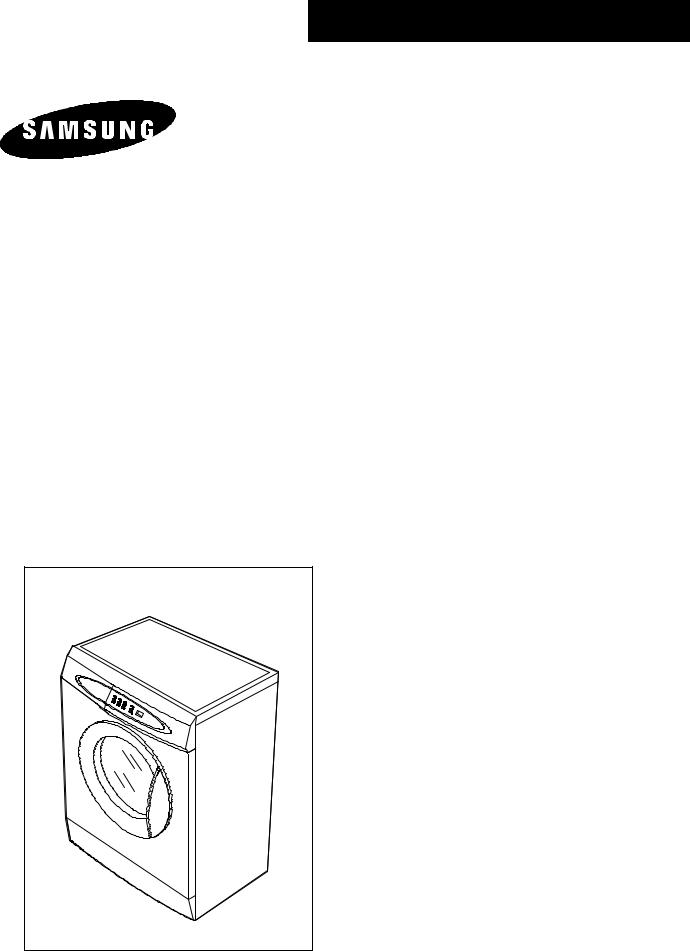
WASHING MACHINE
S621GWL/YLW
S621GWS/YLW
S821GWL/YLW
S821GWS/YLW
SERVICE Manual 
WASHING MACHINE |
|
CONTENTS |
|
|
|
 Caution for the safety during servicing 1. SPECIFICATIONS
2. SAFETY DEVICES
3. OVERVIEW OF THE WASHING MACHINE
4. OVERVIEW OF THE CONTROL PANEL
5. MAIN FUNCTION
6. TECHNICAL POINT
7. GENERAL ERROR FUNCTION
8. TROUBLE DIAGNOSIS
9. TEST MODE
10. DESIGNATION OF MAIN COMPONENTS
11. PCB SCHEMATIC DIAGRAM
11-1. PCB CIRCUIT DIAGRAM
12. SETTING UP A WASH MACHINE
13. ASSEMBLE AND DISASSEMBLE
14. TOOLS FOR DISASSEMBLY AND ASSEMBLY
15. EXPLODED VIEW AND PARTS LIST

Caution for the safety during servicing
1.Do not allow the customer to repair the product.
The person may be injured or the product life may be shortened.
2.Execute A/S after unplugging the power supply unit.
Be care of the electric shock.
3.Do not plug several plugs in the same outlet.
It may cause the fire due to overheat.
4.Check the damage, pressing or burning of the power plug or outlet.
Replace it promptly if it has problem.((may cause the electric shock or fire)
5.Do not clean the main body with the water.
It may cause the electric shock and fire and shorten the product life))
6.The wiring of the harness shall be free from the moisture and tightened during serving.
It shall not be deviated by certain impact.
7.Remove any dust or filth on the housing section,wiring section,connection section during servicing.
Protect the cause of the fire such as the tracking,and etc.
8.Check any mark of the moisture on the electrical parts, harness section and etc.
Replace the parts or remove the moisture.
9.Check the assembly status of the parts after servicing.
Maintain the status before servicing.
10.Pull out the power cord with holding the plug.
Be care of the electric shock and fire when the cord is damaged.
11.Unplug the power plug from the outlet when the wash machine is not used.
Be care of the electric shock and fire due to the strike of the lightening.
12.Do not use or store the spray or flammable materials(including gasoline,alcohol and etc.) around the wash machine.
Be care of the explosion or fire due to the electric spark.
13.Do not put the bowl of water or wet laundry on the wash machine.
If the water is penetrated to the wash machine, this may cause the electric shock or fire.
14.Do not install the wash machine in the place where the snow or rain falls.
It may cause the electric shock and fire and shorten the product life.
15.Do not push the control buttons with the awl,pin, or sharp materials.
It may the electric shock and trouble.
16.Check the wash machine is leveled horizontally and installed properly on the floor.
The vibration may shorten the product life.
17.Joint the wire by the connector correctly.
When the wire is jointed by the tape, this may cause the fire due to the tracking.
18.When the wash machine is to be laid for the service, put the pad on the floor and lay the product at side slowly.
If the wash machine is laid front, the relay may be damaged by the tub.
19.When the wash-heater is replaced, check it is inserted in the bracket-heater and screw the nut.
If the wash--is not inserted in the bracket-heater properly, this may cause the noise and leakage since it is contacted to the drum.
-1 -

1. Specifications
WASH TYPE |
|
|
FRONT LOADING TYPE |
||
|
|
|
|
|
|
DIMENSION |
GROSS |
W 680mm X D 478mm X H 892mm |
|||
|
|
|
|
|
|
|
NET |
W 598mm X D 340mm X H 844mm |
|||
|
|
|
|
|
|
WATER PRESSURE |
|
|
50 kPa ~ 800 kPa |
|
|
|
|
|
|
|
|
WEIGHT |
GROSS |
58 kg |
|
||
|
|
|
|
|
|
|
NET |
55 kg |
|
||
|
|
|
|
|
|
WASH and SPIN CAPACITY |
|
|
3.5 kg (DRY LAUNDRY) |
|
|
|
|
|
|
|
|
POWER CONSUMPTION |
WASHING |
220 V |
|
110 W |
|
|
|
|
|
||
|
240 V |
|
110 W |
||
|
|
|
|
||
|
|
|
|
|
|
|
WASHING and |
220 V |
|
900 W |
|
|
|
|
|
||
|
HEATING |
240 V |
|
1050 W |
|
|
|
|
|
||
|
|
|
|
|
|
|
SPIN |
MODEL |
S821 |
|
S621 |
|
|
|
|
|
|
|
220-240V |
200 W |
|
170 W |
|
|
|
|
|||
|
|
|
|
|
|
|
PUMPING |
34 W |
|
||
|
|
|
|
|
|
WATER CONSUMPTION |
|
|
43ℓ(STANDARD COURSE) |
|
|
|
|
|
|
|
|
SPIN REVOLUTION |
MODEL |
S821 |
|
S621 |
|
|
|
|
|
|
|
rpm |
800 |
|
600 |
||
|
|
||||
|
|
|
|
|
|
- 2 -

2. Safety Devices
We adapt 5 safety devices for users to use this wash machine safely.
1)Balancing device (ASSY-Main PCB)
→When the laundry is out of balance, to prevent the noises and vibrations, the unbalance detecting sensor helps the laundry laid even and continue the dehydating process.
2)Anti-over water supply device
→Because water supply value is broken, once water is supplied to the 2/3 level of the door, the
water supplied is drained automatically, Over -flow error is displayed on the panel
3)Temperature-regulating device(thermistor)
→To prevent over-heating over the temperature setted up, THERMISTOR senses the temperature of the machine continuously and helps the wash machine to work at the temperature given by users.
4Overheatingcontrolling system
→Under the circumstances of THERMISTOR inferiority or abnormal condition, if wash-heater is overheated, automatically, assy -thermal fuse cuts off the power supply to protect the machine to keep it safe.
5)Delicate clothing safeguard function(ASSY-Main PCB)
→To protect the clothings which is weak to high temperature, the wash machine senses the temperature inside the washing tub. if the temperature rises over 50 wool washing course and Delicate washing course display abnormal water temperature on the panel , after draining the water.
- 3 -
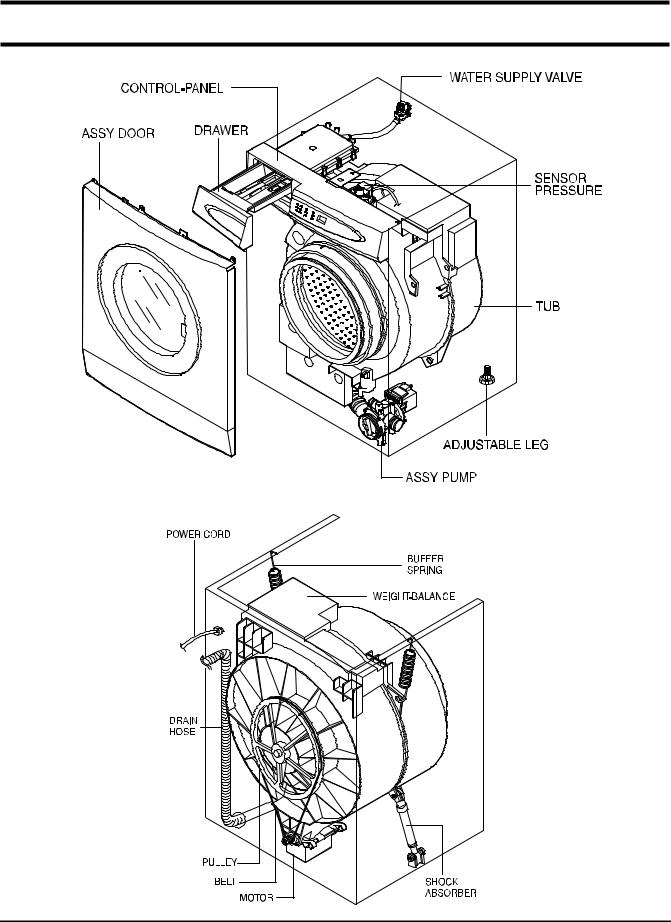
3. Overview of the Washing Machine
- 4 -
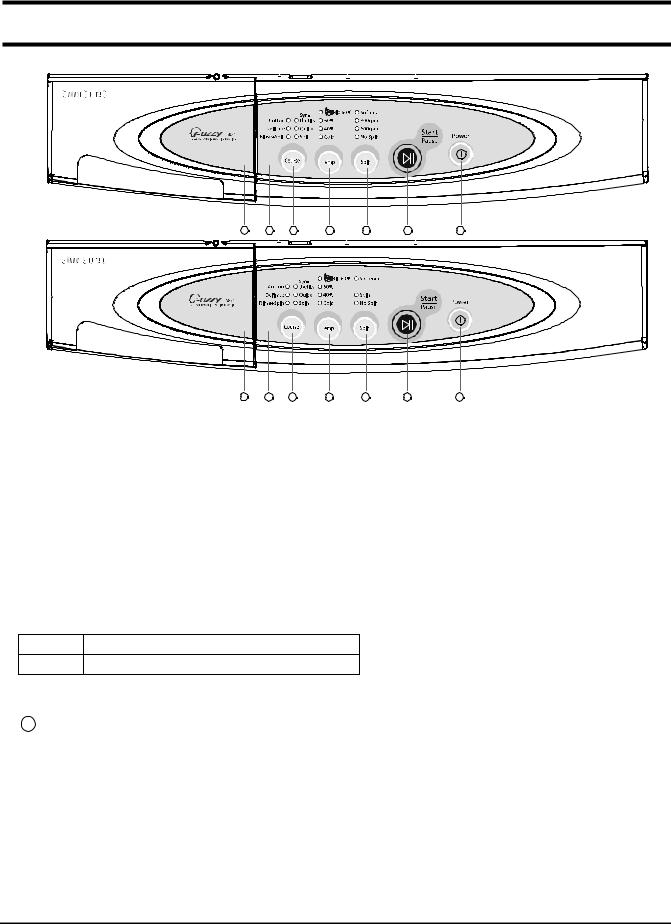
4. Overview of the control panel
S821
S621 |
1 |
2 |
3 |
4 |
5 |
6 |
7 |
1 |
2 |
3 |
4 |
5 |
6 |
7 |
1.Detergent dispenser
2.Display panel
Displays wash cycle and error messages by LED lamps.
3.Course button
Press the button repeatedly to select one of the six availabel wash program. {Cotton.Synthetics.Delicates .Quick.Rinse+Spin.Spin.Cotton }.
4. Temperature selection button
Press the button repeatedly to cycle through the available water temperature options (cold, 40 °C , 60 ° C and Bio 60 ° C).
*Bio 60°C : To improve the Wash efficiency, heating during 30 min.
5.Spin selection button
Press the button repeatedly to cycle through the available spin speed options.
S821 no spin, 600, 800 rpm
S621 no spin, 600 rpm
6. Start/Pause button
Press to pause and restart programs.
7. 1 (On/Off) button
Press once to turn the washing machine on, press again to turn the washing machine off. If the washing machine power is left on for longer than 10 minutes without any buttons being touched, the power automatically turns off.
- 5 -

5. Main function
1) Auto power S/W off function
●After power on, the auto power S/W off function automatically switches power off for you if you do not press selection button for 10 minutes
●After selecting the function, the auto power S/W off function automatically switches power off for you if you do not press start/pause button for 10 minutes
●After finishing the last function, the auto power S/W off function automatically switches power off for you if you do not re-select the course button or manual button
2) Door open function
●If door is open during the operating, all operating is halted, and door error message will be displayed and error melody will coming out
●Door open error can be cleared by colosing the door. the operating keeps going on
3) No spin function
● If no spin function selected, the operating is finished after last rinse
- 6 -

5. Main function
4) Power-out compensation function
●If power is out on selected process, the process before power out is stored to EEPROM, once power is back the process before power out continues.
●When power is back, washing process starts from the process at the point of the power out, rinse/drain process starts from the initial process.
POWER-OUT COMPENSATION FUNCTION PROCESS
START |
WASHING |
RINSE/DRAIN |
RINSE/DRAIN |
|
|
|
FINISH |
|
|
START |
PROCESS |
|
POWER OUT |
|
POWER OUT |
|
|
SAVE DATA |
|
|
|
|
|
SAVE DATA |
|
to EEPROM |
|
|
|
|
|
to EEPROM |
POWER BACK |
|
POWER BACK |
READ DATA |
MICOM RESTORE |
|
MICOM RESTORE |
RESTART |
|
|
|
(PROCESS+TIME) |
|
|
|
PROCESS |
|
|
|
|
|
|
5) Water heater Error function
This function starts working, when the heater works abnormally.
(this function begins sensing the heater 1 minutes later, after the heater operating)
The value of the initial thermistor(A1) is compared with that of the thermistor(A2) in 2 minutes (Y=A2-A1)
-For 10 minutes, the variance of temperature(Y) is less than 2 "course led 6ea on 40 /60 led on" message is displayed on the panel.
The value of the initial thermistor(A1) is compared with that of the thermistor(A2) in 2 minutes (Y=A2-A1)
-For 2 minute the variance of temperature increases more than 4.5 (0.2148V) "course led 6ea on cold/60 led on" message is displayed on the panel.
At this time heater, Error "course led 6ea on cold/60 led on" is displayed and all working process off
The heater operating continues during heating hours, if washing hour is left over, the residual washing process keeps going without heating.
- 7 -
5. Main function
6)Fuzzy washing function ( weight-sensing)
After finishing initial water supply, when the fall of the water level needs supplementary water supply, Sensing function perceives the weght with the supplementary water supply numbers and starts to work. Under the course of Cotton, if the supplementary water supply numbers become 3 - 4 times the
function is going at default condition ( high water level ), if 1-2 below that is going at middle level, if 0 below low water level, heating hours and rinse hours depend on the above data.
|
Washing hours |
Rinse water level |
|
|
|
|
|
|
Cotton |
|
|
|
|
|
|
|
|
|
|
High |
Default |
|
Default |
|
|
|
|
Middle |
Default-12 |
min |
22.80KHZ |
|
|
|
|
Low |
Default-25 |
min |
23.30KHZ |
|
|
|
|
After sensing weight, above hours is decreased from above default hours
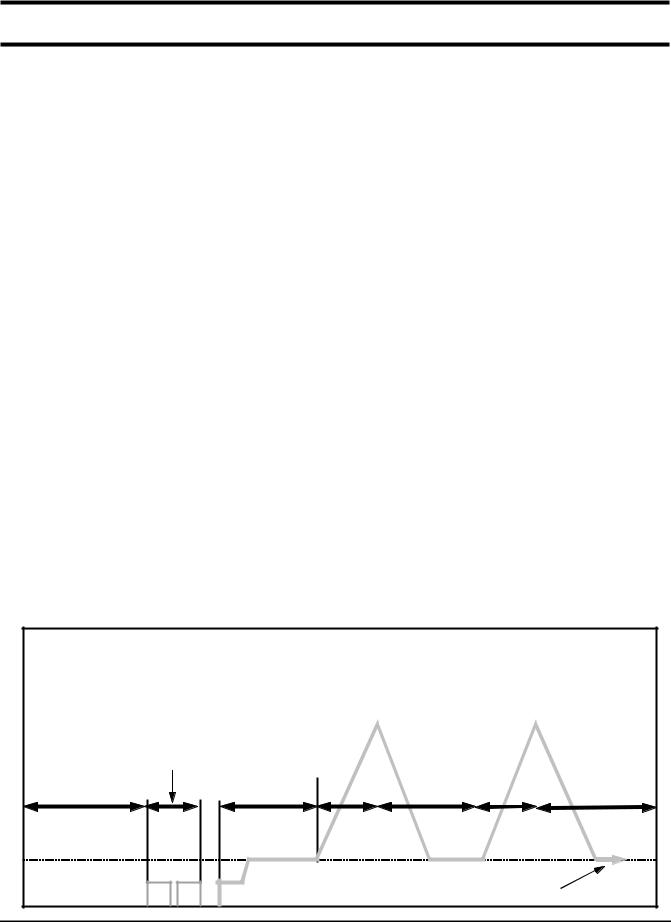
7) Bubble -detecting function
At the each condition of washing&dehydrating , rinse&dehydrating , hydrating, bubble -detecting function works, this function works 5times normally, if the function detects bubbles at 6 times , the bubble-detecting function stops and go on to the next process.
●The bubble-detecting function during washing & dehydrating to rinse & dehydrating
after 2 times instant dehydrating and before main dehydrating, if the water level is under 25.45KHZ, Bubble
→Detecting function thinks there are bubbles and add the bubbles-removing rinse, needing hours are above hours and 6 min 40 sec.
→The bubble-detecting function during single hydrating process
after 2 times instant dehydrating and before main dehydrating , if the water level is 25.45KHZ below or during main dehydrating, water level data is 23.80KHZ below Bubble-detecting function thinks there are bubbles and add the bubbles-removing rinse 1 times, needing hours are above hours and 5 min 50 sec.
Bubble-detecting function operating process |
|
|
|
|||
|
|
210rpm |
210rpm |
|
||
|
|
|
|
|
||
|
20 sec |
|
|
|
|
|
|
laundry scattering |
|
|
|
|
|
draining &reverse |
unbalance |
|
|
|
|
|
detecting range |
|
|
|
|
||
1 min 20sec |
|
|
|
|
||
20sec |
5sec |
15sec |
5sec |
15sec |
||
|
||||||
|
|
|
bubble detection |
|
||
|
|
|
(default water level 25.45KHZ below) |
|
||
|
|
- 8 - |
|
|
|
|

5. Main function
8)Unbalance detecting & laundry balance positioning system
Just before the hydrating process and just after reversal rotation for balancing laundry position, this function is carried out
The initial 6 sec is the period of reversal rotation for balancing laundry position , Drum rotates 50rpm for initial 6 sec
Next 10 sec, the rotation increases the speed from 50 rpm to 90 rpm slowly
During the next 18 sec, drum rotates at the speed of 90 rpm, the sensor decides the degree of laundry unbalance with TACHO data which is attached to motor
If the degree of unbalanced laundry is over 6 times to default value, laundry balancing system carryies out feed back process 6 times
- 9 -

6. Technical point |
|
|
|
|
|
|
|
|
|
|||
|
|
|
|
|
|
|
|
|
|
|
|
|
1) Motor on/off time at each course |
|
|
|
|
|
unit:sec |
||||||
|
|
|
|
|
|
|
|
|
|
|
|
|
|
|
|
|
|
|
|
|
|
|
|
|
|
|
Course |
|
|
Washing |
|
|
|
Rinse |
|
Motor r.p.m |
||
|
|
|
|
|
|
|
|
|
|
|
||
|
Cw |
|
Off |
Ccw |
Off |
Cw |
Off |
|
Ccw |
Off |
||
|
|
|
|
|
||||||||
|
|
|
|
|
|
|
|
|
|
|
|
|
|
Cotton |
13 |
|
3 |
13 |
3 |
10 |
5 |
|
10 |
5 |
50 |
|
|
|
|
|
|
|
|
|
|
|
|
|
|
Synthetics |
7 |
|
8 |
7 |
8 |
7 |
8 |
|
7 |
8 |
40 |
|
|
|
|
|
|
|
|
|
|
|
|
|
|
Delicates |
5 |
|
10 |
5 |
10 |
5 |
10 |
|
5 |
10 |
30 |
|
|
|
|
|
|
|
|
|
|
|
|
|
|
Quick |
12 |
|
3 |
12 |
3 |
10 |
5 |
|
10 |
5 |
45 |
|
|
|
|
|
|
|
|
|
|
|
|
|
2) Final dehydrating r.p.m at each course |
unit:rpm |
|||
|
|
|
|
|
|
|
Model |
S821 |
S621 |
|
Course |
|
||
|
|
|
|
|
|
Cotton |
|
800 |
600 |
|
|
|
|
|
|
Synthetics |
|
800 |
600 |
|
|
|
|
|
|
Delicates |
|
600 |
600 |
|
|
|
|
|
|
Quick |
|
800 |
600 |
|
|
|
|
|
You can change the r.p.m to the above a table by use spin button under no spin situation.
- 10 -
6. Technical point
3) The water level data at each course
unit:Khz
Water level |
Default water level(khz) |
Supplemetary water |
Supplemetary water |
||
Course |
START(Khz) |
end(khz) |
|||
|
|
||||
Washing |
|
23.50 |
24.00 |
23.70 |
|
Cotton |
large |
22.45 |
|
|
|
middle |
22.80 |
24.00 |
23.50 |
||
Rinse |
|||||
|
small |
23.30 |
|
|
|
Washing |
|
23.50 |
24.00 |
23.70 |
|
Synthetics |
|
22.45 |
24.00 |
23.50 |
|
Rinse |
|
||||
Washing |
|
22.80 |
23.55 |
23.35 |
|
Delicates |
|
22.65 |
23.55 |
23.35 |
|
Rinse |
|
||||
Washing |
|
23.50 |
24.00 |
23.70 |
|
Quick |
|
22.45 |
24.00 |
23.50 |
|
Rinse |
|
||||
4) The other water level data
The water data unter each conditon |
|
|
|
|
|
|
|
1st water supply (only preparation) |
24.60 |
|
1st water supply level to washing tub |
|
|
|
|
Overflow error |
20.50 |
|
The water supplied reach 2/3 of door |
|
|
|
|
Bubble |
25.45 |
|
Bubble -detecting water level |
detectingatwashing/rinse/dehydrating |
|
||
|
|
|
|
Bubble detecting rinse water level |
22.00 |
|
The water level which can detect bubblesunit:Khz |
|
|
|
|
Water level which can open door |
23.80 |
over |
It is possible to open the door |
|
|
|
|
Water level which can drive heater |
24.50 |
|
Safety water level of wash heater |
|
|
|
|
Water level which can reset the drain |
24.50 |
|
The water level can be detected after 1st draining |
|
|
|
|
If water level is 15KHZ below or 30 KHZ above , sensor-pressur is out of order so needs changing.
- 11 -
10. Designation of Main Components
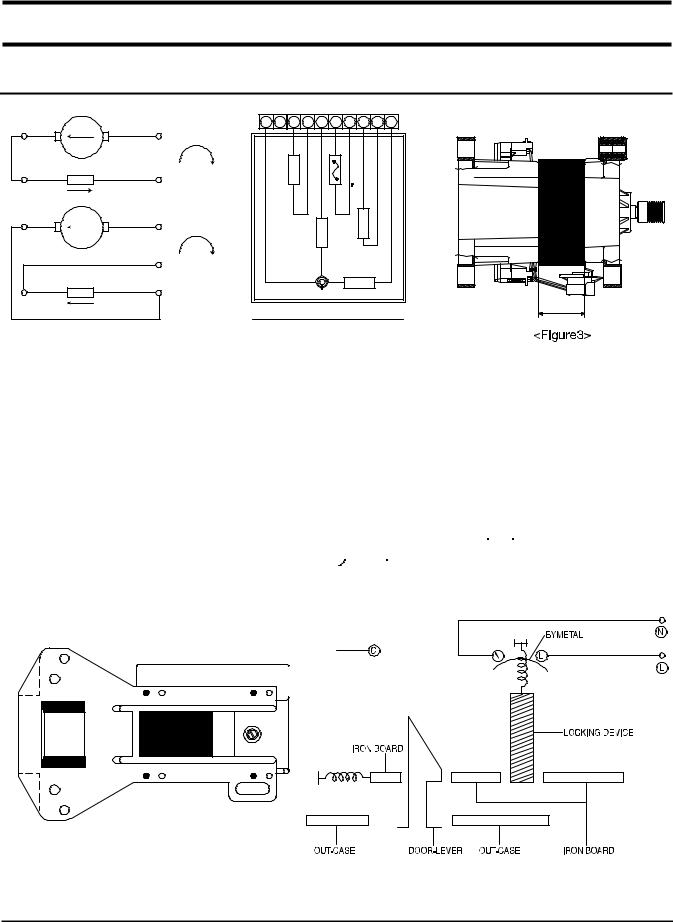
10-1 Normal / Reverse Revolution of Motor and R. P. M. Control
8 |
Rotor |
9 |
+ |
|
|
|
CW |
5 |
Stator coil |
10 |
- |
|
|
|
|
8 |
Rotor |
9 |
+ |
|
|
|
|
|
|
5 |
CCW |
|
|
- |
|
|
|
|
|
|
Stator coil |
10 |
|
5 |
|
|
|
|
<Figure1> |
|
|
1 |
2 |
3 |
4 |
5 |
6 |
7 |
8 |
9 |
10 |
DEE PSHGI H |
|
OHC AT |
|
DEE PSELD DMI |
|
ROT ) CET C05 OR 1( P |
ROT OR |
|
|
|
|
|
|
ROT AST |
|
|
|
|
|
|
|
|
|
|
|
STATOR |
|
||
|
|
WASHING MOTOR |
|
H |
|||||
<Figure2>
|
(± 7%) |
STATOR(51) |
ROTOR(8.9) |
TACHO(3.4) |
PROTECTOR(6.7) |
"H"(mm) |
Code-No. |
Remark |
|
|
|
|
|
|
|
|
|
|
|
|
Resistance |
2.08Ω |
1.99Ω |
38.8Ω |
0 |
30 |
DC31-00002H |
S821 |
|
|
value |
|
|
|
|
|
|
S621 |
|
|
|
|
|
|
|
|
|
|
|
|
|
|
|
|
|
|
|
|
|
|
Rated |
|
|
220~240V/50Hz |
|
|
|
|
|
|
value |
|
|
|
|
|
|
||
|
|
|
|
|
|
|
|
|
|
|
|
|
|
|
|
|
|
|
|
10-2 Door safety Device |
|
|
|
|
|
|
|||
|
|
|
|
|
|
|
|
|
|
When Door is closed, door stay closed. if "set" is operated, power supplied to  ,
,  wires have bymetal keep the door closed, and electronical power flows between
  and
and  make it operate.
- 23 -
 Loading...