

Page 1

TRANSFER
D DRIVELINE/AXLE
A
B
SECTION TF
CONTENTS
PRECAUTIONS .......................................................... 3
Precautions for Supplemental Rest raint System
(SRS) “AIR BAG” and “SEAT BELT PRE-TEN-
SIONER” .................................................................. 3
Precautions .............................................................. 3
Service Notice or Precautions .................................. 4
PREPARATION ........................................................... 5
Special Service Tools ............................................... 5
Commercial Service Tools ........................................ 7
NOISE, VIBRATION AND HARSHNESS (NVH)
TROUBLESHOOTING .......................... ...................... 8
NVH Troubleshooting Chart ..................................... 8
TRANSFER OIL .......................................................... 9
Changing Transfer Oil .............................................. 9
DRAINING ................................ ............. ................ 9
FILLING .............................. ...... ............................. 9
Checking Transfer Oil ............................................... 9
OIL LEAKAGE AND OIL LEVEL ........................... 9
AWD SYSTEM ............ ...... ........................................ 10
Power Transfer Diagram ........................................ 10
System Description ................................................ 10
ELECTRIC CONTROLLED COUPLING ............. 10
AWD CONTROL UNIT ........................................ 10
AWD MODE SWITCH ..........................................11
AWD INDICATOR LAMP AND LOCK INDICA-
TOR LAMP ...........................................................11
AWD WARNING LAMP ........................................11
System Diagram ..................................................... 12
COMPONENTS FUNCTION DESCRIPTION ..... 13
CAN Communication .............................................. 13
SYSTEM DESCRIPTION .................................... 13
TROUBLE DIAGNOSIS ............................................ 14
Fail-Safe Function .................................................. 14
How to Perform Trouble Diagnosis ........................ 14
BASIC CONCEPT ............................................... 14
Location of Electrical Parts .............................. ....... 15
Circuit Diagram ...................................................... 16
Wiring Diagram — AWD — .................................... 17
Trouble Diagnosis Chart for Symptoms ................. 20
AWD Control Unit Input/Output Signal Reference
TRANSFER
Values ................................................................. ....21
AWD CONTROL UNIT INSPECTION TABLE ..... 21
CONSUL T-II Function (ALL MODE AWD/4WD) ..... 22
FUNCTION .................................. ........................22
CONSULT-II SETTING PROCEDURE ................22
SELF-DIAG RESULTS MODE ............................ 23
DATA MONITOR MODE ......................................24
ACTIVE TEST MODE ......................................... 25
AWD CONTROL UNIT PART NUMBER ............. 25
TROUBLE DIAGNOSIS FOR SYSTEM ... ...... ....... ....26
Power Supply Circuit for AWD Control Unit ............26
CONSUL T-II REFERENCE VALUE IN DATA
MONITOR MODE ................................................ 26
DIAGNOSTIC PROCEDURE .............................. 26
AWD Control Unit ........ ...... ..................................... 27
DIAGNOSTIC PROCEDURE .............................. 27
ABS System ...........................................................28
DIAGNOSTIC PROCEDURE .............................. 28
AWD Solenoid ...... ....... ...... ....... .............................. 28
CONSUL T-II REFERENCE VALUE IN DATA
MONITOR MODE ................................................ 28
DIAGNOSTIC PROCEDURE .............................. 29
COMPONENT INSPECTION ...... ........................ 31
AWD Actuator Relay ................. ...... ....... ...... ....... ....32
CONSUL T-II REFERENCE VALUE IN DATA
MONITOR MODE ................................................ 32
DIAGNOSTIC PROCEDURE .............................. 32
AWD Mode Switch .................... ...... ....... ...... ....... .... 33
CONSUL T-II REFERENCE VALUE IN DATA
MONITOR MODE ................................................ 33
DIAGNOSTIC PROCEDURE .............................. 33
COMPONENT INSPECTION ...... ........................ 35
Engine Control Signal ..................... ....... ...... ....... ....35
DIAGNOSTIC PROCEDURE .............................. 35
CAN Communication Line ...................................... 36
DIAGNOSTIC PROCEDURE .............................. 36
TROUBLE DIAGNOSIS FOR SYMPTOMS .............. 37
AWD Indicator Lamp and LOCK Indicator Lamp Do
Not Turn ON for Approx. 1 Second When Ignition
Switch Is Turned to ON .......................................... 37
C
TF
E
F
G
H
I
J
K
L
M
Revision: 2006 July 2006 X-Trail
TF-1
Page 2

DIAGNOSTIC PROCEDURE ....................... ....... 37
AWD Warning Lamp Does Not Turn ON When Igni-
tion Switch Is Turned to ON ....................................38
DIAGNOSTIC PROCEDURE ....................... ....... 38
AWD Warning Lamp Does Not Turn OFF Several
Seconds After Engine Started .................................39
DIAGNOSTIC PROCEDURE ....................... ....... 39
AWD Mode Cannot Be Switched After Engine Is
Started ....................................................................40
DIAGNOSTIC PROCEDURE ....................... ....... 40
Heavy Tight-Corner Braking Symptom Occurs
When Vehicle Is Driven in AUTO Mode and Steering
Wheel Is Turned Fully to Either Side after Engine
Is Started ................................................................41
DIAGNOSTIC PROCEDURE ....................... ....... 41
Vehicle Does Not Enter AWD Mode Even Though
AWD Warning Lamp Turned to OFF .......................42
DIAGNOSTIC PROCEDURE ....................... ....... 42
While Driving, AWD Warning Lamp Flashes Rapidly
(When Flashing in Approx. 1 Minute and Then Turn-
ing OFF) ...... ....... ...... ...... ....... ...... ....... ...... ....... ....... 43
While Driving, AWD Warning Lamp Flashes Slowly
(When Continuing to Flash Until Turning Ignition
Switch OFF) ............................................................43
DIAGNOSTIC PROCEDURE ....................... ....... 43
AWD CONTROL UNIT ..............................................45
Removal and Installation ........................................45
REMOVAL ...........................................................45
INSTALLATION ......................... ............. ..............45
SIDE OIL SEAL .........................................................46
Removal and Installation .........................................46
REMOVAL ........................................................ ....46
INSTALLATION ......... ...........................................46
AIR BREATHER HOSE .............................................47
Components ....................... .................... .................47
Removal and Installation .........................................47
TRANSFER ASSEMBLY ...........................................48
Removal and Installation .........................................48
COMPONENTS ...................................................48
REMOVAL ........................................................ ....48
INSTALLATION ......... ...........................................49
Disassembly and Assembly ............ ....... ...... ....... ....50
COMPONENTS ...................................................50
ASSEMBLY INSPECTION ...................................51
DISASSEMBLY ................................................ ....55
INSPECTION AFTER DISASSEMBLY ..... ....... ....59
SELECTING ADJUSTING SHIMS ............ ....... ....60
ASSEMBLY ...................................................... ....62
SERVICE DATA AND SPECIFICATIONS (SDS) ......67
General Specifications ............................................67
Inspection and Adjustment ......................................67
PRELOAD TORQUE BE FORE DISASSEMB L Y ...67
PRELOAD TORQUE AFTER DISASSEMBLY
AND REASSEMBLY ............................................67
BACKLASH ............... ................................ ...........67
COMPANION FLANGE RUNOUT .......................67
SELECTIVE PARTS ............................................67
Revision: 2006 July 2006 X-Trail
TF-2
Page 3
PRECAUTIONS
PRECAUTIONS PFP:00001
Precautions for Supplemental Restraint System (SRS) “AIR BAG” and “SEAT BELT PRE-TENSIONER”
ADS0016Z
A
The Supplemental Rest raint System such as “AIR BAG” and “SEAT BELT PR E-TENSIONER”, used along
with a front seat belt, helps to redu ce th e risk or se verit y of i njury to the driv er and front passenge r for ce rtain
types of col lision. Information necessary to service the system safely is includ ed in the SRS and SB section of
this Service Manual.
WARNING:
● To avoid rendering the SRS inopera tive, whi ch could incr ease the risk of pe rsonal injury or death
in the event of a collision which would result in air bag inflation, all maintenance must be performed by an authorized NISSAN/INFINITI dealer.
● Improper maintenance, inc luding incorrect removal and installation of the SRS, can lead to per-
sonal injury ca use d by unintentional ac tiv atio n o f the system. For remo va l of Spiral Cable and Air
Bag Module, see the SRS section.
● Do not use electrical test equ ipment o n any circu it related to the SRS unless in structed to in this
Service Manual. SRS wiring harnesses can be identified by yellow and/or orange harnesses or
harness connectors.
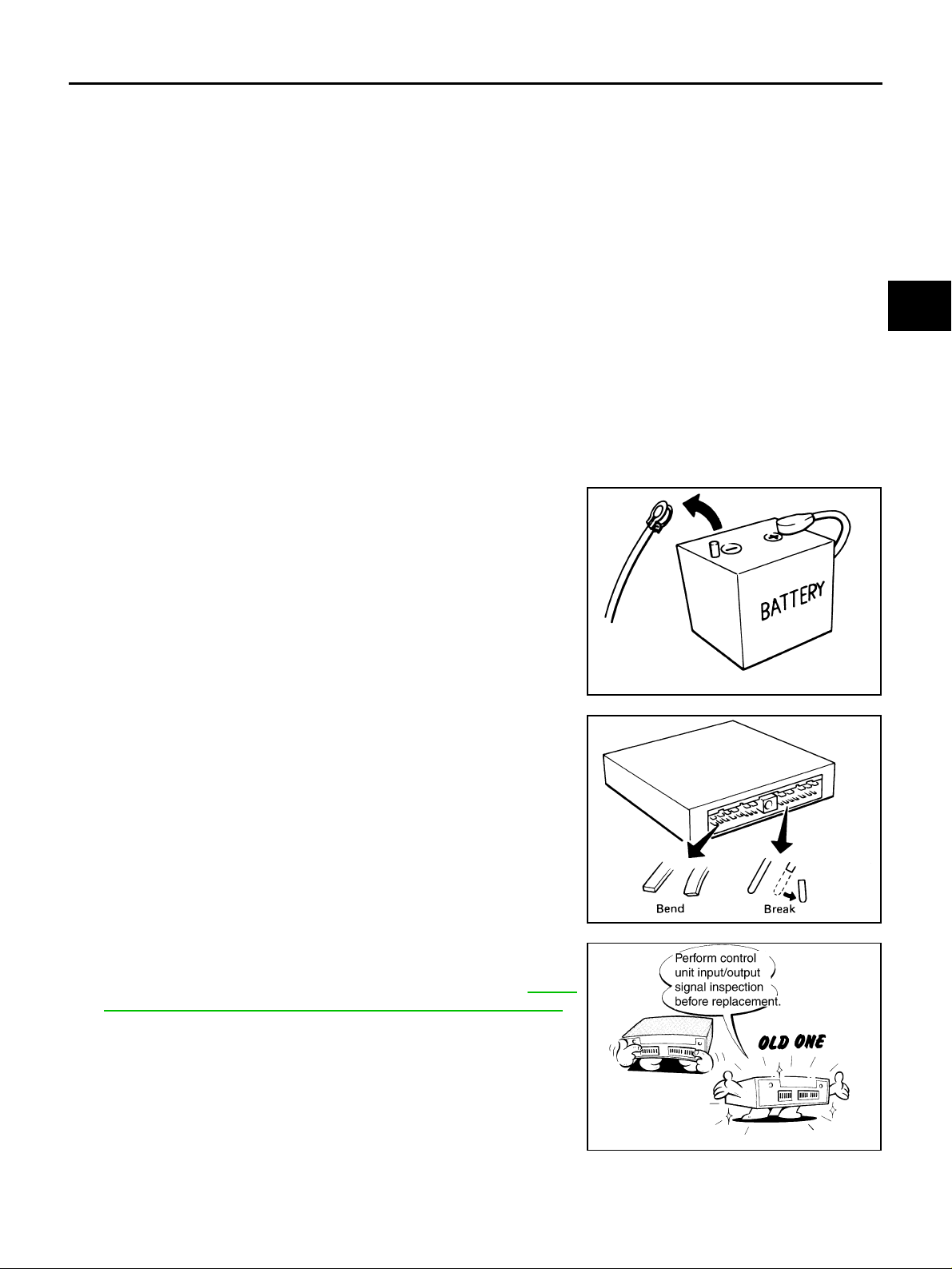
Precautions ADS00170
● Before connecting or disconnecting the AWD control unit
harness connector, turn ignition switch “OFF” and disconnect battery negative cable from batt ery negative terminal.
Because battery voltage is applied to AWD control unit even
if ignition switch is turned “OFF”.
B
C
TF
E
F
G
H
I
● When connecting or disconnecting pin connectors i nto or
from AWD control unit, take care not to damage pin terminals (bend or break).
When connecting pin connectors, make sur e that there are
no bends or breaks on AWD control unit pin terminal.
● Before replacing AWD control unit, perform AWD control
unit input/output signal inspection and make sure whether
AWD control unit functions properly or not. Refer to TF-21,
"AWD Control Unit Input/Output Signal Reference Values" .
SEF289H
SEF291H
SDIA1848E
J
K
L
M
Revision: 2006 July 2006 X-Trail
TF-3
Page 4

PRECAUTIONS
Service Notice or Precaution s ADS00171
● After overhaul refill the transfer with new transfer oil.
● Check the oil level or replace oil only with the vehicle parked on level surface.
● During removal or installation, keep inside of transfer clear of dust or dirt.
● Replace all tires at the same time. Always use tires of the proper size and the same brand and pattern.
Fitting improper siz e and/or unusual wear tires applies exc essive force to vehicle mechanism and can
cause longitudinal vibration.
● Disassembly should be done in a clean work area.
● Before proceeding with disassembly, thoroughly clean the transfer. It is important to prevent the internal
parts from becoming contaminated by dirt or other foreign matter.
● Check for the correct installation status prior to removal or disassembly. If matching marks are required,
be certain they do not interfere with the function of th e parts when applied.
● All parts should be carefully cleaned with a general purpose, non-flammable solvent before inspection or
reassembly.
● Check appearance of the disassembled parts for damage, deformation, and unusual wear. Replace them
with a new ones if necessary.
● Gaskets, seals, O-rings and lock nuts should be replaced any time when the transfer is dis assembled.
● In principle, tighten bolts or nuts gradually in several steps working diagonally from inside to outside. If
tightening sequence is specified, use it.
● Observe the specified torque when assembling.
● Clean and flush the parts sufficiently and blo w-dry them.
● Be carefu l not to damage sliding surface s and mating surfaces.
● Use lint-free cloth or towels for wiping parts clean. Common shop rags can leave fibers that could interfere
with the operation of the transfe r.
Revision: 2006 July 2006 X-Trail
TF-4
Page 5
PREPARATION
PREPARATION PFP:00002
Special Service Tools ADS00173
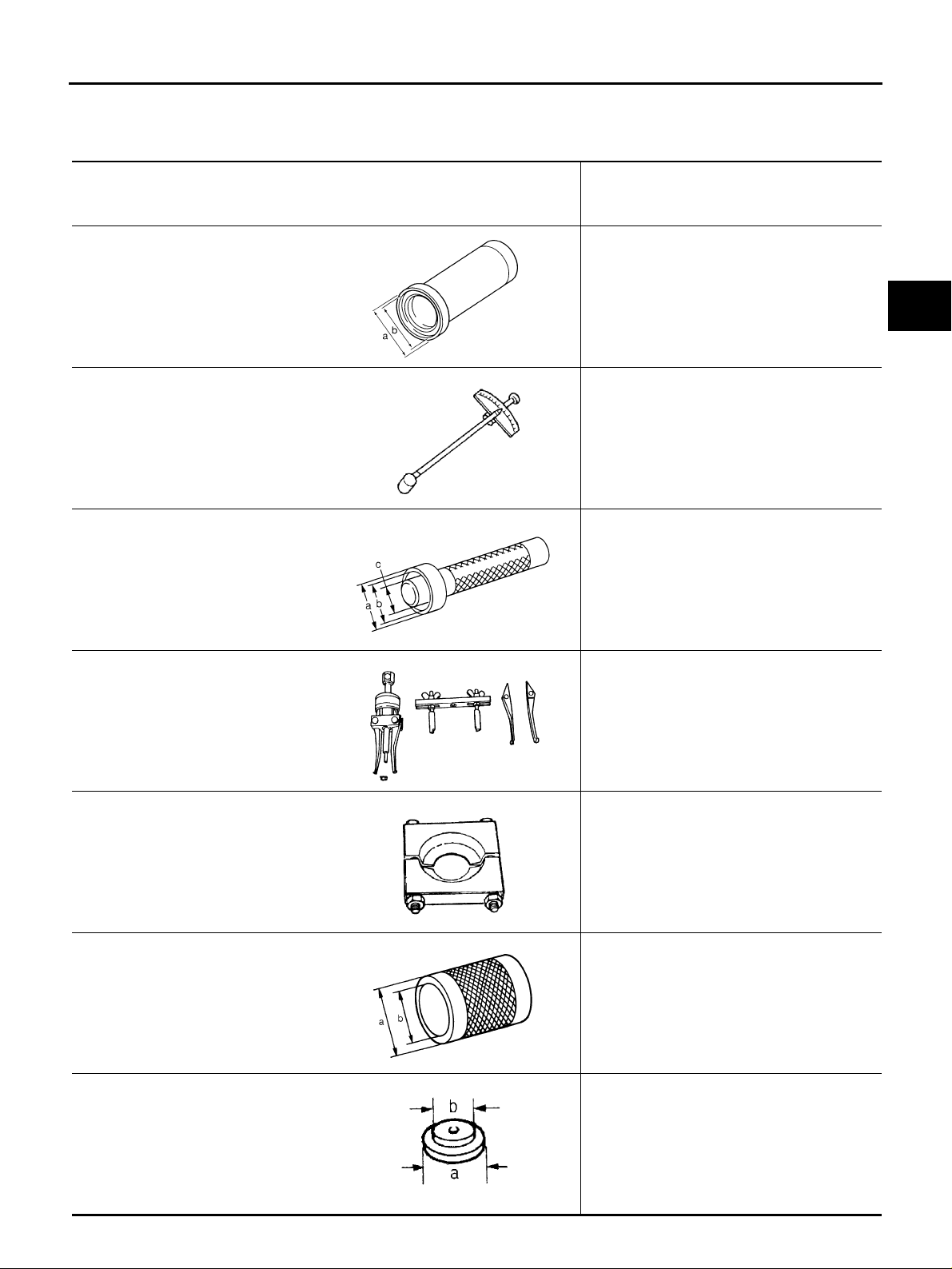
The actual shapes of Kent-Moore tools may differ from those of spec ial ser vi ce tool s illust rat ed here.
Tool number
(Kent-Moore No.)
Tool name
Description
A
B
KV38101700
(—)
Drift
a: 82 mm (3.23 in) dia.
b: 78 mm (3.07 in) dia.
ST3127S000
(J-25765-A)
Preload gauge
ST33220000
(J-25804-01)
Drift
a: 37 mm (1.46 in) dia.
b: 31 mm (1.22 in) dia.
c: 22 mm (0.87 in) dia.
KV381054S0
(J-34286)
Puller
ZZA1149D
ZZA0503D
ZZA1046D
Installing side oil seal (installing adapter case
oil seal)
Measuring preload torque
Removing drive pinion
● Removing pinion rear bearing outer race
● Removing pinion front bearing outer race
● Removing gear ring oil seal
C
TF
E
F
G
H
I
J
ST30031000
(J-22912-01)
Replacer
ST33200000
(J-26082)
Drift
a: 60 mm (2.36 in) dia.
b: 44.5 mm (1.752 in) dia.
ST33061000
(J-8107-2)
Drift
a: 38 mm (1.50 in) dia.
b: 28.5 mm (1.122 in) dia.
K
ZZA0601D
Removing pinion front bearing inner race
L
M
ZZA0700D
● Removing gear ring bearing inner race
(adapter case side)
● Installing companion flange
ZZA1002D
Removing gear ring bearing inner race
(transfer case side )
ZZA0810D
Revision: 2006 July 2006 X-Trail
TF-5
Page 6
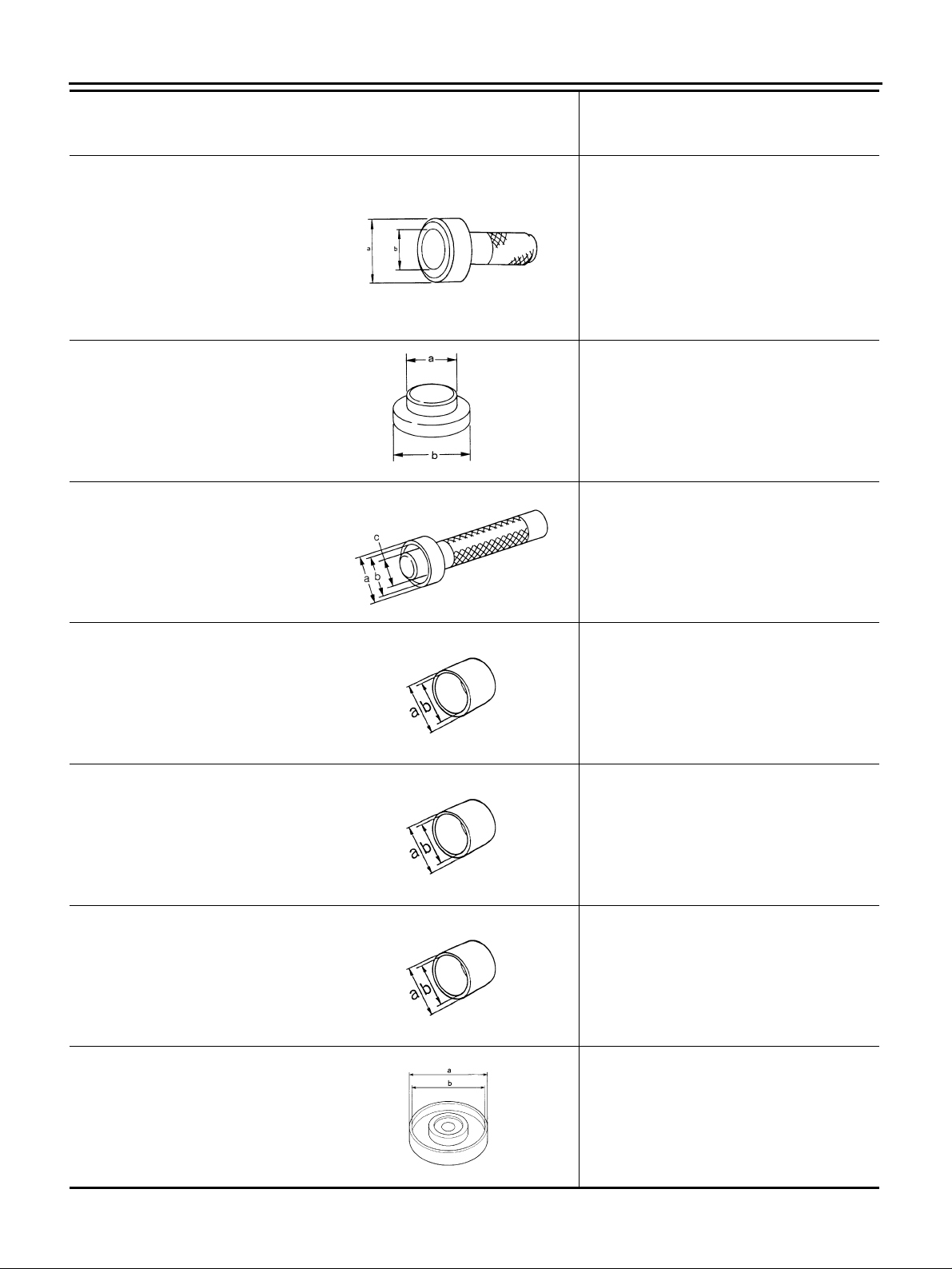
Tool number
(Kent-Moore No.)
Tool name
PREPARATION
Description
ST30720000
(J-25405)
Drift
a: 77 mm (3.03 in) dia.
b: 55.5 mm (2.185 in) dia.
KV40101840
(—)
Drift
a: 77 mm (3.03 in) dia.
b: 85 mm (3.35 in) dia.
ST33230000
(J-25805-01)
Drift
a: 51 mm (2.01 in) dia.
b: 41 mm (1.61 in) dia.
c: 28.5 mm (1.122 in) dia.
ST27863000
(—)
Drift
a: 74.5 mm (2.933 in) dia.
b: 62.5 mm (2.461 in) dia.
ZZA0811D
ZZA0881D
ZZA1046D
● Installing gear ring bearing outer race
(transfer case side)
● Installing gear ring bearing inner race
(transfer case side)
● Installing gear ring bearing inner race
(adapter case side)
● Installing gear ring bearing outer race
(adapter case side)
● Installing transfer case oil seal
Installing gear ring bearing outer race
(transfer case side)
Installing gear ring oil seal
Installing gear ring bearing inner race
(transfer case side)
KV40101630
(J-35870)
Drift
a: 68 mm (2.68 in) dia.
b: 60 mm (2.36 in) dia.
KV38102510
(—)
Drift
a: 71 mm (2.80 in) dia.
b: 65 mm (2.56 in) dia.
KV40105230
(—)
Drift
a: 92 mm (3.62 in) dia.
b: 86 mm (3.39 in) dia.
ZZA1003D
Installing gear ring bearing inner race
(transfer case side)
ZZA1003D
Installing gear ring bearing inner race
(adapter case side)
ZZA1003D
Installing gear ring bearing outer race
(adapter case side)
ZZA1141D
Revision: 2006 July 2006 X-Trail
TF-6
Page 7
PREPARATION
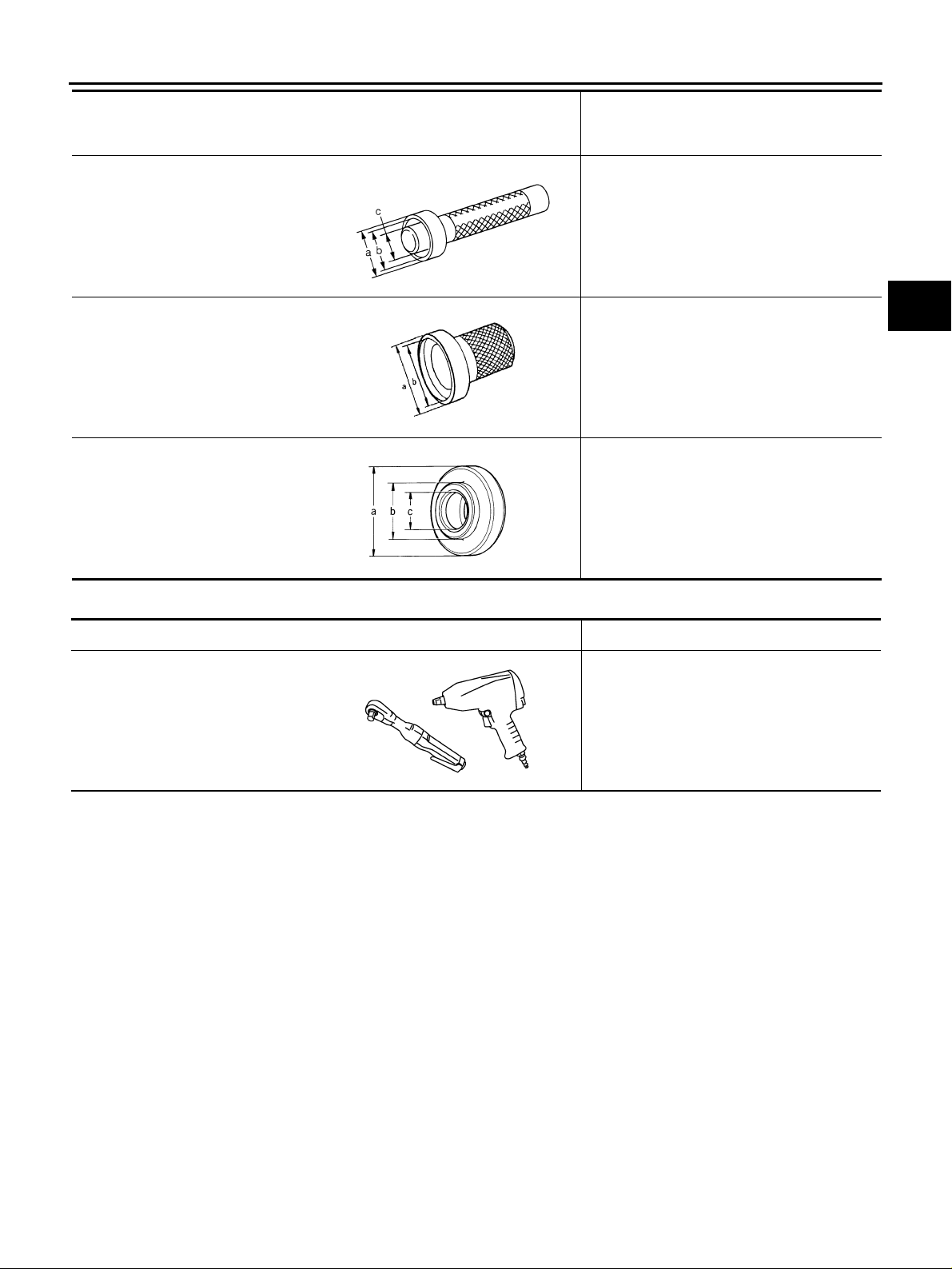
Tool number
(Kent-Moore No.)
Tool name
KV38100300
(J-25523)
Drift
a: 54 mm (2.13 in) dia.
b: 46 mm (1.81 in) dia.
c: 32 mm (1.26 in) dia.
ST33400001
(J-26082)
Drift
a: 60 mm (2.36 in) dia.
b: 47 mm (1.85 in) dia.
ST30901000
(J-26010-01)
Drift
a: 79 mm (3.11 in) dia.
b: 45 mm (1.77 in) dia.
c: 35.2 mm (1.386 in) dia.
ZZA1046D
ZZA0814D
ZZA0978D
Description
Installing pinion rear bearing outer race
● Installing pinion front bearing outer race
● Installing pinion sleeve oil seal
● Installing pinion front bearing outer race
● Installing pinion front bearing inner race
A
B
C
TF
E
F
G
H
Commercial Service Tools ADS00189
Tool name Description
Power tool Loosening nuts and bolts
PBIC0190E
I
J
K
L
M
Revision: 2006 July 2006 X-Trail
TF-7
Page 8
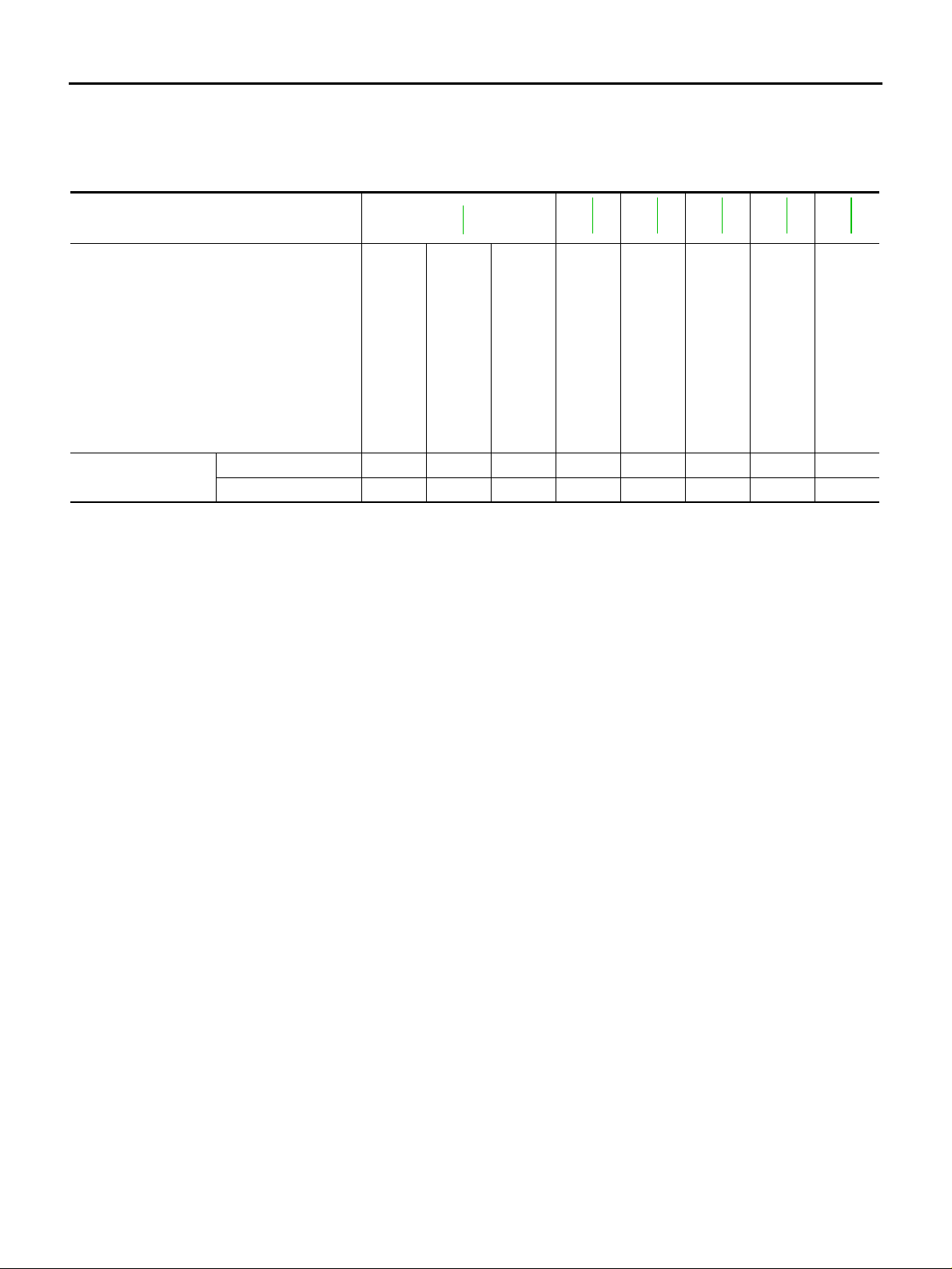
NOISE, VIBRATION AND HARSHNESS (NVH) TROUBLESHOOTING
NOISE, VIBRATION AND HARSHNESS (NVH) TROUBLESHOOTING PFP:00003 NVH Troubleshooting Chart ADS00174
Use the chart below to help you find the cause of the symptom. The numbers indicate the order of the inspection. If necessary, repair or replace these parts.
Reference page
SUSPECTED PARTS
(Possible cause)
Symptom
TF-9
TRANSFER OIL (Level low)
Noise 1 2 3 3
Transfer oil leakage 3 1 2 2 2
TRANSFER OIL (Wrong)
TRANSFER OIL (Level too high)
TF-50
LIQUID GASKET (Damaged)
TF-50
O-RING (Worn or damaged)
TF-50
OIL SEAL (Worn or damaged)
TF-59
GEAR (Worn or damaged)
TF-59
BEARING (Worn or damaged)
Revision: 2006 July 2006 X-Trail
TF-8
Page 9
TRANSFER OIL
TRANSFER OIL PFP:KLD30
Changing Transfer Oil ADS00175
DRAINING
CAUTION:
When draining oil, protect exhaust tube with cover.
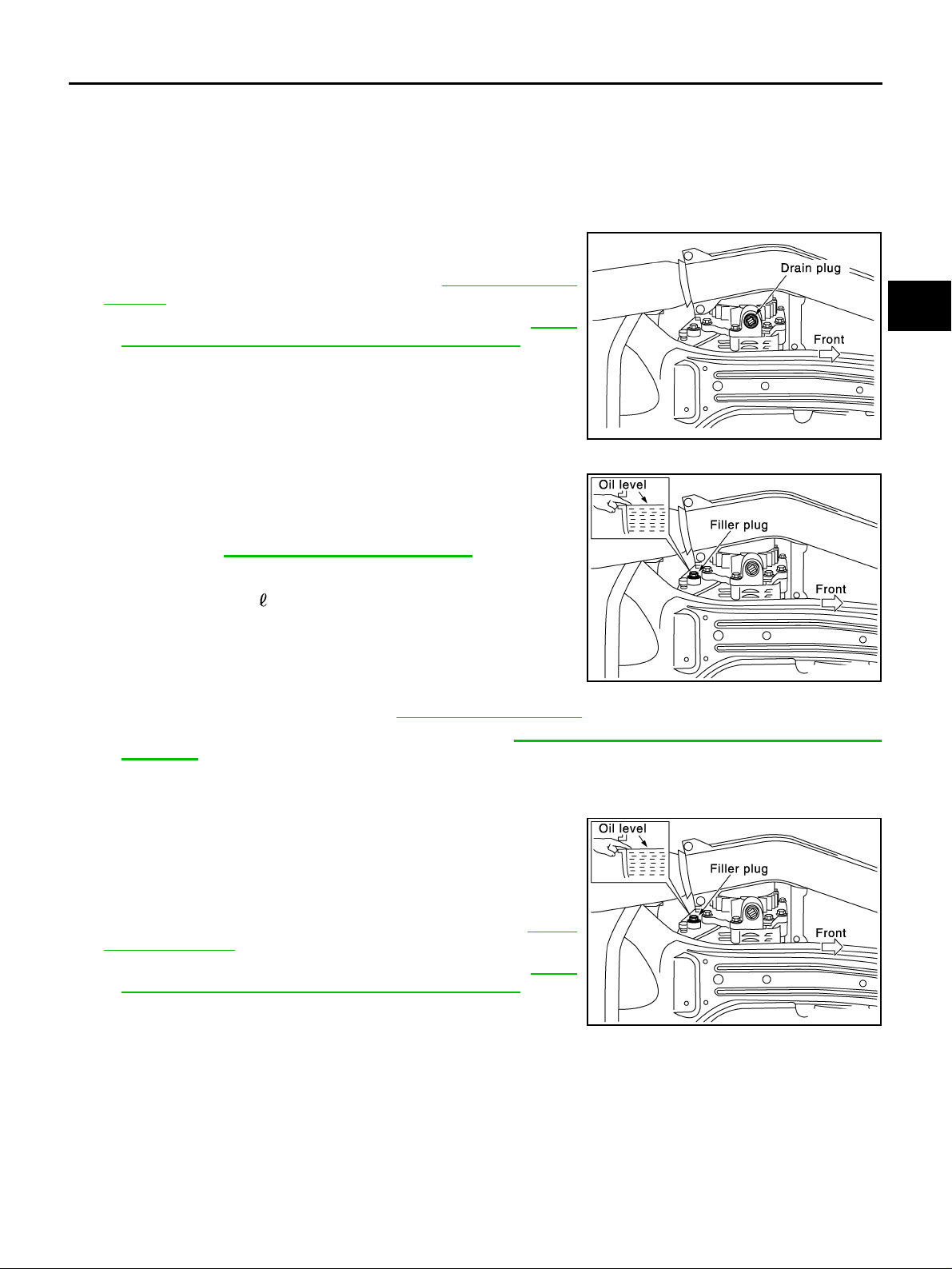
1. Run vehicle to warm up transfer body suffici ently.
2. Stop engine, and remove drain plug to drain transfer oil.
3. Apply sealant to drain plug. Install drain plug on transfer and
tighten to the specified torque. Refer to TF-50, "
NENTS" .
● Use Genuine Silicone RT V or equivalent. Refer to GI-47,
"Recommended Chemical Products and Sealants" .
COMPO-
A
B
C
TF
E
SDIA0512E
FILLING
1. Remove filler plug and add gear oil until oil level reaches the
specified limit near filler plug mounting hole.
Oil grade and Viscosi ty:
Refer to MA-10, "
Fluids and Lubricants" .
Oil capacity:
Approx. 0.31 (5/8 US pt, 1/2 lmp pt)
CAUTION:
Carefully fill oil. (Fill up for approx. 3 minutes)
2. Leave vehicle for 3 minutes, and check oil level again.
SDIA0513E
3. Apply sealant to filler plug. Install filler plug on transfer and
tighten to the specified torq ue . Refe r to TF-50, "
● Use Genuine Silicone RTV or equivalent. Refer to GI-47, "Recommended Chemical Products and
COMPONENTS" .
Sealants" .
Checking Transfer Oil ADS00176
OIL LEAKAGE AND OIL LEVEL
1. Check oil level from filler plug mounting hole as shown in the figure.
CAUTION:
Do not start engine while checking oil level.
2. Before installing filler plug, apply sealant. Install filler plug on
transfer and tighten to the specified torque. Refer to TF-50,
"COMPONENTS" .
● Use Genuine Silicone RT V or equivalent. Refer to GI-47,
"Recommended Chemical Products and Sealants" .
F
G
H
I
J
K
L
M
SDIA0513E
Revision: 2006 July 2006 X-Trail
TF-9
Page 10
AWD SYSTEM
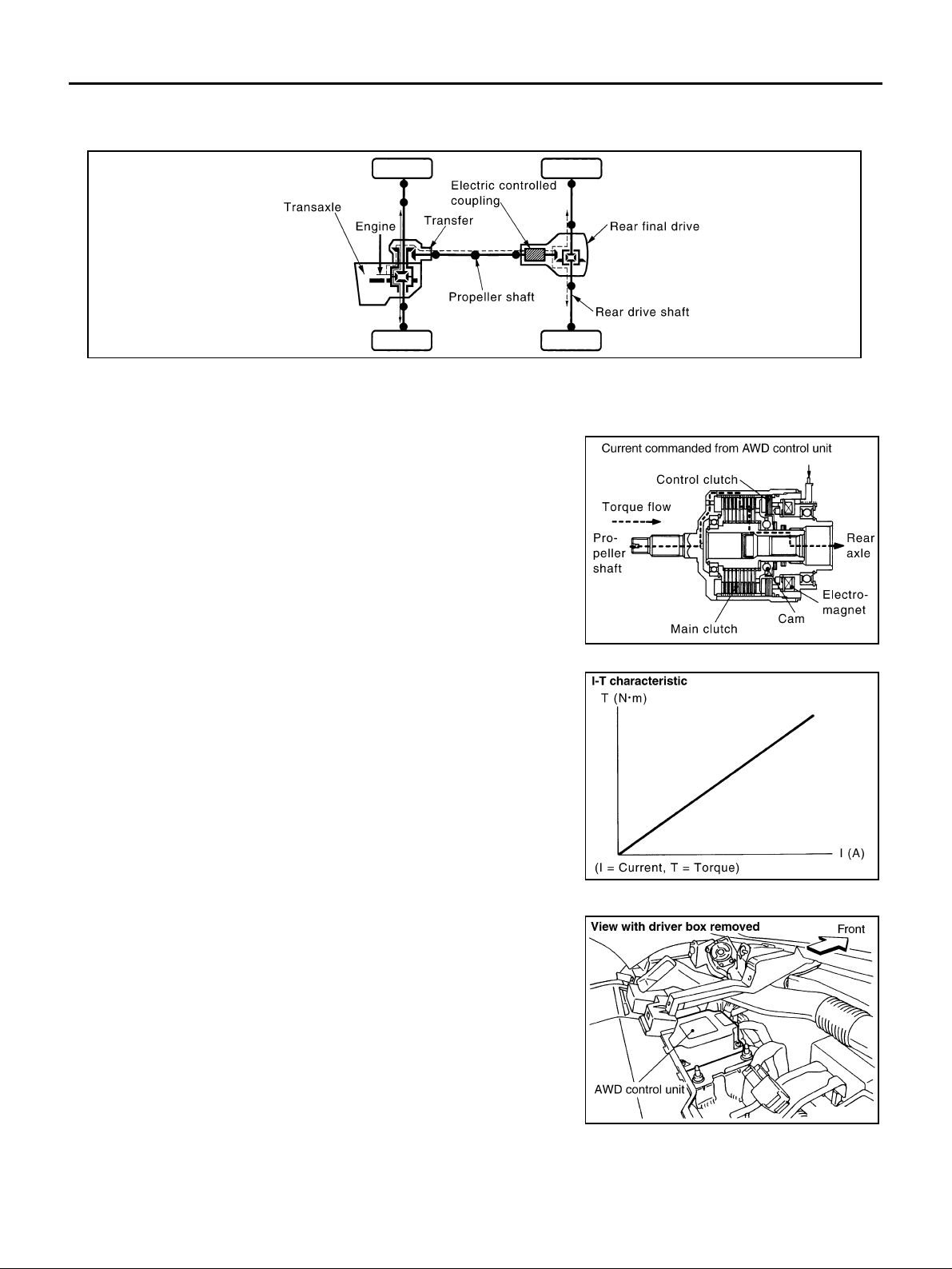
AWD SYSTEM PFP:41650 Power Transfer Diagram ADS00177
SDIA1607E
System Description ADS00178
ELECTRIC CONTROLLED COUPLING
Operation Principle
1. The AWD control unit supplies comm and current to t he electric
controlled coupling (AWD solenoid).
2. The control clu tch is engaged by th e electromagnet an d torque
is detected in control clutch.
3. The cam operates in response to the control clutch torque and
applies pressure to the main clutch.
4. The main clutch transmits torque to front wheels according to
pressing power.
● Transmission torque to the rear wheels is determined accord-
ing to command cu rrent.
AWD CONTROL UNIT
● AWD control unit controls distribution of drive power between
front-wheel drive (100:0 ) and AWD (50:50) cond ition s accord ing
to the signals from the sensors.
● Self-diagnosis results can be read with CONSULT-II.
SDIA2501E
SDIA1844E
SDIA2502E
Revision: 2006 July 2006 X-Trail
TF-10
Page 11
AWD SYSTEM
AWD MODE SWITCH
AUTO Mode
● Electronic control allows optimal distribution o f torque to front/rear wheels to match road conditions.
● AWD mode makes possible stable driving, with no wheel spin, on snowy roads or other slippery surfaces.
● On roads which d o n ot r eq ui re AWD, AUTO mode co ntr i bu tes to i mp rov ed f uel ec on omy b y d ri vi ng in c on -
ditions close to fron t-wh ee l dr iv e.
● Sensor inputs determ ine the ve hicle's tu rning con dition, an d tight co rnering/ brakin g are contro lled by dis-
tributing optimum torque to the rear wheels.
LOCK Mode
● Front/rear wheel torque distribution is fixed, ensuring stable driving when climbing slopes.
● AWD cont ro l u ni t wi ll s w itch au to ma ti cal ly to AUTO mode if vehicle speed inc r ease s. If vehi cl e s pe ed then
decreases, the vehicle automatically returns to direct 4-wheel driving conditions.
● LOCK mode will change to AUTO mode automatically, when the vehicle speed exceeds approx. 30 km/h
(19 MPH). The LOCK indicator light keeps illuminating.
NOTE:
If there is a significant difference in pressure or wear between tires, full vehicle performance is not available.
LOCK mode may be prohibited, or speeds at which LOCK mode is enabled may be restricted detecting tire
conditions.
A
B
C
TF
E
F
2WD Mode
Vehicle is in front-wheel drive.
NOTE:
● If front whee ls are sli pping in 2 WD mode , do not s witch to AU TO or LOC K. Th is ca n ca use difficult ie s for
the system.
● Even if the AWD mode switch is in 2WD mode, the AWD control unit occasiona l ly autom at i call y ch an ge to
AUTO mode de pe ndin g on th e dri vi ng con di tio n ( Fo r exa mp le ; De pre ssi ng th e ac cel er at io n fir m ly ). T hi s is
not malfunction. However, AWD indicator lamp dose not illuminate.
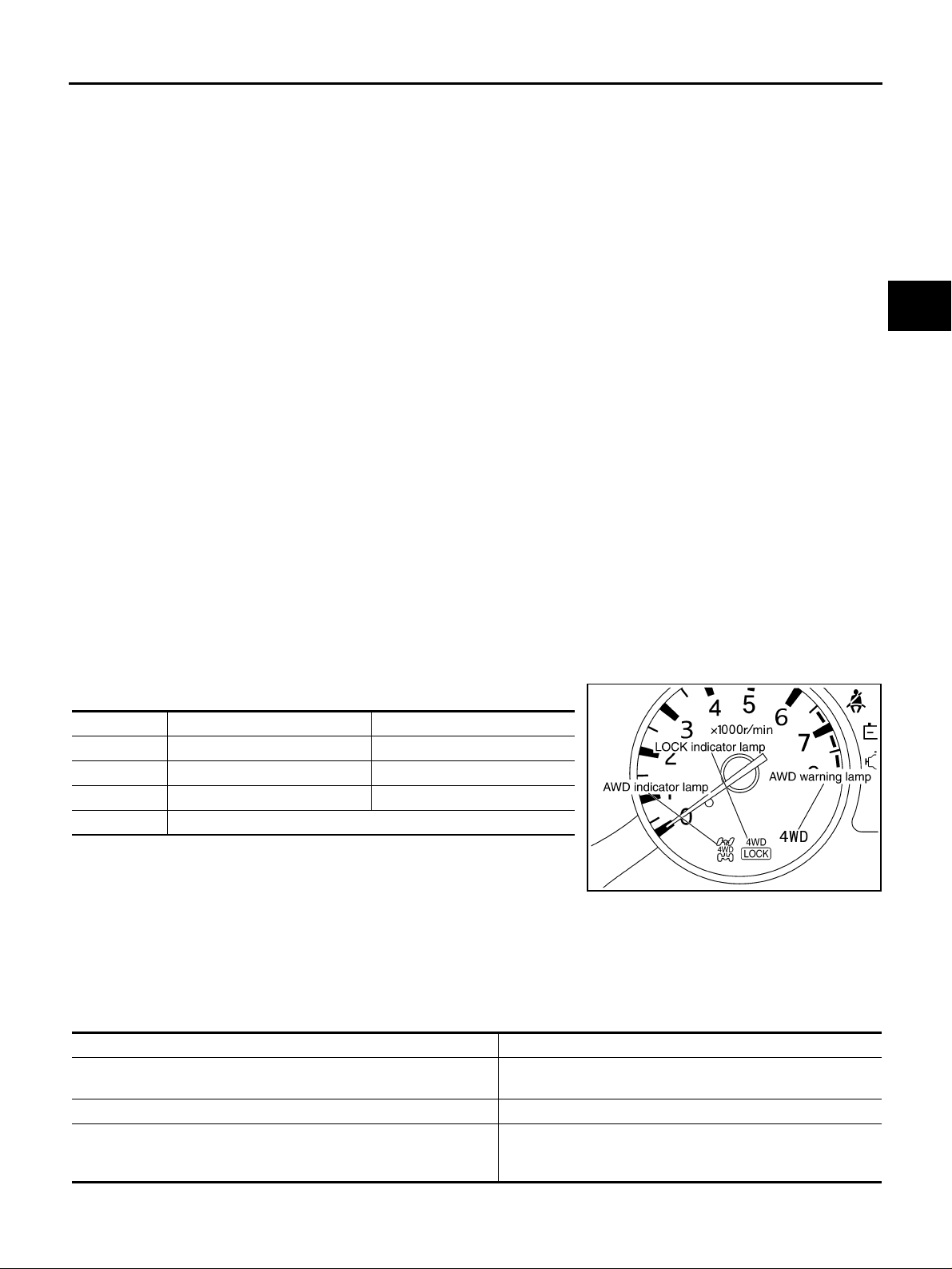
AWD INDICATOR LAMP AND LOCK INDICATOR LAMP
The following is the indications of indicator lamp.
Condition AWD indicator lamp LOCK indicator lamp
AUTO mode ON OFF
LOCK mode ON ON
2WD mode OFF OFF
Lamp check Turns ON for approx. 1 second when ignition switch is turned ON.
SDIA2503E
AWD WARNING LAMP
Turns ON when there is a malfu nction in AWD system. It indicate s that the vehicle is in fail-safe mode and
changes to front-wheel driv e or shifting dri v ing force-AWD (Rear-wheels still have some driving to rque).
Also turns ON when ignition switch is turned ON, for purpose of lamp check.
Turns OFF approximately for 1 second aft er the engine starts if system is normal.
G
H
I
J
K
L
M
AWD Warni ng Lamp Indication
Condition AWD warning lamp
Lamp check
AWD system malfunction ON
Protection function is activated due to he avy l oad t o electri c con-
trolled coupling. (AWD system is not malfunctioning and AWD system
changes to 2WD mode.)
Revision: 2006 July 2006 X-Trail
TF-11
Turns ON when ignition switch is turned ON. Turns OFF
approx. 1 seconds after engine start.
Rapid flashing: 2 times/second
(Flashing in approx. 1 minute and then turning OFF.)
Page 12
AWD SYSTEM
Condition AWD warning lamp
Large difference in diameter of front/rear tires
Other than above (system normal) OFF
(Continuing to flash until turning ignition switch OFF)
Slow flashing: 1 time/2 seconds
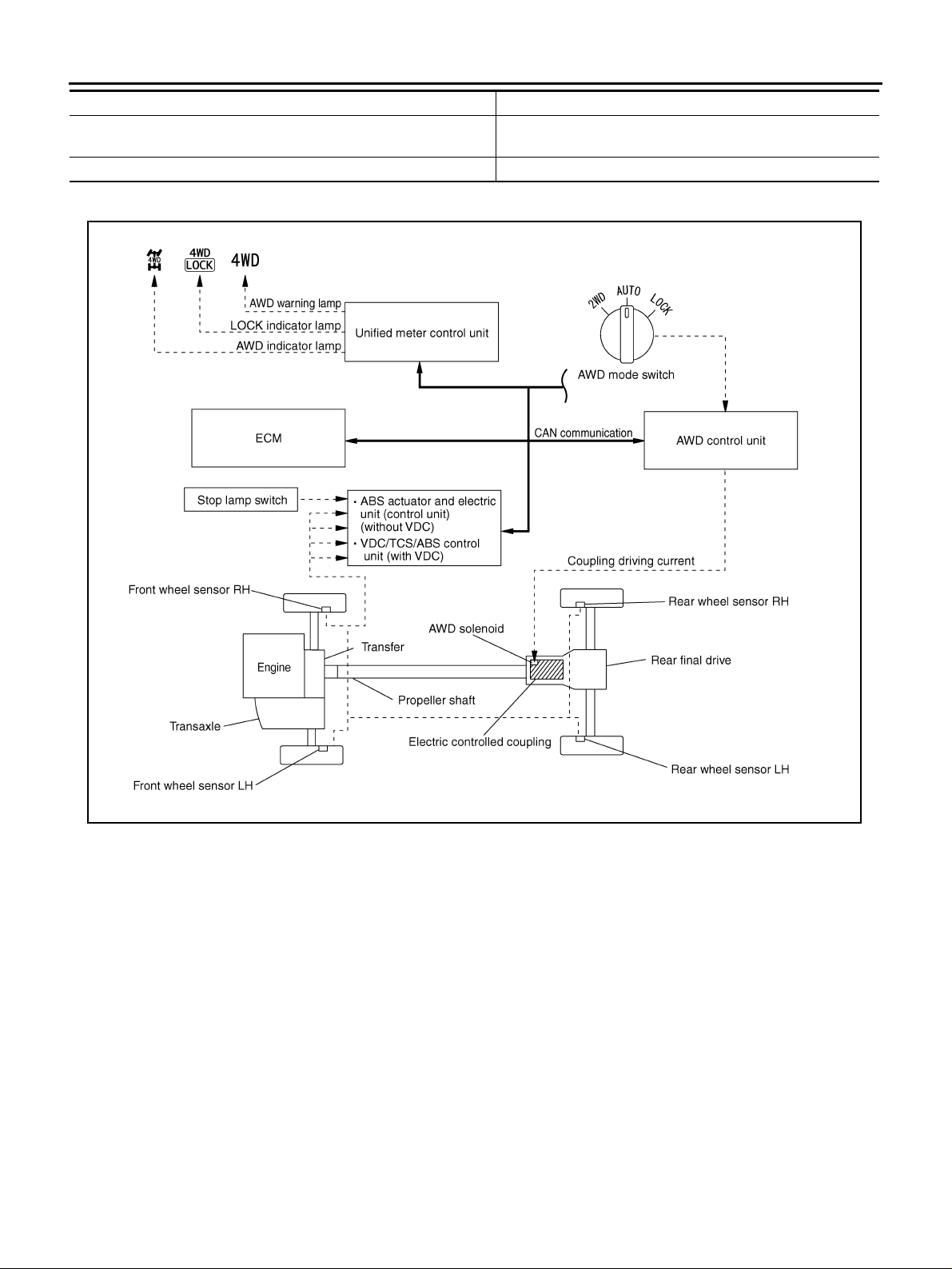
System Diagram ADS00179
SDIA2504E
Revision: 2006 July 2006 X-Trail
TF-12
Page 13

AWD SYSTEM
COMPONENTS FUNCTION DESCRIPTION
Component parts Function
● Controls driving force distribution by signals from each sensor and switches from front wheel driv-
AWD control unit
Wheel sensors Detects wheel speed.
AWD solenoid Controls electric controlled coupling by operation signal from AWD control unit.
Electric controlled coupling Transmits driving force to rear final drive.
AWD mode switch Able to select from 2WD, AUTO or LOCK mode.
AWD warning lamp
AWD indicator lamp Indicates operation with optimal distributio n of torq ue to fron t/re ar wheels.
LOCK indicator lamp Indicates that AWD system is under direct 4-wheel driving mode.
ABS actuator and electric unit
(control unit) (without VDC) or
VDC/TCS/ABS control unit
(with VDC)
ECM
Unified meter control unit Transmits conditions of parking brake switch via CAN communication to AWD control unit.
ing mode (100:0) to AWD mode (50:50).
● 2WD mode is available by fail-safe function if malfunction is detected in electrical system .
● Illuminates if malfunction is detected in electrical system of AWD system.
● There is 1 blink in 2 seconds if rotation difference of front wheels and rear wheels is large.
● There are 2 blinks in 1 second if load is still applied to driving parts.
Transmits the following signals via CAN communication to AWD control unit.
● Vehicle speed signal
● Stop lamp switch signal (brake signal)
Transmits the following signals via CAN communication to AWD control unit.
● Accelerator pedal position signal
● Engine speed signal
A
B
C
TF
E
F
G
H
CAN Communication ADS0017A
SYSTEM DESCRIPTION
CAN (Controller Area Network) is a serial communication line for real time application. It is an on-vehicle multiplex communication line with high data communication speed and excellent error detection ability. Many electronic control units are equipped onto a vehicle, and each control unit shares information and links with other
control units during opera tion (not independent). In CA N communication, cont rol units are connected with 2
communicatio n lines ( CAN H lin e, CAN L li ne) all owi ng a high ra te of in forma tion tr ans missi on wit h less wir ing.
Each control unit transmits/receives data but selectively reads required data only.
For details, refer to LAN-21, "
CAN Communication Unit" .
I
J
K
L
M
Revision: 2006 July 2006 X-Trail
TF-13
Page 14
TROUBLE DIAGNOSIS
TROUBLE DIAGNOSIS PFP:00004 Fail-Safe Function ADS0017B
● If any malfunction occu rs in AWD electrical system , and control unit de tects the malfun ction, AWD warn-
ing lamp on combination meter turns ON to indicate system malfunction.
● When AWD warning lamp is ON, vehicle changes to front-wheel drive or shifting driving force-AWD (Rear-
wheels still have some drivin g torque).
How to Perform Trouble Diagnosis ADS0017C
BASIC CONCEPT
● To perform troub le diagn osis, it is th e most im portant to ha ve unde rstanding ab out vehic le syste ms (con-
trol and mechanism) thoroughly.
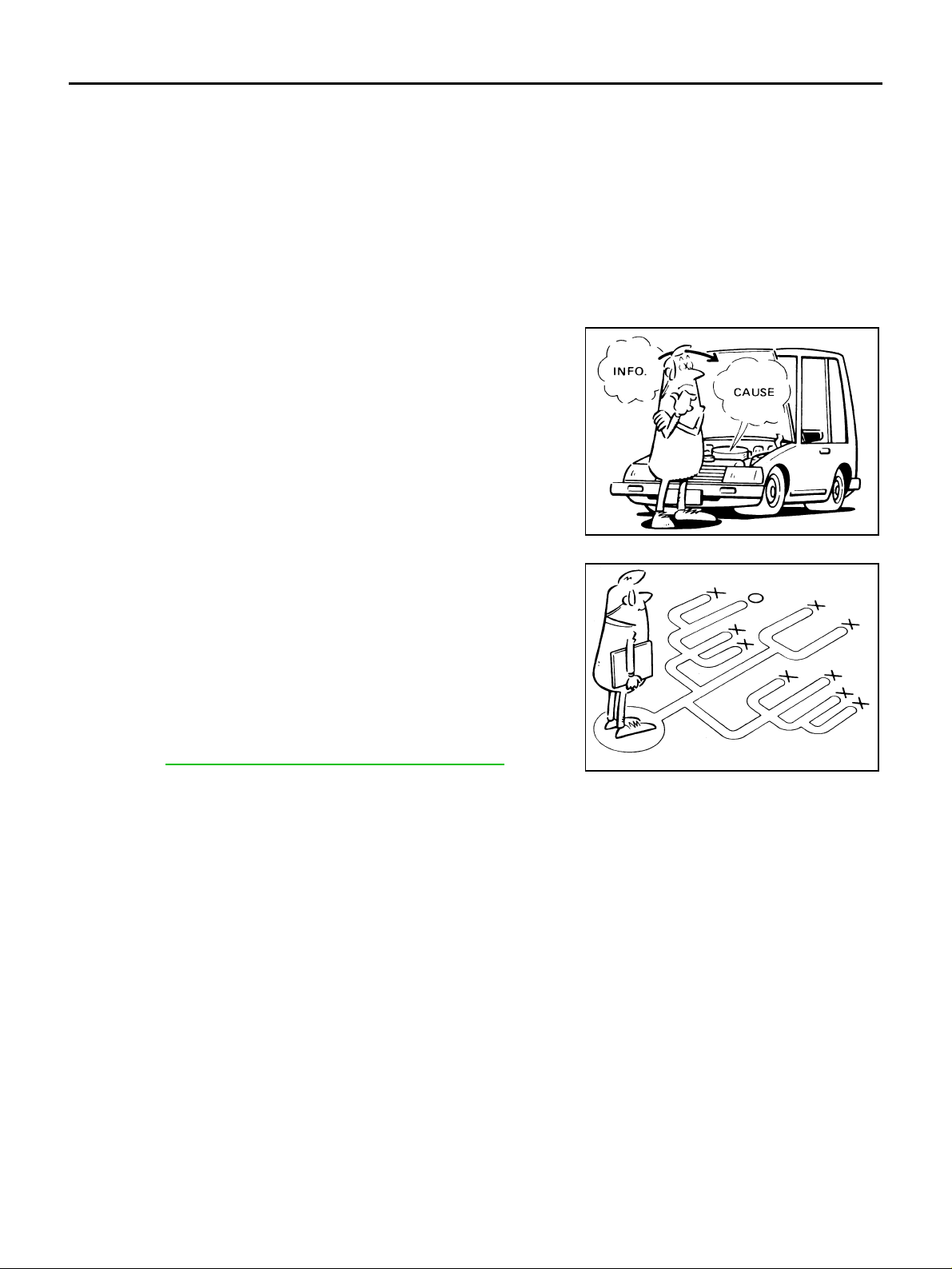
● It is also important to clarify cus tome r comp laints be fore in spec -
tion.
First of all, reproduce symptoms, and understand them fully.
Ask customer about his/her complaints carefully. In some case s,
it will be necessary to check symptoms by driving vehicle with
customer.
CAUTION:
Customers are not profes sional. It is dangerous to m ake a n
easy guess like "maybe the customer means that...," or
"maybe the customer mentions this sym ptom ".
SEF233G
● It is essential to check symptoms right from the beginning in
order to repair malfunctions completely.
For intermittent malfunctions, reproduce symptoms based on
interview with customer and past examples. Do not perform
inspection on ad hoc basis. Most intermittent malfunctions are
caused by poor contacts. In this case, it will be effective to shake
suspected harness or connector by ha nd. When repairing wit hout any symptom diagnosis, you cannot judge if malfunctions
have actually been eliminated.
● After completing diagnosis, always erase diagnostic memory.
Refer to TF-24, "
● For intermittent malfunctions, move harness or harness connec-
How to Erase Self-Diagnosis Resu lts" .
tor by hand. Then check for poor contact or reproduced open circuit.
SEF234G
Revision: 2006 July 2006 X-Trail
TF-14
Page 15
TROUBLE DIAGNOSIS
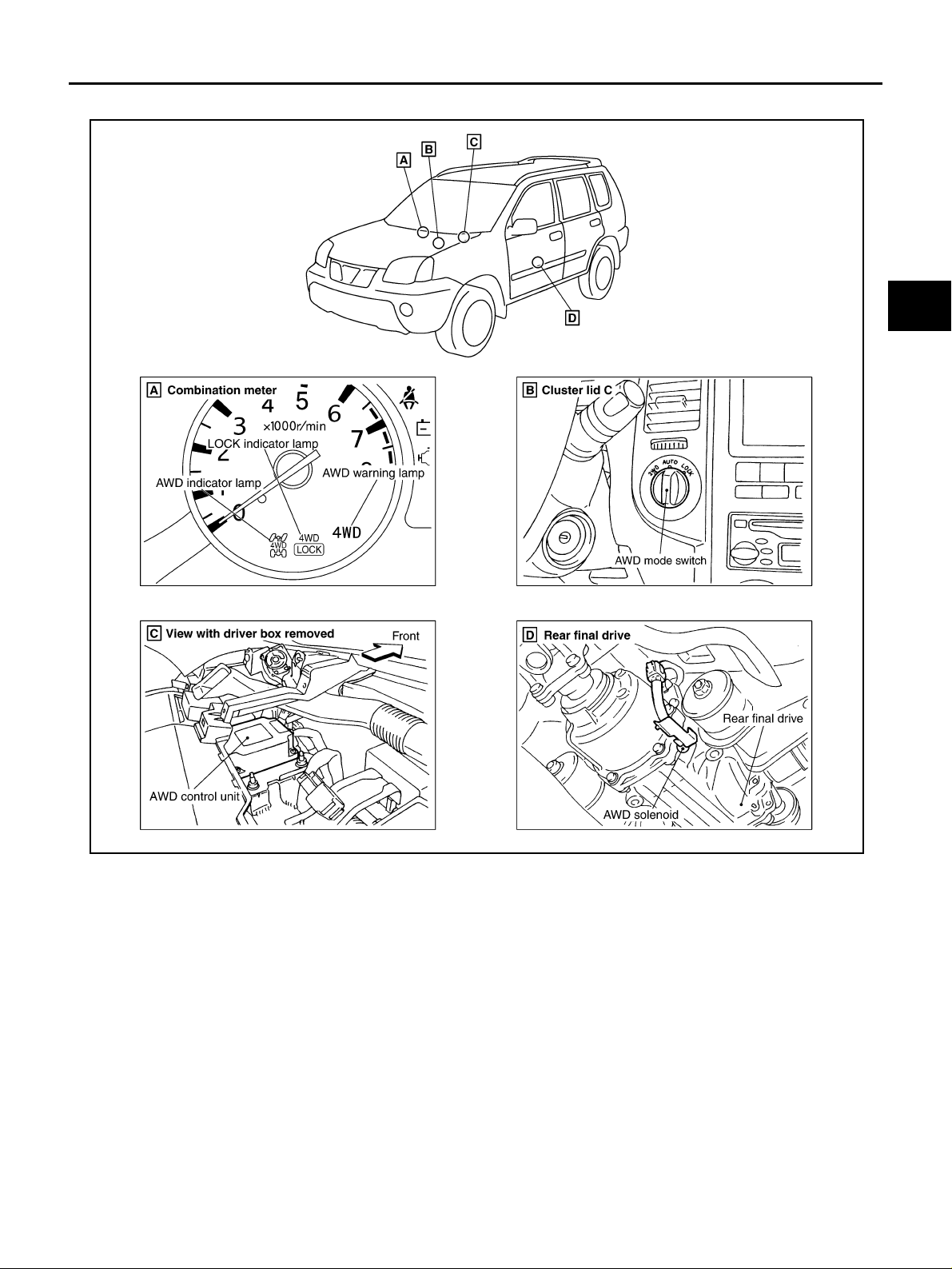
Location of Electrical Parts ADS0017D
A
B
C
TF
E
F
G
SDIA2506E
H
I
J
K
L
M
Revision: 2006 July 2006 X-Trail
TF-15
Page 16
TROUBLE DIAGNOSIS
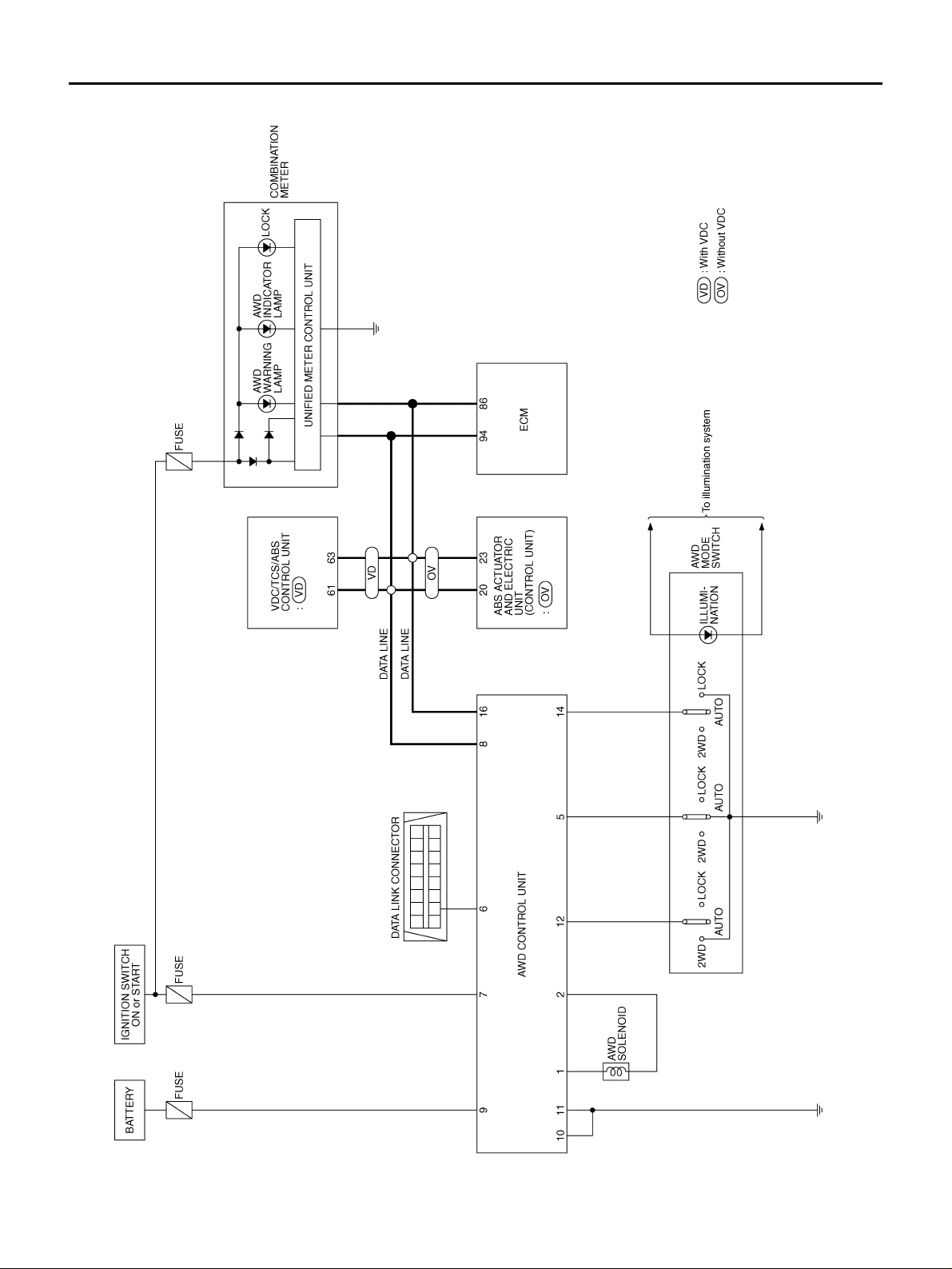
Circuit Diagram ADS0017E
TDWB0001E
Revision: 2006 July 2006 X-Trail
TF-16
Page 17
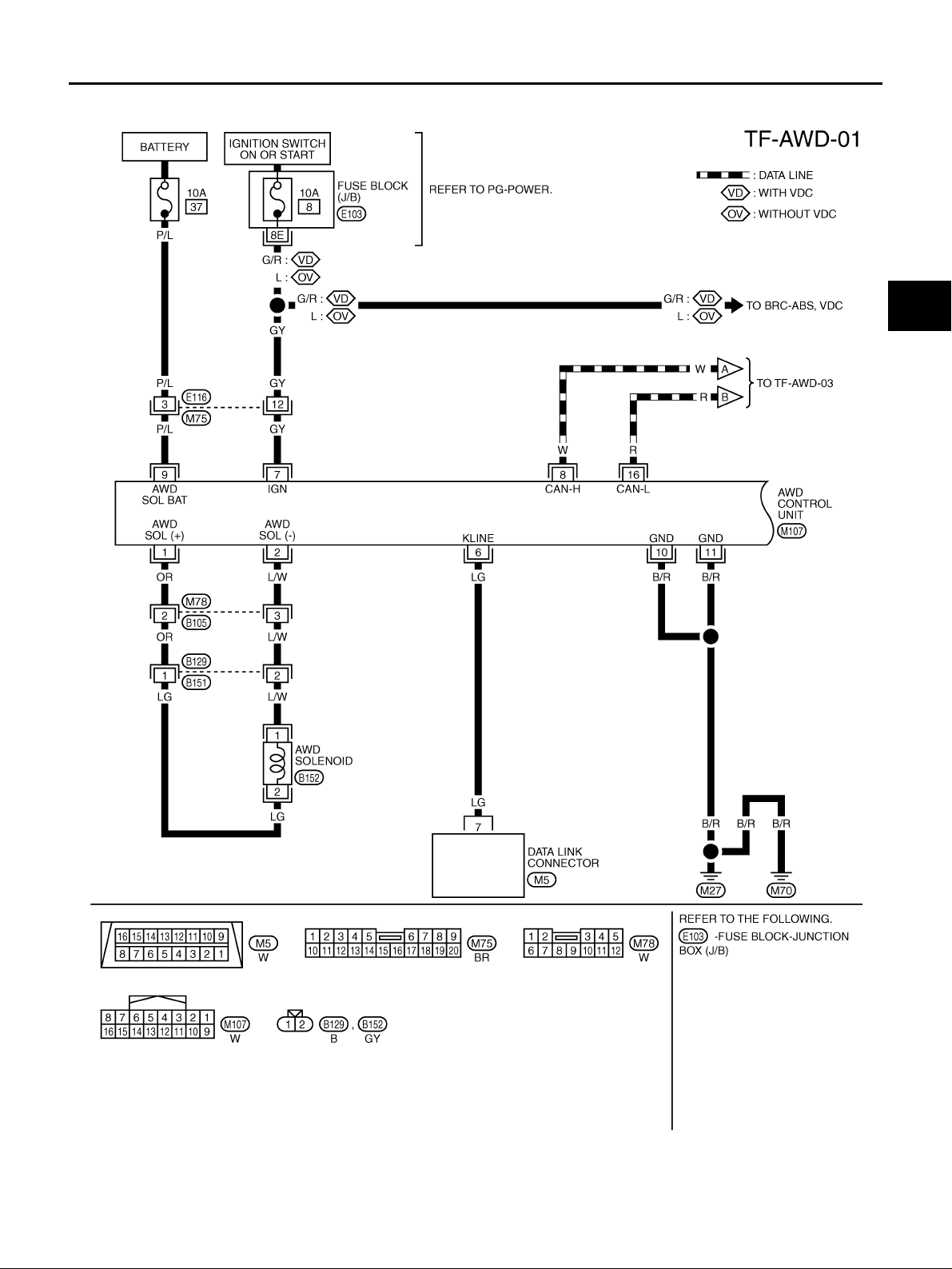
TROUBLE DIAGNOSIS
Wiring Diagram — AWD — ADS0017F
A
B
C
TF
E
F
G
H
K
M
I
J
L
TDWB0002E
Revision: 2006 July 2006 X-Trail
TF-17
Page 18
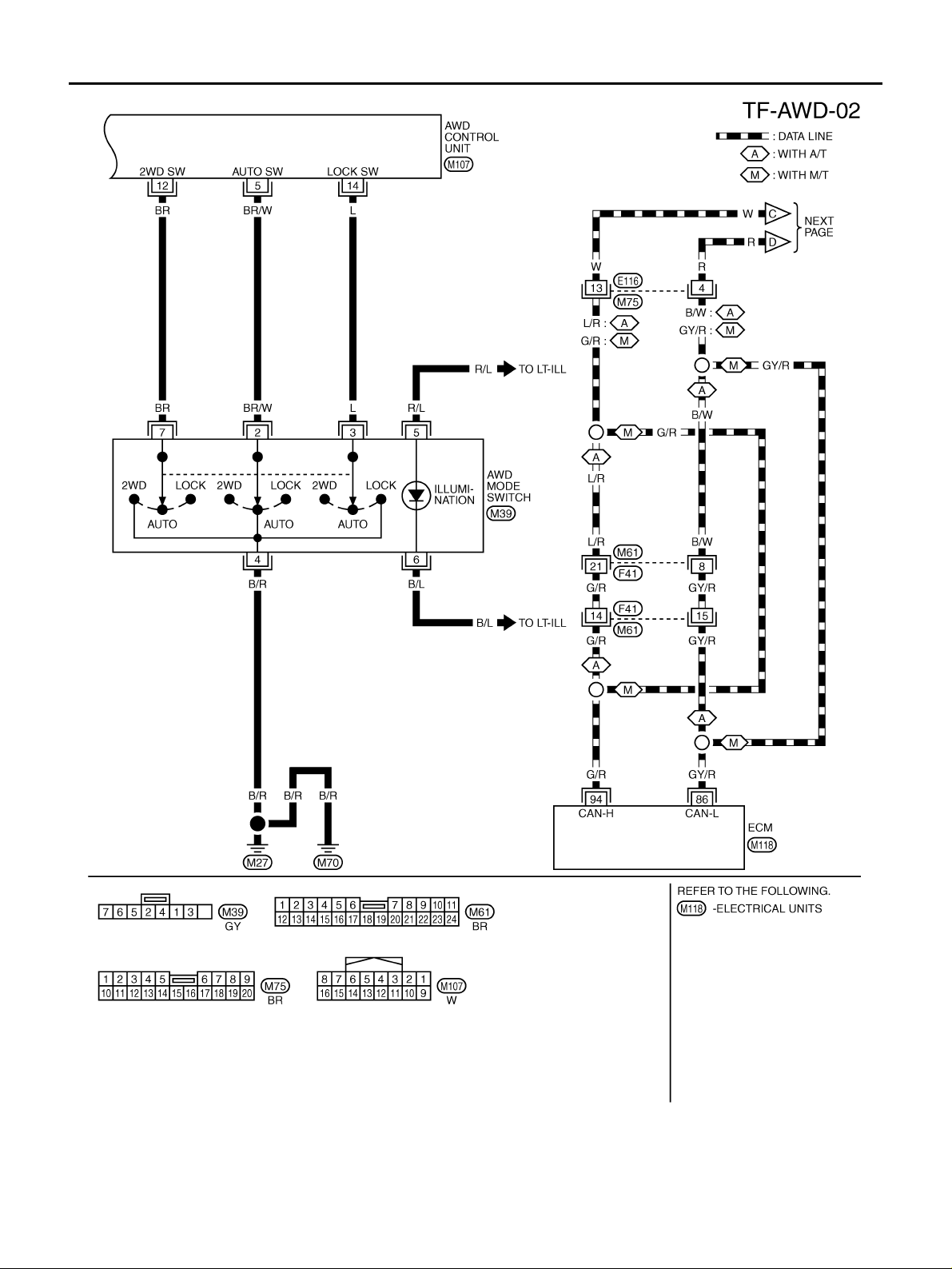
TROUBLE DIAGNOSIS
TDWB0053E
Revision: 2006 July 2006 X-Trail
TF-18
Page 19
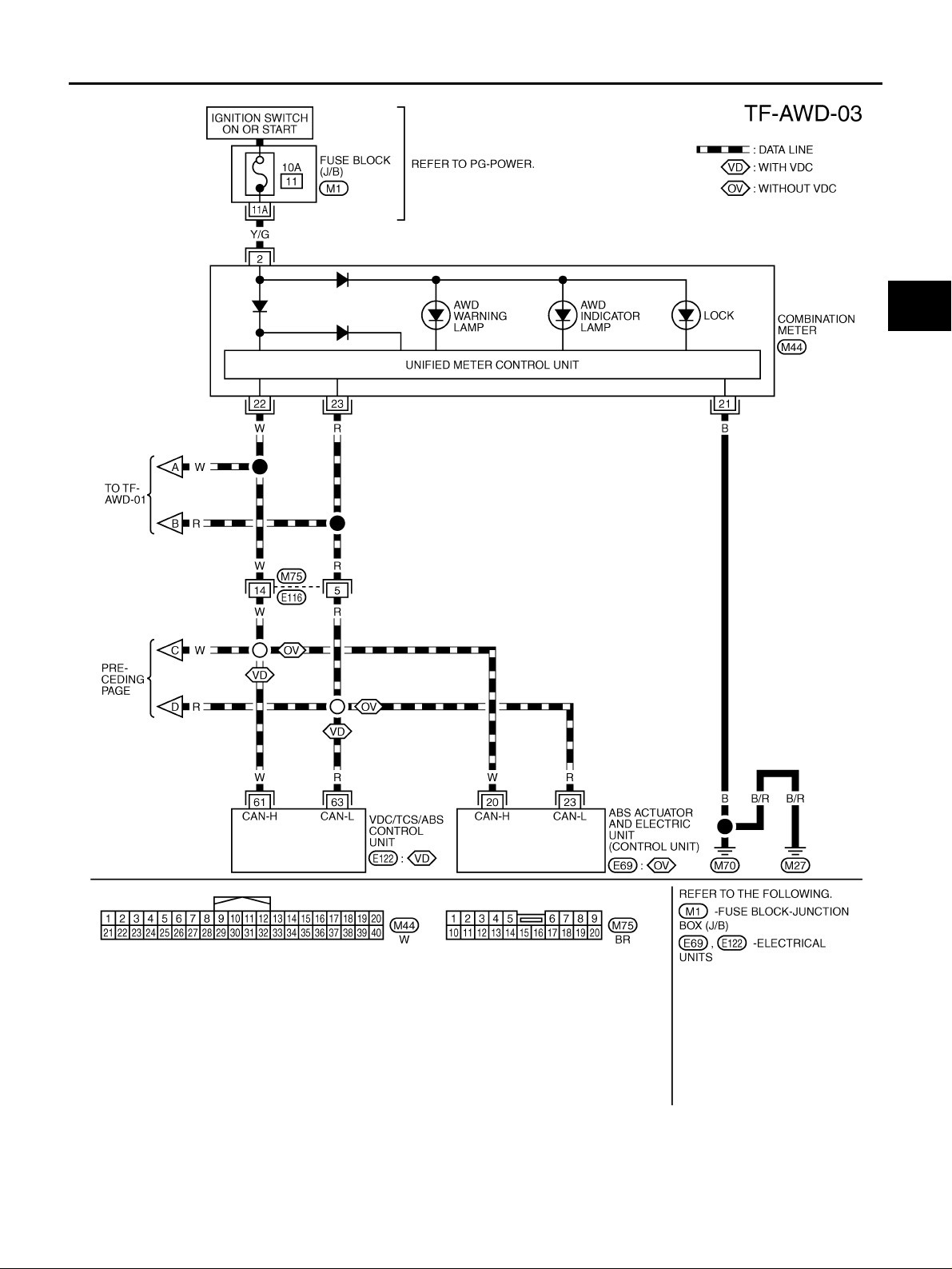
TROUBLE DIAGNOSIS
A
B
C
TF
E
F
G
H
K
M
I
J
L
TDWB0004E
Revision: 2006 July 2006 X-Trail
TF-19
Page 20
TROUBLE DIAGNOSIS
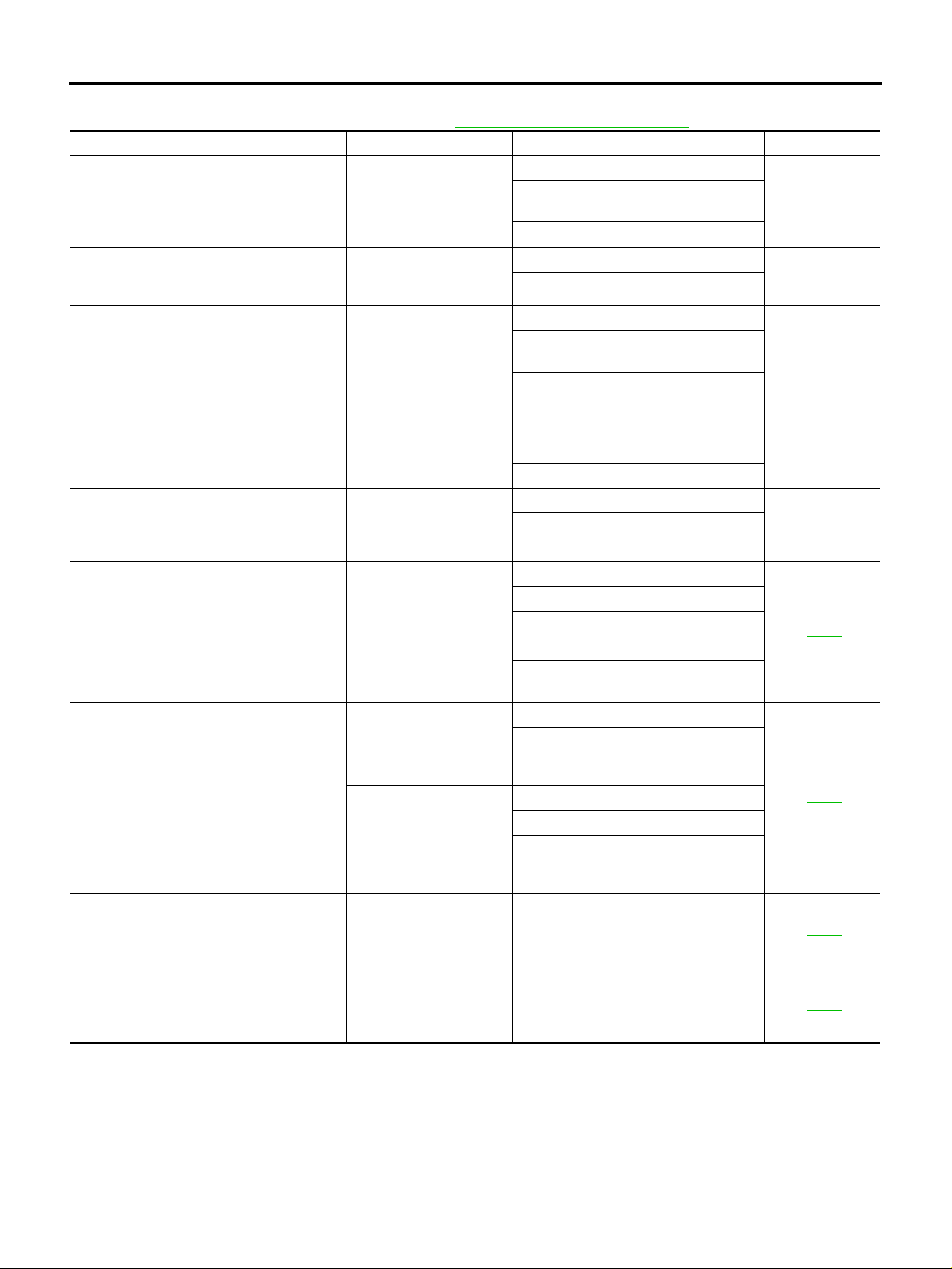
Trouble Diagnosis Chart for Symptoms ADS0017G
If AWD warning lamp turns ON, perform self-diagnosi s. Refer to TF-23, "SE LF-DIAG RESULTS MODE" .
Symptom Condition Check item Reference page
AWD indicator lamp and LOCK indicator
lamp do not turn ON for approx. 1 second
when ignition switch is turned to ON.
Ignition switch: ON
(AWD indicator lamp and LOCK indicator
lamp check)
AWD warning lamp does not turn ON when
ignition switch is turned to ON.
Ignition switch: ON
(AWD warning lamp check)
AWD warning lamp does not turn OFF several seconds after engine started.
AWD mode cannot be switched after engine
is started.
Heavy tight-corner braking symptom occurs
when vehicle is driven in AUTO mode and
steering wheel is turned fully to either side
after engine is started. (See NOTE.)
Engine ru nning
Engine ru nning
● While driving
● AUTO mode
● Steering wheel is
turned fully to either
sides
Vehicle speed: 10 km/h
(6 MPH) or less
Vehicle does not enter AWD mode even
though AWD warning lamp turned to OFF.
Vehicle speed: 10 km/h
(6 MPH) or more
While driving, AWD warning lamp flashes
rapidly. (When flashing in approx. 1 minute
and then turning OFF.)
Rapid flashing: 2 times/second
While driving, AWD warning lamp flashes
slowly. (When continuing to flash until turning ignition switch OFF)
Slow flashing: 1 time/2 seconds
● While driving
● AUTO mode and
LOCK mode
● While driving
● Vehicle speed: 20 km/h
(12 MPH) or m o re
NOTE:
● Light tight-corner braking symptom may occur depending on driving conditions in AUTO mode. This is not malfunction.
● Heavy tight-corner braking symptom oc curs when vehicle is driven in the following conditions: LOCK mode, steering
wheel is turned fully to either side, and accelerator pedal w as depr essed.
CAN communication line
Power supply and ground for AWD con-
trol unit
Unified meter control unit
CAN communication line
Unified meter control unit
CAN communication line
Power supply and ground for AWD control unit
Unified meter control unit
AWD solenoid
AWD actuator relay (integrated in AWD
control unit)
Wheel sensor
AWD mode switch
CAN communication line
Unified meter control unit
CAN communication line
AWD mode switch
Accelerator pedal position signal
AWD solenoid
Mechanical malfunction of electric con-
trolled coupling (clutch sticking etc.)
AWD solenoid
Mechanical malfunction of electric con-
trolled coupling (Mechanical engagement of clutch is not possible.)
Operating condition of parking brake
AWD solenoid
Mechanical malfunction of electric con-
trolled coupling (Mechanical engagement of clutch is not possible.)
Protection function is activated due to
heavy load to electric controlled coupling. (AWD system is not malfunctioning.)
Tire size is different between front and
rear of vehicle.
TF-37
TF-38
TF-39
TF-40
TF-41
TF-42
TF-43
TF-43
Revision: 2006 July 2006 X-Trail
TF-20
Page 21
TROUBLE DIAGNOSIS
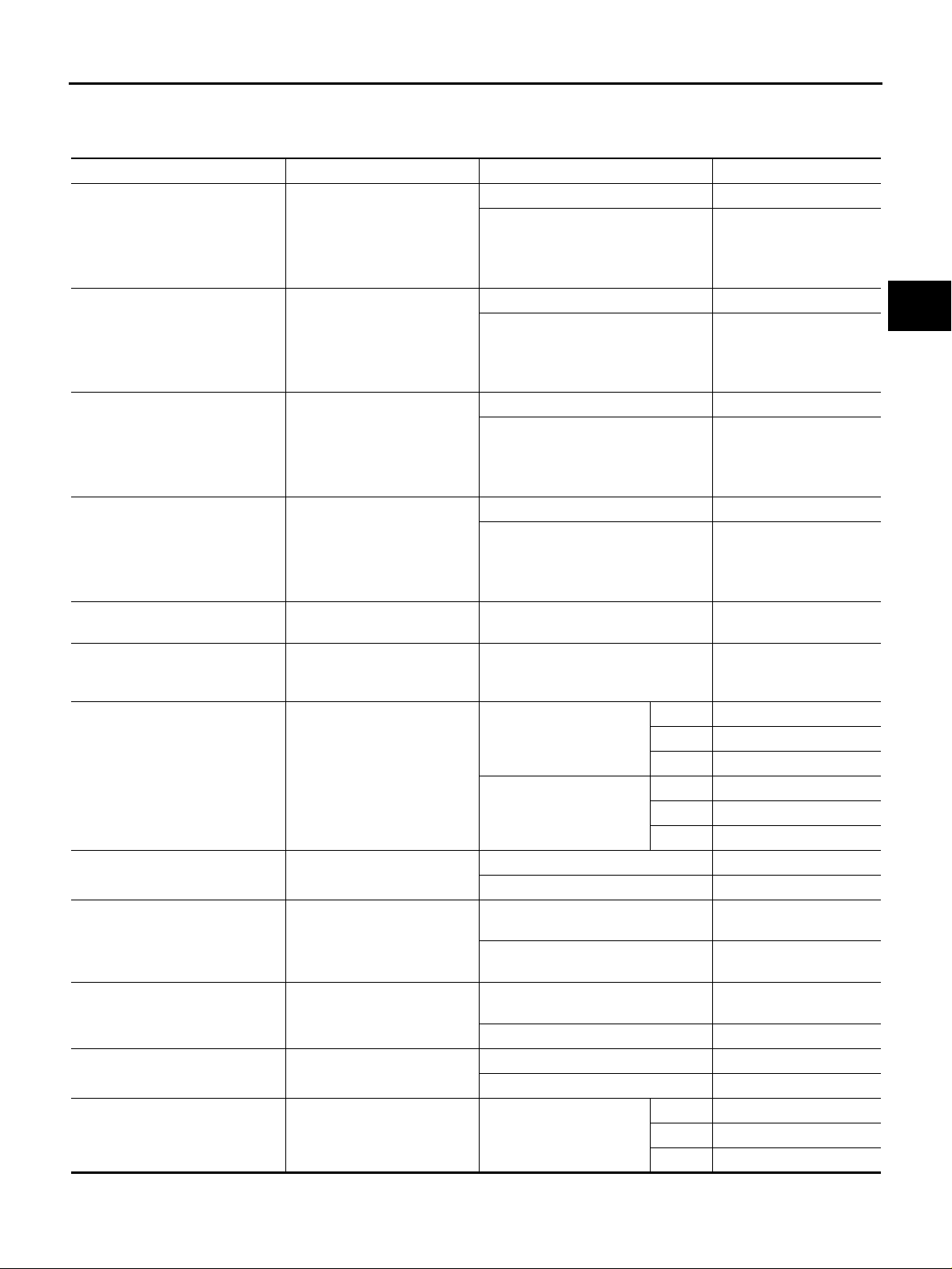
A WD Control Unit Input/Output Signal Reference Values ADS0017H
AWD CONTROL UNIT INSPECTION TABLE
Specifications with CONSULT-II
Monitor item [Unit] Content Condition Display value
Vehicle stopped 0.00 km/h (0.00 mph)
FR RH SENSOR [km/h] or [mph]
FR LH SENSOR [km/h] or [mph]
RR RH SENSOR [km/h] or [mph]
RR LH SENSOR [km/h] or [mph]
BATTERY VOLT [V]
THRTL POS SEN [%] Throttle opening condition
ETS SOLENOID [A]
STOP LAMP SW [ON/OFF]
ENG SPEED SIG [RUN/STOP] Condition of engine running
ETS ACTUATOR [ON/OFF]
4WD WARN LAMP [ON/OFF] AWD warning lamp condition
4WD MODE SW [2WD/AUTO/
LOCK]
Wheel speed (Front wheel
right)
Wheel speed (Front wheel
left)
Wheel speed (Rear wheel
right)
Wheel speed (Rear wheel
left)
Power supply voltage for
AWD control unit
Monitored value of current at
AWD solenoid
Condition of brake pedal
operation
Operating condition of AWD
actuator relay (integrated in
AWD control unit)
Input condition from AWD
mode switch
Vehicle running
CAUTION:
Check air pressure of tire under
standard condition.
Vehicle stopped 0.00 km/h (0.00 mph)
Vehicle running
CAUTION:
Check air pressure of tire under
standard condition.
Vehicle stopped 0.00 km/h (0.00 mph)
Vehicle running
CAUTION:
Check air pressure of tire under
standard condition.
Vehicle stopped 0.00 km/h (0.00 mph)
Vehicle running
CAUTION:
Check air pressure of tire under
standard condition.
Ignition switch: ON Battery voltage
When depressing accelerator peda l
(Value rises gradually in response to
throttle position.)
2WD Approx. 0.000A
Engine speed
: At idle
Engine speed
: 3,000 rpm or more constant
Brake pedal: Depressed ON
Brake pedal: Released OFF
Engine stopped
(Engine speed: Less than 400 rpm)
Engine running
(Engine speed: 400 rpm or more)
Engine stopped (Ignition
switch: ON)
Engine running ON
AWD warning lamp: ON ON
AWD warning lamp: OFF OFF
AWD mode switch
AUTO Approx. 0.000A
LOCK Approx. 0.000A
2WD Approx. 0.000A
AUTO Approx. 0.000 - 1.500A*
LOCK Approx. 2.800A
2WD 2WD
AUTO AUTO
LOCK LOCK
Approximately equal to
the indication on speedometer (Inside of ±10%)
Approximately equal to
the indication on speedometer (Inside of ±10%)
Approximately equal to
the indication on speedometer (Inside of ±10%)
Approximately equal to
the indication on speedometer (Inside of ±10%)
0 - 100%
STOP
RUN
OFF
A
B
C
TF
E
F
G
H
I
J
K
L
M
Revision: 2006 July 2006 X-Trail
TF-21
Page 22
TROUBLE DIAGNOSIS
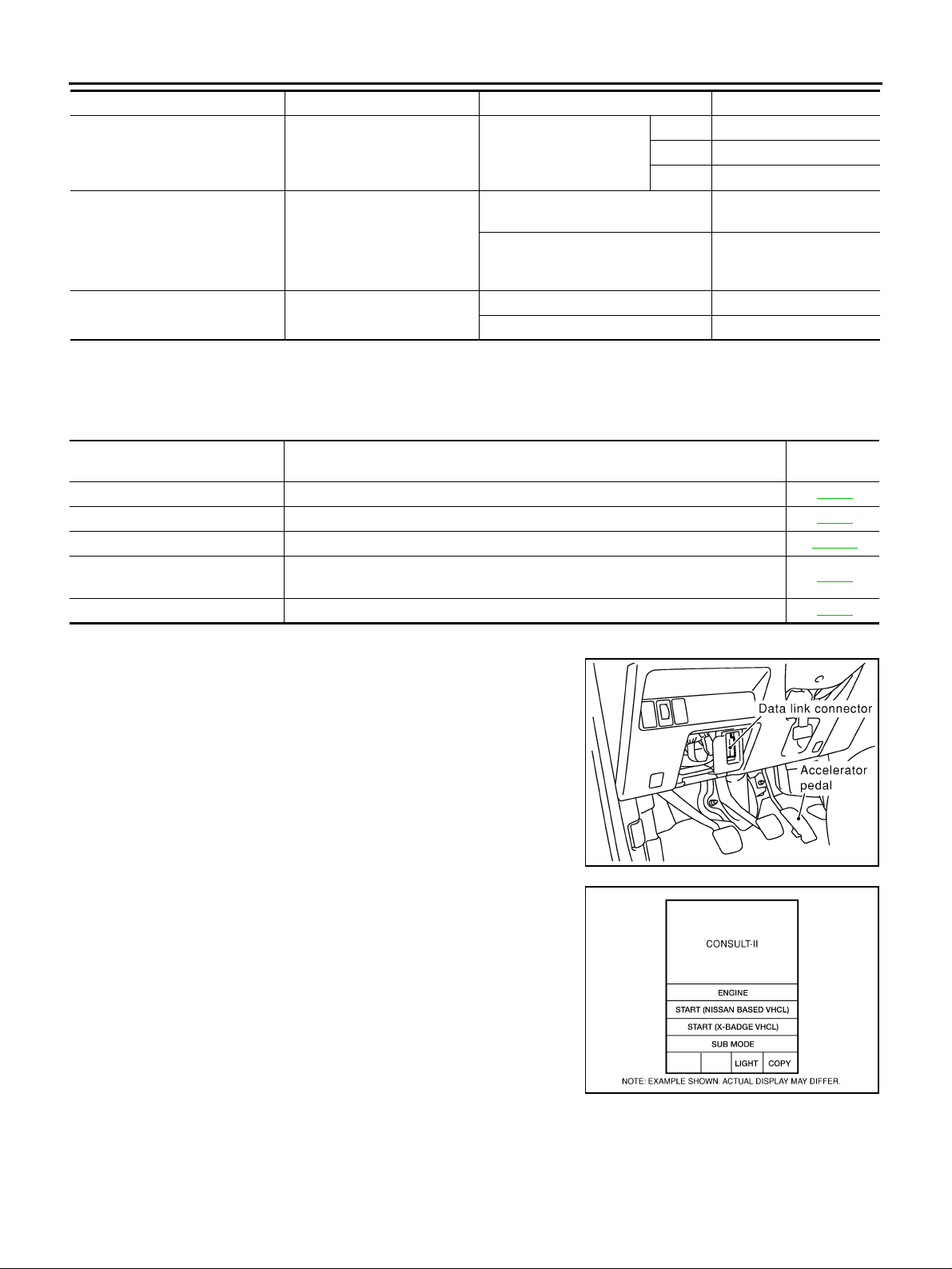
Monitor item [Unit] Content Condition Display value
Control status of AWD
4WD MODE MON [2WD/AUTO/
LOCK]
DIS-TIRE MONI [mm]
P BRAKE SW [ON/OFF] Condition of parking brake
*: The values are changed by throttle opening an d engi ne speed.
(Output condition of AWD
indicat or lamp and LOCK indi-
cator lamp signal)
Improper size tire installed
condition
AWD mode switch
(Engine running)
Vehicle running with normal size tire
installed
Vehicle running with improper size
tire installed (Front/rear tire size difference, wear condition)
Parking brake operated ON
Parking brake not operated OFF
2WD 2WD
AUTO AUTO
LOCK LOCK
0-4 mm
4-8 mm, 8- mm
CONSULT-II Function (ALL MODE AWD/4WD) ADS0017I
FUNCTION
CONSULT-II can display each diagnostic item using the diagnostic test modes shown following.
Diagnostic test mode Function
Self-diagnosis results
Data monitor ● Input/Output data in the AWD control unit can be read. TF-24
CAN diagnostic support monitor ● The results of transmit/receive diagnosis of CAN comm unication can be read. LAN-13
Active test
ECU part number ● AWD control unit part number can be read. TF-25
● Self-diagnosis results can be read and erased quickl y. TF-23
● Diagnostic Test Mode in which CONSULT - II drives some actuators apart from
the AWD control unit and also shifts some parameters in a specified range.
Reference
page
TF-25
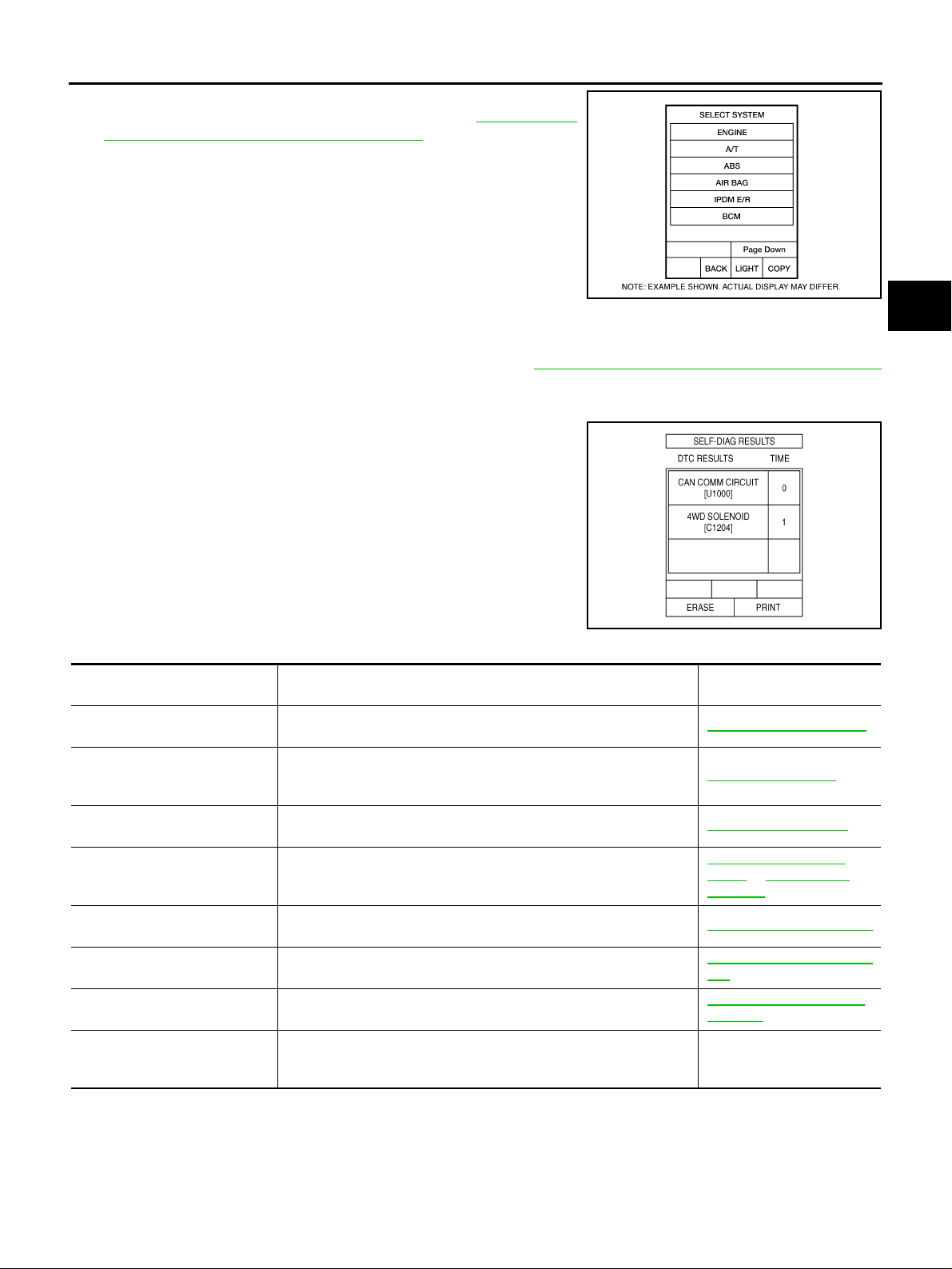
CONSULT-II SETTING PROCEDURE
● For details, refer to the separate “CONSULT-II Operat ions Man-
ual”.
1. Turn ignition sw itch “OFF”.
2. Connect CONSULT-II and CONSULT-II CONVERTER to data
link connector on vehicle.
3. Turn ignition switch “ON”.
4. Touch “START (NISSAN BASED VHCL)”.
PBIB0376E
BCIA0029E
Revision: 2006 July 2006 X-Trail
TF-22
Page 23
TROUBLE DIAGNOSIS
5. Touch “ALL MODE AWD/4WD”.
If “ALL MODE AWD/4WD” is not indica ted, go to GI-37, "
SULT-II Data Link Connector (DLC) Circuit" .
6. Perform each diagnostic test mode according to each service
procedure.
SELF-DIAG RESULTS MODE
Operation Procedure
1. Perform “CONSULT-II SETTING PROCEDURE”. Refer to TF-22, "CONSULT-II SETTING PROCEDURE"
.
2. Start engine and drive at 30 km/h (19 MPH) or more for appro x. 1 minute.
3. Sto p veh icle . Wi th engi ne at idle , to uch “SE LF-D IAG RE SULTS”.
Display shows malfunction experienced since the last erasing
operation.
NOTE:
● The details for “TIME” are as follow:
– “0”: Error currently detected with AWD control unit.
– Except for “0”: Error detected in the past and memorized
with AWD control unit. Detects frequency of driving after
DTC occurs (frequency of turning ignition switch “ON/OFF”).
CON-
BCIA0030E
A
B
C
TF
E
F
G
H
SDIA2217E
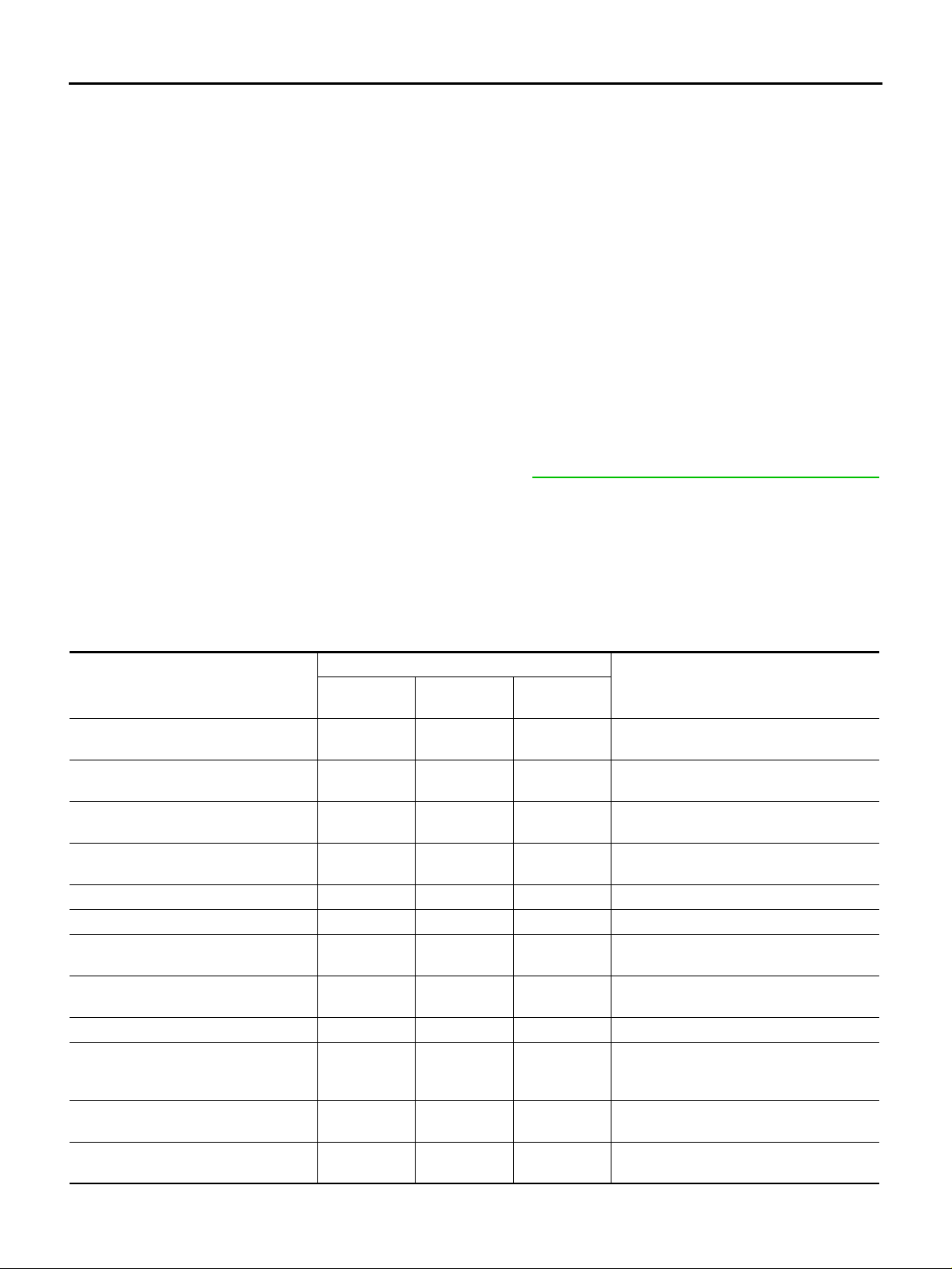
Display Item List
Items (CONSULT-II scr een
terms)
CONTROLLER FAILURE
[C1201]
ABS SYSTEM
[C1203]
4WD SOLENOID
[C1204]
4WD ACTUA TOR RLY
[C1205]
MODE SW
[C1209]
ENGINE SIGNAL 1
[C1210]
CAN COMM CIRCUIT
[U1000]
NO DTC IS DETECTED.
FURTHER TESTING MAY BE
REQUIRED.
CAUTION:
● If “CAN COMM CIRCUIT [U1000]” is displayed with other DTCs, first perform the t rouble diagnosis for CAN com munica-
tion line.
● Make sure that ABS warning lamp turns O FF by driving for a minute at vehicle speed of 30 km /h (19 MPH) or more after
turning ignition switch "OFF" if AWD warning lamp turns ON with system malfunction of “ABS SYSTEM [C1203]”. AWD
warning lamp may not turn OFF if it is normal unless ignition switch tur ns O FF at once and engine restarts after that.
Malfunction has occurred inside AWD control unit. TF-27, "
Malfunction related to wheel sensor has been detected by ABS actuator and electric unit (control unit) (without VDC) or VDC/TCS/ABS
control unit (with VDC).
Malfunction related to AWD solenoid has been detected. TF-28, "
Malfunction has been detected from AWD actuator relay in teg rated
with AWD control unit, or malfunction related to AWD solenoid has
been detected.
More than two switch inputs are simultaneously detect ed due to
short circuit of AWD mode switch.
Malfunction has been detected from ECM .
Malfunction has been detected from CA N com munication line.
No NG item has been detected. —
Diagnostic item is detected when... Check item
AWD Control Unit"
TF-28, "
TF-32, "
Relay" or TF-28, "AWD
Solenoid"
TF-33, "
TF-35, "Engine Control Signal"
TF-36, "CAN Communication Line"
ABS System"
AWD Soleno id "
AWD A ctuator
AWD Mode Switch"
I
J
K
L
M
Revision: 2006 July 2006 X-Trail
TF-23
Page 24
TROUBLE DIAGNOSIS
How to Erase Self-Diagnosis Results
1. Perform applicable inspection of malfunctioning item and then repair or replace.
2. Start engine and drive at 30 km/h (19 MPH) or more for approx. 1 minute.
3. Make sure that ABS warning lamp turns OFF.
NOTE:
Make sure that ABS warn ing lamp turns OFF by driving for a mi nute at vehicle sp eed of 30 km/h
(19 MPH) or more after turn ing ignition s witch "OFF" if AWD warning lamp turns ON with system
malfunction of “ABS SYSTEM [C1203]”. AWD warning lamp may not turn OFF if it is normal unless
ignition switch turns OFF at once and engine restarts after that.
4. Turn ignition sw itch “OFF” to erase memory.
5. Start engine and select “SELF-DIAG RESULTS” mode for “ALL MODE AWD/4WD” with CONSULT-II.
6. Touch “ERASE” on CONSULT-II screen to erase DTC memory.
CAUTION:
If memory cannot be erased, perform applicably diagnosis.
7. Drive at 30 km/h (19 MPH) or more for approx. 1 minute. Be sure AWD warning lamp is OFF.
DATA MONITOR MODE
Operation Procedure
1. Perform “CONSULT-II SETTING PROCEDURE”. Refer to TF-22, "CONSULT-II SETTING PROCEDURE"
.
2. Touch “DATA MONITOR”.
3. Select from “SELECT MONITOR ITEM”, screen of data monitor mode is displayed.
NOTE:
When malfunction is detected, CONSULT-II performs REAL-TIME DIAGNOSIS.
Also, any malfunction detected while in this mode will be displayed at real time.
Display Item List
×: Standard –: Not applicable
SELECT MONITOR ITEM
Monitor item (Unit)
FR RH SENSOR [km/h] o r [mph] ×××
FR LH SENSOR [km/h] or [mph] ×××
RR RH SENSOR [km/h] or [mph] ×××
RR LH SENSOR [km/h] or [mph] ×××
BATTER Y VOLT [V] – – × Power supply voltage for AWD control unit.
THRTL POS SEN [%] – – × Throttle opening status is displayed.
ETS SOLENOID [A] – – ×
STOP LAMP SW [ON/OFF] – – ×
ENG SPEED SIG [RUN/STOP] – – × Engine status is displayed.
ETS ACTUATOR [ON/OFF] – – ×
4WD WARN LAMP [ON/OFF] – – ×
4WD MODE SW [2WD/AUTO/LOCK] – – ×
ECU INPUT
SIGNALS
MAIN
SIGNALS
SELECTION
FROM MENU
Wheel speed calculated by front wheel
sensor RH signal is displayed.
Wheel speed calculated by front wheel
sensor LH signal is displayed.
Wheel speed calculated by rear wheel
sensor RH signal is displayed.
Wheel speed calculated by rear wheel
sensor LH signal is displayed.
Monitored value of current at AWD solenoid.
Stop lamp switch si gnal status via CAN
communication line is displayed.
Operating condition of AWD actuator relay
(integrated in AWD control unit) is displayed.
Control status of AWD warning lamp is displayed.
AWD mode switch signal status via CAN
communication line is displayed.
Remarks
Revision: 2006 July 2006 X-Trail
TF-24
Page 25
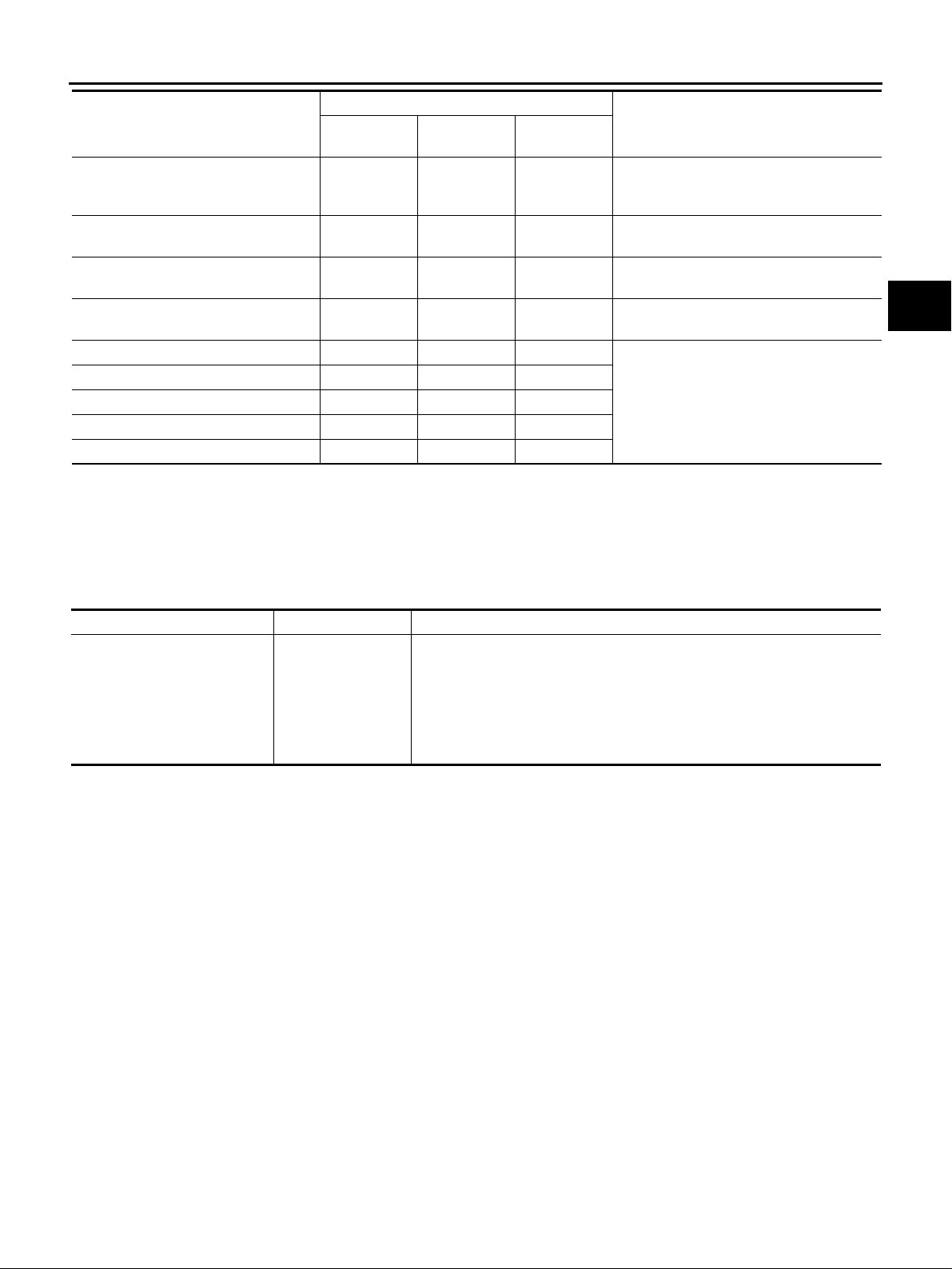
TROUBLE DIAGNOSIS
SELECT MONITOR ITEM
Monitor item (Unit)
4WD MODE MON [2WD/AUTO/LOCK] – – ×
DIS-TIRE MONI [mm] – – ×
P BRAKE SW [ON/OFF] – – ×
Voltage [V] – – ×
Frequency [Hz] – – ×
DUTY-HI (high) [%] – – ×
DUTY-LOW (low) [%] – – ×
PLS WIDTH-HI [msec] – – ×
PLS WIDTH-LOW [msec] – – ×
ECU INPUT
SIGNALS
MAIN
SIGNALS
SELECTION
FROM MENU
Control status of AWD is displayed.
(Output condition of AWD indicator lamp
and LOCK indicator lamp signal)
Improper size tire installed condition is displayed.
Parking switch signal status via CAN communication line is displayed.
The value measured by the voltage probe
is displayed.
The value measured by the pulse probe is
displayed.
Remarks
ACTIVE TEST MODE
Description
Use this mode to determ ine and identify the detail s of a malfunction base d on self-diagnosis res ults or data
monitor. AWD control unit gives drive signal to actuator with receiving command from CONSULT-II to check
operation of actuator.
A
B
C
TF
E
F
G
H
Test Item
Test item Condition Description
● Change command current value to AWD solenoid, and then change driv-
ETS S/V
(Detects AWD solenoid)
CAUTION:
Do not continuously energize for a long time.
● Vehicle stopped
● Engine ru nning
● No DTC detected
ing mode. (Monitor value is normal if it is within approxim ate ly ±10 % of
command value.)
Qu: Increase current value in increments of 0.20A
Qd: Decrease current value in increments of 0.20A
UP: Increase current value in increments of 0.02A
DOWN: Decrease current value in increm ents of 0.0 2A
AWD CONTROL UNIT PART NUMBER
Ignore the AWD control unit part number displa ye d in the “ECU PART NUMBER”.
Refer to parts catalog to order the AWD control unit.
I
J
K
L
M
Revision: 2006 July 2006 X-Trail
TF-25
Page 26
TROUBLE DIAGNOSIS FOR SYSTEM
TROUBLE DIAGNOSIS FOR SYSTEM PFP:00000 Power Supply Circuit for AWD Control Unit ADS0017J
CONSULT-II REFERENCE VALUE IN DATA MONITOR MODE
Data are reference value.
Monitor item [Unit] Condition Display value (Approx.)
BATTERY VOLT [V] Ignition switch: ON Battery voltage
DIAGNOSTIC PROCEDURE
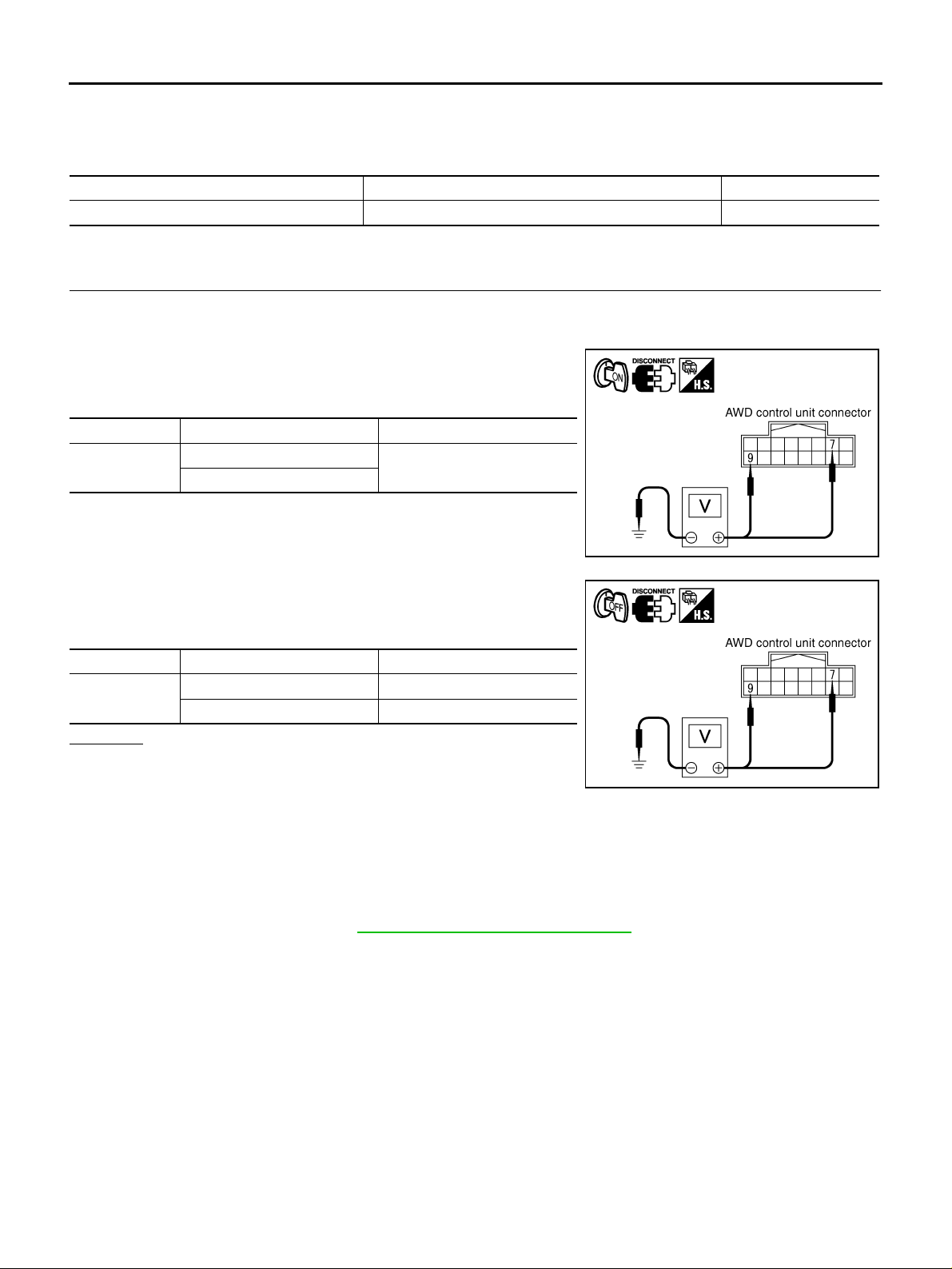
1. CHECK POWER SUPPLY
1. Turn ignition sw itch “OFF”.
2. Disconnect AWD control unit harness connector.
3. Turn ignition switch “ON”. (Do not start engine.)
4. Check voltage between AWD control unit harness connector terminals and gr ound.
Connector Terminal Voltage (Approx.)
M107
7 - Ground
9 - Ground
Battery voltage
5. Turn ignition sw itch “OFF”.
6. Check voltage between AWD control unit harness connector terminals and gr ound.
Connector Terminal Voltage (Approx.)
M107
7 - Ground 0V
9 - Ground Batte ry voltage
OK or NG
OK >> GO TO 2.
NG >> Check the following. If any item is damaged, repair or
replace damaged parts.
● 10A fuse [ No. 8, located in the fuse b lock (J/B) or No . 37, located in the fuse and fusible link
box]
● Harness for short or open between battery and AWD control unit harness connector terminal 9
● Harness for short or open between ignition switch and AWD control unit harness connector ter-
minal 7
● Ignition switch. Refer to PG-2, "POWER SUPPLY ROUTING" .
SDIA2319E
SDIA2320E
Revision: 2006 July 2006 X-Trail
TF-26
Page 27
TROUBLE DIAGNOSIS FOR SYSTEM
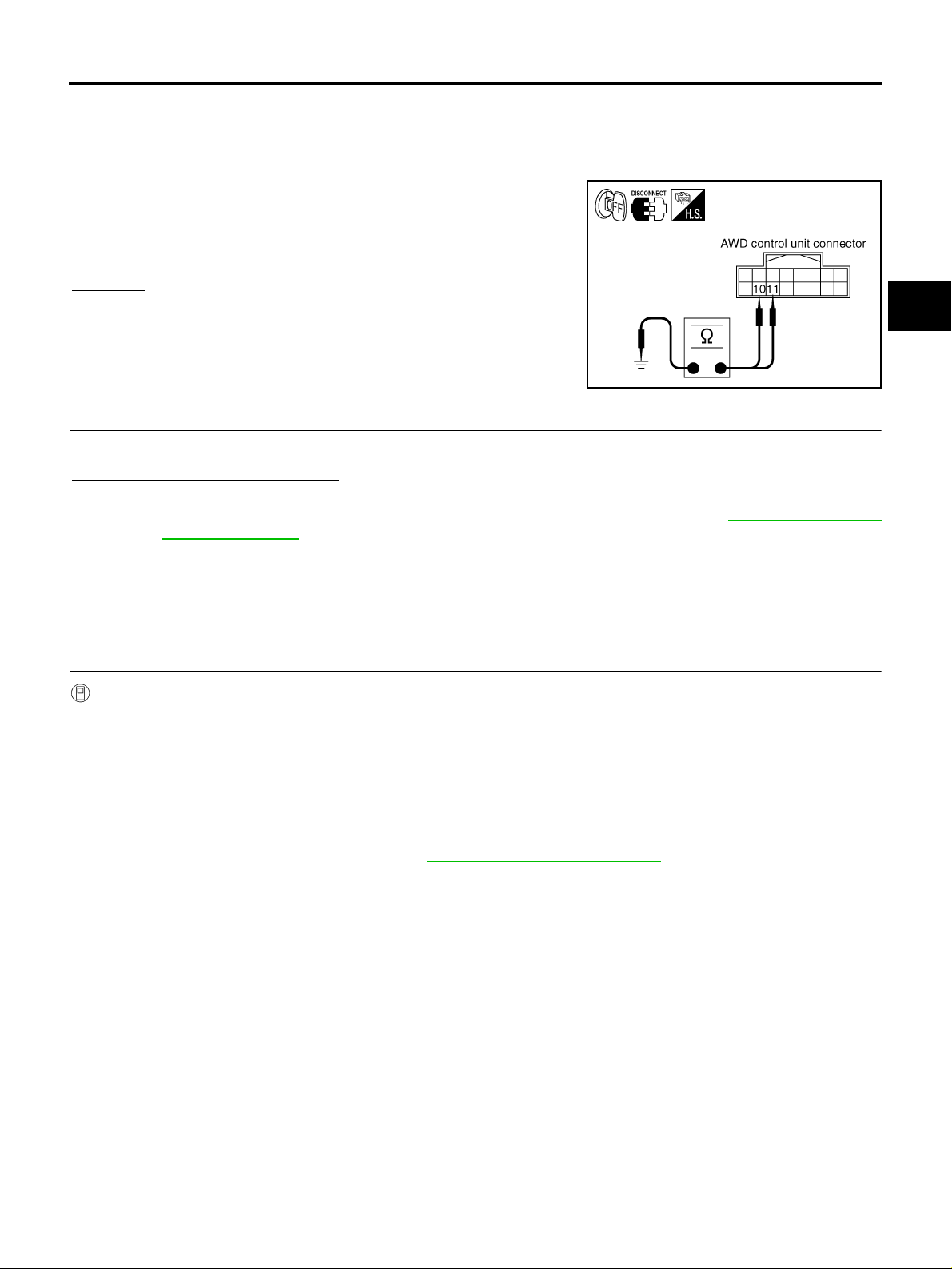
2. CHECK GROUND CIRCUIT
1. Turn ignition switch “OFF”.
2. Disconnect AWD control unit harness connector.
3. Check con tinuity between AWD control unit harness co nnector
M107 terminals 10, 11and ground.
Continuity should exist.
Also check harness for short to ground and short to power.
OK or NG
OK >> GO TO 3.
NG >> Repair open circuit or short to ground or short to power
in harness or connectors.
SDIA1883E
3. CHECK DTC
Start engine.
Does AWD warning lamp turn OFF?
YES >> INSPECTION END
NO >> Perform the self-diagnosis, repair or replace damaged parts. Refer to TF-23, "
RESULTS MODE " .
AWD Control Unit ADS0017K
DIAGNOSTIC PROCEDURE
● Check the fo llowing if “CONTROLL ER FAILURE [C1201]” is disp layed in sel f-diagnosis resu lts of CON-
SULT-II.
SELF-DIAG
A
B
C
TF
E
F
G
H
I
1. PERFORM SELF-DIAGNOSIS
With CONSULT-II
1. Turn i g nition switch “ON”. (Do not start engine.)
2. Select “SELF-DIAG RESULTS” mode for “ALL MODE AWD/4WD” with CONSULT-II.
3. Touch “ERASE”.
4. Turn ignition switch “OFF” and wait at least 10 seconds.
5. Perform the self-diagnosis again.
Is
“CONTROLLER FAILURE [C1201]” displayed?
YES >> Replace AWD control unit. Refer to TF-45, "AWD CONTROL UNIT" .
NO >> INSPECTION END
J
K
L
M
Revision: 2006 July 2006 X-Trail
TF-27
Page 28
TROUBLE DIAGNOSIS FOR SYSTEM
ABS System ADS0017L
DIAGNOSTIC PROCEDURE
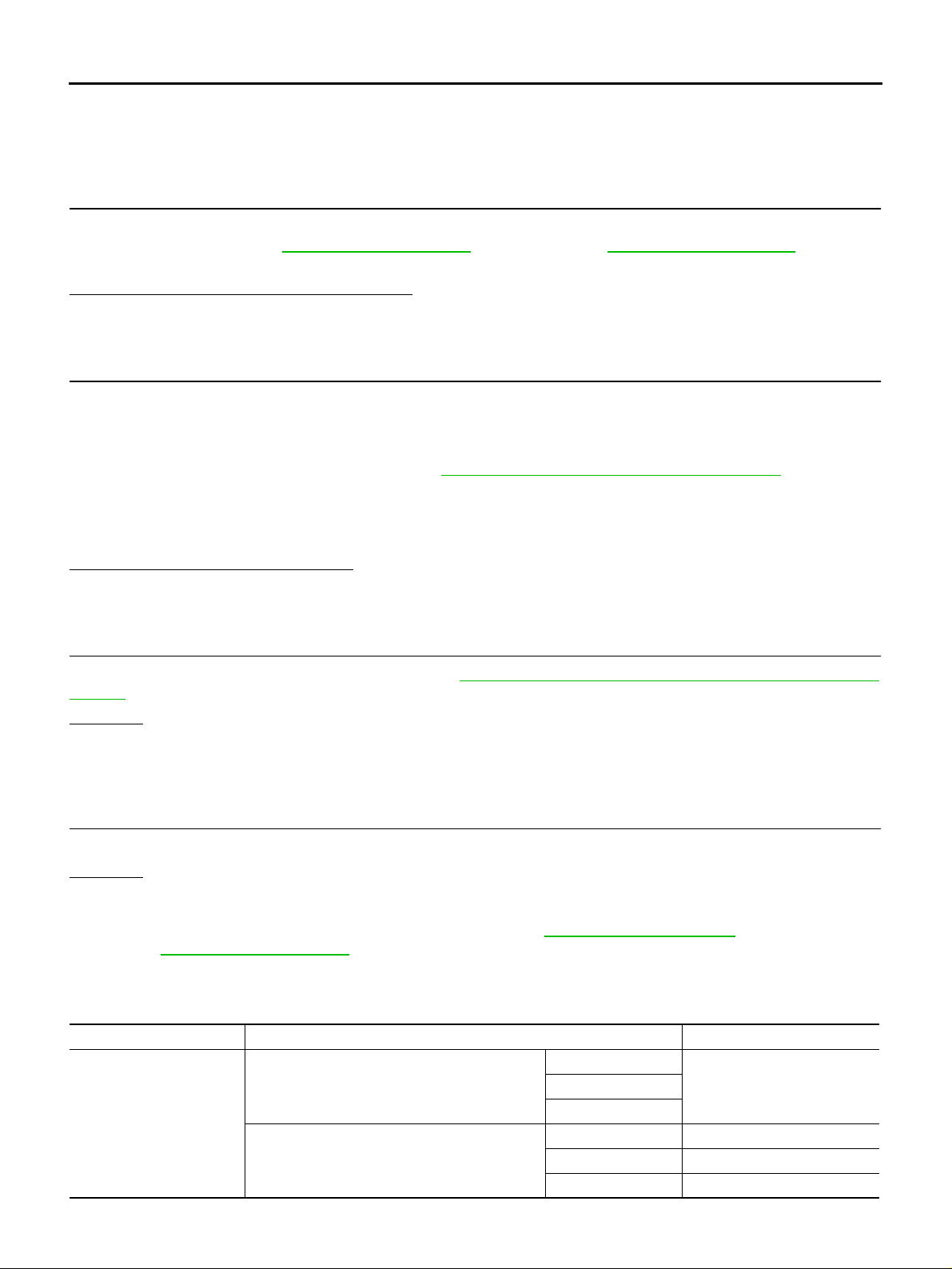
● Check the following if “ABS SYSTEM [C1203 ]” is displayed in self-diagnosis results of CONSULT-II.
1. CHECK DTC WITH ABS ACTUATOR AND ELECTRIC UNIT (CONTROL UNIT) OR VDC/TCS/ABS/
CONTROL UNIT
Perform self-diagnos is with ABS actuato r and e lectric u nit (contr ol unit) (with out VDC) or V DC/TCS/ABS con trol unit (with VDC). Refer to BRC-18, "
).
Is any malfunction detected by self-diag no si s?
YES >> Check the malfunctioning system.
NO >> GO TO 2.
Self-Diagnosis" (without VDC) or BRC-61, "Self-Diagnosis" (with VDC
2. CHECK DTC AFTER DRIVING
1. Turn ignition sw itch “OFF”.
2. Start engine and drive vehicle at 30 km/h (19 MPH) for at least 1 minute.
3. Make sure that ABS warning lamp turns OFF.
4. Perform erase self-diagnosis results. Refer to TF-24, "
5. S top vehicle and turn ignition switch “OFF”.
6. Turn ignition switch “ON”.
7. Perform self-diagnosis.
Is
“ABS SYSTEM [C1203]” displayed?
YES >> GO TO 3.
NO >> INSPECTION END
How to Erase Self-Diagnosis Results" .
3. CHECK AWD CONTROL UNIT
Check AWD control unit input/output signal. Refer to TF-21, "
Values" .
OK or NG
OK >> GO TO 4.
NG >> Check AWD control unit pin terminals for damage or loose connection with harness connector. If
any item is dama ged, repair or replace damaged parts.
AWD Control Unit Input/Output Signal Reference
4. CHECK DTC
Perform the self-diagnosis, after driving a vehicle for a while.
OK or NG
OK >> INSPECTION END
NG >> Perform self-diagnosis with ABS actuator and electric unit (control unit) (without VDC) or VDC/
TCS/ABS control unit (with VDC) again. Refer to BRC-18, "
BRC-61, "
Self-Diagnosis" (with VDC).
AWD Solenoid ADS0017M
CONSULT-II REFERENCE VALUE IN DATA MONITOR MODE
Data are reference value.
Monitor item [Unit] Condition Display value
2WD mode
Engine speed: At idle
ETS SOLENOID [A]
Engine speed: 3,000 rpm or more constant
*: The values are changed by throttle opening an d engi ne speed.
LOCK mode
2WD mode Approx. 0.000A
AUTO mode Approx. 0.000 - 1.500A*
LOCK mode Approx. 2.800A
Self-Diagnosis" (without VDC) or
Approx. 0.000AAUTO mode
Revision: 2006 July 2006 X-Trail
TF-28
Page 29
TROUBLE DIAGNOSIS FOR SYSTEM
DIAGNOSTIC PROCEDURE
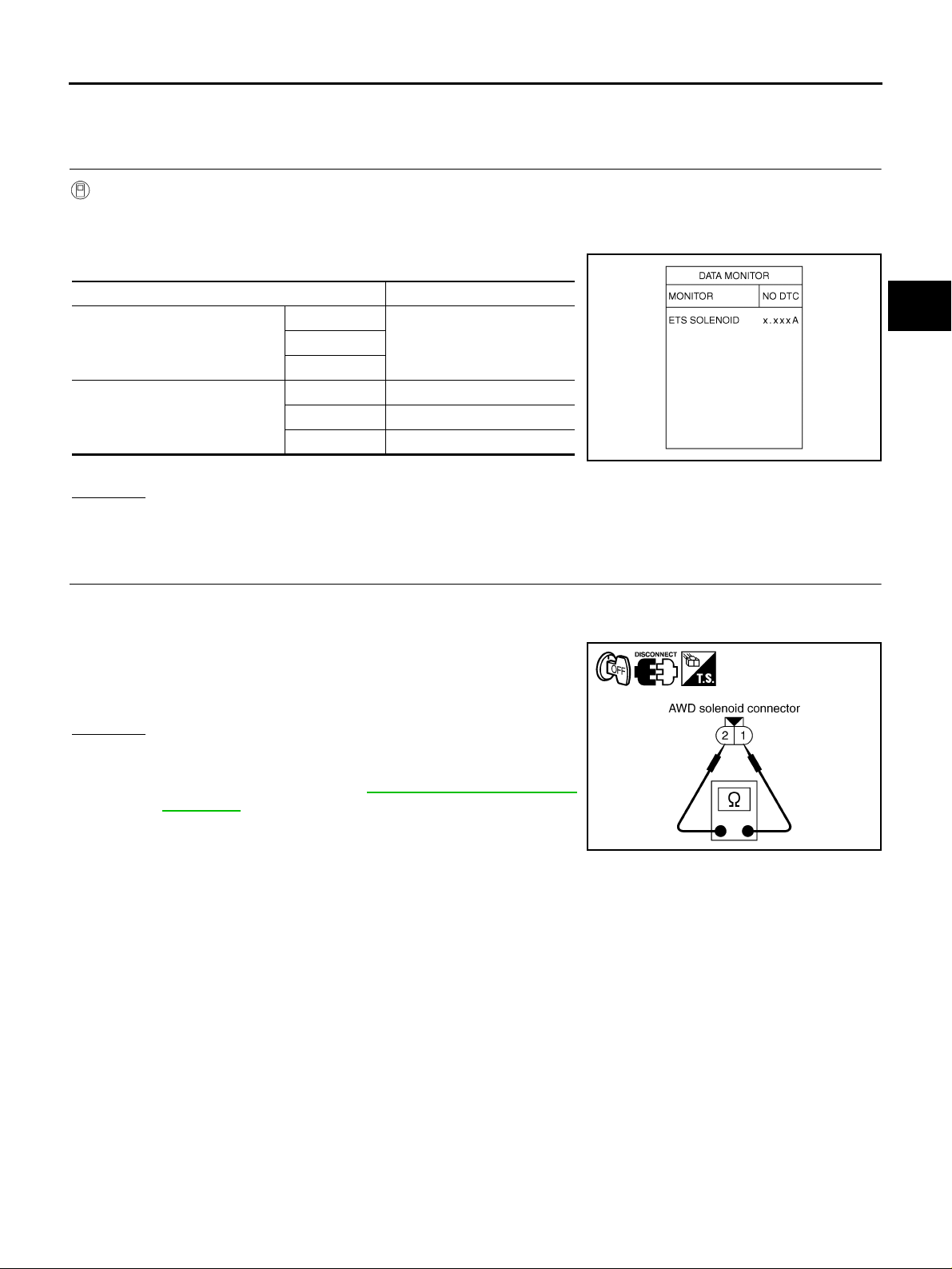
● Check the following if “4WD SOLENOID [C1204]” is displayed in self-diagnosis results of CONSULT-II.
1. CHECK AWD SOLENOID SIGNAL
A
With CONSULT-II
1. Start engine.
2. Select “DATA MONITOR” mode for “ALL MODE AWD/4WD” with CONSUL T-II.
3. Read out the value of “ETS SOLENOID”.
Condition Display value
2WD mode
Engine speed: At idle
LOCK mode
2WD mode Approx. 0.000A
Engine speed: 3,000 rpm or
more constant
*: The values are changed by throttle opening and engine speed.
AUTO mode Approx. 0.000 - 1.500A*
LOCK mode Approx. 2.800A
Approx. 0.000AAUTO mode
OK or NG
OK >> GO TO 6.
NG >> GO TO 2.
2. CHECK AWD SOLENOID
1. Turn ignition switch “OFF”.
2. Disconnect AWD solenoid harness connector.
3. Check resistance between AWD solenoid harness connector
B152 terminals 1 and 2.
1 - 2: Approx. 2.45Ω
B
C
TF
E
F
SDIA1885E
G
H
I
J
OK or NG
OK >> GO TO 3.
NG >> AWD solenoid is malfunctioning. Replace electric con-
trolled coupling. Refer to RFD-16, "
Disassembly and
Assembly" .
K
L
SDIA2507E
M
Revision: 2006 July 2006 X-Trail
TF-29
Page 30
TROUBLE DIAGNOSIS FOR SYSTEM
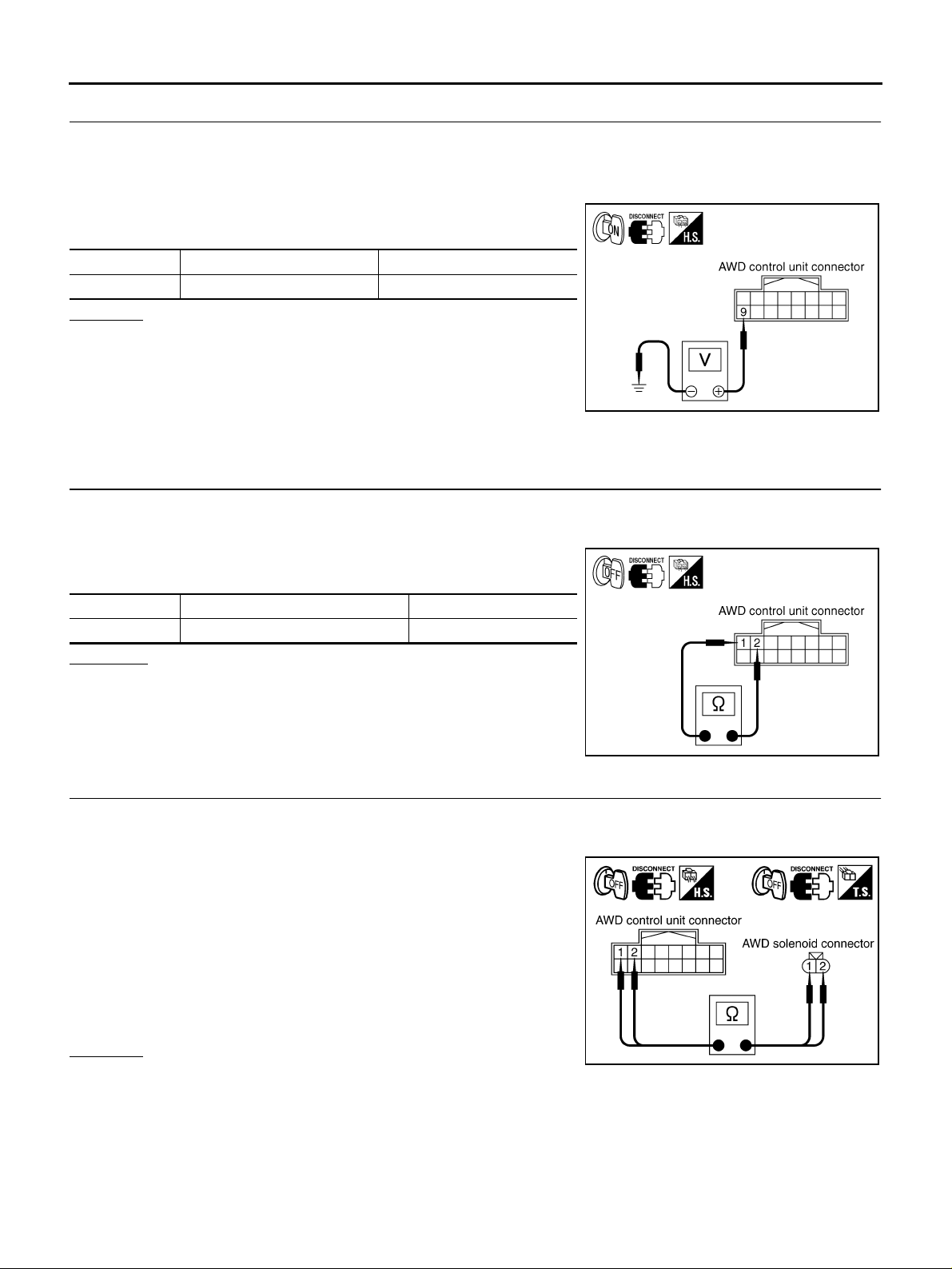
3. CHECK POWER SUPPLY
1. Turn ignition sw itch “OFF”.
2. Disconnect AWD control unit harness connector.
3. Turn ignition switch “ON”. (Do not start engine.)
4. Check voltage between AWD control unit harness connector terminal 9 and gr ound.
Connector Terminal Voltage (Approx.)
M107 9 - Ground Battery voltage
OK or NG
OK >> GO TO 4.
NG >> Check the following. If any item is damaged, repair or
replace damaged parts.
● 10A fuse (No. 37, located in the fuse and fusible link
box)
● Harness for short or open between battery and AWD control unit harness connector terminal 9
4. CHECK AWD SOLENOID CIRCUIT
1. Turn ignition sw itch “OFF”.
2. Disconnect AWD control unit harness connector.
3. Check resistance between AWD control unit harness connector
terminals 1 and 2.
SDIA1884E
Connector Terminal Resistance (Approx.)
M107 1 - 2 (Ground) 2.45 Ω
OK or NG
OK >> GO TO 6.
NG >> GO TO 5.
5. CHECK HARNESS BETWEEN AWD CONTROL UNIT AND AWD SOLENOID
1. Turn ignition sw itch “OFF”.
2. Disconnect AWD cont rol unit harness connector and AWD solenoid harness connector.
3. Check continuity between the following t erminals.
– AWD control unit harness connector M107 terminal 1 and AWD
solenoid harness connector B152 terminal 2.
– AWD control unit harness connector M107 terminal 2 and AWD
solenoid harness connector B152 terminal 1.
1 - 2 : Continuity should exist.
2 - 1 : Continuity should exist.
Also check harness for short to ground and short to power.
OK or NG
OK >> GO TO 6.
NG >> Repair or replace damaged parts.
SDIA1928E
SDIA2508E
Revision: 2006 July 2006 X-Trail
TF-30
Page 31
TROUBLE DIAGNOSIS FOR SYSTEM
6. CHECK AWD CONTROL UNIT
Check AWD control unit input/output signal. Refer to TF-21, "
Values" .
OK or NG
OK >> GO TO 7.
NG >> Check AWD control unit pi n terminals for damage or loo se connec tion with ha rness connec tor. If
any item is damaged, repair or replace damaged parts.
AWD Control Unit Input/Output Signal Reference
7. CHECK DTC
Perform the self-diagnosis, after driving a vehicle for a while.
OK or NG
OK >> INSPECTION END
NG >> Replace AWD control unit.
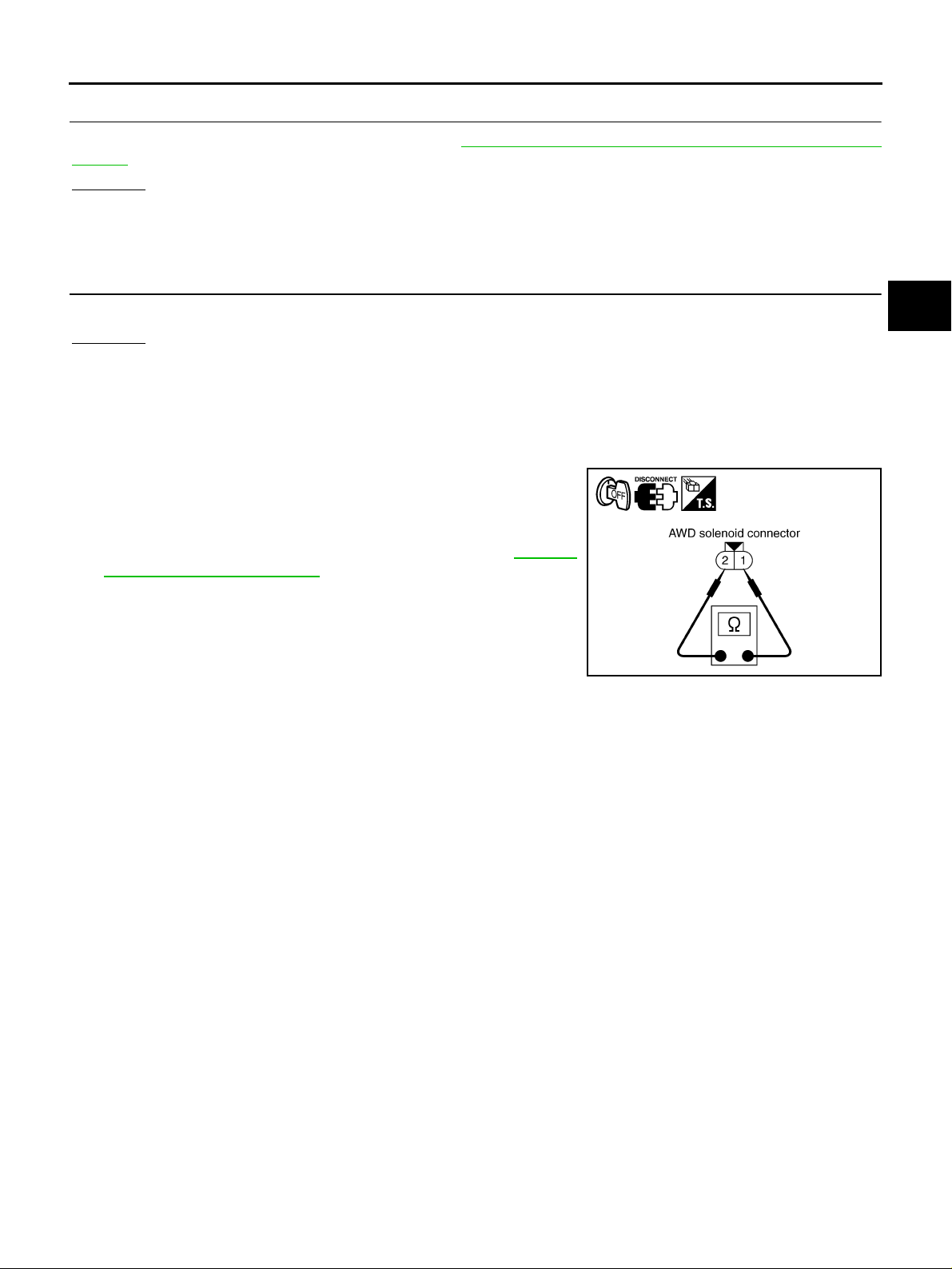
COMPONENT INSPECTION
1. Turn ignition switch “OFF”.
2. Disconnect AWD solenoid harness connector.
3. Check resistance between AWD solenoid harness connector
B152 terminals 1 and 2.
1 - 2 : Approx. 2.45 Ω
4. If NG, replace the electric controlled coupling. Refer to RFD-16,
"Disassembly and Assembly" .
A
B
C
TF
E
F
G
H
SDIA2507E
I
J
K
L
M
Revision: 2006 July 2006 X-Trail
TF-31
Page 32
TROUBLE DIAGNOSIS FOR SYSTEM
AWD Actuator Relay ADS0017N
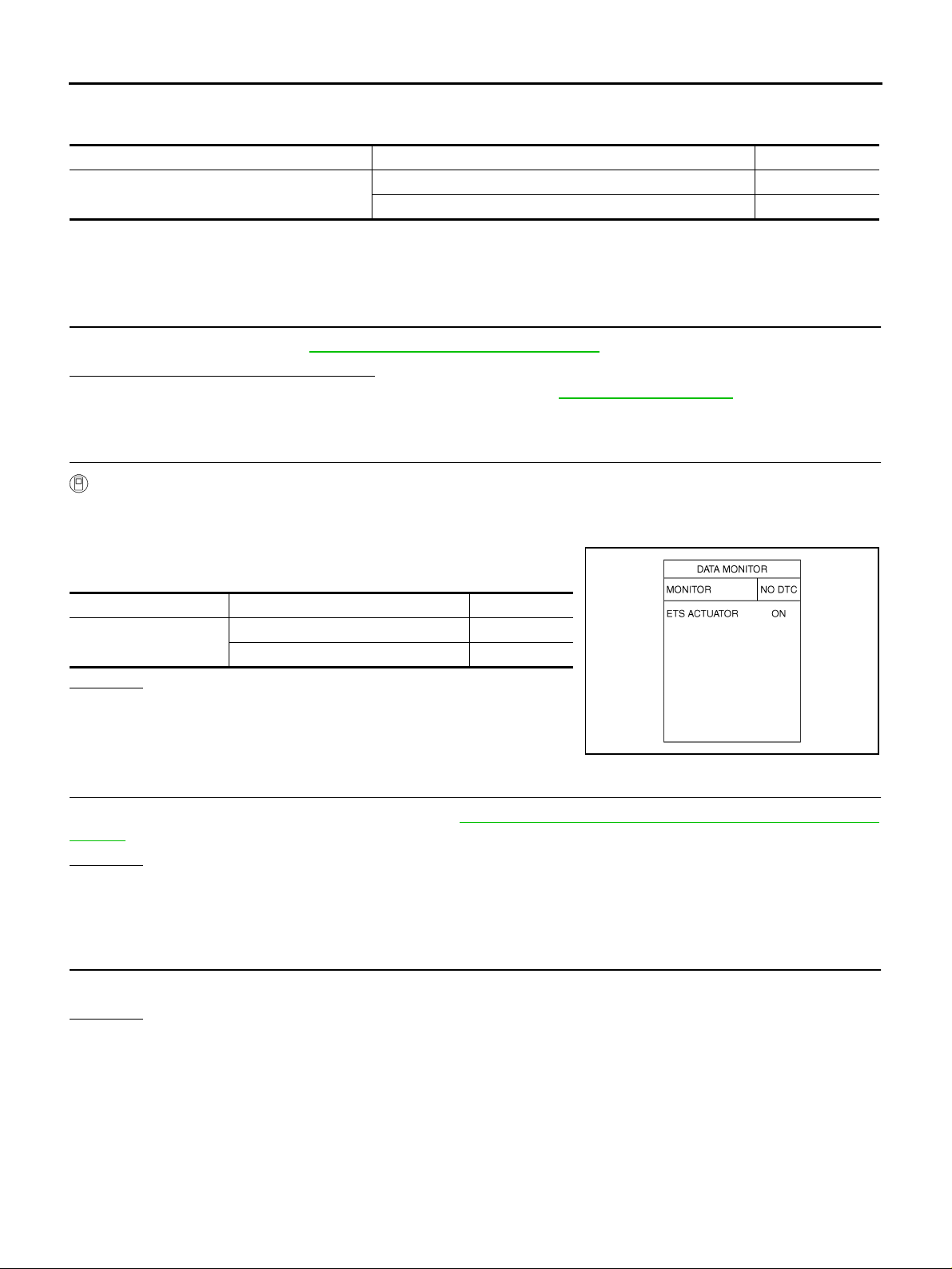
CONSULT-II REFERENCE VALUE IN DATA MONITOR MODE
Data are reference value.
Monitor item Condition Display value
ETS ACTUATOR [ON/OFF]
Engine stopped (Ignition switch: ON) OFF
Engine running ON
DIAGNOSTIC PROCEDURE
● Check the following if “4WD ACTUATOR RLY [C1205]” is displayed in self-diagnosis results of CONSULT-
II.
1. CHECK AWD SOLENOID SYSTEM
Perform self-diagnosis. Refer to TF-23, "
Is
“4WD SOLENOID [C1204]” displayed?
YES >> Perform trouble di agnosis for AWD solenoi d. Refer to TF-28, "AWD Solenoid" .
NO >> GO TO 2.
SELF-DIAG RESULTS MODE" .
2. CHECK AWD ACTUATOR RELAY SIGNAL
With CONSULT-II
1. Turn ignition switch “ON”. (Do not start engine.)
2. Select “DATA MONITOR” mode for “ALL MODE AWD/4WD” with CONSULT-II.
3. Start engine and read out ON/OFF signaling action of “ETS
ACTUATOR”.
Monitor item Condition Display value
ETS ACTUATOR
OK or NG
OK >> GO TO 4.
NG >> GO TO 3.
Engine stopped (Ignition switch: ON) OFF
Engine running ON
3. CHECK AWD CONTROL UNIT
SDIA1897E
Check AWD control unit input/output signal. Refer to TF-21, "
Values" .
OK or NG
OK >> GO TO 4.
NG >> Check AWD control unit pin terminals for damage or loose connection with harness connector. If
any item is dama ged, repair or replace damaged parts.
AWD Control Unit Input/Output Signal Reference
4. CHECK DTC
Perform the self-diagnosis, after driving a vehicle for a while.
OK or NG
OK >> INSPECTION END
NG >> Replace AWD control unit.
Revision: 2006 July 2006 X-Trail
TF-32
Page 33
TROUBLE DIAGNOSIS FOR SYSTEM
AWD Mode Switch ADS00187
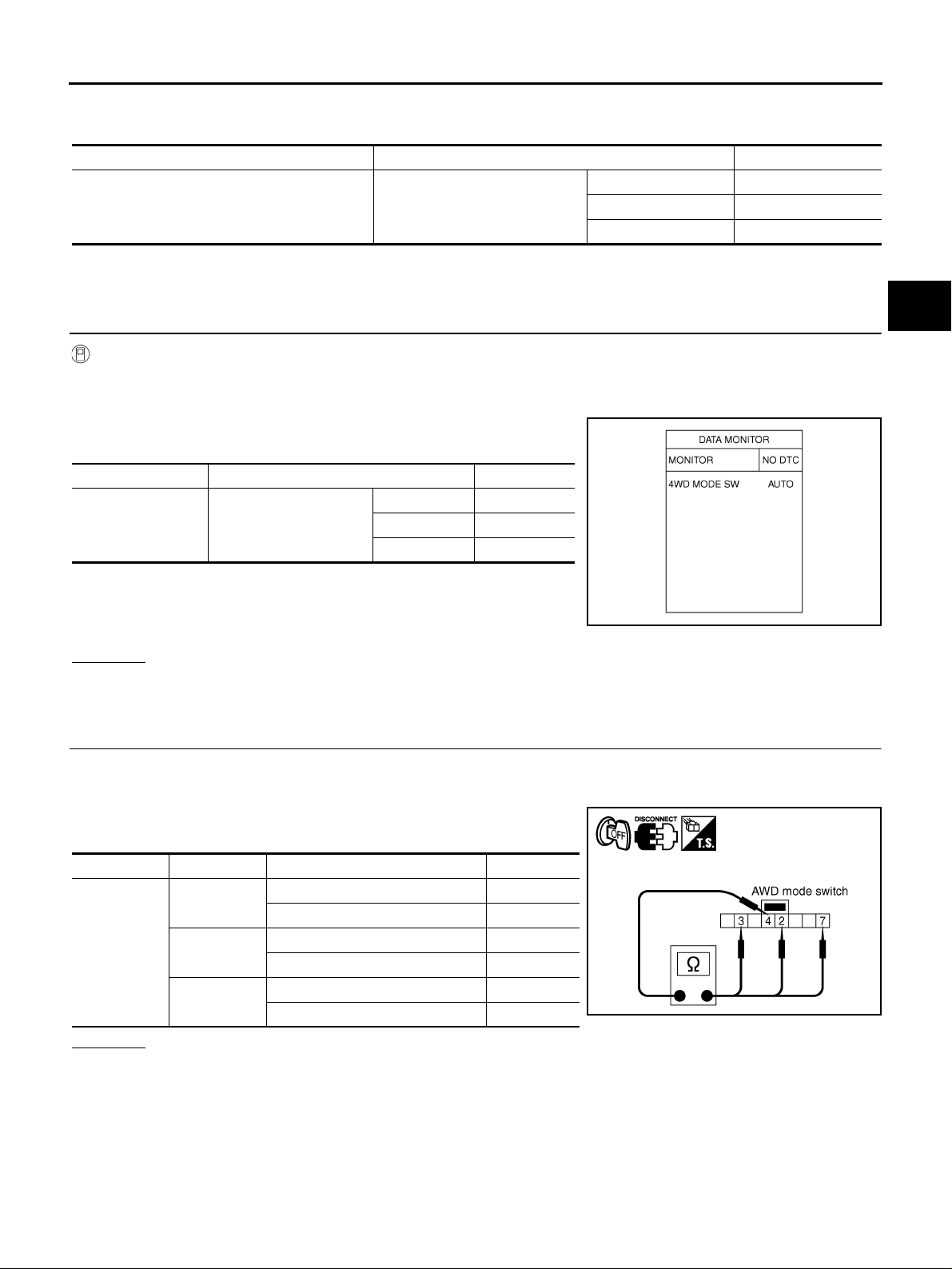
CONSULT-II REFERENCE VALUE IN DATA MONITOR MODE
Data are reference value.
Monitor item Condition Display value
2WD 2WD
4WD MODE SW [2WD/AUTO/LOCK] AWD mode switch
AUTO AUTO
LOCK LOCK
DIAGNOSTIC PROCEDURE
● Check the following if “MODE SW [C1209]” is detected in self-diagnosis results of CONSULT-II.
1. CHECK AWD MODE SWITCH SIGNAL
With CONSULT-II
1. Turn i g nition switch “ON”. (Do not start engine.)
2. Select “DATA MONITOR” mode for “ALL MODE AWD/4WD” with CONSUL T-II.
3. Read out monit or “4WD MODE SW” with opera ting AWD mode
switch.
Monitor item Condition Display value
2WD 2WD
4WD MODE SW AWD mode switch
AUTO AUTO
LOCK LOCK
A
B
C
TF
E
F
G
H
OK or NG
OK >> GO TO 5.
NG >> GO TO 2.
2. CHECK AWD MODE SWITCH
1. Turn ignition switch “OFF”.
2. Disconnect AWD mode switch harness conn ector.
3. Operate AWD mode switch and check continuity between AWD
mode switch harness connector terminals.
Connector Terminal Condition Continuity
2 - 4
M39
3 - 4
4 - 7
OK or NG
OK >> GO TO 3.
NG >> Replace AWD mode switch.
AWD mode switch: AUTO Yes
Except the above No
AWD mode switch: LOCK Yes
Except the above No
AWD mode switch: 2WD Yes
Except the above No
SDIA1898E
SDIA2557E
I
J
K
L
M
Revision: 2006 July 2006 X-Trail
TF-33
Page 34
TROUBLE DIAGNOSIS FOR SYSTEM
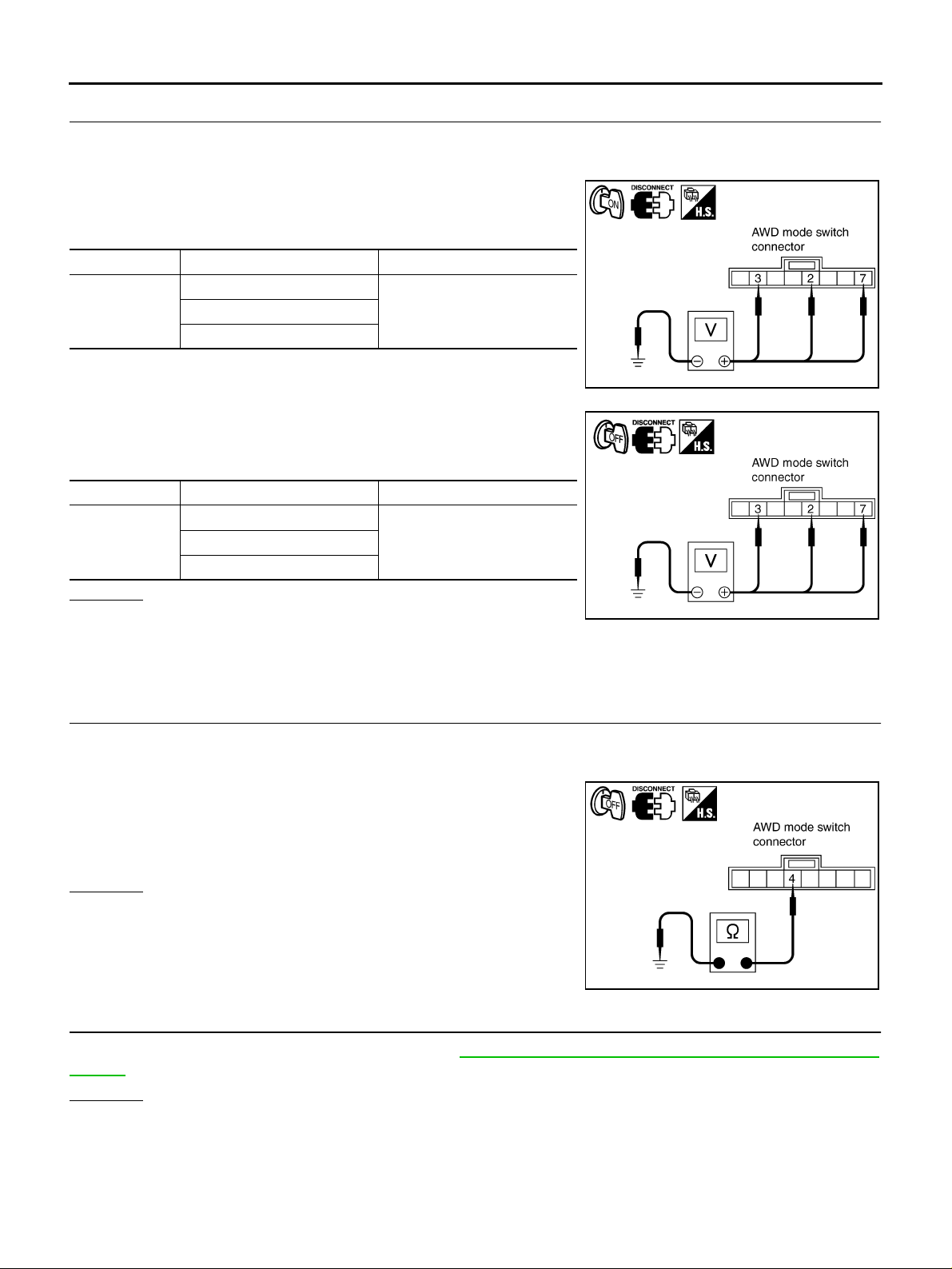
3. CHECK AWD MODE SWITCH POWER SUPPLY CIRCUIT
1. Turn ignition sw itch “OFF”.
2. Disconnect AWD mode sw itch harness connector.
3. Turn ignition switch “ON”. (Do not start engine.)
4. Check voltage between AWD mode switch harness connector
terminals and ground.
Connector Terminal Voltage (Approx.)
2 - Ground
M39
7 - Ground
5. Turn ignition sw itch “OFF”.
6. Check voltage between AWD mode switch harness connector
terminals and ground.
Connector Terminal Voltage (Approx.)
2- Ground
M39
7- Ground
OK or NG
OK >> GO TO 4.
NG >> Check harness for short or open between AWD mode
switch harne ss co nnecto r ter minal s and A WD c ont rol un it h arnes s conn ector term inal s. If any it em
is damaged, repair or replace damaged pa rts.
Battery voltage3 - Ground
0V3 - Ground
PDIA0426E
SDIA2558E
4. CHECK AWD MODE SWITCH GROUND CIRCUIT
1. Turn ignition sw itch “OFF”.
2. Disconnect AWD mode sw itch harness connector.
3. Check continuity between AWD mode switch harness connector
M39 terminal 4 and ground.
Continuity should exist.
Also check harness for short to ground and short to power.
OK or NG
OK >> GO TO 5.
NG >> Repair open circ uit or short to ground o r short to power
in harness or connectors.
PDIA0427E
5. CHECK AWD CONTROL UNIT
Check AWD control unit input/output signal. Refer to TF-21, "
Values" .
OK or NG
OK >> GO TO 6.
NG >> Check AWD control unit pin terminals for damage or loose connection with harness connector. If
any item is dama ged, repair or replace damaged parts.
AWD Control Unit Input/Output Signal Reference
Revision: 2006 July 2006 X-Trail
TF-34
Page 35
TROUBLE DIAGNOSIS FOR SYSTEM
6. CHECK AWD INDICATOR LAMP AND LOCK INDICATOR LAMP
1. Turn ignition switch “OFF”.
2. Check AWD indicator lamp and LOCK indicator lamp “ON” for approx. 1 second when the ignition switch
is turned “ON”.
Do AWD indicator lamp and LOCK indicator lamp
YES >> INSPECTION END
NO >> Go to TF-37, "
ond When Ignition Switch Is Turned to ON" .
AWD Indicator Lamp and LOCK Indicator Lamp Do Not Turn ON for Approx. 1 Sec-
COMPONENT INSPECTION
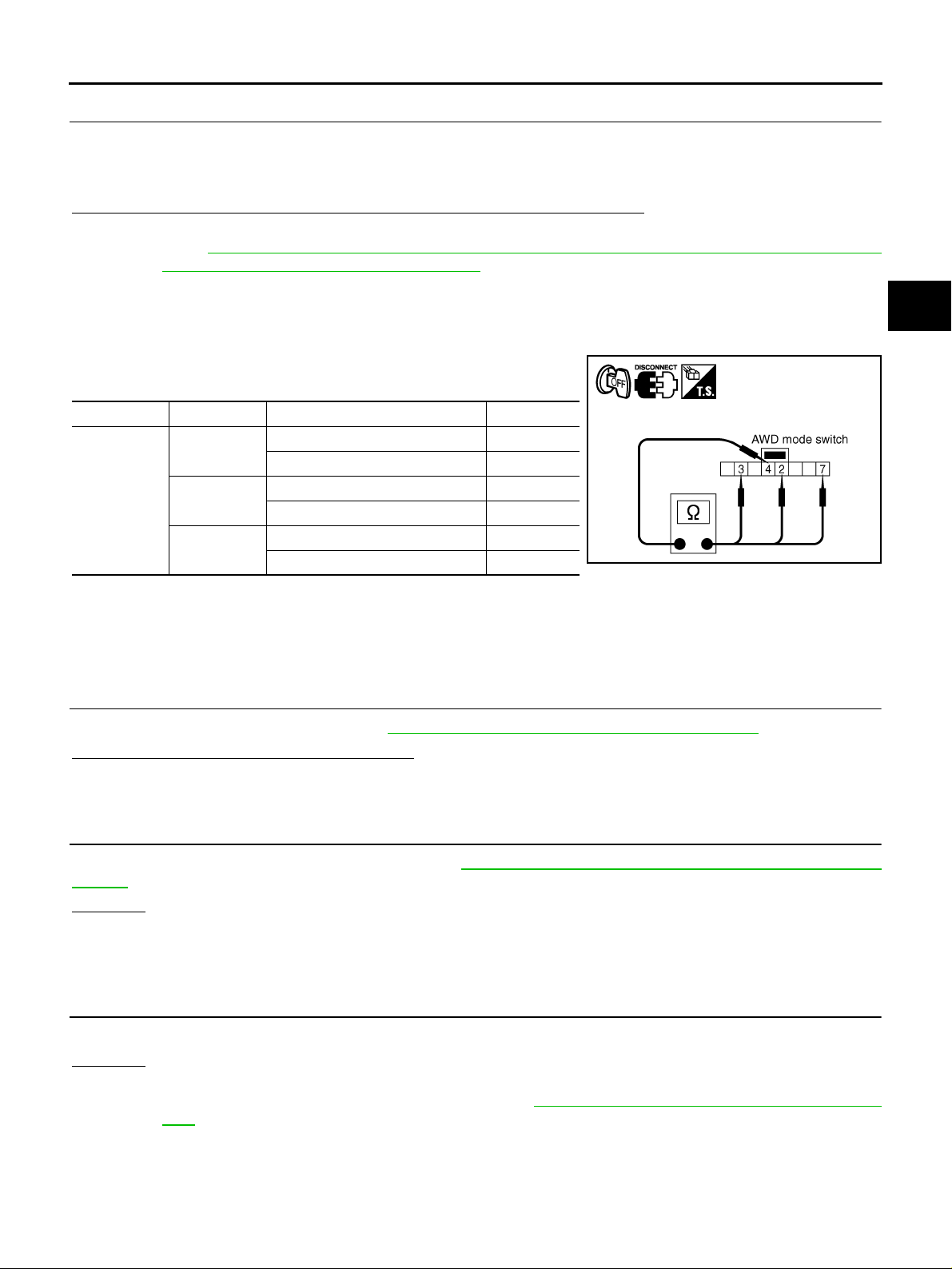
1. Turn ignition switch “OFF”.
2. Disconnect AWD mode switch harness conn ector.
3. Operate AWD mode switch and check continuity between AWD
mode switch harness connector terminals.
Connector Terminal Condition Continuity
2 - 4
M39
4. If NG, replace AWD mode switch.
3 - 4
4 - 7
AWD mode switch: AUTO Yes
Except the above No
AWD mode switch: LOCK Yes
Except the above No
AWD mode switch: 2WD Yes
Except the above No
“ON” for approx. 1 second?
SDIA2557E
A
B
C
TF
E
F
G
H
Engine Control Signal ADS00186
DIAGNOSTIC PROCEDURE
● Check the following if “ENGINE SIGNAL 1 [C1210]” is displayed in self-diagnosis results of CONSULT-II.
1. CHECK DTC WITH ECM
Perform self-diagnosis with ECM. Refer to EC-48, "
Is any malfunction detected by self-diagnosis?
YES >> Check the malfunctioning system.
NO >> GO TO 2.
Emission-Related Diagnostic Information" .
2. CHECK AWD CONTROL UNIT
Check AWD control unit input/output signal. Refer to TF-21, "
Values" .
OK or NG
OK >> GO TO 3.
NG >> Check AWD control unit pi n terminals for damage or loo se connec tion with ha rness connec tor. If
any item is damaged, repair or replace damaged parts.
AWD Control Unit Input/Output Signal Reference
3. CHECK DTC
Perform the self-diagnosis, after driving a vehicle for a while.
OK or NG
OK >> INSPECTION END
NG >> Perform self-diagnosis with ECM again. Refer to EC-48, "
tion" .
Emission-Related Diagnostic Informa-
I
J
K
L
M
Revision: 2006 July 2006 X-Trail
TF-35
Page 36
TROUBLE DIAGNOSIS FOR SYSTEM
CAN Communication Line ADS0017O
DIAGNOSTIC PROCEDURE
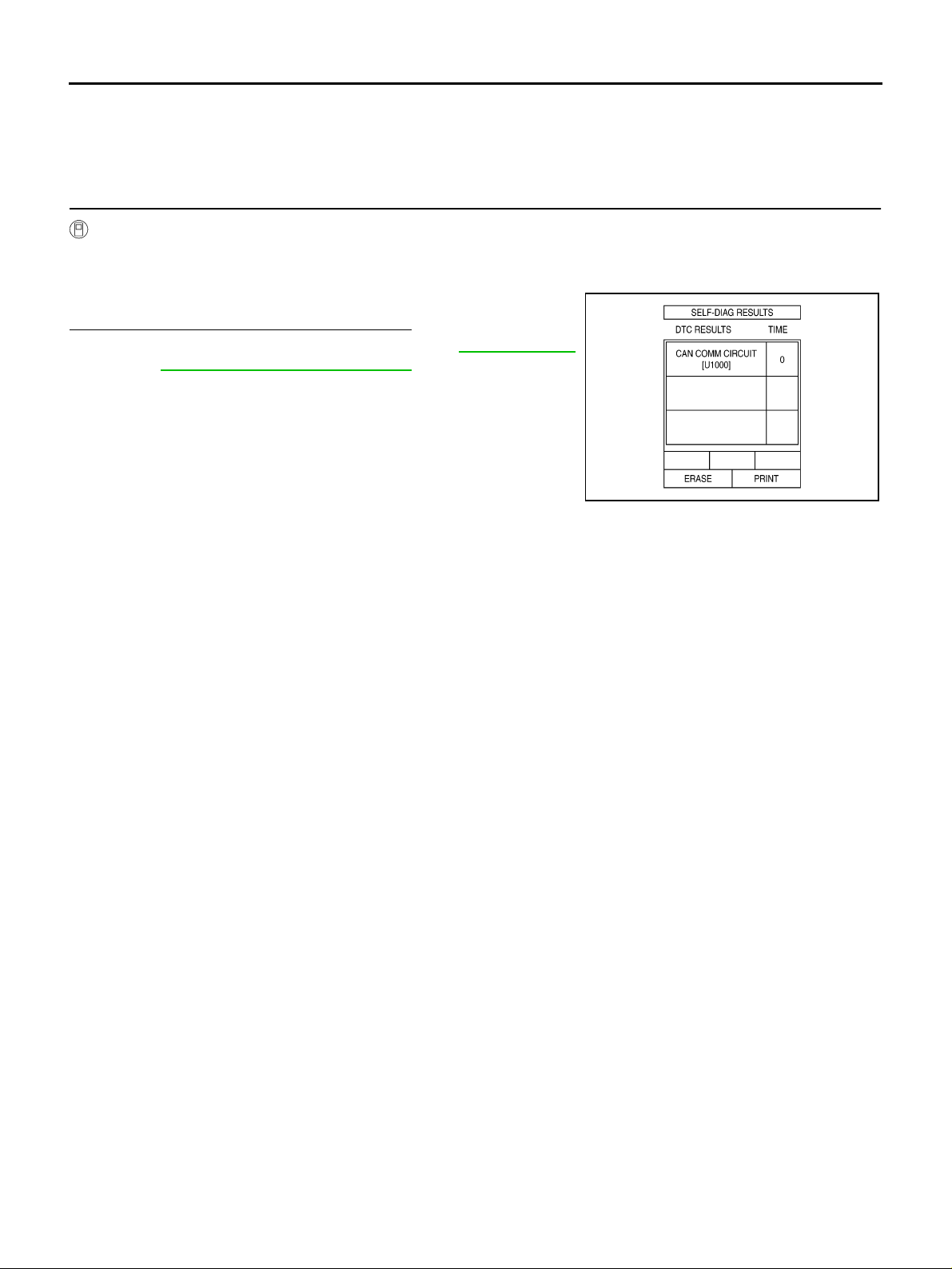
● Check the following if “CAN COMM CIRCUIT [U1000]” is detected in self-diagnosis results of CONSULT-
II.
1. CHECK CAN COMMUNICATION CIRCUIT
With CONSULT-II
1. Turn ignition switch “ON” and start engine.
2. Select “SELF-DIAG RESULTS” mode for “ALL MODE AWD/4WD” with in CONSULT-II.
3. Perform the self-diagnosis.
Is
“CAN COMM CIRCUIT [U1000]” displayed?
YES >> Print out CONSULT-II screen and go to LAN-4, "TROU-
BLE DIAGNOSES WORK FLOW" .
NO >> INSPECTION END
SDIA1850E
Revision: 2006 July 2006 X-Trail
TF-36
Page 37
TROUBLE DIAGNOSIS FOR SYMPTOMS
TROUBLE DIAGNOSIS FOR SYMPTOMS PFP:00007
A WD Indicator Lamp and LOCK Indicator Lamp Do Not Turn ON for Approx. 1
Second When Ignition Switch Is Turned to ON
DIAGNOSTIC PROCEDURE
ADS0017Q
1. CHECK SYSTEM FOR CAN COMMUNICATION LINE
A
B
Perform self-diagnosis. Refer to TF-23, "
Is
“CAN COMM CIRCUIT [U1000]” displayed?
SELF-DIAG RESULTS MODE" .
YES >> Perform trouble diagnosis for CAN communication line. Refer to TF-36, "CAN Communication
Line" .
NO >> GO TO 2.
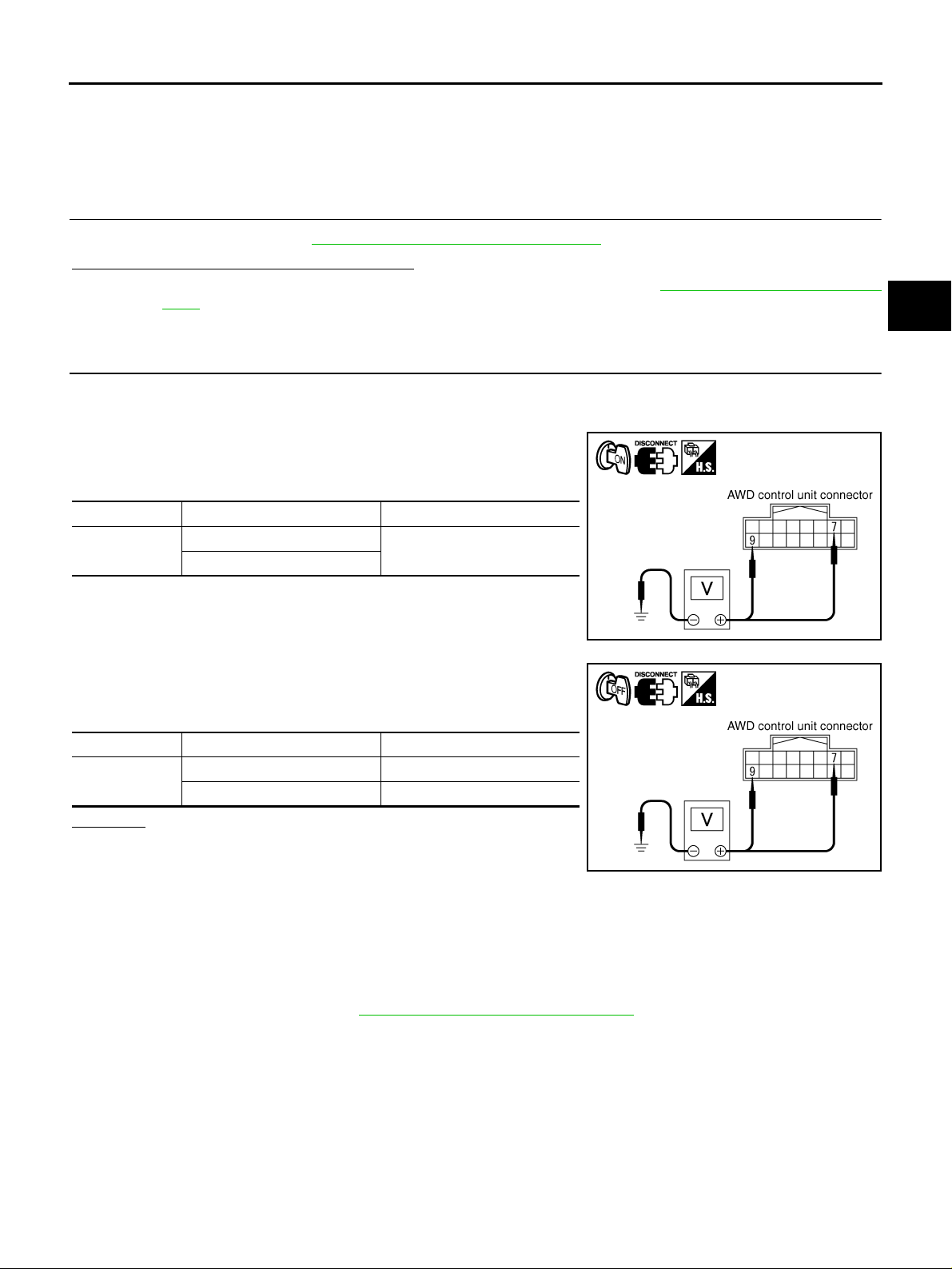
2. CHECK AWD CONTROL UNIT POWER SUPPLY CIRCUIT
1. Turn ignition switch “OFF”.
2. Disconnect AWD control unit harness connector.
3. Turn i g nition switch “ON”. (Do not start engine.)
4. Check voltag e be tw ee n AWD control unit harness c on nect or ter minals and ground.
Connector Ter minal (Wire color) Voltage (Approx. )
M107
5. Turn ignition switch “OFF”.
6. Check voltag e be tw ee n AWD control unit harness c on nect or ter minals and ground.
7 (GY) - Ground
9 (P/L) - Ground
Battery voltage
SDIA2319E
C
TF
E
F
G
H
I
J
Connector Ter minal (Wire color) Voltage (Approx. )
M107
7 (GY) - Ground 0V
9 (P/L) - Ground Battery voltage
OK or NG
OK >> GO TO 3.
NG >> Check the following. If any i tem is damaged, repair or
replace damaged parts.
● 10A fuse [No. 8, located in th e fuse block (J/B) or No. 37, located in th e fuse and fusible link
box]
● Harness for sh ort or open between battery and AWD control unit harness connector terminal 9
● Harness for sh ort or open betwe e n ignition switch and AWD control unit harness connector ter-
minal 7
● Ignition switch. Refer to PG-2, "POWER SUPPLY ROUTING" .
K
L
SDIA2320E
M
Revision: 2006 July 2006 X-Trail
TF-37
Page 38
TROUBLE DIAGNOSIS FOR SYMPTOMS
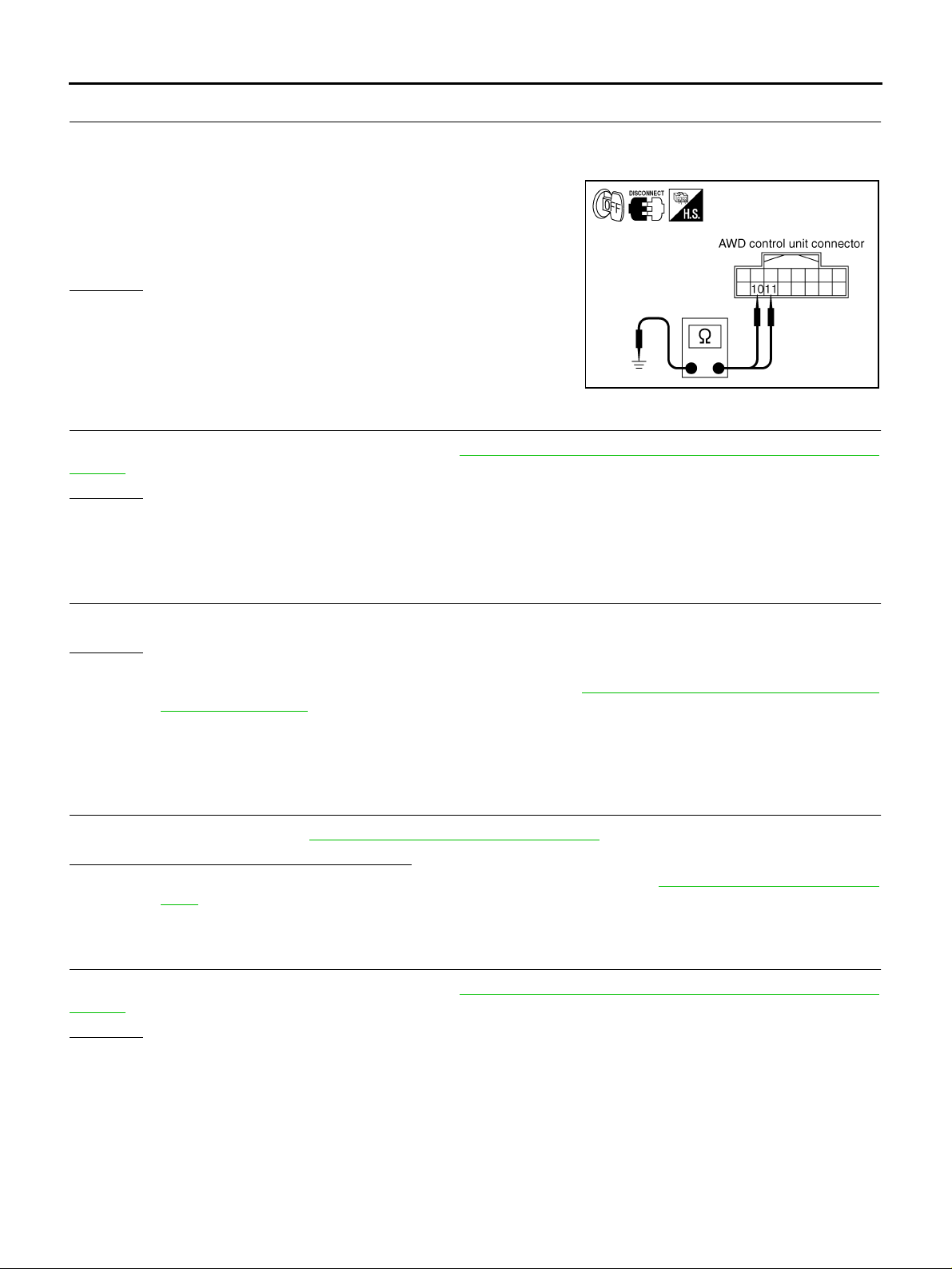
3. CHECK AWD CONTROL UNIT GROUND CIRCUIT
1. Turn ignition sw itch “OFF”.
2. Disconnect AWD control unit harness connector.
3. Check continuity between AWD control unit harness connector
M107 terminals 10 (B/R), 1 1 (B/R) and ground.
Continuity should exist.
Also check harness for short to ground and short to power.
OK or NG
OK >> GO TO 4.
NG >> Repair open circ uit or short to ground o r short to power
in harness or connectors.
4. CHECK AWD CONTROL UNIT
SDIA1883E
Check AWD control unit input/output signal. Refer to TF-21, "
Values" .
OK or NG
OK >> GO TO 5.
NG >> Check AWD control unit pin terminals for damage or loose connection with harness connector. If
any item is dama ged, repair or replace damaged parts.
AWD Control Unit Input/Output Signal Reference
5. SYMPTOM CHECK
Check again.
OK or NG
OK >> INSPECTION END
NG >> Replace unified meter control unit assembly. Refer to DI-23, "
Combination Meter" .
Disassembly and Assembly for
AWD Warning Lamp Does Not Tu rn ON When Ignition Switch Is Turned to ON
ADS0017R
DIAGNOSTIC PROCEDURE
1. CHECK SYSTEM FOR CAN COMMUNICATION LINE
Perform self-diagnosis. Refer to TF-23, "
“CAN COMM CIRCUIT [U1000]” displayed?
Is
YES >> Perform trouble diagnosis for CAN communication line. Refer to TF-36, "CAN Communication
Line" .
NO >> GO TO 2.
SELF-DIAG RESULTS MODE" .
2. CHECK AWD CONTROL UNIT
Check AWD control unit input/output signal. Refer to TF-21, "
Values" .
OK or NG
OK >> GO TO 3.
NG >> Check AWD control unit pin terminals for damage or loose connection with harness connector. If
any item is dama ged, repair or replace damaged parts.
Revision: 2006 July 2006 X-Trail
TF-38
AWD Control Unit Input/Output Signal Reference
Page 39
TROUBLE DIAGNOSIS FOR SYMPTOMS
3. SYMPTOM CHECK
Check again.
OK or NG
OK >> INSPECTION END
NG >> Replace unified meter control unit assembly. Refer to DI-23, "
Disassembly and Assembly for
Combination Met er" .
A WD Warning Lamp Does Not Turn OFF Several Seconds After Engine Started
ADS0017S
DIAGNOSTIC PROCEDURE
1. CHECK SELF-DIAGNOSIS RESULTS
Perform self-diagnosis. Refer to TF-23, "
Is any malfunction detected by self-diagnosis?
YES >> Check the malfunctioning system.
NO >> GO TO 2.
SELF-DIAG RESULTS MODE" .
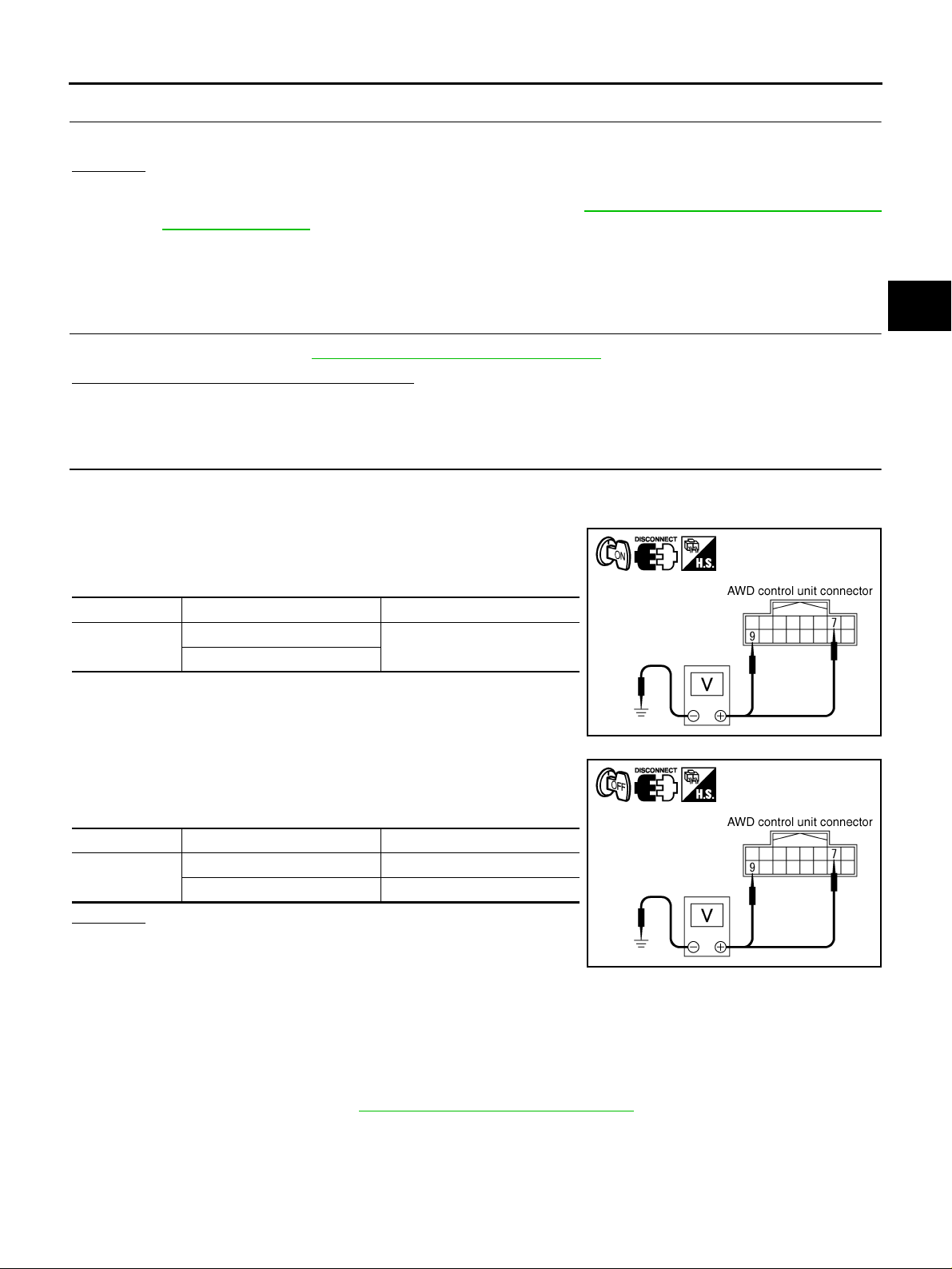
2. CHECK AWD CONTROL UNIT POWER SUPPLY CIRCUIT
1. Turn ignition switch “OFF”.
2. Disconnect AWD control unit harness connector.
3. Turn i g nition switch “ON”. (Do not start engine.)
4. Check voltag e be tw ee n AWD control unit harness c on nect or ter minals and ground.
A
B
C
TF
E
F
G
H
Connector Ter minal (Wire color) Voltage (Approx. )
M107
7 (GY) - Ground
9 (P/L) - Ground
Battery voltage
5. Turn ignition switch “OFF”.
6. Check voltag e be tw ee n AWD control unit harness c on nect or ter minals and ground.
Connector Ter minal (Wire color) Voltage (Approx. )
M107
7 (GY) - Ground 0V
9 (P/L) - Ground Battery voltage
OK or NG
OK >> GO TO 3.
NG >> Check the following. If any i tem is damaged, repair or
replace damaged parts.
● 10A fuse [No. 8, located in th e fuse block (J/B) or No. 37, located in th e fuse and fusible link
box]
● Harness for sh ort or open between battery and AWD control unit harness connector terminal 9
● Harness for sh ort or open betwe e n ignition switch and AWD control unit harness connector ter-
minal 7
● Ignition switch. Refer to PG-2, "POWER SUPPLY ROUTING" .
I
J
SDIA2319E
K
L
M
SDIA2320E
Revision: 2006 July 2006 X-Trail
TF-39
Page 40
TROUBLE DIAGNOSIS FOR SYMPTOMS
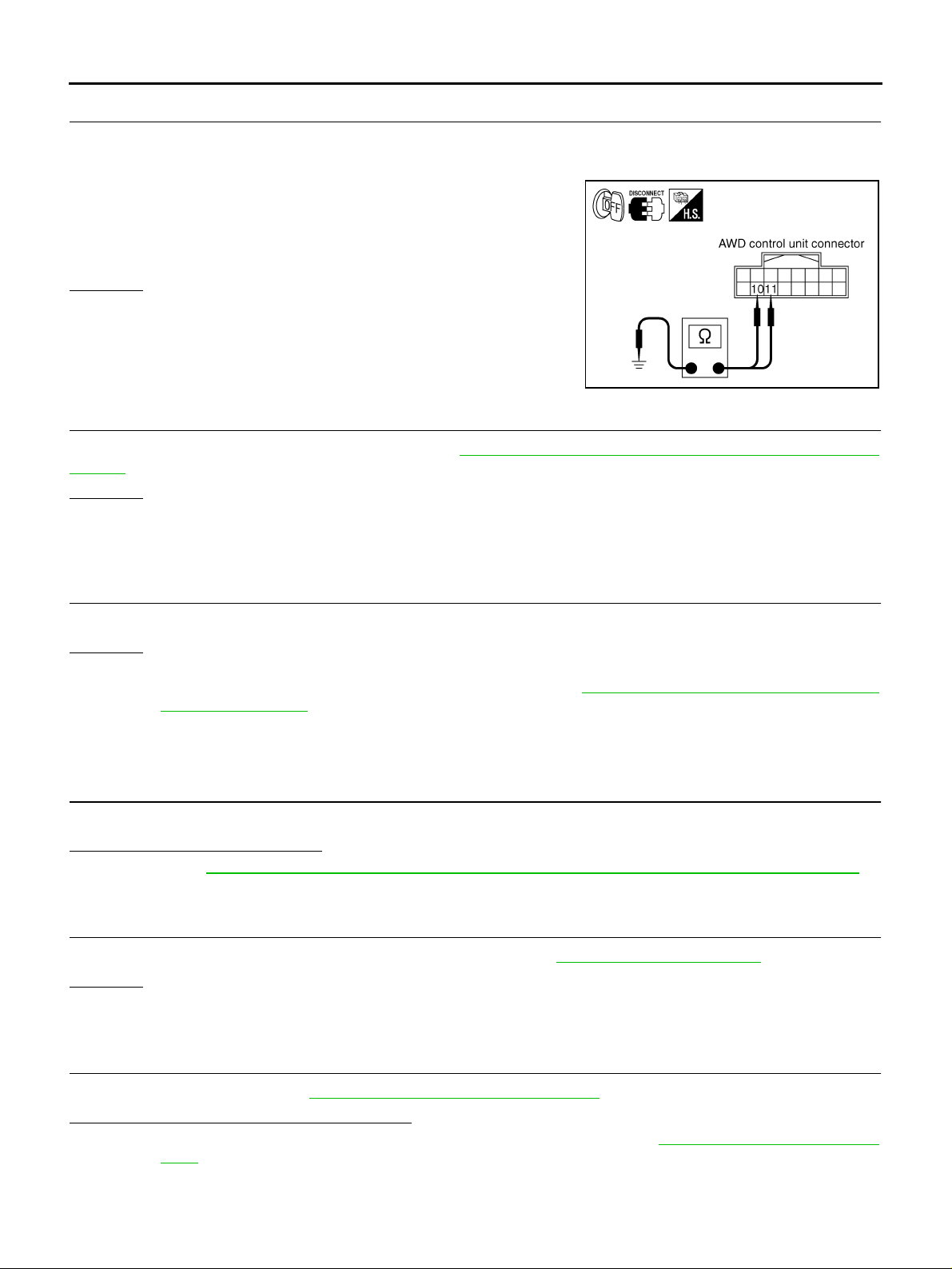
3. CHECK AWD CONTROL UNIT GROUND CIRCUIT
1. Turn ignition sw itch “OFF”.
2. Disconnect AWD control unit harness connector.
3. Check continuity between AWD control unit harness connector
M107 terminals 10 (B/R), 1 1 (B/R) and ground.
Continuity should exist.
Also check harness for short to ground and short to power.
OK or NG
OK >> GO TO 4.
NG >> Repair open circ uit or short to ground o r short to power
in harness or connectors.
4. CHECK AWD CONTROL UNIT
SDIA1883E
Check AWD control unit input/output signal. Refer to TF-21, "
Values" .
OK or NG
OK >> GO TO 5.
NG >> Check AWD control unit pin terminals for damage or loose connection with harness connector. If
any item is dama ged, repair or replace damaged parts.
AWD Control Unit Input/Output Signal Reference
5. SYMPTOM CHECK
Check again.
OK or NG
OK >> INSPECTION END
NG >> Replace unified meter control unit assembly. Refer to DI-23, "
Combination Meter" .
Disassembly and Assembly for
A WD Mode Cannot Be Switched After Engine Is Started ADS0017T
DIAGNOSTIC PROCEDURE
1. CHECK AWD WARNING LAMP
Confirm AWD warning lamp .
Does AWD warning lamp turn on?
YES >> Go to TF-39, "AWD Warning Lamp Does Not Turn OFF Several Seconds After Engine Started" .
NO >> GO TO 2.
2. CHECK SYSTEM FOR AWD MODE SWITCH
Perform trou ble diagnosis for AWD mode switch system. Refer to TF-33, "
OK or NG
OK >> GO TO 3.
NG >> Repair or replace damaged parts.
AWD Mode Switch" .
3. CHECK SYSTEM FOR CAN COMMUNICATION LINE
Perform self-diagnosis. Refer to TF-23, "
Is
“CAN COMM CIRCUIT [U1000]” displayed?
YES >> Perform trouble diagnosis for CAN communication line. Refer to TF-36, "CAN Communication
Line" .
NO >> GO TO 4.
Revision: 2006 July 2006 X-Trail
SELF-DIAG RESULTS MODE" .
TF-40
Page 41
TROUBLE DIAGNOSIS FOR SYMPTOMS
4. CHECK AWD CONTROL UNIT
Check AWD control unit input/output signal. Refer to TF-21, "
Values" .
OK or NG
OK >> GO TO 5.
NG >> Check AWD control unit pi n terminals for damage or loo se connec tion with ha rness connec tor. If
any item is damaged, repair or replace damaged parts.
AWD Control Unit Input/Output Signal Reference
5. SYMPTOM CHECK
Check again.
OK or NG
OK >> INSPECTION END
NG >> Replace unified meter control unit assembly. Refer to DI-23, "
Combination Met er" .
Heavy Tight-Corner Braking Symptom Occurs When Vehicle Is Driven in AUTO
Mode and Steering Wheel Is Turned Fully to Either Side after Engine Is Started
NOTE:
● Light tight-corner braki ng symptom may occur depending on driving conditions in AUTO mode.
This is not malfunction.
● Heavy tight-corner braking s ymptom occurs when vehicle is driven in the following c onditions:
LOCK mode, ste ering wheel is turned ful ly to either side, and accelerator pedal was depressed.
Disassembly and Assembly for
ADS0017U
A
B
C
TF
E
F
G
H
DIAGNOSTIC PROCEDURE
1. CHECK SYSTEM FOR CAN COMMUNICATION LINE
Perform self-diagnosis. Refer to TF-23, "
Is
“CAN COMM CIRCUIT [U1000]” displayed?
YES >> Perform trouble diagnosis for CAN communication line. Refer to TF-36, "CAN Communication
Line" .
NO >> GO TO 2.
SELF-DIAG RESULTS MODE" .
2. CHECK SYSTEM FOR AWD MODE SWITCH
Perform trouble diagnosis for AWD mode switch system. Refer to TF-33, "
OK or NG
OK >> GO TO 3.
NG >> Repair or replace damaged parts.
AWD Mode Switch" .
3. CHECK ACCELERATOR PEDAL POSITION SIGNAL CIRCUIT
Perform self-diagnosis for ECM. Refer to EC-48, "
Is any malfunction detected by self-diagnosis?
YES >> Check the malfunctioning system.
NO >> GO TO 4.
Emission-Related Diagnostic Information" .
4. CHECK SYSTEM FOR AWD SOLENOID
I
J
K
L
M
Perform trouble diagnosis for AWD solenoid system. Refer to TF-28, "
OK or NG
OK >> GO TO 5.
NG >> Repair or replace damaged parts.
Revision: 2006 July 2006 X-Trail
TF-41
AWD Solenoid" .
Page 42
TROUBLE DIAGNOSIS FOR SYMPTOMS
5. CHECK ELECTRIC CONTROLLED COUPLING
1. Turn ignition sw itch “OFF”.
2. Set selector lever (shift lever) to “N” (neutral) position and dise ngage the parking brake.
3. Lift up vehicle.
4. Rotate propeller shaf t by hand.
5. Hold both the right and left rear wheel lightly.
Does rear wheel rotate?
YES >> Replace electric controlled coupling for mechanical malfunction (clutch sticking etc.). Refer to
RFD-16, "
NO >> GO TO 6.
Disassembly and Assembly" .
6. SYMPTOM CHECK
Check again.
OK or NG
OK >> INSPECTION END
NG >> GO TO 7.
7. CHECK AWD CONTROL UNIT
Check AWD control unit input/output signal. Refer to TF-21, "
Values" .
OK or NG
OK >> INSPECTION END
NG >> Check AWD control unit pin terminals for damage or loose connection with harness connector. If
any item is dama ged, repair or replace damaged parts.
AWD Control Unit Input/Output Signal Reference
Ve hicle Does Not Enter AWD Mode Even Though AWD Warning Lamp T urned to OFF
CAUTION:
Make sure that parking brake is securely released if the symptom has occurred at vehicle speed of 10
km/h (6 MPH) or more.
DIAGNOSTIC PROCEDURE
ADS0017V
1. CHECK PARKING BRAKE SWITCH SIGNAL
With CONSULT-II
1. Turn ignition switch “ON”.
2. Select “DATA MONITOR” mode for “ALL MODE AWD/4WD” with CONSULT-II.
3. Operate parking brake and read out monitor “P BRAKE SW”.
Monitor item Condition Display value
P BRAKE SW
OK or NG
OK >> GO TO 2.
NG >> Check the following. If any item is damaged, repair or
replace damaged parts.
● Parking brake switch
● Brake warning lamp circuit. Refer to DI-25, "Wiring
Diagram — WARN —" .
Parking brake operated ON
Parking brake not operated OFF
SDIA1933E
Revision: 2006 July 2006 X-Trail
TF-42
Page 43
TROUBLE DIAGNOSIS FOR SYMPTOMS
2. CHECK AWD SOLENOID
Check AWD solenoid. Refer to TF-31, "
OK or NG
OK >> GO TO 3.
NG >> Replace electric controlled coupling for malfunction of AWD solenoid. Refer to RFD-16, "
sembly and Assembly" .
COMPONENT INSPECTION" .
Disas-
3. CHECK AWD CONTROL UNIT
Check AWD control unit input/output signal. Refer to TF-21, "
Values" .
OK or NG
OK >> GO TO 4.
NG >> Check AWD control unit pi n terminals for damage or loo se connec tion with ha rness connec tor. If
any item is damaged, repair or replace damaged parts.
AWD Control Unit Input/Output Signal Reference
4. SYMPTOM CHECK
Check again.
OK or NG
OK >> INSPECTION END
NG >> Replace electric controlled coupling for mechanical malfunction (mechanical engagement of
clutch is not possible.). Refer to RFD-16, "
While Driving, AWD Warning Lamp Flashes Rapidly (When Flashing in Approx.
1 Minute and Then Turning OFF)
NOTE:
Rapid flashing: 2 times/second
This symptom prot ects drivetrain parts when a heavy load is applied to the electric contro lled coupling and
multiple dis c clutch temperature increases. It is not a malfunction.
When this sympto m occu rs, stop ve hi cle and allow it to idle fo r some time s. Flas hing w ill sto p and sy stem will
be restored.
Disassembly and Assembly" .
ADS0017W
A
B
C
TF
E
F
G
H
I
J
While Driving, AWD Warning Lamp Flashes Slowly (When Continuing to Flash
Until Turning Ignition Switch OFF)
NOTE:
Slow flashing: 1 time/2 seconds
DIAGNOSTIC PROCEDURE
ADS0017X
1. CHECK TIRE
Check the followin g.
● Tire pre ssure
● Wear condition
● Front and rear tire size (There shall be no difference of tire size bet ween front and rear tires.)
OK or NG
OK >> GO TO 2.
NG >> Drive at vehicle speed of 20 km/h (1 2 MPH) or more for 5 seconds o r more after repairing or
replacing damaged parts. (Initia li ze imp rop er siz e tire info rma ti on .)
K
L
M
Revision: 2006 July 2006 X-Trail
TF-43
Page 44
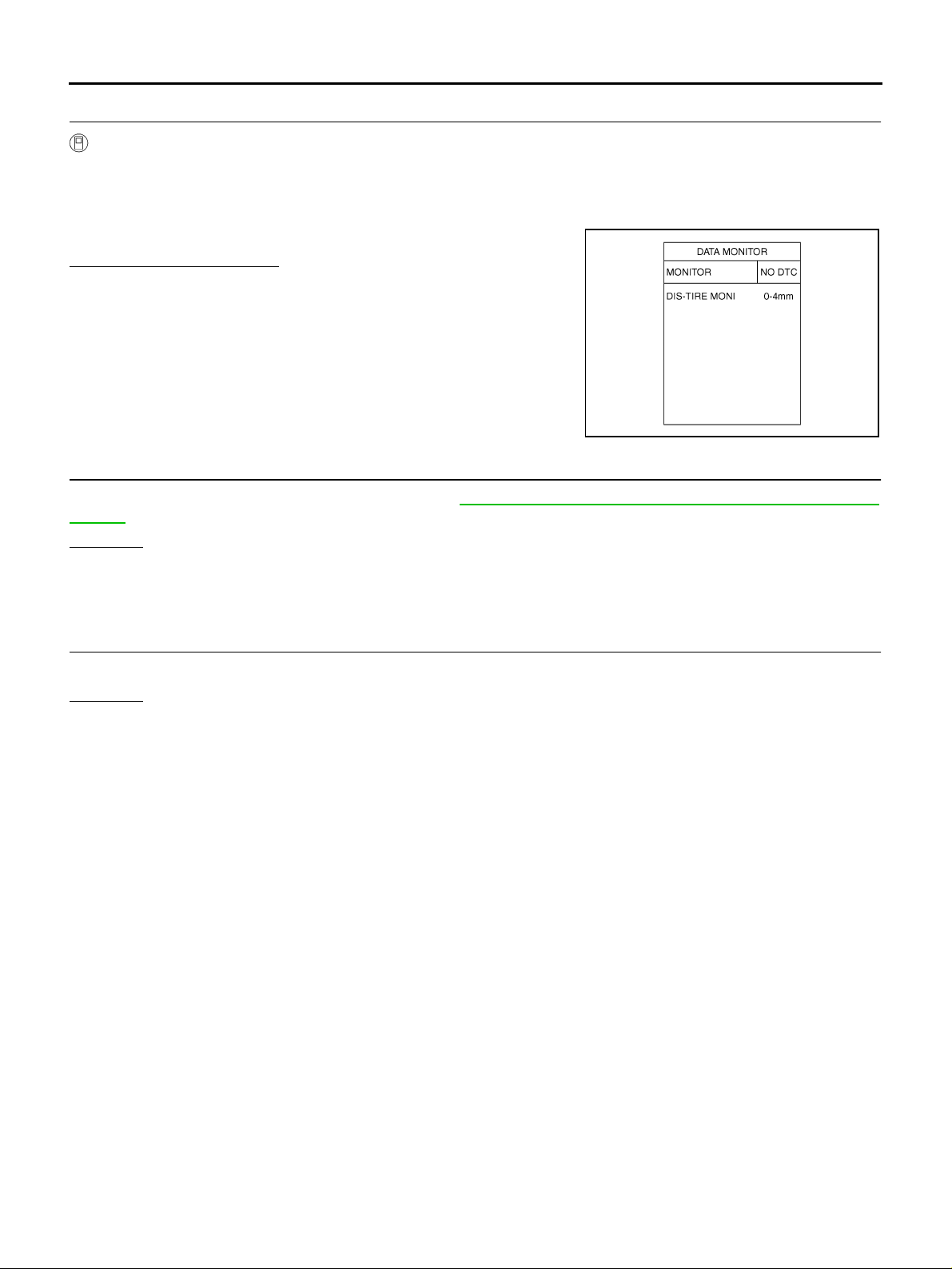
TROUBLE DIAGNOSIS FOR SYMPTOMS
2. CHECK INPUT SIGNAL OF TIRE DIAMETER
With CONSULT-II
1. Start engine.
2. Drive at 20 km/h (12 MPH) or more for approx. 200 seconds.
3. Select “DATA MONITOR” mode for “ALL MODE AWD/4WD” with CONSULT-II.
4. Check monitor “DIS-TIRE MONI”.
Display of
“0-4mm”>>INSPECTION END
Except for “0-4mm”>>GO TO 3.
“DIS-TIRE MONI”
3. CHECK AWD CONTROL UNIT
SDIA1900E
Check AWD control unit input/output signal. Refer to TF-21, "
Values" .
OK or NG
OK >> GO TO 4.
NG >> Check AWD control unit pin terminals for damage or loose connection with harness connector. If
any item is dama ged, repair or replace damaged parts.
AWD Control Unit Input/Output Signal Reference
4. SYMPTOM CHECK
Check again.
OK or NG
OK >> INSPECTION END
NG >> Replace AWD control unit.
Revision: 2006 July 2006 X-Trail
TF-44
Page 45
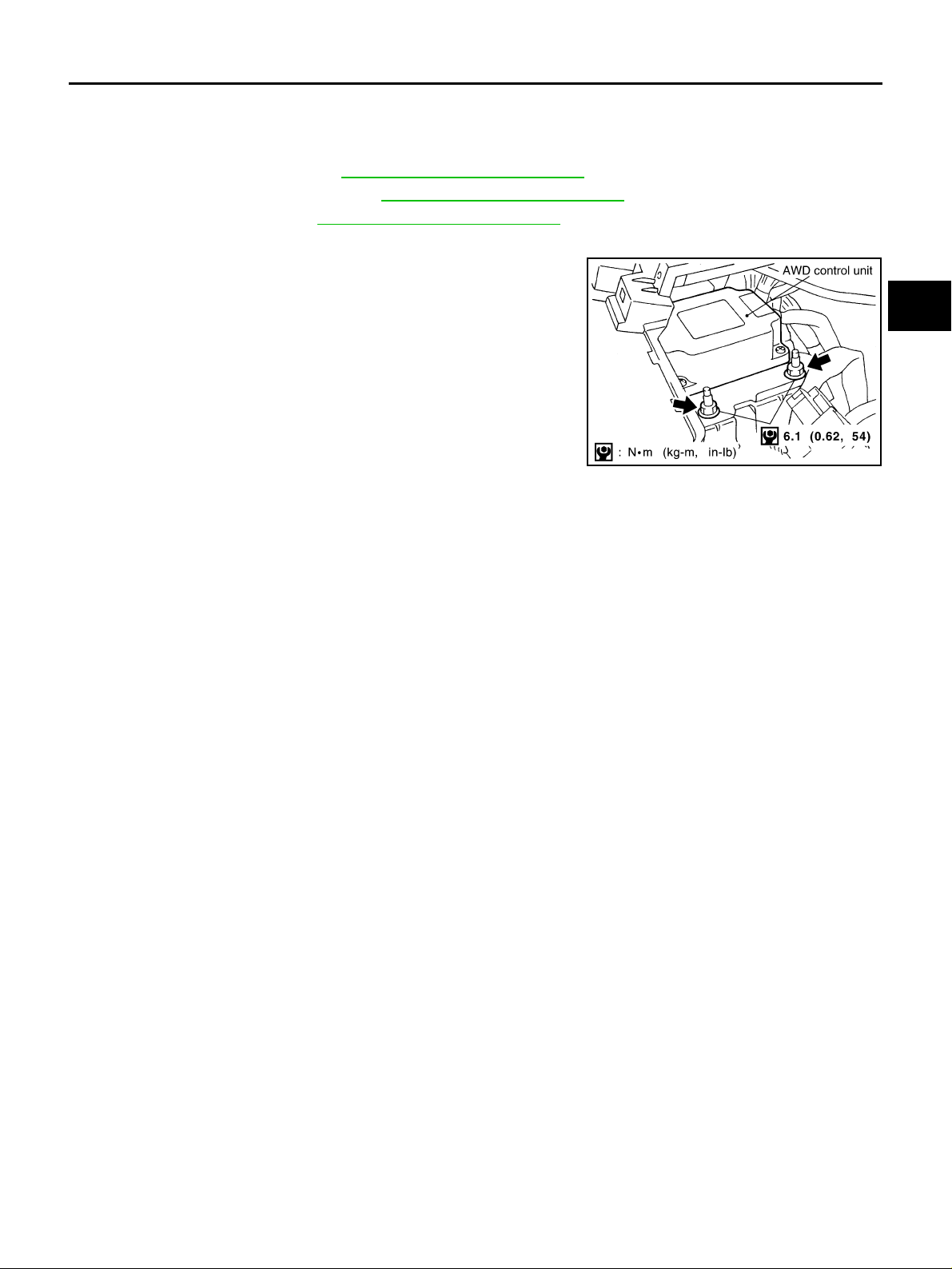
AWD CONTROL UNIT
AWD CONTROL UNIT PFP:41650
Removal and Installation ADS0017Y
REMOVAL
1. Remove cluster lid “A”. Refer to IP-11, "Removal and Installation" .
2. Remove front speaker grille. Refer to IP-11, "
3. Remove driver box. Refer to IP -11, "
4. Disconn ec t AWD control unit co nn ec to r.
5. Remove AWD control unit.
Removal and I nstallation" .
Removal and Installation" .
PDIA0428E
A
B
C
TF
E
F
INSTALLATION
Install in the reverse order of removal.
G
H
I
J
K
L
M
Revision: 2006 July 2006 X-Trail
TF-45
Page 46
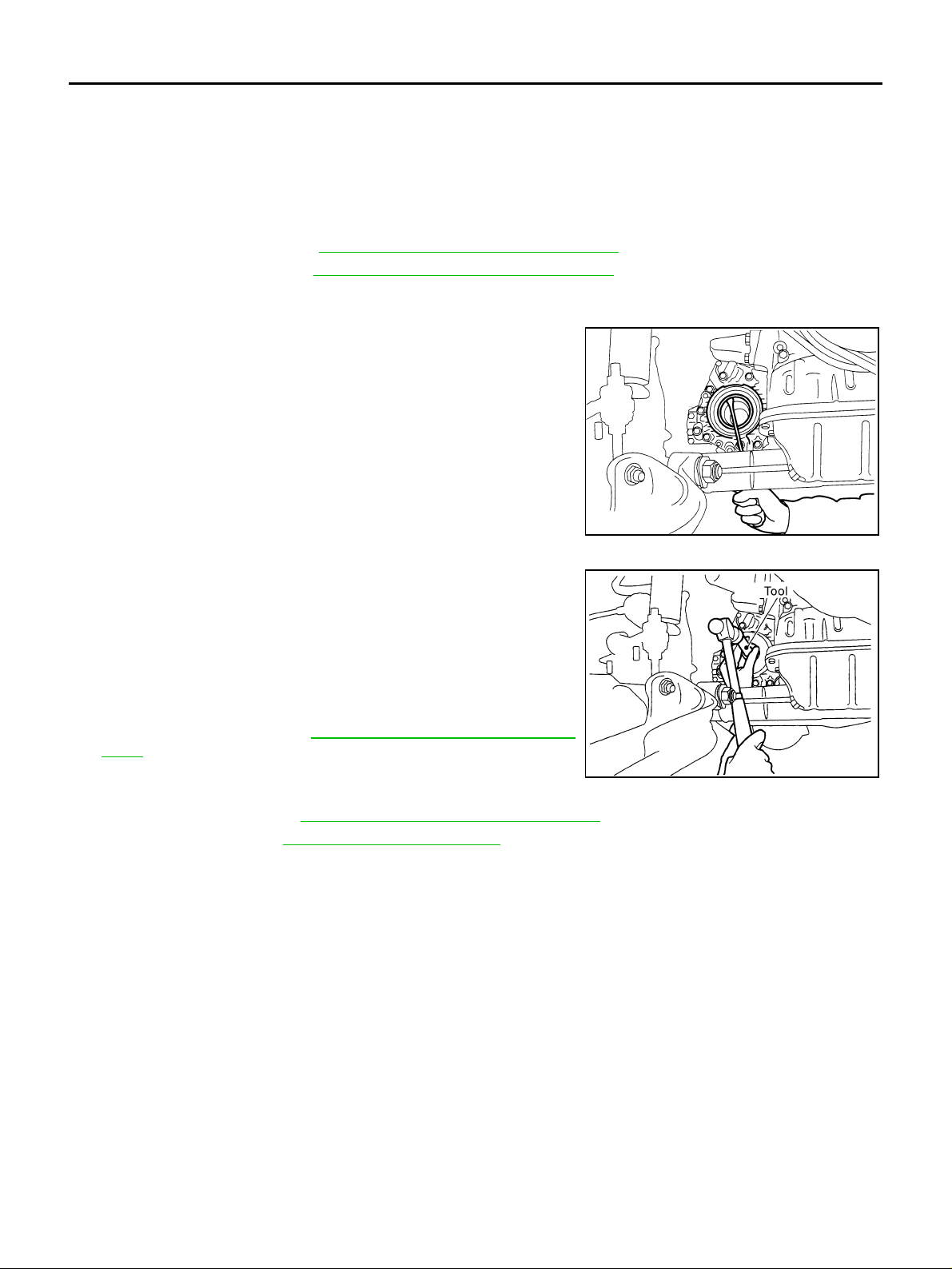
SIDE OIL SEAL
SIDE OIL SEAL PFP:33142
Removal and Installation ADS0017Z
NOTE:
Transfer side oil seal is attached to transaxle assem bly. Replace it when tranfer assembly is remov ed
from vehicle.
REMOVAL
1. Remove drive shaft. Refer to FAX-16, "Removal and Installation (RH)" .
2. Remove side shaft. Refer to FAX-16, "
CAUTION:
Be careful not to damage gear ring oil seal in transfer.
3. Remove oil seal with a flat-bl aded screwdriv er.
CAUTION:
Be careful not to damage adapter case.
Removal and Installation (RH)" .
INSTALLATION
1. Apply multi-purp ose grease to o il seal lips. As sho wn in the figure, install oil s eal so that it becomes f lush with the case end
surface, us ing the drift.
Tool number : KV38101700 ( — )
CAUTION:
● Do not reuse oil seal.
● When installing, do not incline oil seal.
2. Install side shaft. Refer to FAX-16, "
(RH)" .
CAUTION:
Be careful not to damage gear ring oil seal in transfer.
3. Install drive shaft. Refer to FAX-16, "
4. Check oil level. Refer to TF-9, "
Checking Transfer Oil" .
Removal and Installation
Removal and Installation (RH)" .
TFB0202D
SDIA2559E
Revision: 2006 July 2006 X-Trail
TF-46
Page 47
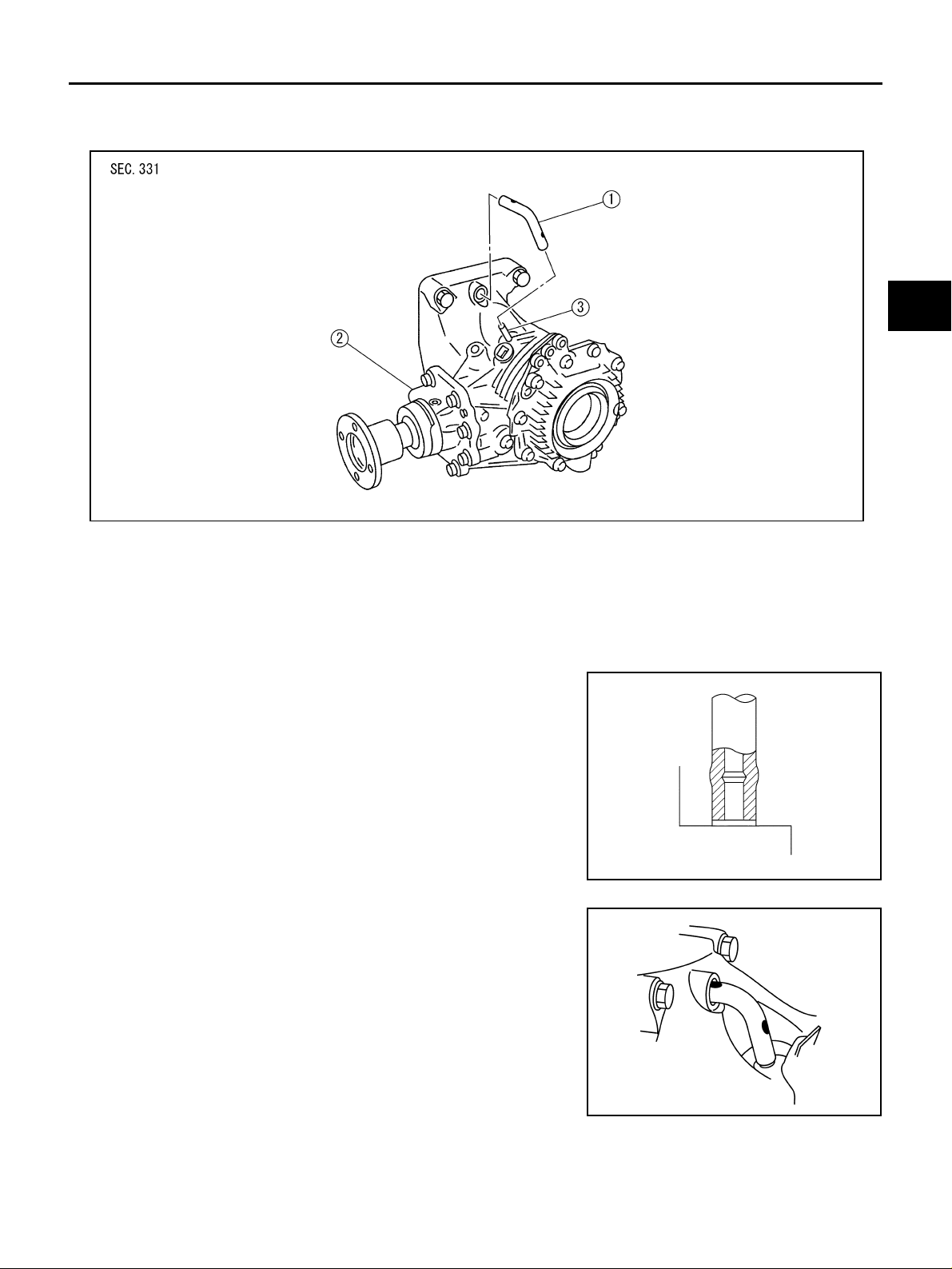
AIR BREATHER HOSE
AIR BREATHER HOSE PFP:31098
Components ADS00180
A
B
C
TF
E
F
SDIA1859J
1. Air breather hose 2. Transfer assembly 3. Breather tube
Removal and Installation ADS00181
Note the following, when removal and installation.
CAUTION:
Make sure there are no pinch ed or restricted areas on the air breather hose ca used by bending or
winding when installing it.
● Be sure to insert air breather hose into breather tube (metal con-
nector) until hose end reaches the tube's base.
SCIA2663J
● Be sure to insert the hose till the paint mark.
G
H
I
J
K
L
M
SDIA1824J
Revision: 2006 July 2006 X-Trail
TF-47
Page 48
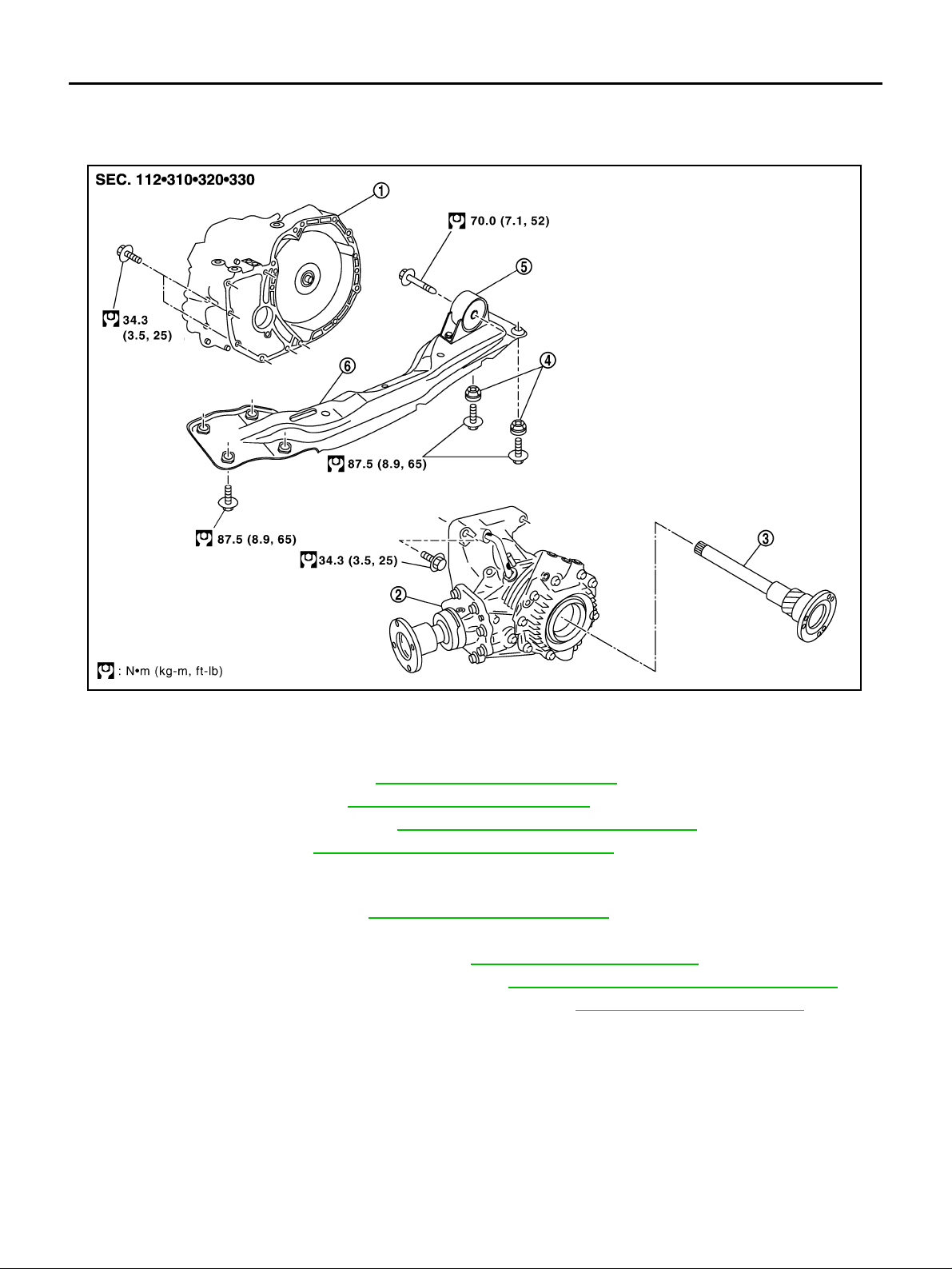
TRANSFER ASSEMBLY
TRANSFER ASSEMBLY PFP:33100 Removal and Installation ADS00182
COMPONENTS
1. Transaxle assembly 2. Transfer assembly 3. Side shaft
4. Grommet 5. Front engine mounting insulator 6. Center member
REMOVAL
1. Remove exhaust front tube. Refer to EX-3, "Removal and Installation" .
2. Remove propeller shaft. R efer to PR-4, "
3. Remove front drive shaft (RH). Refer to FAX-16, "
4. Remove side shaft. Refer to FAX-16, "
CAUTION:
Be careful not to damage oil seal.
5. Remove air breather hose. Refer to TF-47, "
6. Support transax le as se m bly with a jac k .
7. Remove center member with power tool. Refer to EM-74, "
8. Remove suspension member with power tool. Refer to FSU-17, "
9. Remove rear engine mounting bracket with power tool. Re fer to EM-74, "
10. Support transfer assembly with a jack.
11. Remove bolts fixing transaxle assembly and transfer assembly with power tool.
12. Remove the transfer assembly from vehicle.
CAUTION:
Be careful not to damage oil seal of transaxle.
Removal and Installation" .
Removal and Installation (RH)" .
Removal and Installation (RH)" .
AIR BREATHER HOSE" .
ENGINE ASSEMBLY" .
FRONT SUSPENSION MEMBER" .
ENGINE ASSEMBLY" .
SDIA2560E
Revision: 2006 July 2006 X-Trail
TF-48
Page 49
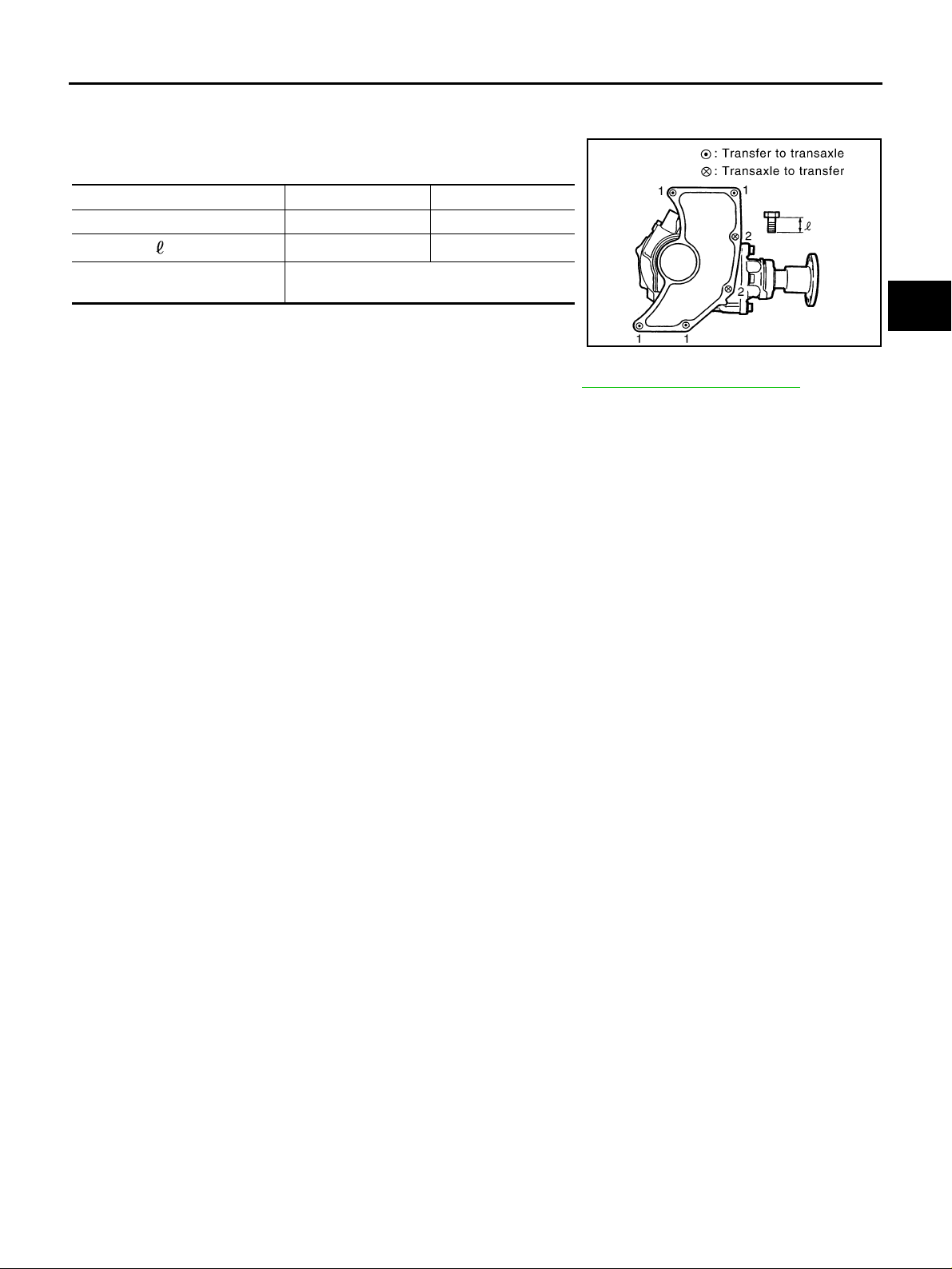
TRANSFER ASSEMBLY
INSTALLATION
Note the following, and install in the reverse order of removal.
● When installing t ransfer to transaxle, install th e mounting bolts
following th e specificat ion below.
Bolt No. 1 2
Quantity 4 2
Bolt length “ ” mm (in)
Tightening torque
N·m (kg-m, ft-lb)
CAUTION:
When installing transfer to transaxle, be careful not to damage oil seal of transaxle.
● After the installation, check the oil level and oil leakage. Refer to TF-9, "Checking Transfer Oil" .
65 (2.56) 40 (1.57)
34.3 (3.5, 25)
A
B
C
TF
SDIA1178E
E
F
G
H
K
M
I
J
L
Revision: 2006 July 2006 X-Trail
TF-49
Page 50
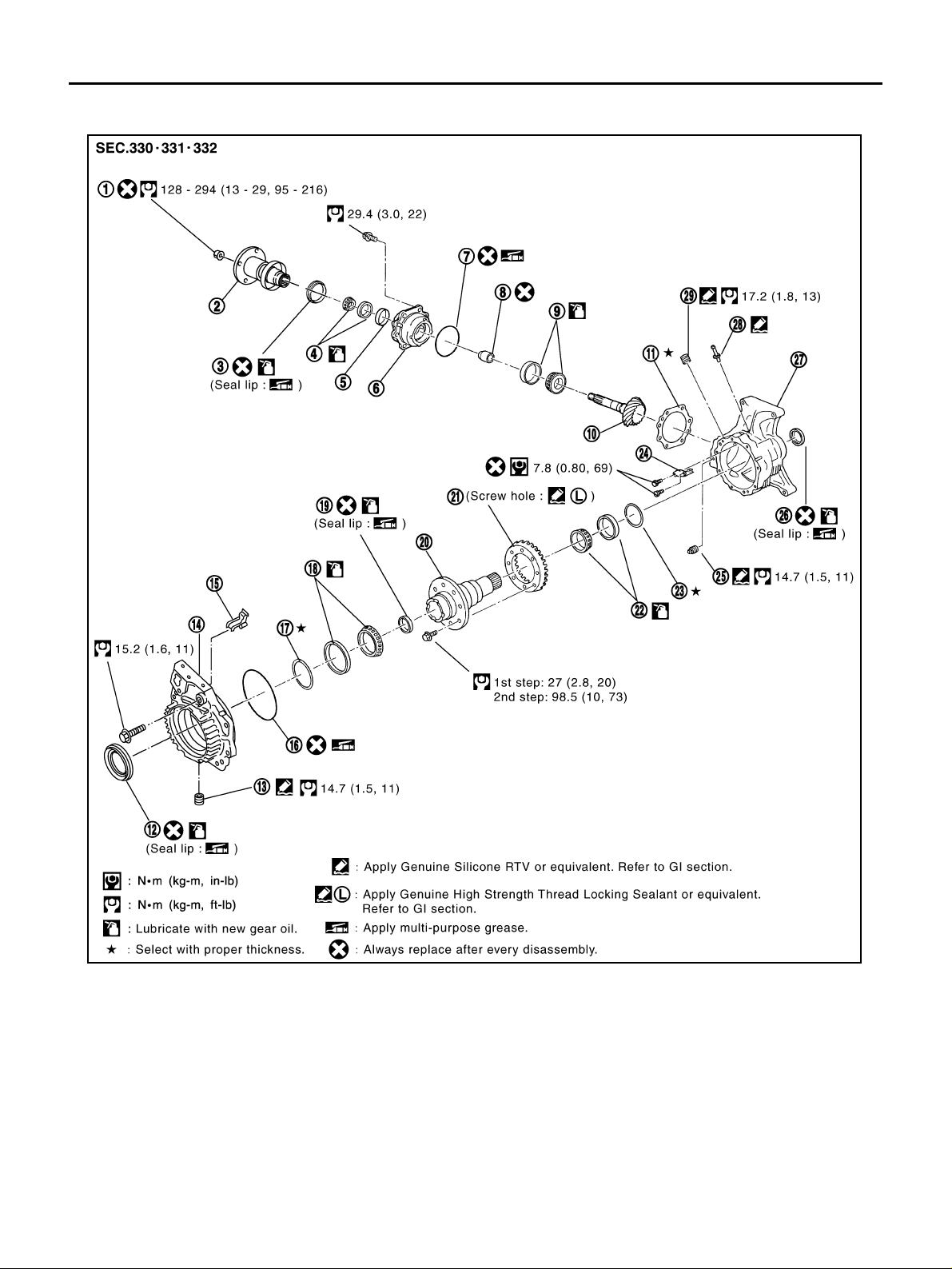
TRANSFER ASSEMBLY
Disassembly and Assembly ADS00183
COMPONENTS
SDIA3477E
1. Pinion lock nut 2. Companion flange 3. Pinion sleeve oil seal
4. Pinion rear bearing 5. Dust cover 6. Pinion sleeve
7. O-ring 8. Collapsible spacer 9. Pinion front bearing
10. Drive pinion 11. Pi ni on sleeve shim 12. Adap ter case oil seal
13. Dra in plug 14. Adapter case 15. Oil gut te r
16. O-r in g 17. Gear ring bearing adjusting shim
(Adapter case side)
19. Gear ring oil seal 20. Gear ring 2 1. Drive gear
22. Gear ring bearing (Transfer case
side)
25. Fi ller plu g 26. Transfer case oil seal 27. Transfer case
28. Breather tube 29. Plug
Revision: 2006 July 2006 X-Trail
23. Gear ring bearing adjusting shim
(Transfer case side)
TF-50
18. Gear ring bearing (Adapter case
side)
24. Oil def ens e
Page 51
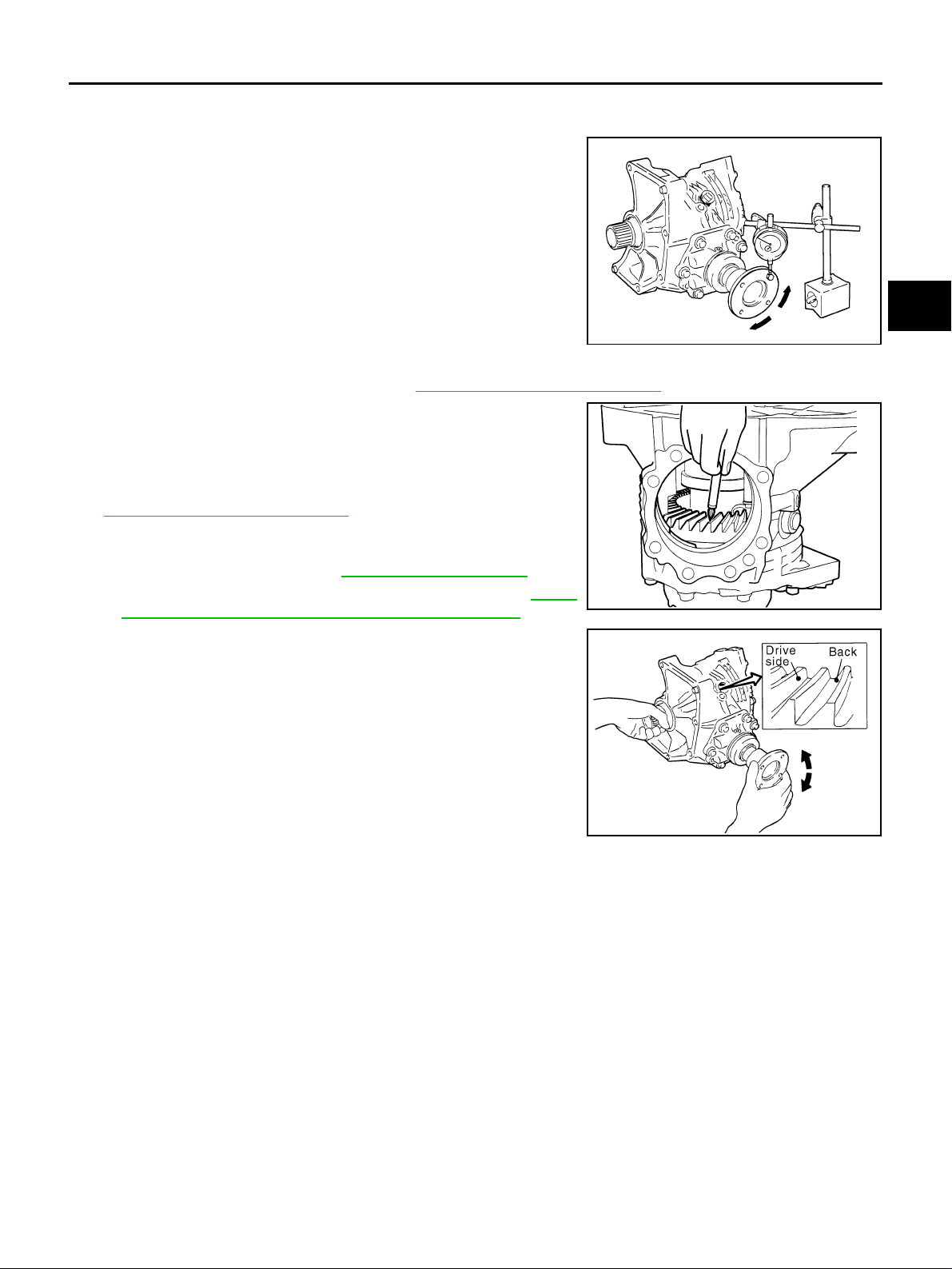
TRANSFER ASSEMBLY
ASSEMBLY INSPECTION
Backlash
1. Install a bo lt to companion flange.
2. Fit a dial indicator onto the bolt.
3. Measure th e circumference b acklash of co mpanion flange, and
make sure it satisfies the specification below.
Backlash: 0.13 - 0.19 mm (0.0051 - 0.0075 in)
● If measured value is out of the specification, disassemble it to
check and adjust each part.
A
B
C
TF
SDIA1937J
To oth Con tact
1. Remove pinion sleeve assembly. Refer to TF-55, "Pinion Sleeve Assembly" .
2. Apply red lead to drive gear.
CAUTION:
Apply red lead to both the faces of 3 to 4 gears at 4 locations evenl y spaced on drive gear.
3. Install pinion sleeve shims and pinion sleeve assembly. Refer to
TF-65, "
4. Remove the plug on the upper side of transfer case.
When installing plug, apply sealant on screw part, and tighten it
at the specified torque. Refer to TF-50, "
● Use Genuine Silicone RT V or equivalent. Refer to GI-47,
5. Rotate companion flange back and forth several times, and
check drive pi nion gear to drive gear too th contact by viewing
from the plug hole.
Pinion Sleeve Assembly" .
COMPONENTS" .
"Recommended Chemical Products and Sealants" .
E
F
G
H
TFB0212D
I
J
K
L
SDIA1938E
Revision: 2006 July 2006 X-Trail
TF-51
M
Page 52
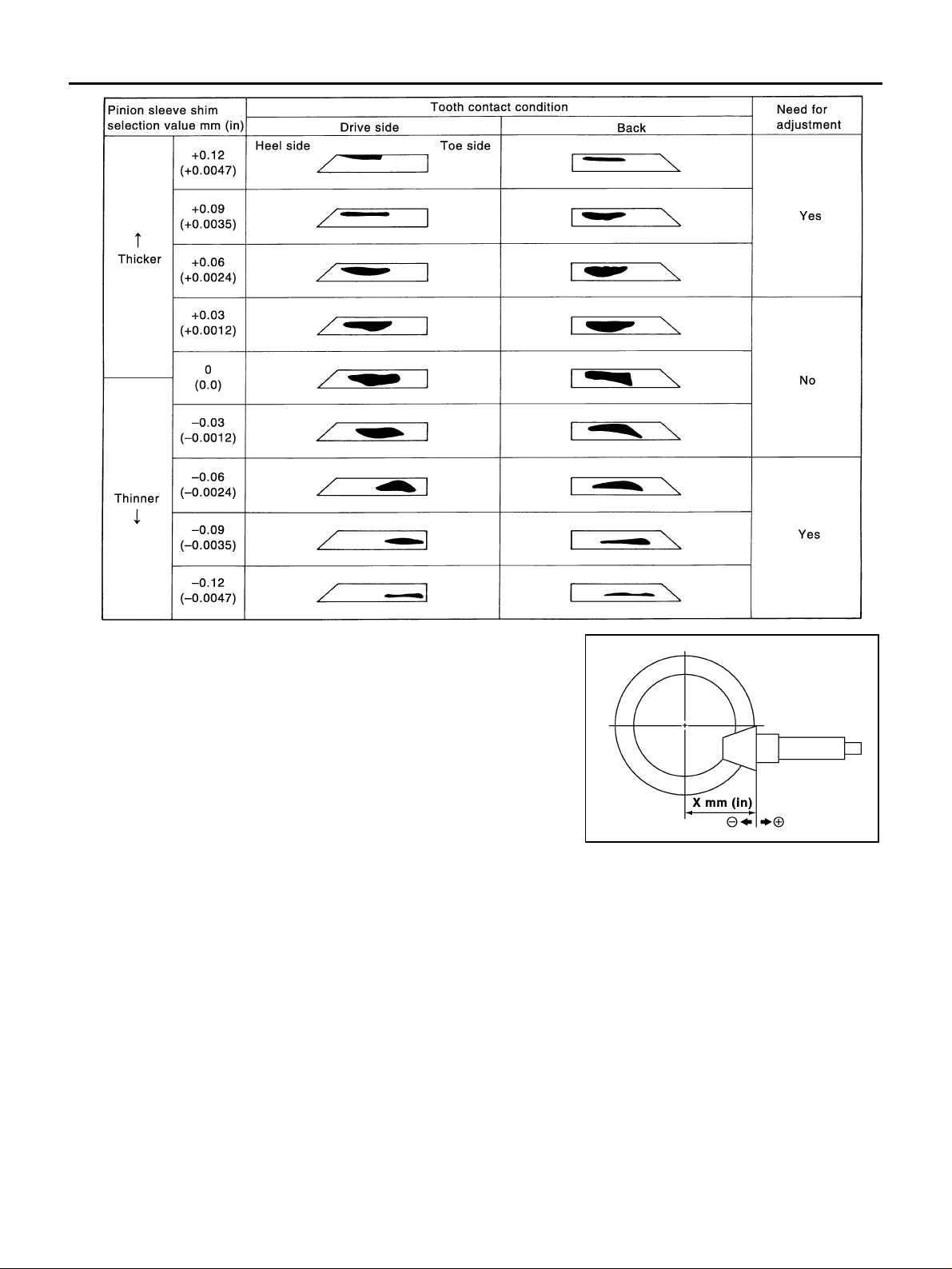
TRANSFER ASSEMBLY
6. If tooth contact is po orly adjusted, adjust pini on height (dimension X) in the following manner.
SDIA0520E
SDIA0517E
Revision: 2006 July 2006 X-Trail
TF-52
Page 53
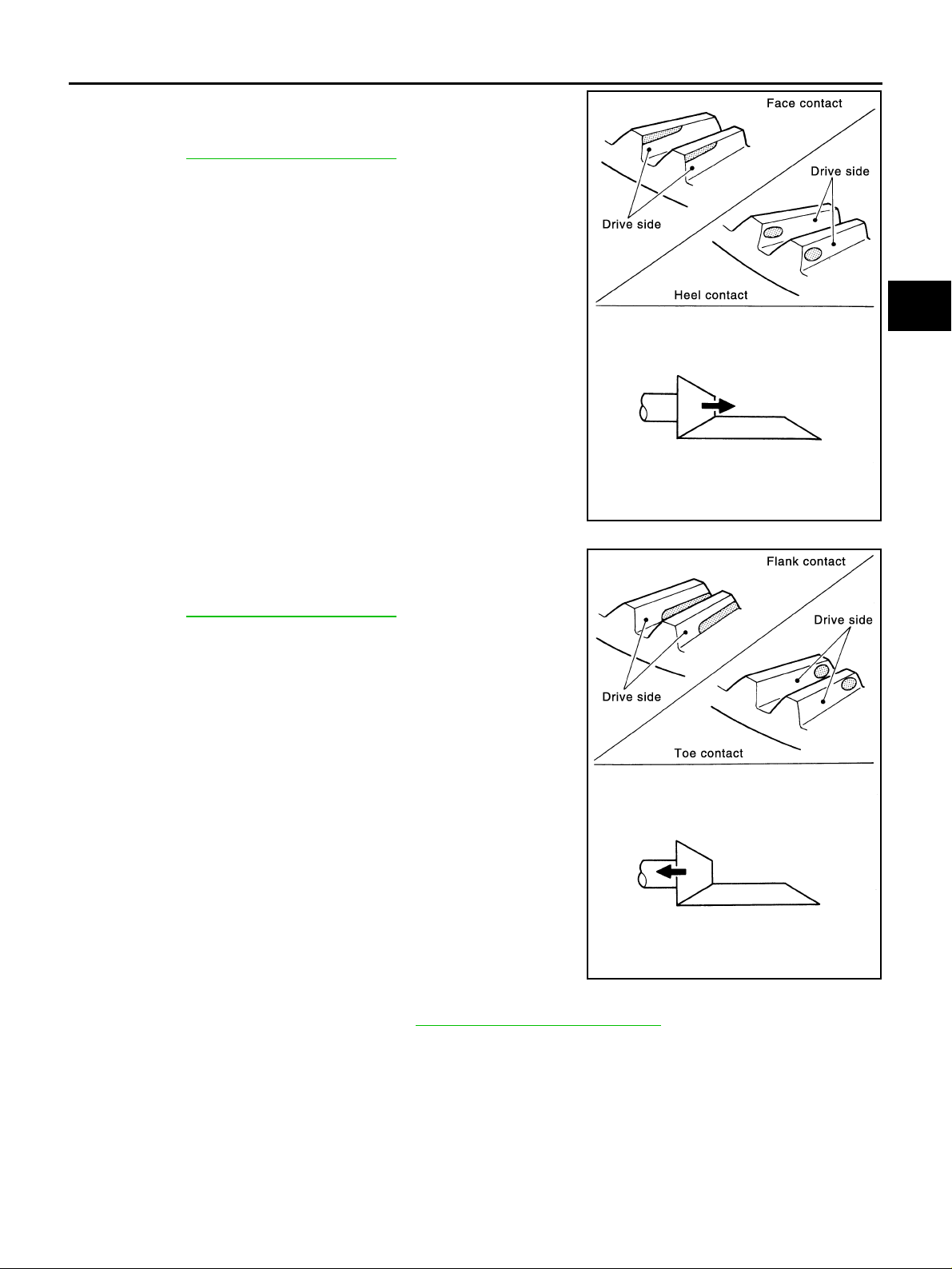
TRANSFER ASSEMBLY
● If the tooth contact is near the fac e (face contact) , or near the
heal (heel contact), thin pinion sleeve shims to move drive
pinion closer to drive gear.
Refer to TF-68, "
Pinion Sleeve Shim" .
A
B
C
TF
E
F
● If the tooth contact is near the flank (flank contact), or near the
toe (toe contact), th icken pinion sleeve shims to move drive
pinion farther from drive gear.
Refer to TF-68, "
Pinion Sleeve Shim" .
SDIA0518E
G
H
I
J
K
L
M
SDIA0519E
Pinion Bearing Preload Torque
1. Remove pinion sleeve assembly. Refer to TF-55, "Pinion Sleeve Assembly" .
2. Rotate companion flange back and forth 2 to 3 times. Check for unusual noise, rotation malfunction, and
other malfunctions.
3. Rotate companion flange at least 20 times to check for smooth operation of the bearing.
Revision: 2006 July 2006 X-Trail
TF-53
Page 54
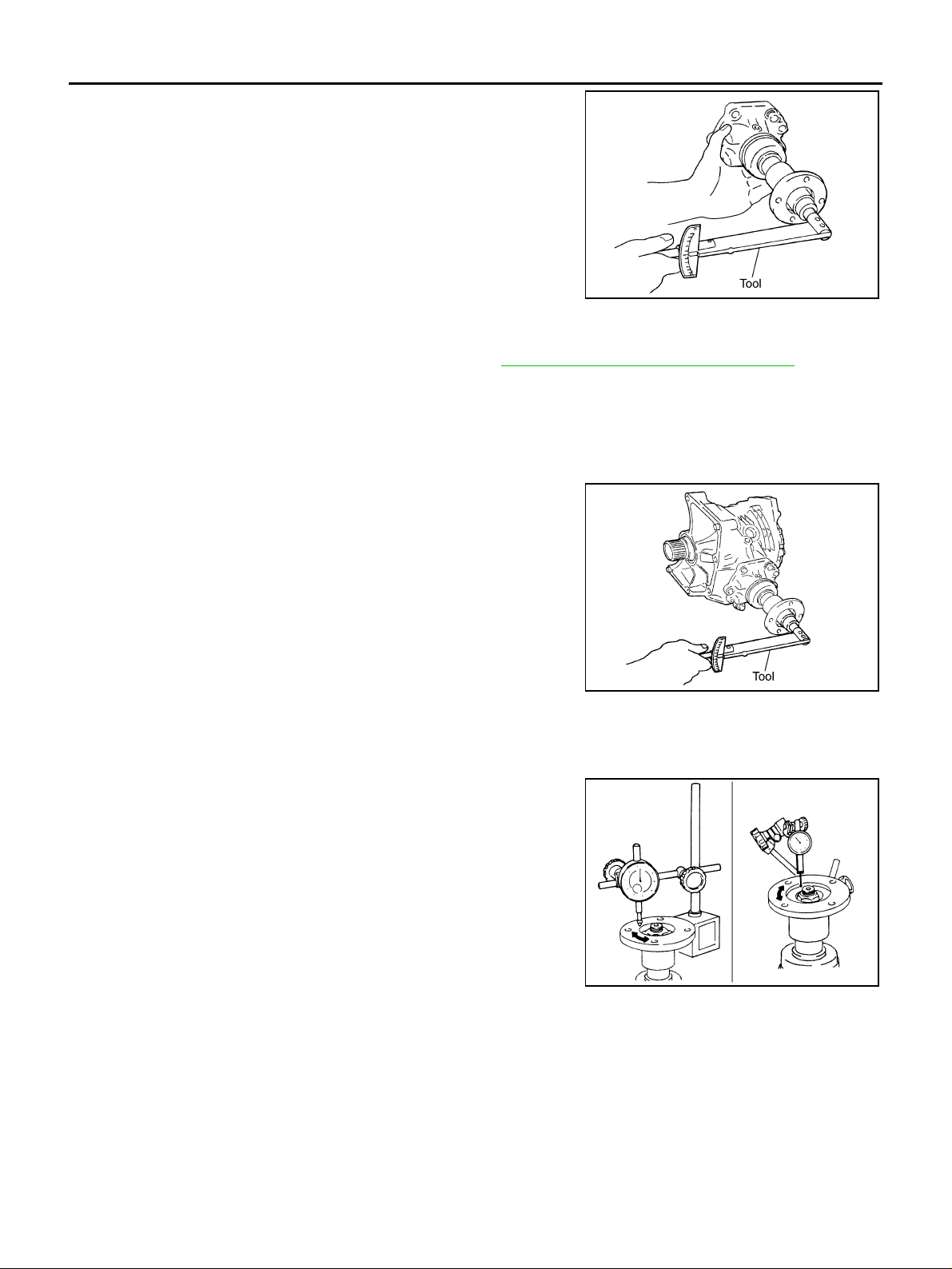
TRANSFER ASSEMBLY
4. Measure the prel oad torq ue of pinio n beari ng, us ing the prel oad
gauge.
Tool number : ST3127S000 ( J -25765-A)
Preload torque:
0.10 - 0.39 N·m (0.01 - 0.04 kg-m, 1 - 3 in-lb)
CAUTION:
Every rotational part shall rotate smoothly with specified
gear oil.
● If measured value is out of the specification, disassemble pin-
ion sleeve assembly to check and adjust each part.
Total Preload Torque
1. Measure pinion bearing pr eload torque (P1 ). Refer to TF-53, "Pinion Bearing Preload Torque" .
Pinion bearing preload torque (P1):
0.10 - 0.39 N·m (0.01 - 0.04 kg-m, 1 - 3 in-lb)
2. Install pinion sleeve shims and pinion sleeve assembly.
3. Rotate companion flange at least 2 0 times to check for smooth operation of the bearing.
4. Measure the total preload torque, sing the preload gauge.
Tool number : ST3127S000 ( J -25765-A)
SDIA2076E
Total preload torque
With all oil seals:
1 + 0.16 - 0.22 N·m (0.016 - 0.023 kg-m, 1.4 - 1.9 in-lb)
P
Without transfer case oil seal and adapter case oil seal:
1 + 0.06 - 0.12 N·m (0.006 - 0.013 kg-m, 0.6 - 1.1 in-lb)
P
● If measured valu e is ou t of th e sp ec if ic ation, disassemb l e it to
SDIA2077E
check and adjust each part. When measuring the total preload torque after the disassembly, measure it with the transfer case oil seals and gear ring oil seals
removed, then install the oil seals.
Companion Flange Runout
1. Fit a dial indicator onto companion flange face (inner side of the
propeller shaft mounting bolt holes).
2. Rotate companion flange to check for runout.
Runout limit: 0.1 mm (0.004 in)
3. Fit a test indicator to the inner side of companion flange (socket
diameter).
4. Rotate companion flange to check for runout.
Runout limit: 0.1 mm (0.004 in)
5. If the runout value is outside the repair limit, follow the procedure
below to adjust.
a. While chan ging th e phas e bet ween co mp anion f lang e and drive pi nio n gear by 90° at a time, check runout
and determine which phas e an gl e min im iz es the run ou t.
b. If the runout value is still outside of the limit after the phase has been changed, replace the companion
flange.
c. If the runout is out of the specific ation aft er replace men t of com panion fl ange , adjust the ass embl y status
of pinion bearings and drive pinion gear, or replace pinion bearings.
SDIA2078E
Revision: 2006 July 2006 X-Trail
TF-54
Page 55
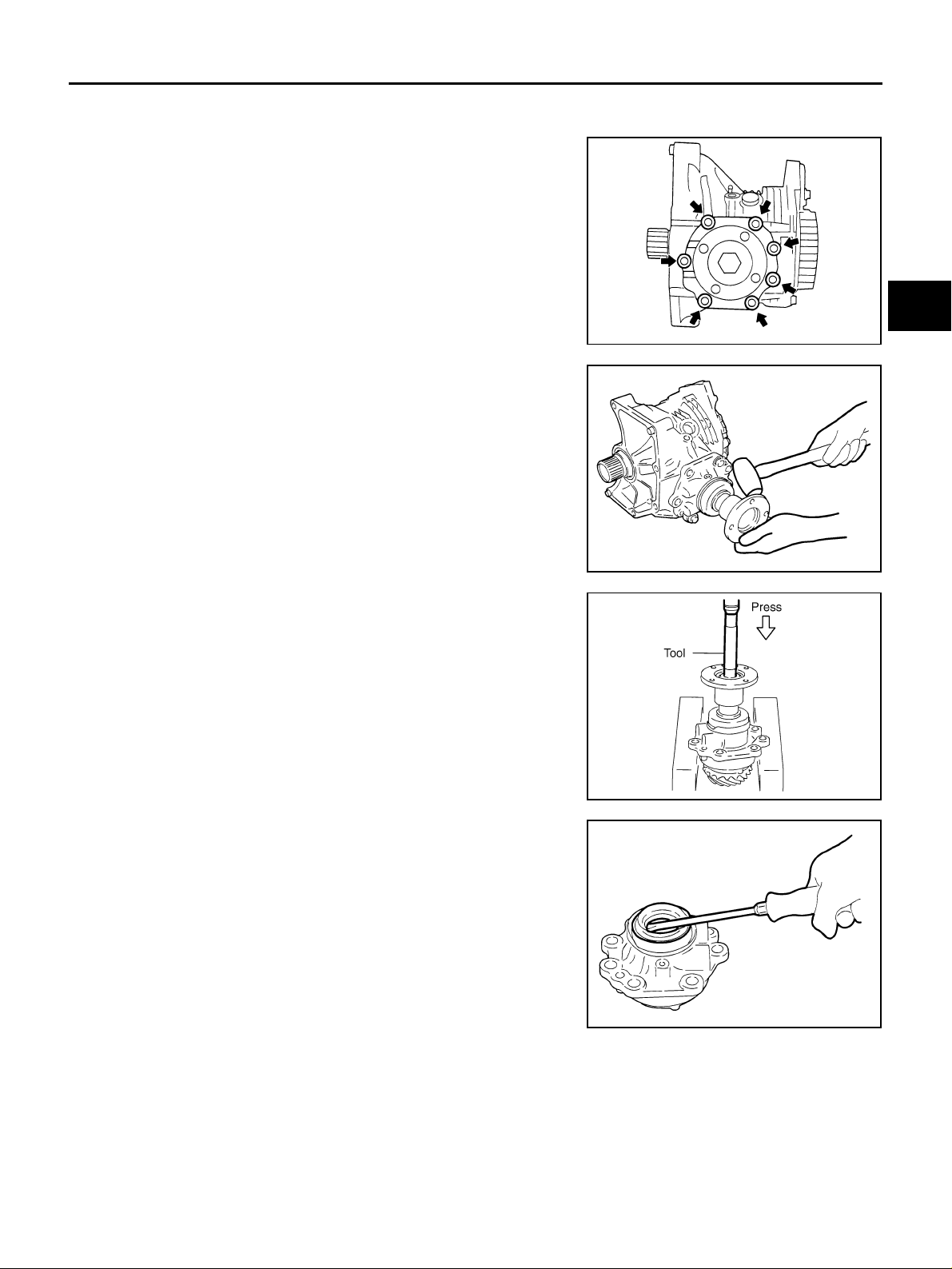
TRANSFER ASSEMBLY
DISASSEMBLY
Pinion Sleeve Assembly
1. Remove pinion sleeve mounting bol ts.
A
B
C
TF
SDIA1803J
2. Ta p companion fl ange to remo ve pinion sleeve asse mbly, using
a plastic hammer.
3. Remove the pinion sleeve shim.
4. Remove the pinion lock nut.
5. Remove d rive pi nion asse mbly from pinion s leeve wi th a press ,
using the drift.
Tool number : ST33220000 (J-25804-01)
6. Remove companion flange.
7. Remove the O-ring from pinion sleeve.
8. Remove the pinion sleeve oil seal, using a flat-bladed screwdriver.
CAUTION:
Be careful not to damage pinion sleeve.
9. Remove pinion rear bearing inner race.
SDIA1861J
SDIA1806E
E
F
G
H
I
J
K
L
M
TFB0286D
Revision: 2006 July 2006 X-Trail
TF-55
Page 56
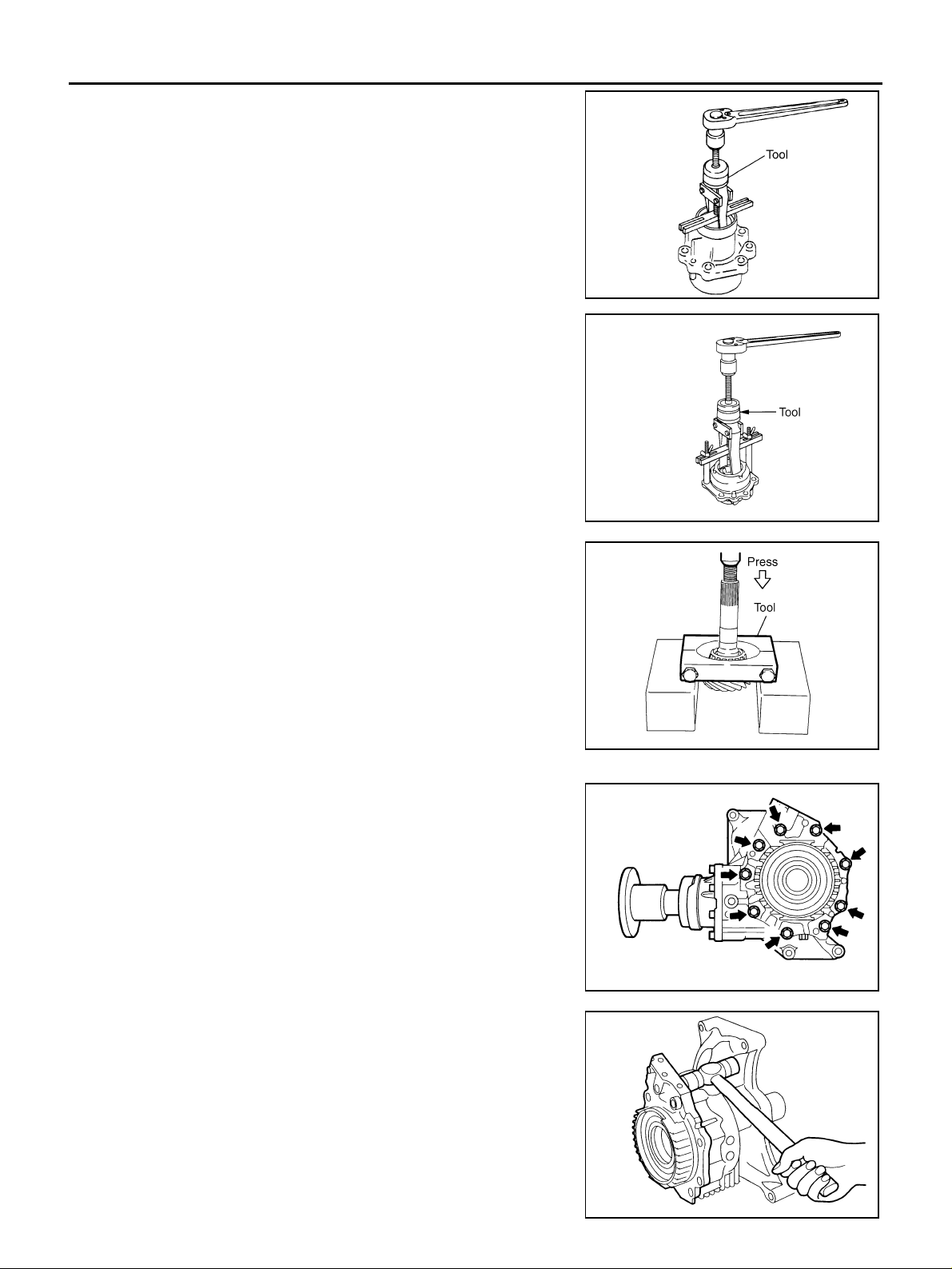
TRANSFER ASSEMBLY
10. Remove pinion rear bearing outer race, using the puller.
Tool number : KV381054S0 (J-34286)
11. Remove pinion front bearing outer race, using the puller.
Tool number : KV381054S0 (J-34286)
12. Remove dust cover.
SDIA2079E
13. Remove collapsible spacer from drive pinion.
14. Press pinion front bearing inner race out of drive pinion, using
the replacer.
Tool number : ST30031000 (J- 22912-01)
Adapter Case
1. Remove adapter case mounting bolts.
SDIA1558E
SDIA1559E
SDIA1862J
2. Tap adapter case to remove, using a plastic hammer.
3. Remove O-ring.
TFB0290D
Revision: 2006 July 2006 X-Trail
TF-56
Page 57
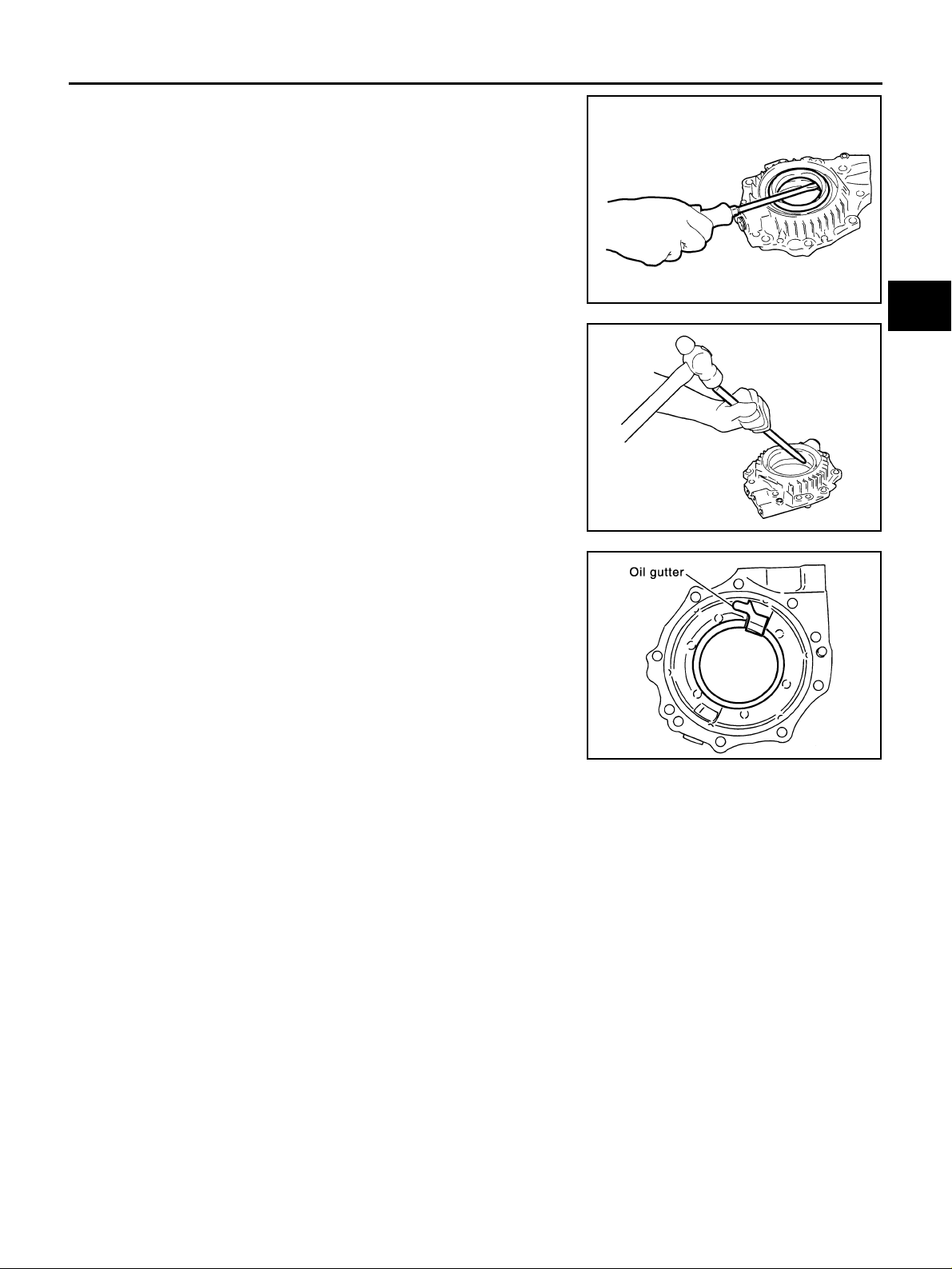
TRANSFER ASSEMBLY
4. Remove adapter case oil seal, using a flat-bladed screwdriver.
CAUTION:
Be careful not to damage adapter case.
5. Ta p gear ri ng be aring adjus ting s him f rom the cuto ut on a dapte r
case, using a brass rod. Remove gear ring bearing adjusting
shim and gear ring bearing outer race.
6. Remove oil gutt er.
7. Remove drain plug.
TFB0291D
SDIA0529E
A
B
C
TF
E
F
G
H
SDIA0530E
I
J
K
L
M
Revision: 2006 July 2006 X-Trail
TF-57
Page 58
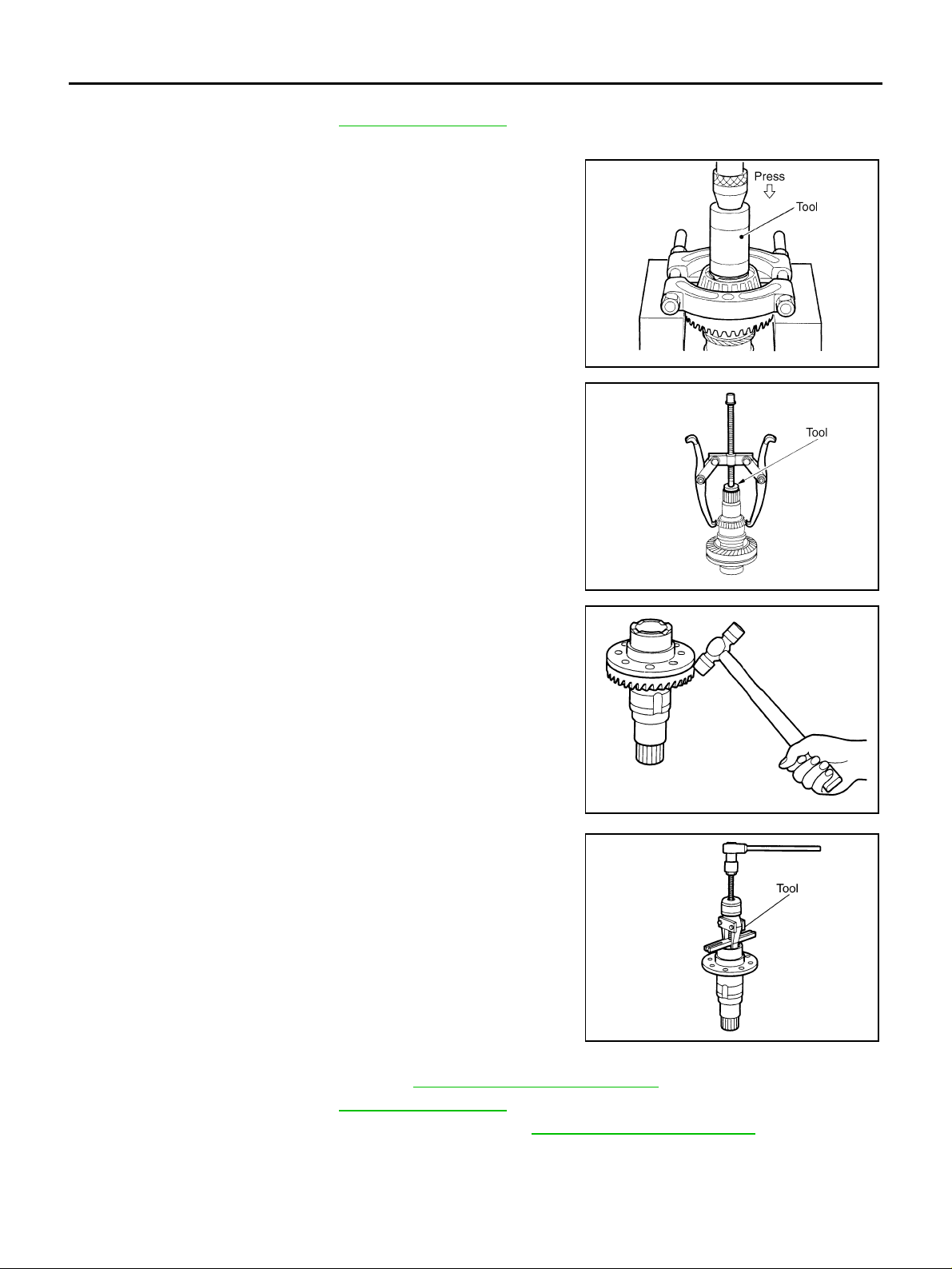
TRANSFER ASSEMBLY
Drive Gear Assembly
1. Remove adapter case. Refer to TF-56, "Adapter Case" .
2. Remove drive gear assembly from transfer case.
3. Remove gear ring bearing inner race (adapter case side) on
gear ring, using the drift and replacer.
Tool number : ST33200000 (J-26082)
4. Remove gear ring bearing inner race (transfer case side) on
gear ring, using the drift and replacer.
Tool number : ST33061000 (J- 8107-2)
SDIA1560E
5. Remove drive gear mounting b olts.
6. Tap drive gear to remove drive gear from gear ring, using a plastic hammer.
7. Remove gear ring oil seal from gear ring, using the puller.
Tool number : KV381054S0 (J-34286)
SDIA1561E
SDIA1807J
SDIA1808E
Transfer Case
1. Remove pinion sleeve assembly. Refer to TF-55, "Pinion Sleeve Assembly" .
2. Remove adapter case. Refer to TF-56, "
3. Remove drive gear assembly from transfer case. Refer to TF-58, "
Revision: 2006 July 2006 X-Trail
Adapter Case" .
Drive Gear Assembly" .
TF-58
Page 59
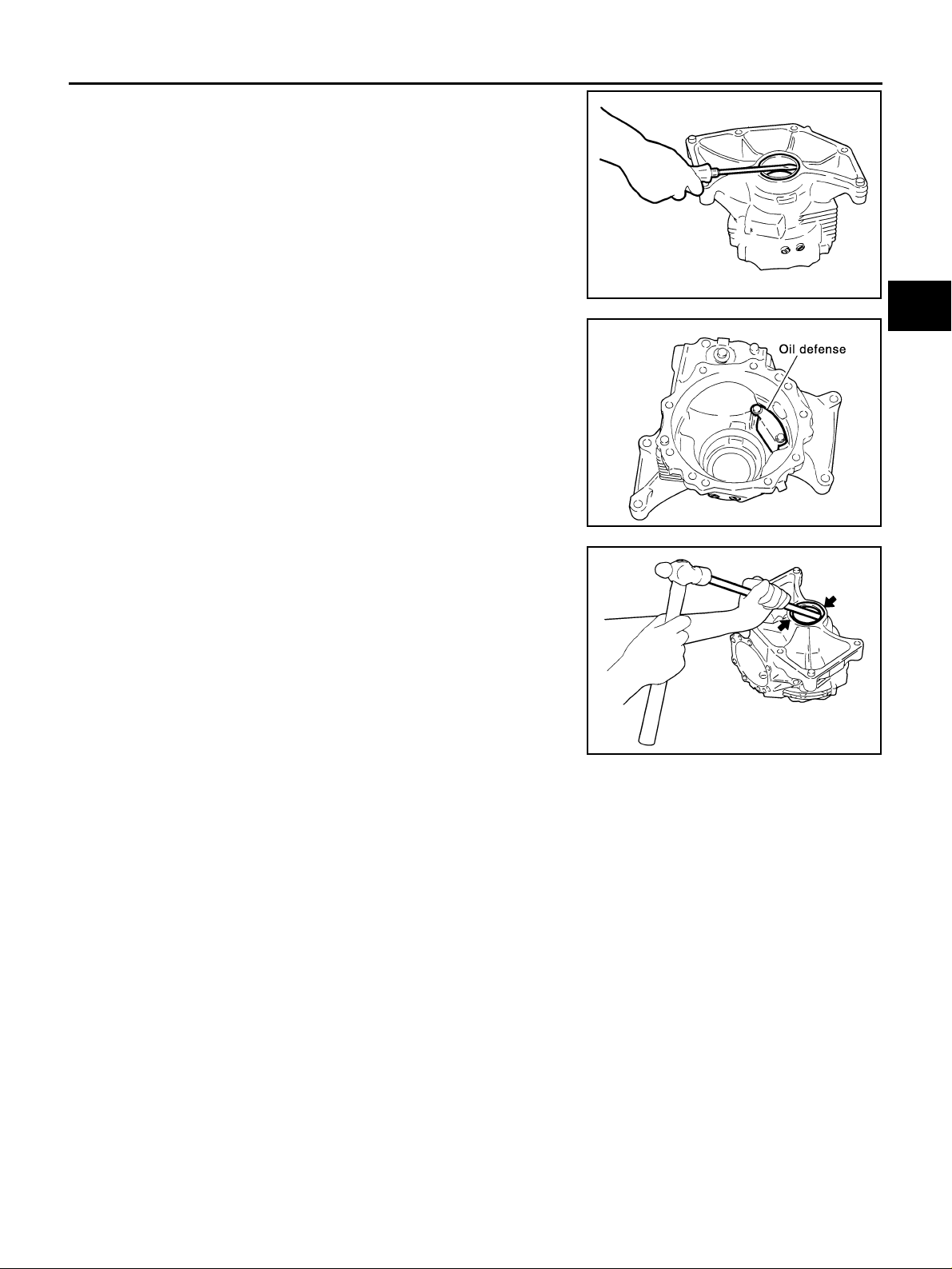
TRANSFER ASSEMBLY
4. Remove transfer case oil seal, using a flat-bladed screwdriver.
CAUTION:
Be careful not to damage transfer case.
5. Remove oil defense.
A
B
C
TFB0297D
TF
E
F
G
SDIA1533E
6. Ta p gear ring bearing adjus ting shim evenly from the 2 cutouts
on transfer case, using a brass rod. Remove gear ring bearing
adjusting shim and gear ring be aring outer race .
7. Remove filler plug, plug and b reather tube.
SDIA0536E
INSPECTION AFTER DISASSEMBLY
Gears
● Check the gear faces and shaft for wear, cracks, damage, and seizure.
CAUTION:
If malfunction is detected on drive gear or drive pinion, replace drive gear and drive pinion as a set.
Bearings
● Check for seizure, peeling, wear, corrosion, sticking/unusual noise/roughness in hand turning, and other
damage.
CAUTION:
When replacing the bearing, always replace inner race and outer race as a pair.
Washers and Shims
● Check for seizure, damage, and un usual wear.
H
I
J
K
L
M
Oil Seals
● Discard old oil seals, replace with new ones.
● If wear, deterioration of adherence (sealing force of lips), or damage is detected on the lips, replace them.
Revision: 2006 July 2006 X-Trail
TF-59
Page 60
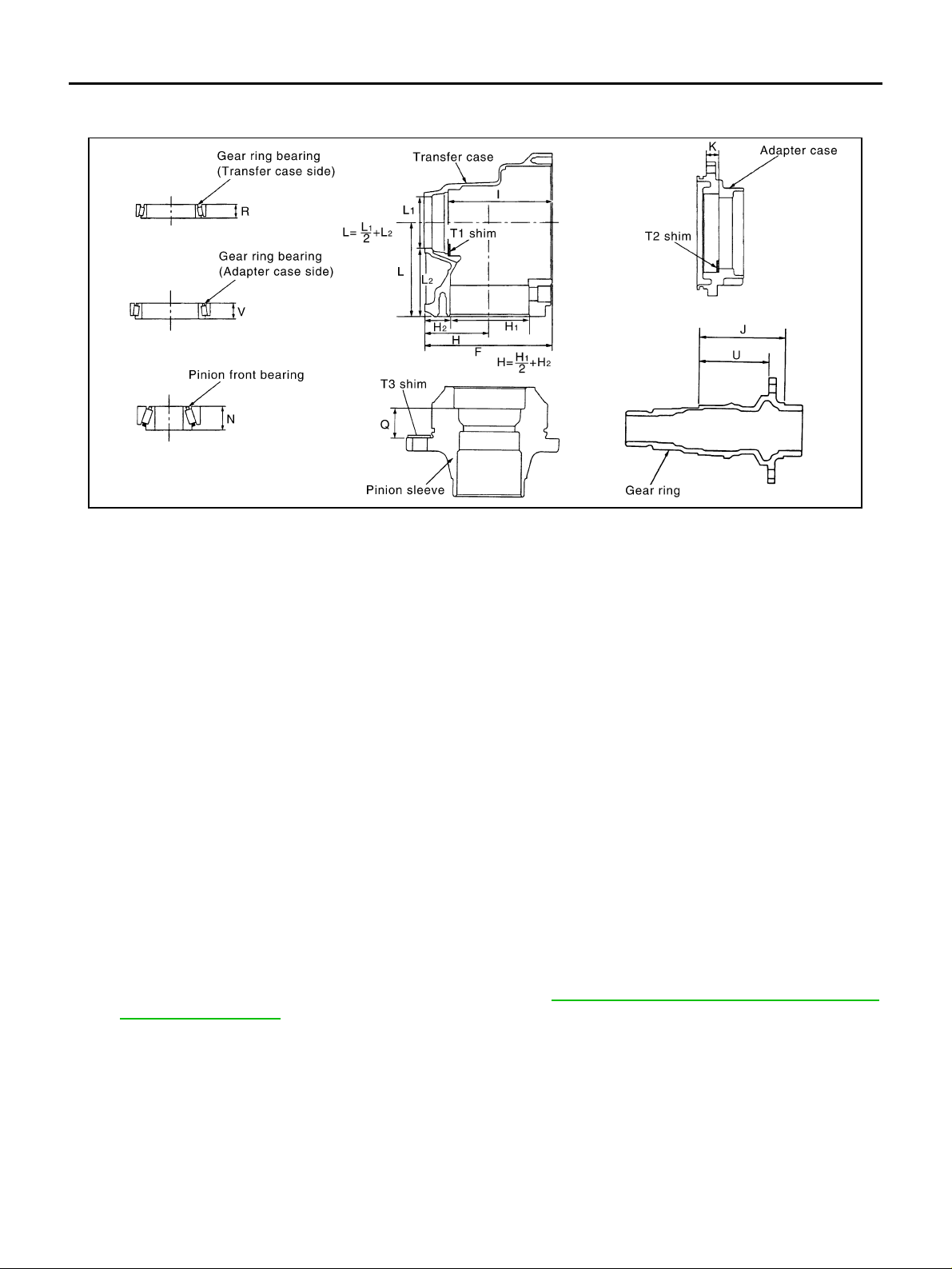
TRANSFER ASSEMBLY
SELECTING ADJUSTING SHIMS
Measurement points
Gear Ring Bearing Adjusting Shim (Transfer Case Side)
1. Measure the points F, H, I, R and U shown in the measurement points.
2. Convert the values F, H, I, R and U according to th e procedures below.
SDIA1179E
F: Value obtained by subtracting 163.00 mm (6.42 in) from
the reading [in increme nts of 0.01 mm (0.0004 in)].
H: Value obtained by subtracting 83.00 mm (3.27 in) from
the reading [in increme nts of 0.01 mm (0.0004 in)].
I: Value obtained by subtracting 131.90 mm (5.19 in) from
the reading [in increme nts of 0.01 mm (0.0004 in)].
R: Value obtained by subtracting 17.00 mm (0.67 in) from
the reading [in increme nts of 0.01 mm (0.0004 in)].
U: Value obtained by subtracting 89.50 mm (3.524 in) from
the reading [in increme nts of 0.01 mm (0.0004 in)].
3. Check dimension Z on the drive gear side face.
NOTE:
Dimension Z indicates the difference between the optimum engagement and the standard dimensions in
increment s of 0.01mm (0.0004 in) written on the drive gear side face.
4. Use the formula below to calculate gear ring bearing adjusting shim (transfer case side) thickness T
1 = (I - F + H + Z - U - R) × 0.01 mm (0.0004 in) + 1.49 mm (0.0587 in)
T
5. Select the gear ring bearing adjusting shim (transfer ca se side).
● For information on selecting an adjusting shim, refer to TF-67, "Gear Ring Bearing Adjusting Shim
(Transfer Case Side)" .
CAUTION:
● Only one adjusting shim can be selected.
● If no adjusting shim with the calculated value is available, select the thicker and closest one.
1 .
Gear Ring Bearing Adjusting Shim (Adapter Case Side)
1. Measure the points F, H, J, K, U and V shown in the measuremen t points.
2. Convert the values F, H, J, K, U and V according to the procedures below.
Revision: 2006 July 2006 X-Trail
TF-60
Page 61

TRANSFER ASSEMBLY
F: Value obtained by subtracting 163.00 mm (6.42 in) from
the reading [in increments of 0.01 mm (0.0004 in)].
H: Value obtained by subtracting 83.00 mm (3.27 in) from
the reading [in increments of 0.01 mm (0.0004 in)].
J: Value obtained by subtracting 109.50 mm (4.31 in) from
the reading [in increments of 0.01 mm (0.0004 in)].
K: V alue obtained by subtracting 14.40 mm (0.5669 in) from
the reading [in increments of 0.01 mm (0.0004 in)].
U: Value obtained by subtracting 89.50 mm (3.524 in) from
the reading [in increments of 0.01 mm (0.0004 in)].
V: Value obtained by subtracting 17.00 mm (0.67 in) from
the reading [in increments of 0.01 mm (0.0004 in)].
3. Check dimension Z on the drive gear side face.
NOTE:
Dimension Z indi cates the diffe rence betw een the optim um engage ment and the s tandard dimens ions in
increments of 0.01mm (0.0004 in) written on the drive gear side face.
4. Use the formula below to calculate gear ring bearing adjusting shim (adapter case side) thickness T
2 = (K + F - H - Z + U - J - V) × 0.01 mm (0.0004 in) + 1.49 mm (0.0587 in)
T
5. Select the gear ring bearing adjusting shim (adapter case side).
● For information on selecting an adjusting shim, refer to TF-68, "Gear Ring Bearing Adjusting Shim
(Adapter Case Side)" .
CAUTION:
● Only one adjusting shim can be selected.
● If no adjusting shim with the calculated value is availabl e, select the th icker and closest one.
A
B
C
TF
E
F
2 .
G
H
I
Pinion Sleeve Shim
1. Measure the points L, N and Q shown in the measurement points.
2. Check the dimension S written on the gear end of driv e pinion.
NOTE:
The dimension S indi cat es th e dif fe rence bet ween t he op timum enga gemen t and t he st a ndard dime nsio ns
in increments of 0.01 mm (0.0004 in) written on the gear end of drive pini on.
3. Use the formula below to calculate pinion sleeve shim thickness T
T
3 = [74.6 mm (2.937 in) + S] + N + Q - L
4. Select the pi nion sleeve shim.
● For information on selecting a pinion sleeve shim, refer to TF-68, "Pinion Sleeve Shim" .
CAUTION:
Only one pinion sleeve shim can be selected.
3 .
J
K
L
M
Revision: 2006 July 2006 X-Trail
TF-61
Page 62
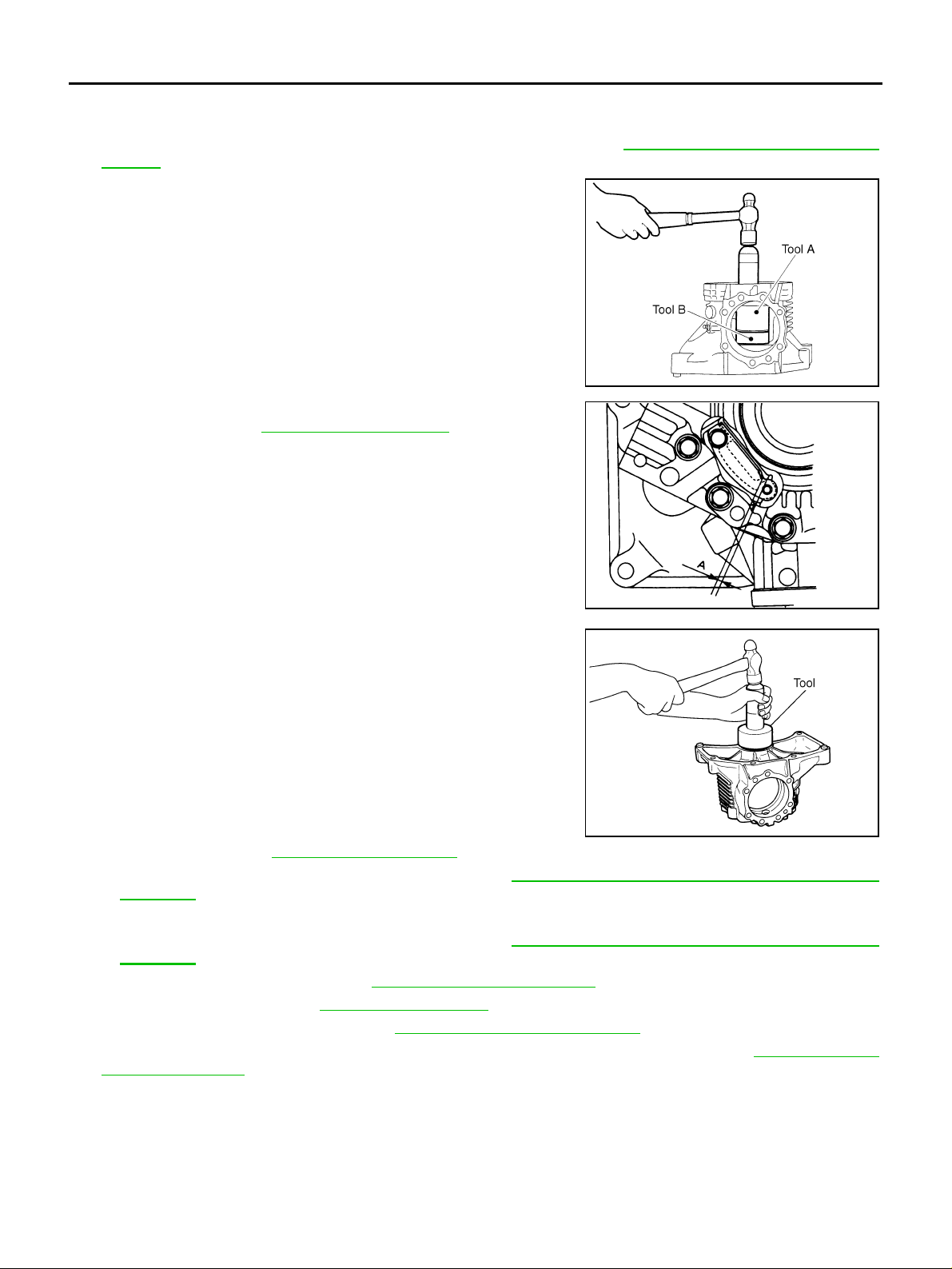
TRANSFER ASSEMBLY
ASSEMBLY
Transfer Case
1. Select gear ring bearing adjusting shim (transfer case side). Refer to TF-60, "SELECTING ADJUSTING
SHIMS" .
2. Install selected gear ring bearing adjusting shim (transfer case
side) and gear ring bearing outer race (transfer case side), using
the drifts
Tool number A: ST30720000 (J-25405)
B: KV40101840 ( — )
SDIA1563E
3. Install oil defense, and tighten the mounting bolts to the specified torque. Refer to TF-50, "
between oil defense and transfer case (dimension A) should be
the following.
Clearance between oil defense and transfer case
Dimension A: 1.0 - 3.5 mm (0.04 - 0.138 in)
COMPONENTS" . The clearanc e
CAUTION:
Do not reuse the mounting bolts.
4. Drive transfer case oil seal until it becomes flush with the case
end, using the drift.
Tool number : ST30720000 (J-25405)
CAUTION:
● When checking the total preload to rque, measu re it wi th-
out oil seal, then install oil seal.
● Do not reuse oil seal.
● Apply multi-purpose grease onto oil seal lips, and gear
oil onto the circumference of oil seal.
5. Apply sealant to filler plug and plug before installing them to
transfer case. Refer to TF-50, "
● Use Genuine Silicone RTV or equivalent. Refer to GI-47, "Recommended Chemical Products and
COMPONENTS" .
Sealants" .
6. Apply sealant to breather tube and install it to transfer case.
● Use Genuine Silicone RTV or equivalent. Refer to GI-47, "Recommended Chemical Products and
Sealants" .
7. Install drive gear assem bl y. Refer to TF-63, "
8. Install adapter case. Refe r to TF-64, "
Adapter Case" .
9. Install pinion sleeve assembly. Refer to TF-65, "
Drive Gear Assemb ly " .
Pinion Sleeve Assembly" .
10. Check ba cklash, preloa d torque, tooth con tact, and companion fl ange runout. Refer to TF-51, "
BLY INSPECTION" .
CAUTION:
Measure the total preload torque without oil seal.
TFB0283D
SDIA1564E
ASSEM-
Revision: 2006 July 2006 X-Trail
TF-62
Page 63
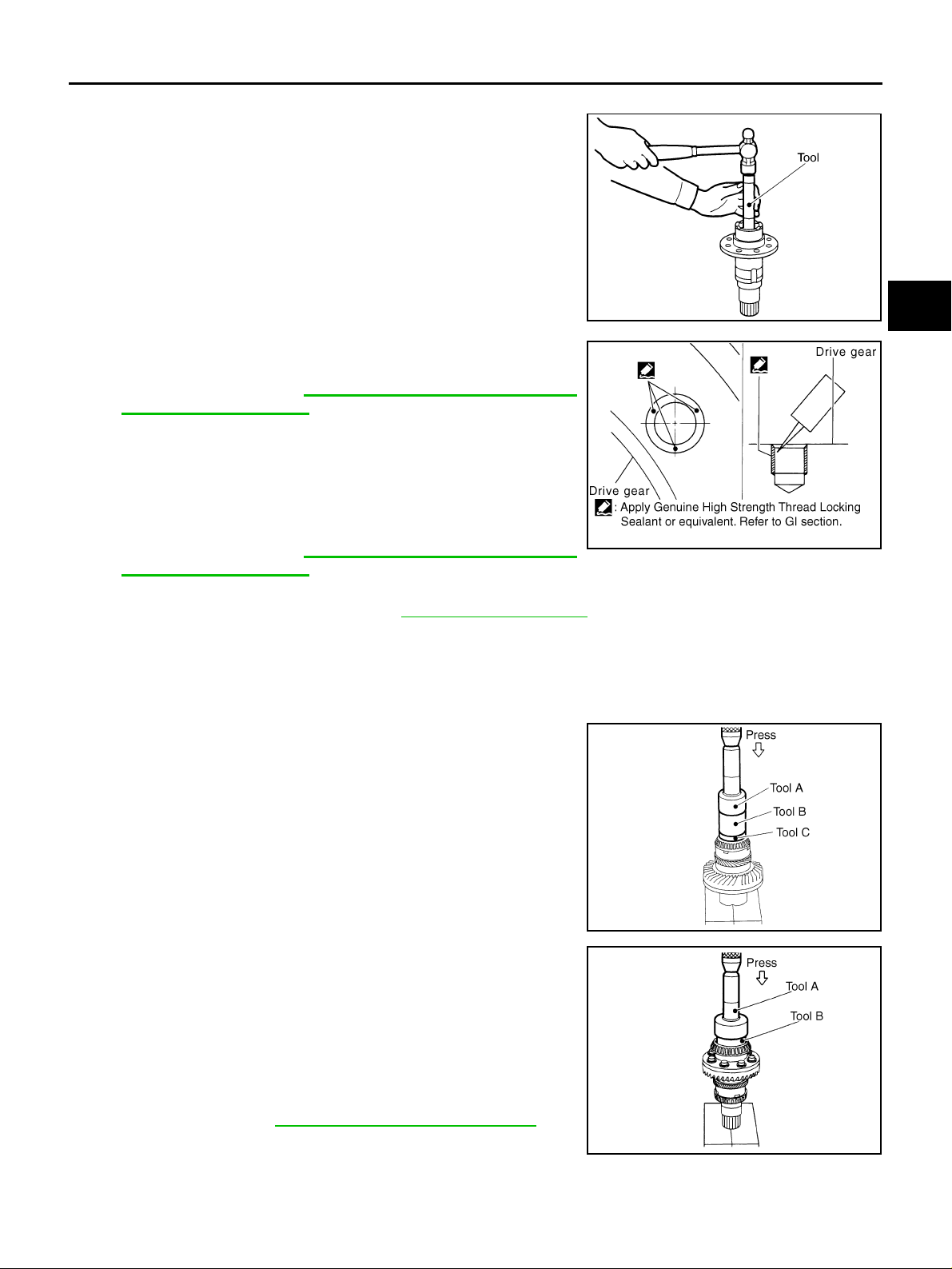
TRANSFER ASSEMBLY
Drive Gear Assembly
1. Drive gear ring oil seal into gear ring, using the drift.
Tool number : ST33230000 (J-25805-01)
A
CAUTION:
● Do not reuse oil seal.
● Apply multi-purpose grease onto oil seal lips, and gear
oil onto the circumference of oil seal.
● The oil seal back position after the installation shall be
56.5 mm (2.22 in) from the gear ring end.
SDIA1809E
2. Apply thread locking sealant into thread hole for drive gear.
● Use Genuine High Strength Thread Locking Sealant or
equivalent. Refer to GI-47, "
Recommended Chemical
Products and Sealants" .
a. Completely clean and degrease the drive gear back face, thread
holes, and drive gear mounting bolts.
b. Apply thread locking sealant onto the first and second threads
under thread hole chamfering of drive gear on 3 or more different points.
● Use Genuine High Strength Thread Locking Sealant or
equivalent. Refer to GI-47, "
Recommended Chemical
SDIA2339E
Products and Sealants" .
3. Install drive gear to gear ring, and ap ply anti-corrosiv e oil onto threads and seats on the mountin g bolts.
Tighten to the specified torque. Refer to TF-50, "
COMPONENTS" .
CAUTION:
● Temporary installation before tightening the bolts through to the completion of the tightening
should be within 90 seconds.
● If the thread locking sealant is applied aside, quickly wipe it off.
B
C
TF
E
F
G
H
I
J
4. Apply gear oil to gear ring bearing inner race (transfer case
side). Install gear ring bearing inner race, using the drifts.
Tool number A: ST30720000 (J-25405)
B: ST27863000 ( — )
C: KV40101630 (J-35 87 0)
5. Apply gear oil to gear ring bearing inner race (adapter case
side). Install gear ring bearing inner race, using the drifts.
Tool number A: ST30720000 (J-25405)
B: KV38102510 ( — )
6. Install drive gear assembly to transfer case.
7. Install adapter case.
8. Check backlash, preload torque, tooth contact, and companion
flange runout. Refer to TF-51, "
ASSEMBLY INSPECTION" .
CAUTION:
Measure the total preload torque without oil seal.
K
L
M
SDIA1566E
SDIA1810E
Revision: 2006 July 2006 X-Trail
TF-63
Page 64
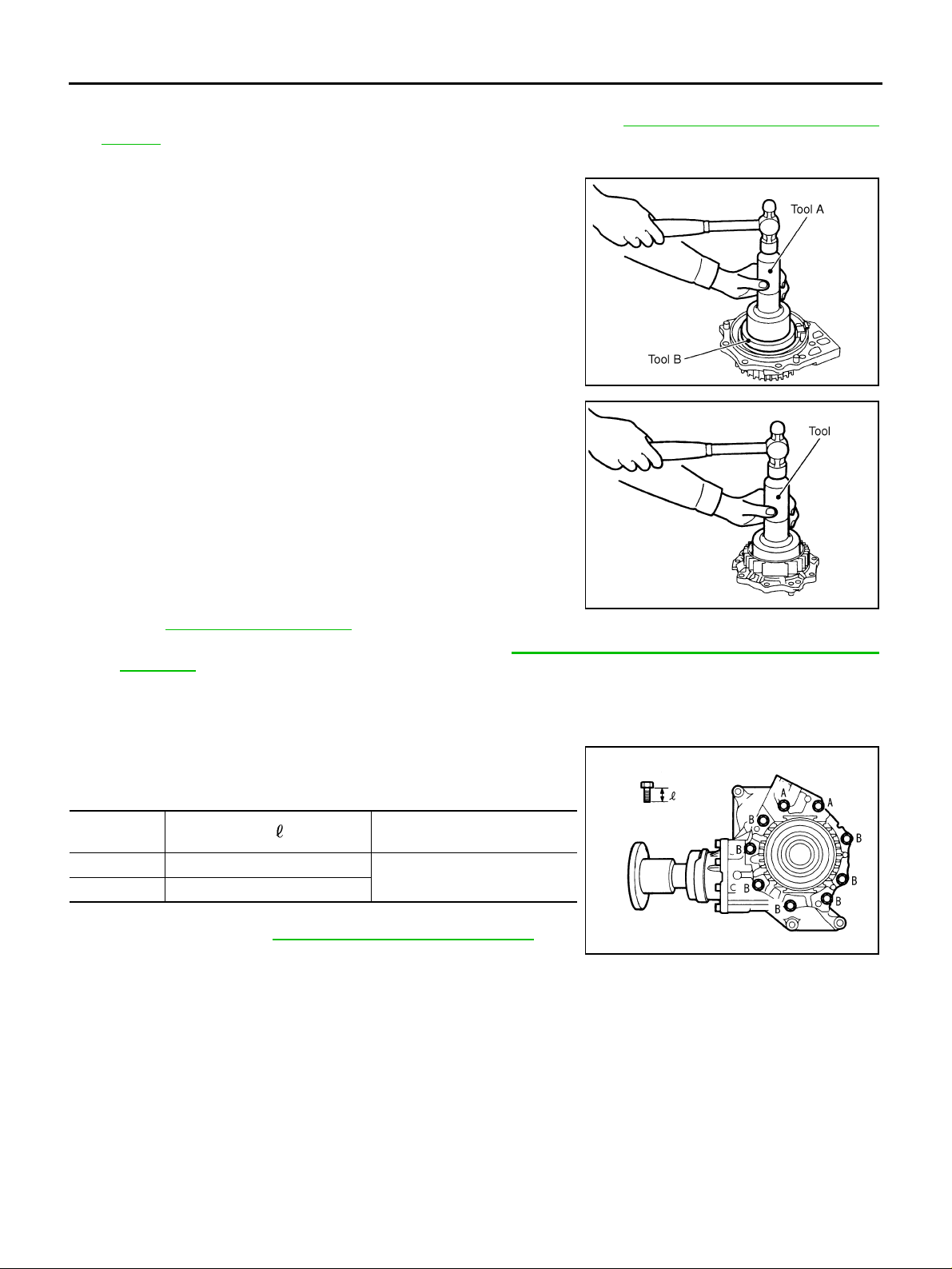
TRANSFER ASSEMBLY
Adapter Case
1. Select gear ring beari ng adjusting shim (adapter case side). Ref er to TF-60, "SELECTING ADJUSTING
SHIMS" .
2. Install oil gutter.
3. Install selected gear ring bearing adjusting shim (adapter case
side) and gear rin g bear ing out er ra ce (ada pter ca se sid e), usi ng
the drifts.
Tool number A: ST30720000 (J-25405)
B: KV40105230 ( — )
SDIA1535E
4. Drive adapter case oil seal until it becomes flush with the case
end, using the drift.
Tool number : KV38101700 ( — )
CAUTION:
● When checking the total preload to rque, measu re it wi th-
out oil seal, then install oil seal.
● Do not reuse oil seal.
● Apply multi-purpose grease onto oil seal lips, and gear
oil onto the circumference of oil seal.
5. Apply sealant on drain plug and install it to the adapter case.
Refer to TF-50, "
● Use Genuine Silicone RTV or equivalent. Refer to GI-47, "Recommended Chemical Products and
COMPONENTS" .
Sealants" .
6. Apply multi-purpose grease lightly and evenly onto O-ring, and install it to the adapter case.
CAUTION:
Do not reuse the O-ring.
7. Install adapter case to tr an sf er ca se, and apply anti- co rros iv e oi l
onto threads and seats on the mounting bolts. Tighten to the
specified torque.
SDIA1568E
Bolt symbol
A 35 (1.38)
B 30 (1.18)
Bolt length “ ” mm (in)
Tightening torque
N·m (kg-m, ft-lb)
15.2 (1.6 , 11)
8. Check backlash, preload torque, tooth contact, and companion
flange runout. Refer to TF-51, "
CAUTION:
ASSEMBLY INSPECTION" .
SDIA2318E
Measure the total preload torque without oil seal.
Revision: 2006 July 2006 X-Trail
TF-64
Page 65
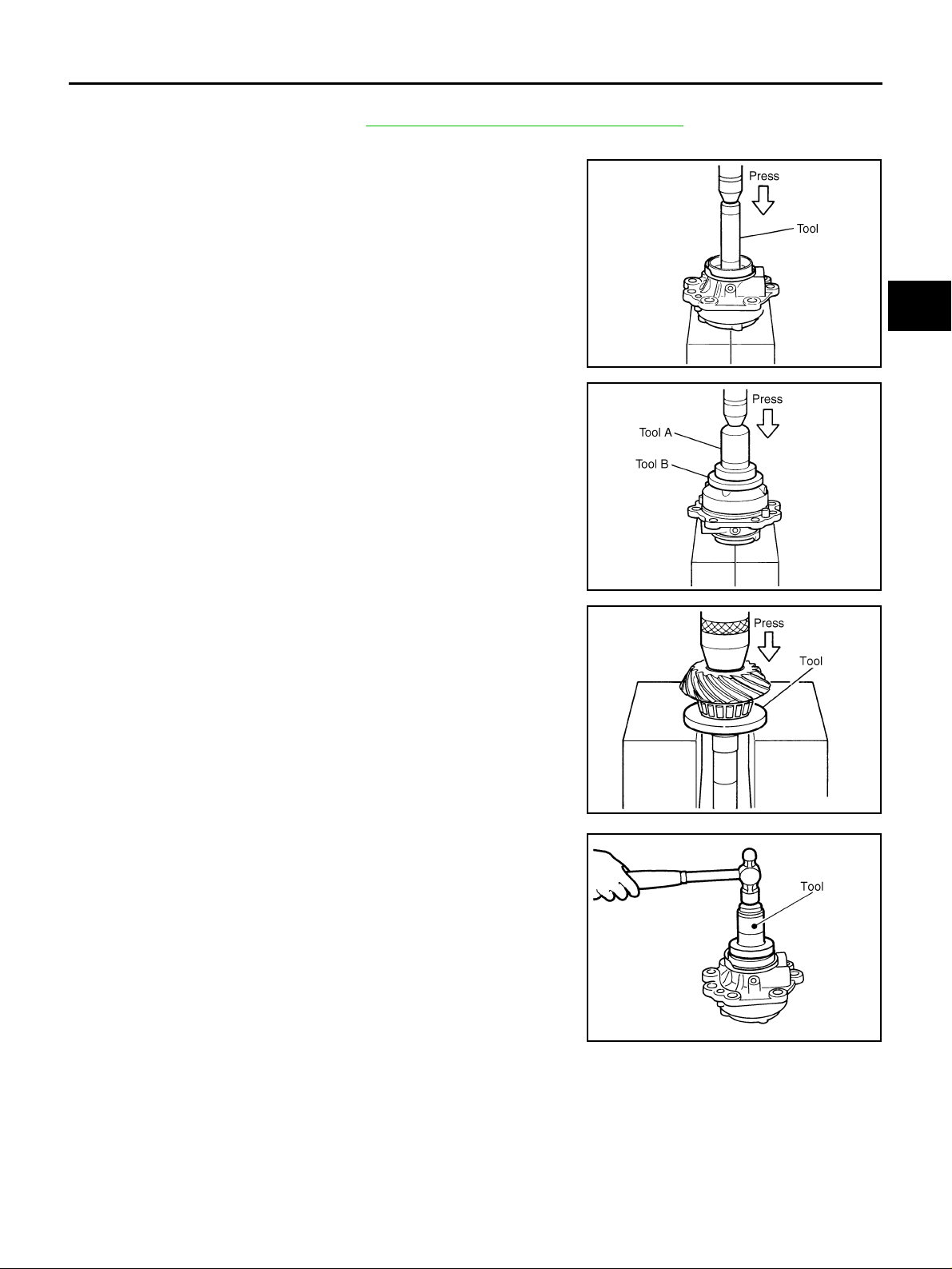
TRANSFER ASSEMBLY
Pinion Sleeve Assembly
1. Select pinion sleeve shim. Refer to TF-60, "SELECTING ADJUSTING SHIMS" .
2. Install dust cover.
3. Install pinion rear bearing outer race, using the drift.
To ol num be r : KV38100300 (J-2552 3)
A
B
C
TF
4. Install pinion front bearing outer race, using the drifts.
Tool number A: ST33400001 (J-26082)
B: ST30901000 (J-26010-01)
5. Apply gear oil to pini o n fro nt be ari ng inn er rac e an d mat i ng pos ition on drive pinion. Install pinion front bearing inner race to
drive pinion, using the dri ft.
Tool number : ST30901000 (J-26010-01)
6. Install collapsible spacer to drive pinion.
CAUTION:
Do not reuse collapsible spacer.
7. Apply gear oil to pinion rear bearing inner race and install it to
pinion sleeve.
8. Install pi nion sleeve oil seal to pinion sleeve, using the drift.
Tool number : ST33400001 (J-26082)
CAUTION:
● Do not reuse oil seal.
● Apply multi-purpose grease onto oil seal lips, and gear
oil onto the circumference of oil seal.
SDIA1569E
SDIA1570E
SDIA1571E
E
F
G
H
I
J
K
L
M
SDIA1572E
Revision: 2006 July 2006 X-Trail
TF-65
Page 66
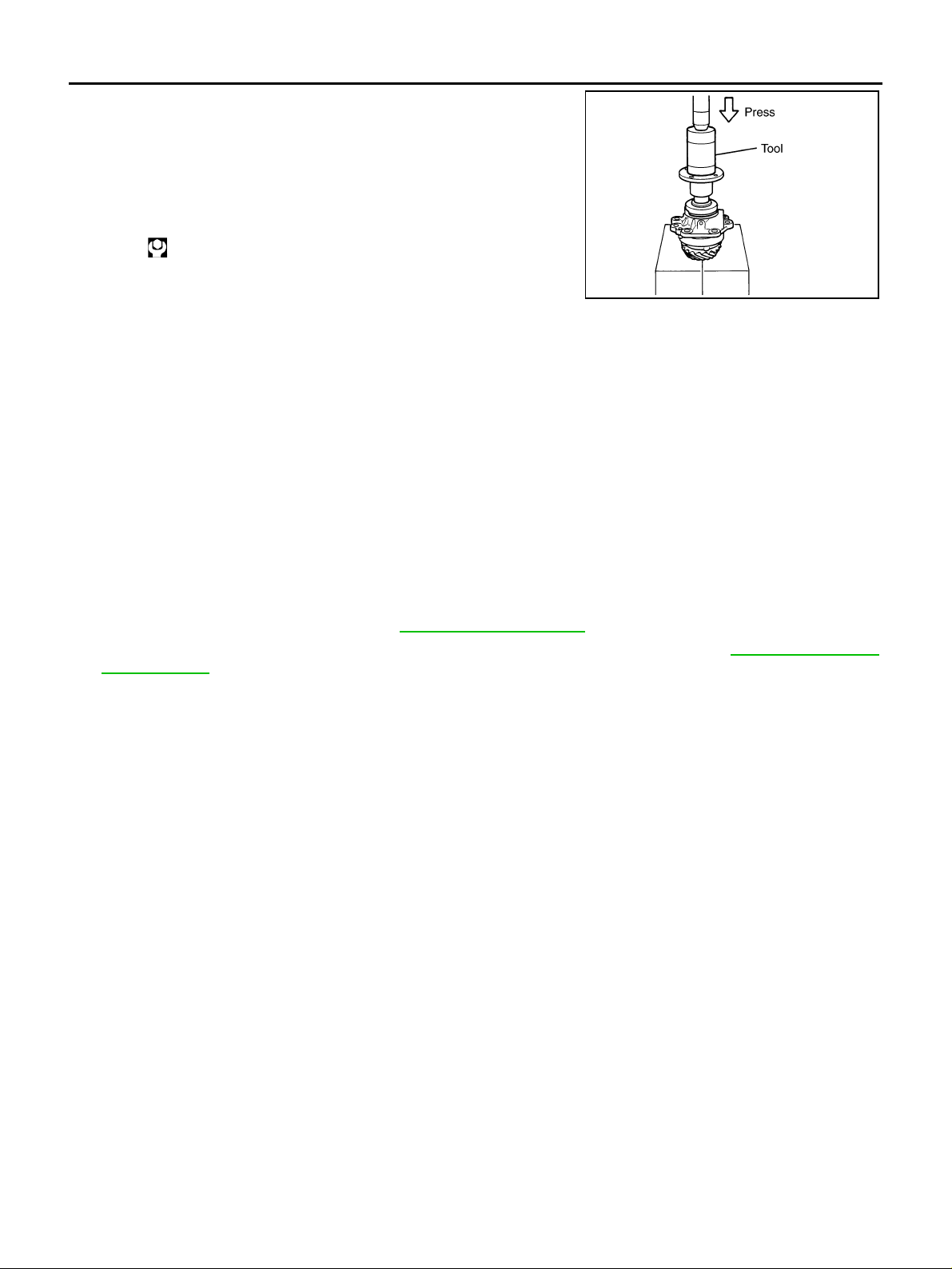
TRANSFER ASSEMBLY
9. Press in companion flange, using the drift.
Tool number : ST33200000 (J-26082)
10. Apply an ti-corros ion o il onto thread s and seat of pini on lo ck nu t.
Adjust pinion lock nut tightening torque an d pinion b earing pr eload torque (P’
Pinion lock nut tightening torque
1 ), using the preload gauge.
: 128 - 294 N·m (13 - 29 kg-m, 95 - 216 ft-lb)
Pinion bearing preload torque (P’
0.40 - 0.78 N·m (0.04 - 0.08 kg-m, 4 - 6 in-lb)
1 ):
SDIA1811E
CAUTION:
● Do not reuse pinion lock nut.
● Adjust the lower limit of the pinion lock nut tightening torque first.
● While confirming the p reload torque, tighte n pinion lock nut by 5 ° to 10°. Because preload w ill
increase sudden ly.
● If specified preload torque is exceeded, replace collapsible spacer and tighten agai n. Do not
loosen pinion lock nut for further preload torque adjustment.
● After the adjustment, rotate companion flang e back and forth 2 to 3 times to check for unusual
noise, rotation malfunction, and other malfunctions.
11. Apply mul ti-p urp os e greas e lig ht ly and ev en ly onto O-rin g, and in stall it to pin io n sle e ve .
CAUTION:
Do not reuse old O-ring.
12. Assemble selected pinion sleeve shim.
13. Install pinion sleeve assembly, and apply anti-corrosive oil onto threads and seats on the mounting bolts.
Tighten to the specified torque. Refer to TF-50, "
14. Check backlash, preload torque, tooth contact and companion flange runout. Refer to TF-51, "
COMPONENTS" .
ASSEMBLY
INSPECTION" .
The total preload torque is as follows:
Total preload torque
With all oil seals:
1 + 0.45 - 0.47 N·m (0.045 - 0.048 kg-m, 3.9 - 4.1 in-lb)
P’
Without transfer case oil seal and adapter case oil seal:
1 + 0.35 - 0.37 N·m (0.035 - 0.038 kg-m, 3.1 - 3.2 in-lb)
P’
Revision: 2006 July 2006 X-Trail
TF-66
Page 67
SERVICE DATA AND SPECIFICATIONS (SDS)
SERVICE DATA AND SPECIFICATIO NS (SDS) PFP:00030
General Specifications ADS00184
Applied model QR25DE
Transfer model TY20A
Oil capacity (Approx.) (US pt, lmp pt)
Gear ratio 0.404
Number of teeth
Drive pinion 17
Drive gear 42
0.31 (5/8, 1/2)
Inspection and Adjustment ADS00185
PRELOAD TORQUE BEFORE DISASSEMBLY
Item Specification [N·m (kg-m, in-lb)]
Pinion bearing (P
Gear ring bearing to pinion
bearing (Tot al preload)
PRELOAD TORQUE AFTER DISASSEMBLY AND REASSEMBLY
Pinion bearing (P’
Gear ring bearing to pinion
bearing (Tot al preload)
1 ) 0.10 - 0.39 (0.01 - 0.04, 1 - 3)
With all oil seals P
Without transfer case oil seal and adapter ca se oi l sea l P
Item Specification [N·m (kg-m, in-lb)]
1 ) 0.40 - 0.78 (0.04 - 0.08, 4 - 6)
With all oil seals P’
Without transfer case oil seal and adapter ca se oil sea l P’
1 + 0.16 - 0.22 (0.016 - 0.023, 1.4 - 1.9)
1 + 0.06 - 0.12 (0.006 - 0.013, 0.6 - 1.1)
1 + 0.45 - 0.47 (0.045 - 0.048, 3.9 - 4.1)
1 + 0.35 - 0.37 (0.035 - 0.038, 3.1 - 3.2)
A
B
C
TF
E
F
G
H
BACKLASH
Unit: mm (in)
Item Specification
Drive gear to drive pinion gear 0.13 - 0.19 (0.0051 - 0.0075)
COMPANION FLANGE RUNOUT
Unit: mm (in)
Item Runout limit
Companion flange face 0.1 (0.004)
Inner side of the companion flange 0.1 (0.004)
SELECTIVE PARTS
Gear Ring Bearing Adjusting Shim (Transfer Case Side)
Unit: mm (in)
Thickness Part number* Thickness Part number* Thickness Part number*
0.80 (0.0315)
0.83 (0.0327)
0.86 (0.0339)
0.89 (0.0350)
0.92 (0.0362)
0.95 (0.0374)
0.98 (0.0386)
1.01 (0.0398)
1.04 (0.0409)
1.07 (0.0421)
1.10 (0.0433)
1.13 (0.0445)
1.16 (0.0457)
1.19 (0.0469)
33147 AD300
33147 AD301
33147 AD302
33147 AD303
33147 AD304
33147 AD305
33147 AD306
33147 AD307
33147 AD308
33147 AD309
33147 AD310
33147 AD311
33147 AD312
33147 AD313
1.22 (0.0480)
1.25 (0.0492)
1.28 (0.0504)
1.31 (0.0516)
1.34 (0.0528)
1.37 (0.0539)
1.40 (0.0551)
1.43 (0.0563)
1.46 (0.0575)
1.49 (0.0587)
1.52 (0.0598)
1.55 (0.0610)
1.58 (0.0622)
1.61 (0.0634)
33147 AD314
33147 AD315
33147 AD316
33147 AD317
33147 AD318
33147 AD319
33147 AD320
33147 AD321
33147 AD322
33147 AD323
33147 AD324
33147 AD360
33147 AD361
33147 AD362
1.64 (0.0646)
1.67 (0.0657)
1.70 (0.0669)
1.73 (0.0681)
1.76 (0.0693)
1.79 (0.0705)
1.82 (0.0717)
1.85 (0.0728)
1.88 (0.0740)
1.91 (0.0752)
1.94 (0.0764)
1.97 (0.0776)
2.00 (0.0787)
2.03 (0.0799)
33147 AD363
33147 AD364
33147 AD365
33147 AD366
33147 AD367
33147 AD368
33147 AD369
33147 AD370
33147 AD371
33147 AD372
33147 AD373
33147 AD374
33147 AD375
33147 AD376
I
J
K
L
M
*: Always check with the Parts Department for the latest parts information.
Revision: 2006 July 2006 X-Trail
TF-67
Page 68
SERVICE DATA AND SPECIFICATIONS (SDS)
Gear Ring Bearing Adjusting Shim (Adapter Case Side)
Thickness Part number* Thickness Part number* Thickness Part number*
0.80 (0.0315)
0.83 (0.0327)
0.86 (0.0339)
0.89 (0.0350)
0.92 (0.0362)
0.95 (0.0374)
0.98 (0.0386)
1.01 (0.0398)
1.04 (0.0409)
1.07 (0.0421)
1.10 (0.0433)
1.13 (0.0445)
1.16 (0.0457)
1.19 (0.0469)
1.22 (0.0480)
*: Always check with the Parts Department for the latest parts information.
Pinion Sleeve Shim
Thickness Part number* Thickness Part number* Thicknes s Part number*
0.77 (0.0303)
0.80 (0.0315)
0.83 (0.0327)
0.86 (0.0339)
0.89 (0.0350)
0.92 (0.0362)
0.95 (0.0374)
33147 5V200
33147 5V201
33147 5V202
33147 5V203
33147 5V204
33147 5V205
33147 5V206
33147 5V207
33147 5V208
33147 5V209
33147 5V210
33147 5V211
33147 5V212
33147 5V213
33147 5V214
33155 5V214
33155 5V200
33155 5V201
33155 5V202
33155 5V203
33155 5V204
33155 5V205
1.25 (0.0492)
1.28 (0.0504)
1.31 (0.0516)
1.34 (0.0528)
1.37 (0.0539)
1.40 (0.0551)
1.43 (0.0563)
1.46 (0.0575)
1.49 (0.0587)
1.52 (0.0598)
1.55 (0.0610)
1.58 (0.0622)
1.61 (0.0634)
1.64 (0.0646)
1.67 (0.0657)
0.98 (0.0386)
1.01 (0.0398)
1.04 (0.0409)
1.07 (0.0421)
1.10 (0.0433)
1.13 (0.0445)
1.16 (0.0457)
33147 5V215
33147 5V216
33147 5V217
33123 5V218
33123 5V219
33123 5V220
33123 5V221
33123 5V222
33123 5V223
33123 5V224
33123 5V260
33123 5V261
33123 5V262
33123 5V263
33123 5V264
33155 5V206
33155 5V207
33155 5V208
33155 5V209
33155 5V210
33155 5V211
33155 5V212
1.70 (0.0669)
1.73 (0.0681)
1.76 (0.0693)
1.79 (0.0705)
1.82 (0.0717)
1.85 (0.0728)
1.88 (0.0740)
1.91 (0.0752)
1.94 (0.0764)
1.97 (0.0776)
2.00 (0.0787)
2.03 (0.0799)
2.06 (0.0811)
2.09 (0.0811)
1.19 (0.0469)
1.22 (0.0480)
1.25 (0.0492)
1.28 (0.0504)
1.31 (0.0516)
1.34 (0.0528)
Unit: mm (in)
33123 5V265
33123 5V266
33123 5V267
33123 5V268
33123 5V269
33123 5V270
33123 5V271
33123 5V272
33123 5V273
33123 5V274
33123 5V275
33123 5V276
33123 5V277
33123 5V278
Unit: mm (in)
33155 5V213
33155 5V215
33155 5V216
33155 5V217
33155 5V218
33155 5V219
*: Always check with the Parts Department for the latest parts information.
Revision: 2006 July 2006 X-Trail
TF-68
 Loading...