

Page 1
TI01302F/00/EN/04.18
71394723
2018-04-12
Products
Solutions Services
Technical Information
Micropilot FMR60
Free space radar
Level measurement in liquids
Application
• Continuous, non-contact level measurement of liquids,
pastes and sludges
• PTFE drip-off antenna
• Maximum measuring range: 50 m (164 ft)
• Temperature: –40 to +130 °C (–40 to +266 °F)
• Pressure: –1 to +16 bar (–14.5 to +232 psi)
• Accuracy: ± 1 mm (0.04 in)
• Linearity protocol (3-point, 5-point)
Your benefits
• Innovative drip-off antenna made of PTFE
• Reliable measurement thanks to improved focusing and small beam angle,
particularly in vessels with many internal fittings
• Safety by design - ensures highest safety
• Easy, guided commissioning with intuitive user interface
• Bluetooth® wireless technology for commissioning, operation and maintenance via
free iOS / Android app SmartBlue
• Maximum reliability thanks to multi-echo tracking
• HistoROM configuration memory makes for easier commissioning,
maintenance and diagnostics
• SIL2 as per IEC 61508, SIL3 for homogeneous or diverse redundancy
• Easy proof testing for SIL and WHG
• RFID TAG - easy identification of measuring points for improved data access
• Heartbeat Technology
Page 2

Table of contents
Micropilot FMR60
Important document information ............... 4
Safety symbols ............................... 4
Electrical symbols ............................. 4
Symbols for certain types of information .............. 4
Symbols in graphics ............................ 4
Symbols at the device ........................... 5
Terms and abbreviations ..................... 6
Registered trademarks ....................... 7
Function and system design ................... 8
Measuring principle ............................ 8
Input ..................................... 9
Measured variable ............................. 9
Measuring range .............................. 9
Operating frequency .......................... 10
Transmission power ........................... 10
Output .................................. 11
Output signal ............................... 11
Signal on alarm .............................. 12
Linearization ............................... 12
Galvanic isolation ............................ 12
Protocol-specific data .......................... 12
Power supply ............................. 14
Terminal assignment .......................... 14
Device plug connectors ......................... 18
Supply voltage .............................. 19
Power consumption ........................... 20
Current consumption .......................... 20
Power supply failure .......................... 20
Potential equalization ......................... 20
Cable entries ............................... 21
Cable specification ............................ 21
Overvoltage protection ......................... 21
Performance characteristics .................. 22
Reference operating conditions ................... 22
Reference accuracy ........................... 22
Measured value resolution ...................... 22
Response time .............................. 22
Influence of ambient temperature ................. 23
Influence of gas phase ......................... 23
Climate class ............................... 31
Altitude according to IEC61010-1 Ed.3 .............. 31
Degree of protection .......................... 31
Vibration resistance ........................... 31
Electromagnetic compatibility (EMC) ............... 31
Process .................................. 32
Process temperature, process pressure ............... 32
Dielectric constant ............................ 33
Minimum level in case of small dielectric constants ...... 33
Mechanical construction .................... 34
Dimensions ................................ 34
Weight ................................... 37
Materials: GT19 housing (plastic) .................. 38
Materials: GT20 housing (die-cast aluminum, powder-
coated) ................................... 39
Materials: antenna and process connection ........... 40
Materials: Weather protection cover ................ 41
Operability ............................... 42
Operating concept ............................ 42
Local operation .............................. 43
Operation with remote display and operating module
FHX50 ................................... 43
Operation via Bluetooth® wireless technology .......... 44
Remote operation ............................ 45
SupplyCare inventory management software .......... 46
Certificates and approvals ................... 49
CE mark ................................... 49
RoHS ..................................... 49
RCM-Tick marking ............................ 49
Ex approval ................................ 49
Dual seal according to ANSI/ISA 12.27.01 ............ 49
Functional safety ............................. 49
WHG ..................................... 49
Pressure equipment with allowable pressure
≤ 200 bar (2 900 psi) .......................... 49
Radio standard EN 302729 ...................... 50
Radio standard EN 302372 ...................... 51
FCC ...................................... 51
Industry Canada ............................. 51
CRN approval (Canadian pressure equipment directive) ... 51
Test, certificate .............................. 53
Hard-copy product documentation ................. 53
Other standards and guidelines ................... 54
Installation ............................... 24
Installation conditions ......................... 24
Installation: Drip-off antenna, PTFE 50 mm / 2" ........ 28
Container with heat insulation .................... 29
Environment .............................. 30
Ambient temperature range ..................... 30
Ambient temperature limits ..................... 30
Storage temperature .......................... 31
Ordering information ....................... 55
Ordering information .......................... 55
3-point linearity protocol ....................... 56
5-point linearity protocol ....................... 57
Customer-specific configuration ................... 58
Tagging (TAG) .............................. 58
Services ................................... 58
2 Endress+Hauser
Page 3

Micropilot FMR60
Application Packages ....................... 59
Heartbeat Diagnostics ......................... 59
Heartbeat Verification ......................... 60
Heartbeat Monitoring ......................... 61
Accessories ............................... 62
Device-specific accessories ...................... 62
Communication-specific accessories ................ 67
Service-specific accessories ...................... 68
System components ........................... 68
Supplementary documentation ............... 69
Standard documentation ........................ 69
Safety Instructions (XA) ........................ 69
Endress+Hauser 3
Page 4

Important document information
DANGER
WARNING
CAUTION
NOTICE
A
1.
Micropilot FMR60
Safety symbols
Electrical symbols
Symbol Meaning
DANGER!
This symbol alerts you to a dangerous situation. Failure to avoid this situation will
result in serious or fatal injury.
WARNING!
This symbol alerts you to a dangerous situation. Failure to avoid this situation can
result in serious or fatal injury.
CAUTION!
This symbol alerts you to a dangerous situation. Failure to avoid this situation can
result in minor or medium injury.
NOTE!
This symbol contains information on procedures and other facts which do not result in
personal injury.
Symbol Meaning
Direct current
Alternating current
Direct current and alternating current
Ground connection
A grounded terminal which, as far as the operator is concerned, is grounded via a
grounding system.
Protective Earth (PE)
A terminal which must be connected to ground prior to establishing any other
connections.
The ground terminals are situated inside and outside the device:
• Inner ground terminal: Connects the protectiv earth to the mains supply.
• Outer ground terminal: Connects the device to the plant grounding system.
Symbols for certain types of information
Symbols in graphics
Symbol Meaning
Permitted
Procedures, processes or actions that are permitted.
Preferred
Procedures, processes or actions that are preferred.
Forbidden
Procedures, processes or actions that are forbidden.
Tip
Indicates additional information.
Reference to documentation.
Reference to page.
Reference to graphic.
Visual inspection.
Symbol Meaning
1, 2, 3 ... Item numbers
, 2., 3.… Series of steps
A, B, C, ... Views
4 Endress+Hauser
Page 5

Micropilot FMR60
-
.
Symbol Meaning
A-A, B-B, C-C, ... Sections
Hazardous area
Indicates a hazardous area.
Safe area (non-hazardous area)
Indicates the non-hazardous area.
Symbols at the device
Symbol Meaning
Safety instructions
Observe the safety instructions contained in the associated Operating Instructions.
Temperature resistance of the connection cables
Specifies the minimum value of the temperature resistance of the connection cables.
Endress+Hauser 5
Page 6

Micropilot FMR60
Terms and abbreviations
Term/abbreviation Explanation
BA Document type "Operating Instructions"
KA Document type "Brief Operating Instructions"
TI Document type "Technical Information"
SD Document type "Special Documentation"
XA Document type "Safety Instructions"
PN Nominal pressure
MWP Maximum Working Pressure
The MWP can also be found on the nameplate.
ToF Time of Flight
FieldCare Scalable software tool for device configuration and integrated plant asset management
solutions
DeviceCare Universal configuration software for Endress+Hauser HART, PROFIBUS,
FOUNDATION Fieldbus and Ethernet field devices
DTM Device Type Manager
DD Device Description for HART communication protocol
εr (DC value) Relative dielectric constant
Operating tool The term "operating tool" is used in place of the following operating software:
• FieldCare / DeviceCare, for operation via HART communication and PC
• SmartBlue (app), for operation using an Android or iOS smartphone or tablet.
BD Blocking Distance; no signals are analyzed within the BD.
PLC Programmable Logic Controller
CDI Common Data Interface
PFS Pulse Frequence Status (Switching output)
6 Endress+Hauser
Page 7

Micropilot FMR60
Registered trademarks
HART®
Registered trademark of the HART Communication Foundation, Austin, USA
Bluetooth®
The Bluetooth® word mark and logos are registered trademarks owned by the Bluetooth SIG, Inc. and
any use of such marks by Endress+Hauser is under license. Other trademarks and trade names are
those of their respective owners.
Apple®
Apple, the Apple logo, iPhone, and iPod touch are trademarks of Apple Inc., registered in the U.S.
and other countries. App Store is a service mark of Apple Inc.
Android®
Android, Google Play and the Google Play logo are trademarks of Google Inc.
KALREZ®, VITON®
Registered trademark of DuPont Performance Elastomers L.L.C., Wilmington, USA
TEFLON®
Registered trademark of E.I. DuPont de Nemours & Co., Wilmington, USA
Endress+Hauser 7
Page 8
Function and system design
D
R
f
t
1
2
f
2
f
1
∆t
∆f
Micropilot FMR60
Measuring principle
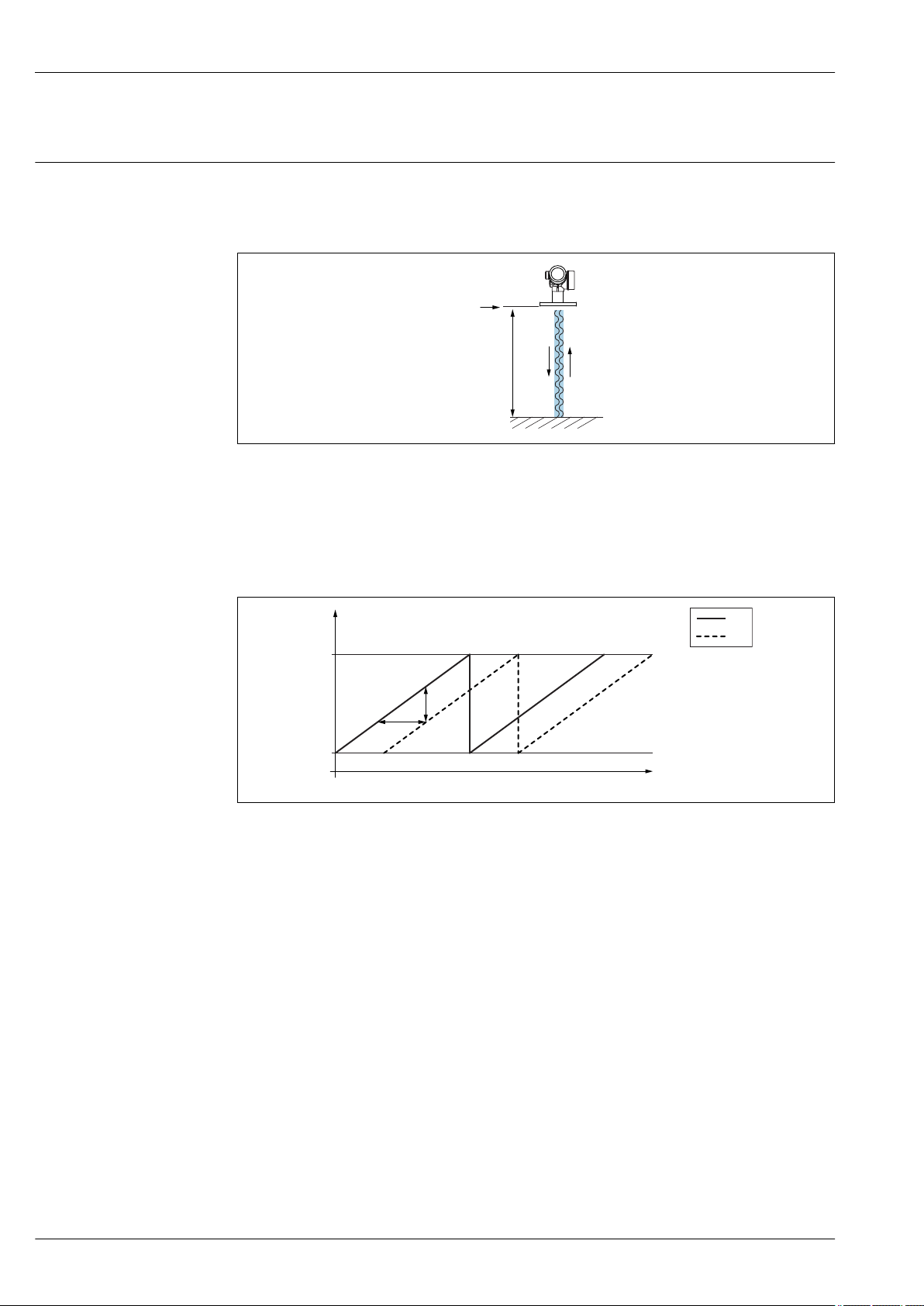
The Micropilot is a "downward-looking" measuring system, operating based on the frequency
modulated continuous wave method (FMCW). The antenna emits an electromagnetic wave at a
continuously varying frequency. This wave is reflected by the product and received again by the
antenna.
A0032017
1 FMCW principle: transmission and reflection of the continuous wave
R Reference point of measurement
D Distance between reference point and product surface
The frequency of this wave is modulated in the form of a sawtooth signal between two limit
frequencies f1 and f2:
2 FMCW principle: result of frequency modulation
1 Transmitted signal
2 Received signal
This results in the following difference frequency at any time between the transmitted signal and the
received signal:
Δf = k Δt
where Δt is the run time and k is the specified increase in frequency modulation.
Δt is given by the distance D between the reference point R and the product surface:
D = (c Δt) / 2
where c is the speed of propagation of the wave.
In summary, D can be calculated from the measured difference frequency Δf. D is then used to
determine the content of the tank or silo.
8 Endress+Hauser
A0023771
Page 9
Micropilot FMR60
Input
Measured variable
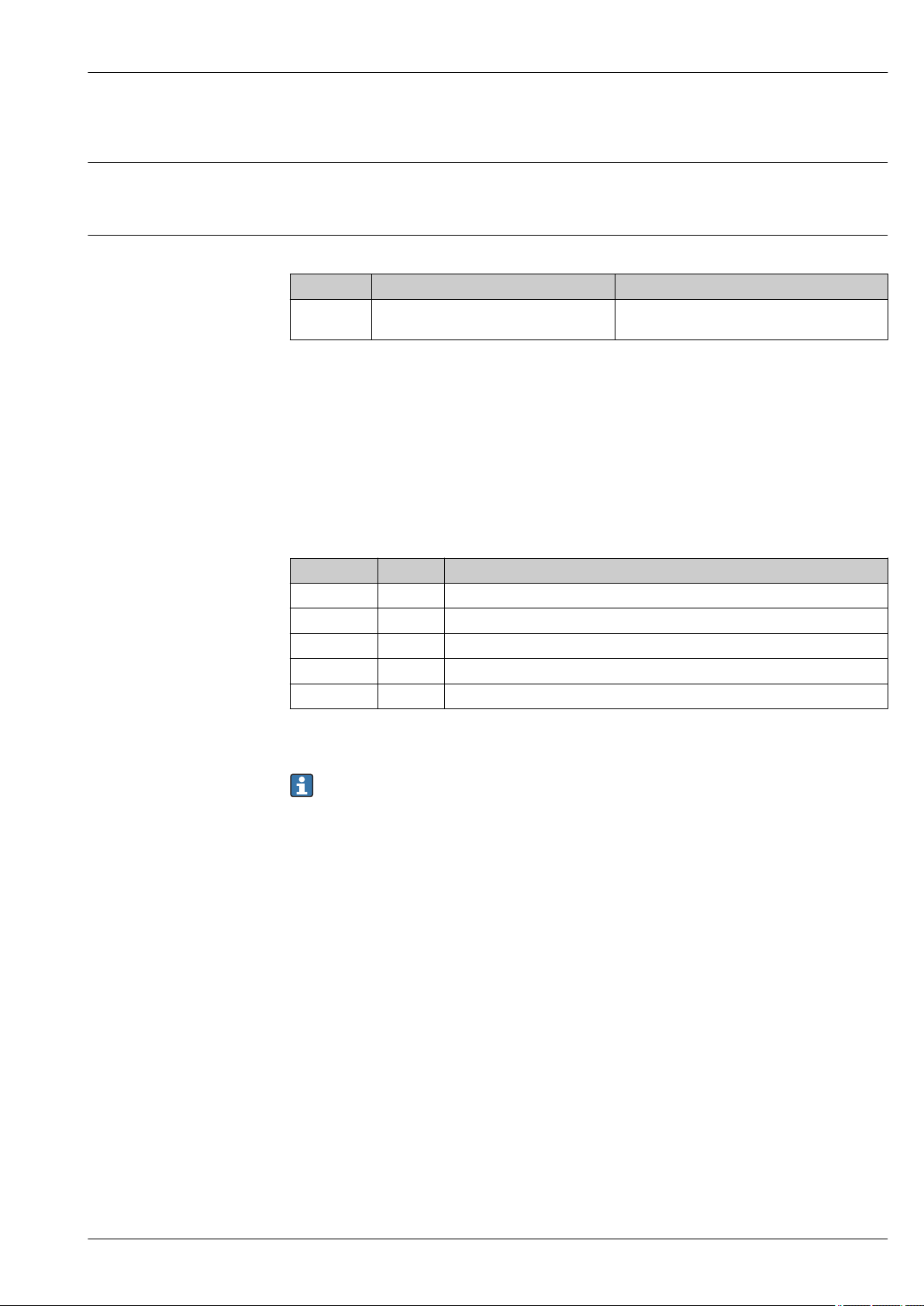
The measured variable is the distance between the reference point and the product surface. The level
is calculated based on "E", the empty distance entered. Optionally, the level can be converted to other
variables (volume, mass) by linearization (32 value pairs).
Measuring range Maximum measuring range
Device Antenna
FMR60 GA:
Drip-off, PTFE 50 mm / 2"
1) Feature 070 in the product structure
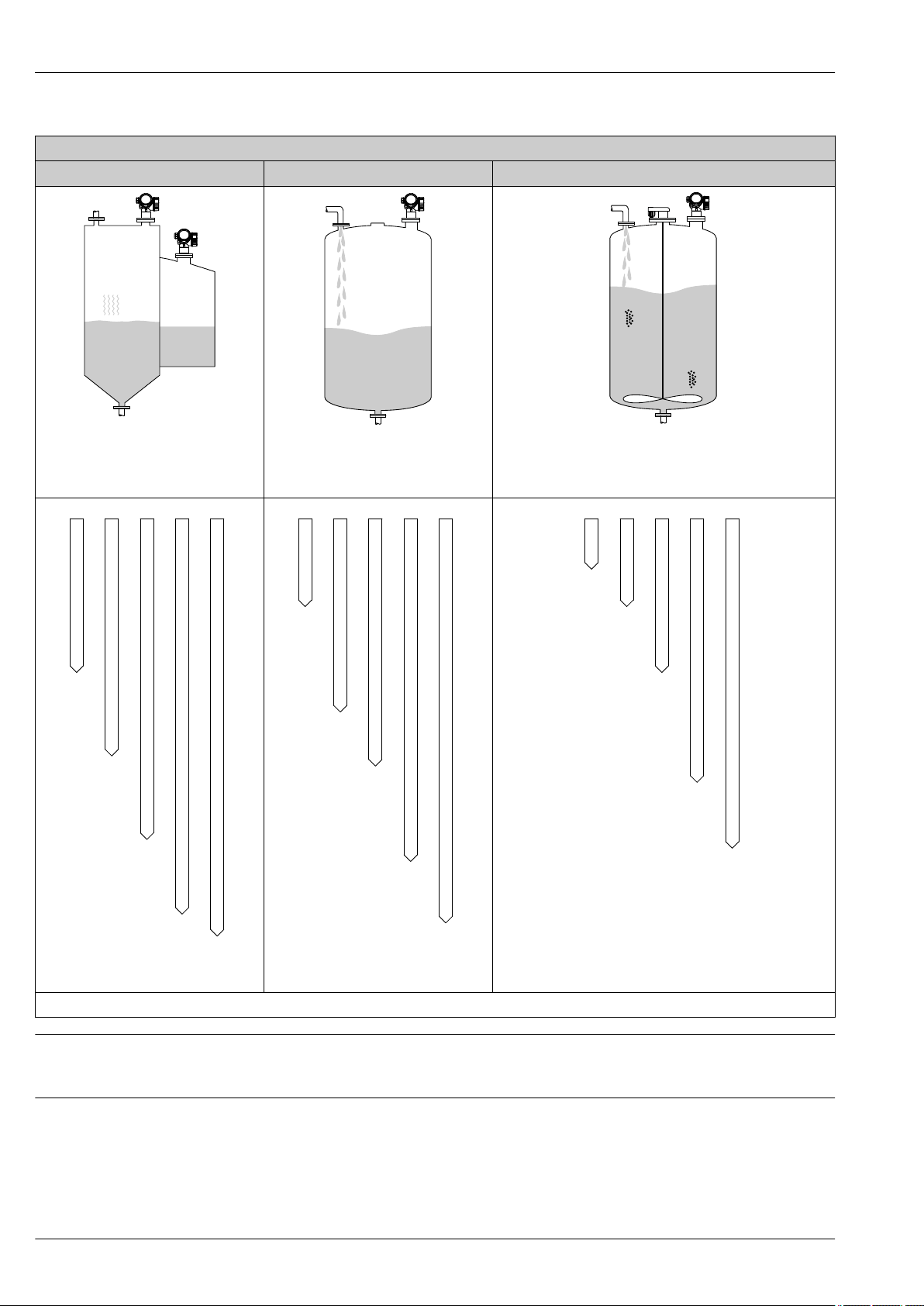
1)
Usable measuring range
The usable measuring range depends on the antenna size, the medium's reflective properties, the
installation position and any possible interference reflections.
The following tables describe the groups of media as well as the achievable measuring range as a
function of application and media group. If the dielectric constant of a medium is unknown, it is
recommended to assume media group B to ensure a reliable measurement.
Media groups
Media group DC (εr) Example
A0 1.2 to 1.4 Butane, liquid nitrogen, liquefied hydrogen
A 1.4 to 1.9 non-conducting liquids, e.g. liquefied gas
B 1.9 to 4 non-conducting liquids, e.g. benzene, oil, toluene, …
C 4 to 10 e.g. concentrated acids, organic solvents, esters, aniline, alcohol, acetone, …
D > 10 conducting liquids, e.g. aqueous solutions, dilute acids and alkalis
Maximum measuring range
50 m (164 ft)
1)
1) NH3 falls into medium group A.
For dielectric constants (DC values) of many media commonly used in various industries refer
to:
• the Endress+Hauser DC manual (CP01076F)
• the Endress+Hauser "DC Values App" (available for Android and iOS)
Endress+Hauser 9
Page 10
Micropilot FMR60
A0
A
B
C
D
7
12
(39)
23
(75)
40
(131)
50
(164)
A0
A
B
C
D
4
7
(23)
13
(43)
28
(92)
44
(144)
A0
A
B
C
D
2
4
(13)
7
(23)
15
(49)
25
(82)
FMR60
Storage tank Buffer tank Process tank with agitator
Calm product surface (e.g. intermittent
filling, filling from bottom, immersion
tubes)
A0034565
A0034566
Moving surfaces (e.g. continuous filling,
from above, mixing jets)
A0034567
Turbulent surface (e.g. filling from above, agitators, baffles)
A0034574
Measuring range [m (ft)]
A0034579
Operating frequency
Approx. 80 GHz
Up to 8 devices can be installed in the same tank without interfering with each other.
Transmission power
• Peak power: 6.3 mW
• Average output power: 63 µW
10 Endress+Hauser
A0034584
Page 11

Micropilot FMR60
Output
Output signal HART
Signal coding FSK ±0.5 mA over current signal
Data transmission rate 1 200 Bit/s
Galvanic isolation Yes
Bluetooth® wireless technology
Device version Ordering feature 610 "Accessory mounted", option NF "Bluetooth"
Operation / configuration By the SmartBlue app.
Range under reference conditions > 10 m (33 ft)
Encryption Encrypted communication and password encryption prevent incorrect
Switch output
operation by unauthorized persons.
For HART devices, the switch output is available as an option. See product structure, feature 20:
"Power Supply, Output", option B: "2-wire; 4-20mA HART, switch output"
Switch output
Function Open collector switching output
Switching behavior Binary (conductive or non-conductive), switches when the programmable switch
point is reached
Failure mode non-conductive
Electrical connection values U = 16 to 35 VDC, I = 0 to 40 mA
Internal resistance RI < 880 Ω
The voltage drop at this internal resistance has to be taken into account on
planning the configuration. For example, the resulting voltage at a connected
relay must be sufficient to switch the relay.
Insulation voltage floating, Insulation voltage 1 350 VDC to power supply aund 500 VAC to ground
Switch point freely programmable, separately for switch-on and switch-off point
Switching delay freely programmable from 0 to 100 s, separately for switch-on and switch-off
point
Number of switching cycles corresponds to the measuring cycle
Signal source
device variables
Number of switching cycles unlimited
• Level linearized
• Distance
• Terminal voltage
• Electronic temperature
• Relative echo amplitude
• Diagnostic values, Advanced diagnostics
Endress+Hauser 11
Page 12

Micropilot FMR60
Signal on alarm
Depending on the interface, failure information is displayed as follows:
• Current output (for HART devices)
– Failsafe mode selectable (in accordance with NAMUR Recommendation NE 43):
– Failsafe mode with user-selectable value: 3.59 to 22.5 mA
• Local display
– Status signal (in accordance with NAMUR Recommendation NE 107)
– Plain text display
• Operating tool via HART communication or service interface (CDI)
– Status signal (in accordance with NAMUR Recommendation NE 107)
– Plain text display
Linearization
The linearization function of the device allows the conversion of the measured value into any unit of
length or volume. Linearization tables for calculating the volume in cylindrical tanks are preprogrammed. Other linearization tables of up to 32 value pairs can be entered manually or semiautomatically.
Galvanic isolation
All circuits for the outputs are galvanically isolated from each other.
Protocol-specific data HART
Manufacturer ID 17 (0x11)
Device type ID 0x112B
HART specification 7.0
Device description files (DTM, DD) Information and files under:
HART load min. 250 Ω
HART device variables The measured values can be freely assigned to the device variables.
Supported functions • Burst mode
Minimum alarm: 3.6 mA
Maximum alarm (= factory setting): 22 mA
• www.endress.com
• www.fieldcommgroup.org
Measured values for PV (primary variable)
• Level linearized
• Distance
• Electronic temperature
• Relative echo amplitude
• Area of incoupling
• Analog output adv. diagnostics 1
• Analog output adv. diagnostics 2
Measured values for SV, TV, FV (second, third and fourth variable)
• Level linearized
• Distance
• Electronic temperature
• Terminal voltage
• Relative echo amplitude
• Absolute echo amplitude
• Area of incoupling
• Analog output adv. diagnostics 1
• Analog output adv. diagnostics 2
• Additional transmitter status
Wireless HART data
Minimum start-up voltage 16 V
Start-up current 3.6 mA
Start-up time 65 s
Minimum operating voltage 14.0 V
12 Endress+Hauser
Page 13

Micropilot FMR60
Multidrop current 4.0 mA
Set-up time 15 s
Endress+Hauser 13
Page 14
Terminal assignment
1
+
2
-
A
1
+
2
-
B
2
3
5
4
2
3
++
--
Y
I
6
1
2
Micropilot FMR60
Power supply
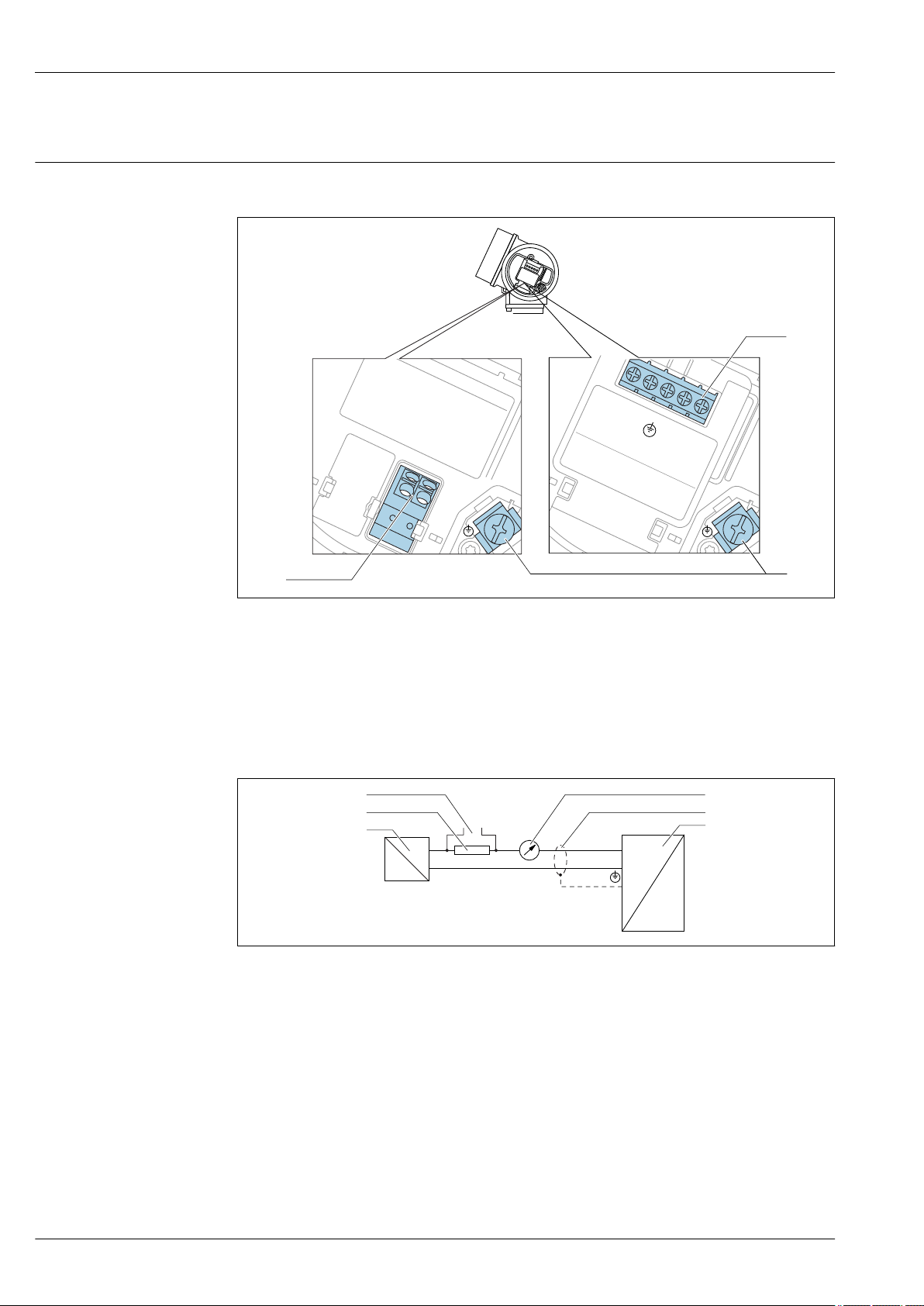
Terminal assignment 2-wire: 4-20 mA HART
3 Terminal assignment 2-wire: 4-20 mA HART
A Without integrated overvoltage protection
B With integrated overvoltage protection
1 Connection 4-20 mA HART passive: terminals 1 and 2, without integrated overvoltage protection
2 Connection 4-20 mA HART passive: terminals 1 and 2, with integrated overvoltage protection
3 Terminal for cable screen
Block diagram 2-wire: 4-20 mA HART
4 Block diagram 2-wire: 4-20 mA HART
1 Active barrier with power supply (e.g. RN221N); observe terminal voltage
2 HART communication resistor (≥ 250 Ω); observe maximum load
3 Connection for Commubox FXA195 or FieldXpert SFX350/SFX370 (via VIATOR Bluetooth modem)
4 Analog display device; observe maximum load
5 Cable screen; observe cable specification
6 Measuring device
A0036498
A0036499
14 Endress+Hauser
Page 15

Micropilot FMR60
1
3
+
+
2
4
-
-
A
1
3
+
+
2
4
-
-
B
4
5
2
3
5
4
2
3
+
+
+
-
-
-
Y
I
6
7
1
2
3
4
Terminal assignment 2-wire: 4-20 mA HART, switch output
5 Terminal assignment 2-wire: 4-20 mA HART, switch output
A Without integrated overvoltage protection
B With integrated overvoltage protection
1 Connection 4-20 mA HART passive: terminals 1 and 2, without integrated overvoltage protection
2 Connection switch output (Open Collector): terminals 3 and 4, without integrated overvoltage protection
3 Connection switch output (Open Collector): terminals 3 and 4, with integrated overvoltage protection
4 Connection 4-20 mA HART passive: terminals 1 and 2, with integrated overvoltage protection
5 Terminal for cable screen
Block diagram 2-wire: 4-20 mA HART, switch output
6 Block diagram 2-wire: 4-20 mA HART, switch output
1 Active barrier with power supply (e.g. RN221N); observe terminal voltage
2 HART communication resistor (≥ 250 Ω); observe maximum load
3 Connection for Commubox FXA195 or FieldXpert SFX350/SFX370 (via VIATOR Bluetooth modem)
4 Analog display device; observe maximum load
5 Cable screen; observe cable specification
6 Measuring device
7 Switch output (Open Collector)
A0036500
A0036501
Endress+Hauser 15
Page 16
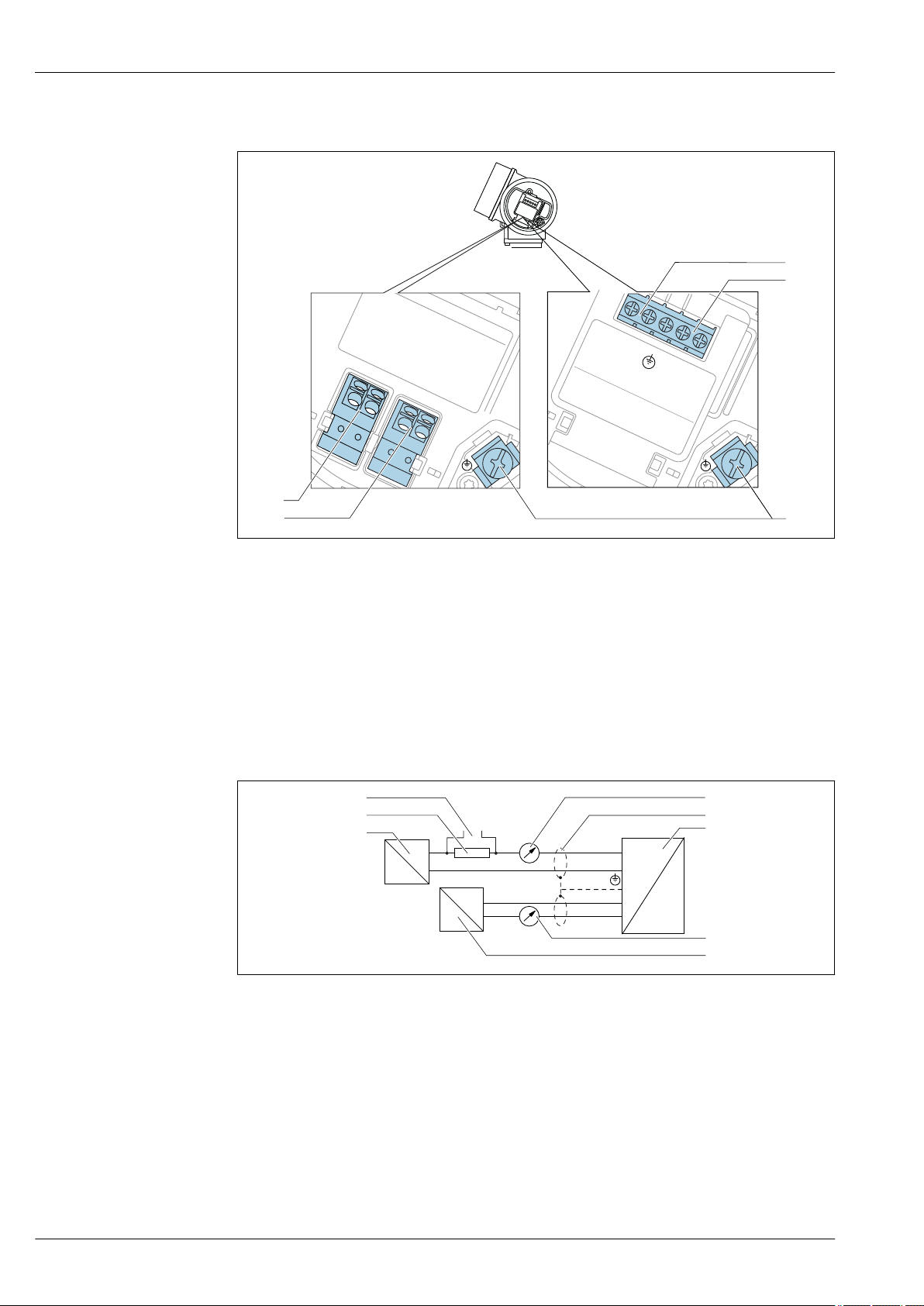
Terminal assignment 2-wire: 4-20 mA HART, 4-20 mA
1
3
+
+
2
4
-
-
A
1
3
+
+
2
4
-
-
B
4
5
2
3
5
4
2
3
+
+
+
+
-
-
-
-
Y
I
6
7
8
1
2
3
4
Micropilot FMR60
A0036500
7 Terminal assignment 2-wire: 4-20 mA HART, 4-20 mA
A Without integrated overvoltage protection
B With integrated overvoltage protection
1 Connection current output 1, 4-20 mA HART passive: terminals 1 and 2, without integrated overvoltage
protection
2 Connection current output 2, 4-20 mA: terminals 3 and 4, without integrated overvoltage protection
3 Connection current output 2, 4-20 mA: terminals 3 and 4, with integrated overvoltage protection
4 Connection current output 1, 4-20 mA HART passive: terminals 1 and 2, with integrated overvoltage
protection
5 Terminal for cable screen
Block diagram 2-wire: 4-20 mA HART, 4-20 mA
A0036502
8 Block diagram 2-wire: 4-20 mA HART, 4-20 mA
1 Active barrier with power supply (e.g. RN221N); observe terminal voltage
2 HART communication resistor (≥ 250 Ω); observe maximum load
3 Connection for Commubox FXA195 or FieldXpert SFX350/SFX370 (via VIATOR Bluetooth modem)
4 Analog display device; observe maximum load
5 Cable screen; observe cable specification
6 Measuring device
7 Analog display device; observe maximum load
8 Active barrier with power supply (e.g. RN221N), current output 2; observe terminal voltage
16 Endress+Hauser
Page 17
Micropilot FMR60
3+
+
-
4-
R
i
3+
2
1
+
4-
R
i
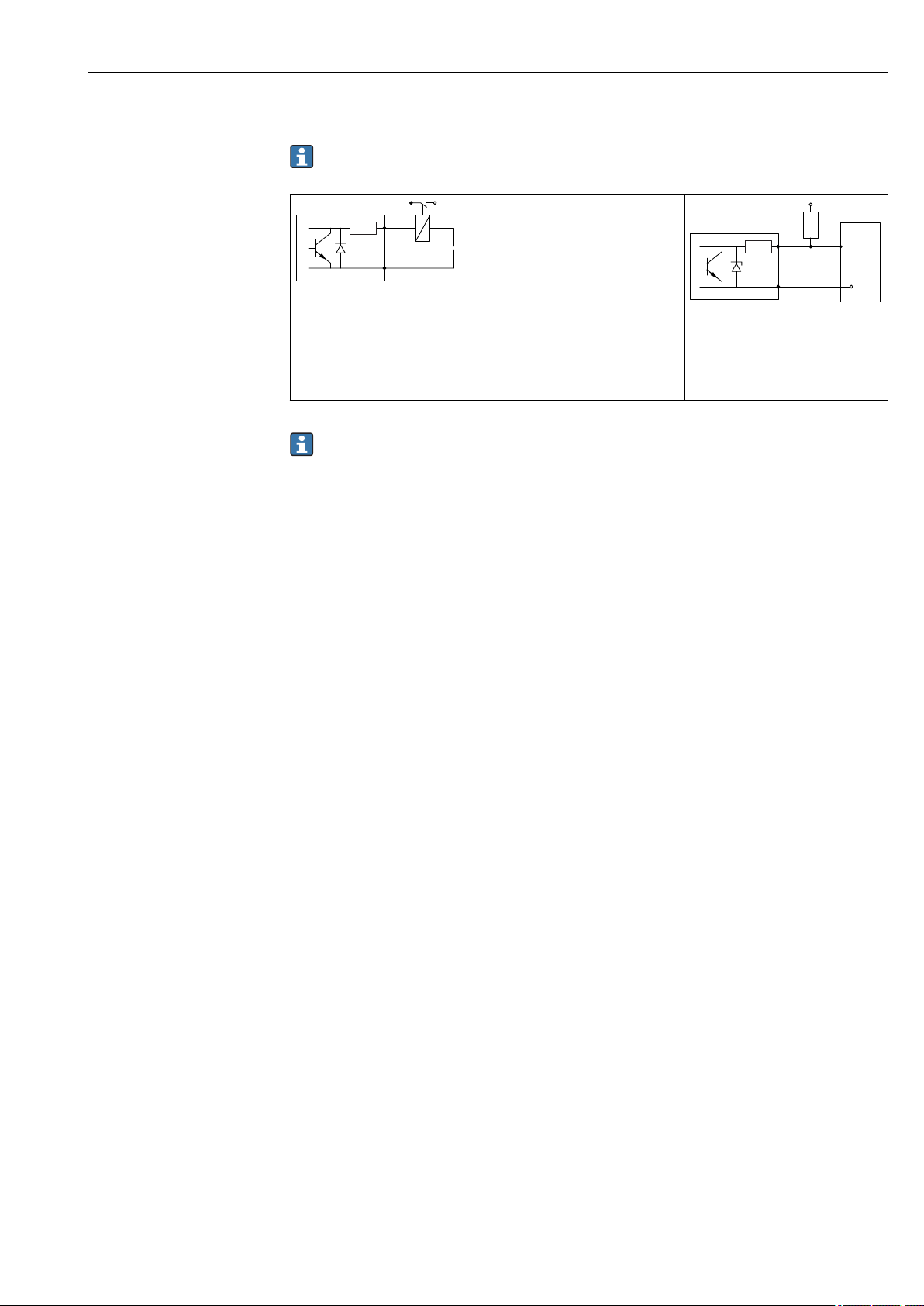
Connection examples for the switch output
For HART devices, the switch output is available as an option. See product structure, feature 20:
"Power Supply, Output", option B: "2-wire; 4-20 mA HART, switch output"
A0015909
9 Connection of a relay
Suitable relays (examples):
• Solid-state relay: Phoenix Contact OV-24DC/480AC/5 with mounting
rail connector UMK-1 OM-R/AMS
• Electromechanical relay: Phoenix Contact PLC-RSC-12DC/21
10 Connection of a digital input
1 Pull-up resistor
2 Digital input
For optimum interference immunity we recommend to connect an external resistor (internal
resistance of the relay or Pull-up resistor) of < 1 000 Ω.
A0015910
Endress+Hauser 17
Page 18
Micropilot FMR60
2
1
3
4
4
2
3
1
Device plug connectors
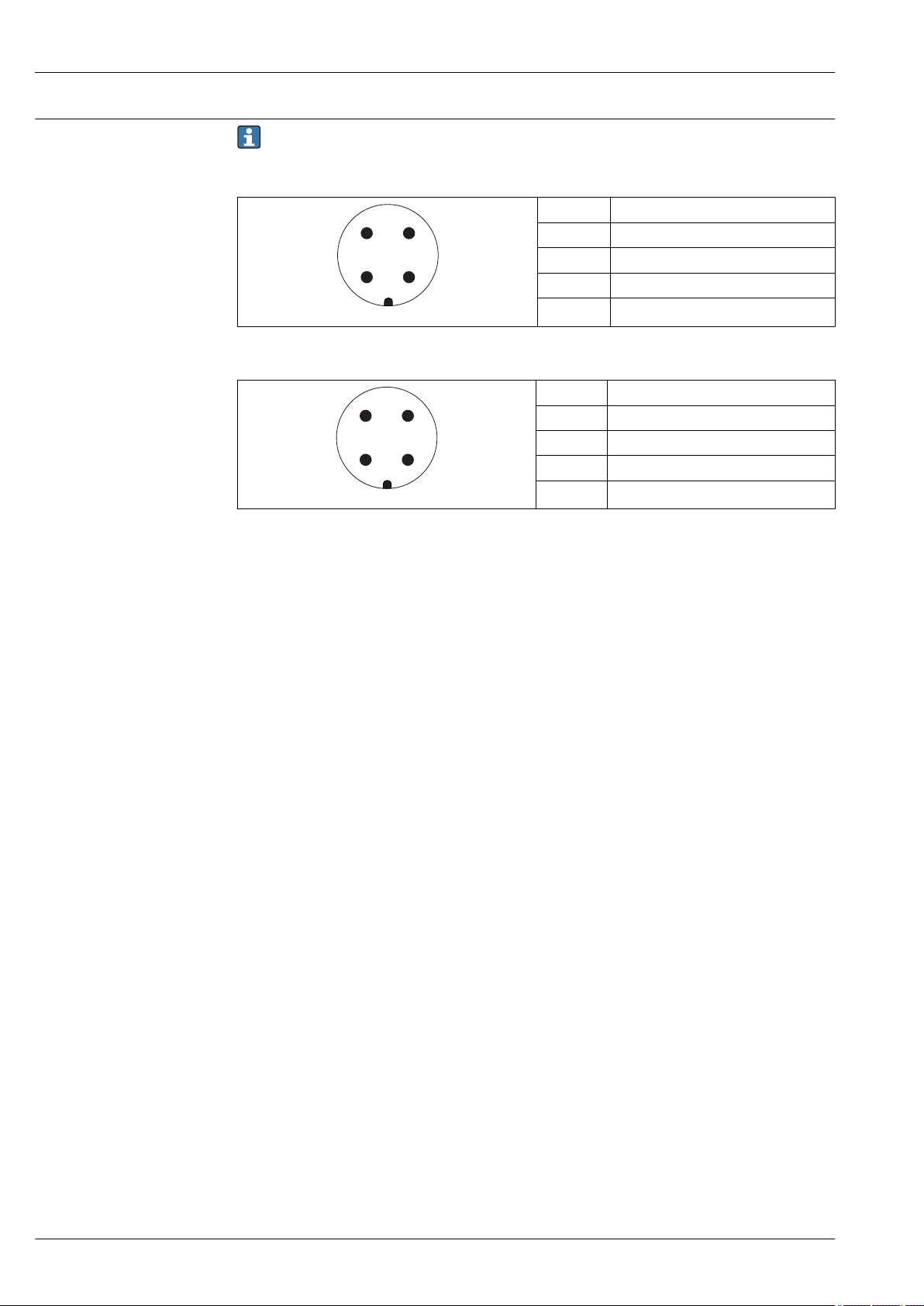
For the versions with fieldbus plug connector (M12 or 7/8"), the signal line can be connected
without opening the housing.
Pin assignment of the M12 plug connector
Pin Meaning
1 Signal +
2 not connected
3 Signal -
4 Ground
A0011175
Pin assignment of the 7/8" plug connector
Pin Meaning
1 Signal -
2 Signal +
3 Not connected
4 Screen
A0011176
18 Endress+Hauser
Page 19
Micropilot FMR60
R [ ]W
U0[V]
10
14
25
20 30 35
0
500
R [ ]W
U0[V]
10
16
27
20 30 35
0
500
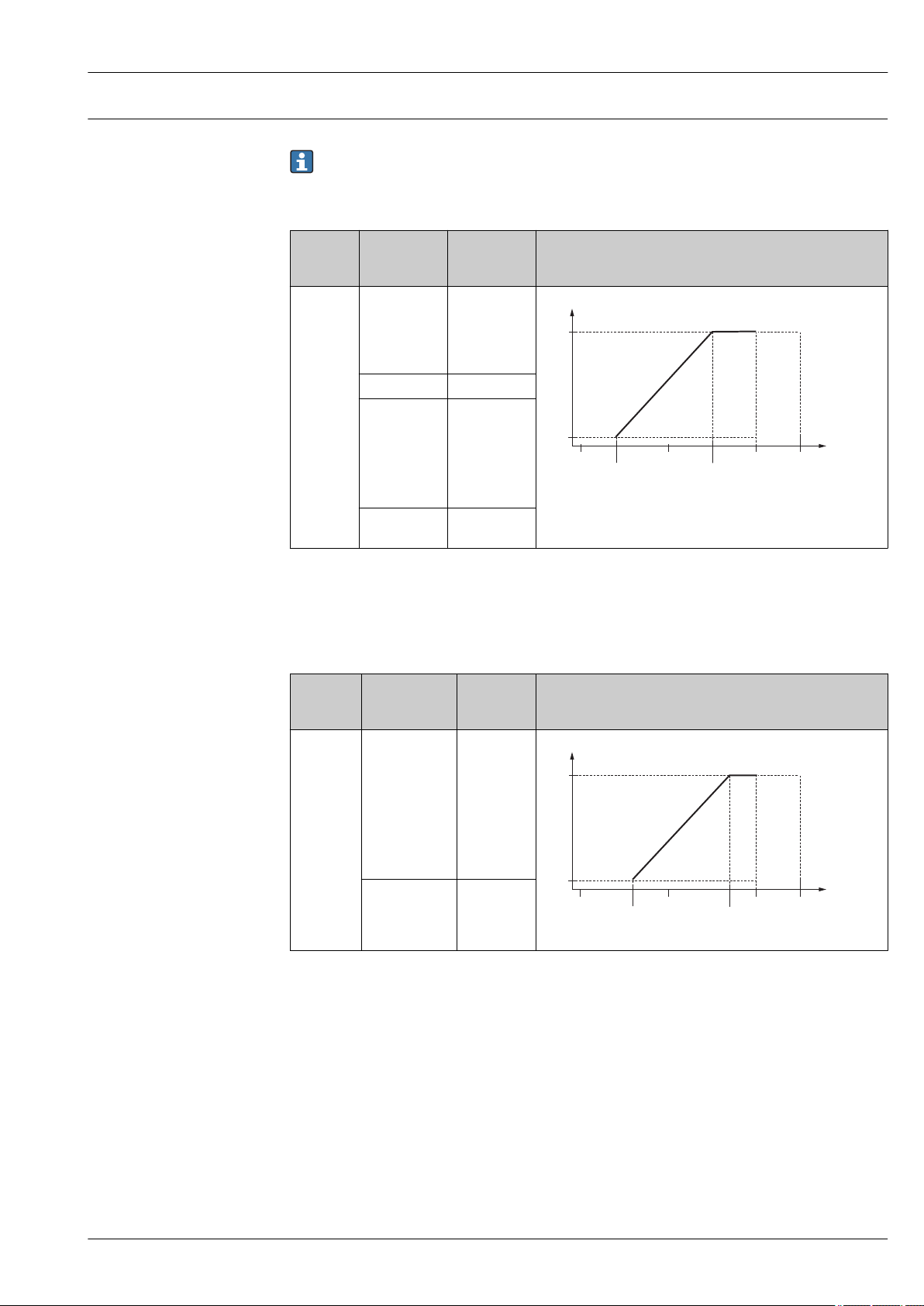
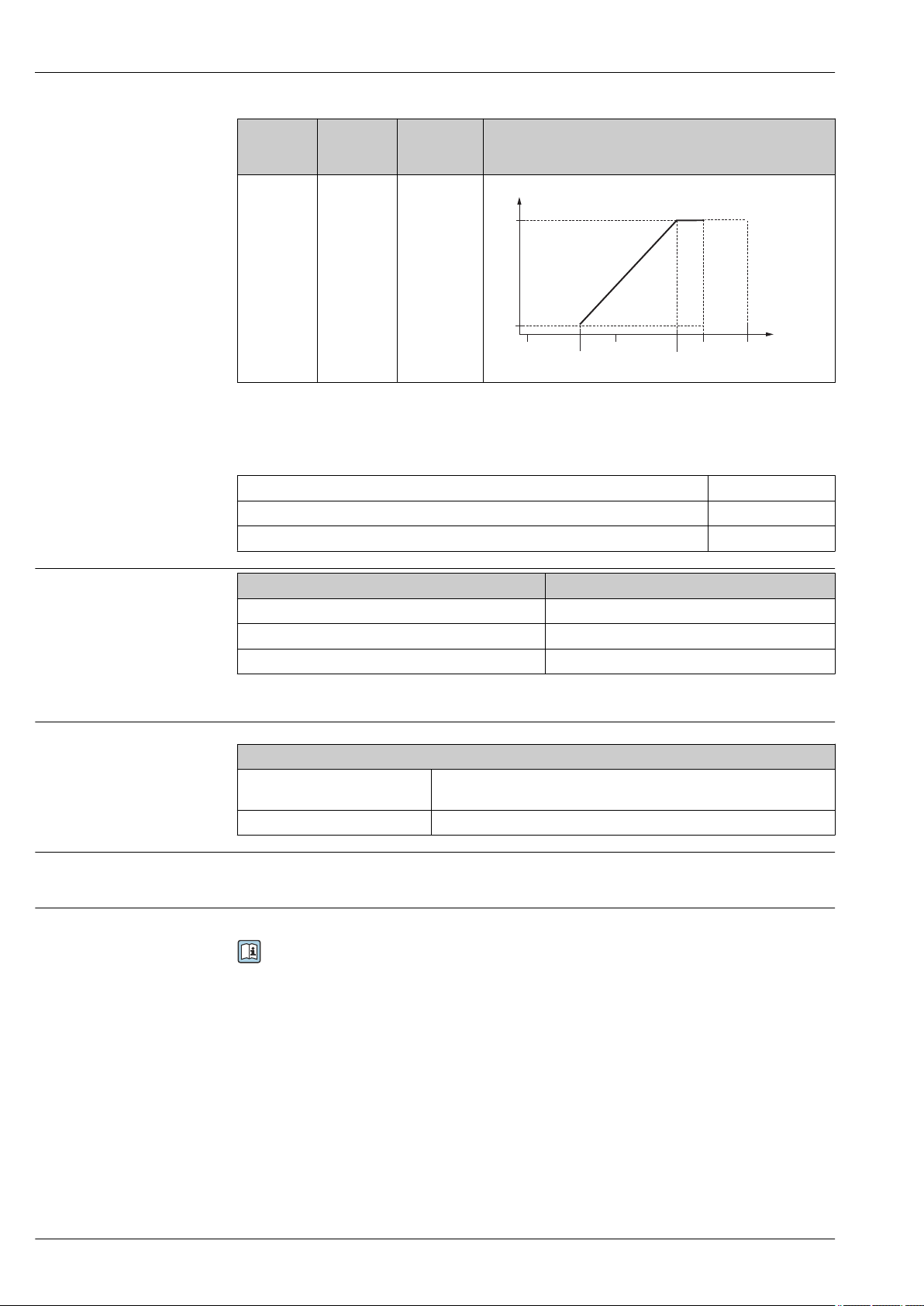
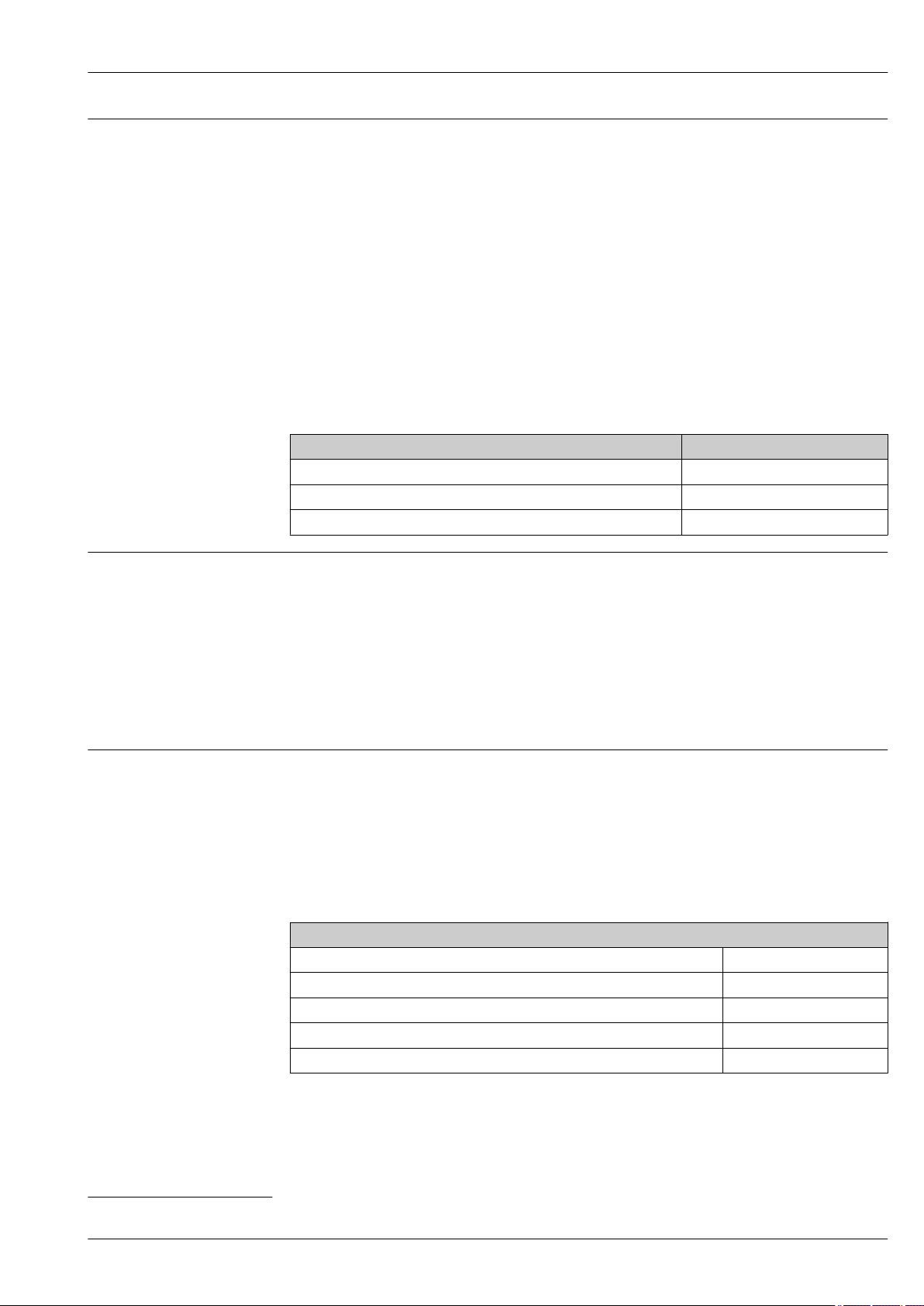
Supply voltage
An external power supply is necessary.
Various power supply units can be ordered as an accessory from Endress+Hauser.
2-wire, 4-20 mA HART, passive
"Power
supply,
output"
A:
2-wire;
4-20 mA
HART
"Approval"
1)
• Nonhazardous
• Ex nA
• Ex ic
• CSA GP
Ex ia / IS 14 to 30 V
• Ex d(ia) /
XP
• Ex ic(ia)
• Ex nA(ia)
• Ex ta / DIP
Ex ia + Ex
d(ia) / IS + XP
1) Feature 020 in the product structure
2) Feature 010 in the product structure
3) If the Bluetooth modem is used, the minimum supply voltage increases by 2 V.
4) At ambient temperatures TTa ≤ –20 °C, a terminal voltage U ≥ 16 V is required to start the device with the
minimum failure current (3.6 mA).
2)
Terminal
voltage U at
device
14 to 35 V
14 to 35 V
14 to 30 V
Maximum load R,
depending on the supply voltage
U0 of the power supply unit
3)
3)
3) 4)
A0031745
3)
hazardous
2)
Terminal
voltage U at
device
16 to 35 V
Maximum load R,
depending on the supply voltage
U0 of the power supply unit
3)
"Power
supply,
output"
B:
2-wire;
4-20 mA
HART,
switch
outpu
"Approval"
1)
• Non-
• Ex nA
• Ex nA(ia)
• Ex ic
• Ex ic(ia)
• Ex d(ia) / XP
• Ex ta / DIP
• CSA GP
• Ex ia / IS
16 to 30 V
3)
• Ex ia + Ex
d(ia) / IS +
XP
1) Feature 020 in the product structure
2) Feature 010 in the product structure
3) If the Bluetooth modem is used, the minimum supply voltage increases by 2 V.
A0031746
Endress+Hauser 19
Page 20
Micropilot FMR60
R [ ]W
U0[V]
10
16
27
20 30 35
0
500
"Power
supply,
output"
C:
2-wire; 4-20
mA HART,
4-20 mA
1) Feature 020 in the product structure
2) Feature 010 in the product structure
3) If the Bluetooth modem is used, the minimum supply voltage increases by 2 V.
Integrated polarity reversal protection Yes
Permitted residual ripple with f = 0 to 100 Hz USS < 1 V
Permitted residual ripple with f = 100 to 10 000 Hz USS < 10 mV
"Approval"
1)
All 16 to 30 V
2)
Terminal
voltage U at
device
Maximum load R,
depending on the supply voltage
U0 of the power supply unit
3)
A0031746
Power consumption
Current consumption
Power supply failure
Potential equalization
"Power supply; Output"
A: 2-wire; 4-20mA HART < 0.9 W
B: 2-wire; 4-20mA HART, switch output < 0.9 W
C: 2-wire; 4-20mA HART, 4-20mA < 2 x 0.7 W
1) Feature 020 of the product structure
HART
Nominal current 3.6 to 22 mA the start-up current for multidrop mode can be parametrized
Breakdown signal (NAMUR NE43) adjustable: 3.59 to 22.5 mA
1)
(is set to 3.6 mA on delivery)
Power consumption
• Configuration is retained in the HistoROM (EEPROM).
• Error messages (incl. value of operated hours counter) are stored.
No special measures for potential equalization are required.
If the device is designed for hazardous areas, observe the information in the documentation
"Safety Instructions" (XA).
20 Endress+Hauser
Page 21
Micropilot FMR60
Cable entries Connection of power supply and signal line
To be selected in feature 050 "Electrical connection"
• Gland M20; Material dependent on the approval:
– For Non-Ex, ATEX, IECEx, NEPSI Ex ia/ic:
Plastics M20x1.5 for cable ⌀5 to 10 mm (0.2 to 0.39 in)
– For Dust-Ex, FM IS, CSA IS, CSA GP, Ex nA:
Metal M20x1.5 for cable ⌀7 to 10 mm (0.28 to 0.39 in)
– For Ex d:
No gland available
• Thread
– ½" NPT
– G ½"
– M20 × 1.5
• Plug M12 / Plug 7/8"
Only available for Non-Ex, Ex ic, Ex ia
Connection of remote display FHX50
Feature 030 "Display, Operation" Cable entry for FHX50 connection
L: "Prepared for display FHX50 + M12 connection" M12 socket
M: "Prepared for display FHX50 + M16 gland, custom connection" M12 cable gland
N: "Prepared for display FHX50 + NPT1/2 thread, custom connection" NPT1/2 thread
1)
Cable specification
Overvoltage protection
• Devices without integrated overvoltage protection
Pluggable spring-force terminals for wire cross-sections 0.5 to 2.5 mm2 (20 to 14 AWG)
• Devices with integrated overvoltage protection
Screw terminals for wire cross-sections 0.2 to 2.5 mm2 (24 to 14 AWG)
• For ambient temperature TU≥60 °C (140 °F): use cable for temperature TU +20 K.
HART
• A normal device cable suffices if only the analog signal is used.
• A shielded cable is recommended if using the HART protocol. Observe grounding concept of the
plant.
If the measuring device is used for level measurement in flammable liquids which requires the use of
overvoltage protection according to DIN EN 60079-14, standard for
test procedures 60060-1 (10 kA, pulse 8/20 μs), an overvoltage protection module has to be
installed.
Integrated overvoltage protection module
An integrated overvoltage protection module is available for 2-wire HART devices.
Product structure: Feature 610 "Accessory mounted", option NA "Overvoltage protection".
Technical data
Resistance per channel 2 × 0.5 Ω max.
Threshold DC voltage 400 to 700 V
Threshold impulse voltage < 800 V
Capacitance at 1 MHz < 1.5 pF
Nominal arrest impulse voltage (8/20 μs) 10 kA
External overvoltage protection module
HAW562 or HAW569 from Endress+Hauser are suited as external overvoltage protection.
1) The material of the gland is dependent on the housing type; GT19 (plastic housing) and GT20 (aluminum housing): nickel-coated brass (CuZn).
Endress+Hauser 21
Page 22
Performance characteristics
0.8 (2.62)
4 (0.16)
1 (0.04)
-1 (-0.04)
-4 (-0.16)
D [m (!)]
∆
[mm (in)]
R
0
Micropilot FMR60
Reference operating conditions
Reference accuracy
• Temperature = +24 °C (+75 °F) ±5 °C (±9 °F)
• Pressure = 960 mbar abs. (14 psia) ±100 mbar (±1.45 psi)
• Humidity = 60 % ±15 %
• Reflector: metal plate with diameter ≥ 1 m (40 in)
• No major interference reflections inside the signal beam
Typical data under reference operating conditions: DIN EN IEC 61298-2 / DIN EN IEC 60770-1;
percentage values in relation to the span.
Output: digital analog
Accuracy (Sum of nonlinearity, nonrepeatability
and hysteresis)
Non-repeatability
1) Add error of the analogous value to the digital value.
2) If the reference conditions are not met, the offset/zero point arising from the mounting conditions may be
up to ±4 mm (0.16 in). This additional offset/zero point can be compensated for by entering a correction
(parameter "level correction") during commissioning.
3) The non-repeatability is already considered in the accuracy.
2)
3)
Measuring distance up to 0.8 m (2.62 ft): max.
±4 mm (±0.16 in)
Measuring distance > 0.8 m (2.62 ft): ±1 mm (±0.04 in) ±0.02 %
≤ 1 mm (0.04 in)
1)
±0.03 %
Differing values in near-range applications
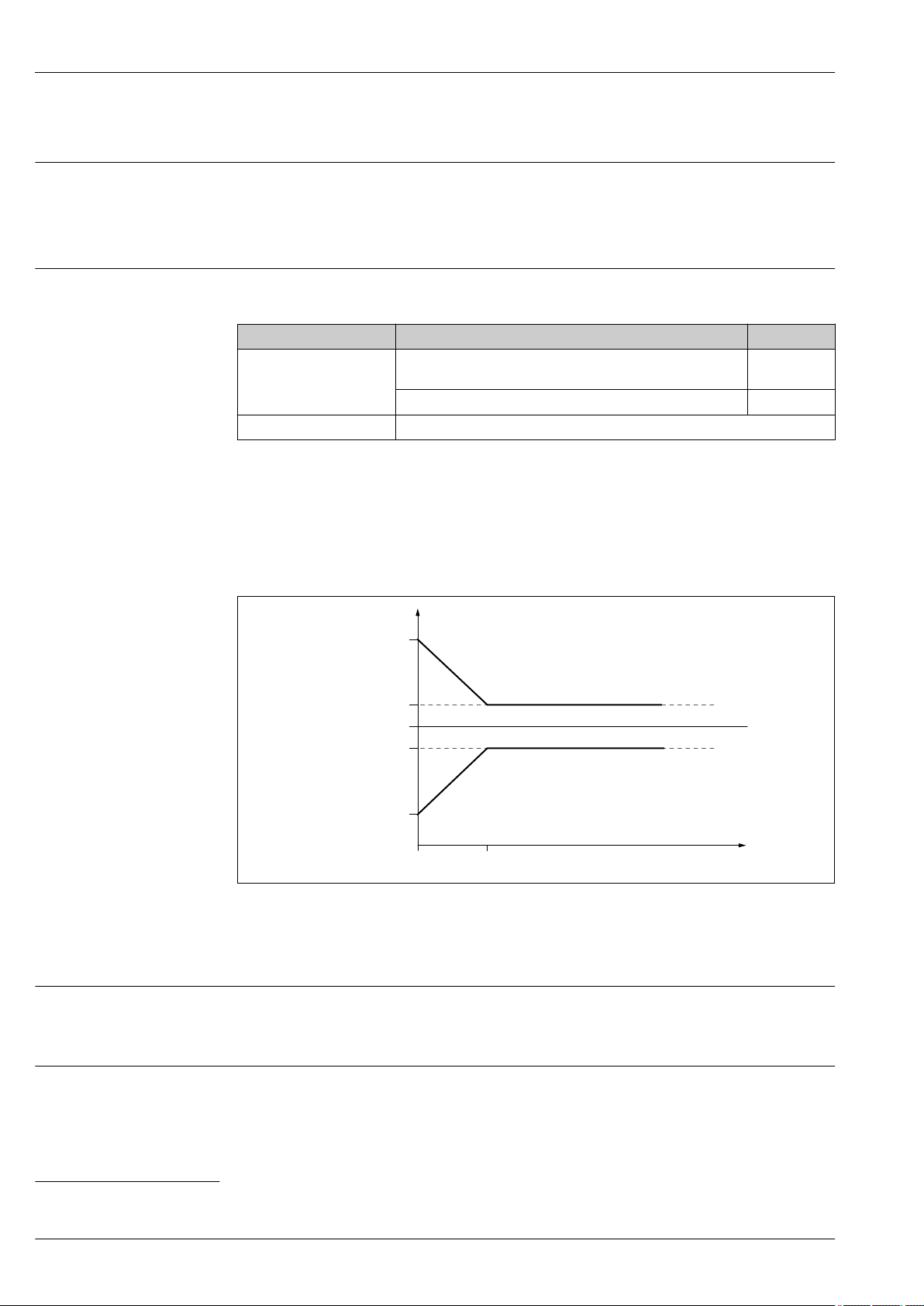
11 Maximum measured error in near-range applications
Δ Maximum measured error
R Reference point of the distance measurement
D Distance from reference point of antenna
Measured value resolution
Dead band according to DIN EN IEC 61298-2 / DIN EN IEC 60770-1:
• Digital: 1 mm
• Analog: 1 µA
Response time
The response time can be configured. The following step response times (in accordance with
DIN EN IEC 61298-2 / DIN EN IEC 60770-1)
2)
are when damping is switched off:
2) According to DIN EN IEC 61298-2 / DIN EN IEC 60770-1, the step response time is the time that elapses after an abrupt change in the input
signal until the change in the output signal has adopted 90% of the steady-state value for the first time.
22 Endress+Hauser
A0032636
Page 23

Micropilot FMR60
Influence of ambient temperature
Influence of gas phase
Sampling rate
Response time < 3.6 s
≥1.3 s–1 at U ≥ 24 V
The measurements are performed according to DIN EN IEC 61298-3 / DIN EN IEC 60770-1
• Digital (HART): average TK = 2 mm/10 K
• Analog (current output):
– Zero point (4 mA): average TK = 0.02 %/10 K
– Span (20 mA): average TK = 0.05 %/10 K
High pressure reduces the speed of propagation of the measuring signals in the gas/vapor above the
medium. This effect depends on the type of gas phase and its temperature. This results in a
systematic measured error that increases with increasing distance between the reference point of
the measurement (flange) and the surface of the product. The following table shows this measured
error for a few typical gases/vapors (with regard to the distance, a positive value means that a too
large distance is measured):
Gas phase Temperature Pressure
°C °F 1 bar (14,5 psi) 10 bar (145 psi) 25 bar (362 psi)
Air/nitrogen 20 68 0.00 % 0.22 % 0.58 %
200 392 –0.01 % 0.13 % 0.36 %
400 752 –0.02 % 0.08 % 0.29 %
Hydrogen 20 68 –0.01 % 0.10 % 0.25 %
200 392 –0.02 % 0.05 % 0.17 %
400 752 –0.02 % 0.03 % 0.11 %
Water (saturated steam) 100 212 0.02 % - -
180 356 - 2.1 % -
263 505,4 - - 4.15 %
310 590 - - -
364 687 - - -
With a known, constant pressure, it is possible to compensate for this measured error with a
linearization, for example.
Endress+Hauser 23
Page 24

Installation
A
1 2 3
Installation conditions Orientation - Liquid media
Micropilot FMR60
A0016882
• Recommended distance A wall - nozzle outer edge: ~ 1/6 of the container diameter. However, the
device must not under any circumstances be mounted closer than 15 cm (5.91 in) to the tank wall.
• Not in the center (2) as interference can cause signal loss.
• Not above the filling curtain (3).
• The use of a weather protection cover (1) is recommended to protect the transmitter from direct
sunlight or rain.
24 Endress+Hauser
Page 25

Micropilot FMR60
α
Internal container fittings
Avoid the location of internal fittings (limit switches, temperature sensors, struts, vacuum rings,
heating coils, baffles etc.) inside the signal beam. Take into account the beam angle → 26.
A0031777
Endress+Hauser 25
Page 26

Avoiding interference echoes
α
D
W
D
_
=
2
2
. .
tan
W
α
α
Micropilot FMR60
A0031813
Metal deflector plates, installed at an angle to scatter the radar signals, help prevent interference
echoes.
Optimization options
• Antenna size
The larger the antenna the smaller the beam angle α, resulting in fewer interference echoes
→ 26.
• Mapping
Measurement can be optimized by electronically suppressing interference echoes.
Beam angle
12 Relationship between beam angle α, distance D and beamwidth diameter W
The beam angle is defined as the angle α where the energy density of the radar waves reaches half
the value of the maximum energy density (3dB width). Microwaves are also emitted outside the
signal beam and can be reflected off interfering installations.
26 Endress+Hauser
A0031824
Page 27

Micropilot FMR60
FMR60
Antenna
1)
Drip-off,
PTFE 50 mm / 2"
Beam angle α 6 °
Distance (D) Beamwidth diameter W
5 m (16 ft) 0.52 m (1.70 ft)
10 m (33 ft) 1.05 m (3.44 ft)
15 m (49 ft) 1.57 m (5.15 ft)
20 m (66 ft) 2.10 m (6.89 ft)
25 m (82 ft) 2.62 m (8.60 ft)
30 m (98 ft) 3.14 m (10.30 ft)
35 m (115 ft) 3.67 m (12.04 ft)
40 m (131 ft) 4.19 m (13.75 ft)
45 m (148 ft) 4.72 m (15.49 ft)
50 m (164 ft) 5.24 m (17.19 ft)
A0032080
1) Order code 070 in product structure
Measurement through a ball valve
• Measurements can be performed through an open full bore ball valve without any problems.
• At the transitions, no gap may be left exceeding 1 mm (0.04 in).
• Diameter of opening of ball valve must always be equivalent to pipe diameter; avoid edges and
constrictions.
A0034564
Endress+Hauser 27
Page 28

Micropilot FMR60
H
max
øD
External measurement through plastic cover or dielectric windows
• Dielectric constant of medium: εr ≥ 10
• The distance from the tip of the antenna to the tank should be approx. 100 mm (4 in).
• If possible, avoid installation positions in which condensate or buildup can form between the
antenna and the vessel.
• In the case of outdoor installations, ensure that the area between the antenna and the tank is
protected from the weather.
• Do not install any fittings or attachments between the antenna and the tank that could reflect the
signal.
Suitable thickness of tank roof or window
Material PE PTFE PP Perspex
ε
r
(Dielectric constant of
medium)
Optimum thickness 1.25 mm
1) or an integer that is a multiple of this value; it should be noted here that the microwave transparency
decreases significantly with increasing window thickness.
2.3 2.1 2.3 3.1
(0.049 in)
1)
1.3 mm
(0.051)
1)
1.25 mm
(0.049 in)
1)
1.07 mm
(0.042 in)
1)
Installation: Drip-off antenna, PTFE 50 mm / 2"
FMR60 - Aligning the antenna axis
Align the antenna vertically to the product surface.
Attention:
The maximum reach of the antenna can be reduced if it is not installed perpendicular to the
product.
Radial alignment of the antenna
Based on the directional characteristic, radial alignment of the antenna is not necessary.
Information concerning nozzles
The maximum nozzle length H
depends on the nozzle diameter D:
max
A0032209
Nozzle diameter (ØD) Maximum nozzle length (H
50 to 80 mm (2 to 3.2 in) 750 mm (30 in)
80 to 100 mm (3.2 to 4 in) 1 150 mm (46 in)
max
1)
)
28 Endress+Hauser
Page 29

Micropilot FMR60
2
Container with heat insulation
Nozzle diameter (ØD) Maximum nozzle length (H
100 to 150 mm (4 to 6 in) 1 450 mm (58 in)
≥150 mm (6 in) 2 200 mm (88 in)
1) In the case of longer nozzles, a reduced measuring performance must be anticipated.
max
1)
)
Note the following if the antenna does not project out of the nozzle:
• The end of the nozzle must be smooth and free from burrs. The edge of the nozzle should be
rounded if possible.
• Mapping must be performed.
• Please contact Endress+Hauser for applications with nozzles that are higher than indicated in
the table.
Information concerning threaded connections
• When screwing in, turn by the hex bolt only.
• Tool: open-ended wrench 55 mm
• Maximum permissible torque: 50 Nm (36 lbf ft)
A0032207
If process temperatures are high, the device should be included in the usual container insulation
system (2) to prevent the electronics from heating as a result of thermal radiation or convection. The
insulation should not be higher than the neck of the device (1).
Endress+Hauser 29
Page 30

Environment
P2
P1
P5
P4
P3
T
a
T
p
P2
P1
P5
P4
P3
T
a
T
p
P2
+
Micropilot FMR60
Ambient temperature range
Ambient temperature limits
Measuring device –40 to +80 °C (–40 to +176 °F)
Local display –20 to +70 °C (–4 to +158 °F), the readability of the display may be impaired at
temperatures outside the temperature range.
Outdoor operation in strong sunlight:
• Mount the device in the shade.
• Avoid direct sunlight, particularly in warm climatic regions.
• Use a weather protection cover (see accessories).
The following diagrams only consider functional aspects. Additional restrictions may apply for
certified device versions. See the separate Safety Instructions for more information → 69.
In the event of temperature (Tp) at the process connection, the permitted ambient temperature (Ta)
is reduced as indicated in the following diagram (temperature derating) in the table header.
FMR60
1)
Seal
A3:
FKM Viton GLT, –40 to 80 °C (–40 to 176 °F)
Temperature specifications: °C (°F)
Housing type
A:
GT19 two-chamber
2)
T
p
–40
(–40)60(140)60(140)60(140)80(176)54(129.2)80(176)
Plastic PBT
C:
GT20 two-chamber
–40
(–40)76(168.8)76(168.8)76(168.8)80(176)76(168.8)80(176)
Aluminum, coated
P1 P2 P3 P4 P5
T
T
T
T
T
T
a
p
a
p
a
T
p
a
–40
(–40)
–40
(–40)
T
p
–40
(–40)
–40
(–40)
A0032024
T
–40
(–40)
–40
(–40)
a
1) Feature 090 in the product structure
2) Feature 040 in the product structure
FMR60
1)
Seal
A4:
FKM Viton GLT,
–40 to 130 °C (–40 to 266 °F)
Temperature specifications: °C (°F)
Housing type
A:
GT19 two-chamber
2)
P1 P2 P2+ P3 P4 P5
TpT
–40
(–40)60(140)60(140)60(140)
TpTaTpT
a
a
113
(235.4)45(113)
TpTaTpTaT
130
(266)22(71.6)
130
(266)
–40
(–40)
p
–40
(–40)
Plastic PBT
C:
GT20 two-chamber
–40
(–40)76(168.8)76(168.8)76(168.8)
110
(230)71(159.8)
130
(266)60(140)
130
(266)
–40
(–40)
–40
(–40)
Aluminum, coated
1) Feature 090 in the product structure
2) Feature 040 in the product structure
30 Endress+Hauser
A0032025
T
a
–40
(–40)
–40
(–40)
Page 31

Micropilot FMR60
Storage temperature
Climate class
Altitude according to IEC61010-1 Ed.3
Degree of protection
Vibration resistance
Electromagnetic compatibility (EMC)
–40 to +80 °C (–40 to +176 °F)
DIN EN 60068-2-38 (test Z/AD)
• Generally up to 2 000 m (6 600 ft) above MSL.
• Above 2 000 m (6 600 ft) if the following conditions are met:
– Ordering feature 020 "Power supply; Output" = A, B, C, E or G (2-wire versions)
– Supply voltage U < 35 V
– Supply voltage of overvoltage category 1
• With closed housing tested according to:
– IP68, NEMA6P (24 h at 1.83 m under water surface)
– For plastic housing with transparent cover (display module): IP68 (24 h at 1.00 m under water
surface)
3)
– IP66, NEMA4X
• With open housing: IP20, NEMA1
• Display module: IP22, NEMA2
Degree of protection IP68 NEMA6P applies for M12 PROFIBUS PA plugs only when the
PROFIBUS cable is plugged in and is also rated IP68 NEMA6P.
DIN EN 60068-2-64 IEC 60068-2-64 at 5 to 2 000 Hz: 1.5 (m/s2)2/Hz
Electromagnetic compatibility in accordance with all of the relevant requirements outlined in the
EN 61326 series and NAMUR Recommendation EMC (NE 21). For details, please refer to the
Declaration of Conformity
4)
.
A normal device cable suffices if only the analog signal should be used. Use a shielded cable for
digital communication (HART/ PA/ FF).
Maximum measured error during EMC testing: <0.5 % of the span. By way of derogation, for devices
with a plastic housing and see-through lid (integrated display SD02 or SD03) the measured error can
be up to 2 % of the span in the event of strong electromagnetic radiation in the 1 to 2 GHz frequency
range.
3) This restriction is valid if the following options of the product structure have been selected at the same time: 030 ("Display, Operation") = C
("SD02") or E ("SD03"); 040 ("Housing") = A ("GT19").
4) Available for download at www.de.endress.com.
Endress+Hauser 31
Page 32

Process
p
-40
(-40)
+130
(+266)
0
(+32)
T
p
[°C]
([°F])
1
16 (232)
-1 (-14.5)
0 (0)
Micropilot FMR60
Process temperature, process pressure
The pressure ranges indicated can be reduced by the choice of process connection. The nominal
pressure (PN) indicated on the nameplate refers to a reference temperature of 20 °C, and of
100 °F for ASME flanges. Observe pressure-temperature dependency.
Please refer to the following standards for the pressure values permitted at higher
temperatures:
• EN 1092-1: 2001 Tab. 18
In terms of their stability-temperature property, the materials 1.4435 and 1.4404 are
grouped in EN 1092-1 table 18 under 13E0. The chemical composition of the two materials
can be identical.
• ASME B 16.5a – 1998 Tab. 2-2.2 F316
• ASME B 16.5a – 1998 Tab. 2.3.8 N10276
• JIS B 2220
FMR60 threaded process connection
A0032614
13 FMR60: Permitted range for process temperature and process pressure
1 Feature 90, seal: A4, FKM Viton GLT
FMR60 threaded process connection
Feature 100 "Process
connection"
• GGJ:
Thread ISO228 G1-1/2
• RGJ:
Thread ANSI MNPT1-1/2
1) The pressure range may be further restricted in the event of a CRN approval
Feature 90
"Seal"
A4:
FKM Viton GLT
Process temperature
range
–40 to +130 °C
(–40 to +266 °F)
Process pressure range
p
=
rel
–1 to 16 bar
(–14.5 to 232 psi)
1)
32 Endress+Hauser
Page 33

Micropilot FMR60
p
-40
(-40)
+80
(+176)
+130
(+266)
0
(+32)
T
p
[°C]
([°F])
1
2
3 (43.5)
-1 (-14.5)
0 (0)
FMR60 flange process connection
14 FMR60: Permitted range for process temperature and process pressure
1 Process connection: flange PP
2 Process connection: flange 316L
FMR60 flange process connection
Feature 100 "Process connection" Process temperature range Process pressure range
• XJG:
UNI flange 3"/DN80/80A, PP
• XKG:
UNI flange 4"/DN100/100A, PP
• XLG:
UNI flange 6"/DN150/150A, PP
• XJJ:
UNI flange 3"/DN80/80A, 316L
• XKJ:
UNI flange4"/DN100/100A, 316L
• XLJ:
UNI flange 6"/DN150/150A, 316L
–40 to +80 °C (–40 to +176 °F)
–40 to +130 °C (–40 to +266 °F)
p
= –1 to 3 bar (–14.5 to 43.5 psi)
rel
p
< 4 bar (58 psi)
abs
1)
A0032615
Dielectric constant
Minimum level in case of small dielectric constants
1) The pressure range may be further restricted in the event of a CRN approval
For liquids
εr ≥ 1.9
Please contact Endress+Hauser for applications with lower dielectric constants than indicated.
For dielectric constants (DC values) of many media commonly used in various industries refer
to:
• the Endress+Hauser DC manual (CP01076F)
• the Endress+Hauser "DC Values App" (available for Android and iOS)
80 mm (3.15 in) above the tank bottom
• This minimum level is valid for media with εr ≤ 4.
• In case of lower levels the tank bottom may be visible through the medium, which results in a
reduced measuring accuracy.
Endress+Hauser 33
Page 34

Mechanical construction
144 (5.67)
113.5 (4.47)
ø106 (4.17)
78 (3.07)
90 (3.54)
99 (3.9)*
ø106 (4.17)
R110
145.5 (5.73)
141.5 (5.57)
ø112 (4.41)
ø108.5 (4.27)
78 (3.07)
90 (3.54)
98 (3.86)*
ø103.5 (4.07)
R110
61 (2.4)
Dimensions Dimensions of the electronics housing
15 Housing GT19 (Plastics PBT); Dimensions in mm (in)
*for devices with integrated overvoltage protection.
Micropilot FMR60
A0011346
16 Housing GT20 (Alu coated); Dimensions in mm (in)
*for devices with integrated overvoltage protection.
A0020751
34 Endress+Hauser
Page 35

Micropilot FMR60
A
B
ø42.5 (1.67)
ø42.5 (1.67)
205 (8.07)
78 (3.07)
127 (5.00)
22 (0.87)
107 (4.21)
R
1
1
FMR60: Antenna and process connection
A0031560
17 Dimensions: mm (in)
A Process connection: G1-1/2" or MNPT1-1/2" thread
B Process connection: UNI flange 3"/DN80/80A to 6"/DN150/150A
R Reference point of the measurement
1 Bottom edge of housing
Endress+Hauser 35
Page 36

UNI flanges for FMR60
G 1 1/2
20 (0.79)
C
A
B
D
45°
A
A
A-A
18 Dimensions: mm (in)
Micropilot FMR60
A0034611
Feature 100: process connection Suitable for A B C D
• XJG:
UNI flange 3"/DN80/80A, PP
• XJJ: UNI flange 3"/DN80/80A, 316L
• XKG:
UNI flange 4"/DN100/100A, PP
• XKJ: UNI flange 4"/DN100/100A, 316L
• XLG:
UNI flange 6"/DN150/150A, PP
• XLJ:
UNI flange 6"/DN150/150A, 316L
• 3" 150lbs
• DN80 PN16
• 10K 80A
• 4" 150lbs
• DN100 PN16
• 10K 100A
• 6" 150lbs
• DN150 PN16
• 10K 150A
150 mm (5.9 in) 160 mm (6.3 in) 200 mm (7.9 in) 19 mm (0.75 in)
175 mm (6.9 in) 190.5 mm (7.5 in) 228.6 mm (9 in) 19 mm (0.75 in)
240 mm (9.4 in) 241.3 mm (9.5 in) 285 mm (11.2 in) 23 mm (0.9 in)
36 Endress+Hauser
Page 37

Micropilot FMR60
Weight
Housing
Part Weight
GT19 housing - plastic Approx. 1.2 kg (2.7 lb)
GT20 housing - aluminum Approx. 1.9 kg (4.2 lb)
Antenna and process connection
Device Antenna
FMR60 GA:
Drip-off, PTFE DN50
1) Order code 070
2) For flange weights (316/316L) see Technical Information TI00426F.
1)
Weight of antenna /
process connection
Max. 2 kg (4.41 lb) + flange weight
2)
Endress+Hauser 37
Page 38

Materials: GT19 housing
2.1
1
2.2
5.2
5.1
6
7
8
9
4
(plastic)
No. Part Material
1 Housing PBT
2.1 Cover of the electronics compartment • Cover glass: PC
• Cover frame: PBT-PC
• Cover seal: EPDM
• Thread-coating: Graphite-based lubricant varnish
2.2 Cover of the terminal compartment • Cover: PBT
• Cover seal: EPDM
• Thread-coating: Graphite-based lubricant varnish
4 Lock at the housing neck • Screw: A4-70
• Clamp: 316L (1.4404)
5.1 Dummy plug, cable gland, adapter or plug
(depending on the device version)
5.2 Dummy plug, cable gland or adapter (depending on
the device version)
6 Dummy plug or M12 socket (depending on the
device version)
7 Pressure relief stopper Nickel-plated brass (CuZn)
8 Ground terminal • Screw: A2
9 Adhesive nameplate Plastic
• Dummy plug, depending on the device version:
– PE
– PBT-GF
• Cable gland, depending on the device version:
– Nickel-plated brass (CuZn)
– PA
• Adapter: 316L (1.4404/1.4435)
• Seal: EPDM
• M12 plug: Nickel-plated brass
• 7/8" plug: 316 (1.4401)
• Dummy plug, depending on the device version:
– PE
– PBT-GF
– Nickel-plated steel
• Cable gland, depending on the device version:
– Nickel-plated brass (CuZn)
– PA
• Adapter: 316L (1.4404/1.4435)
• Seal: EPDM
• Dummy plug: Nickel-plated brass (CuZn)
• M12 socket: Nickel-plated GD-Zn
• Spring washer: A4
• Clamp: 304 (1.4301)
• Holder: 304 (1.4301)
Micropilot FMR60
A0013788
1)
2)
1) For the version with M12 plug the sealing material is Viton.
2) For the version with 7/8" plug, the sealing material is NBR.
38 Endress+Hauser
Page 39

Micropilot FMR60
2.1
1
2.2
5.2
5.1
6
7
8
9
3
4
Materials: GT20 housing
(die-cast aluminum, powdercoated)
Nr. Part Material
1 Housing, RAL 5012 (blue) • Housing: AlSi10Mg(<0,1% Cu)
• Coating: Polyester
2.1 Cover of the electronics compartment; RAL 7035
(gray)
2.2 Cover of the terminal compartment; RAL 7035
(gray)
3 Cover lock • Screw: A4
4 Lock at the housing neck • Screw: A4-70
5.1 Dummy plug, cable gland, adapter or plug
(depending on the device version)
5.2 Dummy plug, cable gland or adapter (depending on
the device version)
6 Dummy plug or M12 socket (depending on the
device version)
7 Pressure relief stopper Nickel-plated brass (CuZn)
• Cover: AlSi10Mg(<0,1% Cu)
• Window: Glass
• Cover seal: NBR
• Seal of the window: NBR
• Thread-coating: Graphite-based lubricant varnish
• Cover: AlSi10Mg(<0,1% Cu)
• Cover seal: NBR
• Thread-coating: Graphite-based lubricant varnish
• Clamp: 316L (1.4404)
• Clamp: 316L (1.4404)
• Dummy plug, depending on the device version:
– PE
– PBT-GF
• Cable gland, depending on the device version:
– Nickel-plated brass (CuZn)
– PA
• Adapter: 316L (1.4404/1.4435)
• Seal: EPDM
• M12 plug: Nickel-plated brass
• 7/8" plug: 316 (1.4401)
• Dummy plug, depending on the device version:
– PE
– PBT-GF
– Nickel-plated steel
• Cable gland, depending on the device version:
– Nickel-plated brass (CuZn)
– PA
• Adapter: 316L (1.4404/1.4435)
• Seal: EPDM
• Dummy plug : Nickel-plated brass (CuZn)
• M12 socket: Nickel-plated GD-Zn
2)
A0036037
1)
Endress+Hauser 39
Page 40

Nr. Part Material
1
2
3
4
5
8 Ground terminal • Screw: A2
• Spring washer: A2
• Clamp: 304 (1.4301)
• Holder: 304 (1.4301)
9 Adhesive nameplate Plastic
1) For the version with M12 plug the sealing material is Viton.
2) For the version with 7/8" plug, the sealing material is NBR.
Micropilot FMR60
Materials: antenna and process connection
FMR60
A0031812
No. Component part Material
1 Antenna Antenna: PTFE
Antenna seal: Viton (FKM)
2 Antenna adapter 316L / 1.4404
3 Housing adapter 316L / 1.4404
4 Housing seal EPDM
5 Process connection 316L / 1.4404
40 Endress+Hauser
Page 41

Micropilot FMR60
1
2
3
4
5
6
Materials: Weather protection cover
A0015473
No Part: Material
1 Protection cover: 316L (1.4404)
2 Molded rubber part (4x): EPDM
3 Clamping screw: 316L (1.4404) + carbon fibre
4 Bracket: 316L (1.4404)
5 Ground terminal
• Screw: A4
• Spring washer: A4
• Clamp: 316L (1.4404)
• Holder: 316L (1.4404)
6 • Washer: A4
• Cheese head screw: A4-70
Endress+Hauser 41
Page 42

Operability
Micropilot FMR60
Operating concept
Operator-oriented menu structure for user-specific tasks
• Commissioning
• Operation
• Diagnostics
• Expert level
Operating languages
• English
• Deutsch
• Français
• Español
• Italiano
• Nederlands
• Portuguesa
• Polski
• русский язык (Russian)
• Svenska
• Türkçe
• 中文 (Chinese)
• 日本語 (Japanese)
• 한국어 (Korean)
• Bahasa Indonesia
• tiếng Việt (Vietnamese)
• čeština (Czech)
Feature 500 of the product structure determines which of these languages is preset on delivery.
Quick and save commissioning
• Interactive wizard with graphical interface for easy commissioning via FieldCare/DeviceCare
• Menu guidance with brief explanations of the individual parameter functions
• Standardized operation at the device and in the operating tools
Integrated data storage device (HistoROM)
• Enables transfer of configuration when changing electronic modules
• Records up to 100 event messages in the device
• Records up to 1000 measured values in the device
• Saves the signal curve on commissioning which can later be used as a reference.
Efficient diagnostics increase measurement reliability
• Remedy information is integrated in plain text
• Diverse simulation options and line recorder functions
Integrated Bluetooth module (option for HART devices)
• Easy and fast setup via SmartBlue (app)
• No additional tools or adapters required
• Signal curve via SmartBlue (app)
• Encrypted single point-to-point data transmission (Fraunhofer-Institut, third party, tested) and
password-protected communication via Bluetooth® wireless technology
42 Endress+Hauser
Page 43

Micropilot FMR60
1 2
Local operation
Operation
with
Order code for
"Display;
Operation"
Display
elements
Operating
elements
Additional
functionality
Pushbuttons Touch Control
Option C "SD02" Option E "SD03"
A0036312 A0036313
4-line display 4-line display
white background lighting; switches to red in
event of device error
Format for displaying measured variables and status variables can be individually configured
Permitted ambient temperature for the display: –20 to +70 °C (–4 to +158 °F)
The readability of the display may be impaired at temperatures outside the temperature
range.
local operation with 3 push buttons (, , ) external operation via touch control; 3
optical keys: , ,
Operating elements also accessible in various hazardous areas
Data backup function
The device configuration can be saved in the display module.
Data comparison function
The device configuration saved in the display module can be compared to the current device
configuration.
Data transfer function
The transmitter configuration can be transmitted to another device using the display module.
Operation with remote display and operating module FHX50
A0036314
19 FHX50 operating options
1 Display and operating module SD03, optical keys; can be operated through the glass of the cover
2 Display and operating module SD02, push buttons; cover must be removed
Endress+Hauser 43
Page 44

Micropilot FMR60
1
2
1
2
3
Operation via Bluetooth® wireless technology
Requirements
A0036790
20 Device with Bluetooth module
1 Electronics housing of the device
2 Bluetooth module
This operation option is only available for devices with Bluetooth module. There are the following
options:
• The device has been ordered with a Bluetooth module:
Feature 610 "Accessory Mounted", option NF "Bluetooth"
• The Bluetooth module has been ordered as an accessory (ordering number: 71377355) and has
been mounted. See Special Documentation SD02252F.
Operation via SmartBlue (app)
A0034939
21 Operation via SmartBlue (app)
1 Transmitter power supply unit
2 Smartphone / tablet with SmartBlue (app)
3 Transmitter with Bluetooth module
44 Endress+Hauser
Page 45

Micropilot FMR60
1 4 5 7
9
6 8
2
3
Remote operation Via HART protocol
22 Options for remote operation via HART protocol
1 PLC (Programmable Logic Controller)
2 Transmitter power supply unit, e.g. RN221N (with communication resistor)
3 Connection for Commubox FXA191, FXA195 and Field Communicator 375, 475
4 Field Communicator 475
5 Computer with operating tool (e.g. DeviceCare/FieldCare , AMS Device Manager, SIMATIC PDM)
6 Commubox FXA191 (RS232) or FXA195 (USB)
7 Field Xpert SFX350/SFX370
8 VIATOR Bluetooth modem with connecting cable
9 Transmitter
A0036169
DeviceCare/FieldCare via service interface (CDI)
23 DeviceCare/FieldCare via service interface (CDI)
1 Service interface (CDI) of the instrument (= Endress+Hauser Common Data Interface)
2 Commubox FXA291
3 Computer with DeviceCare/FieldCare operating tool
A0032466
Endress+Hauser 45
Page 46

Micropilot FMR60
SupplyCare inventory management software
SupplyCare is a web-based operating program for coordinating the flow of material and information
along the supply chain. SupplyCare provides a comprehensive overview of the levels of
geographically distributed tanks and silos, for instance, providing complete transparency over the
current inventory situation, regardless of time and location.
Based on the measuring and transmission technology installed onsite, the current inventory data are
collected and sent to SupplyCare. Critical levels are clearly indicated and calculated forecasts provide
additional security for material requirements planning.
The main functions of SupplyCare:
Inventory visualization
SupplyCare determines the inventory levels in tanks and silos at regular intervals. It displays current
and historical inventory data and calculated forecasts of future demand. The overview page can be
configured to suit the user's preferences.
Master data management
With SupplyCare you can create and manage the master data for locations, companies, tanks,
products and users, as well as user authorization.
Report Configurator
The Report Configurator can be used to create personalized reports quickly and easily. The reports
can be saved in a variety of formats, such as Excel, PDF, CSV and XML. The reports can be
transmitted in many ways, such as by http, ftp or e-mail.
Event management
Events, such as when levels drop below the safety stock level or plan points, are indicated by the
software. In addition, SupplyCare can also notify pre-defined users by e-mail.
Alarms
If technical problems occur, e.g. connection issues, alarms are triggered and alarm e-mails are sent to
the System Administrator and the Local System Administrator.
Delivery planning
The integrated delivery planning function automatically generates an order proposal if a pre-set
minimum inventory level is undershot. Scheduled deliveries and disposals are monitored
continuously by SupplyCare. SupplyCare notifies the user if scheduled deliveries and disposals are not
going to be met as planned.
Analysis
In the Analysis module, the most important indicators for the inflow and outflow of the individual
tanks are calculated and displayed as data and charts. Key indicators of material management are
automatically calculated and form the basis for optimizing the delivery and storage process.
Geographical visualization
All the tanks and the tank inventories are represented graphically on a map (based on Google Maps).
The tanks and inventory situations can be filtered by tank group, product, supplier or location.
Multi-language support
The multi-language user interface supports 9 languages, thereby enabling global collaboration on a
single platform. The language and settings are recognized automatically using the browser settings.
SupplyCare Enterprise
SupplyCare Enterprise runs by default as a service under Microsoft Windows on an application server
in an Apache Tomcat environment. The operators and administrators operate the application via a
Web browser from their workstations.
46 Endress+Hauser
Page 47

Micropilot FMR60
6
.
10
9
1
3
4
6
5 8
7
2
A0034288
24 Example of inventory management platform with SupplyCare Enterprise SCE30B
1 SupplyCare Enterprise (via Web browser)
2 SupplyCare Enterprise installation
3 SupplyCare Enterprise on mobile devices (via Web browser)
4 Ethernet/WLAN/UMTS
5 Fieldgate FXA42
6 Power supply 24 V DC
7 Modbus TCP via Ethernet as server/client
8 Converter from Modbus to HART Multidrop
9 HART Multidrop
10 4 x 4 to 20 mA analog input (2-wire/4-wire)
Endress+Hauser 47
Page 48

Micropilot FMR60
6
.
10
9
1
3
4
6
5 8
7
2
WWW
Cloud-based application: SupplyCare Hosting
SupplyCare Hosting is offered as a hosting service (software as a service). Here, the software is
installed within the Endress+Hauser IT infrastructure and made available to the user in the Endress
+Hauser portal.
A0034289
25 Example of inventory management platform with SupplyCare Hosting SCH30
1 SupplyCare Hosting installation in Endress+Hauser data center
2 PC workstation with Internet connection
3 Warehouse locations with Internet connection via 2G/3G with FXA42 or FXA30
4 Warehouse locations with Internet connection with FXA42
5 Fieldgate FXA42
6 Power supply 24 V DC
7 Modbus TCP via Ethernet as server/client
8 Converter from Modbus to HART Multidrop
9 HART Multidrop
10 4 x 4 to 20 mA analog input (2-wire/4-wire)
With SupplyCare Hosting, users do not need to make the initial software purchase or install and run
the IT infrastructure needed. Endress+Hauser constantly update SupplyCare Hosting and enhance
the capability of the software in conjunction with the customer. The hosted version of SupplyCare is
thus always up-to-date and can be customized to meet different customer requirements. Other
services are also offered in addition to the IT infrastructure and the software that is installed in a
secure, redundant Endress+Hauser data center. These services include defined availability of the
global Endress+Hauser Service and Support Organization and defined response times in a service
event.
48 Endress+Hauser
Page 49

Micropilot FMR60
Certificates and approvals
Currently available certificates and approvals can be called up via the product configurator.
CE mark
RoHS
RCM-Tick marking
Ex approval
The measuring system meets the legal requirements of the applicable EC guidelines. These are listed
in the corresponding EC Declaration of Conformity together with the standards applied.
Endress+Hauser confirms successful testing of the device by affixing to it the CE mark.
The measuring system complies with the substance restrictions of the Restriction on Hazardous
Substances Directive 2011/65/EU (RoHS 2).
The supplied product or measuring system meets the ACMA (Australian Communications and Media
Authority) requirements for network integrity, interoperability, performance characteristics as well
as health and safety regulations. Here, especially the regulatory arrangements for electromagnetic
compatibility are met. The products are labelled with the RCM- Tick marking on the name plate.
A0029561
• ATEX
• IECEx
• CSA
• FM
• NEPSI
• KC
• INMETRO
5)
• JPN
• EAC
Additional safety instructions must be followed for use in hazardous areas. Please refer to the
separate "Safety Instructions" (XA) document included in the delivery. Reference to the applicable XA
can be found on the nameplate.
For details on the available certificates and associated XAs: → 69
Dual seal according to ANSI/ISA 12.27.01
The devices have been designed according to ANSI/ISA 12.27.01 as dual seal devices, allowing the
user to waive the use and save the cost of installing external secondary process seals in the conduit
as required by the process sealing sections of ANSI/NFPA 70 (NEC) and CSA 22.1 (CEC) These
instruments comply with the North-American installation practice and provide a very safe and costsaving installation for pressurized applications with hazardous fluids.
Further information can be found in the Safety Instructions (XA) of the relevant devices.
Functional safety
Use for level monitoring (MIN, MAX, range) up to SIL 3 (homogeneous or diverse redundancy),
independently evaluated by TÜV Rheinland in accordance with IEC 61508, refer to the "Functional
Safety Manual" for information.
WHG
Pressure equipment with
allowable pressure
≤ 200 bar (2 900 psi)
WHG approval
Pressure instruments with a flange and threaded boss that do not have a pressurized housing do not
fall within the scope of the Pressure Equipment Directive, irrespective of the maximum allowable
pressure.
Reasons:
According to Article 2, point 5 of EU Directive 2014/68/EU, pressure accessories are defined as
"devices with an operational function and having pressure-bearing housings".
5) in preparation
Endress+Hauser 49
Page 50

Micropilot FMR60
If a pressure instrument does not have a pressure-bearing housing (no identifiable pressure chamber
of its own), there is no pressure accessory present within the meaning of the Directive.
Radio standard EN 302729
The devices comply with the Level Probing Radar (LPR) radio standard EN 302729. The devices are
approved for unrestricted use inside and outside closed containers in countries of the EU and the
EFTA . that have already implemented this standard.
The following countries are those that have currently implemented the directive:
Belgium, Bulgaria, Germany, Denmark, Estonia, France, Greece, UK, Ireland, Iceland, Italy,
Liechtenstein, Lithuania, Latvia, Malta, The Netherlands, Norway, Austria, Poland, Portugal,
Romania, Sweden, Switzerland, Slovakia, Spain, Czech Republic and Cyprus.
Implementation is still underway in all of the countries not listed.
Please note the following for operation of the devices outside of closed vessels:
1. Installation must be carried out by properly trained, expert staff.
2. The device antenna must be installed in a fixed location pointing vertically downwards.
3. The installation site must be located at a distance of 4 km from the astronomy stations listed
below or otherwise approval must be provided by the relevant authority. If the device is
installed at a distance of 4 to 40 km from one of the listed stations, it must not be installed at a
height of more than 15 m (49 ft) above the ground.
Astronomy stations
Country Name of the station Latitude Longitude
Germany Effelsberg 50°31'32" North 06°53'00" East
Finland Metsähovi 60°13'04" North 24°23'37" East
Tuorla 60°24'56" North 24°26'31" East
France Plateau de Bure 44°38'01" North 05°54'26" East
Floirac 44°50'10" North 00°31'37" West
Great Britain Cambridge 52°09'59" North 00°02'20" East
Damhall 53°09'22" North 02°32'03" West
Jodrell Bank 53°14'10" North 02°18'26" West
Knockin 52°47'24" North 02°59'45" West
Pickmere 53°17'18" North 02°26'38" West
Italy Medicina 44°31'14" North 11°38'49" East
Noto 36°52'34" North 14°59'21" East
Sardinia 39°29'50" North 09°14'40" East
Poland Fort Skala Krakow 50°03'18" North 19°49'36" East
Russia Dmitrov 56°26'00" North 37°27'00" East
Kalyazin 57°13'22" North 37°54'01" East
Pushchino 54°49'00" North 37°40'00" East
Zelenchukskaya 43°49'53" North 41°35'32" East
Sweden Onsala 57°23'45" North 11°55'35" East
Switzerland Bleien 47°20'26" North 08°06'44" East
Spain Yebes 40°31'27" North 03°05'22" West
Robledo 40°25'38" North 04°14'57" West
Hungary Penc 47°47'22" North 19°16'53" East
As a general rule, the requirements outlined in EN 302729 must be observed.
50 Endress+Hauser
Page 51

Micropilot FMR60
Radio standard EN 302372
FCC
Industry Canada
The devices comply with the Tanks Level Probing Radar (TLPR) radio standard EN 302372 and are
approved for use in closed containers. For installation, points a to f in Annex E of EN 302372 must
be taken into consideration.
This device complies with Part 15 of the FCC rules. Operation is subject to the following two
conditions: (1) This device may not cause harmful interference, and (2) this device must accept any
interference received, including interference that may cause undesired operation.
[Any] changes or modifications not expressly approved by the party responsible for compliance could
void the user's authority to operate the equipment.
The devices are compliant with the FCC Code of Federal Regulations, CFR 47, Part 15, Sections
15.205, 15.207, 15.209.
In addition, the devices are compliant with Section 15.256 . For these LPR (Level Probe Radar)
applications the devices must be professionally installed in a downward operating position. In
addition, the devices are not allowed to be mounted in a zone of 4 km around RAS stations and
within a radius of 40 km around RAS stations the maxium operation height of devices is 15 m (49 ft)
above ground.
Canada CNR-Gen Section 7.1.3
This device complies with Industry Canada licence-exempt RSS standard(s). Operation is subject to
the following two conditions: (1) This device may not interference, and (2) this device must accept
any interference, including interference that may cause undesired operation of the device.
Le présent appareil est conforme aux CNR d'Industrie Canada applicables aux appareils radio exempts
de licence. L'exploitation est autorisée aux deux conditions suivantes : (1) l'appareil ne doit pas
produire de brouillage, et (2) l'utilisateur de l'appareil doit accepter tout brouillage radioélectrique
subi, même si le brouillage est susceptible d'en compromettre le fonctionnement.
[Any] changes or modifications not expressly approved by the party responsible for compliance could
void the user's authority to operate the equipment.
• The installation of the LPR/TLPR device shall be done by trained installers, in strict compliance
with the manufacturer’s instructions.
• The use of this device is on a “no-interference, no-protection” basis. That is, the user shall accept
operations of high-powered radar in the same frequency band which may interfere with or
damage this device. However, devices found to interfere with primary licensing operations will be
required to be removed at the user’s expense.
• This device shall be installed and operated in a completely enclosed container to prevent RF
emissions, which can otherwise interfere with aeronautical navigation.
• The installer/user of this device shall ensure that it is at least 10 km from the Dominion
Astrophysical Radio Observatory (DRAO) near Penticton, British Columbia. The coordinates of the
DRAO are latitude 49°19ʹ15ʹʹ N and longitude 119°37ʹ12ʹʹ W. For devices not meeting this 10 km
separation (e.g., those in the Okanagan Valley, British Columbia,) the installer/user must
coordinate with, and obtain the written concurrence of, the Director of the DRAO before the
equipment can be installed or operated. The Director of the DRAO may be contacted at
250-497-2300 (tel.) or 250-497-2355 (fax). (Alternatively, the Manager, Regulatory Standards
Industry Canada, may be contacted.)
The model FMR60 fulfills the requirements for use as LPR (Level Probe Radar).
CRN approval (Canadian pressure equipment directive)
• Selection in the product structure: Feature 590 "Additional Approval", option LD "CRN"
• This option can be selected if the device has a CRN approved process connection according to the
following table:
Feature 100 in the
product structure
GGJ Thread ISO228 G1-1/2, 316L
RGJ Thread ANSI MNPT1-1/2, 316L
XJJ UNI flange 3"/DN80/80, 316L, max 4bar abs / 58 psia, suitable for NPS " Cl.150 / DN80
Process connection
PN16 / 10K 80
Endress+Hauser 51
Page 52

Micropilot FMR60
Feature 100 in the
product structure
XKJ UNI flange 4"/DN100/100, 316L, max 4bar abs / 58 psia, suitable for NPS 4" Cl.150 /
XLJ UNI flange 6"/DN150/150, 316L, max 4bar abs / 58 psia, suitable for NPS 6" Cl.150 /
Process connection
DN100 PN16 / 10K 100
DN150 PN16 / 10K 150
• For some process connections which are not listed in the product structure a CRN approval is
available on request.
• CRN-approved devices bear the registration number CRN 0F19773.5C on the nameplate.
52 Endress+Hauser
Page 53

Micropilot FMR60
Test, certificate
Hard-copy product documentation
Feature 580 "Test, certificate" Description
JA 3.1 Material certificate, wetted metal parts, EN10204-3.1 inspection
certificate
Test reports, declarations and inspection certificates are available in electronic format in the
W@M Device Viewer:
Enter the serial number from nameplate (www.endress.com/deviceviewer)
This concerns the options for the following order codes:
• 550 "Calibration"
• 580 "Test, certificate"
Hard-copy versions of the test reports, declarations and inspection certificates can also be order via
order code 570 "Service", option I7 "Hard-copy product documentation". The documents are then
supplied with the product.
Endress+Hauser 53
Page 54

Micropilot FMR60
Other standards and guidelines
• EN 60529
Degrees of protection provided by enclosures (IP code)
• EN 61010-1
Safety Requirements for Electrical Equipment for Measurement, Control and Laboratory Use
• IEC/EN 61326
"Emission in accordance with Class A requirements". Electromagnetic compatibility (EMC
requirements).
• NAMUR NE 21
Electromagnetic compatibility (EMC) of industrial process and laboratory control equipment
• NAMUR NE 43
Standardization of the signal level for the breakdown information of digital transmitters with
analog output signal.
• NAMUR NE 53
Software of field devices and signal-processing devices with digital electronics
• NAMUR NE 107
Status classification as per NE107
• NAMUR NE 131
Requirements for field devices for standard applications.
• IEC61508
Functional safety of safety-related electric/electronic/programmable electronic systems
54 Endress+Hauser
Page 55

Micropilot FMR60
Ordering information
Ordering information
Detailed ordering information is available from the following sources:
• In the Product Configurator on the Endress+Hauser website: www.endress.com -> Click "Corporate"
-> Select your country -> Click "Products" -> Select the product using the filters and search field ->
Open product page -> The "Configure" button to the right of the product image opens the Product
Configurator.
• From your Endress+Hauser Sales Center: www.addresses.endress.com
Product Configurator - the tool for individual product configuration
• Up-to-the-minute configuration data
• Depending on the device: Direct input of measuring point-specific information such as
measuring range or operating language
• Automatic verification of exclusion criteria
• Automatic creation of the order code and its breakdown in PDF or Excel output format
• Ability to order directly in the Endress+Hauser Online Shop
Endress+Hauser 55
Page 56

Micropilot FMR60
R
A
500 (19.7)
6000 (236)
1
3
2
3-point linearity protocol
The following points must be considered if option F3 (3-point linearity protocol) was selected in
feature 550 ("Calibration").
The 3 points of the linearity protocol are defined as follows:
A0032642
26 Points of the 3-point linearity protocol; engineering unit: mm (in)
A Distance from the reference point R to the first measuring point
R Reference point of measurement
1 First measuring point
2 Second measuring point (in the middle between the first and third measuring point)
3 Third measuring point
Measuring point Position
1st measuring point • At a distance A from the reference point
• A = length of antenna + 500 mm (19.7 in)
• Minimum distance: A
2nd measuring point In the middle between the 1st and 3rd measuring point
3rd measuring point 6 000 mm (236 in) below the reference point R
= 1 000 mm (39.4 in)
min
The position of the measuring points can vary by ±1 cm (±0.04 in).
The linearity check is performed under reference operating conditions.
56 Endress+Hauser
Page 57

Micropilot FMR60
R
A
F
E
5-point linearity protocol
The following points must be considered if option F4 (5-point linearity protocol) was selected in
feature 550 ("Calibration").
The 5 points of the linearity protocol are evenly distributed over the measuring range (0% - 100%).
Empty calibration (E) and Full calibration (F) must be specified in order to define the measuring
6)
range
.
The following restrictions must be considered when selecting E and F:
A0032643
Minimum distance between reference point R and
100% mark
A ≥ length of antenna + 200 mm (8 in)
Minimum value: 400 mm (16 in)
Minimum span Maximum value for "Empty
calibration"
F ≥400 mm (16 in) E ≤24 m (79 ft)
The linearity check is performed under reference operating conditions.
The selected values for Empty calibration and Full calibration are only used to create the
linearity protocol. Afterwards, the values are reset to the default values specific for the
antenna. If values other than the default values are required, they must be ordered as a
customized parameterization → 58.
6) If (E) and (F) are not specified, antenna-dependent default values will be used instead.
Endress+Hauser 57
Page 58

Micropilot FMR60
Customer-specific configuration
Tagging (TAG)
If the option IJ: "Customized parameterization HART", IK "Customized parameterization PA" or IL
"Customized parameterization FF" has been selected in feature 570 "Service", presettings that differ
from the default settings can be selected for the following parameters:
Parameters Communication
protocol
Setup → Unit of length • HART
• PA
• FF
Setup → Empty calibration • HART
• PA
• FF
Setup → Full calibration • HART
• PA
• FF
Setup → Extended setup → Curr. output 1 or 2 → Damping HART 0 to 999.9 s
Setup → Extended setup → Curr. output 1 or 2 → Failure
mode
Expert → Comm. → HART config. → Burst mode HART • Off
Ordering feature 895: Marking
Option Z1: Tagging (TAG), see additional spec.
Position of the measuring
point marking
Definition of the measuring
point designation
Designation in the Electronic
Name Plate (ENP)
Designation on the display
module
To be selected in the additional specifications:
• Tag plate Stainless Steel
• Self-adhesive paper label
• Supplied label/plate
• RFID TAG
• RFID TAG + Tag plate Stainless Steel
• RFID TAG + Self-adhesive paper label
• RFID TAG + Supplied label/plate
To be defined in the additional specifications:
3 lines containing up to 18 characters each
The measuring point designation appears on the selected label and/or the
RFID TAG.
The first 32 characters of the measuring point designation
The first 12 characters of the measuring point designation
HART • Min
Picklist / range of values
• in
• ft
• mm
• m
max. 70 m (230 ft)
max. <70 m (230 ft)
• Max
• Last valid value
• On
Services
The following services can be selected via the product structure in the Product Configurator
7)
:
• PWIS-free (PWIS = paint-wetting impairment substances)
• Customized parameterization HART → 58
• Customized parameterization PA → 58
• Customized parameterization FF → 58
• W/o tooling DVD (FieldCare)
• Hard-copy product documentation
7) Feature 570 in the product structure
58 Endress+Hauser
Page 59

Micropilot FMR60
Application Packages
Heartbeat Diagnostics Availability
Available in all device versions.
Function
• Continuous self-monitoring of the device.
• Diagnostic messages output to
– the local display.
– an asset management system (e.g. FieldCare/DeviceCare).
– an automation system (e.g. PLC).
Advantages
• Device condition information is available immediately and processed in time.
• The status signals are classified in accordance with VDI/VDE 2650 and NAMUR recommendation
NE 107 and contain information about the cause of the error and remedial action.
Detailed description
See Operating Instructions of the device (→ 69); chapter "Diagnostics and trouble shooting"
Endress+Hauser 59
Page 60

Heartbeat Verification Availability
Available for the following options of feature 540 "Application Package":
• EH: Heartbeat Verification + Monitoring
• EJ: Heartbeat Verification
Device functionality checked on demand
• Verification of the correct functioning of the measuring device within specifications.
• The verification result provides information about the condition of the device: Passed or Failed.
• The results are documented in a verification report.
• The automatically generated report supports the obligation to demonstrate compliance with
internal and external regulations, laws and standards.
• Verification is possible without interrupting the process.
Advantages
• No onsite presence is required to use the function.
• The DTM
required on the part of the user.
• The verification report can be used to prove quality measures to a third party.
• Heartbeat Verification can replace other maintenance tasks (e.g. periodic check) or extend the
test intervals.
Micropilot FMR60
8)
triggers verification in the device and interprets the results. No specific knowledge is
SIL/WHG-locked devices
9)
• The Heartbeat Verification module contains a wizard for the proof test which must be performed
at appropriate intervals for the following applications:
– SIL (IEC61508/IEC61511)
– WHG (German Water Resources Act)
• To perform a proof test, the device must be locked (SIL/WHG locking).
• The wizard can be used via FieldCare, DeviceCare or a DTM-based process control system.
In the case of SIL-locked and WHG-locked devices, it is not possible to perform verification
without additional measures (e.g. by-passing of the output current) because the output current
must be simulated (Increased safety mode) or the level must be approached manually (Expert
mode) during subsequent re-locking (SIL/WHG locking).
Detailed description
SD01870F
8) DTM: Device Type Manager; controls device operation via DeviceCare, FieldCare or a DTM-based process control system.
9) Only relevant for devices with SIL or WHG approval: order code 590 ("Additional approval"), option LA ("SIL") or LC ("WHG").
60 Endress+Hauser
Page 61

Micropilot FMR60
Heartbeat Monitoring Availability
Available for the following options of feature 540 "Application Package":
EH: Heartbeat Verification + Monitoring
Function
• In addition to the verification parameters, the corresponding parameter values are also logged.
• Existing measured variables, such as the echo amplitude, are used in the Foam detection and
Build-up detection wizards.
"Foam detection" wizard
• The Heartbeat Monitoring module contains the Foam detection wizard.
• This wizard is used to configure automatic foam detection, which detects foam on the product
surface on the basis of the reduced signal amplitude. Foam detection can be linked to a switch
output in order to control a sprinkler system, for example, which dissolves the foam.
• This wizard can be used via FieldCare, DeviceCare or a DTM-based process control system.
"Build-up detection" wizard
• The Heartbeat Monitoring module contains the Build-up detection wizard.
• The wizard is used to configure automatic buildup detection, which detects the buildup of deposits
on the antenna on the basis of the increased area of the coupling signal. Buildup detection can be
linked to a switch output in order to control a compressed air system, for example, to clean the
antenna.
• This wizard can be used via FieldCare, DeviceCare or a DTM-based process control system.
Advantages
• Early detection of changes (trends) to ensure plant availability and product quality.
• Use of information for the proactive planning of measures (e.g. cleaning/maintenance).
• Identification of undesirable process conditions as the basis to optimizing the facility and the
processes.
• Automated control of measures to remove foam or buildup.
Detailed description
SD01870F
Endress+Hauser 61
Page 62

Accessories
222 (8.74)
300 (11.8) 275 (10.8)
255.1 (10)
156 (6.14)
38 (1.5)
164 (6.46)
54 (2.13)
35°
65°
55°
Device-specific accessories Weather protection cover
Accessory Description
Weather protection cover
Micropilot FMR60
A0015466
27 Weather protection cover; Dimensions: mm (in)
The weather protection cover can be ordered together with the device (product structure, feature 620 "Accessory
Enclosed", option PB "Weather Protection Cover").
Alternatively, it can be separately ordered as an accessory; order code 71162242.
A0015472
62 Endress+Hauser
Page 63

Micropilot FMR60
65 (2.6)
12(0.5)
9(0.4)
ø9(0.4)
48(1.9)
122 (4.8)
16 (0.6)
100 (3.9)
35(1.4)
99.5 (3.9)
260 (10.2)
Accessories Description
Mounting bracket
adjustable
Mounting bracket adjustable
A0032295
Material: 304 (1.4301)
Suitable for housing
– A: GT19 dual compartment, plastic PBT
– C: GT20 dual compartment, Alu, coated
Suitable for antenna
GA: Drip-off, PTFE DN50
Suitable for process connection
– GGJ: thread ISO228 G1-1/2, 316L
– RGJ: thread ANSI MNPT1-1/2, 316L
Order number: 71336522
• There is no conductive connection between the mounting bracket and the transmitter housing.
1) Feature 040 in the product structure
2) Feature 070 in the product structure
3) Feature 100 in the product structure
• Risk of electrostatic charge.
• Integrate the mounting bracket in the local potential equalization system.
• Only to be fastened at stable materials (e.g. metal, brick, concrete) using suitable fastening material (to be
supplied by customer).
1)
:
2)
:
3)
:
Endress+Hauser 63
Page 64

Remote display FHX50
1.
3.
2.
4.
Accessories Description
Remote display FHX50
• Material:
– Plastic PBT
– 316L/1.4404
– Aluminum
• Degree of protection: IP68 / NEMA 6P and IP66 / NEMA 4x
• Suitable for display modules:
– SD02 (push buttons)
– SD03 (touch control)
• Connecting cable:
– Cable supplied with device up to 30 m (98 ft)
– Standard cable supplied by customer up to 60 m (196 ft)
• Ambient temperature range: –40 to 80 °C (–40 to 176 °F)
• Ambient temperature range (option): –50 to 80 °C (–58 to 176 °F)
• If the remote display should be used, order the device version "Prepared for display FHX50" (feature 030, version
L, M or N). For the FHX50, you must select option A: "Prepared for display FHX50" under feature 050 "Measuring
device version".
• If the device version "Prepared for display FHX50" was not originally ordered and a FHX50 display is to be
retrofitted, you must select version B "Not prepared for display FHX50" under feature 050: "Measuring device
version" when ordering the FHX50. In this case, a retrofit kit for the device is supplied with the FHX50. The kit
can be used to prepare the device so that the FHX50 can be used.
Use of the FHX50 may be restricted for transmitters with an approval. A device can only be retrofitted with the
FHX50 if the option L, M or N ("Prepared for FHX50") is listed under Basic specifications, item 4 "Display, operation"
in the Safety Instructions (XA) for the device.
Also pay attention to the Safety Instructions (XA) of the FHX50.
Retrofitting is not possible on transmitters with:
• An approval for use in areas with flammable dust (dust ignition-proof approval)
• Ex nA type of protection
For details, see document SD01007F.
Micropilot FMR60
A0019128
1)
1) This range is valid if option JN "Ambient temperature transmitter –50 °C (–58 °F)" has been selected in ordering feature 580 "Test, Certificate". If
the temperature is permanently below –40 °C (–40 °F), failure rates may be increased.
64 Endress+Hauser
Page 65

Micropilot FMR60
Accessory Description
Overvoltage protection for
2-wire-devices
OVP10 (1 channel)
OVP20 (2 channel)
Technical data
• Resistance per channel: 2 * 0.5 Ω
• Threshold DC voltage: 400 to 700 V
• Threshold impulse voltage: < 800 V
• Capacitance at 1 MHz: < 1.5 pF
• Nominal arrest impulse voltage (8/20 μs): 10 kA
• Suited for wire cross-sections: 0.2 to 2.5 mm2 (24 to 14 AWG)
Ordering with device
The overvoltage protection module is preferably ordered with the device. See product structure, feature 610
"Accessory mounted", option NA "Overvoltage protection". Separate ordering of the module is only necessary if a
device is to retrofitted with the overvoltage protection.
Order code for retrofitting
• For 1-channel devices (feature 020, option A)
• For 2-channel devices (feature 020, option B, C, E or G)
Hosuing lid for retrofitting
In order to keep the necessary safety distances, the housing lid needs to be replaced if the device is retrofitted with
the overvoltage protection. Depending on the housing type, the order code of the suitable lid is as follows:
• GT18 housing: Lid 71185516
• GT19 housing: Lid 71185518
• GT20 housing: Lid 71185516
Restrictions for retrofitting
Depending on the approval of the transmitter the usage of the OVP module may be restricted. A device may only be
retrofitted with an OVP module if the option NA (overvoltage protection) is quoted unter Optional Specifications in
the Safety Instructions (XA) pertaining to the device.
For details refer to SD01090F.
Overvoltage protection
A0021734
max
OVP10: 71128617
OVP20 : 71128619
Gas-tight feedthrough
Accessories Description
Gas-tight feedthrough Chemically inert glass feedthrough; prevents gases from entering the electronics housing
To order with the device: product structure, feature 610 "Accessory mounted", option NC "Gas-tight feedthrough"
Endress+Hauser 65
Page 66

Bluetooth module for HART devices
Accessory Description
Bluetooth module
• Quick and easy commissioning via SmartBlue (app)
• No additional tools or adapters required
• Signal curve via SmartBlue (app)
• Encrypted single point-to-point data transmission (tested by Fraunhofer institue) and password protected
communication via Bluetooth® wireless technology
• Range under reference conditions:
> 10 m (33 ft)
When using the Bluetooth module the minimum supply voltage increases by up to 3 V.
Ordering with device
The Bluetooth module is preferably ordered with the device. See product structure, feature 610 "Accessory
Mounted", option NF "Bluetooth". A separate order is only necessary in case of retrofitting.
Order code for retrofitting
Bluetooth module (BT10): 71377355
Restrictions in case of retrofitting
Depending on the approval of the transmitter, application of the Bluetooth module may be restricted. A device may
only be retrofitted with a Bluetooth module if the option NF (Bluetooth) is listed in the associated Safety
Instructions (XA) under Optional specifications.
For details refer to SD02252F.
Micropilot FMR60
A0036493
66 Endress+Hauser
Page 67

Micropilot FMR60
Communication-specific accessories
Accessory Description
Commubox FXA195
HART
Accessory Description
Commubox FXA291 Connects Endress+Hauser field devices with CDI interface (= Endress+Hauser
Accessory Description
HART Loop Converter
HMX50
Accessory Description
WirelessHART Adapter
SWA70
For intrinsically safe HART communication with FieldCare via the USB interface.
For details refer to Technical Information TI00404F
Common Data Interface) to the USB interface of a computer.
Order code: 51516983
For details refer to Technical Information TI00405C
Evaluates the dynamic HART variables and converts them to analog current signals
or limit values.
Order code: 71063562
For details refer to Technical Information TI00429F and Operating
Instructions BA00371F
Connects field devices to a WirelessHART network.
The WirelessHART adapter can be mounted directly at a HART device and is easly
integrated into an existing HART network. It ensures safe data transmission and
can be operated in parallel with other wireless networks.
For details refer to Operating Instructions BA00061S
Accessories Description
Connect Sensor
FXA30/FXA30B
Accessories Description
Fieldgate
FXA42
Accessories Description
SupplyCare
Enterprise
SCE30B
Fully integrated, battery-powered gateway for simple applications with SupplyCare Hosting.
Up to 4 field devices with 4 to 20 mA communication (FXA30/FXA30B), serial Modbus
(FXA30B) or HART (FXA30B) can be connected. With its robust design and ability to run for
years on the battery, it is ideal for remote monitoring in isolated locations. Version with LTE
(USA, Canada and Mexico only) or 3G mobile transmission for worldwide communication.
For details, see "Technical Information" TI01356S and Operating Instructions
BA01710S.
Fieldgates enable communication between connected 4 to 20 mA, Modbus RS485 and
Modbus TCP devices and SupplyCare Hosting or SupplyCare Enterprise. The signals are
transmitted either via Ethernet TCP/IP, WLAN or mobile communications (UMTS). Advanced
automation capabilities are available, such as an integrated Web-PLC, OpenVPN and other
functions.
For details, see "Technical Information" TI01297S and Operating Instructions
BA01778S.
Inventory management software that visualizes levels, volumes, masses, temperatures,
pressures, densities or other tank parameters. The parameters are recorded and transmitted
by means of gateways of the type Fieldgate FXA42.
This Web-based software is installed on a local server and can also be visualized and
operated with mobile terminals such as a smartphone or tablet.
For details, see "Technical Information" TI01228S and Operating Instructions
BA00055S
Endress+Hauser 67
Page 68

Micropilot FMR60
Accessories Description
SupplyCare
Hosting SCH30
Accessory Description
Field Xpert SFX350 Field Xpert SFX350 is a mobile computer for commissioning and maintenance. It
Accessory Description
Field Xpert SFX370 Field Xpert SFX370 is a mobile computer for commissioning and maintenance. It
Inventory management software that visualizes levels, volumes, masses, temperatures,
pressures, densities or other tank parameters. The parameters are recorded and transmitted
by means of gateways of the type Fieldgate FXA42, FXA30 and FXA30B.
SupplyCare Hosting is offered as a hosting service (Software as a Service, SaaS). In the
Endress+Hauser portal, the user is provided with the data over the Internet.
For details, see "Technical Information" TI01229S and Operating Instructions
BA00050S.
enables efficient device configuration and diagnostics for HART and FOUNDATION
fieldbus devices in the non-Ex area.
For details, see Operating Instructions BA01202S
enables efficient device configuration and diagnostics for HART and FOUNDATION
fieldbus devices in the non-Ex area and the Ex area.
For details, see Operating Instructions BA01202S
Service-specific accessories
System components
Accessory Description
DeviceCare SFE100 Configuration tool for HART, PROFIBUS and FOUNDATION Fieldbus devices
Technical Information TI01134S
• DeviceCare is available for download at
www.software-products.endress.com. The download requires a
registration in the Endress+Hauser software portal.
• Alternatively, a DeviceCare DVD can be ordered with the device. Product
structure: Feature 570 "Service", Option IV "Tooling DVD (DeviceCare
Setup)".
FieldCare SFE500 FDT-based Plant Asset Management tool.
Helps to configure and maintain all field devices of your plant. By supplying status
information it also supports the diagnosis of the devices.
Technical Information TI00028S
Accessory Description
Graphic Data Manager
Memograph M
RN221N Active barrier with power supply for safe separation of 4 to 20 mA current circuits.
RNS221 Transmitter supply for 2-wire sensors or transmitters exclusively for non-Ex areas.
The graphic data manager Memograph M provides information on all the relevant
process variables. Measured values are recorded correctly, limit values are
monitored and measuring points analyzed. The data are stored in the 256 MB
internal memory and also on an SD card or USB stick.
For details refer to Technical Information TI00133R and Operating
Instructions BA00247R
Provides bi-directional HART transmission.
For details refer to Technical Information TI00073R and Operating
Instructions BA00202R
Provides bi-directional communication using the HART communication sockets.
For details refer to Technical Information TI00081R and Operating
Instructions KA00110R
68 Endress+Hauser
Page 69

Micropilot FMR60
Supplementary documentation
For an overview of the scope of the associated Technical Documentation, refer to the following:
• The W@M Device Viewer: enter the serial number from the nameplate
(www.endress.com/deviceviewer)
• The Endress+Hauser Operations App: Enter the serial number from the nameplate or scan the
2-D matrix code (QR code) on the nameplate.
The following document types are available:
In the Download Area of the Endress+Hauser Internet site: www.endress.com → Downloads
Standard documentation Micropilot FMR60
Correlation of documentations to the device:
Safety Instructions (XA)
Device Power supply,
FMR60 A, B, C, K, L HART Operating Instructions BA01618F
1) Feature 020 in the product structure
output
1)
Depending on the approval, the following Safety Instructions (XA) are supplied with the device. They
Communication Document type Document code
Brief Operating Instructions KA01251F
Description of Device
Parameters
GP01101F
are an integral part of the Operating Instructions.
The nameplate indicates the Safety Instructions (XA) that are relevant to the device.
Feature 010 Approval Feature 020 "Power Supply; Output"
1)
A
BA ATEX II 1G Ex ia IIC T6 Ga XA01549F XA01549F XA01549F
BB ATEX II 1/2G Ex ia IIC T6 Ga/Gb XA01549F XA01549F XA01549F
BC ATEX II 1/2G Ex ia/db [ia Ga] IIC T6 Ga/Gb XA01552F XA01552F XA01552F
BG ATEX II 3G Ex ec IIC T6 Gc XA01551F XA01551F XA01551F
BH ATEX II 3G Ex ic IIC T6 Gc XA01551F XA01551F XA01551F
B2 ATEX II 1/2G Ex ia IIC T6 Ga/Gb, 1/2D Ex ia IIIC T85°C Da/Db XA01555F XA01555F XA01555F
B3 ATEX II 1/2G Ex ia/db [ia Ga] IIC T6, Ga/Gb 1/2D Ex ta/tb IIIC T85°C Da/Db XA01556F XA01556F XA01556F
B4 ATEX II 1/2G Ex ia IIC T6 Ga/Gb, Ex ia/db [ia Ga] IIC T6 Ga/Gb XA01553F XA01553F XA01553F
CB CSA IS Cl.I Div.1 Gr.A-D XA01612F XA01612F XA01612F
CC CSA XP Cl.I Div.1 Gr.A-D [Ex ia] XA01613F XA01613F XA01613F
C2 CSA IS Cl.I,II,III Div.1 Gr.A-G, Ex ia, NI Cl.1 Div.2 [Ex ia] XA01612F XA01612F XA01612F
C3 CSA XP Cl.I,II,III Div.1 Gr.A-G, Zn0/1, NI Cl.I Div.2 [Ex ia] XA01613F XA01613F XA01613F
FA FM IS Cl.I Div.1 Gr.A-D XA01615F XA01615F XA01615F
FB FM IS Cl.I,II,III Div.1 Gr.A-G, AEx ia, NI Cl.1 Div.2 XA01615F XA01615F XA01615F
FC FM XP-IS Cl.I Div.1 Gr.A-D, AIS Cl.I Div.1 Gr.A-D XA01616F XA01616F XA01616F
FD FM XP-IS Cl.I Div.1 Gr.A-D, Zn0/1, DIP-IS Cl.II,III Div.1 Gr.E-G, NI Cl.I Div.2 XA01616F XA01616F XA01616F
GA EAC 0Ex ia IIC T6...T3 Ga X XA01617F XA01617F XA01617F
GB EAC Ga/Gb Ex ia IIC T6...T3 X XA01617F XA01617F XA01617F
GC EAC Ga/Gb Ex ia/db [ia Ga] IIC T6...T3 X XA01618F XA01618F XA01618F
IA IEC Ex ia IIC T6 Ga XA01549F XA01549F XA01549F
IB IEC Ex ia IIC T6 Ga/Gb XA01549F XA01549F XA01549F
2)
B
3)
C
Endress+Hauser 69
Page 70

Micropilot FMR60
Feature 010 Approval Feature 020 "Power Supply; Output"
1)
A
IC IEC Ex ia/db [ia Ga] IIC T6 Ga/Gb XA01552F XA01552F XA01552F
IG IEC Ex ec IIC T6 Gc XA01551F XA01551F XA01551F
IH IEC Ex ic IIC T6 Gc XA01551F XA01551F XA01551F
I2 IEC Ex ia IIC T6 Ga/Gb, Ex ia IIIC T85°C Da/Db XA01555F XA01555F XA01555F
I3 IEC Ex ia/db [ia Ga] IIC T6 Ga/Gb, Ex ta/tb IIIC T85°C Da/Db XA01556F XA01556F XA01556F
I4 IEC Ex ia IIC T6 Ga/Gb, Ex ia/db [ia Ga] IIC T6 Ga/Gb XA01553F XA01553F XA01553F
JA JPN Ex ia IIC T6 Ga XA01631F
JB JPN Ex ia IIC T6 Ga/Gb XA01631F
JC JPN Ex d [ia] IIC T6 Ga/Gb XA01632F
JG JPN Ex nA IIC T6 Gc XA01725F
JH JPN Ex ic IIC T6 Gc XA01725F
J2 JPN Ex ia IIC T6 Ga/Gb, JPN Ex ia IIIC T85°C Da/Db XA01728F
J3 JPN Ex d [ia] IIC T6 Ga/Gb, JPN Ex ta/tb IIIC T85°C Da/Db XA01729F
J4 JPN Ex ia IIC T6 Ga/Gb, JPN Ex d [ia] IIC T6 Ga/Gb XA01726F
KA KC Ex ia IIC T6 Ga XA01623F XA01623F XA01623F
KB KC Ex ia IIC T6 Ga/Gb XA01623F XA01623F XA01623F
KC KC Ex ia/db [ia Ga] IIC T6 Ga/Gb XA01624F XA01624F XA01624F
MA INMETRO Ex ia IIC T6 Ga XA01620F XA01620F XA01620F
MB INMETRO Ex ia IIC T6 Ga/Gb XA01620F XA01620F XA01620F
MC INMETRO Ex ia/db [ia Ga] IIC T6 Ga/Gb XA01622F XA01622F XA01622F
MG INMETRO Ex ec IIC T6 Gc XA01621F XA01621F XA01621F
MH INMETRO Ex ic IIC T6 Gc XA01621F XA01621F XA01621F
NA NEPSI Ex ia IIC T6 Ga XA01625F XA01625F XA01625F
NB NEPSI Ex ia IIC T6 Ga/Gb XA01625F XA01625F XA01625F
NC NEPSI Ex ia/d [ia Ga] IIC T6 Ga/Gb XA01627F XA01627F XA01627F
NG NEPSI Ex nA IIC T6 Gc XA01626F XA01626F XA01626F
NH NEPSI Ex ic IIC T6 Gc XA01626F XA01626F XA01626F
N2 NEPSI Ex ia IIC T6 Ga/Gb, NEPSI Ex iaD 20/21 T85 XA01629F XA01629F XA01629F
N3 NEPSI Ex ia/d [ia Ga] IIC T6 Ga/Gb, NEPSI Ex tD A20/A21 IP6X T85°C XA01630F XA01630F XA01630F
8A FM/CSA IS+XP-IS Cl.I,II,III Div.1 Gr.A-G, AIS Cl.I,II,III Div.1 Gr.A-G XA01612F
XA01615F
XA01616F
4)
*
4)
4)
4)
4)
4)
4)
4)
4)
2)
B
XA01631F
XA01631F
XA01632F
XA01725F
XA01725F
XA01728F
XA01729F
XA01726F
XA01612F
XA01615F
XA01616F
4)
4)
4)
4)
4)
4)
4)
4)
3)
C
XA01631F
XA01631F
XA01632F
XA01725F
XA01725F
XA01728F
XA01729F
XA01726F
XA01612F
XA01615F
XA01616F
4)
4)
4)
4)
4)
4)
4)
4)
1) 2-wire; 4-20mA HART
2) 2-wire; 4-20mA HART, switch output
3) 2-wire; 4-20mA HART, 4-20mA
4) in preparation
70 Endress+Hauser
Page 71

Page 72

*71394723*
71394723
www.addresses.endress.com
 Loading...