

Page 1

DVD RECEIVER AMP
BASIC MODEL: HT-X20
SERVICE
Manual
DVD RECEIVER AMP SYSTEM Features
* Multi-Disc Playback & FM Tuner
* Dolby Pro Logic II
* DTS (Digital Theater Systems)
* TV Screen Saver Function
* Customized TV Screen Display
- Confidential -
MODEL : HT-X20
* Application : HT-X20/ KX20/ TX22/ TX25
HT-THX22/ THX25
HT-TKX22/ TKX25
Page 2
© Samsung Electronics Co.,Ltd.MAR. 2005
Printed in Korea
Code no.AH68-01771Y
ELECTRONICS
Page 3
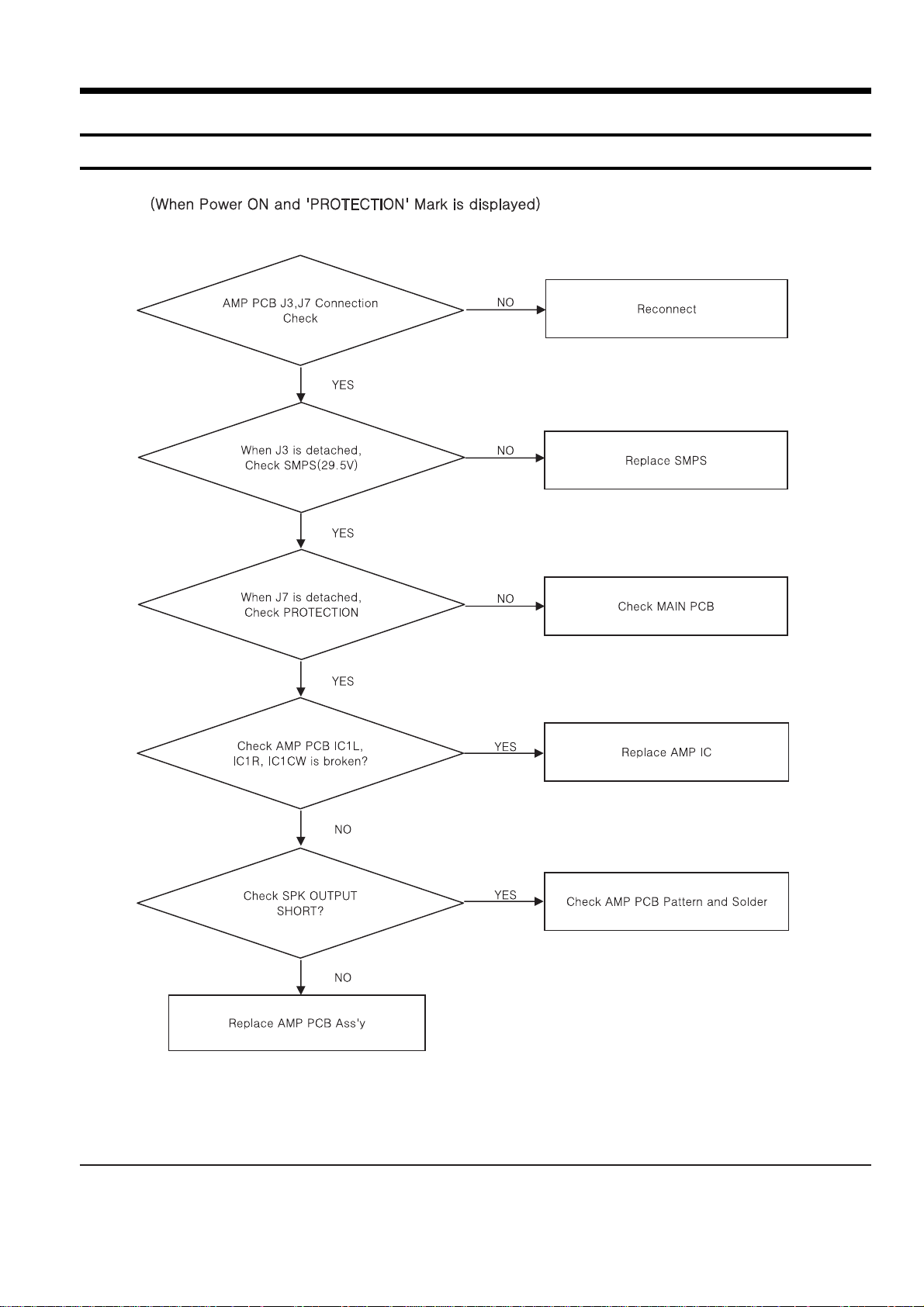
Samsung Electronics 4-1
4. Adjustments
* Protection Mode Explanation
Page 4

Samsung Electronics 9-1
9. Block Diagram
1 MAIN Part
Page 5

Samsung Electronics 13-1
13. Circuit Board Description
Page 6
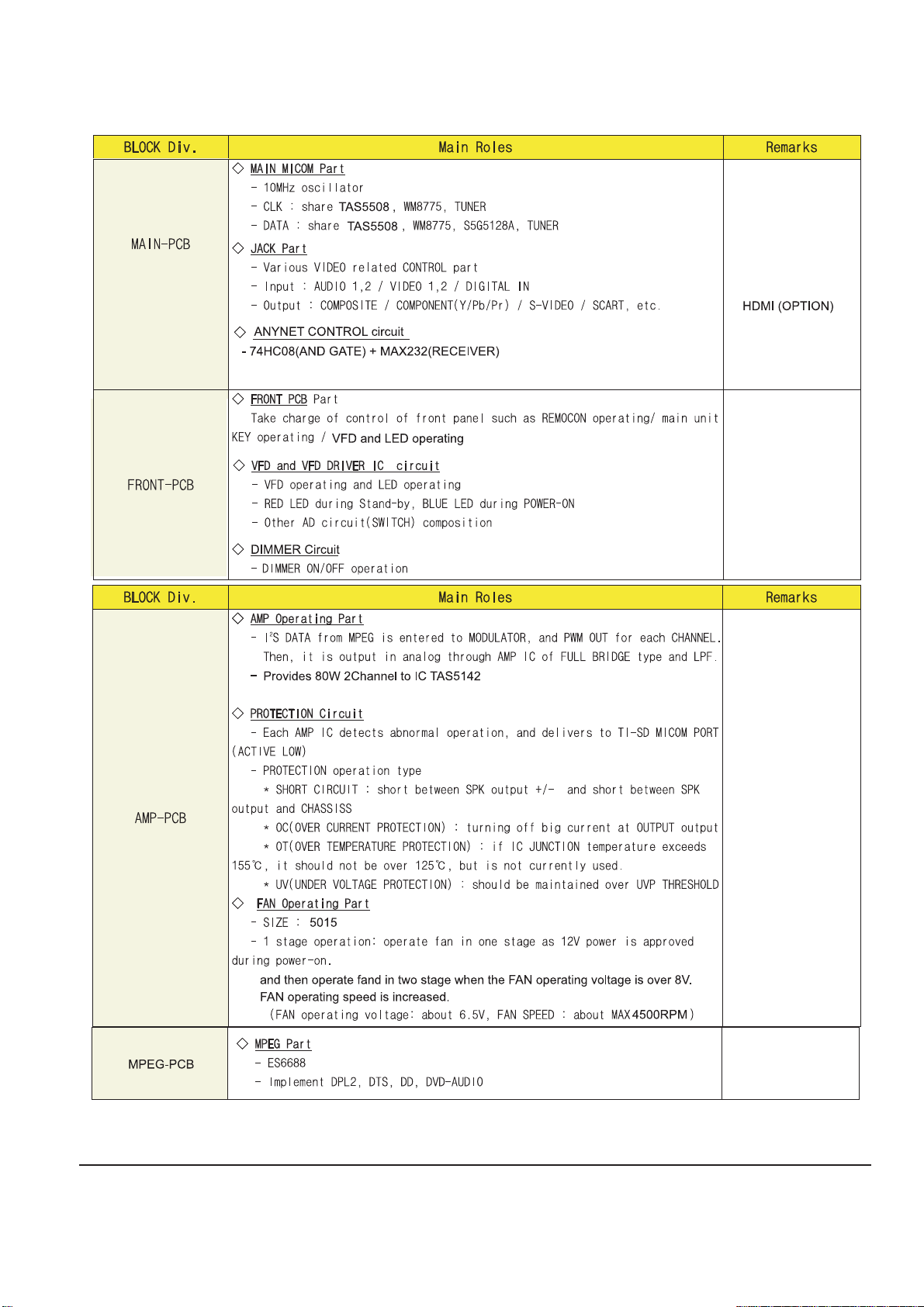
13-2 Samsung Electronics
Page 7
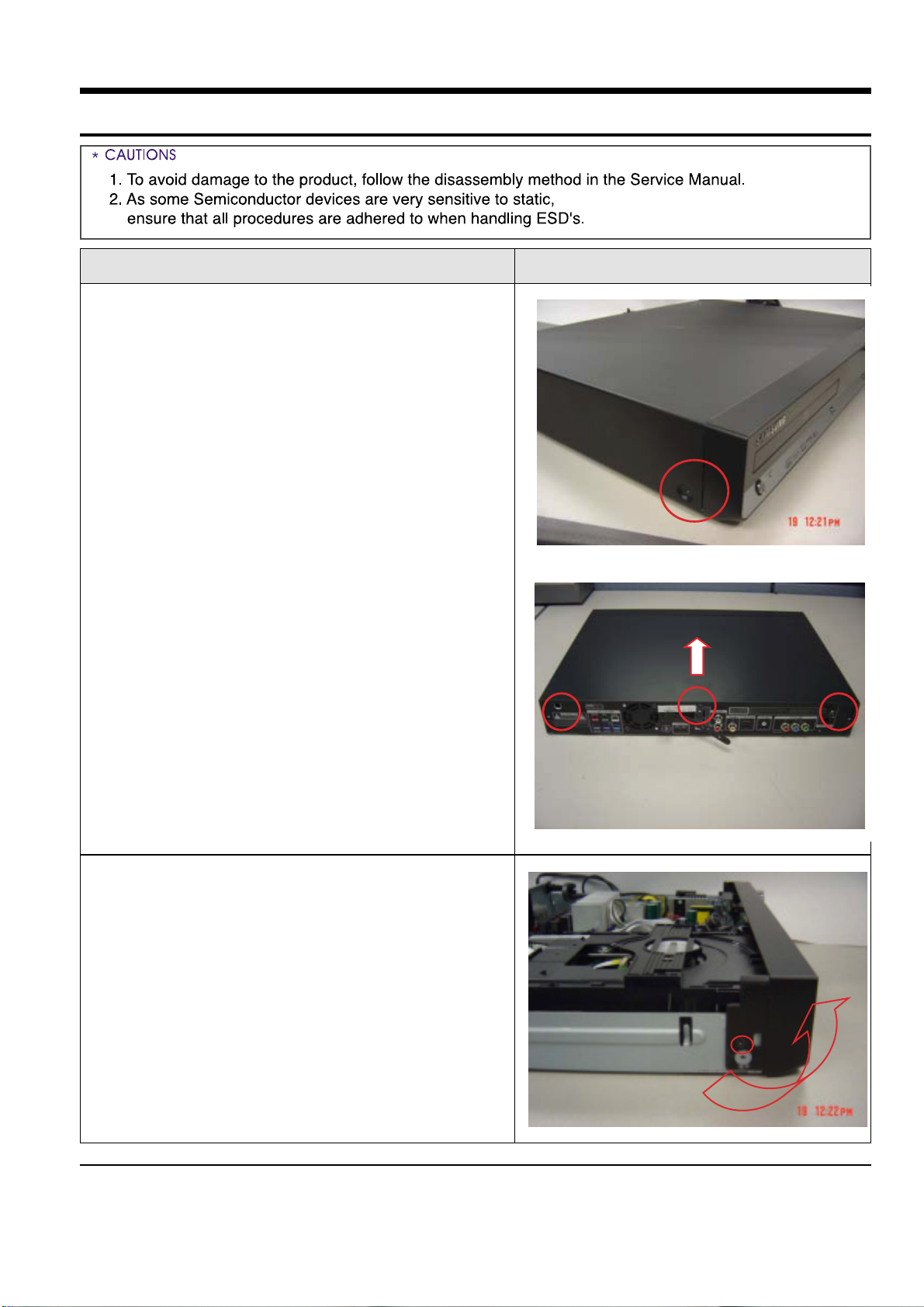
Samsung Electronics 5-1
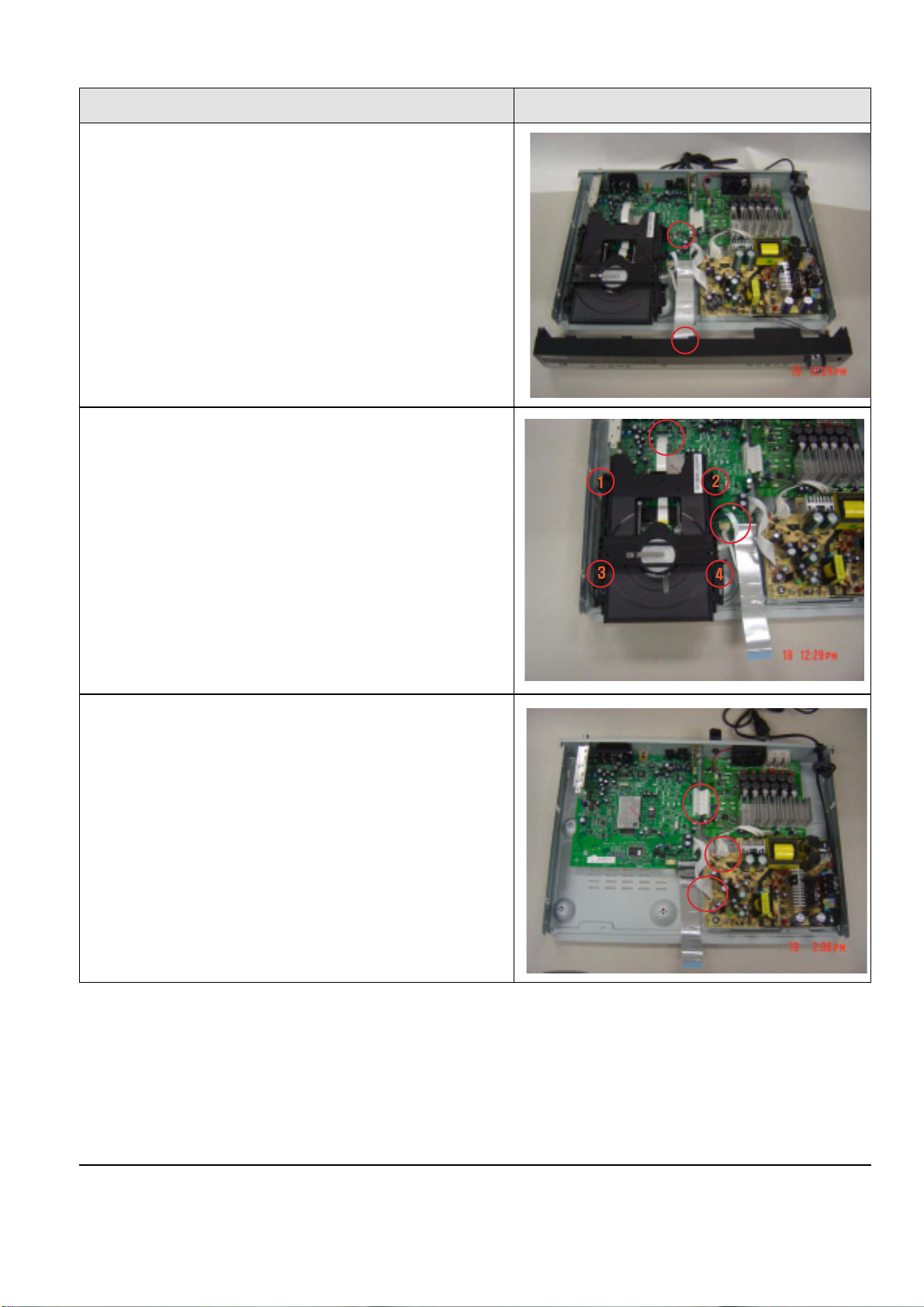
5. How to disassemble
1. Unfasten 2 screw on FRONT SIDE
and 3 screw on REAR SIDE.
And then separate the CABINET-TOP
in the direction of arrow.
2. Unfasten 2 screw on feft,right SIDE.
Lift and pull out the CABINET-FRONT.
Order(Description) Picture
Page 8
5-2 Samsung Electronics
3. Remove the wire connected ot
CANINET-FRONT.
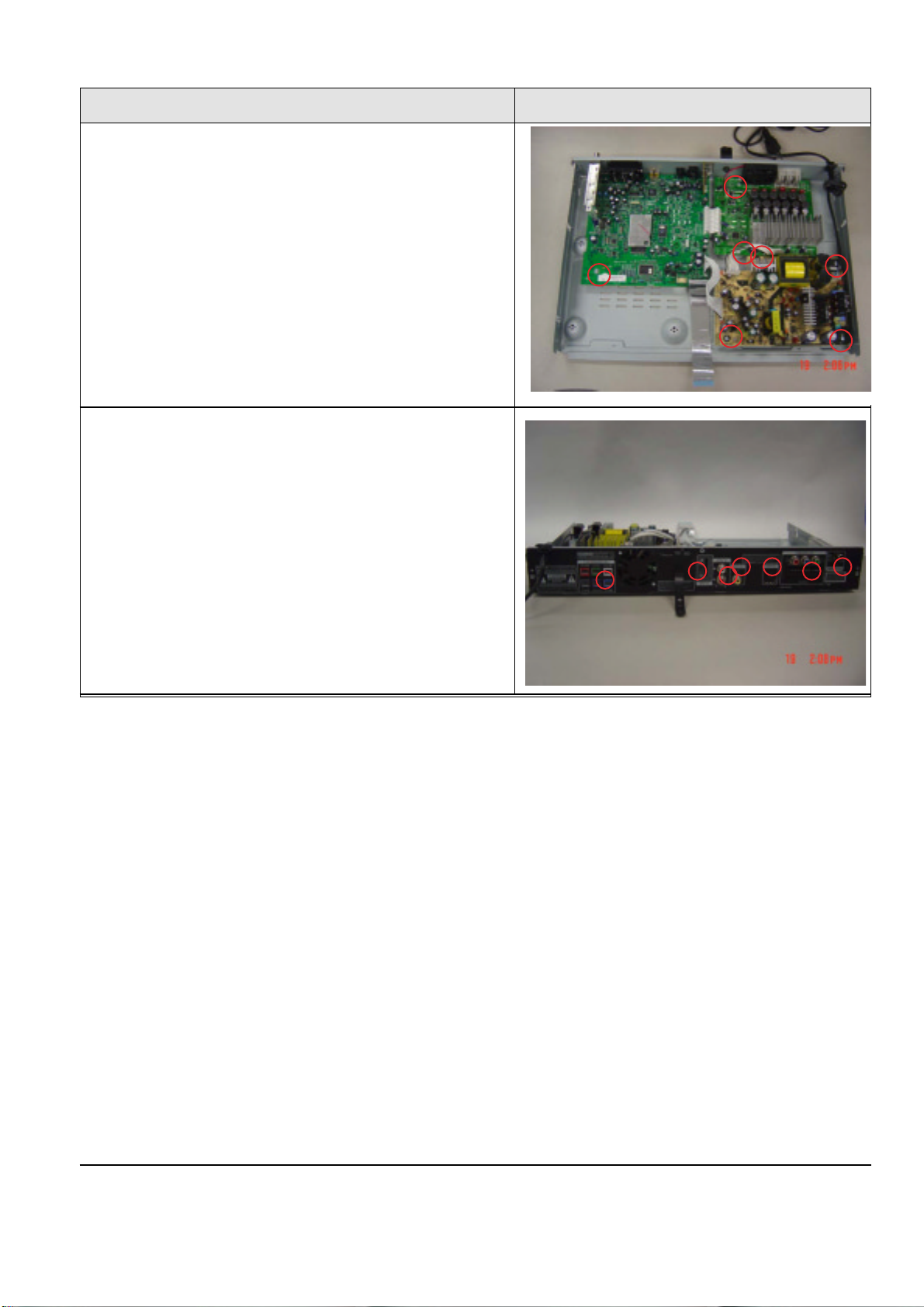
4. Unfasten 4 screw and 2 wire.
5. Remove wires between PCBs.
Order(Description) Picture
Page 9
Samsung Electronics 5-3
6. Remove 6 screw on the PCBs.
7. Unfasten 7 screw on the rear-cabinet.
Order(Description) Picture
Page 10

Samsung Electronics 8-1
***** HT-X20 Parts List
*****
AC3 2401-000651 C-AL;2.2uF,20%,50V,GP,TP,4x7,5
AIC3 1002-001392 IC-A/D CONVERTER;WM8775EDS,24BIT,SSOP,28
AR9 2007-000091 R-CHIP;12Kohm,5%,1/10W,TP,1608
BC4 2203-000206 C-CER,CHIP;100nF,10%,50V,X7R,2012
C12RR 2203-001634 C-CER,CHIP;33nF,10%,50V,X7R,1608
C2 2401-000303 C-AL;100uF,20%,25V,GP,TP,6.3x11,5
C2 2203-000783 C-CER,CHIP;0.33nF,5%,50V,C0G,1608
C23RR 2203-000787 C-CER,CHIP;0.33NF,5%,50V,C0G,TP,2012
C29FR 2401-003564 C-AL;1000uF,20%,35V,LZ,TP,12.5X25mm
C2FL 2203-002793 C-CER,CHIP;1000nF,+80-20%,25V,Y5V,2012
C37RR 2305-000407 C-FILM,LEAD-PEF;470nF,5%,100V,TP,-,5mm
CN1 3708-002023 CONNECTOR-FPC/FFC/PIC;6P,1MM,SMD-S,TIN,N
CN2 3711-005155 HEADER-BOARD T O CABLE;BO X,5P,1R,2MM,SMDCN3 3708-001765 CONNECTOR-FPC/FFC/PIC;24P,0.5mm,SMD-S,SN
CN5 3711-000471 HEADER-BOARD T O CABLE;3WALL,4P,1R,2mm,ST
EB1 3301-001272 BEAD-SMD;120ohm,2x1.25x1mm,-,TR,-,-,EBD2 3301-001495 BEAD-SMD;120ohm,2012,2500mA,TP,115ohm/1
EL6 3301-001069 BEAD-SMD;120ohm,1.6x0.8x0.8mm,200mA,TP,
EMR6 2007-000694 R-CHIP;3.3ohm,5%,1/8W,TP,2012
FC4 2401-001975 C-AL;47uF,20%,16V,GP,TP,5x11mm,5mm
FC5 2203-000260 C-CER,CHIP;10nF,10%,50V,X7R,2012
FCON1 3708-000453 CONNECTOR-FPC/FFC/PIC;21P,1.25MM,STRAIGH
FCON2 3711-003409 HEADER-BOARD TO CABLE;BOX,3P,1R,2mm,STRA
FCON3 AH39-20008M LEAD CONNECTOR ASSY;5264,5395,2P,150MM,1
FCW2 AH39-00859A WIRE HARNESS;HT-Q20,-,1007,3P,110mm,-,AW
FCW3 AH39-00753A LEAD CONNECTOR;HT-P50,4P,2mm,490,2854#28
FD1 0401-001099 DIODE-SWITCHING;1N4148WS,75V,150mA,SOD-3
FD2 0401-001090 DIODE-SWITCHING;1SS355,80V,100MA,SOD-323
FJ1 3406-001047 SWITCH-ROTARY;5V DC,0.5mA,-,12mm
FR1 2001-000022 R-CARBON(S);33OHM,5%,1/2W,AA,TP,2.4X6.4M
FR10 2007-000097 R-CHIP;47Kohm,5%,1/10W,TP,1608
FR12 2001-000020 R-CARBON(S);22OHM,5%,1/2W,AA,TP,2.4X6.4M
FR14 2007-000300 R-CHIP;10Kohm,5%,1/8W,TP,2012
FR15 2007-000023 R-CHIP;120ohm,5%,1/8W,TP,2012
FR16 2007-000572 R-CHIP;220ohm,5%,1/8W,TP,2012
FR2 2007-000241 R-CHIP;1.5Kohm,5%,1/8W,TP,2012
FR22 2007-000116 R-CHIP;120ohm,5%,1/10W,TP,1608
FR3 2001-001165 R-CARBON(S);56OHM,5%,1/2W,AA,TP,2.4X6.4M
FR3 2007-000267 R-CHIP;1.8Kohm,5%,1/8W,TP,2012
FR4 2007-000493 R-CHIP;2.2Kohm,5%,1/8W,TP,2012
FR5 2007-000686 R-CHIP;3.3Kohm,5%,1/8W,TP,2012
FZD2 0403-001064 DIODE-ZENER;RLZ5.1B,4.94-5.2V,500mW,LL-3
H/S_P AH62-00157A HEAT SINK
H/S-M AH62-00062G HEAT SINK-TR;HT-DS400,AL EXTR,-,-,-,-,-,
HOLDE AH61-02117A HOLDER-IC;HT-Q20,ABS+GF,-,-,-,-,COMMON P
HOLDE AH61-02114A HOLDER-VFD;HT-Q20,ABS,-,-,-,-,IC1 1204-002555 IC-PAL/NTSC DECODER;ES8381FFC,PQFP,256P,
IC10 0801-002683 IC-CMOS LOGIC;74HCT245,TRANSCEIVER,TSSOP
IC11 1003-001450 IC-MOTOR DRIVER;BA5954FM,SOP,28P,300MIL,
IC12 1003-001508 IC-MOTOR DRIVER;FAN8082DTF,SOP,8P,200MIL
IC13 1201-001842 IC-OP AMP;TL3472CD,SO,TP,8P,-,DUAL,-,PAL
IC14 0801-002518 IC-CMOS LOGIC;74LCX157,2-INPUT MULTIPLEX
IC1L 1201-002270 IC-AUDIO AMP;TAS5142,PSOP3,36P,15.9x11mm
IC2 1103-001334 IC-EEPROM;K524A60X81,1KX8BIT,SOP,8P,5X4M
IC3 0904-002088 IC-USC;UBI9022,8Bit,QFP,48P,9x9mm,48M
IC4 1105-001573 IC-DRAM;K4S281632,-,128Mbit,8Mx16Bit,T
IC5 1107-001505 IC-FLASH MEMORY;49BV162AT,16Mbit,1Mx16/2
J3 AH39-00854A WIRE HARNESS;HT-Q20,-,1007,9P,130mm,-,AW
JP6 AH37-00005A JACK-RCA;1P,S-440B,YELLOW,-,SHIELD PLAT
KC11 2401-001887 C-AL;0.1uF,20%,50V,-,TP,4x7mm,5
KC14 2203-001058 C-CER,CHIP;0.56nF,5%,50V,C0G,2012
KC15 2203-005550 C-CER,CHIP;82nF,10%,50V,X7R,TP,2012,KC16 2401-000480 C-AL;10uF,20%,50V,GP,TP,5x11,5
KC17 2203-000716 C-CER,CHIP;3.3nF,10%,50V,X7R,2012
KC20 2203-000727 C-CER,CHIP;3.9nF,10%,50V,X7R,2012
KC21 2401-000598 C-AL;1uF,20%,50V,GP,TP,4x7,5
KC25 2401-000487 C-AL;10uF,20%,50V,GP,TP,6.3x5mm,5
KC27 2203-000609 C-CER,CHIP;22nF,10%,50V,X7R,TP,2012
KCON1 AH39-00918A WIRE HARNESS;HT-XQ100N,4P,50MM,2.0MM,510
KCW2 3711-000028 HEADER-BOARD TO CABLE;BOX,4P,1R,2MM,STRA
KD1 0403-000139 DIODE-ZENER;1N4734A,5%,1000mW,DO-41,TP
KIC1 1204-002233 IC-VOLUME/TONE CONT.;PT2399S,SO,16P,300M
KIC2 1201-001572 IC-PREAMP;2011,SIP,8P,19.2x6.5mm,SINGLE,
KQ1 0504-000128 TR-DIGITAL;-,NPN,200MW,22K/22K,SOT-23,TP
KQ2 0501-000303 TR-SMALL SIGNAL;KSA733,PNP,250mW,TO-92,T
KQ3 0501-000010 TR-SMALL SIGNAL;KSC1008,NPN,800mW,TO-92,
KR10 2007-000477 R-CHIP;1Mohm,5%,1/8W,TP,2012
KR11 2007-000468 R-CHIP;1Kohm,5%,1/8W,TP,2012
KR12 2007-000766 R-CHIP;330ohm,5%,1/8W,TP,2012
KR2 2007-000981 R-CHIP;5.6Kohm,5%,1/8W,TP,2012
KR21 2007-000409 R-CHIP;15Kohm,5%,1/8W,TP,2012
KR26 2007-000872 R-CHIP;4.7Kohm,5%,1/8W,TP,2012
KR27 2007-000457 R-CHIP;18Kohm,5%,1/8W,TP,2012
KR28 2007-000124 R-CHIP;2.2Kohm,5%,1/10W,TP,1608
KR3 2007-000586 R-CHIP;22Kohm,5%,1/8W,TP,2012
KR32 2007-000082 R-CHIP;3.3Kohm,5%,1/10W,TP,1608
KR33 2007-000123 R-CHIP;1.5Kohm,5%,1/10W,TP,1608
KR9 2007-001177 R-CHIP;8.2Kohm,5%,1/8W,TP,2012
L2RL AH27-00055A COIL CHOKE;DBF-1310A,HT-DS600,10uH,-,-,2
LED1 0601-001238 LED;ROUND,RED,3.1mm,697nm,3.8x5.2m
LED2 0601-001432 LED;ROUND,BLUE,3mm,455nm
MC1 2203-000595 C-CER,CHIP;0.22nF,5%,50V,C0G,2012
MC13 2203-000626 C-CER,CHIP;0.022nF,5%,50V,C0G,1608
MC143 2203-005148 C-CER,CHIP;100nF,10%,16V,X7R,1608
MC15 2203-001607 C-CER,CHIP;0.22nF,5%,50V,NP0,1608
MC19 2203-000646 C-CER,CHIP;0.024NF,5%,50V,C0G,TP,1608
MC21 2203-001083 C-CER,CHIP;0.0050nF,0.1pF,50V,NP0,1608
MC22 2401-002042 C-AL;220uF,20%,10V,GP,TP,6.3x11,5
MC23 2203-000681 C-CER,CHIP;0.027nF,5%,50V,C0G,1608
MC3 2401-001164 C-AL;33uF,20%,16V,GP,TP,5x11mm,5mm
MC5 2203-000384 C-CER,CHIP;0.015nF,5%,50V,C0G,1608
MC52 2203-000062 C-CER,CHIP;47nF,+80-20%,50V,Y5V,1608
MC59 2401-000414 C-AL;10uF,20%,16V,GP,TP,4x7,5
MC68 2402-001198 C-AL,SMD;330UF,20%,6.3V,GP,TP,6.6X6.6X7
MC71 2203-001086 C-CER,CHIP;0.0050nF,0.25pF,50V,NP0,1608
MC8 2203-000440 C-CER,CHIP;1nF,10%,50V,X7R,1608
MCON1 3708-000266 CONNECTOR-FPC/FFC/PIC;32P,1.25MM,STRAIGH
MCON1 3711-000820 HEADER-BOARD TO CABLE;BOX,2P,1R,2.5MM,ST
MCON1 3711-004110 HEADER-BOARD TO CABLE;3WALL,12P,1R,2MM,S
MCON2 AH39-00855A WIRE HARNESS;HT-Q20,-,1007,15P,110mm,-,A
MCON2 3710-001422 SOCKET-BOARD TO CABLE;12P,1R,2mm,ANGLE,S
MCON2 3709-001287 CONNECTOR-CARD SLOT;10P,1.5mm,SMD-A,AU10
MCON3 3708-000219 CONNECTOR-FPC/FFC/PIC;21P,1.25MM,STRAIGH
MCON6 3708-000448 CONNECTOR-FPC/FFC/PIC;6P,1.25MM,STRAIGHT
MCON8 AH40-00130A TUNER;KST-MW104FV1-E50LCE,HT-Q40,FM,
MIC1 1204-002361 IC-MODULATOR;TAS5508PAG,TQFP,64P,-,PLAST
MIC2 3722-000363 JACK-PHONE;9P,AU,BLK,ANGLE
MICV1 2101-001068 VR-ROTARY;10KB,-,1/20W,SIDE
ML8 2703-000185 INDUCTOR-SMD;3.3uH,10%,2012
MQ1 1203-003526 IC-VOL. DETECTOR;KIA7029AP,TO-92,3P,4.58
MR10 2007-000113 R-CHIP;33ohm,5%,1/10W,TP,1608
MR118 2007-000081 R-CHIP;2.7Kohm,5%,1/10W,TP,1608
MR131 2007-000118 R-CHIP;390ohm,5%,1/10W,TP,1608
MR2 2007-000882 R-CHIP;4.7ohm,5%,1/10W,TP,1608
MR23 2007-000072 R-CHIP;47ohm,5%,1/10W,TP,1608
MR3 2007-000695 R-CHIP;3.3ohm,5%,1/10W,TP,1608
MR300 2007-000552 R-CHIP;20ohm,5%,1/10W,TP,1608
MR33 2007-002425 R-CHIP;1ohm,5%,1/10W,TP,1608
MR75 2011-000475 R-NET;33ohm,5%,1/16W,L,CHIP,8P,TP,32
MR8 2007-000539 R-CHIP;200ohm,5%,1/10W,TP,1608
MR80 2007-000084 R-CHIP;4.7Kohm,5%,1/10W,TP,1608
PC1 2401-001102 C-AL;330uF,20%,16V,GP,TP,8x11.5mm,5
PC21 2401-001508 C-AL;47uF,20%,16V,GP,TP,6.3x5,5
PC3 2401-000118 C-AL;1000uF,20%,10V,GP,TP,10x12.5,5
PC7 2401-001364 C-AL;470uF,20%,16V,GP,TP,10x12.5,5
PCB AH41-01061A PCB-FRONT;HT-X20,PHENOL,2,-,-,-,-,-,FRON
PIC2 1203-002935 IC-POSI.ADJUST REG.;AIC1117ACE,TO-252,3P
PQ2 0501-000407 TR-SMALL SIGNAL;KSD471A-Y,NPN,800mW,TO-9
PQ3 0501-000002 TR-SMALL SIGNAL;KSA812,PNP,150MW,SOT-23,
PQ6 0504-000156 TR-DIGITAL;KSR2103,PNP,200MW,22K/22K,SOT
PR10 2001-000027 R-CARBON;100OHM,5%,1/4W,AA,TP,2.4X6.4MM
PS300 AH59-01822B SPEAKER SYSTEM;SATELLITE&CENTER SPEAKER
PS300 AH59-01832B SPEAKER SYSTEM;PS-X20,SUBWOOFER SPK SYST
Q4 0501-000632 TR-SMALL SIGNAL;2SB1197K,PNP,200mW,SOT-2
Q9 0505-000110 FET-SILICON;2N7002,N,60V,115mA,7.5ohm,0.
R12FR 2007-000052 R-CHIP;10Kohm,1%,1/10W,TP,1608
R150 2007-000941 R-CHIP;47Kohm,5%,1/8W,TP,2012
R2 2007-000134 R-CHIP;33Kohm,5%,1/10W,TP,1608
Location no. Code no. Description & Specification Remarks
Location no. Code no. Description & Specification Remarks
8. Electrical Parts List
*S.N.A. : Service Not Available
Page 11

R2RL 2007-000312 R-CHIP;10ohm,5%,1/4W,TP,3216
R3FR 2007-000092 R-CHIP;15Kohm,5%,1/10W,TP,1608
R46 2007-000253 R-CHIP;1.5ohm,5%,1/4W,TP,3216
R8SW 2007-000462 R-CHIP;18ohm,5%,1/8W,TP,2012
RC14 2401-000804 C-AL;220uF,20%,16V,GP,TP,8x9mm,5
RC22 2401-001938 C-AL;22uF,20%,25V,GP,TP,5x11mm,5mm
RC27 2203-001126 C-CER,CHIP;0.68nF,10%,50V,X7R,1608
RC3 2203-000189 C-CER,CHIP;100nF,+80-20%,25V,Y5V,1608
RC31 2203-001652 C-CER,CHIP;470nF,+80-20%,16V,Y5V,1608
RC35 2401-001355 C-AL;470uF,20%,10V,GP,TP,8x11.5mm,5
RC36 2203-000257 C-CER,CHIP;10nF,10%,50V,X7R,1608
RC44 2203-002398 C-CER,CHIP;22nF,10%,50V,X7R,1608
RC47 2203-000888 C-CER,CHIP;4.7nF,10%,50V,X7R,1608
RC49 2203-005015 C-CER,CHIP;150nF,+80-20%,16V,Y5V,1608
RC54 2203-005065 C-CER,CHIP;1000nF,+80-20%,10V,Y5V,1608
RD2 0407-000116 DIODE-ARRAY;DAP202K,80V,100mA,CK2-3,SOTREM_E 0609-001189 MODULE REMOCON;HORIZONTAL,16.4MM,TR
RR10 2007-000070 R-CHIP;0ohm,5%,1/10W,TP,1608
RR11 2007-001038 R-CHIP;56Kohm,1%,1/10W,TP,1608
RR16 2007-001179 R-CHIP;8.2Kohm,5%,1/10W,TP,1608
RR17 2007-000483 R-CHIP;1OHM,5%,1/8W,TP,2012
RR24 2007-000458 R-CHIP;18Kohm,5%,1/10W,TP,1608
RR33 2007-000120 R-CHIP;680ohm,5%,1/10W,TP,1608
RR44 2007-000060 R-CHIP;100Kohm,1%,1/10W,TP,1608
RR52 2007-000077 R-CHIP;470ohm,5%,1/10W,TP,1608
RR54 2007-000071 R-CHIP;22ohm,5%,1/10W,TP,1608
RR67 2007-000308 R-CHIP;10ohm,5%,1/8W,TP,2012
RR79 2007-000122 R-CHIP;1.2Kohm,5%,1/10W,TP,1608
RR83B 2007-000106 R-CHIP;220Kohm,5%,1/10W,TP,1608
SC7L 2203-000998 C-CER,CHIP;0.047nF,5%,50V,C0G,1608
SCREW 6003-000276 SCREW-TAPTITE;BH,+,-,B,M3,L10,ZPC(WHT),S
SIC 1201-000163 IC-OP AMP;4560,SOP,8P,173MIL,DUAL,100V/m
SL1L 2703-000404 INDUCTOR-SMD;220uH,10%,3225
SPK1 3716-001243 TERMINAL-BLOCK;-,12P,14mm,-,SR2R 2007-000094 R-CHIP;22Kohm,5%,1/10W,TP,1608
SW5 3404-000165 SWITCH-TACT;12V,50mA,160gf,6x6mm,SPST
UC1 2401-001952 C-AL;4.7uF,20%,50V,GP,TP,5x7mm,5mm
UC100 2203-000979 C-CER,CHIP;47nF,10%,50V,X7R,TP,2012
UC17 2203-000972 C-CER,CHIP;47nF,10%,16V,X7R,1608
UC3 2409-000123 C-EDL;47000uF,4uA,5.5V,-,BK,-,5mm
UC57 2401-003221 C-AL;100uF,20%,16V,GP,TP,8X5,2.5
UC58 2401-000485 C-AL;10UF,20%,50V,GP,TP,6.3X5MM,2.5
UC6 2401-000759 C-AL;220nF,20%,50V,GP,TP,5x11mm,5mm
UC62 2203-000236 C-CER,CHIP;0.1nF,5%,50V,C0G,1608
UC64 2203-000975 C-CER,CHIP;47nF,10%,25V,X7R,TP,1608,UC67 2203-005249 C-CER,CHIP;100nF,10%,50V,X7R,1608
UD11 0404-000156 DIODE-SCHOTTKY;RB441Q,40V,350MA,DO-34,TP
UD11A 0404-001089 DIODE-SCHOTTKY;RB551V-30,20V,500MA,SOD-3
UIC1 0903-001405 IC-MICROCONTROLLER;LC87F5CC8A,8Bit,QFP,1
UIC2 1003-001708 IC-VFD;S5G5128A,LQFP,64P,1063MIL,-,-,
UL2 2007-000076 R-CHIP;330ohm,5%,1/10W,TP,1608
UQ1 0501-000341 TR-SMALL SIGNAL;KSC1623-L,NPN,200mW,SOTUR1 2007-000109 R-CHIP;1Mohm,5%,1/10W,TP,1608
UR11 2007-000090 R-CHIP;10Kohm,5%,1/10W,TP,1608
UR110 2007-000102 R-CHIP;100Kohm,5%,1/10W,TP,1608
UR134 2007-001196 R-CHIP;820Kohm,5%,1/10W,TP,1608
UR15 2007-001010 R-CHIP;51Kohm,5%,1/10W,TP,1608
UR2 2007-000402 R-CHIP;150ohm,5%,1/10W,TP,1608
UR26 2007-000074 R-CHIP;100ohm,5%,1/10W,TP,1608
UR54 2007-000078 R-CHIP;1Kohm,5%,1/10W,TP,1608
USB 3722-002313 JACK-USB;4P/1C,AU30U ,BLK,STRAIGHT,A TYP
VC20 2401-000918 C-AL;22uF,20%,16V,GP,-,6.3x7,5
VC22 2401-000042 C-AL;100uF,20%,16V,GP,TP,6.3x7,5
VC38 2401-001092 C-AL;330uF,20%,10V,GP,-,8x11.5,2.5m
VC5 2203-000280 C-CER,CHIP;0.01nF,0.5pF,50V,C0G,1608
VFD AH07-00188A VF DISPLAY;HNV-12SN02T,HT-Q20,104.14X16.
VIC1 1204-001978 IC-VIDEO PROCESS;LA73054,-,36P,-,SSOP,7V
VJ4 3722-002283 JACK-SCART;21P+3P,-,SN,BLK,VJ5 3722-002042 JACK-PIN;2P/2C,NI,WHT/RED,ANGLE
VL20 2703-000275 INDUCTOR-SMD;33UH,10%,2012
VL7 2703-002238 INDUCTOR-SMD;1UH,5%,2012
VL8 2007-000029 R-CHIP;0ohm,5%,1/8W,TP,2012
VQ10 0504-000152 TR-DIGITAL;KSR2101,PNP,200mW,4.7K/4.7K,S
VQ14 0501-002184 TR-SMALL SIGNAL;KTD1304,NPN,200mW,SOT-23
VR14 2007-001167 R-CHIP;75ohm,5%,1/10W,TP,1608
VR39 2007-000119 R-CHIP;560ohm,5%,1/10W,TP,1608
VR61 2007-000075 R-CHIP;220ohm,5%,1/10W,TP,1608
VR62 2007-000309 R-CHIP;10ohm,5%,1/10W,TP,1608
VR9 2007-000125 R-CHIP;3.9Kohm,5%,1/10W,TP,1608
X1 2801-004132 CRYSTAL-UNIT;13.5MHz,10ppm,ATS-49/U,24pF
X1 2801-004284 CRYSTAL-SMD;27MHZ,10PPM,28-AAN,20PF,30OH
X2 2801-003863 CRYSTAL-UNIT;48MHz,30ppm,28-AAA,18pF,80o
XD19 0401-001110 DIODE-SWITCHING;-,80V,100MA,SOD-523,TP
X-TAL 2802-001174 RESONATOR-CERAMIC;10MHZ,0.5%,BK,8X3.5X3M
ZD1 0403-001062 DIODE-ZENER;UDZ4.7B,4.55-4.75V,200MW,SOD
0402-000012 DIODE-RECTIFIER;UF4007,1KV,1A,DO-41,TP
0501-000362 TR-SMALL SIGNAL;KSC2328A-Y,NPN,1000mW,TO
0501-000422 TR-SMALL SIGNAL;KTA1273,PNP,-30V,-30V,-2
0501-000630 TR-SMALL SIGNAL;KTA1268,PNP,300MW,TO-92,
1203-002597 IC-PWM CONTROLLER;KA5Q1265RF-YDTU,TO-3PF
1203-003365 IC-PWM CONTROLLER;FSDM0365RNC,DIP,8P,9.6
1203-004573 IC-VOL.REFERANCE;FAN431A,TO-92,3P,4.58X
2001-000003 R-CARBON;330ohm,5%,1/8W,AA,TP,1.8x3.2mm
2001-000302 R-CARBON;10OHM,5%,1/8W,AA,TP,1.8X3.2MM
2001-000319 R-CARBON;120KOHM,5%,1/8W,AA,TP,1.8X3.2MM
2001-000440 R-CARBON;1OHM,5%,1/8W,AA,TP,1.8X3.2MM
2001-000449 R-CARBON;2.2KOHM,5%,1/8W,AA,TP,1.8X3.2MM
2001-000458 R-CARBON;2.2OHM,5%,1/8W,AA,TP,1.8X3.2MM
2001-000472 R-CARBON;2.7KOHM,5%,1/8W,AA,TP,1.8X3.2MM
2001-000508 R-CARBON;220KOHM,5%,1/8W,AA,TP,1.8X3.2M
2001-000554 R-CARBON;270OHM,5%,1/8W,AA,TP,1.8X3.2MM
2001-000660 R-CARBON;33KOHM,5%,1/8W,AA,TP,1.8X3.2MM
2001-000666 R-CARBON;33OHM,5%,1/8W,AA,TP,1.8X3.2MM
2001-000702 R-CARBON;39KOHM,5%,1/8W,AA,TP,1.8X3.2MM
2001-000734 R-CARBON;4.7KOHM,5%,1/8W,AA,TP,1.8X3.2MM
2001-000780 R-CARBON;470OHM,5%,1/8W,AA,TP,1.8X3.2MM
2001-000786 R-CARBON;47KOHM,5%,1/8W,AA,TP,1.8X3.2MM
2001-000857 R-CARBON;560OHM,5%,1/8W,AA,TP,1.8X3.2MM
2001-000869 R-CARBON;56OHM,5%,1/8W,AA,TP,1.8X3.2MM
2001-000924 R-CARBON;680OHM,5%,1/8W,AA,TP,1.8X3.2MM
2001-000947 R-CARBON;7.5KOHM,5%,1/8W,AA,TP,1.8X3.2M
2003-000738 R-METAL OXIDE(S);56Kohm,5%,2W,AA,TP,4x12
2201-000286 C-CERAMIC,DISC;1nF,10%,1000V,Y5P,-,8x5mm
2401-000471 C-AL;10uF,20%,50V,BP,TP,5x11,5mm
2401-000649 C-AL;2.2uF,20%,50V,BP,TP,5x11,5
2401-001479 C-AL;470uF,20%,10V,GP,TP,6.3*11mm,5
2401-002300 C-AL;47##F,20%,50V,GP,TP,6.3x11,5mm
2401-003036 C-AL;100uF,20%,16V,GP,TP,5X11mm,5mm
AH81-02501A FUSE;382type,4A,250V,-,-,-,AH81-02505A DIODE-ZENER;1N5239B,0.5W,9.1V,DO-35 Glas
AH81-02521A DIODE-SWITCHING;1N4148,500mW,DO-35,-,-,AH81-02524A C-FILM MPEF;0.1uF,100V,5%,TP,-,-,AH81-02526A C-CERAMIC DISK;100pF,1KV,10%,-,-,-,AH81-02532A INDUCTOR-RADIAL-CHOKE COIL;15uH,10%,-,-,
AH81-02539A VARISTOR;10D471,470V,-,-,-,-,AH81-02544A PHOTO COUPLER;LTV817B,If 50mA,Vceo 35V,V
AH81-02551A IC-REGULATOR;KA78R12,TO-220F-4L,Vo = 12V
AH81-02553A THERMISTOR;3D15,-,-,-,-,-,AH81-02558A CONNECTOR;5096-02C,7.92mm,-,-,-,-,AH81-02565A C-FILM MPEF-MPP FILM;0.1uF,275VAC-PCX2-3
AH81-02591A C-AL-LARGE TYPES;330uF,250V,22*30mm,-40
AH81-02605A C-FILM MPEF-MYLAR;0.047uF,100V,5%,TP,-,AH81-02611A RESISTOR-CARBON FILM;1/8W,15 ohm,1%,TP,AH81-02612A RESISTOR-CARBON FILM;1/8W,150 ohm,1%,TP,
AH81-02617A RESISTOR-SURGE;1/2W,1.5M ohm,5%,SURGE RE
AH81-02620A RESISTOR-METAL OXIDE FILM;1W,120 ohm,5%
AH81-02625A RESISTOR-METAL OXIDE FILM;3W,56K ohm,5%,
AH81-02628A DIODE-FAST RECOVERY RECTIFIERS;FR104,400
AH81-02630A DIODE-SCHOTTKY BARRIER RECTIFI;SR306,60V
AH81-02631A DIODE-SUPER FAST RECTIFIERS;SF35G,300V,3
AH81-02632A DIODE-SUPER FAST RECTIFIERS;SFF1604G,200
AH81-02635A DIODE-ZENER;1N5242B,500mW,12V,DO-35 Glas
AH81-02637A DIODE-ZENER;DZ4.7BSB,4.77V,500mW,DO-34 G
AH81-02638A DIODE-BRIGE;DB105G,600V,1A,DB,-,-,AH81-02639A DIODE-BRIDGE;GBU605G,600V,6A,GBU,-,-,AH81-02642A C-FILM MPEF-MYLAR;0.0047uF,100V,5%,TP,-,
AH81-02643A C-FILM MPEF-MYLAR;0.0082uF,100V,5%,TP,-,
AH81-02647A C-CERAMIC DISK;470pF,400VAC-Y1,20%,-,-,AH81-02650A C-CERAMIC DISK;2200pF,400VAC-Y1,20%,-,-,
AH81-02651A C-AL;6800uF,6.3V,12.5*25mm,-40 to +
AH81-02652A C-AL;330uF,10V,6.3*11mm,-40 to +85C
AH81-02654A C-AL;1000uF,10V,10*12.5mm,-40 to +8
AH81-02660A C-AL;100uF,50V,8*12mm,-40 to +85C,AH81-02661A C-AL;68uF,250V,16*25mm,-40 to +85C,
AH81-02663A C-AL;1000uF,25V,10*20mm,-40 to +105
AH81-02670A C-AL-LOW IMPEDANCE TYPE;3300uF,10V,12.5*
AH81-02671A C-AL-LOW IMPEDANCE TYPE;1000uF,25V,12.5*
AH81-02672A C-AL-LOW IMPEDANCE TYPE;2200uF,50V,18*35
AH81-02674A CONNECTOR;SW0500-15,2mm,-,-,-,-,AH81-02678A CONNECTOR;YMW025-09R,2.5mm,-,-,-,-,-
Location no. Code no. Description & Specification Remarks Location no. Code no. Description & Specification Remarks
8-2 Samsung Electronics
Page 12

AH81-02681A TRANS;ORTP-760C T1,EER2828,-,-,-,-,AH81-02682A TRANS;ORTP-760 T2,EER4242,-,-,-,-,AH81-02698A WIRE-JUMPER;TIN 0.6t(7.5mm),-,-,-,-,-,AH81-02700A WIRE-JUMPER;TIN 0.6t(8.5mm),-,-,-,-,-,AH81-02702A WIRE-JUMPER;TIN 0.6t(9.5mm),-,-,-,-,-,AH81-02704A WIRE-JUMPER;TIN 0.6t(10.5mm),-,-,-,-,-,AH81-02706A WIRE-JUMPER;TIN 0.6t(11.5mm),-,-,-,-,-,AH81-02708A WIRE-JUMPER;TIN 0.6t(13.5mm),-,-,-,-,-,AH81-02709A WIRE-JUMPER;TIN 0.6t(14.5mm),-,-,-,-,-,AH81-02711A WIRE-JUMPER;TIN 0.6t(16.5mm),-,-,-,-,-,AH81-02712A WIRE-JUMPER;TIN 0.6t(17.5mm),-,-,-,-,-,AH81-02714A WIRE-JUMPER;TIN 0.6t(18.5mm),-,-,-,-,-,AH81-02752A C-FILM MPEF-METAL FILM;0.01uF,AC630V,10%
AH81-02754A IC-REGULATOR;KA378R33,3A,3.3V,TO-220F-4L
AH81-02756A IC-REGULATOR;KA7808,8V,TO-220,-,-,-,AH81-02764A IC-REGULATOR;KA278R05,2A,5V,TO-220F-4L,AH81-02790A INDUCTOR-RADIAL-BEAD CORE;BFS3550R2F(RAD
AH81-02791A INDUCTOR-RADIAL-LINE FILTER;DY-30M2,-,-,
AH81-02795A C-AL;330uF,16V,6.3*11mm,-40 to +85C
AH81-02812A RESISTOR-CARBON FILM;1/8W,1.5K ohm,1%,TP
AH81-02816A C-AL;1uF,50V,5*11mm,-40 to +85C,-,AH81-02834A PCB;196.8*135*1.6t,(####CEM),-,-,AH81-02838A RESISTOR-CARBON FILM;1/8W,18Kohm,1%,TP,AH81-03185A SPEAKER;FRONT SPEAKER SYSTEM,FOR PS-X2
AH81-03186A SPEAKER;CEN. SPEAKER SYSTEM,FOR PS-X20
AH81-03187A SPEAKER;REAR SPEAKER SYSTEM,FOR PS-X2
AH81-02177B SPEAKER;PS-Q20,SPK CORD # CONNECTOR,FR
AH81-03188A SPEAKER;SUBWOOFER SPK SYSTEM,FOR PS-X2
AH81-03153A SPEAKER;SPEAKER UNIT,SEZE::3.5 ‘’,SHI
AH81-03154A SPEAKER;SPEAKER UNIT,SEZE::3.5 ‘’,NOT
AH81-01431C A/S PART-NET FRAME;PSWS100E,-,-,-,NET FR
AH81-03155A SPEAKER;SPEAKER UNIT,SEZE::6.5 ‘’,NOT
3809-001832 FPC CABLE-FLAT;30V,80,50mm,32P,1.25mm,AW
AH68-01980A LABEL-POP LABEL;HT-X20,XEF,RAINBOW,-,-,AH69-01972B PAD-PAPER;HT-X20,OTHER,T3,W478,L426,-,YE
AH39-00257F CBF-POWER CORD;MAX980,-,CP2,250V,2.5A,18
3809-001798 CABLE-FLAT;30V,80,180,21P,1.25mm,UL2896
AH92-02719A ASSY PCB-FRONT;HT-KX20/XFO-FRONT,2 LAYER
4301-000116 BATTERY-ALKALINE;9V,-,-,17.5x26.5x48.5mm
6801-001557 CARD-WARRANTY;Ukraine,XEU,RUS,MOJO80g,-,
AH39-40001V CABLE-AUDIO CABLE;-,-,1P-1P,3000mm,-,-,AH42-00021A ANT FM T;T18011F-1,75 ohm,1800mm
AH46-00034B DISC-RUSSIA 200 SONGS;12 CM,-,HT-UP30K
AH44-00114A SMPS;HT-Q20,-,AC/DC,500W,110-240V,5
AH59-01787N REMOCON-ASSY;HT-X20/EUR,SAMSUNG,237*48,AH92-02507A ASSY PCB-AMP;HT-Q20Europe,AH92-02635D ASSY PCB-MAIN;HT-X20,CIS
AH97-02155A ASSY DVD DECK-SDM D1FL;BASIC-TYPE,CMS-S7
Location no. Code no. Description & Specification Remarks Location no. Code no. Description & Specification Remarks
Samsung Electronics 8-3
Page 13

Samsung Electronics 7-1
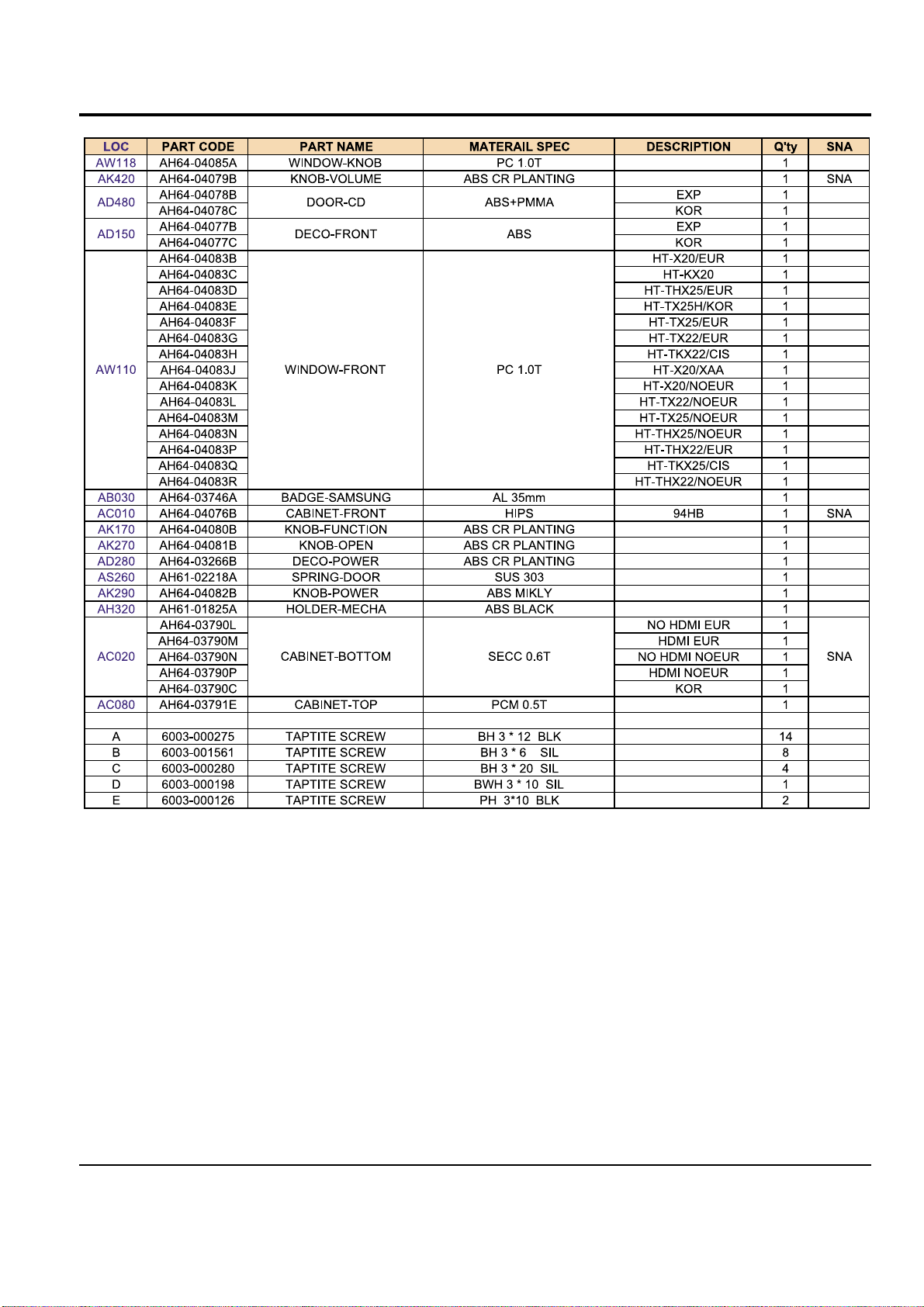
7.Exploded Views and Par ts List
1.Total Exploded View
AC080
AD480
AB030
AS260
AD280
AH320
AK290
AW118
AK420
AK270
AD150
AW110
AC020
AK170
AC010
Page 14
7-2 Samsung Electronics
2. Parts List
Page 15
Ch1 Precautions
1-1. Safety Precautions 1-1
1-2. Servicing Precautions 1-2
1-3. Precautions for Electrostatically
Sensitive Device (ESDs) 1-3
1-4. Special Precautions and Warning
Lables for Laser Products 1-4
1-5. Special Precautions for HDD 1-5
INDEX
Ch2 Product Descriptions
1. Product Feature 2-1
2. Specifications 2-2
3. Notes on Discs 2-3
4. Accessories 2-4
Ch3 Product Functions
1. SPK Connection & Setup 3-1
2. Main Functions 3-2
3. New Functions 3-3
Ch4 Adjustments
Protection Mode Explanation 4-1
Ch5 How to disassemble
How to disassemble 5-1
Ch6 Troubleshooting
1. No Power 6-1
2. No Output 6-2
3. DVD MPEG 6-4
4. DVD SERVO 6-6
Ch7 Exploded View & Parts List
1. Total Exploded View 7-1
2. Parts List 7-5
Ch8 Electrical Parts List
Electrical Parts List 8-1
Ch9 Block Diagram
MAIN 9-1
DVD 9-2
Ch10 Wiring Diagram
Wiring Diagram 10-1
Ch11 PCB Diagram
1. MAIN 11-1
2. AMP 11-2
Ch12 Schematic Diagram
1. AMP 12-1
2. MAIN 12-2
3. FRONT 12-3
4. AUX 12-4
5. MPEG 12-5
6. KARAOKE 12-6
Ch13 Circuit Description
Circuit Board Description 13-1
Ch14 HTS Reference
1. HTS (Home Theater Sytsem) 14-1
2. About “Sound” 14-2
3. 5.1 Channel Sound 14-3
4. HTS Sound Format 14-4
5. HTS Devices 14-5
Page 16

Samsung Electronics 3-1
3. Product Functions
1. SPK connection
RSLS
C
L
SW
R
Rear Speakers
•
Place these speakers behind your listening position.
•
If there isn't enough room, place these speakers to face each other.
•
Place them about 60 to 90cm (2 to 3feet) above your ear, facing
slightly downward.
*
Unlike the front and center speakers, the rear speakers are used
to handle mainly sound effects and sound will not come from
them all the time.
Subwoofer
•
The position of the subwoofer is not so critical.
Place it anywhere you like.
•
Usually, it is placed by a corner near the front speakers.
Front Speakers
•
Place these speakers in front of your listening position, facing inwards (about 45°) toward you.
•
Place the speakers so that their tweeters will be at
the same height as your ear.
•
Align the front face of the front speakers with the
front face of the center speaker or place them
slightly in front of the center speakers.
Center Speaker
•
It is best to install it at the same height as the front
speakers.
•
You can also install it directly over or under the TV.
Position of the DVD Player
•
Place it on a stand or cabinet shelf, or under
the TV stand.
Selecting the Listening Position
The listening position should be located about 2.5 to 3
times the distance of the TV's screen size away from the
TV. Example: For 32" TVs 2~2.4m (6~8feet)
For 55" TVs 3.5~4m (11~13feet)
R
L
C
RS
LS
SW
Page 17

3-2 Samsung Electronics
Connecting the Speakers
Black
Press down the terminal
tab on the back of the
speaker.
1
Insert the black wire into the
black terminal (–) and the red
wire into the red (+) terminal,
and then release the tab.
2
Connect the correct color speaker cable
to the same color speaker output terminal
on the rear of the subwoofer, according
to the polarity markings (+/–).
Example: Connect the green center speaker cable
to the green center speaker output terminal on the rear of the subwoofer according to the polarity markings (+/–).
3
Red
•
Do not let children play with or near the speakers.
They could get hurt if a speaker falls.
•
When connecting the speaker wires to the speakers,
make sure that the polarity (+/–) is correct.
Caution
•
If you place a speaker near your TV set,
screen color may be distorted because of
the magnetic field generated by the speaker. If this occurs, place the speaker away
from your TV set.
Note
Front Speaker (R)
Rear Speaker (R)
Subwoofer
Center Speaker
Front Speaker (L)
Rear Speaker (L)
HT-Q20
Page 18
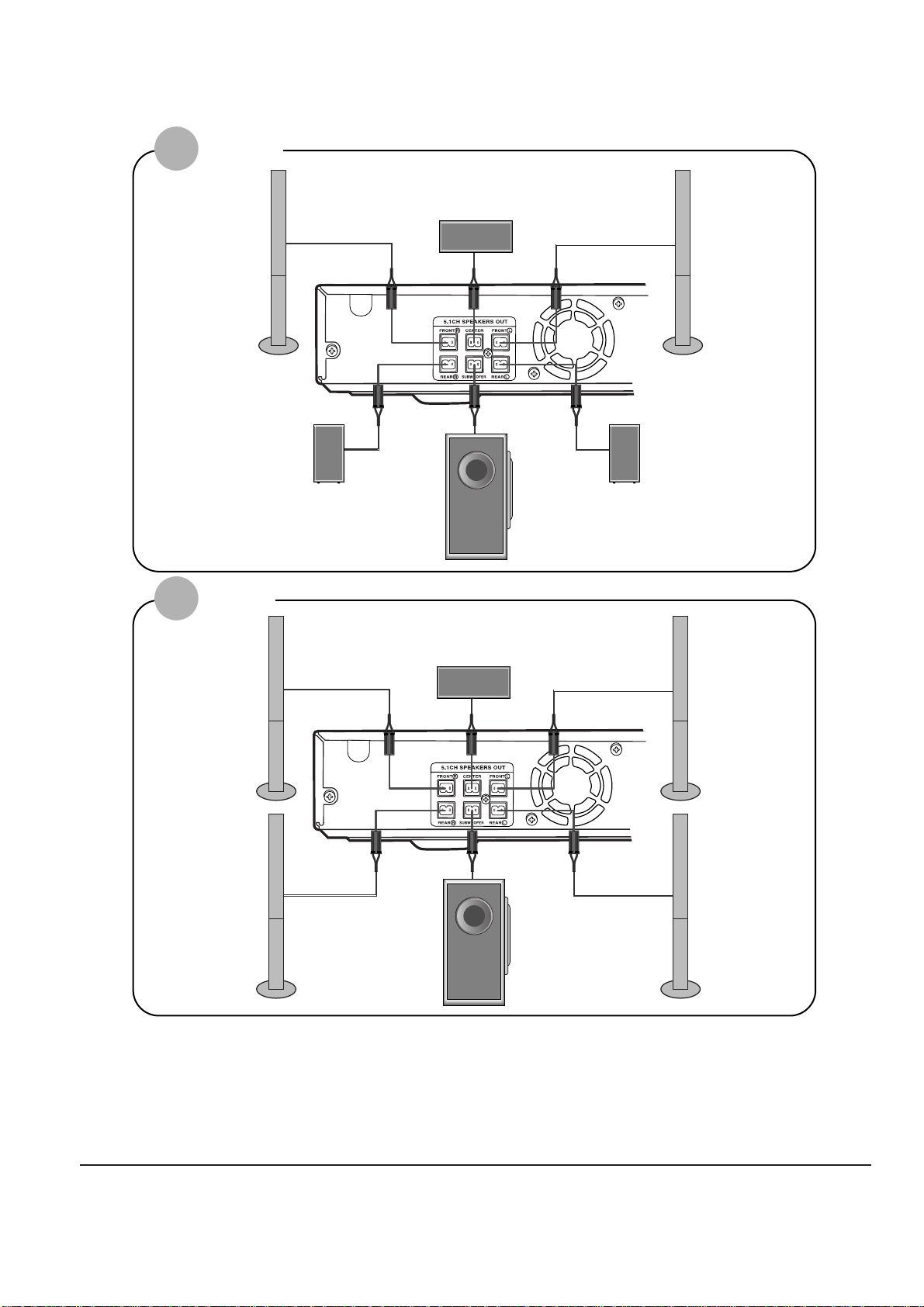
Samsung Electronics 3-3
Front Speaker (R)
Rear Speaker (R)
Subwoofer
Center Speaker
Front Speaker (L)
Rear Speaker (L)
HT-TQ22
HT-TQ25
Front Speaker (R)
Rear Speaker (R)
Subwoofer
Center Speaker
Front Speaker (L)
Rear Speaker (L)
Page 19

3-4 Samsung Electronics
2. Main Functions
Disc Playback
To stop playback, press STOP during playback.
•
If pressed once, “PRESS PLAY” is displayed and the stop position will be
stored in memory. If PLAY/PAUSE ( ) button or ENTER button is
pressed, playback resumes from the stop position. (This function works only
with DVDs.)
•
If pressed twice, “STOP” is displayed, and if PLAY/PAUSE ( ) button is
pressed, playback starts from the beginning.
To temporarily pause playback, press PLAY/PAUSE
during playback.
•
To resume playback, press PLAY/PAUSE ( ) button again.
DVD VCD CD
•
Playback starts automatically.
Selecting the Video Format
Press and hold NT/PAL button on the remote controller for over 5 seconds
while the power is turned off.
•
By default, the video format is set to "PAL".
•
"NTSC" or "PAL " will appear in the display. At this time, press the NT/PAL button
shortly to select between "NTSC" and "PA L".
•
Each country has a different video format standard.
•
For normal playback, the video format of the disc must be the same as the video
format of your TV.
2
Load a disc.
•
Place a disc gently into the tray with the disc’s label
facing up.
•
Depending on the content of
the disc, the initial screen may
appear different.
1
Press OPEN/CLOSE button to open the
disc tray.
3
Close the compartment by pressing the
OPEN/CLOSE button again.
Note
Page 20

Samsung Electronics 3-5
•
Depending on the number of languages on a DVD disc, a different
audio language (ENGLISH, SPANISH, FRENCH, etc.) is selected each
time the button is pressed.
2
Press Cursor ,
buttons or numeric buttons to select the
desired audio language.
1
Press INFO button
twice.
SP 2/3
FR 3/3
Audio Language Selection Function
DVD
Selecting Audio Language
Page 21

3-6 Samsung Electronics
EN 1/3 EN 01/ 03
OFF
SP 02/ 03
FR 03/ 03
OFF / 03
•
To operate this function, you can also press the Select AUDIO or Select SUBTITLE buttons on the remote control.
•
Depending on the disc, the Subtitle and Audio Language functions
may not be available.
Subtitle Language Selection Function
DVD
2
Press Cursor
button to move to
SUBTITLE ( )
display.
1
Press INFO button
twice.
3
Press Cursor
button or numeric
buttons to select
the desired subtitle.
Note
Selecting Subtitle Language
Page 22

Samsung Electronics 3-7
2
Press Cursor ,
button to move to
‘Title Menu’.
DVD
1
In Stop mode,
press MENU button.
3
Press ENTER button.
•
The title menu appears.
Press MENU button to exit the setup screen.
DVD
2
•
When you select Disc Menu and it is not
supported by the disc, the "This menu is not sup-
ported" message appears on the screen.
1
In Stop mode,
press MENU
button.
Press Cursor ,
buttons to move to
‘DISC MENU’ and then
press ENTER button.
3
•
Press ENTER button.
Press Cursor ,
, buttons to
select the desired
item.
You can use the menus for the audio language, subtitle language, profile, etc.
DVD menu contents differ from disc to disc.
Using Disc Menu
For DVDs containing multiple titles, you can view the title of each movie.
Depending on the disc, the availability of this feature may vary.
Using the Title Menu
•
Title menu display may be different depending on the disc.
Note
ENTERMOVE EXIT
ENTERMOVE EXIT
ENTERMOVE EXIT
ENTERMOVE EXIT
•
When playing a VCD (version 2.),
this toggles between PBC ON
and OFF.
PBC (Playback Control) Function
When playing a VCD (version 2.0), you can select and view various scenes according to the menu screen.
PBC ON: This VCD disc is version 2.0. The disc is played back according to the menu screen.Some functions
may be disabled.When some functions are disabled, select "PBC OFF" to enable them.
PBC OFF: This VCD disc is version 1.1. The disc is played back in the same way as with a music CD.
•
Disc menu display may be different depending on the disc.
Note
Page 23

3-8 Samsung Electronics
3. New Functions
Fast playback
Skip Forward/Back
During playback, press the button.
•
Goes to the next file whenever you press button, if there are over
2 files in the disk.
•
Goes to the previous file whenever you press button, if there are
over 2 files in the disk.
To play back the disc at a faster speed,
press or during playback.
•
Each time you press either button, the playback speed will change as
follows:
2x ➞ 4x ➞ 8x ➞ 32x ➞ Normal.
•
DIVX file can be zoomed only in ZOOM X2 mode.
•
DivX files have .Avi file extensions, however, not all .Avi files are DivX
and may not be playable in this unit.
Note
Zoom Function
2
Press Cursor , ,
, buttons to move
to the area you want
to enlarge.
1
Press ZOOM
button.
•
Each time you press the button,
your selection will toggle between
“ZOOM X2” and “ZOOM OFF”.
DivX Playback
5 Minute Skip function
During playback, press the , button.
•
Playback skips 5 minutes forward whenever you press button.
•
Playback skips 5 minutes back whenever you press button.
The functions on this page apply to DIVX disc playback.
Page 24

Samsung Electronics 3-9
•
" " is displayed when there is one supported audio item in the disc.
Note
Format AVI WMA
Surpported Versions DivX3.11 ~ 5.1 V1/V2/V3/V7
Press the SUBTITLE button.
•
Each time you press the button, your selection will toggle between “SUBTITLE ON” (1/1, 1/2 ...) and
“SUBTITLE OFF”.
•
If the disc has only one subtitle file, it will be played automatically.
Subtitle Display
Press the AUDIO button.
•
Each time you press the button, your selection will toggle between “AUDIO ON” (1/1, 1/2 ...) and
“”.
Audio Display
DivX
(Digital internet video eXpress)
DivX is a video file format developed by Microsoft based on the MPEG4 so as to provide audio, and
video data over the Internet in real-time.
MPEG4 is used for video encoding and MP3 for audio encoding so that the users can watch a movie
in DVD-quality video and audio.
1. Supported Formats
•
This product only provides the following media formats. If both of the video and audio formats are not
supported simultaneously, the user may experience problems such as broken image or no sound.
2. Caption Related
•
To use the caption function, save the caption file (*.smi) in the same file name as that of the DivX
media file (*.avi) within the same folder.
Example. Root Samsung_Bluetek_007CD1.avi
Samsung_Bluetek_007CD1.smi
•
Up to 60 alphanumeric characters or 30 East Asian characters (2 byte characters such as Korean and
Chinese) for the file name.
●
Supported Video Formats
Format MP3 WMA AC3 DTS
Bit Rate 80~384kbps 56~128kbps 128~384kbps N/A
Sampling Frequency
44.1khz 44.1/48khz N/A
•
Aspect Ratio: Although default DivX resolution is 640*480 pixels (4:3), this product supports up to
720*480 pixels (16:9). It will not be supported when the screen resolution is higher than 800.
●
Supported Audio Format
Page 25

3-10 Samsung Electronics
•
Depending on the recording mode, some MP3/WMA-CDs may not play.
•
Ta ble of contents of a MP3-CD varies depending on the MP3/WMA track format recorded on the disc.
Note
2
In Stop mode, use
to select
the album, and then
press the ENTER
button.
•
The MP3/WMA menu screen will appear
and playback will start.
•
The appearance of the menu depends on
the MP3/WMA disc.
•
WMA-DRM files cannot be played.
•
Use to select the track.
1
Press the
OPEN/CLOSE button
to open the disc tray,
and then load the
MP3/WMA disc.
4
Press the STOP
button to stop
playback.
•
To select another album and track,
repeat Steps 2 and 3 above.
3
To change the album,
use to
select another album
in Stop mode, and
then press the
ENTER button.
Data CDs (CD-ROM, CD-R, CD-RW) encoded in MP3/WMA format can be played.
MP3/WMA-CD Playback
•
Music File Icon
•
Image File Icon
•
Movie File Icon
•
All File Icon
Press the button when it is in stop
status and select a desired icon from the top
part of the menu.
•
To play music files only, select the Icon.
•
To view image files only, select the Icon.
•
To view movie files only, select the Icon.
•
To select all files select the Icon.
To play a file icon in the screen,
Page 26

Samsung Electronics 3-11
Slide Mode
Place the JPEG disc on the disc tray.
•
Each time the button is pressed, the slide moves backward or forward.
Press to skip to the next slide.
1
Press the OPEN/CLOSE button.
2
•
Playback starts automatically.
•
Each time the button is pressed, the image makes the transition as follows:
Press SLIDE MODE button.
3
From top to bottom
From bottom to top
Rectangular shape in the center
Ver tical blinds effect
Each time a new image is displayed, slide modes
(1~11) will be applied randomly and automatically.
Cancels the slide mode.
Images captured with a digital camera or camcorder, or JPEG files on a PC can be stored on a CD and then
played back with this Home Theater.
JPEG File Playback
JPEG
Page 27

Samsung Electronics 11-1
11. PCB Diagram
1. MAIN
Page 28

11-2 Samsung Electronics
2. AMP
Page 29

1. Precautions
Follow these safety, servicing and ESD precautions to prevent damage and protect against potential hazards
such as electrical shock and X-rays.
Samsung Electronics 1-1
1-1 Safety Precautions
1. Be sure that all of the built-in protective
devices are replaced.
2. When reinstalling the chassis and its
assemblies, be sure to restore all protective
devices, including control knobs and
compartment covers.
3. Make sure that there are no cabinet
openings through which people-particularly children--might insert fingers
and contact dangerous voltages. Such
openings include the spacing between the
picture tube and the cabinet mask,
excessively wide cabinet ventilation slots,
and improperly fitted back covers.
4. Design Alteration Warning:
Never alter or add to the mechanical or
electrical design of the unit. Example: Do
not add auxiliary audio or video connectors. Such alterations might create a safety
hazard. Also, any design changes or additions will void the manufacturer's warranty.
5. Leakage Current Hot Check (Figure 1-1):
Warning: Do not use an isolation
transformer during this test. Use a leakagecurrent tester or a metering system that
complies with American National Standards
Institute (ANSI C101.1, Leakage Current for
Appliances), and Underwriters Laboratories
(UL Publication UL1410, 59.7).
With the unit completely reassembled, plug
the AC line cord directly into a 120V AC
outlet. With the unit's AC switch first in
the ON position and then OFF, measure the
current between a known earth ground
(metal water pipe, etc.) and all exposed
metal parts. Examples: Handle brackets,
metal cabinets, screwheads and control
shafts. The current measured should not
exceed 0.5 milliamp. Reverse the powerplug prongs in the AC outlet and repeat.
6. Insulation Resistance Cold Check:
(1) With the unit's AC plug disconnected
from the AC source, connect an electrical
jumper across the two AC prongs. (2) Set
the power switch to ON. (3) Measure the
resistance between the shorted AC plug and
any exposed metallic parts. Example:
Screwheads, antenna, control shafts or
handle brackets.
If any of the exposed metallic parts has a
return path to the chassis, the measured
resistance should be between 1 and 5.2
megohms. If there is no return path, the
measured resistance should be "infinite." If
the resistance is outside these limits, a shock
hazard might exist. See Figure 1-2
Fig. 1-1 AC Leakage Test
Fig. 1-2 Insulation Resistance Test
Page 30

Samsung Electronics1-2
1-1 Safety Precautions (Continued)
7. Components, parts and wiring that appear
to have overheated or that are otherwise
damaged should be replaced with parts
that meet the original specifications.
Always determine the cause of damage or
overheating, and correct any potential
hazards
8. Observe the original lead dress, especially
near the following areas: Antenna
wiring, sharp edges, and especially the
AC and high voltage power supplies.
Always inspect for pinched, out-of-place,
or frayed wiring. Do not change the
spacing between components and the
printed circuit board. Check the AC
power cord for damage. Make sure that
no wires or components touch thermally
hot parts.
9. Product Safety Notice:
Some electrical and mechanical parts
have special safety-related characteristics
which might not be obvious from visual
inspection. These safety features and the
protection they give might be lost if the
replacement component differs from the
original--even if the replacement is rated
for higher voltage, wattage, etc.
10 Components that are critical for safety are
indicated in the circuit diagram by
shading, or . Use replacement
components that have the same ratings,
especially for flame resistance and
dielectric strength specifications. A
replacement part that does not have the
same safety characteristics as the original
might create shock, fire or other hazards.
1-2 Servicing Precautions
1. Servicing precautions are printed on the
cabinet. Follow them.
2. Always unplug the unit's AC power cord
from the AC power source before
attempting to: (a) Remove or reinstall any
component or assembly, (b) Disconnect an
electrical plug or connector, (c) Connect a
test component in parallel with an
electrolytic capacitor.
3. Some components are raised above the
printed circuit board for safety. An
insulation tube or tape is sometimes used.
The internal wiring may be clamped to
prevent contact with thermally hot
components. Reinstall all such elements to
their original position.
4. After servicing, always check that the
screws, components and wiring have been
correctly reinstalled. Make sure that the
portion around the serviced part has not
been damaged.
5. Check the insulation between the blades of
the AC plug and accessible conductive parts
(examples: metal panels, input terminals
and earphone jacks).
6. Insulation Checking Procedure: Disconnect
the power cord from the AC source and
turn the power switch ON. Connect an
insulation resistance meter (500V) to the
blades of the AC plug.
The insulation resistance between each
blade of the AC plug and accessible
conductive parts (see above) should be
greater than 1 megohm.
7. Never defeat any of the B+ voltage
interlocks. Do not apply AC power to the
unit (or any of its assemblies) unless all
solid-state heat sinks are correctly installed.
8. Always connect a test instrument's ground
lead to the instrument chassis ground
before connecting the positive lead; always
remove the instrument's ground lead last.
Precautions
Warning1: First read the "Safety Precautions" section of this manual. If some unforeseen circumstance creates a conflict
between the servicing and safety precautions, always follow the safety precautions.
Page 31

Samsung Electronics 1-3
1-3 Precautions for Electrostatically Sensitive Devices (ESDs)
1-4 Special Precautions and Warning Labels for Laser Products
1. Some semiconductor ("solid state") devices
are easily damaged by static electricity.
Such components are called Electrostatically
Sensitive Devices (ESDs). Examples include
integrated circuits and some field-effect
transistors. The following techniques will
reduce the occurrence of component
damage caused by static electricity.
2. Immediately before handling any
semiconductor components or assemblies,
drain the electrostatic charge from your
body by touching a known earth ground.
Alternatively, wear a discharging
wrist-strap device. (Be sure to remove it
prior to applying power--this is an electric
shock precaution.)
3. After removing an ESD-equipped assembly,
place it on a conductive surface such as
aluminum foil to prevent accumulation of
electrostatic charge.
4. Do not use freon-propelled chemicals.
These can generate electrical charges that
damage ESDs.
5. Use only a grounded-tip soldering iron
when soldering or unsoldering ESDs.
6. Use only an anti-static solder removal
device. Many solder removal devices are
not rated as "anti-static" (these can
accumulate sufficient electrical charge to
damage ESDs).
7. Do not remove a replacement ESD from its
protective package until you are ready to
install it. Most replacement ESDs are
packaged with leads that are electrically
shorted together by conductive foam,
aluminum foil or other conductive
materials.
8. Immediately before removing the protective
material from the leads of a replacement
ESD, touch the protective material to the
chassis or circuit assembly into which the
device will be installed.
9. Minimize body motions when handing
unpackaged replacement ESDs. Motions
such as brushing clothes together, or lifting
a foot from a carpeted floor can generate
enough static electricity to damage an ESD.
Precautions
UL : Manufactured for U.S.A. Market.
CSA : Manufactured for Canadian Market.
EU : Manufactured for European Market.
SCAN : Manufactured for Scandinavian
Market.
This Product Complies with
DHHS Rules 21CFR, Sub
chapter J.At date of Manufacture
(UL)
(UL,CSA,SCAN)
(EU)
CERTIFIED ONLY TO CANADIAN
ELECTRICAL CODE.
CERTIFIE EN VERTU DU CODE
CANADIAN DE LELETRICITE
SEULEMENT
(CSA)
CLASS 1
LASER PRODUCT
(UL,CSA,EU)
Fig. 1-3 Warning Labels (Location: Enclosure Block)
Fig. 1-4 Warning Labels (Location: Disc Clamper, Inner Side of Unit Door or Nearby Unit Chassis )
CAUTION :
INVISIBLE LASER RADIATION WHEN OPEN
AND INTERLOCKS DEFEATEO AVOIDEXPOSURE TO BEAM
ADVARSEL:USYNLIG LASERSTRÅLING VED ABNING
NÅR SIKKERHEDSAFBRYDERE ER UDE AF FUNKTION
UNDGA UDSAETTELSE FOR STRALING
VARO:AVATTAESSA JA SUOJALUKITUS OHITETTAESSA
OLET ALTTINA NAKYMATTÖMALLE LASERSATEILYLLE ALA
KATSO SATEESEEN!
VARNING:
OSYNLIG LASERSTRÅLNING NAR DENNA DEL
AR OPPNAD OCH SPARREN AR URKOPPLAD BETRAKTA
EJSTRÅLEN!
Page 32

Samsung Electronics1-4
1-4 Special Precautions and Warning Labels for Laser Products (Continued)
1-4-1 Warnings
1. When servicing, do not approach the LASER
exit with the eye too closely. In case it is
necessary to confirm LASER beam emission,
be sure to observe from a distance of more
than 30 cm from the surface of the objective
lens on the optical pick-up block.
2. Do not attempt to handle the objective lens
when the DISC is not on the tray.
1-4-2 Laser Diode Specifications
Material: GaAs+ GaAlAs
Wavelength: 760-800 nm
Emission Duration: Continuous
Laser Output: 0.2 mw (measured at a
1.6 mm distance from the objective lens
surface on the optical pick-up block.)
1-4-3 Handling the Optical Pick-up
1. Static electricity from clothing or the body
may cause electrostatic breakdown of the
laser diode in the Optical Pickup. Follow
this procedure:
2. Place a conductive sheet on the work bench
(i.e., the black sheet used for wrapping
repair parts.) Note: The surface of the work
bench should be covered by a copper
ground plane, which is grounded.
3. The repair technician must wear a wrist
strap which is grounded to the copper sheet.
4. To remove the Optical Pickup block:
Place the set on the conductive sheet, and
momentarily touch the conductive sheet
with both hands. (While working, do not
allow any electrostatic sources--such as
clothes--to touch the unit.)
5. Ground the "Short Terminal" (located on the
PCB, inside the Pickup Assembly) before
replacing the Pickup. This terminal should
be shorted whenever the Pickup Assembly
is lifted or moved.
6. After replacing the Pickup, reopen the Short
Terminal. See diagrams below:
Precautions
1-5 Special Precautions for HDD
* HDD Data Maintenance Step
1. Since the data on the HDD is weak to mechanical shock, place the HDD in a safe
location that is free from mechanical shock once it is removed from the main unit.
2. In order to safe keep the data on the HDD, back up the data before the repair or
make sure not to place the HDD near any electrical appliance that generates a strong
magnetic field.
Page 33

Samsung Electronics 2-1
2. Product Description
1. Specifications
HT-X20
Speaker system
Impedance
Frequency range
Output sound pressure level
Rated input
Maximum input
Dimensions (W x H x D)
Weights
S
P
E
A
K
E
R
Subwoofer speaker
3Ω
35Hz~160Hz
85dB/W/M
100W
200W
175 x 320 x 381 mm
5.1 kg
Front/Rear
Center
90 x 152x 90 mm
200 x 90 x 92 mm
0.5 Kg/0.4 Kg
0.6 Kg
Front/Rear
Center
Front/Center/Rear speaker
3Ω x 5
140Hz~20KHz
82dB/W/M
80W
160W
5.1ch speaker system
Page 34

2-2 Samsung Electronics
2. Notes on discs
DVD (Digital Versatile Disc) offers fantastic audio and video, thanks to Dolby Digital sur-
round sound and MPEG-2 video compression technology. Now you can enjoy these realistic
effects in the home, as if you were in a movie theater or concert hall.
V I D E O
DVD players and the discs are coded by region. These regional codes must match in order
for the disc to play. If the codes do not match, the disc will not play.
The Region Number for this player is given on the rear panel of the player.
(Your DVD player will only play DVDs that are labeled with identical region codes.)
1 6
~
•
LD, CD-G, CD-I, CD-ROM and DVD-ROM cannot be played on this player.
If such discs are played, a "WRONG DISC FORMAT" message appears on the TV screen.
•
DVD discs purchased abroad may not play on this player.
If such discs are played, a "WRONG REGION CODE" message appears on the TV screen.
Do not use the following types of disc!
•
Many DVD discs are encoded with copy protection. Because of this, you should only connect
your DVD player directly to your TV, not to a VCR. Connecting to a VCR results in a distorted picture from copy-protected DVD discs.
•
This product incorporates copyright protection technology that is protected by methods claims of certain
U.S. patents and other intellectual property rights owned by Macrovision Corporation and other rights
owners. Use of this copyright protection technology must be authorized by Macrovision Corporation, and
is intended for home and other limited viewing uses only unless otherwise authorized by Macrovision
Corporation. Reverse engineering or disassembly is prohibited.
Copy Protection
COMPACT
DIGITAL VIDEO
COMPACT
DIGITAL AUDIO
Mark (Logo)
Audio + Video
DVD
VIDEO-CD
AUDIO-CD
12cm
Approx. 240 min. (single-sided)
Approx. 480 min. (double-sided)
Approx. 80 min. (single-sided)
Approx. 160 min. (double-sided)
74 min.
20 min.
74 min.
20 min.
8cm
12cm
8cm
12cm
8cm
Audio + Video
Audio
Recorded Signals
Disc Type Disc Size Max. Playing Time
Playable Discs
Page 35

Samsung Electronics 2-3
CD-R Discs
•
Some CD-R discs may not be playable depending on the disc recording device (CD-Recorder or PC) and the
condition of the disc.
•
Use a 650MB/74 minute CD-R disc.
Do not use CD-R disk over 700MB/80 minute as much as possible since it may not be played back.
•
Some CD-RW (Rewritable) media, may not be playable.
•
Only CD-Rs that are properly "closed" can be fully played. If the session is closed but the disc is left open, you
may not be able to fully play the disc.
CD-R JPEG Discs
•
Only files with the ".jpeg" and ".JPEG" extensions can be played.
•
If the disc is not closed, it will take longer to start playing and not all of the recorded files may be played.
•
Only CD-R discs with JPEG files in ISO 9660 or Joliet format can be played.
•
JPEG file names should be 8 characters or less in length and contain no blank spaces or special characters (. / = +).
•
Only a consecutively written multisession disc can be played. If there is a blank segment in the multisession disc, the
disc can be played only up to the blank segment.
•
A maximum of 9,999 images can be stored on a single CD.
•
When playing a Kodak/Fuji Picture CD, only the JPEG files in the picture folder can be played.
•
Picture discs other than Kodak/Fuji Picture CDs may take longer to start playing or may not play at all.
Disc Recording Format
CD-R MP3 Discs
•
Only CD-R discs with MP3 files in ISO 9660 or Joliet format can be played.
•
MP3 file names should be 8 characters or less in length and contain no blank spaces or special characters (. / = +).
•
Use discs recorded with a compression/decompression data rate greater than 128Kbps.
•
Only files with the ".mp3" and ".MP3" extensions can be played.
•
Only a consecutively written Multisession disc can be played. If there is a blank segment in the Multisession disc,
the disc can be played only up to the blank segment.
•
If the disc is not closed, it will take longer to begin playback and not all of the recorded files may be played.
•
For files encoded in Variable Bit Rate (VBR) format, i.e. files encoded in both low bit rate and high bit rate
(e.g., 32Kbps ~ 320Kbps), the sound may skip during playback.
•
A maximum of 500 tracks can be played per CD.
•
A maximum of 300 folders can be played per CD.
Page 36

2-4 Samsung Electronics
3. Accessories
AH39-40001V CABLE-AUDIO CABLE;1P-1P,3000MM,- COMMON
AH42-00021A ANT FM T;T18011F-1,75 ohm,1800mm COMMON
AH59-01787S REMOCON-ASSY;HT-X20,XAA,AR-7060, US
Code no. Description & Specification Remarks
Page 37

14-1 Samsung Electronics
1. Definition of Home Theater
What is Home Theater?
Home theater system is the proper combination of audio and video system at home which enable
you to enjoy more dynamic sound and vivid image in a wide screen of movie theater.
This effect can be implemented with wide screen, high quality projector, Dolby digital and DTS
sound effects.
Now you can enjoy surround sound field wieh realistic presence and Dolby digital at your home as if
you are in a movie theater.
As time goes by, home theater system has become recognized as a system that helps listen sound
closer to the original sound rather than video.In this 21st centur y, most movie and animation films
will be produced for home theater and reproduce sound closer to original sound.
Page 38

Samsung Electronics
14-2
2. Concept of Sound
What is Sound Range?
People can listen to the sounds with frequency between 200Hz~20.000Hz
As time goes by, home theater system has become recognized as a system that helps listen sound
closer to the original sound rather than video.In this 21st centur y, most movie and animation films
will be produced for home theater and reproduce sound closer to original sound.
What is Sound Pressure?
* A measure of how well speaker converts electr ic signal it receives to sound
* Unit of sound pressure is decibel and mainly measures the size of sound at 1 m away after
sending 1 W power from speaker.
❋ High sound pressure doesn't necessar y mean good performance
What is Timbre?
* How well the unique sound of musical instrument is expressed
* Better if violin and cello sound are accurately distinguished. Good timbre means high quality.
Page 39

14-3 Samsung Electronics
2. Concept of Sound
By reproducing standard channels used during soundtrack recording of movie,
it outputs 3 sounds of movie (words / music / sound effects) from 6 different
speakers and provides surround dynamic sound effects so that you can even
feel the direction of sound.
5 channel
0.1 channel
* Power amp is embedded in active sub woofer
* Require separate amp since there is no amp in passive sub woofer
❋ No difference in performance of active sub woofer and passive sub woofer
Center Speaker :Voice ( over 95%)
Front Speaker (L/R) : Music Sound
Rear Speaker (L/R) : Sound Effect
A
B
C
Subwoofer : Low Sound Effect
D
Page 40

Samsung Electronics
14-4
4. Home Theater Sound Format
Overview
* As home theater has recently penetrated deep into consumer's market in Korea, Dolby digital and
DTS, the sound format for 5.1 channel home theater, are the mainstream in the market.
* Expanded type of 6.1 channel or 7.1 channel are recently released in the market, but there are
not much DVD title that can suppor t expanded type.
Home theater format...
Stereo
Is used in general audio and analog TV and and consists of 2
channels, at front left/right
Dolby Surround
In this sound format, 4 audio channels (Front left / right / center /
surround) are entered in 2 channel and reproduce in 4 channels
through device with Dolby decoder.
Center channel is not completely separated so that it forms virtual
center channel with help of front left / right channel.
1958 1Ch Mono/ 2Ch Stereo
1982 Matrix 3Ch Dolby Surround
1987 Matrix 4Ch Dolby Pro Logic
1995 5.1Ch Dolby Digital
1997 DTS (Digital Theater System)
1999 Matrix 6.1Ch Dolby Digital Sourround EX
Page 41

Dolby Prologic
– Provide 4 channels (Front Left/Right/Center/Surround)
– Reinforced from Dolby Surround
① Center channel is completely separated
➁ Separation between channels gets higher
Dolby Digital
– Provide completely separate 5.1 channel
(Front Left/Right, Center, Rear Left/Right, Sub Woofer)
– Main sound format of home theater
– Reinforced from Dolby Prologic
– Rear surround left/right channels give different sound
– Support sub woofer reinforcing Bass
❋ Dolby Digital is also called AC-301
AC-3(Audo-Coding-3) :3rd digital audio coding Dolby Research Center has
developed.
DTS(Digital Theater System)
– Technology of providing 5.1 channel sound, higher quality than
Dolby Digital
– Home appliance produced to apply system installed at 1,800 the-
aters throughout the world.
✪ Comparison of DTS and Dolby Digital(DD)
14-5 Samsung Electronics
Page 42

Samsung Electronics
14-6
Dolby Prologic
– Latest technology reproducing music CD recorded in 2 channel,
cassette tape and video tape made in Dolby Prologic into 5.1
channel.
– Surround speaker that makes you feel more natural, deeper and
wider than existing Dolby Prologic.
(Ex-Profound sound adds more realistic presence from 5 speakers
and sub woofer when you watch soccer match.)
DTS (Digital Theater System)
THX (Abbreviation of Tomlison Holman's Experiment)
– THX is not a sound format like a Dolby or DTS, but is a standard of sound.Like standard KS mark
in Korea, THX means good certification in sound effects.
– THX issues certificate when a movie, theater or home theater system satisfy proper standards.
Page 43

14-7 Samsung Electronics
5. Home Theater Components
Amp / Receiver
Amp: Device of raising output after tuning signal of CD player or DVD into
unique sound timbre
Various Types and Usages of Amplifier
- For Listening to Music ¡æ For Music+ Movie
- ① AV Receiver (Dedicated Lamp for Home Theater) : Preferred by Home Theater mania.
➁ DVD Receiver (DVD Player+ Amp+ Radio Tuner) : Suitable for beginner of Home Theater
- Many A/V companies adopt DVD receiver type for expansion of easy and economic Home Theater
system.
Popular Korean Products
- Popular for those who pursue relatively good sound quality at low price
- Product priced between 400,000 won~600,000 won are popular.
Page 44

Samsung Electronics
14-8
Popular Foreign Products
– Popular for those who prefer profound sound volume/output(Hi-fi mania, Home Theater mania)
– Products in the range of middle and low price such as Denon, Yamaha, Onkyo (900,000~1.1 mil-
lion won) are popular.
– There is very expensive product over 10 million won among foreign audio markers such as
Merdian, Mcintosh, Krell.
Type of Amp/Receiver
* Pre Amp
A device that receives, adjusts and sends signal from source devices (tape deck, CD player, radio
tuner, etc.) to power amplifier.
* Power Amp
A device that amplifies the signal from Pre Amp into big sound so that speaker can vibrate.
* Integrated Amp
A device that combines pre-amp and power amp into one.
* Receiver
A device that contains tuner for radio broadcasting and integrated amp.
A/V Receiver
General Amplifier
– Support 2 channels (Left, Right Speaker)
– Mainly reproduce music
– No decoder : cannot cope with various sound formats
A/V Receiver
– Support multi-channel (suppor t 5.1 channel)
Launch products supporting 6.1 channel and 7.1 channel
recently.
– Reproduce music and movie sound realistically
– Has decoder
Can cope with various sound formats such as Dolby Digital.
DTS
– Rich input/output
– Use digital signal type and has no sound
A/V Receiver
A device of implementing home theater more conveniently with
radio and A/V receiver embeded in DVD player.
Page 45

14-9 Samsung Electronics
How to Select Amp/Receiver
- Select the products that can support both Dolby Digital and DTS since they require both for vivid
sound
- Performance of amp gets better in output(W) but high output is a burden in narrow house.
- Important to match output(W) and capacity(§Ù) of amp and speaker.
- It is advantageous for beginners to purchase DVD receiver type that has amp and radio tuner in
DVD player
- If the budget is tight, it is recommended to continue to upgrade after purchasing a low-priced system.
* Computer will be of no use when it is outdated.
* But, home theater system can be utilized in various ways due to feature of A/V device.
Speaker
Speaker system consists of speaker unit and enclosure.
The type and price range are diverse from expensive big speaker to miniature thin speaker.
Difference between famous speaker and big A/V speaker
- Speaker units are similar(there are a few several speaker unit makers in the world)
- Design, finishing, assembling and tuning process of enclosure are different.
(Prestige speakers are made manually in whole processes of manufacturing)
Famous speaker brands: B&W, JBL, BOSE, Definitve, B&O, etc.
Page 46

Samsung Electronics
14-10
Speaker Structure
Speaker Unit
- Divided into for high tone, middle tone and low tong
- Tweeter : for high pitch
Smallest unit suitable for feature of high tone reproduction
- Mid-Range : for middle tone
Mid sound reproduction ability is the most critical standard
of speaker evaluation
- Woofer : for low tone
Much bigger size than other speaker unit
Enclosure
- Case of speaker unit
- Enclosure sways sound quality of reproduction
- Low tone is almost acattered without enclosure, and only
high sound tone is heard.
Type of Speaker System
Full Range Speaker
A speaker system producing sound with one speaker unit.
2 Wa y T ype
A speaker system designed using units of 2 woofers for bass and tweeter for high tone.
3 Wa y T ype
Difference between foreign prestige speaker and big A/V maker's speaker.
Page 47

Samsung Electronics 12-1
- This Document can not be used without Samsung’s authorization -
12. Schematic Diagram
1. AMP
Page 48

12-2 Samsung Electronics
- This Document can not be used without Samsung’s authorization -
2. MAIN
Page 49

Samsung Electronics 12-3
- This Document can not be used without Samsung’s authorization -
3. FRONT
Page 50

12-4 Samsung Electronics
- This Document can not be used without Samsung’s authorization -
4. AUX
Page 51

Samsung Electronics 12-5
- This Document can not be used without Samsung’s authorization -
5. MPEG
Page 52

12-6 Samsung Electronics
- This Document can not be used without Samsung’s authorization -
6. SMPS
Page 53

Samsung Electronics 12-7
- This Document can not be used without Samsung’s authorization -
7. KARAOKE (HT-KQ20 Series)
Page 54

Samsung Electronics 6-1
6. TroubleShooting
1. NO Power
Page 55

6-2 Samsung Electronics
2. NO Output
Page 56

Samsung Electronics 6-3
3. DVD MPEG
Page 57

6-4 Samsung Electronics
Page 58

Samsung Electronics 6-5
Page 59

6-6 Samsung Electronics
4. DVD SERVO
Page 60

Samsung Electronics 6-7
Page 61

6-8 Samsung Electronics
Page 62

Samsung Electronics 6-9
Page 63

6-10 Samsung Electronics
Page 64

Samsung Electronics 6-11
Page 65

Samsung Electronics 10-1
10. Wiring Diagram
 Loading...