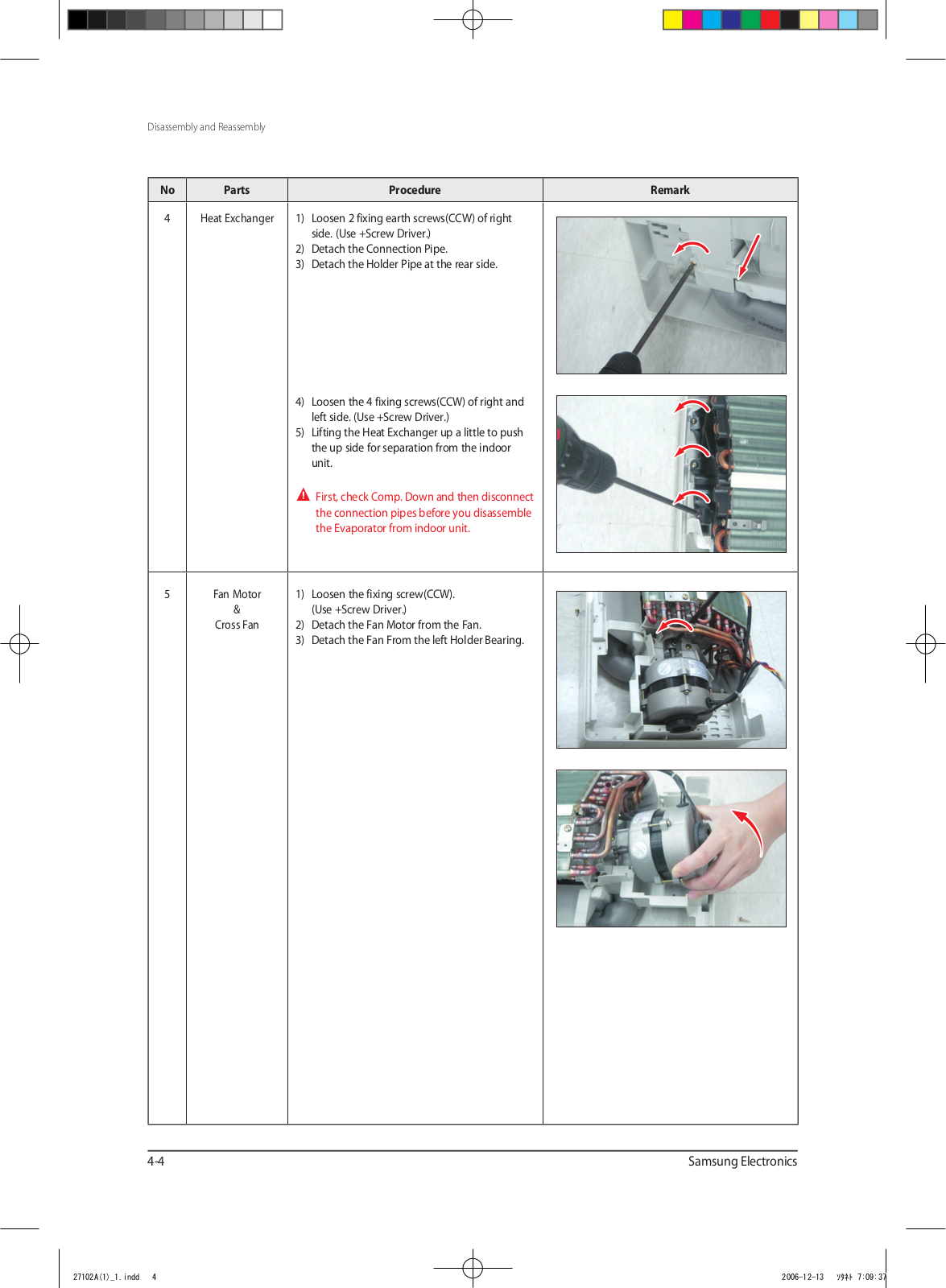
1) Loosen 2 fixing earth screws(CCW) of right
side. (Use +Screw Driver.)
2) Detach the Connection Pipe.
3) Detach the Holder Pipe at the rear side.
4) Loosen the 4 fixing screws(CCW) of right and
left side. (Use +Screw Driver.)
5) Lifting the Heat Exchanger up a little to push
the up side for separation from the indoor
unit.
First, check Comp. Down and then disconnect
the connection pipes before you disassemble
the Evaporator from indoor unit.
5
Fan Motor
&
Cross Fan
1) Loosen the fixing screw(CCW).
(Use +Screw Driver.)
2) Detach the Fan Motor from the Fan.
3) Detach the Fan From the left Holder Bearing.
4-4
Page 24
Samsung Electronics
4-2 Outdoor Unit
NoPartsProcedureRemark
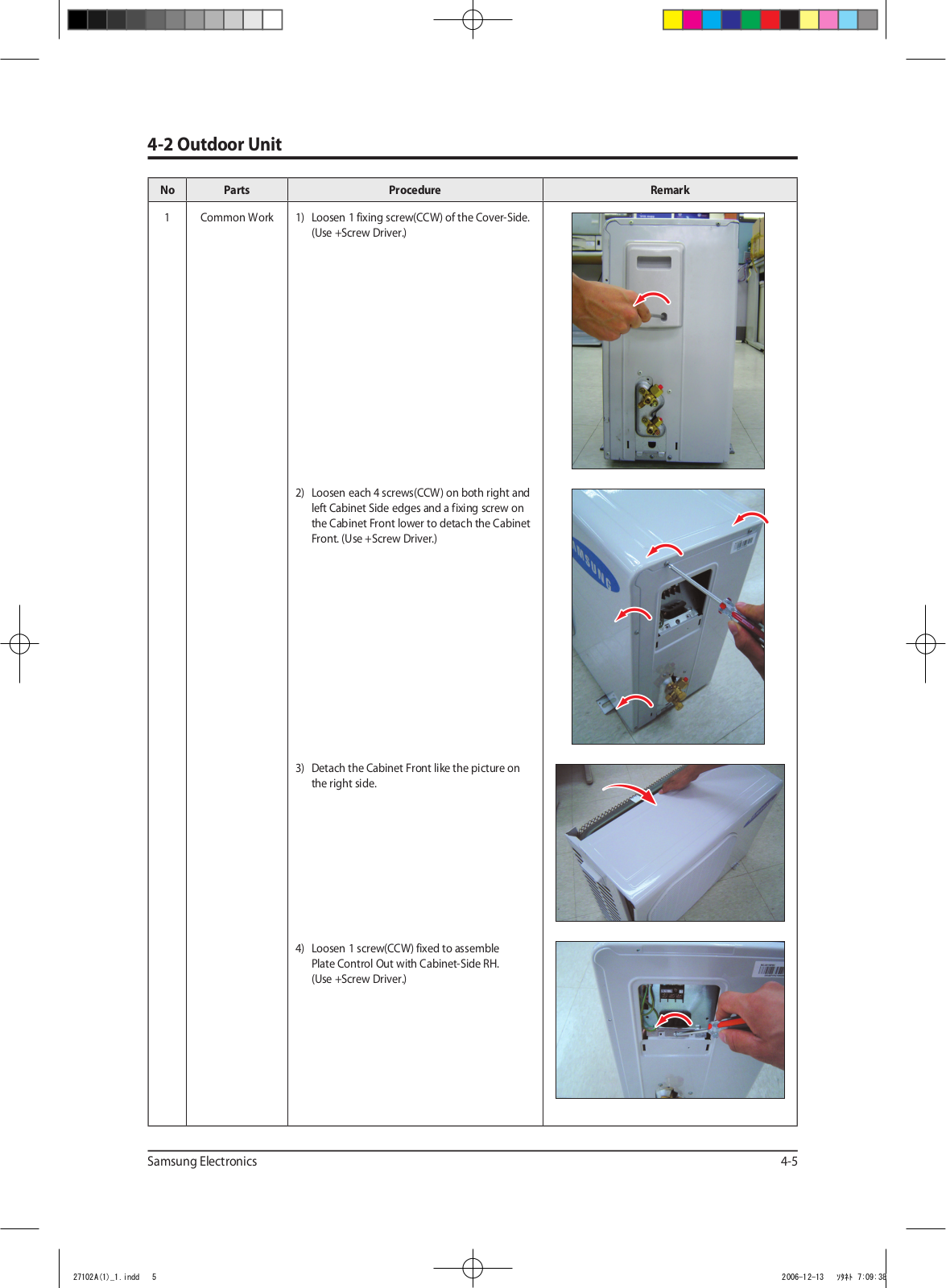
1Common Work1) Loosen 1 fixing screw(CCW) of the Cover-Side.
(Use +Screw Driver.)
2) Loosen each 4 screws(CCW) on both right and
left Cabinet Side edges and a fixing screw on
the Cabinet Front lower to detach the Cabinet
Front. (Use +Screw Driver.)
3) Detach the Cabinet Front like the picture on
the right side.
4) Loosen 1 screw(CCW) fixed to assemble
Plate Control Out with Cabinet-Side RH.
(Use +Screw Driver.)
4-5
Page 25
4-6Samsung Electronics
Disassembly and Reassembly
NoPartsProcedureRemark
5) Loosen 2 fixing screws(CCW) on the rear side
of Cabinet-Side RH. (Use +Screw Driver.)
6) Loosen 3 screws(CCW) fixed to assemble
Bracket Valve with Cabinet-Side RH.
(Use +Screw Driver.)
7) Loosen 2 fixing screws(CCW) of Cabinet
Side LF. (Use +Screw Driver.)
Page 26
Samsung Electronics4-7
NoPartsProcedureRemark
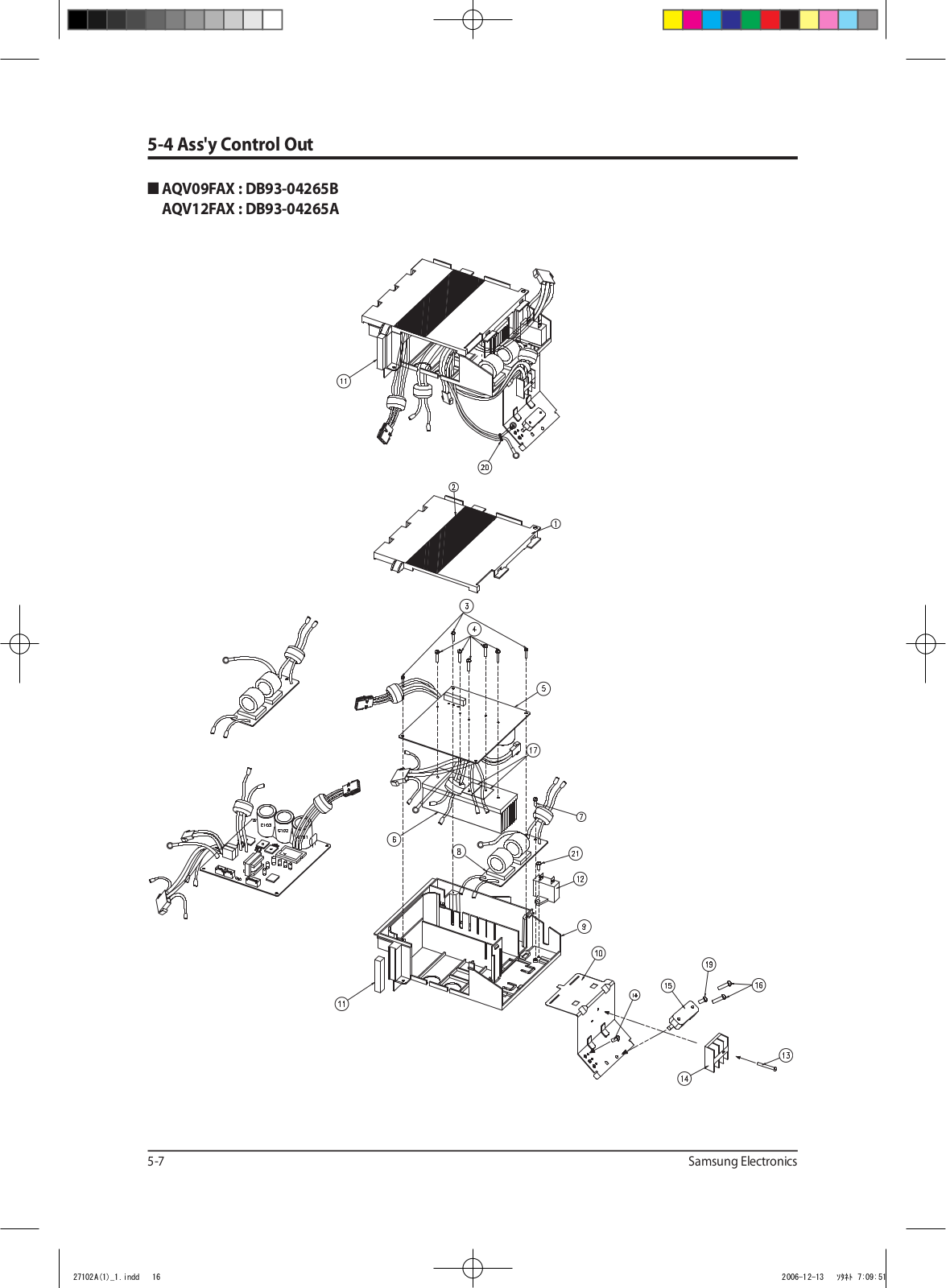
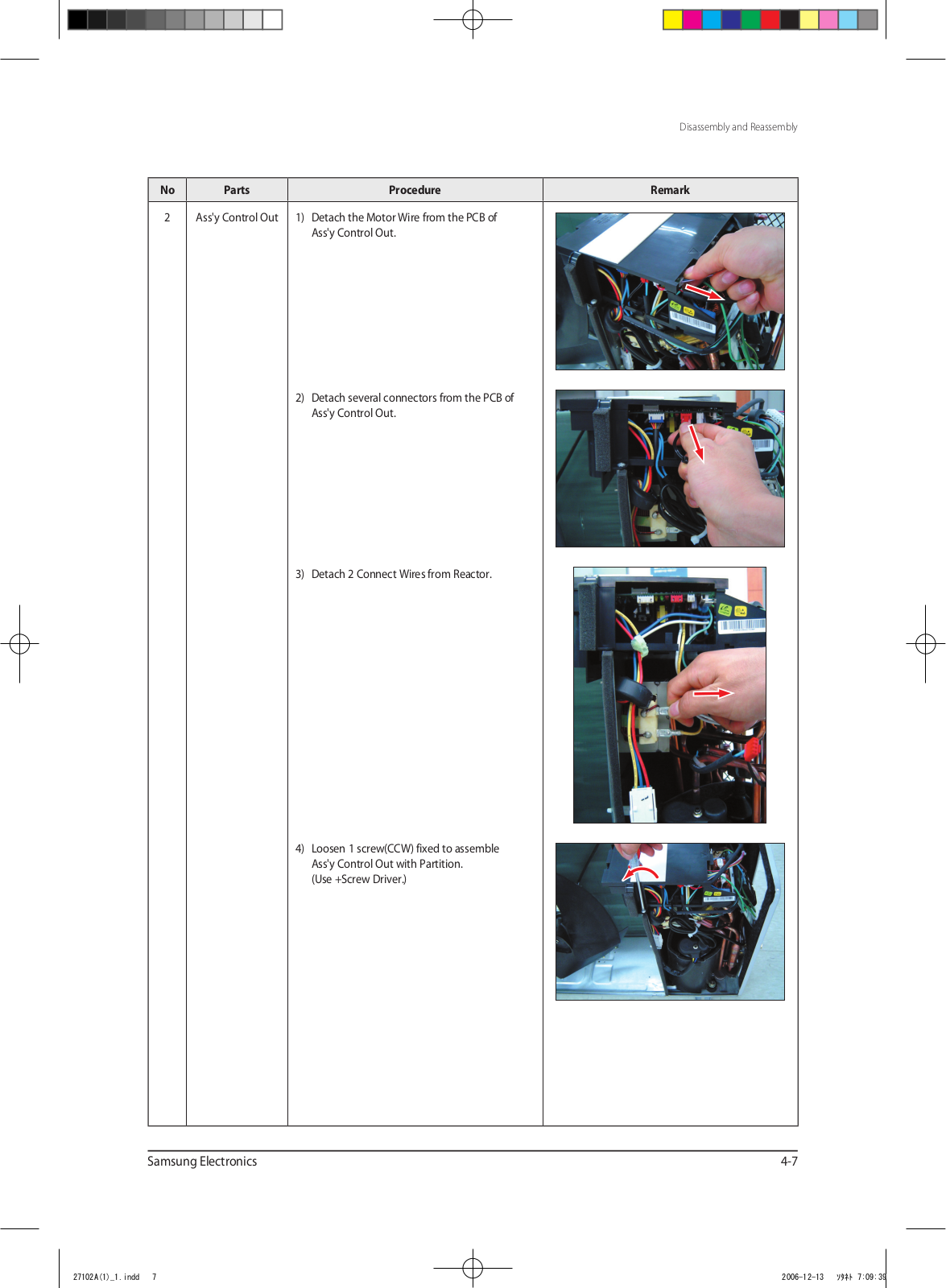
2Ass'y Control Out1) Detach the Motor Wire from the PCB of
Ass'y Control Out.
2) Detach several connectors from the PCB of
Ass'y Control Out.
Disassembly and Reassembly
3) Detach 2 Connect Wires from Reactor.
4) Loosen 1 screw(CCW) fixed to assemble
Ass'y Control Out with Partition.
(Use +Screw Driver.)
Page 27
Disassembly and Reassembly
NoPartsProcedureRemark
3Fan
&
Motor
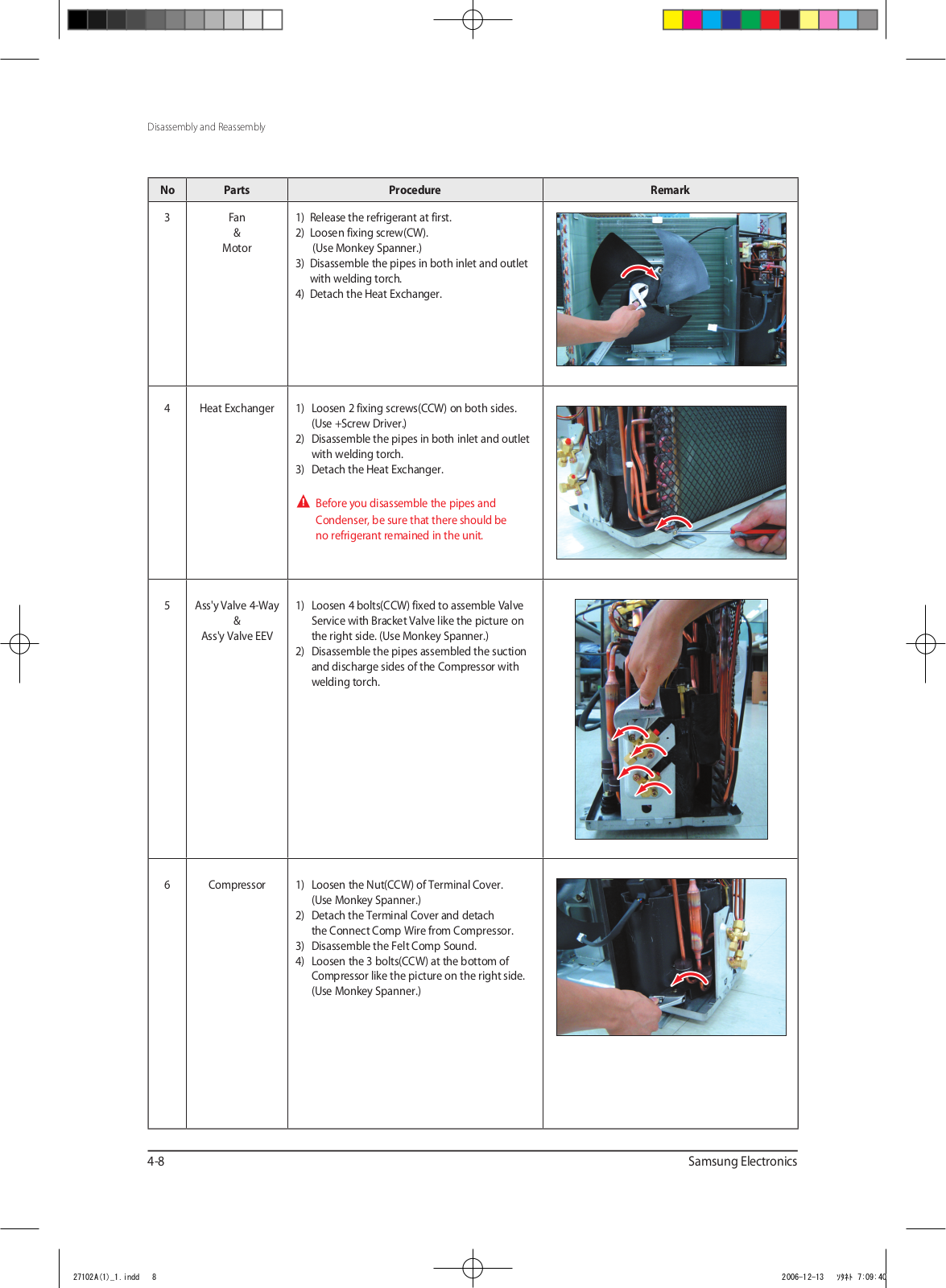
4Heat Exchanger1) Loosen 2 fixing screws(CCW) on both sides.
5Ass'y Valve 4-Way
&
Ass'y Valve EEV
1) Release the refrigerant at first.
2) Loosen fixing screw(CW).
(Use Monkey Spanner.)
3) Disassemble the pipes in both inlet and outlet
with welding torch.
4) Detach the Heat Exchanger.
(Use +Screw Driver.)
2) Disassemble the pipes in both inlet and outlet
with welding torch.
3) Detach the Heat Exchanger.
Before you disassemble the pipes and
Condenser, be sure that there should be
no refrigerant remained in the unit.
1) Loosen 4 bolts(CCW) fixed to assemble Valve
Service with Bracket Valve like the picture on
the right side. (Use Monkey Spanner.)
2) Disassemble the pipes assembled the suction
and discharge sides of the Compressor with
welding torch.
6Compressor1) Loosen the Nut(CCW) of Terminal Cover.
(Use Monkey Spanner.)
2) Detach the Terminal Cover and detach
the Connect Comp Wire from Compressor.
3) Disassemble the Felt Comp Sound.
4) Loosen the 3 bolts(CCW) at the bottom of
Compressor like the picture on the right side.
(Use Monkey Spanner.)
4-8Samsung Electronics
Page 28
MEMO
Samsung Electronics4-9
Page 29
Samsung Electronics
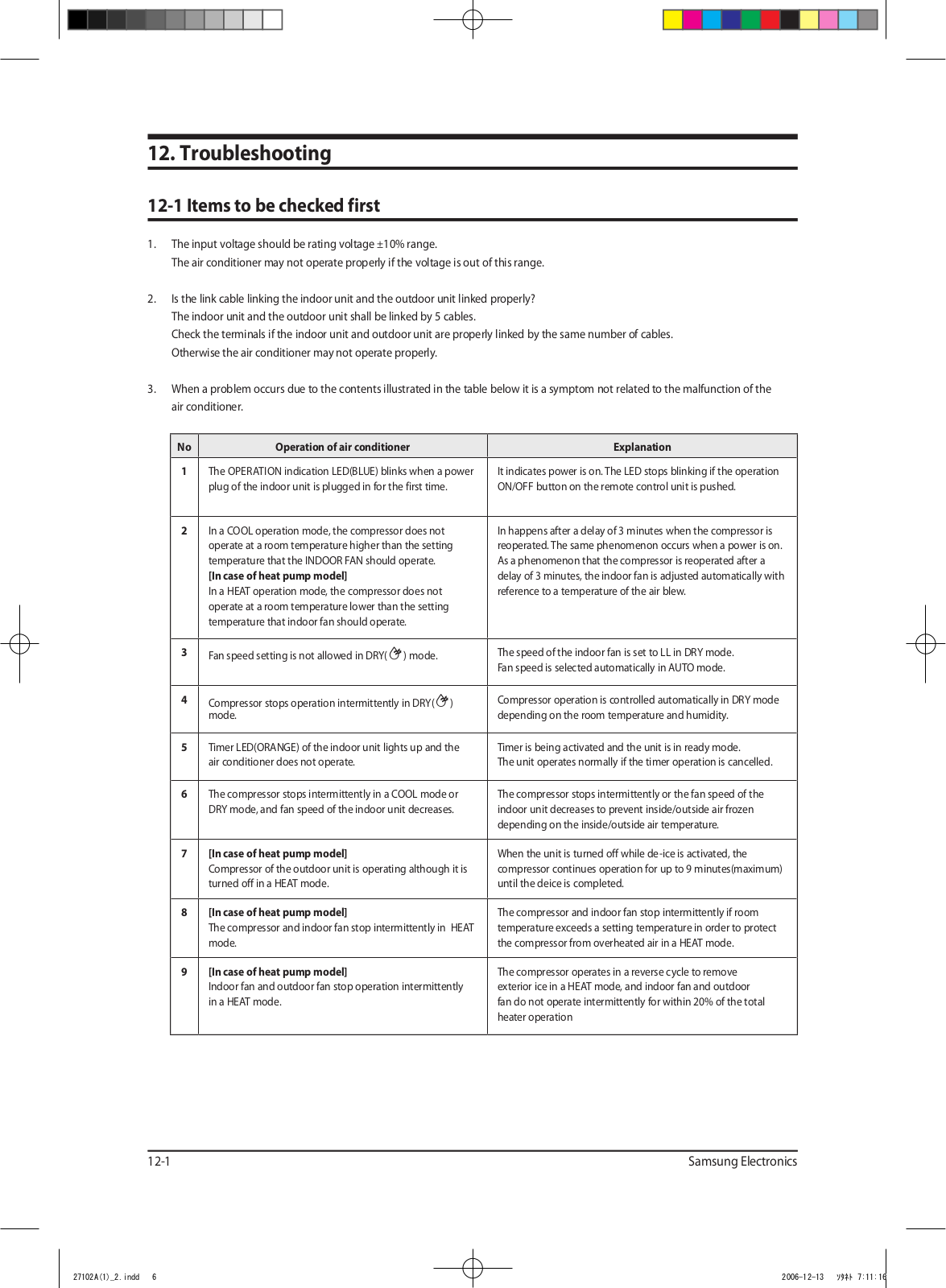
12. Troubleshooting
12-1 Items to be checked first
1. The input voltage should be rating voltage ±10% range.
The air conditioner may not operate properly if the voltage is out of this range.
2. Is the link cable linking the indoor unit and the outdoor unit linked properly?
The indoor unit and the outdoor unit shall be linked by 5 cables.
Check the terminals if the indoor unit and outdoor unit are properly linked by the same number of cables.
Otherwise the air conditioner may not operate properly.
3. When a problem occurs due to the contents illustrated in the table below it is a symptom not related to the malfunction of the
air conditioner.
NoOperation of air conditionerExplanation
1The OPERATION indication LED(BLUE) blinks when a power
plug of the indoor unit is plugged in for the first time.
2In a COOL operation mode, the compressor does not
operate at a room temperature higher than the setting
temperature that the INDOOR FAN should operate.
[In case of heat pump model]
In a HEAT operation mode, the compressor does not
operate at a room temperature lower than the setting
temperature that indoor fan should operate.
3
Fan speed setting is not allowed in DRY() mode.
4
Compressor stops operation intermittently in DRY()
mode.
5Timer LED(ORANGE) of the indoor unit lights up and the
air conditioner does not operate.
6The compressor stops intermittently in a COOL mode or
DRY mode, and fan speed of the indoor unit decreases.
7[In case of heat pump model]
Compressor of the outdoor unit is operating although it is
turned off in a HEAT mode.
It indicates power is on. The LED stops blinking if the operation
ON/OFF button on the remote control unit is pushed.
In happens after a delay of 3 minutes when the compressor is
reoperated. The same phenomenon occurs when a power is on.
As a phenomenon that the compressor is reoperated after a
delay of 3 minutes, the indoor fan is adjusted automatically with
reference to a temperature of the air blew.
The speed of the indoor fan is set to LL in DRY mode.
Fan speed is selected automatically in AUTO mode.
Compressor operation is controlled automatically in DRY mode
depending on the room temperature and humidity.
Timer is being activated and the unit is in ready mode.
The unit operates normally if the timer operation is cancelled.
The compressor stops intermittently or the fan speed of the
indoor unit decreases to prevent inside/outside air frozen
depending on the inside/outside air temperature.
When the unit is turned off while de-ice is activated, the
compressor continues operation for up to 9 minutes(maximum)
until the deice is completed.
8[In case of heat pump model]
The compressor and indoor fan stop intermittently in HEAT
mode.
9[In case of heat pump model]
Indoor fan and outdoor fan stop operation intermittently
in a HEAT mode.
12-1
The compressor and indoor fan stop intermittently if room
temperature exceeds a setting temperature in order to protect
the compressor from overheated air in a HEAT mode.
The compressor operates in a reverse cycle to remove
exterior ice in a HEAT mode, and indoor fan and outdoor
fan do not operate intermittently for within 20% of the total
heater operation
Page 30
Samsung Electronics
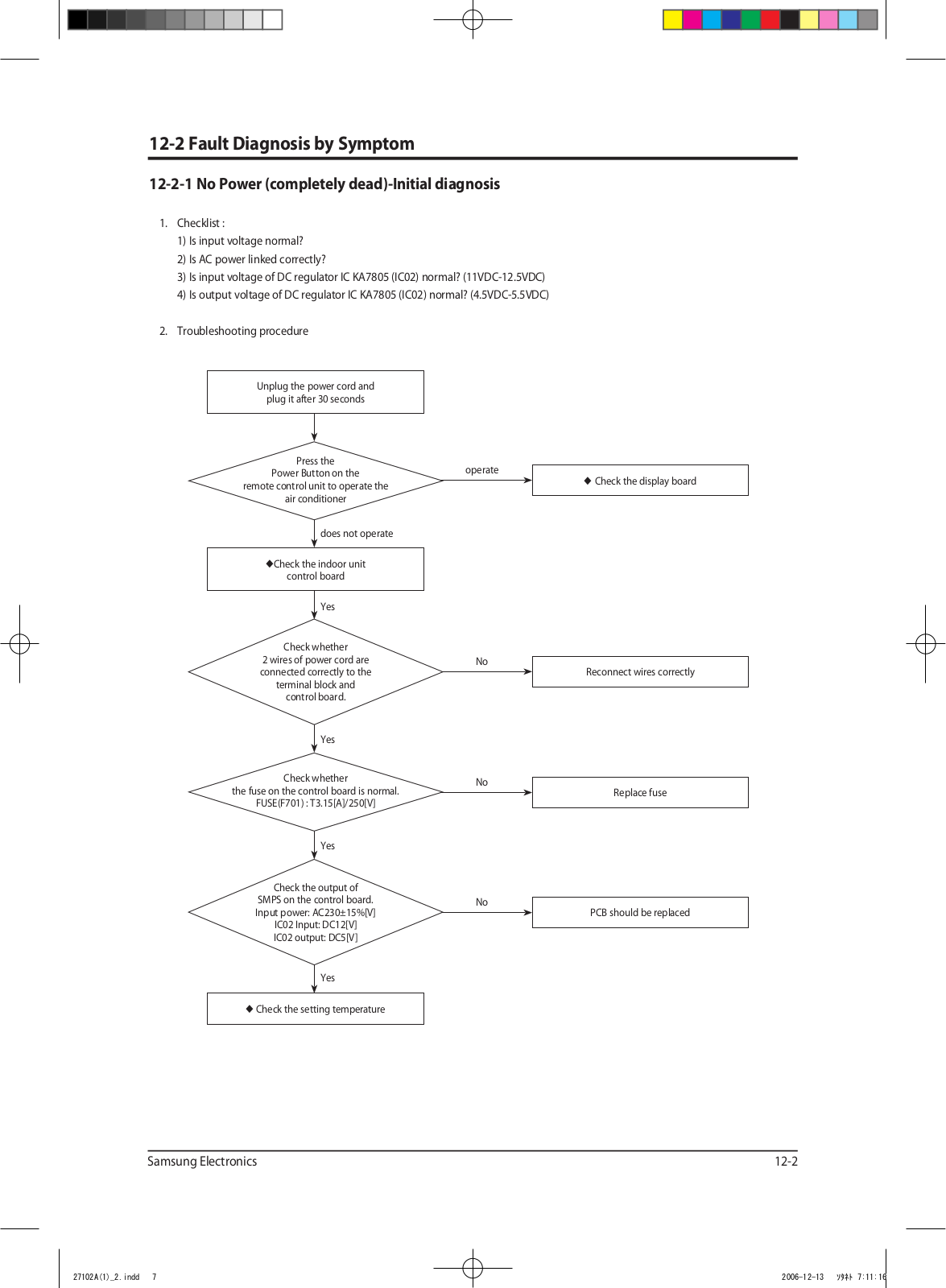
12-2 Fault Diagnosis by Symptom
12-2-1 No Power (completely dead)-Initial diagnosis
1. Checklist :
1) Is input voltage normal?
2) Is AC power linked correctly?
3) Is input voltage of DC regulator IC KA7805 (IC02) normal? (11VDC-12.5VDC)
4) Is output voltage of DC regulator IC KA7805 (IC02) normal? (4.5VDC-5.5VDC)
2. Troubleshooting procedure
Unplug the power cord and
plug it after 30 seconds
Press the
Power Button on the
remote control unit to operate the
the fuse on the control board is normal.
air conditioner
does not operate
◆
Check the indoor unit
control board
Yes
Check whether
2 wires of power cord are
connected correctly to the
terminal block and
control board.
Yes
Check whether
FUSE(F701) : T3.15[A]/250[V]
Yes
operate
No
No
◆
Check the display board
Reconnect wires correctly
Replace fuse
Check the output of
SMPS on the control board.
Input power: AC230±15%[V]
IC02 Input: DC12[V]
IC02 output: DC5[V]
Yes
◆
Check the setting temperature
No
PCB should be replaced
12-2
Page 31
Samsung Electronics
Troubleshooting
12-2-2 The Outdoor unit power supply error
1. Checklist :
1) Are the input power voltage and the power connection correct?
2) Is there no Fuse short in the indoor unit and outdoor unit?
3) Is the cable connected correctly between the indoor unit and outdoor unit in order.
4) Is the wire connected correctly to the terminal block of the indoor unit and outdoor unit?
2. Troubleshooting procedure
Is the voltage of indoor unit
terminal block 1 and 2 correct
after power input?
Yes
Pull out the power cord
and execute the following step
after 30 seconds.
Is the outdoor unit normal?
Yes
Is the outdoor unit normal?
Is the reactor connected correctly?
Yes
Is the +, - of C102 short?
Yes
No
No
No
No
Is the R701 resistance of
indoor PCB 200Ω?
Is the indoor unit fuse normal?
Exchange the fuse.
Connect the reactor wire.
Disassemble the PCB
from the case.
Yes
Is there no error at
the insertion of PCB?
No
No
Exchange the PCB.
Exchange the fuse.
12-3
Exchange the PCB.
Yes
Is the +,- of C102 short?
Yes
Exchange the PCB.
No
Yes
Exchange the PCB.
Are the BLDC FAN Wire
1 and 3 short?
Yes
Exchange the BLDC FAN.
Normal Operation
Exit
Page 32
Samsung Electronics
12-2-3 When the Up/Down Louver Motor Does Not Operate. (Initial Diagnosis)
1. Checklist :
1) Is input voltage normal?
2) Is the Up/Down louver motor properly connected with the connector (CN61)?
2. Troubleshooting procedure
Unplug the power cord and
plug it after 30 seconds
Troubleshooting
Is STD lamp blinking?
Yes
Does operation
start when swing button
of the remote control unit
pushed?
No
Voltage at
pin #30~#34 of micom (IC04)
change?(Squarewave)
Yes
Voltage at
pin #2 ~ #5 of CN61(motor connector)
change?(Squarewave)
Yes
No
Yes
No
No
Check as in the procedure
No Power.
Normal
Micom (IC04) is faulty.
Driver IC05/06 (ULN2003A) is faulty.
Up/Down louver motor is faulty.
12-4
Page 33
Samsung Electronics
Troubleshooting
12-2-4 The Outdoor unit Fan error
1. Checklist :
1) Are the input power voltage and the power connection correct?
2) Is the motor wire connected to the outdoor PCB correctly?
3) Is there no assembly error or none-assembly in the terminal of motor wire connector?
4) Is there no obstacle at the surrounding of motor and propeller?
2. Troubleshooting procedure
Is the Pin voltage of CN01
#1, #3 over 250V?
Yes
Is the Pin voltage of CN01 #3, #5
within 1V~5V during the operation?
Yes
Is the Pin voltage of CN01 #6 changed
during the operation?(Square-Wave)
No
NoNo
No
Follow the Check Procedure of
outdoor unit power supply error check.
Does the Pin voltage of IC01(MICOM)
No.13 change?(Square-Wave)
Yes
FAN DRIVE CIRCUIT
(Q901,Q902 etc.) error
Exchange the PCB.
Pull out the power cord and
execute the following step after 30 seconds.
Disassemble the BLDC FAN Wire.
Exchange the PCB.
MICOM Error
12-5
Yes
Exchange the PCB.
Is the short between
the BLDC FAN Wires?
Yes
Exchange the BLDC FAN MOTOR.
No
Exchange the PCB.
Page 34
Samsung Electronics
12-2-5 Total current Trip error
1. Checklist :
1) Is the input power voltage proper?
2) Is the refrigerant charged properly?
3) Does the compressor rotate normally? (Reverse rotation, Locking etc.)
4) Dose the outdoor fan operate normally? (Fan propeller loss, Motor error etc.)
5) Is the installation condition of outdoor unit good? (Piping, Space etc.)
6) Is there no ventilation obstruction at the surrounding of outdoor? (Outdoor unit cover, Fan front obstruction etc.)
2. Troubleshooting procedure
Troubleshooting
Is the installation of outdoor unit good?
Yes
Dose the compressor rotate normally?
Yes
Is the assembly of R418, R413, IC41, C437
and the peripheral part good?
Yes
Pull out the power cord and exchange
the PCB from the case after 30 seconds.
Is the assembly of Micom and
peripheral circuit part good?
Yes
No
No
No
No
Reinstall and remove the obstruction.
Exchange the compressor.
Exchange the PCB.
Exchange the PCB.
Check again after assembly of PCB.
12-6
Page 35
Samsung Electronics
Troubleshooting
12-2-6 In case of heating at the cooling mode or cooling at the heating mode
1. Troubleshooting procedure
Is the Thermo off?
No
Is the unit
in the defrosting operation?
No
Is the compressor
in 3 minutes off?
No
Indoor operation SW is on.
Yes
Is much frost
in the heat exchanger?
Yes
Yes
Yes
Yes
No
Is the
outdoor air sensor and
outdoor heat exchanger attached
correctly?
Change the setting temperature of
Operate it with a heating mode
as soon as the defrosting is finished.
and heating start automatically.
remote control.
After 3 minutes, cooling
Turn the SW On.
No
sensor correctly.
Attach the
No
Does the
4 way valve operate
normally?
No
Yes
Is the
4 way valve connector
connected correctly?
Yes
Check the resistance value
of 4 way valve coil.
OK
Dose the
voltage of AC 220V
apply to the connector of 4 way
valve coil during the
operation?
Yes
No
Connect the connecter
NG
4-WAY valve coil error
No
Over shortage
of the refrigerant
correctly.
Exchange
the outdoor PCB.
12-7
Go to the next page4 way valve main body error
Page 36
Samsung Electronics
In case of heating at the cooling mode or cooling at the heating mode(cont.)
From the previous page
Troubleshooting
Does the
EEV operate
normally?
Yes
Does
the outdoor fan
operate at the operation of
compressor?
NoNo
Is much frost
in the heat exchanger?
Yes
Check the
resistance value of EEV coil.
OK
Is much frost
in the heat exchanger?
Yes
EEV main body error
Yes
NG
No
The over shortage of refrigerant, Insufficient
Capacity, Load estimation error
Connect the connector.
EEV coil error
Exchange
the out PCB.
No
Is the
outdoor fan connected
correctly?
Yes
Check the resistance value
of outdoor fan.
OK
Dose the
voltage of DC300V
apply to the connector of outdoor
fan during the operation of
outdoor unit?
No
Outdoor PCB error
No
NG
Yes
Connect the connector.
Outdoor fan error
Check the motor wire.
12-8
Page 37
Samsung Electronics
-50
-41
-32
-23
-14
-5
4
13
22
31
40
49
58
67
76
85
94
103
400.0
350.0
300.0
250.0
200.0
150.0
100.0
50.0
0.0
Troubleshooting
12-2-7 Outdoor temperature sensor error
1. Checklist :
1) Is the sensor connector connected correctly?
2) Is the sensor placed correctly?
3) Does the both terminal of sensor satisfy the resistance value in accordance with temperature?
4) Is the resistance value of sensor connection pull_up correct?
2. Troubleshooting procedure
Is the sensor connector connected
correctly in accordance with a color?
Yes
Is the temperature sensor connected
correctly without separation?
Yes
Does the both terminal of sensor
satisfy the resistance
value in accordance with temperature?
(Refer to the R/T TABLE)
Yes
Is the resistance value
of sensor connection pull_up 18.2K?
Yes
No
No
Reconnect the sensor connector.
No
Change the position of sensor.
No
Exchange the sensor.
No
Exchange the PCB.
Exchange the PCB.Normal operation
Exit
12-9
Page 38
Samsung Electronics
12-2-8 Discharge temperature sensor error
0
8
16
24
32
40
48
56
64
72
80
88
96
104
112
120
128
136
144
152
160
600.0
500.0
400.0
300.0
200.0
100.0
0.0
1. Checklist :
1) Is the sensor connector connected correctly?
2) Is the sensor placed correctly?
3) Does the both terminal of sensor satisfy the resistance value in accordance with temperature?
4) Is the resistance value of sensor connection pull_up correct?
2. Troubleshooting procedure
Troubleshooting
Is the sensor connector connected
correctly in accordance with a color?
Yes
Is the temperature sensor connected
correctly without separation?
Yes
Does the both terminal of sensor
satisfy the resistance
value in accordance with temperature?
(Refer to the R/T TABLE)
Yes
Is the resistance value
of sensor connection pull_up 24K?
Yes
No
No
Reconnect the sensor connector.
No
Change the position of sensor.
No
Exchange the sensor.
No
Exchange the PCB.
Exchange the PCB.Normal operation
Exit
12-10
Page 39
Samsung Electronics
-50
-41
-32
-23
-14
-5
4
13
22
31
40
49
58
67
76
85
94
103
400.0
350.0
300.0
250.0
200.0
150.0
100.0
50.0
0.0
Troubleshooting
12-2-9 Coil temperature sensor error
1. Checklist :
1) Is the sensor connector connected correctly?
2) Is the sensor placed correctly?
3) Does the both terminal of sensor satisfy the resistance value in accordance with temperature?
4) Is the resistance value of sensor connection pull_up correct?
2. Troubleshooting procedure
Is the sensor connector connected
correctly in accordance with a color?
Yes
Is the temperature sensor connected
correctly without separation?
Yes
Does the both terminal of sensor
satisfy the resistance
value in accordance with temperature?
(Refer to the R/T TABLE)
Yes
Is the resistance value
of sensor connection pull_up 18.2K?
Yes
No
No
Reconnect the sensor connector.
No
Change the position of sensor.
No
Exchange the sensor.
No
Exchange the PCB.
Exchange the PCB.Normal operation
Exit
12-11
Page 40
Samsung Electronics
12-2-10 Fan error
1. Checklist :
1) Isn’t the fan locked?
2) Is the sensor placed correctly?
3) Does the both terminal of sensor satisfy the resistance value in accordance with temperature?
4) Is the resistance value of sensor connection pull_up correct?
2. Troubleshooting procedure
Troubleshooting
Isn't the Fan locked?
Yes
Is the connector connected correctly?
Yes
Is the color of Fan wire matched correctly?
Yes
No
No
Remove the Fan lock.
No
Connect the connector.
No
Exchange the Fan.
Exchange the PCB.Normal operation
Exit
12-12
Page 41
Samsung Electronics
Troubleshooting
12-2-11 DC-Link voltage sensor error
1. Checklist :
1) Is the voltage of indoor unit terminal block 1, 2 correct after power supply?
2) Is the capacitor(C101, C102, C103) for DC-Link assembled in accordance the specification?
3) Are R112, R113, R114 470 Kohm?
4) Is R115 14.3Kohm?
2. Troubleshooting procedure
Is the voltage of indoor unit terminal block
1, 2 correct after power supply?
Yes
Is the capacitor(C101, C102, C103)
for DC-Link assembled in accordance
the specification?
Yes
Are R113, R114, R115 470kohm?Exchange the PCB.
Yes
Is R116 14.3kohm?Exchange the Fan.
Yes
No
No
No
Apply the troubleshooting for
outdoor unit power supply error.
No
Connect the connector.
Exchange the PCB.Normal operation
Exit
12-13
Page 42
Samsung Electronics
12-2-12 O.C.(Over Current) error
1. Checklist :
1) Is the Shunt resistance value correct?
2) Is the condition of surrounding temperature abnormal overload?
3) Is there any problem as like the temperature sensor separation or measurement value error?
4) Is the interphase resistance of compressor normal?
2. Troubleshooting procedure
Restart after power off.
Troubleshooting
Is the O.C.(Over Current) error occurred?
Yes
Is the Shunt resistance value normal?
Yes
Is the interphase resistance value
of compressor (u↔v, v↔w, w↔u) normal?
Yes
Is the compressor body and
interphase resistance insulated?
Yes
Is the condition of
indoor/outdoor temperature normal load?
Yes
Yes
No
No
No
No
No
Terminate the service.
Exchange the PCB.
Exchange the Compressor.
Restart after returning
to the normal load.
Is the O.C. error occurred again?
No
Terminate
the service.
Is the position of temperature sensor
and the sensing value normal?
the compressor and power terminal normal?
Yes
Is the connection cable for
Yes
Exchange the PCB.
No
No
Correct the sensor position or
exchange the sensor.
Correct the cable connection.
12-14
Page 43
Samsung Electronics
Troubleshooting
12-2-13 Communication error
1. Checklist :
1) Is the communication cable between the indoor unit and outdoor unit connected correctly?
2) Isn’t the power cable and communication cable error?
2. Troubleshooting procedure
Restart after power off.
Is the communication error
occurred again?
Yes
Isn't the power cable
and communication cable error?
Yes
Is the connection of
communication cable normal?
Yes
Is it the outdoor
2 Micom(Inverter + Main) model?
Yes
Exchange the outdoor unit PCB.
No
No
No
No
Terminate the service.
Correct the wrong wiring.
Correct the connection of
communication cable.
Exchange the indoor/outdoor unit PCB.
12-15
Page 44
Samsung Electronics
12-2-14 Compressor start error
1. Checklist :
1) Is the connection of cable for the compressor and power?
2) Is the interphase resistance of compressor normal?
2. Troubleshooting procedure
Restart after power off.
Troubleshooting
Is the restart error occurred again?
Yes
Is the interphase resistance value of
compressor (u↔v, v↔w, w↔u) normal?
Yes
Is the compressor body and
interphase resistance insulated?
Yes
Is the connection cable for the
compressor and power terminal normal?
Yes
Exchange the PCB.
No
No
No
No
Terminate the service.
Exchange the compressor.
Correct the cable connection.
12-16
Page 45
Samsung Electronics
Troubleshooting
12-2-15 Compressor lock error
1. Checklist :
1) Is the connection of cable for the compressor and power?
2) Is the interphase resistance of compressor normal?
2. Troubleshooting procedure
Restart after power off.
Is the lock error occurred again?
Yes
Is the interphase resistance value of
compressor (u↔v, v↔w, w↔u) normal?
Yes
Is the compressor body and
interphase resistance insulated?
Yes
Is the connection cable for the
compressor and power terminal normal?
Yes
Exchange the PCB.
No
No
No
No
Terminate the service.
Exchange the compressor.
Correct the cable connection.
12-17
Page 46
Samsung Electronics
12-2-16 DC Link Over voltage/ Low voltage error
1. Checklist :
1) Is the power voltage normal?
2) Is the voltage of front and back terminal of indoor(outdoor) power relay normal?
3) Is the resistance value for DC Link voltage detection NORMAL?
4) Is the resistance value of DC Link discharge normal?
5) Is the appearance of DC Link Capacitor normal?
2. Troubleshooting procedure
Restart after power off.
Troubleshooting
Is the DC Link voltage error occurred again?
Yes
Is the power voltage normal?
Yes
Is the front and back terminal voltage of
indoor/outdoor power relay normal?
Yes
Reassembly the PCB.
Yes
Is the appearance of
DC Link Capacitor normal?
Yes
Is the resistance for the
detection of DC Link voltage normal?
No
No
No
No
No
Terminate the service.
Exchange the PCB.
Exchange the PCB.
Exchange the PCB.
Yes
Is the resistance value of
DC Link discharge normal?
Yes
Is the reactor insulation damaged?
Yes
Exchange the reactor.
No
No
Exchange the PCB.
Exchange the PCB.
12-18
Page 47
Samsung Electronics
Troubleshooting
12-2-17 When the remote control is not receiving
1. Check if the connector was normally assembled.
2. Put the set in operation and check the voltage of No. 15(+) and No. 16(-) of the main PCB CN91 while operating the
remote control. When the voltage descends below 3V, the assembly module PCB is normal and the main PCB is poor.
Then replace the main PCB.
3. Replace the assembly display PCB because the module PCB is poor if the voltage between No. 15~16 of CN91 maintains 5V after the remote control starts operation.
12-2-18 The others
1. AC Line Zero Cross Signal OUT
– Check the assembly condition of peripheral part of IC21, ZD21, ZD20 and D200 on the PCB.
2. Capacity miss match
– Check again the indoor unit option code.
12-19
Page 48
Samsung Electronics
12-3 PCB Inspection Method
12-3-1 Pre-inspection Notices
1. Check if you pulled out the AC power plug when you eliminate the PCB or front panel.
2. Don’t hold the PCB side not impose excessive force on it to eliminate the PCB.
3. Don’t pull the lead wire but hold the whole housing to connect or disconnect a connector to the PCB.
4. In case of outdoor PCB disassembly, check first the complete discharge of condenser (C103) after 30 seconds power off.
12-3-2 Inspection Procedure
1. Check connector connection and peeling of PCB or bronze coating pattern when you think the PCB is broken.
2. The PCB is composed of the 3 parts.
1. ● Indoor Main PCB Part : MICOM and surrounding circuit, relay, room fan motor driving circuit and control circuit, sensor driving
circuit, power circuit of DC12V and DC5V, and buzzer driving circuit.
1. ● Display part : LED lamp, Switch, Remocon module
1. ● Outdoor Main PCB part : MICOM and surrounding circuit. IPM and PFC circuit and control circuit.
1. ● EMI PCB Part : Line filter and Noise Capacitor, Varistor
12-3-3 Indoor Detailed Inspection Procedure
NoProcedureInspection MethodCause
1Plug out and pull the PCB
out of the electronic box.
Check the PCB fuse.
2Supply power.
If the operating lamp
twinkles at this time,
the above 1)~3) have
no relation.
3Press the ON/OFF button.
1) Is the fuse disconnected?
Checking the power voltage.
1) Is the DB71 input voltage AC200V~AC240V?
2) Is the voltage between both terminals of the
C104 on the 2nd side of the transformer DC12V
±0.5V?
3) Is the voltage between both terminals of OUT
and GND of IC19(KA78L05) DC5V ±0.5V?
Checking the power voltage.
1) Is the voltage over AC180V being imposed on
1) terminal #3 and #5 of the fan motor
connector(CN72)?
2) Check the voltage of both terminals of
terminal block 1 and N(1) after 3 minute
operation.: AC220V
• Over current
• Indoor Fan Motor Short
• AC Part Pattern Short of the MAIN PCB
• Power Cord is fault, Fuse open. Wrong Power
Cable Wiring, AC Part is faulty.
• Switching Trans or Power Circuit is faulty
• Power Circuit is faulty, Load Short
• Relay(RY71) Coil Disconnection, IC05 is faulty
• Relay(RY71) Contact is faulty
4Press the ON/OFF button.
1. FAN Speed [High]
2. Continuous Operation
1) Is the voltage over AC180V being imposed on
1) terminal #3 and #5 of the fan motor
connector(CN72)?
2) The fan motor of the indoor unit doesn’t run.
3) The power voltage between terminal #3 and #5
of the connector(CN72) is 0V.
• Fan Motor of the indoor is faulty
• Fan Motor Connector(CN72) is faulty
• ASS’Y Main PCB is faulty
• Connection is faulty
12-20
Page 49
Samsung Electronics
Troubleshooting
12-3-4 Outdoor Detailed Inspection Procedure
NoProcedureInspection MethodCause
1Wait 30 seconds over after
disconnecting the power
cable Check the outdoor
PCB.
2Check the Outdoor unit
PCB.
3Check the LED lighting
after power supply.
4Check the condition of
indoor & outdoor connection cable.
1) Is C101 discharged?
2) Is the resistance of both terminals of C101 opened?
3) Is the fuse of EMI PCB normal?
4) Is the reactor wire connected?
1) Is R701 200ohm?
2) Does ry74 operate normally?
(IC05 & 16:0V, 1:5V)
3) Is the fuse(F701) normal?
4) Is the Sub PCB assembled normally?
1) Normal: Red: Light On, Green: Flickering,
Yellow: Light Off?
2) Is the voltage of C101 250V over?
3) Is the input of IC19 8V, and the output 5V?
4) Recheck after disassembling BLDC FAN Wire.
1) Is the green LED light on once per second?
2) Is the indoor & outdoor connection able
connected in order?
3) Is the grounding wire connected to the both of
indoor & outdoor unit?
4) Is the voltage of terminal block N(1), 225V?
• Over Current
• Inner short of PCB
• BLDC FAN Motor Error
• Outdoor PCB Error
• SUB Relay(RY74) Error
• IC05 Error
• Indoor PCB Error
• Inner short of outdoor PCB
• Wrong assembly of outdoor PCB
• BLDC FAN Error
• Wrong connection of Indoor/Outdoor wiring
• Wrong assembly of outdoor
communication circuit
5Check the Comp Wire.1) Is it connected red, blue, and yellow in order in
counterclockwise.
2) Are the valve and its installation condition good?
3) Is the installation condition of outdoor unit?
6Check the BLDC Fan.1) Is CN01 1, 3 over 250V?
2) Is CN01 3, 5 within 1V~5V?
3) Is the voltage of CN01 6 changed?
4) Is the resistance of BLDC Motor 1, 3 opened after
power off?
• Wrong assembly
• Installation condition is bad.
• Outdoor PCB Error
• BLDC Motor Error
12-21
Page 50
Samsung Electronics
12-4 Main Part Inspection Method
PartBreakdown Inspection Method
Room Temperature Sensor
Measure resistance with a tester
Room Fan Motor
Stepping Motor
NormalAt the normal temperature 37kΩ~ 8.3kΩ(-7˚C~+30˚C)
Abnormal∞, 0Ω . . . Open or Short
Measure the resistance between terminals of the connector (CN72) with a tester.
NormalAt the normal temperature (10˚C ~ 30˚C)
Compare terminalResistanceRemark
Yellow, Blue404.4Ω ± 10%
Yellow, Red340Ω ± 10%
Abnormal∞, 0Ω . . . Open or Short
Measure the resistance between the red wire and each terminal wire with a tester.
NormalAbout 300Ω at the normal temperature (20˚C ~ 30˚C)
Abnormal∞, 0Ω . . . Open or Short
*Refer to Table 12-3-4.
Main
Sub
12-22
Page 51
Samsung Electronics3-1
3. Alignment and Adjustments
3-1 Test Mode
■ How to Approach Test Mode
You can approach the Test Mode by pressing the on/off switch of
indoor unit for 5 seconds.
on/off switch
■ Test Mode Operation Option
After installing the air conditioner, check whether each subordinate is normally operated or not by operating the Test Mode.
• When an error occurs, display the Error Mode.
• Operation Mode : Cool mode. Operate the cool mode by operating the compressor by force without the compressor ON/OFF
according to the set temperature/indoor temperature. (Do not follow the antifreeze control)
• Up-down louver : Up-down swing mode
• Indoor Fan : High
• Because the Test Mode operate the cool mode by force not related to the set temperature / indoor temperature, check
whether each subordinate is operated normally or not after completing installation and must turn off the power of the
air conditioner.
Page 52
3-2
3-2 Indoor Display Error and Check Method
LAMP
Description
Indoor unit room temperature sensor error (open or short)
Indoor unit heat exchanger temperature sensor error (open or short)
Indoor fan motor malfunction
EEPROM error
Option error (option wasn’t set up or option data error)
Outdoor unit error
Communication error
OPERATIONTIMERTURBO
◑
◑◑
◑
◑◑◑
◑◑◑
◑◑
◑◑
●
: Lamp on, : Lamp off, ◑: Lamp blink
Samsung Electronics
Page 53
Samsung Electronics
3-3 Outdoor LED Error Display and Check Method
No.
1
2
3
4
5
6
7
8
9
10
LED Display
YellowGreenRed
○○○
○○◎
○○●
○●●
○◎○
○◎●
○●○
○●◎
◎○◎
◎○●
◎◎○
Explanation
Power off/ VDD NG
IPM Over Current(O.C)
Abnormal Serial communication
Compressor Starting error
Normal Operation
Compressor Lock error
DC-Link voltage under/over error
Outdoor temperature sensor error
Discharge over temperature
Discharge temperature sensor error
11
12
13
14
15
16
17
18
19
20
21
22
23
◎◎●
◎●○
◎●◎
◎●●
●○○
●○◎
●○●
●◎◎
●◎●
●●○
●●◎
●●●
◎○○
Current sensor error
Compressor limit error
Coil temperature sensor error
1min. Time out Communication
Fan error
OTP error
Compressor rotation error
DC-Link voltage sensor error
I_Trip error / PFC Over current
GAS Leak error
AC Line Zero Cross Signal out
Power ON reset(1sec)
Capacity miss match
● : LED ON, ○ : LED OFF, ◎ : LED BLINK
3-3
Page 54
3-4 Setting Option Setup Method
1
2
3
4
5
6
ex) Option No. :
Step 1 : Enter the Option Setup mode.
1st Take out the batteries of remote control.
2nd Press the temperature button simultaneously and insert
the battery again.
3rd Make sure the remocon display shown as .
Step 2 : Enter the Option Setup mode and select your option according to the following procedure.
✳ Setting is not required if you must
a value which has a default.
1
1
The default value is .
Otherwise, push the button to .
Every time you push the button, the display panel reads or
repeatedly.
2
Push the button to set the display panel to .
Every time you push the button, the display panel reads ➡ ➡
➡ ➡ . . . ➡ ➡ ➡ ➡ ➡ ➡ repeatedly.
3
Push the button to set the display panel to .
10
Every time you push the button, the display panel reads ➡ ➡
➡ ➡ . . . ➡ ➡ ➡ ➡ ➡ ➡ repeatedly.
4
Push the button to set the display panel to .
Every time you push the button, the display panel reads ➡ ➡
➡ ➡ . . . ➡ ➡ ➡ ➡ ➡ ➡ repeatedly.
5
Push the button to set the display panel to .
Every time you push the button, the display panel reads ➡ ➡
➡ ➡ . . . ➡ ➡ ➡ ➡ ➡ ➡ repeatedly.
6
Push the button to set the display panel to .
Every time you push the button, the display panel reads ➡ ➡
➡ ➡ . . . ➡ ➡ ➡ ➡ ➡ ➡ repeatedly.
Samsung Electronics3-4
Page 55
Alignment and Adjustments
7
8
9
10
11
12
7
1
Press button, then the default value is .
8
Push the button to set the display panel to .
Every time you push the button, the display panel reads ➡ ➡
➡ ➡ . . . ➡ ➡ ➡ ➡ ➡ ➡ repeatedly.
9
Push the button to set the display panel to .
Every time you push the button, the display panel reads ➡ ➡
➡ ➡ . . . ➡ ➡ ➡ ➡ ➡ ➡ repeatedly.
10
Push the button to set the display panel to .
Every time you push the button, the display panel reads ➡ ➡
➡ ➡ . . . ➡ ➡ ➡ ➡ ➡ ➡ repeatedly.
11
Push the button to set the display panel to .
Every time you push the button, the display panel reads ➡ ➡
➡ ➡ . . . ➡ ➡ ➡ ➡ ➡ ➡ repeatedly.
12
✳ Setting is not required if you must
a value which has a default.
Step 3 : Upon completion of the selection, check you made right selections.
Press the Mode Selection key, to set the display part to and check the display part.
➡ The display part shows .
Press the Mode Selection key, to set the display part to and check the display part.
➡ The display part shows .
Step 4 : Pressing the ON/OFF button ( )
When pressing the operation ON/OFF key with the direction of remote control for unit, the sound ’’Ding’’ or ’’Diriring’’
is heard and the OPERATION ICON() lamp of the display is flickering at the same time, then the input of option is completed.
(If the diriring sound isn’t heard, try again pressing the ON/OFF button.)
Step 5 : Unit operation test-run
First, Remove the battery from the remote control.
Second, Re-insert the battery into the remote control.Third, Press ON/OFF key with the direction of remote control for set.
Push the button to set the display panel to .
Every time you push the button, the display panel reads ➡ ➡
➡ ➡ . . . ➡ ➡ ➡ ➡ ➡ ➡ repeatedly.
• Error Mode
1st If all lamps of indoor unit are flickering, Plug out, plug in power plug again and press ON/OFF key to retry.
2nd If the unit is not working properly or all lamps are continuously flickering after setting the option code, see if the
A When it is hot outside, its cooling capacity decreases due to the increase of the ambient temperature. When
the dust filter gets blocked or warm outside air gets in, the cooling capacity will decrease. So, make sure to
clean the dust filter frequently, prevent heat loss by closing the doors and insulate the cooling area by using
curtains, blinds, shades or window tinting.
QThe cooling is good generally. But, it gets weak when it is considerably hot.
AIt occurs when the outdoor unit is exposed to direct sun light and heat-up air is not ventilated well. So, set
up a sunblind over the outdoor unit and keep stuff away from the unit to increase the ventilation. When the
cooling capacity decreases during a heat wave, clean the heat exchanger of the outdoor unit or spray some
cold water to the heat exchanger to increase the cooling capability.
Cooling
QThe cooling is weak. Does it need refrigerant charging?
A It is not correct charging refrigerant regularly. Except that you have moved in several times or the
connection pipes are broken, the refrigerant does not run low. So, when refrigerant is additionally charged,
it could be costly and cause a product's failure. When the refrigerant leaks, all of it will escape in a short time
resulting in cooling failure and no water coming out of the drain hose. So, if water comes out from the drain
hose, it indicates the normal operation of the product and it does not need refrigerant charging.
Leakage
QIt fails to do cooling.
A When the air conditioner is set to Ventilation or the desired temperature is set higher than the
current temperature, it fails to do cooling. In this case, select Cooling or set the desired temperature lower.
QIt floods the floor.
A Place the drain hose properly. When it is not placed properly, the drain water would flow back flooding the
floor. So, straighten out the drain hose for the water to be drained well.
QWater drips at the drain connection (service valve) of the outdoor unit.
A When a glass bottle is taken out of the refrigerator, moisture gets condensed on its surface due to the
temperature differences. The same principle applies to the air conditioner. When cold refrigerant goes
through the copper tube, moisture gets condensed on the surface of the tube and the connection areas.
To prevent the water condensation, the pipes are insulated. But, the connection areas of the outdoor unit are
not insulated for the purpose of maintenance or repair, and water gets condensed due to the temperature
differences and drips down. Generally, it evaporates right away. But, when it drips much during muggy days,
put a water pan on the floor.
QIt leaks even though a drain pump is used.
A It occurs when the drain pump is plugged out or it is out of order. Check the power of the drain pump and
the position of the drain hose, and when the pump is faulty, contact the drain pump manufacturer. Samsung
Electronics do not manufacture drain pumps. So, we are not able to correct the drain pump problems.
Smells
QWhenever the air conditioner is turned on, it irritates my eyes and gives me a headache.
A There are no components in the air conditioner irritating the eyes and sending out chemical smells.
But, when the air conditioner is turned on, other smell sources are sucked into the air conditioner and
get out of it. So, find and root out the smell sources. Generally, it occurs at a interior renovated place, a
pharmacy, a gasoline handling place, a tire shop, a second-hand book shop or an electronic component
handling place; when its chemical or musty smells are sucked in and sent out, it can be misled that the air
conditioner generates them. So, find and root out the problem or refresh the room frequently.
14-4
Page 89
Samsung Electronics
Reference Sheet
ClassificationClassDescription
QWhenever the air conditioner is turned on, it stinks.
A There are no components in the air conditioner sending out chemical smells. But, when the air conditioner
is turned on, other smell sources are sucked into the air conditioner and get out of it. So, find and root out
the smell sources. Generally, when the drain hose is taken out to the washing room or there are sources
of smells such as a diaper bin, a shoe shelf or a socks bin, bad smells generate. Also, it occurs where glass
cleaners or air fresheners are used; when they are sucked in interacting with dusts and moistures inside, bad
smells generate. These kinds of organic materials noxious to human bodies. So, we recommend against the
use of them.
QWhenever the air conditioner is turned on, it smells sour.
AWhen the room is papered recently, its paste smells would be sucked inside. Also, when the air conditioner
is installed in the study room of young boys loving sweat-generating activities such as the basketball,
excessive sweats evaporate and get sucked into the air conditioner resulting in bad smells. So, find and root
out the problem or refresh the room frequently.
Smells
QWhenever the air conditioner is turned on, it smells musty.
A It is due to the improper keeping of the product after its use. When keeping the product, dry up the inside
with the operation of Ventilation to prevent must. When the product is kept without drying up the inside
with Ventilation, mold would grow inside resulting in must. So, open the windows and switch on the
Ventilation function to get rid of the saturated smell inside.
Operation
QWhenever the air conditioner is turned on, it sends out bad smells such as stale smells.
A It occurs generally when there are pet animals in the house. Their smells stay at the same place.
But, when the air conditioner is turned on, the air gets circulated resulting in the circulation of the smells.
So, find and root out the problem or refresh the room frequently.
QIt sends out bad smells.
A When the air filter is filthy, it could send out bad smells. So, clean the filter and ventilate the room with the
windows open while operating the Ventilation function.
QIt won't start.
A
There is a power failure or it is plugged out. Also, check if the power distribution panel is switched off.
QIt goes off during operation.
A When the hot air does not escape properly, it goes off during operation. It occurs when it does not ventilate
properly because the outdoor unit is covered, the back of the outdoor unit is blocked by a cardboard or a
plywood panel, and the front of the outdoor unit is blocked by the closed window or other obstacles.
Clear the above obstacles from the outdoor unit.
QIt generally works properly. But, when it's considerably hot, it goes off during operation.
A It occurs when the outdoor unit is exposed to direct sunlight and the hot air does not escape properly.
Set up a sun blind over the outdoor unit and clear the neighboring obstacles from the outdoor unit to
provide good ventilation. When it goes off frequently during a heat wave, it would prevent the turn-off and
increase the cooling capacity cleaning the outdoor unit or spraying some water to the heat exchanger.
14-5
QThe remote controller won't operate.
AWhen the batteries run out or the transmitter or receiver of the remote controller is blocked by obstacles,
change the batteries or keep the obstacles away from the controlling area. Also, the remote controller may
not work under intensive light from a 3-wave length lamp or a neon sign due to the EMI. In this case, take
the remote controller closer to the receiver.
Page 90
Samsung Electronics
ClassificationClassDescription
QWho installs the air conditioner? (Relocation/Re-installation)
A When relocating or re-installing the air conditioner, make sure to contact Samsung Electronics Service
Center or Authorized Service Agent and have them to do the job. (If not, it could cause personal injury or
product damage.)
The cost for the relocation/re-installation of the air conditioner is subject to the customer's expense.
There is a cost table. But, our service engineer needs to visit to total up the cost correctly.
When you move in, make sure to contact Samsung Electronics Service Center or Authorized Service Agent in
advance to streamline the process.
QIs it possible to install the outdoor unit outside?
A It is possible to install it at a designated place in the apartment or on the rooftop nearby.
But, it's illegal hanging an angle iron case with the outdoor unit in it outside the apartment.
Installation
Also, it is illegal obstructing passers-by with the outdoor unit installed outside.
QWhat can be done to install the outdoor unit facing the road because it is a commercial building?
A The following is an excerpt from Building Code going into effect from JUNE 1st 2005. "The exhaust pipe of a
cooling or ventilation facility installed in a building adjacent to the streets of commercial or residential areas
shall be installed higher than 2 m to prevent the exhaust air from blowing directly to passers-by and the
current facilities shall be corrected by MAY 31st 2005." So, please install it higher than 2 m or not to blow the
hot exhausting air directly to passers-by.
Reference Sheet
QWhat about installing a windscreen during installation not to blow hot air directly to passers-by?
A When the hot air from the front of the outdoor unit is blocked, the product's performance will be
affected and it will fail to operate properly. So, keep it at least 300mm away from its surrounding walls and
give it good ventilation.
14-6
Page 91
Samsung Electronics
14-5 Cleaning/Filter Change
14-5-1 Cleaning your Air Conditioner
To get the best possible use out of your air conditioner, you must clean it regularly to remove the dust that accumulates on the air filter.
• Before cleaning your air conditioner, ensure that you have switched off the breaker used for the unit.
1. Open the upper front grille by pulling the lower right and left tabs of the
grille.
2. Pull air filters out of each tab of the grille.
3. Remove all dust on the air filters with a vacuum cleaner or brush.
4. When you finished, insert air filters by fixing it to each tab of the grille.
5. To close the front grille, fix it to hooks and push down the lower right and
left tabs of the grille.
Front grille
Air filter
Body groove
Body
6. Clean the front grille with a damp cloth and mild detergent
(do NOT use benzene, solvents or other chemicals).
Front grille
Hook
Body
Note : • If you have not used the air conditioner for a long period of time, set the fan going for three to four hours to dry the inside of the
air conditioner thoroughly.
14-7
Page 92
Samsung Electronics
Reference Sheet
14-5-2 Cleaning Deodorizing and Bio filter (Option)
To remove minute dust particles and odors, deodorizing and Bio filter are installed in the air conditioner.
You should clean the filters every 3 months.
1. Open the upper front grille by pulling the lower right and left tabs of the grille.
2. Pull out the deodorizing and Bio filter.
3. Wash the filters with clean water, then dry them in the shade.
4. Insert the filters into the original position.
Note : • You can change the position of filters with each other.
5. Close the front grille.
Deodorizing Filter
Bio Filter
14-8
Page 93
Samsung Electronics
14-6 Installation
D
A
14-6-1 Before Installation
Keep the air conditioner outlet and inlet free from its surroundings.
In case of installation, keep the symmetry and fix it to prevent vibration.
The pipe length shall meet the standard as far as possible.
14-6-2 Installation Procedure
■ Location
Install the product in an area to guarantee the best cooling effect, convenience of piping and electric work, and inexistence of
vibration or wind.
■ Wall Drilling
Drill the wall downward in a diameter of 60 to 65mm.
■ Fixing Indoor Unit & Outdoor Unit
Fix the air conditioner indoor unit securely to the wall. Secure the outdoor unit in a suitable position.
■ Pipe Spooling & Connecting
You shall cut the pipe with a pipe cutter and grind all the burrs of the cut surface.
Pipe expansion may continue until the pipe surface becomes uneven or torn apart.
Be sure to use a torque wrench to tighten pipes or flare nuts.
<Torque & Depth>
Outer Diameter(D)Torque(kgf·cm)Depth(A)
6.35mm(1/4")140~1701.3mm
9.52mm(3/8")250~2801.8mm
12.70mm(1/2")380~4202.0mm
15.88mm(5/8")440~4802.2mm
19.05mm(3/4")990~1,2102.2mm
■ Leak Test
Put an inert gas like nitrogen in the outdoor unit pipe and put soap bubbles or other test liquids on the pipe surface for the
leak test.
■ Drain Hose Connecting
Install the drain hose downward to drain water naturally. Be sure to pour water into the hose to check if it drains well.
■ Electric & Earth Work
Electric and earth work shall meet the "Electric Facility Technology Standard" and the "Internal Wire Regulation" of the Electric
Business Laws.
■ Inspection & Trial Run
Upon completion of the tests, you shall make a trial run while you explain the main functions of the air conditioner to finish the
installation.
14-9
Page 94
Samsung Electronics
14-7 Installation Diagram of Indoor Unit and Outdoor Unit
A
B
C
D
14-7-1 Air-Purge Procedure
1) Connect each assembly pipe to the appropriate valve
on the outdoor unit and tighten the flare nut.
2) Connect the charging hose of low pressure side of
manifold gauge to the packed valve having a service
port as shown at the figure.
3) Open the valve of the low pressure side of
manifold gauge counter-clockwise.
4) Purge the air from the system using vacuum pump
for about 30 minutes.
– Make sure that pressure gauge show
-0.1MPa(-76cmHg) after about 30 minutes.
– This procedure is very important in order to avoid
gas leak.
– Turn off the vacuum pump.
– Close the valve of the low pressure side of
manifold gauge clockwise.
– Remove the hose of the low pressure side
of manifold gauge.
Outdoor unit
Indoor unit
Gas pipe side
Liquid pipe side
5) Set valve cork of both liquid side and gas side of
packed valve to the open position.
6) Mount the valve stem nuts and the service port cap
to the valve, and tighten them at the torque of
183kgf•cm with a torque wrench.
7) Check for gas leakage.
- At this time, especially check for gas leakage from
the 3 way valve’s stem nuts, and from the service
port cap.
Valve stem
Stem cap
Vacuum Pump
A
(gas)
B
(liquid)
14-10
Page 95
Reference Sheet
14-7-2 “Pump down” Procedure
Pump down will be carried out when an evaporator is replaced or when the unit is relocated in another area.
1) Remove the caps from the 3 way valve and the
3-Way valve.
2) Turn the 3-Way valve clockwise to close and
connect a pressure gauge (low pressure side)
to the service valve, and open the 3 way valve
again.
3) Set the unit to cool operation mode.
(Check if the compressor is operating.)
3 way Valve
2 way Valve
4) Turn the 3-Way valve clockwise to close.
5) When the pressure gauge indicates "0" turn the
3-Way valve clockwise to close.
6) Stop operation of the air conditioner.
7) Close the cap of each valve.
Relocation of the air conditioner
• Refer to this procedure when the unit is relocated.
• Carry out the pump down procedure (refer to the details of 'pump down').
• Remove the power cord.
• Disconnect the assembly cable from the indoor and outdoor units.
• Remove the flare nut connecting the indoor unit and the pipe.
• At this time, cover the pipe of the indoor unit and the other pipe using a cap or vinyl plug to avoid foreign
material entering.
• Disconnect the pipe connected to the outdoor unit.
At this time, cover the valve of the outdoor unit and the other pipe using a cap or vinyl plug to avoid foreign material
entering.
• Make sure you do not bend the connection pipes in the middle and store together with the cables.
• Move the indoor and outdoor units to a new location.
• Remove the mounting plate for the indoor unit and move it to a new location.
14-11
Samsung Electronics
Page 96
This Service Manual is a property of Samsung Electronics Co., Ltd.
Any unauthorized use of Manual can be punished under applicable
International and/or domestic law.
● Users should not install the air conditioner by themselves.
Ask the dealer or authorized company to install the air conditioner except the window-type air conditioner in U.S.A and Canada.
● If you don’t install the air conditioner properly, it may cause a fire, a water leakage or an electric shock.
● You must install the air conditioner according to the national wiring regulations and safety regulations.
● Install the indoor unit higher than 2.5m from the floor to avoid the injury caused by the operation of the fan.
(except the window-type air conditioner)
● The manufacturer is not responsible for any accidents or injury caused by an incorrect installation.
● When installing the built-in type air conditioner, keep all electric cables such as the power cable and the connection cord in pipes,
ducts, or cable channels to protect them from the danger of impact or any other incidents.
1-2 Power supply and circuit breaker
● If the power cord of the air conditioner is damaged, it must be replaced by the manufacturer or a qualified person in order to avoid
a hazard.
● The air conditioner must be plugged into an independent circuit if applicable or connect the power cable to the auxiliary circuit
breaker.
An all pole disconnection from the power supply must be incorporated in the fixed wiring with a contact opening of >3mm.
● Do not extend an electric cord to the air conditioner.
● The air conditioner must be plugged in after you complete the installation.
1-3 During operation
● Do not repair the air conditioner at your discretion.
It is recommended to contact a service center directly.
● Never spill any kind of liquid on the air conditioner.
If this happens, turn off the air conditioner and contact an authorized service center.
● Do not insert anything between the airflow blades to prevent damage of the inner fan and consequent injury.
Keep children away from the air conditioner.
● Do not place any obstacles in front of the air conditioner.
● Do not spray any kind of liquid into the indoor unit. If this happens, turn off the air conditioner and contact a service center.
● Make sure that the air conditioner is well ventilated at all times:
Do not place a cloth or other materials over it.
● Remove the batteries if you don’t use the remote control for a long time. (If applicable)
● Use the remote control within 7 meters from the indoor unit. (If applicable)
Page 98
1-2Samsung Electronics
1-4 Disposing of the unit
● Before throwing out the air conditioner, remove the batteries from the remote control.
● When you dispose of the air conditioner, consult your dealer. If pipes are removed incorrectly, refrigerant may blow out and cause
air pollution. When it contacts with your skin, it can cause skin injury.
● The package of the air conditioner should be recycled or disposed of properly for environmental reasons.
1-5 Others
● Never store or load the air conditioner upside down or sideways to prevent the damage to the compressor.
● Young children or infirm persons should be always supervised when they use the air conditioner.
● Max current is measured according to IEC standard for safety.
● Current is measured according to ISO standard for energy efficiency.
Loading...
+ hidden pages
You need points to download manuals.
1 point = 1 manual.
You can buy points or you can get point for every manual you upload.