

Page 1
Operating instructions
for Washing machine
W 2653 WPS
To avoid the risk of accidents
or damage to the machine,
it is essential to read these
instructions before it is installed
and used for the first time.
WO
M.-Nr. 06 632 300
Page 2
Caring for our environment
Disposal of the packing
material
The transport and protective packing
has been selected from materials which
are environmentally friendly for disposal
and can normally be recycled.
Ensure that any plastic wrappings,
bags etc. are disposed of safely and
kept out of the reach of babies and
young children. Danger of suffocation!
Rather than just throwing these
materials away, please ensure they are
offered for recycling.
Disposal of your old appliance
or machine
Electrical and electronic appliances /
machines often contain materials
which, if handled or disposed of
incorrectly, could be potentially
hazardous to human health and to the
environment. They are, however,
essential for the correct functioning of
your appliance or machine. Please do
not therefore dispose of your old
machine or appliance with your
household waste.
Please dispose of it at your local
community waste collection / recycling
centre and ensure that it presents no
danger to children while being stored
for disposal.
It should be unplugged or disconnected
from the mains electricity supply by a
competent person. The plug must be
rendered useless and the cable cut off
directly behind it to prevent misuse.
See the "Warning and Safety" section of
this booklet for further details.
2
Page 3

Contents
Caring for our environment. . . . . . . . . . . . . . . . . . . . . . . . . . . . . . . . . . . . . . . . . . 2
Disposal of the packing material . . . . . . . . . . . . . . . . . . . . . . . . . . . . . . . . . . . . . . . 2
Disposal of your old appliance or machine . . . . . . . . . . . . . . . . . . . . . . . . . . . . . . . 2
Warning and safety instructions . . . . . . . . . . . . . . . . . . . . . . . . . . . . . . . . . . . . . 6
Operating the washing machine. . . . . . . . . . . . . . . . . . . . . . . . . . . . . . . . . . . . . . 9
Control panel . . . . . . . . . . . . . . . . . . . . . . . . . . . . . . . . . . . . . . . . . . . . . . . . . . . . . . 9
Display . . . . . . . . . . . . . . . . . . . . . . . . . . . . . . . . . . . . . . . . . . . . . . . . . . . . . . . . . . 10
Using for the first time. . . . . . . . . . . . . . . . . . . . . . . . . . . . . . . . . . . . . . . . . . . . . 11
Setting the language. . . . . . . . . . . . . . . . . . . . . . . . . . . . . . . . . . . . . . . . . . . . . 11
Set the time of day . . . . . . . . . . . . . . . . . . . . . . . . . . . . . . . . . . . . . . . . . . . . . . 11
Transport struts. . . . . . . . . . . . . . . . . . . . . . . . . . . . . . . . . . . . . . . . . . . . . . . . . 11
Calibrating the load sensor to zero. . . . . . . . . . . . . . . . . . . . . . . . . . . . . . . . . . 12
Washing environmentally and economically. . . . . . . . . . . . . . . . . . . . . . . . . . . 13
Energy and water consumption . . . . . . . . . . . . . . . . . . . . . . . . . . . . . . . . . . . . 13
Detergent . . . . . . . . . . . . . . . . . . . . . . . . . . . . . . . . . . . . . . . . . . . . . . . . . . . . . 13
Choosing the correct Extra options (Soak, Pre-wash, Intensive) . . . . . . . . . . . 13
When drying with a tumble dryer . . . . . . . . . . . . . . . . . . . . . . . . . . . . . . . . . . . 13
How to wash correctly. . . . . . . . . . . . . . . . . . . . . . . . . . . . . . . . . . . . . . . . . . . . . 14
Brief instructions . . . . . . . . . . . . . . . . . . . . . . . . . . . . . . . . . . . . . . . . . . . . . . . . . . 14
Extras . . . . . . . . . . . . . . . . . . . . . . . . . . . . . . . . . . . . . . . . . . . . . . . . . . . . . . . . . . 19
Pre-wash . . . . . . . . . . . . . . . . . . . . . . . . . . . . . . . . . . . . . . . . . . . . . . . . . . . . . . . . 19
Soak . . . . . . . . . . . . . . . . . . . . . . . . . . . . . . . . . . . . . . . . . . . . . . . . . . . . . . . . . . . . 19
Intensive. . . . . . . . . . . . . . . . . . . . . . . . . . . . . . . . . . . . . . . . . . . . . . . . . . . . . . . . . 19
Water plus . . . . . . . . . . . . . . . . . . . . . . . . . . . . . . . . . . . . . . . . . . . . . . . . . . . . . . . 19
Spinning . . . . . . . . . . . . . . . . . . . . . . . . . . . . . . . . . . . . . . . . . . . . . . . . . . . . . . . . 20
Final spin speed . . . . . . . . . . . . . . . . . . . . . . . . . . . . . . . . . . . . . . . . . . . . . . . . . . 20
Rinse and interim spin . . . . . . . . . . . . . . . . . . . . . . . . . . . . . . . . . . . . . . . . . . . 20
To omit the final spin (Rinse hold). . . . . . . . . . . . . . . . . . . . . . . . . . . . . . . . . . . 20
To omit rinse and interim spin and the final spin . . . . . . . . . . . . . . . . . . . . . . . 20
Delay start. . . . . . . . . . . . . . . . . . . . . . . . . . . . . . . . . . . . . . . . . . . . . . . . . . . . . . . 21
Programme chart . . . . . . . . . . . . . . . . . . . . . . . . . . . . . . . . . . . . . . . . . . . . . . . . . 22
Programme sequence . . . . . . . . . . . . . . . . . . . . . . . . . . . . . . . . . . . . . . . . . . . . . 26
3
Page 4

Contents
Changing the programme sequence . . . . . . . . . . . . . . . . . . . . . . . . . . . . . . . . . 28
Cancelling a programme . . . . . . . . . . . . . . . . . . . . . . . . . . . . . . . . . . . . . . . . . . . . 28
Interrupting a programme . . . . . . . . . . . . . . . . . . . . . . . . . . . . . . . . . . . . . . . . . . . 28
Altering a programme . . . . . . . . . . . . . . . . . . . . . . . . . . . . . . . . . . . . . . . . . . . . . . 28
Adding or removing laundry after a programme has started . . . . . . . . . . . . . . . . 29
Safety lock . . . . . . . . . . . . . . . . . . . . . . . . . . . . . . . . . . . . . . . . . . . . . . . . . . . . . . . 29
Detergent . . . . . . . . . . . . . . . . . . . . . . . . . . . . . . . . . . . . . . . . . . . . . . . . . . . . . . . 30
Water softeners . . . . . . . . . . . . . . . . . . . . . . . . . . . . . . . . . . . . . . . . . . . . . . . . . . . 30
Washing with several components . . . . . . . . . . . . . . . . . . . . . . . . . . . . . . . . . . . . 30
Fabric conditioners and liquid starch . . . . . . . . . . . . . . . . . . . . . . . . . . . . . . . . . . 31
Automatic dispensing of fabric conditioner or liquid starch. . . . . . . . . . . . . . . 31
Adding fabric conditioner separately . . . . . . . . . . . . . . . . . . . . . . . . . . . . . . . . 31
Adding starch separately . . . . . . . . . . . . . . . . . . . . . . . . . . . . . . . . . . . . . . . . . 31
Colour run and dye removers / dyes . . . . . . . . . . . . . . . . . . . . . . . . . . . . . . . . . . . 31
Cleaning and care . . . . . . . . . . . . . . . . . . . . . . . . . . . . . . . . . . . . . . . . . . . . . . . . 32
External casing and fascia panel . . . . . . . . . . . . . . . . . . . . . . . . . . . . . . . . . . . . . 32
E-Cloth . . . . . . . . . . . . . . . . . . . . . . . . . . . . . . . . . . . . . . . . . . . . . . . . . . . . . . . 32
Extra cleaning. . . . . . . . . . . . . . . . . . . . . . . . . . . . . . . . . . . . . . . . . . . . . . . . . . 32
Cleaning the detergent dispenser drawer. . . . . . . . . . . . . . . . . . . . . . . . . . . . . . . 32
Cleaning the filter in the water inlet . . . . . . . . . . . . . . . . . . . . . . . . . . . . . . . . . . . . 34
Problem solving guide. . . . . . . . . . . . . . . . . . . . . . . . . . . . . . . . . . . . . . . . . . . . . 35
What to do, if . . . . . . . . . . . . . . . . . . . . . . . . . . . . . . . . . . . . . . . . . . . . . . . . . . . . . 35
The programme does not start . . . . . . . . . . . . . . . . . . . . . . . . . . . . . . . . . . . . . . . 35
Fault messages in the display . . . . . . . . . . . . . . . . . . . . . . . . . . . . . . . . . . . . . . . . 36
Problems with the load size indicator or calibrating to zero . . . . . . . . . . . . . . . . . 37
General problems . . . . . . . . . . . . . . . . . . . . . . . . . . . . . . . . . . . . . . . . . . . . . . . . . 38
An unsatisfactory wash result . . . . . . . . . . . . . . . . . . . . . . . . . . . . . . . . . . . . . . . . 39
The drum door does not open when you press the Door button. . . . . . . . . . . . . . 40
Opening the drum door in the event of a blocked drain outlet and/
or power failure . . . . . . . . . . . . . . . . . . . . . . . . . . . . . . . . . . . . . . . . . . . . . . . . . . . 41
Blocked drain outlet . . . . . . . . . . . . . . . . . . . . . . . . . . . . . . . . . . . . . . . . . . . . . 41
Opening the drum door . . . . . . . . . . . . . . . . . . . . . . . . . . . . . . . . . . . . . . . . . . 42
Changing the lamp for the drum lighting. . . . . . . . . . . . . . . . . . . . . . . . . . . . . . . . 43
After sales service . . . . . . . . . . . . . . . . . . . . . . . . . . . . . . . . . . . . . . . . . . . . . . . . 44
Future updates (PC) . . . . . . . . . . . . . . . . . . . . . . . . . . . . . . . . . . . . . . . . . . . . . 44
Appliance guarantee . . . . . . . . . . . . . . . . . . . . . . . . . . . . . . . . . . . . . . . . . . . . 44
Optional accessories . . . . . . . . . . . . . . . . . . . . . . . . . . . . . . . . . . . . . . . . . . . . 44
4
Page 5

Contents
Installation and connection . . . . . . . . . . . . . . . . . . . . . . . . . . . . . . . . . . . . . . . . 45
Front view. . . . . . . . . . . . . . . . . . . . . . . . . . . . . . . . . . . . . . . . . . . . . . . . . . . . . . . . 45
Rear view . . . . . . . . . . . . . . . . . . . . . . . . . . . . . . . . . . . . . . . . . . . . . . . . . . . . . . . . 46
Installation surface. . . . . . . . . . . . . . . . . . . . . . . . . . . . . . . . . . . . . . . . . . . . . . . . . 47
Installing the washing machine . . . . . . . . . . . . . . . . . . . . . . . . . . . . . . . . . . . . . . . 47
Removing the transit fittings . . . . . . . . . . . . . . . . . . . . . . . . . . . . . . . . . . . . . . . . . 47
Re-fitting the transit bars . . . . . . . . . . . . . . . . . . . . . . . . . . . . . . . . . . . . . . . . . . . . 49
Levelling the machine . . . . . . . . . . . . . . . . . . . . . . . . . . . . . . . . . . . . . . . . . . . . . . 50
Screwing out and adjusting the feet. . . . . . . . . . . . . . . . . . . . . . . . . . . . . . . . . 50
Building under a continuous worktop / in a kitchen run . . . . . . . . . . . . . . . . . . 51
Washer and Dryer stack . . . . . . . . . . . . . . . . . . . . . . . . . . . . . . . . . . . . . . . . . . 51
The Miele Waterproof system . . . . . . . . . . . . . . . . . . . . . . . . . . . . . . . . . . . . . . . . 52
Connection to the water supply . . . . . . . . . . . . . . . . . . . . . . . . . . . . . . . . . . . . . . . 53
Connection to the water supply . . . . . . . . . . . . . . . . . . . . . . . . . . . . . . . . . . . . . . . 54
Cold water connection (mains water supply) . . . . . . . . . . . . . . . . . . . . . . . . . . 54
Hot water connection . . . . . . . . . . . . . . . . . . . . . . . . . . . . . . . . . . . . . . . . . . . . 54
Connection to the drainage system. . . . . . . . . . . . . . . . . . . . . . . . . . . . . . . . . . . . 55
Electrical connection . . . . . . . . . . . . . . . . . . . . . . . . . . . . . . . . . . . . . . . . . . . . . . . 56
Consumption data . . . . . . . . . . . . . . . . . . . . . . . . . . . . . . . . . . . . . . . . . . . . . . . . 57
Note for test institutes: . . . . . . . . . . . . . . . . . . . . . . . . . . . . . . . . . . . . . . . . . . . 57
Technical data . . . . . . . . . . . . . . . . . . . . . . . . . . . . . . . . . . . . . . . . . . . . . . . . . . . 59
Settings menu J. . . . . . . . . . . . . . . . . . . . . . . . . . . . . . . . . . . . . . . . . . . . . . . . . . 61
Language F. . . . . . . . . . . . . . . . . . . . . . . . . . . . . . . . . . . . . . . . . . . . . . . . . . . . . . 61
Time Y. . . . . . . . . . . . . . . . . . . . . . . . . . . . . . . . . . . . . . . . . . . . . . . . . . . . . . . . . 61
Water plus T . . . . . . . . . . . . . . . . . . . . . . . . . . . . . . . . . . . . . . . . . . . . . . . . . . . . 62
Gentle action U . . . . . . . . . . . . . . . . . . . . . . . . . . . . . . . . . . . . . . . . . . . . . . . . . . 62
Suds cooling R . . . . . . . . . . . . . . . . . . . . . . . . . . . . . . . . . . . . . . . . . . . . . . . . . . 62
Lock X . . . . . . . . . . . . . . . . . . . . . . . . . . . . . . . . . . . . . . . . . . . . . . . . . . . . . . . . . 63
Temperature S . . . . . . . . . . . . . . . . . . . . . . . . . . . . . . . . . . . . . . . . . . . . . . . . . . . 64
Buzzer O . . . . . . . . . . . . . . . . . . . . . . . . . . . . . . . . . . . . . . . . . . . . . . . . . . . . . . . 64
Keypad tone P. . . . . . . . . . . . . . . . . . . . . . . . . . . . . . . . . . . . . . . . . . . . . . . . . . . 64
Display contrast . . . . . . . . . . . . . . . . . . . . . . . . . . . . . . . . . . . . . . . . . . . . . . . . . . . 64
Brightness . . . . . . . . . . . . . . . . . . . . . . . . . . . . . . . . . . . . . . . . . . . . . . . . . . . . . . . 64
Standby Q. . . . . . . . . . . . . . . . . . . . . . . . . . . . . . . . . . . . . . . . . . . . . . . . . . . . . . . 65
Memory V . . . . . . . . . . . . . . . . . . . . . . . . . . . . . . . . . . . . . . . . . . . . . . . . . . . . . . 65
5
Page 6

Warning and safety instructions
To avoid the risk of accidents and
damage to the machine please read
these instructions carefully before
using it for the first time. They
contain important information on its
safety, use and maintenance. Keep
these instructions in a safe place
and ensure that new users are
familiar with the content. Pass them
on to any future owner of the
machine.
Correct usage
Only use the washing machine to
wash items which are specified by
the manufacturer to be
machine-washable on the wash-care
label, and textiles composed of
hand-washable wool or wool blend
fabrics as well as satin, lace, silk and
other hand-washable garments.
Any other applications may be
dangerous. The manufacturer is not
liable for damage resulting from
improper use or operation.
Technical safety
Before setting up the machine,
check it for any externally visible
damage. Do not install and use a
damaged machine.
Before connecting the machine,
ensure that the connection data on
the data plate (voltage and connected
load) match the mains electricity
supply. If in any doubt, consult a
qualified electrician.
when continuity is complete between
the machine and an effective earthing
system which complies with local and
national regulations. It is most important
that this basic safety requirement is
present and regularly tested, and where
there is any doubt the household wiring
system should be inspected by a
qualified electrician.
The manufacturer cannot be held liable
for the consequences of an inadequate
earthing system (e.g. electric shock).
extension lead. Extension leads do not
guarantee the required safety of the
appliance (e.g. danger of overheating).
Unauthorised repairs could result in
unforeseen dangers for the user, for
which the manufacturer cannot accept
liability. Repairs should only be
undertaken by a Miele approved
technician.
Ensure current is not supplied to the
machine until after maintenance or
repair work has been carried out.
when:
–
it is switched off at the wall socket
and the plug is withdrawn, or
–
it is switched off at the mains, or
–
the mains fuse is withdrawn.
The electrical safety of this
appliance can only be guaranteed
Do not connect the machine to the
mains electricity supply by an
The machine is built in accordance
with current safety requirements.
The machine is only completely
isolated from the electricity supply
6
Page 7

Warning and safety instructions
The Miele "Waterproof system"
protects from water damage
provided the following conditions have
been met:
the machine is correctly plumbed in
–
and connected to the electricity
supply.
if a fault has been identified, the
–
machine must be examined by a
competent person before further use,
and repaired if necessary.
Faulty components must only be
replaced by genuine Miele original
spare parts. Only when these parts are
fitted can the safety standards of the
machine be guaranteed.
If the connection cable is faulty it
must only be replaced by a Miele
approved service technician to protect
the user from danger.
In countries where there are areas
which may be subject to infestation
by cockroaches or other vermin, pay
particular attention to keeping the
appliance and its surroundings in a
clean condition at all times. Any
damage which may be caused by
cockroaches or other vermin will not be
covered by the appliance guarantee.
Use
This equipment may only be used
in mobile installations such as
ships, caravans, aircraft etc. if a risk
assessment of the installation has been
carried out by a suitably qualified
engineer.
Do not install your washing
machine in rooms where
temperatures below freezing may
occur. Frozen hoses may burst or split.
The reliability of the electronic control
unit may be impaired at temperatures
below freezing point.
Before using the machine for the
first time, check that the transit
fitting at the rear of the machine has
been removed (see section on
"Installation"). During spinning, a transit
fitting which is still in place may result in
damage to both the machine and
adjacent furniture or appliances.
Turn off the stopcock if the
machine is to be left for any length
of time (e.g. holiday), especially if there
is no floor drain (gully) in the immediate
vicinity.
Flooding danger
If hooking the drain hose into a
wash basin, check that the water can
drain off quickly enough to prevent the
sink from overflowing.
Make sure the drain hose is secure, so
that the force of the water flowing out of
the hose does not dislodge it.
Otherwise this will result in flooding.
Take care to ensure that foreign
objects (e.g. nails, pins, coins,
paper clips) do not find their way into
the machine with the laundry. These
may damage components of the
machine (e.g. suds container, drum),
which in turn can result in damage to
the laundry.
7
Page 8

Warning and safety instructions
If the correct amount of detergent
is dispensed, the machine should
not need to be descaled. If, however,
you do wish to descale the machine
only use proprietary non-corrosive
descaling agents and strictly observe
the instructions on the packaging. If in
doubt, contact the Miele Customer Ser
vice Dept. or your Miele Dealer.
Textiles which have been
pre-treated in solvent based
cleaning agents must be thoroughly
rinsed in clean water before being
washed in the machine.
Never use solvent based cleaning
agents in this machine, e.g. those
containing benzene, as this may result
in damage to component parts and
create toxic fumes. Such agents also
pose a fire and explosion hazard.
Only use dyes specified by the
manufacturer as being suitable for
use in a domestic washing machine.
Always observe the manufacturer's
instructions carefully.
Colour run and dye removers
contain sulphur compounds which
can cause damage such as corrosion.
Do not use these products in this
machine.
Always make sure the drum is
stationary before reaching in to
remove washing. Reaching into a
moving drum is extremely dangerous.
Safety with children
This machine is not a toy! To avoid
the risk of injury do not allow
children to play on or near it or to play
with the controls. Supervise its use by
the elderly or infirm, and supervise
children whilst you are operating the
machine.
For machines with a ‘porthole’
door, remember that the porthole
glass will be hot when washing at very
high temperatures. Do not let children
touch it.
Accessories
Accessory parts may only be fitted
when expressly approved by Miele.
If other parts are used, guarantee,
performance and product liability
claims may be invalidated.
Disposal of your old machine
Before discarding an old machine
switch it off at the wall socket and
unplug it. Render the plug useless. Cut
off the cable directly behind the
appliance to prevent misuse. This
should be done by a competent
person.
The manufacturer cannot be held
liable for damage caused by
non-compliance with these Warning
and Safety instructions.
8
Page 9
Control panel
Operating the washing machine
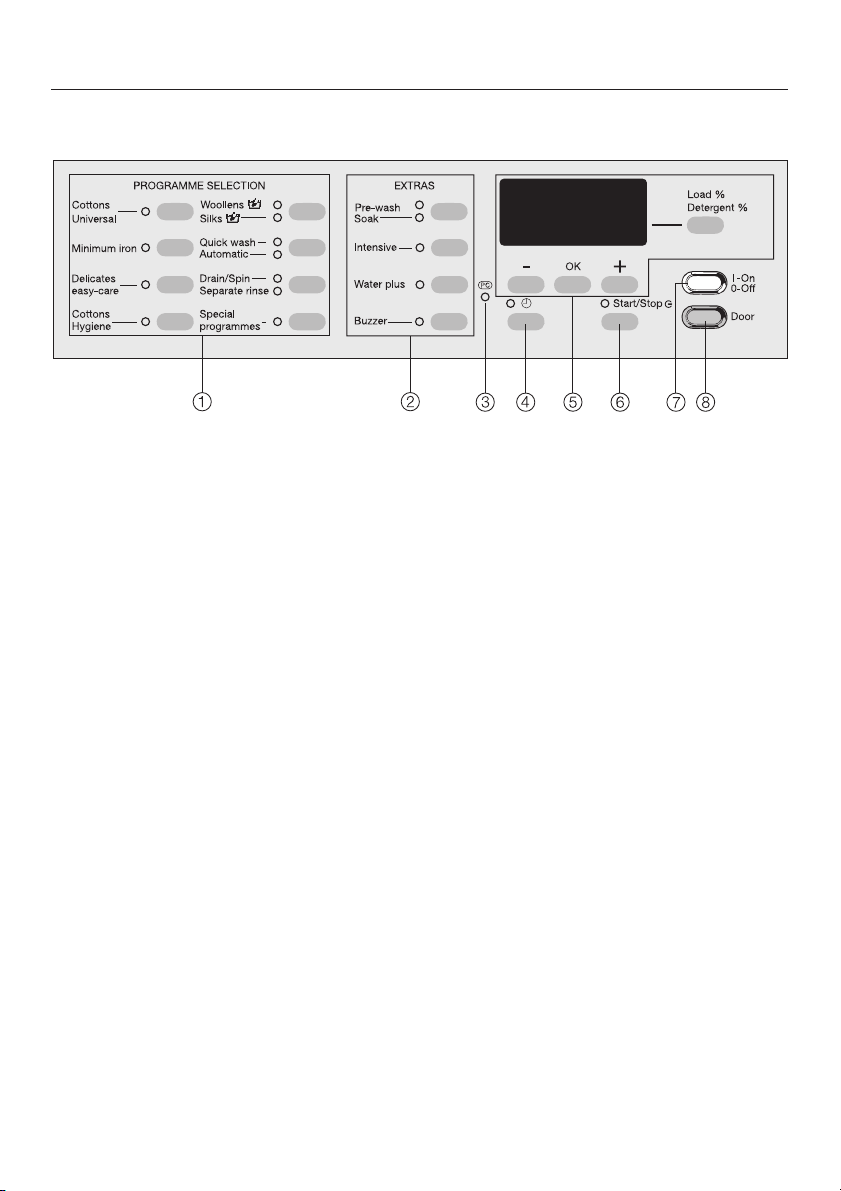
a Programme buttons with indicator
lights
For selecting a washing programme.
b Extras buttons with indicator lights
Various Extras (options) can be
added to the washing programmes.
c PC / Optical interface
This is used by service technicians
to run diagnostic checks on your
machine and can also be used to
update programming data in the
future.
d m button
For selecting delay start.
e Display with – , OK, + and Load/
Detergent buttons
See the following page for more
details.
f Start/Stop button
For starting the programme selected
and cancelling a programme once it
has started.
g I-On/0-Off button
For switching the washing machine
on or off.
h Door button
opens the machine door.
9
Page 10
Operating the washing machine
Display
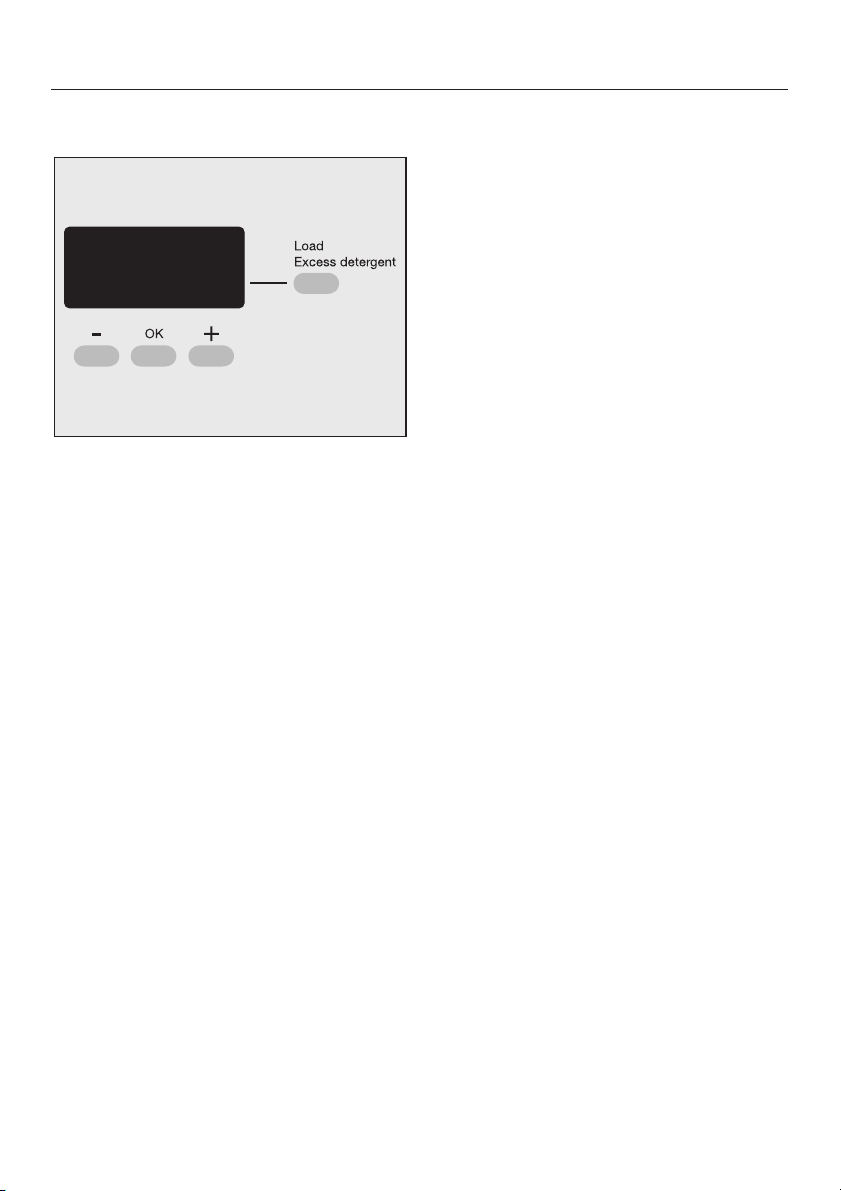
– button
For decreasing the the values shown in
the display.
+ button
For increasing the values shown in the
display.
OK button
For confirming the value selected and
choosing the next value.
When a programme is selected, the
display is used to select:
the temperature
–
the final spin speed
–
the soak time
–
delay start
–
a special programme
–
The display shows:
the duration of the wash programme
–
the current time of day.
–
The "Settings J" menu is also operated
via the display.
Load, Detergent button
For calling up the load size and the
detergent amount and for calibrating
load size sensor to zero.
10
Page 11
Before using the machine for the first
time ensure that it is correctly
installed and connected. See
"Installation and connection". Also
check that the drain filter is securely
tightened to prevent the risk of water
leaks during use.
The washing machine has a sensor
which measures the amount of laundry
in the drum. This determines the
amount of detergent required. To allow
the load size indicator to function
correctly, you must first run a wash
programme without any laundry
without detergent
^ Open the stopcock.
^ Press the
If the washing machine is being
switched on for the first time, the
welcome screen will appear.
The welcome screen will not appear
again once a programme lasting
longer than 1 hour has been
completed.
.
I-On/0-Off
button in.
and
Using for the first time
Setting the language
Use the – and + buttons to select the
^
language you want and confirm your
selection by pressing the OK button.
Set the time of day
The display for setting the clock will
appear.
12:00
Set the time
Set the hour with the – and + buttons
^
and confirm your setting by pressing
the OK button. Now set the minutes.
After you have confirmed the minute
setting, the display will change to
show the transport safety screen.
Transport struts
To avoid the risk of damage, the
transport struts must be removed
before the washing machine is used
for the first time. See "Installation" for
instructions on how to do this.
After a few seconds the display
changes to show the screen for
selecting your language.
After removing the transport struts (if
this has not already been done by your
fitter) press the OK button.
11
Page 12

Using for the first time
Running your first programme
Your washing machine is now ready for
the first programme to be run.
15:00
Select programme
Press the programme button for
^
Cottons Universal
Press the
^
At the end of the programme switch
^
Start/Stop
.
button.
the machine off.
The load sensor must then be
calibrated to zero as you would with
bathroom scales.
Calibrating the load sensor to zero
Switch the washing machine on.
^
Open the drum door.
^
Press the programme button for
^
Cottons Universal
Press and hold the
^
.
Load/Detergent
button until the following message
appears in the display:
Zero setting
OK
i
^ Switch the washing machine off.
The drum settles a little during the
first few washes and will take 3 or 4
wash cycles to reach its true position.
For this reason, please re-calibrate
the sensor to zero after each of the
first few wash cycles.
12
Page 13

Washing environmentally and economically
Energy and water consumption
Water consumption and energy
–
usage are determined by the size of
the load.
Use the
–
programmes for small loads.
If smaller loads are washed using the
–
Cottons Hygiene
Universal
ic load recognition system will
reduce the amount of water, time and
energy used. This may mean that the
time left shown in the display is
adjusted during the course of the
wash programme.
– Instead of using the
Hygiene 95°C
Cottons Universal 60°C
the
energy saving of between 35% and
45%. The programme duration will
be longer. This combination is
sufficient for most levels of soiling.
For stubborn or old stains, use the
Soak
Automatic
programmes, the automat
and
and the
Cottons
programme, use
Intensive
EXTRA.
EXTRA. This will give an
Quick wash
Cottons
and select
Detergent
Do not exceed the amount of
–
detergent recommended by the
manufacturer on the packaging.
Reduce the amount of detergent for
–
smaller loads. Use the
Detergent
Choosing the correct Extra options
-
(Soak, Pre-wash, Intensive)
Select:
A wash programme without any
EXTRAS for light to normal soiling
where there are no obvious marks.
A wash programme with the
Intensive
soiled laundry with visible staining.
– Use the
Pre-wash
ately by a main wash the same suds
are used.
When drying with a tumble dryer
–
Selecting the highest possible spin
speed for the wash programme will
save energy when drying in a tumble
dryer afterwards.
button.
EXTRA for normal to heavily
Soak
EXTRA instead of
. If Soak is followed immedi-
Load/
13
Page 14

How to wash correctly
Brief instructions
The headings numbered A, B, C, . . .
show the operating sequence and can
be used as brief instructions.
A Sort the laundry
^ Empty all pockets.
,
Foreign objects (e.g. nails,
coins, paper clips, etc.) can cause
damage to garments and
components in the machine.
^
Badly soiled areas, stains etc. should
be cleaned as soon as possible,
preferably whilst still fresh. Spillages
should be carefully dabbed off using
a soft colourfast cloth. Do not rub!
Badly soiled areas can be pre-treated
with liquid detergent, stain removers
etc. first, following the manufacturer's
instructions. With particularly stubborn
stains ask your dry cleaner for advice.
If you use a solvent-based cleaning
agent (e.g. one containing benzene)
to pre-treat a stain, make sure that
any plastic parts (e.g. buttons) are
protected, and that the cleaning
agent is rinsed off before washing
the garment in the machine.
Do not use solvent-based
,
cleaning agents in this machine.
Sort the laundry by colour and by
^
care label. Most garments have a
textile care label in the collar or side
seam.
Dark textiles often contain excess dye
and should be washed separately
several times first. Always wash whites
and coloureds separately.
– Curtains: Remove lead weights first
or place in a laundry bag.
– Underwiring and collar stiffeners:
Any loose wiring in bras, shirt collar
stiffeners, etc. should be removed or
sewn in.
–
Knitted garments, trousers and
jeans, T-shirts and sweat shirts: Turn
inside out, if recommended by the
manufacturer.
–
Close any zips, fasten hooks and
eyes etc before washing.
–
Fasten duvet covers etc. to prevent
small items from being rolled up
inside them.
Do not wash any items in this machine
which are specified by the
manufacturer as not washable on the
care label. (h symbol)
14
Page 15
How to wash correctly
B Switch on the washing machine
The interior drum lighting will come on.
C Select a programme
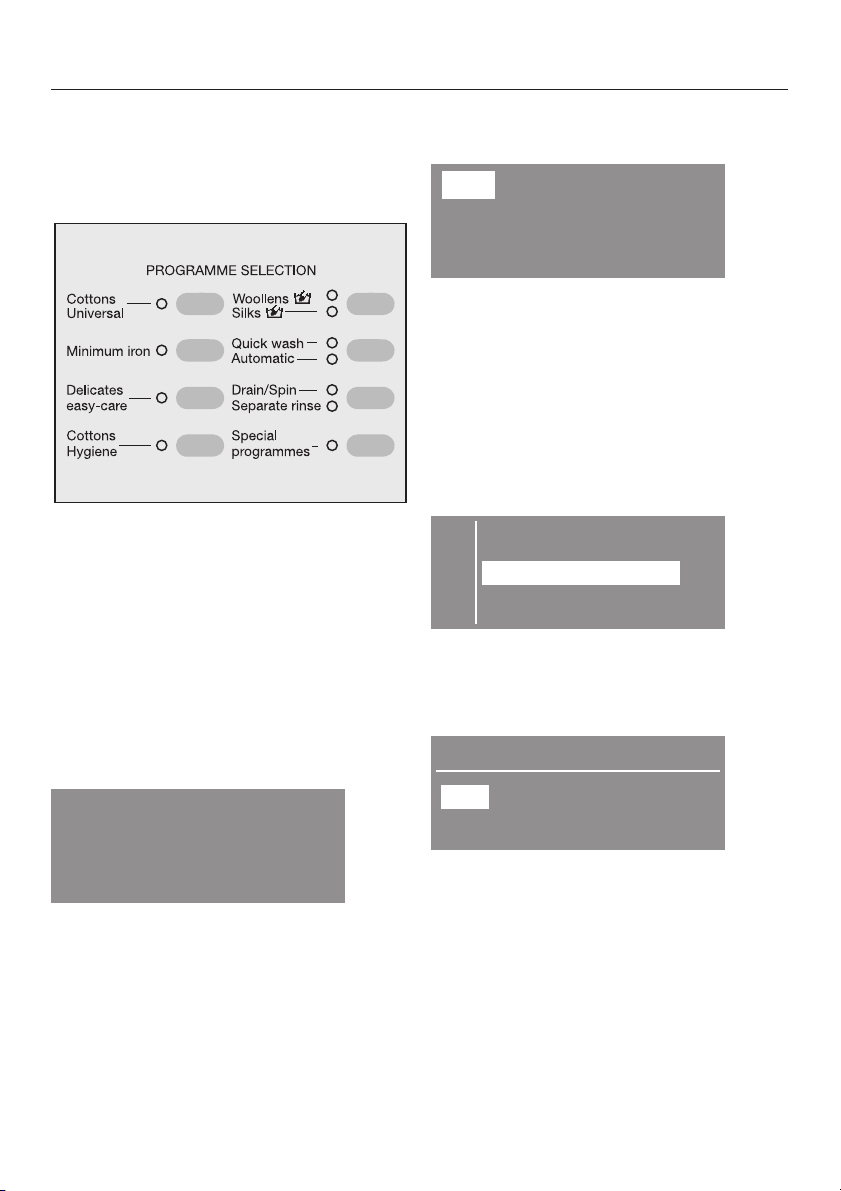
^ The programmes are selected with
the
Programme selection
buttons.
Pressing a button which is allocated
with two programmes, a second time
will select the lower programme. The
relevant indicator light will come on to
show which programme has been
selected.
The programme selected will also
appear in the display.
Cottons
The display will switch to show the
menu for the programme selected.
60°C 1600 rpm
Duration: 1:30 h
You can then alter the temperature
^
which is shown highlighted with the –
or + buttons. Press the OK button to
confirm the temperature you want
and move on to the spin speed which
you can also alter if you wish.
When you press the
programmes
button, these will appear
Special
in the display.
E Outerwear
Denim
Shirts
H
^ Use the – or + button to highlight the
programme you wish to select and
confirm your selection by pressing
the OK button.
Denim
40°C
Duration: 1:00 h
^
You can then alter the temperature
900 rpm
which is shown highlighted with the –
or + buttons. Press the OK button to
confirm the temperature you want
and move on to the spin speed which
you can also alter if you wish.
15
Page 16
How to wash correctly
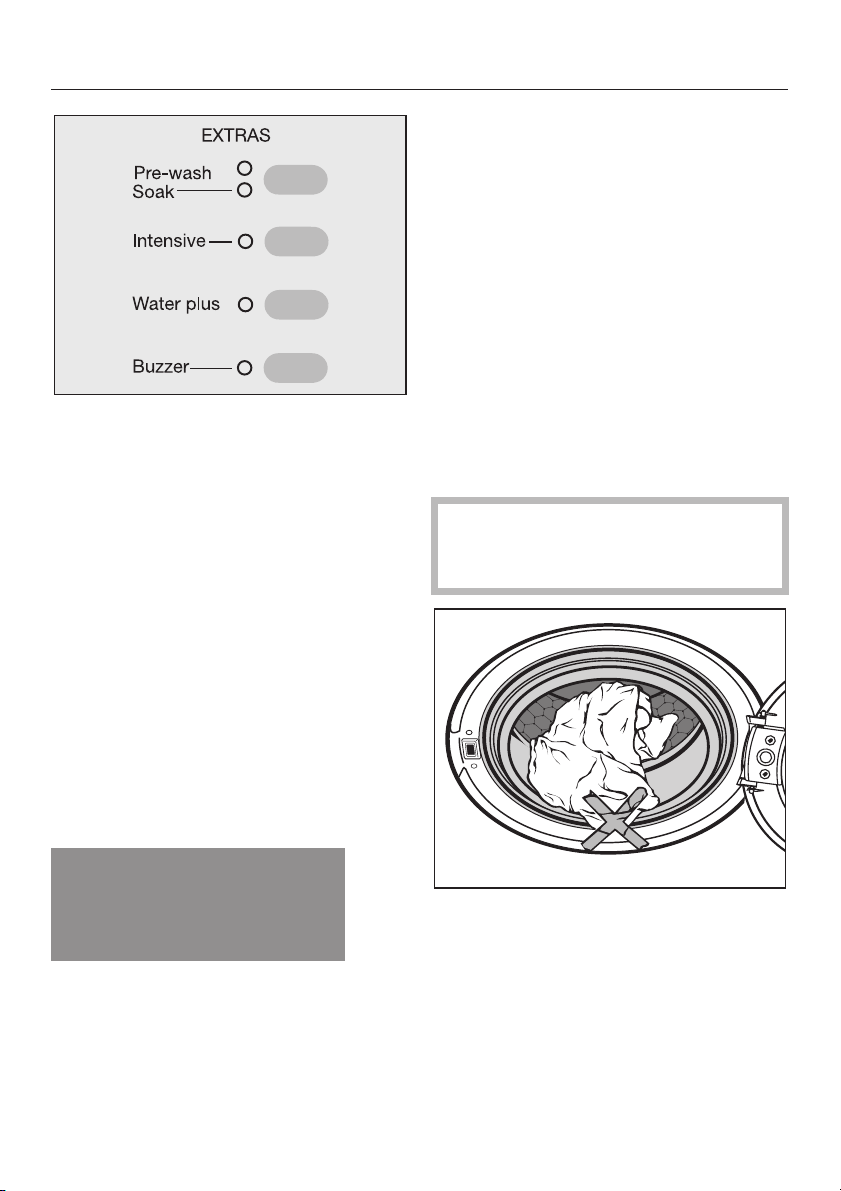
You can select any extra options with
^
the extra option buttons.
^ Each press of the top button selects
the extra option in the following order:
Pre-wash,Soak
Not all the extra options are suitable for
use with every programme.
You can only select extra options which
are compatible with the basic
programme being used.
, no selection.
The display shows the amount of
laundry loaded in the drum as a % (in
25% steps) of the maximum load
permissible for the programme
selected.
Unfold the laundry and load loosely
^
in the drum. Mixing both large and
small items gives better wash results
and also helps distribute the load
evenly during spinning.
The most efficient use of energy and
water is achieved when a full load is
washed. However, do not overload as
this causes creases and reduces
cleaning efficiency.
Make sure that no garments are
caught between the drum door and
seal.
D Load the drum
^
Press the
drum door.
The load size indicator display will
appear.
Door
button to open the
Load <25%
B
16
^
Shut the door with a gentle swing.
Page 17
E Add detergent
The load size indicator display will be
replaced with the detergent percentage
display.
Detergent 75%
A
40%
Add slightly less than half the
amount recommended...
50%
Add half the amount
recommended...
60%
Add slightly more than half the
amount recommended...
75%
Add three quarters of the
amount recommended...
100%
Add the full amount
You also need to take the level of
soiling and water hardness into
account.
too little detergent results in:
–
Laundry not getting properly clean
and with time it may become grey
and hard to the touch.
–
Greasy particles clinging to the
laundry.
–
Limescale deposits on the heater
elements.
too much detergent results in:
–
Excessive foam which causes a low
level of agitation and poor wash,
rinse and spin results.
How to wash correctly
High water consumption (an
–
additional rinse cycle will
automatically switch in).
– A burden to the environment.
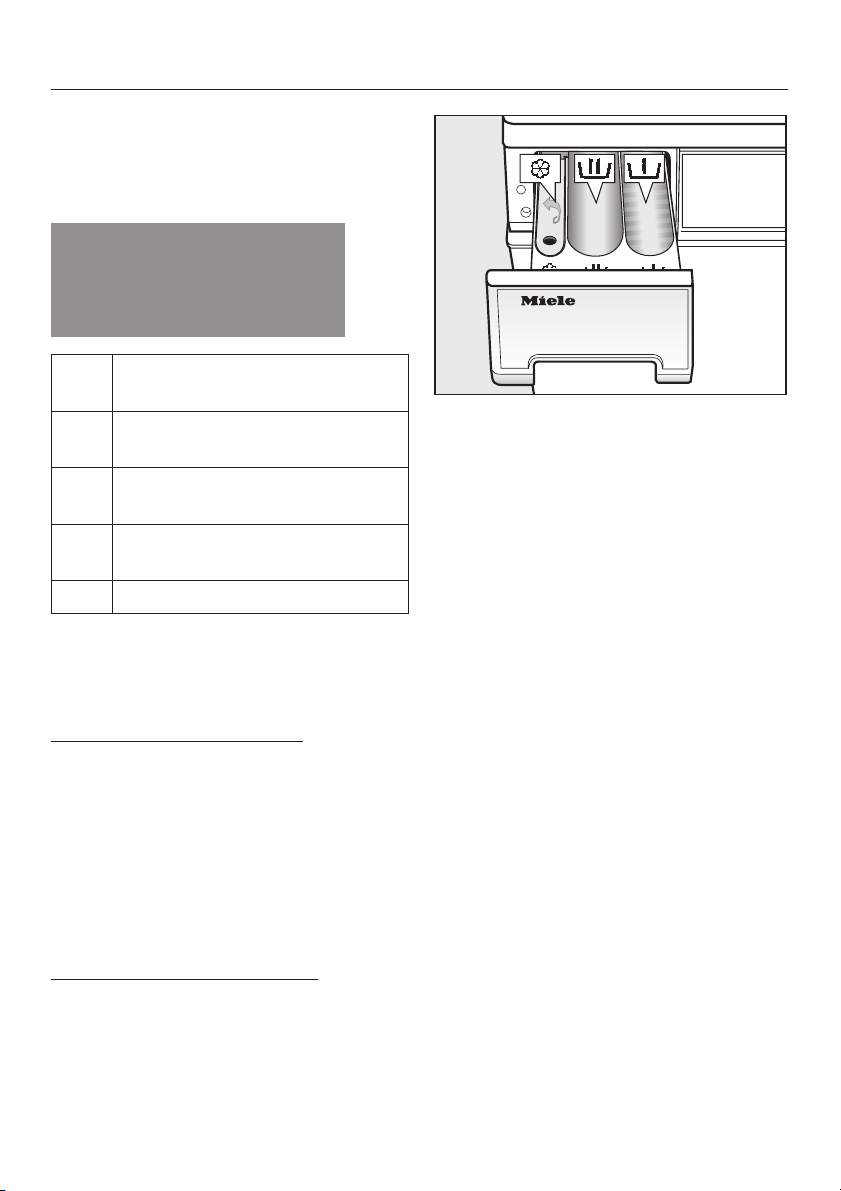
^ Pull out the detergent drawer and
add detergent to the compartments
as follows:
i
Detergent for the pre-wash (
total amount recommended).
This compartment is also used for
starch formulations when starching
separately.
j
Detergent for the main wash
including Soak
§
Fabric conditioner or liquid starch
^
Close the detergent drawer.
See "Detergent" for further information.
1
/3of the
17
Page 18
How to wash correctly
F Start the programme
Press the flashing
^
The estimated programme duration will
appear in the display. This will count
down in one minute steps. During the
first 10 minutes the washing machine
measures how much water is being
absorbed by the laundry. The
programme duration may be longer or
shorter depending on this absorbency
rate.
The programme sequence is also
shown in the display. The washing
machine shows you when each section
of the programme is reached.
The drum lighting switches off once the
programme has started.
Start/Stop
button.
G Remove the laundry
Anti-crease
alternately in the display to indicate that
the programme has finished.
Prss the
^
drum door.
Remove the laundry.
^
Make sure that the drum is empty.
Items left in the drum could
discolour other items in the next
wash or become discoloured
themselves.
and
Finish
Door
button to open the
will flash
18
^
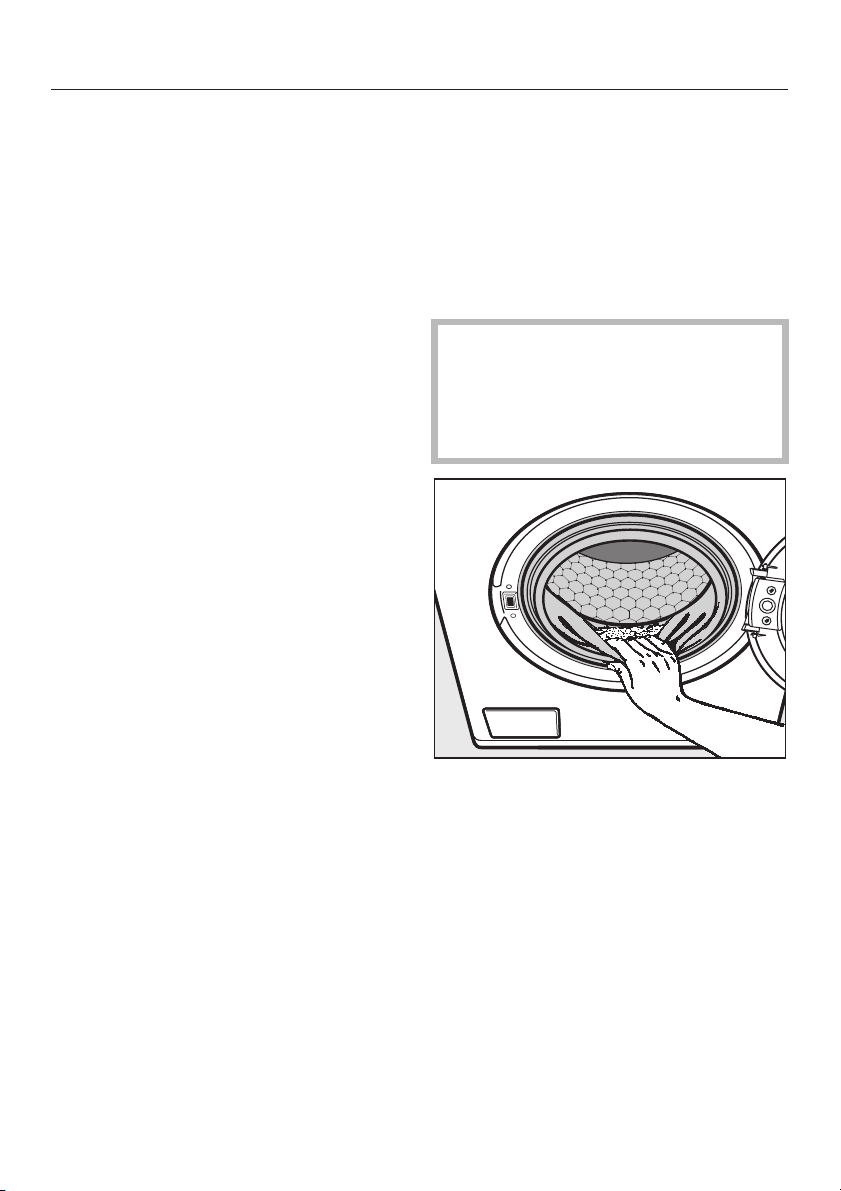
Check the folds in the door seal for
any small articles, e.g. buttons which
might be lodged there.
^
Switch the washing machine off with
the
I-On/0-Off
^
To avoid the build-up of mildew, it is
recommended that the door is left
ajar when the machine is not in use.
button.
Page 19

Extras
You can use the EXTRAS buttons to
augment the basic wash programmes.
Pre-wash
For laundry with large amounts of dirt
(e.g. dust, sand).
Soak
For heavily soiled and stained items
with protein stains (e.g. blood, fats
and oils, cocoa).
A length of time of between 30 minutes
and 6 hours can be chosen, in 30
minute periods for the “Soak” process.
To select the soak time
^ Press the
the
You can now use the display to select
the soak time you require.
Finish:
Soak:
Pre-wash,Soak
Soak
indicator light comes on.
15:06
button until
17:04
0.30 h
Intensive
For normal to heavy soiling or where
staining is visible.
The duration of the main wash is
increased.
Water plus
The machine is set at the factory so that
the water level in the main wash and
rinses will be increased if the
plus
EXTRA is selected.
However, you can select other settings
for
Water plus
. These are described in
the "Settings menu J".
Buzzer
An audible tone sounds repeatedly at
the end of a programme or when Rinse
hold is reached.
The buzzer will sound repeatedly until
the machine is switched off.
Once switched on, the buzzer is active
in all programmes until it is switched off
again.
Water
Use the – and + buttons to enter the
soak time. The display will also show
the corresponding finishing time for the
washing programme. Press the OK
button to confirm the soak time you
want.
To delete the soak time
^
Set the soak time to 0.00 h and
confirm this with the OK button.
You can change the volume of the
buzzer or switch it off with the buzzer
button. These are described in
"Settings J".
The buzzer will always sound when
there is a fault, even if the buzzer has
been switched off.
19
Page 20
Spinning
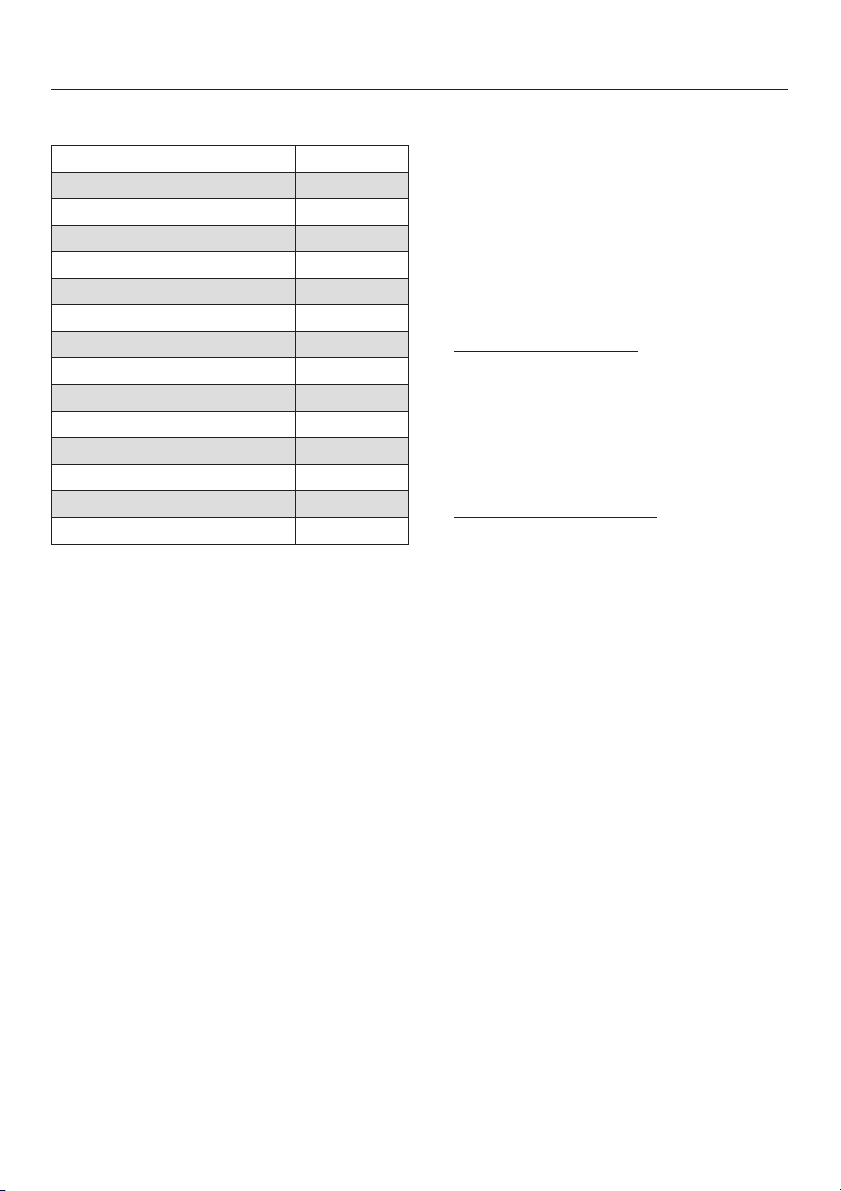
Final spin speed
Wash programme rpm
Cottons Universal 1600
Minimum Iron 900
Delicates 600
Cottons Hygiene 1600
Woollens 1200
Silks 400
Quick wash 1600
Automatic 900
Separate rinse 1200
Outer wear 800
Denim 900
Shirts 600
Starch 1500
Spin 1600
You can reduce the final spin speed.
You cannot select a final spin speed
higher than that shown in the chart
above.
Rinse and interim spin
There is a spin after the main wash and
between the rinses. A reduction in the
final spin speed will also reduce the
interim spin speed. If a spin speed of
less than 700 rpm is selected in the
Cottons Hygiene
Universal
programmes, an additional
rinse is introduced.
and the
Cottons
To omit the final spin (Rinse hold)
Select the
^
Rinse hold
setting. The
laundry will not be spun and will
remain suspended in the final rinse
water. This reduces creasing if the
laundry is not going to be removed
from the drum immediately after the
end of the programme.
To start the final spin
–
:
The washing machine will display the
maximum spin speed possible. You
can select a spin speed lower than
this. Start the final spin by pressing
the
Start/Stop
– To end the programme
Press the
drain away. Press the
button.
:
Door
button. The water will
Door
button
again, to open the door.
To omit rinse and interim spin and
the final spin
^ Select the
Without spin
setting. The
laundry is not spun after the final
rinse. The water will drain away and
the machine will go straight into the
anti-crease stage. An additional
rinse is introduced if this setting is
selected with the
Cottons Hygiene
Cottons Universal,Minimum Iron
Quick wash
and
Automatic
programmes.
,
,
20
Page 21
Delay start
With delay start you can choose when
you want the programme to end. The
start of a programme can be delayed
from 30 minutes up to a maximum of 24
hours, allowing you to make use of
night-time economy electricity rates, for
example.
The current time of day needs to
have been set for delay start to work
correctly.
To select delay start
Select the programme you want and
^
then press the m button.
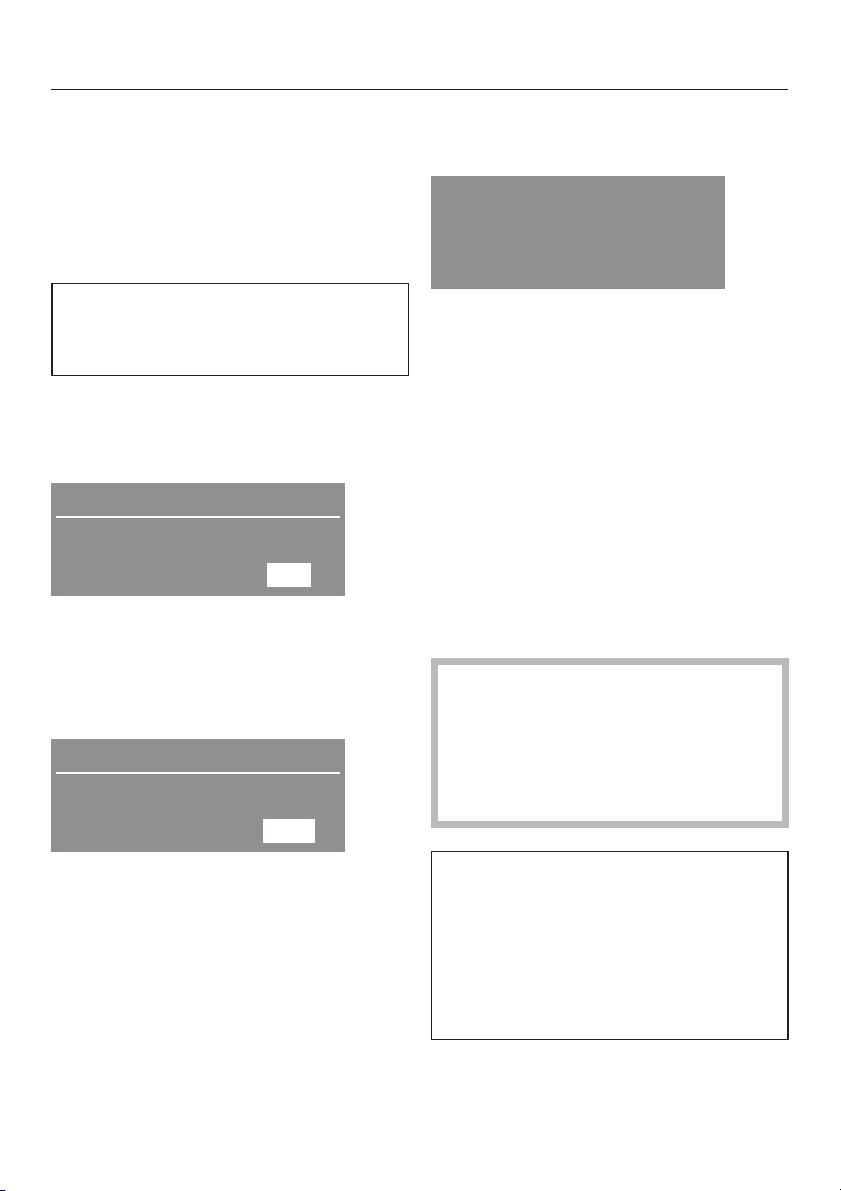
9:51
Start at:
Finish at:
9:51
11:19
The display shows the current time of
day and the time the programme is due
to end.
^ Use the + button to select the time
you want the programme to end at.
9:51
Start at:
Finish at:
13:32
15:00
To begin delay start
Press the
^
60°C 1600 rpm
Start in: 3:41 h
Start/Stop
button.
The display will show how long in h:min
you have to wait until the programme
starts.
To alter delay start
Press the m button.
^
^ Use the + and – buttons to alter the
time you want the programme to end
at.
^ Press the OK button to confirm.
To cancel delay start
^ Press the
Start/Stop
button.
The actual load size can only be
determined accurately by the
machine once the programme has
started. The programme end time
may, therefore, turn out to be a bit
later or earlier than first indicated.
The first press on the button will adjust
the programme end time to the next full
or half hour. Each subsequent press on
the button will delay the programme
end time by 30 minutes.
Use the – button to shorten the time if
you have chosen too long a time.
^
Confirm the programme end time by
pressing the OK button.
N.B.: If, under the settings menu, you
have chosen not to have the time
displayed the display will show how
long in h:min there is left until the
programme starts / stops instead of
the actual time that it will start / stop
at.
21
Page 22
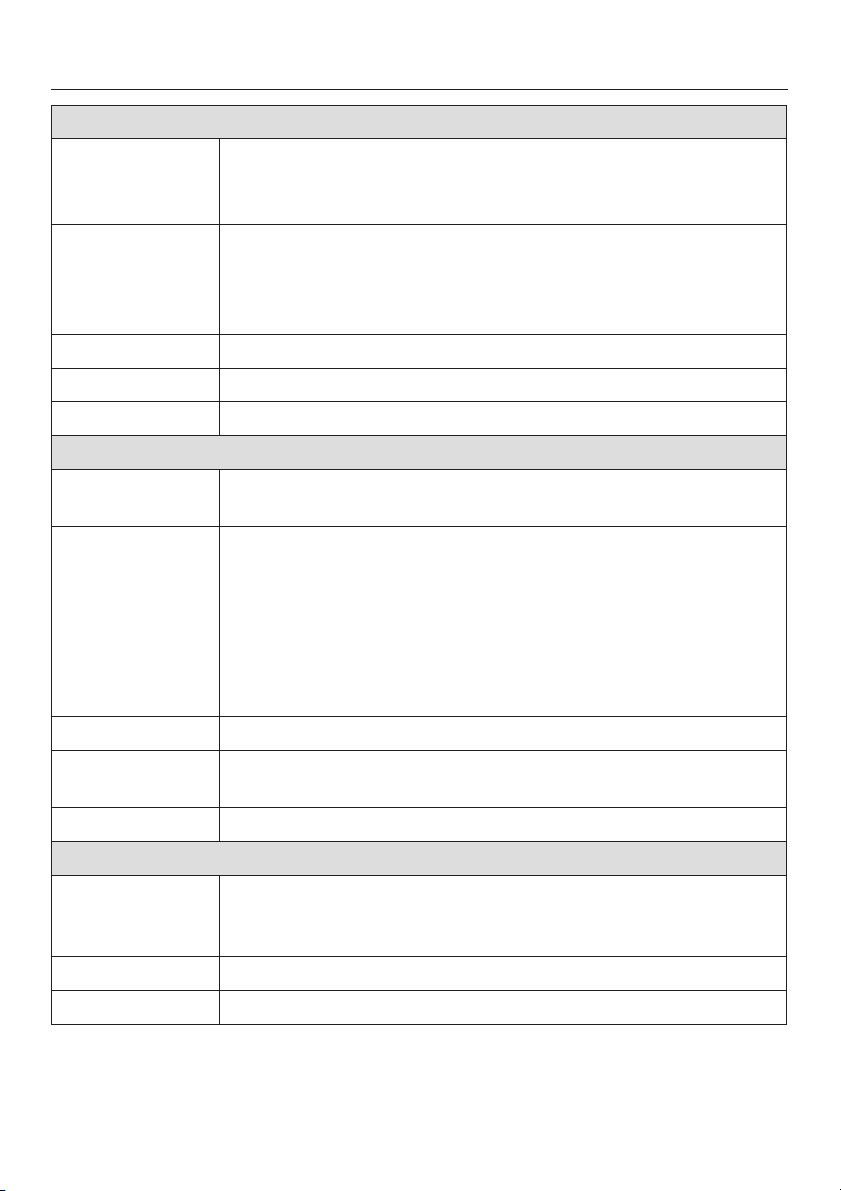
Programme chart
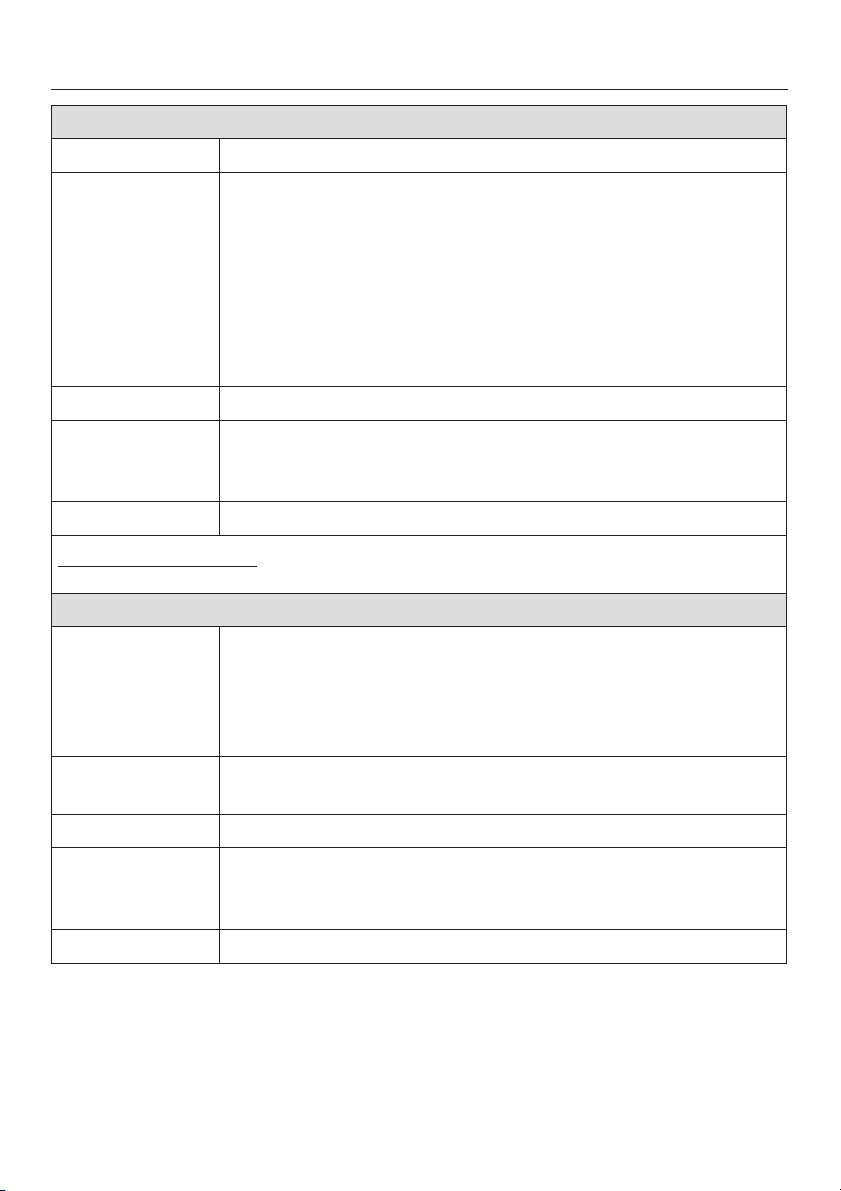
Cottons Universal 30°C to 60°C 876
Fabric Cottons or cotton mix fabrics, e.g. T-shirts, trousers.
Notes
Extras Pre-wash or Soak, Intensive, Water plus
Detergent Powder detergent, detergent for coloured fabrics, detergent
Max. load 5.0 kg
Note for test institutes:
Programme setting for the AS/NZS 2040.2:2000 Standard: Cottons 40°C.
Minimum iron 30°C to 60°C 4321
Fabric White nylon (60°C), white polyester fabrics (50°C), coloured
Notes For normal to heavy soiling or where staining is visible, select
Extras Pre-wash or Soak, Intensive, Water plus
Detergent Powder detergent, detergent for coloured fabrics, liquid
Max. load 2.5 kg
For normal to heavy soiling or where staining is visible,
–
Intensive
select
For laundry with stubborn soiling and/or soiling which has
–
been left unwashed for some time, select
For laundry with large amounts of dirt (e.g. dust, sand),
–
Pre-wash
select
For dark coloured fabrics use a detergent for coloured
–
fabrics, or liquid detergent.
for delicates, liquid detergent, tablet detergent and liquid tab
detergent
nylon, polyester, cotton and viscose fabrics with special
finishes, acrylic, cotton fabrics, coloured polyester/ cotton
fabrics, (40°/30°C) minimum iron fabrics not washable at
higher temperatures.
Intensive
detergent, detergent for delicates, tablet detergent and liquid
tab detergent
.
.
Soak
.
.
22
Page 23
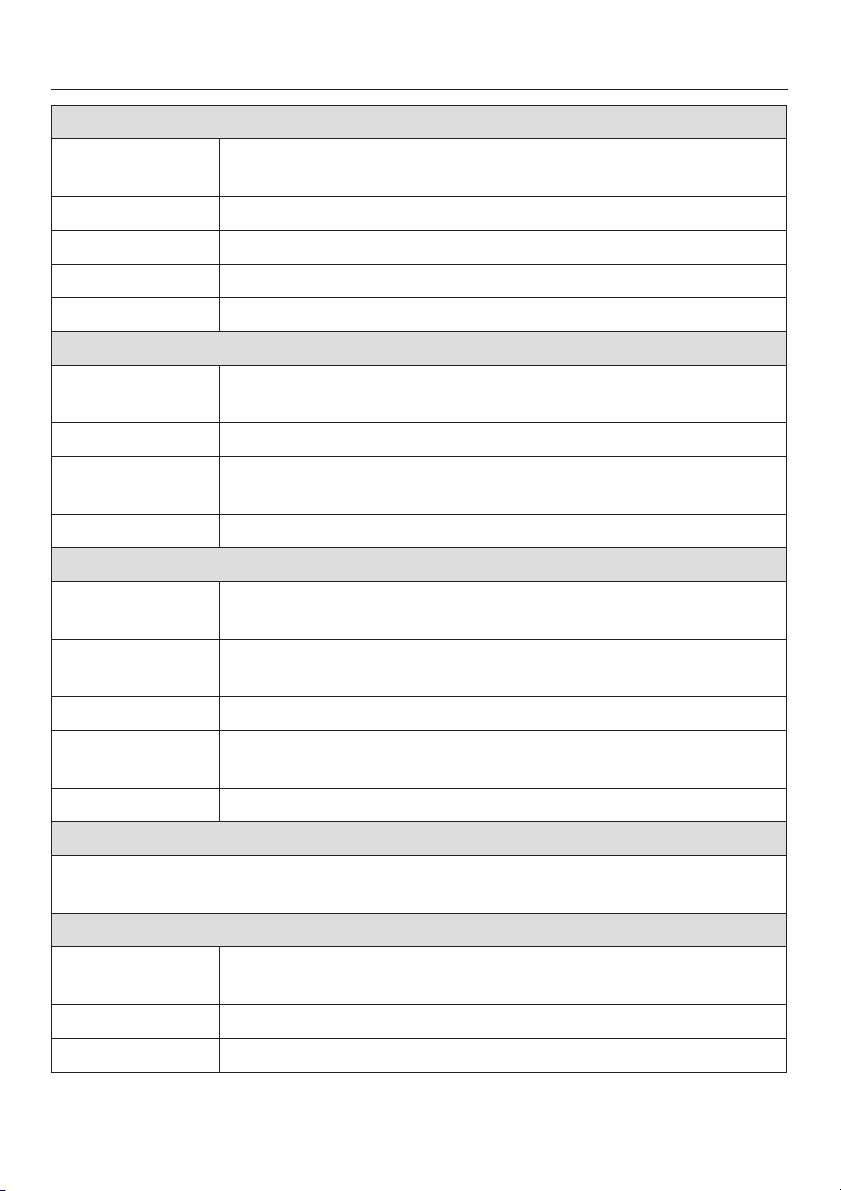
Programme chart
Delicates cold to 60°C ac g
Fabric Acrylics, acetate and triacetate, 100% cotton easy care shirts
and blouses.
Curtains, specified machine-washable by the manufacturer.
Notes
Extras Pre-wash or Soak, Intensive
Detergent Detergent for delicates (mainly liquids).
Max. load 1.0 kg
Cottons Hygiene 75°C to 95°C 9ö
Fabric Cottons and linen fabrics, e.g. bed linen, table linen, nappies,
Notes – Suitable for heavily soiled and incontinent laundry.
Extras Pre-wash or Soak, Intensive, Water plus
Detergent Powder detergent, liquid detergent, tablet detergent and
Max. load 5.0 kg
Woollens / cold to 40°C
Fabric Machine-washable or hand-washable wool or wool blend
Detergent Liquid detergent for machine-washable woollens.
Max. load 2.0 kg
For normal to heavy soiling or where staining is visible,
–
Intensive
select
For curtains which crease easily, reduce the spin speed or
–
select Without spin.
underwear.
– For normal to heavy soiling or where staining is visible,
Intensive
select
– For laundry with stubborn soiling and/or soiling which has
been left unwashed for some time, select
– For laundry with large amounts of dirt (e.g. dust, sand),
select
Pre-wash
liquid tab detergent.
fabrics. If the care label does not specify a temperature wash
using the cold setting.
.
.
Soak
.
.
23
Page 24
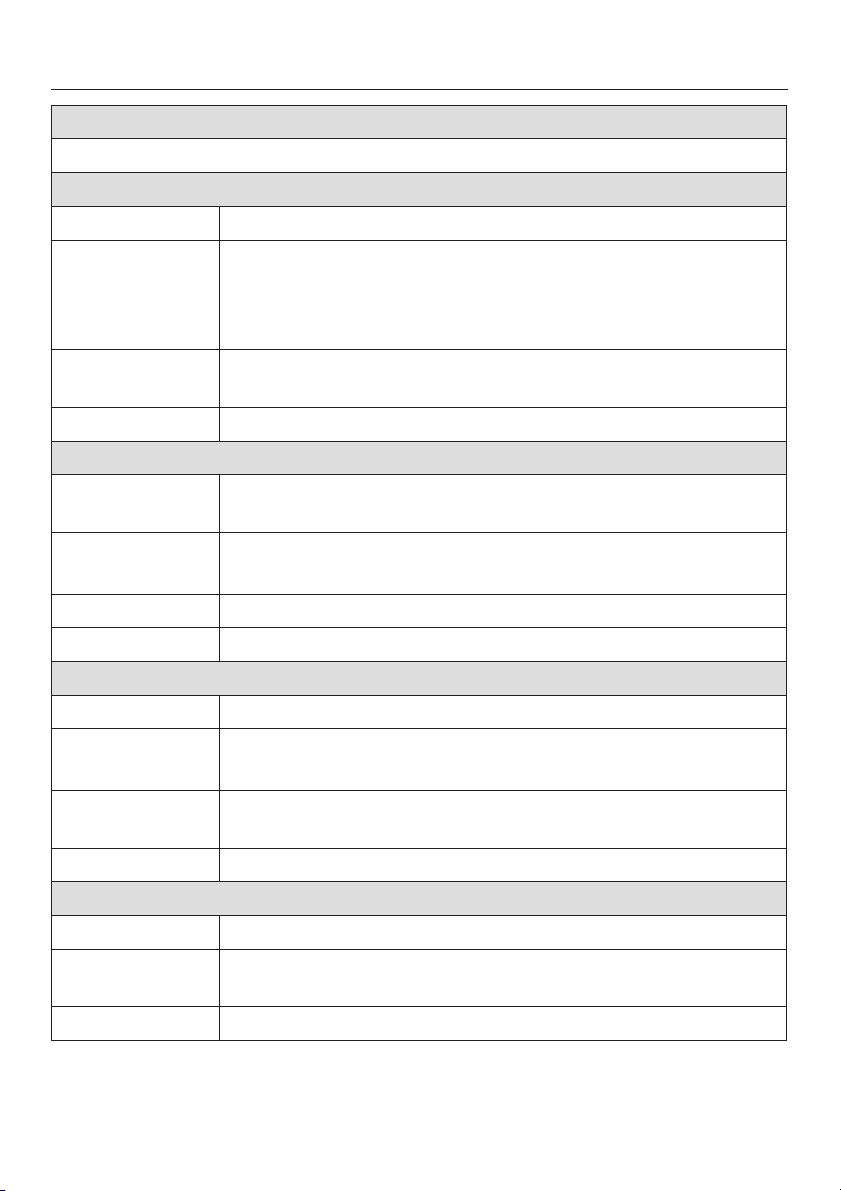
Programme chart
Silks / cold to 30°C
Fabric Hand-washable fabrics with no wool content, e.g. satin, lace
and silk.
Notes Place socks, tights, bras etc. in a washing bag.
Extras Water plus
Detergent Detergent for delicates (mainly liquids).
Max. load 2.0 kg
Quick wash cold to 40°C 76e
Fabric Small loads of lightly soiled laundry which can be washed in a
Cottons Universal
Extras Water plus
Detergent Powder detergent, detergent for coloured fabrics, liquid
detergent
Max. load 2.5 kg
Automatic cold to 40°C 76e21f
Fabric Mixed loads of garments suitable for the
and
Minimum iron
Notes For normal to heavy soiling or where staining is visible, select
Intensive
Extras Pre-wash or Soak, Intensive, Water plus
Detergent Powder detergent, detergent for coloured fabrics, liquid
detergent
Max. load 3.0 kg
Spin
For spinning fabrics. Please make sure you select the appropriate spin speed.
Drain only: Select
Separate rinse
Fabric Articles which have been washed by hand and only need to
Extras Rinse hold
Max. load 5.0 kg
Without spin
be rinsed and spun in the machine.
.
.
programme.
Cottons Universal
programmes. Sort according to colour.
24
Page 25
Programme chart
Special programmes
Denim cold to 40°C
Fabric Denim fabrics, e.g. jeans, skirts, shirts.
Notes
Detergent Detergent for coloured fabrics, liquid detergent, detergent for
Max. load 2.0 kg
Outer wear cold to 40°C
Fabric Outer wear made from micro-fibres such as Gore-Tex
Notes – Zip up jackets before washing.
Detergent Detergent for delicates (mainly liquids).
Max. load 2.0 kg
Shirts cold to 60°C
Fabric Shirts and blouses
Notes
Detergent Powder detergent, detergent for coloured fabrics, liquid
Max. load 1.5 kg
Starch
Fabric Table cloths, napkins, overalls, aprons.
Notes The laundry should be washed but not treated with fabric
Max. load 5.0 kg
Wash dark garments inside out.
–
Denim often contains excess dye and will run during the
–
first few washes. Wash light and dark coloured items
separately.
delicates
SYMPATEX
®
, WINDSTOPPER®etc.
– Do not use fabric conditioner.
–
Pre-treat colours and cuffs if necessary.
–
Wash silk blouses in the
Silks
programme.
detergent, tablet detergent and liquid tab detergent
conditioner.
®
,
25
Page 26
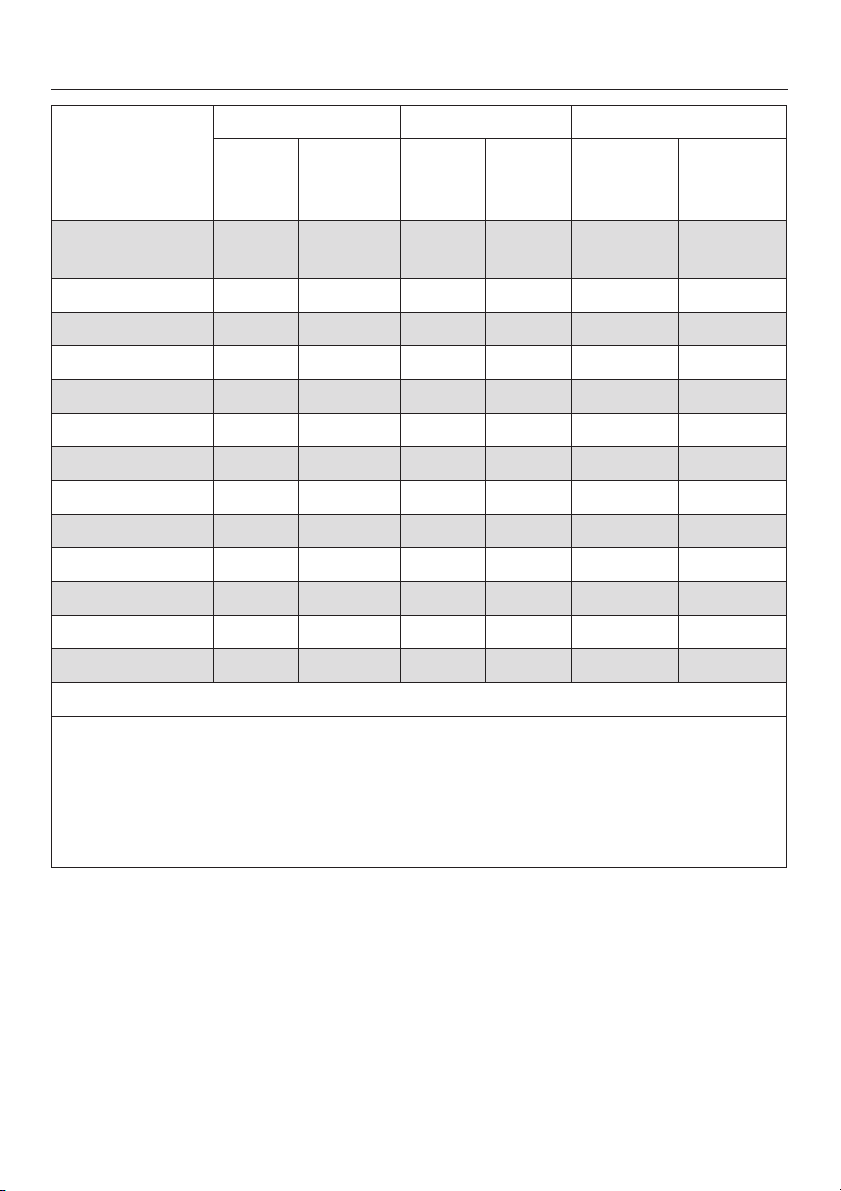
Programme sequence
Main wash Rinses Spinning
Water
level
Cottons
d a ( 2-3
Universal
Minimum Iron d a e 2-3
Delicates e b e 3 – L
Cottons Hygiene d a ( 2-3
Woollens ( c ( 2 L
Silks ( d ( 2 – L
Quick wash d a ( 2 L
Automatic d a e 2 L
Separate rinse ––e 2 – L
Outer wear ( b e 3 L
Denim ( a ( 3 – L
Shirts ( a ( 2 – L
Starch ––d 1 – L
Wash
rhythm
Water
level
No of
rinses
1)
3)
1)
Rinse and
interim
spin
2)
L
2)
L
2)
L
2)
2)
2)
4)
Final spin
L
L
L
L
L
L
L
d = Low water level
( = Medium water level
e = High water level
a= Normal wash rhythm
b= Gentle action
c= Woollens
d= Silks
Please continue reading for further details about the programme sequences.
26
Page 27

Programme sequence
This washing machine has fully
electronic controls with automatic load
recognition. It takes in the right amount
of water required for the programme
depending on the amount of laundry
and its absorbency rate. This means
that programme cycles and durations
can vary.
The programme sequences outlined
below are based on the basic
programme with a full load. Extras
which can be selected have not been
taken into account.
The programme sequence display
shows the stage the programme has
reached.
Special features in the programme
sequences:
Anti-crease:
At the end of every programme, with
the exception of
Woollens
, the drum
continues to turn at intervals for up to
30 minutes to help prevent creasing.
The door can be opened and laundry
removed at any time during the
anti-crease phase.
1)
A third rinse is carried out if:
there is too much foam in the drum
–
– a spin speed lower than 700 rpm has
been selected.
Without spin
–
2)
There is a spin after the main wash
has been selected
and between the rinses.
3) A third rinse is carried out if:
Without spin
4)
In the
has been selected
Outdoor
programme laundry is
only spun after the main wash.
27
Page 28

Changing the programme sequence
Cancelling a programme
You can cancel a programme at any
time after it has started.
Press the
^
The suds will be pumped away and the
programme is cancelled.
If you want to remove the laundry:
Press the
^
If you want to select a different
programme:
Switch the washing machine off with
^
I-On/0-Off
^ Switch the machine back on again.
Start/Stop
Door
button.
button.
button briefly.
Interrupting a programme
^ Switch the washing machine off with
I-On/0-Off
To continue with the same programme:
^ Switch the machine back on with the
I-On/0-Off
button.
button.
Altering a programme
Altering the programme or the
temperature
After the start of a programme it is no
longer possible to select a different
programme.
It is possible to select a different
temperature up to 5 minutes after the
programme has started.
If you want to select another
programme or alter the temperature
(more than five minutes after the start of
a programme) you will need to cancel
the programme and begin again.
Altering the spin speed
^ Press the OK button.
The spin speed will be shown
highlighted. You can use the – and +
buttons to change the spin speed up
until the final spin begins.
Changing extra options
28
The buzzer can be switched on or off.
It is possible to select or deselect the
Intensive
up to five minutes after the programme
has started.
Please note that no changes are
possible if the safety lock has been
activated.
and
Water plus
extra options
Page 29

Changing the programme sequence
Adding or removing laundry
after a programme has started
Door
Press the
^
drum door.
Add or remove items.
^
Close the drum door.
^
The programme will continue
automatically.
Please note:
Once a programme has started the
machine cannot recognise any
adjustment to the load.
For this reason, if laundry is added or
removed after the start of a programme,
the machine will always complete the
programme cycle assuming a full load
which can lead to an increase in the
programme duration shown in the
display.
The door cannot be opened, if:
–
the suds temperature is above 55°C.
–
the water is above a certain level.
–
the programme has reached the
Final spin
button to open the
stage.
Safety lock
The safety lock prevents the machine
from being opened or the
programme cancelled or the
temperature or spin speed being
altered during a wash programme.
To activate the safety lock
Once the programme has started,
^
press the
seconds until the following appears
in the display:
X Locked
The machine will now not accept any
changes and the programme will
proceed through to the end.
The safety lock is deactivated
automatically at the end of the
programme.
To deactivate the safety lock
^ Press the
least 6 seconds until the following
appears in the display:
W Unlocked
Start
button for at least 6
Start/Stop
button for at
–
the safety lock has been activated.
If you press the
above conditions are present, the
following will appear in the display:
X Locked
Door
button when the
29
Page 30

Detergent
All modern detergents produced for
automatic front loading washing
machines are suitable, including liquid,
compact (concentrated), tablets and
special application detergents. Use
dispensing aids, e.g. balls, if these are
supplied with the detergent.
Woollens and knitwear containing wool
mixtures and hand-washable garments
should be washed using a detergent
specifically designed for washing
woollens.
Silk should be washed using a liquid
detergent specifically designed for
washing woollens. Do not use
biological detergents on silk as the
enzymes may damage the silk!
Add detergent according to the
amount recommended on the
packaging. Detergent designed for
vertical axis top loading washing
machines are not suitable for use in
Miele washing machines as they
may cause oversudsing.
The soiling level of the laundry.
–
Lightly soiled
No visible dirt or stains. Possibly
slight body odour.
Normally soiled
Visibly dirty and/or just a few slight
stains.
Heavily soiled
Stains and soiling clearly visible.
Water softeners
A water softener such as Calgon can
be used to cut down on the use of
detergents in extremely hard water
areas. Dispense according to the
amount specified on the packaging.
First add detergent and then the water
softener.
Use a quantity of detergent as for soft
water.
Washing with several components
The right amount to dispense will
depend on the following:
–
The quantity of laundry (follow the
machine’s dispensing
recommendation and reduce the
amount of detergent with smaller
loads as indicated on the display)
30
If you wash using several components
(e.g. special application detergents),
we recommend always dispensing the
agents into compartment j in the
following order:
1. Detergent
2. Water softener
3. Stain remover, e.g. Biotex
This way the agents are distributed
more efficiently.
Page 31
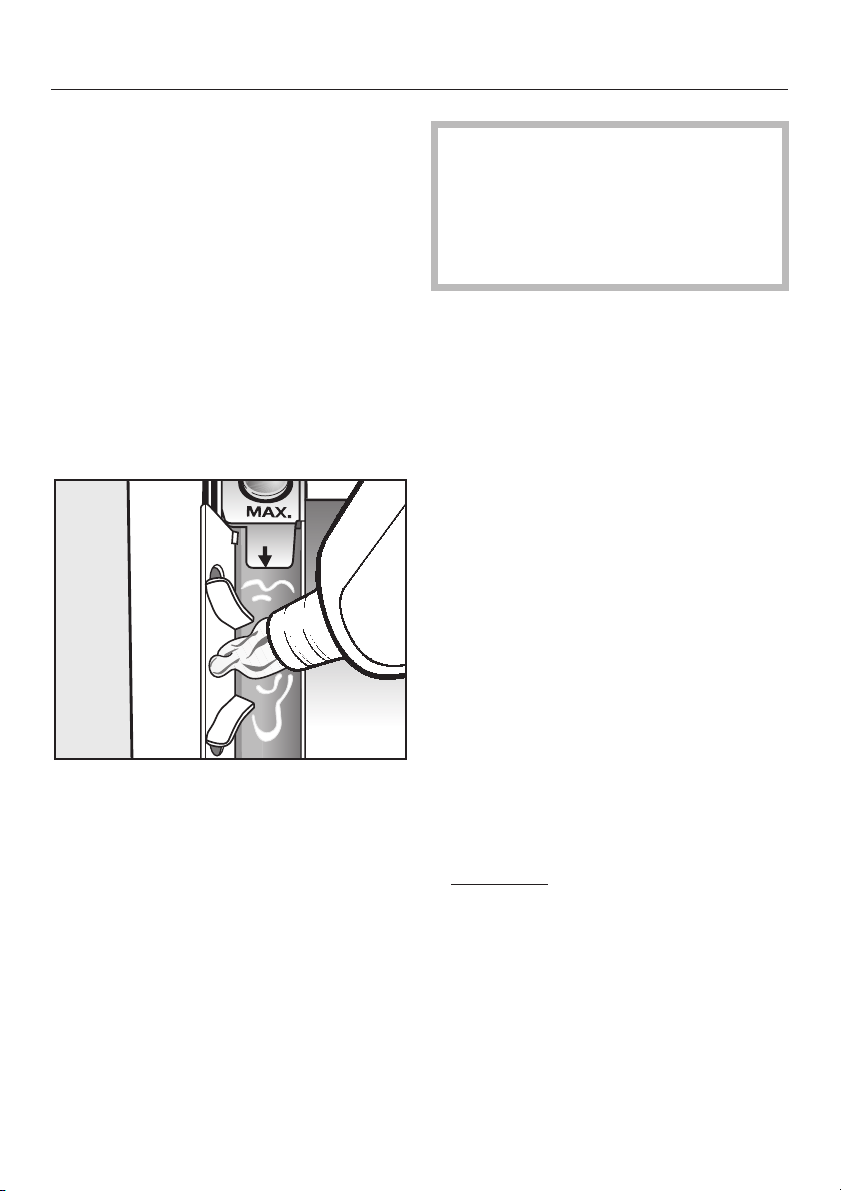
Fabric conditioners and liquid
starch
Fabric conditioners make garments soft
and fluffy to handle and help prevent
static cling when tumble drying.
Starch stiffens and gives body to items
of laundry, e.g. shirts, tablecloths and
bed linen.
Dispense according to the amount
^
specified on the packaging.
Automatic dispensing of fabric
conditioner or liquid starch
Detergent
If starching frequently, clean the
dispenser compartment and
especially the siphon tube and
conditioner channel regularly. See
"Cleaning the detergent dispenser
drawer".
Adding fabric conditioner separately
Add fabric conditioner to
^
compartment §.
Select the
^
programme.
^ Press the
Adding starch separately
^ Prepare the starch solution in
accordance with manufacturer's
instructions on the packaging.
^ Add the starch formulation to
compartment i.
Starch
Special
Start/Stop
button.
^
Add the fabric conditioner or liquid
starch to compartment §. Do not
exceed the maximum level mark.
The conditioner or liquid starch is
automatically dispensed in the last
rinse. At the end of the programme a
small amount of water remains in the
fabric conditioner compartment §.
^ Select the
programme.
^
Press the
Starch
Special
Start/Stop
button.
Colour run and dye removers /
dyes
^
Do not use
removers in this washing machine.
^
Dyes suitable for use in domestic
washing machines can be used.
However, please note that the salt
used in the dyeing process can
cause corrosion to stainless steel
components in the machine if you
dye frequently. Always observe the
manufacturer's instructions carefully.
colour run or dye
31
Page 32
Cleaning and care
Disconnect the machine from the
,
mains electricity supply and
withdraw the plug from the socket
before cleaning the machine.
The washing machine must not
,
be hosed down.
External casing and fascia
panel
Clean the casing with a mild
^
non-abrasive cleaning agent or soap
and water using a well wrung-out
cloth. Wipe dry with a soft cloth.
^ The drum can be cleaned using a
suitable proprietary stainless-steel
cleaning agent following the
manufacturer's instructions on the
packaging.
Extra cleaning
Carry out a hot wash (70°C or above)
with powder detergent approx. every 6
weeks to help prevent deposits building
up in the machine. These can occur
when washing is mainly done at low
temperatures, and also lead to
unpleasant smells. If you have no
reason to wash occasionally at this high
temperature, then run a Cottons 95°C
programme with detergent but no
laundry at regular intervals.
Cleaning the detergent
dispenser drawer
Remove detergent residues regularly.
,
Do not use solvents, abrasive
cleaners, glass cleaners or
all-purpose cleaning agents.
These might damage plastic
surfaces and other components
because of the chemicals they
contain.
E-Cloth
A microfibre "E-Cloth" is available from
the Miele UK Spare Parts Department,
which is suitable for cleaning surfaces
such as stainless steel, glass, plastic
and chrome without the use of
chemicals. It can be washed 300 times.
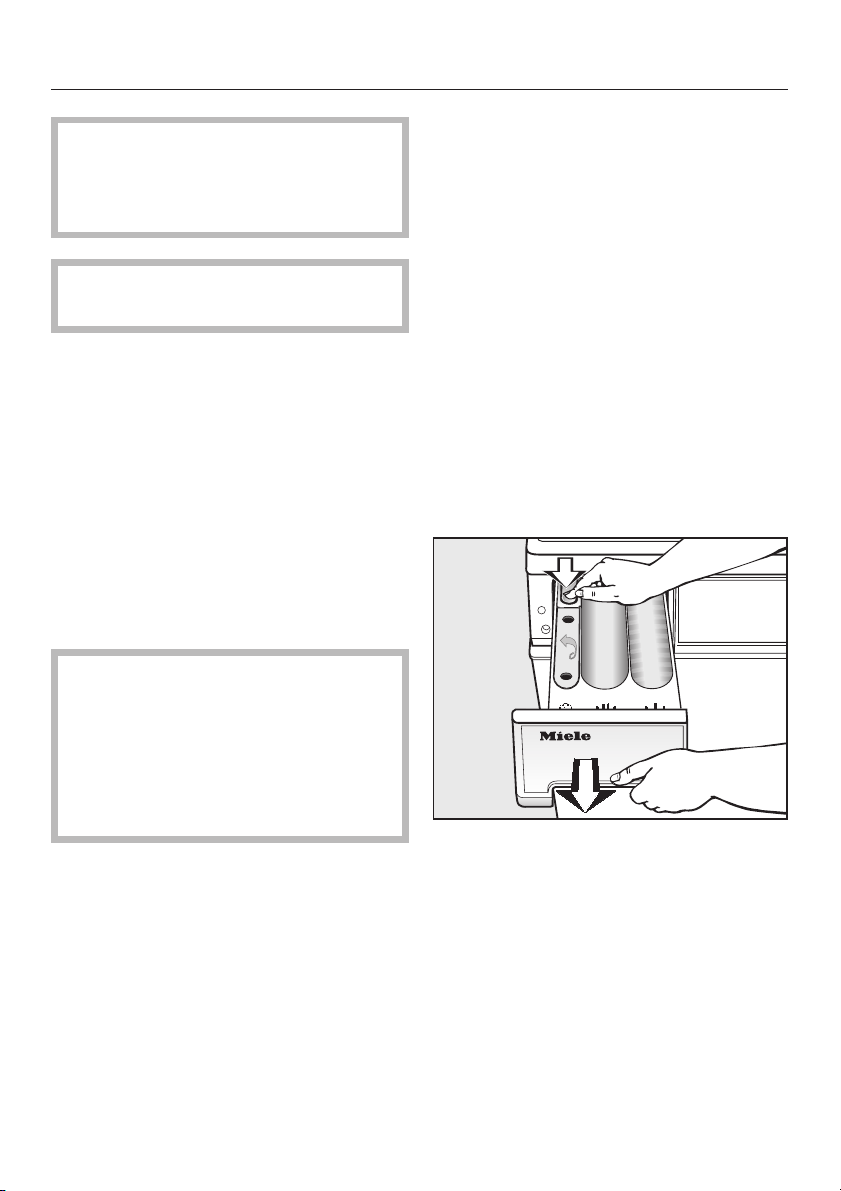
32
^
Pull out the detergent dispenser
drawer until a resistance is felt. Press
down the release catch and at the
same time pull the drawer right out of
the machine.
^
Clean the detergent drawer with
warm water.
Page 33
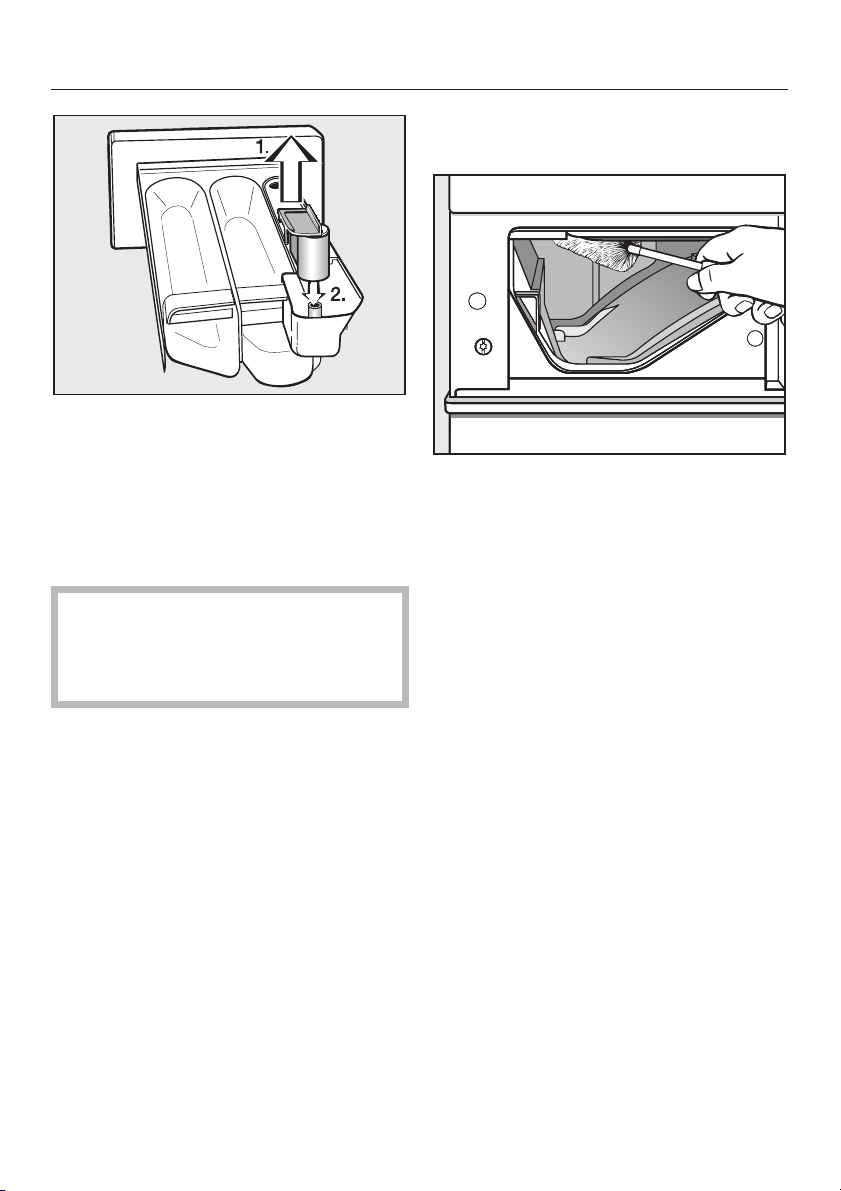
Clean the siphon.
^
1. Remove the siphon from
compartment § and rinse under
warm running water. Clean the
siphon tube in the same way.
2. Replace the siphon.
If starching frequently, thoroughly
clean the siphon and siphon tube
regularly. A build-up of starch will
cause them to get clogged.
Cleaning and care
Cleaning the detergent dispenser
drawer housing
^ Use a bottle brush to remove
detergent residues and limescale
from the jets inside the detergent
dispenser drawer housing.
33
Page 34
Cleaning and care
Cleaning the filter in the water
inlet
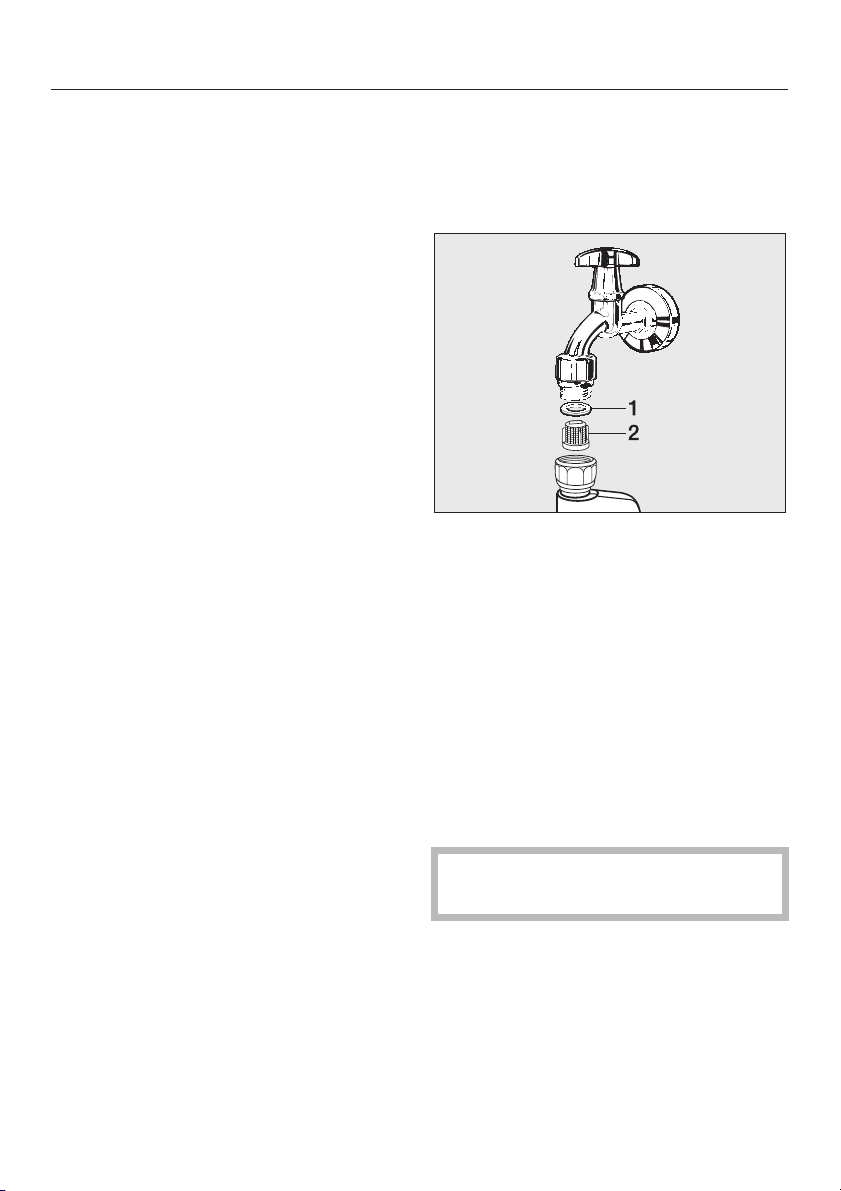
The washing machine has a filter to
protect the water inlet valve.
The accessible filter in the union in the
open end of the inlet hose should be
checked every six months, or more
often if there are frequent interruptions
to the external water supply.
First turn off the stopcock.
^
Unscrew the threaded union
^
connecting the free end of the inlet
hose to the stopcock.
^ Remove the rubber seal 1 from the
recess.
^ Using pointed pliers, take hold of the
plastic filter bar 2 and remove.
^ Clean the plastic filter.
^ Put the filter and seal back in the
reverse order and reconnect the
hose.
34
Turn on the stopcock and check the
connection is watertight. If water drips
out, tighten the connection.
Never forget to put the filter back in
place after cleaning.
Page 35
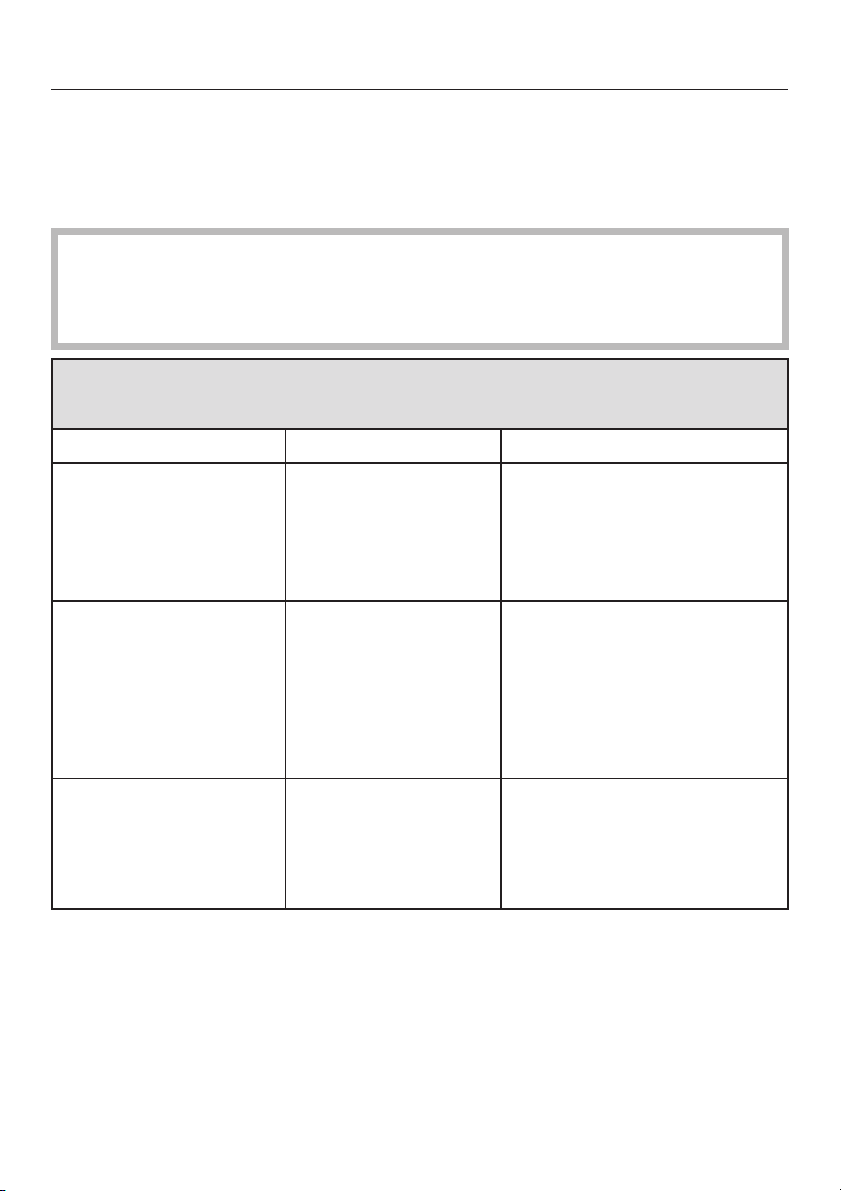
Problem solving guide
What to do, if . . .
With the help of the following notes, minor faults in the performance of the
appliance, some of which may result from incorrect operation, can be put right
without contacting the Service Department.
Repair work to electrical appliances should only be carried out by a
,
suitably qualified person in accordance with local and national safety
regulations. Repairs and other work by unqualified persons could be
dangerous. The manufacturer cannot be held liable for unauthorised work.
The programme does not start
Problem Possible cause Remedy
The display remains
dark and the indicator
lights for the
programme buttons
are not lit up.
The display shows:
Machine locked. Enter
code
The display is dark. The display has
There is no power to
the machine.
The electronic system
lock has been
activated.
switched off
automatically to save
energy (Stand-by
mode).
Check whether
– the mains plug is plugged
in and switched on.
– the fuse or circuit breaker
has tripped.
Enter the code for the system
lock and confirm the entry.
Deactivate the system lock if
you do not wish this message
to appear in the display the
next time the machine is
switched on.
Press a button. Stand-by
comes to an end.
35
Page 36

Problem solving guide
Fault messages in the display
Problem Possible cause Remedy A
q
p
o
ä
,
Fault
Check drainage
system
Fault
Water intake
Open stopcock
Waterproof
activated
Close stopcock
Fault
Drum lighting
Technical fault
Call the Service
Department
The following will flash in
the display:
Anti-crease
alternately with
Check detergent
The water outlet is
–
blocked or
restricted.
The drain hose has
–
Clean the drain filter and
–
the drain pump.
The maximum drain
–
height is 1 m.
been fixed too high.
The water inlet is
–
blocked or
restricted.
Check whether
the stopcock is opened
–
wide enough.
– the inlet hose is kinked.
The water protection
system has reacted.
The drum lighting is
not locked in position.
Call the Service
Department.
Check that the drum
lighting is sitting correctly.
There is a fault. Start the programme again.
If the fault message
appears again, contact the
Service Department.
Excessive foam has
built up during
washing.
Use less detergent next
time and follow the
manufacturer's instructions
on dosage given on the
packaging.
A To switch off the fault message: Switch the washing machine off with
button.
36
I-On/0-Off
Page 37

Problem solving guide
Problems with the load size indicator or calibrating to zero
Problem Possible cause Remedy
To recalibrate the sensor to the
The display indicates
a load of
<25% or no
load size is indicated
when the drum is
full.
The display indicates
a load greater than
<25% when the drum
is empty.
The fault message:
Zero setting
not possible
appears in the
display.
There was laundry in
the drum when the
washing machine was
switched on. This has
decalibrated the
sensor from the zero
setting.
The load size sensor
has been
decalibrated from the
zero setting.
The drum door is
closed.
^
zero setting:
Remove the laundry from the
–
drum.
Switch off the washing
–
machine and leave the door
open.
Switch on the washing
–
machine.
– Press the programme button
Cottons Universal.
for
– Press and hold the
Detergent
button pressed in
Load/
until the following message
appears in the display:
Zero setting
OK.
Rotate the drum once. If the
display still indicates a load
greater than <25%, recalibrate
the sensor to zero again (see
above section).
–
Open the drum door.
–
Switch off the washing
machine and leave the door
open.
–
Switch on the washing
machine.
–
Try and recalibrate to zero
again.
37
Page 38
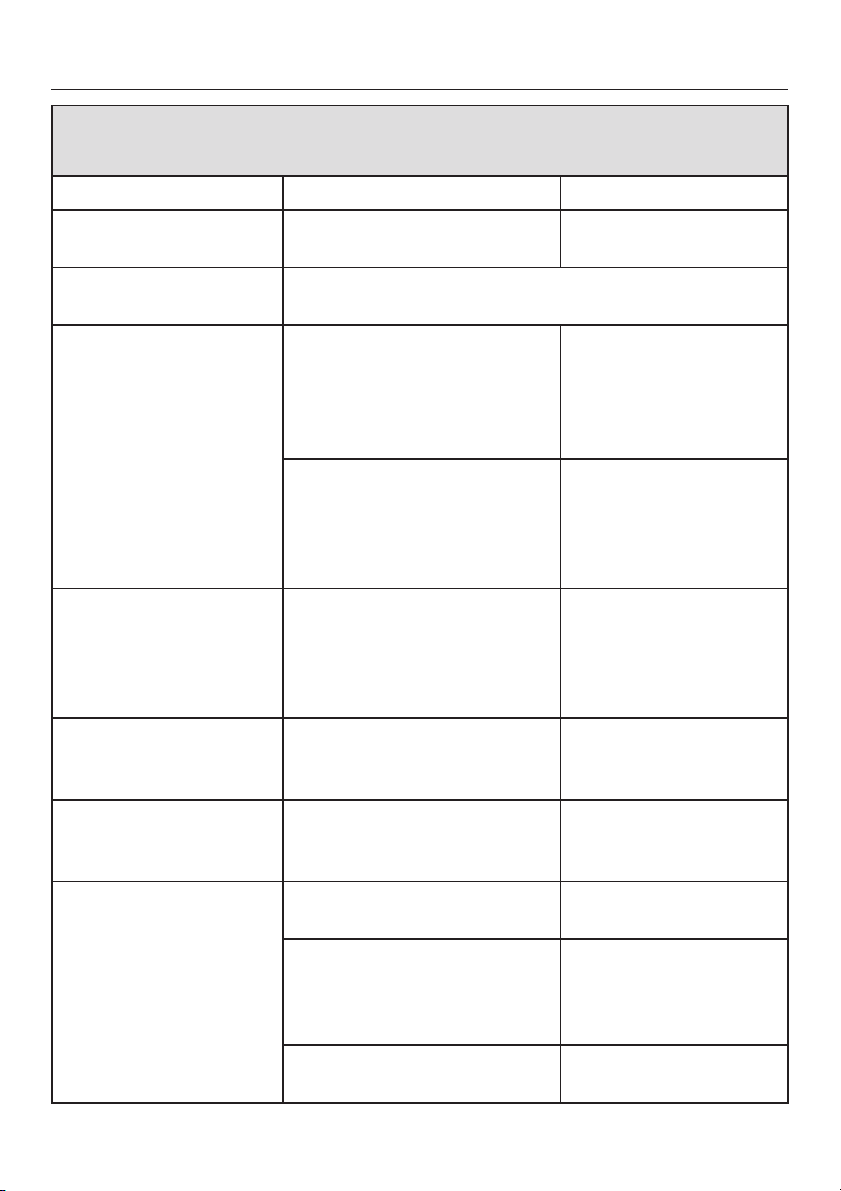
Problem solving guide
General problems
Problem Possible cause Remedy
The machine shakes
during the spin cycle.
The pump makes
strange noises.
Large amounts of
detergent residue
remain in the
detergent dispenser
drawer.
Fabric conditioner is
not completely
dispensed or too
much water remains in
the § compartment.
The display is in a
different language.
The laundry has not
been spun
satisfactorily.
When laundry is dry it
feels hard to the
touch.
The machine feet are not
level.
This is not a fault! These noises occur at the end of a
pump sequence as a normal part of the operation.
The water pressure is too low.–Clean the filter in the
Powder detergent used in
conjunction with water
softeners tends to become
sticky.
The siphon tube is not
correctly positioned, or is
clogged up.
A different language has
been selected in "Settings/
Language J".
The spin speed selected was
too low.
Too vigorous wash action. Programme in gentle
Not enough detergent used. Increase detergent
No fabric conditioner used. Use fabric conditioner
Level the machine (see
"Installation").
water inlet.
It may be useful to
–
select the
extra option.
In future, add washing
powder into the
dispenser drawer first,
and then add the water
softener.
Clean the siphon, (see
"Cleaning and care Cleaning the detergent
dispenser drawer").
Set the language you
want. The flag symbol
will guide you.
Select a higher spin
speed next time.
action and more water.
dose to prevent
limescale build up in
laundry.
in last rinse.
Water plus
38
Page 39

Problem solving guide
An unsatisfactory wash result
Problem Possible cause Remedy
Liquid detergent
does not give the
required result.
Grey, greasy
particles cling to
washed laundry.
White residues
which look like
powder detergent
are seen on dark
textiles after
washing.
Liquid detergents usually
contain no bleaching
agents. They do not
remove fruit, coffee and
tea stains.
Not enough detergent
was used. Insufficient
amounts of detergent
have been used to break
down the particles of
grease in heavily soiled
laundry.
The detergent contained
compounds (zeolites) to
aid water softening
which are not soluble in
water. They have ended
up on the laundry.
Use a general purpose
–
detergent containing a
bleaching agent.
Pour stain removers into
–
compartment j of the
dispenser drawer and liquid
detergent into a dispenser
ball.
Never put stain removers
–
and liquid detergent
together in the dispenser
drawer.
– Use more detergent.
– Before washing the next load
run a
programme with powder
detergent but without a load.
–
Try and brush off the
residues with a soft brush
once the laundry is dry.
–
Wash dark textiles using a
detergent which contains no
zeolites. Liquid detergents
usually contain no zeolites.
Cottons Hygiene
39
Page 40
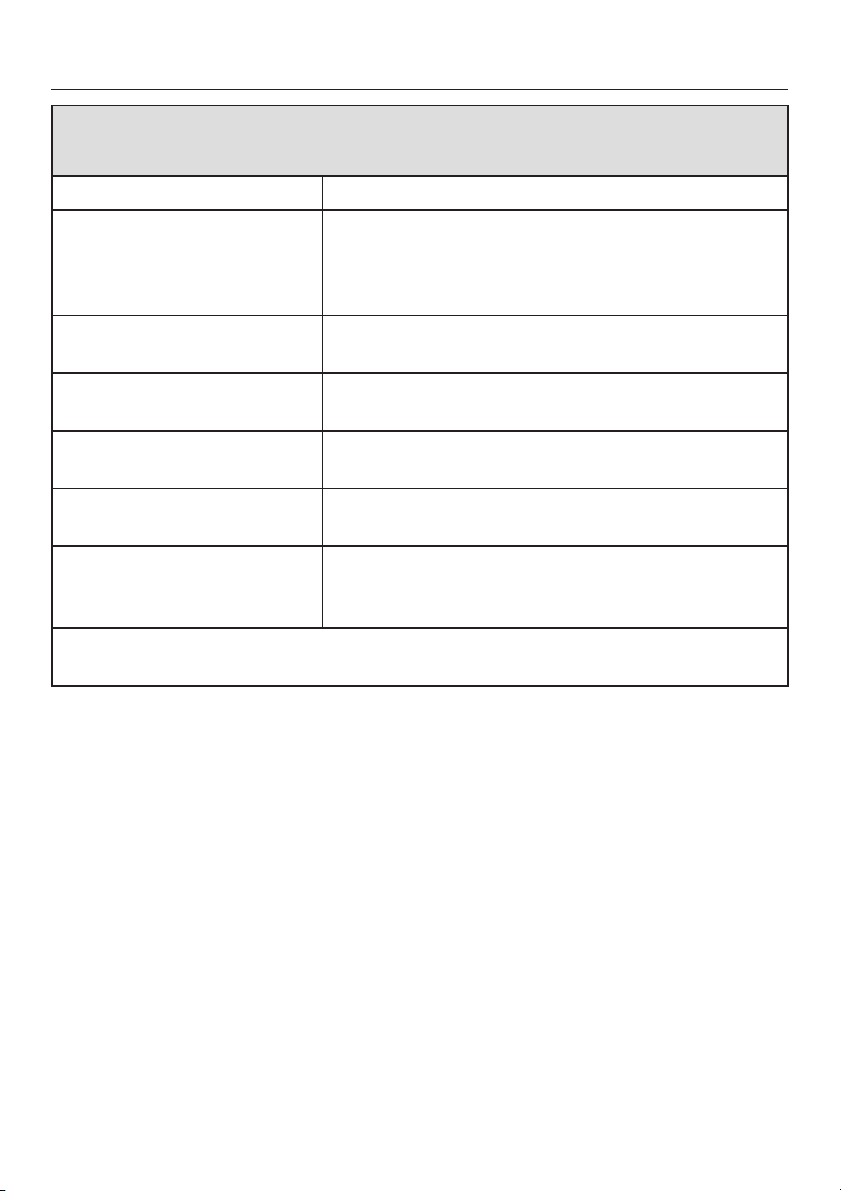
Problem solving guide
The drum door does not open when you press the Door button
Possible cause Remedy
The machine is not
connected to the
electricity supply and / or
is not switched on.
The safety lock has been
activated.
The electronic system lock
has been activated.
Power cut. Open the drum door as described in the next
The door was not correctly
engaged.
There is still water in the
drum and the machine is
unable to drain.
For safety reasons the drum door cannot be opened if the suds temperature is
higher than 55°C.
Insert the plug in the socket and switch on and / or
switch the machine on with the
Deactivate the safety lock as described in "Safety
lock".
Deactivate the system lock as described in the
"Settings menu J".
section.
Press hard against the lock side of the drum door
and then press the
Clean the drain filter and drain pump as described
in the next section.
Door
I-On/0-Off
button.
button.
40
Page 41
Problem solving guide
Opening the drum door in the
event of a blocked drain outlet
and/or power failure
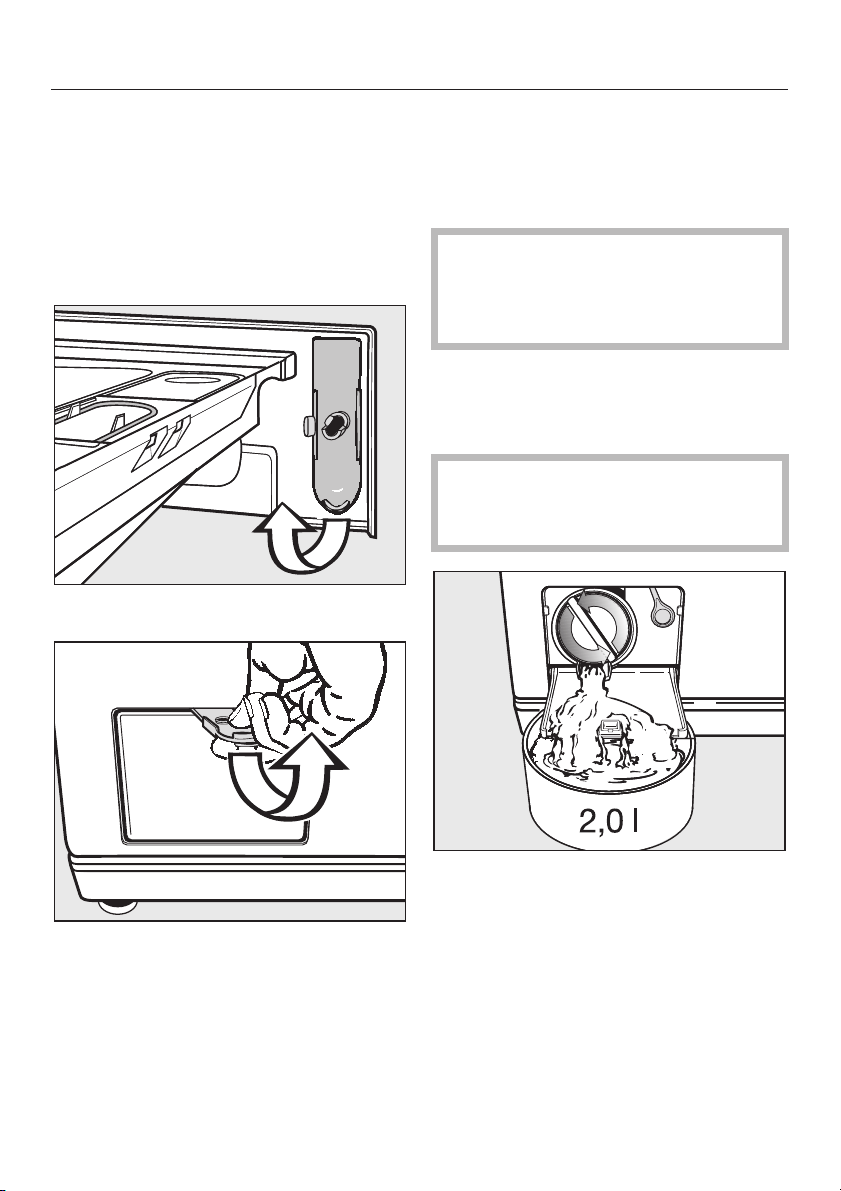
Switch the washing machine off.
^
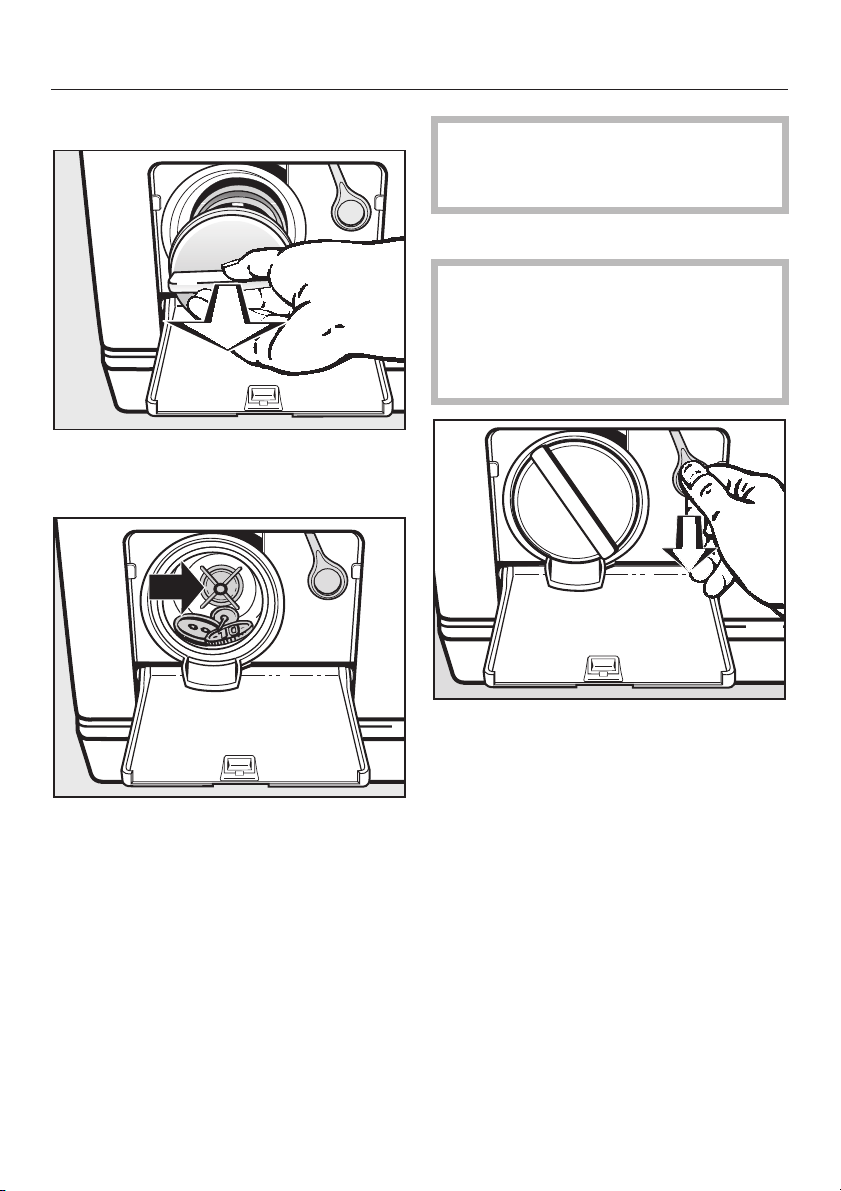
There is a filter flap opener behind the
detergent drawer facia panel.
^ Remove the opener.
Blocked drain outlet
If the drain outlet is clogged, more
water will be retained in the machine
(up to 25 litres).
Caution: if laundry has been
,
washed at a high temperature, water
draining out of the machine will still
be hot. Danger of scalding!
Procedure for draining the machine
Place a suitable container under the
^
access flap.
When draining water from the
machine, do not unscrew the drain
filter completely or take it right out.
^
Use it to open the access flap.
^
Turn the drain filter lid round, until
water runs out.
To interrupt the flow of water:
^
Tighten the drain filter back up again.
41
Page 42
Problem solving guide
Once the flow of water ceases:
^ Remove the drain filter completely.
^ Clean the drain filter thoroughly.
Make sure the drain filter is
,
securely tightened. Otherwise there
is a risk of water leakage during use.
Opening the drum door
Always make sure that the drum
,
is stationary before reaching into the
machine to remove laundry.
Reaching into a moving drum is
extremely dangerous.
^
Remove any foreign objects (e.g.
buttons, coins, etc.) and fluff. Turn the
impeller by hand to check that it
rotates freely. Any foreign object
causing an obstruction should be
removed.
^
Put the drain filter back in place and
secure.
42
^
Pull the emergency release
downwards (see illustration). The
drum door will open.
Page 43
Changing the lamp for the
drum lighting
The washing machine will still
operate with no lighting in place or if
the lighting is faulty.
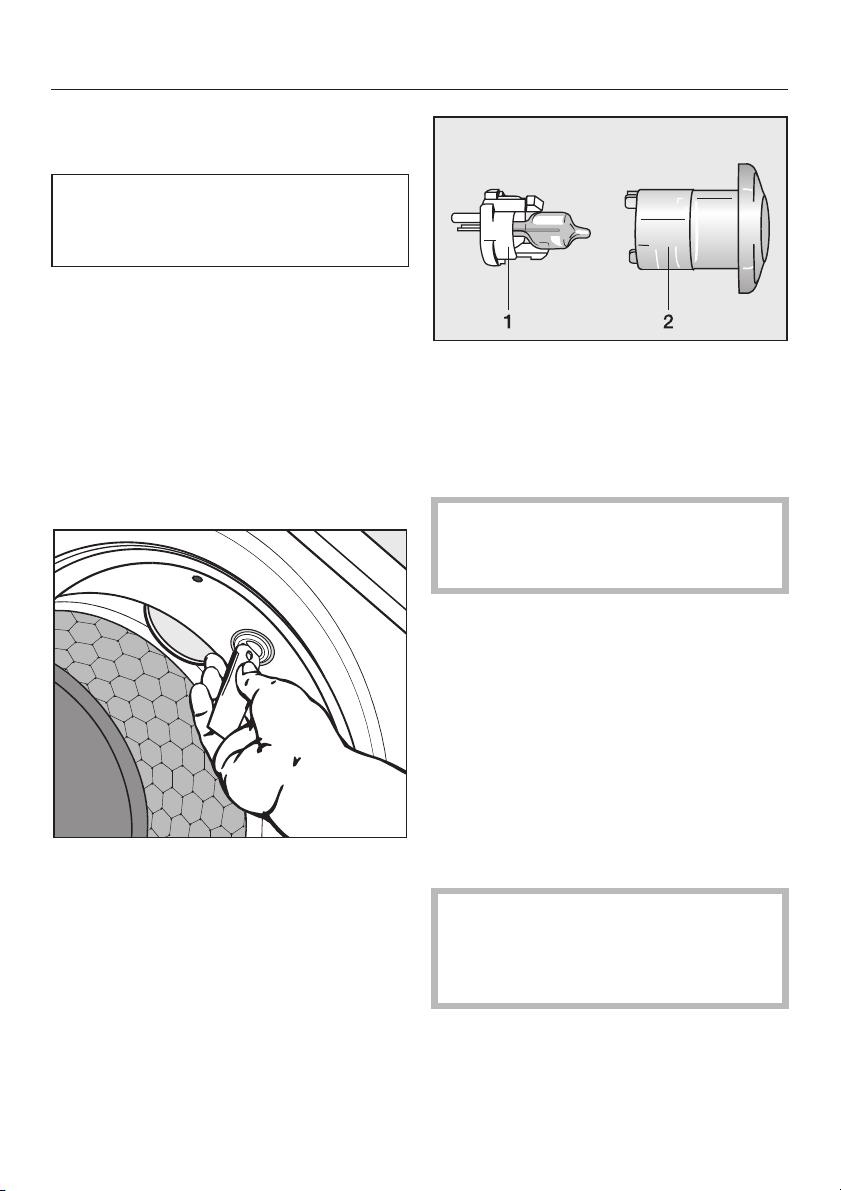
Remove the yellow lever from behind
^
the detergent drawer facia panel as
described previously.
Switch the washing machine on and
^
open the drum door.
Now disconnect the washing
^
machine from the electricity supply,
see "Warning and Safety
instructions".
Problem solving guide
Press the two prongs to separate the
^
plastic holder 1 from the protective
cover 2.
Remove the faulty lamp from the
^
plastic holder.
The new lamp must be of the same
type (G4) with a maximum power
output of 5 watts/12 volts.
The lamps are available from an
electrical retailer, your Miele Dealer or
from the Miele Spare Parts Department.
^
Insert the lever into the slot in the
drum lighting unit (see illustration)
and turn anti-clockwise (a quarter
turn) until you feel a resistance.
^
Pull out the loosened unit with your
fingers.
^ Insert the new lamp into the plastic
holder.
^
Carefully fit the plastic holder and the
protective cover together.
^
Insert the lighting unit back into the
socket and turn it clockwise to secure
it.
It is absolutely essential for the
correct functioning of the washing
machine that the drum lighting unit
is fitted correctly in position.
43
Page 44
After sales service
In the event of any faults which you
cannot remedy yourself, please
contact:
your Miele dealer or
–
the Miele Service Department (see
–
back cover for contact details).
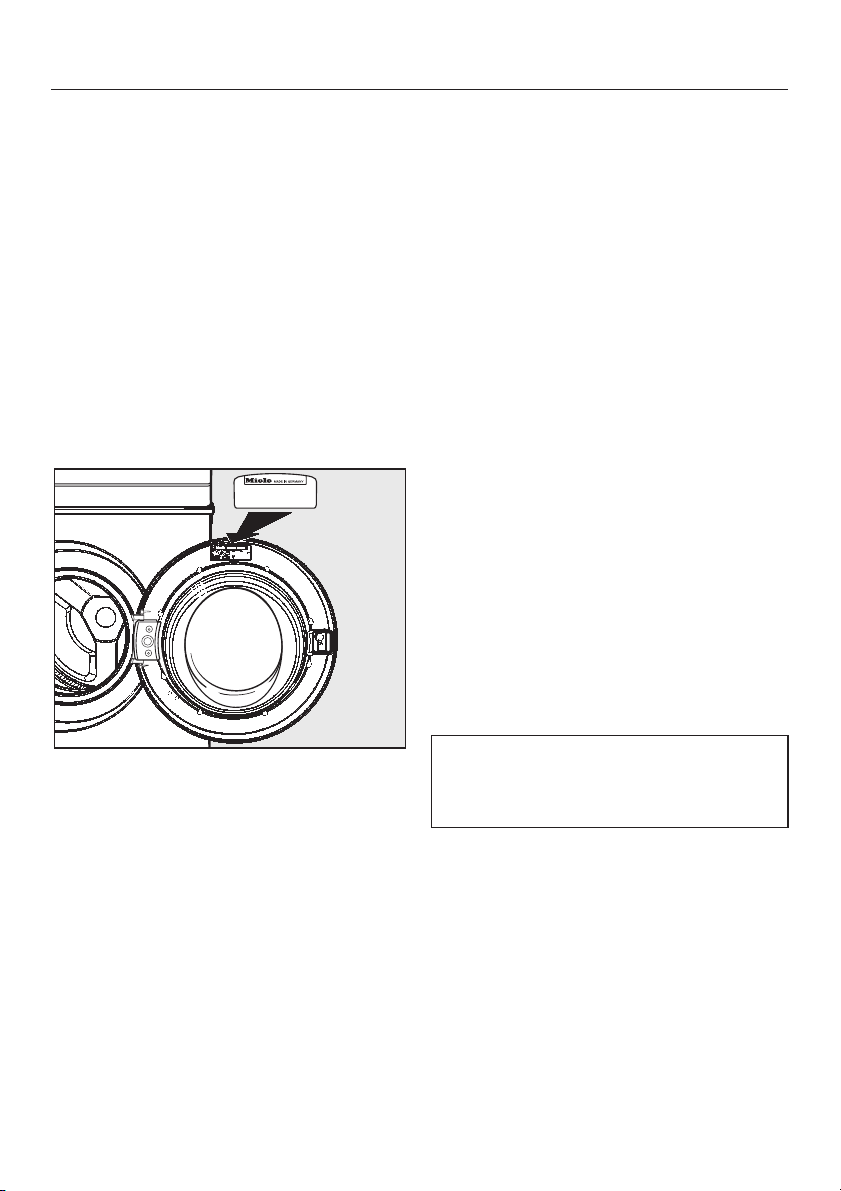
When contacting the Service
Department, please quote the model
and serial number of your appliance,
both of which are shown on the data
plate visible at the top inside of the
door above the porthole glass when the
door is open.
Future updates (PC)
The indicator light marked PC allows a
service technician to update your
machine in future years.
If, for example, new programmes are
developed or new fabrics are
introduced, a Miele service technician
will be able to modify existing
programme cycles accordingly.
Miele will provide information when
such developments become available.
Appliance guarantee
The appliance is guaranteed for a
period of 2 years.
See the guarantee card supplied with
the machine for further details.
Optional accessories
Optional accessories for these washing
machines are available from your Miele
Dealer or from the Miele Spare Parts
Department.
44
Please note that telephone calls may
be monitored and recorded to
improve our service.
Page 45
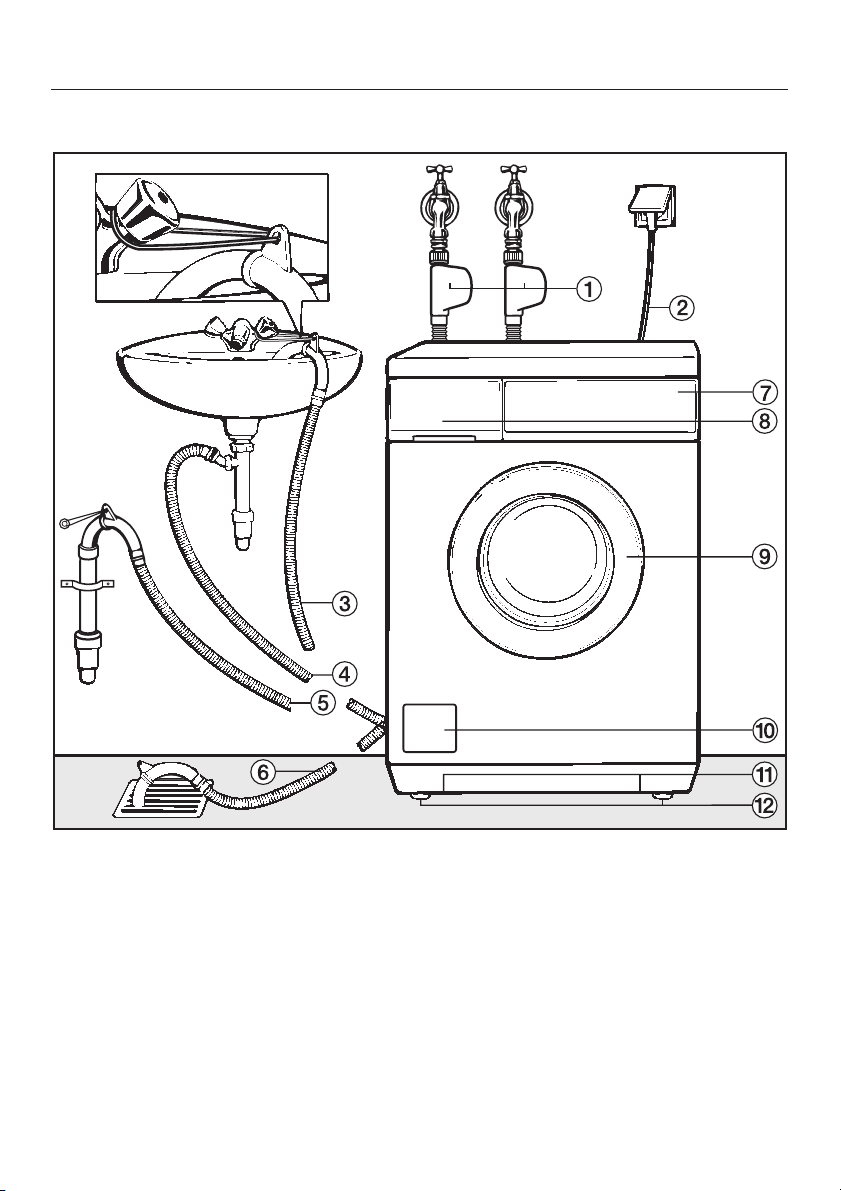
Front view
Installation and connection
a Inlet hoses with "Waterproof system"
for cold water and hot water
connection
b Electrical connection
c - f Flexible drain hose (with
detachable swivel elbow)
g Facia panel with controls
h Detergent dispenser drawer
i Drum door
j Flap for fluff filter, drain pump and
emergency release
k Handle recesses for moving the
machine
l Four height adjustable screw feet
45
Page 46
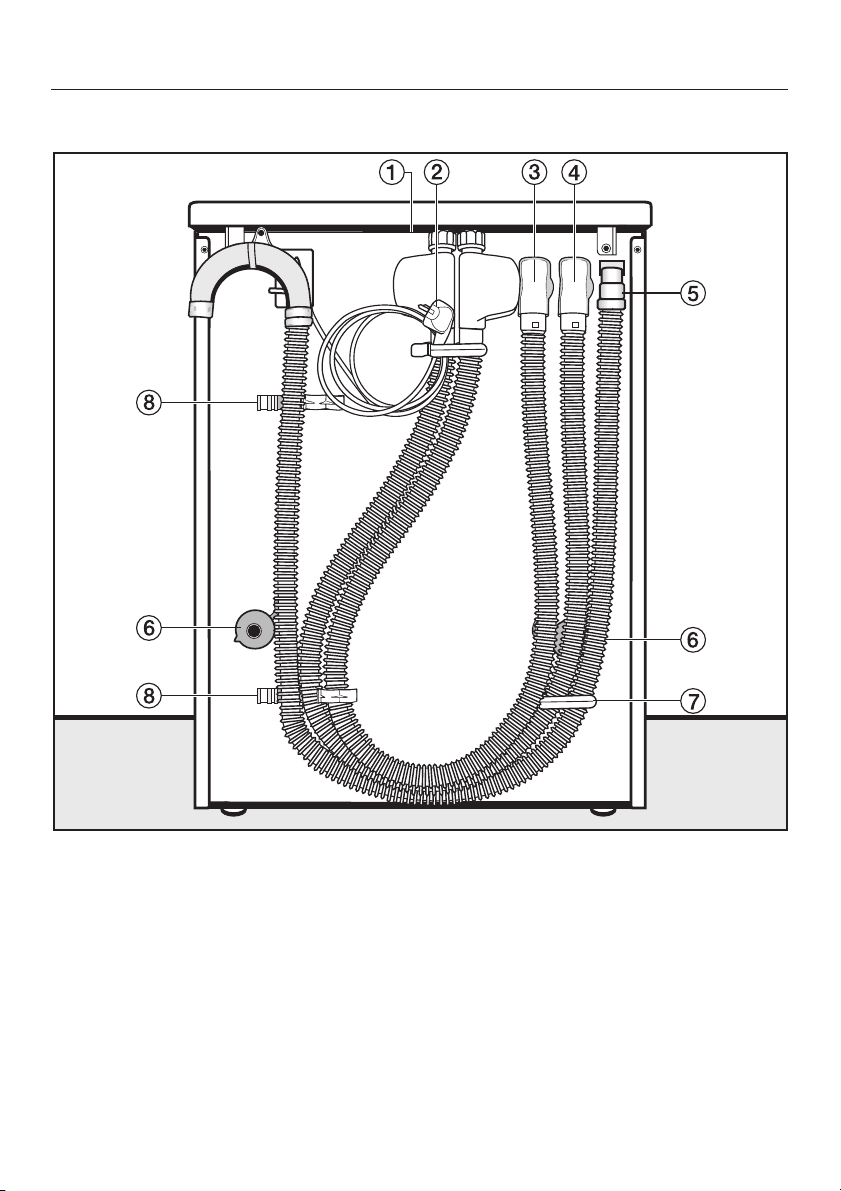
Installation and connection
Rear view
a Protruding lid for holding when
moving the machine
b Electricity supply cable
c Inlet hose with "Waterproof" system
for hot water connection
d Inlet hose with "Waterproof" system
for mains cold water connection
46
e Drain hose
f Transit bar covers
g Restraining clip for inlet hose and
drain hose
h Restraining clips for transit bars
when removed
Page 47
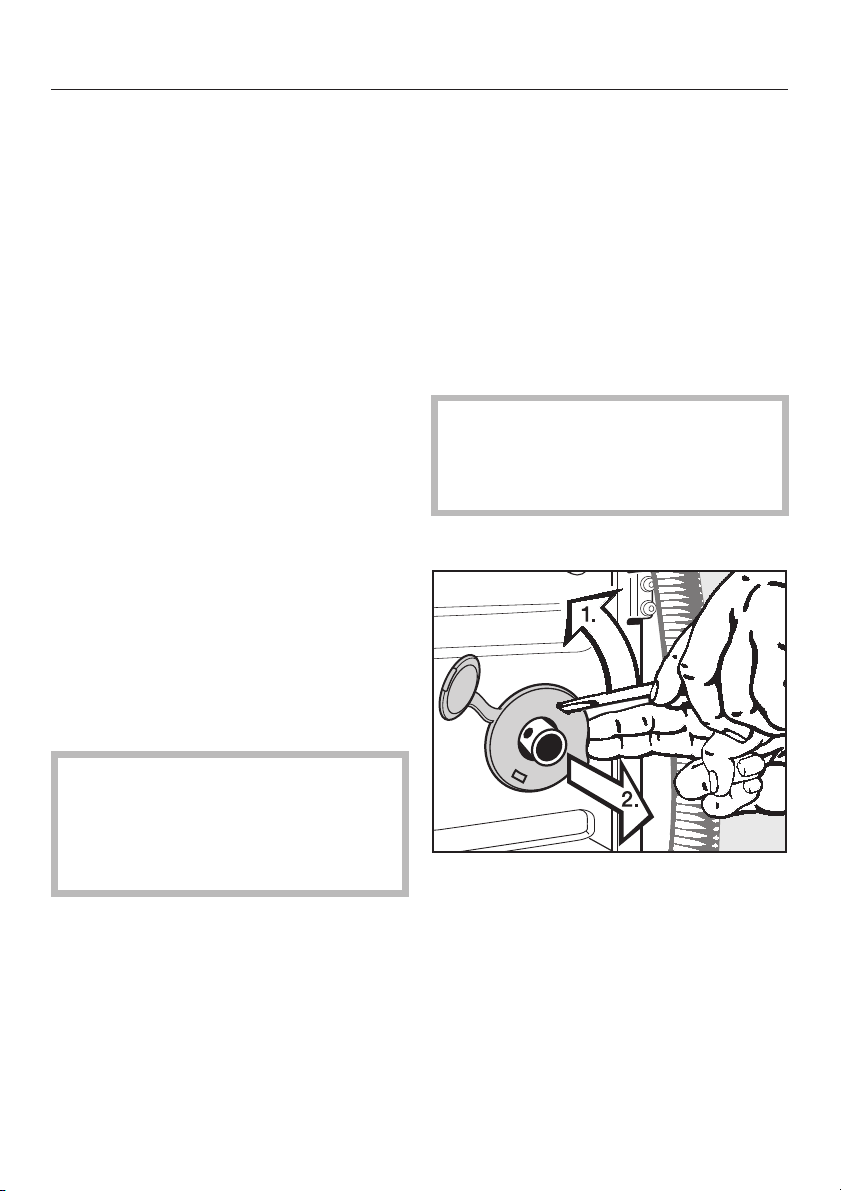
Installation and connection
Installation surface
A concrete floor is the most suitable
installation surface for a washing
machine, being far less prone to
vibration during the spin cycle than
wooden floorboards or a carpeted
surface.
Please note the following points:
The machine must be level and
^
securely positioned.
To avoid vibrations during spinning,
^
the machine should not be installed
on soft floor coverings.
If installing on a wooden joist floor:
^ we recommend a plywood base
(at least 59x52x3 cm). The base
should span several joists and be
bolted to the joists and not only to the
floorboards. Check for the presence
of pipes and cables.
If possible, install the machine in a
corner, as this is usually the most stable
part of the floor.
Installing the washing machine
To manoeuvre the machine out of its
packing case to its installation site hold
it by the edge of the lid where it
protrudes to the rear of the washing
machine as well as by the handle
recesses at the front.
Please note:
Do not lift the machine by the drum
^
door.
Ensure that the machine feet and
,
the floor are dry to prevent the
machine from slipping during the
spin cycle.
Removing the transit fittings
,
If the machine is installed on a
raised plinth, it has to be secured
against slippage during spinning
using retaining clips (available from
the Miele Spare Parts Dept).
^
To remove the left and right covers
1. Use a screwdriver to prise out the
cover as illustrated.
2. Pull the cover forwards to remove.
47
Page 48
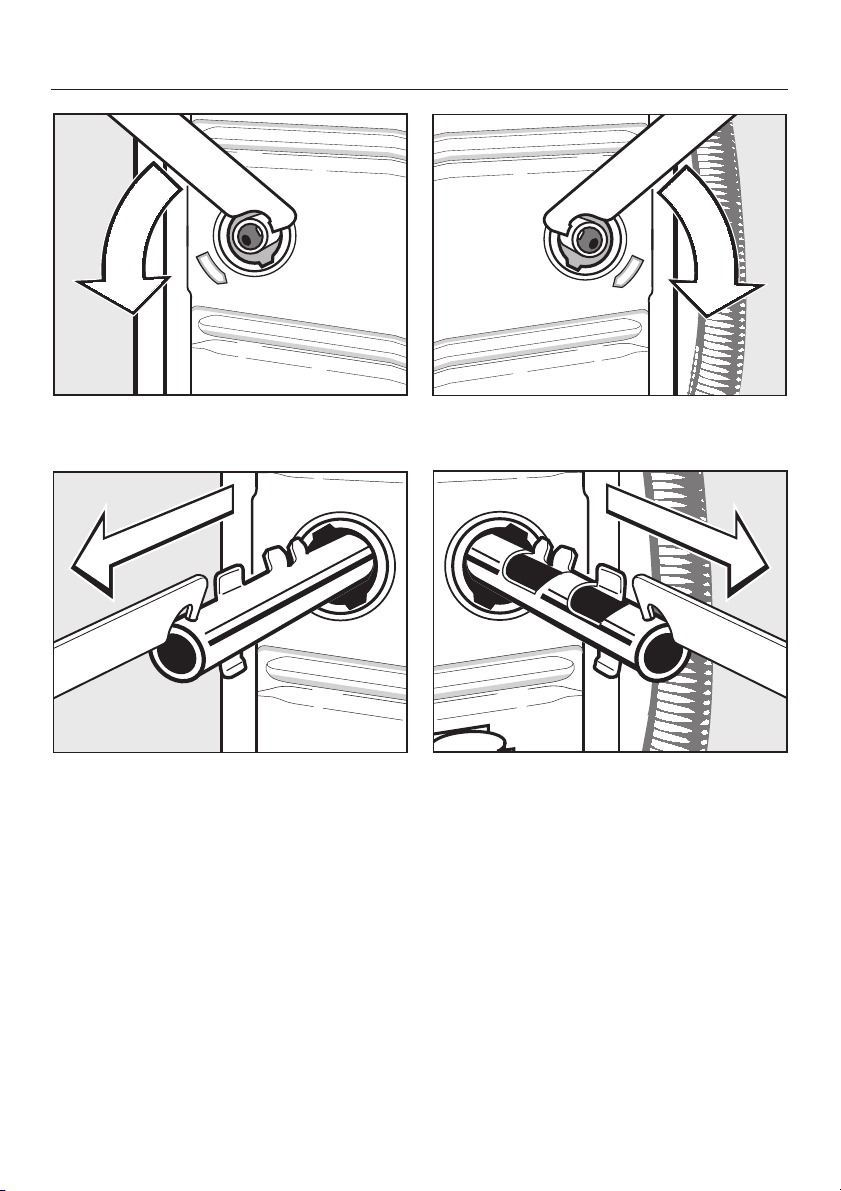
Installation and connection
Using the spanner supplied turn the
^
left-hand transit bar 90°, then
^
withdraw the transit bar.
Turn the right-hand transit bar 90°,
^
then
^
withdraw the transit bar.
48
Page 49
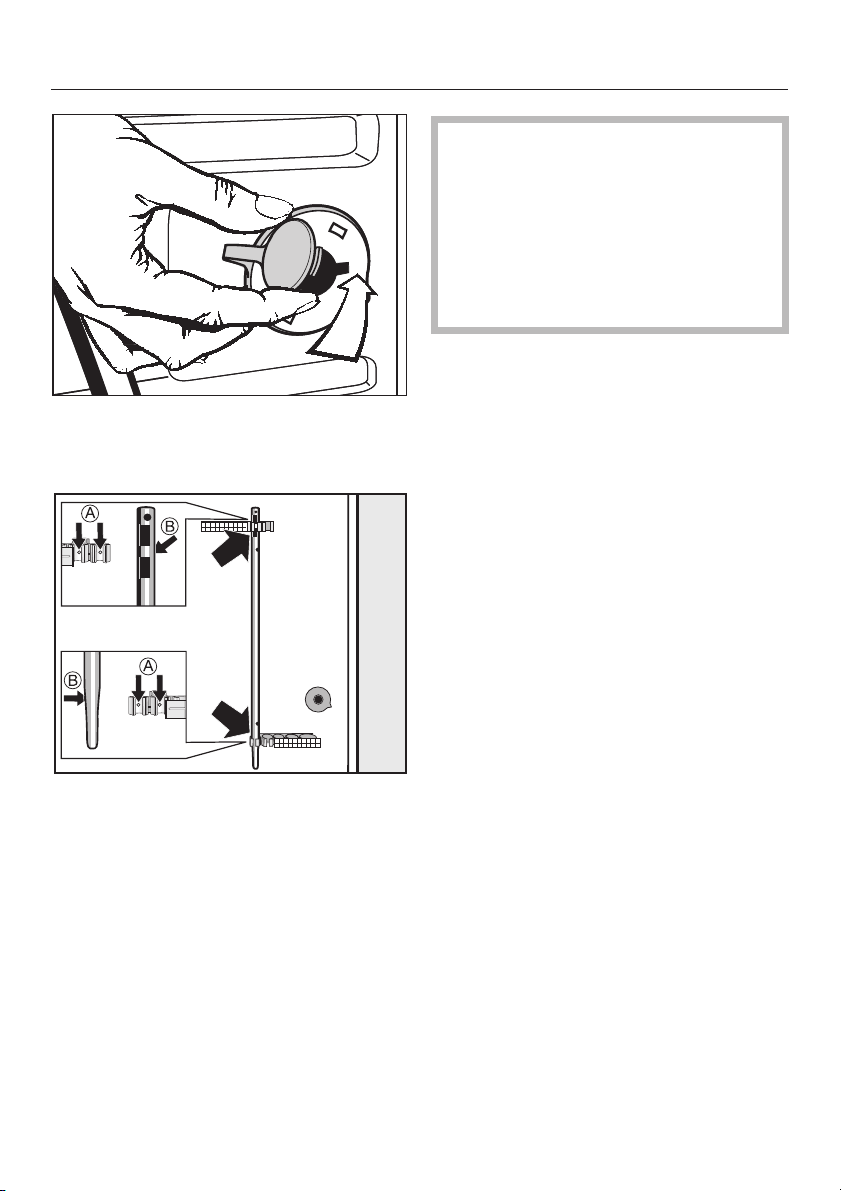
Fit the covers on to the two holes.
^
Then plug the holes as shown with
the caps.
Installation and connection
The washing machine must not
,
be moved without the transit bars in
place.
Store the transit bars as shown or
keep them in a safe place for future
use. They must be re-fitted if the
machine is to be moved again
(e.g.when moving house).
Re-fitting the transit bars
Re-fitting is carried out by reversing the
procedure.
^
Secure the transit bars to the back of
the washing machine. Make sure that
holes b are fitted over retainers a.
49
Page 50
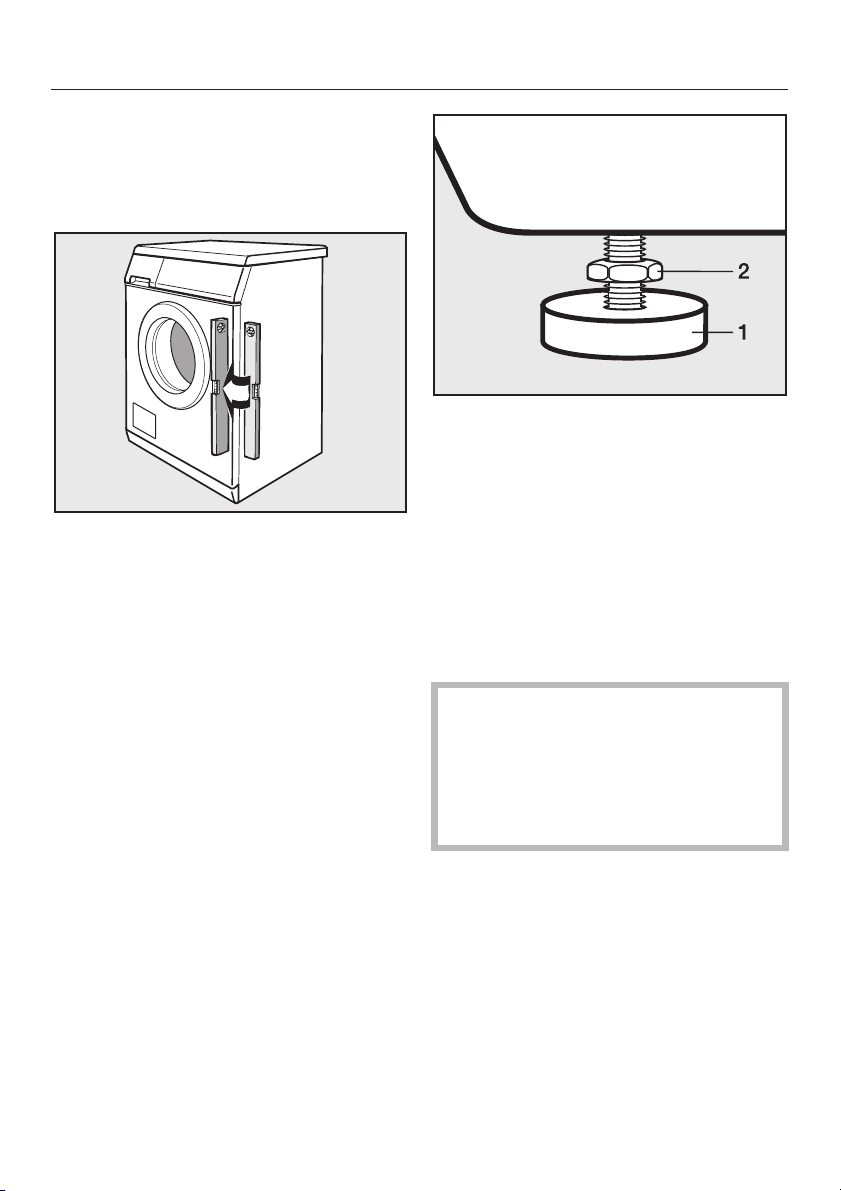
Installation and connection
Levelling the machine
The machine must stand perfectly level
on all four feet to ensure safe and
proper operation.
Using the spanner supplied turn
^
counter nut 2 in a clockwise
direction. Then turn counter nut 2
together with foot 1 to unscrew.
Incorrect installation may increase
electricity and water consumption and
may cause the machine to move about.
False values may also show in the
Load % and Detergent % display.
Screwing out and adjusting the feet
The four adjustable screw feet are used
to level the machine. All four feet are
screwed in when the machine is
delivered.
^ Use a spirit level to check the
machine is standing level.
^ Hold foot 1 securely with a pipe
wrench. Turn counter nut 2 again
using the spanner supplied until it
sits firmly up against the housing.
,
All four counternuts must be
firmly up against the housing. Please
also check this for the feet which did
not need adjustment. Otherwise
there is the danger of the machine
moving about.
50
Page 51
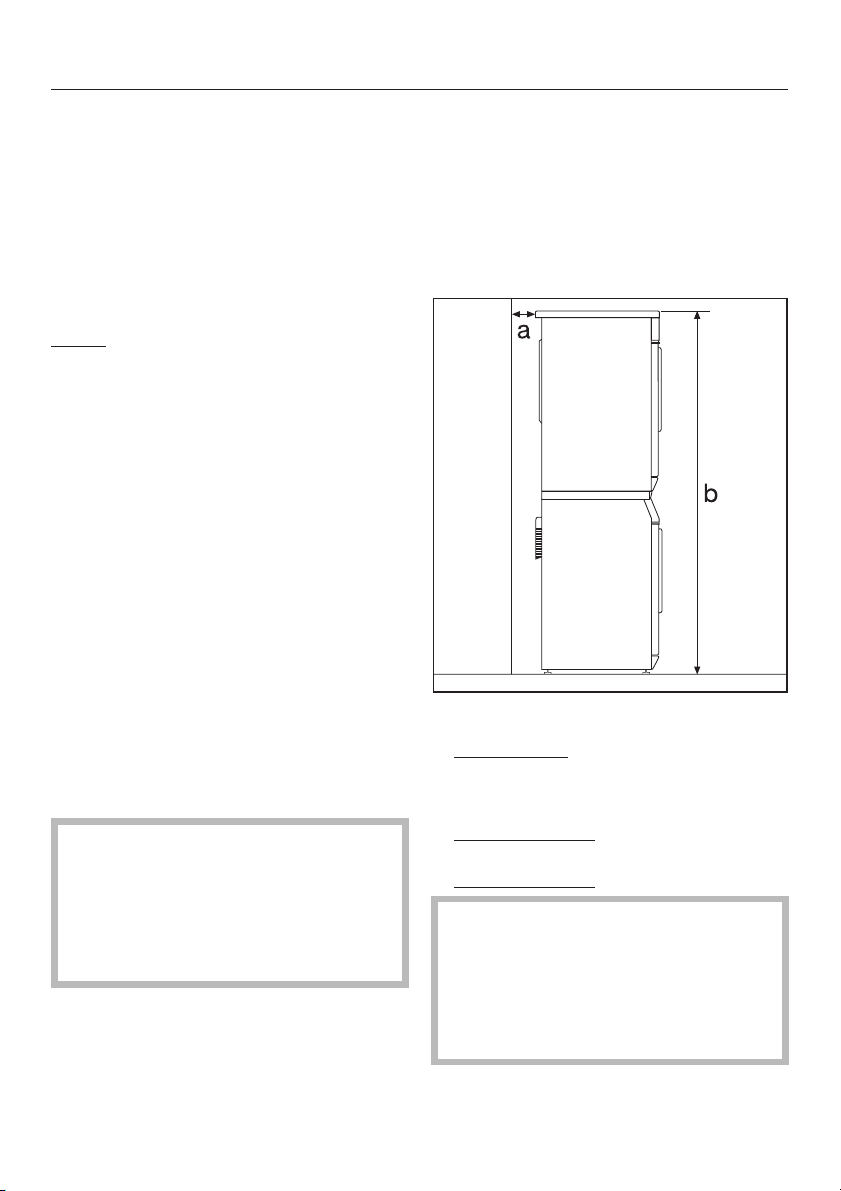
Installation and connection
Building under a continuous
worktop / in a kitchen run
A special building under conversion
–
kit* is required.
The machine lid must be replaced by
a cover plate. To ensure electrical
safety the cover plate must be
fitted. **
N.B.**
If you wish to push your machine under
a worktop and there is space to do this
without removing the lid, the
conversion kit is not necessary.
Otherwise the conversion kit is
essential.
– For installation under a work surface
900/910 mm from the floor, a raising
kit* is required.
– Connections for electricity, water and
drainage should be installed in such
a way that they remain accessible
when the machine is in place.
Washer and Dryer stack
A Miele tumble dryer can be stacked
with the washing machine. A stacking
kit* is necessary and can be purchased
from the Miele Spare Parts Department.
Please note
Fitting instructions are supplied with the
conversion kit.
All parts marked* are available from the
Miele Spare Parts or Sales Department.
The fitting of cover plates and
stacking kits must only be
undertaken by qualified and
competent persons, in accordance
with the instructions supplied with
the kit.
a Safety distance to wall:
at least 2 cm
b Height:
Stacking kit with pull-out shelf:
approx. 169 cm
Stacking kit without pull-out shelf:
approx. 170 cm
,
A washer and dryer should
never be stacked without using the
proper stacking kit. Doing so is
extremely dangerous, as the dryer
may vibrate off of the washing
machine during use.
51
Page 52

Installation and connection
The Miele Waterproof system
The Miele Waterproof system protects
all parts of the washing machine from
water damage.
The system consists of three main
components:
1) the inlet hoses
2) the electronic unit and the washing
machine housing
3) the drain hose
1) Inlet hoses
– The inlet hoses are fitted with
additional electrical safety valves
which work like automatic stopcocks
and are housed in the inlet hose
connection boxes.
– They are pressure proof to between
7000 and 10000 kPa.
– The inlet hoses have a protective
sleeve.
2) Electronic unit and washing
machine housing
Sump
–
Any leaking water is collected in a
sump in the base of the appliance. A
float switches off the water inlet
valves, preventing water flowing into
the machine and water in the suds
container is pumped away.
Overflow protection
–
This prevents the washing machine
taking in too much water. If the water
level exceeds a certain level, the
drain pump switches on and pumps
the water away.
3) Drain hose
The drain hose is protected by a
ventilation system which prevents the
washing machine from being
emptied completely.
Any leaking water from the inlet hose
is fed into the sump through the
protective covering which surrounds
the inlet hose as a "second skin". The
float switches off the safety valves,
preventing water flowing into the
machine and water in the suds
container is pumped away.
52
Page 53
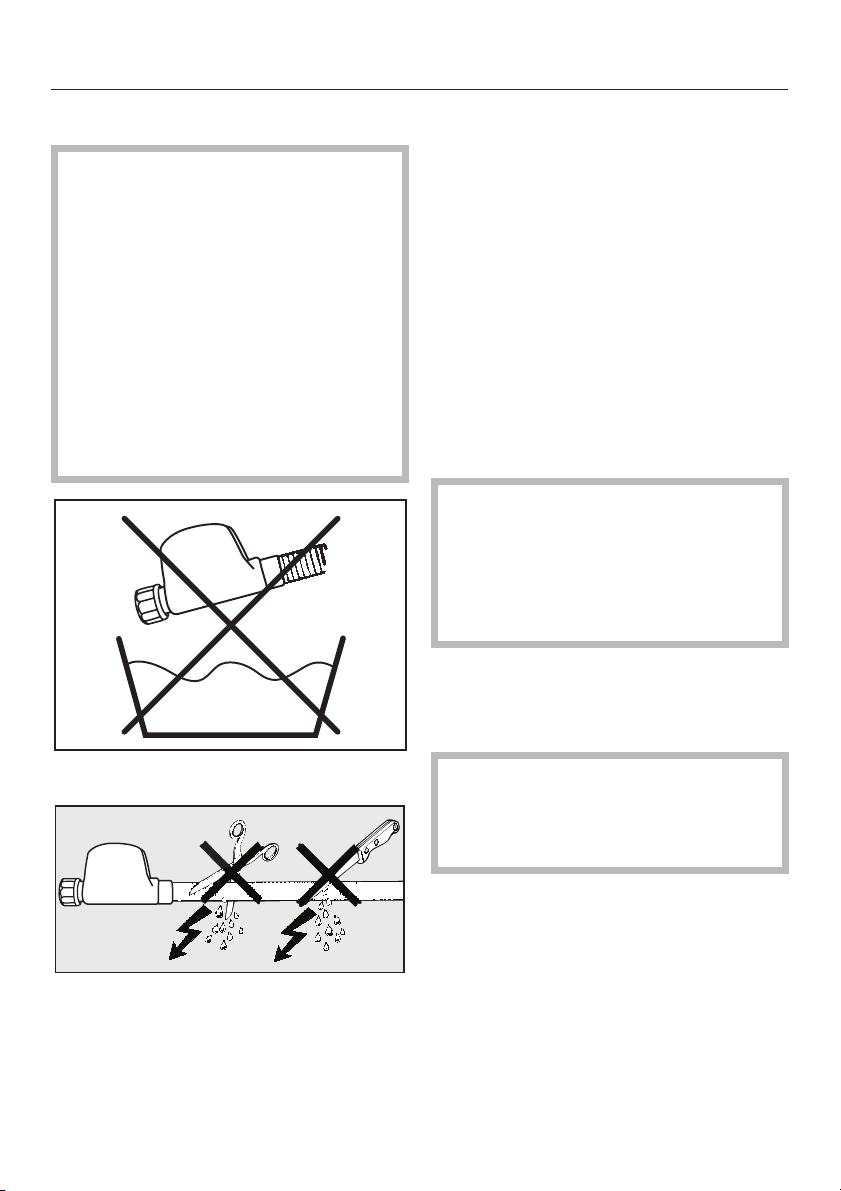
Installation and connection
Connection to the water supply
The plastic casing of the safety
,
valve contains electrical
components. The Waterproof system
must only be connected to its own
stopcock. It must not be connected
to mixer taps or similar and must not
be fitted in areas where there is the
risk of water or other liquids
reaching it. A flexible metal
extension hose, available from your
Miele dealer or the Miele Spare
Parts Department as an optional
extra, should be used if necessary.
The machine should be connected to a
mains water supply in accordance with
local and national safety regulations.
Connection to a household water
softener is not recommended.
The machine is designed to operate
with a flow pressure of between 100
and 1000 kPa. If it is higher than
1000 kPa it is essential to fit a reducer
valve.
Connection to the mains water supply
should incorporate a mains stopcock
3
with
/4" thread. The stopcock should
be fitted by a qualified plumber.
The connection points are
,
subject to mains water pressure.
Turn on the stopcocks slowly and
check for leaks. Correct the position
of the washer and union if
appropriate.
Maintenance and care
Do not dip into any liquid.
The protective sleeve of the hose
must not be damaged or kinked.
Only use a Miele Waterproof system
hose should you need a replacement.
In order to protect the water inlet
valve, the dirt filter in the water inlet
valve connection must not be
removed.
Extension hose
A 1.5 metre long (metal) extension hose
is available from your Miele dealer or
the Miele Spare Parts Department as an
optional extra.
This hose is tested to withstand
pressures of up to 14000 kPa and can
be used as a flexible extension to the
water supply.
53
Page 54

Installation and connection
Connection to the water supply
The washing machine must always
be connected to the mains water
supply (inlet hose with blue dots).
Cold water connection (mains water
supply)
The inlet hose with blue dots is used for
mains water connection.
Hot water connection
The inlet hose with red dots is used for
connection to the hot water supply.
Useful hints when connecting to the hot
and cold water supply.
The maximum temperature at the
–
stocpcock must not exceed 60C.
The ideal temperature is 55C.
When connected to the hot (and
–
cold) water supply, after some time
the washing machine will switch over
to the mains (cold) water supply if no
hot water is being supplied.
However, this can lead to a poor
washing result.
The conditions for connection are
described on the following pages.
This appliance incorporates
backflow protection complying with
AS/NZS 3500.1.2.
No further backflow protection
required for connection to the water
supply.
54
Page 55

Installation and connection
Connection to the drainage
system
The machine drains via a drain pump
with a delivery head of 1 metre*.
The drain hose must not be kinked as
this restricts drainage. The swivel elbow
at the end of the hose can be turned in
either direction, or can be detached if
required, with a sharp twist and pull.
If required, the drain hose can be
extended to a length of 5 m. The
necessary parts can be purchased
from the Miele Spare Parts Department
or your Miele dealer.
* For a delivery head of more than 1 m
(up to a maximum of 1.8 m) a second
duo-drain pump is available with the
corresponding kit from the Miele Spare
Parts Department or your Miele Dealer.
Drain hose connection:
1. Direct into a sink or basin:
Please note the following
Hook the hose over the edge and
–
secure.
Make sure that the water can drain
–
away freely without hindrance.
Otherwise there is a risk of water
overflowing or of some of the drained
water being sucked back into the
machine.
2. Connected securely to a plastic drain
pipe with a rubber nipple. There is no
need to use a non-return valve.
3. Connected securely to a standpipe.
4. Connected securely to a floor gully.
55
Page 56

Installation and connection
Electrical connection
The washing machine is supplied with a
mains cable with moulded plug for
connection to a 230-240V mains
supply. The voltage, rated load and
plug rating are given on the data plate.
Please ensure these match the
household mains supply.
The accesibility of the plug must be
always ensured, in order to separate
the washing machine from the mains.
All electrical work should be carried out
only by a suitably qualified and
competent person, in strict accordance
with national and local safety
regulations.
For extra safety it is advisable to install
a residual current device (RCD), with a
trip current of 30 mA.
Ensure power is not supplied to the
appliance until after installation work
has been carried out.
Connection should be made via a
suitable switching socket which is
easily accessible after installation, in
order to separate the washing machine
from the mains.
Do not connect via an extension lead.
Extension leads do not guarantee the
required safety of the appliance (e.g.
danger of overheating).
WARNING: THIS APPLIANCE
MUST BE EARTHED
56
Page 57
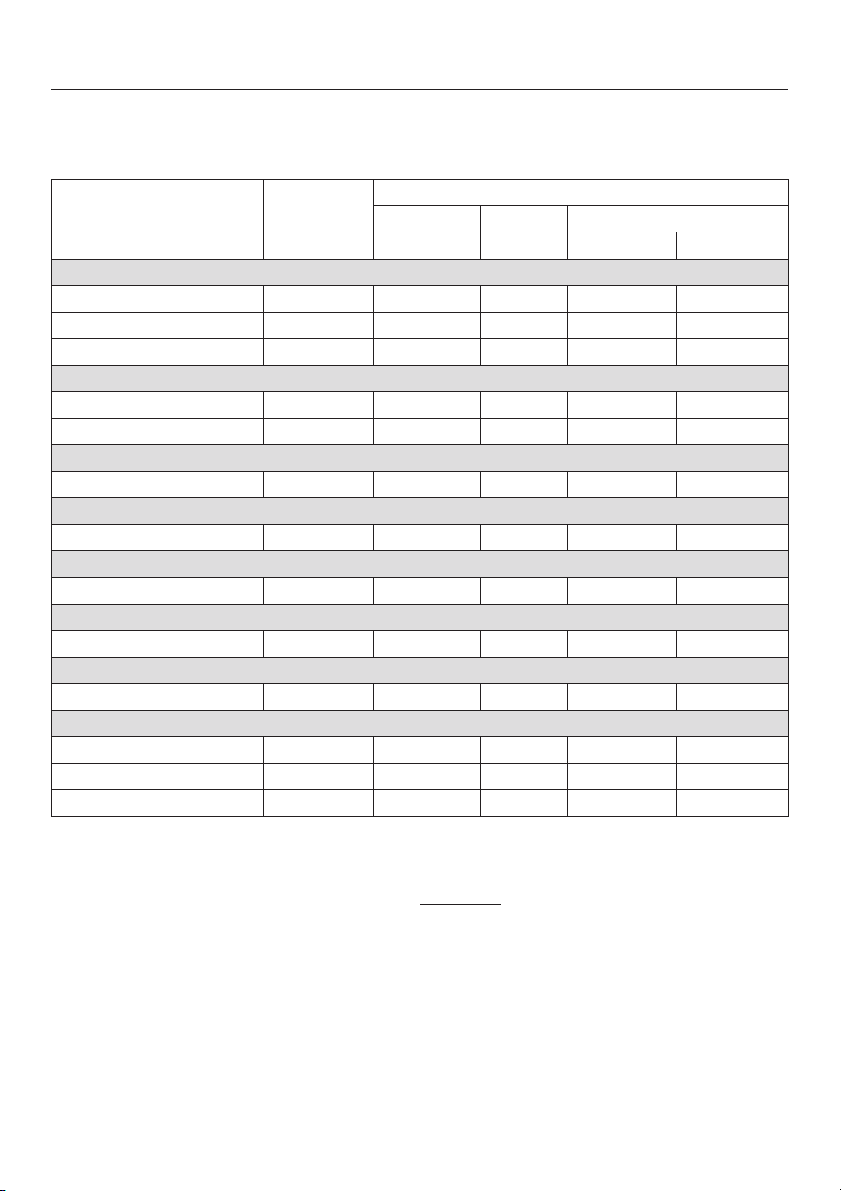
Consumption data
Consumption data for EN 60456 (without hot water and
re-programming to cold water only!)
Load Consumption data
Energy Water Duration
in kWh in litres Normal Intensive
Cottons Hygiene/Cottons Universal
95°C 5.0 kg 1.70 42 1 h 16 mins 1 h 46 mins
60°C 5.0 kg 0.85 42 40 mins 1 h 34 mins
40°C 5.0 kg 0.49 42 40 mins 1 h 54 mins
Minimum iron
40°C 2.5 kg 0.44 49 – 1 h 19 mins
40°C 2.5 kg 0.44 49 41 mins 1 h 02 mins
Delicates
30°C 1.0 kg 0.33 65 49 mins 59 mins
Silks /
30°C 1.0 kg 0.24 39 36 mins –
Woollens /
30°C 2.0 kg 0.22 35 39 mins –
Automatic
40°C 3.0 kg 0.30 - 0.60 30 - 50 59 mins 1 h 14 mins
Quick wash
40°C 2.5 kg 0.30 30 30 mins –
Special programmes
Outer wear 40°C 2.0 kg 0.43 57 1 h 03 mins –
Denim 40°C 1.0 kg 0.50 45 1 h 00 min –
Shirts 40°C 1.5 kg 0.90 55 57 mins –
Note for test institutes:
For testing in accordance with EN 60456 you must
select the
Intensive
Detergent must be dispensed via the detergent dispenser drawer.
Extra.
57
Page 58

Consumption data
Consumption data for AS/NZS 2040.2:2000 Standard
Load Consumption data
Energy Water Duration
in kWh in litres Intensive
Cottons Hygiene/
Cottons Universal
Consumption data can vary from the nominal values given depending on water
pressure, water hardness, water inlet temperature, room temperature, type and
volume of load, fluctuations in the electricity supply and any additional options
selected.
40°C 5.5 kg 0.62 49,1 1 h 54 mins
58
Page 59

Technical data
Height 85.0 cm
Width 59.5 cm
Depth 58.0 cm
Depth with door open 97.5 cm
Weight 94 kg
Maximum floor load 1600 Newton (approx. 160 kg)
Capacity 5 kg dry laundry
Voltage see data plate
Rated load see data plate
Fuse rating see data plate
Consumption data see "Consumption data"
Water flow pressure minimum 100 kPa (1 bar)
Water flow pressure maximum 1000 kPa (10 bar)
Inlet hose length 1.60 m
Drain hose length 1.50 m
Connection cable length 1.60 m
Drain pump head max. 1.00 m
Drain pump length max. 5.00 m
Lamp for drum lighting Type G4 (5 Watt/12 Volt)
Test certificates awarded Electrical safety, Typetest Mark, C-Tick Mark
59
Page 60

Settings menu J
for changing standard settings
The Settings menu is used to alter the washing machine's electronics to suit
changing requirements.
Settings can be altered at any time.
Page 61
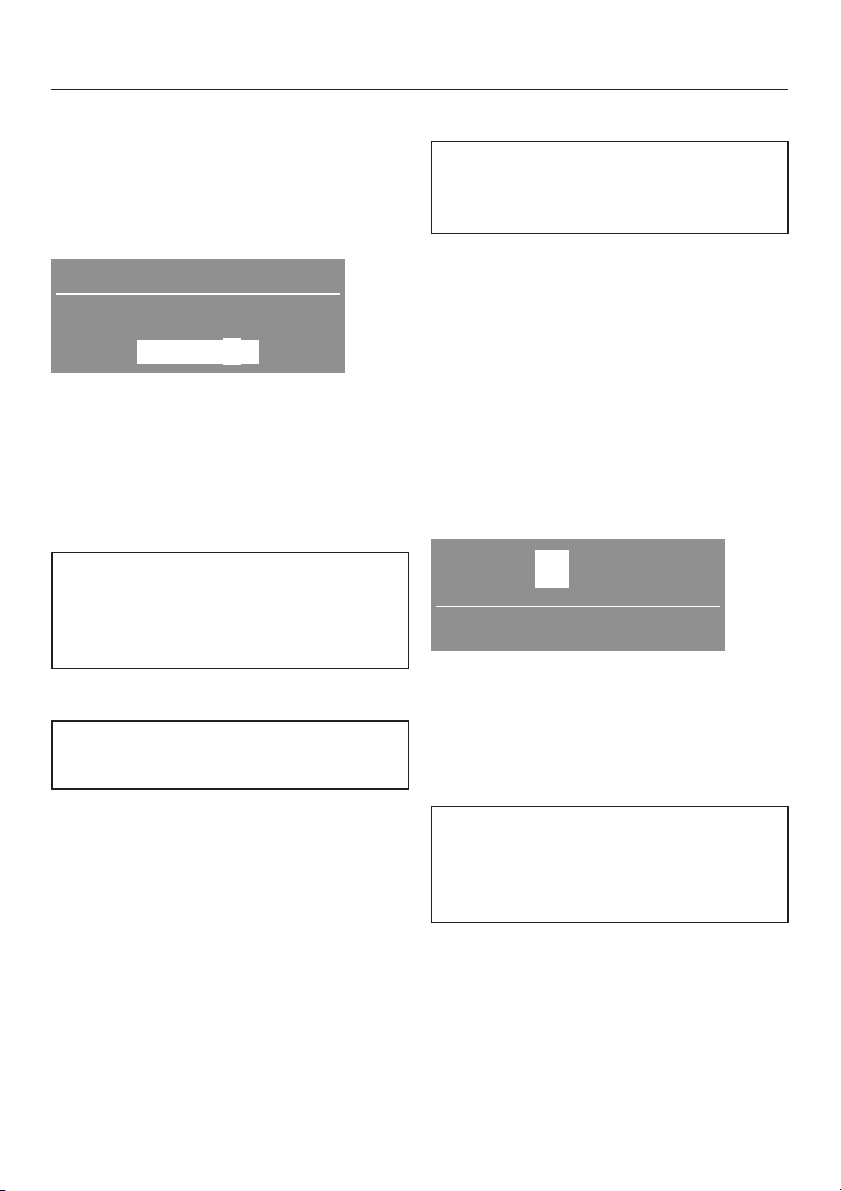
Settings menu J
To open the Settings J menu
A Switch on the appliance. The main
menu will appear.
B After 5 seconds an additional line will
appear in the display.
15:03
Select programme
Settings F ...
C Press the OK button.
D This will take you into the
menu.
E Use the – and + buttons to select the
setting you want and confirm your
selection by pressing the OK button.
If you do not make a selection in the
Settings menu and in its sub-menus
within approx. 20 seconds, the menu
display will revert to the main menu.
Settings
Language F
The display can be set to appear in
one of several different languages.
You can select the language you want
via the Languages sub-menu.
The flag after the word
as a guide to prevent a language which
will not be understood from being set.
Language
acts
Time Y
First select either a 24 hour or 12
hour clock or to not have a clock
displayed at all.
Then set the current time of day.
To select a 24 hour or 12 hour clock
Use the – and + buttons to select the
^
clock option setting you want and
confirm your selection by pressing
the OK button.
The display for setting the time will then
appear.
To set the time of day
12:00
Set the time
^ Set the hour with the – and + buttons
and confirm your setting by pressing
the OK button. Now set the minutes
and confirm with the OK button. The
display will return to the
menu.
The time of day can also be set by
pressing the m button after switching
the washing machine on, before
selecting a programme.
Settings
A tick L will appear beside the
language to show that it has been set.
61
Page 62

Settings menu J
Water plus T
This setting is used to select the
water intake setting for the
extra option.
There are three different options:
Water +
this option selected)
The water intake is increased in the
wash and rinse stages of the
programmes.
Extra rinse
An extra rinse is introduced in the
(the machine is delivered with
Cottons Universal,Minimum iron
Cottons Hygiene
Water + and Extra rinse
^ The water intake is increased in the
wash and rinse stages and an
additional rinse is also introduced in
the
Cottons Universal,Minimum iron
and
Cottons Hygiene
A tick L will appear beside the option
to show that it has been set.
programmes.
Water plus
and
programmes.
Gentle action U
Activating gentle action reduces the
drum action and is suitable for
washing slightly soiled items more
gently. It should be activated for
garments with a single bar under the
care label and for articles which feel
too hard after they have been dried.
Gentle action can be activated for the
Cottons Universal,Minimum iron
Cottons Hygiene
The washing machine is delivered with
the Gentle action setting deactivated.
A tick L will appear beside the option
to show that it has been set.
programmes.
and
Suds cooling R
When this is activated, additional
water flows into the drum at the end
of the main wash to cool the suds
down. Hot suds can damage plastic
drainage pipes.
Suds cooling takes place when
temperatures of 95°C and 75°C are
selected.
62
Suds cooling should be activated:
–
to prevent the danger of scalding if
the drain hose is hooked over the
edge of a sink or basin.
–
where the drainage pipes do not
comply with DIN 1986.
The machine is delivered with Suds
cooling deactivated.
A tick L will appear beside the option
to show that it has been set.
Page 63

Settings menu J
Lock X
The system lock prevents your
machine being used without your
knowledge.
When the system lock has been
activated, you have to enter a code
after switching the washing machine
on. Otherwise the washing machine
cannot be operated.
To activate the lock
C Back A
Activate
X
^ Select
Activate
selection.
^ The display will now request that a
code is entered. The code is 125 and
cannot be altered.
and confirm your
After the last number has been
^
entered, press the OK button.
Yes
Confirm the code with the OK button
^
125
Confirm lock code
No
or if you want to correct a mistake,
press the – button.
The lock will now be activated when
^
the washing machine is switched off.
To unlock the machine
When the machine is switched on
again, the display will request the lock
code.
^ Enter lock code 125 as described
above and confirm the entry.
Code OK.
W
Ready
To enter the lock code
The code is: 125
0 __ __
Enter lock code
^
Use the + button to enter the first
number. Confirm your selection of
this number by pressing the OK
button. Now set the second number.
^
Repeat the process until all three
numbers have been entered.
The washing machine is now unlocked.
To deactivate the lock
Proceed as for activating the lock.
63
Page 64

Settings menu J
Temperature S
You can chose for the temperature to
be displayed as
°F/Fahrenheit
A tick L will appear beside the option
to show that it has been set.
°C/Celsius
.
or
Buzzer O
When the buzzer function has been
activated, an audible tone sounds at
the end of a programme or when
Rinse hold is reached.
There are two volumes:
Normal
this option selected)
The buzzer sounds at the end of a
programme or when Rinse hold is
reached.
Loud
The buzzer sounds at maximum volume
at the end of a programme or when
Rinse hold is reached.
A tick L will appear beside the option
to show that it has been set.
(the machine is delivered with
Keypad tone P
An audible tone sounds each time a
button is pressed.
The machine is delivered with the
keypad tone switched off.
A tick L will appear beside the option
to show that it has been set.
Display contrast
There are ten different display
contrast settings.
The machine is delivered with the
display contrast on setting 5.
The display contrast will change as
soon as a different setting is chosen.
Brightness
There are ten different display
brightness settings.
The machine is delivered with the
display brightness on setting 5.
The display brightness will change as
soon as a different setting is chosen.
64
Page 65

Settings menu J
Standby Q
To save energy, the display goes out
after 10 minutes and the indicator
light for the
flashing slowly.
There are two options:
On
Standby is activated:
if a programme is not selected after
–
the machine has been switched on.
after a programme has started.
–
– at the end of a programme.
Not in current Prog.
delivered with this option selected)
Standby is activated:
– if a programme is not selected after
the machine has been switched on.
– at the end of a programme.
Pressing one of the buttons switches
the display back on again.
Start/Stop
(the machine is
button will start
Memory V
If an extra option has been selected
for a programme, or the
recommended temperature or spin
speed has been altered, the machine
will store the changes in memory at
the start of a programme.
When this programme is chosen again
these settings will appear in the display.
The machine is delivered with the
memory function deactivated.
A tick L will appear beside the option
to show that it has been set.
To close the Settings menu
Back A
C
Language F
Time ... H
^ Select
selection.
Back
and confirm your
A tick L will appear beside the option
to show that it has been set.
656667
Page 66

Page 67

Page 68
Alteration rights reserved/2106
M.-Nr. 06 632 300 / 02
en-AU
 Loading...