

Page 1
INSTRUCTIONS FOR USE
Washing machine
WM75.1
Carefully read the instructions for use before using the washing machine.
W40864C/1
Page 2
Dear Customer,
We thank you for purchasing this quality ASKO product.
We hope it meets all your expectations. Scandinavian design combines pure lines, everyday functionality,
and high quality. These are the key characteristics of all our products, and the reason why they are highly
appreciated across the globe.
We kindly recommend you to read these instructions before using the appliance for the fi rst time. The
instruction manual also includes information on how you can help protect the environment.
TABLE OF CONTENTS
Safety precautions 3
Washing machine description 6
Detergent compartment 6
Before using the appliance for the fi rst time 7
Installation and connection 9
Tips before washing 16
Washing process, step by step (1 – 8) 18
System settings 30
Errors – what to do? 37
Service 42
Technical information 43
Program table 45
Table: washing mode/temperature 48
Table options 49
Disposal 50
Quick guide 51
Cleaning and maintenance 33
The following symbols are used throughout the manual and they have the following meanings:
Information, advice, tip, or recommendation Warning – danger of hot surface
Warning – general danger Warning – danger of fire
Warning – danger of electric shock
Original instructions
2
See Quick guide on the last page.
Page 3

SAFETY PRECAUTIONS
GENERAL
Please read the instruction manual and save it for future reference.
• Please do not use the washing machine if you have not read and
understood these instructions or use fi rst.
• Failure to observe the instructions for use or inappropriate use of the
washing machine may result in damage to the laundry or machine, or injury
to the user. Keep the instruction manual handy, near the washing machine.
• Instructions for use are available on our website at www.asko.com.
• Your washing machine is intended solely for household use.
• The appliance has to be connected to the water and power supply by a
trained expert.
• Any repair and maintenance pertaining to safety or performance should be
done by trained experts.
• To avoid hazard, damaged power cord may only be replaced by the
manufacturer, authorized service technician, or other authorized person.
• After installation, the washing machine should stand still for two hours before
it is connected to the power mains.
• The washing machine may not be connected to the power mains using an
extension cord.
• Do not connect the washing machine to an electrical outlet intended for an
electric shaver or hair dryer.
• To connect the washing machine to water supply, make sure to use the
supplied water supply hose and gaskets. Water pressure has to be between
0.1 and 1 MPa (approximately 1–10 kp/cm
• Always use a new water supply hose to connect the appliance to water
supply; do not reuse an old water supply hose.
• After the washing cycle, close the water tap and pull out the washing
machine plug from the power socket.
• Only use the washing machine for washing laundry, as described in the
instruction manual. The machine is not intended for dry cleaning.
• In case of incorrect appliance connection, incorrect use, or servicing by an
unauthorized person, the user shall bear the cost of any damage.
• Only use detergents intended for the washing machine!
• Only use agents for machine washing and care of laundry. We shall not be
responsible for any damages or discolouration of gaskets and plastic parts
resulting from incorrect use of bleaching or colouring agents.
2
, 1-10 bar, 10–100 N/cm2).
3
Page 4

• Bleaches that contain chlorine can be replaced with oxygen-based bleaches.
Otherwise, a neutralization cycle should be performed by running the Cotton
program at the highest temperature. For best results, use hydrogen peroxide
or oxygen-based detergents.
• Do not use colourants (dyes) or bleaching substances (substances
for discolouration or removal of colourants) as they contain sulphuric
compounds that could cause corrosion.
• Excessive use of products containing chlorine compounds increases the
risk of premature failure of appliance components. This depends on the
concentration of chlorine, exposure time, and temperature.
• Do not use detergents that contain solvents as this could lead to release
of poisonous gases, damage to the machine, and risk of fi re and explosion.
• Before using the appliance for the fi rst time, remove the transport bolts and
all other transport protection devices. See chapter "BEFORE FIRST USE /
Transport protection".
• The machine is not intended for use by persons (including children) with
physical or mental impairments, or persons with lacking experience and
knowledge. These persons should be instructed about the use of the
appliance by a person responsible for their safety.
• Emergency door opening tool is located on the back side of the dispenser.
• Maximum washing capacity in kg (for the label program Standard cotton) is
indicated on the rating plate (or in the PROGRAM TABLE).
CHILD SAFETY
• Do not allow small children to play with the washing machine.
• Before closing the washing machine door and running the program, make
sure there is nothing except laundry in the drum (e.g. if a child climbed into
the washing machine drum and closed the door from the inside).
• Keep the detergent and conditioner out of reach of children.
• Activate the child lock. See chapter "SYSTEM SETTINGS, section Child
Lock".
• Do not let children younger than three years to come near the
appliance, unless they are under constant supervision.
• The washing machine is made in compliance with all relevant safety
standards. This washing machine may be used by children aged 8 years and
above and by persons with reduced physical, sensory or mental capabilities
or lack of experience and knowledge, but only if they are supervised during
the use of the appliance, if they have been provided relevant instructions
regarding safe use of the washing machine, and if they understand the
4
Page 5
hazards of inappropriate use. Make sure children do not play with the
appliance. Make sure the children do not clean the washing machine or
perform any maintenance tasks without supervision.
DANGER OF HOT SURFACE
• At higher washing temperatures, the door glass will heat up. Be careful to
avoid burns. Make sure children do not play near the door glass.
WATER OVERFLOW PROTECTION
• If the water level in the appliance rises above the normal level, then the
excessive water level protection will be activated. It will shut off the water
supply and start pumping out the water. If the water level does not decrease
in 60 seconds, the program will be interrupted (see chapter "ERRORS –
WHAT TO DO?").
TRANSPORTING / STORAGE DURING THE WINTER
If you transport or store the appliance in vehicles or rooms that are not heated
and where the temperature could drop to below freezing point, please do the
following:
• Clean the drain pump fi lter. See chapter "CLEANING AND MAINTENANCE".
• Close the water supply to the washing machine, undo the water supply hose
from the water supply tap, and wait until the water fl ows out of the tap and the
hose.
• After the drain pump fi lter is emptied, there can still be a small amount of
water in the machine. This, however, does not aff ect the quality and will not
damage the appliance.
• If the washing machine is to be transported, transport protection has
to be re-installed before transport (See chapter "BEFORE USING THE
APPLIANCE FOR THE FIRST TIME").
SAVE THESE INSTRUCTIONS FOR FUTURE REFERENCE!
5
Page 6
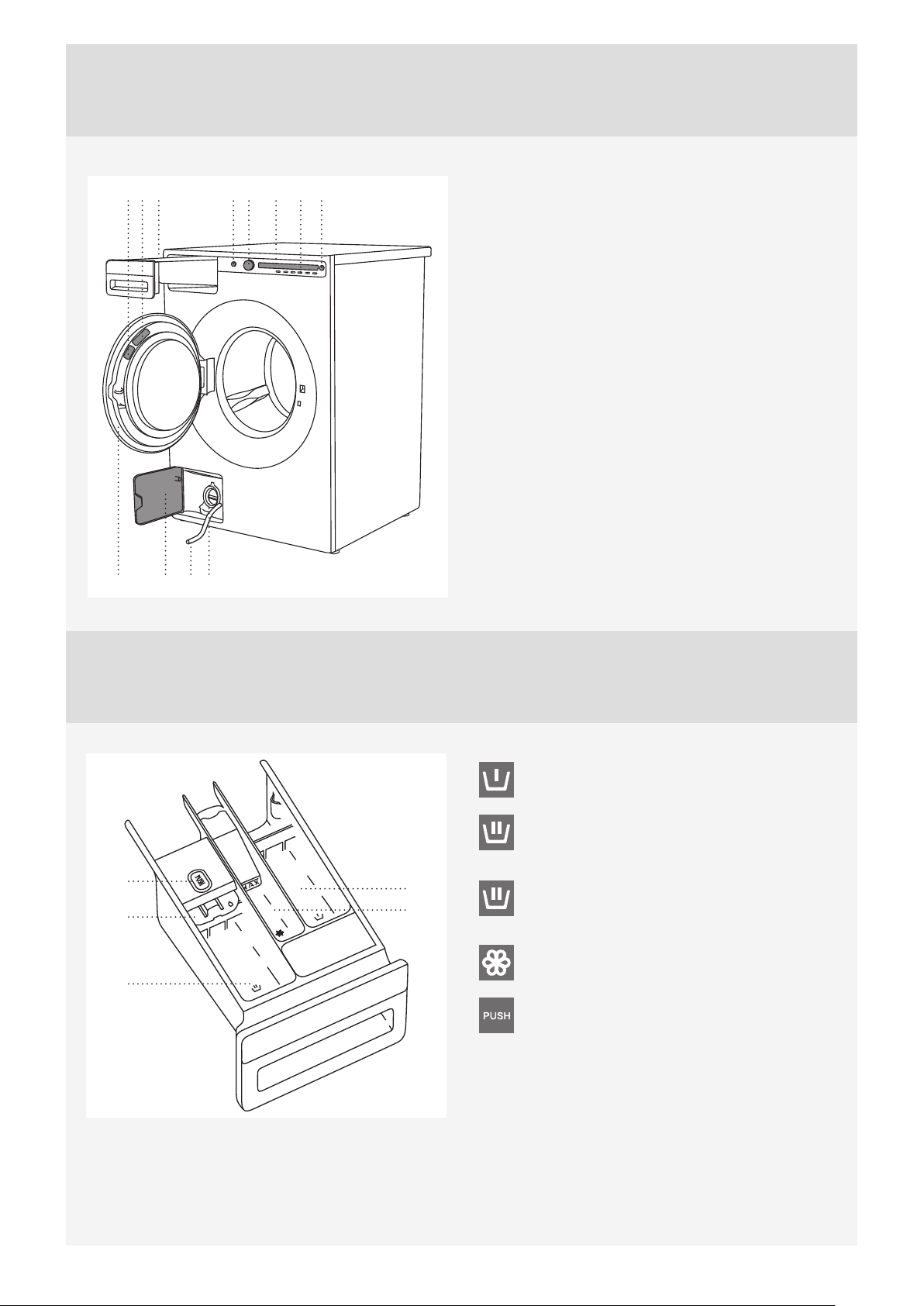
WASHING MACHINE DESCRIPTION
910
15
267834
1211
1. Main switch (ON/OFF)
2. Program selector knob
3. Display unit
4. Program settings buttons
5. Button (start/pause)
6. Detergent compartment
7. QR and AUID code (on the inside of the washing
machine door)
8. Rating plate with information about the washing
machine (on the inside of the washing machine
door)
9. Washing machine door
10. Drain fi lter cover
11. Water release hose
12. Drain fi lter pump (installed behind the drain
pump fi lter)
DETERGENT COMPARTMENT
5
3
2
1. Prewash compartment
2. Compartment for main wash liquid
detergent.
Use the foldable barrier (3).
1
4
2. Compartment for main wash powder
detergent.
Do not use the foldable barrier (3).
4. Softener / conditioner compartment
5. Tab for detergent compartment removal
6
Page 7
BEFORE USING THE APPLIANCE FOR THE FIRST TIME
PACKAGING
Remove all packaging.
Please sort the materials in compliance with local recommendations (see chapter ”DISPOSAL”).
TRANSPORT PROTECTION
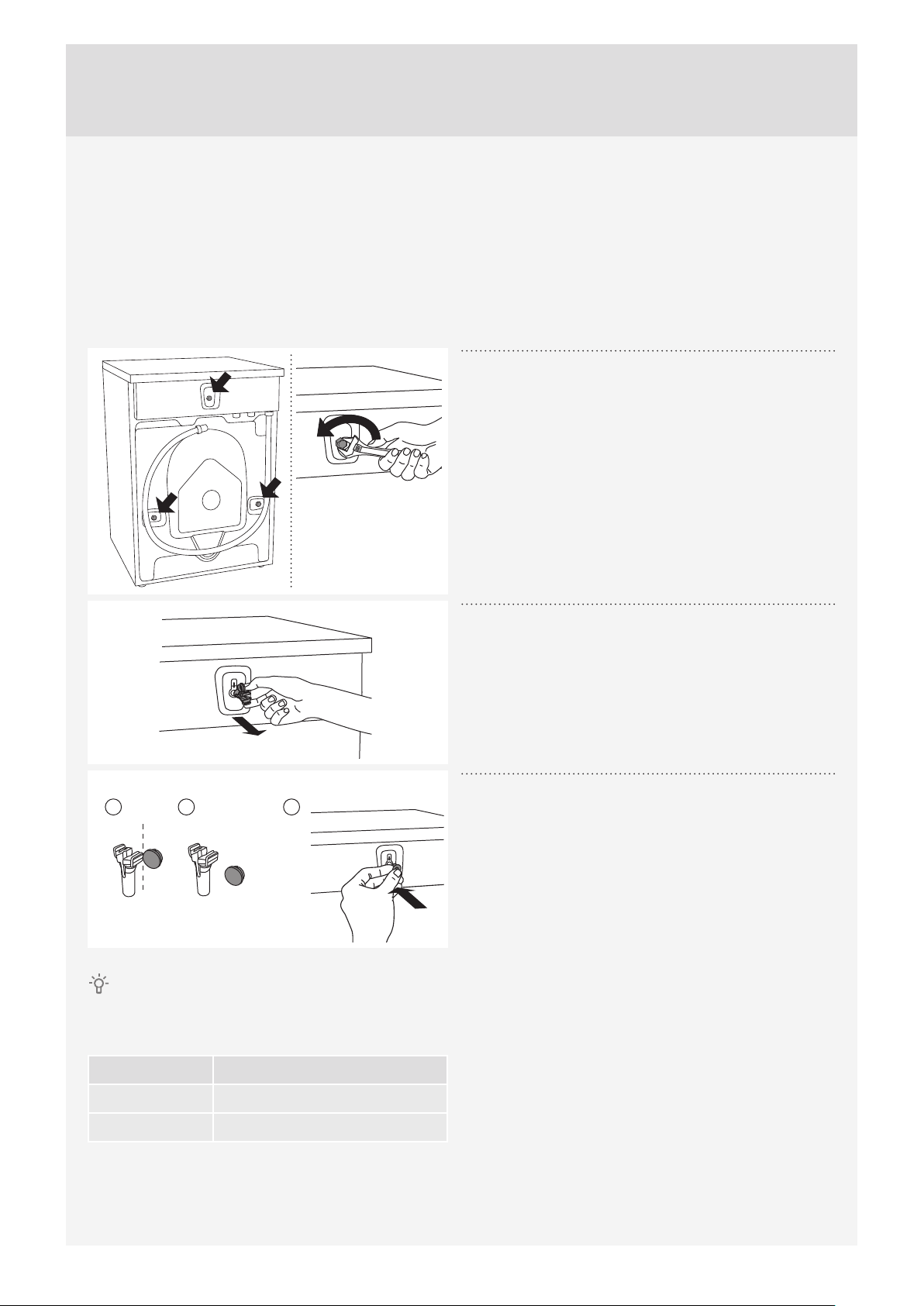
Before using the appliance, remove the three transport bolts and plastic plugs which protect the appliance
during transport.
Release and remove the bolts as shown in the
1
fi gures.
To remove the plastic plugs holding the bolts,
2
squeeze them and then pull them out.
12 3
If you wish to transport the washing machine, reinstall the bolts and plastic caps to lock the machine. This
will prevent any damage to the machine due to vibrations during transport. If you have lost the transport bolts
or plastic caps, replacements can be ordered at your dealer.
Art. No. ID:
Remove the caps from the plastic plugs. Push the
3
caps over the three holes in which the plastic plugs
were inserted. Save the bolts and plastic plugs if you
have to transport your washing machine in the future.
270698 Bolt
551188 Plastic cap (transport lock)
Please order three pieces of each item!
7
Page 8
CLEANING
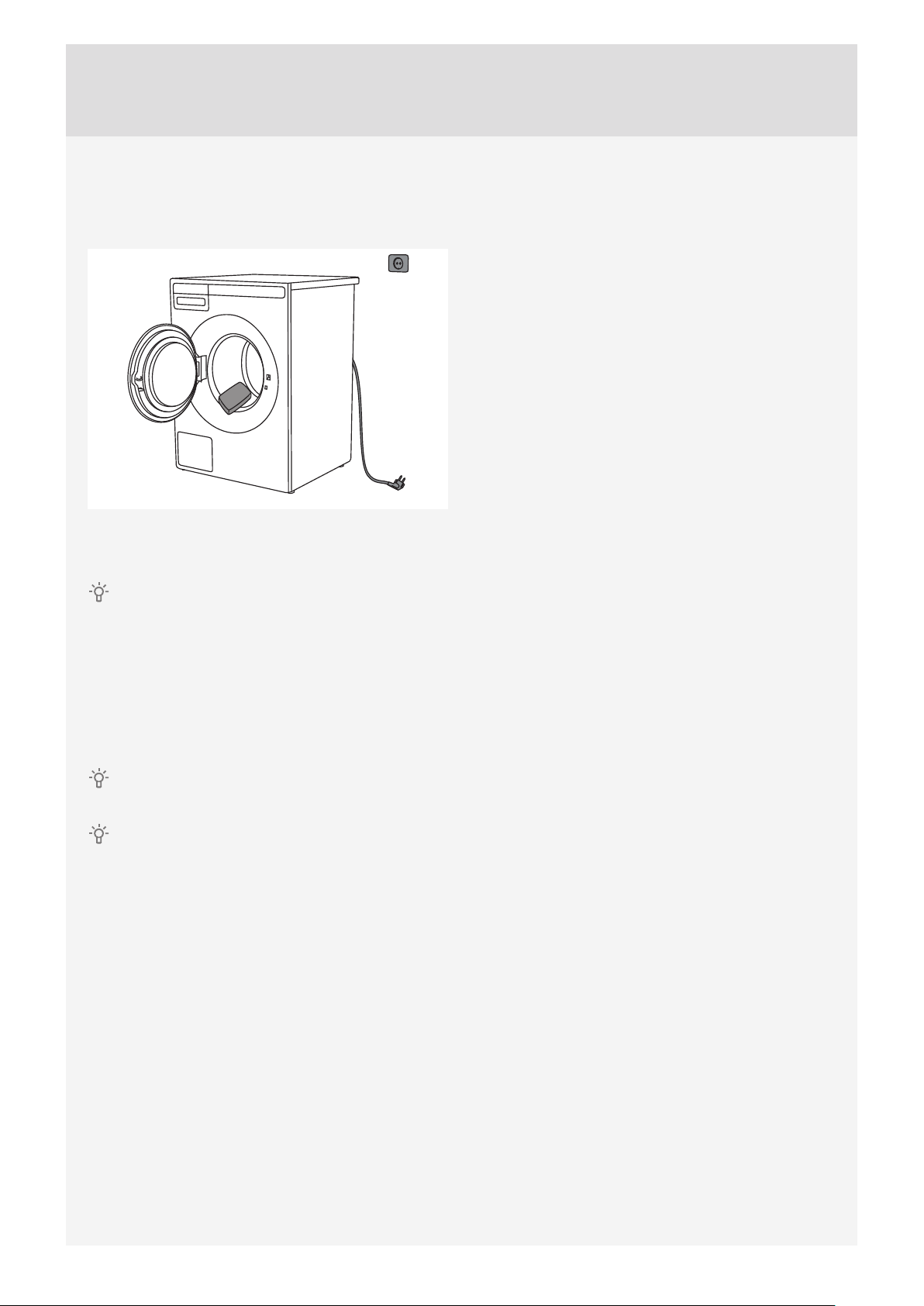
Disconnect the washing machine from the power mains and open the door. Clean the washing machine drum
with a damp cloth and a mild detergent.
Connect the washing machine to the power mains and run the dedicated drum cleaning program. See
chapter "WASHING PROCESS; STEP BY STEP (1–8)" /STEP 5: CHOOSE THE PROGRAM.
No program can be started while the door is open.
SETTINGS BEFORE FIRST USE
After connecting the washing machine and power it for the fi rst time, you will be asked to do following
settings:
Language selection
Press the button 2 or the program selector knob to scroll the list of languages. Confi rm your selection by
pressing the OK button.
The amount of detergent depends on the hardness of water. For details, see the detergent packaging.
Please contact your local water supply company to check the water hardness in your area.
Before it dispatched from the factory, every appliance is tested.
As a result, there may be some residual water left in the drain pump fi lter. This, however, does not aff ect the
quality and will not damage the appliance.
8
Page 9
INSTALLATION AND CONNECTION
POSITIONING THE WASHING MACHINE
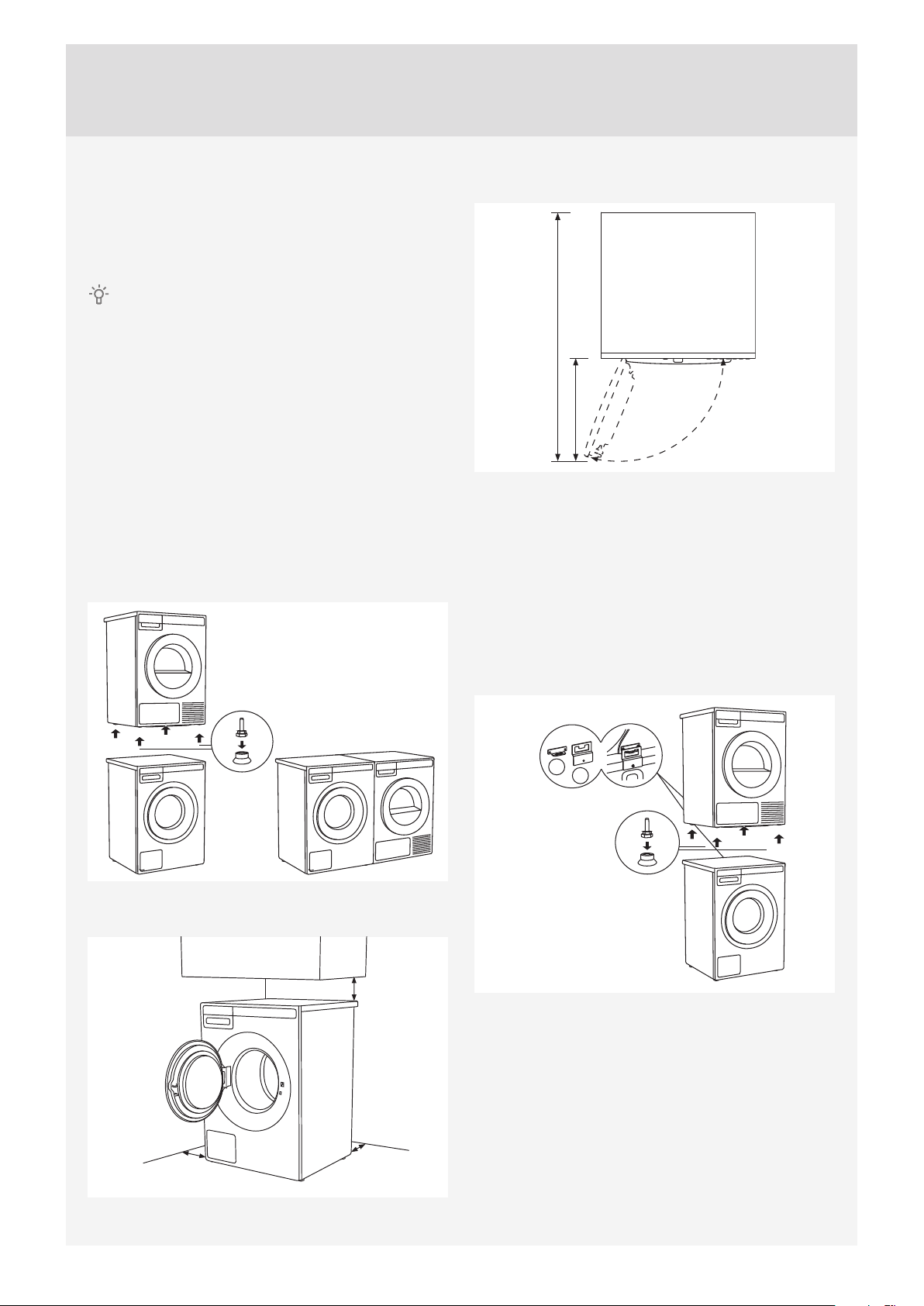
The washing machine can be installed as a builtin (integrated) or a free-standing unit. Place the
machine on a level surface so that the power outlet
on the wall is accessible.
Before connecting the washing machine to the
power mains, wait for at least 2 hours until it reaches
room temperature.
Built-in washing machine
The washing machine can be integrated under a
worktop with a height of 900–950 mm. Leave 5 cm
of room around the entire of the appliance, including
between the back edge of the upper cover and the
wall behind it.
Free-standing appliance
If you have a dryer of suitable dimensions (by
another dryer manufacturer), use the vacuum feet
to stack it on top of the washing machine, or place it
next to it.
Opening the washing machine door (top view)
942 mm
376 mm
110°
Stacking an ASKO dryer on top of an ASKO
washing machine
To stack an ASKO dryer on top of a washing
machine, use the extra vacuum feet and the tipping
guard (A+B), supplied in the cardboard box in the
ASKO dryer drum. If the washing machine and
dryer are not of matching dimensions or if you
have installed a hidden helper between the two
appliances, then binding plates are available as
optional accessories at the service unit.
Clearances around the washing machine
min. 50 mm
min. 50 mm
min. 50 mm
A
B
9
Page 10
Ventilation Requirements of ASKO laundry
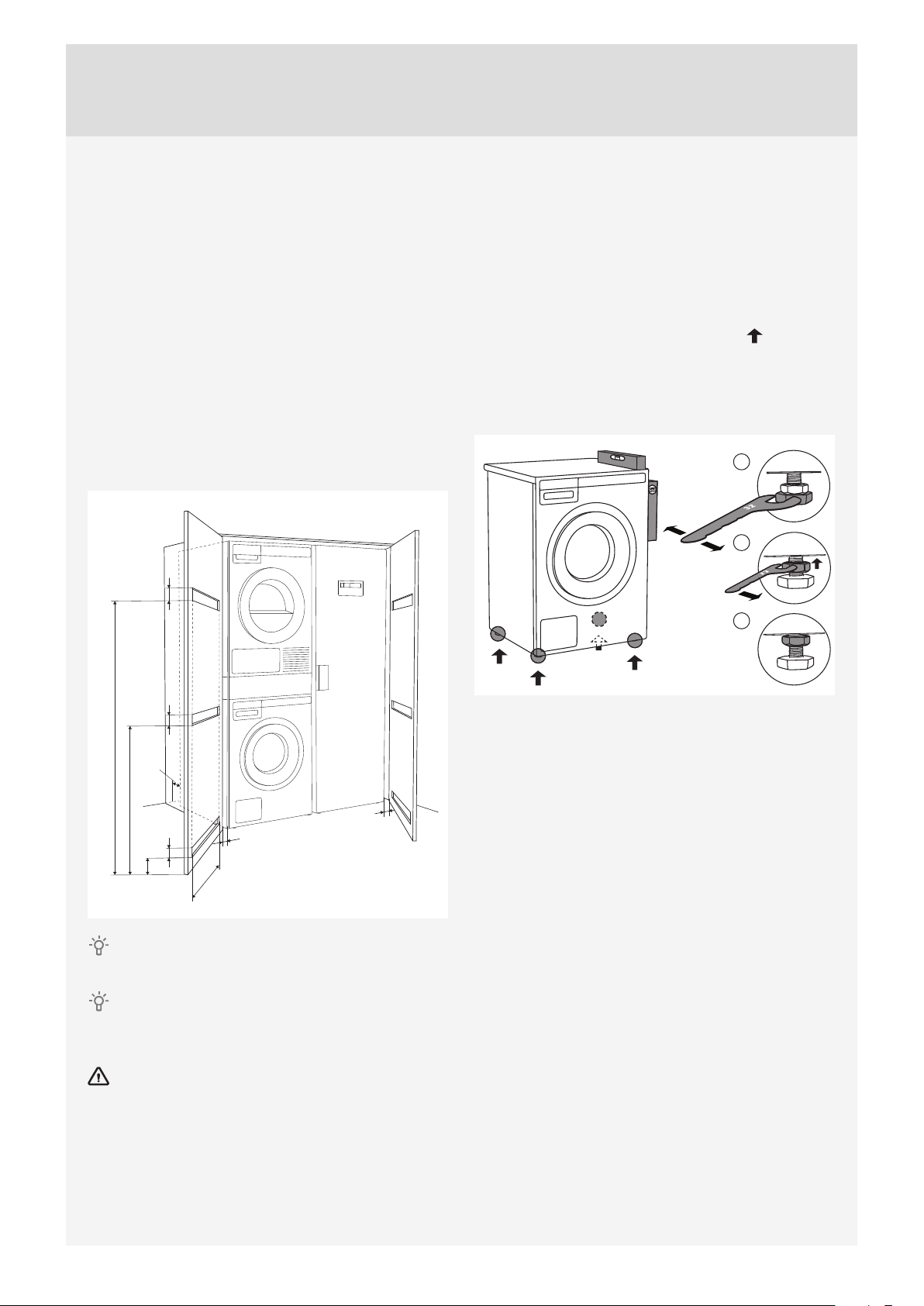
concept or closet installation
ASKO's front panel controls make it possible to
install the washers and dryers in a cabinet or closet.
Make sure there is clearance between appliances
and cabinet or wall and 25 mm minimum clearance
between the rear edge of the appliance top panel
and the cabinet or wall.
When closet or cabinet is closed by the door, we
recommend louvered doors, to ensure proper
ventilation.
Otherwise there must be ventilation openings on
the door. See illustration of dimension for ventilation
openings below:
65 mm
ADJUSTING THE FEET
Place the washing machine so that it is stable.
1. Level the washing machine in longitudinal and
traverse direction by rotating the adjustable feet
(using a No. 32 spanner).
The feet allow levelling by +/- 1 cm.
2. When the appropriate height of feet is set, use the
wrench No. 17 to fi rmly fasten the counter-nuts
towards the bottom of the appliance .
3. Tighten the jam nuts (counter nuts) to the end
position.
This will reduce washing machine noise, vibration,
movement etc. to minimum.
1
2
3
50 mm
1550 mm
25 mm
635 mm
65 mm
35 mm
12 mm
465 mm
12 mm
Ensure the dryer door can be opened without
hindrance after installation.
The cool air intake panel at the front of the dryer
must not be blocked or covered. Doing so could
cause a fault.
Disregarding of instructions infl uences on
appliance performance and may also result in failure
of the appliance.
10
Page 11
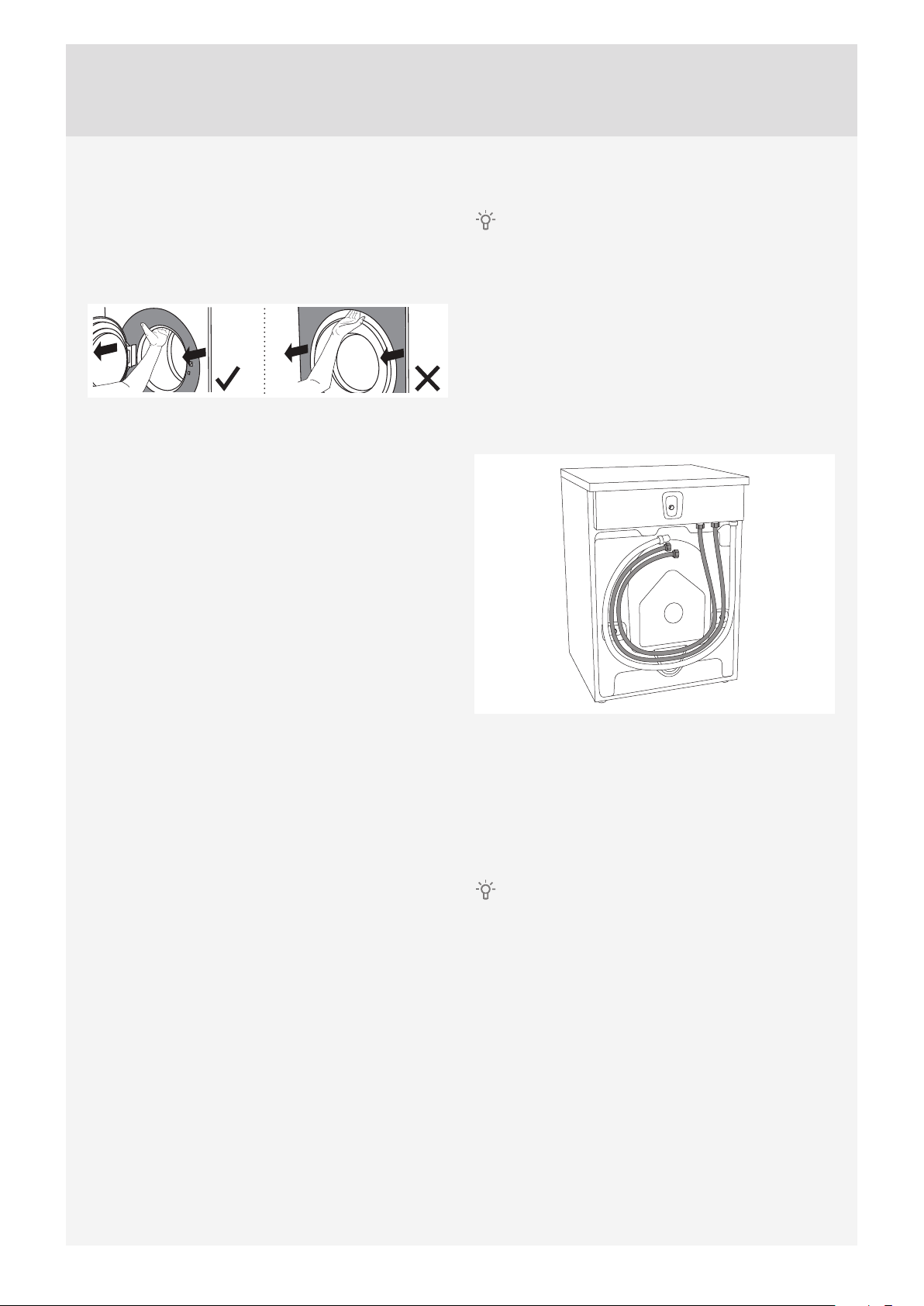
MOVING THE WASHING MACHINE AND
TRANSPORT AFTER INSTALLATION
If you are moving the washing machine without
packaging, open the washing machine door and pull
the appliance by holding the washing assembly, as
indicated in the fi gure.
For any further moving of the appliance, use the
transport rods (the washing machine drum has to be
blocked).
(See chapter TRANSPORT PROTECTION.)
CONNECTING TO WATER SUPPLY
The machine has to be connected to water
supply by an adequately trained person.
Use the water supply hose to connect the appliance.
Water pressure has to be between 0.1 and 1 MPa
(approximately 1–10 kp/cm2 , 1-10 bar, 10–100 N/
cm2).
If the hoses are newly installed, we recommend
rinsing them to remove any impurities. Otherwise,
these impurities could clog the fi lter in the water
connection on the washing machine and thus cut off
the water supply.
The water intake hose has to be fastened fi rmly
enough for the hose to have a good seal.
After connecting the hose, the seal must be checked
for any leaks.
Only use the water supply hose supplied with the
appliance. Do not use any used or other hoses.
If the connection on the supply hose is of
diff erent dimensions than the water tap (e.g. 3/4” →
1/2”), use an adapter.
11
Page 12
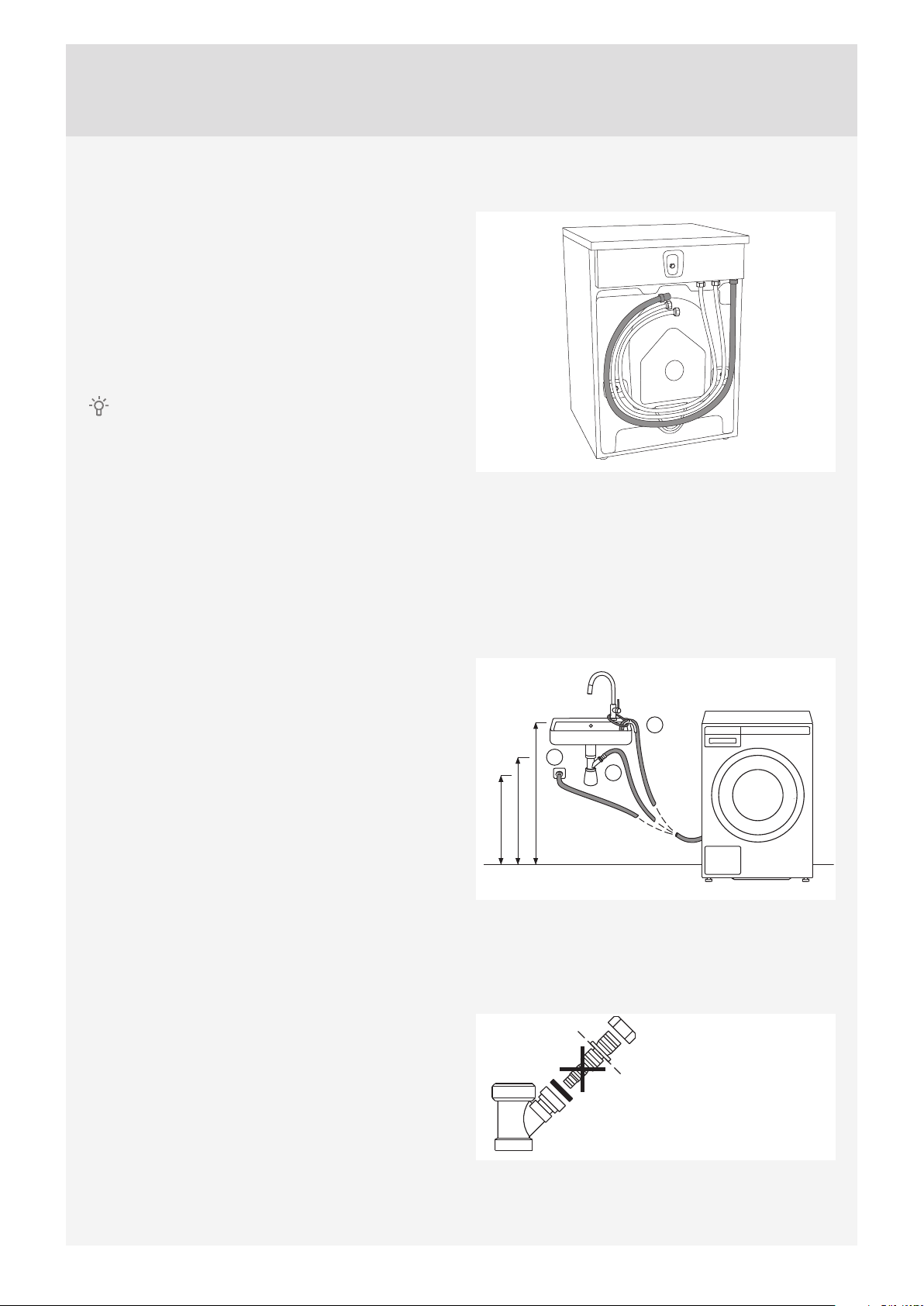
CONNECTING TO HOT/COLD WATER
SUPPLY
(Only available in some models)
If your appliance has connections for both hot
and cold water, then connect one hose to the cold
water connection and the other hose to the hot
water connection, as indicated on the back of the
appliance:
COLD = cold and HOT = hot.
Hot water is supplied for programs operating at 40
°C or more.
Connecting to both hot and cold water will save
time and electric energy when washing.
If your washing machine model has connections
for both hot and cold water, and you only wish to
connect cold water, then the protective cap has to be
(or remain) attached to the hot water connection.
INSTALLING THE DRAIN HOSE
Upon delivery, the appliance has a drain hose
attached. This drain hose must be connected to
a drain. Drain hose can also be attached to a wall
drain with a trap; such trap should be properly
installed to allow cleaning. The height of the drain
should be 600–900 mm above the fl oor. The lower
position (600 mm) is always recommended. Make
sure the drain hose is not clipped or bent.
A
C
B
600 - 900 mm
600 - 900 mm
600 - 900 mm
Drain hose can also be connected directly to the
washbasin drain via a siphon. In this case, the hose,
should be 600–900 mm above the fl oor. Internal
hose diameter should be at least 18 mm.
See fi gure.
At least 18 mm
12
Page 13
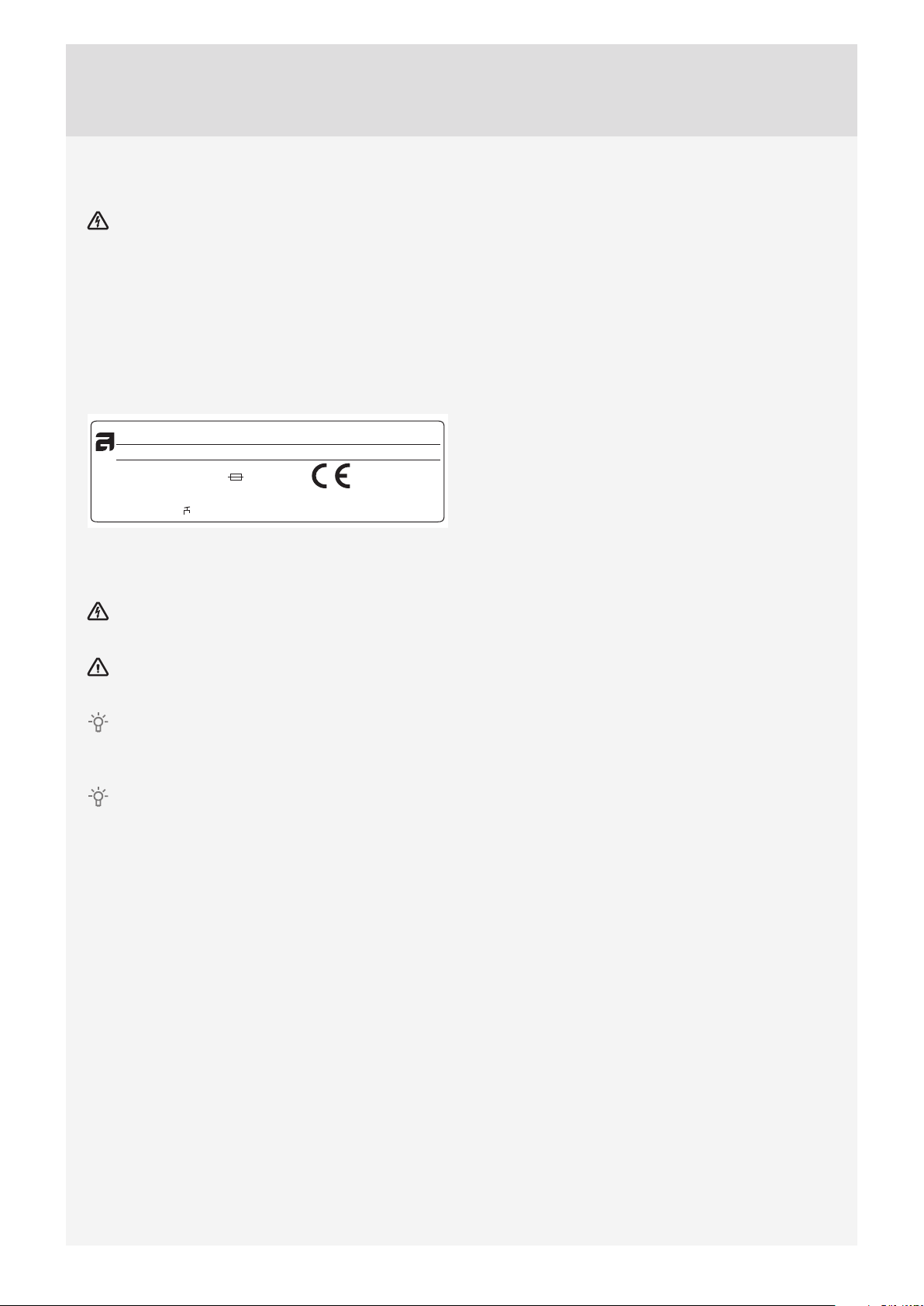
CONNECTING TO THE POWER MAINS
After installation, the washing machine should
stand still for two hours before it is connected to the
power mains.
Connect the appliance to an earthed power outlet.
After installation, the wall outlet should be freely
accessible. The outlet should be fi tted with an earth
contact (in compliance with the relevant regulations).
Connection upon delivery
TYPE: WMXX.XXXXX
Art.No.: XXXXXX/XX Ser.No.: XXXXXXXX
XX Hz
XXXX W
XX-X MPa
XXX-XXX V ~
IPX4
MODEL: XXXXXX.X
XXA
X kg
Information about your washing machine is indicated
on the rating (type) plate.
Use the type A diff erential current protection switch.
We recommend using over-voltage protection to
protect the appliance in case of a lightning strike.
The washing machine may not be connected to
the power mains using an extension cord.
Do not connect the washing machine to an
electrical outlet intended for an electric shaver or
hair dryer.
Any repair and maintenance pertaining to safety
or performance should be done by trained experts.
13
Page 14
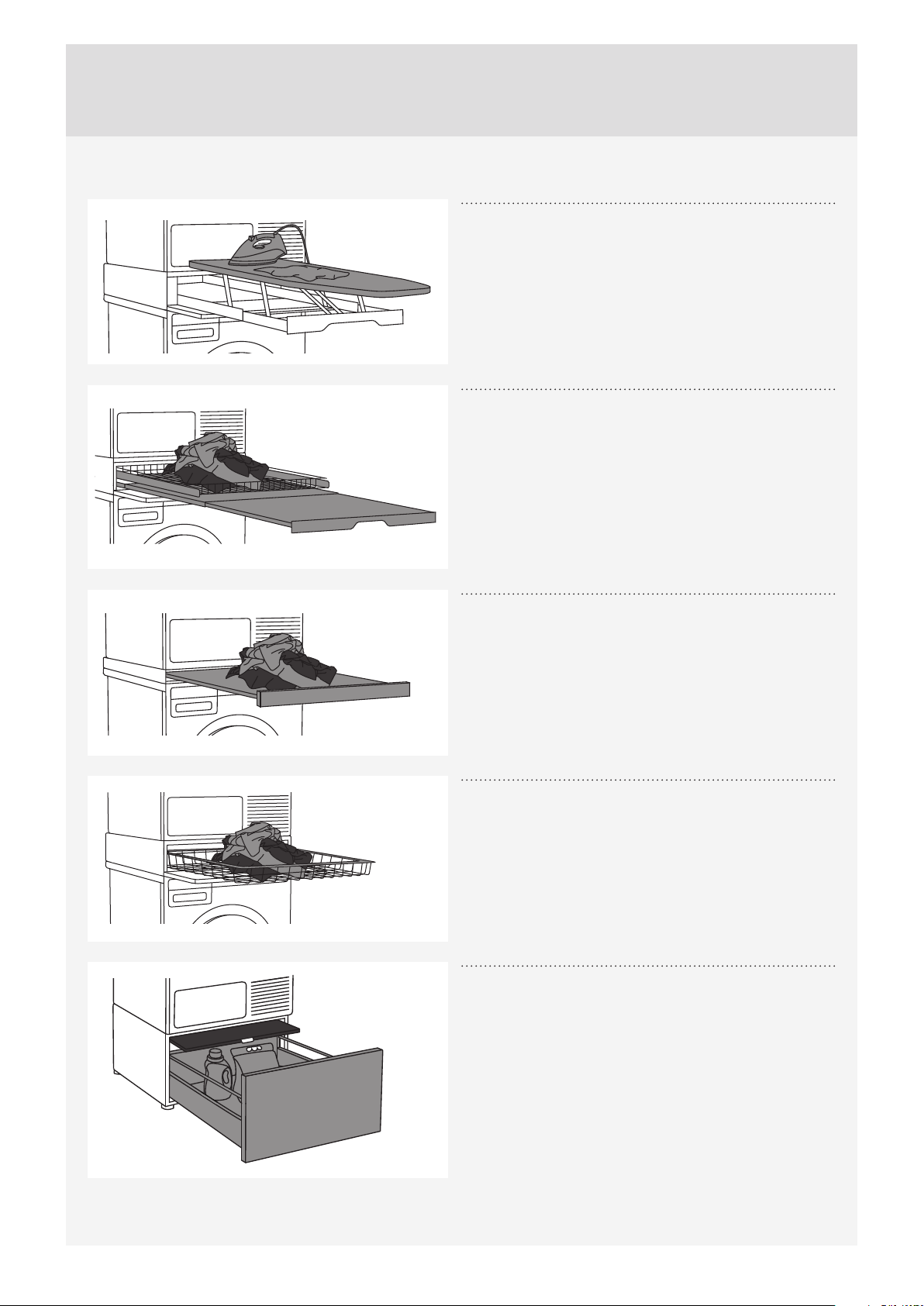
ASKO LAUNDRY CARE - HIDDEN HELPERS*
Laundry care ironing board
The ironing board is a clever solution. It is always
handy when you need to iron your clothes, and it can
be easily, safely and invisibly stored away when not in
use.
It can be installed between your washer and dryer, or
on top of one of them.
Laundry care double
A wire basket and pull-out shelf. It can be used as an
additional surface for folding clothes, sorting socks
and for storage. The basket is useful for removing and
carrying laundry to the wardrobe or workbench for
ironing and folding.
It can be installed between your washer and dryer, or
on top of one of them.
Laundry care single
Pull-out shelf. It can be used as an additional surface
when folding clothes and sorting socks or for storage.
It also makes loading and unloading your laundry
much easier.
It can be installed between your washer and dryer.
Laundry care basket
A large pull-out basket that is easily accessible via a
push-pull door opening. Useful for removing laundry
and carrying it to the wardrobe or workbench for
ironing and folding.
It can be installed between your washer and dryer, or
on top of one of them.
Pedestal drawer with shelf
A useful storage drawer with a height of 30 cm. Ideal
for storing your detergent, softener, coat hangers,
pegs, user manuals and other useful items in the
laundry area. The drawer also comes with a shelf for
easy loading and unloading of your laundry.
14
Page 15
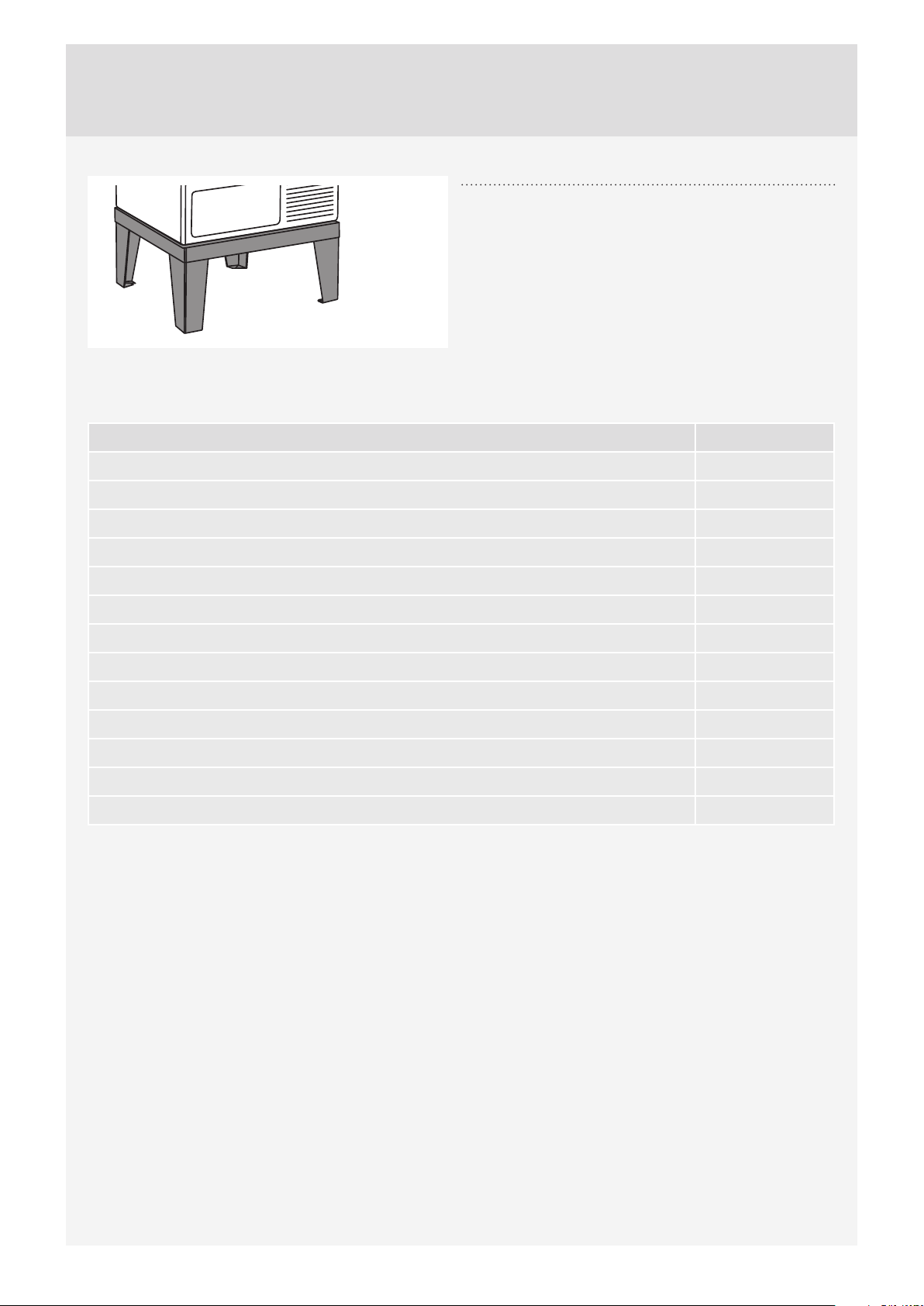
Laundry care plinth
Thanks to the stainless steel plinth, your appliance
will be raised by 30 cm, which makes loading and
unloading of laundry easier.
*AVAILABILITY DEPENDING ON MARKET
DENOMINATION ART. No.
IRONING BOARD HI1153 White 576552
IRONING BOARD HI1153 Stainless steel 732756
IRONING BOARD HI1153 Titanium 576553
LAUNDRY CARE DOUBLE HDB1153 White 576554
LAUNDRY CARE DOUBLE HDB1153 Stainless steel 732757
LAUNDRY CARE DOUBLE HDB1153 Titanium 576555
LAUNDRY CARE SINGLE HSS1053 White 576730
LAUNDRY CARE SINGLE HSS1053 Titanium 576732
LAUNDRY CARE HB1153 White 576733
PEDESTAL DRAWER W. SHELF HPS5323 White (only 8 kg or 9 kg models) 576735
PEDESTAL DRAWER W. SHELF HPS5323 Stainless steel (only 8 kg or 9 kg models) 576737
STAINLESS STEEL PLINTH HPL530S for 8 kg and 9 kg models 441663
STAINLESS STEEL PLINTH HPL830S for 11 kg and 12 kg models 445501
15
Page 16
TIPS BEFORE WASHING
This chapter includes several tips on how to prepare
the laundry for washing.
LAUNDRY SORTING
Sort the laundry according to:
• how soiled it is,
• colour,
• material.
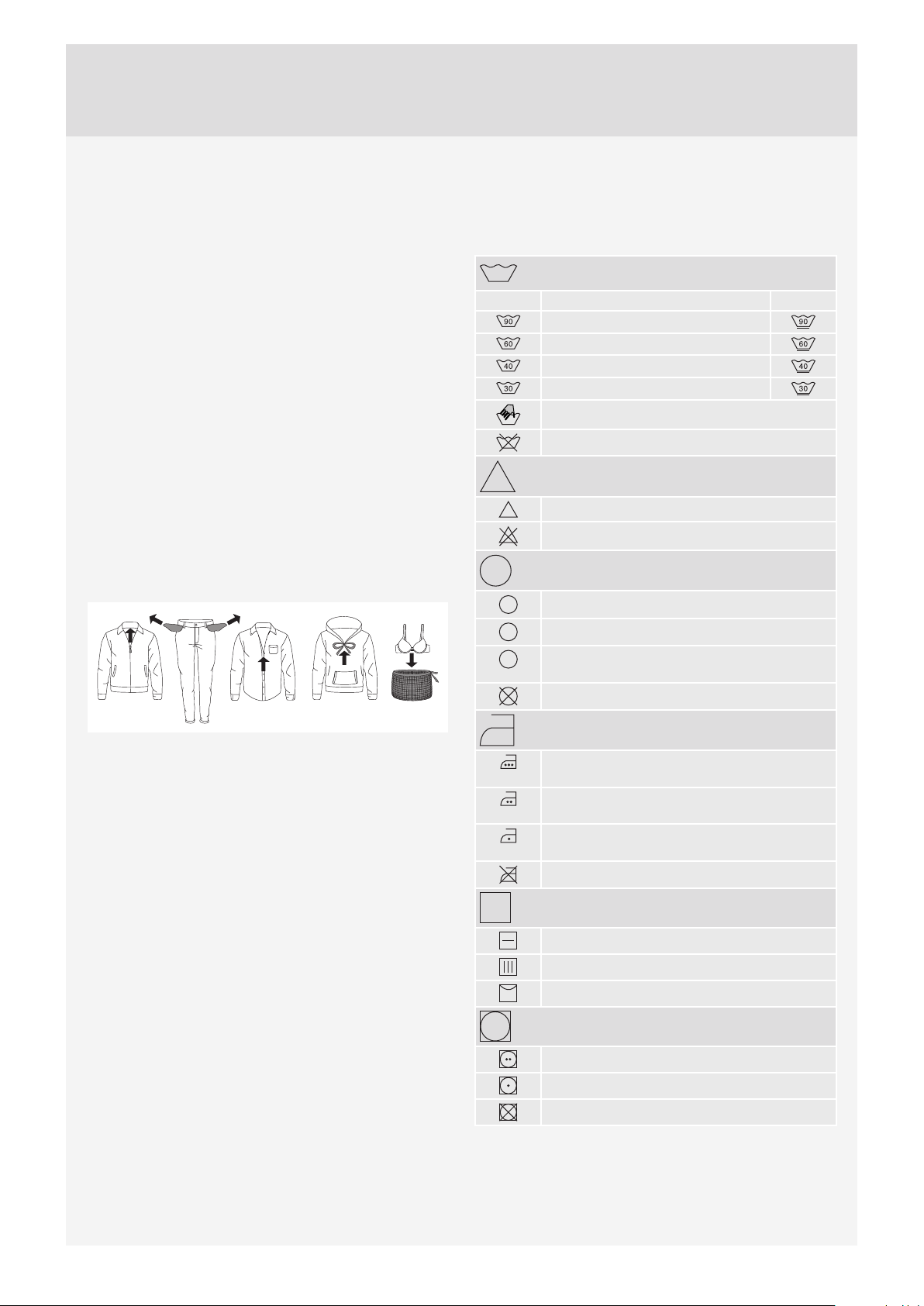
CLOTHING
1. Close the zips and hook-and-loop fasteners so
that they do not damage the fabric.
2. New dyed items may contain excess dye;
therefore, they have to be washed separately
several times.
3. Turn delicate items inside out. This will decrease
the risk of tear and colour fading.
4. Place very sensitive clothes and small items in a
special-purpose laundry washing bag.
5. Empty the pockets and turn them inside out.
LAUNDRY SYMBOLS
Observe the laundry symbols.
Textile maintenance symbols:
Washing
Normal Delicate
Max. washing temperature 90 °C
Max. washing temperature 60 °C
Max. washing temperature 40 °C
Max. washing temperature 30 °C
Hand wash only
Do not wash
Bleaching
Bleaching in cool water
c1
Bleaching not allowed
Dry cleaning
A
Dry cleaning with all agents
P
Perchloroethylene R11, R113, petroleum
Dry cleaning in kerosene, pure alcohol,
F
and R113
Dry cleaning not allowed
Ironing
Ironing with a hot iron with a maximum
temperature of 200 °C
Ironing with a hot iron with a maximum
temperature of 150°C
Ironing with a warm iron with a maximum
temperature of 110°C
Ironing not allowed
Natural drying
Drying on a flat surface
Drying without prior spinning
Drying on a clothes line or a hanger
Tumble drying
Drying at high temperatures
Drying at low temperatures
Tumble drying not allowed
16
Page 17

DYED COTTON
Laundry made of dyed cotton which is to be washed
at 60 °C should be fi rst washed at a temperature of
60 °C to remove the excess dye. If this is not done,
there is danger of dye being washed out of such
items. To maintain the colour of the fabric, use
bleach-free detergent.
UNBLEACHED LINEN
Unbleached lining fabric should be washed at
60 °C with a detergent free of bleach or optical
bleaching agents. Heavily soiled linen laundry may
be occasionally washed at higher temperatures, but
do not do this too often as heat could ruin the sheen
and strength of linen clothing.
WOOL
These fabrics are intended for either machine or
hand wash. The Wool/Hand Wash program is
equally gentle or even gentler than an actual hand
wash.
Wool in particular is sensitive to washing and similar
procedures.
If you do not wish to spin your clothes, select a
setting without spinning (see "STEP 6: Choose
the program settings /button 3"). However, most
garments are suitable for at least a short spinning
cycle. Top spinning speed available is 800 rpm.
VISCOSE AND SYNTHETIC FIBRES
Materials made of viscose and some synthetic fi bres
are highly sensitive, and require a lot of space in
order not to crease. When washing, only fi ll the
drum to a half and choose a program with spinning
speed of no more than 1200 rpm.
Viscose and acetates are fragile when wet.
REDUCING ALLERGIC REACTIONS
(Only in some models)
The options include washing with the Allergy
Program Cotton and Allergy Program Synthetics,
using the Allergy Mode program setting, or using an
extra rinse (Super Rinse). These programs, program
settings, and functions can be used for people
with sensitive skin, such as those suff ering from
allergies, or small children.
SAVING TIME AND ENERGY
To save time and energy, use the Everyday Wash.
This program has shorter main wash cycle than
Standard Cotton and often suffi ces for less soiled
laundry.
ECONOMY AND EFFICIENCY
You can save a lot of energy by not using the
programs operating at higher temperatures.
Choose the Quick program if you wish to only
refresh the laundry; or use the Time program. This
will save water and power.
Selecting the maximum spinning speed will reduce
power consumption if you dry the clothes in a
dryer or a drying cabinet.
When using the programs Heavy, Everyday Wash
and Standard Cotton, we recommend washing a full
load.
Avoid prewash. Modern washing machines and
detergents are effi cient without the prewash as well.
Prewash is only necessary for heavily soiled
laundry. Use the additional function Prewash (see
"STEP 6: Program Settings Menu – choosing extra
functions / button 5").
DETERGENTS
Detergents carrying the environment protection label
are less harmful to the environment.
Only add the detergents in compliance with the
recommendations by detergent manufacturers.
Recommended amount of washing detergent
at certain loads and water hardness levels are
specifi ed on the detergent packaging.
STAINS
If your clothes are soiled with stubborn stains
(blood, eggs, coff ee, grass etc.), they should be
appropriately treated before the wash. Then, wash
your laundry using the special programs (if your
washing machine has them).
Do not use any chemical substances or agents;
only use the stain removing detergents.
DYEING FABRICS
If you wish to dye fabrics in the washing machine,
choose the Everyday Wash program with the Super
Rinse extra function. Choose the temperature
according to the dye manufacturer's
recommendations. If you dye mixed fabrics, such
as polyester/cotton, choose a low spinning speed.
Add the dye directly into the drum, rather than
in the detergent compartment. After dyeing use
the Drum Cleaning program (self-cleaning program).
Use the standard amount of detergent.
When using bleaches or stain removal agents,
there is danger of corrosion and discolouration.
To protect the environment, we advise against
using powerful chemicals.
17
Page 18
WASHING PROCESS, STEP BY STEP (1 – 8)
STEP 1: SORT THE LAUNDRY
See chapter "TIPS BEFORE WASHING"
Use a washing net for underwire bras. Empty the pockets. Coins, nails etc. could damage the machine
and the fabric.
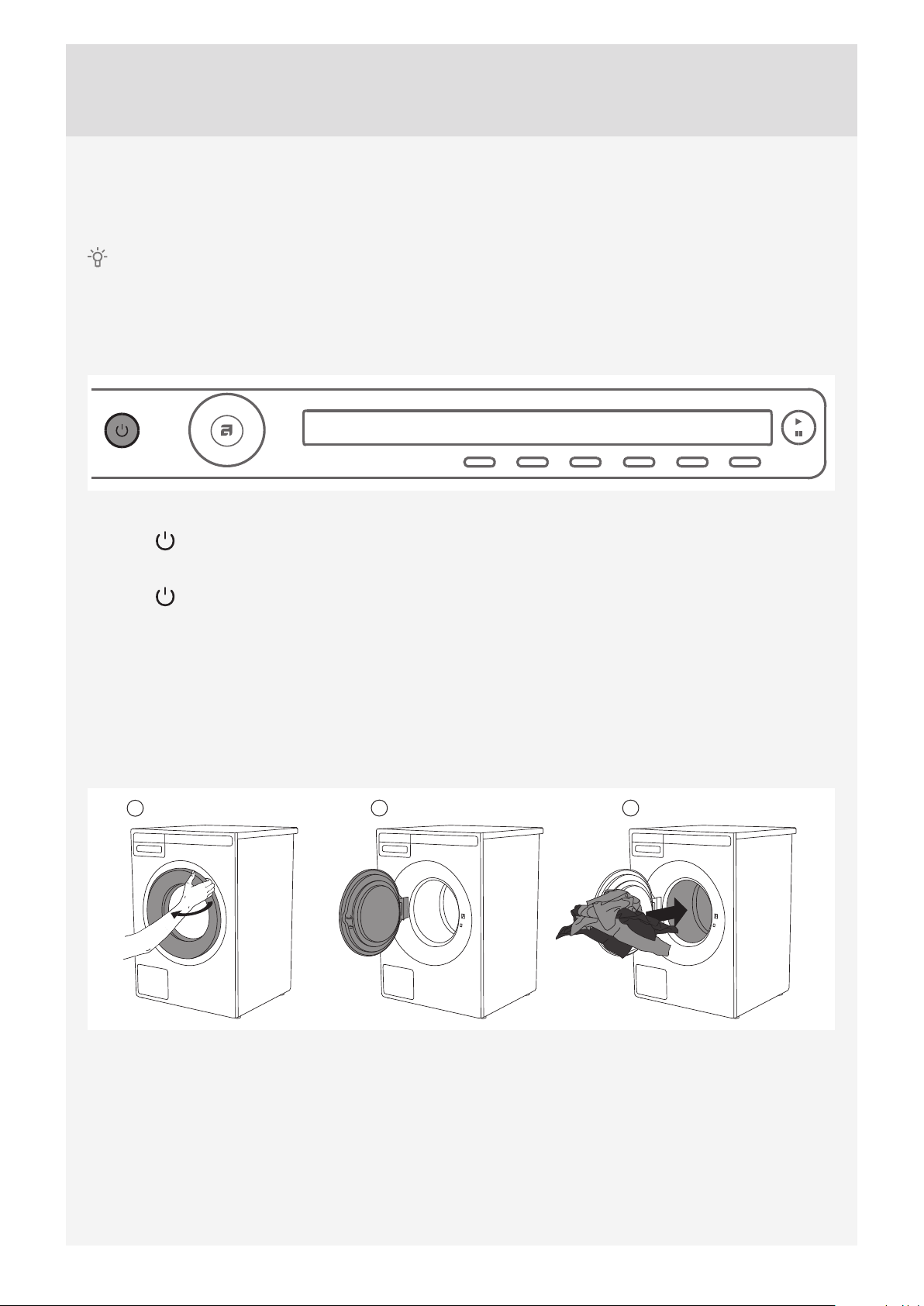
STEP 2: TURN ON THE MAIN SWITCH.
Turning on
Press the on/off button.
Turning off
Press the on/off button.
If the machine does not accept the on/off command correctly, wait for at least 8 seconds before pressing any
other button.
STEP 3: OPEN THE WASHING MACHINE DOOR AND INSERT THE LAUNDRY.
Open the washing machine door by pulling the handle towards you.
1
2 3
Place the laundry into the washing machine drum.
Before doing so, make sure the drum is empty.
Do not overload the drum!
If the washing machine drum is too full, the laundry will not be washed as thoroughly.
18
Page 19

STEP 4: ADD THE DETERGENT AND THE CONDITIONER.
Recommended amount of detergent is usually specifi ed on the detergent packaging. When washing a
smaller amount of laundry, the amount of detergent used can be decreased.
Observe manufacturers' recommendations regarding the type of detergent suitable for certain temperatures,
load size, and water hardness.
Powder detergent
Add powder detergent into the main wash detergent compartment. If you have selected the Prewash function
or Heavy program or the Time program with 2:30 or longer duration, then add powder detergent to the
prewash detergent compartment.
We recommend adding the powder detergent immediately before the washing cycle. Otherwise, make
sure the detergent compartment is completely dry before adding the powder detergent, as otherwise, the
powder detergent may cake before the start of the washing process.
Liquid detergent
When using a liquid detergent, observe the detergent manufacturer's recommendations. When using thick
detergents, we recommend always using the laundry balls. Use the barrier (3) in the detergent compartment;
see fi gure in the chapter "DETERGENT COMPARTMENT". Add the liquid detergent in the front part of the
detergent compartment (2).
Laundry ball or washing bag
If you are using a laundry ball or a washing bag, place it directly into the drum and choose a program without
any prewash.
An excessive amount of detergent will not improve washing results. Rather, it will lead to foaming and
increase the environmental impact. We recommend using less detergent. Only increase the dosage if you are
not satisfi ed with the washing results.
Conditioner
Pour the conditioner into the detergent compartment, into the compartment with the symbol . Observe the
recommendation on the conditioner packaging.
Do not fill the conditioner compartment over the max. indication (maximum indicated level). Otherwise, the
conditioner will be added to the washing machine drum too soon, leading to poorer washing effect.
19
Page 20
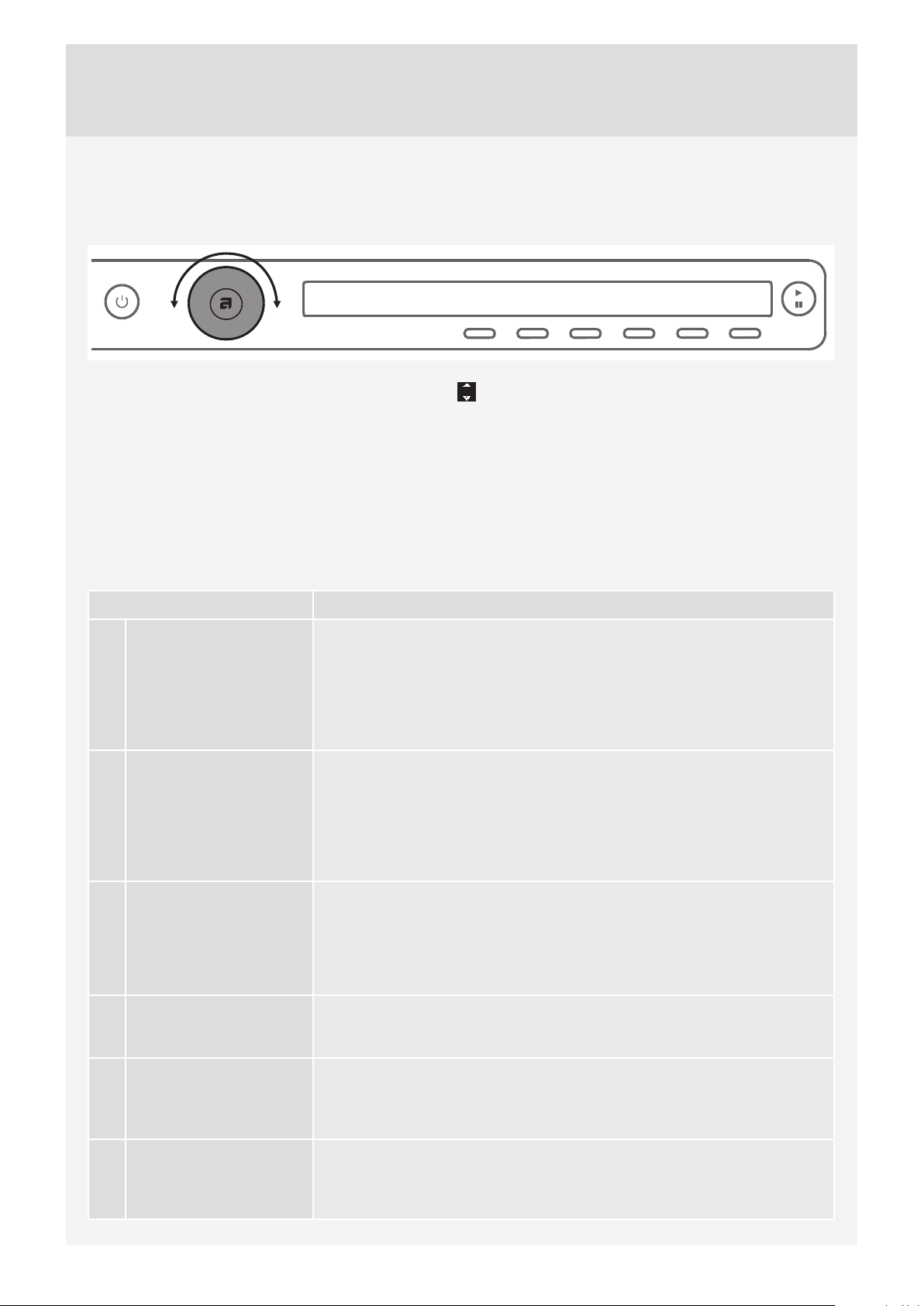
STEP 5: CHOOSE THE PROGRAM.
Choose the program by rotating the Program selector knob in either direction.
The Program selector knob can be used when arrows appear on the display.
Choose the program depending on the type of laundry and how heavily soiled it is (see chapter "TIPS
BEFORE WASHING").
Estimated program duration will appear on the display.
Extra program settings can also be selected for each program.
See STEP 6.
Choose between the following programs:
Program Description
1. EVERYDAY WASH Program for lightly to moderately dirty laundry. The temperature can be set
separately; therefore, observe the instructions indicated on the clothing.
Wash the clothes worn directly on the skin at 60 °C. Less heavily soiled
laundry will be thoroughly cleaned at 40 °C. Spinning speed can also be
freely selected. Default setting is maximum spinning speed.
Program duration and amount of water will be adjusted to the amount of
laundry.
2. STANDARD COTTON Program for normally or heavily soiled laundry, white or coloured. The
temperature can be set separately; therefore, observe the instructions
indicated on the clothing worn directly on the skin. Choose 40 °C if the
laundry is only lightly dirty. Spinning speed can be set to your preference.
Default setting is maximum spinning speed.
Program duration and amount of water will be adjusted to the amount of
laundry.
3. MIX/SYNTHETICS Program for delicate clothing made of synthetic and mixed fibres or
viscose, and for simple care of cotton. The highest available temperature
is 60 °C. Observe the instructions indicated on the clothing. Most synthetic
fabrics will be washed at 40 °C. Clothing worn directly on the skin should
be washed at 60 °C. Maximum spinning speed is 1200 rpm; it can be
decreased if necessary.
4. WOOL/HAND WASH Gentle program for washing wool, silk, and clothes that require manual
washing. Maximum temperature is 40 °C. This program has a short spinning
cycle. Top spinning speed available is 800 rpm.
5. DARK WASH This program is used for washing dark laundry using special-purpose
detergents for black laundry. We recommend turning dark garments inside
out. The program washes at low temperatures, with gentle tumbling and
1200 rpm.
6. TIME PROGRAM Use this program when you wish to wash the laundry for a specific amount
of time. Duration can be set from 20 minutes to 3 hours (in 15-minute steps).
In this program, select the corresponding washing time and temperature
according to the type of laundry being washed.
20
Page 21

Program Description
7. AUTO This program automatically adjusts the duration of the main wash and
number of rinses depending on the amount of laundry in the machine.
No extra program settings are possible.
8. QUICK Quick program for laundry that only needs refreshing. The program
operates at certain temperatures; therefore, observe the instructions
indicated on the clothing. A lower temperature setting will result in shorter
duration of the wash. Spinning speed can be set to your preference.
9. HEAVY Program for heavily soiled laundry. The temperature can be set separately;
therefore, observe the instructions indicated on the clothing. Maximum
available temperature is 90 °C. It is suitable for very heavily soiled laundry.
Spinning speed can be set to your preference.
Program duration and amount of water will be adjusted to the amount of
laundry.
10. EASY CARE Program for delicate clothing made of synthetic and mixed fibres, and
for simple care of cotton. It may also be used for pillows, quilted jackets
and similar items, as it uses a lot of water for the wash. Carefully read
the washing instructions. If the outer layer has a membrane, do not use a
conditioner. Washing temperature can be set up to 60 °C, and spinning
speed can be set up to 1200 rpm.
11. JEANS Program for washing jeans. It uses low temperature and 1200 rpm. Due to a
higher water level and an extra rinse, there will be no traces of detergent on
the jeans.
12. SHIRTS This program washes the collars and cuffs without wrinkling them. The
wash takes place at a low temperature, with a greater amount of water and
gentle tumbling.
13. HYGIENE This program is used to wash clothes that require special care, such as
baby clothes , undreware or clothes for people suffering from skin allergies.
We recommend turning the garments inside out as this will also thoroughly
wash out the skin residues or residues of skin treatment products.
The program is a combination of an extra long and high heating and extra
rinsing with strong and sharp movements that removes any detergent
residue.
14. BEDDING This program is used to wash bedding, pillows, and larger items. Weekly
wash of your bedding will remove skin residue and mites that cause
allergies. Observe the instructions for washing and maintenance. The wash
uses a large amount of water and extra rinse cycles.
15. ALLERGY PROGRAM
COTTON
16. ALLERGY PROGRAM
SYNTHETICS
This program is used to wash normal to heavily soiled clothes that require
special care, such as clothes for people with highly sensitive skin or skin
allergies. We recommend turning the garments inside out as this will also
thoroughly wash out the skin and other residues.
You can also select the option to wash at maximum temperature and
maximum spinning speed.
Set temperature will be maintained for a longer time period than on
conventional programs in combination with intense agitation and extra
rinses.
This program is used to wash clothes that require special care, such as
clothes for people with highly sensitive skin or skin allergies. The program
is also suitable for people sensitive to washing detergents. We recommend
turning the garments inside out as this will also thoroughly wash out the skin
and other residues.
Set temperature will be maintained for a longer time period than on
conventional programs in combination with intense agitation and extra
rinses.
21
Page 22

Program Description
17. QUICK PRO A quick program with high efficiency for smaller amounts of lightly soiled
laundry. The program washes with intensive tumbling and 1200 rpm.
(4 kg, 40 °C, 59 min)
18. RINSE This program includes 2 cold rinses and a short spinning cycle. The
program is suitable for laundry that only needs rinsing, and for cleaning
cloths or mops.
19. SPIN Use the program when you only wish to spin the laundry.
20. DRAIN If you only wish to pump out the water from the washing machine, choose
the Drain program.
21. DRUM CLEANING This program is used to clean the drum and to remove detergent residues
and bacteria. The drum has to be empty. Only add a small amount
of powder detergent. You may also add a small amount of vinegar
(approximately 2 dl) or sodium bicarbonate “baking soda” (1 tablespoon or
15 g). Run this program at least once a month.
22. SYSTEM SETTINGS Use the program selector knob to choose System Settings and confirm with
ENTER (button "2").
Use the Program selector knob to scroll through the settings.
The following options are available:
– Child Lock,
– Language (language selection),
– Temperature (temperature unit),
– Programs (set of programs),
– Display (display unit: contrast & logo),
– Sounds (acoustic signals),
– Reset.
See chapter "SYSTEM SETTINGS".
22
Page 23
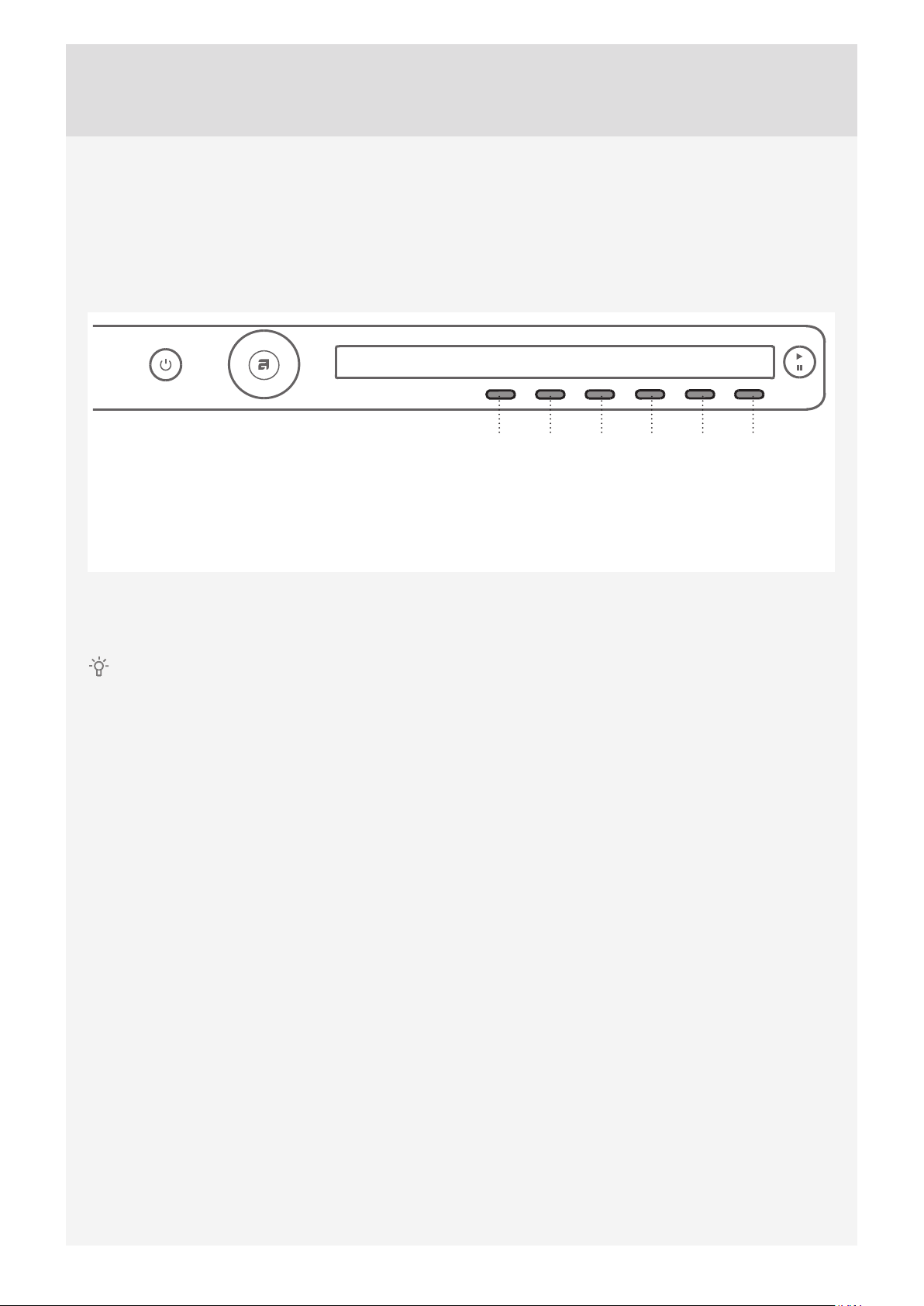
STEP 6: CHOOSING THE PROGRAM SETTINGS
Using the program settings, the washing programs can be further adjusted to your wishes.
Some program settings may not be available for your selected program.
Selected program settings will remain stored after the end of the washing cycle and may be changed
subsequently (except for delayed start which is not stored after the wash is complete).
123456
1. Washing mode
2. Temperature
3. Spin speed
Choose the program settings before pressing the START button.
Program settings cannot be changed during the progress of a program.
Press and hold the button under the program setting to display the information (INFO) about each
program setting.
Following are the program settings that may be selected using the buttons 1 to 6:
4. Super Rinse
5. Additional program option (choosing extra
functions)
6. Start delay
1. Washing mode
By pressing the button 1, you can choose between washing modes:
• Normal mode
(Basic setting)
• Green mode
(Wash that saves energy; longer washing time, lower water consumption).
• Speed Mode
(Time-saving wash; shorter washing times, higher water and energy consumption)
In the Cotton program, we recommend a half-load.
• Allergy Mode
(Wash with extra water, extra rinsing, extended washing time, higher water and energy consumption).
• Intense Mode
(Wash that improves cleaning performance, with extra water and extended washing time).
2. Temperature
By consecutively pressing the button 2, you can set the temperature for the selected program, choosing from
the following available values:
Cold wash and 20/30/40/50/60/70/80/90 °C.
The actual available temperature options will depend on the selected program.
23
Page 24
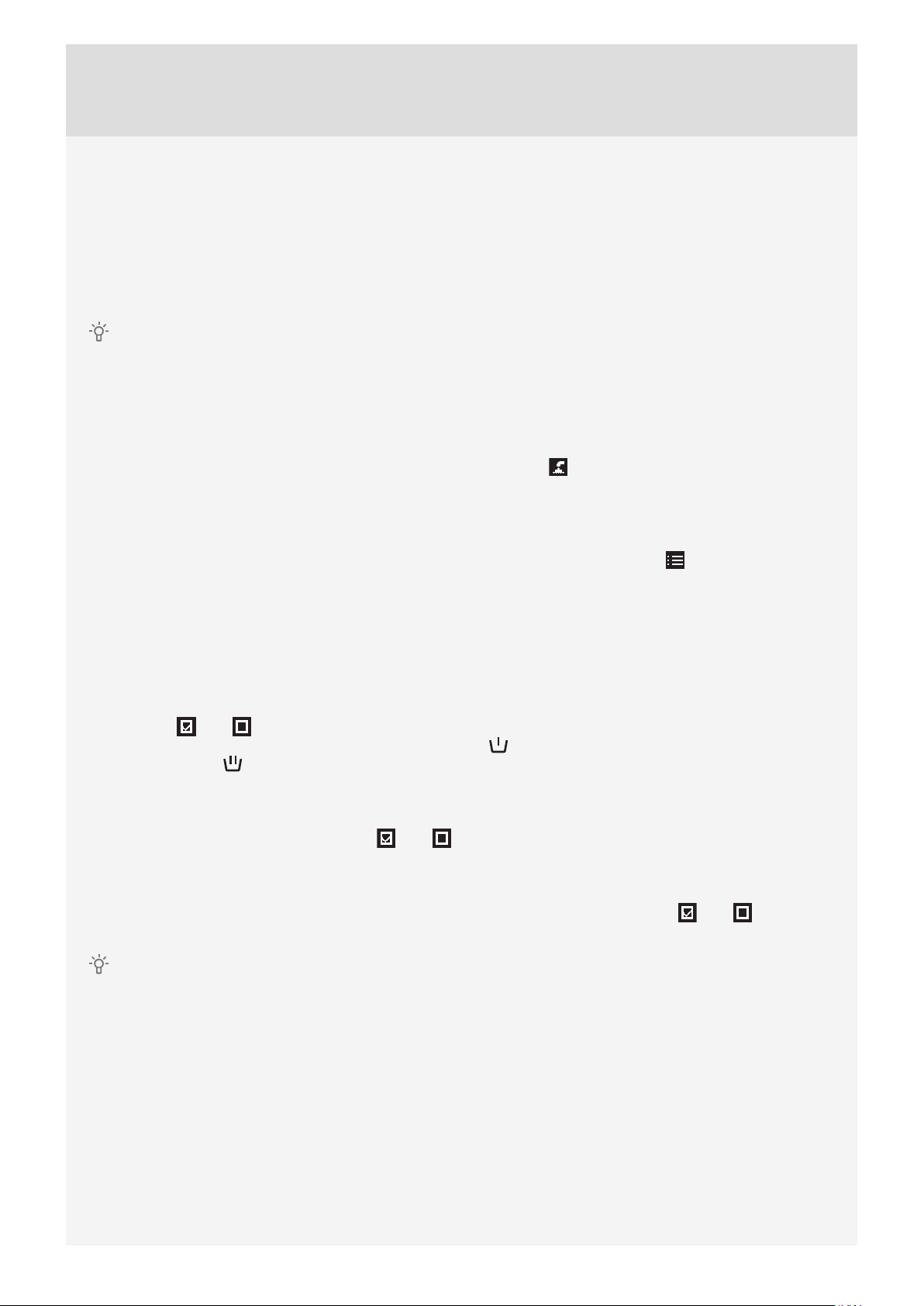
3. Spin speed
By consecutively pressing the button 3, you can set the spin speed, choosing from the following available
values:
NO d (no drain) /... / max. (rpm) (max rpm = depends on the model)
Default setting is 1400 rpm; it depends on the selected program (spin rate can be changed – reduced or
increased (only in some models)).
The actual available spin speed will depend on the selected washing program.
With the NO d (no drain) option, the program will not include a spin cycle, and the water from the last rinse
will remain in the washing machine. The laundry will stay in the water from the last rinse, which will prevent
creasing. If you have selected the No d (No Drain) option, you have to select the Drain or Spinning program
after the end of the washing program to pump the water out from the machine before you open the washing
machine door.
4. Super Rinse (extra rinses)
By pressing the button 4, you can switch the Super Rinse option on or off (OFF).
To increase the number of rinse cycles (+2), select the Super Rinse setting. This is recommended for persons
with highly sensitive skin and/or in areas with very soft water.
Availability of this setting will depend on the selected washing program.
5. Choosing extra functions (Additional program option/more options)
Press the button 5 to confi rm the extra functions. Then, use the Program selector knob to scroll the list of
functions or options. Confi rm the function you wish to select by pressing the button 1.
The following extra functions are available:
* Prewash
To use a prewash before the main wash, choose the Prewash option. Use of this function is recommended
for heavily soiled laundry or for laundry with stubborn surface stains. Confi rm the selection by pressing the
button 1 (On / Off ). To return to the main menu, press the button 6.
Add the prewash detergent into the prewash compartment and the main wash detergent into the main
wash compartment of the detergent compartment (see chapter "DETERGENT COMPARTMENT").
* High water level
For a larger amount of water after the wash and spinning cycle, select the High Water Level option. Confi rm
the selection by pressing the button 1 (On / Off ). To return to the main menu, press the button 6.
* Anti-crease
To prevent creasing the wash, choose the Anti-Crease option (gently tumbling). This function is
recommended for delicate laundry. Confi rm the selection by pressing the button 1 (On
to the main menu, press the button 6.
Some functions may not be available on all programs.
/ Off ). To return
24
Page 25
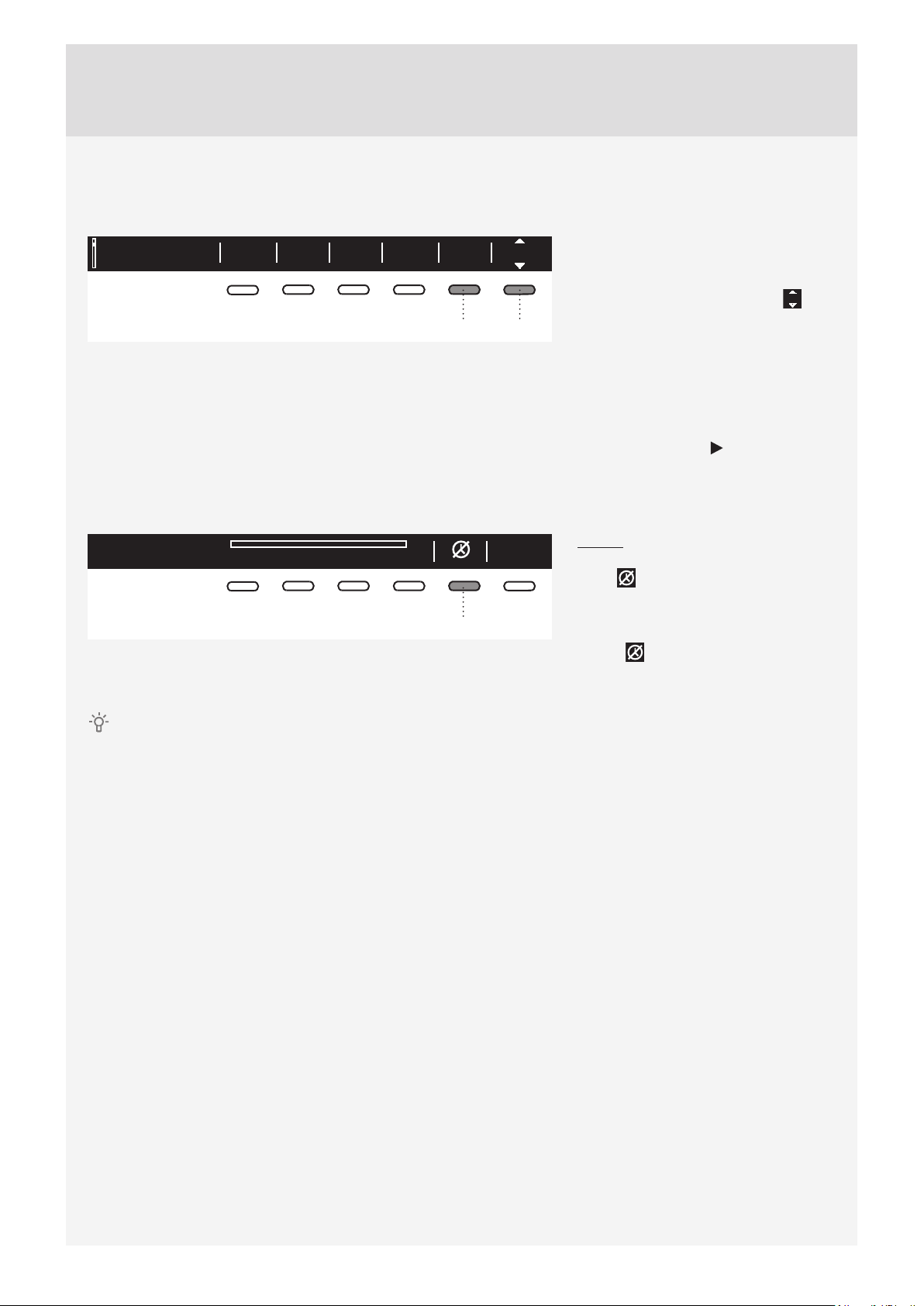
6. Start delay
Press the button 6 to choose the delayed start when you wish the washing program to start after a certain
period of time (30´ to 24 hours after you press the Start button).
Everyday wash OkOff40°C 1400Allergy
2:11
The estimated time remaining until the
end of the washing program will be
indicated above the button 6.
Press the button 6 for the arrows to
appear.
65
Use the Program selector knob or the
button 6 to set the delay from 30´ to 6
hours in 30-minute steps, and then from
6 hours to 24 hours in 1-hour steps.
Press the button 5 (OK) to confi rm your
selection.
Press the Start button to start.
When the countdown reaches zero,
the selected washing program will start
automatically.
To cancel the delay and start the
washing process immediately, press the
Delayed start paused
03:50
button 5 .
When Start delay time is once set, it
5
is not possible to change it; the only
possibility is to »Skip it « with pressing
on button and immediately continue
with chosen program.
If you have set the delayed start function and you are using liquid detergent, we do not recommend
choosing a programme with a pre-wash cycle.
25
Page 26
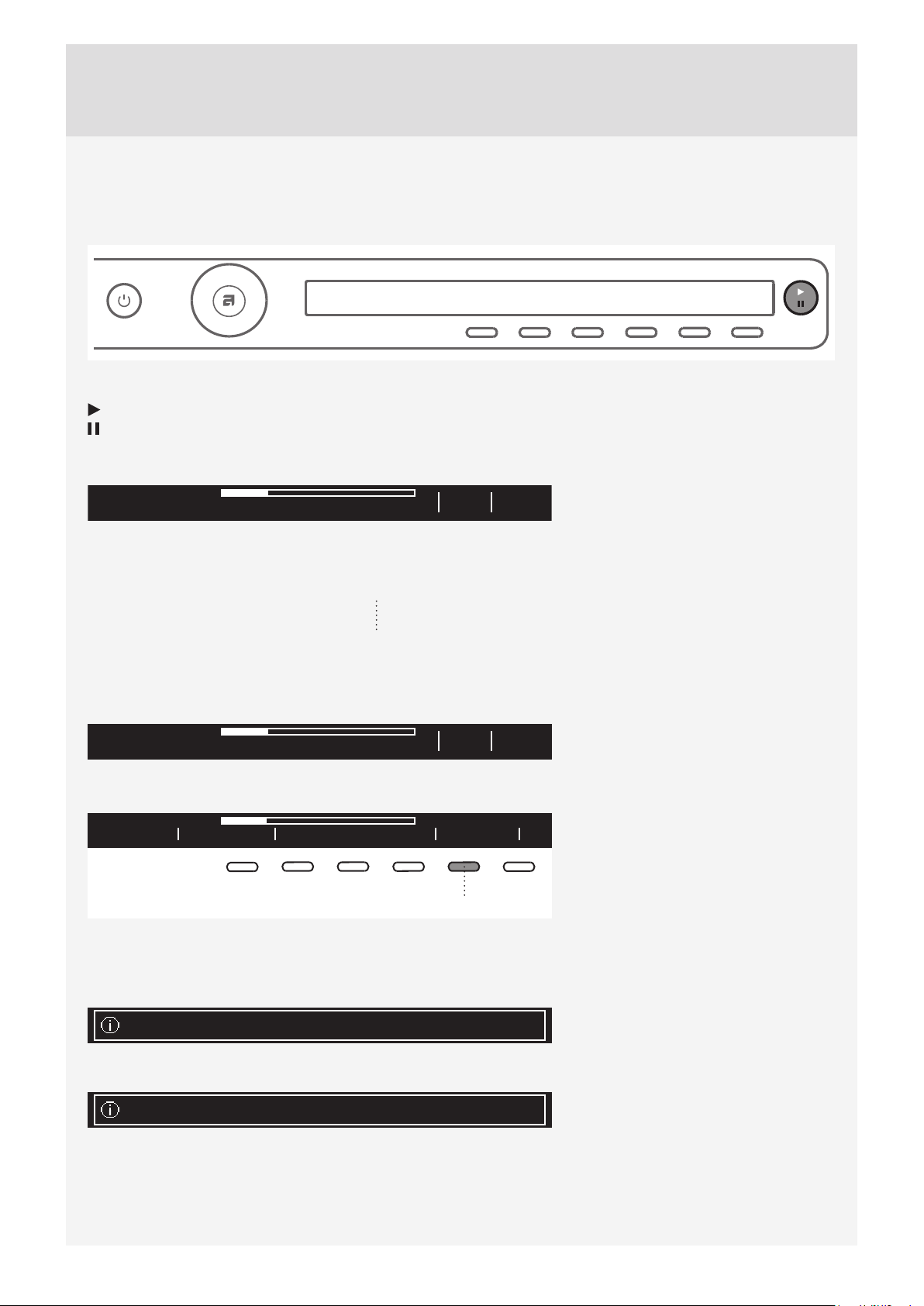
STEP 7: START THE WASH
Close the washing machine door and press the Start/Pause button.
Start (short press of the button – start/resume)
Pause (short press of the button – pause)
Stop (press and hold for 3 seconds – stop or cancel)
Starting
Info
2:20
Remaining time
Depending on the selected program, anticipated washing time will be displayed in hours and minutes.
Actual washing time will depend on the selected program, load, type of laundry, spin speed etc.
Actual washing time may be longer or shorter than initially displayed.
Remaining time will be updated during the program duration, depending on the actual amount of laundry
and amount of water pumped into the machine. The last remaining time update takes place before the fi nal
spinning cycle.
In case of uneven distribution of laundry, the time on the display will fl ash and it will not count down.
Once the laundry is evenly redistributed, the washing time will continue and it will stop fl ashing.
Program running
Info
2:20
Adding or removing laundry after the start of the program
PausedStop program Add clothes
5
The door may be opened when the water is pumped from the machine (but not completely pumped out).
Then, add or remove the laundry. Close the door and continue the program. Press the Start/Pause button.
The program will resume from the point at which it was interrupted.
Door can not be opened due to high temp. - Please restart
To add or remove laundry during the
progress of a washing program, use
the Start/Pause button to pause the
program. Then, press the button 5 to
select "Add clothes".
If the door cannot be opened, it is
possible that the temperature in the
machine is too high, and you won't be
able to add the laundry.
26
Too late to add clothes - Please restart.
Also, if the door cannot be opened, it
is possible that the program has been
running for too long and any laundry
added at that point would not be
effi ciently washed.
Page 27
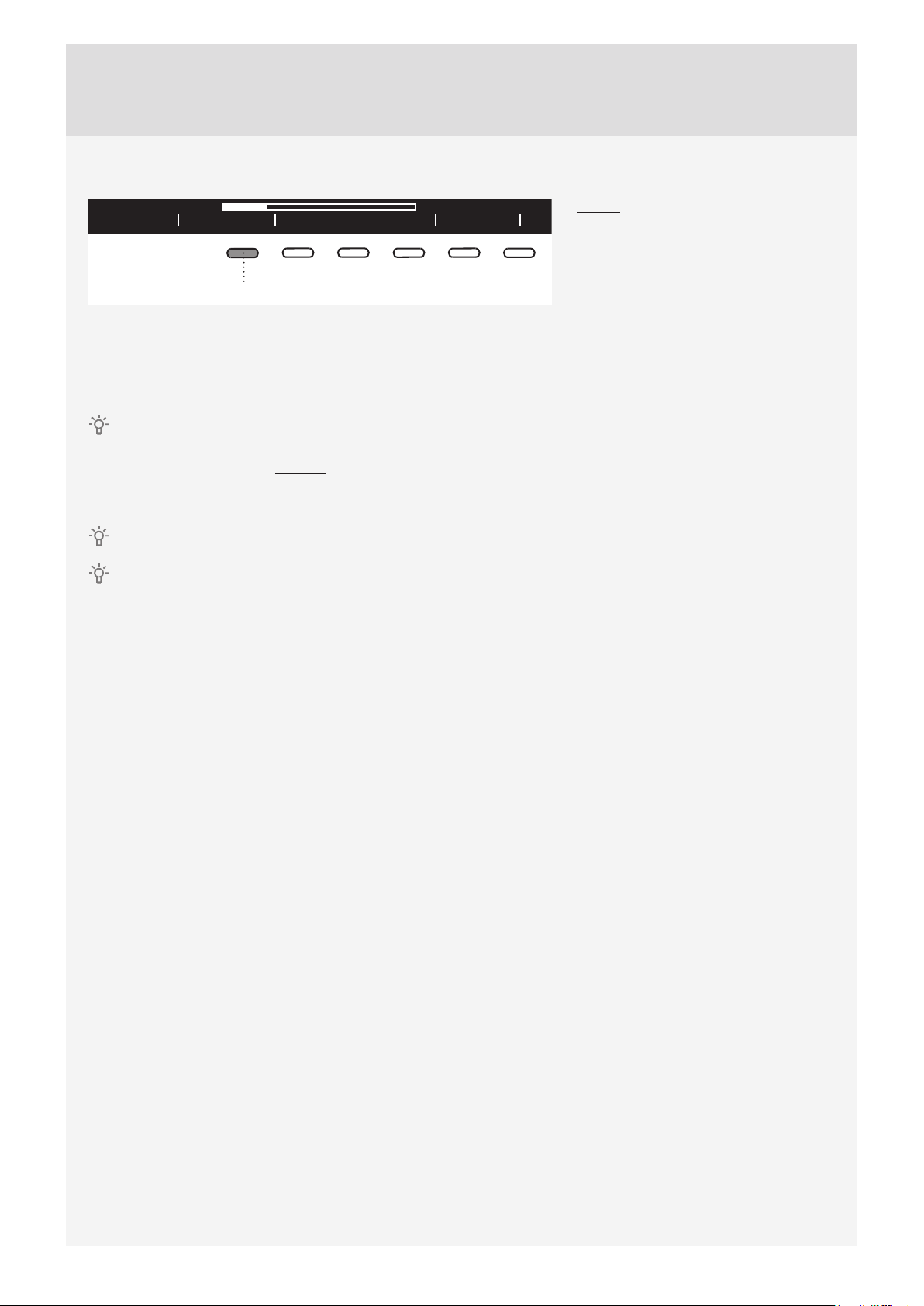
Pausing, stopping or changing the program
PausedStop program Add clothes
1
To stop the washing program, press the Start/Pause button and hold it for 3 seconds.
Use the button 1 to choose "Stop program". The program is canceled and the water is pumped out of the
machine if necessary. Only then will you be able to open the washing machine door. Use the Program
selector knob to select a new program. If necessary, add detergent, and then press the Start/Pause button.
If the temperature in the drum is very high, then cooling procedure starts before program is canceled.
A washing program can be paused by pressing the ON/OFF button.
The washing machine will switch off .
After the washing machine is switched on, press the Start button to resume the program.
Do not open the detergent compartment while the appliance is operating.
In some cases the door may be locked although no program is in progress (e.g. in case of an error). To
unlock the door, press the Start/Pause button and hold it for a while.
To pause the program, shortly press the
Start/Pause button.
To resume a program, press the Start/
Pause button again.
27
Page 28
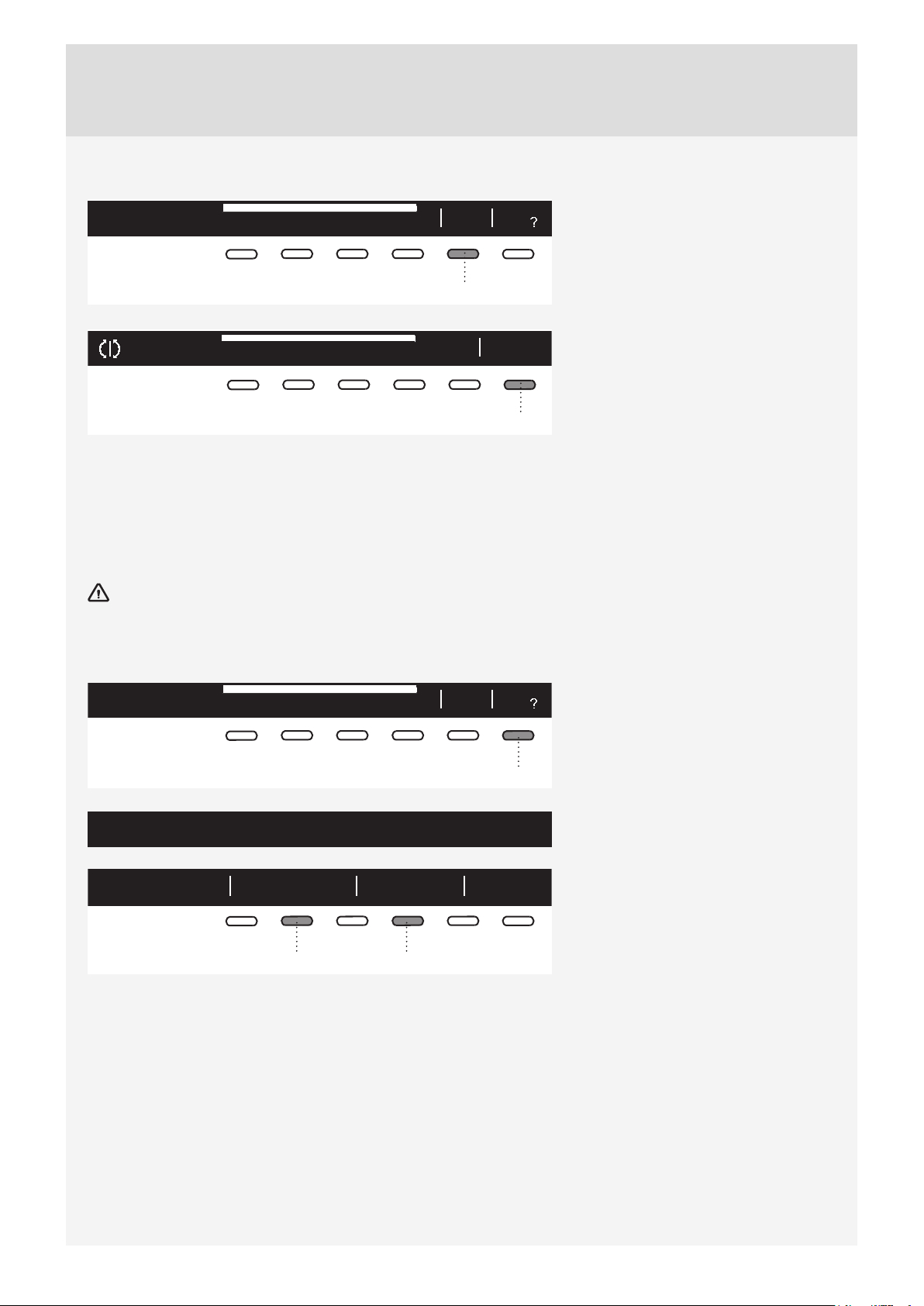
STEP 8: END OF PROGRAM
Cycle completed succsessfully
Start
new
5
Add
fav
After the end of the washing program,
the display will indicate that the program
has been successfully completed
("Cycle completed successfully").
Anti
creasing
Cycle completed succsessfully
Stop anti
creasing
If you have selected the Anti-Crease
extra function, gentle tumbling will
continue after the end of the washing
program in order to prevent creasing.
6
Open the door towards you and remove the laundry from the washing machine.
Make sure the washing machine drum is empty.
If you do not take any action within 5 minutes after the end of the program, the display will switch off to
standby mode in order to save power.
The display will light up again if you press the ON/OFF button.
After the washing cycle, close the water intake and pull out the washing machine plug from the power
socket.
Favourite programs/Add to fav?)
Cycle completed succsessfully
Start
new
Add
fav
After the end of the program, you can
use the button 6 to store the program,
including all extra settings, as your
favourite program.
6
Create your own favourite programs.
Confirm? BackFav list position 1.Favourite
Up to 4 favourite programs can be
stored.
Choose the favourite program position
(number) using the button 2; the most
recently used program, including all
settings, will be off ered.
42
To store a program, confi rm with the
button 4.
If you do not wish to store the program after the wash, rotate the Program selector knob and you will return to
the program selection; or, simply open the washing machine door.
28
Page 29
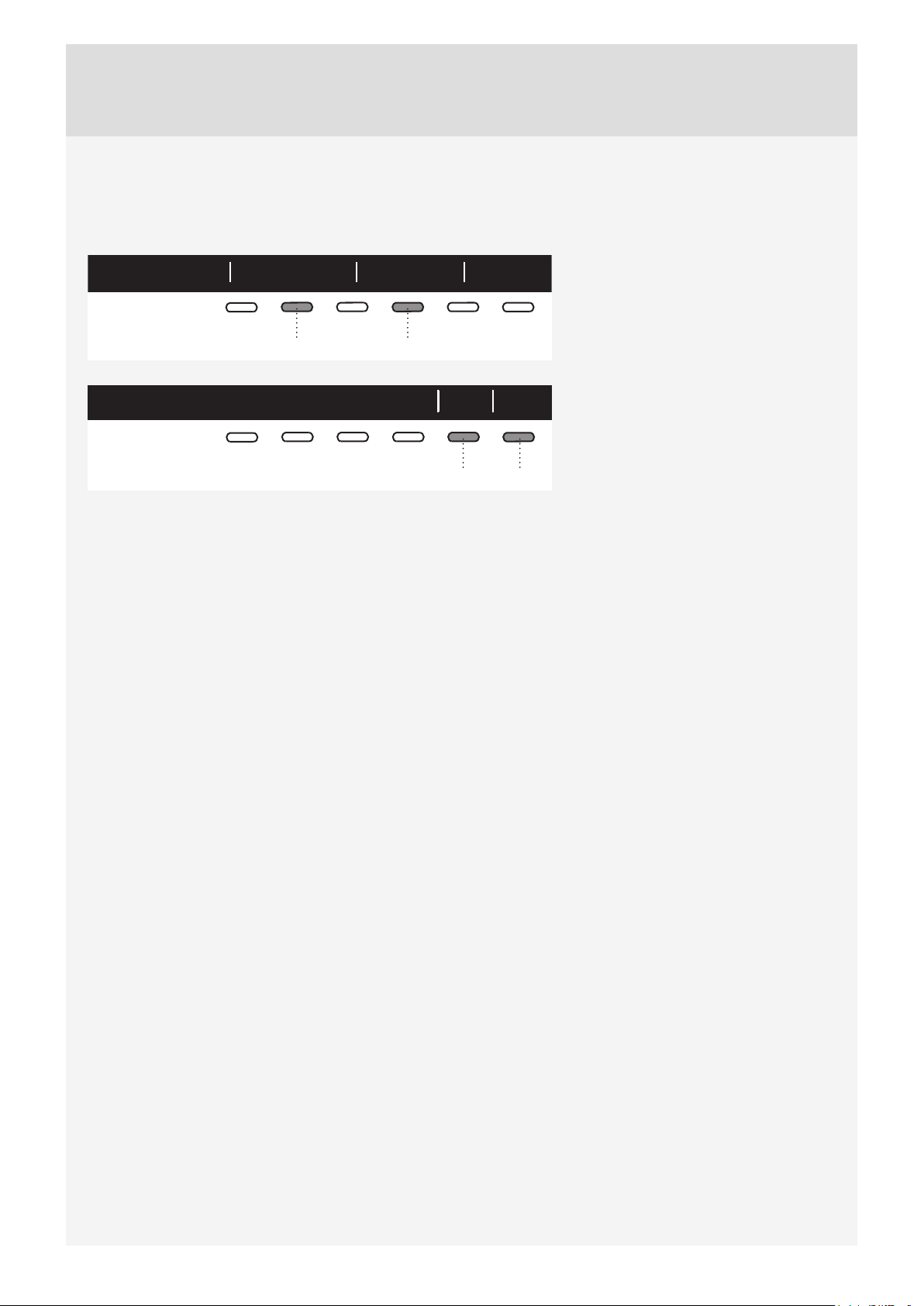
Changing a favourite program
If you wish to store a program after the end of the washing cycle, but there is no more room for another
favourite program (only 4 favourite program slots are available), then one of the existing stored favourite
programs can be substituted with a new one.
1. Favourite Confirm? BackFav list position
Use the button 2 to scroll through the
list of Favourite programs.
Press the button 4 to confi rm the
program to be replaced.
42
Confi rm the replacement by pressing
NoYes1. Fav Auto will be replaced
the button 5.
65
The list of favourite programs will appear when you switch on the washing machine.
If you do not take any action for 5 minutes, the display will switch to standby mode.
To activate the display, press the ON/OFF button or open the washing machine door.
29
Page 30
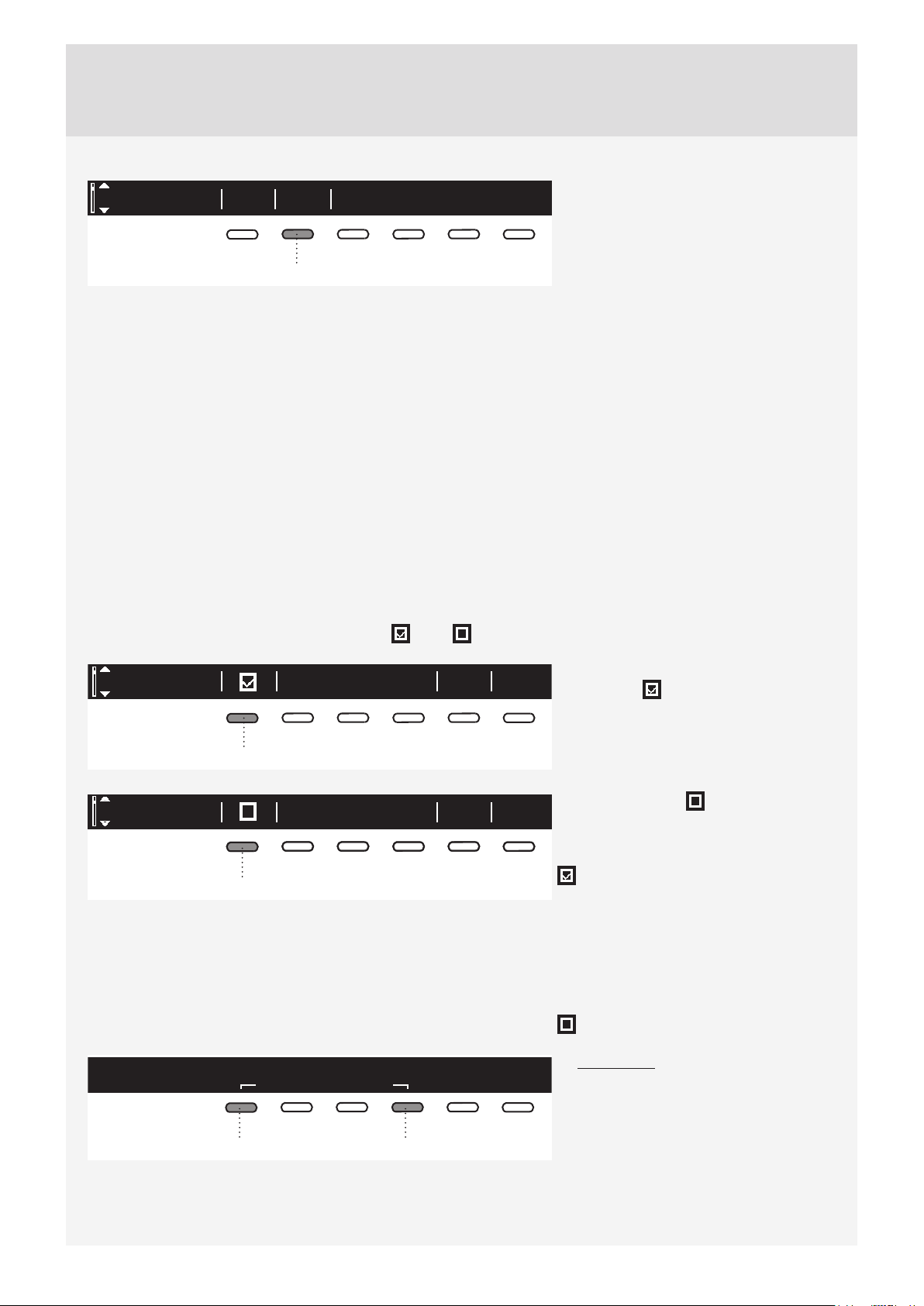
SYSTEM SETTINGS
System settings
Enter
In the main menu, use the Program
selector knob to select System Settings.
Confi rm the selection by pressing the
button 2.
2
Then, use the Program selector knob to scroll the list of the following settings that you can adjust:
• Child Lock,
• Language (language selection),
• Temperature (temperature unit),
• Programs (set of programs),
• Display (display unit: contrast & logo),
• Sounds (acoustic signals),
• Reset.
Use the Program selector knob to scroll to the button 6 (BACK) to return to System Settings or to the Main
menu.
Press the INFO button to display brief information about the setting.
CHILD LOCK
Choose between switching the child lock on or off .
When the child lock is activated, no other function can be selected.
Child lock BackInfo
Child lock can be activated by pressing
the button 1 . This will prevent
children from switching on the machine.
1
Child lock BackInfo
1
Child lock
locks user interface to any interactions.
Hold for to deactivate.
3 sec
14
Press the button 1 to deactivate the
child lock.
When the child lock is activated, no
other function can be selected.
= Child lock can be activated
manually, or it is activated automatically.
Manually: press the buttons 1 and 4 and
hold them for 3 seconds.
Automatically: activated after 3 minutes.
The child lock may only be deactivated
manually by pressing the buttons 1 and
4 and holding them for 3 seconds.
= The child lock cannot be activated.
To temporarily (for 3 minutes) switch off
the child lock, press the 1 and 4 buttons
simultaneously and keep them pressed
for 3 seconds.
30
Page 31
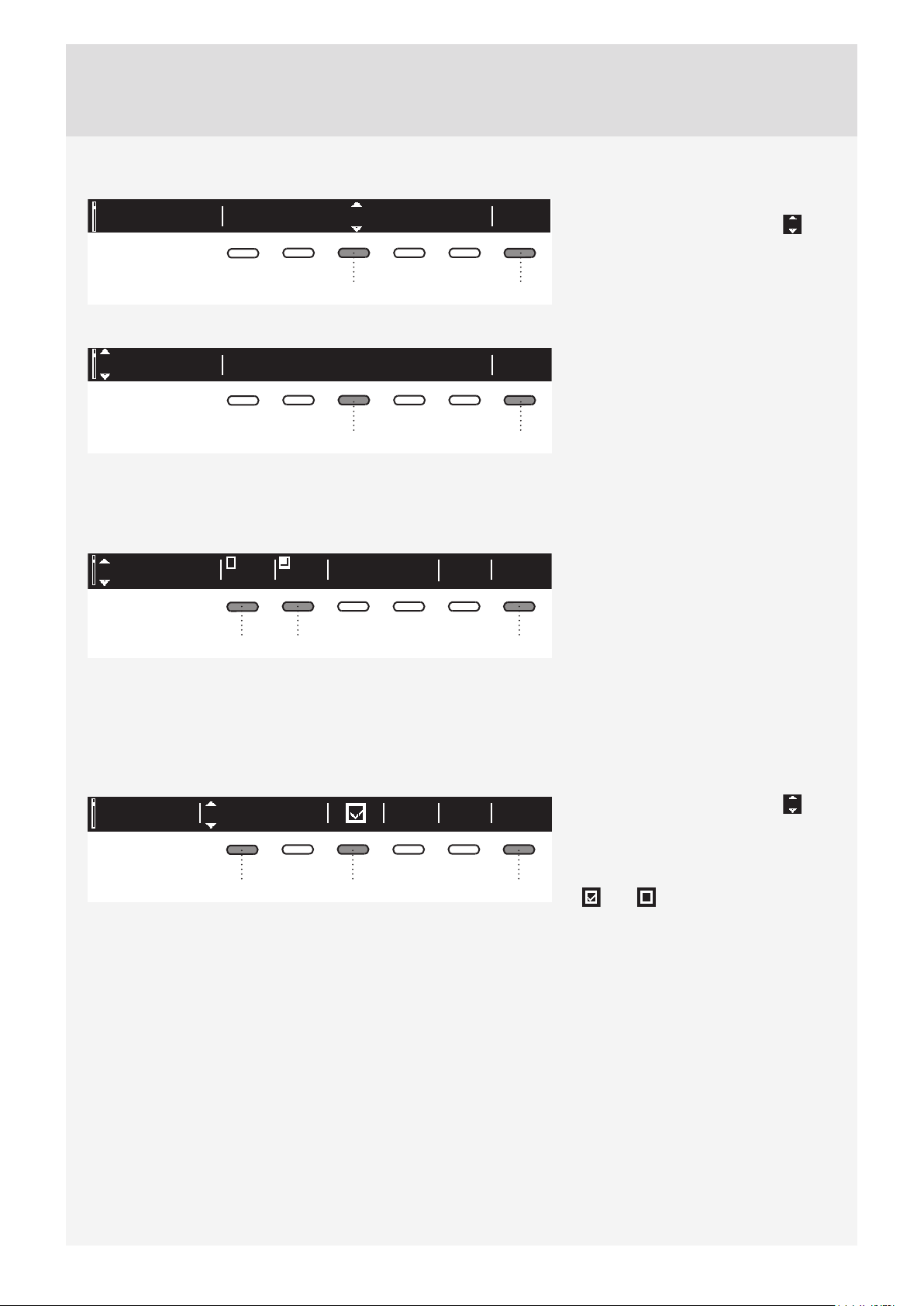
LANGUAGE
Language Ok
EU English
You can choose between 24 languages.
Press the button 3 for the arrows
to appear. Use the Program selector
knob or the button 3 to scroll the list of
languages.
63
Use the button 6 to confi rm the selected
language.
Language Back
EU English
Use the button 6 to return to System
Settings.
63
TEMPERATURE (TEMPERATURE UNIT)
Choose either °C or °F.
C°
°Temperature
F
Info
Back
Back
Use button 1 to select °C;
Use button 2 to select °F.
Use the button 6 to return to System
162
Settings.
PROGRAMS
The main menu includes the entire set of programs that you can choose using the Program selector knob.
This setting allows only displaying the selected program in the main menu.
Sports wearPrograms BackInfo
13
Press the button 1 for the arrows to
appear. Use the Program selector knob
or the button 1 to select a program.
Use the button 3 to set whether this
program is to be displayed or not:
6
On / Off .
Use the button 6 to return to System
Settings.
31
Page 32
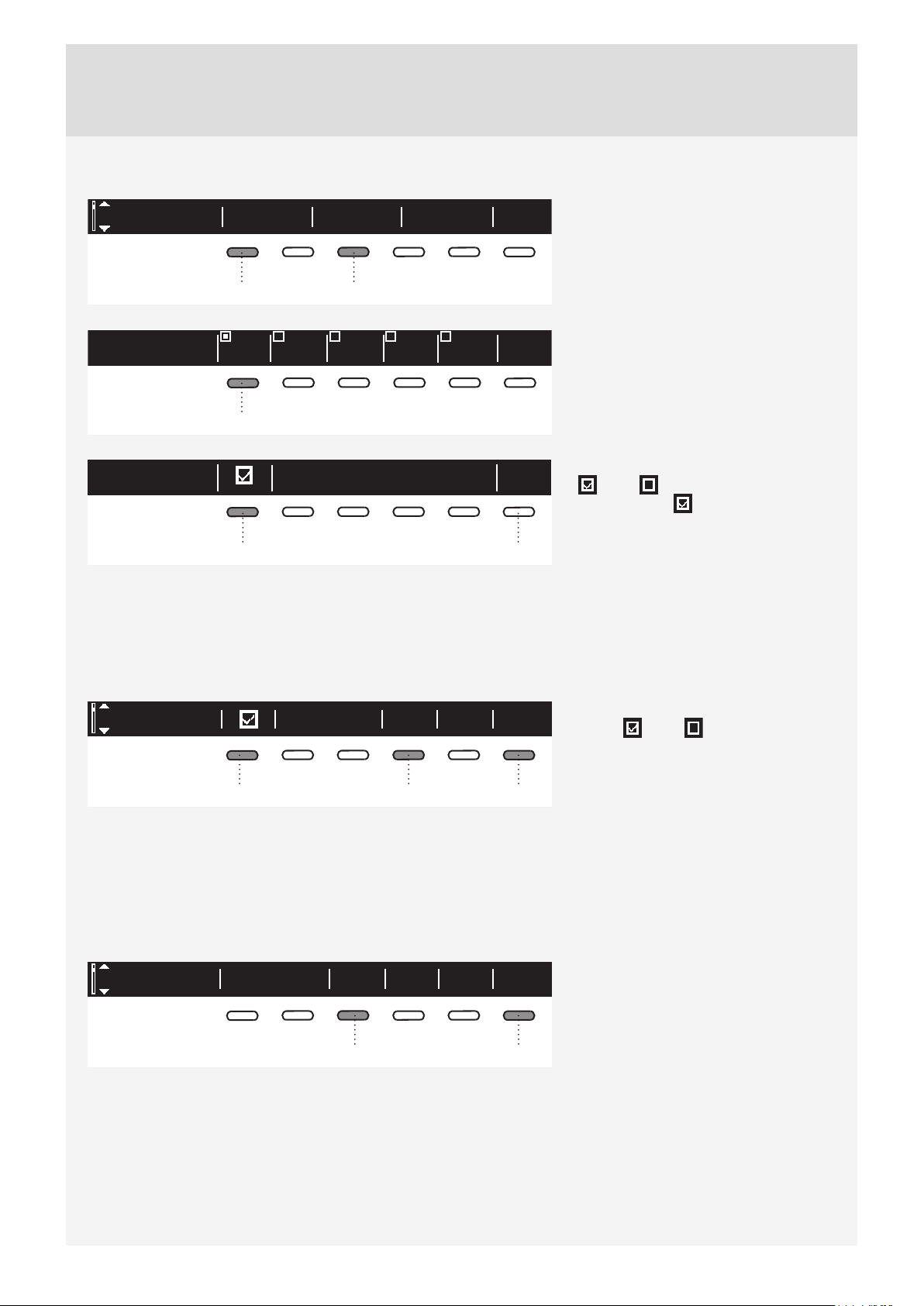
DISPLAY UNIT
Display
Contrast Logotype
13
Back
Set the contrast and logo display.
1 2
3
4
1
1 6
SOUNDS
Choose whether audible signals are switched on or off .
InfoMidSound Back
1 64
5
BackContrast
BackLogotype
Use the buttons 1 to 5 to set the
contrast.
Use the button 1 to toggle logo display
on or off .
If you choose on , the logo will be
displayed on the display unit when the
washing machine is turned on.
Use the button 6 to return to System
Settings.
Use the button 1 to switch acoustic
signal on or off .
Use the button 4 to choose between the
following settings: low, mid, and high. As
you scroll through the options, a sample
audible signal will be sounded.
Use the button 6 to return to System
Settings.
RESET
This means that all settings will return to the default settings and your own settings will be deleted.
Confi rm the selection by pressing the
button 3 (YES).
Use the button 6 to return to System
Settings.
63
32
Reset default InfoYes
Back
Page 33
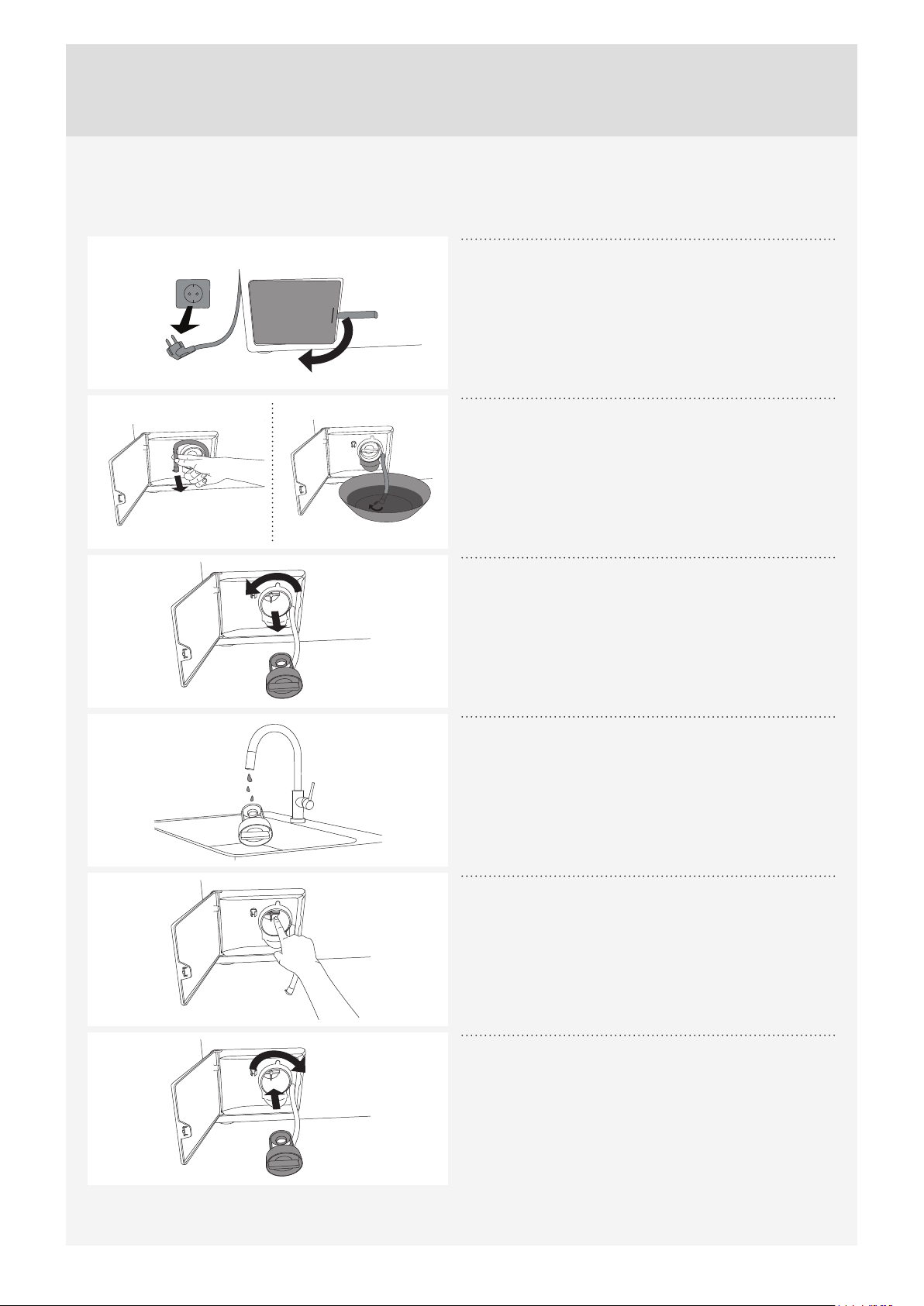
CLEANING AND MAINTENANCE
CLEANING THE FILTER
The washing machine has a fi lter that will retain smaller objects such as coins, buttons, hair etc.
Before cleaning, drain the water from the washing
1
machine using the Drain program, and disconnect
the washing machine from the power mains.
Open the pump fi lter cover using appropriate tools
(emergency door opening tool is located on the back
side of the dispenser).
Release the water drain hose from the holder.
2
Before cleaning the fi lter, drain the water from the
washing machine by placing the end of the water drain
hose over a large shallow container and opening the
cap on the water drain hose.
Gradually rotate the fi lter in the counter-clockwise
3
direction and pull it out.
Clean the fi lter thoroughly under running water.
4
Remove all objects and impurities from the fi lter
5
housing and the impeller.
Replace the fi lter as shown in the fi gure and
6
fasten it by rotating in the clockwise direction. For
a good seal, the fi lter seal surface should be clean.
Also re-install the drain hose.
33
Page 34
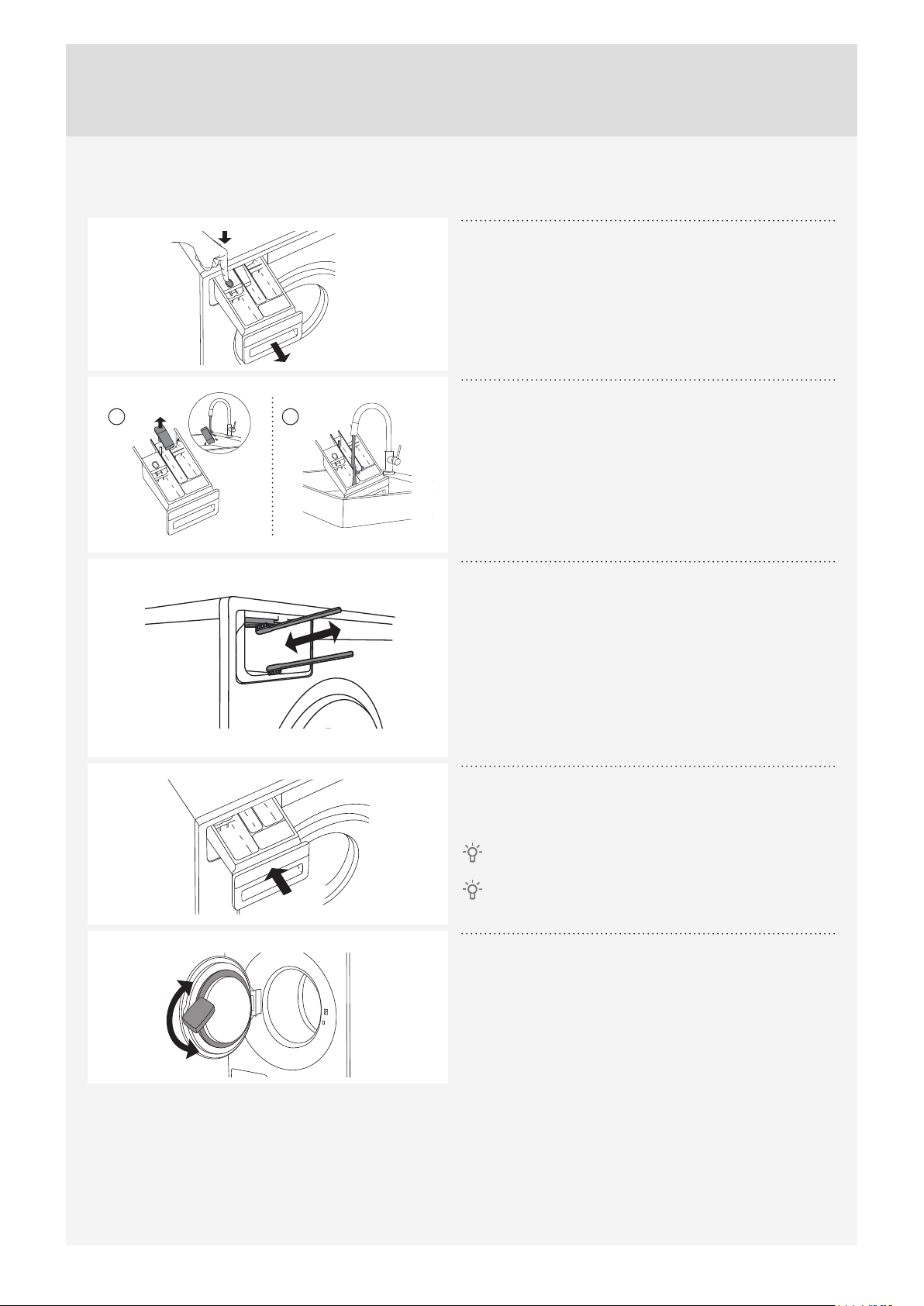
CLEANING THE DETERGENT COMPARTMENT AND DOOR RUBBER GASKET
Press the tab to completely remove the detergent
1
compartment from its housing.
Rinse and thoroughly clean the tray. You may also
A B
2
remove the cap from the plug in the conditioner
compartment (A). Clean any residue from the cap and
tube.
Clean the detergent compartment (B) interior.
Replace the cap on the plug.
Use a brush to clean the nozzles on the upper
3
side of the detergent compartment housing.
After a washing program, nozzles that clean the
interior of the dispenser are automatically switched on
(only available in some models).
Use a brush to clean the lower part of the detergent
compartment housing.
Replace the detergent compartment into its
4
housing.
Close the detergent compartment!
Do not wash the detergent compartment in the
dishwasher!
After every wash, wipe the rubber door seal to
5
extend its useful life.
34
Page 35
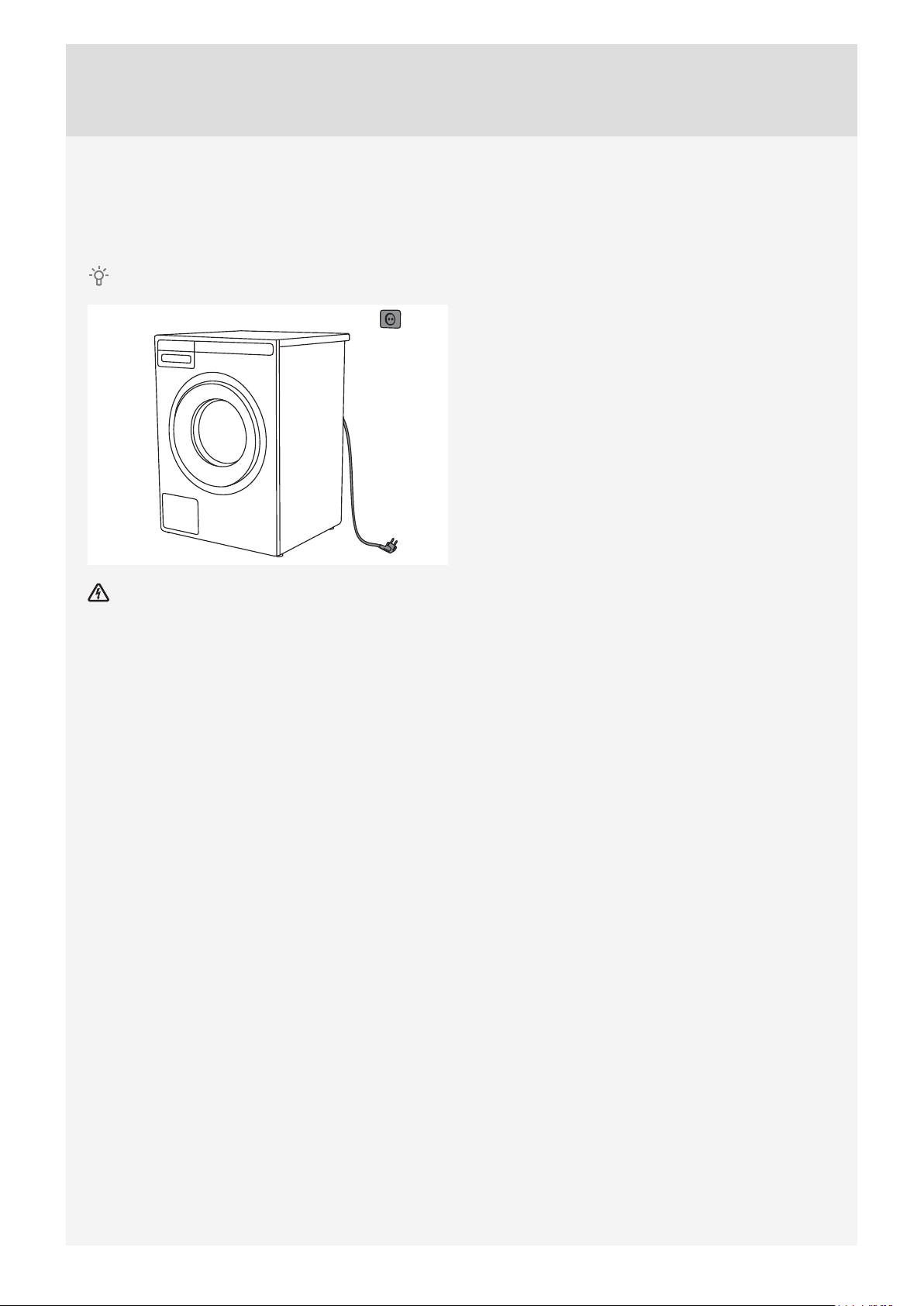
CLEANING THE APPLIANCE EXTERIOR
Clean the appliance exterior and the display unit using a soft damp cotton cloth and water.
Do not use solvents or abrasive cleaners that could damage the appliance (please observe the
recommendations and warnings provided by the manufacturers of the cleaning agents).
Do not clean the washing machine with a jet of water!
Always disconnect the washing machine from the power mains before cleaning.
CLEANING THE WASHING MACHINE INTERIOR AGAINST ODOURS
Modern detergents often allow washing clothes at low temperatures. This means that residue may
accumulate in the washing machine, which in turn could cause odours.
To avoid such odorous, we recommend running the self-cleaning program (Drum-cleaning) once per month.
Use a small amount of powder detergent and do not put any laundry in the drum.
35
Page 36
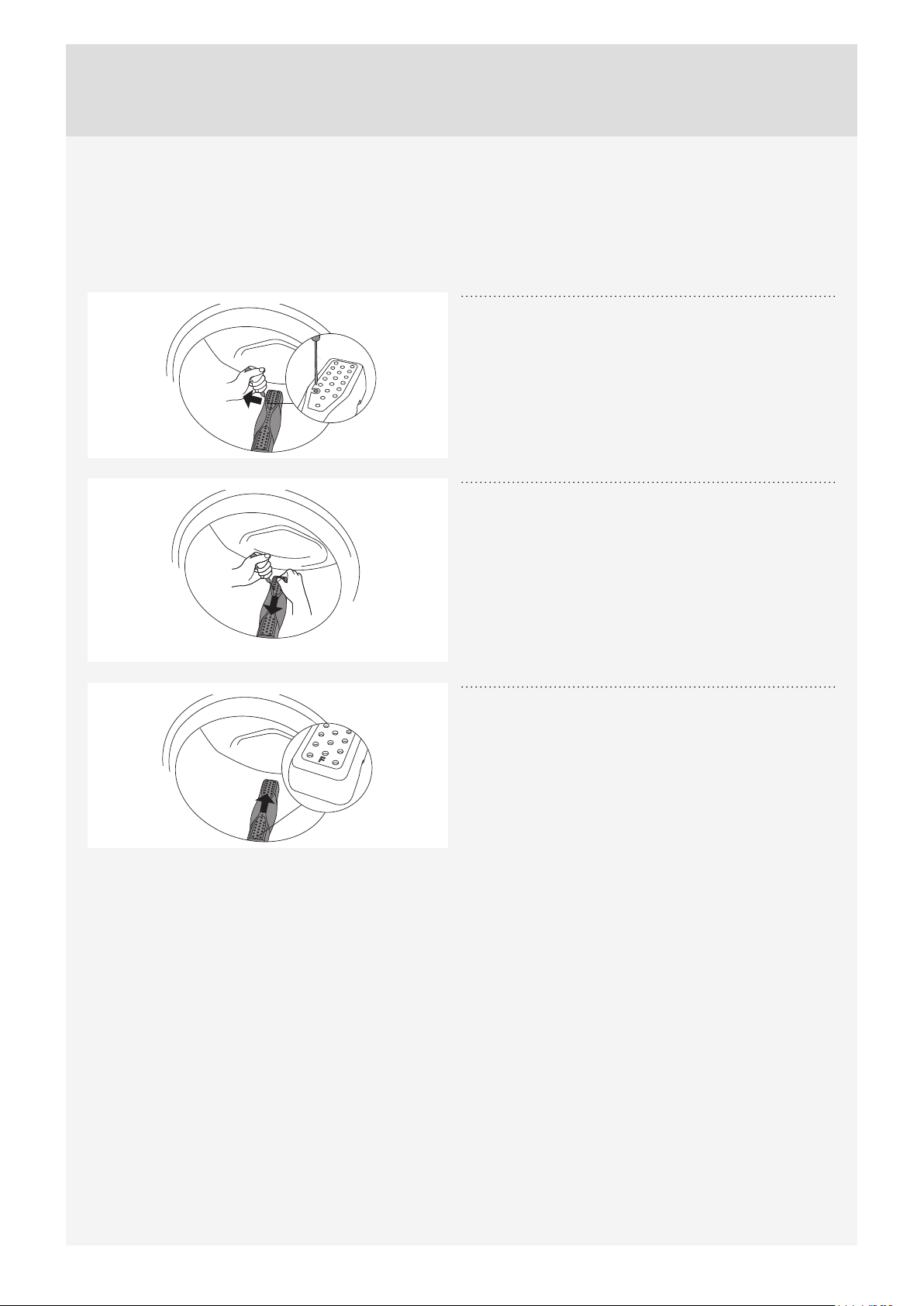
CLEANING THE RINSING HOLES (UNDER THE AGITATOR IN THE DRUM)
If you believe that objects like nails or paper clips fell into the washing machine drum, check the area
underneath the agitator. Such objects may rust (corrode) and cause stains on your clothes. Nails and other
sharp objects can also cause holes in the fabric.
Proceed as follows:
Insert a screwdriver or a similar tool into the slot in
1
the rib and carefully push it to the left.
Hold the rib with the other hand and pull it towards
you.
2
Lift the drum rib.
3
Remove any objects.
4
Place the rib into the installation slot indicated with
5
"F" towards you. Make sure all ribs are fi rmly in
place in their respective slots in the drum. Push the rib
inwards (as indicated by the arrow in the fi gure) until it
snaps.
If you are using hard water
If you are washing with hard water (causing limescale build-up), a greyish-white fi lm may appear on the
washing machine drum. To remove this fi lm, add vinegar (approximately 2 dl or sodium bicarbonate “baking
soda” (1 tablespoon or 15 g)) into the washing machine drum and select any program with a temperature of
90 °C, or the Drum Cleaning program. See STEP 5: Choose the program.
Repeat the process as necessary.
36
Page 37
ERRORS – WHAT TO DO?
Disturbances from the environment (e.g. the power grid) may result in various error reports (see
Troubleshooting table). In such case:
• Switch off the appliance, wait for 1 minute, switch the appliance back on, and repeat the washing program.
• If the error persists, call an authorized service unit.
• You will be able to solve most of the problems in appliance operation by yourself (see Troubleshooting
table below).
• Repairs may only be carried out by an adequately trained person.
• Repair or any warranty claim resulting from incorrect connection or use of the washing machine shall not be
covered by the warranty. In such cases, the costs of repair shall be charged to the user.
The warranty does not cover the errors or failures resulting from disturbances from the environment
(lightning strike, power grid failures, natural disasters etc.).
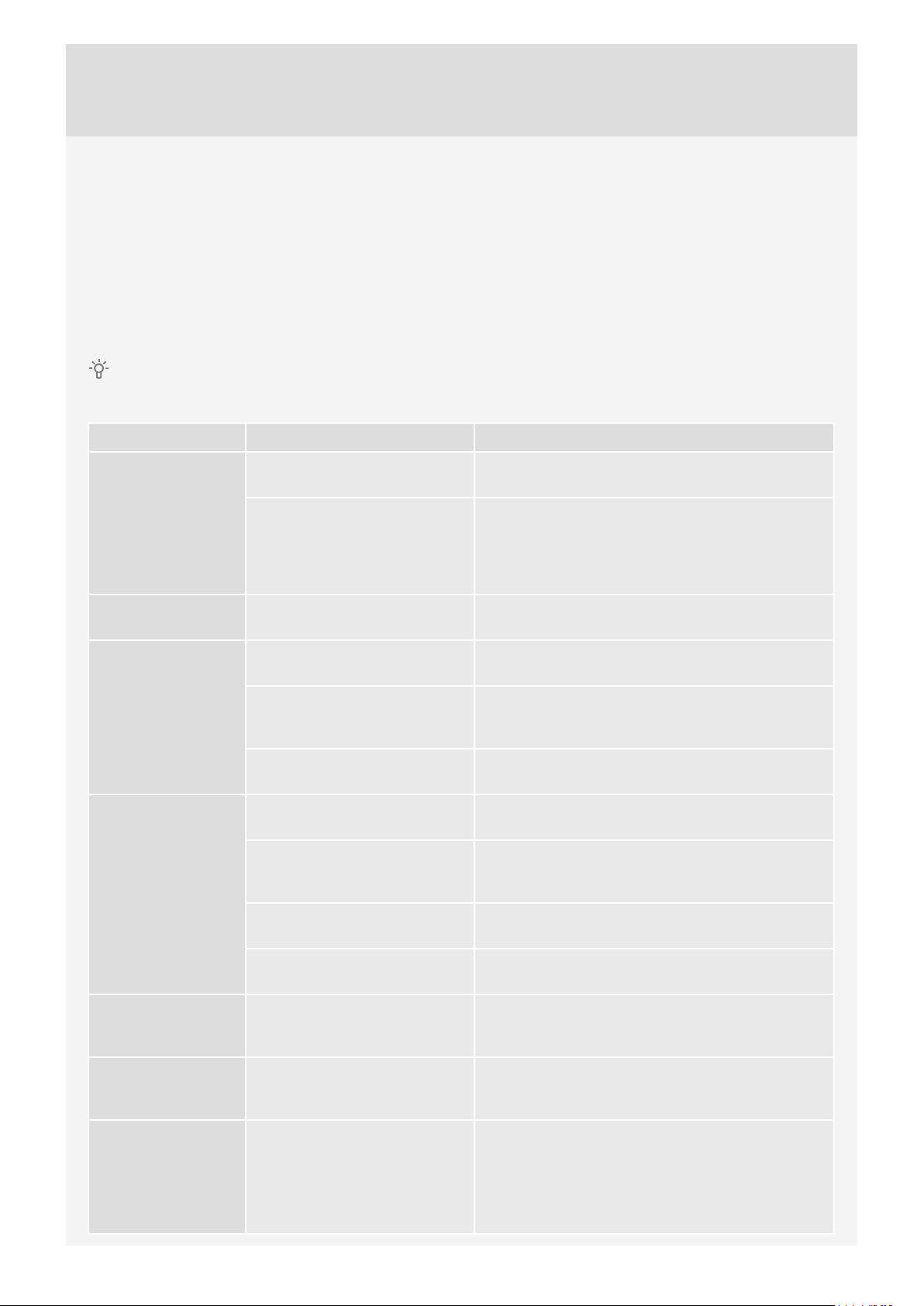
Problem/error Cause What to do?
Washing machine
door does not open.
The machine will
not start.
Washing program is
not in progress.
Washing time
is longer than
anticipated (the
time is regularly
updated on the
display unit).
• Water level too high. • Drain the water using the Drain or Spinning
program. See "Step 5: Choose the program".
• Water temperature in the
washing machine is too high.
• Power supply failure. • Press the Start/Pause button to resume the
• Washing machine door is not
properly closed.
• There is no voltage in the
power outlet.
• Delayed start function has
been selected.
• Low inlet water temperature. • Program duration can be up to 60% longer than
• UKS* (*unbalance system)
stability system engaged due
to unevenly distributed laundry.
• Low mains voltage. • Washing machine needs more time because the
• Wait for the water temperature to drop and pump
out the water. If you still cannot open the door, use
the emergency door opening tool (see chapter
"ERRORS – WHAT TO DO? / Manual opening of
washing machine door").
program.
• Firmly press on the washing machine door until
you hear two clicks when it is closed.
• Check if the plug is connected to the power outlet
and whether there is electric current (or voltage) in
the outlet.
• To cancel the delayed start function, press the
Start/Pause button and hold it for three seconds.
initially anticipated in the normal progress.
• Program time is extended due to the need to
redistribute the laundry in the drum.
power mains voltage is too low.
Display does not
light up.
The wording on the
display unit is not
in your language.
Wet laundry
("unbalance" will
appear on display)
• Power supply failure. • Program time is extended by the duration of the
power supply failure.
• There is no voltage in the
appliance.
• You have not selected your
preferred language yet.
• A small amount of laundry will
often be unevenly distributed.
• Check if the plug is connected to the power outlet
and whether there is electric current (or voltage) in
the outlet.
• Choose the preferred language (see "STEP 5 /
System Settings / Choosing the language").
• Loosen and redistribute the laundry and select the
Drain or Spinning program.
• Increase the amount of laundry in the washing
machine and restart the program (see "STEP 7:
Start the wash / Adding or removing laundry after
the start of the program").
37
Page 38
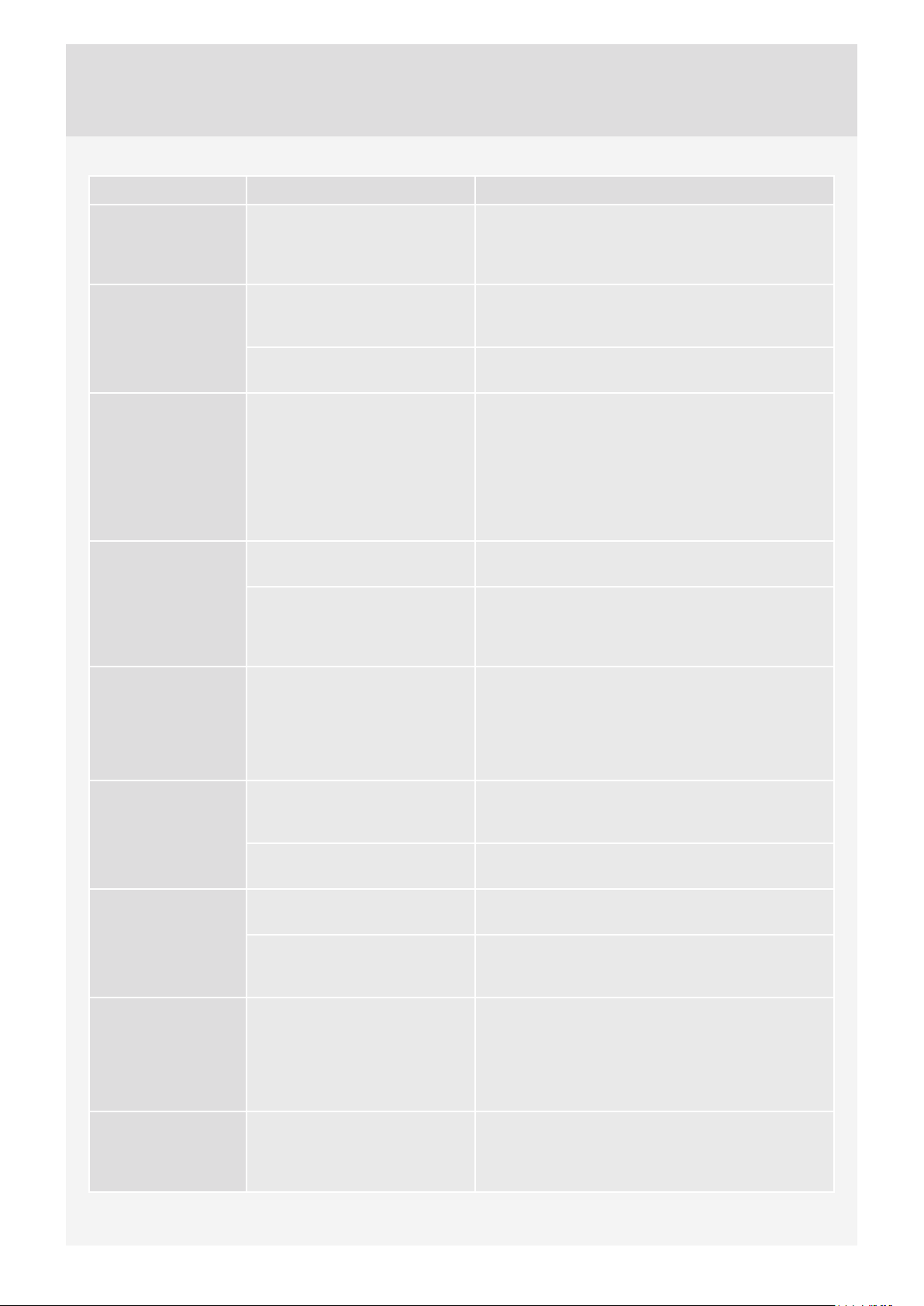
Problem/error Cause What to do?
There are traces
of grease (or
grease rolls) on the
clothes.
There are still
stains on the
laundry.
There are white
residues of
washing powder on
the laundry.
There is powder
detergent left in
the main wash
compartment
of the detergent
compartment.
• The laundry was very greasy. • Wash the laundry again. When your laundry is
this heavily soiled, add more washing powder or
use a liquid detergent in combination with a more
powerful (longer) program.
• You used bleach-free liquid
detergent or powder detergent
for coloured laundry.
• You selected an unsuitable
program.
• This is not due to poor rinsing
by your washing machine,
but rather due to phosphatefree detergents which contain
ingredients (zeolites) for water
softening. These ingredients
may be deposited on the
laundry.
• Water pressure not high
enough.
• Some washing powders may
stick strongly to the detergent
compartment if it is empty.
• Use a detergent that contains bleach.
• Use special stain removers.
• Immediately rinse the laundry again.
• Use liquid detergents that do not contain zeolites.
• Try removing any residues with a brush.
• Clean the net on the water supply hose.
• Choose higher water level or extra rinse (see
"Step 6 / Choose program settings").
• Wipe the detergent compartment before adding
the powder detergent.
There is
conditioner left in
the conditioner
compartment
of the detergent
compartment.
Odour in the
washing machine
drum.
Machine is moving
during operation.
Machine is moving
during spinning.
Noisy (loud) drain
pump
• Plug cap is not positioned
correctly or it is
clogged.
• Residues of fabric, washing
detergent, and conditioner in
the filter.
• Development of germs and
bacteria.
• Feet not adjusted correctly. • Level the feet (see chapter "INSTALLATION AND
• Transport bolts not removed. • Remove the transport bolts (see chapter
• Unevenly distributed laundry
or not enough laundry.
• Drain pump filter is clogged.
• Filter housing and drain pump
impeller are clogged.
• Make sure the plug cap in the conditioner
compartment of the detergent compartment is
positioned correctly.
• Clean the plug cap (see chapter "CLEANING
AND MAINTENANCE / Cleaning the detergent
compartment").
• Check if the filter is clean.
• Choose a self-cleaning (Drum Cleaning) program
(see "STEP 5: Choose the program").
CONNECTION / Adjusting the feet").
"BEFORE USING THE APPLIANCE FOR THE
FIRST TIME / Transport protection").
• The washing machine will automatically decrease
the spin speed if vibration is too strong.
• Increase the amount of laundry in the washing
machine and restart the program (see "STEP 7:
Start the wash / Adding or removing laundry after
the start of the program").
• Make sure the drain pump filter is clean.
• Make sure the filter housing is clean.
(See chapter "CLEANING AND MAINTENANCE/
Cleaning the filter")
38
Page 39
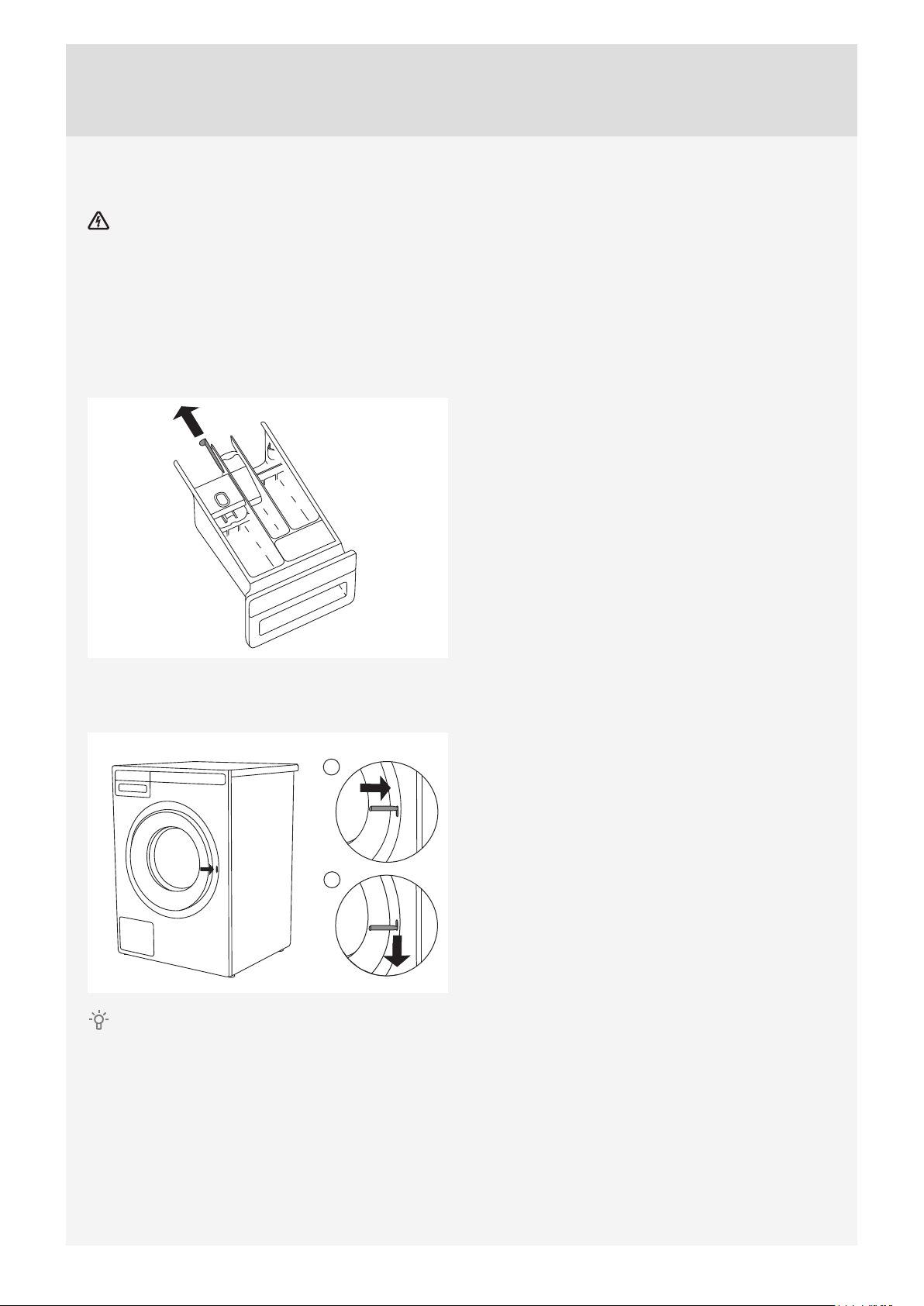
Manual opening of washing machine door
Washing machine door may be opened manually if the appliance is not connected to the power mains
and if the water has been pumped out of the machine.
A Choose the Spinning or Drain program to pump the water from the machine. If this does not work, water has
to be drained from the washing machine drum manually. See chapter "Cleaning the trap and drain pump" in
the chapter "CLEANING AND MAINTENANCE".
B Make sure the main switch is off and that the plug is disconnected from the power outlet.
C Take the emergency door opening tool (found at the back of the detergent compartment) and insert it into
the upper part of the slot on the right-hand side of the washing machine door latch.
D Press the key (key=the emergency door opening tool) downwards (all the way, until you hear a click) to
unlock the washing machine door. When the door is unlocked, open it by pulling towards you.
1
2
If the washing machine door still cannot be opened, call a service technician.
39
Page 40
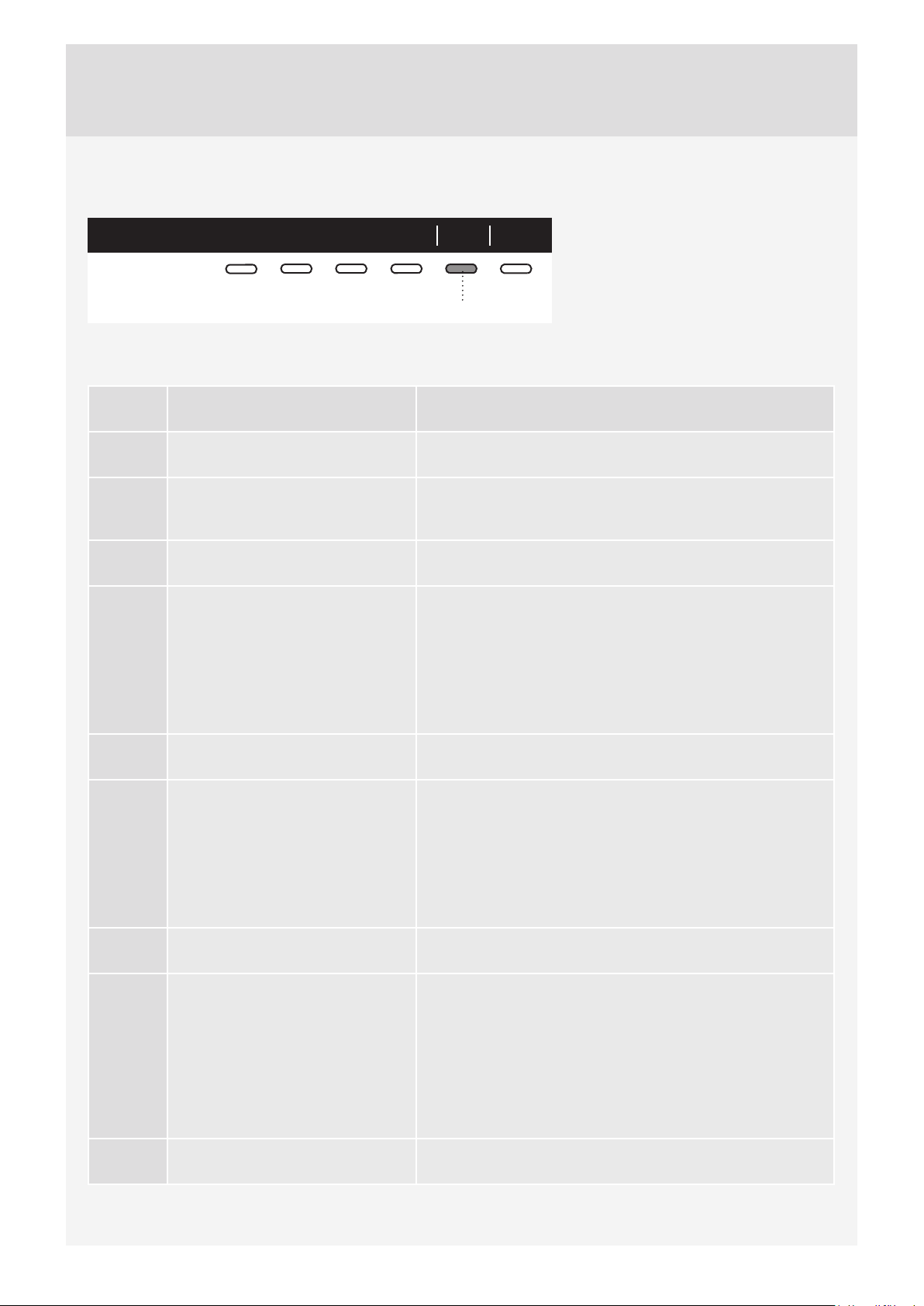
FAILURE DISPLAY
In case of a failure while a program is in progress, the relevant Error X is indicated on the display unit.
Info ExitError 3
5
Errors indicated on the display unit may include the following:
Press the INFO button to display the
error description.
Switch off the appliance and turn it back
on.
Error Error indication on the display
What to do?
unit
E0 INCORRECT SETTINGS
Restart the programme. If the error reoccurs, call a service
technician.
E1 THERMISTOR ERROR
Temperature sensor error.
• Inlet water too cold. Repeat the washing program.
• If the appliance reports this error again, call a service
technician.
E2 DOOR LOCK ERROR Turn the appliance OFF and then switch it again ON. Start the
program again. If the error reoccurs, call service technician.
E3 WATER FILLING ERROR Check the following:
• is the water inlet valve open,
• is the filter on the water inlet hose clean,
• is the water supply hose deformed (clipped, clogged etc.),
• is the pressure in the water mains between
0.1 and 1 MPa (0,1–10 bar).
Then, press the Exit button to resume the program.
If the error reoccurs, call a service technician.
E6 HEATING ERROR
Water heating error.
E7 DRAINING ERROR
Water draining error.
Restart the program. If the error reoccurs, call a service
technician.
Check the following:
• is the pump filter clean,
• is the drain hose clogged,
• is the drain clogged,
• is the drain hose fitted at the right height (see chapter on
drain hose installation in the instruction manual).
Then, press the Exit button again. If the error reoccurs, call
a service technician.
40
E10 WATER LEVEL SENSOR ERROR Turn the appliance OFF and then switch it again ON. Start the
program again. If the error reoccurs, call service technician.
E11 OVERFLOW
Water overflowing.
If there is water in the drum that exceeds a certain level,
and an error is reported on the display unit, the washing
program will be interrupted and water will be pumped out of
the washing machine. Restart the programme. If the error
reoccurs, call a service technician.
If there is water in the drum that exceeds a certain level, and
an error is reported on the display unit, while the washing
machine continues to add water, close the water tap and call
a service technician.
E12 MOTOR ERROR / MOTOR
CONTROL ERROR
Restart the program. If the error reoccurs, call a service
technician.
Page 41

Error Error indication on the display
unit
What to do?
E23 DOOR UNLOCK ERROR
Error while unlocking the door.
E36 COMMUNICATION UI** AND
PMCU
Error in UI and PMCU
communication.
E37 PMCU/UI** software versions are
not compatible.
UNBALANCE
Unevenly distributed laundry.
UNABLE TO LOCK DOOR Open and firmly close the door again to final position. If the
STERIL TUB ALERT
Warning – Self-cleaning program
Preparing to door unlocking.
(press INFO): Draining must be
performed. Wait for door unlocking.
DRAIN SYSTEM ALERT Alert about reduced water flow in the pumping stage. Please
Door is closed, but it cannot be unlocked. Turn off the
washing machine, then turn it back on. If the error reoccurs,
call a service technician. See instructions for opening the
door – chapter on manual door opening.
Turn off the appliance and turn it back on. If the error
reoccurs, call a service technician.
Please call a service technician.
Manually distribute the laundry and run the spinning
program.
error reoccurs, call a service technician.
Use the self-cleaning program (DRUM CLEANING); see
STEP 5.
Wait that process is finished. If after this process no error is
shown, new cycle can be run.
check user manuals.
** UI = (User Interface)
Unevenly distributed laundr y or lumps of laundry in the washing machine drum may cause problems such as vibration and noisy operation. The washing
machine will sense this and activate the UKS* (*unbalance system).
Smaller loads (e.g. one towel, one sweater, one bathrobe etc.) or clothes made of materials with special geometrical properties are virtually impossible
to distribute evenly across the washing machine drum (slippers, large items etc.). This results in several attempts to redistribute the laundry, which in turn
leads to longer program duration. In extreme cases of unfavourable conditions, the program can be completed without the spinning cycle.
UKS* (*unbalance system) allows stable operation and ex tends the useful life of the appliance.
41
Page 42
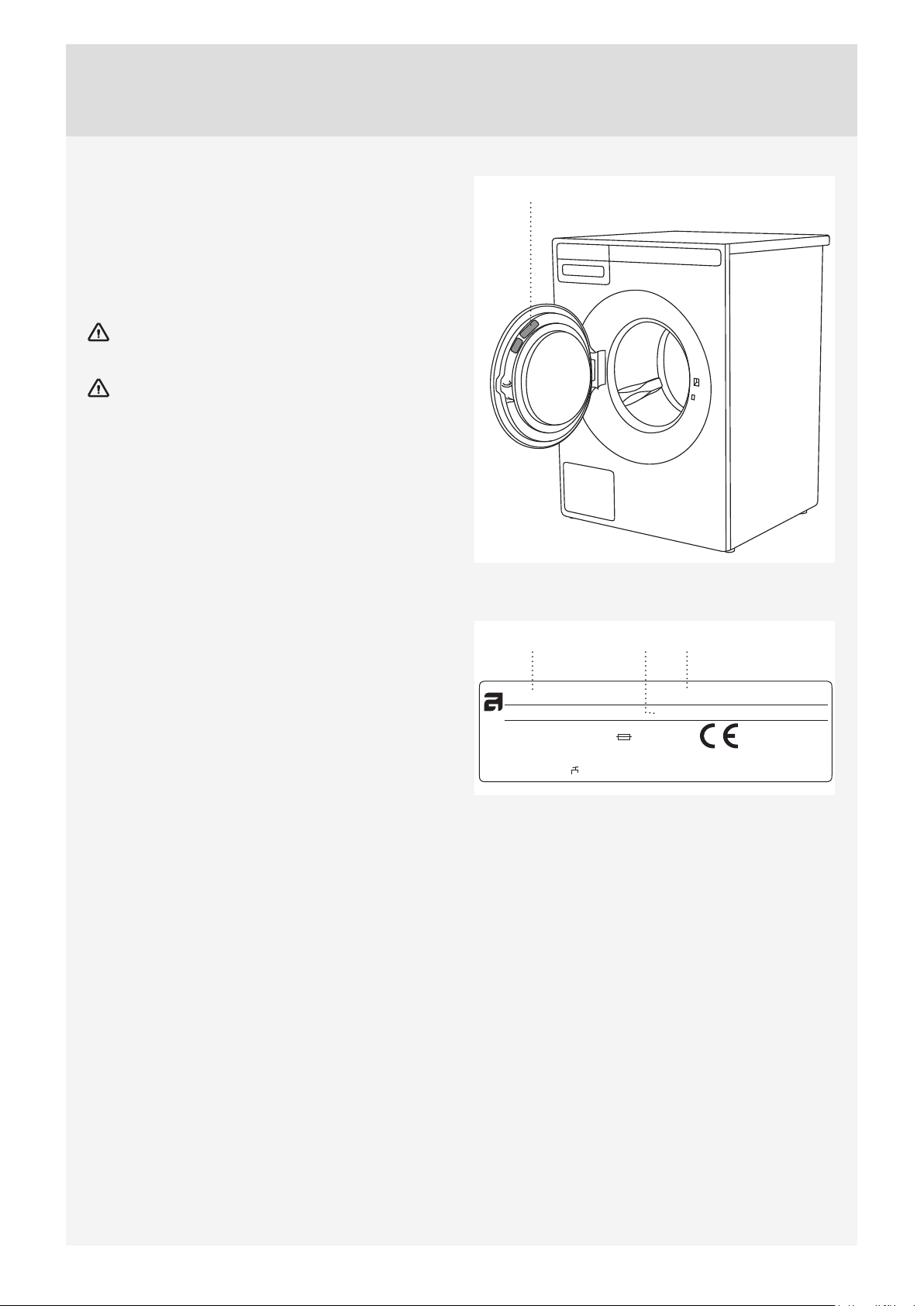
SERVICE
BEFORE CALLING A SERVICE TECHNICIAN
When you contact a service centre, please state
the model (1), type (2), and serial number (3) of your
washing machine.
Model, type, and serial number are indicated on the
rating (type) plate located on the washing machine
door casing.
In case of a failure, only use approved spare
parts by authorized manufacturers.
Repair or any warranty claim resulting from
incorrect connection or use of the washing machine
shall not be covered by the warranty. In such cases,
the costs of repair shall be charged to the user.
1, 2, 3
213
TYPE: WMXX.XXXXX
Art.No.: XXXXXX/XX Ser.No.: XXXXXXXX
XX Hz
XXXX W
XX-X MPa
XXX-XXX V ~
IPX4
MODEL: XXXXXX.X
XXA
X kg
42
Page 43
TECHNICAL INFORMATION
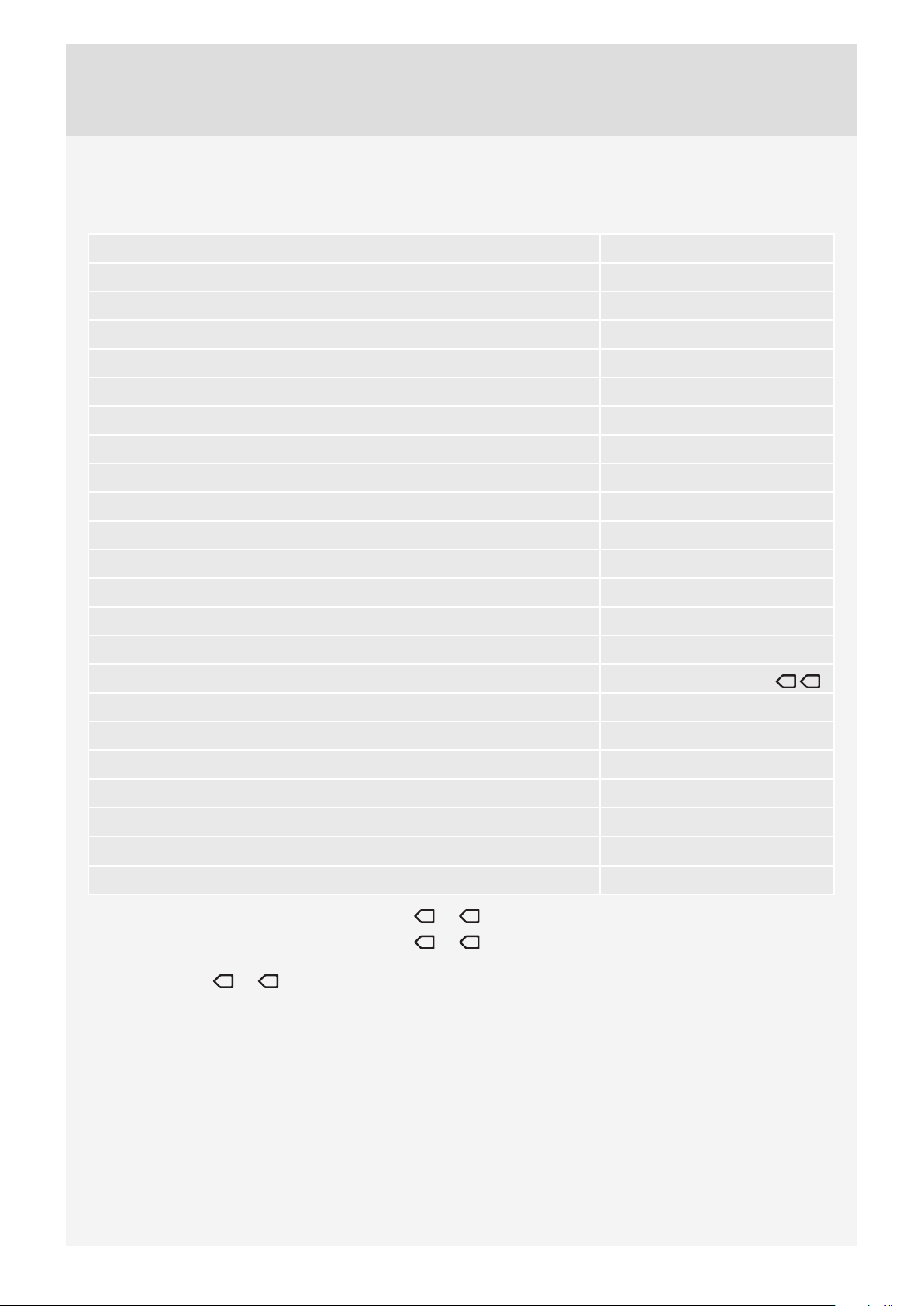
INFORMATION ON ENERGY LABELLING
Information sheet pursuant to the Commission Regulations (EU) No. 1061/2010 and 1015/2010
Model WM75.1
Maximum washing load 8 kg*
Energy efficiency class A+++
Annual energy consumption (AEC) 175 kWh na year
Power consumption
1)
Standard cotton + ECO 60 °C with a full load (E
Standard cotton + ECO 60 °C with half load (E
Standard cotton + ECO 40 °C with half load (E
) 0,91 kWh
t,60
) 0,83 kWh
t,60½
) 0,52 kWh
t,40½
Power consumption
Off (P0) 0,3 W
Mode without switching off (Pl) 0,7 W
Annual water consumption (AW
) 10310 litres per year
C
Spinning efficiency class A
3)
2)
Maximum spin speed 1600 rpm*
Residual moisture 44 %
Washing program Standard cotton + ECO
Program duration
Standard cotton + ECO 60 °C with a full load (E
Standard cotton + ECO 60 °C with half load (E
Standard cotton + ECO 40 °C with half load (E
) 183 minutes
t,60
) 175 minutes
t,60½
) 155 minutes
t,40½
Noise emissions
4)
60 °C 40 °C
Washing stage 49 dB(A) re 1 pW
Spinning stage 77 dB(A) re 1 pW
1)
Based on 220 standard washing cycles for Standard cotton + ECO
will depend on the way the appliance is used.
2)
Based on 220 standard washing cycles for Standard cotton + ECO
the appliance is used.
3)
On a scale from G (the least effi cient) to A (the most effi cient).
4)
Standard cotton + ECO,
for washing normally soiled cotton fabric and they are the most effi cient in terms of overall power and water consumption. Actual water temperature may
deviate from the temperature selected for the washing cycle.
* Depending on model. See rating (type) plate.
ECO=Green Mode
60 °C
40 °C
and
are standard washing programs used for gathering the information for the energy label. These programs are intended
60 °C
40 °C
and
for full and half load in energy saving modes. Actual power consumption
60 °C
40 °C
and
with full and half load. Actual water consumption will depend on the way
43
Page 44
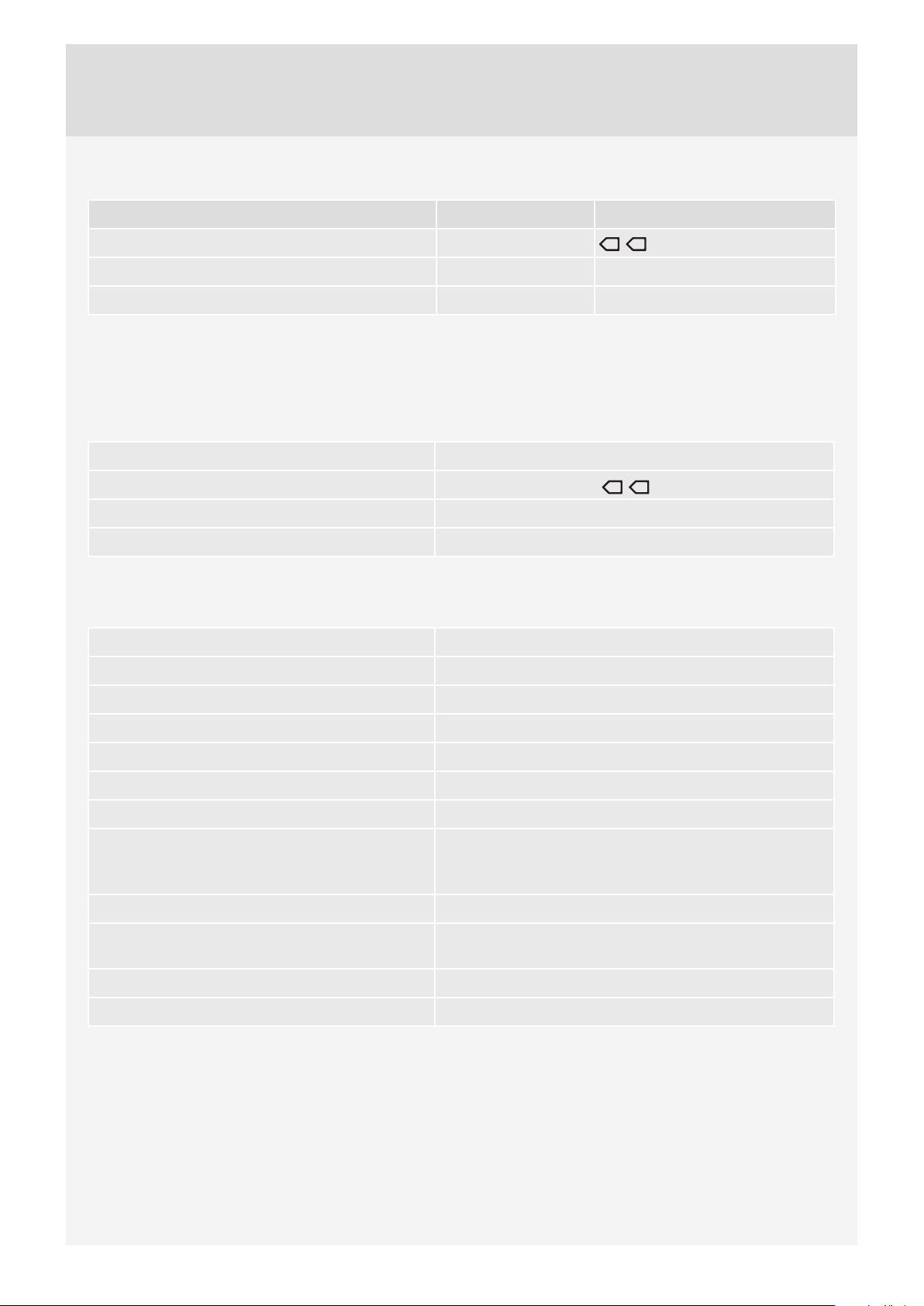
PERFORMANCE DATA
Program Maximum load Temp. °C
Standard cotton + ECO
Everyday wash
Mix/Synthetics
1)
Test program for connection to cold water supply, pursuant to EN 60456.
2)
40 °C program for testing institutes. The 40 °C option has to be set.
* Half load
ECO=Green Mode
2)
2)
1)
8 / 4* kg
8 / 4* kg 60
3,5 kg 40
60 °C 40 °C
ENERGY LABELLING
European test standard EN 60456
Washing program Standard cotton + ECO
60 °C 40 °C
Connection Cold water 15 °C
Noise testing method IEC-60704-2-4
TECHNICAL INFORMATION
, 8 kg cotton
Height 850 mm
Width 595 mm
Depth 585 mm
Weight 75 kg
Drum volume 60 l
Rated power See rating plate
Heater power See rating plate
Water pressure 0,1–1 MPa
1–10 kp/cm
10–100 N/cm
2
2
Material for the drum and dispenser Stainless steel
Housing material Hot-dip galvanized and powder coated sheet metal, or
stainless steel sheet (depending on model)
Water connection 1.5 m pex hose
Drain hose 1.6 m polypropylene hose
44
Page 45
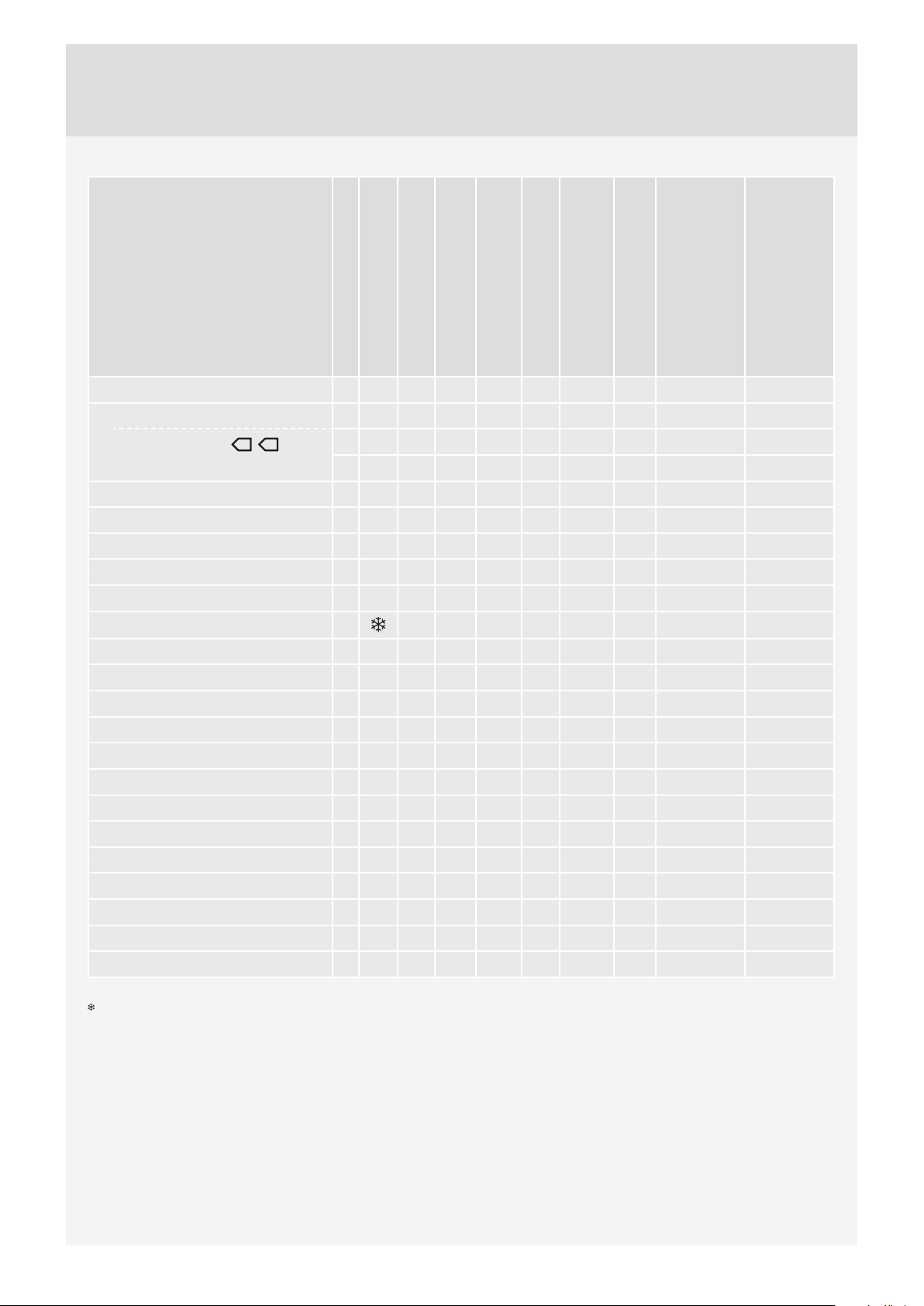
PROGRAM TABLE
Program
Prewash
Temp. °C
Super rinse
Agitation level**
Spinning speed
(rpm)
Residual moisture [%]
Maximum load
(kg)
Water consumption
(approximately, in litres)
Power consumption
(approximately, kWh)
Program duration
(approximately, in hours
and minutes)
1. Everyday wash X 602)X I 1600 8 75 1,60 2:26
2. Standard cotton X 40 X N 1600 8 73 1,30 2:59
Standard cotton
60 °C 40 °C
+ECO
⌑
60
40
1)
1)
N 1600 44 8/4* 54 0,91/0,83* 3:03/2:55*
N 1600 44 8/4* 54 0,65/0,52* 2:45/2:35*
3. Mix/Synthetics X 402)X S 1200 3,5 60 0,60 1:54
4. Wool/Hand wash X 30 X H 800 2 58 0,28 0:52
5. Dark wash X 40 X E 1200 3 40 0,53 1:15
6. Time program X 30 E 1000 2 - - -
7. Auto program X 40 X N 1600 8 - - -
8. Quick program
X X N 1200 3 40 0,50 0:50
9. Heavy X 60 X I 1600 8 95 2,00 2:46
10.
Easy care X 40 X E 1200 3,5 60 0,65 1:57
11.
Jeans X 40 X S 1200 3,5 50 0,60 1:18
12.
Shirts program X 40 X E 1200 3,5 45 0,45 1:03
13.
Hygiene X 60 X I 1600 8 82 1,80 2:24
14.
Bedding program X 60 X N 1600 4 52 1,67 2:15
15.
Allergy program cotton X 60 X I 1600 8 90 1,85 2:39
16.
Allergy program synthetics X 60 X S 1200 4 70 1,10 2:32
17.
Quick Pro X 40 X N 1200 4 40 0,50 0:59
18.
Rinse X N 1600 3,5 30 0,06 0:29
19.
Spin - 1600 8 - 0,05 0:17
20.
Drain - 8 - 0,01 0:01
21.
Drum cleaning N - - -
⌑
ECO=Green Mode
Cold wash
* Half load
**Agitation level (I = Intensive rhythm, N = Normal rhythm, E = Extra sensitive rhythm, S = Sensitive rhythm, H = Hand wash rhythm)
1)
Test program for connection to cold water supply, pursuant to EN 60456.
2)
40 °C program for testing institutes. The 40 °C option has to be set.
The above table includes several examples of the use of energy, water, and time for several diff erent program settings. Actual consumption or duration
may vary depending on the water pressure, water hardness, water inlet temperature, room temperature, weight and type of load, changes in power
supply, and selected options or set tings. In the examples specifi ed here, the draining is set to Normal and no additional options are selected.
Maximum or nominal load applies to laundry prepared pursuant to the IEC 60456 standard.
45
Page 46

Adjustment of the displayed washing time
Advanced technology allows the appliance to sense the amount of laundry and add the required amount of
water during the washing process. Depending on the washing load, washing time can be longer or shorter
and the time displayed will be adjusted accordingly.
Moreover, displayed washing time may change due to diff erences in inlet water temperature. At low inlet
water temperatures, washing time can be longer; at higher temperatures, it can be shorter.
Unevenly distributed laundry or lumps of laundry in the washing machine drum can cause problems such as
vibration and noisy operation. The appliance can sense such lumps and will try to redistribute the laundry.
Smaller loads (e.g. one towel, one sweater, one bathrobe etc.) or clothes made of materials with special
geometrical properties are virtually impossible to distribute evenly across the washing machine drum
(slippers, large items etc.). This results in several attempts to redistribute the laundry, which in turn leads to
longer program duration.
46
Page 47
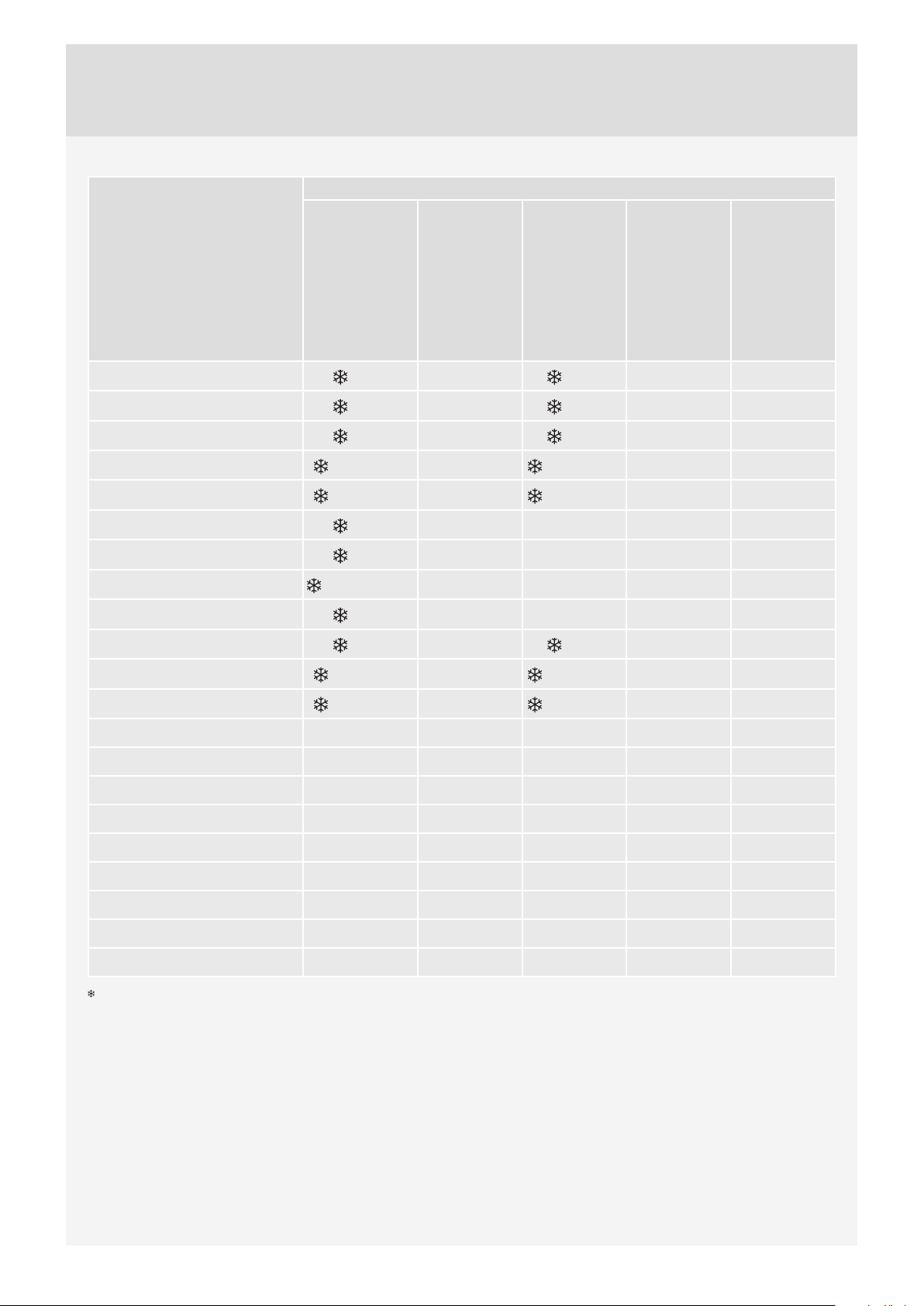
TABLE: WASHING MODE/TEMPERATURE
Washing mode
Program
Everyday wash
1.
Standard cotton
2.
3.
Mix/Synthetics
4.
Wool/Hand wash
5.
Dark wash
6.
Time program
7.
Auto program
8.
Quick program
9.
Heavy
10.
Easy care
11.
Jeans
12.
Shirts program
13.
Hygiene 60°C-90°C
14.
Bedding program 40°C-90°C 40°C-90°C 40°C-90°C
15.
Allergy program cotton 60°C-90°C
Normal
-90°C
-90°C
-60°C
,30°C-40°C ,30°C-40°C
,30°C-40°C ,30°C-40°C
-60°C
-90°C
,40°,60°,90°C
-90°C
-60°C
,30°C-40°C ,30°C-40°C
,30°C-40°C ,30°C-40°C
Green
20°C-90°C
20°C-90°C
20°C-60°C
20°C-60°C
Speed
-90°C
-90°C
-60°C
-60°C
Allergy
30°C-90°C 40°C-90°C
40°C-90°C
30°C-60°C 40°C-60°C
30°C-40°C 40°C
30°C-90°C
30°C-60°C 40°C-60°C
30°C-40°C 40°C
Intense
16.
Allergy program synthetics 60°C
17.
Quick Pro 40°C
18.
Rinse
19.
Spin
20.
Drain
21.
Drum cleaning
Cold wash
47
Page 48
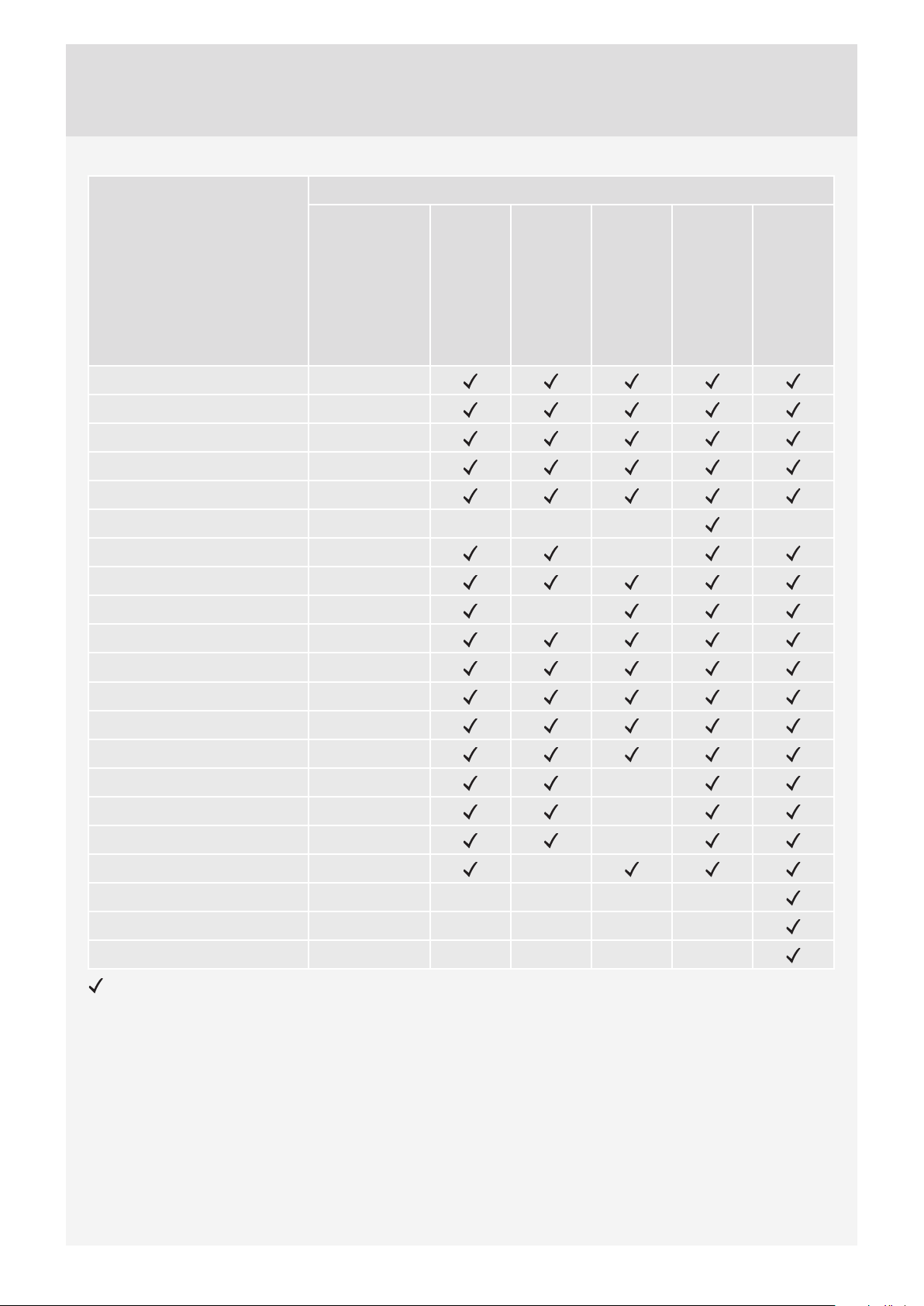
TABLE OPTIONS
Options
Program
1. Everyday wash 1600
2. Standard cotton 1600
3.
Mix/Synthetics 1200
4.
Wool/Hand wash 800
5.
Dark wash 1200
6.
Time program 1000
7.
Auto 1600
8.
Quick 1200
9.
Heavy 1600
10.
Easy care 1200
11.
Jeans 1200
12.
Shirts 1200
13.
Hygiene 1600
14.
Bedding 1600
15.
Allergy program cotton 1600
Spinning speed
(rpm)
Super Rinse
Prewash
High water level
Anti-crease
Start delay
16.
Allergy program synthetics 1200
17.
Quick PRO 1200
18.
Rinse 1600
19.
Spin 1600
20.
Drain /
21.
Drum cleaning /
Option (setting) available on Program
48
Page 49
DISPOSAL
Disposal / recycling of packaging
Our product packaging is made of environmentally friendly materials that can be recycled, disposed
of, or destroyed without any hazard to the environment. To this end, packaging materials are labelled
appropriately.
The symbol on the product or its packaging indicates that the product should not be treated as
normal household waste. The product should be taken to an authorized collection centre for waste electric and
electronic equipment processing.
When disposing of an appliance at the end of its useful life, remove all power cords and destroy the door latch
and switch to prevent the door from locking or latching (child safety).
Correct disposal of the product will help prevent any negative eff ects on the environment and health of people
which could occur in case of incorrect product removal. For detailed information on removal and processing of
the product, please contact the relevant authority in charge of waste management, your waste disposal
service, or the store where you bought the product.
49
Page 50

NOTES
50
Page 51
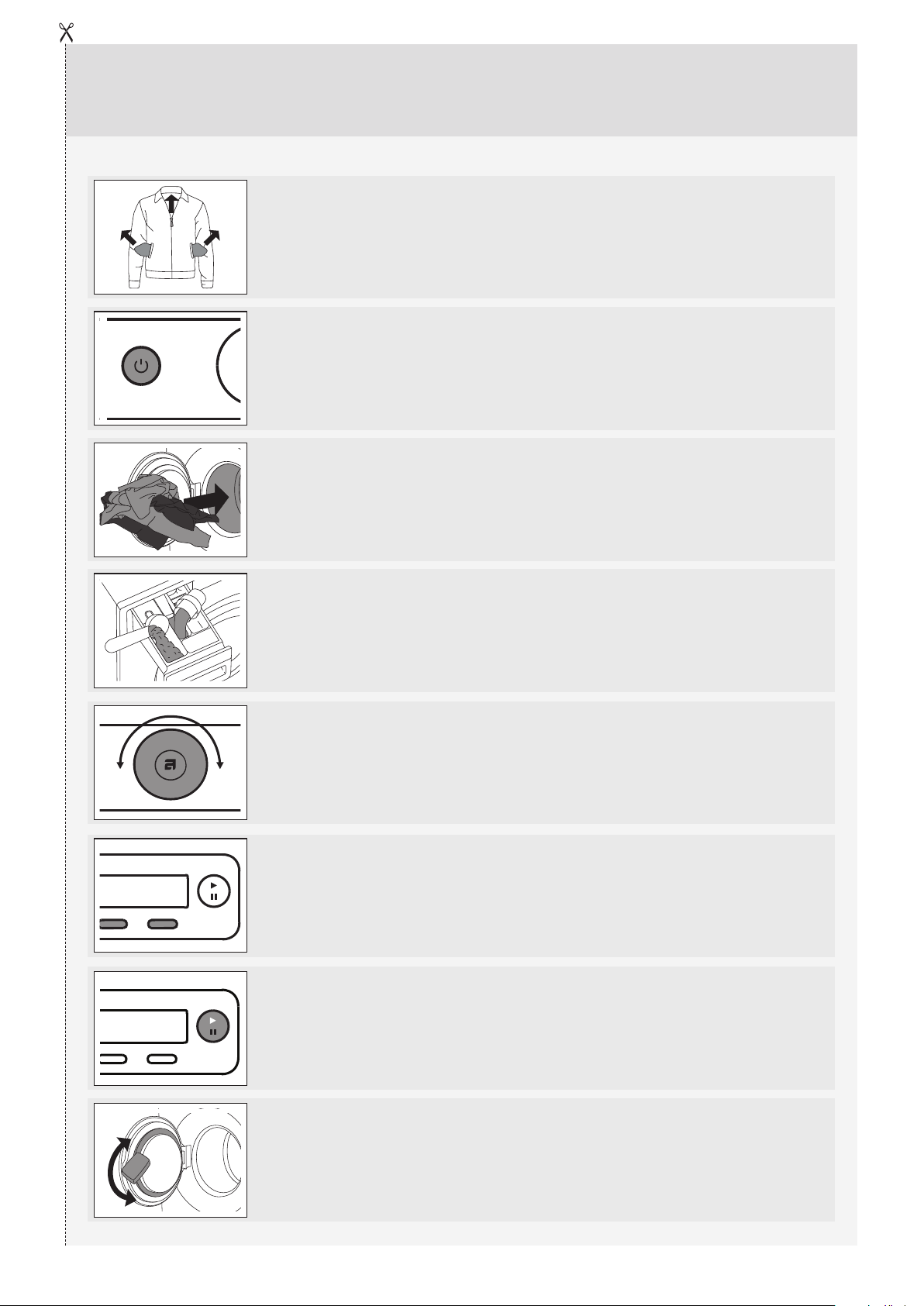
QUICK GUIDE
1.
2.
3.
SORT THE LAUNDRY.
Close the zippers fasteners.
Empty the pockets and turn them inside out.
Check the laundry care symbols.
Sort the laundry based on how heavily soiled it is, by colour, and by
material.
SWITCH ON THE MAIN ON/OFF SWITCH (ON/OFF)
OPEN THE WASHING MACHINE DOOR AND INSERT
THE LAUNDRY.
Before doing so, make sure the drum is empty.
4.
5.
6.
7.
ADD THE DETERGENT AND THE CONDITIONER.
Recommended detergent amount is usually indicated on the
packaging.
For smaller wash loads, use a smaller amount of detergent.
CHOOSE THE WASHING PROGRAM.
Turn the program selector knob to the desired washing program.
Selected program will be indicated on the display unit.
CHOOSE THE PROGRAM SETTING.
Choose the settings by pressing the relevant buttons.
CLOSE THE WASHING MACHINE DOOR AND PRESS
THE ”START” BUTTON.
Anticipated washing time, in hours and minutes, will be indicated on
the display.
END OF PROGRAM
Open the door and remove the laundry from the washing machine.
See chapter "CLEANING AND MAINTENANCE".
8.
Close the door.
Switch off the main on/off switch.
Close the water tap and remove the power plug from the power socket.
We reserve the right to modifi cations.
51
Page 52

Gorenje, Partizanska 12, 3320 Velenje, Slovenija
www.asko.com
WM75.1 SKO
en (12-19)
 Loading...