

Page 1
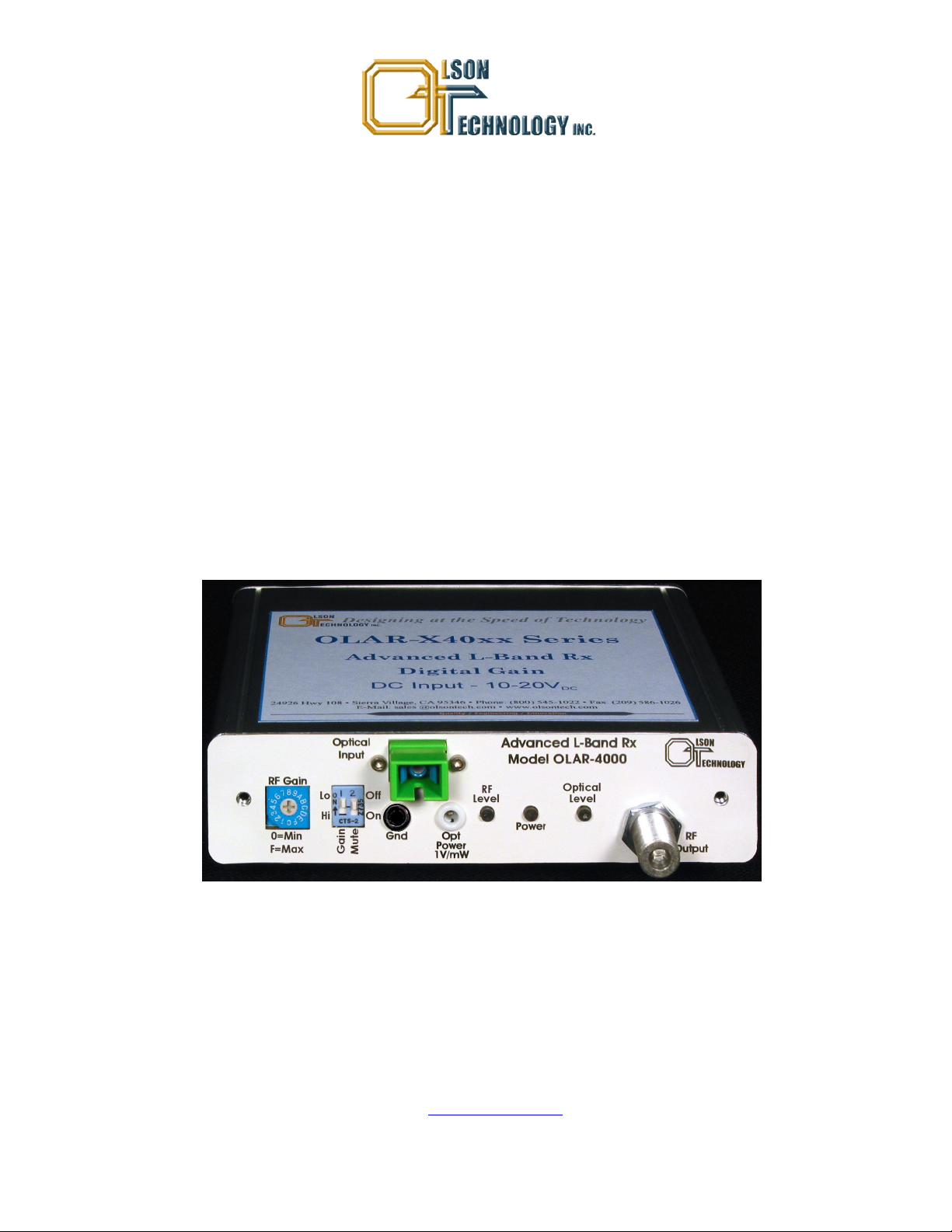
SatellitePlus Model OLAT/OLAR
Advanced L-Band Series
10-4,000 MHz
OPERATING MANUAL
24926 Highway 108
Sierra Village, CA 95346
Phone: (800) 545-1022
Fax: (209 586-1022
025-000570 Rev. X7 E-Mail: sales@olsontech.com
10/02/12
Page 2

TABLE OF CONTENTS
Table of Contents.................................................................................................................... 2
Safety ....................................................................................................................................... 3
Safety Precautions..................................................................................................................3
Laser Safety Procedure..........................................................................................................3
GENERAL FEATURES ............................................................................................................ 4
RACKMOUNT CONFIGURATIONS ......................................................................................... 4
TRANSMITTER DESCRIPTION............................................................................................... 5
Transmitter Control Overview ...................................................................................... 5
RECEIVER DESCRIPTION ...................................................................................................... 7
Receiver Control Overview ............................................................................................ 7
POWER SUPPLY DESCRIPTION............................................................................................ 9
Power Supply Control Overview ................................................................................... 9
TRANSMITTER BLOCK DIAGRAM ......................................................................................10
RECEIVER BLOCK DIAGRAM.............................................................................................. 11
POWER SUPPLY BLOCK DIAGRAM ................................................................................... 12
RF PERFORMANCE .............................................................................................................. 13
LINK GAIN .............................................................................................................................14
NOISE FIGURE ......................................................................................................................15
TRANSMITTER & RECEIVER 1dB COMPRESSION PERFORMANCE............................... 16
TRANSMITTER & RECEIVER IP2 & IP3 PERFORMANCE .................................................. 17
TRANSMITTER & RECEIVER RF LEVEL DETECTOR PERFORMANCE............................18
OPTICAL PERFORMANCE ................................................................................................... 19
DC POWERING...................................................................................................................... 20
CONNECTIONS AND CONTROLS - TRANSMITTER........................................................... 20
CONNECTIONS AND CONTROLS - RECEIVER .................................................................. 22
CONNECTTIONS AND CONTROLS - POWER SUPPLY ..................................................... 23
INSTALLATION...................................................................................................................... 24
Optical Connectors....................................................................................................... 25
Cleaning Optical Connectors....................................................................................... 25
Mounting ...................................................................................................................... 25
ORDERING INFORMATION .................................................................................................. 26
Transmitter Part Numbers ......................................................................................... 26
Receiver Part Numbers................................................................................................ 27
Power Supply Part Numbers....................................................................................... 27
Rack Mount Adapter Plate Part Numbers .................................................................27
025-000570 Rev. X7 www.olsontech.com 2
Page 3

SAFETY
Safety Precautions
The optical emissions from the units are laser-based and may present eye hazards if improperly used. NEVER USE ANY KIND OF OPTICAL INSTRUMENT TO VIEW THE OP-
TICAL OUTPUT OF THE UNIT. Be careful when working with optical fibers. Fibers can
cause painful injury if they penetrate the skin.
Laser Safety Procedure
ALWAYS read the product data sheet and the laser safety label before powering the product.
Note the operation wavelength, optical output power and safety classifications.
If safety goggles or other eye protection are used, be certain that the protection is effective at
the wavelength emitted by the device under test BEFORE applying power.
ALWAYS connect a fiber to the output of the device BEFORE power is applied. Power must
never be applied without an attached fiber. If the device has a connector output, attach a
connector that is connected to a fiber. This will ensure that all light is confined within the fiber waveguide, virtually eliminating all potential hazard.
NEVER look at the end of the fiber to see if light is coming out. NEVER! Most fiber optic laser
wavelengths (1270nm through 1610nm) are totally invisible to the unaided eye and will cause
permanent damage. Shorter wavelengths lasers (e.g., 780 nm) may be visible and are very
damaging. Always use instruments, such as an optical power meter, to verify light output.
NEVER, NEVER, NEVER look into the end of a fiber on a powered device with ANY sort of
magnifying device. This includes microscopes, eye loupes and magnifying glasses. This WILL
cause a permanent and irreversible burn on your retina. Always double check that power is
disconnected before using such devices. If possible, completely disconnect the unit from any
power source.
If you have questions about laser safety procedures, please call Olson Technology before
powering your product.
025-000570 Rev. X7 www.olsontech.com 3
Page 4

GENERAL FEATURES
The OLAT Advanced L-Band Transmitters and the OLAR Advanced L-Band Receivers form a
feature-rich L-Band Fiber Optic Distribution System in a very compact package. The wide
bandwidth, from 10MHz to 4,000MHz, allows for a wide variety of communications applications including L-Band satellite antenna remoting, trunking radio, telemetry tracking and
time and frequency reference distribution. The extended frequency range to 4,000MHz and
digital gain adjustment range of 25dB in the transmitter and a digital gain adjustment range
of 25dB in the receiver allow these products to accommodate additional transponders including European and multiple satellite communications applications. The enhanced bandwidth
also facilitates stacked LNB applications to accommodate additional transponders containing
enhanced DBS services (off-air digital television signals) over single-mode fiber for DBS distribution.
RACKMOUNT CONFIGURATIONS
The transmitter, receiver and power supply are housed in rugged, compact, standalone enclosures. Rack mount configurations of the Advanced L-Band System offer an economical,
high-density solution. An adapter mounting plate refits the units on a 1RU or 2RU 19" plate
for installation in an EIA 19" rack. The 2RU plate will allow up to six units to be mounted in a
2RU space. No adapters are required; all units mount directly to a Model OTLL-RMKIT-4
adapter plate that can accommodate three transmitter/receiver modules in a 1RU space and
the Model OTLL-RMKIT-5 can accommodate six units in a 2RU space. The system includes a
tray area for fiber organization.
025-000570 Rev. X7 www.olsontech.com 4
Page 5
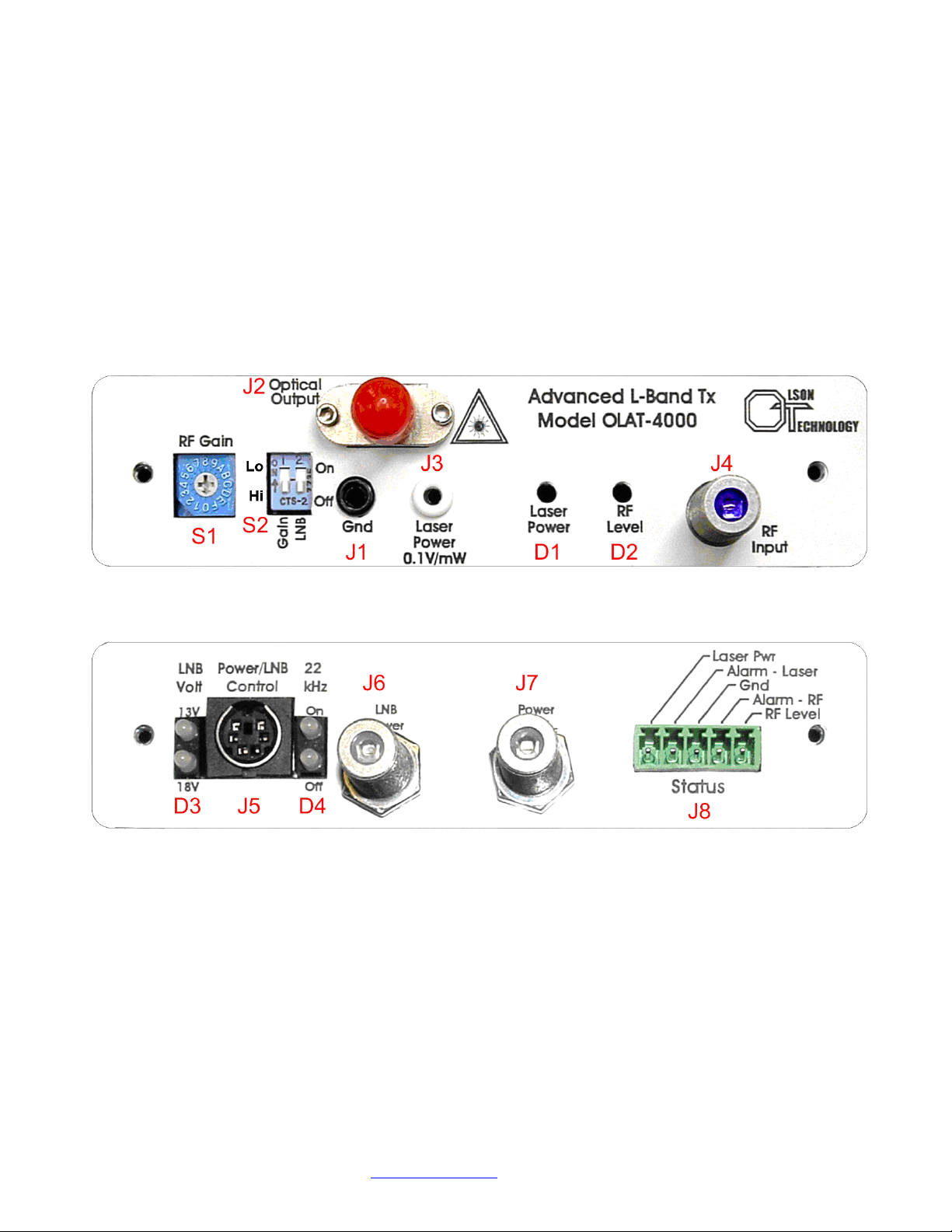
TRANSMITTER DESCRIPTION
The Advanced L-Band Transmitter carries 10MHz to 4,000MHz RF signals over single-mode
optical fiber. Model OLAT includes an adjustable 25dB digital gain control. Laser power options include +4dBm/2.5mW (DFB, CWDM), +5dBm/3mW (DFB) or +10dBm/10mW (DFB,
DWDM). The transmitter offers two LNB powering options. The LNB may be powered
through a standard “F” connector with a power supply or power inserter or via the
OTAPS-4000 power supply through a 9-pin DIN connector. The OTAPS-4000 has selector
switches allowing each transmitter to have its LNB voltage set at +13V or +17V and also to
turn a per-channel 22kHz tone on or off. The LNB Current is limited to about 0.5 Amps. Any
attempt to draw more than 0.5 Amps will cause the LNB voltage to be pulsed at a 0.1% duty
cycle until the current drops below 0.5 Amps. Built-in test points, LED indicators and alarms
allow the transmitter to be easily set up and maintained.
Figure 1 - Front & Rear View of Transmitter
TRANSMITTER CONTROLS OVERVIEW
On the front of the transmitter, the user can change the gain of the transmitter over a 25dB
range using S1 & S2. Higher gain allows the transmitter to be used with lower level RF signals and vice versa. S1 is a 16-position, hexadecimal, rotary switch. The “0” setting is minimum gain and the “F” setting is the maximum gain. Each position is equal to a 1dB gain
change. So the gain of the “F” setting compared to the gain of the “0” setting will be 15dB
higher. The left switch of S2 is a high/low gain setting. When it is in the “Lo” position, the incremental gain is 0dB. When it is “Hi” position, the gain increases by 10dB. To set the transmitter for minimum gain, set S1 to “0” and the left switch of S2 up. To set the transmitter for
025-000570 Rev. X7 www.olsontech.com 5
Page 6
maximum gain, set S1 to “F” and the left switch of S2 down.
The right switch of S2 allows the LNB power to be switched on or off. When the switch is in
the “Off” position, no LNB voltage will be applied to J4. When the switch is in the “On” position, LNB voltage from either J5 or J6 will be applied to J4. J1 & J3 allow easy measurement
of the transmitter optical output power using a D
igital Volt Meter (DVM). J1 is a ground. J3
gives an indication of the laser power. The scale factor is 0.1V/mW. J2 is the optical output.
D1 indicates that the Laser Power is OK. It will be green if the laser control circuitry is behaving normally. If the laser or control circuitry fails, then D1 will turn red.
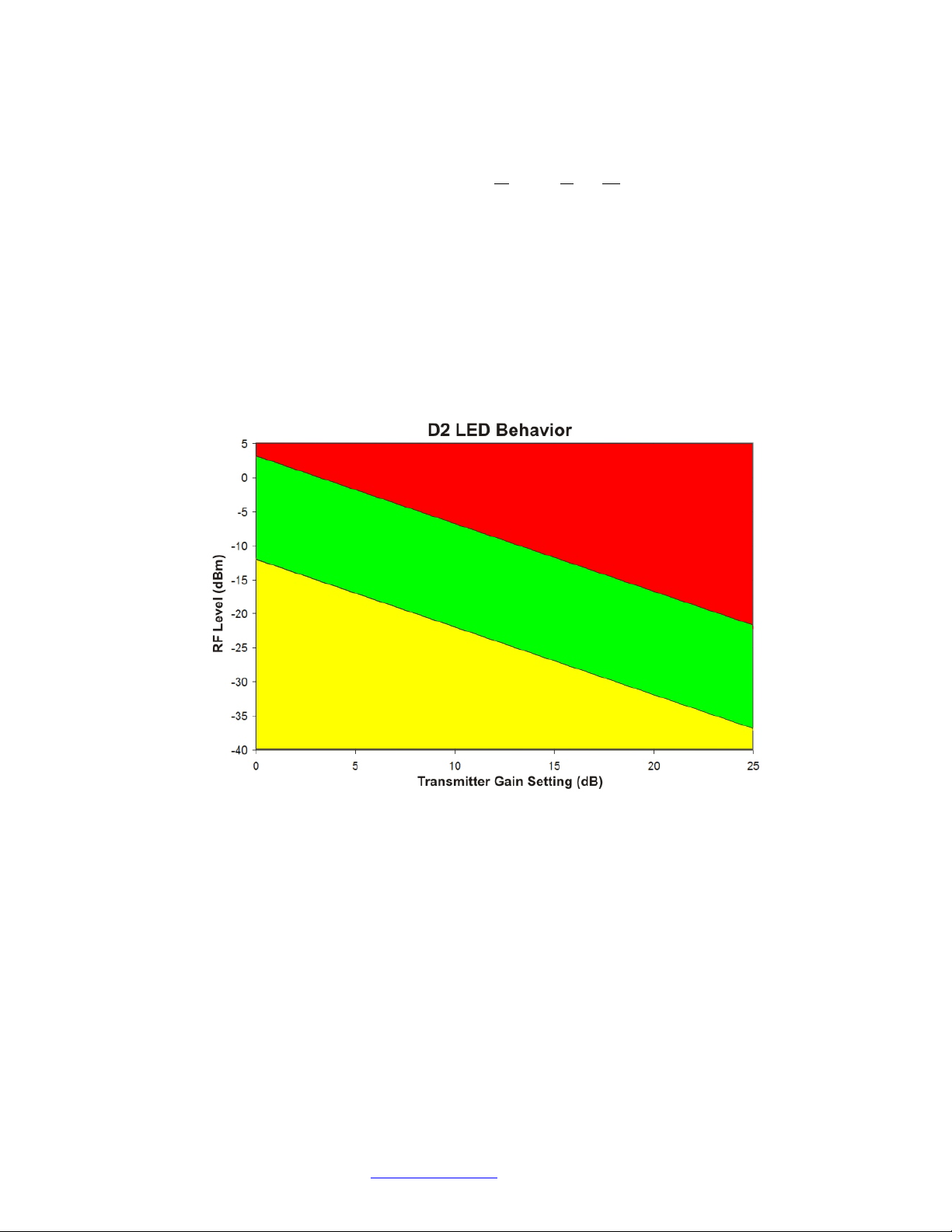
D2 indicates the input RF Level. Figure 2 indicates the thresholds at which D2 will switch. D2
will be yellow if the RF level is below the low threshold, red if the RF level is above the high
threshold and green if the RF level is between the low and high thresholds. For most applications, if D2 is green, then the RF level is in the optimum range. J4 is the RF Input. It is a
high-frequency F-Type Female (75Ω) Connector.
Figure 2 - D2 Behavior
On the rear of the transmitter, connector J5 is used to connect to the OTAPS Advanced
L-Band Power Supply. When it is used, D3 and D4 give a local indication of the LNB voltage
and the 22kHz tones being generated in the OTAPS power supply. J6 and J7 are used when J5
is not used. J6 provides an alternate means of injecting an LNB voltage input via an “F” connector. Connector J7 allows the unit to be powered via an “F” connector. Allowable input
power voltage is +8V
to +24VDC. Connector J8 provides various status outputs. They will be
DC
described in more detail later in this document. See Figure 5.
Note: If J5 is not used with the OTAPS power supply, the D3 LED’s will still give some indication of the LNB voltage. They are designed to switch at +15 Volts. The LNB voltage will only
be applied to the J4 connector when the right switch of S2 on the front panel is in the up or
“On” position.
025-000570 Rev. X7 www.olsontech.com 6
Page 7
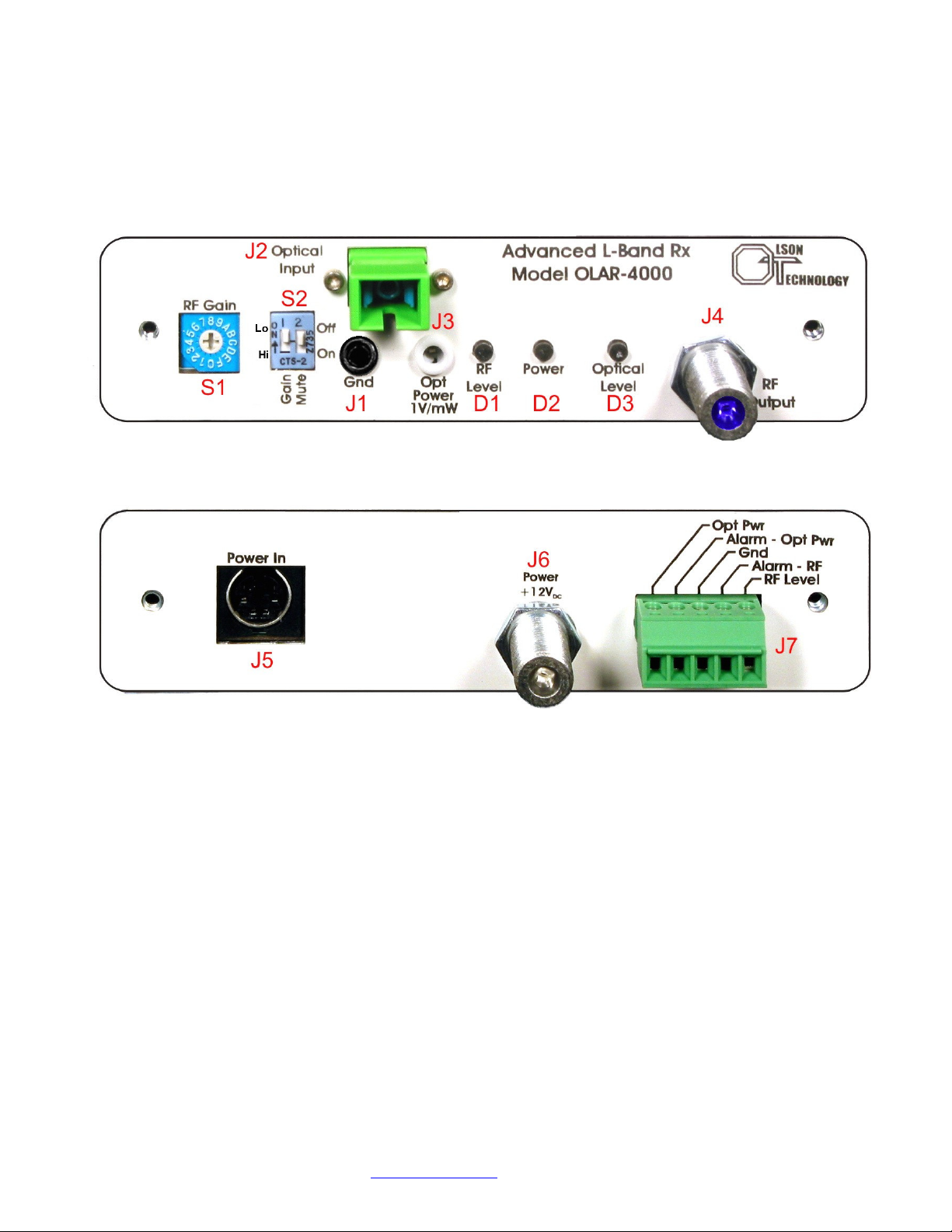
RECEIVER DESCRIPTION
The OLAR L-Band Receiver can handle 10MHz to 4,000MHz RF signals. The receiver includes
a 25dB digital gain control. Optical input power ranges from -15 to +3dBm in the wavelength
range of 1270-1610nm. The receiver offers high sensitivity for a maximum optical link budget.
Built-in test points, LED indicators and alarms allow the receiver to be easily set up and
maintained.
Figure 3 - Front & Rear View of Receiver
RECEIVER CONTROLS OVERVIEW
Figure 3 shows the front and rear panels of the receiver.
On the front of the transmitter, the user can change the gain of the transmitter over a 25dB
range using S1 & S2. Higher gain allows the transmitter to be used with lower level RF signals and vice versa. S1 is a 16-position, hexadecimal, rotary switch. The “0” setting is minimum gain and the “F” setting is the maximum gain. Each position is equal to a 1dB gain
change. So the gain of the “F” setting compared to the gain of the “0” setting will be 15dB
higher. The left switch of S2 is a high/low gain setting. When it is in the “Lo” position, the incremental gain is 0dB. When it is “Hi” position, the gain increases by 10dB. To set the transmitter for minimum gain, set S1 to “0” and the left switch of S2 up. To set the transmitter for
maximum gain, set S1 to “F” and the left switch of S2 down.
The right switch of S2 also allows the final RF amplifier to be switched on or off (Mute). When
the receiver output is Muted, the RF output level typically drops by 30dB. Note that the RF
025-000570 Rev. X7 www.olsontech.com 7
Page 8

Level detector (discussed later) still functions as though the receiver is not muted.
J1 & J3 allow easy measurement of the transmitter optical output power using a Digital Volt
Meter (DVM). J1 is a ground. J3 gives an indication of the Optical Input Power. The scale
factor is 1.0V/mW. J2 is the optical input. D1 indicates the RF Output Power level. D2 indicates the input RF Level. Figure 2 indicates the thresholds at which D2 will switch. D2 will be
yellow if the RF level is below the low threshold, red if the RF level is above the high threshold
and green if the RF level is between the low and high thresholds. For most applications, if D2
is green, then the RF level is in the optimum range. Table 1 shows the behavior of the Receiver D2 LED. J4 is the RF Output. It is a high-frequency F-Type Female (75Ω) Connector.
Table 1 - Receiver D2 LED Behavior
RF Output Level D2 LED Color
<-37dBm Yellow
≥-37dBm and ≤ -22dBm Green
>-22dBm Red
Note: This holds true even if the Receiver output is Muted
On the rear of the transmitter, connector J5 is used to connect to the OTAPS Advanced
L-Band Power Supply. Connector J6 is for unit power voltage input via an “F” connector.
Connector J7 provides various status outputs. These will be discussed later in this document.
See Figure 6.
025-000570 Rev. X7 www.olsontech.com 8
Page 9
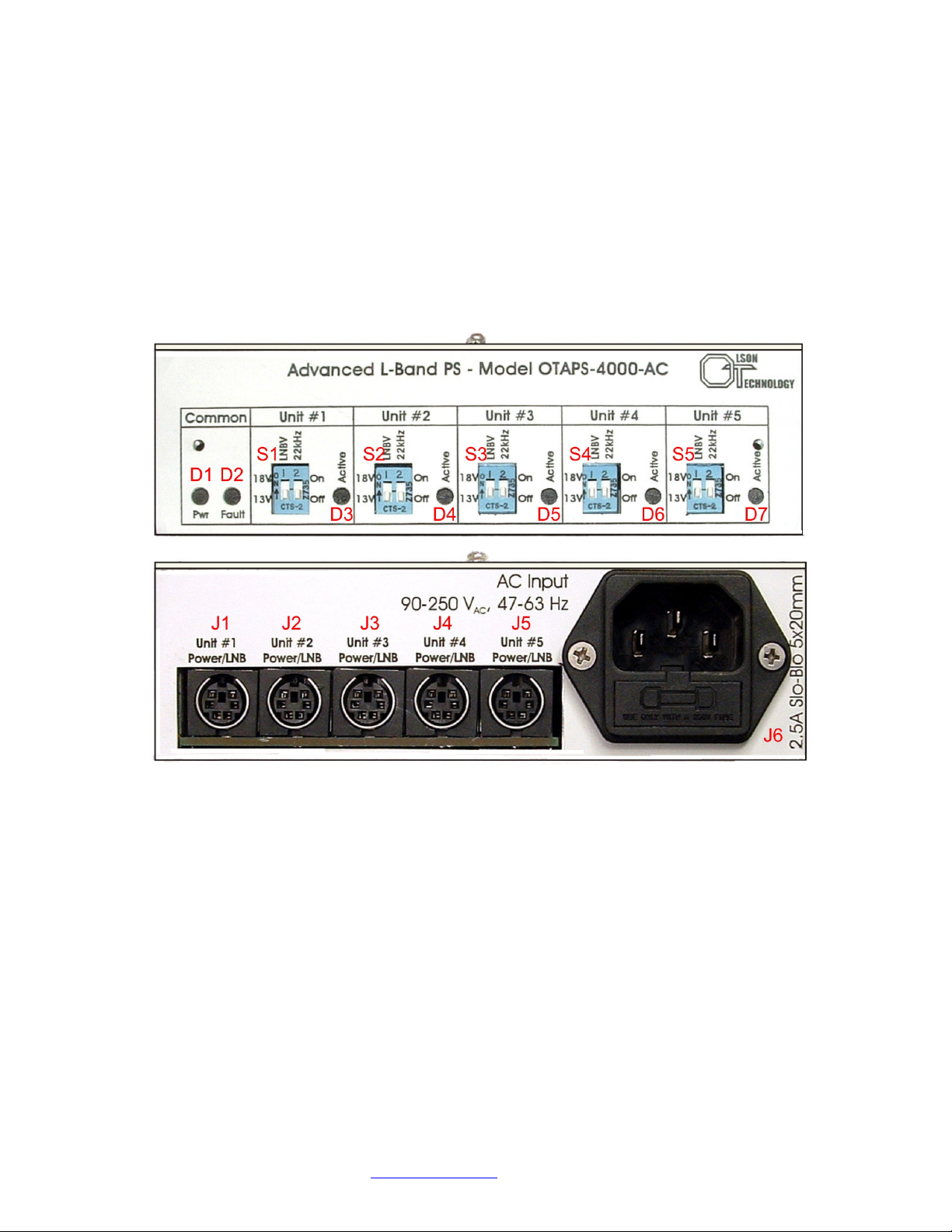
POWER SUPPLY DESCRIPTION
The Model OTAPS Advanced L-Band Power Supply offers additional functionality to the system. The power supply incorporates a selectable +13/+17V power supply option to power the
LNB for each transmitter. A selectable 22kHz tone is also designed in. The power supply accommodates 90-250Volts, 47-63Hz AC (Model OTAPS-4000-AC) input. One power supply will
power up to five transmitters or receivers in any combination. An LED indicator gives a positive indication that the system is being powered.
The OTAPS power supply ships with a North American AC power cord and five (5) DIN cables
each 24” long.
Figure 4 - Front and Rear View of Advanced L-Band Power Supply
POWER SUPPLY CONTROLS OVERVIEW
On the front of the power supply, D1 indicates that the power supply is powered and operating
normally. D2 indicates if there is a fault with any of the units connected to the power supply.
LED’s D3 through D7 indicate if Units 1 through 5 are connected. Switches S1 through S5 are
used to select +13 Volts or +17 Volts for each unit and also turn on or off the 22kHz tone.
On the rear of the unit, connectors J1 through J5 are used to power up to five transmitters or
receivers. Connector J6 is the AC input. It also contains the AC fuses for the unit. See Figure 7
for details.
025-000570 Rev. X7 www.olsontech.com 9
Page 10

Figure 5 - Transmitter Block Diagram
025-000570 Rev. X7 www.olsontech.com 10
Page 11

Figure 6 - Receiver Block Diagram
025-000570 Rev. X7 www.olsontech.com 11
Page 12

Figure 7 - Power Supply Block Diagram
025-000570 Rev. X7 www.olsontech.com 12
Page 13

RF PERFORMANCE
The specifications are cited for >55dB optical return loss. Figures 8 and 9 show the typical
frequency response of the Advanced L-Band link. The transmitter and receiver gain settings
have little effect on the gain flatness.
Figure 8 - Typical Link (Tx + Rx) Frequency Response
Figure 9 - Low-Frequency Response
025-000570 Rev. X7 www.olsontech.com 13
Page 14

LINK GAIN
The overall gain of the Advanced L-Band link is affected by the gain setting of the transmitter,
the gain setting of the receiver and the optical loss. Table 2 shows how the gain of the transmitter and receiver can be set.
Table 2 - Transmitter and Receiver Gain Settings
S1
Setting
S2
Setting
Tx or Rx
Gain
S1
Setting
S2
Setting
0 Lo 0dB 0 Hi 10dB
1 Lo 1dB 1 Hi 11dB
2 Lo 2dB 2 Hi 12dB
3 Lo 3dB 3 Hi 13dB
4 Lo 4dB 4 Hi 14dB
5 Lo 5dB 5 Hi 15dB
6 Lo 6dB 6 Hi 16dB
7 Lo 7dB 7 Hi 17dB
8 Lo 8dB 8 Hi 18dB
9 Lo 9dB 9 Hi 19dB
A Lo 10dB A Hi 20dB
B Lo 11dB B Hi 21dB
Tx or Rx
Gain
C Lo 12dB C Hi 22dB
D Lo 13dB D Hi 23dB
E Lo 14dB E Hi 24dB
F Lo 15dB F Hi 25dB
Figure 10 shows how the overall gain of the Advanced L-Band link varies as the transmitter
and receiver gain and optical loss vary. For simplification, the horizontal axis shows the total
of the transmitter and receiver gain. The RF gain changes 2dB for each 1dB of optical loss.
The curves shown in Figure 10 are for a normal sensitivity, PIN-based receiver. The curves in
Figure 10 will all shift upward about 7dB to 20dB when a high-sensitivity APD-based receiver
is used. The variation depends on the receiver optical input level. See Figure 19 for more details.
025-000570 Rev. X7 www.olsontech.com 14
Page 15

Figure 10 - Advanced L-Band Link Gain
NOISE FIGURE
Like link gain, noise figure is affected by the transmitter and receiver gain settings as well as
the optical loss. The relationship is somewhat more complex however. Figures 11 and 12 show
how the noise figure varies at 3dB optical loss and 15dB optical loss.
Figure 11 - Noise Figure at 3dB Loss Figure 12 - Noise Figure at 15dB Loss
025-000570 Rev. X7 www.olsontech.com 15
Page 16

TRANSMITTER & RECEIVER 1dB COMPRESSION PERFORMANCE
Figures 13 and 14 show the 1dB compression behavior of the transmitter and receiver.
In Figure 13, it can be seen that the 1dB compression behavior of the transmitter is highly
dependent on the gain setting of the transmitter. The Figure shows the behavior at Maximum
Gain (25dB), Maximum-10 Gain (15dB) and Minimum Gain (0dB). The corresponding 1dB
compression points are -12.5dBm, -2dBm and +12.5dBm varying almost exactly dB per dB as
the gain changes.
Figure 13 - Transmitter 1dB Compression Behavior
Figure 14 shows the 1dB compression behavior of the receiver output. The test conditions are
minimum transmitter gain, maximum receiver gain and +3.5dBm optical input. The 1dB
compression point is +11.7dBm.
Figure 14 - Receiver 1dB Compression Behavior
025-000570 Rev. X7 www.olsontech.com 16
Page 17

TRANSMITTER & RECEIVER IP2 & IP3 PERFORMANCE
Figure 15 shows the IP2 and IP3 performance of the transmitter. The test conditions were
with maximum transmitter gain, minimum Rx gain and 0dBm receiver optical input. The
dark blue, dark green and red lines are actual data. The light blue, light green and yellow
lines are extrapolated. Under these conditions, the IP2 is -6.5dBm and the IP3 is -9.5dBm.
Note that these will increase dB per dB as the transmitter gain is lowered.
Figure 15 - Transmitter IP2 & IP3 Behavior
Figure 16 shows the IP2 and IP3 performance of the receiver. The test conditions were with
minimum transmitter gain, maximum Rx gain and +3.5dBm receiver optical input. The dark
blue, dark green and red lines are actual data. The light blue, light green and yellow lines are
extrapolated. Under these conditions, the IP2 is +20dBm and the IP3 is +12dBm. (Note: These
values are read off of the vertical axis.) These will not change significantly as the receiver gain
changes.
Figure 16 - Receiver IP2 & IP3 Behavior
025-000570 Rev. X7 www.olsontech.com 17
Page 18

TRANSMITTER & RECEIVER RF LEVEL DETECTOR PERFORMANCE
Figures 17 and 18 show behavior of the transmitter and receiver RF Level Detectors.
Figure 17 shows the behavior of the transmitter RF Level Detector at Maximum Gain (25dB),
Maximum-10 Gain (15dB) and Minimum Gain (0dB). To use the chart, first determine the
transmitter gain and measure the voltage out of the RF Level Detector. Then use the chart to
estimate the total RF Level in to the transmitter.
Figure 17 - Transmitter RF Level Detector Behavior
Figure 18 shows the behavior of the receiver RF Level Detector for a normal sensitivity
PIN-based receiver. To use the chart, measure the voltage out of the RF Level Detector, then
use the chart to estimate the total RF Level out of the receiver. Contact the factory for the
response of a high-sensitivity APD-based receiver.
Figure 18 - Receiver RF Level Detector Behavior
025-000570 Rev. X7 www.olsontech.com 18
Page 19

Figure 19 - Gain Advantage - New APD & PIN Receivers
Figure 20 - CNR Advantage - New APD & PIN Receivers
025-000570 Rev. X7 www.olsontech.com 19
Page 20

TABLE 3 - OPTICAL PERFORMANCE
Item Specification
Optical Fiber Single Mode 9/125µm (Corning SMF-28 or Equiv.)
Tx/ Rx Optical Return Loss >55dB
Tx/ Rx Optical Connector SC/APC (Standard) FC/APC (Optional)
Rx Wavelength 1270-1610nm
Normal Sensitivity PIN-based Rx Optical Input Power -15 to +3dBm
High Sensitivity APD-based Rx Optical Input Power -22 to -3dBm
Tx Model # D4 D5 C4 EX
Tx Laser Type
Tx Output Power
Tx Wavelength
Tx/ Normal Sensitivity Rx
Link Optical Budget
Tx/ High Sensitivity Rx
Link Optical Budget
DFB DFB DFB/CWDM
+4dBm +5dBm +4dBm
1550nm 1310nm zz
1dB to 19dB 2dB to 20dB 1dB to 20dB 7dB to 25dB
7dB to 26dB 8dB to 27dB 7dB to 26dB 13dB to 32dB
DFB/DWDM
+10dBm
yy
zz = 47, 49, 51, 53, 57, 59, 61 for each of the available ITU-grid CWDM wavelengths.
yy = 22, 23, …45, 46 for each of the available ITU-grid DWDM wavelengths. (Availability of
some DWDM channels is limited at times.)
025-000570 Rev. X7 www.olsontech.com 20
Page 21

DC POWERING
The units may be ordered to operate with the OTAPS-4000-AC 100-240 Volts AC power supply.
The typical current requirements for the Tx (not including LNB current) and Rx units are as
follows:
Input Voltage 8VDC 12VDC 15VDC 18VDC 24VDC
Tx 410mA 275mA 220mA 185mA 135mA
Rx 265mA 180mA 140mA 120mA 90mA
CONNECTIONS & CONTROLS
TRANSMITTER
S1 Hexadecimal rotary switch. Changes the gain in 1dB steps from 0 dB to 15dB. The “0”
setting corresponds to 0dB gain. The “F” setting corresponds to 15dB gain. See Table 2 for
more details.
S2 The left position is used to turn the LNB power on or off. The right position switches the
gain from HI to LO by switching in 0dB or 10dB attenuation. See Table 2 for more details.
J1 A ground point for a Digital Volt Meter (DVM) probe
J2 Optical Output
J3 Laser Power test point for a DVM probe. Output is 1 Volt/mW
J4 RF Input, 50Ω or 75Ω
J5 9-Pin DIN connector for use with the OTAPS power supply. Pinout is as follows;
Pin 1 Input DC Voltage (+8 to +24 VDC). This is passed to the LNB voltage if the ap-
propriate S2 switch is selected.
Pin 2 Ground
Pin 3 Ground
Pin 4 FAULT. The transmitter pulls this low if it detects a fault.
Pin 5 Pulled to +5 Volts through a 90Ω resistor to indicate that the unit is powered.
Pin 6 22kHz flag from OTAPS Power Supply. Low = 22kHz is enabled. High = No
22kHz.
Pin 7 Ground
Pin 8 Ground
Pin 9 Ground
J6 Optional LNB Power input. Diode or’ed with J5-Pin 1. The higher of the two voltages gets
passed to the LNB if the appropriate S2 switch is selected.
J7 Optional Power input. Diode or’ed with J5-Pin 1. The higher of the two voltages powers
the unit.
025-000570 Rev. X7 www.olsontech.com 21
Page 22

J8 Status Outputs
Pin 1 Optical Output Level. 1V/mW
Pin 2 Optical Fault. Pulled to ground when a fault occurs.
Pin 3 Ground
Pin 4 RF Fault. Pulled to ground when a fault occurs.
Pin 5 RF Level. Analog test point.
D1 Laser Power. Green when laser output is OK. Dark when laser fails.
D2 RF Level. Red if RF level is too high, Yellow if RF level is too low and Green if RF level is
within normal limits.
D3 LNB Voltage indicator. Red or Green to indicate +13 Volts or +17 Volts. (Note: The LED
actually switch color at a threshold of +15 Volts.)
D4 22kHz indicator. Red or Green to indicate 22kHz is ON or OFF. (Note: This feature
ONLY works with the OTAPS power supply.
025-000570 Rev. X7 www.olsontech.com 22
Page 23

CONNECTIONS & CONTROLS
RECEIVER
S1 Hexadecimal rotary switch. Changes the gain in 1dB steps from 0 dB to 15dB
S2 The left position is used to MUTE the RF output by removing power form the final am-
plifier stage. The right position switches the gain from HI to LO by switching in 0dB or
10dB attenuation.
J1 A ground point for a Digital Volt Meter (DVM) probe
J2 Optical Input
J3 Optical Input Power test point for a DVM probe. Output is 1 Volt/mW
J4 RF Output, 50Ω or 75Ω
J5 9-Pin DIN connector for use with the OTAPS power supply. Pinout is as follows;
Pin 1 Input DC Voltage (+8 to +24 VDC).
Pin 2 Ground
Pin 3 Ground
Pin 4 FAULT. The receiver pulls this low if it detects a fault.
Pin 5 Pulled to +5 Volts through a 90Ω resistor to indicate that the unit is powered.
Pin 6 Not used.
Pin 7 Ground
Pin 8 Ground
Pin 9 Ground
J6 Optional Power input. Diode or’ed with J5-Pin 1. The higher of the two voltages actually
powers the unit.
J7 Status Outputs
Pin 1 Optical Input Level. 1V/mW
Pin 2 Optical Fault. Pulled to ground when a fault occurs. Valid optical range is de-
fined as +3dBm to -15dBm.
Pin 3 Ground
Pin 4 RF Fault. Pulled to ground when a fault occurs.
Pin 5 RF Level. Analog test point.
D1 RF Level. Red if RF level is too high, Yellow if RF level is too low and Green if RF level is
within normal limits.
D2 Power indicator. Green when normal.
D3 Optical Input Level. Red if RF level is too high, Yellow if RF level is too low and Green if
level is within normal limits.
025-000570 Rev. X7 www.olsontech.com 23
Page 24

CONNECTIONS & CONTROLS
POWER SUPPLY
J1 5-Pin DIN Connector to Power Units 1 through 5. Pinout is as follows;
Pin 1 Output DC Voltage (+13 or +17 VDC depending on the position of S1 left switch).
Pin 2 Ground
Pin 3 Ground
Pin 4 FAULT. If this input is LOW, D1 will light.
Pin 5 Causes D3-7 to light when pulled high.
Pin 6 22kHz flag. Power supply pulls this LOW if the 22kHz tone is enabled.
Pin 7 Ground
Pin 8 Ground
Pin 9 Ground
J6 AC Input. 90-250 VAC, 47-63 Hz. 2.5 Amp Slo-Blo, 5x20mm fuse.
D1 Power indicator. Green when normal.
D2 FAULT Indicator. If any module connector to J1 through J5 pulls pin 4 low, this will be
RED. Otherwise it will be dark.
D3-7 Indicates if a module is connected to this position.
S1-5 The left switch is used to select the LNB voltage (+13V or +17V). The right switch is
used to turn the 22kHz tone ON or OFF.
025-000570 Rev. X7 www.olsontech.com 24
Page 25

INSTALLATION
Optical Connectors
There are many optical connectors on the market. There are also different ways the end of the
optical connector is polished, typically “Flat” and “Angle”. The Advanced L-Band link is only
offered with SC/APC and FC/APC types of connectors (Angle Polish Connector). One of the
most common errors encountered in the field is the use of the wrong type of connectors. The
most common is using SC/PC or SC/UPC (Flat) with SC/APC (Angled). The connectors will fit
together but the optical loss will be high, performance is totally unpredictable and both connectors may be permanently damaged.
Cleaning Optical Connectors
Fiber optic connectors should be clean and capped, so one can usually remove the cap and
make the connection without cleaning the connector. If there is any doubt, it is good practice
to clean the optical connectors before making the connection. Once the connection is made,
there should be no need clean the connector as long as the connector remains connected.
Use caution when handling the connectors. Any grease from your finger, scratches or small
pieces of dust or dirt can strongly affect performance. To clean a connector, use a lint-free wipe
such as Kimwipes or cotton swab, moisten with alcohol and gently wipe the tip of the connector. Let the connector air dry completely or use dry compressed air to dry.
When making the connection, be sure the key is aligned with the bulkhead connector. With SC
connectors, gently press in until the connector “clicks” in to place.
Mounting
It is suggested that the modules be mounted with the RF and Optical connectors mounted
down to prevent moisture from entering the connectors. For outdoor or high humidity environments, always use a watertight enclosure.
Connect the optical fiber to both the transmitter and receiver. Insure the optical loss to the
receiver is less than the maximum allowed.
Verify the proper RF level out of the LNB and connect the LNB output to the RF input of the
transmitter. Adjust the transmitter and receiver gain as required.
Connect the RF out of the receiver to the distribution amplifier or TV set top receiver.
Apply power to both modules, the system should now be operational.
025-000570 Rev. X7 www.olsontech.com 25
Page 26

ORDERING INFORMATION
TRANSMITTER PART NUMBERS
OLAT-X4013-D5-75-FA, Transmitter, 4GHz, 1310nm, +5dBm/3mW DFB Laser, 75 Ohm F Connector, FC/APC
OLAT-X4013-D5-75-SA, Transmitter, 4GHz, 1310nm, +5dBm/3mW DFB Laser, 75 Ohm F Connector, SC/APC
OLAT-X4013-D5-50-FA, Transmitter, 4GHz, 1310nm, +5dBm/3mW DFB Laser, 50 Ohm SMA Connector, FC/APC
OLAT-X4013-D5-50-SA, Transmitter, 4GHz, 1310nm, +5dBm/3mW DFB Laser, 50 Ohm SMA Connector, SC/APC
OLAT-X4015-D4-75-FA, Transmitter, 4GHz, 1550nm, +4dBm/2.5mW DFB Laser, 75 Ohm F Connector, FC/APC
OLAT-X4015-D4-75-SA, Transmitter, 4GHz, 1550nm, +4dBm/2.5mW DFB Laser, 75 Ohm F Connector, SC/APC
OLAT-X4015-D4-50-FA, Transmitter, 4GHz, 1550nm, +4dBm/2.5mW DFB Laser, 50 Ohm SMA Connector, FC/APC
OLAT-X4015-D4-50-SA, Transmitter, 4GHz, 1550nm, +4dBm/2.5mW DFB Laser, 50 Ohm SMA Connector, SC/APC
OLAT-X40zz-C4-75-FA, Transmitter, 4GHz, CWDM, +4dBm/2.5mW DFB Laser, 75 Ohm F Connector, FC/APC
OLAT-X40zz-C4-75-SA, Transmitter, 4GHz, CWDM, +4dBm/2.5mW DFB Laser, 75 Ohm F Connector, SC/APC
OLAT-X40zz-C4-50-FA, Transmitter, 4GHz, CWDM, +4dBm/2.5mW DFB Laser,50 Ohm SMA Connector, FC/APC
OLAT-X40zz-C4-50-SA, Transmitter, 4GHz, CWDM, +4dBm/2.5mW DFB Laser, 50 Ohm SMA Connector, SC/APC
OLAT-X40yy-E10-75-FA, Transmitter, 4GHz, DWDM, +10dBm/10mW DFB Laser, 75 Ohm F Connector, FC/APC
OLAT-X40yy-E10-75-SA, Transmitter, 4GHz, DWDM, +10dBm/10mW DFB Laser, 75 Ohm F Connector, SC/APC
OLAT-X40yy-E10-50-FA, Transmitter, 4GHz, DWDM, +10dBm/10mW DFB Laser, 50 Ohm SMA Connector, FC/APC
OLAT-X40yy-E10-50-SA, Transmitter, 4GHz, DWDM, +10dBm/10mW DFB Laser, 50 Ohm SMA Connector, SC/APC
NOTES:
1) The “zz” in the CWDM model number may be 47, 49, 51, 53, 55, 57, 59, 61, for each of the eight
available ITU-grid CWDM wavelengths.
2) The “yy” in the DWDM model number may be 22, 23, ...45, 46 for each of the available ITU-grid
DWDM wavelengths (Note: Availability of some DWDM channels is limited at times).
025-000570 Rev. X7 www.olsontech.com 26
Page 27

RECEIVER PART NUMBERS
OLAR-X4000-75-FA, Receiver, 4GHz, PIN Detector, 1270-1610nm, 75 Ohm F Connector, FC/APC
OLAR-X4000-75-SA, Receiver, 4GHz, PIN Detector, 1270-1610nm, 75 Ohm F Connector, SC/APC
OLAR-X4000-50-FA, Receiver, 4GHz, PIN Detector, 1270-1610nm, 50 Ohm F Connector, FC/APC
OLAR-X4000-50-SA, Receiver, 4GHz, PIN Detector, 1270-1610nm, 50 Ohm F Connector, SC/APC
OLAR-X4000S-75-FA, Receiver, 4GHz, APD Detector, 1270-1610nm, 75 Ohm F Connector, FC/APC
OLAR-X4000S-75-SA, Receiver, 4GHz, APD Detector, 1270-1610nm, 75 Ohm F Connector, SC/APC
OLAR-X4000S-50-FA, Receiver, 4GHz, APD Detector, 1270-1610nm, 50 Ohm SMA Connector, FC/APC
OLAR-X4000S-50-SA, Receiver, 4GHz, APD Detector, 1270-1610nm, 50 Ohm SMA Connector, SC/APC
POWER SUPPLY PART NUMBERS
OTAPS-4000-AC Advanced L-Band System Power Supply with Selectable LNB Voltage
& 22kHz, 100-240 Volts AC.
Note: The OTAPS power supply ships with a North American power
cord and five (5) DIN cables each 24” long.
OTPS-12A-F Basic Universal AC Power Supply, +12V, 1.5Amps, with “F” Connec-
tor
RACK MOUNT ADAPTER PLATE PART NUMBERS
OTLL-RMKIT-4 1RU Adapter Plate, for three Transmitter, Receiver or Power Supply
Modules (Includes two (2) blank plates)
OTLL-RMKIT-5 2RU Adapter Plate, for six Transmitter, Receiver or Power Supply
Modules (Includes five (5) blank plates)
025-000570 Rev. X7 www.olsontech.com 27
 Loading...