

Page 1
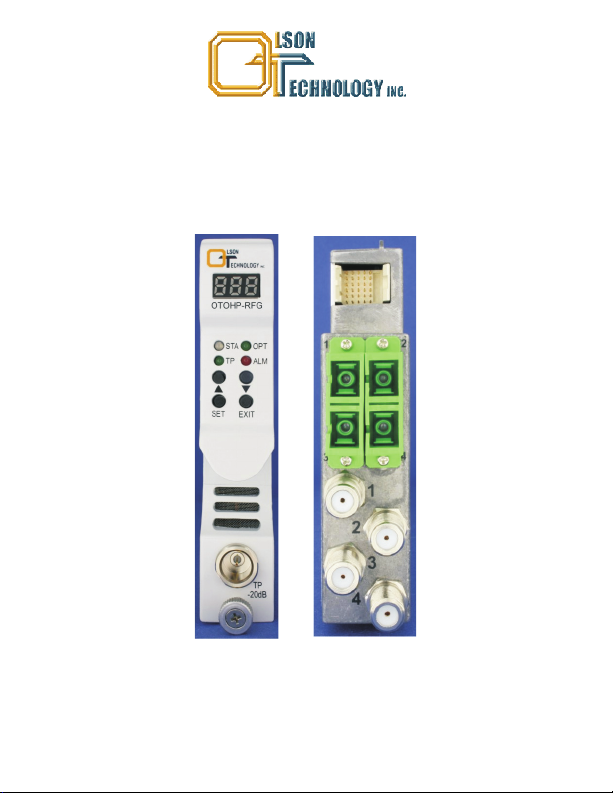
OPTICAL HEADEND PLATFORM
OTOHP-RFG QUAD RFoG RECEIVER
INSTRUCTION MANUAL
Phone: (209) 586-1022
(800) 545-1022
Fax: (209) 586-1026
E-Mail: salessupport@olsontech.com
OTOHP-RFG Rev. X1 11/16/2010
www.olsontech.com
Page 2

SAFETY WARNINGS
LASER RADIATION
The optical fiber connector attached to the OTOHP-RFG quad RFoG receiver emits invisible
radiation that can cause permanent eye damage. .
Operate the receiver only with the proper optical fiber installed in the receiver optical connector.
Power to the receiver should be turned-off or preferably, disconnected whenever the optical
connector cover is opened and there is no installed fiber (as when the fiber connector is being
installedorremovedfromthetransmitterconnector).
NEVER
USEANYOPTICALINSTRUMENT TOVIEWTHEOUTPUTOFTHE OPTICALFIBER
ORCONNECTOR “OPTICALINSTRUMENT”INCLUDESMAGNIFYINGGLASSES,ETC.
NEVER
LOOK INTO THE OUTPUT OF THE CONNECTOR TO BE ATTACHED TOTHE
RECEIVER
NEVER
LOOK INTO THE OUTPUT OFA FIBER CONNECTED TOA LASER
TRANSMITTER.
NEVER
LOOK INTO OR USE ANY OPTICALINSTRUMENT TO VIEW THE DISTANT END
OF AFIBER THATMAY BE CONNECTED DIRECTLY OR VIAAN OPTICAL SPLIT, TOA
TRANSMITTER THATMAY BE OPERATING. THIS SPECIFICALLYAPPLIES TO FIBERS
THATARE TO BE CONNECTED TO RECEIVERS OR OTHER DEVICES ATANY
DISTANCE FROM THE LASERTRANSMITTER.
AVOID DIRECT EXPOSURE TO BEAM
PRECAUTIONS
Failure to comply with these general safety precautions and with the specific precautions
described elsewhere inthis manualviolates thesafety standardsof thedesign, manufacture, and
intended useof thedevice.OlsonTechnology Inc. assumesnoliability forthecustomer's failureto
complywiththeseprecautions.
Do not operate the receiver outside of its ratings. Doing so may result in unsatisfactory
performance,receiverfailure,shortenedreceiverlifespan,orasafetyhazard.
Do not attempt to modify or service any part of a receiver module. Doing so voids the warranty.
ReturntheunittoOlsonTechnology Inc.for serviceandrepair.
Do not restrict airflow in front of or behind the chassis. The receiver should be operated in an
ambientenvironmentbetween0and50ºC(32and122ºF).
Storethe module awayfrom corrosivematerials,atatemperaturebetween-40and+70ºC(-40and
+158ºF),andwithnomorethan85%humidity,non-condensing.
Page 3
INTRODUCTION
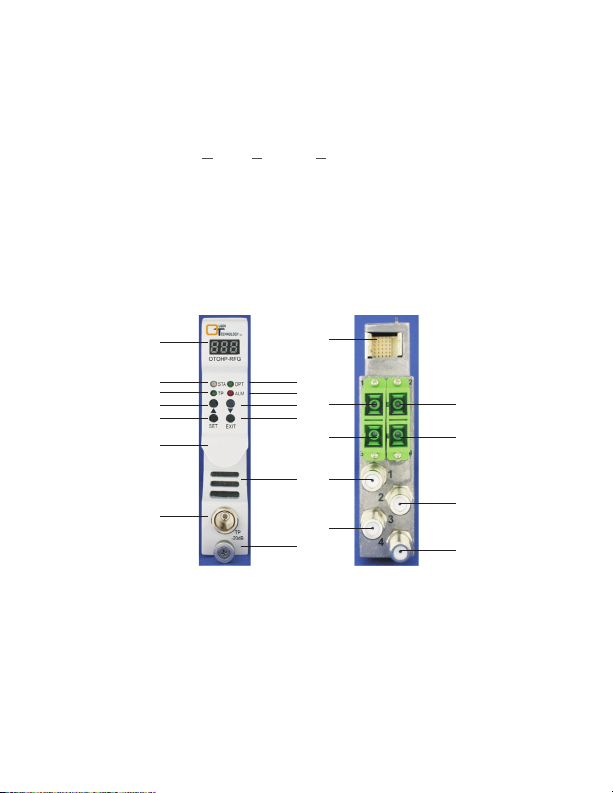
The OlsonTechnology, Inc.Model OTOHP-RFGis a quadreturn path receivermodule
optimized for good performance at the low optical levels associated with RFoG
systems. This low-noise receiver converts upstream optical signals into RF signals at
the headend or remote hubs. The OTOHP-RFG receiver is designed to operate with
Olson Technology’s OHP ( ptical eadend latform) series of products. The module
OH P
features fourindependent receivers with four RFoutput portslocated onthe rear panel
of the receiver module. The OTOHP-RFG typically provides a minimum+30dBmV RF
output leveloverthe full-13dBmto -27dBmoptical input range.Thefront panelcontrols
allow local management andmonitoring of the module while the RS-485 interface and
the OTOHP-NMS network management module allow remote management and
monitoringof the module.
OPERATION PANEL DESCRIPTION
14
5
7
9
11
19
21
13
1615
1817
20
22
1. DisplayLED:
2. STA LED:
1
2 3
4
6
8
10
12
Displaythe status, MGCvalueandalarmcodeof the receiver.
Green indicates the module is operating properly. Red indicates the
modulehas alarms.
3. OPTLED:
Greenindicates themodule isworkingunder“OPT”operationinterface.
4. TPLED:Green indicates the module is workingunder “TP”operationinterface
5. ALMLED: Green indicatesthemoduleisworkingunder “ALM” operationinterface.
6. Up:Push button selects function orparametersetting.,
Page 4

OPERATION PANEL DESCRIPTION (CONT.)
7. Down:
.
8 Set:
9. Exit:
10 Handle: Usedtohandlethemodule when beinginstalled oruninstalled
11 Heat dissipationhole:Air flowoutofthis hole dissipatesthe heat.
12 TP:
13 Thumbscrew:Fixes the moduleto thechassis.
14. 30-pin Connector:
Pushbutton, select functionorparametersetting.
Pushbutton, confirm functionorparametersettingselection.
Pushbutton, exit certainoperationmode
.
..
.
Test pointfor RFoutput,-20dB, F typemale connector
..
.
Providespower and signals tothe chassisbackplane connector
,
typeismale.
15. Optical InputPort:Portfor optical input,connectortypeisSC/APC.
16. Optical InputPort:Port foroptical input connector typeis SC APC.
17. Optical InputPort:Port foroptical input connector typeis SC APC.
18. Optical InputPort:Port foroptical input connector typeis SC APC.
19. RF InputPort:Port forRF input connector typeis F female.
20. RF InputPort:Port forRF input connector typeis F female.
21. RF InputPort:Port forRF input connector typeis F female.
22. RF InputPort:Port forRF input connector typeis F female.
,/
,/
,/
,,,,-
INSTALLATION
1 Inspect for bent pins on the backplane connector at the rear of the module
..
Straighten any bent pins beforeinstalling the module
2 Gently insert each module into a slot in the front of the chassis Be careful to align
..
.
the metal guide rails onthe top and bottom of the module with the nylon guides in
the interiorof thechassis housing
3. Tighten the captivethumbscrew onthe frontof themodule
.
.
CAUTION: Using mismatched optical connectors will damage the connectors and
degrade system performance. Ensure that each fiber has a matching connector.
4. Repeat Steps1 through 3to installthe remainingmodules inthe chassis
.
5. Use an optical power meter to verify that the optical input level meets the
specificationvalues.
Page 5

INSTALLATION (CONT.)
Note: If the power supply turns on after the OTOHP-RFG quad RFoG receiver is
inserted, the Display LED will flash for 5 seconds, and indication the receiver is selfchecking.
.
6 Verifythat thecorrect opticalconnector willbe attached to the opticalconnector on
themodule. Clean boththebulkheadandfiberconnectors.
7. Connectthe optical fiberstotheappropriateOPTINadaptor on therear panel.
8. Connectthe RF cordtotheappropriateRFOUTconnector on therear panel.
9. Push SETbutton and setRF TPchannels.Using asignal levelmeter,measure the
RF output at the RF TP test point (20dB belowactual level) on thefront panel and
verify that it is set at the specified value for that channel. Further adjust the RF
outputlevel if requiredusingMGCfunction.
FRONT PANEL NUMERIC DISPLAY OPERATION DESCRIPTION
First pushSET onthe LEDdisplay andset function.
A01: MGC setting menu
A02: Test Port selection menu
A03: Alarm menu
SET
SET
Twin
-kle
SET
X
SET
Press Exit to
Jump to A02
SET
Press Exit to
Jump to A03
Push and
x
to set TP.
Press SET
to complete
setting.
Push
and
to view
the alarm
code.
x
x
C
H1
SET
XX
Twin
-kle
X
EXIT
EXIT
SET
A01 AA0023
CH2 CH3 CH4 1 00X
EXIT
.........
SET
X
SET
Twin
-kle
SET
Press SET, tens digit will twinkle.
Press and to set it. Press SET to
complete the tens digit setting. Now
the ones digit is twinkling.
Press and to set it. Press SET to
complete setting the ones digit.
XX
Press Exit to
Jump to CH1
Page 6

UNINSTALL THE RECEIVER MODULES
DANGER: Laser Radiation—Avoid direct exposure to beam. Inbound laser radiation
associated with this optical input jumper may be generated by a Class IIIb laser product.
Disconnected optical connectors might emit invisibleoptical radiation. Laser light, visible
or invisible, can seriously injure eyes and even cause blindness.
1 Disconnect the optical fiber s from the rear panel of the receiver. Immediately
.()
place protective caps over thebulkhead and fiber connector
2 Disconnect theRF cablesfrom the F connectors
.-.
3. Loosen the thumbscrew on the front panel of the module CAUTION: Do not pull
.
.
on the thumbscrew to removethe module. Pull on thehandle thatthe thumbscrew
goesthrough to removethemodule.
4. Gently pull the module from the chassis using the handle that the thumbscrew
goes through
.
ALARM DEFINITIONS
First pushSET intoLEDdisplay andset function.
Displayed Message
000
001
002
003
004
005
006
007
008
009
Alarm Status
No alarm
Optical input low for Port 1
Optical input high for Port 1
Optical input low for Port 2
Optical input high for Port 2
Optical input low for Port 3
Optical input high for Port 3
Optical input low for Port 4
Optical input high for Port 4
Module temperature high
System Response
STALED is green
STALED turns to red
STALED turns to red
STALED turns to red
STALED turns to red
STALED turns to red
STALED turns to red
STALED turns to red
STALED turns to red
STALED turns to red
Page 7

TROUBLESHOOTING
When the Status light is red the operator can use “ ” “ ” and “SET” push button
,▲,▼
switch to check the alarms. DANGER/CAUTION: Do not remove the cover of the
receiver or attempt to modify any part of it under any circumstances. Removing the
covercould cause irreparabledamagetotheunit,and will voidyourwarranty.
Problem
Steps to Take
1. Verifyopticalinput power rangeis -27to-13dBm.
Status (STA) LED is lit red.
2. If all is normal, contact Olson Technology Inc. for
furthertroubleshooting.
1. Clean theoptical connector.
2. Verify the optical input power using an optical
powermeter.
No RF power at the
RF output port(s).
3. Tryto adjust theRF outputthroughMGC function.
4. Measure theRF poweratoutput port.
5. If there is no RF power at the output port, the unit
must be returnedto thefactory for service.Contact
OlsonTechnology Inc.for moreinformation.
1. Ensure allconnectors areclean.
2. Verify the cable is terminated with the correct
connectortype.
RF output power is lower
than the required amount.
3. Verify that the optical input power is within the
normalrange.
4. Tryto adjust theRF outputthroughMGC function.
5. Measure theRF poweratoutput port.
6. If the RF power is still low, the unit must be
returned to the factory for service. Contact Olson
Technology Inc.for moreinformation.
Page 8

SPECIFICATIONS
Optical Characteristics (with SM 9/125µm Fiber)
Min Typ Max Units
Operating Wavelength 1260 1620 nm
Optical Input Power -27 -13 dBm
Optical Return Loss -40 dB
Optical Input Ports 4
Optical Connector SC/APC
RF Output & Performance Characteristics
Min Typ Max Units
Frequency Range 5 100 MHz
Band Flatness -0.75 +0.75 dB
1
RF Output Return Loss 16 dB
CATV RF Level +30 +32 dBmV
2
RF Attenuation Range 0 30 dBm
Impedance 75 Ohms
EIN 4
pA/√Hz
NPR (@-20dBm Opt In) 30/10 dB
RF Test Point -20.75 -20 -19.25 dB
RF Connectors F-female
Electrical & Environmental Characteristics
Min Typ Max Units
Operating Temp. Range 0 +50 °C
Storage Temp. Range -40 +65 °C
Relative Humidity 5 85 %
P. S. Voltage +24 V
3
DC
Power Consumption 14 W
NOTES:
1) Band flatness is over a
5-100MHz range.
2) Received optical power of
-13 to -27dBm at 1310nm
with 10% OMI into a 75Ohm
load with 28dB attenuation
setting.
3) Non condensing.
 Loading...