

Page 1
Electrolux Professional S.p.A.
Ovens Platform Customer Support
Technical Training & Service
CONTENTS:
PROJECT REF:
This document contains the information about parameters that can be
read and/or modified by means of user interface, service utilities, ...
AOS ovens
AOS OVENS - Service Manual
(595889300 - ENG)
AOS OVENS
- Service Manual -
AUTHORS:
A.Canova
CONTRIBUTION BY:
D. Vadori
F. Fingolo
F. Ornella
S. Gant
DOCUMENT HISTORY:
Rel. Date: File: Author: Note:
005 06/04/2004 AOS service manual (ENG).005 A. Canova
006 05/07/2004 AOS service manual (ENG).006 A. Canova
007 18/02/2005 AOS service manual (ENG).007 A. Canova
008 13/06/2005 AOS service manual (ENG).008 A. Canova
009 14/09/2006 AOS service manual (ENG).009 A. Canova
New features from firmware 2.7, 2/1
gas ovens, added appendix B-C-D
New calibrations for AOS061G and
AOS101G, updated appendix C-D,
added appendix E-F-G
Updated appendix D, calibration of
AOS061G and added appendix H-I
Updated calibrations for AOS101G,
AOS201G, AOS102G, AOS202G;
firmware 2.80
Firmware 2.90; new value for hAcA for
AOS201G-G20 and for Stbo for
AOS101G-G25; new procedure for
param. programming, updated
appendix D, F; added appendix J
File: AOS service manual (ENG).009 ©Copyright 2002 by Electrolux Professional P. 1/43
Page 2

Electrolux Professional S.p.A.
Ovens Platform Customer Support
Technical Training & Service
AOS OVENS - Service Manual
(595889300 – ENG)
INDEX
1. PROGRAMMING THE DEFAULT PARAMETERS................................................................................4
2. ADVANCED PROGRAMMING.........................................................................................................5
3. BY-PASS CALIBRATION (ONLY FOR LEV. B OVENS) ......................................................................6
4. LAMBDA PROBE CALIBRATION (ONLY FOR LEV. A OVENS)............................................................7
5. OFFSET CALIBRATION (ONLY FOR LEV. A OVENS)........................................................................8
6. ERROR CODES ...........................................................................................................................8
6.1. ERRORS ..................................................................................................................................8
6.2. WARNINGS...............................................................................................................................8
7. FIRMWARE VERSION...................................................................................................................9
8. WORKING TEMPERATURES .........................................................................................................9
9. SERVICE UTILITIES......................................................................................................................9
9.1. UTILITIES THAT CAN BE ACTIVATED WITH OVEN SWITCHED ON....................................................9
9.2. UTILITIES THAT CAN BE ACTIVATED IN PARAMETER PROGRAMMING..........................................10
10. SELECTION OF THE LANGUAGE FOR THE RECIPE MENU (LEV. A).................................................11
11. CLEANING CYCLE (LEV. A OVENS).............................................................................................11
12. CYCLES, UTILITIES, IMPORTANT PARAMETERS...........................................................................12
13. GAS SYSTEM............................................................................................................................13
13.1. GAS VALVE.........................................................................................................................14
13.2. OFFSET PRESSURE CALIBRATION ........................................................................................16
13.3. USE OF MANOMETER (FOR OFFSET PRESSURE MEASURE).....................................................16
14. CHANGE OF THE MICROPROCESSOR BOARD..............................................................................18
APPENDIX A – WATER BOILING POINT.......................................................................................19
APPENDIX B – CONTACTORS DIAGRAM ....................................................................................20
APPENDIX C – CONNECTIONS ON MAIN BOARD.......................................................................21
File: AOS service manual (ENG).009 ©Copyright 2002 by Electrolux Professional P. 2/43
Page 3

Electrolux Professional S.p.A.
Ovens Platform Customer Support
Technical Training & Service
AOS OVENS - Service Manual
(595889300 – ENG)
APPENDIX D – TROUBLESHOOTING...........................................................................................24
APPENDIX E – LAMBDA PROBE...................................................................................................29
APPENDIX F – PARAMETER DESCRIPTIONS .............................................................................30
APPENDIX G – GAS CALIBRATIONS............................................................................................33
APPENDIX H – WATER TREATMENT ...........................................................................................39
APPENDIX I – CONNECTION TO HACCP SYSTEM......................................................................41
APPENDIX J – RELAY DESCRIPTIONS ........................................................................................42
File: AOS service manual (ENG).009 ©Copyright 2002 by Electrolux Professional P. 3/43
Page 4
Electrolux Professional S.p.A.
Ovens Platform Customer Support
Technical Training & Service
AOS OVENS - Service Manual
(595889300 – ENG)
1. Programming the default parameters
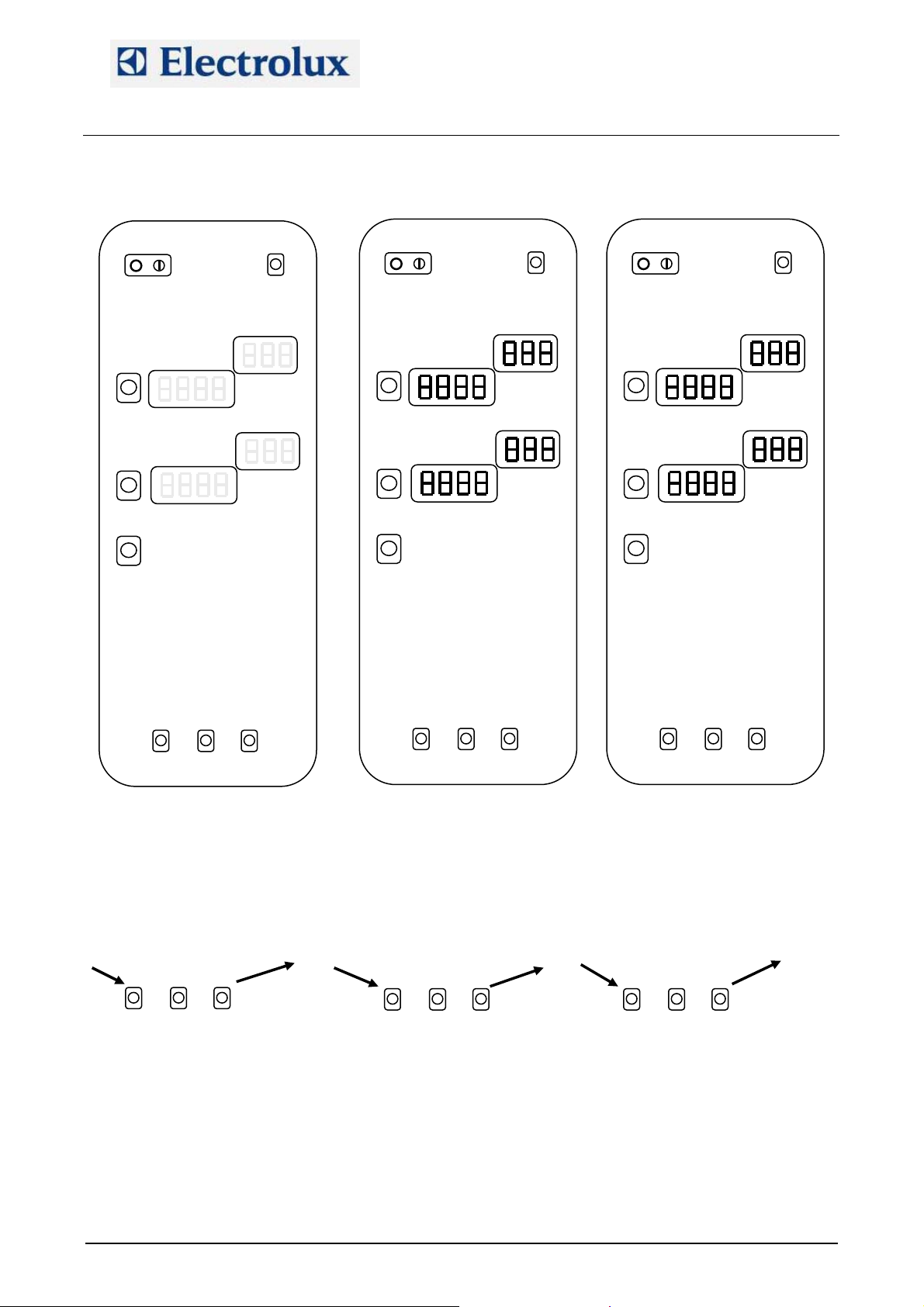
Switch on the oven (fig. 1).
Just after the switching on, a lamp test will take place (fig 2).
At this point, during the lamp test phase, press the external service buttons (fig.3) till you hear a beep.
Fig. 1
1
At this point press the right buttons till you hear a beep (fig. 4).
Press then the left service buttons till the beep (fig. 5).
At this point release the left buttons keeping pressed the middle one (fig. 6) till you hear 2 beeps.
Release the middle button and on the temperature display you will see “PdEF”: the oven will switch off and
on automatically.
Fig. 4 Fig. 5 Fig. 6
1
Fig. 2
Fig. 3
1
1 2
File: AOS service manual (ENG).009 ©Copyright 2002 by Electrolux Professional P. 4/43
Page 5
Electrolux Professional S.p.A.
Ovens Platform Customer Support
Technical Training & Service
2. Advanced programming
AOS OVENS - Service Manual
(595889300 – ENG)
Fig. 7
The procedure to enter in advanced programming is similar to the procedure for programming the defaults
parameters.
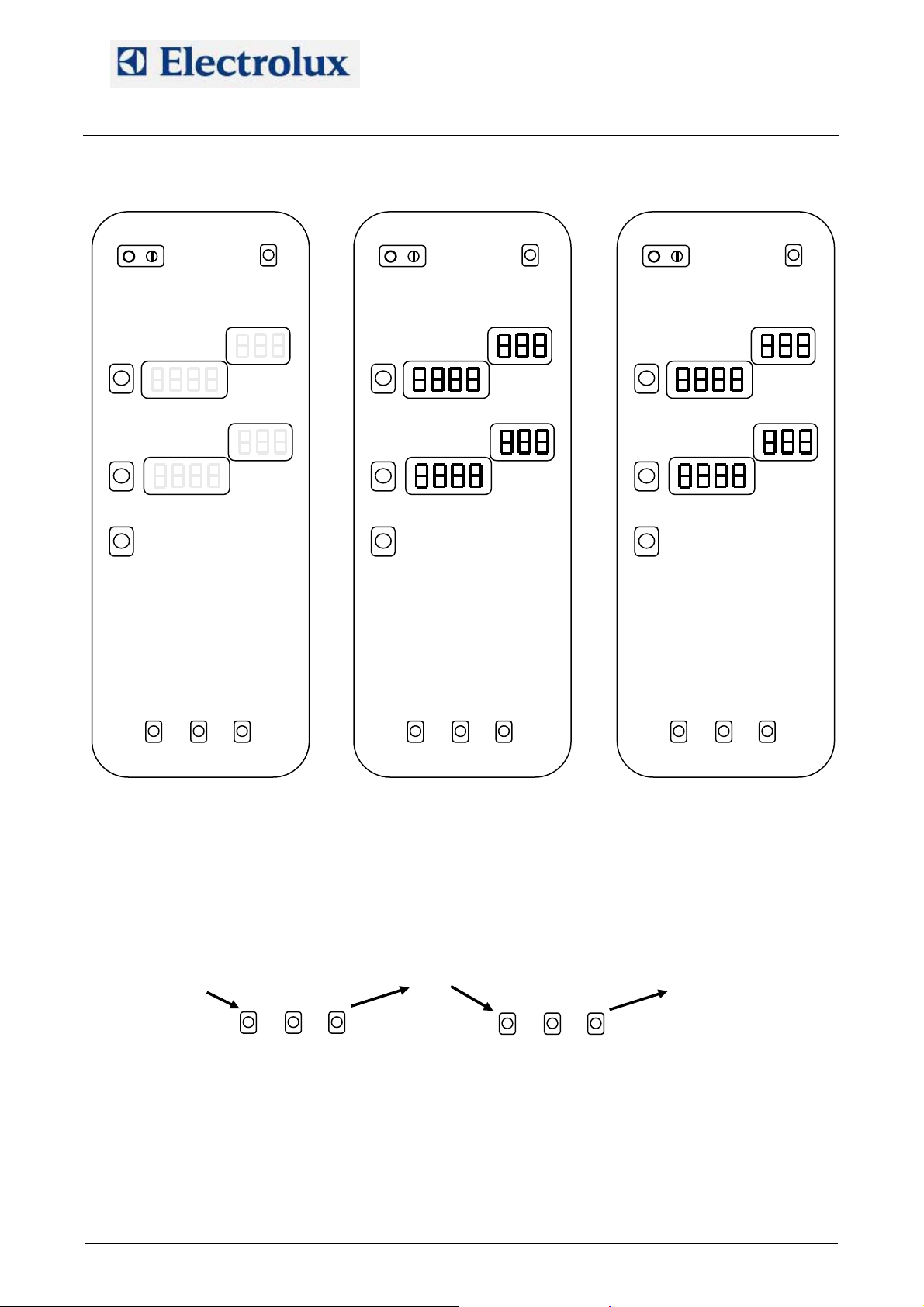
Switch on the oven (fig. 7).
Just after the switching on, a lamp test will take place (fig. 8).
At this point, during the lamp test, press the external service buttons (fig.9) till you hear a beep.
At this point press the right buttons till you hear a beep (fig. 10).
Press then the left service buttons till the beep (fig. 11).
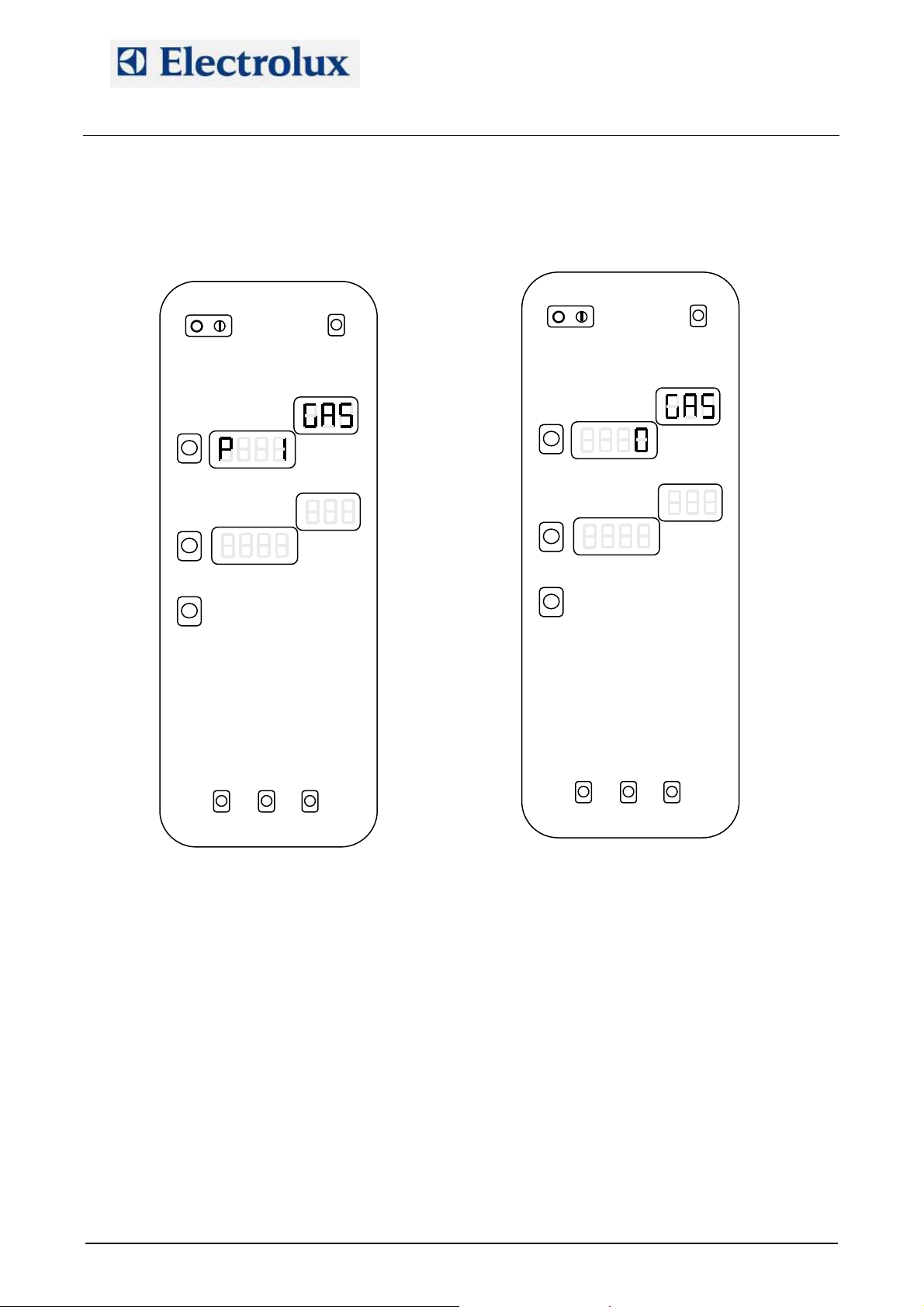
Release the button and on the temperature display you will see “P 1” while on the little display the name of
the parameter will appear (fig. 12).
With the external service buttons it is possible to scroll the list of the parameters.
1
Fig. 10 Fig. 11
Fig. 8
1
Fig. 9
1
File: AOS service manual (ENG).009 ©Copyright 2002 by Electrolux Professional P. 5/43
Page 6
Electrolux Professional S.p.A.
Ovens Platform Customer Support
Technical Training & Service
Pressing the middle button it is possible to see the value of the parameter (fig. 13) and pressing at this
point the external buttons it is possible to modify the value. Press again the middle button returning to the
displaying of the number of the parameter to store the new value.
Switch off the oven to exit from programming.
Fig. 12
AOS OVENS - Service Manual
(595889300 – ENG)
Fig. 13
3. By-pass calibration (only for lev. B ovens)
In order to calibrate the by-pass probe on lev. B oven, follow these steps:
1) Switch on the oven
2) Enter in parameter programming and set parameters cort and OCA1 to 0
3) Exit from programming and switch on again the oven
4) Wait for the end of the pre-heating cycle
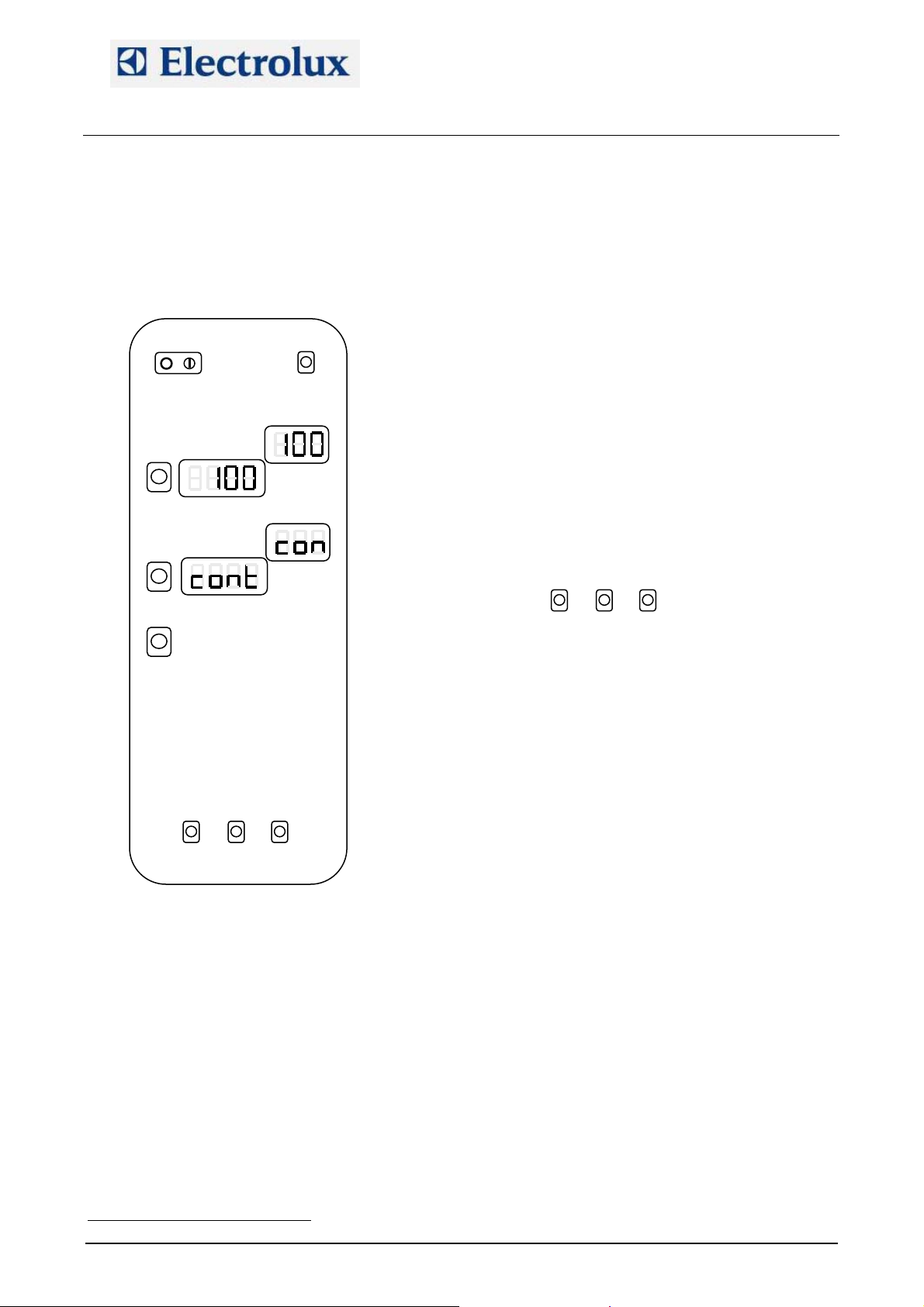
5) Select a steam cycle (100 °C)
6) Select continuous time (indication “cont” on time display)
7) Press and hold down the left service buttons and at the same time press the START button (fig. 14);
the oven will give a long beep
8) Release the service buttons and wait for the stabilization of the temperature reading by the by-pass
probe
9) When the temperature has stabilized, press the three service button together in order to memorize the
value (fig. 15); the oven will confirm the storing with a long beep
File: AOS service manual (ENG).009 ©Copyright 2002 by Electrolux Professional P. 6/43
Page 7
Electrolux Professional S.p.A.
Ovens Platform Customer Support
Technical Training & Service
AOS OVENS - Service Manual
(595889300 – ENG)
10) Allow the oven to work for several minutes in steam mode checking the oven cavity temperature, which
should stabilize at the water boiling point. If this reading is greater or less than the correct water boiling
1
point
TPF
FPT, a corrective value can be stored in the parameter OCA1. From firmware release 2.90, pushing
the 3 service buttons to store the bypass temperature, the microprocessor will calculate and store also
the value of OCA1.
11) Set parameter cort to 1.
12) Set the altitude above sea level of the site on paramet er SEAL
Fig. 15
Fig. 14
4. Lambda probe calibration (only for lev. A ovens)
The calibration of the lambda probe is necessary (from firmware 2.6) for the right working of the oven in
case of cycle with set point under 100 °C. With this procedure we have to find the point of 0% of humidity.
The procedure is done in a way similar to the by-pass calibration. These are the steps:
1) Set an hot air cycle, 150 °C, time over 15 minutes, open flap;
2) Start the cycle pressing together the left and middle service buttons and the START button. The
oven will give a long beep;
3) Wait around 10-15 minutes to dry completely the cavity;
4) Close the flap and wait around 20 seconds to stabilize the humidity inside the cavity;
5) To store the value press together the 3 service buttons. The oven will confirm with a long beep.
6) Stop the cycle with the START button.
This calibration is very important and has to be done with care. If the dry point (0% of humidity) is not
correctly stored, the reading of the relative humidity could be overestimated or underestimated.
1
TP
PT See Appendix A
File: AOS service manual (ENG).009 ©Copyright 2002 by Electrolux Professional P. 7/43
Page 8

Electrolux Professional S.p.A.
Ovens Platform Customer Support
Technical Training & Service
AOS OVENS - Service Manual
(595889300 – ENG)
5. Offset calibration (only for lev. A ovens)
In order to adjust the offset of the cavity probe, enter in parameter programming and set parameters cort
and OCA1 to 0.
Then run a steam cycle for several minutes and check the cavity temperature, which should stabilize at the
water boiling point. If the stabilized cavity temperature is less or greater than the correct water boiling
2
point
TPF
FPT, a corrective value can be stored in parameter OCA1.
After this, set parameter cort to 1and set parameter SEAL (altitude above sea level).
6. Error codes
Errors can be divided into 2 categories: errors (they stop the appliance) and warnings (they do not stop the
appliance)
6.1. Errors
EE2P: Communication error with the EEPROM
E---: If the controller detects one or more parameters which have values not permitting the minimum
operational requirements, an error code will appear on the display, i.e. “E---” followed by the parameter
number. Enter the programming mode and set the correct value according to the parameter list.
EtUC: Cavity over temperature; cavity temperature exceeded value stored in parameter cot.
EtUB: Boiler over temperature; boiler temperature exceeded value stored in parameter bot.
EFUN: Activation of the thermal protection of the motor. On the little temperature display it will appear “UP”
or “DOWN” according it is the thermal protection of the upper motor (and the motor of 6-10 grid ovens) or
lower motor on 20-grid oven. The thermal protection has an automatic reset but in order to continue with
the cooking process, parameter ALFn has to be reset to 0.
Etc: Tripping out of cavity limiter
Etb: Tripping out of boiler limiter
ESCH or ETBR: Over temperature on the electronic board; check the cooling fan and the ventilation
openings on the bottom of the control panel.
Ept1: cavity probe in open circuit (only the steam cycle – 100 °C can be selected)
Ept2: boiler probe in open circuit (only hot air cycle can be selected)
Ept3: meat probe in open circuit (only time cooking can be selected)
Ept4: by-pass probe in open circuit (only hot air, regeneration or low temperature steam cycle can be
selected)
Ept8: NTC probe in short or open circuit
ECAD: A/D converters not working
E PM: Communication error with PWM system
E SL: Water level probe error. If the boiler heating elements or burners are on for a tiem over that one
defined in parameter tbon without a water charging phase, this error message is activated. To reset it,
parameter ALFn has to be reset to 0.
burn CAUP: Reset of cavity burner (gas oven) (the upper one in the 20 grid ovens)
burn CAdo: Reset of lower cavity burner (gas oven) in 20 1/1 and 2/1 ovens
burn boUP: Reset of boiler burner (gas oven) (the upper one in 20 2/1 ovens)
burn bodo: Reset of lower boiler burner (gas oven)
6.2. Warnings
EH2O: Before the starting of the cleaning system and during its working, there are some check points of
the water pressure. If the water pressure is too low this warning message appear on the display. Check
the water pressure (1.5÷2.5 bar), check the correct working of the water pressure switch, check if there are
obstructions on the cleaning water inlet pipe (its inner diameter must be 20 mm). From firmware release
2.50, EH2O is a warning message and no more an error causing the stopping of the cleaning cycle.
EFLP: Cavity ventilation flap failure; check the motoreducer or the micro switch that detects the close
position of the flap. If the motoreducer does not close the flap within the time set in parameter FLto, EFLP
error appears.
ECLO: Clock error, it appears if the clock was never adjusted
EPrG: Error in reading the phases of a multiphase recipe
2
TP
PT See Appendix A
File: AOS service manual (ENG).009 ©Copyright 2002 by Electrolux Professional P. 8/43
Page 9

Electrolux Professional S.p.A.
Ovens Platform Customer Support
Technical Training & Service
EIND: Error in reading the index of the recipes
EDES: Error in reading the description of a recipe
ERAM: Communication error with the RAM
nFIP: Communication error of recipe display
DOOR: Open door (from firmware 2.6 only the led on the control panel switches on)
FILL: Safety level probe of the boiler out of water
PrEH: Preheating phase of the boiler; from firmware 2.90 it indicates the preheating phase of the cavity if
the warning message appears on temperature display.
OPEN: boiler drain activated
COOL: Cavity cooling phase
dEt: low level of detergent
rAI: low level of rinser
rCLN: request for a cleaning cycle (manual or automatic); parameter FCLn is set to a value different from
da 0.
LOAD: end of pre-heating phase of the cavity; if nothing is done, the cavity is maintained at the pre-heating
set-point.
Strt: push START button.
AOS OVENS - Service Manual
(595889300 – ENG)
7. Firmware version
In order to check the version of the firmware, switch on the oven and wait for the lamp test and the end of
the start-up phase (4 lines on the temperature display). When on the temperature display, the actual cavity
temperature appears, pressing the three service buttons together on the display temperature the firmware
version will appear. Pressing again these buttons, the board temperature will be displayed.
8. Working temperatures
While the oven is working, it is possible to see the temperature of the several probes pressing the service
buttons. See the following figures:
Fig. 16
Temperatura del boiler
Fig. 18
Temperatura dello spillone
Fig. 17
Temperatura del by-pass
Fig. 19
Temperatura della scheda
9. Service utilities
From firmware release 2.50, some useful utilities are present for troubleshooting and diagnostic of the
oven.
These additional features can be divided in 2 set: utilities that can be activated with the oven switched on,
utilities that can be activated with the oven in parameter programming
9.1. Utilities that can be activated with oven switched on
With the oven switched on and not in a cooking phase, pressing simultaneously the following buttons it is
possible to activate the detergent, rinser pumps and water valve of the cleaning system:
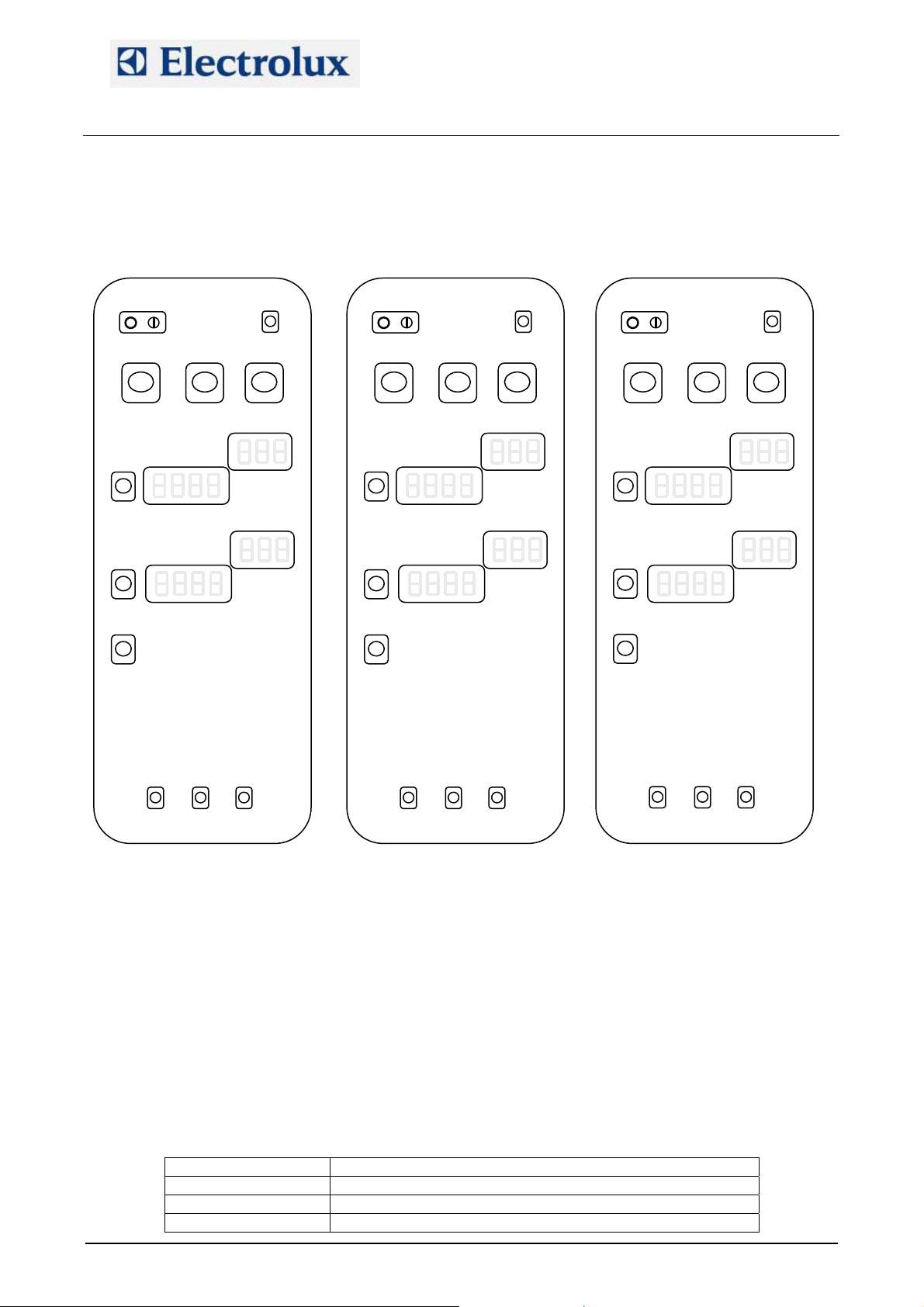
• Steam cycle, combi cycle, temperature buttons (fig. 20): activation of detergent pump
• Steam cycle, combi cycle, time buttons (fig. 21): activation of rinser pump
• Steam cycle, combi cycle, utility buttons (fig. 22): activation of water valve of the cleaning system
File: AOS service manual (ENG).009 ©Copyright 2002 by Electrolux Professional P. 9/43
Page 10
Electrolux Professional S.p.A.
Ovens Platform Customer Support
Technical Training & Service
AOS OVENS - Service Manual
(595889300 – ENG)
These routines are achievable only on lev. A ovens, i.e. with the parameter dCLn set to 0, closed door and
cavity temperature less than 80 °C and, from firmware release 2.90, with the oven not blocked with
password.
Fig. 20
Fig. 21
Fig. 22
9.2. Utilities that can be activated in parameter programming
• Pressing the steam cycle and hot air cycle buttons, all the output relays are sequentially activated and
on the time display it will be displayed the activated relay with the message do1, do2, ... (dox=RLx on
the EWD)
From firmware release 2.7 this utility is changed as follows:
o The steam cycle button acts as main switch: if it is released, the test stops.
o Each time the hot air cycle button is pressed, the next relay is activated and remains activated till
the next pressure of the hot air cycle button.
o If the hot air cycle button is kept pressed, the relays are sequentially activated.
• Pressing the time buttons, the time will be displayed
• Pressing the utility button, on the time display a 4-characters message will be displayed while on the
little display will be shown a number with the following meanings
Big display Meaning of the number on the little display
ntc
Prb1
Prb2
First meat probe temperature (lev. A)
Second meat probe temperature (lev. A)
PCB temperature
File: AOS service manual (ENG).009 ©Copyright 2002 by Electrolux Professional P. 10/43
Page 11
Electrolux Professional S.p.A.
Ovens Platform Customer Support
Technical Training & Service
AOS OVENS - Service Manual
(595889300 – ENG)
Big display Meaning of the number on the little display
Prb3
Prb4
Prb5
Prb6
CEL1
CEL2
boL1
boL2
byP
Prb
HuM
KS contactor is activated for 15 s and the lambda probe is
fed and after a while the cavity humidity will be displayed
Third meat probe temperature (lev. A)
Fourth meat probe temperature (lev. A)
Fifth meat probe temperature (lev. A)
Sixth meat probe temperature (lev. A)
First cavity temperature
Second cavity temperature
First boiler probe
Second boiler probe
Bypass probe
Single-point meat probe (lev. B)
If one of the probes is detecting the same temperature of the ntc probe (PCB temperature), the
meanings are the following:
1) Probe in short circuit
2) Probe not connected (for example Prb on a lev. A oven)
3) Probe at the same temperature of the ntc probe
• If the led “open door” is switched on in parameter programming mode, it means that the safety level
probe of the boiler is detecting water
• If the led “scale alarm” is switched on in parameter programming mode, it means that the working level
probe of the boiler is detecting water
10. Selection of the language for the recipe menu (lev. A)
Starting from firmware release 2.30 on lev. A ovens it is possible to select a language for the menu of the
recipes. To select the language, set parameter LanG to the correct value for the desired language (see the
relevant parameter list).
11. Cleaning cycle (lev. A ovens)
Each cleaning cycle can be divided into the repeating of 3 fundamental phasesTPF
Phase A
- Washing phase controlled through the parameters CLt1 (time of detergent injection) and CLt2 (time of
detergent + water injection)
Phase B (like Phase A but with the final sub phase with 20 seconds of water)
- Washing phase controlled through the parameters CLt1 (time of detergent injection) and CLt2 (time of
detergent + water injection)
Phase C
- Rinsing and drying phase controlled through the parameters CLt3 (time of rinse aid injection) and CLt4
(time of water injection)
The cleaning cycles are composed according the following table:
Cycle Name of the program Composition of the phases
SOFT CYCLE CLEAN 1/SOFT A+C
MEDIUM CYCLE CLEAN 2/MEDIUM 2A+C
STRONG CYCLE CLEAN 3/STRONG 2A+2B+C
EXTRA–STRONG CYCLE CLEAN 4/X-STRONG 2A+4B+C
At the end of a cleaning cycle (at the end of the acoustic signal) the oven enter a stand-by state (from
firmware 2.40), i.e. the boiler heating elements are not fed, the user interface shows only the time and the
3
FPT:
3
TP
PT At the beginning of each phase the cavity is brought at a cert ain temperature with a COOL ING phase without water or with an hot air
cycle
File: AOS service manual (ENG).009 ©Copyright 2002 by Electrolux Professional P. 11/43
Page 12

Electrolux Professional S.p.A.
Ovens Platform Customer Support
Technical Training & Service
AOS OVENS - Service Manual
(595889300 – ENG)
ON-OFF button led is the only lit up led. The exit from this stand-by state takes place with an action from the
user: pressing of a button of the user interface or opening the oven door.
NB: To check the correct water installation, make sure the rotating wash arm does not turn below 100 rpm
(120 rpm max.)
12. Cycles, utilities, important parameters
Hot air cycle: Only the cavity heating elements/burners are working. The maximum temperature is 300 °C; if
the set point is over 250 °C, the maximum working time that can be set is given by parameter dutM. If on a
lev. A oven a humidity value is set, the lambda probe will control only the cavity flap.
Steam cycle: The maximum set point temperature is 100 °C (130 °C from firmware 2.6). Boiler heating
elements/burners are controlled with the lambda probe (lev. A ovens) or with the by-pass probe (lev. B
ovens) for a set point of 100 °C; for set point lower than 100 °C, the boiler is controlled with the cavity probe.
Combi cycle: Boiler and cavity heating elements/burners are working. Cavity heating elements/burners are
controlled with the cavity probe; boiler heating elements/burners are controlled by the lambda probe (lev. A
ovens) or by the by-pass probe (lev. B ovens). The maximum set point is 250 °C. From firmware 2.6, for a
set point lower than 100 °C, to obtain the required steam the humidifier is used (not the boiler).
Regeneration cycle: In this cycle boiler and cavity heating elements/burners work alternatively during the
first rising (parameter rIGb – it defines the boiler working time – e parameter rIGc – it defines the cavity
working time) till the set point is reached. After the set point is reached, boiler and cavity works in parallel to
maintain temperature and humidity.
DELTA-COOKING cycle: This cooking cycle is used with the meat probe and hot air, steam or combi cycle.
For this cycle it is set a Delta temperature (let’s call it D) and not a cavity set-point. The cavity will be
thermostatically controlled to have in any moment a cavity temperature that is D °C over the meat probe
temperature.
COOL: The cavity-cooling mode takes place with the fan running and water injection from the temperature of
180 °C (parameter trMA) to the temperature of 40 °C (parameter trMn). Passing from a cooking cycle to a
steam cycle, an automatic cooling phase will take place if the cavity temperature is over 3 °C (parameter
dSAc) from the set point of the steam cycle.
Boiler automatic drain: The automatic boiler drain takes place each 2 hours of working of the boiler heating
elements/burners (parameter dbon) and if the water temperature is lower than 50 °C (parameter tcdb).
Then the boiler is automatically filled.
Board cooling: The cooling fan is activated starting from the temperature defined in parameter Sbc.
Boiler preheating: After the filling of the boiler, the water is heated up to 85 °C (parameter SPHb) and
maintained at this temperature if the boiler is not used.
Hour counters: The hour counter parameters are the following:
hAir: hot air mode hour counter
hStM: steam mode hour counter
hcMb: combi mode hour counter
Parameter PPM: Setting this parameter to 1, the Energy Optimiser function is enabled (with Sicotronic
system) in the foreseen electric ovens. The 2 high voltage digital inputs named IND4 (X10-11/5) and IND5
(X10-11/6) and the 2 output relays RL5 and RL24 are used. RL5 is closed each time the oven has to use
the heating elements at half or full power while RL24 is closed when the heating elements have to be used at
full power (independently from Sicotronic system). IND4 and IND5 are the high voltage inputs of the
commands from Sicotronic system: if on IND4 and IND5 are present 230V the oven is working normally; if
only one is at 230V the oven is forced from Sicotronic system to work at half power (with no visualization on
the display); if both IND4 and IND5 are at 0V, the oven is forced to cut all the heating elements
Parameter dEMO: If enabled (set to 1), this parameter makes the oven working in demo function i.e. the
user interface is fully working but the oven does not make any real function (no load is activated).
Parameter tbon: Timeout for E SL error; if it is set to 0 the control is disabled (from firmware 2.80).
Parameter AbSP: Setting this parameter to 1, the selected cooking cycle starts closing the door without
pressing the START/STOP button (from firmware 2.80).
Parameter dSPS: Setting this parameter to 1 the pre-heating of the boiler is disabled when the oven is not in
cooking mode, so the pre-heating will start at the beginning of a combi or steam mode or of a recipe that
provided the use of those modes in one of its steps (from firmware 2.80).
File: AOS service manual (ENG).009 ©Copyright 2002 by Electrolux Professional P. 12/43
Page 13
Electrolux Professional S.p.A.
Ovens Platform Customer Support
Technical Training & Service
13. Gas system
AOS OVENS - Service Manual
(595889300 – ENG)
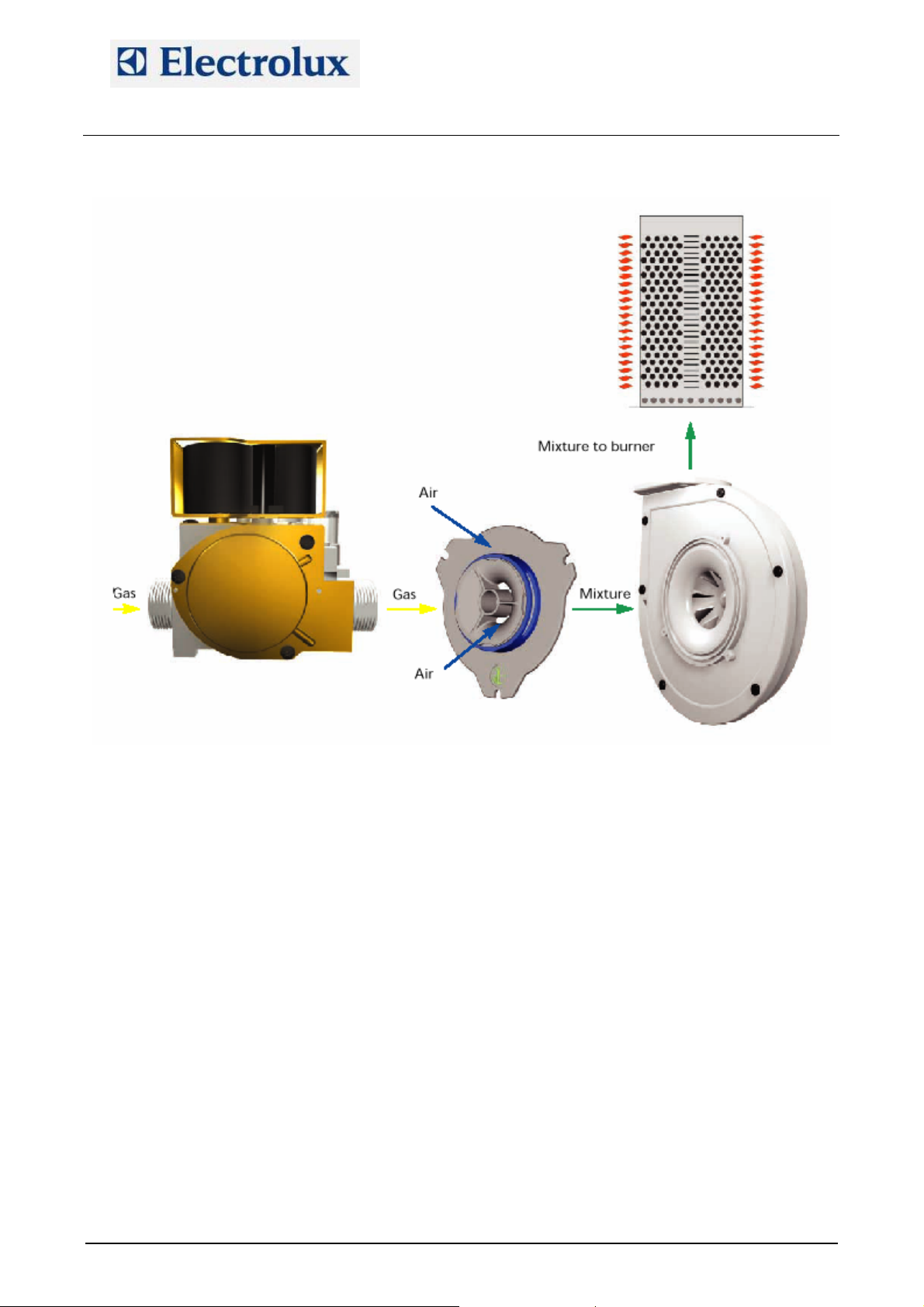
The gas system is made with low emission burners. The main components are:
SIT gas valve type SIGMA 848
DC burner fan that is intaking air through a calibrated mixer where the air–gas mixture is created; then
the fun conveys the mixture to the burner
A cavity and a boiler heat exchanger made with a corrugated tube for increasing the efficiency
An ignition rod and a detection rod
An ignition device.
Starting with a cooking cycle, the POW board of the oven activates the ignition device which activates the
burner fan whose speed is controlled with a PWM signal.
The POW board activates the ignition device. From pin 8 of the ignition device a high voltage output is
carried to the digital input section of the POW board (X10/5÷8) and to the switching feeder for the burner
fans.
With an high voltage input on X10/5÷8, the POW board generates on X9/2÷5 a PWM signal to control the
speed of the burner fans, i.e. controlling the quantity of sucked gas and air. The PWM signal changes
according to the status of the burner, i.e.:
Start of the burner: controlled with parameters StcA (start of cavity burners) and Stbo (start of boiler
burners).
Full power of the burner: controlled with parameters FucA (full power of cavity burners) and Fubo (full
power of boiler burners)
Half power of the burner: controlled with parameters hAcA (half power of cavity burners) and hAbo (half
power of boiler burners)
The quantity of sucked gas is controlled with those parameters (which are determining the speed of the
burner fans), with the injector/diaphragm inserted at the outlet of the gas valve and with the calibration of the
offset value on the gas valve.
The quantity of sucked air is controlled with the above parameters and with the calibrated aerator on the
mixer.
The ignition sequence is then the following:
File: AOS service manual (ENG).009 ©Copyright 2002 by Electrolux Professional P. 13/43
Page 14

Electrolux Professional S.p.A.
Ovens Platform Customer Support
Technical Training & Service
AOS OVENS - Service Manual
(595889300 – ENG)
• The POW boards activates the ignition device
• After 1.5 s, the ignition device activates the fans that start at the speed determined with parameters Stxx
• The spark starts for 4 s and after these 4 s there are 2 s for flame detection
• If the flame is detected, the start speed is maintained for around 6 s and after this time the fans are
carried to their working speed (half or full power)
• If the flame is not detected, the fan keep on running for an interpurge phase of 15 s; after this phase
there is a stop of the fan for 1 s and the ignition sequence is repeated. If the flame is still not detected
there will be again 15 s of interpurge phase and then the last ignition attempts before the reset signal.
In case of loosening of the flame signal during working, only one re-ignition attempts takes place.
In case of conversion to different type of gas, besides the injector/diaphragm also the parameters, which
control the PWM signal, have to be changed according to appendix G and the offset pressure has to be set.
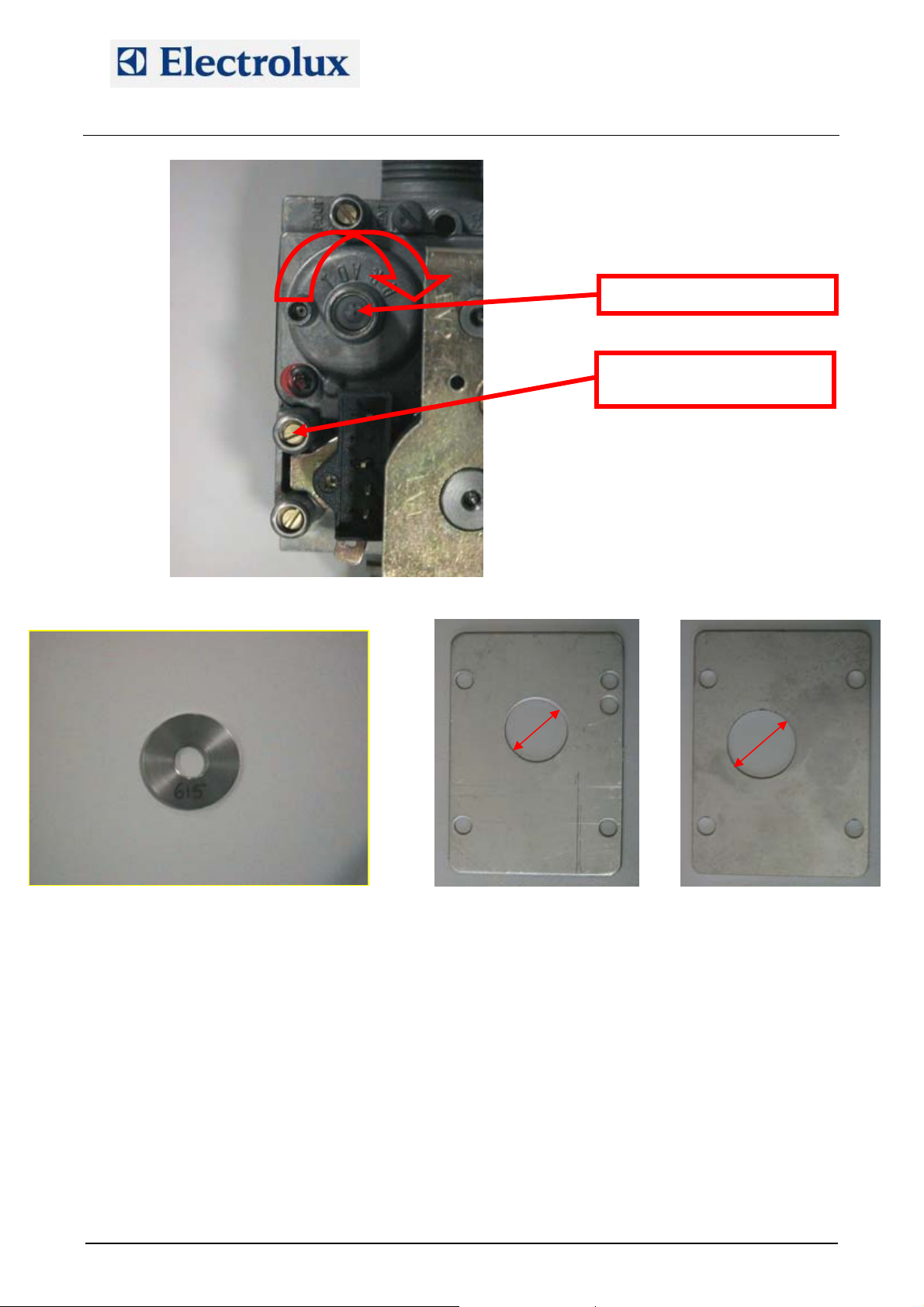
NB: On 10 1/1 and 20 1/1 ovens, changing from natural gas to LPG or G30 a flow reducer flange (fig. 24 enclosed in the oven) with hole of diameter 21 mm must be put between the cavity burner fan and the cavity
burner; on 10 2/1 and 20 2/1 ovens, changing from natural gas to LPG or G30 a flow reducer flange (fig. 25 enclosed in the oven) with hole of diameter 25 mm must be put between the cavity burner fan and the cavity
burner
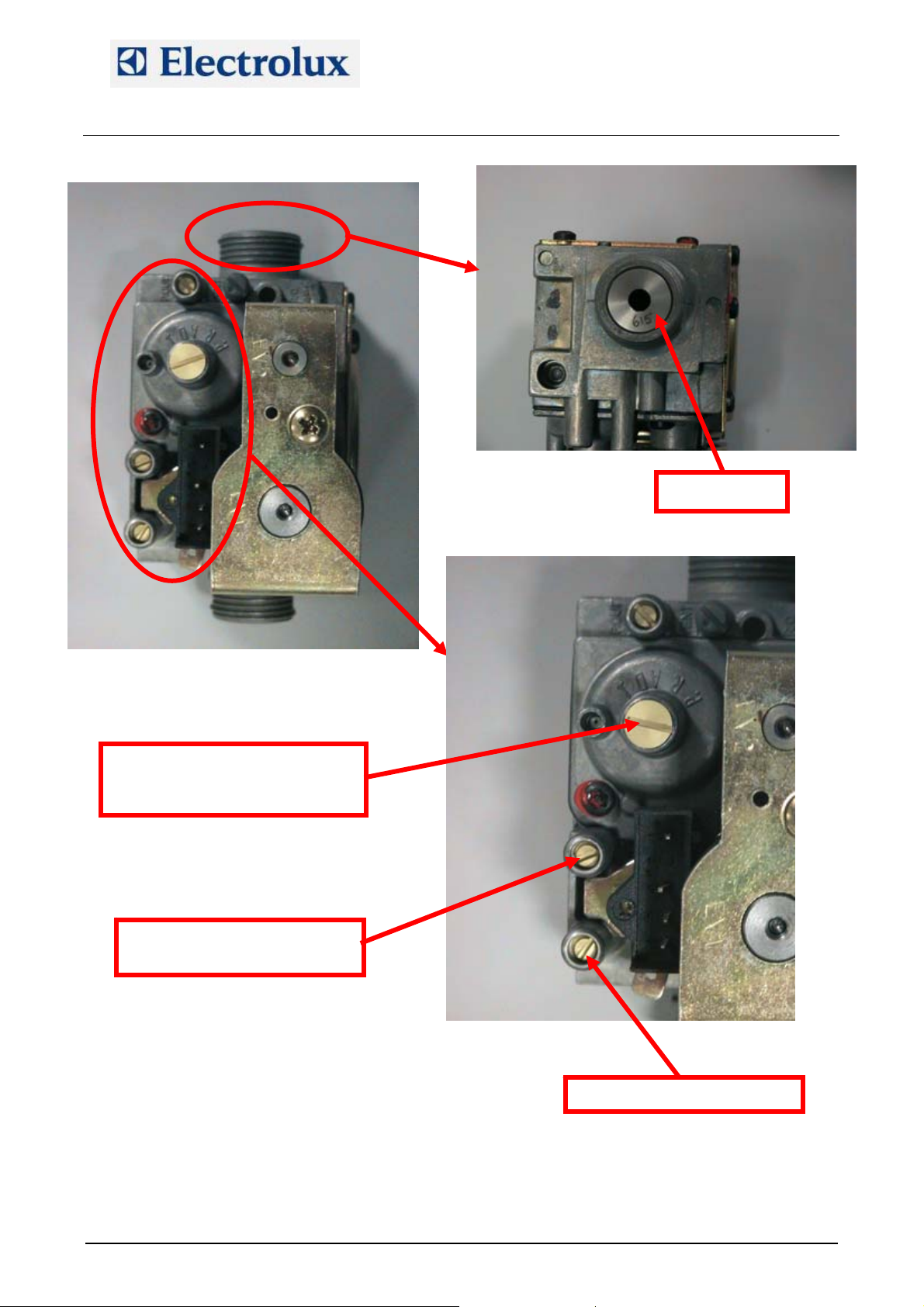
13.1. Gas valve
File: AOS service manual (ENG).009 ©Copyright 2002 by Electrolux Professional P. 14/43
Page 15
Electrolux Professional S.p.A.
Ovens Platform Customer Support
Technical Training & Service
AOS OVENS - Service Manual
(595889300 – ENG)
Remove this threaded cap to get
access to the offset adjustment
screw
Offset pressure test point
Injector
Inlet pressure test point
File: AOS service manual (ENG).009 ©Copyright 2002 by Electrolux Professional P. 15/43
Page 16
Electrolux Professional S.p.A.
Ovens Platform Customer Support
Technical Training & Service
Fig. 23 - Injector
-
AOS OVENS - Service Manual
(595889300 – ENG)
+
Offset adjustment screw
Offset pressure test point
Fig 24 - LPG flange 1/1
21
25
Fig. 25 - LPG flange 2/1
13.2. Offset pressure calibration
For the adjustment of the offset pressure, connect a manometer with a resolution of 1 Pa (100 Pa=1 mbar)
to the offset pressure test point after loosening the sealing screw. To adjust the cavity gas valve offset, set
an hot air cycle, half power; to adjust the boiler gas valve offset select a steam cycle, half power. Wait
around 3 minutes for the stabilization of the pressure before adjusting it turning slowly the screw indicated
in the picture above.
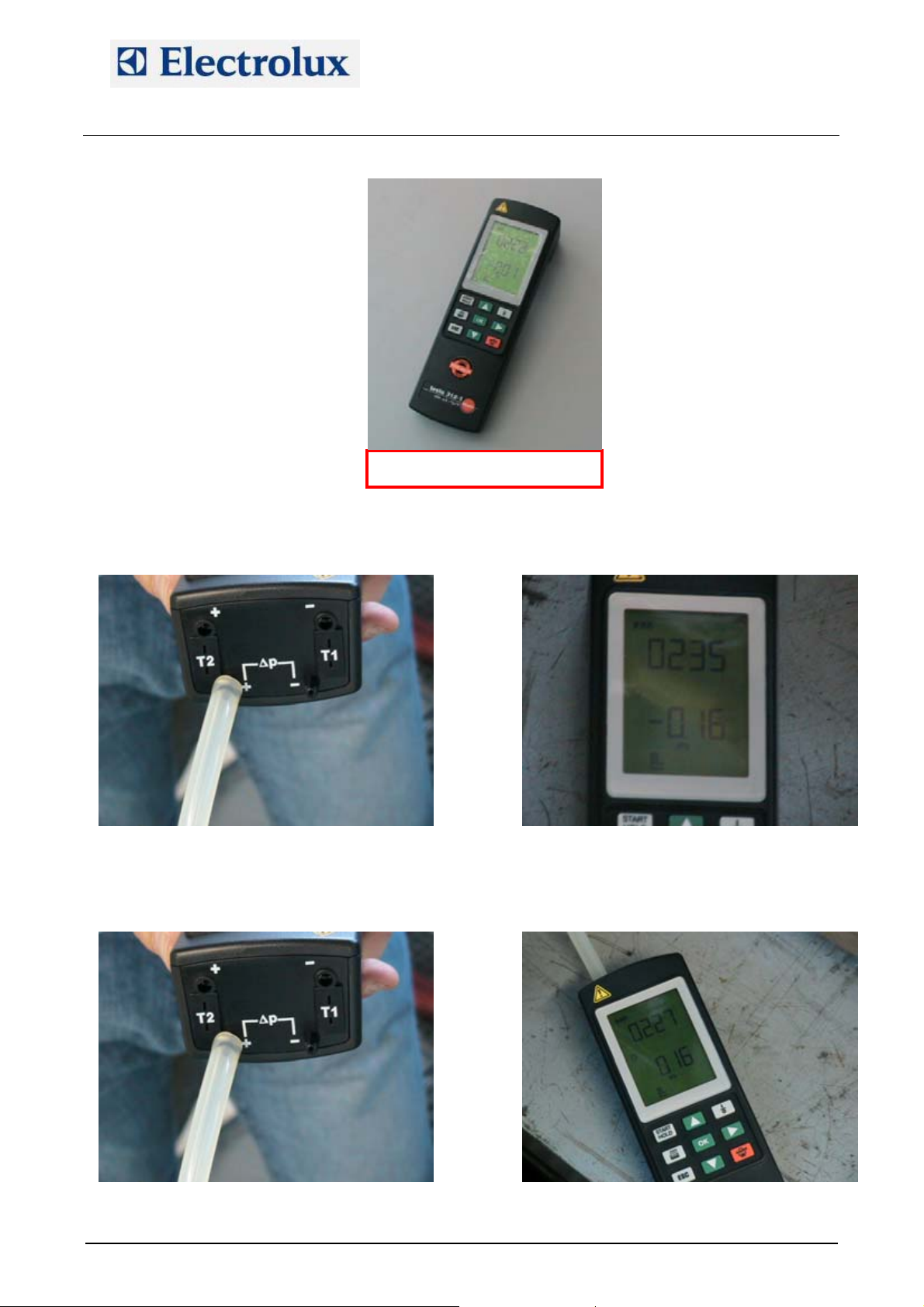
13.3. Use of manometer (for offset pressure measure)
File: AOS service manual (ENG).009 ©Copyright 2002 by Electrolux Professional P. 16/43
Page 17
Electrolux Professional S.p.A.
Ovens Platform Customer Support
Technical Training & Service
AOS OVENS - Service Manual
(595889300 – ENG)
Fig. 26 – Manometer 0S0388
Using the pressure inlet signed with “+” and with negative reading on the display as in the fig. 27-28, this
means we are measuring – 0.16 hPa = – 16 Pa:
Fig. 27 Fig. 28
Using the pressure inlet signed with “+” and with positive reading on the display as in the fig. 29-30, this
means we are measuring + 0.16 hPa = + 16 Pa:
Fig. 29 Fig. 30
File: AOS service manual (ENG).009 ©Copyright 2002 by Electrolux Professional P. 17/43
Page 18
Electrolux Professional S.p.A.
Ovens Platform Customer Support
Technical Training & Service
AOS OVENS - Service Manual
(595889300 – ENG)
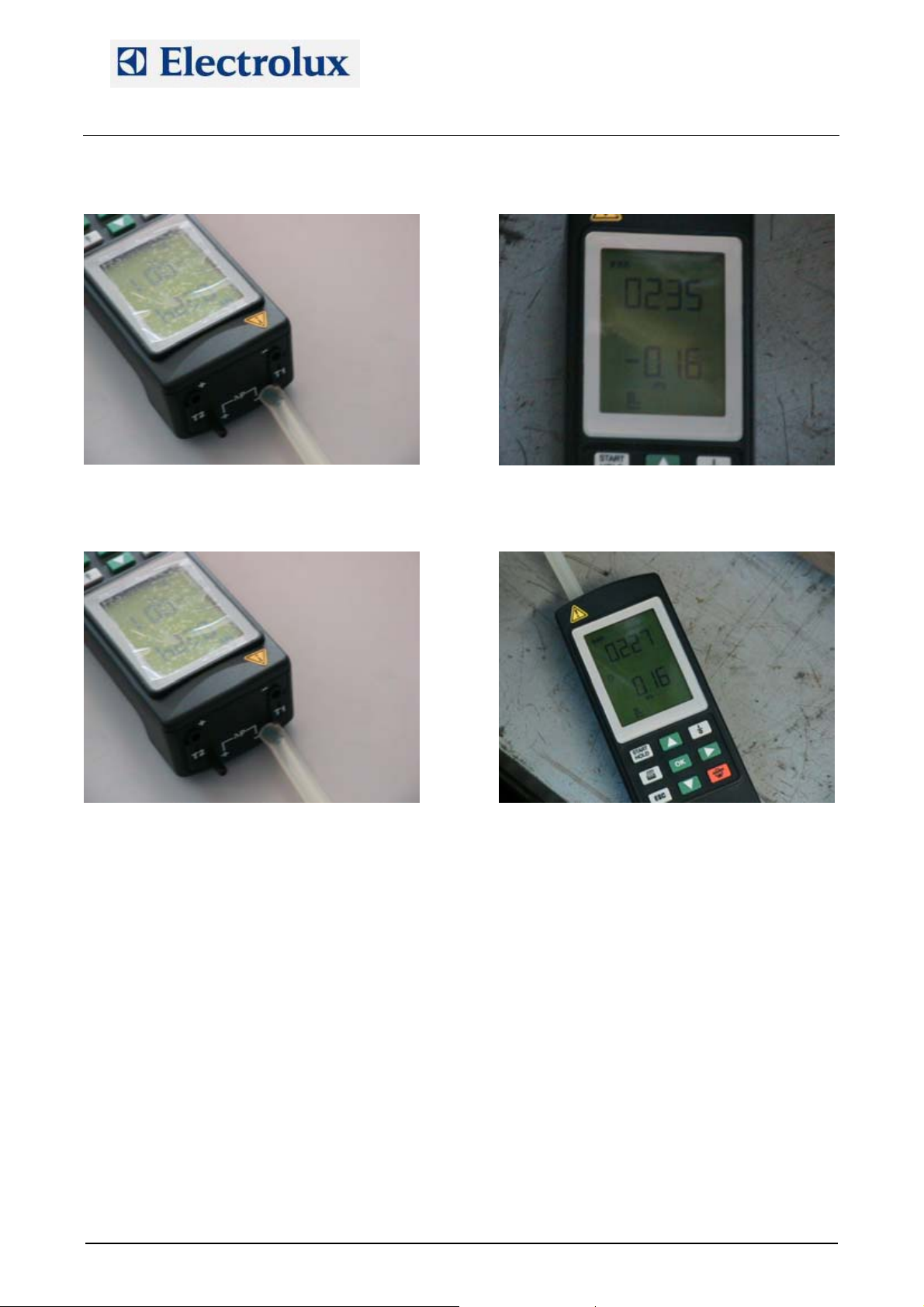
Using the pressure inlet signed with “–” and with negative reading on the display as in the fig.31-32, this
means we are measuring + 0.16 hPa = + 16 Pa:
Fig. 31 Fig. 32
Using the pressure inlet signed with “
–” and with positive reading on the display as in the fig. 33-34, this
means we are measuring – 0.16 hPa = – 16 Pa:
Fig. 33 Fig. 34
14. Change of the microprocessor board
In case of changing of the microprocessor board, the following operations/calibrations have to be done:
1) Default parameter programming
2) Change parameters according parameter list
3) Lambda probe calibration for lev. A ovens (from firmware 2.6)
4) By-pass calibration (lev. B ovens) and cavity offset (parameter OCA1) or only cavity offset for lev. A
ovens.
File: AOS service manual (ENG).009 ©Copyright 2002 by Electrolux Professional P. 18/43
Page 19
Electrolux Professional S.p.A.
Ovens Platform Customer Support
Technical Training & Service
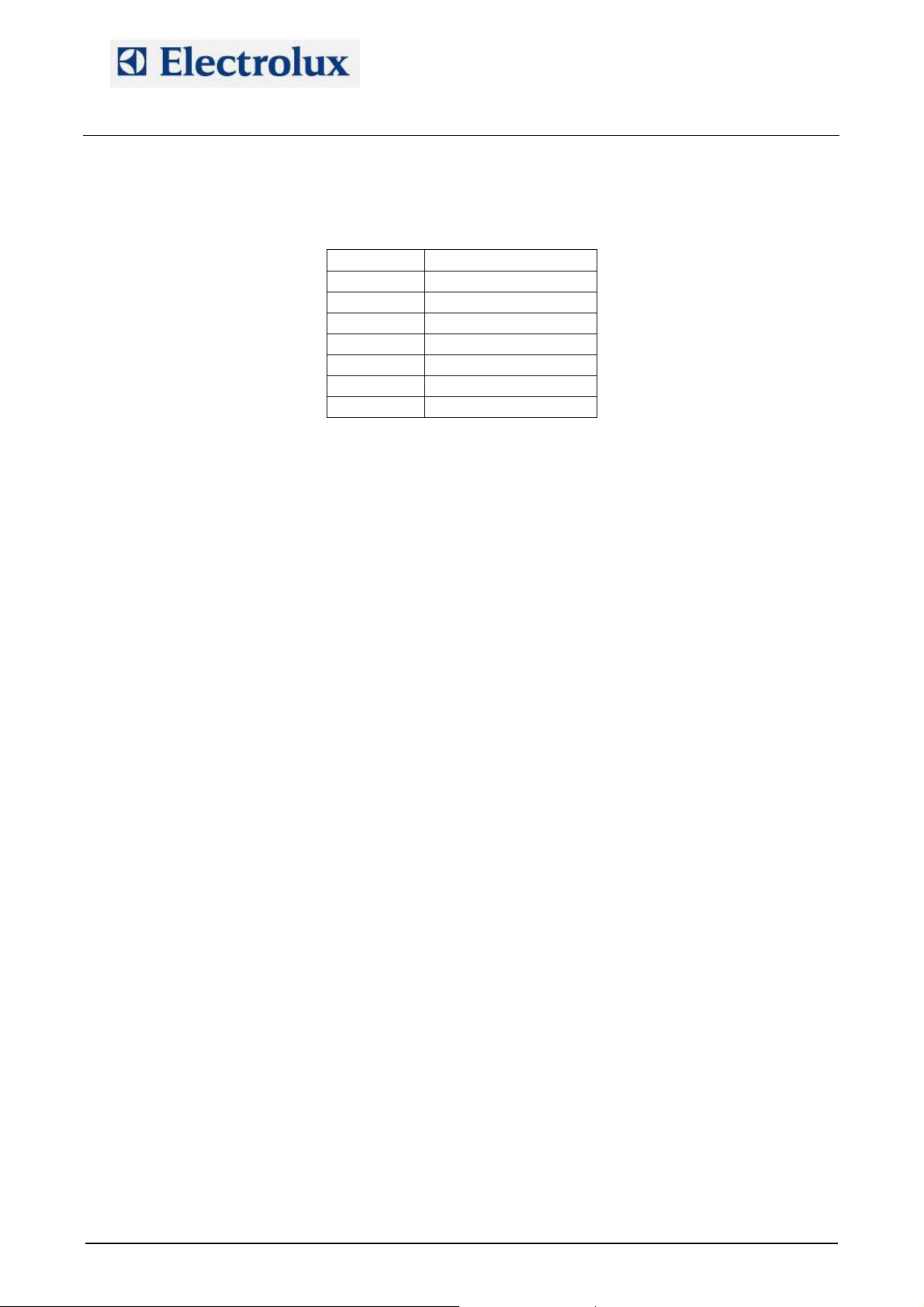
APPENDIX A – WATER BOILING POINT
AOS OVENS - Service Manual
(595889300 – ENG)
Height (m) Water boiling point (°C)
0 100.00
300 98.90
500 98.30
800 97.50
1000 96.80
1500 95.00
2000 93.50
File: AOS service manual (ENG).009 ©Copyright 2002 by Electrolux Professional P. 19/43
Page 20
Electrolux Professional S.p.A.
Ovens Platform Customer Support
Technical Training & Service
AOS OVENS - Service Manual
(595889300 – ENG)
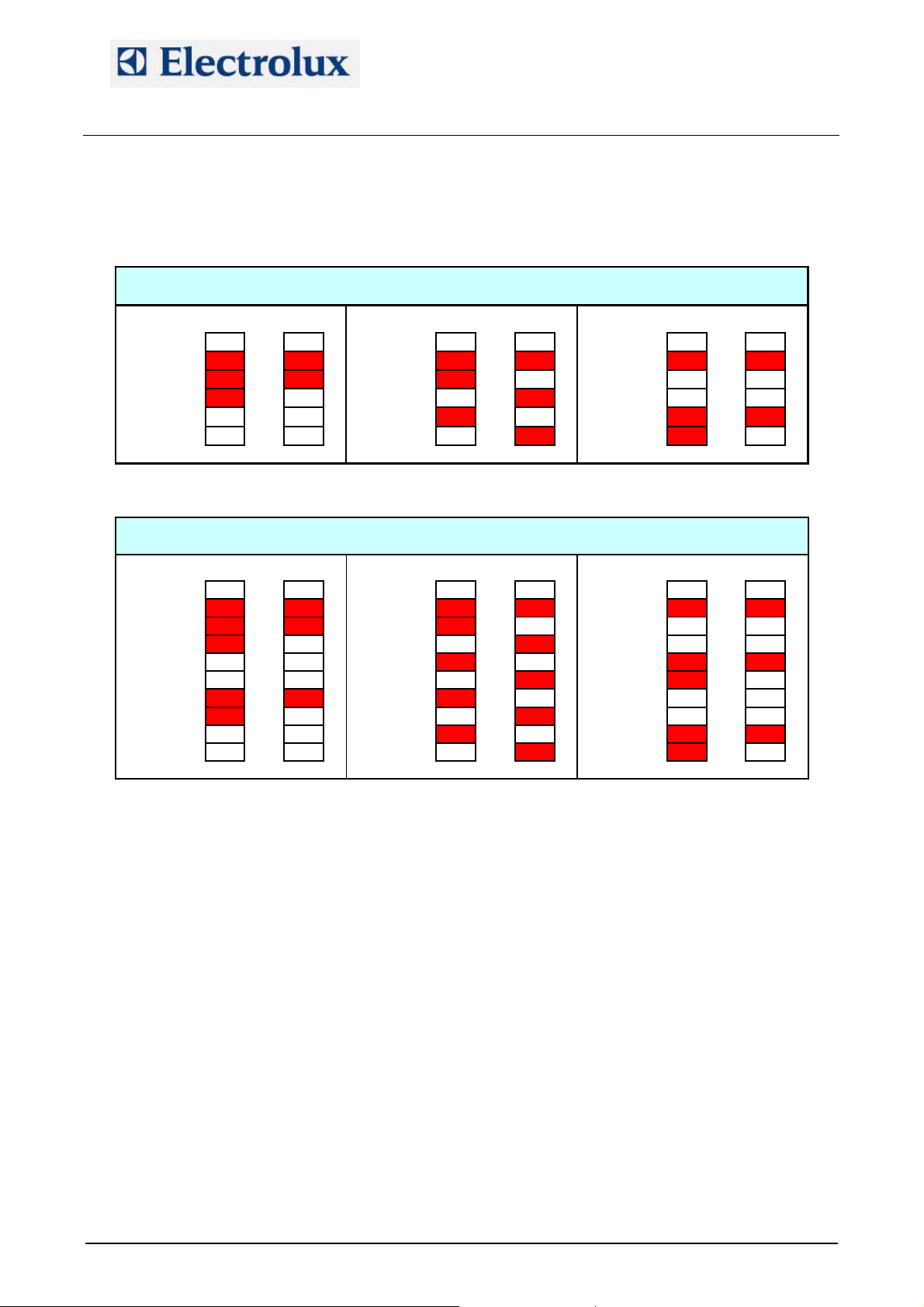
APPENDIX B – CONTACTORS DIAGRAM
Contactors used on AOS061E_, AOS101E_, AOS102E_
100% 1/2 100% 1/2 100% 1/2
HOT AIR COMBI STEAM
KS KS KS
K1 K1 K1
K2 K2 K2
K3 K3 K3
K4 K4 K4
Contactors used on AOS201E_, AOS202E_
100% 1/2 100% 1/2 100% 1/2
HOT AIR COMBI STEAM
KS KS KS
K1 K1 K1
K2 K2 K2
K3 K3 K3
K4 K4 K4
K5 K5 K5
K6 K6 K6
K7 K7 K7
K8 K8 K8
File: AOS service manual (ENG).009 ©Copyright 2002 by Electrolux Professional P. 20/43
Page 21
Electrolux Professional S.p.A.
Ovens Platform Customer Support
Technical Training & Service
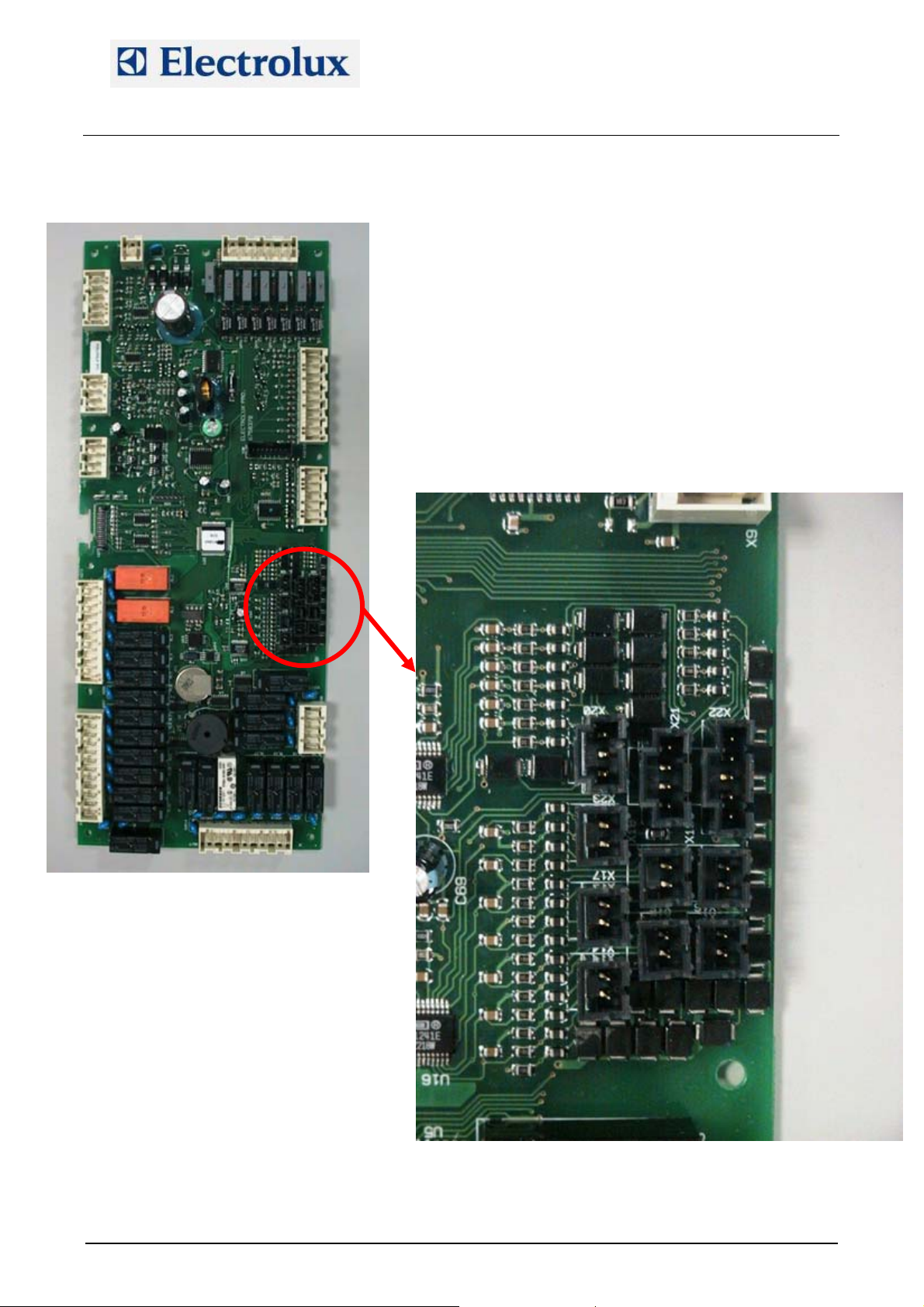
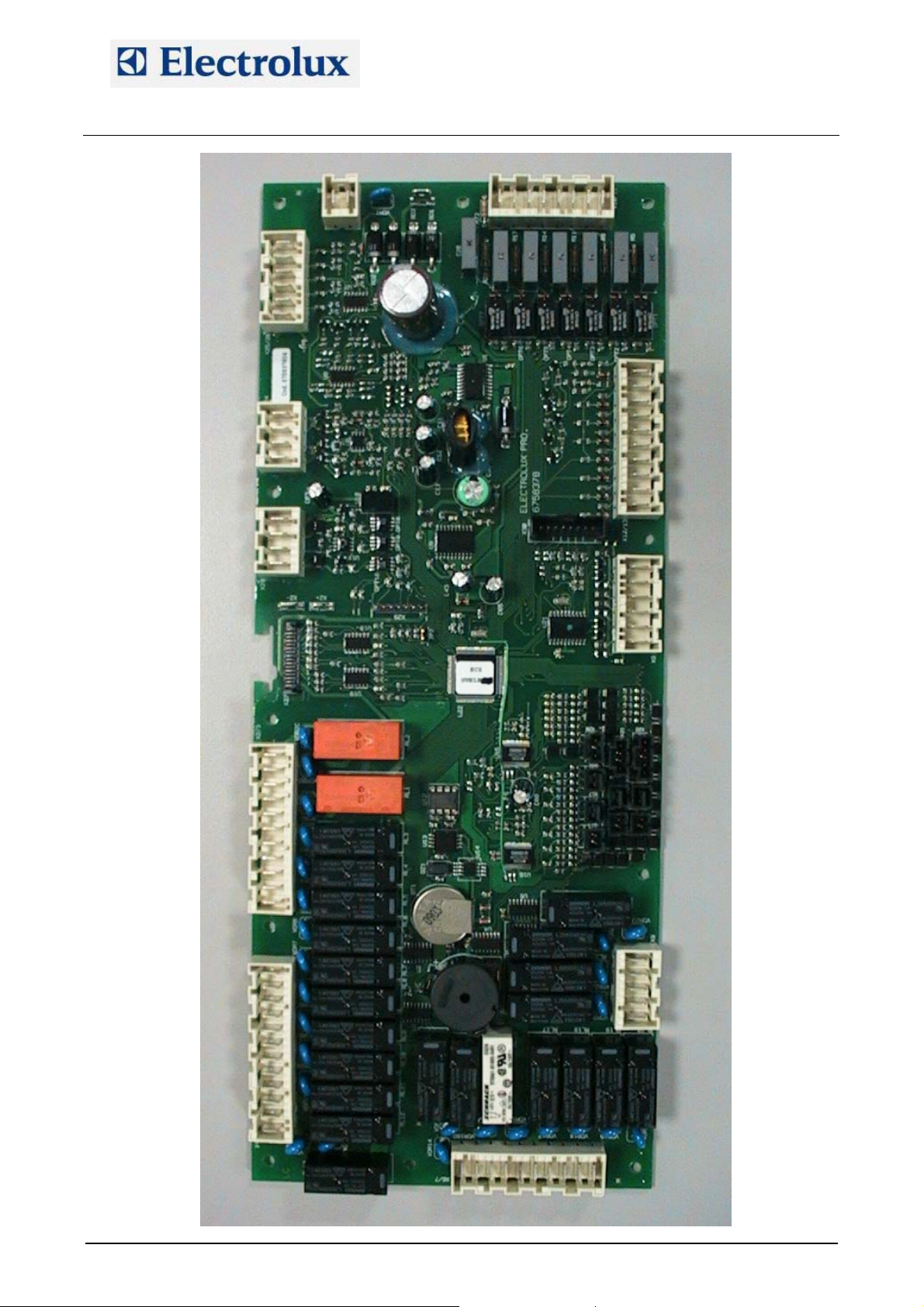
APPENDIX C – CONNECTIONS ON MAIN BOARD
AOS OVENS - Service Manual
(595889300 – ENG)
Put a jumper to make a short in the not used connections.
X20
X23
X17
X14
X21
X18
X15
X22
X19
X16
File: AOS service manual (ENG).009 ©Copyright 2002 by Electrolux Professional P. 21/43
Page 22
Electrolux Professional S.p.A.
Ovens Platform Customer Support
Technical Training & Service
X25/26-1
X24-1
X28-1
X2/3-1
X4/5-1
X1-1
AOS OVENS - Service Manual
(595889300 – ENG)
X10/11-1
X6/7-1
X12/13-1
X9-1
X8-1
File: AOS service manual (ENG).009 ©Copyright 2002 by Electrolux Professional P. 22/43
Page 23
Electrolux Professional S.p.A.
Ovens Platform Customer Support
Technical Training & Service
AOS OVENS - Service Manual
(595889300 – ENG)
Connector Description
X1 Main board supply (24 Vac)
X2/3
X4/5
Power supply to cavity fan motors, cooling fans, cavity flap motor, switching feeder for the
lambda probe
Power supply to coils of cavity/boiler heating element contactors or cavity/boiler burner
gas valves, steam condensing valve, humidifier valve, cavity lamps
X6/7 Power supply to boiler wat er filling valves, boiler drain valve
X8 Power supply to cleaning system
X9 Output of PWM signal for burner fans
X10/11
X12/13
High voltage digital input, i.e. thermal protection of the cavity fan motors and command
signal of the burner fans from the ignition devices
Low voltage digital input, i.e. cleaning system water pressure switch, cavity limiter, boiler
limiter, door micro switch and micro switch of the cavity flap
X14 Connection of bypass probe
X15 Connection of cavity probe
X16 Connection of boiler probe
X17 Connection of single point meat probe
X18 Connection of second cavity probe
X19 Connection of second boiler probe
X20, X21, X22 Connections of multi point probe
X23 Connection of lambda probe
X25/26 Connections of water level probes
X28 RS485 connection
File: AOS service manual (ENG).009 ©Copyright 2002 by Electrolux Professional P. 23/43
Page 24
Electrolux Professional S.p.A.
Ovens Platform Customer Support
Technical Training & Service
AOS OVENS - Service Manual
(595889300 – ENG)
APPENDIX D – TROUBLESHOOTING
Oven Problem Analysis Probable anomaly Checks/causes
1) Check if the lambda
probe is fed: 9.5 Vdc
from the relevant
switching feeder
2) If 9.5 Vdc are not
present, check if the
switching feeder is
supplied with 230 Vac
from the main board
3) Check the fuse on
the switching feeder
4) Check the
connection of the probe
on the main board
5) Check the
connections on the
lambda probe
6) Change the lambda
probe
7) If the humidity bar is
switched off, check if
parameter LAMb is set
to 1
parameter dCln to 0
1) Check the correct
connection of the power
supply cables of the
user interface board on
the main board
2) Check he connection
of the flat cable on the
main board
1) Check if voltage is
present (24 Vac) at the
main board input (X1
connector)
2) Check voltage output
(24 Vac) on the
transformer
3) Check F1 fuse
1) Check the working of
the cooling fan
2) Check the openings
on the bottom of the
control panel are not
clogged
Change main board
AOS
AOS
AOS
AOS
AOS
Humidity bar always
of red or blue colour
(or switched off)
In the recipe menu
the cleaning
programs are not
present
The user interface
board does not
switch on
The oven does not
switch on and the
ON/OFF led is off
The oven does not
switch on and the
ON/OFF led is on
Switching off and
switching the oven on
again after few
minutes, the oven
starts again
The previous analysis
had a negative result
Parameter dCln set to 1 Check and set
Main board not
powered
Overtemperature of the
main board
Defective electronic
component on the main
board
File: AOS service manual (ENG).009 ©Copyright 2002 by Electrolux Professional P. 24/43
Page 25
Electrolux Professional S.p.A.
Ovens Platform Customer Support
Technical Training & Service
AOS OVENS - Service Manual
(595889300 – ENG)
Oven Problem Analysis Probable anomaly Checks/causes
The user interface
AOS
board does switch
on but no load is
Fuse F2 burnt Check fuse
activated
AOS
In the recipe menu
only signs like "P:
Sxx" o "Sxx" are
appearing
EEPROM of the main
board is not
programmed
Change EEPROM or
main board
Check that all the
branches of the boiler
heating elements are
working
Check correct working
of the contactors (see
AOS
elt
Heating of the boiler
is slow
Heating element burnt
Contactors not working
appendix B)
Check that all the
branches of the cavity
heating elements are
working
Check correct working
of the contactors (see
AOS
elt
Heating of the cavity
is slow
Heating element burnt
Contactors not working
appendix B)
1) The connector of
PWM signal (X9) on
the main board is not
connected
2) PWM signal cable is
AOS
gas
The fan of a burner
is working always at
the maximum speed
PWM signal not
present
interrupted
1) Check if the fan is
powered: 24 Vdc from
the relevant switching
The fan is not powered
(24 Vdc)
feeder.
2) Check fuse on the
relevant switching
feeder if 24 Vdc are not
present
1) Exchange the PWM
cable between cavity
and boiler fan to check
AOS
gas
The fan of a burner
does not start
if the fan starts
2) Check if high voltage
digital signal is present
on X10/11-5÷8
PWM signal at 0
3) Close the gas tap,
disconnect connector
X9 and try to start the
burner: the fan has to
run at the maximum
speed. If this is not
happening, change fan.
If the fan starts, change
main board.
File: AOS service manual (ENG).009 ©Copyright 2002 by Electrolux Professional P. 25/43
Page 26
Electrolux Professional S.p.A.
Ovens Platform Customer Support
Technical Training & Service
AOS OVENS - Service Manual
(595889300 – ENG)
Oven Problem Analysis Probable anomaly Checks/causes
1) Check PWM
parameters for the
cavity burner
2) Check offset
pressure
3) Check injector
4) Check aerator
5) With LPG on 10-20
grid ovens (1/1 or 2/1),
check the presence of
the flange after the
AOS
gas
The cavity burner is
whistling or
grumbling
Gas-air mixture not
correct
burner fan
6) Set to 0 the
parameter Sbc in order
to have the cooling fan
always working
supplying with air the
burners
1) Check PWM
parameters for the
boiler burner
2) Check offset
pressure
3) Check injector
4) Check aerator
5) Set to 0 the
parameter Sbc in order
to have the cooling fan
AOS
gas
The boiler burner is
whistling or
grumbling
Gas-air mixture not
correct
always working
supplying with air the
burners
6) Check integrity of the
gasket of the boiler
burner
1) Check the separation
between high voltage
and low voltage cables
2) Check integrity of
ignition cables: they
AOS
gas
The main board is
switching off/on by
itself
Coupling of high
voltage and low voltage
circuits
must not be cracked
discharging towards
inner components of
the oven
3) Reinforce the
insulation of the ignition
cables with a silicon
pipe
File: AOS service manual (ENG).009 ©Copyright 2002 by Electrolux Professional P. 26/43
Page 27
Electrolux Professional S.p.A.
Ovens Platform Customer Support
Technical Training & Service
AOS OVENS - Service Manual
(595889300 – ENG)
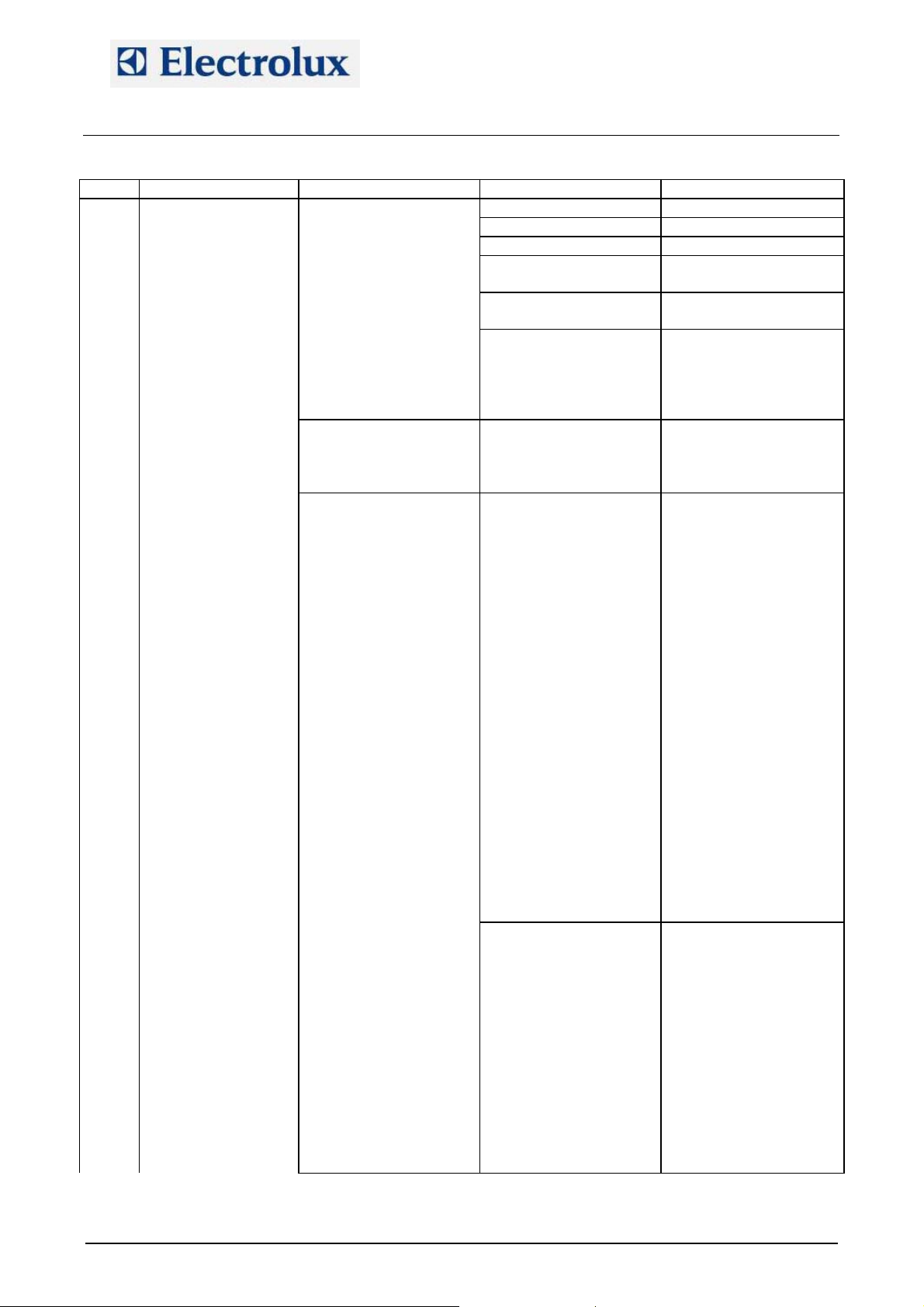
Oven Problem Analysis Probable anomaly Checks/causes
AOS
gas
Burner does not
light
Gas tap is closed Open gas tap
Not correct injector Check injector
Not correct aerator Check aerator
Burner fan is working,
"burn xxx" error after
the 3 ignition attempts
Not correct values in
the PWM parameters
Too low setting for the
offset pressure
Gas valve is not
opening (the offset
pressure during ignition
is very high - around
1.00 hPa)
Check PWM
parameters
Check offset calibration
1) Check the ignition
device is well fixed and
connected to the gas
valve
2) Faulty gas valve
No continuity on the
Burner fan is working,
no ignition attempts
bridge between
terminals 5-6-7 of the
Restore continuity
ignition device
1) Check that the
relevant switching
feeder TR_Fx is
powered through fuse
F2
2) Check fuse on
TR_Fx
3) Check that 24 Vdc
are present at the
output of TR_Fx (J1-1 e
J1-2, J1-3 e J1-4) and
Burner fan not powered
(24 Vdc)
at the input on the fan
(with connector X9
disconnected and 24
Vdc present at the input
on the burner fan, this
has to run at the
Burner fan is not
working, "burn xxxx"
error after the 3 ignition
attempts
maximum speed - see
also the following point
1)
4) Check correct
connections between
TR_Fx and the burner
fan
1) Close the gas tap,
disconnect connector
X9 and try to start the
burner: the fan has to
run at the maximum
speed. If this is not
PWM signal at 0
happening, change
burner fan.
2) If with X9
disconnected the fan
starts, check
connections on X9 and
if they are correct
change main board
File: AOS service manual (ENG).009 ©Copyright 2002 by Electrolux Professional P. 27/43
Page 28
Electrolux Professional S.p.A.
Ovens Platform Customer Support
Technical Training & Service
AOS OVENS - Service Manual
(595889300 – ENG)
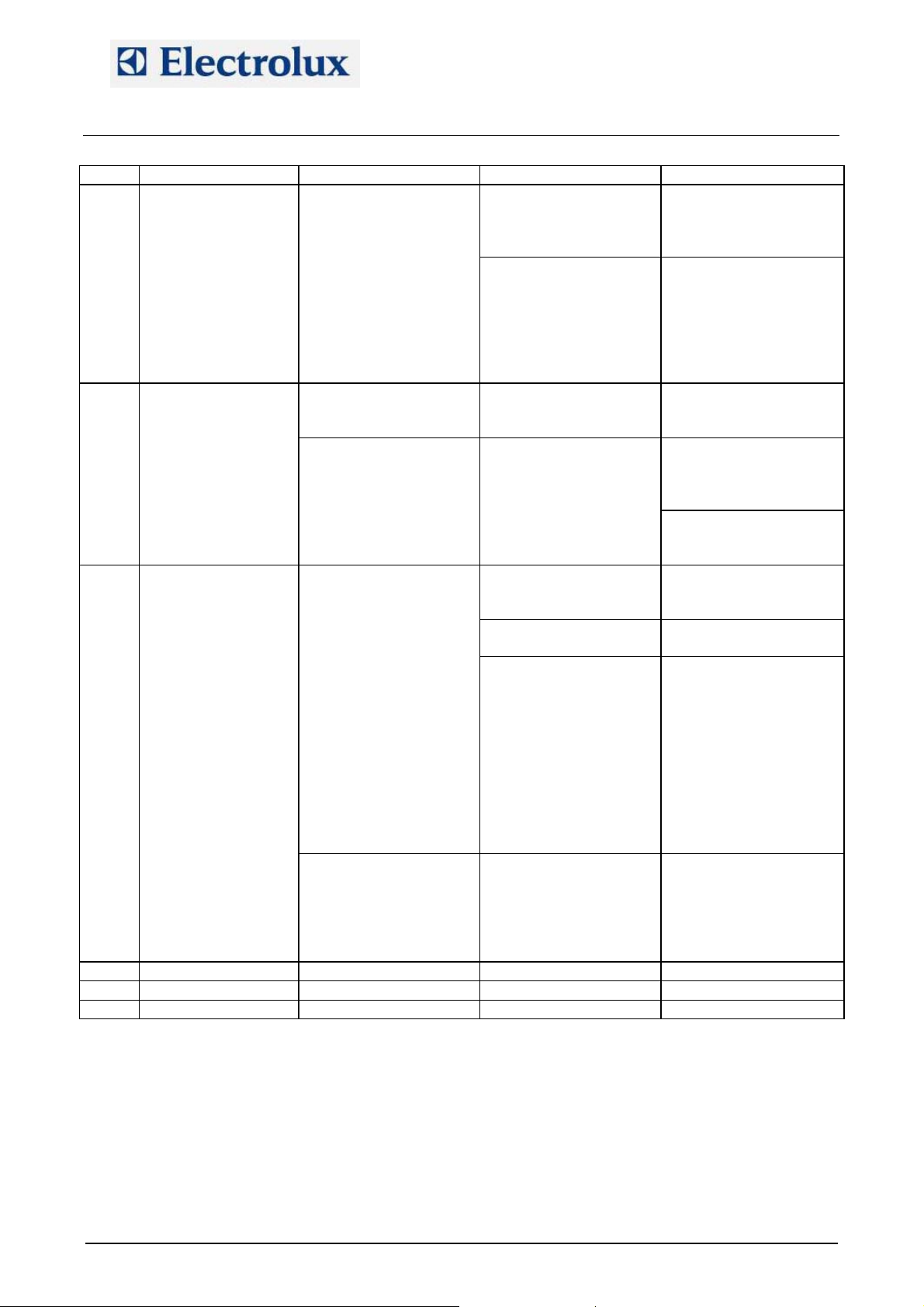
Oven Problem Analysis Probable anomaly Checks/causes
Burner fan is not
working, "burn xxxx"
error appears with no
ignition attempts after
reset
Ignition device not
powered
Lack of 230 Vac signal
on X10/11
1) Check limiter
connections
2) Check the relevant
relay on the main board
1) Ignition device is not
giving the 230 Vac
signal from terminal 8,
change ignition device
2) Check connection
from ignition device to
TR_Fx and to X10/11
AOS
gas
The burners switch
on only for few
seconds and then
they switch off
The problem occurs on
all the burners (cavity
and boiler)
The problem occurs
only on a cavity burner
or on boiler burner
Inversion of PhaseNeutral
Detection problem
Check cables on main
terminal board
Change the ignition
device with one working
device to check if the
problem persists
Check detection rod
and integrity of relevant
cable
Water level probes
covered with scale or
other
Broken probe cable
Check water level
probes
Check continuity of the
cable
Make a short between
X25/26-1 and X25/26-3:
AOS
gas
Oven is always
loading water, water
in the cavity
overflowing from the
boiler
Water level probe are
not detecting water
Water level system on
main board not working
the fast filling valve has
to close; make a short
between X25/26-2 and
X25/26-3: the slow
filling valve has to
close. If this is not
happening change main
board but before check
also next point
Bad ground connection
of some devices inside
Noise on ground circuit
the oven, mainly the
switching feeder TR_Fx
Check the ground
connections
or TR_HC are not
connected to ground
File: AOS service manual (ENG).009 ©Copyright 2002 by Electrolux Professional P. 28/43
Page 29
Electrolux Professional S.p.A.
Ovens Platform Customer Support
Technical Training & Service
AOS OVENS - Service Manual
(595889300 – ENG)
APPENDIX E – LAMBDA PROBE
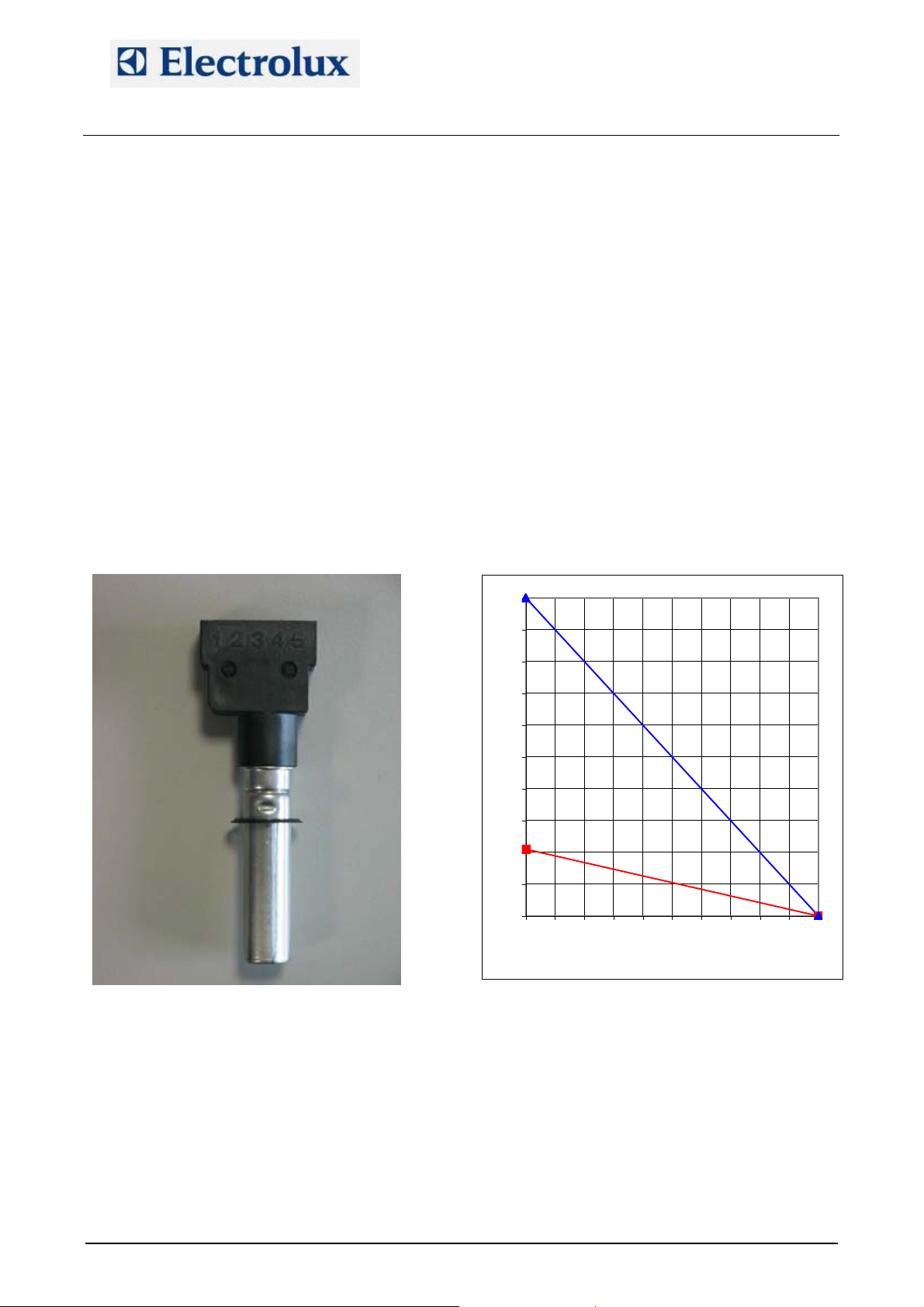
In the lev. A AOS ovens the lambda probe is used to measure the humidity. How does it work?
The lambda probe permits measurement of oxygen concentration through a solid electrolyte (ceramic
element)
The ceramic part of the probe is in the form of a tube closed at one end. The inside and outside surfaces of
the ceramic sensor have a microporous platinum layer (electrode). The platinum layer, which is in contact
with the analyzed gas, is covered with a highly porous protective ceramic layer.
The ceramic sensor (ZrO
temperature of the sensor ceramic remains above 350 °C. Starting from 300°C, the ZrO
conductive for the oxygen ions so that if there is a different concentration of oxygen at the two sides of the
sensors (one side is in contact with the analyzed gas, the other side is in contact with the external), a voltage
is generated.
Since the Oxygen/Nitrogen ratio in the air is constant, a measurement of the concentration of oxygen
enables the percentage of a third gas (in this case water vapor) to be determined. In fact the addition of a
third gas to a sample of air has the effect of reducing in a proportional manner the presence of oxygen and
nitrogen so that, as said, determining the relative concentration of oxygen allows the amount of the third
introduced gas of the mixture to be determined (see the diagram).
Connections on the lambda probe:
Pin 1: not used
Pin 2-3: connections to the main board (connector X23)
Pin 4-5: connections to the switching feeder
B
B – solid electrolyte) is heated from inside by means of a ceramic heater so that the
2
B
B sensor becomes
2
100
90
80
water
70
60
50
40
30
20
nitrogen
10
oxygen
0
0 102030405060708090100
water percentage
File: AOS service manual (ENG).009 ©Copyright 2002 by Electrolux Professional P. 29/43
Page 30

Electrolux Professional S.p.A.
Ovens Platform Customer Support
Technical Training & Service
APPENDIX F – PARAMETER DESCRIPTIONS
Name Description
5060 Frequency
6Prb Presence of 6-point meat probe (1=yes for lev. A, 0 for lev. B)
AbSP Flag to enable starting of cooking closing the door (0=disable; 1=enable)
Addr RS485 address
AL1E
ALFn Activation of cavity motor thermal protection
APPL Level of the oven
APPM Type of oven
bAud RS485 bit rate
bot Max. steam generator overheating (ETUB alarm)
chr1 First character of the password
chr2 Second character of the password
chr3 Third character of the password
chr4 Fourth character of the password
chr5 Fifth character of the password
chr6 Sixth character of the password
chr7 Seventh character of the password
chr8 Eighth character of the password
CLPr Length of cooling with humidifier after a steam phase in an automatic cleaning cycle
CLt1 Length of detergent injection (phase A)
CLt2 Length of detergent+water injection (phase A)
CLt3 Length of rinser+water injection (phase C)
CLt4 Length of water injection (phase C)
Cort Flag to enable cavity temperature displaying adjustment
Cot Max. cooking chamber overheating (ETUC alarm)
Cu Parameter q of SCELOFF=SCEL-(q+m*dT/dt) (FUZZY-LOGIC)
Dbon Delay for boiler drain
dCLn Flag to disable automatic cleaning cycles (1=disable)
dEMO Flag to enable DEMO (0=disable; 1=enable)
dScb
dSod
dSPS
dtoF
Dton
dtSb Delay for activation of fast filling during opening of boiler drain valve
dutM Maximum length of a phase with cavity temperature over 250 ºC
E2PP Flag to enable storing/erasing of recipes on EEPROM (0=enable; 1=disable)
EcLn Temperature for starting time computation of phase 1 during semi-automatic cleaning
EMME Parameter m of SCELOFF=SCEL-(q+m*dT/dt) (FUZZY-LOGIC)
EnFL Presence of motorised cavity flap (1=yes)
Ertc Flag to enable RTC (1=enable)
FAHr Temperature unit (°F = 1, °C = 0)
FCLn Minimum time to force a cleaning cycle (0=no cleaning cycle)
Flag to enable detergent/rinser level probes (0=disable; 1=enable) when the relevant
sensors are installed
Temperature range (from set) above which the middle power is activated in combi
mode
Flag to disable the oven stops when door is open in convection, steam and combi
mode: (0=the oven stops)
Flag to disable pre-heating of the boiler when the oven is in stand-by mode (0=enable
pre-heating; 1=disable)
Max. cooking chamber temperature derivative value for heating elements to be
switched OFF (FUZZY-LOGIC)
Max. cooking chamber temperature derivative value for heating elements to be
switched ON (FUZZY-LOGIC)
AOS OVENS - Service Manual
(595889300 – ENG)
File: AOS service manual (ENG).009 ©Copyright 2002 by Electrolux Professional P. 30/43
Page 31

Electrolux Professional S.p.A.
Ovens Platform Customer Support
Technical Training & Service
Name Description
FrE PWM frequency
Fubo PWM value at full power of boiler burners
FucA PWM value at full power of cavity burners
GAS Define if the oven is GAS heated (1) or ELECTRIC heated (0)
hAbo PWM value at middle power of boiler burners
HAbP Steam condenser engagement in "hot air" mode
hAcA PWM value at middle power of cavity burners
HAFd Bypass temperature variation for humidification during hot air mode + open flap
HAFI By pass isteresys in hot air+open flap mode
HAFS Bypass base temperature for humidification during hot air mode + open flap
hAir Hot air hour counter
hboL Boiler hour counter
HbYP Max humidity value to stop the boiler
HCCP HACCP Mode
hcMb Combi hour counter
Hdut Flag to enable heater duty cycle (0=disable; 1=enable)
hStM Steam hour counter
HUIM Pulse length of manual humidifier
HUon ON phase of the humidifier with combi cycle beetween 50 and 100 degrees
I Parameter i of SCELON=SCEL(1+p/400)-i (FUZZY-LOGIC)
ISG Define if the oven is an ISG oven (0 means oven with boiler)
LAMb Presence of lambda probe (1=yes)
LAnG Language for the menu
Man Flag to enable manual cookings (0=disable; 1=enable)
MHUM Flag manual humidifier 0=Off 1=On
MISG Max temperature allowed for water injection in ISG
nMod Define if the modification of store program is disable
nPrG Max number of programs
OCA1 OFFSET of first cavity probe
OCA2 OFFSET of second cavity probe
OLbd Calibration of the lambda probe
OPr1 OFFSET of first probe of 6-point meat probe
OPr2 OFFSET of second probe of 6-point meat probe
OPr3 OFFSET of third probe of 6-point meat probe
OPr4 OFFSET of fourth probe of 6-point meat probe
OPr5 OFFSET of fifth probe of 6-point meat probe
OPr6 OFFSET of sixth probe of 6-point meat probe
PASS Flag to enable password (0=disable, 1=enable)
PAUT
Flag to enable special programs, i.e. preheating programs and Low temperature
(0=disable; 1=enable)
pdEr Sample period to calculate the derivative value (FUZZY-LOGIC)
PFAC Flag to enable factory preset recipes (0=disable; 1=enable)
PI Parameter p of SCELON=SCEL(1+p/400)-i (FUZZY-LOGIC)
PPM Flag to enable Peak Power Management (0=disable; 1=enable)
PrEH Flag to enable cavity preheating during cooking (0=disable; 1=enable)
Sbc Cooling temperature set for board ventilation
SbYP Bypass temperature with max. cooking cavity steam temperature (calibration)
SEAL Altitude above sea level
SInC Boiler temperature that detect presence of scale
SPHb Preheating temperature of the boiler
AOS OVENS - Service Manual
(595889300 – ENG)
File: AOS service manual (ENG).009 ©Copyright 2002 by Electrolux Professional P. 31/43
Page 32
Electrolux Professional S.p.A.
Ovens Platform Customer Support
Technical Training & Service
Name Description
SPHF Boiler temperature during leavening
Stbo PWM value at start of boiler burners
StbP Steam condenser engagement in "boiler" mode
StcA PWM value at start of cavity burners
StoF Minimum time for "switch off" of boiler
Ston Minimum time for "switch on" of boiler
tbon Timeout for E SL alarm, water level probe alarm
tcdb Max water temperature for boiler drain
tCMS Limit of cavity temperature set for working at high temperature
thMA Define the max. temperature limit for the manual injection of water
tPrm Print frequency (0=no print)
trMA Define the max. temperature for water injection during cooling phase
trMn Define the min. temperature for water injection during cooling phase
AOS OVENS - Service Manual
(595889300 – ENG)
File: AOS service manual (ENG).009 ©Copyright 2002 by Electrolux Professional P. 32/43
Page 33
Electrolux Professional S.p.A.
Ovens Platform Customer Support
Technical Training & Service
APPENDIX G – GAS CALIBRATIONS
UAOS061GU
UCAVITY BURNERU
GAS Injector Aerator
G20 6.50 Yellow - 0.20 35 30 60
G25 7.80 Yellow - 0.20 35 30 60
G30 5.30 Yellow - 0.25 40 28 43
AOS OVENS - Service Manual
(595889300 – ENG)
OFFSET
(hPa)
Parameters
StcAhAcAFucA
LPG 5.30 Yellow - 0.13 40 28 43
UBOILER BURNERU
GAS Injector Aerator
OFFSET
(hPa)
Parameters
Stbo hAboFubo
G20 6.50 Yellow - 0.20 55 35 78
G25 7.80 Yellow - 0.20 55 35 78
G30 5.30 Yellow - 0.28 55 36 66
LPG 5.30 Yellow - 0.18 55 36 66
File: AOS service manual (ENG).009 ©Copyright 2002 by Electrolux Professional P. 33/43
Page 34
Electrolux Professional S.p.A.
Ovens Platform Customer Support
Technical Training & Service
UAOS101GU
UCAVITY BURNERU
GAS InjectorAerator
G20 7.00 Red - 0.25 80 26 100
G25 8.00 Red - 0.25 80 26 100
LPG2/G30 5.50 Red - 0.07÷ 0.00 23 26 100
LPG1 5.70 Red - 0.15÷ - 0.08 23 26 100
UBOILER BURNERU
GAS InjectorAerator
AOS OVENS - Service Manual
(595889300 – ENG)
OFFSET
(hPa)
Parameters
StcAhAcAFucA
OFFSET
(hPa)
Parameters
Stbo hAboFubo
G20 7.00 Red - 0.10 50 50 100
G25 8.00 Red - 0.10 50 50 100
G30 5.70 Red - 0.28 33 45 74
LPG 5.70 Red - 0.15 33 45 74
LPG conversion for cavity burner for AOS101G
For LPG installations, put the ø 21 flow reducer flange between cavity burner fan and cavity burner. Change
the PWM parameters.
Then change the injector with the 5.70 one and calibrate the offset in the range - 0.15 ÷ - 0.08 hPa so as to
eliminate possible whistles/noises (row LPG1). After you have found the best working condition, cool down
and verify ignitions with cold burner.
If the previous setting does not eliminate whistles or noise, change the 5.70 injector with the 5.50 one and
use the calibrations of LPG2/G30 row: calibrate the offset in the range - 0.07 ÷ 0.00 hPa so as to eliminate
possible whistles/noises (row LPG1). After you have found the best working condition, cool down and verify
ignitions with cold burner.
File: AOS service manual (ENG).009 ©Copyright 2002 by Electrolux Professional P. 34/43
Page 35
Electrolux Professional S.p.A.
Ovens Platform Customer Support
Technical Training & Service
UAOS201GU
UUPPER CAVITY BURNERU
GAS Injector Aerator
G20 7.00 Red - 0.25 80 35 100
G25 8.00 Red - 0.25 80 26 100
LPG2/G30 5.50 Red - 0.07÷ 0.00 23 26 100
LPG1 5.70 Red - 0.15÷ - 0.08 23 26 100
ULOWER CAVITY BURNERU
GAS Injector Aerator
AOS OVENS - Service Manual
(595889300 – ENG)
OFFSET
(hPa)
Parameters
StcA hAcA FucA
OFFSET
(hPa)
Parameters
StcA hAcA FucA
G20 7.00 Red - 0.25 80 35 100
G25 8.00 Red - 0.25 80 26 100
LPG2/G30 5.50 Red - 0.07÷ 0.00 23 26 100
LPG1 5.70 Red - 0.15÷ - 0.08 23 26 100
UBOILER BURNERU
GAS Injector Aerator
OFFSET
(hPa)
Parameters
Stbo hAbo Fubo
G20 8.00 Blue 0 42 45 100
G25 8.50 Blue 0 42 45 100
G30 6.15 Blue - 0.15 30 37 72
LPG 6.15 Blue 0 30 37 72
LPG conversion for cavity burner for AOS201G
For LPG installations, put the ø 21 flow reducer flange between cavity burner fan and cavity burner. Change
the PWM parameters.
Then change the injector with the 5.70 one and calibrate the offset in the range - 0.15 ÷ - 0.08 hPa so as to
eliminate possible whistles/noises (row LPG1). After you have found the best working condition, cool down
and verify ignitions with cold burner.
If the previous setting does not eliminate whistles or noise, change the 5.7°0 injector with the 5.50 one and
use the calibrations of LPG2/G30 row: calibrate the offset in the range - 0.07 ÷ 0.00 hPa so as to eliminate
possible whistles/noises (row LPG1). After you have found the best working condition, cool down and verify
ignitions with cold burner.
File: AOS service manual (ENG).009 ©Copyright 2002 by Electrolux Professional P. 35/43
Page 36
Electrolux Professional S.p.A.
Ovens Platform Customer Support
Technical Training & Service
UAOS102GU
UCAVITY BURNERU
GAS Injector Aerator
G20 7.00 Red - 0.17÷ - 0.10 45 43 100
G25 8.50 Red - 0.17÷ - 0.10 45 43 100
G30 5.70 Red - 0.25÷ - 0.18 60 43 100
LPG 5.70 Red - 0.10÷ - 0.02 60 43 100
UBOILER BURNERU
GAS Injector Aerator
AOS OVENS - Service Manual
(595889300 – ENG)
OFFSET
(hPa)
Parameters
StcA hAcA FucA
OFFSET
(hPa)
Parameters
Stbo hAbo Fubo
G20 7.00 Red 0 43 50 100
G25 8.50 Red 0 43 50 100
G30 5.70 Red - 0.15 35 45 78
LPG 5.70 Red 0 35 45 78
LPG conversion for cavity burner for AOS102G
For LPG installations, put the ø 25 flow reducer flange between cavity burner fan and cavity burner. Change
the PWM parameters.
Then change the injector with the 5.70 one and calibrate the offset in the range - 0.10 ÷ - 0.02 hPa so as to
eliminate possible whistles/noise. After you have found the best working condition, cool down and verify
ignitions with cold burner.
File: AOS service manual (ENG).009 ©Copyright 2002 by Electrolux Professional P. 36/43
Page 37
Electrolux Professional S.p.A.
Ovens Platform Customer Support
Technical Training & Service
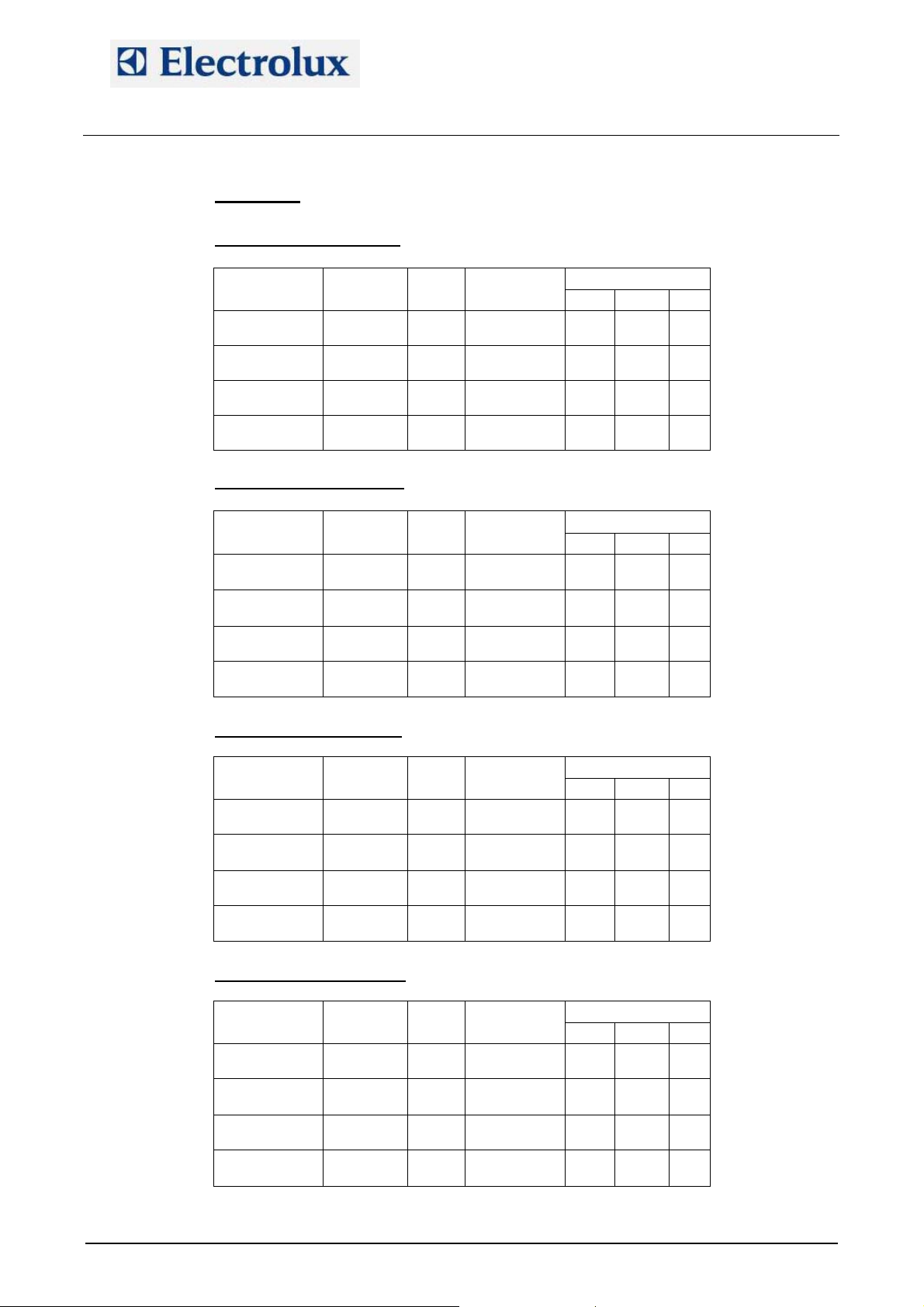
UAOS202GU
UUPPER CAVITY BURNERU
GAS Injector Aerator
G20 7.00 Red - 0.20 45 43 100
G25 8.00 Red - 0.20 45 43 100
G30 5.70 Red - 0.20 ÷ - 0.15 40 43 95
LPG 5.70 Red - 0.10 ÷ - 0.05 40 43 95
ULOWER CAVITY BURNERU
GAS Injector Aerator
AOS OVENS - Service Manual
(595889300 – ENG)
OFFSET
(hPa)
Parameters
StcA hAcA FucA
OFFSET
(hPa)
Parameters
StcA hAcA FucA
G20 7.00 Red - 0.20 45 43 100
G25 8.00 Red - 0.20 45 43 100
G30 5.70 Red - 0.25 ÷ - 0.20 40 43 95
LPG 5.70 Red - 0.15 ÷ - 0.10 40 43 95
UUPPER BOILER BURNERU
GAS Injector Aerator
OFFSET
(hPa)
Parameters
Stbo hAbo Fubo
G20 7.50 Red - 0.05 ÷ 0.00 40 50 100
G25 8.50 Red - 0.05 ÷ 0.00 40 50 100
LPG2/G30 5.80 Red - 0.07 ÷ - 0.02 40 45 90
LPG1 6.00 Red - 0.07 ÷ - 0.02 40 45 90
ULOWER BOILER BURNERU
GAS Injector Aerator
OFFSET
(hPa)
Parameters
Stbo hAbo Fubo
G20 7.50 Red - 0.05÷0.00 40 50 100
G25 8.50 Red - 0.05÷0.00 40 50 100
LPG2/G30 5.80 Red - 0.07÷- 0.02 40 45 90
LPG1 6.00 Red - 0.07÷- 0.02 40 45 90
File: AOS service manual (ENG).009 ©Copyright 2002 by Electrolux Professional P. 37/43
Page 38

Electrolux Professional S.p.A.
Ovens Platform Customer Support
Technical Training & Service
AOS OVENS - Service Manual
(595889300 – ENG)
LPG conversion for cavity burners for AOS202G
For LPG installations, put the ø 25 flow reducer flange between cavity burner fan and cavity burner. Change
the PWM parameters.
Then change the injector with the 5.70 one and calibrate the offset in the range - 0.10 ÷ - 0.05 hPa (upper
cavity boiler) and - 0.15 ÷ - 0.10 hPa (lower cavity boiler) so as to eliminate possible whistles/noise. After
you have found the best working condition, cool down and verify ignitions with cold burner.
LPG conversion for boiler burners for AOS202G
Change the PWM parameter.
Then change the injector with the 6.00 one and calibrate the offset in the range - 0.07 ÷ - 0.02 hPa (upper
and lower boiler burner) so as to eliminate possible whistles/noise (row LPG1). After you have found the
best working condition, cool down and verify ignitions with cold burner.
If the previous setting does not eliminate whistles or noise, change the 6.00 injector with the 5.80 one and
use the calibration of LPG2/G30 row: calibrate the offset in the range - 0.07 ÷ - 0.02 hPa (upper and lower
boiler burner) so as to eliminate possible whistles/noise. After you have found the best working condition,
cool down and verify ignitions with cold burner.
File: AOS service manual (ENG).009 ©Copyright 2002 by Electrolux Professional P. 38/43
Page 39
Electrolux Professional S.p.A.
Ovens Platform Customer Support
Technical Training & Service
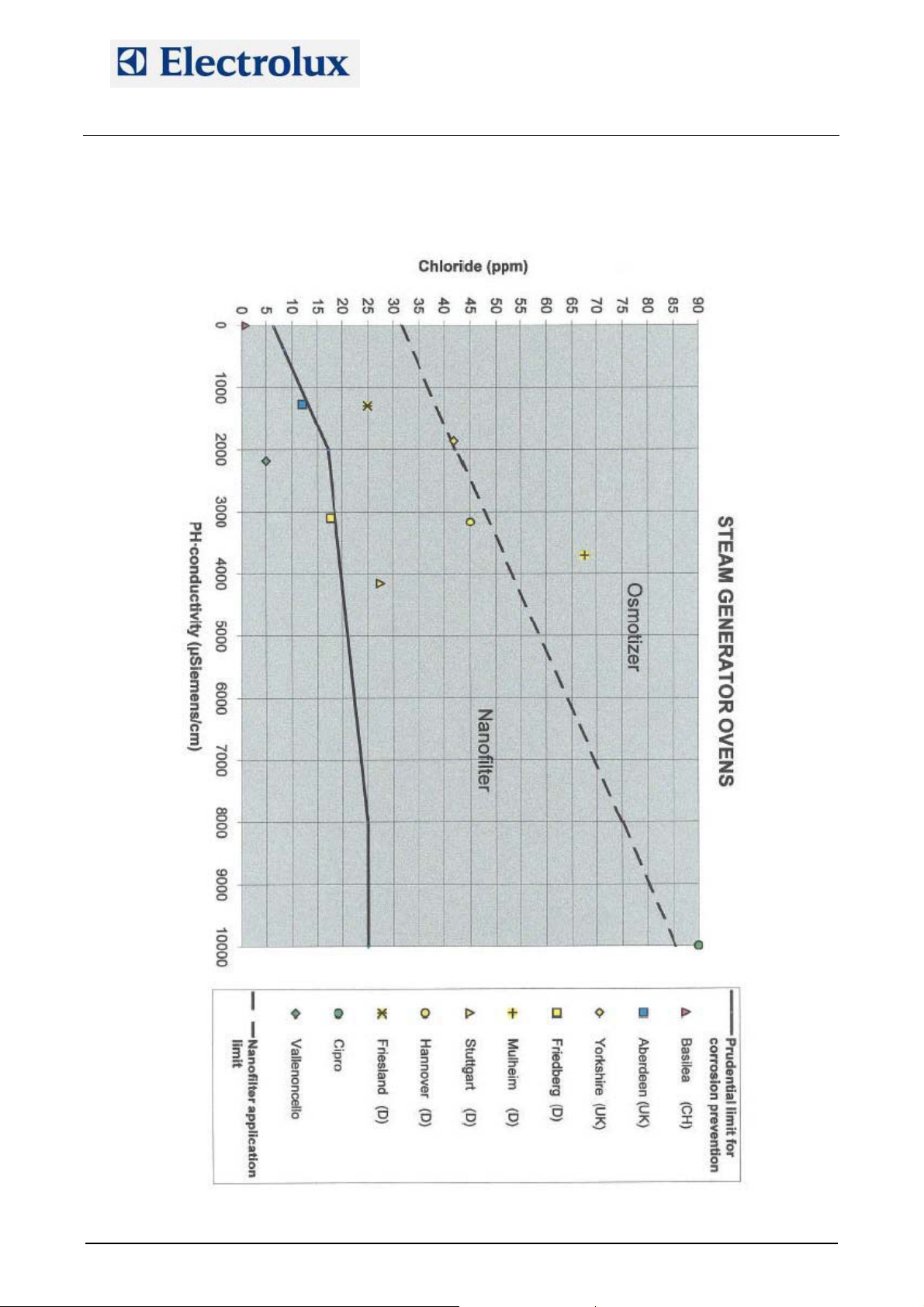
APPENDIX H – WATER TREATMENT
AOS OVENS - Service Manual
(595889300 – ENG)
File: AOS service manual (ENG).009 ©Copyright 2002 by Electrolux Professional P. 39/43
Page 40

Electrolux Professional S.p.A.
Ovens Platform Customer Support
Technical Training & Service
Summary table:
Graph
Hardness
Treatment
Not required Not required Nanofilter Nanofilter Osmotizer Osmotizer
< 5°F > 5°F < 5°F >5°F < 5°F > 5°F
Not required Softener Nanofilter Nanofilter Osmotizer Osmotizer
AOS OVENS - Service Manual
(595889300 – ENG)
File: AOS service manual (ENG).009 ©Copyright 2002 by Electrolux Professional P. 40/43
Page 41

Electrolux Professional S.p.A.
Ovens Platform Customer Support
Technical Training & Service
AOS OVENS - Service Manual
(595889300 – ENG)
APPENDIX I – CONNECTION TO HACCP SYSTEM
The AOS oven (from firmware 2.7) can be predisposed for the HACCP system through 4 parameters:
HCCP: defines the type of HACCP, i.e.
0: no system
1: HACCP Basic (with printer 881457 – 880048 for US market, i.e. 120V/1ph/60 Hz)
2: HACCP Advanced or Integrated
bAud: bit rate of RS485 connection
Addr: address of the appliance in the HACCP Advanced network
tPrn: print frequency in case of HACCP Basic (value in seconds)
In case of HACCP Basic, i.e. setting HCCP to 1, to use the printer 881457 (or 880048) and print with the
printing frequency given through parameter tPrn, set on the printer the following parameters:
PROTOCOL = 8,E,1
BAUD RATE = 9600
PRINT = REVERSE
40 COLUMNS (font 9x24)
RS485 INTERFACE NO id
In case of HACCP Advanced or Integrated, i.e. setting HCCP to 2, the address of the oven in the AHCCP
network has to be set in the parameter Addr.
File: AOS service manual (ENG).009 ©Copyright 2002 by Electrolux Professional P. 41/43
Page 42
Electrolux Professional S.p.A.
Ovens Platform Customer Support
Technical Training & Service
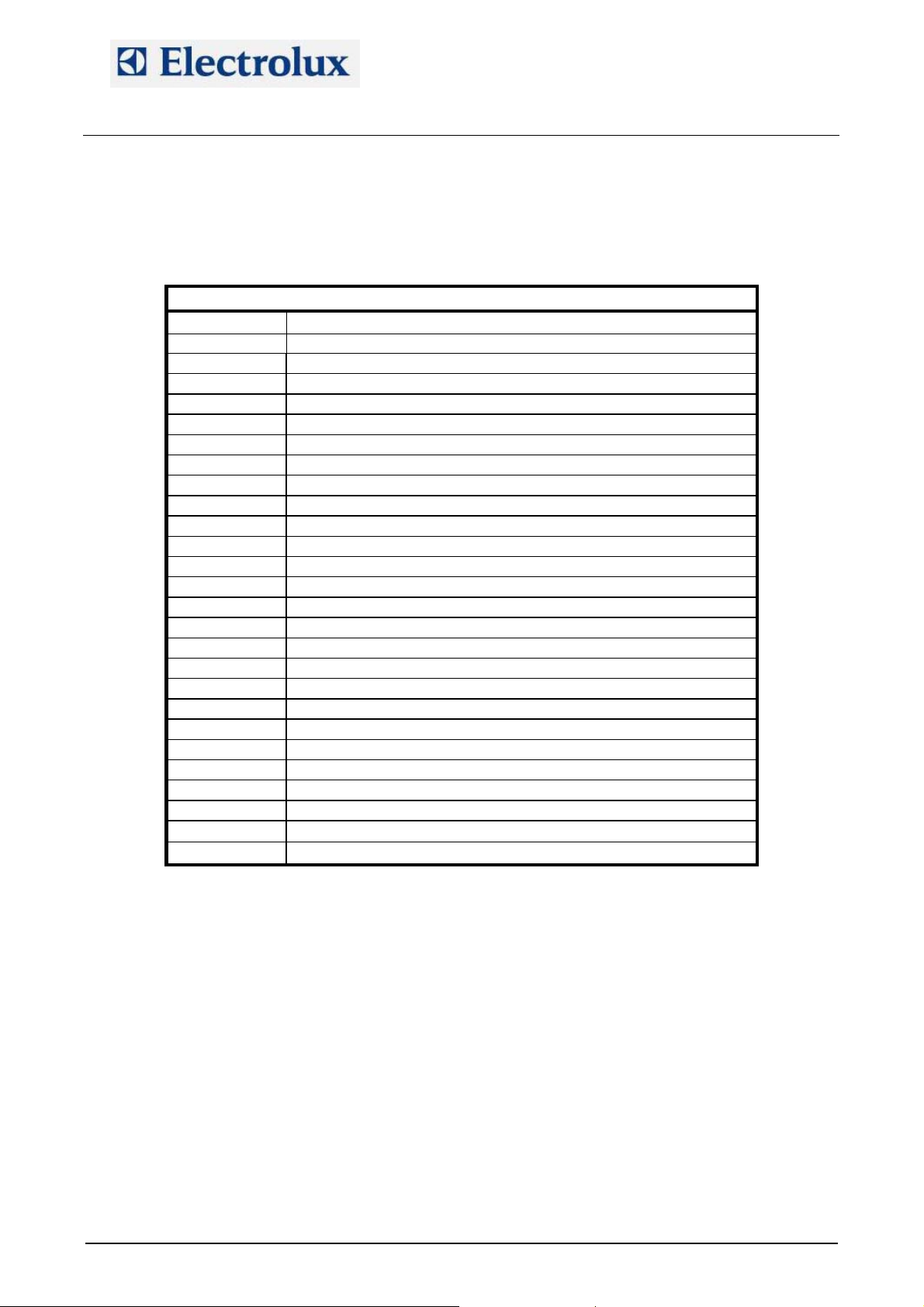
APPENDIX J – RELAY DESCRIPTIONS
RL 1/do1 FAN MOTOR POWER SUPPLY
RL 2/do2 HALF/FULL SPEED FAN MOTOR
RL 3/do3 COOLING FAN/S
RL 4/do4 SAFETY CONTACTOR (KS OR KS1&KS2) /LAMBDA FEEDER
RL 5/do5 N/A
RL 6/do6 CAVITY VENT VALVE
RL 7/do7 K2/K6 CONTACTOR/S (FOR CAVITY)
RL 8/do8 K4/K8 CONTACTOR/S (FOR BOILER)
RL 9/do9 K1/K5 CONTACTOR/S (FOR CAVITY)
RL 10/do10 K3/K7 CONTACTOR/S (FOR BOILER)
RL 11/do11 CAVITY UMIDIFIER SOLENOID VALVE
RL 12/do12 STEAM CONDENSER SOLENOID VALVE
RL 13/do13 CAVITY LAMPS
RL 14/do14 BOILER SLOW WATER FILLING
RL 15/do15 BOILER FAST WATER FILLING
RL 16/do16 BOILER AUTOMATIC DRAIN VALVE
RL 17/do17 N/A
RL 18/do18 N/A
RL 19/do19 N/A
RL 20 /do20 N/A
RL 21/do21 DETERGENT PUMP
RL 22/do22 RINSE PUMP
RL 23/do23 WATER SOLENOID VALVE (CLEANING SYSTEM)
RL 24/do24 N/A
AOS OVENS - Service Manual
(595889300 – ENG)
AOS ELECTRIC OVENS
File: AOS service manual (ENG).009 ©Copyright 2002 by Electrolux Professional P. 42/43
Page 43
Electrolux Professional S.p.A.
Ovens Platform Customer Support
Technical Training & Service
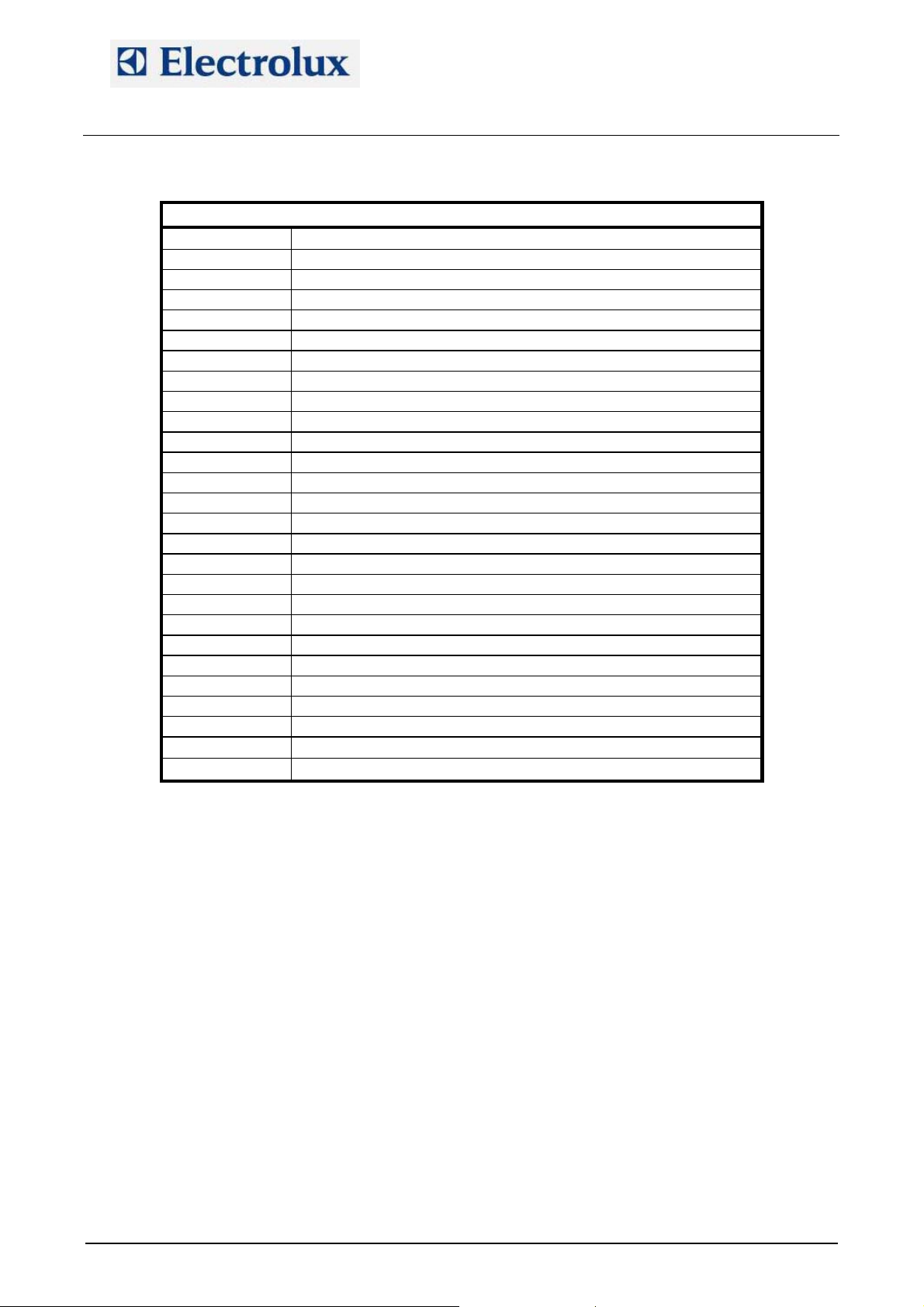
RL 1/do1 FAN MOTOR POWER SUPPLY
RL 2/do2 HALF/FULL SPEED FAN MOTOR
RL 3/do3 COOLING FAN/S
RL 4/do4 LAMBDA SWITCHING FEEDER
RL 5/do5 N/A
RL 6/do6 CAVITY VENT VALVE
RL 7/do7 CAVITY IGNITION DEVICE RESET
RL 8/do8 BOILER IGNITION DEVICE RESET
RL 9/do9 CAVITY IGNITION DEVICE POWER SUPPLY
RL 10/do10 BOILER IGNITION DEVICE POWER SUPPLY
RL 11/do11 CAVITY UMIDIFIER SOLENOID VALVE
RL 12/do12 STEAM CONDENSER SOLENOID VALVE
RL 13/do13 CAVITY LAMPS
RL 14/do14 BOILER SLOW WATER FILLING
RL 15/do15 BOILER FAST WATER FILLING
RL 16/do16 BOILER AUTOMATIC DRAIN VALVE
RL 17/do17 N/A
RL 18/do18 N/A
RL 19/do19 N/A
RL 20/do20 N/A
RL 21/do21 DETERGENT PUMP
RL 22/do22 RINSE PUMP
RL 23/do23 WATER SOLENOID VALVE (CLEANING SYSTEM)
RL 24/do24 N/A
AOS OVENS - Service Manual
AOS GAS OVENS
(595889300 – ENG)
File: AOS service manual (ENG).009 ©Copyright 2002 by Electrolux Professional P. 43/43
 Loading...