

Page 1

VHS MECHANICAL ADJUSTMENT MANUAL IV
H MECHANISM
SERVICE MANUAL
SUPPLEMENT-3
File this supplement with the VHS mechanical adjustment IV and supplement-1, 2.
Subject: Mechanism chassis assembly changed.
PAL alignment tape changed.
(SL-600060)
TABLE OF CONTENTS
Section Title Page
1. MODIFICATION ............................................................ 2
1-1. Parts Requiring Cleaning ................................................. 2
1-2. Drum Assembly, Drum Base ............................................ 3
1-3. TG2 Roller, FE Head Assembly ....................................... 4
1-4. TG3, TG6 Guide Roller Assemblies................................. 5
1-5. Shuttle T Block and Loading Gear T Block
Assemblies ....................................................................... 6
1-6. Shuttle S Block and Loading Gear S Block
Assemblies ....................................................................... 7
2. ADJUSTING THE MECHANISM USING NEW
ALIGNMENT TAPE (KRV-52PL for PAL) .................. 8
2-1. Height Adjustment of Guide Rollers No. 3 and No. 6....... 8
2-2. ACE Head Assembly Adjustment
(Rough Adjustment) ......................................................... 9
2-3. ACE Head Assembly Adjustment
(Precision Adjustment) ..................................................... 9
2-4. X-Value Adjustment.......................................................... 10
2-5. Adjustments After Replacing the Drum
(Video Head) .................................................................... 14
Page 2
1. MODIFICATION
1-1. PARTS REQUIRING CLEANING
(Refer to VHS Mechanical Adjustment
Manual IV page 7)
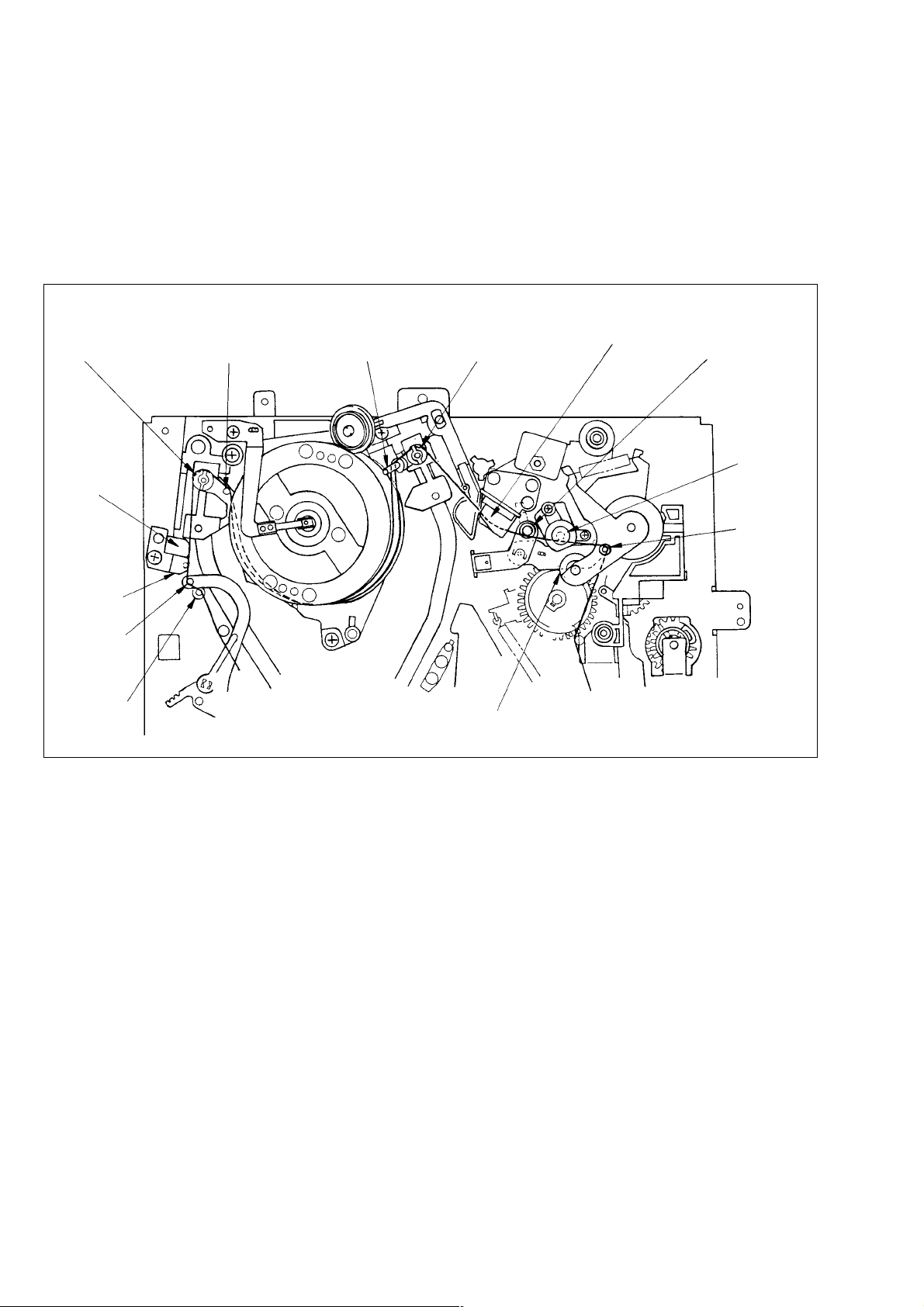
• Parts requiring a cleaning were changed in shape, and therefore, Fig. 2-1 for new type is added.
!: Modificated portion
No. 3 guide
(TG3)
FE head
%
No. 2 guide
(TG2)
No. 1 guide
(TG1)
No. 0 guide
(TG0)
^
No. 4 guide
(TG4)
No. 5 guide
(TG5)
No. 6 guide
(TG6)
Pinch roller
^
ACE head No. 7 guide
(TG7)
Capstan
shaft
No. 8 guide
(TG8)
Fig. 2-1 Parts Requiring Cleaning
– 2 –
Page 3
1-2. DRUM ASSEMBLY, DRUM BASE
(Refer to VHS Mechanical Adjustment
Manual IV page 11)
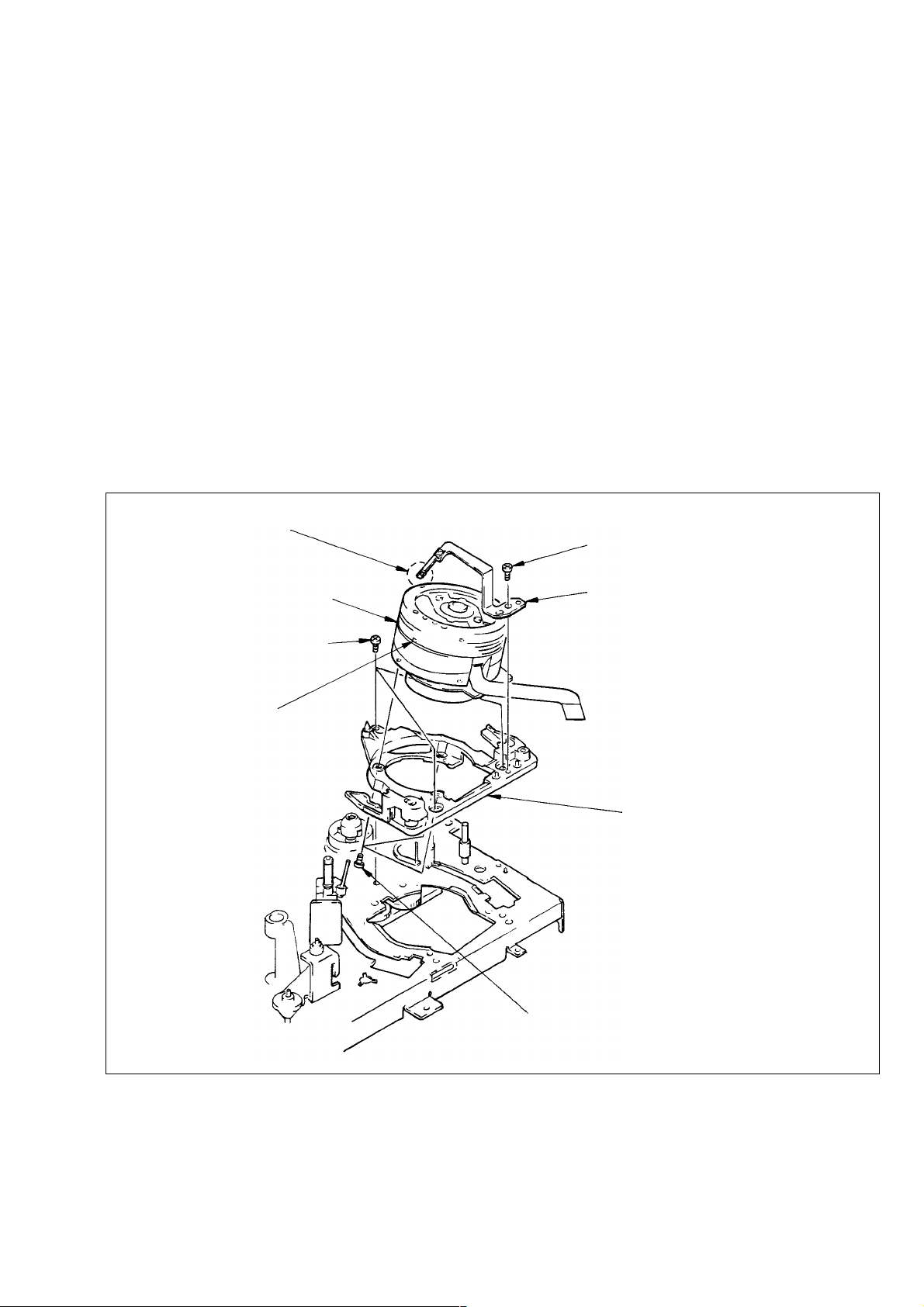
• The ground shaft assembly was changed and the drum base was
added, and therefore Section 3-2 for new type is added.
3-2. DRUM ASSEMBLY, DRUM BASE
(Fig. 3-2)
1) Remove screw 1.
2) Remove ground shaft assembly 2 not to touch its tip with
bare hand or tools.
3) Remove screws 3 to remove drum assembly 4.
4) Remove screws 5 to remove drum base 6.
[Note on Mounting]
• Don’t touch head chips and ground shaft assembly 4 with bare
hand or tools.
• Keep clean the surface contacts tape of drum assembly 4.
[Adjustment after Mounting]
• 4-1. Tape path adjustment.
Note: Don’t touch with bear hand or tools.
1 Screw (BV3 × 8)
4 Drum assembly
5 Screws
Head chips
Note: Don’t touch
with bare hand
or tools.
2 Ground shaft assembly
Note: Some models are not mounted.
6 Drum base
3 Screws (BV3 × 8)
Fig. 3-2
– 3 –
Page 4
1-3. TG2 ROLLER, FE HEAD ASSEMBLY
(Refer to VHS Mechanical Adjustment
Manual IV page 14)
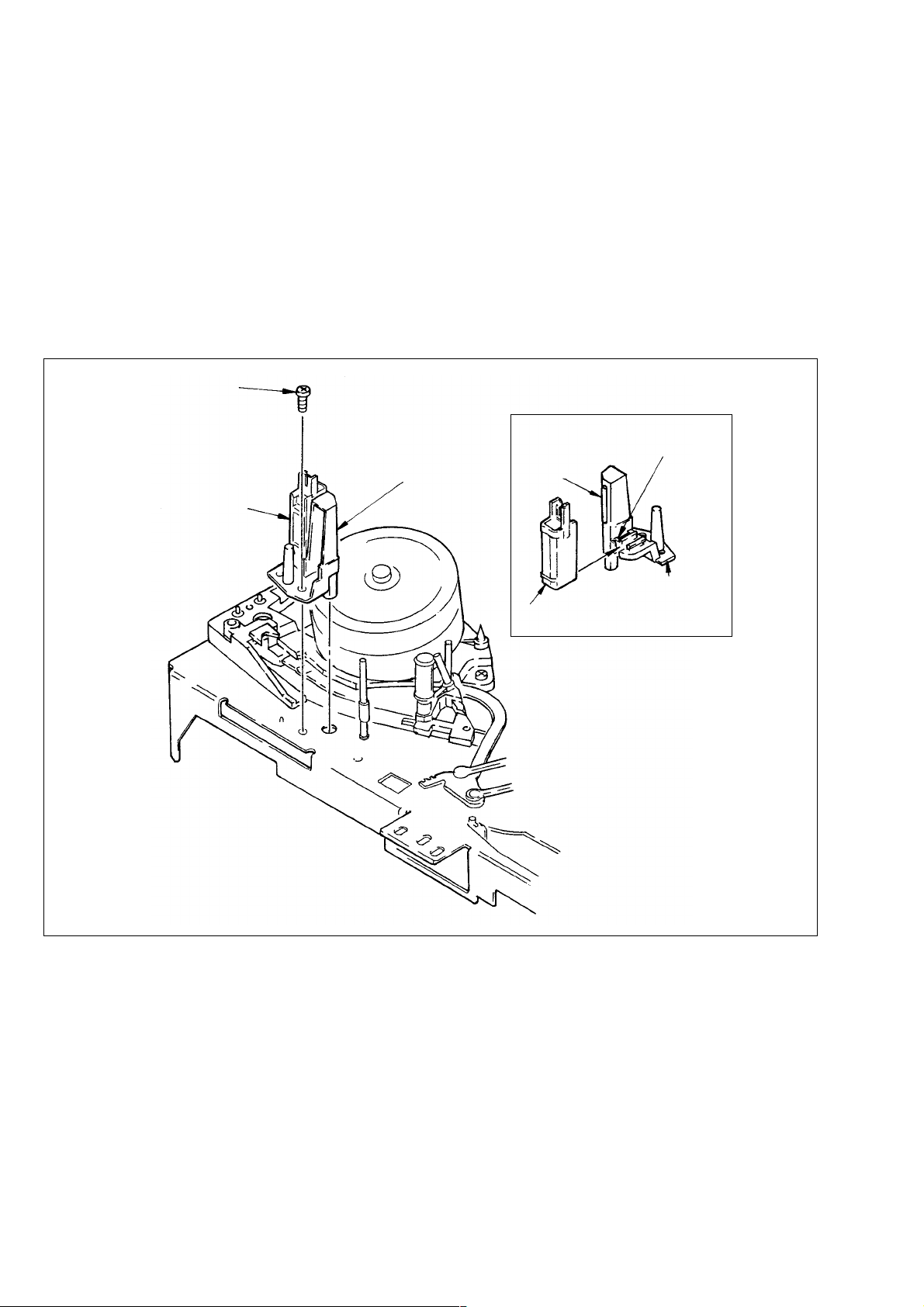
• The TG2 roller was assembled in the FE head assembly, and
therefore Section 3-5 for new type is added.
3-5. TG2 ROLLER, FE HEAD ASSEMBLY
(Fig. 3-5)
1) Remove screw 1.
2) Pull out FE head assembly 2.
[Note on Mounting]
• Keep clean the surface contacts tape of TG2 roller.
1 Screw (BV3 × 8)
2 FE head assembly
TG2 roller
After sliding, check
claw locks FE head.
TG2 roller
Fig. 3-5
FE head
FEH holder
Slide FE head onto
FEH holder.
Fig. A
– 4 –
Page 5
1-4. TG3, TG6 GUIDE ROLLER ASSEMBLIES
(Refer to VHS Mechanical Adjustment
Manual IV page 17)
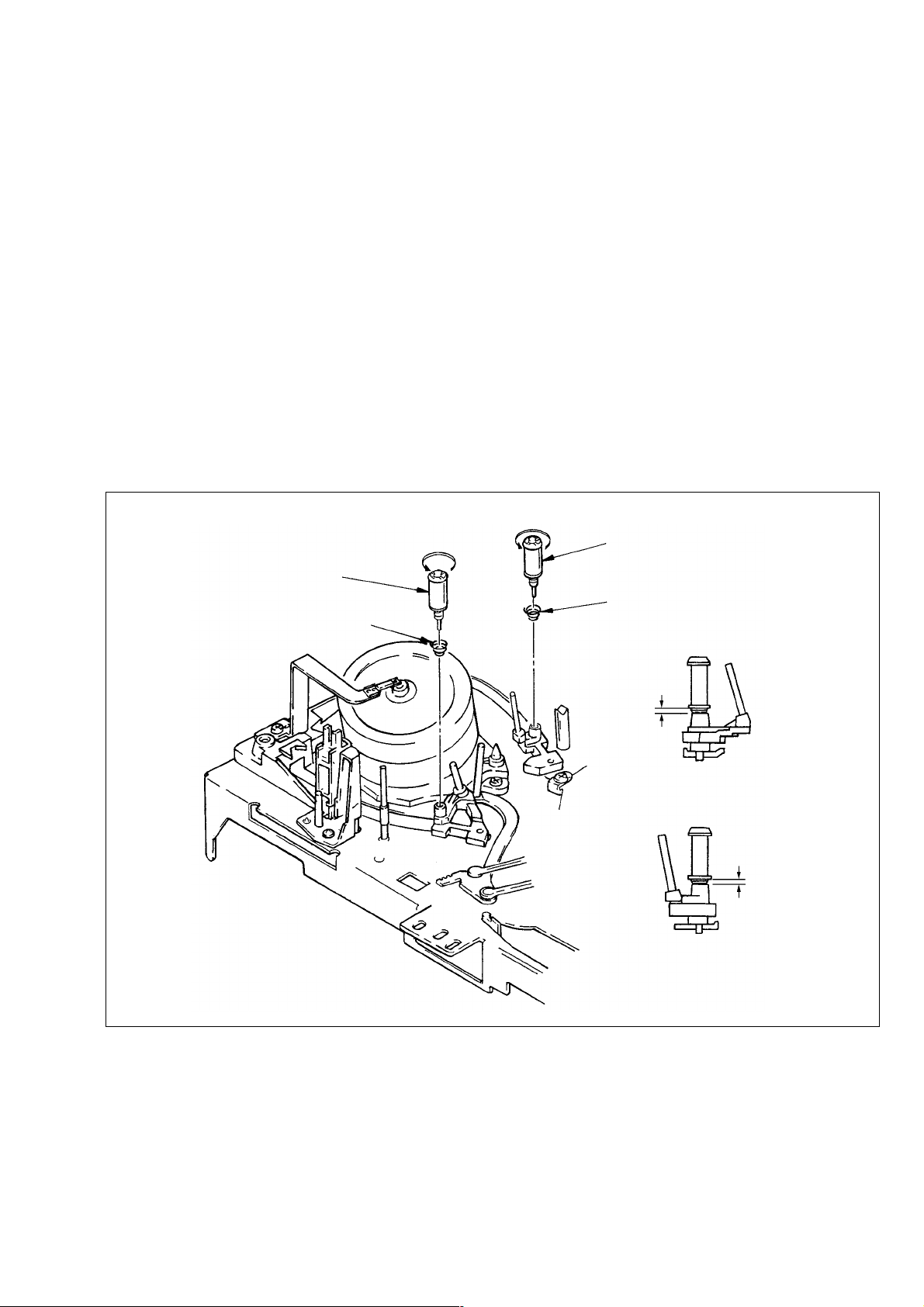
• The TG3 and TG6 guide roller assemblies were changed, and
therefore Section 3-8 for new type is added.
3-8. TG3, TG6 GUIDE ROLLER ASSEMBLIES
(Fig. 3-8)
1) TG3 guide roller assembly 1 by turning it in the arrow A
direction.
2) Removal the spring 2.
3) TG6 guide roller assembly 3 by turning it in the arrow B
direction.
4) Removal the spring 4.
[Note on Mounting]
• Keep clean the surface contacts tape of TG3 and TG6 guide
roller assemblies 1, 3.
[Adjustment after Mounting]
• 4-1. Tape path adjustment.
A
B
3 TG6 guide rollser assembly
1 TG3 guide roller assembly
2 Spring
4 Spring
1.4 mm
TG3 guide roller assembly
Fig. A
1.4 mm
TG6 guide roller assembly
Fig. B
Fig. 3-8
– 5 –
Page 6
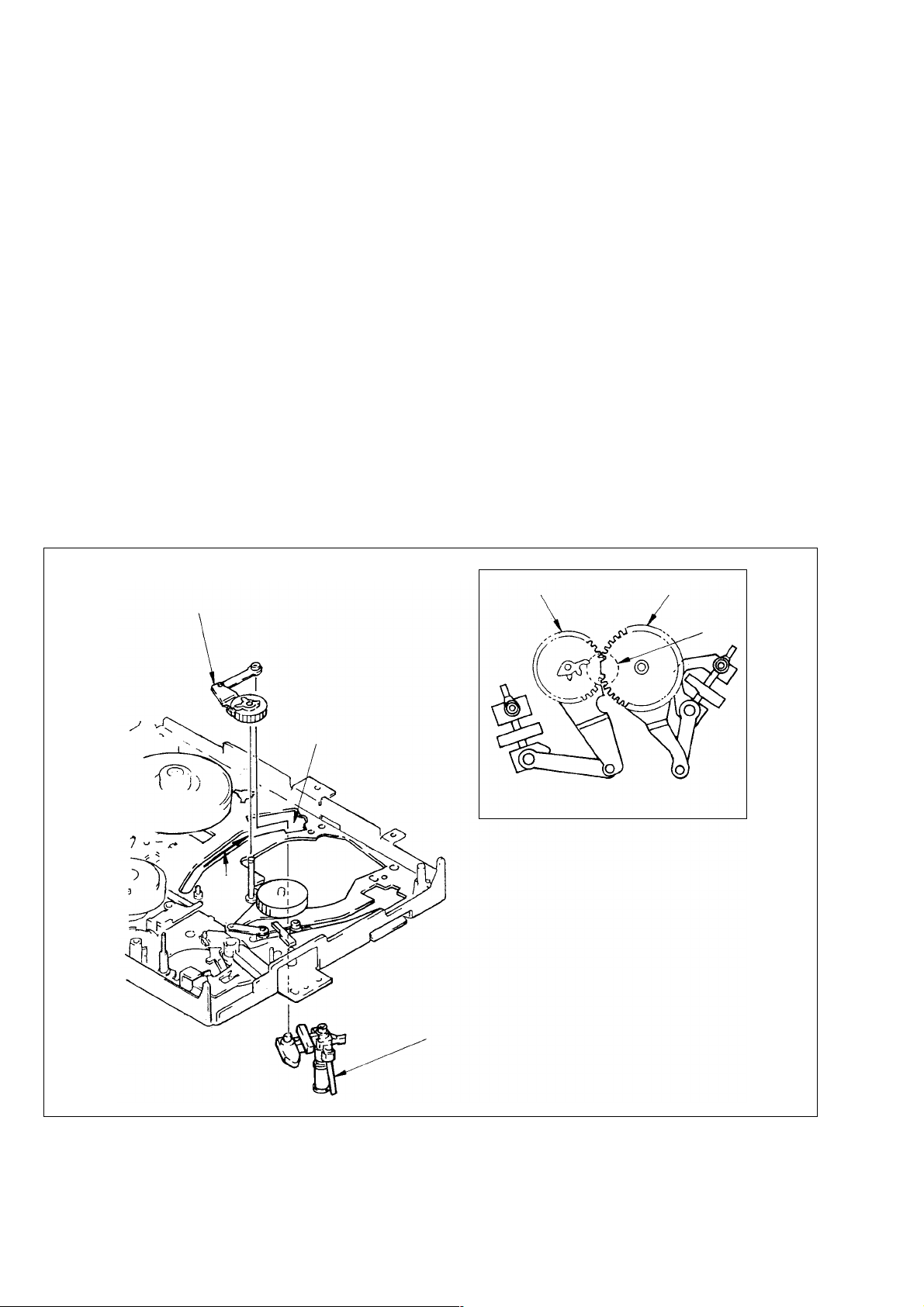
1-5. SHUTTLE T BLOCK AND LOADING
GEAR T BLOCK ASSEMBLIES
(Refer to VHS Mechanical Adjustment
Manual IV page 29)
• The shuttle T block and loading gear T block assemblies were
changed, and therefore Section 3-19 for new type is added.
3-19. SHUTTLE T BLOCK AND LOADING
GEAR T BLOCK ASSEMBLIES
(Fig. 3-21)
1) Remove drum assembly and drum base. (Refer to 3-2.)
2) Remove timing belt. (Refer to 3-3.)
3) Remove CAP brake assembly. (Refer to 3-4.)
4) Remove cam motor chassis block assembly. (Refer to 3-18.)
5) Remove main slider. (Refer to 3-20.)
6) Sliding the shuttle T block assembly 1 toward the direction
A, remove it through the hole B.
7) Pull out loading gear T block assembly 2.
[Note on Mounting]
• Adjust the phase C between loading gear (T) and loading gear
(S). (Fig. A)
• Keep clean the surface contacts tape of shuttle T block assembly 1.
2 Loading gear T block assembly
B
A
Loading gear (T)
1 Shuttle T block assembly
Loading gear (S)
C
Fig. A
Fig. 3-21
– 6 –
Page 7
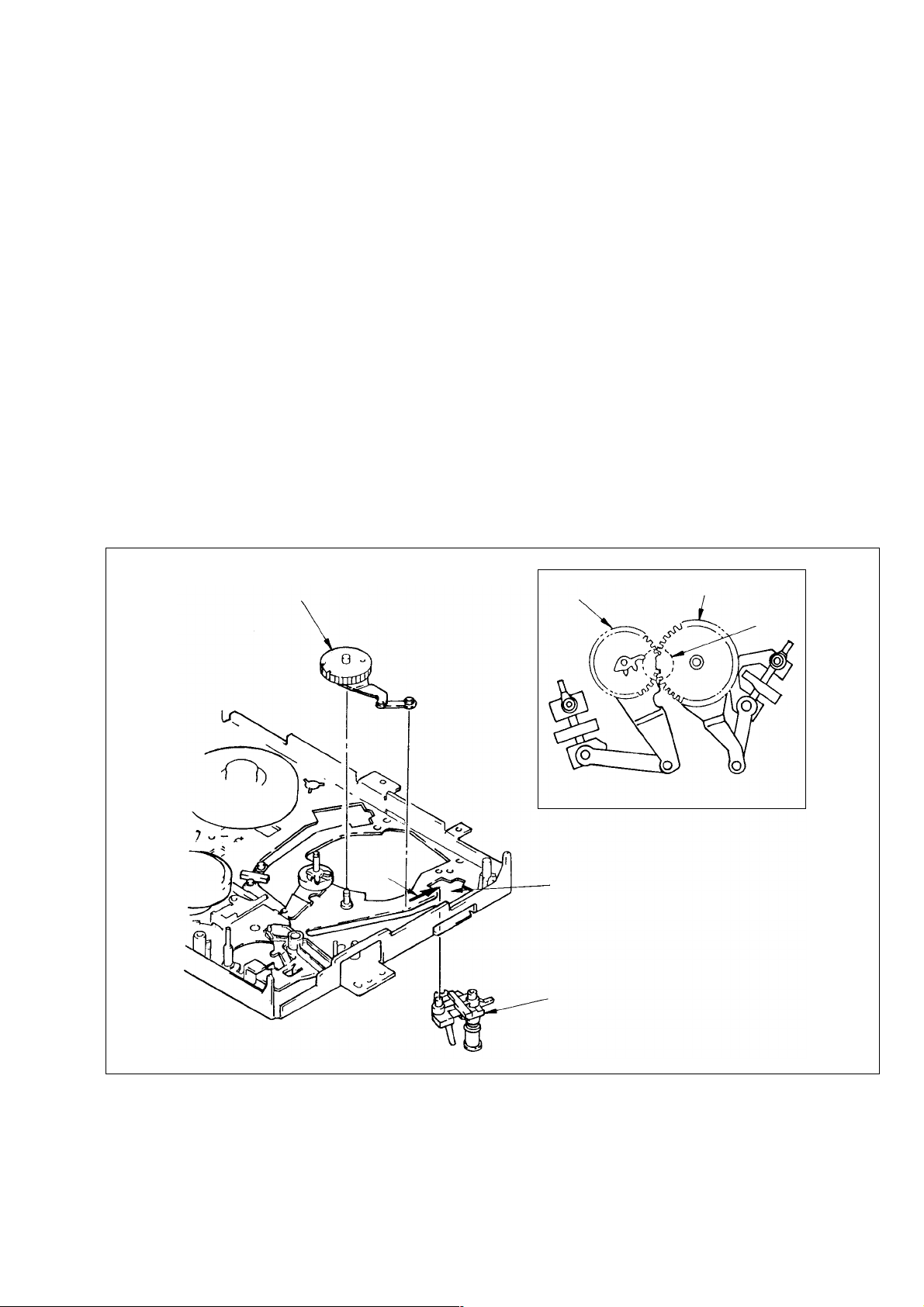
1-6. SHUTTLE S BLOCK AND LOADING
GEAR S BLOCK ASSEMBLIES
(Refer to VHS Mechanical Adjustment
Manual IV page 30)
• The shuttle S block and loading gear S block assemblies were
changed, and therefore Section 3-20 for new type is added.
3-20. SHUTTLE S BLOCK AND LOADING
GEAR S BLOCK ASSEMBLIES
(Fig. 3-22)
1) Remove drum assembly and drum base. (Refer to 3-2.)
2) Remove timing belt. (Refer to 3-3.)
3) Remove CAP brake assembly. (Refer to 3-4.)
4) Remove cam motor chassis block assembly. (Ref er to 3-18.)
5) Remove main slider. (Refer to 3-20.)
6) Sliding the shuttle S block assembly 1 toward the direction
A, remove it through the hole B.
7) Pull out loading gear S block assembly 2.
[Note on Mounting]
• Adjust the phase C between loading gear (S) and loading gear
(S). (Fig. A)
• Keep clean the surface contacts tape of shuttle S block assembly 1.
2 Loading gear S block assembly
A
Loading gear (T)
Loading gear (S)
Fig. A
B
1 Shuttle S block assembly
C
Fig. 3-22
– 7 –
Page 8
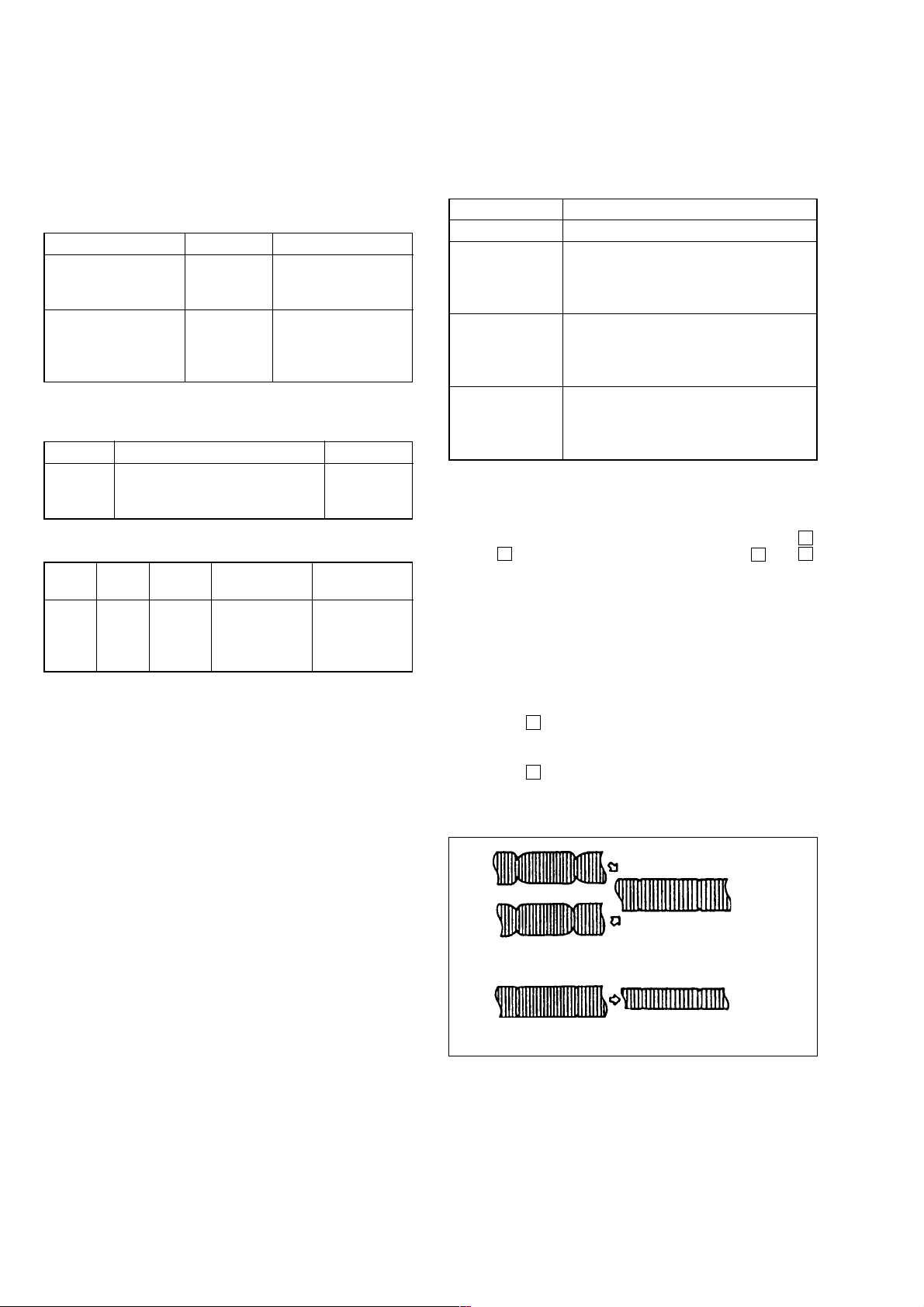
2. ADJUSTING THE MECHANISM USING NEW ALIGNMENT TAPE (KRV -52PL for PAL)
The conventional alignment tape (For PAL) is now replaced with
alignment tape KRV-52PL, and the following describes how to
align the mechanism using the KRV-52PL. For details on the use
of KRV-51P for each model, refer to the service manuals which
will be issued in the future.
Name Parts No. Remarks
Alignment tape
KRV-52PL for PA L
Alignment tape
KRV-51P for PAL and switching position)
Contents:
KRV-52PL (PAL)
Time Video Audio
Recording only at 1 MHz, A-ch.
20 min. EP mode
RF skipping once per 5 frames
KRV-51P (PAL)
Class Mode Time Video
1 SP 7 min. Color bar 400 Hz
2 SP 3 min. Mono. scope 400 Hz
3 EP 7 min. Color bar 400 Hz
4 EP 3 min. Mono. scope 400 Hz
8-192-605-46 azimuth, and X-value
8-192-605-36
For tape path, audio
adjustments
For electrical
adjustments (RF, AF,
and operation check
4 kHz
full tracks
Audio
(HiFi/Normal)
2-1. HEIGHT ADJUSTMENT OF GUIDE
ROLLERS NO. 3 AND NO. 6
Mode Playback
Signal Alignment tape KRV-52PL (For PAL)
Measuring Oscilloscope
instrument TIM/DIV: 2ms
Trigger source: CH2
Trigger slope: +
Measuring point CH-1: Connector PB RF pin for RF PC
board check
CH-2: Connector RF SWP pin for RF PC
board check
Adjustment Height adjustment screw for No. 3 tape
locations guide roller
Height adjustment screw for No. 6 tape
guide roller
[Adjustment Method]
1) Deactivate the automatic tracking control, and set the tracking
control at the center position. T o set the tracking control at the
center position for the VCRs equipped with the v
and V tracking control keys, press both the v and V
tracking control keys at the same time. For the VCRs not
equipped with the tracking control keys, deactivate the automatic tracking control by pressing the tracking
[AUTO/MANUAL] key on the remote control unit during
threading operation (after a tape is inserted but before the VCR
starts playing back the tape).
2) Turn the height adjustment screws of tape guide rollers No. 3
and No. 6 so that the RF output envelope becomes as flat as
possible.
3) Press the v tracking control key, and check that both the beginning and end of the RF output change together the same in
amplitude.
4) Press the V tracking control key, and check that both the beginning and end of the RF output change together the same in
amplitude.
– 8 –
Turn the guide roller height adjuster screw
gradually to smooth out the waveforms.
Center tracking position
Turn the tracking control in
both directions.
Fig. 2-1
Page 9
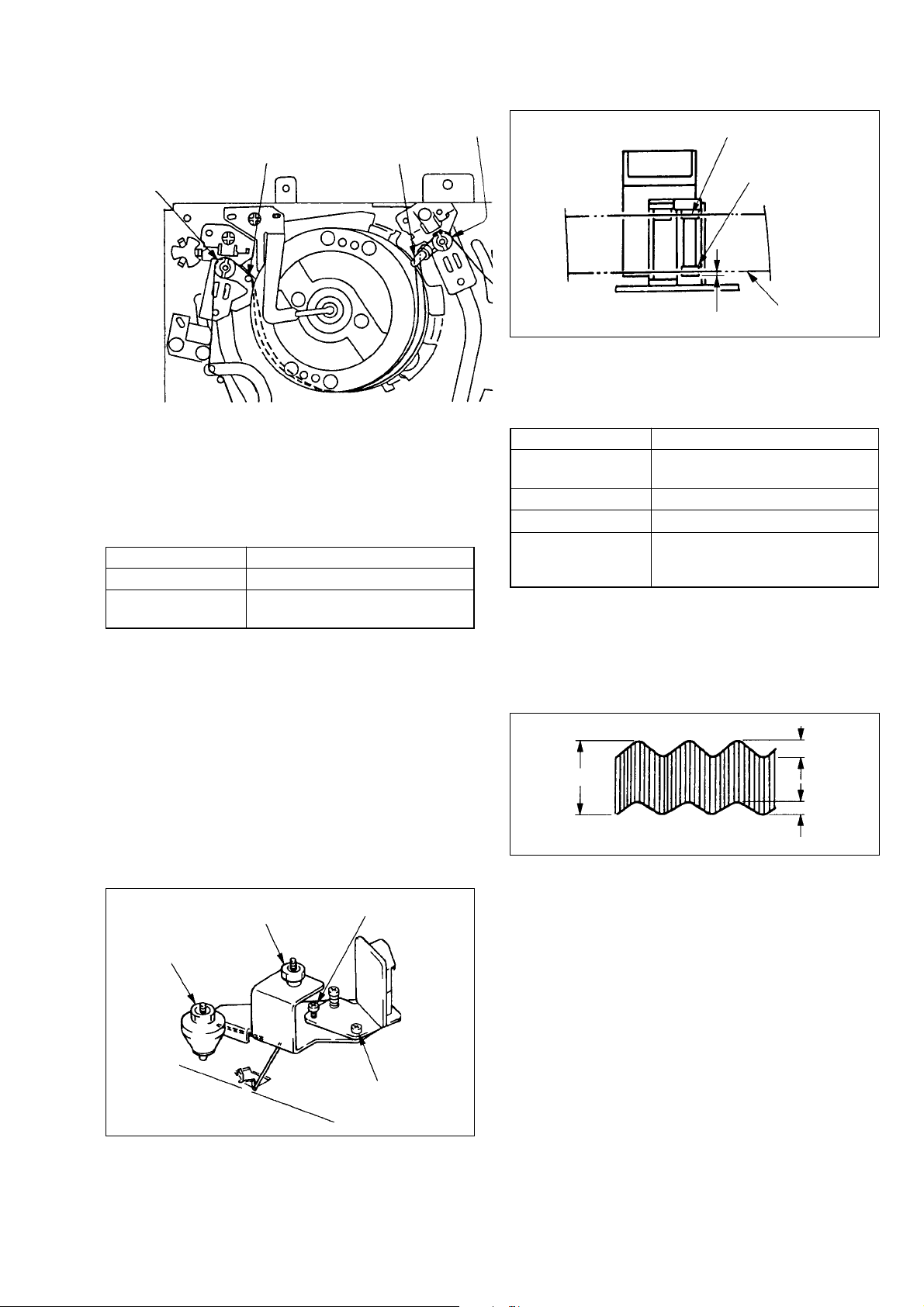
Height adjustment screw
of tape guide roller No. 3
Height adjustment screw
of tape guide roller No. 6
Tape guide No.4 Tape guide No.5
Audio head
Control head
Fig. 2-2
2-2. ACE HEAD ASSEMBLY ADJUSTMENT
(ROUGH ADJUSTMENT)
(Figs. 2-3 and 2-4)
Purpose: Allows the tape to make even contract with the head
for recording and playback of the specified track.
Mode Playback
Jig Blank tape
Adjustment locations Height adjuster nut, Tilt adjuster
screw
[Adjustment Method]
1) Mount the A CE head assembly. AT this time, adjust the height
so that the height of guide flange No. 7 matches the level of
the lower edge of the control head.
2) Remove the adjustment tool and load a new tape, then set the
unit for playback.
3) Check that the tape does not curl or rise up noticeably near the
ACE head.
4) If the tape curls up or rises noticeably , readjust the tilt adjuster
screw and the height adjuster nut.
(The height of the ACE head should be adjusted so that the
lower edge of the tape is approx. 0.1 to 0.15 mm from the
control head.)
5) Perform precision adjustment.
Approx. 0.1 to 0.15 mm
Tape
Fig. 2-4
2-3. ACE HEAD ASSEMBLY ADJUSTMENT
(PRECISION ADJUSTMENT)
Mode Playback
Signal Alignment tape (KRV-52PL 4 kHz)
(For PAL)
Measuring instrument Oscilloscope
Measuring point Audio output terminal
Adjustment locations Azimuth adjuster screw,
Height adjuster nut,
Tilt adjuster screw
[Adjustment Method]
1) Adjust the tilt adjuster screw in the FWD or REV mode so that
the lower flange of guide No. 7 does not curl up or rise.
2) Alternately adjust the azimuth adjuster screw, the height adjuster nut, and the tilt adjuster screw to maintain even audio
output at maximum with minimum deviation.
B
A
B’
A: Maximum BB’: Miniimum
Fig. 2-5
Height adjuster nut
X-value adjuster screw
Fig. 2-3
Tilt adjuster screw
Azimuth adjuster screw
Note: In the adjustment of ACE head assembly (coarse adjust-
ment and fine adjustment), if a azimuth, height and tilt were
adjusted, again adjust the height of No. 3 and No. 6 guide
rollers.
– 9 –
Page 10
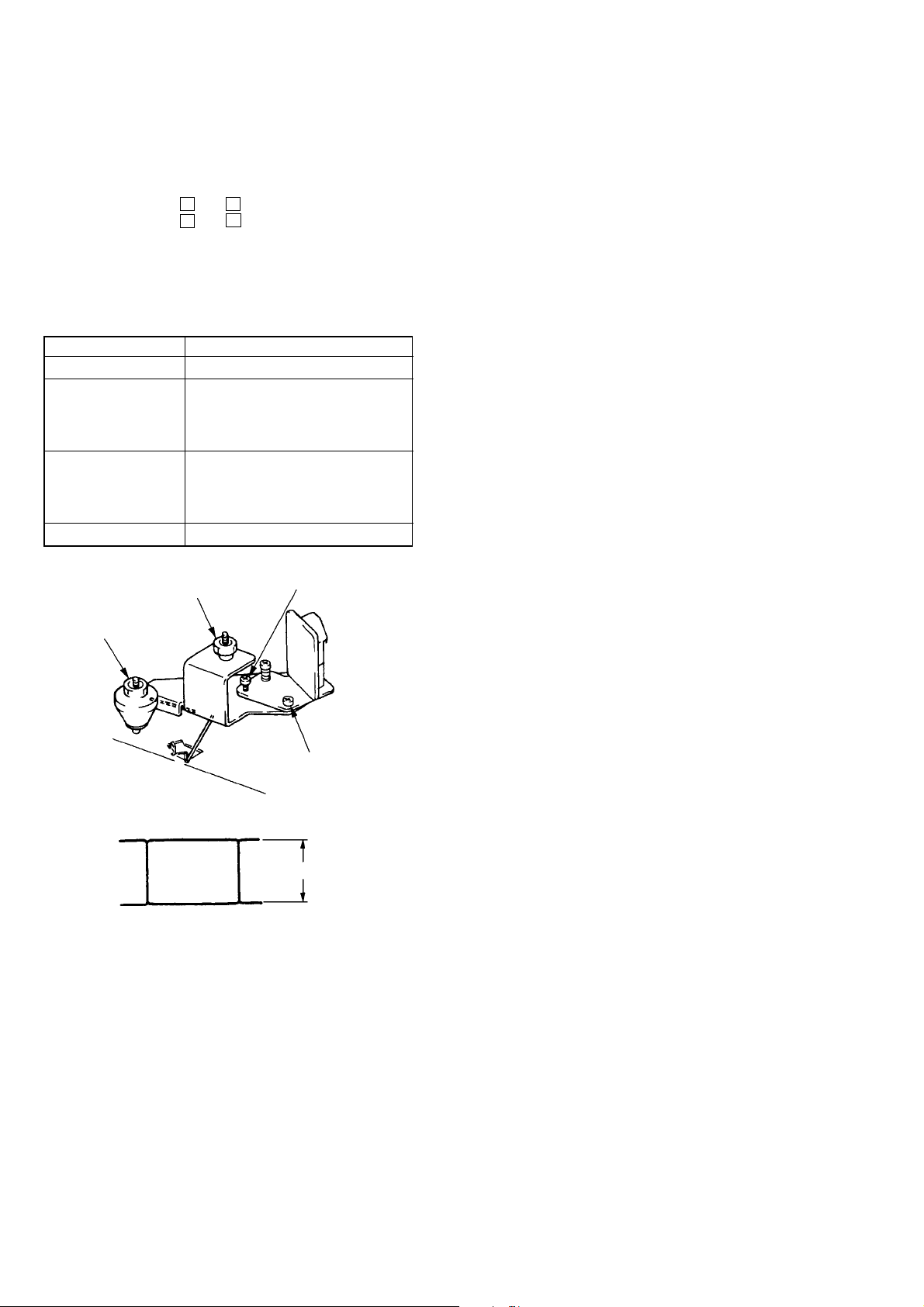
2-4. X-VALUE ADJUSTMENT
Purpose: To obtain compatibility with other VCRs.
Precaution: Before starting to adjust X-value, set the tracking
control at the center position. To set the tracking
control at the center position for the VCRs equipped
with the v and V tracking control keys, press
both the v and V tracking control keys at the
same time. For the VCRs not equipped with the
tracking control keys, deactivate the automatic
tracking control by pressing the tracking
[AUTO/MANUAL] key on the remote control unit
during threading operation (after a tape is inserted
but before the VCR starts playing back the tape).
Mode Playback
Signal Alignment tape KRV-52PL
Measuring instrument Oscilloscope
TIM/DIV: 2ms
Trigger source: CH2
Trigger slope: +
Measuring point CH-1: Connector PB RF pin for
RF PC board check
CH-2: Connector RF SWP pin for
RF PC board check
Adjustment locations X-value adjuster screw
Height adjuster nut
X-value adjuster screw
RF output shall be maximum at the center
position of the tracking control.
Fig. 2-6
Tilt adjuster screw
Azimuth adjuster screw
RF output
– 10 –
Page 11
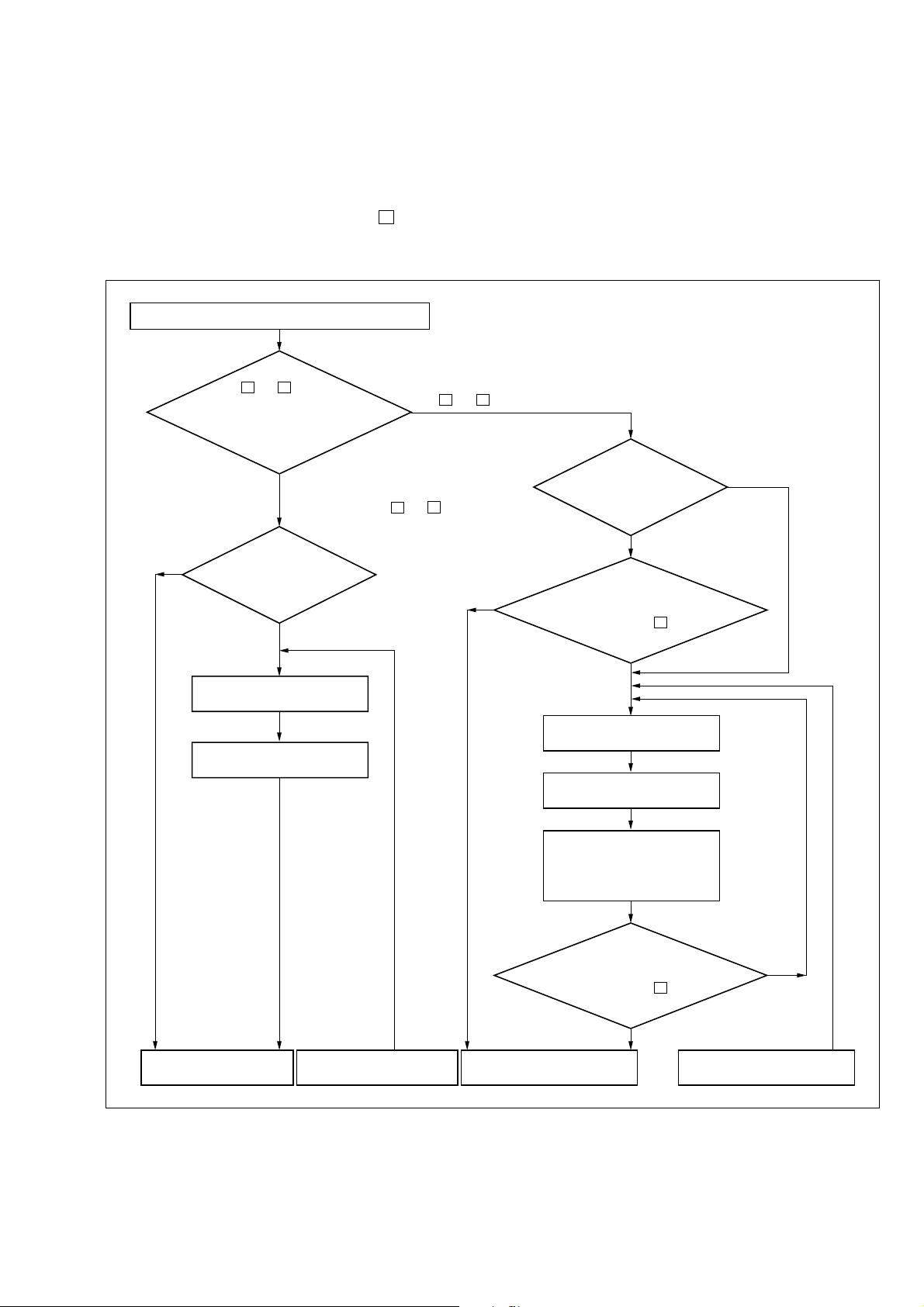
[Adjustment Method]
Set the tracking control at the center position. For the VCRs
equipped with narrow gap video heads, set the X-value adjustment screw where a maximum RF output is obtained. For the VCRs
equipped with wide gap video heads, set the X-value adjustment
screw both where a maximum RF output is obtained and where
the RF output decreases immediately when the V tracking control key is pressed.
1. Adjusting X-value
Play back alignment tape KRV-52PL (For PAL)
Using
the v and V tracking
control keys, move the tarcking
control point, and check the control range
Yes
where the maximum
RF output can be
obtained.
The control range is very narrow.
(The RF output decreases immediately
when pressing the v and V tracking
control keys.)
Is the RF output
maximum with the tracking
control set at the center
position?
No
Set the tracking control at
the center position.
Turn the X-value adjustment
screw for a maximum RF
The control range is wide. (The RF output is almost
constant within a cetrain range even when pressing
the v and V tracking control keys.)
Is the RF output
maximum with the tracking
control set at the center
position?
Yes
Yes
does the RF output decrease immediately
With the tracking
control set at the center position,
when pressing the V tracking
control key?
No
Set the tracking control at
the center position.
Turn the X-value adjustment
screw for a maximum RF
No
Continues to the next step
“2. Checking pitch off”.
Continued from the next
step “2. Checking pitch off”.
Turn the X-value adjustment
screw in counterclockwise
direction, and set it at the
position where the RF output
is about to decrease.
With the tracking
control set at the center position,
does the RF output decrease immediately
when pressing the V tracking
control key?
Continues to the next step
“2. Checking false tracking”.
Fig. 2-7
– 11 –
No
Yes
Continued from the next step
“2. Checking false tracking”.
Page 12
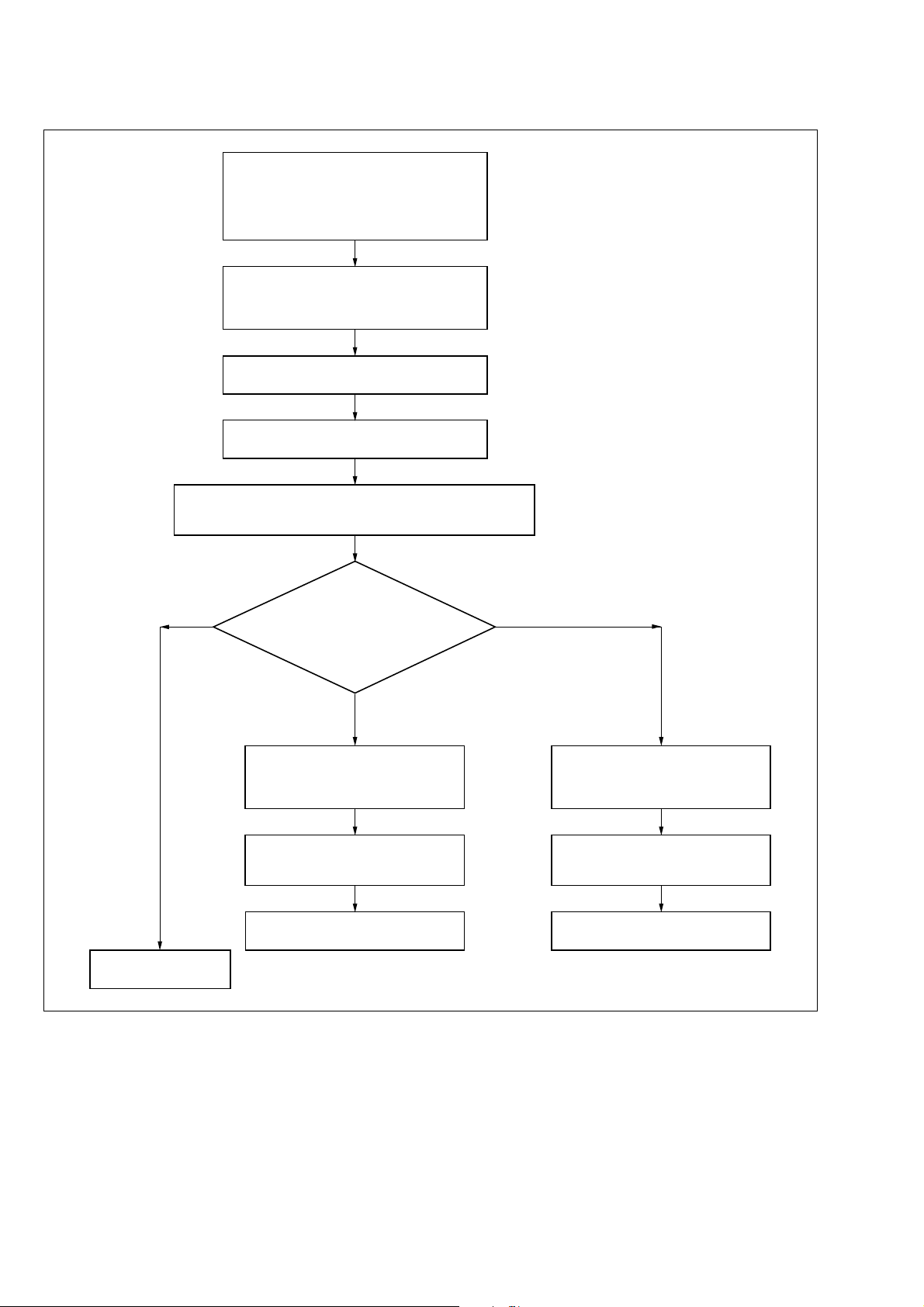
2. Chec king false tracking
Adjust the SWEEP VARIABLE control on the oscilloscope so
that no signal section of the 4 kHz audio signal (CH2) appears
at a fixed position on the screen as shown in next page.
Connect an oscilloscope as follows:
CH1: Connector PB RF terminal for RF
PC board check
CH2: Audio signal output terminal
CH3: Connector RF SWP terminal for
RF PC board check
Set the oscilloscope as follows:
TIME/DIV: 10ms
Trigger source: CH3
Trigger slope: +
Play back alignment tape KRV-52PL.
Set the tracking control at the center
position.
Note:
In case of 2 phenomenons oscilloscope,
set and connect as follows.
CH1: PB RF terminal
CH2: Audio signal output terminal
External trigger: RF SWP terminal
Trigger slope: +
Normal
(Correct tracking)
Adjustment has been
completed.
relationship between no signal
Is the phase
section of the PB RF signal (CH1) and
no signal section of the 5 kHz audio
signal (CH2) correct?
(Refer to next page.)
Not normal and PB RF signal
is delayed. (False tracking in
clockwise direction)
Set the oscilloscope as follows:
SWEEP VARIABLE: CAL
TIME/DIV: 2ms
Trigger slope: +
Turn the X-value adjustment screw
in counterclockwise direction for a
maximum RF output.
Countinues to the previous step
“1. Adjusting X-value”.
Fig. 2-8
Not normal and PB RF signal is
advanced. (False tracking in
counterclockwise direction)
Set the oscilloscope as follows:
SWEEP VARIABLE: CAL
TIME/DIV: 2ms
Trigger slope: +
Turn the X-value adjustment screw
in clockwise direction for a maximum
RF output.
Countinues to the previous step
“1. Adjusting X-value”.
– 12 –
Page 13
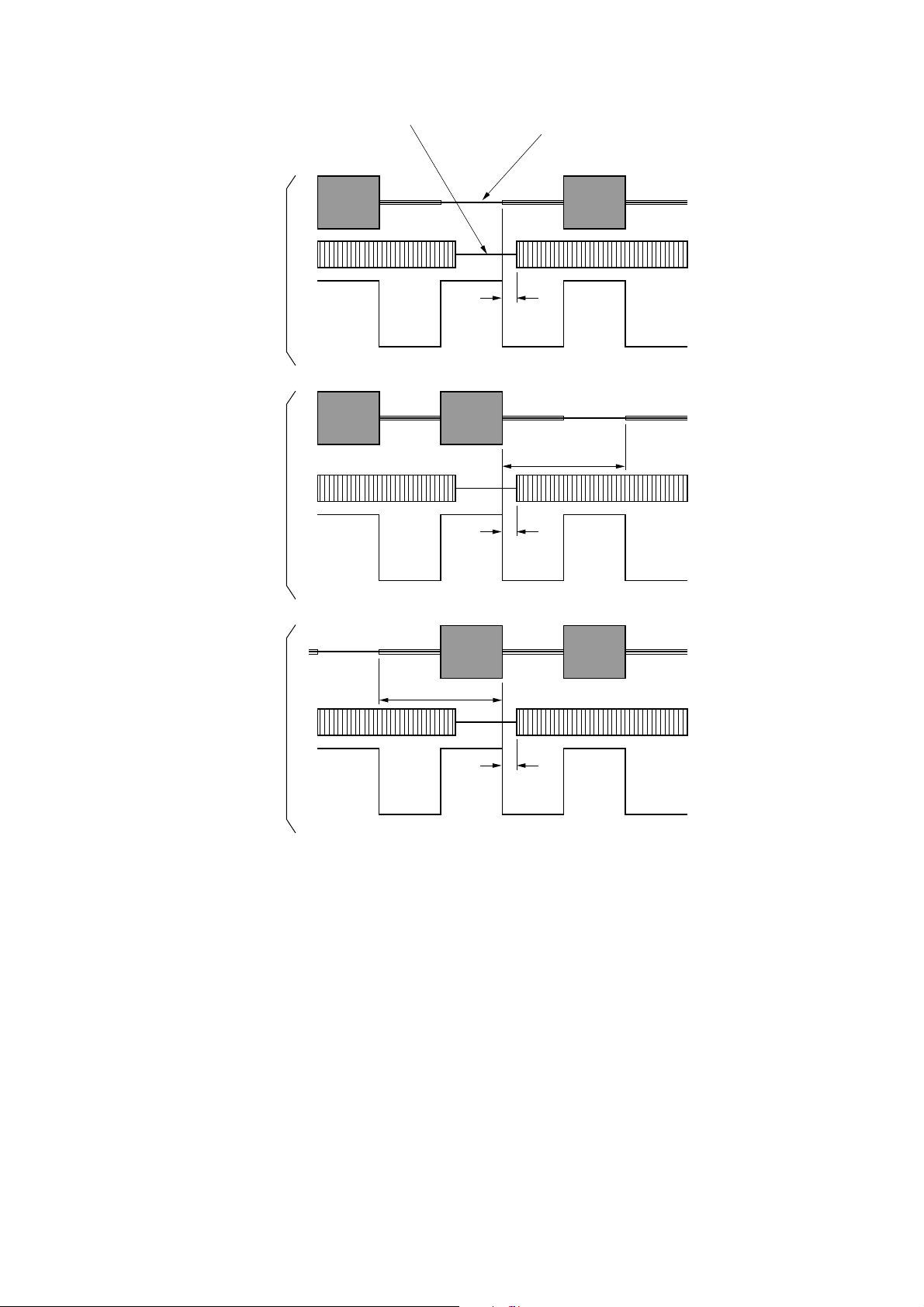
No signal section of the audio signal
(continuously)
RF signal sampling every 4 frames
CH1 (PB RF)
Normal tracking
False tracking
delayed by
1 CTL pulse
(in clockwise
direction)
False tracking
advanced by
1 CTL pulse (in
counterclockwise
direction)
0 to
2.5 msec
Ach Bch Ach Bch Ach Bch
Advanced by
1 CTL pulse
0 to
2.5 msec
Ach Bch Ach Bch Ach Bch
Advanced
by 1 CTL pulse
0 to
2.5 msec
CH2 (Audio signal)
CH3 (RF SWP)
CH1 (PB RF)
CH2 (Audio signal)
CH3 (RF SWP)
CH1 (PB RF)
CH2 (Audio signal)
CH3 (RF SWP)
Ach Bch Ach Bch Ach Bch
Fig. 2-9
– 13 –
Page 14
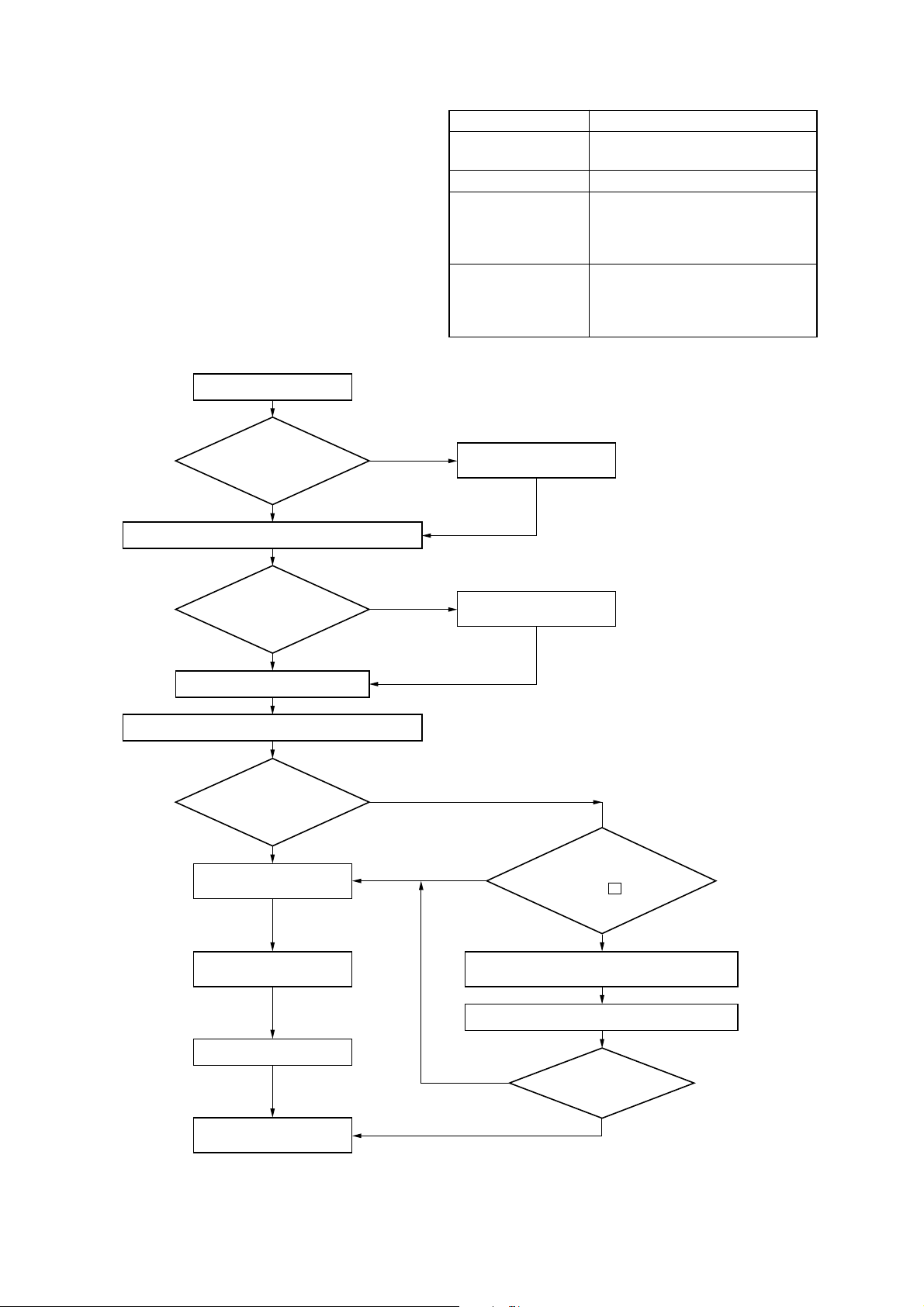
2-5. ADJUSTMENT AFTER REPLACING
THE DRUM (VIDEO HEAD)
Purpose: Co-relative height, X-value and other factors of the
drum will deviate from those of the guide roller . If the
drum is replaced properly, these deviations are extremely small.
Note 1: Deactivate the automatic tracking control for setting the
mechanism in manual tracking control mode.
Note 2: To set the tracking control at the center position, deacti-
vate the automatic tracking control by pressing the tracking
[AUTO/MANUAL] key on the remote control unit dur-
ing threading operation (after a tape is inserted but before the VCR starts playing back the tape).
[Adjustment Method]
Play back a blank tape.
Mode Playback
Signal Alignment tape KRV-52PL
(For PAL), blank tape
Measuring instrument Oscilloscope
Measuring point CH-1: Connector PB RF pin for RF
PC board check.
CH-2: Connector RF SWP pin for
RF PC board check.
Adjustment locations Guide roller (Refer to 2-1.)
Switching position (Refer to the
Service Manual)
X-value (Refer to 2-3.)
There is
edge curls or wrinkles
on the tape around the
tape guide roller.
No
Play back alignment tape KRV-52PL. (For PAL)
Check
the flatness in
the RF output envelope
(Refer to next page).
OK
Adjust the switching position.
Play back alignment tape KRV-52PL. (For PAL)
Is the RF
output maximum with
the tracking control set
at the center
position?
No
Adjust the center position
of the tracking control.
Yes
NG
Yes
Adjust the tape guide
roller finely.
Adjust height of the
tape guide roller.
No
Does the RF output
decrease immediately when
pressing the V tracking
control key?
Adjust the switching
position.
Adjust the X-value.
Check and adjustment
have been completed.
Fig. 2-10
– 14 –
Yes
Play back the SP section of alignment tape
KRV-51P. (For PAL)
Set the tracking control at the center position.
No
Is the reproduced
picture normal?
Yes
Page 15
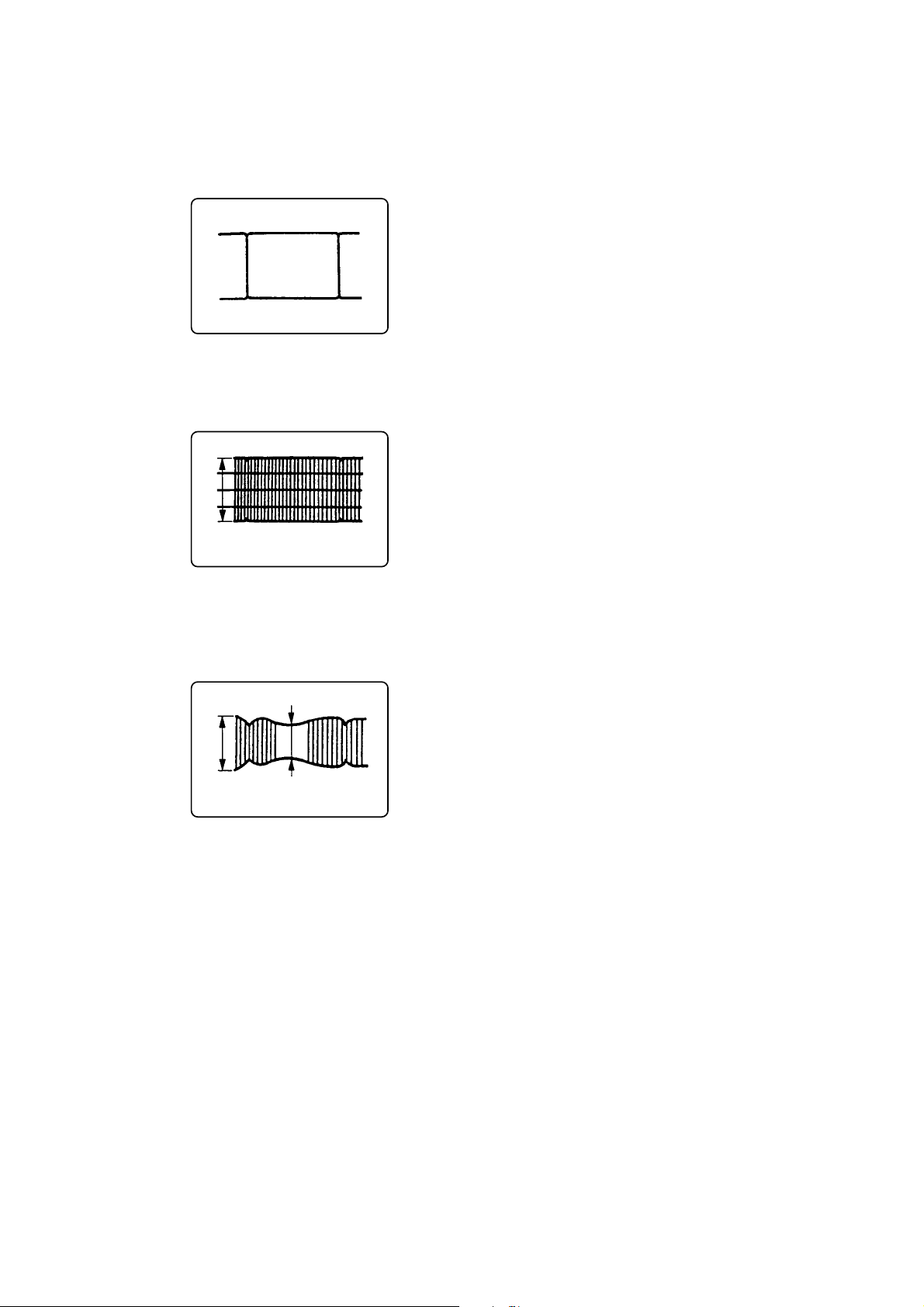
[Checking the evenness and fluctuation of the RF
output]
1) Set the RF output to the maximum level using the tracking
buttons.
2) Perform fine adjustment of the voltage level range of the oscilloscope, then adjust the RF output deviation to within 4 gradations.
4 gradations
3) Press the tracking buttons and adjust the maximum amplitude
of the RF output to within 3 gradations.
4) AT this time, check if the minimum amplitude is more than 2
gradations.
3 gradations 2 gradations
5) Check that the RF output fluctuation between minimum and
maximum levels is within 13%.
Fig. 2-11
– 15 –
Page 16

VHS MECHANICAL ADJUSTMENT IV
Sony Corporation
Home Video Division Company9-973-623-85
– 16 –
Printed in Japan C 2000. 2
2000B05104-1
Published by Quality Assurance Dept.
 Loading...