

KitchenAid KRFC704FSS01, KRFC704FSS00, KRFC704FPS01, KRFC704FPS00, KRFC704FBS01 Owner’s Manual
...Page 1
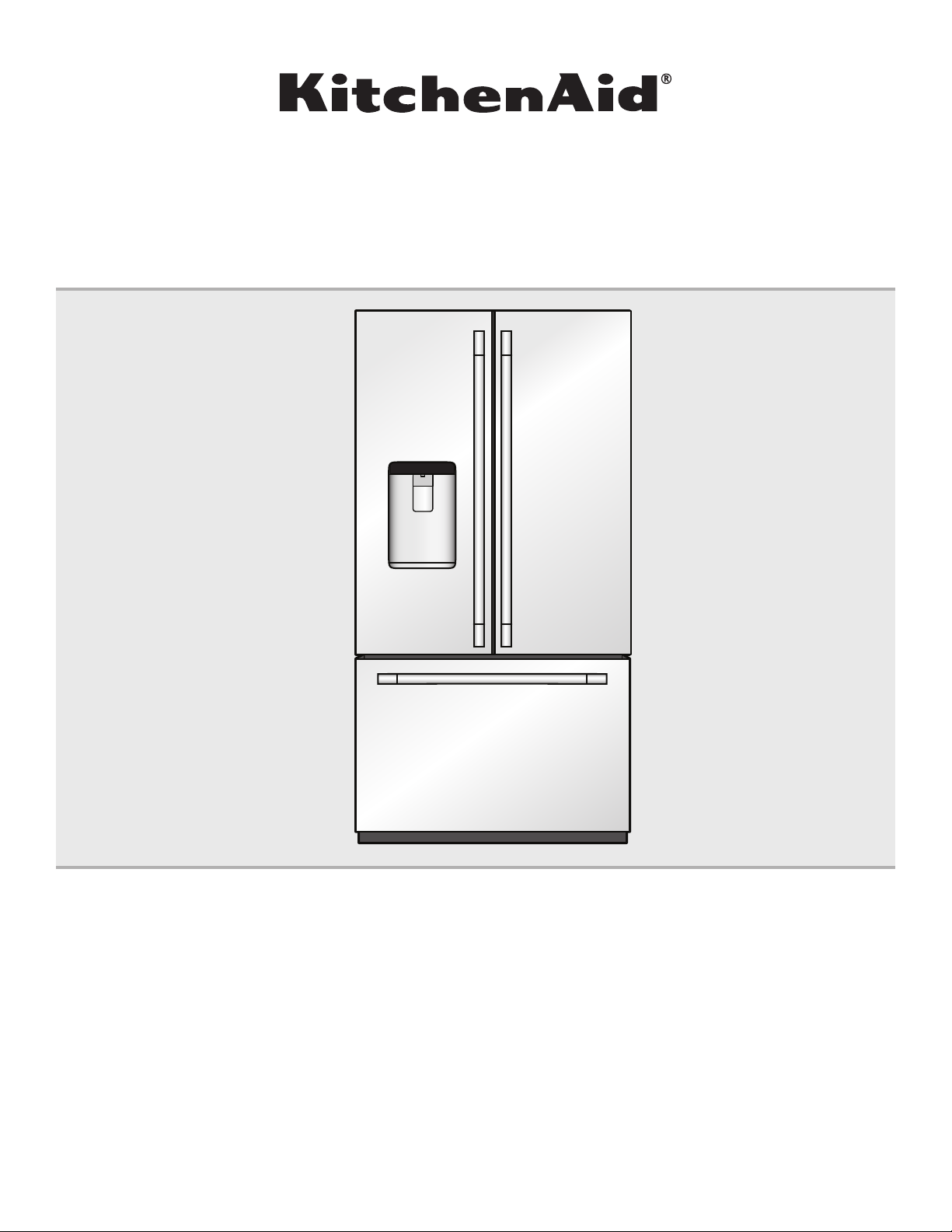
French Door Refrigerator
Réfrigérateur à porte à double battant
User Guide
Guide de l’utilisateur
THANK YOU for purchasing this high-quality product. Register your new refrigerator at www.kitchenaid.com.
In Canada, register your refrigerator at www.kitchenaid.ca.
For future reference, please make a note of your product model and serial numbers.
These can be located on the inside wall of the refrigerator compartment.
Nous vous REMERCIONS d’avoir acheté ce produit de haute qualité. Enregistrer votre nouveau réfrigérateur
sur le site internet www.kitchenaid.ca.
Pour référence ultérieure, consigner par écrit les numéros de modèle et de série de votre produit.
Ceux-ci sont situés sur la paroi interne du compartiment de réfrigération.
Model Number/Numéro de modèle____________________________ Serial Number/Numéro de série ___________________________
Para obtener acceso a “Instrucciones para el usuario del refrigerador” en español, o para obtener información adicional acerca de
su producto, visite: www.kitchenaid.com.
Necesitará su número de modelo y de serie, ubicado en el interior del compartimiento del refrigerador.
W10815169D
Page 2
TABLE OF CONTENTS/TABLE DES MATIÈRES
REFRIGERATOR SAFETY ..............................................................3
PARTS AND FEATURES ................................................................4
What’s New Behind the Doors? ...................................................5
GETTING STARTED .......................................................................6
INSTALLATION INSTRUCTIONS ................................................... 8
Unpack the Refrigerator ...............................................................8
Location Requirements ................................................................8
Remove and Replace Refrigerator Doors ....................................9
Remove and Replace
Freezer Drawer Fronts ................................................................12
Electrical Requirements .............................................................13
Water Supply Requirements ......................................................13
Connect the Water Supply .........................................................13
Handle Installation and Removal ...............................................15
Refrigerator Leveling
and Door Closing .......................................................................16
FILTERS AND ACCESSORIES ...................................................17
Water Filtration System ..............................................................17
Install Air Filter ............................................................................18
Install Produce Preserver
(on some models) .......................................................................18
Accessories ................................................................................19
REFRIGERATOR USE ..................................................................19
Opening and Closing Doors .......................................................19
Using the Controls .....................................................................20
External Dispenser Controls ......................................................21
Lighting the Refrigerator ............................................................22
Water and Ice Dispensers ..........................................................22
Ice Maker and Storage Bin .......................................................25
Shelves, Bins, and Drawers .......................................................25
Freezer Drawers .........................................................................28
Audio Reference .........................................................................28
REFRIGERATOR CARE ...............................................................29
Cleaning .....................................................................................29
Lights ..........................................................................................30
Vacation and Moving Care .........................................................30
TROUBLESHOOTING ..................................................................31
PERFORMANCE DATA SHEET ...................................................37
WARRANTY ..................................................................................38
SÉCURITÉ DU RÉFRIGÉRATEUR...............................................39
PIÈCES ET CARACTÉRISTIQUES ..............................................40
Quoi de neuf en coulisse? .........................................................41
MISE EN PLACE ...........................................................................42
INSTRUCTIONS D’INSTALLATION .............................................44
Déballage du réfrigérateur..........................................................44
Exigences d’emplacement .........................................................44
Retrait et réinstallation des portes du réfrigérateur ...................45
Retrait et réinstallation de l’avant
du tiroir de congélation ..............................................................48
Spécications électriques ..........................................................49
Spécications de l’alimentation en eau .....................................49
Raccordement à la canalisation d’eau ......................................49
Installation et retrait des poignées .............................................50
Nivellement du réfrigérateur
et fermeture de la porte ..............................................................52
FILTRES ET ACCESSOIRES .......................................................53
Système de ltration d’eau ........................................................53
Installation du ltre à air .............................................................54
Installation du conservateur de produits frais (sur certains
modèles) .....................................................................................54
Accessoires ................................................................................55
UTILISATION DU RÉFRIGÉRATEUR ..........................................55
Ouverture et fermeture des portes .............................................55
Utilisation des commandes .......................................................56
Commandes de distributeur externe .........................................57
Éclairage du réfrigérateur ...........................................................58
Distributeurs d’eau et de glaçons ..............................................58
Machine à glaçons et bac d’entreposage ................................61
Tablettes, balconnets et tiroirs ...................................................62
Tiroirs du congélateur ................................................................64
Référence audio .........................................................................64
ENTRETIEN DU RÉFRIGÉRATEUR ............................................65
Nettoyage ...................................................................................65
Lampes .......................................................................................66
Précautions à prendre pour les
vacances ou le déménagement .................................................66
DÉPANNAGE .................................................................................67
FICHE DE DONNÉES RELATIVES AU RENDEMENT................74
GARANTIE .....................................................................................75
2
Page 3
REFRIGERATOR SAFETY
Your safety and the safety of others are very important.
We have provided many important safety messages in this manual and on your appliance. Always read and obey all safety
messages.
This is the safety alert symbol.
This symbol alerts you to potential hazards that can kill or hurt you and others.
All safety messages will follow the safety alert symbol and either the word “DANGER” or “WARNING.”
These words mean:
You can be killed or seriously injured if you don't immediately
DANGER
WARNING
All safety messages will tell you what the potential hazard is, tell you how to reduce the chance of injury, and tell you what can
happen if the instructions are not followed.
IMPORTANT SAFETY INSTRUCTIONS
WARNING:
■ Plug into a grounded (earthed) outlet.
■ Do not remove ground prong.
■ Do not use an adapter.
■ Do not use an extension cord.
■ Disconnect power before servicing.
Replace all parts and panels before operating.
■
Remove doors from your old refrigerator.
■
Use nonflammable cleaner.
■
Do not store or use petrol, flammable liquids or gas in the
■
vicinity of this or other electrical appliances. The fumes can
cause fires or explosions.
■ Do not store explosive substances such as aerosol cans
with a flammable propellant in this refrigerator.
■ Do not use or place electrical devices inside the refrigerator
compartments if they are not of the type expressly
authorized by the manufacture.
■ Use two or more people to move and install refrigerator.
■ Disconnect power before installing ice maker (on ice maker
kit ready models only).
To reduce the risk of fire, electric shock, or injury when using your refrigerator, follow these basic precautions:
follow instructions.
You
can be killed or seriously injured if you don't
instructions.
■ A qualified service technician must install the water line and
ice maker.
■ Connect to a potable water supply only.
■ Use a sturdy glass when dispensing ice (on some models).
■ This appliance is not intended for use by persons (including
children) with reduced physical, sensory or mental
capabilities, or lack of experience and knowledge, unless
they have been given supervision or instruction concerning
use of the appliance by a person responsible for their safety.
■ Children should be supervised to ensure that they do not
play with the appliance.
■ To avoid the risk of children becoming trapped and
suffocating, do not allow them to play or hide inside the
refrigerator.
■ If the power supply cord is damaged, it must be replaced by
the manufacturer or its service agent or a similarly qualified
person.
follow
SAVE THESE INSTRUCTIONS
State of California Proposition 65 Warnings:
WARNING: This product contains one or more chemicals known to the State of California to cause cancer.
WARNING: This product contains one or more chemicals known to the State of California to cause birth defects or other
reproductive harm.
3
Page 4
Proper Disposal of
Your Old Refrigerator
WARNING
Suffocation Hazard
Remove doors from your old refrigerator.
Failure to do so can result in death or brain damage.
IMPORTANT: Child entrapment and suffocation are not
problems of the past. Junked or abandoned refrigerators are
still dangerous—even if they will sit for “just a few days.” If
you are getting rid of your old refrigerator, please follow these
instructions to help prevent accidents.
Before You Throw Away Your Old Refrigerator or Freezer:
■ Take off the doors.
■ Leave the shelves in place so that children may not easily
climb inside.
PARTS AND FEATURES
Important information to know about disposal of
refrigerants:
Dispose of refrigerator in accordance with Federal and Local
regulations. Refrigerants must be evacuated by a licensed,
EPA certified refrigerant technician in accordance with
established procedures.
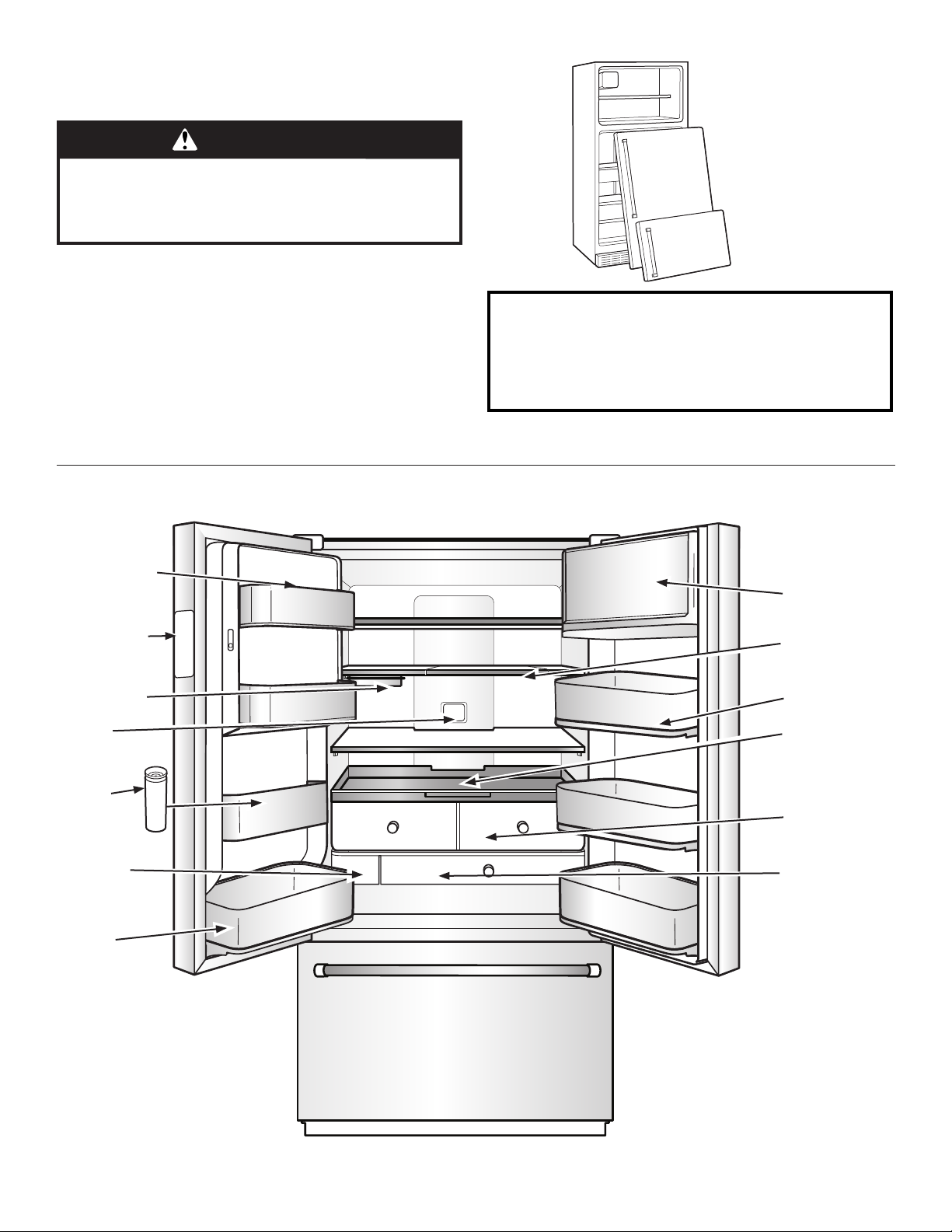
In-Door-Ice
ice storage
Temperature
Control UI
Under-shelf
storage (on
some models)
Air filter
Herb bin
storage
Water filter
Removable
bin
®
FreshSeal™
dairy bin
Slide-away split
shelf
Dual gallon
storage
Pull-out tray
FreshSeal™
crispers
Temperaturecontrolled
pantry drawer
4
Page 5
What’s New Behind the Doors?
Your KitchenAid® French door bottom-mount refrigerator comes equipped
with various innovative storage and energy efcient features.
Energy and Normal Operating Sounds
Your new French door bottom-mount refrigerator has been
designed with a linear compressor to optimize energy efciency
and better regulate temperatures to match cooling demand. You
may notice that it operates differently than your previously owned
refrigerator. It is normal for the high-efciency compressor to
run for extended periods of time at varying speeds in order to
consume only the energy necessary for optimum efciency. In
addition, during various stages of the cooling cycle, you may
hear normal operating sounds that are unfamiliar to you.
In-Door-Ice® Ice Dispensing System
The ice maker and ice storage bin are located in the door for easy
access to ltered ice while freeing up valuable shelf space inside.
Dual Evaporator
The refrigerator and freezer compartments have separate
evaporators to provide fresh food and frozen food with optimal
storage climates: cool and humid in the fresh food, cold and dry
in the freezer, no mixing of air between the compartments to
reduce the transfer of food odors and tastes from refrigerator,
and allow freezer air to remain dry to control frost and reduce
freezer burn.
Air Filter
An air lter is 15 times more powerful than baking soda at
reducing common food odors inside the refrigerator. Replace
your air lter every 6 months for maximum odor reduction.
Produce Preserver
Ethylene is a natural gas produced by fruits and vegetables to
promote ripening. The Produce Preserver absorbs ethylene to
delay the over-ripening of fresh produce. As a result, certain
produce items will stay fresh longer.
EveryDrop® Water Filter
EveryDrop® water lters are NSF®† Certied to reduce most
contaminants, including chlorine taste and odor, lead, pesticides,
and trace amounts of pharmaceuticals. EveryDrop® brand
lters are the only lters tested and certied for your refrigerator
system. Replace your EveryDrop® lter every 6 months for
maximum contaminant reduction.
Water Dispenser with Measured Fill
The Measured Fill feature allows you to dispense a desired
amount of ltered water in handy increments 8, 16, or 24 oz.
Water Dispenser with Favorite Fill
The Favorite Fill feature allows you to save 2 custom presets that
can be programmed for favorite items that are frequently lled
like a coffee pot or a water bottle.
Slide-Away Split Shelf
This shelf features a versatile design that allows three-quarters
of the shelf to retract to accommodate taller items, up to 16.75
inches. This exibility helps maximize storage space and optimize
organization.
Removable Door Bins
Door bins that can be easily removed from the metal nish base
they sit on, making them ideal for carrying condiments or items
from refrigerator to table. The bins are dishwasher safe for easy
cleaning.
FreshSeal™ Dairy Bin
A dedicated dairy bin with the FreshSeal™ gasket to help extend
the freshness and preserve the avor of butter and other dairy
items.
FreshSeal™ Crispers
These upgraded crisper drawers use a gasket seal to maintain
the ideal temperature and humidity levels to keep produce fresh
longer. These drawers also feature premium soft-close glides
that provide the best extension for easy access and maximum
visibility to your produce items.
Pull-Out Tray
The tray fully extends for easy access and visibility. The tray also
features soft self-close glides that provide effortless movement,
even when fully loaded. The tray is removable, making cleaning
easy.
Herb Storage Bin
This is a cylinder with FreshSeal™ to keep sensitive items like
herbs fresh longer. The container allows water to be added
to keep stems wet without covering leaves. It can be placed
anywhere in the refrigerator and accommodates tall items like
parsley, cilantro, and rosemary in addition to herbs like oregano,
thyme, and mint.
Under Shelf Storage (on some models)
Utilizes typically empty space beneath the shelf to create a
prep zone ideal for dough, desserts, casseroles, or marinating
meats. The slide-out pan is oven and dishwasher safe and easily
transitions from fridge to oven.
Adjustable Shelves on Flipper System
Shelves that can be adjusted up or down easily with the ip of
a lever, allowing them to be adjusted without having to unload
them. The shelves are easy to clean and let you use the whole
shelf edge to edge for full visibility and accessibility.
Temp Control Pantry
Four temperature presets are available on the interior control to
keep items at the optimal temperature. You can choose from
meat/sh, cold drinks, deli/cheese, and wine. Pantry slides opens
effortlessly, even when fully loaded, with soft, self-close glides
and features the best extension in freestanding refrigeration.
3-Tier Freezer Drawer with Extend-Freeze™ Setting
A drawer system that organizes items on 3 levels making them
easier to store and nd. The lower drawer includes a divider.
There’s also an in-door pizza pocket, a pull-out drawer for
smaller items and third level glass shelf for small, at items.
The Extend-Freeze™ setting takes the entire freezer to its coldest
setting to help reduce freezer burn and extend the life of frozen
items.
†®
NSF is a registered trademark of NSF International.
5
Page 6
Fingerprint-Resistant Steel and Black Stainless Steel
(on some models)
A specialized coating for stainless steel that resists smudges,
ngerprints, and water marks. It is easy to clean with just water
and a towel.
LED Lighting
There is bright LED strip lighting for maximum illumination.
LED lights do not require replacement.
Door Alarm
A helpful alarm sounds when the refrigerator door or freezer
drawer is left ajar.
GETTING STARTED
Power Outage Indicator
If the power should go out while you are away from home, this
indicator will let you know that the refrigerator has been without
power.
To view videos on door removal/
replacement, door adjustment, water
filter installation, air filter installation,
shelf adjustment or removal, and Wi-Fi
(if applicable) connectivity, scan the code
to the left with your mobile device.
INSTALLATION CHECKLIST
✔ Electrical Power
WARNING
Electrical Shock Hazard
Plug into a grounded 3 prong outlet.
Do not remove ground prong.
Do not use an adapter.
Do not use an extension cord.
Failure to follow these instructions can result in death,
fire, or electrical shock.
❑ Plug refrigerator into a grounded 3 prong outlet.
✔ Doors
❑ If doors need to be removed during installation, see the
“Remove and Replace Doors” section in the instructions.
❑ Check that handles are secure and installed according to the
instructions.
❑ Doors seal completely.
❑ Refrigerator is level. (Remove base grille and adjust leveling
feet so they are snug against the oor.)
❑ Doors are even across the top. (Use door alignment feature if
necessary.)
❑ Base grille is properly attached to the refrigerator.
✔ Ice and Water System (on some models)
❑ Connect refrigerator to a cold water supply with 20-120 psi
water pressure, as specied in the instructions.
❑ Make sure the household water supply is connected and
turned on.
❑ Check that the water supply line behind refrigerator is not
kinked.
❑ Only use recommended water supply tubing, copper, or PEX,
as specied in the instructions.
❑ Install water lter according to the instructions.
❑ Flush water system with 3 gallons (11.4 L) of water, as
specied in the instructions.
❑ Check for water leaks at all connections.
❑ Turn on ice maker if refrigerator is connected to water supply.
(If not connected to water supply, turn off ice maker.)
✔ Final Checks
❑ Install air lter and Produce Preserver according to instructions
in corresponding packaging.
❑ Remove all shipping material.
❑ Set temperature controls to the recommended setting.
❑ Save instructions and other literature.
❑ Send in registration card or register your product online.
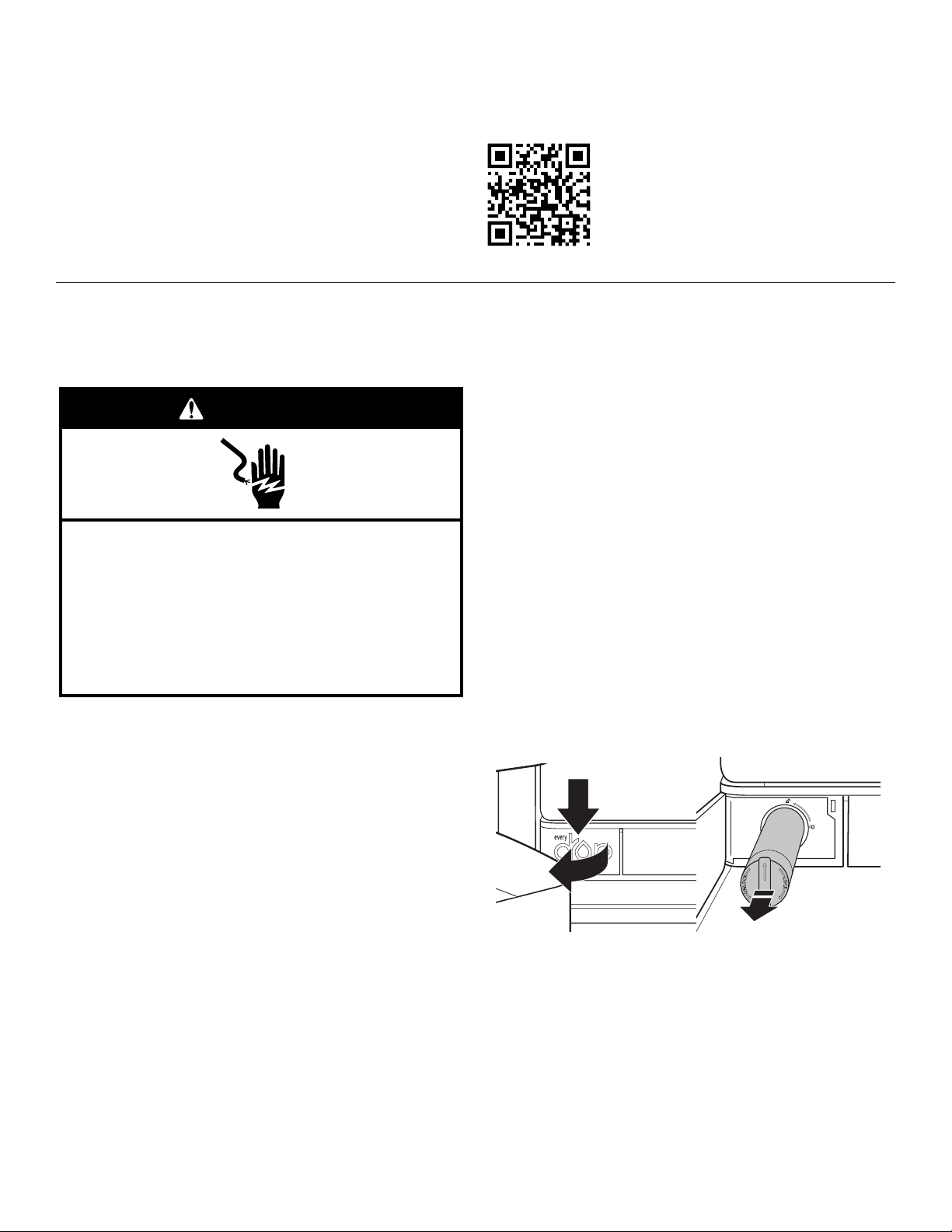
WATER FILTER INSTALLATION
❑ Locate the water lter compartment in the lower left-hand side
of the refrigerator compartment. Push on the right side of the
lter door to open.
❑ Align the arrow on the water lter cap with the cutout notch in
the lter housing and insert lter.
❑ Once the lter is inserted, turn the lter clockwise 90° (¼ turn)
until it locks into the housing.
❑ Push water lter door closed to latch.
❑ Flush 3 gallons (11.4 L) of water through the water system to
clear air from the water line and to keep the dispenser from
dripping and/or avoiding decreased dispenser ow.
NOTE: If the lter is not installed correctly, water may
dispense at a lower ow rate and there will be slower ice
production. Improper lter installation may also cause the
water lter housing to leak.
6
Page 7
DOOR ALIGNMENT
Tools Required
Shelf Height Adjustment
Depending on the width of the door opening, the following tools
may be required to remove, replace, and align the refrigerator
doors.
Tools Needed:
❑ 1/4" hex nut driver – base grille, freezer drawer screws, and
brake/leveling feet
Tools Provided:
❑ 1/8" hex key – handle setscrews and door alignment
Door alignment tool instructions
Features:
❑ Creates an even horizontal gap
between the refrigerator doors.
❑ Solves door alignment issues
during installation and improves door seal.
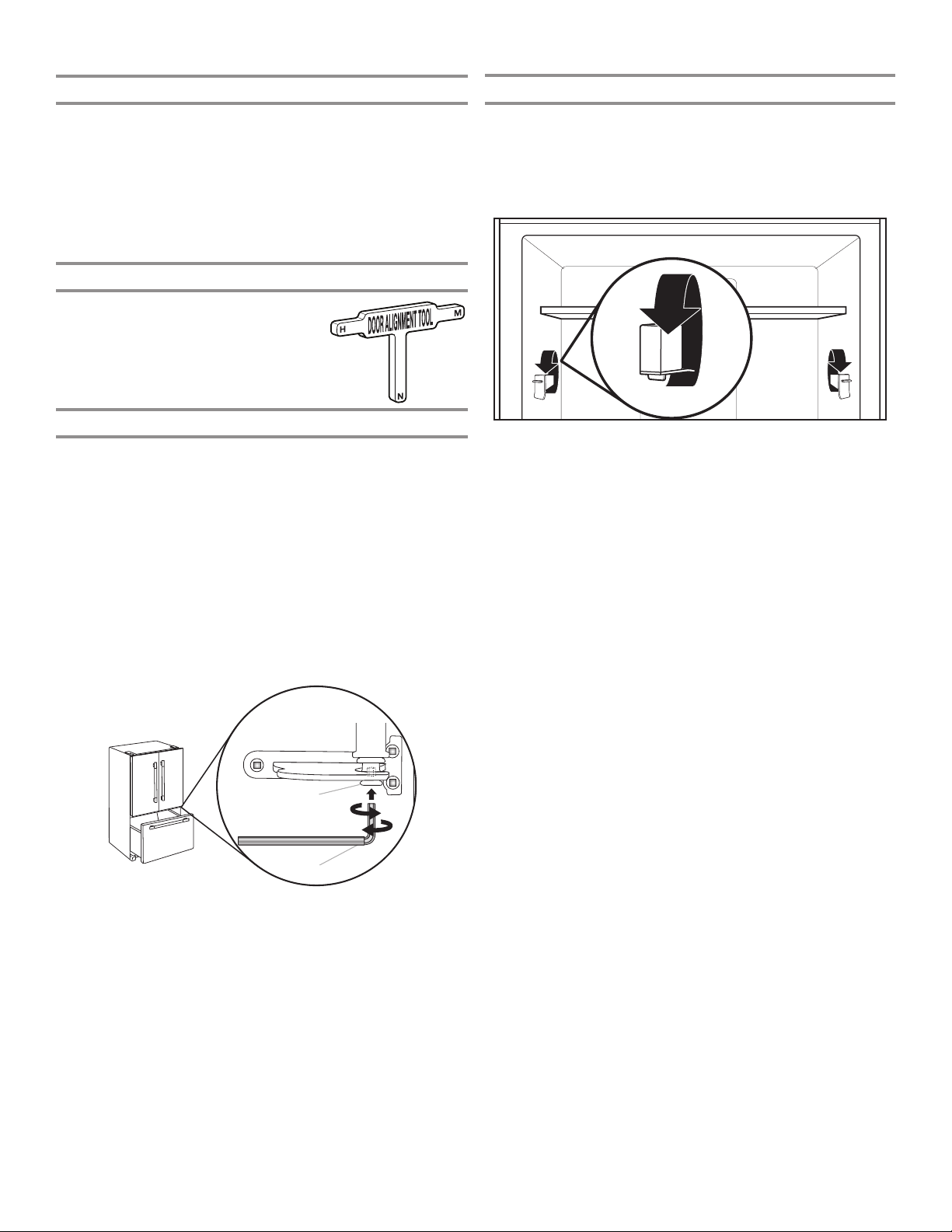
Align Refrigerator Doors
✔ If doors are uneven:
❑ Ensure the refrigerator is level.
❑ Keeping both refrigerator doors closed, pull out the freezer
drawer. Locate the bottom hinge pin of the right-hand
refrigerator door. The alignment screw is inside the bottom
hinge pin.
❑ Insert the short end of the 1/8" hex key wrench (packed with
the Door Handle Installation Instructions) into the bottom hinge
pin until it is fully engaged in the alignment screw.
To raise the refrigerator door, turn the hex key to the right.
To lower the door, turn the hex key to the left.
❑ Continue to turn the alignment screw until the tops of the
doors are aligned.
Shelf height can be adjusted by changing the adjustable shelf
mounts between their vertical and horizontal positions.
❑ Carefully lift the shelf off the shelf mounts and turn the ipper
to the desired orientation.
❑ Repeat for remaining shelf mounts.
❑ Ensure the shelf is properly seated on the shelf mounts.
ENERGY SAVER MODE AND NORMAL
OPERATING SOUNDS
Your new French Door Bottom-Mount refrigerator has been
designed to optimize energy efciency and better regulate
temperatures to match cooling demand.
You may notice that it operates differently from your previously
owned refrigerator.
It is normal for the high-efciency compressor to run for extended
periods of time at varying speeds in order to consume only the
energy necessary for optimum efciency.
In addition, during various stages of the cooling cycle, you may
hear normal operating sounds that are unfamiliar to you.
Energy Saver Mode
Turns off the anti-sweat heaters to save the customer power.
When the icon is bright, the function is activated (heaters OFF);
icon off means that it is inactive (heaters ON). The user can toggle
the feature by pressing the button. If the user lives in a climate
with high humidity, Energy Saver mode is not recommended.
A. Bottom hinge pin
B. ¹⁄8" hex key wrench
A
B
7
Page 8
INSTALLATION INSTRUCTIONS
Unpack the Refrigerator
WARNING
Excessive Weight Hazard
Use two or more people to move and install
refrigerator.
Failure to do so can result in back or other injury.
Refrigerator Delivery
■ A minimum door opening of 33" (838 mm) is required. If
door opening is 36" (914 mm) or less, then removal of doors,
drawer, and hinges is required.
■ Cart the refrigerator from the side for all door openings.
When Moving Your Refrigerator:
Your refrigerator is heavy. When moving the refrigerator for
cleaning or service, be sure to cover the floor with
cardboard or hardboard to avoid floor damage. Always pull
the refrigerator straight out when moving it. Do not wiggle or
“walk” the refrigerator when trying to move it, as floor
damage could occur.
Remove the Packaging
■ Remove tape and glue residue from surfaces before turning on
the refrigerator. Rub a small amount of liquid dish soap over
the adhesive with your ngers. Wipe with warm water and dry.
■ Do not use sharp instruments, rubbing alcohol, ammable
uids, or abrasive cleaners to remove tape or glue. These
products can damage the surface of your refrigerator.
■ Dispose of/recycle all packaging materials.
Location Requirements
WARNING
Explosion Hazard
Keep flammable materials and vapors, such as
gasoline, away from refrigerator.
Failure to do so can result in death, explosion, or fire.
IMPORTANT: This appliances is intended to be used in
household and similar applications such as:
■ Staff kitchen areas in shops, ofce and other working
environments,
■ Farm houses and by clients in hotels, motels and other
residential type environments,
■ Bed and breakfast type environments,
■ Catering and similar non-retail applications.
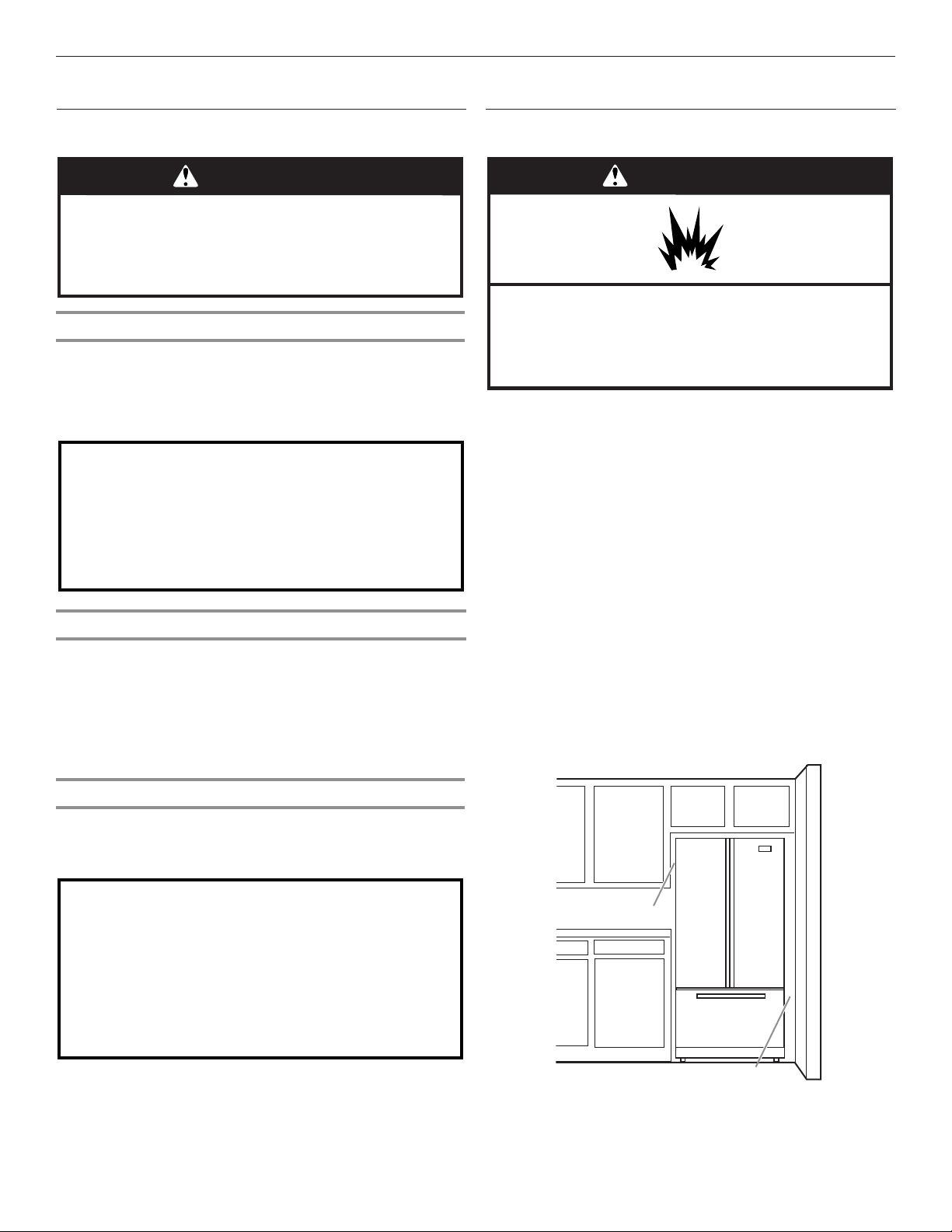
To ensure proper ventilation for your refrigerator, allow for a
1/2" (1.25 cm) space on each side and at the top. Allow for a
1" (2.54 cm) space behind the refrigerator. If your refrigerator has
an ice maker, allow extra space at the back for the water line
connections. When installing your refrigerator next to a xed wall,
leave a 3³⁄4" (9.5 cm) minimum space between the refrigerator
and wall to allow the door to swing open.
NOTE: This refrigerator is intended for use in a location where
the temperature ranges from a minimum of 55°F (13°C) to a
maximum of 110°F (43°C). The preferred room temperature
range for optimum performance, which reduces electricity usage
and provides superior cooling, is between 60°F (15°C) and 90°F
(32°C). It is recommended that you do not install the refrigerator
near a heat source, such as an oven or radiator.
Clean Before Using
After you remove all of the packaging materials, clean the inside
of your refrigerator before using it. See the cleaning instructions
in the “Refrigerator Care” section.
Important information to know about glass shelves
and covers:
Do not clean glass shelves or covers with warm water when
they are cold. Shelves and covers may break if exposed to
sudden temperature changes or impact, such as bumping.
Tempered glass is designed to shatter into many small,
pebble-size pieces. This is normal. Glass shelves and covers
are heavy. Use both hands when removing them to avoid
dropping.
8
1/2" (1.25 cm)
3³⁄4" (9.5 cm)
Page 9
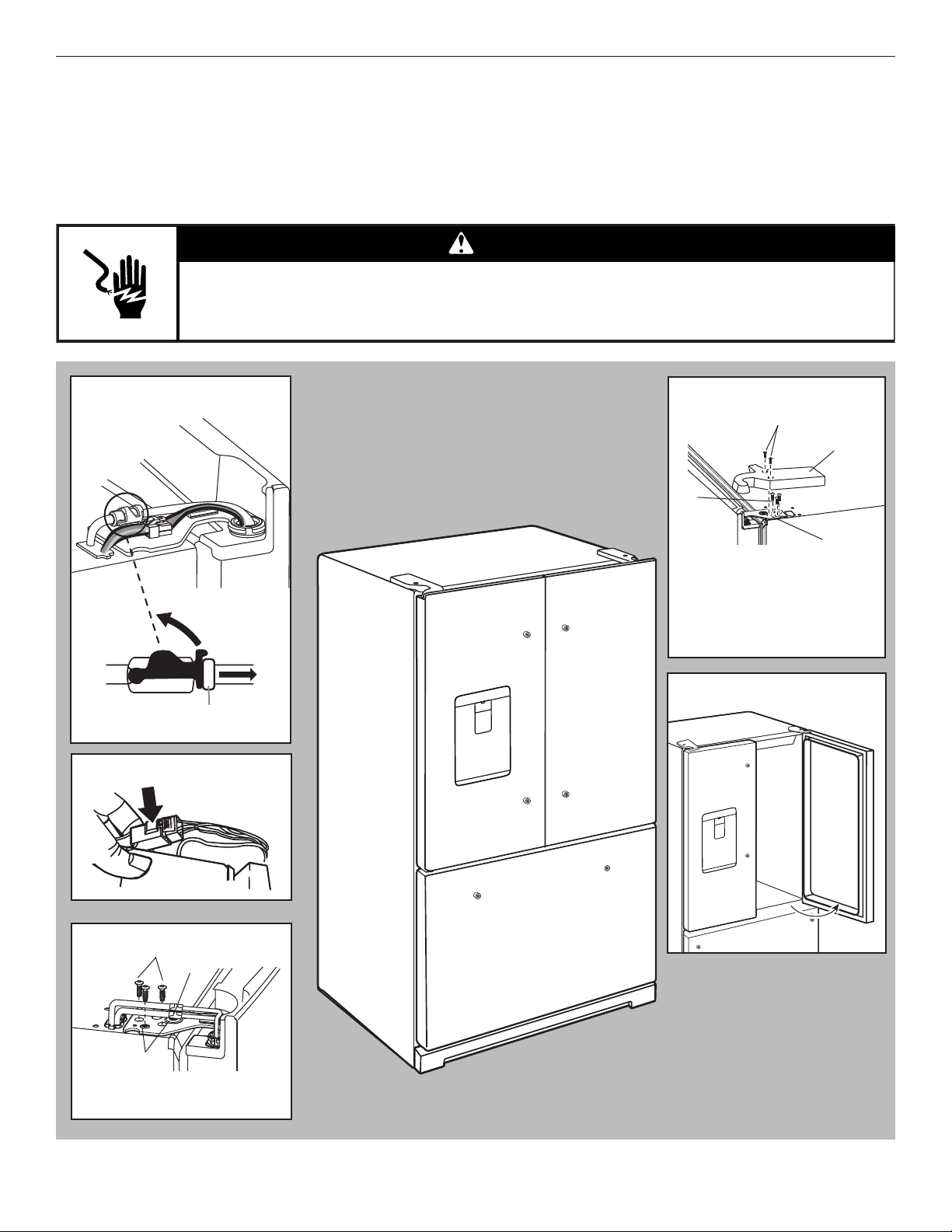
Remove and Replace Refrigerator Doors
NOTE: Measure the width of your door opening to see whether or not you need to remove the refrigerator doors to move the
refrigerator into your home. If door removal is necessary, see the following instructions.
IMPORTANT: If the refrigerator was previously installed and you are moving it out of the home, before you begin, turn the refrigerator
control off. Unplug the refrigerator or disconnect power. Remove food and adjustable door or utility bins from doors.
Gather the required tools and read all instructions before removing doors.
TOOLS NEEDED: TORX† T25† screwdriver and a #2 Phillips screwdriver
WARNING
Electrical Shock Hazard
Disconnect power before removing doors.
Failure to do so can result in death or electrical shock.
Water Dispenser
Tubing Connection
A
A. Outer ring
Wiring Plug
Top Right Hinge
B
C
A
D
A. TORX T25 screws
B. Hinge cover screw
C. Top hinge cover
D. Top hinge
Door at 90° Angle
to Cabinet°
Top Left Hinge
A
B
C
A. TORX T25 screws
B. Ground wire (Do not remove.)
C. Do not remove screws.
†TORX and T25 are trademarks of Acument Intellectual Properties, LLC.
90°
9
Page 10
WARNING
Excessive Weight Hazard
Use two or more people to move and install
refrigerator.
Failure to do so can result in back or other injury.
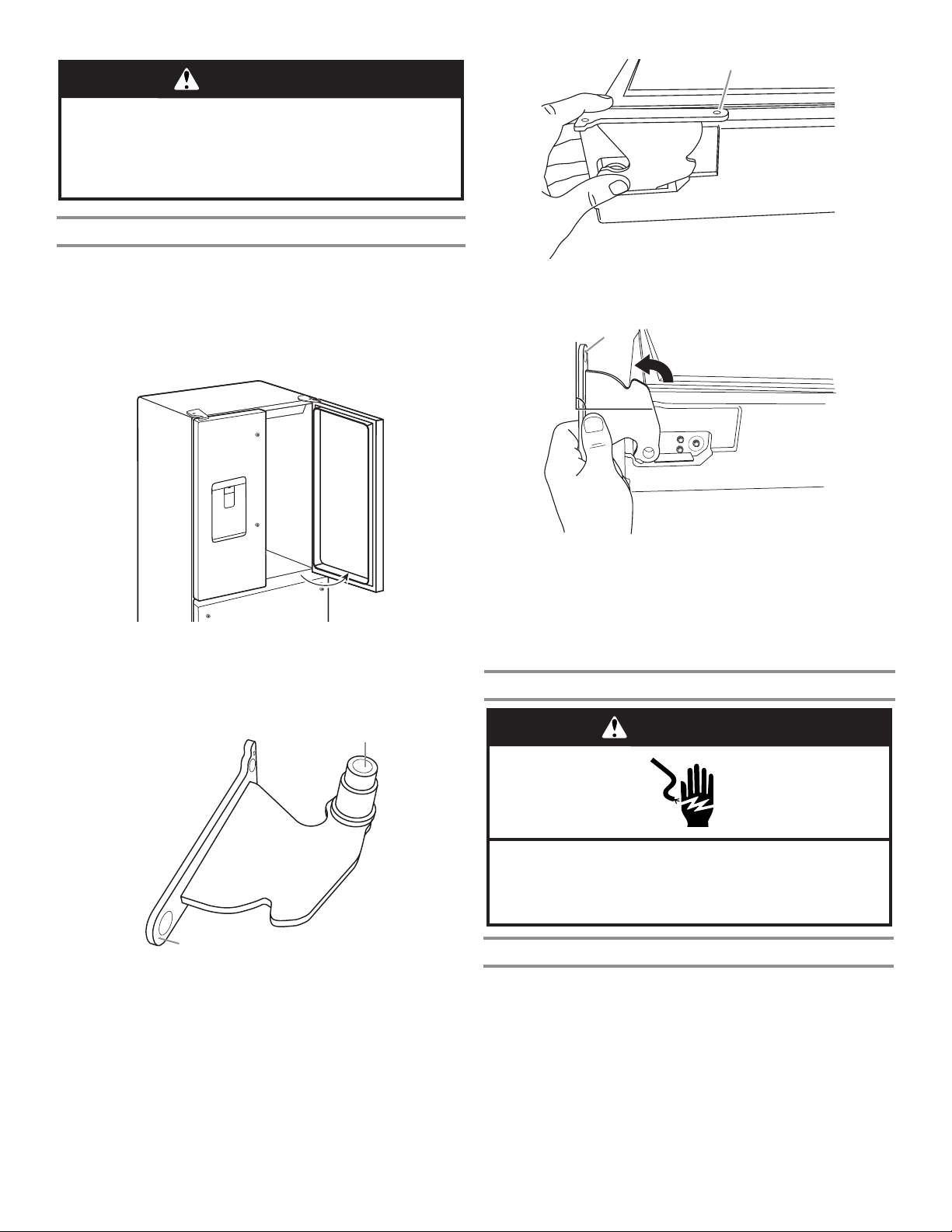
Bottom Door Hinge
A
For your convenience, the refrigerator doors have bottom hinges
with door closers. These closers allow the doors to swing fully
closed with just a gentle push.
IMPORTANT: So that the closers feature will operate properly,
the doors must be removed only when open to a 90° angle to the
front of the cabinet. If one or both doors were not at a 90° angle
when removed, the bottom door hinge must be reset.
90°
Reset the Door Hinge
1. Lift the door from the bottom hinge pin and place it on a at
surface.
2. Using a TORX T25 screwdriver, remove the bottom hinge with
the bushing from the cabinet.
A
A. Hinge base parallel to the bottom edge of the door
4. Turn the hinge until the hinge base is at a 90° angle to the
bottom edge of the door.
A
90°
A. Hinge base turned to a 90° angle with the bottom edge of the door
5. Remove the hinge from the door. Using a driver with a #2
square bit, reattach the bottom hinge to the refrigerator
cabinet.
6. The hinge is now reset and prepared for the door to be
replaced. See “Replace Refrigerator Doors” later in
this section.
Remove Refrigerator Doors
WARNING
B
A. Bushing
B. Hinge base
3. Insert the bottom hinge and bushing into the corresponding
slot in the bottom of the door.
NOTE: Make sure that the base of the hinge is parallel to the
bottom of the door.
10
Electrical Shock Hazard
Disconnect power before removing doors.
Failure to do so can result in death or electrical shock.
Remove Right-Hand Door
1. Unplug refrigerator or disconnect power.
2. Keep the refrigerator doors closed until you are ready to lift
them free from the cabinet.
NOTE: Provide additional support for the refrigerator door
while the hinges are being removed. Do not depend on the
door gasket magnets to hold the door in place while you are
working.
3. Using a Phillips screwdriver, remove the cover from the top
hinge.
4. Using the TORX T25 screwdriver, remove the 3 screws from
the top hinge and set aside.
Page 11
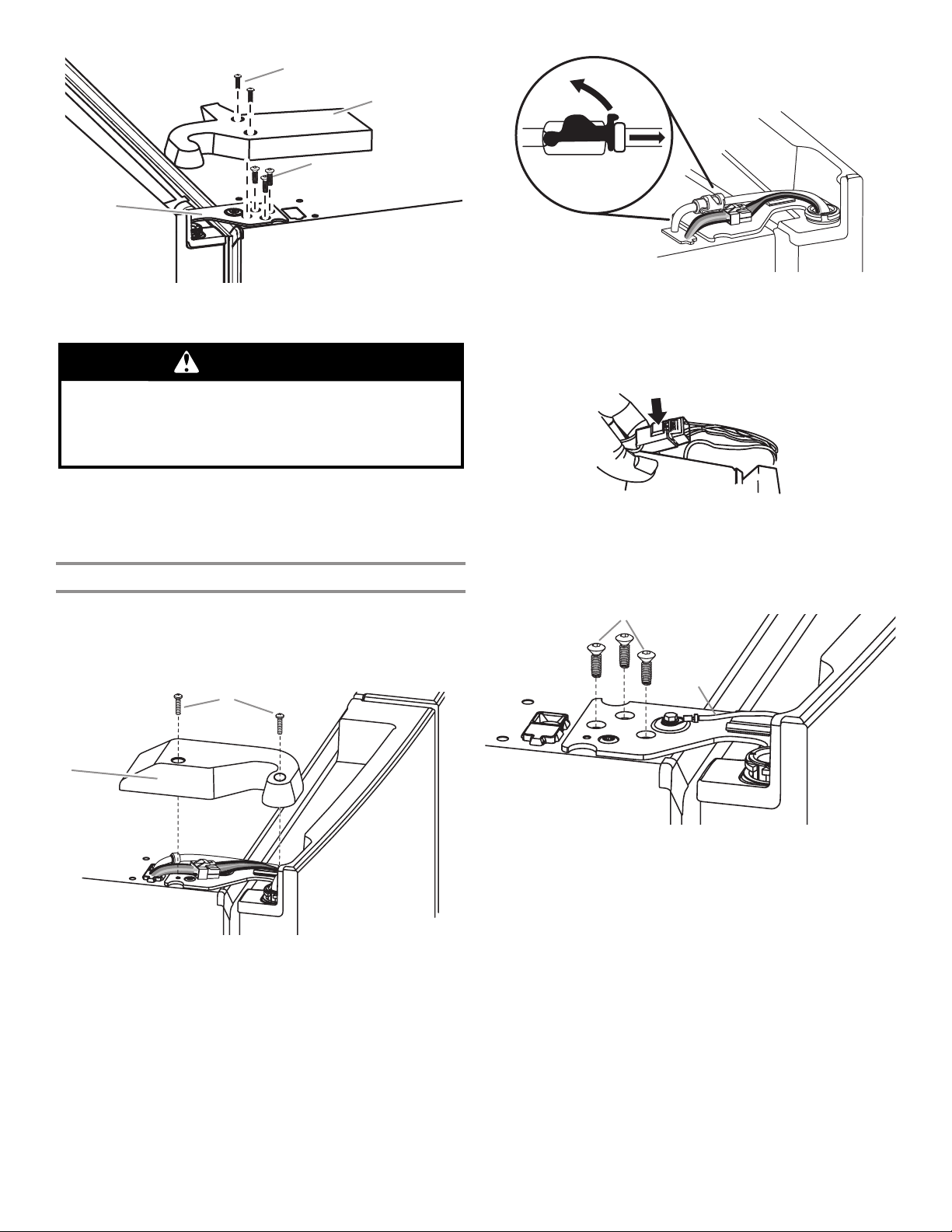
A
B
C
D
A. Top hinge cover screw
B. Top hinge cover
C. TORX T25 screws
D. Top hinge
WARNING
Excessive Weight Hazard
Use two or more people to lift the refrigerator door.
Failure to do so can result in back or other injury.
5. Open the door until it is at a 90° angle to the front of the
cabinet.
6. Lift the refrigerator door from the bottom hinge pin. The top
hinge will come away with the door.
Remove Left-Hand Door
IMPORTANT: The tubing and wiring for the water dispenser run
through the left-hand door hinge, so they must be disconnected
before removing the door.
1. Using a Phillips screwdriver, remove the cover from the top
hinge.
A
3. Disconnect the wiring plug located on top of the door hinge.
■ Grasp each side of the wiring plug. With your left thumb,
press down to release the catch and pull the sections of
the plug apart.
NOTE: Do not remove the green ground wire. It should
remain attached to the door hinge.
4. Using the TORX T25 screwdriver, remove the 3 internal
screws from the top hinge and set aside.
NOTE: Provide additional support for the refrigerator door
while the hinges are being removed. Do not depend on the
door gasket magnets to hold the door in place while you are
working.
A
B
B
A. Top hinge cover screw B. Top hinge cover
2. Disconnect the water dispenser tubing located on top of the
door hinge. Firmly pull up on the clasp. Then, pull the tubing
out of the fitting.
NOTE: The water dispenser tubing remains attached to the
left-hand refrigerator door.
A. TORX T25 screws
B. Ground wire (Do not remove.)
5. Lift the refrigerator door from the bottom hinge pin. The top
hinge will come away with the door.
NOTE: It may not be necessary to remove the bottom hinges
and brake feet assemblies to move the refrigerator through a
doorway.
■ Only if necessary, use a TORX T25 screwdriver to remove
the bottom hinges and brake feet screws.
11
Page 12
Replace Right-Hand Refrigerator Door
1. Set the right-hand door onto the bottom hinge pin.
2. Insert the top hinge pin into the open hole in the top of the
refrigerator door.
3. Using the 3 TORX T25 screws, fasten the hinge to the
cabinet. Do not tighten the screws completely.
Replace Left-Hand Refrigerator Door
IMPORTANT: Do not intertwine the water tubing and wiring
bundles when reconnecting them.
1. Set the left-hand door onto the bottom hinge pin.
2. Using the 3 TORX T25 screws, fasten the hinge to the
cabinet. Do not tighten the screws completely.
3. Reconnect the water dispenser tubing.
Insert the tubing rmly into the tting until it stops. Close the
clasp around the tubing. The clasp snaps into place between
the tting and the collar. Connect blue female side with blue
male side and clasp. Repeat with gray female and gray male
side.
4. Reconnect the electrical wiring.
■ Push together the 2 sections of the wiring plug.
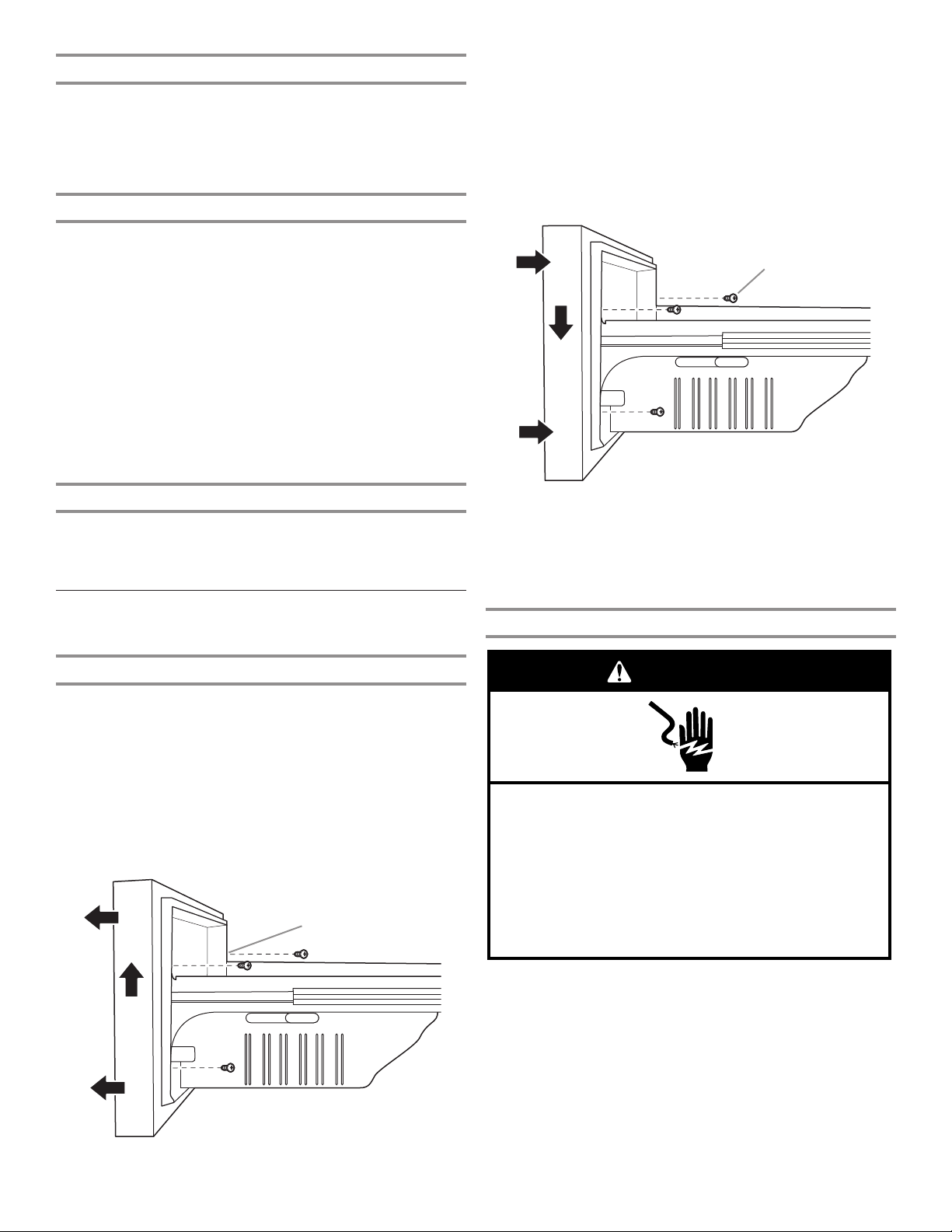
Replace Drawer Front
1. Pull out the freezer drawer glides to their full extension.
2. Holding the drawer front by its sides, align the top screws,
located at the bottom inside of the drawer front, with the
drawer glide bracket slots.
NOTE: It helps if one person holds the drawer glides steady
while another person aligns the drawer front and inserts the
studs into the slots.
A
Final Steps
1. Completely tighten the 5 internal TORX T25 screws (3 on the
right-hand door hinge and 2 on the left-hand door hinge).
2. Replace both top hinge covers.
Remove and Replace
Freezer Drawer Fronts
Freezer Drawer
Remove Drawer Front
1. Open the freezer drawer to its full extension.
2. Loosen the 2 top screws that fasten the drawer front to the
drawer glides. The 2 screws (1 on the left-hand side and 1
on the right-hand side) are located inside the drawer front.
3. Remove the 2 screws at the bottom, inside the drawer front
that fasten the drawer front to the drawer glides.
4. Lift up on the drawer front to release the screws from the
drawer glide bracket slot.
A
A. Drawer front screw
3. Tighten the 2 screws at the top of the drawer front (1 on the
left-hand side and 1 on the right-hand side) and replace the
2 screws on the bottom.
Final Steps
WARNING
Electrical Shock Hazard
Plug into a grounded 3 prong outlet.
Do not remove ground prong.
Do not use an adapter.
Do not use an extension cord.
Failure to follow these instructions can result in death,
fire, or electrical shock.
12
1. Plug into a grounded 3 prong outlet.
2. Reset the controls. See “Using the Controls” section.
3. Return all removable parts and food to the drawers.
A. Drawer glide bracket slots
Page 13
Electrical Requirements
WARNING
Electrical Shock Hazard
Plug into a grounded 3 prong outlet.
Do not remove ground prong.
Do not use an adapter.
Do not use an extension cord.
Failure to follow these instructions can result in death,
fire, or electrical shock.
Before you move your refrigerator into its nal location, it
is important to make sure you have the proper electrical
connection.
Recommended Grounding Method
A 115 Volt, 60 Hz, AC only 15 or 20 A fused, grounded electrical
supply is required. It is recommended that a separate circuit
serving only your refrigerator and approved accessories
be provided. Use an outlet that cannot be turned off by a switch.
Do not use an extension cord.
If the supply cord is damaged it must be replaced by the
manufacturer or its service agent or a similarly qualied person.
Do not use a cord that shows cracks or abrasion damage along
its length, or at either the plug or connector end.
IMPORTANT: If this product is connected to a GFCI (Ground
Fault Circuit Interrupter) protected outlet, nuisance tripping of the
power supply may occur, resulting in loss of cooling. Food quality
and avor may be affected. If nuisance tripping has occurred,
and if the condition of the food appears poor, dispose of it.
NOTE: Before performing any type of installation or cleaning, turn
off cooling, then disconnect the refrigerator from the electrical
source. When you have nished, reconnect the refrigerator to the
electrical source and turn on cooling. See “Using the Controls”
section.
Water Supply Requirements
A cold water supply with water pressure between 35 and 120 psi
(241 and 827 kPa) is required to operate the water dispenser and
ice maker. If you have questions about your water pressure, call
a licensed, qualied plumber.
NOTE: If the water pressure is less than what is required, the ow
of water from the water dispenser could decrease or ice cubes
could be hollow or irregular shaped.
Reverse Osmosis Water Supply
IMPORTANT: The pressure of the water supply coming out
of a reverse osmosis system going to the water inlet valve of
the refrigerator needs to be between 35 and 120 psi (241 and
827 kPa).
If a reverse osmosis water ltration system is connected to your
cold water supply, the water pressure to the reverse osmosis
system needs to be a minimum of 40 to 60 psi (276 to 414 kPa).
■ Check to see whether the sediment lter in the reverse
osmosis system is blocked. Replace the lter if necessary.
■ Allow the storage tank on the reverse osmosis system to rell
after heavy use. The tank capacity could be too small to keep
up with the requirements of the refrigerator.
NOTE: Faucet-mounted reverse osmosis systems are
not recommended.
■ If your refrigerator has a water lter, it may further reduce
the water pressure when used in conjunction with a reverse
osmosis system. Remove the water lter. See “Water
Filtration System” section.
If you have questions about your water pressure, call a licensed,
qualied plumber.
Connect the Water Supply
Read all directions before you begin.
IMPORTANT:
■ Plumbing must be installed in accordance with the
International Plumbing Code and any local codes and
ordinances.
■ Copper and PEX tubing connections from the household
water line to the refrigerator are acceptable and will help
avoid off-taste or odor in your ice or water. Check for leaks.
If PEX tubing is used instead of copper, we recommend the
following Part Numbers: W10505928RP (7 ft [2.14 m] jacketed
PEX), 8212547RP (5 ft [1.52 m] PEX), or W10267701RP
(25 ft [7.62 m] PEX).
■ Install tubing only in areas where temperatures will remain
above freezing.
■ Connect to a potable water supply only.
Do not use with water that is microbiologically unsafe or
of unknown quality without adequate disinfection before
or after the system. Systems certified for cyst reduction
may be used on disinfected waters that may contain
filterable cysts.
Tools Needed:
Gather the required tools and parts before starting installation.
■ Flat-blade screwdriver
■ 7/16" and 1/2" open-end wrenches or 2 adjustable wrenches
■ 1/2" nut driver
NOTE: Do not use a piercing-type or ³⁄16" (4.76 mm) saddle valve
which reduces water ow and clogs easier.
Connect to Water Line
IMPORTANT: If you turn the refrigerator on before the water is
connected, turn off the ice maker.
1. Unplug refrigerator or disconnect power.
2. Turn off main water supply. Turn on nearest faucet long
enough to clear line of water.
3. Use a quarter-turn shut-off valve or the equivalent, served by
a 1/2" household supply line.
NOTE: To allow sufcient water ow to the refrigerator, a minimum
1/2"
(12.7 mm) size household supply line is recommended.
13
Page 14
A
B
C
A
B
C
D
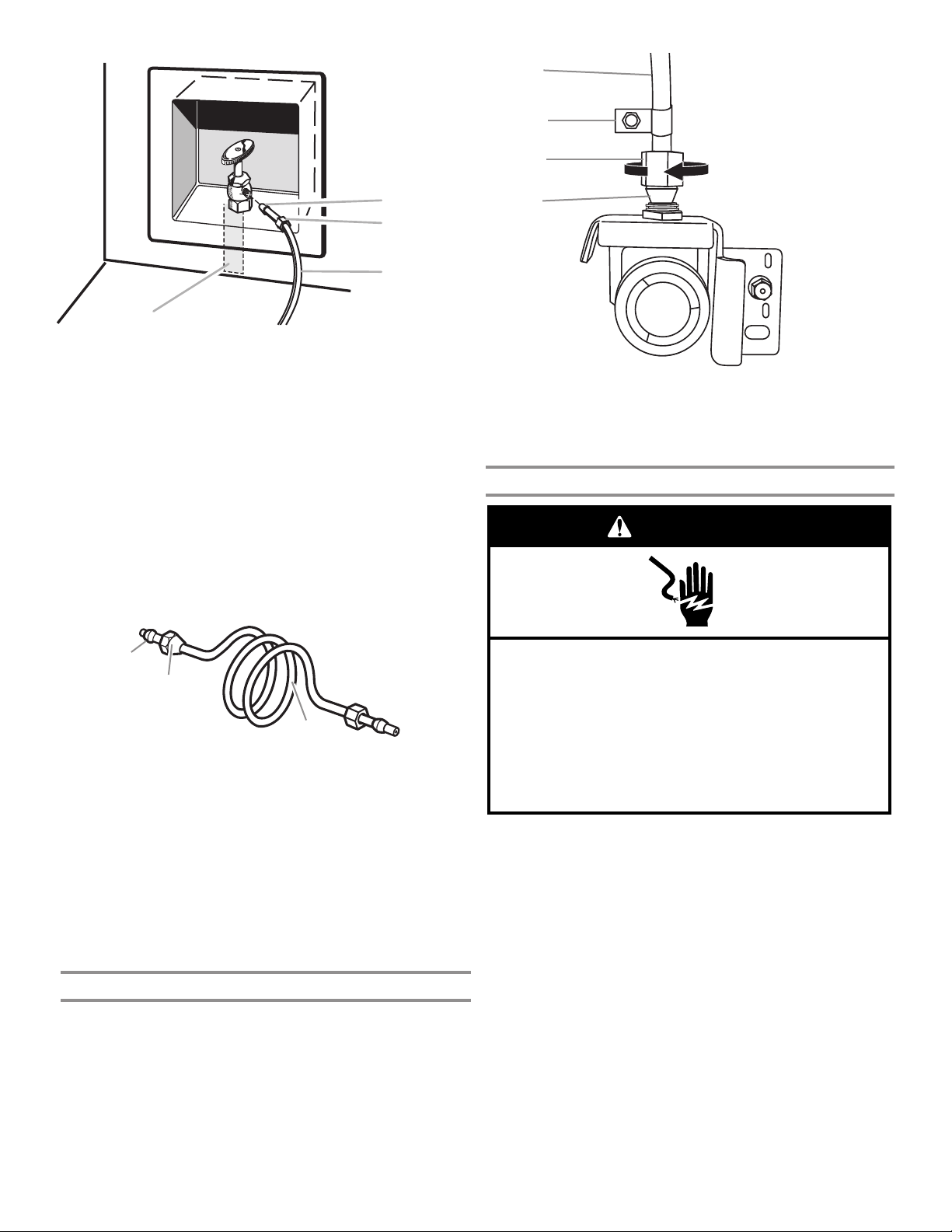
A. Sleeve
B. Nut
4. Now you are ready to connect the copper tubing to the
shut-off valve. Use 1⁄4" (6.35 mm) O.D. (outside diameter)
soft copper tubing to connect the shut-off valve and the
refrigerator.
■ Ensure that you have the proper length needed for the job.
Be sure both ends of the copper tubing are cut square.
■ Slip compression sleeve and compression nut onto copper
tubing as shown. Insert end of tubing into outlet end squarely
as far as it will go. Screw compression nut onto outlet end
with adjustable wrench. Do not overtighten.
C. Copper tubing (to refrigerator)
D. Household supply line (1/2" [12.7 mm] minimum)
D
A. Copper tubing
B. “P” clamp
3. Turn on water supply to refrigerator and check for leaks.
Correct any leaks.
Complete the Installation
C. Compression nut
D. Compression sleeve
WARNING
A
B
C
A. Compression sleeve
B. Compression nut
5. Place the free end of the tubing into a container or sink and
turn on main water supply to ush out tubing until water is
clear. Turn off shut-off valve on the water pipe.
NOTE: Always drain the water line before making the nal
connection to the inlet of the water valve to avoid possible
water valve malfunction.
6. Bend the copper tubing to meet the water line inlet which
is located on the back of the refrigerator cabinet as shown.
Leave a coil of copper tubing to allow the refrigerator to be
pulled out of the cabinet or away from the wall for service.
Connect to Refrigerator
Follow the connection instructions specic to your model.
1. Remove plastic cap from water valve inlet port. Attach the
copper tubing to the valve inlet using a compression nut
and sleeve as shown. Tighten the compression nut. Do not
overtighten. Conrm copper tubing is secure by pulling on
copper tubing.
2. Create a service loop with the copper tubing. Avoid kinks
when coiling the copper tubing. Secure copper tubing to
refrigerator cabinet with a “P” clamp.
C. Copper tubing
Electrical Shock Hazard
Plug into a grounded 3 prong outlet.
Do not remove ground prong.
Do not use an adapter.
Do not use an extension cord.
Failure to follow these instructions can result in death,
fire, or electrical shock.
1. Plug into a grounded 3 prong outlet.
2. Flush the water system. See “Water and Ice Dispensers”
section.
NOTE: Allow 24 hours to produce the rst batch of ice. Discard
the rst 3 batches of ice produced. Allow 3 days to completely
ll the ice storage bin.
14
Page 15
Handle Installation and Removal
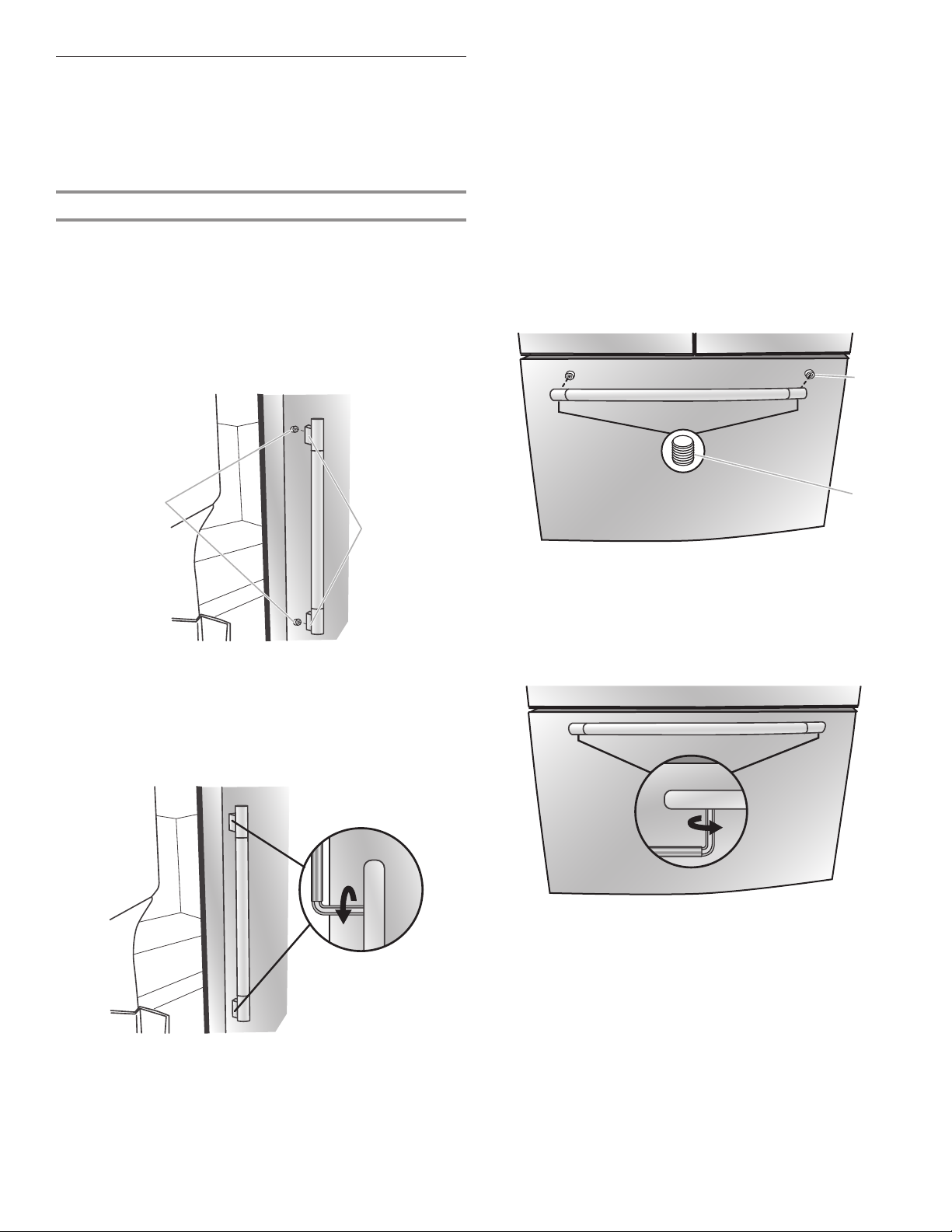
B
B
Parts Included: refrigerator door handles (2), refrigerated drawer
handles (2), freezer drawer handle (1), 1/8" hex key, spare
setscrew(s)
NOTE: The freezer drawer handle is shorter than the refrigerator
door handles. Handle style may vary by model.
Install Handles
Refrigerator Doors
NOTE: Handle mounting setscrews are preinstalled inside the
handle.
1. Remove the handles from the packaging inside the
refrigerator and place them on a soft surface.
2. Open a refrigerator compartment door. On the closed
door, place a handle onto the shoulder screws so that the
setscrews are facing the adjacent door.
A
5. Using a clockwise motion, tighten the setscrew just until it
begins to contact the shoulder screw. Do not fully tighten.
6. Repeat steps 4 and 5 to fasten the lower setscrew.
7. Once both setscrews have been partially tightened as
instructed in the previous steps, fully tighten both setscrews.
IMPORTANT: When the screws feel tight, tighten them an
additional quarter turn. The handle is not properly installed
without this extra tightening.
8. Repeat steps 2 through 7 to install the other handle onto the
adjacent refrigerator door.
Freezer Drawer
1. With the drawer closed, place the handle onto the shoulder
screws so that the setscrews are facing down toward the
oor.
A
A. Shoulder screws
B. Setscrews inside the handle
3. Firmly push the handle toward the door until the handle base
is ush against the door.
4. While holding the handle, insert the short end of the hex key
into the upper hole and slightly rotate the hex key until it is
engaged in the setscrew.
A. Shoulder screw
B. Setscrews inside the handle
2. Firmly push the handle toward the drawer until the handle
base is ush against the drawer.
3. Insert the short end of the hex key into the left-hand hole and
slightly rotate the hex key until it is engaged in the setscrew.
4. Using a left-to-right motion, tighten the setscrew a quarter
turn at a time just until it begins to contact the shoulder
screw. Do not fully tighten.
5. Repeat steps 3 and 4 to fasten the right-hand setscrew to
the shoulder screw.
6. Once both setscrews have been partially tightened
as instructed in the previous steps, fully tighten both
setscrews.
IMPORTANT: When the screws feel tight, tighten them an
additional quarter turn. The handle is not properly installed
without this extra tightening.
7. Save the hex key and all instructions.
15
Page 16
Remove the Handles
1. While holding the handle, insert the short end of the hex key
into a setscrew hole and slightly rotate the hex key until it is
engaged in the setscrew.
2. Using a right-to-left motion, loosen the setscrew a quarter
turn at a time.
3. Repeat steps 1 and 2 for the other setscrew. Slowly pull the
handle away from the door or drawer.
4. If necessary, use a Phillips screwdriver to remove the
shoulder screws from the door.
Remove and Replace Handle Medallions (optional)
The handles for your model have red medallions on the ends.
Replacement medallions are available for purchase. See
“Accessories” to order.
1. Using a 1/8" hex key, remove the medallion from the end of
the handle.
2. Replace medallion.
3. Using the fastener removed in Step 1, attach the medallion to
the handle.
A
3. Move the refrigerator to its nal location.
4. Using the 1⁄4" hex driver, lower the brake feet. Turn them
clockwise until the rollers are off the oor and both brake feet
are snug against the oor. This keeps the refrigerator from
rolling forward when opening the refrigerator doors or freezer
drawer.
IMPORTANT: If you need to make further adjustments
involving the brake feet, you must turn both brake feet the
same amount to keep the refrigerator level.
5. Use a level to make sure the refrigerator is level from side to
side and front to back.
6. Make sure the doors are even at the top and that the space
between the bottom of the refrigerator doors and the top of
the freezer drawer is even. If necessary, align the doors.
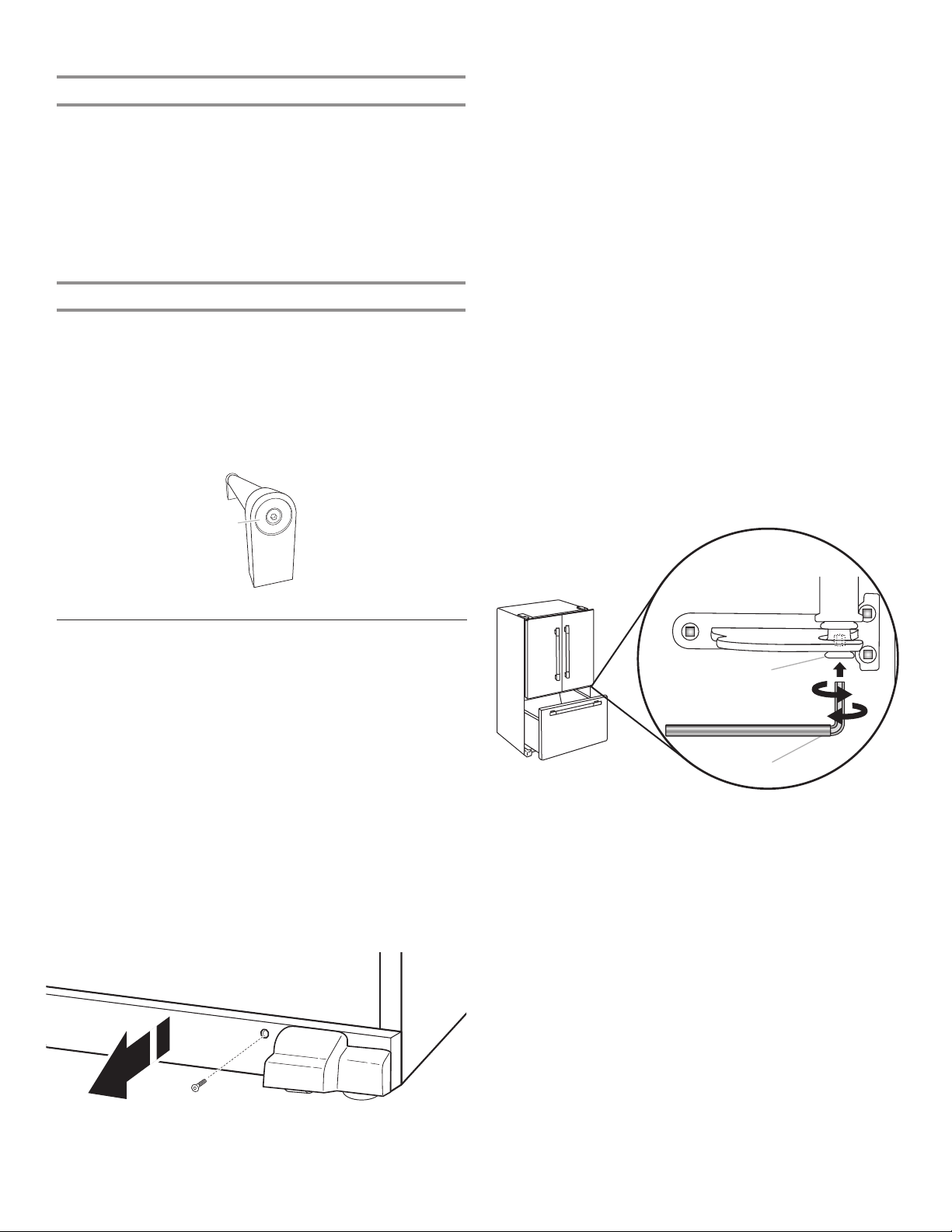
To Align the Doors:
■ Keeping both refrigerator doors closed, pull out the freezer
drawer. Locate the bottom hinge pin of the right-hand
refrigerator door. The alignment screw is inside the bottom
hinge pin.
■ Insert the short end of the 1/8" hex key wrench (packed with
the Door Handle Installation Instructions) into the bottom
hinge pin until it is fully engaged in the alignment screw.
To raise the refrigerator door, turn the hex key to the right.
To lower the door, turn the hex key to the left.
■ Continue to turn the alignment screw until the doors are
aligned.
A. Handle medallion
Refrigerator Leveling
and Door Closing
The base grille covers the adjustable brake feet and roller
assemblies located at the bottom of the refrigerator below the
freezer drawer. Before making any adjustments, remove the base
grille and move the refrigerator to its nal location.
Tools Needed: 1/4" hex driver
Tools Provided: 1/4" hex key
1. Use a 1/4" hex nut driver to remove both screws in base
grille.
2. Remove the base grille. Using both hands, grasp the grille
rmly and pull it toward you. Open the freezer drawer to
access the brake feet.
NOTE: To allow the refrigerator to roll easier, raise the brake
feet by turning them counterclockwise. The front rollers will
be touching the oor.
A
B
A. Bottom hinge pin
B. 1/8" hex key wrench
7. Make sure the refrigerator is steady. If the refrigerator seems
unsteady or rolls forward when a door or drawer is pulled
open, adjust the brake feet.
To Steady the Refrigerator:
■ Open the freezer drawer. Using a 1/4" hex driver, turn both
brake feet clockwise the same amount until the brake feet are
snug against the oor. Check again. If not satised, continue
to adjust the brake feet by half turns of the screw until the
refrigerator does not roll forward when the drawer is opened.
NOTE: Having someone push against the top of the
refrigerator takes some weight off the brake feet. This makes
it easier to turn the screws.
8. Replace the base grille by aligning the ends of the grille with
the leveling assemblies on each side and snapping the grille
into place. Use a 1/4" hex nut driver to reinstall screws.
16
Page 17
FILTERS AND ACCESSORIES
Water Filtration System
Do not use with water that is microbiologically unsafe or
of unknown quality without adequate disinfection before
or after the system. Systems certified for cyst reduction
may be used on disinfected waters that may contain
filterable cysts.
Replace and Install the Water Filter
The water lter should be replaced every 6 months based on a
ow rate of .50 gpm—.60 gpm (1.89 lpm - 2.27 lpm) that lters
200 gallons (757.1 liters) of water.
To order a replacement lter, contact us. See “Accessories”
section in the User Guide for information on ordering.
NOTE: If the lter is not installed correctly, water may dispense
at a lower ow rate and there will be slower ice production.
Improper lter installation may also cause the water lter housing
to leak.
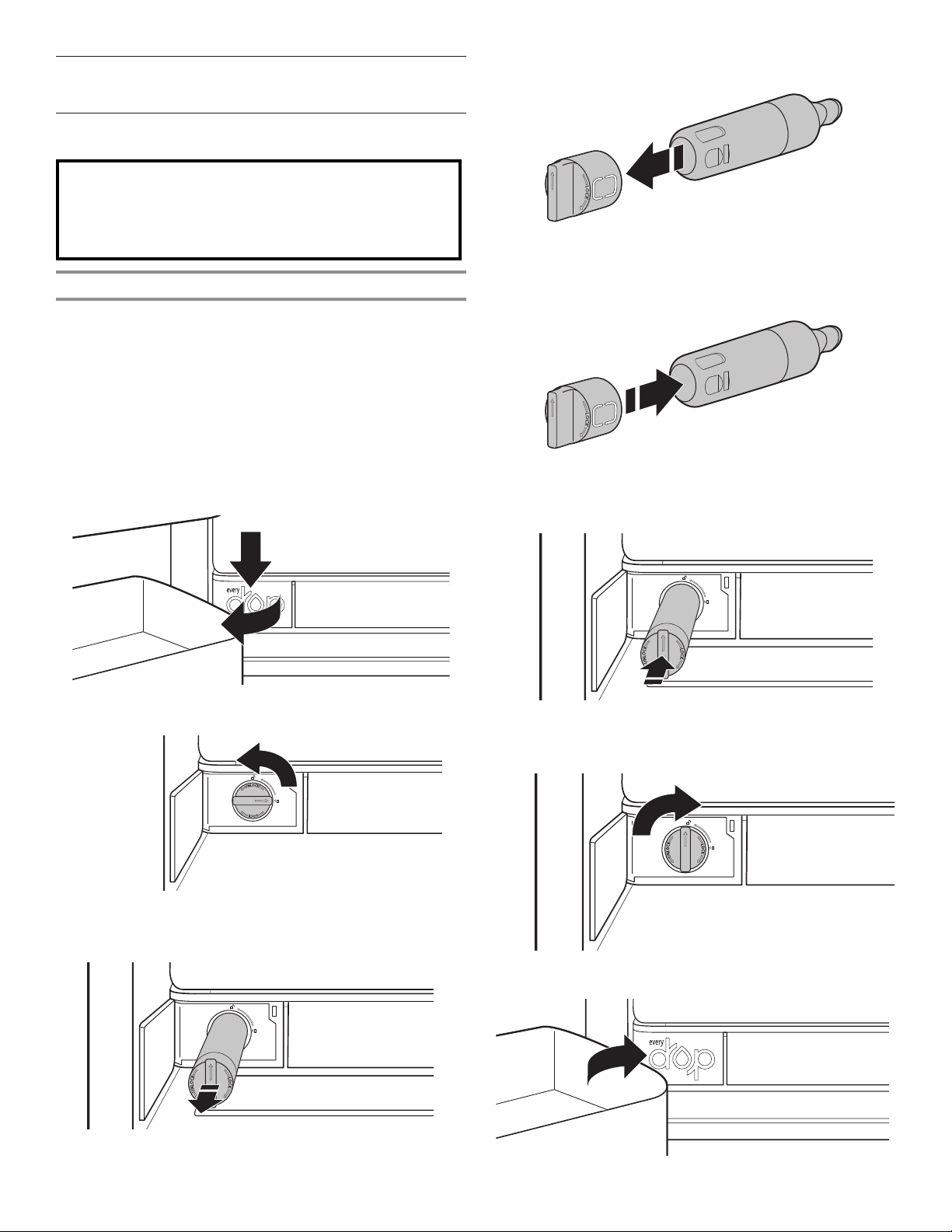
1. Push the water lter door to open, located bottom left of
refrigerator compartment.
4. Remove the water lter cap from the water lter.
5. Install the water lter cap onto the new lter. Be sure to align
the arrows so the groves in lter align with ribs in lter cap.
6. Insert the lter into the housing.
2. Twist the water lter and turn 90° counterclockwise to unlock.
3. Pull the lter out of the housing.
7. Twist the water lter and turn 90° clockwise until it locks into
place and that arrows are aligned.
8. Push the water lter door closed.
17
Page 18
The Water Filter Status Light
Replacing the Air Filter
The water lter status lights will help you know when to change
your water lter.
■ ORDER FILTER (yellow) — It is almost time to change the
water lter. “Order Filter” display is ON all of the time but OFF
in Showroom mode and Sabbath mode.
■ REPLACE FILTER (red) — Replace the water lter. While
you are dispensing water, “Replace Filter” icon will ash
constantly from the beginning to the end of dispensing. After
14 days without replacing the Water Filter, the “Replace Filter”
icon will blink 7 times and an alert tone will sound 3 times at
the end of dispensing.
■ RESET FILTER — Touch MAX COOL and MAX ICE together
for 3 seconds to reset water lter. The display will do a
3-second countdown, then ash the icon and play a tone.
Install Air Filter
An air lter is 15 times more powerful than baking soda at
reducing common food odors inside the refrigerator.
On some models, your refrigerator’s accessory packet includes
an air lter which must be installed prior to use.
Installing the Air Filter
The disposable air lter should be replaced every 6 months.
To order a replacement air lter, contact us. See “Accessories”
section in the User Guide for information on ordering.
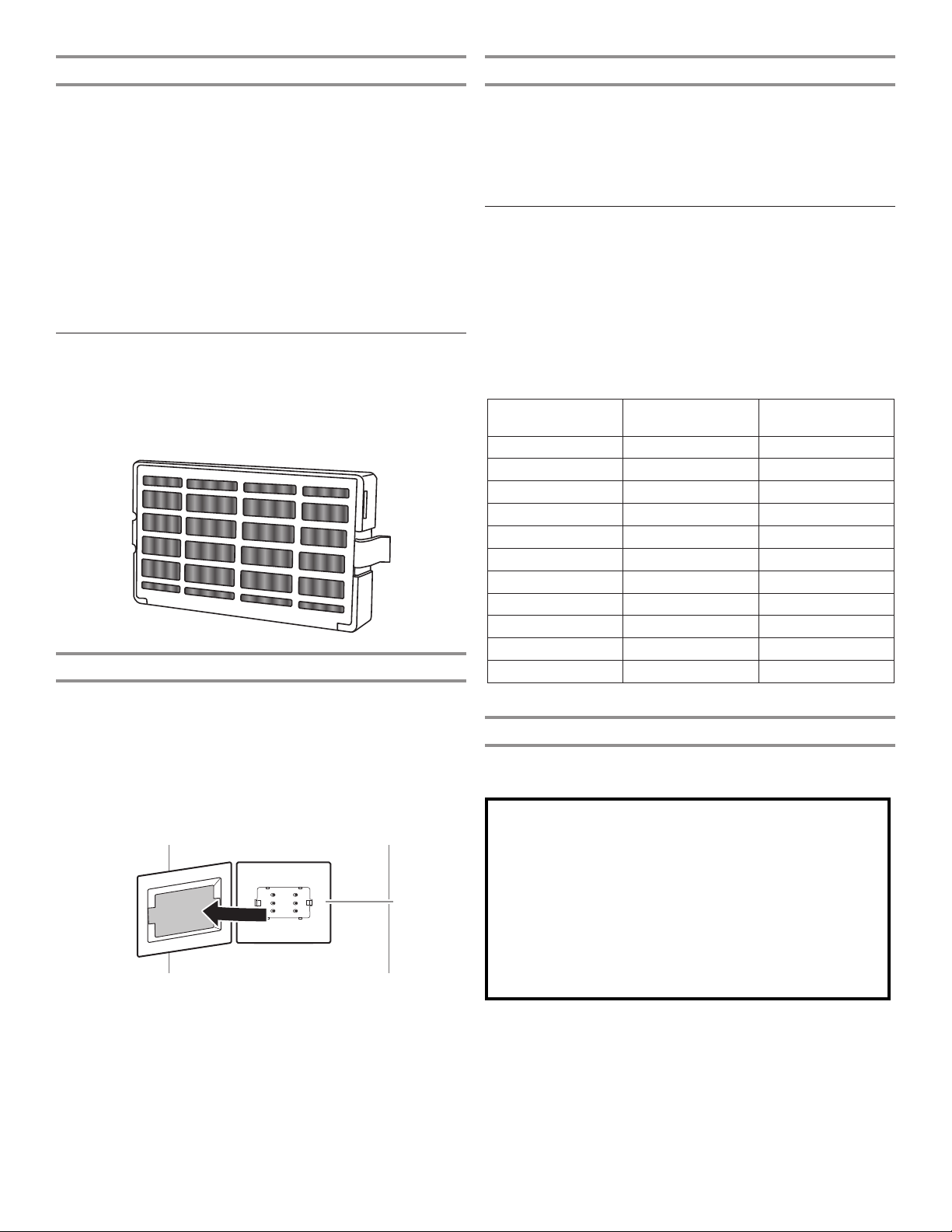
1. Remove the used air lter by squeezing in on the side tabs.
2. Install the new air lter following the instructions in the
previous sections.
Install Produce Preserver
(on some models)
The produce preserver absorbs ethylene to slow the ripening
process of many produce items. As a result, certain produce
items will stay fresh longer.
Ethylene production and sensitivity varies, depending on the type
of fruit or vegetable. To preserve freshness, it is best to separate
produce with sensitivity to ethylene from fruits that produce
moderate-to-high amounts of ethylene.
Sensitivity
to Ethylene
Apples High Very High
Asparagus Medium Very Low
Berries Low Low
Broccoli High Very Low
Cantaloupe Medium High
Carrots Low Very Low
Citrus Fruit Medium Very Low
Grapes Low Very Low
Lettuce High Very Low
Pears High Very High
Spinach High Very Low
Ethylene
Production
Install the air lter behind the vent cover, located on the rear wall
near the middle of the refrigerator.
1. Remove the air lter from its packaging.
2. Pull out plastic cover over the vented cover.
NOTE: When cover is removed for the rst time, a small foam
part the size of the lter will need to be discarded.
3. Snap the lter into place.
A
A. Air filter
Installing the Produce Preserver
For your convenience, the suction-mounted produce preserver
can be installed in either the crisper or the refrigerated drawers.
CAUTION: IRRITANT
MAY IRRITATE EYES AND SKIN. DANGEROUS FUMES
FORM WHEN MIXED WITH OTHER PRODUCTS.
Do not mix with cleaning products containing ammonia,
bleach or acids. Do not get in eyes, on skin or clothing. Do
not breathe dust. Keep out of reach of children.
FIRST AID TREATMENT: Contains potassium
permanganate. If swallowed, call a Poison Control Center or
doctor immediately. Do not induce vomiting. If in eyes, rinse
with water for 15 minutes. If on skin, rinse with water.
1. Wash the interior of a drawer with a solution of mild dish soap
and warm water and dry thoroughly.
18
Page 19
2. Find the package containing the Produce Preserver inside the
refrigerator and install the Produce Preserver into the drawer
according to the instructions provided in the package.
REFRIGERATOR USE
Replacing the Produce Preserver
The disposable packet(s) should be replaced every 6 months or
when the status indicator changes completely from white to red.
To order replacements, contact us. See “Accessories” section for
information on ordering.
1. Remove the used packets from the produce preserver
housing.
2. Remove the used status indicator.
3. Install the replacement packets and status indicator using the
instructions included in the package.
Accessories
The following accessories are available for your refrigerator.
To order an accessory, contact us and ask for the part number.
In the U.S.A., visit our website www.kitchenaid.com or call
1-800-422-1230.
In Canada, visit our webpage www.kitchenaid.ca or call
1-800-807-6777.
Affresh® Stainless Steel Cleaner:
In U.S.A., order Part #W10355016
In Canada, order Part #W10355016B
Affresh® Stainless Steel Wipes:
In U.S.A., order Part #W10355049
In Canada, order Part #W10355049B
Affresh® Kitchen & Appliance Cleaner:
In U.S.A., order Part #W10355010
In Canada, order Part #W10355010B
Water Filter:
In U.S.A., order Part #EDR2RXD1
In Canada, order Part #EDR2RXD1B
Air Filter:
Order Part #W10311524 or AIR1
Produce Preserver Starter kit:
Order Part #P1UB6S1
Produce Preserver Rell kit:
Order Part #P1KC6R1
Door Handle Medallions:
Order Part #W10762987 (Black)
Order Part #W10762993 (Chrome)
Opening and Closing Doors
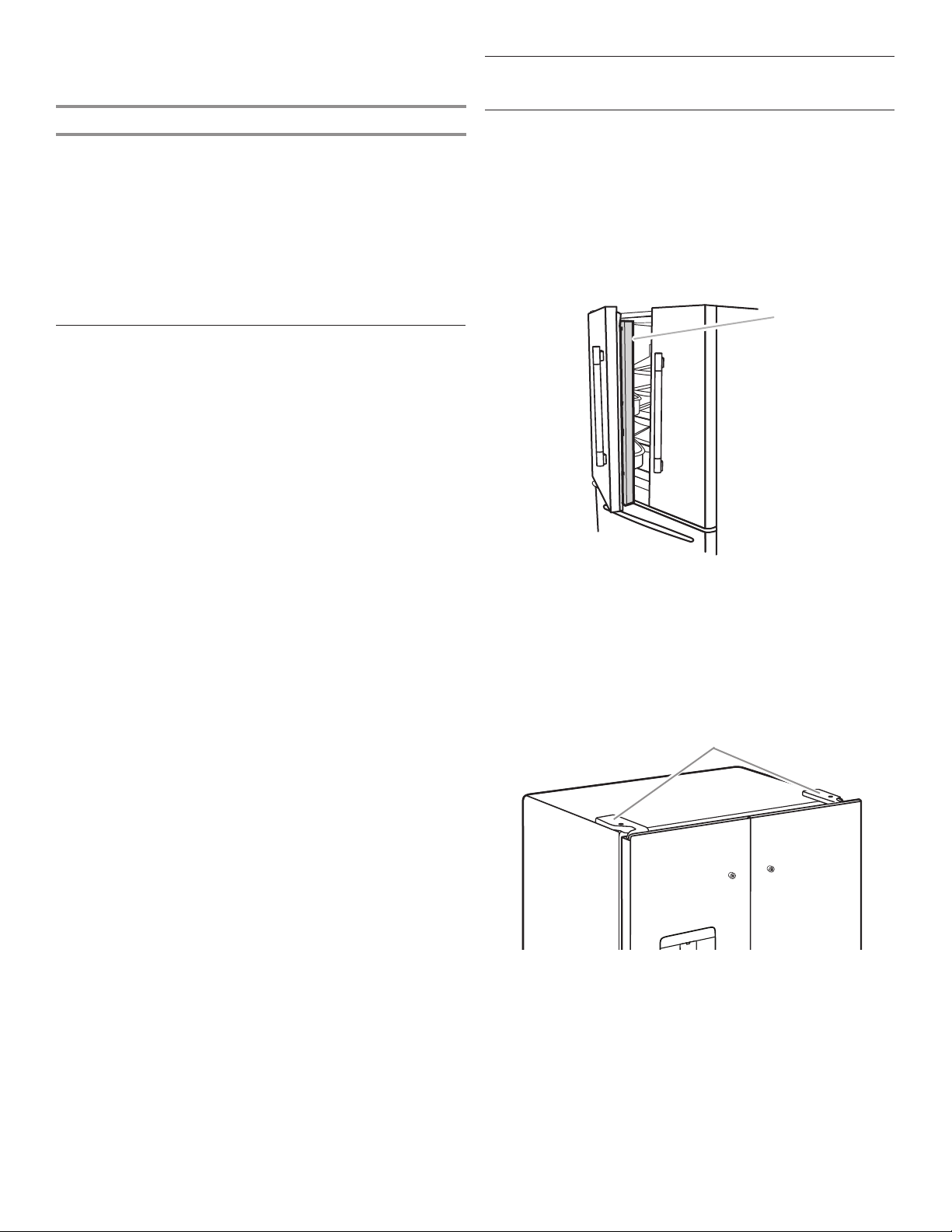
There are 2 refrigerator compartment doors. The doors can
be opened and closed either separately or together. There is
a vertically hinged seal on the left refrigerator door.
■ When the left-side door is opened, the hinged seal
automatically folds inward so that it is out of the way.
■ When both doors are closed, the hinged seal automatically
forms a seal between the 2 doors.
A
A. Hinged seal
The refrigerator compartment door switch is located in the top
left and right hinge cover.
■ The door switch uses magnet to sense door opening/closing.
■ Ensure there are no magnet or electronic devices (Speaker,
CoolVox®, etc) within 3 inches of the hinge cap.
NOTE: The light and internal user interface (UI) will not turn on if
the door opening is not detected.
A
A. Hinge cover
19
Page 20
Using the Controls
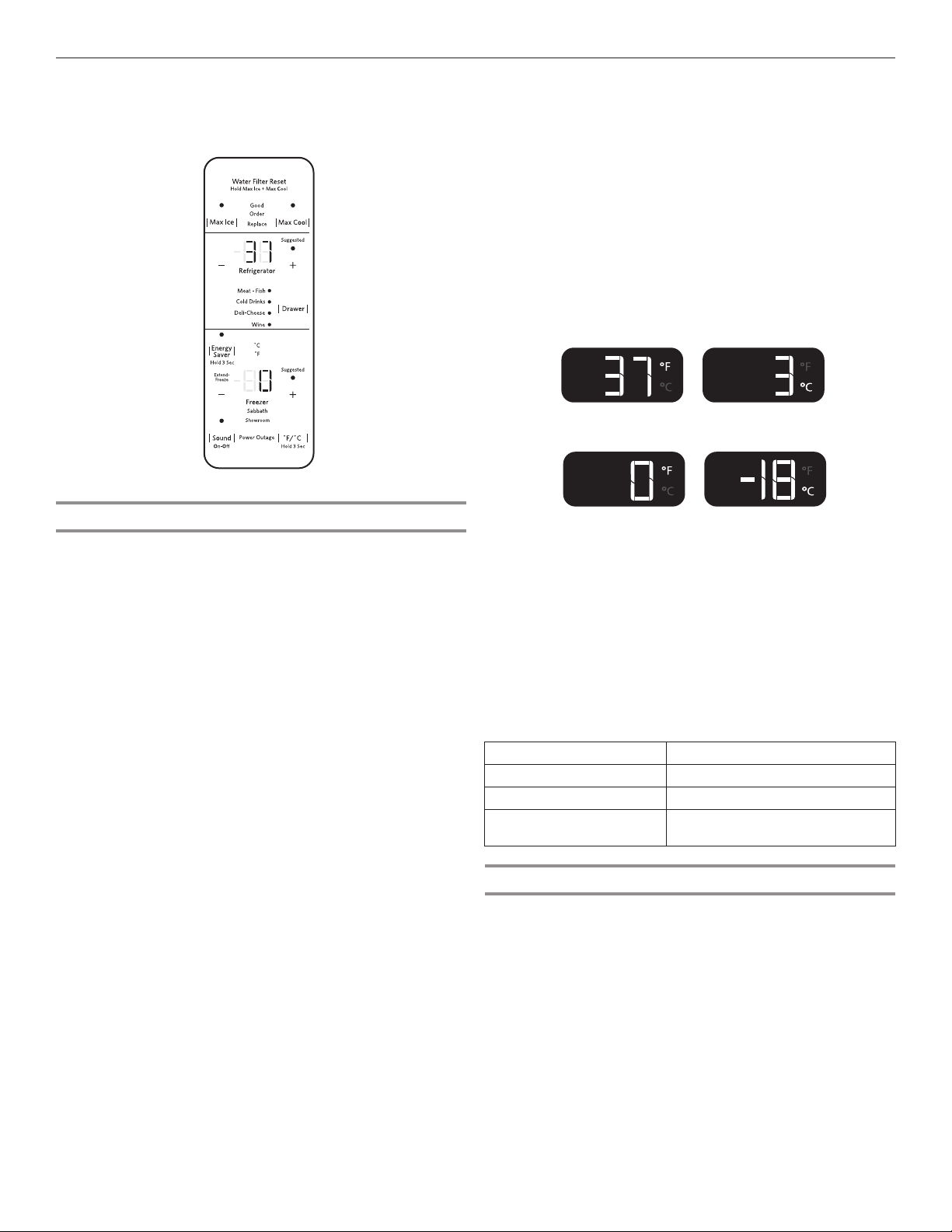
The Temperature Control UI is located above the external
dispenser and on the side of the left refrigerator door.
Viewing and Adjusting Temperature Set Points
For your convenience, your refrigerator and freezer controls are
preset at the factory.
When you rst install your refrigerator, make sure that the
controls are still set to the recommended set points. The factory
recommended set points are 37°F (3°C) for the refrigerator and
0°F (-18°C) for the freezer.
IMPORTANT:
■ Wait 24 hours before you put food into the refrigerator. If you
add food before the refrigerator has cooled completely, your
food may spoil.
NOTE: Adjusting the set points to a colder-thanrecommended setting will not cool the compartments any
faster.
■ If the temperature is too warm or too cold in the refrigerator
or freezer, rst check the air vents to be sure they are not
blocked before adjusting the controls.
■ The recommended settings should be correct for normal
household use. The controls are set correctly when milk or
juice is as cold as you like and when ice cream is rm.
NOTE: Areas such as a garage, basement, or porch may have
higher humidity or extreme temperatures. You may need to
adjust the temperature away from the recommended settings
to accommodate for these conditions.
■ Wait at least 24 hours between adjustments. Recheck the
temperatures before other adjustments are made.
View Temperature Set Points
1. Touch [—]/[+] for Refrigerator or [—]/[+] for Freezer and toggle
through temperature set points.
NOTE: To view temperature in degrees Celsius, touch and
hold the [°F/°C] button for 3 seconds and the temperature
display will change. To return to Fahrenheit, touch and hold
the [°F/°C] for 3 seconds and the temperature display will
change.
To activate Temperature mode for Drawer, touch DRAWER
and toggle through 4 optional temperature settings: Meats •
Fish, Cold Drinks, Deli • Cheese, and Wine. The display will
show the temperature set point of the selected setting for
the Drawer.
Recommended Refrigerator Temperature
Recommended Freezer Temperature
Adjust Temperature Set Points
Refrigerator set-point range: 33°F to 45°F (1°C to 7°C)
Freezer set point range: -6°F to 5°F (-22°C to -15°C)
1. Touch [—]/[+] to adjust the Refrigerator zone. The display will
show the temperature set point of the selected compartment
as shown.
2. When the temperature in is the range of Extend-Freeze™,
the display will light up. Extend-Freeze™ is activated at the
coldest Freezer set point.
When adjusting temperature set points,
use the following chart as a guide:
REFRIGERATOR too cold REFRIGERATOR setting 1° higher
REFRIGERATOR too warm REFRIGERATOR setting 1° lower
FREEZER too cold FREEZER setting 1° higher
FREEZER too warm/
FREEZER setting 1° lower
too little ice
Extend-Freeze™
This feature acts on the most-relevant storage parameters that
must be controlled to minimize moisture migration from frozen
food. This in turn reduces the freezer burn occurrence.
To turn on the Extend-Freeze™ feature, toggle to the coldest
Freezer temperature set point.
To turn off the Extend-Freeze™ feature, toggle from the coldest
freezer set point to any other temperature.
20
Page 21
Max Cool
Sound On/Off
The Max Cool feature assists with periods of high refrigerator
use, full grocery loads, or temporarily warm room temperatures.
■ To turn on the Max Cool feature, press the Max Cool button.
When the button is pressed, the icon will blink 3 times and
appear on the display screen.
■ To manually turn off the Max Cool feature, press the Max
Cool button and the display will blink 3 times and turn off.
The Max Cool feature will remain ON for 24 hours unless
manually turned off. Adjusting the refrigerator temperature will
automatically turn off the Max Cool feature.
NOTE: Setting the freezer to a colder temperature may make
some foods, such as ice cream, harder.
Max Ice
The Max Ice feature assists with increasing the cooling for the
freezer compartment in order to increase ice production.
■ To turn on or off the Max Ice feature, press the Max Ice
button. When the button is pressed to turn the feature on, the
icon will blink 3 times and appear on the display screen.
■ To manually turn off the Max Ice feature, press the Max Ice
button and the display will blink 3 times and turn off. The
Max Ice feature will remain ON for 24 hours unless manually
turned off. Adjusting the freezer temperature will automatically
turn off the Max Ice feature.
NOTE: Setting the freezer to a colder temperature may make
some foods, such as ice cream, harder.
Water Filter Reset
Displays the status of the water filter. To reset the water filter,
press MAX ICE and MAX COOL for 3 seconds. After countdown,
the Good icon will blink 3 times and remain lit.
NOTE: The water lter status lights on the internal controls will
let you know when to change your water lter.
■ ORDER FILTER (Yellow) — Order a replacement water lter.
■ REPLACE FILTER (Red) — Replace the water lter. While you
are dispensing water, Replace Filter icon will ash constantly
from beginning to the end of dispensing. After 14 days
without replacing the Water Filter, the Replace Filter icon will
blink 7 times and an alert tone will sound 3 times, at the end
of dispensing. See “Water Filtration System” section.
NOTE: REPLACE FILTER will remain illuminated if a lter reset
is not done.
■ RESET FILTER — Touch MAX ICE and MAX COOL at the
same time on the temperature control display for 3 seconds
to reset water lter. The display will do a 3-second countdown
and then ash the icon and play a tone.
Energy Saver
The Sound button allows the customer to turn the sound on
and off.
■ To turn on the Sound feature, press the Sound button. When
the button is pressed, the Sound icon will blink 3 times and
appear on the display screen.
■ To manually turn off the Sound feature, press the Sound
button and the display will blink 3 times and turn off.
Power Outage
The Power Outage indicator lets you know if the power supply
to the refrigerator has been OFF and the freezer temperature has
risen.
The control panel display will read “Power Outage” and an alert
tone will sound 3 times. Touch any button to stop the tone and
turn off the Power Outage icon.
Once the power outage has been conrmed, “Power Outage,”
will disappear.
Showroom Mode
This mode is used when the refrigerator is on display in a retail
store or if you want to turn the cooling off and deactivates all
other functions except interior lighting). Showroom mode can be
used when going on vacation, see “Vacation and Moving Care”
section for proper steps on leaving your refrigerator in this mode
for long periods of time.
If you turn on Showroom mode, the word “Showroom” will light
up on the display. Enter or Exit Showroom mode by pressing and
holding °F/°C and DRAWER at the same time for 3 seconds.
NOTE: Empty ice maker if refrigerator is going to be turned off for
an extended period of time.
Sabbath Mode
Sabbath mode is designed to have all the benets of saving even
more energy, yet maintaining food freshness. The freezer and
refrigerator user set points remain unchanged while in this mode.
If you unintentionally turn on Sabbath mode, the word “Sabbath”
will light up on the display. Enter and exit Sabbath mode by
pressing and holding °F/°C and SOUND at the same time for
3 seconds.
NOTE: You will be unable to dispense or change temperature set
points in Sabbath mode. Your interior lighting and control panels
will all be inactive in Sabbath mode.
External Dispenser Controls
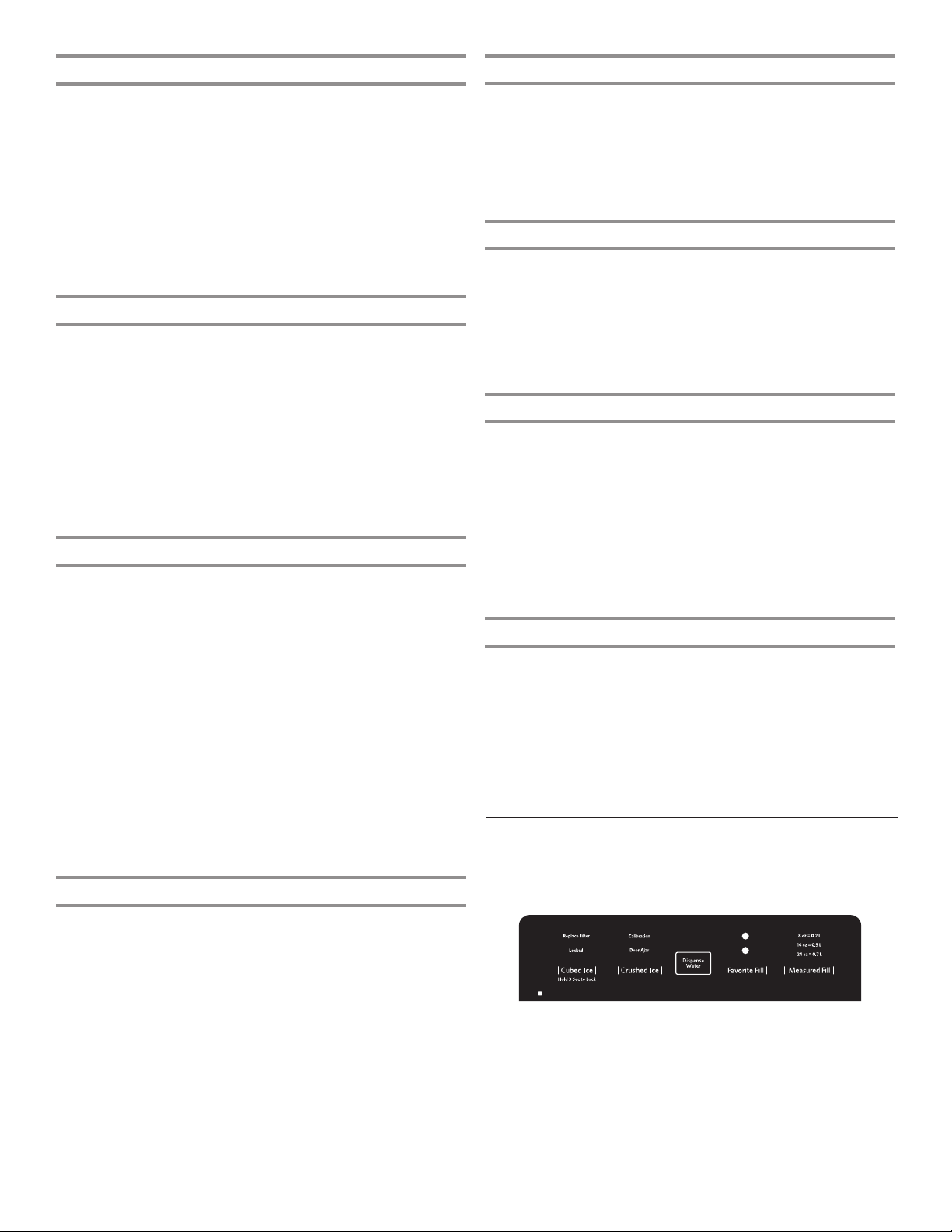
The Dispenser UI is located above the external dispenser of the
refrigerator.
Your refrigerator will turn off the vertical mullion heater and
dispenser heater when Energy Saver is enabled.
■ To turn Energy Saver on, press and hold the Energy Saver
button for 3 seconds. The Energy Saver icon will blink 3 times
and then remain lit as shown.
IMPORTANT: When Energy Saver is enabled and the LED is ON,
the dispenser heater and vertical mullion heater will be turned off.
■ Press and hold ENERGY SAVER for 3 seconds again to turn
the heaters back on.
IMPORTANT: The display screen on the dispenser control panel
will turn off automatically and enter “sleep” mode when the
control buttons and dispenser paddles have not been used for
2 minutes or more. Touch any control button to reactivate the
display screen.
21
Page 22
Additional Features
!
Calibration
Door
Replace
"#$#!
%&#'#(')!"#$#!
Order Filter
a1 oz = b1 L
a2 oz = b2 L
a3 oz = b3 L
Dispense
!
Calibration
Door
Replace
"#$#!
%&#'#(')!"#$#!
Order Filter
a1 oz = b1 L
a2 oz = b2 L
a3 oz = b3 L
Dispense
Door Ajar Alarm
The Door Ajar Alarm feature sounds an alarm when the
refrigerator door(s) or freezer drawer is open for 5 minutes and
cooling is turned on. The alarm will repeat every 2 minutes. Close
all doors and drawer to turn it off.
NOTE: To mute the audible alarm while keeping the doors open,
such as while cleaning the inside of the refrigerator, touch any
button on the control panel. The alarm sound will be temporarily
turned off, but the Door Ajar icon will still be displayed on the
dispenser control panel.
Lighting the Refrigerator
The refrigerator has an interior light that comes on any time the
door is opened.
NOTE: The light is an LED which does not need to be replaced.
If the LED does not illuminate when the door is opened, call
Service to replace the light. See “Assistance or Service” in
“Warranty” section for contact information.
Water and Ice Dispensers
2. Release the dispenser paddle for 5 seconds. Repeat steps
1 and 2 until water begins to ow.
3. Once water begins to ow, continue depressing and releasing
the dispenser pad (5 seconds on, 5 seconds off) until a total
of 3 gal (12 L) has been dispensed.
Calibrate Measured Fill
Household water pressure may affect the accuracy of the
Measured Fill feature. So, for optimum performance of your
water dispenser, you must rst calibrate Measured Fill.
IMPORTANT:
■ Flush the water system before calibrating Measured Fill.
■ For best results, calibration should be performed when water
is not being used in the house.
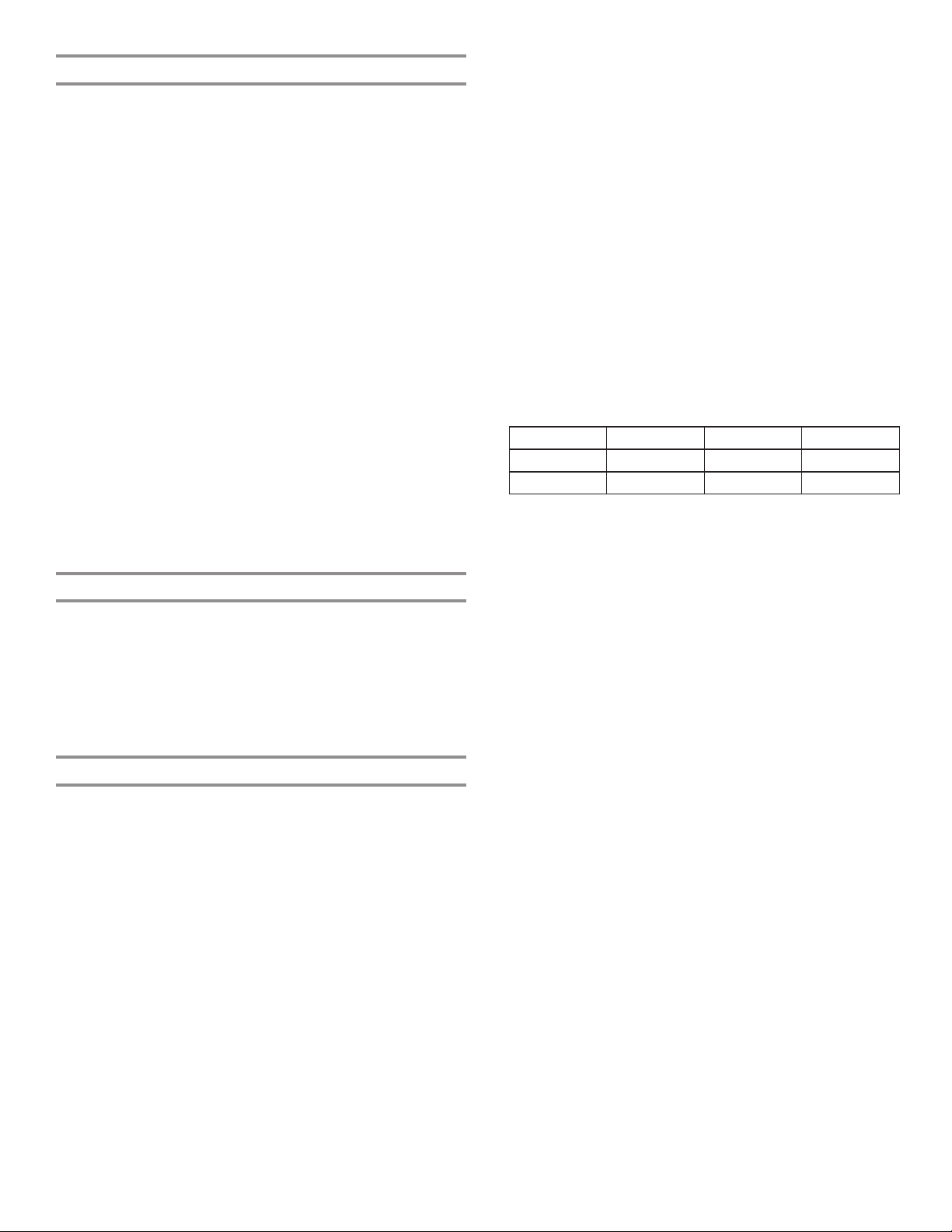
1. Place a sturdy measuring cup (1-cup [237 mL] size) on the
dispenser tray centered in front of the ice/water dispenser
paddle.
NOTE: Depending on your model, a measuring cup may be
provided.
IMPORTANT:
■ Allow 3 hours for the refrigerator to cool down and chill water.
■ Allow 24 hours to produce the rst batch of ice. Discard the
rst 3 batches of ice produced.
■ The dispensing system will not operate if the left-hand
refrigerator door is open.
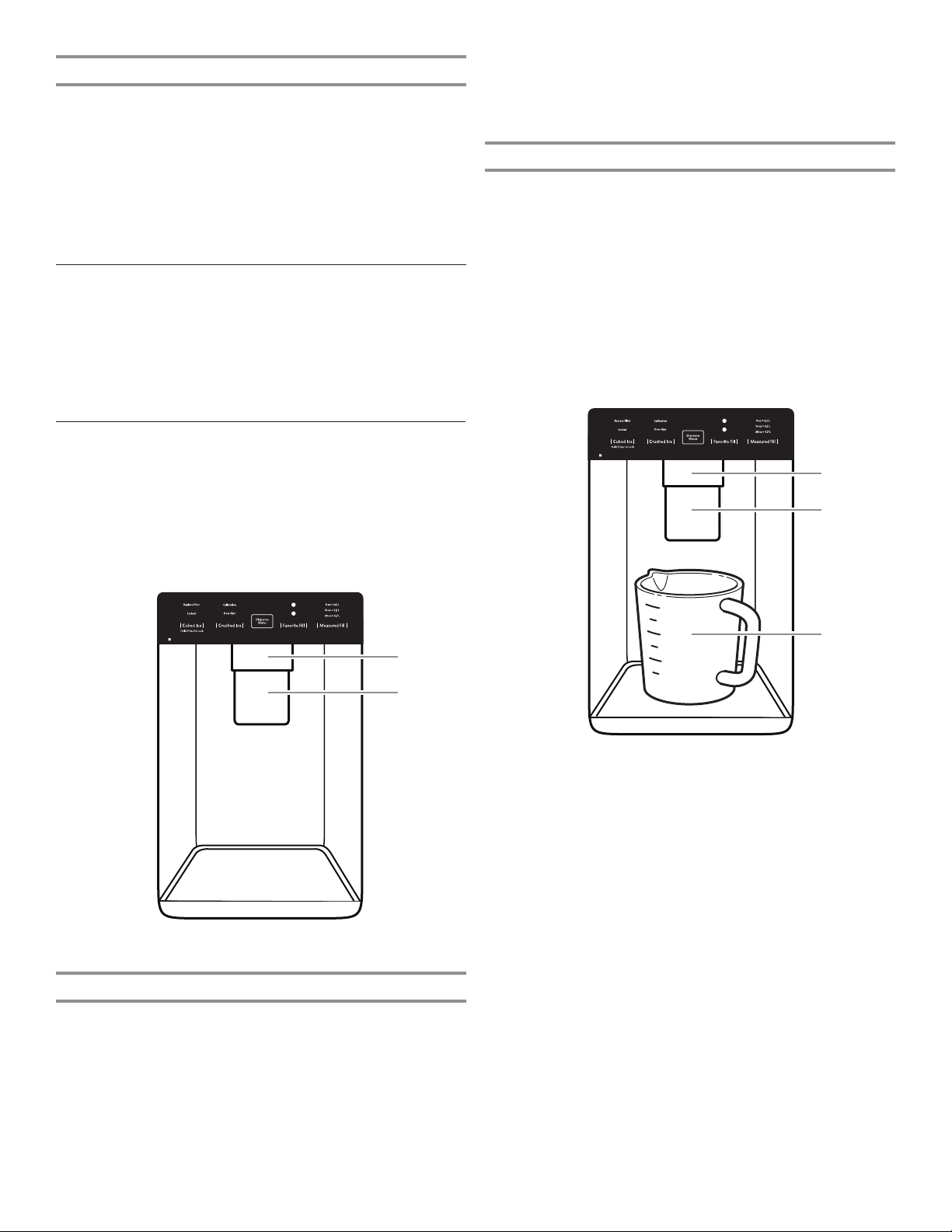
A. Water dispenser paddle
B. Ice dispenser paddle
Flush the Water System
Air in the water dispensing system can cause the water dispenser
to drip. After connecting the refrigerator to a water source or
replacing the water lter, ush the water system.
Flushing the water dispensing system forces air from the water
line and lter and prepares the water lter for use. Additional
ushing may be required in some households.
NOTE: As air is cleared from the system, water may spurt out of
the dispenser.
1. Using a sturdy container, depress and hold the water
dispenser paddle for 5 seconds.
22
A
B
C
A
B
A. Water dispenser paddle
B. Ice dispenser paddle
C. Measuring cup (1 cup)
Ensure that you do not have any Measured Fill preset
selected.
2. Touch and hold the Measured Fill button for 3 seconds to
enter into Calibration mode. The Calibration and Measured
Fill icons will illuminate and remain lit while the Measured Fill
feature is being calibrated.
NOTE: You may touch MEASURED FILL to exit at any time in
Calibration mode. The Calibration icon will disappear and the
display will return to the Home screen.
3. Press and hold the water dispenser paddle, as needed, to
dispense water to the 1-cup ll line in the measuring cup.
NOTE: If overlling or spilling occurs, discard the water and
restart the calibration process.
4. When 1 cup of water has been correctly dispensed into
the measuring cup, touch MEASURED FILL to conrm the
calibration.
5. When Measured Fill calibration has been conrmed, the
Calibration icon will disappear and the display will return
to the home screen.
Page 23
Save Favorite Fill
Household water pressure may affect the accuracy of the
Favorite Fill feature. So, for optimum performance of your water
dispenser, you must rst calibrate Measured Fill. (See Measured
Fill section).
NOTE: Water will not be dispensed using the Favorite Fill feature
unless your preferred Favorite Fill amount is saved rst.
IMPORTANT:
■ Flush the water system before Favorite Fill.
■ For best results, calibration should be performed when water
is not being used in the house.
1. Place a preferred-size cup on the dispenser tray centered in
front of the ice/water dispenser paddle.
2. Select either Favorite 1 or Favorite 2, and then touch and
hold the Favorite Fill button for 3 seconds to enter into Saving
mode. The Favorite Fill icon will illuminate and remain lit while
the Favorite Fill feature is being saved.
NOTE: You may touch FAVORITE FILL to exit at any time in
Saving mode and the display will return to the Home screen.
3. Press and hold the water dispenser paddle, as needed, to
dispense water to the preferred-size cup.
NOTE: If overlling or spilling occurs, discard the water and
restart the saving process.
4. When the preferred amount of water has been correctly
dispensed into the cup, touch the Favorite Fill button to
conrm the favorite amount.
5. When Favorite Fill amount has been conrmed, the display
will return to the home screen.
Dispensing
Touch CUBED ICE or CRUSHED ICE for your ice selection.
NOTES:
■ For crushed ice, cubes are crushed before being dispensed.
This may cause a slight delay when dispensing crushed ice.
Noise from the ice crusher is normal and pieces of ice may
vary in size.
■ When changing from crushed to cubed, a few ounces of
crushed ice will be dispensed along with the rst cubes.
Dispensing Water
IMPORTANT:
■ Dispense at least 1 qt (1 L) of water every week to maintain a
fresh supply.
■ If the ow of water from the dispenser decreases, it could be
caused by low water pressure.
■ With the water lter removed, dispense 1 cup (237 mL)
of water. If 1 cup (237 mL) of water is dispensed in 8
seconds or less, the water pressure to the refrigerator
meets the minimum requirement.
■ If it takes longer than 8 seconds to dispense 1 cup
(237 mL) of water, the water pressure to the refrigerator
is lower than recommended. See “Water Supply
Requirements” and “Troubleshooting” sections for
suggestions.
To Dispense Water — Standard:
1. Press a sturdy glass against the water dispenser paddle.
2. Remove the glass to stop dispensing.
NOTE: The Dispense Water button does not enable standard
dispensing. It only functions in Measured Fill mode.
To Dispense Water — Measured Fill:
Measured Fill allows you to dispense a specied amount of water
with the touch of a few buttons.
1. Put a sturdy glass under waterspout. Touch MEASURED FILL
to activate.
NOTE: The amount of water you select will be dispensed.
Make sure the container can hold the entire volume. If ice
is in the container, you may need to adjust your selection.
2. Touch MEASURED FILL to turn on, then touch to select
8 oz (0.2 L), 16 oz (0.5 L), or 24 oz (0.7 L). Touch the fourth
time to exit Measured Fill display.
3. Touch DISPENSE WATER (center button) or press paddle and
the selected amount of water will be dispensed.
NOTES:
■ The Measured Fill dispenser will automatically time out after
1 minute of inactivity.
■ You can rell several glasses with the same measurement
by continuing to touch DISPENSE WATER (center button)
after each glass ll.
Measured Fill options are listed in the following chart:
Ounces 8 16 24
Cups 1 2 3
Liters 0.2 0.5 0.7
NOTE: Most coffee cups (commonly 4 to 6 oz [118 to 177 mL]
per cup) are not the same size as a measuring cup
(8 oz [237 mL]). You may need to recalibrate Measured Fill to
underll or to avoid unintentionally overlling coffee cups.
4. Dispense water.
NOTE: While dispensing water, the ow of water will
automatically stop once the desired volume has been
dispensed.
■ Press a sturdy glass against the dispenser paddle below
the waterspout.
OR
■ Place the glass below the waterspout and touch
DISPENSE WATER for hands-free dispensing.
5. To pause dispensing before the selected volume has been
dispensed, touch DISPENSE WATER a second time or touch
the water dispenser paddle. Touch DISPENSE WATER or
paddle again to resume dispensing remaining amount.
NOTE: If you stop dispensing before the desired volume has
been dispensed, the display will turn off after 1 minute. If you
have not resumed by then, it will reset back to the original
amount.
6. To select a new volume or start dispensing the same volume
again, you must rst nish dispensing the selected volume or
turn off the Measured Fill feature (either by waiting 1 minute
so it will automatically turn off or by touching CUBED ICE
or CRUSHED ICE to manually turn it off), and then select
Measured Fill again.
To Dispense Water — Favorite Fill:
Favorite Fill allows you to dispense a preferred amount of water
with the touch of a few buttons.
1. Put a sturdy glass under waterspout. Touch FAVORITE FILL
to activate.
NOTE: The amount of water you select will be dispensed.
Make sure the container can hold the entire volume. If ice
is in the container, you may need to adjust your selection.
2. Touch FAVORITE FILL to turn on, then touch to select
Favorite 1 or Favorite 2. Touch the third time to exit Favorite
Fill display.
23
Page 24
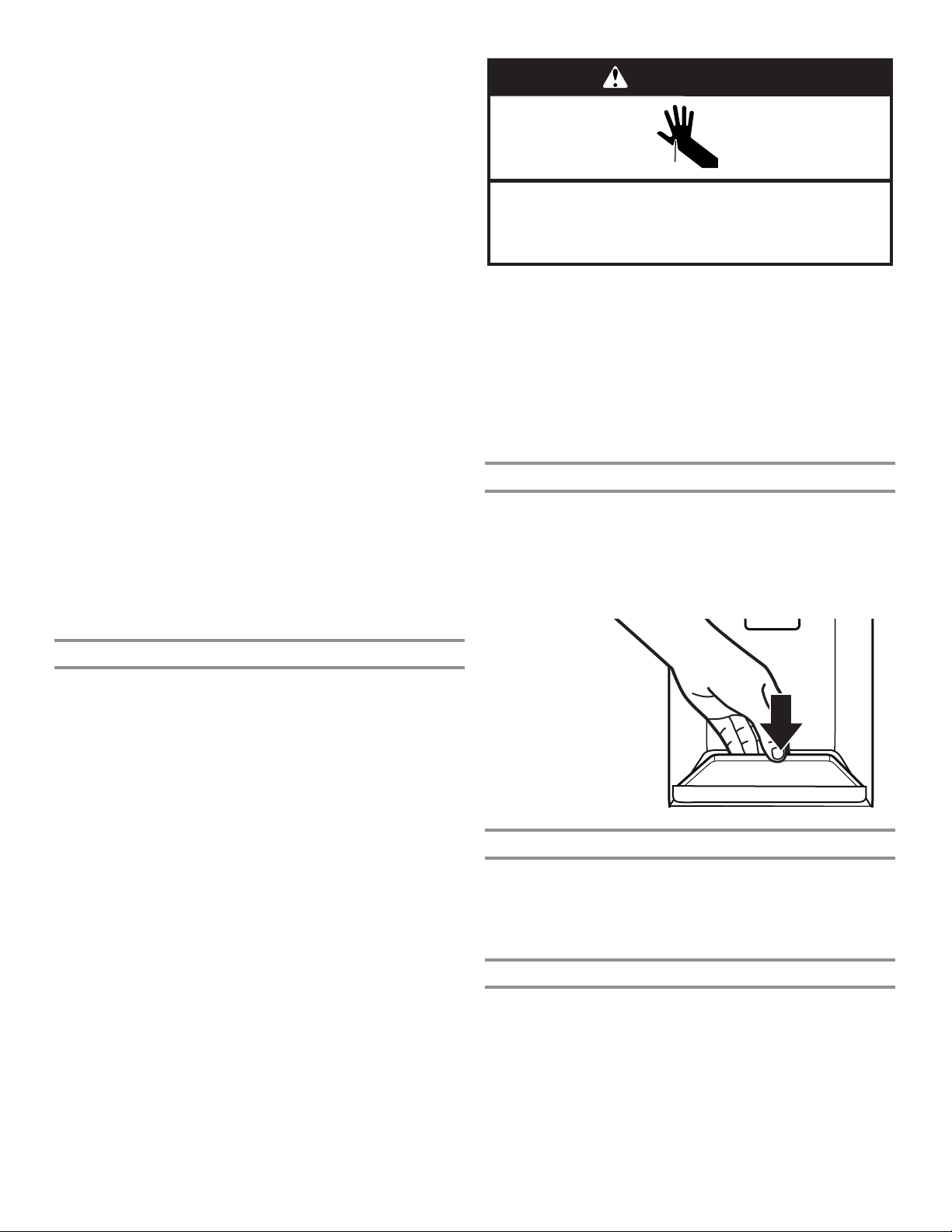
!
Calibration
Door
Replace
"#$#!
%&#'#(')!"#$#!
Order Filter
a1 oz = b1 L
a2 oz = b2 L
a3 oz = b3 L
Dispense
3. Touch DISPENSE WATER (center button) or press paddle and
the selected amount of water will be dispensed.
NOTES:
■ The Favorite Fill dispenser will automatically time out after
1 minute of inactivity.
■ You can rell several glasses with the same measurement by
continuing to touch DISPENSE WATER (center button) after
each glass ll.
4. Dispense water.
NOTE: While dispensing water, the ow of water will
automatically stop once the desired volume has been
dispensed.
■ Press a sturdy glass against the dispenser paddle below
the waterspout.
OR
■ Place the glass below the waterspout and touch
DISPENSE WATER for hands-free dispensing.
5. To pause dispensing before the selected volume has been
dispensed, touch DISPENSE WATER a second time or touch
the water dispenser paddle. Touch DISPENSE WATER or
paddle again to resume dispensing remaining amount.
NOTE: If you stop dispensing before the desired volume has
been dispensed, the display will turn off after 1 minute. If you
have not resumed by then, it will reset back to the original
amount.
6. To select a new volume or start dispensing the same volume
again, you must rst nish dispensing the selected volume
or turn off the Favorite Fill feature (either by waiting 1 minute
so it will automatically turn off or by touching CUBED ICE
or CRUSHED ICE to manually turn it off), and then select
Favorite Fill again.
WARNING
Cut Hazard
Use a sturdy glass when dispensing ice.
Failure to do so can result in cuts.
2. Press a sturdy glass against the dispenser paddle. Hold the
glass close to the dispenser opening, so ice does not fall
outside of the glass.
IMPORTANT: You do not need to apply a lot of pressure to
the paddle to activate the ice dispenser. Pressing hard will not
make the ice dispense faster or in greater quantities.
3. Remove the glass to stop dispensing.
NOTE: Ice may continue to dispense for several seconds after
removing the glass from the dispenser paddle. The dispenser
may continue to make noise for a few seconds after dispensing.
The Dispenser Drip Tray
The drip tray can be removed to carry to the sink to empty or
clean.
■ Lift up on the front edge of the tray and pull forward to
remove.
The Ice Dispenser
IMPORTANT:
■ If the ice cubes are hollow or have an irregular shape, it
could be because of low water pressure. See “Water Supply
Requirements” section.
■ Ice travels from the ice storage bin through the dispenser
chute to the dispenser. To turn off the ice maker, see “Ice
Maker and Storage Bin” section.
■ The dispenser may continue to make noise and ice may
continue to dispense for several seconds after releasing
the dispenser button or paddle.
To Clean the Ice Dispenser Chute:
Humidity causes ice to naturally clump together. Ice particles
can build up until the ice dispenser chute becomes blocked.
If ice is not dispensed regularly, it may be necessary to empty the
ice storage bin and clean the ice delivery chute, the ice storage
bin, and the area beneath the storage bin every 2 weeks.
■ If necessary, remove the ice clogging the storage bin and
delivery chute using a plastic utensil.
■ Clean the ice delivery chute and the bottom of the ice storage
bin using a warm, damp cloth, and then dry thoroughly.
To Dispense Ice:
Paddle Dispensing
1. Select the desired type of ice by pressing CUBED ICE or
CRUSHED ICE.
■ The drip tray can also slide out to assist in Measured/Favorite
Fill.
The Dispenser Light
1. When you use the dispenser, the light will automatically
turn on.
2. The dispenser light also serves as an automatic nightlight.
Once the ambient light in the room is reduced, the auto
sensor will cause the dispenser light to illuminate.
The Dispenser Lock
The dispenser can be locked for easy cleaning or to avoid
unintentional dispensing by small children and pets.
NOTE: The lock feature does not shut off power to the
refrigerator or the dispenser light. It simply deactivates the
controls and dispenser levers. To turn off the ice maker, see “Ice
Maker and Storage Bin” section.
■ Touch and hold CUBED ICE for 3 seconds to lock the
dispenser.
24
Page 25
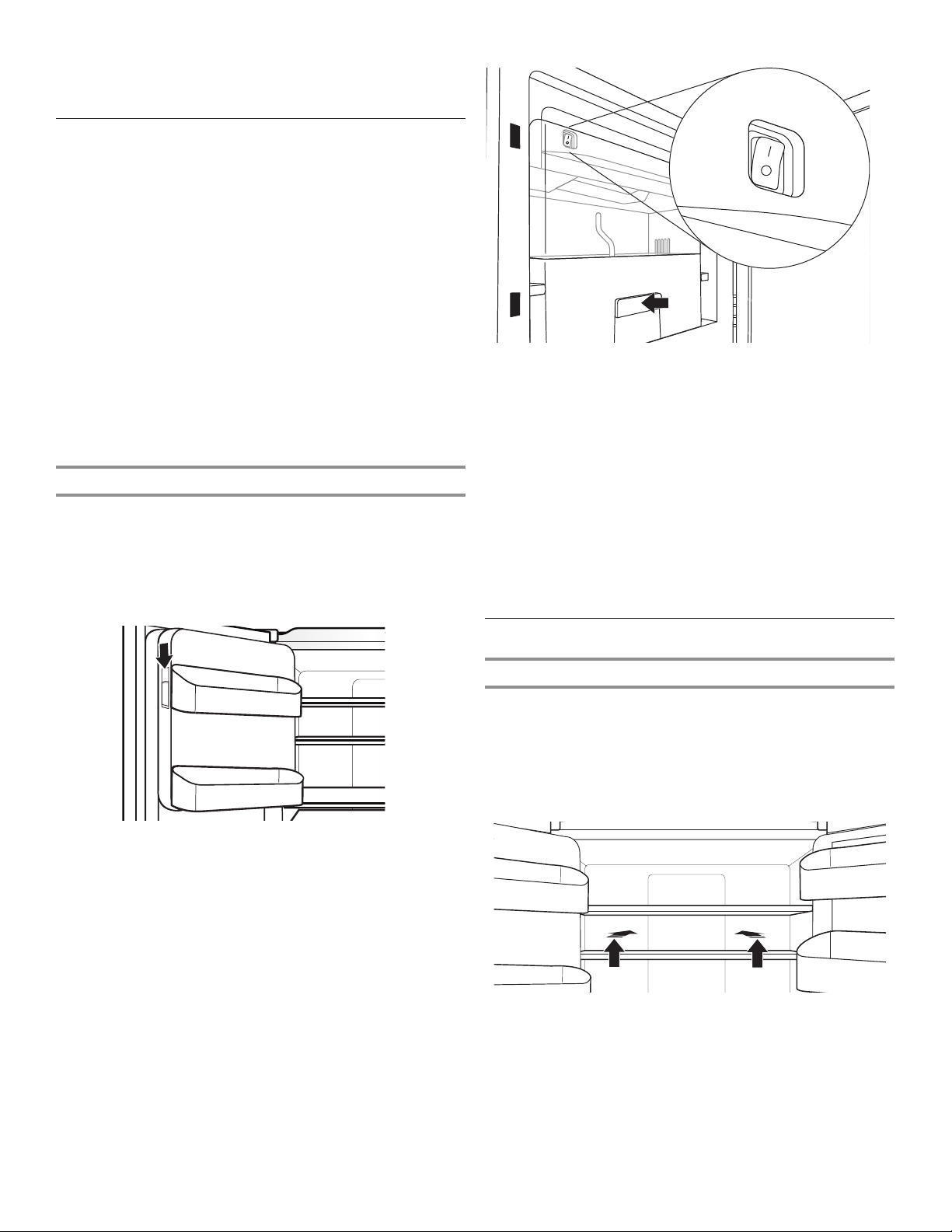
■ Touch and hold CUBED ICE for 3 seconds to unlock the
dispenser.
■ The display screen indicates when the dispenser is locked.
Ice Maker and Storage Bin
IMPORTANT: To avoid low ice production and poor quality ice,
ush the water system before turning on the ice maker. See
“Water Dispenser” section.
■ Following installation, allow 24 hours to produce the rst
batch of ice. Discard the rst 3 batches of ice produced.
Allow 2 to 3 days to ll the ice storage bin.
■ The quality of your ice will be only as good as the quality
of the water supplied to your ice maker. Avoid connecting
the ice maker to a softened water supply. Water softener
chemicals (such as salt) can damage parts of the ice maker
and lead to poor quality ice. If a softened water supply
cannot be avoided, make sure the water softener is operating
properly and is well-maintained.
■ If the ice in the storage bin clumps together, break up ice
using a plastic utensil and discard ice. Do not use anything
sharp to break up the ice. This can cause damage to the ice
bin and the dispenser mechanism.
■ Do not store anything in the ice storage bin.
Ice Maker in the Refrigerator
The ice maker is located on the left door behind the bins. Ice
cubes are ejected into the ice storage bin located on the lefthand refrigerator door.
Turn the Ice Maker On/Off
1. Push up on the latch on the left-hand side of the ice
compartment to open the door.
3. Close the ice compartment door.
Remove and Replace the Ice Storage Bin
■ Remove the ice storage bin by inserting your ngers into the
hole at the base of the bin and pulling the latch to release the
bin from the compartment. Lift the storage bin up and pull it
straight out.
■ Replace the storage bin inside the ice compartment and push
down to make sure it is rmly in place.
Ice Production Rate
■ The ice maker should produce approximately 3 lbs (1.4 kg)
of ice per day under normal operation.
■ To increase ice production, select the “Fast Ice” feature from
the control panel. See “Using the Controls” section.
2. Turn on the ice maker by moving the switch to the On (I)
position.
NOTES:
■ To manually turn off the ice maker, move the control to the
Off (O) position.
■ Your ice maker has an automatic shutoff. The sensor will
automatically stop ice production if the storage bin is full,
if the door is open, or the storage bin is removed. The
control will remain in the On (up) position.
Shelves, Bins, and Drawers
Slide-Away Split Shelf
Some shelves will tuck away to create room for taller objects.
1. To retract the front section of the shelf, push the adjustable
portion of the shelf as far back as needed toward the rear of
the refrigerator.
2. Extend the front glass and front trim of the shelf by pulling the
retracted portion of the shelf outward until it is fully extended.
25
Page 26
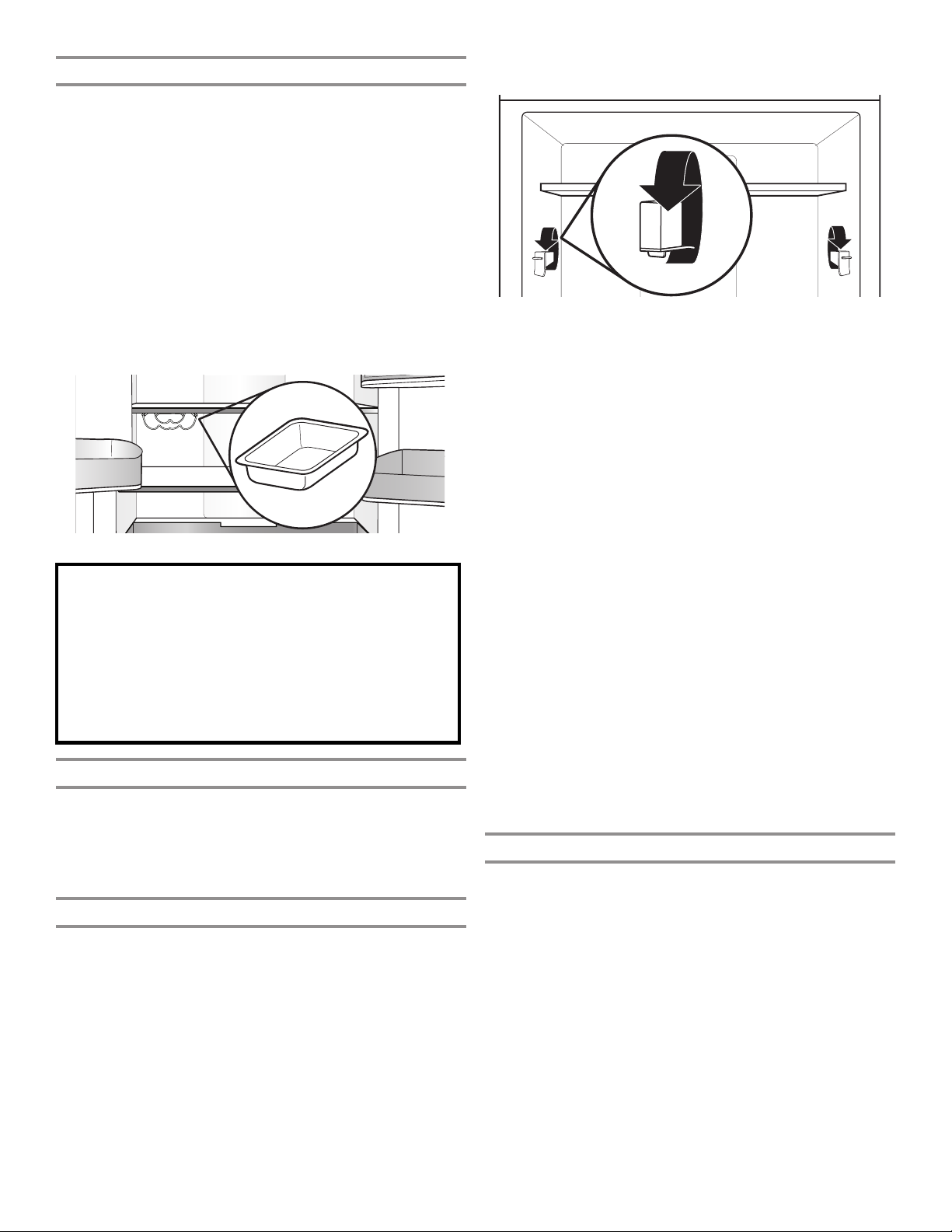
Wine Rack and/or Under Shelf Storage Pan
Under one shelf, there are brackets installed to the supports (one
bracket on each support). The wine rack or under-shelf storage
rests in these brackets.
To remove and replace the wine rack or pan:
1. Remove the wine rack/pan by lifting it up off the brackets.
Press the right-hand side of the rack inward until it is free of
its bracket. Lower the right-hand side slightly and disengage
the left-hand side from its bracket.
2. Replace the wine rack/pan by inserting the left-hand side into
its bracket. Press inward on the right-hand side until it will
slide past the bracket edge and set it into its bracket.
NOTE: Under shelf storage pan utilizes typically empty space
beneath the shelf to create a prep zone ideal for doughs,
desserts, casseroles, or marinating meats. The slide-out pan is
oven and dishwasher safe and easily transitions from fridge to
oven.
Important information to know about glass shelves
and covers:
Do not clean glass shelves or covers with warm water when
they are cold. Shelves and covers may break if exposed to
sudden temperature changes or impact, such as bumping.
Tempered glass is designed to shatter into many small,
pebble-size pieces. This is normal. Glass shelves and covers
are heavy. Use both hands when removing them to avoid
dropping.
Shelves and Shelf Frames
The shelves in your refrigerator are adjustable to meet your
individual storage needs.
Storing similar food items together in your refrigerator and
adjusting the shelves to t different heights of items will make
nding the exact item you want easier. It will also reduce the
amount of time the refrigerator door is open and save energy.
Shelf Height Adjustment
Shelf height can be adjusted by changing the adjustable shelf
mounts between their vertical and horizontal positions.
1. Carefully lift the shelf off the shelf mounts and turn the ipper
to the desired orientation.
2. Repeat for remaining shelf mounts.
3. Apply pressure to the top of the shelf to ensure the shelf is
properly seated on the shelf mounts.
To remove and replace shelves:
1. Make sure adjustable shelf mounts are in the lower position
before removing shelves. Also doors will need to be open at
a 90˚ angle. If open wider, it will make it harder to remove the
shelves.
2. Remove the middle shelf or top shelf by lifting it up and out
of the shelf supports. Then pull the shelf forward and tilt down
to a vertical position. Turn the shelf at an angle and pull out of
the refrigerator.
NOTE: Remove middle shelf rst before removing top shelf.
Innity slide glass shelves should be pushed back in. When
tilted up, make sure glass does not slide to front.
3. Remove the bottom shelf by lifting it up and out of the
shelf supports. Then pull the shelf forward and tilt up to
a vertical position. Turn the shelf at an angle and pull out
of the refrigerator.
4. Replace the middle and top shelves by putting the shelf in the
refrigerator at an angle with the shelf front down. Lift the front
of the shelf up and slide in until rear shelf drops into the shelf
supports. Lower the front of the shelf and make sure that the
shelf is in position.
5. Replace the bottom shelf by putting the shelf in the
refrigerator at an angle with the shelf up. Lift the front of the
shelf down and slide in until rear shelf drops into the shelf
supports. Lower the front of the shelf and make sure that
the shelf is in position.
Shelves with under-shelf lighting (on some models)
By moving LED lighting to a new spot under the shelves, this
leading-edge technology improves interior refrigerator lighting
and aids in locating storage items.
Pull-Out Tray
To remove and replace the pull-out tray:
1. Pull the tray to the fully open position or when it stops.
2. Lift up and out of gliders toward the front of the refrigerator.
26
Page 27
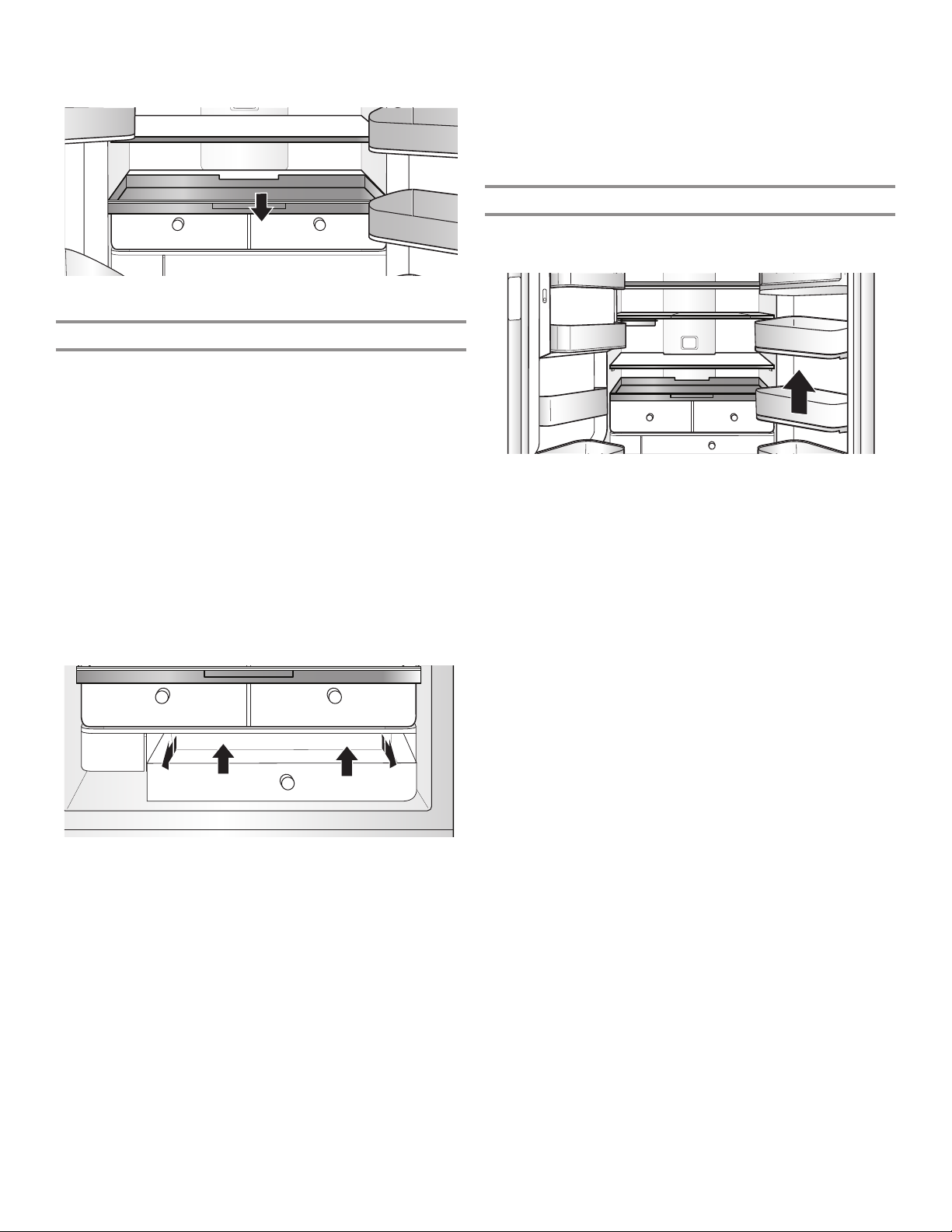
3. Replace the tray by placing it on the bottom tray guide and
pushing it past the tray stop into position.
FreshSeal™ Crisper Drawers
These upgraded crisper drawers use a gasket seal to maintain
the ideal temperature and humidity levels to keep produce fresh
longer. These drawers also feature premium soft-close glides
that provide the best extension for easy access and maximum
visibility to your produce items.
To remove and replace the drawers:
1. Grasp the handle at the bottom of the drawer and slide the
drawer straight out to the stop. Lift the drawer off the bottom
guide.
2. Replace the drawer by placing it on the bottom drawer guide
and pushing it past the drawer stop into position.
To remove the crispers cover (can remove only if platter
pocket is removed rst):
1. Remove the platter pocket rst.
2. Holding the glass insert rmly with one hand, press up in
center of glass insert until it rises above the plastic frame.
Gently slide the glass insert forward to remove.
To replace crisper(s) cover(s):
1. Remove the crisper pan, platter pocket, and crisper glass
before removing the crisper.
2. Fit back of cover frame into supports on side walls of the
refrigerator and lower the front of the cover frame into place.
3. Slide rear of glass insert into cover frame and lower front into
place.
Refrigerator Door Bins
The bins on your refrigerator door are adjustable to meet your
individual storage needs.
FreshSeal™ Herb Bin
This is a cylinder with a FreshSeal™ to keep sensitive items
like herbs fresh longer. The container allows water to be added
to keep stems wet without covering leaves. It can be placed
anywhere in the refrigerator and accommodates tall items like
parsley, cilantro, and rosemary in addition to herbs like oregano,
thyme, and mint.
27
Page 28
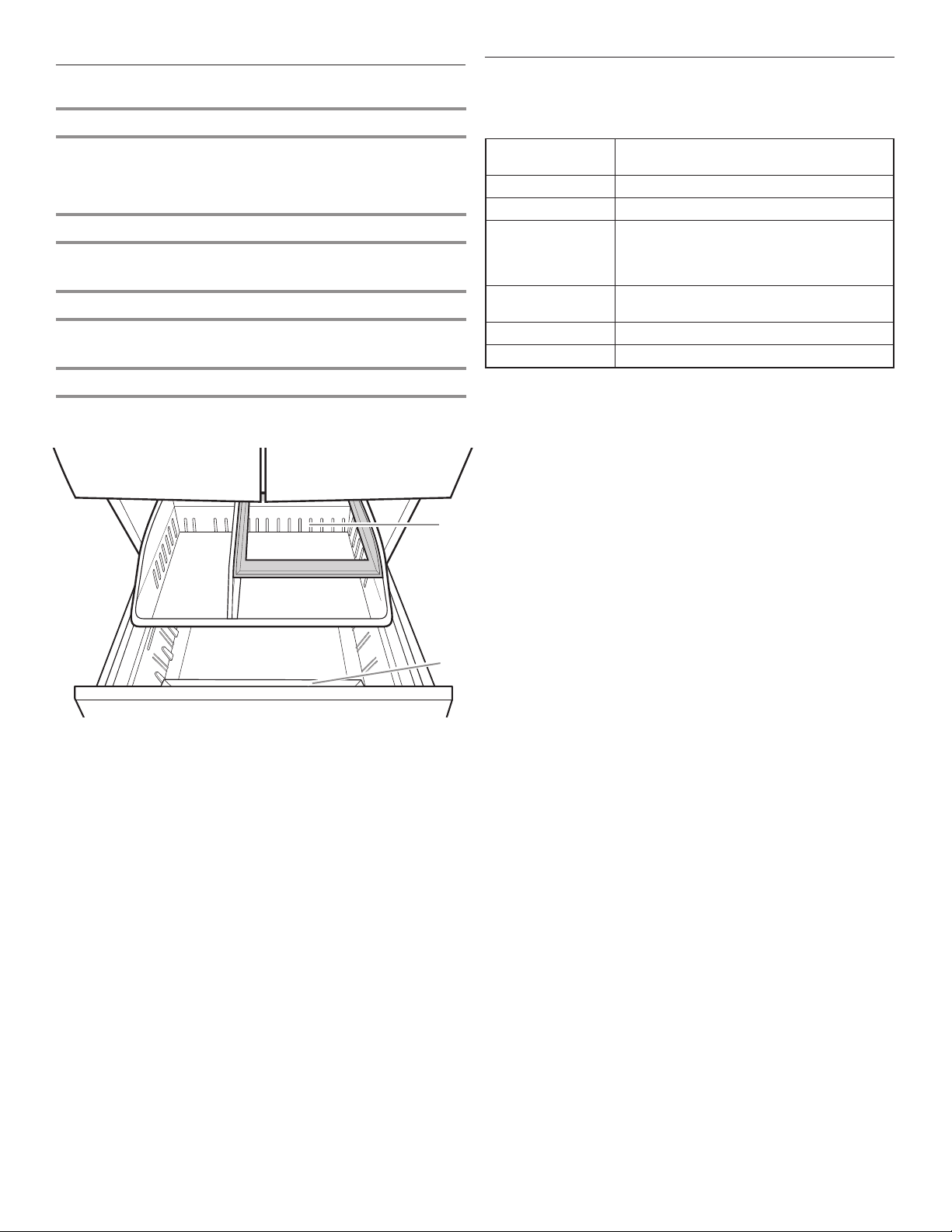
Freezer Drawers
Audio Reference
Small Items Bin (on some models)
This drawer divider is not removable and is for small, delicate
items. For storage exibility, the drawer bin can move forward
and back, allowing you to store larger items in one section of
the freezer.
Pizza Pocket
Space at the front of the drawer allows vertical storage of
additional pizza boxes.
Third Tier
This shelf is not removable. To allow access, the third tier is able
to move backward, allowing access to items in the area below.
Ice Bin (on some models)
Ice storage for second ice maker.
B
Tone Assignment
POWER ON Cooling system is turned on every time
the product is powered on.
POWER OFF Cooling system is turned off.
KEY PRESS User presses a valid button.
INVALID (ERROR) User presses 2 or more valid buttons at
the same time. Count-down interruption
for press-and-hold buttons. User presses
pad when dispensing is not allowed.
ENGAGE Acknowledgment of entry into any mode
or completion of dispensing.
DISENGAGE Acknowledgment of exit from any mode
ALERT Power Outage alert, Door Ajar alert
This table is for quick reference only. See corresponding sections
for details. In case of inconsistency, section details will prevail.
A. Pizza pocket
B. Third tier
A
28
Page 29
REFRIGERATOR CARE
Cleaning
WARNING
Explosion Hazard
Use nonflammable cleaner.
Failure to do so can result in death, explosion, or fire.
Both the refrigerator and freezer sections defrost automatically.
However, clean both sections about once a month to avoid
buildup of odors. Wipe up spills immediately.
Exterior Cleaning
Please see the exterior cleaning information specic to your
model.
Style 1 — Smooth Door
IMPORTANT: Damage to smooth nish due to improper use of
cleaning products or using non-recommended cleaning products
is not covered under the warranty. Sharp or blunt instruments will
mark the nish.
✔ Soft, clean cloth ✘ Abrasive cloths
✘ Paper towels or newsprint
✘ Steel-wool pads
✔ Warm, soapy water with a
mild detergent
NOTE: Paper towels scratch and may dull the clear coat of the
painted door. To avoid possible damage, use only soft, clean
clothes to polish and wipe the doors.
Style 2 — Stainless Steel
IMPORTANT:
■ Use recommended stainless steel cleaners and cloths
only. Damage to stainless steel nish due to improper use
of cleaning products or using non-recommended cleaning
products is not covered under the warranty.
■ Avoid exposing stainless steel appliances to caustic or
corrosive elements such as high-salt, high-moisture, or
high-humidity environments. Damage due to exposure to
these elements is not covered under the warranty.
✘ Abrasive powders or liquids
✘ Window sprays
✘ Ammonia
✘ Acidic or vinegar-based
cleaners
✘ Oven cleaners
✘ Flammable uids
DO USE DO NOT USE
✔ Soft, clean cloth ✘ Abrasive cloths
✘ Paper towels or newsprint
✘ Steel-wool pads
✔ Warm, soapy water with a
mild detergent
✔ For heavy soil, use ONLY
a stainless steel cleaner
designed for appliances.
To order the cleaner, see
“Accessories” section.
Style 3 — Fingerprint-Resistant Stainless and
Fingerprint-Resistant Black Stainless
IMPORTANT:
■ Avoid exposing stainless steel appliances to caustic or
corrosive elements such as high-salt, high-moisture, or
high-humidity environments. Damage due to exposure to
these elements is not covered under the warranty.
✔ Soft, clean cloth ✘ Abrasive cloths
✔ Warm, soapy water with a
mild detergent
NOTES:
■ If unintentional contact does occur, clean plastic part with
a sponge and mild detergent in warm water. Dry thoroughly
with a soft cloth.
■ Just because a cleaner is a liquid does not mean it is
nonabrasive. Many liquid cleansers formulated to be gentle
on tile and smooth surfaces still damage stainless steel.
■ Citric acid permanently discolors stainless steel. To avoid
damaging the nish of your stainless steel refrigerator:
Do not allow these substances to remain on the nish:
✘ Mustard ✘ Citrus-based sauces
✘ Tomato juice ✘ Citrus-based products
✘ Marinara sauce
Interior Cleaning
✘ Abrasive powders or liquids
✘ Ammonia
✘ Citrus-based cleaners
✘ Acidic or vinegar-based
cleaners
✘ Oven cleaners
✘ Stainless steel cleaner is for
stainless steel parts only!
Do not allow the stainless
steel cleaner and polish
to come into contact with
any plastic parts such as
the trim pieces, dispenser
covers, or door gaskets.
✘ Paper towels or newsprint
✘ Steel-wool pads
✘ Abrasive powders or liquids
✘ Window sprays
✘ Ammonia
✘ Acidic or vinegar-based
cleaners
✘ Oven cleaners
✘ Flammable uids
29
Page 30
IMPORTANT: Refrigerator shelves with under-shelf, LED lighting
are not dishwasher safe.
1. Unplug refrigerator or disconnect power.
2. Hand wash, rinse, and dry removable parts and interior
surfaces thoroughly. Use a clean sponge or soft cloth and a
mild detergent in warm water.
NOTE: Do not use abrasive or harsh cleaners such as window
sprays, scouring cleansers, ammable uids, cleaning waxes,
concentrated detergents, bleaches, or cleansers containing
petroleum products on plastic parts, interior and door liners,
or gaskets.
3. Plug in refrigerator or reconnect power.
Condenser Cleaning
There is no need for routine condenser cleaning in normal
home operating environments. If the environment is particularly
greasy or dusty or there is signicant pet trafc in the home,
the condenser should be cleaned every 6 months to ensure
maximum efciency.
If you need to clean the condenser, please call for service.
Lights
The lights in both the refrigerator and freezer compartments
are LEDs which do not need to be replaced. If the lights do not
illuminate when the door or drawer is opened, call for assistance
or service. In the U.S.A., call 1-800-253-1301. In Canada, call
1-800-807-6777.
Vacation and Moving Care
Vacations
If You Choose to Leave the Refrigerator On While You’re
Away:
1. Use up any perishables and freeze other items.
2. If your refrigerator has an automatic ice maker and is
connected to the household water supply, turn off the water
supply to the refrigerator. Property damage can occur if the
water supply is not turned off.
3. If you have an automatic ice maker, turn off the ice maker.
■ Press the switch to OFF for the door ice maker.
4. Empty the ice bin.
If You Choose to Turn Off the Refrigerator Before You Leave:
NOTE: Put refrigerator in Showroom Mode while on Vacation.
See “Using the Controls” section.
1. Remove all food from the refrigerator.
2. If your refrigerator has an automatic ice maker:
■ Turn off the water supply to the ice maker at least 1 day
ahead of time.
■ When the last load of ice drops, press the switch to OFF
for display to be unlit on the top inside of the refrigerator,
depending on your model.
3. Empty the ice bin.
4. Turn off the temperature controls. See “Using the Controls”
section.
5. Clean refrigerator, wipe it, and dry well.
6. Tape rubber or wood blocks to the tops of both doors to prop
them open far enough for air to get in. This stops odor and
mold from building up.
Moving
When you are moving your refrigerator to a new home, follow
these steps to prepare it for the move.
1. If your refrigerator has an automatic ice maker:
■ Turn off the water supply to the ice maker at least 1 day
ahead of time.
■ Disconnect the water line from the back of the refrigerator.
■ When the last load of ice drops, press the switch to OFF
either on the ice maker or the control, depending on your
model.
2. Remove all food from the refrigerator and pack all frozen food
in dry ice.
3. Empty the ice bin.
4. Unplug refrigerator.
5. Clean, wipe, and dry thoroughly.
6. Take out all removable parts, wrap them well, and tape them
together so they don’t shift and rattle during the move.
7. Depending on the model, raise the front of the refrigerator
so it rolls more easily OR raise the leveling screws so they
don’t scrape the oor. See “Adjust the Doors” or “Refrigerator
Leveling and Door Closing” section.
8. Tape the doors closed and tape the power cord to the back of
the refrigerator.
When you get to your new home, put everything back and refer to
the “Installation Instructions” section for preparation instructions.
Also, if your refrigerator has an automatic ice maker, remember to
reconnect the water supply to the refrigerator.
30
Page 31
TROUBLESHOOTING
First try the solutions suggested here. If you need further assistance or more recommendations that may help you avoid a service
call, refer to the warranty page in this manual, visit www.kitchenaid.custhelp.com or call 1-800-253-1301.
In Canada, visit www.kitchenaid.ca.
Contact us by mail with any questions or concerns at the address below:
In the U.S.A.:
KitchenAid Brand Home Appliances
Customer eXperience Center
553 Benson Road
Benton Harbor, MI 49022-2692
Please include a daytime phone number in your correspondence.
First try the solutions suggested here or visit our website at www.kitchenaid.custhelp.com.
Refrigerator Operation
WARNING
Electrical Shock Hazard
Plug into a grounded 3 prong outlet.
Do not remove ground prong.
Do not use an adapter.
Do not use an extension cord.
Failure to follow these instructions can result in death,
fire, or electrical shock.
In Canada:
KitchenAid Brand Home Appliances
Customer eXperience Centre
200 – 6750 Century Ave.
Mississauga, Ontario L5N 0B7
If you experience Possible Causes Solution
The refrigerator will not
operate.
The motor seems to run
too much.
Check electrical supply. Plug the power cord into a grounded 3 prong outlet.
Do not use an extension cord.
Make sure there is power to the outlet. Plug in a lamp to see if
the outlet is working.
Reset a tripped circuit breaker. Replace any blown fuses.
NOTE: If problems continue, contact an electrician.
Check controls. Make sure the controls are turned on. See “Using the Controls”
New installation Allow 24 hours following installation for the refrigerator to cool
Refrigerator control is in Showroom
mode (on some models).
High-efciency compressor and fans Larger, more efcient refrigerators run longer at lower, more
The room or outdoor temperature
is hot.
A large amount of warm food has
been recently added.
section.
completely.
NOTE: Adjusting the temperature controls to the coldest setting
will not cool either compartment more quickly.
If the refrigerator is in Showroom mode, cooling is turned off and
“Showroom” will be illuminated on the control panel. See “Using
the Controls” section for more information.
energy efcient speeds.
It is normal for the refrigerator to work longer under these
conditions. For optimum performance, place the refrigerator in
an indoor, temperature-controlled environment. See “Location
Requirements” section.
Warm food will cause the refrigerator to run longer until the air
cools to the desired temperature.
31
Page 32
TROUBLESHOOTING
First try the solutions suggested here or visit our website at www.kitchenaid.custhelp.com.
If you experience Possible Causes Solution
The motor seems to run
too much. (cont.)
The lights do not work. Your refrigerator is equipped with
The Temperature Control
UI does not turn on
Unusual Noise
To listen to normal refrigerator sounds, go to the Product Help/FAQ section of the brand website and search for “normal sounds.”
Below are listed some normal sounds with explanations.
The refrigerator seems
noisy.
Sound of the compressor
running longer than
expected
Pulsating/Whirring Fans/compressor adjusting to
Popping Contraction/expansion of inside
Hissing/Dripping Flow of refrigerant or ow of oil in the
Vibration The refrigerator may not be steady. Adjust the leveling screws and lower the leveling foot rmly
Rattling/Banging Movement of the water lines against
Sizzling Water dripping on the heater during
Water running/Gurgling May be heard when ice melts during
Buzzing and clicking Heard when the water valve opens
Repetitive clicking Dual evaporator valve regulating the
The door(s) are opened too frequently
or for too long.
The refrigerator door or freezer
drawer is ajar.
The refrigerator control is set too
cold.
The door or drawer gasket is dirty,
worn, or cracked.
LED lighting which does not need
to be replaced.
Doors have been open longer than
10 minutes.
The door switch is not sensing the
door opening.
The door switch is not sensing the
door opening.
The compressor in your new
refrigerator regulates temperature
more efciently while using less
energy and operates quietly.
High-efciency compressor and fans Larger, more-efcient refrigerators run longer at lower, more
optimize performance during normal
compressor operation
walls, especially during initial
cooldown
compressor
the refrigerator cabinet or of items
placed on top of the refrigerator
cabinet
Defrost cycle
the Defrost cycle and water runs into
the drain pan
and closes to dispense water and/or
ll the ice maker
cooling operation
Warm air entering the refrigerator causes it to run more. Open
the door less often.
Make sure the refrigerator is level. See “Refrigerator Leveling and
Door Closing” section. Keep food and containers from blocking
the door.
Adjust the refrigerator control to a less-cold setting until the
refrigerator temperature is as desired.
Clean or change the gasket. Leaks in the door seal will cause
the refrigerator to run longer in order to maintain desired
temperatures.
If there is power to the refrigerator and the lights do not
illuminate when a door or drawer is opened, call for service
or assistance.
Close the doors and drawer to reset and open to resume
lighted task.
Ensure there are no magnets or electronic devices within
3" (7.6 cm) of the hinge cover.
Ensure there are no magnets or electronic devices within
3" (7.6 cm) of the hinge cover.
Due to this reduction in operating noise, you may notice
unfamiliar noises that are normal.
energy efcient speeds.
This is normal.
This is normal.
This is normal.
against the oor. See “Refrigerator Leveling and Door Closing”
section.
Move excess water line away from the refrigerator cabinet or
fasten excess tubing to the cabinet. See “Connect the Water
Supply” section or remove items from the top of the refrigerator.
This is normal.
This is normal.
If the refrigerator is connected to a water line, this is normal. If
the refrigerator is not connected to a water line, turn off the ice
maker.
You may hear rapid repetitive clicking sounds as the unit
switches from cooling one compartment to cooling the other.
This sound is normal.
32
Page 33
TROUBLESHOOTING
First try the solutions suggested here or visit our website at www.kitchenaid.custhelp.com.
If you experience Possible Causes Solution
Unusual Noise (cont.)
Creaking/Cracking/
Grinding
Clatter May be heard when the ice falls into
Temperature and Moisture
Temperature is too warm. The refrigerator has just been
Temperature is too cold
in the refrigerator/crisper.
Temperature is too cold
in the pantry drawer.
There is interior moisture
buildup.
NOTE: Some moisture
buildup is normal.
There is frost/ice
buildup in the freezer
compartment.
Ice and Water
The ice maker is not
producing ice or is not
producing enough ice.
May be heard as ice is being ejected
from the ice maker mold.
the ice storage bin.
installed.
The controls are not set correctly for
the surrounding conditions.
The door(s) are opened often or not
closed completely. Allows warm air to
enter refrigerator.
A large load of food was recently
added.
The refrigerator air vent(s) are
blocked.
The controls are not set correctly for
the surrounding conditions.
The ice storage bin is not in the
correct position.
The control is not set correctly for the
items stored in drawer.
The room is humid. A humid environment contributes to moisture buildup.
The door(s) are opened often or not
closed completely. Allows humid air
to enter the refrigerator.
The door(s) are blocked open. Move food packages away from door.
A bin or shelf is in the way. Push bin or shelf back into the correct position.
Storing liquid in open containers This adds humidity to the refrigerator interior. Keep all containers
The drawer is opened often or left
open.
Poor door seal Ensure door seals are making full contact with the refrigerator
Temperature controls are not set
correctly.
The refrigerator is not connected to
a water supply or the water supply
shut-off valve is not turned on.
There is a kink in the water source
line.
The ice maker is not turned on. Make sure the ice maker is ON. See “Ice Maker and Ice Storage
The refrigerator has just been
installed.
The refrigerator door is not closed
completely.
A large amount of ice was recently
removed.
This is normal.
This is normal.
Allow 24 hours following installation for the refrigerator to cool
completely.
Adjust the controls a setting colder. Check the temperature in
24 hours. See “Using the Controls” section.
Minimize door openings and keep doors fully closed.
Allow several hours for refrigerator to return to normal
temperature.
If the air vent located in the middle rear of the refrigerator
compartment is blocked by items placed directly in front of it, the
refrigerator will get too cold. Move items away from the air vent.
Adjust the controls a setting warmer. Check the temperature in
24 hours. See “Using the Controls” section.
See “Ice Maker and Ice Storage Bin” section.
Adjust the temperature setting. See “Using the Controls” in the
“Refrigerator Use” section.
Minimize door openings and close doors completely.
tightly covered.
Minimize drawer openings and close drawer completely
after use.
cabinet to allow for an adequate seal.
See “Using the Controls” section for recommended temperature
settings.
Connect refrigerator to water supply and turn water shut-off
valve fully open.
A kink in the line can reduce water ow. Straighten the water
source line.
Bin” section.
Wait 24 hours after ice maker installation for ice production to
begin. Wait 3 days for full ice production.
Close the door rmly. If it does not close completely, see “The
doors will not close completely” in this table.
Allow sufcient time for ice maker to produce more ice. See “Ice
Maker and Ice Storage Bin” section for ice production rates.
33
Page 34
TROUBLESHOOTING
First try the solutions suggested here or visit our website at www.kitchenaid.custhelp.com.
If you experience Possible Causes Solution
Ice and Water (cont.)
The ice maker is not
producing ice or is not
producing enough ice.
(cont.)
The ice cubes are hollow
or small.
NOTE: This is an
indication of low water
pressure.
Off-taste, odor, or gray
color in the ice or water
The water and ice
dispenser will not
operate properly.
An ice cube is jammed in the ice
maker.
A water lter is installed on the
refrigerator.
A reverse osmosis water ltration
system is connected to the cold
water supply.
The water shut-off valve is not fully
open.
There is a kink in the water source
line.
A water lter is installed on the
refrigerator.
A reverse osmosis water ltration
system is connected to the cold
water supply.
Questions remain regarding water
pressure.
Newly installed refrigerator requires
ush of water system.
Recently installed or replaced
plumbing connections. New
plumbing connections can cause
discolored or off-avored ice and
water.
Using a water supply connection type
other than recommended.
The ice has been stored too long. Discard ice and wash ice storage bin. Allow 24 hours for ice
The water has been stored too long. Dispense at least 1 qt (1 L) of water per week to maintain a fresh
Odor from stored food has
transferred to the ice.
There are minerals (such as sulfur)
in the water.
There is a water lter installed on the
refrigerator.
The water lter needs to be replaced. Replace the disposable water lter at least every 6 months or
The refrigerator is not connected to
a water supply or the water supply
shut-off valve is not turned on.
There is a kink in the water source
line.
The refrigerator has just been
installed.
The water pressure to the house is
not at or above 35 psi (241 kPa).
Remove ice from ice maker with a plastic utensil.
Remove the water lter and operate the ice maker. If ice volume
improves, then the lter may be clogged or incorrectly installed.
Replace lter or reinstall it correctly.
This can decrease water pressure. See “Water Supply
Requirements” section.
Turn the water shut-off valve to fully open.
A kink in the line can reduce water ow. Straighten the water
source line.
Remove lter and operate ice maker. If ice quality improves, then
the lter may be clogged or incorrectly installed. Replace lter or
reinstall it correctly.
This can decrease water pressure. See “Water Supply
Requirements” section.
Call a licensed, qualied plumber.
Flush the water system. See “Water and Ice Dispensers” section
for water system ushing instructions.
Discard the ice and wash the ice storage bin. Flush the water
system with 3 gal. (12 L) of water. Allow 24 hours for the ice
maker to make new ice and discard the rst 3 batches of ice
produced.
It is recommended to use copper tubing or KitchenAid® supply
line, Part Number 8212547RP. See “Connect to Water Line”
section.
maker to make new ice.
supply.
Use airtight, moisture-proof packaging to store food.
A water lter may need to be installed to remove the minerals.
Gray or dark discoloration in ice may indicate that the water
ltration system needs additional ushing. Flush the water system
after installing and before using a new water lter. See “Water and
Ice Dispensers” section for water lter ushing instructions.
when indicated. See “Water Filtration System” section.
Connect the refrigerator to the water supply and turn the water
shut-off valve fully open.
A kink in the water line can reduce water ow from the water
dispenser and result in hollow or irregular shaped ice. Straighten
the water source line.
Flush and ll the water system. See “Water and Ice Dispensers”
section.
The water pressure to the house determines the ow from the
dispenser. See “Water Supply Requirements” section.
34
Page 35
TROUBLESHOOTING
First try the solutions suggested here or visit our website at www.kitchenaid.custhelp.com.
If you experience Possible Causes Solution
Ice and Water (cont.)
The water and ice
dispenser will not
operate properly. (cont.)
Ice bin is difcult to
remove from door.
The ice dispenser
jams while dispensing
crushed ice.
Water is leaking or
dripping from the
dispenser system.
NOTE: A few drops of
water after dispensing
are normal.
Ice continues to ow
from the dispenser.
NOTE: A few cubes
dispensed after releasing
the dispenser lever is
normal.
Water continues to
drip from the dispenser
beyond the rst few
drops.
Water is leaking from the
back of the refrigerator.
Crushed or cubed ice
misses the glass when
dispensing ice.
A reverse osmosis water ltration
system is connected to the cold
water supply.
The water lter may be clogged. Remove the water lter and operate dispenser. If water ow
The water lter is installed incorrectly. Remove the water lter and reinstall. See “Water Filtration
The refrigerator door or freezer
drawer is not closed completely.
The refrigerator doors were recently
removed.
Ice is clogged in the ice storage bin
or ice is blocking the ice delivery
chute.
Ice level in bin may be high and
uneven from normal ice production
and augering of ice during
dispensing.
Crushed ice is blocking the ice
delivery chute.
The glass was not held under the
dispenser long enough.
The glass was not held under the
dispenser long enough.
The refrigerator has just been
installed.
The water lter was recently installed
or replaced.
There may be a loose water
connection.
The water line connections were not
fully tightened.
Recently removed the doors and
did not fully tighten water line
connection.
The glass is not held close enough to
where the ice exits the chute.
A reverse osmosis water ltration system can decrease water
pressure. See “Water Supply Requirements” section.
increases, your lter is clogged and needs to be replaced.
See “Water Filtration System” section.
System” section.
Close the door or drawer rmly. If it does not close completely,
see “The doors will not close completely” section.
Make sure the water dispenser wire/tube assembly has been
properly reconnected at the top of the refrigerator door. See
“Refrigerator Leveling and Door Closing” section.
Remove the ice clogging the storage bin and delivery chute
using a plastic utensil if necessary. Clean the ice delivery chute
and the bottom of the ice storage bin using a warm, damp cloth,
then dry both thoroughly. To avoid clogging and to maintain a
fresh supply of ice, empty the storage bin and clean both the
storage bin and delivery chute every 2 weeks.
Dispense 2-3 glasses of ice, then try removing the ice bin.
Switch from crushed ice to cubed ice to clear the ice dispenser.
Then switch back to crushed ice.
Hold the glass under the dispenser 2 to 3 seconds after releasing
the dispenser lever.
Hold the glass under the dispenser 2 to 3 seconds after releasing
the dispenser lever.
Flushing the water system removes air from the lines which
causes the water dispenser to drip. Flush the water system.
See “Water and Ice Dispensers” section.
Flushing the water system removes air from the lines which
causes the water dispenser to drip. Flush the water system.
See “Water and Ice Dispensers” section.
Check for water in bottom of refrigerator compartment, hinge
area, or by household connection in back of product.
See “Connecting the Water” section.
See “Refrigerator Leveling and Door Closing” section.
Hold the glass close to where the ice exits the chute.
35
Page 36
TROUBLESHOOTING
First try the solutions suggested here or visit our website at www.kitchenaid.custhelp.com.
If you experience Possible Causes Solution
Water from the dispenser
is warm.
Doors
Water from the dispenser is chilled to
50°F (10°C).
The refrigerator has just been
installed.
A large amount of water was recently
dispensed.
Water has not been recently
dispensed.
The refrigerator is not connected to
a cold water pipe.
WARNING
Explosion Hazard
Use nonflammable cleaner.
Failure to do so can result in death, explosion, or fire.
This is normal.
Allow 24 hours after installation for the water supply to cool
completely.
Allow 3 hours for the water supply to cool completely.
The rst glass of water may not be cool. Discard the rst glass
of water dispensed.
Make sure the refrigerator is connected to a cold water pipe.
See “Water Supply Requirements” section.
To view an animation showing how to adjust and align the doors, refer to the Product Help/FAQ section of the brand website and
search for “Door Closing and Door Alignment.”
The doors will not close
completely.
The doors are difcult to
open.
The doors appear to be
uneven.
The refrigerator is
unsteady or it rolls
forward when opening
and closing doors.
The door is blocked open. Move food packages away from door.
A bin or shelf is in the way. Push bin or shelf back into the correct position.
Recently installed Remove all packaging materials.
The door gaskets are dirty or sticky. Clean gaskets and contact surfaces with mild soap and warm
The doors need to be aligned or the
refrigerator needs to be leveled.
The refrigerator brake feet are not
snug against the oor.
water. Rinse and dry with soft cloth.
See “Refrigerator Leveling and Door Closing” section.
Remove the base grille. Turn both brake feet (1 on each side)
clockwise, the same amount, until they are snug against the
oor. See “Refrigerator Leveling and Door Closing section.
36
Page 37
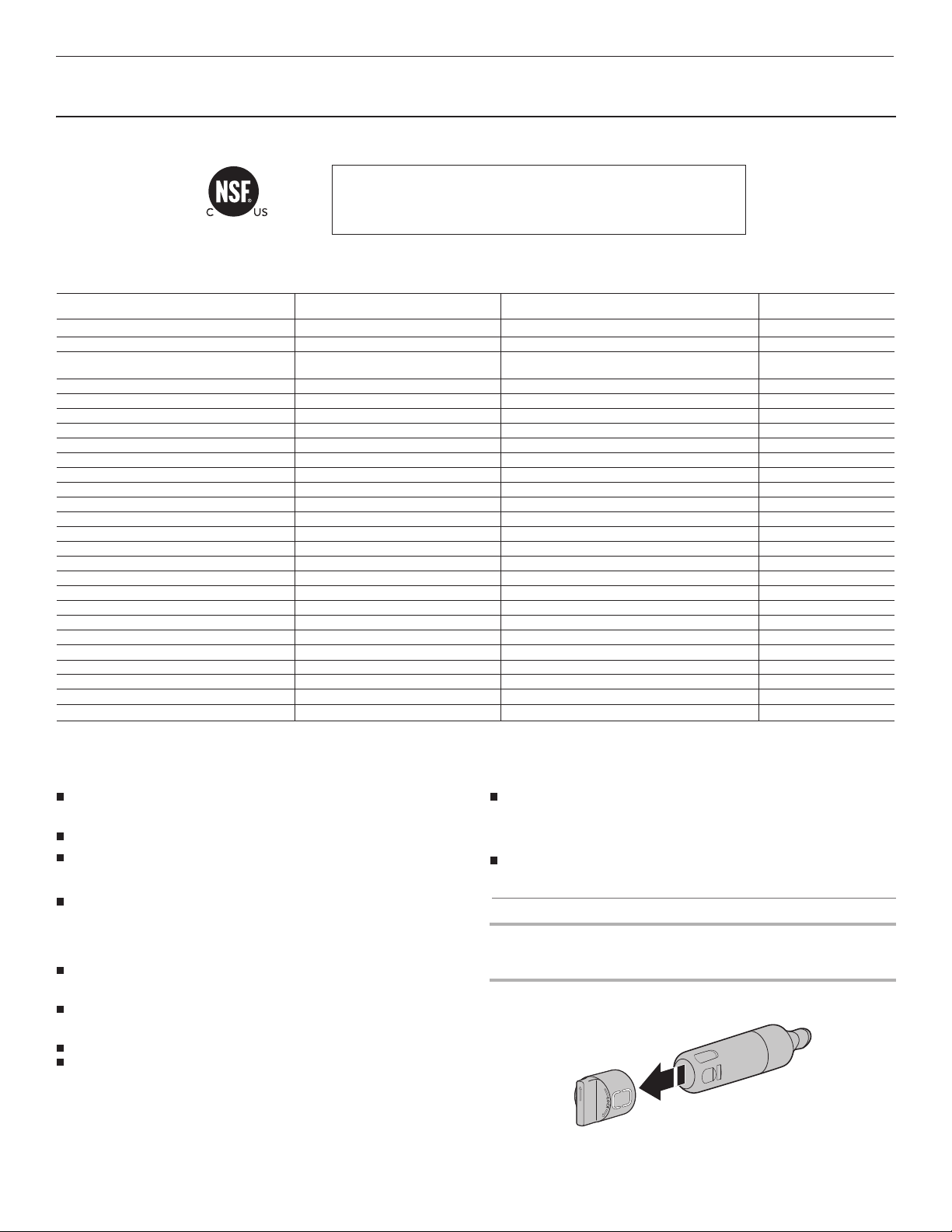
PERFORMANCE DATA SHEET
PERFORMANCE DATA SHEET
®
Water Filtration System
Model P9WB2L/P9RFWB2L Capacity 200 Gallons (757 Liters)
System tested and certified by NSF International against NSF/ANSI
Standard 42, Standard 53, Standard 401, and CSA B483.1 for
the reduction of contaminants specified on the Performance
Data Sheet.
This system has been tested according to NSF/ANSI Standards 42, 53, 401, and CSA B483.1 for the reduction of the substances listed below.
The concentration of the indicated substances in water entering the system was reduced to a concentration less than or equal to the permissible
limit for water leaving the system, as specified in NSF/ANSI Standards 42, 53, 401, and CSA B483.1.
Substance Reduction Aesthetic Effects Influent Challenge Concentration Maximum Permissable
%01 ± L/gm 0.2rodO/etsaT enirolhC
Particulate Class I
Contaminant Reduction Influent Challenge Concentration Maximum Permissable
Live Cysts
Test Parameters: pH = 7.5 ± 0.5 unless otherwise noted. Flow = 0.75 gpm (2.84 Lpm). Pressure = 60 psig (413.7 kPa). Temp. = 68°F to 71.6°F (20°C to
22°C). Rated service capacity = 200 gallons (757 liters).
The compounds certified under NSF 401 have been deemed as “emerging compounds/incidental contaminants.” Emerging compounds/incidental
contaminants are those compounds that have been detected in drinking water supplies at trace levels. While occurring at only trace levels, these
compounds can affec
It is important that operational, maintenance, and filter replacement
requirements be carried out for the product to perform as advertised.
Property damage can occur if all instructions are not followed.
The disposable cartridge must be changed at least every 6 months.
Use replacement filter P9RFWB2L, part #EDR2RXD1/EDR2RXD1B.
2015 suggested retail price of $49.99 U.S.A./$49.99 Canada. Prices
are subject to change without notice.
The filter monitor system measures the amount of water that passes
through the filter and alerts you when it is time to replace the filter.
Refer to the “Using the Controls” or “Water Filtration System” section
(in the User Instructions or User Guide) to learn how to check the
water filter status.
After changing the water filter, flush the water system. See “Water
and Ice Dispensers” or “Water Dispenser” in the User Instructions or
User Guide.
These contaminants are not necessarily in your water supply. While
testing was performed under standard laboratory conditions, actual
performance may vary.
The product is for cold water use only.
The water system must be installed in compliance with state and
local laws and regulations.
* At least 10,000 particle %9.99>noitcuder %58Lm/s
7
01sotsebsA
†
t the public acceptance/perception of drinking water quality.
to 108 fibers/L
0enadniL
††
Water Supply
Water Pressure
Water Temperature
Service Flow Rate
Product Water Concentration
Product Water Concentration
Do not use with water that is microbiologically unsafe or of unknown
quality without adequate disinfection before or after the system.
Systems certified for cyst reduction may be used on disinfected
waters that may contain filterable cysts.
EPA Est. No. 082047-TWN-001
Refer to the “Warranty” section (in the User Instructions or User
Guide) for the Manufacturer’s limited warranty, name, and telephone
number.
Application Guidelines/Water Supply Parameters
Potable City or Well
30 - 120 psi (207 - 827 kPa)
33° - 100°F (0.6° - 37.8°C)
0.75 gpm (2.84 L/min.) @ 60 psi
Average % Reduction
%0.79 noitcuder %05
Avera
ge %Reduction
%8.39L/gm 500.0%01 ± L/gm 510.0enezneB
%8.99L/gm 570.0%01 ± L/gm 522.0enezneborolhciD-p
%9.18L/gm 040.0%01 ± L/gm 80.0narufobraC
%59>L/gm 300.0%01 ± 510.0enehpaxoT
%0.78L/gm 300.0%01 ± L/gm 900.0enizartA
%99>%99
%9.69UTN 5.0 %01 ± UTN 11ytidibruT
%6.69L/gm 500.0%01 ± L/gm 510.0enelyhteorolhcarteT
%3.29L/gm 06.0%01 ± L/gm 8.1enezneborolhciD-O
%9.68L/gm 07.0%01 ± L/gm 1.2enezneblyhtE
%5.88L/gm 70.0%01 ± L/gm 012.0D - 4,2
%6.99L/gm 1.0%01 ± L/gm 0.2enerytS
%5.39L/gm 0.1%01 ± L/gm 0.3eneuloT
%7.18L/gm 200.0%01 ± L/gm 600.0nirdnE
%7.59L/gn 03%02 ± 002lolonetA
%1.69L/gn 02%02 ± 041mirpohtemirT
%3.69L/gn 02%02 ± 041noruniL
%3.59L/gn 02%02 ± 041enortsE
%5.59L/gn 002%02 ± 0041lonehplynoN
%6.89/%3.99>L/gm 010.0%01 ±L/gm 51.05.8 Hp @ / 5.6 Hp @ :daeL
%99.99>%59.99 .nim L/000,05
%2.99>L/gm 2000.0%01 ± 200.
%8.99>L/gm 70.0%01 ± L/gm 012.0enezneborolhcirT-4,2,1
Class I particle size: >0.5 to <1 um
*
†Based on the use of Cryptosporidium parvum oocysts
††Fibers greater than 10 um in length
NSF is a registered trademark of NSF International.
37
Page 38
ATTACH YOUR RECEIPT HERE. PROOF OF PURCHASE
W10815169D
5/18
IS REQUIRED TO OBTAIN WARRANTY SERVICE.
KITCHENAID®
REFRIGERATION
LIMITED WARRANTY
Please have the following information available when you call the
Customer eXperience Center:
■ Name, address, and telephone number
■ Model number and serial number
■ A clear, detailed description of the problem
■ Proof of purchase, including dealer or retailer name and address
IF YOU NEED SERVICE:
1. Before contacting us to arrange service, please determine whether your product requires repair. Some questions can be addressed without
service. Please take a few minutes to review the Troubleshooting section of the Use and Care Guide or visit producthelp.kitchenaid.com.
2. All warranty service is provided exclusively by our authorized KitchenAid Service Providers. IntheU.S.and Canada, direct all requests for
warranty service to:
KitchenAid Customer eXperience Center
In the U.S.A., call 1-800-422-1230. In Canada, call 1-800-807-6777.
If outside the 50 United States or Canada, contact your authorized KitchenAid dealer to determine whether another warranty applies.
TEN YEAR LIMITED WARRANTY
WHAT IS COVERED
ONE YEAR LIMITED WARRANTY (PARTS AND LABOR)
For one year from the date of purchase, when this major appliance is
installed, operated, and maintained according to instructions attached to or
furnished with the product, KitchenAid brand of Whirlpool Corporation or
Whirlpool Canada LP (hereafter “KitchenAid”) will pay for factory specied
replacement parts and repair labor to correct defects in materials or
workmanship that existed when this major appliance was purchased or, at
its sole discretion, replace the product. In the event of product replacement,
your appliance will be warranted for the remaining term of the original unit’s
warranty period.
SECOND THROUGH FIFTH YEAR LIMITED WARRANTY ON CAVITY
LINER AND SEALED REFRIGERATION SYSTEM (PARTS AND LABOR)
In the second through fth years from the date of original purchase, when
this major appliance is installed, operated, and maintained according to the
instructions attached to or furnished with the product, KitchenAid will pay
for factory specied replacement parts and repair labor for the following
components to correct non-cosmetic defects in materials or workmanship
in this part that prevent function of the refrigerator and that existed when
this major appliance was purchased:
■ Refrigerator/freezer cavity liner if the part cracks due to defective
materials or workmanship.
■ Sealed refrigeration system (includes compressor, evaporator, condenser,
dryer, and connecting tubing).
SIXTH THROUGH TENTH YEAR LIMITED WARRANTY ON SEALED
REFRIGERATION SYSTEM (PARTS ONLY—LABOR NOT INCLUDED)
In the sixth through tenth year from the date of purchase, when this major
appliance is installed, operated, and maintained according to instructions
attached to or furnished with the product, KitchenAid will pay for factory
specied replacement parts to correct defects in materials or workmanship
in the sealed refrigeration system (includes compressor, evaporator,
condenser, dryer, and connecting tubing) that existed when this major
appliance was purchased.
YOUR SOLE AND EXCLUSIVE REMEDY UNDER THIS LIMITED
WARRANTY SHALL BE PRODUCT REPAIR AS PROVIDED HEREIN.
Service must be provided by a KitchenAid designated service company.
This limited warranty is valid only in the United States or Canada and
applies only when the major appliance is used in the country in which it
was purchased. This limited warranty is effective from the date of original
consumer purchase. Proof of original purchase date is required to obtain
service under this limited warranty.
DISCLAIMER OF IMPLIED WARRANTIES
IMPLIED WARRANTIES, INCLUDING ANY IMPLIED WARRANTY OF MERCHANTABILITY OR IMPLIED WARRANTY OF FITNESS FOR A
PARTICULAR PURPOSE, ARE LIMITED TO TEN YEARS OR THE SHORTEST PERIOD ALLOWED BY LAW. Some states and provinces do
not allow limitations on the duration of implied warranties of merchantability or tness, so this limitation may not apply to you. This warranty
gives you specic legal rights, and you also may have other rights that vary from state to state or province to province.
DISCLAIMER OF REPRESENTATIONS OUTSIDE OF WARRANTY
KitchenAid makes no representations about the quality, durability, or need for service or repair of this major appliance other than the
representations contained in this warranty. If you want a longer or more comprehensive warranty than the limited warranty that comes
with this major appliance, you should ask KitchenAid or your retailer about buying an extended warranty.
LIMITATION OF REMEDIES: EXCLUSION OF INCIDENTAL AND CONSEQUENTIAL DAMAGES
YOUR SOLE AND EXCLUSIVE REMEDY UNDER THIS LIMITED WARRANTY SHALL BE PRODUCT REPAIR AS PROVIDED HEREIN.
KITCHENAID SHALL NOT BE LIABLE FOR INCIDENTAL OR CONSEQUENTIAL DAMAGES. Some states and provinces do not allow the
exclusion or limitation of incidental or consequential damages, so these limitations and exclusions may not apply to you. This warranty gives
you specic legal rights, and you also may have other rights that vary from state to state or province to province.
38
1. Commercial, non-residential, or multiple-family use, or use
inconsistent with published user, operator, or installation
instructions.
2. In-home instruction on how to use your product.
3. Service to correct improper product maintenance or
installation, installation not in accordance with electrical or
plumbing codes, or correction of household electrical or
plumbing (e.g., house wiring, fuses, or water inlet hoses).
4. Consumable parts (e.g., light bulbs, batteries, air or water
lters, preservation solutions).
5. Defects or damage caused by the use of non-genuine
KitchenAid parts or accessories.
6. Damage from accident, misuse, abuse, re, oods, acts of
God, or use with products not approved by KitchenAid.
7. Repairs to parts or systems to correct product damage
or defects caused by unauthorized service, alteration, or
modication of the appliance.
8. Cosmetic damage, including scratches, dents, chips, and
other damage to the appliance nishes, unless such damage
results from defects in materials and workmanship and is
reported to KitchenAid within 30 days.
9. Discoloration, rust, or oxidation of surfaces resulting from
caustic or corrosive environments including, but not limited
to, high salt concentrations, high moisture or humidity, or
exposure to chemicals.
10. Food or medicine loss due to product failure.
11. Pickup or delivery. This product is intended for in-home repair.
12. Travel or transportation expenses for service in remote
locations where an authorized KitchenAid servicer is not
available.
13. Removal or reinstallation of inaccessible appliances or built-
in xtures (e.g., trim, decorative panels, ooring, cabinetry,
islands, countertops, drywall) that interfere with servicing,
removal, or replacement of the product.
14. Service or parts for appliances with original model/serial
numbers removed, altered, or not easily determined.
The cost of repair or replacement under these excluded
circumstances shall be borne by thecustomer.
WHAT IS NOT COVERED
04/17
 Loading...