

Page 1

TM
G1000
Audio Panel Pilot’s Guide
for the Beechcraft A36/G36
Page 2

Record of Revisions
Revision Date of Revision Revision Page Range Description
A 07/20/05 6-1 – 6-11 Initial release.
Garmin G1000 Pilot’s Guide for the Beechcraft A36/G36
190-00573-00 Rev. A
Page 3

DESCRIPTION
6.1 INTRODUCTION
This Pilot’s Guide describes the Garmin GMA 1347
audio panel and its operating instructions.
The Garmin GMA 1347 is an audio control panel and
marker beacon system. Pressing the audio panel keys
controls audio selection of COM, NAV and intercom. LED
annunciators indicate when a key function is selected.
The audio panel includes a six-position intercom
system (ICS) with electronic cabin noise de-emphasis
and two stereo music inputs. Separate knobs control
intercom audio level for the pilot and copilot/passenger.
The intercom provides four selectable modes of isolation
(All, Crew, Pilot, Copilot).
A cabin speaker is available for listening to selected
aircraft radios. MASQ (Master Avionics Squelch) processing
reduces ambient noise from the avionics inputs.
Each microphone input has an automatic squelch
threshold. Manual squelch is available by pressing the
MAN SQ key.
The audio panel provides a digital recorder that can
play back up to two and a half minutes of COM audio.
Recording is automatic when a COM signal is received.
Playback is controlled by pressing the PLAY key. Playback
can be stopped by pressing the
MKR/MUTE key.
WARNING: When the GMA 1347 Audio panel is
turned OFF or is inoperative, certain autopilots
are affected. No warning tone is supplied when
the autopilot disengages and the middle marker
sense signal is not supplied.
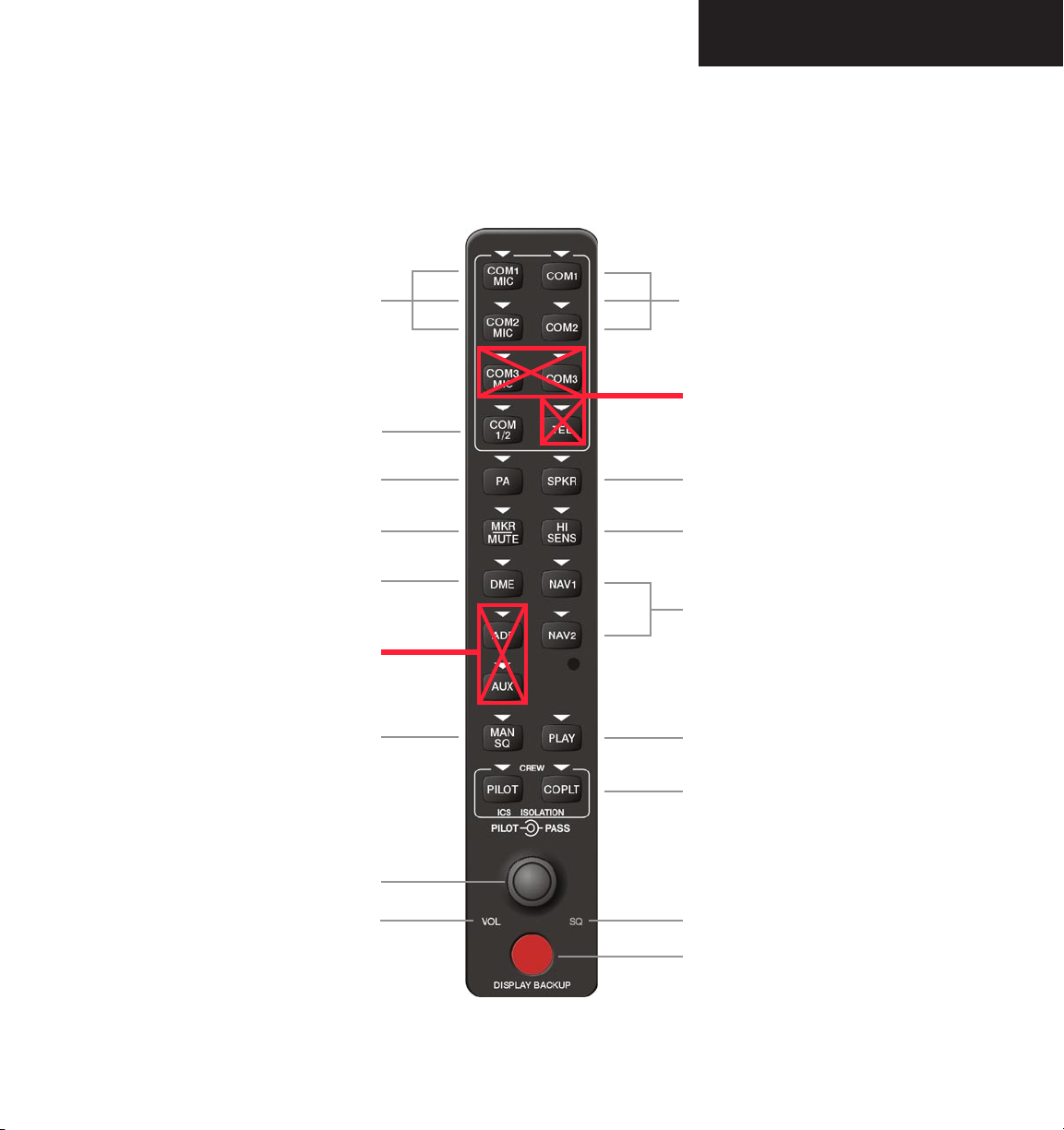
The audio panel features three (3) major groups of
keys as shown in Figure 6.1.1:
• Communication keys
• Navigation keys
• Intercom system (ICS) keys
Each key is labeled to indicate the name of the function.
The triangular annunciator above each key indicates when
the key function is selected.
The knobs at the bottom of the unit control ICS volume
and squelch threshold levels. The small knob adjusts the
volume/squelch level for the pilot. The large knob adjusts
the volume/squelch level for the copilot/passenger. The
red DISPLAY BACKUP button below the dual volume/
squelch knob controls reversionary mode selection.
TRANSCEIVERS
The audio panel handles two separate transceivers:
• COM1 MIC
• COM2 MIC
The unit controls marker beacon receiver audio and
features marker beacon audio muting.
As part of the G1000 Integrated Cockpit System, the
GMA 1347 also controls the display reversionary mode.
190-00573-00 Rev. A
NOTE: A push-to-talk (PTT) switch must be
pressed to transmit on the selected radio.
The audio panel accepts up to six (6) microphone
inputs, providing two (2) crew and four (4) passenger
intercom stations in the aircraft.
Garmin G1000 Pilot’s Guide for the Beechcraft A36/G36
6-1
Page 4

DESCRIPTION
MONO/STEREO HEADSETS
The audio panel can accommodate up to six (6)
headsets, pilot, copilot and up to four (4) passengers.
Stereo headsets are recommended for use in this aircraft.
Using a monaural headset in a stereo jack shorts the
right headset channel output to ground. While this does
not damage the audio panel, a person listening on a
monaural headset hears only the left channel in both ears.
If a monaural headset is used at one of the other positions,
any other listener using a stereo headset hears audio in the
left ear only, unless their headset has a mono/stereo switch
that is set to mono.
UNMUTED/UNSWITCHED INPUTS
The unit provides four (4) unmuted/unswitched inputs
that are always present on the headsets or speaker. These
inputs are the following aural warnings:
• ALTITUDE WARNING
• UNSWITCHED 1
• UNSWITCHED 2
• UNSWITCHED 3
FRONT PANEL CONTROLS
• Transceiver audio selector keys
(COM1, COM2)
• Transmitter (audio/mic) selection keys
(COM1 MIC, COM2 MIC)
• Passenger address key
(PA)
• Speaker key
(SPKR)
• Marker beacon receiver audio select/mute key
(MKR/MUTE)
• Marker beacon receiver high sensitivity key
(HI SENS)
• Aircraft radio audio selector keys
(NAV1, NAV2)
• Intercom manual squelch key
(MAN SQ)
• Digital recording playback key
(PLAY)
• Intercom system (ICS) isolation keys
(PILOT, COPLT)
• Volume/squelch knob
(VOL/SQ)
• Reversionary mode button
(DISPLAY BACKUP)
Garmin G1000 Pilot’s Guide for the Beechcraft A36/G36
190-00573-00 Rev. A6-2
Page 5
DESCRIPTION
Transmitters
Not recommended for
use in A36/G36 aircraft
Passenger Address
Marker Beacon/Mute
Optional on
A36/G36 aircraft
Disabled on
A36/G36 aircraft
Manual Squelch
Transceiver Audio
Disabled on
A36/G36 Aircraft
Speaker
Marker Beacon Signal Sensitivity
Navigation Radio Audio
Digital Recording Playback
ICS Isolation
190-00573-00 Rev. A
VOL/SQ
VOL Annunciation
Garmin G1000 Pilot’s Guide for the Beechcraft A36/G36
SQ Annunciation
Reversionary Mode Control
Figure 6.1.1 Front Panel Controls
6-3
Page 6
OPERATION
6.2 OPERATION
POWER-UP AND FAIL-SAFE OPERATION
Power-up
The audio panel performs a self-test during power-up.
All panel annunciator lights illuminate for approximately
two (2) seconds. Once the self-test is completed, the
settings are restored to the ones in use before the unit was
last turned off.
Fail-safe Operation
A fail-safe circuit connects the pilot’s headset and
microphone directly to COM1 in case power is interrupted
or the unit is turned off. In this case, audio is not available
on the speaker.
SELECTING AND DESELECTING KEYS
Pressing a key activates and deactivates the function,
turning the triangular annunciator light on and off.
LIGHTING
Key annunciators and backlighting are controlled
automatically by the G1000 Control Display Unit (CDU).
TRANSCEIVER KEYS
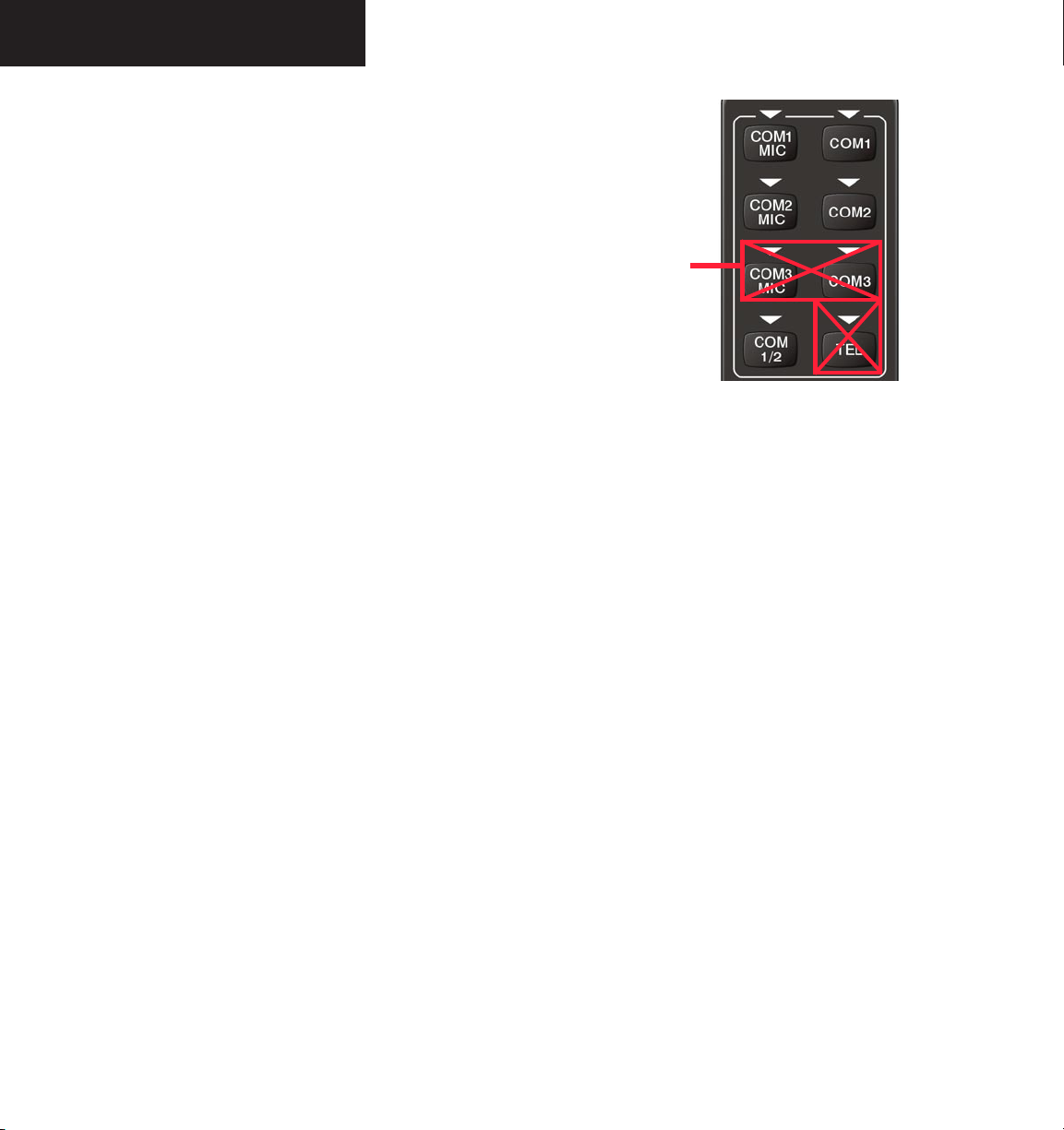
The following four (4) transceiver keys appear at the
top of the audio panel front panel: COM1 MIC, COM2
MIC, COM1 and COM2. COM audio can be selected
by pressing either the desired COM key or by pressing a
COM MIC key.
Disabled on
A36/G36 aircraft
Figure 6.2.1 Transceiver Keys
COM MIC Keys
Pressing the COM1 MIC or COM2 MIC key selects
the COM radio as the active transceiver. The receiver
audio key, COM1, COM2 is also selected. The COM
frequency is highlighted in green in the active frequency
field of the PFD and MFD.
Only one microphone source can be selected at a time.
If COM2 MIC is pressed when COM1 MIC is active, the
unit switches to COM2.
COM Keys
Pressing the COM1 or COM2 receiver key selects the
COM radio as an active receiver source. Any combination
of radios can be selected separately or simultaneously
regardless of the active transceiver selection. The active
COM radio is always heard through the headsets or on the
speaker, if selected.
6-4
Garmin G1000 Pilot’s Guide for the Beechcraft A36/G36
190-00573-00 Rev. A
Page 7

OPERATION
Transmitting
When a transmitter is keyed, the active transceiver
MIC key annunciator blinks approximately once per
second. A white TX indication appears next to the active
COM frequency on both the PFD and the MFD during
transmission.
NOTE: Audio level of the COM radio(s) is
controlled by the COM volume controls located
on both the PFD and MFD (see the VHF NAV/COM
Pilot’s Guide).
OPTIONAL COM MUTING
COM muting on receive and COM muting on transmit
options can be disabled if desired. Contact a Garminauthorized service center for details.
COM Muting on Receive
When COM muting on receive is enabled, all secondary
COM audio is muted during detection of received primary
COM audio.
SPLIT COM FUNCTION
Pressing the COM 1/2 key selects the split COM
function. During split COM operation, the COM1,
COM1 MIC, COM2 and COM2 MIC keys are active.
When the COM 1/2 key is selected, COM1 is used by
the pilot for transmission and COM2 is used by the copilot.
The COM1 MIC annunciator blinks when the pilot’s
microphone is keyed and the COM2 MIC annunciator
blinks when the copilot’s microphone is keyed.
In this mode, both the pilot and the copilot can
transmit simultaneously over separate radios. The pilot
can still monitor NAV1, NAV2, DME and MKR audio as
selected, but the copilot is only able to monitor COM2.
Split COM mode is cancelled by pressing the
COM 1/2
key again.
NOTE: Split COM performance varies significantly
across installations and is affected by both
the distance between the antennas and the
separation of the tuned frequencies.
PA FUNCTION
COM Muting on Transmit
When COM muting on transmit is enabled, all
secondary COM audio is muted during transmission over
the primary COM radio.
190-00573-00 Rev. A
NOTE: If COM muting on receive option is
enabled, only primary COM radio reception is
recorded by the digital clearance recorder.
Garmin G1000 Pilot’s Guide for the Beechcraft A36/G36
A passenger address function is provided by pressing
the PA key. Push-to-talk (PTT) must be used to deliver PA
announcements over the headsets.
SPEAKER
All of the radios can be heard over the cabin speaker.
Pressing the
speaker. Speaker audio is muted when the PTT switch
is keyed.
The speaker volume is adjustable above and below
a nominal value. Contact a Garmin-authorized service
center for details.
SPKR key selects and deselects the cabin
6-5
Page 8
OPERATION
MARKER BEACON RECEIVER
Description and Operation
The audio panel marker beacon is used as part of the
ILS system. The marker beacon receiver is always ON and
receives at 75 MHz. The audio panel provides a marker
audio muting capability.
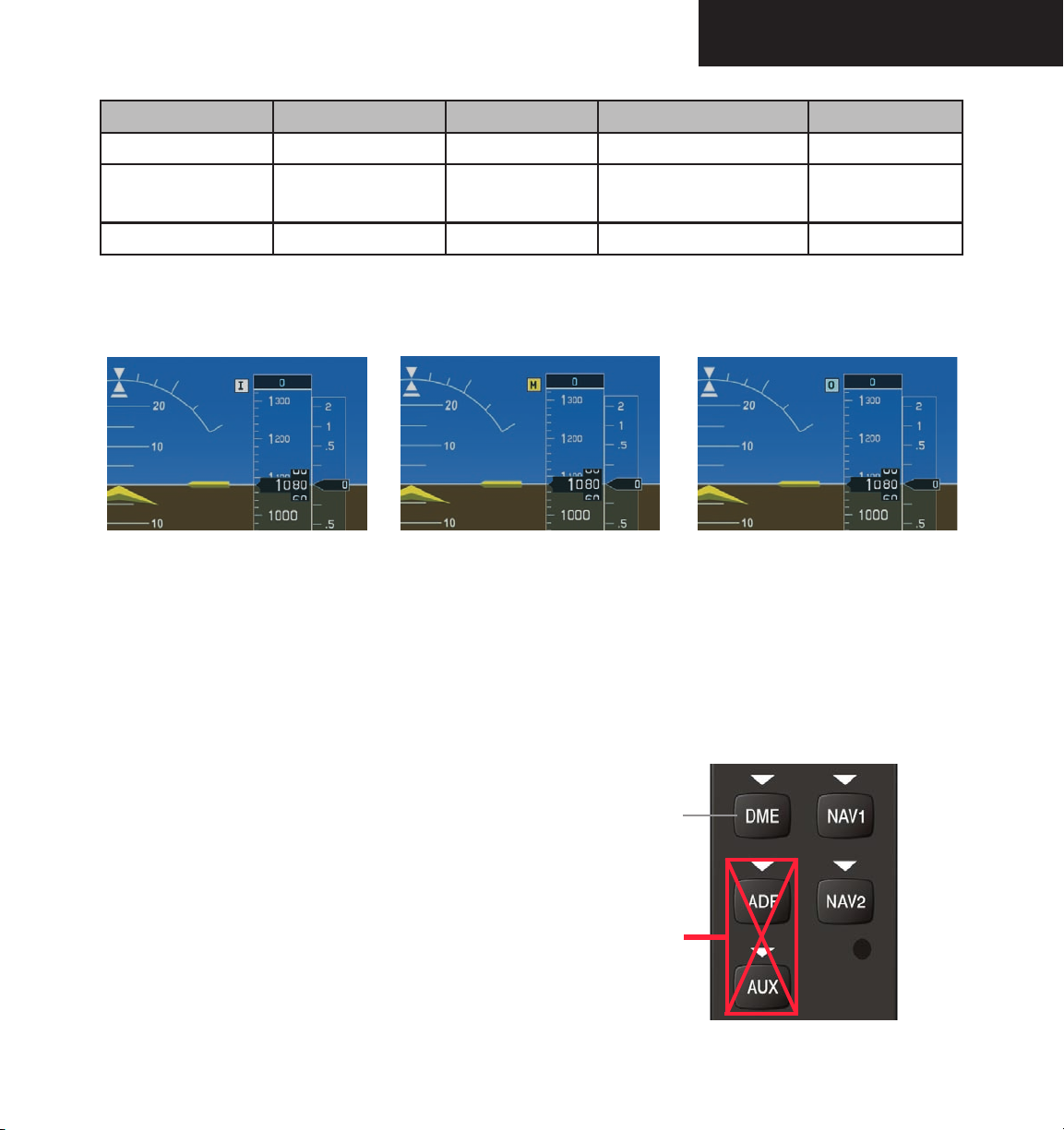
The receiver detects the three (3) marker tones,
middle and inner, and illuminates the appropriate marker
beacon indicators. The marker indicators are located to
the left of the Altimeter on the PFD (Figure 6.2.3). The
outer marker frequency is 400 Hz with a blue indicator,
the middle marker frequency is 1300Hz with an amber
indicator and the inner marker frequency is 3000 Hz with
a white indicator. Refer to Table 6.2.1 for a summary of
the marker beacon signal characteristics.
outer,
NOTE: The marker beacon receiver indicators
operate independently of the marker beacon
audio and cannot be turned off.
The marker beacon audio output level is adjustable by
a Garmin-authorized service center.
NOTE: The GMA 1347 is capable of driving
external marker beacon lamps.
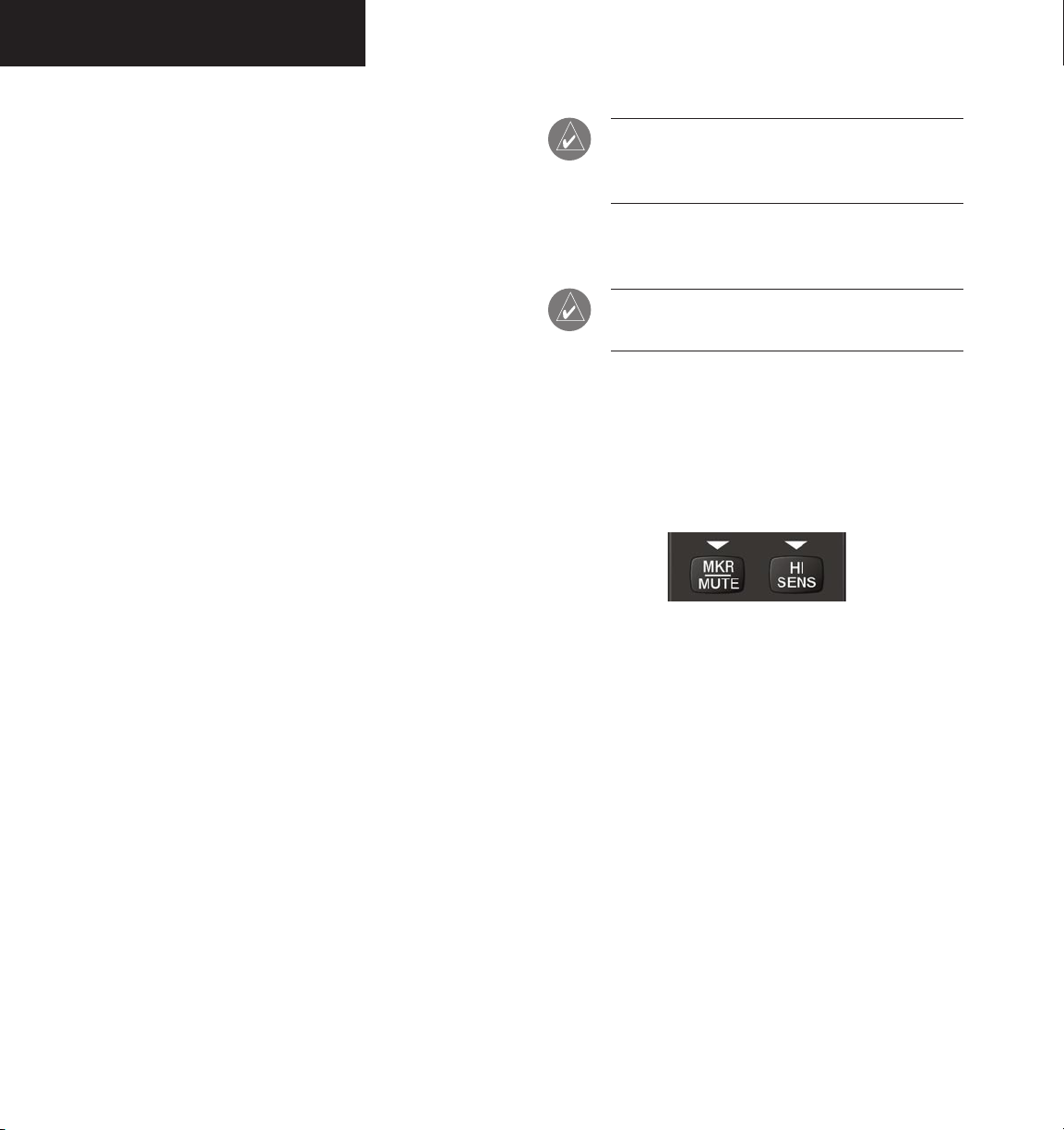
Marker Beacon Signal Sensitivity
The HI SENS key can be pressed for increased marker
beacon signal sensitivity. The HI SENS function is used
to receive an earlier indication of nearing a marker during
an approach.
When the
MKR/MUTE key is selected, the annunciator
light illuminates and the audio signal can be heard over
the speaker or headsets during marker reception.
When the
MKR/MUTE key is annunciated and a
marker beacon tone is received, pressing the MKR/MUTE
key mutes the audio but does not affect the annunciators.
The audio returns when the next marker signal is received.
If the MKR/MUTE key is pressed during signal reception,
while marker beacon audio is muted, marker audio and
the MKR/MUTE key annunciator light are turned off.
Figure 6.2.2 Marker Beacon Keys
MARKER BEACON VOLUME ADJUSTMENT
The level of marker beacon receiver audio can be
adjusted by a Garmin-authorized service center, if
desired.
6-6
Garmin G1000 Pilot’s Guide for the Beechcraft A36/G36
190-00573-00 Rev. A
Page 9
OPERATION
Beacon Audio Frequency Audio Keying Rate Lamp Color
Outer Marker
Middle Marker
Airway/Inner Marker
Inner Marker Middle Marker Outer Marker
400 Hz — — — 2 dashes per second Blue
1,300 Hz • — • —
95 dot-dash combinations
per minute
Amber
3,000 Hz • • • • 6 dots per second White
Table 6.2.1 Marker Beacon Signal Characteristics
Figure 6.2.3 Marker Beacon Signal Indicator Lights on the PFD
NAVIGATION RADIOS
Pressing NAV1, NAV2 or optional DME selects and
deselects the radio source and the annunciator
(Figure 6.2.4). Selected audio can be heard over the
headset and the speakers. All radio keys can be selected
individually or together.
When no further navigation radio audio is heard, the
amount of background noise is reduced by the
Avionics Squelch (MASQ) feature.
190-00573-00 Rev. A
Optional on
A36/G36 aircraft
Disabled on
A36/G36 aircraft
Master
Figure 6.2.4 Navigation Radio Keys
Garmin G1000 Pilot’s Guide for the Beechcraft A36/G36
6-7
Page 10
OPERATION
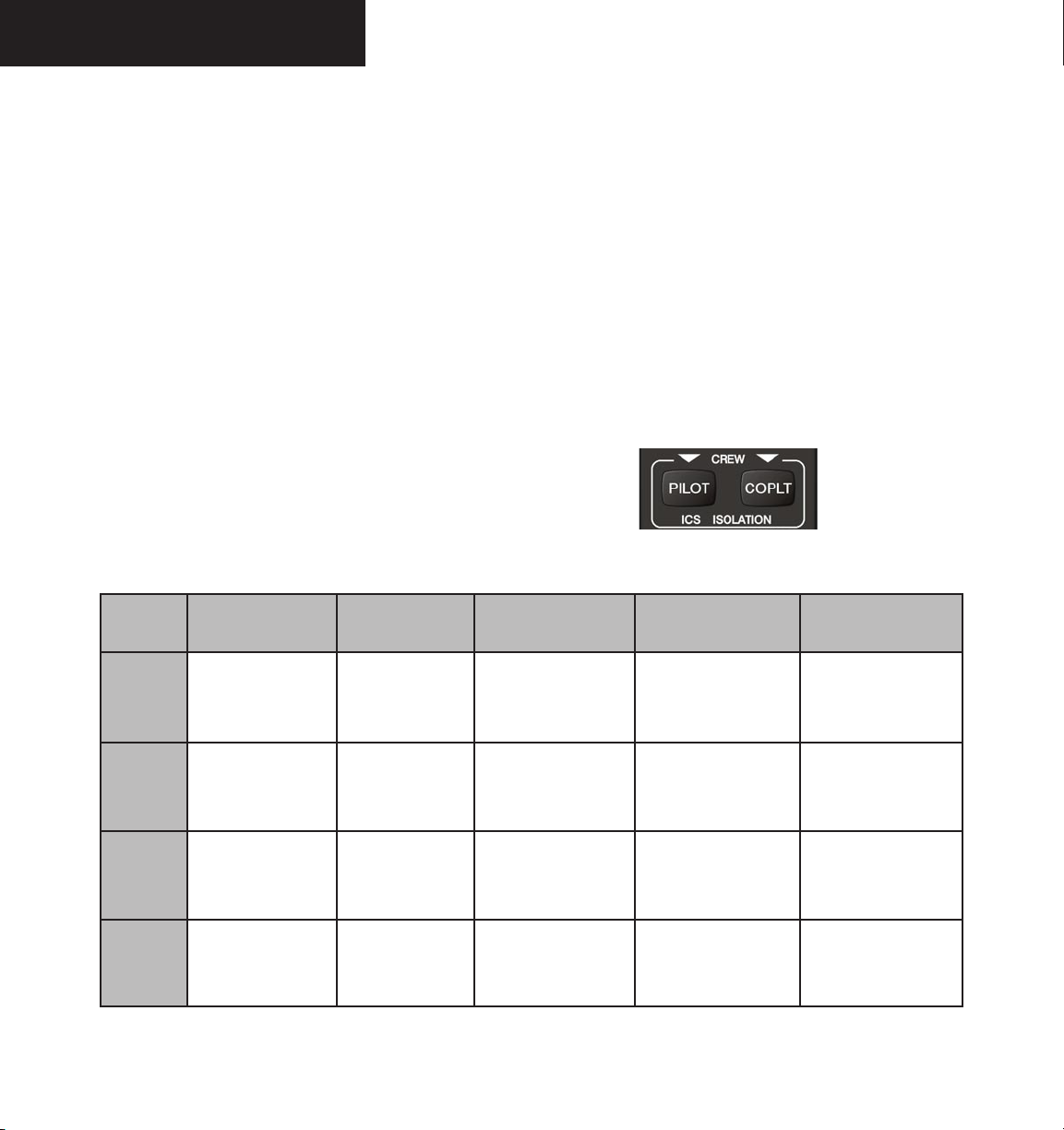
INTERCOM SYSTEM (ICS) ISOLATION
The intercom system (ICS) provides four (4) isolation
modes: ALL, PILOT, COPILOT and CREW. The desired
mode can be selected or deselected using the PILOT and
COPLT keys. The
are summarized in the table below.
PILOT Mode
PILOT isolation is selected when only the PILOT
key is annunciated. In PILOT mode, the pilot can hear
the selected radios, and the copilot and passengers can
communicate with each other.
COPILOT Mode
COPILOT isolation is selected when only the COPLT
key is annunciated. In COPILOT mode, the copilot is
isolated from everyone else. The pilot and passengers can
hear the selected radios and communicate with each other.
Mode
four (4) possible ICS isolation states
PILOT KEY
ANNUNCIATOR
COPLT KEY
ANNUNCIATOR
Pilot Hears Copilot Hears Passenger Hears
CREW Mode
CREW mode is selected when both the PILOT and
COPLT keys are annunciated. In CREW mode, both
the pilot and copilot can hear the selected radios
and
communicate with each other, while the passengers are
isolated but can communicate with each other.
ALL Mode
ALL mode is selected when the PILOT and the COPLT
keys are not annunciated. In ALL mode, everyone hears
the selected radios and is able to communicate with
everyone else.
Figure 6.2.5 ICS Isolation Keys
6-8
ALL
PILOT
COPILOT
CREW
OFF OFF
ON OFF
OFF ON
ON ON
Garmin G1000 Pilot’s Guide for the Beechcraft A36/G36
Selected radios;
pilot; copilot;
passengers; MUSIC 1
Selected radios;
pilot
Selected radios;
pilot; passengers;
MUSIC 1
Selected radios;
pilot; copilot
Table 6.2.2 ICS Isolation Modes
Selected radios;
pilot; copilot;
passengers; MUSIC 1
Copilot;
passengers; MUSIC 1
Copilot
Selected radios;
pilot; copilot
Selected radios;
pilot; copilot;
passengers; MUSIC 2
Copilot;
passengers;
MUSIC 2
Selected radios;
pilot; passengers;
MUSIC 2
Passengers;
MUSIC 2
190-00573-00 Rev. A
Page 11
INTERCOM VOLUME AND SQUELCH
CONTROL
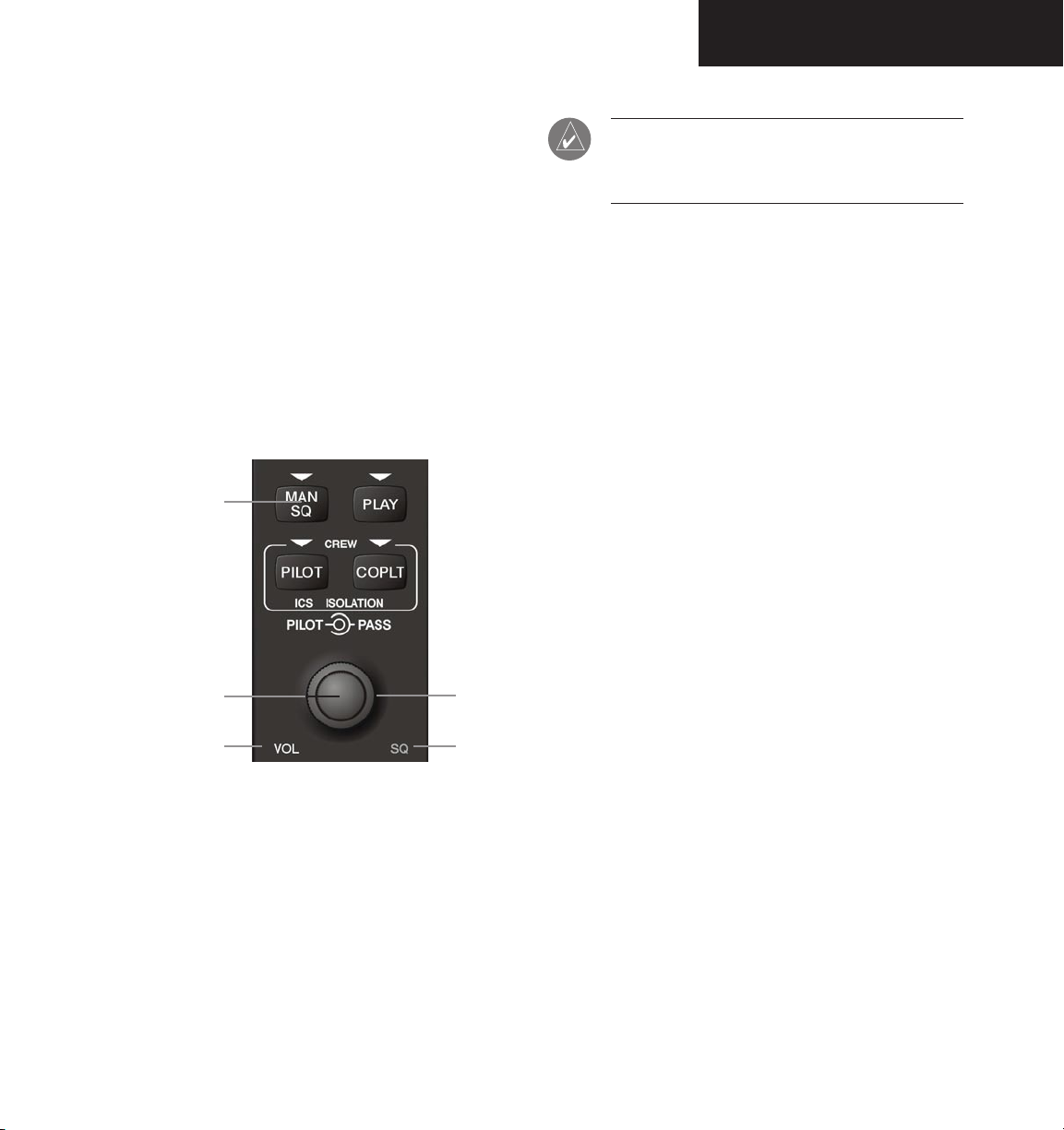
The MAN SQ key and VOL/SQ knob control the
volume and squelch of the intercom. The MAN SQ key
allows either automatic or manual control of the squelch
setting. The VOL/SQ knob controls volume or manual
squelch adjustment for the pilot and copilot/passenger.
When the MAN SQ annunciator is not lit (auto-squelch
is on), the
When the MAN SQ annunciator is lit (manual squelch),
the VOL/SQ knob controls both volume and squelch.
VOL/SQ knob controls only the volume.
OPERATION
NOTE: When the MAN SQ key is not lit (auto-
squelch is active), pressing the VOL/SQ knob has
no effect on the VOL/SQ selection.
Intercom Manual Squelch Control
The intercom squelch function has the ability to quiet
the ambient cockpit noise when no person is talking. Each
microphone input has an automatic squelch threshold.
Manual squelch adjustment is also available if desired.
Pressing the MAN SQ key toggles between the
automatic and manual squelch mode. When in manual
squelch, the MAN SQ annunciator is lit.
Automatic/Manual
Squelch
Pilot
Volume
Figure 6.2.6 Volume/Squelch Control
Copilot
Squelch
Intercom Volume Control
The intercom volume is controlled with the VOL/
SQ knob. The small knob controls the pilot volume.
The large knob controls the copilot/passenger volume.
Turning the knob clockwise increases volume, turning
counterclockwise decreases volume. When squelch is
automatic (MAN SQ annunciator is not lit) and the VOL
annunciator at the bottom of the unit is lit, intercom
volume may now be adjusted.
In manual squelch mode the
VOL/SQ knob adjusts
either the volume or squelch threshold level.
Pressing the
VOL/SQ knob toggles between volume
and squelch adjustment. The annunciator at the bottom of
the unit indicates which function the knob is controlling.
In manual squelch mode, the small
VOL/SQ knob
controls pilot squelch threshold. The large VOL/SQ
knob controls copilot/passenger squelch threshold.
Turning either knob clockwise increases squelch level,
counterclockwise decreases squelch.
ENTERTAINMENT INPUTS
The GMA 1347 provides two stereo auxiliary
entertainment inputs; MUSIC 1 and MUSIC 2. These
inputs are compatible with popular portable entertainment
devices such as MP3 and CD players. Two 3.5 mm stereo
phone jacks are installed in convenient locations for audio
connection. The headphone outputs of the entertainment
devices are plugged into the MUSIC 1 or MUSIC 2 jacks.
190-00573-00 Rev. A
Garmin G1000 Pilot’s Guide for the Beechcraft A36/G36
6-9
Page 12

OPERATION
The current ICS isolation mode affects the distribution
of the entertainment inputs MUSIC 1 and MUSIC 2.
NOTE: MUSIC 1 and MUSIC 2 cannot be
completely turned off. Audio level for these
inputs can be set above and below a nominal
value. Contact a Garmin-authorized service
center for adjustment.
MUSIC 1
MUSIC 1 can be heard by the pilot in COPILOT mode
and in ALL mode, and can be heard by the copilot in
PILOT mode and in ALL mode.
MUSIC 1 Muting
MUSIC 1 muting occurs when aircraft radio, marker
beacon or ICS activity is heard. MUSIC 1 is always softmuted when an interruption occurs from an aircraft radio.
Soft muting is the gradual return of MUSIC 1 to its original
volume level. The time required for MUSIC 1 volume to
return at the headset outputs is between one-half and four
seconds.
NOTE: MUSIC 1 muting during ICS activity can be
disabled. Contact a Garmin-authorized service
center for details.
NOTE: If the MKR/MUTE key is pressed and
held for three (3) seconds, the GMA 1347 toggles
music muting ON and OFF. When toggling, either
one (1) or two (2) beeps can be heard; one (1)
beep indicates that music muting is enabled, two
(2) beeps indicate music muting is disabled.
MUSIC 2
MUSIC 2 can be heard only by the passengers and is
never muted.
GDL 69/69A XM RADIO SYSTEM
When no external entertainment music is connected
to the audio panel through MUSIC 1 and
MUSIC 2
jacks, audio from the GDL 69A is heard by the pilot and
passengers simultaneously.
Connecting a stereo input to either MUSIC 1 or
MUSIC 2 removes the GDL 69A audio from that input.
For example, if passengers prefer music while the pilot
listens to the GDL 69A, the entertainment audio would be
connected to the MUSIC 2 jack.
Refer to the Optional Equipment Pilot’s Guide (Tab 11)
for more details on the GDL 69/69A.
MASTER AVIONICS SQUELCH (MASQ)
MASQ (Master Avionics Squelch) reduces ambient
noise from the aircraft radios. When no audio is
detected, MASQ processing further reduces the amount of
background noise from the radios.
The Master Avionics Squelch (MASQ) threshold level
can be adjusted or disabled by a Garmin-authorized
service center.
6-10
Garmin G1000 Pilot’s Guide for the Beechcraft A36/G36
190-00573-00 Rev. A
Page 13
OPERATION
DIGITAL CLEARANCE RECORDER WITH
PLAYBACK CAPABILITY
The audio panel contains a digital clearance recorder
that plays back up to 2.5 minutes of COM signal recording.
Recorded COM audio is stored in separate memory blocks.
Audio from all of the selected COM radios are recorded
and can be played back. Anyone able to hear the selected
COM radios is able to hear the COM audio playback.
Once the 2.5 minutes of recording time have been
reached, the recorder begins recording over the stored
memory blocks, starting from the oldest block. Powering
off the unit automatically clears all recorded blocks.
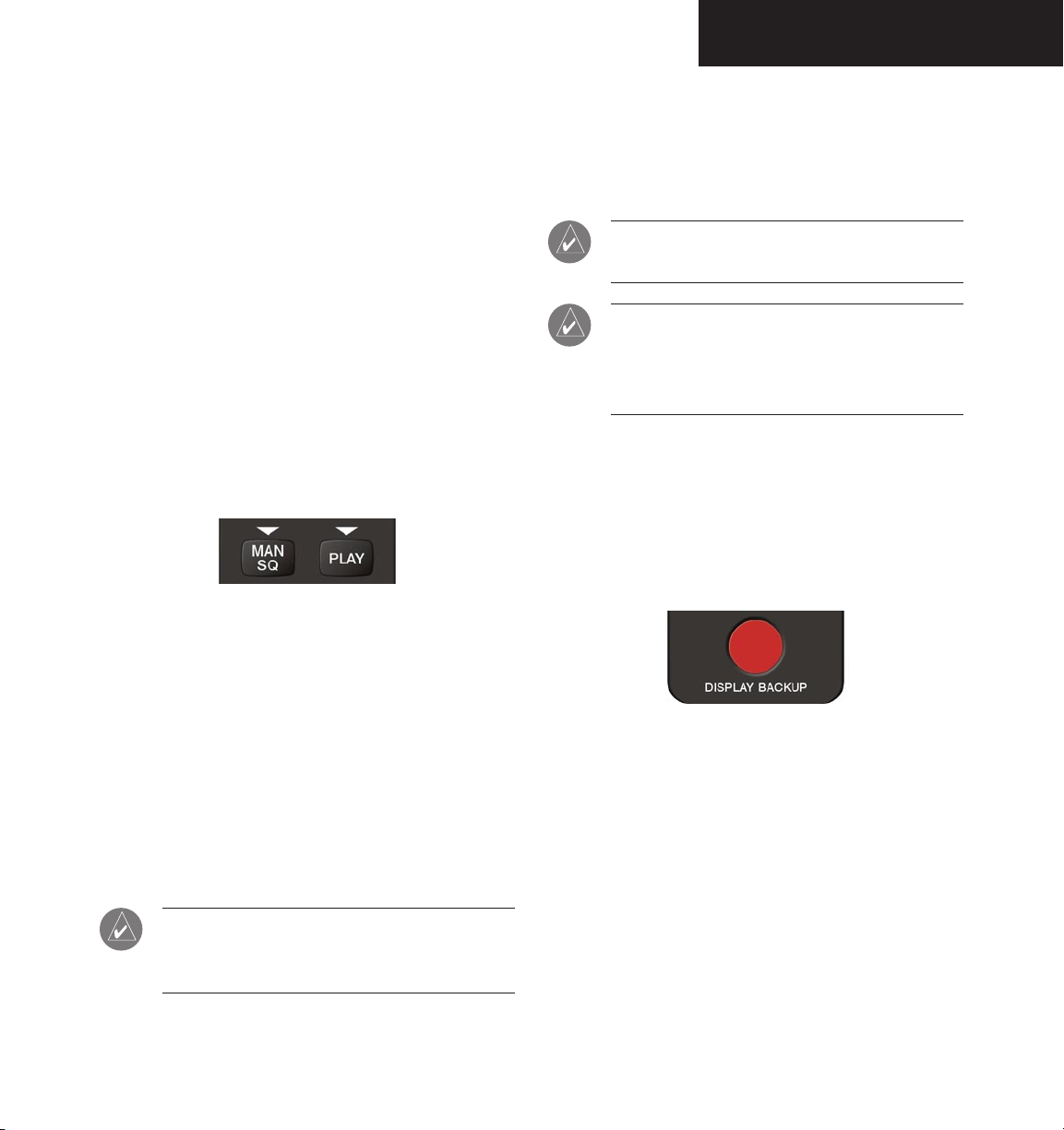
Figure 6.2.7 Playback Key
During playback, the PLAY annunciator light blinks
approximately once per second. If a COM input signal is
detected during playback, playback is halted and the new
COM audio is recorded as the latest block.
NOTE: The recorder can be permanently disabled
by a Garmin-authorized service center.
NOTE: If the COM muting on receive option
is enabled, only the primary COM radio audio
reception is recorded by the digital clearance
recorder.
REVERSIONARY MODE
The red DISPLAY BACKUP button selects the
reversionary mode for all displays. Reversionary mode
operation displays important flight and engine information
on both the PFD and MFD, in case of display failure.
The PLAY key controls the playback function.
• Pressing PLAY once plays back the latest recorded
• Pressing PLAY during playback of a memory block
190-00573-00 Rev. A
memory block, then returns to normal operation.
halts the playback of this block and plays back the
preceding recorded block. The PLAY key can be
used to backtrack through the recorded memory
blocks to reach and play back any desired block.
NOTE: Pressing the MKR/MUTE key during
playback halts playback and returns the recorder/
playback to normal operation.
Garmin G1000 Pilot’s Guide for the Beechcraft A36/G36
Figure 6.2.8 Reversionary Mode Button
6-11
Page 14

Garmin International, Inc.
1200 East 151st Street
Olathe, KS 66062, U.S.A.
p: 913.397.8200 f: 913.397.8282
Garmin AT, Inc.
2345 Turner Road SE
Salem, OR 97302, U.S.A.
p: 503.391.3411 f: 503.364.2138
Garmin (Europe) Ltd.
Unit 5, The Quadrangle
Abbey Park Industrial Estate
Romsey, SO51 9DL, U.K.
p: 44/0870.851241 f: 44/0870.851251
Garmin Corporation
No. 68, Jangshu 2nd Road
Shijr, Taipei County, Taiwan
p: 886/2.2642.9199 f: 886/2.2642.9099
www.garmin.com
190-00573-00 Rev. A © 2005 Garmin Ltd. or its subsidiaries
 Loading...