

Page 1
All about the
Use & Care
of your Refrigerator
TABLE OF CONTENTS
Important Safety Instructions ......................2
Features At A Glance ..................................4
Installation ................................................5
Door Removal Instructions ..........................7
Installing Door Handles .............................10
Connecting the Water Supply ....................11
Using the Display .....................................13
Using the Dispenser .................................16
www.frigidaire.com USA 1-800-374-4432 www.frigidaire.ca Canada 1-800-265-8352
Storage Features ......................................19
Storing Food and Saving Energy ................23
Normal Operating Sounds and Sights .........24
Changing the Filter ...................................25
Care & Cleaning .......................................27
Before Calling .........................................29
Major Appliance Warranty .........................33
A10883101 (August 2018)
Page 2
IMPORTANT SAFETY INSTRUCTIONS
WARNING
Please read all instructions before using this
refrigerator.
Safety Instructions
• DO NOT store or use gasoline, or other
ammable liquids in the vicinity of this or
any other appliance. Read product labels
for warnings regarding ammability and
other hazards.
• DO NOT operate the refrigerator in the
presence of explosive fumes.
• Avoid contact with any moving parts of
automatic ice maker.
• Remove all staples from the carton.
Staples can cause severe cuts, and also
destroy nishes if they come in contact
with other appliances or furniture.
Safety Denitions
This is the safety alert symbol. It is used to
alert of potential personal injury hazards. Obey
all safety messages that follow this symbol to
avoid possible injury or death.
DANGER
DANGER indicates an imminently hazardous
situation which, if not avoided, will result in
death or serious injury.
Installation Checklist
Doors
Handles are secure and tight
Door seals completely to cabinet on all
sides
Leveling
Refrigerator is level side-to-side and
slightly elevated in front to assist with
door and drawer closing (front should be
higher than back)
Cabinet is setting solid on all corners
Electrical Power
House power turned on
Refrigerator plugged in
Ice Maker
House water supply connected to
refrigerator
No water leaks present at all connections
- recheck in 24 hours
Ice maker is turned ON
Ice & water dispenser operates correctly
Final Checks
Shipping material removed
Fresh food and freezer temperatures set
Registration card sent in
WARNING
WARNING indicates a potentially hazardous
situation which, if not avoided, could result
in death or serious injury.
CAUTION
CAUTION indicates a potentially hazardous
situation which, if not avoided, may result in
minor or moderate injury.
IMPORTANT
IMPORTANT indicates installation, operation
or maintenance information which is important but not hazard-related.
2
Child Safety
Destroy or recycle the carton, plastic bags, and
any exterior wrapping material immediately
after the refrigerator is unpacked. Children
should NEVER use these items to play.
Cartons covered with rugs, bedspreads, plastic
sheets or stretch wrap may become airtight
chambers, and can quickly cause suffocation.
Page 3
IMPORTANT SAFETY INSTRUCTIONS
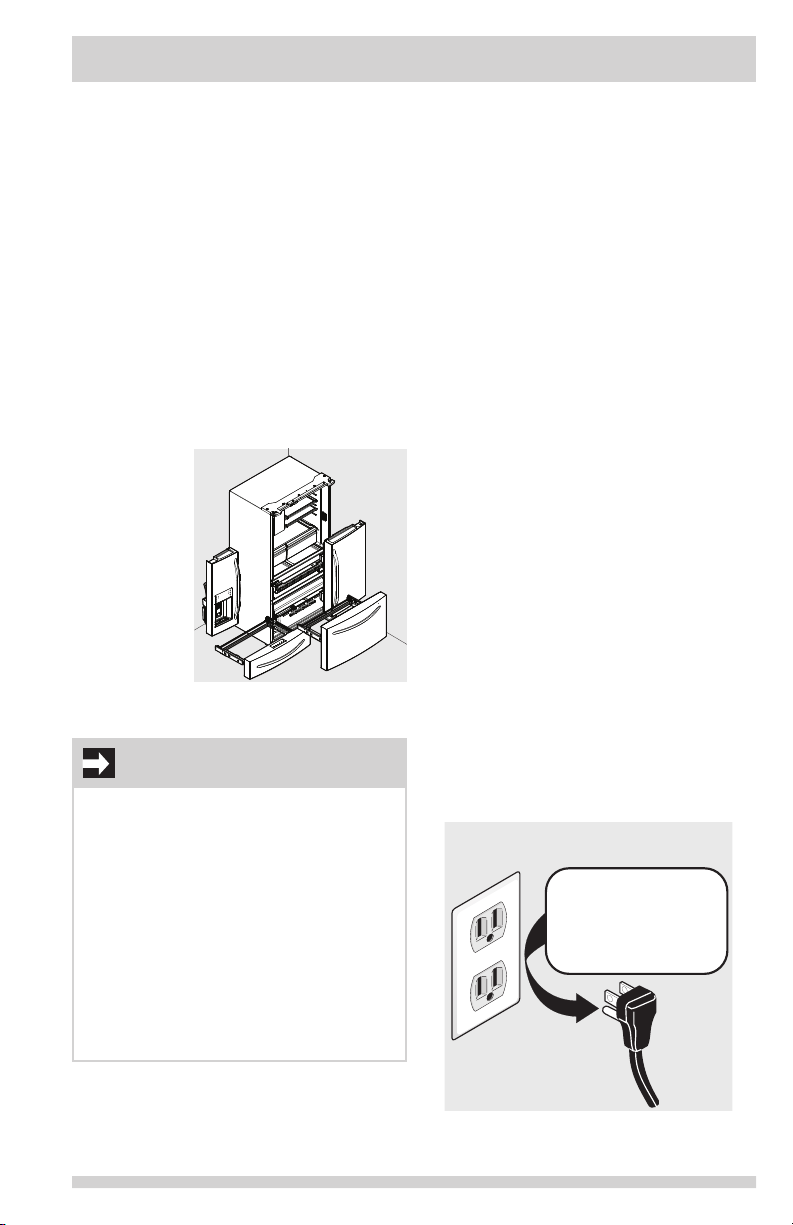
Grounding type wall receptacle
Power cord with
3-prong grounded plug
Do not, under
any circumstances,
cut, remove,
or bypass the
grounding prong.
Proper Disposal of Refrigerator
or Freezer
Risk of child entrapment
Child entrapment and suffocation are not
problems of the past. Junked or abandoned
refrigerators or freezers are still dangerous –
even if they will sit for “just a few days”. When
disposing of an old refrigerator or freezer,
please follow the instructions below to help
prevent accidents.
Proper Disposal of Refrigerators/Freezers
We strongly encourage responsible appliance
recycling/disposal methods. Check with the utility
company or visit www.energystar.gov/recycle for
more information on recycling an old refrigerator.
Before disposing of an old refrigerator/
freezer:
• Remove
doors.
• Leave
shelves in
place so
children
may not
easily
climb
inside.
• Have
refrigerant
removed by a qualied service technician.
IMPORTANT
CFC/HCFC Disposal
Some old refrigerators may have a cooling
system that used CFCs or HCFCs (chlorouorocarbons or hydrochlorouorocarbons). CFCs
and HCFCs are believed to harm stratospheric
ozone if released to the atmosphere. Other
refrigerants may also cause harm to the environment if released to the atmosphere.
If disposing of an old refrigerator, make
sure the refrigerant is removed for proper
disposal by a qualied technician. Intentionally released refrigerant may subject one to
nes and imprisonment under provisions of
environmental legislation.
Electrical information
• The refrigerator must be plugged into
its own dedicated 115 Volt, 60 Hz., 15
Amp, AC only electrical outlet. The power
cord of the appliance is equipped with a
three-prong grounding plug for protection
against electrical shock hazards. It
must be plugged directly into a properly
grounded three prong receptacle. The
receptacle must be installed in accordance
with local codes and ordinances. Consult
a qualied electrician. Avoid connecting
refrigerator to a Ground Fault Interrupter
(GFI) circuit. Do not use an extension
cord or adapter plug.
• If the power cord is damaged, it should
be replaced by an authorized service
technician to prevent any risk.
• Never unplug the refrigerator by pulling
on the power cord. Always grip the
plug rmly, and pull straight out from
the receptacle to prevent damaging the
power cord.
• Unplug the refrigerator before cleaning
and before replacing a light bulb to avoid
electrical shock.
• Performance may be affected if the
voltage varies by 10% or more. Operating
the refrigerator with insufcient power
can damage the compressor. Such
damage is not covered under the
warranty.
• Do not plug the unit into an electrical
outlet controlled by a wall switch or pull
cord to prevent the refrigerator from
being turned off accidentally.
3
Page 4
FEATURES AT A GLANCE
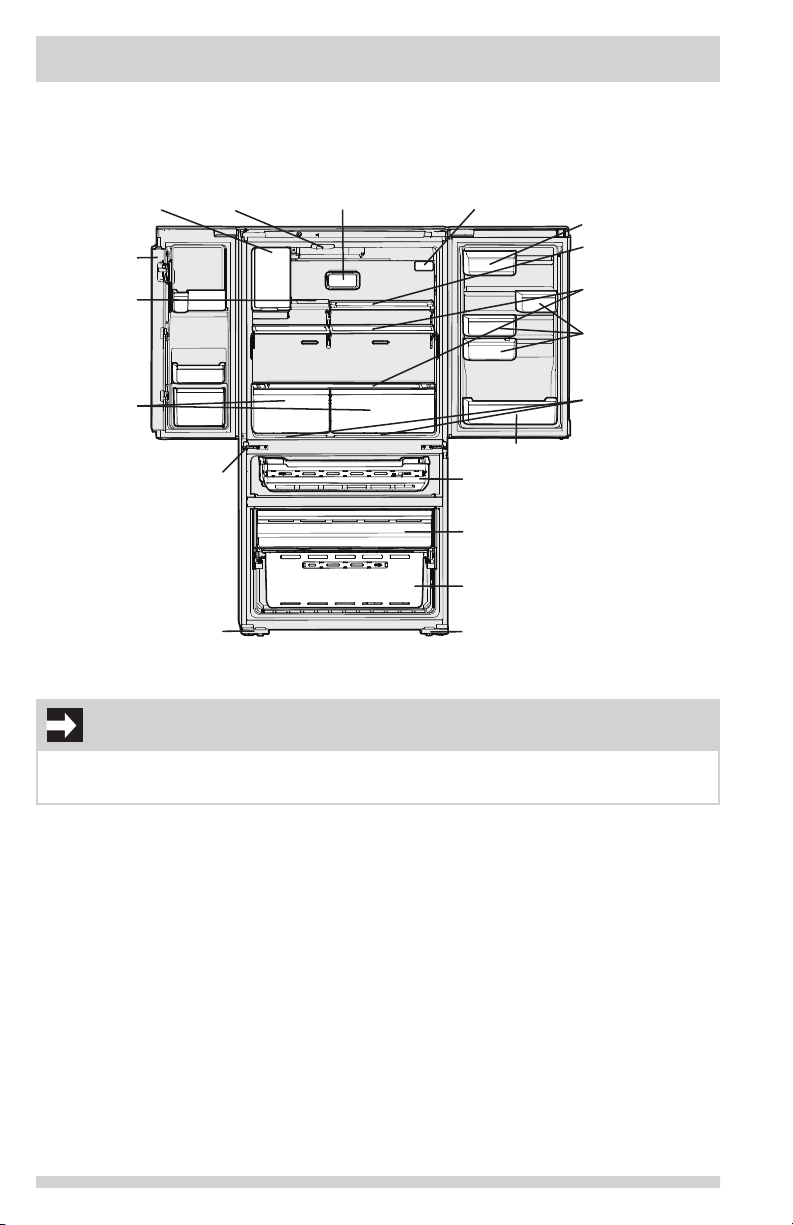
*Features may vary according to model
*Fresh Food
Ice Maker
Flipper
Mullion
*Flip Shelf
Auto
CrispSeal
TM
Drawers
Adjustable Hinges
Anti-tip Leg
IMPORTANT
Flipper
Guide
*PureAir Ultra II
Air Filter
TM
*PureSource Ultra II
Water Filter
*Door Bin
Custom-Flex
Temp Drawer
Freezer Drawer
Freezer Basket
Anti-tip Leg
TM
*Dairy
Compartment
*Slide-Under
Shelf
Spillsafe
®
Shelves
Adjustable
Door Bins
SnackZone
Storage
Compartments
(Recessed below
Crispers)
TM
TM
Accessories are available for refrigerator and can be purchased at www.frigidaire.com or by
calling 1-800-374-4432.
4
Page 5
INSTALLATION
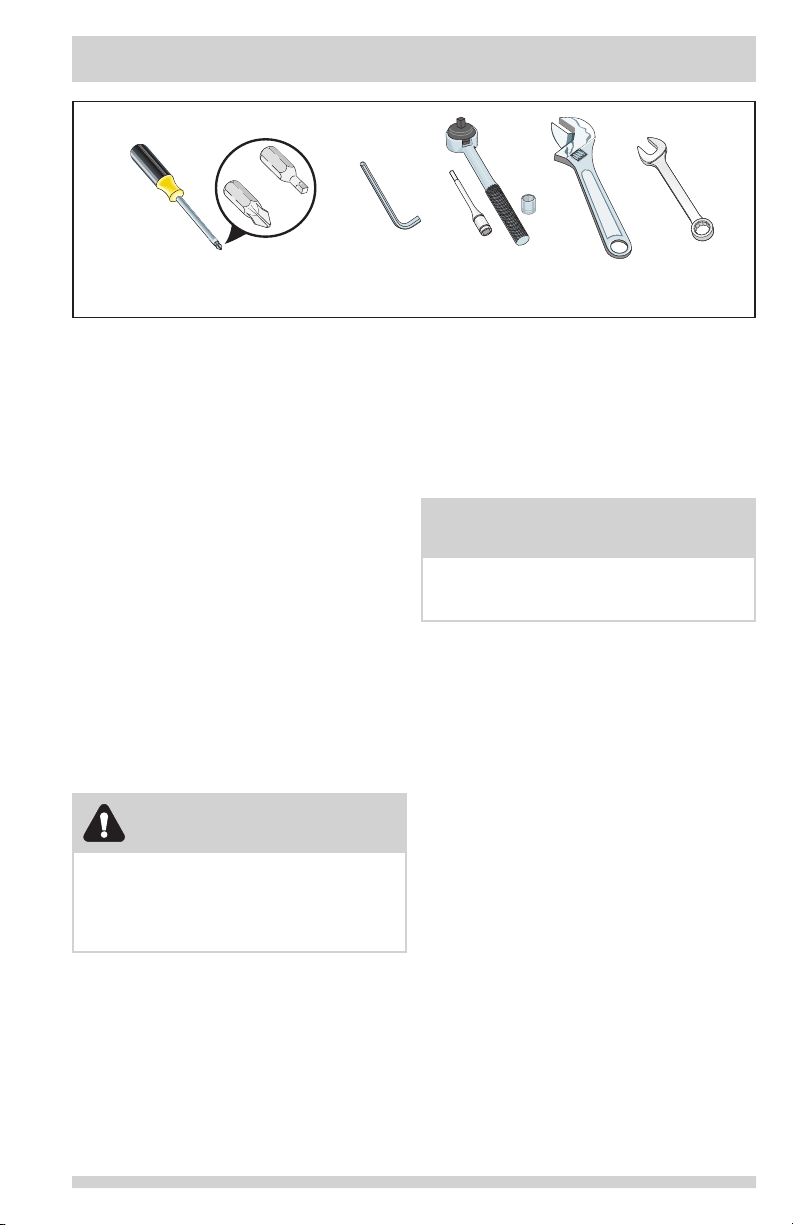
Tools Necessary:
Quadrex Head
Screwdriver
Wrench
Fixed
Wrench
Allen Wrench
(OR)
Phillips Head
or
This Use & Care Guide provides general
installation and operating instructions for
this model. We recommend using a service
or kitchen contracting professional to install
the refrigerator. Use the refrigerator only as
instructed in this Use & Care Guide. Before
starting the refrigerator, follow these
important rst steps.
6mm
Location
• Choose a place that is near a grounded,
non-GFCI, electrical outlet. Do Not use
an extension cord or an adapter plug.
• If possible, place the refrigerator out of
direct sunlight and away from the range,
dishwasher, or other heat sources.
• The refrigerator must be installed on a
oor that is level and strong enough to
support a fully loaded refrigerator.
• Consider water supply availability for
models equipped with an automatic ice
maker.
ANDAND
OR
8mm Socket
Wrench
OR
Adjustable
⅜"
Installation
Allow the following clearances for ease
of installation, proper air circulation, and
plumbing and electrical connections:
Sides & Top ⅜ inch (9.5 mm)
Back 1 inch (25.4 mm)
NOTE
If the refrigerator is placed with the door
hinge side against a wall, allow additional
space so the door can be opened wider.
Door opening
The refrigerator should be positioned to allow
easy access to a counter when removing
food. For best use of refrigerator drawers and
freezer baskets, the refrigerator should be in a
position where both can be fully opened.
Do Not install the refrigerator where the
temperature will drop below 55°F (13°C) or
rise above 110°F (43°C). The compressor
will not be able to maintain proper
temperatures inside the refrigerator.
CAUTION
5
Page 6
INSTALLATION
WRONG
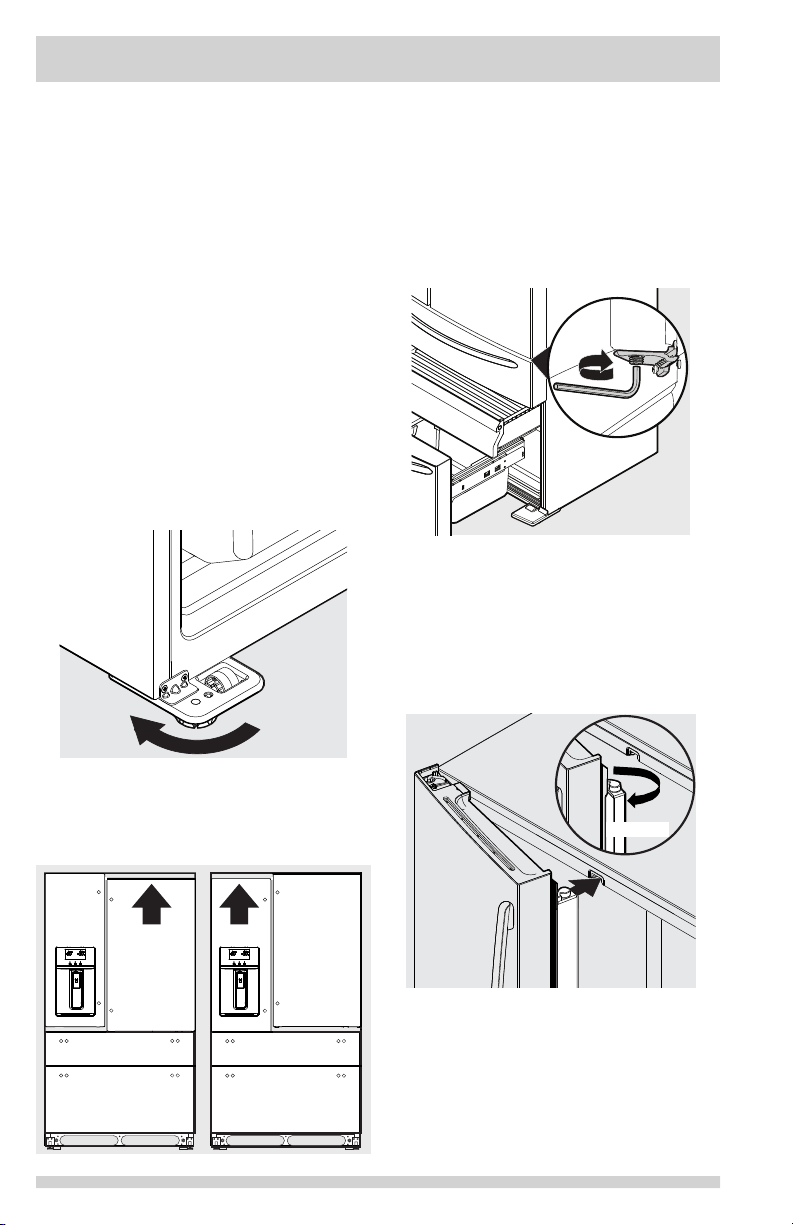
Cabinet Leveling & Refrigerator
Door Alignment (if necessary)
Guidelines for nal positioning of refrigerator:
• All four corners of the cabinet must rest
rmly on the oor.
• The front should be slightly elevated to
ensure that doors close and seal properly.
• Doors should align with each other and
be level.
Most of these conditions can be met by raising
or lowering the adjustable anti-tip legs.
To level the cabinet using the anti-tip legs:
1 Slightly open freezer drawer.
2 Lower anti-tip legs until they are both
touching the oor. Use a pair of pliers to
adjust.
To raise unit: turn leg clockwise.
To lower unit: turn leg counterclockwise.
Anti-Tip
Legs
1. Open Custom-Flex Temp drawer to make
lower hinge visible.
2. Insert 6mm AllenTM wrench into the shaft
of the lower hinge.
To lower unit: turn adjustment screw
clockwise.
To raise unit: turn adjustment screw
counterclockwise.
Raise
Flipper Mullion
Adjust Flipper Mullion for proper connection
with the mullion guide by ensuring the ipper
mullion is folded and perpendicular to the fresh
food door. If the mullion guide is not in the
correct position, it could prevent the door from
closing completely.
3 Ensure both doors are bind-free with their
seals touching the cabinet on all four sides
and that cabinet is stable.
To make nal door height adjustments:
Door
Door
Door
Door
6
Page 7
DOOR REMOVAL INSTRUCTIONS
Getting through narrow spaces
If refrigerator will not t through an entrance
area, doors can be removed. Check rst by
measuring the entrance.
To prepare for removing the doors:
1 Make sure the electrical power cord is
unplugged from the wall outlet.
2 Remove any food from the door shelves
and close the doors.
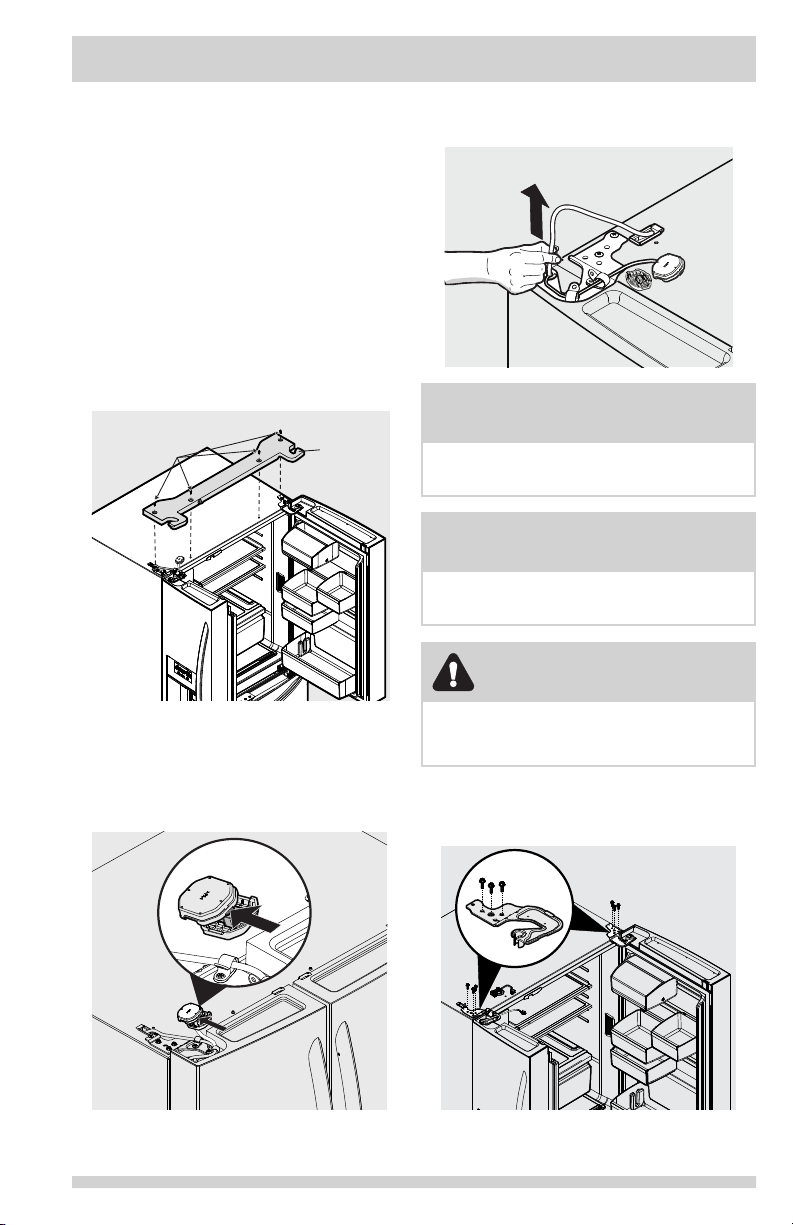
To remove the refrigerator doors:
1 Open doors to 90°.
2 Remove all ve PhillipsTM screws from top
hinge cover and lift up.
Top
Hinge
Phillips Screws
Cover
5 Pull up on water line gently to remove
from door.
Waterline
NOTE
Use care while pulling the water tube from
the door to be sure that tube does not kink.
NOTE
Approximately four feet of water tube will be
pulled from the refrigerator door.
CAUTION
3 Trace lightly around the door’s top hinges
with a pencil. This makes reinstallation
easier.
4 Disconnect electrical harness running from
door to hinge cover.
Be sure doors are set aside in a secure position
where they cannot fall and cause personal
injury, or damage to the doors or handles.
6 Remove three 8mm bolts from both top
hinges. Lift doors up off lower hinges and
carefully set aside..
x2
7
Page 8
DOOR REMOVAL INSTRUCTIONS
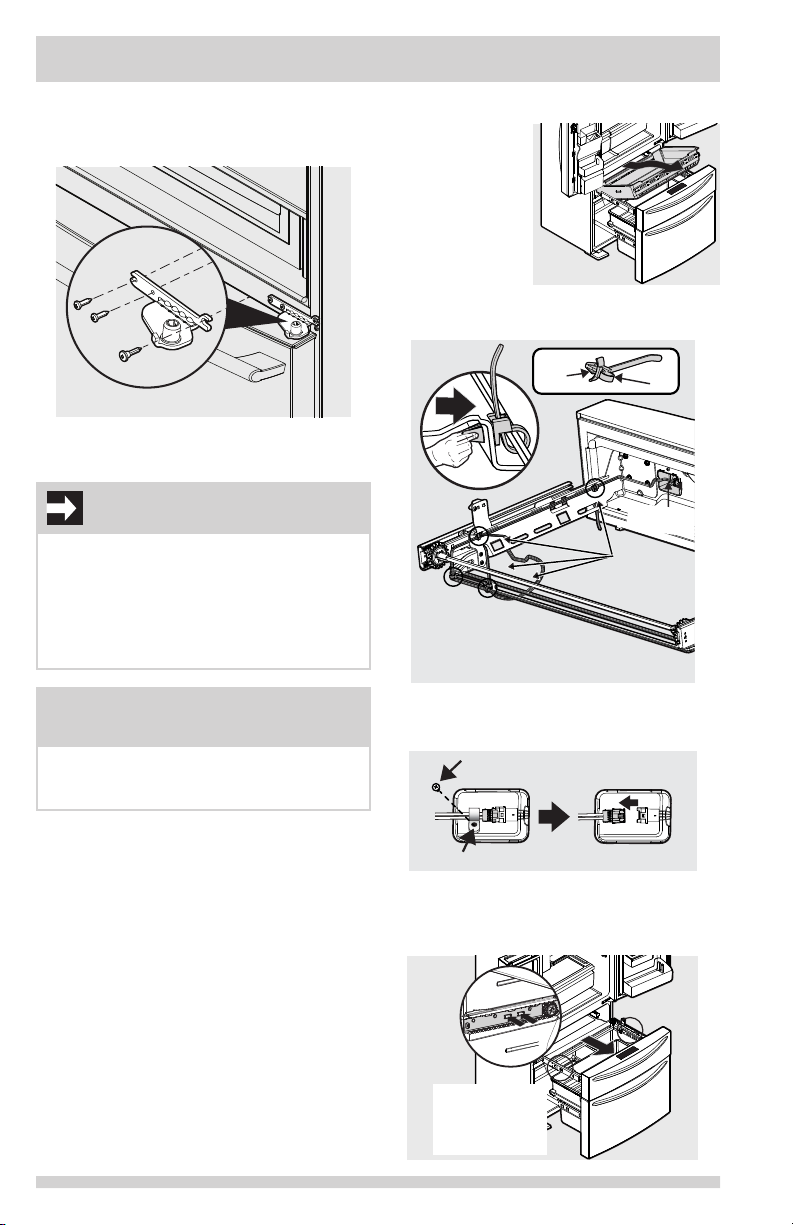
Retaining Clip
To Cabinet
Screw
7 To gain access to lower hinge, drawer will
need to be extended. Unscrew the three lower
hinge screws and slide the hinge inwards.
Lower Hinge Removal
8 To reinstall doors, reverse procedure.
IMPORTANT
Make sure water line tubing goes through
hole at top of dispenser pocket. There is also
a metal wrap on the tubing to prevent damage from the hinge rubbing against it. This
needs to be xed back around the tube in the
proper location upon reinstallation (just as
long as the tube is protected from the hinge).
To remove the Custom-FlexTM
Temp Drawer
1 Fully open
drawer.
2 Remove
basket from
drawer.
3 Unsnap the 4
cable ties by
pressing clip sides together and pushing
through opening.
Cable
Clip
NOTE: Do Not Remove or Cut
Cable
Tie
Retaining
Clip
(4) Cable
Ties
NOTE
When reinserting the water tube and replacing the top hinge cover, use care to be sure
the tube does not kink.
Once both doors are in place, ensure they are
aligned with each other and level (Reference
the Installation section for more details), and
replace the top hinge cover.
8
4 Remove screw and retaining clip and
disconnect the harness
Harness
5 Remove drawer by pressing on the liner
clips and slide rail past clips on both sides
to fully remove drawer from cabinet.
Press the two
tabs on both
sides to release
the sliders
Page 9
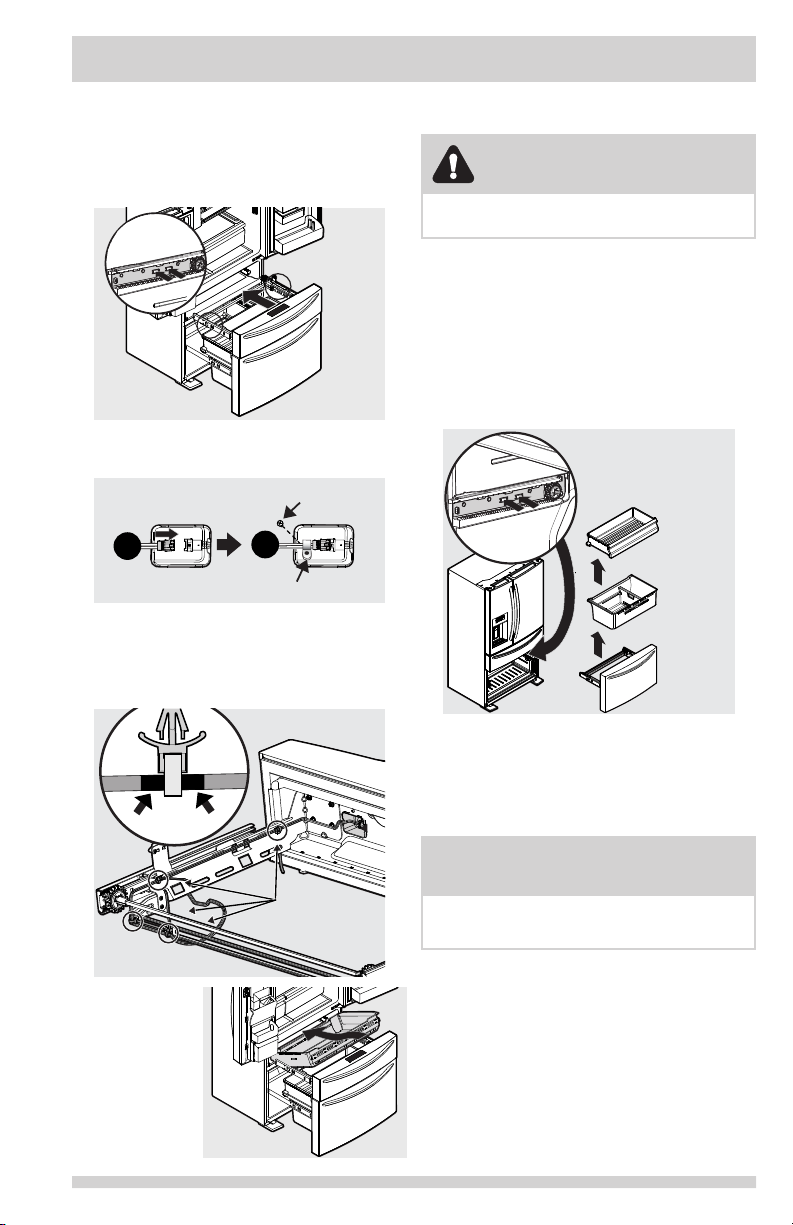
DOOR REMOVAL INSTRUCTIONS
Reinstalling the Custom-FlexTM
Temp Drawer
1 Place drawer with brackets and sliders
inside compartment and click sliders into
place on each side.
Click
Into Place
2 Reconnect cabinet harness.
3 Replace retaining clip and secure with screw.
Reconnect
Cabinet Harness
1
4 Reattach electrical harness by positioning
the cable clips over the black markings
on the harness and push the 4 cable clips
through openings in rail to secure harness
in place.
Screw
2
Retaining Clip
Removing Freezer Drawer
CAUTION
Drawer is heavy. Use caution when lifting.
1 Open drawer and fully extend.
2 Remove the freezer drawer.
3 Remove the freezer basket.
4 Inside the cabinet, press the two tabs on
both sides to release the sliders.
5 Remove the drawer with brackets and
sliders.
Press the two tabs
on both sides to
release the sliders
Freezer
Drawer
Freezer
Basket
Black
Marking
5 Slide basket
into place.
6 Close
drawer.
Position
cable clips
over the black
markings before
attaching.
Reinstalling Freezer Drawer
1 Place drawer with brackets and sliders
inside the cabinet and click into place.
2 Replace the basket.
NOTE
For additional instructions, see Storage
Features section.
9
Page 10
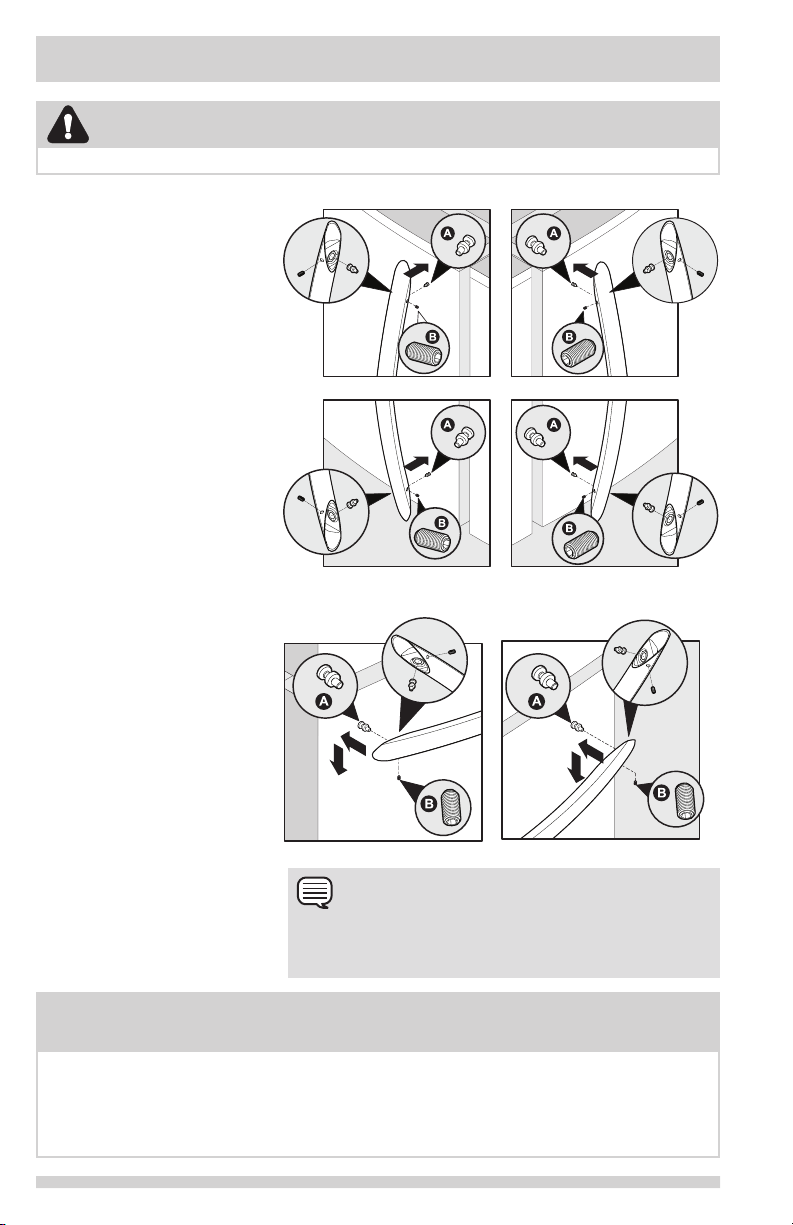
INSTALLING DOOR HANDLES
CAUTION
Wear gloves and safety goggles. Use extreme CAUTION when installing these handles.
Door Handle Mounting
Instructions
1 Remove handles from carton
and any other protective
packaging.
2 Position fresh food handle
end caps over upper and
lower pre-installed shoulder
bolts (A) that are fastened
into door, ensuring the holes
for the set screws are facing
towards the opposite door.
3 While holding handle rmly
against door, fasten upper and
lower Allen set screws (B) with
supplied Allen wrench.
4 Repeat steps 2 and 3 to
install opposite handle.
Ensure the holes for the set
screws are facing towards the
rst door.
5 Position freezer/Custom-FlexTM
Temp Drawer handle end caps
over left and right pre-installed
shoulder bolts (A) that are
fastened to the door, ensuring
the holes for the set screws are
facing down.
6 While holding handle rmly
against door, loosely tighten
right Allen set screw (B) with
supplied Allen wrench until
there is no gap between
handle and door.
7 Still holding the handle rmly
to the door, rmly tighten
left Allen set screw (B) with
supplied Allen wrench.
8 Return to the right Allen set
screw (B) and rmly tighten
with supplied Allen wrench.
Mounting Refrigerator Handles
Mounting Freezer/Custom-FlexTM Temp Drawer Handle
NOTE
When tightening the Allen set screws, it is imperative that
force be applied to the longer arm of the Allen wrench supplied in the handle packaging.
NOTE
All set screws should be tightened so the screw is below the surface of the handle. The
handles should be drawn tight to doors/drawer with no gaps. Opening the opposite door
while tightening the Allen screw makes installation easier.
The door handle may loosen over time or if it was installed improperly. If this happens,
tighten the set screws on the handles.
10
Page 11
CONNECTING THE WATER SUPPLY
WARNING
To avoid electric shock, which can cause
death or severe personal injury, disconnect
the refrigerator from electrical power before
connecting a water supply line to the
refrigerator.
• A shutoff valve to connect the water
supply line to the household water
system. DO NOT use a self-piercing type
shutoff valve.
• Do not re-use compression tting or use
thread seal tape.
• A compression nut and ferrule (sleeve) for
connecting a copper water supply line to
the ice maker inlet valve.
CAUTION
To Avoid Property Damage:
• Copper or Stainless Steel braided tubing
is recommended for the water supply
line. Water supply tubing made of ¼
inch plastic is not recommended to be
used. Plastic tubing greatly increases
the potential for water leaks, and the
manufacturer will not be responsible for
any damage if plastic tubing is used for
the supply line.
• DO NOT install water supply tubing in
areas where temperatures fall below
freezing.
• Chemicals from a malfunctioning water
softener can damage the ice maker. If a
water softening system is present, ensure
the softener is maintained and working
properly.
IMPORTANT
Ensure that the water supply line connections comply with all local plumbing codes.
To install the water supply line, the
following are needed:
• Basic Tools: adjustable wrench, at-blade
screwdriver, and PhillipsTM screwdriver
• Access to a household cold water line
with water pressure between 30 and
100 psi.
• A water supply line made of ¼ inch
(6.4 mm) OD, copper or stainless steel
tubing. To determine the length of tubing
needed, measure the distance from the
ice maker inlet valve at the back of the
refrigerator to the cold water pipe. Then
add approximately 7 feet (2.1 meters),
so the refrigerator can be moved out for
cleaning.
NOTE
Check with local building authority for recommendations on water lines and associated materials prior to installing refrigerator. Depending on local/state building codes, Frigidaire
recommends for homes with existing valves
its Smart Choice® water line kit 5304437642
with a 6 ft. (1.8 meters) Stainless Steel Water
Line. Please refer to www.frigidaire.com/
Filters--Accessories/Refrigerator-Accessories/
for more information.
11
Page 12
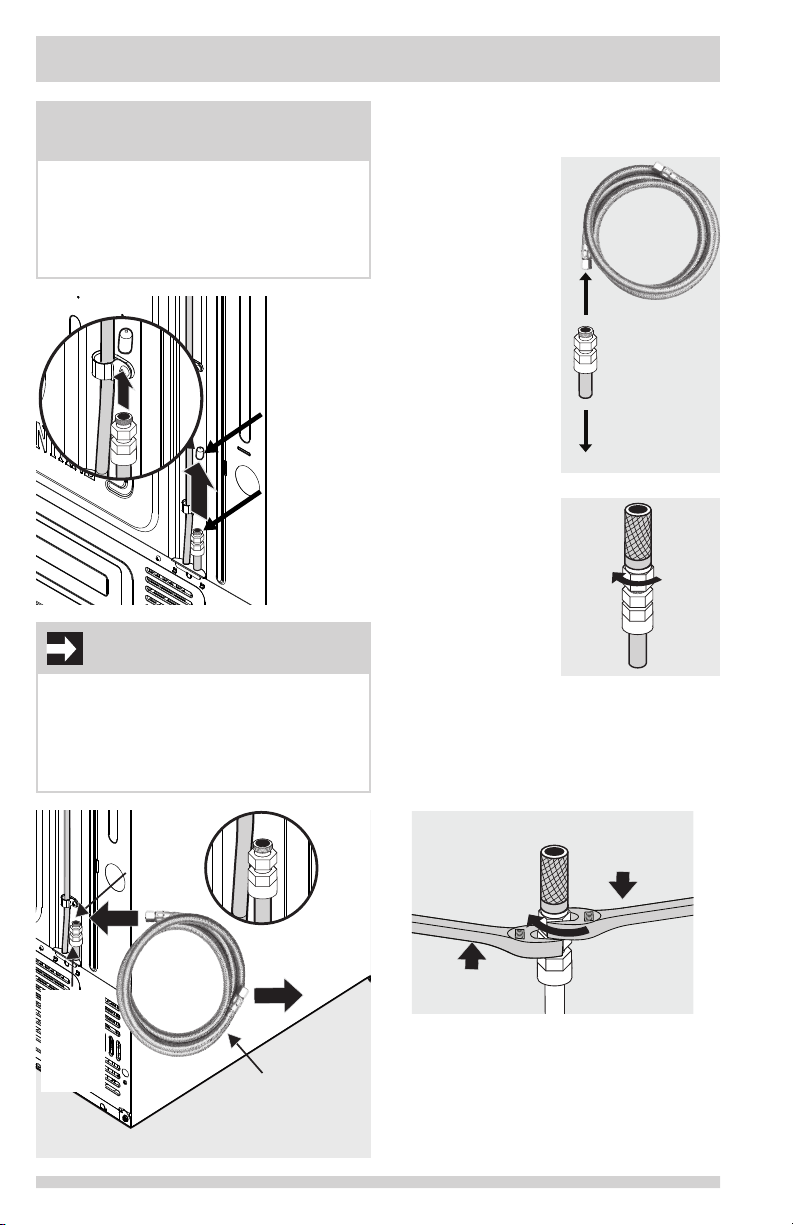
CONNECTING THE WATER SUPPLY
Water Inlet
Fitting
Remove
plastic cap
from water
inlet fitting
To Connect Water Tube to
NOTE
Expect the rst ice harvest within rst
24 hours of unit operation. To prevent any issues concerning ice production, please ensure
that all water lines are primed. See “Priming
the water supply system” in the “AUTOMATIC
ICE & WATER DISPENSER” section.
Remove
plastic cap
from water
inlet fitting
Water Inlet
Fitting
¼ inch
plastic tube
to water
valve
IMPORTANT
The refrigerator’s water supply system includes
several tubing lines, a water lter, and a water
valve. To ensure that the water dispenser
works properly, this system must be complete-
ly lled with water when the refrigerator is rst
connected to the household water supply line.
Household Water Supply
1 Disconnect
refrigerator from
electrical power
source.
2 Place end of water
supply line into
sink or bucket.
Turn ON water
supply and ush
supply line until
water is clear. Turn
OFF water supply
at shutoff valve.
3 Remove plastic
cap from water
inlet tting and
discard cap.
4 If using
(recommended)
stainless steel
braided tubing
- the nut and
ferrule are already
assembled on
the tubing. Slide
compression nut
onto water inlet
tting and nger
tighten.
5 Using two adjustable wrenches (one to
hold the household water line nut and the
other to hold the water inlet tting nut),
tighten a half turn with wrench. DO NOT
over tighten.
To
Household
Water
Supply
To
Unit
Water
Valve
Plastic
tubing
to
water
valve
12
Water
Inlet
Fitting
Connection to
household
water supply
6 ft. (1.8 Meters)
Stainless Steel water
line from household
water supply line
Place wrench
here. Turn
clockwise.
Place wrench
here. Do not turn.
6 Turn ON water supply at shutoff valve and
tighten any connections that leak.
7 Reconnect refrigerator to electrical power
source.
8 Ensure ice maker is turned ON.
9 Purge air from Ice & Water Dispenser System.
Page 13
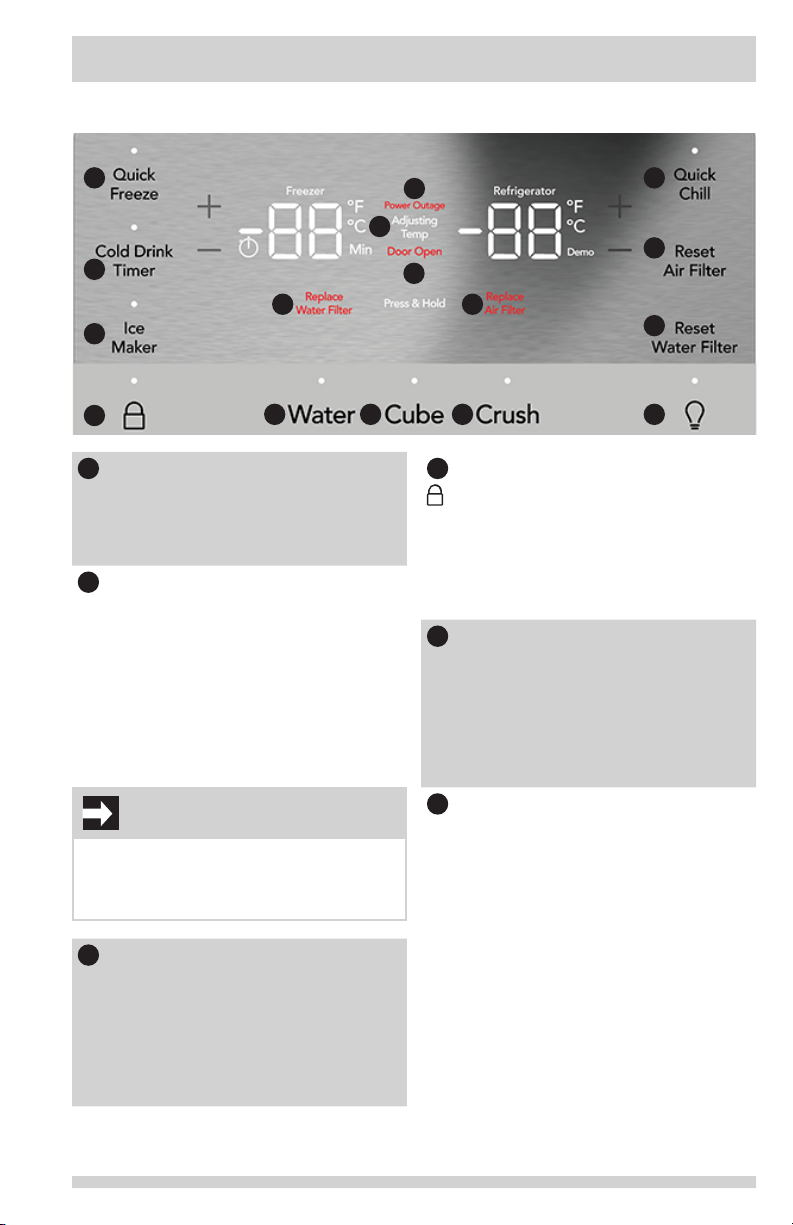
Display
USING THE DISPLAY
1
6
2
3
4
Quick Freeze (on/off)
1
Activates a faster rate for freezing food
10
11 12
in the freezer. Use this feature when
loading several items into the freezer at
one time. Automatically deactivates after
12 hours.
Cold Drink Timer
2
Quickly chills a drink inside the freezer
compartment. To enable, touch the
Cold Drink Timer key. A time value will
appear on the freezer temp display (in
minutes) and can be changed using the
+/- buttons. A tone will sound when the
time has been input. Range is from 2045 minutes in 5 minute intervals. Drinks
will freeze if temperature setting is too
low or timer setting is too long.
WARNING
When using the cold drink timer, make sure
to remove drinks from freezer compartment
when alarm sounds. Carbonated drinks may
explode if left in freezer for too long.
Ice Maker
3
Press and hold for 3 seconds to turn ice
maker on/off. When indicator is lit, ice
maker is on. When indicator is not lit, ice
maker is in the OFF state and will stop
making ice. While off, ice dispensing can
continue as long as there is ice in the
bucket. When ice maker is off and ice is
dispensing, indicator will blink.
5
7
98
The lock button can be used to lock the
4
display preventing it from being used in
certain situations. Press and hold for 3
seconds to enable/disable. While in the
locked state, no changes can be made
to settings on the display. Dispensing ice
and water will be disabled. The indicator
will ash and an audible warning tone
is played.
Power Outage
5
In the event of a power failure, the
power outage alert will be illuminated
once power has been restored and a
tone will sound. The alert will only be
illuminated if the refrigerator or freezer
reached unsafe temperatures during the
outage. Press any button to silence the
tone.
Adjusting Temp
6
Illuminates when temperatures are
changed on the display and will
remain illuminated until the desired
temperatures are reached inside the
refrigerator and freezer. Press either the
+ or - to adjust to desired temperature
setting.
Freezer temp - Control temperatures
range from -6°F / -21°C to +6°F /
-15°C.
Refrigerator temp - Control
temperatures range from +34°F /
+1°C to +44°F / +7°C. This unit
is designed to operate at 37°F
Refrigerator/0°F Freezer. Unit should
stabilize temperatures within 24 hours of
installation.
13
14
15
16
PLEASE NOTE: Additional features can be found on the following page.
13
Page 14
USING THE DISPLAY
Additional Features (Continued)
Door Open
7
Illuminates whenever the doors are
open. If a door is left open for 5 minutes
or more, an alarm will sound and the
display will be illuminated until the doors
are shut. Pressing any button will mute
the alarm temporarily. Check to make
sure no food is blocking the doorway.
Replace Water Filter
8
Display illuminates every 6 months or
when lter needs replacing. Replace
lter and then press and hold ‘Reset
Water Filter’ for 3 seconds to deactivate
warning on display. See “Replacing the
Filter” section for more information.
Replace Air Filter
9
Display illuminates every 6 months or
when lter needs replacing. Replace
lter and then press and hold ‘Reset
Air Filter’ for 3 seconds to deactivate
warning on display. See “Replacing the
Filter” section for more information.
Water
10
Press the “water” key to dispense water.
An indicator light will be illuminated
above the active feature.
Cube
11
Press the “cube” key to dispense cubed
ice. An indicator light will be illuminated
above the active feature.
Crush
12
Press the “crush” key to dispense
crushed ice. An indicator light will be
illuminated above the active feature.
Quick Chill
13
Quick chill is a faster rate for chilling
food in the refrigerator compartment.
Use this feature when loading several
items into the refrigerator at one time.
Deactivates after 6 hours.
Reset Air Filter
14
After replacing lter, press and hold for
3 seconds to reset.
Reset Water Filter
15
After replacing lter, press and hold for
3 seconds to reset.
Toggles dispenser light On and Off.
16
Setting temperatures
NOTE
The recommended settings for a product in-
stalled in a kitchen is 37˚F for the fresh food
compartment and 0˚F for the freezer.
IMPORTANT
If food is freezing in the fresh food compartment, increase the temperature setting 1 or
2 degrees.
IMPORTANT
Food placed within 1 inch in front of the air
ports may cause food to freeze.
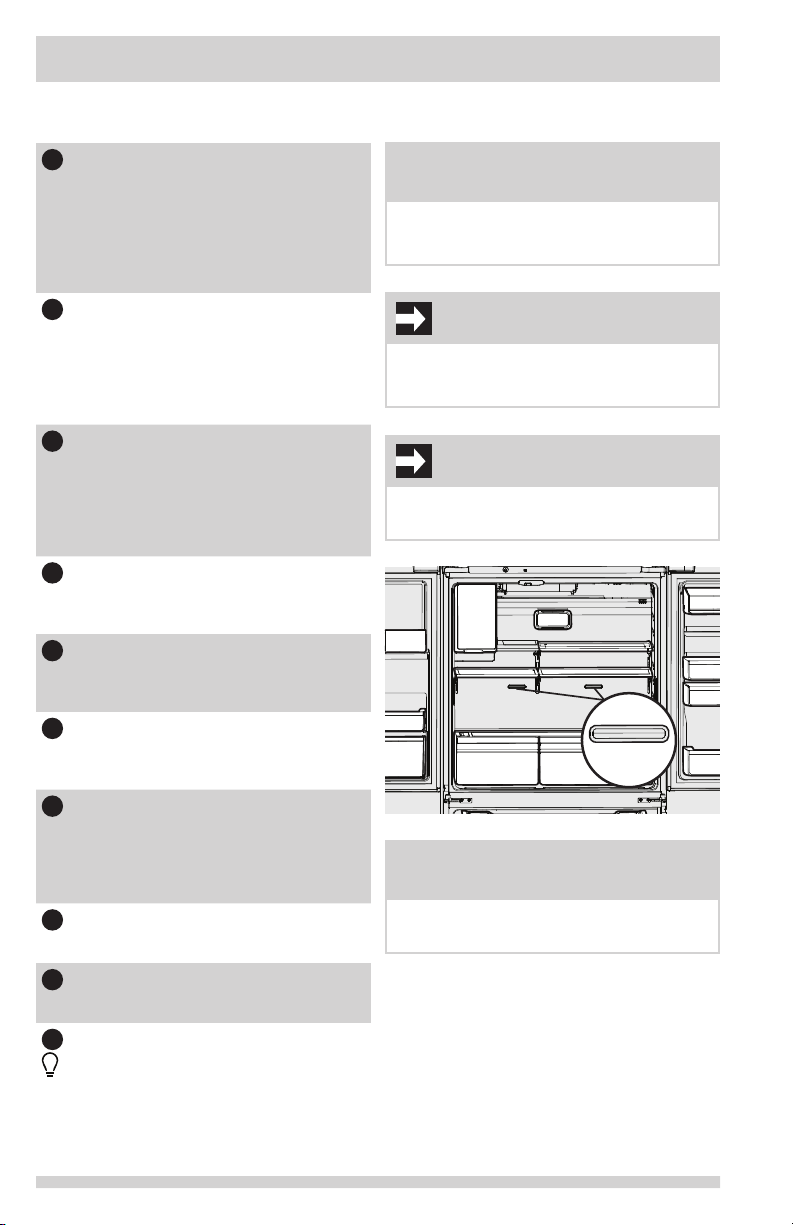
Air Port
NOTE
Unit should stabilize temperatures within 24
hours of installation.
14
Page 15
NOTE
Control features and alarms may vary by
model.
Alarms
Power Outage
In the event of a power failure, the power
outage alert will be illuminated once power
has been restored and a tone will sound. The
alert will only be illuminated if the refrigerator
or freezer reached unsafe temperatures during
the outage. Press any button to silence the
tone.
Water Filter
When illuminated, the water lter needs to
be replaced. Change the water lter every 6
months or when 120 gallons of water has been
dispensed. To reset, press and hold button for
3 seconds. Tone will sound once it has been
reset.
Air Filter
When illuminated, air lter needs to be replaced. Change the air lter every 6 months.
To reset, press and hold button for 3 seconds.
Tone will sounds once it has been reset.
Door
If a door has been left open for ve minutes or
more, an alarm will sound and the door open
indicator will illuminate on the display. The
alarm can be turned off by closing the door or
pressing any key. Control panel will return to
normal operations after the door is closed.
Error Tone
An alarm will sound if the user tries to make a
selection that is not available.
USING THE DISPLAY
Sabbath Mode
The Sabbath Mode is a feature that disables
portions of the refrigerator and its controls
in accordance with observance of the weekly
Sabbath and religious holidays within the
Orthodox Jewish community.
Sabbath Mode is turned ON and OFF by
simultaneously pressing and holding both the
“-” (freezer side) and “+” (refrigerator side) for
ve seconds. Other than the High Temp alarm,
no audible sounds will occur until the user exits
the Sabbath mode. The display shows “Sb”
while in Sabbath mode.
In the Sabbath Mode, the High Temp alarm
is active for health reasons. For example,
if the door is left ajar the High Temp alarm
is activated. The refrigerator will function
normally once the door is closed, without
any violation of the Sabbath/Holidays. The
High Temp alarm is permitted when cabinet
temperature is outside the safe zone for 20
minutes. The alarm silences itself after 10
minutes while the High Temp icon stays lit until
the Sabbath mode is exited.
For further assistance, guidelines for
proper usage and a complete list of
models with the Sabbath feature,
please visit the web at
http:\\www.star-k.org.
NOTE
While in Sabbath Mode, neither the lights,
dispenser, nor the control panel will work
until Sabbath Mode is deactivated.
Refrigerator stays in Sabbath Mode after
power failure recovery. It must be deactivated with the buttons on the control panel.
NOTE
Although the Sabbath Mode has been initiated, the ice maker will complete the cycle it
had already started. The ice cube compartment will remain cold and new ice cubes can
be made with standard trays.
15
Page 16
USING THE DISPENSER
Using the ice maker after
installation
Before making ice for the rst time, be sure
to prime the water supply system. Air in new
plumbing lines can result in two or three empty
ice maker cycles. Furthermore, if the system
is not ushed, the rst ice cubes may be
discolored or have an odd avor.
Priming the water supply system
CAUTION
For proper dispenser operation,
recommended water supply pressure
should fall between 30 psi and 100 psi.
Excessive pressure may cause the system to
malfunction.
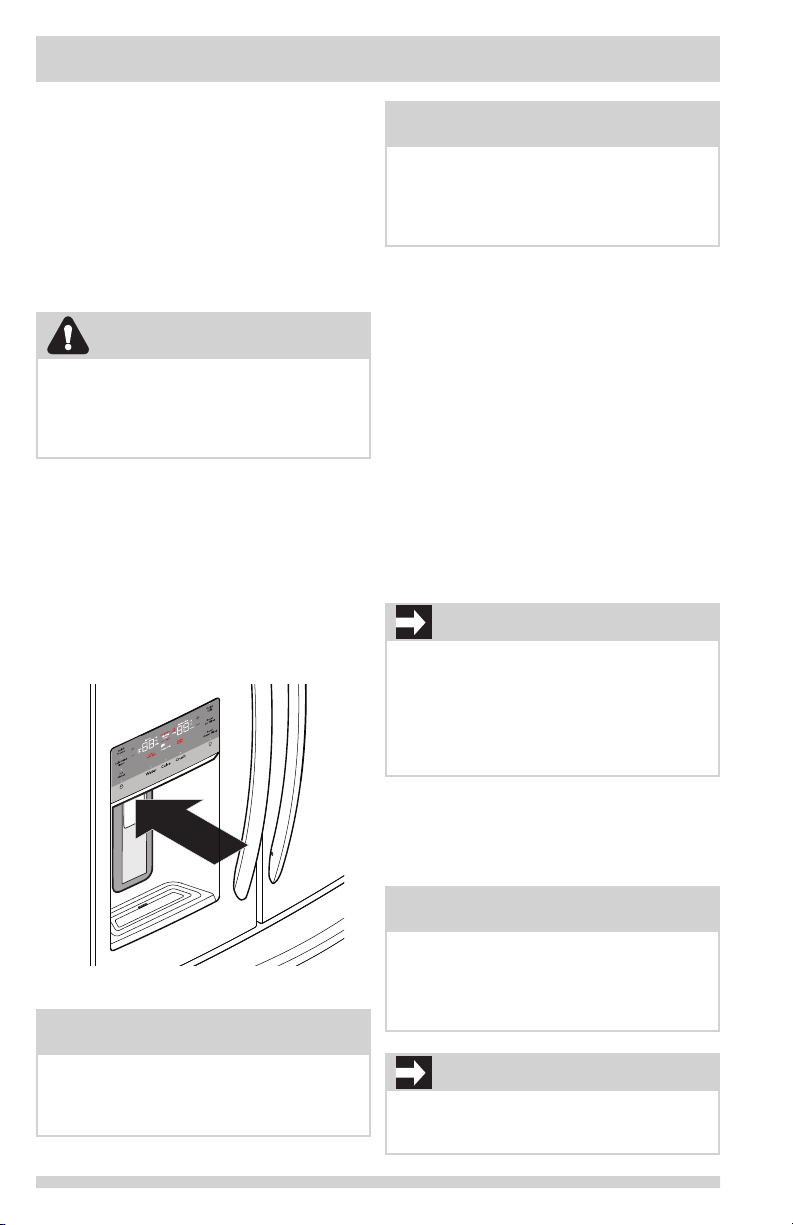
1 Begin lling the system by pressing and
holding a drinking glass against the
dispenser.
2 Keep the glass in this position until water
comes out of the dispenser. It may take
about 1½ minutes.
3 Continue dispensing water for about four
minutes to ush the system and plumbing
connections of any impurities (stopping to
empty the glass as necessary).
NOTE
After the initial 26 ounces (750 ml), water
will remain room temperature until the tank
has relled and been given enough time to
chill the next 26 ounces (750 ml) of water.
May take up to 8 hours to chill.
Ice maker operation & care
After the refrigerator is installed properly and
has cooled for several hours, the ice maker can
produce ice within 24 hours. The ice maker will
ll the ice bin from the rear. Dispense some
ice to force the ice forward in the bin. This will
allow the bin to ll completely.
Ice Maker and Storage Bin
Capacity
This ice maker should produce 2 to 3 pounds
of ice per 24 hours. The ice bin will hold about
4 pounds of ice.
Turning the fresh food ice maker
on and off
IMPORTANT
The ice maker is turned on at the factory
so it can work as soon as the refrigerator
is installed. If it is not possible to connect
a water supply, set the ice maker’s On/Off
feature to Off; otherwise, the ice maker’s ll
valve may make a loud chattering noise when
it attempts to operate without water.
Dispenser
NOTE
The water dispenser has a built-in device
that shuts off the water ow after two minutes of continuous use. To reset this shutoff
device, simply release the dispenser paddle.
16
Ice production is controlled by the ice maker’s
On/Off feature on the control panel. Pressing
the On/Off feature turns the ice maker on &
of f.
NOTE
The ice maker also has a built-in plastic
signal arm that automatically stops ice production when the ice bin is full. This signal
arm should not be used to manually stop
the ice maker.
IMPORTANT
Turning off the ice maker simply disables ice
making. Existing ice can still be dispensed,
and water can be dispensed.
Page 17
USING THE DISPENSER
IMPORTANT
On occasion, unusually small ice cubes may
be noticed in the bucket or in dispensed ice.
This could occur in normal operation of the
ice maker. If happening frequently, it may be
an indication of low water pressure or the
water lter needs to be replaced. As the water lter nears the end of its useful life and
becomes clogged with particles, less water is
delivered to the ice maker during each cycle.
Remember, if it’s been six months or longer
since last changing the water lter, replace
it with a new one. Poor quality household
water may require the lter to be changed
more frequently.
CAUTION
If the water supply to the refrigerator is
softened, be sure the softener is properly
maintained. Chemicals from a water softener
can damage the ice maker.
Ice maker/dispenser tips
• If refrigerator is not connected to a water
supply or the water supply is turned off,
turn off the ice maker as described in the
previous section.
• The following sounds are normal when
the ice maker is operating:
- Motor running
- Ice dropping into ice bin
- Water valve opening or closing
- Running water
• If a large quantity of ice is needed at one
time, it is best to get cubes directly from
the ice bin.
• Ice cubes stored too long may develop an
odd avor. Empty the ice bin as explained
below.
• When dispensing cubed ice, it is normal
to have a small quantity of little pieces
along with the whole cubes.
• To avoid splashing, dispense ice into the
container before adding liquids.
• It is normal for ice to ll to the top of the
ice bin.
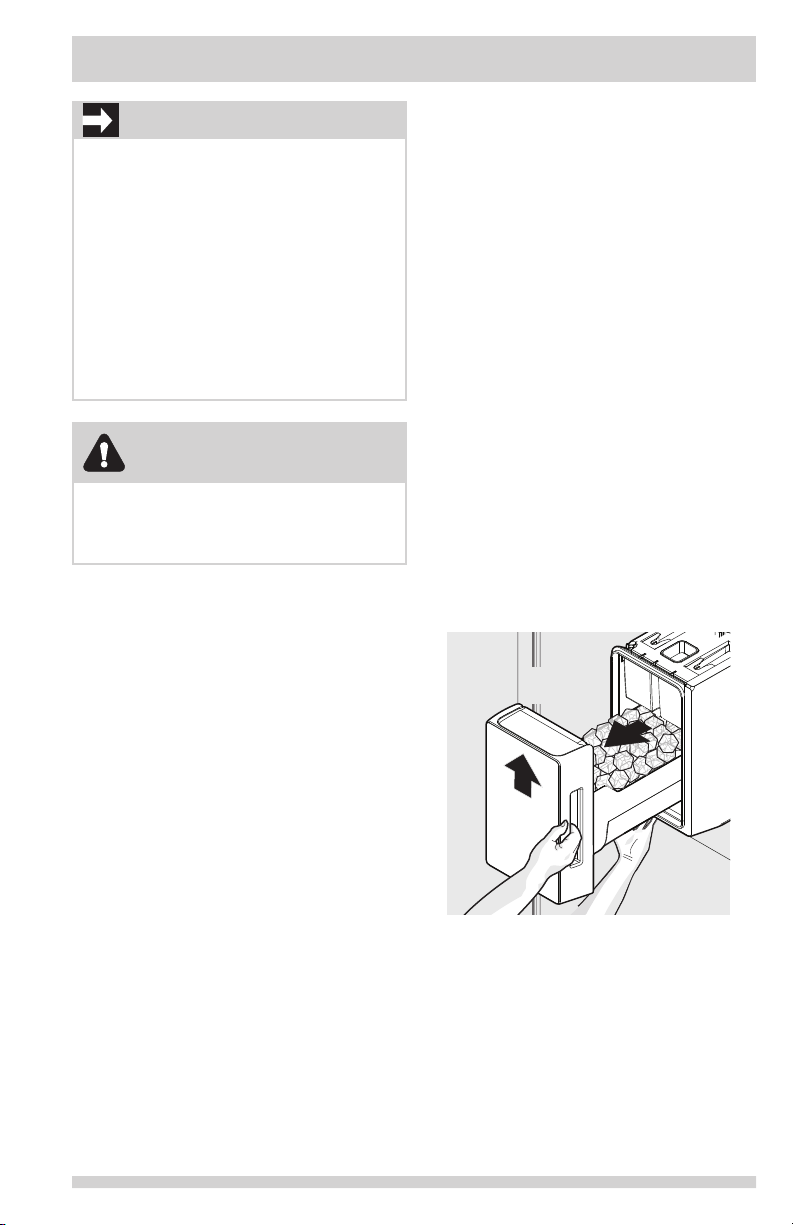
Cleaning the ice maker
Clean the ice maker and ice bin at regular
intervals, especially prior to vacation or
moving.
1 Turn off the ice maker.
2 Remove the ice bin by lifting upward and
pulling straight out.
3 Empty and carefully clean the ice bin
with mild detergent. Do not use harsh
or abrasive cleaners. Do not place in
dishwasher. Rinse with clear water.
4 Allow the ice bin to dry completely before
replacing in the freezer.
5 Replace the ice bin. Turn the ice maker
on.
Remove and empty the ice bin if:
• An extended power failure (one hour
or longer) causes ice cubes in the ice
bin to melt and refreeze together after
power is restored, jamming the dispenser
mechanism.
• Ice dispenser is used infrequently. Ice
cubes will freeze together in the bin,
jamming the dispenser mechanism.
(2) Pull Bin
Straight Out
(1) Lift
Upward
Removing Ice Bin
Remove the ice bin by (1) lifting upward and
(2) pulling straight out, then shake to loosen
the cubes or clean as explained above.
17
Page 18
USING THE DISPENSER
CAUTION
NEVER use an ice pick or similar sharp
instrument to break up the ice. This
could damage the ice bin and dispenser
mechanism.
To loosen stuck ice, use warm water.
Before replacing the ice bin, make sure it is
completely dry.
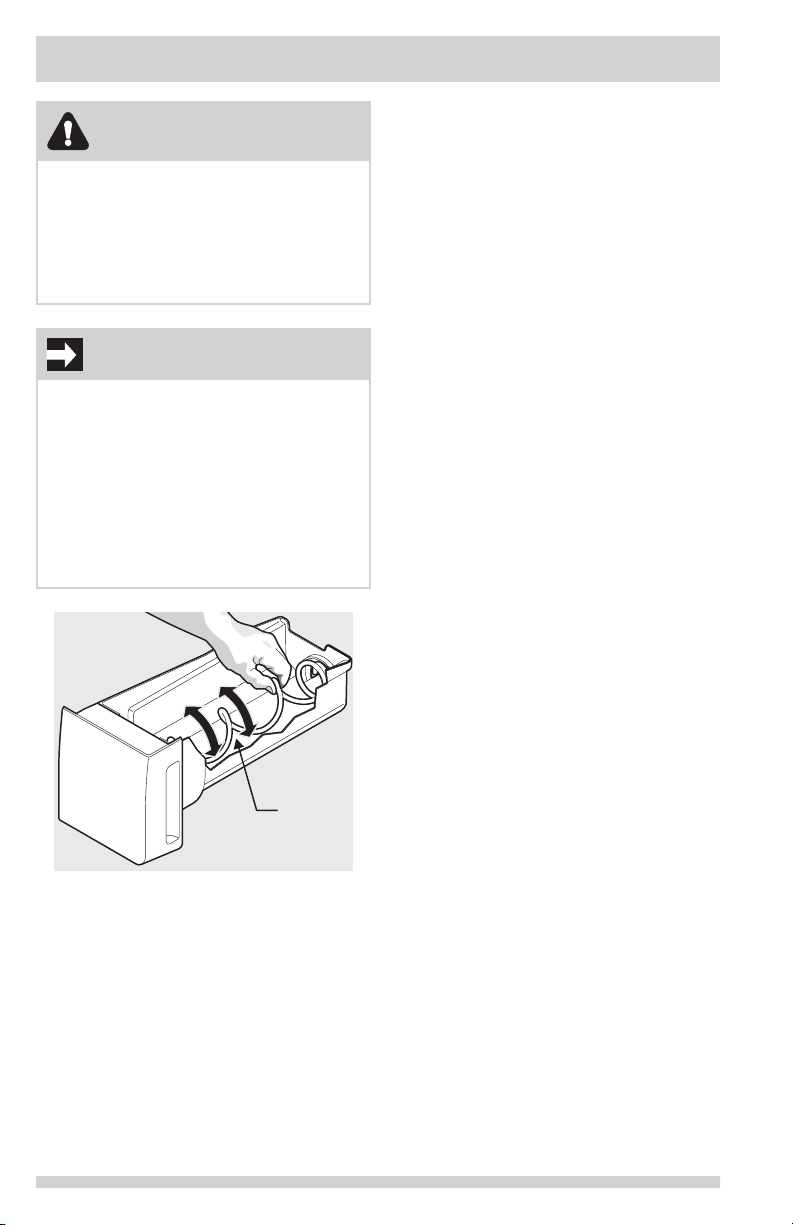
IMPORTANT
When removing or replacing the ice bin,
avoid rotating the auger in the ice bin. If
the auger is accidentally rotated, realign the
auger by turning it in 45 degree turns (see
below) until the ice bin ts into place with
the drive mechanism. If the auger is not
properly aligned when replacing the ice bin,
the refrigerator will not dispense ice. The
fresh food door also may not close properly
causing warm air to leak into the fresh food
compartment.
18
Auger
Adjusting Ice Bin Auger
Page 19
STORAGE FEATURES
CAUTION
To avoid personal injury or property
damage, handle tempered glass shelves
carefully. Shelves may break suddenly if
nicked, scratched, or exposed to sudden
temperature change. Allow the glass shelves
to stabilize to room temperature before
cleaning. Do not wash in dishwasher.
NOTE
Features may vary according to model.
Shelf positions can easily be adjusted in
the fresh food compartments as needed.
The shelves have mounting brackets that
attach to slotted supports at the rear of each
compartment.
Change the Position of a Shelf
1 Remove all food from shelf.
2 Lift the front edge up and pull the shelf
out.
3 Replace by inserting the mounting bracket
hooks into the desired support slots.
4 Lower the shelf and lock into position.
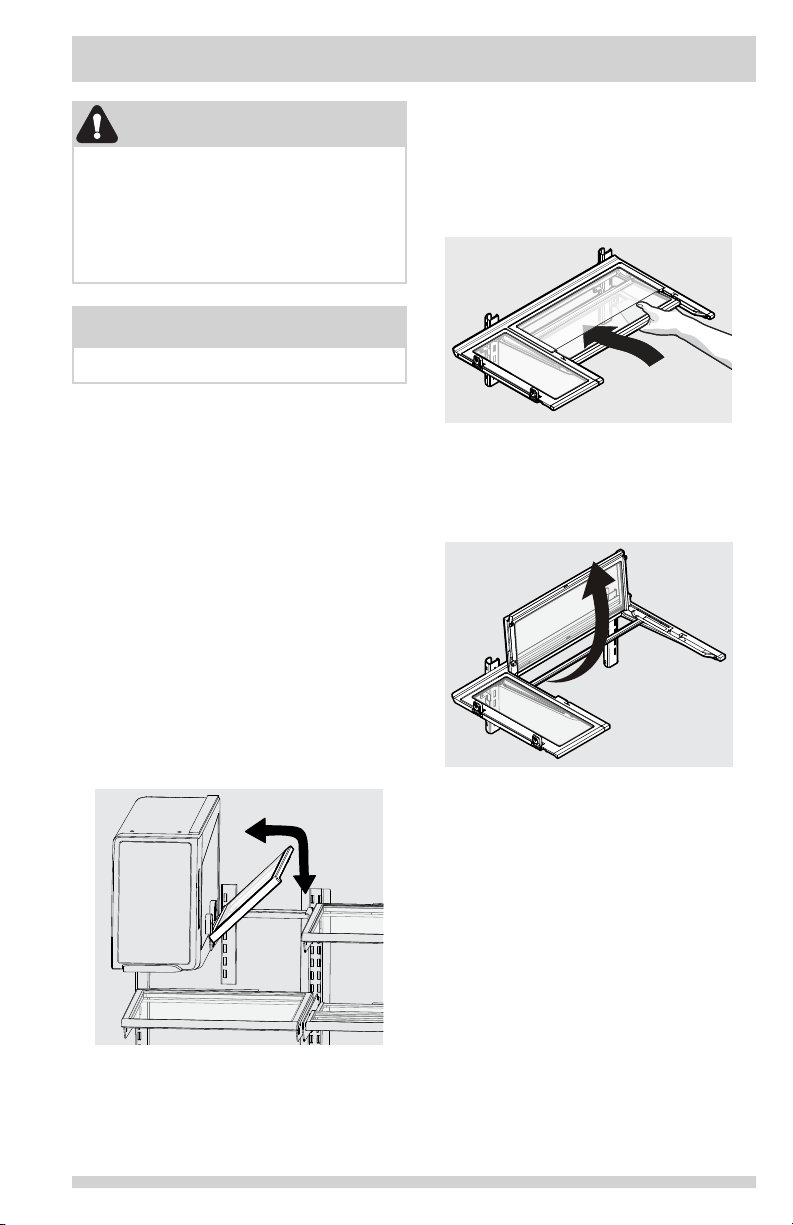
To adjust ip shelf:
1 Remove food from shelf.
2 Lift the right side edge of shelf upwards
and push to the left towards ice maker.
To adjust slide-under/ip shelf:
1. Push front half shelf backward towards
rear of cabinet until the rear half shelf
drops down, then gently continue pushing
front half shelf back and under the rear
half shelf.
Slide-Under/Flip Shelf
2. With front half fully below back half, lift
front of shelf to ip it upwards toward the
back of the cabinet.
Slide-Under/Flip Shelf
Flip Shelf
19
Page 20
STORAGE FEATURES
Drawers
The refrigerator includes a variety of storage
drawers.
Auto CrispSeal Drawer (with automatic
humidity control)
Crisper drawers are designed for storing fruits,
vegetables, and other fresh produce. Crispers
have an auto humidity control on the side of
each crisper under the humidity control cover.
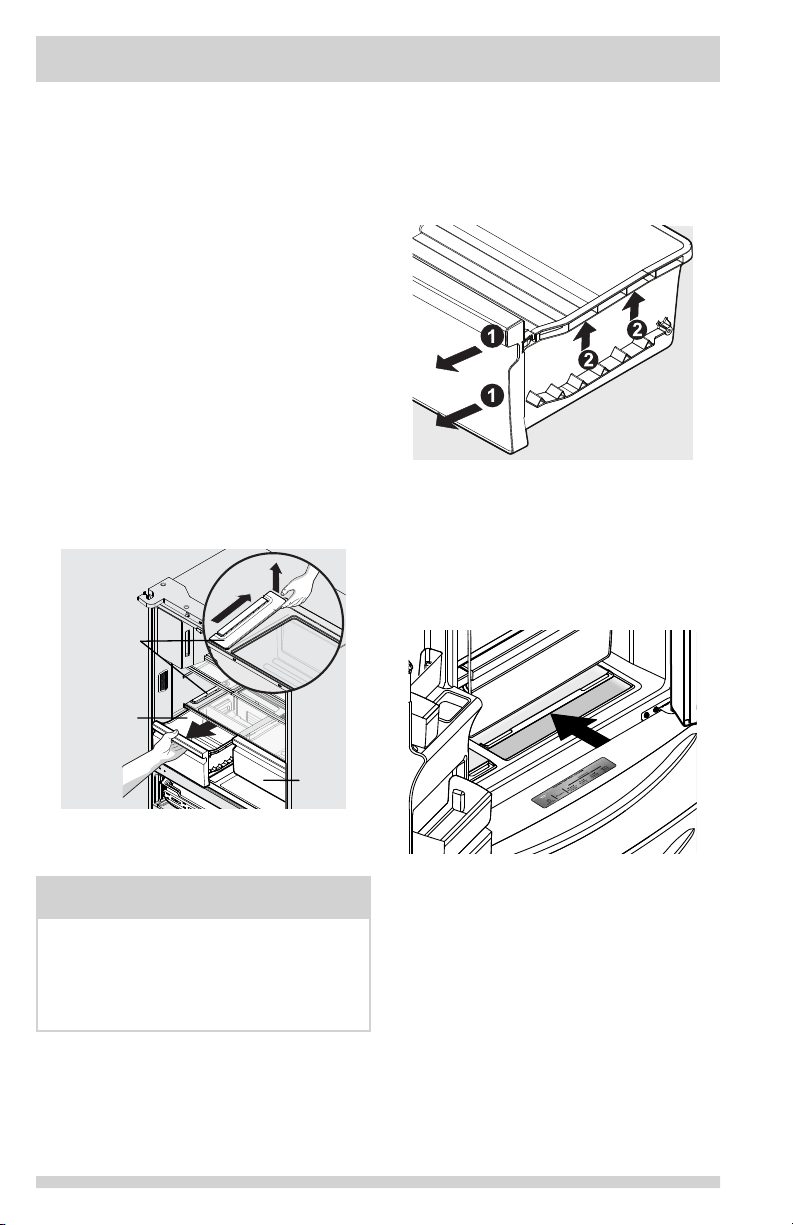
To remove the auto humidity control
membrane for cleaning:
1 Reach to back of humidity control cover.
2 Pull up on cover.
3 Pull cover towards back of cabinet and
remove.
4 Clean humidity membrane with hot soapy
water.
5 Replace membrane and cover by reversing
the steps above. Repeat for both crispers.
Auto
Humidity
Membrane
To remove the Auto CrispSeal drawer for
cleaning:
1 Pull the drawer out until it stops.
2 Lift the front slightly and remove the
drawer.
Removing Auto CrispSeal Drawer
SnackZone - Recessed Snack Drawers
These drawers are ideal for storage of deli
meats and cheeses.
To open: slide back the cover to allow access
to the drawers.
Crisper
Crisper
Removing Auto Humidity
Control Membrane
NOTE
Frigidaire does not recommend replacing the
auto-humidity membrane unless it becomes
damaged or ruined. If the membrane
becomes soiled, it can be washed with soap
and water. Ensure membrane is dry before
replacing in unit.
20
Opening SnackZone
Recessed Snack Drawers
Page 21
STORAGE FEATURES
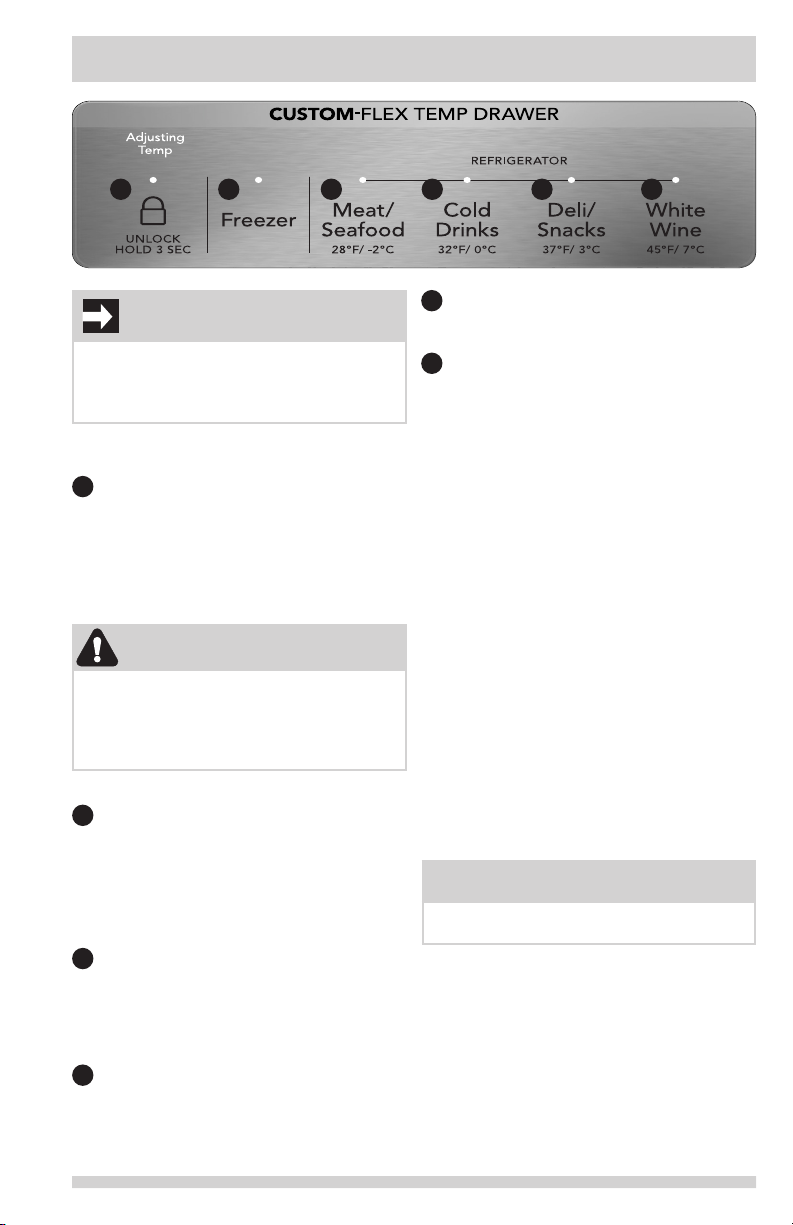
1 2 3 4 5 6
IMPORTANT
Do not use the Custom-Flex Temp Drawer
to store fresh produce as these items may
freeze and cause damage to the fruits and
leafy vegetables stored in the drawer.
Using Your Custom-FlexTM Temp Drawer
Controls
1
The drawer automatically defaults to a
locked state to prevent any unwanted use.
To change the drawer’s settings, it rst
needs to be unlocked. To unlock, press
and hold the UNLOCK icon for 3 seconds.
It will automatically lock after 10 seconds
without any interaction.
CAUTION
Do not store glass bottles in the CustomFlex Temp Drawer when the Temperature
setting is in Freezer, Meat/Seafood, or Cold
Drink modes. The glass may break and shatter, causing physical harm and injury.
Freezer:
2
To change the drawer temperature when
in the freezer temp setting, use the control
panel display on the front door. Changing
the temp on the display will change both
the drawer temp setting AND the freezer
compartment.
Refrigerator:
3 Choosing Meat/Seafood will set drawer
temperature to 28°F (-2°C). A tone will
sound to conrm choice. Use this setting
for short term storage. Any meat to be
kept longer than two days should be
frozen.
4 Choosing Cold Drinks will set drawer
temperature to 32°F (0°C). A tone will
sound to conrm choice.
5 Choosing Deli/Snacks will set drawer
temperature to 37°F (3°C). A tone will
sound to conrm choice.
6 Choosing White Wine will set drawer
temperature to 45°F (7°C). A tone will
sound to conrm choice.
Doors
Storage bins
The doors to the fresh food compartment use
a system of modular storage bins. All of these
bins are removable for easy cleaning. Bins can
be adjusted as needed.
Door bins are ideal for storing jars, bottles,
cans, and large drink containers. They also
enable quick selection of frequently used items.
Adjustable door bins
Some models have adjustable door bins that
can be moved to suit individual needs.
To adjust the collapsible door bin:
1 Make sure bin is securely seated on rail in door.
2 Grab one side of bin and place other hand
on adjustable side.
3 Pull on side of bin until the bin is adjusted
to desired width.
NOTE
It can be difcult to pull out the collapsible
bin. Some force may be required.
21
Page 22
STORAGE FEATURES
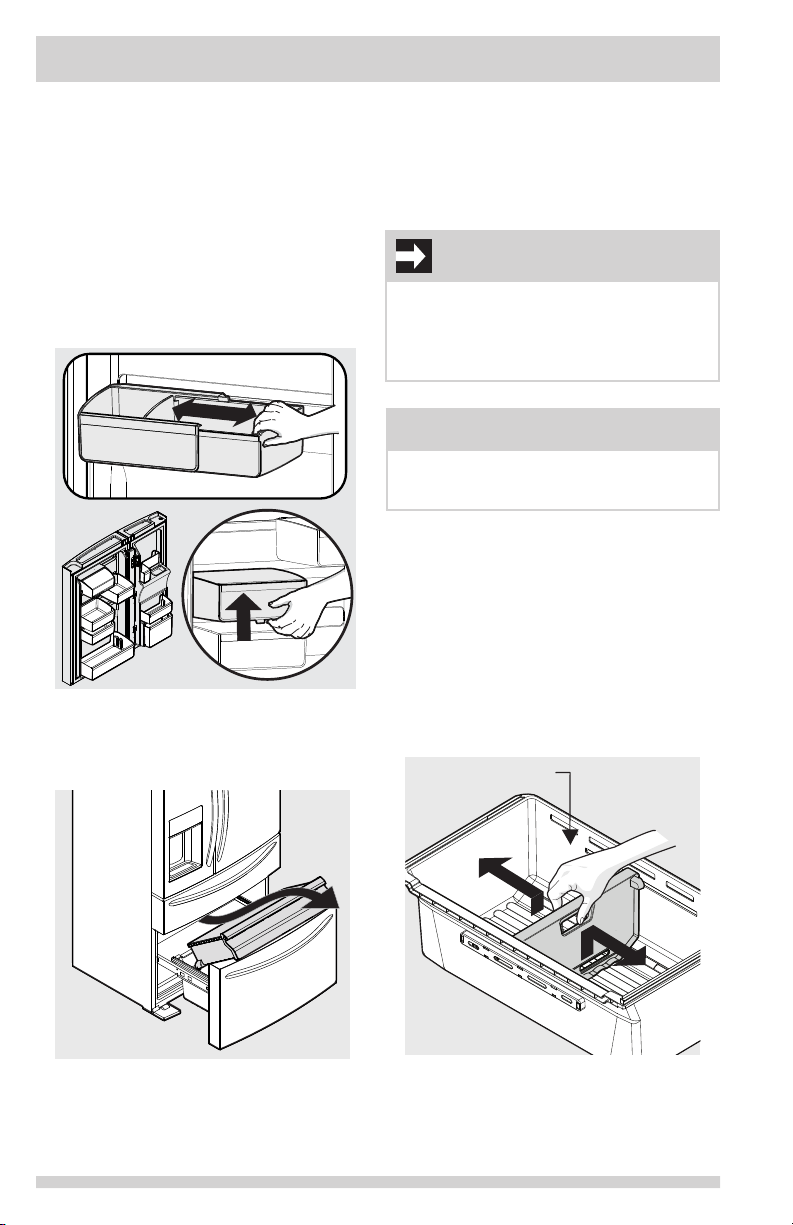
To move door bin side-to-side:
1. Tilt bin up so the back of the bin is off the
door but the hook is still engaged.
2. Slide bin along rail to desired position.
3. Lower bin back into place.
To move door bin up or down:
1. Lift bin up disengaging the hook.
2. Move bin to desired rail location.
3. Push bin hook into rail engaging the hook.
Adjustable Door Bins
To remove upper freezer drawer:
1 Open freezer compartment completely.
2 Lift up and out to remove upper freezer
drawer.
Reverse the steps to reinstall drawer.
IMPORTANT
There are wheels on the bottom of the
drawer. Make sure all wheels are aligned on
their respective tracks for proper function. If
drawer is not aligned properly, it will cause
problems with the door operation.
NOTE
If basket is not resting on stabilizer bar
retainer clips, the drawer will not close
properly.
To remove freezer basket:
1 Open freezer compartment completely.
2 Lift the basket up and remove.
Reverse the steps to reinstall freezer basket.
Dividers
Grab hand hold on lower divider and pull up
slightly to slide to next position. (The divider
cannot be removed.)
Freezer Features (varies by model)
Freezer Drawer
22
Lower Basket
Divider
Plastic Lower Basket Divider
Page 23

STORING FOOD AND SAVING ENERGY
Ideas for storing foods
Fresh food storage
• Keep the fresh food compartment
between 34°F and 44°F with an optimum
temperature of 37°F.
• Avoid overcrowding the refrigerator
shelves, which reduces air circulation and
causes uneven cooling.
• Avoid placing food in front of air ports.
(See Controls Section for illustration.)
Fruits and vegetables
• Store fruits and vegetables in crisper
drawers, where trapped moisture helps
preserve food quality for longer time
periods.
• Do not wash items until ready to use.
Remove excess water before placing
inside unit.
• Wrap any items that have strong odors or
high moisture content.
Meat
• Wrap raw meat and poultry separately
and securely to prevent leaks and
contamination of other foods or surfaces.
• Use the Custom-FlexTM Temp Drawer to
store meat/poultry for short-term storage.
Any meat to be kept longer than two days
should be frozen.
Frozen food storage
• Keep the freezer compartment at 0°F or
lower.
• A freezer operates most efciently when it
is at least ⅔ full.
Packaging foods for freezing
• To minimize food dehydration and quality
deterioration, use aluminum foil, freezer
wrap, freezer bags, or airtight containers.
Force as much air out of the packages as
possible and seal them tightly. Trapped air
can cause food to dry out, change color,
and develop an off-avor (freezer burn).
• Wrap fresh meats and poultry with
suitable freezer wrap prior to freezing.
• Do not refreeze meat that has completely
thawed.
Loading the freezer
• Prior to grocery shopping, activate
“quick freeze” so newly purchased
food designated for the freezer will be
preserved as quickly as possible.
• Activating “quick freeze” also will help
the freezer more efciently maintain the
selected temperature after placing new
purchases with pre-existing frozen foods.
• Avoid adding too much warm food to the
freezer at one time. This overloads the
freezer, slows the rate of freezing, and
can raise the temperature of frozen foods.
• Leave a space between packages, so cold
air can circulate freely, allowing food to
freeze as quickly as possible.
Ideas for saving energy
Installation
• Locate the refrigerator in the coolest part
of the room, out of direct sunlight, and
away from heating ducts or registers.
• Do not place the refrigerator next to
heat-producing appliances such as a
range, oven, or dishwasher. If this is not
possible, a section of cabinetry or an
added layer of insulation between the
two appliances will help the refrigerator
operate more efciently.
• Level the refrigerator so that the doors
close tightly.
Temperature settings
• Refer to the “Controls” section for
procedures on temperature settings.
Food storage
• Avoid overcrowding the refrigerator or
blocking cold air vents. Doing so causes
the refrigerator to run longer and use
more energy.
• Cover foods and wipe containers dry
before placing them in the refrigerator.
This cuts down on moisture build-up
inside the unit.
• Organize the refrigerator to reduce door
openings. Remove as many items as
needed at one time and close the door as
soon as possible.
• Do not place a hot container directly on
a cold shelf. Remember, such an extreme
temperature change may damage the
glass.
23
Page 24
NORMAL OPERATING SOUNDS AND SIGHTS
Understanding the sounds
coming from the refrigerator
High-efciency refrigerators may introduce
unfamiliar sounds. These sounds normally
indicate the refrigerator is operating correctly.
Some surfaces on oors, walls, and kitchen
cabinets may make these sounds more
noticeable.
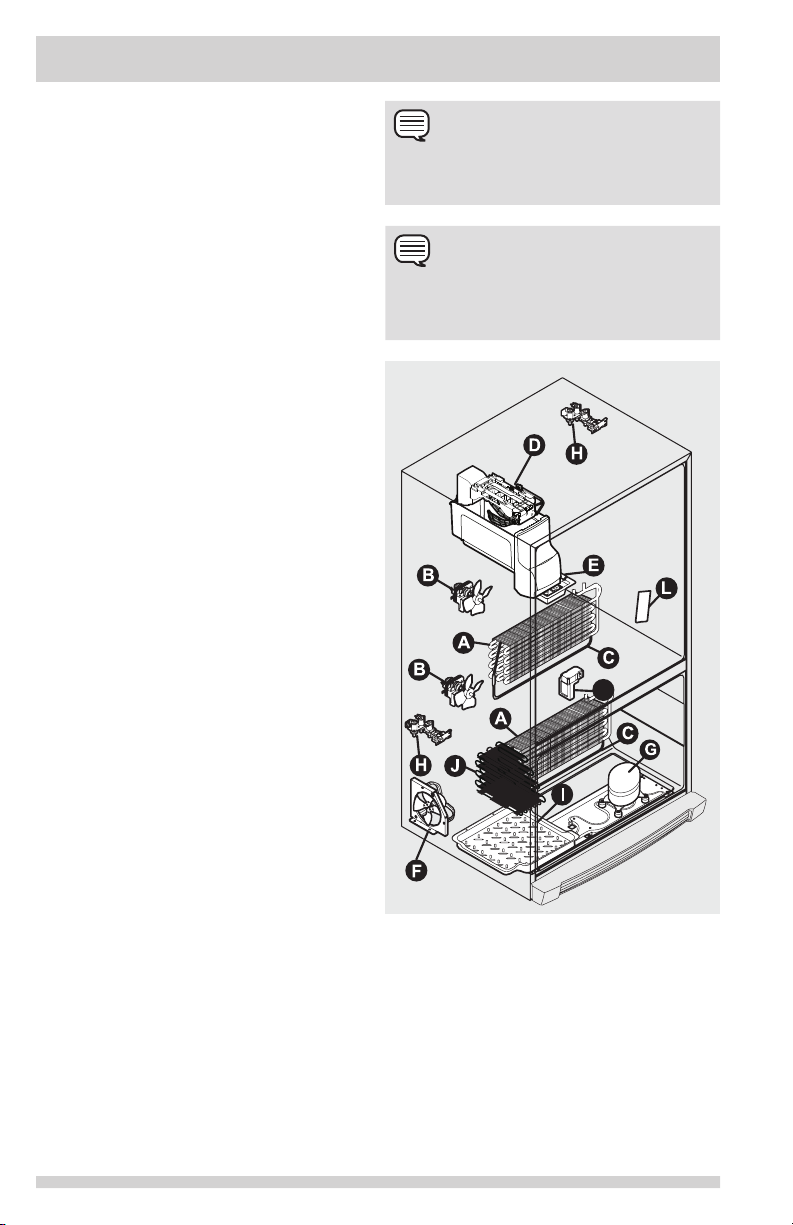
The following is a list of major components
in the refrigerator and the sounds they can
cause:
A Evaporators Refrigerant through the
evaporators may create a boiling or
gurgling sound.
B Evaporator fans Sounds of air being
forced through the refrigerator by the
evaporator fans may be heard.
C Defrost heaters During defrost cycles,
water dripping onto the defrost heaters
may cause a hissing or sizzling sound.
After defrosting, a popping sound may
occur.
D Automatic ice maker When ice has
been produced, sounds of ice cubes falling
into the ice bin may be heard. Ice maker
fan, water valve activation, and refrigerant
gas uid may create sounds from its
operation.
E Electronic control & automatic
defrost control These parts can produce
a snapping or clicking sound when turning
the cooling system on and off.
F Condenser fan Sounds of air being
forced through the condenser may be
heard.
G Compressor Modern, high-efciency
compressors run much faster than older
models. The compressor may have a highpitched hum or pulsating sound.
H Water valves Make a buzzing sound
each time they open to ll the ice maker.
I Drain pan (not removable) Sounds of
water dripping into the drain pan during
the defrost cycle may be heard.
J Condenser May create minimal sounds
from forced air.
K Motorized damper May produce a light
humming during operation.
L Ice dispenser When dispensing ice, a
snapping, clicking, or popping sound may
be heard.
NOTE
Energy efcient foam in the refrigerator is
not a sound insulator.
NOTE
During automatic defrost cycle, a red glow in
the back wall vents of the freezer compartment is normal.
K
Features vary by model
24
Page 25
CHANGING THE FILTER
Air Filter (select models)
The air lter is located in the top center of the
fresh food compartment.
Replacing the PureAir Ultra IITM
Air Filter
To ensure optimal ltering of refrigerator odors,
change the air lter every six months (Replace
Air Filter on the Display indicates replacing the
lter after six months).
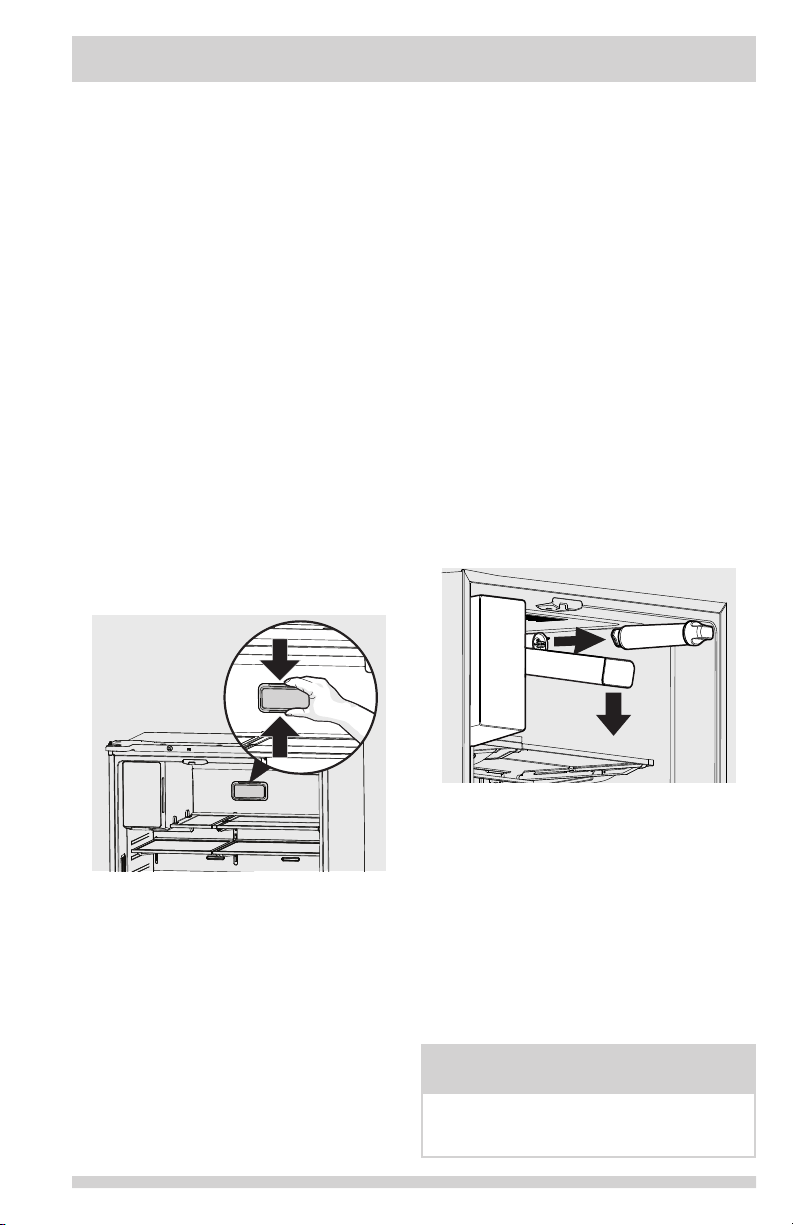
1 Remove the air lter cover by squeezing
the top and bottom of the cover together
and removing from liner.
2 Remove the old lter and discard it.
3 Unpack the new lter and snap it into the
lter cover. The open face (carbon media)
of the lter should be installed facing
outward in the cover.
4 Replace the air lter cover by squeezing
the sides and snapping it back into place.
5 Press and hold the “Reset Air Filter”
button on the Display for three seconds.
When the indicator turns off, the status
has been reset.
Water Filter
The refrigerator is equipped with a water ltering
system. The water ltering system lters all
dispensed drinking water, as well as the water
used to produce ice. The water lter is located at
the top right side of the fresh food compartment.
Replacing the Water Filter
Change the water lter every six months to
ensure the highest possible water quality.
Replace Water Filter on the display indicates
when to replace the lter after a standard
amount of water (125 gallons/473 liters for
PureSource Ultra IITM) has owed through
the system.
If the refrigerator has not been used for a period
of time (during moving for example), change the
lter before reinstalling the refrigerator.
To Remove: Pull cover forwards and cover
will drop down and allow access to lter.
To Reinstall: Push cover up towards liner and
then push towards rear of cabinet. Filter cover
will snap back into place.
Ordering Replacement Air Filters
Order replacement lters online at
www.frigidaire.com/store, by calling
1-800-374- 4432 or through the dealer
from which the refrigerator was purchased.
Frigidaire recommends replacing lters at least
once every six months.
Here is the product number to request when
ordering:
Air Filter Replacement cartridge,
part #PAULTRA2
Ordering Replacement Water
Filters
Order replacement lters online at
www.frigidaire.com/store, by calling
1-800-374- 4432 or through the dealer
from which the refrigerator was purchased.
Frigidaire recommends replacing lters at least
once every six months.
Here is the product number to request when
ordering:
PureSource Ultra II
Part #EPTWFU01
NOTE
When ordering replacement lters, please
reorder the same lter type that is currently
in the refrigerator.
TM
Water Filter
25
Page 26
CHANGING THE FILTER
More about the Advanced Water
Filter
The PureSource Ultra II
ice and water lter system is
tested and certied to NSF/ANSI
Standards 43, 53 and 401 for the
reduction of claims specied on
the performance data sheet.
Do not use with water that is microbiologically
unsafe or of unknown quality without adequate
disinfection before or after the system.
Systems certied for cyst reduction may be
used on disinfected waters that may contain
lterable cysts.
Test & certication results:
• Rated Capacity - 125 gallons/473 liters
for PureSource Ultra IITM ice and water
lter
• Rated service ow - .65 gallons per
minute
• Operating Temp: Min. 33°F, Max. 100°F
• Maximum Rated Pressure - 100 pounds
per square inch
• Recommended Minimum Operating
Pressure: 30 pounds per square inch
To replace the PureSource Ultra II
water lter:
It is not necessary to turn the water supply
off to change the lter. Be ready to wipe up
any small amounts of water released during
the lter replacement. (Instructional video of
procedure can be found on www.frigidaire.com.)
1 Push down on front edge of lter cover.
Cover will tilt down and expose water
lter.
2 Remove the old lter by rotating it
counter-clockwise (to the left) 90 degrees
to release it.
3 Slide the old lter cartridge straight out of
the housing and discard it.
4 Unpackage the new lter cartridge. Slide
it into the lter housing as far as it will go
with the grip end horizontal.
5 Push lightly inward on the lter while
rotating it clockwise (to the right). The
lter will then pull itself inward as it is
rotated. Rotate the lter 90 degrees until
it stops and the grip end is vertical. A very
light click may be heard as the lter locks
into place.
TM
TM
6 Press a drinking glass against the water
dispenser while checking for any leaks at
the lter housing. Any spurts and sputters
that occur as the system purges air out of
the dispenser system are normal.
7 Continue dispensing water for 3-4
minutes. It may be necessary to empty
and rell the container several times.
8 Press and hold the Reset Water Filter
button on the display for three seconds.
When indicator is no longer illuminated,
the water lter status has been reset.
9 Replace lter cover by pushing up and
snapping into place.
26
Page 27
CARE & CLEANING
Care & Cleaning Tips
Keeping the refrigerator clean maintains its appearance and prevents odor build-up. Wipe up
any spills immediately and clean the freezer and fresh food compartments at least twice a year.
NOTE
Do not use abrasive cleaners such as window sprays, scouring cleansers, ammable uids,
cleaning waxes, concentrated detergents, bleaches, or cleansers containing petroleum products on plastic parts, interior doors, gaskets, or cabinet liners. Do not use scouring pads or
other abrasive cleaning materials.
• Never use metallic scouring pads, brushes, abrasive cleaners, or strong alkaline solutions
on any surface.
• Never use CHLORIDE or cleaners with bleach to clean stainless steel.
• Do not wash any removable parts in a dishwasher.
NOTE
When setting temperature controls to turn off cooling, power to lights and other electrical
components will continue until the power cord is unplugged from the wall outlet.
• Always unplug the electrical power cord from the wall outlet before cleaning.
• Remove adhesive labels by hand. Do not use razor blades or other sharp instruments which
can scratch the appliance surface.
• Do not remove the serial plate. Removal of the serial plate voids the warranty.
• Before moving refrigerator, raise the anti-tip brackets so the rollers will work correctly. This
will prevent the oor from being damaged.
Refer to the guide on the next page for details on caring and cleaning specic areas of refrigerator.
CAUTION
• Pull the refrigerator straight out to move it. Shifting it from side to side may damage
ooring. Be careful not to move the refrigerator beyond the plumbing connections.
• Damp objects stick to cold metal surfaces. Do not touch refrigerated surfaces with wet or
damp hands.
IMPORTANT
When storing or moving refrigerator in freezing temperatures, be sure to completely drain the
water supply system. Failure to do so could result in water leaks when the refrigerator is put
back into service. Contact a service representative to perform this operation.
Vacation and moving tips
Occasion Tips
Short
Vacations
Long
Vacations
Moving • Remove all food and ice.
• Leave refrigerator operating during vacations of three weeks or less.
• Use all perishable items from refrigerator compartment.
• Turn automatic ice maker off and empty ice bucket, even if only away a few
days.
• Remove all food and ice if leaving for one month or more.
• Turn the cooling system off (see “Controls” section for location of On/Off
button) and disconnect power cord.
• Turn water supply valve to closed position.
• Clean interior thoroughly.
• Leave both doors open to prevent odors and mold build-up. Block doors open if
necessary.
• If using a handcart, load from the side.
• Adjust rollers all the way up to protect them during sliding or moving.
• Pad cabinet to avoid scratching surface.
27
Page 28
CARE & CLEANING
Care & Cleaning Tips
Part What To Use Tips and Precautions
Interior & Door
Liners
Door Gaskets • Soap and water Wipe gaskets with a clean soft cloth.
Drawers & Bins • Soap and water Use a soft cloth to clean drawer runners and
Glass Shelves • Soap and water
Exterior &
Handles
Exterior &
Handles
(Stainless Steel
Models Only)
• Soap and water
• Baking soda and water
• Glass cleaner
• Mild liquid sprays
• Soap and water
• Non Abrasive Glass
Cleaner
• Soap and water
• Stainless Steel
Cleaners
Use two tablespoons of baking soda in one
quart of warm water. Be sure to wring
excess water out of sponge or cloth
before cleaning around controls, light
bulb or any electrical part.
tracks.
Allow glass to warm to room temperature
before immersing in warm water.
Do not use commercial household cleaners
containing ammonia, bleach or alcohol to clean
handles. Use a soft cloth to clean smooth
handles or exterior. DO NOT use a dry cloth
to clean smooth doors.
Never use CHLORIDE or cleaners with
bleach to clean stainless steel.
Clean stainless steel front and handles with
non-abrasive soapy water and a dishcloth.
Rinse with clean water and a soft cloth. Use
a non-abrasive stainless steel cleaner. These
cleaners can be purchased at most home
improvement or major department stores.
Always follow manufacturer’s instructions.
Do not use household cleaners containing
ammonia or bleach.
NOTE: Always clean, wipe and dry with
the grain to prevent scratching. Wash
the rest of the cabinet with warm water and
mild liquid detergent. Rinse well, and wipe dry
with a clean soft cloth. Stainless steel cleaning
supplies can be purchased from
www.frigidaire.com
28
Page 29
BEFORE CALLING
1-800-374-4432 (United States)
1-800-265-8352 (Canada)
Visit our web site at
www.frigidaire.com or
www.frigidaire.ca
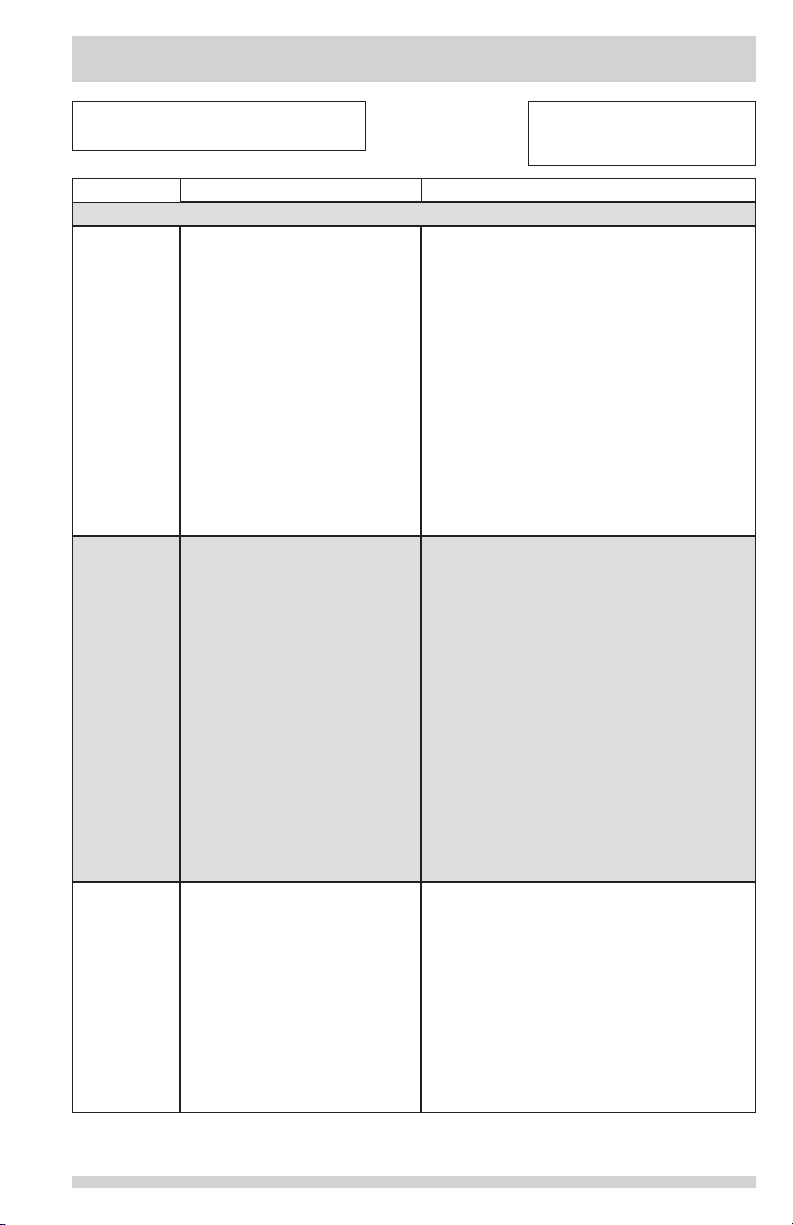
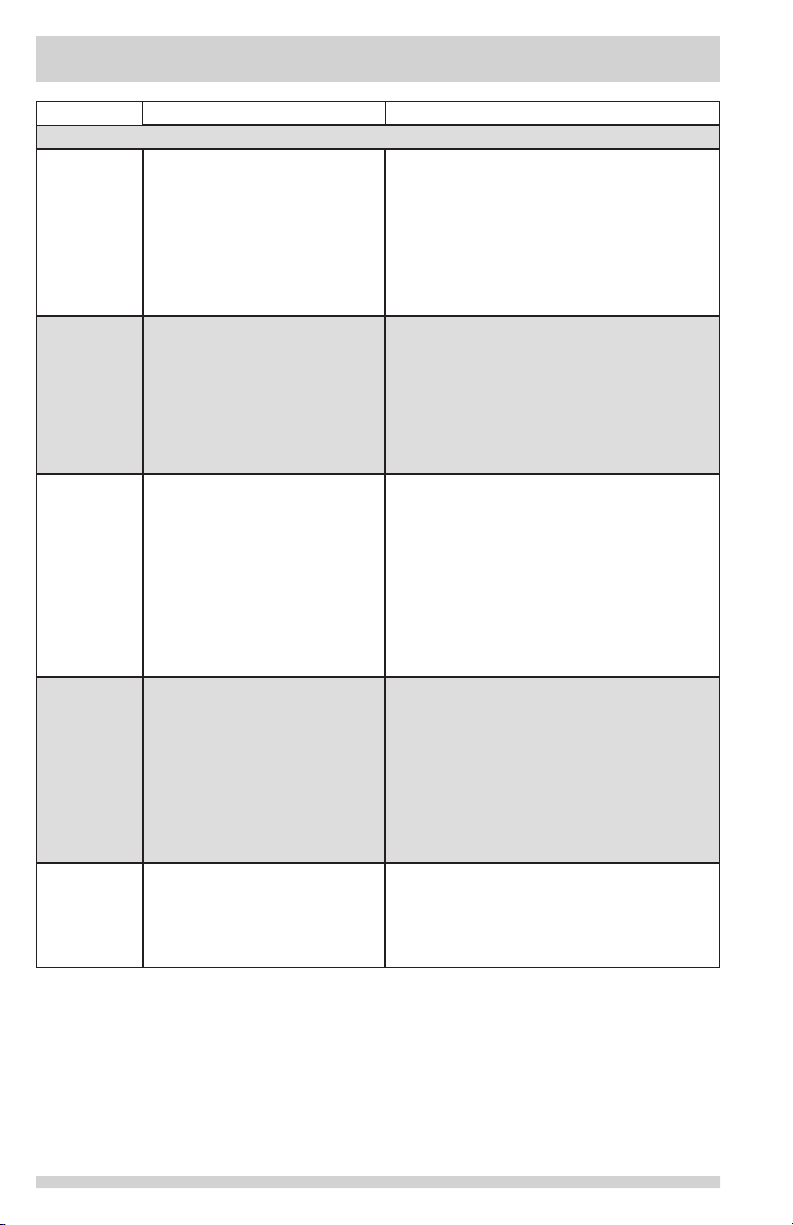
Concern Potential Cause Common Solution
Automatic Ice Maker
Ice maker is
not making
any ice.
Ice maker is
not making
enough ice.
Ice cubes
are freezing
together.
• Ice maker is turned off.
• Refrigerator is not
connected to water line or
water valve is not open.
• The water supply line is
kinked.
• The water lter is not
seated properly.
• The water lter may be
clogged with foreign
material.
• Ice maker is producing less
ice than expected.
• The water lter may be
clogged with foreign
material.
• The water supply line is
kinked.
• Water pressure is extremely
low. Cut-off and cut-on
pressures are too low (well
systems only).
• Reverse osmosis system is
in regenerative phase.
• Ice cubes are not being
used frequently enough or
interruption of power for
prolonged time.
• Ice cubes are hollow (shells
of ice with water inside).
The hollow cubes break
open in the bin and leak
their water onto existing
ice, which causes it to
freeze together.
• Turn on ice maker. For the fresh food
ice maker, press ice maker on-off button
once.
• Connect the unit to the household water
supply and ensure the water valve is
open.
• Ensure that the supply line does not
kink when the refrigerator is pushed into
place against the wall.
• Remove and re-install the water lter.
Be sure to seat it fully into the locked
position.
• If water dispenses slowly or not at all, or
if the lter is six months old or older, it
should be replaced.
• The ice maker will produce
approximately 2 to 3 pounds of ice
every 24 hours depending on usage
conditions.
• If water dispenses slower than normal,
or if the lter is six months old or older,
it should be replaced.
• Ensure that the supply line does not
kink when the refrigerator is pushed into
place against the wall.
• Have someone turn up the cut-off and
cut-on pressure on the water pump
system (well systems only).
• It is normal for a reverse osmosis
system to be below 20 psi during the
regenerative phase.
• Remove ice container and discard ice.
The ice maker will produce fresh supply.
Ice should be used at least twice weekly
to keep the cubes separated.
• This generally occurs when the ice
maker does not get enough water. This
is usually the result of a clogged water
lter or restricted water supply. Replace
the water lter and if the condition still
occurs, check to see if the water valve is
not turned on all the way or if there is a
kinked water supply line.
29
Page 30
BEFORE CALLING
Concern Potential Cause Common Solution
Dispenser (Ice & Water)
Dispenser will
not dispense
ice.
Ice dispenser
is jammed.
Dispenser will
not dispense
water.
Water not
cold enough.
Water has
an odd taste
and/or odor.
• There is no ice in the bin to
be dispensed.
• The refrigerator doors are
not completely closed.
• Dispenser paddle has
been pressed too long and
the dispenser motor has
overheated.
• Ice has melted and frozen
around auger due to
infrequent use, temperature
uctuations, and/or power
outages.
• Ice cubes are jammed
between ice maker and
back of ice container.
• Water lter not seated
properly.
• Water lter is clogged.
• Household water line valve
is not open.
• As warmer tap water goes
through the lter and
enters the water supply
system, the chilled water
is pushed through to the
dispenser. Once the chilled
water is used up, it will take
several hours to bring the
freshly replaced water to a
cooler temperature.
• Water has not been
dispensed for an extended
period of time.
• Unit not properly connected
to cold water line.
• See the “Ice maker is not making any
ice” section.
• Be sure the refrigerator doors are
completely closed.
• The motor overload protector will reset
in about three minutes and then ice can
be dispensed.
• Remove ice container, thaw, and empty
the contents. Clean container, wipe dry,
and replace in proper position. When
new ice is made, dispenser should
operate.
• Remove ice cubes that are jamming the
dispenser.
• Remove and reinstall the water lter. For
Puresource Ultra II, be sure to rotate it
to the right until it stops and the grip
end is vertical.
• Replace lter cartridge. Be sure to rotate
it to the right until it stops and the grip
end is vertical.
• Open household water line valve. See
CONCERN column AUTOMATIC ICE
MAKER.
• Add ice to cup or container before
dispensing water.
Note: Only rst 26 ounces are chilled.
• Draw and discard 10-12 glasses of water
to freshen the supply.
• Connect unit to cold water line that
supplies water to the kitchen faucet.
30
Page 31
BEFORE CALLING
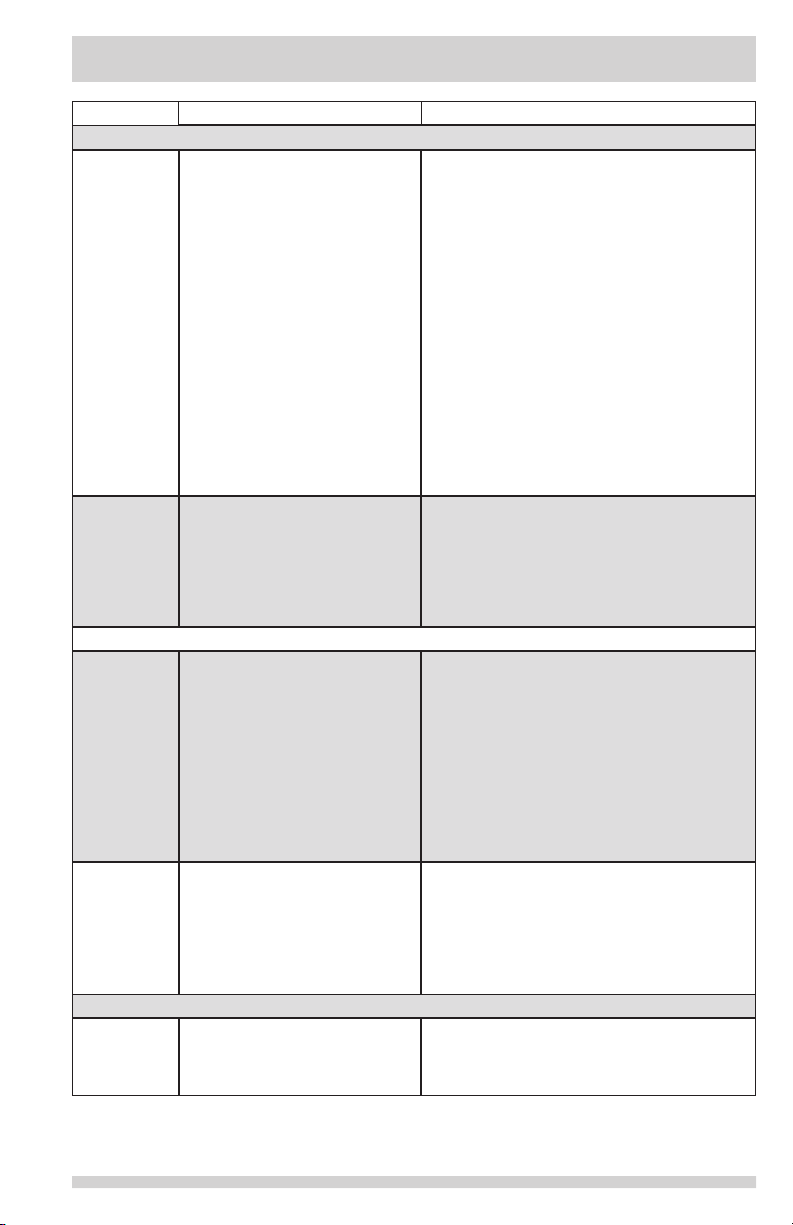
Concern Potential Cause Common Solution
Opening/Closing Of Doors/Drawers
Door(s) will
not close.
Drawers are
difcult to
move.
Running of Refrigerator
Compressor
does not run.
Refrigerator
seems to run
too much or
too long.
Digital Temperature Setting Display
Digital
temperature
displays an
error.
• Door was closed too hard,
causing other door to open
slightly.
• Refrigerator is not level.
It rocks on the oor when
moved slightly.
• Refrigerator is touching a
wall or cabinet.
• Food/packaging is
obstructing the door from
closing.
• Flipper mullion on left fresh
food door is not in the
correct position.
• Food is touching shelf on
top of drawer.
• Track that drawers slide on
is dirty.
• Refrigerator is in defrost
cycle.
• Plug at electrical outlet is
disconnected.
• House fuse blown or
tripped circuit breaker.
• Power outage.
• The variable speed
compressor is designed
to run 100% of the time
except during the defrost
cycle. At times it will run
faster, such as after a
defrost cycle.
• Electronic control system
has detected a performance
problem.
• Close both doors gently.
• Ensure oor is level and solid, and can
adequately support the refrigerator.
Contact a carpenter to correct a sagging
or sloping oor.
• Ensure oor is level and solid, and can
adequately support the refrigerator.
Contact a carpenter to correct a sagging
or sloping oor.
• Make sure there is no food/packaging
blocking the doorway.
• Ensure the ipper mullion is in the
correct position to allow the door to
close. (See Flipper Mullion section.)
• Remove top layer of items in drawer.
• Ensure drawer is properly installed on
track.
• Clean drawer, rollers, and track. See
Care & Cleaning.
• This is normal for a fully automatic
defrost refrigerator. The defrost cycle
occurs periodically, lasting about 30
minutes.
• Ensure plug is tightly pushed into outlet.
• Check/replace fuse with a 15 amp timedelay fuse. Reset circuit breaker.
• Check house lights. Call local electric
company.
• It is normal for the compressor to run
continuously except during defrost
mode.
• Contact Electrolux Customer Care for
assistance with any errors or codes
ashing in the display by calling
1-800-374-4432.
31
Page 32
BEFORE CALLING
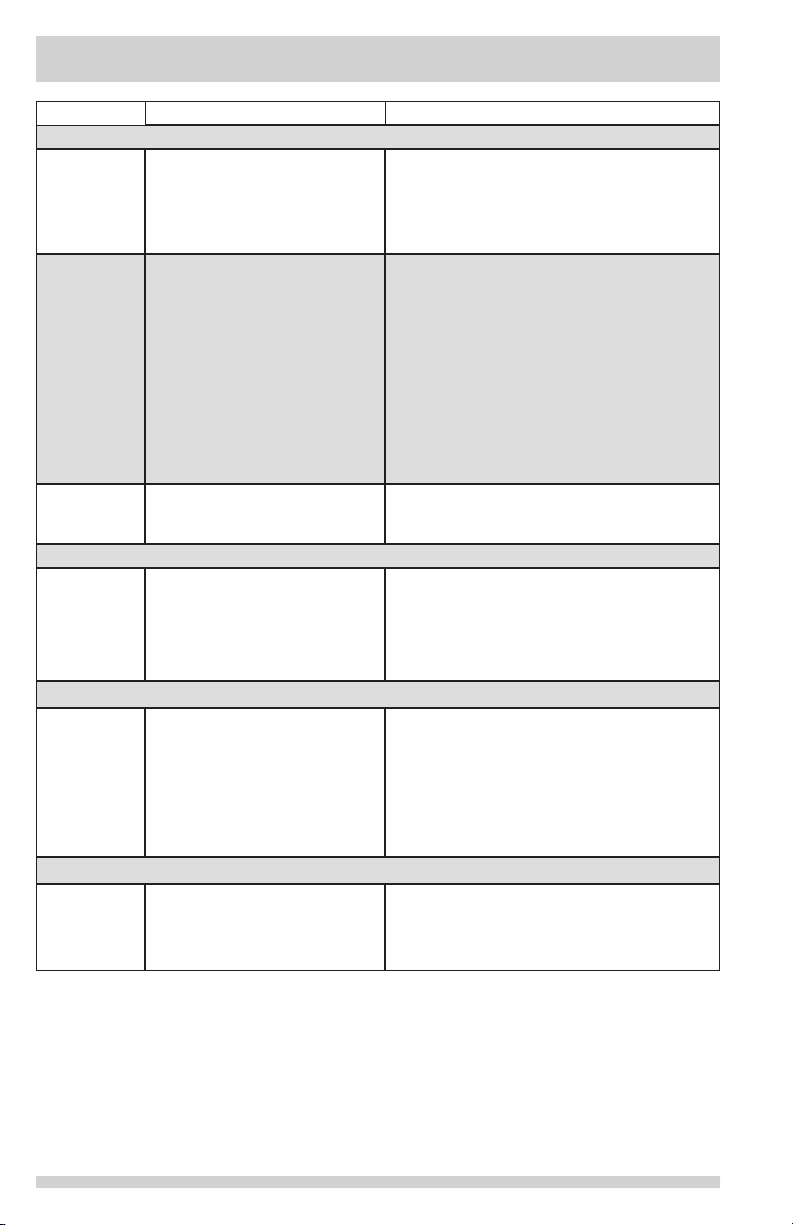
Concern Potential Cause Common Solution
Water/Moisture/Frost Inside Refrigerator
Moisture
collects on
inside of
refrigerator
walls.
Water collects
on bottom
side of drawer
cover.
Water collects
in bottom of
drawer.
Water/Moisture/Frost Outside Refrigerator
Moisture
collects on
outside of
refrigerator
or between
doors.
Food/Drinks in Fresh Food Compartment/Custom-Flex Drawer
Food is
freezing.
Cold Drink Timer
Drinks are
freezing.
• Weather is hot and humid.
• Flipper mullion
• Vegetables contain and
give off moisture.
• Washed vegetables and
fruit drain while in the
drawer.
• Weather is humid. • This is normal in humid weather. When
• Temperature setting is too
low.
• Temperature sensor is
covered by food (right side
of fresh food area).
• Food is covering the air
ports.
• Temperature setting is too
low.
• Cold drink timer is set too
long.
• The rate of frost buildup and internal
sweating increases.
• Adjust ipper mullion. (See “To adjust
the ipper mullion” in the Installation
section.)
• It is not unusual to have moisture on the
bottom side of the cover.
• Both crispers contain an automatic
humidity control, which should adjust
automatically to the varying levels of
moisture inside the drawer without
creating additional condensation or
drying out the air inside the crisper
drawer, works with various types of
produce. If excess moisture is noticed,
check to verify humidity membrane is
not damaged and replace as necessary.
• Dry items before putting them in the
drawer. Water collecting in bottom of
drawer is normal.
humidity is lower, the moisture should
disappear.
• Move the setting to a higher degree.
• Allow space for air ow to the sensor.
• Allow space between the air ports and
the food.
• Move temperature setting higher.
• Reduce time of cold drink timer
accordingly.
32
Page 33
MAJOR APPLIANCE WARRANTY
Your appliance is covered by a one year limited warranty. For one year from your original date of
purchase, Electrolux will pay all costs for repairing or replacing any parts of this appliance that prove
to be defective in materials or workmanship when such appliance is installed, used and maintained in
accordance with the provided instructions.
Exclusions
This warranty does not cover the following:
1. Products with original serial numbers that have been removed, altered or cannot be readily determined.
2. Product that has been transferred from its original owner to another party or removed outside
the USA or Canada.
3. Rust on the interior or exterior of the unit.
4. Products purchased “as-is” are not covered by this warranty.
5. Food loss due to any refrigerator or freezer failures.
6. Products used in a commercial setting.
7. Service calls which do not involve malfunction or defects in materials or workmanship, or for appliances
not in ordinary household use or used other than in accordance with the provided instructions.
8. Service calls to correct the installation of your appliance or to instruct you how to use your appliance.
9. Expenses for making the appliance accessible for servicing, such as removal of trim, cupboards,
shelves, etc., which are not a part of the appliance when it is shipped from the factory.
10. Service calls to repair or replace appliance light bulbs, air lters, water lters, other
consumables, or knobs, handles, or other cosmetic parts.
11. Surcharges including, but not limited to, any after hour, weekend, or holiday service calls, tolls, ferry
trip charges, or mileage expense for service calls to remote areas, including the state of Alaska.
12. Damages to the nish of appliance or home incurred during installation, including but not
limited to oors, cabinets, walls, etc.
13. Damages caused by: services performed by unauthorized service companies; use of parts other
than genuine Electrolux parts or parts obtained from persons other than authorized service
companies; or external causes such as abuse, misuse, inadequate power supply, accidents,
res, or acts of God.
DISCLAIMER OF IMPLIED WARRANTIES; LIMITATION OF REMEDIES
CUSTOMER’S SOLE AND EXCLUSIVE REMEDY UNDER THIS LIMITED WARRANTY SHALL BE PRODUCT
REPAIR OR REPLACEMENT AS PROVIDED HEREIN. CLAIMS BASED ON IMPLIED WARRANTIES,
INCLUDING WARRANTIES OF MERCHANTABILITY OR FITNESS FOR A PARTICULAR PURPOSE, ARE
LIMITED TO ONE YEAR OR THE SHORTEST PERIOD ALLOWED BY LAW, BUT NOT LESS THAN ONE
YEAR. ELECTROLUX SHALL NOT BE LIABLE FOR CONSEQUENTIAL OR INCIDENTAL DAMAGES SUCH
AS PROPERTY DAMAGE AND INCIDENTAL EXPENSES RESULTING FROM ANY BREACH OF THIS
WRITTEN LIMITED WARRANTY OR ANY IMPLIED WARRANTY. SOME STATES AND PROVINCES DO
NOT ALLOW THE EXCLUSION OR LIMITATION OF INCIDENTAL OR CONSEQUENTIAL DAMAGES,
OR LIMITATIONS ON THE DURATION OF IMPLIED WARRANTIES, SO THESE LIMITATIONS OR
EXCLUSIONS MAY NOT APPLY TO YOU. THIS WRITTEN WARRANTY GIVES YOU SPECIFIC LEGAL
RIGHTS. YOU MAY ALSO HAVE OTHER RIGHTS THAT VARY FROM STATE TO STATE.
If You Need Service
Keep your receipt, delivery slip, or some other appropriate payment record to establish the warranty
period should service be required. If service is performed, it is in your best interest to obtain and
keep all receipts. Service under this warranty must be obtained by contacting Electrolux at the
addresses or phone numbers below.
This warranty only applies in the USA and Canada. In the USA, your appliance is warranted by
Electrolux Major Appliances North America, a division of Electrolux Home Products, Inc. In Canada,
your appliance is warranted by Electrolux Canada Corp. Electrolux authorizes no person to change
or add to any obligations under this warranty. Obligations for service and parts under this warranty
must be performed by Electrolux or an authorized service company. Product features or specications
as described or illustrated are subject to change without notice.
USA
1-800-374-4432
Frigidaire
10200 David Taylor Drive
Charlotte, NC 28262
1.800.265.8352
Electrolux Canada Corp.
5855 Terry Fox Way
Mississauga, Ontario, Canada
Canada
L5V 3E4
33
 Loading...