

Page 1
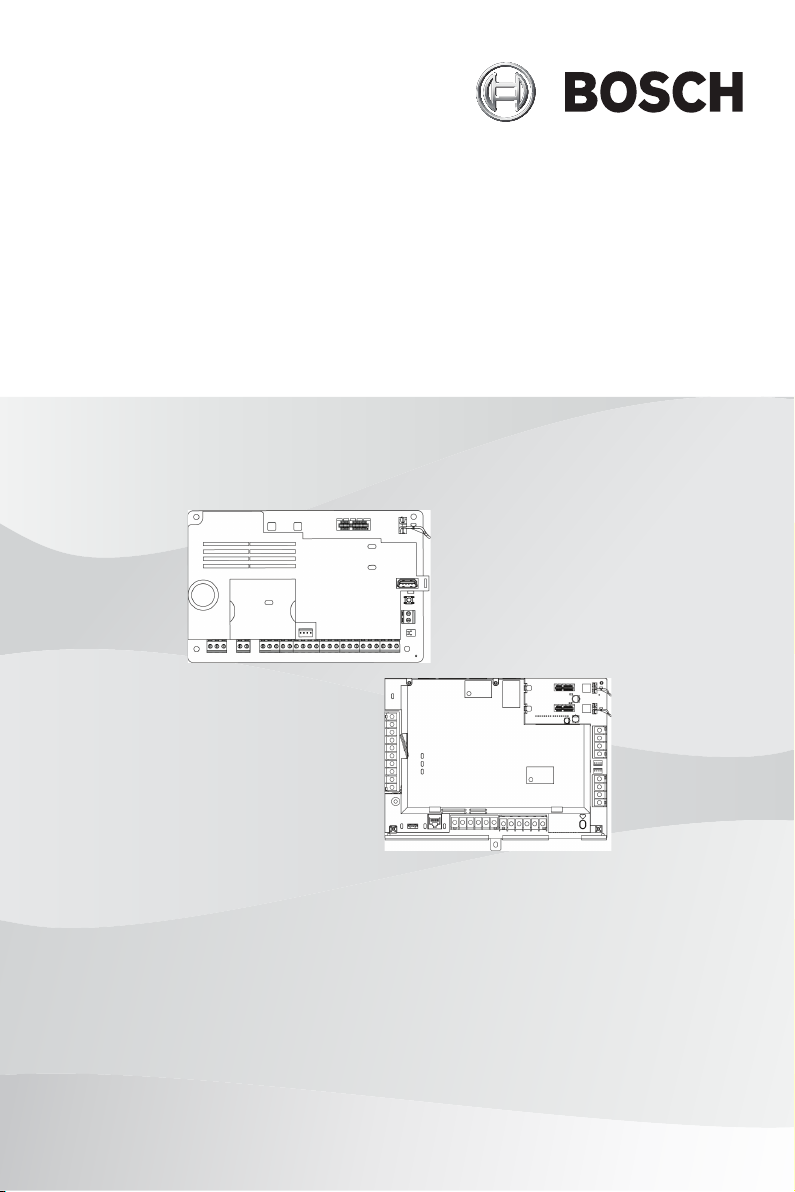
Control Panels
B9512G/B8512G/B6512/B5512/B4512/B3512 (B9512G‑E/
B8512G‑E/B5512E/B4512E/B3512E)
en ULC Installation Manual
Page 2

Page 3

Control Panels ULC Installation Guide | en 3
1 ULC Installation Guide
During any ULC installation described within this document,
follow all rules for safe installation specified in the CEC
(Canadian Electrical Code).
Control panels
Use this guide with the following control panel models (unless
otherwise stated) and the model’s installation guide:
– B9512G/B9512G-E v3.02.006 and higher
– B8512G/B8512G-E v3.02.006 and higher
– B6512
– B5512/B5512E v3.02.007 and higher
– B4512/B4512E v3.02.007 and higher
– B3512/B3512E v3.02.007 and higher
The listed control panels are approved as ULC-S559 Fire Alarm
Signal Communicators.
Notice!
Control panel mounting
For mounting on the exterior of vault, safe, or stockroom, install
a vibration detector (s304, 8.1.5).
Combination ULC-S559 and ULC-S304 control panels
The following control panel models can be configured as
combination control panels:
– B9512G/B9512G-E v3.02.006 and higher
– B8512G/B8512G-E v3.02.006 and higher
When used a combination control panel, Fire and Burg points
must reside in separate areas.
Keypads
Use this guide with the following keypad models and the
model’s installation guide:
– B915/B915I v1.00.017 or higher
– B920 v1.05.004 or higher
Transformers
For transformers, use:
Bosch Security Systems B.V. 2019.06 | 02 | F.01U.321.698
Page 4

4 en | ULC Installation Guide Control Panels
– B9512G/B9512G-E, B8512G/B8512G-E. Plug-in or hardwire
120 VAC primary, 16.5 VAC 37-40 VA secondary Class 2
Power Limited CSA/cUL listed.
– B6512, B5512/B5512E, B4512/B4512E, B3512/B3512E.
Plug-in 120 VAC primary, 18 VAC 22 VA secondary class 2
power limited CSA/cUL Listed. Hardwire 120 VAC primary,
16.5 VAC 40 VA secondary Class 2 Power Limited CSA/cUL
listed.
Refer to Compatible transformers, page 15.
Install with ULC Listed devices where applicable.
Wiring
Use unshielded cable only.
Copyright
This document is the intellectual property of Bosch Security
Systems, Inc. and is protected by copyright. All rights reserved.
Trademarks
All hardware and software product names used in this document
are likely to be registered trademarks and must be treated
accordingly.
Bosch Security Systems, Inc. product manufacturing dates
Use the serial number located on the product label and refer to
the Bosch Security Systems, Inc. website at http://
www.boschsecurity.com/datecodes/.
1.1 Requirements
Key:
P = Programmable
R = Required
O = Optional
E = Enable
2019.06 | 02 | F.01U.321.698 Bosch Security Systems B.V.
Page 5

Control Panels ULC Installation Guide | en 5
CAN/ULC S303 -
Local
Burglary
CAN/ULC S304 -
Signal Receiving
Centre and Premise
CAN/ULC S545 -
Residential
Fire
ULC-ORD C1023 -
Household
Burglary
ULC-ORD C1076 -
Proprietary
Burglary
CAN/ULC S559 -
Fire Signal Receiving
Centres and Systems
Requirements
Minimum battery
standby
Battery size
1
Entry delay ≤ 45 sec P N/A N/A ≤ 45
Exit delay ≤ 45 sec P N/A N/A ≤ 60
Minimum Bell
24 hours 24
hours24hours
24 hours 4 hours 4
hours
B6512/B5512/B4512/B3512: 1 x 12 V/7 Ah, 1 x 12 V/18
Ah, 2x 12 V/7 Ah B9512G/B8512G: 2x 12 V/18 Ah
2
≤ 45
sec
sec
≤ 45
P P 5 min N/A
3
sec
4 min N/A
sec
cutoff time
Communicator E E E E E E
AC power
Tamper
4 4 4 5 4 4
R R O O O R
protection
Enclosures For compatible enclosures, refer to Compatibilities,
page 9.
1
Select battery capacity based on calculated AUX current consumption for
the system, including all accessories.
2
Do not use 2 x 12 V/18 Ah with a Solex 16.5 VAC 37 VA transformer.
3
Bell should not sound.
4
Plug-in transformer, optional hardwired connection.
5
In ULC-S559 applications, the control panel AC input shall be hard-wired
in accordance with Sec. 32 of CSA C22.1, Canadian Electrical Code..
Bosch Security Systems B.V. 2019.06 | 02 | F.01U.321.698
Page 6
6 en | ULC Installation Guide Control Panels
Communication Channel Security (applicable to Commercial
Burglary/Financial installations)
Notice!
Active and passive communication
Systems are passive-only communication systems when the
only communication method is over PSTN using the B430
module.
Systems that use the on-board Ethernet, B426 module, or a
cellular module are active or passive communication systems
depending on the programmed poll rates.
Applicable for both IP and cellular communication.
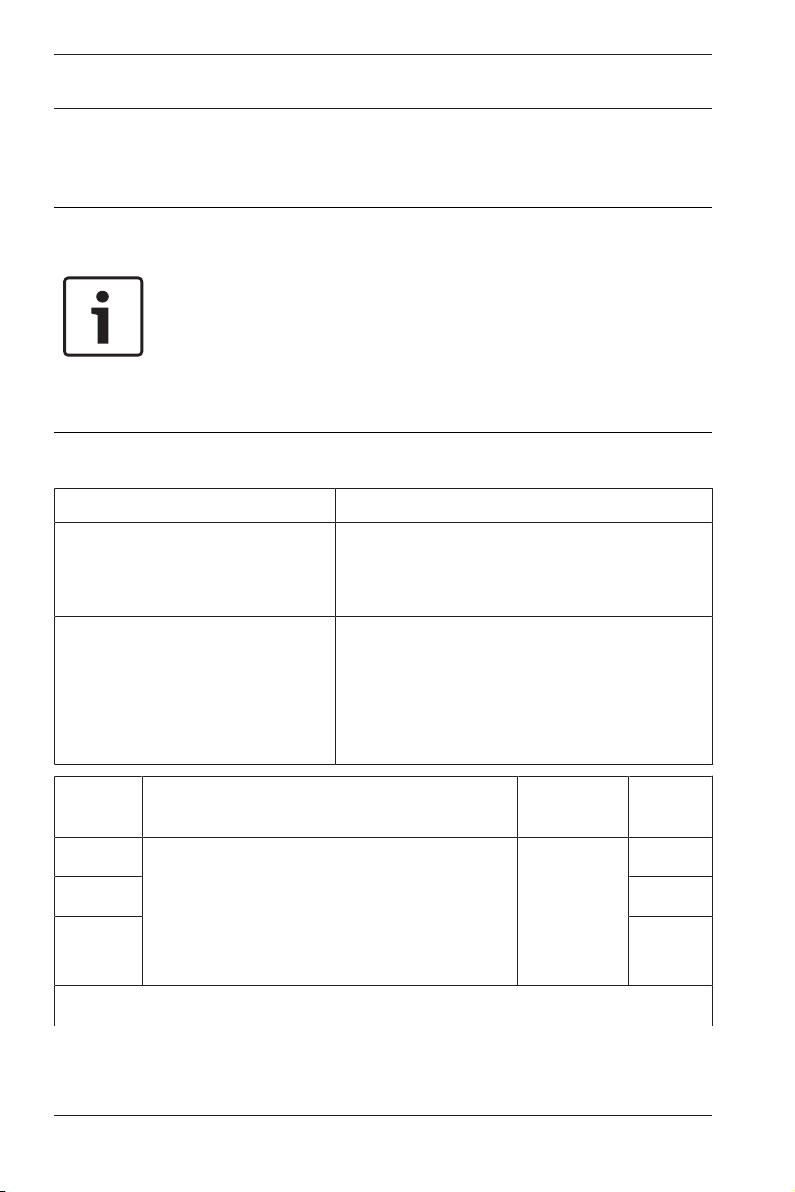
Requirement Parameter
Supervision interval for IP and
Cellular communication is 200
seconds (UL)
Supervision interval for IP and
Cellular communication is 180
seconds (ULC)
Panel Wide Parameters > Enhanced
Communications > Receiver Supervision
Time set to 200 seconds
Panel Wide Parameters > Enhanced
Communications > Receiver Supervision
Time set to Custom, Poll Rate set to 89,
ACK Wait Time set to 15, and Retry Count
set to 5
Passive
levels*
P1 For transmitters at the protected
P2 Medium
P3 High
Transmitters and supervision Receivers Risk
Levels
premises and supervision of
D6600 or
D6100IPv6
Low
communication channels, refer to the
figures in Fire monitoring communication
systems wiring diagrams, page 18.
*Test the transmission on each communication channel every 24 hours.
2019.06 | 02 | F.01U.321.698 Bosch Security Systems B.V.
Page 7
Control Panels ULC Installation Guide | en 7
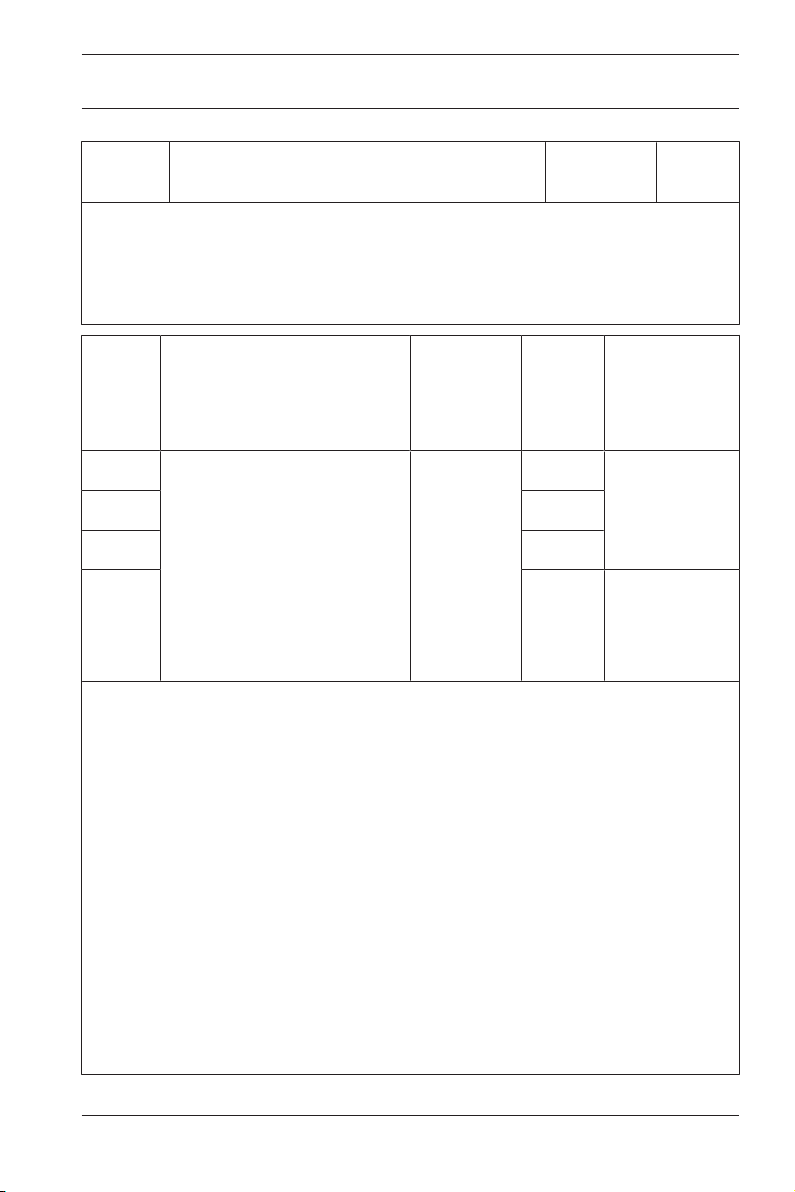
Passive
levels*
Transmitters and supervision Receivers Risk
Levels
The telephone service should be of a type that provides for timed release
disconnect. In order to give the digital alarm communicator transmitter
(dialer) the ability to disconnect an incoming call to the protected
premises.
Active
levels*
Transmitters and
supervision
Receivers Risk
Levels
Backup
requirements
for network
equipment
A1 For transmitters at the
A2 Medium
A3 High
A4 Very
protected premises and
supervision of
communication channels,
refer to the figures in Fire
monitoring communication
D6600 or
D6100IPv6
Low 24 hr standby
or dialer as
backup
24 hr standby
high
systems wiring diagrams,
page 18.
*Check-in/polling signal required every 180 seconds.
For equipment used at the protected premises intended to facilitate
communications (hubs, routers, NIM, cable modems) 24-hour backup
power is required. Where such cannot be facilitated a secondary (backup)
communication channel is required.
For using private, corporate, and high speed data networks, network
access and domain access policies must restrict unauthorized network
access, and “spoofing” or “denial of service” attacks. Select the internet
service providers that have redundant servers/systems, backup power,
routers with firewalls enabled, and methods to identify and protect
against “denial of service” attacks.
For using public switched and wireless data networks, communication
channels must be facilitated such that the communicator will restrict
unauthorized access which could otherwise compromise security.
Bosch Security Systems B.V. 2019.06 | 02 | F.01U.321.698
Page 8

8 en | ULC Installation Guide Control Panels
Fire Monitoring Communication Systems
Refer to Wiring, page 15. The central station receiver must
receive fire alarms in 60 seconds and trouble signals in 90
seconds.
Type Transmitters and supervision Receivers
Passive
Active
1
2
For transmitters at the protected premises
and supervision of communication
D6600 or
D6100IPv6
channels, refer to the figures in Fire
monitoring communication systems wiring
diagrams, page 18.
1
Test the transmission on each communication channel every 24 hours.
2
Check-in/polling signal required every 90 seconds.
To monitor a complete fire system, each ULC labeled intrusion system
must be connected to a ULC labeled fire alarm control panel. The system
must transmit system fire alarms, and supervisory and troubles signals to
the central station receiver.
Programming
You must follow the notes in the installation and programming
sections describing the system configurations for ULC Listed
installations.
Protecting the control panel – Burglary
The local control panel and local power supply must be
protected in one of the following ways:
– The control panel and power supply must be located within
the area of greatest protection on a tamper protected
circuit.
– When arming, each area must arm the area that is
protecting the control panel and any external power supply
running an audible device. This might require duplicate
protection armed by each area. Access to this protected
area, without causing an alarm, requires that all areas are
disarmed.
2019.06 | 02 | F.01U.321.698 Bosch Security Systems B.V.
Page 9

Control Panels ULC Installation Guide | en 9
CAN/ULC S303 -
Local
Burglary
CAN/ULC S304 -
Signal Receiving
Centre and Premise
CAN/ULC S545 -
Residential
Fire
ULC-ORD C1023 -
Household
Burglary
ULC-ORD C1076 -
Proprietary
Burglary
CAN/ULC S559 -
Fire Signal Receiving
Centres and Systems
Additionally, the protected area for the control panel must be
programmed so that it cannot be bypassed, and must be
installed in accordance with CAN/ULC-S302 or CAN/ULC-S310.
User information
Inform the users of and note the following in the owner’s
manual:
– Service organization name and telephone number
– The programmed exit time
– The programmed entry time
– Safety precautions specified for the connected equipment.
1.2 Compatibilities
Accessory compatibility
The following table lists accessories that are compatible with
the control panel. An X in a column indicates the accessory is
compatible with the standard.
Model
number
Description
Keypads
B915/
Basic X X X X X X
B915I*
B920* 2-line X X X X X X
B921C*1Capacit
X X
ive
B925F* Fire/
X X X X X
Burg
B926F* Fire X
Bosch Security Systems B.V. 2019.06 | 02 | F.01U.321.698
Page 10

10 en | ULC Installation Guide Control Panels
CAN/ULC S303 -
Local
Burglary
CAN/ULC S304 -
Signal Receiving
Centre and Premise
CAN/ULC S545 -
Residential
Fire
ULC-ORD C1023 -
Household
Burglary
ULC-ORD C1076 -
Proprietary
Burglary
CAN/ULC S559 -
Fire Signal Receiving
Centres and Systems
Model
number
Description
B930* ATM
style
B942/
B942W*
Touch
screen
B520 Power
supply
D122/
D122L
Battery
harnes
s
D135A Low-
battery
discon
nect
X X X X X
X X X X X
Transformers, batteries, power supplies, etc.
X X X X X
Suitable for use on approved applications.
Suitable for use on approved applications
D126
Battery Suitable for use on approved applications.
(12.0
VDC, 7
Ah)
D1218
Battery Suitable for use on approved applications.
(12 V,
18 Ah)
D1640-CATransfo
Suitable for use on approved applications in Canada.
rmer
2019.06 | 02 | F.01U.321.698 Bosch Security Systems B.V.
Page 11

Control Panels ULC Installation Guide | en 11
CAN/ULC S303 -
Local
Burglary
CAN/ULC S304 -
Signal Receiving
Centre and Premise
CAN/ULC S545 -
Residential
Fire
ULC-ORD C1023 -
Household
Burglary
ULC-ORD C1076 -
Proprietary
Burglary
CAN/ULC S559 -
Fire Signal Receiving
Centres and Systems
Model
number
ICPTR1822-
Description
Transfo
rmer
Suitable for use on approved applications in Canada.
CAN
Enclosures
B10***2MediumX X X X X X
2
B11
B8103***Large,
Small X X X X X X
X X X X X X
white
D8103***Large,
X X X X X X
grey
D8109***Fire X X X X X X
D8108A***Attack
X X X X X X
resista
nt
Expansion modules
B208 Octo-
X X X X
input
B299 POPEX X X X X X
B308 Octo-
X X X X
output
Bosch Security Systems B.V. 2019.06 | 02 | F.01U.321.698
Page 12

12 en | ULC Installation Guide Control Panels
CAN/ULC S303 -
Local
Burglary
CAN/ULC S304 -
Signal Receiving
Centre and Premise
CAN/ULC S545 -
Residential
Fire
ULC-ORD C1023 -
Household
Burglary
ULC-ORD C1076 -
Proprietary
Burglary
CAN/ULC S559 -
Fire Signal Receiving
Centres and Systems
Model
number
Description
B600 ZONEX X X X X X
D125B3Dual
X X X X
initiatin
g B
D129 Dual
X X X
initiatin
g A
D192G NAC X X X
D8125 POPEX X X X X
D8125MUXMultiplexX X X X
D8128D OctoP
X X X X
OPIT
D8129 Octo-
X X X X
relay
D8130 Door
X X X
release
D9127U/TPOPIT X X X X
Communicators
B426 EthernetX X X X X
2019.06 | 02 | F.01U.321.698 Bosch Security Systems B.V.
Page 13

Control Panels ULC Installation Guide | en 13
CAN/ULC S303 -
Local
Burglary
CAN/ULC S304 -
Signal Receiving
Centre and Premise
CAN/ULC S545 -
Residential
Fire
ULC-ORD C1023 -
Household
Burglary
ULC-ORD C1076 -
Proprietary
Burglary
CAN/ULC S559 -
Fire Signal Receiving
Centres and Systems
Model
number
Description
B430 PSTN X X X X X X
7
B442
B44x
B450 SDI2
Cellular X X X X X
7
Cellular X X X X X X
X X X X X X
adapte
r
Accessories
D130 AUX
X X X
relay
D132A Smoke
X X
reversi
ng
D161 Phone
Suitable for use on approved applications.
switche
r
D162 Phone
Suitable for use on approved applications.
cord
ICPSDI-911
SDI
splitter
X X X X
4
ICP-
Tamper X X X X X
EZTS
Door control (Access)
Bosch Security Systems B.V. 2019.06 | 02 | F.01U.321.698
Page 14

14 en | ULC Installation Guide Control Panels
CAN/ULC S303 -
Local
Burglary
CAN/ULC S304 -
Signal Receiving
Centre and Premise
CAN/ULC S545 -
Residential
Fire
ULC-ORD C1023 -
Household
Burglary
ULC-ORD C1076 -
Proprietary
Burglary
CAN/ULC S559 -
Fire Signal Receiving
Centres and Systems
Model
number
B901
8
Description
SDI2
X X X X X
door
control
ler
D9210C9SDI
X X X X
door
control
ler
*Approved for use on combination fire and burg systems when on a
different bus from fire devices.
**Combination fire and burg systems using SDI devices might require an
ICP-SDI-9114 to separate fire and intrusion devices onto separate circuits.
***In ULC-S559, the enclosure is certified for use with B9512G/B8512G
only.
1
ULC listed for Proprietary Burglary and Residential Fire only.
2
B6512/B5512/B4512/B3512 only.
3
Refer to the Dual Class B Initiating Module (D125B) Installation Instructions
(P/N: F01U036340) for compatible D125B devices.
4
Refer to the section within this section for compatible RADION devices.
5
Refer to the section within this section for compatible Inovonics devices.
7
Check for availability in your region.
8
B9512G/B8512G/B6512 only.
9
B9512G/B8512G only.
2019.06 | 02 | F.01U.321.698 Bosch Security Systems B.V.
Page 15

Control Panels ULC Installation Guide | en 15
Model
B8512G
B6512
B4512
B3512
B5512
Manufacturer
B9512G
1.3 Wiring
Notice!
When used in ULC-S559 installations, B6512/B5512/B4512/
B3512 control panels must have keypads installed in the same
room within 18 m and in metallic conduit.
B9512G and B8512G control panels are not required to have
keypad installed in the same room within 18 m.
For B6512/B5512/B4512/B3512 control panels, refer to the
D135A Installation Guide (P/N: 4998122704) for instructions.
Compatible transformers
Use one of the following transformers when wiring the system.
Bosch ICP-TR1640-CAN X X
Bosch ICP-TR1822-CAN X X X X
Bosch D1640-WI X X X X X X
Solex* TRI-WIT 1637C X X
*When using this transformer the max current of the control
panel is reduced to 1.0 A and battery back up is reduced to 18
Ah.
1.3.1 Input point wiring diagrams
Required control panel-to-fire alarm panel wiring
Wire three control panel points to the fire control panel outputs.
Recommended: Wire as described in this section and follow the
specific instructions for each point in Programming, page 26
Bosch Security Systems B.V. 2019.06 | 02 | F.01U.321.698
Page 16

16 en | ULC Installation Guide Control Panels
Point
COM
Fire alarm
control unit
Bosch
control panel
C
NC
NO
1k
Control panel
(models
B9512G/B8512G/
B6512/B5512/
B4512/B3512)
Fire alarm
control unit
Fire Alarm
Fire Trouble
Fire Supervisory
Point 1
Point 3
Point 2
Dry contact outputs
EOL supervised inputs
Demarkation box (optional)
Notice!
Removable terminals
For FACP units with detachable terminals, wire the FACP points
as Form C relays.
Wire control panel point 1 to the fire control panel's alarm
output.
Wire control panel point 2 to the fire control panel's trouble
output.
Wire control panel point 3 to the fire control panel's supervisory
output.
Figure1.1: Fire alarm control unit dry contact outputs to control panel
points 1, 2, and 3
2019.06 | 02 | F.01U.321.698 Bosch Security Systems B.V.
Page 17

Control Panels ULC Installation Guide | en 17
Point
COM
NC
1
3
2
3
NC
2
Point
COM
NC
1
4
3
2
2
NC
Point
COM
NC
NO
1
3
2
3
ULC Listed seismic detector
Figure1.2: ULC Bank Safe and Vault installation
ULC commercial motion detector with tamper
Figure1.3: Double EOL input
ULC commercial door/window contact (1)
Figure1.4: Double EOL input for one Form C contact
Callout ᅳ Description
1 ᅳ Point sensor loop terminals
2 ᅳ Normally closed device (contact)
3 ᅳ EOL Resistor – 1.0 kΩ (2.0 kΩ and No EOL optional) at
device
Bosch Security Systems B.V. 2019.06 | 02 | F.01U.321.698
Page 18

18 en | ULC Installation Guide Control Panels
1.3.2 Fire monitoring communication systems wiring diagrams
These wiring diagrams are also representative for Commercial
Burglary Monitoring applications.
Notice!
ULC-S559 communication requirements
Passive systems must send alarm signals over both
communication devices programmed as primary.
All non-PSTN systems must send reports to the central station
using encryption.
Notice!
ULC-S559 for passive systems allows for any compatible
communication devices to be used in tandem for the
communication system (per section 5.4.2 of S559-13) with the
exceptions of S559-13, section 5.4.1. Where passive
communication systems are used, there shall be two or more
separate communication channels and at least two of the
passive communication channels shall use non-interdependent
types of communications. A communication channel is a path
extending from the protected premises.
Exception: If only one type of passive communication is
available at the protected premises, there shall be two channels
provided. Separate paths throughout the protected premises
and through any common carrier or third party communications
network to the fire signal receiving center shall be provided for
each communication channel.
2019.06 | 02 | F.01U.321.698 Bosch Security Systems B.V.
Page 19

Control Panels ULC Installation Guide | en 19
Control panel
(models
B9512G/B8512G
B9512G-E/B8512G-E)
Keypad
(models
B915/B915I/B920)
PSTN Line 1
PSTN Line 2
Listed enclosure
Fire alarm
control unit
Outputs
Fire
Supervisory
Trouble
Inputs
B430
B430
Control panel
(models
B9512G/B8512G/
B6512/B5512/
B4512/B3512)
Keypad
(models
B915/B915I/B920)
Internet/
Intranet
Listed enclosure
Fire alarm
control unit
Outputs
Fire
Supervisory
Trouble
Router/
modem
Inputs
On-board IP
Dual dialer passive communication system
Figure1.5: Control panel with 2 B430 (PSTN) modules
NOTE: Use of 2 B430 modules is permitted only when no other
technologies are available.
IP communication systems (on-board IP)
Figure1.6: Control panel with on-board IP
NOTES: The B9512G-E/B8512G-E/B5512E/B4512E/B3512E
control panels do not include on-board IP. Systems with single
communication channels must be active.
Bosch Security Systems B.V. 2019.06 | 02 | F.01U.321.698
Page 20

20 en | ULC Installation Guide Control Panels
Control panel
(models
B9512G-E/B8512G-E/
B5512E/B4512E/
B3512E)
Keypad
(models
B915/B915I/B920)
Internet/
Intranet
Listed enclosure
Fire alarm
control unit
Outputs
Fire
Supervisory
Trouble
Router/
modem
Inputs
B426
Bus connection,
supervised
Control panel
(models
B9512G/B8512G/
B6512/B5512/
B4512/B3512)
Keypad
(models
B915/B915I/B920)
Internet/
Intranet
Listed enclosure
Fire alarm
control unit
Outputs
Fire
Supervisory
Trouble
Router/
modem
On-board IP
B430
Inputs
IP communication system (SDI2 IP)
Figure1.7: Control panel with a B426 module
NOTES: The B9512G-E/B8512G-E/B5512E/B4512E/B3512E
control panels require a B426 for IP. Systems with single
communication channels must be active.
PSTN/IP communication system (on-board IP)
2019.06 | 02 | F.01U.321.698 Bosch Security Systems B.V.
Figure1.8: Control panel with on-board IP and a 430 (PSTN) module
NOTES: The B9512G-E/B8512G-E/B5512E/B4512E/B3512E
control panels do not include on-board IP.
Page 21

Control Panels ULC Installation Guide | en 21
Control panel
(models
B9512G-E/B8512G-E/
B5512E/B4512E/
B3512E)
Keypad
(models
B915/B915I/B920)
Internet/
Intranet
Listed enclosure
Fire alarm
control unit
Outputs
Fire
Supervisory
Trouble
Router/
modem
Inputs
B426
Bus connection,
supervised
PTSN
B430
Antenna
Control panel
(models
B9512G/B8512G/
B6512/B5512/
B4512/B3512*)
Keypad
(models
B915/B915I/B920)
Listed enclosure
Fire alarm
control unit
Outputs
Fire
Supervisory
Trouble
B44x
Inputs
PSTN/IP communication system (SDI2 IP)
Figure1.9: Control panel with a B426 module and a B430 (PSTN) module
NOTES: The B9512G-E/B8512G-E/B5512E/B4512E/B3512E
control panels require a B426 for IP.
Cellular communication system
Figure1.10: Control panel* with a B44x (cellular) module
NOTES: *Includes B9512G-E/B8512G-E/B5512E/B4512E/
B3512E control panels. Systems with single communication
channels must be active
Bosch Security Systems B.V. 2019.06 | 02 | F.01U.321.698
Page 22

22 en | ULC Installation Guide Control Panels
Antenna
Control panel
(models
B9512G/B8512G/
B6512/B5512/
B4512/B3512)
Keypad
(models
B915/B915I/B920)
Internet/
Intranet
Listed enclosure
Fire alarm
control unit
Outputs
Fire
Supervisory
Trouble
Router/
modem
On-board IP
B44x
PSTN
Antenna
Control panel
(models
B9512G/B8512G/
B6512/B5512/
B4512/B3512)
Keypad
(models
B915/B915I/B920)
Listed enclosure
Fire alarm
control unit
Outputs
Fire
Supervisory
Trouble
B430
B44x
Inputs
Cellular/IP communication system (on-board IP)
Figure1.11: Control panel with on-board IP and a B44x (cellular) module
PSTN/cellular communication system
Figure1.12: Control panel with a compatible cellular module and a 430
(PSTN) module
2019.06 | 02 | F.01U.321.698 Bosch Security Systems B.V.
Page 23

Control Panels ULC Installation Guide | en 23
Antenna
PTSN
Control panel
(models
B9512G/B8512G/
B6512/B5512/
B4512/B3512)
Keypad
(models
B915/B915I/B920)
Listed enclosure
Bus connection,
supervised
Fire alarm
control unit
Outputs
Fire
Supervisory
Trouble
B430
Inputs
B44x
PSTN/cellular communication system (SDI2 cellular)
Figure1.13: Control panel with a B44x module and a B430 (PSTN)
module
Bosch Security Systems B.V. 2019.06 | 02 | F.01U.321.698
Page 24

24 en | ULC Installation Guide Control Panels
B450
B44x
SIM
Antenna
POINT 1 COM POINT 2 POINT 3 COM POINT 4 POINT 5 COM POINT 6 POINT 7 COM POINT 8
ZONEX TMPR
SDIx SDI2
MODULE RELEASE
MOD-2
MOD-1
USB POWER
STATUS
RESETZONEX
TMPR
SDI2
PWR+/R
A/Y
B/G
COM/B
PWR+/R
A/Y
B/G
COM/B
B
A
S
E
L
I
N
K
T
ETHERNET
USB
11
Point 5 Point 6
Point 3 Point 4
Point 1 Point 2 Point 7 Point 8
EARTH GROUND
ON-BOARD POINTS
COMMON
BATTERY ( - )
+ AUX POWER
BATTERY ( + )
CLASS 2
16.5 VAC 40 VA 60 Hz
TRANSFORMER
10
9
8
7
6
5
4
3
2
1
1 k End-of-line-Resistors Required (P/N 15093130-004), Max Loop Current: 5 mA
13 14
16
17
192022
12
15
18
21
24
25
26
28
29
30
23
27
Quick Flash:
Low
BATTERY STATUS
Slow Flash:
Charging
Off: Normal
Minimum system requirements for Classification in accordance with ANSI/SIA
CP-01-2010. UL Listed and Classified control unit Model B9512G and B8512G.
UL Listed and Classified keypad Model B942, B930, B925F, B926F, B921C,
B920, B915, D1255RB, D1256RB and D1257RB. UL Listed Local Bell.
WARNING!
Multi-Battery
installation requires
Model D122 or D122L
Dual Battery Harness.
Improper installation
can be a fire hazard
.
WARNING!
Incorrect wiring will
damage this
equipment.
Devices powered by
any output must be
supervised.
The equipment should be installed in accordance with the NFPA 70 (National Electrical
Code) and NFPA 72 (National Fire Alarm Code).
Depending on the application, the installation may need to be in accordance with one or
more of the following UL standards: UL681, UL1076, UL1641 and C22.1, CEC, Part 1.
Use of a D185 is not suitable for remote station protected premises service where separate
transmissions circuits are required for fire, supervisory (when applicable) and trouble
signals.
SDIx
Refer to the system wiring diagrams in the B9512G/B8512G
ULLD and to the D125B Installation Instructions for compatible
smoke detectors. 2-wire Compatible Identifier “A”. Printed
information describing proper installation, operation, testing,
maintenance, repair service and response to an alarm is to be
provided with this equipment.
POWER SUPPLY REQUIREMENTS
The Power Supply provides a maximum of 1.4 Amps for the Control Panel and all Accessory Devices. For System Loading,
refer to the B9512G/B8512G UL Listing Document, ULLD. Auxiliary powered devices: 11.8 to 12.5 VDC
The system is intended to be checked by a Qualified Technician at least every 3 years. The types of initiating circuits the control
panel has been approved for are A, M, WF, SS. The types of signaling the control panel has been approved for are DAC, OT, NC,
RevPol.
Battery: Replace every 3 to
5 years with one or two
Model D126 or D1218 12V
Lead Acid Batteries.
The B9512G/B8512G Control Panel is UL Listed For CS, RS, L, AUX, Prop and Res Fire and Res, Prop,
Cent. Stat, Local, and PS Con. Merc. Burg, MSV, BSV, Holdup, suitable as a dual line trans. sys.
Signaling means: DAC, Cell or IP
WARNING!
To prevent risk of shock,
disconnect AC power and
communication lines before
servicing.
All external connections except Terminal 5 (BATTERY(+) are inherently power limited.
Requirements for battery standby time might reduce allowable output.
On:
Missing
Low 12.1 VDC
Load Shed 10.2 VDC
OUTPUT
B (2)
OUTPUT
A (1)
OUTPUT
C (3)
Do not connect
to a receptacle
controlled by
a switch.
Voltage Ranges: Open 3.7 - 5.0 VDC,
Short 0.0 - 1.3 VDC, Normal 2.0 - 3.0 VDC
WARNING!
Owner Instructions (P/N F.01U.307.371): Not to
be removed by anyone except occupant.
Keypad
(models
B915/B915I/B920)
Off-board cellular passive communication system - detailed
wiring G Series
Figure1.14: B9512G/B8512G* control panel with a B44x (cellular)
module connected through a B450 module
NOTES: *B9512G-E/B8512G-E control panels are supported in
the configuration shown. In this configuration, the control panel
can also connect to up to 2 B430 modules. In this configuration,
the control panel also supports IP (B9512G-E/B8512G-E control
panels require a B426 module, supervised). AC input is required
(not shown).
2019.06 | 02 | F.01U.321.698 Bosch Security Systems B.V.
Page 25

Control Panels ULC Installation Guide | en 25
T
MPR
1 COM 2 7 COM 83 COM 4 5 COM 6
RESET
ETHERNET
COM AUX R Y G B
PWR A B COM
+ BAT -18VAC
B C
O
UTPUT
X
MODULE 1
Y
MODULE
RELEASE
NO C NC
OUTPUT A
7 COM 8
C
OUTPUT
B
USB
ETHERNET
100BASE-T
LINK
COMMUNICATION MODULE 1
1 k End of Line Resistors
Voltage Ranges
ON-BOARD POINTS
3.7 - 5.0 VDC
2.0 - 3.0 VDC
0.0 - 1.3 VDC
Open
Normal
Short
3 COM 4 5 COM 61 COM 2
R Y G B
SDI2
Device Bus
18 VAC
BATTERY OUTPUT A
AUX
- 12 V +
OUTPUT A
OUTPUT A
Jumper Under Cover
AUX PWR
COM
DRY
B450
B44x
SIM
Antenna
Keypad
(models
B915/B915I/B920)
Off-board cellular passive communication system - detailed
wiring B Series
Figure1.15: B6512/B5512/B4512/B3512* control panel with a B44x
(cellular) module connected through a B450 module
NOTES: *B5512E/B4512E/B3512E control panels are supported
in the configuration shown. In this configuration, the control
panel can also connect to a B430 module. In this configuration,
the control panel also supports IP (B5512E/B4512E/B3512E
1.3.3 B Series sounder wiring diagram
control panels require a B426 module, supervised). AC input is
required (not shown).
For B6512/B5512/B4512/B3512 control panels, use a ULC
Listed, 12 VDC (100 mA maximum) sounder connected to
output 1.
Bosch Security Systems B.V. 2019.06 | 02 | F.01U.321.698
Page 26

26 en | ULC Installation Guide Control Panels
TMPR
1 COM 2 7 COM 83 COM 4 5 COM 6
RESET
ETHERNET
COM AUX R Y G B
PWR A B COM
+ BAT -18VAC
B C
OUTPUT
X
MODULE 1
Y
MODULE
RELEASE
NO C NC
OUTPUT A
7 COM 8
C
OUTPUT
B
USB
ETHERNET
100BASE-T
LINK
COMMUNICATION MODULE 1
1 k End of Line Resistors
Voltage Ranges
ON-BOARD POINTS
3.7 - 5.0 VDC
2.0 - 3.0 VDC
0.0 - 1.3 VDC
Open
Normal
Short
3 COM 4 5 COM 61 COM 2
R Y G B
SDI2
Device Bus
18 VAC
BATTERY OUTPUT A
AUX
- 12 V +
OUTPUT A
OUTPUT A
Jumper Under Cover
AUX PWR
COM
DRY
Sounder
P1
COM AUX
COM AUX
P1
Configure OUTPUT A to AUX PWR using the jumper.
Wire a 12 VDC (100 mA maximum) sounder to OUTPUT A.
Figure1.16: B6512/B5512/B4512/B3512 control panel sounder wiring
and hardware configuration
1.4 Keypad segment test
You can test B915/B915I and B920 keypads to ensure that the
LEDs and display are working.
To test a keypad, simultaneously press and hold the [NEXT]/[▼]
and [3] keys for 3 seconds. The segment test lights the LEDs
and the display.
NOTE: During the segment test, the B915/B915I reports a
1.5 Programming
missing trouble.
Complete the programming steps in this section for ULC
compliance.
2019.06 | 02 | F.01U.321.698 Bosch Security Systems B.V.
Page 27

Control Panels ULC Installation Guide | en 27
1.5.1 Required programming
COMPLIANCE SETTINGS > UL Canada Compliance
Set the COMPLIANCE SETTINGS > UL Canada Compliance
parameter to Yes.
PANEL WIDE PARAMETERS > Report Routing > Fire Reports >
Fire Cancel
Set the PANEL WIDE PARAMETERS > Report Routing > Fire
Reports > Fire Cancel parameter for each Route Group (1 to 4)
to No.
Figure1.17: Fire Cancel
POINTS > Point Profiles (Point Indexes)
Configure Point Profiles 1, 4, and 6 as shown below.
It is important to configure the parameters in order.
Point Profile 1
Set Alarm Abort to: No.
Set Point Profile Text (First Language) to: Fire Panel Trouble.
Set PointType/Response/Circuit Style > PointType to:
FirePoint.
Set PointType/Response/Circuit Style > Circuit Style to:
SingleEOL(1KΩ) or SingleEOL(2KΩ).
Set Response to: 3.
Point Profile 4
Set Point Profile Text (First Language) to: Fire Panel Alarm.
Set PointType/Response/Circuit Style > PointType to:
FirePoint.
Bosch Security Systems B.V. 2019.06 | 02 | F.01U.321.698
Page 28

28 en | ULC Installation Guide Control Panels
Set PointType/Response/Circuit Style > Circuit Style to:
SingleEOL(1KΩ), SingleEOL(2KΩ), or DualEOL.
If you set PointType/Response/Circuit Style > Circuit Style to
SingleEOL(1KΩ) or SingleEOL(2KΩ), set Response to: 1.
If you set Point Type / Response / Circuit Style > Circuit Style to
DualEOL, set Response to: 0.
Point Profile 6
Set Point Profile Text (First Language) to: Fire Panel
Supervisory.
Set PointType/Response/Circuit Style > PointType to:
FirePoint.
Set PointType/Response/Circuit Style > Circuit Style to:
SingleEOL(1KΩ), SingleEOL(2KΩ), or DualEOL.
If you set PointType/Response/Circuit Style > Circuit Style to
SingleEOL(1KΩ) or SingleEOL(2KΩ), set Response to: 9.
If you set Point Type / Response / Circuit Style > Circuit Style to
DualEOL, set Response to: 2.
Figure1.18: Point Profiles
2019.06 | 02 | F.01U.321.698 Bosch Security Systems B.V.
Page 29

Control Panels ULC Installation Guide | en 29
Figure1.19: Point Type Response and Circuit Style
POINTS > Point Assignments
Set the POINTS > Point Assignments, Text and Profile
parameters, for on-board points 1, 2, and 3 as follows.
Point 1
Set Point Assignments > Text to: Fire Panel Alarm.
Set Point Assignments > Profile to: 4 - Fire Panel Alarm
Point 2
Set Point Assignments > Text to: Fire Panel Trouble.
Set Point Assignments > Profile to: 1 - Fire Panel Trouble
Point 3
Set Point Assignments > Text to: Fire Panel Supervisory.
Set Point Assignments > Profile to: 6 - Fire Panel Supervisory
Figure1.20: Fire Panel Supervisory
Bosch Security Systems B.V. 2019.06 | 02 | F.01U.321.698
Page 30

30 en | ULC Installation Guide Control Panels
Required for B6512/B5512/B4512/B3512 control panels
PANEL Wide Parametes> Report Routing
In the Route Group 4 column:
– Set Fire Reports, Gas Reports, Burglar Reports, Personal
Emergency Reports, User Reports, and Test reports to No.
– Set Output Reports, Auto Function Reports, RPS Reports,
Point Reports, User Change Reports, and Access Reports to
No.
– Verify Diagnostic Reports is set to Custom. The next steps
configure the Custom settings.
Figure1.21: Report Routing
PANEL WIDE PARAMETERS > Report Routing > Diagnostic
Reports
For the Route Group 4 column, set SDI2 Device Failure to Yes.
Set the remaining reports to No.
2019.06 | 02 | F.01U.321.698 Bosch Security Systems B.V.
Page 31

Control Panels ULC Installation Guide | en 31
Figure1.22: SDI2 Device Failure
PANEL WIDE PARAMETERS > Communicator > Primary
Destination Device
For the Route Group 4 column, set Primary Destination Device
to Destination 4 for the type of device in use (for example,
Onboard IP, Destination 4 if the control panel sends reports
using the on-board Ethernet.
Figure1.23: Primary Destination Device
PANEL WIDE PARAMETERS > Enhanced Communication >
Destination 4
In the Destination 4 column, set Network Address to: 0.1.1.1
(this address is intentionally not a real address on the network).
Set the Poll Rate to 0. Set the ACK Wait Time (sec.) to 5.
Bosch Security Systems B.V. 2019.06 | 02 | F.01U.321.698
Page 32

32 en | ULC Installation Guide Control Panels
Figure1.24: Enhanced Communication parameters
1.5.2 Recommended programming
AREA WIDE PARAMETERS > Area Name Text > Area 1
For ease of identification, name the AREA WIDE PARAMETERS >
Area Name Text > Area 1 parameter FIRE AREA.
Control panel silencing of fire alarm panel alarm, trouble, and
supervisory events
When control panels are configured as described below, they
automatically silence keypads connected to the control panel for
fire, trouble, and supervisory events from the fire panel.
Notice!
Automatic silence not available for B3512 control panels
Automatic silencing of fire alarm panel alarm, trouble, and
supervisory events is not available for the B3512 control panel.
Users must silence these events at the keypad.
CUSTOM FUNCTIONS > Custom Function 128
Set Custom Function 128 > Custom Function Text to: Silence.
Set Custom Function 128 > Function 1 to: Trouble Silence (set
Parameter 1 to: Area 1).
Set Custom Function 128 > Function 2 to: Alarm Silence (set
Parameter 1 to: Area 1).
2019.06 | 02 | F.01U.321.698 Bosch Security Systems B.V.
Page 33

Control Panels ULC Installation Guide | en 33
Figure1.25: Custom Function 128
Figure1.26: Area 1 selection
OUTPUT PARAMETERS > Panel Wide Outputs
For virtual outputs:
Set Panel Wide Outputs > Summary Fire to: 9.
Set Panel Wide Outputs > Summary Fire Trouble to: 10.
Set Panel Wide Outputs > Summary Supervisory Fire to: 19.
Figure1.27: Panel Wide Outputs
POINTS > Point Profiles (Point Indexes)
Configure Point Profile 20 as shown below.
Bosch Security Systems B.V. 2019.06 | 02 | F.01U.321.698
Page 34

34 en | ULC Installation Guide Control Panels
It is important to configure the parameters in order.
Point Profile 20
Set Point Profile Text (First Language) to: CF: Silence.
Set PointType/Response/Circuit Style > PointType to:
Custom Function.
Leave PointType/Response/Circuit Style > Circuit Style at the
default: SingleEOL(1KΩ).
Leave PointType/Response/Circuit Style > Response at the
default: 7.
Figure1.28: Point Profile 20
POINTS > Point Assignments
Set the POINTS > Point Assignments, Source, Text, and Profile
parameters, for points 9, 10, and 19 as follows.
Point 9
Set Point Assignments > Source to: Ouput.
Set Point Assignments > Text to: Fire Alarm Active.
Set Point Assignments > Profile to: 20 - CF: Silence
Point 10
Set Point Assignments > Source to: Ouput.
Set Point Assignments > Text to: Fire Trouble Active.
Set Point Assignments > Profile to: 20 - CF: Silence
Point 19
Set Point Assignments > Source to: Ouput.
Set Point Assignments > Text to: Fire Supervisory Active.
Set Point Assignments > Profile to: 20 - CF: Silence
2019.06 | 02 | F.01U.321.698 Bosch Security Systems B.V.
Page 35

Control Panels ULC Installation Guide | en 35
Figure1.29: Point Assignments
Bosch Security Systems B.V. 2019.06 | 02 | F.01U.321.698
Page 36

36 | ULC Installation Guide Control Panels
2019.06 | 02 | F.01U.321.698 Bosch Security Systems B.V.
Page 37

Control Panels ULC Installation Guide | 37
Bosch Security Systems B.V. 2019.06 | 02 | F.01U.321.698
Page 38

38 | ULC Installation Guide Control Panels
2019.06 | 02 | F.01U.321.698 Bosch Security Systems B.V.
Page 39

Page 40

Bosch Security Systems B.V.
Torenallee 49
5617 BA Eindhoven
Netherlands
www.boschsecurity.com
© Bosch Security Systems B.V., 2019
 Loading...