Komatsu PC210-11, PC240-11, PC290-11, PC360-11, PC390-11 Service Manual

...

Page 1
Mobile Lubrication Library
WARNING
Komatsu PC210-11/PC240-11/PC290-11 and PC360-11/ PC390-11/PC490-11 Excavator Installation Instructions
Instructions for installing a Graco automatic lubrication system on a
333514B
Komatsu PC210-11/PC240-11/PC290-11 and PC360-11/PC390-11/PC490-11 Excavator.
Part No. 17J900
Maximum System Working Pressure: 2750 psi (18.96 MPa, 189.6 bar)
Important Safety Information
Read all warnings and instructions in all Graco related component manuals and all Komatsu equipment manuals. Save all instructions.
Related Graco Component Manuals*
Manual No. Manual Title
332291 G3 Pump 3A2960 GLC2200 Controller 312497 MSP Divider Valves
*Refer to these instruction manuals for additional infor­mation related to the installation and operation of system components.
The information contained in this document is only a recommendation for an automatic lubrication system and is not intended to replace the installation and maintenance instructions provided by the original equipment manufacturer.
FLUID INJECTION HAZARD
Fluid leaks from incorrectly installed or ruptured components, and/or failure to verify the compo­nents are properly installed and tested, can result in serious injury such as fluid spraying in the eyes or on skin and fluid injection, or equip­ment damage. Installation must be done by a qualified professional or Komatsu certified tech­nician and tested prior to use.
Page 2

Table of Contents

Table of Contents
Installation Checklist . . . . . . . . . . . . . . . . . . . . . . . . 3
Recommended Tools and Supplies . . . . . . . . . . . . 4
Installation Notes . . . . . . . . . . . . . . . . . . . . . . . . 4
Typical Installation . . . . . . . . . . . . . . . . . . . . . . . . . 5
Installation . . . . . . . . . . . . . . . . . . . . . . . . . . . . . . . . 6
Before You Start . . . . . . . . . . . . . . . . . . . . . . . . . 6
Bearing Point Fittings . . . . . . . . . . . . . . . . . . . . . . . 7
MSP Divider Valves . . . . . . . . . . . . . . . . . . . . . . . . 14
MSP Valve Component Identification . . . . . . . . 14
MSP Divider Valve Assembly . . . . . . . . . . . . . . 14
MSP Divider Valve Assembly . . . . . . . . . . . . . . 16
Weld Stud Guidelines . . . . . . . . . . . . . . . . . . . . . . 17
G3 Pump . . . . . . . . . . . . . . . . . . . . . . . . . . . . . . . . . 21
G3 Mounting Bracket Installation . . . . . . . . . . . 23
Remote Fill Installation . . . . . . . . . . . . . . . . . . . . . 24
GLC2200 Controller . . . . . . . . . . . . . . . . . . . . . . . . 28
GLC2200 Controller Wiring . . . . . . . . . . . . . . . . . . 30
Hose Assemblies . . . . . . . . . . . . . . . . . . . . . . . . . . 33
Hose Assembly Instructions . . . . . . . . . . . . . . . 33
Hose Routing . . . . . . . . . . . . . . . . . . . . . . . . . . . . . 34
Hose Installation . . . . . . . . . . . . . . . . . . . . . . . . 34
Arm and Bucket Valve . . . . . . . . . . . . . . . . . . . . 37
Boom and Swing Circle Valve . . . . . . . . . . . . . . 40
GLC2200 Controller Programming . . . . . . . . . . . . 43
Filling and Purging . . . . . . . . . . . . . . . . . . . . . . . . 46
Testing . . . . . . . . . . . . . . . . . . . . . . . . . . . . . . . . . . 47
Routine Service and Equipment Maintenance . . 47
Troubleshooting . . . . . . . . . . . . . . . . . . . . . . . . . . . 48
Parts . . . . . . . . . . . . . . . . . . . . . . . . . . . . . . . . . . . . 50
Notes . . . . . . . . . . . . . . . . . . . . . . . . . . . . . . . . . . . . 51
Graco Information . . . . . . . . . . . . . . . . . . . . . . . . . 52
2
NOTE: Photographs may include optional equipment.
Page 3

Installation Checklist

Installation Checklist
The following checklist is provided as a tool to ensure all installation proce dures are completed.
Completed Description Page
Walk around the equipm ent; use a grease gun to verify that all lube points receive grease. 6 Grease all zerks, before removal 6 Remove zerks and Komatsu extensions. 6 Install bearing point fittings 7 Assemble MSP Divider Valves 14 Install P-clamp, anchor and MSP valve weld studs 19 Assemble the G3 pump and fittings 21 Install G3 pump 22 Install remote fill 24 Install and route G3 power cable 25 Install GLC2200 controller 28 Wire GLC2200 controller and pump 30 Route and wrap hoses between divider valves, bearing points an d pump 34 Install P-clamps, zip ties, and other anchors 34 Program GLC2200 controller 43 Fill the G3 pump reservoir with grease; purge the main feed lines 46 Run test program; verify all connections are tight; verify all points are receiving lubricant 47
NOTE: Photographs may include optional equipment.
3
Page 4

Recommended Tools and Supplies

Recommended Tools and Supplies
Size/Description
Tool
Combination wrench* 1/4 in. - 3/4 in. 6 mm - 20 mm Socket set, standard and deep well with ratchet* 3/8 in. - 3/4 in. 9.5 mm - 20 mm Screwdrivers: standard and Phillips 1 short; 1 long Adjustable wrench 1 small; 1 medium High speed drill (corded or cordless)
Drill bit - steel, high quality 5/16 in., 11/16 in. Center punch fine point Pipe taper tap 1/8 in. NPT Hammer Angle grinder
Grinding disc Heavy grade grinding disc
Flap disc 60 - 80 grit
Cutoff disc High quality disc Cutting blade / knife Razor blade cutting tool Standard pliers Rubber handle Needle nose pliers Rubber handle Side cut pliers (diagonal cutters) Rubber handle Slip joint pliers Rubber handle Locking pliers Small or medium Electrician’s wire striper / crimper General duty wire striper / crimper Soldering iron 30 watt minimum
Electrical solder
Soldering flux Shrink tubing Various sizes Electrical tape Black, small roll Thread sealant
Multi-tester / voltmeter Must test DC/AC/Ohms Electrical connectors Ring connectors (14 gauge) Tape measure Standard / metric Komatsu primer and paint Color should match the Komatsu equipment Documentation / writing implements Small note pad, pen, pencil, marker
Liquid thread sealant such as Loctite® 656
US Metric
*Both US and Metric sizes of these tools are recommended.
®
Loctite All other Trademarks used herein are the property of their respective owners.
is a registered trademark of the Henkel Corporation.

Installation Notes

Do not use PTFE tape on fitting threads . Liquid pip e sealant is recommended for use in lubrication sys­tems to eliminate the potential for contamination. If you must use PTFE tape, always skip the first two threads on the fitting.
Refer to the Installation Checklist provided on page 3 to ensure all installation procedures have been completed.
4
NOTE: Photographs may include optional equipment.
Prime and paint all bare metal surfaces prior to installation with matching K omatsu primer an d paint.
Page 5

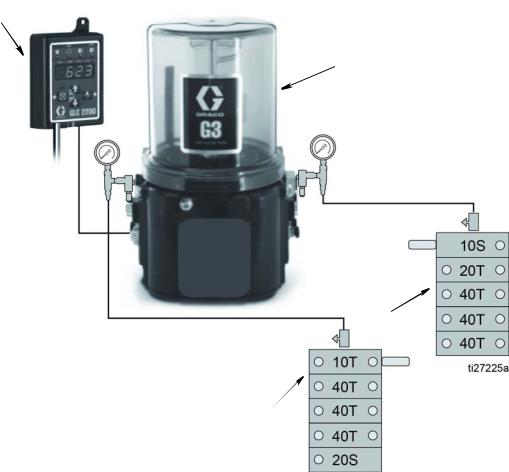
Typical Installation

A
B
C
D
Typical Installation
Key
A GLC2200 Controller B G3 Automatic Lubrication Pump C MSP Divider Valve - Boom and Swing Circle Valve D MSP Divider Valve - Arm and Bucket Valve
Run Time
MODEL Pump ON Time Pump OFF Time
PC210-11/PC240-11 1 minutes and 45 seconds 1 hour PC290-11/PC360-11 2 minutes 1 hour PC390-11/PC490-11 2 minutes and 10 seconds 1 hour
NOTE: Photographs may include optional equipment.
5
Page 6

Installation

WARNING
H-Link
Installation

Before You Start

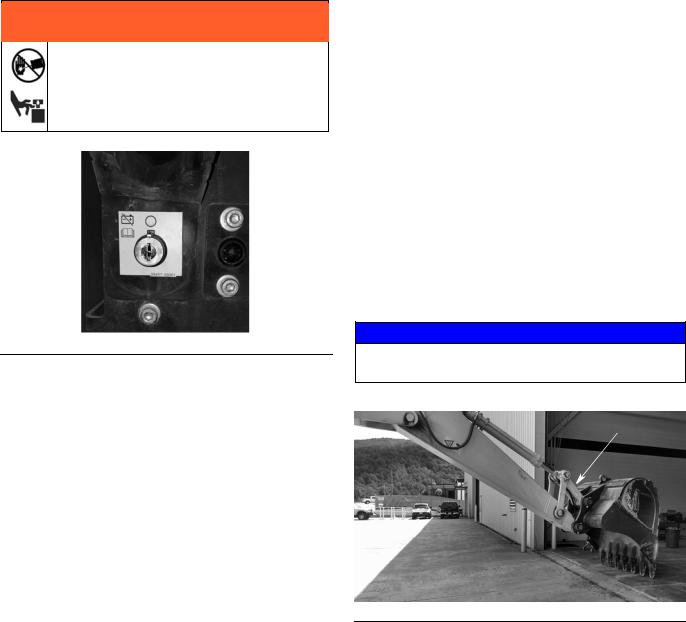
Disconnect battery before installing the lubrication equipment. Installing lubrication equipment on powered machinery could result in serious injury from skin injection or parts moving unexpectedly.
FIG. 1: Battery Disconnect
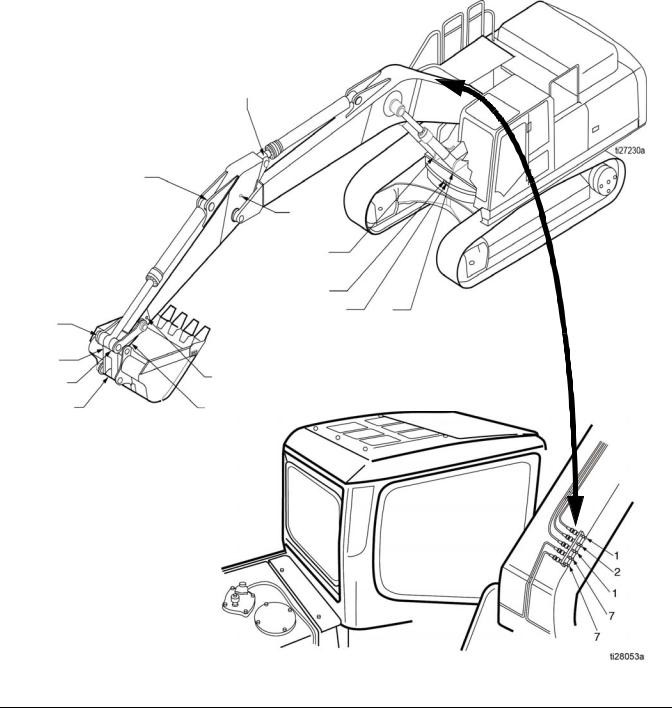
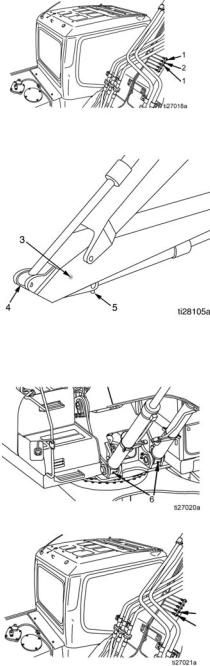
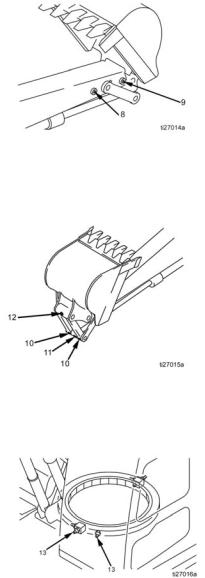
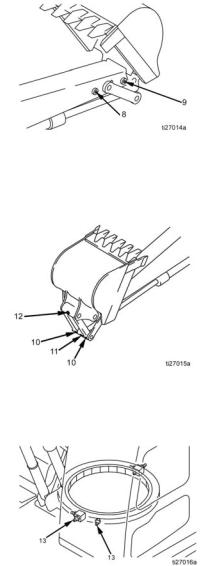
1. Walk around the machine with a grease gun and verify that every bearing point is accepting grease. (Refer to F points). This will ensure that the valves can dis­pense grease to the bearing points by identifying potentially blocked passages from the grease zerk to the bearing point.
IG. 3, page 7 to identify lubrication
Zerk Fittings
a. Use a clean cloth or rag to remove excessive
grease, contaminants and dirt from the work area.
b. Remove all g rease zerks and Komatsu exten-
sions from their installation locations.
c. Use a clean cloth or rag to remove any remain-
ing grease, contaminants or dirt from the area around the passage way to the bearing points.
d. If required use 1/8 in. NPT pipe tap to chase t he
passage threads.
2. Flip over the H-link on th e e xcavator bucket (F (The zerk fittings must face the inside of the arm.)
3. After the H-link is reversed, manually grease the lube points again to verify grease is being accepted.
NOTICE
It may be necessary to rotate the pins while greasing to get the grease to purge .
IG. 2).
6
FIG. 2
NOTE: Photographs may include optional equipment.
Page 7

Bearing Point Fittings

6
13
4
3
5
9
8
12
10
11
10
13
6
Bearing Point Fittings
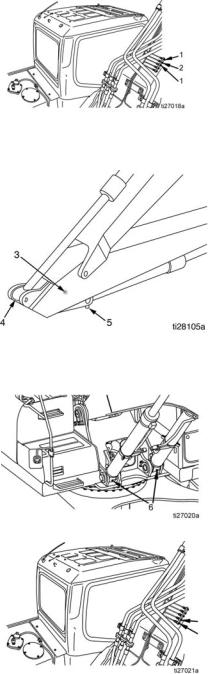
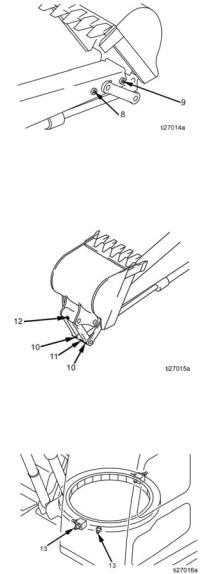
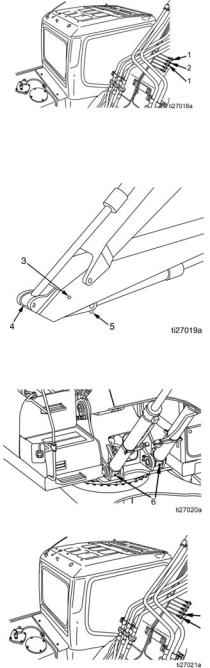
1. Apply thread sealant to supplied bearing point fit­tings.
2. Install fittings in bearing points. Refer to F the Bearing Point Fitting Table, page 8 for installa­tion locations and parts.
IG. 3 and
3. Refer to Bearing Point Fitting Table, beginning on page 8, to determine the location of the bearing points on your model.
FIG. 3
NOTE: Photographs may include optional equipment.
7
Page 8
Bearing Point Fittings
7 7
Bearing Point Fittings Table: PC210-11/PC240-11 Models
NOTE: Bef ore starting a lube cycle, set the machine to the grea sing postur e. I f y ou are unsure of this procedur e, see
the Komatsu Excavator instruction manual.
Ref No. Location Part No. Description
Boom cylinder rod
1
pins (2 places)
Arm cylinder foot pin
2
(1 place)
Boom and arm con-
3
nection pin (1 place)
Arm cylinder rod
4†
end (1 place)
Bucket cylinder foot
5
pin (1 place)
17K062 556763
17K062 556763
17G422 556763
Adapter, long, BSPT x NPT Elbow, JIC 90° 1/8 inch x 4
Adapter, short, BSPT x NPT Elbow, JIC 90° 1/8 inch x 4
556763 Elbow, JIC 90° 1/8 inch x 4
17G422 556763
Adapter, short, BSPT x NPT Elbow, JIC 90° 1/8 inch x 4
Boom cylinder foot
6
pins (2 places)
17G422 556763
17K062
Adapter, short, BSPT x NPT Elbow, JIC 90° 1/8 inch x 4
Adapter, long, BSPT x NPT
7
556763
Elbow, JIC 90° 1/8 inch x 4
Boom foot pins (2 places)
7*
8
17K062 17K061 555749
NOTE: Photographs may include optional equipment.
Adapter, long, BSPT x NPT Adapter, street elbow, BSPT x NPT
Connector, #4, JIC, 1/8 PM
Page 9
Bearing Point Fittings
Arm and link con-
8
nection pin (1 place)
Arm and bucket con-
9
nection pin (1 place)
H-Link connecting
10
pins (2 places)
Bucket cylinder rod
11
pin (1 place)
Bucket and link con-
12
nection pin (1 place)
17K061 555749
17K061 555749
17G422 556763
17K061 555749
17G422 556763
Adapter, street elbow, BSPT x NPT Connector, #4, JIC, 1/8 PM
Adapter, short, BSPT x NPT Elbow, JIC 90° 1/8 inch x 4
Adapter, street elbow, BSPT x NPT Connector, #4, JIC, 1/8 PM
Adapter, short, BSPT x NPT Elbow, JIC 90° 1/8 inch x 4
Swing circle (2
13
places)
Tap rod end with 1/8 NPT tap. Rod end may need to be flipped over to allow clearance for fittings during articulation
17K062 556763
Adapter, long, BSPT x NPT Elbow, JIC 90° 1/8 inch x 4
Grind slot in cap around zerk wide enough to tighten fittings approximately 1-1/4 inch wide.
NOTE: Photographs may include optional equipment.
9
Page 10
Bearing Point Fittings
7 7
Bearing Point Fittings Table: PC290-11/PC360-11 Models
NOTE: Bef ore starting a lube cycle, set the machine to the grea sing postur e. I f y ou are unsure of this procedur e, see
the Komatsu Excavator instruction manual.
Ref No. Location Part No. Description
Boom cylinder rod
1
pins (2 places)
Arm cylinder foot pin
2
(1 place)
Boom and arm con-
3
nection pin (1 place)
Arm cylinder rod
4†
end (1 place)
Bucket cylinder foot
5
pin (1 place)
17K062 556763
17K062 556763
17K061 555749
Adapter, long, BSPT x NPT Elbow, JIC 90° 1/8 inch x 4
Adapter, street elbow, BSPT x NPT Connector, #4, JIC, 1/8 PM
556763 Elbow, JIC 90° 1/8 inch x 4
17G422 556763
Adapter, short, BSPT x NPT Elbow, JIC 90° 1/8 inch x 4
10
Boom cylinder foot
6
pins (2 places)
Boom foot pins (2 places)
7
17G422 556763
17K062 556763
NOTE: Photographs may include optional equipment.
Adapter, short, BSPT x NPT Elbow, JIC 90° 1/8 inch x 4
Adapter, long, BSPT x NPT Elbow, JIC 90° 1/8 inch x 4
Page 11
Bearing Point Fittings
Arm and link con-
8
nection pin (1 place)
Arm and bucket con-
9
nection pin (1 place)
H-Link connecting
10
pins (2 places)
Bucket cylinder rod
11
pin (1 place)
Bucket and link con-
12
nection pin (1 place)
17K061 555749
17K061 555749
17G422 556763
17K061 555749
17K062 556763
Adapter, street elbow, BSPT x NPT Connector, #4, JIC, 1/8 PM
Adapter, short, BSPT x NPT Elbow, JIC 90° 1/8 inch x 4
Adapter, street elbow, BSPT x NPT Connector, #4, JIC, 1/8 PM
Adapter, long, BSPT x NPT Elbow, JIC 90° 1/8 inch x 4
Swing circle (2
13
places)
Tap rod end with 1/8 NPT tap. Rod end may need to be flipped over to allow clearance for fittings during articulation. Remove plug from cylinder end and install plug on opposite side of cylinder where zerk was located.
17K062 556763
Adapter, long, BSPT x NPT Elbow, JIC 90° 1/8 inch x 4
Grind slot in cap around zerk wide enough to tighten fittings approximately 1-1/4 inch wide.
NOTE: Photographs may include optional equipment.
11
Page 12
Bearing Point Fittings
7 7
Bearing Point Fittings Table: PC390-11/PC490-11 Models
NOTE: Bef ore starting a lube cycle, set the machine to the grea sing postur e. I f y ou are unsure of this procedur e, see
the Komatsu Excavator instruction manual.
Ref No. Location Part No. Description
Boom cylinder rod
1
pins (2 places)
Arm cylinder foot pin
2
(1 place)
Boom and arm con-
3
nection pin (1 place)
Arm cylinder rod
4
end (1 place)
Bucket cylinder foot
5
pin (1 place)
17K062 556763
17K062 556763
17K061 555749
17K062 15K783 555749
17G422 556763
Adapter, long, BSPT x NPT Elbow, JIC 90° 1/8 inch x 4
Adapter, street elbow, BSPT x NPT Connector, #4, JIC, 1/8 PM
Adapter, long, BSPT x NPT Elbow, street
Connector, #4, JIC, 1/8 PM
Adapter, short, BSPT x NPT 1/8 inch x 4 JIC 90° elbow
12
Boom cylinder foot
6
pins (2 places)
Boom foot pins (2
7
places)
17G422 556763
17K062 556763
NOTE: Photographs may include optional equipment.
Adapter, short, BSPT x NPT Elbow, JIC 90° 1/8 inch x 4
Adapter, long, BSPT x NPT Elbow, JIC 90° 1/8 inch x 4
Page 13
Bearing Point Fittings
Arm and link con-
8
nection pin (1 place)
Arm and bucket con-
9
nection pin (1 place)
H-Link connecting
10
pins (2 places)
Bucket cylinder rod
11
pin (1 place)
Bucket and link con-
12
nection pin (1 place)
17K062 556763
17K061 555749
17K062 556763
17K061 555749
17K062 556763
Adapter, long, BSPT x NPT Elbow, JIC 90° 1/8 inch x 4
Adapter, street elbow, BSPT x NPT Connector, #4, JIC, 1/8 PM
Adapter, long, BSPT x NPT Elbow, JIC 90° 1/8 inch x 4
Adapter, street elbow, BSPT x NPT Connector, #4, JIC, 1/8 PM
Adapter, long, BSPT x NPT Elbow, JIC 90° 1/8 inch x 4
Swing circle (2
13
places)
Remove plug from cylinder end and install plug on opposite side of cylinder where zerk was located.
17K062 556763
Adapter, long, BSPT x NPT Elbow, JIC 90° 1/8 inch x 4
Grind slot in cap around zerk wide enough to tighten fittings approximately 1-1/4 inch wide.
NOTE: Photographs may include optional equipment.
13
Page 14

MSP Divider Valves

A
B
C
D
E
MSP Divider Valves
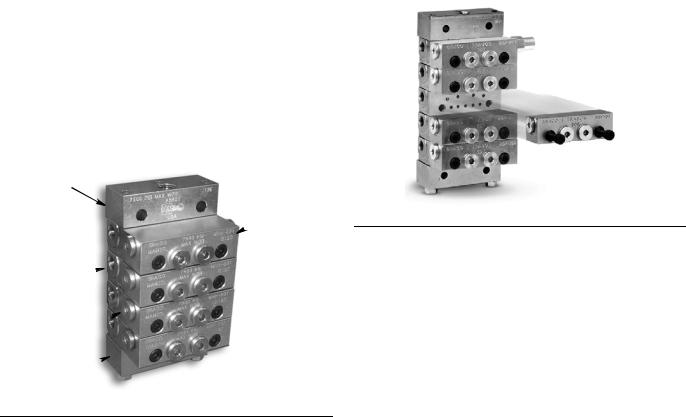
The Divider Valve Assembly includes the following com­ponents:
MSP divider valve base
MSP divider valve assembly
1/8 in. x 4 JIC straight outlet fittings
Inlet fittings
Cycle indicators
Performance indicators
Prepare a clean, flat area to assemble the valves.

MSP Valve Component Identification

NOTE: The MSP Divider Valves shown in FIG. 4 - FIG. 10 are provided for reference only. The MSP Divider Valves used in your installation may include fewer or more blocks and appear slightly different than those shown in the reference figures.

MSP Divider Valve Assembly

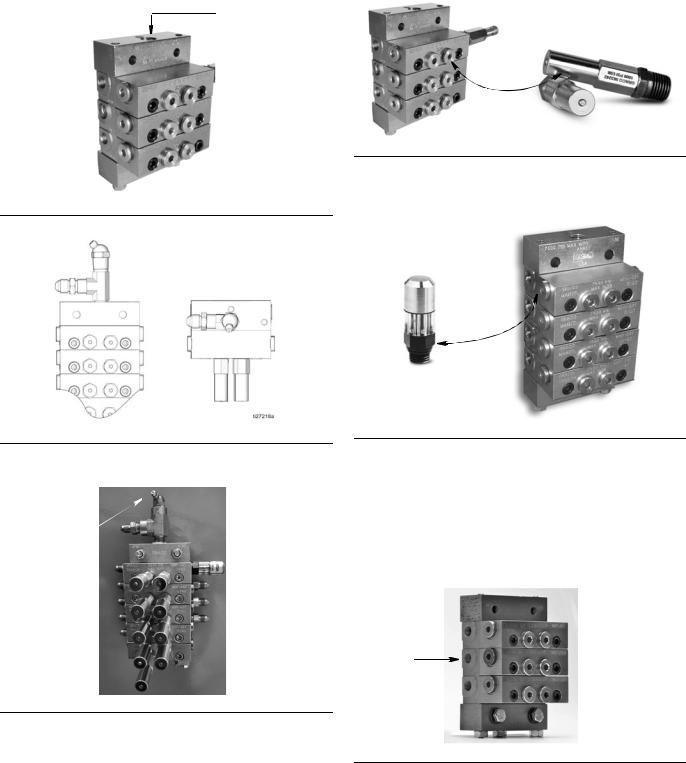
1. The MSP Divider Valves require assembly (FIG. 5). NOTE: Refer to the MSP Divider Valve Assembly
Table and MSP Divider Valve and Lube Points Assembly reference illustrations, F (page 16), to verify assemb ly orientation.
a. Remove components from packaging. b. Assemble metering valves to base plates as
shown in F
IG. 5.
IG. 12 - FIG. 13
FIG. 4
Key:
A Valve Section B Inlet Section C Indicator / Port Plug D End Plug E End Section
FIG. 5
14
NOTE: Photographs may include optional equipment.
Page 15
MSP Divider Valves
zerk
Performance Indicator
Cycle Indicator
Outlet Port
2. Install inlet fitting assembly in ports (FIG. 6).
Inlet fitting assembly includes: a 1/4 inch tee, a 1/4 x 4 JIC and a zerk fitting
Orient zerk fitting so it is always easily accessi­ble (see F
IG. 6 and FIG. 7).
FIG. 6
5. Install 1500 psi (10.34 bar , 103.4 MP a) p erformance indicators in ports (F
IG. 9):
NOTE: Refer to the MSP Divider Valve Assembly (page 16) to verify assembly orientation.
FIG. 9
6. Install cycle indicators in valves (F
IG. 10).
Magnetic Cycle indicators (quantity 2)
FIG. 7
3. Install grease zerk fittings and zerk cover (F
FIG. 8
4. Remove end plugs and indicator port plugs before
IG. 8).
installing performance and cycle indicators in the MSP Divider Valve assembly.
NOTE: Photographs may include optional equipment.
FIG. 10
7. Install outlet plugs in all open ports as shown in the MSP Divider Valve Assembly reference illustrations
IG. 12 and FIG. 13, page 16.
(F
8. Install outlet fittings in all ports (F
IG. 11).
All outlets use 1/8 in. x 4 JIC straight fittings
(included in kit).
FIG. 11
15
Page 16
MSP Divider Valves

MSP Divider Valve Assembly

Boom and Swing
Circle Valve
IG. 12)
(F
10T Plug 10S 40T 20T 40T 40T 40T 40T 20S Plug 40T
MSP Divider Valve and Lube Points Assembly
Boom and Swing Circle Valve (FIG. 12)
Arm and
Bucket Valve
(FIG. 13)
FIG. 12
Arm and Bucket Valve (F
FIG. 13
16
IG. 13)
NOTE: Photographs may include optional equipment.
Page 17

Weld Stud Guidelines

Weld Stud Guidelines
NOTICE
To avoid damaging the equipment, consult the Komatsu oper ations and maintenance m anu al before welding.
Weld studs are provided in the installation kit. How­ever, the installer may use their own weld studs if preferred.
Specific Weld Stud installation instructions and sug­gested locations are provided in the respective sec­tions of this manual.
Make sure any welding done is at least 2 inches from any edge, mating surface or existing factory weld.
1. Use a marker or paint pen to mark the weld stud locations.
2. Adjust and clean the surf aces for the weld stud loca­tions as needed before tack welding the weld studs.
3. Install Boom and Swing Circle Valve to the equip­ment using nuts included in the kit (F
IG. 14).
3. Tack weld the weld studs.
4. Clean the weld stud with a flap disk or grinding disk.
5. Prime the weld surface with Komatsu primer. When primer has dried, apply a few coats of matching Komatsu colored paint.
Boom and Swing Circle Valve Installation
The Boom and Swing Circle V alv e is installed to the right rear side of the boom. It should be centered top to bot­tom and centered between the fitting block and hose mount on the excavator, see F
1. Mark the location of the first Boom and Swing Circle Valve weld stud location. Then use the Boom and Swing Circle Valve to mark the location of the other weld studs. Make any minor adjustments before installing the weld studs.
2. Set the Boom and Swing Circle Valve aside. Tack weld the weld studs where marked. See the Weld Stud Guidelines.
IG. 14.
FIG. 14
NOTE: Photographs may include optional equipment.
17
Page 18
Weld Stud Guidelines
Arm and Bucket Valve Installation
The Arm and Bucket Valve is installed to the left side of the arm. The weld studs should be installed at least 3 inches (76.2 mm) from the weld, centered be low the inlet on the bucket cylinder foot pin.
1. Mark the location of the first Arm an d Bucket Valve weld stud location. Then use the Arm and Bucket Valve to mark the location of the other weld studs. Make any minor l adjustments before installing the weld studs.
2. Set the Arm and Bucket Valve aside. Tack weld the weld studs where marked. See the Weld Stud Guidelines.
3. Install Arm and Bucket Valve to the equipment using bolts included in the kit (F
IG. 15 - FIG. 16).
FIG. 15: PC210-11/PC240-11/PC290-11 Models
FIG. 16: PC360-11/PC390-11/PC490-11 Models
18
NOTE: Photographs may include optional equipment.
Page 19
Weld Stud Guidelines
P-Clamp
P-Clamp
P-Clamp Installation
P-Clamps are installed along the arm and on the H-Link on the excavator.
Weld studs for P-Clamp installation should be cen­tered half way across the arm and spaced evenly down the arm as shown in F
IG. 17 and FIG. 18.
Only one weld stud is required for P-Clamp installa­tion on the H-Link. It should be installed to the cast­ing protrusion in the middle of the H-Lin k (F
IG. 19).
FIG. 19
FIG. 17
FIG. 18
NOTE: Photographs may include optional equipment.
19
Page 20
Weld Stud Guidelines
anchor
anchor
Anchor Block
Install the anchor block weld stud near the cylinder end and 4 inches (101.6 mm) from the edge of the boom
IG. 20).
(F
FIG. 20
20
NOTE: Photographs may include optional equipment.
Page 21

G3 Pump

a
b
c
d
c
b
d
e
The G3 Pump includes the following components:
Pump with attached reservoir
Pressure relief valve (required to protect system from damage)
Pressure gauge (used to monitor system perfor­mance and to assist with troubleshooting).
Mounting bracket and hardware
CPC power cable
•Zip ties
Pump element spacers
Washers - 4 total
Nuts - 4 total
1. Remove all components from the packaging and place all parts on a clean, flat surface.
FIG. 23
3. Install banjo bolt (d) into pump el ement (e) (F
G3 Pump
IG. 24).
FIG. 24
FIG. 21
2. Assemble the pressure relief valve.
4. Use two wrenches to tighten banjo fitting. Place one wrench on the pump element (e) and the second wrench over the end of the banjo bolt (d). ONLY tighten the banjo bolt (d) while holding the pump
a. Apply thread sealant (user supplied) to thread s
of pressure relief valve (a) (F
IG. 22).
element (e) securely in place. Torque banjo bolt (d) to 35 ft. lbs (45.7 N•m) (F
IG. 25). Take care to not
over-tighten.
FIG. 22
b. Install pressure relief valve (a) into banjo fitting
(b). Wrench tighten (F
IG. 22).
c. Install one washer (c) over end banjo bolt (d).
Then install banjo fitting (b) on banjo bolt, fol­lowed by the second washer (c) (F
IG. 23).
F
IG. 25
NOTE: Photographs may include optional equipment.
21
Page 22
G3 Pump
a
5. Remove plug from left side of the G3 Pump. Install pump element and 2 shims (a) as shown in F
IG. 26.
FIG. 26
6. Assemble pressure relief valve and banjo fitting as described in Steps 2 - 4, page 21.
7. Install the pressure gauge fitting, pressure gauge and outlet fitting in the pressure rel ief valv es on bot h sides of the pump as shown in F
IG. 27 and FIG. 28.
NOTE: Hold the pressure relief valve securely in place while installing the pressure gauge assembly.

G3 Mounting Bracket Installation

For the PC210-11/PC240-11/PC290-11 models: Install the pump to the platf orm on the left-hand side of the equipment behind the cab, near the handrails as shown in F
For the PC360-11/PC390-11/PC490-11 models: Install the pump to the platf orm on the right-hand side of the equipment, near the handrails as shown
IG. 32.
in F
1. For PC210-11/PC240-11/PC290-11 Models: Install the pump bracket behind the cab on the left side of the machine. Slide the pump bracket up next to the kick-plate as far as it will go (F
For PC360-11/PC390-11 /PC490-11 models: On th e right hand side of the machine, cent er the m oun tin g bracket between the hand rail and the engine cover.
Measure in approximately 2.5 inches (63.5 mm) from the outside edge of the platform. Use a marker or pen to mark the location of the first mounting hole
IG. 29).
(F
IG. 31.
IG. 31).
FIG. 27
FIG. 28
22
FIG. 29
NOTE: Photographs may include optional equipment.
Page 23
2. Square and align the bracket over the mark made in Step 1. Use a marker or paint pen to mark the loca­tions of the remaining mounting holes in the br ac k e t
IG. 30).
(F
FIG. 30
3. Use a drill to drill the mounting holes in the platform.
4. Secure G3 pump to mounting bracket.
5. Align mounting bracket with the drilled holes in the platform.
6. Insert bolts through holes in the bracket and plat­form. Thread the nuts over the end of the bolts and tighten nuts to hold the bracket securely to platform
IG. 32).
(F
G3 Pump
FIG. 32: G3 Pump installed on PC360-11/PC390-11/PC490-11 Models
FIG. 31: G3 Pump installed on left side of PC210-11/PC240-11/PC290-11 Models
NOTE: Photographs may include optional equipment.
23
Page 24

Remote Fill Installation

bolts
47
49
45
48
50
Remote Fill Installation
Remote Fill Parts
Ref* Part No. Description Qty
16 556762 CONNECTOR, #4, JIC, 1/4 PM 1 45 557950 BULKHEAD, remote fill 1 46 100840 FITTING, elbow, 1/4 in., street 1 47 557896 STUD, fill, 1/4 inch NPTF (f) 1 48 556408 FITTING, 1/4 x 1/8 inch NPTF
Hex 49 555749 CONNECTOR, #4, JIC, 1/8 PM 1 50 15K783 FITTING, elbow 1
*See Parts, page 50.
Instructions
1. Install the remote fill to the engine cover support rail that is located closest to the G3 pump.
1
3. Connect one end of the remote fill hose to the G3 pump.
4. Route the hose from the G3 pump to the remote fill.
5. Trim the hose, hose loom and hose ends to the nec­essary length.
6. Apply thread sealant to threads of connector (49). Install bulkhead fitting (45) to the connector (49). Remove mounting nut.
7. Install bulkhead fitting (45) through bulkhead hole drilled in Step 1. Reinstall mounting nut over end of bulkhead fitting to secure bulkhead fitting to support
IG. 34).
rail (F NOTE: When installing the bulkhead fitting (45)
make sure connector (49) is oriented upward as shown in F
IG. 34
2. Use an oversized step bit to enlarge one of the existing holes in the engine cover framework to a diameter large enough to accommodate t he re mot e fill; approximately 1 to 2 mm.
FIG. 33
FIG. 34
8. Join connector (49) to end of remote fill hose.
9. Apply thread sealant to I.D. threa ds of bulkhead fit­ting (45) and to threads of coupler (48). Install cou­pler to the bulkhead fitting. Tighten securely.
24
NOTE: Photographs may include optional equipment.
Page 25
Remote Fill Installation
Remote Fill
G3 power cable
mounting bracket
10. Connect fill stud (47) to coupler (48). Tighten securely.
FIG. 35
Installing and Routing G3 Power Cable
NOTE: Before the pump wiring can be installed, the
excavator must be rotated 90° so that the boom and arm are facing over the track. See the Komatsu Excavator instruction manual for these instructions.
2. Wrap the G3 pump CPC po wer cable wit h the 1/4 in. cable loom.
3. Connect the end of the pow er cab l e to the G3 pu mp.
4. Route the power cable through the mounting bracket and into the engine compartment as shown
IG. 37 and FIG. 40.
in F
FIG. 37: PC210-11/PC240-11/PC290-11 Models
1. Remove the metal access panel located below the
FIG. 36
cab.
FIG. 38: PC210-11/PC240-11/PC290-11 Models
NOTE: Photographs may include optional equipment.
25
Page 26
Remote Fill Installation
G3 power cable
G3 power cable
Cable
Gusset
FIG. 39: PC360-11/PC390-11/PC490-11 Models
FIG. 40: PC360-11/PC390-11/PC490-11 Models
5. Route the G3 power cable through the back of the engine bay to w ard th e cent er of t he ma chine . Either feed the power cable through the access grommet or through the foam insulation in the back of the engine bay (F
IG. 41).
FIG. 41
6. Route the G3 power cable either directly under the boom and into the access panel (left side pump mounting) or under the boom through the open gus­sets and then into the access panel (right side pump mounting) F
IG. 42 - FIG. 44.
FIG. 42
26
NOTE: Photographs may include optional equipment.
Page 27
FIG. 43
Gusset
Power Cable
Remote Fill Installation
FIG. 44
7. Secure the power cable with zip ties up to where it enters the access hole under the cab.
NOTE: The GLC2200 wiring needs to be routed to the access panel to complete the wiring procedure. See GLC2200 Controller Wiring instructions, page
28.
NOTE: Photographs may include optional equipment.
27
Page 28

GLC2200 Controller

a
c
b
g
g1
c
d
e
b
c
e
f
d
c
h
GLC2200 Controller
The GLC2200 Controller includes the following compo­nents:
GLC2200 Controller
Mounting bracket and hardware
GLC2200 cable
•Zip ties Remove all components from the packaging and place all parts on a clean, flat surface.
GLC 2200 Mounting Bracket Installation
The mounting bracket kit includes the following compo­nents:
Ref Description Qty
a Mounting Bracket 1 b Mounting Bolts 6 c Washers 14 dNuts 6 e Mounting Base Plate 1 f Mounting Plate 1 g Mounting Bracket to Cab 2 h Washer, nylon 2 j Screw, pan head 2 kNut 2
1. Assemble the GLC2200 mounting bracket: a. Use an 5/16 inch drill bit to enlarge the diameter
of hole (g1).
b. Install the GLC2200 mounting base plate (e) to
the mounting bracket (a) using bolts (b), wash­ers (c) and nuts (d) as shown in F tighten nuts securely.
c. Install bracket fa stener s (g) to moun ting br acket
(a) using bolts (b), washers (c) and n uts (d) as shown in F final adjustment when installed to the Komatsu equipment.
d. Install the GLC200 mounting plate (f) to the
mounting base plate (e) using bolts (b), washe rs (c) and nuts (d) as shown in F washer (h) is installed between the mounting plate (f) and mounting base plate (e) on the top an bottom. Wrench tighten nuts securely.
IG. 45. Fasten loosely to allow for
IG. 45. Wrench
IG. 46. Be sure
FIG. 45
28
NOTE: Photographs may include optional equipment.
FIG. 46
Page 29
e. Install the GLC200 controller on the mounting
GLC2200
j
k
a
f
a
plate (f) using screws (j), and nuts (k) as shown
IG. 47. Tighten mounting bolts just enough
in F to secure the controller in the bracket. Adjust the GLC2200 controller for the best viewing angle then wrench tighten bolts securely.
GLC2200 Controller
FIG. 48
FIG. 47
f. Adjust bracket fa steners (g) f or installation in the
cab; matching the holes in the brackets to the location of the bolt holes available after remov­ing bolts and washers in Step 2.
g. Wrench tighten nuts (d) to secure bracket fas-
teners (g) to bracket (a).
2. Remove bolts and washer (a) to remove panel located on the inside of the cab, next to the driver’s seat as shown in F
IG. 48.
3. Install the assembled br acket and GLC2200 to the mounting holes exposed in Step 2. Use bolts (b) and washer (c) and washer (w) to secure br acket fasteners (g) to the holes.
FIG. 49
4. Connect the GLC2200 wiring harness to the GLC2200 controller.
NOTE: Photographs may include optional equipment.
29
Page 30

GLC2200 Controller Wiring

Panels to Remove
GLC2200 Controller Wiring
NOTICE
To avoid damaging the loader:
Turn off and disconnect power at the battery before installing equipment.
All electrical wiring must be done by a qualified professional or Komatsu certified technician.
NOTE: Before the GLC2200 Controller can be mo unte d in the exca v ator cab, the controller cab le m ust be r outed behind the panels on the left side of the opera tor’s seat.
1. Loosen or remove the bolts holding the panels to the cab F
IG. 50.
FIG. 51
4. Extract the read (+) and black (-) wires from the cable assembly. Ensure that care is taken not to cut any other wires in the cable. There must be enough wire extracted to feed the red and black wires behind the cab covers and into the fuse panel (F
52).
IG.
FIG. 50
2. Remove the fuse panel cover located behind the operator’s seat.
3. Splice the GLC2200 cable approximately 2-3 feet from the connector end (F
30
IG. 51).
NOTE: Photographs may include optional equipment.
FIG. 52
5. Seal the open splice with electrical tape or shrink tubing for added protection.
6. Feed the red and black power wires behind the cab covers and into the fuse panel.
7. Feed the remaining GLC2200 cable down the cab cover, below the window on the left side of the cab.
Page 31
GLC2200 Controller Wiring
Cable
Then feed the cable through the cable gland on the floor , below the operator’s seat (F
IG. 53).
FIG. 53
8. Route the GLC2200 cable to mate with the G3 pump power cab le in the access panel under the cab. Use zip ties to secure the controller cable.
Each wire connection should be assembled using the following Wire Splicing procedure:
Refer to the following Wiring Table for wire connection between the GLC2200 controller, G3 pump and main power.
GLC2200 Wiring Table
GLC2200 Harness Pump
Color Description +/- Color
Blue Pump - Black Purple Unused (cut) ­Brown Low Level Input - Orange White Black Voltage Input 24VDC ­Orange Pump + Red Green Unused (cut) + Yellow Low Level Input + White Gray Unused (cut) + Red Voltage Input 24VDC +
Wire Splicing
1. Remove 1 inch of insulation using a wire stripper
IG. 55).
(F
FIG. 54
FIG. 55
2. Slide 1.5 inches of shrink tubing ov er end of one piece of wire.
3. Connect two (or more) wire ends together by twist­ing the stripped wire ends of wires together
IG. 56).
(F
FIG. 56
4. Solder connection with a soldering iron.
5. Slide the shrink tubing over th e solde red wires. Use a heat gun to contract the shrink tubing (F
IG. 57).
FIG. 57
6. Repeat Steps 1 - 5 for all wires.
NOTE: Photographs may include optional equipment.
31
Page 32
GLC2200 Controller Wiring
7. Wrap wiring assembly with electrical tape or cable loom to protect connection.
8. Secure the mated G3 pump power cable and the GLC2200 controller cable with zip ties to provide added protection.
9. Reinstall the cover underneath the cab and tighten the bolts.
10. Remove the fuse panel cover.
15. Install the Add-A-Fuse into the fuse panel into slot 14 named “5A KEY ACC SIGNAL”.
FIG. 58:
11. Pull the cable through the back of the relay panel, into the fuse panel and out through the panel cover
IG. 61). Complete the wiring form the main power
(F and ground for the controller.
12. Attach an ATM fuse splice connector to the power wire of the controller (F
IG. 59) using the wiring pro-
cedure described in Steps 1- 5, page 31. Install a 5 Amp fuse.
FIG. 59
13. Install the 5 Amp fuse (included in the kit) into the Add-A-Fuse slot with the wire lead.
14. Remove fuse from slot 14. Install fuse into the Add-A-Fuse.
FIG. 60
16. Follow the same wiring splicing procedure for the ground cable as described in Steps 1- 5, page 31. Attach a ring terminal to the controller ground wire
IG. 61).
(F
FIG. 61
17. Remove a bolt from the relay rail closest to the fuse panel and connect the ground wiring ring to a bolt in the relay rail.
18. Reinstall the fuse cover over the top of the fuse panel and the Add-A-Fuse.
32
19. Reinstall the cab cover panels and bolts.
NOTE: Photographs may include optional equipment.
Page 33

Hose Assemblies

1 inch
sw
h
h
sw
sg
socket
Hose Assemblies
The hose in the kit is provided in bulk and the fittings are field installable; a crimper is not required.

Hose Assembly Instructions

1. Wrap or slide spiral wrap (sw) over the end of the cut-to-length hose (h) until the entire length of the hose is encased in the spiral wrap.
2. Trim the spiral wrap (sw), leaving approximately 1 inch (25.4 mm) of the hose end unwrap ped (F
62).
FIG. 62
Spring Guard†
Some hoses require additional protection and should also be wrapped with a hose spring guard.
a. Slide the hose spring guard (sg) o v e r the end of
the spiral wrapped hose. Feed the hose assem­bly into the hose spring guard until the entire length of the hose is encased in the hose spring guard.
IG.
3. Remove two hose fittings from their package and disassemble the two pieces (F
FIG. 64
4. Connect the socket to the end of the hose. Rotate the fitting counter-clockwise to thread the hose fit­ting onto the hose (F
NOTE: A wrench and pliers may be needed to assist with this assembly. If socket is difficult to install, apply lubricant that is compatible with the hose material.
FIG. 65
5. Leave app ro ximately 1/16 in. o f the hose end bef ore completely seating the hose into the fitting. This will allow enough space for the seco nd half of the fi ttin g to be connected (F
6. Generously lubricate nipple, socket, threads and hose inside diameter.
IG. 65).
IG. 66).
IG. 64).
b. Trim the hose spring guard (sg) so it is long
enough to cover hose assembly.
FIG. 63
NOTE: Photographs may include optional equipment.
FIG. 66
33
Page 34

Hose Routing

7. Thread the stud of the nipple clockwise into the socket installed in the hose until the nipple nearly bottoms out against the socket shoulder (F
NOTE: Two hand wrenches may be needed to assist with this assembly.
FIG. 67
NOTICE
Do not over tighten the fittings during final assembly. After the two fittings are securely connected, stop tightening the fittings. Over-tightening can damage the fittings and a new hose assembly will need to be made.
If the ferrule sleeve is difficult to install, check the hose for proper lubrication. Reapply lubricant as needed. Installation without proper lubrication can cause damage to the core tube.
IG. 67).
Hose Length
Hose lengths are dependent on:
the machine model
MSP valve placement on machine
optional mechanical equipment To de te rmine the hose length:
1. Loosely Valve outlet.
2. Route the section of hose from the valve to the lubri­cation point following the path of the already installed electrical or hydraulic lines. Allow sufficient hose for complete articulation that does not place stress on the hose fittings and connections during daily operation.
3. Tr im hose.
4. Install hose guard.
5. Install fitting to cut end of hose.
connect fitting end of the hose to the MSP

Hose Installation

8. Repeat Steps 1-7 for all hose assemblies.
Hose Routing
Routing hose lines takes time. It is easier when there are two people working on the installation together.
Identify the internal and external swing circle points to ensure proper hose lengths are applied. If hoses are too short, they will bind and eventually break. If hoses are too long, they can easily get snagged on external debris, or pinched in the machine and break.
Care must be taken to ensure hoses are installed t o move with the machine. To make the lube system part of the machine consideration must be given to the many swing circle, oscillation, extension and pinch point areas of a equipment. Be fore cutt ing and securing hoses, have a qualified technician move the various parts of the machine to ensure proper routing is achieved.
Look for access points. Utilize grommets, supports, or cutouts in equipment’s frame. Routing hoses through these areas keeps the hoses inside the machine and provides protection. It will also provide a cleaner, more professional looking installation.
Route the lines to the bearing point but do not con- nect the lines to the bearings . Take care to ensure dirt and/or debris do not get on the grease fitting or introduced into the system.
Secure lines using the supplied zip ties.
Secure hoses to arm using P-Clamps.
Use larger P-Clamps to bundle the hoses together and keep them tight.
34
NOTE: Photographs may include optional equipment.
Page 35
Hose Routing Pump to Valves
Arm and swing circle valve
Bucket valve
Arm and swing circle valve
Bucket valve
swing circle valve
Bucket valve
Arm and
Hose Routing
FIG. 70: Model PC240-11 shown
FIG. 68: Model PC490-11 shown
FIG. 69: Model PC490-11 shown
FIG. 71: Model PC240-11 shown
FIG. 72: Model PC240-11 shown
NOTE: Photographs may include optional equipment.
35
Page 36
Hose Routing
FIG. 73: Model PC490-11 shown
FIG. 75: Model PC360-11 shown
FIG. 74: Model PC490-11 shown
FIG. 76: Model PC490-11 shown
FIG. 77: Model PC240-11 shown
36
NOTE: Photographs may include optional equipment.
Page 37

Arm and Bucket Valve

Bucket Cylinder Foot Pin (5)
Arm & Link Connection Pin (8)
Arm & Bucket Pin (9)
Connection
Link Connection Pin (10)
Arm Cylinder Rod End (4)
Boom & Arm Connection Pin (3)
Link Connection Pin (10)
Bucket Cylinder Rod Pin (11)
Bucket & Link Connection Pin (12)
To Pump Element without Shims
Hose Routing
FIG. 78
Before routing hose lengths, the bucket must be fully curled to ensure proper length is allowed for the bucket. Loosely connect hoses to the Arm and Bucket Valve and route to lubrication points. Secure hose lines together using the supplied zip ties.
Refer to F
IG. 79 - FIG. 88 for all hose routing conn ections
to the Arm and Bucket Valve.
FIG. 79: Model PC490-11 shown
NOTE: Photographs may include optional equipment.
FIG. 80: Model PC490-11 shown
37
Page 38
Hose Routing
FIG. 81: Model PC490-11 shown
FIG. 82: Model PC490-11 shown
FIG. 83: Model PC490-11 shown
390
FIG. 84: Model PC490-11 shown
38
NOTE: Photographs may include optional equipment.
Page 39
Hose Routing
FIG. 85: Model PC490-11 shown
FIG. 87: Model PC490-11 shown
FIG. 86: Model PC490-11 shown
FIG. 88: Model PC490-11 shown
NOTE: Photographs may include optional equipment.
39
Page 40
Hose Routing
Swing Circle (13)
Boom Cycle Pin (1)
Arm Cycle Foot Pin (2)
Boom Cycle Rod Pin (1)
Boom Foot Pin (7)
Swing Circle (13)
Boom Cylinder Foot Pin (6)
Boom Foot Pin (7)
From Pump with Shims
To Pump
To Pump Element with Shims

Boom and Swing Circle Valve

FIG. 89
Boom and Swing Circle Valve Hose Connections
Loosely connect the hose to the pump. Run the main feed line hose between the pump and the Boom and Swing Circle Valve. Secure hose lines together using the supplied zip ties.
Refer to F to the Boom and Swing Circle Valve.
FIG. 90: Model PC490-11 shown
IG. 90 - FIG. 98 for all hose routing conn ections
FIG. 91: Model PC360-11 shown
40
NOTE: Photographs may include optional equipment.
Page 41
FIG. 94: Model PC490-11 shown
Hose Routing
FIG. 92: Model PC490-11 shown
M
FIG. 93: Model PC490-11 shown
FIG. 95: Model PC240-11 shown
FIG. 96: Model PC360-11 shown
NOTE: Photographs may include optional equipment.
41
Page 42
Hose Routing
FIG. 97:Model PC240-11 shown
FIG. 98: Model PC490-11 shown
42
NOTE: Photographs may include optional equipment.
Page 43

GLC2200 Controller Programming

ON
OFF
HH MM
SS
##
!
J
D
F
A
B
C
E
H
G
GLC2200 Controller Programming
Component Identification
Keypad, Display, and Icons
NOTICE
To prevent damage to soft ke y button s, do not pr ess the buttons with sharp objects such as pens, plastic cards, or fingernails.
Display (E)
A blinking field on the displa y indicates the controller is in SETUP MODE.
In RUN MODE field of numbers on the display will not blink.
Alarm LED (F)
Illuminates when any alarm is detected. When an alarm is active an error code displays and an audible alarm also sounds.
RIGHT Direction Arrow / MANUAL RUN / ENTER (G)
In SETUP MODE, saves entry, moves cursor in
display one field to the right or to the n ext setup step.
In RUN MODE activates the pump for one com-
plete ON cycle if actuated during the OFF por­tion of the RUN cycle.
UP and DOWN Direction Arrows (H)
Press and hold both the UP and DOWN Arrow
keys together for 3 seconds to enter SETUP MODE.
In SETUP MODE increase or decrease number
values associated with the various RUN MODES.
FIG. 99
Pump ON LEDs (A, B, C)
A Pressure Control LED: In RUN MODE illuminates
B Cycle Control LED: In RUN MODE illuminates
C Time Control LED: In RUN MODE illuminates
Pump OFF LED (D)
indicating function mode that is currently running.
In RUN MODE this LED illuminates when in the OFF or RESET portion of the RUN CYCLE.
NOTE: Photographs may include optional equipment.
LEFT Direction Arrow / RESET (J)
In SETUP MODE moves cursor in display one field to the left.
In RUN MODE, Pressing RESET starts a PUMP OFF cycle.
In ALARM MODE, Press once to clear buzzer; Press and hold for 3 seconds to clear warning and switch controller to OFF MODE.
NOTE: See the GLC2200 Controller Instruction manual for detailed descriptions of the display features.
43
Page 44
GLC2200 Controller Programming
OFF
Programming the GLC200 Controller
Before programming the GLC2200 controller:
Restore power to the equipment by engaging the main power switch to the equipment.
Key on the machine to the “Acc” position.
1. Press both the UP and DOWN ARROW buttons together for three seconds.
2. Use the UP ARROW until on:ti displays.
4. Program the first min ute field by pressi ng the UP or DOWN ARROW button until 0 appears in the first MM (minutes) field.
5. Press the ENTER button. The next MM number field to the right flashes indicating it is ready for program­ming.
6. Repeat steps 4 - 5 to set each of the remaining next MM and the SS (sec­onds) fields.
7. After pressing the ENTER button to set the last SS field, all the pro­grammed Time information is saved.
The controller automatically switches to the OFF Time SETUP MODE.
3. Press the ENTER button.
The LED below the clock in t he ON field lights, indicating the ON TIME is being programmed. ON TIME is the amount of time the pump runs.
NOTE: The ON TIME entry is a 4-digit number setting MM (minutes) and SS (seconds). For this instal­lation the on time is:
PC210-11/PC240-11 - 01 minute and 45 sec­onds. A leading zero (0) must be entered in the first MM field.
PC290-11/PC360-11 - 02 minute and 00 sec­onds. A leading zero (0) must be entered in the first MM field.
P390/PC490-11 - 02 minute and 10 seconds . A leading zero (0) must be entered in th e f irst MM field.
The LED below the OFF TIME Symbol Illu­minates.
NOTE: The OFF TIME entry is a 4-digit number setting HH (hours) and MM (min­utes). For all models the time is 01 hour.
HH fields - enter 01. A leading zero (0) must be entered in the first HH field.
MM fields - enter 00. There are no additional minutes.
To set the OFF TIME:
8. Program the first hour field by pressing the UP or DOWN ARRO W but ton until 0 appears in the first HH (hour) field.
9. Press the ENTER button. The next HH number field to the right flashes indicating it is ready for programming.
44
10. Repeat steps 8 - 9 to set each of the remain ing ne xt HH and the MM (minutes) fields. Press the ENTER button.
NOTE: Photographs may include optional equipment.
Page 45
The controller automatically switche s to the LOW LEVEL SETUP MODE.
LOW LEVEL SETUP programs how the low level is detected by the controller. For this installation the LOW LEVEL SETUP is programmed to LL:02.
1. Use the UP or DOWN ARROW until LL:02 displays.
2. Press the ENTER button.
Setup is complete. Listen for an audi­ble “beep” signaling the contro ller is now programmed and has exited the SETUP MODE.
GLC2200 Controller Programming
NOTE: See the GLC2200 Controller Instruction manual for detailed progr amming instructions.
NOTE: Photographs may include optional equipment.
45
Page 46

Filling and Purging

a
b
c
d
Filling and Purging
An automatic lubrication system must be free of air in order to generate enough pressure to cycle grease through the valves.
Take care to ensure dirt and/or debris do not get on the grease fitting or introduced into the system.
1. Connect a pneumatically powered grease gun to the grease zerk (a) on the G3 pump. Fill the G3 pump reservoir with grease to the “MAX” line mark (b) on the front of the reservoir (F
IG. 100).
3. Continue to fill the master valv e and the grease lines to the secondary valves (F
IG. 101). Have a col-
league identify when the lines are filled and air is purged from the lines. Wrench tighten the inlet hose fittings on the secondary valves, securely.
NOTE: Use a waste container to capture excess grease from the feed lines.
4. Connect a pneumatically pow ered grease gun to t he grease zerk (d) on the secondary valve to fill the secondary valves and their grease lines (F
IG. 102).
Have a colleague stand next to the grease lines from the secondary valves to the bearing points to identify when the lines are filled and air is purged from the lines. Wrench tighten the secondary lines to the bearing points, securely.
NOTE: Use a waste container to capture excess grease from the secondary lines.
FIG. 100
2. Connect a pneumatically powered grease gun to the grease zerk (c) on the master valve to the pump
IG. 101). Have a coll eague stand ne xt t o the pump
(F to identify when the main feed line fro m the pump is full and the air is purged from the line. Wrench tighten the fitting on the G3 pump, securely.
FIG. 101
46
NOTE: Photographs may include optional equipment.
FIG. 102
Page 47

Testing

WARNING
Testing
Before testing the system:
be sure the G3 pump reservoir is filled,
all supply lines are connected securely,
verify all bearing point fittings and hose conne c­tions are tight,
valves and grease lines are filled with grease and purged of air.
1. Turn on the battery disconnect to the machine and key on power in the cab to the “Acc” position.
2. Verify the GLC2200 Controller has power.
3. Press the Manual Run button on the GLC2200 Controller to run the lube system through several lube events.
4. While the pump is running, walk around the machine and inspect all pump, valve hose fittings and bearing point connections to verify there are no leaks in the system.
Articulate all working sections of the machine to ensure there is sufficient hose length supplied to all lubrication points.
Inspect all pump, v alve ho se fittings and bearing point connections to verify there are no leaks, the hoses are secure and that all points are receiving grease.
7. If any of the fittings or connections are leaking, tighten fittings and/or mak e adjustments as needed.

Routine Service and Equipment Maintenance

Every time you complete the vehicle inspection check­list, walk around the machine to inspect all pump, valve hose fittings and bearing point connections to v erify there are no leaks in the system. This will ensure any damage to hoses or fittings is identified and repaired properly.
SKIN INJECTION HAZARD
High-pressure fluid from dispensing device, hose leaks, or ruptured components will pierce skin. This may look like just a cut, but it is a serious injury that can result in amputation. Get immediate surgical treatment.
Do not put your hand over the fluid outlet.
Do not stop or deflect leaks with your hand,
body, glove, or rag.
Follow the Pressure Relief Procedure included
in your pump instruction manual when you stop dispensing and before cleaning, checking, or servicing equipment.
Tighten all fluid connections before operating
the equipment.
Check hoses and couplings daily . Replace worn
or damaged parts immediately.
5. If any of the fittings or connections are leaking, tighten fittings and/or mak e adjustm ents as neede d.
6. Put the machine into service and manually run the lubrication system.
NOTE: Photographs may include optional equipment.
47
Page 48

Troubleshooting

Troubleshooting
NOTE: If the problem is not attributed to the Graco Lubrication System, consult the Komatsu Operations and Mainte-
nance manual or your Komatsu dealer.
Problem Cause Solution
Check that the battery disconnect is
No power to the machine
ON and the keyed power is in the “Acc” position.
GLC2200 Controller does not turn on
GLC2200 Controller is in alarm mode; will not operate correctly
GLC2200 Controller goes into fault mode and displays ER:LL
Audible ala rm is sounding during machine operation
GLC2200 Controller not wired cor­rectly
Fault is not cleared on controller
G3 pump reservoir is empty
Machine requires service
Check to ensure the controller has been wired correctly by reviewing the GLC2200 Wiring Table on page
28.
For 3 seconds, hold down the fault clear button (located on t he left side of the controller). Controller fault should clear and begin OFF TIME countdown. See GLC2200 Control­ler instruction manual.
Refill G3 pump reservoir. After fill­ing, press and hold the fault clear button on the GLC2200 controller for 3 seconds. See GLC2200 Con­troller instruction manual.
To silence the alarm, press the fault clear button on the GLC2200 Con­troller for one second. Release but­ton. The alarm will silence, but the system will remain in alarm mode until the machine is serviced.
GLC2200 Controller is in fault mode and displays ER:Cy or ER:Pr
MSP Valves fail to accept grease
48
NOTE: Photographs may include optional equipment.
The controller is set incorrectly pro­grammed to run on cycles.
MSP valve not torqued to required specification or overtightened
Reprogram controller to ON:ti. See Programming the GLC2200 Con­troller, page 44.
Check MSP valve torque. Tighten if not torqued to required specifica­tion. If overtightened, adjust valve assembly and retest.
Page 49
Problem Cause Solution
Bearings not receiving enough grease
GLC2200 will not allow pro­grammed time
GLC220 Controller OFF TIME set too long.
Hours, minutes or seconds field not set correctly on GLC2200 Controller
Troubleshooting
Reset the GLC2200 Controller OFF TIME to a shorter amount of time. This will engage a lube event more frequently and increase the amount of grease the bearings receive in a day.
Alternative settings: 50 minutes = 30% increase 45 minutes = 50% increase 30 minutes = 100% increase
See OFF TIME setup beginning with Step 8, page 44
Verify you are programming the hours, minutes, and seconds fields correctly. Refer to Programming the GLC2200 Controller instructions, page 43 or refer the GLC2200 Con­troller instruction manual,.
G3 Pump does not build or hold pressure
Broken hose
The kit comes with extra hoses and fittings. If a replacement hose is needed, use these extra parts to make a replacement or contact your local Graco distributor to order a replacement part.
NOTE: Photographs may include optional equipment.
49
Page 50

Parts

Parts
Part Description
17K063 TIE, cable, 14.75" X .31" BLK 128570 HOSE, 1/8" ID, 3000 PSI (210 ba r), 200 ft
(60.9 m)
128573 HOSE,1/4" ID, 2750 PSI (190 bar),125 ft
(38.1 m) 128579 GUARD, hose, 3/8" ID, 160 ft (48.7 m) 128582 GUARD, hose, 1/2" ID,100 ft (30.5) 24N468 CONTROL, GLC 2200 24W981 CABLE, harness, GLC 2200 10 ft (3.0 m) 96G198 PUMP, G3, 8L 17G007 KIT, GLC 2200 mounting 17K782 KIT, valves for excavator 128806 LABEL, lubrication fill port 17G422 ADAPTER, 1/8M BSPT X 1/8F NPT 17K061 FITTING, elbow,street,1/8 NPT BSPT 17K062 FITTING, adapter lg 1/8 NPT to BSPT 128561 FITTING, swivel hose,1/8" ID #4JIC 128563 FITTING, swivel hose,1/4" ID #4JIC 555749 FITTING, connector,1/4”T X 1/8”P X
7/16”” 556407 FITTING, tee, male branch, 1/4” 556420 FITTING, tee stl 1/4” FP X 1/4” MP
Part Description
111040 NUT, lock, insert, nylock, 5/16” 127512 STUD, weld, 1/4”-20 X 0.710 127514 STUD, weld, 1/4”-20 X 1.2” 127515 CLAMP, hose, OD 1.50” 128006 CLAMP, hose, 0.375” OD 556408 FITTING, nipple 1/4” x 1/8” stl hex 557875 CAP, dust 3/4” 557896 STUD, fill 1/4” NPTF 557950 FITTING, union, blk hd, 5/8” X 1/8” 17K485 CAP, dust, zerk 560540 COUPLING, anchor str 1/8” 15K783 FITTING, elbow, street, 1/8” 17D024 STUD, weld, 1/4”-20 X 2” 125910 BRACKET, pump, windmill 557264 FUSE, blade type 5 AMP 102814 GAUGE, pressure, fluid 563161 VALVE, relief, 3000 psi (210 bar) assy 571041 KIT, acc, pump element 571058 KIT, accessory, output adapter 17D688 HOLDER, fuse, add a circuit 556872 LABEL, identification, blank
556762 CONNECTOR, #4 JIC 1/4” MP 556763 FITTING, elbow,1/4” T X 1/8” MP 557349 PLUG, DRYSEAL 1/8” NPTF 563251 INDICATOR, cycle assy soft seal 563256 INDICATOR, reset assy 1500 PSI (103.4
bar) 100527 WASHER, plain 100840 FITTING, elbow, street 556429 FITTING, zerk 556402 FITTING, reducer, 1/4 x 1/8 NPT(f), hex 102040 NUT, lock, hex 102547 SCREW, cap, hex hd
50
NOTE: Photographs may include optional equipment.
Page 51

Notes

Notes
NOTE: Photographs may include optional equipment.
51
Page 52
For additional information about these Graco products; including Warnings, Troubleshooting, and Technical Data refer to the Graco instruction manuals included with the equipment or visit the Graco website at www.graco.com to download the latest versions of Graco instruction manuals.
52
NOTE: Photographs may include optional equipment.
Loading...