

Page 1

INSTRUCTIONS
Before using your camera, read this manual carefully
to ensure correct use.
We recommend that yo u take test shots to get
accustomed to your camera before taking
important photographs.
Page 2
Thank you for purchasing an Olympus camera. Before you start to use
your new camera, please read these instructions carefully to obtain
optimum performance and a longer service life from the unit.
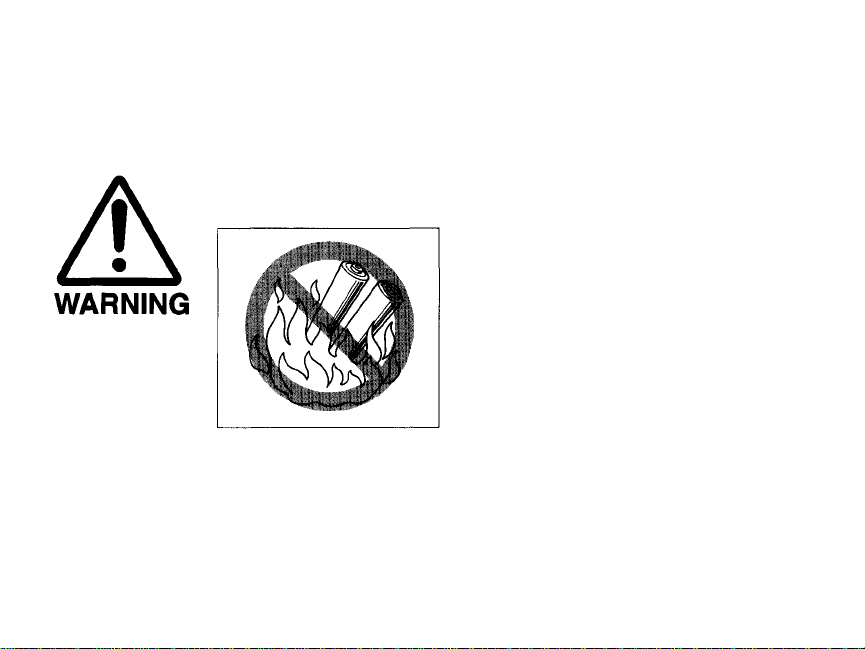
KEEP THE BATTERIES AWAY FROM
FIRE. NEVER TRY TO DISASSEMBLE,
RECHARGE, OR SHORT-CIRCUIT
BATTERIES. USED BATTERIES
SHOULD BE TREATED AS GENERAL
WASTE IN ACCORDANCE WITH
LOCAL GOVERNMENT
REGULATIONS.
2
Page 3
Ignoring this warn in g may result in the death or serious injury of the
user.
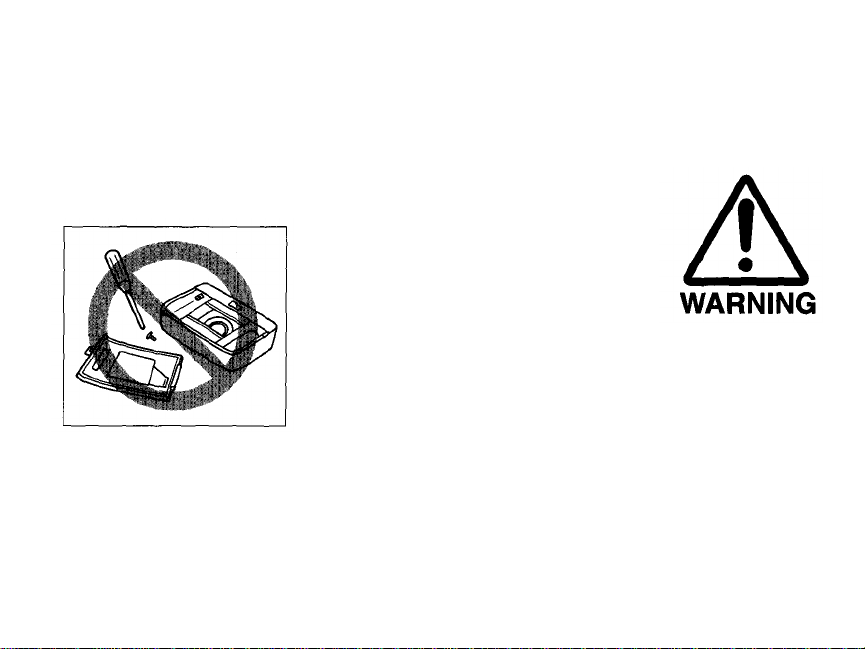
NEVER ATTEMPT TO DISASSEMBLE
THE CAMERA; IT CONTAINS A
HIGH-VOLTAGE CIRCUIT.
IN CASE OF MALFUNCTION,
CONSULT YOUR NEAREST
OLYMPUS DEALER OR OLYMPUS
SERVICE CENTER.
3
Page 4
MAIN
FEATURES
Built-in 28mm~110mm approx. 4X zoom-class lens for increased
shooting range.
More powerful flash fo r telephoto needs. Extended-distance flash
photography is available thanks to increased luminance capability.
SLR lens ensures that what you see in the viewfinder is what you get
on film.
Direct Mode Select buttons let you easily set/choose the right
exposure mode for any shooting purpose.
Optional remote control to operate the camera from a distance.
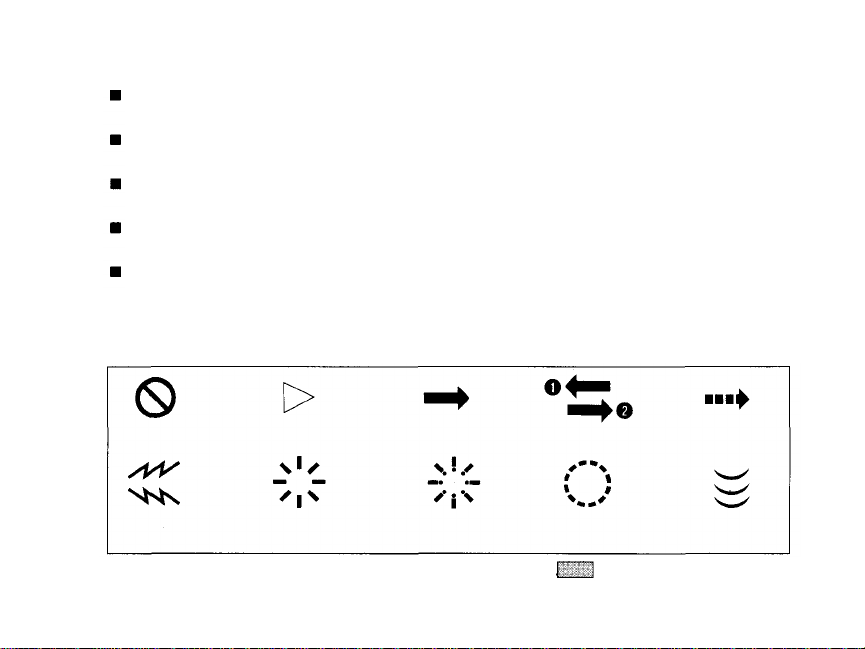
Symbols used in this manual:
Incorrect
Beep
Pay particular attention to items in this manual enclosed in boxes
Products shown in pictures and illustrations may be slightly different from this unit.
4
Order
Indicator on
Manual
operation
Indicator
blinking
Operation
order
Attention
Automatic
operation
Depress
halfway
Page 5
PREPARATIONS
BASIC OPERATIONS
Names and functions of parts ...... 6
Viewfinder display .......................... 8
LCD panel
Diopter adjustment ........................ 10
Usi ng the strap/soft case ............ 11
Loading
Taking pictures
Using the focus lock ......................................................................... 24
Unloading
....................................
the
film ................................................................................................
............................................................................................. 21
the
film
.........................................................................
Outline of operations .......................... 12
Loading the batteries ..................... 14
9
Checking the batteries .................... 15
Points to remember ...................... 16
18
25
ADDITIONAL
FUNCTIONS
TAKING BETTER
PICTURES
CAMERA
MAINTENANCE
Flash photography ...........................26
Selftimer ............................................32
Using the exposure modes ....................33
Restoring the standard
shooting mode ....................................40
Effects of zoom and its advantages .............................................................. 45
Autofocus(AF).............................................................................. 47
Exposure ...............................................................................................
Film speed
Metering the amount of light ........................................................51
Accessories (optional)........................................................................ 53
Questions and answers ...................................................................54
Care and storage
Battery handling ............................................................................. 58
Troubleshooting .....................................................................................59
Specifications .......................................................................... 62
...............................................................................51
......................................................................... 55
Spot metering ................................ 41
Remote control (optional) .................. 43
49
5
Page 6
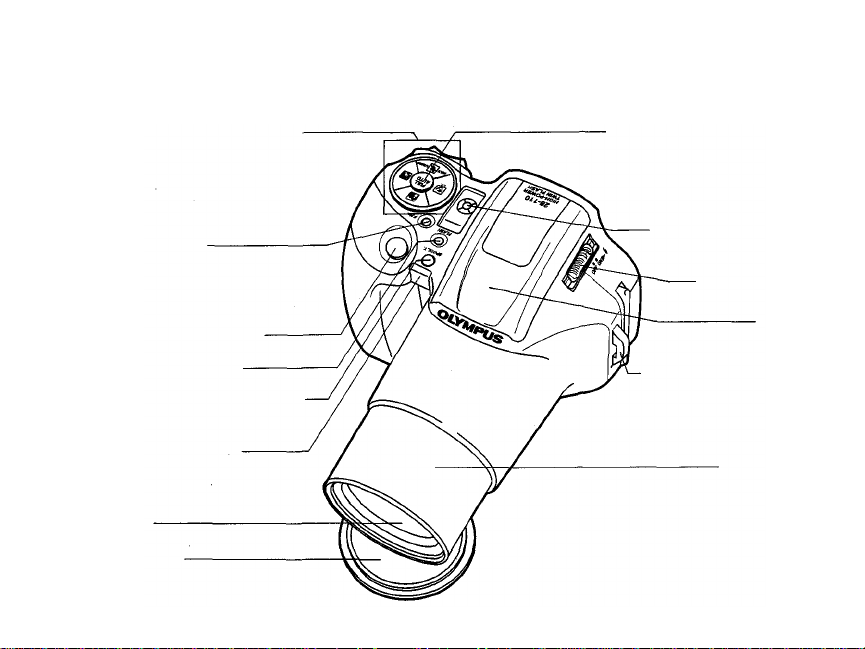
NAMES A ND FUNCTIONS OF PARTS
Direct Mode Select buttons
(See
p.
33.)
Selects exposure modes: Stop
Action, Portrait, Landscape,
and Night Scene.
F. No.
button
(See
p.
38.)
Sets the aperture in the
Aperture-Preferred Auto mode.
Shutter release button
Flash mode button
PREPARATIONS
Spot/L.T.(Long Time) button(S ee p. 41/39.)
Selftimer indicator
(See
p.
32.)
Remote control
sensor
(See
p.
43.)
Lens*
Lens cap
6
Ful l Auto button (See p. 40.)
Restores the standard shooting mode.
LCD panel (See p. 9.)
Power switch/
flash release
Flash
Strap attachment stud
Lens barrel
* Keep lens surface free of finger smudges or other
marks, as sharpness can be effected. Carefully
clean any such marks with lens cleaning tissue.
Page 7
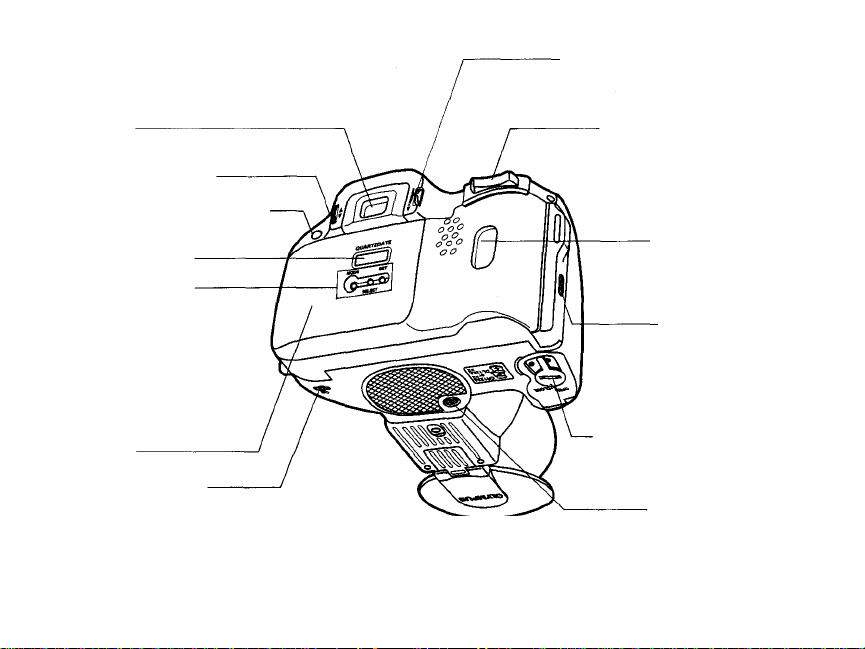
Panorama switch
(See panorama insertion)
Viewfinder
(See
p. 8.)
Diopter adjustment dial
Selftimer/remote control button
(See
p.
43.)
Date/time indicator
QUARTZDATE MODE
buttons
(Se e quartzdate insertion)
Back cover
Mid-roll rewind button.
(See
p.
25.)
Zoom (T/W) buttons
(See
p.
21.)
Film window
For confirmation of
film ISO speed
Back cover
release
(See
p.
18.)
Battery compartment
cover
(See
p.
14.)
Tripod socket
7
Page 8
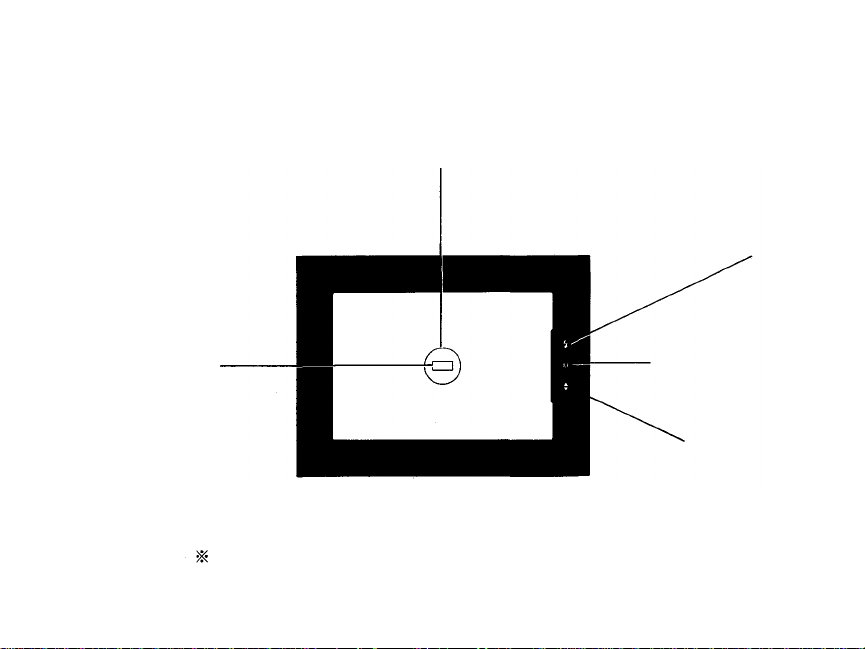
VIEWFINDER DISPLAY
Sp o t frame
The area used by the Spot Metering mode to set
exposure.
Flash
Autofocus frame
Position your subject within the
autofocus frame.
8
Autofocus (p. 17/23)
Please see 'Panorama insertion' fo r panorama format view finder.
Lights when the subject i s
in focus.
Overexposure/
underexposure
(p. 38)
Page 9
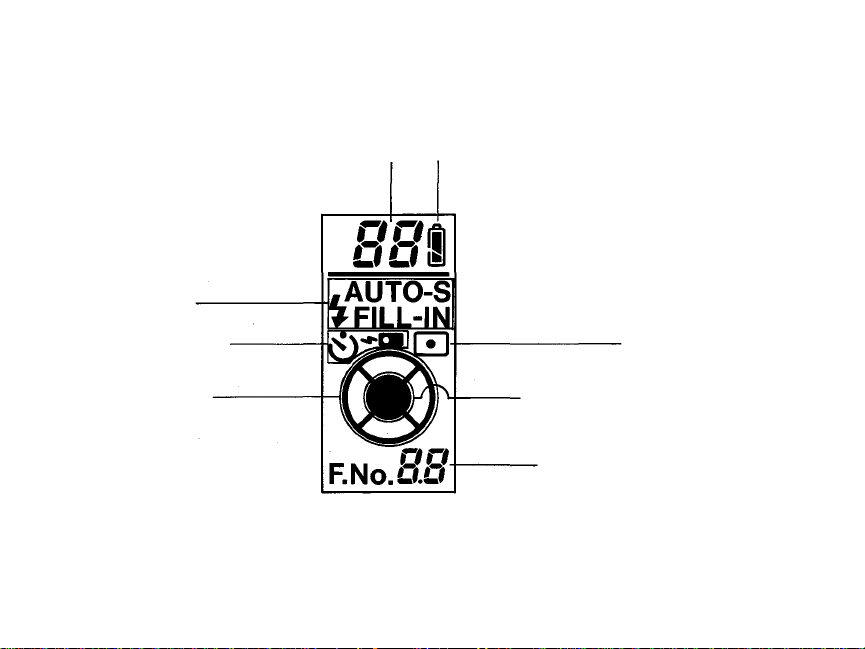
LCD PANEL
F l a s h m o d e s ( p . 26 )
Selftimer/remote control
(p. 32/43)
Mode status indicator
(p. 33)
Displays the mode selected
for
use.
Exposure counter (p. 20)
Battery check (p. 15)
Spot metering mode
(p. 41)
Full-Auto mode (p. 40)
The camera do es everything automatically
in this mode.
Aperture setting/shutter speed
(p. 38/39)
Shutter speed shown wh en using
the Long Time mode.
Note: The LCD panel does not actually display all
indications simultaneously as shown.
9
Page 10
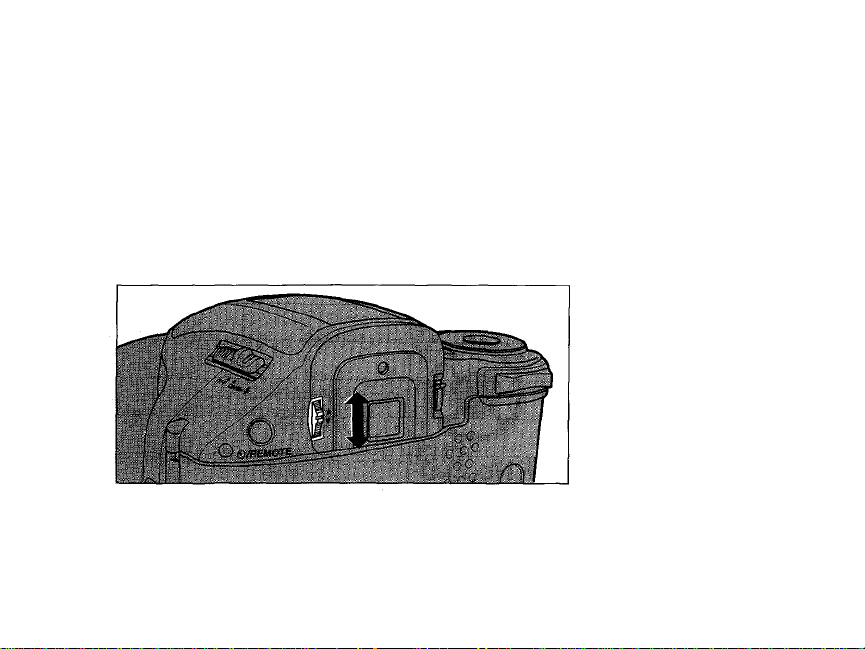
DIOPTER ADJUSTMENT
To adjust the viewfinder to compensate for near and farsighted vision.
Turn
the
diopter
the autofocus frame becomes clear.
10
adjustment
dial
until
Turn up if you are
nearsighted or down
if you are farsighted.
Page 11
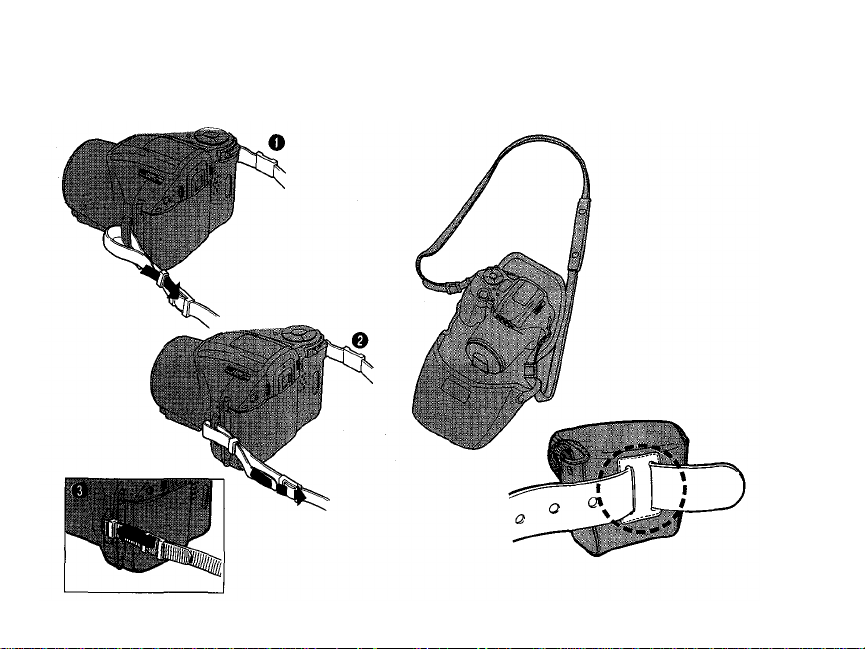
USING THE STRAP/SOFT CASE
The soft case can be attached to a
belt with the belt loop.
11
Page 12

OUTLINE OF OPERATIONS
Basic Shooting Procedures
Load the batteries (p. 14).
Press the zoom buttons to
determine the composition
(P
21).
12
Open the back cover (p. 18).
Place the autofocus frame on
the subject you want to focus on
(P.
22).
Load the film (p. 18).
Depress the shutter re lea se
button halfway, making sure the
green autofocus indicator in the
viewfinder lights and the
autofocus beep is heard (p. 23).
Page 13
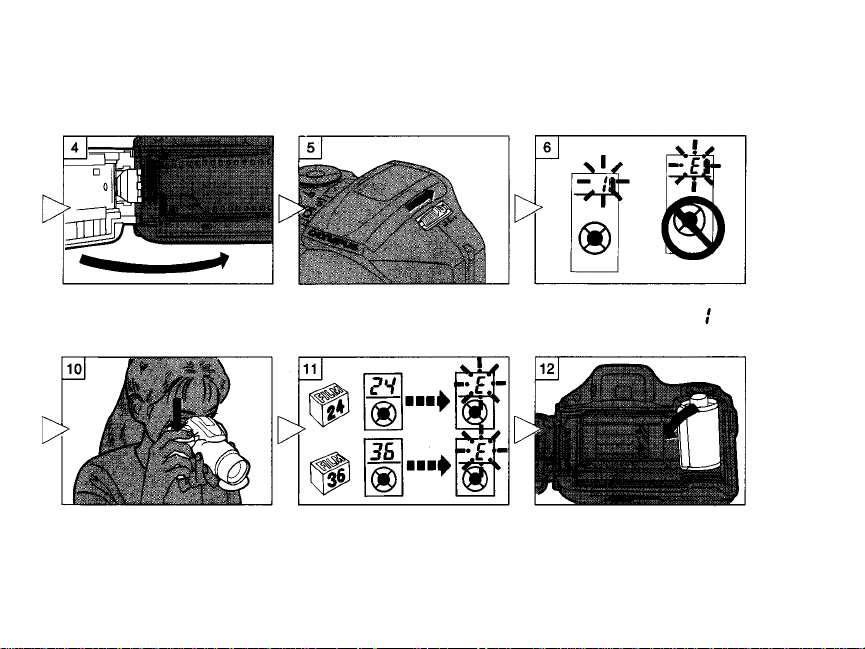
Close th e back cover (p. 19).
Turn the power switch ON
(p.
20).
Make sure the exposure counter
on the LCD panel reads
(p.
20).
Depress the shu tter release
button fully to take a picture
(p.
23).
When the film reaches the end, it
will automatically rewind (p. 25).
Open the back cover to remove
the rewound film (p. 25).
13
Page 14

LOADING THE BATTERIES
Use two 3V lithium batteries (DL123A or CR123A).
Use your finger or a coin to
turn the lock screw to OPEN.
Place your fingertip in the notch.
And open the battery cover.
When replacing the batte ri es , make
sure to turn the power switch OFF
before unloading the batteries.
Tak e ca r e not to injure your fingernail
when opening the battery cover.
14
Insert the batteries. And
close the cover. Turn the
loc k screw to CLOSE.
Align the (+) and (-) directions of the
batteries correctly as shown.
Read "Battery Handling" on page 58.
Page 15
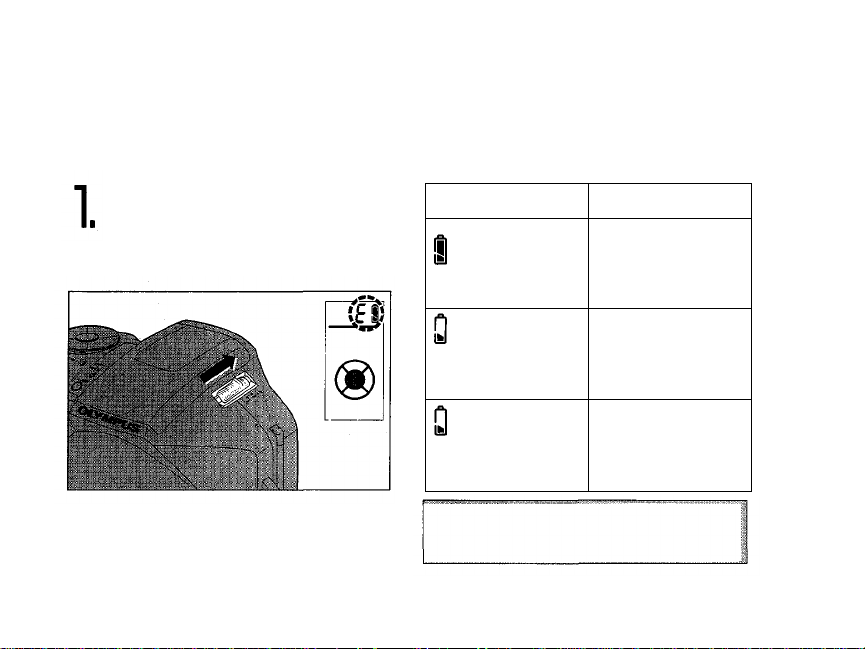
CHECKING THE BATTERIES
Turn the power switch
ON. Be sure to check
the batteries as well.
Display
lights (turns off
automatically)
blinks and other
indicators on the
LCD panel are
displayed normally.
blinks and other
indicators on the
LCD panel go out.
Keep spare batteries on hand when
going on a long trip or when using the
camera in cold weather.
Meaning
Batteries are OK.
You can shoot.
Batteries are low
and should be
replaced.
Batteries are dead
and should be
replaced
immediately.
15
Page 16
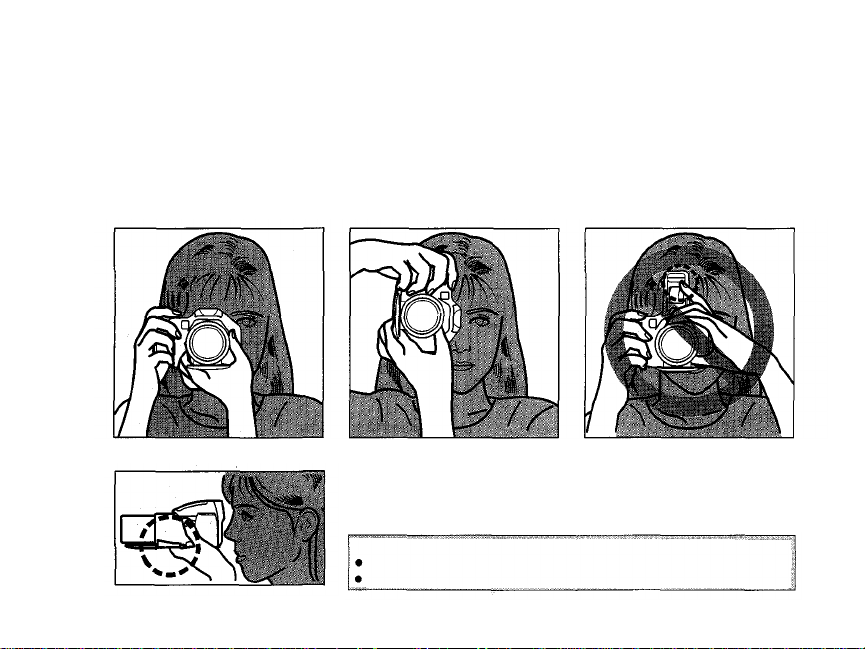
POINTS TO REMEMBER
Hold the Camera Correctly.
Correct
Note: As the foca l length becomes larger, shaking the camera
becomes more noticeable. Hold the camera firmly with both hands
while keeping elbows at sides to prevent the camera from shaking.
Cautions:
16
Correct
Try not t o ho l d the le n s barrel.
Keep your fingers and the strap aw ay fr o m the lens and flash.
Incorrect
Page 17
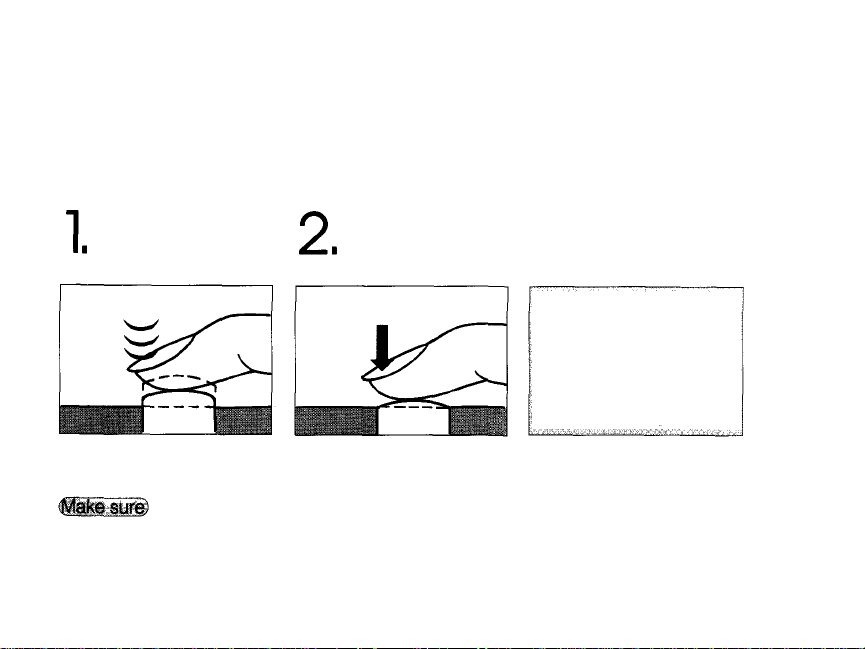
Proper Shutter Release.
Keep the sh utter
release button
depressed halfway.
The shutter release button has two clicks. Practice before loading the film.
Depress t he
shutter release
button fully.
Cautions:
•Press the shutter release
button gently.
•Avoid shaking the
camera when pressing
the shutter release button
to prevent blurry pictures.
To lock the focus.
The image is clear, the
autofocus beep is heard,
and the autofocus indi ca tor
lights in the viewfinder.
To release the
shutter and take
the picture.
Note: When th e autofocus
indicator is blinking, the
shutter won't release.
(See
p.
47.)
17
Page 18
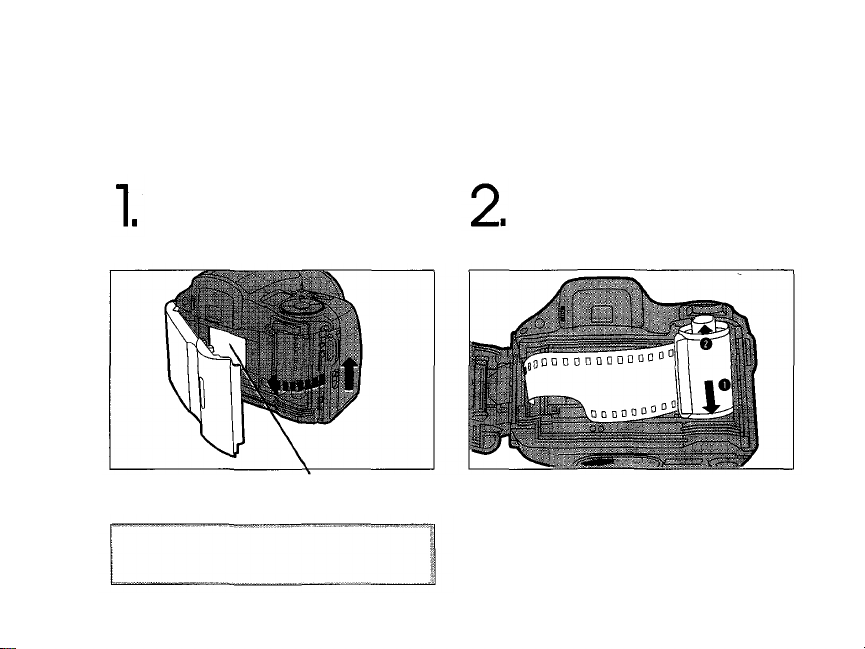
LOADING THE FILM
Slide the back cover
release upward to open
the back cover.
BASIC OPERATIONS
Caution: Do not touch the shutt er curtain,
and do not press it when loading th e film.
18
Load the film.
Shutter curtains
Page 19
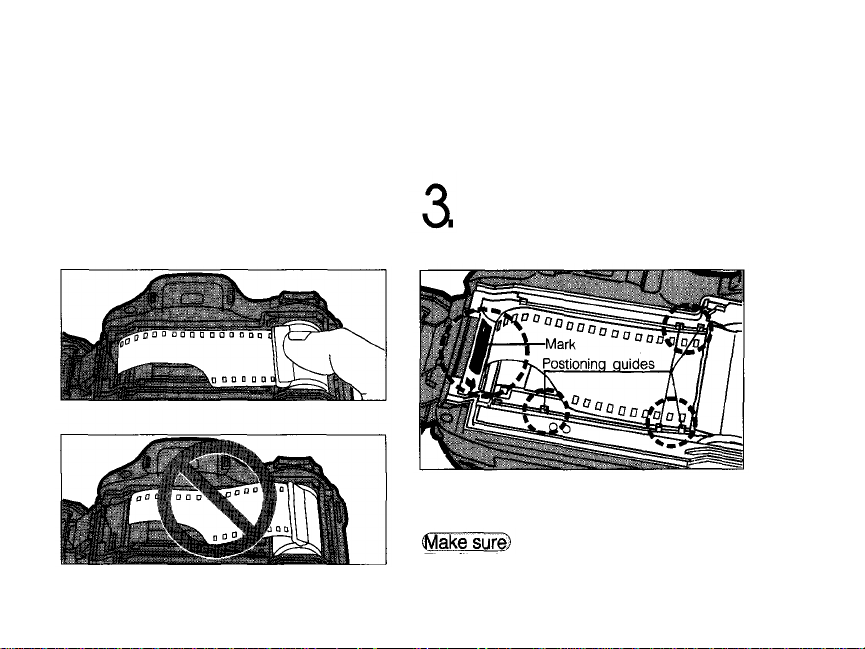
Correct
Incorrect
Note: Make sure the film is lying flat.
Align the tip of the film leader
with the mark as shown, and
close the back cover,
The film automatically
advances to the first frame.
The film does not overlap any of the
positioning guides shown above.
19
Page 20
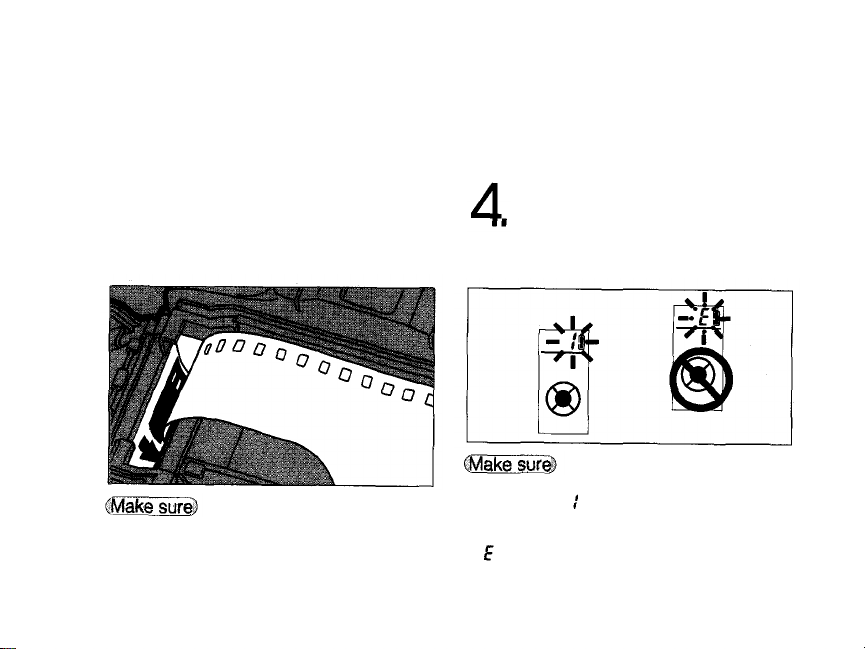
Place the film leader along the arrow as
shown.
20
Turn the power switch
ON.
The exposure counter on the LCD
panel reads .
Note:
If blinks in the exposure counter, as shown
above, reload the film.
Page 21

TAKING PICTURES
Follow this procedure for normal photography. When the power
switch is turned ON, the camera is in the Full-Auto mode. (See p. 40.)
Turn the power switch
ON.
While looking through the
viewfinder, press the zoom
button to determine the
composition.
lens cap opens, and the LCD panel lights.
Note: If no operation is made for approx. 30 seconds,
the LCD panel goes out and will come on again when
the operation is resumed.
While the lens moves forward, the
DANGER: DO NOT LOOK AT THE SUN
DIRECTLY THROUGH THE VIEWFINDER.
21
Page 22

How to Use the Zoom
Buttons
Position the autofocus
frame on your subject.
Telephoto: Press the button to zoom in.
Wide-angle: Press the button to zoom out.
22
Max. telephoto focal
length: 110mm
Max. wide-angle focal
length: 28 mm
Autofocus frame
Working distance: 75 cm (2.5 ft)
Page 23

Depress the shutter
release button halfway.
Without removing your finger
from the shutter release
button, depress fully to take
the picture.
autofocus indicator lights when the subject is in focus.
It will blink if the subject is difficult for the autofocus to
lock on to, and when the subject is too close.
Note: When the autofocus indicator blinks, the shutter
won't release.(See p. 47.)
The autofocus beep is heard and the
The shutter releases and the film
automatically advances to the next
frame.
Whe n you've fi ni sh ed shooting, turn the
power switch OFF, and close the lens cap.
23
Page 24

USING THE FOCUS LOCK
When the ma in subject is not in the center of the autofocus
frame,
follow
the
procedure below.
Position the autofocus
frame on your subject and
press th e shutter release
button halfway.
This
is
called
Reposition your subjects in the
picture frame wh ile keeping
the shutter release button
depressed halfway. Then press
the shutter release button fully.
focus
lock.
The autofocus beep is heard, and the
autofocus indicator lights in the
viewfinder.
24
Autofocus frame
In focus lock th e focus is locked in the
center of the viewfinder and th e
exposure is also locked (AE lock) and
averages the exposure for the entire
viewfinder.
Page 25

UNLOADING THE FILM
The camera automatically rewinds the film when you
reach t h e end of a roll.
Make sure the motor has stopped
and is blinking on the LCD
panel, before opening the back
cover and removing the film.
Rewinding the film before
the end of the roll
Notes: The number of exposures will
decrease during winding. The final number
of exposures may sometimes exceed the
number of exposures specified on the film.
The film leader will be wound back inside
the cassette.
To rewind the film before the end of the
roll, pre ss the mid-roll rewind button with
your fingernail. Do not use an instrument
with a sharp tip.
25
Page 26

Three flash modes are available to suit different requirements.
How to Select the Flash Mode
FUNCTIONS
ADDITIONAL
FLASH PHOTOGRAPHY
Set the power switch to
to flip up the flash.
Press
the
FLASH
button
to select the flash mod e .
The camera will recharge the flash, and
the flash will be ready to use.
Note: Recharging takes 0.2~3.9 seconds.
26
displayed on the LCD panel.
The selected mode is
Page 27

Flash Modes
Mode
Function
Automatically fires in
low-light or backlit
conditions (p. 28).
Significantly reduces
the phenomenon of
"red-eye" (when a
subject's eyes appear
red)
(p.
30).
Fires regardless of
available light (p. 31).
Note: Use of the flash is recommended if blinks
in the viewfinder when the flash isn't flipped up.
Otherwise, the camera will select a long exposure
and pictures may be blurred due to camera shake.
There is danger of temporarily
affecting vision when the flash is
fired very close to a person or
animal.
In the dark, the flash also functions
as an autofocus illuminator. Whe n
the shutter release button is
pressed halfway, the flash emits
several brief pre-flashes. When
the shutter release button is
pressed fully, the flash fires to take
the picture. Hold the camera firmly
until the picture is taken.
27
Page 28

Auto Flash
AUTO
The flash fires automatically when there is insufficient light or
when there is backlighting.
Set the flash mode to
AUTO.
Press th e shutter release
button halfway to make
sure lights in the
viewfinder.
Note: If you press the shutter release button
with blinking in the viewfinder, the shutter
won't release. This is because the flash is
being re charged. Remove your finger from
the shutter releas e button, and w ait until
28
recharging finishes.
Page 29

Press the shutter release
button fully.
Auto Flash Range
(with color negative film)
Focal length
ISO 100
ISO 200
ISO 400
Maximum distance is about 70% when using
positive color film.
Note: The shutter speed is automatically set at 1/100-sec. w he n the flash fires. The flash will not
fire if the existing light level requires a shutter speed greater than 1/100-sec.
Telephoto and wide angle
4.5m (14.8
6.4m
9. 0m (29.5
ft)
(21 ft)
ft)
29
Page 30

Red-Eye Reducing Flash
Approximately 20 pre-flashes are emitted before the main flash fires,
significantly reducing the phenomenon of "red-eye" (when a subject's eyes
appear
red).
This
mode
is the
same
as
Auto
Flash
except
for the
AUTO-S
pre-flashes.
Flip up the flash, and select
the
Auto-S
mode.
Press
the
shutter release button.
Red-eye reduction may not be effective when
the subject:
1. Wasn't looking at the flash from right front.
2. Wasn't watching the pre-flashes.
3. Was too far from the camera.
4. Did not respond to the pre-flashes due to
particular characteristics of the individual.
Notes:
Pre-flashes are not emitted in the Stop Action mode.
After pressing the shutter release button, hold the camera securely until the shutter has been released.
To cancel the Auto-S mode, select another mode following the procedure on page 26.
30
Page 31

Forced Activation
In this mode, the flash always fires. Even in backlighting, both the subject and background
can be shot clearly. And portraits look lively by reducing shadows on the subject's face.
FILL-IN
Make sure the exposure
mode
is set to
FULL
AUTO.
Note: In exposure modes
other than Full Auto and
Aperture-Preferred Auto,
the Fill-in Flash mode
cannot be engaged.
Select the Fill-In Flash
mode, a n d press the
shutter release button.
Note: The shutter speed is automatically
set at 1/100-sec. Aperture and flash
output will adjust for correct exposure.
31
Page 32

SELFTIMER
Press the /REMOTE
control button until
Press the shutter release
button.
is displayed on the
LCD
panel.
Selftimer
indicator lights.
Fi x th e camera firmly on a tripod or other support.
Notes: The focus and exposure will be locked when the shutter release button is depressed halfway.
mode is cancelled after the shutter releases. To cancel the selftimer in the middle of operation, press the /REMOTE
button again. Do not remove your eye from the viewfinder until after the shutter release button has been fully
depressed. This prevents light from entering through the viewfinder.
32
The shutter will be released 12 seconds later.
The Selftimer
Page 33

USING THE EXPOSURE MODES
There are four preset settings for easy shooting in various common
situations, as well as an Aperture-Preferred Auto mode and Long
Time mode that allow you to select your own settings.
Exposure Modes
For easy, effective shooting in various common
situations:
Stop Action (p. 34)
To freeze moving subjects.
Portrait (p. 35)
For pictures with blurred background for "portrait"
effect.
Landscape (p. 36 )
For pictures with extended in-focus background.
Night Scene (p. 37)
For night scenes or night scenes with subjects in the
foreground, using flash.
How to Select the
Exposure Mode
Press one of the icons.
Fo r more creative lighting effects:
F.No.
Aperture-Preferred Auto (p. 38)
Set the aperture manually. The camera wi l l automatically select the correct shutter speed.
Lo ng Time (p . 39)
Allows you to set the shutter speed manually from 1 to 60 seconds. The aperture is
automatically set to F8.
33
Page 34

STOP ACTION
To freeze moving subjects.
In this mode, the camera automatically selects a faster shutter
speed to reduce blurring of moving subjects. (Max, shutter speed:
1/2000-sec.)
Press the
Note: In the Stop Action mode, for faster
flash response, Auto-S pre-flashes will
not be emitted. If you choose to use
flash, Auto-S will not function in this
mode.
34
button.
Press th e shutter release
button.
Page 35

PORTRAIT
To take pictures with blurred backgrounds for a "portrait" effect.
Portrait mode lets you take beautiful portrait photographs, This is especially
effective when the lens is at the telephoto setting and/or when there is a great
distance between the subject and the background.
Press the
Note: The aperture is wide-open.
button.
Press th e shutter release
button.
35
Page 36

LANDSCAPE
To take pictures with extended in-focus backgrounds.
When shooting landscapes or landscapes with subjects in the foreground, all
objects near and far are sharply in focus.
Press the button.
Note: Set the lens at wide angle for
optimal results.
36
Press the shutter release
button.
Page 37

NIGHT SCENE
To shoot properly-lit night scenes.
In this mode, the camera automatically selects the ideal exposure
for shooting night scenes, and for shooting night scenes with
subjects in the foreground.
When subjects are in the foreground, flip up the flash.
Press
the
button.
When there are no foreground subjects, do not flip up the flash.
Notes: When the flash is flipped up, flash power is automatically adjusted according to the subject. Since
the camera may select a shutter speed as slow as 4-sec maximum, use of a tripod is recommended to prevent
camera shake.
Press the shutter release
button.
37
Page 38

APERTURE-PREFERRED
AUTO
The background blur can be controlled by adjusting the aperture
setting. The shutter speed will be selected automatically.
Press
the
F.No. button
to
enter the Aperture-
Preferred Auto mode.
Larger aperture (smaller value) for a
blurred background
Notes: Additional pressing of the F.No. button stops
down the aperture. Once the camera has passed the
smallest available aperture setting, it will return to the
largest available aperture setting. Blinki ng in the
viewfinder indicates the subject is under- or overexposed.
Change the aperture setting until it stops blinking.
38
Smaller aperture (larger value) for a
sharper background
F.No.
Page 39

LONGTIME
To shoot fireworks.
For a dramatic shot of fireworks or similar nightime lights, set the
shutter speed as desired (1 to 60 sec.). The aperture is
automatically set to F8.
While holding down the
button, press the SPOT/L.T. button
to choose shutter speed.
Shutter speed is shown on the LC D panel.(See page 9.)
Notes: Each time you press the SPOT/L.T. button, the shutter speed changes in the following sequence: 1, 2, 4, 8,15,
30, and 60 sec. Because the selected shutter speed will be very slow, to prevent blurring hold camera firmly in
position. Use of a tripod is recommended.
Press th e shutter release
button.
39
Page 40

FULL
RESTORING THE STANDARD SHOOTING MODE
AUTO
Restore the standard shooting mode for easy, worry-free
photography.
Press the FULL AU TO
button.
The camera will also return to the
standard shooting mode if the power is
switched off and on again.
40
Standard Shooting Mode
Settings for the standard shooting
mod e are as follows:
Exposure mode — Program A u to
Flash m ode — Auto or Auto-S
Selftimer/remote control — Canceled
Spot metering — Canceled
Page 41

SPOT METERING
In this mode, the camera limits light metering to a particular area, such
as a subject's face, and sets the correct exposure,
Position the subject for
spot metering within the
spo t frame, and press
Spot frame
the SPOT/L.T. button.
In situations like the one illustrated
above, th e subject will be dark because
of backlighting.
panel and the exposure is locked.
is displayed on the LCD
41
Page 42

Recompose the shot,
then press the shutter
release button to take
the picture.
Use the Spot Metering mode in the
following situation:
When there is a big difference
between subject and background
brightness (e.g., backlighting).
Notes:
When the flash is flipped up, or the Night Scene or
Long T ime mode is engaged, the camera does
not perform spot metering.
After th e shot, the Spot Metering mode is
canceled. To cancel the mode without taking
42
a shot, press the SPOT/LT. button again.
Page 43

REMOTE CONTROL (OPTIONAL)
The optional RC-200 Remote Control is required.
Press the /REMOTE button
to engage the Remote Control
mode.
Position the autofocus frame
on the subject.
43
Page 44

Aim the remote control
at the camera, and
press the button.
The shutter will be released about 3
seconds after the beep.
Note: Use Selftimer outside the above range.
Important: After the shot(s), be sure to press the
/REMOTE button again to cancel the
Selftimer/Remote Control mode.
44
Notes on the Remote Control:
The remote control may not work when
there is backlighting and when
autofocusing is difficult.(See p. 47.)
The shutter will not release using the
remote control when the remote
control's battery is exhausted.
CAUTIONS:
Keep the remote control out of the
reach of children. In case it is
swallowed, immediately consult a
physician.
Keep the remote control away from fire
and extreme heat. Never try to
disassemble it.
Page 45

EFFECTS OF ZOOM AND ITS ADVANTAGES
Zoom len s focal length is changed by moving
part of the lens. With this camera, you can
select any focal length between 28 mm and
110 mm.
28 mm wide-angle
Because the angle of view is wide and the
depth of field is large, you can take sharp
photographs with enhanced perspective and
contrast. This is ideal for shooting
landscapes, skylines, crowds at a party, etc.
50 mm (approx.)
This range is the standard angle of view and
has moderate background blurring. It is
suitable for most types of shot including
portraits.
28mm
75°
50mm
110mm
At its maximum focal length, the built-in lens
offers a telephoto effect. The depth of field is
shallower, and the effects of aperture
settings are more apparent. In telephoto
shooting, use a tripod or hold the camera
firmly to prevent the camera from shaking.
180 mm additional telephoto power
When the optional teleconverter IS/L LENS
C-180 H.Q. CONVERTER 1.7X is used, you
can extend the telephoto range up to 180
mm.
46°
110mm
22°
PICTURES
TAKING BETTER
45
Page 46

Angle of view and depth of field
Angle of view is directly related to the focal
depth of field (the distance in front of an d
behind the subject that the camera is able to
bring into focus). The greater the angle of
view (wide angle), the greater the depth of
field. When the angle of view is narrow
(telephoto), the depth of field decreases.
IS/L LENS C-180 H.Q. CONVERTER 1.7X
28mm
50mm
F. No. 5.6
F. No. 5.6
180mm
46
14°
110mm
F. No. 5.6
Page 47

AUTOFOCUS (AF)
Although this camera's autofocus can lock on virtually any subject,
there are certain conditions, such as shown below, where it m ay
not be possible to obtain the correct focus. In the situations shown
in on the next page, autofocus may not lock on the correct
subject even though the autofocus indicator lights and the shutter
releases.
Subjects with low contrast
Use the focus lock by first
focusing on something at the
same distance as the subject you
wish to take a picture of, and then
aim at the subject.
Subjects that do not contain
vertical lines
Use the focus lock first while
holding the camera vertically.
Th e n sw it ch th e c am e r a to t he
horizontal position to take the
photograph.
Subjects in excessively bright
light
Use the focus lock by first
focusing on something at the
same distance as the subject you
wish to take a picture of, and then
aim at the subject.
47
Page 48

Two subjects at different
distances
Subjects with repetitive
patterns
High-speed subjects at close
range
When the subject locks out-of-
focus although the autofocus
indicator lights, focus on another
subject at the desired camera-tosubject distance first. Then
recompose the frame to take the
picture.
48
When the subject locks out-of-
focus although the autofocus
indicator lights, focus on another
subject at the desired camera-to-
subject distance first. Then
recompose the frame to take the
picture.
Focus on another subject at the
desired camera-to-subject
distance first. Then recompose
the frame to take the picture.
Page 49

EXPOSURE
Automatic Exposure Mode
Exposure refers to the amount of light which
strikes the film, and is controlled by a
combination of aperture size and shutter
speed. The correct amount of light, called
correct exposure, depends on the film speed
(indicated on the film package, e.g. IS0100
or.lSO-200).
The automatic exposure function
automatically sets the correct exposure. This
camera employs two types of automatic
exposure modes: programmed autoexposure and aperture-preferred autoexposure.
With programmed auto exposure, the
camera automatically selects the most
suitable combination of F stop and shutter
speed for the existing lighting conditions.
This lets you concentrate on composing your
shot and releasing the shutter at just the right
time.
With aperture-preferred auto, you select the
desired F stop, and the camera automatically
selects the correct shutter speed. Aperturepreferred auto gives more artistic freedom of
expression and creativity by selecting a
desired F stop to control the blur of the
background.
Program Chart (FULL AUTO)
The following program chart is for 28mm
wide-angle and 110mm telephoto focal
lengths. According to the focal length, the
camera's program itself changes. When the
subject is brightly lit, the F stop and shutter
speed change simultaneously. When the
lighting is darker, the aperture remains wideopen and only the shutter speed changes to
as slow as 2 sec. to match the available light
(ISO 100).
In the standard shooting mode (refer to
p.40), if the built-in flash has been flipped up,
it will automatically fire in dark lighting or
backlit conditions. The shutter speed will be
fixed at 1/100-sec.
49
Page 50

Portrait Mode
In this mode, the camera chooses a wide
aperture for a shallow depth of field. This
results in a softly blurred subject
background, against which y o u r subject
stands out in sharp focus. This mode also
prevents camera-shake from happening
because a faster shutter speed is selected.
Nig ht Scene Mode
Allows you to capture beautiful nighttime scenes
just as they are. The camera automatically
adjusts exposure compensation for optimum night
scene photography — extending exposure time
for up to 4 seconds (ISO100). When shooting a
subject against a nighttime background, use of
the flash is recommended. In this case, the
camera optimizes exposure compensation for
both the subject and the background. Since the
selected shutter speed may be very slow, hold the
camera firmly in position (with a tripod for
example) to prevent blurring.
Stop Action Mode
This mode is ideal for capturing high-speed photo
opportunities such as sports scenes and children
at play. A fast shutter speed is automatically
selected to "freeze" the action on film.
50
Landscape Mode
This mode is ideal when you want to focus on
both the subject and the backg round or when you
want to shoot natural scenery with low contrast.
The camera automatically stops down the
aperture to make the range of focus as large as
possible. In shooting conditions for this mode, the
subjects are likely be at a distance of (infinity),
so the autofocus function in this mode starts from
the position.
L ong T ime Mod e
To obtain trailing effects when shooting fireworks
or car lights, a long shutter speed is required. The
Long Time mode is ideal for this type of shot
since it allows you to choose a shutter speed of
up to 60 seconds with a fixed aperture of F8.
Since the selected shutter speed will be very
slow, use of a tripod is recommended to prevent
blurring.
Page 51

FILM SPEED
METERING THE AMOUNT OF LIGHT
Fil m Speed
Fil m speed is indicated on the back of film
packages. ISO 100, ISO 200, and ISO 400
are the most common. High-speed film (ISO
400), as implied by its name, is for taking
photos of fast-moving subjects in action
shots, for example. However, there are also
other advantages. With high-speed film,
such as ISO 400, it is possible to take
pictures in lower light. And the distance
covered by the flash will be greater.
Generally, the higher the film speed, the
grainier the picture.
With this camera, we recommend the use of
"DX" film cartridges: ISO 25 ~ 3200. In the
case of non-DX-coded film, the camera will
autom atical ly be set to film speed ISO 32.
Light Metering
Light metering can measure the brightness
of the framed subject in various ways. This
camera employs three metering systems: (1)
ESP light metering, (2) center-weighted
average light metering, and (3) spot
meteri ng . You can select the light metering
system most suitable to the conditions. The
camera also uses TTL (through-the-lens)
light metering to automatically measure the
light that enters the lens. This lets you get
very accurate light readings that are
unaffected by changes in the distance
between the subject and the camera.
Fuzzy Logic ESP (Electro-Selective
Pattern) Light Metering
ESP light metering measures the brightness
of the central portion and peripheral portion
of the frame separately in order to determine
the proper exposure. The calculation
program used is based on programmed data
to properly compensate for backlighting.
ESP light metering is used automatically
when in the Full-Auto mode.
51
Page 52

Center-Weighted Average Light
Metering
Center-weighted average light metering is
the most widely used light metering system
(Fig. A). This system measures the ligh t
available throughout the frame with special
emphasis on th e center of the frame. When
in the Aperture-Preferred Auto mode, this light
metering system is automatically activated.
When the contrast between bright and dark
areas is not too extreme outside the center of
the frame, this system offers excellent
results.
52
Spot Metering
Spot metering (Fig. B) measures the
brightness at the center of the frame only.
Because this metering system calculates the
correct exposure for only one point, it is
convenient when the subject is backlit or the
picture contains strong contrasts. When
shooting a subject in front of an extremely
bright background, you should use spotmeteri n g on the subject's face.
Page 53

ACCESSORIES (OPTIONAL)
IS/L LENS C-180 H.Q. CONVERTER 1.7X
REMOTE CONTROL RC-200
53
Page 54

QUESTIONS A ND ANSWERS
Q:How long will the batteries last?
A: Two new 3V lithium batteries will
last for roughly 20 rolls of 24exposure film on which the flash
was used on half of all the shots
(determined under Olympus test
conditions). If you do not use the
flash and zoom very often, the
batteries will last much longer.
Q:How should I store the camera?
A: Cameras are susceptible to
damage caused by dust, moisture,
MAINTENANCE
and salt. Wipe and dry the camera
thoroughly before storing it. After
using it at the beach, wipe it with a
cloth that has been moistened
with fresh water and then wrung
out. Do not u se mothballs.
CAMERA
Q: When does the camera measure
and set the exposure?
A: When the shutter release button is
pressed halfway, the camera
measures both the exposure and
the focus and t hen locks them as
long as the shutter release button
54
remains halfway depressed. In the
Spot Metering mode, the exposure
is locked when the spot button is
pressed
Q:How should I clean the lens?
A: Wipe the lens gently with lens
cleaning tissue that has been
moistened with a small amount of
lens cleaning fluid.
Q:Can l use a filter?
A: Yes , you can. Use one wi th a
diameter of 52 mm. When you use
a th ick o ne, l ike a C- POL ( cir c ularpolarizing) filter, the edges of the
picture plane sometimes become
dark or the lens cap may not close.
Make sure to turn off the power
before mounting or removing a
filter. When doing so, even with
the power off , sometimes the lens
rotates and the motor operates.
This
is not a
Q:Can I use infrared film?
A: No.
malfunction.
Page 55

CARE A ND STORAGE
Do not leave the camera in any
place exposed to excessive
heat, humidity, or direct
sunlight — for example, in a
car or on the beach.
Do not expose the camera
to formalin or naphthalene.
If the camera gets wet,
wipe it with a dry towel
immediately. The salt in
seawater can be especially
damaging.
Do not use organic solvents
such as alcohol or paint
thinner when cleaning the
camera.
Do not leave the camera on a
television, refrigerator, or
speaker.
Do not expose the camera
to dust or sand as th i s could
cause serious damage.
55
Page 56

Do not shake or shock t he
camera.
Do not apply excessive
force to the lens barrel.
56
Keep the camera in a well-ventilated place.
Do not expose the camera to extreme heat
(over 40°C/104°F) or to extreme cold (below
-10°C/14°F). L ow temperatures, even within
this range, may sometimes cause
deterioration in battery performance,
temporarily disabling the camera.
When transporting the camera from a cold
place to a warm place or in the event of a
sudden temperature change, put the camera
into a plastic bag. This allows the camera's
temperature to change slowly. Once the
camera has adjusted to the new temperature,
you can remove it fro m the bag and use it.
Page 57

Keep your hair, hands, strap, etc. away from
the autofocus window, lens, AE sensor and
flash.
Avoid leaving the camera unused for long
periods of time. This can cause mold to grow
on the camera as well as other problems. Try
to press the shutter release button and check
the operation of the camera before use.
Be careful when moving the camera on a
tripod.
Some airport X-ray machines can damage
the film in your camera. Try to avoid passing
your camera through these machines. Give it
to the security officer for manual inspection.
Do not touch the contact points inside the
camera.
This camera is controlled by a
microcomputer. Problems with the
microcomputer can affect or stop camera
operation, If this happens, remove the
batteries, then reload them and try the
camera again. Strong electrical fiel ds can
also interfere with the operation of this
camera, so try to avoid p lac es or objects that
generate such fields.
This camera is not suitable for use under
severe conditions.
Do not touch the front surface of the flash
after using the flash continuously in a short
time as the flash may be hot.
57
Page 58

BA TTE RY HANDLING
NOTES
Do not mi x different types of batteries or
new and old batteries.
When the camera is not used for an
extended period of time, remove the
batteries.
Keep spare batteries on hand when going
on a l o ng trip or to a c o ld area.
Sweat, oil, and so on can prevent a
battery's terminals from making electrical
contact. To avoid this, wipe both terminals
before loading batteries.
58
WARNINGS
NEVER TRY TO DISASSEMBLE,
RECHARGE, OR SHORT-CIRCUIT
BATTERIES. NEVER EXPOSE
BATTERIES TO EXCESSIVE HEAT OR
OPEN FLAMES.
KE EP THE BATTERIES OUT OF THE
REACH OF CHILDREN. IF A CHILD
SWALLOWS A BATTERY, CONTACT A
DOCTOR IMMEDIATELY.
USE TWO 3V LITHIUM BATTERIES
(DL123A OR CR123A). NEVER TRY TO
DISASSEMBLE OR MODIFY ANY
BATTERY OR BATTERY PACK FOR
USE IN THIS CAMERA.
Page 59

TROUBLESHOOTING
Operating Problems
Symptom
The camera does
not work.
The LCD panel
turns off suddenly
blinks and the
shutter cannot be
released.
blinks even
when the flash is
no t fli pp ed up.
The autofocus
indicator blinks and
the shutter cannot
be released.
The power is OFF.
The batteries are loaded incorrectly.
The batteries are exhausted.
The batteries are temporarily unable
to function.
The loaded film has been rewound.
The film is incorrectly loaded.
The LCD panel turns off automatically
if none of the camera's functions have
been used for about 30 seconds.
The flash has not finished recharging.
blinks to warn you that camera-
shake is likely to occur due to
insufficient light.
The autofocus system may not work
when t h e subject is moving too fast,
when the camera is shaking, or when
the subject is difficult for autofocus
to lock onto (refer to p. 47).
The subject is closer than the camera's
minimum working distance (75cm/2.5ft).
Cause
Remedy
Set the power switch to ON.
Reload the batteries correctly.
Replace batteries with new ones.
Kee p the camera warm whi l e
using it.
Remove the film.
Reload the film.
Press the FULL AUTO button, or
press the shutter release button
halfway.
Remove your finger from the
shutter release button and wait
for several seconds until
recharging is completed.
Fli p up the flash.
First focus on something at the
same distance as the subject, then
recompose the frame to take the
picture.
Move 75cm/2.5ft or more away
from the subject.
See
p.21
p.14
p.15
p.25
p.19
p.21/40
p.28
P.27
p.47
p.24
p.22
59
Page 60

Symptom
The camera doesn't
focus on the subject
even though the
auxiliary flash lights.
The shutter doesn't
release even when
the shutter release
button is pressed.
The flash doesn't fire
blinks in the
viewfinder.
The shutter cannot
be released by
remote control.
60
The autofocus may not wo rk when the
subject is out of the auxiliary flash's
working distance (approx. 75cm~5m/
2.5ft~1 6.4ft).
The subject is not in focus.
The rewound film is still loaded.
The shutter speed is set at faster than
1/100-sec.
High-speed film is used.
Exposure is incorrect in the Aperture-
Preferred Auto mode.
If no operations have been carried out
in the Selftimer/Remote Control mode
for about 20 minutes, the LCD panel
turns off and the shutter can't be
released with the remote control.
Cause
Remedy
Move the camera closer to the
subject.
Make sure the subject is in focus
and the autofocus indicator in the
viewfinder lights.
Remove the film.
Set the flash mode to Fill-in.
Set the flash mod e to Fill-in.
Change the aperture until
stops blinking. Use the flash when
available light is insufficient.
Press the FULL AUTO button to
turn on the LCD panel, and
engage the Selftimer/Remote
Control mode again.
See
p. 23
p.25
p.31
p.31
p. 38
Page 61

Problems with Printed Pictures
Symptom
The subjects' eyes
appear red in
printed pictures.
The subject was
within the frame of
the viewfinder, but
its edges are
missing on the print.
The picture is
out of focus.
The picture is too
dark.
The colors of
pictures taken
indoors look
unnatural.
This "red-eye phenomenon" occurs with
all cameras when a flash is used. It is
caused by light from the flash reflecting
off the retina at the back of the eye. Red-
eye varies depending on the individual
and the shooting conditions such as
ambient lighting. It is also more likely to
occur when using 110mm telephoto than
when using wide-angle focal lengths.
When a negative is enlarged, sometimes
the ed g e of the frame is not prin t ed .
The camera moved when the shutter
release button was pressed.
The viewfinder's autofocus frame was
not positioned on the subject.
The shutter release button was pressed
from right in front of the camera in the
Selftimer mode.
The subject was out of the working
range of the flash.
The subject was backlit.
The ligh t in g fixture(s) affected the
picture.
Cause
Remedy
Use the Auto-S Flash mode to
significantly reduce red-eye
phenomenon.
Leave some room on the edges of
the frame when you compose
your shots.
Hold the camera correctly, and
press the shutter release button
gently.
Position the autofocus frame on
the subject, or use the focus lock.
Press the shutter release button
while looking into the viewfinder,
not while standing in front of the
camera.
Shoot within the working range
of the flash.
Set the flash to Fill-in mode.
Set the flash mode to Fill-in.
See
p.30
p.16
p.24
p.32
p.29
p.31
p.31
61
Page 62

SPECIFICATIONS
Type: Fully automatic 35mm autofocus
single-lens refl ex camera with built-in
28mm ~ 110mm zoom lens.
Film format: 35mm standard DX-coded film
(24 x 36mm switchable to Panorama format).
Lens: Olympus lens (filter available, 52mm filter
diameter) 28mm ~ 110mm F4.5 ~ 5.6, 11
elements in 9 groups (5-group zoom
construction).
Shutter: Electronic control system vertical focal
plan e shutter. Shutter speed 1/2000-sec. ~
4-sec. Manual F8 1 sec. ~ 60 sec.
Flash-shutter synchronization: Under 1/100 s ec .
Focu sing: TT L phase-difference detection
system autofocus with focus lock.
Autofocus beep available. Auxiliary flash
activation in low light. (Available at
distances up to 5 m (16.4 ft), determined
under Olympus' test conditions.) Focusing
range — 0.75 m (2.5 ft) ~
Viewfinder: Standard/panorama switchable single-lens
reflex system, magnification ratio 0.72 (at 50mm).
Finder view-field — 85% of actual view-field.
Viewfinder information: Autofocus frame, spot frame,
panorama frame, autofocus in d ic a t or , flash indicat or
62
(to be used as flash warning),
overexposure/underexposure indicator.
Diopter adjus tment: -2 ~ +1.
Light metering system: TTL light metering
system — Fuzzy logic ESP light metering,
center-weighted average light metering,
spot metering.
Exposure modes: (1) Program AE (Full-Auto,
Stop Action, Portrait, Night Scene,
Landscape). (2) Aperture-Preferred AUTO.
(3) Lon g Time (manual)
Exposure counter: Progressive type, displayed
on LCD panel.
Film speed range: Automatic setting with
DX-coded film (ISO 25, 32, 50, 64, 100, 125,
200, 250, 400, 500, 800, 1000, 1600, 2000,
3200. Other intermediate film speeds will be
automatically set for next lower speed).
Film loading: Automatic loading (automatically
advances to first frame when camera back
is closed).
Fi lm advance: Automatic film winding.
Film rewind: Automatic fi lm rewind (automatic
rewind activated at end of film, automatic
rewind stop). Rewind is possible at any
Page 63

point with rewind button.
Selftimer: Electronic Selftimer with 12-sec. delay.
Remote control (optional): Infrared remote
contr ol unit , 3-sec delay.
Flash: Built-in IVP (Intelligent Variable-Power)
flash system. Manual activating system,
recycling time of about 0.2 ~ 3.9 sec. (at
normal temperature).
Flash range: Telephoto and wide angle —
0.75 ~ 4.5 m (2.5 ~ 14.8 ft) with ISO 100
negative color film, 0.75 ~ 9.0 m (2.5 ~
29.5 ft) with ISO 400 negative color film.
Flash modes, Auto (automatic flash activation
in low-light and backlight), Auto-S (red-eye
reducing, same as Auto otherwise), Fill-In
(forced activation), OFF (when flash is
retracted).
Battery check: Displayed on LCD panel.
Power source: Two 3V lithium batteries
(DL123A or CR123A) (replaceable).
Dimensions: 123(W) X 88(H) X 115(D) mm
(4.8 X 3.5 X 4.5 in) (excluding protrusions).
Weight: 650g (22.9oz) (without batteries)
Specifications are subject to change without
any notice or obligation on the part of the
manufacturer.
63
Page 64

San-Ei Building, 22-2, Nishi Shinjuku 1-chome, Shinjuku-ku, Tokyo, Japan. Tel. 03-3340-2211
Two Corporate Center Drive, Melville, NY 11747-3157, U.S.A. Tel. 516-844-5000/1 -800-622-6372
(Premises/Goods delivery) Wendenstrasse 14-16, 20097 Hamburg, Germany. Tel. 040-237730
2-8 Honduras Street, London EC1Y 0TX, United Kingdom. Tel. 0171-253-2772
This Class B digital apparatus meets all requirements of the Canadian Interference - Causing Equipment Regulations.
Cet appareil numérique de la classe B respecte toutes les exigences du Règlement sur le matériel brouilleur du Canada.
OLYMPUS OPTICAL CO., LTD.
OLYMPUS AMERICA INC.
OLYMPUS OPTICAL CO. (EUROPA) GMBH.
(Letters) Postfach 10 49 08, 20034 Hamburg, Germany.
OLYMPUS OPTICAL CO. (U.K.) LTD.
This device complies with part 15 of the FCC Rules. Operation is subject
to the conditions that this device does not cause harmful interference.
1198.5MM
 Loading...