

Page 1

QUICK REFERENCE GUIDE
2018 VERSA SEDAN
Page 2
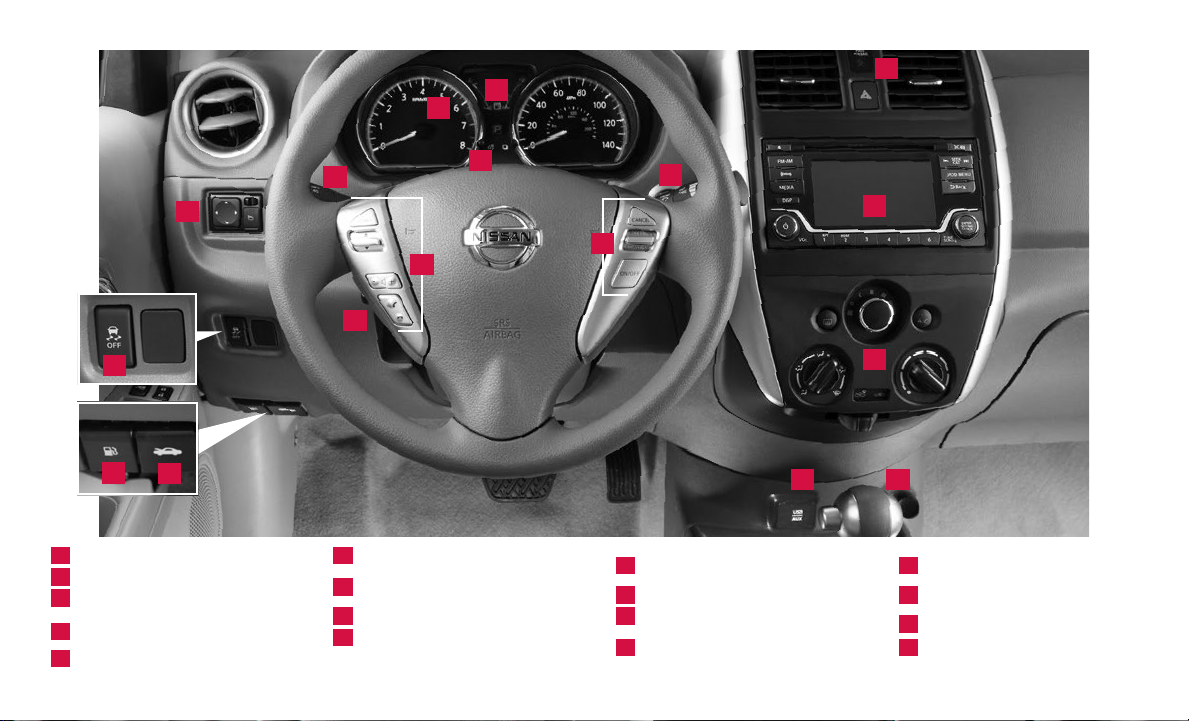
13
1
2
6
10
11
12
1
Trip Computer
2
Low Tire Pressure Warning Light
3
Instrument Brightness Control*
Headlight and
4
Turn Signal Switch
5
Wiper and Washer Switch
*See your Owner’s Manual for information.
4
9
6
Outside Mirror Control Switch
Steering Wheel Switches for
7
Audio / Bluetooth®
8
Cruise Control
9
Steering Wheel Tilt Adjustment*
3
7
5
8
Vehicle Dynamic Control (VDC)
10
OFF Switch*
11
Fuel-ller Door Release
12
Hood Release*
Front Passenger Air Bag
13
Status Light*
14
15
16 17
14
Audio System
Heater and Air
15
Conditioner (manual)
16
Illuminated USB / AUX Jack
17
12V Power Outlet
Page 3
TABLE OF CONTENTS
NEW SYSTEM FEATURES
RearView Monitor (if so equipped) ............................................................2
Trip Computer
Illuminated USB (Universal Serial Bus) Connection Port/Aux Jack and iPod® Interface
(if so equipped)
ESSENTIAL INFORMATION
Tire Pressure Monitoring System (TPMS) .....................................................4
Loose Fuel Cap
Fuel-ller Door
Clock Set/Adjustment (if so equipped)
FIRST DRIVE FEATURES
Rear Trunk Release (if so equipped) ..........................................................7
Seat Adjustments
Starting/Stopping the Engine
Headlight Control Switch
Wiper and Washer Switch
Power Outside Mirror Control Switch
Heater and Air Conditioner (manual)
FM/AM/SiriusXM® Satellite Radio with CD Player (if so equipped)
Cruise Control (if so equipped)
SYSTEM GUIDE
Hands-free Text Messaging Assistant (if so equipped) ......................................13
Bluetooth® Hands-free Phone System
• System Operating Tips ..................................................................14
................................................................................2
................................................................................3
................................................................................5
................................................................................5
.......................................................5
.............................................................................7
................................................................7
.....................................................................8
.....................................................................9
.........................................................9
........................................................10
............................11
...............................................................12
......................................................14
Additional information about your vehicle is also available in your Owner’s Manual
and at www.NissanUSA.com.
Please s ee your Ow ner’s Ma nual for imp ortant safety informat ion and sy stem
operation limitations.
• A cellular teleph one should n ot be used f or any purpo se while
driving so full attentio n may be give n to vehicle o peration .
• Always wear your seat belt.
• Supplem ental air bags do not replace prope r seat belt usage.
• Childr en 12 and under should always ride in the rear seat p roperly s ecured
in child restrain ts or seat be lts accord ing to their a ge and weight.
For more information, refe r to the “Sa fety — Seats, seat belts and supplemen tal restrain t system
(section 1)”, the “Monit or, climate, audio, phon e and voice recognition systems (sec tion 4)” and the
“Sta rting and driving (se ction 5)” of your Owner ’s Manual.
• Do not drink and drive.
Page 4
NEW SYSTEM FEATURES
REARVIEW MONITOR (if so equipped)
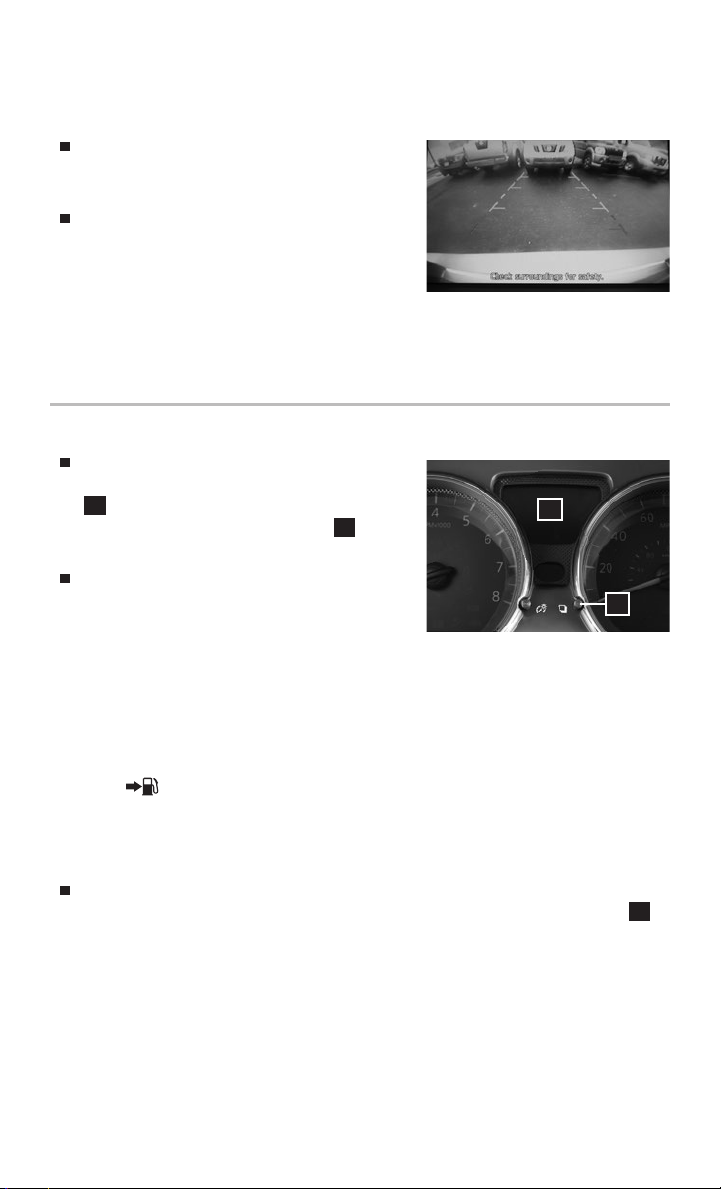
When the shift lever is moved to the
R (REVERSE) position, the front display
shows the view to the rear of the vehicle.
The colored lines on the display screen
indicate approximate distances to objects.
• Red 1.5 ft (0.5 m); Yellow 3 ft (1 m);
Green 7 ft (2 m) and 10 ft (3 m).
Please see your Owner’s Manual for important safety information, system limitations, and additional
operating and feature information.
For more information, refer to the “Monitor, climate, audio, phone and voice recognition systems
(section 4)” of your Owner’s Manual.
TRIP COMPUTER
With the ignition switch in the ON
position, modes of the trip computer
1
can be selected by pressing the trip
computer change/reset button 2 on the
instrument panel.
The following modes can be selected in
the display (if so equipped):
• ODO – records the total distance the
vehicle has been driven.
• Trip A – measures the distance of one specic trip.
• Trip B – measures the distance of a second specic trip.
• mpg – displays the instant fuel consumption.
• mpg AVG – displays the average fuel consumption since the last reset.
• DTE – displays the estimated distance that can be driven
before refueling.
• Outside Air Temperature (if so equipped) – displays the outside air
temperature in °F or °C.
To reset Trip A, Trip B, mpg or mpg AVG, go to the desired mode on the trip
computer and press and hold the trip computer change/reset button 2
for more than 3 seconds.
Please see your Owner’s Manual for important safety information, system limitations, and additional
operating and feature information.
For more information, refer to the “Instruments and controls (section 2)” of your Owner’s Manual.
1
2
2
To view detailed instructional videos regarding these and other features,
please go to www.nissanownersinfo.mobi.
Page 5

ILLUMINATED USB (Universal Serial Bus) CONNECTION PORT/
AUX JACK AND iPOD® INTERFACE (if so equipped)
The USB port/Aux jack 1 is located
below the instrument panel under the
climate controls.
When a compatible USB memory device,
iPod® or auxiliary device is plugged into
the USB port/Aux jack, compatible audio
les stored on the device can be played
through the vehicle’s audio system.
Please see your Owner’s Manual for important safety information, system limitations, and additional
operating and feature information.
For more information, refer to the “Monitor, climate, audio, phone and voice recognition systems
(section 4)” of your Owner’s Manual.
1
To view detailed instructional videos regarding these and other features,
please go to www.nissanownersinfo.mobi.
3
Page 6
ESSENTIAL INFORMATION
TIRE PRESSURE MONITORING SYSTEM (TPMS)
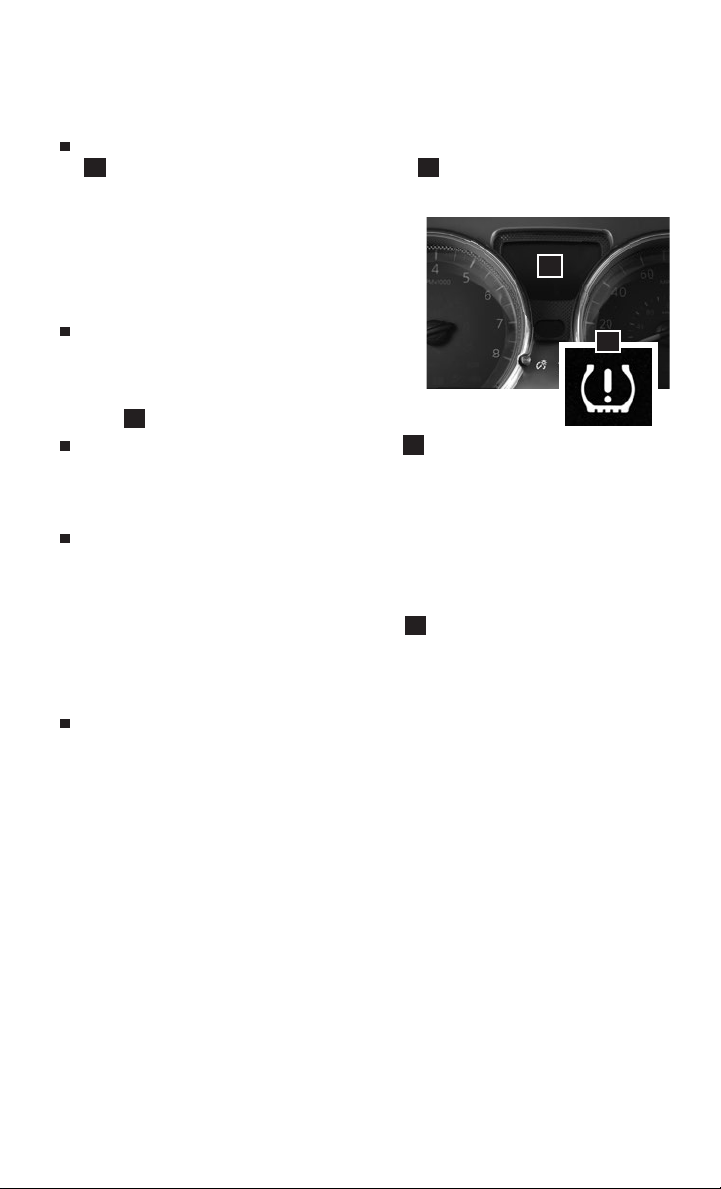
A CHECK TIRE PRES warning message will appear in the trip computer
1
and the low tire pressure warning light 2 will illuminate
when one or more tires are low in pressure and air is needed.
• The tire pressures should be checked
when the tires are cold. The tires are
considered cold after the vehicle has
been parked for 3 hours or more or driven
less than 1 mi (1.6 km) at moderate speeds.
After the tire pressures are adjusted,
drive the vehicle at speeds above 16 mph
(25 km/h). The CHECK TIRE PRES warning
message and low tire pressure warning
light 2 will extinguish.
When the low tire pressure warning light
2
ashes for 1
minute and then remains on, the TPMS is not functioning properly. Have
the system checked. It is recommended you visit a Nissan dealer for
this service.
Tire pressure rises and falls depending on the heat caused by the
vehicle’s operation and the outside temperature. Low outside
temperature can lower the temperature of the air inside the
tire, which can cause a lower tire ination pressure. This may
cause the low tire pressure warning light
2
to illuminate. If the
warning light illuminates, check the tire pressure in your tires.
• Check the tire pressure (including the spare tire)
often and always prior to long distance trips.
The Tire and Loading Information label contains valuable
information. Please refer to the “Technical and consumer
information (section 10)” of your Owner’s Manual for the
location of the Tire and Loading Information label.
Please see your Owner’s Manual for important safety information, system
limitations, and additional operating and feature information.
For more information, refer to the “Instruments and controls (section 2)”, the “Starting
and driving (section 5)” and the “Do-it-yourself (section 8)” of your Owner’s Manual.
1
2
4
To view detailed instructional videos regarding these and other features,
please go to www.nissanownersinfo.mobi.
Page 7

LOOSE FUEL CAP
A LOOSE FUEL CAP warning message will
display in the odometer 1 when the fuelller cap is not tightened correctly.
1
To tighten, turn the cap clockwise until a
single click is heard.
The warning message will extinguish when
the vehicle detects the fuel-ller cap is
2
properly tightened and the trip computer
change/reset button 2 is pressed for
more than 1 second.
If the cap is not fully tightened, the Malfunction Indicator Light may
also illuminate.
Please see your Owner’s Manual for important safety information, system limitations, and additional
operating and feature information.
For more information, refer to the “Instruments and controls (section 2)” and the “Pre-driving checks
and adjustments (section 3)” of your Owner’s Manual.
FUEL-FILLER DOOR
The fuel-ller door release 1 is located
to the left of the steering wheel and below
the instrument panel.
To open the fuel-ller door, pull the release.
To lock, close the fuel-ller door securely.
Please see your Owner’s Manual for important safety information, system limitations, and additional
operating and feature information.
For more information, refer to the “Pre-driving checks and adjustments (section 3)” of your
Owner’s Manual.
1
CLOCK SET/ADJUSTMENT (if so equipped)
FM/AM RADIO WITH COMPACT DISC (CD) PLAYER (Type A) (if so equipped)
1. Press the MENU button
the display.
2. Turn the TUNE/FOLDER knob
change to “Adjust Clock: Yes”.
3. Press the MENU button 1.
4. When “Change Hour” appears,
turn the TUNE/FOLDER knob
2
to adjust the hours.
5. Press the MENU button 1.
6. When “Change Minute” appears, turn the TUNE/FOLDER knob 2 to adjust
the minutes.
7. Press the MENU button
To view detailed instructional videos regarding these and other features,
1
repeatedly until “Adjust Clock: NO” appears on
2
to
1
to nish.
please go to www.nissanownersinfo.mobi.
2
1
5
Page 8

ESSENTIAL INFORMATION
FM/AM RADIO WITH COMPACT DISC (CD) PLAYER (Type B) (if so equipped)
1. Press the SETUP button 3.
2. Turn the TUNE/MENU knob
select “CLOCK”.
3. Press the ENTER button 4.
4. Turn the TUNE/MENU knob
select “Set time”.
5. Press the ENTER button 4.
The display will return to the regular clock display after 10 seconds.
FM/AM/SAT RADIO WITH COMPACT DISC (CD) PLAYER (if so equipped)
1. Press the ENTER/SETTING/
CLOCK button
“Settings” screen on the display.
6
to show the
2. Turn the TUNE/SCROLL knob
highlight “Clock Adjust”.
3. Press the ENTER/SETTING/CLOCK button
6
to highlight the hours or minutes and
use the TUNE/SCROLL knob
the value.
4. Press the ENTER/SETTING/CLOCK button
Press the BACK button
Please see your Owner’s Manual for important safety information, system limitations, and additional
operating and feature information.
For more information, refer to the “Monitor, climate, audio, phone and voice recognition systems
(section 4)” of your Owner’s Manual.
5
to
5
to
7
to
7
to adjust
6
to set the value.
8
to return to the previous screen.
3
5
8
7
4
6
6
To view detailed instructional videos regarding these and other features,
please go to www.nissanownersinfo.mobi.
Page 9

FIRST DRIVE FEATURES
REAR TRUNK RELEASE (if so equipped)
Use one of the following methods to open
the trunk:
• Push the trunk opener request switch
1
, located under the driver’s seat on the
oor and pull up to release the rear trunk.
• Press the trunk release button 2 on
the key for more than 1 second.
Please see your Owner’s Manual for important safety
information, system limitations, and additional operating and
feature information.
For more information, refer to the “Pre-driving checks and
adjustments (section 3)” of your Owner’s Manual.
SEAT ADJUSTMENTS
To slide the front seat forward or
backward, pull up on the lever 1 under
the front of the seat and slide forward or
backward. Release the lever to lock the
seat in position.
To recline the seatback, pull up on the lever
2
and lean back. To bring the seatback
forward, pull the lever up and lean your
body forward. Release the lever to lock the
seatback in position.
SEAT LIFTER (if so equipped for driver’s seat)
To adjust the seat height, pull up or push
down on the adjusting lever 3 repeatedly.
Please see your Owner’s Manual for important safety
information, system limitations, and additional operating and
feature information.
For more information, refer to the “Safety — Seats, seat belts and supplemental restraint system
(section 1)” of your Owner’s Manual.
1
3
1
2
2
STARTING/STOPPING THE ENGINE
CONTINUOUSLY VARIABLE TRANSMISSION/
MANUAL TRANSMISSION (if so equipped)
Depress the brake pedal.
Move the shift lever to the N (NEUTRAL)
position (continuously transmission only).
Depress the clutch pedal to the oor
(manual transmission only).
Turn the ignition switch to the START position.
To view detailed instructional videos regarding these and other features,
please go to www.nissanownersinfo.mobi.
7
Page 10

FIRST DRIVE FEATURES
TURNING THE ENGINE OFF
For the Continuously Variable Transmission, apply the brake pedal, move
the shift lever to the P (PARK) position, apply the parking brake and turn
the ignition switch to the LOCK position.
For a manual transmission, apply the brake pedal, place the vehicle in
N (NEUTRAL) , apply the parking brake and turn the ignition switch to the
LOCK position.
Please see your Owner’s Manual for important safety information, system limitations, and additional
operating and feature information.
For more information, refer to the “Starting and driving (section 5)” of your Owner’s Manual.
HEADLIGHT CONTROL SWITCH
HEADLIGHT CONTROL
Turn the headlight control switch to the
position 1 to turn on the front
parking, tail, license plate and instrument
panel lights. Turn the switch to the
position 2 to turn on the headlights.
HIGH BEAM SELECT
With the headlights on, push the headlight
control switch forward
3
to select the
high beam function. The blue indicator
light will illuminate in the instrument
panel. Pull the headlight switch back to the
original position to select the low beam.
The blue indicator light will extinguish.
Pull and release the headlight control
switch 4 to ash the headlight high
beams on and o.
FOG LIGHT SWITCH (if so equipped)
The headlights must be on and the low
beams selected for the fog lights to operate.
Turn the switch (inside collar) to the
position 5 to turn the fog lights on.
Turn the switch (inside collar) to the OFF
position to turn the fog lights o.
LANE CHANGE SIGNAL
Move the lever up or down until the turn
signal begins to ash but the lever does
not latch to signal a lane change. Hold the lever until the lane
change is completed.
1
2
3
4
5
8
To view detailed instructional videos regarding these and other features,
please go to www.nissanownersinfo.mobi.
Page 11

Move the lever up or down until the turn signal begins to ash but the lever
does not latch and release the lever. The turn signal will automatically ash
three times.
Choose the appropriate method to signal a lane change based on the road and
trac conditions.
Please see your Owner’s Manual for important safety information, system limitations, and additional
operating and feature information.
For more information, refer to the “Instruments and controls (section 2)” of your Owner’s Manual.
WIPER AND WASHER SWITCH
Move the lever to one of the following
positions to operate the windshield wipers:
3
MIST
OFF
1 Mist (MIST) – One sweep operation of
the wipers.
2 Intermittent (INT) – Wipers operate
intermittently. The intermittent
operation speed can be adjusted by
INT
LO
HI
rotating the time control ring 3 to
increase or decrease wiper speed
(if so equipped).
4 Low (LO) – Wipers operate at a
continuous low-speed.
6
5 High (HI) – Wipers operate at a
continuous high-speed.
6 Washer – Pull the lever toward you to activate the washer.
The wipers will operate several times.
Please see your Owner’s Manual for important safety information, system limitations, and additional
operating and feature information.
For more information, refer to the “Instruments and controls (section 2)” of your Owner’s Manual.
POWER OUTSIDE MIRROR CONTROL SWITCH
Push the switch 1 right or left to select
the right or left mirror.
Adjust each mirror to the desired position
using the switch 2.
2
Push the switch 1 to the center (neutral)
position to prevent accidentally moving the mirrors.
Please see your Owner’s Manual for important safety information, system limitations, and additional
operating and feature information.
For more information, refer to the “Pre-driving checks and adjustments (section 3)” of your
Owner’s Manual.
1
1
2
4
5
To view detailed instructional videos regarding these and other features,
please go to www.nissanownersinfo.mobi.
9
Page 12

FIRST DRIVE FEATURES
HEATER AND AIR CONDITIONER (manual)
1
FAN SPEED CONTROL DIAL
Turn the dial to the left to decrease fan speed or to the right to increase
fan speed.
2
AIR FLOW CONTROL DIAL
Turn the dial to select one of the
following air ow outlets:
Air ows from the center and
side vents.
7
1
2
Air ows from the center, side and
foot vents.
Air ows mainly from the foot vents.
4
Air ows from the front defroster and
foot vents.
Air ows mainly from the front
defroster and side vents.
3
TEMPERATURE CONTROL DIAL
Turn the temperature control dial left for cooler air or right for
warmer air.
4
DEFROSTING FRONT AND SIDE WINDOWS
First, move the air intake lever 5 to the left position to draw fresh
air into the vehicle.
Then turn the air ow control dial 2 to the front window
defroster mode .
Align the left and right side vents 6 to
6
direct air ow toward the front
side windows.
When the or position is
selected, the air conditioner will turn on
automatically for better performance.
This will dehumidify the air and help
defog the windows.
7
REAR WINDOW DEFROSTER SWITCH
Push the rear window defroster switch to turn the system on or o.
This function automatically turns o after approximately 15 minutes.
8
A/C BUTTON
Press the A/C button to turn the air conditioner on. This system helps
cool and dehumidify the air inside the cabin and defog the windows.
Please see your Owner’s Manual for important safety information, system limitations, and additional
operating and feature information.
For more information, refer to the “Monitor, climate, audio, phone and voice recognition systems
(section 4)” of your Owner’s Manual.
8
3
5
10
To view detailed instructional videos regarding these and other features,
please go to www.nissanownersinfo.mobi.
Page 13

5
6
4
1
3
2
FM/AM/SiriusXM® SATELLITE RADIO WITH CD PLAYER
(if so equipped)
1
ON•OFF BUTTON/VOL (volume) CONTROL KNOB
Press the ON•OFF button to turn the system on or o.
Turn the VOL (volume) control knob to the right or left to increase or
decrease the volume.
2
AUDIO BUTTON/TUNE KNOB
Press the AUDIO button to go to the audio settings screen.
To manually tune the radio, turn the TUNE knob left or right.
3
SEEK BUTTONS
To tune and stop at the previous or next broadcast station, press the
seek buttons or .
For satellite radio to switch to the rst channel of the previous or next
category, press the seek buttons or .
To change tracks on a CD, press the seek buttons or .
To rewind or fast forward a track on a CD, press and hold the seek
buttons or .
4
STATION SELECT KEYS
Twelve stations can be set for the FM band, six for the AM band and
18 for satellite radio.
To store a station in a preset, you must rst select a radio band by
pressing the FM•AM button 5 or the SXM button 6 then tune to the
desired FM, AM or satellite radio station.
Now select and hold the desired station memory button (1-6) 4 until
the preset number is updated on the display and a beep is heard.
Programing is now complete.
To retrieve a previously set station, select the radio band where the
preset was stored then select the corresponding station memory
button (1-6)
Please see your Owner’s Manual for important safety information, system limitations, and additional
operating and feature information.
For more information, refer to the “Monitor, climate, audio, phone and voice recognition systems
(section 4)” of your Owner’s Manual.
4
.
To view detailed instructional videos regarding these and other features,
please go to www.nissanownersinfo.mobi.
11
Page 14

FIRST DRIVE FEATURES
CRUISE CONTROL (if so equipped)
The cruise control system enables you to
set a constant cruising speed once the
vehicle has reached 25 mph (40 km/h).
The system will automatically maintain the
set speed until you tap the brake pedal,
accelerate, cancel or turn the system o.
To activate the cruise control, push the
ON/OFF switch 1 on the steering
wheel. The CRUISE indicator light in the
instrument panel will illuminate.
To set a cruising speed, accelerate the vehicle to the desired speed, push
the COAST/SET switch 2 on the steering wheel and release. Take your
foot o the accelerator pedal. Your vehicle will maintain the set speed.
To reset at a faster cruising speed, push and hold the ACCEL/RES switch
3
on the steering wheel. When the vehicle attains the desired speed,
release the switch.
To reset at a slower cruising speed, push and hold the COAST/SET switch
2
on the steering wheel. Release the switch when the vehicle slows to the
desired speed.
To cancel the preset speed, push the CANCEL switch 4 on the
steering wheel.
To turn o cruise control, push the ON/OFF switch 1 on the steering
wheel. The CRUISE indicator light in the instrument panel will extinguish.
Please see your Owner’s Manual for important safety information, system limitations, and additional
operating and feature information.
For more information, refer to the “Starting and driving (section 5)” of your Owner’s Manual.
4
3
2
1
12
To view detailed instructional videos regarding these and other features,
please go to www.nissanownersinfo.mobi.
Page 15

SYSTEM GUIDE
HANDS-FREE TEXT MESSAGING ASSISTANT* (if so equipped)
This system allows for sending and
receiving text messages through the
vehicle’s interface.
Using predened or custom messages,
send a text to an entry stored in your
Bluetooth® Hands-free Phone System.
Once enabled, the text message, sender
and delivery time are shown on the control panel display when the vehicle
speed is less than 5 mph (8 km/h).
Text messages have the option of being read aloud at all vehicle speeds.
Many cellular phones may require special permission to enable text
messaging. Check the cellular phone’s screen during Bluetooth® pairing.
For some cellular phones, you need to enable “Notications” in the
cellular phone’s Bluetooth® menu for text messages to appear on the
touch-screen display. For more information and instructions, refer to
your cellular phone’s Owner’s Manual.
Text message integration requires that the cellular phone support Message
Access Prole (MAP) for both receiving and sending text messages. Some
cellular phones may not support all text messaging features. Please see
www.NissanUSA.com/bluetooth for compatibility information as well as
your device’s Owner’s Manual.
* Laws in some jurisdictions may restrict the use of “Text-to-Speech”. Some of the applications and
features, such as social networking and texting, may also be restricted. Check local regulations for any
requirements before using these features.
Please see your Owner’s Manual for important safety information, system limitations, and additional
operating and feature information.
For more information, refer to the “Monitor, climate, audio, phone and voice recognition systems
(section 4)” of your Owner’s Manual.
To view detailed instructional videos regarding these and other features,
please go to www.nissanownersinfo.mobi.
13
Page 16

SYSTEM GUIDE
BLUETOOTH® HANDS-FREE PHONE SYSTEM*
A cellular telephone should not be used
while driving so full attention may be given
to vehicle operation.
SYSTEM OPERATING TIPS
Press the button on the steering
wheel to interrupt the voice prompts at
any time and speak a command
after the tone.
To use the system faster, you may speak
the second level commands with the main
menu command on the main menu. For
example, press the button on the
steering wheel, and after the tone, say
“Call Redial”.
The “Help” command can be used to hear a list of available
commands at any time.
Reduce background noise as much as possible by closing
windows and pointing HVAC vents away from the ceiling.
Speak naturally without long pauses and without raising your voice.
To cancel a Voice Recognition session, simply wait 5 seconds, say
“Cancel” or “Quit”, or press and hold the button on the steering wheel
for 5 seconds.
To increase or decrease the volume of the voice prompts, push the volume
control switches + or – on the steering wheel or turn the control dial on the
audio system while the audio system is responding.
Voice commands can be used to operate various Bluetooth® system
features using the Nissan Voice Recognition system. See your Owner’s
Manual for detailed information.
If the Voice Recognition system does not recognize your voice commands,
train the system using the Voice Adaptation Mode.
For more detailed information and instructions, refer to your cellular
phone’s Owner’s Manual and visit www.NissanUSA.com/bluetooth.
14
To view detailed instructional videos regarding these and other features,
please go to www.nissanownersinfo.mobi.
Page 17

CONNECTING PROCEDURE
The vehicle must be stationary when
connecting the cellular phone.
1. Press the button on the steering
wheel. The system announces the
available commands.
2. Say: “Connect Phone”. The system
acknowledges the command
and announces the next set
of available commands.
3. Say: “Add Phone”. The system acknowledges the command and asks you
to initiate connecting from the cellular phone handset.
4. Initiate connecting from the cellular phone:
• The connecting procedure varies according to each cellular phone model.
For detailed connecting instructions and a list of compatible cellular
phones, please visit www.NissanUSA.com/bluetooth.
• When prompted for a PIN, enter “1234” from the handset. (The PIN is
assigned by NISSAN and cannot be changed.)
5. Say a name for the cellular phone when the system asks you to provide
one. You can give the cellular phone a name of your choice.
PHONEBOOK SETUP
The phonebook stores up to 1,000 entries for each cellular phone paired
with the system.
Depending on your cellular phone, the system may automatically download
your cellular phone’s entire phonebook to the vehicle’s Bluetooth® system.
If the phonebook does not download automatically, entries can be
individually downloaded.
To manually download entries:
1. Press the button on the steering wheel.
2. After the tone, say “Phonebook”.
3. After the next tone, say “Transfer Entry”. The system acknowledges the
command and asks you to initiate the transfer from the cellular phone
handset. The new contact phone number will be transferred from the
cellular phone to the vehicle.
• The transfer procedure varies according to each cellular phone. See
your cellular phone’s Owner’s Manual for details. You can also visit
www.NissanUSA.com/bluetooth for instructions on transferring
phone numbers from NISSAN-recommended cellular phones.
To view detailed instructional videos regarding these and other features,
please go to www.nissanownersinfo.mobi.
15
Page 18

SYSTEM GUIDE
4. The system repeats the number and prompts you for the next
command. When you have nished entering numbers or transferring
an entry, choose “Store”.
5. The system conrms the name, location and number.
MAKING A CALL FROM THE PHONEBOOK
In some cases, names stored using all UPPERCASE letters may not be
recognized by the Voice Recognition system.
1. Press the button on the steering wheel.
2. After waiting for the tone, say “Call”.
3. After the next tone, speak the name of a phonebook entry. For example,
“Michael Smith”.
4. Conrm the correct name is recognized by saying “Dial” after the tone.
MAKING A CALL BY PHONE NUMBER
1. Press the button on the steering wheel. A tone will sound.
2. Say: “Call”. The system acknowledges the command and announces the
next set of available commands.
3. Say: “Phone Number”. The system acknowledges the command and
announces the next set of available commands.
4. Say the number you wish to call starting with the area code in single
digit format.
5. When you have nished speaking the phone number, the system repeats it
back and announces the available commands.
6. Say: “Dial”. The system acknowledges the command and makes the call.
RECEIVING/ENDING A CALL
When you receive a phone call, a ring tone sounds through the
audio system.
To accept the call, press the button on the steering wheel.
To reject the call, press the button on the steering wheel.
To hang up the cellular phone at the end of a call or to disconnect during
call placement, press the button on the steering wheel.
* Some jurisdictions prohibit the use of cellular telephones while driving.
Please see your Owner’s Manual for important safety information, system limitations, and additional
operating and feature information.
For more information, refer to the “Monitor, climate, audio, phone and voice recognition systems
(section 4)” of your Owner’s Manual or please visit www.NissanUSA.com/bluetooth.
16
To view detailed instructional videos regarding these and other features,
please go to www.nissanownersinfo.mobi.
Page 19

MEMO
Page 20

Helpful Resources
Below is a list of helpful resources that can be used
to learn more about the vehicle’s s ystems and
feature operations.
Vehicle Owner’s Manual
Printed Quick Reference Guide (this document)
www.NissanUSA.com/bluetooth
www.youtube.com/user/NissanUSA
Nissan Consumer Aairs: 1-800-647-7261
Electronic Quick Reference Guide
(Use Quick Response (QR) code or URL below.)
Nissan Quick Guide (available in the iPhone
App Store or Android Google Play Store
for download to your smartphone)
To view detailed instructional videos,
go to www.nissanownersinfo.mobi/2018/versasedan
or snap this barcode with an appropriate barcode reader.
This Quick Reference Guide is intended to provide an overview of some of the unique features of your new vehicle.
Please see your Owner’s Manual for important safety information and system operation limitations. Features and
equipment in your vehicle may vary depending on model, trim level, options selected, order, date of production, region
or availability. Therefore, you may nd information about features or equipment that are not included or installed on
your vehicle.
All information, specications and illustrations in this Quick Reference Guide are those in eect at the time of printing.
NISSAN reserves the right to change specications, performance, design or component suppliers without notice and
without obligation. From time to time, NISSAN may update or revise this Quick Reference Guide to provide owners with
the most accurate information currently available. Please carefully read and retain with this Quick Reference Guide all
revision updates sent to you by NISSAN to ensure you have access to accurate and up-to-date information regarding
your vehicle. Current versions of vehicle Quick Reference Guides, Owner’s Manuals and any updates can also be found
in the Owner section of the NISSAN website at https://owners.nissanusa.com/nowners/navigation/manualsGuide.
If you have questions concerning any information in your Owner’s Manual, contact Nissan Consumer Aairs. See the
NISSAN CUSTOMER CARE PROGRAM page in the Owner’s Manual for contact information.
Nissan, the Nissan Brand Symbol, Z and
Nissan model names are Nissan trademarks.
© 2017 Nissan North America, Inc.
QR18EA 0N17U0
Printing: June 2017
 Loading...