

Page 1

MANUAL AIR CONDITIONER
J AIR CONDITIONER
A
B
SECTION MTC
MANUAL AIR CONDITIONER
CONTENTS
PRECAUTIONS .......................................................... 2
Precautions for Supplemental Rest raint System
(SRS) “AIR BAG” and “SEAT BELT PRE-TEN-
SIONER” .................................................................. 2
Wiring Diagrams and Trouble Diagnosis .................. 2
TROUBLE DIAGNOSIS .............................................. 3
How to Perform Trouble Diagnoses for Quick and
Accurate Repair ....................................................... 3
WORK FLOW ........................................................ 3
SYMPTOM TABLE ................................................ 3
Component Parts and Harness Connector Location ..... 4
PASSENGER COMPARTMENT ........................... 4
Discharge Air Flow ................................................... 5
Wiring Diagram —HEATER— .................................. 6
Operational Check ................................................... 7
CHECKING BLOWER ........ ...... ....... ...... ....... ......... 7
CHECKING DISCHARGE AIR ........ ...... ....... ......... 7
CHECKING RECIRCULATION ............. ....... ......... 7
CHECKING TEMPERATURE DECREASE .......... 8
CHECKING TEMPERATURE INCREASE ... ......... 8
Mode Door ............................................................... 9
INSPECTION FLOW ............................................. 9
Air Mix Door ........................................................... 10
INSPECTION FLOW ........................................... 10
Intake Door Motor Circuit ........................................11
INSPECTION FLOW ............................................11
COMPONENT DESCRIPTION ............................11
DIAGNOSTIC PROCEDURE FOR INTAKE
DOOR MOTOR ................................................... 12
Blower Motor Circuit ............................................... 15
INSPECTION FLOW ........................................... 15
DIAGNOSTIC PROCEDURE FOR BLOWER
MOTOR .................................... ........................... 16
COMPONENT INSPECTION .............................. 18
Insufficient Heating ................................................. 19
INSPECTION FLOW ........................................... 19
CONTROLLER ......................................................... 21
Removal and Installation ........................................ 21
REMOVAL ........................................................... 21
INSTALLATION ................................................... 21
Disassembly and Assembly ....................................21
BLOWER UNIT . ...... ....... ...... ....... ...... ....... ...... ....... .... 22
Removal and Installation ........................................ 22
REMOVAL ........................................................... 22
INSTALLATION ................................................... 22
Disassembly and Assembly ....................................23
BLOWER MOTOR .. ....... ....................................... .... 24
Removal and Installation ........................................ 24
REMOVAL ........................................................... 24
INSTALLATION ................................................... 24
BLOWER FAN RESISTOR ............... ....... ...... ....... ....25
Removal and Installation ........................................ 25
REMOVAL ........................................................... 25
INSTALLATION ................................................... 25
INTAKE DOOR MOTOR ........................................... 26
Removal and Installation ........................................ 26
REMOVAL ........................................................... 26
INSTALLATION ................................................... 26
HEATER UNIT ........................................................... 27
Removal and Installation ........................................ 27
REMOVAL ........................................................... 27
INSTALLATION ................................................... 28
Disassembly and Assembly ....................................29
HEATER CORE ......................................................... 30
Removal and Installation ........................................ 30
REMOVAL ........................................................... 30
INSTALLATION ................................................... 30
MODE DOOR ............................................................31
Control Linkage Adjustment ...................................31
MODE DOOR CONTROL CABLE .......................31
AIR MIX DOOR ......................................................... 32
Control Linkage Adjustment ...................................32
AIR MIX DOOR CONTROL CABLE ....................32
DUCTS AND GRILLES .............................................33
Removal and Installation ........................................ 33
REMOVAL ........................................................... 33
INSTALLATION ................................................... 36
C
D
E
F
G
H
I
MTC
K
L
M
MTC-1
Page 2

PRECAUTIONS
PRECAUTIONS PFP:00001
Precautions for Supplemental Restraint System (SRS) “AIR BAG” and “SEAT
BELT PRE-TENSIONER”
The Supplemental Restraint System such as “AIR BAG” and “SEAT BELT PRE-TENSIONER”, used along
with a front sea t belt , helps t o redu ce th e r isk or s everi ty of injury to th e driv er an d front passenge r for c ertain
types of collision. Info rmation necessary to service the system safely is included in the SRS and SB section of
this Service Manual.
WARNING:
● To avoid rendering the SRS inoperativ e, which cou ld increase the risk of persona l injury or death
in the event of a collision which would result in air bag inflation, all maintenance must be performed by an authorized NISSAN/INFINITI dealer.
● Improper maintenance, in cluding incorrect removal a nd installation of the SRS, can lead to per-
sonal injury caused by unintentional activation of the system. For rem ova l of Sp iral Ca ble an d Air
Bag Module, see the SRS section.
● Do not use electrical test equipme nt on any circuit related to the SRS unle ss instructed to in this
Service Manual. SRS wiring harnesses can be identified by yellow and/or orange harnesses or
harness connectors .
EJS004L7
Wiring Diagrams and Trouble Diagnosis EJS000WA
When you read wiring diagrams, refer to the following:
● GI-14, "How to Read Wiring Diagrams" in GI section.
● PG-3, "Wiring Diagram — POWER —" in PG section.
When you perfo rm trouble diagnosis, refer to the following:
● GI-10, "How to Follow Trouble Diagnoses" in GI section.
● GI-23, "How to Perform Efficient Diagnosis for an Electrical Incident" in GI section.
MTC-2
Page 3
TROUBLE DIAGNOSIS
TROUBLE DIAGNOSIS PFP:00004
How to Perform Trouble Diagnoses for Quick and Accurate Repair EJS001FB
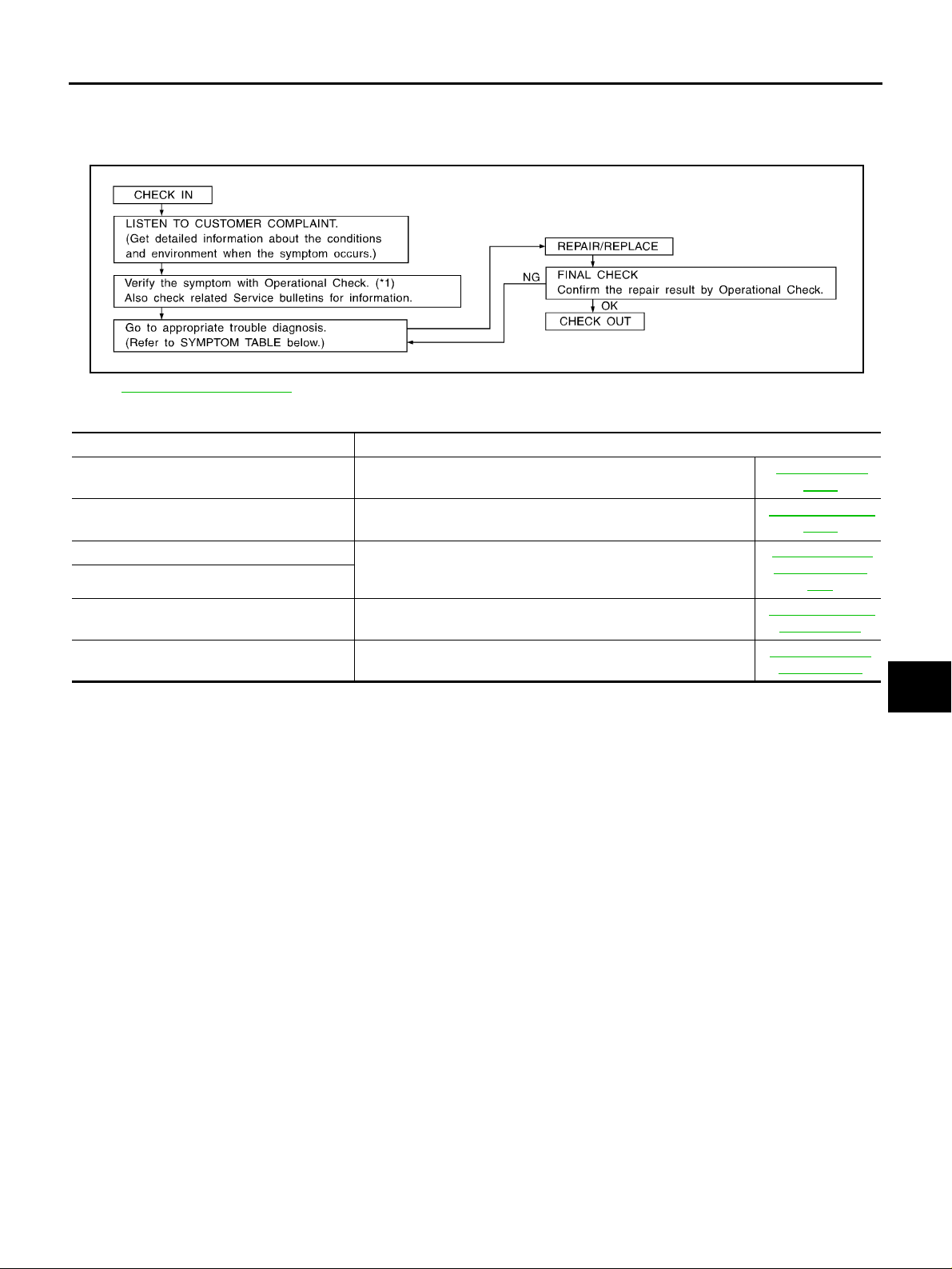
WORK FLOW
A
B
C
D
*1 MTC-7, "Operational Check"
SYMPTOM TABLE
Symptom Reference Page
Air outlet does not change. Go to Trouble Diagnosis Procedure for Mode Door.
Discharge air temperature does not change. Go to Trouble Diagnosis Procedure Air Mix Door.
Intake door does not change.
Intake door motor does not operate normally.
Blower motor operation is malfunctioning. Go to Trouble Diagnosis Procedure for Blower Motor Circuit.
Insufficient heating Go to Trouble Diagnosis Procedure for Insufficient Heating.
Go to Trouble Diagnosis Procedure for Intake Door Motor Circuit.
SHA900E
MTC-9, "
MTC-10, "
MTC-11, "Intake
Door Motor Cir-
MTC-15, "
Motor Circuit"
MTC-19, "
cient Heating"
Mode
Door"
Air Mix
Door"
cuit"
Blower
Insuffi-
E
F
G
H
I
MTC
K
L
M
MTC-3
Page 4
TROUBLE DIAGNOSIS
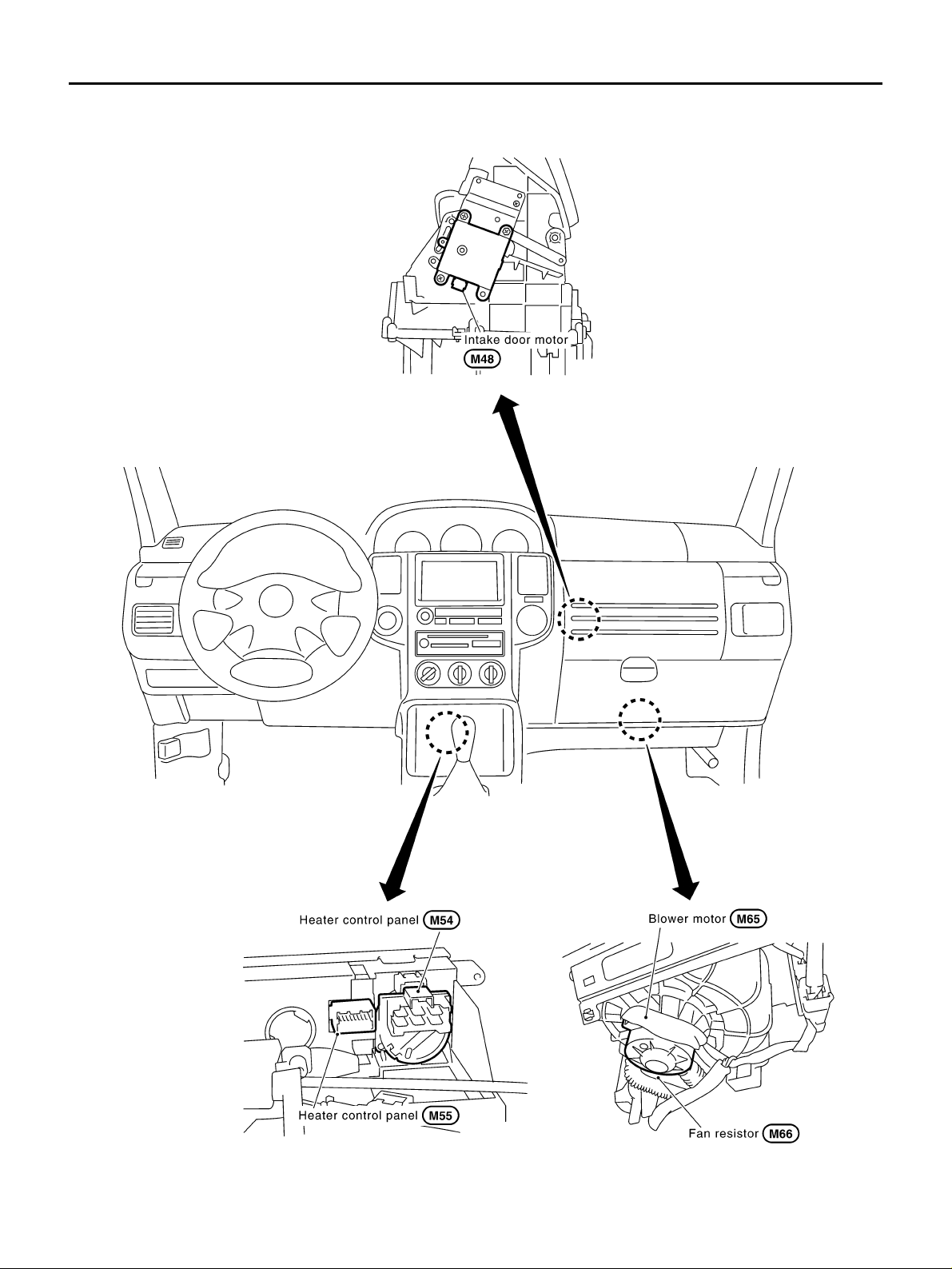
Component Parts and Harness Connector Location EJS001FC
PASSENGER COMPARTMENT
RJIA2845E
MTC-4
Page 5
TROUBLE DIAGNOSIS
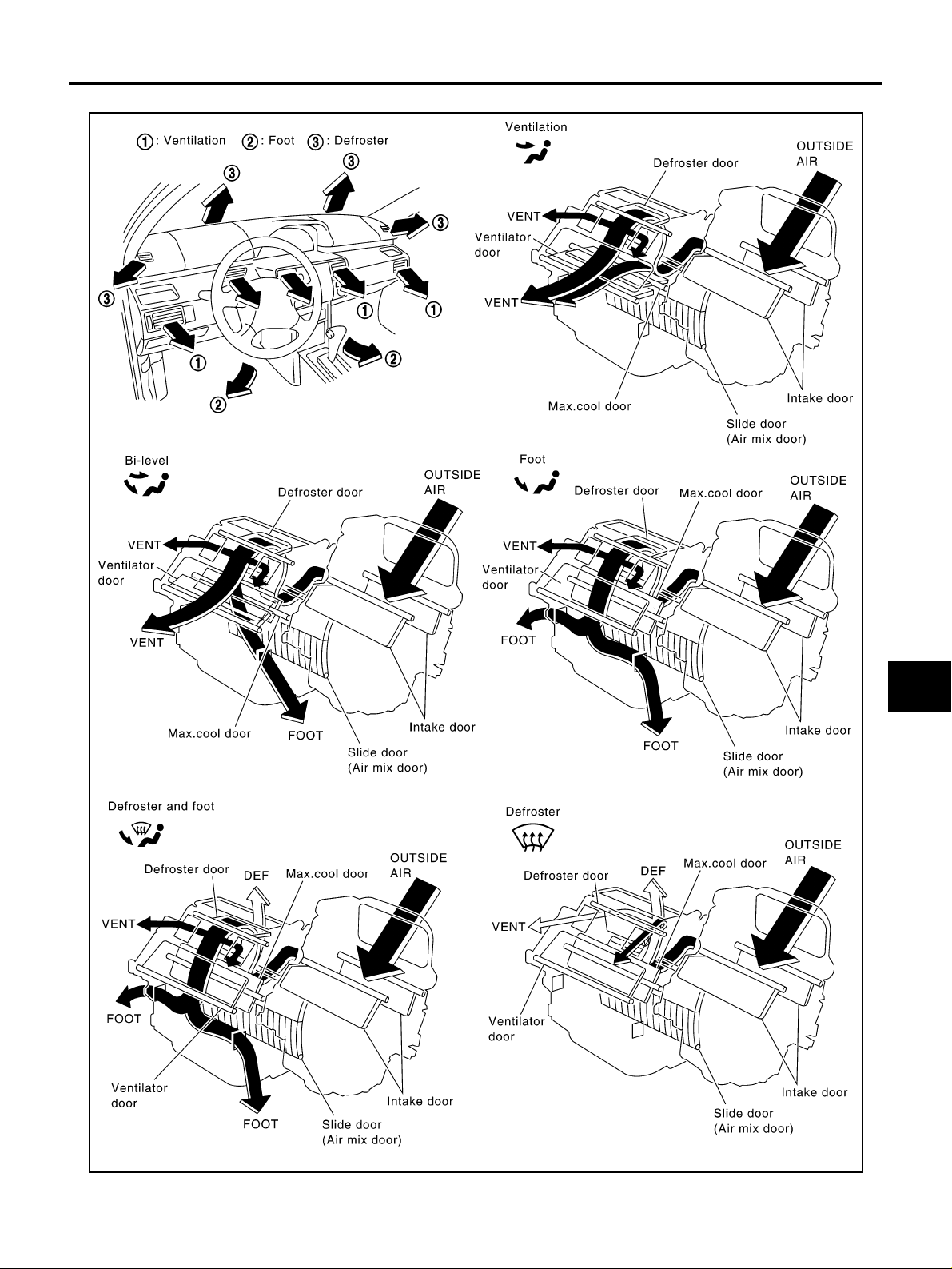
Discharge Air Flow EJS001HF
A
B
C
D
E
F
G
H
I
MTC
K
L
M
SJIA0441E
MTC-5
Page 6
TROUBLE DIAGNOSIS
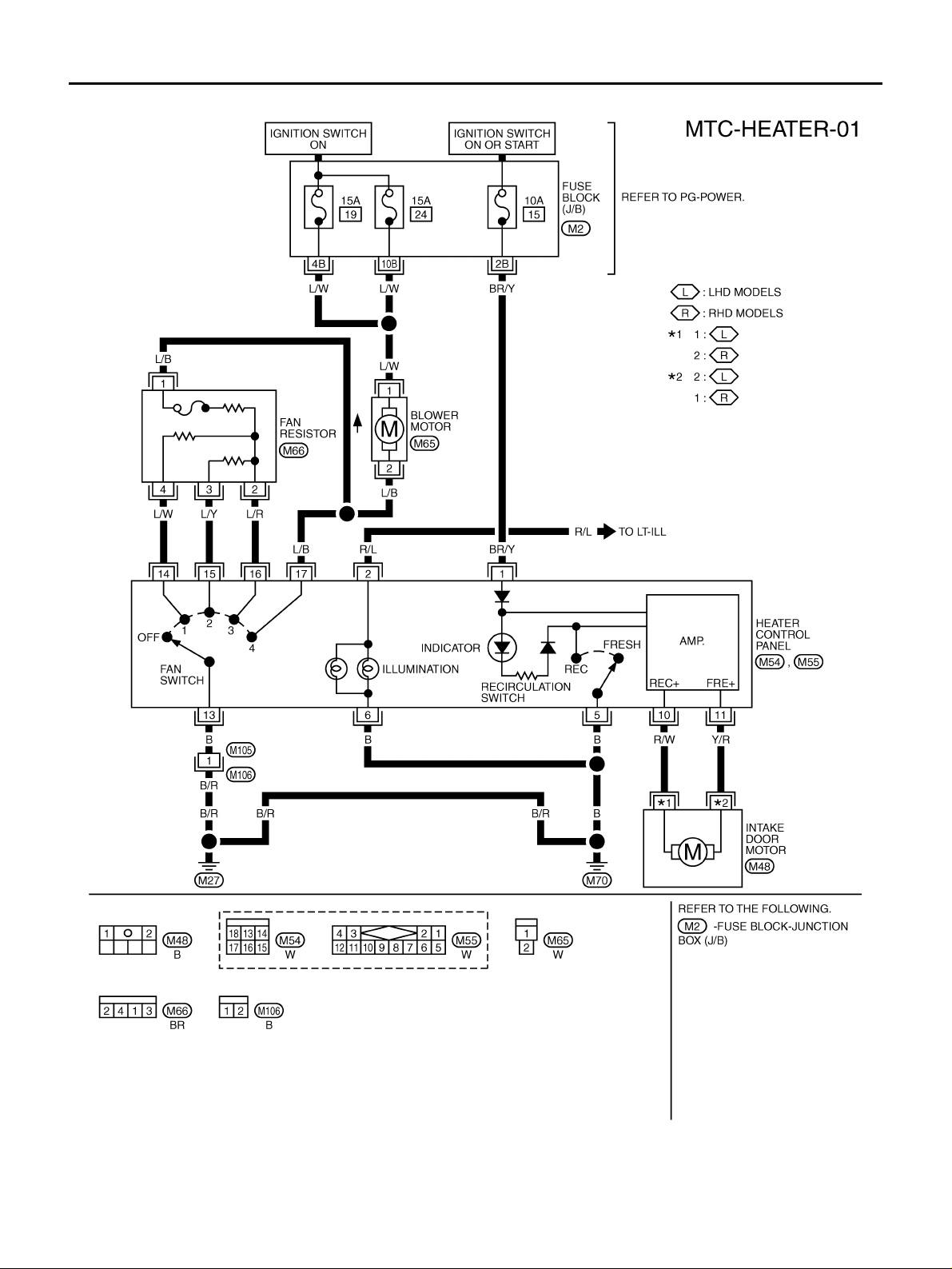
Wiring Diagram —HEATER— EJS001FD
TJWA0076E
MTC-6
Page 7
TROUBLE DIAGNOSIS
Operational Check EJS001FE
The purpose of the operational check is to confirm that the system operates properly.
Conditions :Engine running at usual operating temperature
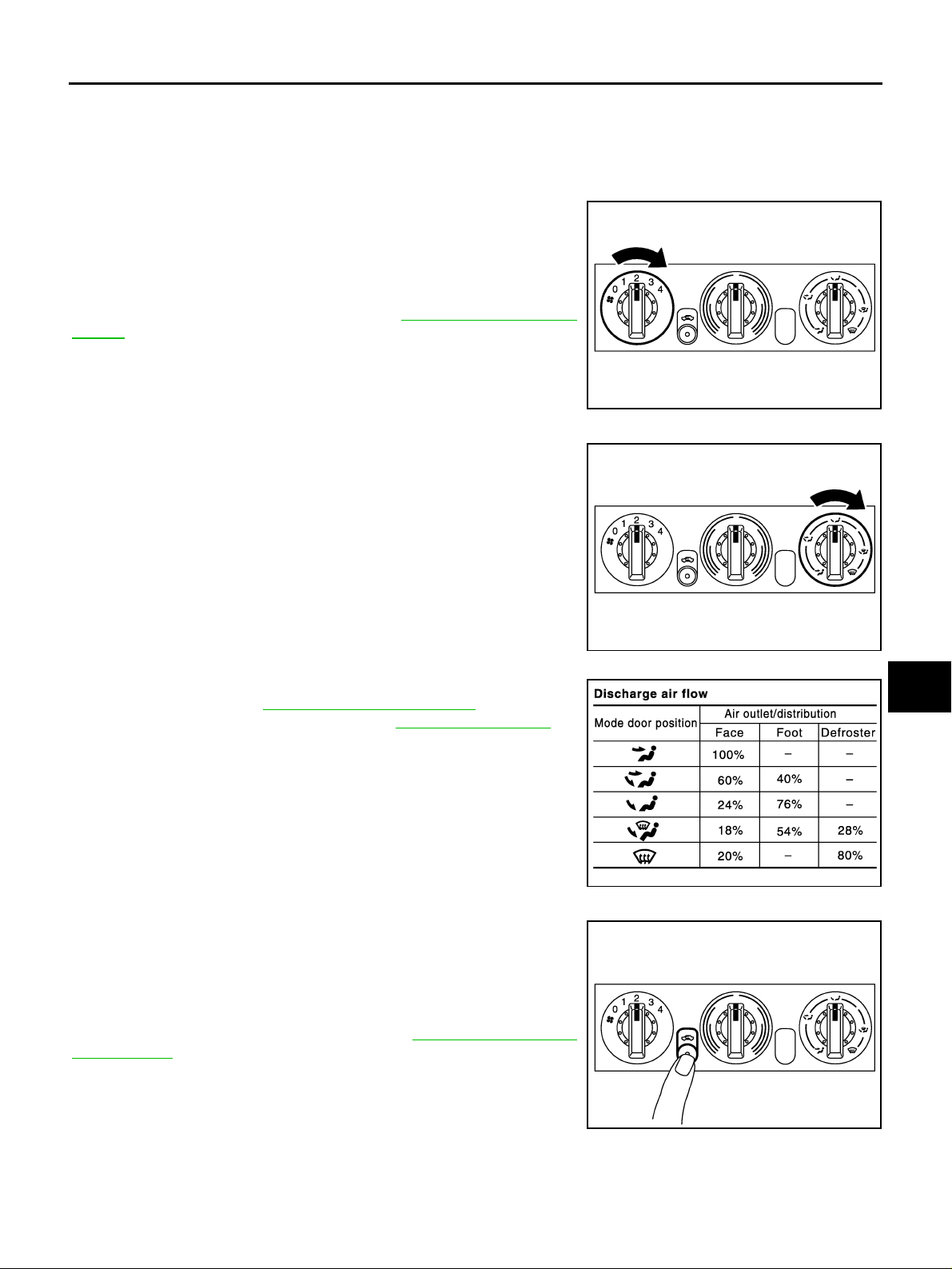
CHECKING BLOWER
1. Turn fan switch to 1st-speed. Blower should operate on low
speed.
2. Then turn fan switch to 2nd-speed, and continue checking
blower speed until all speeds are checked.
3. Leave blower on Max. speed.
If NG, go to trouble diagn osis procedure for MTC- 15, "
Circuit" .
If OK, continue with the check.
Blower Motor
RJIA0587E
A
B
C
D
E
CHECKING DISCHARGE AIR
1. Turn mode control dial to each position.
2. Confirm that discharg e air come s out acco rding to th e air distri bution table. Refer to MTC-5, "
If NG, go to trouble diagnosis procedure for MTC-9, "
Discharge Air Flow" .
Mode Door" .
If OK, continue the check.
CHECKING RECIRCULATION
1. Press REC switch. Recirculation indicator shou ld eliminate.
2. Press REC switch ag ain. Recircul ation indic ator should no t illuminate.
3. Listen for intake door p osition change (y ou should hear bl ower
sound change slightly).
If NG, go to trouble diagnos is procedure for MTC-11, "
Motor Circuit" .
If OK, continue the check.
Intake Door
RJIA0588E
RJIA0492E
F
G
H
I
MTC
K
L
M
RJIA0589E
MTC-7
Page 8
TROUBLE DIAGNOSIS
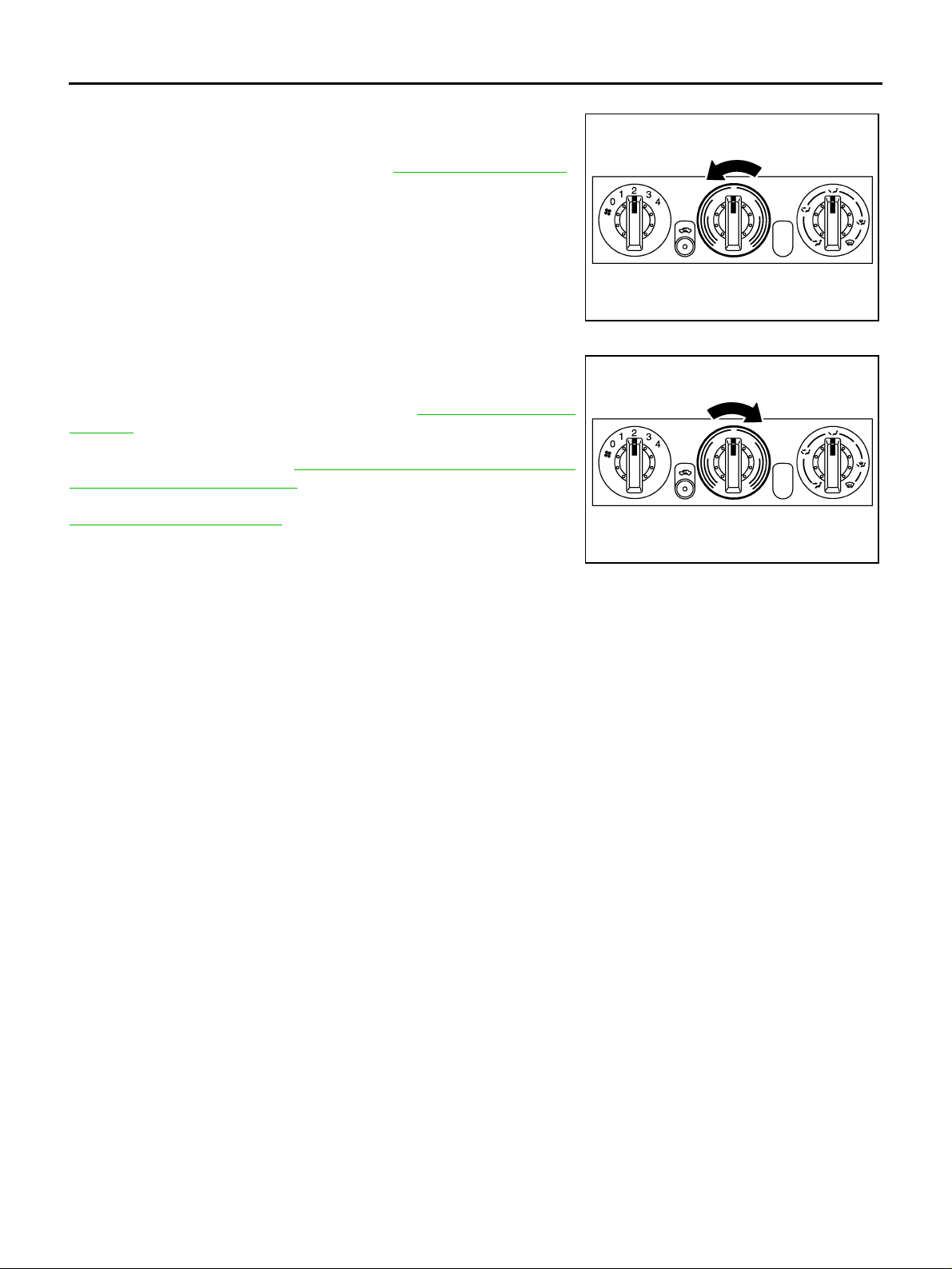
CHECKING TEMPERATURE DECREASE
1. Turn temperature cont rol di al to ful l co ld po si tion.
2. Check for cold air at discharge air outlets.
If NG, go to trouble diagnosis proced ure for MTC-10, "
If OK, continue the check.
CHECKING TEMPERATURE INCREASE
1. Turn temperature cont rol di al to ful l hot pos iti on .
2. Check for hot air at discharge air outlets.
If NG, go to trouble diagnosis procedure for MTC-19, "
Heating" .
If all operational check are OK (symptom cannot be duplicated), go
to Incident Si mul a ti on Tests in GI-23, "
nosis for an Ele ctr ic al Inci de nt" and perform te sts as outlin ed to si m-
ulate driving conditions environment. If symptom appears, refer to
MTC-3, "
SYMPTOM TABLE" and perfo rm ap plic able tr oub le di agno -
sis procedures.
How to Perform Efficient Diag-
Air Mix Door"
Insufficient
RJIA0590E
RJIA0591E
MTC-8
Page 9
TROUBLE DIAGNOSIS
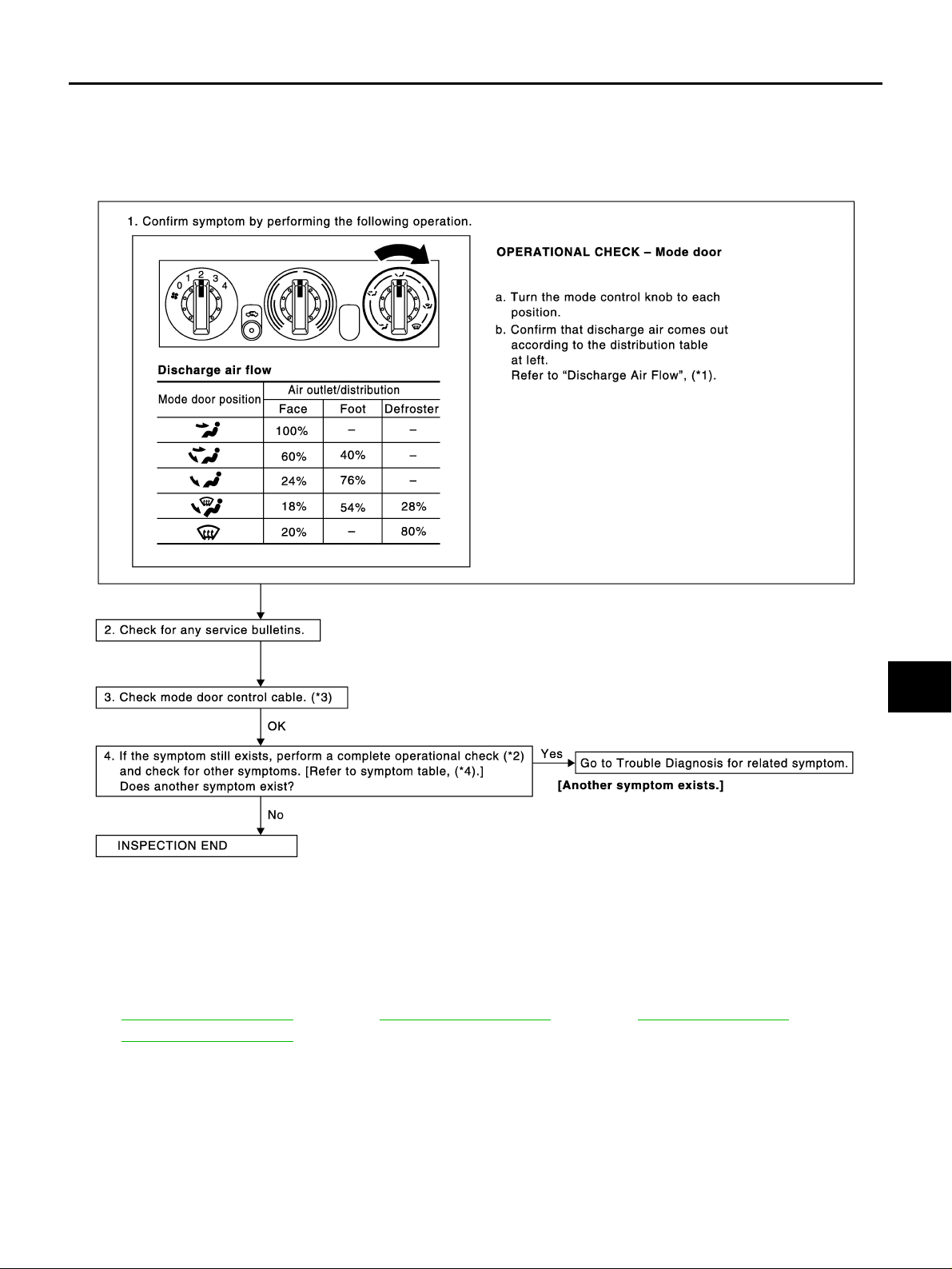
Mode Door EJS001FF
SYMPTOM: Air outlet does not change.
INSPECTION FLOW
A
B
C
D
E
F
G
*1 MTC-5, "Discharge Air Flow".*2MTC-7, "Operational Check".*3MTC-31, "MODE DOOR".
*4 MTC-3, "SYMPTOM TABLE".
H
I
MTC
K
L
M
RJIA0592E
MTC-9
Page 10
TROUBLE DIAGNOSIS
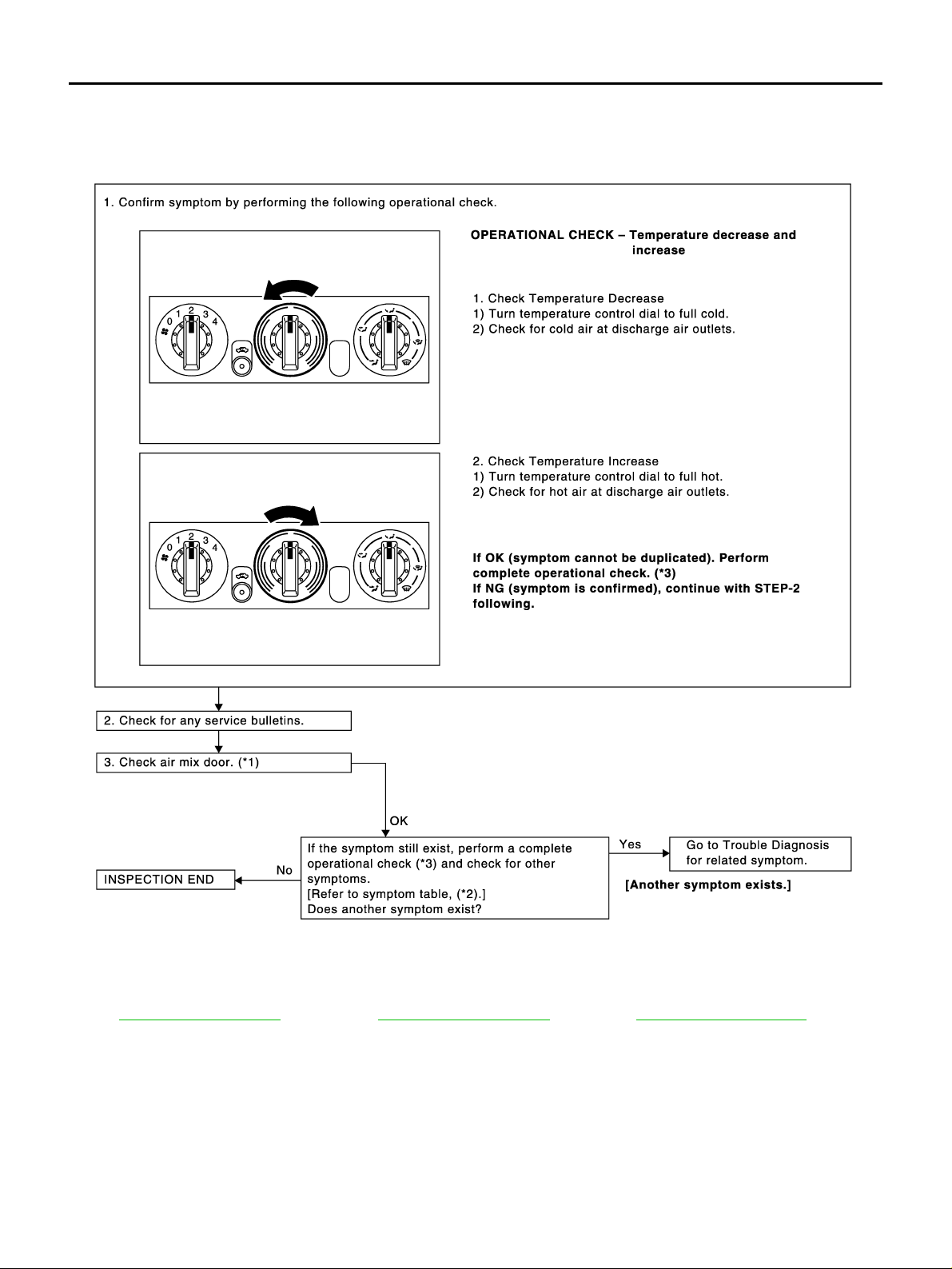
Air Mix Door EJS001FG
SYMPTOM: Air mix door does not change.
INSPECTION FLOW
*1 MTC-32, "AIR MIX DOOR".*2MTC-3, "SYMPTOM TABLE".*3MTC-7, "Operational Check".
MTC-10
RJIA0593E
Page 11
TROUBLE DIAGNOSIS
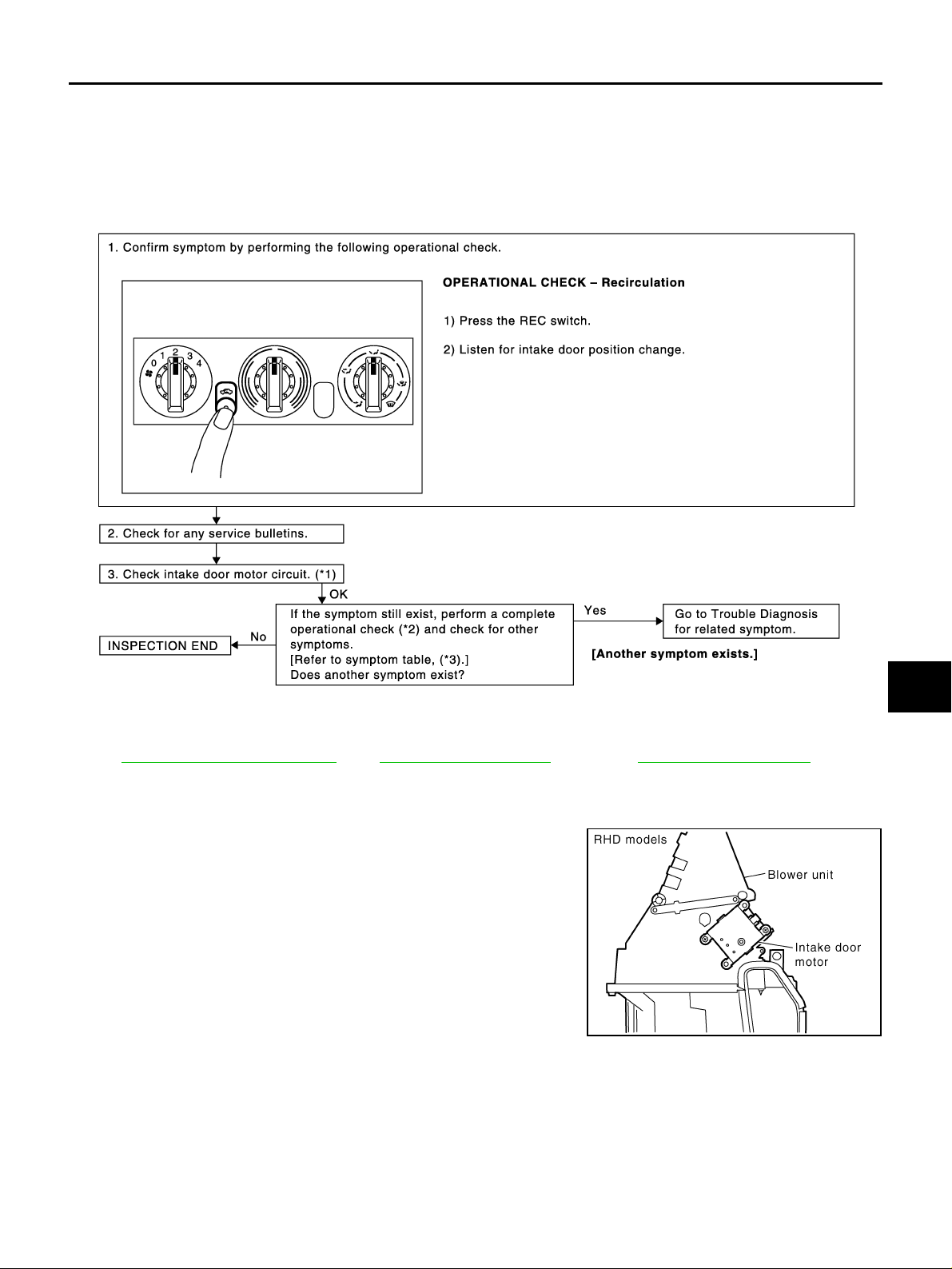
Intake Door Motor Circuit EJS004HC
SYMPTOM:
● Intake door does not change.
● Intake door mo tor does not operate normally.
INSPECTION FLOW
A
B
C
D
E
F
G
*1 MTC-11, "Intake Doo r Mo to r Circuit".*2MTC-7, "Operational Check".*3MTC-3, "SYMPTOM TABLE".
COMPONENT DESCRIPTION
Intake Door Motor
The intake door motor is attached to the intake unit. It rotates so that
air is drawn from inlets set by the heater control panel. Motor rotation
is conveyed to a lever which activates the intake door.
H
I
MTC
RJIA0594E
K
L
M
RJIA0519E
MTC-11
Page 12
TROUBLE DIAGNOSIS
DIAGNOSTIC PROCEDURE FOR INTAKE DOOR MOTOR
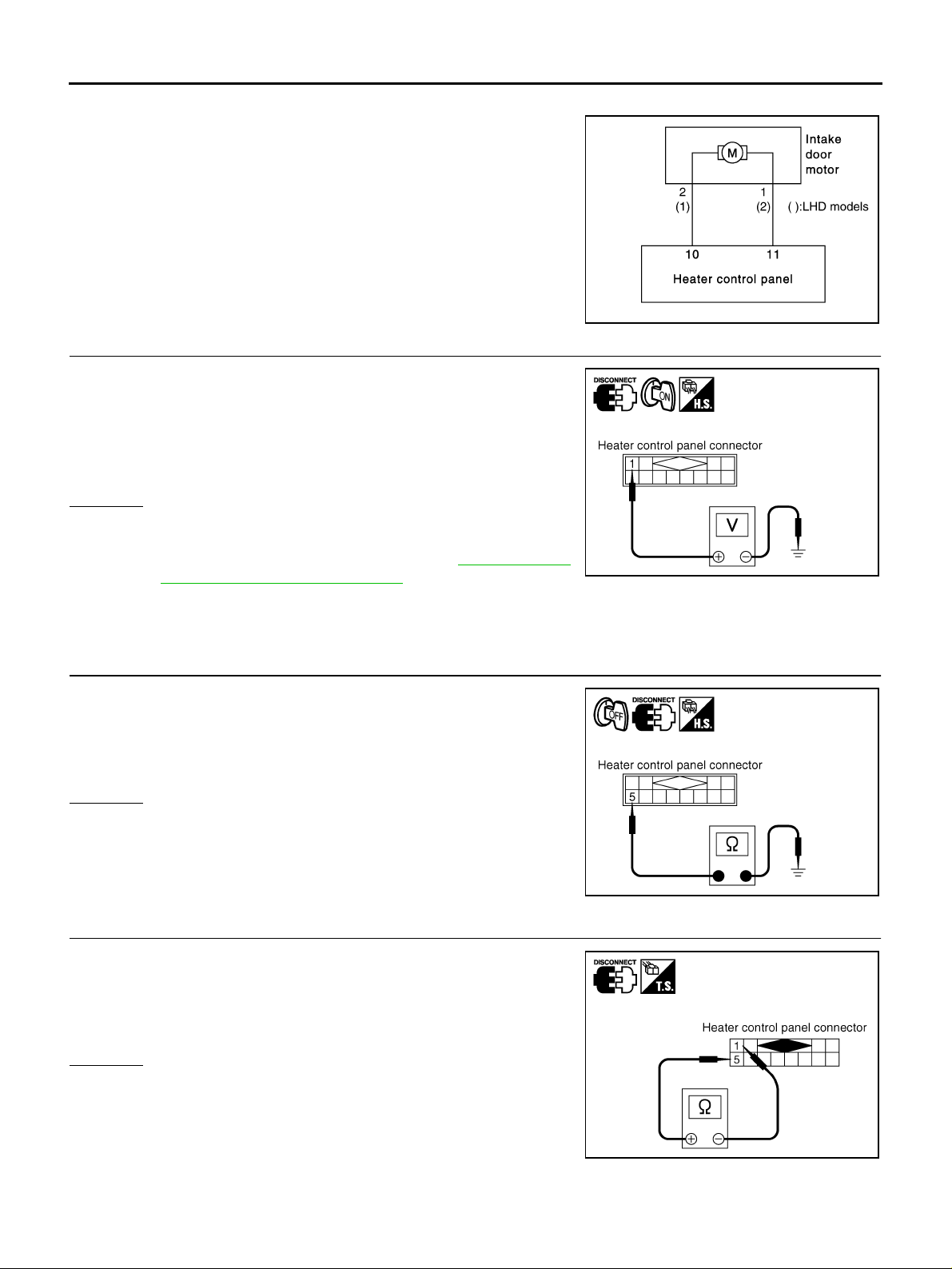
SYMPTO M: Intake door does not operate normally.
1. CHECK POWER SUPPLY FOR HEATER CONTROL PANEL
1. Disconnect heater control p anel connector.
2. Turn ignition switch ON.
3. Check voltage between heate r control pane l harness connect or
M55 terminal 1 (BR/Y) and ground.
1 – Ground : Battery voltage
OK or NG
OK >> GO TO 2.
NG >> Check power supply circ uit and 10 A fuse [N o. 15,
located in the fuse block (J/B)]. Refer to PG-79, "
BLOCK - JUNCTION BOX (J/B)" .
● If OK, check harness for open circuit. Repair or replace if necessary.
● If NG, replace fuse an d check harness for short circuit. Repair or r eplace if necessary.
FUSE
RJIA2846E
RJIA2923E
2. CHECK GROUND CIRCUIT FOR HEATER CONTROL PANEL
1. Turn ig nition switch OFF.
2. Check continuity betwee n hea ter contro l panel harne ss co nnec tor M55 terminal 5 (B) and gr ound.
5 – Ground : Continuity should exist.
OK or NG
OK >> GO TO 3.
NG >> Repair harness or connector.
3. CHECK RECIRCULATION SWITCH CIRCUIT
1. Press REC (recirculat ion) switch.
2. Check continuity betwee n hea ter contro l panel harne ss co nnec tor M55 terminal 1 (BR/Y) and 5 (B).
1 (−) – 5 (+) : Continuity should exist.
OK or NG
OK >> GO TO 4.
NG >> Replace heater control panel.
RJIA2924E
RJIA2925E
MTC-12
Page 13
TROUBLE DIAGNOSIS
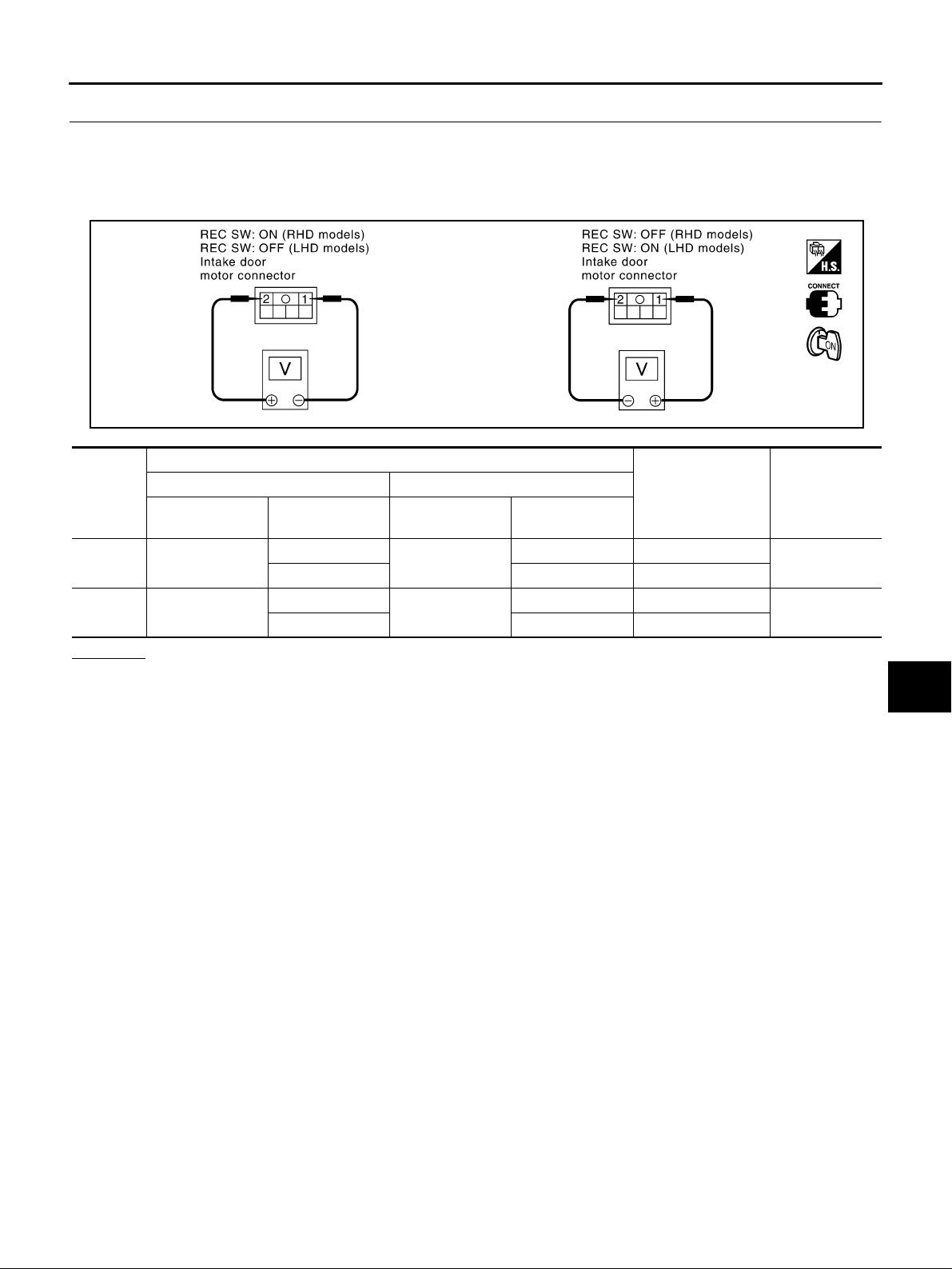
4. CHECK POWER SUPPLY FOR INTAKE DOOR MOTOR
1. Reconnect heater control panel connector.
2. Turn ignition switch ON.
3. Check voltage between intake door motor harness connector M48 terminal 1 (Y/R: RHD models, R/W:
LHD models) and 2 (R/W: RHD models, L/R: LHD models).
RJIA2847E
Terminals
Model
Intake door motor
connector
RHD
models
LHD
models
M48
M48
OK or NG
OK >> Replace intake door motor.
NG >> GO TO 5.
(+) (-)
Terminal No.
(wire color)
2 (R/W)
1 (Y/R) 2 (R/W) REC SW: OFF
1 (R/W)
2 (Y/R) 1 (R/W) REC SW: OFF
Intake door motor
connector
M48
M48
Terminal No.
(wire color)
1 (Y/R) REC SW: ON
2 (Y/R) REC SW: ON
Condition Voltage
Approx. 12V
Approx. 12V
A
B
C
D
E
F
G
H
I
MTC
K
M
L
MTC-13
Page 14
TROUBLE DIAGNOSIS
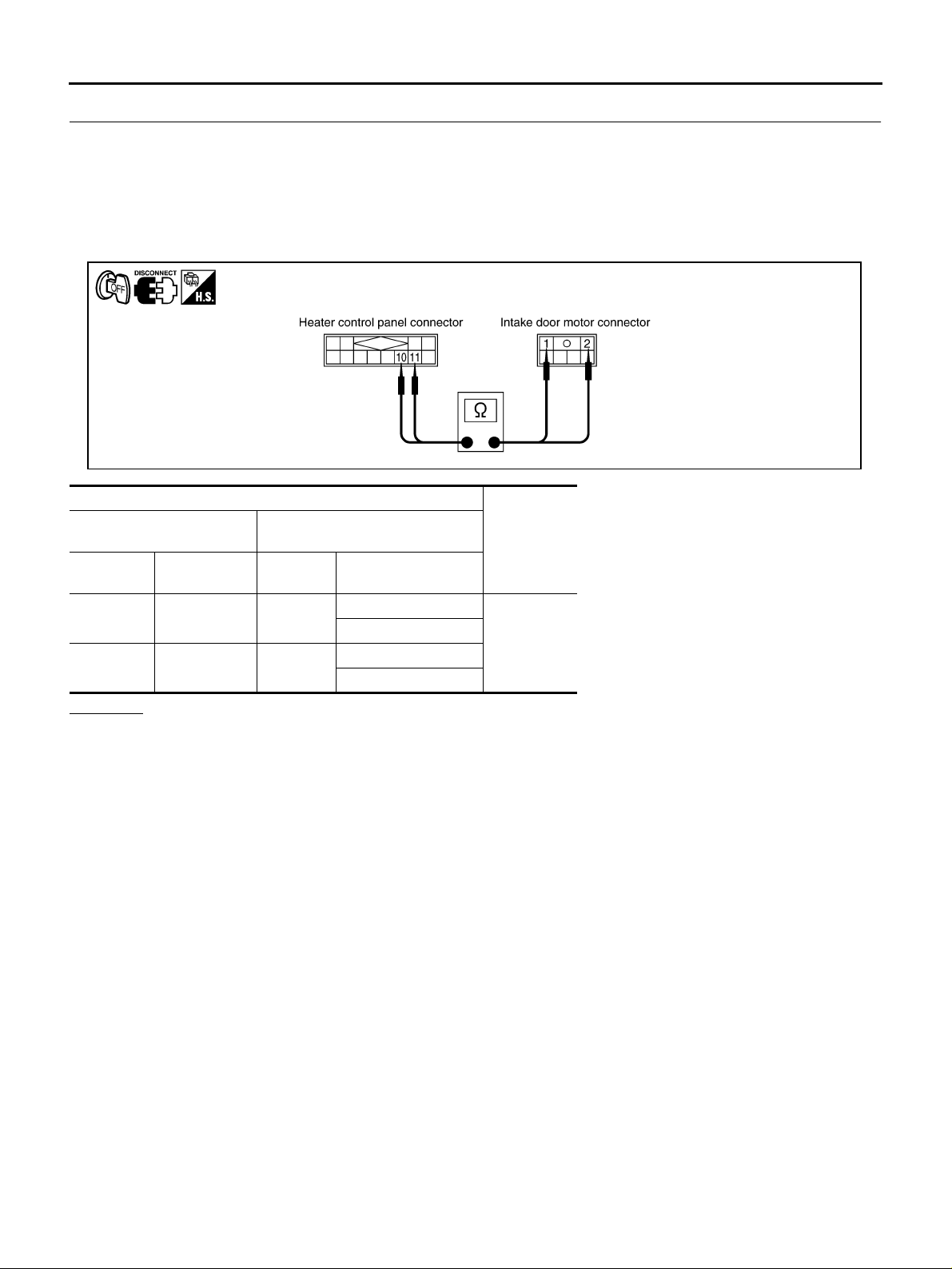
5. CHECK CIRCUIT CONTINUITY BETWEEN HEATER CONTROL PANEL AND INTAKE DOOR MOTOR
1. Turn ig nition switch OFF.
2. Disconnect heater control panel connector and intake door motor connect or.
3. Check continuity between heater control panel harness connector M55 terminal 10 (R/W) and intake door
motor harness connector M48 terminal 2 (R/W: RHD models) or 1 (R/W: LHD models).
4. Check continuity between heater control panel harness connector M55 terminal 11 (Y/R) and intake door
motor harness connector M48 terminal 1 (Y/R: RHD models) or 2 (Y/R: LHD models).
RJIA3145E
Terminals
Heater control panel connec-
tor
Connector
M55 10 (R/W) M48
M55 11 (Y/R) M48
Terminal No.
(wire color)
OK or NG
OK >> Replace heater control panel.
NG >> Repair harness or connector.
Intake door motor connector
Connector
Terminal No.
(wire color)
2 (R/W): RHD models
1 (R/W): LHD models
1 (Y/R): RHD models
2 (Y/R): LHD models
Continuity
Yes
MTC-14
Page 15
TROUBLE DIAGNOSIS
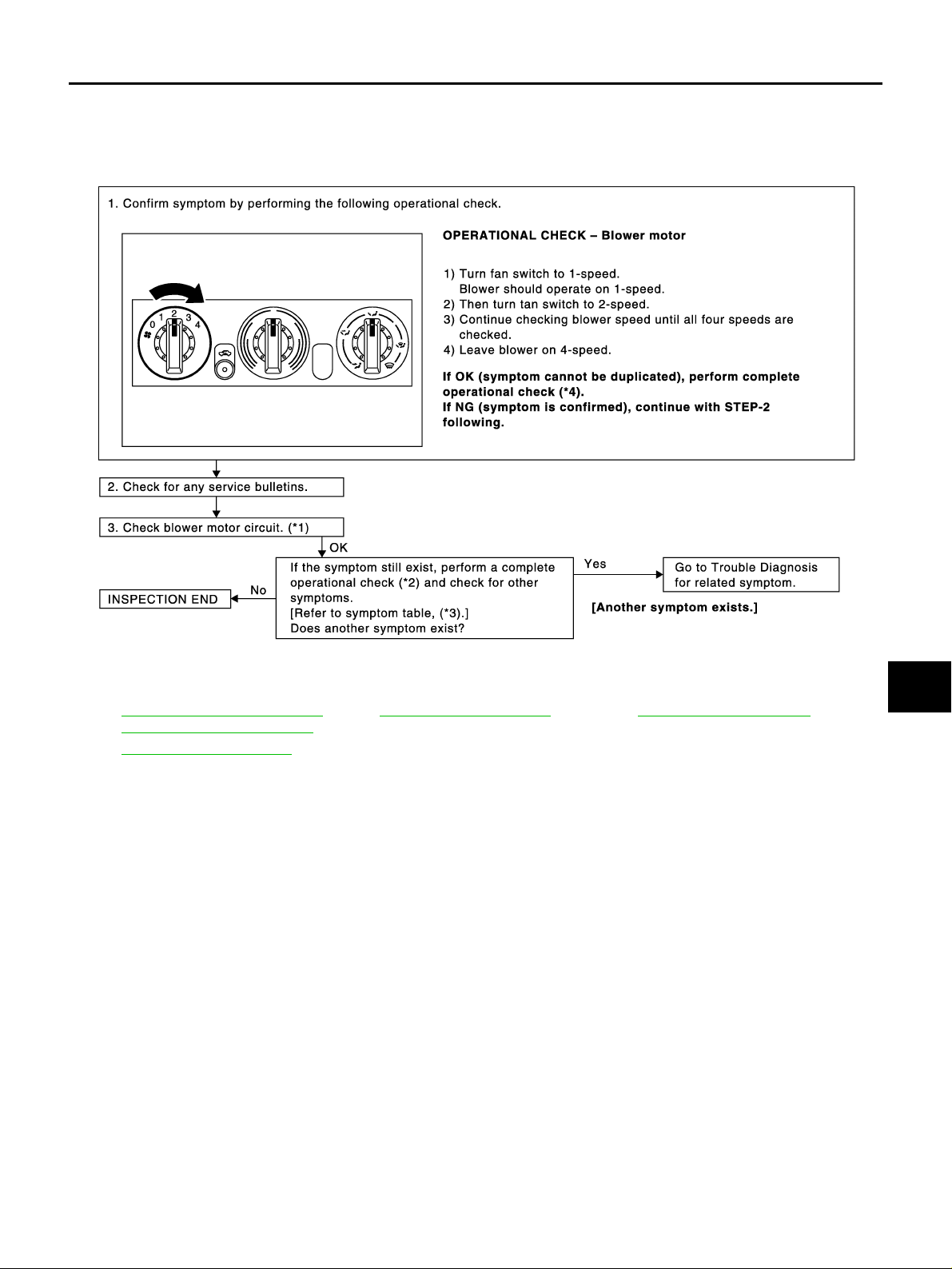
Blower Motor Circuit EJS001FI
SYMPTOM: Blower motor operation is malf un cti on in g.
INSPECTION FLOW
A
B
C
D
E
F
G
*1 MTC-16, "DIAGNOSTIC PROCE-
DURE FOR BLOWER MOTOR".
*4 MTC-7, "
Operational Check".
*2 MTC-7, "
Operational Check".*3MTC-3, " SYMPTOM TABLE".
RJIA0601E
H
I
MTC
K
L
M
MTC-15
Page 16
TROUBLE DIAGNOSIS
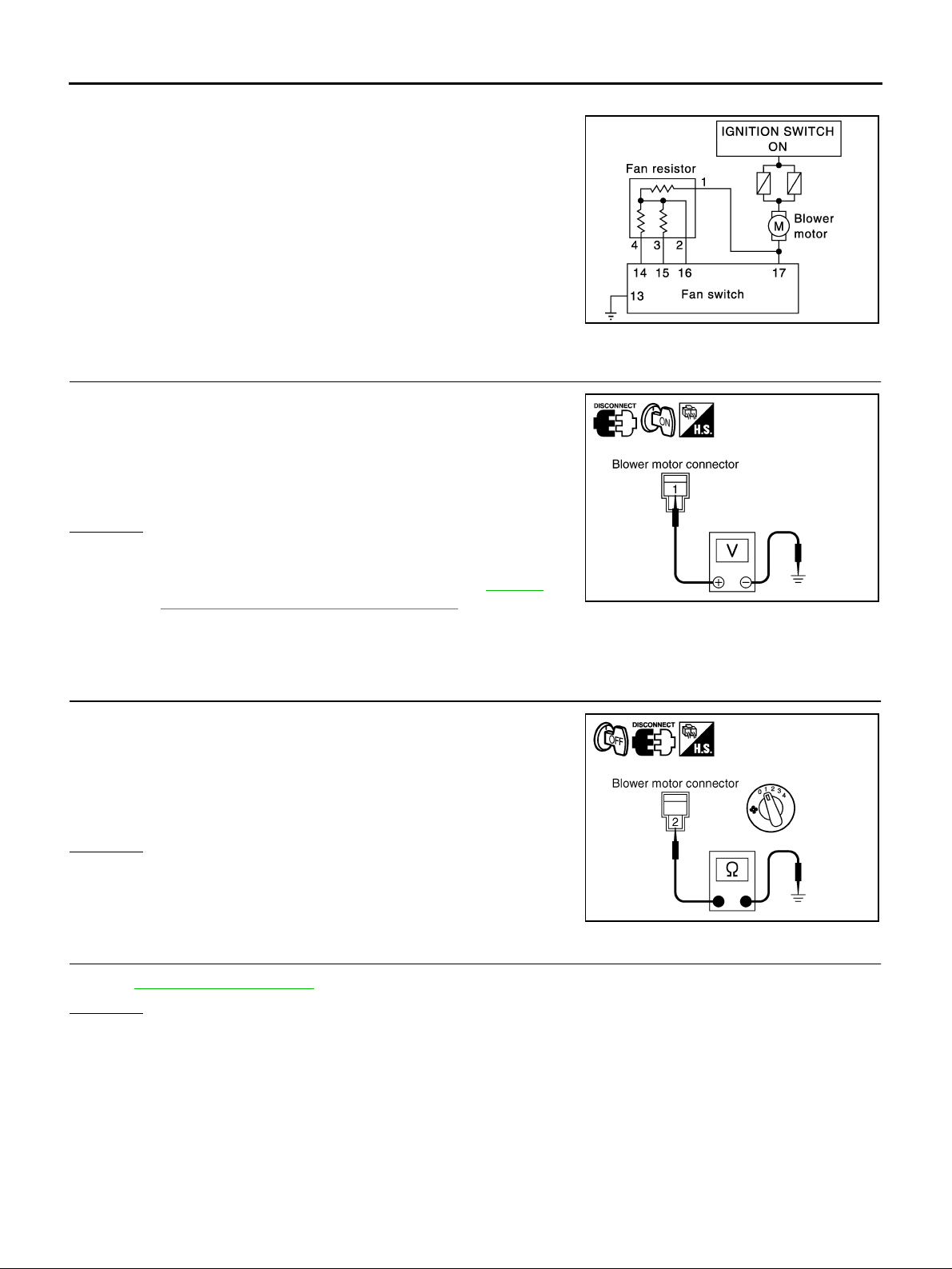
DIAGNOSTIC PROCEDURE FOR BLOWER MOTOR
SYMPTOM: Blower motor operation is malfunctioning.
1. CHECK POWER SUPPLY FOR BLOWER MOTOR
1. Disconnect blow er motor connector.
2. Turn ignition switch ON.
3. Check voltage between blower motor harness connector M65
terminal 1 (L/W) and ground.
1 – Ground : Battery voltage
RJIA0602E
OK or NG
OK >> GO TO 2.
NG >> Check power supply circuit and 15A fuses [No s. 19 and
24, located in the fuse block (J/B)]. Refer to PG-79,
"FUSE BLOCK - JUNCTION BOX (J/B)" .
● If OK, check harness for open circuit. Repair or replace if necessary.
● If NG, replace fuse an d check harness for short circuit. Repair or r eplace if necessary.
2. CHECK GROUND CIRCUIT FOR BLOWER MOTOR
1. Turn ig nition switch OFF.
2. Turn fan switch to 1-speed.
3. Check continuity between blower motor harness connector M65
terminal 2 (L/B) and ground.
2 – Ground : Continuity should exist.
OK or NG
OK >> GO TO 3.
NG >> GO TO 4.
3. CHECK BLOWER MOTOR
Refer to MTC-18, "
OK or NG
OK >> INSPECTION END
NG >> Replace blower motor.
Blower Motor" .
RJIA2929E
RJIA2930E
MTC-16
Page 17
TROUBLE DIAGNOSIS
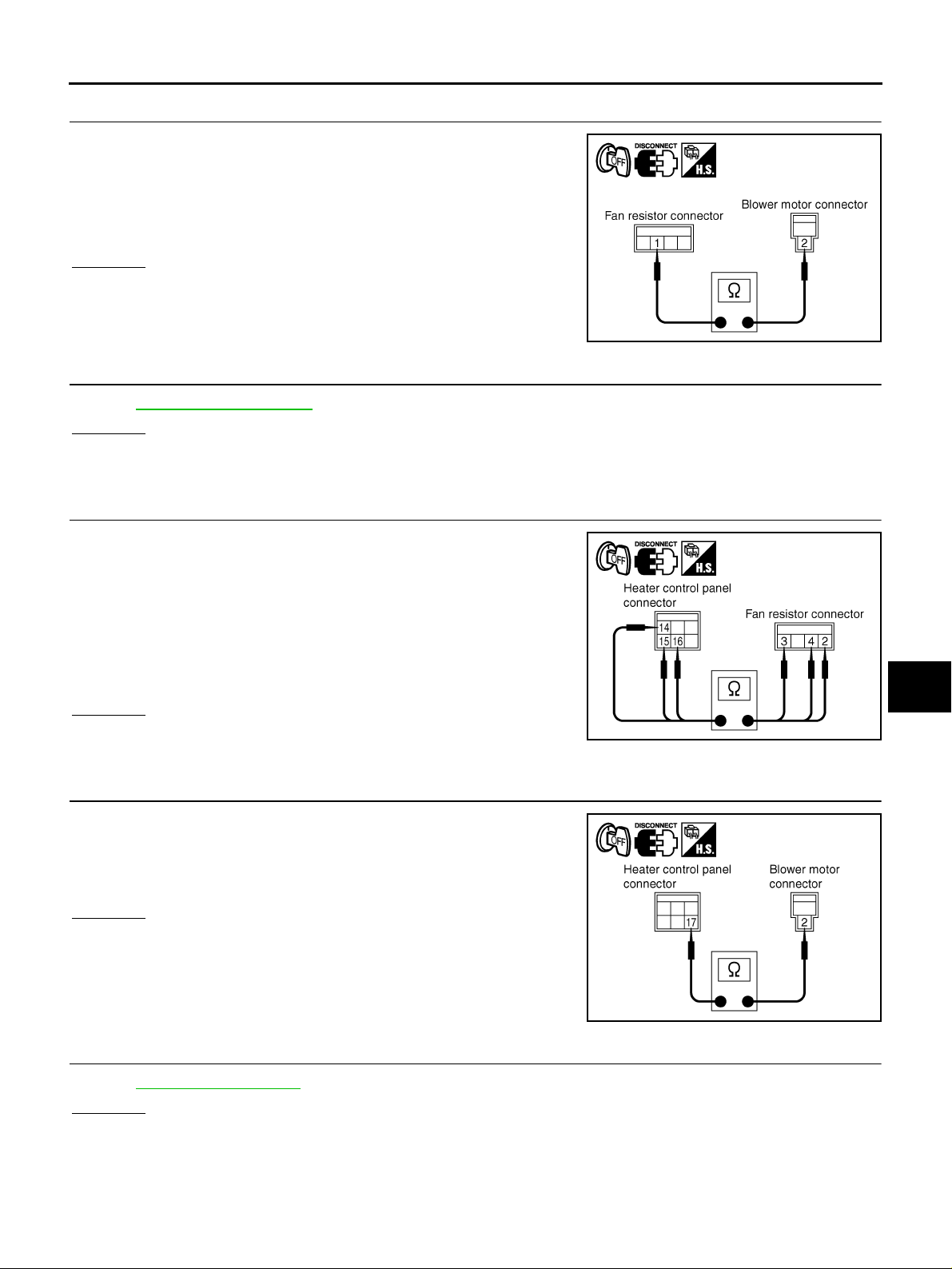
4. CHECK CIRCUIT CONTINUITY BETWEEN BLOWER MOTOR AND FAN RESISTOR
1. Disconnect fan resistor connector.
2. Check continuity between fan resistor harness connector M66
terminal 1 (L/B ) and bl ow e r mot o r har n es s con nec to r M6 5 t erm inal 2 (L/B).
1 – 2 : Continuity should exist.
OK or NG
OK >> GO TO 5.
NG >> Repair harness or connector.
5. CHECK FAN RESISTOR
Refer to MTC-18, "
OK or NG
OK >> GO TO 6.
NG >> Replace fan resistor.
Fan Resistor" .
6. CHECK CIRCUIT CONTINUITY BETWEEN FAN RESISTOR AND HEATER CONTROL PANEL
1. Disconnect heate r control panel connector.
2. Check continuity between fan resistor harness connector M66
terminal 2 (L/R), 3 (L/Y) or 4 (L/W) and heater control panel harness connector M54 terminal 14 (L/W), 15 (L/Y) or 16 (L/R).
2 – 16 : Continuity should exist.
3 – 15 : Continuity should exist.
4 – 14 : Continuity should exist.
OK or NG
OK >> GO TO 7.
NG >> Repair harness or connector.
A
B
C
D
RJIA2931E
E
F
G
H
I
MTC
RJIA2932E
K
7. CHECK CIRCUIT CONTINUITY BETWEEN BLOWER MOTOR AND HEATER CONTROL PANEL
Check continuity between blower motor harness connector M65 terminal 2 (L/B) and heater control panel harness connector M54 terminal 17 (L/B).
2 – 17 : Continuity should exist.
OK or NG
OK >> GO TO 8.
NG >> Repair harness or connector.
RJIA2933E
8. CHECK FAN SWITCH
Refer to MTC-18, "
OK or NG
OK >> GO TO 9.
NG >> Replace fan switch.
Fan Switch" .
MTC-17
L
M
Page 18
TROUBLE DIAGNOSIS
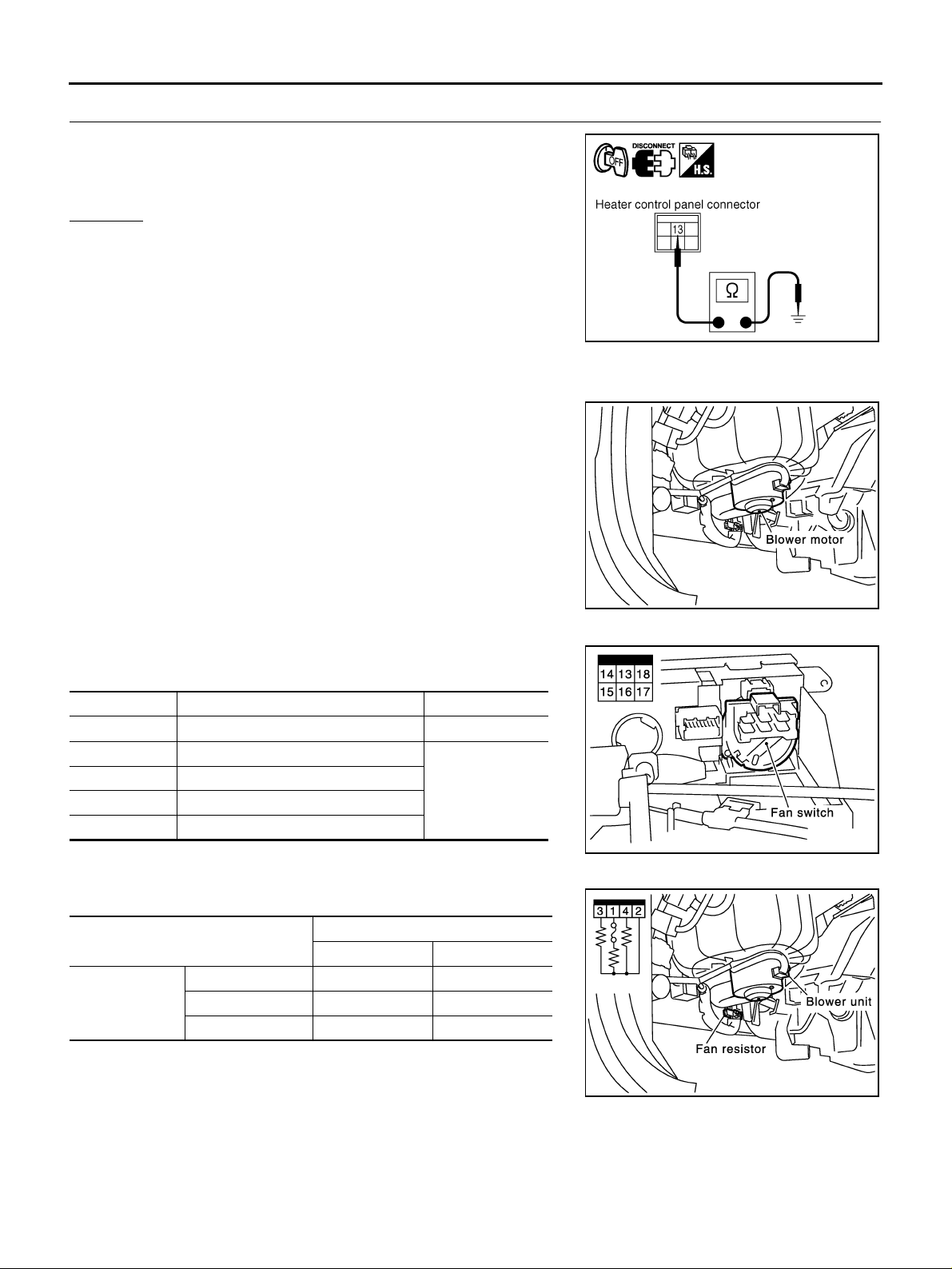
9. CHECK GROUND CIRCUIT
Check continuity between heater control panel harness connector
M54 terminal 13 (B) and ground.
13 – Ground : Continuity should exist.
OK or NG
OK >> INSPECTION END
NG >> Repair harness or connector.
COMPONENT INSPECTION
Blower Motor
Confirm smooth rotation of the blower motor.
● Ensure that there are no foreign parti c les inside the intake unit.
RJIA2934E
Fan Switch
Check continu i t y b et w ee n h eater control co nn ec tor M54 terminal s a t
each switch position.
Switch position Terminals Continuity
OFF 13 - 14, 15, 16, 17 No
1 13 - 14
2 13 - 15
3 13 - 16
4 13 - 17
Yes
Fan Resistor
Check resistance between fan resister connector M66 terminals .
Resistance (Ω)
LHD RHD
1
Terminals
2 0.25 - 0.31 0.28 - 0.34
3 0.58 - 0.70 0.79 - 0.97
4 1.33 - 1.63 1.84 - 2.24
RJIA0609E
RJIA0610E
RJIA0611E
MTC-18
Page 19
TROUBLE DIAGNOSIS
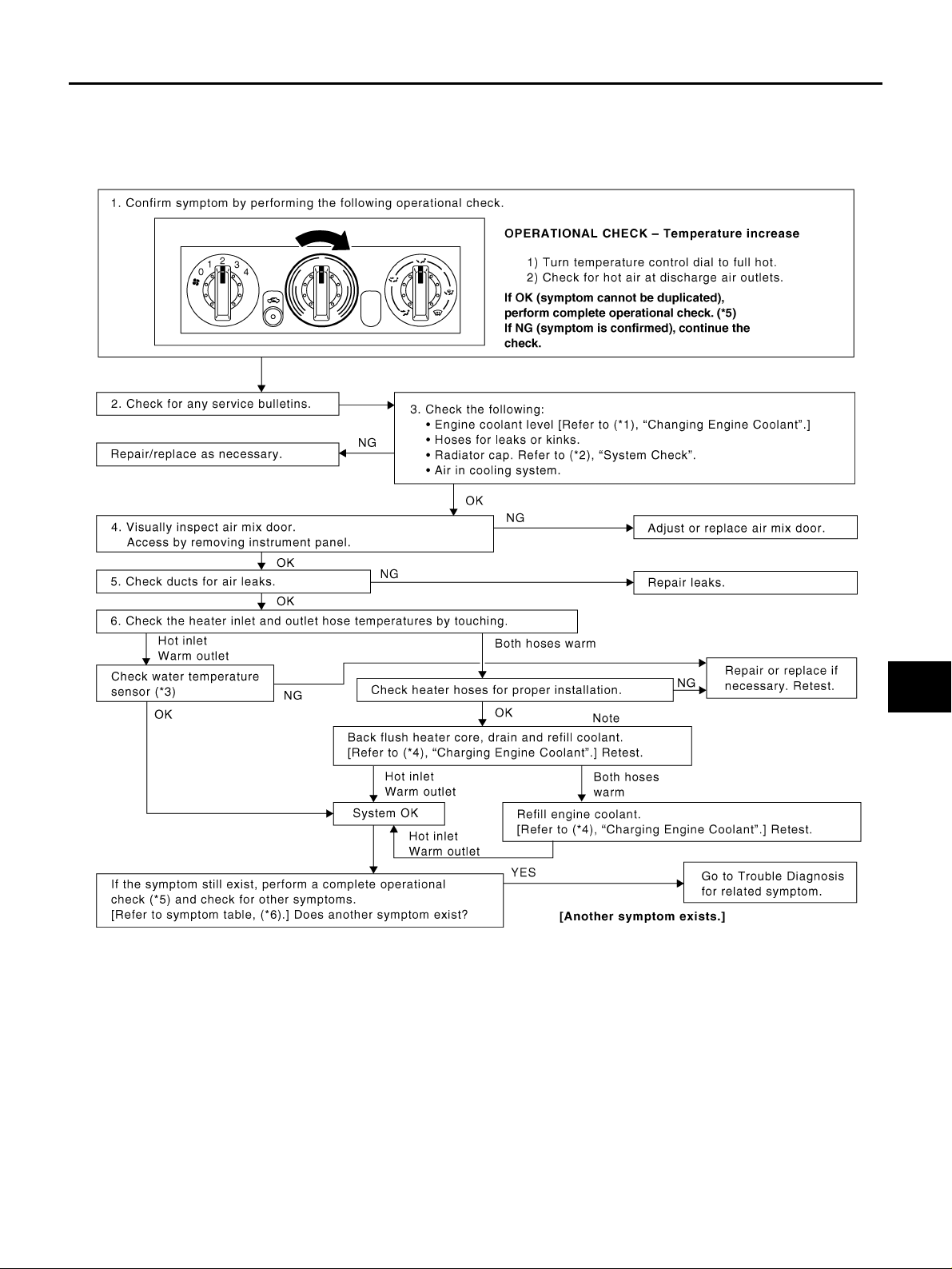
Insufficient Heating EJS001FJ
SYMPTOM: Insufficient heating
INSPECTION FLOW
A
B
C
D
E
F
G
SJIA0482E
H
I
MTC
K
L
M
MTC-19
Page 20

TROUBLE DIAGNOSIS
*1 QR engine; CO-9, "Changing Engine
Coolant" or YD engine; CO-32,
"Changing Engine Coolant" .
*4 QR engine; CO-9, "
Coolant" or YD engine; CO-32,
"Changing Engine Coolant" .
Changing Engine
*2 QR engine; CO-13, "
ator Cap" or YD engine; CO-36,
"Checking Radiator Ca p" .
*5 MTC-7, "
Operational Check" .*6MTC-3, "SYMPTOM TABLE".
Checking Radi-
*3 QR engine; (WITH EURO-OBD) EC-
165, "DTC P0117, P0118 ECT SENSOR" .
QR engine; (WITHOUT EURO-OBD)
EC-652, "DTC P0117, P0118 ECT
SENSOR" .
YD engine; (WITH EURO-OBD) EC-
1093, "DTC P0117, P0118 ECT
SENSOR" .
YD engine; (WITHOUT EURO-OBD)
EC-1449, "DTC P0117, P0118 ECT
SENSOR" .
MTC-20
Page 21
CONTROLLER
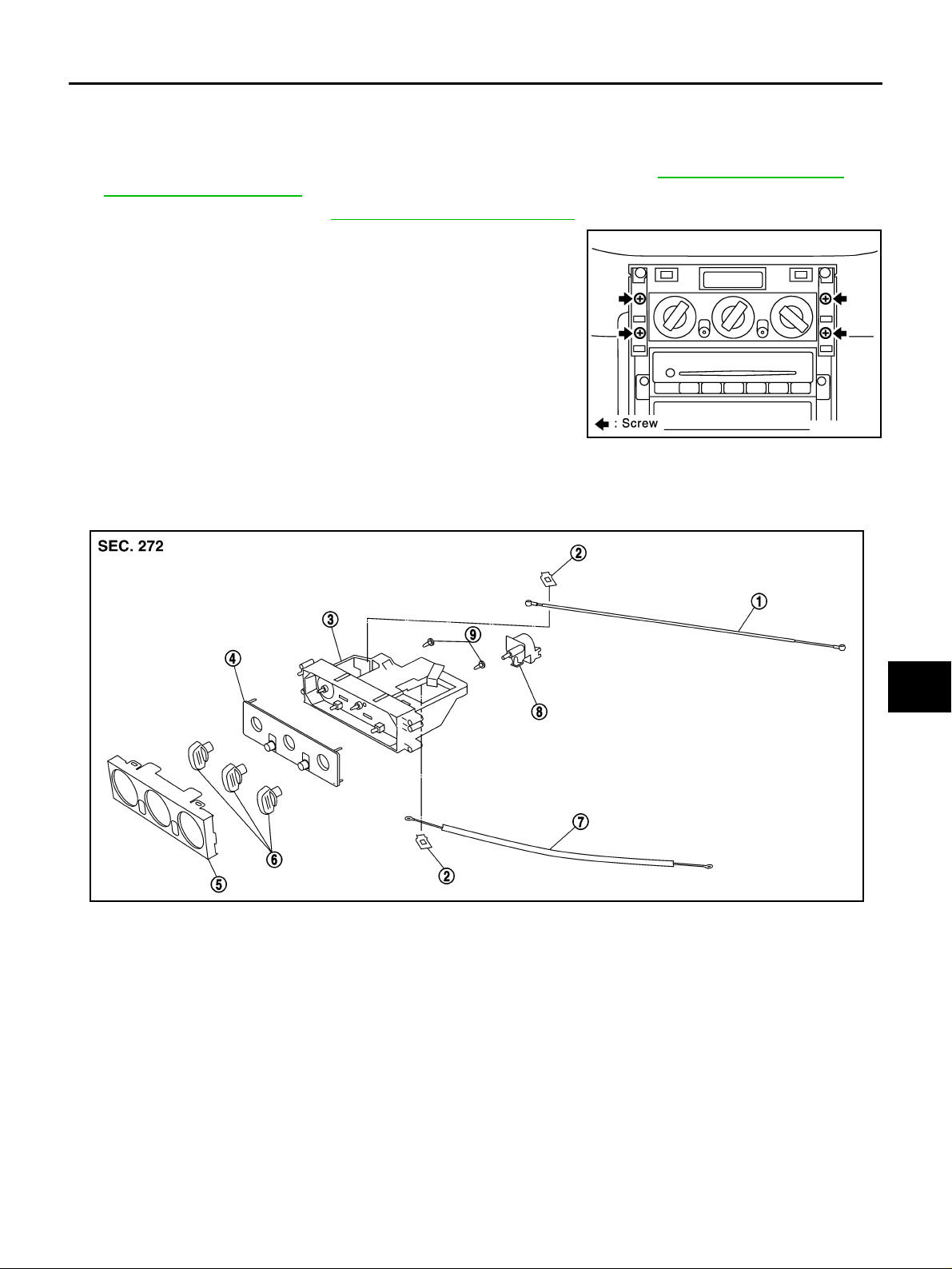
CONTROLLER PFP:27500
Removal and Installation EJS004HA
REMOVAL
1. Remove mode door cable and air mix door cable from heater unit. Refer to MTC-31, "MODE DOOR" and
MTC-32, "
2. Remove cluster lid C. Refer to IP-11, "
3. Remove mounting screws from heater control panel.
4. Remove heater control panel, and then remove heater control
panel connector.
AIR MIX DOOR" .
Removal and Installation" .
A
B
C
D
E
RJIA0089E
INSTALLATION
Installation is basically the reverse order of removal.
Disassembly and Assembly EJS004HB
RJIA3153E
1. Mode door cable 2. Clamp 3. Case assembly
4. Heater panel 5. Finisher 6. Dial
7. Air mix door cable 8. Fan switch 9. Bulb
F
G
H
I
MTC
K
L
M
MTC-21
Page 22
BLOWER UNIT
BLOWER UNIT PFP:27200 Removal and Installation EJS004YB
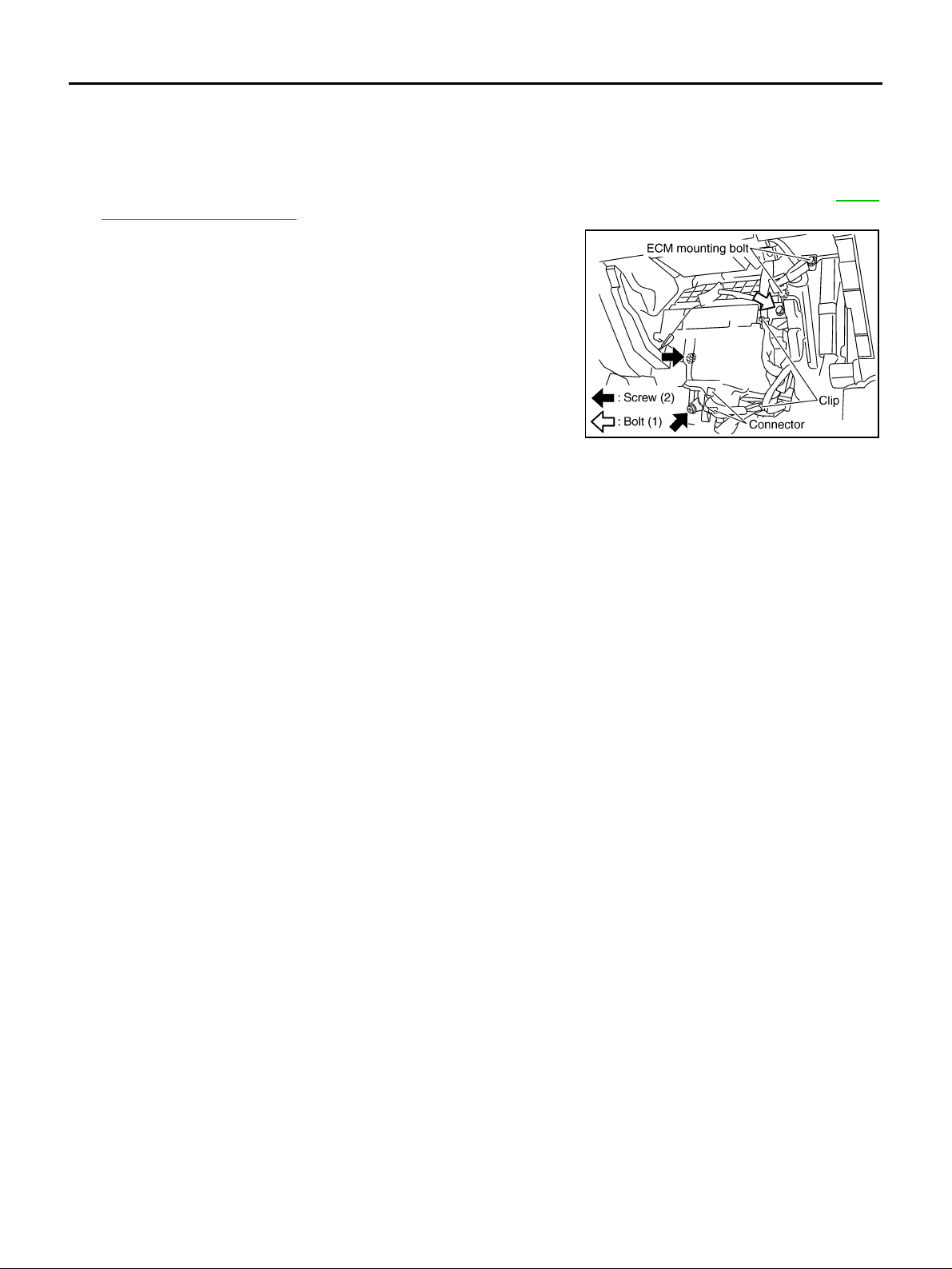
REMOVAL
1. Remove glove box assembly.
2. Remove glove box cover, instrument passenger lower panel and instrument reinforcement. Refer to IP-11,
"Removal and Installation" .
3. Remove ECM with ECM bracket attached.
4. Remove instrument panel mounting screw.
5. Remove blower unit mounting bolt and screw.
6. Disconnect blow er motor connector and fan resistor connector.
7. Disconnect intake door motor connector and harness clips.
8. Remove blower unit.
CAUTION:
Slide the blower unit toward the right, remove location pin s
(2 pieces), then move it downward.
RJIA3161E
INSTALLATION
Installation is basically the reverse order of removal.
CAUTION:
● Make sure location pins (2 pieces) are securely installed.
MTC-22
Page 23
BLOWER UNIT
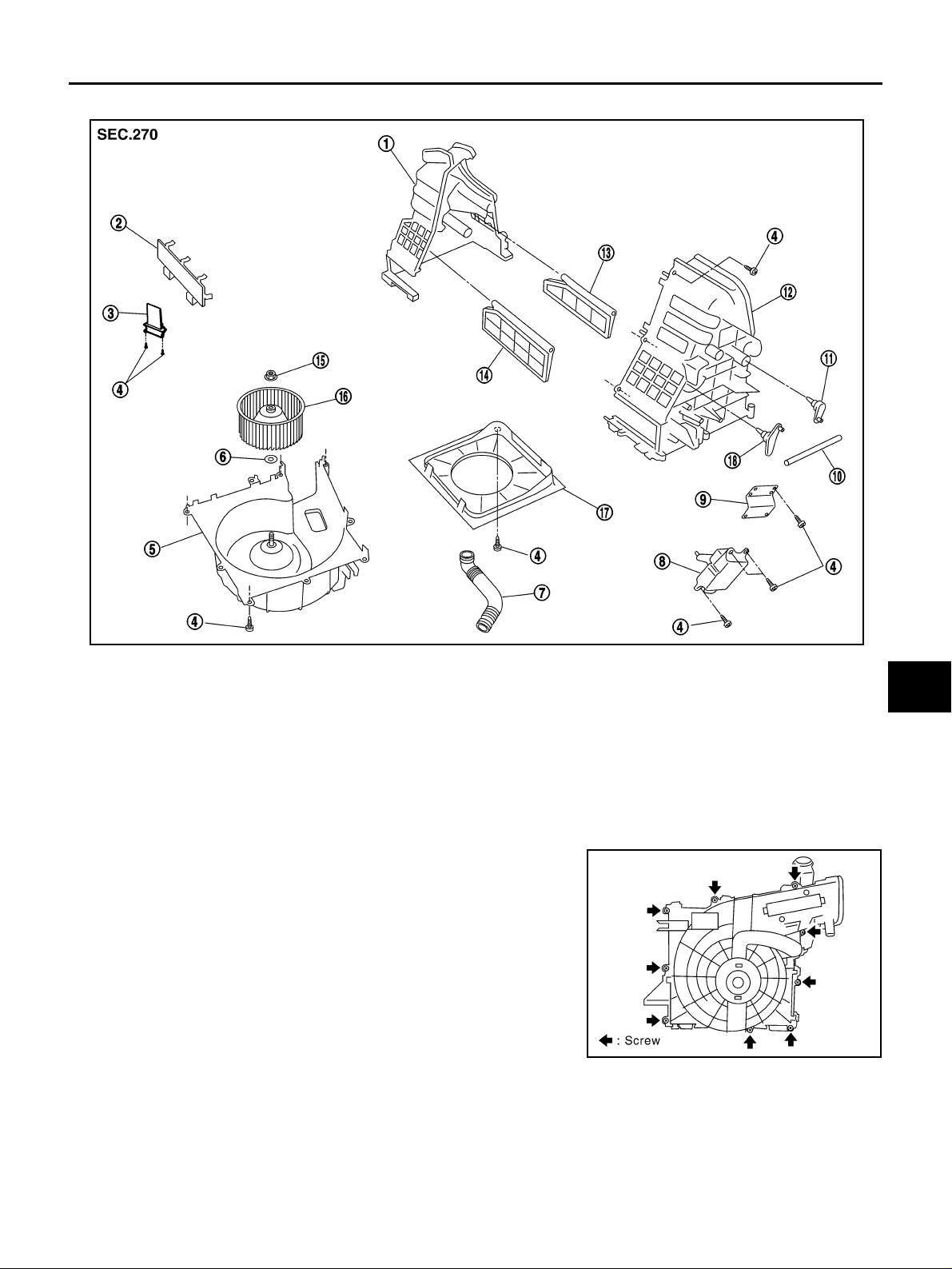
Disassembly and Assembly EJS004YC
A
B
C
D
E
F
G
1. Upper case 2 2. Filter cover 3. Fan resistor
4. Screw 5. Blower fan motor assembly 6. Washer
7. Cooling hose 8. Intake door motor 9. Motor bracket
10. Intake door link 11. Intake door lever 2 12. Upper case 1
13. Intake door 2 14. Intake door 1 15. Nut
16. Blower fan 17. Bell mouth 18. Intake door lever 1
NOTE:
This illustration is for LHD models. The layout for RHD models is symmetrically opposite.
CAUTION:
If retaining tabs are damaged whi le disassembling blower unit,
use 9 screws (27111-2Y000) to assemble blower unit.
SJIA0483E
H
I
MTC
K
L
M
RJIA3155E
MTC-23
Page 24
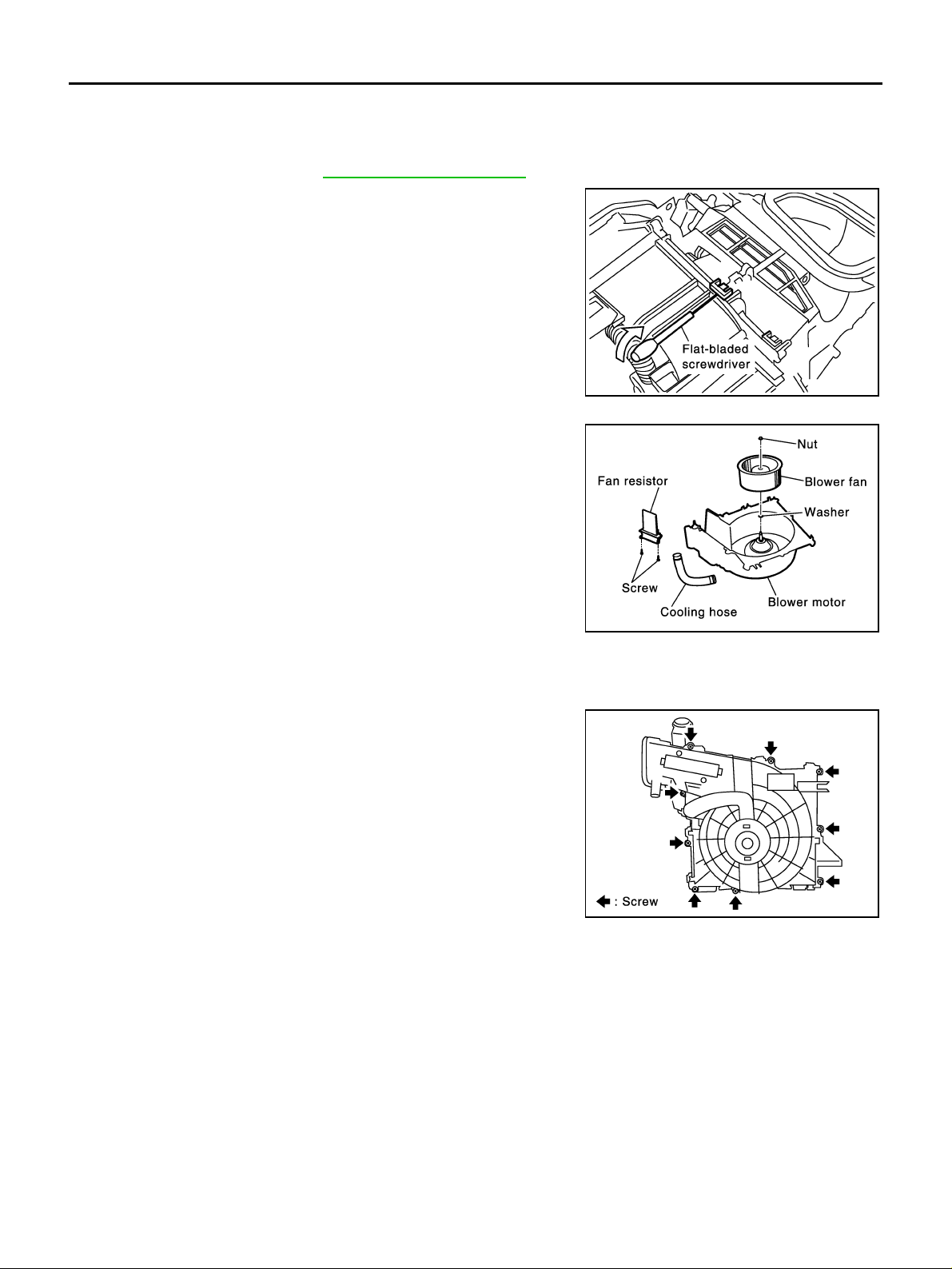
BLOWER MOTOR
BLOWER MOTOR PFP:27226 Removal and Installation EJS004HD
REMOVAL
1. Remove blower unit. Refer to ATC-125, "BLOWER UNIT" .
2. Separate blower unit.
RJIA0054E
3. Remove cooling hose, fan resistor and blower fan.
INSTALLATION
Installation is basically the reverse order of removal.
CAUTION:
If retaining tabs are damaged wh ile disassemblin g blower unit,
use 9 screws (27111-2Y000) to assemble blower unit.
RJIA0092E
RJIA0097E
MTC-24
Page 25
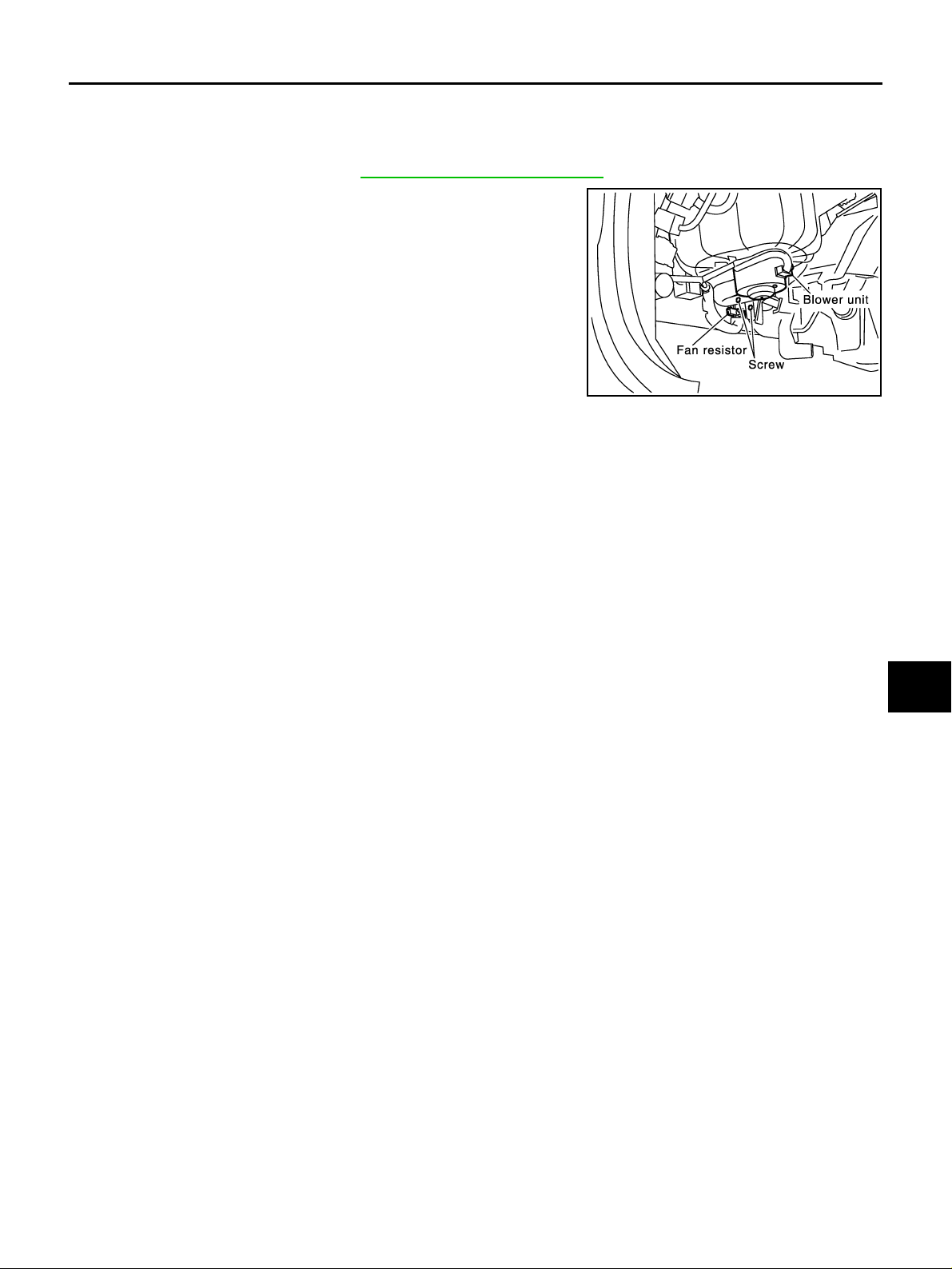
BLOWER FAN RESISTOR
BLOWER FAN RESISTOR PFP:27150
Removal and Installation EJS004HE
REMOVAL
1. Remo ve glove box cover. Refer to IP-11, "Removal and Ins tallat ion" .
2. Remove mounting screws, and then remove fan resistor.
CAUTION:
Do not repair the thermal fuse of the fan resistor.
RJIA0093E
INSTALLATION
Installation is basically the reverse order of removal.
A
B
C
D
E
F
G
H
I
MTC
K
L
M
MTC-25
Page 26
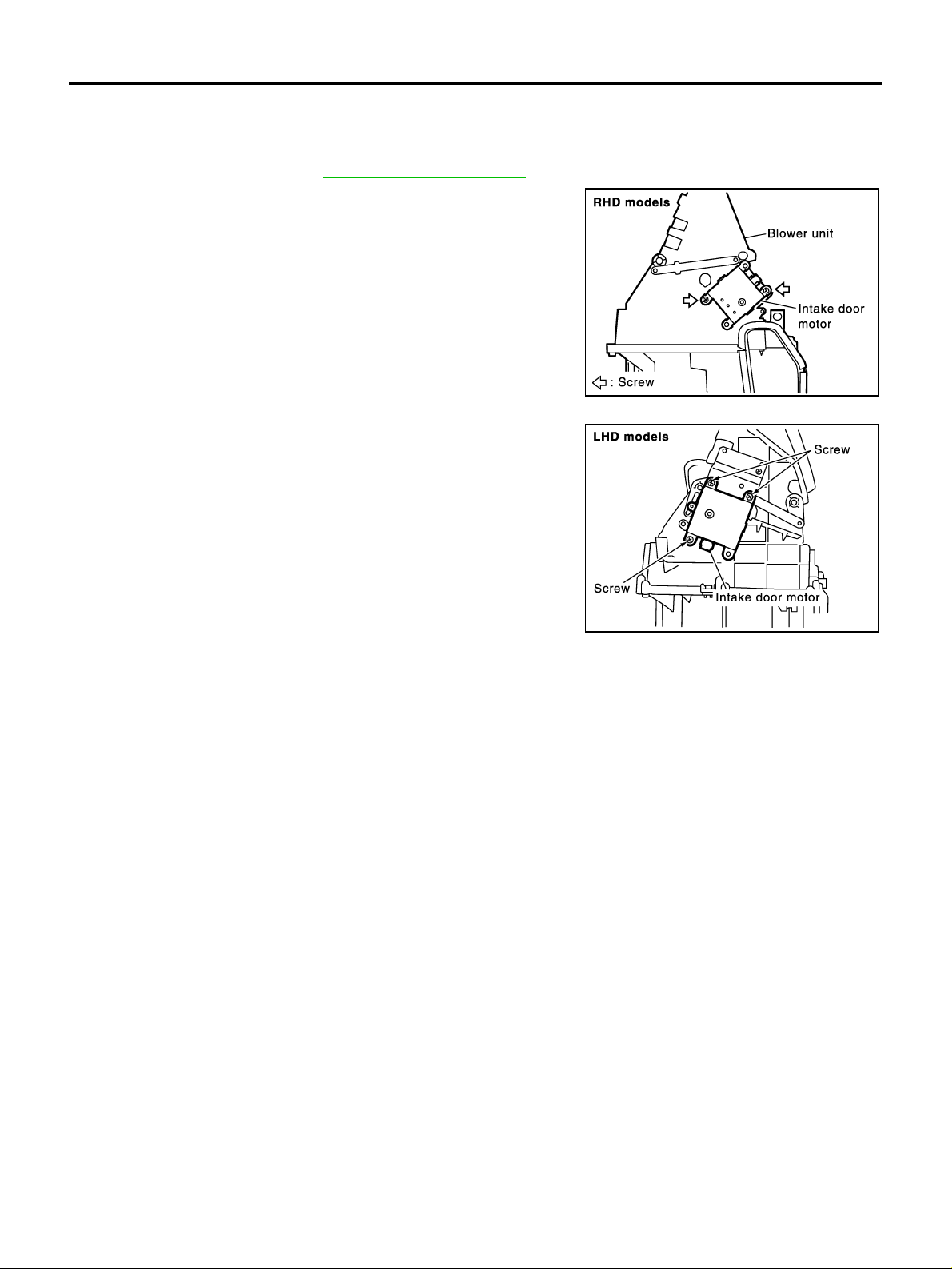
INTAKE DOOR MOTOR
INTAKE DOOR MOTOR PFP:27730 Removal and Installation EJS004HG
REMOVAL
1. Remove blower unit. Refer to ATC-125, "BLOWER UNIT" .
2. Remove mounting screws, and th en remove intake door motor
from blower unit.
RJIA0056E
INSTALLATION
Installation is basically the reverse order of removal.
RJIA0571E
MTC-26
Page 27
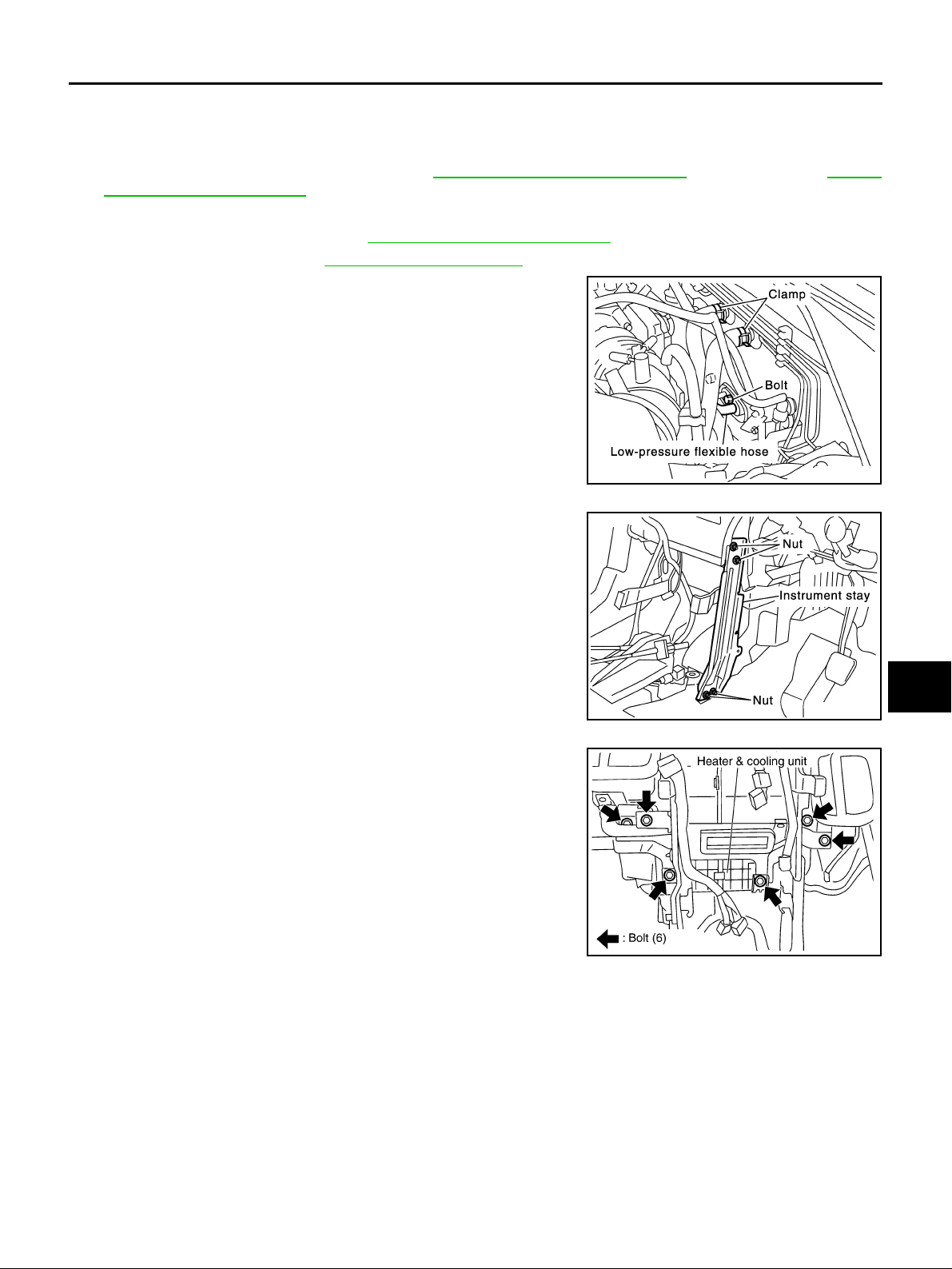
HEATER UNIT
HEATER UNIT PFP:27100
Removal and Installation EJS001F9
REMOVAL
1. Drain coolant from cooling system. Refer to CO-9, "Changing En gine C oolant" for QR engine or CO-32,
"Changing Engine Coolant" for YD engine.
2. Disconnect two heater hoses from heater core pipe.
3. Remove instrument panel. Refer to IP-11, "
4. Remove blower unit. Refer to MTC-22, "
5. Remove clips of vehicle harness from steering member.
6. Remove mounting nuts, and then remove instrument stay.
Removal and Installation" .
BLOWER UNIT" .
RJIA0060E
A
B
C
D
E
F
G
7. Remove mounting bolts from heater (& cooling) unit.
H
I
MTC
RJIA0061E
K
L
M
RJIA2444E
MTC-27
Page 28
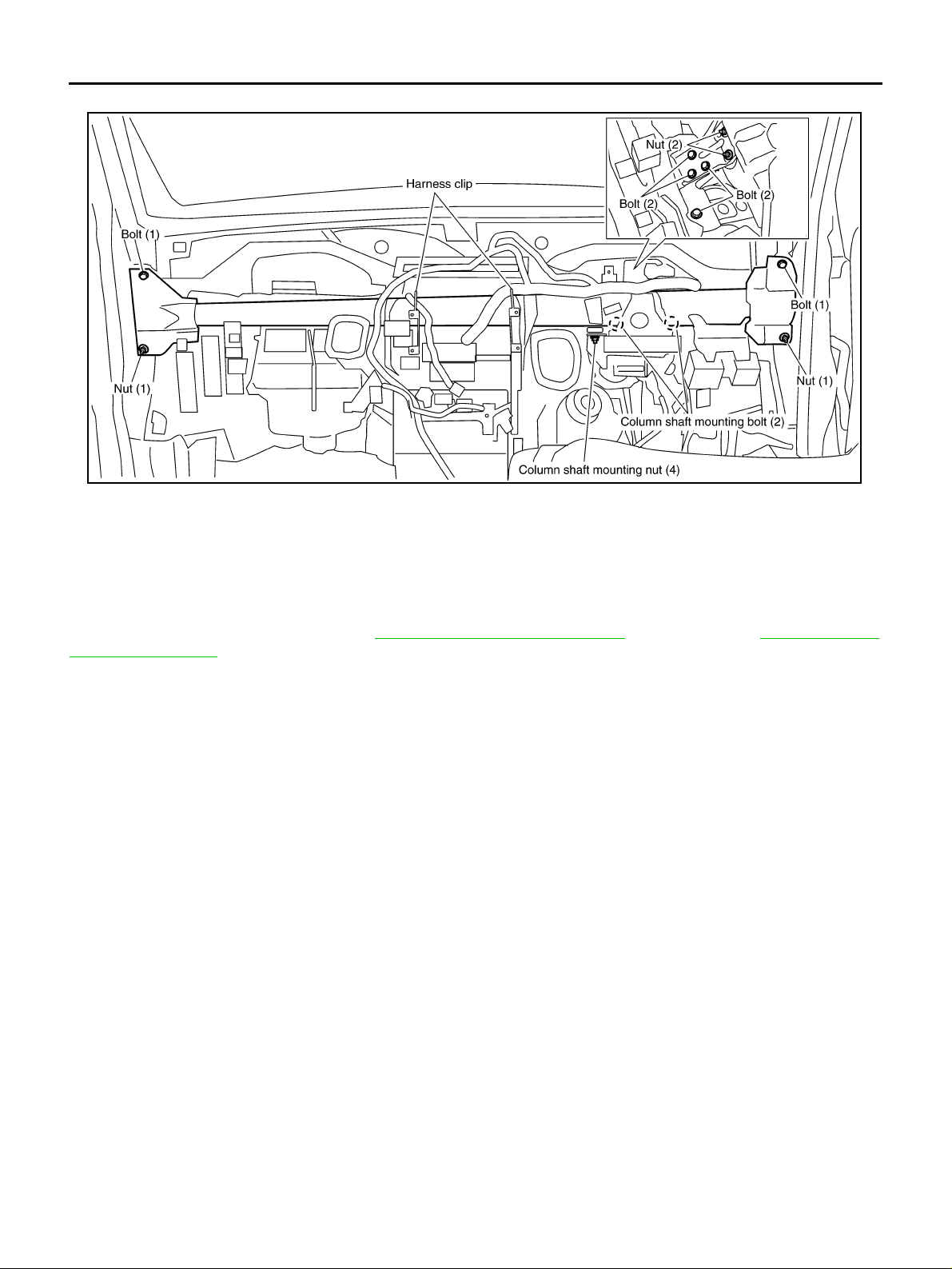
HEATER UNIT
8. Remove steering member .
NOTE:
This illustration is for RHD models. The layout for LHD models is symmetrically opposite.
9. Remove heater unit.
RJIA2404E
INSTALLATION
Installation is basically the reverse order of removal.
NOTE:
When filling radiator with coolant, refer to CO-9, "
ing Engine Coolant" for YD engine.
Changing Engine Coolant" for QR engine or CO-32, "Chang-
MTC-28
Page 29
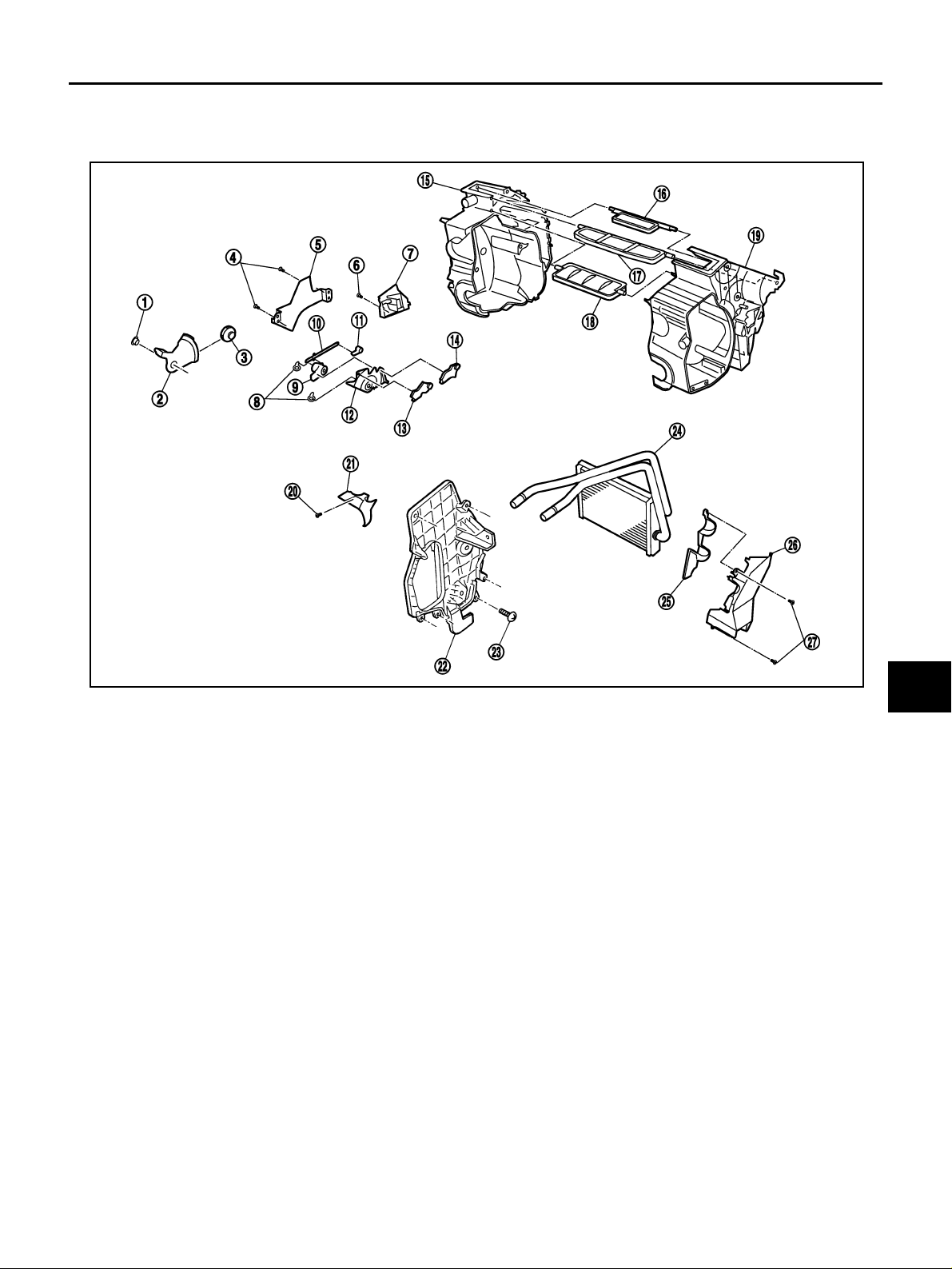
HEATER UNIT
Disassembly and Assembly EJS001FA
NOTE:
This illustration is for RHD models. The layout for LHD models is symmetrically opposite.
A
B
C
D
E
F
G
1. Screw 2. Air mix door link 3. Air mix door gear
4. Screw 5. Cable bracket 6. Screw
7. Foot duct (right side) 8. Screw 9. Ventilator door link 2
10. Ventilator door link 2 11. Ventilator door lever 12. Main link
13. Max. cool door lever 14. Defrost er d oor leve r 15. Heater case (right side)
16. Defroster door 17. Ventilator door 18. Max. cool door
19. Heater case (left side) 20. Screw 21. Heater pipe suppor t
22. Evaporator cover 23. Screw 24. Heater core
25. Heater core cover 26. Foot duct (left side) 27. Screw
RJIA0613E
H
I
MTC
K
L
M
MTC-29
Page 30
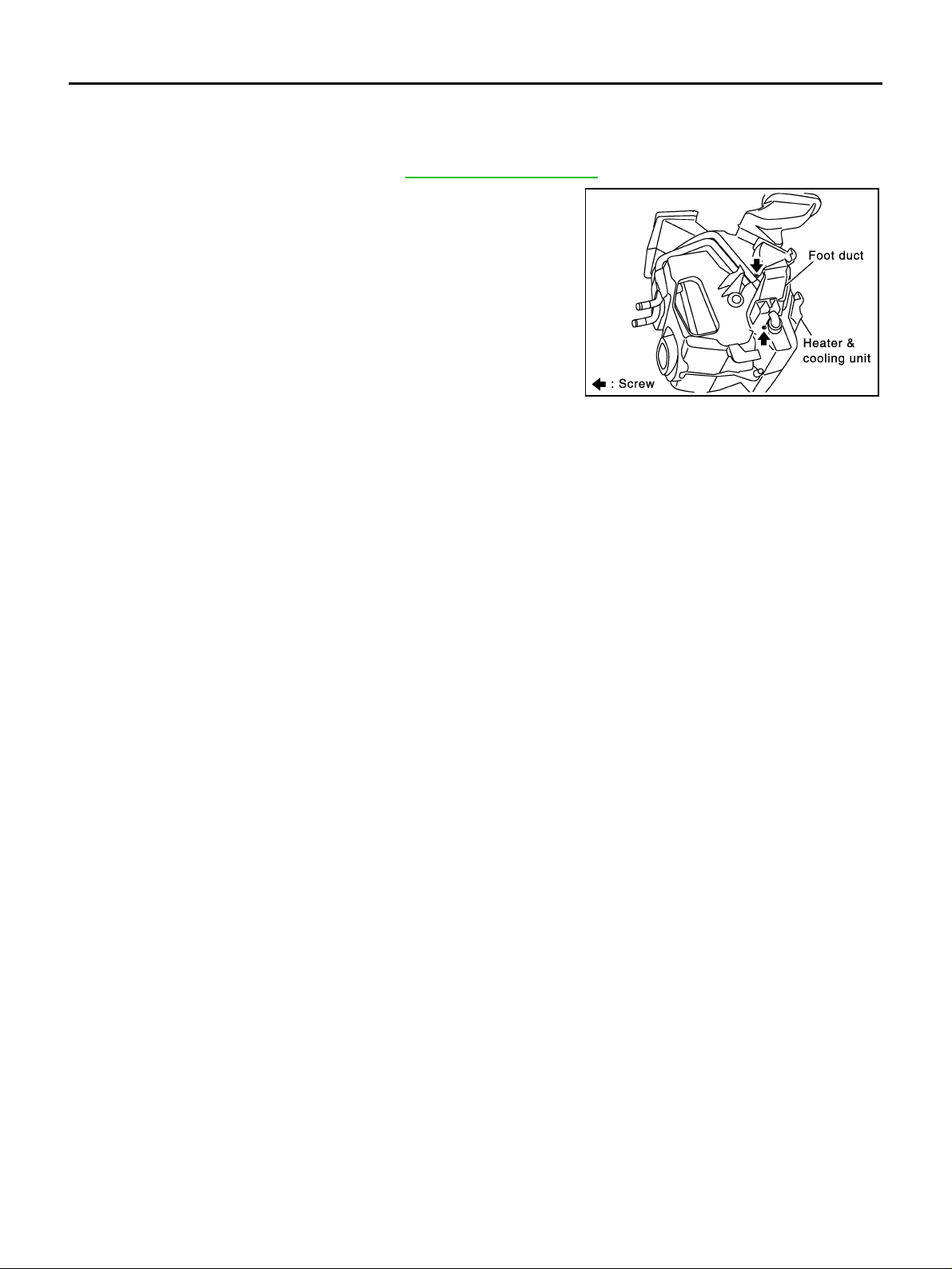
HEATER CORE
HEATER CORE PFP:27140 Removal and Installation EJS004HF
REMOVAL
1. Remove heater (& cooling) unit. Refer to MTC-27, "HEA T ER UNIT" .
2. Remove heater pipe support.
3. Remove mounting screws, and then remove foot duct and
heater core cover.
4. Remove heater core from heater (& cooling) unit.
RJIA0069E
INSTALLATION
Installation is basically the reverse order of removal.
MTC-30
Page 31
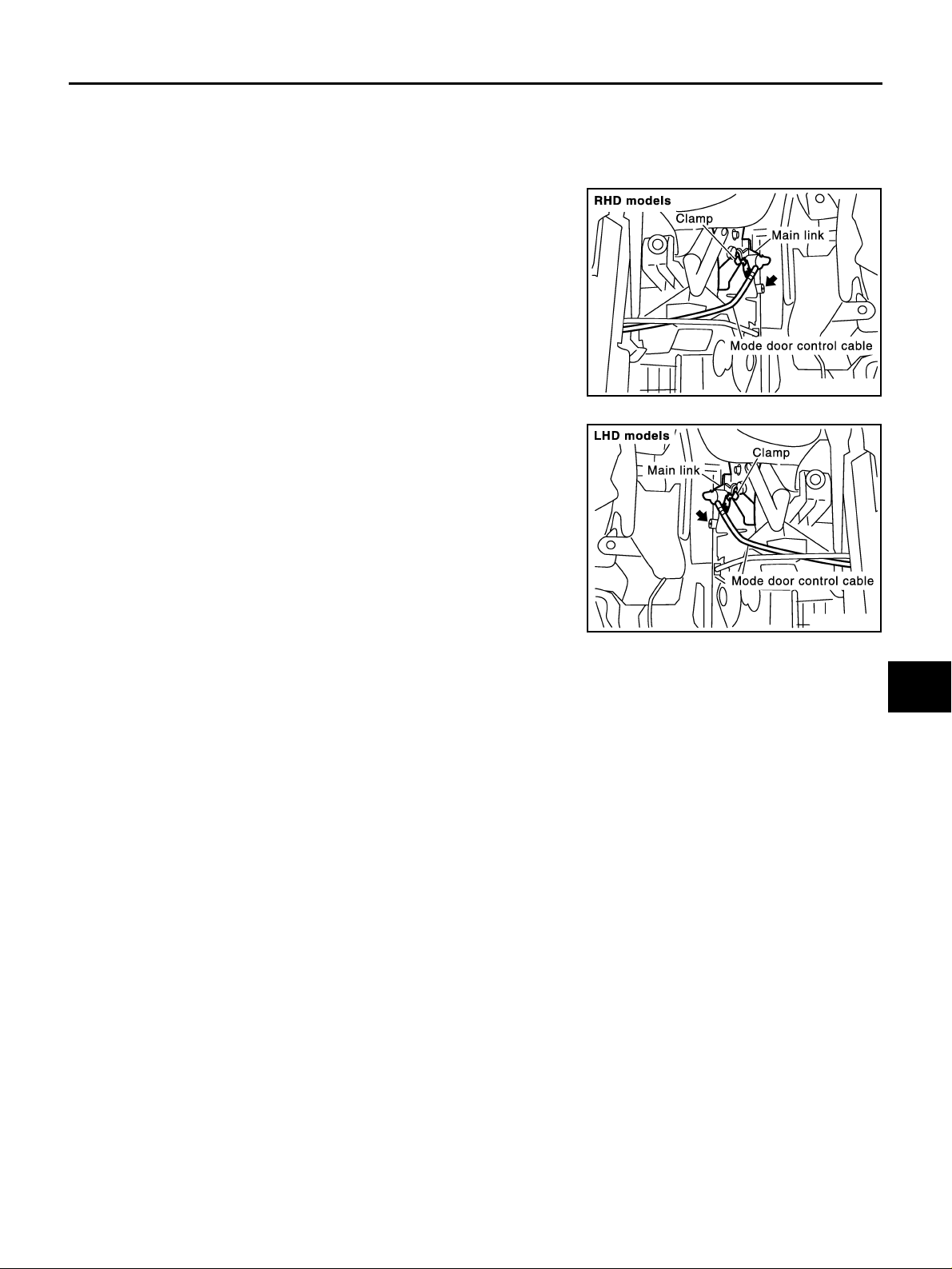
MODE DOOR
MODE DOOR PFP:27181
Control Linkage Adjustment EJS001DA
MODE DOOR CONTROL CABLE
1. Turn the mode control dial to VENT position.
2. Move side link by hand and hold mode door in VENT position.
3. Pull on the cable cover in th e direction of the arrow, and then
clamp it.
NOTE:
After positioning control cable, make sure it operates properly.
RJIA0095E
A
B
C
D
E
F
G
RJIA0614E
H
I
MTC
K
L
M
MTC-31
Page 32
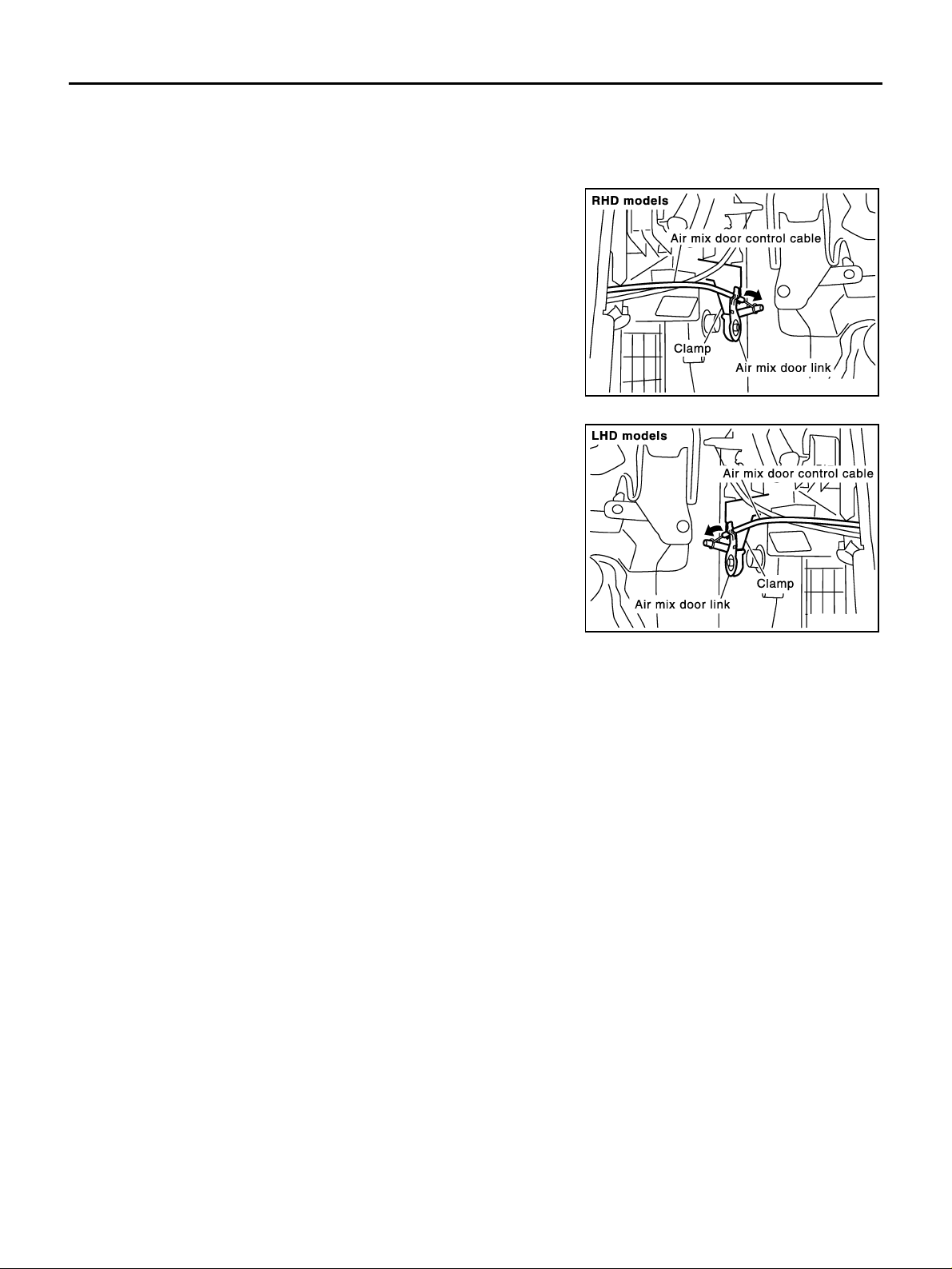
AIR MIX DOOR
AIR MIX DOOR PFP:27180 Control Linkage Adjustment EJS001DB
AIR MIX DOOR CONTROL CABLE
1. Turn the temperature control dial to full cold position.
2. Move air mix door lever by ha nd an d ho ld it a t the f ull c old p osition.
3. Pull on the cable cover in the direction of the arrow, and then
clamp it.
NOTE:
After positioning control cable, make sure it operates properly.
RJIA0085E
RJIA0615E
MTC-32
Page 33
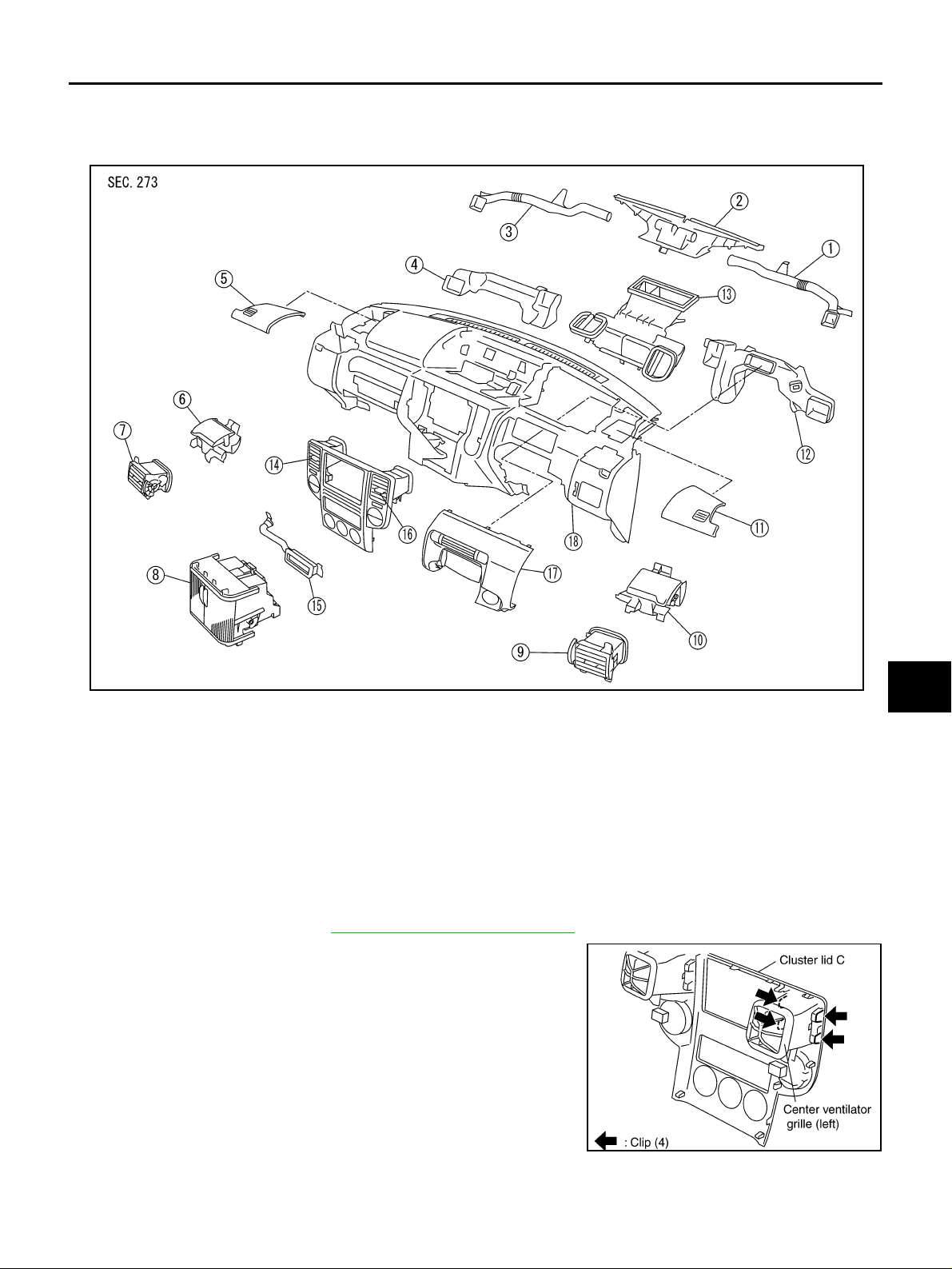
DUCTS AND GRILLES
DUCTS AND GRILLES PFP:27860
Removal and Installation EJS004HH
REMOVAL
A
B
C
D
E
F
G
1. Side def ros te r duct (rig ht) 2. Defroster nozzle 3. Side defroster duct (left)
4. Side ventilator duct (left) 5. Front speaker grille (left) 6. Cup holder (left)
7. Side vent ila tor gril le (left) 8. Multi-box (Instrument center lower
panel)
10. Cup holder (right) 11. Front speaker grille (right) 12. Side ventilator duct (right)
13. Adaptor 14. Center ventilator grille (left) 15. Mu lti -bo x duct
16. Center ventilator grille (right) 17. Driver ventilator grille 18. Instrument panel
9. Side ventilator grille (right)
NOTE:
This illustration is for RHD models. The layout for LHD models is symmetrically opposite.
Removal of Center Ventilator Grille
1. Remove cluster lid C. Refer to IP-11, "Removal and Installation" .
2. Remove mounting clips, and then remove center ventilator grille.
RJIA2406J
H
I
MTC
K
L
M
RJIA2407E
MTC-33
Page 34
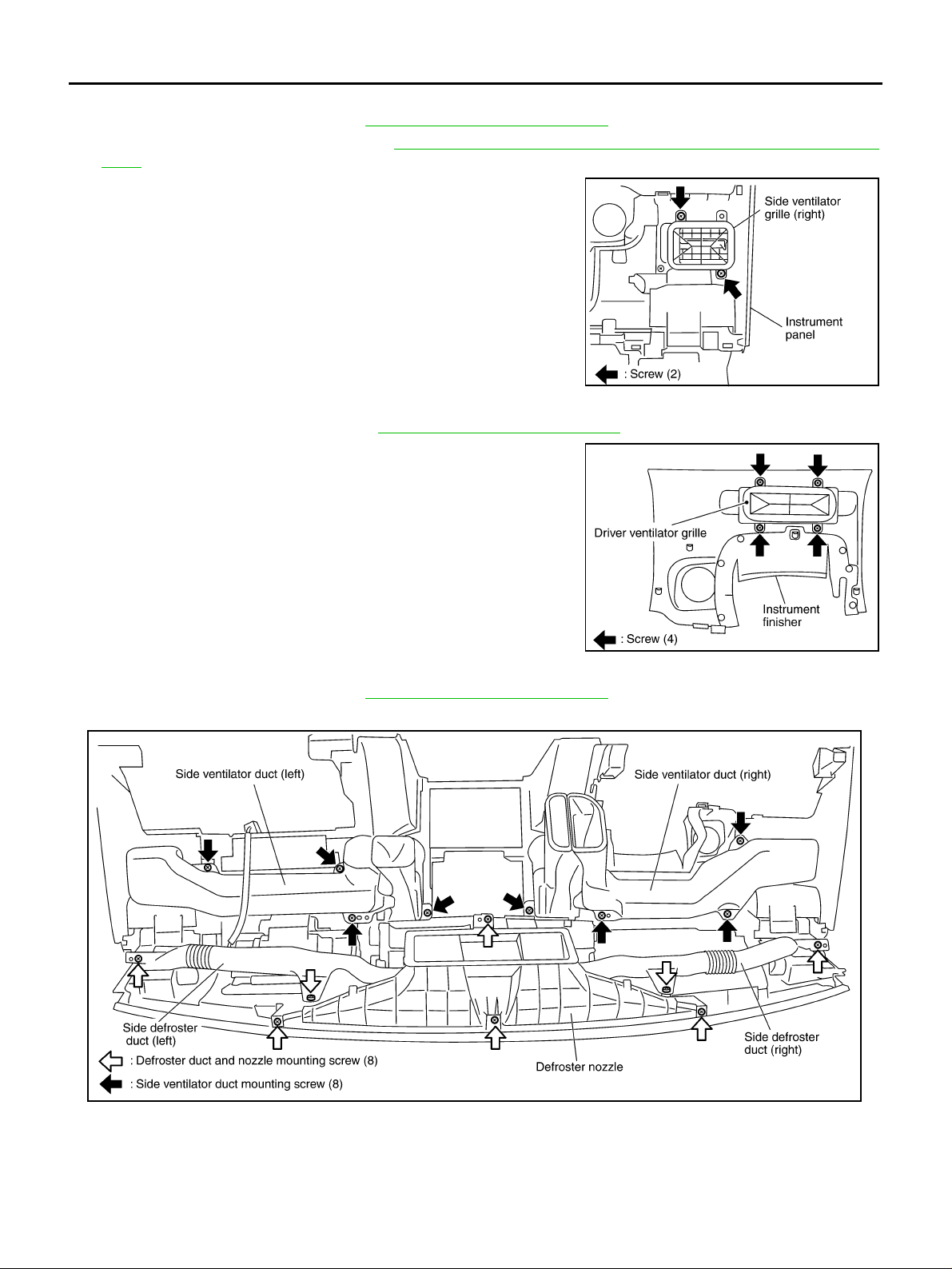
DUCTS AND GRILLES
Removal of Side Ventilator Grille
1. Remove instru ment panel. R efer to IP-11, "Removal and Installation" .
2. Remove side ventilator ducts. Refer to MTC-34, "
Duct" .
3. Remove mounting screws, and then remove side ventilator
grille.
Removal of Driver V e n t ilator Grille
1. Remove instrument finisher. Refer to IP-11, "Removal and Installation" .
2. Remove mounting screws, and then remove driver ventilator
grille.
Removal of Defroster Nozzle, Duct and Side Ventilator
RJIA2408E
Removal of Defroster Nozzle, Duct and Side Ventilator Duct
1. Remove instru ment panel. R efer to IP-11, "Removal and Installation" .
2. Remove mounting screws, and then remove side defroster ducts with defroster nozzle.
3. Remove mounting screws, and then remove side ventilator ducts.
RJIA2409E
RJIA2410E
MTC-34
Page 35
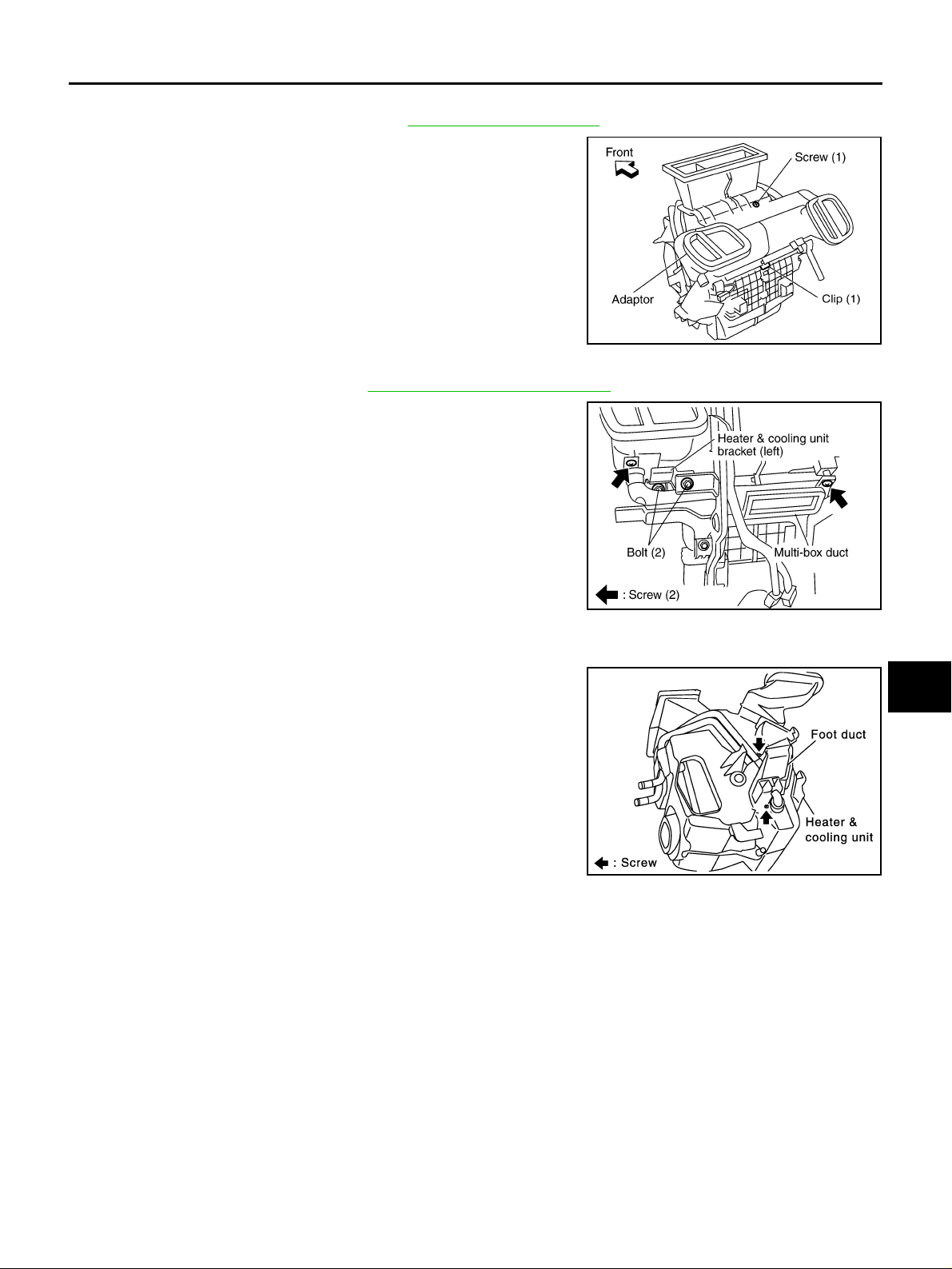
DUCTS AND GRILLES
Removal of Adaptor
1. Remove heater (& cooling) unit. Refer to MTC-27, "HEATER UNIT" .
2. Remove mounting screw and cli p.
3. Slide adaptor toward vehicl e fron t, and then remove adaptor.
A
B
C
D
RJIA2411E
Removal of Mult i-box Duct
1. Remove instrument panel. Refer to IP-11, "Removal and Installation" .
2. Remove mounting sc rews, and then disconne ct multi-box duct
from heater (& cooling) unit.
3. Remove mounting bolts, and then remove heater (& cooling)
unit bracket.
4. Remove multi-box duct from left side.
Removal of Foot Duct
1. Remove multi-box duct.
2. Remove mounting screws, and then remove foot duct.
E
F
G
H
RJIA2412E
I
MTC
K
L
RJIA0069E
MTC-35
M
Page 36
DUCTS AND GRILLES
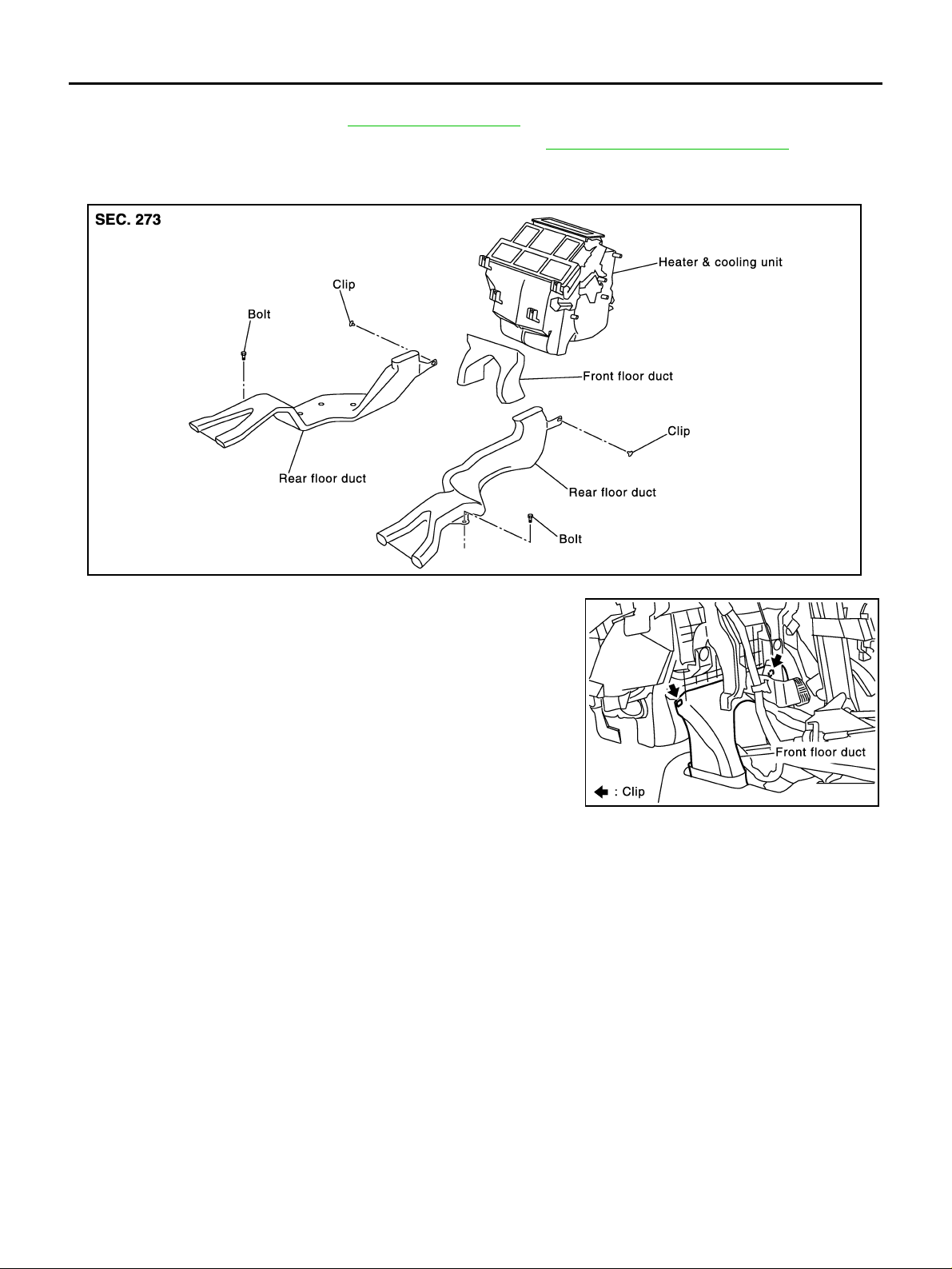
Removal of Floor Duct
1. Remove the front seats. Refer to SE-24, " FRONT SEAT" .
2. Remove multi-box (Instrument center lower panel). Refer to IP-11, "
3. Peel back the floor trim to a point where the floor duct is visible.
4. Remove mounting bolts and clips, then remove rear floor duct.
Removal and Installation" .
5. Remove mounting clips, and then remove front floor duct.
INSTALLATION
Installation is basically the reverse order of removal.
RJIA0071E
RJIA0070E
MTC-36
 Loading...