

Page 1

OLYMPUS®
DIGITAL
VOICE
RECORDER
WS-803/WS-802/WS-801
Basic
ENGLISH
FRANf;AIS
ESPANOL
.......................................................
.....................................................
......................................................
Manual
6
15
24
purchasing
Thank you
about
successful
Merci d'avoir
informations concernant
reference ulterieure.
!'utilisation
Gracias
sobre
para
funci6n de grabaci6n y
for
product
the
using
recordings, we recommend
votre choix sur cet enregistreur vocal
porte
Nous vous recommandons de tester
obtenir de bons enregistrements.
pour
haber com prado esta grabadora de voz digital Olympus.
por
uso correcto de este producto y para
el
el
referenda
su
en
PORTUGUES
Olympus Digital
an
correctly
l'emploi
futuro.
volumen.
su
and
correct et
Para
safely.
that
tener
BRASILEIRO
Voice Recorder.
instructions handy for future reference.
the
Keep
you test the record function and
numerique.
l'appareil. Conservez-le
de
sur
Ia
seguridad. Guarde estas instrucciones en un
su
grabaciones
exito en
las
......................
Please
fonction d'enregistrement et le volume
read these instructions for information
Lisez
Lea
recomienda hacer un ensayo previo de
se
33
To
volume before
mode d'emploi
ce
portee de
a
instrucciones para informacion
estas
use.
pour
main pour
Ia
Iugar
ensure
les
toute
avant
a mano
Ia
Obrigado
informac;6es
futura
antes de
porter
referenda.
utilizar.
adquirido urn Gravador de Voz
sobre a utilizac;ao
assegurar
Para
correta e segura
gravac;6es
Digital
do
bern sucedidas,
da
produto. Mantenha
Olympus. Con suite
instruc;6es
as
e necessaria
testar a
instruc;6es
as
sempre disponfveis para
func;ao
para
gravac;ao
de
obter
eo
volume
Page 2

Declaration
of
Conformity
Model
Number
Trade Name :
Responsible Party
Address :
Telephone
This device
(1)
This device may
received,
Canadian
This
digital
the
Radio Interference Regulations
Cet
appareil numerique ne depasse
d'appareils numeriques, tel que
Communications.
apparatus does
Number
Complies
including
RFI
with
not
cause harmful interference, and
interference
not
: WS-803/WS-802/WS-801
DIGITAL
VOICE
RECORDER
:OLYMPUS IMAGING AMERICA
3500 Corporate Parkway,
U.S.A.
:1-888-553-4448
Part
15
ofthe
that
FCC
Rules.
Operation
may cause undesired operation.
Tested
With
FOR
exceed
the
Class
B limits
of
the Canadian
pas
les
limites de
prevu
dans les Reglements sur
for
Department
Ia
Categorie
INC.
P.O.
Box
610,
Center Valley,
is
subject
(2)
this device
To
Comply
FCC
Standards
HOME
OR
OFFICE
radio noise emissions
of
Communications .
B
pour
!'Interference
must
USE
les
emissions de
Radio du Departement
PA
18034-0610,
to
the
following
two
accept any interference
from
digital apparatus
bruit
radio emanant
Canadien
conditions:
as
set
out
in
des
Page 3
r:JFo
I der A
IBIFo
I der B
RFolder
~Folder
IBIFo
I der E
IH
C
D
©
II'·········=''·'·"--;
'12.03.28
-~-~-~i;:::::::::~::::::::::::•::
58
AM
MO
8
10:30
@
®
r.:iui
II
a
800_000
:::00_0002.
800_0003.MP3
IB
800_0004.
800_0005.MP3
IH
..
.Ji
1.
MP3
MP8
MP3
@
rf.fuu;~
~--~
~~~Artist
,·,
r·
t
•
H -
•Art
08-Title
07-Title
1'
·::-t
·-·-
ist
A
E'
I
C
F.wma
G.wma
ITJ
&-+~[]
~ITfTe
t+gArt
G
1_
1!02:03
•
0--f··--T~---~~--~~~~~~--~--~----~--~----~--~8-~.b·.:,
rAa!•am..fi
&+CIDf£1
*P-02~
0
1
0-+
®
99/120!em~
... A .........................
ist
B
·Album C .
05:20!
@
too.o
II
Ill
II
!:![]
II
!:15
...
oMHz
II
I
II
I I I
I[][] I []5
.
II
II
I
Page 4
~-®
I
Alkaline
Ill
IH
fi
T
IH
T
fH
i
i
rue
rue
;~.·
[1.~te
;~
..
[1.1t.e
Ni@l
Ni@]
F're::
Of::
c
h.~
F:en1ol.e
r
~
t
:I.-~
d.
1
::ton,e)
,-,
-i
~~
~
ll:J
Switch
to
m i
croSD
card?
No
Horne
!
F:econ:1er
/.1
Music
DCalendar
61FM
Radio
Ni@]
Ni@]
Search
fH
D
Ca
I enda r Search
61
FM
Radio
IH
Page 5
®
(INiiliiiUMij
I
@lib~
@tED
GDI
ci
L
1111111111111
~
F:f111iUmilrm
1
fH
Iii
D
CD
,
12.03.24
fH
[)[)~[)
~
10H30M02S
-
lz
:::00_0
1
i5
CIDfD
OU,.OOs
~
AM
m'IIIll
125/125
3s
1
-&
-o
I
dB
Ni@]
125/125
2,8M56S
10:30
[]]
Iii
a
I
fH
CIDfD
!
25/125
oo~~~oEJ,
4 x
i.O
;I
·
·_:cene
Play
fH
IConf
AISICII
:>led
Scene
erence-T
Ni@l
:::oo_oo~5
Iii
CIDfD
®-t-m:J
l!E:oNJ
'12.03.24
fH
:::OO_fl0i5
Iii
CIDfD
D
A_
II
in
Une
file
Cancel
fH
[)
0111S
AM
[)[)lll[)[)s
folder
Ni!illl
25/125
Eis
28M56S
10:30
Ni@l
25/125
~i1
~~@~n•ji•~•niwiiiiD~M~IIIlgjl!
®I
CIDfD
@+a
GD
I'
~
~03.24
fH
Iii~
a
Volume
fH
Iii~
D
i!EoNJ
'12.0 3.24
fH
25/125
OU,.OEis
2,8M56
AM
10:30
25/125
[)U"[)Eis
15
25/125
[)[)lll[)[)s
28M56S
AM
10:30
S
ll
0
I
Cancel
fH
800_00~5
Iii
CIDfD
D
I
Erasing!
fH
25/125
[)[)lll[)[)
Ni@]
s
I
,J
:::oo_on~t:
Iii~
D
.
Era
I
fH
Ni!illl
25/124
[)[)lll[)[)s
s
ed
I
Page 6
•
This manual
refer
to
manual either from the stored data
in the
recorder or download
the
OLYMPUS
•
The contents
subject
Contact
Center
relating
model
• Illustrations
recorder shown in this manual
differ
from
The
utmost
to
ensure
do~ument
to
fmd
or
omission, please
Customer
•
C?ly~pus
l1ab1llty
damage
due
to
a
defect
performed
than
Olympus
authorized service station,
any
other
Trademarks
is
a basic version. Please
the complete advanced
[OL_MANUAL]
website.
of
this
document
to
change
our
for
the
to
product
numbers.
the
care
the
but
a questionable item,
Support
does
for
passive damages
of
any kind incurred
data
loss
of
the
by
reason.
and
without
Customer
latest
information
names and
of
the
screen and
actual
has
been taken
integrity
should you
contact
Center.
not
accept any
resulting
product,
a
third
or
an
Olympus
registered
trademarks:
•
IBM
and
PC/AT
or
registered trademarks
International
Corporation.
•
Microsoft, Windows and Windows
Media are registered trademarks
Microsoft
•
Macintosh and iTunes are
trademarks
• microSD
trademarks
•
MPEG
technology
Fraunhofer
•
The
on
under
Corporation.
Voice
technology
Electronics Corporation.
Other
mentioned
or
registered trademarks
EN
respective owners.
and
Layer-3
product
noise-canceling
license
Activity
product
are trademarks
Business Machines
Corporation .
of
Apple
microSDHC are
of
SO
audio
is
licensed
liS
and Thomson.
was
from
Detection
is
licensed
and
herein are
Inc.
Card Association.
coding
developed
technology
NEC
brand
the
6
folder
party
of
the
data
notice.
Support
product.
of
this
happen
error
our
or
from
repair
other
or
for
of
from
based
from
NTT
names
trademarks
of
their
the
from
are
the
may
of
~
'
~
"
f!lJ
*
llt!C~
Before using your
read this manual carefully
ensure
operate
Keep this manual in an
accessible location for future
reference.
•
that
it
safely and correctly.
The
warning
important
information.
and others
damage
that
and
to
you
always
mformat1on
~
!!!l!!!!
new
you know how to
symbols indicate
safety related
To
protect
from
personal
property,
read the warnings
provided.
,W»~Itmiti>iii
recorder
to '
easily
yourself
injury
it
is
essential
~Danger
If
the
product
observing
given
serious
result.
under
injury
is
used
the
information
this symbol,
or death may
without
~Warning
If
the
product
observing
given
or
under
death
is
used
without
the
information
this symbol, injury
may
result.
~Caution
If
the
product
observing
given
per~onal
equapment, or
data
•
To
technology contained in this
product, never use or store
rec~rder
environments:
•
•
under
may result.
protect
Places
or
humidity
extreme changes, such
sunlight, beaches,
near
other
radiator, etc.)
In
sandy
Near
flammable
explosives.
is
used
without
the
information
this symbol, minor
injury,
in any
where temperatures
damage
loss
the
high-precision
of
the
are
high
heat sources (stove
or
humidifiers. '
or dusty
environments.
items
of
valuable
following
or
undergo
as
locked
or
to
t?
o;mm
m!l
or
the
the
and/
direct
cars,
or
•
In
wet
places, such
or
in the rain.
•
In
places prone
vibration.
•
Neverdroptherecorderor
subject
vibration.
•
The recorder may malfunction
if
it
it
is
electromagnetic
waves, or high voltage, such
as
video game, loud
large
tower, or transmission towers.
In
the
operation.
•
Avoid recording or playing back
near
wirele~s
cause
you experience noise, move the
recorder
equipment.
• Do
as
clean
Precautions
• Radio reception
substantially
you are using
reception
recorder near
away
as
fluorescent lights etc.
Warning
•
Recorded
may
operatmg
or
~ecommended
Important
such
•
C?ly~pus
llab1l1ty
damage
due
a
defect
performed
than
authorized
any
it
to
severe shock or
is
used in a location
subject
near
monitor
such cases,
recorder
cellular
not
alcohol
the
to
a
a
TV
set, microwave
unit,
momentarily
off
phones or
equipment,
mterference
further
use organic solvents
and lacquer
unit.
relating
depending
the
is
poor,
to
from
electrical
cellular
phones, televisions,
regarding
content
b~
destroyed
errors,
during
repair work.
to
content
as
a
computer
does
not
for
passive damages
of
any kind incurred
to
data loss resulting
of
the
product,
by
a
Olympus
other
or
service station,
reasons.
as
to
strong
magnetic/
field,
speakers,'
TV/radio
before
as
and
away from
to
reception:
will
vary
radio.
try
moving
a
window
products
data
loss:
in
memory
or
erased by
unit
malfunction
It
back
up
to
other
hard disk.
accept any
third
party
an
Olympus
bathrooms
where
radio
further
other
they
noise.lf
thinner
on
where
If
the
and
is
and save
media
from
repair
other
or
turn
may
such
such
to
the
such
'
or
for
Page 7
it
Warning:
• Do
not
use
the
recorder
flammable
• Keep
®Accidentally
@ Accidentally
•
Do
in
•
Do
young
away
from
Always
out
of
and infants
following
which
CD
Becoming entangled
the recorder strap, causing
strangulation.
battery, cards
parts.
moving
not
dusty
not
modify
or
explosive
children
the
recorder.
use and store
the
reach
of
to
prevent
dangerous situations
could cause serious injury:
swallowing
or
being injured by
parts
of
use
or
store
or
humid
disassemble,
the
unit
yourself.
and
the
young
the
other
the
recorder.
the
places.
repair
• Use microSD/microSDHC
memory
other
If
you accidentally
type
contact
or
service center. Do
remove
•
Do
not
driving
as
a bicycle,
it
Caution:
•
Stop
immediately
unusual
emanating
Never remove
bare hands.
fire
or
Be
careful
Be
careful
carrying
easily catch on
cause serious damage.
•
Do
not
it
may
high
Doing
to
deteriorate
circumstances, cause
to
catch fire. Do
with
adapter
could
in fire.
cards
only. Never
types
of
of
card
into
an
authorized
the
card
operate
or
riding
cards.
insert
the
by
force.
the
unit
a
vehicle
motorcycle,
using
odors,
burn
the
leave
be
subject
the
if
from
the
Doing
your
with
with
the
recorder.
something
the
recorder
you
notice
noise,
it.
batteries
so
hands.
the
strap.
strap
recorder
to
extremely
temperatures.
so
may cause parts
and, in some
not
cover (such
a
blanket)
while
cause overheating,
the
it
charger
is
being
recorder,
distributor
not
or
may cause a
It could
the
used. This
near
gases.
infants
recorder
children
in
the
small
recorder
or
use
another
try
to
while
(such
or
car).
any
smoke
with
when
and
where
recorder
as
or
AC
resulting
•
Handle
avoid
the
getting
burn.
If
the
recorder contains
parts, overheating can
low-temperature burn. Note
following:
When used for a
recorder
the recorder
may suffer a
burn.
In places
cold
temperatures,
temperature
may be lower
temperature.
the
gloves
recorder in
Follow
to
prevent
when
these
batteries
overheating,
or
causing
electrical
burns.
~Danger:
•
Do
not
attempt
alkaline,
non-rechargeable
•
Batteries
exposed
circuited
•
Never
batteries.
•
Take
or
storing
them
with
jewelry,
•
Never
they
sunlight,
temperatures
near
• To
prevent
or
damaging
carefully
regarding
Never
battery
by
soldering
• Do
not
directly
the
cigarette
automobile.
•
If
battery
your
immediately
running
attention
lithium
should
to
or
heat
precautions
batteries
from
any
metal
pins,
store
will
be
or
a
heat
follow all
the
attempt
or
modify
connect
to
a
fluid
eyes,
flush
water
immediately.
recorder
a
will
get
while
low
subject
of
If
handling
cold
important
with
low-temperature
long
hot
.
it
is
-temperature
to
extremely
the
the
recorder
than
the
possible,
temperatures.
guidelines
from
burning,
exploding,
shock
to
recharge
or
any
batteries.
never
flame,
heated,
disassembled.
or
incinerate
when
to
prevent
coming
into
objects
fasteners,
batteries
exposed
subjected
in a
source,
causing
their
where
to
to
hot
vehicle,
etc.
battery
terminals,
instructions
use
of
batteries.
to
disassemble
it
in
any
it,
etc.
the
battery
power
lighter
with
gets
your
and
outlet
in
into
eyes
clean,
seek
an
care
metal
result
period,
If
you
hold
hot, you
ambient
wear
the
leaking,
or
other
be
short-
carrying
contact
such
as
etc.
direct
high
leaks
way
or
cold
medical
to
in a
the
the
a
~Warning:
• Keep
•
•
•
•
discolored
becomes
way
using
•
If
clothing
clothing
area
water
burns
attention
•
Keep
of
• If
when
abnormal
a
CD
®call
batteries
If
rechargeable
not
been
recharged
specified
Do
not
cracked
Never
shock
If
a
battery
time,
use
or
subject
or
continuous
abnormal
during
the
recorder.
a
battery
or
and
with
clean,
immediately.
your
immediately.
batteries
children.
you
notice
using
noise,
burning
remove
taking care
and;
representative
odor:
the
your dealer
dry
at
batteries
do
not
a
battery
broken.
batteries
leaks,
or
becomes
deformed,
in
operation,
leaks
fluid
skin,
remove
flush
the
cold
skin,
seek
out
of
anything
this
product,
heat,
battery
not
to
burn yourself,
or
local Olympus
for
service.
all
within
if
vibration.
any
onto
affected
running
If
the
medical
the
unusual
smoke,
immediately,
~Caution:
•
Please
save
When
batteries,
terminals
local laws
•
Always
battery
first
used
•
Rechargeable
limited
operating
notably
rechargeable
charged
conditions,
with
recycle
our
planet's
disposing
be
and
and
charge
before
time,
or
for
a
long
life.
time
shorter
under
a
new
one.
batteries
resources.
of
dead
sure
to
always
regulations.
a
rechargeable
using
if
it
has
period.
batteries
When
the
becomes
even
battery
the
specified
replace
the
cover
observe
it
for
not
recorder's
after
is
times.
have
the
use
them.
it
is
to
strong
or
other
stop
your
the
fluid
reach
such
to
help
their
the
been
have
a
the
fully
battery
I
as
or
EN
7
Page 8

File
File
I.!I!Ull!if!SIUR'l!lll;,!l!~D!!!,~4t4•''•'•'""
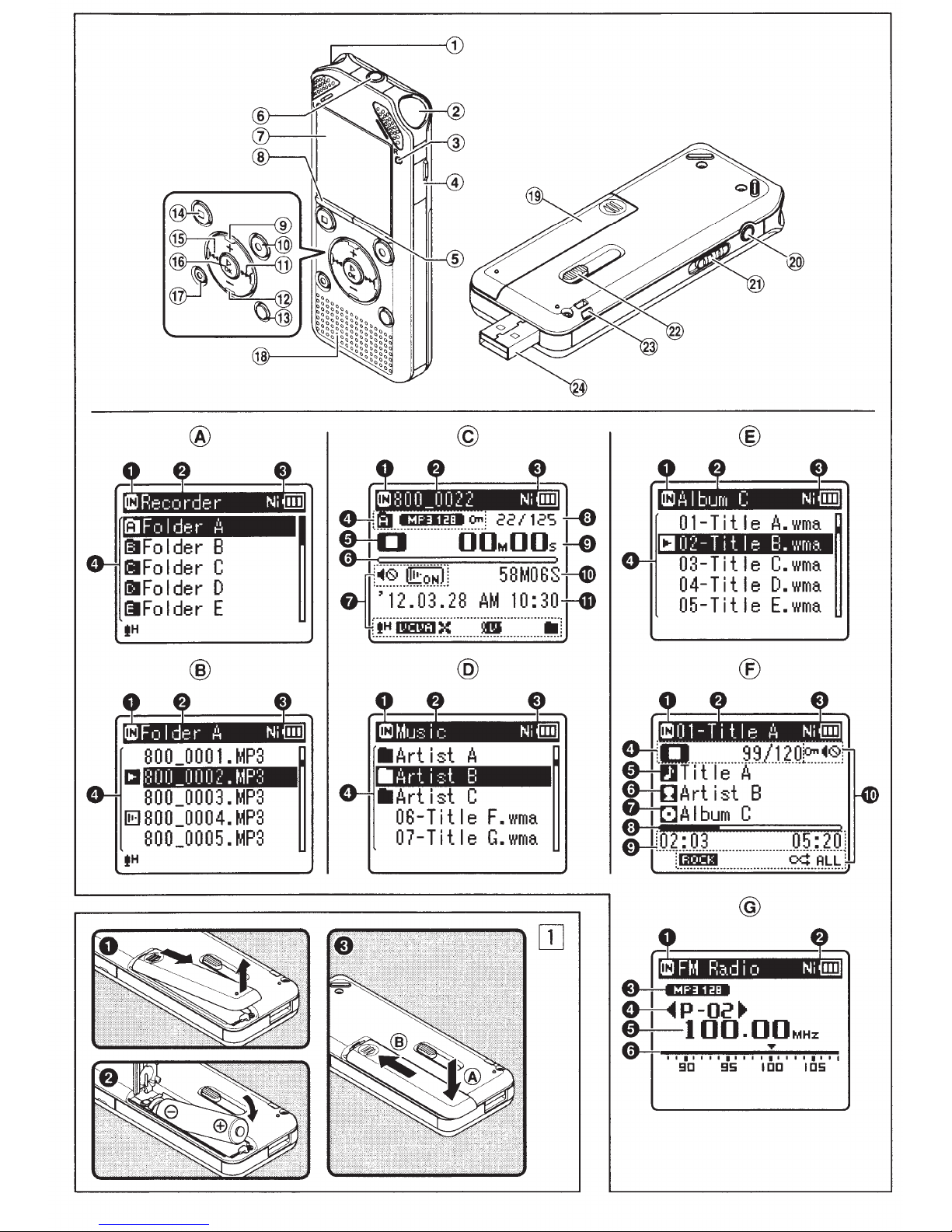
CD
Built-in
®
Built-in
®
LED
@
Card
@
LIST
@ MIC
(J)
Display
@
MENU
®+button
@
REC ( •)
@~button
@-button
@
SCENE/INDEX
@
STOP(.)
@~button
@
~OKbutton
@
ERASE
@
Built-in
@
Battery
®
EAR
@
POWER/HOLD
@
USB
@Strap
®
USB
• [Recorder]
Folder
0
Recording
[~]:Internal
[EJ]: microSD card
f)
Current
f)
Battery
0
Folder
File
list display®:
0
Recording
f)
Current
f)
Battery
0
Filename
stereo
stereo
indicator
cover
button
(Microphone)
(LCD
button
(Earphone)
connector
hole
connector
list display®:
name
microphone
microphone
light
panel)
(Record)
button
button
speaker
cover
slide
mode
media
memory
folder
name
indicator
media
folder
name
indicator
button
jack
switch
indicator
indicator
(l)
(R)
(lED)
jack
button
lever
display:
display©:
0
Recording
f)
Current
f)
Battery
0
Folder
indicator,
0
Recorder
[0]:
[CII]:
[0]:
[CI]:
[Cl]:
[CI]:
[CI]:
[CI]:
[IJ!J]: Change playback
[ID]:
0
Remaining
Playback
8
Icon
0
Current
of
recorded
0
Elapsed
Elapsed
G)
Remaining
File
CD
level
Recording
• [Music]
List
display@:
0
Recording
[~]:Internal
[E]]:
f)
Current
f)
Battery
0
Folder
List
display®:
0
Recording
f)
Current
f)
Battery
0
Filename
media
file
name
indicator
indicator,
File
lock
status
Record
Pause
Stop
Play
Forwarding
Rewinding
F.
S.
indicator
Change playback
indicator
display
length
meter,
microSD card
name,
indicator
indicator
indicator
indicator
Play
indicator
Play
indicator
memory
position
file
number/
files
recording
playback
recording
date
mode
display:
media
memory
folder
name
indicator
File
media
folder
name
indicator
indicator
Recording
indicator
indicator
indicator
indicator
(sharp)
(flat)
bar
indicator,
bar
indicator
Total
in
the
folder
time,
time
time,
and
time
indicator
name
indicator
mode
tone
tone
number
display®:
0
Recording
f)
Current
f)
Battery
0
Recorder
[CI]:
[0]:
[Cl]:
[CI]:
[CI]:
[CI]:
[IJ!J]: Change playback
[01]:
Current
of
recorded
0
Titlename
0 Artist
8
Albumname
0
Playback
0
Elapsed
File
G)
Icon
•
[FM
Radio]
media
file
name
indicator
status
Play
Stop
Forwarding
Rewinding
F.
Play
S.
Play
indicator
Change playback
indicator
file
name
position
playback
length
display
indicator
indicator
indicator
indicator
indicator
(sharp)
(flat)
number/Total
files
mode
U For WS-803:
Radio
reception
0
Recording
f)
Battery
f)
Recording
0
Preset
0
Tuning
0
Frequency
Icon
display
[~@]:Speaker
[l!toNJ]:
[[]]:Voice
[fH]:
[DOOlil]:
[OZII]:
[ID:I]:
[:(]:
["}
[0]:
[ml]:
[ALL]
*1
*2
*3
Voice Playback
Rec
Level
VCVA
Voice sync
Equalizer
Low Cut Filter
.....
]:Zoom
Noise Cancel
Voice Balancer
Voice Filter
[o¢]
WS-803, WS-802 only.
WS-803 only.
WS-801
display@:
media
indicator
mode
number
frequency
bar
indicator
(For
muting
Detect
Mic
[r.J]: Playback
only.
*1
*2
*3
indicator
indicator
indicator
in
the
folder
bar
indicator
time,
display:
indicator
indicator
all
modes):
*1
*1
mode
tone
tone
number
EN
8
Page 9

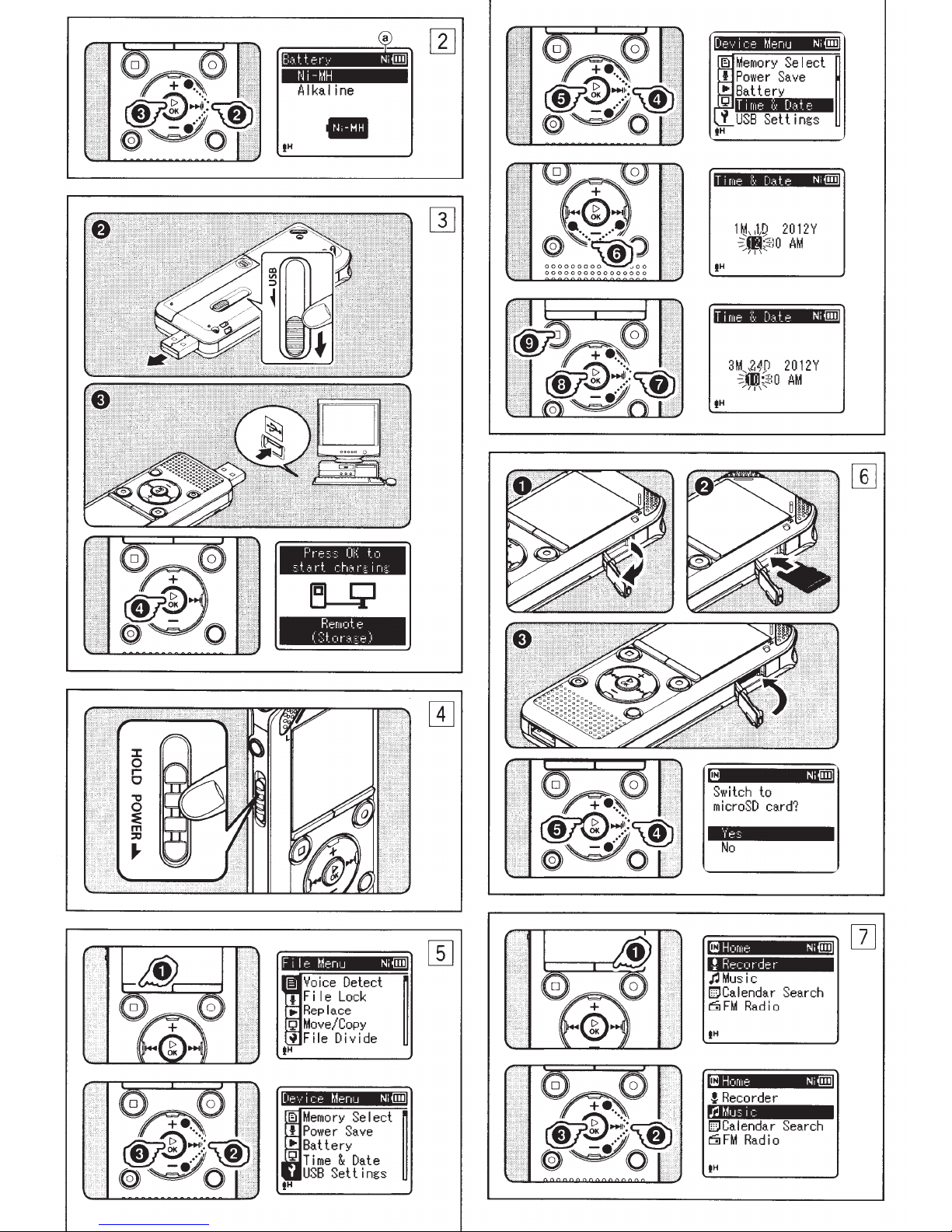
This recorder can be used
a Ni-MH rechargeable
alkaline
U
For WS-803, WS-802:
•
When charging
sure
rechargeable
place.
U
For WS-801:
This recorder
rechargeable battery.
1
Lightly
and
2
Insert
and
3
Close
by
sliding
Select
battery
1
Replace
battery.
that
the
cannot
press
slide
the
the
battery,
e
polarities.
the
battery
pressing
the
down
the
cover
battery
you are using.
the
battery
supplied
battery
down
battery
battery
the
recorder, make
(BR404)
charge
on
cover
observing
cover
at@,
towards@.
type
to
and
recorder.
2
Press
the+
or-
button
the
setting.
[Ni-MH]
[Alkaline]
Select
battery.
3
Press
the
•
If
in
time
(13@]):
Select
Ni-MH rechargeable
(BR404).
when
(lll@j):
when
the~
OK
using
using
button
the
an
setting.
the
the
"Hour"
display,
and
indicator
see
date
"Setting
[Time &
with
either
or
AAA
Ni-MH
is
the
the
arrow
open.
the(±)
completely
then
match
turn
to
battery
to
the
on
change
Olympus
alkaline
complete
flashes
the
Date]".
in
the
U
For
WS-803,
Do
not
charge a
such
as
an
alkaline
battery.
leakage
cause
1
Boot
2
Slide
in
arrow
the
the
the
the
direction
so
It
may
or
heating,
recorder
PC.
USB
that
protrudes
3
Make
sure
stop
mode,
USB
port.
4
Press
the~
charging.
• While
charging]
.,..OK
S
Charging
battery
Note:
• Insert
battery
[Ni-MH].
[Alkaline],
When
turn
the
consumption.
settings, and
lost
when
Turning
While
slide
the
direction
Turning
Slide
the
direction
0.5 seconds
Power
If
the
for
10
display
goes
into
•
To
exit
button
[Press
button.
is
indicator
the
supplied
and set
If
the
recorder
power
the
on
the
the
recorder
POWER/HOLD
ofthe
off
the
POWER/HOLD
of
the
or
save
mode:
recorder
minutes
shuts
power
power
.
WS-802:
primary
cause
connector
indicated
the
USB
from
the
that
the
and
connect
OK
button
OK
is
flashing,
completed
shows
[Battery]
[Battery]
you cannot recharge.
is
off
to
Existing data,
clock
settings are
power
battery
or
lithium
battery
which
to
may
malfunction.
slide
lever
by
the
connector
recorder.
recorder
to
to
the
to
start
start
press
when
is
the
UOO.
rechargeable
to
is
set
to
not
being
reduce
is
turned
used,
battery
mode
not
off.
power:
is
turned
arrow.
off,
switch in
power:
switch in
arrow, and
longer.
is
on
but
or
longer
off
and
save mode.
save mode, press any
is
(default),
the
recorder
hold
not
used
in
PC's
the
the
the
it
for
the
When you use
first
time,
inserted
been used
[Set
time
"Hour"
from
1
2
Step
While
press
Press
is
the
the
the+
the
or
when
after
the
for
a
& date]
flashing,
6.
recorder
MENU
or-
long
[Device Menu]
•
You
can change
display
tab
3
Press
cursor
4
Press
[Time
S
Press
• "Hour"
indicating
and Date setup process.
6
Press
select
7
Press
the
value.
• Follow
pressing
button
and pressing
to
•
You
24
LIST
hour
•
You
"Month", "Day"
pressing
setting
8
Press
the
setting.
•
The
date and time.
button
to
9
Press
the
menu
by
cursor.
the~
OK
to
the
item
the
+
or-
&
Date].
the~
OK
flashes on
the~
the
item
the+
or-
the
the~
to
select
change
can
select
hour
display
button
and
minute.
can
select
the
these items.
the~
OK
clock
will
when
start.
the
STOP
screen.
moving
the
same steps
the
recorder
the
battery
recorder has
time,
will
appear. When
conduct
is
in
stop
button.
button
to
tab.
the
menu
the
button
button
or~
you
the+
while
LIST
button
you
(•)
to
you
want
button
.
the
start
of
want
button
or~
the
or-
value.
between
by
pressing
setting
the
order
and
button
to
start
from
Press
want
button
move
to
display,
the
button
to
to
by
next
"Year"
complete
the
for
the
is
not
setup
mode,
select
settings
the
to
set.
select
Time
to
set.
change
item,
button
12
and
the
the
of
by
while
the
set
.,..OK
the
clock
to
close
I
EN
9
Page 10

1
While
the
recorder
openthecardcove~
2
With
the
microSD
correct
slot
• Insert
• Inserting the microSD card in the
• If the microSD card
3
Close
• When you insert
4
To
the+
5
Press
the
You
a voice recorder and a music player
but
* WS-803 only.
1
Press
to
2
Press
the
3
Press
When [Recorder]
When [Music]
When [Calendar Search]
selected:
When
EN
way,
insert
as
shown
the
keeping
wrong
damage the contact area or cause
the microSD card
all the
recorded on the microSD card.
card,
changeover display
record
it
way or at
way,
the
card
the
recording
on a microSD
or-
button
the
.,..OK
setting.
can use
also
set
the
as
a radio*.
the
LIST
the
[Home]
the+
or-
mode.
the
.,..OK
The recorder
[Recorder] mode.
able
to
record and play back files
recorded by
The recorder
mode, and you will be able
play back music files transferred
to
the
recorder.
The recorder will
[Calendar Search] mode, and
you can search
to
the
recording date.
[FM
Radio]*
The recorder will
[FM Radio] mode, and you
be able
* WS-803
to
is
in
stop
card
facing
it
into
in
the
diagram.
microSD card,
straight.
an
angle could
to
jam.
is
not
data may
cover
not
securely.
the
microSD
media
will
card,
and
select
button
recorder
button
to
not
repeatedly
display.
button
to
button.
is
selected:
will
go
into
You
the
recorder.
is
selected:
will
go
into
go
into
for
files according
is
selected:
go
into
receive
only
FM
radio.
10
mode,
the
the
card
inserted
be
appear.
press
[Yes].
complete
only
as
select
will be
[Music]
to
is
will
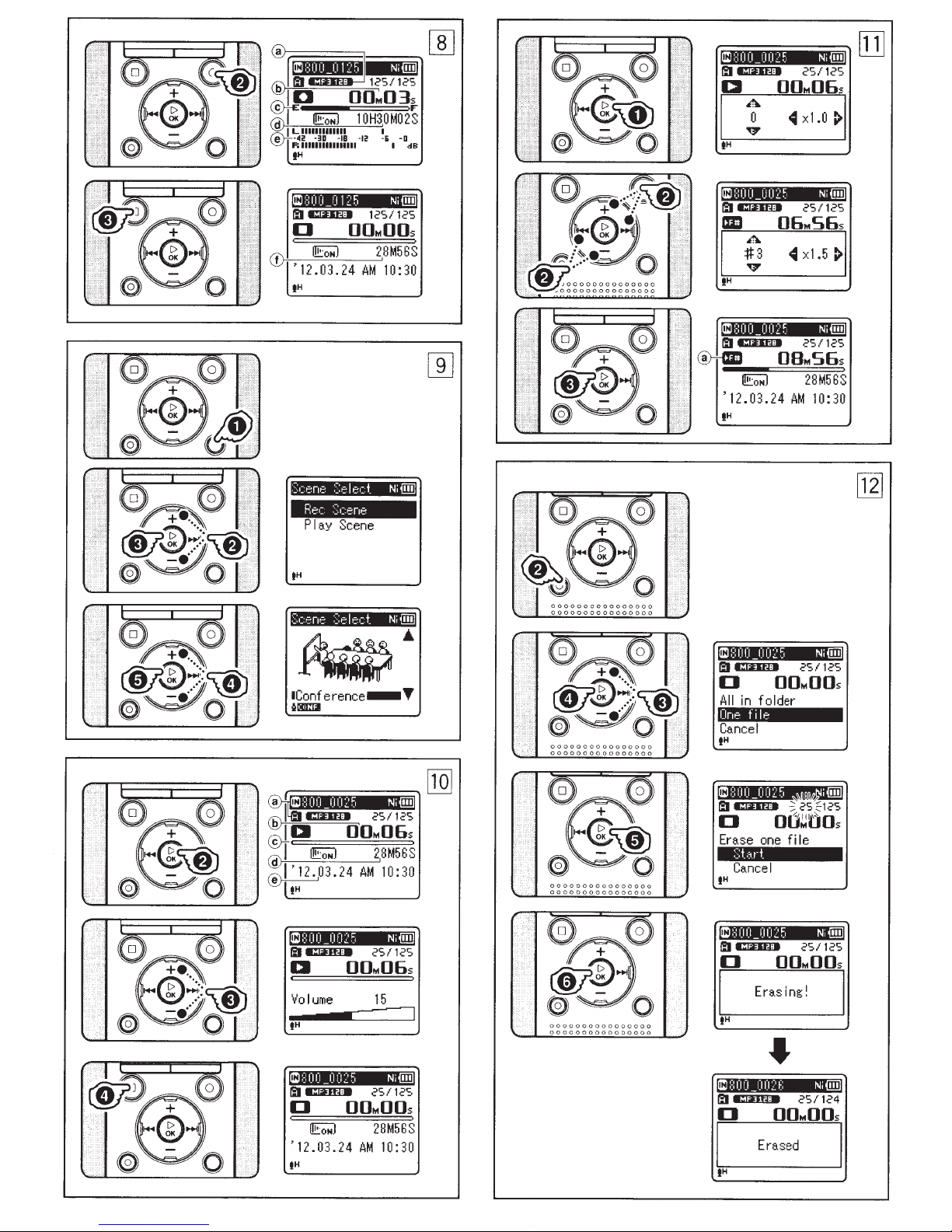
B!!S2t,di,!!,,9,{Els,~,Jill
1
Select a recording
2
Press
the
REC ( •)
recording.
• The
• Turn
®Recording
@Elapsed
©Remaining
@Remaining
®Level
• [Rec Mode]
3
Press
LED
indicator
and
[0]
the
direction
recorded.
recording
indicator
meter
to
the
recording level and
recording
in recording
while
recording.
while
the
the
STOP
recording.
•
[[]]appears
CD
File
length
folder.
button
light
appears
microphone
ofthe
mode
memory
recording
function
recorder
on
source
indicator
time
(changes
settings)
cannot
standby
Configure
is
(•)
button
on
the
to
start
turns
the
display.
in
the
to
be
bar
time
according
be
changed
mode
stopped.
to
display.
on
or
this
stop
~lDI,bi!S,klEig~
The recorder can play back WAV*,
MP3 and WMA
back a file recorded
machine, you need
it
from a computer.
* WS-803, WS-802 only.
1
Select
from
2
Press
the
the
folder
the.,..
file
OK
[Q]},
format
with
to
to
be
that
button
files.
To
play
another
transfer (copy)
played
contains
to
back
it.
start
playback.
·
[CI]
appears
®Recording
File name, Folder
@Elapsed
©Playback
@File
®Recording
3
Press
the
• The
4
Press
any
length
the + or-
volume.
volume
within
the
point
the
STOP
where
on
the
display.
media indicator,
indicator
playback
position
date
time
bar
and
time
button
can be adjusted
range
of
[00]
(•)
button
you
want
indicator
to
adjust
to
[30].
at
to
stop
playback.
•
You can easily change
settings
best
1
While
press
SCENE/INDEX
2
Press
[Rec Scene].
3
Press
4
Press
the
5
Press
by
selecting
matches
the
recorder
and
hold
the + or-
the.,..
the + or-
recording
the.,..
your
usage.
the
button.
button
OK
button.
button
environment.
OK
button.
the
the
is
in
recording
scene
stop
to
to
which
mode,
select
select
[[]]appears
1
While
the
recorder
mode,
2
Press
~
easier
~,
+, -
3
Press
®Playback
• Even
Limits
Normal
available
frequency
to
be played back.
reduce
press
the + or -button
or~
to
catch
~
Change
buttons*:
Change
* WS-803, WS-802 only.
the.,..
indicator
if
playback
modified
tone
are retained.
offast
operation
depending
and
the
speed
on
the
display.
is
in
playback
the
.,..OK
button.
or
the
button
what
buttons:
the
playback speed.
the
playback
OK
button.
speed/
playback speed and
to
make
is
being
tone.
playback
is
stopped,
playback
may
not
be
on
the
sampling
the
bit
rate
of
the
In
such a case,
of
fast playback.
it
said.
tone
the
file
Page 11

,
I
,
!D
,
!
,
!J!g
,,,
fil!
,
!
,
lE!g
~
:
~"
[§l
1
Select
2
While
in
the
the
the
file
file
you
recorder
display,
want
is
in
press
to
stop
the
button.
3
Press
the
4
5
[All
Press
Press
+or-
in
folder]
the~
the+
button
or
OK
button.
button
[One
to
select
[Start].
6
Press
the
~OK
button.
• The display changes
[Erasing!]
•
[Erased]
file
is
reassigned automatically.
Using
l!!
the
r
!!!'
%i
i!,
and erasing starts.
is
displayed
erased. File
recorder
J:o
,\2\5%1i4'
1&JfWhlil
iiiW#
to
numbers
%Jm<Wt:<Wllli
Windows:
Operating
Microsoft Windows
(Standard
Compatible
Windows
than
System:
Installation)
PC's
one
free
PC's:
equipped
USB
XP/Vista/7
port
Macintosh:
Operating
Mac
Installation)
Compatible
Apple Macintosh series
with
Notes:
•
This
required
by this recorder
USB
•
The
you
from
Windows
• Any failure
PC
will
operational warranty.
About
mt
~~~~jilii
i!ii:~:,
:::::=:<«======
0
For
Built-in Stereo
use
the
[DETAILED INSTRUCTIONS]
the
FM
System:
OS
X
10.4.11
PC's:
more
than
is
the
operating
for
saving files recorded
connection.
support
if
your
Windows
~~~~
<~-Wmj@>
WS-803:
recorder
radio
service does
PC
has been
XP/Vista/7.
on
a self-modified
not
be covered
the
FM
h::::':':::=:~==~<=':::~:::
ij~@.:i%:.m
FM
as
(WS-803 only)".
-10.7
(Standard
equipped
one
free
USB
environment
to
your
PC
updated
95/98/Me/2000
under
radio
mn
:=:~w:::::
:r:::m
mm::=~m;;;
tuner.
You
a radio. Refer
,
erase.
mode
ERASE
to
select
file].
when
on
&111fu'\li
);1M><:IM#it'%#1
with
port
via
not
cover
the
:::::;::=
'+:::~::<:
::m
can
"About
,,,;,,
/i
i&
the
are
more
the
to
@::;.
wm::~
~~---
--· -
to
•
Recording
Linear
Modulation)
MP3
(MPEG-1
WMA (Windows Media Audio)
*
WS-803, WS-802
•
Sampling
Linear
MP3format
WMAformat
*1
*2
•
•
•
•
•
•
•
PCM
44.1
kHz/16
256 kbps *1
192
128 kbps
128
64 kbps
32
16
8 kbps
WS-803, WS-802
WS-801
Maximum
150
mW
Maximum
~
150
mV (according
Wide
headphone
75
mV
Recording
Built-in NAND
WS-803:
WS-801: 2GB
microSD card:
2GB
Speaker:
Built-in
speaker
MICjack:
0
3.5
mm
2k0
EARjack:
0
3.5
mm
or
more
format:
PCM* (Pulse Code
Audio Layer3)
only.
frequency:
format
bit
*1
kbps
*2
kbps
kbps
kbps
only
working
(8
0
speaker)
headphone
band
characteristic
output:
~(according
media:
FLASH
8 GB/WS-802:
to
32GB
0
18
mm
mini-jack, impedance
mini-jack, impedance 8
22.05
only
output:
to
to
EN
memory
round dynamic
44.1
kHz
44.1
kHz
44.1
kHz
44.1
kHz
44.1
kHz
44.1
kHz
44.1
kHz
8kHz
output:
EN
50332-2)
50332-2)
4GB/
kHz
:
•
0
•
Input
power
Battery:
AAA
Olympus
battery
External
USB
connecting
(A514) 5 V
•
External
100.2
mm
(without
•
Weight:
57
g (including battery)
•
Operating
ooc
-
42°C/
•
Tuning
(WS-803
FM
radio:
•
During
(Microphone
Linear
MP3format
WMAformat
*1
*2
•
PCM
44.1
kHz/16
256 kbps *1
192
kbps
128 kbps
128 kbps
64
kbps
32 kbps
16
kbps
8kbps
WS-803, WS-802
WS-801
During
(Built-in
70
(However,
format
upper
response depends on
mode)
During
20
Hz
Hz
to
limit
to
recording
or
playback
requirement:
battery
power
frequency
recording
only
stereo
20kHz
20 kHz
(LR03)
Ni
-MH rechargeable
dimensions:
x
40
mm
protrusions)
temperature:
32
°
F-
only):
87.50
MHz
jack):
format
bit
*1
*2
for
recording in
the
WMA format,
value
or
supply:
AC
adapter
x
14.8
mm
1
07.6°F
range
to
108.00
mode
140Hz
40
only
mode
microphone):
of
the
mode:
40
Hz
40Hz
40Hz
40Hz
Hz
40
Hz
40Hz
40Hz
frequency
the
recording
to
to
to
to
to
to
to
to
to
the
the
MHz
21
kHz
20 kHz
19kHz
17kHz
19kHz
16
kHz
13
kHz
8kHz
3kHz
MP3
EN
11
Page 12

The
following
In
recording mode (Internal memory):
•
Linear
MP3
WMAformat
•
In
voice file playback mode (All Playback Mode):
Linear
MP3
WMAformat
PCM
format
PCM
format
values are
Recording
format
Recording
format
strictly
mode
44.1
kHz/16
128
128
8 kbps
mode
44.1
kHz/16
128 kbps
128 kbps
8kbps
for
reference only.
bit
*
kbps
kbps
bit*
Alkaline
20
22
21
27
Alkaline
19
21
21
24
Built-in stereo microphones
battery
h.
h.
h.
h.
Ni-MH
Built-in speaker
battery
h.
h.
h.
h.
Ni-MH
Rechargeable
15
h.
18
h.
17
h.
22
h.
Rechargeable
15
h.
17
h.
17
h.
20
h.
battery
battery
Recording
linear
•
In
PCM
format
MP3
format
WMA
format
FM
radio mode (Internal memory) (WS-803 only):
Recorder status
During
During
FM
radio reception
FM
radio recording
* WS-803, WS-802 only.
Note:
• Battery life
is
measured by Olympus. It varies greatly according
mode
44.1
kHz/16
128 kbps
128
kbps
8kbps
bit
Earphone playback
Alkaline
*
battery
22
h.
29
h.
30
h.
30
h.
Ni-MH
Rechargeable
17
h.
21
h.
22
h.
22
h.
battery
Earphone playback
Alkaline
12
7
battery
h.
h.
to
the
type
Ni-MH
of
battery used and
Rechargeable
11
h.
7
h.
the
conditions
battery
of
use.
EN
12
Page 13

The
•
Linear
following
PCM
values are
format:
strictly
for
reference
only.
Internal
microSD
•
MP3 format:
Internal
microSD
Recording media
memory
card
Recording media
memory
card
WS-803
WS-802
WS-803 (8GB)
WS-802
WS-801
(8GB)
(4GB)
8GB
4GB
2GB 3
256 kbps
66 h.
30
min.
(4GB)
(2GB)
8GB
4GB
66 h.
33
h.
-
30
min. 89
33
h.
Recording mode
44.1
kHz/16
12
h.
12
h.
6
6 h.
bit
5 min.
h.
5 min.
h.
Recording mode
192
kbps
-
-
22
h.
h.
44
h.
66
33
128
133
h.
h. 30
133
66
kbps
h.
30
min.
min.
h.
h.
I
•
WMA format:
Recording media
Internal
microSD card
memory
Notes:
• Available
(The displayed available
•
Variations in
the
recording
the
microSD card.
available
WS-803
WS-802
WS-801
time
may be shorter
recording
recording
2GB
8GB
4GB
2GB
(8GB)
(4GB)
(2GB)
time
and recorded
time
16
h.
30
min.
Recording mode
128
kbps
132
h.
65
h.
32
h.
30min.
130 h.
64
h.
30min
30min.
if
numerous short recordings are made
will
arise
.
32
h.
time
as
there may be differences in
64 kbps
261
h.
129
h.
65
h.
30min.
261
h.
129
h.
65
h.
are approximate indications).
22
32
522
259
131
522
259
129
h.
kbps
h.
h.
h.
h.
h.
h.
the
available
16
kbps
1028
h.
511
h.
258 h.
1027
h.
510
h.
255
h.
memory
33
h.
8 kbps
2043
h.
1016
h.
514
h.
2042
h.
1014h.
508 h.
depending
on
EN
13
Page 14

• The
• Regardless
Linear PCM
MP3format
maximum
is
approx.
file
MP3,
and approx. 2GB
PCM*1
remaining memory,
sound recording
restricted
44.1
kHz/16
format
of
to
the
format
bit
4GB
the
*11
capacity
for
WMA and
(WAV).
amount
the
time
following
approx. 3
for
a single
for
Linear
of
longest
per file
value.
h.
is
20
min.
256
kbps
*1
192
kbps
*2
128 kbps
WMAformat
128
kbps
64
kbps
32 kbps
16
kbps
8kbps
*1
WS-803, WS-802
*2
WS-801
WS-803: 2,000 songs
WS-802: 1,000 songs
WS-801: 500 songs
128
(At
only
kbps, 4
minutes
approx.
approx.
approx.
approx.
approx.
approx.
approx.
approx.
only
per
37
49
74
26
26
26
53
148
song)
h.
h.
h.
h.
h.
h.
h.
h.
10
30
30
40
40
40
40
40
min.
min.
min.
min.
min.
min.
min.
min.
Specifications
subject
to
and
change
design
without
are
notice.
EN
14
Page 15

OLYMPUS®
Shinjuku
3500
Monolith,
Corporate Parkway,
OLYMPUS
Nishi-Shinjuku
3-1
http://www.olympus.com
OLYMPUS
610,
Box
P.O.
http://www.olym
IMAGING
2-chome,
+81 (0)3-3340-211
Tel.
IMAGING
Center Valley,
pusamerica.com
CORP.
Shinjuku-ku,
1
Tokyo
AMERICA
18034-0610,
PA
INC.
U.S.A.
163-0914,
Tel.
Japan.
1-888-553-4448
Ul-BSl
036-02
AP1202
Page 16

OLYMPUS
®
DIGITAL
WS-803/
802/801
Quick
VOICE
Start
RECORDER
Guide
U1-BS1040-03 AP1212
Page 17

Power supply
When the recorder is
not
being used, turn the power
o
ff
to reduce bat
tery consumption. Exis
ting
dat
a,
mode se
tting
s, and clock settings are
not
lost when
the p
ower
is turned
off
.
Turning
on
the
power
D While
the
recorder
is
turned
off,
slide
the
POWER/HOLD
switch
in
the
direction
of
the
arrow.
• The power turns on.
Turning
off
the
power
D
Slide
the
POWER/HOLD
switch
ir:'
the
direction
of
the
arrow,
and
hold
1t
for
0.5
seconds
or
longer.
• The
power
turns off.
• The resume fu
nction
remembers
the
stop
position before
the
power
is
turned
off
.
Power
save
mode
If
the
rec
order
is
on
but
is
not
used
for
1 0
minut
es
or longer
(defa
ult
), the display s
huts off
a
nd
the
recorder
goe
s into
power
save
mode.
To exit
power
save
mod
e, press any
butt
on.
Charging
by
connecting
to
a
computer
via
USB
For WS-803, WS-802:
You can charge the battery by connecting
to
a PC's USB
port. When
cha
rging, be sure to place the
rec
hargeable
ba
tt
ery (supplied) correctly i
nto
the recorder.
D
Boot
the PC.
0 Slide
the
USB
connector
slide lever in
the
direction
indicated
by
the
arrow
so
that
the
USB
connector
protrudes
from
the
recorder.
D Make
sure
that
the
recorder
is in
stop
mode
,
and
connect
to
the PC's
USB
port.
IJ
Press
the...,.
OK
button
to
start
charging.
II
Charging
is
completed
when
the
battery
i
ndicator
shows
([jj]].
~----
~
~
P
re·3::::·
Of::
t_
o
5-
t:t.
rt_
c:h.:t
n
in~
Rerfto+.e
(S
t.
o
r::t.:;:e
)
Charging
time
: approximately 3 hours *
• The charging time depends on the amount
of
remaining power and the state
of
the battery.
Do
not
charge a pri
mary
battery
such
as
an
alkaline
or
lithium battery.
It
may cause
battery
leakage
or
heating, which
may
cause
the
recorder
to
malfunction.
Page 18

Display
(LCD
panel)
File
display
I
nf
orma
t
ion
of
the
se
l
ected
file is
dis
played.
0
Recording
media
indicator
f)
Current
file
name
0
Battery
indicator
0
Folder
indicator,
Recording
mode indicator,
File
Lock
indicator
0
Recorder status indicator
[DJ
:
Record indicator
[CIJ]
:
Pause indicator
[0 ]: Stop
indicator
[D]
:
Play indicator
[Cl]
:
Forwarding indicator
[CJ]:
Rewinding indicator
[DI]:
F.
Play indicator
D]
:
S.
Play indicator
[
ID
]: Change playback
tone indicator
(sharp)
[
01]
:
Change playback
tone
indicator
(flat)
0
Remaining
memory
bar
indicator
,
Playback
position
bar
ind
i
cator
8
Icon
display
[
~
ISJ]:
Speaker
muting
[i!EoHJl:
Voice
Playback
*1
[[]]:Voice
Detect
*1
[t
H]:
Rec
Level
[UI!Dtil]
:
VCV
A
[i.iii'IQ]:
Voice sync
[
1&181]
:
Equalizer
IX]
:
Low
Cut
Filter
rfw]:
Zoom
Mic
*2
rml]:
Noise Cancel
[DJ
:
Voice
Balancer
*1
Voice
Filter * 3
[
ALL
]
[o¢]
[
~
]:
Playback
mode
0
Current
file number/
Total number
of
recorded
files in the folder
0 Elapsed
recording
time,
Elapsed
playback
time
~
Remaining
recording
time,
File
length
CD
Level
meter, Recording
date
and
time
*1
WS-803,
WS
-802
only
.
*2
WS-803
only.
*3
WS-801
only.
[Home]
display
operations
Yo
u can u
se
th
e recorder
not
only
as
a
vo
ice recor
der
and a music player
but
also
as
a radio*.
*WS-803
only.
....OK
D
Press
the
LIST
button
repeatedly
to
set
the
[Home] display.
•
[
Home
]
appears
on
the
display.
D
Press
the+
or-
button
to
select
the
mode
.
D
Press
the
~OK
button.
When [Recorder] is selected:
(J:l
Home
Ni
(ill]
·!· Recorder
~
Music
[)Calendar
Search
6JFM
Radio
IH
(J:l
Horne
Ni
(ill]
t
Recorder
The recorder
will
go
into
[)Calendar
Search
[Recorder]
mode. You
will
6J
FM
Radio
~
Mu.
::
.
i
c
be
able
to
record and
play
back
files
recorded
by
the
tH
recorder.
"-----
- -
When [Music) is selected:
The recorder will
go
into
[
Music
]
mode, and you
will
be
able
to
play
back
music
fil
es
transferred
to
the
recorder.
When
[Calendar
Search]
is selected:
The recorder
will
go
into
[Calendar
Search]
mode, and you can
search
for
fil
es
according
to
the
recording date.
When
[FM
Radio]
is
selected
(WS
-
803
only):
The recorder
will
go
into
[FM Radio]
mode, and
you
will
be
able
to
receive
FM
radio.
Page 19

Selecting
folders
and
files
Change folders
whi
le
the
recorder
is
stopped
or
during
play.
• Returns
up
level:
II:l
F:eco
rde r Ni (ill]
Press + or
- button at the folder
lii
Fo
I
der
A
list display
to
select folder, and
@JFo
I der 8
then press
...,.OK
or
~
button.
IBF
o I der C
•
Each
press
the
....
OK
or
~
!li
Fo
I der D
button, open the folder
or
~
Fo
1
der E
file selected in the list display
then proceeds down one
level.
Folder list display
• Proceeds
down
level:
While the recorder
is
stop mode in the file display,
press
the LIST button, and returns up one level.
Notes
on
the
Folders
First layer
Second
lay
er
Recording
D
Select a recording
folder.
• Before starting recording, sel
ect
a folder
among
[r:J]
to[~].
D Press
the
REC ( •)
button
to
start
recording.
• The
LED
indicator
light
turns on
and
[0 ]
appears
on the display.
®
~
)
::!!~
~
D~
111111111111111
c:O
=o~~
o~3
~
a I
l!Eo
Hl
1 0 H3,0 MO 2 S
1.91
I L
IIIJ
111111111
I
t:;'\.L.
4i! -
3D ·IB ·li! ·& -o
\V
I R
llllllllllllllll
I ciB
fH
® Recording
mode
indicator
@ Elapsed recording
time
@ Remaining
memory
bar indicator
@ Remaining recording
time
® Level
meter
(changes according
to
the record -
ing level and recording
function
settings)
D
Press
the
STOP
(•)
button
to
stop
recording.
· [0 ] appears on
the
di splay.
CD
File length
a:J
801)
_I)
1
~5
Ni
@l
19
•:nota 1 2s
112s
D 0011400s
l!Eo
Hl
28M56S
CD
' 12 • 0 3 • 2 4 AM '
10
: 3 0
tH
Page 20

Playback
0000000000000000
D
Select
the
file
to
be
played
back
from
the
folder
that
contains
it.
D
Press
the~
OK
button
to
start
playback
.
· [D ]
appears
on
the
display.
Recording
media indicator,
File
name
,
Folder
indicator
Elapsed playback
time
Playback position
bar
indicator
File
length
e Recording date and
time
D
Press
the+
or
-
button
to
adjust
the
volume
.
•
The
volume
can be adjusted
within
the
range
of
[
00
]
to
[
30
].
II
Press
the
STOP
<•)
button
at
any
point
where
you
want
to
stop
pl
ayback.
•
Pressing
this
button
stops
the
file
being
played back.
If
the
resume
function
has
been
activated,
the
stop
location
is
registered, even
if
the
power
is
turned
off.
The
next
time
the
power
is
turned
on,
playback
is
resumed
from
the
registered
stop
location.
Changing
the
playback
sound
Yo
u
ca
n change the playback sp
ee
d and tone*.
*
WS
-8
03,
W
S-802
onl
y.
D
While
the
recorder
is in playback
mode,
press
the~
OK
button
.
D
Press
the
+
or
-
button
or
the~
or~
but
-
ton
to
make
it
eas
i
er
to
catch
what
is
being
said
.
~,~buttons:
a:l
:::
0
Ci_
0 0
~
5
Ni
(ill)
til
•:!illt4
=1
2S
I
12S
aD
06tw~S6
s
1
~
4
x
1.5
~1
fH
Change the
playback
speed.
+,-buttons
*:
'--------J
Change
th
e
playback
tone.
*
WS
-803,
WS
-802
only
.
D
Press
the
~OK
button.
®
Playback speed/ playback
tone
indicator
•
Even
if
playback
is
stopped, the modified
playback
speed and
tone
are retained.
Limits
of
fast
playback
a:~
:::oo
_o
o
~
5
Ni
<illl
2S
/ 12S
OB~~t56
s
Normal operation may not be available depending on the sampling frequency and the
bit
rate
of
the file
to
be
played back.
In
such
a
case,
reduce the
sp
e
ed
of
fast playback.
About
the
FM radio (WS-803 only)
Refer
to [
DETAILED
INSTRUCTIONS]
"
About
the
FM
radio (WS-803
only)
"(~
P.47
).
Page 21

Erasing
files
A selected file can be erased
from
a folder. Al
so,
all
files in a folder can be erased simultaneously.
0000000000000000
0000000000000000
0000000000000000
+I-
D
Select
the
file
you
want
to
er
ase
.
D
While
the
recorder
is in
stop
mode
in
the
file
display
,
pres
s
the
ERASE
button
.
D
Press
the
+
or
-
button
to
select
[All
in
fo
l
der
]
or
[
One
file] .
IJ
Press
the~
OK
button
.
II
Pre
ss
the
+
button
to
se
l
ect
[Sta
rt].
II
Press
the
~OK
button
.
•
The
display
changes
to
[Erasi
ng
!] and erasing
starts.
II:J
:::
0
I)
_
0 0
i
5
Ni
(ill]
1':1
e
:!#
lf"
l:l
2S
I
12S
D
OO
t.t
OO
s
All
in folder
One
file
Cancel
tH
Cancel
tH
• [Eras
ed
]
is
displayed
when
the
file
is
erased.
File
numbers are reassigned automatically.
Menu
setting
method
Items in menus are categorized
by
tabs, so
se
lect a
tab
first and move
to
the
desired
item
to
set it.
MENU
~~
.__
___
___J
STOP(·)
~•
D
While
the
recorder
is in
stop
mode,
pr
ess
the
MENU
button
.
•
The menu appears on
the
display
D
Press
the
+
or
-
button
to
move
to
the
tab
that
contains
the
item
you
want
to
set.
• You
can change
the
menu display
by
moving
the
settings
tab
cursor.
D
Press
the~
OK
button
to
move
the
curso
r
to
the
item
you
want
to
set
.
F
i
I
e
Menu
Ni
(ill]
Page 22

IJ
Press
the + or
- bu t
ton
to
move
to
the item
you
want
to
set.
IJ
Press
the
..,..OK
button
.
• The display shows the
setting
of
the selected item.
II
Pr
ess
the
+ o
r-
button
II
to
change
the
setting .
Press the..,.. OK
button
to
complete
the
setting
process.
• A message appears
on
the
screen
to
inform you
that
the
setting
has
been
entered.
• Pressing
the
~
button
without
pressing
the
..,.OK
button
cancels
the
setting
process and returns
you
to
the
previous screen.
LE[•
Ni
@l
, I ;
-o-
; . ,
IH
LE[•
Ni
@l
On
Off
IH
Sett. i
ng
fixed
II
Press
the
STOP
<•)
button
to
close
the
menu screen.
•
If
the
menu
screen is
open
during
recording
or
playback, press
ing
the
STOP (• )
button
allows
you
to
return
to
the
recording
or
playback
screen
without
interrupting
recording
or
playback.
• The recorder stops
if
you
leave
it
idle
for 3 minutes
during a menu
setup
operation
and
do
not
set a
selected
item
.
• When
menu
settings
are
entered
during
recording
or
playback,
the
menu
settings
are canceled
if
8
seconds elapse
with
no
buttons
being
pressed.
•
Menu
Setting
Detai
ls
of
each
menu
setting
item
refer
to
the
DETAILED INSTRUCT10NS
for more i
nformation.
II
File Menu:
6LCD/Sound
Men
u:
Voice
Detect
*1
~
P.55
Backlight
""
P.64
File Lock
~
P.SS
Contrast
" P.64
ReEl ace
~P.
69
lED
q'
P.
64
. Move/CoE;t *1
Q"
P.70
BeeE
w P.
64
File
Divide
~
P.72
language(lang)
w P.
65
Pro,eertl
IQ> P.
55
Speaker
w
P.65
0Rec
Menu:
&1
Devi
ce
Menu:
Rec
Level
Q"
P.56
Memor;t
Select
"'P.65
RecMode
~W
P.
56
Power
Save
w
P.65
Zoom
Mic*
2
Q"
P.57
Batter~
w P.
65
Low
Cut
Filter
"'
P.57
Time&Date
w
P.21
VC
VA
w P.
57
USB
Settings
""
P.73
V-Sync. Rec
"'
P.58
Reset Settings
w P.66
Rec
Scene
B'
P.
59
Format
Q'
P.74
a Play Menu:
Memor;t
Info.
w
P.66
System
Info
.
Q'
P.67
Voice
Playback
*1
B'
P.
61
Noise Cancel
w
P.61
&1FMMenu *2:
Voice
Balancer
*1
"'
P.61
Rec
Mode
w
P.67
Voice Filter *3
w
P.61
Auto-preset
"'
P.49
Pia~
Mode
s-
P.62
Scan Level
~P.
67
Equalizer
s-
P.62
Outp
ut
w P.
67
Skip Space
w
P.63
*1
WS-803,
WS-802
only
.
Play Scene
s-
P.63
*2 WS-803
only
.
*3
WS-801
only
.
Page 23

Changing the recording scene and playback scene
You
can
easily
D While
and
hold
D Press
to
select
D Press
D Press
to
select
environment.
change
the
the
the
recording
recorder
the
+or-
SCENE/INDEX
button
is
in
[Rec Scene].
the
..,.OK
button.
the + or -button
the
recording
scene
stop
.-.
.~.cene
tH
Scene
and p
layback
mode,
button.
,-,
I t N' .r.ii1
.~.e
ec
F:ec
Play
:::c.e
Scene
~:el
ect
scene
press
_ '
ne
NI
.
l!!!J
@J
II
2951
Press
• During recording,
the
you cannot switch the
recording scene.
..,.OK
button.
OLYMPUS
OLYMPUS
Ishikawa-machi, Hachioji-
Tel.
+8 1 (0)42-642-6162
http
OLYMPUS
://www.olympus.com
IMAGING
IMAGING
I
Conf
~
ZD
erence
®
CORP.
shi,
Tokyo 1 92-8507, Japan.
AMERICA
INC.
-•
3500 Corporate Parkway,
PA
18034-061
http
://www.
P.O.
Box
0,
U.S.A. Tel.
olympusamer
1-888-553-4448
610, Center Valley,
ica.com
Page 24

Store, Search &
Share
your
voice
recordings
>
Get
online
storage for
all
your voice recordings.
>
Search by keyword and play
back
instantly.
>
Access with your iPhone,
Android
or
any web browser.
>
Share recordings and comments with colleagues,
friends.
>
Works with Evernote
&
Dropbox accounts
or
Facebook
&
Twitter
FREE & INSTANT
machine transcripts
Sign up for the
Olympus trial
by visiting
l
"l·
j
flt~
B
se
www.VoiceBase.com/olympus
~
Store, Search
an
~
are
Recordings
The
Voice
Base
service
is
not provided
by
Olympus,
its subsidiaries or
affiliates.
All
questions
and
inquiry regarding the
VoiceBase
service
shall
be
made
directly
to
VoiceBase
,
Inc
U1-BS1073-01
AU1111
Page 25

Register
online
at:
www
.olympusamerica.com/prodreg
to
receive a special
offer from
Olympus!
(Offer
valid
in
the
United States only)
warranty
Continued
WHERE
TO
SEND
PRODUCT
FOR
REPAIR
OLYMPUS
SERVICE
CENTERS
Olympus
Imaging
America
Inc
.
Consumer
Products
Group
400
Rabro
Drive
Hauppauge
,
NY
11788
1-800
622-6372
Out-of-warranty
service
may
also
be
obtained
at
the
Olympus
Service
Centers
listed
above
.
Model:
INTERNATIONAL
WARRANTY
SERVICE
Olympus
Canada
Trinitek
Electronics
Inc.
3105
Unity
Drive,
Unit
20,
Mississauga
,
Ontario
L5L
4L3
1-905-820-7018
Olympus
Imaging
de
Mexico
S.A.
de
C.V.
WTC
Mexico,
Montecito
No.38
-
Lobby
-
Office
3
Col.
Napoles,
Mexico
D.F.
03810
01800-800-2128
IF
YOU
HAVE
QUESTIONS
OR
NEED
HELP
If
you
have
questions
about
the
use
or
performance
of
your
Products
or
if
you
have
any
questions
or
comments
regarding
service
performed
in
the
United
States
which
have
not
been
resolved
to
your
satisfaction,
write
directly
to
:
Olympus
Imaging
America
Inc.
Consumer
Products
Group
3500
Corporate
Parkway,
P.O.
Box
610,
Center
Valley,
PA
18034-0610
, U.
S.A.
Attn:
Service
Manager
Date of
Purchase:
Call
us
with any questions, comments
or
concerns at: 1-800-6-CAMERA,
or visit
or
website
at
www.olympusamerica.com
Please detach and keep this panel for your records
Page 26

OLYMPUS
VOICE
RECORDER
PRODUCTS
LIMITED
U.S.A.
WARRANTY
Olympus
Imaging
America
Inc.
("Olympus")
warrants
that
the
enclosed
Olympus®
audio
product(s)
and
related
Olympus®
accessories
(individually a '
Product"
and
collecti
vely
the
"Products")
will
be
f
ree
from
defects
in
materials
and
wo
r
kmansh
ip
under
normal
use
and
service
for
a
per
i
od
of
one
( 1)
year
from
the
date
of
purchase
for
desk-top
trans
c
ribe
r,
slide-switch
Microcassette
TM,
and
di
gital
audio
Products
and
90
days
from
the
date
of
purchase
for
push-button
MicrocassetteTM
audio
Products.
If
any
Pr
oduct
proves
to
be
defective
within
the
relevant
aforementioned
warranty
pe
r
iod
, t
he
customer
must
re
turn
the
defective
Product
to
an
Olympus
Service
Center
listed
below
(
See
"WHERE
TO
SEND
PRODUCT
FOR
SERVICE"
),
follow
i
ng
the
procedure
set
fort
h
below
(
See
"WHAT
TO
DO
WHEN
SERVICE
IS
NEEDED")
.
However,
it
is
recommended
that
t
he
cus
tomer first
ca
ll
Olympus's
Consumer
Support
Department
at
1
-888-55-DIGITAL
(1-888-553-4448
)
for
digital
audio
products
or
1-800-622-6372
for
Microcassette%o
audio
Products
,
to
at-
tempt
to
determine
the
nature
of
the
problem
.
Olympus
,
at
its
sole
discretion
,
will
repai
r,
replace,
or
adjust
the
defective
Product
,
provided
that
Olympus
investigat
i
on
and
facto
ry
inspection
disclose
that
(a
)
such
defec
t
developed
under
no
r
mal
and
proper
use
and
(b)
the
Product
is
covered
under
this
limited
warranty.
Repair
,
replacement
,
or
adjustment
of
defective
Products
shall
be
Olympus's
so
le
ob
l
igation
and
the
customer
's
sole
remed
y
hereunder.
The
customer
is
liable
and
shall
pay
for
shipment
of
the
Products
to
the
Olym
pus
Service
Center.
Olympus
shall
not
be
obligated
to
perform
preventive
maintenance
,
in-
stallation,
deinstallation,
or
maintenance.
Olympus
reserves
the
right
to
(i)
use
recondi-
tioned,
refurbished
,
and/or
serviceable
used
parts
(that
meet
Olympus's
quality
assur-
ance
standards)
for
warranty
or
any
other
repairs
and
(ii)
make
any
interna
l
or
external
design
and/or
feature
changes
on
or
to
its
products
without
any
liability
to
incorporate
such
changes
on
or
to
the
Products.
WHAT
IS
NOT
COVERED
BY
THIS
LIMITED
WARRANTY
Excluded
from
this
limited
warranty
and
not
warranted
by
Olympus
in
any
fashion,
ei
ther
express,
implied
,
or
by
statute,
are:
(a)
products
and
accessories
not
manufactured
by
Olympus
and
/
or
not
bearing
the
"OLYMPUS"
brand
label
(the
warranty
coverage
for
products
and
accessor
i
es
of
other
manufacturers,
which
may
be
distributed
by
Olympus,
is
the
responsibility
of
the
manu-
facturers
of
such
products
and
accessories
in
accordance
with
the
terms
and
duration
of
such
manufacturers' warranties);
(b)
any
Product
which
has
been
disassembled
,
repaired
,
tampered
with
,
altered,
changed,
or
modified
by
persons
other
than
Ol
ympus's
own
authorized
service
personnel
unless
repair
by
others
is
made
with
the
written
consent
of
Olympus
;
(c)
defects
or
damage
to
the
Products
resulting
from
wear,
tear
,
misuse
,
abuse
,
negli-
gence,
sand
,
liquids
,
impact,
improper
storage,
non-performance
of
scheduled
operator
and
maintenance
items
,
battery
leakage,
or
use
of
non-"OL
YMPUS"
brand
accessories,
consumables,
or
supplies;
(d)
software
programs;
(e)
supplies
and
consumables
(including
but
not
l
imited
to
tapes
and
batter
i
es)
;
and/or
(D
Products
which
do
not
contain
a
validly
placed
and
recorded
Olympus
serial
number.
EXCEPT
FOR
THE
LIMITED
WARRANTY
SET
FORTH
ABOVE,
OLYMPUS
MAKES
NO
AND
DIS-
CLAIMS
ALL
OTHER
REPRESENTATIONS,
GUARANTIES,
CONDITIONS
,
AND
WARRANTIES
CONCERNING
THE
PRODUCTS,
WHETHER
DIRECT
OR
INDIRECT,
EXPRESS
OR
IMPLIED
,
OR
ARISING
UNDER
ANY
STATUTE,
ORDINANCE
,
COMMERCIAL
USAGE
OR
OTHERWISE
,
IN-
CLUDING
BUT
NOT
LIMITED
TO
ANY
WARRANTY
OR
REPRESENTAT
I
ON
AS
TO
THE
SUIT-
ABILITY,
DURABILITY,
DESIGN
,
OPERATION
,
OR
CONDITION
OF
THE
PRODUC
TS (
OR
ANY
PART
THEREOF)
OR
THE
MERCHANTABILITY
OF
THE
PRODUCTS
OR
THEIR
FI
TNESS
FOR
A
PARTICULAR
PURPOSE
,
OR
RELATING
TO
THE
INFRINGEMENT
OF
ANY
PATEN
T,
COPYRIGH
T,
OR
OTHER
PROPRIETARY
RIGHT
USED
OR
INC
L
UDED
THEREIN
. IF
ANY
IM
PLIED
W
ARRAN-
TIES
APPLY
AS
A
MATTER
OF
LAW
,
THEY
ARE
LIMITED
IN
DURAT
ION TO
THE
LENGT
H
OF
THIS
LIM
I
TED
WARRANTY
.
SOME
STATES
MAY
NOT
RECOGNIZE
A
DI
SCLAIMER
OR
LI
MI
TA
-
TION
OF
WARRANTIES
AND/OR
LIMITATION
OF
LIABILITY
SO
THE
ABOVE
DISCLAIMERS
AND
EXCLUSIONS
MAY
NOT
APPLY.
THE
CUSTOMER
MAY
ALSO
HAVE
DIF
F
ERENT
AND
/
OR
ADDITIONAL
RIGHTS
AND
REMEDIES
THAT
VARY
FROM
STA
TE
TO
STATE
.
THE
CUSTOMER
ACKNOWLEDGES
AND
AGREES
THA
T
OLYMPUS
SHALL
NO
T
BE
RESPON-
SIBLE
FOR
ANY
DAMAGES
THAT
THE
CUSTOMER
MAY
INCUR
FROM
DELA
YEO
SH
IPME
N
T,
PRODUCT
FAILURE,
PRODUCT
DESIGN
,
SELECT
I
ON
,
OR
PRODUCTION
OR
FROM
ANY
OTHER
CAUSE,
WHETHER
LIABILITY
IS
ASSERTED
IN
CONTRACT
,
TORT
(
INCLUDING
NEG
LI
GENCE
AND
STRICT
PRODUCT
LIABILITY)
OR
OTHERW
I
SE
. IN
NO
EVEN
T
SHA
LL
OLYMPUS
BE
LIABLE
FOR
ANY
INDIRECT,
I
NCIDENTAL
,
CONSEQUENTIAL
OR
SPEC
I
AL
DAMAGES
OF
AN
Y
KIND
(I
NCLUDING
WITHOUT
LIMITA
T
ION
L
OSS
OF
PROFITS
OR
LOSS
OF
U
SE
),
W
HETHER
OR
NOT
OLYMPUS
SHALL
BE
OR
SHOULD
BE
AWARE
OF
THE
POSSIBILITY
OF
SU
CH
PO-
TENTIAL
LOSS
OR
DAMAGE.
Representations
and
warranties
made
by
any
person
,
i
ncluding
but
no
t
l
i
mited
to
dealers
,
rer,rresentatives,
salespersons
,
or
agents
of
Olympus,
wh
ich
are
in
consis
tent
or
in
con
fl
ic
t
with
or
in
addition
to
the
terms
of
th
is
limi
te
d
war
r
anty
,
sha
ll
not
be
bindi
ng u
pon
Oly
mpus
unless
reduced
to
writing
and
approved
by
an
exp
r
ess
ly
aut
hori
zed
offi
ce
r of
O
ly
mpus
.
This
limited
warranty
is
the
complete
and
exclusive
statement
of
wa
r
ranty
which
Olympus
agrees
to
provide
with
respect
to
the
Products
and
it
shall
supersede
all
p
rior
an
d
con-
tempo
r
aneous
or
al
or
written
agreements
,
unde
r
standi
n
gs
,
pr
oposa
ls,
an
d
comm
unic
a-
tions
pertaining
to
the
subject
matter
h
ereof
.
This
limi
t
ed
warran
ty is
exc
l
usively
for
the
benef
it
of
the
or
i
gina
l
customer
and
cannot
be
transferred
or
assigned.
WHAT
TO
DO
WHEN
SERVICE
IS
NEEDED
Package
the
Product
carefully
us
i
ng
amp
le
padd
i
ng
material
to
prevent damage in t
rans
it
and
e
it
her
de
li
ve
r
it
to
the
Autho
ri
zed
O
ly
mpus
Dea
ler
that
so
ld
you the
Prod
uct
or ship it
postage
prepaid
and i
nsured
to
the
Ol
ympus
Serv
i
ce
Center
l
isted
below
(
See
"WHERE
TO
SEND
THE
PRODUCT
FOR
SERVICE"
) .
When
return
i
ng
Products
for
service
,
your
package
should
include
the
f
ollow
i
ng
:
1.
Sales
rece
i
pt
showing
date
and
place
of
purchase.
2.
Copy
of
th
is limit
ed
war
r
anty
bear
i
ng
the
Product
se
rial nu
mbe
r
cor
r
espo
nding
to
the
ser
i
al
number
on
the
Product.
3. A
detailed
description
of
the
problem
.
4.
Sample
tapes,
files,
and
/
or
disks
(as
appl
i
cable).
When
service
is
completed
,
the
Product
wi
ll
be
r
eturned
to
you
postage
prepa
id
.
Warranty
Continued
on
back
side
U
1-BZ29
1
3-05
AU
1203
 Loading...