

Page 1

TECHNICAL REPORTS
GOT1000 Series
New Functions and New Products
Authors: Takahiro Kaneko* and Tsuguo Kawasaki**
1. Introduction
Aiming at a “true” display at factory automation
(FA) workstations, the GT15 model of the GOT1000
series (hereafter, “GOT”) and the GT11 standard model
were released in July 2004 wi th enhanced functions for
stand-alone use, to provide a rapid response,
high-definition display, enhanced troubleshooting,
greater work efficiency such as reduced downtime, high
value-added equipment, and lower total cost. The GT16
model, which is the successor to the GT15, was released in August 2008 to meet the user demand for
easy-to-understand solutions using moving images for
large-volume data processing, troubleshooting and
downtime reduction, and for network I/F standard features. As a lower-cost medium-size model, the GT14
was released in July 2011 featuring improved display
performance and added functionality for data acquisition (logging), to raise the position of th e medium-sized
model to compete with new products and improved
functions introduced by competitors.
Here, we introduce the new functions of the GOT
and the development of the recently-launched medium-sized display GT14 model, in order to meet user
demands such as for uniform manageme nt of information shared between personal comput ers connected to
a network.
2. Functional Enhancement of GOT1000
Series
2.1 GOT Solutions
When a failure occurs in production equipment,
rapid detection of the cause and measures to prevent
recurrence are essential for reducing downtime. Thus,
there is a high demand for various troubleshooting
functions on the display for monitoring and viewing the
condition of manufacturing equipment. Table 1 shows
the main GOT functions as indicators for efficiency and
visualization.
With regard to the GOT incorporated in manufacturing equipment, many functions have already been
developed not only to improve the equipment operation
and status check, but also to ensure a quick respo nse
to failures on site by identifying the locatio n and cause
of the failure, and to confirm the measures to be taken.
Table 1 GOT Solutions
Solution Efficiency and visualization GOT functions
Troubleshooting
Production/
management
cooperation
On-site
monitoring
and cooperation
Efficiency of troubleshooting
Early investigation and
analysis of the cause of
troubles on site, and reduction of down-time
Visualize manufacturing
information by linked personal computer
Monitor the entire system (on
site) and collectively manage
data by the personal computer in the office
Remotely visualize the
screen of the on-site GOT
Monitor and maintain the
remote system and equipment
Ladder monitor
function
Operation log function
Remote personal
computer operation
function
MES interface
FTP server function
SoftGOT-GOT link
function
FTP client function
VNC server function
As troubleshooting solutions, GOT has a ladder
monitor function that searches for the circuit causing
equipment failure in order to change the value of the faulty
device; a remote operation function for operating a remote
personal computer on which an operator is checking the
manual; and an operation log function for saving historical
data on operations performed on the GOT, to help identify
and analyze the cause of faults. These functions facilitate
troubleshooting at production sites.
The following functions can be used as production/management joint solutions with the GOT: an MES
interface function for promptly transmitting the device
values of connected equipment directly to an MES
database to save and manage the data; and an FTP
server function that allows a computer at an office to
read and write information files collected by the GOT
and files with the production control data such as m ixing conditions and processing conditions of materials.
In recent years, demand has increas ed for remote
monitoring and maintenance of overseas factories, in
particular, for viewing and operating GOT screens at
production sites. In response, we have provided a
SoftGOT-GOT link function as a joint solution for on-site
monitoring. With this function, it is possible to display
and operate the same screen as that of the on-site
GOT using SoftGOT on a personal computer with a
network connection to the GOT. The SoftGOT-GOT link
function enables monitoring of manufacturing equipment by collecting screen data from the target GOT and
using it as the screen data for the SoftGOT to display
*Nagoya Works **Himeji W orks 10
Page 2
TECHNICAL REPORTS
the same screen.
In remote monitoring and sharing, it is necessary to
periodically monitor the status of the manufacturing
equipment from an office using the FTP s erver functi on,
but we have now added the following two functions t o
quickly capture any change or abnormality at the production site, and for monitoring and operating the GOT
of on-site equipment without the SoftGOT.
(1) File transfer function (FTP client)
(2) *VNC Server function
*VNC: Virtual Network Comp uting
2.2 New functions of GOT1000 Series
2.2.1 File transfer function (FTP client)
With the conventional GOT, files for abnormality
analysis obtained by the GOT (operation logs, i.e., files
created by a logging function described later) can be
acquired using the FTP server function by a personal
computer with a network connection at the office when
an abnormality occurs at the production site, without
actually going to get the files. However, if such information could be obtained at the same time as the abnormality occurs, the cause could be analyzed immediately.
As shown in Table 2, the new FTP client function
can transmit the files for abnormality analysis to the file
server managed at an office from the on-site equipm ent
side, based on the information being monito red by the
GOT. These files can then be used to analyze the
status of the manufacturing equipment and the caus es,
and quickly restore the system (Fig. 1).
Table 2 File transfer function and conventional functions
Item FTP client FTP server MES interface
Transmission
trigger
Transmission
details
Transmission
Timing
Personal computer
Personal computer
Office
Office
On-site GOT Office personal
File File Device value
Equipment
event,
Time period
(FTP server)
(FTP server)
computer
Polling monitoring from the
office
On site
On site
On-site GOT
Equipment event,
Time period
Abnormality!
Abnormality!
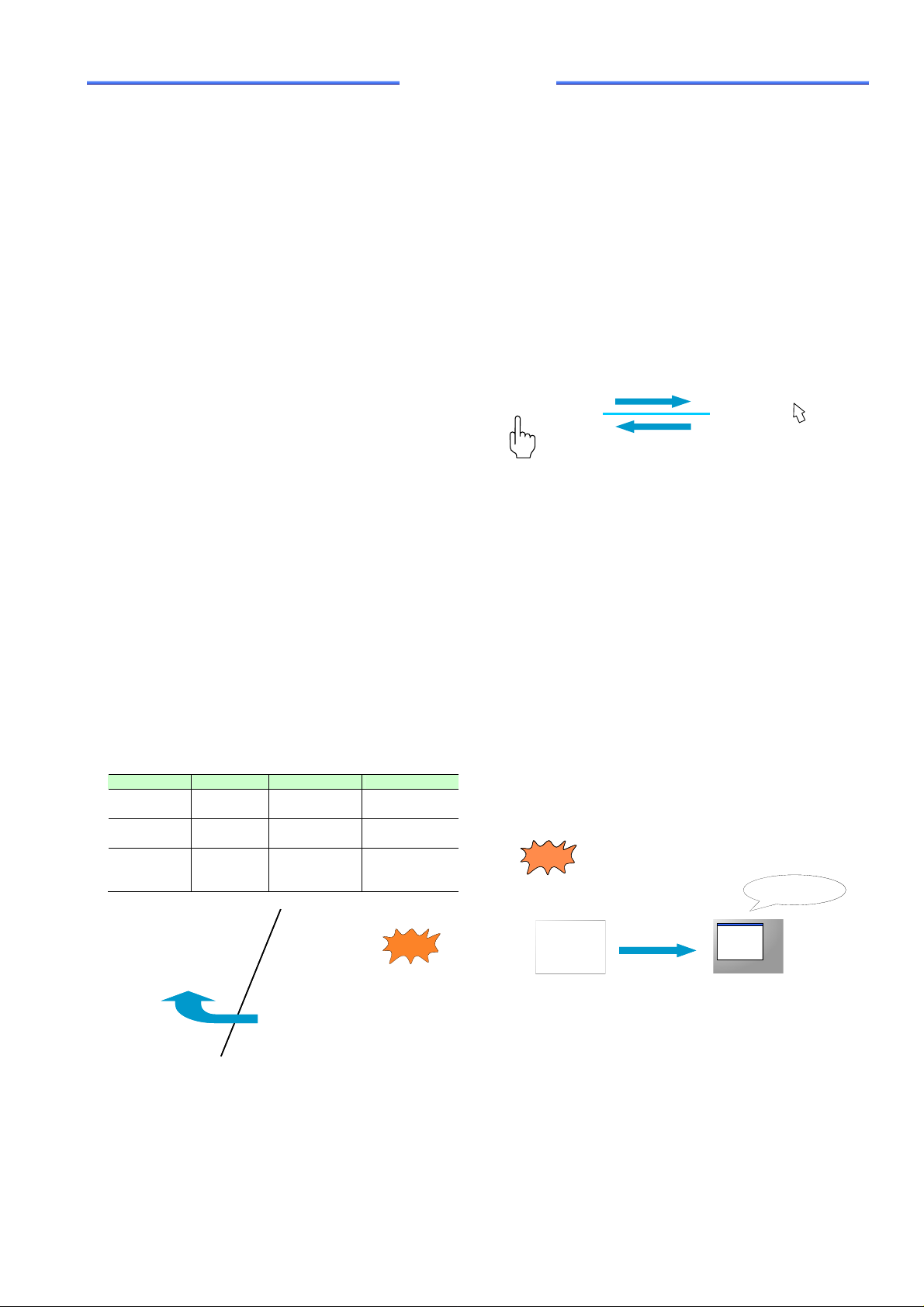
With this function, both the server and client can be
generally operated. However, if operations are simultaneously performed at both the remote and on-site locations, it may cause unintended operation for the manufacturing equipment. To avoid this, the VNC server function has an operation exclusion function: as shown in Fig.
2, the GOT acting as a server exclusively manages the
operations. When the client side has operational authorization, the GOT disables touch-panel operation and
enables operation only from the client side.
On site
GOT (VNC server)
When an on-site operator has operat ional authorization, only touch-panel
operation is available
When the office has operational authorization, only operation
information of the mouse is available.
Periodically transmits
screen image
Operation
information of mouse
Personal computer (VNC client)
Fig. 2 Authorization of VNC server function
Office
This new function enables the GOT and hence
manufacturing equipment to be operat ed and control led
remotely away from the production site, even from a
restricted-access area such as a clean room where
precision industrial products such as semiconductors
and display units are manufactured.
As shown in Fig. 3, manufacturing equipment in
different lines can be monitored and operated by one
GOT by connecting each GOT of the equipment in
multiple manufacturing systems via a network and
using the remote personal computer operati on function
(VNC client) of the GOT.
Manufacturing line BManufacturing line A
Manufacturing line BManufacturing line A
Stopped
Stopped
Displays the GOT screen
Displays the GOT screen
of manufacturing line A
of manufacturing line A
Transmits the
Transmits the
screen image
screen image
GOT (VNC server)
GOT (VNC server)
Transmits alarm log
Transmits alarm log
file, logging file, and
file, logging file, and
operation log when
operation log when
an abnormality
an abnormality
occurs
occurs
GOT (FTP client)
GOT (FTP client)
Fig. 1 File transfer function (FTP client)
2.2.2 VNC server function
The VNC server function transmits screen images
of the on-site GOT to a remote personal computer
through the network for display by the V NC client of t he
personal computer to monitor and operate the GOT.
Mitsubishi Electric ADVANCE June 2013 11
Fig. 3 Combination of VNC server function and remote
personal computer operation function
3. Development of Medium-Sized Display
GT14 Model
3.1 Market demands and challe nges of me-
dium-sized display
For medium-sized displays, there is increasing
demand for high-value-added functions to en able clear
GOT (VNC client)
GOT (VNC client)
Page 3

TECHNICAL REPORTS
letters and figures and photos to be displayed, data
obtained on site to be brought back t o the office using
USB memory, and the data of a display to be operated
from an upper-level personal computer via a network.
However, there were concerns that our medium-sized
display GT11 model was inferior in function and appearance, and our higher-level model was functionally
sufficient but expensive compared with competitors’
products. Therefore, we developed the GT14 model to
meet the market demand for a medium-sized display
featuring the following at a low price:
(1) Enhanced functions
(2) Differentiation from competitors’ products
(3) Lower price
3.2 Development and challenges of GT14 Model
(1) Enhanced functions
The main specifications of the GT14 model are
compared with those of the convention al GT11 model in
Table 3.
Table 3 Comparison of GT14 model and conventional
model
Item GT14 model
Liquid
Display
crystal
Backlight LED Cold cathode tube
Operation part
(touch panel)
User memory
capacity
USB USB device (1ch)
Ethernet 1ch None
General-purpose
memory
Functions Added character font, and
TFT LCD, 65,536 colors STN liquid
Analog resistance film
type
9 Mbytes 3 Mbytes
USB host (1ch)
SD card supported CF card supported
enhanced functions to
improve convenience and
to connect with external
equipment
i) Functional advancement of display screen
The GT14 model offers higher power thanks to its
TFT liquid crystal with excellent visibility and 65,536
colors rather than the conventional 256 colors, as well
as new fonts. When increasing the color variation, we
were careful not to decrease the rendering speed. The
increased color variation requires additional color information which increases the load of the rendering
process, so we raised the rendering speed by using a
more powerful microcomputer and by optimizing the
synthesis method for rendering data according to the
display properties based on window rendering.
The new model also uses approximatel y 15% less
energy than the conventional model, by u sing LEDs for
the liquid crystal backlight and impr oving the efficiency
of the power circuit.
GT11 model
(Conventional
model)
crystal, 256 colors
Matrix resistance
film type
USB device (1ch)
-
ii) Efficiency of screen design
Users can freely design the display screen using
dedicated rendering tools. The GT14 model allows
parts to be arranged at the pixel level, which is not
possible with the conventional model, by adopting an
analog resistance film-type touch panel. Furthermore,
users can design screens without consideri ng memory
capacity, since user memory capacity has been tripled
to 9 Mbytes.
iii) Enhancement of external interface and logging
function
We have developed new functions by ad ding USB
hosts, Ethernet and SD card support. Here, we introduce the logging function as an example.
The logging function collects the values of devices
such as a sequencer (or programmable controller) at
any time or at a fixed cycle. The collected data can be
stored in an SD card in CSV file format beforehand, and
the data can be brought back to the office from the
production site using USB memory, etc. This allows
quality control and productivity to be im proved by analyzing the data and giving feedback to the site. It also
possible to efficiently obtain data collected from the
personal computer at the office via Ethernet (Fig. 4).
Programmable
controller
Temperature
controller
Data
acquisition
Fig. 4
Factory
USB memory, etc.
Logging function
Office
(2) Differentiation from competitors’ products
As a leading manufacturer of programmable controllers in Japan, we have developed several functions to
enhance compatibility with our programmable controllers.
Examples include an FA transparent function for debugging by connecting a personal computer to our programmable controller via the display, and a
backup/restoration f unctio n. The latt er functi on is used t o
store (back up) the configuration information (sequence
programs, parameters, setting values, etc.) of programmable controllers in an SD card mounted on the display,
and return (restore) the stored information to the equipment. This allows a system to be backed up and restored
without using a personal computer, and hence easily
replace a faulty programmable controller on site and
promptly restore the system after a fault (Fig. 5).
12
Page 4

TECHNICAL REPORTS
Factory
Programmable
controller
Fig. 5
Backup/restoration function
To ensure reliability, drainage grooves on the
housing ensure that condensation water inside the
control panel does not penetrate into the display
through the fixed metal fittings of the GT14 model.
(3) Lower price
The GT14 features a new hardware configuration
from the conventional model. We selected highly reliable microcomputers and memory devices in consideration of the market trend of electronic components,
and reduced the number of parts by simplifying the
circuit configuration to lower the price.
Restore
Backup
SD card, etc.
4. Conclusion
The FTP server function to manage the sending
and receiving of data at the office and the FTP client
function to send and receive data based on the GOT
monitoring information, the SoftGOT-GOT link function
serving as a SoftGOT, and the VNC server function t o
display the GOT screen to operate expanded and optional functions, are similar yet have their own characteristics and can be selected as required. The medium-sized highly functional GT14 model helps to meet
a wide range of user needs.
We will strengthen the linkage with FA eq uipment
such as programmable controllers, which is our
strength, as well as servos and inverters, and emph asize the benefits of our products to firmly establish our
position in the market.
Reference
(1) S. Hashimoto: Graphic Operation Terminal
GOT1000 Series “GT16 Model,” Mitsubishi Denki
Giho (March 2010).
Mitsubishi Electric ADVANCE June 2013 13
 Loading...