

Page 1
Leica DISTO™ A8
The original laser distance meter
Page 2
14
12
11
13
15
10
1
16
2
3
4
5
17
18
19
6
7
8
9
20
21
22
23
Page 3
Page 4

User Manual
Version 1.1
English
Congratulations on your purchase of a Leica DISTO™.
The safety instructions can be
found in a separate booklet, which
accompanies this user manual. The
safety instructions along with the
user manual should be read carefully before initial
operation.
Helpful Hint: The first and last page including the
pictures should be folded out and left open, whilst
reading through the manual. Letters and numbers in
braces {} refer to the illustrations.
Content
Start-up................................................................ 1
Menu functions ................................................... 3
Operation.............................................................4
Measuring ............................................................ 6
Functions ............................................................. 6
Appendix .............................................................. 9
Leica DISTO™ A8 1.1.0 gb
Start-up
Inserting / replacing Batteries
See figure {C} - Open the positioning bracket.
Remove the locking clip and slide the endpiece down.
Slide the red locking mechanism to the side and open
the battery compartment. Insert new or replace used
batteries. Close battery cover, reinsert the endpiece
and fix locking clip.
The battery symbol {B, 6} appears permanently blinking in the display when the battery voltage is too
low. The batteries should be replaced as soon as
possible.
• Pay attention to correct polarity.
•Use alkaline batteries.
• Batteries should be removed if the device will not
be used for a long time (danger of corrosion).
When changing the batteries the settings and stack
content remain unchanged.
Multifunctional Endpiece
See figure {D}
The device can be used for different measurement
situations:
• For measurements from an edge open the positioning bracket until it locks in place.
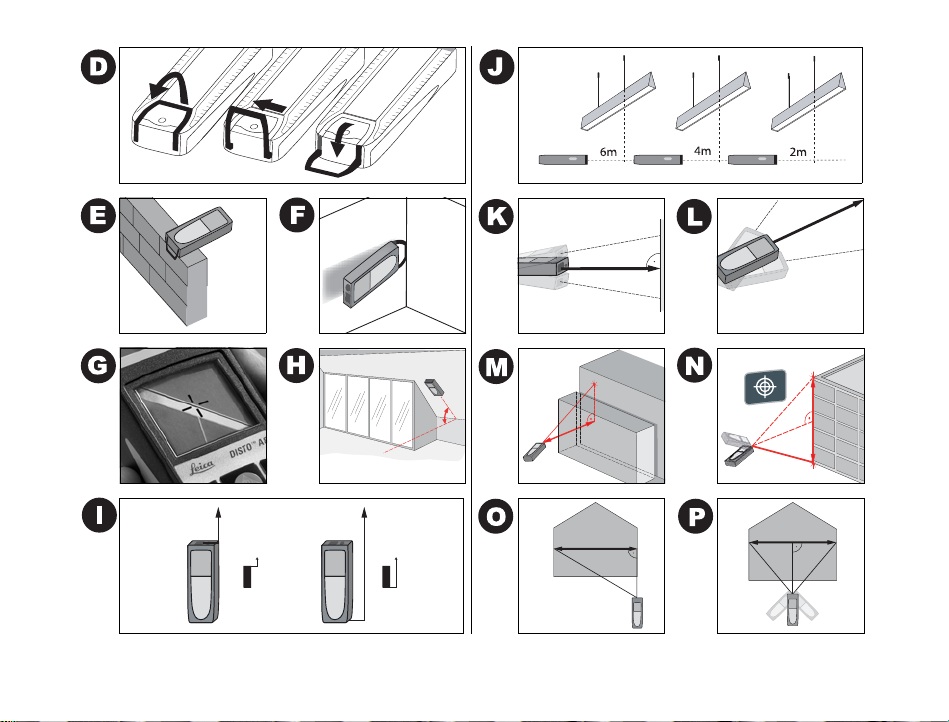
See figure {E}.
• For measurements from a corner, open the positioning bracket until it locks in place, with a slight
1
Start-up
D
GB
F
I
E
P
NL
DK
S
N
FIN
J
CN
RC
ROK
PL
H
RUS
CZ
Page 5

D
GB
F
I
E
P
NL
DK
S
N
FIN
J
CN
RC
ROK
PL
H
RUS
CZ
push to the right the bracket can be turned
further. See figure {D and F}.
A built-in sensor automatically detects the orientation of the positioning bracket and calculates the
corresponding distances accordingly.
Level
The integrated bubble level allows simple horizontal
levelling of the instrument.
Keypad
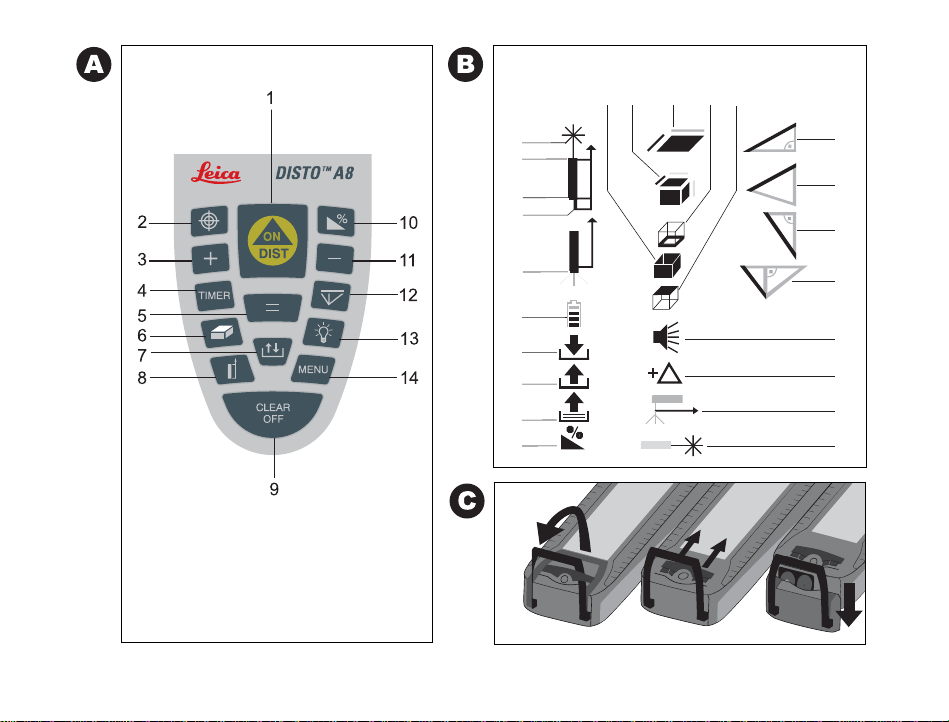
See figure {A}:
1 ON/MEASURING
2 DIGITAL VIEWFINDER
3 PLUS [+]
4 TIMER
5 EQUAL [=]
6 AREA/VOLUME
7 STORAGE
8 MEASUREMENT REFERENCE
9 CLEAR/OFF
10 TILT
11 MINUS [-]
12 INDIRECT MEASUREMENT (PYTHAGORAS)
13 ILLUMINATION
14 MENU
Start-up
Display
See figure {B}
The graphics display shows clear, large symbols which
enable an easy to use interface.
The display contrast can be adjusted to suit the
customer's requirements and the prevailing lighting
conditions.
Press the CLEAR - key {A, 9} and the MINUS - key
(A, 11) at the same time; with each press a beep
sounds and the display becomes one step darker.
Press the CLEAR - key {A, 9} and the Plus - key (A, 3)
at the same time; with each press a beep sounds and
the display becomes one step brighter.
1 Laser active
2 Reference (front)
3 Reference (rear)
4 Reference(corner stop)
5 Measuring with the tripod
6 Battery status
7Save constant value
8 Call up constant value
9 Historical mermory, call up values
10 Tilt
11 Area
12 Volume
13 Circumference
14 Wall area
15 Ceiling area
16 Single tilt measurement
2
Leica DISTO™ A8 1.1.0 gb
Page 6

17 Double tilt measurement
18 Single Pythagorean measurement
19 Double Pythagorean measurement
20 Beep
21 Offset settings
22 Reference (tripod)
23 Continuous laser
Menu functions
Presettings
The menu allows selection of the settings that will
remain in memory after the instrument is switched
off.
Navigation in the Menu
Press the MENU -key {A, 14} repeatedly to scroll
through the possible menu functions.
When the desired menu option appears, select it with
the EQUAL - key {A, 5}, scroll through the possible
settings with the PLUS - key {A, 3} or the MINUS -
key {A, 11} and store the selected setting with the
EQUAL - key {A, 5}. Press CLEAR - key {A, 9} to leave
the menu without saving any changes in the settings.
Set unit of distance
"UNIT ?" and the DISTO symbol with the laser beam
{B, 1}.are displayed on the screen
Possible units:
Leica DISTO™ A8 1.1.0 gb
Distance Area Volume
0.000 m
0.00 m
0 mm
0.00 ft
1
0.00
1
0' 0''
0.0 in
1
/32 in
0
/
ft in
32
/
32
0.000 m² 0.000 m³
0.00 m² 0.00 m³
0.000 m² 0.000 m³
0.00 ft² 0.00 ft³
0.00 ft² 0.00 ft³
0.00 ft² 0.00 ft³
0.00 ft² 0.00 ft³
0.00 ft² 0.00 ft³
Set unit of tilt
"UNIT ?" and the tilt symbol {B, 10} are displayed on
the screen.
Possible units:
±90.00°
±180.00°
360.00°
0.00%
0.0 mm/m
0.00 in/ft
Beep
The Beep symbol is displayed. It can be switched on
or off.
3
Menu functions
D
GB
F
I
E
P
NL
DK
S
N
FIN
J
CN
RC
ROK
PL
H
RUS
CZ
Page 7

D
GB
F
I
E
P
NL
DK
S
N
FIN
J
CN
RC
ROK
PL
H
RUS
CZ
Measure with offset (add/subtract
tolerance)
An offset automatically adds or subtracts a value to/
from all measurements. With this feature toler-ances
can be taken into consideration e.g. between unfinished and finished dimensions.
Select the menu function OFFSET {B, 21} (OFFSET
blinks in the display), confirm with the EQUAL - key
{A, 5}. Adjust the OFFSET with the PLUS - key {A, 3}
or the MINUS - key {A, 11}.
By holding the keys down, the setting values will
increase/decrease faster. Once you have entered the
proper offset confirm your selection with the EQUAL
- key {A, 5}. As long as an OFFSET {B, 21} is added/
subtracted the symbol is visible on the display.
Measuring with tripod
Using a tripod eliminates shaking when measuring
over long distances. On the back of the instrument is
an industry standard ¼"-threaded hole for use with a
camera tripod mounting screw. For correct measurements the reference needs to be adapted. Select the
menu function TRIPOD {B, 22}. Confirm with the
EQUAL - key {A, 5}. The corresponding symbol {B, 5}
is displayed permanently.
Continuous laser
Select the Menu function Continuous laser and
confirm with the EQUAL - key {A, 5}. The laser is now
Operation
on permanently and whenever the DIST - key {A, 1}
is pressed, a measurement is taken.
The laser is automatically switched off after 60
minutes.
Reset
When you select the menu function RESET and press
the EQUAL-key {A, 5} twice the device will default to
factory settings.
CAUTION: Any customized presettings as well as
stored values will be deleted.
Operation
Switching On/Off
ON: Press ON - key {A, 1} briefly. Battery indica-
tion is displayed until the next keystroke.
OFF: Press and hold OFF - key {A, 9}. To maximize
battery life the laser beam will switch off after
3 minutes of inactivity, the device will automatically switch off after 6 minutes of inactivity.
CLEAR key
Pressing the CLEAR - key {A, 9} cancels the last
action.
While making area/volume or indirect measurements,
each single measurement can be deleted and remeasured.
4
Leica DISTO™ A8 1.1.0 gb
Page 8

Digital Viewfinder (3x zoom)
The instrument has a built in camera that displays the
target in 16 grayscales on the camera. With the crosshairs blended in, targets can be aimed at and accurately measured, even if the laser is not visible. Refer
to piture {G}.
The integrated camera is a great help outdoors and
can be used for every function. Long distance measurements and accurate measurements to small areas,
can be made even in bright sunlight without any
problems. The 3- fold zoom supports the individual
magnification.
Press the DIGITAL VIEWFINDER - key {A, 2} and the
camera is activated. Press the DIGITAL VIEWFINDER
- key {A, 2} repeatedly to switch from 1-fold to 2-fold
to 3-fold zoom.
The PLUS - key {A, 3} and the MINUS - key {A, 11}
adjust in steps 9-1 the brightness of the camera.
Whenever a distance measurement is triggered, an
hour glass symbol appears in the lower left corner of
the display screen until the measurement is
completed.
For measurements of less than 5 meters, using the
digital viewfinder is not recommended as the laser is
not centered because of the parallax.
Tilt
The instrument has a built in tilt sensor with an accuracy of ± 0.15° in reference to the laser beam. Activate the tilt sensor with the TILT- key {A, 10}. While
Leica DISTO™ A8 1.1.0 gb
measuring, the tilt is now displayed in the upper right
of the screen. The housing can also be held at a tilt.
By pressing the DIST - key {A, 1} the tilt is stabilised
and displayed in an intermediate row. The tilt measurement works independently of the distance measurement.
Please make sure that the instrument is not traverse
tilted when making a tilt measurement. If the transverse tilt is too large, an error message is displayed
to prevent measuring errors. The units can be set
under MENU. Refer to picture {H}. You need to
consider the height difference, between the housing
and the laserpoint, by marking off the tilt with help of
the laser beam.
Illumination
Pressing the ILLUMINATION - key {A, 13} turns on/
off the display backlight.
Measuring reference
If the positioning bracket is folded out, the device
recognizes the position, adapts the reference and
calculates distances accordingly.
The default reference setting is from the rear of the
instrument. By pressing the REFERENCE - key {A, 8},
the setting can be changed, so that the next measurement taken will be from the "front" of the in-strument. Afterwards the reference setting automatically
defaults back to rear. See picture {I}.
You can choose the "front" reference permanently by
pressing the REFERENCE - key {A, 8} longer. Press
5
Operation
D
GB
F
I
E
P
NL
DK
S
N
FIN
J
CN
RC
ROK
PL
H
RUS
CZ
Page 9

D
GB
F
I
E
P
NL
DK
S
N
FIN
J
CN
RC
ROK
PL
H
RUS
CZ
the REFERENCE - key {A, 8} longer another time to
change back to the "rear" reference.
Measurements from the front edge are signalled by a
different sounding "Beep".
See also "Measuring with tripod".
Measuring
Single distance measuring
Pressing DIST - key {A, 1} turns the laser on. Aim at
the desired target and press DIST - key {A, 1} again.
The measured distance is displayed immediately in
the chosen unit.
Minimum/maximum measuring
This function allows the user to measure the
minimum or maximum distance from a fixed measuring point as well as to determine spacing - see figure
{J}.
It is commonly used to measure diagonal distances
(maximum values) or horizontal distances (minimum
values).
Press and hold DIST - key {A, 1} until you hear a
beep, indicating the device is in a continuous measuring mode. Then slowly sweep the laser back and
forth respectively up and down over the desired
target point - see figure {K, L} - (e.g. a corner in the
room).
Press DIST - key {A, 1} again and the continuous
measurement will be stopped. The values for
maximum and minimum distances are shown in the
Measuring
display as well as the last measured value in the main
line.
With tilt activated, the tilt value of the maximum
measurement is displayed in the frame.
Functions
Addition/Subtraction
To add or subtract two or more measurements simply
works as follows:
Measurement +/- Measurement +/- Measurement +/- …. = RESULT
Pressing the EQUAL - key {A, 5} ends the sequence
and displays the result in the main line; the actual
measurements are scrolled upwards in the display.
Pushing the CLEAR - key {A, 9} undoes the most
recent operation.
Areas and volumes can be added/subtracted in
exactly the same manner.
Area/Volume
Press the AREA/VOLUME - key {A, 6}. In the symbol
{B, 11, 12} the distance to be measured is highlighted. Make the required two or three measurements and the result will be displayed in the summary
row. Press the AREA/VOLUME - key {A, 6} for a
longer period to display additional information
{B, 13-15}. Press the AREA/VOLUME - key {A, 6}
again for a longer period to return to the current
area-/volume measurement or a short press to make
the next area/volume measurement.
6
Leica DISTO™ A8 1.1.0 gb
Page 10

Special functions
If desired, the sides of an Area/Volume can be
composed of several partial lengths. Select the
AREA/VOLUME function.
Press the PLUS - key {A, 3} or MINUS - key {A, 11}
before you start with the first partial measurement.
Proceed with the first partial measurement by pressing DIST - key {A, 1}. In the display an addition or
subtraction symbol appears. Make the first partial
measurement, press PLUS - key {A, 3} or MINUS key {A, 11} and make the second partial measurement. Unlimited partial measurements can be
summed up or subtracted. To finish the distance
measurement press the EQUAL - key { A, 5}. The
second distance can be made up of partial distances
with the same method. The result of the Area/Volume
calculation is displayed as usual in the summary row.
Indirect Measuring
The instrument can measure vertical distances with
the tilt sensor. This procedure is especially helpful if
the upper target point does not reflect the laser. The
upper target point can be aimed at, with the digital
viewfinder. For a double tilt measurement, the first
measurement only requires a tilt measurement and
not a distance measurement.
Then the vertical and horizontal distances can be
calculated with the Pythagorean theorem. This
method is ideal when the distance to be measured is
hard to reach.
Leica DISTO™ A8 1.1.0 gb
• Both methods only serve to estimate distances
and cannot replace an exact measurement.
• Make sure you adhere to the prescribed sequence
of measuring.
• All target points must be in a straight line to the
wall area. See figure {N, P}
• Best results can be expected if the device is
turned around a fixed point (e.g. positioning
bracket folded out completely and the device is
held towards a wall)
• It is highly recommended to use the "Minimum/
maximum measuring" by pressing the DIST key {A, 1} longer. The minimum value is used for
the measurements perpendicular towards the
target respectively the maximum value for the
other measurements. This increases the accuracy
of the indirect measuring considerably.
Indirect single tilt measurement - determine
all 3 sides and an angle with 1 distance measurement
See figure {M}
Press the INDIRECT MEASUREMENT - key {A, 12}. In
the symbol, the distance to be measured is high-
lighted. Make the required distance measurement.
The result is displayed in the summary row, the
measured distance and the angle in the secondary
row.
Press the INDIRECT MEASUREMENT - key {A, 12}
for a longer period to obtain more details.
7
Functions
D
GB
F
I
E
P
NL
DK
S
N
FIN
J
CN
RC
ROK
PL
H
RUS
CZ
Page 11

D
GB
F
I
E
P
NL
DK
S
N
FIN
J
CN
RC
ROK
PL
H
RUS
CZ
Indirect double tilt measurement - obtain all
detail information with 1 tilt measurement
and 1 distance measurement
See figure {N}
Press the INDIRECT MEASUREMENT - key {A, 12}
twice. In the symbol, the tilt to be measured is high-
lighted. Make the required tilt measurement with the
Digital Viewfinder. Here will we measure with the
DIST-key {A, 1}, a tilt and not the distance. In the
symbol, the distance to be measured is highlighted.
Make the distance measurement. The result is
displayed in the summary row, the measured
distance and angles in the secondary row. Press the
INDIRECT MEASUREMENT - key {A, 12} for a longer
period to obtain more details.
If the tilt of the distance measurement is above 0°,
the result is automatically displayed as a partial
height.
Indirect single Pythagorean measurement determine a stretch with 2 auxilliary measurements
See figure {O}
Press the INDIRECT MEASUREMENT - key {A, 12}
three times. In the symbol, the distance to be
measured is highlighted. Make the required distance
measurements. The result is displayed int the
summary row. Press the INDIRECT MEASUREMENT key {A, 12} for a longer period to obtain more details.
Functions
Indirect double Pythagorean measurement determine a stretch with 3 auxilliary measurements
See figure {N, P}
Press the INDIRECT MEASUREMENT - key {A, 12}
until the corresponding symbol is displayed. In the
symbol the d istanc e t o be meas u r ed is dar k . Make the
required distance measurements. The result is
displayed int the summary row. Press the INDIRECT
MEASUREMENT - key {A, 12} for a longer period to
obtain more details.
You will find application examples with detailed
measuring sequences on our homepage
www.disto.com.
Storage of Constants/Historical
Storage
Storage of a Constant
It is possible to store and recall a frequently used
value e.g. height of a room. Measure the desired
distance, press and hold STORAGE - key {A, 7} until
the device beeps to confirm the storage.
Recalling the constant
Press STORAGE - key {A, 7} to recall the constant
and make it available with a press on the EQUAL - key
{A, 5} for further calculations.
Special function: Adjusting the constant
A measured value can be adjusted. If you press the
EQUAL - key {A, 5}, the value starts blinking and can
8
Leica DISTO™ A8 1.1.0 gb
Page 12

be adjusted with the PLUS - key {A, 3} or MINUS key {A, 11}. Through pressing the EQUAL - key {A, 5}
again the adjustment is confirmed. Now the value can
be stored as usual as a constant.
Historical Storage
Press STORAGE - key {A, 7} twice quickly and the
previous 30 results (measurements or calculated
results) are shown in reverse order. Using the PLUS key {A, 3} and the MINUS - key {A, 11} allows to
navigate in the historical storage. Press EQUAL - key
{A, 5} to take a result from the historical storage to
use for further calculations.
Timer
Press and hold TIMER - key {A, 4} until desired time
delay has been reached (5 - 60 seconds).
Press DIST - key {A, 1}. Once the key is released the
remaining seconds until measurement are displayed.
The last 5 seconds are counted down with a beep.
After the last beep the measurement is taken.
Appendix
Message Codes
All message codes will be displayed with either "InFo"
or "Error".
Leica DISTO™ A8 1.1.0 gb
The following mistakes can be corrected:
InFo Cause Remedy
154
204
206
252
253
255
256
257
260
Transverse tilt < 20° Hold the instrument
Calculation error Repeat procedure
No endpiece detec-
tion
Temperature too
high
Temperatur too low Warm up instrument
Receiver signal too
weak, measurement
time too long,
distance > 100 m
Received signal too
powerful
Wrong measurement, ambient
brightness too high
Laser beam interrupted
Error Cause Remedy
Hardware error Switch on/off the
without any transverse tilt
Attach the endpiece
properly. If error still
occurs, replace the
endpiece.
Cool down instrument
Use target plate
Use target plate
(grey side)
Use target plate
(brown side)
Repeat measurement
device several times
and check if the
symbol still appears. If
so please call your
dealer for assistance.
9
D
GB
F
I
E
P
NL
DK
S
N
FIN
J
CN
RC
ROK
PL
H
RUS
CZ
Appendix
Page 13

D
GB
F
I
E
P
NL
DK
S
N
FIN
J
CN
RC
ROK
PL
H
RUS
CZ
Technical Data
Power Range Technology™:
Range (without target
plate)
Range (with target plate)
Measuring accuracy up to
30 m (2 σ, standard deviation)
Smallest unit displayed 1 mm
Laser class II
Laser type 635 nm, < 1 mW
Ø laser spot (at distance) 6 / 30 / 60 mm
Autom. switch off laser 3 min
Autom. switch off instru-
ment 6 min
Digital Viewfinder (3x
zoom) 9
Display illumination 9
Integrated level 9
Multifunctional endpiece 9
Timer 9
Single Measurement 9
Tilt sensor:
Accuracy
- to laser beam
- to the housing
Maximum, Minimum,
Continuous Measurement 9
Historical storage of 30 values
Appendix
100 m (330 ft)
200 m (650 ft)
typ.: ± 1.5 mm*
(10 / 50 / 100 m)
± 0.15°
± 0.3°
Storage of constant 9
Indirect measurement
with the tilt sensor 9
Indirect Measuring func-
tions with Pythagoras 9
Area/Volume calculation
with room calculations 9
Addition/Subtraction 9
Tripod thread 9
Battery life,
Type AA, 2 x 1.5V
IP rating IP 54
Dimension 148 x 64 x 36 mm
Weight (with batteries) 280 g
Temperature range:
Storage
Operating
* maximum deviation occurs under unfavourable conditions
such as bright sunlight or when measuring to poorly
reflecting or very rough surfaces. For distances over 30 m the
maximum deviation may increase to a maximum of ± 10 mm.
10
up to 5000
measurements
splash proof, dust proof
-25°C to +70°C
(-13°F to +158°F)
-10°C to +50°C
(-14°F to +122°F)
Leica DISTO™ A8 1.1.0 gb
Page 14

Measuring Conditions
Measuring Range
At night, at dusk and when the target is shadowed
the measuring range without target plate is
increased.
Use a target plate to increase the measurement
range during daylight or if the target has a bad reflection.
Measuring Surfaces
Measuring errors can occur when measuring toward
colourless liquids (e.g. water) or dust free glass,
styrofoam or similar semi-permeable surfaces.
Aiming at high gloss surfaces deflects the laser beam
and measurement errors can occur.
Against non-reflective and dark surfaces the measuring time can be increased.
Care
Do not immerse the unit in water. Wipe off dirt with
a damp, soft cloth. Do not use aggressive cleaning
agents or solutions. Treat the optical surfaces with
the same care that you would apply to eyeglasses
and cameras.
Leica DISTO™ A8 1.1.0 gb
Warranty
The Leica DISTO™ A8 comes with a three* year
warranty from Leica Geosystems AG.
More detailed information can be found at:
www.disto.com
All illustrations, descriptions and technical specifications are subject to change without prior notice.
* To receive the three year warranty, the product must be registered on our website www.disto.com within eight weeks of the
purchase date. If the product is not registered, a two year
warranty applies.
11
Appendix
D
GB
F
I
E
P
NL
DK
S
N
FIN
J
CN
RC
ROK
PL
H
RUS
CZ
Page 15

Page 16

Leica Geosystems AG, Heerbrugg, Switzerland has been certified as being equipped
with a quality system which meets the International Standards of Quality
Management and Quality Systems (ISO standard 9001) and Environmental
Management Systems (ISO standard 14001).
Total Quality Management - Our commitment to total customer satisfaction. Ask
your local Leica Geosystems agent for more information about our TQM program.
Printed in Switzerland - Copyright Leica Geosystems AG, Heerbrugg,
Switzerland 2007
Translation of original text (743367a)
Leica Geosystems AG
CH-9435 Heerbrugg
(Switzerland)
www.disto.com
Pat. No.: WO 9427164, WO 9818019, WO 0244754, WO 0216964,
US 5949531, EP 1195617, US 7030969, WO 03104748
 Loading...