

Page 1

Plena Easy Line Power Amplifier
Installation and User Instructions
PLE-1P120-US
en
PLE-1P240-US
Page 2

Plena Power Amplifier | Installation and User Instructions | Important safeguards en | 2
Important safeguards
Alerts on the apparatus
This symbol found on the apparatus indicates
hazards arising from dangerous voltages.
This symbol found on the apparatus indicates
the user should read all safety statements found
in the operating instructions.
This symbol found on the apparatus indicates
double insulation.
Warning
To reduce the risk of fire or electrical shock, do
not expose this apparatus to rain or moisture.
This symbol found on the apparatus indicates
that the apparatus must be placed in a separate
collection facility for electronic waste and not
disposed with household waste.
1 Read instructions - All the safety instructions for use
should be read before the system is operated.
2 Retain instructions - The safety instructions and
operating instructions should be retained for future
reference.
3 Heed warnings - All warnings on the unit and in the
operating instructions should be adhered to.
4 Follow instructions - All operating instructions and
instructions for use should be followed.
5 Cleaning - Unplug system units from the mains
outlet before cleaning. Do not use liquid cleaners or
aerosol cleaners. Use only a dry cloth for cleaning.
6 Attachments - Do not use attachments not
recommended by the product manufacturer as they
may cause hazards.
7 Water and Moisture - Do not use this unit near water,
for example near a bathtub, washbowl, kitchen sink,
or laundry basket, in a wet basement, near a
swimming pool, in an unprotected outdoor
installation or any area which is classified as a wet
location.
8 Accessories - Do not place this unit on an unstable
stand, tripod, bracket or mount. This unit may fall,
causing serious injury to a person and serious
damage to the unit. Use only a stand, tripod, bracket
or mount recommended by the manufacturer, or
sold with the product. Any mounting of the unit
should follow the manufacturer's instructions, and
should use a mounting accessory recommended by
the manufacturer. An appliance and cart
combination should be moved with care. Quick
stops, excessive force, and uneven surfaces may
cause the appliance and cart combination to
overturn.
9 Ventilation - Openings in the enclosure, if any, are
provided for ventilation and to ensure reliable
operation of the unit and to protect it from
overheating. These openings must not be blocked or
covered. The unit should not be placed in a built-in
installation unless proper ventilation is provided or
the manufacturer's instructions have been adhered
to. Maintain a minimum distance of 2 inch (50 mm)
around the front, the rear, and the sides of the unit
for sufficient ventilation.
10 Heat sources - Do not install the unit near any heat
sources such as radiators, stoves, or other apparatus
that produce heat (including amplifiers).
11 Open flames - No open flames, such as lighted
candles, should be placed on the unit.
12 Power sources - Units should be operated only from
the type of power source indicated on the marking
label. If you are not sure of the type of power supply
you plan to use, consult your appliance dealer or
local power company. For units intended to operate
from battery power, or other sources, refer to the
"Installation and User Instructions".
13 Grounding or polarisation - This unit may be
equipped with a polarised alternating current line
plug (a plug having one blade wider than the other).
This plug will fit into the power outlet only one way.
This is a safety feature. If you are unable to insert the
plug fully into the outlet, try reversing the plug. If the
plug still fails to fit, contact your electrician to
replace your obsolete outlet. Do not defeat the safety
purpose of the polarised plug. Alternatively, this unit
may be equipped with a 3-wire grounding type plug
having a third (grounding) pin. This plug will only fit
into a grounding-type power outlet. This is a safety
feature. If you are unable to insert the plug into the
Bosch Security Systems | 2008-02 | PLE-1P120-US, PLE-1P240-US en
Page 3

Plena Power Amplifier | Installation and User Instructions | Important safeguards en | 3
outlet, contact your electrician to replace your
obsolete outlet. Do not defeat the safety purpose of
the grounding-type lug.
14 Power-Cord Protection - Power supply cords should
be routed so that they are not likely to be walked on
or pinched by items placed upon or against them,
paying particular attention to cords and plugs,
convenience receptacles, and the point where they
exit from the appliance.
15 Overloading - Do not overload outlets and extension
cords as this can result in a risk of fire or electrical
shock.
16 Object and Liquid Entry - Never push objects of any
kind into this unit through openings as they may
touch dangerous voltage points or short-out parts
that could result in a fire or electric shock. Never
spill liquid of any kind on the unit.
17 Servicing - Do not attempt to service this unit
yourself as opening or removing covers may expose
to dangerous voltage or other hazards. Refer all
servicing to qualified service personnel.
18 Damage Requiring Service - Unplug the unit from
the outlet and refer servicing to qualified service
personnel under the following conditions:
• When the power-supply cord or plug is damaged.
• If liquid has been spilled, or objects have fallen
into the unit.
• If the unit has been exposed to rain or water.
• If the unit does not operate normally by following
the instructions for use. Adjust only those
controls that are covered by the instructions for
use, as an improper adjustment of other controls
may result in damage and will often require
extensive work by a qualified technician to
restore the units to their normal operation.
• If the unit has been dropped or the unit has been
damaged.
• When the unit exhibits a distinct change in
performance; this indicates a need for service.
19 Replacement Parts - When replacement parts are
required be sure the service technician has used
replacement parts specified by the manufacturer or
parts which have the same characteristics as the
original part. Unauthorised substitutions may result
in fire, electric shock or other hazards.
20 Safety Check - Upon completion of any service or
repairs to the units, ask the service technician to
perform safety checks to determine that the unit is in
proper operating condition.
21 Lightning - For added protection of the units during
a lightning storm, or when it is left unattended and
unused for long periods of time, unplug it from the
wall outlet and disconnect the cable system. This will
prevent damage to the unit due to lightning and
power-line surges.
22 Disconnection - To completely disconnect this unit
from the AC mains, disconnect the power supply
cord plug from the AC receptacle. The mains plug of
the power supply cord shall remain readily operable
to be able to disconnect power from the unit.
23 Before installing or operating this product, always
read the Safety Instructions, which are available as a
separate document (9922 141 7014x). These
instructions are supplied together with all equipment
that can be connected to the mains.
Bosch Security Systems | 2008-02 | PLE-1P120-US, PLE-1P240-US en
Page 4

Plena Power Amplifier | Installation and User Instructions | Important safeguards en | 4
American Users
Note
This equipment has been tested and found to
comply with the limits for a Class B digital
device, pursuant to part 15 of the FCC rules.
These limits are designed to provide reasonable
protection against harmful interference in a
residential installation.
This equipment generates, uses, and can
radiate radio frequency energy and, if not
installed and used in accordance with the
instructions, may cause harmful interference to
radio communications. However, there is no
guarantee that interference will not occur in a
particular installation. If this equipment does
cause harmful interference to radio or television
reception, which can be determined by turning
the equipment OFF and ON, the user is
encouraged to try to correct the interference by
one or more of the following measures:
• Reorient or relocate the receiving antenna.
• Increase the separation between the
equipment and the receiver.
• Connect the equipment into an outlet on a
circuit different from that to which the
receiver is connected.
• Consult the dealer or an experienced
radio/TV technician for help.
Canadian Users
Note
This Class B digital device complies with
Canadian ICES-003.
Cet appareil numérique de classe B est
conforme à la norme NMB-003 du Canada.
Thank you for choosing a Bosch Security Systems
product!
Bosch Security Systems | 2008-02 | PLE-1P120-US, PLE-1P240-US en
Page 5

Plena Power Amplifier | Installation and User Instructions | Table of contents en | 5
Table of contents
Important safeguards ...................................................................................................................................................2
Table of contents ...........................................................................................................................................................5
1. Introduction ....................................................................................................................................................................7
1.1 Purpose .....................................................................................................................................................................................7
1.2 Digital document .....................................................................................................................................................................7
1.3 Intended audience ..................................................................................................................................................................7
1.4 Related documentation ..........................................................................................................................................................7
1.5 Alerts ..........................................................................................................................................................................................7
1.6 Icons ...........................................................................................................................................................................................7
1.6.1 Note icons ...........................................................................................................................................................................7
1.6.2 Caution, Warning, and Danger icons ...........................................................................................................................7
1.7 Conversion tables ...................................................................................................................................................................8
2. Description .....................................................................................................................................................................9
2.1 The Plena product range .......................................................................................................................................................9
2.2 Contents of box .......................................................................................................................................................................9
2.3 The Plena Power Amplifier ....................................................................................................................................................9
2.4 Controls, connectors and indicators ............................................................................................................................... 11
2.4.1 Front panel ....................................................................................................................................................................... 11
2.4.2 Rear panel ........................................................................................................................................................................ 12
3. Installation ................................................................................................................................................................... 13
3.1 Unpack unit ............................................................................................................................................................................ 13
3.2 Install unit in rack (optional) ............................................................................................................................................... 13
3.3 Check settings/connections .............................................................................................................................................. 13
3.4 Connect unit to mains ......................................................................................................................................................... 13
4. Connections and settings ........................................................................................................................................ 15
4.1 Connecting inputs ................................................................................................................................................................ 15
4.1.1 DC supply (battery) ........................................................................................................................................................ 15
4.1.2 70 V input ......................................................................................................................................................................... 16
4.2 Connecting speakers .......................................................................................................................................................... 17
4.2.1 Constant voltage loudspeakers ................................................................................................................................... 17
4.2.2 Low impedance loudspeakers ..................................................................................................................................... 17
5. Operation ..................................................................................................................................................................... 19
5.1 Switch on and off ................................................................................................................................................................. 19
5.1.1 Switch on ......................................................................................................................................................................... 19
5.1.2 Switch off ......................................................................................................................................................................... 19
6. Technical data ............................................................................................................................................................. 21
6.1 Electrical ................................................................................................................................................................................. 21
6.1.1 Mains power supply ....................................................................................................................................................... 21
6.1.2 Battery power supply ..................................................................................................................................................... 21
6.1.3 Power consumption ....................................................................................................................................................... 21
6.1.4 Performance .................................................................................................................................................................... 21
6.1.5 Line input - loop through output .................................................................................................................................. 21
6.1.6 70 V input ......................................................................................................................................................................... 21
6.1.7 Loudspeaker outputs 70 V* ......................................................................................................................................... 21
6.1.8 Loudspeaker output 4 Ohm* ....................................................................................................................................... 21
6.2 Mechanical ............................................................................................................................................................................. 22
6.3 Environmental ........................................................................................................................................................................ 22
Bosch Security Systems | 2008-02 | PLE-1P120-US, PLE-1P240-US en
Page 6

Plena Power Amplifier | Installation and User Instructions | Table of contents en | 6
Intentionally left blank
Bosch Security Systems | 2008-02 | PLE-1P120-US, PLE-1P240-US en
Page 7

Plena Power Amplifier | Installation and User Instructions | Introduction en | 7
1 Introduction
1.1 Purpose
The purpose of these Installation and User Instructions
is to provide information required for installing,
configuring and operating a Plena Power Amplifier.
1.2 Digital document
These Installation and User Instructions are also
available as a digital document in the Adobe Portable
Document Format (PDF).
1.3 Intended audience
These Installation and User Instructions are intended
for installers and users of a Plena system.
1.4 Related documentation
Safety Instructions (9922 141 1036x).
1.5 Alerts
Four types of alerts are used in this manual. The alert
type is closely related to the effect that may be caused if
it is not observed. These alerts - from least severe effect
to most severe effect - are:
• Note
Alert containing additional information. Usually, not
observing a note alert does not result in damage to
the equipment or personal injuries.
• Caution
The equipment can be damaged if the alert is not
observed.
• Warning
Persons can be (severely) injured, or the equipment
can be seriously damaged, if the alert is not
observed.
• Danger
Not observing the alert can result in death.
1.6 Icons
1.6.1 Note icons
The icons used in combination with Notes provide extra
information about the Note. See the following
examples:
Note
General icon for notes.
Note
Consult the indicated source of information.
1.6.2 Caution, Warning, and Danger icons
The icons used in combination with Caution, Warnings,
and Dangers indicate the type of hazard present. See the
following examples:
Caution, Warning, Danger
General icon for Cautions, Warnings and
Dangers.
Caution, Warning, Danger
Icon for risk of electric shock.
Caution, Warning, Danger
Icon for risk of electrostatic discharge.
Bosch Security Systems | 2008-02 | PLE-1P120-US, PLE-1P240-US en
Page 8
Plena Power Amplifier | Installation and User Instructions | Introduction en | 8
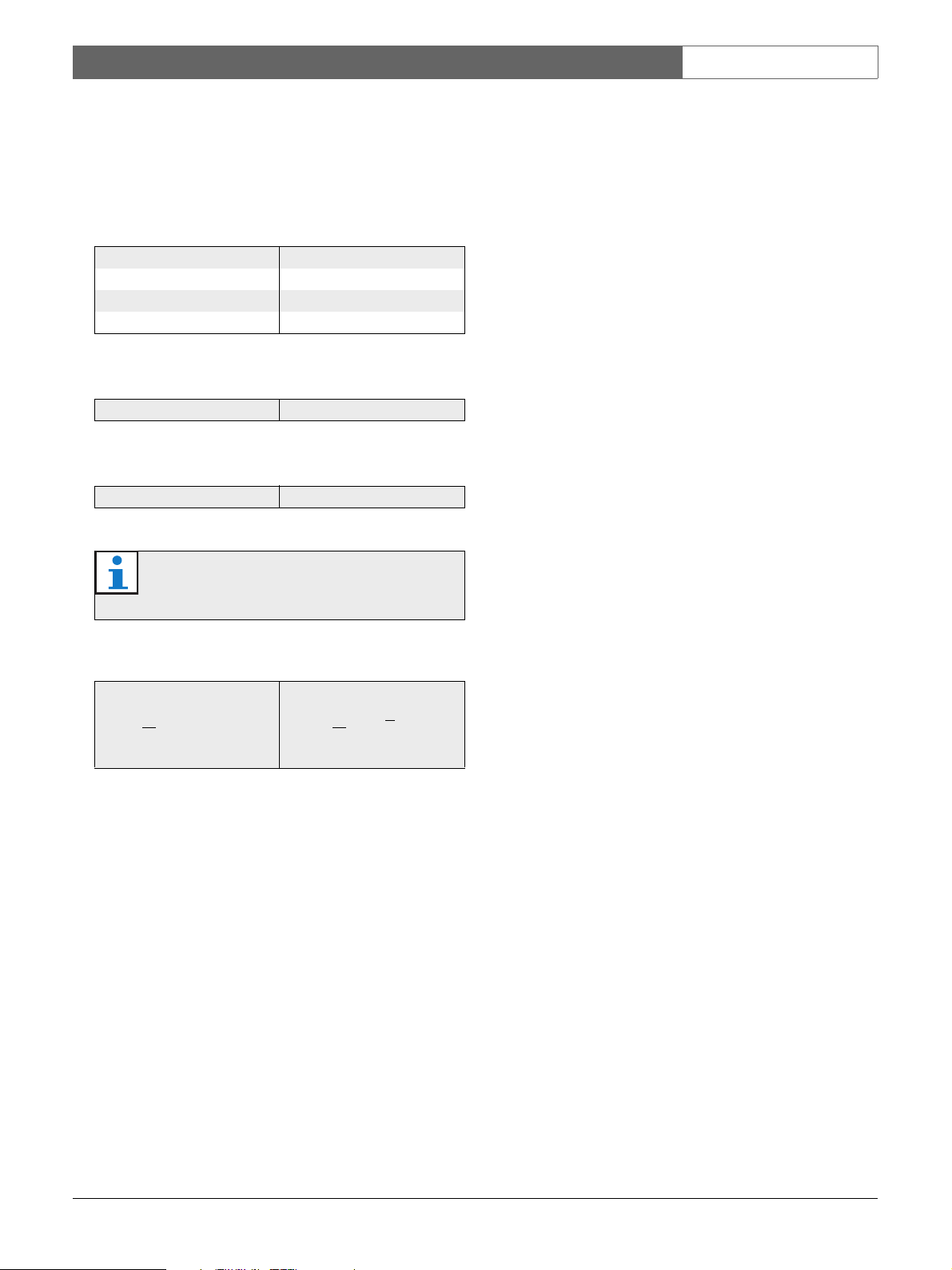
1.7 Conversion tables
In this manual, SI units are used to express lengths,
masses, temperatures etc. These can be converted to
non-metric units using the following information.
table 1.1: Conversion of units of length
1 in = 25.4 mm 1 mm = 0.03937 in
1 in = 2.54 cm 1 cm = 0.3937 in
1 ft = 0.3048 m 1 m = 3.281 ft
1 mi = 1.609 km 1 km = 0.622 mi
table 1.2: Conversion of units of mass
1 lb = 0.4536 kg 1 kg = 2,2046 lb
table 1.3: Conversion of units of pressure
1 psi = 68.95 hPa 1 hPa = 0.0145 psi
Note
1 hPa = 1 mbar.
table 1.4: Conversion of units of temperature
° F = 9 . ( ° C + 32) ° C = 5 . ( ° F 32)
° F = 5 ° C = 9
Bosch Security Systems | 2008-02 | PLE-1P120-US, PLE-1P240-US en
Page 9

Plena Power Amplifier | Installation and User Instructions | Description en | 9
2Description
2.1 The Plena product range
The Plena Easy Line Power Amplifier is part of the
Plena product range. Plena provides public address
solutions for places where people gather to work,
worship, trade, or relax. It is a family of system elements
that are combined to create public address systems
tailored for virtually any application.
The Plena product range includes:
•mixers
• preamplifiers
• power amplifiers
• a music source unit
• a digital message manager
• a feedback suppressor
• call stations
• an All-in-One system
• a voice alarm system
• a timer
• a charger
• a loop amplifier
2.3 The Plena Power Amplifier
The Plena Power Amplifier is a high performance
power amplifier for use in professional public address
systems. For a schematic overview of the Plena Power
Amplifier, see figure 2.1 on the next page.
The Plena Power Amplifier is provided with one line
input with a loop through output.
A 70 V slave input gives connection to existing
loudspeaker lines. This input is converted to 1 V and fed
to the input. The 1 V and 70 V input is summed.
The Plena Power Amplifier has 25 V and 70 V constant
voltage output and a low impedance output for 4 Ohm
loudspeakers.
The Plena Power Amplifier has an overload and a shortcircuit protection. A temperature controlled fan and
overheat protection ensures high reliability.
An LED meter monitors the master output. This signal
is also present on the headphone socket below the
output level meter. For total reliability and ease of use, a
limiter is integrated into the output stage to restrict
output if the user applies too much signal.
The various elements are designed to complement each
other thanks to matched acoustical, electrical and
mechanical specifications.
2.2 Contents of box
The packaging box contains the following contents:
• PLE-1P120-US, or PLE-1P240-US
•Power cord
• Mounting brackets (LBC 1901/00)
• XLR cable
Bosch Security Systems | 2008-02 | PLE-1P120-US, PLE-1P240-US en
Page 10

Plena Power Amplifier | Installation and User Instructions | Description en | 10
The unit has 24 VDC backup input with built in
24 VDC battery charger. A separate battery charger is,
therefore, not required. The charger charges the battery
with a 0.5 A constant current until the battery voltage
reaches 27.4 VDC. The charger then switches over to
constant voltage charging (also known as float charging).
Note
When using the unit with backup power of 24 V,
make sure that the unit is always powered ON.
When the unit is switched OFF, the batteries will
be drained as this will be regarded as a power
source. Consequently the unit will revert to 24
VDC power from the 24 V input.
70V
Sensitivity
Input
1V
Loop through
Tempe rature controlled fan
figure 2.1: Schematic overview of the Plena Power Amplifier
Limiter
70 V
25 V
4 Ohm
0 V
Bosch Security Systems | 2008-02 | PLE-1P120-US, PLE-1P240-US en
Page 11

Plena Power Amplifier | Installation and User Instructions | Description en | 11
2.4 Controls, connectors and indicators
2.4.1 Front panel
See figure 2.2 for an overview of the controls and
indicators.
1 Power button.
2 Output level meter (-18 db, 0 db).
3 Air inlet holes.
Note
Do not obstruct the airflow into the unit.
4 Headphone socket.
1
figure 2.2: Front panel
2
B
43
Bosch Security Systems | 2008-02 | PLE-1P120-US, PLE-1P240-US en
Page 12

Plena Power Amplifier | Installation and User Instructions | Description en | 12
2.4.2 Rear panel
See figure 2.3 for an overview of the connectors and
switches:
1 Cooling fan.
Note
Always allow adequate space at the rear of the
unit for ventilation.
2 70 V input, Euro style pluggable screw terminal
connector. Input is wired in parallel with the line
input (see number 4).
3 Input volume control - control range -25 dB to 0dB
(see numbers 2 and 4).
4 Line input, Euro style pluggable screw terminal
connector. Input is wired in parallel with 70 V input
(see number 2). The line input is combined with the
loop through output (Euro style pluggable screw
terminal connector).
5 Outputs and 24 VDC in/out:
• Outputs, Euro style pluggable screw terminal
connector - 70 V, 25 V and 4 Ohm.
• 24 VDC in/out:
• Input: 24 VDC backup power.
• Output: built in charger, maximum 0.5 A.
regulated output current.
6 Mains voltage selector, C13 - 115/230 VAC
50/60 Hz.
7 Mains fuse.
8 Ground connection screw.
Note
The unit must be grounded.
9 Mains connector (3-pole).
figure 2.3: Rear panel
1 6
8 972 3 4 5
Bosch Security Systems | 2008-02 | PLE-1P120-US, PLE-1P240-US en
Page 13

Plena Power Amplifier | Installation and User Instructions | Installation en | 13
3 Installation
3.1 Unpack unit
1 Remove the unit from the box, and discard the
packaging material according to local regulations.
3.2 Install unit in rack (optional)
The Plena Easy Line Power Amplifier is intended for
tabletop use, but you can also mount the unit in a
19" rack (see figure 3.1).
If you mount the unit in a rack, you must:
• ensure that it does not exceed the overheating
temperature (55 °C ambient).
• use the included Bosch mounting brackets
(LBC 1901/00).
• remove the 4 feet from the bottom of the unit.
3.3 Check settings/connections
1 Connect any additional equipment (see section 4.1
and 4.2).
3.4 Connect unit to mains
Caution
Potential equipment damage. Before
connecting power, always check the voltage
selector on the rear panel of the unit.
1 Make sure the voltage selector (115/230 VAC) is
correctly set for the country’s main voltage (see
figure 3.2).
2 Make sure the power button on the front of the unit
is set to Off.
3 Connect the power cord to the mains connector and
plug it into the mains outlet.
1
figure 3.1: Installing the unit in a rack
B
figure 3.2: Power connection and voltage selector
Bosch Security Systems | 2008-02 | PLE-1P120-US, PLE-1P240-US en
Page 14

Plena Power Amplifier | Installation and User Instructions | Installation en | 14
Intentionally left blank
Bosch Security Systems | 2008-02 | PLE-1P120-US, PLE-1P240-US en
Page 15

Plena Power Amplifier | Installation and User Instructions | Connections and settings en | 15
4 Connections and settings
4.1 Connecting inputs
4.1.1 DC supply (battery)
Caution
The connection cable must have an in-line fuse.
Use the type of fuse shown in the following
figure.
Caution
Make sure the unit is earthed.
The Plena Power Amplifier has a 24 VDC input
(terminal screw). This input can be used in mobile
applications, such as boats where 115 or 230 VAC is not
available or in applications that must continue to
operate in case of a power failure.
When a 24 VDC battery is connected (typically
consisting of two 12 VDC lead-acid batteries in series),
the unit will operate on the supplied DC voltage.
The Plena Power Amplifier has as a built in charger,
which charges the connected battery (or batteries if
connected in series). A separate battery charger is,
therefore, not required. The charger charges the battery
with a 0.5 A constant current until the battery voltage
reaches 27.4 VDC. The charger then switches over to
constant voltage charging (also known as float charging).
This means that a battery can be charged at the same
rate it is discharging, and thus full capacity battery can
be assured.
This type of charging is suited for low duty-cycle
applications where a relatively high current or power is
infrequently required.
Note
If the backup power system has to comply to the
EN54-4 standard or similar standards for
backup power and charging speeds, Bosch
recommends the PLN-24CH10.
The PLN-24CH10 is a dedicated battery
charger and power supply that is fully EN54-4
compliant.
+-
12 VDC
12 VDC
figure 4.1: Connecting a DC power supply
Bosch Security Systems | 2008-02 | PLE-1P120-US, PLE-1P240-US en
FUSE
+
Page 16

Plena Power Amplifier | Installation and User Instructions | Connections and settings en | 16
4.1.2 70 V input
The 70 V input is used to connect directly to a 70 V line
(slave operation).
A 70 V input signal can be connected to the Euro style
pluggable screw terminal connector (2) at the rear of the
unit as shown in figure 4.2.
To adjust the volume of the input signal, turn the input
volume control (3) at the rear of the unit.
figure 4.2: Connecting a 70 Volt input signal
Bosch Security Systems | 2008-02 | PLE-1P120-US, PLE-1P240-US en
Page 17

Plena Power Amplifier | Installation and User Instructions | Connections and settings en | 17
4.2 Connecting speakers
Connect speakers to the 25 V, the 70 V or the 4 Ohm
terminals on the Euro style pluggable screw terminal
connector (5) at the rear of the unit.
4.2.1 Constant voltage loudspeakers
figure 4.3: Connecting speakers
The power amplifier can drive 25 V and 70 V constant
voltage loudspeakers. The 70 V connection in shown in
figure 4.3.
4.2.2 Low impedance loudspeakers
figure 4.4: Connecting speakers
Connect low impedance loudspeakers to the 4 Ohm/0
terminals. This output can deliver the rated output
power into an 4 Ohm load. Connect multiple
loudspeakers in a series/parallel-arrangement to make
the combined impedance 4 Ohm or higher. Check the
loudspeaker polarity for in-phase connection.
Connect the loudspeakers in parallel and check the
loudspeaker polarity for in-phase connection. The
summed loudspeaker power should not exceed the
rated amplifier output power.
Bosch Security Systems | 2008-02 | PLE-1P120-US, PLE-1P240-US en
Page 18

Plena Power Amplifier | Installation and User Instructions | Connections and settings en | 18
Intentionally left blank
Bosch Security Systems | 2008-02 | PLE-1P120-US, PLE-1P240-US en
Page 19

Plena Power Amplifier | Installation and User Instructions | Operation en | 19
5Operation
5.1 Switch on and off
5.1.1 Switch on
Caution
Potential equipment damage. Before applying
power, always check the mains voltage selector
at the rear of the unit.
1 Make sure the mains voltage selector (115/230 VAC)
is correctly set for the country’s main voltage (see
figure 5.1).
2 Set the power button (1) on the front of the unit to
On - pushed in.
5.1.2 Switch off
Set the power button (1) on the front of the unit to Off popped out.
figure 5.1: Voltage selector
Bosch Security Systems | 2008-02 | PLE-1P120-US, PLE-1P240-US en
Page 20

Plena Power Amplifier | Installation and User Instructions | Operation en | 20
Intentionally left blank
Bosch Security Systems | 2008-02 | PLE-1P120-US, PLE-1P240-US en
Page 21

Plena Power Amplifier | Installation and User Instructions | Technical data en | 21
6Technical data
6.1 Electrical
6.1.1 Mains power supply
Voltage
115 - 230 VAC, ±10%, 50/60 Hz
Inrush Current PLE-1P120-US
8/16 A ( 230 /115 VA C )
Inrush Current PLE-1P240-US
9/19 A ( 230 /115 VA C )
6.1.2 Battery power supply
Voltage
24 VDC, ±15%
Current PLE-1P120-US
6 A
Current PLE-1P240-US
12 A
Charge current
0.5 ADC
Charge float voltage
27.4 VDC
6.1.3 Power consumption
PLE-1P120-US (mains)
400 VA
PLE-1P240-US (mains)
800 VA
6.1.4 Performance
Frequency response
50 Hz to 20 kHz (+1/-3 dB @ -10 dB ref. rated
output)
Distortion
<1% @ rated output power, 1 kHz
6.1.5 Line input - loop through output
Line input
Euro style pluggable screw terminal connector,
balanced, phantom
Loop through output
Euro style pluggable screw terminal connector,
balanced, phantom
Sensitivity
1 V
Impedance
>1 kohm (mic); >5 kohm (line)
S/N
63 dB
Dynamic range
100 dB
CMRR
>40 dB (50 Hz to 20 kHz)
6.1.6 70 V input
Connector
4-pin, Euro style pluggable screw terminal
Sensitivity 70 V
70 V adjustable
Impedance
>10 kohm
S/N (flat at max volume)
>65 dB
6.1.7 Loudspeaker outputs 70 V*
Connector
Euro style pluggable screw terminal, floating
Max / rated PLE-1P120-US
180 W / 120 W
Max / rated PLE-1P240-US
360 W / 240 W
6.1.8 Loudspeaker output 4 Ohm*
Connector
Euro style pluggable screw terminal, floating
PLE-1P120-US
31 V (120 W )
PLE-1P240-US
44 V (240 W)
* Subtract 1 dB for 24 V battery operation.
Bosch Security Systems | 2008-02 | PLE-1P120-US, PLE-1P240-US en
Page 22

Plena Power Amplifier | Installation and User Instructions | Technical data en | 22
6.2 Mechanical
Dimensions (H x W x D)
100 x 430 x 270 mm (19" wide, 2U high)
Mounting
Stand-alone, 19" rack
Color
Charcoal
Weight (PLE-1P120-US)
Approx. 10.5 kg
Weight (PLE-1P240-US)
Approx. 12.5 kg
6.3 Environmental
Operating temperature
-10 to +55 ºC
Storage temperature
-40 to +70 ºC
Relative humidity
<95%
Acoustic noise level of fan
<33 dB SPL @ 1 m temperature control
Bosch Security Systems | 2008-02 | PLE-1P120-US, PLE-1P240-US en
Page 23

Page 24

For more information visit
www.boschsecuritysystems.com
© Bosch Security Systems B.V.
Data subject to change without notice
2008-02 | PLE-1P120-US, PLE-1P240-USen
 Loading...