

Page 1

CONTENTS
GENERAL INTRODUCTION TO B&G NETWORK......... 2
INTRODUCTION TO NETWORK QUAD......................... 3
EXAMPLE SYSTEMS USING NETWORK QUAD........... 4
SELECTING THE DISPLAY MODE ................................ 5
USING THE SPEED KEY ................................................ 6
CALIBRATION AND OPERATING PARAMETERS........ 7
SETTING THE DISPLAY DAMPING ............................... 8
SETTING THE SPEED AND LOG UNITS ....................... 9
SPEED AND LOG CALIBRATION ................................ 10
1 - MANUAL CALIBRATION - CAL ................................ 11
2 - MANUAL CALIBRATION - LOG CAL........................ 12
3 - AUTOMATIC CALIBRATION - AUTO CAL ............... 13
RESETTING THE DEAD RECKONED DISTANCE ....... 15
USING THE DEPTH KEY .............................................. 16
THE DEPTH DATUM - CAL ........................................... 17
SETTING THE DEPTH DATUM..................................... 18
SETTING THE DEPTH UNITS....................................... 19
DEPTH ALARMS........................................................... 20
SHALLOW ALARM
ENABLING/DISABLING THE SHALLOW ALARM ......... 21
ADJUSTING THE SHALLOW ALARM VALUE .............. 21
DEEP ALARM
ENABLING/DISABLING THE DEEP ALARM..................22
ADJUSTING THE DEEP ALARM VALUE.......................22
ANCHOR ALARM
USING THE ANCHOR ALARM.......................................23
ENABLING/DISABLING THE ANCHOR ALARM............24
ADJUSTING THE ANCHOR ALARM SHALLOW LIMIT .25
ADJUSTING THE ANCHOR ALARM DEEP LIMIT.........25
USING THE TIMER/TEMP KEY .....................................26
RESETTING THE TRIP LOG..........................................27
SETTING THE TIMERS AND LAP TIMER .....................28
SETTING THE TEMPERATURE UNITS.........................29
CALIBRATING THE TEMPERATURE SENSOR............30
USING THE LIGHTS KEY ..............................................31
NETWORK ALARMS .....................................................32
FAULT AND ERROR MESSAGES .................................33
INSTALLATION..............................................................34
SITING THE UNIT...........................................................34
MOUNTING THE UNIT ...................................................34
SPECIFICATION ............................................................36
610-HB-0503-05
1
Page 2

GENERAL INTRODUCTION TO B&G NETWORK
The B&G Network range of instruments is designed to be
used as individual units or connected together to form an
integrated navigational system. A single network cable is
used to carry data and power between units. The latest
technology and screened cables throughout the Network
System ensure the ultimate protection from interference
between units and other systems. All Network instruments
can be linked to Network PILOT, Network CHART, Network
GPS or Network LORAN receivers or via NMEA 0183 (v1.5)
to other navigational equipment.
INSTRUMENTS
Network SPEED
Network DEPTH
Network QUAD
Network WIND
Network TACK
Network DATA
NAVIGATIONAL AIDS
Network NAV
Network GPS
Network LORAN
LCD CHART
AUTOPILOTS
Network PILOT
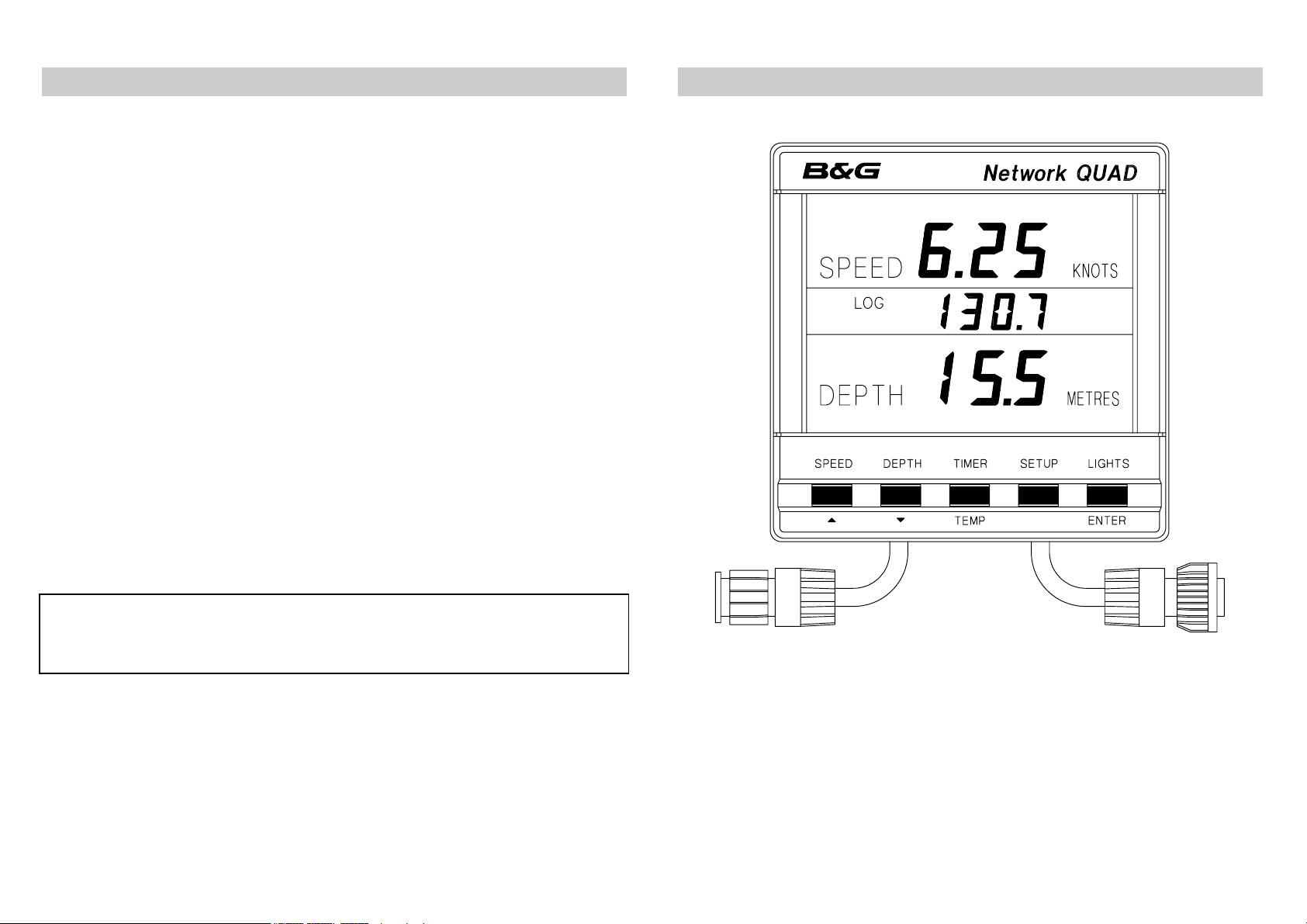
INTRODUCTION TO NETWORK QUAD
The Network QUAD unit measures and displays Speed,
Depth, Log, Timer and Sea Temperature information on a
large back-lit Liquid Crystal Display (LCD). The LCD is
divided into three display areas. The top area permanently
shows speed information, the centre area is selectable and
shows Log, timer, sea temperature and depth alarm
information, and the bottom area permanently shows depth
information.
The five keys allow selection of the displayed information
and setting of the units mode, calibration factors and
operating parameters.
It can operate as the main Network QUAD unit either alone
or as part of an Integrated Network Instrument System
taking inputs directly from Speed and Depth Sensors which
plug into the sockets at the rear of the display, or as a
repeater (by selecting repeater mode) of information
received via the two Network cable tails.
The Network QUAD REPEATER (not a Network QUAD in
repeater mode) does not have Speed and Depth Sensor
sockets, so it only receives data via the system network. It
offers identical facilities to a Network QUAD main unit but
can only ever be used as a repeater.
610-HB-0503-05
2
Page 3
INTRODUCTION TO NETWORK QUAD CONT'D
The Network QUAD unit has three adjustable alarms:
1. Shallow water alarm
2. Deep water alarm
3. Anchor alarm
An internal alarm buzzer will sound when an alarm condition
is met and the display will flash. The alarm is broadcast to
all other Network Instruments in an integrated system, they
will also sound their alarms and flash their displays (except
Network WIND and Network TACK).
The Network QUAD unit is NOT able to transmit NMEA
0183 (v1.5), however, the Network QUAD REPEATER unit
is able to transmit NMEA data via the system network
cables to other Network units and connect to an NMEA
device e.g. a position fixer, with a special NMEA output
cable.
NETWORK QUAD DISPLAY UNIT
IMPORTANT NOTE
Your Network QUAD unit must be set-up and calibrated
correctly before it is used as part of a navigational system.
610-HB-0503-05
3
Page 4
EXAMPLES SYSTEMS USING NETWORK QUAD
r
r
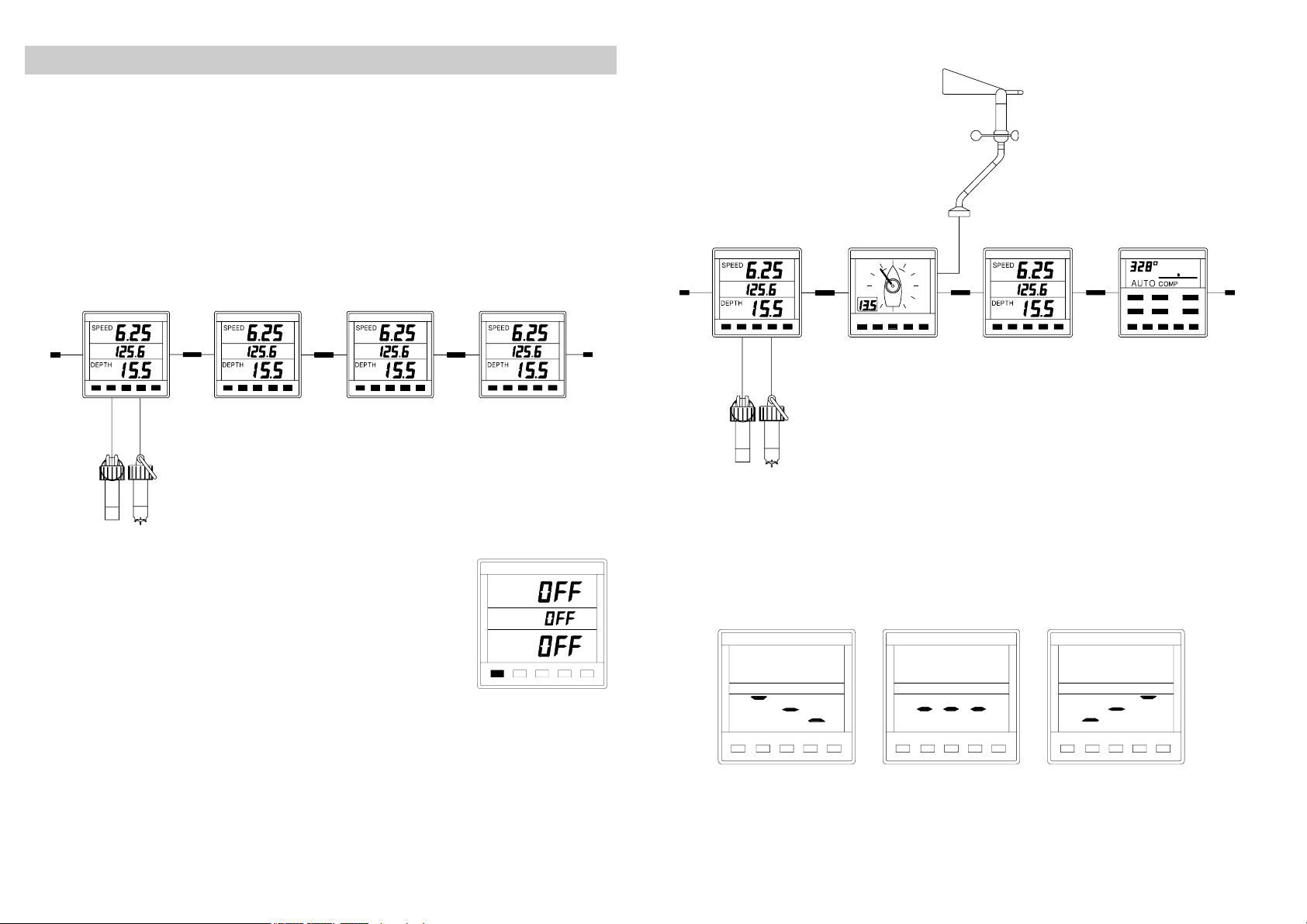
Only one Network QUAD unit should have speed and depth
sensors connected to it and set to transducer mode. Up to
three more Network QUAD (set to repeater mode) or QUAD
REPEATER units can be connected on to the system
network.
QUAD QUAD QUADQUAD
Main unit
Repeater Mode Repeater unitRepeater Mode
QUAD WIND QUAD PILOT
Depth Speed
Sensor
Sensor
When in repeater mode, if the data is not
being received from the system network, the
display will show OFF when a key is
pressed.
610-HB-0503-05
SPEED
DEPTH
Depth
Senso
Speed
Senso
If the Network QUAD unit losses valid depth data, due either
the actual depth being outside the working range, or to
extreme turbulence in the water the LCD will show 3
"floating" bars. This shows that the unit is attempting to
calculate the depth and is still functioning.
4
Page 5
SELECTING THE DISPLAY MODE
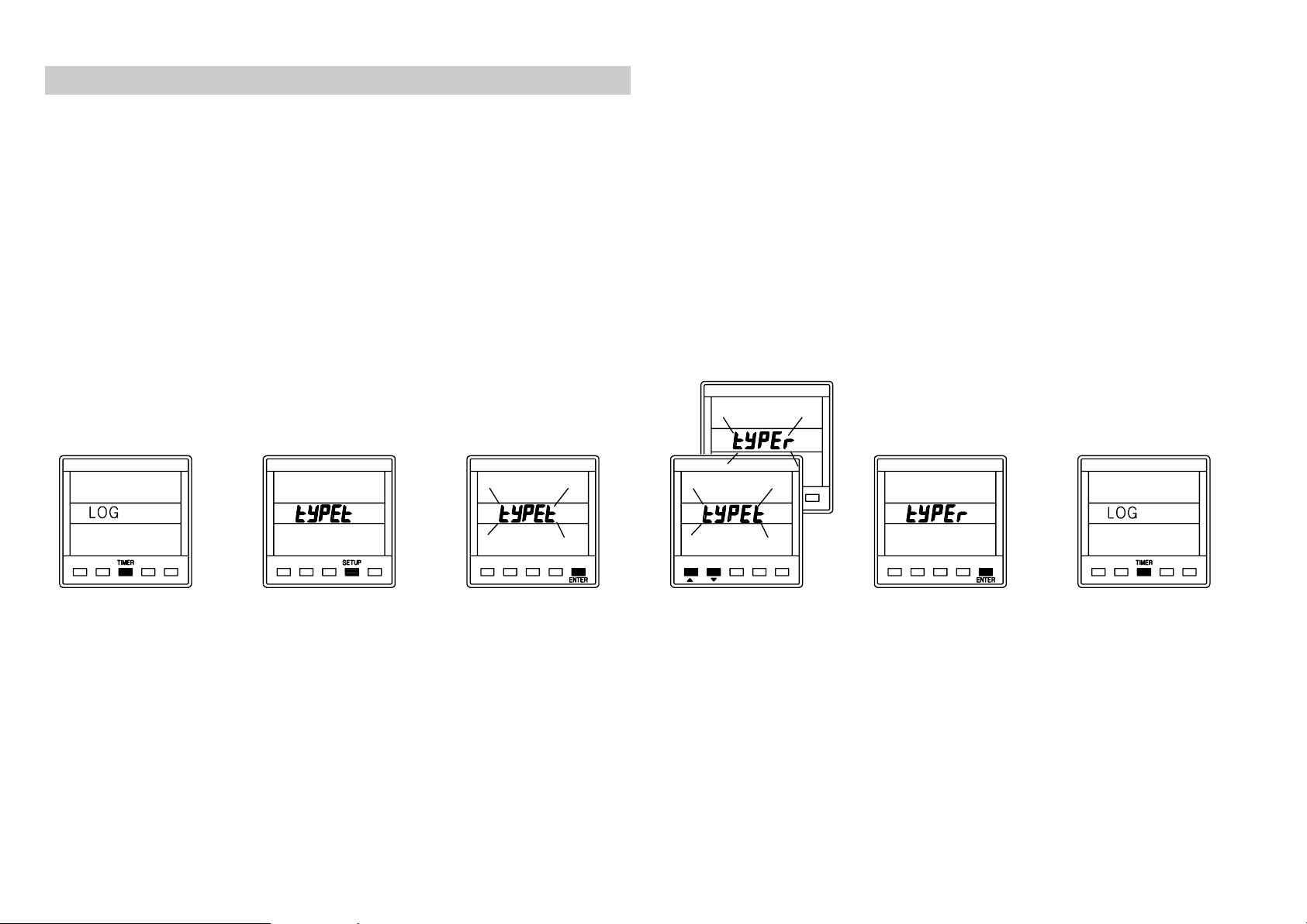
The Network QUAD unit has two operating modes. The
correct mode must be selected for your Network system to
operate properly.
tYPEt
Transducer mode, the unit uses and displays
speed and depth data from sensors connected
directly into the display unit.
tYPEr
Repeater mode, the unit operates as a repeater
using data from the system network.
Press
TIMER
key
to display stored
log.
610-HB-0503-05
Press
SETUP
to display the
current mode.
key
Press
ENTER
key
if the mode needs
to be changed.
Use S or T to
change mode.
Press
ENTER
to
store the new
mode in memory.
Press
TIMER
complete the
change.
to
5
Page 6
USING THE SPEED KEY
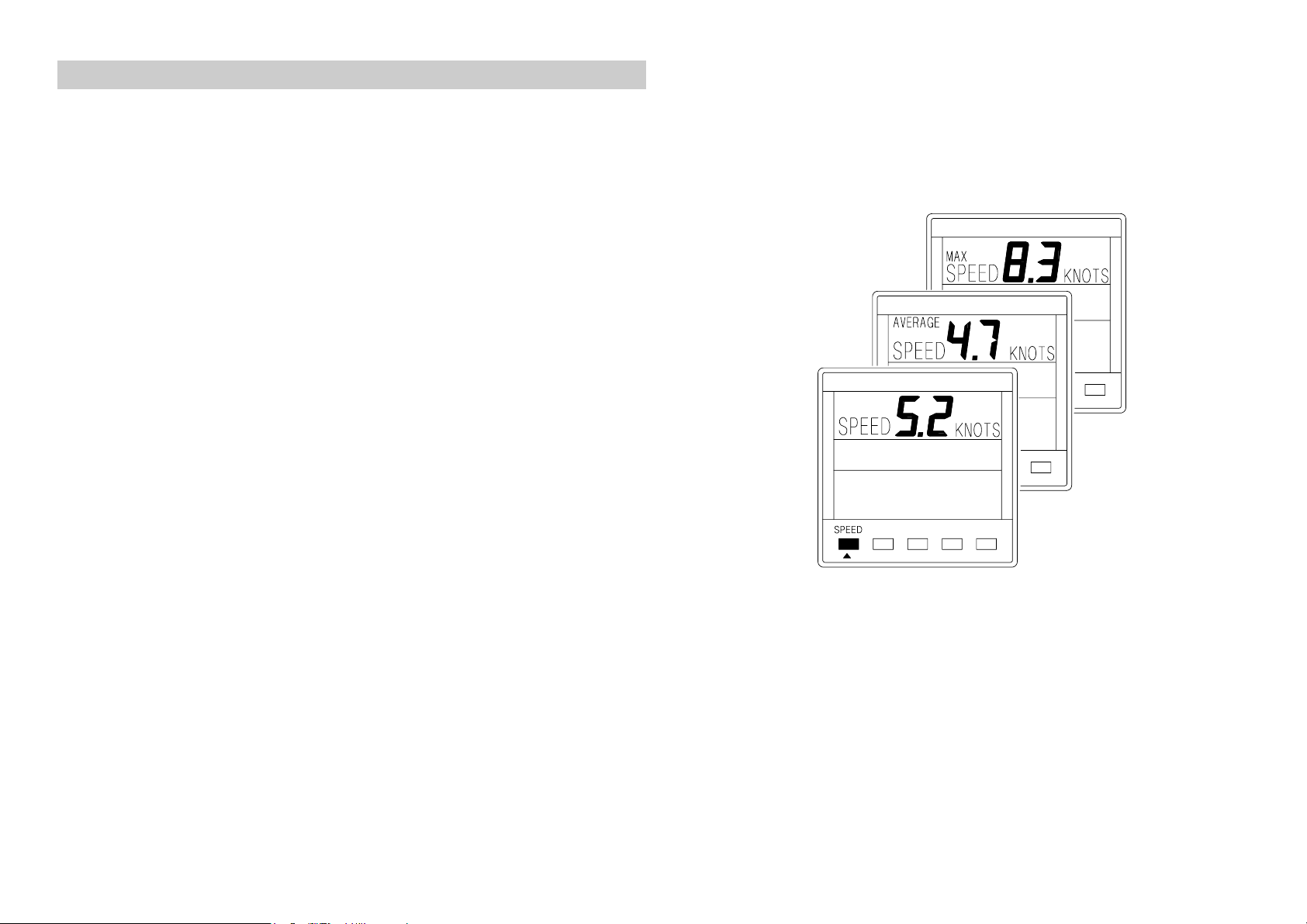
Boat speed information is permanently displayed in the top
area of the LCD.
Press the
SPEED
key to cycle through the following
options:
SPEED
Current boat speed in Knots, can also be
displayed in MPH.
AVERAGE
SPEED
Average boat speed since the last reset of
the trip log.
MAX Maximum boat speed since the last reset
SPEED
of the trip log.
610-HB-0503-05
6
Page 7
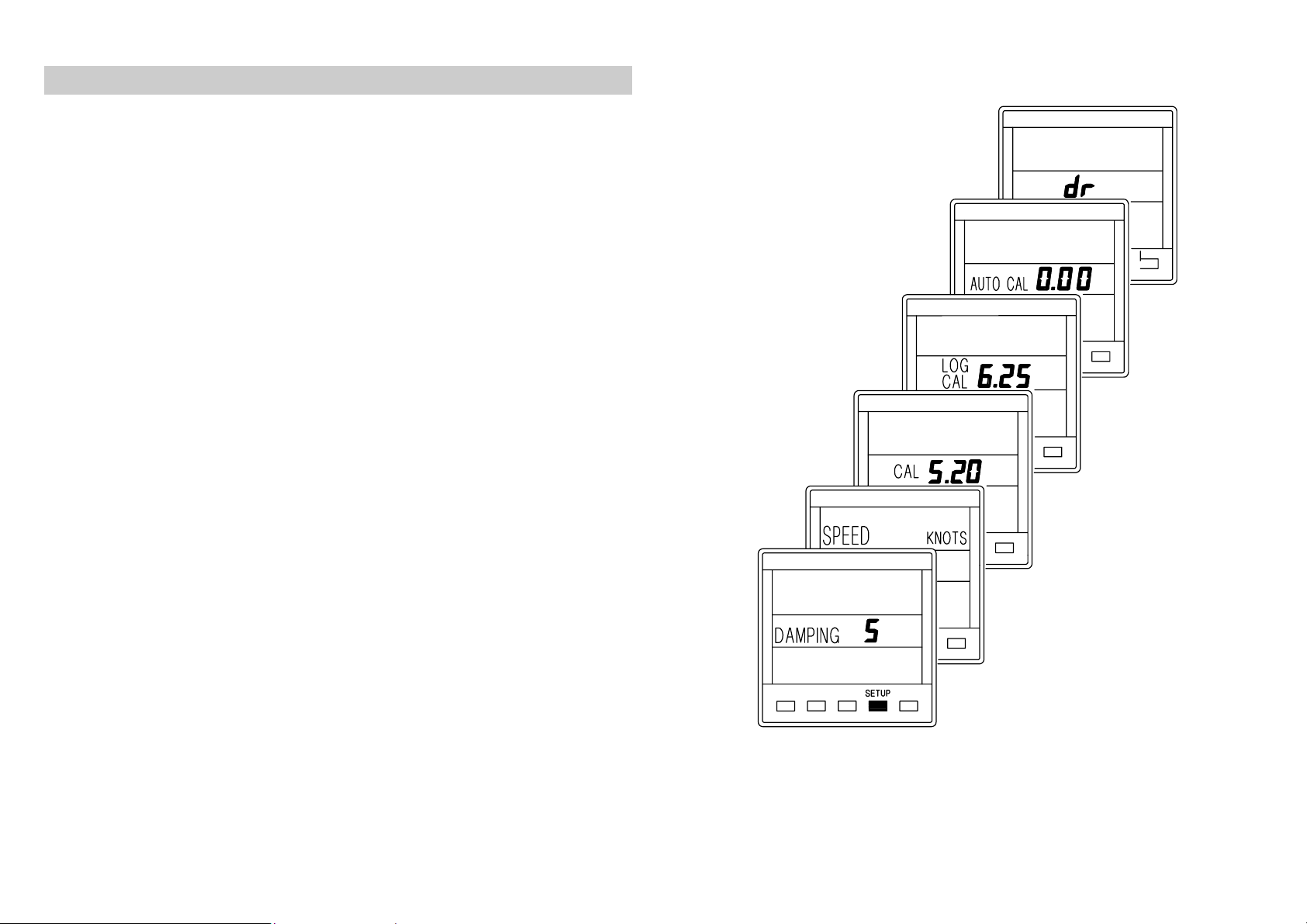
CALIBRATION AND OPERATING PARAMETERS
When current boat speed is displayed, press the
SETUP
to cycle through the following options:
DAMPING
The response time of the display to
changes in boat speed.
SPEED
KNOT or MPH. This setting also changes the log
The boat speed can be displayed in Knots
units to Nautical or Statute Miles.
CAL
LOG
Manual boat speed and log calibration.
Manual boat speed and log calibration.
CAL
AUTO CAL
Automatic boat speed and log
calibration.
Reset Dead Reckoned Distance.
dr
When in
•
The
•
The
•
The
SETUP
SPEED
LOG
LIGHTS
mode:
key becomes the UP key S
key becomes the DOWN key T
key becomes the
ENTER
key
The procedures for using the SETUP options are on the
following pages.
key
610-HB-0503-05
7
Page 8
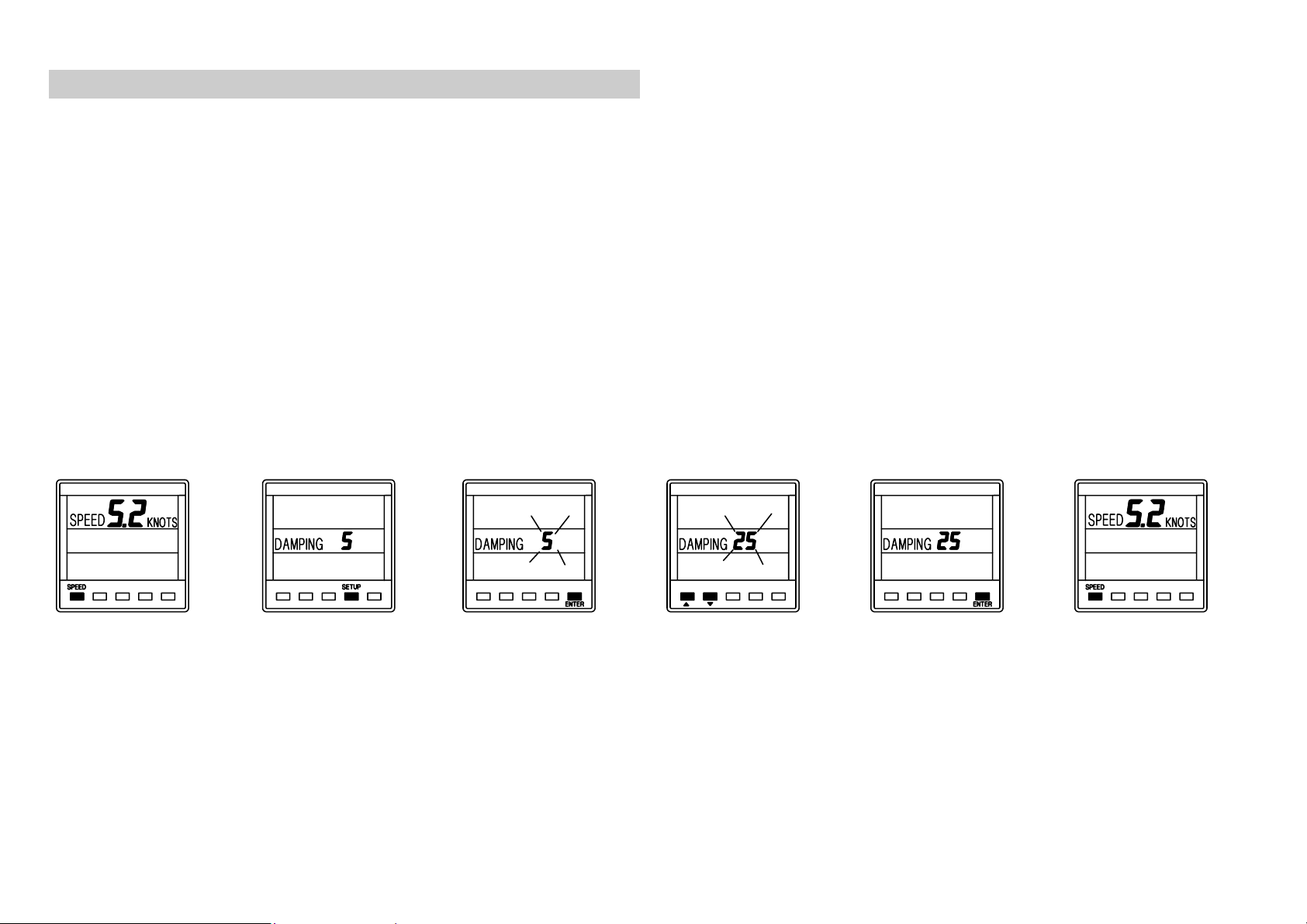
SETTING THE DISPLAY DAMPING
Damping allows the response time of the displayed speed
value to be slowed down if it is to jumpy in rough weather, or
to sped it up when the conditions are calm. The damping
works by averaging the values over a set time period; the
longer the time period the smoother the readings, however
the longer it takes to see a change. Similarly the shorter it is
the jumpier the readings, but the faster the response.
The Network QUAD unit has a factory set value of 5, this can
be adjusted in the range 1 to 64, each step is approximately
one second.
Press
to display current
boat speed.
610-HB-0503-05
SPEED
key
Press
once to display
the damping
value.
SETUP
key
Press
if the value is to
be changed.
ENTER
key
Use S or T to
change the value.
Press
to memorise the
change.
ENTER
key
Press
to display current
boat speed.
SPEED
key
8
Page 9
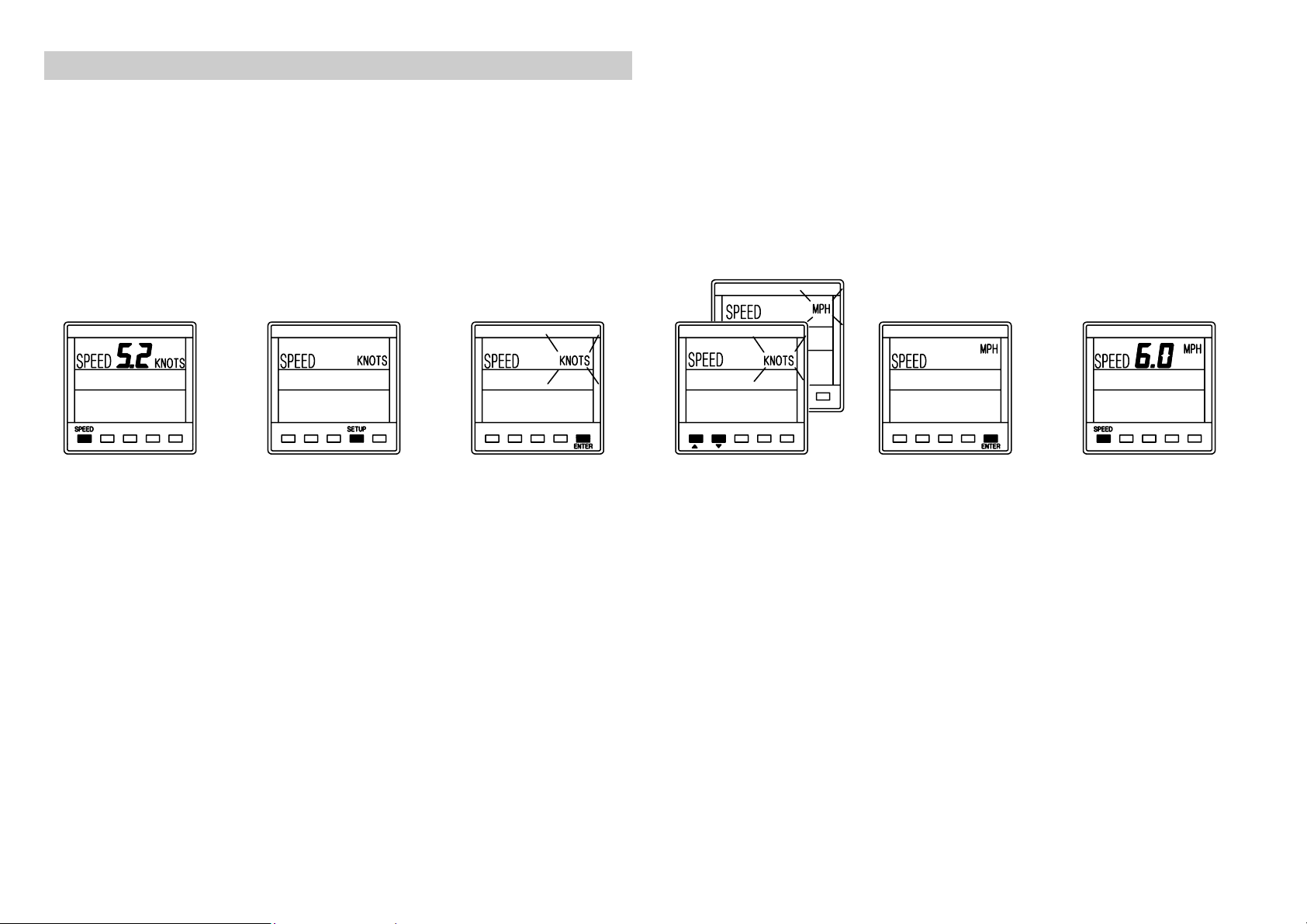
SETTING THE SPEED AND LOG UNITS
The Network QUAD can be set to display boat speed in
Knots or MPH.
If boat speed is in Knots then log is in Nautical Miles.
If boat speed is in MPH then log is in Statute Miles.
Press
to display current
boat speed.
SPEED
key
Press
twice. The speed
digits will blank.
SETUP
key
Press
if the units are to
be changed.
ENTER
key
Use S or T to
change the units.
Press
to memorise the
change.
ENTER
key
Press
to display current
boat speed.
SPEED
key
610-HB-0503-05
9
Page 10

SPEED AND LOG CALIBRATION
Before Network QUAD is used for navigation the boat speed
and log have to be calibrated to ensure accuracy for your
installation and the boats hull characteristics.
Three methods are available with the Network QUAD unit,
two manual adjustments and one automatic:
MANUAL CALIBRATION
1.
2.
AUTOMATIC CALIBRATION
3.
Use the one of the methods overleaf to calibrate your
instrument. It is recommended that
this method will ensure the most accurate calibration of your
Network QUAD unit.
The displayed boat speed value is corrected
CAL
manually to read a known measured speed.
The units calibration figure (Hz/Knot) is
LOG
manually adjusted to correct log and speed
CAL
inaccuracy.
AUTO CAL
corrects the boat speed and log.
The unit automatically calibrates and
AUTO CAL
is used as
610-HB-0503-05
10
Page 11
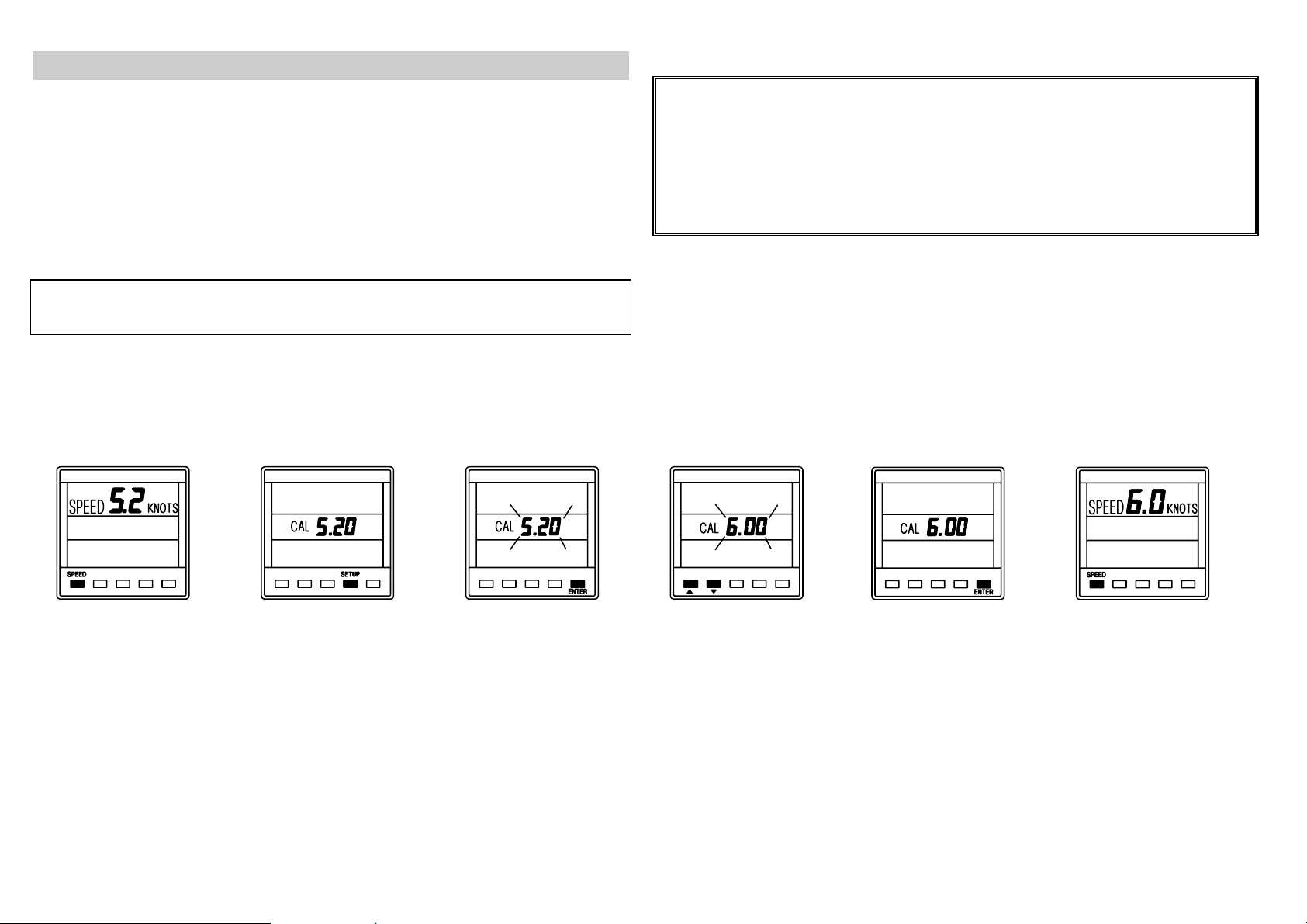
METHOD 1. - MANUAL CALIBRATION - CAL
This procedure requires a reference boat speed with which to
compare the Network QUAD units displayed boat speed. For
example, another boat with an accurate calibrated log, or if
the top speed of the boat is known this value can be entered
during a sea trial to correct the
displayed value.
NOTE:
accuracy of the reference boat speed.
The example below shows a displayed boat speed of 5.2
knots, the boat speed is known to be 6.0 knots. The
displayed value is adjusted to read 6.0 knots.
The accuracy of this method is dependent upon the
IMPORTANT NOTE:
This method of calibration must not be
carried out at boat speeds of LESS THAN 3 KNOTS as
inaccurate values can be entered into the units memory. If
the speed and log are not functioning correctly then enter a
calibration value of 5.3 to 6.2 and then re-enter the correct
calibration value as described below.
Press
SPEED
key
to display current
boat speed.
Press
SETUP
three times to
display
CAL
key
.
610-HB-0503-05
Press
ENTER
key
to adjust the
displayed value.
Use S or T to
change the value.
Press
ENTER
to
store the new
value in memory.
Press
SPEED
key
to complete the
change.
11
Page 12

METHOD 2. - MANUAL CALIBRATION - LOG CAL
If the log or boat speed is in error by a known percentage
then this method allows the calibration figure or
LOG CAL
be adjusted by that amount. The calibration figure is
measured in Hertz per knot (Hz/kt), the factory set value is
6.25.
to
NOTE
: The accuracy of this method is dependant upon the
accuracy of the calculated percentage error.
Using the factory set
LOG CAL
of 6.25 Hz/kt:
•
If the display is under reading by 10% subtract 0.62
•
If the display is over reading by 10% add 0.62
Press
SPEED
key
to display current
boat speed.
Press
SETUP
four times to
display
CAL
LOG
.
key
Press
to adjust the
displayed value.
ENTER
key
Use S or T to
change the value.
Press
ENTER
to
store the new
value in memory.
Press
SPEED
to complete
change.
key
610-HB-0503-05
12
Page 13

METHOD 3. - AUTOMATIC CALIBRATION - AUTO
y
CAL
This procedure will automatically and accurately calibrate the
boat speed and log and is the recommended method for
most boats.
NOTE: AUTO CAL
SETUP
key, then the
Select two markers that are easily identifiable on the
•
ground and on a chart, choose a place where the current
is at a minimum. Measure and record the distance
between the markers on the chart.
• It is recommended that three runs are carried out, this
accounts for tidal efforts, and improves accuracy.
However a time should selected when the current is at a
minimum, ie slack water between tides.
IMPORTANT NOTE:
the three runs must exceed 0.16 Nautical Miles or 100
metres per run. If this is not achieved the
and the procedure will have to be repeated.
Press the
•
SPEED
Press the
•
SETUP
can be aborted any time by pressing the
SPEED
key.
The total distance accumulated over
AUTO CAL
will fail
key to select current boat speed.
key five times to display
AUTO CAL
.
Press the
•
ENTER
run 1. The display will flash
key when in line with marker A, to start
AUTO CAL 1
. Press
ENTER
key again when in line with marker B, to freeze run 1. The
display will flash, showing the distance so far for one run.
Turn the boat around for run 2 in the opposite direction
•
over the same measured distance. Press the
ENTER
ke
when in line with marker B, to start run 2. The display will
flash
AUTO CAL 2
. Press
ENTER
key again when in line
with marker A, to freeze run 2. The display will flash the
accumulated distance so far for two runs.
Turn the boat around for run 3 (final run) in the opposite
•
direction over the same measured distance. Press the
ENTER
display will flash
key when in line with marker A, to start run 3. The
AUTO CAL 3
. Press
ENTER
key again
when in line with marker B, to freeze run 3. The display
will flash the accumulated distance for three runs.
Multiply the recorded distance from the chart by the
•
number of runs completed. This is the true distance
travelled.
Adjust the flashing display with the S or Tkeys until it is
•
the same as the true distance.
Press the
•
ENTER
key to complete the calibration. The
display will zero, and the calibration is memorised.
610-HB-0503-05
13
Page 14

AUTOMATIC CALIBRATION PROCEDURE
Distance measured
on a chart
StopStart
Run 1Run 1
Stop
Start
Run 2Run 2
StopStart
Run 3Run 3
ABORTING AUTO CAL
610-HB-0503-05
14
Page 15

RESETTING THE DEAD RECKONED DISTANCE
This facility allows the Dead Reckoned (DR) distance log to
be reset. The Network QUAD unit cannot display the DR
information, however Network SPEED and Network DATA
both display it.
Press
SPEED
key to
display the current boat
speed.
Press
to display dr. The display
will flash.
610-HB-0503-05
SETUP
key 6 times
Press
ENTER
key, there
will be no change on the
QUAD unit LCD but the dr
log has been reset.
The dr log will be reset to
zero when displayed on
SPEED or DATA units.
15
Page 16

USING THE DEPTH KEY
The current water depth is permanently displayed in the
bottom LCD area in metres, feet or fathoms. The unit is
factory set to metres. The depth displayed is from the depth
datum, see DEPTH DATUM. Press the DEPTH key to cycle
through the following options:
CAL
SHALLOW
ALARM
depth is less than the alarm value.
DEEP
ALARM
ANCHOR
The Depth Datum can be adjusted so the
displayed water depth is from the waterline, the depth sensor (transducer) or the
keel or outdrive depth. The unit is factory
set to display water depth from the
transducer.
When enabled it will sound if the water
When enabled it will sound if the water
depth is more than the alarm value.
When enabled it will sound if the water
ALARM
depth is outside two alarm limits.
The Network QUAD unit can measure and display water
depth in the following ranges:
•
0.7 to 180 metres
•
2'4" to 590'
•
0.37 to 98.4 fathoms
Accuracy ± 2% or ± 0.2m.(± 8")
610-HB-0503-05
16
Page 17

THE DEPTH DATUM - CAL
The depth datum
determine the displayed information reference point. It is
added to the actual measured water depth to display the
depth from the waterline, the depth sensor (transducer) or
the keel/outdrive depth.
The Network QUAD unit has factory set
the depth is displayed from the transducer. The
is displayed in the same units as the depth.
is an offset calibration value used to
CAL
of zero, i.e.
CAL
CAL
value
610-HB-0503-05
17
Page 18

SETTING THE DEPTH DATUM
zero, depth from transducer.
CAL
positive, depth from waterline.
CAL
negative, depth from keel.
CAL
NOTE:
If the CAL LOCK is set then the CAL value cannot be
changed. Consult your B&G dealer for further advice.
Press
DEPTH
key
to display depth
datum
CAL
.
Press
SETUP
key
to display current
datum value. The
display will flash.
Press
ENTER
adjust the datum
value. The value
will flash.
to
Use
or T to
S
adjust the value.
Press
ENTER
to
memorise the new
value.
Press
DEPTH
to
display the depth
datum.
610-HB-0503-05
18
Page 19

SETTING THE DEPTH UNITS
The Network QUAD unit can be set to display depth in
Metres, Feet or Fathoms. The selected units are used for
displayed depth information on all Network instruments on
the entire Network system.
Press
DEPTH
to display the
current depth.
key
Press
SETUP
twice. The depth
display will go
key
blank.
610-HB-0503-05
Press
ENTER
key
if the units are to
be changed.
Use
or T to
S
change the units.
Press
ENTER
key
to memorise the
change.
Press
DEPTH
display current
depth.
to
19
Page 20

DEPTH ALARMS
The display will show
alarm value when enabled. The value will be displayed in
metres, feet or fathoms depending on the selected depth
units.
When the alarm condition is met the unit will sound its'
internal alarm buzzer and flash
the alarm by pressing any key. The alarm information is
broadcast to all other Network units via the system network
cables, these will also sound their alarms and flash their
displays, except Network WIND and Network TACK which
do not have alarms. See NETWORK ALARMS at the end of
this manual.
Shallow Alarm
•
Factory set to 1.0m, (3.2ft, 0.5 fathoms).
•
Adjustable range 0 - 180m, 0 - 590ft, 0 - 98.4 fa.
if the alarm is disabled or the
OFF
DEPTH
METRES
. Silence
Deep Alarm
•
Factory set to 10.0m, (32.8ft, 5.4 fathoms).
•
Adjustable range 0 - 180m, 0 - 590 ft, 0 - 98.4 fa.
Anchor Alarm
•
Factory set Shallow 0.5m Deep 1.0m,
•
(1.6/3.2ft, 0.2/.5 fathoms).
•
Adjustable range 0 - 180m, 0 - 590 ft, 0 - 98.4 fa.
610-HB-0503-05
20
Page 21

ENABLING/DISABLING THE SHALLOW ALARM
Press
to display the
shallow alarm.
DEPTH
key
Press
the alarm state will
be displayed.
SETUP
key,
Press
the alarm state
display will flash.
ENTER
ADJUSTING THE SHALLOW ALARM VALUE
Press
to display the
shallow alarm.
DEPTH
key
Press
twice, the value is
displayed.
SETUP
key
Press
the value display
will flash.
ENTER
key,
key,
Use S or T to
enable/disable the
alarm.
Use S or T to
adjust the value.
Press
memorise the
change.
Press
to memorise the
new value.
ENTER
ENTER
to
key
Press
the current value
is displayed.
Press
the value is
displayed and the
alarm enabled.
DEPTH
DEPTH
key,
key,
610-HB-0503-05
21
Page 22

ENABLING/DISABLING THE DEEP ALARM
Press
to display the deep
alarm.
DEPTH
key
Press
the alarm state will
be displayed.
SETUP
key,
Press
the alarm state
display will flash.
ENTER
ADJUSTING THE DEEP ALARM VALUE
key,
Use S or T to
enable/disable the
alarm.
Press
memorise the
change.
ENTER
to
Press
the current value is
displayed.
DEPTH
key,
Press
to display the deep
alarm.
610-HB-0503-05
DEPTH
key
Press
twice, the value is
displayed.
SETUP
key
Press
the value display
will flash.
ENTER
key,
Use S or T to
adjust the value.
Press
to memorise the
new value.
ENTER
key
Press
the value is
displayed and the
alarm enabled.
DEPTH
key,
22
Page 23

USING THE ANCHOR ALARM
The Anchor Alarm uses two adjustable alarm limits. The
alarm will sound if the water is deeper or shallower, by the
set values, than the original depth of water when the alarm
was enabled. This allows you to adjust your anchor chain
according to the tides.
The Network QUAD unit has a factory set Shallow limit of
0.5m and Deep limit of 1.0m.
In the following example, the original water depth was 3m
when the alarm was enabled. Using the factory set values,
the water depth could increase to 4m (3m + 1m) and
decrease to 2.5m (3m - 0.5m) before the alarm would
sound.
The anchor alarm depth limits are shown alternatively when
they are enabled and displayed using the
DEPTH
key.
3.0m depth
DEEP limit
1.0m
0.5m
SHALLOW limit
SHALLOW ALARM
at 2.5m
DEEP ALARM
at 4.0m
610-HB-0503-05
23
Page 24

ENABLING/DISABLING THE ANCHOR ALARM
Press
to display
ANCHOR
ALARM
DEPTH
key
Press
key, to display
alarm state.
SETUP
Press
key, the alarm
state display will
flash.
ENTER
Use
enable or disable
the alarm.
or T to
S
Press
memorise the
new alarm state.
ENTER
to
Press
to display the
anchor alarm.
DEPTH
key
610-HB-0503-05
24
Page 25

ADJUSTING THE ANCHOR ALARM SHALLOW LIMIT
Press
DEPTH
to display
anchor alarm.
key
Press
SETUP
twice to display the
shallow value.
key
Press
ENTER
key,
the value display
will flash.
ADJUSTING THE ANCHOR ALARM DEEP LIMIT
Press
DEPTH
to display
anchor alarm.
key
Press
SETUP
key
3 times to display
the deep value.
Press
ENTER
the value display
will flash.
key,
Use
or T to
S
change the value.
Use
or T to
S
change the value.
Press
ENTER
to
memorise the new
value and enable
the alarm.
Press
ENTER
to
memorise the new
value and enable
the alarm.
Press DEPTH key
to display the
anchor alarm.
Press DEPTH key
to display the
anchor alarm.
610-HB-0503-05
25
Page 26

USING THE TIMER/TEMP KEY
Press the
TRIP LOG
LOG
TIMER
The Stored Log, in
There are three timers available:
10 minute count-down
1.
5 minute count-down
2.
Count-up starting from zero.
3.
•
The 10 minute count-down timer sounds a bleep at 5
and 1 minute, and then at 30, 20, 10, 5, 4, 3, 2, 1
seconds.
•
The 5 minute count-down timer sounds a bleep at 1
minute, and then at 30, 20, 10, 5, 4, 3, 2, 1 seconds.
•
All the timers count in one second intervals up to 99
hours, 59 minutes and 59 seconds.
•
When a count-down timer reaches zero it will begin to
count up.
•
All timers have a Lap Time facility that will freeze the
displayed time while the timer remains counting.
TIMER/TEMP
A reset log that can be displayed in Nautical
miles or Statute Miles. This is determined by the
selection of the displayed speed units (see
SETTING THE SPEED AND LOG UNITS). It
also resets the Maximum and Average Speed
values.
key to cycle through the options:
or M as above.
NM
SEA TEMPERATURE
The Sea Temperature is displayed in °C Celsius or °F
Fahrenheit.
610-HB-0503-05
26
Page 27

RESETTING THE TRIP LOG
The Trip Log is reset to zero and starts again as soon as the
ENTER
key is pressed.
Press
display the
TIMER
key to
TRIP LOG
Press
.
Display flashes.
SETUP
key,
Press
display resets to zero,
and remains flashing.
ENTER
key, the
Press
display the
TIMER
key to
TRIP LOG
.
610-HB-0503-05
27
Page 28

SETTING THE TIMERS AND LAP TIMER
The Lap Timer can be used to `freeze' the displayed time
w th any of the three Timers.
i
Press the
TIMER
key to display the
timers.
Press SETUP key
10 min.
1
5 min.
2
Count-up
3
The display will
flash.
610-HB-0503-05
Press
ENTER
key, the display is
set to the
selected starting
value. The timer
starts to count.
Press
TIMER
key,
the display stops
flashing and the
timer is running.
Press
TIMER
key
to freeze the
displayed time.
The timer is still
counting but not
displayed
Press
TIMER
key
4 times to display
the timer again.
28
Page 29

SETTING THE TEMPERATURE UNITS
The sea temperature can be displayed in Celsius or
Fahrenheit.
Press
until the sea
temperature is
displayed.
610-HB-0503-05
TEMP
key
Press
once to display
the current units.
SETUP
key
Press
the units are to be
changed. The
display will flash.
ENTER
if
Use S or T keys
to change the
displayed units.
Press
to memorise the
new units.
ENTER
key
Press
to display sea
temperature.
TEMP
key
29
Page 30

CALIBRATING THE TEMPERATURE SENSOR
Temperature calibration should only be carried out when the
built-in sea water temperature sensor (part of the speed
sensor) is considered to be inaccurate. The temperature of
the water will have to be measured with an accurate
temperature sensing device, this value can then be entered
into the Network QUAD unit.
In the following example the unit is displaying a reading of
10.4°C, the water temperature is known to be 11.4°C. The
correct value is entered into the Network QUAD unit.
Press
until
TEMP
TEMP °C
displayed.
key
is
Press
SETUP
twice to display
CAL °C
.
key
610-HB-0503-05
Press
ENTER
if
required to
change the
displayed value.
The display will
flash.
Use
or T keys
S
to change the
displayed value.
Press
ENTER
key
to memorise the
new value.
Press
TEMP
key
to display sea
temperature.
30
Page 31

USING THE LIGHTS KEY
he Network QUAD Display unit has 3 levels of illumination
T
nd off, controlled by the
a
illumination level of the key legends.
The LIGHTS key is always illuminated so even in complete
darkness the key can be located.
LIGHTS
key. It also changes the
•
LIG 0
•
LIG 3
•
LIG 2
•
LIG 1
High
Medium
OFF
Low
610-HB-0503-05
31
Page 32

NETWORK ALARMS
y
The Network QUAD unit has an internal buzzer that will
sound when an alarm condition is met on a Network unit
that has alarm functions ie. Network DEPTH and Network
QUAD for depth alarms and Network PILOT for Watch
Alarm and Off Course alarms. The unit will also display
which alarm is activated.
To silence the internal alarm and return the display to
normal operation press any of the five keys.
DEPTH ALARM DISPLAY (NOT QUAD UNIT)
Depth alarms can be set for the following:
•
Shallow water
•
Deep water
•
Anchor Watch
Check your Network DEPTH or QUAD unit to see which
alarm is activated.
NETWORK PILOT ALARM DISPLAYS (NOT QUAD UNIT)
The Watch Alarm is a count-down timer with is activated at
the end of the preset count-down period. The display
alternates between the messages below.
The Off Course alarm is activated when the boat deviates
off course by a preset amount. The displa
alternatesbetween the messages below:
610-HB-0503-05
32
Page 33

FAULT AND ERROR MESSAGES
y
r
NETWORK PILOT FAULT DISPLAY (NOT QUAD UNIT)
If the Network PILOT should have a fault the autopilot
computer unit will send a message to all other Network
Display Units. The Network units will alternately display the
following message; the actual fault will have to read from
the Network PILOT Display unit.
UNIT INTERNAL ERRORS
In the unlikely event that your Network QUAD unit should
develop an internal error, the unit will sound its alarm
continuously and the display will show an error number.
Press any of the keys to reset the error condition and
silence this alarm. In some cases the fault can be cleared by
switching off the instruments at the supply, waiting a few
moments and then switching on again. If either of these
methods does not clear the fault the error number should be
recorded. Switch off the supply and disconnect the fault
unit. Return it with the error number to your dealer fo
servicing.
610-HB-0503-05
33
Page 34

INSTALLATION
f
r
The display heads are supplied with a clip-in mounting
bracket which allows for easy installation, access from
behind is not necessary to secure the unit in place. However
to prevent theft and permanently fix the unit in position,
locking studs and thumb nuts are supplied.
SITING THE UNIT
All Network Instruments are designed for mounting on or
below deck. A mounting position should be selected where
they are:
•
Easy to read by the helmsman
•
On a smooth and flat surface
•
At least 100mm (4") from a compass
•
Accessible from behind for fitting locking studs if
required
MOUNTING THE UNIT
Use the cutting template supplied to mark the centres of the
holes for the self-tapping screw, the fixing stud holes and
the mounting bracket.
•
The template allows 4mm (5/32") between adjacent
units for the suncover, increase this distance i
required to maximum of 60mm (2 3/8") between units
or 180mm (3 1/8") between centres. For greate
distances between units extension cables are
available.
•
Use a 70mm (2 3/4") diameter hole-cutter for the
mounting bracket hole.
•
Use a 2.9mm for the self-tapping screw holes. Use a
5mm (3/32") drill for the locking stud holes.
•
Secure the mounting bracket to the bulkhead with the
self-tapping screws supplied
•
Fit the rubber-sealing gasket around the mounting
bracket.
•
Screw the locking studs into the back of the display
head (if required).
•
Carefully pass the cable tails through the mounting
bracket hole, connect the cables to the main units.
•
Clip the display head into the mounting bracket.
•
Secure the instrument with the thumb nuts supplied.
610-HB-0503-05
34
Page 35

INSTALLATION DATA
110.0mm
SPEED DEPTH
110.0mm
Network QUAD
SETUPTIMER
25.0mm 65.0mm
Locking stud fixing
Speed sensor connector
Depth sensor connector
LIGHTS
82.0mm
TEMP
ENTER
Mounting bracket Rubber Gasket
82.0mm
Fit the gasket around
the mounting bracket
Bulkhead
Gasket
Network connector Network & Power connector
Gasket
70.0mm hole
Mounting bracket
Self-tapping screws
Display Unit
Sun-cover
610-HB-0503-05
35
Page 36

SPECIFICATION
HYSICAL PARAMETERS
P
onstruction
C
indow
W
Display
Large Digits: 15mm (0.6")
Small Digits: 10mm (0.4")
Dimensions
Requires 65mm (2.6") depth behind
bulkhead for display barrel
Weight:
ENVIRONMENTAL
Operating Temp
@ 93%RH
Storage Temp
@ 95%RH
Humidity
Sealing
bulkhead cockpit mounting. Vented
barrel to prevent condensation.
Acrylic
Back-lit Liquid Crystal Display:
0.3 Kg (0.66lbs)
Fully sealed front, suitable for
High impact ABS plastic
: 110 x 110 x 25.4mm (4 x 4 x 1")
-10 à+55°C, +14 to +131F
-25 à+70°C, -25 to +70C
Up to 95%RH
ELECTRICAL
Power Supply
Operating Current
Protection
breaker.
CABLES AND CONNECTIONS
Connection to adjacent units is via cable tails fitted with
either a plug or a socket. Extension cables are available from
your dealer. The cable tails carry power and NMEAdata
between units.
ALARM
Internal audible alarm. Control output for external alarm unit.
NMEA OUTPUT SENTENCES (QUAD REPEATER ONLY)
The Network QUAD does not have NMEA output.
$IIHDM Heading
$IIVHW Speed and heading
$IIDBT Depth
$IIVWR Apparent wind angle and wind speed
$IIMTW Sea temperature
12V DC nominal (10 to 16V)
40mA typical, 100mA illuminated
Connect via external fuse or circuit
610-HB-0503-05
36
 Loading...