

Page 1
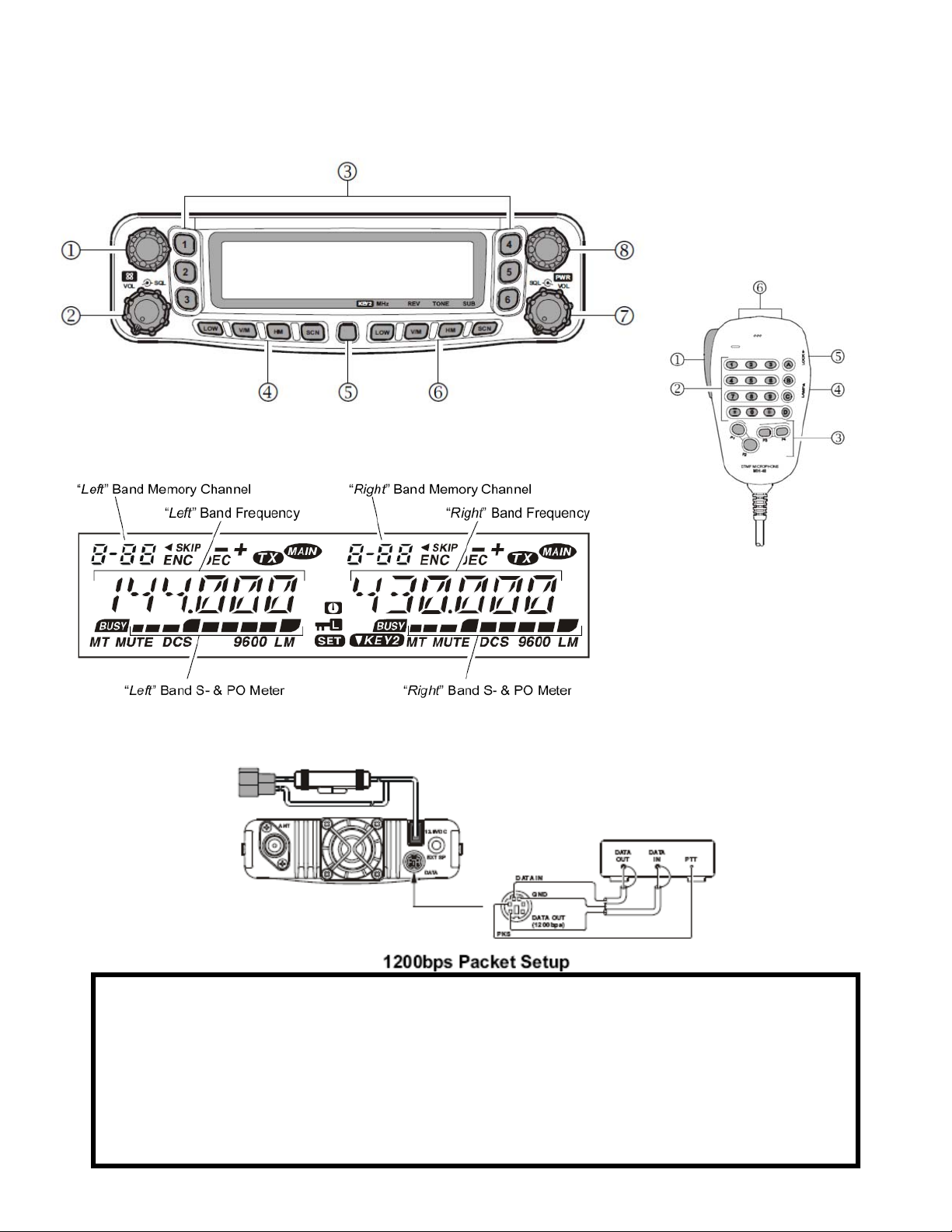
Yaesu FT-8800R Basic Operations
These instructions are not a substitute for reading the manual
FT-8800R Front Panel: 1) Left Dial Knob, 2) Left VOL/SQL Knob, 3) Hyper Memory Buttons, 4)
Left Side Keys 5) Set Key, 6) Right Side Keys, 7) Right VOL/SQL Knob, 8) Right Dial Knob
MH-48 Mic: 1) PTT Switch,
2) Keypad, 3) P buttons,
4) Lamp switch, 5) Lock
switch, 6) Up/down button.
FT-8800R LCD Panel: Of note: ENC = Tone Encode (TX T), DEC = Tone Decode (RX
T), Main = Main (current TX) band will only appear on left or right, depending on which
side is “active,” MT = Memory Tune Mode
NOTE: The FT-8800 is a dual receive radio with a left and right side and set of keys and
knobs. The active side is identified by a MAIN icon in the top “right” corner of the active display. When the instructions refer to MAIN key or knob, they refer to the active
transceiver side and do not affect the inactive side until the inactive side is made active.
To select the MAIN band, either press the P1 key on the mic or the DIAL knob on the
side you wish to set active.
Prince William County ARES
FT-8800 Quick Reference Guide v.1.4
Page 2

Preprogrammed Memory Channels and Frequencies
FT-8800
Memory
Memory Name/Purpose Frequency Tone
Channel
1 OVH2M/Operations and Logistics 146.970 - 100 Hz
2 WWI2M/Operations and Logistics 147.240 +
3 NVFM2M/Fairfax ARES 146.790 -
4 NVREGN/Northern Virginia Regional Operations and
146.910 -
Coordination
5 SKYWARN/National Weather Service—Sterling 147.300 +
6 MDREGN/Maryland Regional Operation and Coordination 147.105 +
7 MTVERN/Mount Vernon (Alexandria) 146.655 - 141.3 Hz
8 ALEX2M/Alexandria ARES 147.315 +
9 ARL2M/Arlington ARES 145.470 -
10 FAQ2M/Fauquier ARES 147.470 + 167.9 Hz
11 LOU2M/Loudon ARES 145.310 -
12 DULLES/Dulles Airport 2m machine, max 15w out 147.330 + 203.5 Hz
21 OVH440/Command and Control/Operations and Logistics 442.200 +
22 WWI440/Command and Control/Operations and Logistics 444.900 +
23 FALLSC/Fall Church ARES 442.425 - 91.5 Hz
24 NERA/Main Repeater, linked system 442.725 + 107.2 Hz
25 NERA/DC 449.975 - 107.2 Hz
26 KT4ER/Bull Run Mountain 448.325- 100.0 Hz
27 NERA/Bull Run Mountain 447.775 67.0 Hz
31 VHF1/PWCARES VHF Channel 1/Operations and
147.525
Logistics
32 VHF2/PWCARES VHF Channel 2/Operations and
146.475
Logistics
33 MEDCOM/InterHospital communications/MedComm back-
146.445
up
34 ARC-CHP/Red Cross Chapter-to-Chapter communications 146.535
35 ARC-FLD/Red Cross Field Operations 146.420
36 XBAND1/Combine with 147.525—VHF1 (left) 445.950 (right) 100.0 Hz
37 XBAND2/Combine with 146.475—VHF2 (left) 446.050 (right) 100.0 Hz
38 XBAND3/Combine with 146.970—OVH2M (left) 445.975 (right) 100.0 Hz
39 XBAND4/Combine with 147.240—WWI2M (left) 446.025 (right) 100.0 Hz
40 Packet 145.730
41 APRS 144.390
Prince William County ARES
FT-8800 Quick Reference Guide v.1.4
Page 3

Power
Turning the power on and off (Pg. 20)
To turn the radio on, press and hold the
knob for 2 seconds (Fig. 1). The LCD will show the
current power supply voltage for 2 seconds before
switching to normal mode.
To turn the radio off, press and hold the
knob for 2 seconds.
right
right
VOL
VOL
Figure 1
Changing the Transmit Power Level (Pg. 23)
Press the LOW key on the active (MAIN) band you wish to modify the power on.
There are four settings. For 2m/70cm, Low is 5W, Mid2 is 10W Mid1 is 20W. On 2m,
High is 50W and on 70cm High is 35W
Band Management
Locking the Radio
Selecting the Operating Band (Pg. 20)
Transmission is possible on the side where the MAIN icon is lit.
To select the left or right side for transmission:
Mic: Press the P1 button
Face: Briefly press the DIAL knob on either the left or the right side as needed.
Selecting the Frequency Band (Pg. 21)
Press and hold the DIAL knob to step through the bands in the following progression:
144 MHz → 250 MHz → 350 MHz → 430 MHz → 850 MHz → 144 MHz …
Locking the Radio (Pg. 24)
To activate:
1. Press the SET key momentarily to enter the set mode
2. Rotate the MAIN band DIAL knob know to select Menu 21 (LOCK).
3. Press the MAIN band DIAL knob momentarily, then rotate it to change the set-
ting to ON.
4. Press the SET key momentarily to save the setting and exit to normal operations
To deactivate:
1. Press the SET key momentarily to enter the set mode
2. Rotate the MAIN band DIAL knob know to select Menu 21 (LOCK).
3. Press the MAIN band DIAL knob momentarily, then rotate it to change the set-
ting to OFF.
4. Press the SET key momentarily to save the setting and exit to normal operations
MIC Gain Control
The mic input level and receiver bandwidth are coupled in the FT-8800R. Changing
the receiver spacing reduces the mic gain. (Pg. 54)
1. Press the SET key momentarily.
2. Rotate the MAIN band DIAL knob and select Menu 44 (WID.NAR).
3. Press the MAIN band DIAL knob momentarily and rotate it to display NAR-
ROW.
4. Press and hold the MAIN band DIAL knob for 1/2 second to save the setting and
return to normal operations.
Prince William County ARES
FT-8800 Quick Reference Guide v.1.4
Page 4

Repeater Offsets
Setting Repeater Offsets (Pg. 27)
The FT-8800R comes preset with the following shifts: On 2m, 600 kHz; on 70cm, 5
MHz.
To manually set the positive (+) or negative (-) or disable the offset follow these steps:
1. Press the SET key momentarily.
2. Rotate the MAIN band DIAL knob to select Menu 33 (RPT.MOD).
3. Press the MAIN band DIAL knob momentarily, then rotate the dial to select “-,”
“+,” or OFF.
4. Press and hold the MAIN band DIAL for 1/2 second to save the settings and
return to normal operations.
CTCSS
Cross Band
Repeater
Operations
CTCSS Operation (Pg. 29)
Enabling CTCSS involves two steps. You have to set the Tone Mode (Set menu 41)
and Tone Frequency (Set menu 40).
1. Press the SET key momentarily.
2. Rotate the MAIN band DIAL knob to Menu 41 (TONE M).
3. Press the MAIN band DIAL knob momentarily and then rotate it so that ENC
appears on the display (see the LCD figure on page 1). This activates the CTCSS
encoder.
4. Rotating one more step will enable ENC.DEC, the Tone Squelch mode (TSQL) if
required.
5. Press the MAIN band DIAL knob momentarily and rotate it to Menu 40 (TONE
F).
6. Press the MAIN band DIAL knob momentarily to enter the menu screen and
rotate the knob to select the CTCSS tone frequency you need.
7. When it has been selected, press and hold the MAIN band DIAL knob for 1/2
second to save the setting and return to normal operation.
Enabling the cross band function (Pg. 56)
1. Configure the band(s) as needed with power and ENC.DEC as needed.
2. Press the SET key momentarily.
3. Rotate the MAIN band DIAL knob to select Menu 45 (X-RPT).
4. Press the MAIN band DIAL knob momentarily. X-START will appear.
5. Press the MAIN band DIAL knob again to activate the cross band repeater mode.
6. To exit, press the SET key.
Internet
Connection
Feature
RF Squelch
Turning the Internet Connection Feature (WIRES) off (Pg. 50)
The FT-8800R comes with the Yaesu WIRES system. It is very easy to bump it into
the ON position. This is how you turn it OFF.
1. WIRES is enabled when the INT is lit in the LCD panel.
2. To disable it, press the left VOL knob briefly to turn it off.
Additional RF Squelch Settings (Pg. 26)
1. Press SET key momentarily
2. Rotate the MAIN band DIAL knob to select Menu 32 (RF SQL).
3. Press the MAIN band DIAL momentarily and rotate to select the signal strength
to open the squelch for—options are OFF, S-2, S-5, S-9 or S-FULL. PWCARES
default is OFF. Use the SQL knob (with the volume) to set.
4. Press and hold the MAIN band DIAL knob for 1/2 second to save the settings
and return to normal operations.
5. If you set the values, turn the SQL knob fully clockwise (to the right).
Prince William County ARES
FT-8800 Quick Reference Guide v.1.4
 Loading...