

Page 1
OPERATION and MAINTENANCE
MANUAL
for
MODEL PV-100208
100 kW Grid-Tied Photovoltaic Inverter
Document #151700
Revision B October 13, 2003
IMPORTANT SAFETY INSTRUCTIONS
SAVE THESE INSTRUCTIONS - THIS MANUAL CONTAINS IMPORTANT INSTRUCTIONS
FOR XANTREX TECHNOLOGY MODEL PV-100208 GRID TIED PHOTOVOLTAIC INVERTER
THAT SHALL BE FOLLOWED DURING INSTALLATION AND MAINTENANCE OF THE PV-
100208.
Xantrex Technology Inc.
161-G SOUTH VASCO ROAD
Livermore, CA 94550
(925) 245-5400
Copyright 2003, Xantrex Technology Inc.
Page 2

Table of Contents
Product Description ................................................ Section 1
Introduction ............................................................................. 1-1
Major Components ................................................................. 1-1
Control Components ............................................................... 1-2
Interconnection Standards Compliance .....................................1-3
Specifications .......................................................................... 1-4
Equipment Symbol ................................................................... 1-4
Safety ............................................................................. Section 2
Safety Features ........................................................................2-1
Isolation Procedure ..................................................................2-2
Installation And Initial Turn-On ....................... Section 3
Isolation Transformer Requirements .......................................... 3-1
Torque and Wire Gauge Specifications .....................................3-2
Installation Instructions ............................................................. 3-2
Interconnection Wiring .............................................................3-4
Initial Turn On Procedure .........................................................3-6
Operation ................................................................... Section 4
Description of System Operation ..............................................4-1
Operation Features .................................................................. 4-2
Operator Interface ................................................................... 4-3
Manual State Transitions .......................................................... 4-5
Automatic State Transitions ......................................................4-6
Auto-Restart Feature ............................................................... 4-7
Isolation Procedure ..................................................................4-7
Turn-On Procedure ................................................................. 4-7
Troubleshooting ....................................................... Section 5
General ................................................................................... 5-1
Alarms and Fault Conditions ....................................................5-1
Preventative Maintenance .................................. Section 6
Periodic Maintenance .............................................................. 6-1
Isolation Procedure ..................................................................6-2
Turn-On Procedure ................................................................. 6-2
Appendix ...................................................................... Section 7
Fault Codes .............................................................................7-1
Read/Write Parameter Menu.................................................... 7-1
Warranty and Certifications ...................................................... 7-4
Drawings List .......................................................................... 7-5
Page 3
SECTION 1
PRODUCT DESCRIPTION
INTRODUCTION
The Xantrex Technology Model PV-100208 is a current following grid tied photovoltaic inverter,
utilizing state-of-the-art IPM (Intelligent Power Module), insulated gate bi-polar transistors (IGBT’s)
and gate drive circuits to allow interface of a photovoltaic array with a utility grid. The PV-100208
consists of an inverter bridge, photovoltaic controller, and associated control electronics. The PV100208 control software provides for complete overall system control with a variety of protection and
safety features.
MAJOR COMPONENTS
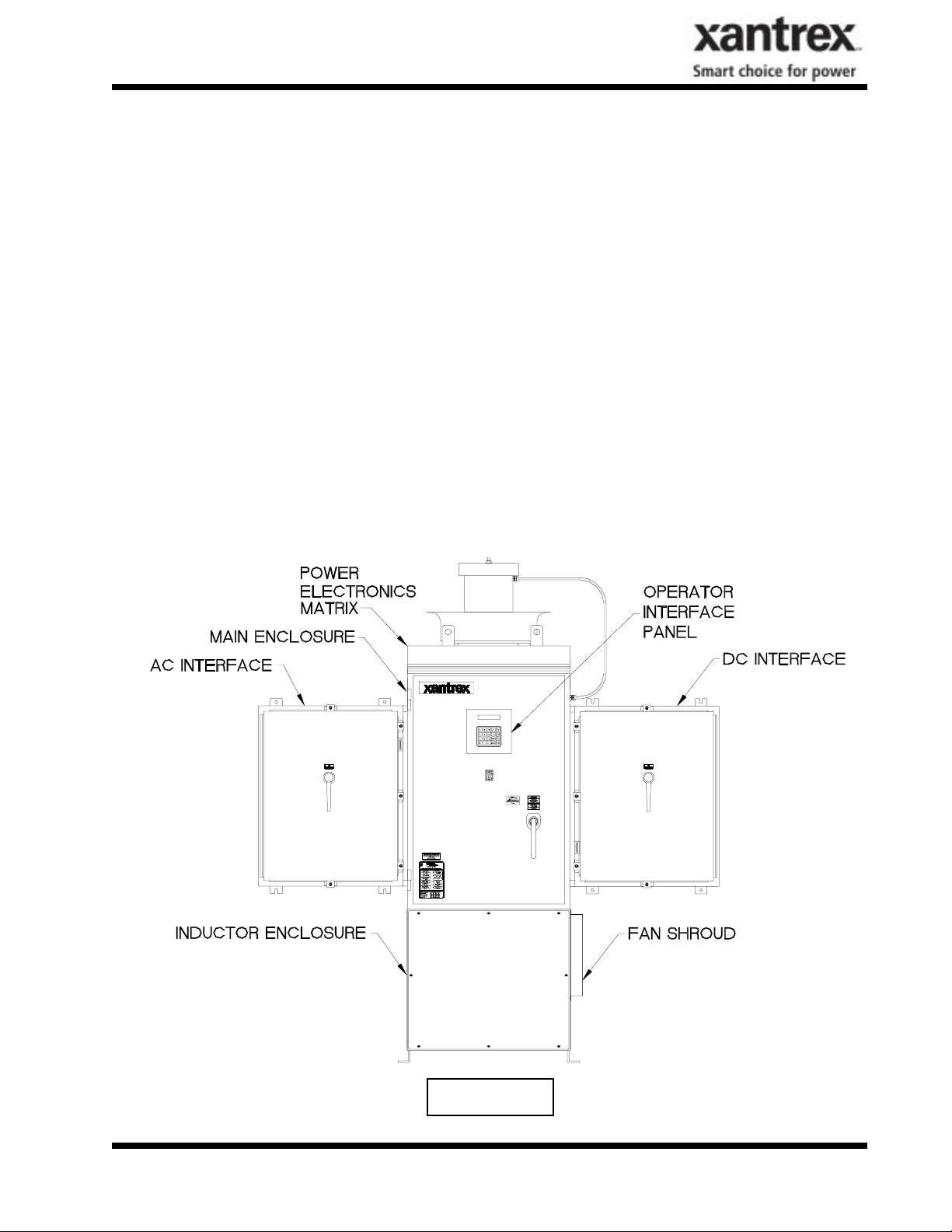
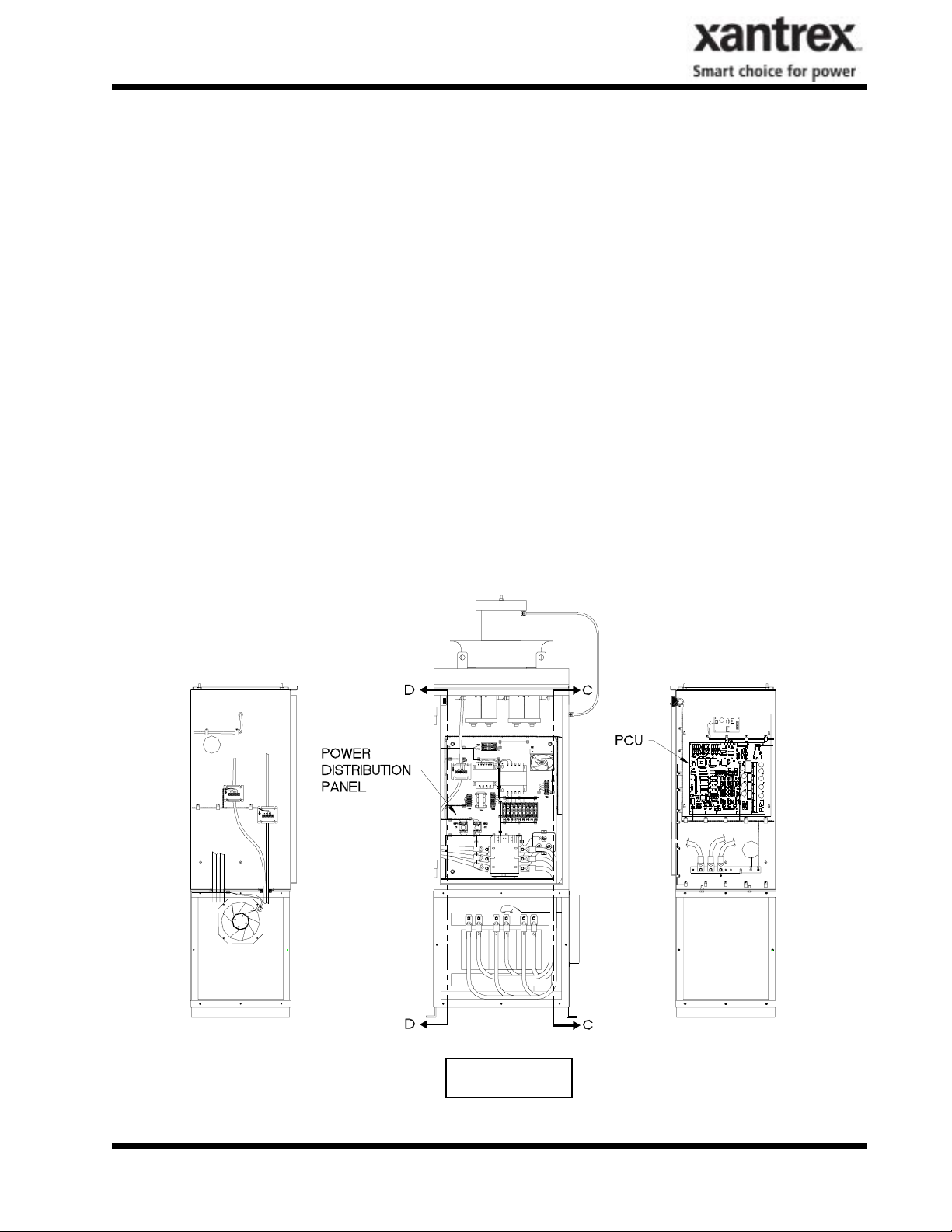
The major components of the PV-100208 are identified in Figure 1-1. Control components are identified in Figure 1-2. For specific control components see Drawing No. 151702 located in Section 7
(Appendix).
Main Enclosure
This enclosure is NEMA-3R rated. The PV-100208 main enclosure contains the power electronic inverter bridge, electrical and electromechanical control components, power supplies, system sensing
circuits, and the PV-100208 embedded control unit. Also found within the main enclosure are some of
the system protection devices (sense and control power fuses).
DOCUMENT: 151700
Figure 1-1
PV-100208 Photovoltaic Inverter
Operation and Maintenance Manual
Copyright 2003, Xantrex Technology Inc.
1-1
Page 4
SECTION 1
PRODUCT DESCRIPTION
AC Interface Enclosure
This enclosure is NEMA-3R rated. The AC Interface serves as the connection between the isolation
transformer/utility and the PV-100208. This enclosure is where the AC line fuses and AC disconnect
switch reside. For specific control components see Drawing No. 151703 in Section 7 (Appendix).
DC Interface Enclosure
This enclosure is NEMA-3R rated. The DC Interface serves as the connection interface between the PV
array and the PV-100208. This enclosure is where the DC disconnect switch and DC contactor reside.
For specific control components see Drawing No. 151704 in Section 7 (Appendix).
CAUTION
The fuses within the PV-100208 are intended for protecting the PV-100208 control
circuitry only. They are not intended to provide protection for the PV array or external
cabling.
Power Electronics Matrix
The power electronics converter is located at the top of the PV-100208 Main Enclosure. The matrix is
comprised of switching transistors (IGBTs), transistor gate drive electronics, a laminated power bus,
DC capacitor bank, and an aluminum extrusion heat sink with a cooling fan. The fan is located above
the matrix heatsink.
The PV array is tied logically to the matrix DC bus via the DC interface enclosure. The embedded
control unit manages the transfer of power between the DC bus and the utility grid.
Operator Interface
The operator interface is located on the front door of the PV-100208 main enclosure. It consists of an
On/Off switch and a keypad with liquid crystal display for control and monitoring purposes. All interface components are NEMA-3R rated. Refer to Section 4 for detailed operation instructions.
Inductor Enclosure
This enclosure is NEMA-3R rated. It contains the necessary filter components to insure the PV-100208
line currents and voltages meet IEEE-519 and UL1741 harmonic distortion requirements. Mounted on
the right side of the lower enclosure is an inductor fan to allow cooling of the line filter components
within. This enclosure also serves as the mounting base for the PV-100208 main enclosure.
CONTROL COMPONENTS
The following assemblies are contained within the PV-100208 main enclosure as shown in Figure 1-2
(see Appendix in Section 7).
Power Distribution Panel
This panel contains many of the Electro-mechanical, protective, and control power components necessary to support the operation of the PV-100208.
DOCUMENT: 151700
PV-100208 Photovoltaic Inverter
Operation and Maintenance Manual
Copyright 2003, Xantrex Technology Inc.
1-2
Page 5
SECTION 1
PRODUCT DESCRIPTION
Power Control Unit (PCU)
The PCU is a Digital Signal Processor (DSP) based control board that performs numerous control and
diagnostic functions associated with PV-100208 operation. Its most significant tasks are control of PV100208 electromechanical components and power electronics converters, signal conditioning for high
voltage signal inputs and communication with the operator interface panel and system sensors. The
PCU also contains the necessary DC power supplies to support its operation.
INTERCONNECTION STANDARDS COMPLIANCE
The PV-100208 has been tested and listed by Underwriters Laboratories to be in compliance with
UL1741 Static Inverters And Charge Controllers For Use In Photovoltaic Power Systems, as well
as IEEE-929-2000 Recommended Practice For Utility Interface Of Photovoltaic (PV) Systems.
IEEE-929-2000 provides guidance regarding equipment and functions necessary to ensure compatible
operation of photovoltaic systems which are connected in parallel with the electric utility. UL1741 is
the standard applied by Underwriters Laboratory to the PV-100208 to verify it meets the recommendations of IEEE-929-2000. Refer to both documents for details of these recommendations and test proce-
dures.
DOCUMENT: 151700
C-C
Figure 1-2
PV-100208 Photovoltaic Inverter
Operation and Maintenance Manual
Copyright 2003, Xantrex Technology Inc.
D-D
1-3
Page 6
SECTION 1
PRODUCT DESCRIPTION
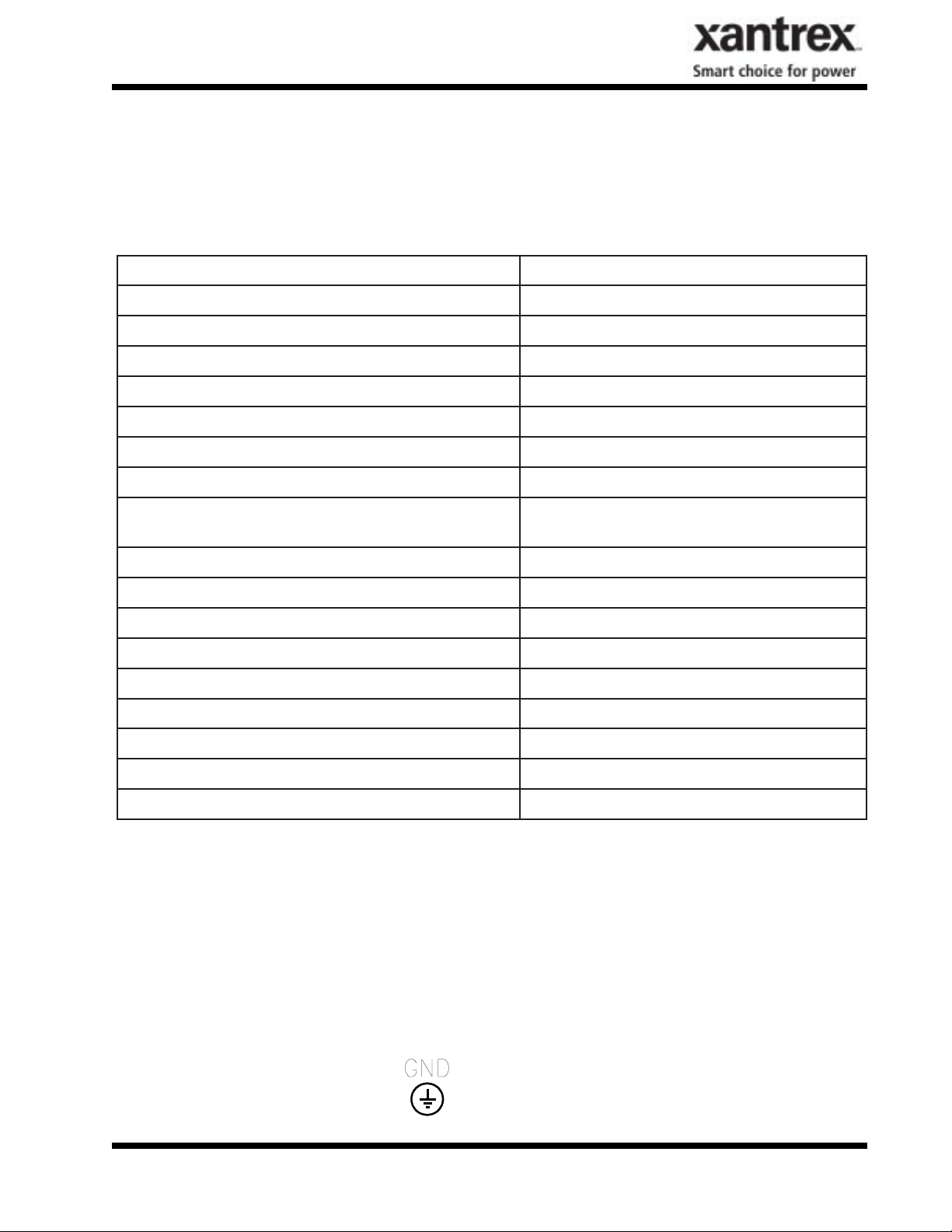
SPECIFICATIONS
The PV-100208 has been designed for photovoltaic power systems, which operate within the following
specifications. Application of the PV-100208 in a manner inconsistent with these specifications may
cause damage to the PV-100208 and other system components, and is a violation of the terms of the
warranty.
egatloVeniLCAlanimoN%21-%01+,CAV802
tnerruCeniLCAmumixaM )egatlovenilwolta(SMRA803
ycneuqerFeniLlanimoNzH7.0-5.0+,zH06
rewoPtuptuOCAsuounitnoC esahP3CAV802@Wk0.001
egatloVmumixaMVPCDV006
wodniWgnikcarTrewoPkaePCDV006-*033
egatloVgnikcarTrewoPkaePmuminiMVPCDV033
tnerruCmumixaMVPCDA913
noitarugifnoCVP dednuorgevitagenraloponoM
erutarepmeTgnitarepOC°05ot02-**
erutarepmeTegarotSC°05ot04-
gnitaRerutarepmeTtneibmAmumixaMC°05
ytidimuHevitaleRgnisnednoc-noN,%59oT
noitavelEteef006,6evobadetareD
)sehcnini(snoisnemiD02X5.67X38
thgieW.sbl0051.xorppA
epyTerusolcnER3AMEN
eliFgnitsiLLU653991E-eliF
*Dependent on actual AC line voltage. Refer to Section 4 for detail on the minimum power tracking
voltage.
**If ambient temperature is between -20 to 0° C, the unit must be powered up in standby for at least
one hour prior to going on-line.
EQUIPMENT SYMBOL
Chassis ground – Customer supplied system ground connection point. This symbol may be found near
a stud within the main enclosure. It is provided as a location to bond the electrical system equipment
ground.
DOCUMENT: 151700
PV-100208 Photovoltaic Inverter
1-4
Operation and Maintenance Manual
Copyright 2003, Xantrex Technology Inc.
Page 7
SECTION 2
SAFETY
SAFETY FEATURES
WARNING
The PV-100208 enclosure contains exposed high voltage conductors. The enclosure
doors should remain locked, except during maintenance or testing. These servicing
instructions are for use by qualified personnel only. To reduce the risk of electric
shock, do not perform any servicing other than that specified in the operating
instructions unless you are qualified to do so. Do not open the cabinet doors if
extreme moisture is present (rain or heavy dew).
On/Off Switch
The PV-100208 incorporates a maintained position on/off switch located on the front door of the main
enclosure. Under normal conditions, the on/off switch is in the on position. Turning the switch to the
off position will initiate a controlled shutdown of the PV-100208 and open the A/C contactor within
the unit. The A/C contactor cannot be closed unless the switch is in the on position. The PV-100208 is
prevented from being restarted until the on/off switch is turned back to the on position. Cycling the on/
off switch will reset the PV-100208 and attempt to clear any system fault.
Main Enclosure Door Interlock Switch
The front door of the PV-100208 main enclosure is equipped with an interlock switch to preclude
operation in the event of the front door being opened. It is required that the PV-100208 main enclosure
door handle be padlocked during normal operation.
WARNING
The PV-100208 will immediately shutdown if the front door is opened during
operation. It is required that the PV-100208 main enclosure door handle be padlocked during normal operations. Please make sure the unit is powered down, and
isolated from the utility grid and PV panels, prior to opening the front door. Allow
5 minutes for any stored potentials to be discharged, prior to opening the unit.
Disconnect Switches
Both AC & DC switches are equipped with lockout hasps for personnel safety. The switch enclosure
door will not open while the PV-100208 is running. In addition, the switch handle and shaft provide a
door interlock. The door cannot be opened when the switch is in the “on” position. The PV disconnect
switch is equipped with an auxiliary contact block which enables the switch to be used as a load break
PV disconnect. In the event a disconnect switch is opened while the PV-100208 is processing power
from the PV array, the contact block will signal the PCU to stop processing power before the switch
opens.
Fault Reporting
Any fault conditions are reported to the operator interface. The LCD will display a text description of
the fault. Refer to Section 5, Troubleshooting, for detailed descriptions of system fault conditions.
PV Ground Fault Detection
The PV-100208 is equipped with ground fault detection circuitry (see section 3, installation and section 7, system schematic for further detail). Upon detection of 10 amps of ground fault current, the PV100208 executes an orderly shutdown, and annunciates a ground fault at the operator interface. The
DOCUMENT: 151700
PV-100208 Photovoltaic Inverter
Operation and Maintenance Manual
Copyright 2003, Xantrex Technology Inc.
2-1
Page 8
SECTION 2
SAFETY
PV-100208 will remain faulted until the ground fault is remedied and cleared at the operator interface
(see section 5, troubleshooting).
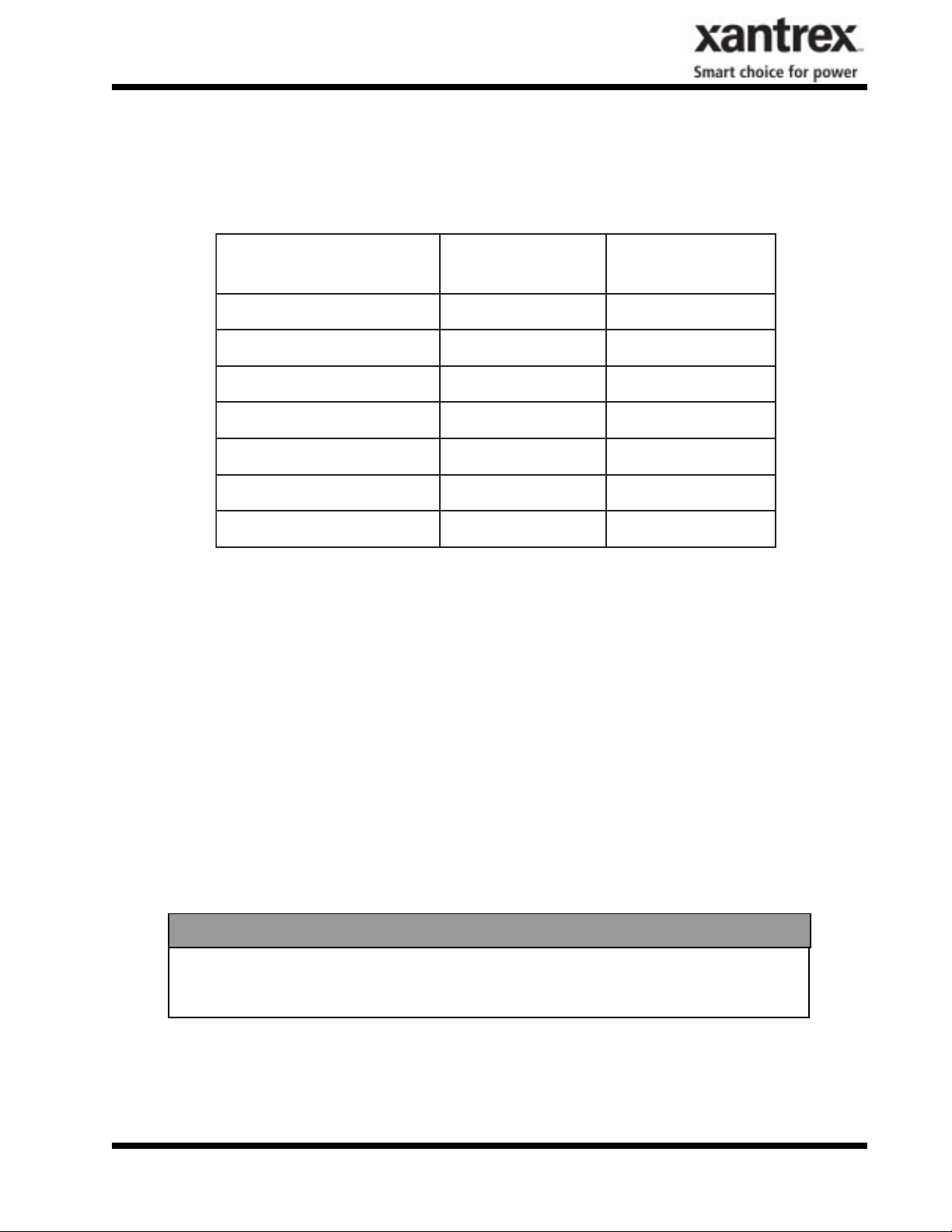
Over/Under Voltage and Frequency
The over/under frequency and voltage detection setpoints have been chosen to be in compliance with
IEEE-929 and UL1741.
noitidnoCtluaF
)lanimoNfo%(
%05<CAVCAV<401selcyC6
%05< %88<CAVCAV<401<381sdnoceS2
%88<CAV< %011CAV<381<822noitarepOlamroN
%731<CAV<%011582<CAV<822sdnoceS2
%731<CAV582< CAVselcyC2
7.0-detar<f3.95<fselcyC6
5.0+detar>f5.06>fselcyC6
egnaRegatloVemiTpirT
Anti Island Protection
A digital phase-shift-loop (PSL) circuit is implemented in the DSP inverter controller to prevent
“Islanding” of the PV-100208.
The DSP continuously makes minor adjustments to the power factor phase angle above and below
unity. In the event of a utility outage, these adjustments destabilize the feedback between the inverter
and the remaining load, resulting in an over/under frequency or voltage condition. The PV-100208
then performs an orderly shutdown. The fault condition will remain until the utility voltage and
frequency have returned to normal for 5 minutes.
This method has been extensively tested and proven to exceed the requirements of UL 1741.
ISOLATION PROCEDURE
The following procedure should be followed to de-energize the PV-100208 for maintenance:
WARNING
The terminals of the PV input may be energized if the arrays are energized. In
addition, allow 5 minutes for all capacitors within the enclosure to discharge after
disconnecting the PV-100208 from AC and DC sources.
1. Turn the on/off switch to the off position.
2. Open the PV array disconnect switch.
3. Open the AC interface disconnect switch.
4. Open the isolation transformer circuit breaker.
5. Install lockout devices on the isolation transformer circuit breaker and PV disconnect switch.
DOCUMENT: 151700
PV-100208 Photovoltaic Inverter
Operation and Maintenance Manual
Copyright 2003, Xantrex Technology Inc.
2-2
Page 9
SECTION 3
INSTALLATION AND INITIAL TURN-ON
ISOLATION TRANSFORMER REQUIREMENTS
The PV-100208 UL1741 certification requires the 100 kVA WYE/WYE isolation transformer be wired
between the inverter AC output and the utility interconnection. This custom 100 kVA isolation transformer is included with any PV-100208 that requires UL1741 certification (see Appendix in Section 7
for transformer dimensions and specifications). If UL1741 and NEC690 is not a requirement of your
PV installation, you may use any standard dry-type isolation transformer as long as the inverter side is
rated for a minimum of 100 kVA, 208 VAC continuous duty. Contact Xantrex Technology if you have
any questions.
WARNING
Check with the local utility of jurisdiction when selecting the winding configuration of the isolation transformer. Individual utilities may have unique requirements related to isolation transformer wiring. Some winding configurations may
keep the PV-100208 from detecting a loss of phase condition on the utility system
which may allow potentially lethal voltage to be present on the open phase wirings.
WARNING
Xantrex Technology requires installing an isolation transformer between the PV100208 inverter and the point of utility interconnection. Failure to do so could
result in catastrophic damage to the PV-100208 as well as the utility distribution
system and will void the product warranty.
Inverter Side Isolation Transformer Requirements
The inverter side transformer windings may be configured either DELTA or WYE, and must be rated
for 208 VAC. If a WYE wound transformer is used to interface with the PV-100208, and the PV
array is grounded, the neutral (X0) must be left floating. If the neutral is tied to ground, the inverter
will suffer irreparable damage.
Utility Side Isolation Transformer Requirements
The utility side isolation transformer windings may be configured either DELTA or WYE, and must be
rated for the utility voltage at the point of utility inter-connection. Check with the utility of jurisdiction
when selecting an isolation transformer configuration. If a WYE wound transformer is used to interface
with the utility, it is not necessary to connect the neutral (X0) to ground. The PV-100208 is a balanced,
three phase, current sourcing inverter, and only operates with the presence of a stable utility voltage.
Single phase grounded loads which may be present between the transformer and utility, will maintain
their existing ground reference at the utility distribution transformer. Grounding the neutral of a WYE
wound transformer may create an “open delta” condition, depending on the utility configuration. This
condition may keep the PV-100208 from detecting a loss of phase condition on the utility system,
which may allow potentially lethal voltage to be present on the open phase wiring.
Contact your Xantrex Technology distributor if you have any questions regarding isolation transformer
requirements.
DOCUMENT: 151700
PV-100208 Photovoltaic Inverter
3-1
Operation and Maintenance Manual
Copyright 2003, Xantrex Technology Inc.
Page 10
SECTION 3
INSTALLATION AND INITIAL TURN-ON
TORQUE AND WIRE GAUGE SPECIFICATIONS
The following torque specifications are to be used on all electrical interfaces made during installation
of the PV-100208.
Torque Table
eziStloBrokcolBlanimreTgnitteSeuqroT
)CA(tloB61-8/3mN2.82/.sblni052
,-CD,+CD(kcolBlanimreT
)lartueNCD&
mN1.13/sblni572
The following table shows acceptable wire gauges to be connected to the PV-100208 AC and DC
inputs.
Wire Gauge Table
noitanimreTGWAegnaReriW
)CA(hctiwStcennocsiD)nim(MCM052
-CD,+CD(kcolBlanimreT
)lartueNCD&
4#-MCM005
INSTALLATION INSTRUCTIONS
CAUTION
All wiring methods shall be in accordance with the National Electrical Code ANSI/
NFPA 70. All power conductors interfacing to the PV-100208 should be sized in
accordance with the National Electric Code ANSI/NFPA 70 and local codes. Large
gauge wire must have a minimum bend radius dependent upon the wire gauge
(refer to the National Electric Code, Article 373-6B). Take care to keep the wire
bundles away from any sharp edges which may damage wire insulation over time.
Xantrex Technology recommends using 250 MCM, 105 degrees C, minimum, copper wire for all connections to the PV-100208.
Ventilation Considerations
Maintain a minimum of 6” clearance in back and minimum of 12” in front and both sides of the PV100208 for proper cooling fan operation.
Installation
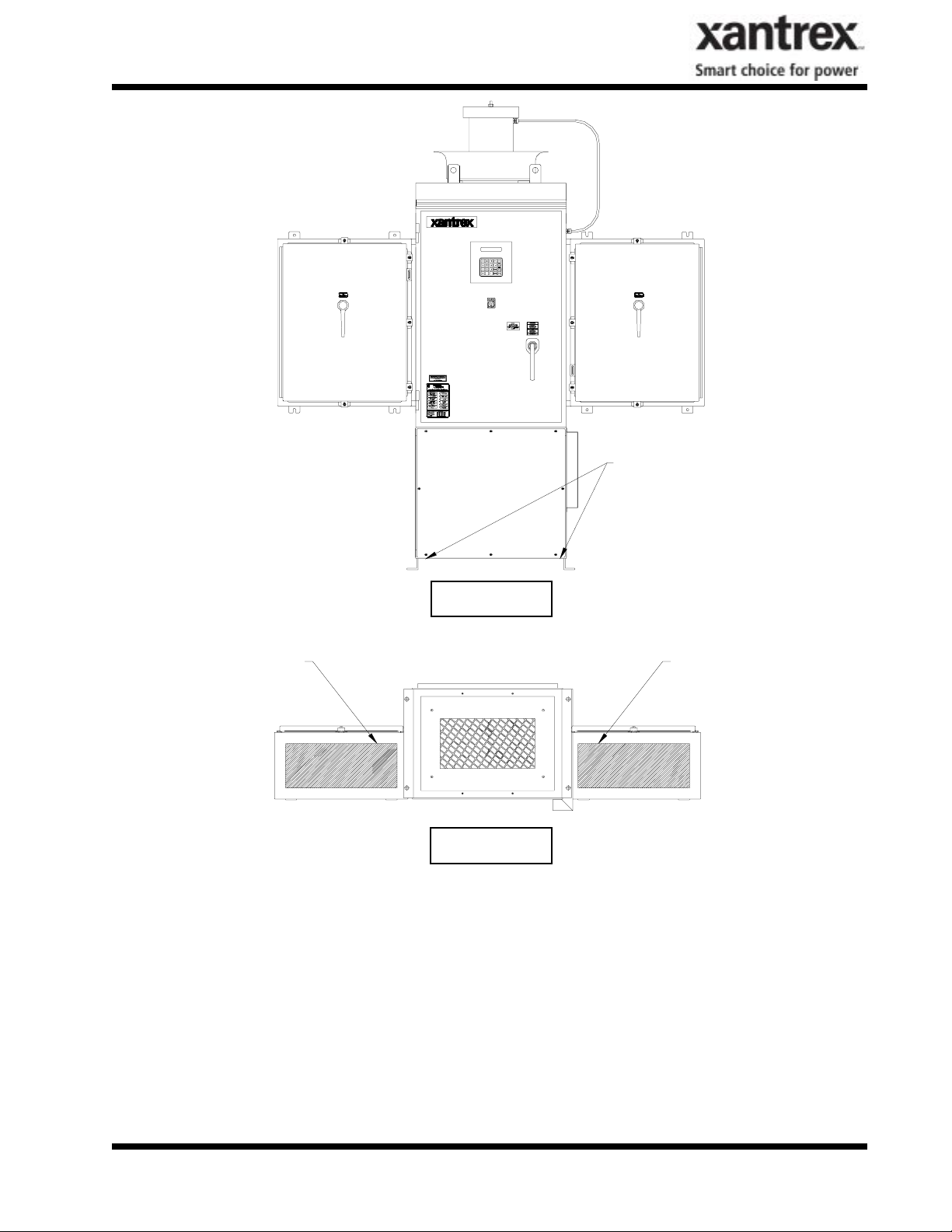
1. Move the PV-100208 into place. Lift the PV-100208 from beneath the lower enclosure with a
forklift as shown in Figure 3-1. (See following page.)
2. Anchor the lower enclosure feet to the floor with a 1/2” anchor bolts.
3. Install all conduits needed for cable entry in the shaded areas of both AC and DC interface enclosures as shown in Figure 3-2. (See following page).
DOCUMENT: 151700
PV-100208 Photovoltaic Inverter
3-2
Operation and Maintenance Manual
Copyright 2003, Xantrex Technology Inc.
Page 11
SECTION 3
INSTALLATION AND INITIAL TURN-ON
Lift Here
Figure 3-1
Cable Entry Area
Cable Entry Area
Figure 3-2
Array Grounding
NEC 690-41/42 requires the PV array to be earth grounded. The PV-100208 chassis is also bonded
to the PV safety ground terminal block. Refer to the system schematic in the appendix for further
wiring configuration.
DOCUMENT: 151700
PV-100208 Photovoltaic Inverter
Operation and Maintenance Manual
Copyright 2003, Xantrex Technology Inc.
3-3
Page 12
SECTION 3
INSTALLATION AND INITIAL TURN-ON
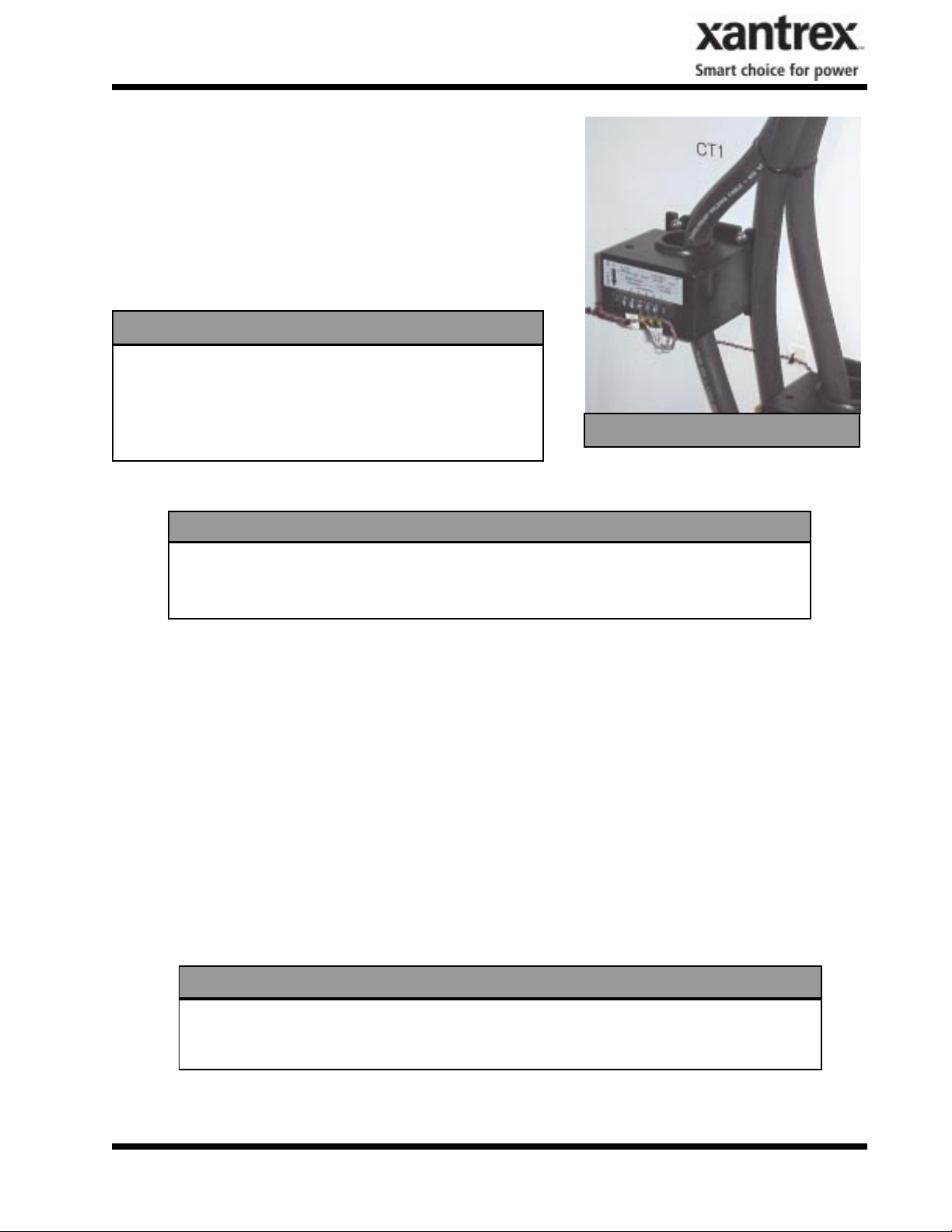
Ground Fault Detection
The PV-100208 is equipped with a ground fault detection
circuit and current transducer. This circuit is active when the
PV array is grounded as described in the previous section. In
the event of a greater than 10 amp ground fault, the PV100208 will execute an orderly shutdown and annunciates a
ground fault at the operator interface. The PV-100208 will
remain faulted until the ground fault is remedied and cleared
at the operator interface (see section 5, Troubleshooting).
CAUTION
The input and output circuits are isolated from the
enclosure and that system grounding, if required by
sections 690-41 and 690-42 of the National Electric
Code, ANSI/NFPA 70, is the responsibility of the installer.
INTERCONNECTION WIRING
CT1
CAUTION
To reduce the risk of fire, connect only to a circuit provided with 450 amperes
maximum branch circuit overcurrent protection in accordance with the National
Electrical Code, ANSI/NFPA 70.
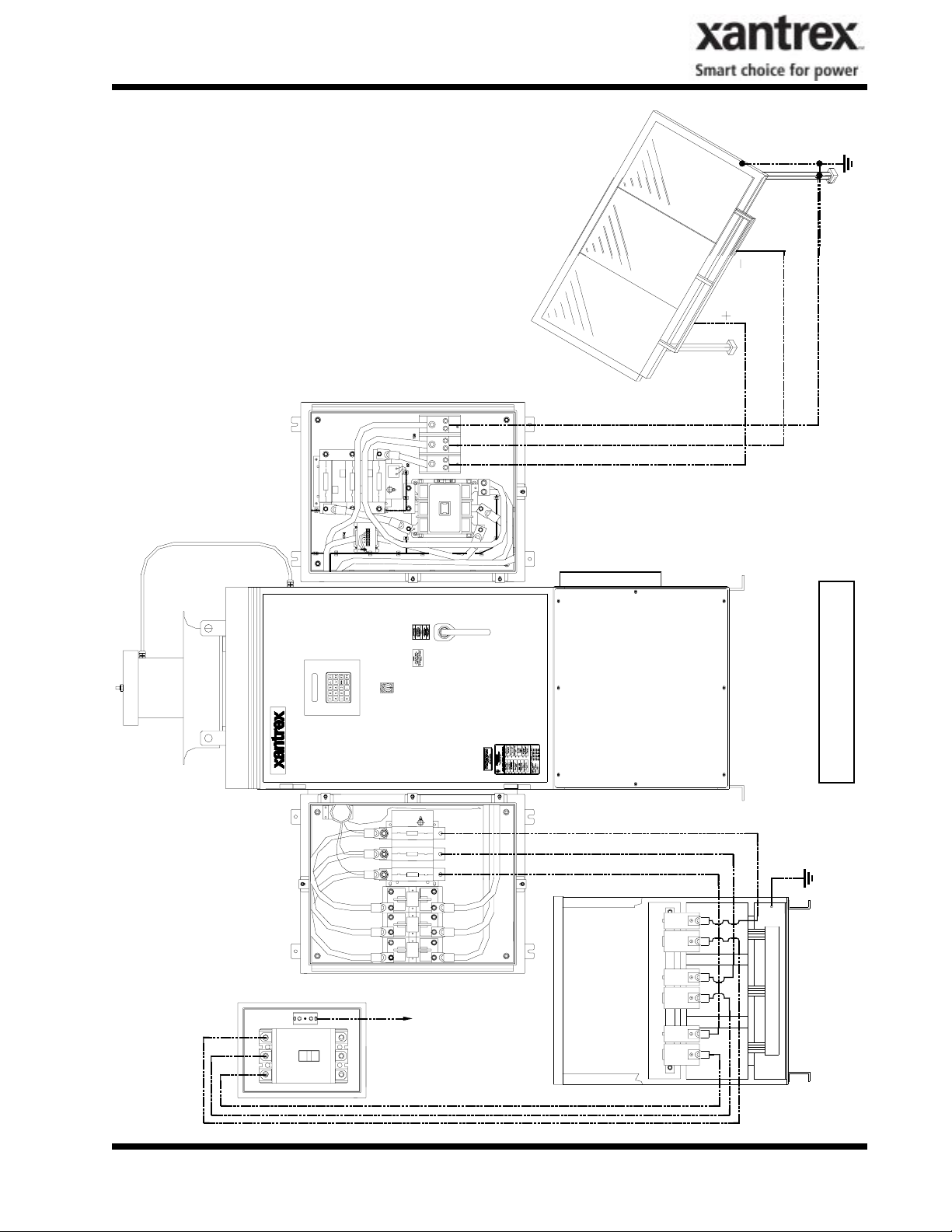
The following wires for connecting the PV-100208 to external devices are not provided by Xantrex
Technology: (See installation diagram on pages 3-5.)
• Connect 3-Phase 208 VAC inverter output (AC Disconnect switch) to terminals of the 208 VAC
inverter side of isolation transformer. If the inverter side of the isolation transformer is con-
figured WYE, the neutral must be left floating. If the inverter side neutral is tied to ground,
the inverter will not function properly. Also, insure that the neutral is not bonded to the
isolation transformer frame. Be sure to maintain proper phasing as shown in the system sche-
matic found in Section 7.
• Connect Isolation transformer grid side terminals 1, 2, and 3 to line circuit breaker. Be sure to
maintain proper phasing as shown in the system schematic found in Section 7.
• PV frame ground to ground terminal block (TB3).
• Connect PV+, PV-, and PV Safety ground to the DC interface enclosure’s designated termina-
tions. See Section 7 for further detail .
CAUTION
When connecting external AC wires to the PV-100208, positive phasing sequence
must be maintained throughout the installation process. Refer to the System
Schematic in Section 7 of this manual for proper phasing convention.
Install all wires listed above. Refer to the Appendix in Section 7 for layout of the AC and DC interface enclosures. Refer to the system schematic in Section 7 for more detailed terminal locations.
DOCUMENT: 151700
PV-100208 Photovoltaic Inverter
Operation and Maintenance Manual
Copyright 2003, Xantrex Technology Inc.
3-4
Page 13
SECTION 3
INSTALLATION AND INITIAL TURN-ON
PV Array
Frame Ground
GND
PV-
PV+
Circuit
DOCUMENT: 151700
Breaker
AC Interface DC Interface
A B C
To Single Point
Electrical
Distribution
System Ground
PV-100208 Photovoltaic Inverter
Operation and Maintenance Manual
Copyright 2003, Xantrex Technology Inc.
H3 X3
X2H2
H1 X1
Inverter
PV-100208
3-5
Wiring Diagram
Gnd
Chassis
Isolation Transformer
Page 14

SECTION 3
INSTALLATION AND INITIAL TURN-ON
INITIAL TURN ON PROCEDURE
The following must be performed by an approved Technician:
The following procedures are intended to verify correct installation and proper operation of the PV-
100208. These steps are to be followed sequentially. Do not continue if any of the steps or results are
unclear. Refer to Section 4 for a detailed description of system operation. Refer to Section 5 for fault
condition descriptions and troubleshooting. Refer to Section 7 for detailed system schematics.
Visual Inspection, Isolation Transformer WYE/WYE
• Verify the isolation transformer circuit breaker is open.
• If a phase rotation meter is available, verify proper phase rotation at the line side of the isolation
transformer circuit breaker.
• Insure the neutral on the inverter side is left floating. If the inverter side neutral is tied to ground,
the inverter will not function properly. Also, insure that the neutral is not bonded to the
isolation transformer frame.
• Verify the inverter 208 VAC conductors are connected to the isolation transformer.
• If the wires are marked, verify they follow the sequence on the line side of the isolation transformer
and circuit breaker.
• Verify the utility conductors are properly connected to the isolation transformer.
Visual Inspection, PV-100208
• Insure AC and DC disconnect switches are opened.
• Remove the front cover from the inductor enclosure, open the door of the main enclosure, and
disconnect enclosures and inspect.
• Verify all wire connections are tight.
• Inspect the fiber optic cables between the PCU and the matrix driver boards. All fibers should be
snap-locked into their respective receivers/transmitters.
• Insure all connector jack screws on the PCU and matrix driver board are tight.
• Verify AC phase connections landed at the AC interface enclosure.
Visual Inspection, PV Array Wiring
• Verify the PV+, PV-, and PV safety ground are isolated from each other. The safety ground must not
be tied to PV-.
• Verify all PV fuses are installed.
Initial Power
• Turn the On/Off switch, located on the front door to Off.
• With the DC disconnect switch opened, close one of the PV array string disconnect switches.
• Carefully measure VDC across the PV +/- terminal block. The value should be the same as at the
PV array string disconnect switch. It should also be positive.
• Close the PV disconnect switch.
• Carefully measure VDC between the DC contactor negative (-) terminal and the DC switch positive
DOCUMENT: 151700
PV-100208 Photovoltaic Inverter
Operation and Maintenance Manual
Copyright 2003, Xantrex Technology Inc.
3-6
Page 15

SECTION 3
INSTALLATION AND INITIAL TURN-ON
(+) terminal. The value should be the same as at the PV array string disconnect switch. It should
also be positive.
• Open all PV string disconnect switches.
• Close the isolation transformer circuit breaker.
• Verify 208 VAC voltage across the AC disconnect switch. If a phase rotation meter is available,
verify proper phase rotation at the AC disconnect switch.
• Close the AC disconnect switch.
• Verify 208 VAC voltage across the AC line fuses F1-3.
System Verification
• Upon applying 208 VAC power to the PV-100208, observe the operator interface panel. After
approximately 15 seconds, the panel should finish initialization and will probably report a fault
condition.
• Remedy any faults reported. To clear a fault condition, press the <ENTER> key twice. If the fault
message does not change, the fault condition is still present. Most likely, any faults seen at this
point will be related to PV-100208 safety switches. To disable the door interlock switch with the
main enclosure door opened, pull the switch shaft out. It will lock in its ‘maintenance’ position.
Once all faults are cleared the system will read ‘Sleeping’ or ‘Keyswitch Disable’ depending on the
position of the On/Off switch. To re-enable interlock, push the shaft in and close the door.
• Scroll up the menu until ‘Enter Read Parameter:’ is displayed.
• Press <Enter>, then <19>. This is line voltage frequency being read by the PCU. It should read 60.0
+0.5, -0.7.
• Verify the On/Off switch is in the ‘Off’ position.
• Close the PV array string disconnect switches.
• Close the PV-100208 DC disconnect switch.
• Press <F2> on the operator interface panel. If the PV voltage is above the PV Start Voltage setpoint,
the second line should read ‘Waking Up’. Once the PV Start Time is exceeded, the PV-100208
should transition to ‘Power Tracking’.
• The power tracker was previously limited to 25% of PV-100208 rated power. Once the PV-100208
has stabilized operation (approximately 20 seconds), scroll through the main operator interface
panel menu. Verify all phase voltages and currents are closely balanced.
• Scroll to ‘Enter Read Parameter:’ Press <ENTER> then <17> <ENTER> to view ground fault
current value. This value should be equal to or very close to zero. Continue to monitor this value as
the PV-100208 is commanded to higher power levels.
• Enter the write parameter menu and increase the ‘I PPT Max %’ to 50. Exit the write parameter
menu and verify all operating values are proper.
• Continue to increment ‘I PPT Max %’ to 100. Depending upon solar conditions, the PV-100208
may not operate at full power. If the PV array is not experiencing full sun, the PV maximum power
tracker will regulate the PV voltage to maintain maximum PV power output. To determine if the
PV-100208 has reached it’s maximum power output, enter <20> at the ‘Enter Read Parameter:’ ‘0’
means the PV-100208 has not reached maximum power, contrarily, ‘1’ means the PV-100208 has
reached maximum power and executed the modified peak power tracker to limit output power.
• The PV-100208 is now fully operational.
DOCUMENT: 151700
PV-100208 Photovoltaic Inverter
Operation and Maintenance Manual
Copyright 2003, Xantrex Technology Inc.
3-7
Page 16

SECTION 3
INSTALLATION AND INITIAL TURN-ON
Power Tracker Fine Tuning:
• All PV-100208 operating parameters have been set at the factory, based upon prior experience with
PV arrays.
• It is recommended that the PV-100208 be watched during Wake-Up and Sleep Test. If the PV-
100208 cycles between operating and sleeping at either of these times, the condition setpoints are
not set properly (refer to section 4 for detailed description of PV-100208 state transitions). The
PV100208 should not cycle if the setpoints are set properly.
NOTE
Some field adjustable parameters are password protected and may only be changed
by trained service technicians. In particular are parameters relating to utility
protection setpoints. These have been set in the factory to the limits mandated by
UL1741. Any changes to these setpoints should be agreed upon by the local utility
and the equipment owner.
NOTE
Visually inspect the exterior surfaces for any damage (nicks, chips, exposed base
metal and scratches) that may have occurred during shipment or installation.
Touch up or recoat using White NISSEN Feltip Paint Marker, or equivalent to
prevent rust or corrosion.
DOCUMENT: 151700
PV-100208 Photovoltaic Inverter
Operation and Maintenance Manual
Copyright 2003, Xantrex Technology Inc.
3-8
Page 17

SECTION 4
OPERATION
DESCRIPTION OF SYSTEM OPERATION
Overview
The PV-100208 is a fully automated grid-tied photovoltaic inverter. Manual interaction or control of
the inverter is necessary only in the event of a system fault. The following conditions govern PV100208 operation:
• Stable utility voltage and frequency must be present for all states of operation.
• Fault states are automatic from any state of operation. A fault will cause the PV-100208 to imme-
diately stop processing all power. The fault condition will be reported to the operator interface.
• The on/off switch, located on the front door of the PV-100208, must be switched to the on position
for all operating states.
• Cycling the on/off switch attempts to clear any system faults and return the PV-100208 to normal
operation.
Operating States
A state machine implemented within the PCU control software governs the operation of the PV100208.
There are five steady-state operating states and numerous intermediate transition states. The intermediate transition states provide an orderly progression from one operating state to the next. The user has
the ability to manually transition the PV-100208 between operating states from the operator interface
keypad. Manual transitions are initiated by entering a ‘Goal State’, where the goal state is the desired
operating state. Given all applicable system parameters are within acceptable limits, and the request is
valid within the state machine, the PV-100208 will initiate the proper sequence of operations necessary
to progress to the requested goal state. Refer to Figure 4-3 for a description of valid state transitions.
• Shutdown: The line interface controller is idle. The PCU monitors the status of the PV array and
utility grid, waiting in standby until the PV array is available to produce power to the grid.
• Fault: The PV-100208 has encountered a fault condition. When this happens, regardless of the PV100208 state-of-operation, the PV-100208 will stop processing all power and execute an orderly
system shutdown. A description of the fault and fault code will appear on the operator interface
LCD. The Fault state may be cleared from the keypad once the cause of the fault has been corrected. See Section 5 for a complete description of all fault codes.
• Manual Current: This operating state is provided to evaluate the existing PV array V-I characteristics. The PV controller regulates a constant amount of PV current as commanded by the user from
the operator interface keypad, up to the PV current limit of the PV-100208. If the user commands
more PV current than is available, the DC bus voltage will drop below the minimum bus voltage
level and the PV-100208 will return to Sleeping mode.
• Matrix Test: This operating state is provided to verify proper operation of the matrix and associated control electronics. There is no power transfer between the PV and utility in this mode.
• Power Tracking: This is the standard operating state of the PV-100208. The PV-100208 maxi-
mum power tracker will demand maximum power from the PV array, given sufficient PV irradiance.
DOCUMENT: 151700
PV-100208 Photovoltaic Inverter
Operation and Maintenance Manual
Copyright 2003, Xantrex Technology Inc.
4-1
Page 18

SECTION 4
OPERATION
The user should be aware of the following conditions governing PV-100208 state transitions:
• Utility power must be present for all states of operation.
• Fault states are automatic from any state of operation. A fault will cause the PV-100208 to
immediately stop processing all power. The fault condition will be reported to the operator
interface LCD.
• Most PV-100208 faults are latching and must be cleared at the operator interface keypad before
transitioning to another operating state.
• The On/Off switch, located on the front door of the PV-100208, must be in the On position for
all operating states except Matrix Test, in which case it must be in the Off position.
OPERATION FEATURES
Fixed Unity Power Factor Operation
The Xantrex PV Series grid tied inverters maintains unity power factor during operation. The control
software constantly senses utility voltage, and constructs the output current waveform to match the
utility voltage. The PV line of inverters is not capable of operation without the presence of normal
utility voltage, nor is it capable of varying the output power factor off unity.
Utility Voltage/Frequency Fault Automatic Reset
In the event of a utility voltage or frequency excursion outside of preset limits, the PV-100208 will stop
operation and annunciate a fault at the operator interface. Once the utility voltage has stabilized within
acceptable limits for a period of at least five minutes, the PV-100208 will automatically clear the fault
and resume normal operation. Voltage and frequency fault setpoints are detailed later in this section.
Active Island Detection
Much concern has been given to the possibility of an inverter causing a ‘utility island’ condition during
a utility power outage. An island condition is defined as grid tied inverter maintaining operation and
supporting a load that has been isolated from the utility power source. This requires the load to be
closely balanced to the output power of the inverter as well as having a resonant frequency close to
60Hz. Needless to say, this is an extremely remote possibility. To insure this condition does not occur,
the PV-100208 control software contains an active phase-shift-loop algorithm, which destabilizes a
balanced load, which may otherwise be capable of maintaining inverter operation in the absence of
utility voltage. This feature has been extensively tested and proven to exceed the safety requirements of
UL-1741 and IEEE-929-2000.
Ground Fault Detection
The PV-100208 is equipped with a ground fault detection circuit and current transducer. In the event of
a 10 amp ground fault, the PV-100208 will execute an orderly shutdown and annunciates a ground fault
at the operator interface. (See Section 5, Troubleshooting).
DOCUMENT: 151700
PV-100208 Photovoltaic Inverter
Operation and Maintenance Manual
Copyright 2003, Xantrex Technology Inc.
4-2
Page 19

SECTION 4
OPERATION
Current Imbalance Detection
In the event of phase-to-phase current imbalance of greater than 20% between phases, the inverter will
execute an orderly shutdown, and annunciate a fault at the operator interface. See Section 5, Troubleshooting, for further information on this fault condition.
DC Overvoltage Detection
In the event of DC voltage greater than 600Vdc, the PV-100208 will execute an orderly shutdown and
annunciate a fault to the operator interface. If DC voltage remains greater than 600Vdc, the PV-100208
may be irreparably damaged. See Section 5, troubleshooting for further information on this fault condition.
Peak Power Tracking
The PV-100208 control software employs an active PV peak power tracker designed to maintain maximum power output from the PV array at all times of operation. The peak power voltage point varies
primarily depending upon the temperature of the PV cells. The PV-100208 constantly seeks the optimum voltage and current operating points of the PV array to maintain maximum PV power output.
Upon PV wake-up, the power tracker will increase power while ramping PV array voltage to the PV
maximum power voltage reference setpoint (PPT V Ref). The change rate is governed by the power
point ramp time setpoint (PPT Ramp T). Once the PV voltage is ramped to the reference setpoint, the
PCU begins to adjust the commanded PV voltage around the reference setpoint, seeking maximum PV
power. The power tracker may only adjust the operating voltage +/- 20% of PPT V Ref. The PV
maximum power voltage step and update rate are user setable (PPT V Step and PPT Rate, respectively).
If available PV power is above the maximum allowable power level of the PV-100208, the power
tracker will increase voltage as needed to maintain output power below rated maximum.
The minimum operating voltage of the PV-100208 is 330 VDC. The power tracker will not track
voltage below this point, regardless of the reference voltage setpoint.
Automatic Sleep Test
Toward the end of every solar day, the PV-100208 automatically determines when to stop producing
power dependent upon the output power of the inverter. As the net output power of the PV-100208
nears zero, a timer is started to allow the inverter to ride through any brief irradiance reductions.
OPERATOR INTERFACE
The operator interface display consists of two main menu levels: The read parameter menu and the
write parameter menu. The read parameter menu consists of all system parameters, the date and time.
These can be viewed any time the PV-100208 has control power.
The write parameter menu consists of a goal state sub-menu, and all system write parameters. The write
parameter menu is password protected and may only be changed by trained service technicians. In
particular are parameters relating to utility protection setpoints. These have been set in the factory to
DOCUMENT: 151700
PV-100208 Photovoltaic Inverter
Operation and Maintenance Manual
Copyright 2003, Xantrex Technology Inc.
4-3
Page 20

SECTION 4
OPERATION
the limits mandated by UL1741. Any changes to these setpoints should be agreed upon by the local
utility and the equipment owner. The ability to adjust the voltage and frequency setpoints with respect
to the actual utility voltage and frequency has been provided as a simulation tool to verify the PV100208 accurately detects and responds to a utility excursion. This test should only be performed by a
trained service technician. It is possible to adjust the setpoints in a manner that will prevent the PV100208 from functioning.
Upon system power up, the operator interface LCD will display the system operating state on the first
line. The second line will display the date and time. This is the standard display.
Refer to Section 7, Appendix for a complete description of all system read/write parameters.
NOTE
The operator interface display will reset itself to the standard display if there is no
input for 30 seconds.
Read
Parameter
Menu
Standard
Display
Password
Figure 4-1
Operator Interface Flow Chart
Password
Write
Parameter
Menu
Enter
Goal State
Set Date/T ime
Change
Parameters
Figure 4-2
Operator Interface Keypad
Viewing Read/Write Parameters Values
To display any parameter, use the /\ or \/ keys on the operator interface keypad to scroll through the
read/write parameters. The \/ key will scroll downward through the menu and the /\ key will scroll
upward. Upon reaching the end of the menu, it will roll-over to the beginning.
DOCUMENT: 151700
PV-100208 Photovoltaic Inverter
Operation and Maintenance Manual
Copyright 2003, Xantrex Technology Inc.
4-4
Page 21

SECTION 4
OPERATION
Write parameter values are password protected; however, they may be viewed in the read parameter
menu without entering a password. From the standard display press the /\ key. The display will read
‘Enter Parameter ID:’. Enter the desired write parameter ID, then press the ‘Enter’.
Refer to Section 7: Appendix, for a table of all read/write parameters and their descriptions.
Changing Write Parameter Values
From the standard display or anywhere in the read parameter menu, you may access the write parameter menu by pressing the <MENU> key. This will ask for a password. Enter the password and press
the <ENTER> button. Use the /\ or \/ key on the operator interface keypad to scroll through the write
parameters. To change the displayed parameter, press the <ENTER> button. Enter the desired value
and press <ENTER>. If the value entered is outside the acceptable range for the parameter, the original
value will remain. To leave the write parameter menu press the <MENU> button repeatedly until the
standard display shows on the LCD.
Refer to Section 7: Appendix, for a table of all read/write parameters and their descriptions.
Commanding Goal State Changes
From the standard display press the <MENU> key. This will ask for a password. Enter the password
and press the <ENTER> button. The LCD will prompt ‘Change Goal State?’. Press <ENTER> again.
The goal state menu will show on the LCD. Scroll through the goal state menu with the /\ or \/ keys
until the desired goal state is reached. Press <ENTER>. The LCD will prompt: ‘Press F4 to Confirm’.
Press <F4> and the PV-100208 will transition to this goal state. If the goal state requested violates the
conditions of the state machine, the PV-100208 will remain in the previous state of operation.
Setting the Date and Time
From the standard display enter the write parameter menu (see previous). From the ‘Change Goal
State?’ prompt, scroll up with the /\ key until date/time parameter is reached. Press the enter key. The
date/time will be replaced with an underscore. Enter the proper date/time in a six digit format. For
example: The date is entered month-day-year: April 28, 2002 is entered 042802 <ENTER>. The time
is entered in military hours-minutes-seconds: 4:30 pm is entered 163000 <ENTER>. If the date/time is
entered incorrectly the original value will remain. Press <MENU> to return to the standard display.
MANUAL STATE TRANSITIONS
Refer to previous sections on commanding PV-100208 goal states.
• Sleeping → Matrix Test → Sleeping:
Turn the On/Off switch to the Off position. Command the PV-100208 to Matrix Test. Once the user
has completed the test, command the PV-100208 to Sleeping. If the On/Off switch is turned to On
while the PV-100208 is in the Matrix Test state, the PV-100208 will transition to Sleeping.
DOCUMENT: 151700
PV-100208 Photovoltaic Inverter
Operation and Maintenance Manual
Copyright 2003, Xantrex Technology Inc.
4-5
Page 22

SECTION 4
OPERATION
Figure 4-3
PV-100208 State Machine
• Power Tracking→ Manual Current→ Power Tracking or Sleeping:
Verify the PV manual current parameter (I Manual %) is set to the desired percent of rated. Command the PV-100208 to Manual Current mode from the operator interface keypad. While in the
manual current mode, the user may change the PV manual current parameter. However, the user
may demand greater current than the capacity of the PV array. If this causes the PV voltage to drop
below the minimum operating voltage (300 Vdc), the PV-100208 will transition to Sleeping.
To exit the Manual Current mode the user must manually command the PV-100208 to either Power
Tracking or Sleeping.
AUTOMATIC STATE TRANSITIONS
• Sleeping → Power Tracking → Sleeping:
The On/Off switch must be turned to the On position. Once the PV voltage exceeds the PV voltage
start setpoint (PV V Start) the PV-100208 will start a wake-up timer (PV T Start). If the PV voltage
remains above the PV start voltage setpoint for the duration of the wake-up timer, the PV-100208
will transition to Power Tracking.
If the PV power drops below the PV power stop setpoint (PV P Stop) the PV-100208 will start a PV
sleep timer (PV T Stop). If the PV voltage and power remain below their respective setpoints for
the duration of the sleep timer, the PV-100208 will transition to Sleeping
DOCUMENT: 151700
PV-100208 Photovoltaic Inverter
Operation and Maintenance Manual
Copyright 2003, Xantrex Technology Inc.
4-6
Page 23

SECTION 4
OPERATION
• Any State → Fault:
If the PV-100208 encounters a fault, regardless of operating state, it will transition to the Fault
state. The PV-100208 will remain in this state until the fault condition has been remedied and
cleared via the front panel.
A description of the fault will show on the first line of the operator interface LCD. The second line
of the LCD will read ‘Clear Fault?’. To clear a fault press <ENTER>. The PV-100208 will transition to Sleeping. If the fault does not clear, the fault condition has not been corrected. If the ‘Clear
Fault?’ message is not shown on the second line of the LCD, scroll through the read parameter
menu with the /\ or \/ keys until the message appears.
AUTO-RESTART FEATURE
In the event of a utility voltage or frequency surge or sag, which causes the inverter to shut down, the
PV-100208 will automatically transition to a fault condition. Once the utility recovers for a period of
five minutes, the PV-100208 will automatically clear the fault, then resume normal operation.
ISOLATION PROCEDURE
The following procedure should be followed to de-energize the PV-100208 for maintenance:
1. Turn the On/Off switch to the Off position.
2. Open the PV array disconnect switches.
3. Open the AC disconnect switch.
4. Open the isolation transformer circuit breaker.
5. Install lockout devices on the isolation transformer circuit breaker and PV disconnect switch.
WARNING
The terminals of the disconnect switches may be energized if the arrays are energized. In addition, allow 5 minutes for all capacitors within the main enclosure to
discharge after disconnecting the PV-100208 from AC and DC sources.
TURN-ON PROCEDURE
Refer to Section 3 for a detailed first-time turn on procedure.
1. Remove any lockout devices from the isolation transformer circuit breaker and PV disconnect
switch.
2. Close the isolation transformer circuit breaker.
3. Close the AC disconnect switch.
4. Close PV array disconnect switches.
5. Turn the On/Off switch to the On position.
After a 15 second initialization period, the PV-100208 will automatically transition to ‘Waking Up’,
given the PV voltage is greater than the PV V Start setpoint.
DOCUMENT: 151700
PV-100208 Photovoltaic Inverter
Operation and Maintenance Manual
Copyright 2003, Xantrex Technology Inc.
4-7
Page 24

SECTION 5
TROUBLESHOOTING
GENERAL
In the event of a fault, the PV-100208 will annunciate the condition at the operator interface. The PV100208 will execute an orderly shutdown and remain faulted until the fault is cleared (manually or
automatically).
In general, the operator should respond to any PV-100208 fault as follows:
1. The source of the fault should be sought by referring to the following chart.
2. Rectify the fault condition and attempt to clear the fault by cycling the on/off switch.
3. If the problem cannot be corrected, note and write down the fault code and description, then contact
your Xantrex Technology distributor for assistance or service.
ALARM AND FAULT CONDITIONS
WARNING
Lethal energy may be stored within each matrix assembly. Use extreme caution
when troubleshooting. After disconnect all sources of power, wait at least 5 minutes
for internal capacitors to discharge.
(H) - Fault triggered by hardware.
(S) - Fault triggered by software.
0000 - No Faults
No fault conditions are detected.
002C - Matrix Over-Temperature (S)
The temperature of the matrix aluminum heat sink exceeded 85°C.
Possible causes:
• External cooling fan inoperable
• Air flow on heat sink impeded due to accumulation of debris
• Operation above rated ambient temperature for an extended period of time
002E - State Machine Failure (S)
Software has encountered an undefined state.
Attempt to clear the fault by either cycling control power or pressing the black reset button in the lower
left corner of the PCU. If the fault is sustained, replacement or service of the PCU will be necessary.
002F – Parameter Out Of Date (S)
Software has determined that the system variables within the operator interface panel do not match the
ones in the PCU. Generally this fault may be cleared and normal operation resumed.
0031 - Ground Current Fault (S)
The earth safety ground current has exceeded the maximum programmed value (Max Gnd Flt I).
DOCUMENT: 151700
PV-100208 Photovoltaic Inverter
Operation and Maintenance Manual
Copyright 2003, Xantrex Technology Inc.
5-1
Page 25

SECTION 5
TROUBLESHOOTING
Possible causes:
• Inspect the PV array for ground faults.
• CT3 defective: Troubleshoot the ground fault CT3, located on the power distribution panel of the
main enclosure (see system schematic drawing in Section 7), using the procedures described in fault
YY27.
0032 - PV Overvoltage (S)
The PV voltage has exceeded the maximum programmed limit (PV Max Volt).
Check the PV input voltage at the PV disconnect switch. If the voltage is below 600 VDC, clear the
alarm and restart the PV-100208.
0040 - In Programming Mode (S)
System is in reload PROM mode.
0042 - Bad Memory (S)
The static memory test failed upon system initialization. This fault is generally transient in nature.
Attempt to clear the fault by either cycling control power or pressing the black reset button in the lower
left corner of the PCU. If the fault is sustained, replacement or service of the PCU will be necessary.
0045 – Line Matrix Failure to Turn On (S)
0046 – Line Matrix Failure to Turn Off (S)
Software was not able turn on or turn off the indicated switching matrix.
Attempt to clear the fault by either cycling control power or pressing the black reset button in the lower
left corner of the PCU. If the fault is sustained, replacement or service of the PCU will be necessary.
0061 – Line AC Frequency Too Low (S)
The AC line frequency fell below the allowable limit.
This fault is self-clearing. Once the utility frequency has recovered within the acceptable operating
range, the PV-100208 will automatically clear this fault and resume normal operation after 5 minutes. If
the fault will not clear, verify the adjustable setpoint is below the actual utility frequency. If the fault is
sustained, contact your Xantrex Technology distributor for assistance or service.
0062 - Line AC Frequency Too High (S)
The AC frequency exceeded the allowable limit.
This fault is self-clearing. Once the utility frequency has recovered within the acceptable operating
range, the PV-100208 will automatically clear this fault and resume normal operation after 5 minutes. If
the fault will not clear, verify the adjustable setpoint is above the actual utility frequency. If the fault is
sustained, contact your Xantrex Technology distributor for assistance or service.
DOCUMENT: 151700
PV-100208 Photovoltaic Inverter
5-2
Operation and Maintenance Manual
Copyright 2003, Xantrex Technology Inc.
Page 26

SECTION 5
TROUBLESHOOTING
0063 - AC Voltage Too Low (S)
The AC Inverter voltage fell below the minimum programmed limit (Min AC Volt).
This problem was caused by the utility. Clear the fault and restart the PV-100208.
Possible causes:
• High momentary load which forces the inverter to current limit
• Fuses F1, F2, F3, F4, F5 or F6 blown
• SSR-1 inoperable
• Contactor K1 inoperable
• Utility voltage fell below the allowable limit.
This fault is self-clearing. Once the utility voltage has recovered within the acceptable operating range,
the PV-100208 will automatically clear this fault and resume normal operation after 5 minutes. If the
fault will not clear, verify the adjustable setpoint is below the actual utility voltage. If the fault is sustained, contact your Xantrex Technology distributor for assistance or service.
0064 - AC Voltage Too High (S)
The inverter controller voltage exceeded the maximum-programmed limit (Max AC Volt).
Possible causes:
• SSR-1 inoperable
• Contactor K1 inoperable
• Utility voltage exceeded the allowable limit.
This fault is self-clearing. Once the utility voltage has recovered within the acceptable operating range,
the PV-100208 will automatically clear this fault and resume normal operation after 5 minutes. If the
fault will not clear, verify the adjustable setpoint is above the actual utility voltage. If the fault is sustained, contact your Xantrex Technology distributor for assistance or service.
012A - Interrupt Time-Out (S)
The PCU was not able to service the interrupt for approximately 1 second.
Attempt to clear the fault and restart the PV-100208 by pressing the black reset button on the lower left
corner of the PCU. If the fault is sustained, replacement or service of the PCU will be necessary.
0230 – Door Interlock Switch Open (H)
The door interlock lock switch located in the inside upper left corner of the main enclosure door is open.
If the switch is closed and the fault still registers on the front panel, isolate the PV-100208 from external
power, then:
• Verify continuity across the switch contact block while the switch is closed.
• Verify continuity between PCU-J2-5 and PCU-J3-3.
0430 - PV Auxiliary Switch Open (H)
DOCUMENT: 151700
PV-100208 Photovoltaic Inverter
Operation and Maintenance Manual
Copyright 2003, Xantrex Technology Inc.
5-3
Page 27

SECTION 5
TROUBLESHOOTING
The dry contact auxiliary switch mounted to the PV disconnect switch has been toggled. The auxiliary switch should be opened when the PV disc switch is open. If the fault will not clear when the PV
disconnect switch is closed:
• Isolate PV-100208 from utility power.
• Close PV disc switch and check continuity between PCU J3-3 and PCU J2-7. If there is no continu-
ity, inspect wiring between the PCU and the auxiliary switch (see page 3 of the system schematic for
further detail).
XX25 - Line Gate Drive Fault (S)
One of the IGBT gate drive boards signaled the PCU that there was a fault. The particular device at
which the fault was detected is indicated by the first two digits of the fault code, as follows:
XX: 01 = Phase A+ 02 = Phase A-
04 = Phase B+ 08 = Phase B-
10 = Phase C+ 20 = Phase CIf more than one phase faults simultaneously, the error code will contain the summation of phase fault
values. For example, if phase A+ and B+ fault simultaneously, the error will read 0525.
Make sure the fiber optics for the device and matrix in question are properly connected to the driver
board. Similarly, make sure the fiber is properly connected at the PCU.
Clear the fault and restart the PV-100208. If the fault is sustained, contact your Xantrex Technology
distributor for assistance or service.
YY27 - Line Over-Current Fault (S)
Current in one phase of the matrix has exceeded the allowable limit. The faulted phase is indicated by the
first two digits of the fault code, as follows:
YY: 01 = Phase A
02 = Phase B
04 = Phase C
If more than one phase faults simultaneously, the error code will contain the summation of phase fault
values. For example, if phase A and C fault simultaneously, the error will read 0527.
Possible causes:
• AC system wiring short: Inspect the AC power system for short circuits.
• PCU Power Supply is defective: Verify +/-15Vdc sources, referenced to analog ground, on the
PCU. There are labeled test points on the PCU circuit board. Note: There are two isolated +15Vdc
power supplies labeled +15Vdc and +15Vdc Drv. The +15Vdc Drv power supply provides power
for the matrix driver boards only.
• Faulty CT wiring: Verify the wiring between the PCU power supply and the CT is properly con-
nected and undamaged. Refer to page 3 of the system schematic in Section 7.
• CT defective: Locate the current transducer for the matrix and phase in question (see control com-
ponents drawing in Section 7). With a digital multi-meter measure the voltage from CT pins 1, 2, and
3 to chassis ground. Pins 1 and 3 should read approximately +15 and -15Vdc respectively. These
voltages are sourced directly from the PCU. Pin 2 should read less than 20mV when no current is
passing through the CT window. If Pin 2 reads greater than 20mV, and the supply voltages are on
Pins 1 and 3 are correct, the CT may be damaged.
DOCUMENT: 151700
PV-100208 Photovoltaic Inverter
Operation and Maintenance Manual
Copyright 2003, Xantrex Technology Inc.
5-4
Page 28

SECTION 5
TROUBLESHOOTING
Clear the fault and restart the PCU. If the fault is sustained contact your Xantrex Technology distributor
for assistance or service.
0828 – PV Over-Current Fault (S)
Current through the PV CT has exceeded the allowable limit.
Possible causes:
• PV system wiring short: Inspect the PV power system for short circuits.
• PCU Power Supply is defective: Verify +/-15Vdc sources, referenced to analog ground, on the
PCU. There are labeled test points on the PCU circuit board. Note: There are two isolated +15Vdc
power supplies labeled +15Vdc and +15Vdc Drv. The +15Vdc Drv power supply provides power
for the matrix driver boards only.
• Faulty CT wiring: Verify the wiring between the PCU and the CT is properly connected and undam-
aged. Refer to the system schematic in Section 7.
• CT defective: Locate the current transducer for the PV leg in question (see control components
drawing in Section 7). With a digital multi-meter measure the voltage from CT pins 1, 2, and 3 to
chassis ground. Pins 1 and 3 should read approximately +15 and -15Vdc respectively. These voltages are sourced directly from the PCU. Pin 2 should read less than 20mV when no current is
passing through the CT window. If Pin 2 reads greater than 20mV, and the supply voltages are on
Pins 1 and 3 are correct, the CT may be damaged
Clear the fault and restart the PCU. If the fault is sustained contact your Xantrex Technology distributor
for assistance or service.
8021 - DC Bus Voltage High (H)
The DC Bus voltage has exceeded the maximum allowable limit.
This fault is generally transient in nature. Clear the fault and attempt to restart the PV-100208.
DOCUMENT: 151700
PV-100208 Photovoltaic Inverter
Operation and Maintenance Manual
Copyright 2003, Xantrex Technology Inc.
5-5
Page 29

SECTION 6
PREVENTATIVE MAINTENANCE
PERIODIC MAINTENANCE
Xantrex Technology recommends that the following preventative maintenance be carried out on the
PV-100208:
Monthly intervals or as required:
NOTE
Visually inspect the exterior surfaces for any damage (nicks, chips, exposed base
metal and scratches). Touch up or recoat using White NISSEN Feltip Paint Marker,
or equivalent to prevent rust or corrosion.
Aluminum Extrusion Heatsink
Accumulation of dirt and debris on the aluminum extrusion heatsink and fan will decrease the
ability to transfer heat, which can cause the PV-100208 to shutdown on over-temperature alarms.
Inspect the aluminum extrusion heatsink and fan for accumulation of dirt and debris. Clean if
debris is present.
Fan Operation
Verify proper operation of the heatsink cooling fan, located above the matrix heatsink. The fan
operates when the K1 contactor is closed. Remove any debris from the fan.
Internal Circulation Fan:
Verify the internal circulation fan is operating whenever there is utility power applied to the
PV-100208.
Inductor Enclosure Cooling Fan:
Verify this fan operates whenever the PV-100208 is processing power.
Six month intervals:
(See Isolation Procedure located on page 6-2, and perform prior to the following)
Enclosure Seals
Inspect the enclosure access panel seal. If damaged, replace with equivalent closed cell foam
gasket. Call your Xantrex Technology distributor for factory replacements or specifications.
Electrical Connections
Inspect the condition of all wiring within the PV-100208. Inspect all wire crimps and connections for damage caused from high temperature. Check for corrosion. Replace any damaged
wires. Verify all mechanical connections are sufficiently tightened. Verify all conduction surfaces are clean and free of corrosion.
DOCUMENT: 151700
PV-100208 Photovoltaic Inverter
Operation and Maintenance Manual
Copyright 2003, Xantrex Technology Inc.
6-1
Page 30

SECTION 6
PREVENTATIVE MAINTENANCE
Mechanical electrical connections will loosen over time. This is caused primarily by thermal
cycling during normal operation. As connections loosen, electrical impedance will increase at
the connection, eventually leading to fire and component damage. It is critical to check all
electrical connections every six months.
Inductor Enclosure
Access the inductor enclosure and remove any accumulated dirt and debris. Vacuum enclosure
whenever dust or dirt is present.
ISOLATION PROCEDURE
The following procedure should be followed to de-energize the PV-100208 for maintenance:
WARNING
The terminals of the PV input may be energized if the arrays are energized. In
addition, allow 5 minutes for all capacitors within the enclosure to discharge after shutting down the PV-100208.
1. Turn the on/off switch to the off position.
2. Open the PV array disconnect switch.
3. Open the AC interface disconnect switch.
4. Open the isolation transformer circuit breaker.
5. Install lockout devices on the isolation transformer circuit breaker and PV disconnect switch.
TURN-ON PROCEDURE
Refer to Section 3 for a detailed first-time turn on procedure.
1. Remove any lockout devices from the isolation transformer circuit breaker and PV disconnect
switch.
2. Close the isolation transformer circuit breaker.
3. Close the AC interface disconnect switch.
4. Close the PV array disconnect switch.
5. Turn the on/off switch to the on position.
After a 15 second initialization period and a 5 minute wake up period, the PV-100208 will automatically begin power tracking, given the PV voltage is greater than the PV start voltage setpoint.
DOCUMENT: 151700
PV-100208 Photovoltaic Inverter
Operation and Maintenance Manual
Copyright 2003, Xantrex Technology Inc.
6-2
Page 31

SECTION 7
APPENDIX
FAULTS CODES
Refer to section 5 for detailed fault code descriptions.
H - Fault(s) triggered by hardware
S - Fault(s) triggered by software
rorrE
edoC
)s(ecruoStluaFS/H
0000stluaFoN
C200erutarepmeT-revOxirtaM)S(
E200eruliaFenihcaMetatS)S(
F200etaDfotuOretemaraPerawtfoS)S(
1300tluaFtnerruCdnuorG)S(
2300egatloV-revOVP)S(
0400edoMgnimmargorPnI)S(
2400yromeMdaB)S(
5400nOnruToteruliaFlortnoCxirtaMeniL)S(
6400ffOnruToteruliaFlortnoCxirtaMeniL)S(
1600woLooTycneuqerFeniL)S(
READ/WRITE PARAMETER MENU
Read-Only Parameters
rorrE
edoC
2600hgiHooTycneuqerFeniL)S(
3600woLooTegatloVeniL)S(
4600hgiHooTegatloVeniL)S(
A210tuO-emiTtpurretnI)S(
0320kcolretnIrooD)H(
0340kcolBtcatnoCyrailixuAVP)H(
52XXevirDetaGxirtaMeniL)S(
72YYtnerruC-revOxirtaMeniL)S(
8280tnerruC-revOVP)S(
1208hgiHooTegatloVsuBCD)H(
)s(ecruoStluaFS/H
sretemaraPDIepyTstinUstimiLataDtluafeDsnoitpircseD
etatS
DOCUMENT: 151700
gnitarepOtnerruC
1daeRA/NA/NA/N
etatSlaoGmetsyS2daeRA/NA/NA/N
PV-100208 Photovoltaic Inverter
Operation and Maintenance Manual
Copyright 2003, Xantrex Technology Inc.
:setatStnerruC
gnizilitinI-0
delbasiD-yeK-1
gnipeelS-2
gnitratS-3
gnikcarT-rewoP-4
tnerruClaunaM-5
tseTxirtaM-6
detluaF-7
:setatSlaoG
nwoDtuhS-0
gnikcarT-rewoP-1
tnerruClaunaM-2
tseTxirtaM-3
7-1
Page 32

SECTION 7
APPENDIX
edoCtluaF3daeRA/NA/NA/NevobAsedoCtluaFeeS
etatSretrevnI4daeRA/NA/NA/N
sretemaraPDIepyTstinUstimiLataDtluafeDsnoitpircseD
:setatSretrevnI
nwoDtuhS-0
ybdnatS-1
gnitratS-2
gnitteS-niaM-3
eniL-nO-4
egatloVB-AeniL5daeRsmrVA/NA/NegatloVeniLoteniL
egatloVC-BeniL6daeRsmrVA/NA/NegatloVeniLoteniL
egatloVA-CeniL7daeRsmrVA/NA/NegatloVeniLoteniL
tnerruCAeniL8daeRsmrAA/NA/N
tnerruCBeniL9daeRsmrAA/NA/N
tnerruCCeniL01daeRsmrAA/NA/N
rewoPlaeRretrevnI11daeRAVkA/NA/N
xirtaMretrevnI
erutarepmeT
21daeRC°A/NA/N
etatSVP31daeRA/NA/NA/N
egatloVVP41daeRCDVA/NA/N
tnerruCVP51daeRCDAA/NA/N
rewoPVP61daeRWkA/NA/N
tnerruCtluaFdnuorG71daeRsmrAA/NA/N
:setatSVP
nwoDtuhS-0
peelS-1
puekaW-2
enilnO-3
tseT-peelS-4
DOCUMENT: 151700
ffO/nOrewoPkaeP81daeRA/NA/NA/N
ycneuqerFretrevnI91daeRzHA/NA/N
retrevnImumixaM
rewoP
02daeRAVkA/NA/N
PV-100208 Photovoltaic Inverter
Operation and Maintenance Manual
Copyright 2003, Xantrex Technology Inc.
nO-0
ffO-1
rewoPeniLmumixaM
UCPybdedroceR
7-2
Page 33

SECTION 7
APPENDIX
sretemaraPDIepyTstinUstimiLataDtluafeDsnoitpircseD
rewoPVPmumixaM12daeRWkA/N1:1
retrevnImumixaM
)Aesahp(tnerruC
22daeRsmrAA/N1:1
rewoPeniLmumixaM
UCPybdedroceR
tnerruCeniLmumixaM
UCPybdedroceR
tnerruCVPmumixaM
VPdednammoC
tnerruC
32daeRCDAA/N1:1
ebotelbaliavA
VPehtybdednammoC
rekcarTrewoP
egatloVCAmumixaM23etirWstloV922<V<091922
egatloVCAmuminiM33etirWstloV022<V<381381
CAmumixaM
ycneuqerF
CAmuminiM
ycneuqerF
43etirWzH
53etirWzH
5.06
5.06
tnioptestluaf
tnioptestluaf
<zH<3.95
<zH<3.95
5.06
3.95
tnioptestluaf
tnioptestluaf
egatloVCAmumixaM
egatloVCAmuminiM
ycneuqerFCAmumixaM
ycneuqerFCAmuminiM
dnuorGmumixaM
tpurretnItluaF
63etirWspmA02<I<101
feRVTPP73etirWstloV006<V<003004
tratSVVP83etirWstloV006<V<003044
tratSTVP93etirWceS0021<T<0003
potSTVP04etirWceS0021<T<002
potSPVP14etirWWk
<Wk<2.0
0.01
tnerructluafdnuorG
tnioptes
rekcarTrewoPkaeP
egatloVecnerefeR
-ekawrekcartrewopVP
egatlovpu
VProfyaledemiT
pu-ekaw
peelsVProfyaledemiT
tset
0.1
remittsetpeels
nigebottnioprewopVP
DOCUMENT: 151700
PV-100208 Photovoltaic Inverter
Operation and Maintenance Manual
Copyright 2003, Xantrex Technology Inc.
7-3
Page 34

SECTION 7
APPENDIX
sretemaraPDIepyTstinUstimiLataDtluafeDsnoitpircseD
%xaMTPPI24etirW% 001<%<0001
%launaMI34etirW% 001<%<052
elbanETPP44etirWA/N1ro01
etaRTPP54etirWceS0.01<T<1.05.0etaretadpurekcartrewoP
petSVTPP64etirWstloV0.01<V<00.1
WARRANTY AND CERTIFICATION
Xantrex Inverter Warranty Registration
elbawollamumixamfotnecreP
tnerrucedomrekcartrewopVP
elbawollamumixamfotnecreP
tnerrucedomlaunamVP
fI.fforonorekcartrewopsnruT
lliwrekcartrewopehtffo
ecnereferehttaegatlovetaluger
.tnioptes
ffO=0
nO=1
fopetsnoitabrutrepegatloV
rekcartrewop
Underwriters Laboratories Compliance Of Standard UL1741
DRAWINGS LIST
151667 : Schematic, System, Grid Tied PV Inverter, PV-100208
151701 : Envelope Drawing, Grid Tied Inverter, PV-100208
151702 : Enclosure, Main, Control Components, PV-100208
151703 : Enclosure, AC Interface, PV-100208
151704 : Enclosure, DC Interface, PV-100208
151708 : Transformer, 100 kVA, 3-Pole, 60 Hz, 98% Efficient, 208Y/120 or 480Y/277
DOCUMENT: 151700
PV-100208 Photovoltaic Inverter
Operation and Maintenance Manual
Copyright 2003, Xantrex Technology Inc.
7-4
Page 35

Xantrex Technology, Inc.
Distributed Power Markets
161G South Vasco Road
Livermore, CA 94550 USA
Phone +1 925.245.5400
Fax +1 925.245.1022
XANTREX PV SERIES LIMITED WARRANTY AND REGISTRATION
Xantrex Technology warrants all equipment supplied to Customer under this purchase
order against defects in workmanship and material for a period of (12) twelve months
from delivery, provided that the equipment has been operated and maintained in
accordance with the service manual provided with the equipment. Should Customer
give Xantrex written notice of any such defects within the warranty period, and
Xantrex’s inspection confirms the existence of such defects, Xantrex shall correct the
defects, either by repair or replacement, at its sole option.
For wall-mounted products (generally, below 30 kW in rating), defective products must
be returned to Xantrex or it Authorized Service Center in the original or equivalent
packaging. The cost of transportation and insurance on items returned for service is at
the Customer’s expense. Return transportation and insurance expense shall be borne by
Xantrex.
For floor mounted inverter products (generally, 30 kW in rating and above), warranty
repairs or replacements are performed at the installation site. Xantrex’s material, labor,
freight and travel/living expenses associated with such repair or replacement shall be
borne by Xantrex.
In either case, Customer’s labor and travel/living expense shall be borne by Customer.
Xantrex will assume no expense, liability or responsibility for repairs made by or for
Customer without written authority from Xantrex. Xantrex shall not be responsible for
any consequential, incidental or similar damages.
THE FOREGOING WARRANTIES ARE IN LIEU OF ALL OTHER WARRANTIES, EXPRESS
OR IMPLIED, INCLUDING, BUT NOT LIMITED TO, THE IMPLIED WARRANTIES OF
MERCHANTABILITY AND FITNESS FOR A PARTICULAR PURPOSE.
Project Name ______________________
Customer PO # ______________________
Inverter Serial # ______________________
Delivery Date ______________________
Xantrex Authorized Signature: Customer Authorized Signature:
________________________ ________________________
________________________ ________________________
Date Date
Page 36

Page 37

D
Page 38

D
Page 39

Page 40

Page 41

Xantrex Technology Inc. PV-100208
Item #
Qty
Reference Designator
Xantrex Technology Part #
Description
Upper Enclosure
23
1
TB1
1-111238-01
Block, Terminal, Ground Bus
Lower Enclosure
27
1
TH-SW
1-151530-02
Thermostat, Disk, Snap, 157 to 169C
Qty
Reference Designator
Xantrex Technology Part #
Enclosure Door (Not Shown)
30
2-1-150326-01
Contact Block, NC
Photovoltaic Inverter
Major Parts List
Assembly Description: Main Enclosure, Control Components, PV-100208
Xantrex Technology Assembly # 151702
1 1 - 1-151572-01 Fab, Enclosure, Upper, 1 Bay, PV100208
2 1 - 1-151198-02 PCU Board
3 1 - 1-150209-01 Assy, Matrix
4 1 T1 1-151614-01 Transformer, 208:24V, 250VA, 1Phase
5 1 T2 1-151615-01 Transformer, 208:120V, 500VA, 1 Phase
6 1 T3 1-150027-01 Transformer, 480:6V, 3-Phase
7 1 K1 1-150204-01 Contactor, 330A, 3-Phase
8 2 SSR1,SSR2 1-112129-01 SSR, 10A, 240V
9 2 C4,C5 1-111196-01 Capacitor, .15uF, 1000V, Ceramic Disc
10 1 C1 1-150626-01 Capacitor, 5 KVAR, 600V
11 3 CT1,CT2,CT3 1-113712-01 CT, Hall Effect, 500A, AC
12 1 B1 1-151187-01 Fan, 1/4 HP, 208VAC, 1-Phase
13 1 B2 1-151023-01 Fan, 120V, 4", Internal
14 1 PS1 1-160006-01 Power Supply, Single Out, +15VDC
15 2 TB4,6 1-150343-04 Block, Terminal, 5-Pos
16 1 TB5 1-150343-03 Block, Terminal, 4-Pos
17 3 F4-12 1-112590-03 Block, Fuse, 600V, 3-Pole
18 1 F13,14 1-112590-01 Block, Fuse, 600V, 2-Pole
19 2 F7,8 1-117452-02 Fuse, 15A, 500VDC
20 4 F9-12 1-117452-07 Fuse, 6A, 500VDC
21 5 F4-6,13,14 1-117452-04 Fuse, 1A, 500VDC
22 1 S6 1-150329-01 Switch, Interlock, Door
24 1 - 1-151573-01 Fab, Enclosure, Lower, 1 Bay, PV100208
25 1 L1 1-151605-01 Reactor, 3PH, 130uH, 278 Arms
26 1 B3 1-151024-01 Fan, 10", 600 CFM
28 1 - 1-151128-02 Assy, LCD, W/Keypad
29 1 S3 1-117906-01 Switch, On/Off, 2 Pole
151702 Sheet 2 of 2
Page 42

Page 43

Xantrex Technology Inc. PV-100208
Item #
Qty
Reference Designator
Xantrex Technology Part #
Description
7
1-1-119648-01
Bracket, Surge Arrestor, Mntg
Photovoltaic Inverter
Major Parts List
Assembly Description: Enclosure, AC Interface, PV-100208
Xantrex Technology Assembly # 151703
1 1 - 1-151575-01 Fab, Enclosure, AC Interface, PV100208
2 1 - 1-151665-01 Fab, Panel, Encl, AC, PV100208
3 1 S1 1-151669-01 Switch, Dscnct, Non-Fuse, 600V, 400A
4 3 F1-3 1-151465-01 Fusebase, Sq Body Fuse Style
5 3 F1-3 1-151673-01 Fuse, Sq Body, 400A, 700V
6 1 SA1 1-114653-01 Arrestor, Surge, MOV, 650V
151703 Sheet 2 of 2
Page 44

Page 45

Xantrex Technology Inc. PV-100208
Item #
Qty
Reference Designator
Xantrex Technology Part #
Description
7
1K21-150060-07
Contactor, 3P, 120VAC Coil, EH550
Photovoltaic Inverter
Major Parts List
Assembly Description: Enclosure, DC Interface, PV-100208
Xantrex Technology Assembly # 151704
1 1 - 1-151576-01 Encl, DC Inter, PV100208
2 1 - 1-151666-01 Fab, Panel, Encl, DC, PV100208
3 1 S2 1-151669-02 Switch, Dscnct, Non-Fuse, 600V, 600A
4 1 S5 1-151670-01 Contact, Aux, 1NO-1NC
5 1 CT4 1-113712-01 CT, Hall Effect, 500A, AC
6 1 TB3 1-151826-03 Block, Term, 545A, 500-#4, Alum, 3P
Sheet 2 of 2 151704 Rev B
Page 46

 Loading...