

Page 1
ASX - ENGLISH - OGAE14E1
ASX
OWNER’S MANUAL
ASX - ENGLISH - OGAE14E1
Page 2

Foreword
E09200105666
Thank you for selecting an ASX as your new vehicle.
This owner’s manual will add to your understanding and full enjoyment of
the many fine features of this vehicle.
It contains information prepared to acquaint you with the proper way to operate and maintain your vehicle for the utmost in driving pleasure.
MITSUBISHI MOTORS Europe B.V. reserves the right to make changes in
design and specifications and/or to make additions to or improvements in
this product without obligation to install them on products previously manufactured.
It is an absolute requirement for the driver to strictly observe all laws and regulations concerning vehicles.
This owner’s manual has been written in compliance with such laws and regulations, but some of the contents may become contradictory with later amendment of the laws and regulations.
Please leave this owner’s manual in this vehicle at time of resale. The next
owner will appreciate having access to the information contained in this owner’s manual.
Repairs to your vehicle:
Vehicles in the warranty period:
All warranty repairs must be carried out by a MITSUBISHI MOTORS Authorized Service Point.
Vehicles outside the warranty period:
Where the vehicle is repaired is at the discretion of the owner.
Throughout this owner’s manual the words WARNING and CAUTION ap-
pear.
These serve as reminders to be especially careful. Failure to follow instructions could result in personal injury or damage to your vehicle.
WARNING
indicates a strong possibility of severe personal injury or death if instructions are not followed.
CAUTION
means hazards or unsafe practices that could cause minor personal injury or damage to your vehicle.
You will see another important symbol:
NOTE: gives helpful information.
*: indicates optional equipment.
It may differ according to the sales classification; refer
to the sales catalogue.
Abbreviations used in this owner’s manual:
LHD: Left-Hand Drive
RHD: Right-Hand Drive
M/T: Manual Transmission
A/T: Automatic Transmission
CVT: Continuously Variable Transmission
The symbol used on the vehicles:
: See owner’s manual
Information for station service
58 litres (For vehicles with vehicle identification numbers that be-
Fuel tank capacity
Petrol-powered vehicles
Fuel
Fuel requirements
Diesel-powered vehicles
Refer to the “General information” section for the fuel selection.
Engine oil Refer to the “Maintenance” section for the selection of engine oil.
Tyre inflation pressure Refer to the “Maintenance” section for the tyre inflation pressure.
2WD models
4WD models 60 litres
Unleaded petrol octane number (EN228)
1600 models, 1800 models
95 RON or higher
2000 models
90 RON or higher
Cetane number (EN590)
51 or higher
CAUTION
Your vehicle is designed to use only diesel fuel that meets the EN590 standard.
l
Use of any other type of diesel fuel can adversely affect the engine.
NOTE
For the location of the vehicle identification number, refer to “Vehicle identification number” on page 11-02.
l
63 litres (For vehicles with vehicle identification numbers that be-
E09300103878
gin with “4”)
gin with “J”)
© 2013 Mitsubishi Motors Corporation
OGAE14E1
BLC-13-001039
14
Page 3

Table of contents
Overview
General information
Locking and unlocking
Seat and seat belts
Instruments and controls
Starting and driving
For pleasant driving
For emergencies
Vehicle care
Maintenance
Specifications
Alphabetical index
Declaration of Conformity
1
2
3
4
5
6
7
8
9
10
11
12
13
OGAE14E1
Page 4
15
16
13
14
1
2
3
4
5
6
7
8
9
10
11
12
LHD
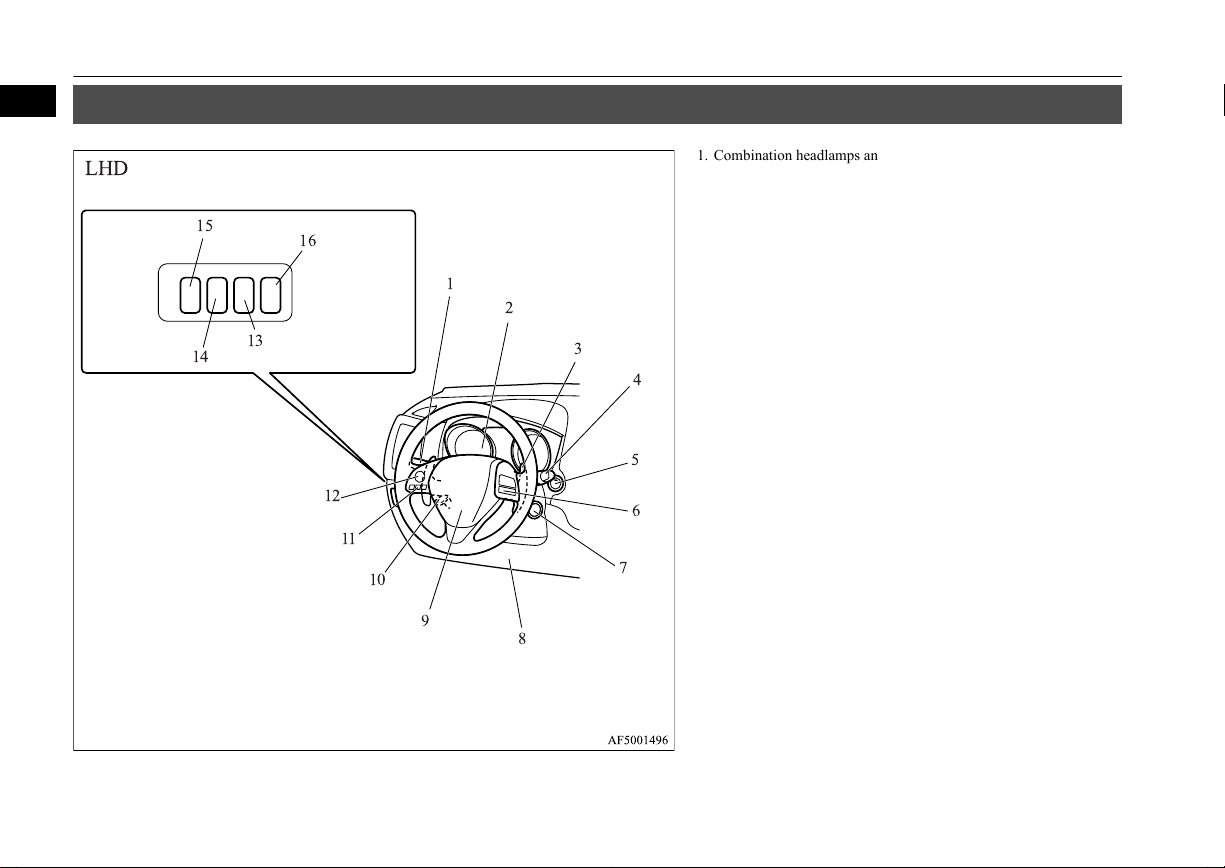
1
Instruments and controls
Instruments and controls
E00100108285
1. Combination headlamps and dipper switch p. 5-47
Turn-signal lever p. 5-54
Front fog lamp switch* p. 5-55
Rear fog lamp switch p. 5-55
Headlamp washer switch* p. 5-61
2. Instruments p. 5-02
3. Shift paddles* p. 6-34
4. Windscreen wiper and washer switch p. 5-56
Rear window wiper and washer switch p. 5-60
5. Engine switch* p. 3-13
6. Cruise control switch* p. 6-52
7. Ignition switch* p. 6-11
8. Supplemental restraint system - driver’s knee airbag* p. 4-29
9. Supplemental restraint system - airbag (for driver’s seat) p. 4-24,
4-29
Horn switch p. 5-62
10. Tilt & Telescopic steering lever p. 6-08
11. Bluetooth® 2.0 interface* p. 7-47
12. Steering wheel audio remote control switches* p. 7-25
13. Sonar switch* p. 6-60
14. Active stability control (ASC) OFF switch* p. 6-51
15. Headlamp levelling switch* p. 5-52
16. Auto Stop & Go (AS&G) OFF switch* p. 6-22
1-02
Overview
OGAE14E1
Page 5
2
1
16
15
14
13
12
11
10
9
8
7
5
6
3
4
RHD
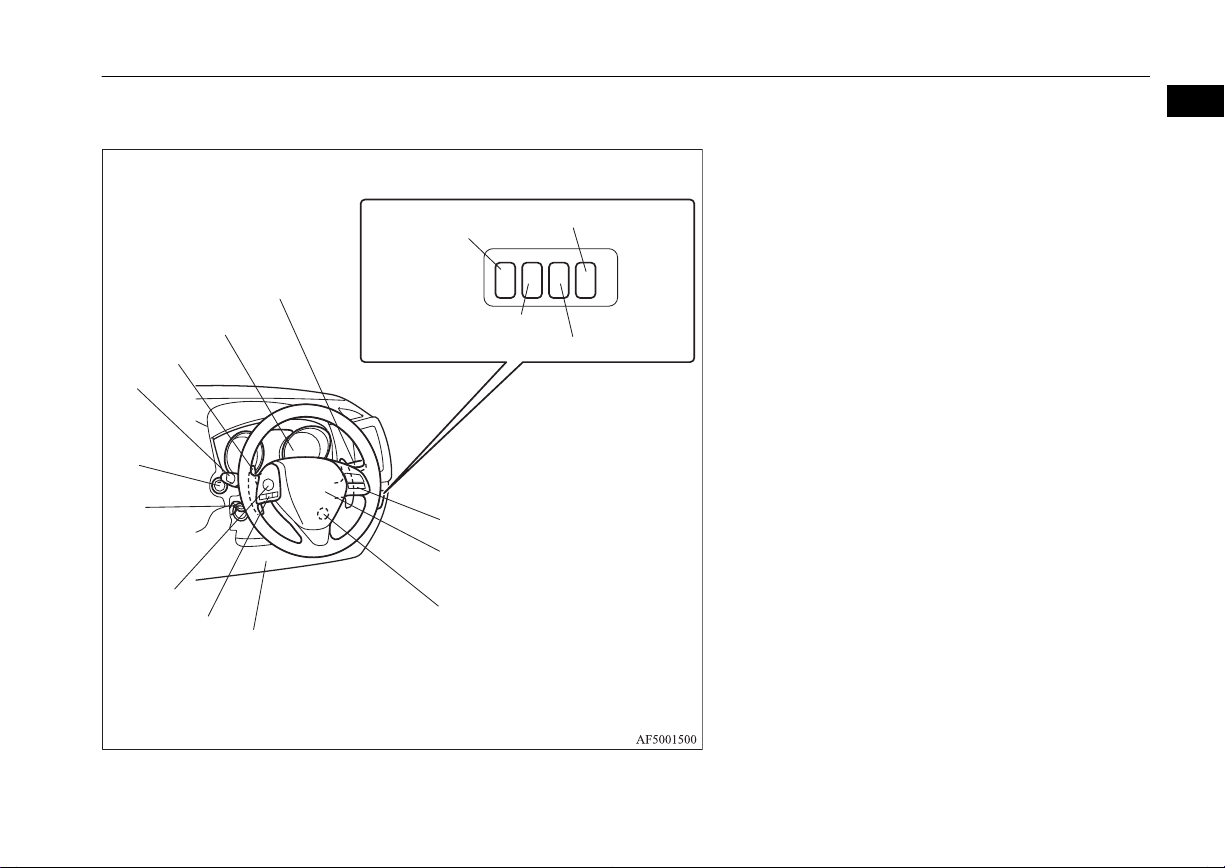
Instruments and controls
1
1. Instruments p. 5-02
2. Combination headlamps and dipper switch p. 5-47
Turn-signal lever p. 5-54
Front fog lamp switch* p. 5-55
Rear fog lamp switch p. 5-55
Headlamp washer switch* p. 5-61
3. Auto Stop & Go (AS&G) OFF switch* p. 6-22
4. Headlamp levelling switch* p. 5-52
5. Active stability control (ASC) OFF switch* p. 6-51
6. Sonar switch* p. 6-60
7. Cruise control switch* p. 6-52
8. Supplemental restraint system - airbag (for driver’s seat) p. 4-24,
4-29
Horn switch p. 5-62
9. Ignition switch* p. 6-11
10. Supplemental restraint system - driver’s knee airbag* p. 4-29
11. Bluetooth® 2.0 interface* p. 7-47
12. Steering wheel audio remote control switches* p. 7-25
13. Tilt & Telescopic steering lever p. 6-08
14. Engine switch* p. 3-13
15. Windscreen wiper and washer switch p. 5-56
Rear window wiper and washer switch p. 5-60
OGAE14E1
Overview
1-03
Page 6
LHD
1
2
3
4
5
6
7
8
9
10
11
12
13
14
15
16
17
18
1
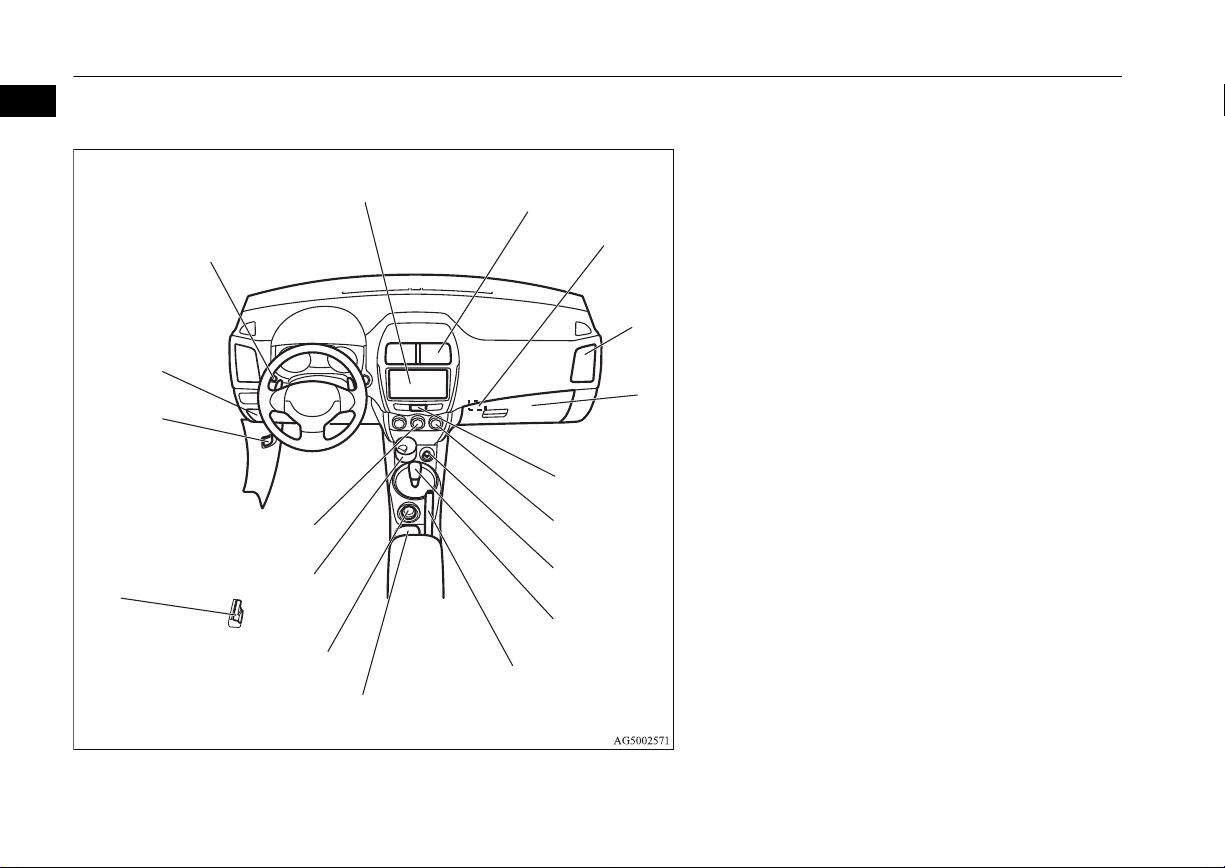
Instruments and controls
1. Audio system* p. 7-12
MITSUBISHI Multi-Communication System*
DISPLAY AUDIO*
Refer to the separate owner’s manual
2. Centre ventilators p. 7-02
3. Key slot* p. 3-20
4. Side ventilators p. 7-02
5. Front passenger’s airbag ON-OFF switch p. 4-27
Glove box p. 7-75
6. Hazard warning flasher switch p. 5-54
7. Rear window demister switch p. 5-61
8. Accessory socket p. 7-71
Cigarette lighter* p. 7-70
9. Gearshift or selector lever p. 6-22, 6-25, 6-31
10. Parking brake lever p. 6-06
11. Cup holder p. 7-78
12. Drive mode selector* p. 6-37
13. Ashtray* p. 7-70
14. Air conditioning* p. 7-03
15. Fuel tank filler door release lever p. 2-03
16. Bonnet release lever p. 10-03
17. Fuse box p. 10-19
18. Multi-information meter switch p. 5-05
1-04
Overview
OGAE14E1
Page 7
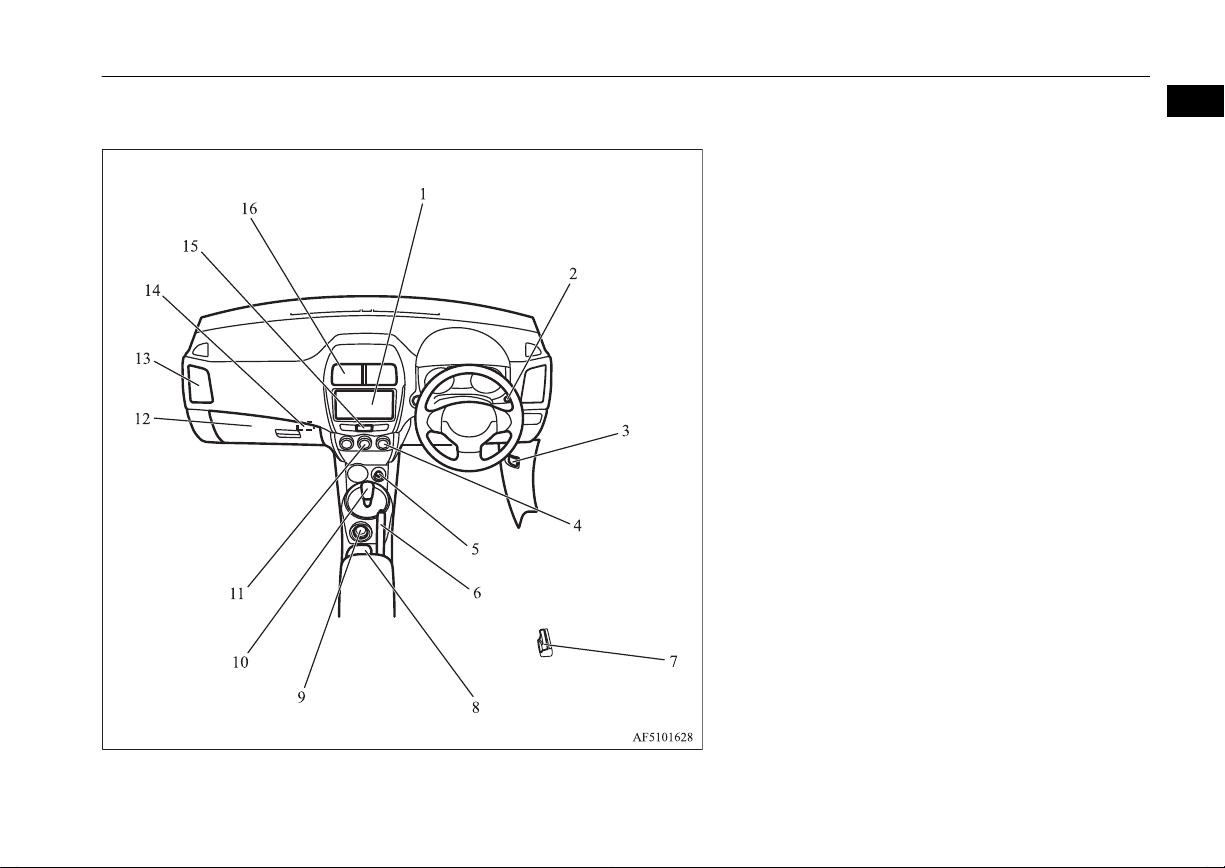
RHD
Instruments and controls
1
1. Audio System* p. 7-12
MITSUBISHI Multi-Communication System*
DISPLAY AUDIO*
Refer to the separate owner’s manual
2. Multi-information meter switch p. 5-05
3. Bonnet release lever p. 10-03
4. Rear window demister switch p. 5-61
5. Accessory socket p. 7-71
6. Parking brake lever p. 6-06
7. Fuel tank filler door release lever p. 2-03
8. Cup holder p. 7-78
9. Drive mode selector* p. 6-37
10. Gearshift or selector lever p. 6-22, 6-25
11. Air conditioning* p. 7-03
12. Front passenger’s airbag ON-OFF switch p. 4-27
Glove box p. 7-75
Fuse box p. 10-19
13. Side ventilators p. 7-02
14. Key slot* p. 3-20
15. Hazard warning flasher switch p. 5-54
16. Centre ventilators p. 7-02
OGAE14E1
Overview
1-05
Page 8
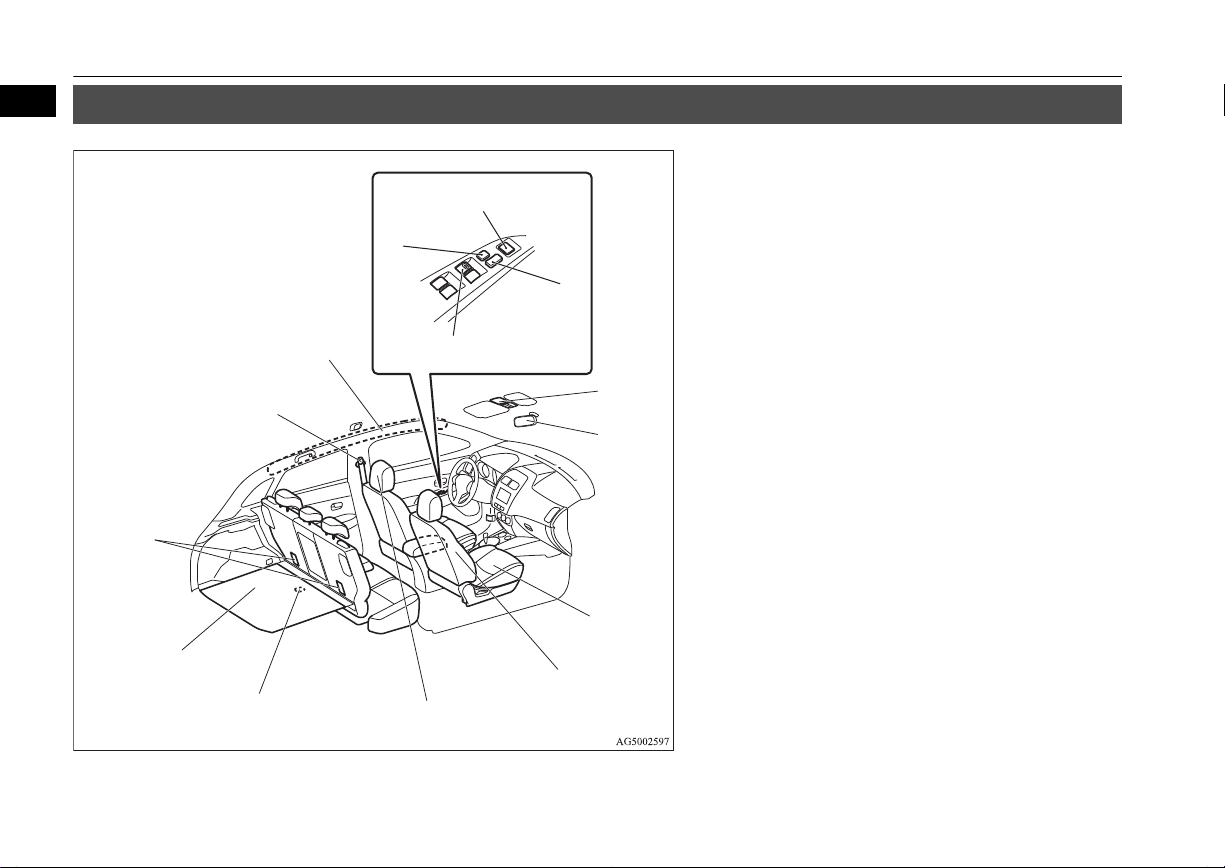
LHD
1
2
3
4
5
6
7
8
9
10
11
12
13
14
1
Interior
Interior
E00100206165
1. Lock switch p. 3-40
2. Electric remote-controlled outside rear-view mirrors switch
p. 6-09
3. Central door lock switch p. 3-26
4. Electric window control switch p. 3-39
5. Sunshade illumination dimming control switch* p. 7-74
6. Inside rear-view mirror p. 6-08
7. Front seat p. 4-03
Heated seat* p. 4-06
8. Supplemental restraint system - side airbag (for front seats)*
p. 4-33
9. Head restraints p. 4-07
10. Luggage room lamp p. 7-73
11. Luggage floor box* p. 7-78
12. Tether anchorages for child restraint system p. 4-22
13. Seat belts p. 4-09
Adjustable seat belt anchor p. 4-11
14. Supplemental restraint system - curtain airbag* p. 4-33
1-06
Overview
OGAE14E1
Page 9
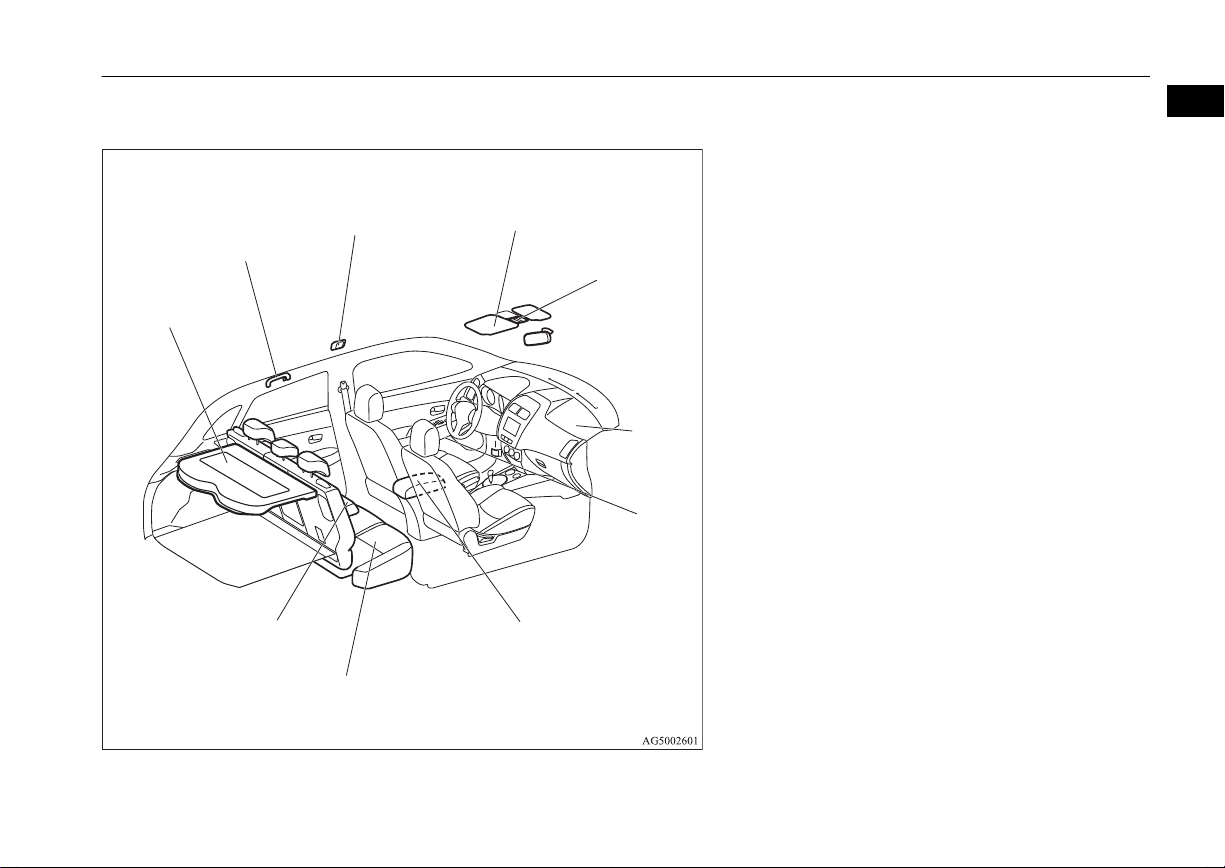
LHD
1
2
3
4
5
6
7
8
9
10
Interior
1
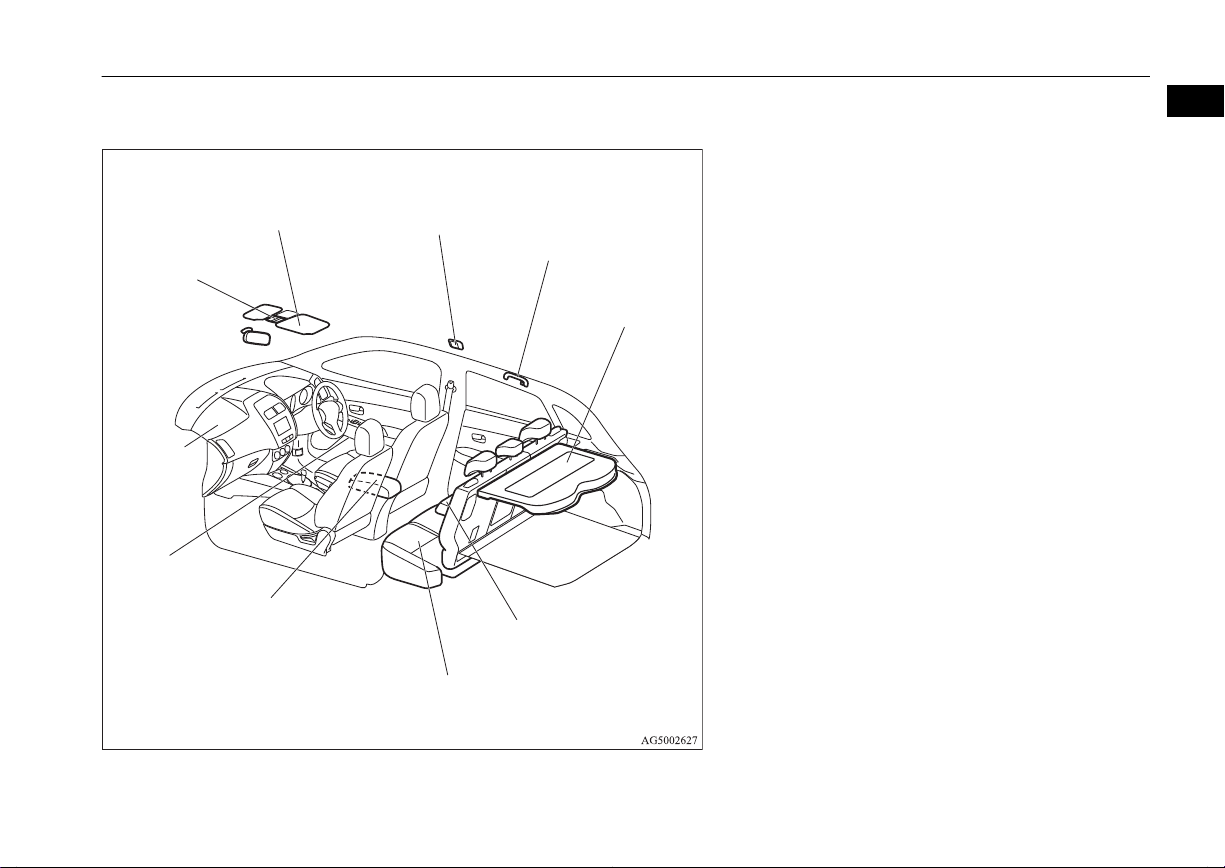
1. Rear shelf panel p. 7-79
2. Assist grip p. 7-80
Coat hook p. 7-80
3. Room lamp (rear)* p. 7-73
4. Sun visors p. 7-69
Vanity mirror p. 7-69
Card holder p. 7-69
5. Map lamp & room lamp (front) p. 7-72
Sunshade switch* p. 3-41
Microphone (for Bluetooth® 2.0 interface)* p. 7-48
6. Supplemental restraint system - airbag (for front passenger’s seat)
p. 4-24, 4-29
7. Bottle holder p. 7-79
8. Armrest* p. 4-05
Auxiliary Audio connector (RCA)* p. 7-36
USB input terminal* p. 7-66
Accessory socket p. 7-71
9. Rear seat p. 4-06
10. Armrest* p. 4-06
Cup holder* p. 7-78
OGAE14E1
Overview
1-07
Page 10
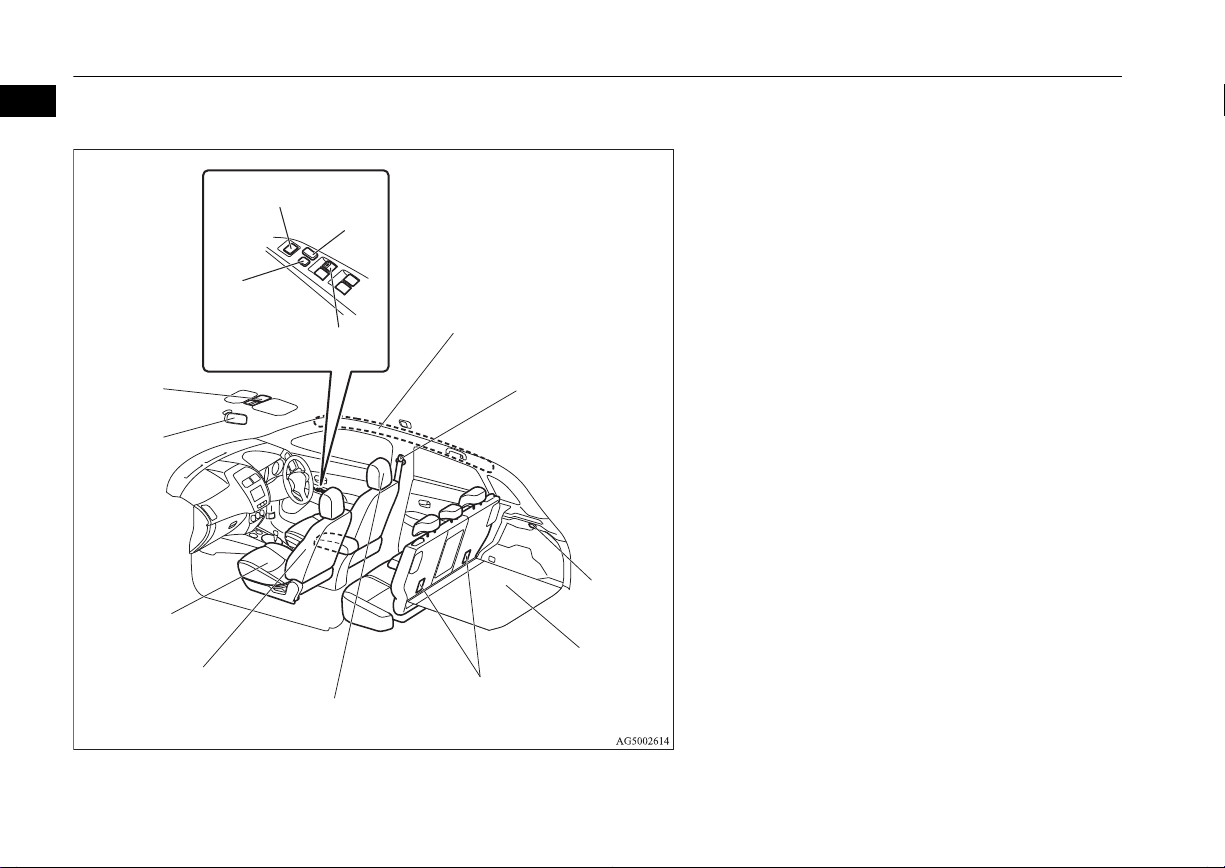
RHD
1
2
3
4
5
6
7
8
9
10
11
12
13
14
1
Interior
1. Supplemental restraint system - curtain airbag* p. 4-33
2. Seat belts p. 4-09
Adjustable seat belt anchor p. 4-11
3. Luggage room lamp p. 7-73
4. Luggage floor box* p. 7-78
5. Tether anchorages for child restraint system p. 4-22
6. Head restraints p. 4-07
7. Supplemental restraint system - side airbag (for front seats)*
p. 4-33
8. Front seat p. 4-03
Heated seat* p. 4-06
9. Inside rear-view mirror p. 6-08
10. Sunshade illumination dimming control switch* p. 7-74
11. Electric window control switch p. 3-39
12. Lock switch p. 3-40
13. Electric remote-controlled outside rear-view mirrors switch
p. 6-09
14. Central door lock switch p. 3-26
1-08
Overview
OGAE14E1
Page 11
RHD
1
2
3
4
5
6
7
8
9
10
Interior
1
1. Map lamp & room lamp (front) p. 7-72
Sunshade switch* p. 3-41
Microphone (for Bluetooth® 2.0 interface)* p. 7-48
2. Sun visors p. 7-69
Vanity mirror p. 7-69
Card holder p. 7-69
3. Room lamp (rear)* p. 7-73
4. Assist grip p. 7-80
Coat hook p. 7-80
5. Rear shelf panel p. 7-79
6. Armrest* p. 4-06
Cup holder* p. 7-78
7. Rear seat p. 4-06
8. Armrest* p. 4-05
Auxiliary Audio connector (RCA) p. 7-36
USB input terminal* p. 7-66
Accessory socket p. 7-71
9. Bottle holder p. 7-79
10. Supplemental restraint system - airbag (for front passenger’s seat)
p. 4-24, 4-29
OGAE14E1
Overview
1-09
Page 12

Vehicle with the tyre repair kit
Luggage compartment
1
Luggage compartment
E00100402837
1. Tyre repair kit* p. 8-07
2. Luggage hook p. 7-81
3. Jack p. 8-06
4. Tools p. 8-06
5. Luggage hook p. 7-81
6. Hook
7. Luggage hook p. 7-81
8. Tools p. 8-06
1-10
Overview
OGAE14E1
Page 13
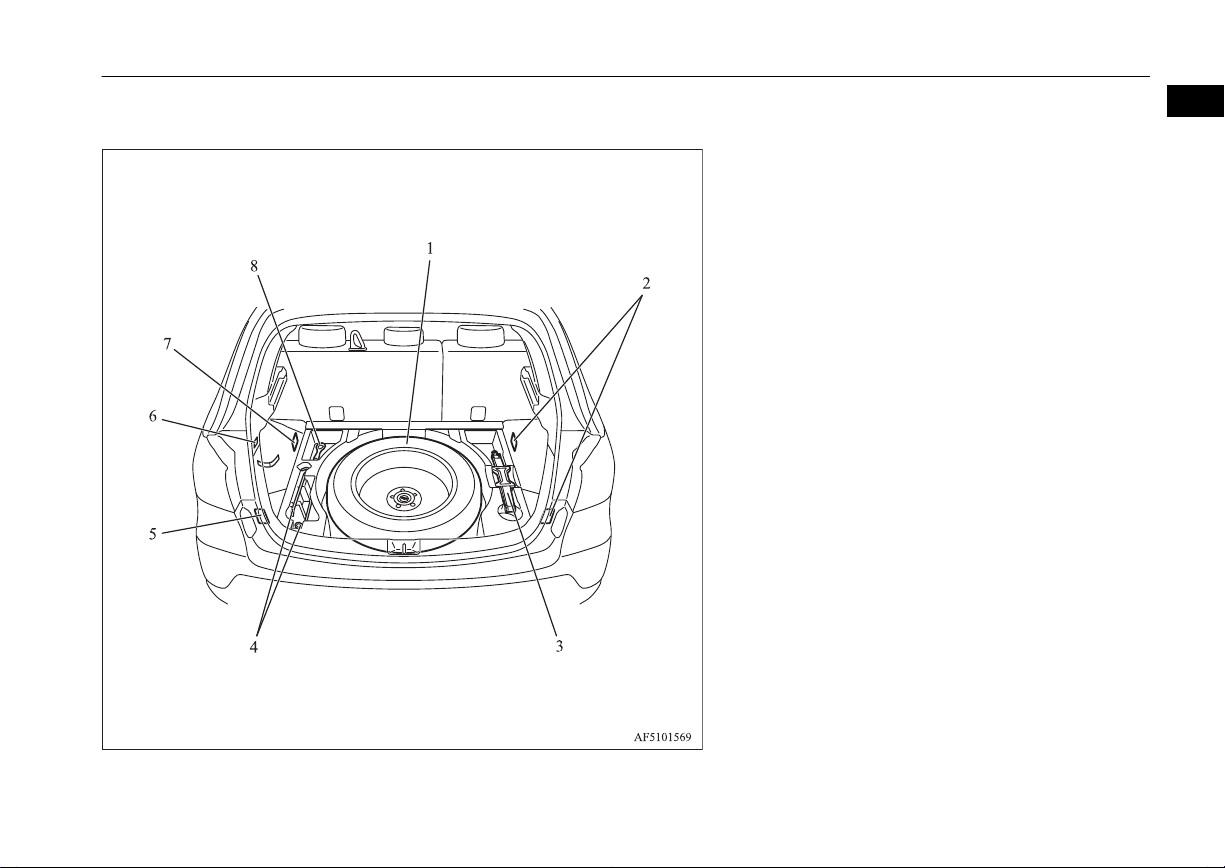
Vehicle with the spare tyre
Luggage compartment
1
1. Spare wheel p. 8-14
2. Luggage hook p. 7-81
3. Jack p. 8-06
4. Tools p. 8-06
5. Luggage hook p. 7-81
6. Hook
7. Luggage hook p. 7-81
8. Tools p. 8-06
OGAE14E1
Overview
1-11
Page 14
11
1
2
3
4
5
6
7
8
9
10
1
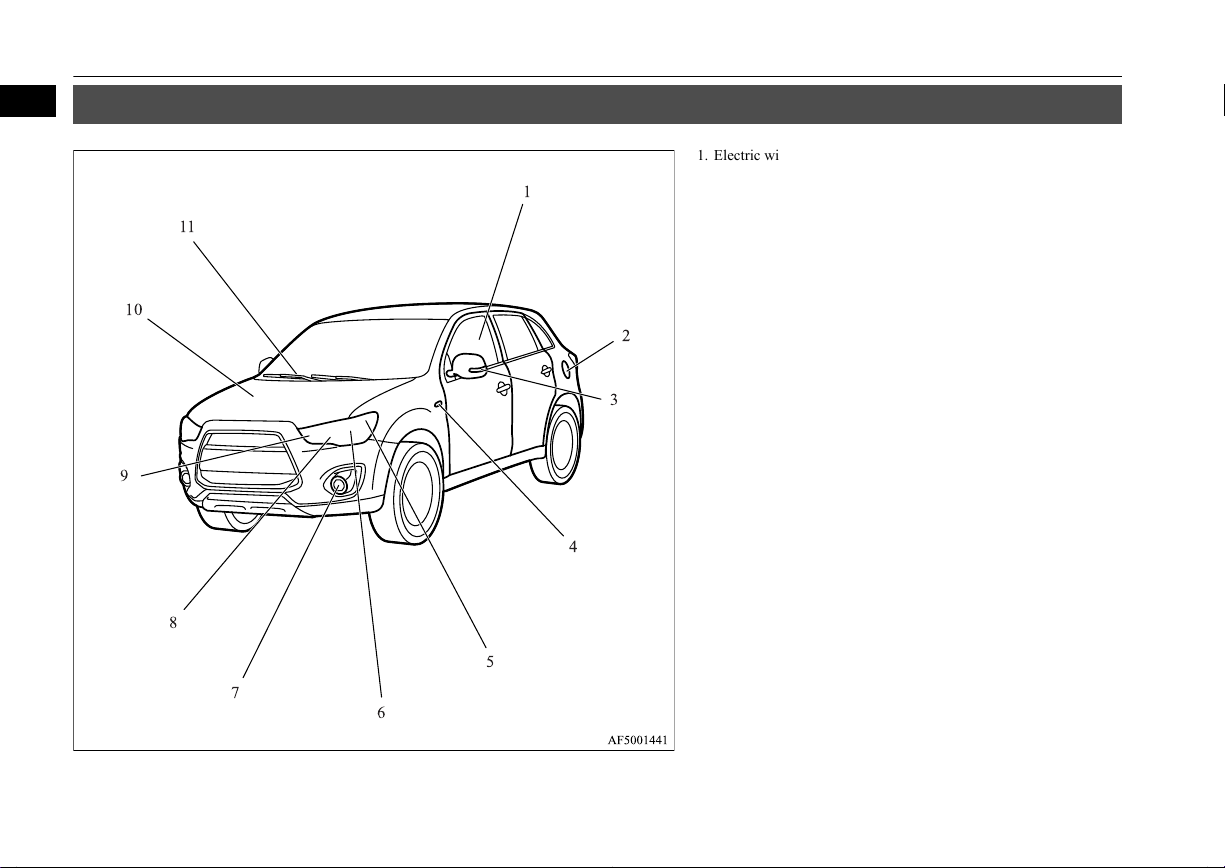
Exterior
Exterior
E00100505422
1. Electric window control p. 3-39
2. Fuel tank filler p. 2-03
3. Outside rear-view mirror p. 6-09
Side turn-signal lamps* p. 5-54, 10-26, 10-31
4. Side turn-signal lamps* p. 5-54, 10-26, 10-31
5. Position lamps p. 5-47, 10-26, 10-30
6. Headlamps, low beam p. 5-47, 10-26, 10-27, 10-29
7. Front fog lamps* p. 5-55, 10-26, 10-31
Daytime running lamps* p. 10-26, 10-32
8. Headlamps, high-beam p. 5-47, 10-26, 10-29
9. Front turn-signal lamps p. 5-54, 10-26, 10-30
10. Bonnet p. 10-03
11. Windscreen wipers p. 5-56
1-12
Overview
OGAE14E1
Page 15
1
2
3
4
5
6
7
8
9
10
11
12
13
14
15
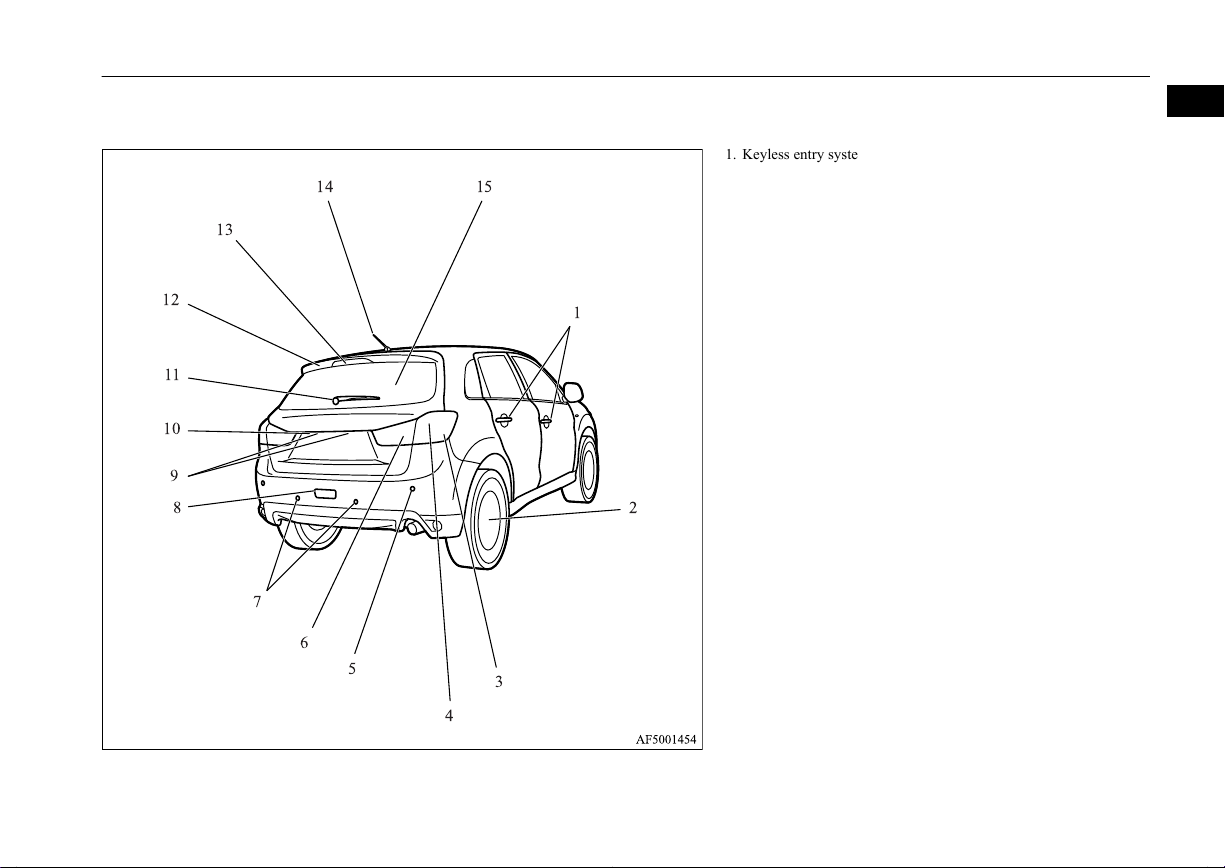
Exterior
1
1. Keyless entry system* p. 3-04
Keyless operation system* p. 3-07
Locking and unlocking the doors p. 3-25
2. Changing tyres p. 8-13
Tyre inflation pressures p. 10-13
Tyre rotation p. 10-14
Tyre chains p. 10-15
Size of tyres and wheels p. 11-12
3. Turn-signal lamps/Hazard warning lamps p. 5-54, 5-54, 10-26,
10-34
4. Stop lamps/Tail lamps p. 5-47, 10-26, 10-34
5. Corner sensors* p. 6-58
6. Reversing lamps p. 5-47, 10-26, 10-35
7. Back sensors* p. 6-57
8. Rear fog lamp* p. 5-55, 10-26, 10-33
9. Licence plate lamps p. 5-47, 10-26, 10-36
10. Rear-view camera* p. 6-61
11. Rear window wiper p. 5-60
12. Rear spoiler p. 9-04
13. High-mounted stop lamp p. 10-26
14. Antenna p. 7-46
15. Tailgate p. 3-30
OGAE14E1
Overview
1-13
Page 16

OGAE14E1
Page 17

General information
Fuel selection...................................................................................... 2-02
Filling the fuel tank.............................................................................2-03
Installation of accessories................................................................... 2-04
Modification/alterations to the electrical or fuel systems................... 2-05
Genuine parts...................................................................................... 2-05
Safety and disposal information for used engine oil...........................2-05
Disposal information for used batteries.............................................. 2-06
Auto Stop & Go (AS&G) system*..................................................... 2-06
2
OGAE14E1
Page 18
Fuel selection
Fuel selection
2
Recommended
fuel
CAUTION
For petrol-powered vehicles, the use of lea-
l
ded fuel can result in serious damage to the
engine and catalytic converter. Do not use
leaded fuel.
Diesel-powered vehicles are designed to use
l
only diesel fuel that meets the EN590 standard.
Use of any other type of diesel fuel (bio diesel, methylester, etc.) would adversely affect
the engine’s performance and durability.
Petrol-powered vehicles
Unleaded petrol octane
number (EN228)
1600 models, 1800 models
95 RON or higher
2000 models
90 RON or higher
Diesel-powered vehicles
Cetane number (EN590)
51 or higher
E00200103076
NOTE
Petrol-powered vehicles have the knock con-
l
trol system so that you can use unleaded petrol 90 RON as an emergent measure in case
unleaded petrol 95 RON or higher is not
available on journey, etc.
In such a case, you don’t need to adjust the
engine specially. In case of using unleaded
petrol 90 RON, the engine performance level is reduced.
For diesel fuel, due to the separation of par-
l
affin, the fluidity of the fuel decreases considerably as the temperature falls.
Because of this fact there are two kinds of
fuel: “summer” and “winter”.
This must be considered in winter use.
Select either of the two kinds of fuel in accordance with ambient temperature.
Above -5 °C: “Summer” diesel
Below -5 °C: “Winter” diesel
When travelling abroad, find out in advance
about the fuels served in local service stations.
NOTE
Repeatedly driving short distances at low
l
speeds can cause deposits to form in the fuel
system and engine, resulting in poor starting
and poor acceleration. If these problems occur, you are advised to add a detergent additive to the gasoline when you refuel the vehicle. The additive will remove the deposits,
thereby returning the engine to a normal
condition. Be sure to use a MITSUBISHI
MOTORS GENUINE FUEL SYSTEM
CLEANER. Using an unsuitable additive
could make the engine malfunction. For details, please contact a MITSUBISHI
MOTORS Authorized Service Point.
Poor quality petrol can cause problems such
l
as difficult starting, stalling, engine noise
and hesitation. If you experience these problems, try another brand and/or grade of petrol.
If the check engine warning lamp flashes,
have the system checked as soon as possible
at a MITSUBISHI MOTORS Authorized
Service Point.
E10 type petrol
The petrol engines are compatible with
type petrol (containing 10 % ethanol) conforming to European standards EN 228.
E00203200022
E10
2-02
General information
OGAE14E1
Page 19
LHD
RHD
Filling the fuel tank
CAUTION
Do not use more than 10 % concentration of
l
ethanol (grain alcohol) by volume.
Use of more than 10 % concentration may
lead to damage to your vehicle fuel system,
engine, engine sensors and exhaust system.
Filling the fuel tank
WARNING
When handling fuel, comply with the safe-
l
ty regulations displayed by garages and
filling stations.
Gasoline is highly flammable and explo-
l
sive. You could be burned or seriously injured when handling it. When refueling
your vehicle, always turn the engine off
and keep away from flames, sparks, and
smoking materials. Always handle fuel in
well-ventilated outdoor areas.
Before removing the fuel cap, be sure to
l
get rid of your body’s static electricity by
touching a metal part of the car or the
fuel pump. Any static electricity on your
body could create a spark that ignites fuel
vapour.
Perform the whole refueling process
l
(opening the fuel tank filler door, removing the fuel cap, etc.) by yourself. Do not
let any other person come near the fuel
tank filler. If you allowed a person to help
you and that person was carrying static
electricity, fuel vapour could be ignited.
E00200203699
WARNING
Do not move away from the fuel tank fill-
l
er until refueling is finished. If you moved
away and did something else (for example, sitting on a seat) part-way through
the refueling process, you could pick up a
fresh charge of static electricity.
If the tank cap must be replaced, use only
l
a MITSUBISHI MOTORS original part.
Fuel tank capacity
2WD models: 58 litres (For vehicles with vehicle identification numbers that begin with
“4”)
2WD models: 63 litres (For vehicles with vehicle identification numbers that begin with
“J”)
4WD models: 60 litres
NOTE
For the location of the vehicle identification
l
number, refer to “Vehicle identification
number” on page 11-02.
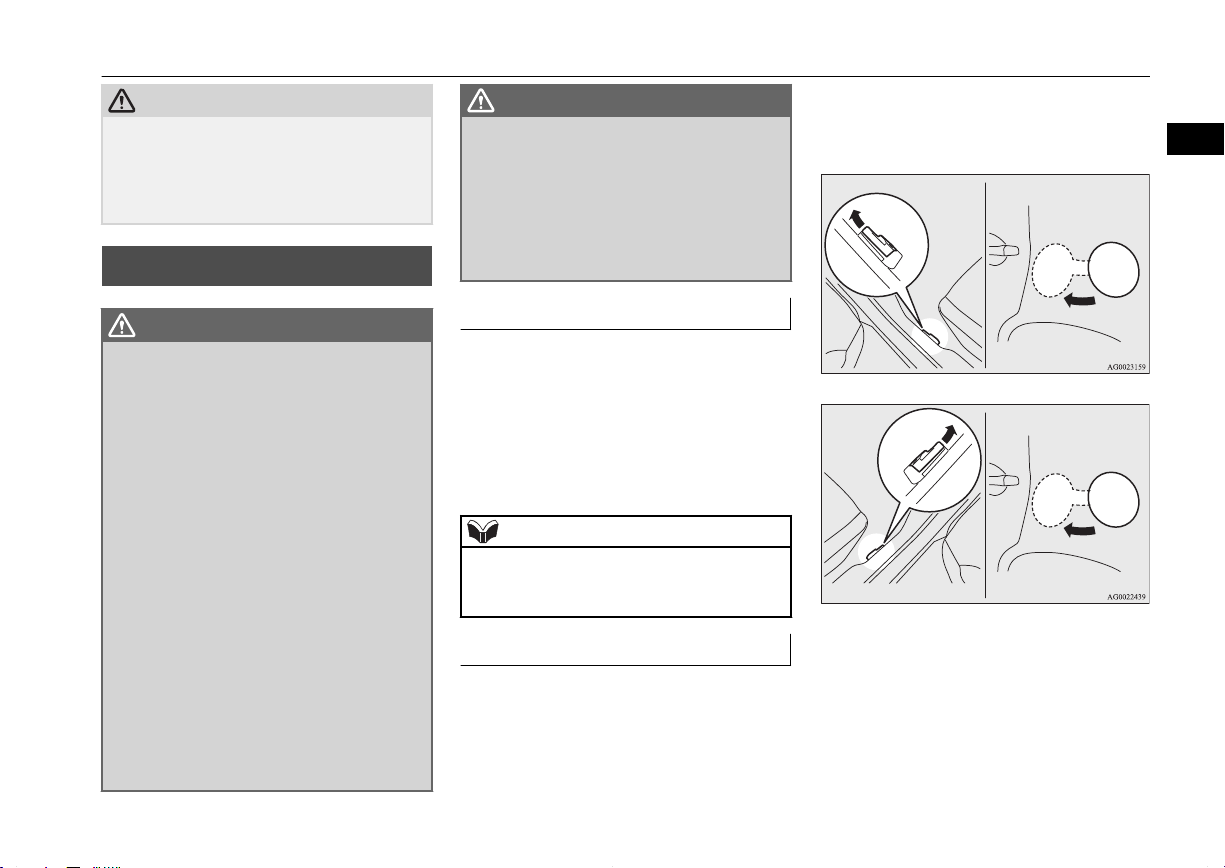
Refueling
1. Before filling with fuel, stop the engine.
2. The fuel tank filler is located on the rear
left side of your vehicle.
Open the fuel tank filler door by pulling
the release lever located on the side of
the driver’s seat.
3. Remove the fuel cap.
2
OGAE14E1
General information
2-03
Page 20
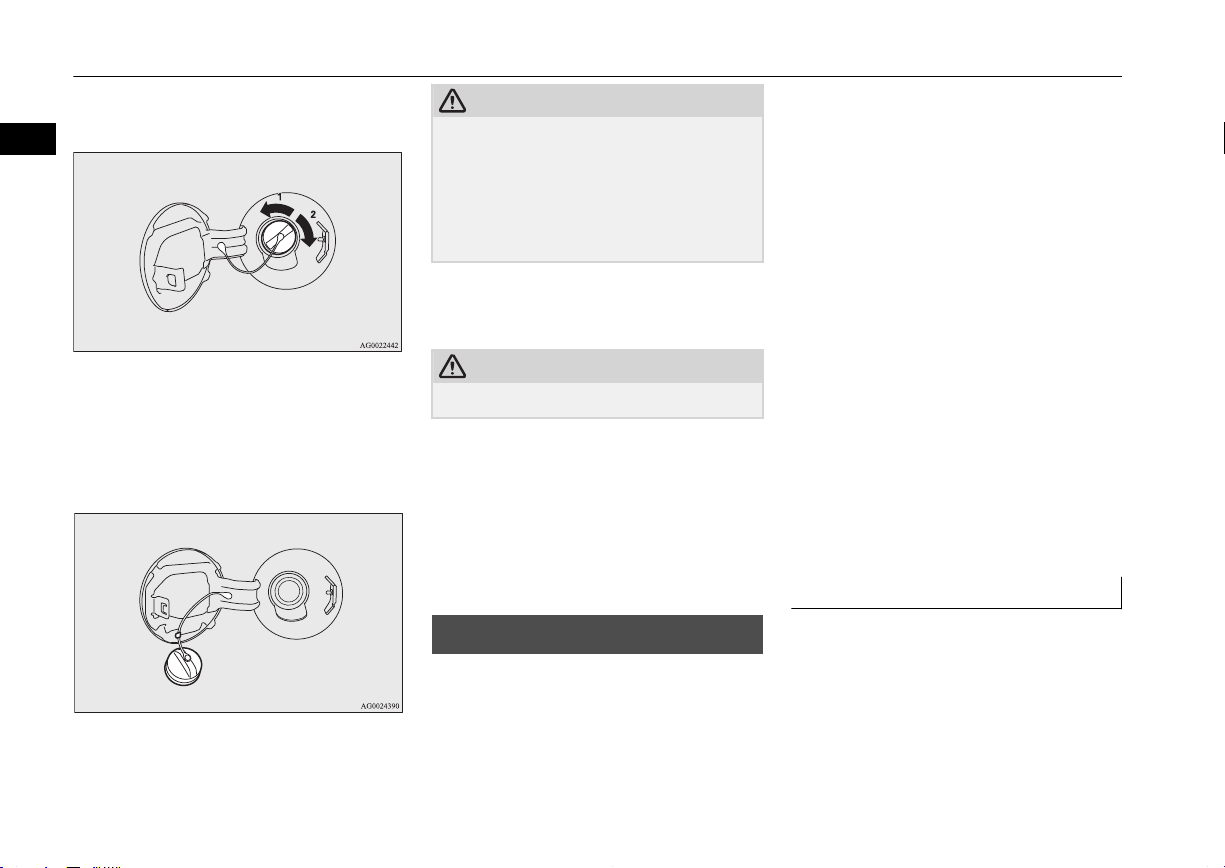
Installation of accessories
Open the fuel tank filler tube by slowly
turning the cap anticlockwise.
2
1- Remove
2- Close
4. While filling with fuel, hang the fuel cap
cord on the hook located on the inside of
the fuel tank filler door.
CAUTION
Since the fuel system may be under pressure,
l
remove the fuel cap slowly. This relieves
any pressure or vacuum that might have
built up in the fuel tank. If you hear a hissing
sound from the cap, wait until it stops before
removing the cap. Otherwise, fuel may spray
out, injuring you or others.
5. Insert the gun in the tank port as far as it
goes.
CAUTION
Do not tilt the gun.
l
6. When the gun stops automatically, do
not fill with fuel any more.
7. Close the fuel cap.
To close, turn the fuel cap slowly clockwise until you hear clicking sounds, then
gently push the fuel tank filler door
closed.
Installation of accessories
E00200300963
We recommend you to consult a
MITSUBISHI MOTORS Authorized Service
Point.
The installation of accessories, optional
l
parts, etc., should only be carried out
within the limits prescribed by law in
your country, and in accordance with the
guidelines and warnings contained within the documents accompanying this vehicle.
Installing electric components incorrect-
l
ly could lead to a fire. Please refer to
Modification/alteration to the electrical
or fuel systems section within this owner’s manual.
Using a cellular phone or radio set inside
l
the vehicle without an external antenna
may cause electrical system interference,
which could lead to unsafe vehicle operation.
Tyres and wheels which do not meet
l
specifications must not be used.
Refer to the “Specifications” section for
information regarding wheel and tyre
sizes.
Important points!
Due to large number of accessory and replacement parts of different manufactures
available in the market, it is not possible, not
only for MITSUBISHI MOTORS, but also
for a MITSUBISHI MOTORS Authorized
Service Point, to check whether the attachment or installation of such parts affects the
overall safety of your MITSUBISHI-vehicle.
2-04
General information
OGAE14E1
Page 21
Modification/alterations to the electrical or fuel systems
Even when such parts are officially authorized, for example by a “general operators
permit” (an appraisal for the part) or through
the execution of the part in an officially approved manner of construction, or when a
single operation permit following the attachment or installation of such parts, it cannot be
deduced from that alone, that the driving
safety of your vehicle has not been affected.
Consider also that there basically exists no liability on the part of the appraiser or the official. Maximum safety can only be ensured
with parts recommended, sold and fitted or
installed by a MITSUBISHI MOTORS Authorized Service Point (MITSUBISHI
MOTORS genuine replacement parts and
MITSUBISHI MOTORS accessories). The
same also pertains to modifications of
MITSUBISHI vehicles with respect to the
production specifications. For safety reasons,
do not attempt any modifications other than
those that follow the recommendations of a
MITSUBISHI MOTORS Authorized Service
Point.
Modification/alterations to
the electrical or fuel systems
E00200400368
MITSUBISHI MOTORS CORPORATION
has always manufactured safe, high quality
vehicles. In order to maintain this safety and
quality, it is important that any accessory that
is to be fitted, or any modifications carried
out which involve the electrical or fuel systems, should be carried out in accordance
with MITSUBISHI guidelines.
CAUTION
If the wires interfere with the vehicle body
l
or improper installation methods are used
(protective fuses not included, etc.), electronic devices may be adversely affected, resulting in a fire or other accident.
Genuine parts
E00200500499
MITSUBISHI MOTORS has gone to great
lengths to bring you a superbly crafted automobile offering the highest quality and dependability.
Use MITSUBISHI MOTORS Genuine Parts,
designed and manufactured to maintain your
MITSUBISHI MOTORS automobile at top
performance. MITSUBISHI MOTORS Genuine Parts are identified by this mark and are
available at all MITSUBISHI MOTORS Authorized Service Points.
Safety and disposal information for used engine oil
E00200600155
WARNING
Prolonged and repeated contact may
l
cause serious skin disorders, including
dermatitis and cancer.
Avoid contact with the skin as far as pos-
l
sible and wash thoroughly after any contact.
Keep used engine oils out of reach of chil-
l
dren.
2
OGAE14E1
General information
2-05
Page 22
Disposal information for used batteries
Protect the environment
It is illegal to pollute drains, water courses
2
and soil. Use authorized waste collection facilities, including civic amenity sites and garages providing facilities for disposal of used
oil and used oil filters. If in doubt, contact
your local authority for advice on disposal.
Disposal information for
used batteries
Your vehicle contains batteries and/or accumulators.
Do not mix with general
household waste.
For proper treatment, recovery and recycling of used batteries, please take them to applicable collection points, in
accordance with your national legislation and the Directives 2006/66/EC.
By disposing of these batteries correctly, you will help to
save valuable resources and
prevent any potential negative effects on human health
and the environment which
could otherwise arise from
inappropriate waste handling.
E00201300032
Auto Stop & Go (AS&G) system*
E00201500021
This paragraph summarizes the major items
of the Auto Stop & Go (AS&G) system
such as the characteristics, operating procedures, etc. For details, refer to “Auto Stop &
Go (AS&G) system” on page 6-18.
The Auto Stop & Go (AS&G) system reduces the emission of exhaust gases and increases fuel efficiency.
The Auto Stop & Go (AS&G) system automatically stops and restarts the engine without the use of the ignition switch or the engine switch when the vehicle is stopped, such
as at traffic lights or in a traffic jam.
Activation
E00201600051
The Auto Stop & Go (AS&G) system is automatically activated when the ignition switch
is turned to the “ON” position or the operation mode is put in ON.
Deactivation
E00201700065
You can deactivate the system by pressing
the “Auto Stop & Go (AS&G) OFF” switch.
Then the “ ” display/indicator will turn on.
Auto stop
E00201800066
1. Stop the vehicle.
2-06
General information
OGAE14E1
Page 23
Vehicles with 5M/T Vehicles with 6M/T
Auto Stop & Go (AS&G) system*
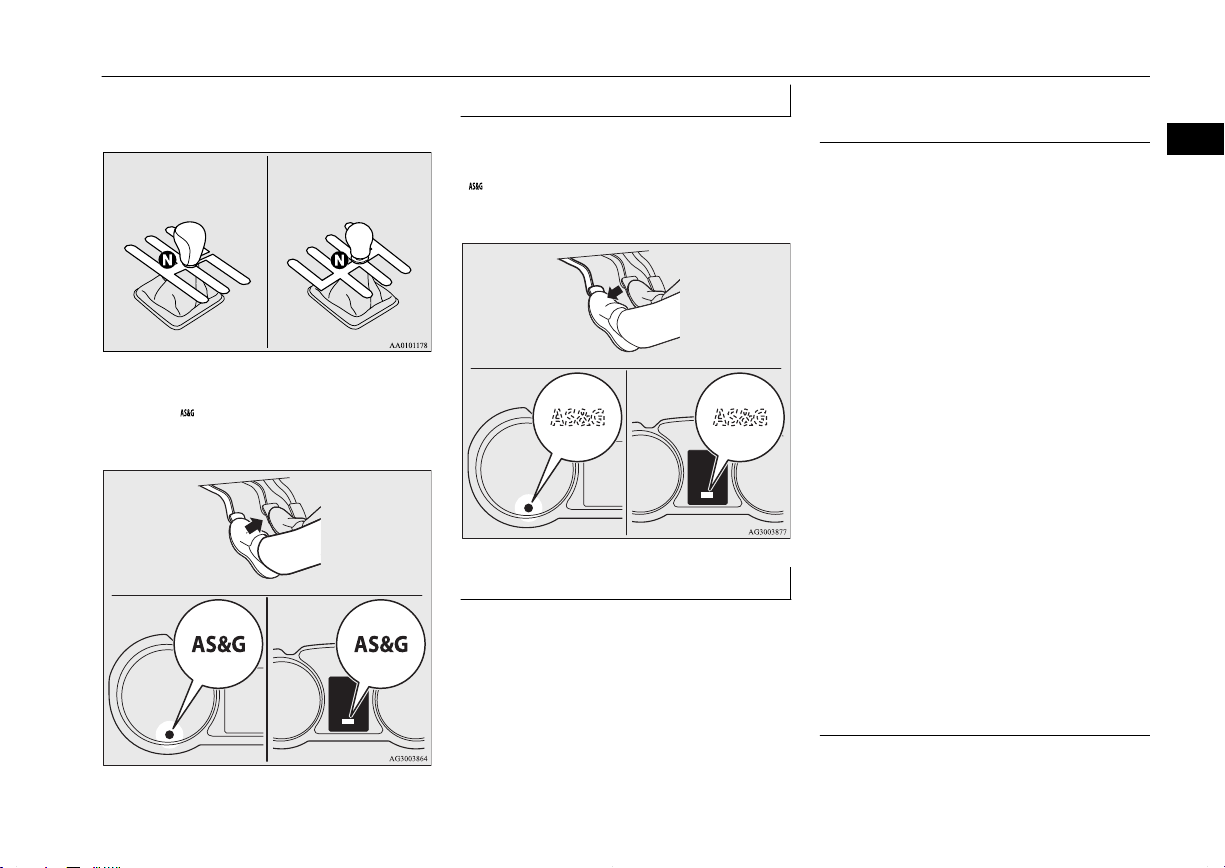
2. Place the gearshift lever in the “N”
(Neutral) position.
3. Release the clutch pedal.
4. The “ ” display/indicator will turn on
and the engine will stop automatically.
Auto go
E00201900067
Depress the clutch pedal while the gearshift
lever is in the “N” (Neutral) position. The
“ ” display/indicator turns off and the engine restarts automatically.
System characteristics
E00202300055
The principle of the Auto Stop & Go
(AS&G) system is that it adapts to the vehicle’s needs (i.e. energy supply). This means
that in certain circumstances the engine will
not stop and in other circumstances the engine will restart by itself.
Circumstances when the engine will restart by itself
The interior temperature rises and the air
l
conditioning starts operating in order to
lower the temperature.
Electric power consumption is high.
l
The brake pedal is depressed repeatedly.
l
Vehicle speed is 3 km/h (2 mph) or
l
higher when coasting on a slope.
Mode selection dial is set to the demister
l
position.
When the air conditioning is operated by
l
pressing the air conditioning switch.
When the preset temperature of the air
l
conditioning is changed significantly.
When the air conditioning is operated in
l
AUTO mode where the temperature control dial is set to the max. hot or the max.
cool position (for vehicles with automatic air conditioning).
Other than the conditions mentioned above,
the engine may restart automatically. For details, refer to “Auto Stop & Go (AS&G) system” on page 6-18.
E00202400027
Circumstances when the engine will not stop
Ambient temperature is lower than ap-
l
proximately 3 °C.
E00202500044
2
OGAE14E1
General information
2-07
Page 24
Auto Stop & Go (AS&G) system*
After the engine restarts automatically
l
and the vehicle stops again within 10
2
seconds.
After the engine restarts automatically
l
and the vehicle remains stationary.
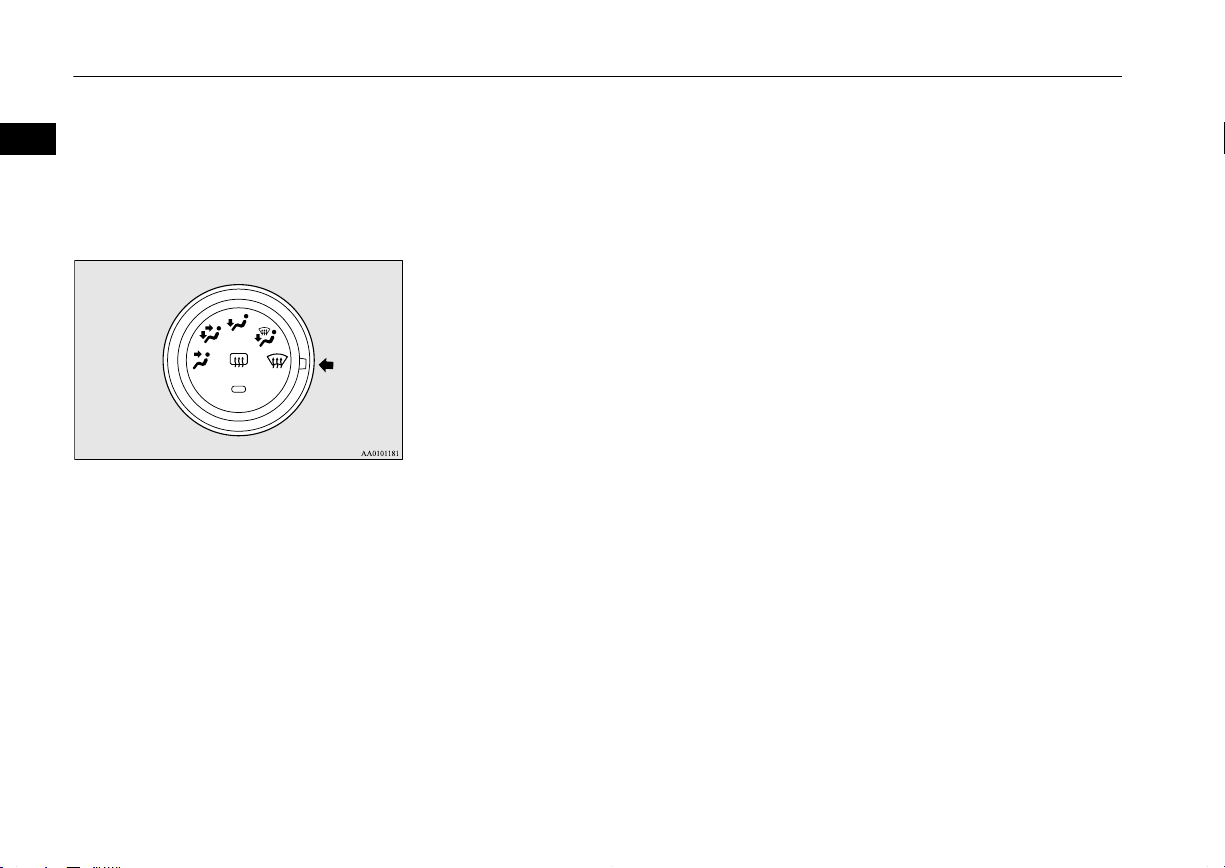
Mode selection dial is set to the demister
l
position (see illustration below).
When the air conditioning is operated in
l
AUTO mode where the temperature control dial is set to the max. hot or the max.
cool position (for vehicles with automatic air conditioning).
Other than the conditions mentioned above,
the engine may not stop automatically. For
details, refer to “Auto Stop & Go (AS&G)
system” on page 6-18.
2-08
General information
OGAE14E1
Page 25

Locking and unlocking
Keys.................................................................................................... 3-02
Electronic immobilizer (Anti-theft starting system)........................... 3-03
Keyless entry system*.........................................................................3-04
Keyless operation system*..................................................................3-07
Doors...................................................................................................3-25
Central door locks............................................................................... 3-26
Dead Lock System*............................................................................ 3-27
“Child-protection” rear doors..............................................................3-30
Tailgate................................................................................................3-30
Inside tailgate release.......................................................................... 3-31
Security alarm system*....................................................................... 3-32
Electric window control...................................................................... 3-39
Sunshade*........................................................................................... 3-41
3
OGAE14E1
Page 26
Keys
Keys
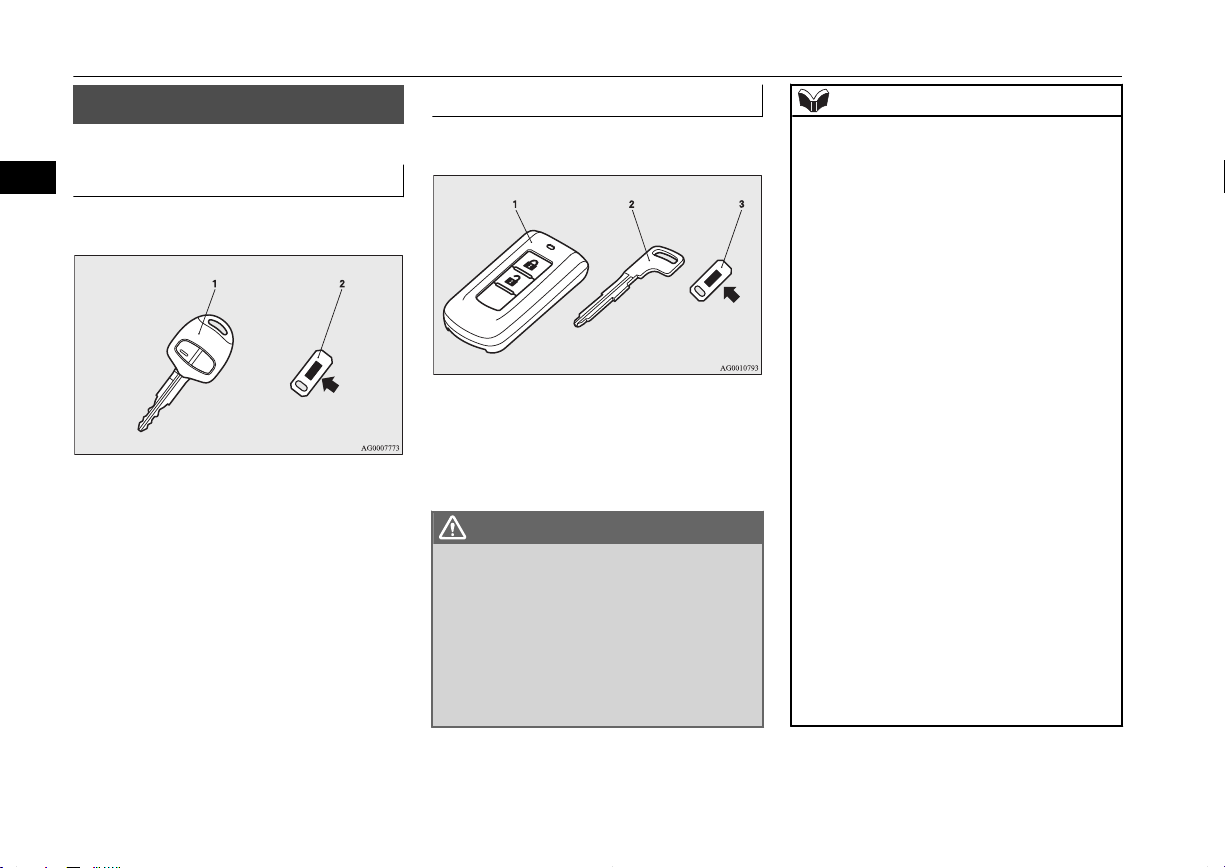
Type 1
3
The key fits all locks.
1- Keyless entry key
(with electronic immobilizer)
2- Key number tag
E00300102269
Type 2
The emergency key fits all locks.
1- Keyless operation key
(with electronic immobilizer and keyless
entry system function)
2- Emergency key
3- Key number tag
WARNING
When taking a key on flights, do not press
l
any switches on the key while on the
plane. If a switch is pressed on the plane,
the key emits electromagnetic waves,
which could adversely affect the plane’s
flight operation.
When carrying a key in a bag, be careful
that no switches on the key can be easily
pressed by mistake.
NOTE
The key number is stamped on the tag as in-
l
dicated in the illustration.
Make a record of the key number and store
the key and key number tag in separate places, so that you can order a key in the event
the original keys are lost.
The key is a precision electronic device with
l
a built-in signal transmitter. Please observe
the following in order to prevent a malfunction.
Do not leave in a place that is exposed to
•
direct sunlight, for example on the dashboard.
Do not disassemble or modify.
•
Do not excessively bend the key or sub-
•
ject it to strong impacts.
Do not expose to water.
•
Keep away from magnetic key rings.
•
Keep away from audio systems, personal
•
computers, TVs, and other equipment that
generates a magnetic field.
Keep away from devices that emit strong
•
electromagnetic waves, such as cellular
phones, wireless devices and high frequency equipment (including medical devices).
Do not clean with ultrasonic cleaners or
•
similar equipment.
Do not leave the key where it may be ex-
•
posed to high temperature or high humidity.
3-02
Locking and unlocking
OGAE14E1
Page 27
Electronic immobilizer (Anti-theft starting system)
NOTE
The engine is designed so that it will not
l
start if the ID code registered in the immobilizer computer and the key’s ID code do
not match. Refer to the “Electronic immobilizer” section for details and key usage.
[For vehicles equipped with the security
l
alarm system]
Pay attention to the following if the security
alarm is set to “Active”.
Refer to “Security alarm system” on page
3-32.
If the security alarm is in the system
•
armed mode, the alarm will sound if the
doors are opened after being unlocked
with the key, the inside lock knob or the
central door lock switch.
Even if the security alarm is set to “Ac-
•
tive”, the system preparation mode is not
entered if the keyless entry system or the
keyless operation function was not used to
lock the vehicle.
Electronic immobilizer
(Anti-theft starting system)
E00300203078
[For vehicles equipped with keyless operation system]
For information on operations for vehicles
equipped with the keyless operation system,
refer to “Keyless operation system: Electronic immobilizer (Anti-theft starting system)”
on page 3-12.
[Except vehicles equipped with keyless operation system]
The electronic immobilizer is designed to
significantly reduce the possibility of vehicle
theft. The purpose of the system is to immobilize the vehicle if an invalid start is attempted. A valid start attempt can only be achieved by using a key “registered” to the immobilizer system.
NOTE
In the following cases, the vehicle may not
l
be able to receive the registered ID code
from the registered key and the engine may
not start.
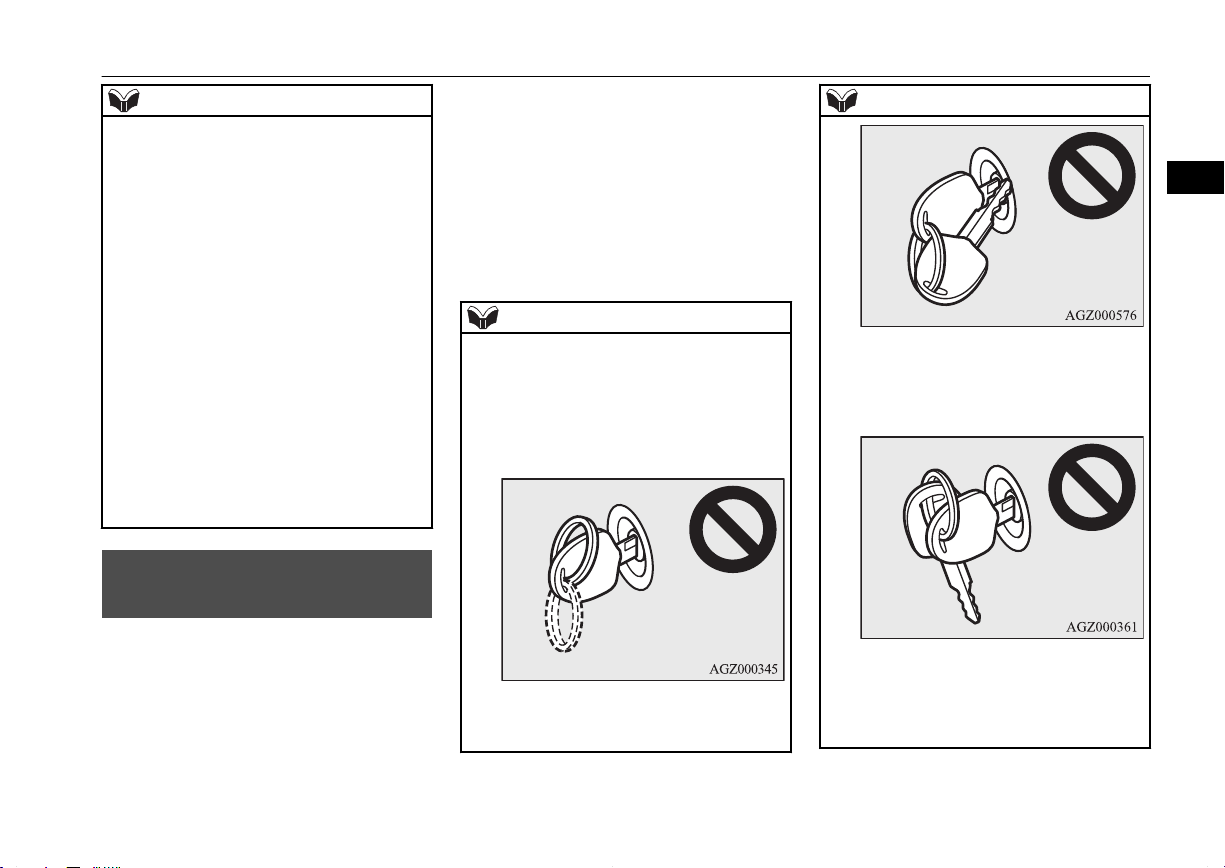
When the key contacts a key ring or other
•
metallic or magnetic object
When the key grip contacts metal of an-
•
other key
NOTE
When the key contacts or is close to other
•
immobilizing keys (including keys of other vehicles)
In cases like these, remove the object or
additional key from the vehicle key. Then
try again to start the engine. If the engine
does not start, we recommend you to con-
3
OGAE14E1
Locking and unlocking
3-03
Page 28
Keyless entry system*
NOTE
tact your MITSUBISHI MOTORS Authorized Service Point.
If you lose one of them, contact a
l
3
MITSUBISHI MOTORS Authorized Service Point as soon as possible. To obtain a replacement or extra spare key, take your vehicle and all remaining keys to your
MITSUBISHI MOTORS Authorized Service Point. All the keys have to be re-registered in the immobilizer computer unit. The
immobilizer can register up to 8 different
keys.
Keyless entry system*
E00300302649
Press the remote control switch, and all doors
and the tailgate will be locked or unlocked as
desired. It is also possible to operate the outside rear-view mirrors (Vehicles equipped
with the mirror retractor switch).
CAUTION
Do not modify or add parts to the immobiliz-
l
er system. Doing so could cause the immobilizer to malfunction.
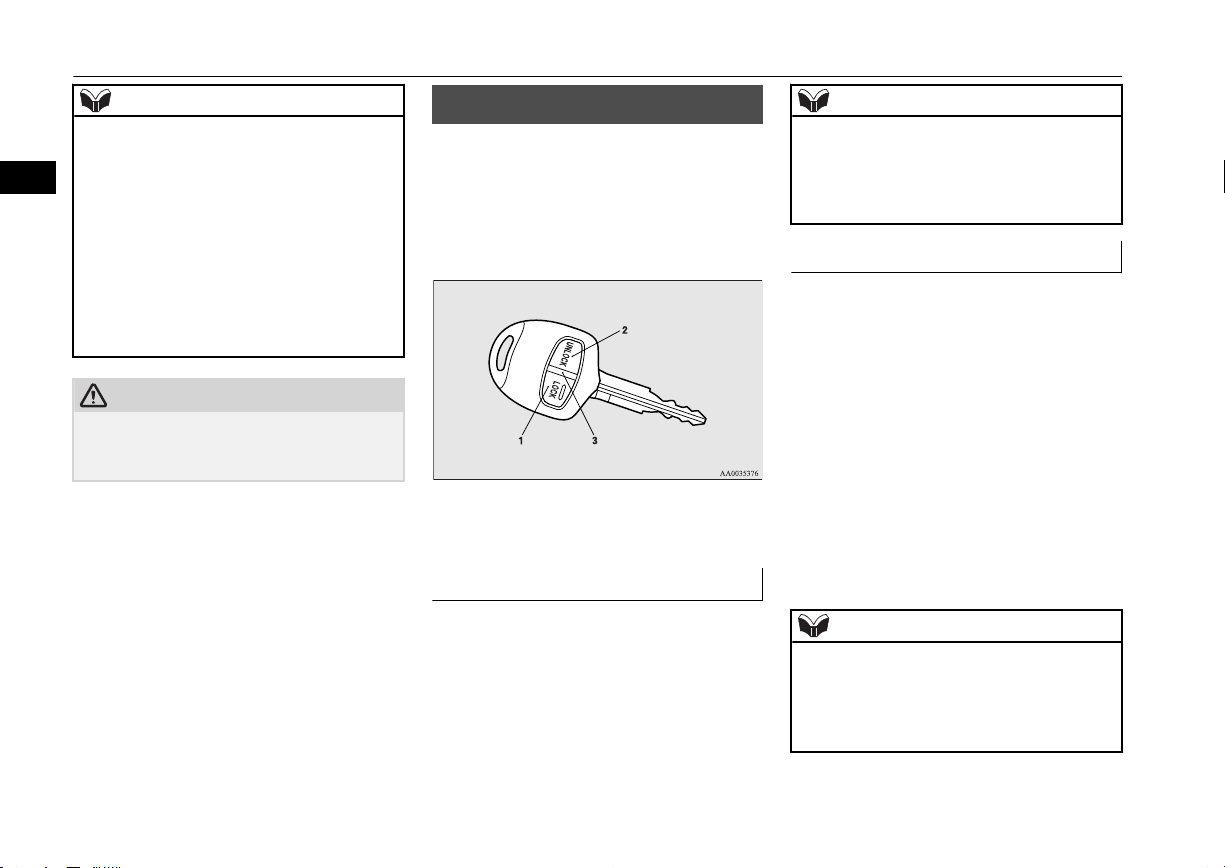
1- LOCK switch
2- UNLOCK switch
3- Indication lamp
To lock
Press the LOCK switch (1). All the doors and
the tailgate will be locked. The turn-signal
lamps will blink once when the doors and the
tailgate are locked.
NOTE
With a vehicle that has a Dead Lock System,
l
pressing the LOCK switch (1) two times in
succession causes the Dead Lock System to
be set. (Refer to “Setting the system” on
page 3-27.)
To unlock
Press the UNLOCK switch (2). All the doors
and the tailgate will be unlocked. If the doors
and tailgate are unlocked when the front
room lamp switch is in the “DOOR” position
or the rear room lamp switch (except for vehicles equipped with the sunshade) is in the
middle (•) position, the room lamp will illuminate for approximately 15 seconds and the
turn-signal lamps will blink twice.
Depending on the vehicle model, the position
and tail lamps can also be set to turn on for
approximately 30 seconds. Refer to “Instruments and controls: Welcome light” on page
5-51.
NOTE
The remote control switch does not operate
l
in the following conditions:
The key is left in the ignition switch.
•
A door or the tailgate is open or ajar. (On-
•
ly the unlock function operates.)
3-04
Locking and unlocking
OGAE14E1
Page 29
Keyless entry system*
NOTE
Except for vehicles equipped with a Dead
l
Lock System, the door and tailgate unlock
function can be set so that only the driver’s
door unlocks when the UNLOCK switch (2)
is pressed once.
If the door and tailgate unlock function is set
to work as described above, all the doors and
the tailgate unlock when the UNLOCK
switch is pressed two times in succession.
Refer to “Setting of door and tailgate unlock
function” on page 3-06.
The indication lamp (3) comes on each time
l
a switch is pressed.
For vehicles equipped with the mirror retrac-
l
tor switch, the outside rear-view mirrors automatically retract or extend when all the
doors and tailgate are locked or unlocked using the remote control switches of the keyless entry system.
Refer to “Starting and driving: Outside rearview mirrors” on page 6-09.
If the UNLOCK switch (2) is pressed and no
l
door or tailgate is opened within approximately 30 seconds, relocking will automatically occur.
It is possible to modify functions as follows:
l
For further information, please contact your
MITSUBISHI MOTORS Authorized Service Point.
The time for automatic relocking can be
•
changed.
NOTE
The confirmation function (flashing of the
•
turn-signal lamps) can be set to operate
only when the doors and backdoor are
locked or only when the doors and backdoor are unlocked.
The confirmation function (this indicates
•
locking or unlocking of the doors and tailgate with the flash of the turn-signal
lamps) can be deactivated.
The number of times the turn-signal
•
lamps are flashed by the confirmation
function can be changed.
Operation of the Dead Lock System
In a vehicle that has a Dead Lock System, it
is possible to set the Dead Lock System using
the remote controller.
(Refer to “Dead Lock System” on page
3-27.)
Operation of the outside rearview mirrors (Vehicles equipped with mirror retractor
switch)
E00310800236
To fold
Within 30 seconds of locking the doors and
tailgate using the LOCK switch (1), press the
LOCK switch twice rapidly to fold the outside rear-view mirrors.
To extend
Within 30 seconds of unlocking the doors
and tailgate using the UNLOCK switch (2),
press the UNLOCK switch twice rapidly to
return the outside rear-view mirrors to their
extended positions.
The outside rear-view mirrors are not initially set to work as described above. If you
want them to work as described above, you
need to set them so that they do not retract/
extend when the doors and tailgate are
locked/unlocked using the keyless entry system or keyless operation system.
Refer to “Starting and driving: Outside rearview mirrors” on page 6-09.
For details, please consult a MITSUBISHI
MOTORS Authorized Service Point.
3
OGAE14E1
Locking and unlocking
3-05
Page 30
Keyless entry system*
NOTE
The outside rear-view mirrors cannot be fol-
l
ded or extended using the remote control
3
switch in the following conditions:
The key is left in the ignition switch.
•
A door or the tailgate is open or ajar.
•
The remote control switch will operate with-
l
in approximately 4 m from the vehicle.
However, the operating range of the remote
control switch may change if the vehicle is
located near a power station, or radio/TV
broadcasting station.
If either of the following problems occurs,
l
the battery may be exhausted.
The remote control switch is operated at
•
the correct distance from the vehicle, but
the doors and tailgate are not locked/
unlocked in response.
The indication lamp (3) is dim or does not
•
come on.
For further information, please contact
your MITSUBISHI MOTORS Authorized
Service Point.
If you replace the battery yourself, refer to
“Procedure for replacing the remote control switch battery” on page 3-06.
If your remote control switch is lost or dam-
l
aged, please contact your MITSUBISHI
MOTORS Authorized Service Point for a replacement remote control switch.
NOTE
If you wish to add a remote control switch,
l
we recommend you to contact a
MITSUBISHI MOTORS Authorized Service Point.
A maximum of 8 remote control switches
are available for your vehicle.
Setting of door and tailgate unlock function (Except for vehicles equipped with a Dead
Lock System)
The door and tailgate unlock function can be
set to the following two conditions.
Each time the door and tailgate unlock function is set, a chime will sound to tell you the
condition of the door and tailgate unlock
function.
Number of
chimes
One chime
All doors and the tailgate unlock
Condition
Two chimes Driver’s door unlock only
1. Remove the key from the ignition
E00310300257
switch.
2. Place the combination headlamps and
dipper switch in the “OFF” position, and
3. Press and hold the LOCK switch (1) for
4 to 10 seconds and then also press the
UNLOCK switch (2) during this time.
4. Release in sequence the LOCK and UNLOCK switches within 10 seconds of
pressing the LOCK switch in step 3.
Procedure for replacing the remote control switch battery
E00309500145
1. Before replacing the battery, remove
static electricity from your body by
touching a metal part such as a doorknob
of the room.
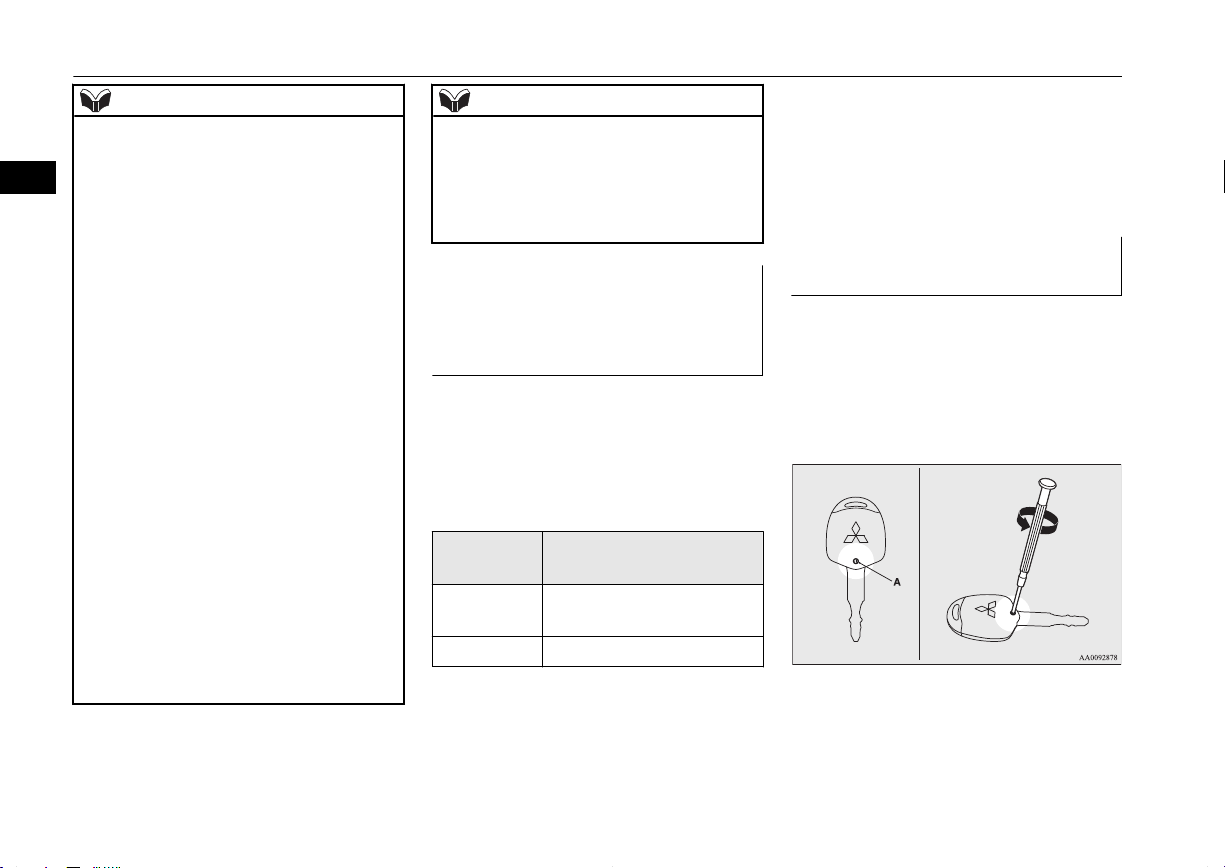
2. Remove the screw (A) from the remote
control switch.
3. With the MITSUBISHI mark facing
you, insert the cloth-covered tip of a
straight blade (or minus) screwdriver in-
leave the driver’s door open.
3-06
Locking and unlocking
OGAE14E1
Page 31

Coin type battery
CR1616
- side
+ side
Keyless operation system*
to the notch in the remote control switch
case and use it to open the case.
NOTE
Be sure to perform the procedure with the
l
MITSUBISHI mark facing you. If the
MITSUBISHI mark is not facing you when
you open the remote control switch case, the
switches may come out.
4. Remove the remote control transmitter
from the remote control switch case.
Then, open the remote control transmitter using the method described in step 3.
5. Remove the old battery.
6. Install a new battery with the + side (B)
down.
7. Close the remote control transmitter
firmly.
8. Place the remote control transmitter in
the remote control switch case, then securely close the remote control switch
case.
9. Attach the screw (A) removed in step 2.
10. Check the keyless entry system to see
that it works.
NOTE
You may purchase a replacement battery at
l
an electric appliance store.
A MITSUBISHI MOTORS Authorized
l
Service Point can replace the battery for you
if you prefer.
CAUTION
When the remote control switch case is
l
opened, be careful to keep water, dust, etc.
out. Also, do not touch the internal components.
Keyless operation system*
E00305600470
The keyless operation system allows you to
lock and unlock the doors and tailgate, start
the engine and change the operation mode
simply by carrying the keyless operation key
with you.
The keyless operation key can also be used as
the keyless entry system remote control
switch.
3
OGAE14E1
Locking and unlocking
3-07
Page 32

Keyless operation system*
Refer to “Keyless operation system: Keyless
entry system” on page 3-22.
The driver should always carry the keyless
3
operation key. This key is necessary for locking and unlocking the doors and tailgate,
starting the engine and otherwise operating
the vehicle, so before locking and leaving the
vehicle, be sure to check that you have the
keyless operation key.
WARNING
People with implantable cardiac pace-
l
makers or implantable cardiovascular-defibrillators should not go near the exterior
transmitters (A) or the interior transmitters (B). The radio waves used by the keyless operation system could adversely affect implantable cardiac pacemakers or
implantable cardiovascular-defibrillators.
WARNING
When using electro-medical devices other
l
than implantable cardiac pacemakers or
implantable cardiovascular-defibrillators,
contact the electromedical device manufacturer ahead of time to determine the
affects of radio waves on the devices. Electromedical device operations could be affected by radio waves.
You can limit the possible operations of
the keyless operation system in the following ways. (The keyless operation
system can be used as a keyless entry
system.) Consult a MITSUBISHI
MOTORS Authorized Service Point.
• You can limit operations to locking
and unlocking the doors and tailgate.
• You can limit operations to starting
the engine.
• The keyless operation system can be
disabled.
When keyless operation system operations are modified, the transmitters operate as follows.
• Only locking and unlocking doors or
tailgate: exterior and interior transmitters
• Only starting the engine: interior
transmitter
NOTE
The keyless operation key uses an ultra-
l
weak electromagnetic wave. In the following
cases, the keyless operation system may not
operate properly or may be unstable.
When there is equipment nearby that
•
emits strong radio waves, such as: a power station, a radio/TV broadcasting station
or an airport.
The keyless operation system is carried
•
together with a communications device
such as a cellular phone or radio set, or
with an electronic device such as a personal computer.
The keyless operation key is touching or
•
covered by a metal object.
3-08
Locking and unlocking
OGAE14E1
Page 33

Keyless operation system*
NOTE
A keyless entry system is being used
•
nearby.
When the keyless operation key battery is
•
worn out.
When the keyless operation key is placed
•
in an area with strong radio waves or
noise.
In such cases, use the emergency key.
Refer to “To operate without using the
keyless operation function” on page
3-21.
Because the keyless operation key receives
l
signals in order to communicate with the
transmitters in the vehicle, the battery continually wears down regardless of keyless
operation key use. The battery life is 1 to 3
years, depending on usage conditions. When
the battery wears out, have it replaced at a
MITSUBISHI MOTORS Authorized Service Point.
Because the keyless operation key continual-
l
ly receives signals, strong radio wave reception could affect battery wear. Do not leave
the key near a TV, personal computer, or
other electronic device.
Operating range of the keyless operation system
If you are carrying the keyless operation key,
enter the operating range of the keyless operation system, and press the driver’s or front
passenger’s door lock/unlock switch, the tailgate LOCK switch or the tailgate OPEN
switch, the ID code for your key is verified.
You can only lock and unlock the doors and
tailgate, start the engine and change the operation mode if the ID codes of your keyless
operation key and the vehicle match.
E00305700367
NOTE
If the keyless operation key battery is wear-
l
ing out or there are strong electromagnetic
waves or noise present, the operating range
may become smaller and operation may become unstable.
Operating range for locking and unlocking the doors and tailgate
The operating range is approximately 70 cm
from the driver’s and front passenger’s door
lock/unlock switches, the tailgate LOCK
switch and the tailgate OPEN switch.
*: Forward direction
Operating range
:
E00306200330
NOTE
Locking and unlocking are only possible
l
when the door or tailgate is operated while
the keyless operation key is being detected.
Operation may not be possible if you are too
l
close to the front door, door window, or tailgate.
3
OGAE14E1
Locking and unlocking
3-09
Page 34

Driver’s and front passenger’s door lock/unlock switches
Keyless operation system*
NOTE
Even if the keyless operation key is within
l
70 cm of the driver’s or front passenger’s
3
door lock/unlock switch, the tailgate LOCK
switch or the tailgate OPEN switch, if the
key is near to the ground or high up, the system may not operate.
If the keyless operation key is within the op-
l
erating range, even someone not carrying the
key can lock and unlock the doors and tailgate by pressing the driver’s or front passenger’s door lock/unlock switch, the tailgate
LOCK switch or the tailgate OPEN switch.
Operating range for starting the
engine and changing the operation mode
The operating range is the interior of the vehicle.
*: Forward direction
Operating range
:
E00306300243
NOTE
Even if it is within the operating range, if the
l
keyless operation key is in a small item
holder such as the glove box, on top of the
instrument panel, door pocket or in the luggage area, it may be impossible to start the
engine and change the operation mode.
NOTE
If you are too close to the door or door win-
l
dow, the engine may start even though the
keyless operation key is outside the vehicle.
To operate using the keyless operation function
E00305800919
Locking the doors and tailgate
When you are carrying the keyless operation
key, if you press the driver’s or front passenger’s door lock/unlock switch (A), or the tailgate LOCK switch (B) within the operating
range, the doors and the tailgate are locked.
The turn-signal lamps will blink once.
Also refer to “Locking and unlocking: Doors,
Central door locks, tailgate” on pages 3-25,
3-26 and 3-30.
3-10
Locking and unlocking
OGAE14E1
Page 35

Tailgate switches
Driver’s and front passenger’s door lock/unlock switches
Tailgate OPEN switch
Keyless operation system*
NOTE
For vehicles equipped with the mirror retrac-
l
tor switch, the outside rear-view mirrors automatically retract when all the doors and
tailgate are locked using the keyless operation function.
Refer to “Starting and driving: Outside rearview mirrors” on page 6-09.
With a vehicle that has a Dead Lock System,
l
pressing the driver’s or front passenger’s
door lock/unlock switch (A), or the tailgate
LOCK switch (B) two times in succession
causes the Dead Lock System to be set. (Refer to “Setting the system” on page 3-27).
The keyless operation function does not op-
l
erate under the following conditions:
The keyless operation key is inside the
•
vehicle.
A door or the tailgate is open or ajar.
•
The operation mode is not in OFF.
•
NOTE
The tailgate OPEN switch (C) can be used to
l
confirm that the vehicle is locked properly.
Press the tailgate OPEN switch within approximately 3 seconds of locking the vehicle.
If the tailgate OPEN switch is pressed 3 sec-
l
onds or more after the vehicle is locked, the
doors and the tailgate are unlocked.
The time within which locking confirmation
l
is possible can be adjusted. For further information, please contact your MITSUBISHI
MOTORS Authorized Service Point.
Unlocking the doors and tailgate
When you are carrying the keyless operation
key, if you press the driver’s or front passenger’s door lock/unlock switch (A), or the tailgate OPEN switch (B) within the operating
range, all the doors and the tailgate are unlocked.
If the front room lamp switch is in the
“DOOR” position or the rear room lamp
switch (except for vehicles equipped with the
sunshade) is in the middle (•) position at this
time, the room lamp will turn on for 15 seconds. The turn-signal lamps will blink twice.
If the driver’s or front passenger’s door lock/
unlock switch is pressed and any of the doors
or tailgate is not opened within approximately 30 seconds, relocking will automatically
occur. Also refer to “Locking and unlocking:
Doors, Central door locks, tailgate” on pages
3-25, 3-26 and 3-30.
3
OGAE14E1
Locking and unlocking
3-11
Page 36

Keyless operation system*
NOTE
For vehicles equipped with the mirror retrac-
l
tor switch, the outside rear-view mirrors au-
3
tomatically extend when all the doors and
tailgate are unlocked using the keyless operation function.
Refer to “Starting and driving: Outside rearview mirrors” on page 6-09.
Except for vehicles equipped with a Dead
l
Lock System, the keyless operation function
can be set so that only the driver’s door unlocks when the driver’s door lock/unlock
switch is pressed.
If the keyless operation function is set to
work as described above, all the doors and
the tailgate unlock when the driver’s door
lock/unlock switch is pressed two times in
succession.
Refer to “Setting of door and tailgate unlock
function” on page 3-24.
The keyless operation function does not op-
l
erate under the following conditions:
The keyless operation key is inside the
•
vehicle.
A door or the tailgate is open or ajar.
•
The operation mode is not in OFF.
•
The doors and the tailgate cannot be un-
l
locked by using the tailgate OPEN switch
for about 3 seconds after locking.
The time within which locking confirmation
l
is possible can be adjusted. For further information, please contact your MITSUBISHI
MOTORS Authorized Service Point.
NOTE
The time between unlocking and automatic
l
locking can be adjusted. Consult a
MITSUBISHI MOTORS Authorized Service Point.
Operation confirmation when locking and unlocking
Operation can be confirmed as shown below.
However, the room lamp will only illuminate
if the front room lamp switch is in the
“DOOR” position or the rear room lamp
switch (except for vehicles equipped with the
sunshade) is in the middle (•) position.
When locking:
When unlocking:
The turn-signal lamps will
blink once.
The room lamp illuminates
for approximately 15 seconds, the turn-signal lamps
blink twice.
NOTE
Functions can be modified as stated below.
l
For further information, please contact your
MITSUBISHI MOTORS Authorized Service Point.
Set the confirmation function (blinking of
•
the turn-signal lamps) to operate only
when the vehicle is locked or only when
the vehicle is unlocked.
NOTE
Disable the operation confirmation func-
•
tion (blinking of the turn-signal lamps).
Change the number of blinks for the oper-
•
ation confirmation function (blinks of the
turn-signal lamps).
Operation of the Dead Lock System
With a vehicle that has a Dead Lock System,
it is possible to set the Dead Lock System using the driver’s or front passenger’s door
lock/unlock switch, or the tailgate LOCK
switch.
(Refer to “Dead Lock System” on page
3-27.)
Electronic immobilizer (Antitheft starting system)
The electronic immobilizer has been designed to significantly reduce the possibility
of vehicle theft. The purpose of the system is
to immobilize the vehicle if an invalid start is
attempted. A valid start attempt can only be
achieved (subject to certain conditions) using
a keyless operation system “registered” to the
immobilizer system.
E00306400387
3-12
Locking and unlocking
OGAE14E1
Page 37

Keyless operation system*
All of the keys provided with your new vehicle have been programmed into the vehicle’s
electronics. Refer to “Engine switch” on page
3-13.
NOTE
If you lose one of the keyless operation
l
keys, contact a MITSUBISHI MOTORS
Authorized Service Point as soon as possible.
To obtain a replacement or extra spare key,
take your vehicle and all remaining keys to
your MITSUBISHI MOTORS Authorized
Service Point. All the keys have to be re-registered in the immobilizer computer unit.
The immobilizer can register up to 4 different keys.
Engine switch
In order to prevent theft, the engine will not
start unless a preregistered keyless operation
key is used. (Engine immobilizer function)
If you are carrying the keyless operation key,
you can start the engine.
E00306500753
Also refer to “Starting and driving: Starting
the engine” on pages 6-14 and 6-15.
CAUTION
The indication lamp (A) will flash orange
l
when there is a problem or malfunction in
the keyless operation system. Never drive if
the indication lamp on the engine switch is
flashing orange. Immediately contact a
MITSUBISHI MOTORS Authorized Service Point.
If the engine switch operation is not smooth
l
and feels like it is sticking, do not operate
the switch. Immediately contact a
MITSUBISHI MOTORS Authorized Service Point.
NOTE
When operating the engine switch, press the
l
switch all the way in. If the switch is not
fully pressed, the engine may not start or the
operation mode may not change. If the engine switch is pressed correctly, there is no
need to hold the engine switch down.
Operation mode of the engine switch and its function
OFF
The indication lamp on the engine switch
turns off. The operation mode cannot be put
in OFF when the selector lever is in any position other than the “P” (PARK) position (A/T
or CVT).
ACC
The audio system and other electric devices
can be operated.
The indication lamp on the engine switch illuminates orange.
ON
All electric devices can be operated.
The indication lamp on the engine switch illuminates green.
The indication lamp turns off when the engine is running.
3
OGAE14E1
Locking and unlocking
3-13
Page 38

Keyless operation system*
NOTE
Your vehicle is equipped with an electronic
l
immobilizer. To start the engine, the ID code
3
transmitted by the transponder inside the key
must match the code registered in the immobilizer computer.
(Refer to “Electronic immobilizer (Anti-theft
starting system)” on page 3-12.)
Changing the operation mode
If you press the engine switch without depressing the brake pedal (A/T or CVT) or the
clutch pedal (M/T), you can change the operation mode in the order of OFF, ACC, ON,
OFF.
E00312200133
CAUTION
When the engine is not running, put the op-
l
eration mode in OFF. Leaving the operation
mode in ON or ACC for a long time when
the engine is not running may cause the battery to be discharged, making it impossible
to start the engine, lock and unlock the steering wheel.
When the battery is disconnected, the cur-
l
rent operation mode is memorized. After reconnecting the battery, the memorized mode
is selected automatically. Before disconnecting the battery for repair or replacement,
make sure to put the operation mode in OFF.
Be careful if you are not sure which operation mode the vehicle is in when the battery
is run down.
The operation mode cannot be changed from
l
OFF to ACC or ON if the keyless operation
key is not detected to be in the vehicle. Refer
to “Keyless operation system: Operating
range for starting the engine and changing
the operation mode” on page 3-10.
ACC power auto-cutout function
After approximately 30 minutes has elapsed
with the operation mode in ACC, the function automatically cuts out the power for the
audio system and other electric devices that
can be operated with that mode.
E00312300088
When the engine switch is pressed while the
operation mode is in ACC, the power is supplied again to those devices.
NOTE
It is possible to modify functions as follows:
l
The time until the power cuts out can be
•
changed to approximately 60 minutes.
The ACC power auto-cutout function can
•
be deactivated.
For details, consult a MITSUBISHI
MOTORS Authorized Service Point.
Warning activation
In order to prevent vehicle theft or the accidental operation of the keyless operation system, the buzzer and the display on the information screen in the multi-information display are used to alert the driver.
If a warning is activated, always check the
vehicle and the keyless operation key. The
warning is also displayed if there is a fault in
the keyless operation system.
If any of the following warnings are activated, please contact a MITSUBISHI
MOTORS Authorized Service Point.
There is a fault in the keyless
operation system.
E00305900486
3-14
Locking and unlocking
OGAE14E1
Page 39

Keyless operation system*
The battery in the keyless operation system key has worn out.
Put the operation mode in OFF
and then start the engine again.
If the warning is not cancelled,
there is a fault in the electronic
immobilizer (Anti-theft starting
system).
Please contact a MITSUBISHI
MOTORS Authorized Service
Point.
In the following cases, a warning is activated,
but it can be cancelled if the correct actions
are followed.
The ID codes for the keyless operation
l
key and vehicle do not match.
You could be carrying another
keyless operation key with a different code, or the keyless operation key could be outside the
operating range.
Refer to “Keyless operation key
take-out monitoring system” on
page 3-15.
Even though you press the driver’s or
l
front passenger’s door lock/unlock
switch, or the tailgate LOCK switch, the
doors and tailgate are not locked.
Refer to “Key lock-in prevention system” on page 3-15.
Refer to “Door ajar prevention
system” on page 3-16.
Refer to “Operation mode OFF
reminder system” on page
3-16.
Keyless operation key take-out monitoring system
E00308000420
When the vehicle is parked with the operation mode in any mode other than OFF, if
you close the door after opening any of the
doors and taking the keyless operation key
out of the vehicle, a warning displays and the
buzzer sounds 4 times.
NOTE
If you take the keyless operation key out of
l
the vehicle through a window without opening a door, the keyless operation key takeout monitoring system does not operate.
It is possible to change the setting to make
l
the keyless operation key take-out monitoring system operate if you take the keyless
operation key out from the vehicle through a
window without opening a door. For further
information, please contact your
MITSUBISHI MOTORS Authorized Service Point.
Even if you have the keyless operation key
l
within the engine start operating range, if the
keyless operation key and vehicle ID codes
cannot be matched, for example due to the
ambient environment or electromagnetic
conditions, the warning may be activated.
Key lock-in prevention system
E00308100391
3
OGAE14E1
Locking and unlocking
3-15
Page 40

Keyless operation system*
When the operation mode is in OFF, if you
close all the doors and the tailgate with the
keyless operation key left in the vehicle and
you try to lock the doors and tailgate by
3
pressing the driver’s or front passenger’s
door lock/unlock switch, or the tailgate
LOCK switch, a warning is issued with the
warning display and the buzzer buzzing for
approximately 3 seconds and you cannot lock
the doors and tailgate.
NOTE
Make sure you have the keyless operation
l
key with you before locking the doors. Even
if you leave the keyless operation key inside
the vehicle, it is possible that the doors will
lock depending on the surrounding environment and wireless signal conditions.
Door ajar prevention system
E00308200347
When the operation mode is in OFF, if you
try to lock the doors and tailgate by pressing
the driver’s or front passenger’s door lock/
unlock switch, or the tailgate LOCK switch
with one of the doors or the tailgate not completely closed, a warning is issued with the
warning display and the buzzer buzzing for
approximately 3 seconds and you cannot lock
the doors and tailgate.
Operation mode OFF reminder system
E00308300348
When the operation mode is in any mode other than OFF, if you close all the doors and the
tailgate then try to lock the doors and tailgate
by pressing the driver’s or front passenger’s
door lock/unlock switch, or the tailgate
LOCK switch, a warning is issued with the
warning display and the buzzer buzzing for
approximately 3 seconds and you cannot lock
the doors and tailgate.
Steering wheel lock
E00306801261
To lock
Press the engine switch to put the operation
mode in OFF. Open one of the doors.
To unlock
The following methods can be used to unlock
the steering wheel.
Put the operation mode in ACC.
l
Start the engine.
l
CAUTION
If the engine is stopped while driving, do not
l
open a door or press the UNLOCK switch
on the remote control switch until the vehicle stops in a safe place. This could cause
the steering wheel to lock, making it impossible to operate the vehicle.
Carry the key with you when leaving the ve-
l
hicle.
If your vehicle needs to be towed, put the
operation mode in ACC to unlock the steering wheel.
3-16
Locking and unlocking
OGAE14E1
Page 41

NOTE
When the following operation is performed
l
with the operation mode in OFF, the steering
wheel is locked.
Open or close one of the doors (except the
•
tailgate).
Lock all doors and the tailgate with the
•
keyless entry system or the keyless operation function.
When the steering wheel does not unlock,
l
the warning will be displayed on the information screen in the multi-information display. Press the engine switch again while
moving the steering wheel slightly.
Starting and stopping the engine
E00306900526
Tips for starting
The operation mode can be in any mode
l
to start the engine.
The starter motor will be turning for up
l
to approximately 15 seconds if the engine switch is released at once. Pressing
the engine switch again while the starter
motor is still turning will stop the starter
motor. The starter motor will be turning
for up to approximately 30 seconds
while the engine switch is pressed.
If the engine does not start, wait for a
while and then attempt to start the engine again. Trying repeatedly with the
starter motor still running will damage
the starter mechanism.
[For diesel-powered vehicles with M/T]
l
While the vehicle is stationary with the
clutch pedal fully depressed, the engine
revolutions do not rise to over 3,000 rpm
in order to protect the engine even if the
accelerator pedal is depressed.
WARNING
Never run the engine in a closed or poorly
l
ventilated area any longer than is needed
to move your vehicle in or out of the area.
Carbon monoxide gases are odourless and
can be fatal.
CAUTION
Never attempt to start the engine by pushing
l
or pulling the vehicle.
Keyless operation system*
CAUTION
Do not run the engine at high rpm or drive
l
the vehicle at high speed until the engine has
had a chance to warm up.
Starting the engine (petrol-powered vehicles)
The starting procedure is as follows:
1. Fasten the seat belt.
2. Make sure the parking brake is applied.
3. Depress and hold the brake pedal.
4. Fully depress the clutch pedal (M/T).
E00307000944
NOTE
On vehicles with the Auto Stop & Go
l
(AS&G) system, the starter will not operate
unless the clutch pedal is fully depressed
(Clutch interlock).
5. On vehicles equipped with M/T, place
the gearshift lever in the “N” (Neutral)
position.
3
OGAE14E1
Locking and unlocking
3-17
Page 42

Vehicles with M/T Vehicles with CVT
Keyless operation system*
On vehicles equipped with CVT, make
sure the selector lever is in the “P”
(PARK) position.
3
NOTE
The engine can only be started when the se-
l
lector lever is in the “P” (PARK) or “N”
(NEUTRAL) position (CVT).
For safety reasons, the engine should be started when the selector lever is in the “P”
(PARK) position in which the driving
wheels lock.
6. Press the engine switch.
7. Make sure that all warning lamps are
functioning properly.
NOTE
Minor noises may be heard on engine start-
l
up. These will disappear as the engine
warms up.
When it is difficult to start the engine
After several attempts, you may experience
that the engine still does not start.
1. Make sure that all electric devices, such
as lamps, air conditioning blower and
rear window demister, are turned off.
2. While depressing the brake pedal (CVT)
or the clutch pedal (M/T), press the accelerator pedal halfway and hold it there,
then crank the engine. Release the accelerator pedal, immediately after the engine starts.
3. If the engine still will not start, the engine could be flooded with too much
petrol. While depressing the brake pedal
(CVT) or the clutch pedal (M/T), push
the accelerator pedal all the way down
and hold it there, then press the engine
switch to crank the engine. If the engine
does not start after 5 to 6 seconds, push
the engine switch to stop cranking the
engine, and release the accelerator pedal.
Put the operation mode in OFF. Wait a
few seconds, and then press the engine
switch to crank the engine again while
depressing the brake pedal (CVT) or the
clutch pedal (M/T), but do not push the
accelerator pedal. If the engine fails to
start, repeat these procedures. If the engine still will not start, we recommend
you to have the vehicle checked.
Starting the engine (diesel-powered vehicles)
E00308600110
1. Fasten the seat belt.
2. Make sure the parking brake is applied.
3. Depress and hold the brake pedal.
4. Fully depress and hold the clutch pedal
(M/T).
3-18
Locking and unlocking
OGAE14E1
Page 43

Vehicles with M/T Vehicles with A/T
Keyless operation system*
NOTE
On vehicles with the Auto Stop & Go
l
(AS&G) system, the starter will not operate
unless the clutch pedal is fully depressed
(Clutch interlock).
5. On vehicles equipped with M/T, place
the gearshift lever in the “N” (Neutral)
position.
On vehicles equipped with A/T, make
sure the selector lever is in the “P”
(PARK) position.
6. Press the engine switch.
The diesel preheat indication lamp will
first illuminate, and then after a short
time go out, indicating that preheating is
completed. The engine will start.
NOTE
If the engine is cold, the diesel preheat indi-
l
cation lamp is on for a longer time.
Putting the operation mode in ON will also
l
start preheating the engine. When the engine
has not been started within about 5 seconds
after the diesel preheat indication lamp went
out, put the operation mode in OFF. Then,
attempt the engine start procedure to preheat
the engine again.
Minor noises may be heard on engine start-
l
up. These will disappear as the engine
warms up.
Using the MIVEC engine*
The MIVEC engine automatically switches
its intake-valve control between a low-speed
mode and a high-speed mode in accordance
with driving conditions for maximum engine
performance.
NOTE
To protect the engine, the high-speed mode
l
may not be selected while the engine coolant
temperature is low.
Stopping the engine
WARNING
Do not operate the engine switch while
l
driving except in an emergency. If the engine is stopped while driving, the brake
servomechanism will cease to function
and braking efficiency will deteriorate.
Also, the power steering system will not
function and it will require greater manual effort to operate the steering. This
could result in a serious accident.
NOTE
If you have to bring the engine to an emer-
l
gency stop while driving, press and hold the
engine switch for 3 seconds or more, or
press it quickly 3 times or more. The engine
will stop and the operation mode will go to
ACC.
Do not stop the engine with the selector lev-
l
er in any position other than the “P” (PARK)
position (A/T or CVT). If the engine is stopped with the selector lever in any position
other than the “P” (PARK) position, the operation mode will go to ACC rather than
OFF.
Put the operation mode in OFF after placing
the selector lever in the “P” (PARK) position.
E00312601118
3
OGAE14E1
1. Stop the vehicle.
Locking and unlocking
3-19
Page 44

Keyless operation system*
2. Fully engage the parking brake while depressing the brake pedal.
3. On vehicles with M/T, press the engine
switch to stop the engine, move the gear-
3
shift lever to the 1st (on an uphill) or “R”
(Reverse) (on a downhill) position.
On vehicles with A/T or CVT, move the
selector lever to the “P” (PARK) position, press the engine switch to stop the
engine.
NOTE
For diesel-powered vehicles, if the tempera-
l
ture inside the engine compartment is high,
the cooling fans (A) will continue to operate
for some time even if the engine is stopped.
Therefore, the operation sound of the cooling fans may be heard even after the engine
is stopped. This sound is normal and does
not indicate a malfunction.
After operating for a period of time, the
cooling fans will stop automatically.
*: Front of the vehicle
If the keyless operation key is not operating properly
Insert the keyless operation key into the key
slot in the glove box. Starting the engine and
changing the operation mode should now be
possible.
E00312500093
Remove the keyless operation key from the
key slot after starting the engine or changing
the operation mode.
NOTE
Do not insert into the key slot anything other
l
than the keyless operation key. This could
cause damage or a malfunction.
Remove the object or additional key from
l
the the keyless operation key before inserting the key into the key slot.
The vehicle may not be able to receive the
registered ID code from the registered key.
Therefore, the engine may not start and the
operation mode may not change.
3-20
Locking and unlocking
OGAE14E1
Page 45

Keyless operation system*
Keyless operation key reminder
If the operation mode is in OFF and the driver’s door is opened with the keyless operation
key in the key slot, a warning is issued with
the warning display and the buzzer buzzing
for approximately 3 seconds to remind you to
remove the key.
To operate without using the keyless operation function
E00306000123
Emergency key
The emergency key is built into the keyless
operation key. If the keyless operation function cannot be used, for example because the
keyless operation key battery has worn out or
the vehicle battery is flat, you can lock and
unlock the driver’s door with the emergency
key. To use the emergency key (A), unlock
the lock knob (B) and remove it from the
keyless operation key (C).
E00307200278
NOTE
Only use the emergency key for emergen-
l
cies. If the keyless operation key battery
wears out, replace it as quickly as possible
so that you can use the keyless operation
key.
NOTE
After using the emergency key, always re-
l
turn it into the keyless operation key.
Locking and unlocking the driver’s door
Turning the emergency key in the forward direction locks the door, and turning it in the
rear direction unlocks the door. Also refer to
“Locking and unlocking: Doors” on page
3-25.
1- Lock
2- Unlock
3
OGAE14E1
Locking and unlocking
3-21
Page 46

Keyless operation system*
Keyless entry system
Press the remote control switch, and all doors
and the tailgate will be locked or unlocked as
3
desired. It is also possible to operate the outside rear-view mirrors (Vehicles equipped
with the mirror retractor switch).
1- LOCK ( ) switch
2- UNLOCK (
) switch
3- Indication lamp
To lock
Press the LOCK switch (1). All the doors and
the tailgate will be locked. The turn-signal
lamps will blink once when the doors and the
tailgate are locked.
E00307700967
NOTE
With a vehicle that has a Dead Lock System,
l
pressing the LOCK switch (1) two times in
succession causes the Dead Lock System to
be set. (Refer to “Setting the system” on
page 3-27.)
To unlock
Press the UNLOCK switch (2). All the doors
and the tailgate will be unlocked. If the front
room lamp switch is in the “DOOR” position
or the rear room lamp switch (except for vehicles equipped with the sunshade) is in the
middle (•) position at this time, the room
lamp will come on for approximately 15 seconds and the turn-signal lamps will blink
twice.
Depending on the vehicle model, the position
and tail lamps can also be set to turn on for
approximately 30 seconds.
Refer to “Instruments and controls: Welcome
light” on page 5-51.
NOTE
The remote control switch does not operate
l
when one of the doors or the tailgate is open
or ajar. (Only the unlock function operates.)
NOTE
Except for vehicles equipped with a Dead
l
Lock System, the door and tailgate unlock
function can be set so that only the driver’s
door unlocks when the UNLOCK switch (2)
is pressed once.
If the door and tailgate unlock function is set
to work as described above, all the doors and
the tailgate unlock when the UNLOCK
switch is pressed two times in succession.
Refer to “Setting of door and tailgate unlock
function” on page 3-24.
The indication lamp (3) comes on each time
l
a switch is pressed.
If the UNLOCK switch (2) is pressed and no
l
door or tailgate is opened within approximately 30 seconds, relocking will automatically occur.
3-22
Locking and unlocking
OGAE14E1
Page 47

Keyless operation system*
NOTE
It is possible to modify functions as follows:
l
For further information, please contact your
MITSUBISHI MOTORS Authorized Service Point.
The time from pressing the UNLOCK
•
switch (2) to the moment of automatic
locking can be changed.
The confirmation function (flashing of the
•
turn-signal lamps) can be set to operate
only when the doors and backdoor are
locked or only when the doors and backdoor are unlocked.
The confirmation function (this indicates
•
locking or unlocking of the doors and tailgate with the flash of the turn-signal
lamps) can be deactivated.
The number of times the turn-signal
•
lamps are flashed by the confirmation
function can be changed.
Operation of the Dead Lock System
In a vehicle that has a Dead Lock System, it
is possible to set the Dead Lock System using
the remote controller.
(Refer to “Dead Lock System” on page
3-27.)
Operation of the outside rearview mirrors (Vehicles equipped with mirror retractor
switch)
E00311200325
To fold
Within 30 seconds of locking the doors and
tailgate using the LOCK switch (1), press the
LOCK switch twice rapidly to fold the outside rear-view mirrors.
To extend
Within 30 seconds of unlocking the doors
and tailgate using the UNLOCK switch (2),
press the UNLOCK switch twice rapidly to
return the outside rear-view mirrors to their
extended positions.
The outside rear-view mirrors are not initially set to work as described above. If you
want them to work as described above, you
need to set them so that they do not retract/
extend when the doors and tailgate are
locked/unlocked using the keyless entry system or keyless operation system.
Refer to “Starting and driving: Outside rearview mirrors” on page 6-09.
For details, please consult a MITSUBISHI
MOTORS Authorized Service Point.
NOTE
The outside rear-view mirrors cannot be fol-
l
ded or extended using the remote control
switch when one of the doors or the tailgate
is open or ajar.
For vehicles equipped with the mirror retrac-
l
tor switch, the outside rear-view mirrors automatically retract or extend when all the
doors and tailgate are locked or unlocked using the remote control switches of the keyless entry system.
Refer to “Starting and driving: Outside rearview mirrors” on page 6-09.
The remote control switch will operate with-
l
in approximately 4 m from the vehicle.
However, the operating range of the remote
control switch may change if the vehicle is
located near a power station, or radio/TV
broadcasting station.
If either of the following problems occurs,
l
the battery may be exhausted.
The remote control switch is operated at
•
the correct distance from the vehicle, but
the doors and tailgate are not locked/
unlocked in response.
The indication lamp (3) is dim or does not
•
come on.
For further information, please contact
your MITSUBISHI MOTORS Authorized
Service Point.
If you replace the battery yourself, refer to
“Procedure for replacing the remote control switch battery” on page 3-24.
3
OGAE14E1
Locking and unlocking
3-23
Page 48

+ side
- side
Coin type battery
CR2032
Keyless operation system*
NOTE
If your remote control switch is lost or dam-
l
aged, please contact your MITSUBISHI
3
MOTORS Authorized Service Point for a replacement remote control switch.
If you wish to add a remote control switch,
l
please contact your MITSUBISHI
MOTORS Authorized Service Point. A maximum of 4 remote control switches are available for your vehicle.
Setting of door and tailgate unlock function (Except for vehicles equipped with a Dead Lock
System)
The door and tailgate unlock function can be
set to the following two conditions.
Each time the door and tailgate unlock function is set, a chime will sound to tell you the
condition of the door and tailgate unlock
function.
Number of
chimes
One chime
Two chimes Driver’s door unlock only
1. Put the operation mode in OFF.
All doors and the tailgate unlock
Condition
E00310400304
2. Place the combination headlamps and
dipper switch in the “OFF” position, and
leave the driver’s door open.
3. Press and hold the LOCK switch (1) for
4 to 10 seconds and then also press the
UNLOCK switch (2) during this time.
4. Release in sequence the LOCK and UNLOCK switches within 10 seconds of
pressing the LOCK switch in step 3.
Procedure for replacing the remote control switch battery
E00309600087
1. Before replacing the battery, remove
static electricity from your body by
touching a metal part such as doorknob
of the room.
2. With the MITSUBISHI mark facing
you, insert the cloth-covered tip of a
straight blade (or minus) screwdriver into the notch in the case and use it to
open the case.
NOTE
Be sure to perform the procedure with the
l
MITSUBISHI mark facing you. If the
MITSUBISHI mark is not facing you when
you open the case, the transmitter may come
out.
3. Remove the old battery.
4. Install a new battery with the + side (A)
up.
5. Close the case firmly.
6. Check the keyless operation function to
see that it works.
NOTE
You may purchase a replacement battery at
l
an electric appliance store.
3-24
Locking and unlocking
OGAE14E1
Page 49

Doors
NOTE
A MITSUBISHI MOTORS Authorized
l
Service Point can replace the battery for you
if you prefer.
CAUTION
When the remote control switch case is
l
opened, be careful to keep water, dust, etc.
out. Also, do not touch the internal components.
Doors
CAUTION
Make sure the doors are closed: driving with
l
doors not completely closed is dangerous.
Never leave children in the vehicle unatten-
l
ded.
Be careful not to lock the doors while the
l
key is inside the vehicle.
NOTE
To prevent the key from being locked inside
l
the vehicle, neither the lock knob on the
driver’s door nor the key can be used to lock
the driver’s door when it is open.
E00300402060
To lock or unlock with the key
1- Lock
2- Unlock
NOTE
When locking or unlocking with the key, on-
l
ly the driver’s door will be locked or unlocked.
To lock or unlock all doors and the tailgate,
use the central door lock switch, the keyless
entry system or the keyless operation function.
Refer to “Central door locks” on pages
3-26, “Keyless entry system” on pages 3-04,
3-22, and “To operate using the keyless operation function” on page 3-10.
If the vehicle is equipped with the keyless
l
operation system, the driver’s door can be
locked or unlocked with the emergency key.
Refer to “Emergency key” on page 3-21.
To lock or unlock from inside the vehicle
1- Lock
2- Unlock
Pull the inside door handle towards you to
open the door.
NOTE
The driver’s door can be opened without us-
l
ing the lock knob by pulling on the inside
door handle.
In a vehicle that has a Dead Lock System, it
l
is not possible to unlock the door by pushing
the lock knob to the unlock side while the
Dead Lock System is set.
(Refer to “Dead Lock System” on page
3-27.)
3
OGAE14E1
Locking and unlocking
3-25
Page 50

LHD
Central door locks
To lock without using the key
Front passenger’s door, Rear
3
door
Set the inside lock knob (1) to the locked position, and close the door (2).
NOTE
The driver’s door cannot be locked using the
l
inside lock knob while the driver’s door is
opened.
Operation mode ON reminder system*
For vehicles equipped with the keyless operation system
E00310100268
If the driver’s door is opened with the engine
stopped and the operation mode in any position other than OFF, the operation mode ON
reminder buzzer sounds intermittently to remind you to put the operation mode in OFF.
In addition, the warning display will be displayed on the information screen in the multiinformation display.
Central door locks
E00300801777
NOTE
Each of the doors can be locked or unlocked
l
independently by using the inside lock knob.
When locking or unlocking with the key on
l
the driver’s door, only the driver’s door will
lock or unlock.
Repeated continuous operation between lock
l
and unlock could activate the central door
locking systems built-in protection circuit
and prevent the system from operating.
If this occurs, wait approximately 1 minute
before operating the central door lock
switch.
When the driver’s door is open, the central
l
door lock switch cannot be used to lock it.
To lock and unlock the doors and tailgate
Using the central door lock switch
Using the central door lock switch on the
driver’s door locks or unlocks all doors and
the tailgate.
3-26
Locking and unlocking
OGAE14E1
Page 51

RHD
Dead Lock System*
1- Lock
2- Unlock
To unlock the doors and tailgate
E00311300313
You can select the functions to unlock the
doors and tailgate either using the ignition
switch or the engine switch, or using the selector lever position A/T or CVT).
These functions are not activated when the
vehicle is shipped from the factory. To activate or deactivate these functions, please
contact a MITSUBISHI MOTORS Authorized Service Point.
Using the ignition switch or the engine switch
All doors and the tailgate will unlock whenever the ignition switch is turned to the
“LOCK” position or the operation mode is
put in OFF.
Using the selector lever position (A/T or CVT)
All doors and the tailgate will unlock whenever the selector lever is moved to the “P”
(PARK) position with the ignition switch in
the “ON” position or the operation mode in
ON.
Dead Lock System*
E00305100130
The Dead Lock System helps to prevent
theft. When the keyless entry system or the
keyless operation system has been used to
lock all of the doors and the tailgate, the
Dead Lock System makes it impossible to
unlock the doors using the inside lock knobs.
CAUTION
Do not set the Dead Lock System when
l
someone is inside the vehicle. With the Dead
Lock System set, it is not possible to unlock
the doors using the inside lock knobs. If you
erroneously set the Dead Lock System, unlock the doors using the UNLOCK switch
on the remote control switch or using the
keyless operation function.
Setting the system
1. Except for vehicles equipped with the
keyless operation system, remove the
key from the ignition switch.
For vehicles equipped with the keyless
operation system, put the operation
mode in OFF.
2. Get out of the vehicle. Close all of the
doors and the tailgate.
E00305201242
3
OGAE14E1
Locking and unlocking
3-27
Page 52

Except for vehicles equipped with the keyless operation
system
Vehicles equipped with the keyless operation system
Driver’s and front passenger’s door lock/unlock switches*
Tailgate LOCK switch*
Except for vehicles equipped with the keyless
operation system
Dead Lock System*
3. Press the LOCK switch (A) on the remote control switch, the driver’s or front
passenger’s door lock/unlock switch (B),
or the tailgate LOCK switch (C) to lock
3
all of the doors and the tailgate. The
turn-signal lamps will blink once.
4. Press the switch again within 2 seconds.
The turn-signal lamps will blink three
times to show that the Dead Lock System has been set.
NOTE
Pressing the LOCK switch (A) on the re-
l
mote control switch once while the Dead
Lock System is set causes the turn-signal
lamps to blink three times, so it is possible to
confirm that the Dead Lock System is set.
Cancelling the system
When the following operation is performed,
the doors and tailgate will unlock and the
Dead Lock System will be simultaneously
cancelled.
The UNLOCK switch (D) on the remote
l
control switch is pressed.
The driver’s or front passenger’s door
l
lock/unlock switch (E) is pressed while
you are carrying the keyless operation
key.
The tailgate OPEN switch (F) is pressed.
l
E00305301298
3-28
Locking and unlocking
OGAE14E1
Page 53

Vehicles equipped with the keyless operation system
Driver’s and front passenger’s door lock/unlock switches*
Tailgate OPEN switch
Dead Lock System*
NOTE
If neither a door nor the tailgate is opened
l
within 30 seconds of unlocking (except using the tailgate OPEN switch), the doors and
tailgate are automatically relocked and the
Dead Lock System is simultaneously set
again.
Even when it is not possible to use the key-
l
less entry system or keyless operation function to unlock the doors, it is possible to use
the key to unlock the driver’s door. When
the key is used to unlock the driver’s door,
the Dead Lock System is cancelled for only
the driver’s door. If you wish to subsequently unlock all other doors, perform the following operation.
Except for vehicles equipped with the
•
keyless operation system, turn the ignition
switch to the “ON” or “ACC” position.
For vehicles equipped with the keyless
•
operation system, put the operation mode
in ON or ACC.
It is possible to adjust the time between
l
pressing the UNLOCK switch (D) on the remote control switch or the driver’s or front
passenger’s door lock/unlock switch (E) and
automatic locking. For details, please contact a MITSUBISHI MOTORS Authorized
Service Point.
NOTE
It is possible to lock the doors and tailgate
l
and set the Dead Lock System at the same
time with a single push of the LOCK switch
(A) on the remote control switch, the driver’s or front passenger’s door lock/unlock
switch (B), or the tailgate LOCK switch (C).
For details, please contact a MITSUBISHI
MOTORS Authorized Service Point.
Testing the system
Open all of the door windows, then set the
Dead Lock System. (Refer to “Setting the
system” on page 3-27.)
After setting the Dead Lock System, reach
into the vehicle through a window and confirm that you cannot unlock the doors using
the lock knobs.
E00305400104
NOTE
If you need advice on how to set the Dead
l
Lock System, please contact a MITSUBISHI
MOTORS Authorized Service Point.
3
OGAE14E1
Locking and unlocking
3-29
Page 54

“Child-protection” rear doors
“Child-protection” rear
doors
3
1- Lock
2- Unlock
Child protection helps prevent the rear doors
from being opened accidentally from the inside.
If the lever is set to the locked position, the
rear door cannot be opened using the inside
handle, but only with the outside handle.
If the lever is set to the “Unlock” position,
the child protection mechanism does not
function.
E00300900999
CAUTION
When driving with a child in the rear seat,
l
please use the child protection to prevent accidental door opening which may cause an
accident.
Tailgate
WARNING
It is dangerous to drive with the tailgate
l
open, since carbon monoxide (CO) gas
can enter the cabin.
You cannot see or smell CO. It can cause
unconsciousness and even death.
When opening and closing the tailgate,
l
make sure that there are no people nearby and be careful not to hit your head or
pinch your hands, neck, etc.
E00301401099
To open
After unlocking the tailgate, lift the tailgate.
NOTE
If you do not open the tailgate immediately
l
after pressing the tailgate OPEN switch, the
tailgate can not be lifted. If this happens,
press the tailgate OPEN switch again and lift
the tailgate.
The tailgate cannot be opened when the bat-
l
tery is flat or disconnected.
3-30
Locking and unlocking
OGAE14E1
Page 55

Inside tailgate release
To close
Pull the tailgate grip (A) downward as illustrated. Gently push the upper gate from the
outside with enough force so that it is completely closed. Always ensure the tailgate is
securely closed.
CAUTION
When closing the tailgate, always ensure
l
your or other person’s fingers cannot be
caught by the tailgate.
NOTE
Gas struts (B) are installed to support the
l
tailgate.
To prevent damage or faulty operation.
Do not hold the gas struts when closing
•
the tailgate.
Also, do not push or pull the gas struts.
•
NOTE
Do not attach any plastic material, tape,
•
etc., to the gas struts.
Do not tie string, etc., around the gas
•
struts.
Do not hang any object on the gas struts.
•
Inside tailgate release
E00303400256
The inside tailgate release is designed to provide a way to open the tailgate in the case of
a discharged battery.
The tailgate release lever (see illustration) is
mounted on the tailgate.
3
You and your family should familiarize yourselves with the location and operation of the
tailgate release lever.
OGAE14E1
Locking and unlocking
3-31
Page 56

Security alarm system*
To open
1. Insert a straight blade (or minus) screw-
3
driver into the notch of the lid (A) and
pry gently to open the lid.
2. Move the lever (B) to open the tailgate.
3. Push out on the tailgate to open it.
CAUTION
Always keep the release lever lid on the tail-
l
gate closed when driving so that your luggage cannot accidentally bump the lever and
open the tailgate.
Security alarm system*
E00301500891
The security alarm system is for alerting the
surrounding area of suspicious behaviour to
prevent unlawful entry into the vehicle by operating an alarm if a door, the tailgate or the
bonnet is opened when the vehicle has not
been unlocked using the keyless entry system
or the keyless operation function.
Also, the alarm will be activated if any of the
following occur.
Attempt an unlawful moving of the vehi-
l
cle. (the vehicle inclination detection
function)
Detect a motion in the vehicle. (the inte-
l
rior intrusion detection function)
Disconnect the battery terminal.
l
The security alarm system is set to “active”.
When making changes to the settings, please
follow the procedure listed in the section titled “Changing the security alarm settings”
on page 3-34.
CAUTION
Do not modify or add parts to the security
l
alarm system.
Doing so could cause the security alarm to
malfunction.
NOTE
The alarm system will not be activated if the
l
doors and the tailgate have been locked using a key, the inside lock knob or the central
door lock switch (instead of the keyless entry system or the keyless operation function).
If the turn-signal lamps do not blink after the
l
locking and unlocking operation using the
keyless entry system or the keyless operation
function, the security alarm system may be
malfunctioning.
Have the vehicle inspected at a
MITSUBISHI MOTORS Authorized Service Point.
If the confirmation function (blinking of the
turn-signal lamps by locking and unlocking
the doors and the tailgate) is deactivated, the
turn-signal lamps do not blink after the locking and unlocking operation.
For information on the confirmation function, refer to “Keyless entry system” on pages 3-04, 3-22 and “To operate using the
keyless operation function” on page 3-10.
The security alarm system could be activated
l
in the following situations.
Using a car wash
•
3-32
Locking and unlocking
OGAE14E1
Page 57

Security alarm system*
NOTE
Taking the vehicle on a ferry
•
Parking in an automated car park
•
Leaving someone or a pet in the vehicle
•
Leaving a window open
•
Leaving an unstable object such as a stuf-
•
fed toy or accessory in the vehicle
Suffering a continuous impact or vibra-
•
tion by hail, thunder, etc.
According to the situations, deactivate the
vehicle inclination detection function and
the interior intrusion detection function.
Refer to “To deactivate the vehicle inclination detection function and the interior intrusion detection function” on page 3-37.
The sensitivity of the interior intrusion de-
l
tection function can be adjusted. For details,
please contact a MITSUBISHI MOTORS
Authorized Service Point.
The security alarm has four modes:
System preparation mode (approx. 20 seconds)
(The buzzer sounds intermittently and the security indicator (A) blinks.)
The system preparation time extends from
the point at which all of the doors and the
tailgate are locked by pressing the LOCK
switch on the remote control switch or the
keyless operation function to the point at
which the system armed mode goes into effect.
During this time, it is possible to temporarily
open a door or the tailgate without using the
keyless entry system or the keyless operation
function and without causing the alarm to
sound (for example, when you forget something inside the vehicle or realize that a window is open).
System armed mode
(The security indicator continues to blink
with the indicator’s reduced lit-up duration
time.)
Once the system preparation mode has ended,
the system armed mode starts.
If an unlawful opening of any of the doors,
tailgate or bonnet is detected during the system armed mode, the alarm will be activated
to warn people around the vehicle of an abnormal condition.
Also, if unlawful moving of the vehicle is attempted or a vehicle intrusion is detected, the
alarm will be activated.
Alarm activation
The turn-signal lamps blink and the siren
sounds for approximately 30 seconds.
Refer to “Alarm activation” on page 3-38.
3
OGAE14E1
Locking and unlocking
3-33
Page 58

Security alarm system*
NOTE
The alarm will resume if unlawful actions
l
are taken again, even if the alarm has stop-
3
ped.
System cancellation
It is possible to cancel the system activation
during the system preparation mode or the
system armed mode.
In addition, it is possible to cancel the alarm
once it has been activated.
Refer to “Cancelling the system” on page
3-37, “Cancelling the alarm” on page 3-38.
NOTE
When lending the vehicle to another person
l
or allowing the vehicle to be driven by
someone who is unfamiliar with the security
alarm system, be sure to give the person a
proper explanation of the security alarm system.
If a person who is unfamiliar with the security alarm system accidentally unlocked the
vehicle, causing the alarm to sound, the
alarm would be a nuisance to people nearby.
Changing the security alarm settings
It is possible to set the security alarm to the
“active” mode or “inactive” mode.
E00301600267
Follow the procedure below.
1. Except for vehicles equipped with the
keyless operation system, remove the
key from the ignition switch. For vehicles equipped with the keyless operation
system, put the operation mode in OFF.
2. Place the lamp switch in the “OFF” position, and leave the driver’s door open.
3. Pull the windscreen wiper and washer
switch towards you and hold it there.
(Since the ignition switch is in the
“LOCK” position or the operation mode
is in OFF, washer fluid will not be
sprayed.)
4. After approximately 10 seconds, the
buzzer will make a sound. Keep the
windscreen wiper and washer switch
pulled towards you. (If the windscreen
wiper and washer switch was released,
the setting change mode would be cancelled. To start over, perform the procedure again from step 3.)
5. When the buzzer stops, with the windscreen wiper and washer switch still
pulled towards you, press the UNLOCK
switch (A) on the remote control switch
to select the security alarm settings
mode.
3-34
Locking and unlocking
OGAE14E1
Page 59

Except for vehicles equipped with the keyless
operation system
Vehicles with keyless operation system
Security alarm system*
The settings mode can be toggled by
pressing the UNLOCK switch. The
mode can be confirmed from the number
of times the buzzer sounds.
Number of
times the
buzzer
sounds
1 Alarm inactive
Security alarm settings
mode
Number of
times the
buzzer
Security alarm settings
mode
sounds
2 Alarm active
6. Any of the following operations can be
used to terminate the system settings
change mode.
• Releasing the windscreen wiper and
washer switch.
• Closing the driver’s door.
• Inserting the key into the ignition
switch (except for vehicles equipped with the keyless operation system).
• Putting the operation mode in ON
or ACC. (vehicles equipped with
the keyless operation system)
• Placing the lamp switch in any position other than “OFF”.
• Allowing 30 seconds to pass without making any changes to the settings.
NOTE
If anything with regard to making changes to
l
the security alarm system settings is hard to
understand, please consult your
MITSUBISHI MOTORS Authorized Service Point.
Avoid leaving valuable items inside the ve-
l
hicle even when the security alarm system
has been set to the “active” mode.
Setting the system
Follow the procedure below to set the system
to the system armed mode.
1. Except for vehicles equipped with the
keyless operation system, remove the
key from the ignition switch. For vehicles equipped with the keyless operation
system, put the operation mode in OFF.
2. Exit the vehicle and close all of the
doors, tailgate and bonnet.
3. Press the LOCK switch (A) on the remote control switch of the keyless entry
system or the keyless operation system,
the driver’s or front passenger’s door
lock/unlock switch (B), or the tailgate
LOCK switch (C) in order to lock all the
doors and the tailgate.
E00301700620
3
OGAE14E1
Locking and unlocking
3-35
Page 60

Except for vehicles with the keyless operation system
Vehicles with the keyless operation system
Driver’s and front passenger’s door look/unlock switches*
Tailgate LOCK switch*
Security alarm system*
3
By locking the vehicle using the keyless
entry system or the keyless operation
function, the system preparation mode is
activated.
The buzzer makes an intermittent beeping sound and the security indicator (D)
in the audio panel blinks for confirmation.
NOTE
The system preparation mode is not activa-
l
ted when the doors and the tailgate have
been locked using a method other than the
keyless entry system or the keyless operation
function (namely a key, the inside lock knob
or the central door lock switch).
If the bonnet is open, the security indicator
l
illuminates, and the system does not enter
the system preparation mode.
When the bonnet is closed, the system enters
the system preparation mode, and after approximately 20 seconds the system enters
the system armed mode.
4. After approximately 20 seconds, the
buzzer stops, and when the blinking of
the security indicator starts to slow
down, the system armed mode goes into
effect.
The security indicator continues to blink
during the system armed mode.
NOTE
The security alarm system can be activated
l
when people are riding inside the vehicle or
when the windows are open. To prevent accidental activation of the alarm, do not set
the system to the system armed mode while
people are riding in the vehicle.
3-36
Locking and unlocking
OGAE14E1
Page 61

Security alarm system*
NOTE
Avoid leaving valuable items inside the ve-
l
hicle even when the security alarm system
has been set to the “active” mode.
To deactivate the vehicle inclination detection function and
the interior intrusion detection
function
The vehicle inclination detection function
and the interior intrusion detection function
can be deactivated when parking in automated car parks, when leaving pets in the vehicle or when leaving the vehicle with the windows slightly open.
1. Except for vehicles equipped with the
keyless operation system, remove the
key from the ignition switch. For vehicles equipped with the keyless operation
system, put the operation mode in OFF.
2. Raise and hold the wiper and washer
switch to the “MIST” position for approximately 3 seconds. The buzzer will
sound once and the function will be deactivated.
To activate the function again, raise and hold
the wiper and washer switch to the “MIST”
position for approximately 3 seconds.
E00312100116
The buzzer will sound twice and the function
will be activated.
NOTE
The function will be activated again if the
l
following operation is performed.
If the doors and the tailgate are unlocked
•
using the keyless entry system or the keyless operation function.
If the ignition switch is turned to the
•
“ON” or “ACC” position (except for vehicles equipped with the keyless operation
system).
If the operation mode is put in ON or
•
ACC (vehicles with the keyless operation
system).
Cancelling the system
The following methods can be used to cancel
the system when it is in the system preparation mode or the system armed mode.
E00301800807
Pressing the UNLOCK switch on the re-
l
mote control switch.
Turning the ignition switch to the “ON”
l
position (except for vehicles equipped
with the keyless operation system).
Putting the operation mode in ON (vehi-
l
cles equipped with the keyless operation
system).
Opening any one of the doors or the tail-
l
gate, or inserting the key into the ignition switch (except for vehicles equipped
with the keyless operation system) when
the system is in the system preparation
mode.
Holding the keyless operation key and
l
pressing the driver’s or front passenger’s
door lock/unlock switch, or the tailgate
OPEN switch to unlock the doors and
the tailgate (vehicles equipped with the
keyless operation system).
NOTE
If the bonnet is opened during the system
l
preparation mode, the system preparation
condition is suspended.
The system returns to the system preparation
mode when the bonnet is closed.
If the battery terminals are disconnected
l
while the system is in the system preparation
mode, the memory will be erased.
3
OGAE14E1
Locking and unlocking
3-37
Page 62

Security alarm system*
NOTE
It is possible to register up to 8 remote con-
l
trol switches for the keyless entry system
3
and 4 remote control switches for the keyless operation system.
As long as they are registered, any of the remote control switches, other than the one
used to activate the system, can be used to
cancel the system.
If you want to register additional remote
control switches, please contact a
MITSUBISHI MOTORS Authorized Service Point.
The activation distance for the keyless entry
l
system is approximately 4 m.
If it is not possible to lock or unlock the vehicle by pressing the switch at the correct
distance or the security alarm system cannot
be set or cancelled using the switch, the battery may need to be replaced.
Replace the battery at a MITSUBISHI
MOTORS Authorized Service Point.
If the UNLOCK switch on the remote con-
l
trol switch, or the driver’s or front passenger’s door lock/unlock switch is pressed and
no door or the tailgate is opened within 30
seconds, the doors and the tailgate will automatically relock. In this case as well, the
system preparation mode will go into effect.
The time between pressing the UNLOCK
l
switch on the remote control switch, or the
driver’s or front passenger’s door lock/
unlock switch and automatic locking can be
adjusted. Consult a MITSUBISHI MOTORS
Authorized Service Point.
Alarm activation
E00301900635
When the system is in the system armed
mode, the alarm will be activated as follows
if the vehicle is unlocked or if any of the
doors, tailgate or bonnet is opened using a
method other than the keyless entry system or
the keyless operation function.
1. The alarm will be activated for approximately 30 seconds. The turn-signal
lamps will blink, and the siren will
sound intermittently.
2. The alarm will resume if unlawful actions are taken again, even if the alarm
has stopped.
NOTE
During an alarm operation, the alarm is dis-
l
played on the information screen in the multi-information display.
Type 1
Type 2
Cancelling the alarm
It is possible to halt the activation of an alarm
using the following methods:
Pressing the LOCK or UNLOCK switch
l
on the remote control switch.
(After pressing the LOCK switch, the
vehicle will lock if all the doors and the
tailgate are closed, after which the system preparation mode will once again go
into effect.)
E00302000428
3-38
Locking and unlocking
OGAE14E1
Page 63

Electric window control
Driver’s switch (LHD)
Driver’s switch (RHD)
The electric windows can only be operated
with the ignition switch in the “ON” position
or the operation mode in ON.
Turning the ignition switch to the “ON”
l
position (except for vehicles equipped
with the keyless operation system).
Putting the operation mode in ON (vehi-
l
cles equipped with the keyless operation
system).
Holding the keyless operation key and
l
locking and unlocking the doors and the
tailgate using the keyless operation function (vehicles equipped with the keyless
operation system).
NOTE
When the ignition switch is turned to the
l
“ON” position or the operation mode is put
in ON, the buzzer sounds 4 times. This operation indicates that the alarm was activated
while the vehicle was parked.
Please check the inside of the vehicle to confirm that nothing was stolen.
Even if the battery is disconnected, the alarm
l
activation memory will not be erased.
E00302200521
WARNING
Before operating the electric window con-
l
trol, make sure that nothing can get trapped (head, hand, finger, etc.).
Never leave the vehicle without removing
l
the key.
Never leave a child (or other person who
l
might not be capable of safe operation of
the electric window control) in the vehicle
alone.
The child may tamper with the switch at
l
the risk of its hands or head being trapped in the window.
Electric window control switch
Each door window opens or closes while the
corresponding switch is operated.
E00302301558
Electric window control
3
1- Driver’s door window
2- Front passenger’s door window
3- Rear left door window
4- Rear right door window
5- Lock switch
Driver’s switches
The switches can be used to operate all door
windows. A window can be opened or closed
by operating the corresponding switch.
Press the switch down to open the window,
and pull up the switch to close it.
If the switch for the driver’s window is fully
pressed down/pulled up, the door window automatically opens/closes completely.
If you want to stop the window movement,
operate the switch lightly in the reverse direction.
OGAE14E1
Locking and unlocking
3-39
Page 64

Electric window control
Passenger’s switches
The passenger’s switches can be used to operate the corresponding passenger’s door
windows. Press the switch down for opening
3
the window, and pull up the switch for closing it.
NOTE
Repeated operation with the engine stopped
l
will run down the battery. Operate the electric window switches only while the engine
is running.
The rear door windows only open halfway.
l
Lock switch
When this switch is operated, the passenger’s
switches cannot be used to open or close the
door windows and the driver’s switch cannot
open or close any door windows other than
the driver’s window.
To unlock, press it once again.
1- Lock
2- Unlock
E00303101032
WARNING
A child may tamper with the switch at the
l
risk of its hands or head being trapped in
the window. When driving with a child in
the vehicle, please press the window lock
switch to disable the passenger’s switches.
Timer function
The door windows can be opened or closed
for 30 seconds after the engine is stopped.
However, once the driver’s door or the front
passenger’s door is opened, the windows cannot be operated.
E00302400800
Safety mechanism (driver’s door window only)
If a hand or head is trapped in the closing
window, it will lower automatically.
Nonetheless, make sure that nobody puts
their head or hand out of the window when
closing the driver’s door window.
The lowered window will become operational after a few seconds.
E00302501895
WARNING
If the battery terminals are disconnected
l
or the fuse for electric window is replaced,
the safety mechanism will be cancelled.
If a hand or head got trapped, a serious
injury could result.
3-40
Locking and unlocking
OGAE14E1
Page 65

Sunshade*
CAUTION
The safety mechanism is cancelled just be-
l
fore the window is fully closed. This allows
the window to close completely. Therefore
be especially careful that no fingers are trapped in the window.
The safety mechanism is deactivated while
l
the switch is pulled up. Therefore be especially careful that fingers are not trapped in
the door window opening.
NOTE
The safety mechanism can be activated if the
l
driving conditions or other circumstances
cause the driver’s door window to be subjected to a physical shock similar to that caused
by a trapped hand or head.
If the battery terminals are disconnected or
l
the fuse for electric window is replaced, the
safety mechanism will be cancelled and the
door window will not automatically open/
close completely.
If the window is open, repeatedly raise the
driver’s door window switch until the window has been fully closed.
Following this, release the switch, raise the
switch once again and hold it in this condition for at least 1 second, then release it.
You should now be able to operate the driver’s door window in the normal fashion.
Sunshade*
WARNING
Never leave a child (or other person who
l
might not be capable of safe operation of
the sunshade switch) in the vehicle alone.
Before operating the sunshade, make sure
l
that nothing can be trapped (head, hand,
finger, etc.).
Do not bring your head, hand, finger, etc.
l
near the opening edge of the sunshade receptacle while the vehicle is in motion.
It may cause injury to your head, hand,
finger, etc. in the event of sudden braking.
CAUTION
Do not place heavy luggage on the panoram-
l
ic glass roof. Doing so could damage the
glass roof.
Do not hang heavy luggage from, allow a
l
person to hang onto, or apply any other
strong force to the opening of the sunshade
receptacle or the parts between the ceiling
and the sunshade opening on either side. Doing so could damage the sunshade.
NOTE
Release the switch as soon as the sunshade
l
reaches the fully open or fully closed position.
E00302800279
NOTE
If the sunshade does not operate when the
l
sunshade switch is operated, release the
switch and check whether something is trapped by the sunshade. If nothing is trapped,
we recommend you to have the sunshade
checked.
Operating the sunshade repeatedly with the
l
engine stationary will run down the battery.
Operate the sunshade while the engine is
running.
Close the sunshade when parking the vehicle
l
for a long time. Parking in the hot sun with
the sunshade open will make the vehicle inside extremely hot.
The sunshade can only be operated with the
ignition switch or the operation mode in ON.
1- Open
2- Close
3- Stop
3
OGAE14E1
Locking and unlocking
3-41
Page 66

Sunshade*
To open, press the switch (1).
Press and hold the switch (1), the sunshade
automatically opens. Release the switch once
the sunshade starts moving automatically.
3
To stop the moving sunshade, press the
switch (1), (2) or (3).
To close, press the switch (2).
Press and hold the switch (2), the sunshade
automatically closes. Release the switch once
the sunshade starts moving automatically.
To stop the moving sunshade, press the
switch (1), (2) or (3).
Safety mechanism
If a hand or head is trapped in the closing
sunshade, it will reopen automatically.
Nonetheless, make sure that nobody brings
their head or hand near the sunshade when
opening or closing.
The opened sunshade will become operational after a few seconds.
CAUTION
The safety mechanism is cancelled just be-
l
fore the sunshade is fully closed. This allows
the sunshade to close completely.
Therefore be especially careful that no fingers are trapped in the sunshade.
NOTE
The safety mechanism can be activated if the
l
driving conditions or other circumstances
cause the sunshade to be subjected to a physical shock similar to that caused by a trapped
hand or head.
3-42
Locking and unlocking
OGAE14E1
Page 67

Seat and seat belts
Seat......................................................................................................4-02
Seat adjustment................................................................................... 4-03
Front seat.............................................................................................4-03
Rear seat..............................................................................................4-06
Head restraints.....................................................................................4-07
Making a luggage compartment..........................................................4-08
Seat belts............................................................................................. 4-09
Pregnant women restraint....................................................................4-14
Seat belt pretensioner system and force limiter system...................... 4-14
Child restraint......................................................................................4-15
Seat belt inspection............................................................................. 4-24
Supplemental restraint system (SRS) - airbag.................................... 4-24
4
OGAE14E1
Page 68

Seat
Seat
4
1-Front seat
l
l
l
l
l
E00400103225
To adjust forward or backward ® p. 4-03
To recline the seatback ® p. 4-04
To adjust seat height (driver’s seat only) ® p. 4-05
Armrest* ® p. 4-05
Heated seats* ® p. 4-06
2-Rear seat
Armrest* ® p. 4-06
l
4-02
Seat and seat belts
OGAE14E1
Page 69

Seat adjustment
Seat adjustment
E00400300271
Adjust the driver’s seat so that you are comfortable and that you can reach the pedals,
steering wheel, switches etc. while retaining
a clear field of vision.
WARNING
Do not attempt to adjust the seat while
l
driving. This can cause loss of vehicle control and result in an accident. After adjustments are made, ensure the seating is
locked in position by attempting to move
the seat forward and rearward without
using the adjusting mechanism.
Do not let children or adults ride in areas
l
of the vehicle that are not equipped with
seats or seat belts. Also, make sure that all
occupants are sitting in their seats and
wearing their seat belts, and that children
are sitting in child restraints.
To minimize the risk of personal injury in
l
the event of a collision or sudden braking,
the seatbacks should always be in the almost upright position while the vehicle is
in motion. The protection provided by the
seat belts may be reduced significantly
when the seatback is reclined. There is
greater risk that the passenger will slide
under the seat belt, resulting in serious injury, when the seatback is reclined.
CAUTION
Make sure the seat is adjusted by an adult or
l
with adult supervision for correct and safe
operation.
Do not place a cushion or the like between
l
your back and the seatback while driving.
The effectiveness of the head restraints will
be reduced in the event of an accident.
When sliding the seat rearward, be careful
l
not to catch your hand or foot.
Front seat
E00400400142
To adjust forward or backward
E00400500462
Manual type
Pull the seat adjusting lever and adjust the
seat forward or backward to the desired position, and release the adjusting lever.
WARNING
To ensure the seat is locked securely, try
l
to move the seat forward or backward
without using the adjusting lever.
4
OGAE14E1
Seat and seat belts
4-03
Page 70

Front seat
Power type
Adjust the seat by operating the switch as indicated by the arrows.
4
1- Adjustment forward
2- Adjustment backward
NOTE
To prevent the battery from discharging, use
l
the power seat while the engine is on.
To recline the seatback
E00400600968
Manual type
In order to recline the seatback, lean forward
slightly, pull the seatback lock lever up, and
then lean backward to the desired position
and release the lever. The seatback will lock
in that position.
CAUTION
The reclining mechanism of the seatback is
l
spring loaded, causing it to return to the vertical position when the lock lever is operated. When using the lever, sit close to the
seatback or hold it with your hand to control
its return motion.
Power type
Adjust the seatback angle by operating the
switch as indicated by the arrows.
1- To move to forward direction
2- To recline rearward
NOTE
To prevent the battery from discharging, use
l
the power seat while the engine is on.
4-04
Seat and seat belts
OGAE14E1
Page 71

Front seat
To adjust seat height (driver’s seat only)
E00400700549
Manual type
To adjust the seat height, operate the lever repeatedly to adjust.
1- Raise
2- Lower
Power type
To adjust the seat height, operate the switch
as indicated by arrows.
2- To move the rear of the seat up and
down
4
1- To move the front of the seat up and
down
3- To move the whole seat up and down
Armrest*
E00400900378
The lid of the floor console box can be
moved forward and backward, and used as an
armrest.
NOTE
To prevent the battery from discharging, use
l
the power seat while the engine is on.
OGAE14E1
Seat and seat belts
4-05
Page 72

Rear seat
Heated seats*
The heated seats can be operated with the ignition switch or the operation mode in ON.
The indication lamp (A) will illuminate while
the heater is on.
4
1 (HI) - Heater high (for quick heating).
2 - Heater off.
3 (LO) - Heater low (to keep the seat
warm).
CAUTION
Switch off seat heaters when not in use.
l
E00401101114
CAUTION
Operate in the high position for quick heat-
l
ing. Once the seat is warm, set the heater to
low to keep it warm. Slight variations in seat
temperature may be felt while using the
heated seats. This is caused by the operation
of the heater’s internal thermostat and does
not indicate a malfunction.
If the following types of persons use the
l
heated seats, they might become too hot or
receive minor burns (red skin, heat blisters,
etc.):
Children, elderly or ill people
•
People with sensitive skin
•
Excessively tired people
•
People under the influence of alcohol or
•
sleep inducing medication (cold medicine,
etc.)
Do not place heavy objects on the seat or
l
stick pins, needles, or other pointed objects
into it.
Do not use a blanket, cushion, or other mate-
l
rial with high heat insulation properties on
the seat while using the heater; this might
cause the heater element to overheat
Do not use benzine, kerosene, petrol, alcohol
l
or other organic solvents when cleaning the
seats. Doing so could damage not only the
seat cover, but also the heater element.
If water or any other liquid is spilled on the
l
seat, allow it to dry thoroughly before attempting to use the heater.
Turn the heater off immediately if it appears
l
to be malfunctioning during use.
Rear seat
E00401300412
WARNING
When a person sits in the rear seat, pull
l
up the head restraint to a height at which
it locks in position. Be sure to make this
adjustment before starting to drive. Serious injuries could otherwise be suffered as
the result of an impact.
Armrest*
To use the armrest, fold it down.
To return to the original position, push it
backward level with the seat.
E00401700650
4-06
Seat and seat belts
OGAE14E1
Page 73

Head restraints
NOTE
Do not climb or sit on the armrest. Doing so
l
could damage the armrest.
The top surface of the armrest contains a cup
l
holder for rear seat occupants.
Refer to “Cup holder” on page 7-78.
Head restraints
E00403301439
WARNING
Driving without the head restraints in
l
place can cause you and your passengers
serious injury or death in an accident. To
reduce the risk of injury in an accident,
always make sure the head restraints are
installed and properly positioned when
the seat is occupied.
Never place a cushion or similar device on
l
the seatback. This can adversely affect
head restraint performance by increasing
the distance between your head and the
restraint.
To adjust height
Adjust the head restraint height so that the
centre of the head restraint is as close as possible to eye level to reduce the chances of injury in the event of collision. Any person too
tall for the head restraint to reach their seated
eye level, should adjust the restraint as high
as possible.
To raise the head restraint, move it upward.
To lower the restraint, move it downward
while pushing the height adjusting knob (A)
in the direction of the arrow. After adjustment, push the head restraint downward and
make sure that it is locked.
To remove
To remove the head restraints, lift the head
restraint with the height adjusting knob (A)
pushed in.
Installation
To install the head restraints, first confirm
that they are facing the correct direction, and
then insert them into the seatback while
pressing the height adjusting knob (A) in the
direction indicated by the arrow.
CAUTION
Confirm that the height adjusting knob (A)
l
is correctly adjusted as shown in the illustration, and also lift the head restraints to ensure that they do not come out of the seatback.
4
OGAE14E1
Seat and seat belts
4-07
Page 74

Making a luggage compartment
Making a luggage
compartment
E00403400231
WARNING
4
CAUTION
The head restraints for the seats differ in
l
shape and size. When installing head restraints, make sure the head restraints are fitted in their respective seats and do not install
the head restraints in the wrong direction.
When making a luggage compartment,
l
never arrange the seats while the vehicle
is being driven or is on an incline. The
seats could move unexpectedly or more
than required and cause a serious accident.
If required, always operate the seating be-
l
fore the vehicle is in motion.
Do not allow anyone to ride in the luggage
l
compartment while the vehicle is in motion. People who are not properly seated
and restrained can be seriously injured or
killed in an accident.
The luggage compartment in the rear of
l
the vehicle should never be used as a play
area by children.
Children should be seated with seat belts
fastened when the vehicle is in motion.
Confirm that the seatback locks securely
l
when it is returned.
CAUTION
Do not stack luggage in the vehicle higher
l
than the seatback height. Also, firmly secure
the luggage.
Serious accidents could result due to unrestrained objects entering the passenger compartment during sudden braking.
Make sure that the seat is operated by an
l
adult. If it is operated by a child, an unexpected accident might occur.
Be careful not to catch your hands or feet
l
when arranging the seat. Personal injury
could result.
Folding the rear seatbacks forward
The passenger and luggage compartments
can be joined by folding the seatback forward. This is useful for carrying long objects.
The seatbacks can be folded with the rear
seat release button.
E00403501675
NOTE
The seatbacks can be folded one side at a
l
time.
4-08
Seat and seat belts
OGAE14E1
Page 75

Seat belts
To fold the seatbacks
Push the rear seat release button (A) to fold
the seatback forward.
To return the seatbacks
1. If the seat belt is removed from the seat
belt guide (B), pass it through the seat
belt guide.
2. Fold back the seatback until it is locked
properly in position.
NOTE
When the seat belts cannot be pulled out in a
l
locked condition, pull the belts once forcefully and then return them.
After that, pull the belts out slowly once
again.
3. Make sure the seatback is locked firmly
in place and the seat belt is passed
through the seat belt guide (B).
CAUTION
If the red part (C) on the back of the rear
l
seat release button can be seen, the seatback
is not locked firmly in place. Push and pull
lightly on the seatback to lock it firmly in
place.
Seat belts
E00404800636
To protect you and your passengers in the
event of an accident, it is most important that
the seat belts be worn correctly while driving.
The front seat belts have a pretensioner system. These belts are used the same way as a
conventional seat belt.
Refer to “Seat belt pretensioner system and
force limiter system” on page 4-14.
WARNING
Always place the shoulder belt over your
l
shoulder and across your chest. Never put
it behind you or under your arm.
One seat belt should be used by only one
l
person. Doing otherwise can be dangerous.
The seat belt will provide its wearer with
l
maximum protection if the recliner seatback is placed in fully upright position.
When the seatback is reclined, there is
greater risk that the passenger will slide
under the belt, especially in a forward impact accident, and may be injured by the
belt or by striking the instrument panel or
seatbacks.
Seat belts should always be worn by every
l
adult who drives or rides in this vehicle,
and by all children who are tall enough to
wear seat belts properly.
Other children should always use proper
child restraint systems.
Remove any twists when using the belt.
l
No modifications or additions should be
l
made by the user which will either prevent the seat belt adjusting devices from
operating to remove slack, or prevent the
seat belt assembly from being adjusted to
remove slack.
4
OGAE14E1
Seat and seat belts
4-09
Page 76

Seat belts
WARNING
Never hold a child in your arms or on
l
your lap when riding in this vehicle, even
if you are wearing your seat belt. To do so
risks severe or fatal injury to the child in
4
a collision or sudden stop.
Always adjust the belt to a snug fit.
l
Always wear the lap portion of the belt
l
over your hips.
3-point type seat belt (with emergency locking mechanism)
This type of belt requires no length adjustment. Once worn, the belt adjusts itself to the
movement of the wearer, but in the event of a
sudden or strong shock, the belt automatically locks to hold the wearer’s body.
E00404901070
NOTE
You can check if the belt locks by pulling it
l
forward quickly.
To fasten
1. Pull the seat belt out slowly while holding the latch plate.
NOTE
When the seat belts cannot be pulled out in a
l
locked condition, pull the belts once forcefully and then return them. After that, pull
the belts out slowly once again.
2. Insert the latch plate into the buckle until
a “click” is heard.
WARNING
Never wear the lap portion of the belt
l
across your abdomen. During accidents it
can press sharply against the abdomen
and increase the risk of injury.
The seat belts must not be twisted when
l
worn.
3. Pull the belt slightly to adjust slackness
as desired.
To unfasten
Hold the latch plate and push the button on
the buckle.
4-10
Seat and seat belts
OGAE14E1
Page 77

Seat belts
NOTE
As the belt retracts automatically, keep hold-
l
ing the latch plate while retracting so that the
belt stows slowly. Failure to do this could
damage the vehicle.
Driver’s seat belt warning lamp and display
Warning lamp
Warning display type 1
Warning display type 2
E00409800833
If the ignition switch is turned to the “ON”
position or the operation mode is put in ON
while a seat belt is not fastened, the warning
lamp illuminates and the tone sounds for
about 6 seconds to remind the driver to fasten
the seat belt.
If the vehicle is driven without fastening the
seat belt, the warning lamp comes on and
flashes repeatedly, and the tone sounds continuously. At the same time, the warning display is displayed on the information screen in
the multi-information display.
The warning lamp goes off and the tone stops
after approximately 90 seconds.
Subsequently, if the seat belt is still not fastened, the warning lamp and tone will be activated to remind the driver to fasten the seat
belt whenever the vehicle is stopped and started again. The warning will operate in the
same way if the seat belt is removed while
driving the vehicle. The warning will stop
when the seat belt is fastened.
Front passenger seat belt warning lamp*
The front passenger seat belt warning lamp is
located on the instrument panel.
The lamp comes on when a person sits on the
front passenger seat but does not fasten the
seat belt. It goes off when the seat belt is subsequently fastened.
E00411601284
WARNING
Do not install any accessory or sticker
l
that makes the lamp difficult to see.
4
A tone and warning lamp are used to remind
the driver to fasten the seat belt.
OGAE14E1
Adjustable seat belt anchor (front seats)
The seat belt anchor height can be adjusted.
Seat and seat belts
E00405000329
4-11
Page 78

Down Up
Seat belts
Raise or lower the seat belt anchor (A) while
pressing the lock knob (B).
4
WARNING
When adjusting the seat belt anchor, set it
l
at a position that is sufficiently high so
that the belt will make full contact with
your shoulder but will not touch your
neck.
3-point type seat belt with 2 buckles
3-point type seat belt with 2 buckles is fitted
in the rear centre seating position.
NOTE
You can check if the belt locks by pulling it
l
forward quickly.
E00414700117
To fasten
1. Pull the seat belt out slowly and pass it
through the seat belt guide (A).
NOTE
When the seat belts cannot be pulled out in a
l
locked condition, pull the belt once forcefully and then return it.
After that, pull the belt out slowly once
again.
2. After making sure that the seat belt is
not twisted, insert the latch plate (B) into
the buckle (C) aligning the marks (D) on
the plate and buckle until a “click” is
heard.
WARNING
When using the seat belt, make sure to se-
l
curely connect the latch plate (B) with the
buckle (C). Failing to do so could significantly reduce the amount of protection
and cause serious injures in a collision or
a sudden stop.
4-12
Seat and seat belts
OGAE14E1
Page 79

Seat belts
3. Insert the latch plate (E) into the buckle
(F) until a “click” is heard.
4. Make sure the lap belt is positioned as
low as possible on the hips and pull the
shoulder belt to adjust the slackness of
the lap belt.
To unfasten
1. Hold the latch plate (E) and push the
button on the buckle (F).
2.
Push the button (G) on the buckle (C)
using the latch plate (E) to disconnect
the seat belt from the buckle.
3. Retract the seat belt and remove it from
the seat belt guide (A).
4
4. After the seat belt is retracted completely, insert the latch plate (E) into the upper slit (H) and the latch plate (B) into
the lower slit (I).
OGAE14E1
Seat and seat belts
4-13
Page 80

Pregnant women restraint
Pregnant women restraint
WARNING
Seat belts work for everyone, including
l
4
pregnant women. Pregnant women should
use the available seat belts. This will reduce the likelihood of injury to both the
woman and the unborn child. The lap belt
should be worn across the thighs and as
snug against the hips as possible, but not
across the waist. Consult your doctor if
you have any additional questions or concerns.
Seat belt pretensioner system and force limiter system
The driver’s seat and front passenger’s seat
each have a seat belt equipped with a pretensioner system.
E00405600077
E00405700166
Pretensioner system
When the ignition switch or the operation
mode is under the following conditions, if
there is a frontal impact or a side impact (vehicles equipped with SRS side airbags and
SRS curtain airbags) severe enough to injure
the driver and/or front passenger, the pretensioner system will retract their respective seat
belts instantaneously, thus maximizing the
seat belt’s effectiveness.
[Except for vehicles equipped with keyless
operation system]
The ignition switch is in the “ON” or
“START” position.
[Vehicles equipped with keyless operation
system]
The operation mode is in ON.
E00405801135
WARNING
To obtain the best results from your pre-
l
tensioner seat belt, make sure you have
adjusted your seat correctly and wear
your seat belt properly.
CAUTION
Installation of audio equipment or repairs in
l
the vicinity of the pretensioner seat belts or
floor console must be performed in line with
MITSUBISHI MOTORS guidelines. It is
important to do so because the work could
affect the pretensioner systems.
If you need to scrap the vehicle, please con-
l
sult a MITSUBISHI MOTORS Authorized
Service Point.
It is important to do so because unexpected
activation of the pretensioner seat belts
could cause injuries.
NOTE
The pretensioner seat belts will be activated
l
if the vehicle suffers a severe frontal impact
or a severe side impact (vehicles equipped
with SRS side airbags and SRS curtain airbags), even if the seat belts are not worn.
The pretensioner seat belts are designed to
l
work only once. After the pretensioner seat
belts have been activated, we recommend
you have it replaced by a MITSUBISHI
MOTORS Authorized Service Point.
SRS warning
The same warning lamp/display is shared by
the SRS airbags and the pretensioner seat
belts.
Refer to “SRS warning lamp/display” on
page 4-36.
E00405900243
4-14
Seat and seat belts
OGAE14E1
Page 81

AF0016297
Type 1
Type 2
Front passenger’s
airbag ON
Child restraint
Force limiter system
In the event of a collision, each force limiter
system will effectively absorb the load applied to the seat belt to minimize the impact
to the passenger.
Child restraint
When transporting children in your vehicle,
some type of child restraint system should always be used according to the size of the
child. This is required by law in most countries.
The regulations concerning driving with children in the front seat may differ from country
to country. You are advised to comply with
the relevant regulations.
l
l
l
E00406000209
E00406403116
WARNING
When possible, put children in the rear
seat. Accident statistics indicate that children of all sizes and ages are safer when
properly restrained in the rear seat rather
than in the front seat.
Holding a child in your arms is no substitute for a restraint system. Failure to use
a proper restraint system can result in severe or fatal injury to the child.
Each child restraint device or fixing is to
be used only by one child.
WARNING
When attaching a child restraint system
l
to the rear seat, prevent the front seatbacks from touching the child restraint
system.
Otherwise, the child could be seriously injured in the event of hard braking or a
collision.
Caution for installing the child restraint on vehicles with a front passenger airbag
The label shown here is attached on vehicles
with a front passenger airbag.
WARNING
Extreme Hazard!
l
NEVER use a rearward facing child restraint on a seat protected by an ACTIVE
AIRBAG in front of it, DEATH or SERIOUS INJURY to the CHILD can occur.
NOTE
The labels may be in different positions de-
l
pending on the vehicle model.
Use rearward facing child restraints in the
rear seat or turn off the front passenger’s airbag ON-OFF switch (if so equipped). (Refer
to “To turn an airbag off” on page 4-28)
4
OGAE14E1
Seat and seat belts
4-15
Page 82

Child restraint
WARNING
A REARWARD FACING CHILD RE-
l
STRAINT must NOT be used in the front
passenger seat if the front passenger’s airbag has not been deactivated. The force of
4
an inflating airbag could kill or cause serious injuries to the child. A rearward
facing child restraint should be used in
the rear seat.
A FORWARD FACING CHILD RE-
l
STRAINT should be used in the rear seat
whenever possible; if used in the front
seat, turn off the front passenger’s airbag
ON-OFF switch.
Infants and small children
When transporting infants and small children
in your vehicle, follow the instruction given
below.
E00406600609
Instruction:
For small infants, an infant carrier
l
should be used. For small children
whose height when seated allows the
shoulder belt to lie in contact with the
face or the throat, a child seat should be
used.
The child restraint system should be ap-
l
propriate for the child’s weight and
height and properly fit in the vehicle.
For a higher degree of safety: THE
CHILD RESTRAINT SYSTEM
SHOULD BE INSTALLED IN THE
REAR SEAT.
NOTE
Before purchasing a child restraint system,
l
try installing it in the rear seat to make sure
there is a good fit. Because of the location of
the seat belt buckles and the shape of the
seat cushion, it may be difficult to securely
install some manufacturer’s child restraint
systems.
If the child restraint system can be pulled
forward or to either side easily on the seat
cushion after the seat belt has been tightened, choose another manufacturer’s child
restraint system.
WARNING
When installing a child restraint system,
l
refer to the instructions provided by the
manufacturer of the restraint system.
Failure to do so can result in severe or fatal injury to the child.
After installation, push and pull the child
l
restraint system back and forth, and side
to side, to see that it is properly secured.
If the child restraint system is not installed securely, it may cause injury to the
child or other occupants in the case of accident or sudden stops.
When the child restraint system is not in
l
use, keep your child restraint system secured with the seat belt or remove it from
the vehicle in order to prevent it from being thrown around inside the vehicle during an accident.
Depending on the seating position in the
vehicle and the child restraint system
that you have, the child restraint can be
attached using one of the following two
locations:
• To the lower anchorage in the rear
seat ONLY if the child restraint has
ISOFIX mountings (See page 4-18).
• To the seat belt (See pages 4-09,
4-23).
4-16
Seat and seat belts
OGAE14E1
Page 83

Older children
E00406700277
Children who have outgrown the child restraint system should be seated in the rear
seat and wear combination lap shoulder belt.
The lap portion of the belt should be snug
and positioned low on the abdomen so that it
is below the top of the hip-bone. Otherwise,
the belt could intrude into the child’s abdomen during an accident and cause injury.
Child restraint
4
OGAE14E1
Seat and seat belts
4-17
Page 84

Child restraint
Suitability for various ISOFIX positions
E00411401716
Mass group Size class Fixture
4
Carrycot F ISO/L1 X
G ISO/L2 X
0 - Up to 10 kg
(0-9 months)
0+ - Up to 13 kg
(0-2 years)
E ISO/R1 X
E ISO/R1
D ISO/R2 X
C ISO/R3 X
I - 9 to 18 kg
(9 months-4
years)
D ISO/R2 X
C ISO/R3
B ISO/F2 IUF
B1 ISO/F2X
A ISO/F3
II & III - 15 to 36 kg
(4-12 years)
X
CAUTION
When installing a child restraint system, remove the head restraint from the seat.
l
Vehicle ISOFIX positions
Rear outboard
1
IL*
2
IL*
IUF, IL*
IUF, IL*
3
4
4-18
Seat and seat belts
OGAE14E1
Page 85

Key of characters to be inserted in the table above:
IUF- Suitable for ISOFIX forward child restraints systems of universal category approved for use in the mass group.
l
IL- Suitable for particular ISOFIX child restraint systems given in the following list (MITSUBISHI genuine parts).
l
X- ISOFIX position not suitable for ISOFIX child restraint systems in this mass group.
l
Child restraint
IL (Genuine part information)
Genuine part No. ECE No.
1
*
2
*
3
*
4
*
MZ314390CS (Child restraint system for Central-South area),
MZ314390N (Child restraint system for North area),
MZ314417 (Rearward facing ISOFIX base for ALL areas)
MZ314390CS (Child restraint system for Central-South area),
MZ314390N (Child restraint system for North area),
MZ314416 (Forward facing ISOFIX base for ALL areas)
MZ314393 (Child restraint system),
MZ314394 (ISOFIX base)
MZ314390E (Child restraint system for East area),
MZ313045 E1-04301133
MZ314390E (Child restraint system for East area),
NOTE
MITSUBISHI MOTORS Europe B.V. reserves the right to changes without any prior announcement.
l
For further information, please contact a MITSUBISHI MOTORS Authorized Service Point.
4
E1-04301146
E4-04443718
E4-04443718
OGAE14E1
Seat and seat belts
4-19
Page 86

Child restraint
Suitability for various seating positions
4
Mass group
Activated air-
0 - Up to 10 kg
(0-9 months)
0+ - Up to 13 kg
(0-2 years)
I -9 to 18 kg
(9 months-4 years)
II & III -15 to 36 kg
(4-12 years)
#1
: With front passenger’s airbag deactivated by means of front passenger’s airbag ON-OFF switch
Front passenger
Deactivated Air-
bag
X X U X
X
X
L*2, L*3, L*
X
CAUTION
When installing a child restraint system, remove the head restraint from the seat.
l
Key of characters to be inserted in the table above:
U- Suitable for “universal” category restraints approved for use in this mass group.
l
L- Suitable for particular child restraints in the following list (MITSUBISHI MOTORS genuine parts).
l
X- Seat position not suitable for children in this mass group.
l
bag
L*
L*
Seating position
#1
1
4
5
Rear outboard Rear centre
1
U, L*
U, L*2, L*3, L*
5
U, L*
4
L*1,
L*2, L*3, L*
X
E00406802429
4
4-20
Seat and seat belts
OGAE14E1
Page 87

L (Genuine part information)
Genuine part No. UN No.
1
*
2
*
3
*
MZ314390E (for East area),
MZ314393 E1-04301146
MZ313045 E1-04301133
MZ314390CS (for Central-South area),
MZ314390N (for North area)
4
*
5
*
MZ314451 E1-04301203
MZ314250 E1-04301169
NOTE
There is no applicable MITSUBISHI MOTORS Genuine Parts to the Mass Group “0-Up to 10 kg”.
l
MITSUBISHI MOTORS Europe B.V. reserves the right to changes without any prior announcement.
For further information, please contact a MITSUBISHI MOTORS Authorized Service Point.
Child restraint
4
E4-03443416
OGAE14E1
Seat and seat belts
4-21
Page 88

Child restraint
Installing a child restraint system to the lower anchorage
(ISOFIX child restraint mountings) and tether anchorage
4
Lower anchorage location
Your vehicle’s rear seat is fitted with lower
anchorages for attaching a child restraint system with ISOFIX mountings.
E00406901986
Tether anchorage locations
There are 2 child restraint anchorage points
located on the back of the rear seatbacks.
These are for fastening the child restraint
tether straps to the 2 rear seat seating positions.
WARNING
Child restraint anchorages are designed
l
to withstand only those loads imposed by
correctly fitted child restraints. Under no
circumstances are they to be used for
adult seat belts, harnesses, or for attaching other items or equipment to the vehicle.
Child restraint system with ISOFIX mountings
The child restraint system is designed only
for seats that incorporate lower anchorages.
Retain the child restraint system using the
lower anchorages.
It is not necessary to retain the child restraint
system using the vehicle’s seat belts.
A- Child restraint system connectors
To install
1. Remove any foreign material in or
around the connectors and ensure the vehicle seat belt is in its normal storage position.
2. Remove the head restraint from the location in which you wish to install a child
restraint.
Refer to “Head restraints” on page 4-07.
4-22
Seat and seat belts
OGAE14E1
Page 89

Child restraint
3. Open the gap a little between the seat
cushion (A) and the seatback (B) with
your hand to locate the lower anchorages
(C).
4. Push the child restraint system’s connectors (D) into the lower anchorages (C) in
accordance with the instructions provided by the child restraint system’s manufacturer.
A- Vehicle seat cushion
B- Vehicle seatback
C- Lower anchorage
D- Connector
5. Latch the tether strap hook (E) of the
child seat to the tether anchorage bar (F)
and tighten the top tether strap hook so it
is securely fastened.
NOTE
If it is difficult to latch the tether strap hook
l
(E), turn the hook sideways.
6. Push and pull the child restraint in all directions to be sure it is secure.
To remove
Remove the child restraint in accordance
with the instructions provided by the child restraint system’s manufacturer.
Installing a child restraint system to a 3-point type seat belt
(with emergency locking mechanism)
E00408701845
4
3-point type seat belt location
The child restraint system can be fitted by using the 3-point type seat belt at the below illustrated seating position.
Installation:
1. Put a child restraint system on the seat in
which you wish to install it, and remove
the head restraint from the seat.
Refer to “Head restraints” on page 4-07.
2. Fasten the seat belt to secure the child
restraint system. Make sure you hear a
“click” when you insert the latch plate in
the buckle.
OGAE14E1
Seat and seat belts
4-23
Page 90

Seat belt inspection
3. Use the locking clip to completely eliminate any slackness.
4. Push and pull the child restraint in all directions to be sure it is secure.
4
WARNING
For some types of child restraint, the lock-
l
ing clip (A) should be used to help avoid
personal injury during a collision or sudden manoeuvre.
It must be fitted and used in accordance
with the child restraint manufacturer’s
instructions.
The locking clip must be removed when
the child restraint is removed.
Seat belt inspection
Check the belts for cuts, worn or frayed
l
webbing and for cracked or deformed
metallic parts. Replace the belt assembly
if it is defective.
A dirty belt should be cleaned with neu-
l
tral detergent in warm water. After rinsing in water, let it dry in the shade. Do
not attempt to bleach or re-dye the belts
because this will affect their characteristics.
WARNING
We recommend you to have all seat belt
l
assemblies including retractors and attaching hardware inspected after any collision. We recommend that seat belt assemblies in use during a collision be replaced unless the collision was minor and
the belts show no damage and continue to
operate properly.
Do not attempt to repair or replace any
l
part of the seat belt assemblies; we recommend you to have this work done by a
MITSUBISHI MOTORS Authorized
Service Point. Incorrect repair or replacement could reduce the effectiveness of the
belts and could result in serious injury in
the event of a collision.
E00406300475
WARNING
Once the pretensioner has been activated,
l
it cannot be re-used.
It must be replaced together with the retractor.
Supplemental restraint system (SRS) - airbag
E00407201944
The information for SRS airbags includes important information concerning the driver’s
and front passenger’s airbags, the driver’s
knee airbag, the side airbags and the curtain
airbags.
The SRS airbags are designed to supplement
the primary protection of the driver and front
passenger side seat belt systems by providing
those occupants with protection against head
and chest injuries in certain moderate-to-severe frontal collisions.
The SRS driver’s knee airbag (if so equipped) is designed to supplement the primary
protection of the driver’s seat belt system. It
can reduce the forward movement of the
driver’s lower legs and provide increased
overall body protection in certain moderateto-severe frontal collisions.
4-24
Seat and seat belts
OGAE14E1
Page 91

Supplemental restraint system (SRS) - airbag
The SRS side airbags (if so equipped) are designed to supplement properly worn seat
belts and provide the driver and front passenger with protection against chest and abdomen injuries in certain moderate-to-severe
side impact collisions.
The SRS curtain airbags (if so equipped) are
designed to supplement properly worn seat
belts and provide the driver and passenger
with protection against head injuries in certain moderate-to-severe side impact collisions.
The SRS is NOT a substitute for the seat
belts. To ensure the maximum protection during all types of collisions and accidents, all
occupants, including the passengers as well
as the driver, must wear their seat belts.
How the Supplemental Restraint System works
E00407302883
The SRS includes the following components:
1- Airbag module (Driver)
2- Front passenger’s airbag OFF indication
lamp*
3- Airbag module (Passenger)
4- Driver’s knee airbag module*
5- Front passenger’s airbag ON-OFF
switch*
4
6- Side airbag modules*
7- Curtain airbag modules*
Only when the ignition switch or the operation mode is under the following conditions,
the airbags will operate.
[Except for vehicles equipped with keyless
operation system]
The ignition switch is in the “ON” or
“START” position.
[Vehicles equipped with keyless operation
system]
The operation mode is in ON.
The airbags deployment produces a sudden,
loud noise, and releases some smoke and
powder, but these conditions are not injurious, and do not indicate a fire in the vehicle.
People with respiratory problems may feel
some temporary irritation from chemicals
used to produce the deployment; open the
windows after airbag deployment, if safe to
do so.
OGAE14E1
Seat and seat belts
4-25
Page 92

Front passenger’s
airbag ON
Supplemental restraint system (SRS) - airbag
The airbags deflate very rapidly after deployment, so there is little danger of obscured vision.
CAUTION
4
Airbags inflate at an extremely rapid speed.
l
In certain situations, contact with inflating
airbags can result in abrasions, bruises, and
the like.
WARNING
IT IS VERY IMPORTANT TO BE
l
PROPERLY SEATED.
A driver or front passenger too close to
the steering wheel or instrument panel
during airbag deployment can be killed or
seriously injured.
Airbags inflate very fast, and with great
force.
If the driver and front passenger are not
properly seated and restrained, the airbags may not protect you properly, and
could cause serious or fatal injuries when
it inflates.
Do not sit on the edge of the seat or sit
l
with your lower legs too close to the instrument panel, or lean head or chest
close to the steering wheel or instrument
panel. Do not put feet or legs on or against
the instrument panel.
WARNING
Place all infants and small children in the
l
rear seat and properly restrained using an
appropriate child restraint system.
The rear seat is the safest place for infants
and children.
WARNING
Infants and small children should never
l
be unrestrained, stand up against the instrument panel or be held in your arms or
on your lap. They could be seriously injured or killed in a collision, including
when the airbag inflates. They should be
properly seated in the rear seat in an appropriate child restraint system. See the
“Child restraint” section of this owner’s
manual.
Use rearward facing child restraints in the
rear seat or turn off the front passenger’s airbag ON-OFF switch (if so equipped). (Refer
to “To turn an airbag off” on page 4-28)
4-26
Seat and seat belts
OGAE14E1
Page 93

AF0016297
Type 1
Type 2
Supplemental restraint system (SRS) - airbag
WARNING
A REARWARD FACING CHILD RE-
l
STRAINT must NOT be used in the front
passenger seat if the front passenger’s airbag has not been deactivated. The force of
an inflating airbag could kill or cause serious injuries to the child.
A rearward facing child restraint should
be used in the rear seat.
A FORWARD FACING CHILD RE-
l
STRAINT should be used in the rear seat
whenever possible; if they must be used in
the front passenger seat, turn off the front
passenger’s airbag ON-OFF switch. Failure to do so could kill or cause serious injuries to the child.
Older children should be seated in the
l
rear seat, properly wearing the seat belt,
with an appropriate booster seat if needed.
Caution for installing the child restraint on vehicles with a front passenger airbag
The label shown here is attached on vehicles
with a front passenger airbag.
E00408800634
WARNING
Extreme Hazard!
l
NEVER use a rearward facing child re-
straint on a seat protected by an ACTIVE
AIRBAG in front of it, DEATH or SERI-
OUS INJURY to the CHILD can occur.
NOTE
The labels may be in different positions de-
l
pending on the vehicle model.
Front passenger’s airbag ONOFF switch*
E00410100285
The front passenger’s airbag ON-OFF switch
can be used to disable the front passenger’s
airbag. If you have a child restraint system
that cannot be fitted to any seat other than the
front passenger seat, be sure to turn OFF the
front passenger’s airbag ON-OFF switch before using it.
(Refer to “To turn an airbag off” on page
4-28.)
The front passenger’s airbag ON-OFF switch
is located in the glove box.
4
OGAE14E1
Seat and seat belts
4-27
Page 94

Supplemental restraint system (SRS) - airbag
Front passenger’s airbag OFF indication lamp*
The front passenger’s airbag OFF indication
lamp is located in the instrument panel.
4
The indicator normally illuminates when the
ignition switch is turned to the “ON” position
or the operation mode is put in ON, and goes
off a few seconds later.
When the front passenger’s airbag ON-OFF
switch is turned OFF, the indication lamp
will stay on to show that the front passenger’s airbag is not operational. When the
front passenger’s airbag ON-OFF switch is
turned ON, the indication lamp goes off to
show that the front passenger’s airbag is operational.
E00410201355
WARNING
Do not fit any accessory that makes the
l
indication lamp impossible to see, and do
not cover the indication lamp with a sticker. You would not be able to verify the
status of the passenger airbag system.
To turn an airbag off
WARNING
To reduce risk of serious or fatal injury:
l
Always remove the key from the igni-
•
tion switch before operating a front
passenger’s airbag ON-OFF switch.
Failure to do so could adversely affect
the airbag performance.
Wait at least 60 seconds to operate the
•
front passenger’s airbag ON-OFF
switch after turning the ignition switch
to the “LOCK” position or putting the
operation mode in OFF.
The SRS airbag system is designed to
retain enough voltage to deploy the airbag.
Always remove the key from the front
•
passenger’s airbag ON-OFF switch after operating that switch. Failure to do
so could lead to improper position of
the front passenger’s airbag ON-OFF
switch.
E00412301145
WARNING
Do not turn OFF the front passenger’s
•
airbag ON-OFF switch except when a
child restraint system is fitted to the
front passenger seat.
If the indicator does not come on when
•
the front passenger’s airbag ON-OFF
switch is turned OFF, do not fit a child
restraint system to the front passenger
seat. We recommend you to have the
system inspected by a MITSUBISHI
MOTORS Authorized Service Point.
If the indication lamp remains on when
•
the front passenger’s airbag ON-OFF
switch is turned ON, do not allow anyone to sit on the front passenger seat.
We recommend you to have the system
inspected by a MITSUBISHI
MOTORS Authorized Service Point.
To turn an airbag off, follow these steps:
1. Insert the key into the front passenger’s
airbag ON-OFF switch, and turn it to the
“OFF” position.
2. Remove the key from the key opening of
the front passenger’s airbag ON-OFF
switch.
4-28
Seat and seat belts
OGAE14E1
Page 95

Supplemental restraint system (SRS) - airbag
3. Turn the ignition switch to the “ON” position or put the operation mode in ON.
The front passenger’s airbag OFF indication lamp will stay on.
The front passenger’s airbag is now deactivated and will not deploy until switched on
again.
Driver’s and front passenger’s airbag system
E00407400792
The driver’s airbag is located under the padded cover in the middle of the steering wheel.
The front passenger’s airbag is contained in
the instrument panel above the glove box.
The driver’s airbag and the front passenger’s
airbag are designed to inflate at the same
time even if the passenger seat is not occupied.
Driver’s knee airbag system*
E00412400022
The driver’s knee airbag is located under the
steering wheel.
The driver’s knee airbag is designed to deploy at the same time as the driver’s front airbag.
4
OGAE14E1
Seat and seat belts
4-29
Page 96

Supplemental restraint system (SRS) - airbag
Deployment of front airbags and driver’s knee airbag
The front airbags and driver’s
4
knee airbag ARE DESIGNED
TO DEPLOY when…
The front airbags and driver’s knee airbag are
designed to deploy when the vehicle suffers a
moderate to severe frontal impact. Examples
of some typical conditions are shown in the
illustration.
1- Head-on collision with a solid wall at a
speed of approximately 25 km/h
(16 mph) or higher
2- Moderate-to-severe frontal impact with-
in the shaded area between the arrows
E00407501644
The front airbags and driver’s knee airbag
will deploy if the severity of the impact is
above the designed threshold level, comparable to a collision at approximately 25 km/h
(16 mph) when impacting straight into a solid
wall that does not move or deform. If the severity of the impact is below the above
threshold level, the front airbags and driver’s
knee airbag may not deploy. However, this
threshold speed will be considerably higher if
the vehicle strikes an object that absorbs the
impact by either deforming or moving (for
example, another stationary vehicle, pole or a
guard rail).
Because frontal collisions can easily move
you out of position, it is important to always
properly wear your seat belts. Your seat belts
will help keep you a safe distance from the
steering wheel and instrument panel during
the initial stages of airbag deployment. The
initial stage of airbag inflation is the most
forceful, and can possibly cause serious or fatal injuries. Moreover, the seat belts in your
vehicle are your primary means of protection
in a collision. The SRS airbags are designed
to provide additional protection. Therefore,
for your safety and the safety of all occupants, be sure to always properly wear your
seat belts.
The front airbags and driver’s
knee airbag MAY NOT DEPLOY when…
With certain types of frontal collisions, the
vehicle’s body structure is designed to absorb
the shock to help protect the occupants from
harm. (The vehicle body’s front area may deform significantly as it absorbs the impact.)
Under such circumstances, the front airbags
and driver’s knee airbag may not deploy irrespective of the deformation and damage to
the vehicle body.
Examples of some typical conditions are
shown in the illustration.
1- Collision with a utility pole, tree or other
narrow object
2- Vehicle slides under the rear body of a
truck
3- Oblique frontal impacts
4-30
Seat and seat belts
OGAE14E1
Page 97

Supplemental restraint system (SRS) - airbag
Because the front airbags and driver’s knee
airbag do not protect the occupant in all types
of frontal collisions, be sure to always properly wear your seat belts.
The front airbags and driver’s
knee airbag ARE NOT DESIGNED TO DEPLOY when…
The front airbags and driver’s knee airbag are
not designed to deploy in conditions where
they cannot typically provide protection to
the occupant.
Such conditions are shown in the illustration.
1- Rear end collisions
2- Side collisions
3- Vehicle rolls onto its side or roof
Because the front airbags and driver’s knee
airbag do not protect the occupant in all types
of collisions, be sure to always properly wear
your seat belts.
The front airbags and driver’s knee airbag MAY DEPLOY when…
The front airbags and driver’s knee airbag
may deploy if the bottom of the vehicle suffers a moderate-to-severe impact (undercarriage damage).
Examples of some typical conditions are
shown in the illustration.
1- Collision with an elevated median/island
or kerb
2- Vehicle travels over a deep hole/pothole
3- Vehicle drives down a steep slope and
hits the ground
Because the front airbags and driver’s knee
airbag may deploy in certain types of unexpected impacts as shown in the illustration
that can easily move you out of position, it is
important to always properly wear your seat
belts. Your seat belts will help keep you a
safe distance from the steering wheel and instrument panel during the initial stages of airbag deployment. The initial stage of airbag
inflation is the most forceful and can possibly
cause serious or fatal injuries if you contact it
at this stage.
WARNING
Do not attach anything to the steering
l
wheel’s padded cover, such as badges or
accessories. It might strike and injure an
occupant if the airbag inflates.
Do not set anything on, or attach anything
l
to, the instrument panel above the glove
box. It might strike and injure an occupant if the airbag inflates.
4
OGAE14E1
Seat and seat belts
4-31
Page 98

Supplemental restraint system (SRS) - airbag
WARNING
Do not attach accessories to, or put them
l
in front of, the windscreen. These objects
could restrict the airbag inflation, or
strike and injure an occupant if the air-
4
bags inflate.
Do not attach additional keys or accesso-
l
ries (hard, pointed or heavy objects) to
the ignition key. Such objects could prevent the driver’s knee airbag from inflating normally or could be propelled and
cause serious injury if the airbag inflates.
Do not attach accessories to the lower
l
portion of the driver’s side instrument
panel. Such objects could prevent the
driver’s knee airbag from inflating normally or could be propelled and cause serious injury if the airbag inflates.
WARNING
Do not put packages, pets or other objects
l
between the airbags and the driver or
front passenger. It could affect airbag
performance, or could cause injury when
the airbag inflates.
Right after the airbag inflation, several
l
airbag system components will be hot. Do
not touch these components. There is a
danger of being burnt.
The airbag system is designed to work on-
l
ly once. Once the airbags have deployed,
they will not work again. They must
promptly be replaced, and we recommend
you to have the entire airbag system inspected by a MITSUBISHI MOTORS
Authorized Service Point.
The side airbag is designed to inflate only on
the side of the vehicle that is impacted, even
with no passenger in the front seat.
The label shown here is attached to the seatbacks with a side airbag.
Side airbag system*
The side airbags (A) are contained in the
driver and front passenger seatbacks.
E00407600303
4-32
Seat and seat belts
OGAE14E1
Page 99

Supplemental restraint system (SRS) - airbag
Curtain airbag system*
E00409100559
The curtain airbags are contained in the front
pillars and roof side rail. The curtain airbag is
designed to inflate only on the side of the vehicle that is impacted, even with no passenger in the front seat or rear seat.
Deployment of side airbags and curtain airbags
E00407701415
The side airbags and curtain airbags ARE DESIGNED TO DEPLOY when…
The typical condition is shown in the illustration.
The seat belts in your vehicle are your primary means of protection in a collision. The
SRS side airbags and curtain airbags are designed to provide additional protection.
Therefore, for your safety and the safety of
all occupants, be sure to always properly
wear your seat belts.
The side airbags and curtain airbags MAY NOT DEPLOY when…
With certain types of side collisions, the vehicle’s body structure is designed to absorb
the shock to help protect the occupants from
harm. (The vehicle body’s side area may deform significantly as it absorbs the impact.)
Under such circumstances, the side airbags
and curtain airbags may not deploy irrespective of the deformation and damage to the vehicle body. Also, depending on the location
of the impact, the side airbags and curtain airbags may not deploy simultaneously.
4
The side airbags and curtain airbags are designed to deploy when the vehicle suffers a
moderate-to-severe side impact to the middle
of the passenger compartment.
OGAE14E1
Seat and seat belts
4-33
Page 100

Supplemental restraint system (SRS) - airbag
Examples of some typical conditions are
shown in the illustration.
4
1- Side impacts in an area away from the
passenger compartment
2- Motorcycle or other similar small vehi-
cle collides with the side of vehicle
3- Collision with a utility pole, tree or other
narrow object
Because the side airbags and curtain airbags
do not protect the occupant in all types of
side collisions, be sure to always properly
wear your seat belts.
The side airbags and curtain airbags ARE NOT DESIGNED TO DEPLOY when…
The side airbags and curtain airbags are not
designed to deploy in conditions where they
cannot usually provide protection to the occupant. Typical conditions are shown in the
illustration.
1- Head-on collisions
2- Rear end collisions
WARNING
The side airbags and curtain airbags are
l
designed to supplement the driver and
passenger seat belts in certain side impacts. Seat belts should always be worn
properly, and the driver and passenger
should sit well back and upright without
leaning against the window or door.
The side airbags and curtain airbags in-
l
flate with great force. The driver and passenger should not put their arms out the
window, and should not lean against the
door, in order to reduce risk of serious or
possible fatal injury from the deploying
side airbags and curtain airbags.
4- Oblique side impacts
5- Vehicle rolls onto its side or roof
4-34
Seat and seat belts
Because the side airbags and curtain airbags do not protect the occupant in all
types of collisions, be sure to always properly wear your seat belts.
OGAE14E1
 Loading...