

Page 1
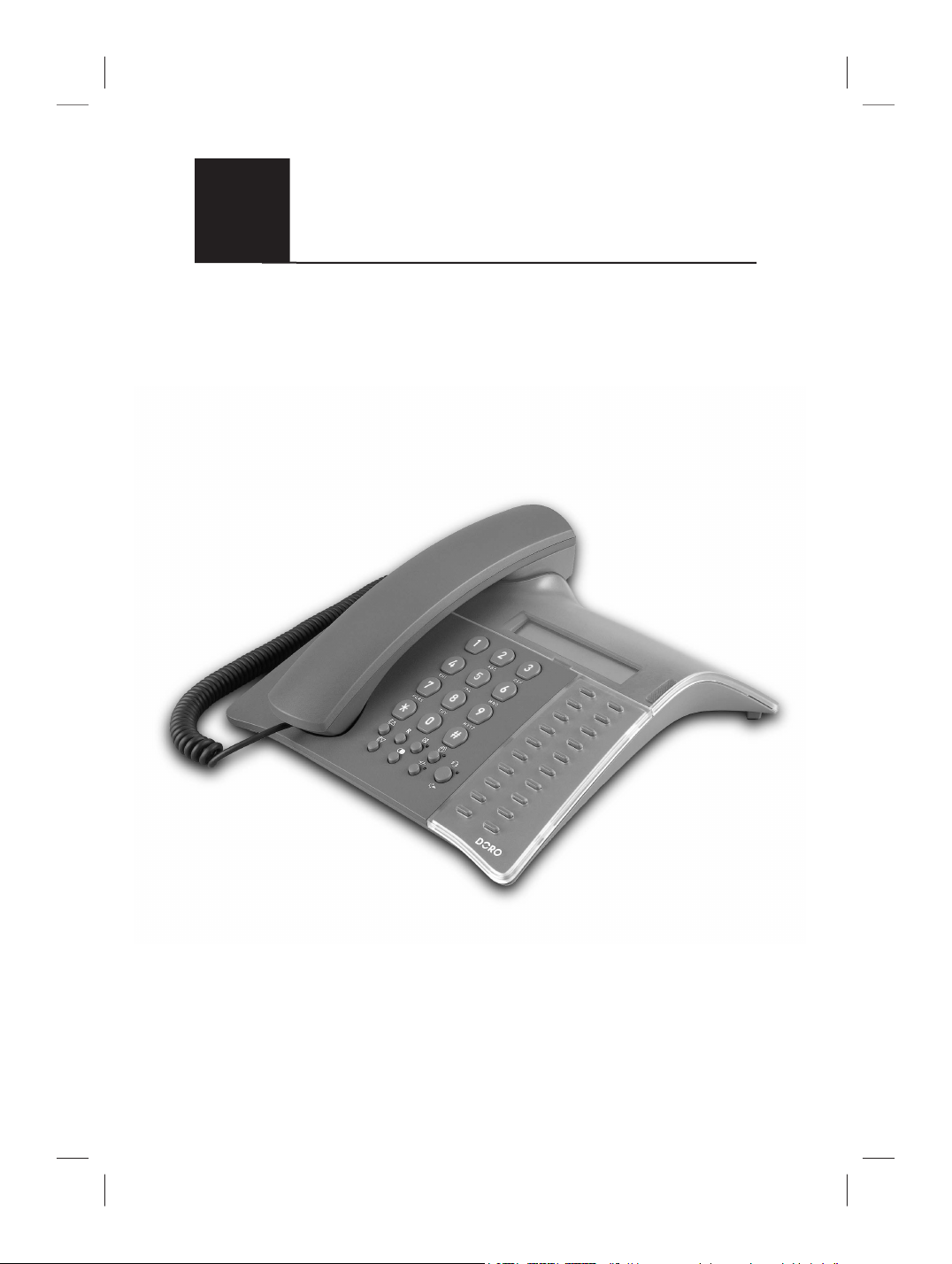
CONGRESS 200
English
French
German
Italian
Polish
User Guide
Manuel d'utilisation
Bedienungsanleitung
Istruzioni per l’uso
Instrukcja obsługi
Business Telephone
Téléphone avec écoute ampliée et
écran LCD
Professionelles Tischtelefon
Telefono professionale da tavolo
Profesjonalny telefon biurkowy
Page 2

English p. 4-14
1 Hook switch
2 Speaker
3 Handset/Headset Volume Control
4 Recall Button
5 Redial/Pause Button
6 Store/Mute button and LED
7 Hold button and LED
8 Group listening button and LED
9 Speaker/Headset button and LED
10 One-Touch Memories
11 Ringer/Message Waiting Indicator
12 Speaker Volume Control (on the
underside)
Page 3

1 Pédale de raccroché
2 Haut-parleur
3 Réglage du volume du combiné/
casque
4 Touche R
5 Touche Bis
6 Touche d’enregistrement/secret et
LED
7 Touche de Mise en garde et LED
8 Touche d’écoute ampliée et LED
9 Touche haut-parleur/casque et
LED
10 Mémoires directes
11 Témoin lumineux de sonnerie
12 Réglage du volume du haut-
parleur (sur le côté)
Français (voir pages 15-23)
1 Commutatore a gancio
2 Auricolare
3 Regolazione volume per
microtelefono/auricolare
4 Pulsante Recall (R)
5 Pulsante Ripetizione numero
6 Pulsante Memorizzazione/
Silenziamento e LED
7 Pulsante Attesa e LED
8 Pulsante Ascolto di gruppo e LED
9 Pulsante altoparlante/auricolare e
LED
10 Composizione a un tasto
11 Indicatore di squillo
12 Controllo volume altoparlante
(sulla parte inferiore)
Italiano (vedere pagine 32-40)
Deutsch (siehe Seite 24-31)
1 Gabel
2 Lautsprecher
3 Lautstärke für Hörer/Headset
4 R-Taste
5 Wahlwiederholung
6 Taste Speichern/Stummschalten
und LED
7 Taste für Gespräch parken und
Anzeige
8 Taste für Lauthören und Anzeige
9 Taste für Lautsprecher/Headset
und Anzeige
10 Schnellwahl
11 Rufsignalanzeige
12 Lautstärkeregler für Lautsprecher
(Unterseite)
Polski (patrz strony 41-48)
1 Miejsce na słuchawkę
2 Głośnik
3 Regulator głośności słuchawki/
zest. nagłownego
4 Przycisk Recall (R)
5 Przycisk ponownego wybierania
6 Przycisk i kontrolka wyłączania
mikrofonu / zapis
7 Przycisk i kontrolka zawieszenia
8 Przycisk i kontrolka odsłuchu
grupowego
9 Przełącznik głośnika/zestawu
nagłownego i kontrolka
10 Wybieranie jednym przyciskiem
M1-M20
11 Wskaźnik dzwonka/wiadomości
oczekującej
12 Regulator głośności głośnika (pod
spodem)
Page 4

English
Installation
Batteries
In order for the display, memory and other functions to operate, the telephone
requires three good quality AAA 1,5 V alkaline batteries to be installed. If
batteries are either not installed or running low, the Mo bAtt symbol will be
visible in the display, you will need to change the batteries as soon as possible.
The battery compartment is located on the underside of the telephone.
1. Ensure the telephone line cord is not connected to the telephone network
wall socket.
2. Remove the battery cover by pressing a small screwdriver (up to Ø 2,5mm) or
similar into the hole to the right of the cover.
3. Install the batteries ensuring correct battery polarity is observed.
4. Ret the battery cover.
Connection
Once the batteries have been installed:
1. Connect the curly cord to the handset and to the socket marked q on the
underside of the telephone.
2. Connect the telephone line cord to the socket marked T on the underside of
the telephone and then to a telephone network wall socket.
3. A click will be heard when the modular plug is correctly in place.
4. Position the cables in the grooves underneath the telephone.
5. Lift the handset and listen for the dial tone. Your telephone is now operational.
Setting the Time
1. Lift the handset (ignore the dialling tone) and press z and *.
2. Press # (to select 12/24 hour display please refer to page 11).
3. Enter time (Hours-Minutes-Seconds) using the telephone keypad (0-9).
4. Replace the handset. The time (clock) will be displayed after 5-10 seconds.
Hearing Aid Compatible
This telephone is hearing aid compatible. Select the T mode on your hearing aid
to enable this feature.
4 www.doro.com
Page 5

English
www.doro.com 5
Installation
Connection of a headset
A headset can be connected to the socket underneath the telephone marked = .
Simply press the headset button = to access an incoming call or dial tone, press
again to terminate the call.
While a headset is connected the speaker function will NOT operate.
IMPORTANT!
The DORO Congress 200 is designed to operate with DORO original headsets. Other
manufacturer headsets may be used, although the function and sound quality cannot be
guaranteed.
Any damage occurring due to incompatible or non Doro headsets being installed, will not be
covered under the telephones guarantee.
Making a call with the headset
1. Press =. Dial tone will be heard in the headset and the LED next to the
headset button will illuminate.
2. Dial the telephone number required.
3. Press the headset button again to terminate the call.
Connection of additional equipment
On the side of the telephone there is a socket marked 8, this will allow
additional telephone equipment i.e. cordless, modems etc to be connected
allowing access to the telephone line.
IMPORTANT!
When additional equipment is connected to the socket marked 8, only one device at a time
will operate.
Labels/protective cover
Information such as a company logo can be placed under the protective cover.
This is especially useful where the back of the telephone is facing a customer/
visitor on a reception desk.
The back cover is fastened by 2 pieces of plastic and secured by two screws,
these have to be removed rst.
To memory index cover can be removed by carefully prising the right hand side
of the cover using a small at blade screwdriver.
Page 6

English
6 www.doro.com
Operation
Redial Button
If the number dialled is engaged or if you wish to redial the last number dialled
(up to a maximum of 32 digits), lift the handset (or press the /=) and press
the redial button r.
Timer
Approximately 5 seconds after dialling a timer will be shown on the display. The
timer helps you keep track of how long the call lasts.
Mute Button
The handset/headset microphone can be disabled during a call by pressing z .
Press z once more to reactivate the microphone.
On Hook Dialling
1. Press . The speaker will be activated and the LED indicator will
illuminate.
2. Dial the required telephone number. Adjust the volume, if needed, using the
volume control on the underside of the telephone.
3. Once the call is answered, pick up the handset.
IMPORTANT!
This is not a hands free speaker telephone i.e. there is a microphone in the handset only. When a
headset is tted the on hook dialling function will not operate.
Hold Button
Press h to place a call on hold. The LED next to the button will illuminate.
The call can be resumed by pressing h again or from another telephone
connected to the same line.
1. While on a call.
2. Press h to place the telephone call on hold. If the handset is in use it may
now be replaced onto the hook switch.
3. To resume the telephone call, lift any handset connected to the same line.
Page 7

English
www.doro.com 7
Operation
Group Listening
During a call, it is possible to activate the Group Listening function by
pressing .
With this function activated a call can be heard on the loudspeaker as well as
from the handset, it is therefore possible for someone in the same room to hear
both parties and follow the conversation.
1. Dial a telephone number as usual.
2. When the call is connected, press . Group listening is now activated and
the conversation can be heard via the speaker. The indicator by the button
will be illuminated.
3. Adjust the volume, if needed, using the volume control on the side
.
4. To terminate the Group Listening function, press once again.
IMPORTANT!
It is recommended that the Group Listening function is terminated before replacing the handset.
Direct connection
The telephone allows you to dial a number using the telephone keypad (0-9),
the One-Touch memories or by pressing r, without picking up the handset or
pressing /= .
The call is connected to the speaker or headset (if connected) and then the
number is dialled. Please refer to page 9 for information on selecting this feature
Volume Control
The handset/headset earpiece volume may be adjusted in 5 stepped increments
during a call. Press $ to increase the volume, or £ to decrease the volume.
To adjust the speaker volume (hands free dialling and group listening), use
on the side of the phone.
Recall
Press the recall button R followed by the extension number to transfer calls
when connected to a PBX.
Access to additional network services can be gained by using the recall
button keys. Please refer to page 9 for information on this feature or contact
your network operator for more information.
Page 8

English
8 www.doro.com
Settings
Memory
This telephone has 20 One-Touch memories numbered M1-M20.
Once a number has been stored in a memory location, you need only to press
one button to make the call.
Storing One-touch Memories
1. Lift the handset and press z (ignore anything you hear in the earpiece).
2. Select a location M1-M20 by pressing the corresponding button.
3. Enter the telephone number to be stored (up to 22 digits) using the number
keys (0-9). Press r if you want a pause in the telephone number.
4. Press z again and replace the handset. The number is now stored.
In case of a number change, store the new number in the location of the old one following
the above procedure
Dialling using One-Touch Memories
1. Lift the handset (or press /=) and wait for a dialling tone.
2. Dial the desired number by pressing the corresponding memory location,
M1-M20.
Ringer
1. Lift the handset (ignore anything you hear in the earpiece) and press z
and #.
2. Select the desired melody and ringer volume by pressing the number keys
0- 9 as shown below.
3. Press z and replace the handset. The ring signal is now set.
Key/setting Melody type Ringer level
1.......................................... Melody A........................ Low
2.......................................... Melody A........................ Normal
3.......................................... Melody A........................ High
4.......................................... Melody B........................ Low
5.......................................... Melody B........................ Normal
6 (factory setting)................ Melody B........................ High
7.......................................... Melody C ....................... Low
8.......................................... Melody C ....................... Normal
9.......................................... Melody C ....................... High
0.......................................... Off * ............................... -
* If 0 is selected, the ringer will be turned off until the next time the handset is lifted. The
ringer will then revert to the previous setting.
Page 9

English
www.doro.com 9
Settings
Technical information
On the underside of the telephone you will nd several switches located within
the battery compartment.
These switches determine certain technical parameters when connecting the
telephone to e. g. a PBX.
Remove the cover by pressing a small screwdriver (up to Ø 2,5mm) or similar
into the hole to the right of the cover.
IMPORTANT!
These switches should only be adjusted by qualied personnel.
1. System Settings
Allow system settings to be changed or not. The settings are locked if the switch
is on N. See next page for more information about the system settings.
2. Direct connection
Allow direct connection to be activated
123
L
or not
123
q
3. Recall (R) Button Technology
Select Recall (R) type, either Time break recall (H) or Earth recall ( ) with
the switch H/ .
IMPORTANT!
If you are unsure of the PBX/network requirements initially select the time break H position.
4. Tone/Pulse Dialling
Select dialling type, either Tone (♫) or Pulse (...) using the ♫/... switch.
IMPORTANT!
If you are unsure of the PBX/network requirements initially select the tone (♫) dialling setting.
Message waiting
You can select between three types of Message Waiting systems: Neon(80100V)/LED+ (12VLR)/LED- (48VLR).
Message Waiting Indicator
Many PBX systems use a function called Message Waiting. The telephone can
show if a call was received in you absence by ashing the Message Waiting
Indicator in standby mode. This function operates differently depending on the
PBX in question. Please contact the system controller for more information.
Page 10

English
10 www.doro.com
Other
System Settings
You can select several parameters when connecting the telephone to a PBX.
Recall (R) Time Duration (TBR only)
This allows you to select TBR recall access timing. The time selected will
depend on the PBX, network and country of installation. For example, UK and
Australia use 100, New Zealand uses 600.
If you are unsure as to the correct setting for your installation initially select
1
= 100ms
1. The system setting switch must be in the position ON, see page 9.
2. Lift the handset (ignore any network announcements) and press z and *.
3. Press 0.
4. Select the required setting (1=100, 2=300, 3=600 ms).
5. Press z and replace the handset.
Pause Time Duration
This allows you to select the Pause timing. The time selected will depend on
the PBX and network through which your memory number is being dialled.
If you are unsure as to the correct setting for your installation initially, select
1
= 2.0.
1. The system setting switch must be in the position ON, see page 9.
2. Lift the handset (ignore any network announcements) and press z and *.
3. Press 2.
4. Select preferred setting (1=2.0 and 2=3.6 s).
5. Press z and replace the handset.
Page 11

English
www.doro.com 11
Other
Direct Dialling Waiting Time
When direct dialling the period of time the telephone waits before dialling can
be adjusted between 2.0-3.1 seconds.
1. The system setting switch must be in the position ON, see page 9.
2. Lift the handset (ignore any network announcements) and press z and *.
3. Press 3.
4. Select preferred waiting time (1=2.0 and 2=3.1 s).
5. Press z and replace the handset.
Display Clock (12 or 24 hour format)
1. The system setting switch must be in the position ON, see page 9.
2. Lift the handset (ignore any network announcements) and press z and *.
3. Press 4.
4. Select preferred hour display (1=12 hrs and 2=24 hrs).
5. Press z and replace the handset.
Page 12

English
12 www.doro.com
Other
Troubleshooting
Check that the telephone cord is undamaged and properly plugged in.
Disconnect any additional equipment that may be connected. If the problem is
resolved, the fault is with the other equipment.
Test the equipment on a known working line. If the product works then the
fault is with the line.
UK
If you cannot resolve the fault using the faultnder section, technical support is
available on the Premium Rate Number: 0906 302 0114.
Calls cost 50 pence per minute (prices correct at the time of going to
press), and is operational between 9AM - 5PM Monday-Friday excluding Bank
Holidays. Alternatively,
E-mail on: tech@doro-uk.com
You can contact us in writing: Consumer Support Group, Doro UK Ltd.,
22 Walkers Road, North Moons Moat, Redditch, Worcestershire, B98 9HE,
(regarding any Spares or Technical query), or
Telephoning (Spares only): 01527 584377
Web site: www.doro-uk.com
Guarantee
This product is guaranteed for a period of 24 months from the date of purchase.
Proof of purchase is required for any service or support required during the
guarantee period.
This guarantee shall not apply to a fault caused by an accident or any similar
incident or damage, liquid ingress, negligence, abnormal usage or any other
circumstances on the purchaser’s part. Furthermore, this guarantee shall not
apply to a fault caused by a thunderstorm or any other voltage uctuations.
This guarantee does not in any way affect your statutory rights. (As a matter of
precaution, we recommend disconnecting the telephone during a thunderstorm.)
Page 13

English
www.doro.com 13
Other
Australia and New Zealand
If you believe this product is malfunctioning, please refer to the relevant section
and/or consult the troubleshooting guide in this manual to ensure that you have
followed the instructions carefully. As an alternative you can visit our web site
for FAQ’s or send an e-mail for a prompt reply.
Guarantee
This product is guaranteed for a period of 24 months from the date of purchase.
Should you experience difculties with the product, please contact us for
assistance. If the product is then found to be faulty you will be asked to return it
directly to us with a copy of the purchase receipt.
This guarantee shall not apply to a fault caused by an accident or a similar
incident or damage, liquid ingress negligence, abnormal usage or any other
circumstances on the purchaser’s part. Furthermore, this guarantee shall not
apply to a fault caused by a thunderstorm or lightning, excessive or any other
voltage uctuations or faults on the telephone line. (As a matter of precaution,
we recommend disconnecting the telephone during a thunderstorm).
This guarantee does not affect your statutory rights.
AUSTRALIA NEW ZEALAND
DORO Australia Pty Ltd Atlas Gentech (NZ) Limited
PO Box 6760 Private Bag 14927
Baulkham Hills BC NSW 2153 Panmure
Australia Auckland
New Zealand
Consumer Support Consumer Support
Ph: (02) 8853 8444 Ph: 0900 50-025 (Toll Call)
Fax: (02) 8853-8489 Fax: (09) 574-2722
Email: support@doro.com.au Email: support@atlasgentech.co.nz
Web site: www.doro.com.au
Page 14

English
14 www.doro.com
Other
REN (RN for New Zealand)
The REN (Ringer Equivalence Number) or (RN) is of signicance only if you
wish to connect more than 1 telephone to your telephone line. A standard
telephone line has a maximum REN capacity of 3 (RN of 5). It is possible
to connect 3 devices with a REN of 1 (RN of 1) with no degradation to the
product’s performance. Exceeding this limit may cause the volume of the ringer
in any phone to decrease or not ring at all.
Notes for operation in New Zealand
The grant of a Telepermit for any item of terminal equipment indicates only
that Telecom has accepted that the item complies with the minimum conditions
for connection to its network. It indicates no endorsement of the product by
Telecom, nor does it provide any sort of warranty. Above all, it provides no
assurance that any item will work correctly in all respects with another item of
Telepermitted equipment of a different make or model, nor does it imply that
any product is compatible with all of Telecom’s network services.
This equipment shall not be set to make automatic calls to the Telecom “111”
Emergency Service. This equipment may not provide for the effective hand-over
of a call to another device connected to the same line.
Page 15

Français
www.doro.com 15
Installation
Raccordement
1. Installez les piles. Voir paragraphe suivant.
2. Reliez le câble téléphonique, à la prise du téléphone et à la che du téléphone
marquée T.
3. Reliez le cordon spiralé au combiné et à la prise au téléphone marquée q.
4. Placez les câbles dans les rainures situées au dos du téléphone.
5. Prenez le combiné: vous devez entendre la tonalité.
Piles
Pour son fonctionnement correct, l’appareil a besoin de trois piles 1,5V du type AAA
(non fournies). Le symbole Mo bAtt s’allume lorsqu’il faut changer les piles.
Changez les piles le plus tôt possible! Utilisez uniquement des piles de haute qualité.
1. Débranchez le téléphone.
2. Pour enlever la trappe du compartiment des piles, appuyez avec un petit tournevis
pointu (max. 2.5mm) ou outil similaire dans le trou situé à droite du compartiment
à piles.
3. Insérez les piles selon les marques du pôle positif et négatif.
4. Remettez la trappe en place.
Régler l’heure
Une horloge s'afche lorsque le téléphone n’est pas utilisé (mode repos).
1. Prenez le combiné (ne tenez pas compte de la tonalité) et appuyez sur la touche
z
et sur *.
2. Appuyez sur #. Si le format de 12 heures est sélectionné (voir page 21), vous pouvez
alterner entre AM et PM avec les touches * et #.
3. Indiquez l’heure (HH-MM-SS).
4. Raccrochez. L’heure est alors réglée.
Amplicateur
Un amplicateur est intégré au combiné à l’attention des personnes portant une prothèse
auditive. Mettez la prothèse auditive sur le mode T pour connecter l’amplicateur
téléphonique de la prothèse auditive.
Page 16

Français
16 www.doro.com
Installation
Raccordement du casque
La che située au dos du téléphone marquée = permet de raccorder un casque. Lorsque
le casque est branché, la touche casque = permet de prendre/ déconnecter la ligne
téléphonique (ce qui revient à prendre et à reposer le combiné). Le haut-parleur ne
fonctionne pas lorsque le casque est raccordé.
Remarque!
Seuls les casques DORO sont testés et adaptés au Congress 200. Vous pouvez utiliser d’autres types
ou marques de casques; dans ce cas nous ne pourrons pas garantir leur qualité sonore et leur bon
fonctionnement.
Dans le pire des cas, le casque et le téléphone seront endommagés. La garantie du téléphone ne couvre
pas ce type de dommage.
Appel téléphonique avec casque
1. Appuyez sur la touche casque = . Vous entendez la tonalité d’appel dans le casque et
le témoin lumineux à côté de la touche casque s’allume.
2. Composez le numéro de téléphone de votre correspondant.
3. Appuyez à nouveau sur la touche casque pour terminer la communication.
Raccordement d’un modem (Dataport)
Une che marquée 8est située sur le côté gauche du téléphone. Elle permet de
brancher un appareil supplémentaire (téléphone sans l, modem, etc.) sur la même ligne
téléphonique.
Cartes mémoires
Vous pouvez facilement remplacer les cartes mémoires.
Pour cela, enlevez le plastique de protection en insérant délicatement un tournevis
pointu dans les encoches situées sur la droite du plastique de protection.
Vous pouvez également placer votre logo, votre nom, etc ... sous le plastique protecteur
arrière du téléphone, car cette partie est visible par vos clients/ visiteurs.
Pour cela, enlevez le plastique de protection en dévissant d’abord les 2 vis situées en haut
au dos du téléphone, puis enlevez les 2 pattes plastiques blanches
Page 17

Français
www.doro.com 17
Utilisation
Touche Bis
Lorsque la ligne de votre correspondant est occupée, ou si vous désirez rappeler le
dernier numéro composé, prenez le combiné (ou appuyez sur /=) et appuyez sur
la touche Bis r.
Chronomètre
Un chronomètre de la durée des communications s'afche juste après le début de la
communication. Le chronomètre vous aide à connaître la durée de la communication.
Touche secret
En cours de communication, le micro peut être coupé en appuyant sur la touche secret
z . Appuyez une deuxième fois pour activer le micro. Le voyant lumineux à côté de la
touche clignote lorsque le micro est coupé.
Haut-parleur
1. Appuyez sur . Le haut-parleur est enclenché et le témoin lumineux à côté de
la touche s’allume.
2. Composez le numéro de téléphone. Réglez éventuellement le volume du haut-parleur
à l’aide du curseur de réglage du volume situé sur le côté droit du téléphone.
3. Décrochez le combiné dès que votre correspondant a répondu
Remarque!
Notez qu’il n’ y a un micro que dans le combiné. Le haut-parleur ne fonctionne pas lorsque le casque
est raccordé.
Mise en garde
Utilisez la touche h pour mettre un appel en garde. Vous pouvez reprendre l’appel
téléphonique sur un autre téléphone (branché sur la même ligne).
1. Une communication est en cours au combiné/ casque.
2. Appuyez sur la touche h pour mettre l’appel en garde, et raccrochez si vous utilisez
le combiné.
3. Pour reprendre l ’appel téléphonique, décrochez le combiné d ’un des téléphones
branché sur la même ligne.
Page 18

Français
18 www.doro.com
Utilisation
Ecoute ampliée
Vous pouvez enclencher la fonction d’écoute ampliée en cours de communication en
appuyant sur .
La fonction d’écoute ampliée permet d’écouter au haut-parleur une communication
qui est en cours dans le combiné/ casque. De cette manière, d’autres personnes peuvent
écouter les deux parties en train de parler, et suivre la discussion.
1. Composez le numéro de téléphone comme d‘habitude.
2. Appuyez sur lorsque la communication est établie. La fonction d’écoute
ampliée est activée et vous pouvez écouter la conversation dans le haut-parleur. Le
témoin lumineux à côté de la touche s’allume.
3. Réglez éventuellement le volume de l’écoute ampliée à l’aide du curseur de réglage
de volume situé sur le côté droit du téléphone.
4. Pour terminer la fonction d’écoute ampliée, appuyez à nouveau sur .
5. Pour terminer la communication, raccrochez le combiné/ casque.
Prise de Ligne Sans Décrocher
Vous pouvez effectuer un appel sans décrocher le combiné en appuyant sur la touche
/= , et en composant directement le numéro de votre correspondant à partir
des touches du clavier, des mémoires directes ou encore de la touche r. La ligne est
établie dans le casque (si raccordé) ou dans le haut-parleur d’attente, et le numéro est
composé ensuite.
Réglage du volume
Utilisez la touche de réglage du volume pour ajuster le volume du combiné/ casque
pendant une communication. Appuyez sur la touche $ pour augmenter le volume et
sur la touche £ pour le réduire.
Utilisez le curseur pour régler le volume du haut-parleur/ écoute
ampliée (situé sur le côté droit du téléphone).
Autocommutateurs / Opérateurs
Cet appareil peut être installé derrière la plupart des autocommutateurs. Il peut
également vous donner accès à des services additionnels proposés par des opérateurs.
Les touches *, # et R vous permettront d’accéder à ces fonctions ou services
complémentaires.
Pour toute information, adressez-vous directement au fabricant du PABX ou à votre
opérateur.
Page 19

Français
www.doro.com 19
Réglages
Répertoire
Ce téléphone possède 20 mémoires directes.
Vous composez un numéro de téléphone en mémoire directe en pressant simplement sur
une touche mémoire. Les mémoires directes sont numérotées de M1 à M20.
Enregistrement de numéros en mémoire directe.
1. Prenez le combiné et appuyez sur z (ne tenez pas compte de la tonalité).
2. Choisissez la mémoire directe (M1 à M20) en appuyant sur la touche
correspondante.
3. Composez le numéro de téléphone souhaité (21 chiffres max.) à partir du clavier.
Utilisez la touche r pour insérer une pause.
4. Appuyez à nouveau sur z . Raccrochez. Le numéro est alors enregistré.
Composer un numéro en mémoire directe.
1. Prenez le combiné (ou appuyez sur /=) et attendez la tonalité.
2. Choisissez la mémoire directe (M1 à M20) en appuyant sur la touche
correspondante.
En cas de changement de numéro, remplacez l‘ancien par le nouveau sur la carte mémoire.
Réglage de la sonnerie
1. Prenez le combiné (ne tenez pas compte de la tonalité) et appuyez sur la touche
z et sur #.
2. Sélectionnez une des sonneries en appuyant sur une des touches numérotées 0-9
qui correspondent au tableau suivant.
3. Appuyez sur la touche z et reposez le combiné. La sonnerie est alors réglée.
Touche/réglage Mélodie Niveau sonore
1.......................................... Mélodie A....................... Faible
2.......................................... Mélodie A....................... Normal
3.......................................... Mélodie A....................... Fort
4.......................................... Mélodie B....................... Faible
5.......................................... Mélodie B....................... Normal
6 (réglage d’usine) .............. Mélodie B....................... Fort
7.......................................... Mélodie C ...................... Faible
8.......................................... Mélodie C ...................... Normal
9.......................................... Mélodie C ...................... Fort
0.......................................... Silence * ........................ -
* Quand la touche 0 est sélectionnée, la sonnerie reste coupée tant que le combiné n’est pas décroché.
Après utilisation du combiné, le réglage antérieur de la sonnerie est rétabli.
Page 20

Français
20 www.doro.com
Réglages
Fonctions avancées
Derrière la trappe au dos du téléphone se trouvent cinq réglages.
Ces réglages contrôlent les paramètres techniques pour le raccordement à un PABX,
etc.
Pour enlever la trappe, appuyez avec un petit tournevis pointu (max. 2.5mm) ou outil
similaire dans le trou situé à droite de la trappe.
IMPORTANT: Ces réglages doivent être effectués par une personne qualiée.
1. Réglages système
Choisissez si les réglages système peut être changés par l’utilisateur ou non. Les réglages
sont verrouillés si le curseur est réglé sur N . (Voir page suivante pour de plus amples
informations sur les Réglages système)
2. Prise de Ligne sans Décrocher
Choisissez si la fonct ion de Prise de Ligne sans Décrocher doit être active
123
L ou inactive
123
q
.
3. Touche R
Doit toujours être réglée en position normale (H ).
4. Numérotation Fréquences Vocales ou Décimales
Sélectionnez le mode de numérotation fréquences vocales (♫) ou décimales (...) par le
curseur ♫/...
Ce réglage doit être en position fréquences vocales pour que l’appareil puisse
fonctionner en France
Lampe message
Sélectionnez le réglage de la lampe message en positionnant le curseur sur: Surtension
de ligne (Neon), Inversion de polarité (LED+ / LED-) (le réglage par défaut est
NEON).
Témoin lumineux de Message en attente
Certains standards téléphoniques ont une fonction de Message en attente. Quand un
message est en attente et que le poste est libre, le témoin lumineux de sonnerie
du téléphone clignote. Cette fonction varie selon le type de standard. Pour toute
information, adressez-vous au responsable de votre système PABX.
Page 21

Français
www.doro.com 21
Autres
Réglages système
Ces réglages contrôlent les paramètres techniques pour le raccordement à un PABX.
Touche R
1. Le curseur des réglages système ne doit pas être en position N, (voir page 20).
2. Prenez le combiné (ne tenez pas compte de la tonalité) et appuyez sur la touche
z et sur *.
3. Appuyez sur 0.
4. Sélectionnez le temps souhaité ( 1=100, 2 =300, 3 =600 ms).
5. Appuyez sur la touche z et reposez le combiné.
Temps de la pause pour la numérotation des mémoires
1. Le curseur des réglages système ne doit pas être en position N, (voir page 20).
2. Prenez le combiné (ne tenez pas compte de la tonalité) et appuyez sur la touche
z et sur *.
3. Appuyez sur 2.
4. Sélectionnez le temps souhaité ( 1=2.0 ou 2 =3.6 s).
5. Appuyez sur la touche z et reposez le combiné.
Temps de la pause en numétoration directe
Il s'agit du temps de pause que le téléphone insère avant de composer le numéro, lorsque
la fonction de Prise de ligne sans décrocher est active.
1. Le curseur des réglages système ne doit pas être en position N, (voir page 20).
2. Prenez le combiné (ne tenez pas compte de la tonalité) et appuyez sur la touche
z et sur *.
3. Appuyez sur 3.
4. Sélectionnez le temps souhaité ( 1=2.0 ou 2 =3.1 s).
5. Appuyez sur la touche z et reposez le combiné.
Format d’heure (12 ou 24 heures)
1. Le curseur des réglages système ne doit pas être en position N, (voir page 20).
2. Prenez le combiné (ne tenez pas compte de la tonalité) et appuyez sur la touche
z et sur *.
3. Appuyez sur 4.
4. Sélectionnez le format souhaité (1 =12 h ou 2=24 h).
5. Appuyez sur la touche z et reposez le combiné.
Page 22

Français
22 www.doro.com
Autres
Dépannage
Vériez que le câble téléphonique est en bon état et qu’il est branché correctement.
Débranchez tout autre matériel, rallonges et téléphones. Si l’appareil fonctionne alors
normalement, la panne est dûe au matériel additionnel.
Testez le matériel sur une autre ligne téléphonique (comme celle d’un voisin). Si le
matériel fonctionne sur ce raccordement, cela signie que votre propre raccordement
téléphonique est défectueux. Signalez la panne à votre opérateur de réseau.
Au cas où les mesures sus-mentionnées n’ont pas d’effet, veuillez contacter votre
revendeur.
Garantie et S.A.V.
Cet appareil est garanti un an à partir de sa date d’achat, la facture faisant foi. La
réparation dans le cadre de cette garantie sera effectuée gratuitement, pièces et main
d’oeuvre.
La garantie est valable pour un usage normal de l’appareil tel qu’il est déni dans la
notice d’utilisation.
Les fournitures utilisées avec l’appareil ne sont pas couvertes par la garantie.
Sont exclues de cette garantie les détériorations dues à une cause étrangère à l’appareil.
En particulier la garantie ne s’appliquera pas si l’appareil a été endommagé à la suite
d’un choc ou d’une chute, d’une fausse manoeuvre, d’un branchement non conforme
aux instructions mentionnées dans la notice ou aux prescriptions de l’ART (-Autorité de
Régulation des Télécommunications), de l’effet de la foudre, de surtensions électriques
ou électrostatiques, d’une protection insufsante contre l’humidité, la chaleur ou le
gel.
En cas de panne, adressez-vous au S.A.V. de votre revendeur ou installateur.
Pour la France
En tout état de cause, la garantie légale pour vices cachés s’appliquera conformément
aux articles 1641 et suivants du Code Civil.
Si vous avez des soucis d’utilisation, contactez notre Service d ’Assistance Téléphonique au 08 92
68 90 18 (N ° Audiotel --2 ,21F /mn ).
Page 23

Français
www.doro.com 23
Page 24

Deutsch
24 www.doro.com
Installation
Anschliessen
1. Batterien anschliessen. Siehe unten.
2. Schliessen Sie das Telefonkabel an eine geeignete Telefonsteckdose und an den
Anschluss T am Telefon an.
3. Schliessen Sie das Spiralkabel an den Hörer und an den Anschluss q am Telefon
an.
4. Platzieren Sie die Kabel in die Nut an der Unterseite des Telefons.
5. Heben Sie den Hörer ab und vergewissern Sie sich, dass ein Freizeichen zu hören ist.
Batterien
Damit das Telefon korrekt funktionert, brauchen Sie drei 1,5V Batterien vom Typ AAA
(nicht enthalten). Wenn die Batterieleistung nachlässt, zeigt das Display Mo b A tt.
Tauschen Sie die Batterien dann so schnell wie möglich aus! Benutzen Sie nur Batterien
von guter Qualität.
1. Ziehen Sie das Telefonkabel ab.
2. Nehmen Sie die Abdeckung ab, indem Sie einen schmalen Schraubendreher (max. Ø
2,5mm) oder ähnliches in das Loch rechts von der Abdeckung drücken.
3. Setzen Sie die Batterien, wie auf den Markierungen gezeigt, ein.
4. Setzen Sie die Abdeckung wieder ein.
Zeiteinstellung
Das Display zeigt die Uhrzeit, wenn das Telefon nicht benutzt wird.
1. Hörer abnehmen (Freizeichen nicht beachten) und drücken Sie die Tasten z und *.
2. Drücken Sie #. Wenn der 12- Stundenmodus eingestellt ist, können Sie mit den
Tasten * und # zwischen AM/PM wechseln.
3. Geben Sie die Zeit ein (SS-MM-ss).
4. Legen Sie den Hörer auf. Die Zeit ist eingestellt.
Hörgerät
Der Hörer hat eine eingebaute Hörhilfe, wenn Sie ein Hörgerät während des Gesprächs
benutzen wollen. Schliessen Sie die Telefonspule an den Hörer an, indem Sie das
Hörgerät auf die T-Stellung schalten.
Page 25

Deutsch
www.doro.com 25
Installation
Headset anschliessen
Ein Headset kann am Anschluss mit der Markierung = auf der Unterseite des Telefons
angeschlossen werden. Wenn ein Headset angeschlossen ist, wird die Headsettaste
= zum Abheben und Auegen benutzt (enspricht dem Abeheben und Auegen des
Hörers). Wenn das Headset angeschlossen ist, funktioniert der Lautsprecher nicht.
Achtung!
Das Original-Headset DORO wurde mit dem DORO Congress 200 getestet. Es ist möglich, andere
Headsets anzuschliessen. Funktion und Klangqualität können dann jedoch nicht garantiert werden..
Im schlimmsten Fall können andere Headsets das Telefon beschädigen. Die Garantie gilt in diesem
Fall nicht.
Anruf/Gespräch mit Headset
1. Drücken Sie die Headset-Taste = . Das Freizeichen ertönt und die Anzeige an der
Headset-Taste leuchtet.
2. Geben Sie die gewünschte Telefonnummer ein.
3. Drücken Sie die Headset-Taste um das Gespräch zu beenden und aufzulegen.
Extraausrüstung anschliessen
Auf der Unterseite des Telefons bendet sich ein Anschluss 8 , an dem andere Geräte,
wie z.B. ein schnurloses Telefon oder ein Modem usw. angeschlossen werden können.
Etiketten/Abdeckung
Die Etiketten unter der Abdeckung können geändert werden. Die hintere Abdeckung
ist mit zwei Plastkstücken befestigt, die von 2 Schrauben gehalten werden. Diese
Schrauben müssen entfernt werden. Unter der hinteren Abdeckung könne Logos oder
andere Informationen platziert werden. Praktisch, wenn die Rückseite des Telefons zum
Kunden/Besucher wie z.b. an einer Rezeption zeigt.
Page 26

Deutsch
26 www.doro.com
Bedienung
Wahlwiederholung
Wenn eine Nummer besetzt ist, oder wenn die zuletzt eingegebene Nummer noch
einmal gewählt werden soll, heben Sie den Hörer ab(oder drücken Sie /=), und
drücken Sie die Wahlwiederholungstaste r.
Timer
Kurz nach Beginn eines Gesprächs wird ein Timer im Display angezeigt. Hier können
Sie sehen, wie lange das Gespräch andauert.
Mikrofonstummschaltung
Das Mikrofon kann während des Gesprächs mit der Taste z abgeschaltet werden.
Nochmaliges Drücken der Taste aktiviert das Mikrofon wieder. Ein Indikator an der
Taste zeigt an, wenn das Mikrofon ausgeschaltet ist.
Lautsprecher
1. Drücken Sie . Der Lautsprecher wird eingeschaltet und die Anzeige an der
Taste leuchtet.
2. Wählen Sie die gewünschte Telefonnummer. Stellen Sie die gewünschte Laustärke
mit dem Regler an der Unterseite des Telefons ein.
3. Wenn der Teilnehmer antwortet, heben Sie den Hörer ab.
Achtung!
Das Mikrofon bendet sich im Hörer. Wenn ein Headset angeschlossen ist, funktioniert der
Lautsprecher nicht.
Gespräch parken
Mit der Taste h können Sie ein Gespräch parken. Das Gespräch kann dann von
jedem gewünschten Telefon (das an der selben Linie angeschlossen ist), angenommen
werden.
1. Ein Gespräch läuft.
2. Drücken Sie die Taste h um das Gespräch zu parken. Legen Sie den Hörer auf.
3. Um das Gespräch wieder aufzunehmen, heben Sie den Hörer des gewünschten
Telefons ab.
Page 27

Deutsch
www.doro.com 27
Bedienung
Lauthören
Das Rufsignal kann mit dem Umschalter an der Rückseite des Telefons eingestellt
werden.
Dadurch wird das laufende Gespräch auch über den Lautsprecher wiedergegeben und
andere Personen im Raum können am Gespräch teilnehmen.
1. Rufen Sie, wie gewohnt, die gewünschte Nummer.
2. Wenn die Verbindung steht, drücken Sie die Taste . Die Lauthörfunktion wird
eingeschaltet. DieAnzeige an der Taste leuchtet.
3. Stellen Sie die Lautstärke mit den Reglern an der Seite ein.
4. Um die Lauthörfunktion auszuschalten, drücken Sie die Taste erneut.
Direktwahl
Sie können den Lautsprecher auch schon vor dem Anruf einschalten. Geben Sie
die Nummer mit der Tastatur, der Schnellwahl oder mit r direkt ein, ohne den
Hörer abzunehmen oder /= zu drücken. Das Gespräch wird über das Headset
(wenn angeschlossen) oder über den Lautsprecher geschaltet, und die Nummer danach
gewählt.
Lautstärke
Mit der Lautstärkeregelung kann die Lautsärke im Hörer/Headset während des
Gesprächs eingestellt werden. Drücken Sie die Taste $ um die Lautstärke zu erhöhen,
und die Taste £ um die Lautstärke zu senken.
Die Lautstärke wird mit eingestellt (an der Unterseite).
Weitere Dienste
Dieses Telefon kann mit den Tasten R, * und # weitere Dienste ausführen.
Welche Dienste zur Verfügung stehen, hängt vom Angebot Ihres Netzbetreibers ab.
Page 28

Deutsch
28 www.doro.com
Einstellungen
Speicher
Das Telefon kann 20 Schnellwahltasten speichern.
Wenn eine Nummer auf einer dieser Tasten gespeichert ist, kann diese mit nur eine
Taste gewählt werden. Die Schnellwahltasten sind mit M1-M20 numeriert.
Schnellwahl speichern
1. Hörer abnehmen und z drücken (Freizeichen nicht beachten).
2. Wählen Sie die Schnellwahltaste (M1-M20), indem Sie die jeweilige Taste drücken.
3. Geben Sie die Telefonnummer mit den Zifferntasten ein (max. 21 Zeichen). Pause
= r.
4. Drücken Sie z nochmals. Legen Sie den Hörer auf. Die Nummer ist gespeichert.
Wählen mit Schnellwahl
1. Hörer abnehmen (oder drücken Sie /= ) und warten Sie auf das Freizeichen.
2. Wählen Sie die Schnellwahltaste (M1-M20), indem Sie die jeweilige Taste drücken
Wenn eine Nummer geändert werden soll, speichern Sie die neue Nummer über der alten Nummer.
Rufsignal einstellen
1. Hörer abnehmen (Freizeichen nicht beachten) z und # drücken.
2. Wählen Sie das gewünschte Rufsignal mit den Tasten 0-9 wie unten erklärt.
3. Drücken Sie die Taste z und legen Sie den Hörer auf. Das Rufsignal ist eingestellt.
Zifferntaste Melodietyp Rufsignal
1.......................................... Melodie A....................... Leise
2.......................................... Melodie A....................... Normal
3.......................................... Melodie A....................... Laut
4.......................................... Melodie B....................... Leise
5.......................................... Melodie B....................... Normal
6 (Voreinstellung)................ Melodie B....................... Laut
7.......................................... Melodie C ...................... Leise
8.......................................... Melodie C ...................... Normal
9.......................................... Melodie C ...................... Laut
0.......................................... Aus *.............................. -
* Mit der Taste 0 wird das Rufsignal ausgeschaltet, bis der Hörer das nächstemal abgenommen wird.
Danach wird das Rufsignal wieder auf den voreingestellten Wert zurückgesetzt.
Page 29

Deutsch
www.doro.com 29
Einstellungen
Technische Information
Hinter der Abdeckung an der Unterseite des Telefons benden sich mehrere Schalter.
Mit diesen Schaltern kann man die technischen Parameter für den Anschluss an z.B.
eine Vermittlung usw. einstellen.
Nehmen Sie die Klappe ab, indem Sie einen kleinen Schraubendreher (max. Ø 2,5mm)
oder ähnliches in das Loch rechts von der Klappe drücken.
ACHTUNG: Diese Schalter dürfen nur von dazu befugtem Personal eingestellt werden.
1. Systemeinstellungen
Wählen Sie aus, ob die Systemeinstellungen geändert werden sollen N oder nicht. Auf
der folgenden Seite nden Sie weitere Informationen.
2. Direktwahl
Wählen Sie aus, ob die Direktwahl aktiviert werden sollen
123
L
oder nicht
123
q.
3. R-Tastentechnik
Muss immer auf der Normalstellung stehen(H ).
4. Ton/Puls
Wählen Sie die Wahlmathode Ton(♫) oder Puls (...) mit dem Schalter /...
Diese Einstellung wird normalerweise nicht benutzt.
Nachricht wartet
Drei Arten von Nachricht wartet können eingestellt werden: Neon/LED+/LED-.
Anzeige für Nachricht wartet
Einige Vermittlungen haben eine „Nachricht wartet“ Funktion. Das Telefon kann dies
durch die Rufsignalanzeige signalisierren, die bei einer Nachricht im Standbymodus
blinkt. Die Funktion ist bei jeder Vermittlung unterschiedlich. Fragen Sie Ihren
Systemadministrator.
♫
Page 30

Deutsch
30 www.doro.com
Allgemeines
Systemeinstellungen
In den Systemeinstellungen können Parameter für den Anschluss an eine
Vermittlungsstelle eingegeben werden.
R-Taste Zeit
Diese Einstellung wird normalerweise nicht benutzt.
1. Der Schalter für Systemeinstellungen darf nicht auf N stehen, siehe Seite 29.
2. Hörer abnehmen (Freizeichen nicht beachten) z und * drücken.
3. Drücken Sie 0.
4. Gewünschte Einstellung wählen (1 =100, 2 =300, 3 =600 ms).
5. Drücken Sie z und legen Sie den Hörer auf .
Pausezeit für Speicher
1. Der Schalter für Systemeinstellungen darf nicht auf N stehen, siehe Seite 29.
2. Hörer abnehmen (Freizeichen nicht beachten) z und * drücken.
3. Drücken Sie 2.
4. Gewünschte Einstellung wählen (1 =2.0 und 2 =3.6 Sek.).
5. Drücken Sie z und legen Sie den Hörer auf.
Wartezeit bei Direktwahl
Die Zeit, die das Telefon wartet, bevor die Telefonnummer gewählt wird, wenn die
Direktwahl aktiviert ist.
1. Der Schalter für Systemeinstellungen darf nicht auf N stehen, siehe Seite 29.
2. Hörer abnehmen (Freizeichen nicht beachten) z und * drücken.
3. Drücken Sie 3.
4. Gewünschte Einstellung wählen (1 =2.0 und 2 =3.1 Sek.).
5. Drücken Sie z und legen Sie den Hörer auf .
12 oder 24-Stundenformat
1. Der Schalter für Systemeinstellungen darf nicht auf N stehen, siehe Seite 29.
2. Hörer abnehmen (Freizeichen nicht beachten) z und * drücken.
3. Drücken Sie 4.
4. Gewünschte Einstellung wählen (1 =12 Std. und 2 =24 Std.).
5. Drücken Sie z und legen Sie den Hörer auf.
Page 31

Deutsch
www.doro.com 31
Allgemeines
Wenn das Telefon nicht funktioniert
Vergewissern Sie sich, dass das Telefonkabel unbeschädigt und korrekt eingesteckt ist.
Entfernen Sie eventuelle Zusatzausrüstung, Verlängerungskabel und andere Telefone.
Wenn das Gerät jetzt funktioniert, liegt der Fehler woanders.
Versuchen Sie, das Telefon z.B. bei einem Nachbarn anzuschliessen. Wenn das Gerät
dort funktioniert, ist Ihr Telefonanschluss vielleicht gestört. Rufen Sie die Störungsstelle
an.
Wenn der Fehler dadurch nicht beseitigt wird, fragen Sie Ihren Händler.
Garantie
Dieses Gerät hat die Warengarantiezeit von einem Jahr. Bei eventuellen Reklamationen
wenden Sie sich bitte an Ihren Händler. Der Garantieservice wird nur mit gültiger
Kaufquittung bzw. Rechnungskopie ausgeführt.
Die Garantie gilt nicht, wenn der Fehler aufgrund eines Unglücks oder ähnlichem
entstanden ist. Weiterhin gilt die Garantie nicht bei Gewaltanwendung, eingedrungenen
Flüssigkeiten, schlechter Wartung, Missbrauch oder anderer Fehler des Käufers. Die
Garantie verfällt auch, wenn die Seriennummer des Telefons vernichtet wurde sowie bei
Schäden die durch Gewitter oder andere Spannungsvariationen entstanden sind.
Bei Gewitter sollte das Telefon zur Sicherheit von der Steckdose getrennt werden.
Page 32

Italiano
32 www.doro.com
Installazione
Collegamento
1. Collegare le batterie. Vedere sotto.
2. Collegare il cavo di linea alla presa T sotto il telefono e alla presa a muro della
rete telefonica.
3. Collegare il cavo spiralato al microtelefono e alla presa q sul telefono.
4. Posizionare i cavi nelle scanalature sotto il telefono.
5. Sollevare il microtelefono e attendere il segnale acustico di linea libera.
Batterie
Afnché il telefono funzioni correttamente, sono necessarie tre batterie di tipo AAA da
1,5 V (non incluse). Quando le batterie si stanno scaricando, sul display viene indicato
Mo bAtt
.
Sostituire le batterie quanto prima. Utilizzare unicamente batterie di alta qualità.
1. Estrarre il lo di linea del telefono.
2. Togliere il coperchio premendo con un cacciavite di piccole dimensioni (Ø max. 2,5
mm) o un attrezzo simile nel foro situato a destra del coperchio.
3. Posizionare le batterie secondo il rispettivo polo positivo e negativo.
4. Riposizionare il coperchio della batteria.
Impostazione dell’ora
Quando non è in corso l’utilizzo del telefono, il display visualizza un orologio.
1. Sollevare il ricevitore (ignorare il segnale acustico di linea libera) e premere il
pulsante z e
*.
2. Premere #. Se si sceglie un’impostazione in formato a 12 ore, è possibile selezionare
AM/PM utilizzando * e
#.
3. Inserire l’ora (HH-MM-SS).
4. Riagganciare (riporre il microtelefono). A questo punto l’orario è impostato.
Compatibilità con apparecchi acustici
Il telefono è dotato di circuito a induzione incorporato. Selezionare la modalità T
sull'apparecchio acustico per consentire l'accoppiamento.
Page 33

Italiano
www.doro.com 33
Installazione
Collegamento dell'auricolare
La presa sotto il telefono contrassegnata con = viene utilizzata per il collegamento di
un auricolare. Il pulsante Auricolare = serve per la connessione/disconnessione di una
chiamata telefonica (equivale al sollevamento e al riposizionamento del microtelefono)
quando è collegato un auricolare. Quando l’auricolare è collegato, l’altoparlante di attesa
non funziona.
IMPORTANTE
Gli auricolari DORO originali sono testati e idonei al modello DORO Congress 200. E’ possibile
utilizzare altri tipi e marche di auricolari, sebbene non possa essere garantita una qualità di
funzionamento e del suono ottimale.
La garanzia del telefono non coprirà eventuali danni causati dall’installazione di auricolari non
compatibili o di marche diverse da Doro.
Esecuzione di una chiamata con l’auricolare
1. Premere il pulsante Auricolare =. Nell'auricolare verrà udito il segnale acustico di
linea libera e il LED posto di anco al pulsante Auricolare si accenderà.
2. Comporre il numer telefonico desiderato.
3. Premere nuovamente il pulsante Auricolare per terminare la chiamata.
Collegamento di apparecchi supplementari
Sulla parte laterale del telefono è presente una presa contrassegnata con 8 che può
essere utilizzata per collegare apparecchi telefonici supplementari alla stessa linea, ad
esempio un telefono cordless, un modem, ecc.
Etichette/coperchio di protezione
È possibile cambiare le etichette poste sotto i coperchi di protezione. Il coperchio
posteriore è ssato per mezzo di 2 elementi in plastica, a loro volta trattenuti da 2 viti
che devono essere rimosse per prime. Al di sotto di tale coperchio è possibile inserire
un logo o altre informazioni. Questo risulta particolarmente utile nei casi in cui il lato
posteriore del telefono va a trovarsi di fronte al cliente o al visitatore, ad esempio sul
banco di una reception.
Page 34

Italiano
34 www.doro.com
Funzionamento
Pulsante Ripetizione numero
Se il numero composto è occupato o se si desidera richiamare l’ultimo numero
composto, sollevare il ricevitore (o premere /=) e premere il pulsante Ripetizione
numero r.
Timer
Dopo la risposta a una chiamata, viene visualizzato un timer sul display per valutarne
la durata.
Pulsante Attesa
Durante una chiamata è possibile silenziare il microfono del microtelefono/
dell'auricolare premendo il pulsante Silenziamento z. Per riattivare il microfono,
premere nuovamente il pulsante Silenziamento. Il LED posto di anco al pulsante
lampeggia quando il microfono è silenziato.
Altoparlante di attesa
1. Premere per attivare l’altoparlante. Il LED si accende.
2. Comporre il numero telefonico. Regolare il volume, se necessario, con l’apposito
comando situato sulla parte inferiore.
3. Dopo la risposta alla chiamata, sollevare il microtelefono.
IMPORTANTE
Il microfono è presente soltanto nel microtelefono. Quando l’auricolare è collegato, la funzione
altoparlante di attesa non funziona.
Pulsante Attesa
Premere il pulsante Attesa h per mettere in attesa una chiamata. Il LED posto di
anco al pulsante si accenderà. La chiamata può essere ripresa premendo nuovamente il
pulsante Attesa o da un altro telefono collegato alla stessa linea.
1. Quando è in linea una chiamata.
2. Premere il pulsante h per mettere in attesa la chiamata telefonica. Riporre il
microtelefono, se utilizzato.
3. Per riprendere la chiamata telefonica, sollevare qualsiasi ricevitore.
Page 35

Italiano
www.doro.com 35
Funzionamento
Ascolto di gruppo
Nel corso di una chiamata, è possibile attivare la funzione Ascolto di gruppo premendo
.Con l’attivazione di questa funzione, la chiamata in corso può essere udita attraverso
il microtelefono/l’auricolare e anche attraverso l’altoparlante dell’unità base. In questo
modo, chiunque si trovi nella stessa stanza dell’unità base potrà ascoltare entrambe le
parti e seguire la conversazione.
1. Comporre il numero come al solito.
2. Quando la chiamata è in linea, premere . L’Ascolto di gruppo viene attivato e
la conversazione viene udita attraverso l’altoparlante. L’indicatore situato accanto al
pulsante si accende.
3. Regolare il volume, se necessario, con l'apposito comando situato lateralmente.
4. Per disattivare la funzione Ascolto di gruppo, premere nuovamente .
Connessione diretta
Per semplicare l’esecuzione di una chiamata, è possibile comporre il numero con
i pulsanti numerici, le memorie a un tasto o r direttamente, senza sollevare il
microtelefono o premere /=. La chiamata viene connessa all’auricolare (se collegato)
o all’altoparlante di attesa e poi viene composto il numero.
Controllo volume
Durante una chiamata è possibile aumentare o diminuire il livello del volume
dell’auricolare utilizzando i pulsanti di regolazione del volume (5 toni). Utilizzare il
pulsante di aumento volume $ per alzare il volume e il pulsante di riduzione volume
£
per abbassare il volume.
Per regolare il volume dell’altoparlante, utilizzare (situato sulla
parte inferiore del telefono).
Servizi di rete optional
Premere il pulsante Recall R seguito dal numero dell’interno nel caso in cui si sia
collegati ad un centralino telefonico interno.
L’accesso ai servizi di rete supplementari è disponibile utilizzando il pulsante Recall
R
e * tasti #. Per ulteriori informazioni, contattare l’operatore di rete.
Page 36

Italiano
36 www.doro.com
Impostazioni
Memoria
Questo telefono è dotato di 20 memorie per la composizione a un tasto.
Quando un numero telefonico viene memorizzato in una postazione di memoria, per
effettuare la chiamata è sufciente premere un solo pulsante. Le memorie a un tasto
sono numerate da M1 a M20.
Memorizzazione dei numeri a un tasto
1. Sollevare il ricevitore e premere il pulsante z (ignorare il segnale acustico di linea
libera).
2. Selezionare M1-M20 premendo il pulsante corrispondente.
3. Comporre il numero telefonico (no a 21 cifre) utilizzando i tasti numerici. Pausa
= r.
4. Premere nuovamente z. Riagganciare (riporre il microtelefono). A questo punto il
numero telefonico è memorizzato.
Utilizzo della composizione a un tasto
1. Sollevare il ricevitore (o premere /=) e attendere il segnale acustico di linea
libera.
2. Selezionare M1-M20 premendo il pulsante corrispondente.
In caso di modica di un numero, memorizzare il nuovo numero nella posizione del vecchio.
Page 37

Italiano
www.doro.com 37
Impostazioni
Suoneria
1. Sollevare il ricevitore (ignorare il segnale acustico di linea libera) e premere il
pulsante z e #.
2. Selezionare il segnale di squillo premendo i tasti numerici 0-9 in base alla tabella
sotto riportata.
3. Premere il pulsante z e riporre il ricevitore. A questo punto il segnale di squillo
è impostato.
Tasto/impostazione Tipo di melodia Livello suoneria
1.......................................... Melodia A....................... Basso
2.......................................... Melodia A....................... Normale
3.......................................... Melodia A....................... Alto
4.......................................... Melodia B....................... Basso
5.......................................... Melodia B....................... Normale
6 (impostazione di fabbrica)Melodia B....................... Alto
7.......................................... Melodia C ...................... Basso
8.......................................... Melodia C ...................... Normale
9.......................................... Melodia C ...................... Alto
0.......................................... Off * ............................... -
* Se viene selezionato il tasto 0, il segnale di squillo verrà disattivato no alla volta successiva in
cui verrà risollevato il ricevitore. Dopo tale operazione, il segnale di squillo ritornerà all’impostazione
precedente.
Page 38

Italiano
38 www.doro.com
Impostazioni
Informazioni tecniche
Dietro il coperchio situato nella parte sottostante il telefono, si trovano alcuni
interruttori.
Questi determinano alcuni parametri tecnici per il collegamento del telefono, ad
esempio, a un centralino telefonico interno (PBX).
Togliere il coperchio premendo con un cacciavite di piccole dimensioni (Ø max.
2,5 mm) o un attrezzo simile nel foro situato a destra del coperchio.
NB: Tali interruttori devono essere regolati esclusivamente da personale qualicato.
1. Impostazioni di sistema
Consente di scegliere se le impostazioni di sistema possono essere modicate N o
meno. Per maggiori informazioni sulle impostazioni di sistema, consultare la pagina
seguente.
2. Connessione diretta
Consente di scegliere se la connessione diretta deve essere attivata
123
L
o meno
123
q.
3. Tecnologia del pulsante Recall (R)
Deve essere sempre impostato nella posizione normale(H).
4. Composizione a toni/impulsi
Consente di scegliere il metodo di composizione a toni (♫) o a impulsi (...) utilizzando
l’interruttore ♫/....
Messaggio in attesa
Consente di scegliere tra tre tipi di indicatori per la funzione Messaggio in attesa:
Neon/LED+/LED-.
Indicatore di Messaggio in attesa
Alcuni sistemi PBX utilizzano una funzione chiamata Messaggio in attesa. È possibile
fare sì che il telefono indichi la presenza di un messaggio in attesa facendo lampeggiare
l’indicatore del segnale di squillo in modalità standby. Questa funzione opera in modo
differente a seconda del PBX in questione. Per ulteriori informazioni, si prega di
contattare l’addetto al controllo del sistema.
Page 39

Italiano
www.doro.com 39
Impostazioni
Impostazioni di sistema
È possibile impostare nel programma vari parametri per il collegamento del telefono
a un PBX.
Regolazione del pulsante Recall (R)
Normalmente non è necessario modicare questa impostazione.
1. L’interruttore Impostazione di sistema non deve essere in posizione N, vedere
pagina 38.
2. Sollevare il microtelefono (ignorare qualsiasi annuncio di rete) e premere z e *.
3. Premere 0.
4. Selezionare l’impostazione desiderata (1=100, 2=300, 3=600 ms).
5. Inserire z e riagganciare.
Regolazione del tempo di pausa in memoria
1. L’interruttore Impostazione di sistema non deve essere in posizione N, vedere
pagina 38.
2. Sollevare il microtelefono (ignorare qualsiasi annuncio di rete) e premere z e *.
3. Premere 2.
4. Selezionare l’impostazione desiderata (1=2,0 e 2=3,6 s).
5. Inserire z e riagganciare.
Regolazione del tempo di attesa di composizione
È il tempo atteso dal telefono prima effettuare la composizione quando la composizione
diretta è attiva.
1. L’interruttore Impostazione di sistema non deve essere in posizione N, vedere
pagina 38.
2. Sollevare il microtelefono (ignorare qualsiasi annuncio di rete) e premere z e *.
3. Premere 3.
4. Selezionare l’impostazione desiderata (1=2,0 e 2=3,1 s).
5. Inserire z e riagganciare.
Page 40

Italiano
40 www.doro.com
Varie
Formato a 12 o a 24 ore
1. L’interruttore Impostazione di sistema non deve essere in posizione N, vedere
pagina 38.
2. Sollevare il microtelefono (ignorare qualsiasi annuncio di rete) e premere z e *.
3. Premere 4.
4. Selezionare l’impostazione desiderata (1=12 ore e 2=24 ore).
5. Inserire z e riagganciare.
Ricerca e individuazione guasti
Vericare che il cavo telefonico non sia danneggiato e che la spina sia correttamente
inserita. Scollegare qualsiasi altro apparecchio eventualmente collegato. Se il problema
viene risolto, il difetto può essere attribuito all'altro apparecchio.
Provare l’apparecchio con una linea del cui funzionamento si è certi. Se il prodotto
funziona, il difetto può essere attribuito alla linea.
Qualora si riscontrino ulteriori difcoltà, contattare il punto d’acquisto.
Garanzia
Il presente prodotto è garantito per un periodo di 12 mesi a decorrere dalla data di
acquisto. Per avere diritto a qualsiasi servizio o assistenza durante il periodo di garanzia
è necessario presentare il relativo documento di acquisto.
La presente garanzia non verrà applicata ad eventuali guasti causati da incidenti o
infortuni o danni simili, eventuale penetrazione di liquidi, negligenza, uso anomalo o
qualsiasi altra circostanza simile da parte dell’acquirente. Inoltre, la presente garanzia
non verrà applicata ad eventuali guasti causati da temporali o da qualsiasi altra
variazione della tensione.
La presente garanzia non inuisce in alcun modo sui diritti legali del proprietario (come
misura precauzionale, si consiglia di scollegare il telefono durante i temporali).
Page 41

Polski
www.doro.com 41
Instalacja
Podłączanie
1. Włóż baterie. Patrz niżej.
2. Podłącz przewód telefoniczny do gniazdka sieci telefonicznej oraz do gniazdka
telefonu oznaczonego symbolem T.
3. Podłącz przewód spiralny do słuchawki do gniazdka oznaczonego q, które
znajduje się na telefonie.
4. Ułóż kable w rowkach pod spodem telefonu.
5. Podnieś słuchawkę i sprawdź, czy słychać ciągły sygnał wybierania.
Baterie
Do prawidłowej pracy telefon wymaga trzech 1,5-woltowych baterii typu AAA (nie
dołączone do zestawu). Gdy baterie będą bliskie wyczerpania, na wyświetlaczu pojawi
się napis
Mo bAtt
.
W takim wypadku należy jak najszybciej wymienić baterie. Należy używać wyłącznie
baterii wysokiej jakości.
1. Wyjmij przewód linii telefonicznej.
2. Zdejmij osłonę, wciskając mały śrubokręt (o maks. średnicy 2,5 mm) lub podobny
przedmiot w otwór po prawej stronie pokrywy.
3. Włóż baterie, zachowując właściwą biegunowość.
4. Ponownie załóż osłonę baterii.
Ustawianie godziny
Gdy telefon nie jest używany, na wyświetlaczu widoczny jest zegar.
1. Podnieś słuchawkę (zignoruj sygnał wybierania) i naciśnij przyciski z i *.
2. Naciśnij #. Jeśli wybrano tryb 12-godzinny, to za pomocą przycisków * i # można
wybierać porę dnia AM/PM.
3. Wprowadź godzinę (GG-MM-SS).
4. Rozłącz się (odłóż słuchawkę). Godzina została ustawiona.
Podłączanie aparatu słuchowego
Ten telefon jest wyposażony we wbudowaną pętlę indukcyjną. Aby uaktywnić
sprzężenie z aparatem słuchowym, należy przełączyć aparat w tryb T.
Page 42

Polski
42 www.doro.com
Instalacja
Podłączanie zestawu nagłownego
Gniazdo na spodzie telefonu, oznaczone =, służy do podłączania zestawu nagłownego.
Przycisk zestawu nagłownego = służy do przyłączania/odłączania telefonu od
linii (jego naciskanie jest równoważne podnoszeniu i odkładaniu słuchawki), gdy
podłączony jest zestaw nagłowny. Gdy podłączony jest zestaw nagłowny, nie działa
głośnik.
WAŻNE!
Oryginalne zestawy nagłowne rmy DORO są prz ystosowane do współpracy z telefonem DORO
Congress 200 i zostały z nim przetestowane. Wprawdzie możliwe jest uż ycie zestawów nagłownych
innych typów i marek, jednak nie gwarantuje to prawidłowego działania ani uz yskania odpowiedniej
jakości dźwięku.
Gwarancja na telefon nie obejmuje uszkodzeń powstałych w wyniku uż ycia niezgodnych lub
niepochodzących od rmy Doro zestawów nagłownych.
Nawiązywanie połączenia przy użyciu zestawu nagłownego
1. Naciśnij przycisk zestawu nagłownego =. W słuchawkach będzie słychać sygnał
wybierania, a kontrolka obok przycisku zestawu nagłownego zaświeci się.
2. WYBIERZ żądany NUMER.
3. Ponownie naciśnij przycisk zestawu nagłownego, aby zakończyć połączenie.
Podłączanie dodatkowych urządzeń
Z boku telefonu znajduje się gniazdo, oznaczone 8, za pośrednictwem którego do tej
samej linii telefonicznej można podłączyć inne urządzenie, np. telefon bezprzewodowy,
modem itp.
WAŻNE!
Jeśli dodatkowe urządzenie jest podłączone, w tym samym czasie można korz ytać tylko z jednego
z nich.
Etykiety/osłona ochronna
Istnieje możliwość wymiany etykiet znajdujących się pod ochronnymi osłonami.
Tylna osłona jest przytwierdzona dwoma elementami plastikowymi, które z kolei są
przymocowane dwiema śrubami, które najpierw trzeba odkręcić. Pod tylną osłoną
można umieścić logo albo inną informację. Możliwość ta bywa użyteczna, jeśli telefon
jest zwrócony tyłem do klienta/gościa, np. na biurku w recepcji.
Page 43

Polski
www.doro.com 43
Obsługa
Przycisk ponownego wybierania
Jeśli wybrany numer jest zajęty albo zachodzi potrzeba ponownego wybrania tego
samego numeru, podnieś słuchawkę (lub naciśnij /=) i naciśnij przycisk ponownego
wybierania r.
Czas połączenia
Po rozpoczęciu rozmowy, po około 5 sekundach na wyświetlaczu pojawia się informacja
o czasie. Ułatwia ona kontrolowanie czasu trwania połączenia.
Przycisk zawieszania
Podczas rozmowy można odłączyć mikrofon słuchawki/zestawu nagłownego - należy
w tym celu nacisnąć przycisk wyłączania mikrofonu z. Ponowne naciśnięcie tego
przycisku spowoduje uaktywnienie mikrofonu. Gdy mikrofon jest odłączony, kontrolka
obok przycisku pulsuje.
Włączanie głośnika podczas oczekiwania na połączenie
1. Naciśnij . Głośnik włączy się, a kontrolka zacznie świecić.
2. Wybierz numer telefoniczny. W razie potrzeby wyreguluj głośność za pomocą
regulatora pod spodem telefonu.
3. Gdy rozmówca odbierze połączenie, podnieś słuchawkę.
WAŻNE!
Mikrofon znajduje się tylko w słuchawce. Gdy podłączony jest zestaw nagłowny, głośnik nie działa.
Zawieszenie
Aby zawiesić połączenie, naciśnij przycisk h. Kontrolka obok przycisku zaświeci się.
Połączenie można wznowić, naciskając ponownie ten sam przycisk, albo z innego
aparatu podłączonego do tej samej linii.
1. Trwa połączenie.
2. Naciśnij przycisk h, aby zawiesić połączenie. Odłóż słuchawkę, jeśli jest używana.
3. Aby wznowić połączenie, podnieś słuchawkę dowolnego aparatu.
Page 44

Polski
44 www.doro.com
Obsługa
Odsłuch grupowy
Podczas rozmowy można uaktywnić funkcję odsłuchu grupowego, naciskając
przycisk .
Po uaktywnieniu tej funkcji trwającą rozmowę słychać zarówno w słuchawce/zestawie
nagłownym, jak i w głośniku aparatu. W ten sposób wszystkie osoby znajdujące się w
tym samym pomieszczeniu co aparat, słyszą obu uczestników rozmowy.
1. Wybierz numer w zwykły sposób.
2. Po nawiązaniu połączenia naciśnij . Odsłuch grupowy uaktywni się i rozmowę
będzie słychać w głośniku. Wskaźnik obok przycisku zaświeci się.
3. W razie potrzeby wyreguluj głośność, korzystając z regulatora umieszczonego z
boku.
4. Aby wyłączyć funkcję odsłuchu grupowego, ponownie naciśnij .
WAŻNE!
Zaleca się wyłączanie funkcji odsłuchu grupowego przed odłożeniem słuchawki.
Bezpośrednie wybieranie
Numer można wybrać bezpośrednio za pomocą przycisków z cyframi, pamięci
szybkiego wybierania lub przycisku r, bez podnoszenia słuchawki lub naciskania
przycisku /=. W zestawie nagłownym (jeśli jest podłączony) albo w głośniku
słychać będzie sygnał wybierania, a następnie zostanie wybrany numer. Patrz również
strona 46.
Regulacja głośności
Za pomocą przycisków regulacji głośności można podczas rozmowy zmniejszać lub
zwiększać głośność dźwięku w słuchawce/zestawie nagłownym (dostępnych jest 5
poziomów głośności). Przycisk $ służy do zwiększania głośności, a przycisk £ – do
zmniejszania głośności.
Do ustawiania głośności głośnika służy regulator (na spodzie
telefonu).
Dodatkowe usługi sieciowe
Aby przenieść połączenie, gdy telefon jest podłączony do centrali abonenckiej, naciśnij
przycisk R, a następnie wybierz numer wewnętrzny.
Za pomocą przycisków R,
*, #
można uzyskać dostęp do dodatkowych usług sieci
telefonicznej. Więcej informacji na ten temat można uzyskać u operatora sieci. Patrz
również strona 46.
Page 45

Polski
www.doro.com 45
Ustawienia
Pamięć
Telefon jest wyposażony w pamięć, w której mieści się 20 numerów wybieranych
naciśnięciem jednego przycisku. Aby wybrać numer przechowywany w pamięci,
wystarczy nacisnąć tylko jeden przycisk. Pamięci ponumerowane są od M1 do M20.
Zapamiętywanie numerów wybieranych jednym przyciskiem
1. Podnieś słuchawkę i naciśnij z (zignoruj sygnał wybierania).
2. Wybierz pamięć M1-M20, naciskając odpowiedni przycisk.
3. Wybierz numer (maksymalnie 22 cyfr) za pomocą przycisków z cyframi. Pauzę
wprowadza się przyciskiem r.
4. Ponownie naciśnij z. Rozłącz się (odłóż słuchawkę). Numer został zapamiętany.
W prz ypadku zmiany numeru, nowy numer należy zapisać w miejsce starego w sposób podany powyżej
Wybieranie jednym przyciskiem
1. Podnieś słuchawkę (lub naciśnij /=) i poczekaj na sygnał wybierania.
2. Wybierz pamięć M1-M20, naciskając odpowiedni przycisk.
Dzwonek
1. Podnieś słuchawkę (zignoruj sygnał wybierania) i naciśnij przyciski z i #.
2. Wybierz sygnał dzwonka, naciskając przyciski z cyframi
0 – 9
, korzystając z
poniższej tabeli.
3. Naciśnij przycisk z i odłóż słuchawkę. Sygnał dzwonka został ustawiony.
Przycisk/ustawienie Typ melodii Głośność dzwonka
1.......................................... Melodia A....................... Niska
2.......................................... Melodia A....................... Normalna
3.......................................... Melodia A....................... Wysoka
4.......................................... Melodia B....................... Niska
5.......................................... Melodia B....................... Normalna
6 (ust. fabryczne)................ Melodia B....................... Wysoka
7.......................................... Melodia C ...................... Niska
8.......................................... Melodia C ...................... Normalna
9.......................................... Melodia C ...................... Wysoka
0.......................................... Brak *............................. -
* Po wybraniu prz ycisku 0 sygnał dzwonka będzie wyłączony, aż do następnego podniesienia
słuchawki. Po podniesieniu słuchawki prz ywrócone zostanie ostatnio wybrane ustawienie dzwonka.
Page 46

Polski
46 www.doro.com
Ustawienia
Informacje techniczne
Pod pokrywą na spodzie telefonu znajduje się kilka przełączników.
Ustawienie tych przełączników określa parametry techniczne obowiązujące przy
podłączaniu telefonu np. do centrali abonenckiej (PBX).
Zdejmij osłonę, wciskając mały śrubokręt (o maks. średnicy 2,5 mm) lub podobny
przedmiot w otwór po prawej stronie pokrywy.
UWAGA: Ustawienie tych przełączników powinni zmieniać wyłącznie wykwalikowani pracownicy.
1. Ustawienia systemowe
Zdecyduj, czy zmiana ustawień systemowych ma być możliwa, czy nie N. Więcej
informacji na temat ustawień systemowych można znaleźć na następnej stronie.
2. Bezpośrednie wybieranie
Zdecyduj, czy bezpośrednie wybieranie ma być uaktywnione
123
L
, czy nie
123
q.
3. Działanie przycisku Recall (R)
Ten przełącznik zawsze powinien znajdować się w pozycji normalnej (H).
4. Wybieranie tonowe/impulsowe
Za pomocą przełącznika ( /... ) należy wybrać tonową (...) lub impulsową (...) metodę
wybierania.
Wybór zależy od typu centrali telefonicznej.
Wiadomość oczekująca
Można wybrać trzy typy wskaźników wiadomości oczekującej:
Neon (80-100)/LED+(12V)/LED-(48V).
Wskaźnik wiadomości oczekującej
W niektórych centralach abonenckich wykorzystywana jest funkcja wiadomości
oczekującej (Message Waiting). Telefon może informować o oczekującej wiadomości
pulsowaniem wskaźnika dzwonka w trybie gotowości. Funkcja ta działa różnie, w
zależności od stosowanej centrali abonenckiej. Więcej informacji można uzyskać od
konserwatora systemu.
♫
♫
Page 47

Polski
www.doro.com 47
Inne
Ustawienia systemowe
Istnieje możliwość ustawienia kilku parametrów istotnych przy podłączaniu telefonu do
centrali abonenckiej.
Stała czasowa przycisku Recall (R)
Zwykle ustawienia tego nie trzeba zmieniać.
1. Przełącznik ustawień systemowych nie może znajdować się w położeniu N, patrz
strona 46.
2. Podnieś słuchawkę (zignoruj ewentualne sygnały z sieci) i naciśnij przyciski z i *.
3. Naciśnij 0.
4. Wybierz odpowiednie ustawienie (1=100, 2=300, 3=600 ms).
5. Naciśnij z i odłóż słuchawkę.
Czas przerwy w wybieraniu numeru z pamięci
1. Przełącznik ustawień systemowych nie może znajdować się w położeniu N, patrz
strona 46.
2. Podnieś słuchawkę (zignoruj ewentualne sygnały z sieci) i naciśnij przyciski z i *.
3. Naciśnij 2.
4. Wybierz odpowiednie ustawienie (1=2,0 s; 2=3,6 s).
5. Naciśnij z i odłóż słuchawkę.
Czas przed rozpoczęciem wybierania bezpośredniego
Czas, przez jaki telefon czeka przed rozpoczęciem bezpośredniego wybierania.
1. Przełącznik ustawień systemowych nie może znajdować się w położeniu N, patrz
strona 46.
2. Podnieś słuchawkę (zignoruj ewentualne sygnały z sieci) i naciśnij przyciski z i *.
3. Naciśnij 3.
4. Wybierz odpowiednie ustawienie (1=2,0 s; 2=3,1 s).
5. Naciśnij z i odłóż słuchawkę.
Format 12- lub 24-godzinny
1. Przełącznik ustawień systemowych nie może znajdować się w położeniu N, patrz
strona 46.
2. Podnieś słuchawkę (zignoruj ewentualne sygnały z sieci) i naciśnij przyciski z i *.
3. Naciśnij 4.
4. Wybierz odpowiednie ustawienie (1=12 h, 2=24 h).
5. Naciśnij z i odłóż słuchawkę.
Page 48

Polski
48 www.doro.com
Inne
Rozwiązywanie problemów
Należy sprawdzić, czy przewód telefoniczny nie jest uszkodzony i czy jest prawidłowo
podłączony. Należy odłączyć wszelkie dodatkowe urządzenia, jeśli są podłączone. Jeśli
problem został rozwiązany, uszkodzenie występuje w innym urządzeniu.
Aparat należy przetestować z linią telefoniczną, która na pewno jest sprawna.
Jeśli aparat będzie działał, to prawdopodobnie uszkodzona jest linia telefoniczna
użytkownika. Należy w takim przypadku skontaktować się z operatorem telefonicznym.
Jeśli nadal występują problemy, należy skontaktować się z serwisem.
Uwagi/Gwarancja na urządzenia zakupione w Polsce
Produkt ten jest objęty 12-miesięczną gwarancją, liczoną od daty zakupu. Warunkiem
skorzystania z serwisu i pomocy technicznej w okresie gwarancji jest przedstawienie
kopii dowodu zakupu.
Gwarancja nie obejmuje uszkodzeń powstałych w wyniku wypadku lub podobnych
zniszczeń, spowodowanych przedostaniem się płynu do wnętrza aparatu, niedbałością,
niewłaściwym użytkowaniem lub innymi przyczynami leżącymi po stronie nabywcy.
Ponadto gwarancja nie obejmuje uszkodzeń spowodowanych przez burze i inne skoki
napięcia.
Gwarancja w żaden sposób nie wpływa na ustawowe uprawnienia nabywcy. (Ze
względów bezpieczeństwa zaleca się odłączanie telefonu podczas burzy.)
Page 49

www.doro.com 49
Page 50

50 www.doro.com
Page 51

www.doro.com 51
Page 52

www.doro.com
 Loading...