

Page 1
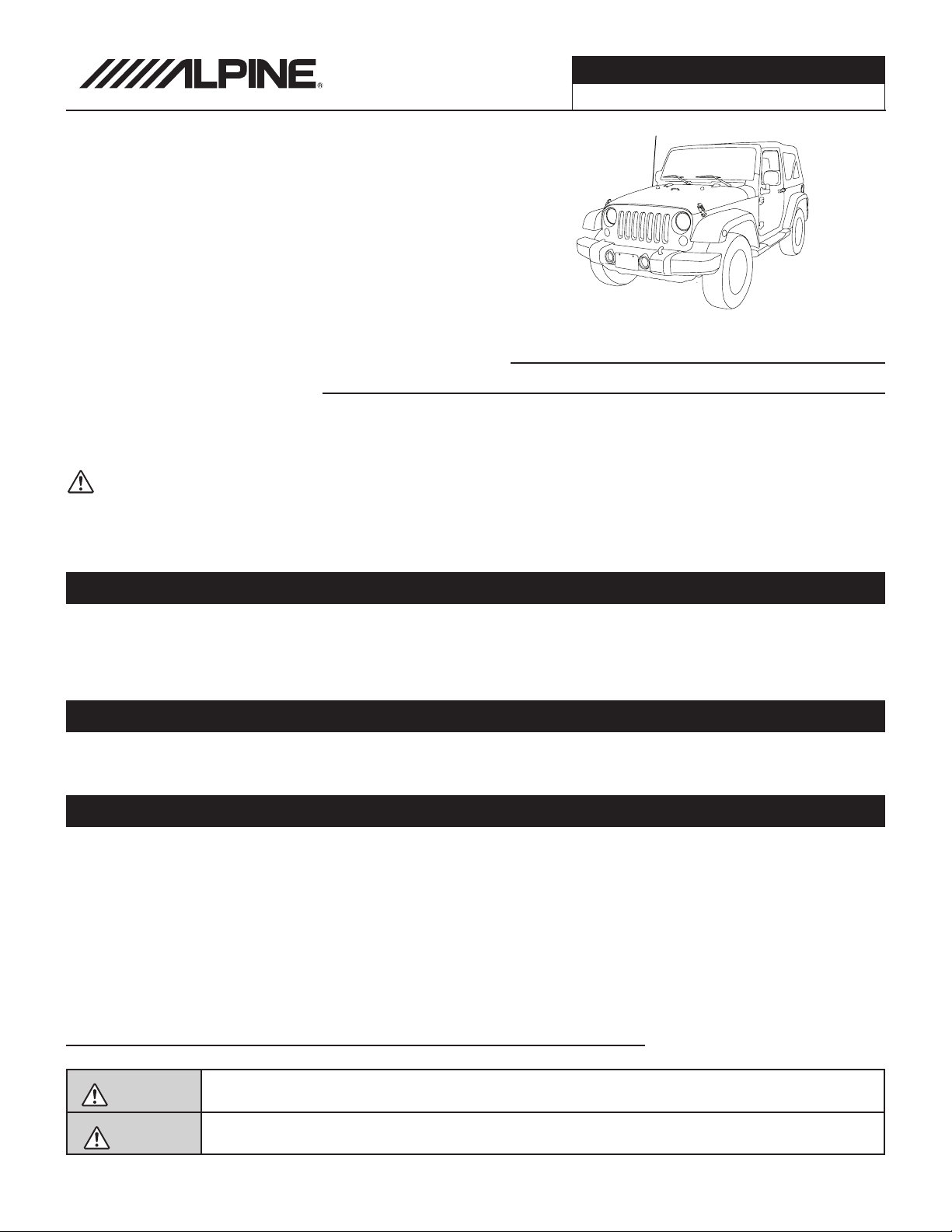
Jeep Wrangler
i209-WRA
i209-WRASXM
9” Restyle Installation Manual
Model: Wrangler
Model Year: 2011-2017
Jeep Wrangler
WRANGLER 1/16
Jeep
* The specified vehicles have been tested and have met compatibility specs at the time of testing. Compatibility is
not guaranteed if the manufacturer has made production changes to the listed vehicles above.
Warning: Before you begin wiring, remove the ground wire from the negative
Model Year
Wrangler 2011-2017
terminal of the battery. Failing to do so can lead to electric shock, injury or damage
to equipment.
Introduction
Congratulations on purchasing the i209-WRA. This installation manual is designed to take you through the
step-by-step installation of the i209-WRA into a 2011 and 2017 Jeep Wrangler. Please familiarize yourself with
the owners manual and if you still have additional questions please call 1-800-TECH-101.
Note:
Design and specifications are subject to change without notice for improvement.
To Ensure Safe Use, Always Follow These Precautions
The installation of this product requires specialized skills and experience. We recommend that you have the
product installed by an Alpine authorized dealer.
Before you use this product, be sure to carefully read this installation manual and the separate user's manual
so that you can use the product correctly. Alpine Electronics bears no responsibility for problems that arise as
a result of failure to follow the instructions in the manuals.
This manual includes a number of symbols that are intended to help you use the product safely, to prevent
harm to you and others, and to protect against damage to property. These symbols and their meanings are
listed below. Make sure you fully understand these symbols before you begin reading the main text.
Explanations of Injury and Damage That May Result from Incorrect Use
Warning
Caution
Ignoring the content marked by this indication and using the product incorrectly is
expected to lead to death or serious injury.
Ignoring the content marked by this indication and using the product incorrectly is only
expected to lead to injury or property damage.
Page 2
Types of Precautions
Forbidden
Mandatory
Forbidden
Forbidden
Forbidden
Mandatory
Mandatory
Forbidden
Forbidden
Jeep Wrangler
WRANGLER 2/16
Indicates actions that are forbidden
(must not be performed)
Indicates that disassembly is
forbidden.
Indicates actions that are
mandatory (must be performed)
Marks content that should receive
your full attention.
Warning
Do not disassemble or modify the product. Doing so could lead to an accident, re,
or electric shock.
Store screws and other small objects where small children cannot reach them. If one of these
small objects is swallowed, consult with a doctor immediately.
When replacing fuses, be sure to use fuses with the specied current rating. Failing to do so could
lead to an accident or re.
Only connect the product to a 12 VDC negative ground car. Failing to do so could lead to
an accident or re.
Before you begin wiring, remove the ground wire from the negative terminal of the battery.
Failing to do so could lead to electric shock or injury.
Do not cut the insulation on a cord and take power from another device. Doing so could
lead to re or electric shock.
Do not install the product in a location where it will obstruct the driver’s forward view;
interfere with the operation of the steering wheel, gearshift, or the like; or pose a
threat to passengers. Doing so could lead to an accident or injury.
When making a hole in the vehicle body, be careful to avoid damaging pipes, the fuel tank,
electrical wiring, and the like. This kind of damage could lead to an accident or re.
Page 3
Jeep Wrangler
Forbidden
Forbidden
Forbidden
Forbidden
Forbidden
WRANGLER 3/16
When installing and grounding the product, do not use any of the bolts or nuts of the
steering wheel, brakes, fuel tank, or the like. Doing so could make the brakes stop working
or lead to re.
Do not install the product near the passenger-side airbag. Doing so could interfere with the
operation of the airbag and lead to an accident or injury.
Bundle cords so that they don’t interfere with driving. Wrapping cords around the steering
wheel, gearshift, brake pedal, or the like, could lead to an accident or damage equipment.
Caution
Connect the product properly according to the instructions. Failing to do so could lead
to re or an accident.
Do not sandwich cords between the seat railing or allow them to touch protrusions.
Resulting breaks or shorts could lead to electric shock or re.
Do not block vents or heat sinks. Doing so could lead to re or damage equipment.
Use the accessories according to the instructions, and attach them securely.
Failing to do so could lead to an accident or damage equipment.
Do not install the product where it may be exposed to water or in a place with high levels
of humidity or dust. Doing so could lead to re or damage equipment.
The installation and wiring of this product requires specialized skills and experience.
Have the product installed by an Alpine authorized dealer.
Page 4
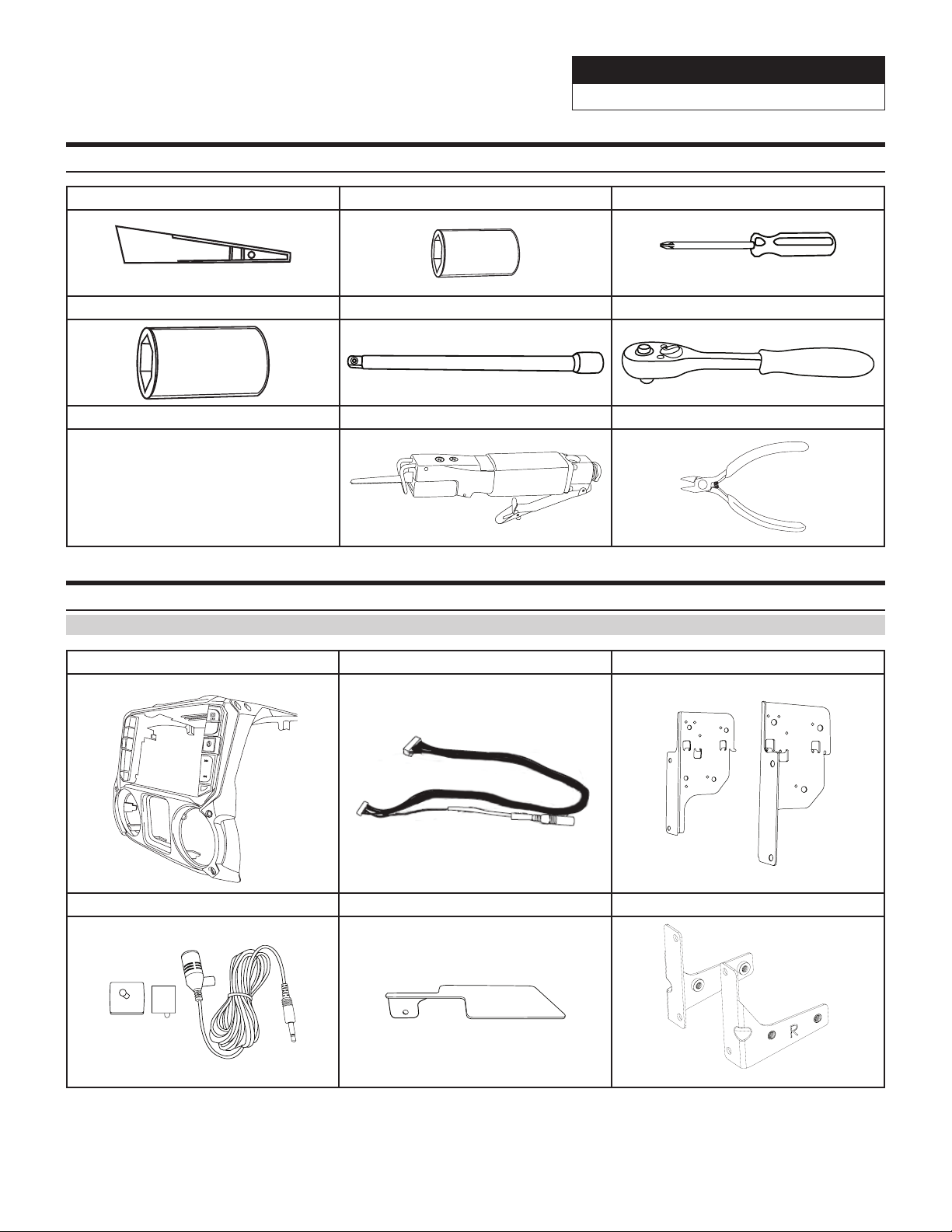
Tools Required
Panel Removing Tool 7mm Sockets #2 Phillips Screwdriver
10mm Sockets Extension Ratchet
Jeep Wrangler
WRANGLER 4/16
Air Saw Wire Cutters
Accessory List
Installation Kit Parts (G-KTX-i209-WRA)
i209-WRA Radio Dash Bezel Key Harness Side Mounting Brackets
MENU
Microphone GPS Antenna Bracket Display Mounting Brackets
Page 5
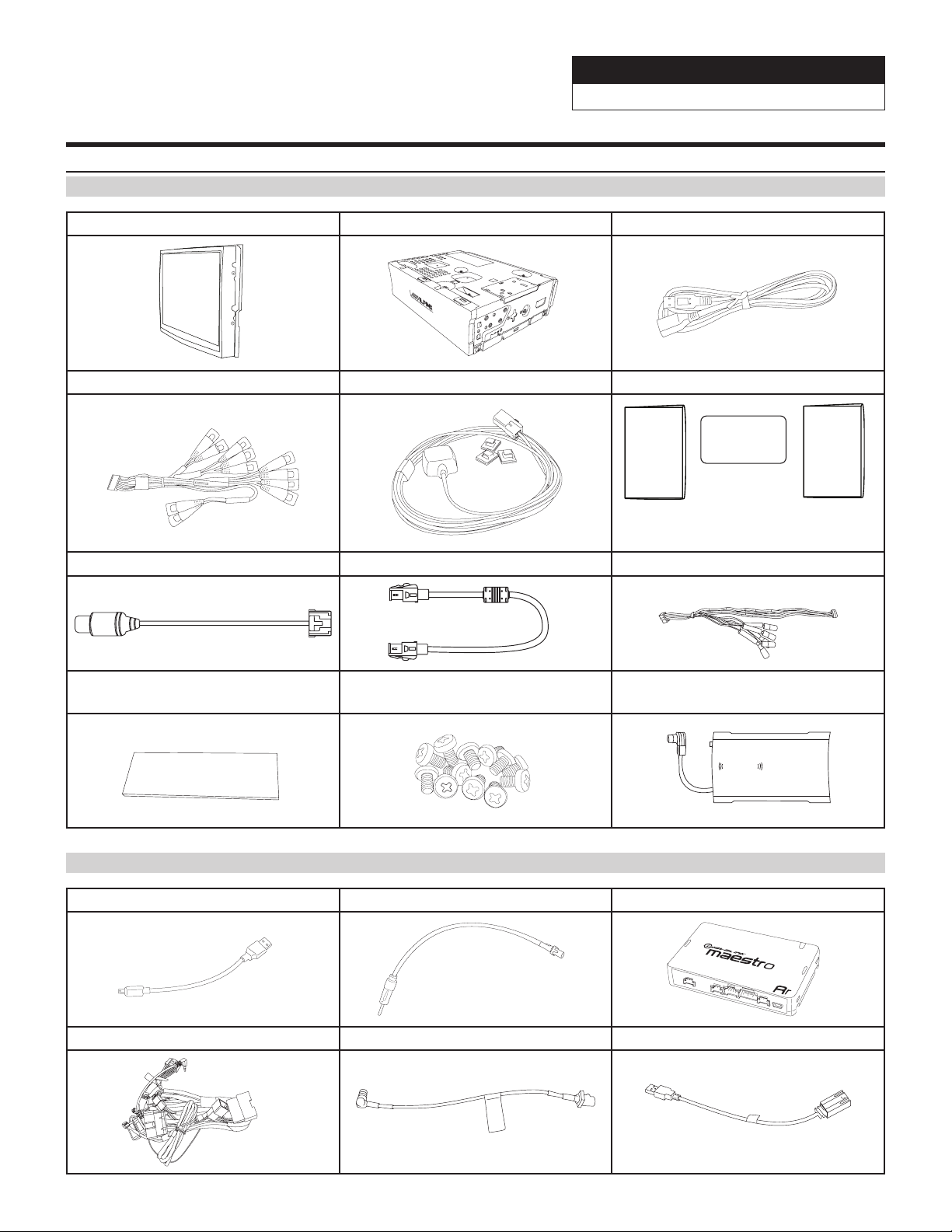
Accessory List
Head Unit Box Parts (i209)
i209 Display Unit i209 Source Unit USB Extension Cable
AUX/Pre Out Harness GPS Antenna Documents
Jeep Wrangler
WRANGLER 5/16
OM QR Card
Alpine
Registration Card
Direct Camera Adapter Display Cable Display Power Harness
Anti-Vibration Foam
Screws (12pcs)
SXM Tuner (included in
i209-WRASXM kit only)
SiriusXm
connect
iDatalink Maestro Box Parts (ALP-MRR2/ALP-HRN-WRA2)
Maestro Flashing Cable Antenna Adapter iDatalink Maestro Module
QRG Navigation
Main Harness SAT Radio Antenna Adapter OEM USB Adapter
Page 6

Programming the iDatalink Maestro Module
Jeep Wrangler
WRANGLER 6/16
1 INSTALL THE WEBLINK PLUG-IN
Go to:
idatalinkmaestro.com/plugin and follow the installation steps.
Review the System Requirements before installing.
If the plugin is already installed, the caution, “The plugin is already
installed” appears. Please skip to step 2.
2 REGISTER A WEBLINK ACCOUNT
Go to:
idatalinkmaestro.com/register and complete the registration process.
A conrmation email will be sent to you requiring validation.
For existing customers, click log in.
3 CONNECT YOUR MAESTRO MODULE
Use your Maestro module to connect to your PC.
5 PROGRAM YOUR MODULE
Follow the programming steps for your vehicle.
4 LOG INTO WEBLINK
Go to:
idatalinkmaestro.com/login.
Enter your username and password, then click OK.
6 Once Programing is complete “FLASHING
COMPLETED!” will be displayed.
Proceed to the next page to complete installation.
NOTE: If serial number is invalid, Call ADS at
1-866-427-2999 with the serial number.
Page 7

Jeep Wrangler
WRANGLER 7/16
Component Locations
IMPORTANT: Follow the recommended component location shown below. Failure to do so, will result in poor
GPS performance.
GPS Antenna Location
Jeep
BT Microphone
iDatalink Maestro Module
SAT-Radio Tuner
(Sold Separately)
Jeep SINCE 1941
GPS Antenna Installation
IMPORTANT: Follow the GPS antenna installation procedure shown below. Failure to do so will result in poor
GPS performance.
Wire Hook Wire Hook
Attach the GPS antenna
bracket on the left side
of the instrument panel
using the 7mm factory
screw.
*Excess cable should
be under the bracket.
Excess GPS cable
Peel the plastic layer off from the
double sided tape on the GPS
antenna and place the GPS
antenna on the center of the GPS
antenna bracket with the cable
facing forward.
Key cable should be zip
tied to side of radio cavity.
Key Cable
Page 8

Factory Unit Disassembly Process
Jeep Wrangler
WRANGLER 8/16
DISCONNECT THE BATTERY BEFORE
CONTINUING. FAILURE TO DO SO WILL
DISABLE MANY FEATURES.
1 Remove the rubber cover from the top center
storage area and extract (1) 7mm screw.
3 Remove the window switch pod using a panel
removing tool and extract (1) 7mm screw.
2 Remove the knee cover panel and extract (2) 7mm
screws located to the right and left sides of the
steering wheel column.
Left side of
steering wheel
column.
Right side of
steering wheel
column.
4 Remove the dash panel.
5 Extract (4) 7 mm screws and remove the factory
radio.
6 Extract (2) 7 mm screws from the factory radio
bracket and remove it.
2
Page 9

Installation Instructions
Lock tab
Jeep Wrangler
WRANGLER 9/16
1 The factory dash panel needs to be trimmed to
allow the new i209-WRA bezel to fit into place.
Remove the highlighted area by cutting along the
dashed line.
3 Use a cutting tool to trim the highlighted area
shown below.
2 Remove the vents from the radio section on the
OEM dash panel by pressing down on the lock tab
and turning right. Mount vents on to the i209-WRA
bezel.
Rear view
4 Mount the microphone as illustrated and run the
cable to the radio cavity.
5 Plug the OBDII connector on to the OBDII port
below the driver side dash and run the extension to
the radio cavity.
Avoid any sharp edges or interfering with
any safety equipment.
6 Attach the Maestro to the main harness.
*See page 13 for more details.
Page 10

Installation Instructions
Jeep Wrangler
WRANGLER 10/16
DISCONNECT THE BATTERY BEFORE
CONTINUING. FAILURE TO DO SO WILL
DISABLE MANY FEATURES.
1 Attach the modified panel using the factory screws.
3 Apply Insulating pad by removing the paper
backing. See diagram below.
2 Put monitor face down on a soft, scratch free
surface and attach Display Monitor Brackets using
(4) 8mm screws (provided). Plug in the Display
Cable and Display Power Harness.
4 Attach the display and source unit with the 8mm
screws (supplied) as shown below.
Route the display cable and power harness
from the display to the source unit and
plug into the W. Remote and Display Out.
5 Route the USB extension cable to the glove box,
connect the main harness and other adapters to the
factory harness and secure them.
To retain the factory USB port in uConnect systems,
See page 11 for installation instructions.
6 Route the key harness through the top-left side of
the i209 source unit. Mount the i209 source unit
using (4) 7mm factory screws.
Page 11

Connecting the uConnect USB port
Jeep Wrangler
WRANGLER 11/16
1 Extract the (2) 7mm bolts.
3 Connect the 4pin OEM connector to the OEM USB
adaptor (included).
5 Secure the uConnect module to the original location
using the 7mm bolts.
2 Disconnect the 4pin OEM connector.
4 Use the USB extension to connect USB adaptor to
the radio USB input.
USB
CAN I/F
GPS
SXM/DAB
HDMI IN HDMI OUT
DISP. OUT
POWERW. REMOTEEXT. KEYPRE OUT
Connecting A SiriusXm Module
CAN I/F
GPS
SXM/DAB
USB
HDMI IN HDMI OUT
POWERW. REMOTEEXT. KEYPRE OUT
DISP. OUT
SiriusXm
connect
To SXM OEM
antenna attached
to OEM FM
antenna
Page 12

Jeep Wrangler
WRANGLER 12/16
Mounting Brackets
DISCONNECT THE BATTERY BEFORE CONTINUING. FAILURE TO DO SO WILL DISABLE MANY
FEATURES.
IMPORTANT: During the research and development of this product it was discovered that mounting
tolerance may vary from the vehicle’s trim level to year built. We have added a 1mm tolerance to the
mounting brackets to compensate for such variance in mounting tolerance. Use the guides below as
reference if there are any required adjustments.
Adjust the rear bracket as needed when the top or bottom is protruding or not flushed.
Adjust the side brackets as needed when either side is protruding or not flushed.
Exploded-View Diagram
Dash Board
i209D Source Unit
MENU
i209-WRA
Radio Dash
Bezel
Side Mounting
Brackets
A
/C
Factory Vents and Window
Switch Pod (not included)
Page 13

Bezel Wiring Diagram
8 Pin Harness
Jeep Wrangler
WRANGLER 13/16
20 Pin Harness
(Connect to i209D)
8 Pin Harness
Page 14

i209-WRA Wiring Diagram
Jeep Wrangler
WRANGLER 14/16
To OBDII Connector
Connector
10-pin Black
iDatalink MAESTRO Module
To Vehicle Connectors
OEM Audio
20-pin Gray
Connector
16-pin Green Connector
Connector
18-pin Black
Power/Speaker
Front
Front
Rear
Rear
Direct Camera Adapter
AMPLIFIED VEHICLES
Failure to follow this procedure will
result in no audio from Navigation and
Bluetooth sources.
For factory amplified vehicles switch the
speaker connectors, front to rear and
rear to front.
WARNING!
Front
Rear
Rear
Front
Direct Camera Input
i209 - Source Unit
CAN I/F
GPS
SXM/DAB
USB
HDMI IN HDMI OUT
DISP. OUT
Microphone
Red - Acc 12V+
(Audio)
Connector
3-pin Black
10-pin Green
Connector
3-pin Black
(Vehicle signals)
Connector
4-pin Black
(Power)
(Data)
Connector
MANUAL TRANSMISSION VEHICLES
White/Gray Manual Transmission Reverse Input
For manual transmission vehicles ONLY. Connect the
White/Gray wire to the White/Gray wire located
on the passenger side kick panel.
Blue/White Amp Turn-on
Blue Power Antenna
Yellow -12V+
Black - Ground
Rear View Camera
WARNING!
The use of this connection
is intended for Alpine
HCE-TCAM1-WRA rear
view camera ONLY.
AUX Power
3-pin Black Connector
Rear View Camera
6-pin Black Connector
HDMI Interface
6-pin White Connector
Cut loop when connecting
KCX-630HD HDMI selector
interface.
Main Harness
ANTENNA
Connect to SXM adapter
Power Harness
i209D - Display
For DVD player (NOT INCLUDED)
EXT. KEY W.REMOTE POWER
PRE OUT
Page 15

i209-WRA With Optional HDMI Interface Wiring Diagram
To optional display
i209 - Source Unit
CAN I/F
GPS
SXM/DAB
ANTENNA
WRANGLER 15/16
USB
HDMI IN HDMI OUT
EXT. KEY W.REMOTE POWER
PRE OUT
Jeep Wrangler
DISP. OUT
DVE-5300 DVD Player
Smart
Phone
MHL or
Apple HDMI
Adapter
See the setup guide on page 15
KCX-630HD
(Optional) HDMI Selector Interface
HDMI IN 1 HDMI IN 2HDMI OUT
USB POWER
Cut loop when connecting
KCX-630HD HDMI selector
interface.
i209 Display
POWER
Page 16

Jeep Wrangler
WRANGLER 16/16
Set Up Guide
1 Turn the vehicle’s Ignition switch to ACC.
2 Turn ON the i209-WRA by pressing any key.
3 Select the user language and press OK.
4 With the vehicle parked, hold down the foot brake pedal, engage the parking brake, release the parking brake
and finally engage the parking brake and release the foot brake.
5 If a camera is present, turn it ON in the system menu. (MENU/SETUP/SYSTEM/CAMERA/CAMERA SELECT)
6 AUDIO MUTE ON REVERSE- By default, when the vehicle is shifted into reverse the AUDIO will MUTE. If this
feature is not desired turn it off in the AUDIO MENU (MENU/SETUP/SOUND/MUTE WHILE BACKING UP)
7 When the KCX-630HD (HDMI SELECTOR) is present be sure to turn it ON in the SETUP MENU. (MENU/
SYSTEM/EXTERNAL ACCESSORIES/HDMI SELECTOR)
8 Set the DVD player. (MENU/SETUP/SOURCE/HDMI).
9 When the KAC-001 (External Accessory Control Module) is present be sure to turn it ON in the SETUP MENU.
(MENU/SYSTEM/EXTERNAL ACCESSORIES/EXTERNAL ACCESSORY CTLR)
10 Vehicle information- Set the desired gauge information. (MENU/VEHICLE INFO/GAUGES/CAR SETTINGS)
Troubleshooting Guide
Symptom Possible Cause Remedy
1
2 Headunit will not turn on.
3
4 No output from RCA’s
5 Android Auto not working
iDatalink website says
serial number is invalid.
Cannot enter SETTINGS
MENU.
Serial number may not be in
iDatalink database.
Incorrect serial number was used
when flashing maestro.
4 pin Maestro data cable is
disconnected or damaged.
Vehicle is in motion or parking
brake is not engaged.
Maestro module is flashed for
amplified system.
Haven’t paired phone to Bluetooth
yet
Call ADS at 1-866-427-2999 and
verify.
Flash Maestro with correct serial
number.
Check for proper connection or
disconnected pins.
With vehicle on (P)PARK, engage
the parking brake, release the
parking brake and engage the
parking brake a second time.
Re-flash module for non-amplified
system.
Go into Bluetooth settings on
phone, find head unit, and pair.
Loose or disconnected USB cable.
iPhone is not recognized
6
when connected to the
USB cable.
Non-compatible cable
Dirty charging port on phone Clean charging port
Check the USB connection behind
the headunit.
Use the cable supplied with the
iPhone
 Loading...