

Page 1
Trouble Shooting Guide, Electrical
Trouble Shooting Guide, Electrical
Applicable for W760
Contents
General ........................................................................................................................... 2
1
2 Repair Actions for Manual Test Failures ............................................................... 3
2.1 Power On / Off ................................................................................................. 3
2.2 Software Flash ................................................................................................ 3
2.3 Charging ........................................................................................................... 3
2.4 Hands-Free connection (PHF) ...................................................................... 3
2.5 SIM .................................................................................................................... 3
2.6 Main Display .................................................................................................... 3
2.7 Display Illumination ......................................................................................... 3
2.8 Flip Sensor ....................................................................................................... 3
2.9 Main Keypad Illumination .............................................................................. 3
2.10 Main Keypad Keys .......................................................................................... 3
2.11 Side Keys ......................................................................................................... 3
2.12 Side Key LEDs ................................................................................................ 3
2.13 Vibrator ............................................................................................................. 3
2.14 Earphone (Receiver) ...................................................................................... 3
2.15 Polyphonic Speaker (Loudspeaker) ............................................................. 3
2.16 Microphone ...................................................................................................... 3
2.17 Real Time Clock .............................................................................................. 3
2.18 Camera ............................................................................................................. 3
2.19 Bluetooth .......................................................................................................... 3
2.20 Memory Card Reader ..................................................................................... 3
2.21 FM Radio .......................................................................................................... 3
2.22 Light Sensor ..................................................................................................... 3
2.23 Accelerometer ................................................................................................. 3
3 Repair Actions for Go/No Go Test Failures .......................................................... 4
3.1 Network Connection ....................................................................................... 4
3.2 Other Failures .................................................................................................. 4
4 Repair Actions for Calibration Routine Failures .................................................. 4
4.1 EDGE ................................................................................................................ 4
4.2 WCDMA ........................................................................................................... 4
5 Revision History ........................................................................................................... 4
1211-1563 2
© Sony Ericsson Mobile Communications AB
Page 2
Trouble Shooting Guide, Electrical
1 General
The purpose of this document is to indicate the electrical level repair actions associated with the
different failure symptoms.
For symptoms that have multiple repair actions, the repair actions are listed in order of their
probability of creating a successful repair. The first action has the highest probability, and
subsequent actions have lower probabilities. The intention is for the repair technician to
implement the first repair action and then retest the phone. If the phone continues to fail the same
test, then the technician should continue to the second repair action. If the phone continues to fail
the same test after all of the repair actions are exhausted, then the phone will be considered not
reparable at this level.
This document should be used only after the actions from the Mechanical Trouble Shooting Guide
have been exhausted for the specific symptom.
Voltage, current, and resistance information may be provided for some symptoms to enable faster
repairs. Purchasing this equipment and performing these measurements is optional but
recommended.
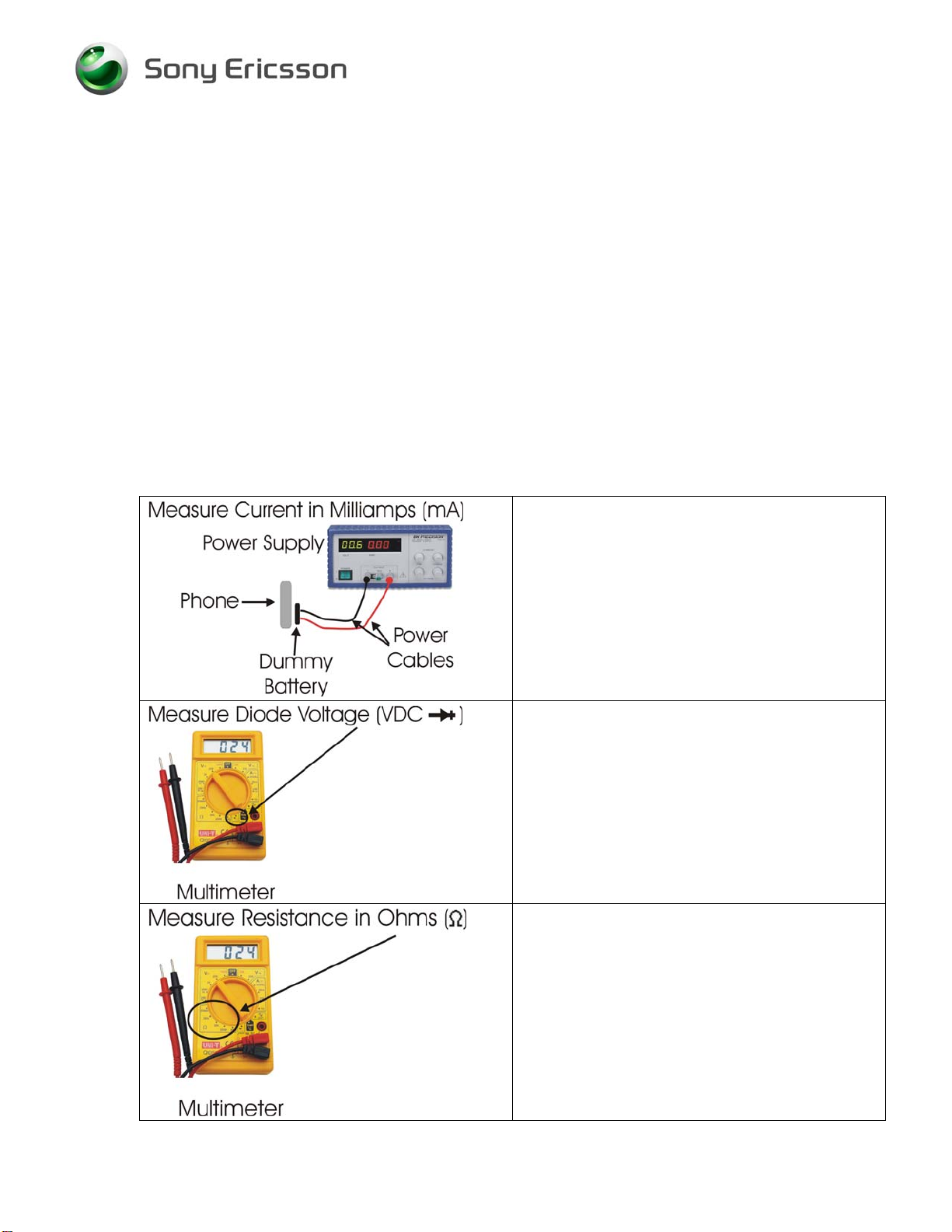
Perform current measurements using a
dummy battery and power supply with digital
current display. The phone should be fully
assembled.
Perform voltage measurements with a
multimeter.
Perform resistance measurements with a
multimeter.
1211-1563 2 2(2)
© Sony Ericsson Mobile Communications AB
Page 3

•
•
•
•
•
•
•
•
•
•
•
•
•
•
•
•
•
•
•
•
•
•
•
•
•
•
Trouble Shooting Guide, Electrical
2 Repair Actions for Manual Test Failures
Failure Failure Symptom
2.1 Power On / Off
Hangs during power up
Other symptoms
2.2 Software Flash
2.3 Charging
2.4 Hands-Free connection (PHF)
2.5 SIM
2.6 Main Display
2.7 Display Illumination
2.8 Flip Sensor
2.9 Main Keypad Illumination
2.10 Main Keypad Keys
2.11 Side Keys
2.12 Side Key LEDs
2.13 Vibrator
2.14 Earphone (Receiver)
2.15 Polyphonic Speaker (Loudspeaker)
2.16 Microphone
2.17 Real Time Clock
2.18 Camera
2.19 Bluetooth
2.20 Memory Card Reader
2.21 FM Radio
2.22 Light Sensor
2.23 Accelerometer
Charging from power outlet
Charging from computer via USB – see flash
Other
Repair Action
B2100
X2200 if damaged
• X4200 if damaged
X2400 if damaged
• N2401
• D2404
• N2420
X2400 if damaged
X2400 if damaged
• D2404
• N2420
X2200 if damaged
X2400 if damaged
• N3101
X2410 if damaged
X4200 if damaged
X4200 if damaged
B2400
N4201
X4200 if damaged
X4100 if damaged
X4100 if damaged
X4200 if damaged
X4200 if damaged
X4200 if damaged
• N3100 – Left Speaker
• N3103 – Right Speaker
X4200 if damaged
B2100
X4200 if damaged
• N4302
X1502 if damaged
• N1400
• D2105
X4200 if damaged
N1400
X4200 if damaged
N2450
1211-1563 2 3(3)
© Sony Ericsson Mobile Communications AB
Page 4

•
•
•
•
•
•
•
•
•
Trouble Shooting Guide, Electrical
3 Repair Actions for Go/No Go Test Failures
3.1 Network Connection
Phone fails to lock on to network during radiated
(wireless) Go / No Go test
Phone fails conducted (RF probe) Go / No Go test
Use RF probe and fixture to perform conducted
Go / No Go test
Run Calibration Routine
Phone passes conducted (RF cable) Go / No Go test
Phone still fails radiated (wireless) Go / No Go test
Phone still fails radiated (wireless) Go / No Go test
Replace Antenna and repeat radiated test
Replace X1501 and repeat radiated test
Replace X1200 and repeat radiated test
3.2 Other Failures
Phone fails any other portion of Go/No Go testing
Phone that failed Go/No Go test passes calibration
Run Calibration Routine
Repeat radiated (wireless) Go/No Go test
4 Repair Actions for Calibration Routine Failures
4.1 EDGE Routine Repair Action
4.2 WCDMA Routine Repair Action
W760i
N1200
N1210
5 Revision History
Rev. Date Changes / Comments
1 2008-May-26 Initial Release
2 2009-03-19 N4302 added to Camera
1211-1563 2
© Sony Ericsson Mobile Communications AB
4(4)
 Loading...