

Page 1
Self Diagnosis
HISTORY INFORMATION FOR THE FOLLOWING MANUAL:
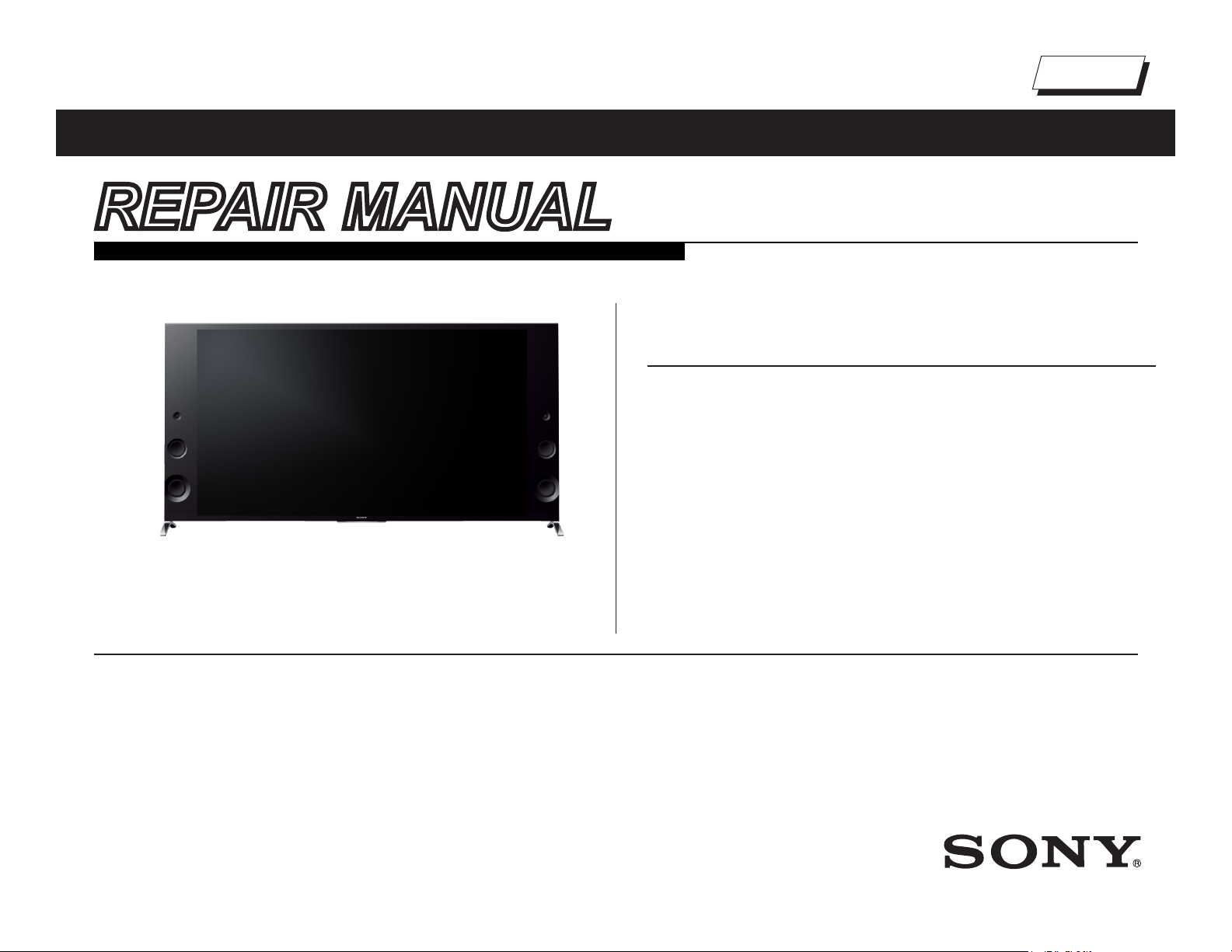
REPAIR MANUAL
Supported model
RB2T Chassis
Segment: HJ
MODEL COMMANDER DESTINATION
XBR-79X900B RM-YD102 / RMF-YD003 US/CND/LA/MX
Version Date Subject
1.0 06/05/2014 Original Manual Release Date.
2.0 07/11/2014 Updated Adjustments Procedure on Section 3 - Repair Information. Pages 13-21 replaced.
XBR-79X900B
LCD Digital Color TV
9-888-634-02
Page 2
TABLE OF CONTENTS
Cautions and Warnings ...................................................................................ii
Section 1 - Specications and Layouts ......................................................... 1
Specications ................................................................................................1
Checking the Accessories ............................................................................. 1
Board Layout .................................................................................................2
XBR-79X900B .......................................................................................................2
Smart Core Block...................................................................................................2
Wire Dressing ................................................................................................ 3
XBR-79X900B .......................................................................................................3
Smart Core Block...................................................................................................3
Section 2 - Troubleshooting ...........................................................................4
Diagnosing the Error .....................................................................................4
Viewing the Self Check Diagnosis History ............................................................. 4
Triage Chart ...................................................................................................5
Flowcharts and Diagrams .............................................................................. 6
Overall Block Diagram ........................................................................................... 6
Power and Control Block Diagram.........................................................................7
No Power Flowchart ..............................................................................................8
Standby LED Blinking Flowchart ...........................................................................9
No Video Flowchart .............................................................................................10
Video Distortion Flowchart ................................................................................... 11
No 3D Viewing .....................................................................................................12
Section 3 - Repair Information ...................................................................... 13
Repairing the TV ..........................................................................................13
Removing the Table-Top Stand ............................................................................13
Removing the Rear Cover ...................................................................................13
Replacing the Main Board and Tuner Board ...............................................14
Replacing the K Board ................................................................................18
Replacing the Power Supply Boards ........................................................... 18
Replacing the Switch Unit ...........................................................................18
Replacing the Camera Module .................................................................... 19
Removing the Speakers ..............................................................................19
Removing the Smart Core Block .................................................................20
Section 4 - Exploded View/Part Number Information ................................. 22
Table-Top Stand ..........................................................................................22
XBR-79X900B .............................................................................................23
Smart Core Block.................................................................................................27
Connectors ..................................................................................................28
Screws ......................................................................................................... 29
Section 5 - Accessories/Part Number Information .....................................30
Accessories and Packaging ........................................................................30
Miscellaneous .............................................................................................. 30
Optional Accessories ................................................................................... 30
Remote Commander ...................................................................................30
Appendix A: Encryption Key Components ...............................................A-1
XBR-79X900B i
Page 3
CAUTIONS AND WARNINGS
CAUTION!!
These servicing instructions are for use by qualied service personnel only.
To reduce the risk of electric shock, do not perform any servicing other than
that contained in the operating instructions unless you are qualied to do so.
WARNING!!
An isolation transformer should be used during any service to avoid possible
shock hazard, in case of live chassis.
!
SAFETY-RELATED COMPONENT WARNING!!
There are critical components used in LCD color TVs that are important for
safety. These components are identied with shading and
schematic diagrams and the parts list. It is essential that these critical parts
be replaced only with the part number specied in the parts list to prevent
electric shock, re or other hazard.
NOTE: Do not modify the original design without obtaining written permission
from the manufacturer or you will void the original parts and labor warranty.
!
mark on the
ATTENTION!!
ATTENTION!!
Ces instructions de service sont à l’usage du personnel de service qualié
seulement. Pour prévenir le risque de choc électrique, ne pas faire l’entretien
autre que celui contenu dans le Mode d’emploi à moins que vous soyez
qualié faire ainsi.
ALERTE!!
An d’eviter tout risque d’electrocution provenant d’un chássis sous tension,
un transformateur d’isolement doit etre utilisé lors de tout dépannage.
!
ATTENTION AUX COMPOSANTS
RELATIFS A LA SECURITE!!
Les composants identies par une trame et par une marque
schemas de principe, les vues explosees et les listes de pieces sont d’une
importance critique pour la securite du fonctionnement. Ne les remplacer
que par des composants Sony dont le numero de piece est indique dans le
present manuel ou dans des supplements publies par Sony. Les reglages
de circuit dont l’importance est critique pour la securite du fonctionnement
sont identies dans le present manuel. Suivre ces procedures lors de
chaque remplacement de composants critiques, ou lorsqu’un mauvais
fonctionnement suspecte.
!
sur les
For safety reasons, component level repair of the Power Supply Boards
and/or the Inverter Boards is prohibited.
Pour des raisons de sécurité, Interdire de réparer ou remplacer les
composantes dans les blocs d’alimentation et/ou sur les modules d’inverseur.
ATTENTION!!
XBR-79X900B ii
Page 4

CAUTIONS AND WARNINGS
To Exposed Metal
Parts on Set
0.15 µF
Earth Ground
AC
Voltmete
r
(0.75V)
Trouble Light
SAFETY CHECK-OUT
After correcting the original service problem, perform the following safety
checks before releasing the set to the customer:
1. Check the area of your repair for unsoldered or poorly soldered
connections. Check the entire board surface for solder splashes
and bridges.
2. Check the interboard wiring to ensure that no wires are “pinched” or
touching high-wattage resistors.
3. Check that all control knobs, shields, covers, ground straps and
mounting hardware have been replaced. Be absolutely certain that
you have replaced all the insulators.
4. Look for unauthorized replacement parts, particularly transistors,
that were installed during a previous repair. Point them out to the
customer and recommend their replacement.
5. Look for parts which, though functioning, show obvious signs of
deterioration. Point them out to the customer and recommend their
replacement.
6. Check the line cords for cracks and abrasion. Recommend the
replacement of any such line cord to the customer.
7. Check the antenna terminals, metal trim, “metallized” knobs, screws
and all other exposed metal parts for AC leakage. Check leakage
as described in “Leakage Test”.
The AC leakage from any exposed metal part to earth ground and from all
exposed metal parts to any exposed metal part having a return to chassis,
must not exceed 0.5 mA (500 microamperes). Leakage current can be
measured by any one of three methods.
LEAKAGE TEST
3. Measuring the voltage drop across a resistor by means of a VOM
or battery-operated AC voltmeter. The “limit” indication is 0.75 V, so
analog meters must have an accurate low voltage scale. Nearly all
battery-operated digital multimeters that have a 2 VAC range are
suitable. (see Figure A)
Figure A. Use an AC voltmeter to check AC leakage.
HOW TO FIND A GOOD EARTH GROUND
The cover-plate retaining screw on most AC outlet boxes is at earth ground.
Verify the AC outlet box retaining screw ground by connecting a 60W to
100W incandescent (not a neon or uorescent lamp) between the hot side of
the receptacle and the retaining screw. Try both slots, if necessary, to locate
the hot side on the line; the lamp should light at normal brilliance if the screw
is at ground potential. (see Figure B)
AC Outlet Box
XBR-79X900B iii
1. A commercial leakage tester.
Follow the manufacturers’ instructions provided with the tester.
2. A battery-operated AC milliammeter.
Figure B. Checking for earth ground.
Page 5
* Screen size, dimensions and mass are approximate values.
• Optional accessories availability depends on countries/region/TV model/stock.
• Design and specications are subject to change without notice.
• Power consumption will increase when Port Replicator is connected to the TV.
• This TV set incorporates MHL 2 for HDMI IN 4/MHL and MHL 3 for HDMI IN 2/MHL.
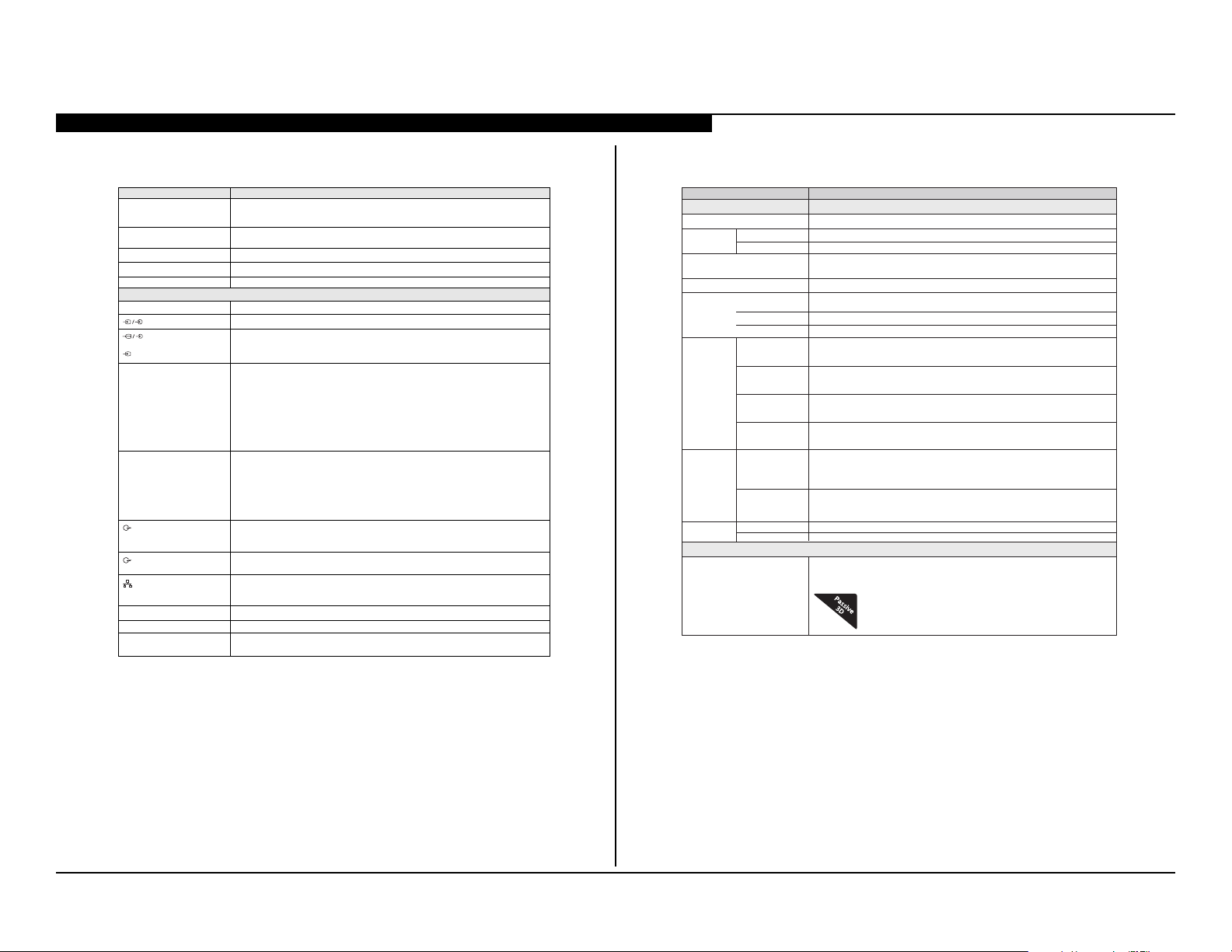
Model name XBR-79X900B
Power and others
Power requirement
110 V - 240 V AC, 50/60 Hz (U.S.A./Canada 120 V AC, 60 Hz)
Power
consumption
in use
in standby
Screen size* (cm)
(inches measured diagonally)
78,6 inches
(79 class)
Display resolution
Output Rating
Dimensions
*
Stand width
*
with stand
without stand
wall-mount
hole pattern
400 x 300
wall-mount
screw size
M6 (8-12 mm)
Mass*
with stand
without stand
USB 1/3
USB 2
MHL (HDMI IN 2/4)
5 V, 500 mA MAX
5 V, 800 mA MAX
5 V, 900 mA MAX
408 W
Less than 0.2 W with 120 V AC and less than 0.3 W with 240 V AC
3,840 dots (horizontal) × 2,160 lines (vertical)
60,9 / 134,2
59,7 / 131,5
(mm)
(inches)
(inches)
(mm)
(mm)
(mm)
TV with TableTop Stand (edge
position)
TV with Table-Top
Stand (middle
position)
(mm)
(mm)
(kg/lb)
(kg/lb)
Others
Optional accessories
Wireless Subwoofer: SWF-BR100
MHL Cable: DLC-MC20
Passive 3D Glasses: TDG-500
2,031 × 1,109 × 442
80 × 43
3
/4 × 171/
2
80 × 41
1
/2 × 43/
8
2,029 × 1,054 × 111
80
2,031
41
5
/
8
573
SECTION 1 - SPECIFICATIONS AND LAYOUTS
SPECIFICATIONS
System
Television system
Channel coverage
Panel system
Speaker output
Wireless technology
Input/Output jacks
CABLE/ANTENNA
VIDEO IN 1
COMPONENT IN
VIDEO IN 2
HDMI IN 1/2/3/4
(Support 4K resolution)
MHL
(Common with HDMI IN 2/4)
AUDIO OUT/
DIGITAL AUDIO OUT
(OPTICAL)
LAN
USB/DLNA
Operating temperature
REMOTE
i Audio output (stereo mini jack)
NTSC: American TV standard
ATSC (8VSB terrestrial): ATSC compliant 8VSB
QAM on cable: ANSI/SCTE 07 2000 (Does not include CableCARD functionality)
Analog terrestrial: 2 - 69 / Digital terrestrial: 2 - 69
Analog Cable: 1 - 135 / Digital Cable: 1 - 135
LCD (Liquid Crystal Display) Panel, LED Backlight
12.5 W +12.5 W + 20 W + 20 W
Protocol IEEE802.11a/b/g/n
75-ohm external terminal for RF inputs
Video / Audio input (phono jacks)
BPR (vídeo componente): 1080p (60 Hz), 1080i (60 Hz), 720p (60 Hz), 480p, 480i
YP
Audio input (phono jacks)
Video input (common phono pin with Y input)
Vídeo (2D): 4096 × 2160p (60 Hz)*, 4096 × 2160p (24 Hz), 3840 × 2160p (60 Hz)*, 3840 × 2160p
(24, 25, 30 Hz),1080p (30, 60 Hz), 1080/24p, 1080i (60 Hz), 720p (30, 60 Hz), 720/24p,
480p, 480i, PC Formats
Vídeo (3D):
Frame Packing:
Side-by-Side:
Over-Under:
Audio: 5.1 channel linear PCM: 32, 44.1 and 48 kHz, 16, 20 and 24 bits, Dolby Digital
ARC (Audio Return Channel) (HDMI IN 1 only)
Video (2D): 4096 × 2160p (24 Hz)*, 3840 × 2160p (24, 25, 30 Hz)*, 1080p (60 Hz)*, 1080p (30 Hz),
1080/24p, 1080i (60 Hz), 720p (30, 60 Hz), 720/24p, 480p, 480i* HDMI IN 2 only
Video (3D):
Frame Packing:
Side-by-Side:
Over-Under:
Audio: 5.1 channel linear PCM: 32, 44.1 and 48 kHz, 16, 20 and 24 bits, Dolby Digital
Headphone jack
(supports Subwoofer out)
Digital optical jack
(Two channel linear PCM, Dolby Digital)
10BASE-T/100BASE-TX connector (Connection speed may dier depending on the network
environment. 10BASE-T/100BASE-TX communication rate and communication quality
are not guaranteed for this TV)
Refer to the i-Manual for supported formats
32 ºF – 104 ºF (0 ºC – 40 ºC)
RS232C, Serial Control mini jack; IR IN mini jack
These jacks are for receiving the external control signal
1080p (30 Hz), 1080/24p, 1080i (60 Hz), 720p (30, 60 Hz), 720/24p
1080p (60 Hz), 1080/24p, 1080i (60 Hz), 720p (60 Hz)
1080p (30, 60 Hz), 1080/24p, 1080i (60 Hz), 720p (60 Hz)
1080p (30 Hz), 1080/24p, 1080i (60 Hz), 720p (30, 60 Hz), 720/24p
1080p (60 Hz)*, 1080/24p, 1080i (60 Hz), 720p (60 Hz)
1080p (60 Hz)*, 1080p (30 Hz), 1080/24p, 1080i (60 Hz), 720p (60 Hz)* HDMI IN 2 only
* YCbCr 4:2:0 / 8 bit
CHECKING THE ACCESSORIES
- IR Remote Control (1)*
- Size AAA batteries (2)
- Wall-Mount Attachment (M6) (long) (2)
- Wall-Mount Attachment (M5) (short) (2)
- IR Blaster (1)
- Operating Instructions and other documents
- Port Replicator accessories (set)
- Camera cover (1)
- Cable clamper (3)
* Refer to the model name printed on the remote
XBR-79X900B 1
Page 6
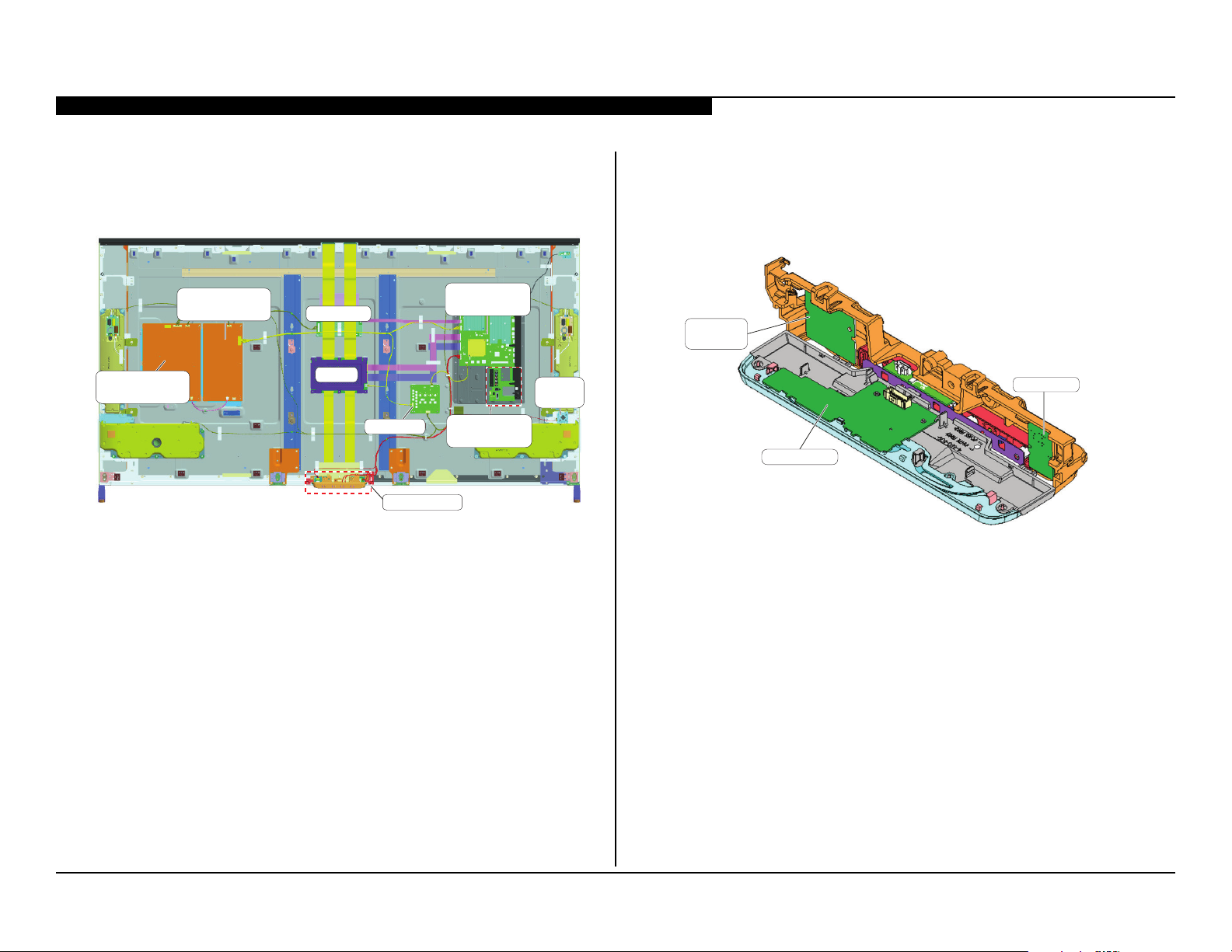
BOARD LAYOUT
HSC2 BOARD
WIRELESS
LAN CARD
BT MODULE
SECTION 1 - SPECIFICATIONS AND LAYOUTS
XBR-79X900B
POWER SUPPLY
POWER SUPPLY
(G4A BOARD)
(G3 BOARD)
LD BOARD
T CON
K1 BOARD
SMART CORE
SMART CORE BLOCK
MAIN BOARD
(BAXF BOARD)
SWITCH
UNIT
TUNER BOARD
(TUS BOARD)
XBR-79X900B 2
Page 7
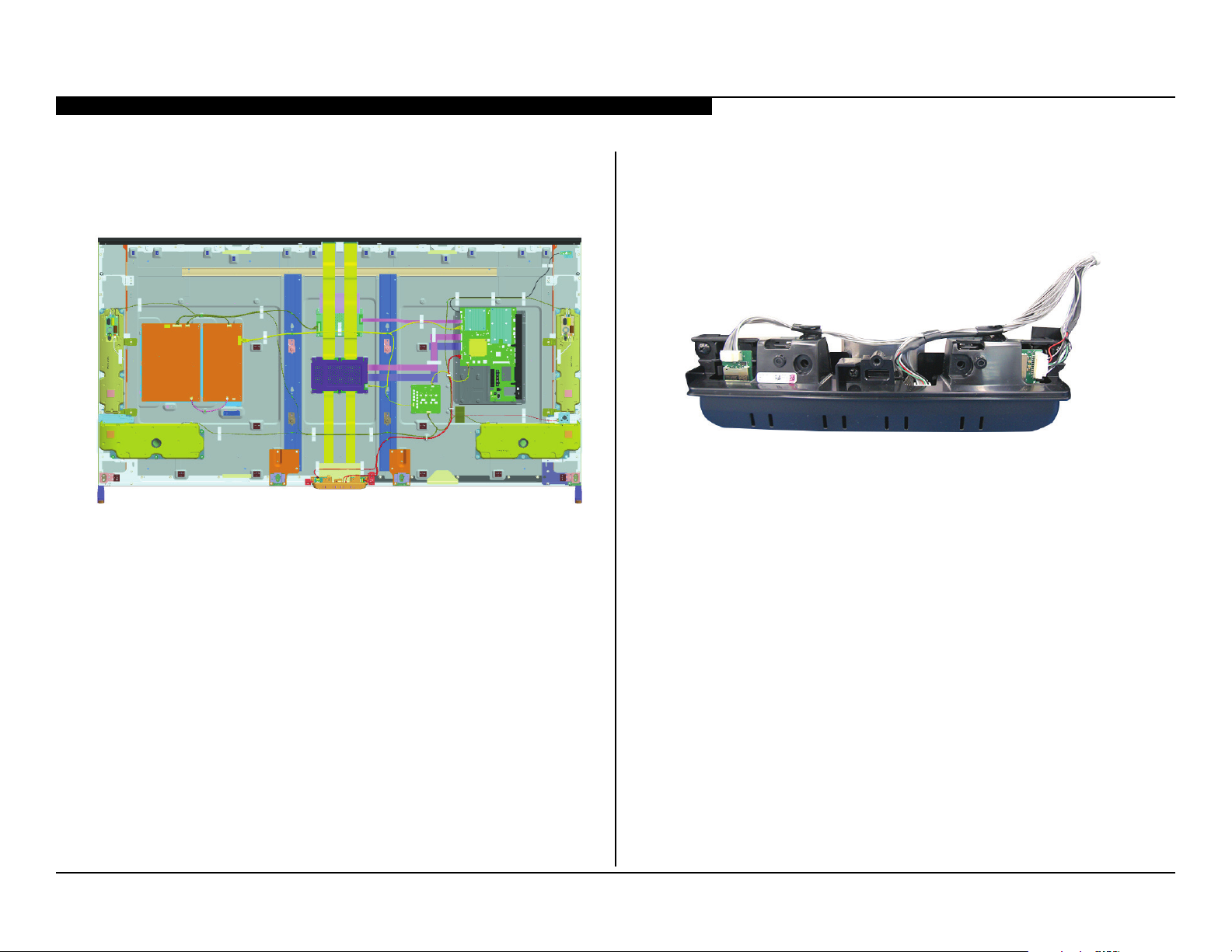
WIRE DRESSING
SECTION 1 - SPECIFICATIONS AND LAYOUTS
XBR-79X900B
SMART CORE BLOCK
XBR-79X900B 3
Page 8
SECTION 2 - TROUBLESHOOTING
Self Diagnosis
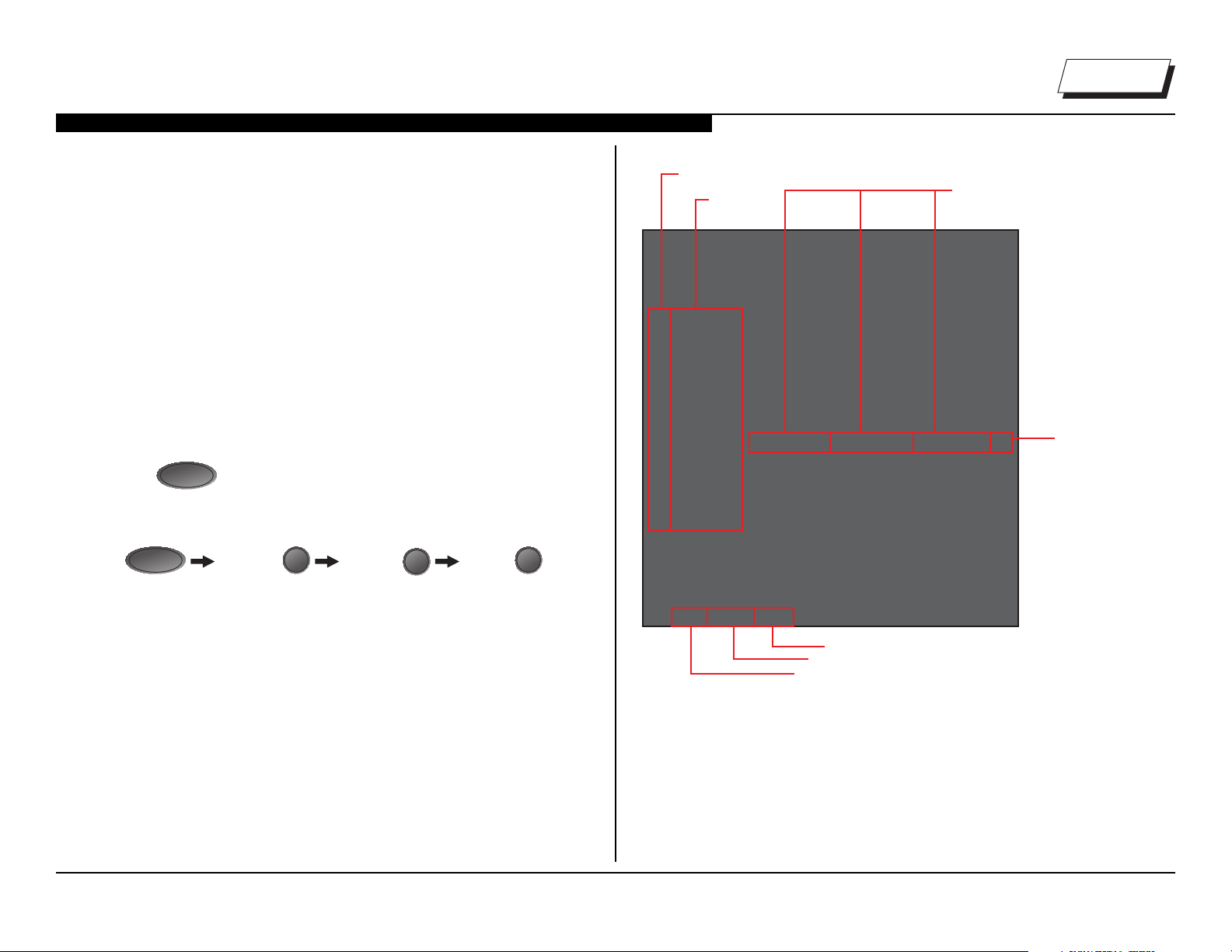
*Format of Error History = YYMMDDhhmmss example 120123132522= Jan 23, 2012 13:25:22 (1:25:22PM)
Supported model
DIAGNOSING THE ERROR
Before servicing the Television:
1. Verify the TV has the symptom the customer indicated.
2. Check to see if the latest Software is installed.
a. If not, install the latest version.
3. Determine the replacement part required.
VIEWING THE SELF CHECK DIAGNOSIS HISTORY
When an error is detected, the Self Check screen records the number of
times the error occurred. This is helpful in conrming past occurrences of
an error and for determining if an error is intermittent when the customer is
not sure what is causing the television to shut down. If the screen displays
a “0”, no error has occurred.
DISPLAY
POWER
to turn on the TV and then turn it off again.
Channel 5 Volume - Power
I/0
1. Press
2. Press the following buttons on the Remote Commander within 1
second of each other:
NOTE: This differs from accessing Service Adjustments Mode (Volume +).
StandBy LED
Blink Count
Diagnosis
Item
SELF CHECK
000 RESERVED --------------------- ------------------------------------------ 00
000 RESERVED --------------------- ------------------------------------------ 00
002MAIN_POWE --------------------- ------------------------------------------ 00
003 DC_ALERT --------------------- ------------------------------------------ 00
003 AUD_PROT --------------------- --------------------- ---------------------00
003 HDMI_EQ --------------------- --------------------- --------------------- 00
003 TU_DEMOD --------------------- ------------------------------------------ 00
004 VLED --------------------- ------------------------------------------00
004 LD_ERR --------------------- --------------------- ---------------------00
005 HFR_ERR --------------------- --------------------- ---------------------00
005 TCON_ERR120123132522 120123113645--------------------- 02
005 P_ID-ERR --------------------- --------------------- --------------------- 00
006 BACKLITE --------------------- ------------------------------------------00
007 TEMP_ERR --------------------- ------------------------------------------ 00
007 FAN_ERR --------------------- ------------------------------------------ 00
010 EMITTER --------------------- --------------------- ---------------------00
101 VPC_WDT --------------------- ------------------------------------------ 00
102 MEPS_WDT--------------------- ------------------------------------------ 00
103 HOST_WDT --------------------- ------------------------------------------00
104 STBY_WDT --------------------- ------------------------------------------ 00
00345 000333 06789
Panel operation time by hour (MAX:65535)
Panel operation time by hour (MAX:65535)
Boot count (MAX:65535)
Boot count (MAX:65535)
Total operation time by hour (MAX:65535)
Total operation time by hour (MAX:65535)
Date and Time Display*
Error Count
(00-99)
XBR-79X900B 4
NOTE: date and time must be set for this to work
SAMPLE SELF CHECK DIAGNOSIS PAGE
Page 9
SECTION 2 - TROUBLESHOOTING
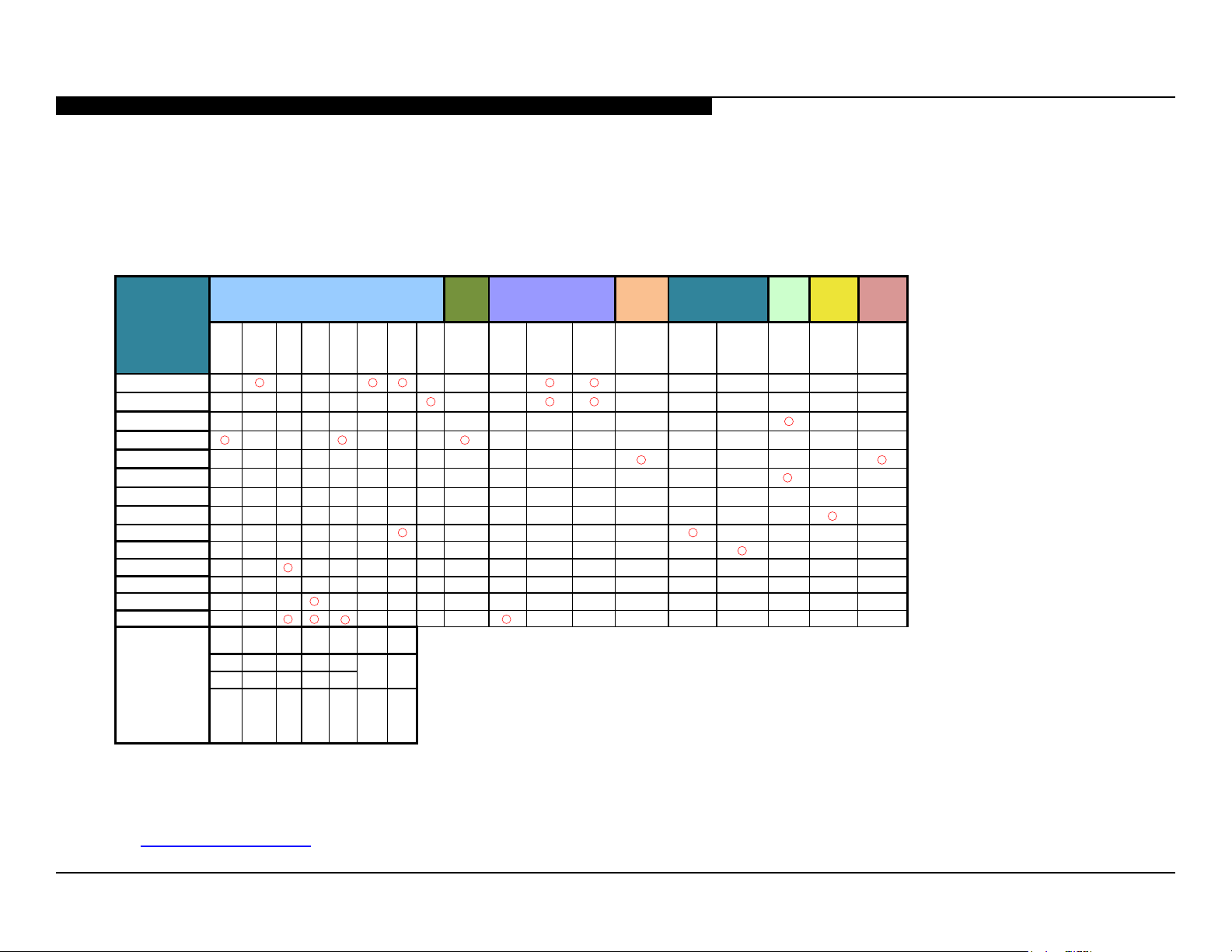
1. Confirm the symptom from the customer. Red Dot: (Primary) Most likely defective part.
3. Bring the primary component listed for that symptom.
▲
▲ ▲
▲ ▲
▲ ▲ ▲
▲
▲
▲
4. Follow the associated flowcharts in the Training Manual to isolate the board.
*NOTE: REFER TO LCD PANELS SERVICE MANUAL IN REFERENCE LIBRARY DATABASE
FOR CORRECT REPLACEMENT PARTS BASED ON SERIAL NUMBER.
TRIAGE CHART
Use this general Triage Chart to determine what may possibly be causing the error before going out to the customers location.
2. Select that symptom from the chart. Blue Triangle: (Secondary) Possible defective part.
5. Chart Color Code.
Board Reference
MAIN BOARD
TUNER BOARD
K BOARD
POWER SUPPLY
H BOARD
SPEAKER
CAMERA MODULE
MIC MODULE
WIFI
BT MODULE
LD BOARD
LVDS FFC
TCON
LCD PANEL
Problem
Symptoms - Shutdown. Power LED blinking
red diagnostics sequences
2X 3X 4X
5X 6X 7X 8X 9X
No White
▲ ▲
▲
▲ ▲
▲
▲
▲ ▲
BACKLIGHT
▲
TEMP
SOFTWARE
POWER
LD TCON
POWER
AUDIO
LOCAL I2C
4K
UNIQUE
(ROGUE/
SCORPIO
4K FRC)
No
Power
Power
LED
Video
Steady
No Video
lines or
One of
dots
Inputs
▲
▲ ▲
▲ ▲
No Video
All Inputs
▲
▲
Remote
No Remote
(IR RC)
Network
Wireless
can't
connect
Bluetooth
can't
connect
Audio
No
Audio
▲
▲
Skype
Can’t
work
▲
▲
Smart
Core
No LED
To access the most recent version of the Triage documents for the models listed in this manual, login into the Sony Authorized Service Portal
at http://www.sony.com/asp.
XBR-79X900B 5
Page 10
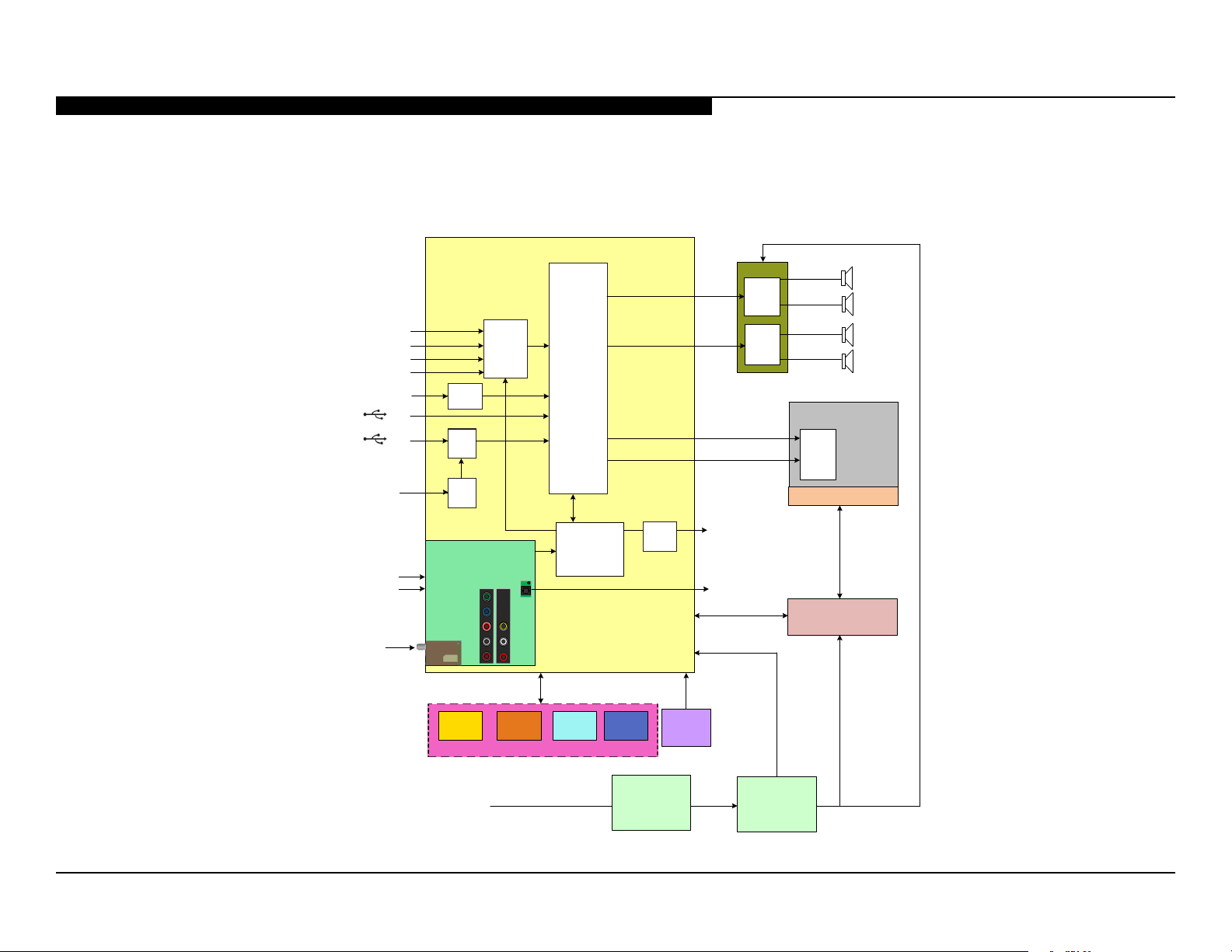
FLOWCHARTS AND DIAGRAMS
OVERALL BLOCK DIAGRAM
MAIN BOARD
SECTION 2 - TROUBLESHOOTING
K BOARD
AUDIO
AMP
1
L
R
HDMI 1 / MHL
HDMI 2 /ARC
HDMI 3
HDMI 4
ETHERNET
CAMERA
VIDEO 1 CVBS
VIDEO 2 CVBS/COMP
RF
USB
USB
ETHER
USB
HUB
USB
HUB
TUNER BOARD
TUNER
SMART CORE
PHY
HDMI
SWITCH
EQ
AUDIO
A/V
DECODER
VIDEO
PROCESS
TUNER
SWITCH
DEMODULATOR
UNIT
ADC / DACAMP
WIFIMIC
IR RX
LED’s
HIR
AUDIO
AMP
BAXF
HSC2
SWITCH
UNIT
BT
AMP
2
HEADPHONES
OUT
OPTICAL
AUDIO OUT
HFR
TCON
LED BACKLIGHTS
LOCAL DIMMING
L
R
LCD PANEL
LD
AC IN
POWER SUPPLY
G4A
POWER SUPPLY
G3
XBR-79X900B 6
Page 11
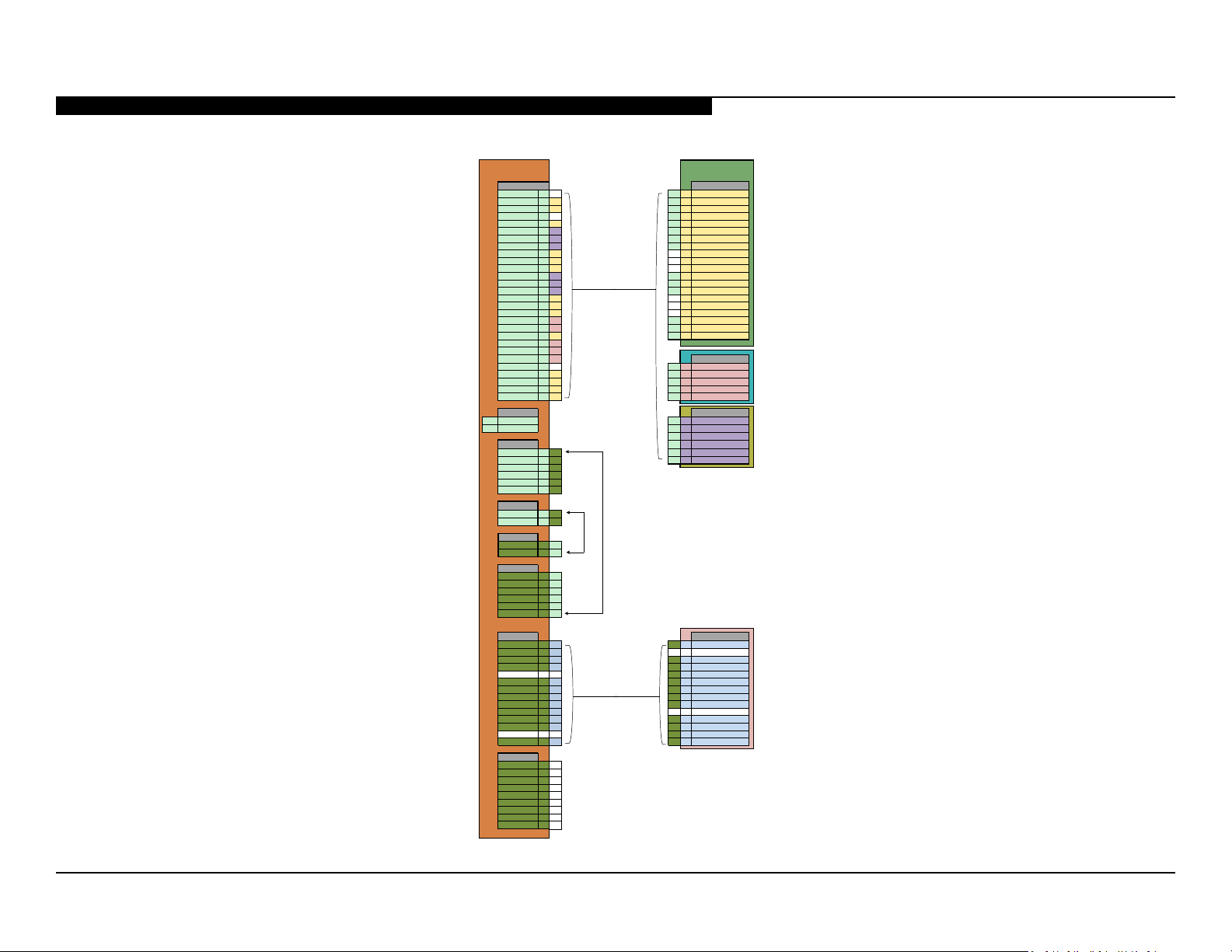
POWER AND CONTROL BLOCK DIAGRAM
DIGITAL_STBY 2 18 27 2 AC_OFF_DET
BL_ERR 3 20 26 3 TCON_ON
NC 4 NC 25 4 STBY+3.3V
BL_ON 5 19 20 5 T_CON_VCC12V
GND 6 4 17 6 REG+12V
GND 7 5 16 7 REG+12V
GND 8 6 15 8 REG+12V
GND 9 14 NC 9 LDOSLAT
GND 10 13 NC 10 LDOGEMIT
GND 11 12 NC 11 LD_STBY
REG12V 12 1 11 12 GND
REG12V 13 2 10 13 GND
REG12V 14 3 9 14 GND
REG12V 15 8 NC 15 LDOSCLK
REG12V 16 7 NC 16 LDOSWDATA
REG12V 17 6 NC 17 GND_LD
T-CON_VCC12V 18 4 2 18 DIGITAL_STBY
T-CON_VCC12V 19 5 5 19 BL_ON
T-CON_VCC12V 20 5 3 20 BL_ERR
T-CON_VCC12V 21 3
T-CON_GND 22 1
T-CON_GND 24 NC 22 1 GND
STBY_3.3V 25 4 23 2 GND
T-CON_ON 26 3 21 3 PWR Power V 12 IN
AC_OFF_DET 27 2 18 4 PWR Power V 12 IN
POWER_ON 28 1 19 5 PWR Power V 12 IN
AC-L
2
13 2 PVDD(AU)
14 3 PVDD(AU)
LD_ERR 2 2 8 6 GND(AU)
DIGITAL_STBY 3 3
BL_ON 4 4
GND 5 5
REG12V 6 6
AC-L 3 3
CN6101
AC-L 3 3
BL_ERR 1 1
LD_ERR 2 2
DIGITAL_STBY 3 3
BL_ON 4 4
GND 5 5
REG12V 6 6
VLED_VCC 2 13 NC 2 SA_REF_L
VLED_VCC 3 12 12 3 GL_CTRL
VLED_VCC 4 11 11 4 LD_ERR
NC 5 NC 10 5 VLED_GND
VLED_GND 6 9 9 6 VLED_GND
VLED_GND 7 8 8 7 VLED_GND
VLED_GND 8 7 7 8 VLED_GND
VLED_GND 9 6 6 9 VLED_GND
SENSE_GND 10 5 NC 10 SA_REF_H
LD_ERR 11 4 4 11 VLED_VCC
GL_CTRL 12 3 3 12 VLED_VCC
NC 13 NC 2 13 VLED_VCC
REG12V 14 1 1 14 VLED_VCC
VLED_VCC 2 NC
VLED_VCC 3 NC
VLED_VCC 4 NC
NC 5 NC
VLED_GND 6 NC
VLED_GND 7 NC
VLED_GND 8 NC
VLED_GND 9 NC
SECTION 2 - TROUBLESHOOTING
POWER SUPPLY
CN6401
NC 1 NC 28 1 POWER_ON
T-CON_GND 23 2 T-CON
AC_IN CN6101 K0 - CN4801
1
AC-N
CN6402 6 4 GND
BL_ERR 1 1 7 5 GND
CN6102
AC-N 1 1
12 1 PVDD(AU)
MAIN BOARD
CN9700 - Main Board
XBR-79X900B 7
AC-N 1 1
CN6603
CN6601
VLED_VCC 1 14 14 1 SET_12V
CN6602
VLED_VCC 1 NC
LD - CN2003
Page 12

NO POWER FLOWCHART
No Power
Remove AC power and
wait at least 30
seconds before
reapplying.
SECTION 2 - TROUBLESHOOTING
Does red
Standby LED on
front panel light?
No
Is Standby LED
blinking?
No
Power Supply
Board*
Yes
Yes
See Stanby
LED Blinking
Flowchart
High (>2.5V)
on pin 28 of CN6401
on Power Supply?
No
Power Supply
Board*
Yes
Press power button while
monitoring pin 27
of CN6401 on
Power Supply
Board.
High (3.3V)
appears
momentarily?
No
Main Board*
Yes
Power Supply
Board*
*For Part Number information, refer to “Section 4 - Exploded View/Part Number Information” on page 22.
XBR-79X900B 8
Page 13

STANDBY LED BLINKING FLOWCHART
Protect
Shutdown.
Standby LED
Blinking
SECTION 2 - TROUBLESHOOTING
2X
No
No
4X
Yes
LCD Panel/
LD Board*
Yes
Yes
No
Power Supply
Board*
Main Board*3X
5X
Yes
TCON
(LCD Panel)*
No
6X
Yes
Power Supply
Board*
No
10X HEM3 Board8X
10X HEM3 Board8X
7X
Imediately
Main Board*
After a while
Tuner Board*
See Triage Chart
Check ventilation
*For Part Number information, refer to “Section 4 - Exploded View/Part Number Information” on page 22.
XBR-79X900B 9
Page 14

NO VIDEO FLOWCHART
No Video
SECTION 2 - TROUBLESHOOTING
Backlights
turned on?
Yes
Sony logo
appears
momentarily?
No
Unplug LVDS
connector with
unit off. Turn unit
back on.
No
Yes
Main Board*
Test patterns
display on
screen?
Yes
Main Board*
Locate
CN6401 on
Power Supply
Board.
No
TCON*
(LCD Panel)
Zero volts at
Pin 5?
Yes
TCON*
(LCD Panel)
No
Zero volts at
Pin 3?
Yes
Main Board*
No
LCD Panel*
*For Part Number information, refer to “Section 4 - Exploded View/Part Number Information” on page 22.
XBR-79X900B 10
Page 15

VIDEO DISTORTION FLOWCHART
Video Distortion
SECTION 2 - TROUBLESHOOTING
Is distortion
across entire
screen?
No
Any horizontal
lines?
No
Any single or
isolated vertical
lines?
No
Yes
Yes
Yes
Improper or
missing colors?
Yes
Main Board*
LCD Panel*
LCD Panel*
No
Vertical lines
or bars?
No
Yes
Lines
move when
wide-mode
changed?
No
TCON*
(LCD Panel)
Yes
Main Board*
More than 1
vertical band?
*For Part Number information, refer to “Section 4 - Exploded View/Part Number Information” on page 22.
Yes
TCON*
(LCD Panel)
XBR-79X900B 11
Page 16

NO 3D VIEWING
SECTION 2 - TROUBLESHOOTING
3D Not Working
Press “3D” button on
Remote Commander
and select
“Simulated 3D”.
Double images
displayed on
screen?
Yes
View image with
Passive 3D
Glasses.
*For Part Number information, refer to “Section 4 - Exploded View/Part Number Information” on page 22.
No
Main Board*
Double images
become one?
Yes
3D OK
No
Passive 3D
Glasses
XBR-79X900B 12
Page 17

SECTION 3 - REPAIR INFORMATION
REPAIRING THE TV
If the latest Software does not correct the issue, complete the following:
1. Verify the television has the symptom the customer indicated.
2. Replace part causing the symptom.
3. Install the latest version of Software (Required for ALL repairs).
4. Perform the required service adjustments and checks.
5. Verify the repair resolved the issue.
REMOVING THE TABLE-TOP STAND
1. Place TV face down on a soft and at surface.
2. Locate and remove the screws as shown to detach the Right and
Left Stand.
REMOVING THE REAR COVER
1. Remove 1 screw from AC Cover, and disconnect the connector to detach.
HOLD
2. Locate the Cover, Terminal Side and lift as shown to detach.
Cover,
Cover,
Terminal
Terminal
Side
Side
3. Locate the Cover, Terminal Rear and lift as shown to detach.
Cover,
Cover,
Terminal
Terminal
Rear
Rear
4. Locate and remove all screws from the Rear Cover.
XBR-79X900B 13
Page 18

SECTION 3 - REPAIR INFORMATION
5. Release all clips from the Rear Cover, Left and lift as shown to detach.
Rear Cover, LeftRear Cover, Left
6. Release all clips from the Rear Cover, Right and lift as shown to detach.
Rear Cover, RightRear Cover, Right
7. Release all clips from the Rear Cover, Center and lift as shown to detach.
Rear Cover, CenterRear Cover, Center
REPLACING THE MAIN BOARD AND TUNER BOARD
The Main Board and Tuner Board used in this model are available for
repair. For Part Number information refer to Section 4 - Exploded View/Part
Number Information on page 22.
1. Slide the Side Bracket as shown to detach from the Main Board.
Side
Side
Bracket
Bracket
2. Locate and disconnect all connectors. Then remove all screws from
the Main Board Plate to detach.
3. Remove all screws and release the Tuner Board from the Main Board
as shown to detach.
Tuner BoardTuner Board
4. Locate and remove all screws from the Main Board, then lift as shown
to detach.
Main BoardMain Board
XBR-79X900B 14
Page 19

SECTION 3 - REPAIR INFORMATION
5. Install the new Main Board and/or Tuner Board, screws and
all connectors.
6. Update the Software.
After ALL repairs UPDATE the SOFTWARE to the latest version.
Instructions are included with the Software package on the Sony
Authorized Service Portal website.
a. Insert the USB device with the latest Software into one of the TVs’
USB ports.
b. Connect TV to AC power.
c. Wait at least 20 seconds.
d. Press Power
e. Wait until the Software update is completed.
7. To access Service Mode, turn TV ON and OFF again then press
the following buttons within 1 second of each other:
DISPLAY
8. When the DIGITAL Menu appears, press 2 until 002 MODEL category
displays.
9. Press 1 until 001 DEST item displays.
Channel 5 Volume + Power
I/0
on the TV to turn it ON.
I/0
DIGITAL SERVICE
002 MODEL
001 DEST
CAUTION: If the incorrect Destination Data Value is selected, it may
corrupt the Sofware requiring a Main Board replacement.
ATSC_UC_BASE
10. Select the correct destination of the TV, press 3 to increase or 6
to decrease the data value (Use the table below for reference).
Model Name Destination Data Value
XBR-79X900B US/CND ATSC_UC_BASE
XBR-79X900B LA/MX ATSC-LTN_BASE
11. Press
MUTING
then 0 to save the changes.
DIGITAL SERVICE
002 MODEL
001 DEST
ATSC_UC_BASE
WRITE
12. Press 1 until 002 MODELNAME displays.
DIGITAL SERVICE
002 MODEL
002 MODELNAME
13. Press 3 until the model displayed matches the model of the TV.
CAUTION: The Model Name can only be selected once. Be sure
to verify the information is correct before saving the changes.
14. Press
MUTING
then 0 to save the changes.
_________
DIGITAL SERVICE
002 MODEL
002 MODELNAMEXBR-79X900B
WRITE
XBR-79X900B 15
Page 20

SECTION 3 - REPAIR INFORMATION
15. Locate the Serial Number for the TV on the side of the Rear Cover.
MODEL NO
XBR-79X900B
SERIAL NO
5000001
16. Press 1 until 003 SERIAL item displays.
DIGITAL SERVICE
002 MODEL
003 SERIAL
17. Press 0 to display the Serial Number Edit option.
DIGITAL (MODEL) SERVICE
SerialNumberEdit
*1 SerialNumber
19. Enter the Serial Number of the TV.
NOTE: If the incorrect Serial Number is entered, press
to go back to the Serial Number input screen and re-enter
the correct number.
20. Press to save the Serial Number.
DIGITAL (MODEL) SERVICE
SerialNumberEdit
*1 SerialNumber
5000001 WRITE
21. Press 1 until option 006 VAR_TYPE displays.
DIGITAL SERVICE
002 MODEL
006 VAR_TYPE
22. Press 3 until option UC displays.
RETURN
18. Press to display the Serial Number input screen.
DIGITAL (MODEL) SERVICE
SerialNumberEdit
*1 SerialNumber
Please Input serial number
(0000000-99999999)
_ _ _ _ _ _ _
CAUTION: The Serial Number can only be selected once. Be sure
to verify the information is correct before saving the changes.
23. Press
DIGITAL SERVICE
002 MODEL
006 VAR_TYPE UC
then 0 to save the changes.
MUTE
DIGITAL SERVICE
002 MODEL
006 VAR_TYPE UC
WRITE
XBR-79X900B 16
Page 21

24. Turn the TV OFF.
SECTION 3 - REPAIR INFORMATION
25. Press on the Remote Commander and Power button
to set unit to Shipping Condition.
26. Clear the Self Check screen.
a. Press
POWER
to exit Service Mode.
b. Press the following buttons on the Remote Commander within
1 second of each other:
DISPLAY
SELF CHECK
000 RESERVED --------------------- ------------------------------------------ 00
000 RESERVED --------------------- ------------------------------------------ 00
002 MAIN_POWE --------------------- ------------------------------------------ 00
003 DC_ALERT --------------------- ------------------------------------------ 00
003 AUD_PROT --------------------- ------------------------------------------00
003 HDMI_EQ --------------------- --------------------- --------------------- 00
003 TU_DEMOD --------------------- --------------------- --------------------- 00
004 VLED --------------------- ------------------------------------------00
004 LD_ERR --------------------- ------------------------------------------00
005 HFR_ERR --------------------- ------------------------------------------ 00
005 TCON_ERR 120123132522 120123113645--------------------- 02
005 P_ID-ERR --------------------- --------------------- --------------------- 00
006 BACKLITE --------------------- ----------------------------------------- 00
007 TEMP_ERR --------------------- --------------------- --------------------- 00
007 FAN_ERR --------------------- ------------------------------------------00
010 EMITTER --------------------- --------------------- --------------------- 00
101 VPC_WDT --------------------- --------------------- --------------------- 00
102 MEPS_WDT --------------------- ------------------------------------------ 00
103 HOST_WDT --------------------- ------------------------------------------ 00
104 STBY_WDT --------------------- ------------------------------------------00
Channel 5 Volume - Power
Error Count
00345 000333 06789
I/0
I/0
on TV
c. To clear the error history and error count press 8
d. Press
POWER
to exit the Self Check screen.
0
.
27. Cycle AC Power (Unplug and plug AC Cord from the outlet).
XBR-79X900B 17
Page 22

REPLACING THE K BOARD
SECTION 3 - REPAIR INFORMATION
1. Locate and disconnect connectors from K Board, then remove all screws
and lift to detach.
K BoardK Board
2. Install the new K Board, screws and connectors.
REPLACING THE POWER SUPPLY BOARDS
1. Locate the G3 Power Supply Board, remove screws, connectors and lift
as shown to detach.
G3 BoardG3 Board
1. Locate the G4A Power Supply Board, remove screws, connectors and lift
as shown to detach
2. Locate the Sheet Insulation and lift as shown to detach.
Sheet InsulationSheet Insulation
3. Install the new Power Supply Board(s), Sheet Insulation, screws and
connectors.
4. Update the Software.
After ALL repairs UPDATE the SOFTWARE to the latest version.
Instructions are included with the Software package on the Sony
Authorized Service Portal website.
a. Insert the USB device with the latest Software into the TV.
b. Press
c. Wait until the Software update is complete and the TV turns OFF.
POWER
to turn on the TV.
REPLACING THE SWITCH UNIT
1. Disconnect 1 connector and release the clips to lift and detach.
G4A BoardG4A Board
2. Install the new Switch Unit and the connector.
XBR-79X900B 18
Page 23

SECTION 3 - REPAIR INFORMATION
REPLACING THE CAMERA MODULE
1. Locate the Camera Module on the upper side of the LCD Panel
to remove all connectors and screws, then lift to detach.
2. Install the new Camera Module, connector and screws.
REMOVING THE SPEAKERS
1. Locate the Holder, SW to remove all screws, then lift to detach.
2. Locate the Bracket, BRG and remove 2 screws to lift and detach.
4. Remove all screws and lift the Bracket, RC as shown to detach.
Bracket, RC
Bracket, RC
(CAN)
(CAN)
5. Disconnect the Speaker Box, MFS connector, then remove all screws
and lift to detach.
6. Remove all screws from the Ornament, SWF and lift as shown to detach.
7. Remove all screws from the Ornament, MFS and lift as shown to detach..
3. Remove 4 screws from Speaker Box, SWF, then lift to detach.
8. Locate the Loudspeaker to remove 2 screws, then lift to detach.
XBR-79X900B 19
Page 24

SECTION 3 - REPAIR INFORMATION
9. Remove 2 screws from Ornament, TW and lift to detach.
10. Refer to these instructions for removing the opposite speakers.
REMOVING THE SMART CORE BLOCK
1. Remove 1 screw from Bracket, SC Left and release the harness to
detach.
2. Remove 1 screw from Bracket, SC Right and lift to detach.
4. Locate the Light Case Assembly and press down to release the clips
and detach from the Smart Core..
Light Case
Light Case
Assembly
Assembly
5. Remove 1 screw and release the Back Cover clips as shown.
6. Lift the Back Cover to detach it from the Smart Core.
Back CoverBack Cover
7. Locate the Mic Unit and lift as shown to detach.
Mic UnitMic Unit
3. Twist the Smart Core downwards and disconnect connectors.
Then release the clips and detach from TV.
XBR-79X900B 20
Page 25

8. Release the BT Module and lift to detach from Front Cover.
BT ModuleBT Module
9. Release the Wireless LAN Card and lift as shown to detach it from
the Front Cover.
Wireless
Wireless
Lan Card
Lan Card
10. Release the Top Cover clips and lift to detach from Bottom Case.
SECTION 3 - REPAIR INFORMATION
Top CoverTo p Cover
11. Release the HSC2-M Board clip and lift to remove from Bottom Case.
Bottom Case
Bottom Case
HSC2-M BoardHSC2-M Board
XBR-79X900B 21
Page 26

SECTION 4 - EXPLODED VIEW/PART NUMBER INFORMATION
TABLE-TOP STAND
Components not identied by a part number or description
are not stocked because they are seldom required for routine
service.
NOTE: The components identied by shading and !
mark are critical for safety.
Replace only with part number specied.
REF. NO. PART NO. DESCRIPTION
The component parts of an assembly are indicated by the reference numbers in
the far right column of the parts list and within the dotted lines of the diagram.
NOTE: The components identied by a red outline and a mark contain condential
information. Specic instructions must be adhered to whenever these components are
repaired and/or replaced. (See Appendix A)
1 4-478-117-02 STAND, RIGHT
2 4-478-113-02 STAND, LEFT
1
2
XBR-79X900B 22
Page 27

SECTION 4 - EXPLODED VIEW/PART NUMBER INFORMATION
XBR-79X900B
NOTE: The components identied by shading and !
mark are critical for safety.
Replace only with part number specied.
REF. NO. PART NO. DESCRIPTION
NOTE: The components identied by a red outline and a mark contain condential
information. Specic instructions must be adhered to whenever these components are
repaired and/or replaced. (See Appendix A)
51 4-478-057-02 REAR COVER LEFT
52 4-478-078-12 COVER, TERMINAL SIDE
53 4-529-325-01 LABEL, SIDE TERMINAL
(FOR US/CANADA MODELS ONLY)
ORDER THIS PART WHEN REPLACING THE REAR COVER LEFT.
53 4-529-325-11 LABEL, SIDE TERMINAL
(FOR LA/MX MODELS ONLY)
ORDER THIS PART WHEN REPLACING THE REAR COVER LEFT.
54 4-478-080-12 COVER, TERMINAL REAR\
51
52
61
62
Smart Core
Smart Core
Block
Block
60
59
53
55 4-527-285-01 LABEL, REAR TERMINAL
ORDER THIS PART WHEN REPLACING THE REAR COVER LEFT.
56 4-480-119-01 AC COVER
57 4-262-708-04 CLAMPER, CABLE
!
58 1-839-679-21 POWER SUPPLY CORD
59 4-478-059-02 REAR COVER RIGHT
60 4-486-587-01 BRACKET, SC (RIGHT)
61 4-486-586-01 BRACKET, SC (LEFT)
54
55
56
58
57
62 4-478-053-02 REAR COVER CENTER
XBR-79X900B 23
Page 28

SECTION 4 - EXPLODED VIEW/PART NUMBER INFORMATION
111
101
109
110
107
101
109
108
107
NOTE: The components identied by shading and !
mark are critical for safety.
Replace only with part number specied.
102
REF. NO. PART NO. DESCRIPTION
101 4-484-097-11 BRACKET, VESA (M)
103
REINSTALL THIS PART WHEN REPLACING THE LCD PANEL.
102 1-458-794-11 CAMERA MODULE
103 4-480-396-51 BRACKET, SIDE
(FOR US/CANADA MODELS ONLY)
103 4-480-396-01 BRACKET, SIDE
Main PlateMain Plate
104
105
(FOR LA/MX MODELS ONLY)
104 4-528-154-01 HOLDER, SIDE
105 1-798-510-11 SWITCH UNIT
106 1-858-975-31 SPEAKER BOX SWF (LEFT)
107 4-486-527-01 BRACKET, STAND C
106
108 4-478-075-01 COVER UNDER CL (LEFT)
REINSTALL THIS PART WHEN REPLACING THE LCD PANEL.
109 4-484-098-01 BRACKET, VESA (L)
110 4-488-543-01 COVER UNDER CR (RIGHT)
REINSTALL THIS PART WHEN REPLACING THE LCD PANEL.
111 1-858-975-41 SPEAKER BOX SWF (RIGHT)
NOTE: The components identied by a red outline and a mark contain condential
information. Specic instructions must be adhered to whenever these components are
repaired and/or replaced. (See Appendix A)
XBR-79X900B 24
Page 29

SECTION 4 - EXPLODED VIEW/PART NUMBER INFORMATION
Main PlateMain Plate*
157
156
157
157
157
157
157
151
152
152
153
153
153
NOTE: The components identied by shading and !
mark are critical for safety.
Replace only with part number specied.
REF. NO. PART NO. DESCRIPTION [ASSEMBLY INCLUDES]
151 A-2039-709-A BAXF BOARD, COMPLETE [152,153,154]
AFTER REPLACING THE MAIN BOARD, YOU MUST UPDATE
THE SOFTWARE TO THE LATEST VERSION.
152 4-447-962-01 HOLDER (HS)
153 4-487-105-01 SHEET, THERMAL (AYU2, A)
154 4-487-101-01 HOLDER, HS WS
!
(FOR US/CANADA MODELS ONLY)
AFTER REPLACING THE TUNER BOARD, YOU MUST UPDATE
THE SOFTWARE TO THE LATEST VERSION.
!
(FOR LA/MX MODELS ONLY)
AFTER REPLACING THE TUNER BOARD, YOU MUST UPDATE
THE SOFTWARE TO THE LATEST VERSION.
156 4-256-454-02 SPACER (G A)
157 4-457-451-01 SHEET, THERMAL (BAF)
ORDER THIS PART WHEN REPLACING THE MAIN BOARD.
154
154
154
154
154
NOTE: The components identied by a red outline and a mark contain condential
information. Specic instructions must be adhered to whenever these components are
repaired and/or replaced. (See Appendix A)
155 A-1989-740-B TUS BOARD, COMPLETE
155 A-1998-231-B TUS BOARD, COMPLETE
154
154
154
155
*Reinstall Main Plate when replacing the LCD Panel.
XBR-79X900B 25
Page 30

SECTION 4 - EXPLODED VIEW/PART NUMBER INFORMATION
205
205
201
208
206
209
207
202
203
213
204
212
212
212
211
NOTE: The components identied by shading and !
mark are critical for safety.
Replace only with part number specied.
REF. NO. PART NO. DESCRIPTION
201 4-487-095-01 SHEET, INSULATION (G34)
ORDER THIS PART WHEN REPLACING THE LCD PANEL.
!
202 1-474-581-11 G4A BOARD, COMPLETE
AFTER REPLACING THE G4A BOARD, YOU MUST UPDATE
THE SOFTWARE TO THE LATEST VERSION.
!
203 1-474-579-11 G3 BOARD, COMPLETE
AFTER REPLACING THE G3 BOARD, YOU MUST UPDATE
205
205
206
207
208
THE SOFTWARE TO THE LATEST VERSION.
!
204 NA LCD PANEL MODULE
FOR LCD PANEL AND TCON BOARD PART NUMBER
INFORMATION REFER TO THE LCD PANELS SERVICE MANUAL.
205 4-531-743-01 BRACKET, RC
209
210
REINSTALL THIS PART WHEN REPLACING THE LCD PANEL.
206 4-478-088-01 ORNAMENT, TW
207 1-858-976-11 LOUDSPEAKER (18MM)
208 4-478-086-11 ORNAMENT, MFS (CAN)
209 4-478-087-01 ORNAMENT, SWF (CAN)
210 1-858-974-31 SPEAKER BOX MFS (LEFT)
211 A-2031-746-A K1 BOARD, MOUNTED
212 2-650-770-31 SLIDE, CLAMP
REINSTALL THIS PART WHEN REPLACING THE LCD PANEL.
213 1-858-974-41 SPEAKER BOX MFS (RIGHT)
NOTE: The components identied by a red outline and a mark contain condential
information. Specic instructions must be adhered to whenever these components are
repaired and/or replaced. (See Appendix A)
XBR-79X900B 26
Page 31

SECTION 4 - EXPLODED VIEW/PART NUMBER INFORMATION
SMART CORE BLOCK
252
254
251
253
255
256
NOTE: The components identied by shading and !
mark are critical for safety.
Replace only with part number specied.
257
258
NOTE: The components identied by a red outline and a mark contain condential
information. Specic instructions must be adhered to whenever these components are
repaired and/or replaced. (See Appendix A)
REF. NO. PART NO. DESCRIPTION
251 4-480-410-01 TOP COVER
252 A-1969-163-A HSC2 BOARD, MOUNTED
253 4-480-408-12 BOTTOM CASE
254 4-480-411-02 FRONT COVER
255 1-492-760-12 BT MODULE
256 1-458-723-11 WIRELESS LAN CARD
257 1-458-793-11 MIC UNIT
258 4-480-412-01 BACK COVER
XBR-79X900B 27
Page 32

SECTION 4 - EXPLODED VIEW/PART NUMBER INFORMATION
CONNECTORS
301
303
302
304
309
305
307
308
306
NOTE: The components identied by shading and !
mark are critical for safety.
Replace only with part number specied.
NOTE: The components identied by a red outline and a mark contain condential
information. Specic instructions must be adhered to whenever these components are
repaired and/or replaced. (See Appendix A)
REF. NO. PART NO. DESCRIPTION
301 1-910-109-32 HARNESS ASSEMBLY (G4/G3/LD/SPK/K1/BAXF)
302 1-910-109-30 CONNECTOR ASSEMBLY 28P (G3/K1/BAXF/TCON)
303 1-846-714-11 CONNECTOR ASSEMBLY 3P
304 1-848-346-11 (LVDS) FLEXIBLE FLAT CABLE 41P
305 1-910-109-34 FLEXIBLE FLAT CABLE 20P
306 1-848-339-11 USB CABLE (MINIB TO MICROB)
307 1-848-347-11 (LVDS) FLEXIBLE FLAT CABLE 51P
308 1-910-109-33 CONNECTOR ASSEMBLY 20P
309 1-910-109-31 HARNESS ASSEMBLY (BAXF/SU/SC)
XBR-79X900B 28
Page 33

SECTION 4 - EXPLODED VIEW/PART NUMBER INFORMATION
SCREWS
NOTE: The components identied by shading and !
mark are critical for safety.
Replace only with part number specied.
P/N DESCRIPTION XBR-79X900B
2-580-639-01
2-990-421-41
4-256-393-11
7-685-647-79
2-580-608-01
4-159-298-01 SCREW +PSW M4X10 AC Cover (1)
SCREW +BVTP 4X12 TYPE2 IT-3
SCREW (+PSW) (M3X6)
SCREW +PSW M3X6 W12
SCREW +BVTP 3X10 TYPE2 IT-3
SCREW +PSW M5X16
Rear Cover Left (2), Rear Cover Center (1), Smart Core (1)
Camera Module (2), Main Board (7), K1 Board (4), Bracket RC (4),
Bracket RC LO (10), Ornament SWF (8), Ornament MFS (6),
Ornament TW (4)
Holder Side SW (2), Bracket AC (1), Bracket BRG (2),
Main Plate (8), Tuner Board (4), Stopper PSU (1),
G3 Board (5), G4A Board (5), MFS Speaker (12), SFW Speaker (8)
Tweeter - Ornament TW (4)
Neck Stand - TV (4)
NOTE: The components identied by a red outline and a mark contain condential
information. Specic instructions must be adhered to whenever these components are
repaired and/or replaced. (See Appendix A)
4-268-126-02
7-682-949-09 SCREW +PSW 3X10 Bracket SC (2), Bracket Stand C (4)
SCREW ORNAMENTAL M6X12
Rear Cover (2)
Rear Cover (2)SCREW ORNAMENTAL M5X124-488-253-01
Rear Cover (31)SCREW +PSW M3X6 STEP4-457-815-02
Bracket Vesa L (2), Bracket Vesa M (2)SCREW, +PSW M5X122-580-607-01NA
XBR-79X900B 29
Page 34

SECTION 5 - ACCESSORIES/PART NUMBER INFORMATION
ACCESSORIES AND PACKAGING
PART NO. DESCRIPTION
2-580-608-01 SCREW, +PSW M5X16
(SCREWS TO ATTACH TABLE TOP STAND TO LCD TV)
For product protection and safety reasons, Sony strongly recommends
that you use the screws provided with the TV.
CAUTION: These screws cannot be used to secure the TV
to the Wall Mount Brackets..
X-2586-996-1 3D GLASSES (SINGLE KIT)
!
1-492-687-11 AC ADAPTOR
(FOR US/CANADA MODELS ONLY)
!
1-492-686-11 AC ADAPTOR
(FOR LA/MX MODELS ONLY)
4-478-082-02 ATTACHMENT, WALL MOUNT A
4-485-653-01 CLAMPER, CABLE (M)
1-845-283-11 IR BLASTER
4-533-561-12 MANUAL, INSTRUCTION
4-533-566-31 MANUAL, INSTRUCTION
1-848-278-11 PORT REPLICATOR UC
!
1-838-955-41 POWER SUPPLY CORD (FOR AC ADAPTOR)
MISCELLANEOUS
PART NO. DESCRIPTION
4-484-779-01 CUSHION 825A
3-299-071-08 FLYER, SAFETY
4-535-168-01 COVER, CAM A
3-674-673-22 STOPPER (A)
4-463-174-01 BADGE, XBR LOGO
7-600-031-97 TAPE (3M 1350FB-1) 15MMX66M BLK
7-600-031-96 TAPE (3M 1350FW-1) 15MMX66M WHT
4-539-445-01 TAPE (DK020FR) 38X70 SHEET
OPTIONAL ACCESSORIES
PART NO. DESCRIPTION
4-443-737-02 SUPPORT BELT KIT
REMOTE COMMANDER
PART NO. DESCRIPTION
1-492-758-12 ONE TOUCH REMOTE (RMF-YD003)
1-492-766-11 REMOTE COMMANDER (RM-YD102)
XBR-79X900B 30
Page 35

APPENDIX A: ENCRYPTION KEY COMPONENTS
Encryption key components developed by Sony Corporation contain condential information and shall be handled under the non-disclosure obligations provided
in the applicable agreement with Sony Corporation (and/or its subsidiary).
As part of this agreement specic instructions must be adhered to whenever a Circuit Board containing encryption key components is repaired and/or replaced
pursuant to the following:
1. In the service manual the Circuit Board(s) containing encryption key components shall be identied with a red outline and a .
2. Only repair boards or components listed in the service manual shall be utilized for replacement and/or repair.
3. Disassembly, decryption or reverse-engineering component(s) is strictly prohibited.
4. Any board in which the Servicer replaces an encryption key component must be placed back into the set it orignally came from and the replaced
defective component MUST BE DESTROYED. Boards cannot be swapped.
5. If a Circuit Board identied with a red outline and a in the service manual is deemed to be defective:
a. and if a core charge is imposed and is covered under the product warranty, the defective un-repaired or modied board MUST BE RETURNED to
Sony.
b. and if the core charge is NOT covered under the product warranty, the defective un-repaired or modied board MUST BE DESTROYED.
6. If a unit is destroyed (such as eld scrap), the Circuit Board identied with a red outline and a in the service manual MUST BE DESTROYED.
is a trademark of Sony Electronics.
Reproduction in whole or part without written permission is prohibited. All rights reserved.
Sony Corporation
9-888-634-02
Sony SSOA
TV Service Engineering
Service Publications Department
2014FJ74WEB-1
English
© 2014.6
XBR-79X900B A-1
 Loading...