

Page 1

manual de instrucciones / instructions for use
BQS
Best Quality SOGO
Mejor Calidad SOGO
Altavoz Portátil Bluetooth con iluminación multicolor
Portable Bluetooth Speaker with disco light
Precaución: lea y conserve estas importantes instrucciones
Caution: please read and preserve these important instructions
ref. SS-8444
Page 2

español english
Manual de Instrucciones
Para el correcto funcionamiento, por favor, lea atentamente este manual antes de utilizar.
Este manual de instrucciones también se puede descargar desde nuestra página web
www.sogo.es
CARACTERÍSTICAS DEL PRODUCTO
1. Produce sonido estéreo
2. Es compatible con formato MP3 archivos de
audio desde una unidad ash USB o tarjeta
SD/MMC
3. Externo Compatible con reproductor de audio
(MP3/MP4/PC. etc.) mientras se usa el cable
de audio
4. Batería recargable de 1200 mAh
5. Función de memoria, reanudar última canción
reproducida automáticamente
6. Funcionamiento del mando a distancia
7. Bluetooth
NOTAS IMPORTANTES
1. Al utilizar este producto, no es posible
cambiar entre modos del USB y tarjeta
SD. EL ALTAVOZ SÓLO REPRODUCE
SONIDO DESDE EL ÚLTIMO DISPOSITIVO
INSERTADO (p. ej., se ha introducido la
unidad ash USB y después la tarjeta SD.
El altavoz sólo reproducir música desde la
tarjeta SD.) Si desea escuchar la música de
la unidad ash USB debe asegurarse de
insertar al último.
2. El mando a distancia no se puede utilizar
para entrada auxiliar. Para controlar la
entrada Auxiliar, debe utilizar los controles
por el altavoz.
INSTRUCCIONES DE FUNCIONAMIENTO
DEL ALTAVOZ
1. Reproducir: Coloque el interruptor en la
posición de ENCENDIDO y el indicador de
alimentación está encendido, inserte disco
ash USB o una tarjeta SD que contiene
archivos de música MP3 al puerto USB o
puerto SD, la máquina se reproducirá de
forma automática los archivos de música.
2. Cambio de modo predeterminado: la
secuencia de reproducción se basa en el
“Reproducir de la última entrada”. Si se inserta
una tarjeta SD en el puerto SD mientras el
archivo de música de disco ash USB está
reproduciendo (luz USB está activado), la
máquina se reproducirá de forma automática
los archivos de música en la tarjeta SD (SD
luz encenderá).
3. Control de volumen: Durante la reproducción
de música, pulse el botón para subir o bajar
el volumen, pulse el botón “VOL-” y “VOL+”
en el mando a distancia para tener el mismo
efecto.
4. Selección de Música: Durante la reproducción
de música, pulse tecla “ “ y “ “ en
la máquina o en el mando a distancia para
reproducir anterior y siguiente archivos de
música. Pulse tecla “ ” para poner en
pausa la reproducción, pulse tecla “ ”
nuevamente para reanudar la reproducción.
5. Entrada de audio externa: Pulse “MODE”
en la máquina o en el mando a distancia
para introducir la función de AUX. Que se
puede reproducir directamente cuando está
conectada con MP3, teléfono móvil o PC.
A continuación, pulse la tecla “MODE” para
cambiar entre los archivos de música de
tarjeta SD, disco ash USB y fuente externa
de sonido.
6. Carga de la batería: Inserte un lado del
cable de carga en la máquina y otro lado
en el puerto USB de un PC o cualquier otro
dispositivo de carga.
7. Radio FM: Cuando la maquina este
encendido, pulse “MODE” en la maquina o en
el mando a distancia para cambiar de radio
(en modo RADIO luz de FM se enciende),
tirar de antena, pulse la tecla “
buscar automáticamente las canales de radio
y los guarda, y el sistema puede guardar
un máximo de 30 canales. Pulse el botón “
” y “ ” de la máquina o del mando
a distancia para seleccionar radio para
escuchar los programas.
8. EQ Modo de Reproducción: Durante la
reproducción de música, pulse la tecla “EQ”
de mando a distancia para cambiar el modo
EQ, que son respectivamente bass, música,
clásica, pop y el rock. (Nota: por defecto el
modo EQ es “estándar”.)
9. CONEXIÓN BLUETOOTH
1) Altavoz será en el modo de Bluetooth
cuando enciende por primera vez.
2) Buscar por el nombre Bluetooth “SOGO
SS-8444” y emparejar con un dispositivo de
audio
3) Bluetooth está conectado cuando se
escucha un pitido.
DESCRIPCION DE LAS TECLAS
” para
2
Page 3

español english
1. Botón de encendido
2. Subir volumen
3. Reproducir o hacer una pausa, (Escanear FM
botón)
4. Canción anterior (Canal de FM anterior)
5. Canción siguiente (Siguiente canal FM)
6. Bajar volumen
7. Modo (Cambiar el función)
8. Repitir (Para reproducir la misma canción de nuevo)
9. EQ (Para disfrutar de varios efectos de sonido)
INSTRUCCIONES DE CARGA
1. Utilizar el cable de carga para conectar el
altavoz a un PC u otro dispositivo de carga
para empezar a cargar el dispositivo. El
indicador luminoso de color rojo se debe a
que la unidad se está cargando
2. Carga el altavoz para 3-8 horas
NOTA: tiempo de carga no debe exceder
de 8 horas.
1. No instale el equipo en un espacio connado o
en el espacio cerrado, y seguir siendo una de
las condiciones de ventilación. No obstruya
las aberturas de ventilación cubriéndolas con
elementos como periódicos, paños, cortinas,
etc.
2. ADVERTENCIA: Las baterías (batería o pilas
instaladas) no deberán estar expuestos a un
calor excesivo, como las que emiten la luz
solar, el fuego o similares.
3. Eliminación correcta de este producto. Esta
marca indica que este producto no debe
desecharse con otros desechos domésticos
en toda la UE. Para evitar posibles daños
al medio ambiente o la salud humana
de eliminación incontrolada de residuos,
el reciclaje, responsable de promover
la reutilización sostenible de recursos
materiales. Para devolver el dispositivo
utilizado, por favor utilice el retorno y sistemas
de recolección o póngase en
contacto con el distribuidor
donde se ha adquirido el
producto. Pueden tomar este
producto de reciclado seguro
para la protección del medio
ambiente.
4. PRECAUCIÓN: Peligro de
explosión si la batería se sustituye de forma
incorrecta. Sólo se debe cambiar por otra del
mismo tipo o equivalente.
Importado por:
Samini Europe S.L
CIF: B91954099
España
Fabricado en P.R.C
3
Page 4
español english
Instructions for use
For correct operating, please read this manual carefully before using.
This instruction manual can also be downloaded from our web page www.sogo.es
PRODUCT FEATURES
1. Produces stereo sound
2. Supports MP3 format audio les from a USB
ash driver or SD/MMC card
3. Supports external audio player (MP3/MP4/
PC.etc.) while using the audio cable
4. External rechargeable battery 1200mAh
5. Memory Function, resume last song played
automatically
6. Remote control operation
7. Bluetooth
IMPORTANT NOTES
1. While using this product it is not possible to
switch between the USB & SD card Modes.
THE SPEAKER WILL ONLY PLAY SOUND
FROM THE LAST DEVICE INSERTED
(Eg., You have inserted the USB ash drive
followed by the SD card. The speaker will
only play music from the SD card.) If you want
to hear the music from the USB ash drive
you must make sure to insert it last.
2. The remote control cannot be used for
Auxiliary input. To control the Auxiliary input,
you must use the controls on the speaker
itself.
SPEAKER OPERATING INSTRUCTIONS
1. Play: Set the switch to the ON position and
power indicator is on, insert USB ash disk
or SD card containing MP3 music les into
the USB port or SD port, the machine will
automatically play the music les.
2. Mode Shift: The default play sequence is
based on last-insert-rst-played principle. If
SD card is inserted into the SD port while the
music le of USB ash disk is playing (USB
light is on), the machine will automatically
play the music les in the SD card (SD light is
on).
3. Volume Control: While playing music, press
turner knob to turn up or down the volume;
press “VOL-” key and “VOL+” key in the
remote control to have the same effect.
4. Music Selection Operation: While playing
music, press “ “ key and “ “ key on the
machine or remote control to play previous
and next music les. Press “ ” key to
pause, press “ ” key again to resume
play.
5. External Audio Input: Press “MODE” key
on the machine or remote control to enter
the LINE function. It can be played directly
when the built-in audio line is connected with
MP3, mobile phone, PC, and the machine.
And press the “MODE” key to make shifting
among the music les of SD card, USB ash
disk and external source of sound.
6. Battery Charging: Insert the charging cable
to the machine and into USB port of a PC or
other charging device
7. FM Radio: When machine is on, press
“MODE” key on the machine or remote
control to shift to radio (on FM mode FM light
is on), pull out antenna, long press “ ”
key to automatically search radios and save
them, and the system can save as many as
30 radio channels. Press “ ” key and “
” key on the machine or remote control to
select radio to listen to programs.
8. EQ Play Mode: While playing music, press
“EQ” key of remote control to switch the
EQ modes, which are respectively bass,
classical, pop and rock. (Note: The default
EQ mode is “Standard”.)
9. BLUETOOTH CONNECTION
1) Speaker will be in Bluetooth mode when
rst switched on.
2) Search for Bluetooth name “SOGO SS8444” and pair with an audio device
3) Bluetooth is connected when a beep sound
is heard.
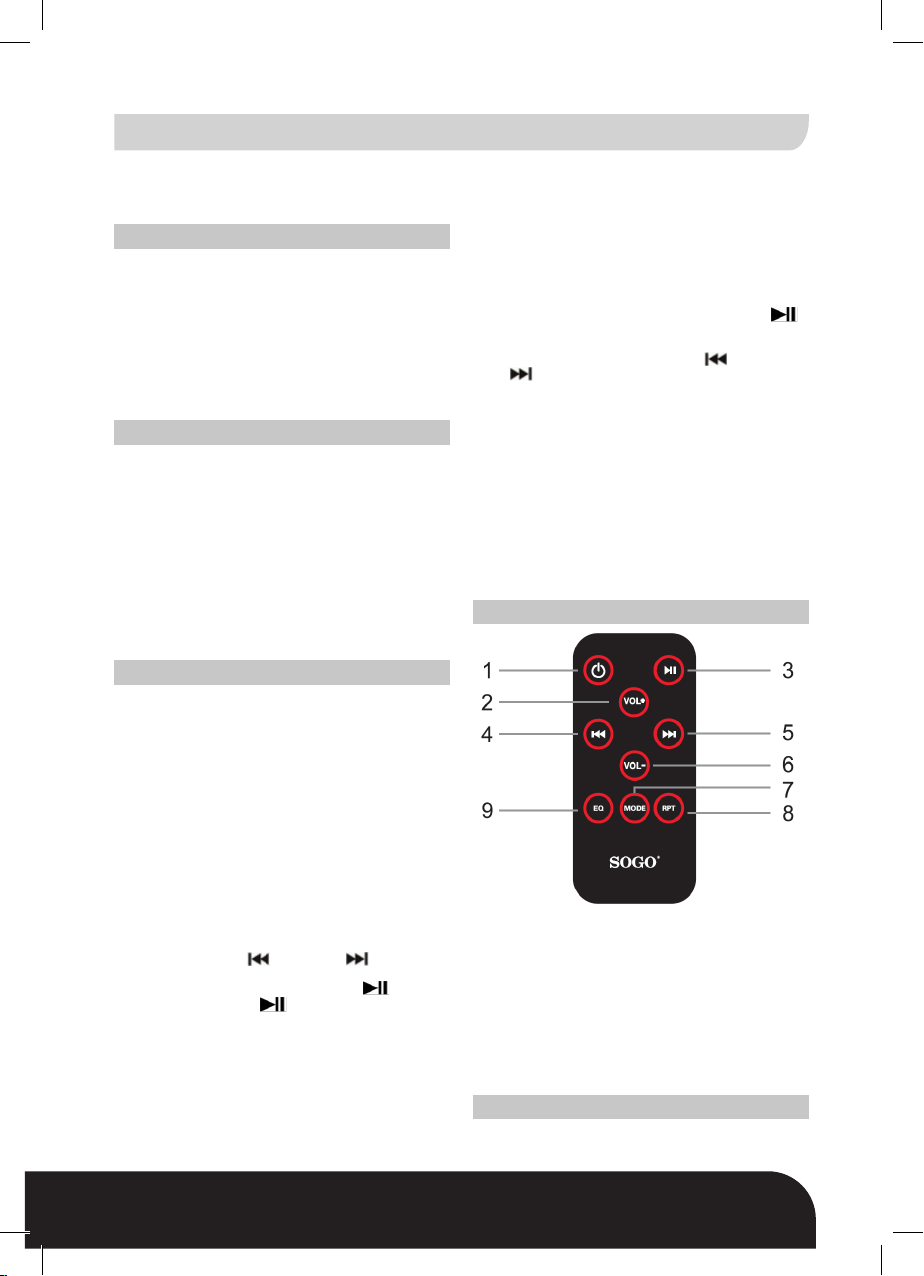
REMOTE-DESCRIPTION OF PARTS
1. Power Button
2. Volume Up
3. Play or pause, (scan FM button)
4. Back or Previous Song (back FM Channel)
5. Next Song (next FM Channel)
6. Volume Down
7. Mode (Change function button)
8. Repeat (To play the same song again)
9. EQ (To enjoy various sound effects)
CHARGING INSTRUCTIONS
1. Use the charging cable to connect the
speaker to a PC or other charging device to
4
Page 5
BQS
Best Quality SOGO
Mejor Calidad SOGO
español english
begin charging the device. The red indicator
light will be on as the unit is charging
2. Charge the speaker for 3-8 hours
NOTE: Charging time should never exceed
8 hours.
1. Do not install this equipment in a conned
or building-in space such as a book case
or similar unit, and remain a well ventilation
conditions at open site. The ventilation should
not be impeded by covering the ventilation
openings with items such as newspaper,
table-cloths, curtains etc.
2. WARNING: The batteries (battery pack or
batteries installed) shall not be exposed to
excessive heat such as sunshine, re or the
like.
3. Correct Disposal of this product. This
marking indicates that this product should
not be disposed with other household wastes
throughout the EU. To prevent possible
harm to the environment or human health
from uncontrolled waste disposal, recycle it
responsibly to promote the
sustainable reuse of
material resources. To
return your used device,
please use the return and
collection systems or
contact the retailer where
the product was purchased.
They can take this product
for environmental safe recycling
4. CAUTION: Danger of explosion if battery is
incorrectly replaced. Replace only with the
same or equivalent type.
Imported by:
Samini Europe S.L
CIF: B91954099
Spain
Made in P.R.C
5
Page 6
español english
“Eliminacion de Residuos de Equipos Eléctricos y
Electrónicos por Parte de Usuarios Particulares en
la Union Europea”
Este símbolo en el producto o en su envase indica que no debe eliminarse junto con los
desperdicios generales de la casa. Es responsabilidad del usuario eliminar los residuos
de este tipo depositándolos en un “punto limpio” para el reciclado de residuos eléctricos y
electrónicos. La recogida y el reciclado selectivos de los residuos de aparatos eléctricos en
el momento de su eliminación contribuirán a conservar los recursos naturales y a garantizar
el reciclado de estos residuos de forma que se proteja el medio ambiente y la salud. Para
obtener más información sobre los puntos de recogida de residuos eléctricos y electrónicos
para reciclado, póngase en contacto con su ayuntamiento, con el servicio de eliminación de
residuos domésticos o con el establecimiento en el que adquirió el producto.
6
Page 7
BQS
Best Quality SOGO
Mejor Calidad SOGO
español english
“The Disposal of Electrical and Electronic Equipment Waste
Products on the part of Final users in The European Union”
This symbol on the product or on the container indicates that this product cannot be
eliminated with the general waste. The user is responsible for eliminating this kind of
waste by throwing them away at a “recycling point” specically for electrical and electronic
waste. Selective collection and electrical equipment recycling contribute to preserve natural
resources and warrant waste recycling to protect environment and health. In order to receive
further information about electrical and electronic waste collecting and recycling, contact
your Local Council, the service of household waste or the establishment where the product
was acquired.”
7
Page 8
ref. SS-8444
BQS
Best Quality SOGO
Mejor Calidad SOGO
 Loading...