

Page 1

español english
manual de instrucciones
instructions for use
Altavoz portátil
Bluetooth
Portable Bluetooth
Speaker
BQS
Best Quality SOGO
Mejor Calidad SOGO
ref. SS-8441
1
Page 2

Modelo: SS-8441
Respuesta de frecuencia: 80 -16.000HZ
Tensión de funcionamiento: 2 V
Modo de Bluetooth
Los sistemas de apoyo: dispositivos de audio
con funciones Bluetooth, como un PC, teléfonos
celulares, MP3, etc.
Protocolo Bluetooth
Estándares: Bluetooth V 2.1 + EDR
Receptor (Rango): 10m / 360°
Frecuencia de la portadora: 2402MHz,
2480MHz
Respuesta de frecuencia: 100 Hz - 18KHz
SNR: ≥86dB
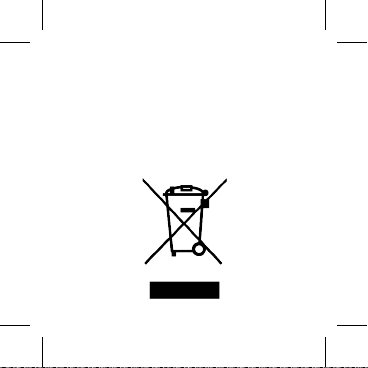
Tiempo de trabajo sucesivos:
Alrededor del 2 - 3H (según la función a la que
se utiliza)
Tiempo de espera: Por encima de 150 horas
Perl: HSP, HFP, A2DP y AVRCP.
Modo de Tarjeta TF
Compatible con tarjetas de memoria: Tarjeta TF
de 32 GB (MICRO SD)
Descripcion: Altavoz inalámbrico bluetooth
ESPECIFICACIONES GENERALES
Tamaño del altavoz: 60 * 50 mm
Peso: 220 g (sin embalaje)
Interfaz de cargar la Batería: Mini USB
Batería: 3.7V/ 300mAh
Parámetro Altavoz
Diámetro del altavoz: Φ60mm
Impedancia: 4 Ω
S. P. L .0dB S.P.L a 1KHz
Potencia nominal: 2 mW
Capacidad total: 3mW
Respuesta de frecuencia: 100Hz-18KHz
Micrófono parámetro
Unidad de micrófono: Φp4 * 1,5 mm
Dirección: omnidireccional
S. P. L de Mic: -36± 3dB
Impedancia del micrófono: ≤ 2V , 2.2kΩ
2 español english
Page 3

español english
Respuesta de frecuencia: 80 -16.000HZ
Tensión de funcionamiento: 2 V
Modo de Bluetooth
Los sistemas de apoyo: dispositivos de audio
con funciones Bluetooth, como un PC, teléfonos
celulares, MP3, etc.
Protocolo Bluetooth
Estándares: Bluetooth V 2.1 + EDR
Receptor (Rango): 10m / 360°
Frecuencia de la portadora: 2402MHz,
2480MHz
Respuesta de frecuencia: 100 Hz - 18KHz
SNR: ≥86dB
Tiempo de trabajo sucesivos:
Alrededor del 2 - 3H (según la función a la que
se utiliza)
Tiempo de espera: Por encima de 150 horas
Perl: HSP, HFP, A2DP y AVRCP.
Modo de Tarjeta TF
Compatible con tarjetas de memoria: Tarjeta TF
de 32 GB (MICRO SD)
3
Page 4

Formato de música: MP3, WMA y WAV
CONOCER EL ALTAVOZ
Respuesta de frecuencia: 100Hz-18KHz
SNR: -86db
Tiempo de trabajo sucesivo: Por encima de 3
horas
Tiempo de espera: Por encima de 20 horas
FUENTE DE ALIMENTACIÓN:
El altavoz puede funcionar con una batería
recargable integrada.
Para recargar la batería integrada conectar el
cable USB mini suministrada con el PC
El indicador de alimentación (rojo) se enciende.
Se tarda 2,5 horas para una carga completa.
SECUENCIA DE
CAMBIO DEL MODO
4 español english
Page 5

español english
CONOCER EL ALTAVOZ
1. Botón de encendido
2. Conmutador - Tres
Dirección: tres funciones
A. Mover hacia derecha:
Volumen + / música
siguiente
B. Mover hacia izquierda:
Volumen - / música
anterior
C. Pulse hacia interior:
Pausa / Reproducir
/ cambio de modo
(Bluetooth, Tarjeta TF,
USB y Entrada de línea)
3. Ranura Micro USB
4. Ranura USB
5. Ranura AUX IN
6. Micrófono
7. Ranura para tarjeta TF
5
Page 6

MODO DE BLUETOOTH:
CONTESTADOR TELEFÓNICO Y MARCAR
1. Para contestar la llamada entrante, pulse el
botón PLAY para responder a la llamada.
2. Pulse otra vez el botón PLAY para colgar la
llamada.
3. Si no desea responder a la llamada, pulse el
botón de reproducción durante 2 segundos para
cancelar la llamada.
4. Pulse y mantengas pulsado el botón de PLAY
para llamar a la última llamada saliente.
MODO DE TARJETA TF
1. Cuando se enciende la unidad con tarjeta TF
insertada, el altavoz entra en modo de tarjeta
TF (si el USB no está conectado).
2. Si el USB está conectado, desconecte el
USB o pulse el botón PLAY para 2 segundos a
acceder modo tarjeta TF.
3. Una vez que usted entra en el modo de
tarjeta TF, la primera canción de la tarjeta
empezará a reproducir automáticamente.
4. Puede controlar el volumen con el botón de
1. Cuando se enciende la unidad, entra en
modo Bluetooth (si el AUX IN, TF tarjeta USB y
no están conectados).
2. Si alguno de los AUX, tarjeta TF y USB esté
conectado, pulse y mantengas pulsado el botón
PLAY para cambiar de modo. Seguir cambiando
hasta que se entras en el modo Bluetooth
3. Una vez que está en el modo de Bluetooth, la
luz del indicador (azul) comienza a parpadear.
4. Active la función Bluetooth del dispositivo
(Movil, Ordenador o Tablet PC)
5. Busque y seleccione altavoz Bluetooth
“SOGO SS-8441” para emparejar. Una
vez emparejados, se escucha del altavoz
“conectado”. En algunos dispositivos hace falta
introducir la contraseña “ 0000” para emparejar.
6. Una vez emparejado, el altavoz está
preparado para reproducir la música del
dispositivo.
7. Apagar el altavoz si no lo utiliza para ahorrar
la energía de la batería.
6 español english
Page 7

español english
CONTESTADOR TELEFÓNICO Y MARCAR
1. Para contestar la llamada entrante, pulse el
botón PLAY para responder a la llamada.
2. Pulse otra vez el botón PLAY para colgar la
llamada.
3. Si no desea responder a la llamada, pulse el
botón de reproducción durante 2 segundos para
cancelar la llamada.
4. Pulse y mantengas pulsado el botón de PLAY
para llamar a la última llamada saliente.
MODO DE TARJETA TF
1. Cuando se enciende la unidad con tarjeta TF
insertada, el altavoz entra en modo de tarjeta
TF (si el USB no está conectado).
2. Si el USB está conectado, desconecte el
USB o pulse el botón PLAY para 2 segundos a
acceder modo tarjeta TF.
3. Una vez que usted entra en el modo de
tarjeta TF, la primera canción de la tarjeta
empezará a reproducir automáticamente.
4. Puede controlar el volumen con el botón de
7
Page 8

Tres Direcciones. Mueva el botón de alternar
izquierda o la derecha para cambiar la pista.
5. Formatos soportados: WMA / MP3 / WAV.
EN MODO LÍNEA
1. Cuando se enciende la unidad con cable de
AUX IN insertado, entra en el modo AUX IN (si
la tarjeta TF o USB no está conectado).
2. Si la tarjeta TF o USB está conectado,
desconecte los dos o a largo pulse el botón
PLAY para cambiar el modo de AUX IN.
3. Una vez que usted entra en el modo
AUX IN, el altavoz empezará a reproducir
automáticamente la canción de otro dispositivo
como el teléfono, mp3, mp4 y al que el otro lado
del cable está conectado.
4. Puede controlar el volumen con el botón de
tres direcciones. Mueva el botón a izquierda o
derecha y mantener durante unos segundos
para ajustar el volumen.
5. Si no se obtiene un sonido incluso si el
volumen de los altavoces es alto, por favor
compruebe el volumen del otro dispositivo
izquierda o derecha y mantener durante unos
segundos para ajustar el volumen.
5. Puede cambiar la pista de música utilizando
el botón de tres direcciones. Sólo hacia la
izquierda o la derecha para cambiar la pista.
6. Formatos soportados: WMA / MP3 / WAV.
MODO USB
1. Cuando se enciende la unidad con USB
insertado, entra en modo USB. Si está en
cualquier otro modo, la conexión USB cambiará
automáticamente al modo USB.
2. Una vez que entra en el modo USB, la
primera canción de la tarjeta empezará a
reproducir automáticamente.
3. Puede controlar el volumen con el botón de
tres direcciones. Mueva el botón de alternar
izquierda o derecha y mantener durante unos
segundos para ajustar el volumen.
4. Puede cambiar la pista de música utilizando
el botón de tres direcciones. Sólo hacia la
8 español english
Page 9

español english
izquierda o la derecha para cambiar la pista.
5. Formatos soportados: WMA / MP3 / WAV.
EN MODO LÍNEA
1. Cuando se enciende la unidad con cable de
AUX IN insertado, entra en el modo AUX IN (si
la tarjeta TF o USB no está conectado).
2. Si la tarjeta TF o USB está conectado,
desconecte los dos o a largo pulse el botón
PLAY para cambiar el modo de AUX IN.
3. Una vez que usted entra en el modo
AUX IN, el altavoz empezará a reproducir
automáticamente la canción de otro dispositivo
como el teléfono, mp3, mp4 y al que el otro lado
del cable está conectado.
4. Puede controlar el volumen con el botón de
tres direcciones. Mueva el botón a izquierda o
derecha y mantener durante unos segundos
para ajustar el volumen.
5. Si no se obtiene un sonido incluso si el
volumen de los altavoces es alto, por favor
compruebe el volumen del otro dispositivo
9
Page 10

EN MODO RADIO FM
1. Mantenga pulsado “
modo de radio FM. (Antes de la búsqueda,
por favor, inserte el cable en AUX para la
antena en el lugar abierto)
2. Pulse el botón “
búsqueda automática, el altavoz Bluetooth
almacenará automáticamente la emisora de
radio FM que ya ha sido buscado.
10 español english
“ para cambiar al
“ para entrar en la
Page 11
español english
3. Pulse el botón “ “, para elegir el
canal de radio deseada.
4. Mantenga pulsado “ “ para volver al
modo Bluetooth.
11
Page 12

conectado (el fuente de música).
Nota: Por favor no intente reparar el producto
usted mismo en caso de cualquier otro
problema de lo contrario, la garantía del
producto se considerará nulo.
Accesorios:
Manual del usuario.
Certicado de garantía.
Cable Micro USB.
Cable de audio de 3,5 mm
Problema
No se enciende
No hay sonido
No se escucha
el sonido de los
altavoces
12 español english
Solución
Recargue el altavoz
Bluetooth
Ajuste el volumen del sonido
de su dispositivo Bluetooth
Por favor, asegúrese de que
el dispositivo Bluetooth está
en el rango efectivo.
Por favor, comprobar
el origen de audio
seleccionado es el correcto
Por favor, reinicie el altavoz
Page 13

español english
Nota: Por favor no intente reparar el producto
usted mismo en caso de cualquier otro
problema de lo contrario, la garantía del
producto se considerará nulo.
Accesorios:
Manual del usuario.
Certicado de garantía.
Cable Micro USB.
Cable de audio de 3,5 mm
13
Page 14

Model: SS-8441
Impedance of Mic: ≤2V, 2.2kΩ
Frequency Response: 80-16,000HZ
Operating voltage: 2V
Bluetooth mode
Support systems: Audio devices with Bluetooth
functions such as PC, cell phones, MP3, etc.
Bluetooth protocol
Standards: Bluetooth V2.1 RDA SU5850
Receiver range: 10m / 360°
Carrier frequency: 2402MHz - 2480MHz
Frequency response: 100Hz – 18KHz
SNR: ≥86dB
Successive working time:
Around 2 - 3H (Depending the function being
used)
Standby time: Above 20 hours
Prole: HSP, HFP, A2DP & AVRCP.
TF Card mode
Support memory card: Micro SD card Capacity
of 32 GB
Description: Portable Speaker Bluetooth
GENERAL SPECIFICATIONS
Speaker size: 60*50 mm
Weight: 220g (without packing)
Charging interface: Mini USB
Battery: 3.7V / 300mAh
Speaker parameter
Speaker diameter: Φ60mm
Impedance: 4Ω
S.P.L .0dB S.P.L at 1KHz
Rated power: 2mW
Aggregate capability: 3mW
Frequency Response: 100Hz-18KHz
Microphone parameter
Microphone Unit: Φp4*1.5mm
Directivity: Omni direction
S.P.L of Mic: -36±3dB
14 español english
Page 15

español english
Impedance of Mic: ≤2V, 2.2kΩ
Frequency Response: 80-16,000HZ
Operating voltage: 2V
Bluetooth mode
Support systems: Audio devices with Bluetooth
functions such as PC, cell phones, MP3, etc.
Bluetooth protocol
Standards: Bluetooth V2.1 RDA SU5850
Receiver range: 10m / 360°
Carrier frequency: 2402MHz - 2480MHz
Frequency response: 100Hz – 18KHz
SNR: ≥86dB
Successive working time:
Around 2 - 3H (Depending the function being
used)
Standby time: Above 20 hours
Prole: HSP, HFP, A2DP & AVRCP.
TF Card mode
Support memory card: Micro SD card Capacity
of 32 GB
15
Page 16
Support music format: MP3, WMA y WAV
KNOW YOUR SPEAKER
Frequency response: 100Hz-18KHz
SNR: -86db
Successive working time: Above 3 hours
Standby time: Above 20 hours
POWER SUPPLY:
The Speaker can operate on built-in
rechargeable battery.
To recharge the built-in battery connect mini
USB socket with PC through supplied USB
cable
The power indicator (red) turns on.
Its takes 2.5 hours for a complete charge.
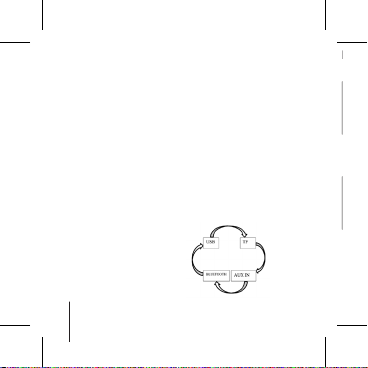
SEQUENCE OF
MODE CHANGING
16 español english
Page 17
español english
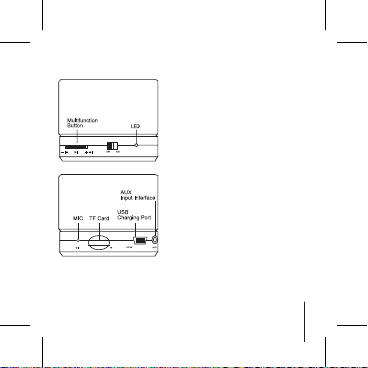
KNOW YOUR SPEAKER
1. Power button
2. Toggle switch - Three
Direction – Three
Functions
a. Move right: Volume + /
Next music
b. Move left: Volume - /
Next music
c. Press it Inside: Pause
/ Play / Mode change
(Bluetooth, TF Card, USB
and Line In)
3. Micro USB slot
4. USB slot
5. Line in slot
6. Microphone
7. TF card slot
17
Page 18

BLUETOOTH MODE:
TELEPHONE ANSWERING AND DIALING
1. When call comes in, press the PLAY button to
answer the call.
2. Press the PLAY button again to hang up
the call.
3. If you don’t want to answer the call, press the
PLAY button for 2 seconds to cancel the call.
4. Long press the PLAY button to call the last
outgoing call.
TF CARD MODE
1. When you turn on the unit with TF card
inserted, it enters into TF card mode (if USB is
not connected).
2. If USB is connected, either disconnect the
USB or long press the PLAY button to enter TF
card mode.
3. Once you enter the TF card mode, the rst
song in the card will start playing automatically.
4. You can control the volume using the toggle
button. Move the toggle button left or right and
maintain for few seconds to adjust the volume.
1. When you turn on the unit, it enters into
Bluetooth mode (if line IN, TF card and USB are
not connected).
2. If any of the line IN, TF card and USB is
connected, you need to long press the PLAY
button to change the mode. Keep changing
until you enter Bluetooth mode
3. Once you are in Bluetooth mode, the indicator
light (blue) starts ashing.
4. Turn on Bluetooth function of your device
(Phone, Computer or Tablet PC)
5. Search and select Bluetooth speaker “SOGO
SS-8441” to pair. Once paired, you will hear
from speaker “connected”. From some devices
you need to input password “0000” to pair.
6. Once paired, the speaker is ready to play
music of your device.
7. Turn off the speaker if you don’t use it to save
battery.
18 español english
Page 19

español english
TELEPHONE ANSWERING AND DIALING
1. When call comes in, press the PLAY button to
answer the call.
2. Press the PLAY button again to hang up
the call.
3. If you don’t want to answer the call, press the
PLAY button for 2 seconds to cancel the call.
4. Long press the PLAY button to call the last
outgoing call.
TF CARD MODE
1. When you turn on the unit with TF card
inserted, it enters into TF card mode (if USB is
not connected).
2. If USB is connected, either disconnect the
USB or long press the PLAY button to enter TF
card mode.
3. Once you enter the TF card mode, the rst
song in the card will start playing automatically.
4. You can control the volume using the toggle
button. Move the toggle button left or right and
maintain for few seconds to adjust the volume.
19
Page 20

5. You can change the music track using the
LINE IN MODE
1. When you turn on the unit with LINE IN cable
inserted, it enters into LINE IN mode (if TF card
or USB is not connected).
2. If TF card or USB is connected, either
disconnect the both or long press the PLAY
button to change the mode to LINE IN.
3. Once you enter the LINE IN mode, the
speaker will start playing automatically the
song of the other device like Phone, mp3, mp4
to which the other side of LINE IN cable is
connected.
4. You can control the volume using the toggle
button. Move the toggle button left or right and
maintain for few seconds to adjust the volume.
5. If you don’t get sound even if the volume of
the speaker is full, please check the volume of
the other device.
toggle button. Just move it left or right to
change the track.
6. Formats supported: WMA / MP3 / WAV.
USB MODE
1. When you turn on the unit with USB inserted,
it enters into USB mode. If you are in any other
mode, connecting USB will automatically switch
the speaker to USB mode.
2. Once you enter the USB mode, the rst song
in the card will start playing automatically.
3. You can control the volume using the toggle
button. Move the toggle button left or right and
maintain for few seconds to adjust the volume.
4. You can change the music track using the
toggle button. Just move it left or right to
change the track.
5. Formats supported: WMA / MP3 / WAV.
20 español english
Page 21

español english
LINE IN MODE
1. When you turn on the unit with LINE IN cable
inserted, it enters into LINE IN mode (if TF card
or USB is not connected).
2. If TF card or USB is connected, either
disconnect the both or long press the PLAY
button to change the mode to LINE IN.
3. Once you enter the LINE IN mode, the
speaker will start playing automatically the
song of the other device like Phone, mp3, mp4
to which the other side of LINE IN cable is
connected.
4. You can control the volume using the toggle
button. Move the toggle button left or right and
maintain for few seconds to adjust the volume.
5. If you don’t get sound even if the volume of
the speaker is full, please check the volume of
the other device.
21
Page 22
FM RADIO MODE
1. Long press “
radio mode. (before searching, please insert
the line-in cable into AUX for antenna in the
open place)
2. Press “
search, the Bluetooth speaker will
automatically store the FM radio station
which has been already searched.
22 español english
“ to change to the FM
“ to enter the automatic
Page 23
español english
3. Press “ “, to choose the desired
radio channel.
4. Long press “ “ to return to the
Bluetooth mode.
23
Page 24

Note: Please Do not try to repair the product by
yourself in case of any other problem otherwise
the product warranty would be considered as
void.
Accessories:
User Manual
Warranty Card
Micro USB cable
3.5mm audio cable
Problem
No Power
No Sound
No Sound from
Speakers
24 español english
Solution
Please recharge the
Bluetooth speaker
Please adjust the sound
volume of your Bluetooth
device
Please make sure your
Bluetooth device is in the
effective range.
Please check the selected
audio source is correct
Please reboot the speaker
Page 25

español english
Note: Please Do not try to repair the product by
yourself in case of any other problem otherwise
the product warranty would be considered as
void.
Accessories:
User Manual
Warranty Card
Micro USB cable
3.5mm audio cable
25
Page 26
DECLARACIÓN DE CONFORMIDAD
Este aparato cumple con la Directiva 2014/35/
EU de Baja Tensión, con la Directiva 2014/30/
EU de Compatibilidad Electromagnética, con
la Directiva 2011/65/EU sobre restricciones
a la utilización de determinadas sustancias
peligrosas en aparatos eléctricos y electrónicos
y con la Directiva 2009/125/EC sobre los
requisitos de diseño ecológico aplicable a los
productos relacionados con la energía.
Page 27
DECLARATION OF CONFORMITY
This device complies with Directive 2014/35/
EU, Low Voltage Directive 2014/30/EU
Electromagnetic Compatibility with Directive
2011/65/EU on the restriction of the use of
certain hazardous substances in electrical and
electronic equipment and Directive 2009/125/
EC on the eco-design requirements applicable to
energy-related products.
Page 28
Este símbolo signica que, si desea deshacerse
This symbol means that in case you wish to
dispose of the product once its working life has
ended, take it to an authorised waste agent for
the selective collection of waste electrical and
electronic equipment (WEEE)
del producto, una vez transcurrida la vida
del mismo, debe depositarlo por los medios
adecuados a manos de un gestor de residuos
autorizado para la recogida selectiva de
Residuos de Aparatos Eléctricos y Electrónicos
(RAEE).
Page 29
This symbol means that in case you wish to
dispose of the product once its working life has
ended, take it to an authorised waste agent for
the selective collection of waste electrical and
electronic equipment (WEEE)
Page 30

Importado por:
Sanysan Appliances S.L,
NIF: B98753056,
C/ Barcas 2, 2
46002 Valencia, España
Producto fabricado en P.R.C - Diseñado
por SOGO basada en las normas de
calidad europeas
Servicio postventa:
www.sogosat.com
[email protected]
0034 902 222 161
Page 31

Imported by:
Sanysan Appliances S.L,
NIF: B98753056,
C/ Barcas 2, 2
46002 Valencia, Spain
Product made in P.R.C. –
Designed by SOGO based on
the European Quality Standards
Customer Service:
www.sogosat.com
[email protected]
0034 902 222 161
Page 32
ref. SS-8441
BQS
Best Quality SOGO
Mejor Calidad SOGO
 Loading...