

Page 1
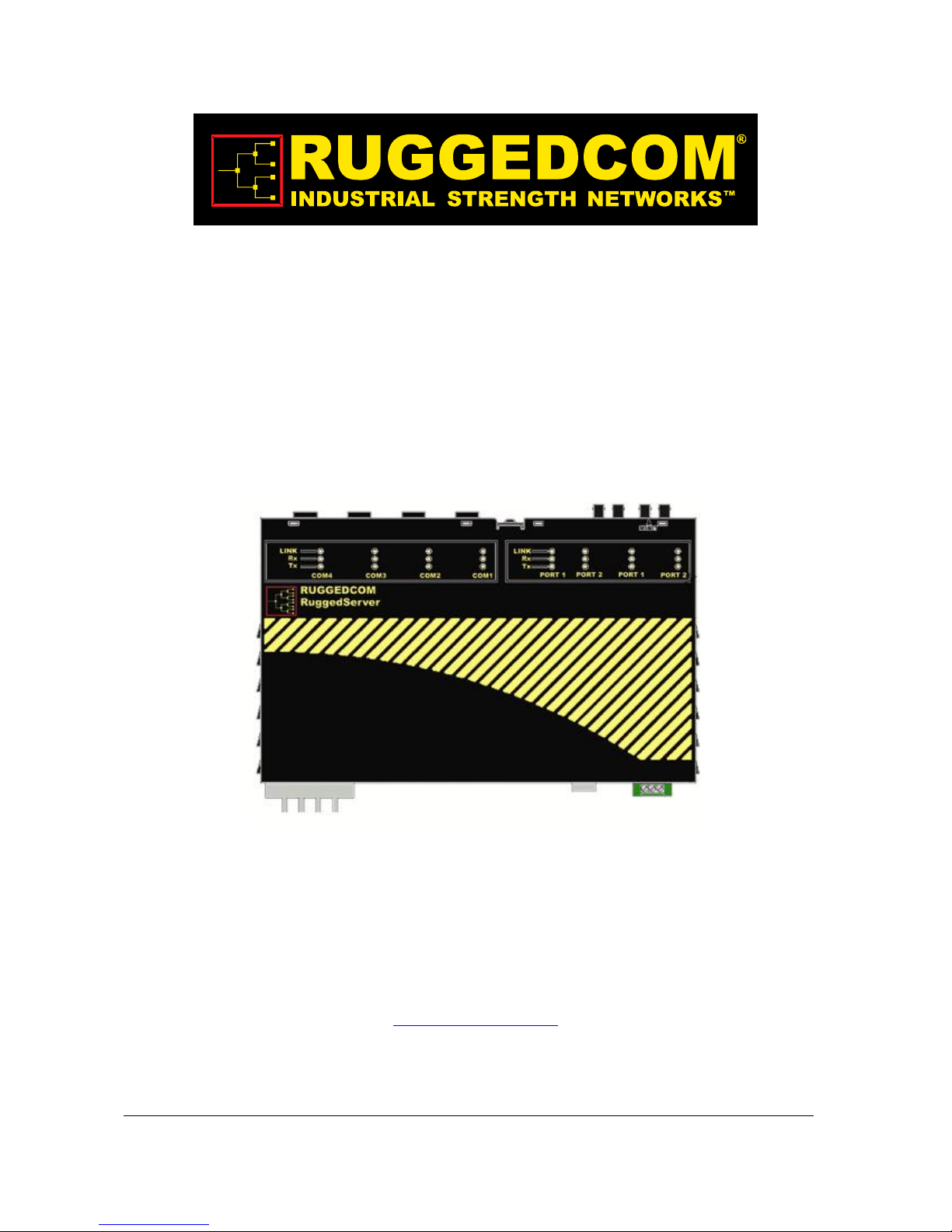
RuggedServer RS400 Family
4-Port Serial Device Server with Integrated 4-Port Managed
Ethernet Switch
Installation Guide
RuggedCom Inc. I 300 Applewood Cres., Unit 1, Concord, Ontario, Canada L4K 5C7
Tel: 905-856-5288 I Fax: 905-856-1995 I Toll Free: 1-888-264-0006
October 14, 2009
www.ruggedcom.com
Page 2

yright
Cop
COPYRIGHT © 2009 RuggedCom Inc. ALL RIGHTS RESERVED
Dissemination or reproduction of this document, or evaluation and communication of its
contents, is not authorized except where expressly permitted. Violations are liable for
damages. All rights reserved, particularly for the purposes of patent application or
trademark registration.
This document contains proprietary information, which is protected by copyright. All
rights are reserved. No part of this document may be photocopied, reproduced or
translated to another language without the prior written consent of RuggedCom Inc.
Disclaimer of liability
We have checked the contents of this manual against the hardware and software
described. However, deviations from the description cannot be completely ruled out.
RuggedCom shall not be liable for any errors or omissions contained herein or for
consequential damages in connection with the furnishing, performance, or use of this
material.
The information given in this document is reviewed regularly and any necessary
corrections will be included in subsequent editions. We appreciate any suggested
improvements. We reserve the right to make technical improvements without notice.
Registered Trademarks
®
RuggedServer™ is a trademark of RuggedCom Inc. RuggedSwitch
is a registered
trademark of RuggedCom Inc. Other designations in this manual might be trademarks
whose use by third parties for their own purposes would infringe the rights of the owner.
Contacting RuggedCom
Corporate Headquarters US Headquarters Europe Headquarters
RuggedCom Inc.
300 Applewood Cres., Unit 1
Concord, Ontario
Canada, L4K 5C7
Tel: (905) 856-5288
Fax: (905) 856-1995
Toll-free: 1 (888) 264-0006
RuggedCom
1930 Harrison St., Suite 209
Hollywood, Florida
USA, 33020
Tel: (954) 922-7938 x103
Fax: (954) 922-7984
Toll-free: 1 (888) 264-0006
RuggedCom
Unit 41, Aztec Centre,
Aztec West, Almondsbury, Bristol
United Kingdom BS32 4TD
Tel: +44 1454 203 404
Fax: +44 1454 203 403
Email: RuggedSales@RuggedCom.com
Technical Support
Toll Free (North America): 1 (866) 922-7975
International: +1 (905) 856-5288
Email: Support@RuggedCom.com
RuggedCom
®
Web: www.RuggedCom.com
2
RuggedServer™ RS400 Family Installation Guide rev109
Page 3

Federal Communications Commission Radio
Frequency Interference Statement
This equipment has been tested and found to comply with the limits for a Class A digital
device pursuant to Part 15 of the FCC Rules. These limits are designed to provide
reasonable protection against harmful interference when the equipment is operated in a
commercial environment. This equipment generates, uses and can radiate radio
frequency energy and, if not installed and used in accordance with the instruction
manual, may cause harmful interference to radio communications. Operation of this
equipment in a residential area is likely to cause harmful interference in which case the
user will be required to correct the interference at his expense.
Caution
This product contains a laser system and is classified as a “CLASS 1 LASER
PRODUCT”.
Use of controls or adjustments or performance of procedures other than those
specified herein may result in hazardous radiation exposure. This product contains no
user serviceable parts. Attempted service by unauthorized personnel shall render all
warranties null and void.
Should this device require service see the “Warranty” section of this installation guide.
Important
This unit should be installed in a restricted access location where access can only be
gained by service personnel or users who have been instructed about the reasons for
the restrictions applied to the location and about any precautions that shall be taken;
and access is through the use of a tool or lock and key, or other means of security,
and is controlled by the authority responsible for the location.
RuggedCo
m
®
3
RuggedServer™ RS400 Family Installation Guide rev109
Page 4

Table of Contents
Table of Contents
Federal Communications Commission Radio Frequency Interference Statement......................... 3
Table of Contents ............................................................................................................................ 4
1 Product Overview.................................................................................................................... 5
1.1 Functional Overview..........................................................................................5
1.2 Feature Highlights.............................................................................................5
1.3 RS400 Series Description.................................................................................7
1.1.1 RS400........................................................................................................7
1.1.2 RS401........................................................................................................9
2 Installation............................................................................................................................. 11
2.1 Mounting..........................................................................................................11
2.1.1 RS400......................................................................................................11
2.1.2 RS401......................................................................................................12
2.2 Power Supply Wiring and Grounding ..............................................................13
2.2.1 Power Supply - AC Input.........................................................................14
2.2.2 Power Supply – DC Inputs ......................................................................14
2.3 HIPOT (Dielectric Strength) Testing................................................................15
2.4 Failsafe Relay Outputs....................................................................................16
2.5 RS232 Console Port Wiring ............................................................................17
2.6 Serial Ports......................................................................................................18
2.6.1 4 x RS232 via DB9..................................................................................19
2.6.2 4 x RS485 via Phoenix............................................................................20
2.6.3 4 x RS232/RS485/RS422 via DB9 ..........................................................21
2.6.4 4 x RS232/RS485/RS422 via RJ-45........................................................22
2.6.5 RS485 Wiring ..........................................................................................23
2.6.6 Serial Port Transient Protection...............................................................24
2.7 Ethernet Ports .................................................................................................25
2.7.1 RJ-45 Twisted-Pair Ports.........................................................................26
2.7.2 Ethernet Port Transient Protection..........................................................26
2.7.3 Fiber Optic Ports......................................................................................27
2.8 V.90 Modem Port (Optional)............................................................................28
3 Technical Specifications ....................................................................................................... 29
3.1 Operating Environment ...................................................................................29
3.2 Power Supply Specifications...........................................................................29
3.3 Failsafe Relay Specifications ..........................................................................30
3.4 Data Port Specifications..................................................................................30
3.5 Fiber Optical Specifications.............................................................................31
3.6 Type Test Specifications.................................................................................32
3.7 Physical Dimensions.......................................................................................33
3.7.1 RS400......................................................................................................33
3.7.2 RS401......................................................................................................35
4 Agency Approvals................................................................................................................. 36
5 Warranty................................................................................................................................ 36
RuggedCom
®
4
RuggedServer™ RS400 Family Installation Guide rev109
Page 5

Product Overview
1 Product Overview
1.1 Functional Overview
The RuggedServer RS400 Series is an industrially hardened, serial device server with
an integrated, fully managed, Ethernet switch, designed to operate reliably in electrically
harsh and climatically demanding environments. The RS400 Series consists of the
RS400 and RS401 which are functionally equivalent differing only mechanically in
shape. Featuring an integrated 4 port serial server, a 4 port managed Ethernet switch,
and an optional v.90 modem, the RS400 Series is able to interconnect multiple types of
intelligent electronic devices (IEDs) that have different methods of communications.
Using the RS400 Series results in fewer connectivity devices (which reduces overall
system costs) and extends the useful life of existing legacy IEDs (which minimizes
capital expenditure for new equipment).
The RS400 Series provides a high level of immunity to electromagnetic interference and
heavy electrical surges typical of environments found in electric utility substations,
factory floors or in curb side traffic control cabinets. The RS400 Series meets or exceeds
a wide range of industry standards including IEC61850, IEEE1613, IEC61000-6-2,
IEEE61800-3, and NEMA TS-2. The RS400 Series also features a wide operating
temperature range of -40°C to +85°C allowing it to be installed in virtually any location.
1.2 Feature Highlights
Serial device server
Fully compliant EIA/TIA RS485, RS422, RS232 serial ports
(software selectable) - DB9, RJ-45, Phoenix style connectors
Baud rates up to 230 kbps
Point-to-point and multi-point modes
Convert Modbus RTU to Modbus TCP
Supports multiple Modbus masters
Serial IP' port redirection software to support Personal Computer (PC)
applications statistics and built-in 'sniffer' for troubleshooting
Ethernet Ports
Integrated Ethernet Switch – up to 4 ports
High performance and throughput Ethernet switching
Fully IEEE 802.3, IEEE 802.3u, IEEE 802.3x compliance
Non-blocking, store and forward switching
10/100BaseTX, 10BaseFL, 100BaseFX options
Remote Dial Up Access
Integrated v.90 modem and PPP server
Provides remote access to serial devices and Ethernet LAN
RuggedRated™ for Reliability in Harsh Environments
Immunity to EMI and heavy electrical surges
o Meets IEEE 1613 (electric utility substations)
o Exceeds IEC 61850-3 (electric utility substations)
o Exceeds IEEE 61800-3 (variable speed drive systems)
RuggedCo
m
®
5
RuggedServer™ RS400 Family Installation Guide rev109
Page 6

Product Overview
o
Exceeds IEC 61000-6-2 (generic industrial)
o Exceeds NEMA TS-2 (traffic control equipment)
Fully independent 2kV (RMS) isolated serial ports
40°C to +85°C operating temperature (no fans)
8 AWG galvanized steel enclosure
Universal Power Supply Options
Fully integrated power supplies (no external adaptors)
Popular low-voltage DC ranges: 12, 24 and 48 VDC
Universal high-voltage range: 88-300 VDC or 85-264 VAC
CSA/UL 60950 safety approved to +85°C
Rugged Operating System (ROS™) Features
Simple plug and play operation - automatic learning,
negotiation, and crossover detection
Integrated Cyber Security features
RSTP (802.1w) and Enhanced Rapid Spanning Tree (eRSTP™) network
fault recovery (<5ms).Quality of Service (802.1p) for real-time traffic
VLAN (802.1q) with double tagging and GVRP support
IGMP Snooping for multicast filtering
Port Rate Limiting and Broadcast Storm Limiting
Port configuration, status, statistics, mirroring, security
Management Tools
Web-based, Telnet, CLI management interfaces
SNMP v1/v2/v3
Remote Monitoring (RMON)
Rich set of diagnostics with logging and alarms
RuggedCo
m
®
6
RuggedServer™ RS400 Family Installation Guide rev109
Page 7
Product Overview
1.3 RS400 Series Description
1.1.1 RS400
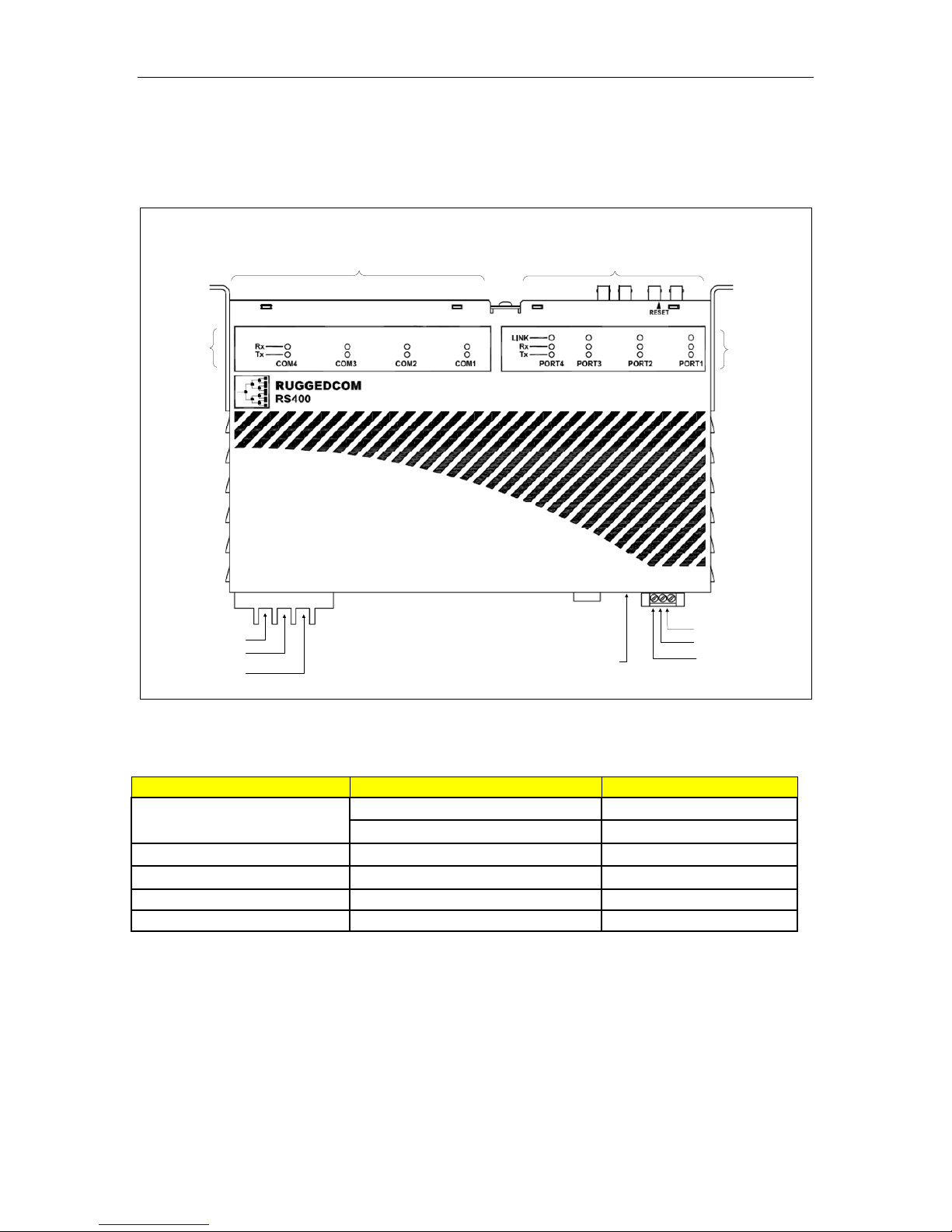
Serial Data Ports (RS232/RS485/RS422)
Serial Port
Indicators
DC (+) / AC (L)
DC (-) / AC (N)
Surge Ground
Integrated 4-Port Switch
RS232
Console Port
Optional V.90
Modem Port
Normally Open
Normally Closed
Figure 1: RS400 Top View
ITEM Activity Comments
LINK LED (Orange)
Blinking – Once per second Tx, Rx Activity
Solid Link Established
Tx LED (Orange) Blinking Tx (Transmit) Activity
Rx LED (Orange) Blinking Rx (Receive) Activity
POWER LED (Green) Solid Power On
Fault LED (Red) Solid Fault has occurred
Table 1: RS400 LED description
Ethernet Port
Indicators
Common
RuggedCo
m
®
7
RuggedServer™ RS400 Family Installation Guide rev109
Page 8
Product Overview
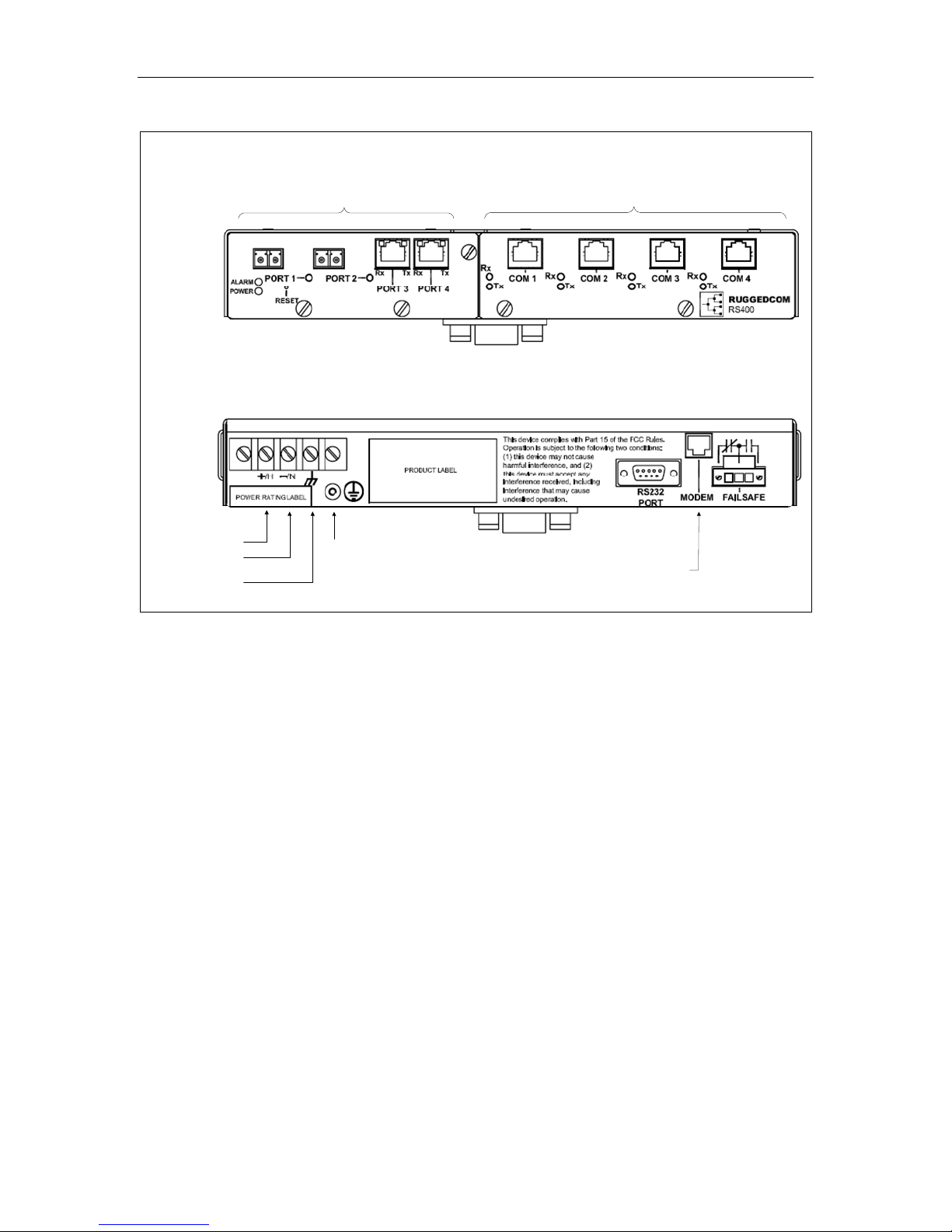
Front
Rear
Integrated 4-Port Switch
Serial Data Ports (RS232/RS485/RS422)
Din Rail Mounting
Bracket
DC (+) / AC (L)
DC (-) / AC (N)
Surge Ground
Safety Ground
Stud
Figure 2: RS400 Front and Rear View
RS232
Console Port
Optional V.90
Modem Port
Failsafe Relay
RuggedCo
m
®
8
RuggedServer™ RS400 Family Installation Guide rev109
Page 9
Product Overview
1.1.2 RS401
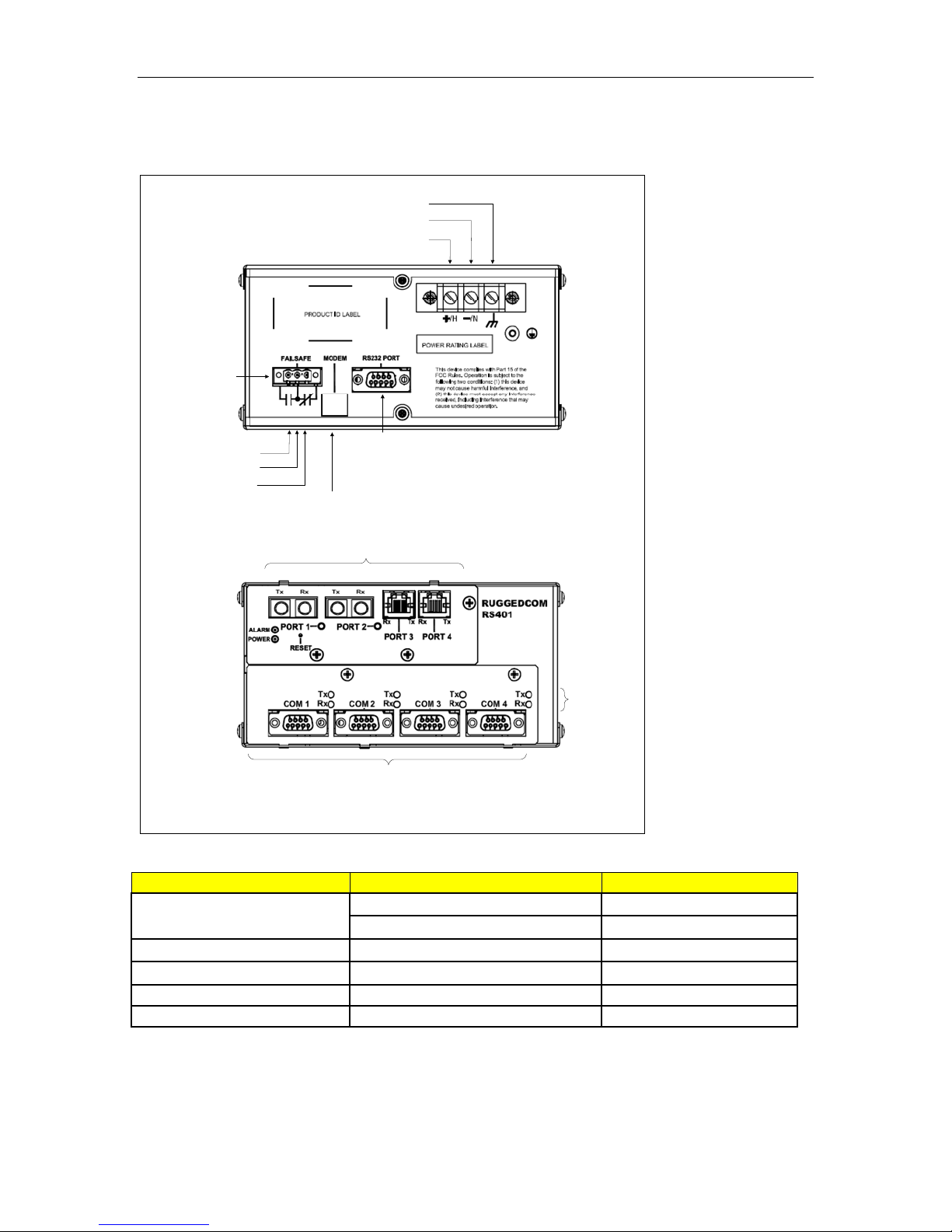
Top
Failsafe Relay
Normally Open
Common
Normally Closed
Bottom
Surge Ground
DC (-) / AC (N)
DC (+) / AC (L)
RS232
Console Port
Optional V.90
Modem Port
Integrated 4-Port Switch
Serial Port
Indicators
Serial Data Ports (RS232/RS485/RS422)
Figure 3: RS401 Top and Bottom View
ITEM Activity Comments
LINK LED (Orange)
Blinking – Once per second Tx, Rx Activity
Solid Link Established
Tx LED (Orange) Blinking Tx (Transmit) Activity
Rx LED (Orange) Blinking Rx (Receive) Activity
POWER LED (Green) Solid Power On
Fault LED (Red) Solid Fault has occurred
Table 2: RS401 LED Description
RuggedCo
m
®
9
RuggedServer™ RS400 Family Installation Guide rev109
Page 10
Product Overview
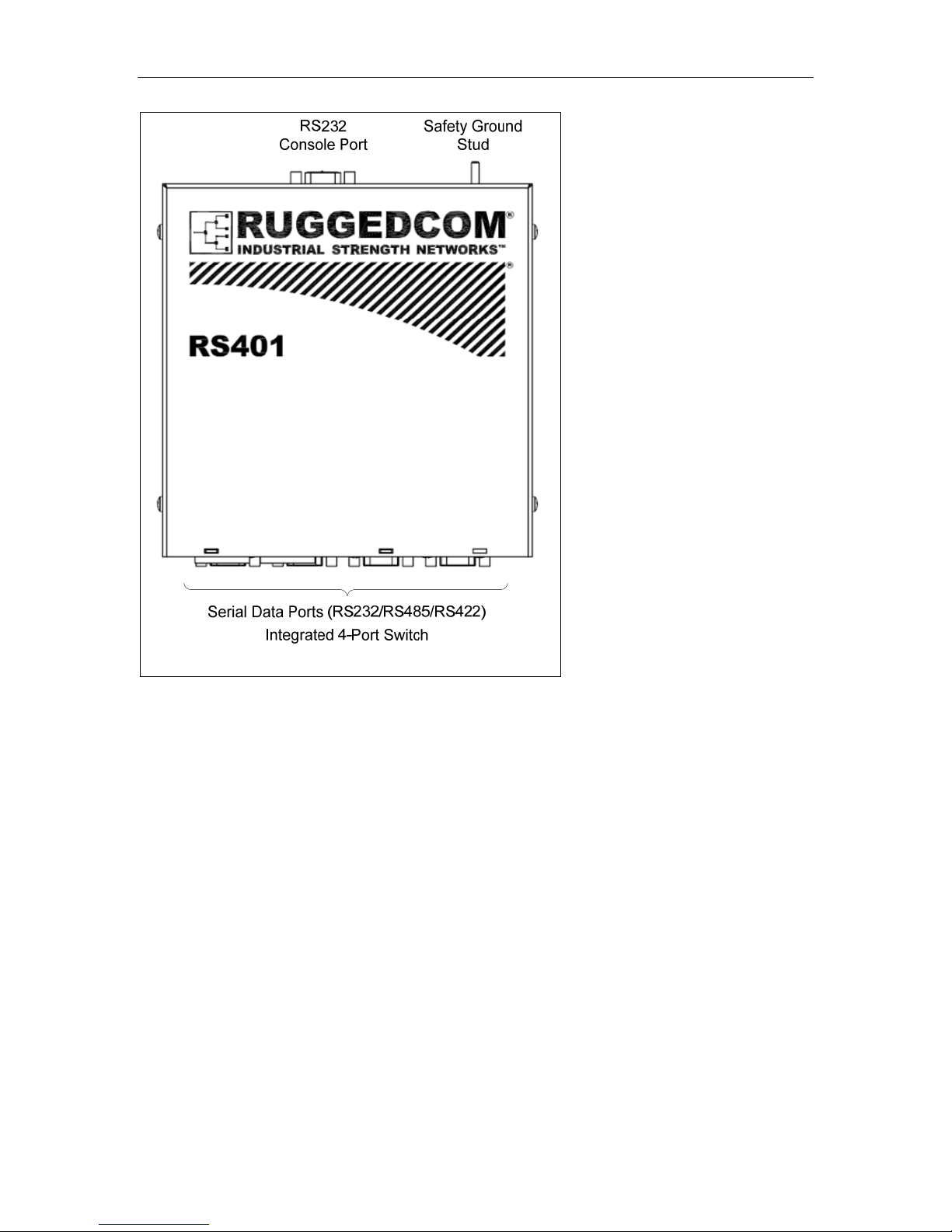
Figure 4: RS401 Front View
RuggedCo
m
®
10
RuggedServer™ RS400 Family Installation Guide rev109
Page 11
Installation
2 Installation
2.1 Mounting
2.1.1 RS400
Figure 5: RS400 Front & Side Panel/DIN Mounting
RuggedCo
m
®
11
RuggedServer™ RS400 Family Installation Guide rev109
Page 12

Installation
2.1.2 RS401
Figure 6: RS401 Front & Side Panel/DIN Mounting
12
RuggedServer™ RS400 Family Installation Guide rev109
RuggedCo
m
®
Page 13

Installation
2.2 Power Supply Wiring and Grounding
+/H = DC(+) / AC(Hot)
-/N = DC(-) / AC(Neutral)
Surge Ground
Figure 7: RS400 Series Power Supply Inputs
Safety Ground
Stud
The RS400 Series power supply inputs are connected as follows:
1. +/H = DC (+) / AC (Hot) is connected to the positive (+) terminal if the power
source is DC or to the (Hot) terminal if the power source is AC.
2. -/N = DC (-) / AC (Neutral) is connected to the negative (-) terminal if the power
source is DC or to the (Neutral) terminal if the power source is AC.
3. Surge Ground is connected to the Chassis Ground via a braided cable or other
appropriate grounding wire. Surge Ground is used as the ground conductor for all
surge and transient suppression circuitry internal to the RS400 Series.
4. Chassis Ground is connected to the Safety Ground terminal for AC inputs or the
equipment ground bus for DC inputs.
NOTES:
1) 88-300VDC Equipment: A 300VDC appropriately rated circuit breaker must be
installed.
2) 100-240VAC Equipment: A 250VAC appropriately rated circuit breaker must be
installed.
3) A circuit breaker is not required for 12, 24 or 48 VDC rated equipment
4) Power input terminals have reverse polarity protection for 12, 24 & 48 VDC rated
equipment.
5) Equipment must be installed according to the applicable country wiring codes.
RuggedCo
m
®
13
RuggedServer™ RS400 Family Installation Guide rev109
Page 14

Installation
2.2.1 Power Supply - AC Input
Figure 8: Power Supply – AC Input
2.2.2 Power Supply – DC Inputs
Figure 9: Power Supply – DC Inputs
RuggedCo
m
®
14
RuggedServer™ RS400 Family Installation Guide rev109
Page 15

Installation
2.3 HIPOT (Dielectric Strength) Testing
Units which are to be “HIPOT” tested in the field must have the braided ground cable(s)
disconnected as shown in Figure 2.4 during the HIPOT test. This is required in order to
prevent the transient/surge suppression circuitry, which is connected to Surge Ground,
from being activated during the HIPOT test.
HIPOT (Dielectric Strength) Testing
Disconnect Braided Cable during
HIPOT (dielectric strength) testing!
Braided Cable
Figure 10: HIPOT (Dielectric Strength) Testing
15
RuggedServer™ RS400 Family Installation Guide rev109
RuggedCo
m
®
Page 16

Installation
2.4 Failsafe Relay Outputs
The “Failsafe” output relay is provided to signal critical error conditions that may occur
on the RS400 Series. The contacts are energized upon power up of the unit and remain
energized until a critical error occurs. One common application for this output is to signal
an alarm if a power failure or removal of control power occurs.
Figure 11: Failsafe Output Relay
RuggedCo
m
®
16
RuggedServer™ RS400 Family Installation Guide rev109
Page 17

Installation
2.5 RS232 Console Port Wiring
The RS232 port is used for configuring the RS400 Series. A straight-through serial
cable with a DB-9 connector is required. There is no need to cross-over the TXD and
RXD signals from the PC side since this has been done internally as is shown below.
Pin Signal
1 No Connection
2 Transmit Data
3 Receive Data
4 No Connection
5 Ground
6 No Connection
7 No Connection
8 No Connection
9 No Connection
Figure 12: RS232 DB9 Female DCE pin-out
NOTE: This port is not intended to be a permanent connection and the cable shall be
less than 2m (6.5 ft) in length.
RuggedCo
m
®
17
RuggedServer™ RS400 Family Installation Guide rev109
Page 18

Installation
2.6 Serial Ports
The RS400 Series can be equipped with four RS232 DB9 ports, four RS485 Phoenix
ports, four RS232/RS485/RS422 DB9 ports or four RS232/RS485/RS422 RJ-45 ports.
When the RS400 Series is equipped with four RS232 DB9 ports it is physically
indistinguishable than when it is equipped with four RS232/RS485/RS422 DB9 ports.
Check the product label on the back of the unit or the ROS firmware and review the table
below in order to determine the type of serial ports on your RS400 Series. The italicized
letters in the order code represent options specific to your order.
Ports Order Code
4 x RS232 via DB9 RS40X-PS-M-E1E2-2-MP
4 x RS485 via Phoenix RS40X-PS-M-E1E2-4-MP
4 x RS232/RS485/RS422 via DB9 RS40X-PS-M-E1E2-3D-MP
4 x RS232/RS485/RS422 via RJ-45 RS40X-PS-M-E1E2-3R-MP
Figure 13: Serial Port Options
RuggedCo
m
®
18
RuggedServer™ RS400 Family Installation Guide rev109
Page 19

Installation
2.6.1 4 x RS232 via DB9
The figure below shows the RS400 when equipped with four RS232 DB9 ports.
Figure 14: RS400 equipped with four RS232 DB9 ports
When equipped with four RS232 ports, the RS400 Series offers a female Data
Communications Equipment (DCE) interface. When communicating with a Data
Terminal Equipment (DTE) device, such as a PC, a straight-through serial cable (3 pin or
9 pin) is required. When communicating with a DCE, such as another RS400, the RX
and TX must be ‘crossed-over’, for example, using a NULL modem cable. The RS232
pin-out is shown below.
Pin Signal
1 No Connection
2 Transmit Data
3 Receiv e Data
4 No Connection
5 COM (Isolated Ground)
6 No Connection
7 No Connection
8 No Connection
9 No Connection
Figure 15: DB9 Female DCE pin-out
RuggedCo
m
®
19
RuggedServer™ RS400 Family Installation Guide rev109
Page 20

Installation
2.6.2 4 x RS485 via Phoenix
The figure below shows the RS400 when equipped with four RS485 Phoenix ports.
Figure 16: RS400 equipped with four RS485 Phoenix ports
The Phoenix port pin-out is shown below.
Pin Signal
1 Positive
2 Negative
3 Common (Isolated Ground)
NOTE: On the unit Pin 3 is
marked as Gnd
Figure 17: Phoenix port pin-out
The RS485 serial ports are terminated by default from the factory. Termination provided
is AC Termination style 120 Ohm resistor in series with a 10nF capacitor. The following
table details the appropriate jumper configuration for each RS485 port.
Port Number
1 JP5 Removed Installed
2 JP6 Removed Installed
3 JP7 Removed Installed
4 JP8 Removed Installed
Table 2.7.2.1 RS485 termination options
Jumper #
Jumper Position
No Termination AC Termination
RuggedCo
m
®
20
RuggedServer™ RS400 Family Installation Guide rev109
Page 21

Installation
2.6.3 4 x RS232/RS485/RS422 via DB9
The figure below shows the RS400 when equipped with four RS232/RS485/RS422 DB9
ports.
Figure 18: RS400 equipped with four RS232/RS485/RS422 DB9 ports
Each port is individually selectable via software to be RS232, RS485 or RS422. The
DB9 port is below.
Figure 19: DB9 Female DCE Port pin-out
Pin RS232 Mode RS485 Mode RS422 Mode
1 CD - 2 TX TX/RX+ TX+
3 RX
-
RX+
4 DTR - 5 Common (Isolated Ground)
6 DSR - RX7 CTS TX/RX - TX8 RTS -
RI (No
9
Connection)
- -
Shield Chassis Ground
Table 3: DB9 Female DCE Port pin-out
NOTES:
1. No internal termination is provided.
2. Pins 1, 4, and 6 are connected internally. Pins 7 and 8 are connected internally. In
RS232 mode, these pins enter a high impedance state. A DTE that asserts DTR and
expects DSR or CD will operate correctly. A DTE that asserts RTS will see CTS
asserted, although the RuggedServer will not perform hardware flow control.
3. The Common terminals are optically isolated; however, there is transient voltage
protection circuitry between the Common terminals and chassis ground.
RuggedCo
m
®
21
RuggedServer™ RS400 Family Installation Guide rev109
Page 22

Installation
2.6.4 4 x RS232/RS485/RS422 via RJ-45
The figure below shows the RS400 when equipped with four RS232/RS485/RS422 RJ45 ports.
Figure 20: RS400 equipped with four RS232/RS485/RS422 RJ-45 ports
Each port is individually selectable via software to be RS232, RS485 or RS422. The RJ45 port is shown below.
Figure 21: RJ45 Port pin-out
Pin RS232 Mode RS485 Mode RS422 Mode
1 DSR - RX2 DCD - 3 DTR - 4 Common (Isolated Ground)
5 RX - RX+
6 TX TX/RX + TX +
7 CTS - 8 RTS TX/RX - TX -
Shield Chassis Ground
Table 4: RJ45 Port pin-out
NOTES:
1 No internal termination is provided.
2 Pins 1, 2, and 3 are connected internally. Pins 7 and 8 are connected internally. In
RS232 mode, these pins enter a high impedance state. A DTE that asserts DTR
and expects DSR or CD will operate correctly. A DTE that asserts RTS will see CTS
asserted, although the RuggedServer will not perform hardware flow control.
3 The Common terminals are optically isolated; however, there is transient voltage
protection circuitry between the Common terminals and chassis ground.
RuggedCo
m
®
22
RuggedServer™ RS400 Family Installation Guide rev109
Page 23

Installation
2.6.5 RS485 Wiring
Each RS485 port can communicate to multiple RS485 devices by daisy chaining devices
over a single twisted pair with transmit and receive signals on the same two wires (half
duplex). The following guidelines should be followed to ensure reliable continuous
communication:
1. To minimize the effects of ambient electrical noise, shielded cabling is
recommended.
2. The correct polarity must be observed throughout a single daisy chain.
3. The number of devices wired should not exceed 32, and total distance should be
less than 4000 feet (at 100 kbps).
4. The Common terminals should be connected to the common wire inside the
shield.
5. The shield should be connected to earth ground at a single point to avoid loop
currents
6. The twisted pair should be terminated at each end of the chain.
The figure below shows the recommended RS485 wiring.
Figure 22: Conceptual recommended RS485 wiring diagram
NOTES:
1. On RS400 Series units with Phoenix ports, the Common (Isolated Ground) port is
marked “Gnd”. See the Phoenix ports section for details.
2. On RS400 Series units with Phoenix ports, internal termination is provided. See
the Phoenix ports section for details.
3. On RS400 Series units with RS232/RS485/RS422 DB9 or RJ-45 ports then no
internal termination is provided. See the DB9 & RJ-45 port sections for details.
RuggedCo
m
®
23
RuggedServer™ RS400 Family Installation Guide rev109
Page 24

Installation
2.6.6 Serial Port Transient Protection
RuggedCom does not recommend the use of copper cabling of any length for critical
real-time substation automation applications. However, transient suppression circuitry is
present on all copper ports to protect against damage from electrical transients and to
ensure IEC 61850-3 and IEEE 1613 Class 1 conformance. This means that during the
transient event communications errors or interruptions may occur but recovery is
automatic.
RuggedCom also does not recommended to use these ports to interface to field devices
across distances which could produce high levels of ground potential rise, (i.e. greater
than 2500V) during line to ground fault conditions.
RuggedCo
m
®
24
RuggedServer™ RS400 Family Installation Guide rev109
Page 25

Installation
2.7 Ethernet Ports
Depending on the order code of the product, the RS400 Series can be equipped with
several different types of Ethernet ports. In order to determine the type of Ethernet ports
on your RS400 Series, review you order code (your order code is in the form RS40X-PSM-E1E2-SP-MP) and compare it to Table 2.8.1 below.
Code (E1 & E2
in your order
code)
00 No Ethernet ports
TX 10/100BaseTX RJ-45
FL 10FL Multimode ST, 820nm, 2km
MJ 100FX Multimode MTRJ
MC 100FX Multimode SC
MT 100FX Multimode ST
T2 100FX Singlemode ST, Standard 20km
L2 100FX Singlemode LC, Standard 20km
L5 100FX Singlemode LC, Intermediate Reach
L9 100FX Singlemode LC, Long Reach 90km
C2 100FX Singlemode SC, Standard 20km
C5 100FX Singlemode SC, Intermediate Reach
C9 100FX Singlemode SC, Long Reach 90km
Table 5: Ethernet Port Options
The following two figures show examples of the RS400 equipped with different Ethernet
ports.
Port
50km
50km
Figure 23: RS400 equipped with ST and RJ-45 Ethernet ports
Figure 24: RS400 equipped with LC and RJ-45 Ethernet ports
RuggedCo
m
®
25
RuggedServer™ RS400 Family Installation Guide rev109
Page 26

Installation
2.7.1 RJ-45 Twisted-Pair Ports
The RS400 Series can be equipped with a number of 10/100BaseTX ports that allow
connection to standard CAT-5 UTP cable with RJ-45 male connectors. These ports
have auto-crossover, auto-negotiation, and auto-polarity features. The RJ-45
receptacles used can accept and take advantage of screened (commonly known as
“shielded”) cabling. Figure 2.8.1.1 shows the RJ-45 port pin-out.
Pin Signal
1+Rx
2-Rx
3+Tx
4 No Connection
5 No Connection
6-Tx
7 No Connection
8 No Connection
Figure 25: RJ-45 Port pin-out
2.7.2 Ethernet Port Transient Protection
RuggedCom does not recommend the use of copper cabling of any length for critical
real-time substation automation applications. However, transient suppression circuitry is
present on all copper ports to protect against damage from electrical transients and to
ensure IEC 61850-3 and IEEE 1613 Class 1 conformance. This means that during the
transient event communications errors or interruptions may occur but recovery is
automatic.
RuggedCom also does not recommended to use these ports to interface to field devices
across distances which could produce high levels of ground potential rise, (i.e. greater
than 2500V) during line to ground fault conditions.
26
RuggedServer™ RS400 Family Installation Guide rev109
RuggedCo
m
®
Page 27

Installation
2.7.3 Fiber Optic Ports
The RS400 Series can be equipped with several different types of fiber optic ports. The
Transmit (TX) and Receive (RX) connections of each port must be properly connected
and matched for proper link and operation. The drawings in the following figures show
each fiber optical connector style with a side and top view to allow the user to identify the
proper cable connection orientation.
Figure 2.8.2.1: 10FL ST connector
Figure 2.8.2.3: 100FX LC connector
Figure 2.8.2.2: 100FX MTRJ connector
Figure 2.8.2.4: 100FX SC connector
Figure 2.8.2.5: 100FX ST connector
RuggedCo
m
®
27
RuggedServer™ RS400 Family Installation Guide rev109
Page 28

Installation
2.8 V.90 Modem Port (Optional)
The RS400 Series can be equipped with one single standard V.90 modem port to allow
remote dial-in access to the RS400 Series, and the Ethernet network. For instructions
regarding the configuration and operation of this port please see the RuggedServer User
Manual available at www.ruggedcom.com
The modem port can be accessible via the RJ-11 port located on the rear of the unit.
Figure 26 details the port pin-out, which conforms to the standard telephony pin
configuratio
CAUTION – To reduce the risk of fire, use only No. 26 AWG or larger telecommunication
line cord.
n.
.
Pin Signal
1 No Connection
2 No Connection
3Ring
4Tip
5 No Connection
6 No Connection
Figure 26: RJ-11 V.90 Modem Port pin-out
This product meets the applicable Industry Canada technical specifications
The Ringer Equivalence Number is an indication of the maximum number of devices
allowed to be connected to a telephone interface. The termination on an interface may
consist of any combination of devices subject only to the requirement that the sum of
the RENs of all the devices does not exceed five.
RuggedCo
m
®
28
RuggedServer™ RS400 Family Installation Guide rev109
Page 29

Technical Specifications
3 Technical Specifications
3.1 Operating Environment
Parameter Range Comments
Ambient Temperature as
Ambient Operating
Temperature
Ambient Relative Humidity 5% to 95% Non-condensing
Ambient Storage
Temperature
-40 to 85C
-40 to 85C
3.2 Power Supply Specifications
Minimum
Input
88 VDC
85 VAC
Power Supply Type
12 -24 VDC 10 VDC 36 VDC 6.3A(F) 2
24 VDC 18 VDC 36 VDC 5A(F) 2
48 VDC 36 VDC 59 VDC 2A(T) 2
HI (125/250 VDC) 1
HI (110/230 VAC)
NOTES:
1. This is the same power supply for both AC and DC.
2. (F) Denotes fast-acting fuse, (T) denotes time-delay fuse
3. For continued protection against risk of fire, replace only with same type and
rating of fuse.
1
Maximum
Input
300 VDC
265 VAC
measured from a 30 cm radius
surrounding the center of the
RS400 Series enclosure.
Fuse
Rating
2A(T)
1,2
Maximum
Power
Consumption
8 W
RuggedCo
m
®
29
RuggedServer™ RS400 Family Installation Guide rev109
Page 30

Technical Specifications
3.3 Failsafe Relay Specifications
Parameter Value
Max Switching
Voltage
Rated Switching
Current
30VAC, 80VDC
0.3A @ 30VAC
1A @ 30VDC, 0.3A @ 80VDC
3.4 Data Port Specifications
Data Port Media Distance Connector Type
10/100BaseTx Cat 5 UTP/STP 100m RJ-45
RS232
RS485 Shielded Twisted-Pair 1200m N/A
RS422 Shielded Twisted-Pair 1200m N/A
Standard RS232
Shielded Serial Cable
15m DB9 Male or RJ-45
RuggedCo
m
®
30
RuggedServer™ RS400 Family Installation Guide rev109
Page 31

Technical Specifications
3.5 Fiber Optical Specifications
Speed
Standard
Mode /
Connector
Tx
(nm)
Cable
Type
(m)
2
(dBm peak) 2
Tx Pwr
(Min / Max)
Rx
Sensitivity
(dBm
Average) 2
Rx Saturation
(dBm Peak) 2
Typical
Distance
(km) 1
Power
Budget
(dB)
10BaseFL MM / ST 820 50/125 -16.5/-10.6 -34 -11.2 2 21
100BaseFX MM / ST 1310 50/125 -15.7 -33.5 -11 2 17
100BaseFX MM / SC 1300 50/125 -16/-11 -33 -11 2 17
100BaseFX MM / LC 1310
100BaseFX
MM /
MTRJ
1310 50/125 -16/-11 -33.5 -11 2 17
50/125
-19 / -14 -32 -14 2 15
100BaseFX SM / ST 1310 9/125 -27 / -14 -35 -3 5 8
100BaseFX SM / SC 1310 9/125 -13/5 -31 -4 20 20
100BaseFX SM / LC 1310 9/125 -15/-8 -31 -5 15 16.5
NOTES:
1. Maximum segment length is greatly dependent on factors such as fiber quality, and
number of patches and splices. Please consult RuggedCom sales associates when
determining maximum segment distances.
2. To convert from average to peak add 3 dBm. To convert from peak to average,
subtract 3 dBm.
RuggedCo
m
®
31
RuggedServer™ RS400 Family Installation Guide rev109
Page 32

Technical Specifications
3.6 Type Test Specifications
Electrical Safety Levels Comments
ANSI/IEEE C37.90
Dielectric Withstand 2 kV rms for 1 minute
High Voltage Impulse 5 kV peak
IEC 60255-5 (Section
IEC 60255-5 (Section
Insulation Resistance 500 VDC for 1 minute IEC 60255-5 (Section 6
Electrical Environment Levels Comments
High Frequency
Disturbance (Oscillatory)
2.5 kV @ 1MHz for 2s
ANSI/IEEE C37.90.1
IEC Surge 4 kV / 2 kV
IEC Fast Transient 2 kV / 1 kV
ANSI/IEEE Fast Transient 4 kV ANSI/IEEE C37.90.1
IEC Radiated RFI
Immunity
ANSI/IEEE Radiated RFI
Immunity
ESD
(Electrostatic Discharge)
15 kV (air discharge)
10 V/m IEC 61000-4-3
35 V/m ANSI/IEEE C37.90.2
8 kV (contact)
Atmospheric
Environment
Temperature (Dry Cold)
Temperature (Dry Heat)
Humidity
Levels Comments
-40C
85C
95%
non-condensing
Test Db: 6 cycles, 55C, 95%
IEC 60068-2-1
Test Ad: 16 hrs @ -40C
IEC 60068-2-2
Test Bd: 16 hrs @ 85C
IEC 60068-2-30
(1989)
6)
8)
IEC 60255-22-1
IEC 61000-4-5
(Level 4)
IEC 61000-4-4
(Level 4)
IEC 61000-4-2
(Level 4)
Humidity
RuggedCo
m
®
32
RuggedServer™ RS400 Family Installation Guide rev109
Page 33

Technical Specifications
3.7 Physical Dimensions
3.7.1 RS400
RuggedCo
m
®
33
RuggedServer™ RS400 Family Installation Guide rev109
Page 34

Technical Specifications
Parameter
Dimensions
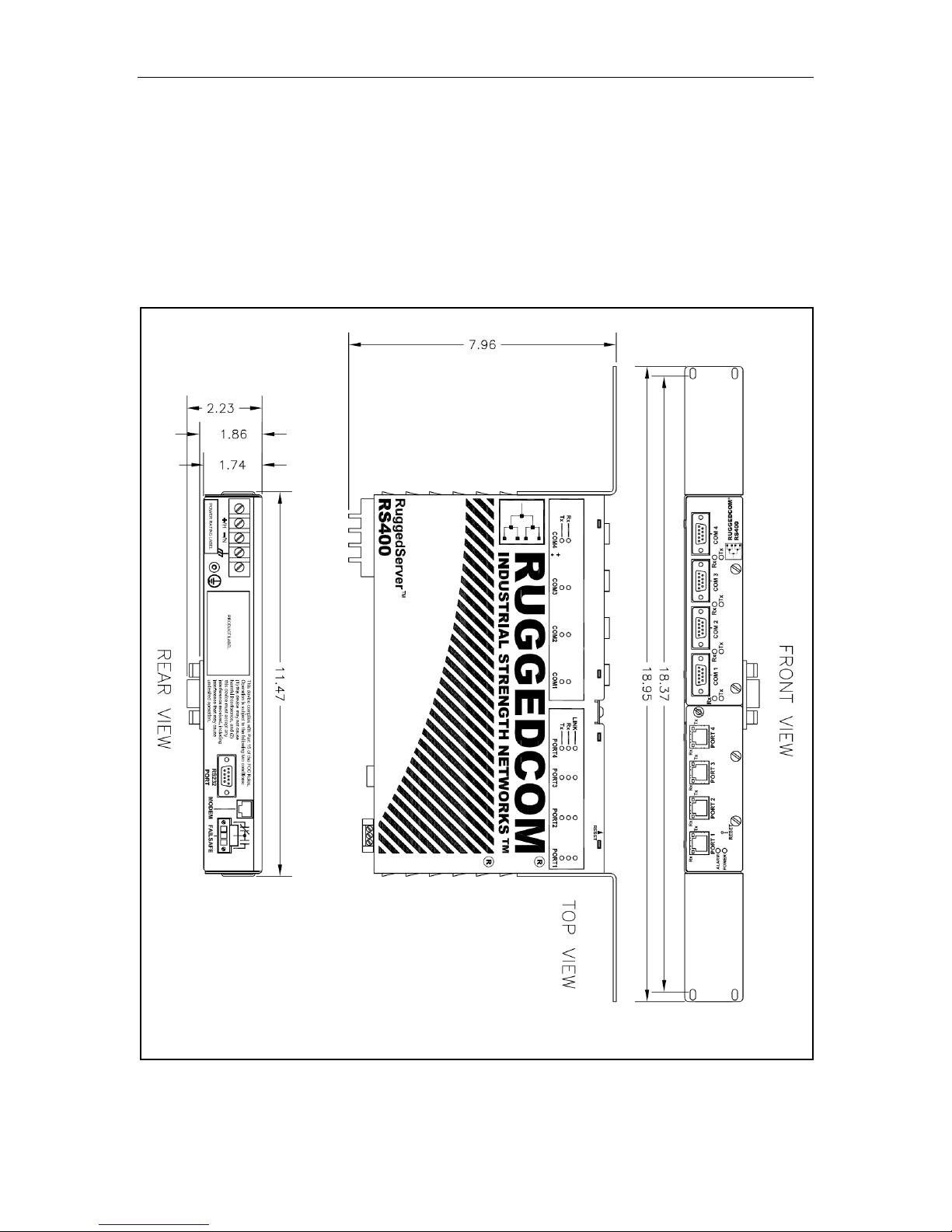
Weight 4.8 lb (2.2 Kg)
Enclosure 18 gauge Galvanized Steel
RuggedCo
m
®
Value Comments
11.47 x 7.96 x 2.23 inches
29.13 x 20.22 x 5.66 cm
34
RuggedServer™ RS400 Family Installation Guide rev109
(Length x Width x Height)
Page 35

Technical Specifications
3.7.2 RS401
Parameter
Dimensions
Weight 4.2 lb (1.9 Kg)
Enclosure 18 gauge Galvanized Steel
RuggedCo
m
®
Value Comments
6.77 x 7.42 x 3.49 inches
17.20 x 18.85 x 8.86 cm
35
RuggedServer™ RS400 Family Installation Guide rev109
(Length x Width x Height)
Page 36

Agency Approvals
4 Agency Approvals
Agency Standards Comments
CSA, CE
FCC FCC Part 15, Class A Approved
CISPR EN55022, Class A Approved
FDA/CDRH 21 CFR Chapter 1, Subchapter J Compliant
IEC/EN
CSA C22.2 No. 60950, UL 60950,
EN 60950, EN 61000-6-2
EN60825-1:1994 + A11:1996 +
A2:2001
Approved
Compliant
5 Warranty
RuggedCom warrants this product for a period of five (5) years from date of purchase.
For warranty details, visit http://www.ruggedcom.com/
representative.
Should this product require warranty or service contact the factory at:
RuggedCom Inc.
300 Applewood Cres., Unit 1
Concord, Ontario
Canada L4K 5C7
Phone: (905) 856-5288
Fax: (905) 856-1995
or contact your customer service
RuggedCom
®
36
RuggedServer™ RS400 Family Installation Guide rev109
 Loading...