

Page 1
Panasonic
Betore connecting, operating or adjusting this
product, please read these instructions completety. Please save this manual.
Mini Cassette Recorder
RQ-L50
RQ-L30
RQ-L10
Operating Instructions
Basic Operation
Recording
You can uM normal poaaon type tapa» only
Tbe fOtfid may not be recorded proporty if higyi
po»*on lapa» and metal poefton tapa» are uead
nreh ttMiuna
|PlAY] If ai»o doprataao [(HQl *n nap X-
Function
Stop
Temporarily stop
■ Follow up recording
Recording can be Hlnrled during playback by »Im
ply pressing [CBE£}1
Other»
■ Tape counter and reeet button
gptra fa»an onty)
The digrt» return to tKXr when me re«ei button «
pressed The digrtt advance wtih the tape to provKto a reteience lo quckty Kno a oeeirod portion of
tape
Note:
Whert you are re»en«ig me tape cnaiter. make
»t#* mat you push me reset button »imiy ^ mat
me counter re»ets precdety 10 *tMXr
■ Auto Stop
Oumg pUtmach or recororng. when me tape
reaches cs end. the auiomatK stop system wst re
lease the piaybecfc arx) record buttons and amomatcaSy turn off tha una
Note:
•Oo not open me cassette
nraiinn
Operation
Proas [■ STOP]
Set the (PAUSE)
selector lo "PAUSE"
To resume recording,
set it lo olf position.
holder dunrtg tape op-
CE
The ser^l r>umbOr oi №■$ product can be found on
iho beck of me cassette oompartmenl cover or m-
!ude the battery compaitmcnl
Ploaso note it in the space provided below and
keep as a permunenl record of your purchase to
aid KlonMicdtvon in ;he event of theft.
I MODEL NUMôefi
i
Panasonic Consumer Electronics Company; '
Division of Matsushita Electric Corporation of
America
One PanosoTK Way Secaucus. Jersey 070A4
Mpjifmrw.ptn»$oMe.eom
Panasonic Sales Company. Ohrtsion of
Hatsushfta Electric of Puerto Rico. Inc. ("PSC*')
Ave 66 de mrarssna. Km 9 5 San Gabnd foduetnat
Park Careens. Puerto R«o 00965
SERIAL NUMBER
RQTT0306-P
F0399C0{Dt
Tape playback
You can use normal pos*boo type tapes only
Function Operation
Stop
Fast forward
Rowtnd
When the tape reaches the er>d after fast forward
or rewifid. press [■ STOP] lo release the button.
ower source
li
Press [■ STOP]
Press IFFAÎUE]
Press [REWmEV]
Dry ceil batteries
Use two R6/LR6, AA. UM-3 (not Included) bat
teries.
Battery removal
Press the ® side toward the 0 battery terminal
and lift up.
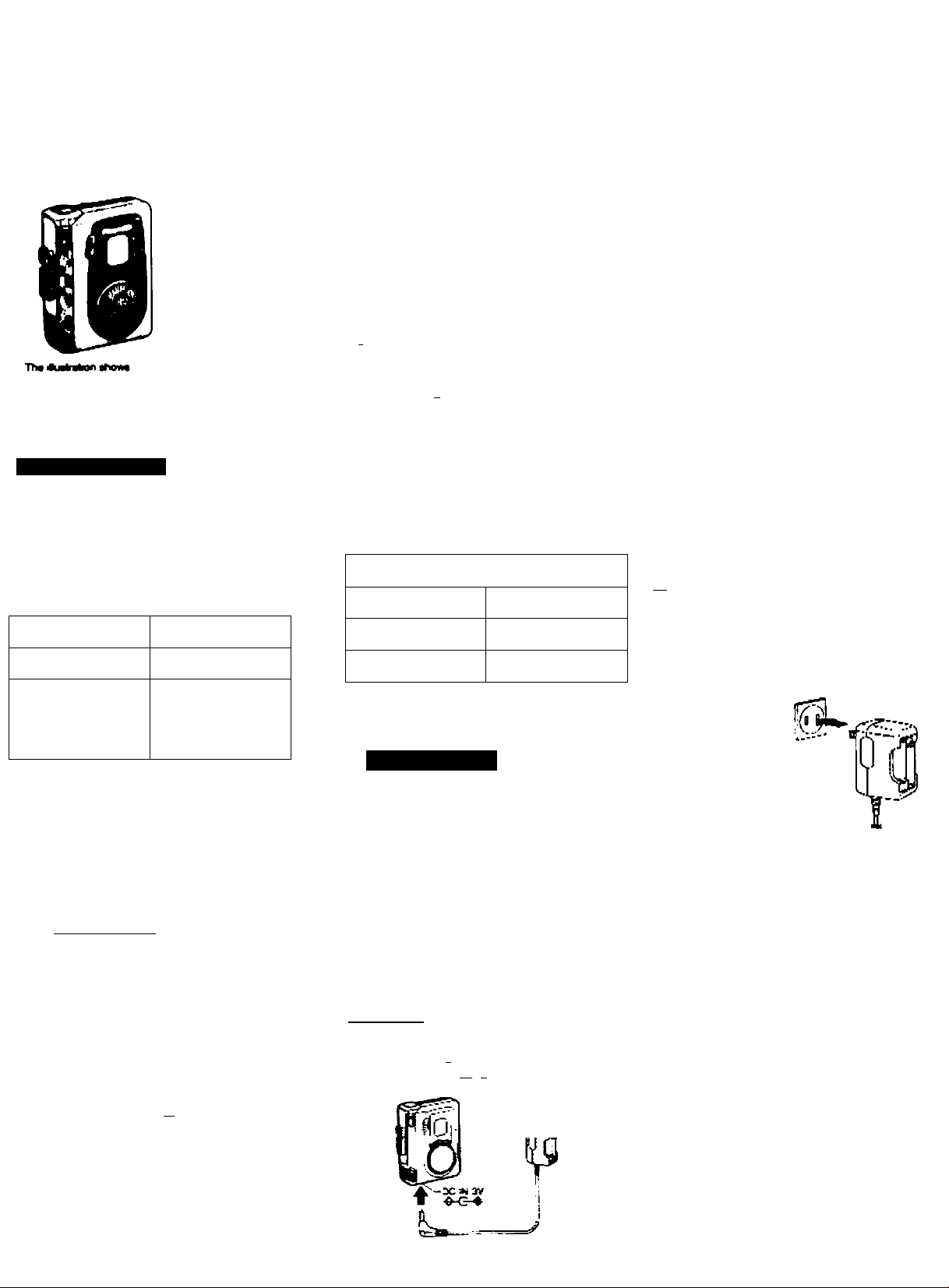
AC power operation
Use me nduded AC adapiorxharger
ГйОчдП
Use tbe Panasonic AC adaptor RP-AC31
lopbonal)-
•When not n use. tfeconnect me AC adaptor*'
Charger from me AC power ouBet
AC 120 V . 60 Hz
En
Rechargaabia battoriee
■iMiM only)
For rts rtOal use after purchasing or after a long
time intorval (more man three months), make sure
to recharge the lectwgeiibte batteries
Use Ihe included techargeablo batteries
(D (2)
1.4—>
After recharging (about 3 hours). Install Ihe
charged batteries into the unit.
Note:
Do not recharge moff lhan 8 hours at one bme. or
Ihe rechargeable bettenes kle may be shoderted.
Rechargeable battenes and charger
•Use onfy me included charger when recharpng
•Dunng recherpng. e is normal for the criarger
and the rechargeable batienes to become siightty
werm
eAvtM rechargmg or piecmg mo rochargeabie
bananes near sowcee of heat or r^rniPty
•T>« metuded rechergoab>o banencs can be
recnargod about 300 tvnes After thei. ts operabor bme becomes shorterwd That's bme lor repiaong me rechargeable battenes
•Carry and store me feefargeebe battenes at me
supphed banery cerrymg cate to prevent contact
with metai objects
•Uo not peel off me plastic rovenng on me
rechargaabla baficnes TNs coverhg has been
fnieo for your safety and lemoval can >ead lo
shon-crcuCing of me tMiiery
Page 2
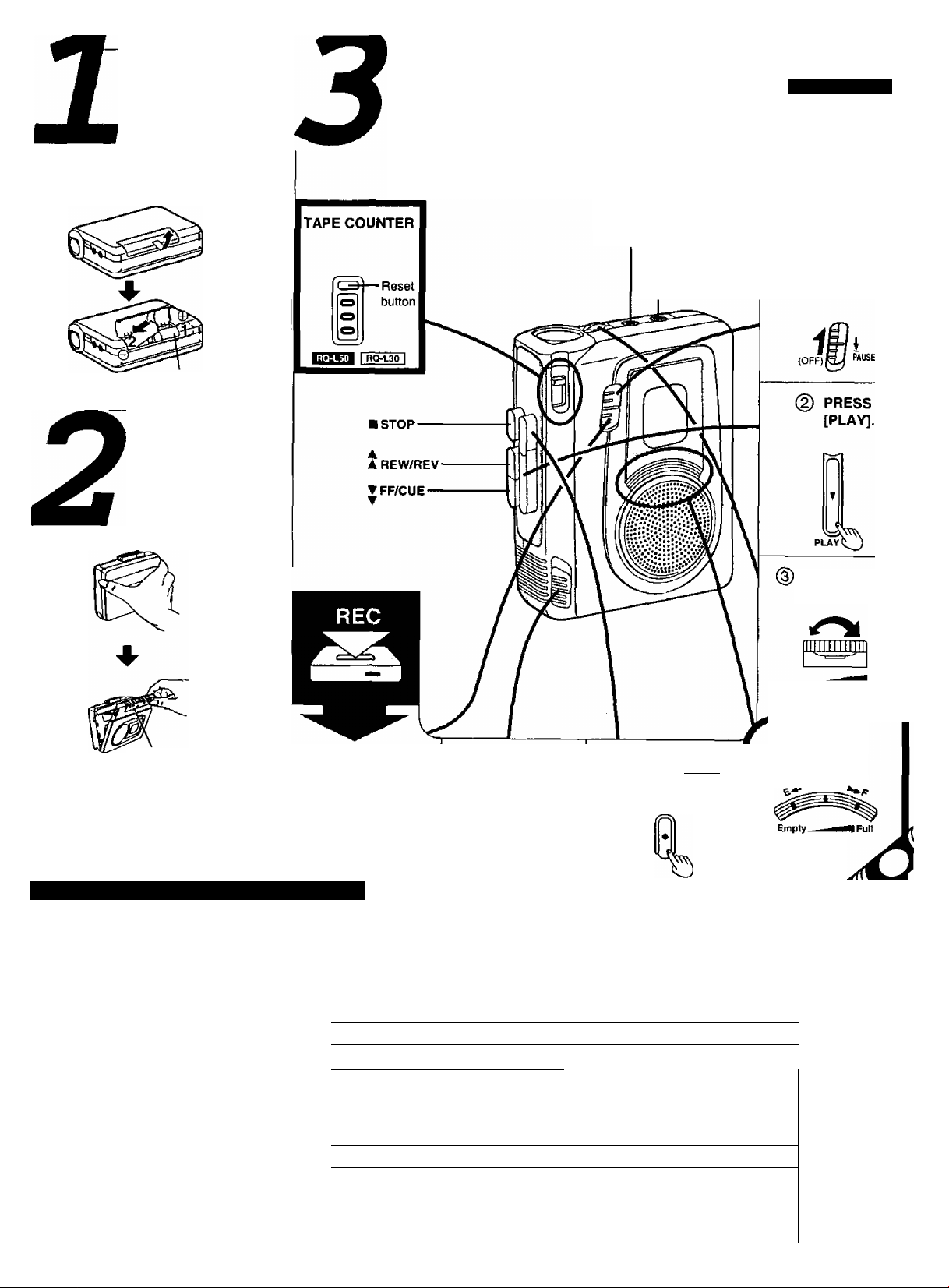
INSTALL
BATTERIES.
MIC jack I RQ-L30 I
Two R6/LR6, AA, UM-3
(not Included) batteries.
INSERT A
CASSETTE.
-EARPHONE
© RELEASE
[PAUSE].
ADJUST THE
[VOLUME].
VOLUME
Recordlng/Ptayback side
V
Supplied Accessories (RQ-L50 only)
techargeable batteries (2).... RFKFRFCT0002
lemove the rechargeable batteries from their
ase before use.
(C adaptor/charger (1)
> To order accessories contact 1-800-332-5368
or web site (
►Use numbers indicated when asking for replace
ment parts.
http://www.panasonic.com).
....................
RFEA302C-S
© RELEASE
[PAUSE].
iSi
(0FF)EJ wuse
The product you have purchased is powered by a
nickel-cadmium battery which is recyclable,
Please call 1-800-8-BATTERY for information on
how to recycle this battery.
SET [VAS]
TO OFF.
Wj?
4
ioFF
ipnn 1 RO-L30 I
# I
To record through the external microphone
fliWIîn I RQ-UO I only)
Plug the external microphone {not in
cluded) into the [MIC] jack.
•You can use a condenser micro-
Monitoring
The sound can be heard with an op
tional earphone plugged into the
[EARPHONE] jack.
• Plug type: 3.5 mm (Va in.) monaural
phone with or without built-in power
supply.
• Plug type: 3.5 mm (% in.) monaural
Note:
• You can not adjust the volume during
recording.
PRESS [fRggl].
BATTERY
CONDITION
.BATTUVft
Page 3

ervice
Do not attempt to remove the cover(s) or repair
the unit yourself. Refer servicing to qualified per
sonnel only.
Product information
__________________
For product service, product information or assis
tance with product operation, refer to the servicenter directory.
For detailed instructions, contact an autho
rized servicenter 1-800-211-7262 or web site
(http'J/wvfw.panasonic. com).
Pan»onlc Conaumar Electronic!
Company, OMalon of Matsuahita
ElocUlc Corporation of Amartca
One Panasonic Way.
Secaucus, New Jersey 07094
ONLY FOR U.S,A.
Panasonic
Limited Warranty
Panasonic Consumer Electronics Company of Panasonic Sales Company (col
lectively referred to as The warrantor^ will repair this product with new or refurbisheti parts, (roe of charge, in the U.S.A, or Puerto Rico from the date of original
purchase in the event of a delect in materials or worfotianship as follows:
For one (1) year—Radio, Clock Radio, Radio with Tape Player or
Recorder, Speaker
For ten (10) days—Batteries—(when applicable)—New rechargeable batter
ies in exchange for defective rechargeable batteries. Non-rechargeable batteries
are rot warranted.
For assistance in the U.S.A. in obtaining repairs contact;
Panasonic Services Company
Panasonic PLUS Department
20421 84th Avenue South
Kent. WA 98032
Phone: 1-800-833-9626
FAX; 1-800-237-9080
if repair is needed, during the warranty period the purchaser will be required to
furnish a sales receipt/proof ol purchase indicating date of purchase.
Also, the purchaser will be responsible for shipping the unit to the above ad
dress. This warranty is extended only to the original purchaser.
For assistance in Puerto Rico contact, Panasonic Sales Company at the ad
dress or telephone number above.
User memo:
DATE OF PURCHASE
DEALER NAME
______
DEALER ADDRESS _
TELEPHONE NUMBER
This warranty only covers lailures due to defects in materials or workmanship
which occur during normal use and does not cover damage which occurs in ship
ment Of failures which are caused by products not supplied by the warrantor or
failures which result from accident, misuse, abuse, neglect, mishandling, misap-,
ptication, faulty mstallation, set-up adjustment, improper maintenance, alteration,
imprt^er antenna, inadequate signal pick-up, maladjustment of consumer con-|
tfols, modification, line power surge, or commercial use of the product, or dam
age that is attributable to acts ol God, or service by anyone other than a PASC
Factory Servicenter,
There are no express warranties except as listed above.
THE WARRANTOR SHALL NOT BE LIABLE FOR INCIDENTAL OR CONSE
QUENTIAL DAMAGES RESULTING FROM THE USE OF THIS PRODUCT, Or'
ARISING OUT OF ANY BREACH OF THIS WARRANTY, INCLUDING WITH
OUT LIMITATION, DAMAGE TO TAPES, RECORDS OR DISCS, ALL EX
PRESS AND IMPLIED WARRANTIES, INCLUDING THE WARRANTIES OF
MERCHANTABILITY, ARE LIMITED TO THE APPLICABLE WARRANTY PERI
OD SET FORTH ABOVE. Some states do f>ot allow the exclusion or limitation ol
incidental or consequential damages, or limitations on how long an implied war
ranty lasts, so the above exclusions or limitations may not apply to you.
This warranty gives you specific legal rights and you may also have other
rights which vary from state to slate.
II a problem with this product develops during or after the warranty period, you
may contact your dealer or Panasonic PLUS Department. If the problem is not
handled to your satisfaction, then write to the Customer Satislaciion Center at the
company address above or call toll (ree 1-800-211-7P6?
Panasonic Sales Company, Division
of Matauslilta Electric
of Puerto Rico, Inc, ("PSC")
Avo, 65 (ie Infanleria. Km. 9.5
San Gabriel Industrial Park
Carolina, Puerto Rico 009SS
Tel, (809) 750-4300
FAX. (809) 768-2910
LIMITS AND EXCLUSIONS
If you ship the product
Carefully pack anid send it prepaid, adequately insured and preferably in the original
carton.
Attach a letter, detailing the complaint, to the outside of the carton.
Do NOT send the product to the Executive or Regional Sales offices. They are NOT
equipped to make repairs.
Customer’s Record
Model
No.
Serial
No.
or
Code
No.
Date
of
Purchase
Dealer's
Name
Dealer’s
Address
Page 4

1 Technical Specifications
Track system
'Recording system
Monitor system
Power requirement
Battery;
Rechargeable
battery:
AC:
I
RQ-uo I
Frequency range
Tape speed
Jack
Input;
Output:
Speaker
nH2
CAUTION
Ü
2 track, monaural
DC bias. Magnet erase
Fix
DC 3 V (tvi/o R6/LR6, AA, UM-3
batteries)
DC 2.4 V
With two included
rechargeable batteries
120 V, 60 Hz
Power consumption; 5 W
With included AC
adaptor/charger
With optional Panasonic AC
adaptor RP-AC31
180 Hz-7000 Hz (Normal)
4.8 cm/s (V/i ips)
^^2^3 I RQ-L30 I only
MIC; 0.25mV(150-600n)
EARPHONE; 80
3.6 cm (lyie")
Dimensions (WxHxD)
Weight
Play time;
(When used at 25*C (77T) temperature and on a flat an
stable surface]
•The play time may be less depending on the operatin
Note:
Specifications are subject to change without notice.
Weight and dimensions are approximate.
•Avoid using or placing this unit near
sources of heat.
Do not leave it in an automobile ex
posed to direct sunlight for a long pe
riod of time with doors and windows
closed.
85.0x112.5x34,0 mm
(3W’’x4yt6''xiy,s")
200 g (7.1 oz.) with
1 RO-L30 1
Panasonic alkaline dry cell batteries;
Recording: About 24 hours
Playback: About 15 hours
Included rechargeable batteries (üŒI only);
Recording About 10 hours
Playback About 7 hours
conditions.
•To avoid product damage, do not ex
pose this product to rain, water or
other liquids.
rechargeable batteries
164 g (5.8 oz.) without
batteries
161 g (5.7 oz.) without
batteries
Listening caution
BrbnHa
Do not play your headphones or ear
phones at a high volume. Hearing ex
perts advise against continuous
extended play.
If you experience a ringing in your
ears, reduce volume or discontinue
use.
Do not use while operating a motor
ized vehicle. It may create a traffic
hazard and is illegal in many areas.
You should use extreme caution or
temporarily discontinue use in poten
tially hazardous situations.
Even if your headphones or earphones
is an open-air type designed to let you
hear outside sounds, don't turn up the
volume so high that you can’t hear
what’s around you.
Sound can be deceiving. Over time
your hearing "comfort level” adapts to
higher volumes of sound. So what
sounds “normal” can actually be loud
and harmful to your hearing.
Guard against this by setting your
equipment at a safe level BEFORE
your hearing adapts.
To establish a safe level:
•Start your volume control at a low
setting.
• Slowly increase the sound until you
can hear it comfortably and clearly,
and without distortion.
Once you have established a comfort
able sound level:
• Set the dial and leave it there.
MAINTE
NANCE
To ensure good sound quality, clean
the head after approximately every
10 hours of use with a cotton swab
dampened with a little alcohol.
^ iiïJ V Lsr
Cotton swab
Erase prevention lever
Page 5

REC
To record with VAS (Voice Activated System) function
ш
The sound is recorded automatically,
so there is no tape waste.
To use VAS function, set the [VAS]
selector to “1" or “2" in step ©.
RQ-L30~| only)
1: If you wish to record lower levels of
sound than usual.
2: If you wish to record only the louder
sounds.
Note:
After using VAS function, set the
[VAS] selector to “OFF"
To record through the externai microphone
(IÎQ51 rRQ-L30 I only)
Plug the external microphone (not in
cluded) into the [MIC] jack.
•You can use a condenser micro
phone with or without built-in power
supply.
► Plug type: 3.5 mm in.) monaural
Monitoring
PLAYBACK
The sound can be heard with an op
tional earphone plugged into the
[EARPHONE] jack.
• Plug type: 3.5 mm (V^ in.) monaural
Record prevention
Removing the tab(s) of the cassette
(with a small screwdriver) will prevent
accidental erasure.
Cue and review
Sound can be monitored at a high
speed as long as the [FF/CUE] (cue)
or [REW/REVJ (review) is held down
during playback.
When the button is released, normal
playback will start.
Note:
•You can not adjust the volume during
recording.
To record again, cover the hole of the
tab with adhesive tape.
Adhesive tape
ВАТТ
•Align the poles (© and ©) properly
when inserting the batteries.
•Do not mix old and new batteries or
different types of batteries.
• Do not recharge ordinary dry cell bat
teries.
• Remove the batteries if the unit is not
to be used for a long time.
Mishandling of batteries can cause
electrolyte leakage which can damage
items the fluid contacts and may cause
a fire.
Battery level indicators
The [ВАТТ LEVEL] indicators light
during operation. As the charge reduces the lamps go out.
If electrolyte leaks from the batteries,
consult your dealer. Wash throughly
with water if electrolyte comes in con
tact with any part of your body.
(I RQ-L30 I ll:I*MmOI Only)
•If rechargeable batteries are to be
used, rechargeable batteries manu
factured by Panasonic are recom
mended.
When the battens are weak
The indicator under “E" becomes dim
or turns off.
 Loading...