

Page 1
Page 2

SanDisk and SanDisk logos are registered trademarks of SanDisk Corporation, U.S.A.
MELDAS is a registered trademark of Mitsubishi Electric Corporation.
Other company and product names that appear in thi s manual are registered tra dema rks or tradema rks of
their respective companies.
Page 3
Introduction
This manual is called MITSUBISHI CNC 70 Series CONNECTION MANUAL and covers the
items related to installation, connection and maintenance of this NC unit. Read this manual
thoroughly before using. For safe use, fully understand "Precautions for Safety" on the next
page first.
Details described in this manual:
CAUTION
For items described as "Restrictions" or "Usable State" in this manual, the instruction
manual issued by the machine tool builder takes precedence over this manual.
Items that are not described in this manual must be interpreted as "not possible".
This manual is written on the assumption that all option functions are added. Confirm the
specifications issued by the machine tool builder before use.
Refer to the Instruction Manual issued by each machine tool builder for details on each
machine tool.
Some screens and functions may differ depending on each NC system (or version), and
some functions may not be possible. Please confirm the specifications before use.
The numerical control unit is configured of the control unit, display unit, operation board, servo drive
unit, spindle drive unit, power supply unit + driver, servomotor, and spindle motor, etc.
In this manual, the following items are generically called the "controller".
• Control unit
• Display unit
• Operation board
• Numerical control unit peripheral devices (input/output unit, safety unit)
In this manual, the following items are generically called the "drive unit".
• Servo drive unit
• Spindle drive unit
• Power supply unit + driver
In this manual, the following items are generically called the "motor".
• Servomotor
• Spindle motor
Page 4
Precautions for Safety
Always read this manual and enclosed documents before installation, operation, maintenance
and inspection to ensure correct usage. Thoroughly understand the basics, safety information
and precautions of the devices before using.
This manual classifies the safety precautions into "DANGER", "WARNING" and "CAUTION".
DANGER
WARNING
CAUTION
Note that the items under " CAUTION" could lead to serious consequences as well
depending on the situation. Please follow all items listed in "Precautions for Safety" as they
are equally important.
When the user could be subject to imminent fatalities or
serious injuries if handling is mistaken.
When the user could be subject to fatalities or serious
injuries if handling is mistaken.
When the user could be subject to minor or moderate
injuries or the property could be damaged if handling is
mistaken.
Page 5
For Safe Use
This product is not designed or manufactured on the assumption that the product will be
used for the equipment or systems that are to be subject to any fatal consequences.
Please inquire our customer service department about any particular usage other than the
normal usage as a machine tool.
1. Items related to prevention of electric shocks
WARNING
Do not open or remove the front cover while the power is ON or during operation. The high voltage
terminals and charged sections will be exposed, and this could result in electric shocks.
Do not remove the front cover even when the power is OFF, except for the wiring works or periodic
inspections. The inside of the controller and drive unit are charged, and this could result in electric
shocks.
Always wait at least 15 minutes after turning the power OFF. Then, check the voltage with a tester,
etc., before wiring works, inspections or connecting with peripheral devices. Failure to observe this
could result in electric shocks.
Earth ground the controller, drive unit and motor according to the local laws. (In Japan, ground the
200V Series input products with Class C or higher protective grounding and the 400V Series input
with Class D or higher protective grounding.)
All wiring works, maintenance and inspections must be carried out by a qualified technician. Failure
to observe this could result in electric shocks. Contact your nearby Service Center or Service Station
for replacing parts and servicing.
Wire the controller, drive unit and motor after installation. Failure to observe this could result in
electric shocks.
Do not operate the switches with wet hands. Failure to observe this could result in electric shocks.
Do not damage, apply excessive stress, place heavy things on or sandwich the cables. Failure to
observe this could result in electric shocks.
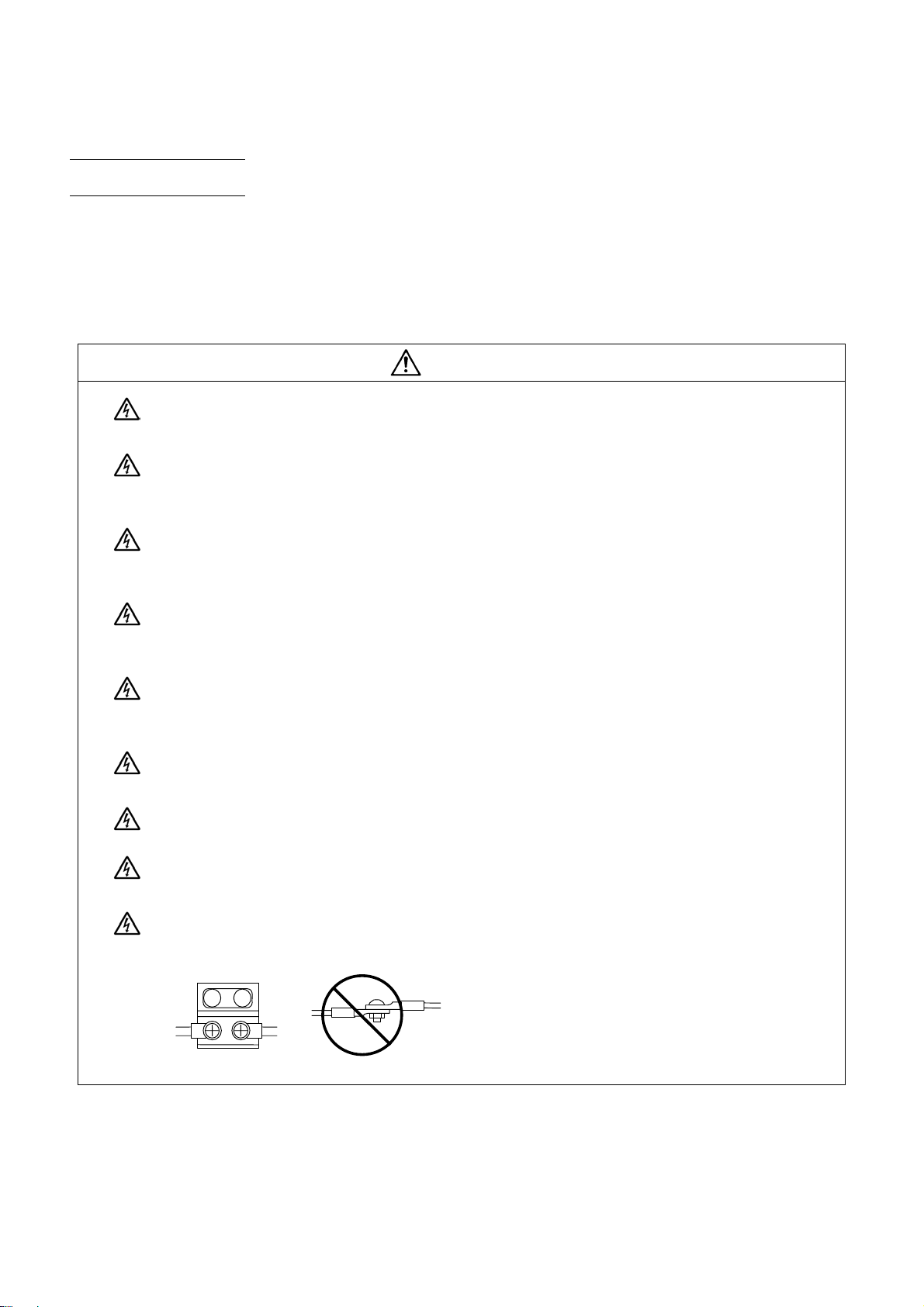
Insulate the power lead using a fixed terminal block. Failure to observe this could result in electric
shocks.
Page 6
2. Items related to prevention of fire
CAUTION
Install the controller, drive unit, motor and regenerative resistor on non-combustible material.
Installation directly on or near combustible materials could result in fires.
If any malfunction in the unit is observed, shut off the power at the unit’s power supply side.
Continuous flow of large current could result in fires.
Install an appropriate no fuse breaker (NFB) and contactor (MC) on the power input section of the
drive unit and configure the sequence that shuts the power off upon drive unit’s emergency stop or
alarm.
When a breaker is shared for multiple power supply units, the breaker may not function upon
short-circuit failure in a small capacity unit. Do not share a breaker for multiple units as this is
dangerous.
Incorrect wiring and connections could cause the devices to damage or burn.
3. Items related to prevention of bodily injury or property damage
DANGER
When transporting or installing a built-in IPM spindle or linear servomotor, be careful so that your
hand or property will not be trapped in the motors or other metal objects. Also keep the devices with
low magnetic tolerance away from the product.
CAUTION
Do not apply voltages to the connectors or terminals other than voltages indicated in the connection
manual for the controller or specifications manual for the drive unit. Failure to observe this could
cause the devices to rupture or damage, etc.
Incorrect connections could cause the devices to rupture or dam ag e, etc. Always connect the cables
to the indicated connectors or terminals.
Incorrect polarity (+ -) could cause the devices to rupture or damage, etc.
Persons wearing medical devices, such as pacemakers, must stay away from this unit. The
electromagnetic waves could adversely affect the medical devices.
Fins on the rear of the unit, regenerative resistor and motor, etc., will be hot during operation and for
a while after the power has been turned OFF. Do not touch or place the parts and cables, etc. close
to these sections. Failure to observe this could result in burns.
Do not enter the machine’s movable range during automatic operation. Keep your hands, feet or
face away from the spindle during rotation.
Page 7
4. General precautions
Always follow the precautions below. Incorrect handling could result in faults, injuries or electric shocks, etc.
(1) Transportation and installation
CAUTION
Correctly transport the products according to the mass.
Use motor’s suspension bolts to transport the motor itself. Do not use it to transport the motor after
installation onto the machine.
Do not stack the products exceeding the indicated limit.
Do not hold the cables, shaft or detector when transporting the motor.
Do not transport the controller or drive unit by suspending or holding the connected wires or cables.
Do not hold the front cover when transporting the unit, or the front cover could come off, causing the
unit to drop.
Install on a non-combustible place where the unit’s or motor ’s mass can be withstood according to
the instruction manual.
The motor does not have a complete water-proof (oil-proof) structure. Do not allow oil or water to
contact or enter the motor. Prevent the cutting chips from being accumulated on the motor as they
easily soak up oil.
When installing the motor facing upwards, take measures on the machine side so that gear oil, etc.,
will not enter the motor shaft.
Do not remove the detector from the motor. (The detector installation screw is treated with sealing.)
Do not allow foreign matters, especially, conductive foreign matters such as screws or metal chips,
or combustible foreign matters such as oil, to enter the controller, drive unit or motor. Failure to
observe this could result in rupture or damage.
Do not get on the product or place heavy objects on it.
Provide prescribed distance between the controller/drive unit and inner surface of the control
panel/other devices.
Do not install or operate the controller, drive unit or motor that is damaged or has missing parts.
Take care not to cut hands, etc. with the heat radiating fins or metal edges.
Do not block the intake/outtake ports of the motor with the cooling fan.
Install the controller’s display section and operation board section on the spot where cutting oil will
not reach.
Page 8
CAUTION
The controller, drive unit an d motor are preci sion devices, so do not drop or apply thumping vib ration
and strong impacts on them.
Hard disk unit is a precision device, so do not drop or apply strong impacts on it.
Store and use the units according to the environment conditions indicated in each specifications
manual.
Securely fix the motor to the machine. The motor could come off during operation if insecurely fixed.
Always install the motor with reduction gear in the designated direction. Failure to observe this coul d
result in oil leaks.
Always install a cover, etc., over the shaft so that the rotary section of the motor cannot be touched
during motor rotation.
When installing a coupling to the servomotor shaft end, do not apply imp acts b y hammering, etc. The
detector could be damaged.
Use a flexible coupling when connecting with a ball screw, etc., and keep the shaft core deviation
smaller than the tolerable radial load of the shaft.
Do not use a rigid coupling as an excessive bending load will be applied on the shaft and could
cause the shaft to break.
(2) Items related to wiring
Do not apply a load exceeding the tolerable level onto the motor shaft. The sh aft or bearing could be
damaged.
Before using this product after a long period of storage, please cont act the Mit subishi Service Station
or Service Center.
Following the UN recommendations, battery units and batteries should be transported based on the
international regulations such as those determined by International Civil Aviation Organization
(ICAO), International Air Transport Association (IATA), International Maritime Organization (IMO)
and U.S. Department of Transportation (DOT).
Correctly wire this product. Failure to observe this could result in motor runaway, etc.
Do not install a phase advancing capacitor, surge absorber or radio noise filter on the output side of
the drive unit.
Correctly connect the output side (terminal U, V, W). The motor will not run properly if incorrectly
connected.
CAUTION
Always install an AC reactor per each power supply unit.
Page 9
A
CAUTION
Always install an appropriate breaker per each power supply unit. A breaker cannot be shared for
multiple power supply units.
Do not directly connect a commercial power supply to the motor. Failure to observe this could result
in faults.
When using an inductive load such as relays, always connect a diode in parallel to the load as a
noise countermeasure.
When using a capacitive load such as a lamp, always connect a protective resistor in series to the
load to suppress rush currents.
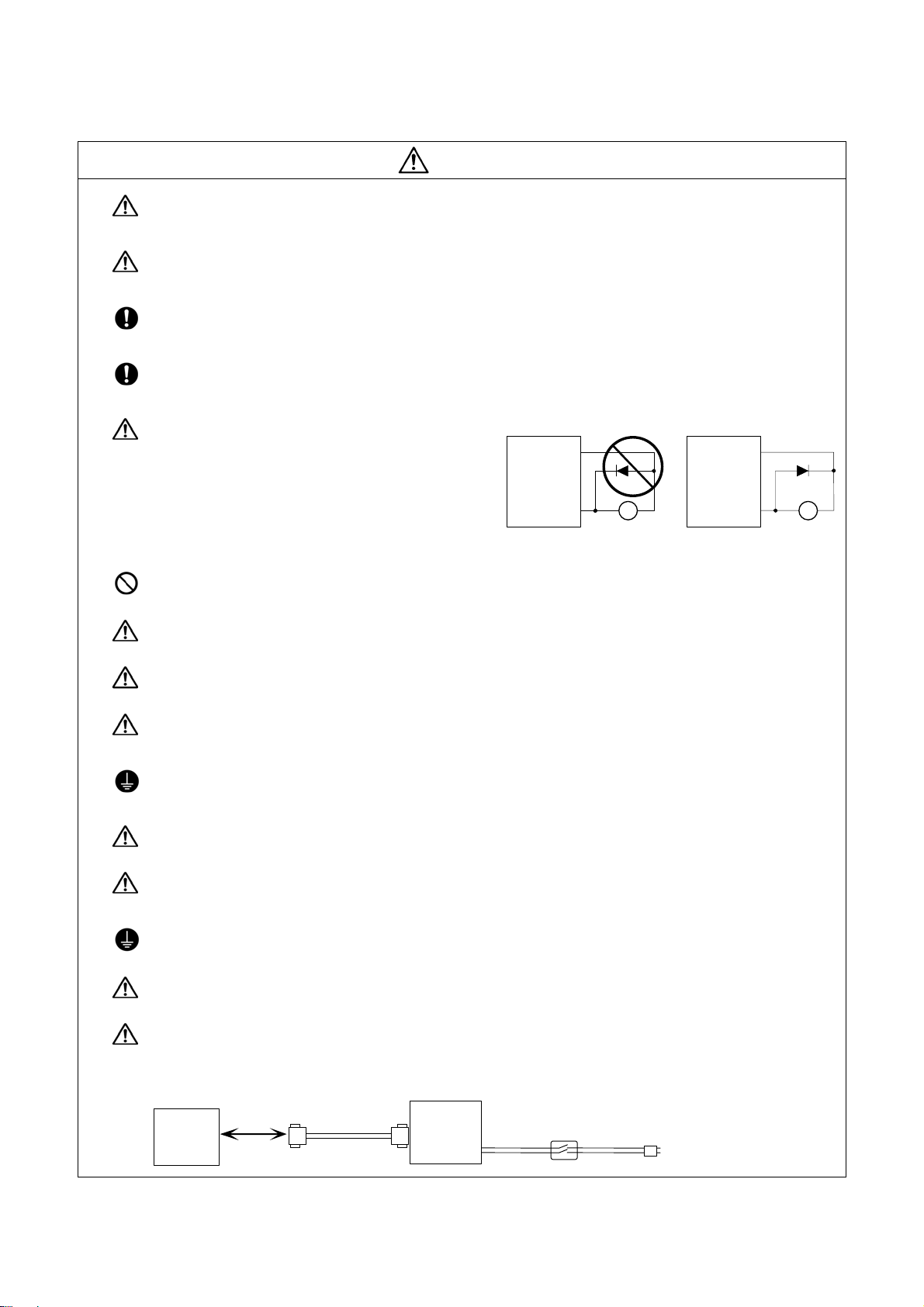
Do not mistake the direction of the surge
absorption diode to be installed on the DC relay
for the control output signal. If mistaken, the
Drive unit
COM
(24VDC)
Drive unit
COM
(24VDC)
signal will not be output due to fault in the drive
unit, and consequently the protective circuit,
such as emergency stop, could be disabled.
Control
output
signal
R
Control
output
signal
RA
Do not connect or disconnect the connection cables between each unit while the power is ON.
Do not connect or disconnect the PCBs while the power is ON.
Do not pull the cables when connecting/disconnecting it.
Securely tighten the cable connector fixing screw or fixing mechanism. Insufficient fixing could result
in deviation during operation.
Always treat the shield cables indicated in the Connection Manual with grounding measures such as
cable clamps.
Separate the signal wire from the drive line or power line when wiring.
Use wires and cables whose wire diameter, heat resistance level and bending capacity are
compatible with the system.
Ground the device according to the requirements of the country where the device is to be u s ed.
Wire the heat radiating fins and wires so that they do not contact.
When using the RS-232C device as a peripheral device, caution must be paid for connector
connection/disconnection.
Always use a double-OFF type AC power supply switch on the device side, and connect/disconnect
the connector with the AC power supply on the device side OFF.
NC unit
Device
RS-232C
Switch
AC socket
Page 10
(3) Adjustments
CAUTION
(4) Usage
Check and adjust programs and each parameter before starting operation. Failure to observe this
could result in unpredictable operations depending on the machin e.
Do not make drastic adjustments or changes as the operation could become unstable.
Install an external emergency stop circuit so that the operation can be stopped and the power turns
OFF immediately when unforeseen situation occurs. A contactor, etc., is required in addition to the
shutoff function mounted in the controller.
Turn OFF the power immediately if any smoke, abnormal noise or odor is generated from the
controller, driv e unit or motor.
Only a qualified technician may disassemble or repair this product.
Do not alter.
Use a noise filter, etc. to reduce the effect of electromagnetic disturbances in the case where
electromagnetic disturbances could adversely affect the electronic devices used near the drive unit.
CAUTION
Use the drive unit, motor and each regenerative resistor with the designated combination. Failure to
observe this could result in fires or faults.
The combination of the motor and drive unit that can be used is determined. Be sure to check the
models of motor and drive unit before test operation.
The brakes (electromagnetic brakes) mounted in the servomotor are used for the purpose of
holding, and must not be used for normal braking. Also, do not run the motor with the motor brake
applied. Motor brake is used for the purpose of holding.
For the system running via a timing belt, install a brake on the machine side so that safety can be
ensured.
Be sure to confirm SERVO OFF (or READY OFF) when applying the electromagnetic brake. Also,
be sure to confirm SERVO ON prior to releasing the brake.
When using the DC OFF type electromagnetic brake, be sure to install a surge absorber on the
brake terminal.
Do not connect or disconnect the cannon plug while the electromagnetic brake’s power is ON. The
cannon plug pins could be damaged by sparks.
After changing programs/parameters, or after maintenance/inspection, always carry out a test
operation before starting actual operation.
Page 11
r
CAUTION
Use the power that are complied with the power specification conditions (input voltage, input
frequency, tolerable instantaneous power failure time) indicated in each specifications manual.
When making detector cables, do not mistake connection. Failure to observe this could result in
malfunction, runaway or fire.
(5) Troubleshooting
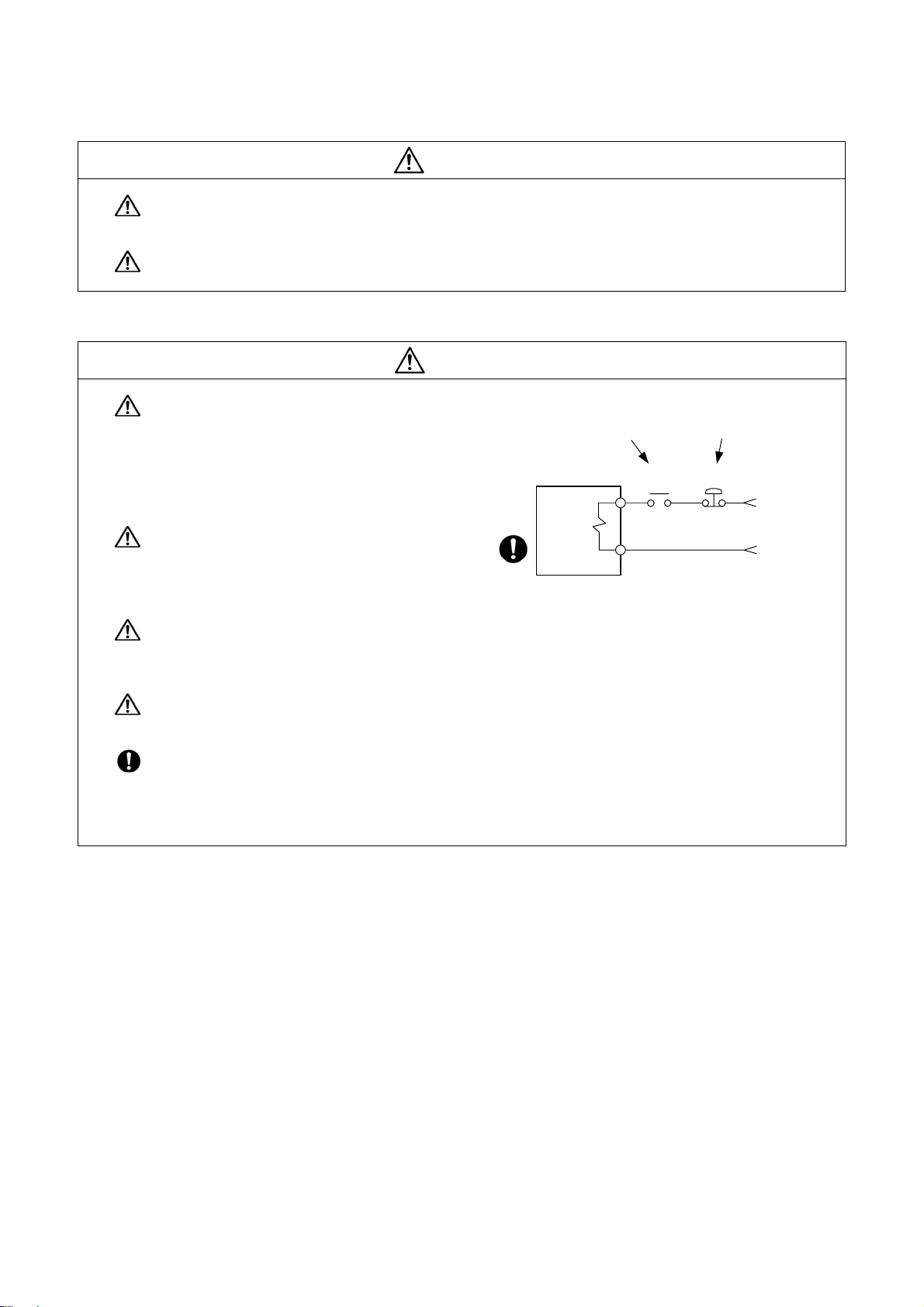
Use a motor with electromagnetic brakes or
establish an external brake mechanism for the
purpose of holding; this serves as
countermeasures for possible hazardous
situation caused by power failure or product
fault.
Use a double circuit structure for the
electromagnetic brake’s operation circuit so
that the brakes will activate even when the
external emergency stop signal is issued.
The machine could suddenly restart when the power is restored after an instantaneous power
failure, so stay away from the machine. (Design the machine so that the operator safety can be
ensured even if the machine restarts.)
CAUTION
Shut off with motor
brake control output
Moto
Electromagnetic
brake
Shut off with CNC brake
control PLC output
MBR
EMG
24VDC
To secure the absolute position, do not shut off the servo drive unit’s control power supply when its
battery voltage drops (warning 9F) in the servo drive unit side.
If the battery voltage drop warning alarm occurs in the controller side, make sure to back up the
machining programs, tool data and parameters, etc. with the input/output device before replacing the
battery.
Depending on the level of voltage drop, memory loss could have happened. In that case, reload all
the data backed up before the alarm occurrence.
Page 12
(6) Maintenance, inspection and part replacement
CAUTION
(7) Disposal
Periodically back up the programs, tool data and parameters to avoid potential data loss. Also, back
up those data before maintenance and inspections.
When replacing the battery on the controller side, the machining programs, tool data and para meters
should be backed up with the input/output device beforehand.
In case the memory is damaged in replacing the batteries, reload all the data backed up before
replacing the battery.
The electrolytic capacitor’s capacity will drop due to deterioration. To prevent secondary damage
due to capacitor’s faults, Mitsubishi recommends the electrolytic capacitor to be replaced approx.
every five years even when used in a normal environment. Contact the Service Center or Service
Station for replacements.
Do not perform a megger test (insulation resistance measurement) during inspection.
Do not replace parts or devices while the power is ON.
Do not short-circuit, charge, overheat, incinerate or disassemble the battery.
There may be a unit filled with substitute Freon in the heat radiating fins of the 37kW or smaller unit.
Be careful not to break the heat radiating fins during maintenance or replacement.
CAUTION
(8) General precautions
To explain the details, drawings given in the instruction manual, etc., may show the unit with the cover or
safety partition removed. When operating the product, always place the cover or partitions back to their
original position, and operate as indicated in the instruction manual, etc.
Take the batteries and backlights for LCD, etc., off from the controller, drive unit and motor, and
dispose of them as general industrial wastes.
Do not alter or disassemble controller, drive unit, or motor .
Collect and dispose of the spent batteries and the backlights for LC D according to the local laws.
Page 13

CONTENTS
1. Introduction....................................................................................................................................1
2. System Configuration.................................................................................................................... 2
2.1 System Basic Configuration Drawing .........................................................................................2
2.2 General Connection Diagram.....................................................................................................3
2.3 List of Configuration Units...........................................................................................................4
2.3.1 Control Unit: FCU7-MU521/FCU7-MU522...........................................................................4
2.3.2 Display Unit: FCU7-DU120-12/FCU7-DU140-12 ................................................................. 4
2.3.3 Operation Panel I/O Unit: FCU7-DX7xx...............................................................................4
2.3.4 Keyboard Unit: FCU7-KB024/FCU7-KB044.........................................................................5
2.3.5 Remote I/O Unit:
FCUA-DX100/FCUA-DX110/FCUA-DX120/FCUA-DX140/FCUA-DX101/FCUA-DX111/
FCUA-DX121/FCUA-DX141 ................................................................................................. 5
2.3.6 Card-sized I/O Card: HR361/HR371/HR381/HR383............................................................5
2.3.7 External Power Supply Unit: PD25/PD27.............................................................................5
3. General Specifications (Environment Conditions).....................................................................6
3.1 Environment Conditions in Operation Panel...............................................................................6
3.2 Environment Specifications in Electric Cabinet...........................................................................7
3.3 Heat Radiation Countermeasures ..............................................................................................8
4. Outline Drawing ........................................................................................................................... 11
4.1 Control Unit............................................................................................................................... 11
4.1.1 FCU7-MU521/FCU7-MU522.............................................................................................. 11
4.2 Display Unit...............................................................................................................................13
4.2.1 FCU7-DU120-12 (8.4-type)................................................................................................13
4.2.2 FCU7-DU140-12 (10.4-type)..............................................................................................13
4.3 Operation Panel I/O Unit...........................................................................................................14
4.3.1 FCU7-DX710/FCU7-DX711................................................................................................14
4.3.2 FCU7-DX720/FCU7-DX721/FCU7-DX730/FCU7-DX731..................................................15
4.4 Keyboard Unit...........................................................................................................................16
4.4.1 FCU7-KB024 (8.4-type)......................................................................................................16
4.4.2 FCU7-KB044 (10.4-type)....................................................................................................16
4.5 Remote I/O Unit........................................................................................................................17
4.5.1 FCUA-DX100/FCUA-DX110/FCUA-DX120/FCUA-DX140/FCUA-DX101/FCUA-DX111/
FCUA-DX121/FCUA-DX141 ............................................................................................... 17
4.6 Card-sized I/O Card..................................................................................................................18
4.6.1 HR361/HR371/HR381/HR383............................................................................................18
5. Panel Cut Dimension Drawing / Installation Dimension Drawing ........................................... 20
5.1 Display Unit...............................................................................................................................20
5.1.1 FCU7-DU120-12 (8.4-type)................................................................................................20
5.1.2 FCU7-DU140-12 (10.4-type)..............................................................................................21
5.2 Operation Panel I/O Unit...........................................................................................................22
5.2.1 FCU7-DX710/FCU7-DX711/FCU7-DX720/FCU7-DX721/FCU7-730/FCU7-731 ...............22
5.3 Keyboard Unit...........................................................................................................................23
5.3.1 FCU7-KB024 (for 8.4-type).................................................................................................23
5.3.2 FCU7-KB044 (for 10.4-type)...............................................................................................24
5.4 External Power Supply Unit......................................................................................................26
5.4.1 PD25...................................................................................................................................26
5.4.2 PD27...................................................................................................................................26
5.4.3 Mounting Direction and Clearance.....................................................................................26
5.5 Remote I/O Unit........................................................................................................................27
5.5.1 FCUA-DX100/FCUA-DX110/FCUA-DX120/FCUA-DX140/FCUA-DX101/FCUA-DX111/
FCUA-DX121/FCUA-DX141........................................................................................................27
Page 14

5.6 Manual Pulse Generator...........................................................................................................28
5.6.1 UFO-01-2Z9 .......................................................................................................................28
5.6.2 HD60 ..................................................................................................................................29
5.7 Synchronous Feed Encoder.....................................................................................................30
5.7.1 OSE-1024-3-15-68.............................................................................................................30
6. Connections of Control Unit.......................................................................................................31
6.1 Control Unit Connection System Drawing ................................................................................31
6.2 Connecting with Power Supply.................................................................................................32
6.2.1 When Using General-Purpose 24VDC Stabilized Power Supply ....................................... 32
6.2.2 When Using PD25/PD27 Power Supply Unit ..................................................................... 33
6.3 Connecting with Operation Panel I/O Unit................................................................................34
6.4 Connecting with Remote I/O Unit .............................................................................................35
6.5 Connecting with Card-sized I/O Card.......................................................................................35
6.6 Connecting with Optical Communication Servo Drive Unit.......................................................36
6.7 Connecting with RS-232C Device ............................................................................................ 38
6.8 Connecting with Skip Signal (Sensor) ...................................................................................... 40
6.9 Connecting with Synchronous Feed Encoder / Manual Pulse Generator.................................42
6.10 Connections of Emergency Stop Signal.................................................................................43
7. Connections of Operation Panel I/O Unit...................................................................................44
7.1 Operation Panel I/O Unit Connection System Drawing............................................................45
7.2 Connecting with Keyboard Unit ................................................................................................46
7.3 Connecting with Manual Pulse Generator (MPG).....................................................................47
7.3.1 Connecting with 5V Manual Pulse Generator (Maximum Cable Length: 20m)..................47
7.3.2 Connecting with 12V Manual Pulse Generator (Maximum Cable Length: 50m)................48
7.4 Connecting with Remote I/O Unit .............................................................................................49
7.5 Connecting with Card-sized I/O Card.......................................................................................49
7.6 Connecting with Machine Operation Panel...............................................................................50
7.6.1 Wiring the Input Side DI Connector (CG31/CG33/CG35) .................................................. 50
7.6.2 Wiring the Output Side DO Connector (CG32/CG34/CG36)..............................................50
7.6.3 Outline of Digital Signal Input Circuit..................................................................................51
7.6.4 Outline of Digital Signal Output Circuit...............................................................................53
7.6.5 Wiring for Sink Type Output (FCU7-DX710/DX720/DX730)...............................................54
7.6.6 Wiring for Source Type Output (FCU7-DX711/DX721/DX731)...........................................55
7.6.7 Outline of Analog Signal Output Circuit..............................................................................56
8. Connections of I/O Interface.......................................................................................................57
8.1 Types of I/O Interface ...............................................................................................................57
8.2 Connection of Remote I/O Unit.................................................................................................58
8.2.1 Outline of Remote I/O Unit .................................................................................................58
8.2.2 Names of Each Remote I/O Unit Section...........................................................................59
8.2.3 Setting of Station No. When Using Multiple Remote I/O Units...........................................60
8.2.4 Outline of Digital Signal Input Circuit..................................................................................62
8.2.5 Outline of Digital Signal Output Circuit...............................................................................64
8.2.6 Outline of Analog Signal Output Circuit..............................................................................65
8.2.7 Outline of Analog Signal Input Circuit.................................................................................66
8.2.8 Connection of FCUA-DX10 /14 Unit and Machine Control Signal.............................67
8.2.9 Connection of FCUA-DX14 Unit and Analog Input/Output Signal..................................69
8.2.10 Connection of FCUA-DX11 Unit and Machine Control Signal ....................................... 70
8.2.11 Connection of FCUA-DX12 Unit and Machine Control Signal...................................... 72
8.2.12 Cables ..............................................................................................................................74
8.3 Connecting with Card-sized I/O Card.......................................................................................75
8.3.1 Connection Example ..........................................................................................................75
8.3.2 DI/DO Type Specifications..................................................................................................76
8.3.3 AI/AO Type Specifications ..................................................................................................81
8.3.4 Precautions for Wiring........................................................................................................84
Page 15

9. Basic Wiring for Servo Drive Unit...............................................................................................86
9.1 Basic Wiring for MDS-D/DH Series ..........................................................................................86
9.2 Basic Wiring for MDS-D-SVJ3/SPJ3 Series.............................................................................87
Appendix 1. EMC Installation Guidelines ...................................................................................... 88
1.1 Introduction...............................................................................................................................88
1.2 EMC Directives.........................................................................................................................88
1.3 EMC Measures......................................................................................................................... 89
1.4 Panel Structure.........................................................................................................................89
1.4.1 Measures for Control Panel Body.......................................................................................89
1.4.2 Measures for Door.............................................................................................................. 90
1.4.3 Measures for Power Supply ...............................................................................................90
1.5 Measures for Wiring in Panel....................................................................................................92
1.5.1 Precautions for Wiring in Panel..........................................................................................92
1.5.2 Shield Treatment of Cables................................................................................................92
1.6 EMC Countermeasure Parts.....................................................................................................93
1.6.1 Shield Clamp Fitting ...........................................................................................................93
1.6.2 Ferrite Core ........................................................................................................................93
1.6.3 Surge Absorber...................................................................................................................95
1.6.4. Selection of Stabilized Power Supply................................................................................97
Appendix 2. Cable............................................................................................................................98
2.1 F023/F024 Cable....................................................................................................................100
2.2 F034/F035 Cable....................................................................................................................101
2.3 F070 Cable.............................................................................................................................102
2.4 F110 Cable .............................................................................................................................102
2.5 F120 Cable.............................................................................................................................103
2.6 F170 Cable.............................................................................................................................103
2.7 F221 Cable.............................................................................................................................104
2.8 F320/F321 Cable....................................................................................................................104
2.9 F351 Cable.............................................................................................................................105
2.10 G011 Cable...........................................................................................................................106
2.11 G023/G024 Cable.................................................................................................................107
2.12 G300 Cable...........................................................................................................................108
2.13 G301 Cable...........................................................................................................................109
2.14 G380 Cable...........................................................................................................................109
2.15 G395 Cable........................................................................................................................... 110
2.16 G396 Cable........................................................................................................................... 110
2.17 G430 Cable............................................................................................................................111
2.18 FCUA-R030 Cable................................................................................................................ 112
2.19 FCUA-R050/R054 Cable...................................................................................................... 113
2.20 FCUA-R211 Cable................................................................................................................ 114
2.21 R300 Cable........................................................................................................................... 114
2.22 R301 Cable........................................................................................................................... 114
2.23 SH41 Cable .......................................................................................................................... 115
2.24 R-TM Terminator Connector ................................................................................................. 115
Appendix 3. Connectors................................................................................................................ 116
3.1 Connectors for Control Unit.................................................................................................... 116
3.1.1 Operation Panel I/O Unit Connecting Connector (CG71)................................................. 116
3.1.2 Skip Input Connector (SKIP) ............................................................................................ 116
3.1.3 Serial Communication Connector (SIO)........................................................................... 117
3.1.4 Encoder / Manual Pulse Generator Connecting Connector (ENC) .................................. 117
3.1.5 Optical Communication Connecting Connector (OPT)..................................................... 118
3.1.6 Remote I/O Unit Connecting Connector (RI01)................................................................ 118
3.1.7 Emergency Stop Input Connector (EMG)......................................................................... 118
3.1.8 24VDC Input Connector (DCIN)....................................................................................... 119
Page 16

3.1.9 Ethernet Connector (LAN)................................................................................................ 119
3.2 Connectors for Operation Panel I/O Unit................................................................................ 120
3.2.1 Manual Pulse Generator Connecting Connector (MPG)..................................................120
3.2.2 Remote I/O Unit Connecting Connector (RIO3)...............................................................120
3.2.3 Machine Input/Output Connector (CG31/CG32/CG33/CG34/CG35/CG36).....................121
3.3 Connectors for Power Supply Unit..........................................................................................122
3.3.1 24VDC Output Connector (DCOUT) ................................................................................ 122
3.3.2 AC Power Input Connector (ACIN)...................................................................................122
3.3.3 ON/OFF Input Connector (ON/OFF) ................................................................................ 122
Appendix 4. Servo/Spindle Cable and Connector Specifications (MDS-D/DH Series)............ 123
4.1 Selection of Cable...................................................................................................................123
4.1.1 Cable Wire and Assembly................................................................................................123
4.2 Cable connection diagram......................................................................................................125
4.2.1 Battery cable.....................................................................................................................125
4.2.2 Power supply communication cable and connector ......................................................... 126
4.2.3 Servo detector cable.........................................................................................................127
4.2.4 Brake connecter (Brake connector for motor brake control output)..................................131
4.2.5 Spindle detector cable......................................................................................................132
4.2.6 C axis detector cable (For serial interface conversion unit APE391M connection)..........134
4.3 Main circuit cable connection diagram....................................................................................135
4.3.1 DRSV1 cable, DRSV2 cable ............................................................................................135
4.4 Connector outline dimension drawings...................................................................................136
4.4.1 Optical communication cable............................................................................................136
4.4.2 Battery connector .............................................................................................................138
4.4.3 Power supply communication connector.......................................................................... 139
4.4.4 Servo detector connector .................................................................................................140
4.4.5 Brake connector ...............................................................................................................143
4.4.6 Power connector...............................................................................................................144
4.4.7 Spindle detector connector............................................................................................... 146
Appendix 5. Servo/Spindle Cable and Connector Specifications (MDS-D-SVJ3/SPJ3 Series)148
5.1 Selection of Cable...................................................................................................................148
5.1.1 Cable wire and assembly .................................................................................................148
5.2 Cable connection diagram......................................................................................................150
5.2.1 Servo detector cable.........................................................................................................150
5.2.2 Spindle detector cable......................................................................................................153
5.2.3 C axis detector cable (For serial interface conversion unit APE391M connection)..........155
5.3 Connector outline dimension drawings...................................................................................156
5.3.1 Optical communication cable............................................................................................156
5.3.2 Servo detector connector .................................................................................................158
5.3.3 Brake connector ...............................................................................................................160
5.3.4 Power connector...............................................................................................................161
5.3.5 Drive unit side main circuit connector............................................................................... 162
5.3.6 Spindle detector connector............................................................................................... 164
Appendix 6. Precautions for Wiring 70 Series ............................................................................ 166
6.1 Connecting the Optical Fiber Cable........................................................................................166
6.1.1 Outline of Optical Fiber Cable and Names of Each Part..................................................166
6.1.2 Precautions for Handling Optical Fiber Cable ..................................................................166
6.1.3 Precautions for Laying Optical Fiber Cable......................................................................167
6.2 Precautions for Connecting Peripheral Devices.....................................................................167
6.3 Precautions for Connecting 24V Power Supply......................................................................167
6.4 Example of Handy Terminal Connections............................................................................... 168
6.4.1 Environment Specifications for Handy Terminal ...............................................................168
6.4.2 Outline Drawing of Handy Terminal..................................................................................169
6.4.3 Connections of Handy Terminal........................................................................................ 171
Page 17

6.4.4 Explanation of Handy Terminal Signals and Connection Cables...................................... 172
Appendix 7. Transportation Restrictions for Lithium Batteries................................................. 175
7.1 Restriction for Packing............................................................................................................175
7.1.1 Target Products ................................................................................................................175
7.1.2 Handling by User..............................................................................................................176
7.1.3 Reference.........................................................................................................................177
7.2 Issuing Domestic Law of the United States for Primary Lithium Battery Transportation.........178
7.3 Example of Hazardous Goods Declaration List......................................................................179
Appendix 8. Precautions for Compliance to UL/c-UL Standards..............................................181
Appendix 9. Precautions for Use of Peripheral Devices and Commercially Available Devices
.........................................................................................................................................................182
Page 18

1. Introduction
1. Introduction
This manual explains the items required for installing and connecting the MITSUBISHI CNC 70 Series.
Read this manual thoroughly and understand the product's functions and performance before starting to use.
This manual is written on the assumption that all option functions are added, but the actually delivered device
may not have all functions.
The unit names, cable names and various specifications are subject to change without notice. Please confirm
these before placing an order.
1
Page 19
2. System Configuration
2. System Configuration
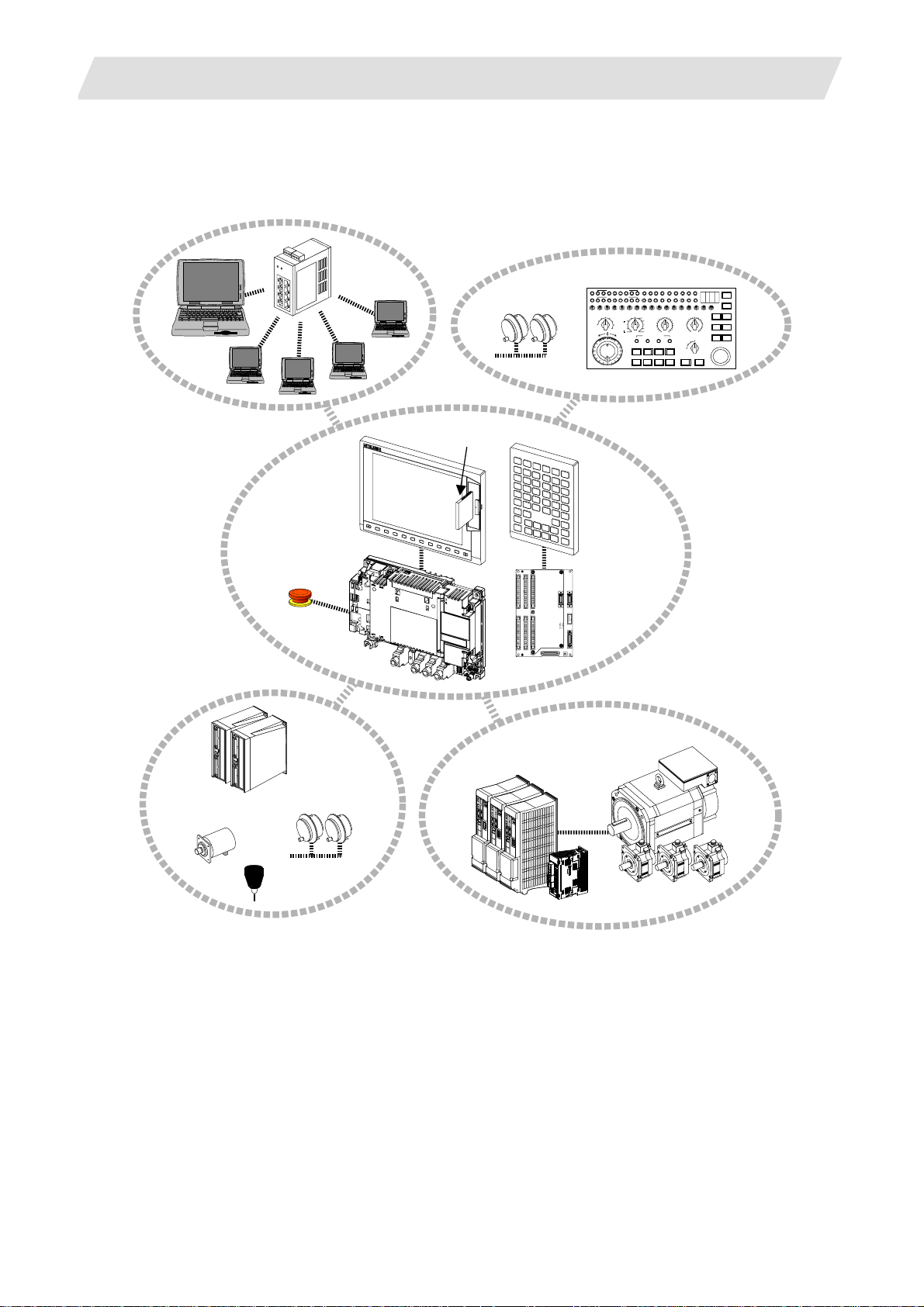
2.1 System Basic Configuration Drawing
Ethernet
hub
Personal
computer
Display unit
CF card I/F
2.1 System Basic Configuration Drawing
Machine operation panel
Manual pulse
generator
MF MCODEDATA
TF TCODEDATA
SW1 SW9 SW10 SW11 SW12 SW13 OVSL OVC SRN F1DSW8SW7SW6SW5SW4SW3SW2
10
1
-+
Keyboard unit
100
1000
5000
10000
50000
100000
AL1 AL2 AL3 AL4 TAP DEN OP SA MA
SFLED29LED30 LED31LED32 LED33LED34LED35LED36
RAP ID
STEP
R-P OINTRETURN
JOG
X
HANDLE
MEM
Y
MDI
Z
TAPE
4
1STREFERENCEPOSITION
+X +4+Z+Y
-X -4-Z-Y FEEDHOLDCYCLESTART
MANUAL FEEDRATE
100
52
27
20
10
REACHED
ON
DEGITALSWITCH
OFF
FIN
RESET
CUTTIN GFEEDRATEOVERRIDEMODE SELECTHANDLE/STEPMULTIPLICATION
100
520
110
720
270
90
80
120
1000
200
130
70
1400
140
60
2000
2700
3700
5200
7200
2
10000
1
mm/mi n
0
14000
4ZYX
50
40
30
20
10
0
RAPIDTRAVERSEOVERRIDE
50
25
1
MSTLOCK
MACHINELOCK
150
160
170
180
190
%
DRYRUN
SIN GLEBLOCK
200
100
EMERGENCYSTOP
Control unit
Operation panel
I/O unit
Synchronous feed
encoder
Emergency
stop switch
Remote I/O
unit
Manual pulse
generator
Servo/Spindle drive units
MDS-D/DH Series
MDS-D-SVJ3/SPJ3 Series
Skip
(Note 1) Control unit is mounted on the back side of the display unit with base plate.
(Note 2) Operation panel I/O unit is mounted on the back side of the keyboard unit.
Motors
2
Page 20
2. System Configuration
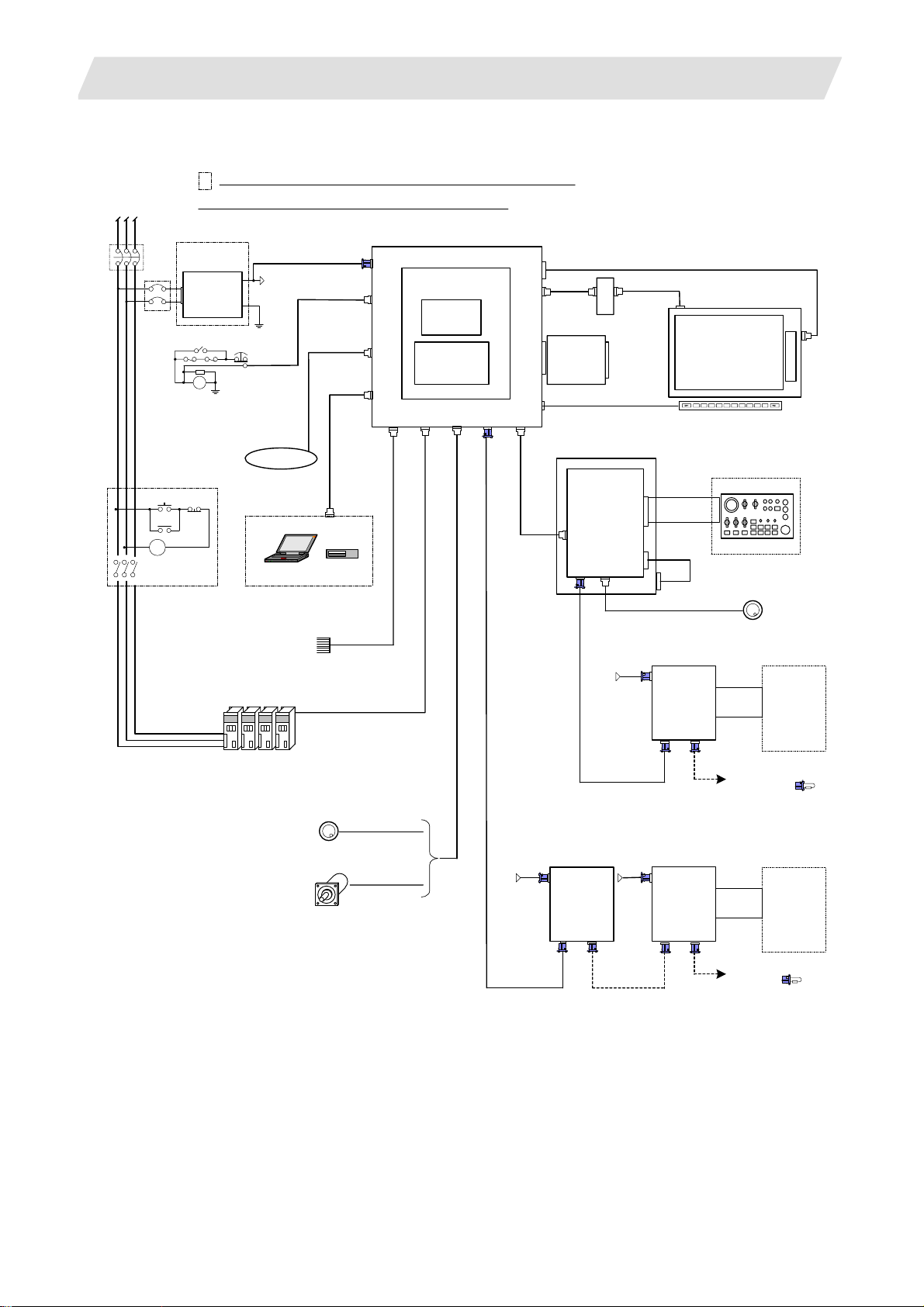
2.2 General Connection Diagram
Dotted lines indicate the sections prepared by machin e too l builder.
RST
No-fuse breaker(NFB)
NFB
MC
MC
The name with brackets <> indicates the cable for the unit.
stabilized power
ACIN
ON OFF
MC
24VDC
supply
RA
DCOUT
FG
EMG
FG
24VDC
FG
Network
Sensor signals
Max. 8 pints
F070
F120
G300/G301
RS232C Device
Skip signal input
1ch
USER 2ch
1ch: F034
2ch: F035
FCUA-R030
G395/G396/G380
CNC control unit
FCU7-MU521/522
DCIN
Main card HN76x
EMG
LAN
Memory card
Expansion
SIO
OPT
SKIP ENC
HN4xx
card
HN75x
RIO1
LCD
INV
FRONT
MENU
CG71
G011
max. 0.5m
2.2 General Connection Diagram
<G097>
<F480>
Backlight inverter
Front CF
card
CF-70
Keyboard unit
FCU7-KB024/44
Operation panel
I/O unit
FCU7-DXxxx
CG71
RIO3 MPG
NCKB
24VDC
F070
Display unit
8.4-type FCU7-DU120-12
10.4-type FCU7-DU140-12
(VGA:640×480)
CG3x
F351
(G402)
12V:F320/F321
5V:F023/F024
Remote I/O unit
DCIN
FCUA-DX1xx
RIO2RIO1
Menu key
Machine operation panel
Manual pulse generator
2ch
DI-L/R
R300
Machine
control
relay/contact
Spindle/Servo Drive Units
MDS-D/DH/SVJ3/SPJ3
Manual pulse generator
Sync. Encoder
2ch
5V:G023/G024
1ch
FCUA-R050/054
24VDC 24VDC
F070
FCUA-R211
/SH41
FCUA-R211
/SH41
Remote I/O unit
DCIN
FCUA-DX1xx
RIO2
RIO1
F070
FCUA-R211
/SH41
Remote I/O unit
DCIN
FCUA-DX1xx
RIO2RIO1
To the next remote
I/O or terminator
DI-L/R
Machine
control
relay/contact
R300
To the next remote I/O
or terminator
3
Page 21
2. System Configuration
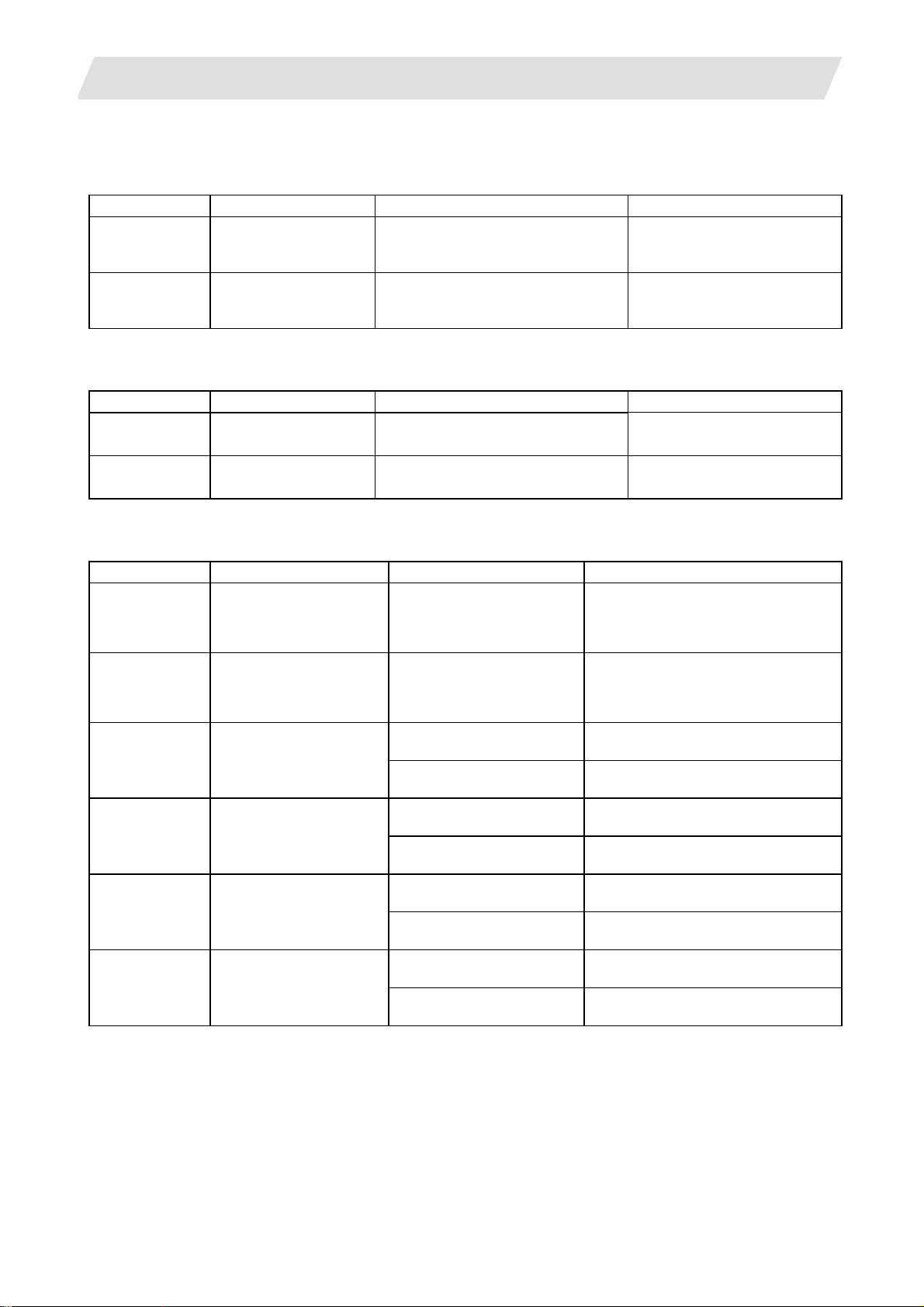
2.3 List of Configuration Units
2.3.1 Control Unit: FCU7-MU521/FCU7-MU522
Type Function Configuration element Details
FCU7-MU521 NC functions and
display controller
FCU7-MU522 NC functions and
display controller
2.3.2 Display Unit: FCU7-DU120-12/FCU7-DU140-12
Type Function Configuration element Details
FCU7-DU120-12 8.4-type color TFT LCD panel
Backlight inverter
FCU7-DU140-12 10.4-type color TFT LCD panel
Backlight inverter
2.3.3 Operation Panel I/O Unit: FCU7-DX7xx
Type Function Configuration element Details
FCU7-DX710 DI/DO Sink/source input
(insulation)
DO sink output
(non-insulation)
FCU7-DX711 DI/DO Sink/source input
(insulation)
DO source output
(non-insulation)
FCU7-DX720 DI/DO Sink/source input
(insulation)
DO sink output
(non-insulation)
Main control card (HN761)
Memory card (HN451)
Main control card (HN761)
Memory card (HN451)
Expansion card (HN751)
Base card (HN341) DI/DO = 64 points/64 points + MPG 2ch
Base card (HN351) DI/DO = 64 points/64 points + MPG 2ch
Base card (HN341) DI/DO = 64 points/64 points + MPG 2ch
Add-on card (HN361) DI/DO = 32 points/16 points + AO 1ch
2.3 List of Configuration Units
Export Trade Control Ordinance
and Foreign Trade Ordinance
noncompliant unit
Export Trade Control Ordinance
and Foreign Trade Ordinance
noncompliant unit
CF card I/F is normally equipped
with the control unit.
CF card I/F is normally equipped
with the control unit.
FCU7-DX721 DI/DO Sink/source input
(insulation)
DO source output
(non-insulation)
(insulation)
DO sink output
(non-insulation)
(insulation)
DO source output
(non-insulation)
Base card (HN351) DI/DO = 64 points/64 points + MPG 2ch
Add-on card (HN371) DI/DO = 32 points/16 points + AO 1ch
Base card (HN341) DI/DO = 64 points/64 points + MPG 2chFCU7-DX730 DI/DO Sink/source input
Add-on card (HN362) DI/DO = 32 points/32 points
Base card (HN342) DI/DO = 64 points/64 points + MPG 2chFCU7-DX731 DI/DO Sink/source input
Add-on card (HN372) DI/DO = 32 points/32 points
(Note 1) Operation panel I/O unit is mounted on the back side of the keyboard unit FCU7-KB024/KB044.
(Note 2) Operation panel I/O unit for 700 Series is not available.
4
Page 22
2. System Configuration
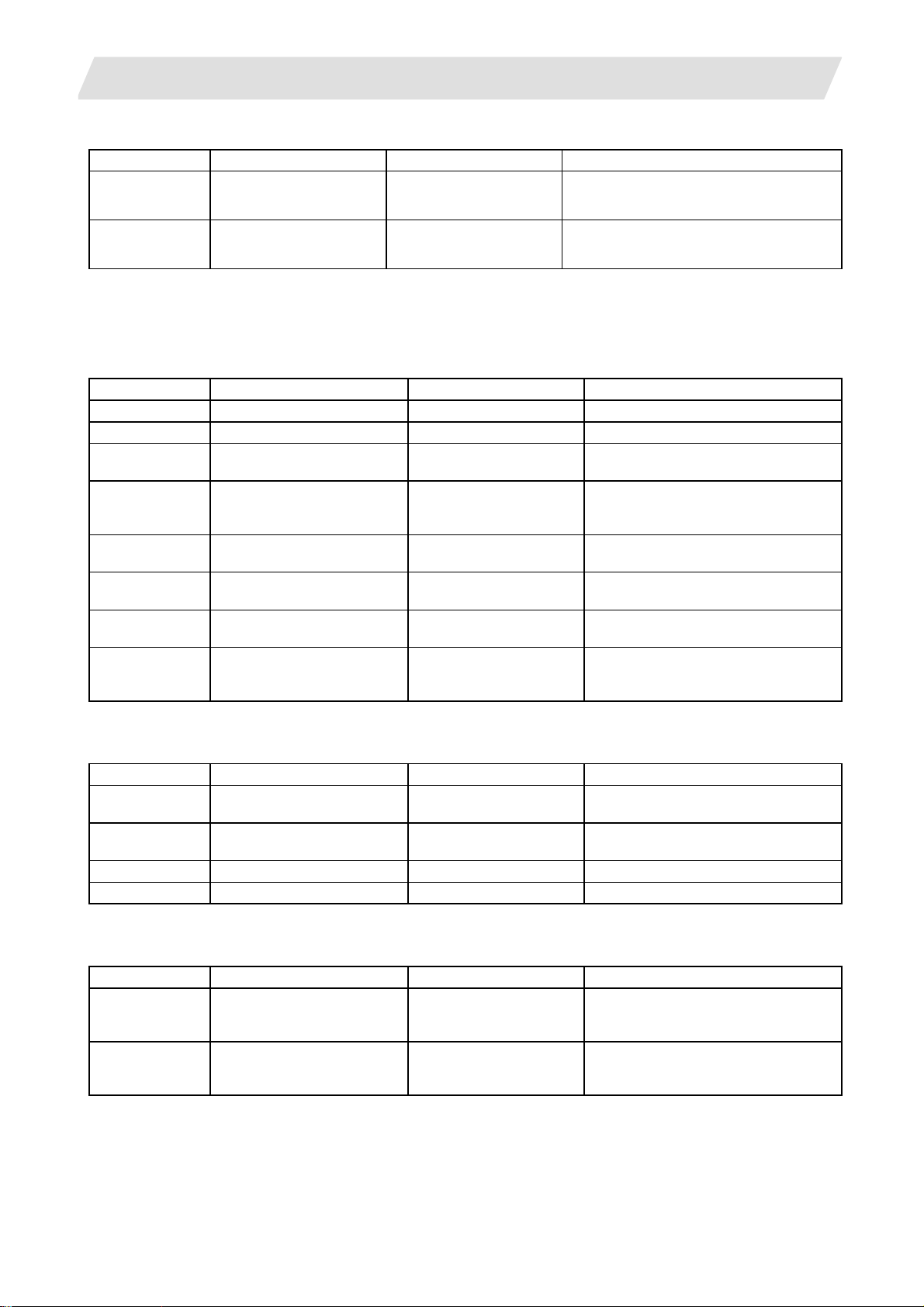
2.3 List of Configuration Units
2.3.4 Keyboard Unit: FCU7-KB024/FCU7-KB044
Type Function Configuration element Details
FCU7-KB024 8.4-type display keyboard Escutcheon, key switch Connect with G011 cable from control unit.
Mounting method: Mount on front panel
FCU7-KB044 10.4-type display keybo ard Escutcheon, key switch Connect with G011 cable from control unit.
Mounting method: Mount on front panel
2.3.5 Remote I/O Unit: FCUA-DX100/FCUA-DX110/FCUA-DX120/FCUA-DX140/FCUA-DX101/FCUA-DX111/ FCUA-DX121/FCUA-DX141
Type Function Configuration element Details
FCUA-DX100 Sink/source input + sink output RX31 1 DI/DO = 32 points/32 points
FCUA-DX110 Sink/source input + sink output RX311+RX321-1 DI/DO = 64 points/48 points
FCUA-DX120 Sink/source input + sink output
+ analog output
FCUA-DX140 Sink/source input + sink output
+ analog input/output
FCUA-DX101 Sink/source input + source
output
FCUA-DX111 Sink/source input + source
output
FCUA-DX121 Sink/source input + source
output + analog output
FCUA-DX141 Sink/source input + source
output + analog input/output
RX311+RX321 DI/DO = 64 points/48 points
+ analog output 1 point
RX311+RX341 DI/DO = 32 points/32 points
+ analog input 4 points
+ analog output 1 point
RX312 DI/DO = 32 points/32 points
RX312+RX322-1 DI/DO = 64 points/48 points
RX312+RX322 DI/DO = 64 points/48 points
+ analog output 1 point
RX312+RX341 DI/DO = 32 points/32 points
+ analog input 4 points
+ analog output 1 point
2.3.6 Card-sized I/O Card: HR361/HR371/HR381/HR383
Type Function Configuration element Details
HR361 DI16 (sink/source)
+DO16 (sink)
HR371 DI32 (sink/source)
+DO16 (source)
HR381 AO x 1 HR381 AO x 1
HR383 AI x 4+AO x 1 HR383 AI x 4+AO x 1
HR361 DI/DO = 16 points/16 points
HR371 DI/DO = 16 points/16 points
2.3.7 External Power Supply Unit: PD25/PD27
Type Function Configuration element Details
PD25 External power supply with
power supply ON/OFF
function
PD27 External power supply with
power supply ON/OFF
function
Power supply card
Case set
Power supply card
Case set
Input 200VAC
Output 24VDC (3A)
Input 200V to 400VAC
Output 24VDC (8A)
5
Page 23
3. General Specifications (Environment Conditions)
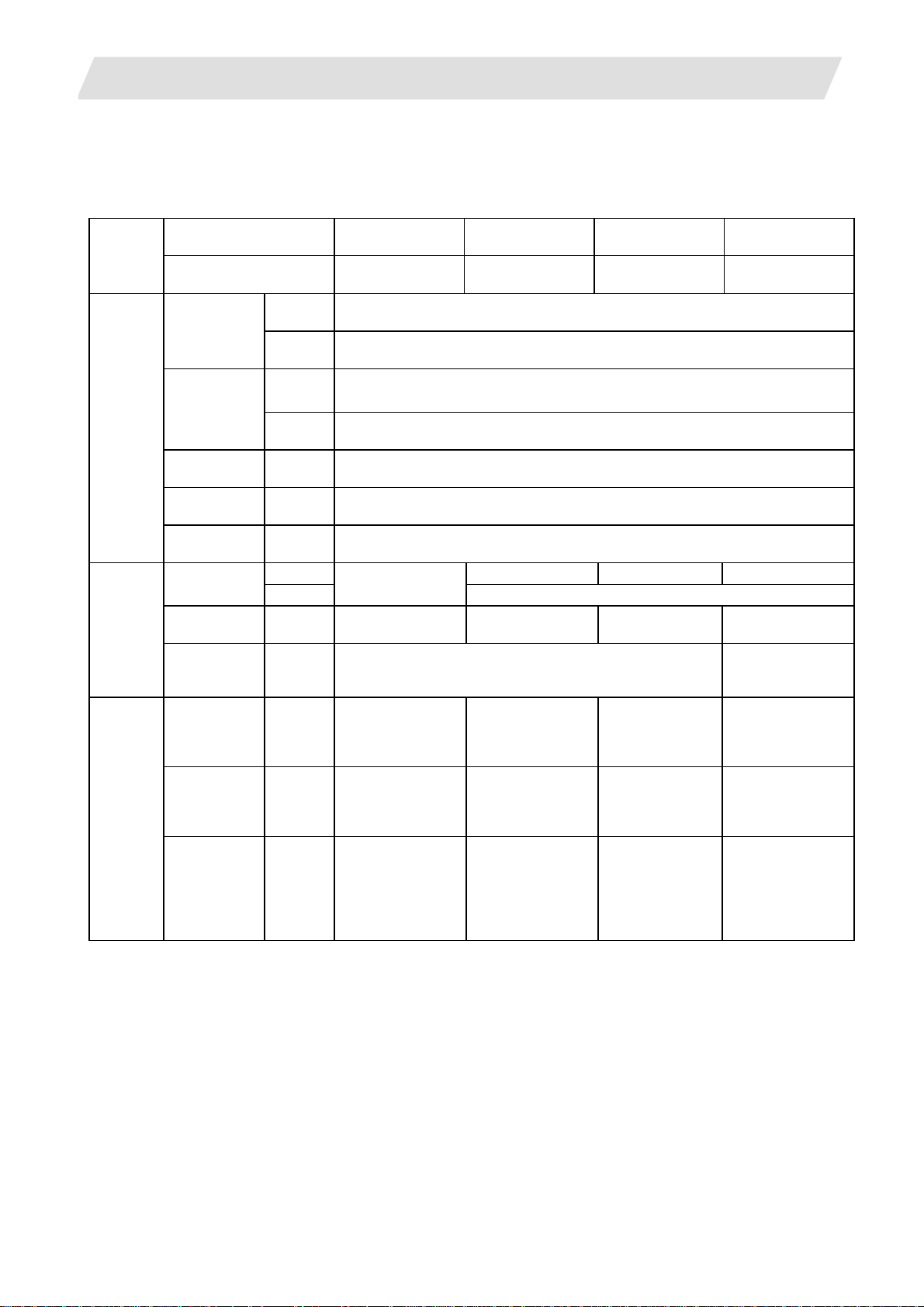
3.1 Environment Conditions in Operation Panel
3. General Specifications (Environment Conditions)
3.1 Environment Conditions in Operation Panel
Unit name Control unit Display unit Keyboard unit
Item
Type FCU7-MU521/522
During
operation
During
storage
Long
term
Short
term
4.9m/s
29.4m/s
No corrosive gases, dust or oil mist
3.3/12VDC 5VDC 3.3/5VDC
2.5A – –
20ms –
(mm)
24VDC ± 5%, ripple
noise 200mV (P-P)
235(width)
×173(height)
× 73 (depth)
(Depth from the
plate mounting
surface: 60)
General
specifications
Required
power
specifications
Others
Ambient
temperature
Ambient
humidity
Vibration
resistance
Shock
resistance
Working
atmosphere
Power voltage
Power
capacity
Instantaneous
stop tolerance
time
Heating value (Max.) 12W
Mass (kg) 1.0
Outline
dimension
(Note 1) The period is within one month.
(Note 2) For the current value of the I/O circuit, calculate with the number of points used and load.
(Note 3) For the heating value of the I/O circuit, calculate with the number of points used.
FCU7-DU120-12/
140-2
-20 to 60°C
10 to 75% RH (with no dew condensation)
10 to 95% RH (with no dew condensation) (Note 1)
2
or less (during operation)
2
or less (during operation)
FCU7-DU120-12:
10W
FCU7-DU140-2:
12W
FCU7-DU120-12:
1.5
FCU7-DU140-2:
2.0
FCU7-DU120-12:
260(width) ×
200(height)
FCU7-DU140-2:
290(width) ×
220(height)
FCU7-KB024/44
0 to 55°C
(Provided by the control unit)
1.0W
0.8 0.4
FCU7-KB024:
140(width) ×
200(height)
FCU7-KB044:
140(width) ×
220(height)
Operation panel
I/O unit
FCU7-DX71/
72/73
–
(Note 2)
Control section:
5.0W
(Note 3)
120(width) ×
180(height)
6
Page 24
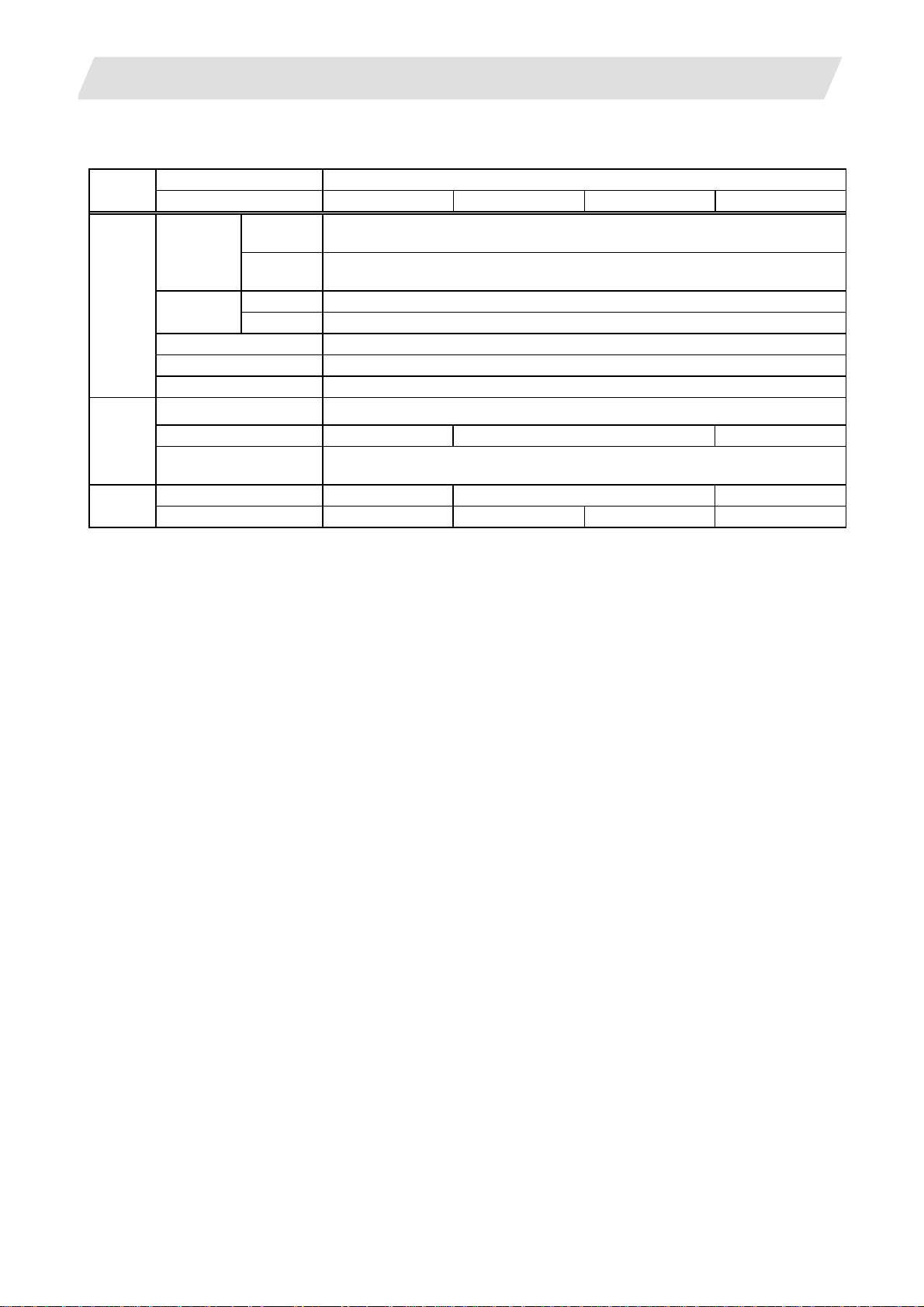
3. General Specifications (Environment Conditions)
3.2 Environment Specifications in Electric Cabinet
3.2 Environment Specifications in Electric Cabinet
Item
General
specifications
Required
Power
specification
Others
Unit name
Type FCUA-DX10 FCUA-DX11 FCUA-DX12 FCUA-DX14
Ambient
temperature
Ambient
humidity
Vibration resistance 4.9m/s2 or less (during operation)
Shock resistance 29.4m/s2 or less (during operation)
Working atmosphere No corrosive gases, dust
Input power voltage 24VDC±5% Ripple noise 200mV (P-P)
Power capacity 24V 0.7A (Note 2) 24V 1.5A (Note 2) 24V 0.7A (Note 2)
Instantaneous stop
tolerance time
Heating value (Max.) 25W (Note 3) 30W (Note 3) 30W (Note 3)
Mass 0.5kg 0.6kg 0.6kg 0.6kg
(Note 1) The period is within one month.
(Note 2) Amount consumed by control circuit
(Note 3) Differs according to the number of machine input operation points and the load and number of
points connected to the machine output. The maximum value applies when all points are ON.
Remote I/O unit
During
operation
During
storage
Long term 10 to 75% RH (with no dew condensation)
Short term 10 to 95% RH (with no dew condensation) (Note 1)
0 to 55°C
–20 to 60°C
—
7
Page 25
3. General Specifications (Environment Conditions)
3.3 Heat Radiation Countermeasures
3.3 Heat Radiation Countermeasures
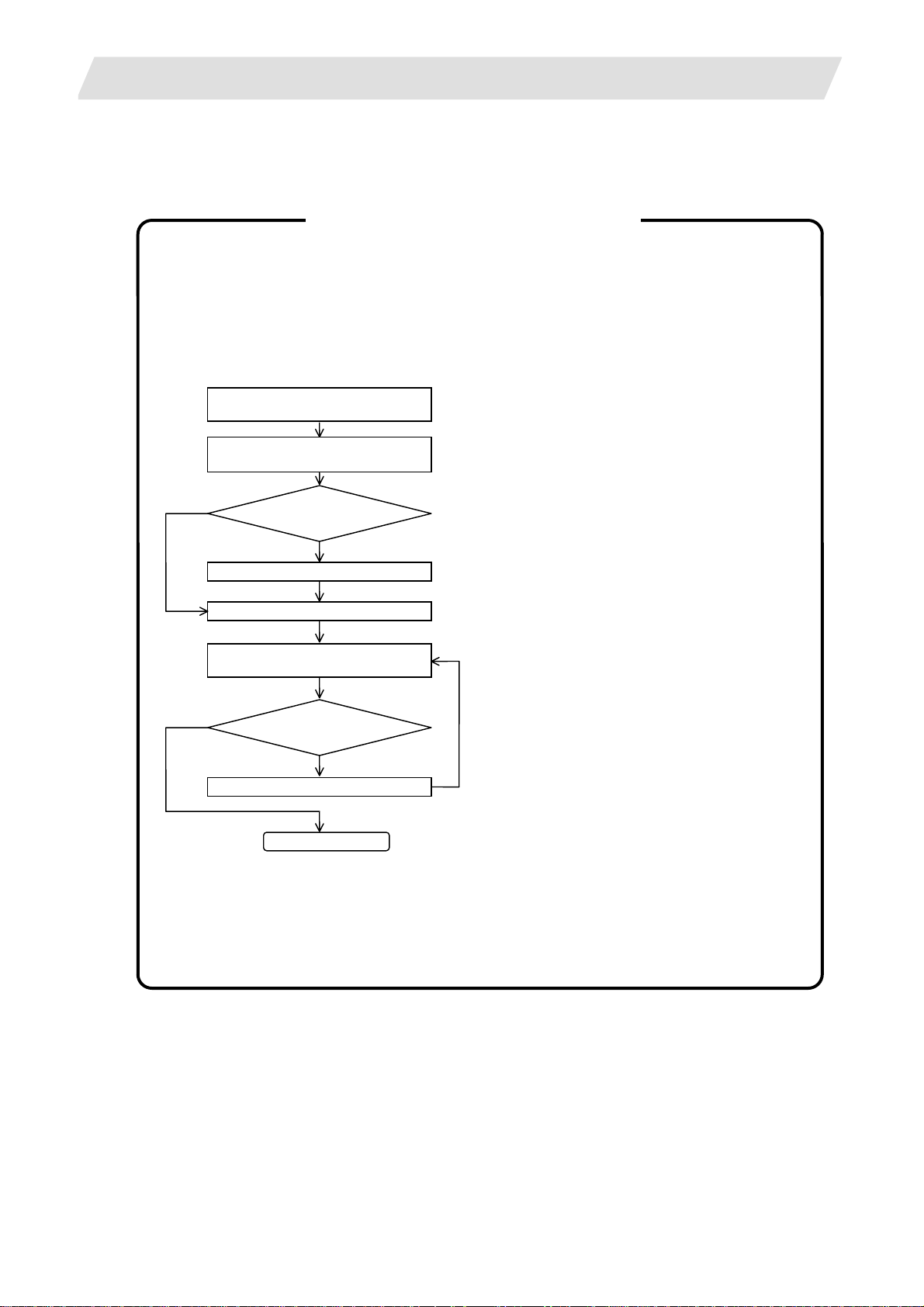
Please refer to the following method for heat radiation countermeasures.
<Hypothetical conditions>
(1) Average internal temperature of operation panel: T ≤ 55°C
(2) Peripheral temperature of operation panel : Ta ≤ 0°C to 45°C
(3) Internal temperature rise value : ΔT = T–Ta (max) = 10°C
Example of heat radiation countermeasures
Procedures for heat design and verification
Calculate total heat radiation of each
mounted unit (W)
Calculate cooling capacity of
operation panel (W1)
W ≤ W1
≤10°C
ΔT
Comparison of W and W1
W>W1
Selection of heat exchanger
Mounting design
Collection of internal temperature rise
distribution data
Evaluation
ΔT>10°C
Improvements
<Supplement>
(1) Refer to "3. General Specification" for the heat
generated by each unit.
(2) Enclosed cabinet (thin steel plate) cooling
capacity calculation equation
W1 = U × A × ΔT
U: 6 W/m
A: Effective heat radiation area (m
2
°C
2
)
ΔT: Internal temperature rise value (10°C)
(Area where heat can be radiated from
operation panel)
<Caution>
2
8 W/m
°C can be applied only when the
operation panel is so small that the internal
temperature stays uniform.
(3) Points of caution for heat radiation
countermeasures when designing mounting
state
* Consider convection in operation panel
(eliminate heat spots)
* Collect hot air at suction port of heat
exchanger in operation panel.
(4) Criterion for internal temperature rise
distribution data
Completion
ΔT (average value) ≤ 10°C
ΔTmax (maximum value) ≤ 15°C
R (inconsistency ΔTmax – ΔTmin) ≤ 6°C
(Evaluate existence of heat spots)
8
Page 26
3. General Specifications (Environment Conditions)
3.3 Heat Radiation Countermeasures
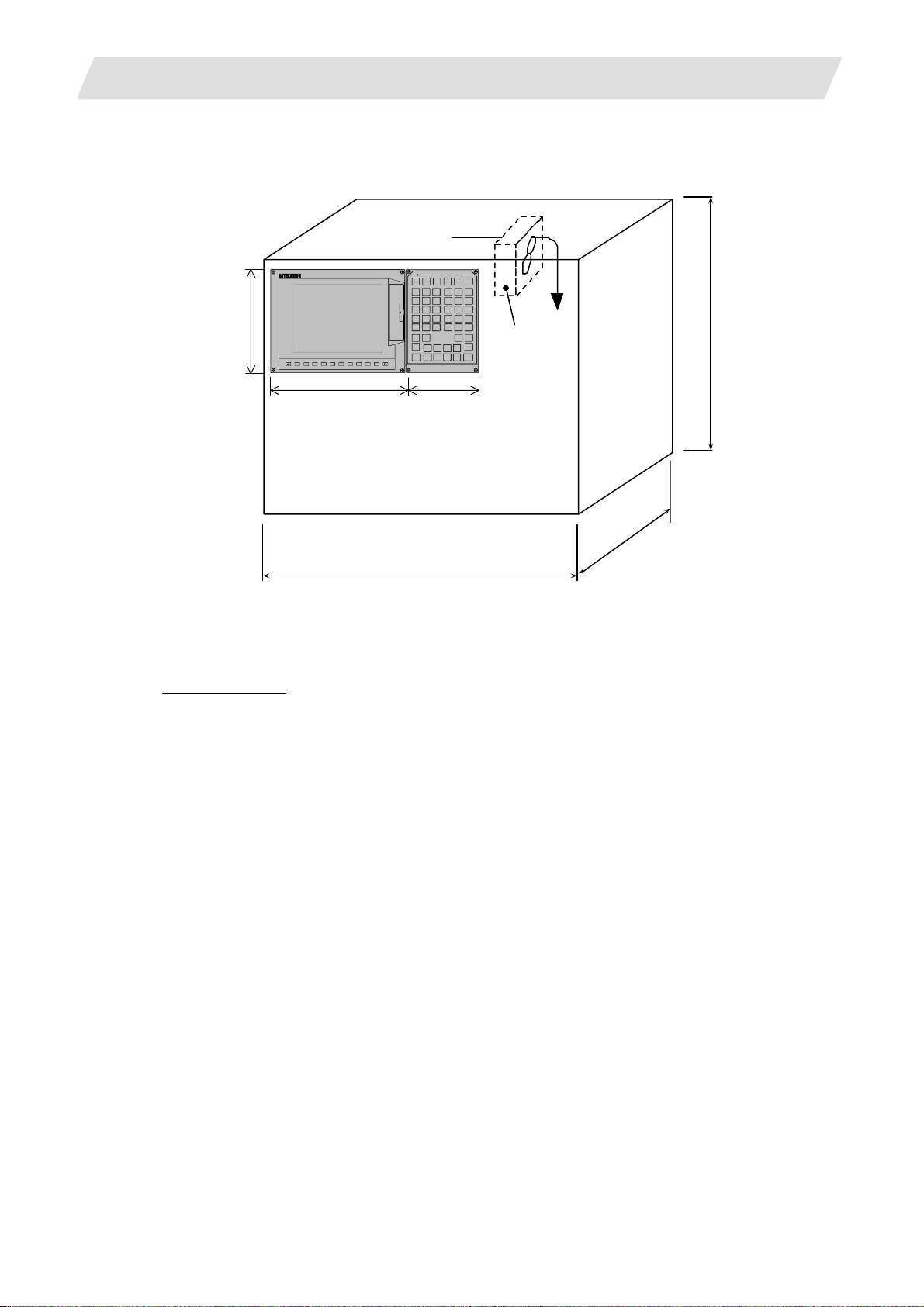
The following shows an example of calculation applied to heat radiation countermeasures for the operation
panel. Because heat will accumulate in the upper portions of the unit, install an agitating fan as required.
Display unit
200
260 140
600
(Agitating fan)
<Calculation example of heating value in operation panel>
(1) Calculation of unit heating value
Heating value (W)
Total heating value of units (W):
28W (= control unit + display unit + keyboard unit + operation panel I/O unit)
Total heating value (W) by machine input (D1):
5.6W (= 24V;
total heating value when the 32 points are simultaneously turned ON × 7.3mA × 32)
... 24V; current consumption per point of the operation panel I/O unit DI ÷ 3.3kΩ ≒ 7.3mA
Total heating value W = 33.6W (28 + 5.6)
500
120
9
Page 27

3. General Specifications (Environment Conditions)
(2) Calculation of operation panel cooling capacity
Tolerance value for temperature rise (Δt)
Panel internal temperature (according to each unit’s specification) T ≤ 55C°
Panel peripheral temperature (according to machine’s specification) Ta ≤ 45C°
Tolerance value for internal temperature rise ΔT = 10C° (T – Ta)
Heat radiation area (A)
The surface of the molded unit, which has lower radiation capacity than the metal plate surface,
should be excluded for the heat radiation area in principle.
The bottom of the operation panel, which has difficulty in radiating due to the temperature
distribution, should also be excluded for the heat radiation area in principle.
Heat radiation area A = 0.71mm
(≒ 0.6 × 0.12 + 0.6 × 0.5 × 2 – (0.2 6 + 0.14) × 0.2 + 0.12 × 0.5 × 2)
(Top surface) (Front, rear surface) (Unit surface) (Both sides surface)
Operation panel cooling capacity (W1)
Calculate the cooling capacity to keep the temperature rise in the operation panel less than 10°C.
Cooling capacity W1 = 42.6W (6 × A × ΔT)
(3) Comparison of heating value and operation panel cooling capacity
The operation panel cooling capacity is over the heating value, which presumed no need to install
the heat exchanger.
(4) Confirmation with the actual machine
The result of the calculation above is only a rough indication. The actual temperature rise may differ
according to the structure of the operation panel.
Be sure to confirm the temperature rise value in the operation panel when the machine is run ning.
2
3.3 Heat Radiation Countermeasures
10
Page 28
4. Outline Drawing
4. Outline Drawing
4.1 Control Unit
4.1.1 FCU7-MU521/FCU7-MU522
21
100
52
(2)
(3) (4)
235
220
208
4.1 Control Unit
(5) (1)
6
6
156 168 173
(6)
(7)
(8)
(11) (12) (13)
(10)
(9)
(14)
(15)
11
Page 29
4. Outline Drawing
4.1 Control Unit
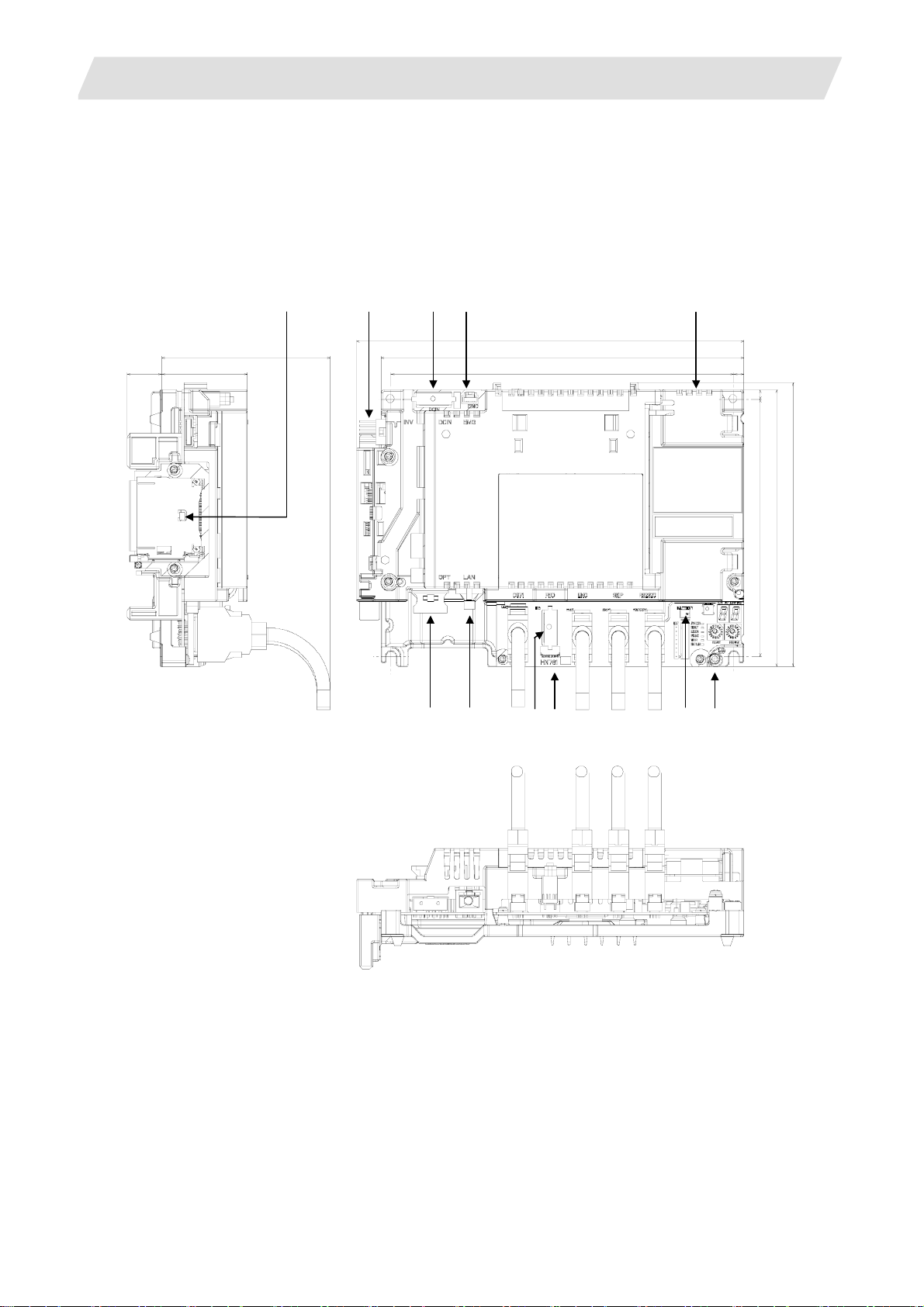
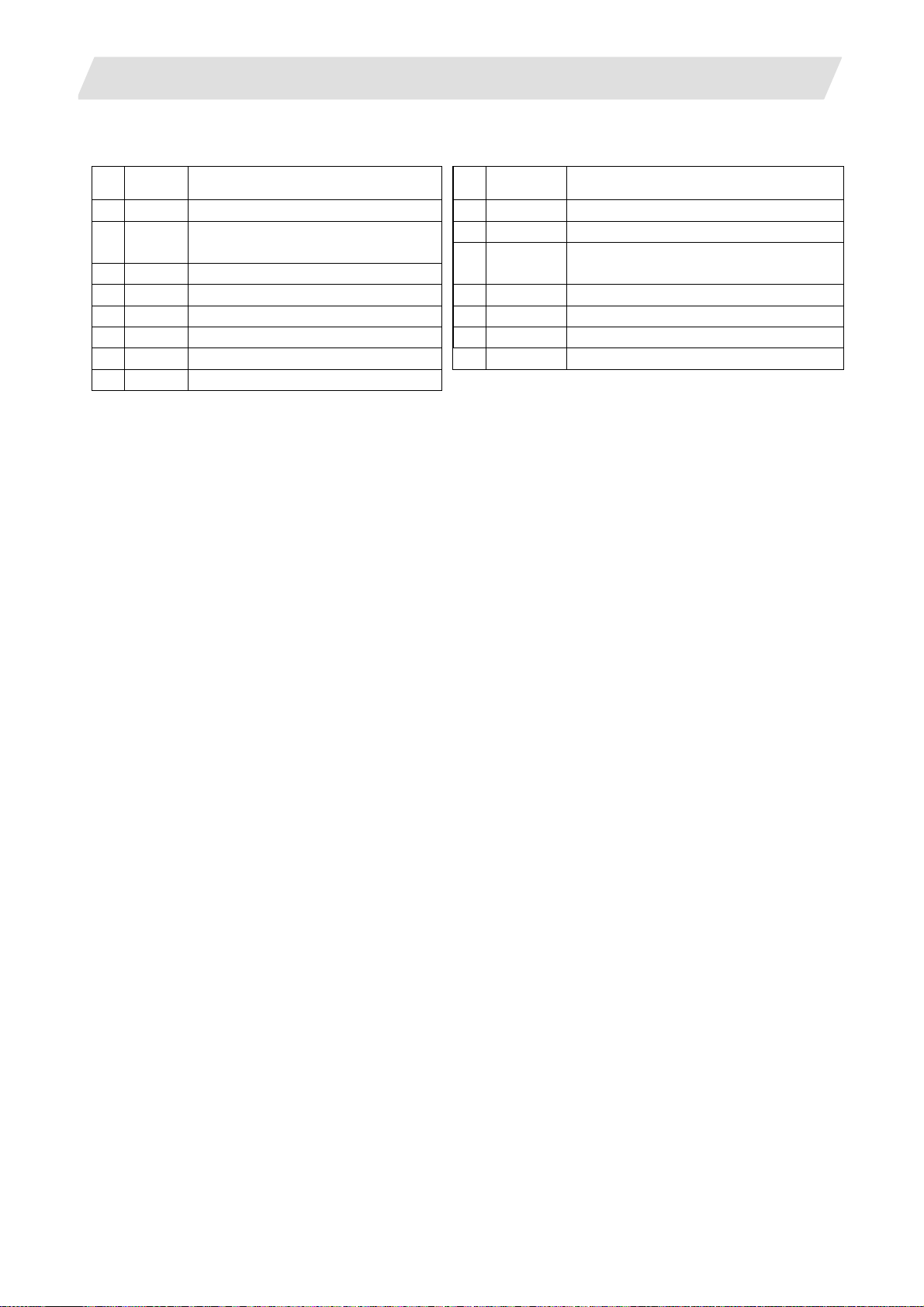
Explanation of connector functions
Connec-
No.
tor name
(1) CF Front CF card I/F (9) RIO1 Remote IO unit I/F
(2) INV
(3) DCIN 24VDC input
(4) EMG External emergency stop input (12) SKIP Skip input 8ch
(5) LCD Display unit signal connector (13) SIO RS-232C communication I/F 2ch
(6) OPT Optical servo communication I/F (14) BATTERY Battery (Q6BAT) connector
(7) LAN LAN communication I/F (15) FG FG terminal block
(8) CG71 Operation panel I/O unit I/F
Display unit backlight
Inverter connector
Function No.
Connector
name
(10) MENUKEY Menu key I/F
(1 1) ENC
Encoder input 1ch
(5V manual pulse generator input 2ch)
Function
12
Page 30
4. Outline Drawing
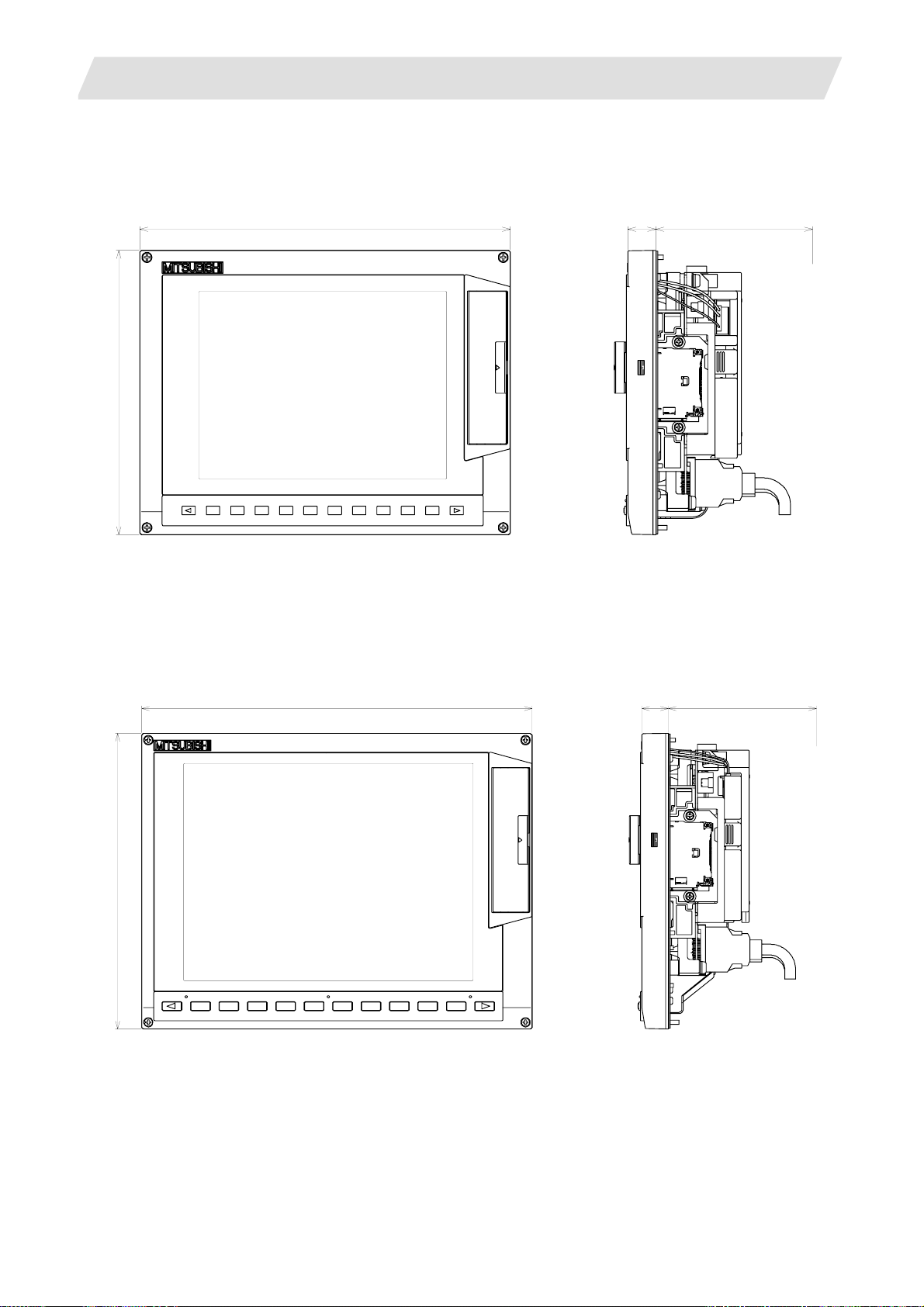
4.2 Display Unit
4.2.1 FCU7-DU120-12 (8.4-type)
260
200
20 110
4.2 Display Unit
(Space required for wiring)
(Note 1) The above side view shows the state with the control unit mounted.
(Note 2) Consider the heat radiation space for the upper space.
(Note 3) Consider the minimum radius value of optical cable for the bottom space.
4.2.2 FCU7-DU140-12 (10.4-type)
290
220
20 110 (Space required for wiring)
(Note 1) The above side view shows the state with the control unit mounted.
(Note 2) Consider the heat radiation space for the upper space.
(Note 3) Consider the minimum radius value of optical cable for the bottom space.
13
Page 31

4. Outline Drawing
4.3 Operation Panel I/O Unit
4.3.1 FCU7-DX710/FCU7-DX711
179
(1)
(2)
116
(7)
(8)
4.3 Operation Panel I/O Unit
110 (Space required for wiring)
(3)
(4)
(5)
Explanation of connector functions
Connector
No.
name
(1) CG31 DI: 32 points (1st station) (Note)
(2) CG33 DI: 32 points (2nd station) (Note)
(3) CG32 DO: 32 points (1st station) (Note)
(4) CG34 DO: 32 points (2nd station) (Note)
(5) NCKB Keyboard I/F
(6) FG FG terminal block
Function
(Note) St ation No. cannot be changed.
(6)
(9)
Connector
No.
name
(7) MPG Manual pulse generator input 2ch
(5V, 12V)
(8) RI03 Remote I/O unit I/F
(3rd to 6th station can be used)
(9) CG71 Control unit I/F
Function
14
Page 32

4. Outline Drawing
4.3.2 FCU7-DX720/FCU7-DX721/FCU7-DX730/FCU7-DX731
179
(1)
(2)
(3)
116
(9)
(10)
(11)
(12)
4.3 Operation Panel I/O Unit
110(Space required for wiring)
(5)
(4)
(6)
Explanation of connector functions
Connector
No.
name
(1) CG31
(2) CG33
(3) CG35
(4) CG32
(5) CG34
(6) CG36 FCU7-DX730/DX731
FCU7-DX720/DX721
(with analog output)
DI: 32 points (1st station) (Note)
DI: 32 points (2nd station) (Note)
DI: 32 points (3rd station) (Note)
DO: 32 points (1st station) (Note)
DO: 32 points (2nd station) (Note)
DO: 32 points (3rd station) (Note)
DO: 16 points (3rd station) (Note)
Function
(Note) S tation No. cannot be changed.
(7)
(8)
Connector
No.
name
(7) NCKB Keyboard I/F
(8) FG FG terminal block
(9) AO Analog output 1ch
(10) MPG Manual pulse generator input 2ch
(5V, 12V)
(11) RI03 Remote I/O unit I/F
(4th to 6th station can be used)
(12) CG71 Control unit I/F
Function
15
Page 33

4. Outline Drawing
4.4 Keyboard Unit
4.4.1 FCU7-KB024 (8.4-type)
140
200
20 110
4.4 Keyboard Unit
(Space required for wiring)
(Note) The above side view shows the state wit h the Operation p anel I/O unit FCU7-DX720/DX7 21 mounted.
4.4.2 FCU7-KB044 (10.4-type)
140
220
20 110
(Space required for wiring)
(Note) The above side view shows the state with the Operati on panel I/O unit FCU7-DX720/DX721mounted.
16
Page 34

4. Outline Drawing
4.5 Remote I/O Unit
4.5 Remote I/O Unit
4.5.1 FCUA-DX100/FCUA-DX110/FCUA-DX120/FCUA-DX140/FCUA-DX101/FCUA-DX111/ FCUA-DX121/FCUA-DX141
Top
135
168
40
70
Bottom
135
6
150 100
17
Page 35

4. Outline Drawing
4.6 Card-sized I/O Card
4.6.1 HR361/HR371/HR381/HR383
4.6 Card-sized I/O Card
3
9
55
(1) Card corner holder
Use a card corner holder for fixing card-sized I/O card.
Recommended card corner holder: KGCH-20-0 (KITAGAWA INDUSTRIES)
8
10
6.2
1.8
5.4
0
2
5
.
3
5
.
1
5
.
6
15
6.5 5
7.7
7
18
Page 36

4. Outline Drawing
(2) Example of card-sized I/O card connector PCB
4.6 Card-sized I/O Card
+0.1
7.1
0
+0.1
5.5
0
8
.
0
R
0
+0.1
5
.
5
0
-0.2
6
8
5.25
15
3x15=45
19
Page 37

5. Panel Cut Dimension Drawing / Installation Dimension Drawing
5.1 Display Unit
5. Panel Cut Dimension Drawing / Installation Dimension Drawing
5.1 Display Unit
5.1.1 FCU7-DU120-12 (8.4-type)
260 (Unit outline)
250 ± 0.3
244
(Square hole)
184
190 ± 0.3
200 (Unit outline)
4-M3 Screw
20
Page 38

5. Panel Cut Dimension Drawing / Installation Dimension Drawing
5.1.2 FCU7-DU140-12 (10.4-type)
290 (Unit outline)
280 ± 0.3
274
5.1 Display Unit
204
210 ± 0.3
220 (Unit outline)
4-M3 Screw
(Square hole)
21
Page 39

5. Panel Cut Dimension Drawing / Installation Dimension Drawing
5.2 Operation Panel I/O Unit
5.2 Operation Panel I/O Unit
5.2.1 FCU7-DX710/FCU7-DX711/FCU7-DX720/FCU7-DX721/FCU7-730/FCU7-731
116 (Unit outline)
106 ± 0.3
171 ± 0.3
179 (Unit outline)
4-M3 Screw
(Remarks) When using the Mitsubishi keyboard, the Operation p anel I/O unit can be mounted on the back of
the keyboard.
22
Page 40

5. Panel Cut Dimension Drawing / Installation Dimension Drawing
5.3 Keyboard Unit
5.3.1 FCU7-KB024 (for 8.4-type)
140 (Unit outline)
130 ± 0.3
5.3 Keyboard Unit
182
190 ± 0.3
200 (Unit outline)
4-M3 Screw
122
23
Page 41

5. Panel Cut Dimension Drawing / Installation Dimension Drawing
5.3.2 FCU7-KB044 (for 10.4-type)
140 (Unit outline)
130 ± 0.3
5.3 Keyboard Unit
202
210 ± 0.3
220 (Unit outline)
4-M3 Screw
122
24
Page 42

5. Panel Cut Dimension Drawing / Installation Dimension Drawing
5.4 External Power Supply Unit
5.4 External Power Supply Unit
5.4.1 PD25
65
∅6
AC IN
ON/OFF SW
ON/OFF
FAN ALARM
POWER
DC OUT
R3
2-
6
30
220
230
6
130
208
230
25
Page 43

5. Panel Cut Dimension Drawing / Installation Dimension Drawing
5.4 External Power Supply Unit
5.4.2 PD27
65
∅6
AC IN
6
ON/OFF SW
ON/OFF
FAN ALARM
POWER
DC OUT
R3
2-
30
220
230
6
170
208
230
5.4.3 Mounting Direction and Clearance
Mount the external power supply unit vertically and so that it is visible from the front. Provide space for heat
dissipation and ventilation.
100mm
20mm 20mm
100mm
26
Page 44

5. Panel Cut Dimension Drawing / Installation Dimension Drawing
5.5 Remote I/O Unit
5.5 Remote I/O Unit
5.5.1 FCUA-DX100/FCUA-DX110/FCUA-DX120/FCUA-DX140/FCUA-DX101/FCUA-DX111/ FCUA-DX121/FCUA-DX141
Mounting hole
2 - M5 - 0.8 screw
6
156
6
634
27
Page 45

5. Panel Cut Dimension Drawing / Installation Dimension Drawing
A
5.6 Manual Pulse Generator
5.6.1 UFO-01-2Z9
Index
5.6 Manual Pulse Generator
Gasket 3-M4 stud
Panel cut diameter
72 at equal pitch
[Panel cut drawing]
3-ø4.8 at equal pitch
Produced by NIDEC NEMICON CORPORATION
(Note) This product does not comply with the MELDAS specifications.
bove size only
28
Page 46

5. Panel Cut Dimension Drawing / Installation Dimension Drawing
5.6.2 HD60
ø77±0.5
ø60±0.5
3.6
16 24
27±0.5
Packing t2.0
ø80±1
ø60±0.5
12V 0V A B
8. 89 7. 60
5.6 Manual Pulse Generator
3-M4 stud bolt L10
Installation of screws
other than M3 x 6
not possible
[Panel cut drawing]
(Divide equally
by three)
120°
3-ø4.8
+2
ø62
0
ø72±0.2
29
Page 47

5. Panel Cut Dimension Drawing / Installation Dimension Drawing
5.7 Synchronous Feed Encoder
5.7 Synchronous Feed Encoder
5.7.1 OSE-1024-3-15-68
Caution plate
9
5
0
2
0
0
.
ø
68
20
.
0
-
ø50
6
8
0
5
6
-
68
56
4-
ø5.4 hole
2
5
28
3
19.5
102
33
135
0
ø14.3
-0.11
1.15
26
+0. 14
0
2
ø15
1.15
-0.006
-0.017
+0. 14
0
ø16
ø50
-0.009
-0.025
-0.012
5
-0.042
1
.
0
0
+
3
Cross section BB
Valid depth of key groove is 21mm
2
Enlarged drawing of key
30
Page 48

6. Connections of Control Unit
A
A
A
6.1 Control Unit Connection System Drawing
6. Connections of Control Unit
The method for connecting to each unit and device from the control unit are briefly explained in this section.
6.1 Control Unit Connection System Drawing
Control unit Operation panel I/O unit
CG71
SIO
ENC
LCD
INV
MENUKEY
SKIP
OPT
RIO1
G011 cable
F034, F035 cable
R050, R054 cable
G023, G024 cable
ccessory cable for unit
ccessory cable for unit
ccessory cable for unit
R030 cable
G395/G396/G380 cable
R211 cable
CG71
RS-232C device
Synchronous feed encoder, or
5V manual pulse generator
Display unit
Skip input (Sensor input)
Servo/Spindle drive unit
Remote I/O unit
LAN
EMG
DCIN
G301 cable (straight)
F120 cable
F070 cable
Ethernet device
Emergency stop signal
24VDC
Stabilized
power supply
31
Page 49

6. Connections of Control Unit
6.2 Connecting with Power Supply
6.2 Connecting with Power Supply
Connect a general-purpose 24VDC stabilized power supply or PD25/PD27 power supply unit to the control
unit.
6.2.1 When Using General-Purpose 24VDC Stabilized Power Supply
(1) Connection of power supply
24VDC Stabilized
F070 cable
DCIN
1
2
3
power supply
+24V
0V
(Note 2)
AC
AC
FG
ONOFF
MC
MC
NFB
MC
DCIN
Control unit
DCIN
Y
24VDC
0V
FG
Connector name: DCIN
Contact: 2-178288-3
Connector: 1-175218-5
Recommended manufacturer: Tyco Electronics AMP
R
S
T
FG
<Related items>
Cable drawing: "Appendix 2 (G070 cable)"
Connector pin assignment: "Appendix 3 (DCIN connector)"
(Note 1) Rush current may occur to lead welding on the contacts, when a magnetic switch such as relay
directly controls 24VDC’s ON/OFF during 24V power supply to the control unit.
Use relay with large heat capacity of contacts to control 24VDC's ON/OFF.
(Note 2) Make a short-circuit between OV and FV on the terminal block to cut noise.
(2) Specifications of power supply
Consider the following characteristics when selecting the stabilized power supply (prepared by machine
tool builder). Use a power supply that complies with CE Marking or that follows the safety standards given
below.
[Stabilized power supply selection items]
Standard
setting
Remarks
±5% ±5% or less of 24VDC output
Output
Item
Voltage
fluctuation
Ripple noise 200mV (P-P)
Power capacity -- 2.5A or more
Output holding time 20ms Instantaneous power failure time (AC side)
[Standards]
Safety Standards : UL1950, CSA C22.2 No. 234 approved, IEC950 compliant
Noise Terminal Voltage : FCC Class A, VCCI-Class A
High Harmonics Current Restrictions : IEC61000-3-2
(Note) 24VDC voltage may drop instantaneously due to rush current at the beginning of 24V power
supply to the control unit. The level of voltage drop depends on the capacity of the power supply.
Do not share the power supply with the devices that have alarms to warn the voltage drop.
32
Page 50

6. Connections of Control Unit
6.2.2 When Using PD25/PD27 Power Supply Unit
(1) Connection of PD25/PD27 power supply
6.2 Connecting with Power Supply
PD25/PD27 power supply unit
DCIN
Y
F110 cable
ACIN
CF01
DCIN
ACFAIL
(Note)
ON/OFF SW
ON/OFF
FAN ALARM
POWER
DCOUT
Control unit
(Note) 70 Series does not employ ACFAIL function. (CF01 is not connected.)
<Related items>
Cable drawing: "Appendix 2 (F110 cable, F170 cable)"
Connector pin assignment: "Appendix 3 (DCIN connector)"
ACIN: AC input
1
ACIN
ACIN N
2
ACIN H
3
FG
ON/OFF SW:
:
Switch ON (upward) --- 24VDC output
Switch OFF (downward) --- 24VDC output OFF
<Cable side connector type>
Connector
Contact
Recommended
: 2-178128-3
: 1-175218-5
: Tyco Electronics AMP
manufacturer
MC
F170 cable
NFB
R
S
T
FG
ON
OFF
ON/OFF switch
ON/OFF: Connect to ON/OFF switch
ON/OFF SW
ON/OFF
FAN ALARM
POWER
DCOUT
NC
P-OFF
2
3
0V
4
0V
5
P-ON
POWER: Green light at +24V output
DCOUT :
:
Left connector --- 24VDC output
Right connector --- Power shutoff detection signal
<Cable side connector type>
Connector
Contact
Recommended
: 1-178288-5
: 1-175218-5
: Tyco Electronics AMP
manufacturer
1
(ACFAIL) output
0V
FG
B (Y)
+24V
0V
FG
<Cable side connector type>
Connector
Contact
Recommended
: 3-178128-6
: 1-175218-5
: Tyco Electronics AMP
manufacturer
1
2
3
A (X)
ACFAIL
<Related items>
Connector pin assignment: "Appendix 3 (ACIN connector, ON/OFF connector, DCOUT connector)"
33
Page 51

6. Connections of Control Unit
6.2 Connecting with Power Supply
(2) Specifications of PD25/PD27 power supply
Item PD25 PD27
Input power voltage 200V to 230VAC
+10%-15%
50/60Hz ± 1Hz
200V to 480VAC
+10%-15%
50/60Hz ± 3Hz
Output current 3A 8A
Dimension 130mm x 65mm x 230mm 170mm x 65mm x 230mm
Mass 1.5kg 2.5kg
Output holding time 300ms 300ms
(Note) PD25/PD27 cannot be turned ON immediately after it is turned OFF. Wait at least 2 seconds, and
then turn the power ON.
6.3 Connecting with Operation Panel I/O Unit
Connect operation panel I/O unit to the connector CG71.
Operation panel
I/O unit
CG71
G011 cable
<Related items>
Cable drawing: "Appendix 2 (G011 cable)"
Connector pin assignment: "Appendix 3 (CG71 connector)"
Control unit
CG71
34
Page 52

6. Connections of Control Unit
6.4 Connecting with Remote I/O Unit
6.4 Connecting with Remote I/O Unit
Connect remote I/O unit to the connector RI01.
For the details on remote I/O, refer to the section "8.2. Connecting with Remote I/O Unit".
RIO1,RIO3(FCUA-R211)
1
TXRX
2
TXRX*
3
0V
FG FG
Control unit
Connector : 1-178288-3
Contact : 1-175218-2
Recommended : Tyco Electronics AMP
manufacturer
(FCUA-R211)
1
TXRX
2
TXRX*
3
0V
Remote I/O unit
Max. 8 stations
FCUA-R211
X
1 2 3
RIO1
FG(Note) FG(Note)
(Note) Connect to the FG terminal.
<Related items>
Cable drawing: "Appendix 2 (FCUA-R211 cable)"
Connector pin assignment: "Appendix 3 (RIO1 connector)"
6.5 Connecting with Card-sized I/O Card
Refer to the section "8.3 Connecting with Card-sized I/O Card" for the connectio n of card-sized I/O card to the
control unit.
35
Page 53

6. Connections of Control Unit
6.6 Connecting with Optical Communication Servo Drive Unit
6.6 Connecting with Optical Communication Servo Drive Unit
(1) Connect servo drive unit MDS-D/DH series and MDS-D-SVJ3/SPJ3 series to the connector OPT.
For the details on servo drive unit, refer to the following section and manuals:
"9. Servo Drive Unit"
"MDS-D Series Specifications Manual IB-1500011 (ENG)"
"MDS-DH Series Specifications Manual IB-1500003 (ENG)"
"MDS-D/DH Series Instruction Manual IB-1500025 (ENG)"
"MDS-D-SVJ3/SPJ3 Series Specifications Manual IB-1500158(ENG)"
"MDS-D-SVJ3/SPJ3 Series Instruction Manual IB-1500193(ENG)"
Control unit
OPT
Servo drive unit
(MDS-D/DH)
CN1A
CN1B
G396 cable
OR
G395/G380
cable
Reinforced
sheath
Servo drive unit
(MDS-D/DH)
CN1A
CN1B
(Note 1) Binding the cables too tight with tie-wraps could result in an increased loss or a disconnection.
Use a cushioning material such as sponge or rubber when bundling the cables and fix so that
the cables do not move.
Recommended clamp material: CKN-13SP KITAGAWA INDUSTRIES
(Note 2) Never bundle the cables with vinyl tape. The elasticizer in the vinyl tape could cause the cable
reinforced sheath section to break.
36
Page 54

6. Connections of Control Unit
6.6 Connecting with Optical Communication Servo Drive Unit
(Note 3) Loop the excessive cable with twice or more than the minimum bending radius.
Control unit
Recommended clamp material
CKN-13SP
KITAGAWA INDUSTRIES
Optical communication cable
(section without reinforced sheath):
Bending radius: 30mm or more
<Related items>
Cable drawing: "Appendix 2 (G380 Cable, G395 Cable, G396 Cable)"
Connector pin assignment: "Appendix 3 (OPT connector)"
(2) Criteria for optical cable selection
<G396 Cable>
Wire material : Optical communication cable POF type (Core: Plastic)
Application : Use when wiring a cable of 10m or less inside the panel.
Min. bending radius :
Cable Minimum bending radius
2-core parallel cord 30mm or more
<G395 Cable>
Wire material : Optical communication cable POF type (Core: Plastic)
Application : Use when wiring a cable of 10m or less outside the panel.
Min. bending radius :
Cable Minimum bending radius
2-core cable (section with reinforced sheath) 50mm or more
2-core cable (section without reinforced sheath) 30mm or more
<G380 Cable>
Wire material : Optical communication cable PCF type (Core: Glass)
Application : Use when the cable length is 10m or more to 20m or less.
Min. bending radius :
Cable Minimum bending radius
2-core cable (section with reinforced sheath) 50mm or more
2-core cable (section without reinforced sheath) 25mm or more
37
Page 55

6. Control Unit Connections
6.7 Connecting with RS-232C Device
(1) Connect RS-232C device to the connector SIO.
Control unit
SIO
SIO 1ch
12
2
13
3
14
4
16
6
0V
1
17
7
18
8
19
9
20
10
0V
11
[SIO]
Connector
Case
Recommended
manufacturer
: 10120-3000VE
: 10320-52F0-008
: 3M
SD1(TXD1)
RD1(RXD1)
RS1(RTS1)
CS1(CTS1)
ER1(DTR1)
DR1(DSR1)
Reserved
Reserved
SD2(TXD2)
RD2(RXD2)
RS2(RTS2)
CS2(CTS2)
ER2(DTR2)
DR2(DSR2)
Reserved
Reserved
F035 cable
6.7 Connecting with RS-232C Device
RS-232C device
Cable name 1ch 2ch
20
2ch
20
2
3
4
5
6
8
9
7
2
3
4
5
6
8
9
7
F034 cable
F035 cable
[1ch] [2ch]
Connector
Contact
Lock nut
Recommended
manufacturer
: CDB-25S
: CD-SC-111
: HD-LNA
: Hirose Electric
Wire material : UL1061-2464 AWG22×12P
Recommended
manufacturer
FG
<Related items>
Cable drawing: "Appendix 2 (F034/F035 Cable)"
Connector pin assignment: "Appendix 3 (SIO connector)"
38
: Oki Electric Cable
Page 56

6. Control Unit Connections
6.7 Connecting with RS-232C Device
(2) Example of wiring connections to the RS-232C device
When connecting to the RS-232C device, refer to the following diagrams and cross the wiring for the
transmission signals.
Hand shaking
upon RS/CS, ER/DR signals
SD(TXD)
RD(RXD)
RS(RTS)
CS(CTS)
ER(DTR)
DR(DSR)
CD(DCD)
0V
FG
SD(TXD)
RD(RXD)
RS(RTS)
CS(CTS)
ER(DTR)
DR(DSR)
CD(DCD)
0V
FG
SD(TXD)
RD(RXD)
RS(RTS)
CS(CTS)
ER(DTR)
DR(DSR)
CD(DCD)
No hand shaking
upon RS/CS, ER/DR signals
SD(TXD)
RD(RXD)
RS(RTS)
CS(CTS)
ER(DTR)
DR(DSR)
CD(DCD)
0V
FG
0V
FG
39
Page 57

6. Control Unit Connections
6.8 Connecting with Skip Signal (Sensor)
6.8 Connecting with Skip Signal (Sensor)
Connect skip signal to the connector SKIP.
Skip signal is used for processing the high-speed signals. Always shield the cable.
(1) Connection of skip signal cable
Control unit
SI1
SI2
SI3
SI4
SI5
SI6
SI7
SI8
2.2k
Ω
SKIP
2
12
3
13
7
17
8
18
COM
R030 cable
FG
Stabilized
power supply
24VDC (+)
0V
1, 5, 11, 15
0V connection at COM terminal
Ton
+24V
GND
t
Ton 2ms
(Note 1) NC recognizes input signals of 2ms or more as the valid skip signals. If machine cont acts (relay,
etc.) are used, malfunctions will occur due to chattering. Use semiconductor contacts (transistor,
etc.).
(Note 2) Fold the cable shield over the sheath, and wrap copper foil tape over it. Connect the wound
copper foil tape to GND plate of the connector.
40
Page 58

6. Control Unit Connections
(2) Skip signal input conditions
The input signals must be used within the following condition ranges.
Input voltage at external contact ON 18V or more, 25.2V or less
Input current at external contact ON 6mA or more
Input voltage at external contact OFF 4V or less
Input current at external contact OFF 2mA or less
Input signal holding time (Ton) 2ms or more
Internal response time 0.08ms or less
Machine side contact capacity 30V or more, 16mA or more
<Related items>
Cable drawing: "Appendix 2 (FCUA-R030 cable)"
Connector pin assignment: "Appendix 3 (SKIP connector)"
6.8 Connecting with Skip Signal (Sensor)
41
Page 59

6. Control Unit Connections
6.9 Connecting with Synchronous Feed Encoder / Manual Pulse Generator
6.9 Connecting with Synchronous Feed Encoder / Manual Pulse Generator
Synchronous feed encoder (1ch) or 5V power supply type manual pulse generator (2ch) can be connected.
Synchronous feed encoder
OSE1024-3-15-68
ENC
When connecting one 5V
manual pulse generator
When connecting two 5V
manual pulse generators
R054 cable
R050 cable
G023 cable
G024 cable
5V manual pulse generator
(Rear view)
NO.1
5V 0V A B
NO.1NO.2
5V 0V A B5V 0V A B
5V manual pulse generator
(Rear view)
<Related items>
Cable drawing: "Appendix 2 (FCUA-R050/R054 Cable, G023/G024)"
Connector pin assignment: "Appendix 3 (ENC connector)"
Refer to the section "7.3.1 Connecting with 5V Manual Pulse Generator" for 5V manual pulse generator's
input conditions and input/output circuit example.
When using synchronous feed encoder and manual pulse generator at the same time, the cables must be
prepared by the machine tool builder.
42
Page 60

6. Connections of Control Unit
6.10 Connections of Emergency Stop Signal
6.10 Connections of Emergency Stop Signal
Emergency stop switch is connected to EMG connector by F120 cable.
EMG
Control unit
(Bottom view)
FG
EMGIN
+24V
EMG
1
2
3
F120
Connector name
Contact
Connector
Recommended
manufacturer
Emergency
stop switch
: EMG
: 51030-0330
: 50084-8160
: MOLEX
3
+24V
R
2
EMGIN
1
FG
LG
Emergency stop
input circuit
<Related items>
Cable drawing: "Appendix 2 (F120 Cable)"
43
Page 61

7. Connections of Operation Panel I/O Unit
7. Connections of Operation Panel I/O Unit
Characteristics of operation panel I/O unit are as follows.
(1) Number of DI/DO points that can be mounted on the machine operation panel is 64/64 as standard and
96/96 at the maximum.
Both sink type and source type are available.
(2) Remote I/O interface --- 1ch
Remote I/O unit, card-sized I/O card, scan I/O card, etc. can be extended up to 4 channels.
Note that the following (a) and (b) will be applied if DI/DO mounted on the operation panel I/O unit is used.
(a) When 64 points/64 points are used, up to 4 channels, 128 points/128 points in total, are available.
(b) When 96 points/96 points are used, up to 3 channels, 96 points/96 points in total, are available.
(3) Manual pulse generator --- 2ch
5V and 12V manual pulse generators can be connected.
(4) Installation on the back side of the keyboard unit is possible.
Allows space saving inside the operation panel.
(Note) The station Nos. occupied by the operation panel I/O unit cannot be change d.
The stations RI03 can use are either the four stations 3rd to 6th or the three stations 4th to 6th, which
depends on the operation panel I/O unit.
44
Page 62

7. Connections of Operation Panel I/O Unit
A
7.1 Operation Panel I/O Unit Connection System Drawing
7.1 Operation Panel I/O Unit Connection System Drawing
Operation panel I/O unit
Control unit
CG71
RIO3
CG31
CG32
CG33
CG34
CG35
CG36
AO
G011
R211 cable
F351 cable
F351 cable
F351 cable
F351 cable
F351 cable
F351 cable
F221 cable
CG71
Remote I/O unit, scan I/O unit card
Machine control panel, switchboard, etc.
Machine control panel, switchboard, etc.
Machine control panel, switchboard, etc.
Machine control panel, switchboard, etc.
Machine control panel, switchboard, etc.
Machine control panel, switchboard, etc.
Machine control panel, switchboard, etc.
MPG
NCKB
F320/F321 cable 12V manual pulse generator
F023/F024 cable
ccessory cable for unit
5V manual pulse generator
Keyboard unit
45
Page 63

7. Connections of Operation Panel I/O Unit
7.2 Connecting with Keyboard Unit
Connect keyboard unit to the connector NCKB.
The cable comes with the keyboard unit.
Operation panel
I/O unit
7.2 Connecting with Keyboard Unit
Keyboard unit
(Rear view)
NCKB
46
Page 64

7. Connections of Operation Panel I/O Unit
Ω
Ω
7.3 Connecting with Manual Pulse Generator
7.3 Connecting with Manual Pulse Generator (MPG)
Both 5V power supply type (UFO-01-2Z9, etc.) and 12V power supply type (HD60, etc.) manual pulse
generator can be used. Take the maximum cable length, etc. into consideration when selecting.
7.3.1 Connecting with 5V Manual Pulse Generator (Maximum Cable Length: 20m)
Connect 5V manual pulse generator to the connector MPG.
NO.1
Operation panel
I/O unit
When connecting one 5V
manual pulse generator
MPG
F023 cable
When connecting two 5V
manual pulse generators
F024 cable
5V manual pulse generator input conditions
Input pulse signal type 90° phase difference
between A and B.
(Refer to waveform below.)
Input signal voltage H level 3.5V to 5.25V
L level 0V to 0.5V
Max. input pulse frequency 100kHz
Power voltage for pulse
5VDC±10%
generators
Max. output current 100mA
No. of pulses per rotation 25 pulse/rev or 100pulse/rev
A(B) phase
B(A) phase
b da c e
5V manual pulse
5V 0V A B
generator
(Rear view)
NO.1NO.2
5V 0V A B 5V 0V A B
5V manual pulse generator input/output circuit
+5V
Connector
pin No.
470
470
+5V
220Ω
4700pF
220Ω
4700pF
0V
0V
Control
circuit
Signal
input
Power
output
HA1
HA2
HB1
HB2
+5V
+5V
4
3
14
13
10
20
1
0V
11
0V
T
0V
a.b.c.d.e.: A phase or B phase rising edge (falling edge) phase difference = T/4 ± t/10
T: A or B phase cycle (Min. 10µs)
<Related items>
Cable drawing: "Appendix 2 (F023/F024 cable)"
Connector pin assignment: "Appendix 3 (MPG connector)"
(Note) When selecting a manual pulse generator, make sure that its case and 0V terminal are insulated.
47
Page 65

7. Connections of Operation Panel I/O Unit
Ω
Ω
7.3 Connecting with Manual Pulse Generator
7.3.2 Connecting with 12V Manual Pulse Generator (Maximum Cable Length: 50m)
Connect 12V manual pulse generator to the connector MPG.
Operation panel
I/O unit
MPG
When connecting one
12V manual pulse
generator
F320 cable
When connecting two
12V manual pulse
generators
F321 cable
12V 0V A B 12V 0V A B
NO.1
12V 0V A B
12V manual pulse
generator
HD60 (Rear view)
NO.1NO.2
12V manual pulse generator input conditions
Input pulse signal type 90° phase difference
between A and B.
(Refer to waveform below.)
Input signal voltage H level 3.5V to 5.25V
L level 0V to 0.5V
Max. input pulse frequency 100kHz
Power voltage for pulse
12VDC±10%
generators
Max. output current 100mA
No. of pulses per rotation 25pulse/rev or 100pulse/rev
A(B) phase
B(A) phase
b da c e
T
12V manual pulse generator input/output circuit
+5V
Connector
pin No.
470
470
0V
+5V
220Ω
4700pF
0V
220Ω
4700pF
0V
Signal
input
Power
output
HA1
HA2
HB1
HB2
+12V
+12V
4
3
14
13
6
16
1
0V
11
0V
a.b.c.d.e.: A phase or B phase rising edge (falling edge) phase difference = T/4 ± t/10
T: A or B phase cycle (Min. 10µs)
<Related items>
Cable drawing: "Appendix 2 (F320/F321 Cable)"
Connector pin assignment: "Appendix 3 (MPG connector)"
(Note) When selecting a manual pulse generator, make sure that its case and 0V terminal are insulated.
Control
circuit
48
Page 66

7. Connections of Operation Panel I/O Unit
7.4 Connecting with Remote I/O Unit
7.4 Connecting with Remote I/O Unit
Connect remote I/O unit to the connector RI03.
(Note) When not connecting remote I/O unit, connect a terminator (R-TM) to the connector R103. R-TM
terminator comes with operation panel I/O unit.
Operation panel
I/O unit
RIO3
RIO3(FCUA-R211)
1
TXRX
2
TXRX*
3
0V
FCUA-R211
X
1 2 3
Connect to FG terminal
(FCUA-R211)
1
TXRX
2
TXRX*
3
0V
Remote I/O unit
FG FG
Connector
Contact
Recommended
manufacturer
: 1-178288-3
: 1-175218-2
: Tyco Electronics AM P
Refer to the following chart for the maximum number of connecting channels and I/O points.
Operation panel I/O unit type
Max. No. of channels
(RIO3 connection)
Max. No. of I/O points
(RIO3 connection)
FCU7-DX710 4 channels 128 points/128 points
FCU7-DX711 4 channels 128 points/128 points
FCU7-DX720/730 3 channels 96 points/96 points
FCU7-DX721/731 3 channels 96 points/96 points
(Note) Refer to the section "8.2 Connecting with Remote I/O Unit" for the number of occupied channels and
I/O points of the remote I/O unit.
<Related items>
Cable drawing: "Appendix 2 (FCUA-R211 cable)"
Connector pin assignment: "Appendix 3 (R103 connector)"
7.5 Connecting with Card-sized I/O Card
Refer to the section "8.3 Connecting with Card-sized I/O Card" for the connectio n of card-sized I/O card to the
operation panel I/O unit.
49
Page 67

7. Connections of Operation Panel I/O Unit
7.6 Connecting with Machine Operation Panel
7.6 Connecting with Machine Operation Panel
Connect machine operation panel to the connector CG31/CG32/CG33/CG34/CG35/CG36.
<Related items>
Cable drawing: "Appendix 2 (F351 cable)"
Connector pin assignment: "Appendix 3 (CG31/CG32/CG33/CG34/CG35/CG36 connector)"
7.6.1 Wiring the Input Side DI Connector (CG31/CG33/CG35)
The DI connector on the input side of the operation panel I/O unit is wired in the same manner as the
M60/M600 Series base I/O unit (FCU6-DX Series) and remote I/O unit (FCUA-DX Series).
Refer to the section "8.2.4 Outline of Digital Signal Input Circuit".
7.6.2 Wiring the Output Side DO Connector (CG32/CG34/CG36)
The DO output of the operation panel I/O unit is supplied from an external source, and the wiring method on
the machine side differs from that of M60/M600 Series I/O unit (FCU6-DX Series, FCUA-DX Series).
Refer to the section "7.6.4 Outline of Digital Signal Output Circuit".
The wiring also differs for the sink type (FCU7-DX710/DX720/DX730) and source type
(FCU7-DX711/DX721/DX731) DO output. Refer to the section "7.6.5 Wiring for Sink Type Output" and "7.6.6
Wiring for Source Type Output" for details on the wiring methods.
50
Page 68

7. Connections of Operation Panel I/O Unit
A
Ω
Ω
Ω
Ω
Ω
A
Ω
Ω
Ω
Ω
Ω
7.6 Connecting with Machine Operation Panel
7.6.3 Outline of Digital Signal Input Circuit
Sink type and source type share the digital signal input circuit.
Connect according to each respective diagram below.
Input circuit
(Machine side)
DI-L/DI-R
3.3k
0V(RG)
0V(RG)
0V(RG)
0V(RG)
0V(RG)
24VDC(+)
(Machine side)
24VDC(+)
3.3k
3.3k
3.3k
3.3k
Control
unit
COM
3,B3
Sink type
DI-L/DI-R
3.3k
24VDC(+)
24VDC(+)
24VDC(+)
24VDC(+)
0V(RG)
3.3k
3.3k
3.3k
3.3k
Control
unit
COM
3,B3
Source type
51
Page 69

7. Connections of Operation Panel I/O Unit
7.6 Connecting with Machine Operation Panel
Input conditions
The input signals must be used within the following condition ranges.
Sink type Source type
1 Input voltage at external contact ON 6V or less 18V or more, 25.2V or less
2 Input current at external contact ON 9mA or more
3 Input voltage at external contact OFF 20V or more, 25.2V or less 4V or less
4 Input current at external contact OFF 2mA or less
5 Tolerabl e chattering time 3ms or less (Refer to T1 below)
6 Input signal holding time 40ms or more (Refer to T2 below)
Input circuit operation delay time
7
8 Machine side contact capacity 30V or more, 16mA or more
(Note) Input signal holding time: 40ms or more as a guideline. The input signal can only be confirmed if held
longer than the ladder process cycle time.
T1 T1 T1T1
3ms
≤ T3 T4 ≤ 16ms
T2T2
T4 T4 T3T3
52
Page 70

7. Connections of Operation Panel I/O Unit
7.6 Connecting with Machine Operation Panel
7.6.4 Outline of Digital Signal Output Circuit
The digital signal output circuit uses a sink type (DX7x0) or source type (DX7x1).
Use within the specification ranges shown below.
Output circuit
RA
D0-L/DO-R
24VDC(+)
(Machine side)
Output conditions
PL
(Machine side)
RA
R
R
DO-L/DO-R
PL
Control
circuit
Sink type (DX7x0)
24VDC(+)
Control
circuit
Source type (DX7 x1)
Insulation method Insulation
Rated load voltage 24VDC
Max. output current 60mA/point
Output delay time 40µs
(Note 1) When using an inductive load such as a relay, always connect a diode (voltage resistance 100V or
more, 100mA or more) in parallel to the load.
(Note 2) When using a capacitive load such as a lamp, always connect a protect ive re sistor (R=150Ω) seri ally to
the load to suppress rush currents. (Make sure that the current is less than the above tolerable current
including the momentary current.)
CAUTION
When using an inductive load such as a relay, always connect a diode in parallel to the load.
When using a capacitive load such as a ramp, always connect a protective resistor serially to
the load to suppress rush currents.
53
Page 71

7. Connections of Operation Panel I/O Unit
7.6 Connecting with Machine Operation Panel
7.6.5 Wiring for Sink Type Output (FCU7-DX710/DX720/DX730)
Operation panel I/O unit
(Card name: HN341/HN361/HN362)
CG32/CG34/CG36
1B24VDC
24VDC
Y00
Y01
Y02
Y03
Y04
Y05
Y06
Y07
Y08
Y09
Y0A
Y0B
Y0C
Y0D
Y0E
Y0F
Y10
Y11
Y12
Y13
Y14
Y15
Y16
Y17
Y18
Y19
Y1A
Y1B
Y1C
Y1D
Y1E
Y1F
GND
GND
DOCOM
DOCOM
DOCOM
DOCOM
2B
20B
19B
18B
17B
16B
15B
14B
13B
12B
11B
10B
9B
8B
7B
6B
5B
20B
19B
18B
17B
16B
15B
14B
13B
12B
11B
10B
9B
8B
7B
6B
5B
1A
2A
3A
3B
4A
4B
Machine side
*1 Additional
wiring
PL
PL
PL
RA
RA
PL
PL
PL
24VDC
(Connection example)
Output device
GND
*2 Additional wiring
(Note 1) Connect +24V to either or both of the flat connector 1B, 2B (24VDC). (*1)
(Note 2) Connect 0V (GND) to the flat connector 3A, 3B, 4A, 4B (DOCOM). (*2)
Decide the number of DOCOMs to wire with regard to the total amount of each connector's
maximum output current and the voltage drop by the cables.
The rated current is 1A per connector pin.
(Note 3) Connect 0V (GND) to the flat connector 1A, 2A (GND). (*2)
(Note 4) When large current flows due to small amount of connected load, fuse may be blown out or 24V
power supply voltage may drop. In order to secure the appropriate current value, watch the
connected load.
54
Page 72

7. Connections of Operation Panel I/O Unit
7.6 Connecting with Machine Operation Panel
7.6.6 Wiring for Source Type Output (FCU7-DX711/DX721/DX731)
Operation panel I/O unit
(Card name: HN351/HN371/HN372)
CG32/CG34/CG36
*1 Additional wiring
24VDC
24VDC
DOCOM
DOCOM
DOCOM
DOCOM
Y00
Y01
Y02
Y03
Y04
Y05
Y06
Y07
Y08
Y09
Y0A
Y0B
Y0C
Y0D
Y0E
Y0F
Y10
Y11
Y12
Y13
Y14
Y15
Y16
Y17
Y18
Y19
Y1A
Y1B
Y1C
Y1D
Y1E
Y1F
GND
GND
1B
2B
3A
3B
4A
4B
20B
19B
18B
17B
16B
15B
14B
13B
12B
11B
10B
9B
8B
7B
6B
5B
20B
19B
18B
17B
16B
15B
14B
13B
12B
11B
10B
9B
8B
7B
6B
5B
1A
2A
Machine side
24VDC
PL
PL
PL
・
・
・
・
・
・
・
・
R
R
・
・
・
PL
PL
PL
Output device (Connection example)
GND
*2 Additional wiring
(Note 1)
Connect +24V to either or both of the flat connector 1B, 2B (24VDC). (*1)
(Note 2) Connect +24V to the flat connector 3A, 3B, 4A, 4B (DOCOM). (*1)
Decide the number of DOCOMs to wire with regard to the total amount of each connector's
maximum output current and the voltage drop by the cables.
The rated current is 1A per connector pin.
(Note 3) Connect 0V (GND) to the flat connector 1A, 2A (GND). (*2)
(Note 4) When large current flows due to small amount of connected load, fuse may be blown out or 24V
power supply voltage may drop. In order to secure the appropriate current value, watch the
connected load.
55
Page 73

7. Connections of Operation Panel I/O Unit
Ω
7.6 Connecting with Machine Operation Panel
7.6.7 Outline of Analog Signal Output Circuit
The analog signal output circuit can be used only for the FCU7-DX711/DX721.
Output circuit
R
R
OV(RG)
DAC
A0
A0*
220
Output conditions
Output voltage 0V to ±10V (±5%)
Resolution 12bit (±10V × n/4096) (Note)
Load conditions
Output impedance
10k
Ω load resistance
220
Ω
(Note) n = (2
0
to 211)
56
Page 74

8. Connections of I/O Interface
8.1 Types of I/O Interface
8. Connections of I/O Interface
I/O interface is connected to RIO1 of the control unit and RIO3 of the operation panel I/O unit.
8.1 Types of I/O Interface
There are two types of I/O interfaces as shown below.
Type Explanation Connection Detailed
configuration
1 Remote I/O Connecting with analog input,
analog output and manual pulse
generator is possible besides
DI/DO.
2 Card-sized I/O 55mm x 93mm in size.
Connector PCB must be
manufactured by the machine
tool builder when using card size
I/O card.
Refer to 8.2 Refer to 2.3.5
Refer to 8.3 Refer to 2.3.6
57
Page 75

8. Connections of I/O Interface
8.2 Connection of Remote I/O Unit
8.2 Connection of Remote I/O Unit
This chapter describes the connection of the remote I/O unit and machine control signals.
8.2.1 Outline of Remote I/O Unit
The following eight types of signals can be input/output from the remote I/O unit (FCUA -DX) according to
the type and No. of contacts. Use serial link connections (MC link B) to connect the unit with the control unit or
the operation panel I/O unit.
When the remote I/O unit is connected with serial links, multiple units can be used as long as the total No. of
occupied stations (channels) is within 8 channels.
Unit type Machine control signals that can be handled
FCUA-DX100 Digital input signal (DI) : 32 points (photo coupler insulation) sink/source type
Digital output signal (DO) : 32 points (non-insulation) sink type
FCUA-DX101 Digital input signal (DI) : 32 points (photo coupler insulation) sink/source type
Digital output signal (DO) : 32 points (non-insulation) source type
FCUA-DX110 Digital input signal (DI) : 64 points (photo coupler insulation) sink/source type
Digital output signal (DO) : 48 points (non-insulation) sink type
FCUA-DX111 Digital input signal (DI) : 64 points (photo coupler insulation) sink/source type
Digital output signal (DO) : 48 points (non-insulation) source type
FCUA-DX120 Digital input signal (DI) : 64 points (photo coupler insulation) sink/source type
Digital output signal (DO) : 48 points (non-insulation) sink type
Analog output (AO) : 1 point
FCUA-DX121 Digital input signal (DI) : 64 points (photo coupler insulation) sink/source type
Digital output signal (DO) : 48 points (non-insulation) source type
Analog output (AO) : 1 point
FCUA-DX140 Digital input signal (DI) : 32 points (photo coupler insulation) sink/source type
Digital output signal (DO) : 32 points (non-insulation) sink type
Analog input (AI) : 4 points
Analog output (AO) : 1 point
FCUA-DX141 Digital input signal (DI) : 32 points (photo coupler insulation) sink/source type
Digital output signal (DO) : 32 points (non-insulation) source type
Analog input (AI) : 4 points
Analog output (AO) : 1 point
No. of occupied
serial link stations
1
1
2
2
2
2
2
2
58
Page 76

8. Connections of I/O Interface
A
d
A
8.2.2 Names of Each Remote I/O Unit Section
8.2 Connection of Remote I/O Unit
Front view
1
2
3
4
1
2
3
4
5
6
Bottom
view
7
Front view Front view
8
1
2
3
3
9
4
(Front)(Front)
5
6
Bottom
view
7
5
6
7
(Front)
Bottom
view
10
3
(Rear)
For changeover of transfer spee
Normally set to left side.
Not used.
5
6
7
8
9
Selection of station No.
1
DI-L (machine input signal connector)
2
DS (transfer speed changeover switch)
3
CS (station No. changeover switch)
4
DO-L (machine output signal connector)
5
RIO1 (serial connection connector #1)
6
RIO2 (serial connection connector #2)
7
DCIN (24VDC (+) power input connector)
8
DI-R (machine input signal connector)
9
DO-R (machine output signal connector)
10
IO (analog signal input/output connector)
(Rear)(Rear)
DS
4
3
2
1
CS
0
F
E
D
B
C
Enlarged view of DS and CS
59
Page 77

8. Connections of I/O Interface
8.2 Connection of Remote I/O Unit
8.2.3 Setting of Station No. When Using Multiple Remote I/O Units
Multiple units can be used for the remote I/O unit to connect with the control unit R101, as long as the total No.
of occupied stations connected with serial links (MC link B) is less than eight. Refer to the section "7.4
Connecting with Remote I/O Unit" for details on the remote I/O unit connected to RIO3 of the operation pane l
I/O unit.
Unit name
FCUA-DX10 1
FCUA-DX11 2
FCUA-DX12 2
FCUA-DX14 2
When using multiple remote I/O units, a characteristic station No. must be set for each unit. The FCUA-DX10
unit has one station No. setting switch, and FCUA-DX11 , DX12 and DX14 unit have two switches.
Each of these switches must be set to a characteristic station No. within a range of 0 to 7.
<Setting example 1>
No. of occupied serial
link stations
Control unit
<Setting example 2>
Control unit
+
+
FCUA-DX10 unit
0
No. of occupied
stations: 1
FCUA-DX10 unit
Total No. of occupied stations: 1
FCUA-DX11 unit
FCUA-DX12 unit
+
or
0
No. of occupied
stations: 1
60
1
No. of occupied
stations: 2
Total No. of occupied stations: 3
2
Page 78

8. Connections of I/O Interface
<Setting example 3>
Control unit
8.2 Connection of Remote I/O Unit
FCUA-DX11 unit or FCUA-DX12 unit 4 units
1
0
No. of occupied
stations: 2
2 3 4 5 6 7
No. of occupied
stations: 2
No. of occupied
stations: 2
Total No. of occupied stations: 8
(Maximum configuration)
No. of occupied
stations: 2
(Note) The assignment of each unit's input/output signal address will change with the setting of the channel No.
Refer to "PLC Interface Manual" for details.
61
Page 79

8. Connections of I/O Interface
A
Ω
Ω
Ω
Ω
Ω
A
Ω
Ω
Ω
Ω
Ω
8.2.4 Outline of Digital Signal Input Circuit
Sink type and source type share the digital signal input circuit.
Connect according to each respective diagram below.
Input circuit
(Machine side)
DI-L/DI-R
2.2k
8.2 Connection of Remote I/O Unit
0V(RG)
0V(RG)
0V(RG)
0V(RG)
0V(RG)
24VDC(+)
(Machine side)
24VDC(+)
2.2k
2.2k
2.2k
2.2k
Control
unit
COM
3,B3
Sink type
DI-L/DI-R
2.2k
24VDC(+)
24VDC(+)
24VDC(+)
24VDC(+)
0V(RG)
2.2k
2.2k
2.2k
2.2k
Control
unit
COM
3,B3
Source type
62
Page 80

8. Connections of I/O Interface
8.2 Connection of Remote I/O Unit
Input conditions
The input signals must be used within the following condition ranges.
Sink type Source type
1 Input voltage at external contact ON 6V or less 18V or more, 25.2V or less
2 Input current at external contact ON 9mA or more
3 Input voltage at external contact OFF 20V or more, 25.2V or less 4V or less
4 Input current at external contact OFF 2mA or less
5 Tolerable chattering time 3ms or less (Refer to T1 below)
6 Input signal holding time 40ms or more (Refer to T2 below)
Input circuit operation delay time
7
8 Machine side contact capacity 30V or more, 16mA or more
(Note) Input signal holding time: 40ms or more as a guideline. The input signal can only be confirmed if held
longer than the ladder process cycle time.
T1 T1 T1T1
3ms ≤ T3
T4 ≤ 16ms
T2T2
T4 T4 T3T3
63
Page 81

8. Connections of I/O Interface
8.2 Connection of Remote I/O Unit
8.2.5 Outline of Digital Signal Output Circuit
The digital signal output circuit uses a sink type (DX10) or source type (DX11).
Use within the specification ranges shown below.
Output circuit
(Machine side)
24VDC(+)
RA
D0-L/DO-R
Output conditions
PL
(Machine side)
RA
R
PL
R
DO-L/DO-R
Source type (DX1 1)
Control
circuit
Sink type (DX1 0)
24VDC(+)
Control
circuit
Insulation method Non-insulation
Rated load voltage 24VDC
Max. output current 60mA/point
Output delay time 40µs
(Note 1) When using an inductive load such as a relay, always connect a diode (voltage resistance 100V or m ore,
100mA or more) in parallel to the load.
(Note 2) When using a capacitive load such as a lamp, always connect a protective resistor (R=150Ω) serially to
the load to suppress rush currents. (Make sure that the current is less than the above tolerable current
including the momentary current.)
CAUTION
When using an inductive load such as a relay, always connect a diode in parallel to the load.
When using a capacitive load such as a ramp, always connect a protective resistor serially to
the load to suppress rush currents.
64
Page 82

8. Connections of I/O Interface
Ω
8.2 Connection of Remote I/O Unit
8.2.6 Outline of Analog Signal Output Circuit
The analog signal output circuit can be used only for the FCUA-DX120/DX121/DX140/DX1 41.
Output circuit
R
R
OV(RG)
DAC
A0
A0*
220
Output conditions
Output voltage 0V to ±10V (±5%)
Resolution 12bit (±10V × n/4096) (Note)
Load conditions
Output impedance
10kΩ load resistance
220Ω
(Note) n = (20 to 211)
65
Page 83

8. Connections of I/O Interface
A
8.2 Connection of Remote I/O Unit
8.2.7 Outline of Analog Signal Input Circuit
The analog signal input circuit can be used only for the FCUA-DX140/DX141.
Input circuit
Input conditions
Max. input rating ±15V
Resolution 10V/2000 (5mV)
Precision Within ±25mV
AD input sampling time 14.2ms (AI0)/42.6ms (AI1 to 3)
AI
AI*
150Ω
OV(RG)
DC
66
Page 84

8. Connections of I/O Interface
A
A1 A
A1 A
A
A1A
A1A
8.2 Connection of Remote I/O Unit
8.2.8 Connection of FCUA-DX10 /14 Unit and Machine Control Signal
Type of machine input/output
signal and No. of points
Input Output
32 points 32 points
FCUA-DX10
or
FCUA-DX14
Machine
signal
Machine
signal
R300 cable/
R301 cable
DI-L
R300 cable/
R301 cable
DO-L
The remote I/O unit cable types include the R300 and R301 types. The R300 cable has one end cut off, and
the R301 cable is used for c onnection to the IDEC Izumi terminal block BX1F-T40A (Note 1). The R300-3M
and R301-3M cables are available. If a cable longer than 3m is required, use the CN300 and CS301 co nnector
set.
The one-end CN300 connector (optional, with one end) includes the DI-L (DI-R) and DO -L (DO-R) connectors.
The CS301 connector set (optional with both ends) includes the DI-L and DO-L connectors, and two
connectors for connection with the terminal block (IDEC Izumi).
(Note 1) IDEC Izumi I/O terminal BX1F-T40
<Outline of connection>
24VDC(+)
0V
(RG)
DI-L
3
B1
B2
FCUA-DX100/140
COM
2.2kΩ
Input circuit
Sink type
0V(RG)
24VDC(+)
DI-L
B3
B1
B2
FCUA-DX101/141
3
COM
2.2kΩ
Input circuit
Source type
24VDC(+)
Machine
control panel
CAUTION
2
DO-L
RA
PL
B1
B2
2
Stabilized power supply
Output circuit
Sink type
Control
circuit
RIO2 RIO1
DCIN
1 2 3
24VDC(+) 0V FG
F
RA
PL
0V(RG)
Machine
control panel
Stabilized power supply
2
DO-L
B1
B2
2
Output circuit
Source type
Control
circuit
RIO2 RIO1
DCIN
1 2 3
24VDC(+) 0V FG
Incorrect connections could damage the device, so always connect the cable to the designated
connector.
Do not connect or disconnect the co nnection cables between each unit while the power is ON.
F
67
Page 85

8. Connections of I/O Interface
A
A
A
A
Y
X X
X
<Signal assignment table>
Machine side
control panel, etc.
24VDC(+)
0V(RG)
When using two or more remote I/O units
or when connecting to the operation
panel I/O unit, the signal assignment will
differ. Refer to the "PLC Interface
Manual" for details. The I/O assignment
shows an example when the units are
connected to the control unit and the
station No. is set to “2”.
<CAUTION>
DI-L
8.2 Connection of Remote I/O Unit
FCUA-DX10 /14
DI-L
B
X40
X41
X42
X43
X44
X45
X46
X47
X48
X49
X4A
X4B
X4C
X4D
X4E
X4F
COM
24VDC
24VDC
B
X50
X51
X52
X53
X54
X55
X56
X57
X58
X59
X5A
X5B
X5C
X5D
X5E
X5F
COM
0V(RG)
0V(RG)
DO-L
20
19
18
17
16
15
14
13
12
11
10
9
8
7
6
5
4
3
2
1
24VDC(+)
RA
PL
0V(RG)
Control unit
Operation panel
24VDC(+)
0V(RG)
<Adaptive connector>
DCIN (CN220)
Y
Connector: 2-178288-3
Contact: 1-175218-5
Manufacturer: Tyco
Electronics AMP
I/O unit
R-TM
Remote
I/O unit
RIO1/RIO2 (CN211)
X
Connector: 1-178288-3
Contact: 1-175218-2
Manufacturer: Tyco
Electronics AMP
(Note 1) ( ) is the MITSUBISHI original type name.
(Note 2) Refer to appendix 2 for the details on R-TM.
DO-L
DI-L/DO-L (CN300)
Solderless type
connector:
7940-6500SC
Manufacturer: 3M
Y40
Y41
Y42
Y43
Y44
Y45
Y46
Y47
Y48
Y49
Y4A
Y4B
Y4C
Y4D
Y4E
Y4F
24VDC
24VDC
RIO1
1 2 3
TxRx TxRx* LG
B
B
TxRx TxRx* LG
20
Y50
19
Y51
18
Y52
17
Y53
16
Y54
15
Y55
14
Y56
13
Y57
12
Y58
11
Y59
10
Y5A
9
Y5B
8
Y5C
7
Y5D
6
Y5E
5
Y5F
4
3
2
0V(RG)
1
0V(RG)
RIO2
1 2 3
DCIN
1 2 3
+24V 0V FG
Terminator (R-TM)
Connector: 1-178288-3
Contact: 1-175218-2
Manufacturer: Tyco
Electronics AMP
68
Page 86

8. Connections of I/O Interface
A
Ω
Ω
ADCA
A
A
A
A
Ω
Ω
Ω
8.2 Connection of Remote I/O Unit
8.2.9 Connection of FCUA-DX14 Unit and Analog Input/Output Signal
For the analog input/output signal, the R031 cable is connected to "AIO". Up to four input points and one
output point of the analog input/output signal can be connected. When manufacturing the R031 cable, use the
CS000 connector set (optional, with both ends).
FCUA-DX14
IO
Input/output circuit
R031 cable
Input
Output
Connector pin No.
2
12
3
13
7
1
11
5
150
150
150
150
I0
I1
I2
I3
0
GND
GND
GND
FCUA-DX14
R
220
R
OV(RG)
DAC
20
11
Pin No.
10
1
15
GND
OV(RG)
CAUTION
Incorrect connections could damage the device, so always connect the cable to the designated
connector.
Do not connect or disconnect the co nnection cables between each unit while the power is ON.
69
Page 87

8. Connections of I/O Interface
Ω
Ω
8.2 Connection of Remote I/O Unit
8.2.10 Connection of FCUA-DX11 Unit and Machine Control Signal
Input Output Type of machine input/output
signal and No. of points
64 points 48 points
FCUA-DX11
DCIN
RIO2
RIO1
Machine signal
Machine signal
R300 cable/
R301 cable
R300 cable/
R301 cable
DI-L
DI-R
DO-L
DO-R
The remote I/O unit cable types include the R300 and R301 types. The R300 cable has one end cut off, and
the R301 cable is used for c onnection to the IDEC Izumi terminal block BX1F-T40A (Note 1). The R300-3M
and R301-3M cables are available. If a cable longer than 3m is required, use the CN300 and CS301 co nnector
set.
The one-end CN300 connector (optional, with one end) includes the DI-L (DI-R) and DO -L (DO-R) connectors.
The CS301 connector set (optional with both ends) includes the DI-L and DO-L connectors, and two
connectors for connection with the terminal block (IDEC Izumi).
(Note 1) IDEC Izumi I/O terminal BX1F-T40
<Outline of connection>
24VDC(+)
0V
(RG)
24VDC(+)
RA
PL
Machine
control panel
DI-L/R
A3
B3
B1
B2
A1
A2
DO-L/R
B1
B2
A1
A2
COM
2.2k
FCUA-DX110
Input circuit
Sink type
Output circuit
Sink type
Control
circuit
DI-L/R
A3
0V(RG)
24VDC(+)
RA
PL
0V
Machine
control panel
B3
B1
B2
A1
A2
DO-L/R
B1
B2
A1
A2
COM
2.2k
FCUA-DX111
Input circuit
Source type
Output circuit
Source type
Control
circuit
RIO2 RIO1
Stabilized power supply
24VDC(+) 0V FG
DCIN
1 2 3
FG
Stabilized power supply
RIO2 RIO1
24VDC(+) 0V FG
DCIN
1 2 3
FG
CAUTION
Incorrect connections could damage the device, so always connect the cable to the designated
connector.
Do not connect or disconnect the co nnection cables between each unit while the power is ON.
70
Page 88

8. Connections of I/O Interface
X X
A
A
A
A
A
A
A
A
<Signal assignment table>
When using two or more remote I/O units or when
connecting to the operation panel I/O unit, the signal
assignment will differ. Refer to the "PLC Interface
Manual" for details. The I/O assignment shows an
example when the station No. is set to "2".
Machine side
control panel, etc.
24VDC(+)
24VDC(+)
<CAUTION>
0V(RG)
0V(RG)
DI-L
DI-R
B
X40
X41
X42
X43
X44
X45
X46
X47
X48
X49
X4A
X4B
X4C
X4D
X4E
X4F
COM
24VDC
24VDC
B
DI-L
X50
X51
X52
X53
X54
X55
X56
X57
X58
X59
X5A
X5B
X5C
X5D
X5E
X5F
COM
0V(RG)
0V(RG)
DO-L
8.2 Connection of Remote I/O Unit
20
19
18
17
16
15
14
13
12
11
10
9
8
7
6
5
4
3
2
1
FCUA-DX11
X60
X61
X62
X63
X64
X65
X66
X67
X68
X69
X6A
X6B
X6C
X6D
X6E
X6F
COM
24VDC
24VDC
B
B
DI-R
X70
X71
X72
X73
X74
X75
X76
X77
X78
X79
X7A
X7B
X7C
X7D
X7E
X7F
COM
0V(RG)
0V(RG)
DO-R
20
19
18
17
16
15
14
13
12
11
10
9
8
7
6
5
4
3
2
1
24VDC(+)
DO-L
RA
PL
0V(RG)
24VDC(+)
DO-R
RA
PL
0V(RG)
24VDC(+)
Control unit
Operation panel
I/O unit
R-TM
0V(RG)
Remote I/O
unit
<Adaptive connector>
DCIN (CN220)
Y
Connector:2-178288-3
Contact:1-175218-5
Manufacturer: Tyco
Electronics AMP
RIO1/RIO2 (CN211)
X
Connector:1-178288-3
Contact:1-175218-2
Manufacturer: Tyco
Electronics AMP
(Note 1) ( ) is the MITSUBISHI original type name.
(Note 2) Refer to appendix 2 for the details on R-TM.
B
Y40
Y41
Y42
Y43
Y44
Y45
Y46
Y47
Y48
Y49
Y4A
Y4B
Y4C
Y4D
Y4E
Y4F
24VDC
24VDC
B
20
Y50
19
Y51
18
Y52
17
Y53
16
Y54
15
Y55
14
Y56
13
Y57
12
Y58
11
Y59
10
Y5A
9
Y5B
8
Y5C
7
Y5D
6
Y5E
5
Y5F
4
3
2
0V(RG)
1
0V(RG)
TxRx TxRx* LG
DI-L/DO-L (CN300)
DI-R/DO-R
Solderless type
connector: 7940-6500SC
Manufacturer: 3M
RIO1
1 2 3
B
Y60
Y61
Y62
Y63
Y64
Y65
Y66
Y67
Y68
Y69
Y6A
Y6B
Y6C
Y6D
Y6E
Y6F
24VDC
0V(RG)
24VDC
0V(RG)
B
RIO2
1 2 3
TxRx TxRx* LG
Terminator (R-TM)
Connector:1-178288-3
Contact:1-175218-2
X
Manufacturer: Tyco
20
19
18
17
16
15
14
13
12
11
10
9
8
7
6
5
4
3
2
1
DCIN
1 2 3
+24V 0V FG
Y
Electronics AMP
71
Page 89

8. Connections of I/O Interface
A
Ω
A
Ω
)
A
Ω
A
8.2 Connection of Remote I/O Unit
8.2.11 Connection of FCUA-DX12 Unit and Machine Control Signal
Type of machine input/output
signal and No. of points
Input Output Analog output
64 points 48 points 1 point
R300 cable/
R301 cable
Machine signal
R300 cable/
R301 cable
Machine signal
DI-L
DI-R
DO-L
DO-R
FCUA-DX12
DCIN
RIO2
RIO1
The remote I/O unit cable types include the R300 and R301 types. The R300 cable has one end cut off, and
the R301 cable is used for connection to the IDEC Izumi Denki terminal block BX1F-T40A (Note 1). The
R300-3M and R301-3M cables are available. If a cable longer tha n 3m is required, use the CN300 and CS 301
connector set.
The one-end connector CN300 (optional, with one end) includes the DI-L (DI-R) and DO -L (DO-R) connectors.
The CS301 connector set (optional, with both ends) includes the DI-L and DO-L connectors, and two
connectors for connection with the terminal block (IDEC Izumi).
(Note 1) IDEC Izumi I/O terminal BX1F-T40
<Outline of connection>
DI-L/R
24VDC(+)
0V
(RG)
24VDC(+)
RA
PL
Machine
control panel
nalog output
B3
B1
B2
A1
A2
DO-L/R
B1
B2
A1
A2
DO-R
B4
A4
FCUA-DX120
3
COM
2.2k
Input circuit
Sink type
0V(RG
24VDC(+)
Output circuit
Sink type
R
R
220Ω
DAC
Control
circuit
PL
0V
Machine
control panel
nalog output
DI-L/R
3
B3
B1
B2
A1
A2
DO-L/R
RA
B1
B2
A1
A2
DO-R
B4
A4
FCUA-DX121
COM
2.2k
R
220
Input circuit
Source type
Output circuit
Source type
Control
circuit
R
DAC
RIO
RIO2
Stabilized power supply
24VDC(+) 0V FG
DCIN
1 2 3
FG
Stabilized power supply
RIO2 RIO1
24VDC(+) 0V FG
DCIN
1 2 3
FG
CAUTION
Incorrect connections could damage the device, so always connect the cable to the designated
connector.
Do not connect or disconnect the connection cables between each unit while the power is ON.
72
Page 90

8. Connections of I/O Interface
X X
A
A
A
A
A
A
A
A
A
A
<Signal assignment table>
When using two or more remote I/O units or when
connecting to the operation panel I/O unit, the signal
assignment will differ. Refer to the "PLC Interface
Manual" for details. The I/O assignment shows an
example when the station No. is set to "2".
Machine side
control panel, etc.
24VDC(+)
24VDC(+)
<CAUTION>
DI-L
0V
0V
DI-R
B
X40
X41
X42
X43
X44
X45
X46
X47
X48
X49
X4A
X4B
X4C
X4D
X4E
X4F
COM
24VDC
24VDC
B
DI-L
X50
X51
X52
X53
X54
X55
X56
X57
X58
X59
X5A
X5B
X5C
X5D
X5E
X5F
COM
0V
0V
DO-L
8.2 Connection of Remote I/O Unit
FCUA-DX12
DI-R
20
19
18
17
16
15
14
13
12
11
10
9
8
7
6
5
4
3
2
1
B
X60
X61
X62
X63
X64
X65
X66
X67
X68
X69
X6A
X6B
X6C
X6D
X6E
X6F
COM
24VDC
24VDC
B
X70
X71
X72
X73
X74
X75
X76
X77
X78
X79
X7A
X7B
X7C
X7D
X7E
X7F
COM
0V
0V
DO-R
20
19
18
17
16
15
14
13
12
11
10
9
8
7
6
5
4
3
2
1
24VDC(+)
DO-L
RA
PL
0V
24VDC(+)
DO-R
RA
PL
24VDC(+)
0V
Control unit
Operation panel
I/O unit
R-TM
0V
Remote I/O
unit
<Adaptive connector>
DCIN (CN220)
Y
Connector:2-178288-3
Contact:1-175218-5
Manufacturer: Tyco
Electronics AMP
(Note 1) ( ) is the MITSUBISHI original type name.
(Note 2) Refer to appendix 2 for the details on R-TM.
RIO1/RIO2 (CN211)
X
Connector:1-178288-3
Contact:1-175218-2
Manufacturer: Tyco
Electronics AMP
B
Y40
Y41
Y42
Y43
Y44
Y45
Y46
Y47
Y48
Y49
Y4A
Y4B
Y4C
Y4D
Y4E
Y4F
24VDC
24VDC
B
20
Y50
19
Y51
18
Y52
17
Y53
16
Y54
15
Y55
14
Y56
13
Y57
12
Y58
11
Y59
10
Y5A
9
Y5B
8
Y5C
7
Y5D
6
Y5E
5
Y5F
4
3
2
0V
1
0V
1 2 3
TxRx TxRx* LG
DI-L/DO-L (CN300)
DI-R/DO-R
Solderless type
connector: 7940-6500SC
Manufacturer: 3M
RIO1
B
Y60
Y61
Y62
Y63
Y64
Y65
Y66
Y67
Y68
Y69
Y6A
Y6B
Y6C
Y6D
Y6E
Y6F
O
24VDC
24VDC
B
RIO2
1 2 3
TxRx TxRx* LG
Terminator (R-TM)
Connector:1-178288-3
Contact:1-175218-2
X
Manufacturer: Tyco
20
19
18
17
16
15
14
13
12
11
10
9
8
7
6
5
4
O*
3
2
0V
1
0V
1 2 3
+24V 0V FG
DCIN
Y
Electronics AMP
73
Page 91

8. Connections of I/O Interface
8.2 Connection of Remote I/O Unit
8.2.12 Cables
The remote I/O unit cable types include the R300 and R301 types. The R300 cable has one end cut off, and
the R301 cable is used for connection to the IDEC Izumi terminal block BX1F-T40A (Note 1). Both the
R300-3M and R301-3M are available.
If a cable longer than 3m is required, use the CN300 or CS301 connector set.
For the analog input/output cable, the R031 cable must be manufactured by the user.
(Note 1) IDEC Izumi I/O terminal BX1F-T40A
Machine control panel,
electric cabinet, etc.
RA
PL
IDEC
BX1F-T40A
151391175313129252723211917 333537 39
161410128642323026 2824222018 3436 38 40
R300 cable
R301 cable
Terminal
block
BX1F
Connector pin correspondence table
FCUA-
DX1
1 A1
3 A2
5 A3
7 A4
9 A5
11 A6
13 A7
15 A8
17 A9
19 A10
21 A11
23 A12
25 A13
27 A14
29 A15
31 A16
33 A17
35 A18
37 A19
39 A20
Terminal
block
BX1F
2 B1
4 B2
6 B3
8 B4
10 B5
12 B6
14 B7
16 B8
18 B9
20 B10
22 B11
24 B12
26 B13
28 B14
30 B15
32 B16
34 B17
36 B18
38 B19
40 B20
FCUA-
DX1
74
Page 92

8. Connections of I/O Interface
8.3 Connecting with Card-sized I/O Card
8.3 Connecting with Card-sized I/O Card
The card-sized I/O card can be used as the operation board I/O or electric cabinet I/O.
There are DI/DO type and AI/AO type for the card-sized I/O card. Refer to the following sections for details.
DI/DO type: "8.3.2 DI/DO Type Specifications"
AI/AO type: "8.3.3 AI/AO Type Specifications"
8.3.1 Connection Example
An example of card-sized I/O card connection is shown below.
Card-sized I/O card is connected to the operation panel I/O unit or control unit via the card-siz ed I/O card
connector PCB. Card-sized I/O card connector PCB must be manufactured by the machine tool builder.
Connection example
Card-sized I/O card connector PCB
Operation
panel I/O unit
CG71
CG71
Control unit
RIO3
RIO1
Operation board I/O
Card-sized I/O card
Card-sized I/O card connector PCB
Electric cabinet I/O
Card-sized I/O card
DI
DO
DI
DO
75
Page 93

8. Connections of I/O Interface
8.3 Connecting with Card-sized I/O Card
8.3.2 DI/DO Type Specifications
The card-sized I/O card (HR361/HR371) specifications are shown below.
• Input point and output points per card are 16 points each.
• Power supply (24VDC,5VDC) is supplied from an external source.
• Multiple cards can be used.
Maximum number of cards differs depending on where the card-sized I/O card connector PCB is
connected to:
RIO1: Max. 8 cards
RIO3: Max. 5 cards
Outline drawing
HR361/HR371
24VDC
5VDC
DI
DO
Communication signal
(TXRX, TXRX*)
SEL1
SEL2
SEL3
(1) Basic specifications
No. of input points 16 points
No. of output points 16 points
Input/output type
(Note)
Outline dimension 55mm x 93mm
Connector in use 7650-5002SC Sumitomo 3M 50 pin
Recommended
connector
HR361 HR371 Remarks
Sink type Source type
9150-4500SC (Connector PCB side) Sumitomo 3M 50 pin
(Note) The input and output share the same type.
(2) Setting the channel No.
Channel No. of the card-sized I/O card is set with CF30 of the card-sized I/O card conne ctor PCB. Connect
the signal pin to 5VDC or GND according to the chart below.
The card-sized I/O card occupies one channel per card.
Refer to "8.2.3 Setting of Station No. When Using Multiple Remote I/O Units" for the number of occupied
channels.
Channel No.
selection
signal
(pin No.)
SEL1(A3) GND DC5V GND DC5V GND DC5V GND DC5V
SEL2(B3) GND GND DC5V DC5V GND GND DC5V DC5V
SEL3(A4) GND GND GND GND DC5V DC5V DC5V DC5V
Channel 1
CF30-1
Channel 2
CF30-2
Channel 3
CF30-3
Channel 4
CF30-4
Channel 5
CF30-5
Channel 6
CF30-6
Channel 7
CF30-7
Channel 8
CF30-8
76
Page 94

8. Connections of I/O Interface
8.3 Connecting with Card-sized I/O Card
(3) External power supply specifications
The power supply (24VDC, 5VDC) for the card-sized I/O card must be supplied from an external source.
Prepare a power supply (stabilized power supply) that satisfies the following conditions p er card.
Voltage Ripple/noise Current
24VDC 24VDC±5% 200mVp-p 1A
5VDC 5VDC±5% 50mVp-p 0.4A
The output current is the value when 60mA x 16 points are used. Prepare a power supply that satisfies the
total output current of the 24VDC output.
Refer to "Appendix 7 Precautions for Compliance to UL/c-UL Standards", as well.
(4) Connector pin assignment
HR361/HR371 CF30
A
1
2
3
4
5
6
7
8
9
10
11
12
13
14
15
16
17
18
19
20
21
22
23
24
25
I/O TXRX*
GND
I SEL1
I SEL3
I 24VDC
GND
O YF
O YE
O YD
O YC
O YB
O YA
O Y9
O Y8
GND
I XF
I XE
I XD
I XC
I XB
I XA
I X9
I X8
GND
I 5VDC
The signal assignment No. changes according to the station No. to be used.
Refer to "PLC Interface Manual" for details.
B
1
2
I/O TXRX
3
4
5
6
7
8
9
10
11
12
13
14
15
16
17
18
19
20
21
22
23
24
25
GND
I SEL2
I 24VDC
I 24VDC
GND
O Y7
O Y6
O Y5
O Y4
O Y3
O Y2
O Y1
O Y0
GND
I X7
I X6
I X5
I X4
I X3
I X2
I X1
I X0
GND
I 5VDC
77
Page 95

8. Connections of I/O Interface
8.3 Connecting with Card-sized I/O Card
(5) Input/output circuit
(a) Input circuit
The HR361 input circuit is a sink type, and the HR371 input circuit is a source type.
Sink type Source type
(Machine side) (Machine side)
CF30
2.2kΩ
GND
2.2kΩ
GND
+24V
HR361
Control
circuit
No COM pin is available used only for input; it is shared with 24VDC or GND.
CAUTION
Do not apply voltages to the connectors other than voltages indicated in this manual. Failure
to observe this could cause the devices to rupture or damage, etc.
Incorrect connections could cause the devices to damage. Connect the cable to the
designated connector.
Do not connect or disconnect the connection cables between each unit while the power is ON.
+24V
GND
HR371
CF30
2.2kΩ
2.2kΩ
Control
circuit
78
Page 96

8. Connections of I/O Interface
(b) Input conditions
Use the input signal within the following condition ranges.
HR361 HR371
Input voltage when external contact is ON 6V or less 18V or more, 25.2V or less
Input current when external contact is ON 2mA or less 9mA or more
Input voltage when external contact is OFF 20V or more, 25.2V or less 4V or less
Input current when external contact is OFF 9mA or more 2mA or less
Tolerabl e chattering time (T1) 3ms or less
Input signal hold time (T2) 40ms or more(*1)
Input circuit operation delay time
Machine side contact capacity 30V or more, 16mA or more
(*1) Input signal hold time: 40ms or more is the guideline, and if not held for longer than the ladder
processing cycle time, the input signal will not be recognized.
Sink type Source type
T2 T2
T1
External signal
+24V
T1
8.3 Connecting with Card-sized I/O Card
T1
.
T4≤20ms
=
.
T1
3ms≤T3
External signal
+24V
GND
Internal signal
+5V
GND
T3
T4
GND
Internal signal
+5V
GND
T3
T4
79
Page 97

8. Connections of I/O Interface
(c) Output circuit
The HR361 output circuit is a sink type, and the HR371 output circuit is a source type.
8.3 Connecting with Card-sized I/O Card
Source type Sink type
(Machine side) (Machine side)
+24V
RA
R
GND
CF30
PL
HR361 HR371
CF30
Control
circuit
PL
Control
circuit
+24V
RA
R
GND
CAUTION
Do not apply voltages to the connectors other than voltages indicated in this manual. Failure
to observe this could cause the devices to rupture or damage, etc.
Incorrect connections could cause the devices to damage. Connect the cable to the
designated connector.
(Note 1) When using an inductive load such as relay, always connect a diode (withstand voltage 100V or more,
(Note 2) When using a capacitive load such as lamp, always connect a protective resistor (R=150Ω) serially to the
Do not connect or disconnect the connection cables between each unit while the power is ON.
(d) Output conditions
HR361 HR371
Output current 60mA/point
Saturated voltage - 1.6V(standard)
Output delay time 40μs
100mA or more) in parallel to the load.
load to suppress rush currents. (Make sure that the current, including the instantaneous current, is less
than the above tolerable current.)
80
Page 98

8. Connections of I/O Interface
A
A
8.3 Connecting with Card-sized I/O Card
8.3.3 AI/AO Type Specifications
The card-sized I/O card (HR381/HR383) specifications are shown below.
• HR381 card holds analog output 1ch.
• HR383 card holds analog input 4ch/analog output 1ch.
• Power supply (5VDC) is supplied from an external source.
• Multiple cards can be used.
Maximum number of cards differs depending on where the card-sized I/O card connector PCB is
connected to.
RIO1: Max. 8 cards
RIO3: Max. 5 cards
Outline drawing
HR381/HR383
5VDC
O0
I0 to 3
(HR383 only)
Communication signal
(TXRX, TXRX*)
SEL1
SEL2
SEL3
(1) Basic specifications
HR381 HR383 Remarks
No. of input points - AI x 4ch
No. of output points AO x 1ch AO x 1ch
Outline dimension 55mm x 93mm
Connector in use 7650-5002SC Sumitomo 3M 50 pin
Recommended
connector
(2) Setting the channel No.
Channel No. of the card-sized I/O card is set with CF30 of the card-sized I/O card conne ctor PCB. Connect
the signal pin to 5VDC or GND according to the chart below.
The card-sized I/O card occupies one channel per card.
Refer to "8.2.3 Setting of Station No. When Using Multiple Remote I/O Units" for the number of occupied
channels.
Channel No.
selection
signal
(pin No.)
SEL1(A3) GND DC5V GND DC5V GND DC5V GND DC5V
SEL2(B3) GND GND DC5V DC5V GND GND DC5V DC5V
SEL3(A4) GND GND GND GND DC5V DC5V DC5V DC5V
Channel 1
CF30-1
9150-4500SC (Connector PCB side) Sumitomo 3M 50 pin
Channel 2
CF30-2
Channel 3
CF30-3
Channel 4
CF30-4
Channel 5
CF30-5
Channel 6
CF30-6
Channel 7
CF30-7
Channel 8
CF30-8
81
Page 99

8. Connections of I/O Interface
8.3 Connecting with Card-sized I/O Card
(3) External power supply specifications
The power supply (5VDC) for the card-sized I/O card must be su pplied from an external source. Prepa re a
power supply (stabilized power supply) that satisfies the following conditions pe r card.
Voltage Ripple/noise Current
5VDC 5VDC±5% 50mVp-p 0.4A
Refer to "Appendix 7 Precautions for Compliance to UL/c-UL Standards", as well.
(4) Connector pin assignment
HR381 CF36
A B
1 GND 1 GND
2 I/O TXRX* 2 I/O TXRX
3 I SEL1 3 I SEL2
4 I SEL3 4 reserve
5 reserve 5 reserve
6 GND 6 GND
7 reserve 7 reserve
8 reserve 8 reserve
9 reserve 9 reserve
10 reserve 10 reserve
11 reserve 11 reserve
12 reserve 12 reserve
13 reserve 13 reserve
14 reserve 14 O AO0
15 GND 15 GND
16 reserve 16 reserve
17 reserve 17 reserve
18 reserve 18 reserve
19 reserve 19 reserve
20 GND 20 reserve
21 GND 21 reserve
22 GND 22 reserve
23 GND 23 reserve
24 GND 24 GND
25 I 5VDC 25 I 5VDC
HR383 CF36
A B
1 GND 1 GND
2 I/O TXRX* 2 I/O TXRX
3 I SEL1 3 I SEL2
4 I SEL3 4 reserve
5 reserve 5 reserve
6 GND 6 GND
7 reserve 7 reserve
8 reserve 8 reserve
9 reserve 9 reserve
10 reserve 10 reserve
11 reserve 11 reserve
12 reserve 12 reserve
13 reserve 13 reserve
14 reserve 14 O AO0
15 GND 15 GND
16 reserve 16 reserve
17 reserve 17 reserve
18 reserve 18 reserve
19 reserve 19 reserve
20 GND 20 I AI3
21 GND 21 I AI2
22 GND 22 I AI1
23 GND 23 I AI0
24 GND 24 GND
25 I 5VDC 25 I 5VDC
The signal assignment No. changes according to the station No. to be used.
Refer to "PLC Interface Manual" for details.
82
Page 100

8. Connections of I/O Interface
(5) Input/output circuit
(a) Input/output circuit
HR381/HR383
AI0
AI1
Input
AI2
AI3
GND
GND
GND
GND
150Ω
150Ω
150Ω
150Ω
8.3 Connecting with Card-sized I/O Card
ADC
Output
(b) Input conditions
(c) Output conditions
CAUTION
AO0
GND
220Ω
DAC
Max. input rating ±15V
Resolution 10V/200(5mV)
Precision Within ±25mV
Input sampling time 14.2ms(AI0)/42.6ms(AI1 to 3)
Output voltage -10V to +10V(±5%)
Resolution 12bit(±10V x n/4096) (n=20 to 211)
Load conditions
Output impedance
10kΩ load resistance
220Ω
Do not apply voltages to the connectors other than voltages indicated in th is manual. Failure to
observe this could cause the devices to rupture or damage, etc.
Incorrect connections could cause the devices to damage. Connect the cable to the designated
connector.
Do not connect or disconnect the connection cables between each unit while the power is ON.
83
 Loading...