

Page 1
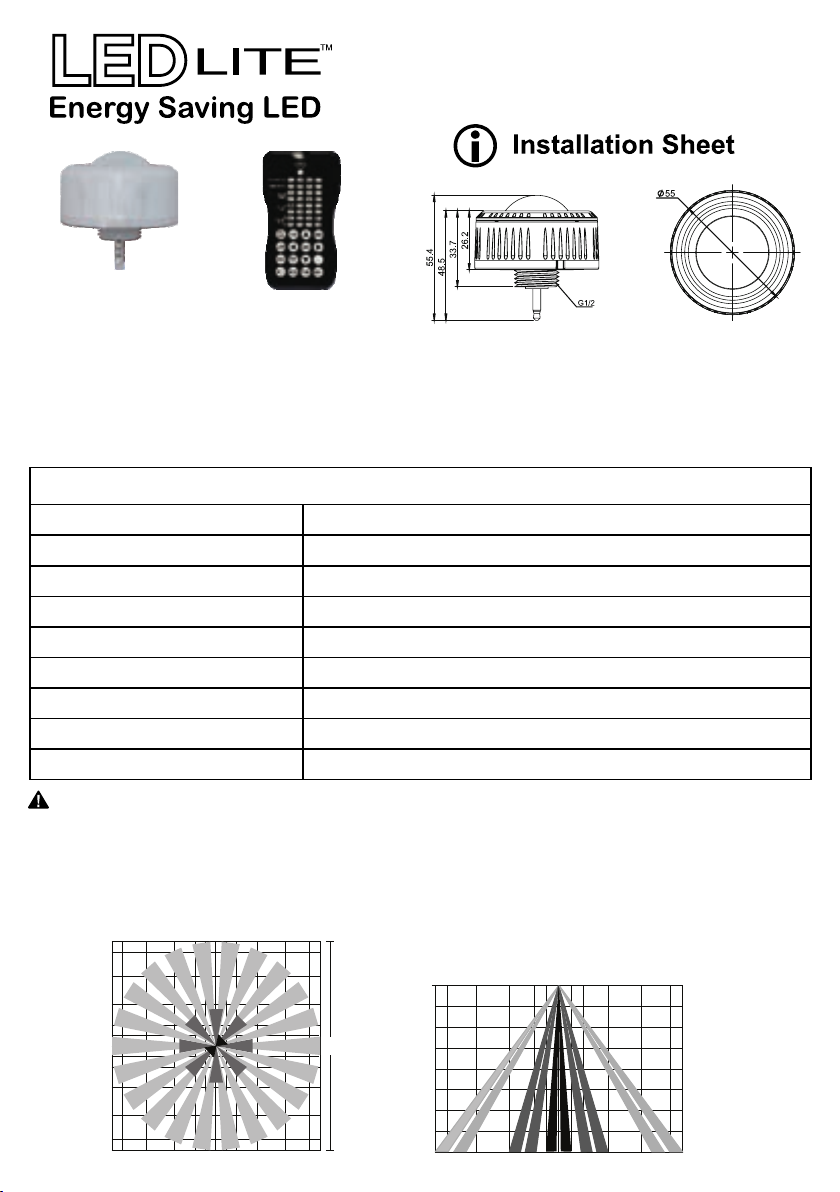
LTHBPIR - PIR Sensor
for use with LTHB200CCT LED High Bay
LTHBPIR LTHBREM
Introduction:
The LTHBPIR is designed to be used in conjunction with the LTHB200CCT High Bay in both
indoor and outdoor environments. The PIR Sensor can provide a multi level control based on
movement and lux level present on the premises. It has the capability to control 0-10V DC LED
drivers and dimming ballasts. The IP65 rating allows the PIR to be installed in wet environments.
All control parameters are adjustable via the remote control.
Specifications:
Power Supply 12V-24V DC, >30mA
Dimming Control Output
Remote Range
Detection Radius
Mounting Height
Time Setting 10s/1min/5min/10min/15min/20min/30min/60min
Lux Setting 10Lux/30Lux/50Lux, 24 Hours
Temperature
IP Rating
(optional)
0-10V max. 25mA sinking current
up to 15m indoor
20%-80%, 1-8 meters
Max 12 meters
-20°C ~ +60°C
IP65
Attention:
Sensor Coverage(m):
9
8
6
4
2
1
0
1
2
4
6
8
9
8 6
1. When first connected, the PIR sensor has a warm-up time of 40 seconds.
2. The PIR setting can be changed only by using the optional LTHBREM remote control.
When any setting is changed trough the remote control, the light will flash once.
3. The Factory Default Settings of the PIR are:
• 100% sensitivity
• 5 minutes time setting
• Max daylight sensor
• Dimming level 30%
• Dimming time 60 minutes
Coverage Side View(m):
0
3
18m
6
9
12
4
2 101 2
6 8 99
4
9 6
4
0 96
2
4
2
Page 2
LTHBPIR - PIR Sensor
for use with LTHB200CCT LED High Bay
Corridor Function:
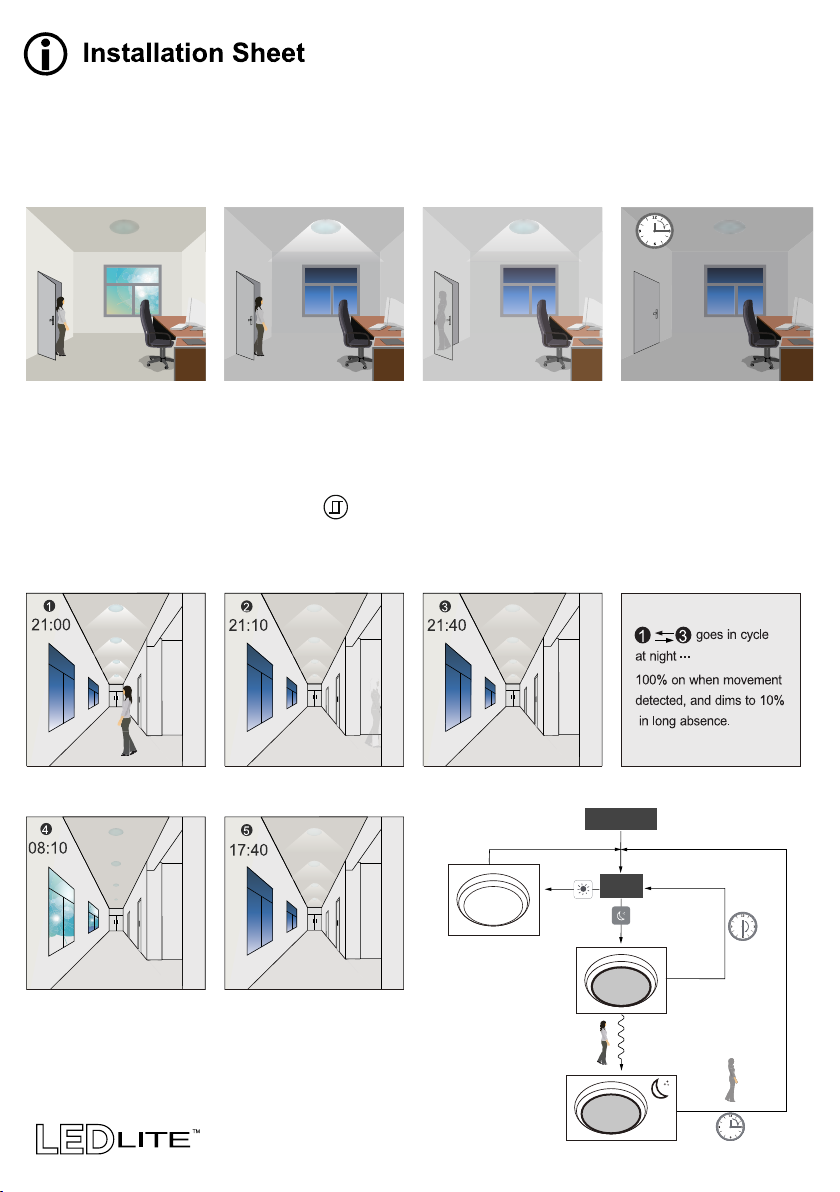
By having a tri-level control, the LTHBPIR can be mounted in different environments. The PIR
sensor can be set to trigger when there is insufficient natural light. After the trigger, the PIR can
be programmed to dimm the light up to 2 times, eventually the light will turn off if the PIR will not
be triggered again.
1.Off
With enough natural light
the PIR will not trigger
when presence is detected.
2.Hold Time
After the lux threshold is
reached the PIR will
automatically trigger when
presence is detected.
3.Stand-by
Once movement is no
longer detected the light
will dimm to the pre-set
lux level.
4.Off
The light will switch off
after the stand-by period.
Daylight Sensor Function:
Open the daylight sensor by pushing when the remote control is in setting condition.
See the settings for the demonstration below as follows: Hold-time: 30min, Set point on: 50lux,
Set point off: 300lux, Stand-by Dim: 10%, Stand-by period +∞
(When the photocell sensor is open, the stand-by time is +∞)
Light turns ON when
movement is detected.
Light dimms to stand-by
level after the hold time.
Light keeps its dimming
level at night.
Off
Power On
Check
Every 30min
When natural light
exceeds the preset level
the light will stay off even
if movement is detected.
Light turns on at 10%
automatically when
natural light is under
the preset level.
Dimm
100% On
No movement
Movement
Hold-time ends
 Loading...