

Page 1
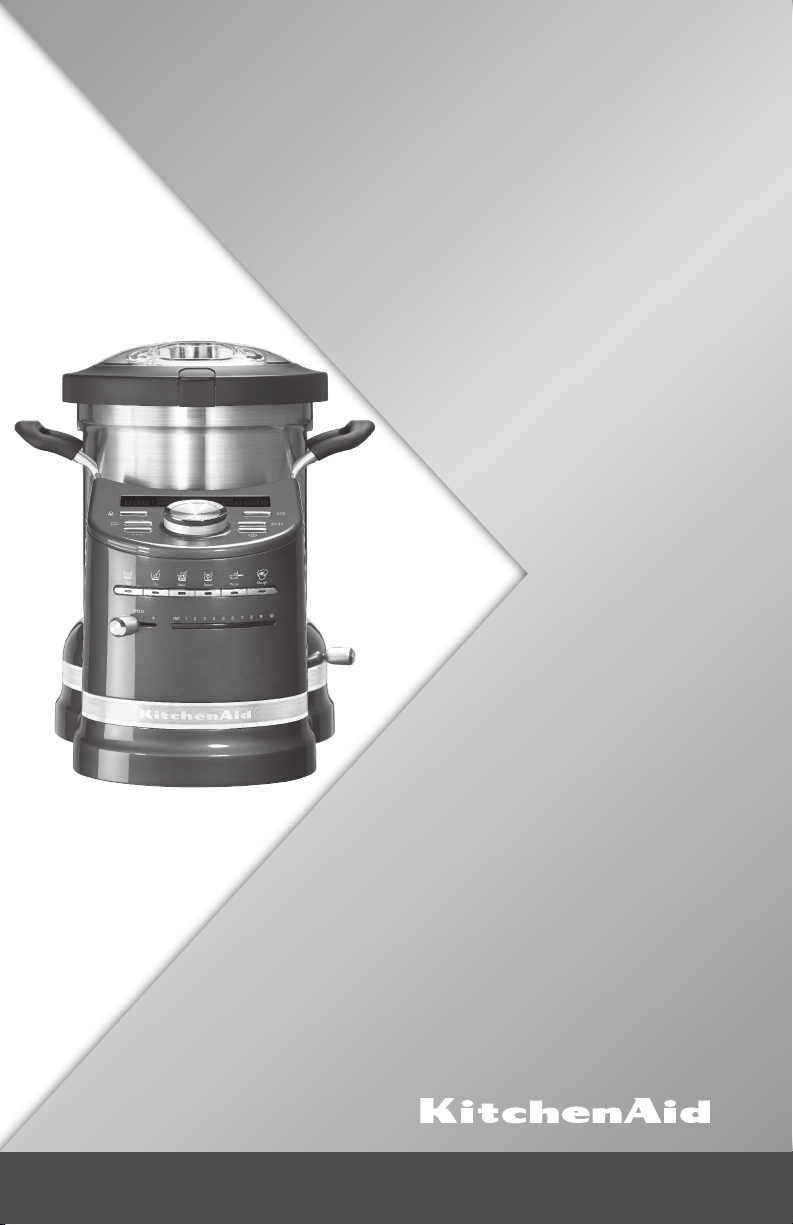
5KCF0103
INSTRUCTIONS
INSTRUCTIONS
GEBRAUCHSANWEISUNG
(IT) INSTRUCTIONS
(NL) INSTRUCTIONS
Page 2

2
Page 3

COOK PROCESSOR INSTRUCTIONS
TABLE OF CONTENTS
COOK PROCESSOR SAFETY ............................................................................... 4
Important safeguards .......................................................................................... 5
Electrical requirements ...................................................................................... 6
Electrical equipment waste disposal ................................................................... 6
PARTS AND FEATURES
Parts and features ............................................................................................... 7
Control panel features ........................................................................................ 8
Accessories ......................................................................................................... 8
COOKING MODES GUIDE ................................................................................. 10
Automatic cooking modes ................................................................................ 10
ADDITIONAL FUNCTIONS
Timer option .................................................................................................... 13
QuickStir........................................................................................................... 13
Pulse ................................................................................................................. 13
GETTING STARTED
Preparing the Cook Processor for use ............................................................. 14
Using the Cook Processor................................................................................ 14
START UP AND CONTROL SETUP
Welcome screen ............................................................................................... 15
Display language ............................................................................................... 15
Changing between degrees Fahrenheit and Celsius ......................................... 15
USING AUTOMATIC COOKING MODES ....................................................... 16
USING STEAMING BASKETS
Using the round internal steaming basket ........................................................ 19
Using the upper and lower steamer baskets .................................................... 20
USING MANUAL COOKING MODES .............................................................. 21
Cooking with manual settings ........................................................................... 22
CARE AND CLEANING
Cleaning your Cook Processor......................................................................... 24
Storing Accessories........................................................................................... 24
TROUBLESHOOTING ......................................................................................... 25
WARRANTY AND SERVICE ............................................................................... 26
English
3
Page 4
IMPORTANT SAFEGUARDS
When using electrical appliances, basic safety precautions
should always be followed to reduce the risk of fire, electric
shock, and/or injury to persons including the following:
1. Read all instructions.
2. To protect against risk of electrical shock do not put appliance in water
or other liquid.
3. Children must be supervised to ensure that they not play with, reach
or use the appliance and its cord.
4. Unplug the appliance from outlet when not in use, before putting on
or taking off parts and before cleaning.
5. Avoid contacting moving parts. Keep hands, hair, clothing, as well as
spatulas and other utensils away from beater during operation to reduce
the risk of injury to persons and/or damage to the appliance.
6. Do not operate appliance with damaged cord or plug or after the
appliance malfunctions, or is dropped or damaged in any manner. Return
the appliance to the nearest Authorized Service Center for examination,
repair or electrical or mechanical adjustment.
7. The use of attachments not recommended or sold by KitchenAid may
cause re, electrical shock or injury.
8. Do not use the appliance outdoors.
9. Do not let the cord hang over edge of table or counter.
4
Page 5

COOK PROCESSOR SAFETYCOOK PROCESSOR SAFETY
10. Appliances can be used by persons with reduced physical, sensory or
mental capabilities or lack of experience and knowledge if they have
been given supervision or instruction concerning use of the appliance
in a safe way and if they understand the hazards involved.
11. The temperature of accessible surfaces may be high when the
English
appliance is operating.
12. The appliance is not intended to be operated by means of an
external timer or separate remote-control system.
13. Do not immerse the drive assembly in water.
14. This appliance is intended for household use only.
15. Keep hands and utensils away from moving blades while processing
food to reduce the risk of severe injury to persons or damage to the
appliance. A scraper may be used but must be used only when the
appliance is not running.
16. Blades are sharp. Handle carefully.
17. To reduce the risk of injury, never place cutting blade or discs on base
without rst putting bowl properly in place.
18. Be certain cover is securely locked in place before operating
appliance.
19. Do not attempt to defeat the cover interlock mechanism.
20. Be careful if hot liquid is poured into the food processor or blender as it
can be ejected out of the appliance due to a sudden steaming.
21. Care shall be taken when handing the sharp cutting blades,
emptying the bowl and during cleaning.
22. Switch off the appliance and disconnect from supply before
changing accessories or approaching parts that move in use.
23. This appliance is intended to be used in household and
similar applications such as: Staff kitchen areas in shops, ofces and
other working environments; farm houses; by clients in hotels, motels,
and other residential type environments; and bed-and-breakfast type
environments.
24. Always disconnect the appliance from the supply if it is left
unattended and before assembling, disassembling, or cleaning.
25. This appliance shall not be used by children. Keep the appliance and its
cord out of reach of children.
26. Children shall not play with the appliance.
27. The appliance must not be immersed.
28. The appliance is not intended to be operated by means of an external
timer or a separate remote-control system.
5
Page 6

COOK PROCESSOR SAFETY
29. If the bowl is overlled, boiling water may be ejected.
30. The appliance is only to be used with the base provided.
31. CAUTION: Ensure that the appliance is switched off before removing it
from its base.
32. The heating element surface is subject to residual heat after use.
33. If symbol is marked on the appliance, the instructions shall state
that surfaces are liable to get hot during use.
SAVE THESE INSTRUCTIONS
Electrical requirements
Voltage: 220–240 VAC
Frequency: 50/60 Hz
Wattage: 1500 Watts
NOTE: This product has a grounded
(earthed) plug. To reduce the risk of
electrical shock, this plug will fit in an outlet
only one way. If the plug does not fit in the
outlet, contact a qualified electrician. Do not
modify the plug in any way.
Electrical equipment waste disposal
Disposal of packing material
The packing material is 100% recyclable
and is marked with the recycle symbol .
The various parts of the packing must
therefore be disposed of responsibly
and in full compliance with local authority
regulations governing waste disposal.
Scrapping the product
- This appliance is marked in compliance
with European Directive 2002/19/EC,
Waste Electrical and Electronic Equipment
(WEEE).
- By ensuring this product is disposed of
correctly, you will help prevent potential
negative consequences for the environment
and human health, which could otherwise
be caused by inappropriate waste handling
of this product.
Do not use an extension cord. If the power
supply cord is too short, have a qualified
electrician or technician install an outlet
near the appliance.
- The symbol on the product or on the
accompanying documentation indicates
that it should not be treated as domestic
waste but must be taken to an appropriate
collection centre for the recycling of
electrical and electronic equipment.
For more detailed information about
treatment, recovery and recycling of this
product, please contact your local city ofce,
your household waste disposal service or the
shop where you purchased the product.
6
Page 7
PARTS AND FEATURES
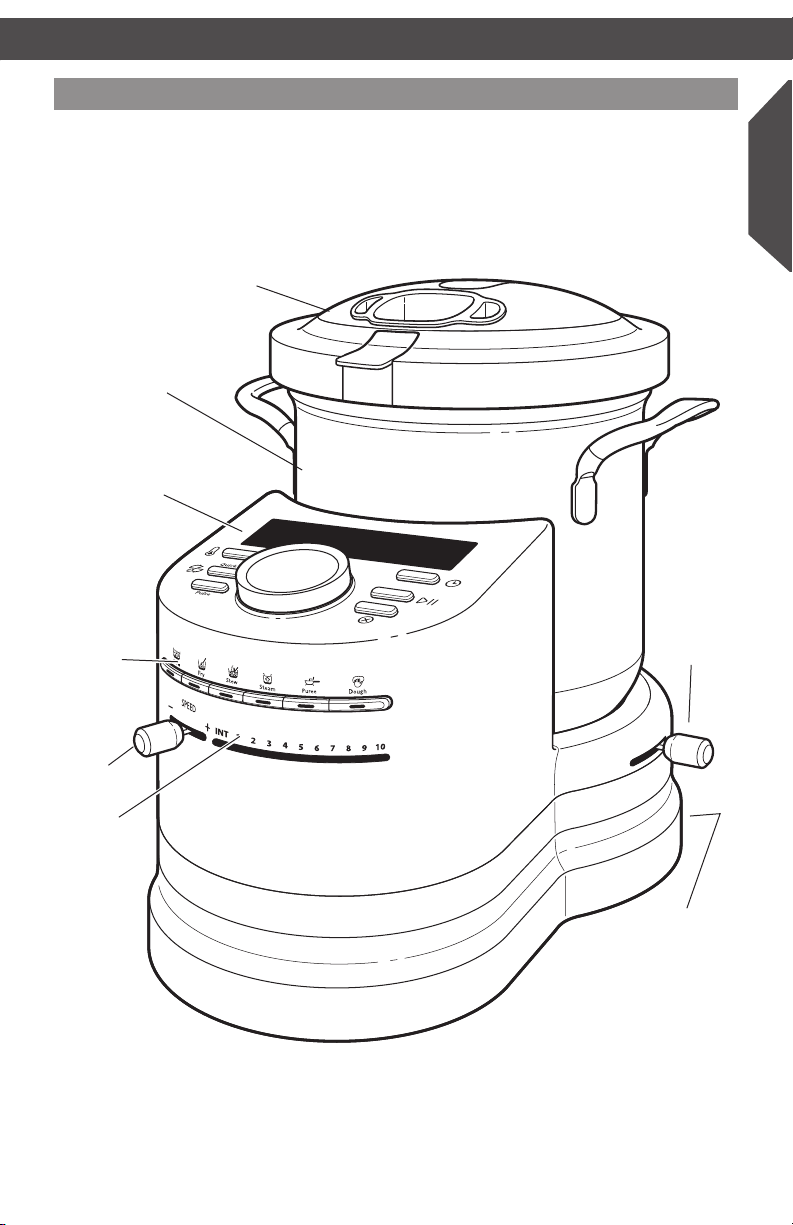
Parts and features
Lid with removable
measuring cup
4.5 L stainless steel
cooking bowl
Control panel
English
Automatic
Cooking
Mode
buttons
Speed
selector
Speed
indicator
lights
Bowl
release
lever
On/Off (I/O)
switch (not
shown)
7
Page 8
PARTS AND FEATURES
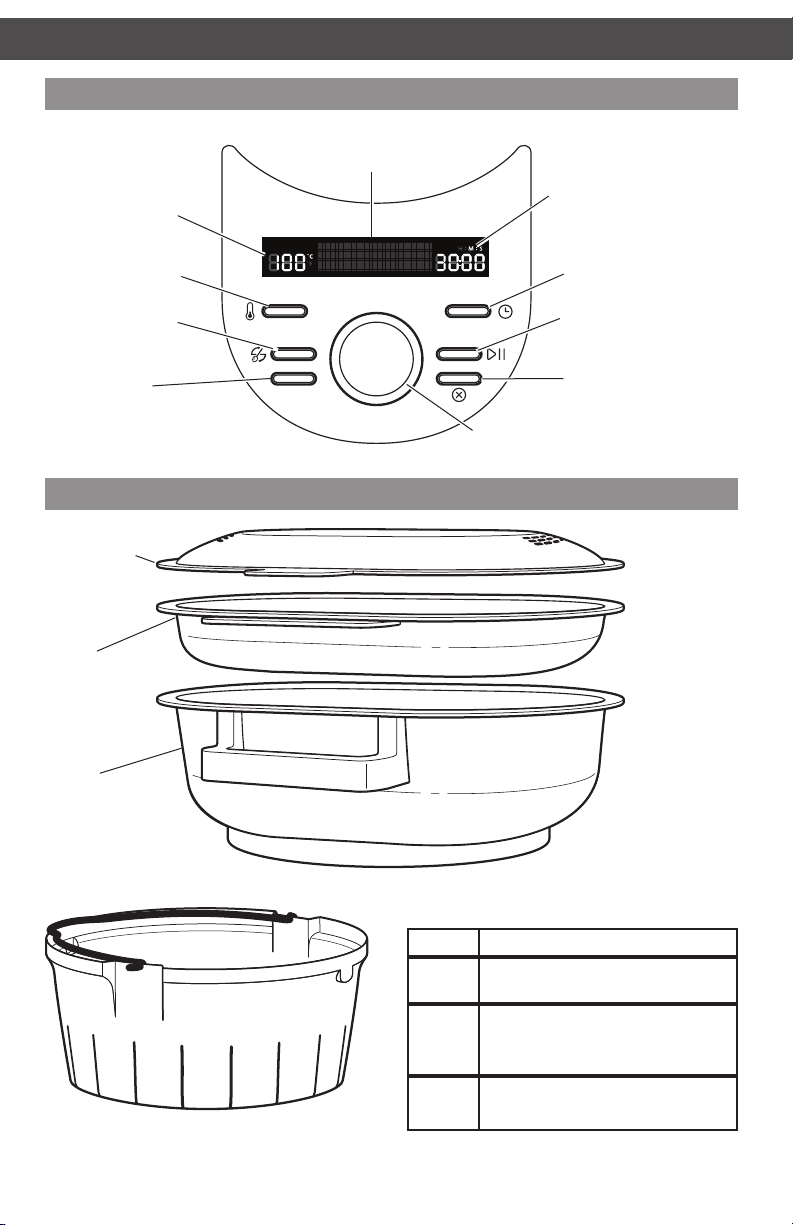
Control panel
Status display
Temperature
display
Temperature
select
Quick Stir
Pulse
Accessories
Steamer lid
Upper
steamer
basket
Quick Stir
Pulse
˚C
˚F
Stew
P7:Step 2
Time display
H M S
Time select
Start/Pause
Cancel
Dial
Lower
steamer
basket
8
Inner steamer
basket
Steamer Capacity
Basket Capacity (examples)
Upper
Lower
Inner
Food quantities for capacity are recommendations
only.
3-4 small sh
2-3 cups rice
500 g chopped or sliced vegetables
3-4 large potatoes or 6-8 small
potatoes
1-2 cups rice
6-8 medium sized shrimp
Page 9
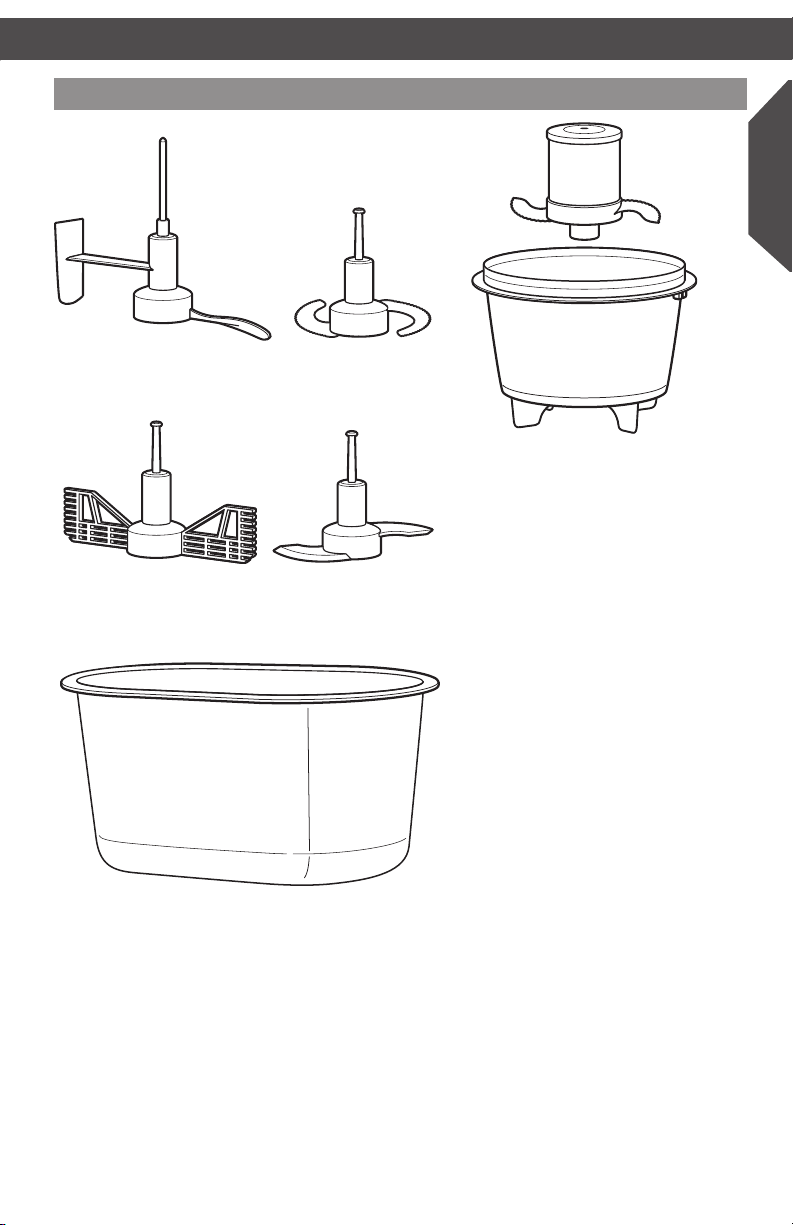
Accessories
English
StirAssist
Egg Whip
MultiBlade
Mini Bowl and Mini MultiBlade
Dough Blade
Storage case
9
Page 10

COOKING MODES GUIDE
ICONS EXPLORATION
ICONS EXPLORATION
Your Cook Processor features 6 automatic
cooking modes, each with specialty modes,
designed for a variety of cooking tasks.
The included recipe book features a
selection of recipes optimized to work
with these cooking modes.
Refer to the provided cookbook for
directions on selecting attachments,
cooking modes, and settings when using
Automatic Cooking modes.
Reference quick guide below for Cooking
Mode operations and tips.
You can also use it to cook in manual mode,
to develop your own recipes, or create cold
dishes such as Mayonnaise, Guacamole,
Tapenades,Tartare, and Rouille.
AUTOMATIC COOKING MODES
Temperatures, times, and speeds for multistep Cooking Modes are indicated with an g to show
the value for each step.
Cooking Mode Temp (°C)
Boil (Use MultiBlade for chopping and StirAssist for stirring)
Boil 1 120 15 1 Carrot-Ginger Soup,
Boil 2
Boil 3
Fry (Use MultiBlade for chopping and StirAssist for stirring)
Fry 1 120 15 1 Stir-Fried Asparagus, Gyros
Fry 2
Fry 3
130g110 5g25 1g1
130g100g100 5g8g13 2g1g1
130g130 10g3 1g1
130g130g130 2g1g1 1g2g1
Time
(minutes) Speed
Recipes (see included recipe
book for details)
Zucchini Cappuccino, Jams/
Jellies, Fruit Coulis
Artichoke Soup, Clear Gyoza
Bouillon, Tomato Soup, Pea
Soup, Bisque, Onion Soup
Minestrone, Asparagus Soup
Oriental Noodles with
Scampis, Fried Rice with Tofu,
Chop-Choy
Scrambled Eggs with Bacon
10
Page 11

COOKING MODES GUIDECOOKING MODES GUIDE
AUTOMATIC COOKING MODES
Temperatures, times, and speeds for multistep cooking modes are indicated with an g to
show the value for each step.
Cooking Mode Temp (°C)
Stew (Use MultiBlade for chopping and StirAssist for stirring)
Stew 1 95 5 1 Bavarois, Panna Cotta, Pesto,
Stew 2 110 45 1 Moroccan Meatballs, Chutney,
Stew 3 120 10 1 Pepper Cream Sauce, Tomato
Stew 4 100 150 INT Ossobucco, Rillettes, Beef
Stew 5
Stew 6
Stew 7
Stew 8
Stew 9
Stew 10
Steam (Use Steamer Baskets)
Steam 1 120 20
Steam 2 120 15
Steam 3
120g100 10g25 1g1
100g100 90g25 1g1
130g100g100 5g30g15 1g1g1
80g80 6g2 2g2
120g100g
110g100
130g120g120 5g7g3 1g1gINT
130g130 2g5
Time
(minutes) Speed
2g3g
3g22
1g1g
1g1
–
–
– Steamed Vegetables (Soya)
Recipes (see included recipe
book for details)
Cheese Fondue
Tajini Chicken, Coq-au-Vin,
Chicken Tikka Masala, Chili
con/sin Carne
Sauce, Bouillabaisse
Stew
Ratatouille, Rice Pudding,
Chicken Green Curry
Cassoulet, Irish Stew
Couscous with Lamb,
Waterzooi, Bolognaise + Pasta
Béarnaise
Risotto
Vongole
Fish in Oriental Bouillon,
Salmon in Papilotte, Dim Sum/
Scampi
Mussels in White Wine
English
Puree (Use MultiBlade to puree and StirAssist for stirring)
Puree 1 120 5 1 Houmous
Puree 2 120 25 1 Salt Cod Brandade (Puree),
Puree 3
Dough (Use Dough Blade)
Dough 1
110g130 5g10 1g2
40g0g30 2g10g30 1g1g0
Brocollimousse, Potato-Savoy
Cheese and Shrimp Croquettes
Pizza Dough, Raisin Bread,
Spelt Bread, White Bread,
Whole Grain Bread
11
Page 12

AUTOMATIC COOKING MODES
ICONS EXPLORATION
ICONS EXPLORATION
Boil
Select Boil to create delicious soups and bisques. It is also great for creating jams
and jellies, stock, and other foods that need to cook at a boil for several minutes.
Fry
Use Fry modes to create delicious stir-fries, oriental style dishes, and easy scrambled
eggs and bacon.
Stew
Stew mode features a wide range of preprogrammed modes for creating everything
from sauces to risotto. Whether you want Irish stew, Béarnaise sauce, or Ratatouille,
stew mode presets allow you to prepare everyday dishes quickly and easily.
Steam
Steam mode uses upper, lower, and inner steamer baskets to allow you to steam
vegetables, fish, mussels, and more. This mode is excellent for delicate foods and
cooking with indirect heat.
Puree
Puree combines the cooking and chopping abilities of the KitchenAid® Cook
Processor to make preparing houmous or shrimp croquettes a snap.
Dough
Knead and proof doughs easily and with minimum effort. Whether you are
preparing homemade pizza crust or making bread, the KitchenAid® Cook
Processor makes it easy.
12
Page 13

Timer option
The timer can be used as a cooking timer,
or as a kitchen timer. For use with cooking
modes, see Manual Cooking section.
To use as a kitchen timer:
1. Press (time). The time indicator will
blink 00:00.
2. Turn the dial clockwise to increase the
time, counterclockwise to decrease the
time.
3. Press (start) to begin the countdown.
A tone will sound when the countdown
reaches 00:00.
Quick Stir
With the Stir Assist paddle installed,
press (Quick Stir) once to stir for 2
seconds at low speed.
You may also press and hold the (Quick
Stir) button; the StirAssist paddle will operate
at low speed until the button is released.
The timer will count up as long as
the (Quick Stir) button is held down.
Quick Stir
Pulse
Quick Stir
Pulse
˚C
˚F
H M S
English
˚C
˚F
H M S
Pulse
Press Pulse to run the installed attachment
at high speed. Release to stop.
NOTE: If the StirAssist paddle is installed,
it will turn at low speed only.
The timer will count up as long as Pulse is
held down.
Quick Stir
Pulse
˚C
˚F
H M S
13
Page 14

GETTING STARTED
Preparing the Cook Processor for use
1. Place the Cook Processor on a dry, flat,
level surface such as a countertop or
table.
2. Be sure to provide enough room above
the Cook Processor to open lid and
remove bowl.
3. Remove all packaging materials, if present.
4. Wash lid and attachments in hot, sudsy
water and rinse thoroughly. Wipe out
inside of bowl with a damp cloth.
Do not immerse bowl. Dry thoroughly.
Using the Cook Processor
Plug into an earthed (grounded) outlet.
1
The Cook Processor should be the only
appliance operating on the circuit. The
Cook Processor is now ready to use.
Turn the main power switch to I (ON).
2
14
Page 15

Welcome Screen
A welcome screen will be displayed any
time the Cook Processor is first turned on
after being plugged in, after the main power
switch is turned on, or after a power outage.
Press any key on the control panel to
continue.
Display Language
You will be asked to select the display
language the first time the Cook Processor
is turned on:
1. Turn the dial until the desired language
is displayed.
2. Press (Start/Pause) to select and save.
To change the display language:
1. Press and hold (Start/Pause) and
(Time) at the same time for 3 seconds.
2. The display will show the current
language.
3. Turn the dial until the desired language is
displayed.
4. Press (Start/Pause) to select and save.
Quick Stir
Pulse
Quick Stir
Pulse
˚C
˚F
˚C
˚F
Press Any Ke
English
H M S
English
H M S
Changing between degrees Fahrenheit and Celsius
The default setting for the Cook Processor
temperature is degrees Celsius.
To change between Celsius (°C) and
Fahrenheit (°F):
1. Press and hold the (Temperature)
button for 3 seconds to switch between
Celsius and Fahrenheit.
hold 3 sec C/F
Quick Stir
Pulse
˚C
˚F
H M S
15
Page 16

USING AUTOMATIC COOKING MODES USING AUTOMATIC COOKING MODES
IMPORTANT: Refer to the provided cookbook for directions on selecting attachments,
cooking modes, and settings when using Automatic Cooking modes.
Place the bowl on the base, making sure
1
it locks into place. If the bowl is not
locked in place, UNLOCKED will show in
the display.
Add the ingredients for the first step of
3
cooking. Do not exceed the MAX FILL
line.
Insert the accessory indicated by the
2
recipe into the bowl, sliding it onto the
drive shaft.
Close and latch the lid. Make sure the
4
measuring cup is in place. If the lid is
not properly installed, LID OPEN will
show in the display if any mode except
STEAM is selected.
16
Page 17

Pulse
˚C
˚F
H M S
Quick Stir
Stew
P7:Step 1
Stew
Pulse
˚C
˚F
H M S
Quick Stir
Stew
P7
Pulse
˚C
˚F
H M S
Quick Stir
˚C
˚F
P7:Step 1
H M S
Select the desired preset cooking mode
5
by pressing the mode button, then use
the dial to select the mode version, for
example, Stew P7. The default time and
temperature will flash in the display.
Stew
˚C
˚F
P7:Step 1
Press (Start) again. The temp and
7
time will stop flashing. Once the set
H M S
temperature is reached, the time will
begin counting down.
Quick Stir
Pulse
Press (Start). For cooking modes
6
with multiple steps, the next cooking
step will appear in the lower part of
the display, and the default time and
temperature will flash in the display. Use
the dial to change the step, if desired.
Stew
˚C
˚F
P7:Step 2
Quick Stir
Pulse
Once the first step is complete, a tone
8
will sound and the settings for the next
step will blink in the display.
English
H M S
17
Page 18

Pulse
˚C
˚F
H M S
Quick Stir
Stew
P7
Pulse
˚C
˚F
H M S
Quick Stir
USING AUTOMATIC COOKING MODES
Change accessories, if necessary, and
9
add any additional ingredients for the
next step.
Keep Warm
˚C
˚F
Quick Stir
Pulse
A tone will sound at the end of next
11
step. Repeat steps 9-10 until all
cooking steps are complete. After
the last step, the Cook Processor
will automatically go into Keep Warm
mode for 45 minutes. After 45
minutes, a tone will sound and the
Cook Processor will turn off.
H M S
Stew
˚C
˚F
P7:Step 2
Press (Start). The temp and time
10
will stop flashing, and the time will
H M S
begin counting down.
In the event of a power outage, the
welcome screen will be displayed when
power is restored.
Do not eat food from the cook
processor if “KitchenAid Press
Any key to Continue” shows
in the display.
Doing so can result in food
poisoning or sickness.
If a cooking cycle was interrupted, be
sure that food is cooked completely, to a
minimum internal temperature of at least
74°C (165°F).
To serve:
12
Open the lid. Using oven mitts or pot
holders, remove any accessory before
removing the bowl and serving.
18
Page 19

Pulse
˚C
˚F
H M S
Quick Stir
Steam
P1
USING STEAMER BASKETS
The Cook Processor includes two different types of steamer baskets that can be used when
cooking in certain modes. NOTE: Steamer baskets cannot be used with food processing
attachments such as the MultBlade, StirAssist, Dough Blade, or Egg Whip.
Using the round internal steaming basket
Place the bowl on the base, making sure
1
it locks into place. If the bowl is not
locked in place, UNLOCKED will show in
the display.
Add ingredients or water to the bowl,
3
according to the recipe.
2
4
English
Open the lid of the bowl and remove
any food processing attachments, if
installed.
Place the internal steamer basket in the
bowl.
Place food to be steamed in the basket
5
and close and latch the lid. Be sure the
measuring cup is in place.
Proceed with the Steam cooking mode
6
specified by your recipe, or with Manual
cooking mode.
19
Page 20

USING STEAMER BASKETS
Pulse
˚C
˚F
H M S
Quick Stir
Steam
P1
You can use the upper and lower steamer baskets together, or just the lower steamer basket.
You may also use the lower steamer basket with the inner steamer basket. The instructions
below show an example of using both upper and lower baskets.
Using the upper and/or lower steamer baskets
Place the bowl on the base, making sure
1
it locks into place. If the bowl is not
locked in place, UNLOCKED will show in
the display.
Add ingredients or water to the bowl,
3
according to the recipe.
Remove the lid by opening it then
2
disconnecting it from the hinge.
Place food to be steamed in the lower
4
steamer basket, then place the basket
on top of the bowl.
The upper and lower steamer baskets
5
can be stacked together to steam
two different foods at once. Once
ingredients are added, cover with the
steamer lid.
20
Proceed with the Steam cooking mode
6
specified by your recipe, or with Manual
cooking mode.
Page 21

USING MANUAL COOKING MODES
Refer to the guide below for recommended speeds and quantities for accessories when
using manual cooking modes.
Accessory Food Speed Quantity Operating Time
MultiBlade Pureed Soups 10 2.5 L Up to 1 min. for puree
Meat (boneless) 10 1.0 kg Up to 1 min. for puree†
Fish (boneless) 10 1.0 kg Up to 1 min. for puree†
Vegetables 10 1.0 kg 2 min.†
Compote 10 500 g 30 sec.
Mini MultiBlade
and Mini Bowl
Nuts (almonds, pecans,
walnuts, peanuts, etc.)
Pureed Soups 10 1.0 L Up to 1 min. for puree
Meat, sh (boneless),
etc.
Nuts (almonds, pecans,
walnuts, peanuts, etc.)
Pesto 10 450 g 30 sec.
10 700 g 30 sec.
10 500 g Up to 1 min. for puree
10 300 g 30 sec.
English
StirAssist Fry (2x2 cm cubed
Egg Whip Egg whites 7–9 8 eggs 5–10 min.
Dough Blade Bread dough 5–9 1.2 kg 2–8 min.
†
Cut into 2 cm pieces
meats, bacon, onion,
etc.)
Risotto 1 1.5 kg
Mijotes 1 2.5 L 30–45 min.
Mayonnaise, whipped
cream
Cremes, Sauces, etc. 4–6 1.2 L 5–10 min.
Pastry 5–9 1.2 kg 2–8 min.
Brioche bread 5–9 1.2 kg 2–8 min.
Cake batter 5 1.5 L 2 min.
Crepe batter 10 1.5 L 2 min.
1 600 g 5 min.
20 min.
(350 g of
rice)
7–9 1.3 L 5–8 min.
21
Page 22

USING MANUAL COOKING MODES
Pulse
˚C
˚F
H M S
Quick Stir
Pulse
˚C
˚F
H M S
Quick Stir
hold 3 sec C/F
Cooking with manual settings
Place the bowl on the base, making sure
1
it locks into place.
Add the ingredients for the first step of
3
cooking. Do not exceed the MAX FILL
line.
OPTIONAL: Insert the desired
2
accessory into the bowl, sliding it onto
the drive shaft.
Close and latch the lid. If the lid is not
4
properly installed, LID OPEN will show
in the display if the speed lever, Pulse, or
(Quick Stir) buttons are activated.
If using an accessory:
5
Press the speed lever right (+) or left
(–) to select the desired speed, or press
22
the Pulse or
(Quick Stir) button.
6
Press (Temperature) and use the dial
to set the desired cooking temperature.
Page 23

USING MANUAL COOKING MODES
Pulse
˚C
˚F
H M S
Quick Stir
Pulse
˚C
˚F
H M S
Quick Stir
Press (Time) and use the dial to set
7
the desired cooking time.
In the event of a power outage, the
welcome screen will be displayed when
power is restored.
˚C
˚F
Quick Stir
Pulse
Press (Start). The temp and time
8
will stop flashing, and PREHEATING
will appear in the display. Once the set
temperature is reached, the time will
begin counting down.
NOTE: If the Cook Processor is at
a higher temperature, and a lower
temperature is selected, COOLING will
appear in the display until the lower
temperature is reached.
H M S
English
Do not eat food from the cook
processor if “KitchenAid Press
Any key to Continue” shows
in the display.
Doing so can result in food
poisoning or sickness.
If a cooking cycle was interrupted, be
sure that food is cooked completely, to a
minimum internal temperature of at least
74°C (165°F).
When the timer reaches 00:00, a tone
9
will sound and the Cook Processor will
turn off. Open the lid. Using oven mitts
or pot holders, remove any accessory
before removing the bowl and serving.
23
Page 24

CARE AND CLEANING
Cleaning your Cook Processor
Unplug your Cook Processor from the wall
socket before cleaning.
• Allow Cook Processor and accessories
to cool completely before cleaning.
Bowl:
• Do not immerse the bowl in water or place
in a dishwasher. To clean the inside of the
bowl, wipe with a non-abrasive damp,
sudsy cloth, then wipe out with a clean
damp cloth. To remove tough cooked-on
foods, ll bowl with hot, soapy water, and
allow to soak before cleaning.
• To remove baked-on stains, scrub with a
paste made from baking soda and water.
Rinse and dry thoroughly.
Exterior Surfaces:
• Do not use abrasive cleaners or metal
scouring pads. They could scratch
the surface.
• Wipe the outside of the Cook Processor
with a clean, damp cloth and dry
thoroughly.
All accessories and blades are top rack
dishwasher-safe. Thoroughly dry all parts after
washing. Use gentle dishwashing cycles such
as normal. Avoid high temperature cycles.
Storing accessories
StirAssist
Dough
Blade
The MultiBlade, Dough Blade, Egg
1
Whip, and StirAssist fit into the
Storage Case, as shown.
24
MultiBlade
Egg Whip
The Storage Case nests with the
2
upper and lower Steamer Baskets
and Steamer Lid.
Page 25

TROUBLESHOOTING
If your Cook Processor malfunctions or fails to operate
• Display shows ACCESSORY:
The display will show ACCESSORY if the
StirAssist blade is installed and Pulse or a
higher speed is selected.
• Display shows COOLING:
Unit is cooling down if a temperature
lower than the current cooking
temperature is selected.
Error messages:
• Motor turns off during processing
and display shows “Error 1”:
The motor is overloaded. Reduce the
amount of ingredients and turn off the
unit to allow the motor to cool down for
several minutes.
• Motor will not turn on and display
shows “Error 2”:
Turn off and unplug Cook Processor, and
call for service.
• Cook Processor does not reach
desired temperature or turns off, and
display shows “Error 3”:
• Is the Cook Processor plugged into
a grounded outlet?
Plug the Cook Processor into a grounded
outlet.
• Is the fuse in the circuit to the Cook
Processor in working order?
If you have a circuit breaker box, make
sure the circuit is closed. Try unplugging
the Cook Processor, then plug it back in.
• Display shows UNLOCKED:
Bowl is not locked into the base correctly.
Check the bowl to be sure it is locked into
place.
• Display shows LID OPEN:
Lid is not latched on the bowl and an
Automatic Cooking Mode other than
Steam or a manual attachment speed,
Pulse or Quick Stir is being selected.
Check the lid to be sure it is latched
into place.
• Display shows MODE:
The display will show MODE if Quick
Stir or Pulse is pressed during an
Automatic Cooking Mode. These
functions are disabled during
Automatic Cooking modes.
A heating element is malfunctioning. Turn
off and unplug Cook Processor, and call
for service.
• Cook Processor turns off before the
end of the cycle and display shows
“Error 4”:
The Cook Processor is getting too hot.
Turn off the Cook Processor and allow
it to cool down. Make sure that no
vents are blocked and there is sufcient
clearance around the Cook Processor.
• Cook Processor turns off during
processing and display shows
“Error 5”:
The Cook Processor is vibrating too
much. Remove or redistribute ingredients
in the bowl, then restart processing.
• If the problem cannot be corrected:
See the “KitchenAid Warranty and
Service” sections. Do not return the
Cook Processor to the retailer – retailers
do not provide service.
English
25
Page 26

WARRANTY AND SERVICE
KitchenAid Cook Processor warranty
Length of
Warranty:
Europe, Middle East
and Africa:
For model
Three years full warranty
from date of purchase.
KITCHENAID DOES NOT ASSUME ANY RESPONSIBILITY FOR INDIRECT
DAMAGES.
5KCF0103:
KitchenAid Will Pay
For:
The replacement
parts and repair labor
costs to correct
defects in materials
or workmanship.
Service must
be provided by
an Authorized
KitchenAid Service
Center.
KitchenAid Will Not
Pay For:
A. Repairs when Cook Processor is
used for operations other
than normal household food
preparation.
B. Damage resulting from
accident, alterations, misuse,
abuse, or installation/operation
not in accordance with local
electrical codes.
Customer service
In U.K. and Ireland:
For any questions, or to nd the nearest KitchenAid Authorized Service Center, please nd
our contact details below.
NOTE: All service should be handled locally by an Authorized KitchenAid Service Center.
Contact number for U.K. and Northern Ireland:
Tollfree number 0800 988 1266 (calls from mobile phones are charged standard
network rate), or 0194 260 5504
Contact number for Ireland:
Tollfree number +44 (0) 20 8616 5148
E-mail contact for U.K. and Ireland:
Go to www.kitchenaid.co.uk, and click on the link “Contact Us” at the bottom of the page.
Address for U.K. and Ireland:
KitchenAid Europa, Inc.
PO BOX 19
B-2018 ANTWERP 11
BELGIUM
In other countries:
For all product related questions and after sales matters, please contact your dealer
to obtain the name of the nearest Authorized KitchenAid Service/Customer Center.
www.KitchenAid.eu
26
Page 27

WARRANTY AND SERVICE
English
27
Page 28

Specications subject to change without notice.
W10692501A 07/14
© 2014. All rights reserved.
 Loading...