

Page 1

INSTALLATION &
OPERA TION MANUAL
HumidiHeat
TM
HOLDING & TRANSPORT
CABINETS
MODELS
VHMD 5
VHMD 13
VHMD 15
For additional information on VULCAN-HART or to locate an authorized parts
and service provider in your area, visit our website at www.vulcanhart.com
VULCAN-HART
DIVISION OF ITW FOOD EQUIPMENT GROUP, LLC
WWW.VULCANHART.COM
3600 NORTH POINT BLVD.
BALTIMORE, MD 21222
(04-08)
Page 2

HUMIDIHEATTM HOLDING & TRANSPORT CABINETS
IMPORTANT FOR YOUR SAFETY
THIS MANUAL HAS BEEN PREPARED FOR PERSONNEL QUALIFIED TO
INSTALL ELECTRICAL EQUIPMENT, WHO SHOULD PERFORM THE INITIAL
FIELD ST ART-UP AND ADJUSTMENTS OF THE EQUIPMENT COVERED BY THIS
MANUAL.
FOR YOUR SAFETY
DO NOT STORE OR USE GASOLINE OR OTHER
FLAMMABLE VAPORS OR LIQUIDS IN THE VICINITY
OF THIS OR ANY OTHER APPLIANCE.
Improper installation, adjustment,
alteration, service or maintenance can cause
property damage, injury or death. Read the
INSTALLATION, OPERATING AND MAINTENANCE
INSTRUCTIONS thoroughly before installing or servicing this equipment.
IN THE EVENT OF A POWER FAILURE,
DO NOT A TTEMPT TO OPERA TE THIS DEVICE.
— 2 —
Page 3
HUMIDIHEATTM HOLDING & TRANSPORT CABINETS
INSTALLATION
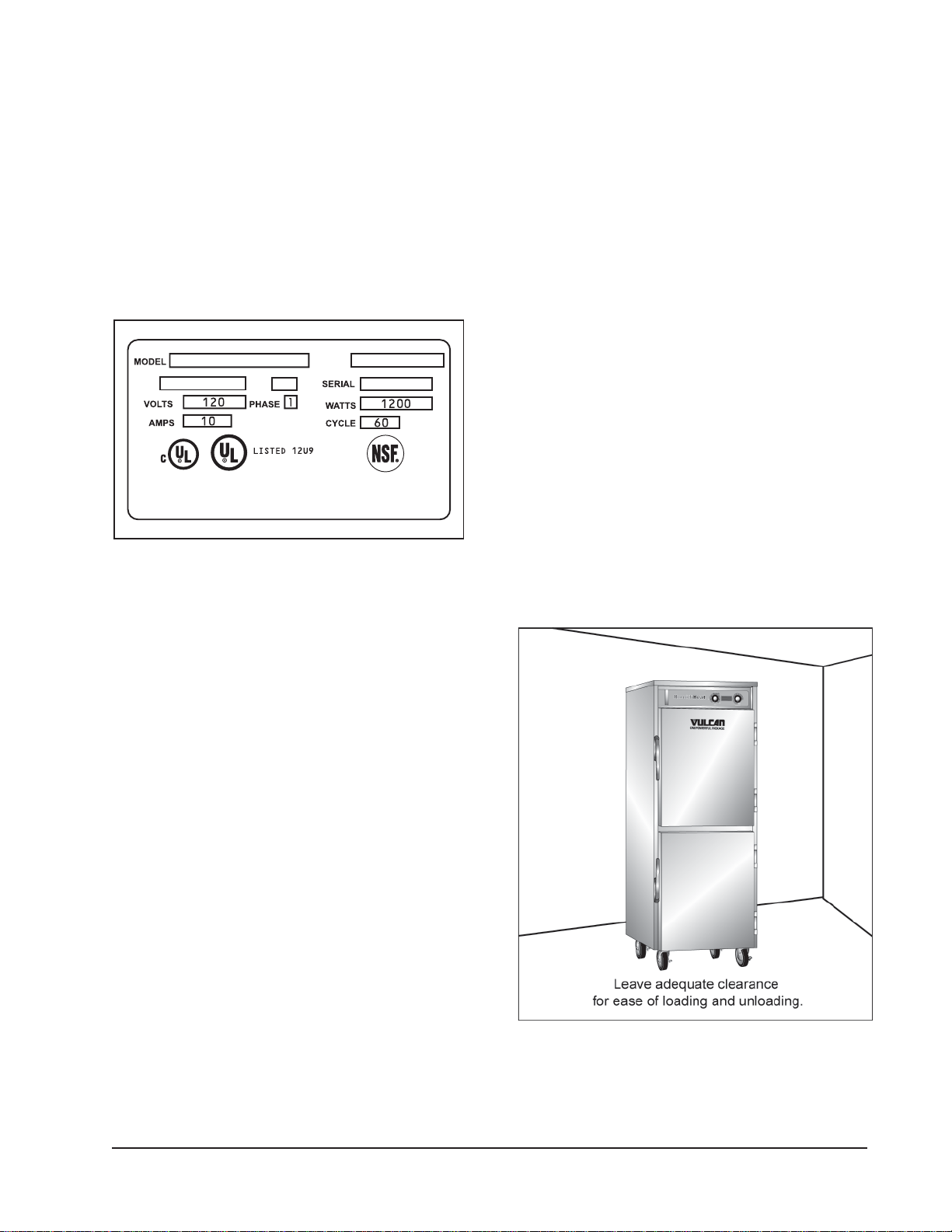
Before installing, verify that the electrical
service agrees with the specifications on the
data plate located on the lower rear of the
cabinet (Figure 1). If the electrical service
does not agree with the data plate, do not
proceed with installation. Contact your dealer
or local Authorized Vulcan-Hart Servicer
immediately.
RAH
DEVICE
52-1000143
VHMD15-1 VHMD15-1
ML MD
COMMERCIAL COOKING
APPLIANCE
VULCAN-HART, BALTIMORE, MD
Figure 1: Data Plate
3. Remove cardboard element cover
protector from cabinet bottom.
4. Remove adjustable tray slides from box.
5. Remove the tray slide supports and install
them in the cabinet.
6. Hook the openings in the flat flange of the
support over two vertical carriage bolts on
the interior of the cabinet.
7. Make sure all flanges on the four supports
face the door opening.
8. Install tray slides in the cabinet.
9. Ensure that the hook on the end of the tray
slide is up.
LOCATION
For efficient cabinet operation, choose a
location that will provide easy access for
loading and unloading without interfering with
the final assembly of food orders.
UNPACKING
This unit was inspected before leaving the
factory. The transportation company assumes
full responsibility for safe delivery upon
acceptance of the shipment. Immediately after
unpacking, check for possible shipping
damage. If the unit is damaged, save packing
material and contact the carrier within 15
days of delivery. Check the delivery
documentation for damage reporting contacts
and time limits.
Carefully unpack and place in a workaccessible area as near the installation
position as possible.
1. Open the door and carefully remove any
packaging materials and the retaining
straps that hold the tray slides and tray
slide upright side supports (VBP/VHP).
2. Remove all scratch-protective film from
the cabinet.
Figure 2: Allow Adequate Clearances
The installation location must allow adequate
clearances for servicing and proper operation
(Figure 2).
— 3 —
Page 4
HUMIDIHEATTM HOLDING & TRANSPORT CABINETS
INSTALLATION CODES AND STANDARDS
This unit must be installed in accordance
with:
In the United States of America:
1. State and local codes.
2. National Electrical Code, ANSI/NFPA-70
(latest edition). Copies may be obtained
from The National Fire Protection
Association, Batterymarch Park, Quincy,
MA 02269.
In Canada:
1. Local codes.
2. Canadian Electrical Code, CSA C22.1
(latest edition). Copies may be obtained
from The Canadian Standard Association,
178 Rexdale Blvd., Etobicoke, Ontario,
Canada M9W 1R3.
ELECTRICAL CONNECTIONS
Disconnect
electrical power to the
machine and follow Lockout/
Tagout procedures before
cleaning.
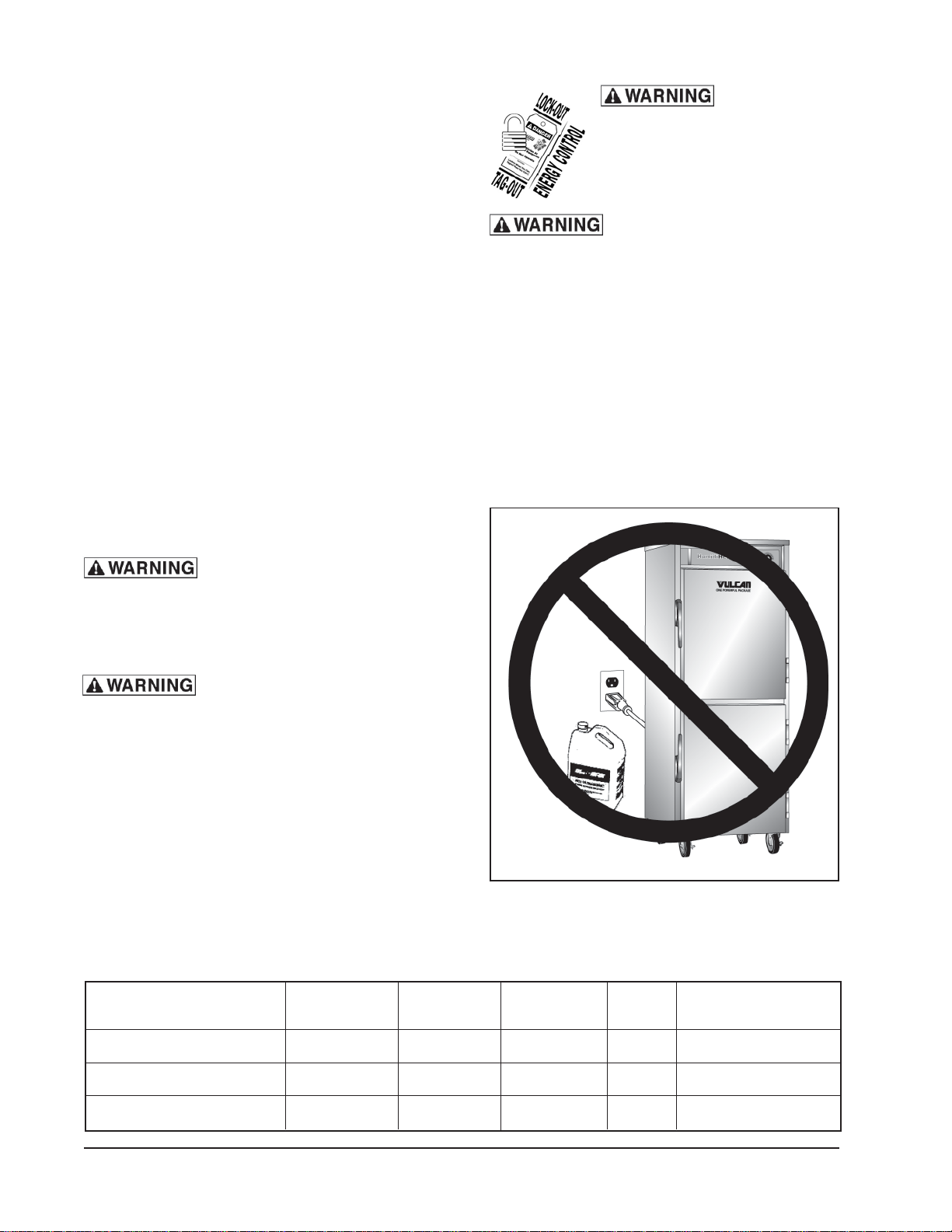
Do not store or use gasoline
or other flammable vapors or liquids in the
vicinity of this or any other appliance.
All cabinets are equipped with a durable,
suitable, 8-ft. (2.4 m) cord and NEMA 5-15
plug as standard equipment. The cord and
plug come with a proper strain relief to prevent
unit from moving away from electrical
connection.
Refer to wiring diagram in this manual for
proper connection.
Do not store flammables near unit (Figure 3).
Electrical and grounding
connections must comply with the
applicable portions of the National
Electrical code and/or other local electrical
codes.
This cabinet is equipped
with a flexible electric supply cord
provided with a three-prong grounding
plug. It is imperative that this plug be
connected into a properly grounded threeprong receptacle. If the receptacle is not
the proper grounding type, contact an
electrician. DO NOT remove the grounding
prong from this plug.
SPECIFICATIONS
Model Voltage Amp Phase Hz NEMA Plug
Figure 3: Do Not Store Flammables
Near Unit
VHMD 5 110/120 10 1 60 5-15
VHMD 13 110/120 10 1 60 5-15
VHMD 15 110/120 10 1 60 5-15
— 4 —
Page 5

OPERATION
HUMIDIHEATTM HOLDING & TRANSPORT CABINETS
The cabinet and its parts
are hot. Be very careful when operating,
cleaning or servicing the cabinet.
Controls
WATER
RESERVOIR
SIGHT GLASS
HUMIDITY
SENSOR
LIGHT
HUMIDITY
CONTROL
KNOB
DIGITAL
DISPLAY
TEMPERATURE
CONTROL
KNOB
Figure 4: Holding Compartment Controls
POWER INDICATOR LIGHT
Lit when power is supplied to cabinet.
HEAT INDICATOR LIGHT
Lit when heat is supplied to cabinet.
FULL RANGE THERMOSTAT
Allows operator to dial desired temperature
setting (1-10).
THERMOMETER
Indicates interior temperature.
Lockout/Tagout Procedures
Lockout/Tagout procedures are used to protect
personnel working on an electrical appliance.
Perform the following steps when performing
any type of maintenance or service on an
electrically operated appliance.
1. In electrical box, place unit’s circuit breaker
into OFF position.
2. Place a lock or other device on electrical
box cover to prevent someone from placing
circuit breaker ON.
3. Place a tag on electrical box cover to
indicate that unit has been disconnected
for service and power should not be
restored until tag is removed by
maintenance personnel.
4. Disconnect unit power cord from electrical
outlet.
5. Place a tag on cord to indicate that oven
has been disconnected for service and
power should not be restored until tag is
removed by maintenance personnel.
Before First Use
Disconnect
electrical power to the
machine and follow Lockout/
Tagout procedures before
cleaning.
— 5 —
1. Disconnect unit and follow Lockout/Tagout
procedure.
2. Thoroughly wash, rinse and dry unit and all
accessories with a mild soap solution,
clean water and soft, clean cloths.
3. Connect unit to proper electrical power
source and operate on highest temperature
setting for a period of 30-45 minutes.
OPERATING INSTRUCTIONS).
Page 6

HUMIDIHEATTM HOLDING & TRANSPORT CABINETS
Operating Instructions
1. Connect to proper electrical supply as
indicated on data plate.
Figure 5: Connect To Proper Electrical
Supply
2. Fill water reservoir and observe water level
thru site glass.
WATER
RESERVOIR
HUMIDITY
SENSOR
LIGHT
Figure 7: Temperature Control Knob
3. Turn temperature control knob to desired
setting.
The higher the number that is selected on
the temperature control knob, the higher
the internal temperature will be. And the
lower the number that is selected on the
temperature control knob, the lower the
internal temperature will be.
The LCD will display the selected
temperature for 3 seconds and then
change to display the actual internal cabinet
temperature.
The unit will continue heating until the
selected temperature has been reached
and then cycle off and on to maintain the
selected temperature. Meanwhile the LCD
will display the fluctuating temperatures.
SIGHT GLASS
Figure 6: Water Reservoir, Sight Glass &
Humidity Sensor Light
To avoid lime build-up, use only distilled or
softened water. To remove lime build-up,
remove the spray nozzle, soak it in white
vinegar until clean and rinse with fresh water.
Figure 8: Humidity Control Knob
— 6 —
Page 7

HUMIDIHEATTM HOLDING & TRANSPORT CABINETS
4. Turn humidity control knob to desired
setting.
As humidity is building, the HUMIDITY
CONTROL SENSOR LIGHT (Figure 7) will
be be lit red. When the desired humidity has
been reached, the light will change to green.
5. Monitor food product to ensure proper
temperatures.
6. Monitor water level and refill water reservoir
whenever LCD displays H2O.
Shutdown
HUMIDITY
CONTROL
KNOB
TEMPERATURE
CONTROL
KNOB
Figure 9: Shut Down
1. Turn temperature control knob and
humidity control knob counterclockwise to
OFF (Figure 9).
2. Unplug electrical power supply. Power
indicator light will go off (Figure 10).
— 7 —
Figure 10: Extended Shut Down
Page 8

HUMIDIHEATTM HOLDING & TRANSPORT CABINETS
MAINTENANCE
Cleaning
Disconnect
electrical power to the
machine and follow Lockout/
Tagout procedures before
cleaning.
The cabinet and its parts
are hot. Allow it to cool before cleaning or
servicing the unit.
Daily
1. Disconnect electrical power and follow
Lockout/Tagout procedures.
2. Allow unit to cool before cleaning.
3. Remove tray slides or plate racks, and
with a soft cloth, wash and rinse in a sink
as you would any utensil.
4. With a mild soap solution, soft cloths and
fresh water, wash, rinse and dry the interior
of the cabinet.
CAUTION: Never use steel wool, which
will leave behind particles that rust!
CAUTION: Never use acid-based
or chloride-containing cleaning
solutions, which will break down the
protective film!
CAUTION: Never rub in a circular motion!
CAUTION: Never leave any food
products or salt on the surface. Many
foods are acidic. Salt contains chloride!
For routine cleaning, use warm water, mild
soap or detergent and a sponge or soft cloth.
For heavy-duty cleaning, use warm water, a
degreaser and a plastic, stainless steel or
Scotch-Brite pad.
Always rinse thoroughly. Always rub gently in
the direction of the steel grain.
Preserving & Restoring
5. Place tray slides or plate racks in the
cabinet.
6. To clean and maintain stainless steel
surfaces, see STAINLESS STEEL CARE .
STAINLESS STEEL CARE
Cleaning
Stainless steel contains 70-80% iron, which
will rust if not properly maintained. It also
contains 12-30% chromium, which forms an
invisible passive, protective film that shields
against corrosion. If the film remains intact,
the stainless steel will remain intact. However,
if the film is damaged, the stainless steel can
break down and rust. To prevent stainless
steel breakdown, follow these steps:
CAUTION: Never use any metal tools,
scrapers, files, wire brushes or scouring
pads (except for stainless steel scouring
pads), which will mar the surface!
Special stainless steel polishing cleaners can
preserve and restore the protective film.
Preserve the life of stainless steel with a regular
application of a high quality stainless steel
polishing cleaner as a final step to daily cleaning.
If signs of breakdown appear, restore the
stainless steel surface. First, thoroughly clean,
rinse and dry the surface. Then, on a daily
basis, apply a high-quality stainless steel polish
according to manufacturer’s instructions.
Heat Tint
Darkened areas, called “heat tint,” may appear
on stainless steel exposed to excessive heat,
which causes the protective film to thicken. It
is unsightly but is not a sign of permanent
damage.
To remove heat tint, follow the routine cleaning
procedure. Stubborn heat tint will require
heavy-duty cleaning.
To reduce heat tint, limit the exposure of
equipment to excessive heat.
— 8 —
Page 9

HUMIDIHEATTM HOLDING & TRANSPORT CABINETS
TROUBLESHOOTING
GENERAL TROUBLESHOOTING
Symptoms Possible Cause/Suggested Corrective Action
Temperature incorrect Door open/Close door.
No main power source/Check power source or circuit breaker.
Door leaks Damaged door gasket/Contact Authorized Vulcan-Hart Servicer.
Door requires adjustment/Contact Authorized V ulcan-Hart Servicer.
Compartment does Thermostat requires adjustment/Contact Authorized V ulcan-Hart Servicer.
not heat properly Defective thermostat/Contact Authorized Vulcan-Hart Servicer.
Defective heating coil/Contact Authorized V ulcan-Hart Servicer .
Humidity incorrect Door open/Close door.
Heating elements OFF/Turn temperature control knob to desired
temperature.
No main power source/Check power source or circuit breaker.
Water reservoir is empty/Fill water reservoir.
— 9 —
Page 10

HUMIDIHEATTM HOLDING & TRANSPORT CABINETS
WIRING DIAGRAM
Model VHMD Humidity Electrical Wiring Diagram
— 10 —
Page 11

NOTES
HUMIDIHEATTM HOLDING & TRANSPORT CABINETS
— 11 —
Page 12

HUMIDIHEATTM HOLDING & TRANSPORT CABINETS
SERVICE AND P ARTS INFORMATION
To obtain service and parts information concerning this model, contact the Vulcan-Hart Service
Agency in your area (refer to our website, www.vulcanhart.com for a complete listing of Authorized
Service and Parts depots).
When calling for service, the following information must be available: model number, serial number,
manufacture date (MD) and voltage.
(04-08)
— 12 —
PRINTED IN U.S.A.
 Loading...