

Page 1

PN: 51003:E ECN 02-014
Addressable Fire Alarm
Control Panel
MS-9200(C)/MS-9200E
Document #51003
01/11/02 Rev.
© 2002 Fire•Lite
E
Page 2

Fire Alarm System Limitations
While a fire alarm system may lower insurance
rates, it is not a substitute for fire insurance!
An automatic fire alarm system–typically made up of smoke
detectors, heat detectors, manual pull stations, audible warning devices, and a fire alarm control with remote notification
capability–can provide early warning of a developing fire.
Such a system, however, does not assure protection against
property damage or loss of life resulting from a fire.
The Manufacturer recommends that smoke and/or heat detectors be located throughout a protected premise following the
recommendations of the current edition of the National Fire
Protection Association Standard 72 (NFPA 72),
manufacturer's recommendations, State and local codes, and
the recommendations contained in the Guide for Proper Use
of System Smoke Detectors, which is made available at no
charge to all installing dealers. A study by the Federal Emergency Management Agency (an agency of the United States
government) indicated that smoke detectors may not go off in
as many as 35% of all fires. While fire alarm systems are designed to provide early warning against fire, they do not guarantee warning or protection against fire. A fire alarm system
may not provide timely or adequate warning, or simply may not
function, for a variety of reasons:
Smoke detectors may not sense fire where smoke cannot
reach the detectors such as in chimneys, in or behind walls, on
roofs, or on the other side of closed doors. Smoke detectors
also may not sense a fire on another level or floor of a building. A second-floor detector, for example, may not sense a
first-floor or basement fire.
Particles of combustion or "smoke" from a developing fire
may not reach the sensing chambers of smoke detectors because:
• Barriers such as closed or partially closed doors, walls, or
chimneys may inhibit particle or smoke flow.
• Smoke particles may become "cold," stratify, and not reach
the ceiling or upper walls where detectors are located.
• Smoke particles may be blown away from detectors by air
outlets.
• Smoke particles may be drawn into air returns before
reaching the detector.
The amount of "smoke" present may be insufficient to alarm
smoke detectors. Smoke detectors are designed to alarm at
various levels of smoke density. If such density levels are not
created by a developing fire at the location of detectors, the
detectors will not go into alarm.
Smoke detectors, even when working properly, have sensing
limitations. Detectors that have photoelectronic sensing
chambers tend to detect smoldering fires better than flaming
fires, which have little visible smoke. Detectors that have ionizing-type sensing chambers tend to detect fast-flaming fires
better than smoldering fires. Because fires develop in different ways and are often unpredictable in their growth, neither
type of detector is necessarily best and a given type of detector may not provide adequate warning of a fire.
Smoke detectors cannot be expected to provide adequate
warning of fires caused by arson, children playing with
matches (especially in bedrooms), smoking in bed, and violent
explosions (caused by escaping gas, improper storage of
flammable materials, etc.).
Heat detectors do not sense particles of combustion and
alarm only when heat on their sensors increases at a predetermined rate or reaches a predetermined level. Rate-of-rise
heat detectors may be subject to reduced sensitivity over time.
For this reason, the rate-of-rise feature of each detector
should be tested at least once per year by a qualified fire protection specialist.
Heat detectors are designed to protect
property, not life.
IMPORTANT!
Smoke detectors must be installed in the
same room as the control panel and in rooms used by the system for the connection of alarm transmission wiring, communications, signaling, and/or power.
cated, a developing fire may damage the alarm system, crippling its ability to report a fire.
Audible warning devices such as bells may not alert people
if these devices are located on the other side of closed or
partly open doors or are located on another floor of a building.
Any warning device may fail to alert people with a disability or
those who have recently consumed drugs, alcohol or medication. Please note that:
• Strobes can, under certain circumstances, cause seizures
in people with conditions such as epilepsy.
• Studies have shown that certain people, even when they
hear a fire alarm signal, do not respond or comprehend the
meaning of the signal. It is the property owner's responsibility to conduct fire drills and other training exercise to make
people aware of fire alarm signals and instruct them on the
proper reaction to alarm signals.
• In rare instances, the sounding of a warning device can
cause temporary or permanent hearing loss.
A fire alarm system will not operate without any electrical
power. If AC power fails, the system will operate from standby
batteries only for a specified time and only if the batteries
have been properly maintained and replaced regularly.
Equipment used in the system may not be technically compatible with the control. It is essential to use only equipment
listed for service with your control panel.
Telephone lines needed to transmit alarm signals from a
premise to a central monitoring station may be out of service
or temporarily disabled. For added protection against telephone line failure, backup radio transmission systems are recommended.
The most common cause of fire alarm malfunction is inadequate maintenance. To keep the entire fire alarm system in
excellent working order, ongoing maintenance is required per
the manufacturer's recommendations, and UL and NFPA standards. At a minimum, the requirements of Chapter 7 of NFPA
72 shall be followed. Environments with large amounts of
dust, dirt or high air velocity require more frequent maintenance. A maintenance agreement should be arranged
through the local manufacturer's representative. Maintenance
should be scheduled monthly or as required by National and/
or local fire codes and should be performed by authorized professional fire alarm installers only. Adequate written records
of all inspections should be kept.
If detectors are not so lo-
LimWarLg.p65 01/10/2000
Page 3

Installation Precautions
Adherence to the following will aid in problem-free
installation with long-term reliability:
WARNING -
nected to the fire alarm control panel.
of power before servicing. Control unit and associated equipment may be damaged by removing and/or inserting cards,
modules, or interconnecting cables while the unit is energized.
Do not attempt to install, service, or operate this unit until this
manual is read and understood.
CAUTION -
Changes.
must be tested in accordance with NFPA 72 Chapter 7 after
any programming operation or change in site-specific software. Reacceptance testing is required after any change, addition or deletion of system components, or after any modification, repair or adjustment to system hardware or wiring.
All components, circuits, system operations, or software functions known to be affected by a change must be 100% tested.
In addition, to ensure that other operations are not inadvertently affected, at least 10% of initiating devices that are not
directly affected by the change, up to a maximum of 50 devices, must also be tested and proper system operation verified.
This system meets NFPA requirements for operation at
0-49° C/32-120° F
condensing) at 30° C/86° F. However, the useful life of the
system's standby batteries and the electronic components
may be adversely affected by extreme temperature ranges
and humidity. Therefore, it is recommended that this system
and all peripherals be installed in an environment with a nominal room temperature of 15-27° C/60-80° F.
Verify that wire sizes are adequate for all initiating and
indicating device loops. Most devices cannot tolerate more
than a 10% I.R. drop from the specified device voltage.
Several different sources of power can be con-
Disconnect all sources
System Reacceptance Test after Software
To ensure proper system operation, this product
and at a relative humidity of 85% RH (non-
Like all solid state electronic devices, this system may
operate erratically or can be damaged when subjected to lightning-induced transients. Although no system is completely
immune from lightning transients and interferences, proper
grounding will reduce susceptibility.
Overhead or outside
aerial wiring is not recommended, due to an increased susceptibility to nearby lightning strikes.
cal Services Department if any problems are anticipated or
encountered.
Disconnect AC power and batteries prior to removing or inserting circuit boards. Failure to do so can damage circuits.
Remove all electronic assemblies prior to any drilling, filing,
reaming, or punching of the enclosure. When possible, make
all cable entries from the sides or rear. Before making modifications, verify that they will not interfere with battery, transformer, and printed circuit board location.
Do not tighten screw terminals more than 9 in-lbs.
Over-tightening may damage threads, resulting in reduced
terminal contact pressure and difficulty with screw terminal
removal.
Though designed to last many years, system components
can fail at any time. This system contains static-sensitive
components. Always ground yourself with a proper wrist strap
before handling any circuits so that static charges are removed from the body. Use static-suppressive packaging
to protect electronic assemblies removed from the unit.
Follow the instructions in the installation, operating, and
programming manuals. These instructions must be followed
to avoid damage to the control panel and associated
equipment. FACP operation and reliability depend upon
proper installation by authorized personnel.
Consult with the Techni-
FCC Warning
WARNING: This equipment generates, uses, and can
radiate radio frequency energy and if not installed and
used in accordance with the instruction manual, may
cause interference to radio communications. It has
been tested and found to comply with the limits for class
A computing device pursuant to Subpart B of Part 15 of
FCC Rules, which is designed to provide reasonable
protection against such interference when operated in a
commercial environment. Operation of this equipment in
a residential area is likely to cause interference, in which
case the user will be required to correct the interference
at his own expense.
Canadian Requirements
This digital apparatus does not exceed the Class A
limits for radiation noise emissions from digital
apparatus set out in the Radio Interference Regulations
of the Canadian Department of Communications.
Le present appareil numerique n'emet pas de bruits
radioelectriques depassant les limites applicables aux
appareils numeriques de la classe A prescrites dans le
Reglement sur le brouillage radioelectrique edicte par le
ministere des Communications du Canada.
LimWarLg.p65 01/10/2000
Page 4

Notes
4 Document #51003 Rev.E 01/11/02 P/N 51003:E
Page 5

Table of Contents
CHAPTER 1: Product Description .........................................................................................................................9
1.1: Features .......................................................................................................................................................9
1.2: Specifications ..............................................................................................................................................11
1.3: Controls and Indicators ...............................................................................................................................12
1.4: Circuits ........................................................................................................................................................13
1.5: Components.................................................................................................................................................13
1.5.1: Intelligent Addressable Detectors: Newer Series..............................................................................14
1.5.2: Intelligent Addressable Modules: Newer Series ............................................................................... 15
1.5.3: 300 Series Intelligent Addressable Devices......................................................................................15
1.5.4: Addressable Device Accessories.......................................................................................................16
1.6: Optional Modules........................................................................................................................................16
1.7: Accessories..................................................................................................................................................17
1.7.1: Dress Panel........................................................................................................................................17
1.7.2: Battery Box .......................................................................................................................................18
1.7.3: CHG-120F Battery Charger ..............................................................................................................18
1.7.4: Annunciators .....................................................................................................................................20
1.7.5: FCPS-24F/E Remote Field Charger Power Supply for System Power Expansion...........................22
CHAPTER 2: Installation......................................................................................................................................... 23
2.1: Backbox Mounting......................................................................................................................................24
2.2: Power...........................................................................................................................................................25
2.2.1: AC Power and Earth Ground Connections .......................................................................................25
2.2.2: Battery Power....................................................................................................................................25
2.2.3: DC Power Output Connections .........................................................................................................25
2.3: Standard Relays...........................................................................................................................................26
2.4: Notification Appliance Circuits ..................................................................................................................26
2.5: Annunciator and PC/Printer Circuits...........................................................................................................26
2.6: UL Power-limited Wiring Requirements ....................................................................................................27
2.7: Wiring the Signaling Line Circuit ............................................................................................................... 28
2.7.1: Device Capacity ................................................................................................................................28
2.7.2: Surge Suppression.............................................................................................................................28
2.7.3: Installation.........................................................................................................................................28
2.8: Optional Modules........................................................................................................................................29
2.8.1: UDACT-F Universal Digital Alarm Communicator/Transmitter.....................................................29
2.8.2: ACM-8RF Relay Control Module ....................................................................................................32
2.8.3: RTM-8F Option Module Installation ................................................................................................33
2.9: Printer/PC and Terminal Mode Annunciator Interface ............................................................................... 35
CHAPTER 3: Programming/Read Status ..............................................................................................................37
3.1: Initial Power-up...........................................................................................................................................38
3.2: Programming...............................................................................................................................................39
3.3: Program Change - Level One......................................................................................................................40
3.3.1: Clear ..................................................................................................................................................40
3.3.2: Autoprogram .....................................................................................................................................40
3.3.3: Point Edit...........................................................................................................................................44
3.3.4: System Edit .......................................................................................................................................45
3.3.5: Password Change ..............................................................................................................................46
3.3.6: Load ..................................................................................................................................................47
3.4: Program Change - Level 2 ..........................................................................................................................47
3.4.1: Disable ..............................................................................................................................................48
3.4.2: Clear History .....................................................................................................................................49
3.4.3: Walktest.............................................................................................................................................49
Document 51003 Rev. E 01/11/02 P/N: 51003:E 5
Page 6

Table of Contents
3.4.4: Set Time and Date.............................................................................................................................50
3.4.5: Check.................................................................................................................................................50
CHAPTER 4: Operating Instructions .....................................................................................................................51
4.1: Control Switches (Keys)..............................................................................................................................51
4.1.1: Acknowledge/Step ............................................................................................................................51
4.1.2: Alarm Silence....................................................................................................................................51
4.1.3: Drill Hold 2 Sec.................................................................................................................................51
4.1.4: System Reset .....................................................................................................................................51
4.2: LED Indicators ............................................................................................................................................52
4.3: Normal Operation........................................................................................................................................52
4.4: Trouble Operation........................................................................................................................................53
4.5: Alarm Operation..........................................................................................................................................55
4.6: Supervisory Operation.................................................................................................................................55
4.7: NAC (Notification Appliance Circuit) Operation .......................................................................................56
4.8: Control-By-Event Operation .......................................................................................................................56
4.9: Detector Functions.......................................................................................................................................56
4.10: Time Functions: Real-Time Clock ............................................................................................................57
4.11: Coded Operation - NAC 1 and NAC 2......................................................................................................57
4.12: Presignal ....................................................................................................................................................57
4.13: Special System Timers ..............................................................................................................................57
4.13.1: Silence Inhibit Timer (None or 60 Seconds)...................................................................................57
4.13.2: Auto-silence Timer (None or 10 Minutes) ......................................................................................57
4.13.3: Trouble Reminder............................................................................................................................57
4.13.4: Alarm Verification...........................................................................................................................58
4.13.5: Waterflow Circuits Operation .........................................................................................................58
4.13.6: Disable/Enable Operation ...............................................................................................................58
4.14: Style 6 Wiring............................................................................................................................................58
4.15: Read Status ................................................................................................................................................58
Appendix A: Power Supply Calculations ............................................................................................................61
A.1: The AC Branch Circuit ..............................................................................................................................61
A.2: The Main Power Supply ............................................................................................................................62
Appendix B: Software Zones ................................................................................................................................65
Appendix C: LCD-40 Series Annunciator Wiring ..............................................................................................72
Appendix D: ACS and LDM Series Wiring ........................................................................................................73
Appendix E: NFPA Standard-Specific Requirements .......................................................................................77
Appendix F: Wire Requirements .........................................................................................................................83
Appendix G: Screen Options Flowchart ..............................................................................................................84
6
Document 51003 Rev. E 01/11/02 P/N: 51003:E
Page 7

This control panel has been designed to comply with standards set forth by the following regulatory agencies:
• Underwriters Laboratories Standard UL 864
• NFPA 72 National Fire Alarm Code
• CAN/ULC - S527-99 Standard for Control Units for Fire Alarm Systems
Before proceeding, the installer should be familiar with the following documents.
NFPA Standards
This Fire Alarm Control Panel complies with the following NFPA Fire Alarm Codes:
NFPA 72 National Fire Alarm Code for Central Station Fire Alarm Systems Protected Premises Unit
(Automatic, Manual and Waterflow) - requires UDACT-F, Local Fire Alarm Systems (Automatic,
Manual Waterflow and Sprinkler Supervisory), Auxiliary Fire Alarm Systems (Automatic, Manual
and Waterflow) - requires RTM-8F, Remote Station Fire Alarm Systems (Automatic, Manual and
Waterflow) - requires RTM-8F or UDACT-F, Proprietary Fire Alarm Systems (Automatic, Manual
and Waterflow) Protected Premises Unit, Automatic Fire Detectors, Installaltion, Maintenance & Use
of Notification Appliances for Fire Alarm Systems and Testing Procedures for Fire Alarm Systems.
Underwriters Laboratories Documents:
UL 38 Manually Actuated Signaling Boxes
UL 217 Smoke Detectors, Single and Multiple Station
UL 228 Door Closers–Holders for Fire Protective Signaling Systems
UL 268 Smoke Detectors for Fire Protective Signaling Systems
UL 268A Smoke Detectors for Duct Applications
UL 346 Waterflow Indicators for Fire Protective Signaling Systems
UL 464 Audible Signaling Appliances
UL 521 Heat Detectors for Fire Protective Signaling Systems
UL 864 Standard for Control Units for Fire Protective Signaling Systems
UL 1076 Proprietary Burglar Alarm Systems
UL 1481 Power Supplies for Fire Protective Signaling Systems
UL 1638 Visual Signaling Appliances
UL 1971 Signaling Devices for Hearing Impaired
CAN/ULC - S524-01 Standard for Installation of Fire Alarm Systems
Other:
EIA-485 and EIA-232 Serial Interface Standards
NEC Article 250 Grounding
NEC Article 300 Wiring Methods
NEC Article 760 Fire Protective Signaling Systems
Applicable Local and State Building Codes
Requirements of the Local Authority Having Jurisdiction (LAHJ)
Fire•Lite Documents
Fire•Lite Device Compatibility Document Document #15384
Annunciator Modules Document #15390
AFM-16ATF and AFM-32AF Annunciators Document #15970
AFM-16AF Annunciator Document #15210
MS-5012 Communicator Document #15465
PK-9200 Off Line Programming Utility Document #15677
PK-9200W Off Line Programming Utility Document #50684
UDACT-F Communicator/Transmitter Document #50049
FCPS-24F Field Charger/Power Supply Document #50079
CHG-120F Battery Charger Document #50888
LDM Series Lamp Driver Modules Document #50055
LCD-40 Remote Fire Annunciaotr Document #50327
ACM-8RF Relay Control Manual Document #50362
Document #51003 Rev.E 01/11/02 P/N 51003:E 7
Page 8

MS-9200(C) Main Circuit Board
TB4 - 24 VDC Power
Common (-)
Resettable (+)
Nonresettable, filtered (+)
Common (-)
Common (-)
Unregulated, nonreset (+)
J17
Xformer 1
High
Voltage
TRANSFORMER 1
J17
HIGH VOLTAGE
J19
Optional
Xformer 2
High
Voltage
CAUTION!
TRANSFORMER 2
J19
TB8 - AC
EARTH
NEUTRAL
HOT
TB8
CAUTION
HIGH VOLTAGE
JP1- Battery
Charger Disable
Cut to disable FACP
battery charger when
using external charger
Battery Connector
TB1 - Bell Circuit 1
TB2 - Bell Circuit 2
B (-)
A (-)
A (+)
B (+)
B (-)
A (-)
A (+)
B (+)
24V UNREG 24 V NONRS2 4V RST
+ - + - + -
T
B
4
JP1
- +
BATTERY
Ground
J3
TB3 - Relays
TROUBLE
C
NC
NO
ALARM
C
NC
NO
SUPV
C
NO
J3
GNDFAULT
BELL 2 P OWER
B+ A+ A- B-
T
B
2
BELL 1 P OWER
B+ A+ A- B-
T
B
1
SW1
Fault LED
SW1 - Write Protect
Up position is write protect.
Down position, as shown, is
nonwrite protect which
allows panel programming.
JP4 - RTM-8F Supervision
Cut jumper to supervise RTM-8F
module when installed
Ground Fault Disable
Cut to disable Ground
Fault Detection Circuit
SUPV ALARM TROUBLE PC/PRINTER T ERM COMM
NO C NO NC C NO NC C
JP4
OUT+ IN+ OUT- IN-
T
B
3
J16
JP3
RS-485
RS-232
DISABLE
SW3
TERM. MODE
PC/PRINTE R
GND FAULT
JP3
TB7 - TERM COMM
PC/Printer
OUT (+)
IN (+)
OUT (-)
IN (-)
TB5 - ACS COMM
1 (+)
2 (-)
TB6 - SLC
Shield A
Shield B
B (+)
A (+)
B (-)
A (-)
SHIELD SL C SLC
ACS
1 COMM 2
T
B
5
TROUBLE
A B B+ A+ B- A-
J6
T
B
6
SW2
T
B
7
J6 - RTM-8F
Connector for optional
RTM-8F Module
SW2 - Trouble
Normal position is up for no AC
fail reporting delay.
If using UDACT-F for Central
Station, SW2 must be down, as
shown, to enable AC Loss
Delay reporting.
SW3
(TB7) EIA-232/EIA-485 Selection
Up position selects EIA-232 for
TB7 PC/Printer connection.
Down position selects EIA-485
for TB7 Annunciator connection
J16
UDACT-F
Connector
9200bord.cdr
8
Document #51003 Rev.E 01/11/02 P/N 51003:E
Page 9

Product Description
CHAPTER 1 Product Description
The Fire•Lite MS-9200(C) is a compact, cost effective, addressable FACP (Fire Alarm Control Panel) with an extensive list of powerful features. The combination of Fire•Lite's newer series devices and legacy 300 Series Addressable
Devices, along with the MS-9200 FACP offers the latest in fire protection technology. The power supply and all electronics are contained on a single circuit board housed in an attractive metal cabinet, providing a complete fire control
system for most applications. Optional modules, which plug into the main circuit board, are available for special
functions. Available accessories include LED, graphic and LCD annunciators, digital communicator, local downloading software and remote power expansion. The MS-9200E offers the same features as the MS-9200(C) but
allows connection to 220/240 VAC input.
Note: Unless otherwise specified, the term MS-9200 is used in this manual to refer to both the MS-9200(C) and the
MS-9200E FACPs (Fire Alarm Control Panels).
1.1 Features
• Single standard SLC loop which meets NFPA Style 4, 6 and 7 requirements
• 198 addressable device capacity (99 detectors and 99 monitor/control modules)
• 56 software zones
• Two main circuit board NACs (Notification [bell] Appliance Circuits) expandable via control modules
• Optional RTM-8F eight zone relay module with local energy/reverse polarity transmitter
• Optional ACM-8RF Relay Control Module
• Printer/PC Interface
• 3.6 amps system power expandable to 6.6 amps
• 3.0 amps NAC power expandable to 6.0 amps
• 40 character LCD display (backlit)
• Real-time clock/calendar
• History file with 500 event capacity
• Advanced fire technology features:
✓
Automatic device type-code verification
✓
Addressable smoke detector data printout
✓
Auto detector test
✓
Maintenance alert
✓
Point trouble identification
• Waterflow (nonsilenceable) selection per module point
• Supervisory (latching or auto-resettable) selection per point with separate system LED. Note that the
auto-resettable feature is only available for panels with software version #M9200V20 or later.
• System alarm verification selection
• Walktest with report of two devices set to same address
• Presignal per NFPA 72
• Annunciators
✓
ACS LED Zone Annunciator Series
✓
LDM Graphic Annunciator Series
✓
LCD-40 Series Liquid Crystal Point Display Annunciator
• Silence inhibit timer option
• Autosilence timer option
• Continuous/March Time/Temporal or California code for main circuit board NACs
Document #51003 Rev.E 01/11/02 P/N 51003:E
9
Page 10

Features
• Remote ACK/Silence/Reset/Drill via MMF-300, MMMF-301 modules, AFM annunciators or LCD-40
Remote Fire Annunciator
• Auto-program (learn mode) reduces installation time
• Password and key-protected nonvolatile memory
• User programmable password
• Fully programmable from panel keyboard
• Programmable from an off-line PC
• Rapid poll algorithm for manual stations (U.S. Patent Pending)
• SLC operates up to 10,000 ft. (3,000 m) or 1,000 ft. (300 m) with untwisted, unshielded wire (U.S. Patent
#5,210,523)
• Compatible with Fire•Lite newer series devices
✓
CP350: addressable Ionization Smoke Detector
✓
SD350(T): addressable Photoelectric Smoke Detector (T=with Thermal Sensor)
✓
D350P(R): addressable Photoelectric Duct Detector (R=alarm relay option)
✓
B501BH & B501BHT Sounder Base
✓
BB224RB Relay Base
✓
BB224BI Isolator Base
✓
MMF-300: Monitor Module
✓
MDF-300: Dual Monitor Module
✓
MMF-301: Miniature Monitor Module
✓
MMF-302: two-wire Detector Module
✓
CMF-300: Control Module
✓
CRF-300: Relay Module
✓
BG-12LX: addressable Manual Pull Station
✓
I300: Isolator Module
• Compatibility with legacy Fire•Lite 300 Series Addressable Devices:
✓
CP300: Ionization Smoke Detector
✓
SD300: Photoelectric Smoke Detector
✓ SD300T: Photoelectric Smoke Detector with 135
O
Thermal Detection
✓ C304: Control Module
✓ M300: Monitor Module
✓ M301: Miniature Monitor Module
✓ M302: 2-wire Detector Module
• All addressable devices (except I300) feature decade code wheels for addressing
• UDACT-F Digital Communicator, reports up to 56 zones or 198 points (all addressable points) to a UL listed
Central Station
10
Document #51003 Rev.E 01/11/02 P/N 51003:E
Page 11

Specifications
1.2 Specifications
AC Power - TB8
MS-9200(C): 120 VAC, 50/60 Hz, 2.3 amps
MS-9200E: 240 VAC, 50 Hz, 1.2 amps
Wire size: minimum #14 AWG (2.00
Battery (Lead Acid Only) - J3
Maximum Charging Circuit: Normal Flat Charge — 27.6V @ 0.8 amp
Maximum Battery Charger Capacity: 18 Amp Hour (MS-9200 cabinet holds maximum 12 Amp Hour batteries. Batteries greater than 12 Amp Hour, up to 18 Amp Hour, require Fire•Lite BB-17F or other UL listed battery cabinet).
For 25 to 120 Amp Hour batteries, use the CHG-120F Battery Charger only
with jumper JP1, is installed. Note: Jumper JP1, on the FACP main circuit board, must
tery charger when using the CHG-120F.
Communication Loop - TB6
15 VDC nominal, 27.6 VDC maximum
Maximum length is 10,000 ft. (3,000 m) total twisted pair length
Maximum loop current is 250 mA (short circuit) or 100 mA (normal)
Maximum loop resistance is 40 ohms
Supervised and power-limited
mm2
) with 600V insulation
if the newer MS-9200 main circuit board
be cut to disable FACP bat-
Notification Appliance Circuits - TB1 & TB2
Nonregulated special purpose power
Power-limited circuitry
Maximum voltage drop in wiring: 2.0 V
Nominal operating voltage: 24 VDC
Current for all external devices: 3.0 amps expandable to 6.0 amps
1
Current-limit: Fuseless, electronic, power-limited circuitry
Maximum signaling current per circuit: 2.50 amps
End-of-line resistor: 4.7K ohms, ½ watt (P/N 71252 UL listed) for NACs
Alarm, Trouble and Supervisory Relays - TB3
Contact rating: 2.0 amps @ 30 VDC (resistive), 0.5 amps @ 30 VAC (resistive)
Alarm and Trouble relays: Form-C Supervisory relay: Form-A
Refer to Figure 2-4, “Relay Connections,” on page 26 for information on power-limited wiring for relay circuits
Four-Wire Smoke Detector Power (24 VDC nominal) - TB4, Terminals 5(+) and 6(-)
Maximum ripple voltage: 10 mV
RMS
Up to 300 mA is available for powering 4-wire smoke detectors
Maximum standby current: 50 mA
1
3
2
Power-limited circuit
Nonresettable Filtered 24 VDC Power (24 VDC nominal) - TB4, Terminals 3(+) & (4-)
Maximum ripple voltage: 10mV
RMS
Total DC current available from this output is up to 300 mA
Maximum standby current: 150 mA
1 2 3
Power-limited circuit
1. Total current for special purpose power, nonresettable power, 4-wire smoke power and two NACs
Total external system current in excess of 3.6 amps requires XRM-24 Transformer (XRM-24E for MS-9200E) and 12 AH or 18
AH batteries, not 7.0 AH.
2. For power supply calculations, refer to Appendix A.
3. Total current for resettable 4-wire smoke detector power and nonresettable power must not exceed 600 mA.
Document #51003 Rev.E 01/11/02 P/N 51003:E
must not exceed 6.0 amps
.
11
Page 12

Controls and Indicators
Nonregulated Special Purpose 24 VDC Power - TB4, Terminals 1(+) & 2(-)
Operating voltage range: 18V to 30V
Total DC current available for powering external devices is 2.5 amps
2
This power is not to be used for ACS, LDM or LCD-40 annunciators
Power-limited circuit
1.3 Controls and Indicators
LCD Display
The MS-9200 uses a 40-character (2 lines X 20
characters) high viewing angle LCD display with a
character height of 3/16". The display includes a
long-life LED backlight that remains illuminated. If
AC power is lost and the system is not in alarm, the
LED backlight will turn off to conserve batteries.
LED Indicators
LED indicators are provided to annunciate the following conditions:
SYSTEMS ALL NORMAL
10:00A MON 01/03/00
• AC Power (green)
• Fire Alarm ((red)
• Supervisory (yellow)
• Alarm Silence (yellow)
• System Trouble (yellow)
• Ground Fault (yellow) - located on bottom of main circuit board (refer to figure on page 8)
Membrane Panel
Mounted on the main circuit board, the membrane switch panel includes a window for the LCD display and five system status LEDs. The membrane panel, which is visible with the cabinet door closed, has 21 keys, including a 12 key
alpha-numeric pad similar to a telephone keypad.
Function switches:
FIGURE 1-1:
MS-9200 Membrane/Display Panel
• Acknowledge/Step
• Alarm Silence
AC
FIRE
SUPER-
ALARM
• Drill
POWER
ALARM
VISORY
SILENCE
SYSTEM
TROUBLE
• System Reset (lamp test)
SYSTEMS ALL NOR MAL
Service/program switches:
• keys labeled 1 to 9
10:12 A MON 01/0 3/00
ACKNOWLEDGE
STEP
ALARM
SILENC E
DRILL
HOLD 2 SEC
SYSTEM
RESET
• * (detector) key
• # (module) key
• 0 (recall) key
• four cursor keys (up, down, right and left)
•Enter key
ABC DEF
1
2
MNOJKLGHI
56
4
PRS
TUV WXY
78
QZ -/.
0
*
DET RECA LL MOD
3
ENTER
9
#
9200disp.cdr
Local Piezo Sounder
A piezo sounder provides separate and distinct pulse rates for alarm, trouble and supervisory conditions.
12
Document #51003 Rev.E 01/11/02 P/N 51003:E
Page 13
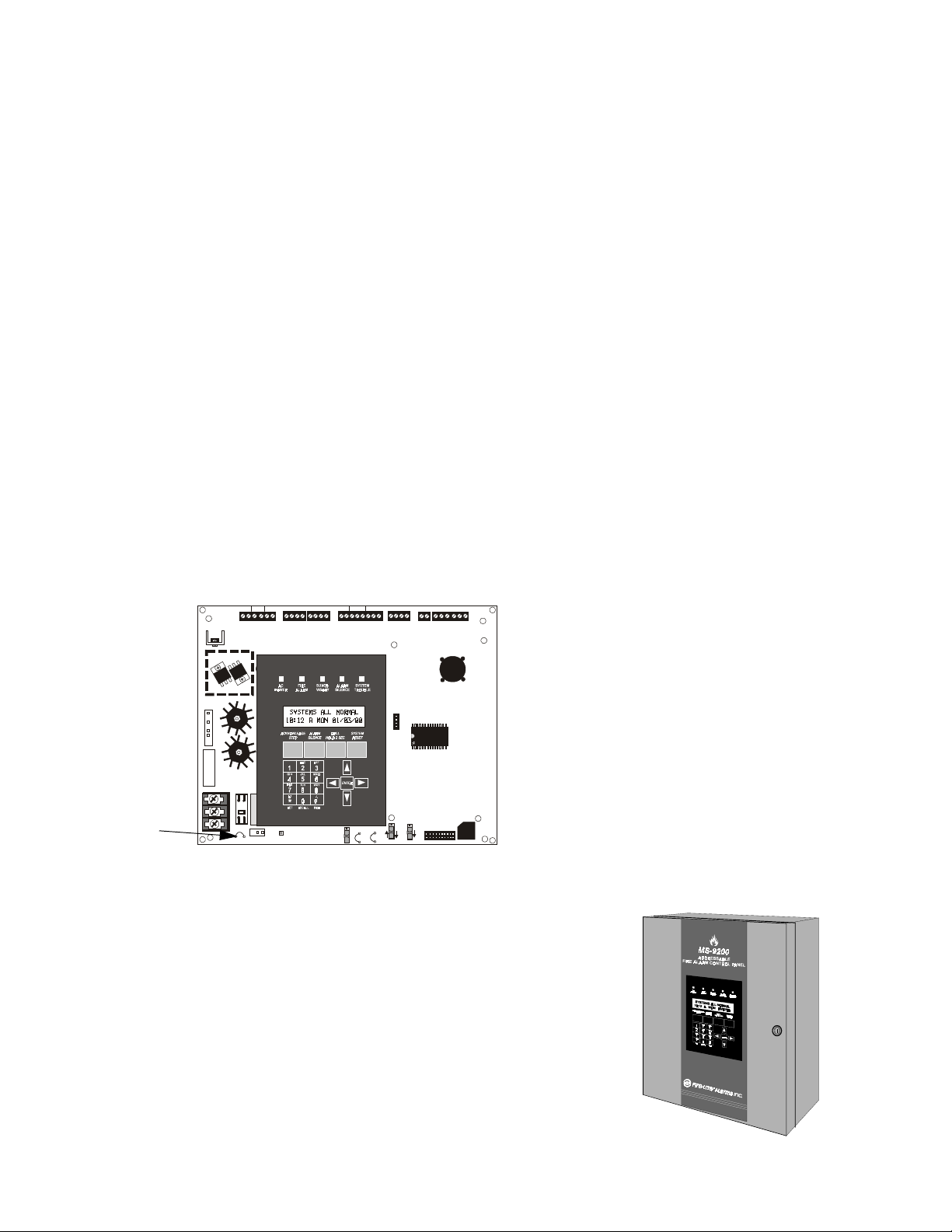
Circuits
1.4 Circuits
SLC Communication Loop
One SLC loop, configurable for NFPA Style 4, 6 or 7, is provided for communication to addressable monitor (initiating device) and control (output device) modules. Refer to SLC Wiring Manual for additional information.
Output Circuits
The following output circuits are available on the FACP:
• 24 Volt Resettable Power Output 300 mA
• 24 Volt Nonresettable Power Output 300 mA
• 24 Volt Battery Charger (up to 18 AH batteries)
NAC (Notification Appliance Circuits)
Two NACs, configurable for Style Y (Class B) or Style Z (Class A), are provided with various programmable
features.
Relays
Three dry contact relays are provided for System Alarm and System Trouble (Form-C contacts) and Supervisory
(Form-A contacts). Contacts are rated 2.0 amps @ 30 VDC (resistive) and 0.5 amps @ 30 VAC (resistive).
1.5 Components
+ - + - + -
- +
BATTERY
J3
GNDFAULT
T
B
2
BELL 2 POWER
B+ A+ A- B-
JP1
TB8
TRANSFORMER 1
TRANSFORMER 2
HIGH VOLTAGE
CAUTION!
J17
J19
CAUTION
HIGH VOLTAGE
24V UNREG 24V NONRS24 V RST
T
B
4
JP1
Cabinet
The MS-9200 cabinet is red with an attractive navy blue front overlay. The
backbox provides space for two batteries up to 12 Amp Hour. Refer to Figure 2-2, “MS-9200 Cabinet Mounting,” on page 24, for information on
dimensions. Ample knockouts are provided for system wiring. Also available is an optional dress panel, DP-1-B, which mounts to the inside of the
cabinet (required and included on the ULC version). The dress panel must
be installed to meet FM requirements (refer to “Dress Panel” on page 17).
BELL 1 POWER
B+ A+ A- B-
T
B
1
SW1
SUPV ALARM TROUBLE PC/PRINTER TERM COMM
NO C NO NC C NO NC C
OUT+ IN+ OUT- IN-
T
B
3
J16
JP3
JP4
RS-232
DISABLE
SW3
PC/PRINTER
GND FAULT
SHIELD SLC SLC
ACS
1 COMM 2
A B B+ A+ B- A-
T
T
B
B
7
5
T
B
6
Main Circuit Board
The main circuit board contains the system's
CPU, power supply, other primary components
and wiring interface connectors. Optional
modules plug-in and are mounted to the main
circuit board. The circuit board is delivered
premounted in the MS-9200 cabinet. Note that
newer versions of the circuit board have jumper
JP1 which can be cut to disable the FACP
battery charger when using an external battery
charger.
SW2
J6
TROUBLE
RS-485
TERM. MODE
9200bord.cdr
Document #51003 Rev.E 01/11/02 P/N 51003:E
ms9200.cdr
13
Page 14

Components
Standard
Optional XRM-24
9200xfor.cdr
Batteries
The MS-9200 cabinet provides space for two batteries
up to 12 Amp Hour. 18 AH batteries require use of the
Fire•Lite BB-17F or similar UL listed battery cabinet.
The newer versions of the MS-9200 main circuit board,
which incorporate jumper JP1 for disabling the FACP
charger, can use the CHG Series chargers for charging
25 to 120 AH batteries. Batteries must be ordered separately and require use of the Fire•Lite BB-55F UL
listed battery cabinet.
Transformer Assembly
One 100VA transformer is provided standard with the panel
(3.6 amps maximum). An optional 100 VA transformer
XRM-24 (XRM-24E for the MS-9200E) is available to
provide maximum accessory power (6.6 amp total).
Battery Cable P/N 75287
+
-
+
-
9200batt.cdr
1.5.1 Intelligent Addressable Detectors: Newer Series
Intelligent, addressable detectors provide information to the control panel on an SLC Signaling Line Circuit (refer to
the SLC Wiring Manual for detailed information on device installation, wiring and operation). This allows the control panel to continually process the information to determine the status (alarm, trouble or normal) of each detector.
Each detector responds to an SLC address that is set in the detector head using built-in rotary decimal switches which
can be set to a maximum address of 99. Note that a blinking LED on an intelligent detector indicates communication
between the detector and the control panel. Refer to the Fire•Lite Device Compatibility Document for a list of
approved detectors.
Smoke Detectors (Photoelectric)
The SD350 is an intelligent, addressable low profile photoelectric smoke detector which provides smoke sensing utilizing optical sense technology. The detector sends a unique 'type' code to aid the automatic programming feature in
the control panel. The SD350T includes a 135
Smoke Detector (Ionization)
The CP350 is an intelligent, addressable low profile ionization smoke detector which measures the level of combustion products in its chamber using the 'ionization principle.' The detector sends a unique 'type' code to aid the automatic programming feature in the control panel.
Smoke Detector (Duct)
The D350P is an intelligent, addressable photoelectric duct smoke detector. The D350RP includes an alarm relay.
Detector Bases
The B501BH is a standard sounder base and the B501BHT is a temporal tone sounder base for intelligent,
addressable smoke detectors.
The B224RB is a relay base with one Form-C relay for intelligent, addressable smoke detectors. It may be used to
control auxiliary functions such as damper control and elevator recall.
The B224BI is an isolator base for intelligent, addressable smoke detectors. It functions similar to the I300 isolator
module which allows loops to operate under fault conditions and automatically restore when the fault is removed.
O
F fixed thermal sensor.
Detector Annunciator
The RA400Z is a remote single LED annunciator that can be wired directly to an addressable detector for annunciation of that detector's alarm status.
14
Document #51003 Rev.E 01/11/02 P/N 51003:E
Page 15

Components
1.5.2 Intelligent Addressable Modules: Newer Series
The newer series of Control Modules and Monitor Modules provide an interface between the control panel and conventional notification and initiating devices. Each module can be set to respond to a maximum address of 99 with
built-in rotary switches. A blinking LED on monitor modules indicates communication between the module and the
control panel. Refer to the Fire•Lite Device Compatibility Document for a list of approved notification and initiating
devices.
Monitor Modules
The MMF-300, MDF-300 and MMF-302 are addressable monitor modules that can be used to monitor conventional
normally open contact alarm initiating devices, such as manual pull stations, 4-wire smoke detectors, heat detectors,
waterflow and supervisory devices. The MDF-300 is a dual monitor module in a single package (Class B only) with
each module functionally the same as the MMF-300. The MMF-302 is used primarily for two-wire smoke detectors
in addition to normally open contact devices. The supervised IDCs (Initiating Device Circuit) can be wired to the
module as NFPA Style B (Class B) or Style D (Class A). The modules are supplied with a thermoplastic cover for
mounting to a 4-inch mounting box.
Monitor Module (miniature)
The MMF-301 is an addressable monitor module that is a miniature version of the MMF-300. It connects with wire
pigtails (Style B [Class B] only), and may be mounted directly in the electrical box of the device being monitored.
Control Module
The CMF-300 is an addressable control module used to connect NACs (Notification Appliance Circuits) to power
and supervise compatible UL-listed notification appliances. The NACs can be wired to the module as supervised
NFPA Style Y (Class B) or Style Z (Class A) circuits. The modules are supplied with a thermoplastic cover for
mounting to a 4-inch square mounting box.
Relay Module
The CRF-300 is an addressable control relay module which is functionally similar to the CMF-300 but used as a
Form-C relay module
Manual Pull Station
The BG-12LX is an addressable manual pull station featuring key-lock reset. The pull station responds to an address
set by the installer using the built-in rotary decimal switches on the pull station. The manual pull station includes a
Fire•Lite key. The BG-12LX address module LED condition is visible through the translucent handle.
I300
The loop isolator module is an automatic switch which opens the circuit voltage to the SLC Loop branch(es) whenever a wire-to-wire short circuit is detected on that loop. The remainder of the communications loop leading up to the
I300 will continue to operate, unaffected by the short. The isolator module is bi-directional, meaning that it can
detect a fault condition between the input SLC terminals or output SLC terminals. The I300 is required to meet
NFPA Style 7 requirements.
1.5.3 300 Series Intelligent Addressable Devices
Fire•Lite’s legacy 300 Series Intelligent Addressable Devices are fully compatible with the MS-9200 FACP.
Compatible devices include:
• SD300: Photoelectric Smoke Detector
• SD300T: Photoelectric Smoke Detector with Thermal Sensor
• CP300: Ionization Smoke Detector
• M300: Monitor Module
• M301: Miniature Monitor Module
• M302: two-wire Monitor Module
• C304: Control/Relay Module
• BG-10LX Manual Pull Station
Document #51003 Rev.E 01/11/02 P/N 51003:E
15
Page 16

Optional Modules
1.5.4 Addressable Device Accessories
E.O.L. Resistor Assemblies
The 47K End-of-Line Resistor Assembly is used to supervise the MMF-300, MDF-300, MMF-301 and CMF-300
module circuits. The 3.9K End-of-Line Resistor Assembly is used to supervise the MMF-302 module circuit. The
resistors are included with each M300 and C304 module.
E.O.L. Power Supervision Relay
The UL listed End-of-Line Power Supervision Relay is used to supervise the power to 4-wire smoke detectors and
notification appliances.
N-ELR Mounting Plate
The N-ELR is a single End-of-Line resistor plate which is required for use in Canada.
An ELR, which is supplied with each module and fire alarm control panel, is mounted to
the ELR plate. Resistors mounted to the N-ELR plate can be used for the supervision of
a monitor and control module circuit.
1.6 Optional Modules
The MS-9200 main circuit board includes option module connectors which are located on the right side of the board.
Available option modules include the following:
ACM-8RF Relay Control Module
The ACM-8RF Relay Control Module contains eight high current (5 amps) Form-C relays. The module interfaces to
host fire alarm control panels which employ an ACS (EIA-485) annunciator communications bus. ACM-8RF modules may be connected to the EIA-485 bus up to 6,000 feet (1,800 m) away from the host control panel. Power-limited, filtered, nonresettable power must be supplied by the host FACP or a UL listed power supply such as the FCPS24F. Refer to Figure 2-14, “ACM-8RF Relay Control Module Installation,” on page 32, for wiring details.
RTM-8F Relay Module
The RTM-8F Relay/Transmitter Module plugs into connector J6 and mounts on the bottom right side of the MS-9200
main circuit board. When the module is installed, jumper JP4 must be cut in order to provide module placement
supervision. The RTM-8F provides eight high current (5 amps) Form-C relays. These relays track software zones 1
through 8. The Relay/Transmitter Module also provides Municipal Box or Remote Station transmitters. An
MS-9200 equipped with an RTM-8F meets NFPA 72 codes for Auxiliary and Remote Station requirements. In
remote station applications, the RTM-8F can be configured to transmit alarm only or alarm and trouble signals. Disable switches and indicators are provided on the module. Refer to Figure 2-15, “RTM-8F Module Installation,” on
page 33 and Figure 2-16, “RTM-8F Relay Transmitter Module,” on page 34, for additional information.
Printer/PC Interface - TB7
The Printer/PC Interface may be used to permanently connect a printer to the MS-9200 for the purpose of printing a
history report, walktest file or program listing or smoke detector data. Printers require separate primary AC power.
The printer connects to TB7 on the main circuit board. TB7 is also used to connect a computer for upload/download
of programming data. Refer to the PK-9200W Off Line Programming Utility Manual for programming information.
Refer to Figure 2-18, “Remote Serial Printer and Computer Connections,” on page 36, for information on connections and “System Edit” on page 45, for information on programming the MS-9200 for use with a printer or PC.
Switch SW3, located on the main circuit board, must be placed in the RS-232 PC/Printer position (down) when connecting a printer or PC to TB7.
Older versions of the MS-9200 main circuit board will not have connector TB7. These boards require connection of
a PIM-24 module to the serial EIA-232 port on the printer using cable P/N 75267, in order to connect a printer or PC.
The module mounts to the J11 connector on the MS-9200 main circuit board. Note that the PIM-24 option cannot
be used simultaneously with the DIM-485/LCD-40 option.
16
Document #51003 Rev.E 01/11/02 P/N 51003:E
Page 17

Accessories
PK-9200W Kit for Local Downloading
The PK-9200W Programming Utility can be used to program an MS-9200 directly from most IBM PC/XT/AT or
compatible computers, including laptops and portables, equipped with a serial port. MS-9200 program files can also
be created and stored on the PC, then downloaded to the control panel. The PK-9200W Kit includes the MS-9200
Windows based Programming Utility software on four 3½" disks and the Instruction Manual P/N 50684. Older version of the MS-9200 main circuit board, which do not have connector TB7, require separate purchase of the PIM-24
Interface module.
UDACT-F Universal Digital Alarm Communicator/Transmitter
The UDACT-F transmits system status to UL listed Central Station receivers via the public switched telephone network. The UDACT-F is compact in size and may be mounted inside the host control panel or may mount externally
in a separate cabinet. ACS (EIA-485) annunciator communications bus and filtered 24 volt connections are required.
The UDACT-F transmits 198 points or 56 zones when connected to the MS-9200. The MS-9200 requires firmware
P/N 73580 or greater in order to be compatible with the UDACT-F. Refer to Figure 2-11, “UDACT-F Mounting to
MS-9200,” on page 30, and Figure 2-12, “External UDACT-F Mounting in ABS-8RF,” on page 31, for wiring details
and “System Edit” on page 45, for information on programming the MS-9200 for use with the UDACT-F.
Annunciator/Display Interface
The LCD-40 Series Remote Fire Annunciator and other Terminal Mode annunciators connect to TB7 on the
MS-9200 main circuit board. Refer to “LCD-40 Series Annunciator Wiring” on page 72, for wiring details and “System Edit” on page 45, for information on programming the MS-9200 for use with the LCD-40.
Older versions of the MS-9200 main circuit board will not have connector TB7. These boards require connection of
DIM-485 in order to connect an LCD-40 Series annunciator. The DIM-485 plugs into connector J11 located on the
top right side of the MS-9200 main circuit board. Note that the DIM-485/LCD-40 cannot be used simultaneously
with the PIM-24 module.
1.7 Accessories
1.7.1 Dress Panel
A dark blue dress panel, DP-1-R, is available as an option (required for Canadian installations and included with the
MS-9200C). The dress panel restricts access to the system wiring while allowing access to the membrane switch
panel.
Note that the MS-9200 Addressable Fire Control Panel installed with the dress panel, has received Factory Mutual
(FM) approval. It is important to note that FM approval is contingent on the proper installation of the dress panel.
dp9200.cdr
Document #51003 Rev.E 01/11/02 P/N 51003:E
17
Page 18

Accessories
1.7.2 Battery Box
BB-17F
The BB-17F battery box may be used to house two 12 AH or 18 AH batteries. The battery box mounts directly below
the MS-9200 cabinet. The box is red and is provided with knockouts.
bb-17f.cdr
BB-55F
The BB-55F battery box may be used to house two 25 AH batteries, two 55 AH batteries or one 100 AH battery.
When the CHG-120F is mounted in the BB-55F, two 25 AH or one 55 AH battery may also be housed in the box.
bb-55f.cdr
1.7.3 CHG-120F Battery Charger
The CHG-120F is capable of charging 25 AH to 120 AH lead-acid batteries with the newer versions of the MS-9200
main circuit board which allows disabling of the FACP battery charger. The batteries and charger can be housed in
the Fire•Lite BB-55F Battery Box which can be mounted up to 20 feet away from the control panel. Note that when
using the BB-55F for housing the charger and batteries, a maximum 25 AH battery can be accommodated. For larger
Amp Hour batteries, use multiple BB-55Fs. Refer to the CHG-120F Manual for additional information.
WARNING: Do not apply AC power or batteries until the system is completely wired and ready for testing. Set the
!
CHG-120F Voltage Select switch (SW1) to match the AC power source voltage (120VAC or 240 VAC). With the
breaker at the main power distribution panel turned off, connect AC power wires to CHG-120F TB1 as shown below.
18
Document #51003 Rev.E 01/11/02 P/N 51003:E
Page 19

Accessories
Wire the CHG-120F to the MS-9200 as shown. Cut Jumper JP1, which is only on the newer versions of the MS-9200
main circuit board, to disable the FACP battery charger when using the CHG-120F. Wire the batteries to the
CHG-120F but do not connect the Battery Interconnect cable until the system is ready for testing.
FIGURE 1-2:
AC Power In
Hot
Neut
Grd
–
25 AH
(12 V)
CHG-120F Battery Charger (Requires BB-55F Battery Box)
To Auxiliary
Equipment
TB1
Out 2 +
Out 2 -
Out 1 -
Out 1 +
TB2
–
+
–
+
–
+
Charger
TRANSFORMER 1
-
+
Battery +
Battery Interconnect Cable
+
Battery –
–
+
TRANSFORMER 2
TB8
25 AH
(12 V)
HIGH VOLTAGE
CAUTION!
J17
J19
CAUTION
HIGH VOLTAGE
24V NONRS24V RST BELL 2 POWER
24V UNREG
+ - + - + -
T
B
4
JP1
BATTERY
- +
B+ A+ A- B-
T
B
2
J3
- +
GNDFAULT
ALARM
SUPV
NO C NO NC C NO NC C
T
B
1
SW1
TROUBLE PC/PRINTER TERM COMM
JP3
JP4
DISABLE
GND FAULT
BELL 1 POWER
B+ A+ A- B-
Cut JP1 to disable MS-9200
battery charger.
Cut wires from MS-9200 battery cable
connected to J3.
Use wire nuts to connect wires.
RS-232
T
B
3
PC/PRINTER
OUT+ IN+ O UT- IN-
J16
SW3
SW2
RS-485
TERM. MODE
ACS SHIEL D SLC SLC
1 COMM 2
T
T
B
B
7
5
J6
TROUBLE
A B B+ A+ B- A-
T
B
6
9200chgf.cdr
Document #51003 Rev.E 01/11/02 P/N 51003:E
19
Page 20

Accessories
1.7.4 Annunciators
LED Zone Type Annunciators
The ACS Series Annunciators remotely display system status. The ACM/AEM-16ATF annunciators display zone
alarm and trouble status. In addition, they provide remote Acknowledge, Silence, Reset and Drill functions. The
ACM/AEM-32AF annunciators display zone alarm status only and provide no remote system switch functions. For
more detailed information, refer to the appropriate ACS Annunciator manual. Refer to “ACS and LDM Series Wiring” on page 73, for detailed wiring requirements and “System Edit” on page 45, for information on programming the
MS-9200 for annunciator use.
ACM -1 6ATF
The Annunciator Control Module-16ATF contains 16 red
alarm and 16 yellow trouble
LEDs, a System Trouble LED,
an On Line/Power LED and a
local piezo sounder with
switches for MS-9200
Acknowledge, Silence, Reset
and Drill. The ACM-16ATF has
rotary address switches and will
accept up to three AEM-16ATF
Expanders.
AEM-16ATF
The Annunciator Expander
Module-16ATF connects to the
AFM-16ATX and adds 16 sets
of red alarm LEDs and yellow
trouble LEDs. Three AEM16ATFs may be added to an
AFM-16ATX.
AFM-16ATF
The Annunciator Fixed Module16ATF contains 16 red alarm
and 16 yellow trouble LEDs, a
System Trouble LED, an On
Line/Power LED and a local
piezo sounder with switches for
MS-9200 Acknowledge,
Silence, Reset and Drill. The
AFM-16ATF is fixed at address
'1' and communication is via the
ACS (EIA-485) data line.
ACM-32AF
The Annunciator Control Module32AF contains 32 red alarm
LEDs, a System Trouble LED, an
On Line/Power LED and a local
piezo sounder with a local
Silence/Acknowledge switch.
The ACM-32AF has rotary
address switches and will accept
one AEM-32AF Expander.
AEM-32AF
The Annunciator Expander Module-32AF connects to the AFM32AX and adds 32 red alarm
LEDs. The AEM-32AF is identical in frontal appearance to the
AFM-32AX. Only one expander
module is allowed.
AFM-16AF
The Annunciator Fixed Module16AF has 16 red alarm LEDs.
Multiple annunciators may be
used by setting all annunciators to
Receive Only, except the last
AFM-16AF in line. Each annunciator's address is internally fixed
at '1', and communication is via
the ACS (EIA-485) data line. The
Local Silence/Acknowledge
switch functions as local lamp test
and silence for annunciator piezo.
LEDs include On Line and System Trouble indicators.
20
AFM-32AF
The AFM-32AF is similar to the
AFM-16AF except it has 32 red
alarm LEDs for annunciating up
to 32 points.
Document #51003 Rev.E 01/11/02 P/N 51003:E
Page 21

Accessories
LCD-40 Series Remote Fire Annunciators
The LCD-40 Series, consisting of the LCD-40 and LCD-40L, are com-
FIRE ALARM ANNUNCIATOR
pact, attractive, 40-character backlit LCD fire annunciators that are
capable of displaying English-language text. They mimic the display on
the MS-9200 main control circuit board and will annunciate device
type, point alarm, trouble or supervisory condition, zone assignment
Ack Silence
Drill
Hold 2 sec.
Reset
plus any custom alpha labels programmed into the control panel. They
also provide system status LEDs to display power, alarm, trouble and
supervisory conditions. Additionally, the LCD-40 is capable of performing critical system functions such as acknowledge, silence, reset and drill, remotely from the host control panel.
Communication between the control panel and the LCD-40 Series is accomplished over a serial interface employing
the EIA-485 communication standard. Up to 32 LCD-40 Series Annunciators may be connected to the TERM
(EIA-485) circuit. The annunciators may be powered from the host FACP or a remote UL listed filtered power supply such as the Fire•Lite FCPS-24F. Refer to “LCD-40 Series Annunciator Wiring” on page 72, for detailed wiring
requirements and “System Edit” on page 45, for information on programming the MS-9200 for annunciator use.
Note: If software with either the Part Number 73750 or 73829 is installed in the MS-9200, the LCD-40 Series must
have software with a Part Number of 73779 or 73879 to operate with the FACP. If software with a Part Number of
#M9200V20 or higher is installed in the MS-9200, the LCD-40 Series must have software with a Part Number of
#LCD40V20 or higher to operate with the FACP.
®
lcd40.cdr
LDM Series Lamp Driver Modules - Graphic Annunciator
The LDM Series Lamp Driver Modules, which consist of the LDM-32F master and LDM-E32F expander modules,
are used to provide an interface to a custom graphic LED annunciator. The master module provides power and control for a maximum of three expander modules. The LDM-32F and LDM-E32F have output connectors which are
used to drive lamps or LEDs and input connectors which are used for remote switch functions. Refer to the LDM
Series Lamp Drive Modules Manual for a complete description. See “ACS and LDM Series Wiring” on page 73, for
wiring requirements and “System Edit” on page 45, for details on programming the MS-9200 for annunciator use.
The LDM-32F
J5
J6 J7 J8
The Lamp Drive Module LDM-32F has 32 alarm lamp/LED driver outputs which sink current to system common (-) on activation. A single positive (+) voltage is required to supply
total operating power for all lamps or LEDs when all drivers are activated. The LDM-32F
provides a separate driver for system trouble and inputs for a local lamp test switch. A
maximum of 16 external control switches may be wired to the LDM-32F. DIP switch SW3
is used to enable or disable the onboard piezo sounder, enable remote switch functions,
select a flashing LED function for new alarms and troubles and other functions. Switch
SW4 is used to configure the module to annunciate 32 alarms or 16 alarms and 16 troubles.
A green On Line LED flashes to indicate ongoing communications with the host FACP.
One LDM-32F supports up to three LDM-E32F modules. The LDM-32F is supplied with
J4
J1
KEYSWITCH
SWITCH
MATRIX
SW1
SW2
SW3
SW4
4
3
2
1
7
6
5
4
3
2
1
J11
TB2
TB1
ON LINE
LAMP
POWER
J10
J9
four standoffs and screws for mounting to a CHS-4L chassis or custom backbox.
The LDM-E32F
Each LDM-E32F expander module provides 32 additional lamp/LED driver outputs from
J5, J6, J7 and J8. The expander module has a slide switch, SW4, for selecting alarm only
or alarm and trouble annunciation and an input for a local lamp test switch. In alarm only
mode, use only one LDM-32F and one LDM-E32F for a maximum of 56 alarm indicators
and 8 system status indicators. In alarm/trouble mode, use one LDM-32F and three LDME32Fs for a maximum of 56 alarm indicators, 56 trouble indicators, 16 status indicators
J6
J5
OUTPUTS J7
J4
SWITCH
MATRIX
J1
SW4
J8
J10
J2
and 64 optional control switch inputs. Multiple sets of LDM-32Fs with LDM-E32F
expanders increase the system annunciation capabilities beyond 56 zones or points. This is
possible by various settings of address switches SW1 and SW2 on the LDM-32F (refer to
Appendices). Each LDM-E32F is supplied with a 26-conductor expander ribbon cable,
four standoffs and screws.
J2
Document #51003 Rev.E 01/11/02 P/N 51003:E
21
Page 22

Accessories
1.7.5 FCPS-24F/E Remote Field Charger Power Supply for System Power Expansion
The FCPS-24F/E is a compact, remote power supply with battery charger. This remote power supply consists of a filtered 24 VDC output that may be configured to drive up to four Notification Appliance Circuits [four Style Y (Class
B) or two Style Z (Class A) and two Style Y (Class B)]. Alternately, the four Notification Appliance Circuits may be
used as auxiliary filtered power configured for resettable or nonresettable operation.
The FCPS-24F/E may be used in a number of different applications. It may be used as a remotely-mounted power
supply and battery charger powering up to four, coded or noncoded, Notification Appliance Circuits. Alternately, any
or all of these circuits may be used as 24 VDC output circuits capable of powering 4-wire smoke detectors or any
device that requires filtered power. These circuits may be configured as resettable or nonresettable outputs to expand
FACP auxiliary system power.
Style Y/Style Z Notification Appliance
Notification Appliance
Circuit Control Input #1
(from FACP)
Notification Appliance
Circuit Control Input #2
(from FACP)
Circuit or 24 VDC Output #1
Style Y Notification Appliance
Circuit or 24 VDC Output #2
Style Y/Style Z Notification Appliance
Circuit or 24 VDC Output #3
Style Y Notification Appliance
Circuit or 24 VDC Output #4
AC Power
Specific
Application
Powe r
FCPS Trouble
Contact Output
Battery Charger
One of the most common applications for the FCPS-24F/E remote power supply utilizes the NAC expander mode. In
this application, one or two NACs (Notification Appliance Circuits) are connected from the main control panel NAC
output(s) to the remote power supply Control Input circuits. When these Control Input circuits activate (due to
reverse polarity of the NAC output), the power supply will activate its corresponding outputs. NAC Control Input #1
controls power supply output circuits #1 and #2. NAC Control Input #2 controls output circuits #3 and #4.
During the inactive state, the remote power supply supervises its NAC field wiring for short and open circuits. If a
fault is detected, the supply will enter a trouble condition and illuminate the corresponding NAC trouble LED (Output Circuits 1-4). However, once the NACs are activated, the supervision is disabled and the circuits are no longer
supervised. Supervision of other power supply faults such as low battery, earth fault, AC loss and battery charger
failure will continue and may be monitored via the independent trouble relay contact.
If a specific application requires that all four outputs activate at the same time, only one NAC control input from the
FACP is necessary. For this application, the NAC from the FACP is wired into NAC Control Input #1 of the remote
supply and then a pair of wires are connected from NAC Control Output #1 to NAC Control Input #2. Refer to the
FCPS-24F/E Installation, Operation and Application Manual for a complete description and examples of applications.
A CMF-300 Control Module, which can be located up to 10,000 feet (3,000 m) from the FACP, may be used to activate the FCPS power supply. The Control Module can be powered from the FCPS auxiliary 24 VDC power output
(TB3 Terminals 8 & 9) and supervised by an EOL relay.
22
Document #51003 Rev.E 01/11/02 P/N 51003:E
Page 23

Installation
CHAPTER 2 Installation
Carefully unpack the system and check for shipping damage. Mount the cabinet in a clean, dry, vibration-free area
where extreme temperatures are not encountered. The area should be readily accessible with sufficient room to easily
install and maintain the panel. Locate the top of the cabinet approximately 5 feet (1.5 m) above the floor with the
hinge mounting on the left. Determine the number of conductors required for the devices to be installed. Sufficient
knockouts are provided for wiring convenience. Select the appropriate knockout(s) and pull the required conductors
into the box. All wiring should be in accordance with the National and/or Local codes for fire alarm systems.
FIGURE 2-1:
MS-9200 Cabinet Dimensions
To rem ove
entire
knockout,
strike here.
To rem ove
inner
knockout,
strike here.
BB-17F
Document #51003 Rev.E 01/11/02 P/N 51003:E
9200cabb.cdr
23
Page 24

Backbox Mounting
2.1 Backbox Mounting
Remove the main PC board assembly by unscrewing the four screws in the corners of the board. Two stand-
1.
offs support the board in the center. Set the board aside in a safe, clean place. Avoid static discharge which
may damage the board.
Mark and predrill holes for the top two keyhole mounting bolts using the dimensions shown.
2.
Install two upper fasteners in the wall with the screw heads protruding.
3.
Using the upper 'keyholes', mount the backbox over the two screws.
4.
Mark and drill the lower two holes.
5.
Secure backbox by installing the remaining fasteners. Tighten all screws.
6.
When the location is dry and free of construction dust, reinstall the main PC board.
7.
FIGURE 2-2:
MS-9200 Cabinet Mounting
(3.81 cm)
1.50“
4.445 cm
1.75“
2.00"
(5.08 cm)
2.00"
2.00" 2.00" 2.00" 2.00"
4.445 cm
1.75“
Back
of
Box
(3.81 cm)
1.50“
1.62“
(4.115 cm)
Back
1.62“
(4.115 cm)
1.50“
(3.81 cm)
Box
of
(3.81 cm)
(3.14 cm)
Hinges
(3.81 cm)
1.50“
1.235"
11.062"
(28.10 cm)
4.6“
(11.68 cm)
Hinge
1.50“
1.58“
1.75“
(4.445 cm)
14.5"
11.5"
11.5“
Back of Box
(36.83 cm)
(29.21 cm)
(29.21 cm)
(42.926 cm)
1.75“
(4.445 cm)
16.9“”
4.5“
(11.43 cm)
(3.81 cm)
1.50“
(4.115 cm)
Back
of
Box
1.62“
9200encl.cdr
24
TR-4-R Trim Ring
Document #51003 Rev.E 01/11/02 P/N 51003:E
Page 25

Power
M
N
2.2 Power
WARN IN G: Several different sources of power can be connected to this panel. Disconnect all sources of power
!
before servicing. The panel and associated equipment may be damaged by removing and/or inserting cards, modules
or interconnecting cables while this unit is energized.
UTION!
2.2.1 AC Power and Earth Ground Connections
VOLTAGE
Primary power required for this panel is 120 VAC, 50/60 Hz, 2.3 amperes for
TRANSFOR
J19
the MS-9200(C) or 240 VAC, 50/60 Hz, 1.2 amperes for the MS-9200E.
Overcurrent protection for this circuit must comply with Article 760 of the
National Electrical Code (NEC) and/or local codes. Use #14 AWG (2.00
2
mm
) or larger wire with 600 volt insulation rating.
In order to comply with Compatibility Directive 89/336/EEC for European
Communities (EU Requirements), a ferrite bead P/N 29085, must be installed
EARTH
NEUT
HOT
TB8
CAUTION
HIGH VOLTAGE
JP1
on the Mains for RF filtering. Refer to Document #50404 for details.
Connect a wire from the labeled ground stud in the back box to a known solid earth ground. This connection is vital
for maintaining the control panel's immunity to unwanted transients generated by lightning and electrostatic
discharge.
2.2.2 Battery Power
Observe polarity when connecting the battery. Connect the battery cable to J3 on the MS-9200 main circuit board
using the plug-in connector provided. See “Power Supply Calculations” on page 61, for calculation of the correct
battery rating.
WARN IN G: Battery contains sulfuric acid which can cause severe burns to the skin and eyes and can destroy fab-
!
rics. If contact is made with sulfuric acid, immediately flush the skin or eyes with water for 15 minutes and seek
immediate medical attention.
- +
BATTERY
J3
G
2.2.3 DC Power Output Connections
All DC power outputs are power-limited.
FIGURE 2-3:
Power-limited Nonregulated
Special Purpose Power
2.5 amps, 24 VDC power for
Notification Appliance Circuits.
TB4 Terminal 1(+) and 2(-).
Note: This power is unsuitable
for EIA-485 annunciation
DC Power Outputs
Power-limited
Nonresettable Power
300 mA, 24 VDC nominal filtered,
nonresettable power can be drawn
from TB4 Terminals 3(+) and 4(-).
+ - + - + -
1 2 3 4 5 6
Power-limited
Resettable Power
300 mA, 24 VDC nominal filtered,
resettable power can be drawn
from TB4 Terminals 5(+) and 6(-).
Document #51003 Rev.E 01/11/02 P/N 51003:E
25
Page 26

Standard Relays
-
2.3 Standard Relays
The MS-9200 provides a set of Form-C alarm and Form-C trouble contacts rated for 2.0 amps @ 30 VDC (resistive).
The panel also provides a Form-A supervisory contact rated for 2.0 amps @ 30 VDC (resistive). Refer to Figure 2-7
on page 27 for UL power-limited wiring requirements.
Note that relay connections may be power-limited or nonpower-limited, provided that 0.25" spacing is maintained
between conductors of power-limited and nonpower-limited circuits.
FIGURE 2-4:
TB3
Relay Connections
SUPV
NO C NO NC C NO NC C
ALARM
1 2 3 4 5 6 7 8
TROUBLE
If using both power-limited and
nonpower-limited circuits,
leave one unused terminal
between power-limited and
nonpower-limited circuits.
Powe r
Limited
Note: If relays are used as power-limited circuits,
paste supplied label to terminal block to indicate
use of power-limited wiring.
Powe r
Limited
2.4 Notification Appliance Circuits
The MS-9200 provides two Notification Appliance (bell) Circuits configurable for Style Y or Style Z. Each circuit is
capable of 2.5 amps of current. Total current drawn from these as well as other DC power outputs cannot exceed 6.0
amps. Use UL listed 24 volt notification appliances only. Circuits are supervised and power-limited. Refer to the
Fire•Lite Device Compatibility Document for a listing of compatible notification appliances. The two NACs (Notification Appliance Circuits) located on the main circuit board may be expanded via the Fire•Lite FCPS-24F/E Field
Charger/Power Supply.
FIGURE 2-5:
Note: Notification Appliance
Circuit polarity shown in
state.
alarm
NAC Connections
Style Z Notification Appliance Circuit
(supervised and power-limited)
B+ A+ A- B-
T
+ -
+
Polarized Bell
Polarized Strobe
Polarized Horn
B
2
B+ A+ A- B-
T
B
1
Style Y Notification Appliance Circuit (supervised and
power-limited - 4.7K ohm, ½ watt P/N 71252 UL listed)
+ -
Polarized Bell
Polarized Horn
+
Polarized Horn
+
Dummy Load all unused circuits
2.5 Annunciator and PC/Printer Circuits
Connectors are provided for Terminal Mode and ACS Mode annunciators as well as a Personal Computer for
programming or a printer for hardcopy printouts of system information. Note that the TB7 Out and In polarities are
used for connection to a Terminal Mode annunciator. Refer to page 35 for information on PC/Printer wiring.
Annunciator and PC/Printer Interface
PC/PRINTER TERM CO MM
OUT+ IN+ O U T- IN -
Document #51003 Rev.E 01/11/02 P/N 51003:E
T
B
7
1 COMM 2
T
B
5
+ -
ACS
EIA-485 connection for ACS Mode annunciator
Refer to “UDACT-F Universal Digital Alarm Com
municator/Transmitter” on page 29, or appropriate annunciator manual for information on
wiring.
26
FIGURE 2-6:
EIA-232 connection for PC/Printer or EIA-485
connection for Terminal Mode annunciator.
Configure Switch SW3 on main circuit board
for appropriate connection. Refer to “Printer/
PC and Terminal Mode Annunciator Interface” on page 35, or appropriate annunciator
manual for information on wiring.
Page 27

UL Power-limited Wiring Requirements
2.6 UL Power-limited Wiring Requirements
Power-limited and nonpower-limited circuit wiring must remain separated in the cabinet. All power-limited circuit
wiring must remain at least 0.25" (6.35 mm) away from any nonpower-limited circuit wiring. Furthermore, all
power-limited circuit wiring and nonpower-limited circuit wiring must enter and exit the cabinet through different
knockouts and/or conduits. A typical wiring diagram for the MS-9200 is shown in Figure 2-7.
FIGURE 2-7:
Typical UL Power-limited Wiring Requirements
Power-limited Circuits
TRANSFORMER 1
HIGH VOLTAGE
TRANSFORMER 2
TB8
J17
CAUTION!
J19
CAUTION
HIG H VO LTAGE
24V NONRS 24V RST B ELL 2 POWER
24V UNREG
+ - + - + -
T
B
4
JP1
- +
BATTERY
Grounding Stud
Nonpower-limited Circuits
BELL 1 POWER
B+ A+ A- B- B+ A+ A- B-
T
B
2
J3
GNDFAULT
SUPV ALARM TROUB LE PC/PRINTER TERM COMM
NO C NO NC C NO NC C
T
B
1
SW1
T
B
3
JP3
JP4
RS-232
DISABLE
GND FAULT
OUT+ IN+ OUT- IN-
SW3
PC/PRINTER
Power-limited Circuits
SHIELD SLC SLC
ACS
1 COMM 2
A B B+ A+ B- A-
T
T
B
B
7
5
T
B
6
Power-limited Circuits
C
NC
NO
C
NC
NO
C
J16
SW2
J6
TROUBLE
RS-485
TERM. MODE
NC
C
NC
C
NC
C
NC
C
NC
C
NC
NO
NO
NO
NO
NO
NO
Nonpower-limited Circuits
AC Power
RTM-8F UL Power-limited Wiring Requirements
Nonpower-limited and power-limited wiring must have a
minimum distance of 0.25" wire-to-wire. If this module is used to
drive nonpower-limited and power-limited circuits, follow the
instructions below:
Skip a set of dry contacts to maintain the 0.25" required
1.
space between power-limited and nonpower-limited
circuits.
If this module is needed to drive power-limited and
2.
nonpower-limited relays that are next to each other, make
no connection to the Normally Open contact which separates the two groups of relays. Refer to the typical wiring
diagram to the right.
Refer to Figure 2-16, “RTM-8F Relay Transmitter Module,” on
page 34, for additional information on the RTM-8F.
Document #51003 Rev.E 01/11/02 P/N 51003:E
Note: Output is nonpowerlimited only if programmed
9200pwrl.cdr
as municipal box output.
Power-limited Circuit
Power-limited Circuit
Power-limited Circuit
Power-limited Circuit
No connection
Nonpower-limited Circuit
Nonpower-limited Circuit
Nonpower-limited Circuit
Nonpower-limited Circuit
Nonpower-limited Circuit
27
Page 28

Wiring the Signaling Line Circuit
2.7 Wiring the Signaling Line Circuit
The MS-9200 communicates with addressable initiating, monitor and control devices through a Signaling Line Circuit (SLC) loop, which can be wired to meet NFPA requirements for Style 4, Style 6 or Style 7.
2.7.1 Device Capacity
The capacity of the MS-9200 includes up to 99 addressable detectors and an additional combination of up to 99
addressable pull stations, control modules and monitor modules. Note: Refer to the installation drawings supplied
with each loop device for rating and specifications.
2.7.2 Surge Suppression
Surge protection for the SLC may be provided by using one of the UL listed compatible surge suppressors listed in
the Fire•Lite Device Compatibility Document. The SLC is allowed to leave the building only with the use of a UL
listed surge suppressor.
2.7.3 Installation
For information on installing devices on the SLC, refer to the SLC Wiring Manual.
28
Document #51003 Rev.E 01/11/02 P/N 51003:E
Page 29

Optional Modules
2.8 Optional Modules
The MS-9200 supports option modules using connectors J6, and J16 on the main circuit board. There are two
optional modules available for the MS-9200:
• RTM-8F Relay/transmitter Module
• UDACT-F Universal Digital Alarm Communicator/Transmitter
Note that older versions of the MS-9200 main circuit board do not have connector TB7 which allows connection of a
PC, printer or Terminal Mode annunciator. These boards will have a plug-in connector J11 which supports:
• PIM-24 Printer/PC Interface Module
• DIM-485 Display Interface Module (for use with LCD-40 Series annunciators)
Jumper JP4 must be cut before installation of the RTM-8F module to enable module placement supervision. Note
that devices connected to the EIA-485 connectors, the EIA-232 connector or SLC loop may be protected from voltage transients by using one of the UL listed compatible surge suppressors listed in the Fire•Lite Device Compatibility
Document.
FIGURE 2-8:
TRANSFORMER 1
J17
HIGH VOLTAGE
CAUTION!
TRANSFORMER 2
J19
TB8
CAUTION
HIG H VOLTA GE
Option Module Locations
24V UNREG 24V NONR S 24V RST
+ - + - + -
T
B
4
JP1
BATTERY
BELL 2 POWER
BELL 1 POWER
B+ A+ A- B-
B+ A+ A- B-
T
B
2
J3
- +
GNDFAULT
SUPV ALARM T ROUBLE PC/PRINTER TE RM COMM
NO C NO NC C NO NC C
T
B
1
JP4
SW1
T
B
3
JP3
RS-232
DISABLE
PC/PRINTER
GND FAULT
OUT+ IN+ OUT- IN-
J16
SW3
PC/Printer Interface
SHIELD SLC SLC
ACS
1 COMM 2
A B B+ A+ B- A-
T
T
B
B
7
5
T
B
6
J16 accepts UDACT-F
Cut JP4 for RTM-8F supervision
J6 accepts RTM-8F
SW2
J6
TROUBLE
RS-485
TERM. MODE
9200bord.cdr
2.8.1 UDACT-F Universal Digital Alarm Communicator/Transmitter
The UDACT-F transmits system status to UL listed Central Station receivers via
the public switched telephone network. It is capable of reporting up to 56 software zones or up to 198 addressable points. The UDACT-F may be mounted
directly to the MS-9200 main circuit board or remotely in a UBS-1F or ABS-8RF
enclosure. The MS-9200 requires software P/N 73580 or higher to support the
UDACT-F. For additional information, refer to the UDACT-F Manual.
Document #51003 Rev.E 01/11/02 P/N 51003:E
FIGURE 2-9:
UBS-1F
29
Page 30

Optional Modules
WARNING! Disconnect all sources of power (AC and DC) before installing or removing any modules or wiring
!
UDACT-F Mounting Options
FIGURE 2-10:
ABS-8RF
The UDACT-F may be mounted directly to the MS-9200 main circuit board or
remotely in an ABS-8RF or UBS-1F enclosure up to 6,000 feet (1,800 m) away from
the control panel. All power must be removed from the control panel before making
any connections to prevent circuit damage. The ACS Comm terminal is connected to
the UDACT-F, using twisted shielded pair wire. Power should be wired from the control panel's 24 VDC (nominal) filtered, nonresettable output to TB1 on the UDACT-F
(except when mounted in the MS-9200).
Mounting Inside the MS-9200 Enclosure
The MS-9200 must have firmware, with P/N 73580 or higher, installed to allow use of the UDACT-F. Remove all
power from the MS-9200 by disconnecting AC and batteries. Install the supplied standoffs (three nylon and one aluminum) in the appropriate holes located on the right side of the MS-9200 main circuit board, as illustrated in Figure
2-11, “UDACT-F Mounting to MS-9200,” on page 30. Using the ribbon cable supplied with the UDACT-F, connect
J10 on the UDACT-F to J16 on the MS-9200. Note that the colored edge of the ribbon cable must be oriented toward
the top edge of the UDACT-F as illustrated in Figure 2-11. Carefully seat the UDACT-F on the nylon standoffs and
secure to the aluminum standoff with the supplied screw
The EIA-485 circuit and 24 VDC power are provided directly from connector J16 of the MS-9200. Note that a 120
ohm EOL resistor is not
required on the UDACT-F EIA-485 terminals when it is installed inside the MS-9200 cabinet. The EOL resistor is required at the last device (if any are installed) on the EIA-485 line external to the MS-9200
panel.
Programming
See “System Edit” on page 45, for information on programming the MS-9200 to function with the UDACT-F.
FIGURE 2-11:
UDACT-F Mounting to MS-9200
Aluminum standoff
with nut required for
transient protection
Supplied ribbon cable attached
as illustrated to the right.
J10
Note position of colored stripe
T
B
7
1 COMM 2
T
B
5
ACS
SHIELD SLC SLC
A B B+ A+ B- A-
T
B
6
UDACT-F
PC/PRINTER T ERM COMM
OUT+ IN+ OUT- IN-
T
B
3
J16
MS-9200
J16 J10
30
SW3
PC/PRINTER
SW2
J6
TROUBLE
RS-485
TERM. MODE
MS-9200
J5
udactno.CDR
9200udc2.cdr
UDACT-F
Nylon standoffs
Document #51003 Rev.E 01/11/02 P/N 51003:E
Page 31

Optional Modules
FIGURE 2-12:
External UDACT-F Mounting in ABS-8RF
Supervised and Power-limited ACS (EIA-485) and power connections.
Surge protection can be provided by using one of the UL listed compatible surge
suppressors listed in the Fire•Lite Device Compatibility Document.
+24 VDC
Nonresettable
Power (TB4)
Ferr ite
Cores
P/N FBD-1
Shield
RTM-8F
Install 120 ohm EOL
resistor (P/N 71244) on
TB1 Terminals 3 & 4, if
last or only device on
EIA-485 line.
To Phone
Lines
(supervised)
Future
Use
Solid Earth
Ground
Connection
MS-9200 Cabinet
UDACT-F in ABS-8RF
(shown with cover removed)
MS-9200
Notes:
This arrangement allows use of the UDACT-F simultaneously with the RTM-8F module.
1.
Ferrite cores (P/N FBD-1) are recommended for all applications.
2.
Recommended wire is 12 AWG to 18 AWG (0.75 to 3.25 mm2) twisted, shielded pair.
3.
If shielded wire is used, connect only one end of the shield:
4.
✓
shield may be connected to cabinet (earth ground) at fire alarm panel, or
✓
shield may be connected to TB1 Terminal 5 (shield) at UDACT-F. Note that the shield end that is not
connected should be insulated to prevent accidental grounding. Do not connect both ends of shield
under any circumstances since a ground fault may result.
5. Conduit is recommended for external wire runs (consult local building codes).
Connect ground strap (supplied with ABS-8RF enclosure) from Earth Ground terminal on the UDACT-F to a
6.
solid building earth ground. Conduit alone will not provide a reliable earth ground.
7. UDACT-F may be located up to 6,000 feet (1,800 m) away from the host control panel.
8. Refer to “Specifications” on page 11 for power requirements.
UDACT-F TB1 Terminals 6 and 7 are for future use. Make no connections to these terminals.
9.
Document #51003 Rev.E 01/11/02 P/N 51003:E 31
Page 32

Optional Modules
2.8.2 ACM-8RF Relay Control Module
FIGURE 2-13:
ABS-8RF Enclosure
WARNING! Disconnect all sources of power (AC and DC) before
installing or removing any modules or wiring
!
The ACM-8RF module provides eight Form-C relays with contacts rated
for 5 amps. When installed with an MS-9200 FACP, the ACM-8RF modules provide relay activation for each of the 56 possible FACP zones plus
special functions. Options exist to allow for alarm only or alarm and trouble activations per zone. Output activation for general alarm, general trouble, general supervisory, NAC fault, AC fail, walktest start and battery
trouble are also available. Refer to the ACM-8RF Manual Appendix for
information on setting module switches for addressing and relay functions.
The ACM-8RF is installed on the standard ACS (EIA-485) communication
bus and wiring is supervised by the FACP. Power for the module must be
power-limited and may be provided by the FACP or a UL listed power supply such as the FCPS-24F/E. Up to 32 ACM-8RF Relay Control Modules
may be placed onto the EIA-485 communication bus (if no other devices
are installed on the bus). Removable terminal blocks are provided for ease
of wiring installation and servicing. Refer to the ACM-8RF Manual for UL power-limited wiring requirements and
switch SW4 receive/transmit selection options. The ACM-8RF module can be mounted remotely in an ABS-8RF
annunciator surface-mount backbox.
CAUTION: It is vitally important that, following relay programming, all relays be tested for correct activation by
triggering zones and/or special functions at the FACP. It should also be noted:
• ACM-8RF relays will activate
during the Alarm Presignal sequence
• ACM-8RF relays will not activate
FIGURE 2-14:
ACM-8RF Relay Control Module Installation
ACM-8 RF
Nonresettable 24 VDC
Power Out TB4-3(+) & 4(-)
24V UNREG 24V NONRS 24V RST
+ - + - + -
T
B
4
MS-9200
during the Alarm Verification Retard and Reset Periods
1234567812
ACS (EIA-485) TB5-1(+) & 2(-)
BELL 2 POWER
B+ A+ A- B- B+ A + A- B-
T
B
2
BELL 1 POWER
SUPV ALARM TROUBLE
NO C NO NC C NO NC C
T
B
1
PC/PRINTER TERM COMM
OUT+ IN+ OUT- IN-
T
B
3
T
B
7
1 COMM 2
T
B
5
ACS
SHIELD
SLC SLC
A B B+ A+ B- A -
T
B
6
32
9200acm8.cdr
Document #51003 Rev.E 01/11/02 P/N 51003:E
Page 33

Optional Modules
2.8.3 RTM-8F Option Module Installation
WARNING! Disconnect all sources of power (AC and DC) before installing or removing any modules or wiring
!
Insert the three supplied nylon standoffs into the holes located on the right-side edge of the MS-9200 main circuit
board. Insert the supplied metal standoff on the lower-right corner. Carefully align the pins of J6 on the main circuit
board with connector J1 on the RTM-8F option board. Press firmly on the RTM-8F until it locks in place on the
standoffs. Be certain to tighten the screw into the metal standoff on the lower-right corner. This is critical to the
RTM-8F transient protection.
Affix the terminal identification labels provided with the option module.
FIGURE 2-15:
RTM-8F Module Installation
RTM-8F Option Module
insert here
Main Circuit Board
Standoffs
rtm8soff.cdr
Use metal screw and standoff here
SUPV ALAR M TROUBLE PC/PRINTER T ERM COMM
NO C NO NC C NO NC C
SW1
OUT+ IN+ OUT- IN-
T
B
3
J16
SW2
JP3
JP4
RS-485
RS-232
DISABLE
SW3
TERM. MODE
PC/PRINTER
GND FAULT
Main Circuit Board
ACS SHIELD SLC SL C
1 COMM 2
T
T
B
B
7
5
J6
TROUBLE
A B B+ A+ B- A-
T
B
6
¾" nylon standoffs
9200rtm8.cdr
RTM-8F
¾" aluminum standoff with nut
required for transient protection
Document #51003 Rev.E 01/11/02 P/N 51003:E 33
Page 34

Optional Modules
RTM-8F Relay Transmitter Module Components
FIGURE 2-16:
RTM-8F Relay Transmitter Module
Local Energy Municipal Box
Trouble LED (yellow)
JP2 - Jumper Settings:
Alarm/Trouble Polarity Reversal
Remote Station (Power-limited)
Alarm Only Polarity Reversal
Remote Station (Power-limited)
Local Energy Municipal Box
(Nonpower-limited)
Notes:
JP1 - Cut for Polarity Reversal
Remote Station operation
Switch Settings
Disconnected
Normal
Relay Disconnect Switch
Transmitter Disconnect Switch
C
NC
Zone 1
NO
C
NC
Zone 2
NO
C
NC
Zone 3
NO
C
NC
Zone 4
NO
C
NC
Zone 5
NO
C
NC
Zone 6
NO
C
NC
Zone 7
NO
C
NC
Zone 8
NO
J1 (on back of circuit board)
Relay Disconnect LED (yellow)
Transmitter Disconnect LED (yellow)
Metal Standoff
Transmitter Output
(-) normal
(+) normal
Powe r
Limited
Note: If relays are used as
power-limited circuits, paste
supplied label to terminal
block as indicated.
rtm-8f.cdr
34
Zone Relay Contact Ratings:
1.
✓ Maximum Switched Power is 170W or 1800 VA
✓ Maximum Switched Current is 6 amps
✓ Maximum Switched Voltage is 30 VDC or 300 VAC
✓ UL Rating is 6 amps @ 28 VDC or 120/300 VAC 1/8 HP @ 120/240 VAC (100,000 CYC)
1.5/0.8 A @ 120/240 VAC Pilot Duty is 30,000 CYC
✓ Contact Material is Silver Nickel, Gold Plated
Polarity Reversal Output: 24 VDC (nominal), 18.5 mA maximum rated current. Internal Resistance: 1,200
2.
ohms (nominal). Intended for connection to the polarity reversal circuit of a remote station receiving circuit
(such as the Fire•Lite RS-82) having compatible ratings. The RTM-8F is not suitable for separate transmission of both alarm and trouble signals simultaneously to a remote station. Output is power-limited and wiring
can leave the building.
Municipal box output: Supervised for open circuit. Output is power-limited and wiring can leave the building.
3.
Yellow Trouble LED, when on, indicates open circuit condition. Check wiring and make certain Municipal
Box is reset according to local codes. Maximum current (short circuit) is 0.6 amps. Maximum Voltage (open
circuit) is 30.0 V. Maximum Wire Resistance is 3 ohms.
4. To prevent the yellow Trouble LED from turning on when the Transmitter Output is not used (no connec-
tions), move jumper JP2 to the Local Energy Municipal Box position (bottom two pins) and install a dummy
load across the Transmitter Output terminals as shown below. The dummy load is a 1N4004 diode. The cathode must be connected to the terminal labeled '(-) normal' in Figure 2-16, and the anode must be connected to
the terminal labeled '(+) normal'. Polarity must be observed or the Trouble LED will remain on. Caution:
Diode must be removed when using the Transmitter Output in order to properly supervise the connections.
Tran sm i tte r O ut put
Document #51003 Rev.E 01/11/02 P/N 51003:E
1N4004
Page 35

Printer/PC and Terminal Mode Annunciator Interface
2.9 Printer/PC and Terminal Mode Annunciator Interface
A serial printer, personal computer or Terminal Mode annunciator may be connected to TB7 on the FACP main circuit board. Switch SW3, located on the bottom center of the main circuit board, must be set to configure terminal
block TB7 for the appropriate device. Placing SW3 in the ‘up’ position (RS-232 PC/Printer) will allow connection of
most 40 and 80 column printers and most IBM PC/XT/AT or compatible computers including laptops and personal
computers. Placing SW3 in the ‘down’ position (RS-485 Terminal Mode) will allow connection of most Terminal
Mode annunciators.
CAUTION: DO NOT connect a printer or PC to the MS-9200 FACP if a ground fault exists on the control panel.
Circuit damage may result. Remove all power (AC and DC) before installing or removing any modules or wiring.
!
Programming
Refer to “System Edit” on page 45, for printer programming instructions.
Installation
Remote printers and PCs require 120 VAC, 50/60 Hz primary power. Also required is an interface cable prewired to
a DB9F connector (cable P/N: 75267) as shown in Figure 2-17 and a DB25 adapter. Connect the interface cable to
TB7 on the MS-9200 main circuit board and the attached cable to the serial EIA-232 port on the printer or PC. Use
the DB25 adapter if a nine pin connector is not available on your printer or PC. Note that a ground fault may occur
on the MS-9200 panel, dependent on the printer used, when this connection is made. For this reason, it is important
that there be no preexisting ground fault on the panel. Consult the factory for recommended printers.
FIGURE 2-17:
Plug this DB9F connector
into the EIA-232 port of the
printer or PC.
Remote Serial Printer and Computer Connections
Jumper
5 4 3 2 1
9 8 7 6
Cable Assembly P/N: 75267
ALARM
SUPV
NO C NO NC C NO NC C
TROUBLE
Black
TX
RCV GRND
T
B
3
Green
Red
PC/PRINTE R TERM COMM
OUT+ IN+ OUT- IN-
TB7
SHIEL D SL C SLC
ACS
1 COMM 2
T
T
B
B
7
5
A B B+ A+ B - A-
MS-9200
T
B
6
9200tb7.cdr
Printer Configuration
Refer to the documentation supplied with the printer for additional pertinent information. Set the printer's options as
listed in the following table.
TABLE 2-1:
COMMUNICATION SETUP
Typical Printer Settings
BUFFER:
DATA BITS:
PA RI TY:
STOP BIT:
BAUD RATE:
LARGE
7
EVEN
1 STOP
2400
PC Configuration
The Windows-based PK-9200W Programming Utility Kit contains four 3½" floppy disks and the Instruction Manual
P/N 50684.
Document #51003 Rev.E 01/11/02 P/N 51003:E 35
Page 36

Printer/PC and Terminal Mode Annunciator Interface
PIM-24 Interface Module
Older versions of the MS-9200 main circuit board do not have a TB7 connector for direct connection of a PC or
printer. These older boards require the Printer/PC Interface Module P/N PIM-24 to provide an EIA-232 conversion
for adaptation to most 40 and 80 column printers and most IBM PC/XT/AT or compatible computers including laptops and personal computers. The PIM-24 module cannot be used simultaneously with the DIM-485/LCD-40 option.
CAUTION: DO NOT connect a printer or PC to the MS-9200 FACP if a ground fault exists on the control panel.
Circuit damage may result. Remove all power (AC and DC) before installing or removing any modules or wiring.
!
Programming
Refer to “System Edit” on page 45, for printer programming instructions.
Installation
Older circuit boards require the PIM-24 which includes the Printer/PC Interface Module, interface cable prewired to
a DB9F connector as shown in Figure 2-18 and a DB25 adapter. Connect the Printer/PC Interface board to J11 on the
MS-9200 main circuit board and the attached cable to the serial EIA-232 port on the printer or PC. Use the DB25
adapter if a nine pin connector is not available on your printer or PC. Note that a ground fault may occur on the MS9200 panel, dependent on the printer used, when this connection is made. For this reason, it is important that there be
no preexisting ground fault on the panel. Consult the factory for recommended printers.
FIGURE 2-18:
Remote Serial Printer and Computer Connections
TX RCV GND
Plug this DB9F connector
into the EAI-232 port of
the printer or PC.
36
Document #51003 Rev.E 01/11/02 P/N 51003:E
Page 37

Programming/Read Status
CHAPTER 3 Programming/Read Status
NOTE:
ming Flowchart has been included in “Screen Options Flowchart” on page 84. It may be helpful to follow along with
the flowchart as this chapter is reviewed.
The MS-9200 is completely field programmable and requires no special software skills. Programming may be
accomplished in one of three ways:
When a programmed system is normal with no active alarms, troubles or supervisories, the 'SYSTEMS ALL
NORMAL' screen will be displayed as shown below:
This chapter provides a detailed description of the FACP programming. For your convenience, a Program-
• The Autoprogram Feature - this method is very convenient for quickly bringing the MS-9200 on-line or for
program editing
• Manual Programming or editing, using the MS-9200 keypad
• The Off-Line Programming Feature - this method allows creation of site-specific custom programs using a
DOS-based or Windows-based computer. For programs requiring a large amount of data entry, this method
may be preferred. A PK-9200W programming kit may be ordered for this purpose.
SYSTEMS ALL NORMAL
10:00A MON 01/08/01
In order to (1) program the system, (2) read system status, (3) print, (4) edit or (5) walktest, the ENTER key must first
be pressed. After pressing ENTER, the screen shown below is displayed:
1 = PROGRAMMING
2=RD STATUS 3=RD BAT
Pressing 1 will select system Programming, which may only be accomplished by an authorized user. Before attempting to program the system, place the SW1 Write Protect switch in the down position. SW1 is located on the lowerright side of the MS-9200 main circuit board. Refer to the illustration on page 8. If the switch is in the up 'Write
Protect' position while attempting to enter the Programming Mode, the LCD will display the following:
WRITE PROTECT
!!!
PRESS BACKSPACE
In order to program the system, a valid password must first be entered. Once the correct password is entered, the user
may select Autoprogram or Program Edit. After programming is completed, return switch SW1 to the Write Protect
position.
Document #51003 Rev.E 01/11/02 P/N 51003:E 37
Page 38

Initial Power-up
1 = Programming: There are two programming levels.
• Program Level 1 is for system configuration in which data relating to device types, zoning, messages, etc. is
entered into the system memory
• Program Level 2 is where a qualified operator can access features such as Disable, Clear History, Walktest,
Time Change and Program Check. For Program Level 2, the SW1 Write Protect switch should remain in the
up 'Write Protect' position
2 = Read Status: Entering Read Status allows the user to read the status of any point/zone in the system plus display
or print the history file or print the entire user program or print addressable smoke detector data readings. The Read
Status feature is NOT password protected. Read Status is explained in “Operating Instructions” on page 51.
3 = Read BAT: Entering RD BAT allows the user to read the battery voltage. The RD BAT feature is NOT password
protected. The following screen is displayed upon entering RD BAT:
BATTERY: 24.00 V.
“Initial Power-up” describes initial programming procedures for a new system. The same procedures are used to
modify programming in an existing system. Make certain the SW1 Write Protect switch is in the down position
before attempting any Level 1 Programming functions.
3.1 Initial Power-up
After completing the wiring of addressable devices to the SLC loop, power up the fire alarm system. Since the
addressable devices have not yet been programmed into the FACP, their LEDs will not flash, the System Trouble
LED will be on and the LCD display will alternate between the following two displays:
TROUBLE IN SYSTEM
PROGRAM CORRUPTED
TROUBLE IN SYSTEM
NO DEVICES INSTALL
If the system remains unprogrammed, the piezo will sound after a few minutes. It can be silenced by pressing the
Acknowledge/Step switch, but it will continue to resound until the system is programmed.
38
Document #51003 Rev.E 01/11/02 P/N 51003:E
Page 39

Programming
3.2 Programming
Press the ENTER key. The screen below will appear:
1 = PROGRAMMING
2=RD STATUS 3=RD BAT
To enter the programming mode, press '1'. The display will read as follows:
KEY PASSWORD, ENTER
Entering the Level 1 password (default 00000) will cause the following screen to appear (refer to “Program Change Level One” on page 40):
0=CLR 1=AUTO 2=POINT
3=SYS 4=PWORD 5=LOAD
Entering the Level 2 password (default 11111) will cause the following screen to appear (refer to “Program Change Level 2” on page 47):
1=DISABL 2=CLR HIST
3=WALK 4=TIME 5=CHEK
Passwords
There are two factory set programming passwords, '00000' and '11111', which will access two different screens as
indicated in the preceding section. From either of the screens, access to specific system and device programming
may be obtained. All programming entries are stored in nonvolatile memory. The factory set passwords can be
changed by the user and a method exists to clear one or both passwords. Note that for Canadian applications, both
passwords must be changed from the factory settings. If an invalid password is entered, the display will read
'INCORRECT PASSWORD'. To exit from Programming operations at any time, press the Backspace (left arrow)
key repeatedly.
Document #51003 Rev.E 01/11/02 P/N 51003:E 39
Page 40

Program Change - Level One
3.3 Program Change - Level One
When the correct password is entered, the MS-9200 will enter Level 1 program mode. In this mode, the trouble relay
is activated and the System Trouble LED flashes and cannot be changed to steady and the piezo sounder is off. The
following display will appear:
0=CLR 1=AUTO 2=POINT
3=SYS 4=PWORD 5=LOAD
3.3.1 Clear
Pressing '0' will clear all general system programming options described in “System Edit” on page 45, and all programmed addressable devices from the nonvolatile memory of the MS-9200. Before executing the Clear command,
the display will prompt the user to press ENTER in order to verify the command before the system actually clears
programming data. CLEAR is a useful command when the unit is first installed, prior to autoprogramming. Note
that it is necessary to 'Autoprogram' after using the clear function.
3.3.2 Autoprogram
Pressing '1' enters the Autoprogramming mode. The main purpose of autoprogramming is to allow the installer a fast
and easy way to bring the system on-line as quickly as possible. The first time the system is brought on-line, it must
be autoprogrammed. Autoprogram is also the only way to add or delete devices.
Once Autoprogram is selected, the MS-9200 automatically polls all devices installed/wired to the SLC loop. The
panel communicates with each individual addressable device and displays the type of device at each address location
starting with detectors and then modules.
While autoprogramming the system, the MS-9200 will display the following:
AUTOPROGRAM
PLEASE WAIT
Verification of each device address and type installed on the SLC may now occur. If information is correct, press the
ENTER key, if incorrect, press the left arrow key to delete. In addition, adjective and noun descriptors plus zone
assignments may be added to the display field per device address. If the Reset key is pressed at this time or the panel
is allowed to time-out after 10 minutes of inactivity, a 'System Corrupted' message will appear. Be certain to step
through all devices, using the Enter or left arrow key.
The first time that autoprogramming is selected, all points
type (monitor, smoke detector, control) and software zone assignments for each device are displayed. On any successive enabling of the autoprogram feature, the LCD will display only the newly installed, deleted or changed devices
on the SLC loop.
Devices which match the program already in memory are not changed and are not shown to the operator. Devices
which do not match the program (not the same address and/or type) are shown to the operator. Devices inadvertently
set to the same address are identified and displayed on the screen.
40
Document #51003 Rev.E 01/11/02 P/N 51003:E
installed on the SLC loop are identified. Default device
Page 41

Program Change - Level One
New Detectors
For each new detector, the Autoprogram feature selects default program values and presents the information to the
user. A typical example follows:
PROGRAM SMOKE DET P01
<ADJ> <NOUN> Z00
In the preceding example:
• 'P' in 'P01' represents the actual type code (photoelectric) of the detector found at address 01. ('I' would represent an Ionization detector)
• The ADJ (adjective) and NOUN fields are blank, but may be user programmed
• 'Z00' is the default zone selection meaning 'general alarm' (main circuit board NAC outputs 1 & 2). Refer to
“Software Zones” on page 65, for software zone assignments.
After the new detector is displayed, press ENTER to accept the default information shown or press the left arrow (triangle to the left of ENTER) to reject the autoprogram information and not enter it into memory. In most cases, adjective, noun descriptors and zone assignments will be added by using the following procedure.
The MS-9200 will lead you through the program editing process. A blinking cursor moves through the fields as you
press the right arrow key (triangle to the right of ENTER). After moving into other fields, you may return to a previous field by pressing the left arrow. Change the blinking fields by pressing the up arrow key, the down arrow key or
by pressing the appropriate numeric key.
Custom words may be entered via the keypad. The alphanumeric operation of the keypad changes a blinking letter in
the ADJ and NOUN fields. For example, to enter the letter 'R', repeatedly press the 7 key to step through 7, P, R and
S, stopping when R is displayed. Press the right arrow key (do not press ENTER at this time) to move to the next letter display position.
To reduce the number of key presses, the user may also select from a library of stored words. The ADJ field library
provides five-character words selected by the up arrow or down arrow keys from the following list of available
words:
_____ (default of blanks)
NORTH
SOUTH
_EAST
_WEST
FRONT
CENTR
_REAR
UPPER
LOWER
_MAIN
FIRST
__2ND
__3RD
__4TH
__5TH
FLR_1
FLR_2
FLR_3
FLR_4
FLR_5
RM___
The ADJ (adjective) field may be loaded from the library list above and then modified letter-by-letter if desired.
Pressing the up or down arrow keys steps through the library. Once the up or down arrow keys are pressed, the blinking cursor moves to the last character of the ADJ field, assuming that the user will next want to move beyond this
field.
Pressing a key on the 12-key pad changes the letter indicated by the blinking cursor. Any alphanumeric character
may be entered. Pressing the right or left arrow key moves the blinking cursor one letter right or left. When the right
arrow key is pressed with the blinking cursor on the last letter of the ADJ label, the cursor will move to the first letter
of the NOUN field.
Document #51003 Rev.E 01/11/02 P/N 51003:E 41
Page 42

Program Change - Level One
Altering the NOUN field is done in a similar way. Use the up or down arrow keys to step through the NOUN library
which is listed below:
_________ (default of blanks)
BASEMENT_
BOILER_RM
CLASSROOM
CLOSET___
CORRIDOR_
ELECT._RM
ELEVATOR_
ENTRANCE_
FLOOR____
GARAGE___
HVAC_ROOM
KITCHEN__
LOBBY____
OFFICE___
PATIENT__
RESTROOM_
ROOM_____
STAIRWAY_
STOREROOM
WING_____
ZONE_____
HALLWAY__
In addition, the user may use the Recall/Increment function at any time when the cursor is on the first letter of the
ADJ or NOUN field as follows:
• If the zero is pressed, a '0' is placed in the first letter position
• If the zero key is then pressed a second time with no intervening key actions, the entire ADJ field is replaced
with the field entered for the previous device programmed
, and the cursor moves to the last character of the
field (Recall function). The Recalled ADJ or NOUN field may now be changed letter-by-letter
• If the Zero key is pressed again with no other intervening key actions and the last character in the field is a
number '0-9', the number is incremented by one. If the last character is a letter, it changes to a '0'. If the last
character goes from 9 to 0 and the characters to the left of the last character are also numbers, they are also
incremented (overflow)
• The above increment function may be repeated with each press of the Zero key
As an example, the user could quickly enter 'FLR_3_ROOM_305' as follows:
The cursor is on the first letter of the ADJ field. Press the Zero key twice to display 'FLR_3'
1.
With the cursor on the first letter of the NOUN field, press the zero key twice to recall the display
2.
'ROOM_304'. The cursor automatically jumps from the first to the last letter of the NOUN field
With the cursor on the last letter of the NOUN field, press the Zero key again to increment the room number to
3.
'305'
Press the right arrow key to advance to the Zone field
4.
Select a zone number from 00 to 56. Z00 (default zone) is the general alarm zone. Z01 through Z56 may be
5.
selected to link software zones.
To load the addressable device's program into memory at any time, press the ENTER key. After pressing ENTER,
autoprogram displays the next new detector. If a detector had been previously entered into memory, but is missing
(no answer), the display shows the following:
PROGRAM SMOKE DET P01
NO ANSWER DELETE?
42
Document #51003 Rev.E 01/11/02 P/N 51003:E
Page 43

Program Change - Level One
If ENTER is pressed, the device is deleted from memory and autoprogram displays the next new device. If the left
arrow is pressed, the program is unchanged and the next new device is displayed.
After all new detectors are presented for editing, the autoprogram feature displays the modules on the SLC loop starting with the device found at the lowest address.
Monitor Module Autoprogram
Monitor Module Autoprogram is similar to Detector Autoprogram. When a new monitor module is presented, a typical display might be:
PROGRM MONITOR M01
<ADJ> <NOUN> Z00
The major program editing for monitor modules is the selection of the Type Code on the first line. To change this
selection, use the up and down arrow keys as the entire field blinks. The default selection is monitor as shown in the
screen above. Note that selection of a type code may change the functional operation of the addressable device.
TYPE CODE LABEL
MONITOR
PULL BOX
HEAT DET
SMOKE ZON
WATERFLOW
SUPERVISY
AUTO SUPV
TAMP ER _S W
___________
ACK_SW___
SILENC SW
RESET SW
DRILL___
Follow the same procedure as described in New Detectors section, for editing of the ADJ and NOUN fields. The
default zone selection is Z00 (main circuit board NAC outputs 1 & 2) and may be set to Z01 through Z56 if desired.
See “Software Zones” on page 65.
Control Module Autoprogramming
A typical control module Autoprogram screen is shown below:
SPECIAL FUNCTION
NONE (DEFAULT)
NONE
NONE
NONE
CAUSES NONSILENCEABLE ALARM
BECOMES SUPERVISORY POINT (see Chapter 4, Operation)
BECOMES SUPERVISORY POINT (nonlatching supervisory)
BECOMES SUPERVISORY POINT (see Chapter 4, Operation)
NONE (BLANK LABEL)
FUNCTIONS LIKE ACKNOWLEDGE SWITCH
FUNCTIONS LIKE SILENCE SWITCH
FUNCTIONS LIKE RESET SWITCH
FUNCTIONS LIKE DRILL SWITCH
PROGRM CONTROL CNN
<ADJ> ZNN ZNN ZNN
Document #51003 Rev.E 01/11/02 P/N 51003:E 43
Page 44

Program Change - Level One
Control modules default to Zone 00 (general alarm). All type code options are silenceable except Relay and Strobes.
The selection of control module type codes may change their function. Select the type code from the library list
below. Use the arrow keys as described in the New Detectors section.
TYPE CODE
1 CONTROL
2 BELL CKT
3 HORN CKT
4 SOUNDERS
5 ___________
6 RELAY
7 STROBES
Select an adjective descriptor from the library list shown in the New Detectors section. Use the arrow keys as
described in the New Detectors section. Control modules may be assigned to a maximum of three software zones
(refer to “Software Zones” on page 65). Zone Z00 represents general alarm. All control modules are assigned to
Zone Z00 upon initial power-up.
SPECIAL FUNCTION
NONE (DEFAULT) Silenceable
Silenceable
Silenceable
Silenceable
(BLANK LABEL) Silenceable
IGNORE OPEN CIRCUIT (Nonsilenceable)
Nonsilenceable
3.3.3 Point Edit
While displaying the Program Level 1 Menu screen (see “Program Change - Level One” on page 40), pressing '2'
allows for editing of the point (addressable device) descriptor screens. These screens show the device type, the
device address, adjective and noun field descriptors and the software zone locations that the point is assigned to.
Point editing is performed after autoprogramming and may be done at any time, except during an alarm condition.
The following display will appear:
POINT PROG. EDIT
PRESS */#,AA,ENTER
For example, select Detector address 3 program edit by pressing * key (* = detector), followed by numeric key '3',
followed by ENTER. Select Module address 3 program edit by pressing the # key (# = module), followed by the
numeric key '3', followed by ENTER. If there is no device installed at this address , the panel displays the next higher
address where a device is installed. After editing is complete and ENTER is pressed, the display returns to the above
menu. Rather than reentering the next point number, the user may press the up or down arrow key to display the next
lower or higher existing point. Using software P/N 73750 or greater, to edit NAC 1 or NAC 2, press the * key, then
the # key, the press '1' for NAC 1 or '2' for NAC 2. Select either 'BELL_CKT' for silenceable functionality or
'STROBE' for nonsilenceable functionality. Use the system edit menu described in “System Edit” on page 45, to
select coding. Coding is only possible if the NAC is programmed as 'BELL_CKT'. The point display formats and the
method of editing are described in “Autoprogram” on page 40.
44
Document #51003 Rev.E 01/11/02 P/N 51003:E
Page 45

Program Change - Level One
3.3.4 System Edit
The System Edit function is selected by pressing '3'. The system edit screen appears as shown below for software
releases prior
to P/N 73750. This software does not support the LCD-40 Annunciator.
VF=N SI=N AS=N PS=N
CD=N AN=N ST=4 REM=N
Use the up and down arrow keys to scroll through the choices for each option and the left and right arrow keys to
move from option to option.
There are eight system function options for software releases prior to P/N 73750. The factory default selections and
user option selections are shown below:
FUNCTION DEFAULT SELECTION
VF = Alarm Verification (N)one (Y) 73 seconds
SI = Silence Inhibit (N)one (Y) 60 seconds
AS = Autosilence (N)one (Y) 10 minutes
PS = Presignal (N)one (Y) 3 minutes with 15 second Acknowledge
1
1
1
CD = Bell Code 1 (M)arch Time (N)one = No Coding (steady)
Note: Bell 2 is fixed steady (T) = Temporal
(C) = California
AN = Annunciators (N)one (Z) = 56 Zones
(ZU) = 56 Zones Annunciator with UDACT-F
2
(P) = 198 Points
(PU) = 198 Points Annunciator with UDACT-F
2
ST = SLC loop style (4) = Style 4 (6) = Style 6
REM = Alarm/Trbl Reminder (N)o (Y)es = Sound onboard piezo every 15 seconds
during alarm and every two minutes during
trouble after acknowledge or silence key
has been pressed.
1Requires prior approval of Local Authority Having Jurisdiction.
2When the UDACT-F has a fault, this entry allows the FACP to display 'DACT Trouble' on the LCD display and printer hardcopy. The history file will also be updated with this information. For zone annunciation, up to 56 zones, use AFM Series Annunciators or LDM Series
Annunciators. For 198 point annunciation, use the LDM Series Annunciators.
The system edit screen appears as shown below for software P/N 73750 or greater. This software is required to
support the LCD-40 Series Annunciators.
V=N I=N A=N P=N C=N
A/U=N L/P=N S=4 R=N
Document #51003 Rev.E 01/11/02 P/N 51003:E 45
Page 46

Program Change - Level One
There are nine system function options for software P/N #M9200V20 or greater. The factory default selections and
user option selections are shown below:
FUNCTION
DEFAULT SELECTION
V = Alarm Verification (N)one (Y) 73 seconds
I = Silence Inhibit (N)one (Y) 60 seconds
A = Autosilence (N)one (Y) 10 minutes
P = Presignal (N)one (Y) 3 minutes with 15 second Acknowledge
1
1
1
C = Bell Code (N)one (M) = March Time
(T) = Temporal
(C) = California
A/U = Annunciators (N)one (Z) = 56 Zones
with or without UDACT-F (ZU) = 56 Zones Annunciator with UDACT-F
2
(P) = 198 Points
(PU) = 198 Points Annunciator with UDACT-F
2
L/P = LCD-40 or (N)one L = LCD-40 Series installed
Printer/PC in use P = Printer or local PC installed
S = SLC loop style (4) = Style 4 (6) = Style 6
R = Alarm/Trbl Reminder (N)o (Y)es = Sound onboard piezo every 15 seconds
du ring alarm and every two minutes during
trouble after acknowledge or silence key
has been pressed.
1Requires prior approval of Local Authority Having Jurisdiction.
2When the UDACT-F has a fault, this entry allows the FACP to display 'DACT Trouble' on the LCD display and printer hardcopy. The history
file will also be updated with this information. For zone annunciation, up to 56 zones, use AFM Series Annunciators or LDM Series Annunciators. For 198 point annunciation, use the LDM Series Annunciators.
3.3.5 Password Change
While displaying the Program Menu, press '4' to change either of two passwords. One high level password, defaulted
to '00000', allows for point and system programming. A second lower level password, defaulted to '11111', allows for
status changes such as:
• Disable points/zones
• Clear history file
• Walktest enable
• Time and date set
• Program check
Pressing '4' will display the following:
*,NNNNN,E=LEVEL 1 PW
#,NNNNN,E=LEVEL 2 PW
Select the password to change by typing * or #, then enter the new password. As the new program or status password
is entered, it is displayed. When ENTER is pressed, the display reads 'PRESS ENTER IF OK, NNNNN=NEW PROGRAM PW'. After ENTER is pressed, the new password is stored in EEPROM memory and the program returns to
the program change screen. If BACKSPACE is entered, the password remains unchanged and the program returns to
the program change screen.
46
Document #51003 Rev.E 01/11/02 P/N 51003:E
Page 47

Program Change - Level 2
3.3.6 Load
While displaying the Program Menu, program selection '5' sets up the MS-9200 for transfer of its application database from/to a DOS-based or Window-based computer. This may be used to save the program that exists in an
MS-9200 for security and future service reasons; or may be used to transfer a program created off-line to the
MS-9200. Refer to the PK-9200W Manual for additional information. When the Load option is selected, the following screen will be displayed:
CONNECT COMPUTER NOW
RUN PROGRAM FROM PC.
The left arrow key may be used to return to the program change screen. The PC connects to the EIA-232 printer
interface (instructions provided with the Upload/Download software kit). Continue to press the left arrow key to
return to the main program screen.
3.4 Program Change - Level 2
While the MS-9200 system is normal with no active alarms, troubles or supervisories, the screen shown below will be
displayed:
SYSTEMS ALL NORMAL
10:00A MON 01/08/01
To access the programming mode, the ENTER key must be pressed, causing the following screen to be displayed:
1 = PROGRAMMING
2=RD STATUS 3=RD BAT
Pressing '1' will cause the following screen to appear:
KEY PASSWORD, ENTER
Document #51003 Rev.E 01/11/02 P/N 51003:E 47
Page 48

Program Change - Level 2
Enter the Level 2 password (default = 11111) then press the ENTER key to access Programming Change Level 2.
The screen shown below will appear:
1=DISABL 2=CLR HIST
3=WALK 4=TIME 5=CHEK
From this screen, the available function choices include point Disable, Clear History, Walktest, Set Time and Check
programming.
3.4.1 Disable
Pressing '1' displays the following screen:
DISABLE/ENABLE
PRESS */#,AA,ENTER
Press the * key to display detectors, the # key to display modules, followed by the device address, then the ENTER
key. A typical display is shown below:
ENABLE
SMOKE DET P01
NORTH BASEMENT Z01
A point is then displayed on the screen similar to a Point Edit display but with the current status label (ENABLE)
blinking. The current status label may show: NORMAL, TROUBL, DISABL, ALARM, ACTIVE, PROGRM, TEST
01, ON, OFF. The status label can be changed to DISABL or back to its present status by pressing the up or down
arrow keys. The disable status is entered/stored in memory by pressing ENTER. The display then returns to the DISABLE/ENABLE screen shown above. The operator may then enter a new point number, or may press up/down to
bring up the next lower/higher address point. The disabling of initiating devices that are in alarm or control points
that are ON occurs after the RESET key is pressed.
All disabled points will scroll on the LCD display and the system will remain in trouble until all programmed points
are enabled.
48
Document #51003 Rev.E 01/11/02 P/N 51003:E
Page 49

Program Change - Level 2
3.4.2 Clear History
Pressing '2' displays the following screen:
ENTER TO CLEAR HIST.
BACKSPACE TO ESCAPE
Press the ENTER key to clear the 500-event History file. Press the left arrow key (backspace) to exit without clearing
the History file. Caution: Pressing Enter will clear all History events associated with this panel. Care should be
taken to ensure this is the appropriate action.
3.4.3 Walktest
If '3' is pressed, followed by ENTER, the following is displayed:
WALK TEST 1-SILENT
2-PULSE SOUNDERS
Press '1' to perform a silent walktest with all sounding devices, control modules and the NAC 1 and NAC 2 outputs
OFF. Select '2' to perform an audible walktest which sounds all silenceable control modules and NAC 1 and NAC 2
(if programmed as 'BELL_CKT' as explained in “Point Edit” on page 44) output during walktest. Disabled NAC outputs will not activate during walktest. Each alarm and trouble condition (short and open) will be printed in real-time
and stored in the 500 event history buffer. After pressing either '1' or '2', the screen shown below will appear:
ENTER START WALKTEST
BACKSPACE TO STOP
If ENTER is pressed, the second line goes blank and the unit is in Walktest mode. Walktest may be stopped at any
time by pressing the left arrow key (backspace), returning the unit to the main screen. A one hour time-out automatically returns the system to normal operation.
Shorted/Alarm Condition
When in Walktest, the panel responds to each new alarm and activates its programmed control outputs for four seconds, if those control outputs have been programmed for silenceable activation. It also stores each alarm in the history file and printer with a 'TEST XX' status label. XX is a count of the number of times a device with this address
has been tested. Note that this is a convenient way to identify two detectors that are erroneously set to the same
address. A complete Walktest will cause a 'TEST 02' indication for the addresses to which both devices are set and no
TEST report for the address that one of the devices should have been set to.
Document #51003 Rev.E 01/11/02 P/N 51003:E 49
Page 50

Program Change - Level 2
Note that if the system under test includes one or more enabled MMF-302 monitor modules, the following may
apply:
If the MMF-302 monitor module is used for a supervised, 2-wire smoke zone, alarming any monitor module in
the system will result in the activation of programmed control outputs for an additional eight seconds or less. This
is caused by the temporary removal of 24 VDC resettable power from the MMF-302. The MMF-302 reports this
loss of power as an open condition in addition to the alarm condition.
Open Condition
Addressable devices as well as both main circuit board NACs are monitored for fault conditions during Walktest
mode. When a new trouble condition occurs, it activates all control modules programmed for Walktest and Bell Circuit 1, then shuts them off after an 8 second interval (4 seconds longer than alarms). The trouble status label is 'TEST
T'.
While in Walktest, the trouble relay is on and the System Trouble LED flashes (as in all of Program and Status change
operations). The alarm relay is not activated. The LCD displays the following:
ENTER START WALKTEST
3.4.4 Set Time and Date
If '4' is pressed, the following is displayed:
CHANGE TIME/DATE
10:00A MON 01/08/01
The first digit of the hours is flashing and may be changed with the numeric pad. The right arrow moves to the next
digit. The up and down arrows select (A)M or (P)M, day of the week, month, day and year. Pressing the ENTER key
stores the time and date and returns to the Level 2 screen.
3.4.5 Check
Program selection '5' performs a check on software zone assignments. The MS-9200 looks for output devices
assigned to a software zone that does not contain any input devices (detectors, monitor modules). If multiple devices
fail the check, the up and down arrow keys are used to step through the list of devices. The user must return to point
editing to correct any errors.
Note that the system continues monitoring alarm conditions during all Programming and Read Status operations with
the exception of Walktest.
At the completion of system programming, switch SW1 (Write Protect) should be set to the Write Protect position to
prevent inadvertent changes to programmed features. Slide the switch to the up position to select the Write Protect
feature. Refer to Figure 2-8, “Option Module Locations,” on page 29, for the location of SW1.
50
Document #51003 Rev.E 01/11/02 P/N 51003:E
Page 51

Operating Instructions
CHAPTER 4 Operating Instructions
FIRE
SUPER-
ALARM
DRILL
SILENCE
ENTER
SYSTEM
TROUBLE
SYSTEM
RESET
AC
ALARM
POWER
SYSTEMS AL L NORMAL
10:12 A MON 01/03/00
ACKNOWLEDGE
STEP
1
4
PRS
78
QZ -/.
*
DET RECALL MOD
VISORY
ALARM
SILENC E
ABC DEF
2
3
MNOJKLGHI
56
TUV WXY
9
#
0
HOLD 2 SEC
9200disp.cdr
4.1 Control Switches (Keys)
4.1.1 Acknowledge/Step
The Acknowledge/Step key silences the piezo sounder and changes all flashing LEDs to steady. Only one press is
necessary regardless of the number of new alarms, troubles or supervisory signals. When the piezo is silenced, an
'Acknowledge' message is sent to the printer and the history file. Multiple active events are scrolled on the display at
a three second rate. Acknowledge also automatically sends a 'Silence Piezo' command to the LCD-40, ACS and
LDM Series annunciators.
When more than one event exists, the first press of the Acknowledge/Step key silences the piezo and changes all
flashing LEDs to steady. The second press of the key stops the scrolling and holds the event on the display for one
minute. Subsequent pressing of the key 'steps' through each active event.
4.1.2 Alarm Silence
The Alarm Silence key performs the same functions as Acknowledge/Step. In addition, if an alarm exists, it turns off
all silenceable circuits and causes the Alarm Silence LED to turn on. It also sends an 'Alarm Silenced' message to the
printer, the history file and the LCD-40. A subsequent new alarm will resound the system.
4.1.3 Drill Hold 2 Sec.
When the Drill key is held for two seconds (time required to prevent accidental activations), the MS-9200 turns on
both main panel NAC outputs and all silenceable circuits (all control modules/NACs that are programmed silenceable) and turns off the Alarm Silence LED. The 'Manual Evacuate' message is shown on the LCD display. The same
message is sent to the printer and history file. The Silence key operates on silenceable NAC outputs only.
4.1.4 System Reset
Pressing the System Reset key turns off all control modules and NACs, temporarily turns off resettable power to 4wire detectors, causes an 'All Systems Normal' message to be displayed on the LCD and stores 'System Reset' in the
printer and history file. It also turns on all LEDs, piezo sounder and LCD display segments as long as the System
Reset Key is held (lamp test). Any alarm or trouble that exists after System Reset will resound the system.
Document #51003 Rev.E 01/11/02 P/N 51003:E 51
Page 52

LED Indicators
4.2 LED Indicators
The six LED indicators on the front panel operate as follows:
AC Power
This is a green LED which illuminates if 120 VAC power is applied to the MS-9200(C) or 240 VAC power is applied
to the MS-9200E.
Fire Alarm
This is a red LED that flashes when one or more alarms occur. It illuminates steady when the Acknowledge/Step or
Alarm Silence key is pressed. The Alarm LED turns off when the System Reset key is pressed.
Supervisory
This is a yellow LED that flashes when one or more supervisory conditions occur, such as a sprinkler valve tamper
condition. It illuminates steady when the Acknowledge/Step or Alarm Silence key is pressed. It turns off when
System Reset is pressed.
Alarm Silence
This is a yellow LED that turns on after the Alarm Silence key is pressed (preceded by a fire alarm condition). It
turns off when the Drill or System Reset key is pressed.
System Trouble
This is a yellow LED that flashes when one or more trouble conditions occur. It stays on steady when the Acknowledge/Step or Alarm Silence key is pressed. The LED turns off when all trouble conditions are cleared. This LED
will also illuminate if the microprocessor watchdog circuit is activated.
4.3 Normal Operation
With no alarms or troubles in the system, the display message is 'Systems All Normal' along with the current time and
date as shown below. To set the time and date, see “Set Time and Date” on page 50.
SYSTEMS ALL NORMAL
10:00A MON 01/08/01
The MS-9200 performs the following functions at regular intervals while in normal mode:
✓ Polls all devices on SLC loop. Checks for valid reply, alarms, troubles, etc.
✓
Monitors AC input voltage and battery capacity
✓
Refreshes LCD display and updates time
✓
Scans keyboard
✓
Performs detector auto test
✓
Tests memory
✓
Update/Reads EIA-485 communications bus
52
Document #51003 Rev.E 01/11/02 P/N 51003:E
Page 53

Trouble Operation
4.4 Trouble Operation
With no alarms, the detection of a trouble in the system will cause the piezo to sound, the System Trouble LED to
flash and the trouble relay to activate. A message will appear on the LCD display indicating the trouble condition.
The same message is sent to the printer and history file along with time and date. A ground fault will also cause the
yellow Ground Fault LED, located on the bottom of the main circuit board, to turn on.
Addressable Smoke Detectors
For addressable Ionization or Photoelectric smoke detectors, the following is a typical message that could appear on
the LCD display for a detector in trouble.
TRBL # SMOKE DET P01
<ADJ> <NOUN> Z00
The information displayed in the first line in the example above provides the following information:
• The type of event - in this example, TRBL indicates Device Trouble
• The Specific Device Trouble for a Detector - the # symbol will be replace by a digit representing a specific
trouble condition (refer to the list of Specific Device Troubles listed below)
• Type of device - in this example, SMOKE DET indicates smoke detector
• Point type and address - in this example, P01 indicates Photoelectric detector assigned to address 01
The information displayed in the second line in the example above provides the following information:
• <ADJ> - user programmed adjective descriptor from library list or custom entry (five characters maximum)
• <NOUN> - user programmed noun descriptor from library list or custom entry (ten characters maximum)
• Zone - zone to which the point is assigned
The # symbol in the display will be replaced by a digit that represents the Specific Device Troubles
TAB LE 4 -1 :
Specific Device Troubles for a Detector
as listed below:
# Specific Device Troubles
An Invalid Reply may be due to:
1
2
3
(1) incorrect pulse width received from a detector
(2) no answer from a detector due to either a complete device failure or removal from the SLC loop
(3) an incorrect identification code received, i.e. a photo detector replaced by an ion detector or vice-versa
Maintenance Alert - indicates that a detector has been within 80% of its alarm threshold for 24 hours,
indicating that the detector needs cleaning
Fail Automatic Test - indicates that a detector's sensing chamber and electronics (which are tested for normal safe operation every two hours) has failed the test
Document #51003 Rev.E 01/11/02 P/N 51003:E 53
Page 54

Trouble Operation
Monitor and Control Modules
The following is a typical message that could appear on the LCD display for monitor modules and control modules in
trouble.
TRBL # MONITOR M01
<ADJ> <NOUN> Z00
The information displayed in the first line in the previous example provides the following information:
• The type of event - in this example TRBL indicates Device Trouble
• The Specific Device Troubles for a module - the # symbol will be replaced by a digit representing a specific
trouble condition (refer to the list of Specific Device Troubles for a module below)
• Type of device - in this example, MONITOR indicates a monitor module
• Point type and address - in this example, M01 indicates monitor module assigned to address 01
The information displayed in the second line in the previous example provides the following information:
• <ADJ> - user programmed adjective descriptor from library list or custom entry (five characters maximum)
• <NOUN> - user programmed noun descriptor from library list or custom entry (ten characters maximum)
• Zone - zone to which the point is assigned
The # symbol in the display will be replaced by a digit that represents the Specific Device Troubles
TABLE 4-2:
Specific Device Troubles for a Module
as listed below:
# Specific Device Troubles
An Invalid Reply may be due to:
1
2 Short Circuit Control Module - indicates a short circuit exists across a control module's NAC
3
Pressing the Acknowledge/Step key will cause the piezo to silence and the System Trouble LED to turn on steady.
This occurs regardless of the number of troubles, alarms and supervisory events active in the system (block acknowledge). When the Acknowledge/Step key is pressed and at least one new alarm or trouble exists in the system, the
'Acknowledge' message is sent to the printer and history file. If the trouble clears, either before or after Acknowledge, the 'Clear Trouble' message is sent to the printer as illustrated by the following example:
(1) incorrect pulse width received from a module
(2) no answer from a module due to either a complete device failure or removal from the SLC loop
(3) an incorrect identification code received, i.e. a monitor module replaced by a control module or vice-versa
Open Circuit Monitor/Control Module - indicates an open circuit exists on a control module’s NAC or the
monitor module's Initiating Device Circuit
CLR TRBL_# SMOKE DET P01 <ADJ><NOUN> ZONE# TIME and DATE
If all troubles clear and there are no supervisory or fire conditions active in the system, the system returns to normal
operation status and the 'Systems All Normal' message is shown on the LCD display and stored in the history and
printer files. Trouble restore occurs even if the troubles were never acknowledged (auto-restore).
If the Alarm Silence key is pressed when only troubles exist, it will have the same effect as the Acknowledge/Step
key. The Alarm Silence LED will not be illuminated unless there was also an alarm in the system.
54
Document #51003 Rev.E 01/11/02 P/N 51003:E
Page 55

Alarm Operation
If multiple trouble conditions exist in the system, they will be scrolled on the LCD display automatically at a three
second rate. If a combination of alarms, troubles and/or supervisory conditions occur in the system simultaneously,
only the alarms are scrolled on the display. If the Acknowledge/Step key is pressed, the display stops on the present
item for one minute or until the Acknowledge/Step key is pressed again. As the Acknowledge/Step key is pressed,
the MS-9200 displays events in the following priority order:
1. Alarms in address order
2. Supervisories in address order
3. Troubles in address order
4.5 Alarm Operation
Alarm operation is similar to trouble operation, but with the following differences:
• The piezo sounder produces a steady output, not pulsed
• The System Alarm (not Trouble) LED flashes
• ALARM: device name, type and address are displayed
• Alarms latch and are not allowed to clear automatically
• Alarms activate software zones (control-by-event logic) if so programmed
• Timers (Silence Inhibit, Autosilence, Trouble Reminder) are started
• Alarms activate the general alarm relay and zone Z00 (NAC 1 and NAC 2)
• The trouble relay is not activated
A typical alarm display would be:
ALARM: PULL STATION M02
<ADJ> <NOUN> ZNN
4.6 Supervisory Operation
Supervisory operation is similar to alarm operation but with the following differences:
• The piezo sounder is a warbling sound
• The Supervisory LED (not Alarm) flashes
• The Display Status label is Active
• Supervisory relay is activated
• Silenced alarms are not resounded
• Timers are not started
• The alarm relay is not activated
A typical Supervisory event would display:
ACTIVE TAMPER M02
<ADJ> <NOUN> ZNN
Note that, like alarms, supervisory signals latch (except when programmed for supervisory autoresettable) and can be
assigned to a software zone. Supervisory alarms do not cause resound as do other alarm conditions. Open circuits in
supervisory wiring are processed by the MS-9200 the same way as other trouble conditions.
Document #51003 Rev.E 01/11/02 P/N 51003:E 55
Page 56

NAC (Notification Appliance Circuit) Operation
4.7 NAC (Notification Appliance Circuit) Operation
There are two NACs on the MS-9200. For software releases prior to P/N 73750, NAC 1 is programmable and factory
defaulted to general alarm, silenceable and March Time coding operation. NAC 2 is not
as general alarm, nonsilenceable and may not perform coded functions.
For software releases 73750 or greater, both NAC 1 and NAC 2 are programmable. Both NACs may be either
silenceable or nonsilenceable and may be programmed as steady or coded operations. Coded operation includes
March Time, Temporal or California types. Refer to “Coded Operation - NAC 1 and NAC 2” on page 57, for additional information on coding.
programmable and is fixed
4.8 Control-By-Event Operation
Each addressable detector and monitor module can be assigned to one software alarm zone. Control modules may be
assigned to a maximum of three software zones. A general alarm zone (Z00) may be listed for output (control)
points, but it is not necessary to list Z00 for input points, as this is the default zone. Z00 is not activated by supervisory points.
When an input device (addressable detector or module) alarms and is not disabled, it activates all software zones
assigned to it. An output device (control module or NAC) that is not disabled is turned on when any of the software
zones, to which it is mapped, become active.
4.9 Detector Functions
Maintenance Alert
Each detector is monitored by the control panel for its maintenance status. If a detector is within 80% of its alarm
threshold for a 24 hour period, a 'maintenance alert' message will be automatically displayed, signaling that the detector needs servicing.
Automatic Test Operation
An automatic test of each detector is performed every two hours. The detector's sensing chamber and electronics are
functionally tested for normal, safe operation. A trouble message is displayed upon failure of this test. System Reset
clears this trouble.
Detector Data
An addressable smoke detector’s ability to detect smoke can change over time as a result of component deterioration
due to environmental contaminants and dirt. A listing of each addressable smoke detector’s sensing data can be
printed by the control panel while in Read Status mode. Refer to “Read Status” on page 58.
Type Code Supervision
The MS-9200 monitors hardware device type codes (CP350, SD350, SD350T, MMF-300, MMF-301, MMF-302,
CRF-300 and CMF-300) at slow intervals. Mismatch of any type code, compared to the system program, will cause
a device trouble.
System Alarm Verification
The panel may be programmed to perform alarm verification. Alarm verification applies to detectors only. Refer to
“Alarm Verification” on page 58, for a description of the Alarm Verification Timer.
56
Document #51003 Rev.E 01/11/02 P/N 51003:E
Page 57

Time Functions: Real-Time Clock
4.10 Time Functions: Real-Time Clock
The MS-9200 includes a crystal-based clock that provides time of day, date and day of week. Time is displayed as 12
hour time with month/day/year and is stored in RAM. If both AC and battery power are lost, the time must be reset.
4.11 Coded Operation - NAC 1 and NAC 2
Shown below are the pulse rate outputs via NAC 1 or NAC 2 when coded operation is selected. Note that software
releases prior to P/N 73750 allow coding of only NAC 1. Releases 73750 or greater allow coded functions on both
NAC 1 and NAC 2.
CONTINUOUS: No Pulse
MARCH TIME: Pulses at 120 ppm (pulses per minute)
TEMPORAL CODE: Pulses at ½ second On, ½ second Off, ½ second On, ½ second Off, ½ second
On, 1½ seconds Off
CALIFORNIA CODE: 10 seconds On, 5 seconds Off
4.12 Presignal
Presignal is used to delay output activation (control modules and NACs) while allowing for visual verification by a
person. Once a detector or monitor module triggers an alarm, the onboard piezo sounds immediately, but the Notification Appliance Circuits are not activated for 15 seconds. During this time, if the Acknowledge key is pressed, the
piezo is silenced and the notification appliances will not activate for up to three minutes. After three minutes, the
NACs will activate if the source of the alarm is not cleared. This does not affect monitor modules programmed as
waterflow or supervisory. Presignal operation requires the approval of the local Authority Having Jurisdiction.
4.13 Special System Timers
4.13.1 Silence Inhibit Timer (None or 60 Seconds)
This option, if selected, prevents the Alarm Silence and Reset keys from functioning for 60 seconds after an initial
alarm. A new alarm during the initial 60 seconds will not
Inhibit operation requires the approval of the local Authority Having Jurisdiction.
4.13.2 Auto-silence Timer (None or 10 Minutes)
If Auto-silence is selected, the notification appliances will be silenced automatically after ten minutes of activation.
Pressing the Drill key will restart the timer with a new 10 minutes. Auto-silence operation requires the approval of
the local Authority Having Jurisdiction.
cause the timer to restart with a new 60 seconds. Silence
4.13.3 Trouble Reminder
If selected, this feature causes a reminding 'beep' every 15 seconds during an alarm (after the Silence key is pressed)
and every two minutes during a trouble condition (after the Acknowledge or Silence key is pressed). The 'beeps'
from the onboard piezo sounder will occur until the alarm or fault is cleared.
Document #51003 Rev.E 01/11/02 P/N 51003:E 57
Page 58

6W\OH:LULQJ
$ODUP9HULILFDWLRQ
,IDODUPYHULILFDWLRQLVVHOHFWHGDQDGGUHVVDEOHVPRNHGHWHFWRUVDODUPLVLJQRUHGIRUDUHWDUGWLPHRIVHFRQGVDQG
WKHGHWHFWRUVDODUPFRQGLWLRQLVDXWRPDWLFDOO\UHVHW7KHUHZLOOEHQRDODUPLQGLFDWLRQDWWKH)$&3GXULQJWKH5HWDUG
SHULRG$FRQILUPDWLRQSHULRGRIVHFRQGVIROORZVGXULQJZKLFKDVXEVHTXHQWDODUPIURPWKHVDPHGHWHFWRUZLOO
FDXVHWKHSDQHOWRLPPHGLDWHO\DFWLYDWHWKHDSSURSULDWHRXWSXWVDQGLQGLFDWHWKHDODUPFRQGLWLRQDWWKH)$&3,IDGLI
IHUHQWGHWHFWRUDODUPVDQ\WLPHGXULQJWKHILUVWGHWHFWRUVYHULILFDWLRQSHULRGWKHSDQHOZLOOLPPHGLDWHO\DFWLYDWHDOO
DSSURSULDWHRXWSXWVDQGLQGLFDWHWKHDODUPFRQGLWLRQDWWKH)$&3,IQRDGGLWLRQDOGHWHFWRUDODUPVRFFXUZLWKLQ
VHFRQGVRIWKHILUVWDODUPVHFRQGUHWDUGSOXVVHFRQGFRQILUPDWLRQWKHWLPHUUHVHWVDQGWKHSDQHOLVUHDG\WR
YHULI\DQ\QHZGHWHFWRUDODUPVZKLFKPD\RFFXU
'HWHFWRU$ODUP9HULILFDWLRQ
5HWDUG&RQILUPDWLRQ
'HWHFWRU*RHV,QWR$ODUP
'LIIHUHQW'HWHFWRU$ODUPV
'XULQJ)LUVW'HWHFWRUV
9HULILFDWLRQ3HULRG
5(7$5'
VHF
&21),50$7,21VHFRQGV
&RQWURO3DQHO,PPHGLDWHO\3URFHVVHV$ODUP
VHF
$ODUP,JQRUHG &RQWURO3DQHO3URFHVVHV$ODUPLI6DPH'HWHFWRULV6WLOOLQ$ODUP
VHF
:DWHUIORZ&LUFXLWV2SHUDWLRQ
,IDQDODUPH[LVWVIURPDPRQLWRUPRGXOHSRLQWZLWKZDWHUIORZW\SHFRGHWKH$ODUP6LOHQFHVZLWFKZLOOQRWIXQFWLRQ
'LVDEOH(QDEOH2SHUDWLRQ
,QSXWSRLQWVZKLFKDUHGLVDEOHGGRQRWFDXVHDQDODUPRUDQ\&%(&RQWURO%\(YHQWDFWLYLW\'LVDEOHGRXWSXW
SRLQWVDUHKHOGLQWKHRIIVWDWH$OOGLVDEOHGSRLQWVDUHWUHDWHGDVLIWKH\ZHUHLQWURXEOHZLWKWKHH[FHSWLRQEHLQJWKH
VWDWXVODEHOWKDWZLOOEHGLVSOD\HGLV',6$%/
6W\OH:LULQJ
,IWKH6/&LVZLUHGDQGSURJUDPPHGIRU6W\OHDQGDVLQJOHIDXOWRFFXUVWKHFRQWUROSDQHOZLOOGHWHFWWKHIDXOWDQG
GULYHERWKHQGVRIWKHOLQHIXOO\UHFRYHULQJIURPWKHIDXOW7KHSDQHOODWFKHVWKHWURXEOHDQGGLVSOD\VLWXQWLOWKH6\V
WHP5HVHWVZLWFKLVSUHVVHG7KHGLVSOD\VKRZV6W\OHWURXEOHW\SH
5HDG6WDWXV
5HDG6WDWXVIXQFWLRQVGRQRWUHTXLUHDSDVVZRUG7KH06ZLOOFRQWLQXHWRSURYLGHILUHSURWHFWLRQZKLOHLQ5HDG
6WDWXVPRGH5HDG6WDWXVPD\EHHQWHUHGZKLOHWKHFRQWUROSDQHOLVLQDODUPRUWURXEOH,IDQHZDODUPRUWURXEOH
RFFXUVGXULQJWKHVHIXQFWLRQVWKH5HDG6WDWXVLVH[LWHGWRSUHYHQWFRQIXVLRQ
5HDG6WDWXV(QWU\
7KHRSHUDWRUSUHVVHVWKH(QWHUNH\DQGWKH/&'GLVSOD\VKRZV
1=PROGRAMMING
2=RD STATUS 3=RD BAT
'RFXPHQW5HY(31(
Page 59

Read Status
The operator presses '2' and the Read Status display shows:
DISPLAY POINT=*/#,AA
HISTORY=1 PRINT=2
From the display shown above, an operator may select one of the choices as listed below:
• To Display Point Status, the type of device to be read must first be identified by pressing the * key for a detector or the # key for a module. The two-digit device address is keyed in next, followed by the Enter key
• To Display Zone status, press the * key then press the * key a second time. Next, key-in the zone number (1 -
56) and press Enter. The Up and Down arrow keys are used to view the next or previous zone
• To Display System Parameters, press the * key then press the * key again followed by Enter
• To Display Bell Circuit status, press the * key, followed by the # key and then the digit '1' or '2', followed by
the Enter key
• To display the 500-event History file on the LCD, press the '1' key followed by the Enter key. The Up and
Down arrow keys are used to step through the entries in the file
• To Print Program Contents and Current System Status or History File or addressable smoke Detector Data,
press the '2' and then the Enter keys. A new menu appears which prompts the user to press '1' to print Program/Status, '2' to print History file or ‘3’ to print Detector Data.
During this and all subsequent operations except print operations, a two minute timer is started that will cause the
panel to return to the previous display if no key is pressed within two minutes. Each key press restarts the two minute
timer. A press of the left arrow (backspace) key deletes the previous entry. If there is no entry, it will cancel the Read
Status operation and return to the previous display. System Reset will also cancel the Read Status operation.
Display Point
Display Point operations display addressable device status on the LCD display. After the status of the device is displayed, the Up arrow key may be used to display the status of the next highest addressable device and the Down
arrow key may be used to display the status of the previous addressable device. The sequence of point display is
Detector points 01 - 99, Module points 01 - 99, NAC bell circuits 01 & 02, System Parameters and Zones 1 - 56.
A typical Read Status display is as follows:
NORMAL SMOKE DET P01
WEST HALLWAY Z56
In the preceding display:
NORMAL is the present status (could be ALARM, TRBL_#, DISABL, etc.)
✓
SMOKE (DET) is the device type P indicates that this is a photoelectric detector (could be I if
✓
ionization or PULL BOX, HORN CKT, etc.) and 01 is the device address
WEST HALLWAY is the custom label programmed for this device
✓
Z56 is the assigned software zone
✓
If the point is not installed, a Read Status command will result in a NOT INSTALLED message on the display.
Document #51003 Rev.E 01/11/02 P/N 51003:E 59
Page 60

Read Status
Read History
The MS-9200 has a 500-event history buffer. Stored events include Point Status, System Troubles, and Acknowledge/Step, Alarm Silence, Drill and System Reset key presses. All events are recorded with the time and date. History events are stored in volatile memory, therefore, removal of primary AC power and secondary battery power will
clear the history buffer. To clear the History file without removing power, see “Clear History” on page 49. To view
events in the history file, use the Up and Down arrow keys to step through the events.
Print
Pressing ‘2’ while viewing the Read Status screen will cause the following Print screen to be displayed.
PRN PRGRAM/
STATUS=1
HISTORY=2 DET DATA=3
Print Program/Status
All user programmed options, including device types, software zone assignments and system parameters, may be
printed by pressing ‘1’ while viewing the Print screen. The printout also includes current system status. See “Printer/
PC and Terminal Mode Annunciator Interface” on page 35, for instructions on connecting a printer.
Print History
The entire 500-event history file may be printed using the Print History feature by pressing ‘2’ while viewing the
Print screen. Refer to “Printer/PC and Terminal Mode Annunciator Interface” on page 35, for instructions on connecting a printer.
Print Detector Data
Each addressable smoke detector’s data, relating to its ability to detect smoke, can be printed by pressing ‘3’ for
DET_DATA while viewing the Print screen. A printout similar to the following will be generated to an optional
printer connected to the FACP.
*************************************DETECTOR DATA************************************
DEVICE TYPE CHAMBER READING TIME/DATE
SMOKE DET P01 1420 03:52P Fri 01/19/01
SMOKE DET P02 1362 03:52P Fri 01/19/01
SMOKE DET I03 1452 03:52P Fri 01/19/01
SMOKE DET I04 1350 03:52P Fri 01/19/01
The Chamber Reading should be within the indicated ranges for the following smoke detectors:
• SD350(T), D350P(R) and SD 300(T) Addressable Photoelectric Smoke Detectors: 405 - 2100 (obscuration of
1.00%/ft. to 3.66%/ft.)
• CP350 and CP300 Addressable Ionization Smoke Detectors: 750 - 2100 (obscuration of 0.50%/ft. to 1.44%/
ft.)
If the addressable smoke detector’s Chamber Reading is not within the acceptable range, clean the detector and check
the Chamber Reading again. If the reading is still not within the acceptable range, immediately replace the detector.
60
Document #51003 Rev.E 01/11/02 P/N 51003:E
Page 61

Power Supply Calculations
Appendix A Power Supply Calculations
A.1 The AC Branch Circuit
The MS-9200 requires connection to a separate dedicated 120 VAC branch circuit, which must be labeled Fire Alarm.
The branch circuit must connect to the line side of the main power feed of the protected premises. No other equipment may be powered from the fire alarm branch circuit. The branch circuit wire must run continuously, without any
disconnect devices, from the power source to the fire alarm control panel. Overcurrent protection for this circuit must
comply with Article 760 of the National Electrical Code as well as local codes. Use #14 AWG (2.00 mm
600 volt insulation for this branch circuit.
Use Table A-1 to determine the total amount of current, in AC amps, that must be supplied to the fire alarm system.
TAB LE A -1 :
AC Branch Circuit Requirements @ 120VAC
2
) wire with
Unit Type
MS-9200(C)
or
MS-9200E
Number of
Units
1X
Current Draw
(amps)
2.3
or
1.2
CHG-120F Charger [ ] X 2.0 =
Total AC Branch Current Required = amps
Total Current
per Device
=
Document #51003 Rev.E 01/11/02 P/N 51003:E 61
Page 62

Power Supply Calculations
A.2 The Main Power Supply
The MS-9200 provides filtered power for operating the fire alarm control panel, operating external devices and operating the standby battery. The power for operating external devices is limited. Use Table A-2 (standby or nonalarm)
and Table A-3 (alarm) to determine if external loading is within the capabilities of the MS-9200 power supply.
Concerning smoke detectors: refer to the manufacturer's data sheet packaged with each smoke detector to find the
standby and alarm current draws to use in the following tables. Power detectors from TB4, Terminals 5 and 6.
TABLE A-2:
4-Wire Smoke Detector [ ] X [ ] =
4-Wire Smoke Detector [ ] X [ ] =
Power Supervision Relay [ ] X 0.025 =
B501BH & B501BHT
B224RB Relay Base [ ] X 0.00050 =
B224BI Isolator Base [ ] X 0.00045 =
Auxiliary Devices Powered
Filtered Load in Standby - External Devices Connected to TB4 Only
Standby
Device Type # of Devices
(amps)
Main Circuit Board 1 X 0.08 = 0.08
RTM-8F [ ] one max. X 0.009 =
ACM-8RF [ ] X 0.030 =
Current
ACM-16ATF
ACM-32AF
AEM-16ATF
AEM-32AF
AFM-16ATF
AFM-32AF
[ ] one max. X 0.04 =
[ ] X 0.002 =
[ ] X 0.04 =
AFM-16AF [ ] X 0.025 =
411UD [ ] one max. X 0.100 =
UDACT-F [ ] one max. X 0.04 =
LDM-32F [ ] X 0.04 =
LDM-E32F [ ] X 0.002 =
LCD-40 Series [ ] X
0.064
7
=
CP350 [ ] X 0.00030 =
SD350 [ ] X 0.00030 =
SD350T [ ] X 0.00030 =
D350P [ ] X 0.00030 =
D350RP [ ] X 0.00030 =
8
[ ] X 0.00100 =
MMF-300 [ ] X 0.00040 =
MDF-300 [ ] X 0.00040 =
MMF-301 [ ] X 0.000375 =
MMF-302 [ ] X 0.00027 =
BG-12LX [ ] X 0.00020 =
CMF-300 [ ] X 0.00039 =
CRF-300 [ ] X 0.00027 =
I300 [ ] X 0.00040 =
from TB4
[ ] X [ ] =
Sum Column for Standby Load =
Total Current
(amps)
62
Notes:
TB4, Terminals 1 & 2; nonregulated 24 VDC, 2.5 amps
1.
TB4, Terminals 3 & 4; filtered 24 VDC +/-5% 120Hz ripple @ 10 mV
2.
TB4, Terminals 5 & 6; filtered 24 VDC +/-5% 120Hz ripple @ 10 mV
3.
4. TB4, Terminals 3 & 4; nonresettable auxiliary power, 300 mA
TB4, Terminals 5 & 6; resettable smoke detector power, 300 mA
5.
Refer to Current Limitations on following page
6.
7. During AC loss, the LCD-40 backlight is extinguished to conserve power, reducing the standby current draw
RMS
RMS
from the batteries to 0.029 amps
Maximum alarm current for each sounder base is 0.015 amps which must be supplied by aux. 24VDC source
8.
Document #51003 Rev.E 01/11/02 P/N 51003:E
Page 63

Power Supply Calculations
TAB LE A -3 :
Filtered Load in Alarm - External Devices Connected to TB2 & TB4 Only
Alarm Current
Device Type # of Devices
(amps)
Main Circuit Board 1 X 0.168 = 0.168
RTM-8F [ ] one max. X
ACM-8RF [ ] X
ACM-16ATF
ACM-32AF
AEM-16ATF
AEM-32AF
AFM-16ATF
AFM-32AF
[ ] one max. X
[ ] X
[ ] X
AFM-16AF [ ] X
411UD [ ] one max. X
UDACT-F [ ] one max. X
LDM-32F [ ] X
0.146
0.158
0.056
0.018
0.056
0.065
0.170
0.075
0.056
2
3
4
4
4
4
5
6
7
=
=
=
=
=
=
=
=
=
LDM-E32F [ ] X 0.018 =
LCD-40 Series [ ] X 0.066 =
4-Wire Smoke Detector [ ] X [ ] =
Power Supervision Relay [ ] X [ ] =
Addressable Devices
maximum draw
for all devices
X0.2= 0.2
Notification Appliances [ ] X [ ] =
Auxiliary Devices Powered
from TB4
[ ] X [ ] =
Total Current
(amps)
1
Sum Column for Alarm Load = amps
8
1. Current limitations of terminals:
TB4, Terminals 1 & 2 = 2.5 amps
TB4, Terminals 3 & 4 = 0.3 amps
TB4, Terminals 5 & 6 = 0.3 amps
TB1 and TB2, any one circuit = 2.5 amps
Total current draw from all terminals cannot exceed 3.6 amps with standard XRM-1 transformer installed (4000TAE
transformer for the MS-9200E); 6.0 amps with both standard XRM-1 transformer (4000TAE for the MS-9200E) and
optional XRM-24 transformer (XRM-24E for the MS-9200E) installed. Note that total current from TB4, Terminals 3
& 4 and 5 & 6 must not exceed 0.600 amps.
2. All RTM-8F Relays activated
3. All eight ACM-8RF Relays activated on a single module
4. All annunciator LEDs on
5. Maximum 300 mA possible with all four inputs shorted, 411UD communicating, programmer connected and Lamp Test
active
6. UDACT-F actively making phone call to Central Station. If the normally open contact is used, current consumption
increases to 100 mA
7. LDM-32F with LEDs on
8. This column must not exceed total system current draw of 6.6 amps
Document #51003 Rev.E 01/11/02 P/N 51003:E 63
Page 64

Power Supply Calculations
TABLE A-4:
Standby Load
Current (amps)
Battery Calculations
[ ]
Required Standby Time in Hours
X
(24 or 60 Hours)
= __________
[ ]
Alarm Load
Current (amps)
[ ]
X
Required Alarm Time in Hours
(i.e. 5 minutes = 0.084)
= __________
[ ]
Add Standby and Alarm Load for Required Ampere Hour Battery = __________
Multiply by the Derating Factor or 1.2 X 1.2 __________
Total Ampere Hours (AH) Required = __________
Notes:
Up to 12 AH batteries can be located in the MS-9200 backbox
1.
Batteries larger than 12 AH up to 18 AH require the Fire•Lite BB-17F battery box
2.
When an MS-9200 main circuit board is installed, which allows disabling of FACP battery charger by cutting
3.
JP1, the CHG-120F Battery Charger for 25 AH to 100 AH batteries (requires separate housing)
64
Document #51003 Rev.E 01/11/02 P/N 51003:E
Page 65

Software Zones
Appendix B Software Zones
Setup and configuration of an addressable system is quite different than a conventional system. In a conventional
system, assignment of input devices (smoke detectors, pull stations, heat detectors, etc.) to zones is straight forward.
Wiring is direct from clearly marked panel terminals to any device assigned to a particular zone. Connection of output devices (horns, bells, strobes, etc.) in a conventional system is done by direct wiring of the output device to terminals marked 'bell'.
With addressable systems, the same pair of wires is used to connect to all addressable input and output devices. Communications between the panel and all addressable devices takes place over one pair of wires originating from the
control panel. Software programming is used to configure the system, versus direct wiring. Zone assignment is cre-
ated via software means, hence the term 'software zones'.
Setup of an MS-9200 software zone is straightforward. Any zone may have a minimum of one and a maximum of 99
addressable input devices. Each detector is automatically assigned to a general alarm output. A zone may also have
a minimum of one and a maximum of 99 addressable output devices.
Use the charts on the following pages to help in 'zoning' the system. Note that monitor and control modules make up
one group of 99 addresses. It is critical that addresses of detectors are not duplicated and that monitor and control
module addresses are not duplicated.
In the example on the following page:
• Zone 1 has the following addressable devices assigned to it:
✓
SD350 photoelectric detectors with addresses '01' and '02'
✓
MMF-300 monitor module with address '01'
✓
CMF-300 control modules with addresses '03', '04' and '05'
• Zone 2 has the following addressable devices assigned to it:
✓
CP350 ionization detectors with addresses '03' and '04'
✓
MMF-301 monitor module with address '02'
✓
CMF-300 control modules with addresses '03', '06' and '07'
• Zone 3 has the following addressable devices assigned to it:
✓
SD350 photoelectric detectors with addresses '05' and '06'
✓
CP350 ionization detector with address '07'
✓
CMF-300 control modules with addresses '03', '08' and '09'
The example points out some of the key assignment features of the MS-9200. Addresses of detectors are not duplicated. Addresses of monitor and control modules are not duplicated. The control module at address '03' is assigned
to the maximum three software zones (providing for floor above and floor below). Detectors and monitor modules
are assigned to one software zone.
Be careful to properly plan the installation prior to installing any devices.
Document #51003 Rev.E 01/11/02 P/N 51003:E 65
Page 66

Software Zones
Correlation of Inputs and Outputs to Zones
FIGURE B-1:
Zoning Example
Input Devices Zones Output Devices
SD350
01
SD350
02
MMF-300
01
MMF-301
02
ZONE
01
CMF-300
04
CMF-300
05
CMF-300
03
CP350
03
CP350
04
SD350
05
SD350
06
CP350
07
ZONE
02
ZONE
03
CMF-300
06
CMF-300
07
CMF-300
08
CMF-300
09
66
Document #51003 Rev.E 01/11/02 P/N 51003:E
Page 67

Software Zones
TABLE B-1:
Detector Programming Sheet Example
DETECTOR ZONE ASSIGNMENT
Address
Device
Typ e
Zone
Number
ADJ (5 charact. max)
NOUN (9 charact. max)
01 SD350 1 FIRST HALL 51
02 SD350 1 ELEV. LOBBY 52
03 CP350 2 2ND FLOOR 53
04 CP350 2 ROOM 210 54
05 SD350 3 3RD FLOOR 55
06 SD350 3 MEZZANINE 56
07 CP350 3 MECH. ROOM 57
08 58
09 59
10 60
11 61
12 62
13 63
14 64
15 65
16 66
17 67
18 68
19 69
20 70
21 71
22 72
23 73
24 74
25 75
26 76
27 77
28 78
29 79
30 80
31 81
32 82
33 83
34 84
35 85
36 86
37 87
38 88
39 89
40 90
41 91
42 92
43 93
44 94
45 95
46 96
47 97
48 98
49 99
50
Address
Device
Type
Zone
Number
ADJ (5 charact. max)
NOUN (9 charact. max)
Document #51003 Rev.E 01/11/02 P/N 51003:E 67
Page 68

Software Zones
TABLE B-2:
Module Programming Sheet Example
MONITOR/CONTROL MODULE ZONE ASSIGNMENT
Address
Device
Type
Zone
Number
ADJ (5 charact. max)
NOUN (9 charact. max)
01 MMF-300 1 WEST HALL 51
02 MMF-301 2 EAST STAIRWELL 52
03 CMF-300 1, 2, 3 2ND FLOOR 53
04 CMF-300 1 1ST FLOOR 54
05 CMF-300 1 EAST HALL 55
06 CMF-300 2 ELEV. LOBBY 56
07 CMF-300 2 MEZZANINE 57
08 CMF-300 3 3RD FLOOR 58
09 CMF-300 3 MECH. ROOM 59
10 60
11 61
12 62
13 63
14 64
15 65
16 66
17 67
18 68
19 69
20 70
21 71
22 72
23 73
24 74
25 75
26 76
27 77
28 78
29 79
30 80
31 81
32 82
33 83
34 84
35 85
36 86
37 87
38 88
39 89
40 90
41 91
42 92
43 93
44 94
45 95
46 96
47 97
48 98
49 99
50
Address
Device
Typ e
Zone
Number
ADJ (5 charact. max)
NOUN (9 charact. max)
68
Document #51003 Rev.E 01/11/02 P/N 51003:E
Page 69

Software Zones
FIGURE B-2:
Blank Zoning Sheet
Input Devices Zones Output Devices
Document #51003 Rev.E 01/11/02 P/N 51003:E 69
Page 70

Software Zones
TABLE B-3:
Blank Detector Programming Sheet
DETECTOR ZONE ASSIGNMENT
Address
Device
Type
Zone
Number
ADJ (5 charact. max)
NOUN (9 charact. max)
01 51
02 52
03 53
04 54
05 55
06 56
07 57
08 58
09 59
10 60
11 6 1
12 62
13 63
14 64
15 65
16 66
17 67
18 68
19 69
20 70
21 71
22 72
23 73
24 74
25 75
26 76
27 77
28 78
29 79
30 80
31 81
32 82
33 83
34 84
35 85
36 86
37 87
38 88
39 89
40 90
41 91
42 92
43 93
44 94
45 95
46 96
47 97
48 98
49 99
50
Address
Device
Typ e
Zone
Number
ADJ (5 charact. max)
NOUN (9 charact. max)
70
Document #51003 Rev.E 01/11/02 P/N 51003:E
Page 71

Software Zones
TABLE B-4:
Blank Module Programming Sheet
MONITOR/CONTROL MODULE ZONE ASSIGNMENT
Address
Device
Typ e
Zone
Number
ADJ (5 charact. max)
NOUN (9 charact. max)
01 51
02 52
03 53
04 54
05 55
06 56
07 57
08 58
09 59
10 60
11 6 1
12 62
13 63
14 64
15 65
16 66
17 67
18 68
19 69
20 70
21 71
22 72
23 73
24 74
25 75
26 76
27 77
28 78
29 79
30 80
31 81
32 82
33 83
34 84
35 85
36 86
37 87
38 88
39 89
40 90
41 91
42 92
43 93
44 94
45 95
46 96
47 97
48 98
49 99
50
Address
Device
Type
Zone
Number
ADJ (5 charact. max)
NOUN (9 charact. max)
Document #51003 Rev.E 01/11/02 P/N 51003:E 71
Page 72

LCD-40 Series Annunciator Wiring
Appendix C LCD-40 Series Annunciator Wiring
The following drawing illustrates the wiring of two LCD-40 Series Remote Annunciators to an MS-9200 FACP. A
maximum of 32 LCD-40 Series annunciators may be connected to a single control panel. The EIA-485 wiring must
pass through a ferrite core (P/N FBD-1) in each LCD-40 Series. The illustration shows power supplied to the annunciators by the MS-9200. For system applications requiring greater than the 300 mA of nonresettable power the
MS-9200 can supply or for remote locations, use the Fire•Lite FCPS-24F/E Field Charger Power Supply.
The LCD-40 Series Remote Annunciators wire directly to TB7 on the MS-9200 main circuit board. Switch SW3
must be set to the ‘down’ position (EIA-485 Terminal Mode) to configure TB7 for Terminal Mode annunciator operation. Note that older versions of the MS-9200 main circuit board do not have a TB7 connector. The DIM-485 interface module is required for this board. Align the connector on the DIM-485 board with J11 on the MS-9200 main
circuit board and align the hole on the DIM-485 with the standoff inserted into the main circuit board. Carefully seat
the DIM-485 connector on the main circuit board J11 connector and press to seat the DIM-485 on the standoff.
FIGURE C-1: LCD-40 Series Wiring
LCD-40 Series in grounded box
Ferrite Core P/N FBD-1 Required
EIA-485
24 VDC TB4 Terms
3(+) & 4(-)
24V UNREG24V NONRS 24V RST BELL 2 POWER BELL 1 POWER SUPV A LARM TROUBLE
T
B
4
+ - + - + -
B+ A+ A- B- B+ A+ A- B-
T
B
2
NO C NO NC C NO NC C
T
B
1
T
B
3
PC/PRINTER
TERM COMM
OUT+ IN+ OUT- IN-
TB7
T
B
7
T
B
5
ACS
1 COMM 2
SHIELD SLC SLC
A B B+ A+ B- A-
T
B
6
MS-9200 in grounded box
Connections
3
TB7 (or DIM-485) LCD-40
Series
Terminal 1 - Out (+) P1 Terminal 2
Terminal 2 - In (+) P1 Terminal 1
2
Terminal 3 - Out (-) P1 Terminal 4
Terminal 4 - In (+) P1 Terminal 3
Notes:
1) The table above shows terminal to terminal wiring between the
MS-9200 and one LCD-40 Series Annunciator
2) If more than one LCD-40 Series is installed, the wiring to the
In (+) Terminal 2 and In (-) Terminal 4 will be from
the Out terminals of the last installed LCD-40 Series
3) The LCD-40 Series must have the two supplied R120 (120
ohm) resistors installed across the In Terminals 2 & 4 and Out
Terminals 1 & 3. These resistors are required for impedance
matching
4) Refer to the LCD-40 Series Technical Manual Document
#50327 for detailed wiring information.
2
9200lcd4.cdr
Ferrite Core P/N FBD-1 Required
(+) EIA-485
IN
(-) EIA-485
(+) (-)
EIA-485 Out
LCD-40 Series in grounded box
n/c
(+) 24 VDC
IN
(-) 24 VDC
(+) (-)
24 VDC Out
Earth
Groundoptional
shield
connection
72
Document #51003 Rev.E 01/11/02 P/N 51003:E
Page 73

ACS and LDM Series Wiring
Appendix D ACS and LDM Series Wiring
The following illustrations show the various configurations which may be wired utilizing ACS Series Annunciators.
LDM Series Annunciators may be used in a similar manner. All illustrations show power supplied to annunciators by
the MS-9200. For system applications requiring greater than the 300 mA of nonresettable power the MS-9200 can
supply, use the Fire•Lite FCPS-24F/E Field Charger Power Supply.
The following figure shows a configuration which provides 56 zones of alarm and trouble indications, remote
Acknowledge/Step, Alarm Silence, Drill and System Reset keys, System Supervisory, AC Fail, and Trouble indications. Use AKS-1F keyswitch to prevent unauthorized actuation of control switches. Refer to the AFM Manual for
further details.
ACM-16ATF AEM-16ATF AEM-16ATF
Ribbon
Cable
16 Zone (Alarm & Trouble)
8 Zones (Alarm & Trouble)
4 switches IACK, SIL,
DRILL, RESET), System
Trouble LED, On-Line/OffLine Power LED, Piezo
sounder
Ribbon
Cable
16 Zone (Alarm & Trouble)
AEM-16ATF
Ribbon
Cable
16 Zone (Alarm & Trouble)
Annunciator Power - 12 to 18 AWG
BELL 2 POWER
B+ A+ A- B-
BELL 1 POWER
B+ A+ A- B-
T
B
1
SW1
SUPV ALARM T ROUBLE PC/PRI NTER TERM COMM
NO C NO NC C NO NC C
24V UNREG24V NONRS24V RST
+ - + - + -
T
T
B
B
4
2
TRANSFORMER 1
J17
HIGH VOLTAGE
CAUTION!
TRANSFORMER 2
J19
JP1
CAUTION
HIGH VOLTA GE
J3
- +
GNDFAULT
BATTERY
TB8
2-wire EIA-485 circuit max. 6,000 ft. @ 16 AWG
SHIELD SLC SLC
ACS
OUT+ IN+ OUT- IN-
1 COMM 2
A B B+ A+ B- A -
T
T
B
B
7
3
J16
SW2
JP3
JP4
RS-485
RS-232
DISABLE
SW3
TERM. MODE
PC/PRINTER
GND FAULT
T
T
B
B
6
5
J6
TROUBLE
Ribbon
Cable
Ribbon
Cable
Ribbon
Cable
Data Communication Port:
EIA-485 @ 20K Baud
MS-9200
Document #51003 Rev.E 01/11/02 P/N 51003:E 73
Page 74

ACS and LDM Series Wiring
The following configuration provides 56 zones of alarm indication, a System Trouble LED, an On Line/Power LED,
local piezo sounder and a local Silence/Acknowledge switch.
ACM-32AF AEM-32AF
24V UNREG 24V NONRS24V RST
+ - + - + -
T
B
4
BELL 2 POWER
B+ A+ A- B-
T
B
2
BELL 1 POWER
B+ A+ A- B-
T
B
1
SUPV ALARM TROUBLE PC/PRINTER TERM COMM
OUT+ IN+ OUT- IN-
NO C NO NC C NO NC C
T
B
3
J16
SHIELD SLC SLC
ACS
A B B+ A+ B- A -
1 COMM 2
T
T
B
B
7
5
T
B
6
MS-9200
Ribbon
Cable
The following configuration provides 16 alarm and trouble LEDs, System Trouble LED, On Line/Power LED, local
Silence/Acknowledge, Drill and Reset remote switches and piezo sounder. Only one per system
.
AFM-16ATF
24V UNREG24V NONRS 24V RST
+ - + - + -
T
B
4
T
B
2
BELL 2 POWER
B+ A+ A- B-
BELL 1 POWER
B+ A+ A- B-
T
B
1
SUPV ALARM TROUBLE PC/PRINTER TERM COMM
T
B
3
OUT+ IN+ OUT- IN-
NO C NO NC C NO NC C
SHIELD SLC SLC
ACS
1 COMM 2
A B B+ A+ B- A -
T
T
B
B
7
5
T
B
6
J16
MS-9200
The following configuration provides 32 alarm LEDs, On Line/Power LED, System Trouble LED and local Silence/
Acknowledge switch. Only one per system
.
AFM-32AF
24V UNREG 24V NONRS24V RST
+ - + - + -
T
B
4
T
B
2
BELL 2 POWER
B+ A+ A- B-
BELL 1 POWER
B+ A+ A- B-
T
B
1
SUPV ALARM TROUBLE PC/PRINTER TERM COMM
OUT+ IN+ OUT- IN-
NO C NO NC C NO NC C
T
B
3
J16
SHIELD SLC SLC
ACS
1 COMM 2
A B B+ A+ B- A -
T
T
B
B
7
5
T
B
6
MS-9200
74
Document #51003 Rev.E 01/11/02 P/N 51003:E
Page 75

ACS and LDM Series Wiring
The following configuration provides 16 red alarm LEDs, System Trouble LED, On Line/Power LED, local Silence/
Acknowledge switch and piezo sounder. All AFM-16AF annunciators will show the same information.
EIA-485
Power
MS-9200
TB8
TRANSFORMER 1
TRANSFORMER 2
HIGH VOLTAGE
J17
CAUTION!
J19
CAUTION
HIGH VOLTAGE
24V UNREG 24V NONRS24V RST
+ - + - + -
T
B
4
JP1
- +
BATTERY
J3
GNDFAULT
T
B
2
BELL 2 POWER
B+ A+ A- B-
BELL 1 POWER
B+ A+ A- B-
T
B
1
SW1
SUPV ALARM TROUBLE PC/PRINTER TERM COMM
OUT+ IN+ OUT- IN-
NO C NO NC C NO NC C
T
B
3
J16
JP3
JP4
RS-232
DISABLE
SW3
PC/PRINTER
GND FAULT
SHIELD SLC SLC
ACS
1 COMM 2
A B B+ A+ B- A -
T
T
B
B
7
5
SW2
TROUBLE
RS-485
TERM. MODE
T
B
6
AFM-16AF
J6
Receive Only
AFM-16AF
Receive Only
AFM-16AF
Receive/Transmit
Document #51003 Rev.E 01/11/02 P/N 51003:E 75
Page 76

ACS and LDM Series Wiring
T
4
J
G
The following configuration allows the annunciation of 56 zones on the first two annunciators. 56 zones are annunciated on the second four annunciators. The same 56 zones are annunciated on the last four annunciators (which duplicate the previous set).
ACM-32AF AEM-32AF
Ribbon
24V UNREG 24V NONRS24V RST
+ - + - + -
B
T
B
2
BELL 2 POWER
B+ A+ A- B-
BELL 1 POWER
B+ A+ A- B-
T
B
1
SUPV ALARM TROUBLE PC/PRINTER TERM COMM
T
B
3
OUT+ IN+ OUT- IN-
NO C NO NC C NO NC C
SHIELD SLC SLC
ACS
1 COMM 2
A B B+ A+ B- A -
T
T
B
B
7
5
T
B
6
Cable
Receive Only
J16
SW2
JP3
P1
J3
- +
GNDFAULT
E
BATTERY
JP4
SW1
DISABLE
GND FAULT
J6
TROUBLE
RS-485
RS-232
TERM. MODE
SW3
PC/PRINTER
No Control Switches
MS-9200
ACM-16ATF AEM-16ATF
AEM-16ATF AEM-16ATF
Ribbon
Cable
Ribbon
Cable
Ribbon
Cable
Receive Only
System Switches
Don't Function
ACM-16ATF
Receive/Transmit
Control Switches
Function
AEM-16ATF AEM-16ATF
Ribbon
Cable
Ribbon
Cable
AEM-16ATF
Ribbon
Cable
76
Document #51003 Rev.E 01/11/02 P/N 51003:E
Page 77

NFPA Standard-Specific Requirements
Appendix E NFPA Standard-Specific Requirements
The Fire•Lite MS-9200 has been designed for use in commercial, industrial and institutional applications and meets
the requirements for service under the National Fire Protection Association (NFPA) Standards outlined in this Appendix. The minimum system components required for compliance with the appropriate NFPA standard are listed
below:
MS-9200 Control Panel
Contains the main control board, cabinet (backbox and door), main power supply transformer and power supply.
Batteries
Refer to “Power Supply Calculations” on page 61, for Standby Power Requirements.
Initiating Devices
Connected to one of the control panel's Initiating Device Circuits.
Notification Appliances
Connected to the control panel's Notification Appliance Circuit via a control module.
The following additional equipment if needed for compliance with the NFPA 72 standards listed below:
NFPA 72 National Fire Alarm Standards for:
Fire Alarm Systems for Central Station Service (Protected Premises Unit) and Remote Station Service requires:
MS-5012 for connection to a compatible listed Central Station DACR or Protected Premises Receiving Unit. This unit must be installed as outlined in Figure E-1, “Central Station Service Using MS5012,” on page 78.
OR
UDACT-F may be installed as illustrated in Refer to Figure 2-11, “UDACT-F Mounting to MS9200,” on page 30 and Figure 2-12, “External UDACT-F Mounting in ABS-8RF,” on page 31.
OR
411UD may be installed as illustrated Figure E-2, “Fire•Lite MS-9200 Connection to 411-UD,” on
page 79.
NFPA 72 Auxiliary Fire Alarm System
RTM-8F Relay/Transmitter Module for connection to a compatible listed Local Energy Municipal Box. This unit
must be installed as outlined in Figure E-3, “Municipal Box Connected to RTM-8F Relay Transmitter Module,” on
page 80.
NFPA 72 Remote Station Fire Alarm System
RTM-8F Relay/Transmitter Module for connection to the Fire•Lite RS82 Remote Station Receiver. See Figure E-4,
“Remote Station Connection Using RTM-8F Module,” on page 81, for installation instructions for this unit.
NFPA 72 Proprietary Fire Alarm System
MS-9200 Alarm, Trouble and Supervisory contacts connected to Transmitter(s). See Figure E-5, “Proprietary Protective Signaling System,” on page 82, for installation instructions for this unit.
Document #51003 Rev.E 01/11/02 P/N 51003:E 77
Page 78

NFPA Standard-Specific Requirements
NFPA Signaling Systems for Central Station Service (Protected Premises Unit)
The following figure illustrates an example of Central Station/Remote Station Reporting using an MS-5012. The
relay contacts from the MS-9200 may be used to trip any dialer UL listed for Central Station/Remote Station
Services. The UDACT-F may also be used. Refer to Figure 2-11, “UDACT-F Mounting to MS-9200,” on page 30
and Figure 2-12, “External UDACT-F Mounting in ABS-8RF,” on page 31, for information on installation.
Notes:
Reference the MS-5012 Manual for additional information
1.
Program the MS-5012 for slave operation
2.
SW2 Trouble switch located on the bottom right of the MS-9200 main circuit board, must be positioned in the
3.
down position for this application. This prevents the transmission of a trouble on the loss of AC power
FIGURE E-1:
Central Station Service Using MS-5012
Alarm
MS-5012
Phone Line
Transformer
AC wiring for DACT/FACP must be
connected to the same branch circuit.
24V UNREG 24V NONRS 24 V RST
+ - + - + -
T
B
4
BELL 2 POWER
B+ A+ A- B-
T
B
2
BELL 1 POWER
B+ A+ A- B-
SUPV ALA RM TROUBLE PC/ PRINTER TERM COMM
NO C NO NC C NO NC C
T
B
1
MS-9200
Trouble
Supv.
ELR = 2.2K ohms (supplied with MS-5012)
SHIELD SLC SLC
OUT+ IN+ OUT- IN-
T
B
3
ACS
1 COMM 2
T
B
5
A B B+ A+ B- A-
T
B
7
T
B
6
78
TABLE E-1:
MS-5012 Connections to MS-9200
MS-5012 MS-9200
Alarm
Trouble
Supervisory
Document #51003 Rev.E 01/11/02 P/N 51003:E
TB2-1 TB3-5
TB2-2 TB3-3
TB2-3 TB3-8
TB2-4 TB3-6
TB2-9 TB3-2
TB2-10 TB3-1
Page 79

NFPA Standard-Specific Requirements
The following figure illustrates an example of Central Station/Remote Station Reporting using a 411UD. The relay
contacts from the MS-9200 may be used to trip any dialer UL listed for Central Station/Remote Station Reporting
Services.
FIGURE E-2:
Fire•Lite MS-9200 Connection to 411-UD
Note:The MMF-300 monitor module input,
which is being used to monitor the 411-UD
Relay #2 Output (programmed for DACT
Trouble), must be programmed as ‘DACT
Trouble” at Fire•Lite MS-9200.
Channel1
Channel 2
Channel 4
Relay Output
(DACT Trouble)
24 VDC nonresettable power
MS-9200
Supervisory Relay
MS-9200
Alarm Relay
MS-9200
Trouble Relay
_
+
24V NONRS 24V RST BELL 2 POWER
24V UNREG
+ - + - + -
T
B
4
B+ A+ A- B-
T
B
2
BELL 1 POWER
B+ A+ A- B-
SUPV ALARM TR OUBLE PC/PRINT ER TERM COMM
NO C NO NC C NO NC C
T
B
1
Channel 3
2.2K
EOL
47K EOL
J4 Not Installed
2.2K EOLS
P/N 27070
OUT+ IN+ OU T- IN-
T
B
3
T
B
7
TB2
TB1
J4
SLC Loop
ACS SHI ELD SLC SLC
1 COMM 2
A B B+ A+ B- A-
T
B
5
U8
R41
Monitor
Module
U10
J1
U11
411-UD
T
B
6
J2
PH1
PH2
MMF-300 Monitor
Circuit Input
Fire•Lite MS-9200
TABLE E-2:
Alarm
Trouble
Supervisory
9200411u.cdr
411-UD Connections to MS-9200
411-UD MS-9200
TB2-2 TB3-5
TB2-1 TB3-3
TB2-4 TB3-8
TB2-3 TB3-6
TB2-6 TB3-2
TB2-5 TB3-1
Document #51003 Rev.E 01/11/02 P/N 51003:E 79
Page 80

NFPA Standard-Specific Requirements
NFPA 72 Auxiliary Fire Alarm System
All connections are power-limited and supervised. This applications is not suitable for separate transmission of
sprinkler supervisory or trouble conditions.
Notes:
3 ohms maximum loop resistance allowed for wiring from control panel to Municipal Box.
1.
Cut JP4 on the MS-9200 main circuit board to supervise placement of RTM-8F module and circuit.
2.
Refer to Figure 2-7, “Typical UL Power-limited Wiring Requirements,” on page 27, and “UL Power-limited
3.
Wiring Requirements” on page 27, for information on UL power-limited wiring requirements.
FIGURE E-3: Municipal Box Connected to RTM-8F Relay Transmitter Module
FIRE
Jumper JP2 must be in
position LE MUNCPL
BOX for use in this
application
Municipal Box
Circuit
+
-
Nonpower-limited
+
-
Transmitter Output
Gamewell Model M3456 Local Energy
Municipal Box
Polarities shown in
alarm condition
(Dummy load with a 1N4004
diode when no connection is
made)
80
Document #51003 Rev.E 01/11/02 P/N 51003:E
Page 81

NFPA Standard-Specific Requirements
NFPA 72 Remote Station Protective Signaling System
Notes:
Cut Jumper JP4 on the MS-9200 main circuit board to supervise placement of the RTM-8F module.
1.
Refer to Figure 2-7, “Typical UL Power-limited Wiring Requirements,” on page 27, and “UL Power-limited
2.
Wiring Requirements” on page 27, for information on UL Power-limited wiring requirements.
FIGURE E-4:
Remote Station Connection Using RTM-8F Module
Fire•Lite RS82 Remote Station Receiver UL listed.
Refer to Fire•Lite Alarms, Inc., Instruction Manual for
Remote Station Receiver Model RS82.
Cut JP1
Jumper JP2 must be in position
ALARM/TROUBLE REVERSE
POLARITY for use in alarm and
trouble transmission or ALARM
ONLY for alarm transmission only
JP2 Jumper Settings:
+ -
Polarity Shown is
Normal Standby
RTM-8F Relay
Transmitter
Module
(not suitable for
transmission of
separate alarm and
trouble signals to
Remote Station)
Alarm/Trouble Polarity
Reversal Remote Station
Alarm only Polarity
Reversal Remote Station
Powe r-li mi ted
+
-
Document #51003 Rev.E 01/11/02 P/N 51003:E 81
Page 82

NFPA Standard-Specific Requirements
NFPA 72 Proprietary Protective Signaling Systems
FIGURE E-5:
Proprietary Protective Signaling System
MS-9200 Addressable Fire Control Panel
MS-9200 Main Board
Form-C Alarm contact programmed to
activate on General Alarm.
Form-C Trouble contact which will
automatically activate on any Trouble
condition.
Form-A relay contact programmed to
activate on Supervisory condition.
Notes:
Connection between the MS-9200 and the
1.
transmitter are supervised by the transmitter.
This MS-9200/Transmitter arrangement can
2.
be employed for NFPA 72 Proprietary Protective Signaling System.
82
Document #51003 Rev.E 01/11/02 P/N 51003:E
Page 83

Wire Requirements
Appendix F Wire Requirements
T-tapping of the SLC loop wiring is allowed for 2-wire (Style 4) configurations. The total resistance of any branch
cannot exceed 40 ohms. The total wire length of all branches cannot exceed 10,000 feet (3,000 m).
Connecting external system accessories to the MS-9200 main circuits must be carefully considered to ensure proper
operation. It is important to use the correct type of wire, wire gauge and wire run length for each MS-9200 circuit.
Reference the chart below to specify wire requirements and limitations for each MS-9200 circuit.
Note: If the SLC loop is to be run in conduit with Notification Appliance Circuits, the risk of encountering problems
can be greatly reduced by exclusively employing electronic sounders (such as MA/SS-24D) instead of more electronically noisy notification appliances such as electromechanical bells or horns.
TAB LE F -1 :
CIRCUIT CONNECTIONS WIRE REQUIREMENTS
MS-9200 Wire Specifications
Circuit
Type
SLC loop
(power-limited)
ACS (EIA-485)
(power-limited)
TERM
(EIA-232)
(power-limited)
MMF-300 and
MMF-301
(power-limited)
MMF-302
(power-limited)
CMF-300
(power-limited)
24 VDC
filtered
resettable and
nonresettable
(power-limited)
24 VDC
nonregulated
(power-limited)
CHG-120F
Circuit
Function
Connects to
Addressable
Devices
Connects to
annunciator
modules
connects to
remote printer
and PC computer
Initiating Device
Circuit
Initiating Device
Circuit
Notification
Appliance
Circuit
Connects to
annunciators and
other
accessories
Connects to
CMF-300 control modules and
accessories
Remote secondary power source
Wire Type and
Limitations
Twisted, shielded pair, 40
ohms maximum per length
of Style 6 and 7 loops. 40
ohms per branch maxi-
mum for Style 4 loops
Untwisted, unshielded pair 1,000 (300 m)
Twisted, shielded pair with
a characteristic impedance
of 120 ohms
Twisted, shielded pair 50 (15 m)
Maximum loop wire resistance is 40 ohms for the
MMF-300 and 20 ohms
for the MMF-301
No more than a 2.4 volt
drop allowed at end of circuit. Maximum loop wire
resistance is 25 ohms
In alarm, no more than a
1.2 volt drop allowed at
end of circuit
No more than 1.2 volt drop
allowed from supply
source to end of any
branch
No more than 1.2 volt drop
allowed from supply
source to end of any
branch
12 AWG (3.25 mm
conduit
2
1
) in
Max. Distance
Feet (meters) Wire Gauge and Compatible Brands
10,000 (3,000 m)
8,000 (2,400 m)
4,875 (1,450 m)
3,225 (980 m)
6,000 (1,800 m)
2,500 (760 m)
2,500 (760 m)
Distance limitation
set by 1.2 volt maximum line drop
Distance limitation
set by 1.2 volt maximum line drop
Distance limitation
set by 1.2 volt maximum line drop
20 (6 m)
Recommended
12 AWG (3.25 mm
Signal 98230, Belden 9583, WPW999
14 AWG (2.00 mm
Signal 98430, Belden 9581, WPW995
16 AWG (1.30 mm
Signal 98630, Belden 9575, WPW991
18 AWG (0.75 mm
Signal 98300, Belden 9574, WPW975
12-18 AWG (3.25 - 0.75 mm
18 AWG (0.75 mm
18 AWG (0.75 mm
12-18 AWG (3.25 - 0.75 mm
12-18 AWG (3.25 - 0.75 mm
12-18 AWG (3.25 - 0.75 mm
12-18 AWG (3.25 - 0.75 mm
12-18 AWG (3.25 - 0.75 mm
12-18 AWG (3.25 - 0.75 mm
2
): Genesis 4410,
2
):Genesis 4408 & 4608
2
):Genesis 4406 & 4606
2
):Genesis 4402 & 4602
2
)
2
)
2
) minimum
2
)
2
)
2
)
2
)
2
)
2
)
1. When using untwisted, unshielded wire, full conduit is recommended for optimum EMI/RFI protection.
Document #51003 Rev.E 01/11/02 P/N 51003:E 83
Page 84

Screen Options Flowchart
Appendix G Screen Options Flowchart
TRBL_#<type><addr>
<adj><noun> Z##
Write
Protect
Press '1'
Key Password,
'ENTER'
(SYSTEM
TROUBLE)
(Software P/N 73750 or greater)
SYSTEM
NORMAL
Press
'ENTER'
1=Programming
2=Read Status
3=Read Battery
Press '2'
Continued on
Next Page
Press '11111'
'ENTER'
(UNPROGRAMMED SYSTEM)
Trouble in System
No Device Installed
Trouble in System
Program Corrupted
Press '3'
Battery: 24V
Press '1'
Disable/Enable
Point
Disable/Enable
Press */#, AA,ENTER
Press '00000'
Press 'ENTER'
0 = Clr 1 = Auto
2 = Point 3 = Sys
4 = Pword 5 = Load
Press '0'
Press 'ENTER'
ENTER to Clear Hist
Backspace to Escape
Press '1'
Press 'ENTER'
Autoprogram
Please Wait
Press '2'
Clear Event
File
Press '2'
Press 'ENTER'
1=Disable 2=Clr Hist
3=Walk 4=Time 5=Chek
Press '3'
Walktest
Walktest 1=Silent
2=Pulse Sounders
Change Time/Date
00:00A TUE 00/00/00
Press '3'
Press 'ENTER'
V=N I=N A-N P=N C=M
A/U=M L/P=N S=4 R=N
Press '4'
Time
Press '4'
Press 'ENTER'
Press '5'
Program
Check
Program Check OK
Retest Panel Now
Press '5'
Press 'ENTER'
Connect Computer Now
Run Program From PC
84
ENTER to Clear Program
Backspace to Escape
Document #51003 Rev.E 01/11/02 P/N 51003:E
Point Program Edit
Press *,/#, AA, ENTER
*, NNNNN, E=Level 1 PW #,
NNNNN, E=Level 2 PW
Page 85

Screen Options Flowchart
Press '2'
Display Point = */#, AA
History = 1 Print = 2
Press *AA
Press 'ENTER'
Press #AA
Press 'ENTER'
EXAMPLE:
NORMAL MONITOR M01
Z##
EXAMPLE:
NORMAL SMOKE DET I01
Z##
Press '1'
ENTER
Press **
Press 'ENTER'
Press **AA
Press 'ENTER'
EXAMPLE:
OFF SOFTWARE ZONE
Z##
V=N I=N A=N P=N C=M
A/U=M L/P=N S=4 R=N
Press '2'
ENTER
Press *#AA
Press 'ENTER'
EVENT HISTORY START
EVENTS IN HIST:XXXX
EXAMPLE:
OFF BELL CKT B01
PANEL CIRCUIT Z##
Press '1' Press '2'
Press '3'
ENTER
Program/Status Print
LEGEND
Text inside box actually
appears in LCD display
Text inside oval indicates key press
Write Protect
Write Protect Switch on
the MS-9200 motherboard
History Print
Document #51003 Rev.E 01/11/02 P/N 51003:E 85
Detector Data Print
Page 86

Notes
86 Document #51003 Rev.E 01/11/02 P/N 51003:E
Page 87

Numerics
300 Series
see Addressable Devices
A
ABS-8RF 31, 32
AC Power 11
ACM-8RF 16
see also Relay Control Module
Addressable Devices 9, 10, 14
Accessories 16
Detectors 41
Alarm Verification 56
Automatic Test Operation 56
Maintenance Alert 56
Type Code Supervision 56
Modules 15
Programming 43
ADJ - Adjective 41
Alarm 55
Alarm Relay
see Relays
Alarm Verification 58
Annunciator Connector
see also Display Interface
Annunciators
ACS Series 73
AFM Series 20
LCD-40 Series 21, 72
LDM Series 21, 73
Autoprogram 37, 40
Auto-silence 57
B
Battery 11, 14
Alarm Calculations 63
Calculations 61
Capacity 11
Charging Circuit 11, 13
Standby Calculations 62
Battery Box 18
BB-17F 18
BB-55F 18
Battery Reading 38
BG-12LX 15
C
Cabinet 13
new version 23, 24
Charger
CHG-120F 11, 18
see also Battery - Charging Circuit
Check Programming 50
Clear History 49
Clear Programming 40
CMF-300 15
Communication Loop 11, 13
Specification 11
Control-By-Event 56
Controls 12, 51
Acknowledge/Step 51
Alarm Silence 51
Drill 51
System Reset 51
CP350 14
CRF-300 15
D
D350P 14
Data
smoke detector 56, 59
detector data 60
acceptable range 60
detector sensitivity
acceptable range 60
Detectors 14
DIM-485 17, 72
Disable 48
Display Interface Module 29
Dress Panel 17
DP-1-R 17
E
End-Of-Line Resistor 11
NAC 11
F
FACP
see Fire Alarm Control Panel
FBD-1
see Ferrite Core
FCPS-24F 22
Features 9
Ferrite Core 31, 72
Fire Alarm Control Panel 9
Flowchart 84
Form-A Relay 13
Form-C Relay 13
I
I300 Module 15
see also Isolator Modules
Indicators 12, 52
AC Power 52
Alarm Silence 52
Fire Alarm 52
Supervisory 52
System Trouble 52
J
Jumper
JP1 - Battery Charger Disable 8
JP3 - Ground Fault Disable 8
Jumper JP4 29
L
LCD Display 12
LED
see Indicators
M
Main Circuit Board 13
MDF-300 15
Membrane Panel
see Controls
MMF-300 15
MMF-301 15
MMF-302 15
N
NAC
Coded Operation 57
California Code 57
Continuous 57
March Time 57
Document #51003 Rev.E 01/11/02 P/N 51003:E 87
Page 88

Temporal Code 57
see also Notification Appliance Circuits 26
NFPA Standard 77
Normal 52
Notification Appliance Circuits 11, 13, 26, 56
Specification 11
Style Y 26
Style Z 26
Noun 42
O
Output Circuits 13
P
Password 39
Change 46
Piezo
see Sounder
PIM-24
Installation 35, 36
PC Configuration 35
Printer Configuration 35
PK-9200W 17
see also Programming Utility
Point Edit 44
Power 25
Nonresettable 11, 13, 25
Primary 25
see also AC Power 25
Remote Field Charger Power Supply 22
see also FCPS-24F
Resettable 13, 25
Smoke Detector 11
Special Purpose 12, 25
Presignal 57
Printer Connection
see also Printer/PC Interface
Printer/PC Interface Module 29, 36
Product Description 9
Programming 37, 39
Level One 38, 39, 40
Level Two 38, 39, 47
R
RA400Z 14
Read Status 58
Display Point 59
History 60
Print Detector Data 60
Print History 60
Print Program 60
Recall/Increment 42
Relay Control Module 32
Relay Transmitter Module 29
Components 34
Relays 11, 13, 26, 32
RTM-8F 16, 27, 31, 80, 81
Installation 33
Power-Limited 27
see also Relay/Transmitter Module
see also Communication Loop
Style 6 58
smoke detector
chamber reading 60
data 56, 59
data, printout 60
printout 60
sensitivity 60
testing 60
Software
Correlation 66
Zones 65
Sounder 12
Specifications 11
Supervisory 55
Supervisory Relay
see Relays
System Edit 45
T
testing
smoke detector 60
Time and Date 50
Transformer Assembly 14
Trouble 53
Detector 53
Module 54
Trouble Relay
see Relays
Trouble Reminder 57
Type Code 43, 44
U
UDACT-F 17
Mounting
External 31
Internal 30
see also Universal Digital Alarm Communicator/
Transmitter
UL Power-limited Wiring 27
Universal Digital Alarm Communicator/Transmitter 29
W
Walk te st 49
Wire Requirements 83
X
XRM-24
see Transformer
S
SD350 14
SD350T 14
Signaling Line Circuit
see also SLC 28
Silence Inhibit 57
SLC 28
88
Document #51003 Rev.E 01/11/02 P/N 51003:E
Page 89

Notes
Document #51003 Rev.E 01/11/02 P/N 51003:E 89
Page 90

Notes
90 Document #51003 Rev.E 01/11/02 P/N 51003:E
Page 91

Limited Warranty
The manufacturer warrants its products to be free from defects in materials and workmanship
for eighteen (18) months from the date of manufacture, under normal use and service. Products
are date-stamped at time of manufacture. The sole and exclusive obligation of the manufacturer
is to repair or replace, at its option, free of charge for parts and labor, any part which is
defective in materials or workmanship under normal use and service. For products not under
the manufacturer's date-stamp control, the warranty is eighteen (18) months from date of
original purchase by the manufacturer's distributor unless the installation instructions or catalog
sets forth a shorter period, in which case the shorter period shall apply. This warranty is void
if the product is altered, repaired, or serviced by anyone other than the manufacturer or its
authorized distributors, or if there is a failure to maintain the products and systems in which
they operate in a proper and workable manner. In case of defect, secure a Return Material
Authorization form from our customer service department. Return product, transportation
prepaid, to the manufacturer.
This writing constitutes the only warranty made by this manufacturer with respect to its
products. The manufacturer does not represent that its products will prevent any loss by fire
or otherwise, or that its products will in all cases provide the protection for which they are
installed or intended. Buyer acknowledges that the manufacturer is not an insurer and assumes
no risk for loss or damages or the cost of any inconvenience, transportation, damage, misuse,
abuse, accident, or similar incident.
THE MANUFACTURER GIVES NO WARRANTY, EXPRESSED OR IMPLIED, OF
MERCHANTABILITY, FITNESS FOR ANY PARTICULAR PURPOSE, OR OTHERWISE
WHICH EXTEND BEYOND THE DESCRIPTION ON THE FACE HEREOF. UNDER
NO CIRCUMSTANCES SHALL THE MANUFACTURER BE LIABLE FOR ANY LOSS
OF OR DAMAGE TO PROPERTY, DIRECT, INCIDENTAL, OR CONSEQUENTIAL,
ARISING OUT OF THE USE OF, OR INABILITY TO USE THE MANUFACTURER'S
PRODUCTS. FURTHERMORE, THE MANUFACTURER SHALL NOT BE LIABLE FOR
ANY PERSONAL INJURY OR DEATH WHICH MAY ARISE IN THE COURSE OF, OR
AS A RESULT OF, PERSONAL, COMMERCIAL, OR INDUSTRIAL USE OF ITS
PRODUCTS.
This warranty replaces all previous warranties and is the only warranty made by the
manufacturer. No increase or alteration, written or verbal, of the obligation of this warranty
is authorized.
LimWarLg.p65 01/10/2000
Page 92

World Headquarters
One Fire-Lite Place, Northford, CT 06472-1653 USA
203-484-7161 • Fax 203-484-7118
www.firelite.com
 Loading...