

Page 1
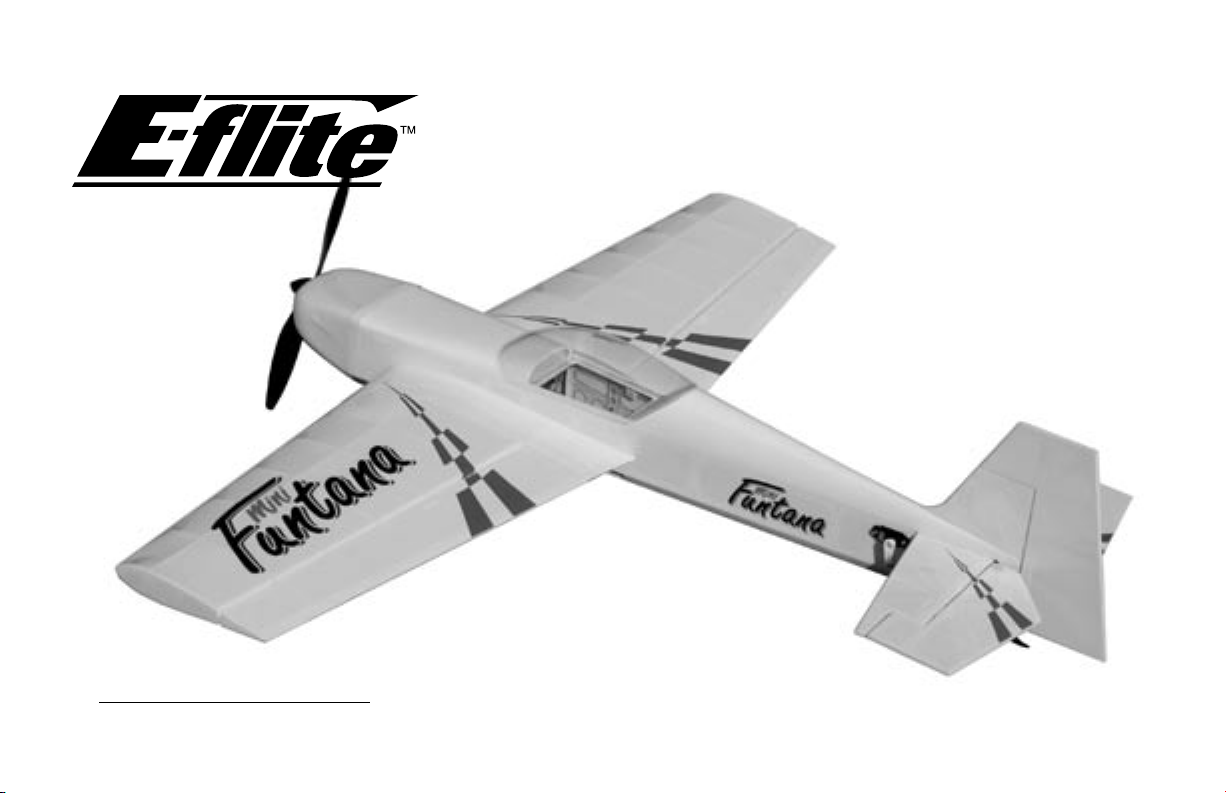
Assembly Manual
Mini Funtana
Page 2

Table of Contents
Introduction ..................................................... 2
Specifications .................................................. 3
Additional Required Equipment .........................
Additional Tools and Adhesives .........................
Optional Parts .................................................
Important Information About Motor Selection ......
Before Starting Assembly ..................................
Using the Manual ............................................
Warning .........................................................
Contents of Kit/Parts Layout ..............................
Warranty Information .......................................
Landing Gear Installation ..................................
Aileron Hinging .............................................
Aileron Servos and Linkages ...........................
Wing Installation ...........................................
Stabilizer and Elevator ...................................
Rudder and Fin ..............................................
Motor Installation ...........................................
Rudder and Elevator Servos ............................
Receiver, Battery and ESC Install .....................
Canopy Install ...............................................
Cowling Install ..............................................
Control Throws ..............................................
Center of Gravity ...........................................
Range Test Your Radio ....................................
2004 Official AMA
Model Aircraft Safety Code ............................
National
11
14
18
20
24
27
30
32
35
37
39
40
41
42
Introduction
Thank you for purchasing the E-flite Mini Funtana 3D
ARF Park Flyer. The Mini Funtana is an extreme 3D
3
3
4
4
4
4
4
5
6
7
aerobatic electric park flyer, based on the proven
abilities of the popular Hangar 9 FuntanaS airplanes.
We developed this aerobatic performer especially
for park flyers pilots who are looking for great 3D
performance.
The designed characteristics incorporated into the
Mini Funtana, in addition to the lightweight balsa
and light-ply construction, should provide you with
the optimized precision 3D freestyle aerobatics you
desire. We also include plenty of extras like the
carbon fiber landing gear, fiberglass cowl and wheel
pants, and a gearbox that easily accepts one of our
popular Park 400 Brushless Motors (EFLM1100 or
ELFM1105- purchased separately).
Specifications
Wingspan: 37 in (940 mm)
Length: 36 in (915 mm)
Wing Area: 329 sq in (21 sq dm)
Weight w/o Battery: 18.5 oz (525 g)
Weight w/ Battery: 20–24 oz (565–680 g)
2
Page 3

Additional Required Equipment
Additional Tools and Adhesives
Recommended JR® Systems
Radio: JR 4-channel
Servos: JR 241 Sub-micro servo (JRPS241) (4)
Receiver: JR R610M 6-channel micro FM Rx (JRPR610 or
JRPR610UL)
Or purchase:
JR Quattro Lite system (JRP4487) and
(2) JR 241 Sub-micro servo (JRPS241)
Other Radio accessories:
Large Arms w/Screws (JRPA212) (2)
6" (150mm) Servo Extension (JRPA095) (2)
9" (230mm) Servo Extension (JRPA097) (2)
Battery and Speed Control Requirements
Li-Po Battery: 11.1V 1800–2100 3-Cell (EFLB1025,
EFLB1035 or THP21003S)
Speed Control: E-Flite 20 amp brushless ESC (EFLA311) or
Castle 25 amp brushless ESC (CSEPHX25)
Motor/Gearbox/Propeller
6.6:1 gearbox (included) (EFLM221)
12x6 Propeller (included) (EFLP1260)
Park 400 Brushless Motor, 4200KV (EFLM1100)
Park 400 Brushless Motor, 3700KV (EFLM1105)
Tools
Square T-pins
Hobby knife Drill
Ruler Felt-tipped pen
Hex wrench: 3/32"
Phillips screwdriver (small)
Drill bit: 3/32" (2.5mm), 1/8" (3mm)
Adhesives
Thin CA Medium CA
6-minute epoxy Canopy glue
Threadlock
Other
Heat gun Paper towels
Wax paper 150–180 grit sandpaper
3
Page 4

Optional Parts
11x4.7 Slow Flyer Propeller (2) EFLP1147
11x7 Slow Flyer Propeller (2) EFLP1170
12x3.8 Slow Flyer Propeller (2) EFLP1238
Celectra™ 1- to 3-cell LiPo Charger EFLC3005
Spur Gear, 66T w/Shaft EFLM222
Pinion Gear, 10T (0.4 module) EFLM207
Before Starting Assembly
Before beginning the assembly of your Mini Funtana
3D, remove each part from its bag for inspection.
Closely inspect the fuselage, wing panels, rudder
and stabilizer for damage. If you find any damaged
or missing parts, contact the place of purchase.
Using the Manual
This manual is divided into sections to help make
assembly easier to understand, and to provide
breaks between each major section.
Remember to take your time and follow
the directions.
Important Information About Motor
Selection
We are recommending either the E-flite Park 400
Brushless Motor with 4200Kv (EFLM1100) or the
version with 3700Kv (EFLM1105). The 3700Kv
motor provides plenty of power for sport and
entry level 3D pilots with the ability to hover and
climb vertically using the stock 6.6:1 gearbox and 12
x 6 propeller. This motor will draw less current and
provide longer flight duration. The 4200Kv
motor should only be used by experienced pilots
who manage throttle appropriately. This motor will
provide even better vertical performance at the
expense of flight duration due to the increased
current draw. It is extremely important to monitor
gearbox wear and motor temperature when using
the 4200Kv motor. Lack of proper throttle
management using this motor may result in damage
to the motor, gearbox, esc, and battery.
Warning
An RC aircraft is not a toy! If misused, it can cause
serious bodily harm and damage to property. Fly
only in open areas, preferably at AMA (Academy of
Model Aeronautics) approved flying sites, following
all instructions included with your radio.
4
Page 5
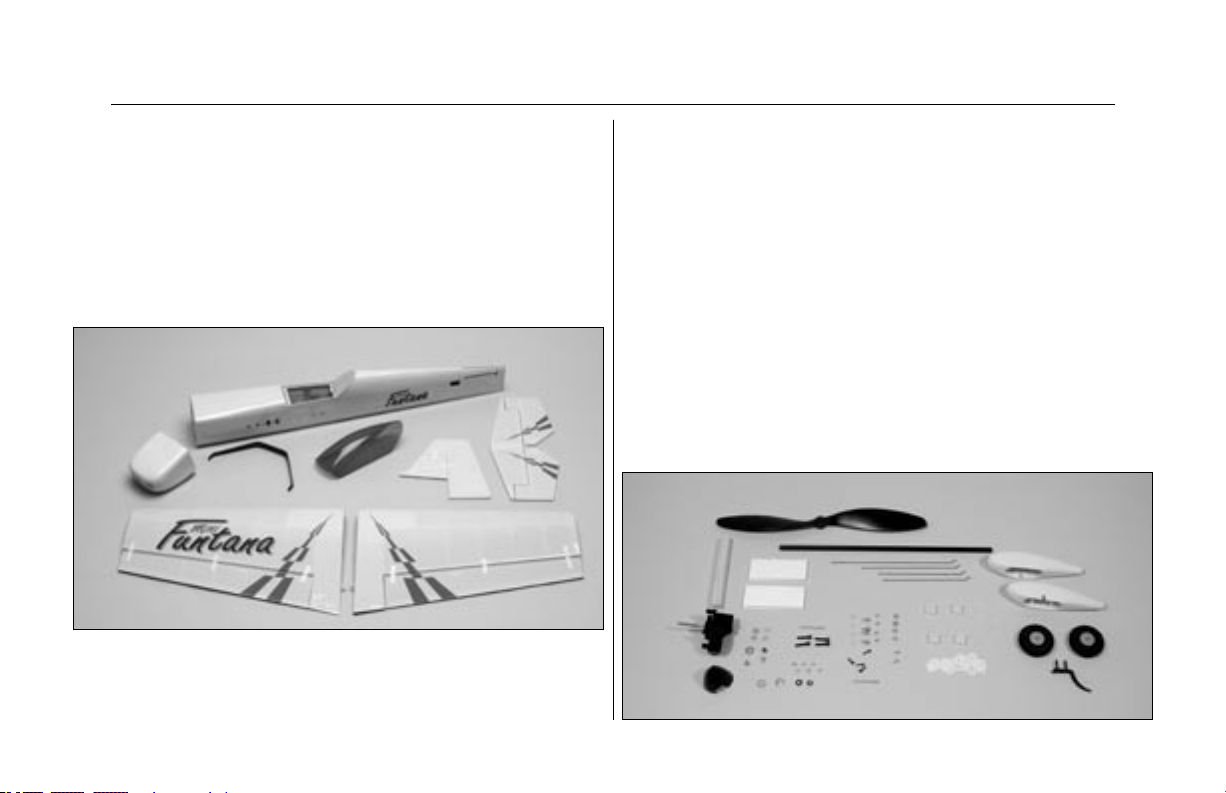
Contents of Kit/Parts Layout
Large Replacement Parts:
Wing Set w/ Ailerons EFL2076
Fuselage w/Hatch EFL2077
Tail Set EFL2078
Carbon Fiber Main Gear EFL2080
Fuselage Hatch EFL2081
Canopy EFL2082
Fiberglass Cowling EFL2083
Small Replacement Parts:
Wheel Set EFL2056
Pushrod Set EFL2079
Fiberglass Wheel Pant Set EFL2084
Wing Tube EFL2085
Hook and Loop Tape EFL2086
Decal Set EFL2087
Micro Control Horns EFLA200
Tail skid EFLA202
Micro Control Connectors EFLA203
Micro Rubber Spinner EFLA204
12x6 Slow Flyer Propeller EFLP1260
6.6:1 Gearbox EFLM221
5
Page 6

Warranty Information
Horizon Hobby, Inc. guarantees this kit to be free
from defects in both material and workmanship at the
date of purchase. This warranty does not cover any
component parts damage by use or modification. In
no case shall Horizon Hobby’s liability exceed the
original cost of the purchased kit. Further, Horizon
Hobby reserves the right to change or modify this
warranty without notice.
In that Horizon Hobby has no control over the final
assembly or material used for the final assembly,
no liability shall be assumed nor accepted for any
damage resulting from the use of the final assembled
product. By the act of using the assembled product,
the user accepts all resulting liability.
Please note that once assembly of the model has
been started, you must contact Horizon Hobby, Inc.
directly regarding any warranty question. Please
do not contact your local hobby shop regarding
warranty issues, even if that is where you purchased
it. This
will enable Horizon to better answer your questions
and service you in the event that you may need
any assistance.
If the buyer is not prepared to accept the liability
associated with the use of this product, the buyer
is advised to return this kit immediately in new and
unused condition to the place of purchase.
Horizon Hobby, Inc.
4105 Fieldstone Road
Champaign, Illinois 61822
(877) 504-0233
www.horizonhobby.com
6
Page 7
Landing Gear Installation
Required Parts
Fuselage Carbon main gear
Tail skid Wheel pant (2)
11/2" (38mm) Wheel (2) 2mm x 25mm screw (2)
2mm nut (4) #4 washer (black) (2)
4-40 x 1/2" socket screw (2) 2mm washer (4)
2mm x 6mm wood screw (2)
Required Tools and Adhesives
Threadlock 1/8" (3mm) drill bit
Drill Medium CA
Hobby knife Hex wrench: 3/32"
Phillips screwdriver (small)
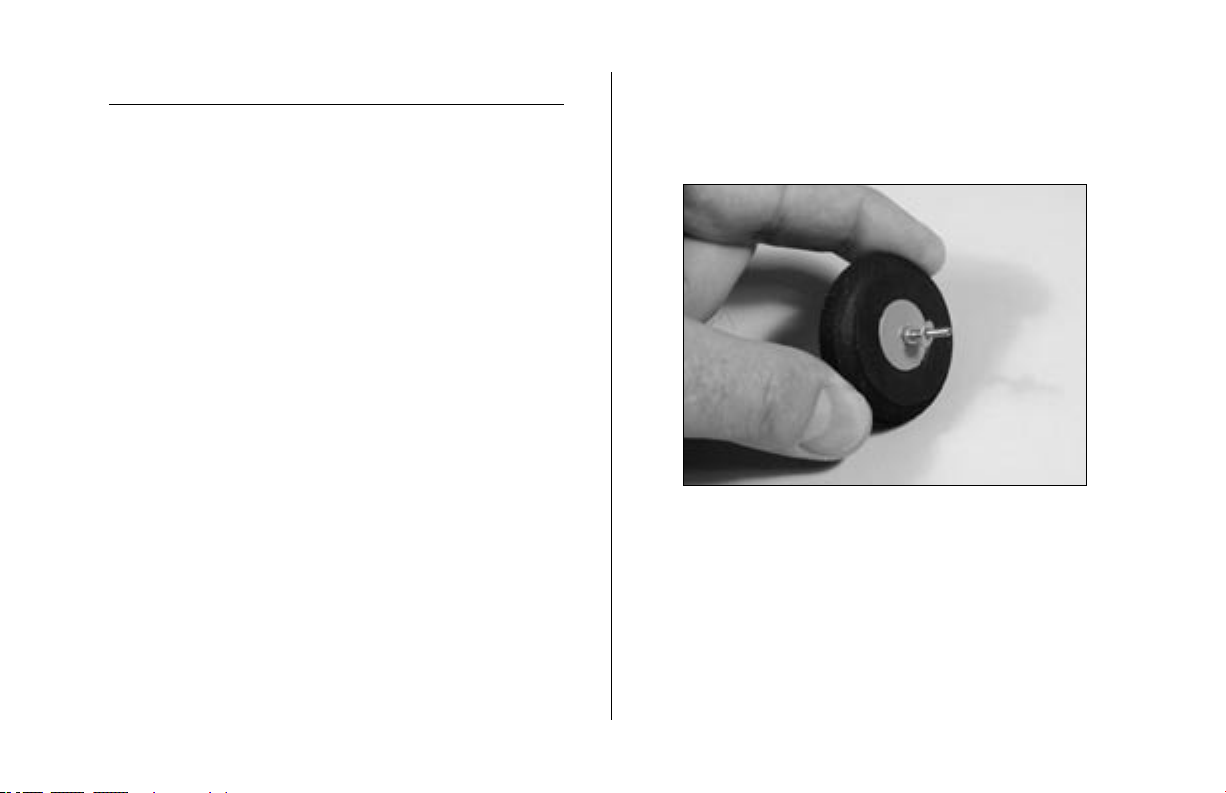
1. Slide the 2mm x 25mm screw through one of
the wheels. Thread a 2mm nut onto the screw.
Slide a 2mm washer onto the screw. This will all
fit inside the wheel pant.
7
Page 8
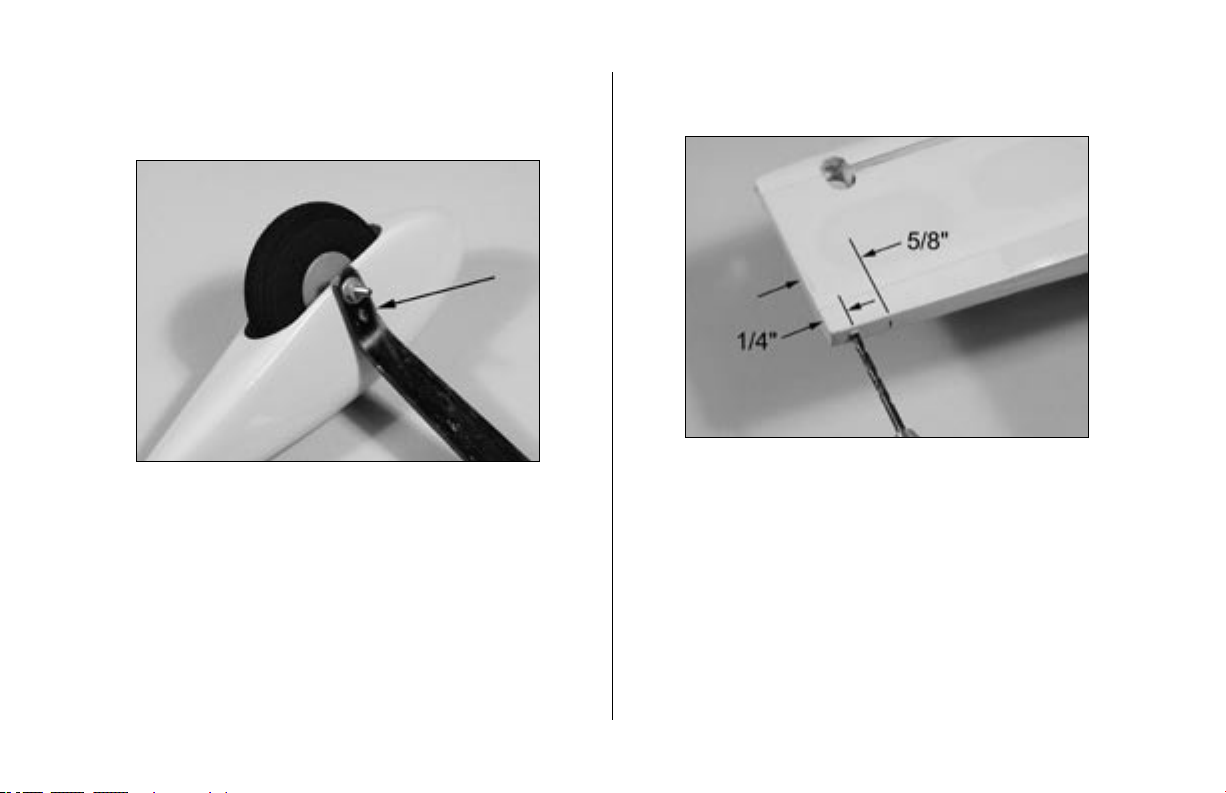
2. Fit the assembly from Step 1 into the wheel
pant. Use a 2mm washer and nut to attach the
wheel to the lower hole on the landing gear.
Note: Use threadlock on both nuts to prevent
them from loosening during flight.
3. Repeat Steps 1 and 2 for the remaining wheel
and pant.
4. Drill 1/8" (3mm) holes in the tail for the
tail skid.
8
Page 9
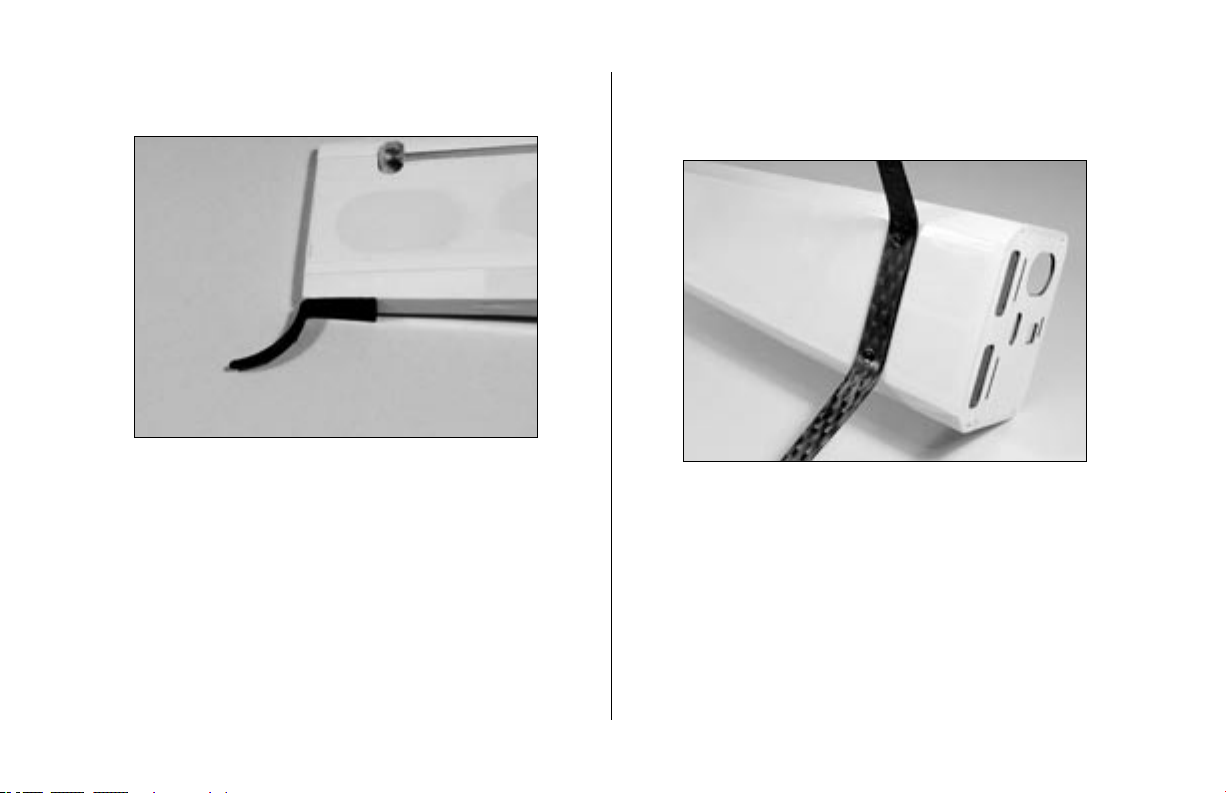
5. Glue the tail skid into position using
Medium CA.
6. Attach the landing gear using a 3/32" hex
wrench, two 4-40 x 1/2" socket head screws
and two #4 washers (black).
9
Page 10
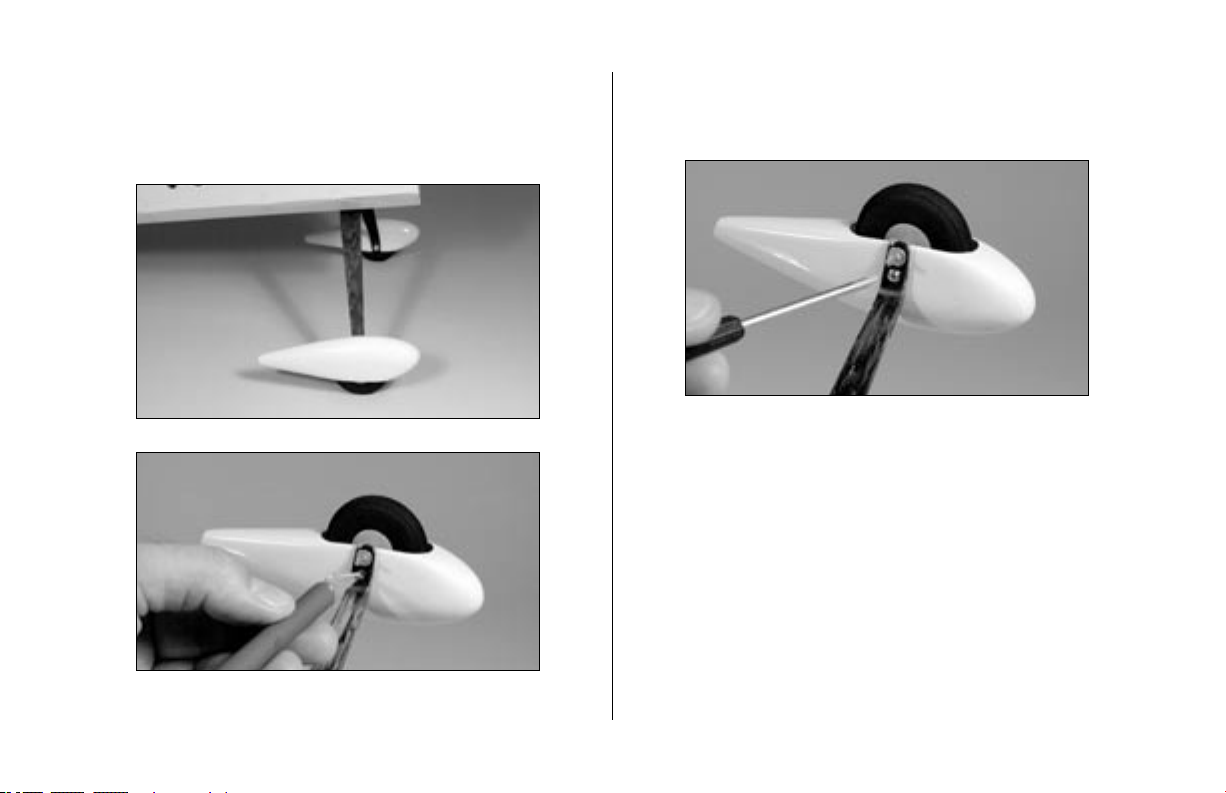
7. Place the fuselage on its wheels and position the
wheel pants parallel to the work surface. Drill a
hole through the landing gear into each wheel
pant using a hobby knife.
8. Secure the location of the wheel pants using
2mm x 6mm wood screws and a small phillips
screwdriver.
10
Page 11

Aileron Hinging
Required Parts
Wing (left and right) Aileron (left and right)
CA hinges (8)
Required Tools and Adhesives
3/32" (2.5mm) drill bit Drill
T-pins Thin CA
Paper towel
1. Locate the positions for the hinges. Drill a
3/32" (2.5mm) hole in the center of each slot.
This creates a tunnel for the CA, allowing the
CA to penetrate into the hinge better, bonding
the hinges more securely.
11
Page 12
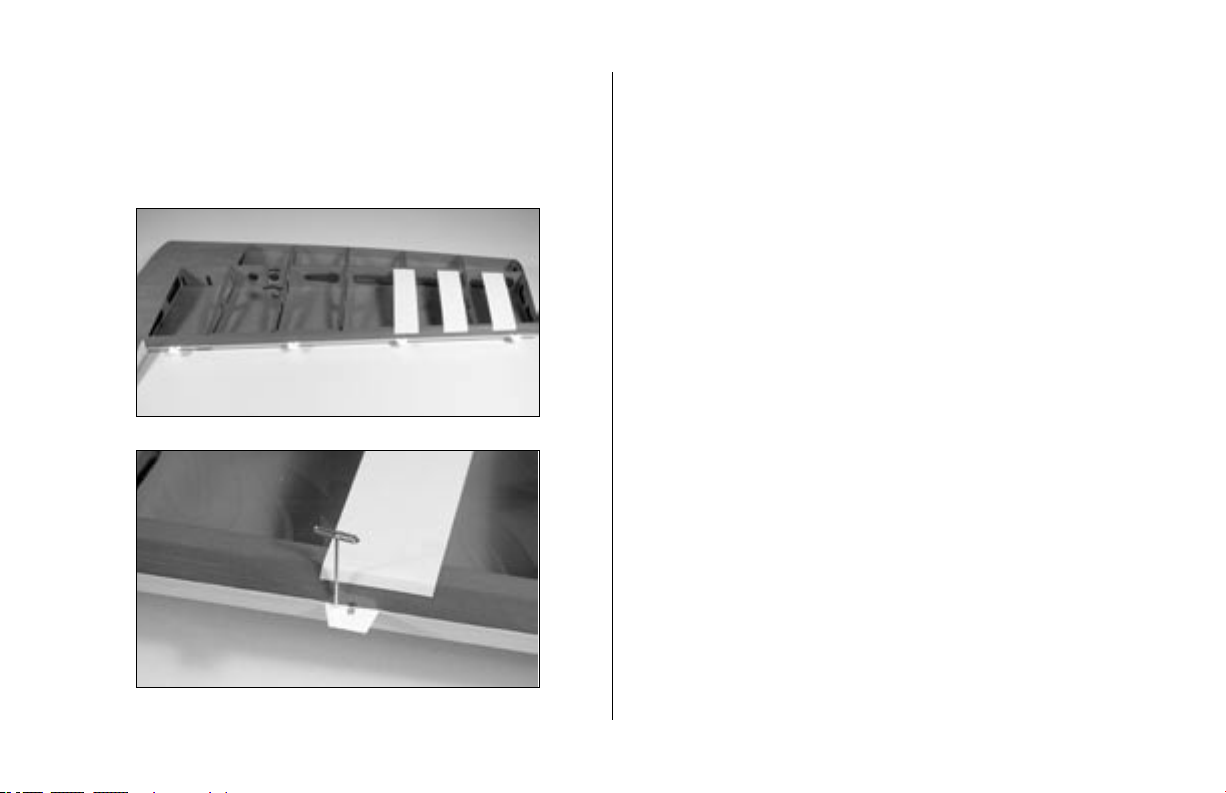
2. Slide four hinges into the slits in the wing.
Center the slot in the hinge with the hole drilled
in Step 1. Place a T-pin in each hinge to prevent
it from being pushed into the wing when
installing the aileron.
Note: Do not use CA accelerator during the
hinging process. The CA must be allowed to
soak into the hinge to provide the best bond.
Using accelerator will not provide enough time
for this process.
12
Page 13
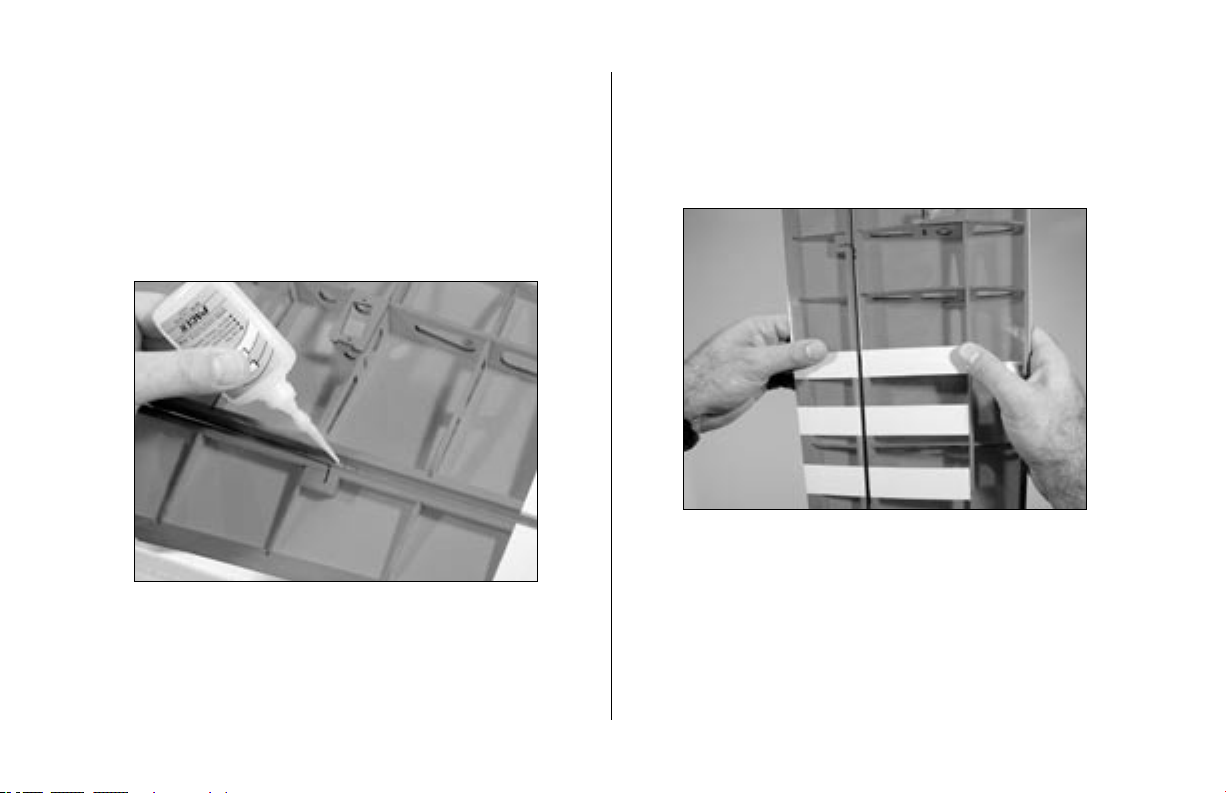
3. Slide the aileron into position. Check to make
sure it can move without interference at the
wing root. Remove the T-pins and apply
Thin CA to each hinge. Make sure the hinge
is fully saturated with CA. Use a paper towel
to clean up any excess CA from the wing and
aileron. Make sure to apply CA to both sides
of the hinge.
4. Firmly grasp the wing and aileron and gently
pull on the aileron to ensure the hinges are
secure and cannot be pulled apart. Use caution
when gripping the wing and aileron to avoid
crushing the structure.
13
Page 14
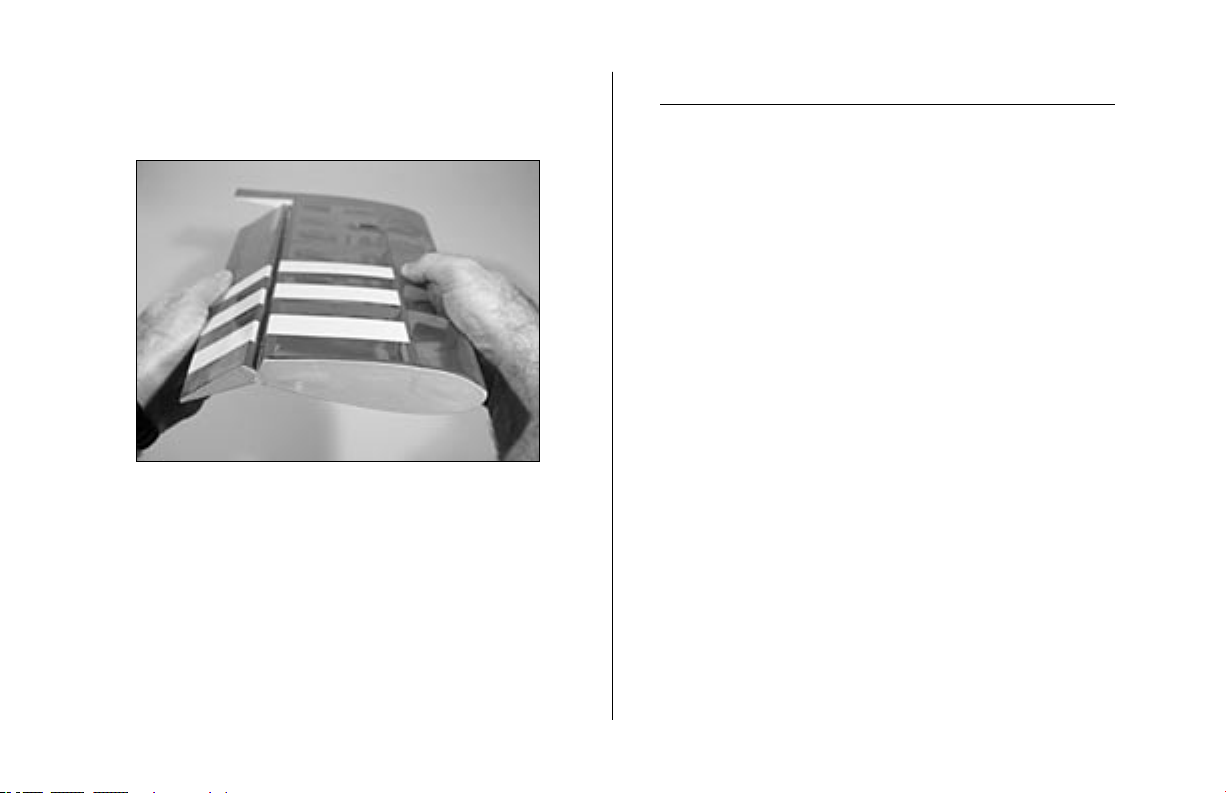
5. Work the aileron up and down several
times to work in the hinges and check for
proper movement.
6. Repeat Steps 1 through 5 for the
remaining aileron.
Aileron Servos and Linkages
Required Parts
Wing panel (right and left)
Micro control connector (2)
2mm x 4mm screw (2)
4" (100mm) pushrod (2)
Control horn and backplate (2)
Servos: JR 241 Sub-micro servo (JRPS241) (2)
Large Arm w/Screws (JRPA212) (2)
Required Tools and Adhesives
Hobby knife 6-minute epoxy
6" (150mm) servo extension (2) String
Phillips screwdriver (small)
14
Page 15

1. Install the grommets and brass eyelets on
the servo using instructions provided with the
radio system. Attach a 6" (150mm) servo
extension. Use string to secure the servo lead
and extension to prevent them from unplugging
in flight.
Note: We suggest using the Large Arms w/
Screws (JRPA212) on all JR® servos for the
Mini Funtana. Replace all existing arms before
installing the servos.
2. Place the servo in the wing. Guide the servo
lead out through the opening at the wing root.
15
Page 16

3. Secure the aileron servo using the screws
provided with the servo.
4. Use a hobby knife to enlarge the center
hole in the control horn to fit the 4" (100mm)
long aileron pushrod wire.
5. Repeat Steps 1 through 4 for the other
wing panel.
16
Page 17

6. Use 6-minute epoxy to attach the control horn
to the aileron. Attach the control horns for both
the right and left ailerons at this time.
7. Attach the micro control connector to both
servo arms. Be sure to use the included retainer
to secure the micro control connector to the
servo arms.
17
Page 18

8. Turn on the radio system and center the aileron
trim and stick. Make sure the aileron servo is
operating properly using the transmitter. Slide
the pushrod wire through the micro connector.
Install the servo arm 90-degrees to the servo.
Center the aileron, and secure the position of
the wire using the 2mm x 4mm screw and a
phillips screwdriver.
Wing Installation
Required Parts
Fuselage Wing (right and left)
Wing tube #4 washer (silver) (2)
4-40 x 1/2" socket head screw (2)
Hex wrench: 3/32"
1. Slide the wing tube into a wing panel.
18
Page 19

2. Remove the hatch from the fuselage. Slide
the wing panel with tube into position on the
fuselage.
Note: There are two locations for the wing tube
in the fuselage. Use the rear hole (rearward
wing location) at this time. Details regarding the
different wing positions are described under the
Center of Gravity section.
3. Slide the remaining wing panel into position.
Secure the panels using 4-40 x 1/2" socket
head screws with #4 washers (silver) using a
3/32" hex wrench.
19
Page 20

Stabilizer and Elevator
Required Parts
Fuselage w/wing installed Stabilizer
Elevator CA hinge (4)
Required Tools and Adhesives
Hobby knife Felt-tipped pen
Ruler T-pins
Thin CA
1. Position the stabilizer into the slot in the aft end
of the fuselage. Measure from the fuselage to
the tips to center the stabilizer.
2. Measure from the stab tip to the wing tip. Adjust
the stab until the measurements are equal.
20
Page 21

3. View the airframe from the rear and make sure
the wing and stab are parallel. If not, lightly
sand the stab saddle until they are.
4. Double-check the adjustments from Steps 1
through 3. Use a felt-tipped pen to trace the
outline of the fuselage onto the top and bottom
of the stabilizer.
21
Page 22

5. Use a sharp hobby knife to cut the covering
slightly inside the lines drawn. Be very careful
not to cut into the underlying wood, as this will
weaken the stab and cause it to fail in flight.
Note: You can use a soldering iron instead of a
knife. This will eliminate the chances of cutting
into the wood.
6. Hinge the elevator and stabilizer, using the
same process as described in Aileron Hinging
Use 4 hinges for this process.
.
22
Page 23

7. Slide the stab and elevator back into position.
Again, check the alignment and make sure
everything lines up. Wick Thin CA into the
joint between the fuselage and stabilizer. Make
sure to glue both top and bottom. Do not use
accelerator— to allow the CA to wick in as far
as possible, providing the best bond possible.
23
Page 24

Rudder and Fin
Required Parts
Fuselage Rudder
Fin CA hinge (3)
Required Tools and Adhesives
Hobby knife Thin CA
Felt-tipped pen Square
1. Place the fin in position on the fuselage. Trace
the outline of the fuselage onto both sides of the
fin.
2. Remove the covering from the bottom of the fin
using the same technique used for the stabilizer.
24
Page 25

3. Position the fin back onto the fuselage. Use a
square to check the alignment between the fin
and stabilizer. Lightly sand the bottom of the fin
until the alignment is correct.
4. Use thin CA to glue the fin to the fuselage.
25
Page 26

5. Use a sharp hobby knife to cut a slot in the aft
end of the fuselage for the lower rudder hinge.
6. Attach the rudder using three CA hinges. Use
the technique as described in Aileron Hinging
for this procedure.
26
Page 27

Motor Installation
Required Parts
Fuselage Gearbox
Motor support stick
Brushless motor
Required Tools and Adhesives
6-minute epoxy Hobby knife
150–200 grit sandpaper
Note: When installing your motor into the E-flite
gearbox, it is very important that your gear mesh
is set correctly and the gear’s mesh is smooth
with no binding. The E-flite gearbox features
adjustable slotted mounting holes so that you can
ensure your gear mesh is correct. Remember, if
your mesh is too loose or too tight, it may strip
the gears. See the instructions included with your
E-flite gearbox for more helpful tips on gear mesh
and motor installation.
1. It may be necessary to attach motor adapters
or other accessories to your particular motor
at this time.
Proper gear mesh is extremely important for
high power set ups, such as those systems
typically used to power the Mini Funtana. Be
certain to check the mesh at multiple points
on the spur gear before finalizing the motor
mounting position in the gearbox. To extend the
life of your gearbox, we also recommend using
a small amount of grease, such as lithium grease,
on the spur gear.
It is very important that you check to be sure
the propeller is balanced before installing onto
the shaft. An unbalanced propeller may strip
the gear. When installing the propeller, please
do not over tighten the 3mm lock nut. The use
of the lock nut will prevent the propeller from
coming loose.
27
Page 28

2. Attach the motor to the gearbox using screws
provided with the motor.
3. Locate the motor support stick. Use 6-minute
epoxy to glue the support to the two formers at
the front of the fuselage.
28
Page 29

4. Slide the gearbox into position on the motor
support stick. Trial fit the cowl in position at
this time to be sure the gearbox, motor and
propeller fit in position without interference with
the front of the cowl. Next, trial fit the propeller
onto the gearbox hex nut. If the propeller and
spinner have too much clearance, it may be
necessary to trim or sand part of the motor
support stick at this time. Use a hobby knife to
drill a small hole though the plastic gearbox
and into the motor support. Install a small screw
to secure the two items together.
29
Page 30

Rudder and Elevator Servos
Required Parts
Fuselage
Micro control horn w/backplate (2)
53/4" (145mm) pushrod wire
2mm x 4mm screw (2)
41/2" (115mm) pushrod wire
Micro control connector w/retainer (2)
Servos: JR 241 Sub-micro servo (JRPS241) (2)
9" (230mm) servo extension (2)
Required Tools and Adhesives
Phillips screwdriver (small) Hobby knife
1. Install the grommets and brass eyelets in the
elevator servo. Secure a 9" (230mm) servo
extension to the servo. Mount the elevator servo
using the hardware provided with the servo.
2. Use a hobby knife to enlarge the center
hole in one of the remaining control horns.
1
Attach the 4
the control horn.
/2" (115mm) pushrod wire to
30
Page 31

3. Attach the micro control horn to the
elevator using the control horn backplate and
6-minute epoxy.
4. Install the micro control connector onto the
elevator servo arm. Pass the elevator pushrod
wire through the connector. With the radio
on and elevator trim centered, center the
elevator. Secure the elevator pushrod wire
using the 2mm x 4mm screw and a small
phillips screwdriver.
31
Page 32

5. Repeat Steps 1 through 4 for the rudder
3
servo and linkage using the 5
pushrod wire.
/4" (145mm)
Receiver, Battery and ESC Install
Required Parts
Fuselage Battery
Hook and loop tape (2) Receiver
75mm x 20mm x 2mm light ply
35mm x 20mm x 7mm balsa block
Brushless speed control
Required Tools and Adhesives
Hook and loop strap Thin CA
32
Page 33

1. Trim the 75mm x 20mm x 2mm light ply to fit
in position between the fuselage longerons. You
will need to trim the length once the Center of
Gravity has been determined. Check to make
sure all servo wires and ESC wires can reach
the location of the receiver before mounting the
light ply receiver tray. Once the everything has
been checked, use thin CA to glue the ply into
position. Cut a piece of the hook and loop tape
to the size of the receiver. Install the receiver
using the hook and loop. Plug in the rudder and
elevator servos. Route the receiver antenna to
the rear of the plane.
Note: Do not cut the receiver antenna, as this will
greatly reduce the range of the radio system.
Hint: Position the receiver so the ailerons can be
plugged in easily.
2. Install the speed control using hook and loop
material. Attach the ESC to the side of the
fuselage to provide room for the motor battery.
33
Page 34

Note: When mounting the EFLA311 ESC, a
35mm x 20mm x 7mm balsa block is required to
space the ESC away from the fuselage side.
3. Install the battery in the fuselage using the
remaining piece of hook and loop material.
The battery must be mounted close to the
firewall for proper Center of Gravity.
Hint: You may use a piece of hook and loop
strapping around the battery to help secure
it in position.
34
Page 35

Canopy Install
Required Parts
Fuselage Canopy
Required Tools and Adhesives
Canopy glue Wax paper
Felt-tipped pen
150–220 grit sandpaper
1. Place a piece of wax paper between the rear of
the canopy hatch and fuselage.
2. Position the canopy. Trace the outline of
the canopy onto the canopy hatch using a
felt-tipped pen.
35
Page 36

3. Lightly sand the inside edge of the canopy
where it contacts the hatch. Also sand the hatch
inside the line drawn in the last step.
4. Glue the canopy to the hatch using canopy
glue. Tape the canopy into position until the
glue cures.
36
Page 37

Cowling Install
Required Parts
Fuselage Cowling
12x6 propeller Spinner
3mm lock nut 3mm washer
2mm x 8mm wood screw (4)
Required Tools and Adhesives
Hobby knife
Phillips screwdriver (small)
1. Slide the cowl onto the fuselage. Center the
motor shaft in the opening. Check to make
sure the propeller and spinner will not interfere
with the front of the cowl and there is adequate
clearance. Secure the cowl to the fuselage
using the 2mm x 8mm wood screws and a
phillips screwdriver.
37
Page 38

Note: It is very important that you check to be
sure the propeller is balanced before installing
onto the shaft. An unbalanced propeller may
strip the gear. When installing the propeller,
please do not over tighten the 3mm lock nut.
The use of the lock nut will prevent the propeller
from coming loose.
2. Attach the propeller using the supplied 3mm
washer and 3mm lock nut. Make sure not to
over-tighten the 3mm lock nut.
3. Press the spinner into position on the
gearbox shaft.
38
Page 39

Control Throws
1. Turn on the transmitter and receiver of your Mini
Funtana. Check the movement of the rudder
using the transmitter. When the stick is moved
right, the rudder should also move right. Reverse
the direction of the servo at the transmitter if
necessary.
2. Check the movement of the elevator with the
radio system. Moving the elevator stick down
will make the airplane elevator move up.
3. Use a ruler to adjust the throw of the elevator,
ailerons and rudder. Adjust the position of
the pushrod at the control horn to achieve the
following measurements when moving the sticks
to their endpoints
Low rate (U/D) High Rate (U/D)
5
Elevator: 3/4" (19mm) 2
Ailerons: 1" (25mm) 1
3
Rudder: 1
/4" (95mm) 23/4" (95mm)
/16" (58mm)
7
/8" (48mm)
39
Page 40

Center of Gravity
An important part of preparing the aircraft for flight is
properly balancing the model.
Caution: Do not inadvertently skip this step!
For experienced pilots and extreme 3D performance,
move the wing to the forward location. This will
provide a neutral feel when inverted and will
allow the Mini Funtana to really cut loose. It is
best to increase the exponential values used to
maintain a smooth feel. The CG may be placed
7
as far back as 3
/16" (88mm).
The recommended Center of Gravity (CG) location for
1
the Mini Funtana is 3
/8" (80mm) behind the
leading edge of the wing against the fuselage.
Use this CG and the rearward wing position
to the first flights until you have become more
experienced.
40
Note: The wing has two different mounting
positions, which provides more flexibility with
adjusting the CG. Using the rearward wing
position will allow the aircraft to balance at
the forward CG for precision aerobatics. The
forward wing position is used to achieve the
rearward CG for extreme 3D aerobatics.
Page 41

Range Test Your Radio
1. Before each flying session, be sure to range
check your radio. This is accomplished by
turning on your transmitter with the antenna
collapsed. Turn on the receiver in your airplane.
With your airplane on the ground and the
engine running, you should be able to walk
30 paces (approximately 100 feet) away from
your airplane and still have complete control of
all functions.
If not, don’t attempt to fly! Have your radio equipment
checked out by the manufacturer.
2. Double-check that all controls (aileron,
elevator, rudder and throttle) move in the
correct direction.
3. Be sure that your transmitter batteries are
fully charged, per the instructions included
with your radio.
41
Page 42

2004 Official AMA
National Model Aircraft Safety Code
GENERAL
1) I will not fly my model aircraft in sanctioned events,
air shows or model flying demonstrations until it
has been proven to be airworthy by having been
previously, successfully flight tested.
2) I will not fly my model higher than approximately
400 feet within 3 miles of an airport without notifying
the airport operator. I will give right-of-way and avoid
flying in the proximity of full-scale aircraft. Where
necessary, an observer shall be utilized to supervise
flying to avoid having models fly in the proximity of
full-scale aircraft.
3) Where established, I will abide by the safety rules
for the flying site I use, and I will not willfully or
deliberately fly my models in a careless, reckless and/
or dangerous manner.
4) The maximum takeoff weight of a model is 55
pounds, except models flown under Experimental
Aircraft rules.
5) I will not fly my model unless it is identified with
my name and address or AMA number, on or in the
model. (This does not apply to models while being
flown indoors.)
6) I will not operate models with metal-bladed
propellers or with gaseous boosts, in which gases
other than air enter their internal combustion
engine(s); nor will I operate models with extremely
hazardous fuels such as those containing
tetranitromethane or hydrazine.
RADIO CONTROL
1) I will have completed a successful radio equipment
ground range check before the first flight of a new or
repaired model.
2) I will not fly my model aircraft in the presence
of spectators until I become a qualified flier, unless
assisted by an experienced helper.
42
Page 43

3) At all flying sites a straight or curved line(s) must
be established in front of which all flying takes place
with the other side for spectators. Only personnel
involved with flying the aircraft are allowed at or in
the front of the flight line. Intentional flying behind the
flight line is prohibited.
4) I will operate my model using only radio control
frequencies currently allowed by the Federal
Communications Commission. (Only properly licensed
Amateurs are authorized to operate equipment on
Amateur Band frequencies.)
5) Flying sites separated by three miles or more
are considered safe from site-to site interference,
even when both sites use the same frequencies. Any
circumstances under three miles separation require a
frequency management arrangement, which may be
either an allocation of specific frequencies for each site
or testing to determine that freedom from interference
exists. Allocation plans or interference test reports
shall be signed by the parties involved and provided
to AMA Headquarters. Documents of agreement and
reports may exist between (1) two or more AMA
Chartered Clubs, (2) AMA clubs and individual AMA
members not associated with AMA Clubs, or (3) two or
more individual AMA members.
6) For Combat, distance between combat engagement
line and spectator line will be 500 feet per cubic inch
of engine displacement. (Example: .40 engine = 200
feet.); electric motors will be based on equivalent
combustion engine size. Additional safety requirements
will be per the RC Combat section of the current
Competition Regulations.
7) At air shows or model flying demonstrations, a
single straight line must be established, one side of
which is for flying, with the other side for spectators.
8) With the exception of events flown under AMA
Competition rules, after launch, except for pilots or
helpers being used, no powered model may be flown
closer than 25 feet to any person.
9) Under no circumstances may a pilot or other person
touch a powered model in flight.
43
Page 44

7011
© 2004 Horizon Hobby, Inc.
4105 Fieldstone Road
Champaign, Illinois 61822
(877) 504-0233
www.horizonhobby.com
 Loading...