

Page 1
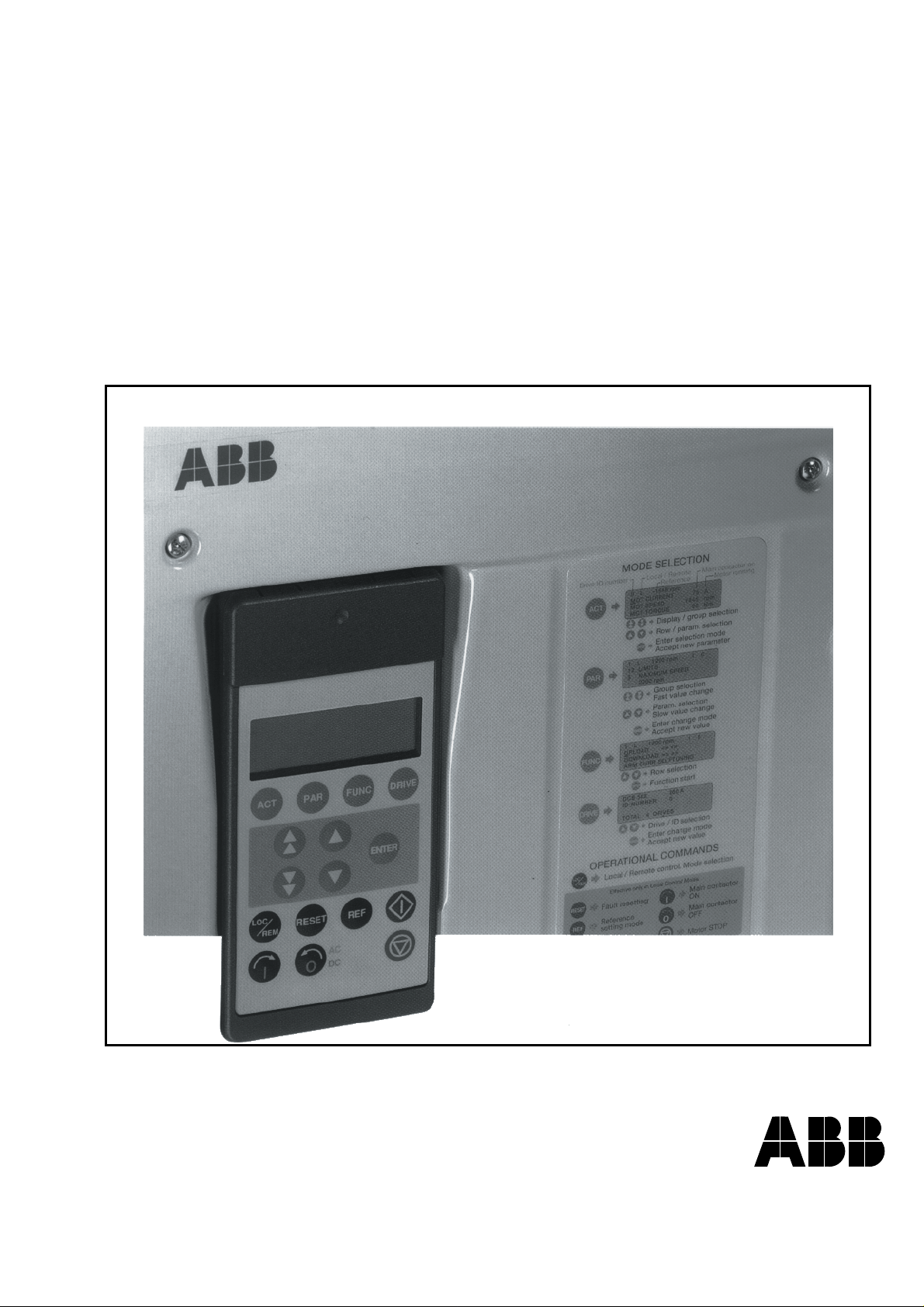
DCS 500 Thyristor Power Converters
for DC Drive Systems
25 to 5150 A
Operating Instructions
DCS 500B / DCF 500B
DCP 500B
Page 2
3ADW000055R0401_DCS500B_Operating Instruction_e_d
Volume II D
System Description
DCS 500B
3ADW000066
Volume III
Technical Data
3ADW000054
Volume IV D
Operating Instructions
DCS 500B
3ADW000055
How the DCS 500 Documentation System works
Description of the converter
DCS 500B Operating Instructions
(documentation in hand) including information and advise to commission the
drive. If three phase DCF 500B field
supply units are needed please use the
same documents as for DCS 500B armature converters.
As additional documentation is available:
The System description describes the
functionality of DCS 500 converter units
as well as the cooperation of all single
components belonging to a complete
drive system.
DCS 500 Technical Data giving information about all direct technical data for
components used inside and outside
the converter module.
The above mentioned documents are
usually delivered together with all ordered converter units of the DCS 500
family and represent the basic knowledge which is essential for all users of
this product.
System Description
Application Blocks
DCS 500(B)/600
Volume II D1
DCA 500B
3ADW000148
Volume V D2
DCS 500B
3ADW000048
Volume V D1
SW Description
DCS 500B
3ADW000078
Volume VII A
Technical Guide
DCS
3ADW000163
Volume VI A
Service Manual
3ADW000093
Supplementary documentation
DCA 500 System description for
standard cubicles equipped with DC
drives.
For those, who want to reprogram or
adapt the software of their drive a detailed comprehensive description of the
software structure of the drive as well
as of all available function blocks can
be delivered. This documentation is
only available as data file in English
language.
As separate document for service engineers a DCS 500 Service Manual can
be ordered .
Engineering and design people for drive
systems can get a separate collection
of information with regard to installation,
sizing, fusing etc. of DC drives called
"Technical guide".
Page 3

3ADW000055R0401_DCS500B_Operating Instruction_e_d
Thyristor Power Converters
Series
DCS 500B / DCF 500B
DCP 500B
25 to 5150 A
OPERATING INSTRUCTIONS
Code: 3ADW 000 055 R0401 Rev D
DCS_OI_E_D.DOC
EFFECTIVE: Oct. 30th, 2002
SUPERSEDES:Rev C Sept. 14th, 2001
2002 ABB Automation Products GmbH. All rights reserved.
Page 4

3ADW000055R0401_DCS500B_Operating Instruction_e_d
DCS 500B / DCP 500B Operating Instructions
Page 5

Safety Instructions
3ADW000055R0401_DCS500B_Operating Instruction_e_d
Overview
Warnings
This chapter contains safety instructions which must be complied
with during installation, operation and maintenance of the power
converters series DCS 500B / DCF 500B or DCP 500B. If these instructions are not complied with, this may result in injuries (perhaps
even with fatal) or in damage to the power converter, the motor and
the driven machine. Before starting with any work whatsoever at or
with this unit, you must
read the information given in this chapter.
Warnings provide information on states which if the specified procedure for the state concerned is not meticulously complied with
may result in a serious error, in major damage to the unit, in injury
to persons and even in death.
They are identified by the following symbols:
Danger: High Voltage! This symbol warns you of
high voltages which may result in injuries to persons
and/or damage to equipment. Where appropriate, the
text printed adjacent to this symbol describes how
risks of this kind may be avoided.
All electrical installation and maintenance work on the thyristor
●
power converter must be carried out by properly qualified staff
who have been thoroughly trained in electrical engineering.
● The thyristor power converter and its adjacent units must be
properly earthed by qualified professionals.
● You must NEVER perform any work on the thyristor power con-
verter while it is still switched on. First switch the unit off, use a
measuring instrument to make absolutely sure that the power
converter has really been de-energized, and only then you may
start with the work concerned.
● Due to external control circuits, there may be dangerously high
voltages present at the thyristor power converter even after the
line voltage has been switched off. So always work at the unit
with appropriate caution! Non-compliance with these instructions
may result in injury (or even death!).
DCS 500B / DCP 500B Operating Instructions i
Page 6

Safety Instructions
3ADW000055R0401_DCS500B_Operating Instruction_e_d
General warning: this symbol warns you of nonelectrical risks and dangers which may result in serious or even fatal injury to persons and/or in damage
to equipment. Where appropriate, the text printed adjacent to this symbol describes how risks of this kind
may be avoided.
● When thyristor power converters are in use, the electric motors,
power transmission elements and the driven machines are working in an extended operating range, which means they have to
cope with a relatively high loading.
● You should have made sure that all units, devices and appliances used are actually suitable for this higher loading.
● If you have to operate the thyristor power converter at a rated
motor voltage and/or a rated motor current significantly below
the figures stated in the thyristor power converter's output data,
you must take appropriate precautionary measures to protect the
unit against overspeed, overload, breakage, etc., by modifying
the software or hardware appropriately.
● For insulation testing, you must disconnect all cables from the
thyristor power converter. You should avoid operating your unit
at values other than the rated data. Non-compliance with these
instructions may cause lasting damage to the thyristor power
converter.
● The thyristor power converter possesses a number of automatic
reset functions. When these functions are executed, the unit will
be reset after an error and will then resume operation. These
functions should not be used if other units and devices are not
suitable for an operating mode of this kind, or if their use might
entail dangerous situations.
Warning of electrostatic discharge:
this symbol warns you against electrostatic discharges
which may damage the unit. Where appropriate, the
text printed next to this symbol describes how a risk of
this kind may be avoided.
ii DCS 500B / DCP 500B Operating Instructions
Page 7

3ADW000055R0401_DCS500B_Operating Instruction_e_d
Notes
Mains connection
EMERGENCY STOP
buttons
Intended use
Safety Instructions
Notes supply information on states requiring particular attention, or
indicate that additional information is available on a specific topic.
For this purpose, the following symbols are used:
CAUTION!
Cautions are designed to draw your attention to a
particular state of affairs.
Note A note contains or refers you to additional informa-
tion available on the particular topic concerned.
You can use a switch disconnector (with fuses) in the power supply
of the thyristor power converter to disconnect the electrical components of the unit from the power supply for installation and maintenance work. The type of disconnector used must be a switch disconnector as per EN 60947-3, Class B, so as to comply with EU
regulations, or a circuit-breaker type which switches off the load circuit by means of an auxiliary contact causing the breaker's main
contacts to open. The mains disconnector must be locked in its
"OPEN" position during any installation and maintenance work.
EMERGENCY STOP buttons must be installed at each control desk
and at all other control panels requiring an emergency stop function. Pressing the STOP button on the CDP 31x control panel of the
thyristor power converter will neither cause an emergency motor
stop, nor will the drive be disconnected from any dangerous potential.
The operating instructions cannot take into consideration every
possible case of configuration, operation or maintenance. Thus,
they mainly give such advice only, which is required by qualified
personnel for normal operation of the machines and devices in
industrial installations.
If in special cases the electrical machines and devices are intended
for use in non-industrial installations - which may require stricter
safety regulations (e.g. protection against contact by
children or similar) -, these additional safety measures for the installation must be provided by the customer during assembly.
DCS 500B / DCP 500B Operating Instructions iii
Page 8

Contents
3ADW000055R0401_DCS500B_Operating Instruction_e_d
IV A OPERATING INSTRUCTIONS
Safety Instructions
Chapter 1 - Introduction
How to use this manual...........................................................................................................1-1
Contents of this manual...........................................................................................................1-1
Target group............................................................................................................................1-1
Associated publications..........................................................................................................1-1
Incoming inspection.................................................................................................................1-2
Storage and transport..............................................................................................................1-2
Rating plate .............................................................................................................................1-2
Chapter 2 - Start-Up Instructions
General notes..........................................................................................................................2-1
2.1 Preparatory work...............................................................................................................2-5
2.2 Scaling intra-unit signals....................................................................................................2-6
2.3 Presetting the field supply unit...........................................................................................2-8
2.4 Adjusting the current controller........................................................................................2-10
2.5 Speed feedback balancing..............................................................................................2-12
2.6 Balancing the field supply unit and the e.m.f. controller..................................................2-14
2.7 Balancing the speed controller, plus fine-balancing the e.m.f. and the current contr......2-20
2.8 Matching the thyristor power converter unit to the system conditions concerned...........2-21
2.9 Presetting the 3-phase field supply unit DCF 50xB.........................................................2-22
Chapter 3 - Handling of Control Panel CDP 31x
3.1 Overview............................................................................................................................3-1
Panel Link....................................................................................................................3-1
Mounting the Panel.....................................................................................................3-1
3.2 Start Mode.........................................................................................................................3-2
3.3 Panel Functions.................................................................................................................3-3
Actual Signal Display Mode.........................................................................................3-3
Parameter Mode..........................................................................................................3-4
Function Mode.............................................................................................................3-4
Drive Mode...................................................................................................................3-5
3.4 Pin/Parameter Selecting and Changing of Value..............................................................3-5
3.5 Saving of the Parameters to backup memory ...................................................................3-7
3.6 FAULT RESETTING (RESET) ..........................................................................................3-8
3.7 EMERGENCY STOP RESETTING (RESET)....................................................................3-8
3.8 Fault History Display..........................................................................................................3-9
3.9 Uploading and Downloading of Parameters (UPLOAD/DOWNLOAD)............................3-10
3.10 Setting of the Display Contrast......................................................................................3-12
3.11 Full Name of output pins................................................................................................3-12
3.12 Selecting output pins.....................................................................................................3-13
3.13 Drive Mode....................................................................................................................3-14
3.14 Running the Drive..........................................................................................................3-15
Operational Command Keys......................................................................................3-15
iv DCS 500B / DCP 500B Operating Instructions
Page 9

Contents
3ADW000055R0401_DCS500B_Operating Instruction_e_d
Running the DC- Drive from the CDP31x .................................................................3-15
3.15 Speed Reference Setting for the Drive..........................................................................3-16
Chapter 4 - Signals and Troubleshooting
4.1 Display of status, alarm and fault signals..........................................................................4-1
Categories of signals and possibilities of display.........................................................4-1
4.2 General messages............................................................................................................4-2
4.3 Starting errors (E)..............................................................................................................4-2
4.4 Fault Signals (F)................................................................................................................4-3
4.5 Alarm Signals (A) ............................................................................................................4-12
4.6 Status Signals .................................................................................................................4-17
Appendix A - Connection diagrams
Connection diagram 1.............................................................................................................A-1
Connection diagram 2.............................................................................................................A-2
DCS 500B / DCP 500B Operating Instructions v
Page 10

3ADW000055R0401_DCS500B_Operating Instruction_e_d
vi DCS 500B / DCP 500B Operating Instructions
Page 11

Chapter 1 - Introduction
3ADW000055R0401_DCS500B_Operating Instruction_e_d
How to use this manual
Contents of this manual
Target group
Associated
publications
The purpose of these operating instructions is to provide detailed information on how to start up a thyristor power converter from the
DCS 500B or DCP 500B series.
Note: If it is not mentioned explicitly all details given in
these Operating Instructions will be valid for both,
series DCS 500B / DCF 500B and series DCP 500B!
Chapter 1 - Introduction
It describes how to use this manual and the boundary conditions
applying.
Chapter 2 - Start-Up Instructions
We recommend working your way through the Start-Up Instructions
step by step, since in this way you will get to perform all important
parameter setting routines.
Chapter 3 - How to Handle the Control and Display Panel
This chapter describes how to operate the CDP 31x control and
display panel.
Chapter 4 - Signals and Troubleshooting
This chapter describes the available signals and possibilities of display with DCS 500B and DCP 500B. As far as fault signals are concerned there will be indicated measures (actions) to be taken for
troubleshooting.
This manual is designed to help those responsible for planning, installing, starting up and servicing the thyristor power converter.
These people should possess
• basic knowledge of physics and electrical engineering, electrical
wiring principles, components and symbols used in electrical engineering, and
• basic experience with DC drives and products.
The DCS 500B / DCF 500B or DCP 500B documentation includes
the following:
• System Description DCS 500B / DCF 500B
• System Description DCP 500B
• Technical Data DCS 500B / DCF 500B, DCP 500B
• Operating Instructions (this document)
DCS 500B / DCP 500B Operating Instructions IV A 1 - 1
Page 12

Chapter 1 - Introduction
3ADW000055R0401_DCS500B_Operating Instruction_e_d
Incoming inspection
After opening this package, you should check whether it contains
the following items:
● DCS 500B / DCF 500B or DCP 500B thyristor power con-
verter in the configuration ordered
● DCS 500B / DCF 500B or DCP 500B publications
● Accessories, including manuals if ordered
● Final test report
Check the consignment for any signs of damage. If you find any,
please contact the insurance company or the supplier.
Check the particulars given on the unit's rating plate to make sure
prior to installation and start-up that you have received the correct
unit type and unit version.
If the consignment is incomplete or contains any incorrect items,
please contact the supplier.
CAUTION! The thyristor power converter weighs quite a lot and
should therefore not be held by the front cover. Please put the unit
down only on its back (sizes C1/C2/A5). Always use care when
handling the unit, so as to avoid injuries or damage.
Storage and transport
Rating plate
If the unit had been in storage prior to installation or is transported
to another location, care must be taken to ensure that the environmental conditions are complied with (see "System Descriptions
DCS 500B / DCF 500B or DCP 500B").
For purposes of identification, each thyristor power converter is fitted with rating plates, stating the type code and the serial number,
which serve for each unit's individual identification.
The type code contains information on the characteristics and the
configuration of the unit. The first three digits of the serial number
refer to the year and week of manufacture. The last digits complete
the serial number so as to preclude two units receiving the same
type code and the same serial number.
The 112xx group provides information on the unit's software configuration.
The technical data and specifications are valid as of going to press.
ABB reserves the right to make subsequent alterations.
If you have any questions concerning your drive system, please
contact your local ABB agent.
IV A 1 - 2 DCS 500B / DCP 500B Operating Instructions
Page 13
Chapter 2 - Start-Up Instructions
3ADW000055R0401_DCS500B_Operating Instruction_e_d
General notes
Example:
Example:
CAUTION: it is absolutely essential that the applicable accident prevention
regulations be observed by the user (in this context, please also
read the chapter entitled "Safety Instructions")!
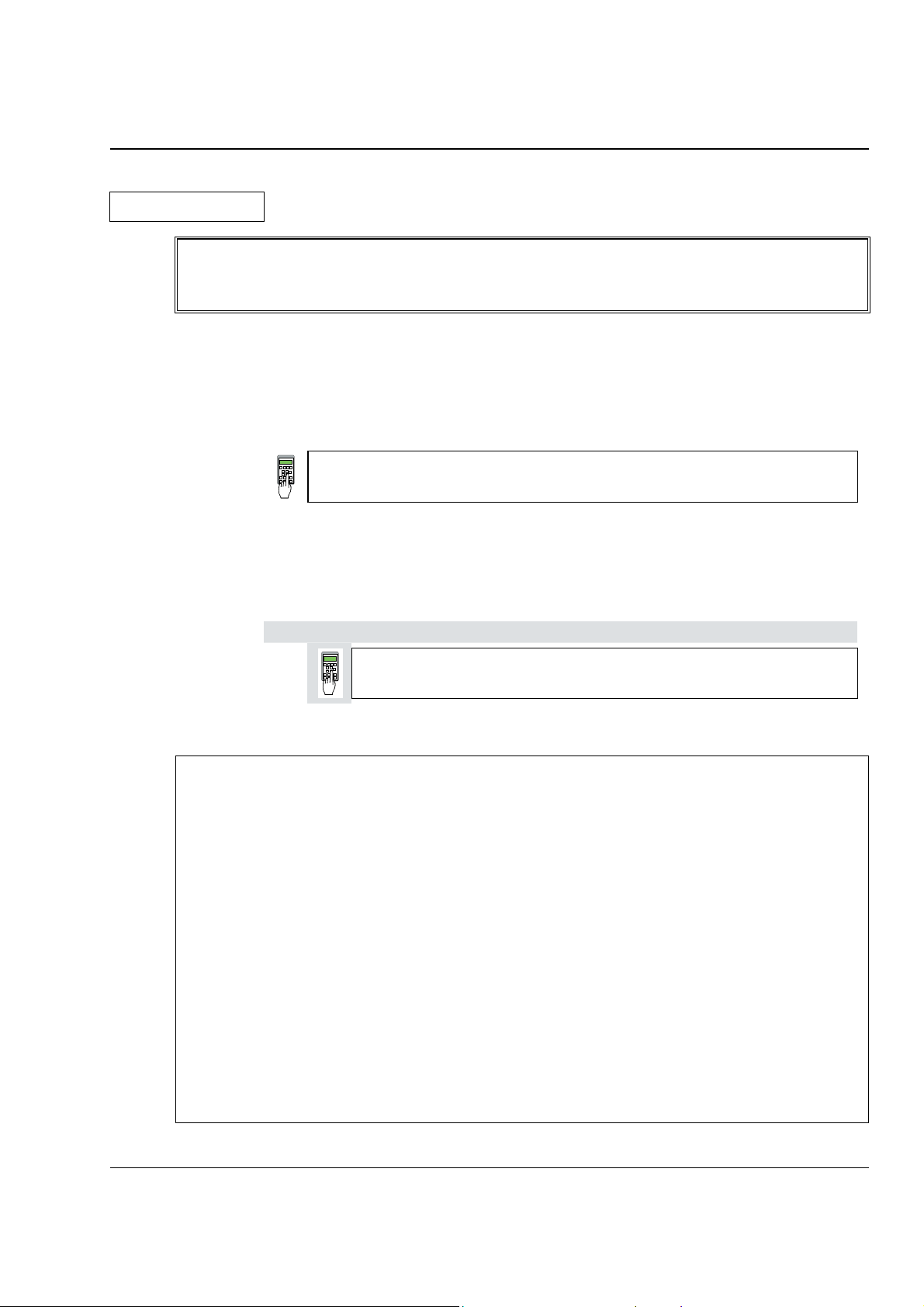
How this chapter is structured
For better understanding the individual steps of start-up work are distinguished by
a) frames
b) frames
(as heading) applies to the selected drive configuration!
completed, the
without any additional marking on the left side:
These steps of start-up work must always be performed (= mandatory start-up work)!
522 = GERMAN [Only with the SDCS-CON-2 control board & the CDP 312 panel!]
Activates German texts on the display ...........
with marking on the left side („columns“ shaded in grey):
These steps of start-up work have to be performed only when the condition stated
After this work has been
mandatory start-up work has to be continued.
Only when connection diagram 1 (Appendix A) is being used!
906 = 12502
Function „EMERGENCY STOP“ de-activated ............
Recommended motor voltages and field voltages
• Motor voltage UA when the following units are used
DCS 501B / DCP 501B: U
DCS 502B / DCP 502B: U
• Field voltage U
(= max. output voltage) when the following is being used
F
SDCS-FEX-1: U
= Line voltage * 1.16 (2- quadrant unit)
Amax
= Line voltage * 1.05 (4- quadrant unit)
Amax
= Line voltage * 0.9
F
If there is a divergence of more than 10 % between the field supply unit's output
voltage and the rated field voltage U
connecting voltage U
resistor R
: R
v
should be reduced, using a matching transformer or a series
N
= (0.9 * UN - UF) / IF IF = Rated field current
v
stated on the motor's rating plate, then the
Frated
(Note: also suitable for fine-balancing the maximum motor voltage)
• Field voltage U
when the following is being used
F
SDCS-FEX-2 /
DCF 503 / DCF 504: U
• Field voltage U
when the following is being used
F
DCF 501B / DCF 502B: U
Maximally possible output voltage U
DCF 501B / DCF 502B: U
= Line voltage * 0.6 ... 0.8
F
= Line voltage * 0.5 ... 1.1
F
using
Amax
= Line voltage * 1.35
F
DCS 500B / DCP 500B Operating Instructions IV A 2 - 1
Page 14
Chapter 2 - Start-Up Instructions
3ADW000055R0401_DCS500B_Operating Instruction_e_d
Phase sequence when connecting to the mains / Potential isolation
No special phase sequence required for the main connections U1, V1 and W1!
Phase coordination between electronics section and power section not necessary!
For potential isolation and for avoiding ground loops, an isolating transformer should be
installed upstream when an oscilloscope is being used.
Preventing unintended operating states / Shutting the drive down
CAUTION! As laid down in DIN 57100 Part 727 / VDE 0100 Part 727 (Preventing
unintended operating states), shutting the drive down by means of the
signals at the binary inputs DIx is not sufficient in itself as the sole
measure involved for avoiding unintended operating states or shutting
the drive down in the event of danger!
Range of application for the Start-Up Instructions
The Start-Up Instructions are referenced to the parameter settings in their as-delivered
condition (default values) and to the unit wiring as shown in connection diagram 1 or 2
(see Appendix A). In both circuit variants, the binary inputs DI5, DI7 and DI8 can be used.
They will cause the reactions at the drive as described below.
The symbols stated in this context will be repeatedly used further on in the text.
Method of functioning of the binary inputs DI5, DI7 and DI8
• Binary input DI5; designation EM STOP
In operation, DI5 must be set to logical "1“. If it is set to "0“, the alarm signal A 102
will appear. The drive will react in accordance with the function set at Parameter 917
(shutdown with ramp, with torque limit/current limit, with controller blocking and
coasting). Once ramp-down has been completed (speed feedback below n
output is reset for controlling the line contactor. After that, the EM STOP input
should be set back to "1“, the alarm message acknowledged, and the ON/OFF input
likewise be set to "0“. After that, the drive can be started anew.
•
Binary input DI7; designation ON/OFF
For connecting the drive to the mains, DI7 must be set to logical "1“. If there are no
ongoing faults, the outputs for controlling the contactors for the armature circuit and
the field circuit will be activated. If DI7 is set to "0“, the controllers will be blocked internally and the outputs reset after a time-delay.
The function which can be set with Parameter 915 (inputs DI7 and DI8 for switching
the contactors) will only be operative when the drive has been wired as shown
in connection diagram 2.
), the
min
IV A 2 - 2 DCS 500B / DCP 500B Operating Instructions
Page 15
3ADW000055R0401_DCS500B_Operating Instruction_e_d
Chapter 2 - Start-Up Instructions
Symbols for switching the electronics or the power section ON and OFF
•
Binary input DI8; designation RUN
For starting the drive, DI8 must be set to logical „1“. This enables the reference at the
REF_SEL and RAMP GENERATOR blocks, as well as the controllers. If DI8 is set to
"0“, the drive will react in accordance with the function set at Parameter 916 (shut down with ramp, with torque limit/current limit, with controller block and coasting).
Once ramp-down has been completed (speed feedback below n
kept at zero, and the controllers blocked after a time-delay; the drive is torqueless.
Symbols for enabling / disabling the reference
System-dependent planning
If you want the drive to react with a function other than that of Parameter 916 or 917, you
have to parameterize the unit accordingly, by connecting one of the inputs or an additional one with a control pin, e.g. at the ramp-function generator.
- Example 1:
Operational ramp-up and ramp-down in the event of reference changes with the same
ramp times, shutdown via RUN with a different time.
Solution:
use second parameter set ramp times; set time at DECEL2;
establish connection from P 1707 to P 10716.
- Example 2:
Implementing an EMERGENCY SHUTDOWN or EMERGENCY STOP function.
Solution:
this function stipulated in various regulations must always be planned in dependence on
the system involved! A basic distinction must be made here between electrical and mechanical risks. Since one signal at one input is not sufficient (see above), at least one
other switch-off option must be created, e.g. by means of a relay directly switching input DI5 to "0“. This is how the power converter attempts (in accordance with
P 917), to defuse the dangerous situation. A dropout-delay contact of the relay will
then switch the power off. If the delay is small or does not match the function selected
for P 917, then certain operating states (regeneration) may, due to laws of physics,
result in the unit fuses tripping, and in extreme cases in thyristor defects.
- Switch ON electronics
- Switch ON power
- Switch OFF electronics
- Switch OFF power
- ENABLE reference
- DISABLE reference
X6: 7 ⇒ „1“ signal
(K20 in connection example)
X6: 7 ⇒ „0“ signal
(K20 in connection example)
X6: 8 ⇒ „1“ signal
(K21 in connection example)
X6: 8 ⇒ „0“ signal
(K21 in connection example)
(input ON / OFF)
(input ON / OFF)
), the reference is
min
(input RUN)
(input RUN)
DCS 500B / DCP 500B Operating Instructions IV A 2 - 3
Page 16
Chapter 2 - Start-Up Instructions
3ADW000055R0401_DCS500B_Operating Instruction_e_d
Symbol for altering parameters or for establishing new connections
Enter at keyboard e.g. 1204 = 10000 Assign the value of 10000
to Parameter 1204
Symbol for displaying parameter values or connections
Symbol for measuring physical variables
Display
Measure
IV A 2 - 4 DCS 500B / DCP 500B Operating Instructions
Page 17
3ADW000055R0401_DCS500B_Operating Instruction_e_d
2.1 Preparatory work
Check the unit for damage in transit or other damage.
Install and wire unit; connect all inputs and outputs required.
Proceed in the same way for the field supply unit as well.
Check whether protective measures, earthing, screening, etc. have been taken in
accordance with the system conditions involved.
Check the rated value of the supply voltage for the electronics and the fan:
• matching transformer necessary when:
- electronics supply is not equal to 115 V/230 V
- single-phase-fan supply is not equal to 230 V
- three-phase-fan supply is not within the range of 400 V .... 690 V.
Check the rated value of the supply voltage for the armature-circuit converter's
power section; the particulars given on the rating plate must be >
line voltage.
If this condition is not satisfied, then the following applies:
- use an isolating transformer, or
- use a suitable unit.
Check the rated value of the supply voltage for the field supply unit.
(Particulars on rating plate >
Is an auxiliary transformer or perhaps a series resistor necessary?)
Check the wiring, fusing, the cross-sectional areas of the cables.
Provide an option for switching binary inputs X6: 7 and X6: 8.
Check the system's EMERGENCY STOP for proper functioning! Set the system-side
monitoring functions, and activate them. Check whether auxiliaries, such as motor fans
or unit fans, function properly; while doing this, also check for correct direction of rotation and voltage level as well!
Chapter 2 - Start-Up Instructions
than the rated
rated line voltage?
DCS 500B / DCP 500B Operating Instructions IV A 2 - 5
Page 18
Chapter 2 - Start-Up Instructions
3ADW000055R0401_DCS500B_Operating Instruction_e_d
2.2 Scaling intra-unit signals
Make sure that the existing electronics supply voltage has been set on the SDCSPOW-1 power supply board as well, using the SW1 switch.
If an encoder is being used as the speed feedback device, make sure that the correct
supply voltage has been seton the boards
SDCS-POW-1: ⇒ X3: / X4: / X5: SDCS-IOB-3: ⇒ S4
Switch on the power supply to the electronics section.
The display of Panel CDP 31x DCS 500
may show the following ** WARNING **
information: +Emergency stop
522 = GERMAN
[Only with the SDCS-CON-2 control board & the CDP 312 panel!]
Activates German texts on the display
501 = Rated motor voltage
This is used to scale those parameters referring to the rated motor voltage, such
as field crossover point or maximum speed with e.m.f. control.
502 = Rated motor current
This is used to scale those parameters referring to the rated motor current, such
as current limitation or torque limitation.
507 = Rated line voltage
This is used to scale those parameters referring to the line voltage, such as line
undervoltage.
Only when connection diagram 1 (Appendix A) is being used!
906 = 12502
„Emergency Stop“ de-activated
910 = 10908
No check-back signal from unit fan necessary
911 = 10908
No acknowledge signal from motor fan necessary
Set this only for units with a rated current ≥ 2050A!
517 = Rated power converter current
Enter numerical value from rating plate here
518 = Rated power converter supply voltage
Enter numerical value from rating plate here
519 = 45 Grad Celsius
Temperature monitoring of power section
520 = 4 ⇒ Size C4 has been selected
Coding for unit type
521 = 1 : Single bridge (2-Q) converter ⇒ on rating plate: DCS 501 xxxx
4 : Double bridge (4-Q) converter ⇒ on rating plate: DCS 502 xxxx
Coding for power section (bridge) type
IV A 2 - 6 DCS 500B / DCP 500B Operating Instructions
Page 19
3ADW000055R0401_DCS500B_Operating Instruction_e_d
Set this only for units of the DCP 500 series!
517 = Rated power converter current
Enter numerical value from rating plate here
518 = 500 V (fixed!); rated power converter voltage
Enter numerical value 500 V here
519 = Temperature monitoring of power section
Enter value as indicated in the table „Technical Data“ here
520 = 4 ⇒ Size C4 has been selected
Coding for unit type
521 = 1 : Single bridge (2-Q) converter ⇒ on rating plate: DCP 501 xxxx
4 : Double bridge (4-Q) converter ⇒ on rating plate: DCP 502 xxxx
Coding for power section (bridge) type
507 = Rated line voltage;
Enter: Rated line voltage U
Example: U
= 400 V; entry for Parameter 507 ⇒ 420
ratedline
CAUTION: Display of the line voltage feedback value is 5 % too high!
Switching thresholds referenced to the line voltage, how-
ever, are correct!
CAUTION! Please don't forget!
11202 = SAVE MOT1 SET
Save the altered values in the non-volatile memory!
ratedline
Chapter 2 - Start-Up Instructions
in V * 1.05
Resetting the warning either by:
briefly setting ("H“ level) binary input X6:6
or
switching the electronics voltage supply OFF and ON again.
DCS 500B / DCP 500B Operating Instructions IV A 2 - 7
Page 20
Chapter 2 - Start-Up Instructions
3ADW000055R0401_DCS500B_Operating Instruction_e_d
2.3 Presetting the field supply unit
Make sure that existing supply voltages for power section, field supply unit (field exciter) and field winding, fan, etc. match the rated data of the components used.
Switch ON power.
DANGER: System components now energized!
Please wait a few moments. During this time, the unit compares the phase sequence
set in the parameter with that obtaining at the power section.
If the unit outputs the "Phase sequence fault of power section“ signal (F 38):
- switch off unit completely and disconnect from the mains, interchange two phases at
the input, and start again from the beginning of this chapter.
or
- enter: 506 = R-T-S and then acknowledge fault signal.
Unit will automatically adapt to phase sequence; this signal is to be interpreted as information to the effect that the fans' direction of rotation may be wrong for size-C4
units.
Only for uncontrolled field supply with SDCS-FEX-1!
505 = 1 Panel display: DIODE FIELD EXCIT
Check field current and field voltage by measuring them.
Switch OFF power!
Only for controlled field supply with SDCS-FEX-2 or DCF 503/DCF 504!
11202 = SAVE MOT1 SET
Save the altered values in the non-volatile memory!
Continue with Chapter 2.4
505 = 2 Panel display: FEX2 OR FEX3
503 = Rated motor field current
Scales all parameters referenced to the motor field current, such as field cur-
rent limitation or field current monitoring
1305 = Field current for "Under-excitation" signal
Check field current and field voltage by measuring them;
if necessary, correct field current with 503.
IV A 2 - 8 DCS 500B / DCP 500B Operating Instructions
Page 21
Chapter 2 - Start-Up Instructions
3ADW000055R0401_DCS500B_Operating Instruction_e_d
Only for armature-circuit power converters with SDCS-CON-2 control board &
CDP 312 panel!
1201 = 5 Panel display: FEX2/3 AUTOTUNING
Activates the field current controller's auto-tuning function.
Action has been completed when NOT ACTIVATED is shown on the
display.
Switch OFF power!
11202 = SAVE MOT1 SET
Save the altered values in the non-volatile memory!
Only for controlled field supply with DCF 501B or DCF 502B !
505 = 2 Panel display: FEX2 OR FEX3
Continue with Chapter 2.4
503 = Rated motor field current
Scales all parameters referenced to the motor field current, such as field cur-
rent limitation or field current monitoring.
If field current is above 150A, multiply the value by 0.1 and use this number
(problem: upper limit of P503 / P504) ; the reference transferred to the DCF
500B is always 100% independent of this setting; by doing so all indications
on the panel CDP312 can be corrected quite easily by multiplying by 10
1305 = Field current for "Under-excitation" signal
Switch OFF power!
11202 = SAVE MOT1 SET
Save the altered values in the non-volatile memory!
Before adjustment of the armature-circuit power converter is continued
(Chapters 2.4 etc.),
First perform the start-up routine for the DCF 501B or DCF 502B field supply
unit (Chapter 2.9) and
then: continue with Chapter 2.4
DCS 500B / DCP 500B Operating Instructions IV A 2 - 9
Page 22

Chapter 2 - Start-Up Instructions
3ADW000055R0401_DCS500B_Operating Instruction_e_d
2.4 Adjusting the current controller
Make sure that static current limitation Bridge 1 (2307) and Bridge 2 (2308; with
4Q-unit) have been set to the same value; values of all parameters for current
reference limitation must be greater than 20 %; conditions have been satisfied if
default setting has been taken as starting point; setting to maximally required motor
current is recommended.
Drive must not turn! Do not preset an external reference!
1201 = 3 Panel display: ARM. AUTOTUNING
Activate the current controller's auto-tuning function.
Start the next two steps within the next 20 seconds!
Switch ON power.
DANGER: System components now energized!
Start drive.
When the display shows NOT ACTIVATED (action correctly completed), stop drive;
it may happen that the unit runs armature-circuit current since e.m.f. control is active;
- signal (2201) ⇒ value too small.
n
min
Switch OFF power!
If the unit aborts the auto-tuning routine with a fault signal, then eliminate
cause of this as far as possible (supply, switching sequence, etc.; see also
description for 11201), then repeat the above points, or continue with next point.
Read out values of:
407 = ............ 408 = ............ 409 = ............ 410 = ............ 411 = ............
Only if the unit aborts the auto-tuning routine with a fault signal FIELD REMOVAL?!
505 = 0 Panel display: NO FIELD EXCITER
11202 = SAVE MOT1 SET
Save the altered values in the non-volatile memory!
Switch OFF power supply to the electronics section!
If the SDCS-FEX-1 field supply is being used:
make sure that no field current is flowing, e.g.
by removing the supply fuses!
Switch the electronics section's power supply on again!
IV A 2 - 10 DCS 500B / DCP 500B Operating Instructions
Page 23
3ADW000055R0401_DCS500B_Operating Instruction_e_d
Chapter 2 - Start-Up Instructions
Drive must not turn! Do not preset an external reference!
1201 = 3 Panel display: ARM. AUTOTUNING
Activate the current controller's auto-tuning function.
Start the next two steps within the next 20 seconds!
Switch ON power.
DANGER: System components now energized!
Start drive.
When the display shows NOT ACTIVATED (action correctly completed),
stop drive; it may happen that the unit runs armature-circuit current since
e.m.f. control is active; n
Switch OFF power!
Read out values of:
407 = ............ 408 = ............ 409 = ............ 410 = ............ 411 = ............
Use values of 409 and 410 from the first auto-tuning routine.
Re-activate the field unit used by entering:
a) 505 = 1 Panel display: DIODE FIELD EXCIT
and install the supply fuses removed before!
or
b) 505 = 2 Panel display: FEX2 OR FEX3
CAUTION! Please don't forget!
11202 = SAVE MOT1 SET
Save the altered values in the non-volatile memory!
- signal (2201) ⇒ value too small.
min
DCS 500B / DCP 500B Operating Instructions IV A 2 - 11
Page 24
Chapter 2 - Start-Up Instructions
3ADW000055R0401_DCS500B_Operating Instruction_e_d
2.5 Speed feedback balancing
E.M.F. control active?
2102 = 5 Panel display: EMF SPEED ACT
Field weakening mode not selected?
1001 = 0 Panel display: CONSTANT FIELD
2103 = Desired speed / or motor rating plate
Scale speed control circuit to maximum speed.
1701 = 12516
Activates internal reference value; drive will use 20 sec for ramp-up/-down time.
12516 = 2000
Set internal reference value to 10 %.
CAUTION: Value will not be saved with SAVE MOT1 SET!
Switch ON power.
DANGER: System components now energized!
Start drive.
Drive should run up to 10 % of the rated voltage.
Only when an analog tacho is being used!
Connect measuring instrument to:
- to X3: 1... 3 or X1: 1... 3
+ to X3: 4 or X1: 4
Check to make sure that the tacho voltage does not exceed the input voltage
range selected with maximum speed.
Turn Potentiometer R9, R48 or R2716 to minimum (left-hand stop).The measured value must have a positive sign; if necessary interchange tacho cables.
Switch OFF power, thus stopping the drive; drive coasts.
101 = 3 Panel display: TACHO VOLT. +/-10
Activates the analog input for the speed feedback value.
2102 = 4 Panel display: ANALOG TACHO
Analog tacho is used for speed control.
Switch ON power; start drive.
DANGER: System components now energized!
Drive should run up to 10 % of the rated voltage.
Use R9, R48 or R2716 to set the tacho voltage to 10 % of the maximum tacho
voltage.
IV A 2 - 12 DCS 500B / DCP 500B Operating Instructions
Page 25
3ADW000055R0401_DCS500B_Operating Instruction_e_d
Only when an encoder (pulse encoder) is being used!
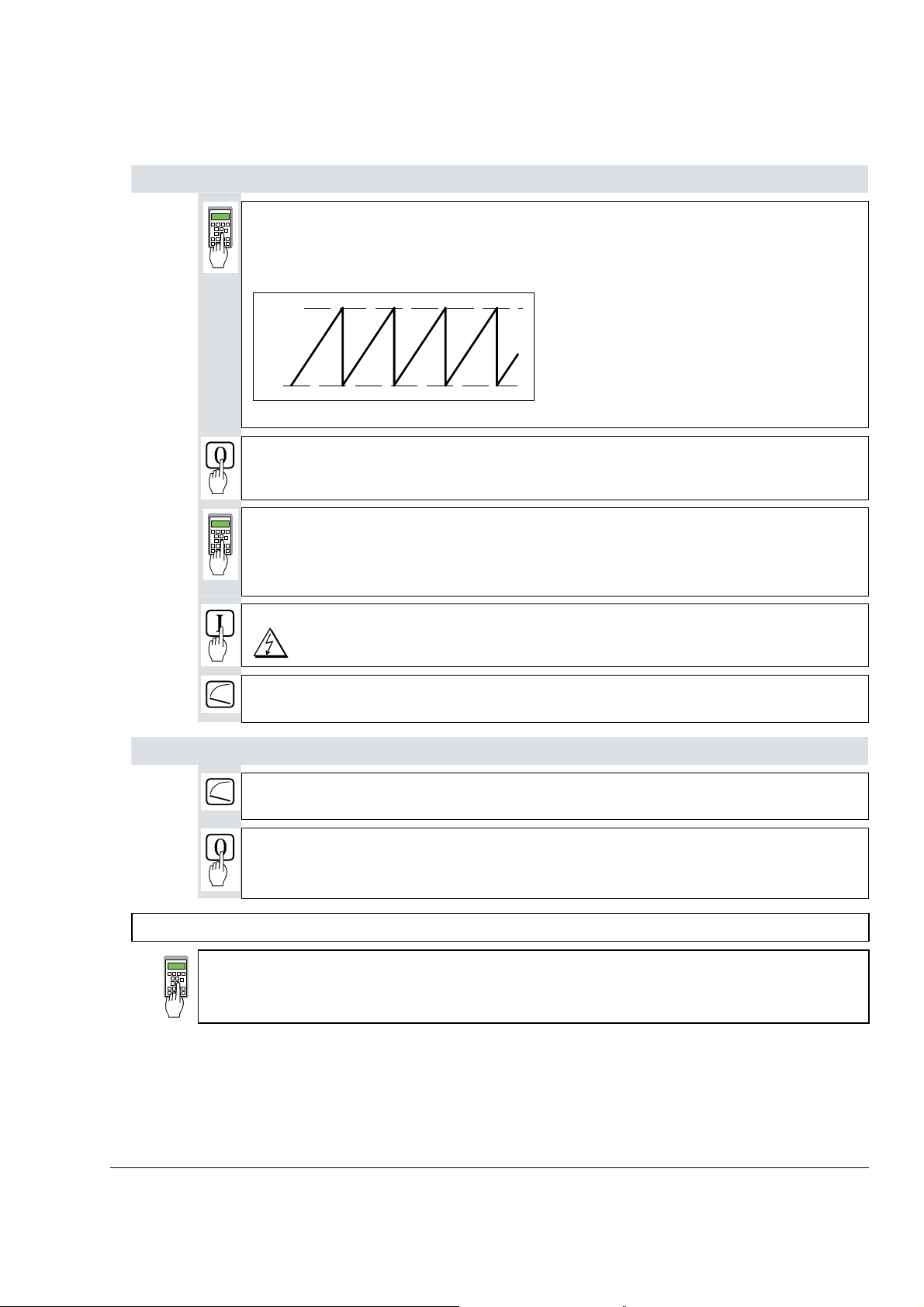
12104 = Content of pulse counter
If the shape of the curve corresponds to the diagram below, this means
the wiring is correct and the pulses will be correctly evaluated [see
also documentation entitled „Technical Data“, Chapter I/O boards].
65535
Chapter 2 - Start-Up Instructions
0
Fig.: Curve shape of the encoder’s pulse counter for sense of rotation "forwards“
Switch OFF power, thus stopping the drive; drive coasts.
2101 = No. of encoder pulses
As specified on the encoder's rating plate
2102 = 3 Panel display: ENCODER A+-, B+-
Only when the e.m.f. signal is being used as speed feedback!
Encoder is used for speed control.
Switch ON power; start drive.
DANGER: System components now energized!
Drive should run at 10 % of the desired speed;
if possible, check with manual tacho.
Drive should run at 10 % of the desired speed;
if possible, check with manual tacho.
Switch OFF power, thus stopping the drive; drive coasts.
CAUTION! Please don't forget!
11202 = SAVE MOT1 SET
Save the altered values in the non-volatile memory!
DCS 500B / DCP 500B Operating Instructions IV A 2 - 13
Page 26
Chapter 2 - Start-Up Instructions
3ADW000055R0401_DCS500B_Operating Instruction_e_d
2.6 Balancing the field supply unit and the e.m.f. controller
2.6.1 Constant field current control
When matching the field supply unit to the system conditions, differences in the procedures adopted must be taken into account; these different procedures result from the operating mode used. Only the work of that section has to be performed which deals
with the operating mode actually used in your system!
Constant field current control ⇒ Section 2.6.1
Field weakening control with setting range smaller than 1 : 1.5
Field weakening control with setting range larger than 1 : 1.5
Switch ON power; start drive.
⇒ Section 2.6.2
⇒ Section 2.6.3
Drive should run up to 10 % of the speed.
12516 = increase slowly!
Measure motor voltage with the U ARM AC signal by changing between MODE ACT
and PAR; with a value set with P 501, it must remain constant, or must not exceed this
value if 12516 = 20000.
The motor voltage must not exceed the recommended motor voltage; see General
notes at the beginning of this chapter.
Measure speed with manual tacho;
check rated speed when an analog tacho is being used;
if necessary, correct with R9, R48 or R2716.
12516 = 0
Switch OFF power, thus stopping the drive!
DANGER: System components now energized!
Internal reference value is increased; scaling: 20000 corresp. to 100 % speed or
motor voltage, defined with P 501.
Continue with Chapter 2.7
IV A 2 - 14 DCS 500B / DCP 500B Operating Instructions
Page 27
Chapter 2 - Start-Up Instructions
3ADW000055R0401_DCS500B_Operating Instruction_e_d
2.6.2 Field weakening control with setting range < 1 : 1.5
CAUTION: Not permitted when Chapter 2.5 was quit with e.m.f. control!
1001 = 1 Panel display: EMF, NO FIELD REV
Field weakening function activated
1012 = Speed at field weakening point as per motor rating plate
Switch ON power; start drive.
Drive should run at 10 % of the maximum speed.
12516 = increase slowly!
Internal reference value is increased; Scaling: 20000 corresp. to 100% speed.
Measure motor voltage with the U ARM AC signal by changing between MODE ACT
and PAR; with a value set with P 501, it must remain constant, or must not exceed this
value if 12516 = 20000.
Check that field is being weakened.
Do not exceed the maximum motor speed permitted. When an analog tacho is being
used, the display at the CDP 31x panel is not yet necessarily correct.
The motor voltage must not exceed the recommended motor voltage; see General
notes at the beginning of this chapter.
If the field is not being properly weakened, or not being weakened at all, perform the
work of section "Field weakening control with setting range larger than 1 : 1.5“!
Measure speed with manual tacho;
check rated speed when an analog tacho is being used;
if necessary, correct with R9, R48 or R2716.
12516 = 0
Switch OFF power, thus stopping the drive!
DANGER: System components now energized!
CAUTION! Please don't forget!
11202 = SAVE MOT1 SET
Save the altered values in the non-volatile memory!
DCS 500B / DCP 500B Operating Instructions IV A 2 - 15
Continue with Chapter 2.7
Page 28
Chapter 2 - Start-Up Instructions
3ADW000055R0401_DCS500B_Operating Instruction_e_d
2.6.3 Field weakening control with setting range > 1 : 1.5
CAUTION: Not permitted when Chapter 2.5 was quit with e.m.f. control!
Only when unit is fitted with an SDCS-CON-1 control board!
If the field time constant is known, e.g. from the motor data sheet!
1308 = leave as it is; if appropriate vary between 1...5.
P-gain of the field current controller
1309 =
I-gain of the field current controller
Enter value of field time constant, if necessary increase by factor 1...2.
If possible, check controller behaviour with oscilloscope or CMT tool
11202 = SAVE MOT1 SET
Save the altered values in the non-volatile memory!
If the field time constant is not known!
1201 = 7 Panel display: FEXC2/3 MAN. TUNIN
Drive Mode: manual balancing of the field current controller
1204 = 4095
1205 = 1000
Ref. value jumps of field current between 25 % and 100 % with POT1 and POT2
11209 = 3
Change between POT1 and POT2 activated
12516 = 0
Switch ON power.
DANGER: System components now energized!
1308 = Match P-gain to field circuit.
1309 = Match I-gain to field circuit.
Oscillograph field current feedback via D/A output, or if one is to hand, use CMT
tool to depict it via the TRENDING menu and Parameter
11302.
B
CD
E
F
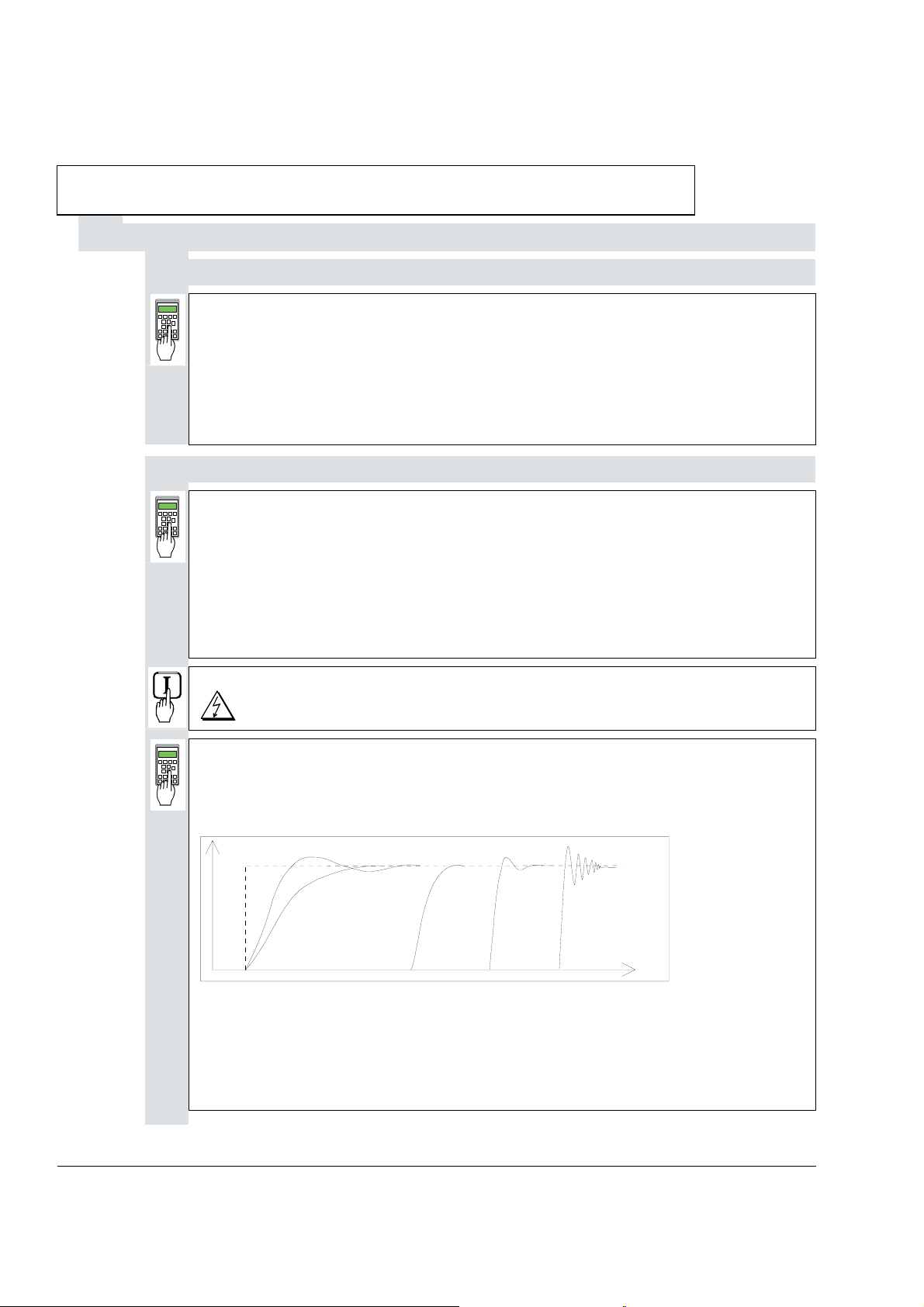
A
t
Fig.: Transient response of controller
A: reference value jump
B: undercompensated; reset time and P-gain too small
C: undercompensated; P-gain too small
D: normal
E: slightly overcompensated; when a higher dynamic response is required
F: overcompensated; short reset time and a high P-gain
IV A 2 - 16 DCS 500B / DCP 500B Operating Instructions
Page 29
3ADW000055R0401_DCS500B_Operating Instruction_e_d
Chapter 2 - Start-Up Instructions
Switch OFF power!
1201 = 0 Panel display: NOT ACTIVATED
11202 = SAVE MOT1 SET
Save the altered values in the non-volatile memory!
When unit is fitted either with an SDCS-CON-1 or SDCS-CON-2 control board!
1001 = 1 Panel display: EMF, NO FIELD REV
Field weakening activated.
1002 = 12522
Links up a settable parameter as the flux reference value.
1004 = 12502
Activates the linked-up parameter.
1009 = 0
1010 = 0
e.m.f. controller switched off.
1012 = Speed at field weakening point as per motor rating plate
1013 = 40,0
1014 = 70,0
1015 = 90,0
Linear characteristic of field
12522 = 4095
Flux reference value set to 100 % corresponding to 4095.
12516 = 2000
Set internal reference value to 10 %.
Switch ON power; start drive.
DANGER: System components now energized!
Drive should run at 10 %.
The next steps serve to determine the motor's field characteristic. For this purpose,
the internal reference is used to set a speed n which is within the motor's basic speed
range and can be easily converted into 90 %, 70 % and 40 %.
Example: if n is selected so as to produce a motor voltage of 300 V, then 90 % will
correspond to 270 V, 70 % to 210 V and 40 % to 120 V.
12516 = increase slowly until a motor voltage is produced which can be
easily converted.
Note: Measure motor voltage with the U ARM AC signal
(change between ACT and PAR).
Scaling of 12516: 20000 corresponds to 100 % speed.
DCS 500B / DCP 500B Operating Instructions IV A 2 - 17
Page 30
Chapter 2 - Start-Up Instructions
3ADW000055R0401_DCS500B_Operating Instruction_e_d
12522 = decrease so that motor voltage is 90 %.
Flux and thus the field current as well are reduced.
How to proceed:
1. decrease 12522 (in steps of 100 at a time)
2. press ACT, read off motor voltage
3. press PAR and correct 12522 if necessary (then continue with 2.)
Read out and note down value of:
11003 = ......... (will later be entered in 1015)
12522 = decrease so that motor voltage is 70%.
Flux and thus the field current as well are reduced.
Proceed as described in (1. / 2. / 3.) above!
Read out and note down value of:
11003 = ......... (will later be entered in 1014)
12522 = decrease so that motor voltage is 40%.
Flux and thus the field current as well are reduced.
Proceed as described in (1. / 2. / 3.) above!
Read out and note down value of:
11003 = ......... (will later be entered in 1013)
12522 = 4095
12516 = 0
Internal reference value equal to zero.
Switch OFF power, thus stopping the drive!
1002 = 12512
1004 = 0
1009 = 10%
1010 = - 99%
As-delivered values (default values) for all 4 parameters restored.
1015 = equal to the 1st value of 11003
1014 = equal to the 2nd value of 11003
1013 = equal to the 3rd value of 11003
Linearization function matched to field circuit.
501 = 90 % of the rated motor voltage.
1012 = 90 % of the value on the motor rating plate.
This measure serves to provide a greater safety margin for the motor voltage
during start-up.
IV A 2 - 18 DCS 500B / DCP 500B Operating Instructions
Page 31

3ADW000055R0401_DCS500B_Operating Instruction_e_d
Only if analog tacho is used as speed feedback!
Switch ON power; start drive.
Chapter 2 - Start-Up Instructions
DANGER: System components now energized!
12516 = increase slowly up to 20000 (=100 % speed).
Check motor voltage; if value has been set with 501, motor voltage must
remain constant, or must not exceed this value.
CAUTION! Please don't forget!
Measure speed with manual tacho; balance maximum speed with R9, R48 or
R2716.
12516 = 0
Switch OFF power, thus stopping the drive!
11202 = SAVE MOT1 SET
Save the altered values in the non-volatile memory!
DCS 500B / DCP 500B Operating Instructions IV A 2 - 19
Page 32
Chapter 2 - Start-Up Instructions
3ADW000055R0401_DCS500B_Operating Instruction_e_d
2.7 Balancing the speed controller, plus fine-balancing the e.m.f. and the
current controllers
1701 = 11206
Change between POT1 and POT2 activated.
Extremely reduce the ramp-up time, depending on the system conditions:
1708 = 0,1 s
1709 = 0,1 s
Adjusting the potentiometers for speed controller balancing:
During acceleration/ braking, the drive should reach the current limitation, if
necessary increase the value of POT1.
Scaling of 1204 and 1205 ⇒ 20 000 corresponds to 100 % speed.
1204 (POT1) = 10%...20% max. speed
1205 (POT2) = 0
1206 (PERIOD) = Adapt as necessary.
Switch ON power; start drive.
DANGER: System components now energized!
Drive should run at speed values corresponding to POT1 and „0“.
For assessing control quality, the Fig. entitled "Transient response of
controller" ( ⇒ section 2.6.3) can be used.
For this purpose, the following parameters at the speed controller must be adapted:
2014 = desired response (behaviour) of controller
2018 = desired response (behaviour) of controller
Only when fine-balancing of the e.m.f. controller is wanted!
((Necessary when work as per section 2.6.3. has been performed)
Only when fine-balancing of the current controller is wanted!
For assessing control quality, the Fig. entitled "Transient response of
controller" ( ⇒ section 2.6.3) can be used.
- If fine-balancing of the current controller is wanted, the settings for
the software potentiometers can be retained.
The following parameters at the current controller must be adapted:
407 = desired response (behaviour) of controller
408 = desired response (behaviour) of controller
- If fine-balancing of the e.m.f. controller is wanted, potentiometers'
settings must be adapted:
1204 (POT1) approx. 10 % smaller than speed at field weakening point
1205 (POT2) ca. 10% greater than speed at field weakening point
The following parameters at the e.m.f. controller must be adapted:
1007 = desired response (behaviour) of controller
1008 = desired response (behaviour) of controller.
IV A 2 - 20 DCS 500B / DCP 500B Operating Instructions
Page 33
3ADW000055R0401_DCS500B_Operating Instruction_e_d
Chapter 2 - Start-Up Instructions
1204 = 0
1205 = 0
Switch OFF power, thus stopping the drive!
1701 = 11903
501 = Rated motor voltage set in Chapter 2.2.
1012 = Speed at rated motor voltage
CAUTION! Please don't forget!
11202 = SAVE MOT1 SET
Save the altered values in the non-volatile memory!
2.8 Matching the thyristor power converter unit to the system conditions concerned
- Ramp function generator
- Binary inputs and outputs
- Limit-value messages
- Additional functions
DCS 500B / DCP 500B Operating Instructions IV A 2 - 21
Page 34
Chapter 2 - Start-Up Instructions
3ADW000055R0401_DCS500B_Operating Instruction_e_d
2.9 Presetting the 3-phase field supply unit DCF 50xB
This is a new functionality available for the first time with software version S21.232.
When commissioning a drive consisting of a DCS converter for the armature supply
and a DCF converter for the field please try to make sure both converters will be
equipped with at least this software version.
Make sure that existing supply voltages for power section, field supply unit (field exciter) and field winding, fan, etc. match the rated data of the components used.
402 = 11303
field current reference received from the DCS 500B via FEX-link connected to cur-
rent controller
405 = 1 Panel display: CURR_REF
input P402 via CURR_REF activated
409 = 0
current controller without feedforward function
420 = 2 or 3 Panel display: METHOD 2 ALARM or METHOD 2 FAULT
current ripple monitoring based on method 2; in case a current bubble is missing an
alarm or fault is generated
421 = 25.0
threshold for current ripple monitoring = 25%
501 = Rated motor voltage
keep it to default; if set to lower values adapt the current controller to avoid over
voltage faults
502 = Rated motor current
set this parameter to the motor´s nominal field current
507 = Rated line voltage
Used to scale parameters referring to the line voltage, such as line undervoltage.
901 = 10916
902 = 10916
no need for an external start command for the field converter; when the start command
is given to the DCS 500B feeding the armature, this converter automatically starts and
controls the DCF 500B
906 = 12502
emergency stop command disabled
907 = 10917
no need for an external reset command for the field converter; when an error occurred
either in the field or the armature converter the fault can be reset by the reset command
connected and given to the DCS 500B; it is internally transferred to the DCF 500B
911 = 10908
input motor fan acknowledge deactivated
1215 = 4 Panel display: FEXLINK NODE 1
DCF field mode, DCF 506 is monitored, FEX-link in use and DCF 500B is node 1
1216 = 10703
digital input 2 used to monitor the motor fan at a DCS 500B is now used to monitor
the DCF 506 overvoltage protection
1217 = 0 or 1 Panel display: OVP ALARM or OVP ALARM
IV A 2 - 22 DCS 500B / DCP 500B Operating Instructions
Page 35
3ADW000055R0401_DCS500B_Operating Instruction_e_d
According to the connection diagram there is no dedicated input prepared to switch on
Chapter 2 - Start-Up Instructions
alarm or fault indication / reaction, if DCF 506 has triggered
3601 = 15
only at DCF 502B; bridge reversal delayed to app. 50ms
3602 = 15
only at DCF 502B; in worst case bridge change over will take place when time of
3601 has elapsed plus app. 50ms
3603 = 600
only at DCF 502B; time delay of about 2s for F65 error message (reversal fault);
timer is started, when reference is reversed; time has to be higher than time of
P3601 + P3602 + time, needed to decrease the current to zero + safety margin
11202 = SAVE MOT1 SET
Save the altered values in the non-volatile memory!
and start the field converter. Nevertheless there are two possibilities to control the
converter:
- using the CDP 312 control panel and local mode; this gives access to the
switch on / off function / start / stop function / reset function
- using the armature converter´s input / outputs
Make sure the Emergency Stop Function mentioned at the
beginning of this chapter is working
Make sure, no reference is active (DCS 500B not switched on)
1215 = 2 Panel display: STAND ALONE
current controller set to STAND ALONE for high inductive load
Switch ON power.
DANGER: System components now energized!
Please wait a few moments. During this time, the unit compares the phase sequence
set in the parameter with that obtaining at the power section.
If the unit outputs the "Phase sequence fault of power section“ signal (F 38):
- switch off unit completely and disconnect from the mains, interchange two phases at
the input, and start again from the beginning of this chapter.
or
- enter: 506 = R-T-S and then acknowledge fault signal.
Unit will automatically adapt to phase sequence; this signal is to be interpreted as information to the effect that the fans' direction of rotation may be wrong for size-C4
units.
Start drive.
1201 = 5 Panel display: FEX2/3 AUTOTUNING
FEX2/3 AUTOTUNING is selected; when pressing the enter button the converter
will directly start running field current!
DCS 500B / DCP 500B Operating Instructions IV A 2 - 23
Page 36
Chapter 2 - Start-Up Instructions
3ADW000055R0401_DCS500B_Operating Instruction_e_d
In case the autotuning failed:
The DCS converter in DCF-mode (parameter 1215=1 or higher) will not accept a start
When the display shows NOT ACTIVATED (action correctly completed):
Stop drive
Switch OFF power!
1201 = 4 Panel display: ARM. MAN. TUNING
ARM.MAN_TUNING, if the FEX2/3 autotuning failed; activate the reference via pa-
rameter 11209 and set the parameters of the square wave function generator; then
adapt the current controller to get the behaviour shown at curve D chapter 2.6.3 in
this manual
1215 = 4 Panel display: FEXLINK NODE 1
DCF mode FEXLINK NODE1 via FEX-link activated
11202 = SAVE MOT1 SET
Save the altered values in the non-volatile memory!
command, if an alarm or fault is still active (an A or F indication on the 7-segment display). To ensure a correct function afterwards, please make sure the reasons for any
type of alarm or fault is no longer present.
Continue with Chapter 2.4
IV A 2 - 24 DCS 500B / DCP 500B Operating Instructions
Page 37

Chapter 3 - Handling of Control Panel CDP 31x
3ADW000055R0401_DCS500B_Operating Instruction_e_d
3.1 Overview
The Control and Display Panel [Control Panel] is used for parameter setting, for feedback value measuring and for drive control with
series DCS 500B / DCF 500B and DCP 500B thyristor power converters. This device is available in different versions depending on
the type of unit and software to be used:
Panel Link
Mounting the
Panel
Units with software S 21.1xx
(recommended: CDP 311)
Units with software S 21.2xx
Hereinafter CDP 31x will be used as a common type designation for
the above mentioned versions of Control Panel. Differences between the versions which have to be taken into account with particular functions will be indicated separately!
The CDP 310/311 Control Panel is connected to the drive via
CDI-300 communication bus.This communication bus, which is
based on the RS485 standard, is a common bus protocol for ABB
Drives products.
MODBUS is used as communication bus connecting the CDP 312
Control Panel to the drive. This Control Panel combined with a
Software version S 21.2xx onwards makes it possible to show the
texts on the LCD in different languages.
The selection of language is performed by parameter
Note: The display texts as shown in this chapter correspond
to the default setting of
The CDP 31x Control Panel can be handled in three different ways:
• Direct mounting on the thyristor power converter; the CDP 31x is
plugged into the moulded part of the cover of the converter and
connected via an adaptor of approx. 45 mm.
• Mounting on the door of the switchgear cabinet using an assembly kit equipped with a connection cable.
• Use of Panel as remote control device with a connection cable.
⇒ CDP 310 or CDP 311
⇒ CDP 312
[P 522].
[P 522] ( ⇒ English)!
DCS 500B / DCP 500B Operating Instructions IV A 3 - 1
Page 38

Chapter 3 - Handling of Control Panel CDP 31x
3ADW000055R0401_DCS500B_Operating Instruction_e_d
3.2 Start Mode
Note: The CDP 31x can be connected to the drive without dis connecting the auxiliary power !
When connected and power is applied to the electronics, the display of the CDP 31x shows:
- software version of the Control Panel
- ID number of the CDP 31x and number of drives connected to
the link.
CDP310 PANEL
ID-NUMBER 31
DCS 500
ID-NUMBER 1
TOTAL 1 DRIVES
Display with CDP 310 / CDP 311 Display with CDP 312
After two seconds the display will clear, and the actual signals of
the selected drive will appear.
The following message is displayed if the CDP 31x is not able to
communicate with the drive:
**FAULT**
NO COMMUNICATION [x]
NO COMMUNICATION
[x]
1 The CDP is not active for 10 s
2 The drive is not active for 10 s
3 No data set received for 2 s
4 Bus administrator is offline
• The drive is not present on the link. This is the case if the drive
stops communicating.
• The link does not operate because of a hardware malfunction or
a cabling fault.
Action: Disconnect the
drive. By this means the
the Start Mode another time!
CDP 31x and connect it again to the
CDP 31x will be forced to
IV A 3 - 2 DCS 500B / DCP 500B Operating Instructions
Page 39
3ADW000055R0401_DCS500B_Operating Instruction_e_d
3.3 Panel Functions
Actual Signal
Display Mode
ACT
Chapter 3 - Handling of Control Panel CDP 31x
The CDP 31x has four different keypad modes:
• Actual Signal Display Mode (ACT)
• Parameter Mode (PAR)
• Function Mode (FUNC)
• Drive Mode (DRIVE) for further extensions
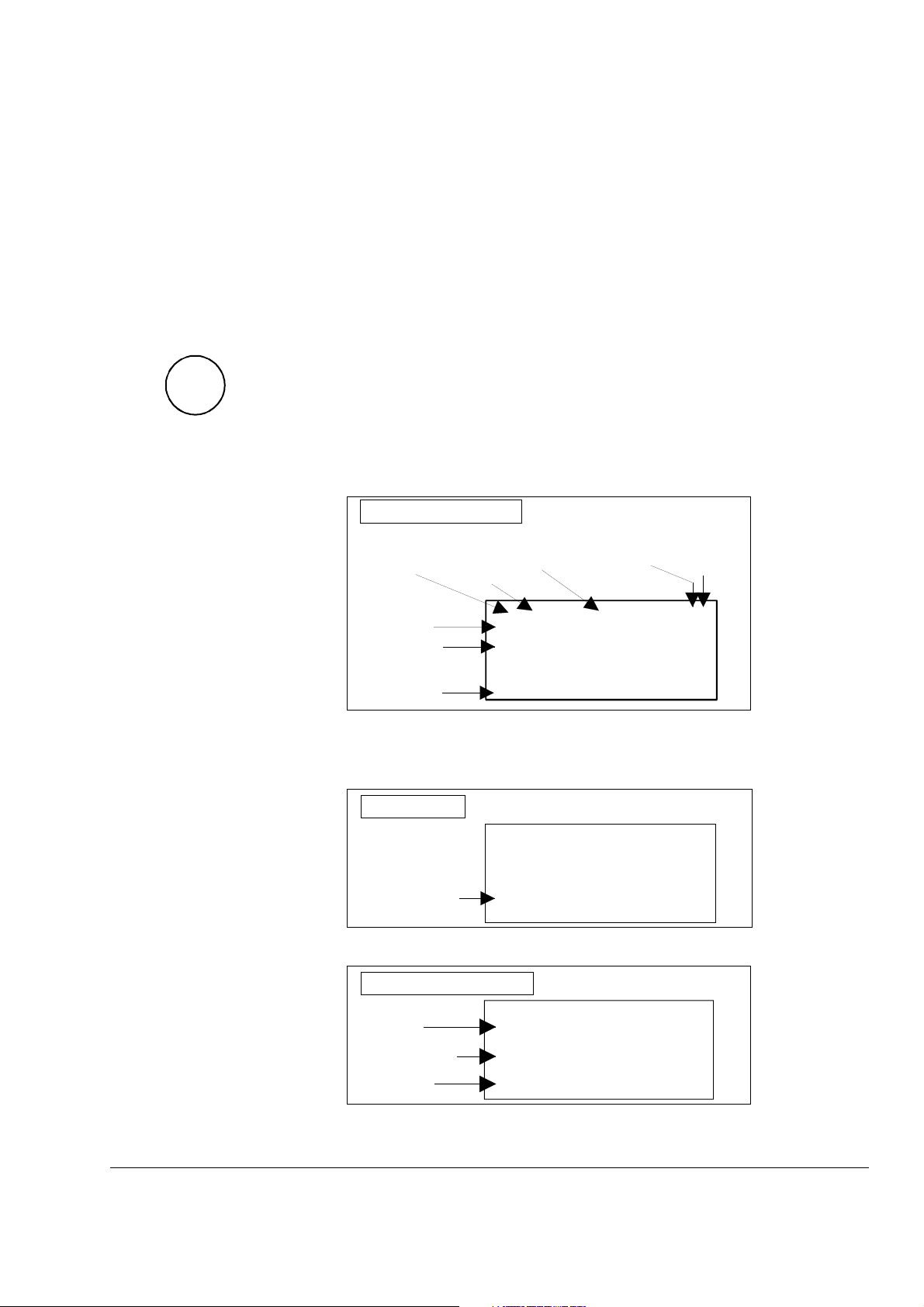
This keypad mode will show, depending on the drive´s history:
• Actual Signals
• Faults
• Fault History Logger
If the ACT-key is pressed immediately after initialization this table is
displayed. If no panel-key is touched for more than one minute the
Actual Signal Display will appear automatically, except when Status
display
3.15)
or speed reference setting is active. (see chapter 3.13 and
Actual Signal Display
ID-number
of the Drive
Statusrow
Actual Signal
Name, valu e and unit
Cursor shows
the selected row
Control
Location
L = Local
= Remote
Speed
reference
rpm
Main contactor
status
0 = Open
1 = Closed
0 L 0.0 rpm 00
SPEED AC 0.0 rpm
CONV CUR 0 A
U ARM AC 0 V
_
Run Status
I = RUN
0 = STOP
If a fault is effective in the drive, the Fault Display will appear automatically. This will happen with all other modes as well, except the
Drive Mode is active.
Fault Display
0 L 0.0 rpm 00
DCS 500
*** FAULT ***
Type of fault or alarm
To select Fault History Display see chapter 3.8
Fault History Display
No ext. FAN ack.
DCS 500B / DCP 500B Operating Instructions IV A 3 - 3
1 = las t fault
2 = second last fault
...
Fault or alarm name
Total time after
the power up
HHHH:MM:SS.ss
0 L 0.0 rpm 00
1 LAST FAULT
I/O-Board not found
0000:14:12.64
Page 40
Chapter 3 - Handling of Control Panel CDP 31x
3ADW000055R0401_DCS500B_Operating Instruction_e_d
Parameter Mode
PAR
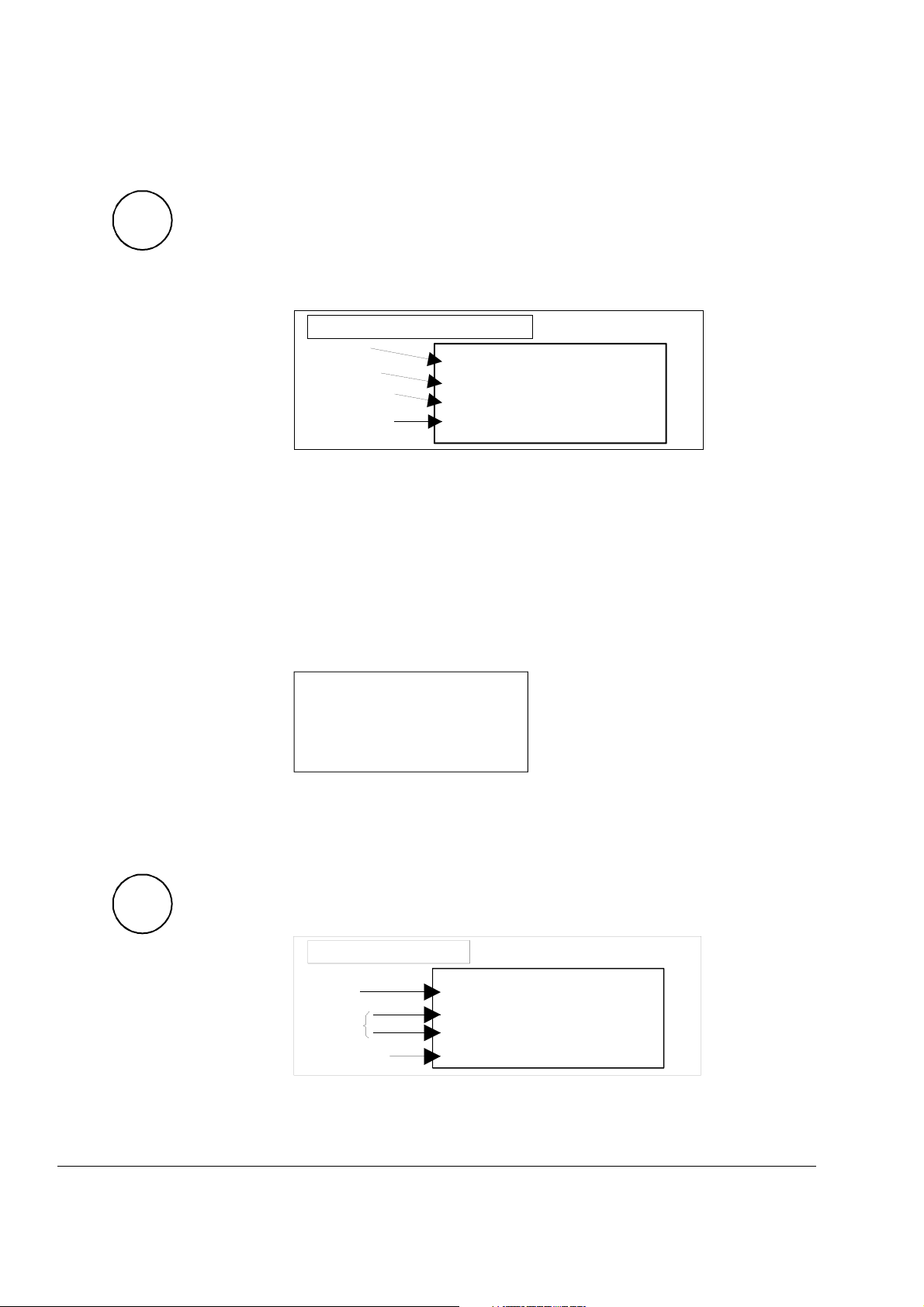
The Parameter Mode is used for:
- change the structure in the firmware
- show signals and their actual status
- show and change values of parameters, if they are not
write-protected.
When the Parameter mode is entered parameter 101 appears after
initialization, otherwise the selected parameter is shown.
Parameter and Signal Display
Statusrow
Group number
and name
Subgroup number
and name
Parameter value or
connection to or
status
0 L 0.0 rpm 00
17 RAMP GENERATOR
01 RAMP.[IN]
119.03
All function blocks are characterised by inputs and outputs with
numbers. These inputs and outputs can be subdivided into two
categories:
• Pins for designating connections
• Parameters for setting values, such as ramp-up / ramp-
down time, controller´s gain, reference values, etc.
If a write-protected pin or parameter is selected, the following warning will be displayed.
Function Mode
FUNC
**WARNIN
G**
WRITE ACCESS DENIED
PARAMETER SETTING
NOT POSSIBLE
The Function mode is used for special functions, such as:
• Parameter UPLOAD from drive to CDP 31x
• Parameter DOWNLOAD from CDP 31x to drive
• CDP 31x display contrast setting
Function Display
Statusrow
Selectable
Functions
Display contrast
adjusting
0 L 0.0 rpm 00
UPLOAD <=<=
_
DOWNLOAD =>=>
CONTRAST 7
IV A 3 - 4 DCS 500B / DCP 500B Operating Instructions
Page 41
Chapter 3 - Handling of Control Panel CDP 31x
3ADW000055R0401_DCS500B_Operating Instruction_e_d
Drive Mode
DRIVE
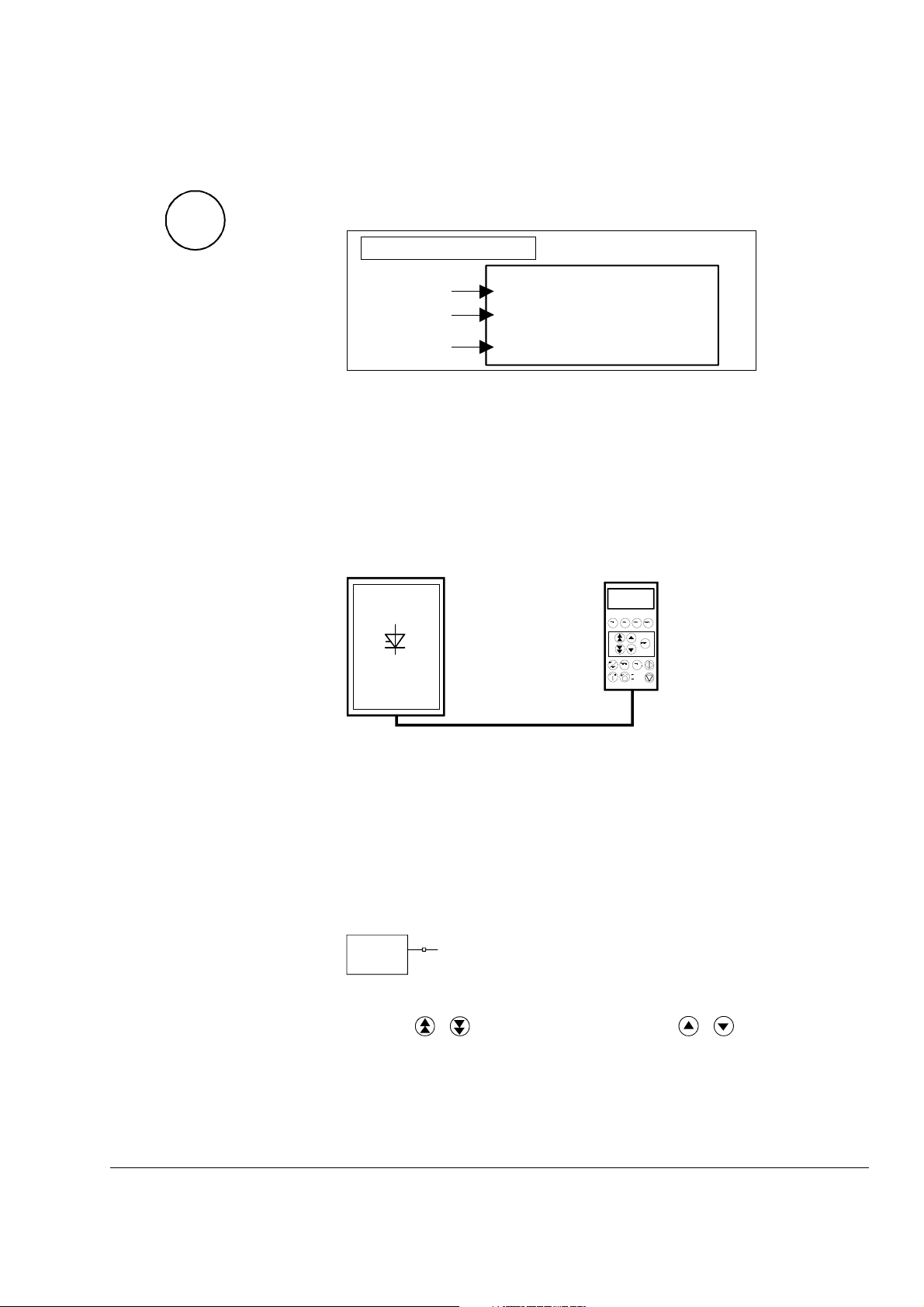
Drive mode is used to check the configuration. The display will
show the type and ID-number of the drive to whom the CDP 31x is
connected to.
Drive Display
Device type
The ID-number
Total number
of drives in
the link
Display with CDP 310 / CDP 311
DCS500
ID-NUMBER 0
TOTAL 1 DRIVES
The factory-adjusted (default) values of the ID-numbers for the
CDP and the drive depend on the specific CDP type:
CDP 310 / CDP 311 ⇒ ID = 31 with DCS 500 ⇒ ID = 0
CDP 312 ⇒ ID = 0 with DCS 500B ⇒ ID = 1
Caution: These values should not be changed!
DCS500
ID=0
Control Panel
ID=31
1 L 30.5 % 00
FLUX_REF 100%
EXMF_FLS 0 Log
ARMCURAC 147 A
CDI 300 link
(communication bus)
Factory-adjusted (default) values for CDP 310 / CDP 311 with DCS 500
3.4 Pin/Parameter Selecting and Changing of Value
For input / parameter selection, the following applies:
• Ignore the two right-hand digits; the remaining digits are the
group and to be selected
• The two right-hand digits are the element and to be selected
10713
DI7
Group 107
element 13
The selection can be done with the control panel CDP312, using
the keys
/ for the group and the keys / for the element
or a PC-based tool program CMT/DCS500B
DCS 500B / DCP 500B Operating Instructions IV A 3 - 5
Page 42
Chapter 3 - Handling of Control Panel CDP 31x
3ADW000055R0401_DCS500B_Operating Instruction_e_d
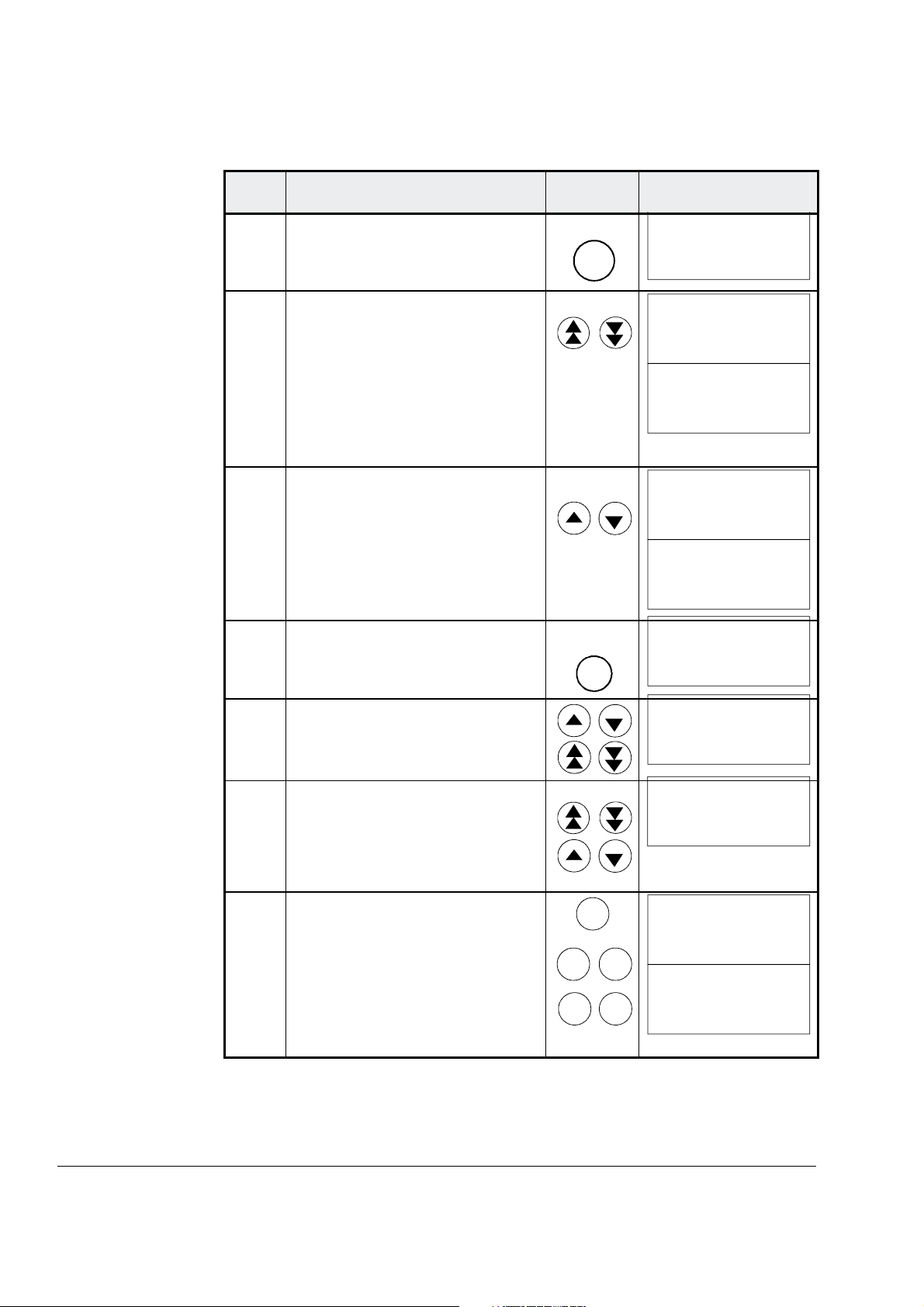
Step Function Press key Display after key is
1.
To enter the Parameter Mode
Selection
PAR
pressed
0 L 0.0 rpm 00
17 RAMP GENERATOR
01 RAMP.[IN]
119.03
2. To select another group.
While holding the key down,
only the group number and
name is displayed. When the
key is released, number, name
and value of the first pin/ parameter in the group are displayed.
3. To select a element.
While holding the key down,
only the element number and
name, representing a pin/ parameter, is displayed. When the
key is released the value of the
element is also displayed.
4. To enter the Pin/Parameter Setting Mode.
5a.
To change the Parameter
value: (slow change)
(fast change)
5b.
To change the Pin connection
at first: (group number) --->
then: (element number) --->
of the target.
0 L 0.0 rpm 00
21 SPEED MEASUREMEN
0 L 0.0 rpm 00
21 SPEED MEASUREMEN
01 TACHOPULS NR
2048
0 L 0.0 rpm 00
21 SPEED MEASUREMEN
02 SPEED MEAS MODE
0 L 0.0 rpm 00
21 SPEED MEASUREMEN
02 SPEED MEAS MODE
EMF SPEED ACT
ENTER
0 L 0.0 rpm 00
21 SPEED MEASUREMEN
02 SPEED MEAS MODE
[EMF SPEED ACT]
0 L 0.0 rpm 00
21 SPEED MEASUREMEN
02 SPEED MEAS MODE
[ANALOG TACHO]
0 L 0.0 rpm 00
2 ANALOG OUTPUTS
05 AO2.[IN]
[105.02]
6a.
6b.
To send the new value to the
drive.
To cancel the new setting and
keep the original value press
any key before pressing
ENTER.
The selected Keypad Mode is
entered.
ACT
FUNC
ENTER
PAR
DRIVE
0 L 0.0 rpm 00
21 SPEED MEASUREMEN
02 SPEED MEAS MODE
ANALOG TACHO
0 L 0.0 rpm 00
21 SPEED MEASUREMEN
02 SPEED MEAS MODE
EMF SPEED ACT
IV A 3 - 6 DCS 500B / DCP 500B Operating Instructions
Page 43
3ADW000055R0401_DCS500B_Operating Instruction_e_d
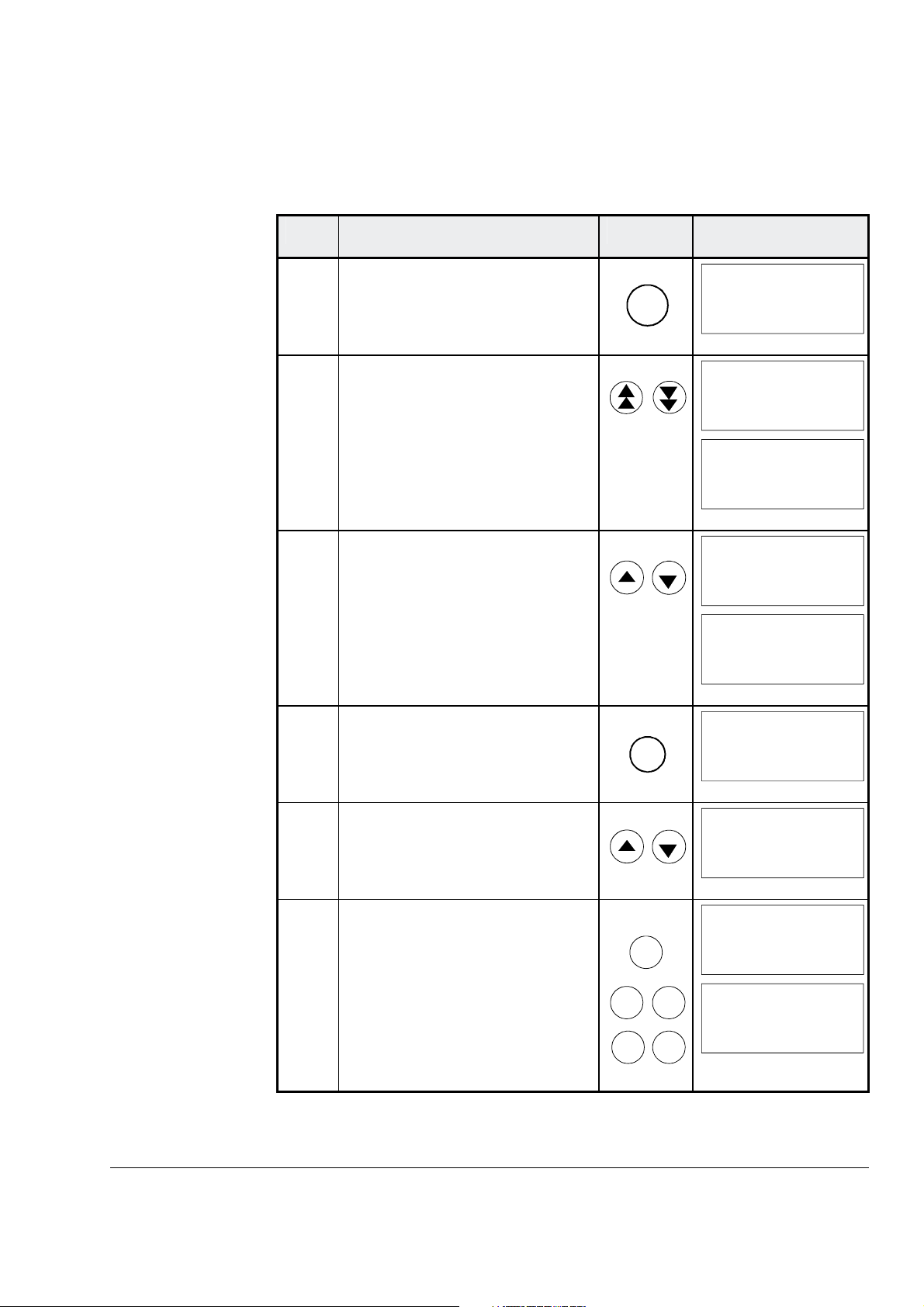
3.5 Saving of the Parameters to backup memory
Step Function Press key
Chapter 3 - Handling of Control Panel CDP 31x
Display after key is
pressed
1.
To enter the Parameter Mode
Selection
2. Select group 112.
While holding the arrow down,
only the group name is displayed. When the key is released, number, name and
value of the first parameter in
the group is displayed.
3. Select signal number 02 from
group 112.
While holding the arrow down,
only the signal name and number are displayed. When the key
is released the value is also displayed.
4. Press ENTER to select
BACKUPSTOREMODE.
5. Saving of changed values.
Select Set1 (SAVE MOT1 SET)
or Set2 (SAVE MOT2 SET).
6a.
6b.
Confirmation of the saving.
Saving procedure is completed
when NONE is displayed.
To cancel the saving and keep
the original value press any key
before pressing
ENTER.
The selected Keypad Mode is
entered.
ACT
FUNC
PAR
ENTER
ENTER
PAR
DRIVE
0 L 0.0 rpm 00
2 ANALOG OUTPUTS
05 AO2.[IN]
105.01
0 L 0.0 rpm 00
112 MAINTENANCE
0 L 0.0 rpm 00
112 MAINTENANCE
01 COMMIS STAT
NOT ACTIVATED
0 L 0.0 rpm 00
112 MAINTENANCE
02 BACKUPSTOREMODE
0 L 0.0 rpm 00
112 MAINTENANCE
02 BACKUPSTOREMODE
NONE
0 L 0.0 rpm 00
112 MAINTENANCE
02 BACKUPSTOREMODE
[NONE]
0 L 0.0 rpm 00
112 MAINTENANCE
02 BACKUPSTOREMODE
[SAVE MOT1 SET]
0 L 0.0 rpm 00
112 MAINTENANCE
02 BACKUPSTOREMODE
ERASING...
0 L 0.0 rpm 00
112 MAINTENANCE
02 BACKUPSTOREMOD E
NONE
DCS 500B / DCP 500B Operating Instructions IV A 3 - 7
Page 44
Chapter 3 - Handling of Control Panel CDP 31x
3ADW000055R0401_DCS500B_Operating Instruction_e_d
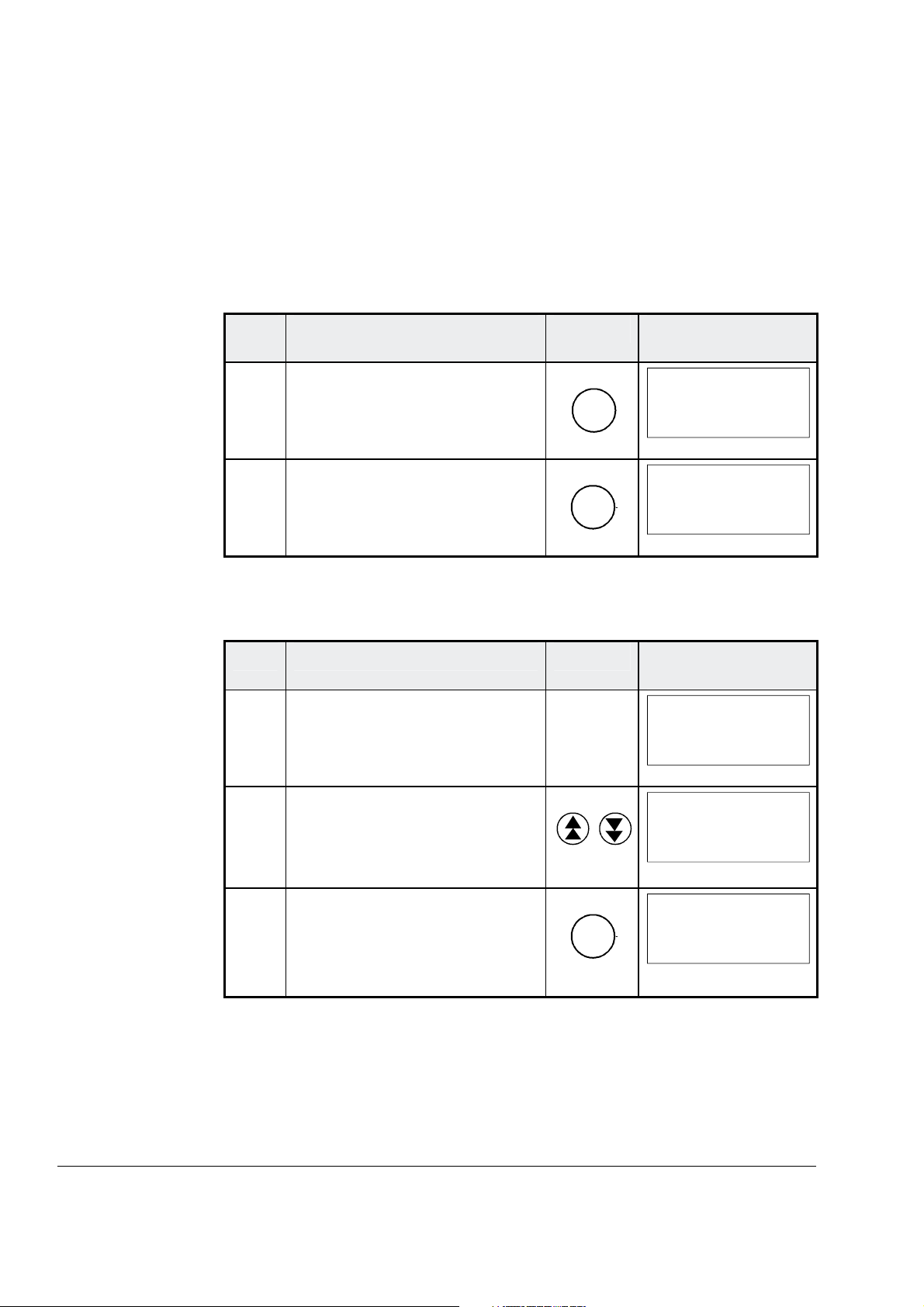
3.6 FAULT RESETTING (RESET)
FAULT resetting and EMERGENCY STOP resetting (RESET) can
only be performed via the CDP 31x if LOCAL is active. If drive is in
REMOTE, please check whether LOCAL is a critical condition. If not
activate LOCAL, reset the fault and activate REMOTE again.
Step Function Press key Display after key is
pressed
1.
To enter the Actual Signal
Display Mode
2. To RESET the FAULT
3.7 EMERGENCY STOP RESETTING (RESET)
Step Function Press key Display after key is
1. If EMERGENCY STOP is activated, the control panel will
show the following ALARM
2. To enter the Fault History Display
ACT
RESET
0 L 0.0 rpm 00
DCS500
*** FAULT ***
I/O-Board not found
0 L 0.0 rpm 00
SPC:OUT 0.0 %
_
CONV CUR 0 A
U ARM AC 0 V
pressed
0 L 0.0 rpm 00
DCS500
** WARNING **
+Emergency stop
0 L 0.0 rpm 00
1 LAST FAULT
+Emergency stop
xxxx:xx:xx.xx
3. To RESET the ALARM
RESET
0 L 0.0 rpm 00
1 LAST FAULT
-Emergency stop
xxxx:xx:xx.xx
IV A 3 - 8 DCS 500B / DCP 500B Operating Instructions
Page 45
Chapter 3 - Handling of Control Panel CDP 31x
3ADW000055R0401_DCS500B_Operating Instruction_e_d
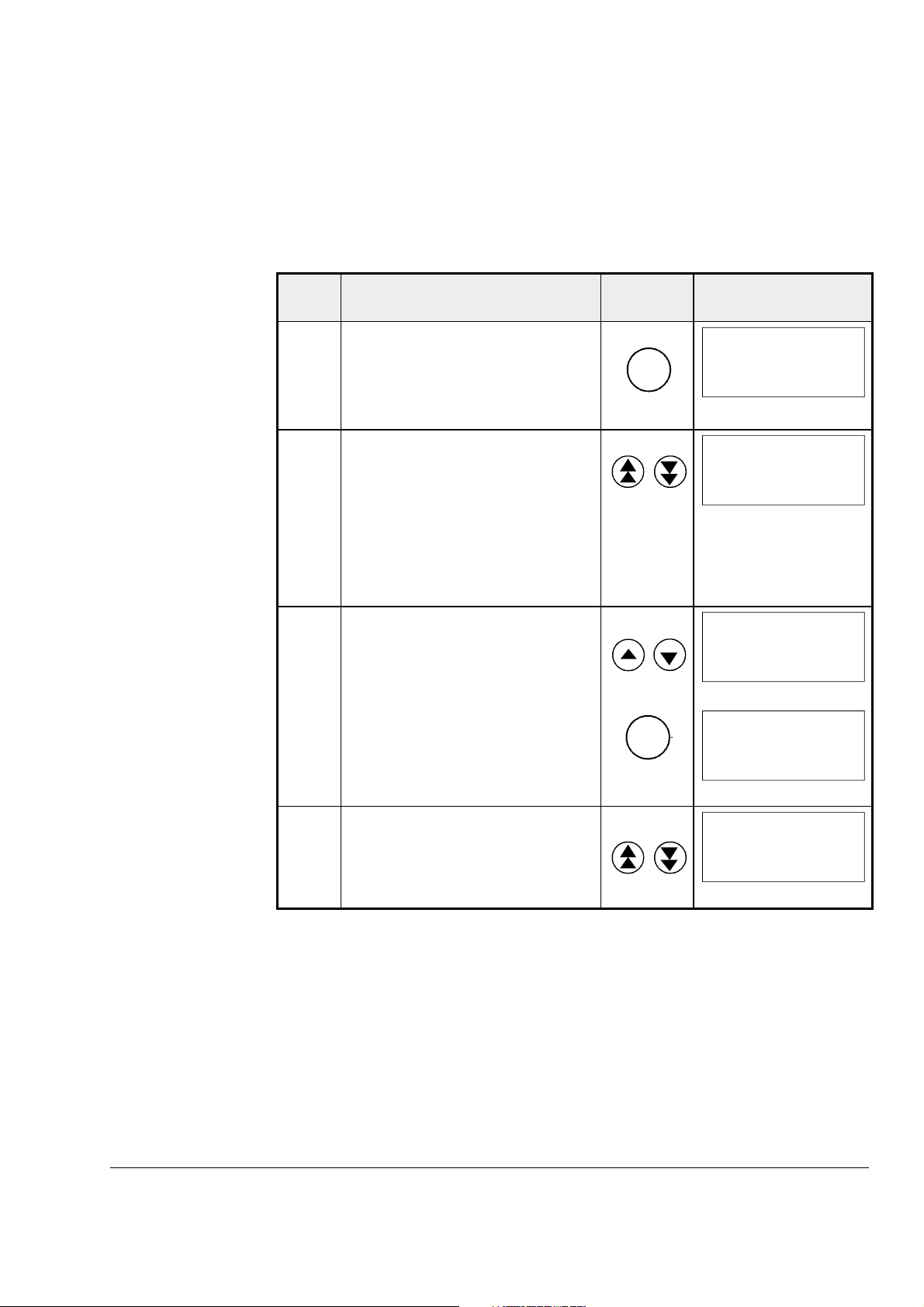
3.8 Fault History Display
Up to 100 faults are stored time related and displayed together with
the time they appeared after electronics supply switched on.
Step Function Press key Display after key is
pressed
1.
To enter the Actual Signal
Display Mode
2. To enter the Fault History Display.
These keys also scroll the
screen from Actual Signal Dis-
play to Fault Display, to Fault
History Display back to Actual
Signal Display.
3.
To select newer (UP) or older
fault (DOWN).
To clear a fault from the Fault
History Buffer
The previous fault is displayed.
Drive condition identical to 3.6
and 3.7
ACT
RESET
0 L 0.0 rpm 00
SPC:OUT 0.0 %
_
CONV CUR 0 A
U ARM AC 0 V
0 L 0.0 rpm 00
1 LAST FAULT
+Type code changed
xxxx:xx:xx.xx
0 L 0.0 rpm 00
2 LAST FAULT
Armature overvoltage
xxxx:xx:xx.xx
0 L 0.0 rpm 00
1 LAST FAULT
Reset
xxxx:xx:xx.xx
4.
To return to the Actual Signal
Display Mode.
0 L 0.0 rpm 00
SPC:OUT 0.0 %
_
CONV CUR 0 A
U ARM AC 0 V
DCS 500B / DCP 500B Operating Instructions IV A 3 - 9
Page 46
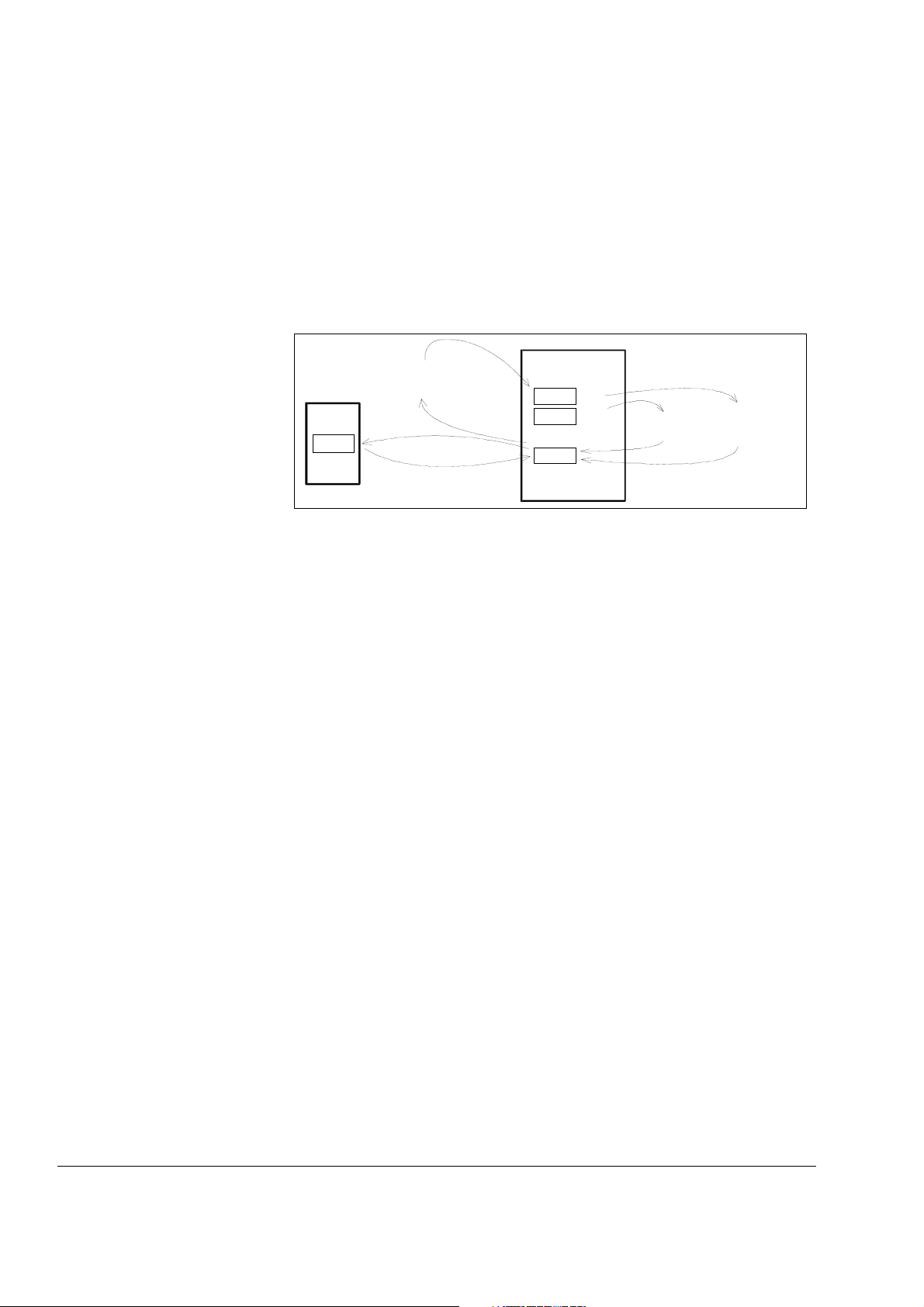
Chapter 3 - Handling of Control Panel CDP 31x
3ADW000055R0401_DCS500B_Operating Instruction_e_d
3.9 Uploading and Downloading of Parameters (UPLOAD/DOWNLOAD)
CAUTION!
The drive must be in standstill condition with given
STOP command (controllers blocked, power section
disconnected from the network) when UPLOAD/
DOWNLOAD function is selected.
FPROM= FLASH-PROM
RAM = Random Access Memory
FACTORYSET VALUE
Parameter 11202:
4 =
SELECT MOT1 SET
5 =
SELECT MOT2 SET
Control
Panel
FPROM
Parameter 11202:
1 =
SAVE MOT1 SET
2 =
SAVE MOT2 SET
UPLOA D
DOWNL OAD
DCS 500
FPROM
D35
FPROM
D33&34
RAM
If one or both of these functions have been performed additional actions may be needed. For example BACKUPSTOREMODE should
be selected for saving the values to the backup memory, if a
DOWNLOAD had taken place.
UPLOAD will copy all parameters and connections, which are dif-
ferent to default, from the RAM memory of the drive to the FPROM
memory of the Control Panel CDP 31x.
Before a DOWNLOAD is started the factory-set values (default values) should be available within the drive´s RAM memory.
Factory-set values are always available in control board memory
and they can be called by means of BACKUPSTOREMODE parameter 11202 [FACTORY_SET_VALUE] or by means of S2 switch
on the control board SDCS-CON-x.
The DOWNLOAD will copy all values stored in the FPROM memory
of the CDP 31x to the RAM memory of the drive. Downloaded
parameters should be saved to the FPROM memory of the control
board SDCS-CON-x. See chapter 3.5"Saving of Parameters to
backup memory" .
Note: For reasons of safety the DOWNLOAD function will only
operate if „LOCAL mode“ of the Control Panel CDP 31x
is selected!
IV A 3 - 10 DCS 500B / DCP 500B Operating Instructions
Page 47
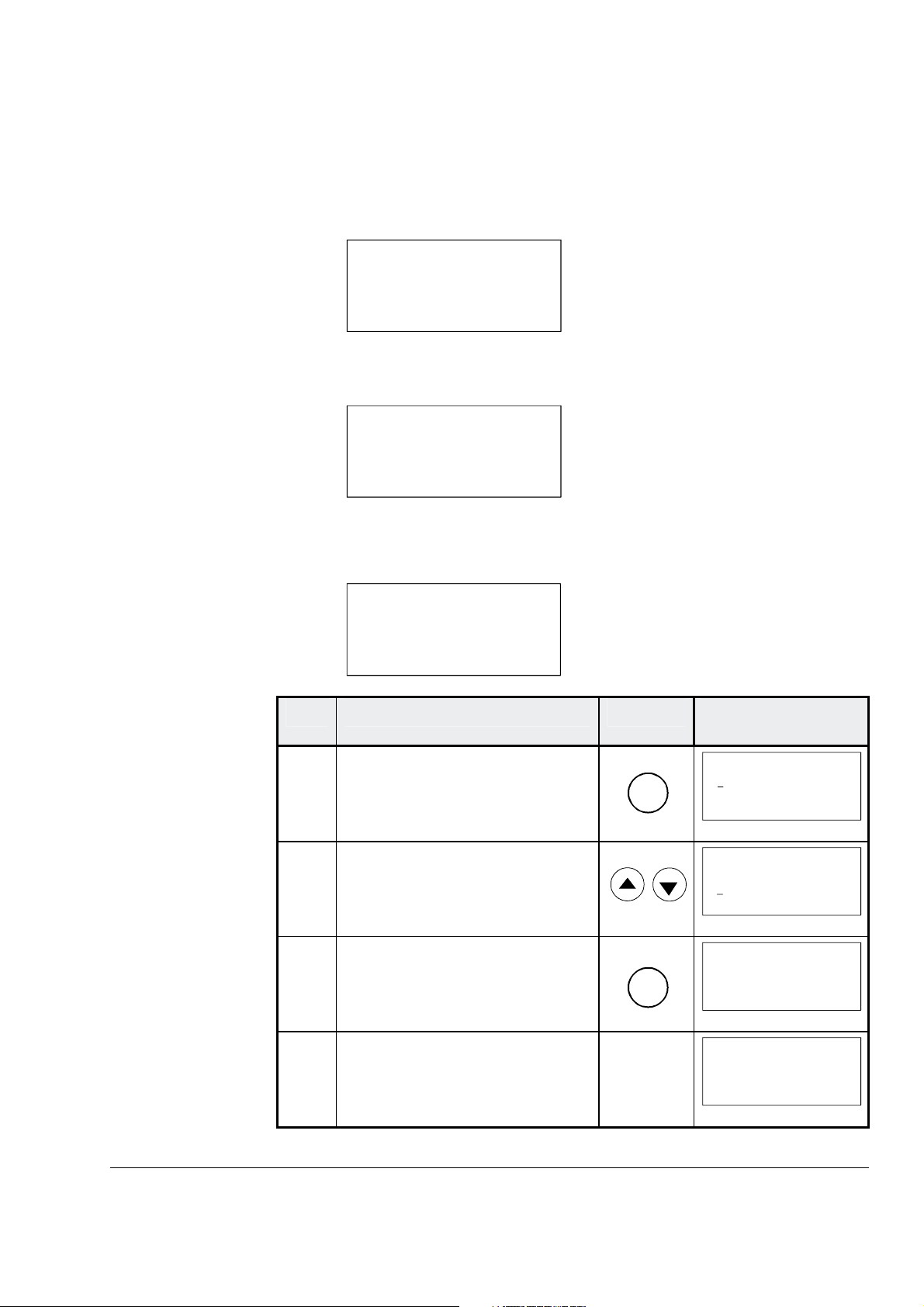
Chapter 3 - Handling of Control Panel CDP 31x
3ADW000055R0401_DCS500B_Operating Instruction_e_d
Depending on the drive´s condition and the status of the commissioning, UPLOAD has to take place before DOWNLOAD, otherwise
a warning may be displayed:
**WARNIN
G**
NOT UPLOADED
DOWNLOADING
NOT POSSIBLE
The drive must be in stopped state during the DOWNLOAD process, otherwise the following warning is displayed.
**WARNIN
G**
DRIVE IS RUNNING
DOWNLOADING
NOT POSSIBLE
The drive that receives the downloaded parameters must have a
compatible software version to the drive from which the parameters
were uploaded. Otherwise the panel will display a warning:
**WARNING**
DRIVE UNCOMPATIBLE
DOWNLOADING
NOT POSSIBLE
Step Function Press key Display after key is
pressed
1.
To enter the Function Mode
FUNC
0 L 0.0 rpm 00
UPLOAD <= <=
DOWNLOAD => =>
CONTRAST 7
2. To select a function.
0 L 0.0 rpm 00
UPLOAD <= <=
DOWNLOAD => =>
CONTRAST 7
3. To activate the selected function.
ENTER
0 L 0.0 rpm 00
=> => => => => => =>
DOWNLOAD
4. Loading complete.
0 L 0.0 rpm 00
SPC:OUT 0.0 %
_
CONV CUR 0 A
U ARM AC 0 V
DCS 500B / DCP 500B Operating Instructions IV A 3 - 11
Page 48
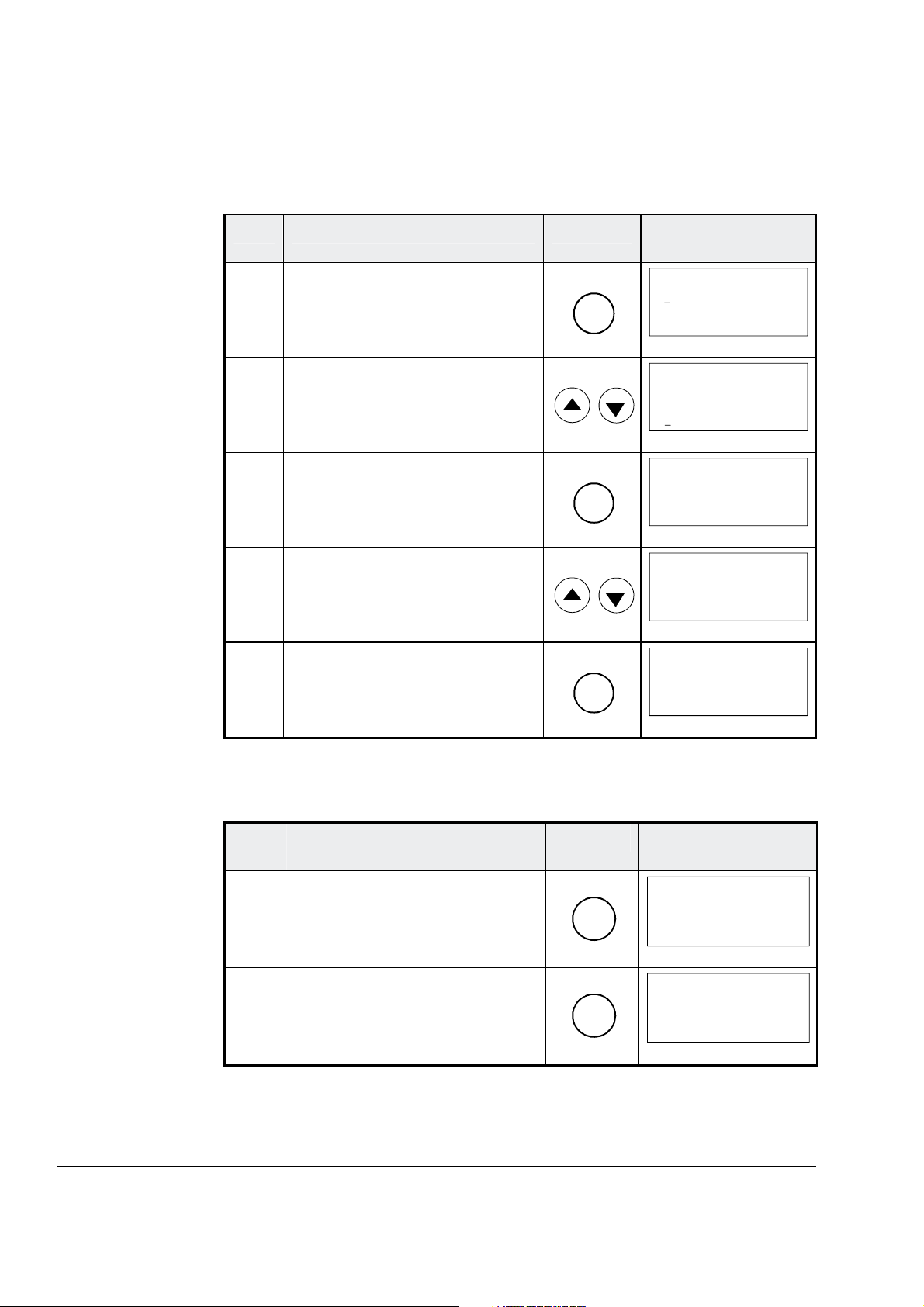
Chapter 3 - Handling of Control Panel CDP 31x
3ADW000055R0401_DCS500B_Operating Instruction_e_d
3.10 Setting of the Display Contrast
Step Function Press key Display after key is
pressed
1.
To enter the Function Mode.
2. To select a function.
3. To enter contrast setting function.
4. To set the contrast.
(1...7)
5. To accept the selected value.
3.11 Full Name of output pins
Step Function Press key Display after key is
FUNC
ENTER
ENTER
0 L 0.0 rpm 00
UPLOAD <= <=
DOWNLOAD => =>
CONTRAST 7
0 L 0.0 rpm 00
UPLOAD <= <=
DOWNLOAD => =>
CONTRAST 7
0 L 0.0 rpm 00
CONTRAST [7]
0 L 0.0 rpm 00
CONTRAST [4]
0 L 0.0 rpm 00
CONTRAST 4
pressed
1. To display the full name of the
three actual signals press key
and hold
2.
To return to the Actual Signal
Display Mode release key.
ACT
ACT
0 L 0.0 rpm 00
SPEED ACT F ILT
CONV CURR ACT
U ARM ACT
_
0 L 0.0 rpm 00
SPEED AC 0.0 rpm
CONV CUR 0 A
U ARM AC 0 V
_
IV A 3 - 12 DCS 500B / DCP 500B Operating Instructions
Page 49
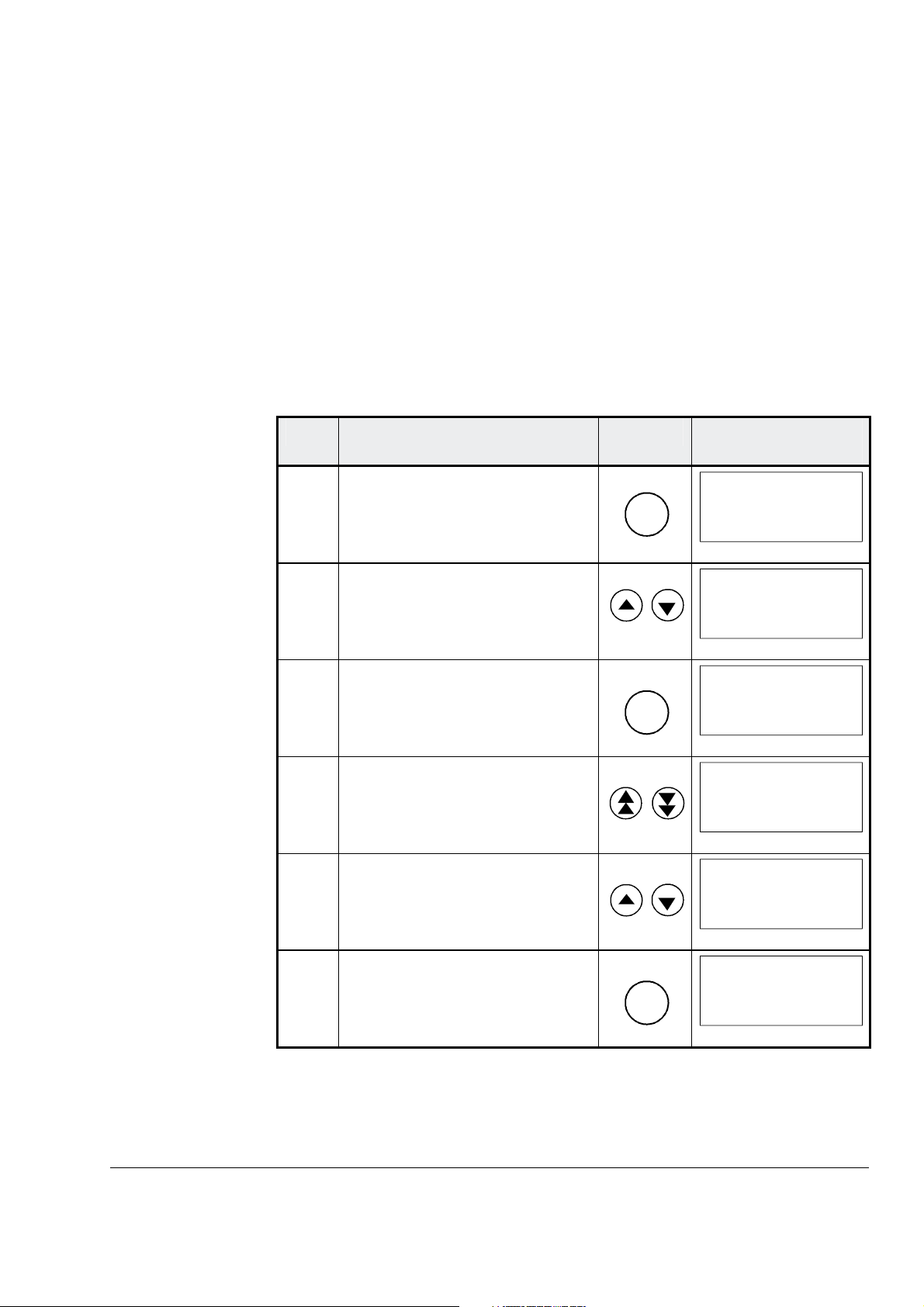
3ADW000055R0401_DCS500B_Operating Instruction_e_d
3.12 Selecting output pins
Step Function Press key Display after key is
Chapter 3 - Handling of Control Panel CDP 31x
Note for CDP 310 / CDP 311:
Newly selected actual signals will be used for display until the electronics power supply is switched OFF.
Note for CDP 312:
If there is a need for permanent display of the newly selected pin
(e.g. after having switched OFF and ON again the electronics
power supply), BACKUPSTOREMODE (see chapter 3.5) should
be performed in order to save the values to the backup memory
before switching OFF the electronics power supply.
pressed
1.
To enter the Actual Signal
Display Mode
ACT
0 L 0.0 rpm 00
SPEED AC 0.0 rpm
CONV CUR 0 A
U ARM AC 0 V
_
2. To select the desired line.
0 L 0.0 rpm 00
SPEED ACT F ILT
_
CONV CURR ACT
U ARM ACT
3. To get acces to the desired line.
ENTER
0 L 0.0 rpm 00
121 SPEED MEASUREMEN
03 SPEED ACT FILT
0.0 rpm
4. To select a different group.
0 L 0.0 rpm 00
120 SPEED CONTROLLER
01 ERR:OUT
0.0 rpm
5. To select a element.
0 L 0.0 rpm 00
120 SPEED CONTROLLER
04 SPC:OUT
0.0 %
6. To accept the selection and to
return to the Actual Signal
Display Mode.
ENTER
0 L 0.0 rpm 00
SPC:OUT 0.0 %
_
CONV CUR 0 A
U ARM AC 0 V
DCS 500B / DCP 500B Operating Instructions IV A 3 - 13
Page 50
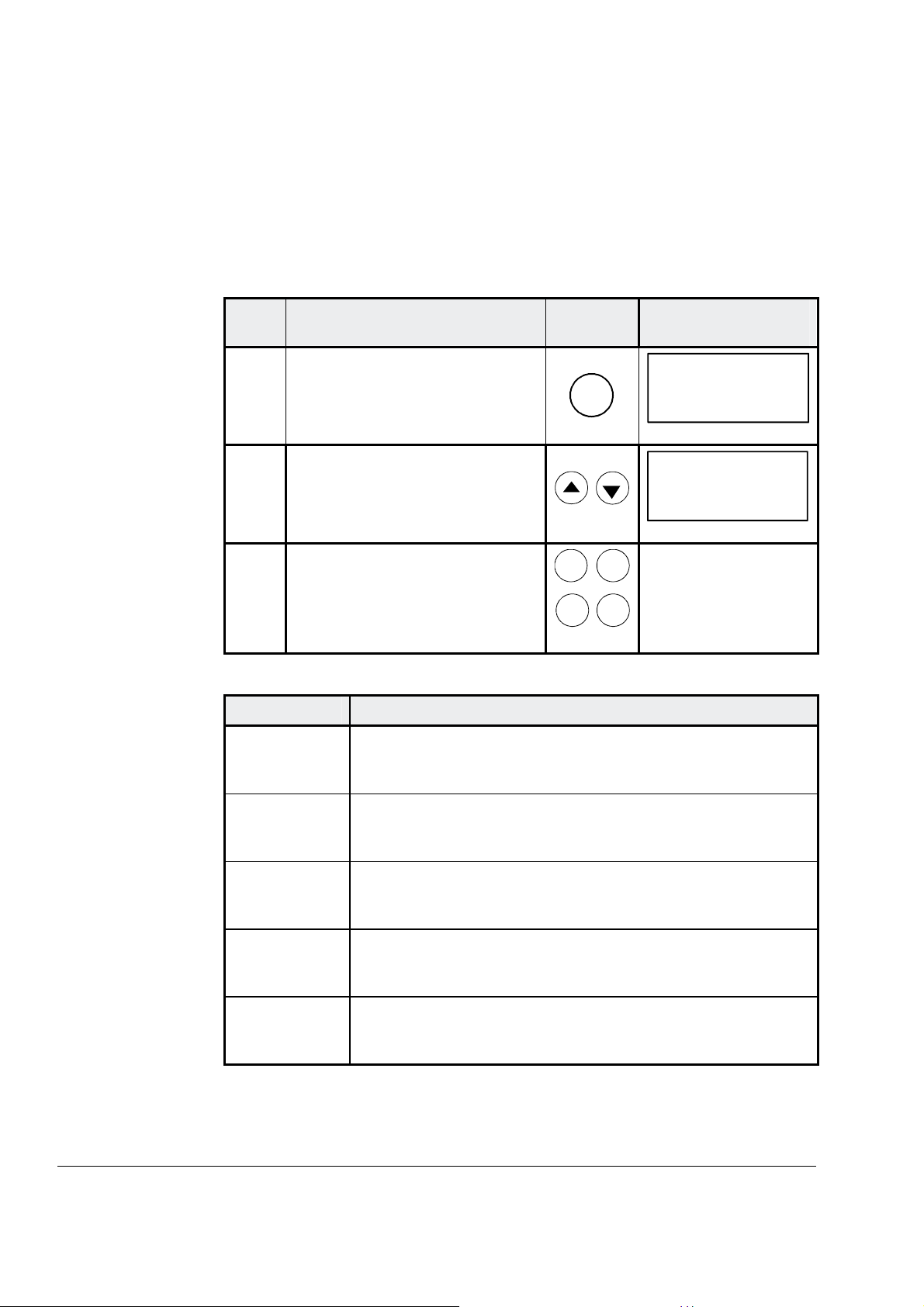
Chapter 3 - Handling of Control Panel CDP 31x
3ADW000055R0401_DCS500B_Operating Instruction_e_d
3.13 Drive Mode
Step Function Press key Display after key is
Display of the ID-number for the Drive and for the Control Panel
CDP 31x as well as display of the status (Status Display)
pressed
1.
2.
3.
To enter the Drive Mode
To select the Status Display
(see table below).
To cancel the Drive Mode.
The selected Keypad Mode is
entered.
Symbol Status Display
á
Stopped, main contactor ON (closed)
DRIVE
ACT
FUNC
PAR
DRIVE
DCS500
ID-NUMBER 0
TOTAL 1 DRIVES
0 31P
Ü
Ü
Ö
P
F
Stopped, main contactor OFF (open)
Running, main contactor ON (closed)
Control Panel CDP 31x
Alarm or fault signalling effective in the drive
IV A 3 - 14 DCS 500B / DCP 500B Operating Instructions
Page 51
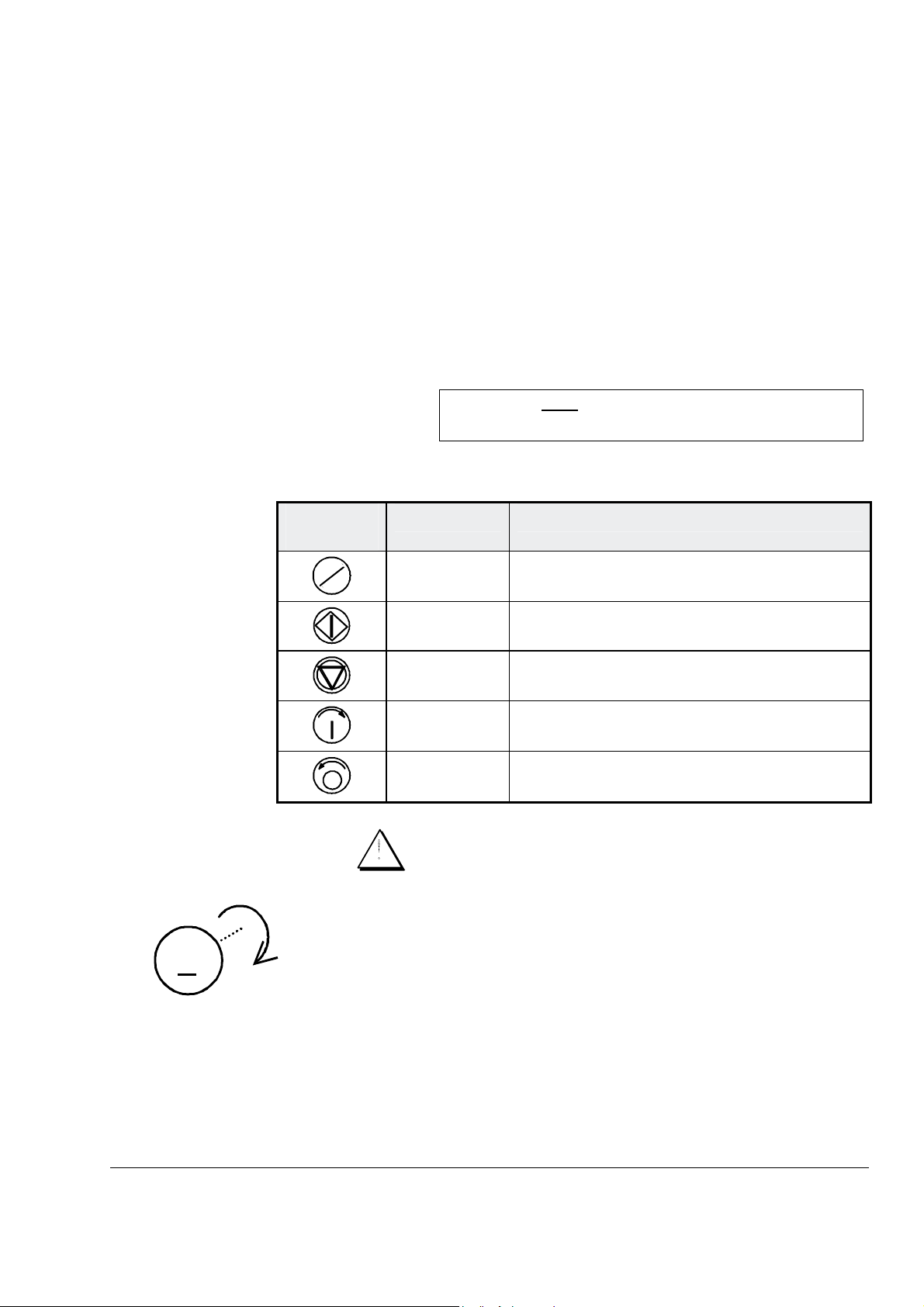
3ADW000055R0401_DCS500B_Operating Instruction_e_d
3.14 Running the Drive
Operational Command Keys
Panel Key
Chapter 3 - Handling of Control Panel CDP 31x
Operational commands can be given from the Control Panel
CDP31x every time when the status row is displayed. Operational
commands include START and STOP of the the drive, controlling
the main contactor and adjusting the reference.
CAUTION!
To be able to give operational commands from the
CDP31x, the selected control location must be the
Control Panel. The control location can be changed
by means of LOC/REM key to LOCAL mode.
If LOC is activated some of the
binary inputs are no longer functioning.
Take care that the drive is engineered to allow operation with LOCAL mode.
Control
Name of Key Function
Running the DCDrive from
the CDP31x
M
LOC
REM
LOCAL /
REMOTE
To select LOCAL (= CDP31x) or REMOTE
(= ext. control system) operation.
START Starts the drive, when in LOCAL mode.
STOP Stops the drive, when in LOCAL mode.
ON Main contactor closing control, when in
LOCAL mode.
OFF Main contactor opening control, when in
LOCAL mode.
Ensure safety before you start the drive test!
• Select LOCAL mode (LOCAL = CDP31x) by pressing
LOC/REMOTE key.
• Close (switch on) the main contactor by pressing the ON key
• Start the drive by pressing the START key. Motor will now ac-
celerate to the value of the reference.
• Direction of rotation can be changed by giving the opposite po-
larity reference value in case of 4Q drive.
• Stop the drive by pressing the STOP key. Motor will decelerate
to zero speed. (depending on the STOP MODE)
• Finally open (switch off) the main contactor by pressing the
OFF key.
DCS 500B / DCP 500B Operating Instructions IV A 3 - 15
Page 52
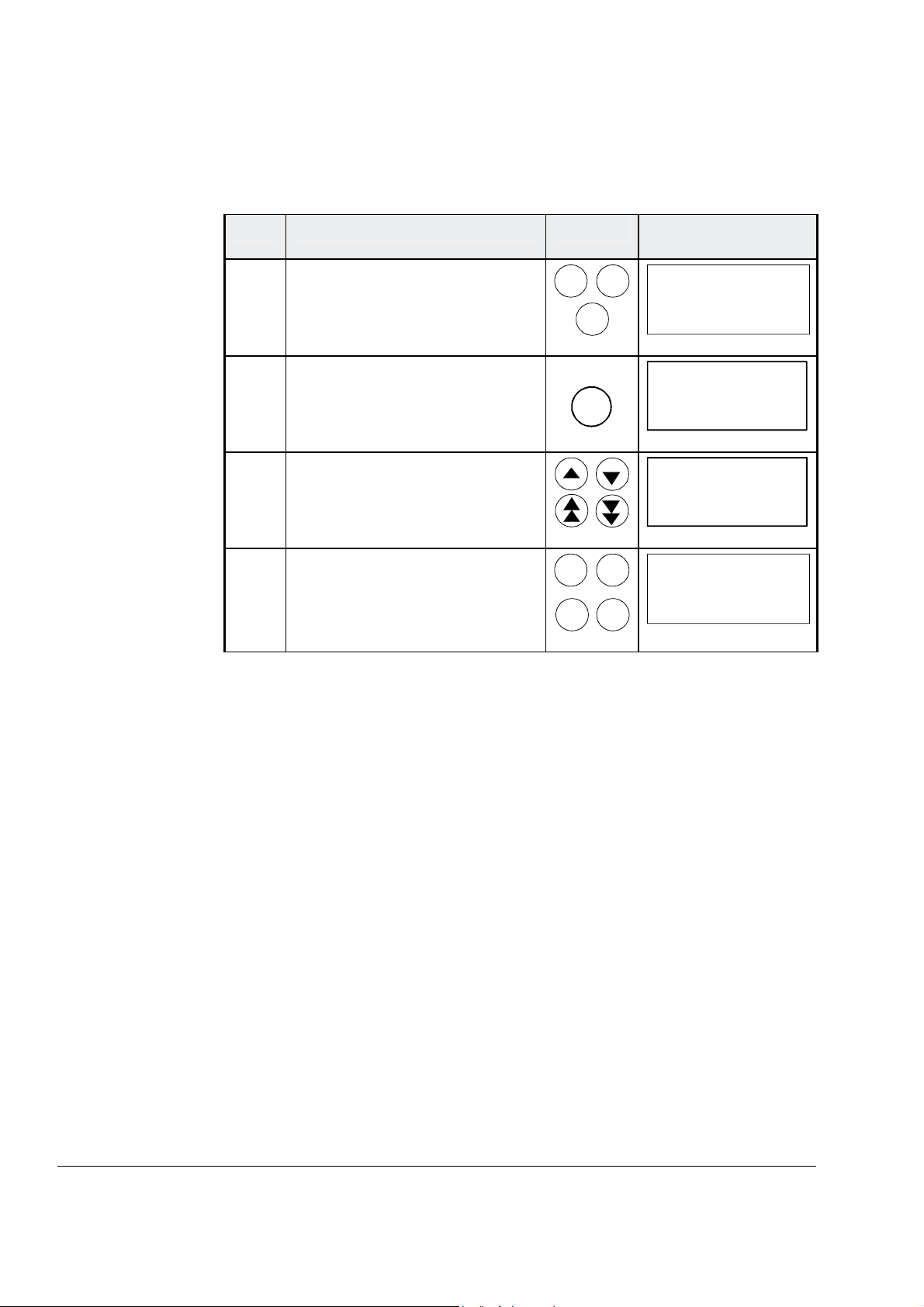
Chapter 3 - Handling of Control Panel CDP 31x
3ADW000055R0401_DCS500B_Operating Instruction_e_d
3.15 Speed Reference Setting for the Drive
Step Function Press key Display after key is
pressed
1. Press one of these keys to get
the status row displayed.
ACT
FUNC
PAR
0 L 0.0 rpm 00
SPEED AC 0.0 rpm
_
CONV CUR 0 A
U ARM AC 0 V
2.
To enter the Reference Setting
Mode
REF
0 L [0.0 rpm] 00
SPEED AC 0.0 rpm
CONV CUR 0 A
U ARM AC 0 V
_
3. To change the reference:
(slow change)
(fast change)
4.
To exit the Reference Setting
Mode.
The selected Keypad Mode is
entered.
ACT
FUNC
PAR
DRIVE
0 L [219.0 rpm] 00
SPEED AC 0.0 rpm
CONV CUR 0 A
U ARM AC 0 V
0 L 219.0 rpm 00
SPEED AC 0.0 rpm
_
CONV CUR 0 A
U ARM AC 0 V
_
IV A 3 - 16 DCS 500B / DCP 500B Operating Instructions
Page 53

Chapter 4 - Signals and Troubleshooting
3ADW000055R0401_DCS500B_Operating Instruction_e_d
4.1 Display of status, alarm and fault signals
Categories of signals
and possibilities of
display
The signals (messages) to be available for thyristor power converters series DCS 500B / DCF 500B or DCP 500 are subdivided
into five
categories:
General messages
Starting errors
F Fault signals
A Alarm signals
[112 . .] Status signals through parameters
A seven segment display on the control board SDCS-CON-x of the
thyristor power converters series DCS 500B / DCF 500B or
DCP 500 is used to show general messages, starting errors, fault
and alarm signals. The signals (messages) are displayed as codes.
If the codes consist of several parts, the characters/individual digits
will be indicated for 0.7 sec one after the other, e.g.:
0.7s
⇒
⇑ ⇐ ⇓
In addition to this the DCS 500B DCF 500B or DCP 500 combined
with the LCD of the control panel CDP 31x will be able to show the
fault and alarm signals as well as the status signals (selected by
signal numbers
Note: The languages to be available for display as text depend
on the type of Control Panel and the Software version
( ⇒ Chapter „Handling of Control Panel CDP 31x“).
0.7s
0.7s
⇒
F 14 = Speed measurement fault
[112 . .]) as clear text.
DCS 500B / DCP 500B Operating Instructions IV A 4 - 1
For subsequent evaluation via binary outputs or serial interfaces the
16 bit informations
and
FAULT WORD3 [11103] as well as ALARM WORD1 [11104],
ALARM WORD2 [11105]
FAULT WORD1 [11101], FAULT WORD2 [11102]
and ALARM WORD3 [11106] contain several
fault and alarm signals as a binary code.
Each fault and alarm signal is coded as an individual error code to
LATEST FAULT [11106] and LATEST ALARM [11107].
the
Page 54
Chapter 4 - Signals and Troubleshooting
3ADW000055R0401_DCS500B_Operating Instruction_e_d
4.2 General messages
Code
seven
segm.
display
Text on
LCD of control panel
CDP 31x
The general messages will only be shown on the seven segment
display of the control board SDCS-CON-x.
Definition
– Remark
8
L
Not available Program is not running
.
Not available Normal situation, no fault / no alarm signal
Not available
Indication while loading another firmware
–
–
–
(1)
into the drive
(1) Units should be switched off and on electrically; if fault occurs again, the PCBs SDCS-POW-1 and SDCS-CON-x
have to be checked and if necessary to be changed.
4.3 Starting errors (E)
Code
seven
segm.
display
E1
E2
Text on
LCD of control panel
CDP 31x
Not available ROM memory test error
Not available RAM memory test error
The starting errors will only be shown on the seven segment display
of the control board SDCS-CON-x.
With starting errors it will not be possible to start the drive.
Definition
– Remark
–
–
(1)
(1)
E3
Not available No TC-link board
–
(not valid for software version S21.1xx)
E4
E5
E6
E7
(1) Units should be switched off and on electrically; if fault occurs again, the PCBs SDCS-POW-1 and SDCS-CON-x
have to be checked and if necessary to be changed.
(2) Check communication board, plug in correctly
(3) Load firmware once more.
Not available Communic. board SDCS-COM-x faulty
Not available
Not available
No control program in memory
ASIC not O.K.
Not available Parameter FLASH identity test failed
and if necessary change the board.
–
–
–
–
(2)
(3)
(1)
(1)
IV A 4 - 2 DCS 500B / DCP 500B Operating Instructions
Page 55
3ADW000055R0401_DCS500B_Operating Instruction_e_d
4.4 Fault Signals (F)
Chapter 4 - Signals and Troubleshooting
The fault signals will be shown on the seven segment display of the
control board SDCS-CON-x as codes F . . as well as on the LCD of
the control panel CDP 31x as clear text.
All fault signals - with the exception of
reset (after elimination of the faults);
F 17, F 18 and F 44 - can be
F 20 would be self resetting, if
the communication had been re-established before.
For resetting (RESET) of fault signals the following steps are re-
quired:
• Switching off the commands ON/OFF and RUN
• Elimination of the faults
• Fault acknowledgement, i.e. resetting (RESET)
a) as described for CDP 31x
or b) by short-time setting of the command RESET
to high (logical one) via a binary input
(default setting = DI6).
• Depending on the application conditions generate the commands
ON/OFF and RUN once more.
The fault signals will result in switching off the signal
[10910] resp. in
stopping the drive (installation-dependent).
If a fault occurs, there will be three different possibilities of reaction (see
column “Remark” in the fault list):
(1) Fault will switch off the signals
contactor and the fan contactor.
(2) Fault will switch off the signals
field contactor.
(3) Fault will switch off at least the signal
energizing the main contactor, the field
energizing the main contactor and the
energizing the main contactor.
Code
seven
segm.
display
F 1
LCD of control panel
Auxil. undervoltage
Text on
CDP 31x
Auxiliary voltage fault
Try to reset. Check internal auxiliary voltages;
if fault persists, change SDCS-CON-x
and/ or SDCS-POW 1 board (if required).
F 2
Overcurrent
Overcurrent
Check: - Motor, load and armature cabling
for faults or blocking condition;
- Parameter setting of current con-
trol circuit/torque limitation;
- Parameter
(overcurrent detection).
DCS 500B / DCP 500B Operating Instructions
Definition /
Action
[P 512]
Status
signal
(FAULT_WORD_1/2)
11101 bit 0 (1)
11101 bit 1 (3)
Remark
IV A 4 - 3
Page 56
Chapter 4 - Signals and Troubleshooting
3ADW000055R0401_DCS500B_Operating Instruction_e_d
Code
seven
segm.
display
F 3
F 4
F 5
Text on
LCD of control panel
CDP 31x
Conv.fan curr.fault
Converter overtemp.
Earth fault
Definition /
Action
Current converter fan not within limits
The current of the converter´s cooling fan is
measured via the option board PW1002/3.
Check: - Fan supply, fan current;
- Setting of PW1002,
SET_MAX_BR_TEMP [P519] and
CONV_TEMP_DELAY [P527]
- Direction of rotation, fan compo
nents, air inlet
Overtemperature power section
Check: - Fan supply, direction of rotation,
fan components, air inlet and
ambient temperature;
- Inadmissible load cycle?
Earth fault (Σ I differs from zero)
Disconnect the mains and verify zero voltage
in armature and field circuits.
Make insulation test for the complete
installation.
Check sum current transformer; if necessary,
change transformer and SDCS-IOB-3 board.
Status
signal
(FAULT_WORD_1/2)
11103 bit 11 (1)
11101 bit 3 (2)
11101 bit 4 (1)
Remark
S21.232
and
higher
F 6
Motor 1 overtemp.
Overtemperature of MOTOR 1
11101 bit 5 (2)
Check: - Temperature sensor and its
cabling;
- Motor cooling or sizing;
- Inputs for temperature sensor
on board SDCS-IOB-3;
F 7
Motor 1 overload
- Parameter setting
FAULT_L [P 1403]
Note: It will only be possible to reset this fault signal when the
motor temperature has fallen below the threshold which is
valid for the ⇒ alarm signal A 103; the signal will also be
evaluated while the mains contactor is de-energized (open).
Overload of MOTOR 1 (Thermal model 1)
MOT1.TEMP_
correct?
11101 bit 6 (2)
Check: - Motor temperature (let motor cool
down and restart);
- Motor ratings and parameters of
thermal model;
- Motor sizing or load cycle.
IV A 4 - 4 DCS 500B / DCP 500B Operating Instructions
Page 57
Chapter 4 - Signals and Troubleshooting
3ADW000055R0401_DCS500B_Operating Instruction_e_d
Code
seven
segm.
display
F 8
F 14
Text on
LCD of control panel
CDP 31x
Current rise fault
Speed meas. fault
Definition /
Action
Actual current changed faster than allowed
The rate of current change is monitored.
Check: - Setting of current reference slope
[P406] and CURRENT_RISE_MAX
[P418];
Level and setting of line voltage
and motor voltage; setting of
current controler
Speed feedback (measurement) fault
Check: - Incremental encoder and connec tion cable, encoder power supply
(feedback might be too low);
- Tacho polarity and voltage
(does a total mismatch exist?)
- Electronic boards SDCS-CON-x,
SDCS-IOB-3, SDCS-POW 1;
- Connection converter – armature
circuit open?
- Correct setting for selection of
speed feedback monitoring?
Status
Remark
signal
(FAULT_WORD_1/2)
11103 bit 10 (2)
S21.232
and
higher
11102 bit 5 (3)
F 17
F 18
Type coding fault
Backup read fault
(Converter) Type coding fault
SDCS-PIN-xx board not connected to board
SDCS-CON-x or SDCS-PIN-xx not coded.
Check: - Flat cables X12 and X13 O.K.?
- Faulty coding on SDCS-PIN-xx?
- Correct coding of unit size
Note: This fault signal will be shown, if jumper S2 (on board
SDCS-CON-x) is in position 1–2 while switching ON the electronics supply. In that case select BACKUP-STOREMODE
[11202], save the paramter set, switch OFF the electronics,
reset jumper S2 and switch ON the electronics again.
C4?
Backup read fault (Parameter saving fault)
Cause: Wrong or missing checksum, data error
while writing or reading.
Note: Try again BACKUP-STORE-MODE; for that purpose
- Move jumper S2 (on board
with electronics supply switched OFF;
- Switch ON electronics again;
- Select BACKUPSTOREMODE [11202];
- Save default parameter set;
- Switch OFF electronics;
- Reset jumper S2 to ist original position;
- Switch ON electronics again.
If display shows F 18 once again, change SDCS-CON-x
board!
SDCS-CON-x) to Pos. 1–2
11102 bit 8 (1)
Can
not be
reset
11102 bit 9 (1)
Can
not be
reset
DCS 500B / DCP 500B Operating Instructions
IV A 4 - 5
Page 58
Chapter 4 - Signals and Troubleshooting
3ADW000055R0401_DCS500B_Operating Instruction_e_d
Code
seven
segm.
display
F 20
F 21
Text on
LCD of control panel
CDP 31x
Local & disconnected
Ext.Overvolt.Fault
Definition /
Action
No communication between CDP 31x/CMT
and DCS 500B / DCF 500B or DCP 500B in local control mode
(LOCAL)
Check: - Connection cable between
CDP 31x – DCS 500 / DCP 500
(unplug connection cable from
CDP 31x and plug in again);
- Communication board SNAT 6xx
and appropriate programm O.K.?
- Local mode terminated when
panel/PC was removed?
Overvoltage protection DCF 506 has acted
There was an overvoltage condition in the
DC circuit of the field supply, which had been
limited by the activation of a free wheeling
circuit.
Check: - Power wiring of the field supply
- Control logic according to wiring
example?
- Does PP_DI_OVP [1216] has been
connected to a binary input?
- Setting of OVP_SELECT [1217]
correct? (see Alarm 121)
Status
signal
(FAULT_WORD_1/2)
11102 bit 11 (1)
11103 bit 12 (1)
Remark
Self re-
setting
S21.232
and
higher
F 23
Motor stalled
Motor stalled
11102 bit 14 (3)
While starting the motor the current exceeded
the value of parameter
longer than parameter
feedback value was below parameter
[P 2207] for a time
[P 2208] and the speed
[P 2206].
Check: - Motor stalled?
- Load changed during start?
- Correct field current?
- Current/torque limitation;
F 27
Motor 2 overload
- Parameter settings
Overload of MOTOR 2 (Thermal model 2).
[P 22xx].
11101 bit 9 (2)
{see Fault Code F 7}
IV A 4 - 6 DCS 500B / DCP 500B Operating Instructions
Page 59
Chapter 4 - Signals and Troubleshooting
3ADW000055R0401_DCS500B_Operating Instruction_e_d
Code
seven
segm.
display
F 28
F 29
Text on
LCD of control panel
CDP 31x
Armature overvoltage
Mains undervoltage
Definition /
Action
Armature (DC circuit) overvoltage
Check: - Setting of param. [
P 511] suitable
for the system configuration?
- Setting of field current and actual
value as well as the complete
field supply (FIELD EXCITER);
- Was the motor accelerated by
the load?
- Speed scaling;
- Armature voltage feedback;
- Connections between SDCS-
CON-x and SDCS-PIN boards;
- Coding of voltage evaluation on
SDCS-PIN-xx board.
Mains supply undervoltage (AC); setting via
parameter
[P 509]
Check: - Does the supply voltage exist?
- Did the mains contactor close?
- Setting of voltage feedback
coding (voltage scaling) correct?
- Connections between SDCS-
CON-x and SDCS-PIN-xx boards;
- Coding of voltage evaluation on
SDCS-PIN-xx board.
Status
signal
(FAULT_WORD_1/2)
11101 bit 2 (1)
11101 bit 11 (3)
Remark
F 30
Mains overvoltage
Mains supply overvoltage (AC)
Mains voltage > 130% of nominal value for
longer than 10s.
Fault tracing see Fault Code
F 31
Not in synchronism
Synchronization fault (of mains)
Check: - Mains supply, fuses etc.;
- Mains voltage and stability.
F 32
Field ex.1 overcurr
FIELD EXCITER 1 (field supply 1) overcurrent
Check: - Parameters of
- Connections of field exciter as
well as insulation level of cable
and of field winding.
F 33
Field ex.1 comerror
FIELD EXCITER 1 communication error
Check: - Flat cable connections X14: or
cable X16: between SDCS CON-x board and field exciter;
- Auxil. voltage for ext. field exciter.
DCS 500B / DCP 500B Operating Instructions
11101 bit 12 (1)
F 29.
11101 bit 13 (3)
11101 bit 14 (1)
FIELD EXCITER 1;
11101 bit 15 (1)
IV A 4 - 7
Page 60
Chapter 4 - Signals and Troubleshooting
3ADW000055R0401_DCS500B_Operating Instruction_e_d
Code
seven
segm.
display
F 34
F 35
F 36
F 37
Text on
LCD of control panel
CDP 31x
Arm. curent ripple
Field ex.2 overcurr
Field ex.2 comerror
Motor overspeed
Definition /
Action
Armature current ripple
One or several thyristors carry no current.
Check: - Current feedback with oscilloscope
(6 pulses within one cycle visible?)
- Branch fuses, thyristor gate con
nection; gate-cathode resistance.
- Sensitivity of monitoring function:
set CUR_RIPPLE_LIM [421] (de
pending on methode; see A 137)
FIELD EXCITER 2 (field supply 2) overcurrent
{See Fault Code F 32}
FIELD EXCITER 2 communication error
{See Fault Code
Motor overspeed
F 33}
Speed feedback higher than parameter
[P 2204].
Check: - Scaling of speed controller loop;
- Drive speed;
- Field refererence values;
- Speed feedback and connection
of speed feedback;
- Was the motor accelerated by
the load?
Status
signal
(FAULT_WORD_1/2)
11102 bit 0 (3)
11102 bit 1 (1)
11102 bit 2 (1)
11102 bit 15 (3)
Remark
modified
in
S21.232
F 38
Phase sequence
fault
Phase sequence fault of power section
Change supply phase sequency or make
correction with parameter
Attention: Direction of rotation of 3-phase
[P 506].
11102 bit 3 (3)
fan correct?
F 39
No field ack.
No field acknowledge from FIELD EXCITER
This message is either caused by the field exciter´s
missing „ready for operation“ signal (1) or the field
current being lower than the threshold (2). Reasons
for (1):
- field supply not in synchronism, or
- electronic power supply for the field unit not within
permissible limits
- power supply for the field unit not within permissible limits
Reasons for (2):
- field supply unit is broken
- field reversal took too long time
- field current lower than threshold because
11102 bit 4 (1)
IV A 4 - 8 DCS 500B / DCP 500B Operating Instructions
Page 61

Chapter 4 - Signals and Troubleshooting
3ADW000055R0401_DCS500B_Operating Instruction_e_d
Code
seven
segm.
display
F 40
F 41
Text on
LCD of control panel
CDP 31x
No ext. FAN ack.
No main cont. ack.
Definition /
Action
field weakening range too big / threshold
too high
Check: - Do selection parameters match
the field exciter (field supply)?
- Field exciter, it´s supply, cable and
field winding;
- Take this error message at the data
logger as a trigger condition and
record signals 11302 and 11203
- Status/level of acknowledge signal.
No acknowledge from FAN of motor
Check: - Was input for acknowledge
signal (parameter
[P 911]) used?
- Contactor circuit/supply for fan of
motor;
- Status of binary inputs/outputs
(DI/DO) on SDCS-IOB-1/2 board.
Missing main contactor acknowledge
Check: - Switch-ON/-OFF sequence
correct?
- Status of binary input DI for ac knowledge signal and of ACK
MAIN CONT (
[P 912]) after main
contactor is closed;
- Status of binary output DO resp.
of auxiliary contactor (relay)
closing the main contactor after
ON/OFF command.
Status
signal
(FAULT_WORD_1/2)
11102 bit 6 (1)
11102 bit 7 (3)
Remark
F 42
Field ex.1 not OK
FIELD EXCITER 1 (field supply 1) status is not
O.K.
A fault was found during self-diagnosis of
field exciter {see
Check: - Field exciter operation;
change the unit, if necessary.
F 43
Field ex.2 not OK
FIELD EXCITER 2 (field supply 2) status is not
O.K.
{See Fault Code
DCS 500B / DCP 500B Operating Instructions
11102 bit 12 (1)
[11203])}
11102 bit 13 (1)
F 42}
IV A 4 - 9
Page 62

Chapter 4 - Signals and Troubleshooting
3ADW000055R0401_DCS500B_Operating Instruction_e_d
Code
seven
segm.
display
F 44
F 48
F 50
Text on
LCD of control panel
CDP 31x
I/O-Board not found
Motor 2 overtemp.
No C FAN ack
Definition /
Action
Missing input/output (I/O-) boards
IOB1/2x/3/IOE1
The existance of the boards had been recognized by the software and something happened to the board or the cable.
Check: - Is +/- 10 V supply available?
- Flat cable connections between
Overtemperature of MOTOR 2
Check: - Parameter setting
FAULT_L [P 1603]
{See Fault Code
No CONVERTER FAN supply acknowledge
SDCS-CON-x and SDCS-IOB-1/2x/3/IOE1
MOT2 TEMP_
correct?
F 6}
Depending on type of unit (size):
Size C4 ⇒ Fault signal
F 50
Sizes C1/C2/A5 ⇒ Alarm signal A 126
Status
signal
(FAULT_WORD_1/2)
11101 bit 7 (1)
11101 bit 8 (2)
11102 bit 10 (2)
Remark
Can
not be
reset
F 52
F 60
No BRAKE ack
Fieldbus Timeout
Check: - Was input for acknowledge
signal (parameter
{See Fault Code
No BRAKE acknowledge
F 40}.
Check: - Was parameter
[P 910]) used?
[P 304] used?
- Cabling and limit switches.
Serial interface (communication bus) is not
O.K.
Check: - Does a field bus module selected
via parameter
[P 4001] exist?
- Communication between control
system and module
Nxxx-0x O.K.?
No or incomplete telegrams?
- Communication between module
Nxxx-0x and thyristor power con-
verter O.K.?
- Correct setting of the time inter val between two telegrams via
parameter
[P 921]?
11101 bit 10 (2)
11103 bit 13
/(3)
De-
pends
on
[P 920]
IV A 4 - 10 DCS 500B / DCP 500B Operating Instructions
Page 63
Chapter 4 - Signals and Troubleshooting
3ADW000055R0401_DCS500B_Operating Instruction_e_d
Code
seven
segm.
display
F 65
F 66
Text on
LCD of control panel
CDP 31x
Reversal Fault
Current Difference
Definition /
Action
Reversal of direction of current is not O.K.
The reversal of the direction of current was
not correct.
Check: - External cabling between both
thyristor power converters;
- Correct plugging in of flat cable
X18:?
Current feedback difference (deviation) between Master and Slave Drive
There is a current feedback difference (deviation) between Master and Slave Drive (in
twelve pulse configuration).
Check: - Parameter settings
[P 3605]
;
[P 3606] and
- Power-circuit cabling;
- Symmetry of control logic and
scaling of signals exchanged
between Master and Slave Drive.
Status
signal
(FAULT_WORD_1/2)
11103 bit 15 (3)
11103 bit 14 (3)
Remark
DCS 500B / DCP 500B Operating Instructions
IV A 4 - 11
Page 64
Chapter 4 - Signals and Troubleshooting
3ADW000055R0401_DCS500B_Operating Instruction_e_d
4.5 Alarm Signals (A)
The alarm signals will be shown on the seven segment display of
the control board SDCS-CON-x as codes A . . as well as on the
LCD of the control panel CDP 31x as plain text. Alarm signals will
only be displayed, if there is no fault signal active.
Code
seven
segm.
display
A 101
A 102
A 103
Text on
LCD of control panel
CDP 31x
Start inhibition
Emergency stop
Motor 1 temp. alarm
The alarm signals - with the exception of
A 101 and A 102 - will not
result in switching off the signal 10910 resp. in stopping the drive.
Definition /
Possible source
Alarm Start Inhibition
Signal
number
(ALARM_WORD_1/2)
11104 bit 0
Remark
Pin 908 (START_INHIBIT) is set to logical
"1“; drive cannot be switched ON.
When pin is set to logical "0“, the alarm signal will be reset.
Alarm EMERGENCY STOP
11104 bit 1
Pin 906 has a logical "0" level; for signal reset, see introductory remarks in Chapter 4.4
"Fault Signals“ and Chapter 3.7 "EMERGENCY STOP RESETTING“.
Alarm Overtemperature MOTOR 1
11104 bit 2
Check: - Parameter setting MOT1.TEMP_
ALARM_L
[P 1402] correct?
See also Fault Code F 6.
A 104
Motor 1 overl.alarm
Alarm Overload MOTOR 1 (Thermal Model 1)
11104 bit 3
Check: - See Fault Code F 7.
A 105
Conv. overtemp.
alarm
Alarm Overtemperature Power Section
This signal will already appear at approx.
11104 bit 4
10 °C below the shutdown temperature ap-
F 4 (see P 10512).
F 4.
11104 bit 5
A 106
Current reg blocked
plying for Fault Signal
Check: - See Fault Code
Alarm Current Regulator/Controller blocked
Pin 404 (BLOCK) is set to logical "1“.
When pin is set to logical "0“, the alarm signal will be reset.
IV A 4 - 12 DCS 500B / DCP 500B Operating Instructions
Page 65
Chapter 4 - Signals and Troubleshooting
3ADW000055R0401_DCS500B_Operating Instruction_e_d
Code
seven
segm.
display
A 108
A 110
A 118
A 120
A 121
Text on
LCD of control panel
CDP 31x
RAM-backup failed
System restart
Mains underv.alarm
Arm.curr.dev.alarm
Ext.Overvolt.Alarm
Definition /
Possible source
Alarm No Battery Backup Function for RAM
Capacitor for RAM backup has discharged
(perhaps unit has been stored for too long
without the electronics voltage switched
on?); load capacitor by leaving unit electronics switched on for a lengthy period.
Alarm System Restart
Signal is filed in fault memory (fault logger),
but not displayed at the unit or the LCDisplay of the CDP 31x.
Alarm Mains Undervoltage (AC)
Setting of undervoltage monitoring with Parameter
[P 508]
Check: - See also Fault Code F 29.
Alarm Armature Current Deviation
If the current reference [P 10405] deviates
from the current feedback for more than
5 sec by more than 20 %, referenced to the
rated current, this signal will be outputted.
Overvoltage protection DCF 506 has acted
There was an overvoltage condition in the
DC circuit of the field supply, which had been
limited by the activation of a free wheeling
circuit.
Check: - Power wiring of the field supply
- Control logic according to wiring
example?
- Does PP_DI_OVP [1216] has been
connected to a binary input?
- Setting of OVP_SELECT [1217]
correct? (see Fault 121)
Signal
number
(ALARM_WORD_1/2)
11104 bit 7
11104 bit 10
11104 bit 13
11105 bit 6
Remark
S21.232
and
higher
A 123
A 124
A 126
Motor 2 temp. alarm
Motor 2 overl alarm
Conv.FAN ack.alarm
DCS 500B / DCP 500B Operating Instructions
Alarm Overtemperature MOTOR 2
Check: - Parameter setting MOT2.TEMP_
ALARM_L
See also Fault Code
Alarm Overload MOTOR 2 (Thermal Model 2)
[P 1602] correct?
F 6.
Check: - See Fault Code F 7.
Alarm No (Thyristor Power) Converter FAN
Acknowledge
Check: - See Fault Code F 50.
11104 bit 8
11104 bit 9
11104 bit 12
IV A 4 - 13
Page 66
Chapter 4 - Signals and Troubleshooting
3ADW000055R0401_DCS500B_Operating Instruction_e_d
Code
seven
segm.
display
A 127
A 128
A 129
Text on
LCD of control panel
CDP 31x
Ext. FAN ack.alarm
Panel disconnected
Type code changed
Definition /
Possible source
Alarm No Acknowledge from External FAN (of
Motor)
Check: - See Fault Code F 40.
Alarm No Communication with (Control)
Panel CDP 31x
No communicaiton is possible with the control Panel CDP 31x in REMOTE mode; the
alarm signal will disappear once communication is in order again.
Alarm Type Code (Hardware Code of Thyristor Power Converter) changed
Unit type code stored in memory differs from
the hardware coding.
Check: - New control board SDCS CON-x?
- Control board SDCS-CON-x /
SDCS-PIN-xx board inter changed?
Signal
number
(ALARM_WORD_1/2)
11104 bit 15
11105 bit 0
11105 bit 1
Remark
A 130
A 132
Init values read,S2
Param set 2 missing
Action: - Save values in non-volatile
memory using BACKUPSTORE MODE
see also Alarm Code
Alarm Initializiation Values read into RAM
[11202];
A 130.
Default values have been loaded into the
RAM, e.g. using Jumper
S2.
Signal will then often appear in conjunction
with Alarm Code
A 129; but will not always
be shown on the unit's seven-segment display, though it will always be entered in the
Fault Logger.
Alarm Valid Parameter Set 2 missing
Check: - Has - before activation of Param eter Set 2 (over [
[P 11202]) - the content of the
RAM been saved over
P 913] or
[P 11202],
Value 5 (SELECT_MOT2_SET)
in Motor Set 2?
11105 bit 2
11105 bit 3
IV A 4 - 14 DCS 500B / DCP 500B Operating Instructions
Page 67
Chapter 4 - Signals and Troubleshooting
3ADW000055R0401_DCS500B_Operating Instruction_e_d
Code
seven
segm.
display
A 134
A 136
A 137
Text on
LCD of control panel
CDP 31x
Backup not allowed
Write backup alarm
Arm. current ripple
Definition /
Possible source
Alarm Change of Parameter Set not allowed
Signal will appear when an attempt has
been made to change from Motor Set 1 to
Motor Set 2 or vice versa, e.g. while the motor shaft is turning or the line contactor is
switched on.
Alarm Write Backup of Values in Non-Volatile
Memory failed
The attempt to save values in non-volatile
memory has failed;
parameter memory could not be erased.
Check: - Is Jumper
routine?
Armature current ripple
S3 enabling the save
One or several thyristors carry no current.
Check: - Current feedback with oscilloscope
(6 pulses within one cycle visible?)
- Branch fuses, thyristor gate con nection; gate-cathode resistance.
- Sensitivity of monitoring function:
set CUR_RIPPLE_LIM [421] (de
pending on the methode; see F34)
Signal
number
(ALARM_WORD_1/2)
bit 4
11105
bit 5
11105
11105 bit 9
Remark
Can
not be re-
set
A 138
Init values read
Alarm Initializiation Values read
Default values have been loaded, using
Parameter
[P 11202], Value 3 (FACTORY_
SET_VALUE); signal may only be entered in
the Fault Logger.
A 140
Auto-reclosing
Auto-Reclosing (Self-Restart)
This alarm indicates when self-restart is performed. During that time the alarms F29,
F31, F39 and F41 are suppressed. This
function is started when the line voltage
drops below the alarm or error threshold,
when not in synchronism, no field or no line
contactor acknowledgement and with
PWR_LOSS_MODE [9.19] = enable and
PWR_DOWN_TIME [5.10] greater than
zero.
DCS 500B / DCP 500B Operating Instructions
11105 bit 8
IV A 4 - 15
modified
in
S21.232
Page 68
Chapter 4 - Signals and Troubleshooting
3ADW000055R0401_DCS500B_Operating Instruction_e_d
Code
seven
segm.
display
A 143
Text on
LCD of control panel
CDP 31x
Macro change failed
Definition /
Possible source
Alarm Change from Macro x to Macro y has
failed
At Macro x, macro-specific links or function
blocks have been changed in comparison
to the as-delivered status. The value of the
macro selection parameter has then also
been changed.
Notes on how to proceed when:
1. "selection parameter has been unintentionally altered"
- Set parameter to old value;
- Execute BACKUPSTOREMODE;
- Switch electronics supply OFF and then ON again.
2. "Macro x is be removed in its entirety"
- Move jumper S2 (on SDCS-CON-x) to Position 1–2
with electronics supply switched OFF;
- Switch ON electronics;
- Select BACKUPSTOREMODE [11202];
- Save default parameter set;
- Switch OFF electronics;
- Reset jumper S2 to its original position;
- Switch ON electronics again.
Signal
number
(ALARM_WORD_1/2)
11105 Bit 7
Remark
S21.226
and
higher
IV A 4 - 16 DCS 500B / DCP 500B Operating Instructions
Page 69
3ADW000055R0401_DCS500B_Operating Instruction_e_d
4.6 Status Signals
Para-
meter
11201
Code
Text on LCD of con-
/
bit
trol panel CDP 31x
-- ----
Chapter 4 - Signals and Troubleshooting
The status of drive functions (autotuning of controllers; saving values) is shown by status signals named 11201 and 11202. The
status of the first and / or the second field exciter, the torque control
sequencing and the current controller is shown by the signals
11203 to 11205.
In case of a drive function, which is started by setting a parameter
to a defined value the status is indicated automatically on the LCD
display of the panel CDP 31x in plain text. The indication will show
the result directly or will cross-reference to the final location.
The status of the field exciter(s), torque control and current controller is updated regularly by the converter software and can be
checked if one of the three signals is selected.
Depending on the tool in use (CDP 31x or CMT tool) the plain text
or a number appears on the display / screen. This number represents a code which is equivalent to the plain text for signal 11201;
for all others it´s a binary coded decimal number (the 16 bit word
with the binary value for each signals is transferred to decimal).
Definition / explication of the signal
COMMIS_STAT:
Result from a drive function. Gives feedback status
information when the DRIVEMODE parameter (1201)
was used to start a drive function.
Remark
NOT ACTIVATED
0
RUN COMMAND ?
1
FEXC SEL ?
2
FEXC RDY OPER=0
3
FEXC OK=0
4
selected function successfully worked out
see code 53
wrong FEX selection
FEX1 / 2 or DCF 503/4 not ready for operation
field supply not o.k.; see error message on the dis-
play of the converter
FIELD ON=0
5
IF NOT IN 95–105%
6
NOT O.K.AFTER 20s
7
reserved
8
CANNOT AUTOTUNE
35
reserved
36
IF AT START ?
49
FEX1 / 2 or DCF 503/4 not switched on
field current not within 95% ..... 105%
drive was not released by hardware within 20s
up to 34
cannot autotune the armature current controller
up to 48
Field current does not reach reference within 10s,
when the selftuning is started
DCS 500B / DCP 500B Operating Instructions
IV A 4 - 17
Page 70
Chapter 4 - Signals and Troubleshooting
3ADW000055R0401_DCS500B_Operating Instruction_e_d
Para-
meter
11201
Code
Text on LCD of con-
/
bit
trol panel CDP 31x
Definition / explication of the signal
-- ---- Gives feedback status information when the
DRIVEMODE parameter (1201) was used to start the
drive function 3, 5 or 6 (autotuning).
OHMIC LOAD ?
50
IACT FEEDBACK ?
51
Ohmic load not determined
Current feedback is less than current reference dur-
ing measurement of armature resistance. Current
limits are lower than the limit for continous current
flow or lower than 20%.
CURRENT CURVE ?
52
Bad current curve. Fuse blown,thyristor not firing or
no motor load
RUN COMMAND ?
53
Wrong starting conditions. The drive is running when
the autotuning is started or run command is not given
within 20 s after start of autotuning
TOO HIGH SPEED ?
54
Too high speed during autotuning .Speed greater
than 1% or EMF greater than 15%.
INDUCTANCE ?
55
Inductance cannot be determined. Fuse blown, thyristor not firing or no motor load
Remark
11202
CONT CURR LIM ?
56
FIELD REMOVAL ?
57
STOP COMMAND ?
58
MUST BE LOCAL
59
CANNOT AUTOTUNE
60
ILL START COND.
61
-- ----
NONE
0
SAVE MOT1 SET
1
SAVE MOT2 SET
2
FACTORY SET VAL.
3
SELECT MOT1 SET
4
SELECT MOT2 SET
5
Limit for continous current flow cannot be determined
The field removal takes longer time than 10 s
Current regulator blocking or stop command appears
during autotuning
Drive is not in local mode
cannot autotune the field current controller
illegal start condition for field autotuning
BACKUPSTOREMODE:
Status of this mode. This is used to give commands
to parameter handling function in the drive
Save motor set 1
Save motor set 2
Load factory values
Load motor set 1
Load motor set 2
IV A 4 - 18 DCS 500B / DCP 500B Operating Instructions
Page 71
Chapter 4 - Signals and Troubleshooting
3ADW000055R0401_DCS500B_Operating Instruction_e_d
Para-
meter
11202
Code
Text on LCD of con-
/
bit
trol panel CDP 31x
READ APPL BLOCKS
6
Definition / explication of the signal
Load application; if additional function blocks are activated and saved via SAVE MOTx SET and modified
afterwards without saving the configuration before
the last modification (the one directly after the last
SAVE action) can be activated
-- ---- While the command is executing the value of
BACKUPSTOREMODE will show what is happening
or the reason for error if the command fails
ERASE ERROR
7
ERASING…
8
PROGRAM ERROR
9
PROGRAMMING…
10
WRONG FLASH TYPE
11
READING…
12
READ ERROR
13
reserved
14
Error during erasing of parameter flash
Erasing the parameter flash
Error during programing of parameter flash
Programing the parameter flash
Verification error
Reading the parameter flash
Error during reading of parameter flash
Remark
11203
VERSION ERROR
15
reserved
16
SIZE ERROR
17
-- ----
(FEXC1_RDY_OPER)
00
(FEXC1_OK)
01
(EXC2_RDY_OPER)
02
(EXC2_OK)
03
(ACK_FEXC1_ON)
04
(ACK_FEXC2_ON)
05
(FIELD_HEAT_ON)
06
(FIELD1_REV_ACK
07
(ACK_CSC_ON)
08
(ACK_FEXC_ON
09
(FIELD_REF_ON)
10
Bad type of parameter flash
Bad size of parameter flash
FEXC_STATUS:
Status of the field exciters 1 and 2
0 = not ready for operation; AC-voltage missing
0 = self diagnostic failed or power failure in FEX 1
0 = not ready for operation; AC-voltage missing
0 = self diagnostic failed or power failure in FEX 2
1 = motor 1 field OK
1 = motor 2 field OK
1 = motor heating function active
direction of the field 0 = forward, 1 = reverse
1 = on-command accepted by sequence control
1 = motor field OK
1 = field current reference released
(FIELD1_CURR_MIN_L)
11
DCS 500B / DCP 500B Operating Instructions
1 = motor 1 field current above min level
IV A 4 - 19
Page 72
Chapter 4 - Signals and Troubleshooting
3ADW000055R0401_DCS500B_Operating Instruction_e_d
Para-
meter
11204
11205
Code
Text on LCD of con-
/
bit
trol panel CDP 31x
(FIELD2_CURR_MIN_L)
12
-- ----
(RDY ON)
00
(MAIN CONT ON)
01
(RDY RUNNING)
02
(RUNNING)
03
(TC_RDY_REF)
04
(TC_FIELD_CHANGE)
05
(CONTINUOUS_CURR)
06
-- ----
Definition / explication of the signal
1 = motor 2 field current above min level
TC_STATUS:
Status of the torque control sequencing
1 = ready for closing contractor
1 = command to close contractor
1 = ready for run command
1 = command to release controllers
1 = ready for reference
1 = field reversal is active
1 = armature current is discontinuous
BC:
Status of the current regulator. If the value of BC is
zero, everything is OK. Otherwise different bits of
BC will indicate the reason for blocking the current
regulator
Remark
--------
00
--------
01
--------
02
--------
03
--------
04
--------
05
--------
06
--------
07
--------
08
--------
09
--------
10
-------- --------
11
--------
12
--------
13
--------
14
--------
15
Overcurrent
Freewheeling unit was fired
field reversal
supply system undervoltage
12Puls only: fault 65 and 66 occurred
12Puls only: signal via cable X18
supply system overvoltage
type code error
suppression of controller at regulator change-over
processor overload
thyristor diagnostic running
primary (AC) or secondary (48Vdc) power failure
synchronization signal missing
pulse firing section not in synchronism
not released
IV A 4 - 20 DCS 500B / DCP 500B Operating Instructions
Page 73
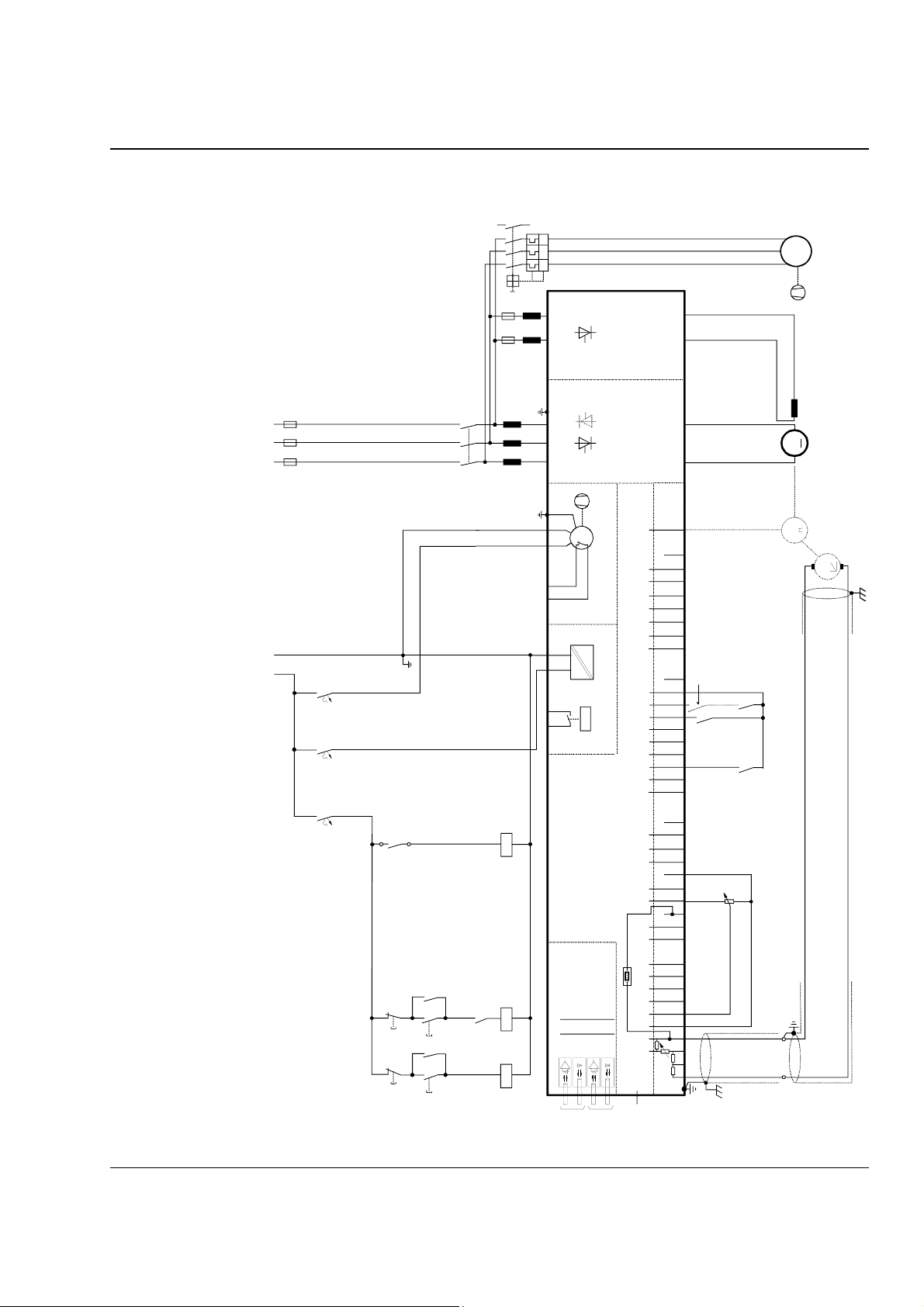
Appendix A - Connection diagrams
3ADW000055R0401_DCS500B_Operating Instruction_e_d
Connection diagram 1
For detailed information see
System description DCS 500B / DCF 500B.
13
14
5
3
1
F6
F3
6
4
2
I > I > I >
X1: 1 7
L3
Field exciter unit
(SDCS-FEX-1/2)
W
V
M
3~
U
_
+
X1: 5 3
_
module
400V 50Hz
L1 L2 L3
F1
L1 MP
230V 50 Hz
1
2
F8
1
2
F5
1
2
F7
X96:2
X96:1
135
246
K1
U1 W1V1 P E
L1
12 X99:12 X2:45 X2:1 2 3
X96:
Converter
~
M
depending on the unit type
an other configuration is possible
(POW-1)
Power supply
DO8
C 1 D 1
+
X5:
0V
12345678 1...10
X7:
module
switch a t C4
e.g. Pressure
0V0V0V0V
K21
K20
K1
M
T
+
_
T
the polarities are shown for motor operation
Control board (CON-2)
DCS 500B / DCP 500B Operating Instructions IV A A - 1
+10V -10V AO1 AO2 IACT DI1 DI2 DI3 DI4 DI5 DI6 DI 7 DI8 +48V DO1DO2 DO3 DO4 DO5 DO6 DO7
+
AI4
_
S4
K21
board (COM-x)
K20
K21K20 K1
START
K1
ON
OFF STOP
Communication
V5V6V1
IN3
OUT3
56
AI2 AI3
V2
++++
___ _
AITAC AI1
IN1
OUT1
X3: 1 2 3 4 5 6 7 8 9 10 X4: 1 2 3 4 5 6 7 8 9 10 X6: 1 2 3 4 5 6 7 8 9 10
X33
if there are intermediate terminals
Page 74
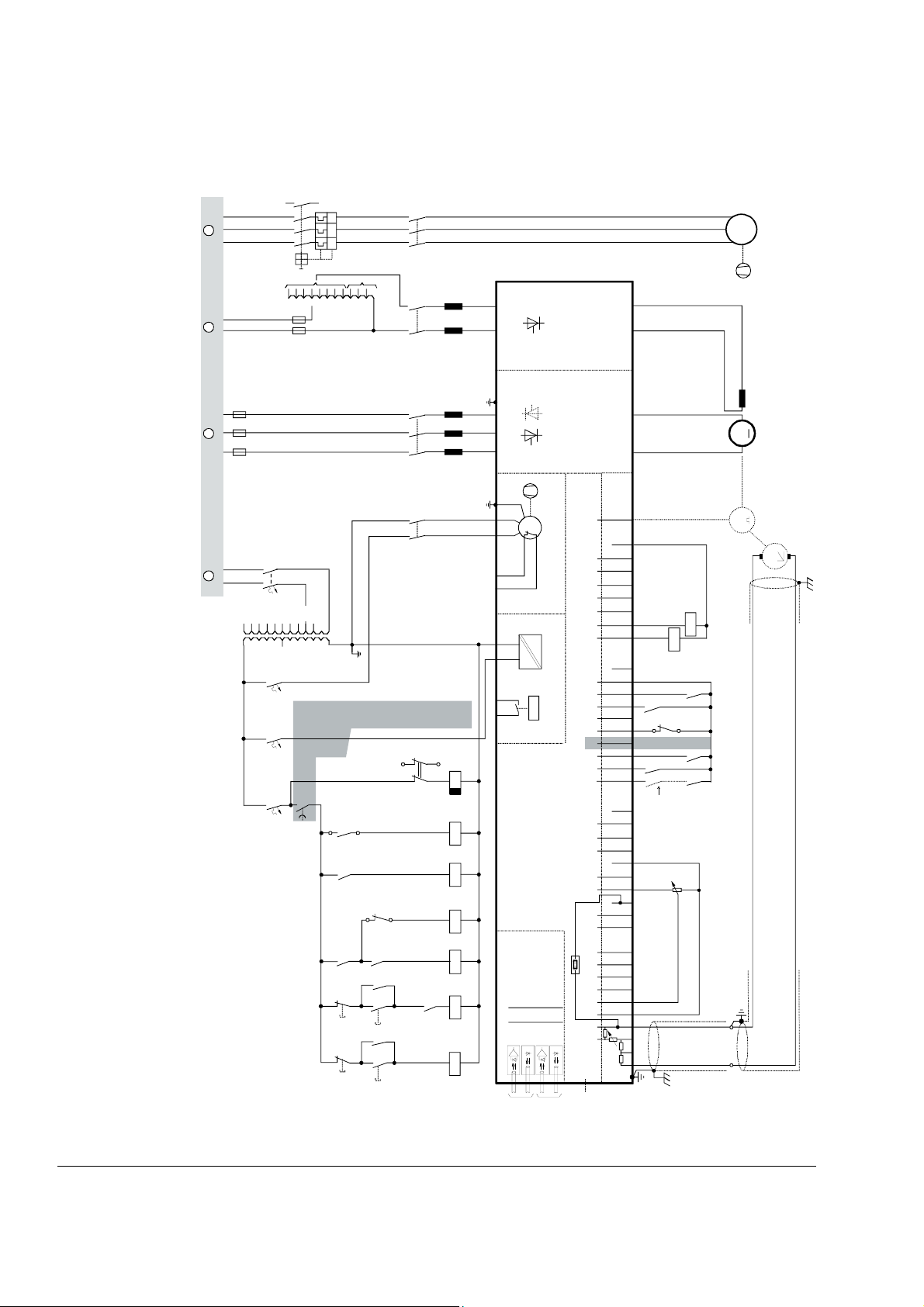
Appendix A - Connection diagrams
3ADW000055R0401_DCS500B_Operating Instruction_e_d
Connection diagram 2
Voltage levels
see description
L1 L2 L3
F1
A C D E
L1 N L1 N L1 L2 L3
T2
230V
For detailed information see
System description DCS 500B / DCF 500B.
13
14
5
3
1
F6
T3
500V
460V
3
4
1
2
F2
690V
660V
600V
575V
525V
500V
450V
115V
1
2
F8
1
2
F5
1
2
F7
6
4
2
I > I > I >
90V
415V
400V
F3
415V
400V
K15
60V
365V
350V
265V
250V
380V
X96:2
X96:1
35
2461
K6
30V
24
13
K3
135
246
K1
3
4
1
2
K8
1
S1
EMER.
STOP
L3
L1
2
X1: 1 7
U1 W1V1 PE
12 X99:12 X2:45 X2:1 2 3
X96:
K15
Field exciter unit
(SDCS-FEX-1/2)
module
Convert er
~
M
depending on the unit type
an other configuration is possible
(POW-1)
Power supply
DO8
_
+
X1: 5 3
_
C 1 D 1
+
X5:
0V
12345678 1...10
X7:
0V0V0V0V
K10
K20
S1
1
2
K6
module
switch a t C4
e.g. Pressure
W
V
M
3~
U
M
T
+
_
T
K11
the polarities are shown for motor operation
K21
K1
K8
K11
X2:5
X2:4
F6
13
14
K10
K21
START
K1
OFF STOP
ON
K6 K8
K20
K21K20 K3 K1
Control board (CON-2)
board (COM-x)
Communication
V5V6V1
IN3
+10V -10V AO1 AO2 IACT DI1 DI2 DI3 DI4 DI5 DI6 DI7 DI8 +48V DO1 DO2 DO3 DO4 DO5 DO6 DO7
+
AI4
_
S4
56
AI2 AI3
V2
++++
___ _
OUT3
AITAC AI1
IN1
OUT1
X3: 1 2 3 4 5 6 7 8 9 10 X4: 1 2 3 4 5 6 7 8 9 10 X6: 1 2 3 4 5 6 7 8 9 10
X33
if there are intermediate terminals
IV A A - 2 DCS 500B / DCP 500B Operating Instructions
Page 75

Appendix A - Connection diagrams
3ADW000055R0401_DCS500B_Operating Instruction_e_d
DCS 500B / DCP 500B Operating Instructions IV A A - 3
Page 76

ABB Automation Products GmbH
Postfach 1180
Lampertheim • GERMANY
Tel: +49 (0) 62 06-5 03-0
Fax: +49 (0) 62 06-5 03-6 09
www.abb.com/dc
Ident. No.: 3ADW 000 055 R0401 Rev D
*055R0401A2440000*
*055R0401A2440000*
09_01
 Loading...