

Page 1
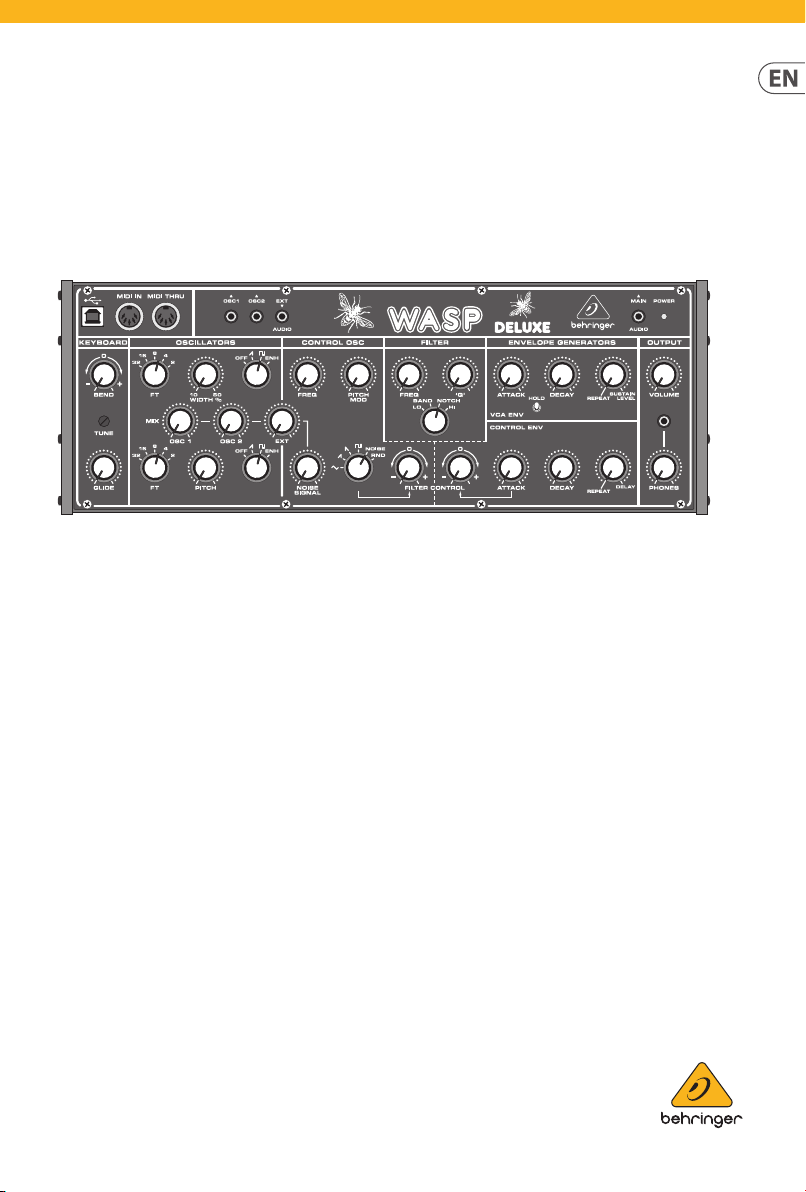
Quick Start Guide
WASP DELUXE
Legendary Analog Synthesizer with Dual OSCs, VCF,
Multi-Mode VCF, 16-Voice Poly Chain and Eurorack Format
Page 2
All trademar ks are the propert y
Atención
contacto s: dos polos y la puesta a
mesa especicados
1. Read these instructions.
15. The apparatus shall be connected
2 3Quick Start GuideWASP DELUXE
Important Safety
Instructions
Terminals marked with
this symbol carry
electr ical current of
sucient magnitude to constitute risk
of elect ric shock. Use only high- quality
professio nal speaker cables with ¼" TS
or twist-locking plugs pre-installed.
Allother inst allation or modicatio n
should be performed only by
qualiedpersonnel.
This symbo l, wherever it
appears, ale rts you to the
presence of uninsulated
dangerous voltage inside the enclosure
- voltage that may b e sucient to
constitu te a risk ofshock.
This symbo l, wherever it
appears, alerts you to
important operating and
maintenance instructions in the
accompanying literature. Please read
themanual.
Caution
To reduce the risk of
electr ic shock, do not
remove the top cover (or the r ear
secti on). No user serv iceable parts insid e.
Refer servicing to qualiedpersonnel.
Caution
To reduce the risk of
re or elec tric shock, do
not expos e this appliance to rain and
moisture. Th eapparatus shall not
be expose d to dripping or splashing
liquids and no obj ects lled with
liquids, such as vases, shall be placed
on the apparatus.
Caution
These service instruc tions
are for use by qua lied
service p ersonnel only. Toreduce
the risk of ele ctric shock do not
perform any ser vicing other than that
contained in the operation instructions.
Repairshave to b e performed by
qualied servicepers onnel.
2. Keep these instructions.
3. Heed all warnings.
4. Follow all instruc tions.
5. Do not use this appara tus
near water.
6. Clean only w ith dry cloth.
7. Do not bloc k any ventilation
openings. Ins tall in accordance with the
manufacturer ’s instructions.
8. Do not install near any heat
sources such a s radiators, heat regis ters,
stoves, or othe r apparatus (including
ampliers) that produce heat.
9. Do not defeat the sa fety purpose
of the polari zed or grounding-ty pe
plug. A polari zed plug has two blades
with one wider than the other.
A grounding -type plug has two blad es
and a third grounding prong. The wide
blade or the third prong are provided
for your saf ety. Ifthe provided plug
does not t into y our outlet, consult
an elect rician for replacement of th e
obsolete outlet.
10. Protect the power cord f rom being
walked on or pinc hed particularly
at plugs, convenience receptacles,
and the point wh ere they exit from
the apparatus.
11. Use only attachments/accessories
specie d by themanufacturer.
12. Use only wi th
the cart , stand,
tripod, bracket, or
table specied by
the manufacturer,
orsold with
the apparat us. When a cart is used,
use cautio n when moving the cart /
apparatus combination to avoid injury
from tip -over.
13. Unplug this apparatus during
lightning storms or when unused for
long periods of time.
14. Refer all se rvicing to qualied
service personnel. Servicing is required
when the apparatus has been damaged
in any way, such as power suppl y cord
or plug is damage d, liquid has been
spilled or obje cts have fallen into the
apparatus, the apparatus has been
expose d to rain or moisture, does not
operate nor mally, or has beendr opped.
to a MAINS socket ou tlet with a
protective earthing connection.
16. Wh ere the MAINS plug or an
appliance coup ler is used as the
disconnect device, the disconnect
device shall remain readily operable.
17. Corr ect disposal of
this product: This
symbol indicates that
this product must not
be dispose d of with
household waste, according to the
WEEE Direc tive (2012/19/EU) and your
national law. This prod uct should be
taken to a collec tion center licensed for
the recyc ling of waste electr ical and
electronic equipment (EEE).
The mishandling o f this type of waste
could have a possib le negative impact
on the environment and human health
due to potentiall y hazardous
substances that are generally
associate d with EEE. At the same time,
your coopera tion in the correct di sposal
of this produc t will contribute to th e
ecient use of natural resources. For
more information about where you can
take your waste equipment for
recycli ng, please contact your lo cal city
oce, or your household waste
collection se rvice.
18. Do n ot install in a conned space,
such as a book c ase or similar unit.
19. Do not place naked ame
sources, suc h as lighted candles,
on the apparatus.
20. Please keep the environmental
aspect s of battery dispo sal in mind.
Batteri es must be disposed- of at a
battery collection point.
21. Use this apparatus in trop ical
and/or moderate climates.
LEGAL DISCLAIMER
Music Tribe accepts n o liability for
any loss which may b e suered by
any person who relies either wholly
or in part upon any description,
photograph, or statement contained
herein. Technical specications,
appearances and other information
are subjec t to change without notice.
of their respective owners. Midas,
Klark Teknik, Lab G ruppen, Lake,
Tannoy, Turbosound, TC Electronic,
TC Helicon, Behringer, Bugera,
Auratone and Coolaudio are
trademarks or registered trade marks
of Music Tribe Global Brands Ltd.
© Music Tribe Global Brands Ltd.
2019 All rights reser ved.
LIMITED WARRANTY
For the applic able warranty terms a nd
conditions and additional information
regarding Music Tribe’s Limited
Warranty, pleas e see complete details
online at musictribe.com/warranty.
Instrucciones de
seguridad
Las terminales marcadas
con este símb olo
transportan corr iente
eléctr ica de magnitud sucien te como
para constituir un riesgo de descarga
eléctr ica. Utilicesolo cable s de altavoz
profesion ales y de alta calidad con
conecto res TS de 6,3 mm o de bayoneta
prejados . Cualquier otra instalaci ón o
modicación debe ser realizada
únicamente p or un técnicocualicado.
Este símbolo, siempre que
aparece, leadv ierte de la
presencia de voltaje
peligroso si n aislar dentro de la caja;
estevoltaj e puede ser suciente para
constituir un riesgo dedescarga.
Este símbolo, siempre que
aparece, leadv ierte sobre
instrucciones operativas y
de mantenimiento que aparecen en la
documentación adjunta. Por favor,
leaelmanual.
Para reducir e l riesgo de
descarga eléct rica, no
quite la tapa (olapar te posterior).
Nohay piezas en el interior del equipo
que puedan ser r eparadas por el
usuario. Sies ne cesario, póngase en
contacto con personal cuali cado.
Atención
Para reducir e l riesgo
de incendio o de scarga
eléctr ica, no exponga este apa rato a la
lluvia, humeda d o alguna otra fuente
que pueda salpicar o derramar algún
líquido sobr e el aparato. Nocoloque
ningún tipo de recipiente para líquidos
sobre elapar ato.
Atención
Las instrucciones
de servicio deben
llevarlas a cabo exclusivamente
personal cualicado. Paraevitar el
riesgo de una d escarga eléctr ica,
no realice repar aciones que no se
encuentre n descritas en el manual de
operaciones. Lasreparaciones deben
ser realizadas exclusivamente por
personalcualicado.
1. Lea las instrucciones.
2. Conserve estas instrucciones.
3. Pres te atención a todas
las advertencias.
4. Siga todas las instrucciones.
5. No use e ste aparato cerca
del agua.
6. Limpie es te aparato con un
paño seco.
7. No bloquee las aberturas
de ventilación . Instale el equipo
de acuerdo con las instrucciones
del fabricante.
8. No instal e este equipo cerca de
fuentes de calor tales como radiadores,
acumuladore s de calor, estufas u otros
aparatos (incluyendo amplicadores)
que puedan producir calor.
9. No elimine o deshabilite nunca
la conexión a ti erra del aparato o del
cable de alimentación de corriente.
Unenchufe po larizado tiene dos polo s,
uno de los cuale s tiene un contacto
más ancho que el ot ro. Una clavija
con puesta a t ierra dispone de tres
tierra. El con tacto ancho y el tercer
contacto, re spectivamente, son l os que
garantizan una mayor seguridad. Si el
enchufe suministrado con el equipo
no concuerda co n la toma de corriente,
consulte con un ele ctricista par a
cambiar la toma de c orriente obsoleta.
10. Coloque el cable de suminis tro de
energía de mane ra que no pueda ser
pisado y que esté protegido de objetos
alados. As egúrese de que el cable de
suministro de energía esté protegido,
especialm ente en la zona de la clavija y
en el punto donde s ale del aparato.
11. Use únicamente los dispositivos
o accesorios especicados por
el fabricante.
12. Use
únicamente la
carretilla,
plataforma,
trípode, soporte o
por el fabricante o suministrados junto
con el equipo. Alt ransportar el equip o,
tenga cuidado para evitar daños y
caídas al tropezar con algún obstác ulo.
13. Desenchufe el equipo durante
tormentas o s i no va a utilizarlo durante
un periodo largo.
14. Confíe las reparaciones
únicamente a servicios téc nicos
cualicados. La unidad requiere
mantenimiento siempre que haya
sufrido al gún daño, si el cable de
suministro de energía o el enchufe
presentaran daños, sehubiera
derramado un líquido o hubieran caído
objetos dent ro del equipo, si el aparato
hubiera es tado expuesto a la hume dad
o la lluvia, si ha dejado d e funcionar de
manera norma l o si ha sufrido algún
golpe o caída.
15. Al conect ar la unidad a la toma de
corriente eléctrica asegúrese de que
la conexión disponga de una unión
atierra.
16. Si el e nchufe o conector
de red sirve c omo único medio
de desconexión, éste debe ser
accesiblefácilmente.
Page 3
17. Cómo debe
Tannoy, Turbosound, TC Electronic,
L’intérieur de l’appareil ne pos sède
faites app el à un électricien po ur
17. Mise au r ebut
Lab Grupp en, Lake, Tannoy,
Global Brands Ltd. © Music Tribe Global
4 5Quick Start GuideWASP DELUXE
deshacerse de este
aparato: Este símbolo
indica que este aparato
no debe ser tr atado
como basura orgánica, según lo
indicado en la D irectiva WEEE (2012/19/
EU) y a las normativa s aplicables en su
país. En lugar de ello deberá llevarlo al
punto limpio más cercano para el
reciclaje de s us elementos eléctr icos/
electr ónicos (EEE). Al hacer esto estará
ayudando a preve nir las posibles
consecuencias negativas para el medio
ambiente y la salu d que podrían ser
provocadas por una gestión inadecuada
de este tipo d e aparatos. Además,
el reciclaje d e materiales ayudará a
conservar los recur sos naturales. Para
más informac ión acerca del reciclaje d e
este aparat o, póngase en con tacto con
el Ayuntamiento d e su ciudad o con el
punto limpio local.
18. No in stale esta unidad en un
espacio muy r educido, tal como
encastr ada en una librería o similar.
19. No coloque objetos con
llama, como una vela ence ndida,
sobre este aparato.
20. Tenga presente s todas las
advertenc ias relativas al reciclaj e
y correcta eliminación de las pilas.
Las pilas deben ser siempre eliminadas
en un punto limpio y n unca con el resto
de la basura orgánica.
21. Use este aparato en rangos d e
temperatura moderados y/o tropicales.
NEGACIÓN LEGAL
Music Tribe no admite ningún tipo
de responsabilidad por cualquier
daño o pérdida qu e pudiera sufrir
cualquier persona por conar total
o parcialmente e n la descripciones,
fotografías o armaciones
contenidas en este documento.
Las especicaciones técnicas,
imágenes y otras informaciones
contenidas en es te documento están
sujetas a modicaciones sin previo
aviso. Todas las marcas comerciales
que aparecen aq uí son propiedad
de sus respectivos dueños. Midas,
Klark Teknik, Lab G ruppen, Lake,
TC Helicon, Behringer, Bugera,
Auratone y Coolaudio son marcas
comerciales o marcas registradas
de Music Tribe Global Brands Ltd.
© Music Tribe Global Brands Ltd.
2019 Reservados todos los derechos.
GARANTÍA LIMITADA
Si quiere conoce r los detalles y
condiciones aplicables de la garantía
así como información adicional sobre
la Garantía limi tada de Music Tribe,
consulte online toda la información en
la web musictribe.com/warranty.
Consignes de sécurité
Les points r epérés par ce
symbole portent une
tension électrique
susante po ur constituer un risque
d’électrocution. Utilisez uniquement
des câbles d’enceintes professionnels
de haute qualité avec ches Jack mono
6,35 mm ou ches à verr ouillages déjà
installée s. Touteautre ins tallation ou
modication doit être eectuée
uniquement par un personnel qualié.
Ce symbole aver tit de la
présence d’une tension
dangereuse e t non isolée à
l’intérieu r de l’appareil - elle p eut
provoquer des chocs électriques.
Attention
Ce symbol sig nale les
consignes d’utilisation
et d’entre ! Tienimp ortantes dans
la document ation fournie. Lisez les
consignes de sécurité du manuel
d’utilisation del’appareil.
Attention
Pour éviter tou t risque
de choc électrique,
ne pas ouvr ir le capot de l’appareil
ni démonter le pa nneau arrière.
aucun élément réparable par
l’utilisateur. Lais sertoute réparation à
un professi onnelqualié.
Attention
Pour réduire les risques
électrique, n’exposez pas cet appareil
de feu et de cho c
à la pluie, à la moisissu re, auxgouttes
ou aux éclabo ussures. Ne posez pas
de récipient contenant un liquide sur
l’appareil (unvase par e xemple).
Attention
Ces consignes de
sécurité et d’entretien
sont destinées à un personnel
qualié. Pour évi ter tout risque de
choc électrique, n’eectuez aucune
réparation sur l’appareil qui ne soit
décrite p ar le manuel d’utilisation.
Les éventuelles réparations doivent
être eec tuées uniquement p ar un
technicienspécialisé.
1. Lisez ces consignes.
2. Conservez ces consignes.
3. Resp ectez tous les aver tissements.
4. Respectez toutes les
consignes d’utilisation.
5. N’utilisez jamais l’appareil à
proximité d’un liquide.
6. Nettoy ez l’appareil avec u n
chion sec.
7. Veillez à ne pas emp êcher la
bonne ventilat ion de l’appareil via ses
ouïes de ventil ation. Respectezle s
consignes du fabricant concernant
l’installation del’appareil.
8. Ne placez pas l ’appareil à
proximité d ’une source de chal eur telle
qu’un chauage, une c uisinière ou tout
appareil dégageant de la chaleur (y
compris un amp li depuissance).
9. Ne supprimez jamai s la sécurité
des prises bipolaires ou des prises
terre. Les prises bipolaires possèdent
deux contacts de largeur diérente.
Leplus large es t le contact de sécur ité.
Les prises terre possèdent deux
contact s plus une mise à la terre
servant d e sécurité. Si la prise du blo c
d’alimentation o u du cordon d’alimentation f ourni ne correspond pa s à
celles de votre installation électrique,
eect uer le changement de prise.
10. Installez le cordon d’alimentation
de telle façon que personne ne puisse
marcher dess us et qu’il soit protégé
d’arêtes coupantes. Assurez-vous
que le cordon d ’alimentation e st
suffisamment protégé, notamment
au niveau de sa pr ise électrique et
de l’endroit où il es t relié à l’appareil;
cela est égale ment valable pour une
éventuelle rallonge électrique.
11. Utilisez exclusivement
des accessoi res et des appareils
supplémentaires recommandés par
lefabricant.
12. Utilisez
exclusivemen t des
chariots, des
diables,
desprésentoirs,
despieds et d es
surface s de travail recommandés p ar le
fabrican t ou livrés avec le produit.
Déplacezprécautionneusement tout
chariot ou diab le chargé pour éviter
d’éventuelles bles sures en cas dechute.
13. Débranchez l’appareil de la
tension sec teur en cas d’orage ou si
l’appareil reste inutilisé pendant une
longue période de temps.
14. Les travaux d’entretien de
l’appareil doivent ê tre eectués
uniquement par du personnel qualifié.
Aucunentret ien n’est nécess aire sauf si
l’appareil est endommagé de quelque
façon que ce soi t (dommagessur le
cordon d’aliment ation ou la prise par
exemple), siun liquide ou un o bjet
a pénétré à l ’intérieur du châssis, si
l’appareil a été ex posé à la pluie ou
à l’humidité, s’il ne fonctionne pas
correc tement ou à la suite d’une chute.
15. L’appareil doit ê tre connecté à une
prise secteur dotée d’une protection
par mise à la terr e.
16. L a prise électriqu e ou la prise
IEC de tout appar eil dénué de bouton
marche/arrêt d oit rester accessible
enpermanence.
appropriée de ce
produit: Ce symbole
indique qu’en accord
avec la direc tive DEEE
(2012/19/EU) et les lois en vigu eur dans
votre pays, ce pro duit ne doit pas être
jeté avec les déc hets ménagers.
Ce produit doi t être déposé dans un
point de collec te agréé pour le
recyclage des déchets d’équipements
électriques et électroniques (EEE).
Une mauvaise man ipulation de ce type
de déchet s pourrait avoir un impac t
négatif sur l ’environnement et l a santé
à cause des substances potentiellement
dangereuses généralement associées à
ces équipements. En même temps,
votre coopér ation dans la mise au rebut
de ce produit contribuera à l’utilisation
ecace des ressources naturelles.
Pour plus d’informations sur l’endroit
où vous pouvez d époser vos déchets
d’équipements p our le recyclage,
veuillez contacter votre mairie ou votre
centre loca l de collecte des déche ts.
18. N’ins tallez pas l’appareil dans un
espace conné tel qu’une bibliothèque
ou meuble similaire.
19. Ne placez jamais d’objets
enammés, tels qu e des bougies
allumées, sur l’appareil.
20. Gardez à l ’esprit l’imp act
environnemental lorsque vous mettez
des piles au reb us. Les piles usées
doivent être d éposées dans un point de
collecte adapté.
21. Utilisez l’appareil dans un climat
tropical et/ou modéré.
DÉNI LÉGAL
Music Tribe ne peut êt re tenu pour
responsable pour toute perte pouvant
être subie pa r toute personne se
ant en part ie ou en totalité à
toute description, photographie
ou armation c ontenue dans ce
document. Les caractéristiques,
l’apparence et d’autres informations
peuvent faire l’objet de modications
sans notication. Toutes les marques
appartiennent à leurs propriétaires
respectifs. Midas, Klark Teknik,
Turbosound, TC Elec tronic, TC Helicon,
Behringer, Bugera, Auratone et
Coolaudio sont d es marques ou
marques déposées de Music Tribe
Brands Ltd. 2019 Tous droits rés ervés.
GARANTIE LIMITÉE
Pour connaîtr e les termes et condition s
de garantie applicables, ainsi que
les informations supplémentaires et
détaillée s sur la Garantie Limitée de
Music Tribe, consultez le s ite Internet
musictribe.com/warranty.
Wichtige
Sicherheitshinweise
Vorsicht
Die mit dem Symbo l
markierten Anschlüsse
führen so viel Spannung, dassdie
Gefahr eines Stromschlags besteht.
Verwenden Sie nur hochwertige,
professionelle Lautsprecherkabel
mit vorinstallierten 6,35 mm
MONO-Klinkensteckern oder
Lautsprecherstecker mit
Drehverriegelung. Alle anderen
Installationen oder Modikationen
sollten nur von qualiziertem
Fachpersonal ausgeführt werden.
Achtung
Um eine Gefährdung
durch Stromschlag
auszuschließen, darf die
Geräteabdeckung bzw.
Geräterückwandnicht abgenommen
werden. ImInner n des Geräts benden
sich keine vom Benutzer reparierbaren
Teile. Reparaturarbeiten dürfen
nur von qualiziertem Personal
ausgeführtwerden.
Page 4
Achtung
entsprechend ausgetauscht wird.
zusammen mit Ihren Haushaltsabfällen
eingetragene Warenzeichen der
exposto à c huva nem à humidade.
Verique particularmente nas chas,
dispositivo para evitar danos provocados
6 7Quick Start GuideWASP DELUXE
Um eine Gefährdung
Stromschlag auszuschließen, darf
durch Feuer bzw.
dieses Gerät weder Regen oder
Feuchtigkeit ausgesetzt werden
noch sollten Spritzwasser oder
tropfende Flüssigkeiten in das Gerät
gelangen können. Stellen Sie keine
mit Flüssigkeit gefüllten Gegenstände,
wie z. B. Vasen, aufdasG erät.
Achtung
Die Service-Hinweise sind
nur durch qualiziertes
Personal zu be folgen. Umeine
Gefährdung durch Stromschlag zu
vermeiden, führen Sie bitte keinerlei
Reparatur en an dem Gerät durch,
dienicht in der Bedienungsanleitung
beschrieben sind. Reparaturen
sind nur von qualiziertem
Fachpersonaldurchzuführen.
1. Lesen Sie diese Hinweise.
2. Bewahren Sie diese Hinweise auf.
3. Beachten Sie alle Warnhinweise.
4. Befolg en Sie alle
Bedienungshinweise.
5. Bet reiben Sie das Gerät nicht in
der Nähe vonWasser.
6. Reinigen Sie das Gerät mit einem
trockenen Tuch.
7. Blockieren Sie nicht die
Belüftungsschlitze. Beachten
Sie beim Einbau d es Gerätes die
Herstellerhinweise.
8. Stellen Sie das Ger ät nicht in der
Nähe von Wärmequ ellen auf. Solche
Wärmequellen sind z. B. Heizkörper,
Herde oder andere Wärme erzeugende
Geräte (auch Verstärker).
9. Entfernen Sie in keinem Fall
die Sicherheitsvorrichtung von
Zweipol- oder g eerdeten Steckern. Ein
Zweipolstecker hat zwei unterschiedlic h
breite Steckkontak te. Ein geerdeter
Stecker hat zwei Steckkontakte
und einen dritten Erdungskontakt.
Derbreitere Ste ckkontakt oder der
zusätzliche Erdungskontakt dient
Ihrer Sicherheit. Falls das mitgelieferte
Steckerformat nicht zu Ihrer Steckdose
passt, wend en Sie sich bitte an
einen Elektriker, damit die Steckdose
10. Verlegen Sie das N etzkabel so,
dass es vor Tritte n und scharfen Kanten
geschützt ist und nicht beschädigt
werden kann. Acht en Sie bitte
insbesondere im Bereich der Stecker,
Verlängerungskabel und an der Stelle,
an der das Net zkabel das Gerät verläss t,
aufausreichendenSchutz.
11. Das Gerät muss je derzeit mit
intaktem Schutzlei ter an das Stromnetz
angeschlossen sein.
12. Sollte der Hauptnet zstecker
oder eine Gerätesteckdose die
Funktionseinheit zum Abschalten sein,
muss diese immer zugänglich sein.
13. Verwenden Sie nur Zusatzgeräte/
Zubehörteile, dielaut Hersteller
geeignet sind.
14. Verwenden
Sie nur Wagen,
Standvorrichtungen, Stative,
Halter oder Tische,
die vom Hersteller
benannt oder im Lieferumfang des
Geräts enthalten sind. Falls Sie einen
Wagen benutzen, seien Sie vorsichtig
beim Bewegen der
Wagen - Gerätkombination,
umVerletzungen durch Stolpern
zuvermeiden.
15. Ziehen Sie den Netzstecker bei
Gewitter oder wenn Sie das Gerät
längere Zeit nicht benutzen.
16. La ssen Sie alle Wartungsarbeiten
nur von qualiziertem ServicePersonal ausführen. EineWartung
ist notwendig, wenn das Gerät in
irgendeiner Weise beschädigt wurde
(z. B. Beschädigung des Netzkabels
oder Steckers), Gegenstände oder
Flüssigkeit in das Geräteinnere gelangt
sind, das Gerät Regen oder Feuchtigkeit
ausgesetzt wurde, das Gerät nicht
ordnungsgemäß funktioniert oder auf
den Boden gefallen ist.
17. Korrekte
Entsorgung dieses
Produkts: Dieses Symbol
weist darauf hin, das
Produkt entsprechend
der WEEE Direk tive (2012/19/EU) und
der jeweiligen nationalen Gesetze nicht
zu entsorg en. DiesesProdukt s ollte bei
einer autorisierten Sammelstelle für
Recycling elektrischer und
elektronischer Geräte (EEE) abgegeben
werden. Wegen bedenklicher
Substanzen, diegenerell mit
elektrischen und elektronischen
Geräten in Verbindung stehen, könnte
eine unsachgemäße Behandlung dieser
Abfallar t eine negative Auswirku ng auf
Umwelt und Gesundheit haben.
Gleichzeitig gewährleistet Ihr Beitr ag
zur richtigen Entsorgung dieses
Produkt s die eektive Nut zung
natürliche r Ressourcen. Fürweitere
Informationen zur Entsorgung Ihrer
Geräte bei einer Recycling-Stelle
nehmen Sie bitte Kontakt zum
zuständigen städtischen Büro,
Entsorgungsamt oder zu Ihrem
Haushaltsabfallentsorgerauf.
18. Installieren Sie das Gerät nicht
in einer beengten Umgebung, zum
Beispiel Bücherregal oder ähnliches.
19. Stellen Sie keine Gegenstände mit
oenen Flammen, etwa brennende
Kerzen, auf das Gerät.
20. Beachten Sie bei der Entsorgung
von Batterien den UmweltschutzAspekt. Batterien müssen bei einer
Batterie-Sammelstelle entsorgt
werden.
21. Verwenden Sie das Gerät in
tropischen und/oder gemäßigten
Klimazonen.
HAFTUNGSAUSSCHLUSS
Music Tribe übernimmt keine Haftung
für Verluste, die Personen entstanden
sind, die sich gan z oder teilweise auf
hier enthaltene Beschreibungen,
Fotos oder Aussagen verlassen haben.
Technische Daten, Erscheinungsbild
und andere Informationen können
ohne vorherige Ankündigung
geändert werden. Alle Warenzeichen
sind Eigentum der jeweiligen Inhaber.
Midas, Klark Teknik , Lab Gruppen,
Lake, Tannoy, Turbosound,
TC Electro nic, TC Helicon,
Behringer, Bugera, Auratone und
Coolaudio sind Warenzeichen oder
Music Tribe Global Brands Ltd.
© Music Tribe Global Brands Ltd.
2019 Alle Rechte vorbehalte n.
BESCHRÄNKTE GARANTIE
Die geltenden Garantiebedingungen
und zusätzliche Informationen
bezüglich der von Music Tribe
gewährten beschränkten
Garantie nden Sie online unter
musictribe.com/warranty.
Instruções de
Segurança Importantes
Aviso!
Terminais marcados
com o símbolo carregam
corrente elétrica de magnitude
suciente pa ra constituir um risco de
choque elétrico. Use apenas cabos
de alto-falantes de alta qualidade
com plugues TS de ¼" ou plugues
com trava de torção pré-instalados.
Todas as outras ins talações e
modicaçõ es devem ser efetuadas p or
pessoasqualicadas.
Este símbolo, onde quer
que o encontre, alerta-o
para a leitur a das
instruções de manuseamento que
acompanham o equipamento. Por favor
leia o manual deinstruções.
Atenção
De forma a dimi nuir
o risco de choq ue
eléctr ico, nãoremover a cobertur a
(ouasecção de trá s). Não existem peç as
substitu íveis por parte do utiliz ador no
seu interior. Para e sse efeito recorrer a
um técnicoquali cado.
Atenção
Para reduzir o r isco de
incêndios ou choques
eléctr icos o aparelho não deve ser
Alémdisso, não deve s er sujeito a
salpicos, nem d evem ser colocados em
cima do aparelh o objectos contendo
líquidos, taiscomojarras.
Atenção
Estas ins truções de
operação d evem ser
utilizada s, emexclusivo, por técnicos
de assistência qualicados. Para evitar
choques elé ctricos não proced a a
reparaçõe s ou intervenções, que
não as indicadas nas instruções
de operaçã o, salvo se pos suir as
quali-cações necess árias. Para evitar
choques elé ctricos não proced a a
reparaçõe s ou intervenções, que
não as indicada s nas instruções de
operação. S ó o deverá fazer se possuir
as qualicaçõesnecessárias.
1. Leia estas in struções.
2. Guarde estas instruçõ es.
3. Pres te atenção a todos os avisos.
4. Siga todas as in struções.
5. Não utilize este dispositivo perto
de água.
6. Limpe ape nas com um pano seco.
7. Não obstr ua as entradas de
ventilação. Ins tale de acordo com as
instruções do fabricante.
8. Não instale perto de quaisquer
fontes de calor tais como radiadores,
bocas de ar qu ente, fogões de sala
ou outros aparelhos (incluindo
amplicadores) que produzam calor.
9. Não anule o object ivo de
segurança das chas polariza das ou
do tipo de ligaç ão à terra. Uma cha
polarizada dispõe de duas palhetas
sendo uma mais lar ga do que a outra.
Uma cha do tipo li gação à terra dispõe
de duas palhet as e um terceiro dente
de ligação à ter ra. A palheta larga ou
o terceiro dente s ão fornecidos para
sua seguranç a. Se a cha fornecida
não encaixar na sua tomada, consulte
um elect ricista para a subst ituição da
tomada obsoleta.
10. Proteja o cabo de alimentaç ão de
pisadelas ou a pertos, especialme nte
nas chas, ex tensões, e no local de
saída da unidad e. Certi que-se de
que o cabo eléc trico está prote gido.
nos receptá culos e no ponto em que o
cabo sai doap arelho.
11. O aparelho tem de es tar sempre
conect ado à rede eléctric a com o
condutor de protecção intacto.
12. Se utiliz ar uma cha de
rede princ ipal ou uma tomada de
aparelhos para desligar a unidade
de funciona mento, esta deve estar
sempre acessível.
13. Utilize apenas ligações/acessórios
especicados pelofabr icante.
14. Utilize apenas
com o carrin ho,
estrutura, tripé,
suporte, ou mesa
especicados pelo
fabricante ou
vendidos com o dis positivo.
Quandoutili zar um carrinho, tenha
cuidado ao mover o co njunto carrinho/
pela terpidação.
15. Desligue este dispositivo durante
as trovoadas ou q uando não for
utilizado durante longos períodos
detempo.
16. Qualque r tipo de reparação
deve ser sempr e efectuado por
pessoal qua licado. É necessária um a
reparação s empre que a unidade tiver
sido de alguma forma danicada,
como por exemp lo: no caso do cabo de
alimentação ou cha se encontrarem
danicados; naeventualidade de
líquido ter sido derramado ou objectos
terem caído p ara dentro do dispositivo;
no caso da unid ade ter estado expos ta
à chuva ou à humid ade; seesta
não funcion ar normalmente, ou se
tiver caído.
17. Correcta eliminação
deste prod uto: este
símbolo indic a que o
produto não de ve ser
eliminado juntamente
com os resíduos domésticos, segundo a
Direct iva REEE (2012/19/EU) e a legislação
nacional. Es te produto deverá ser lev ado
para um centro d e recolha licenciado para
a reciclage m de resíduos de
equipamentos eléctricos e elec trónicos
(EEE). O tratamento inc orrecto deste ti po
de resíduos p ode ter um eventual
Page 5

impacto negativo no ambiente e na
8 9Quick Start GuideWASP DELUXE
saúde humana devido a substâncias
potencialmente perigosas que estão
geralmente as sociadas aos EEE. Ao
mesmo tempo, a sua co laboração para a
eliminação co rrecta deste p roduto irá
contribui r para a utilização ec iente dos
recurs os naturais. Paramais info rmação
acerca dos loc ais onde poderá deixa r o
seu equipam ento usado para recic lagem,
é favor contac tar os serviços m unicipais
locais, a enti dade de gestão de resídu os
ou os serv iços de recolha de
resíduosdomésticos.
18. Não i nstale em lugares
connados, tai s como estantes ou
unidades similares.
19. Não coloque fontes de
chama, tais como vel as acesas,
sobre o aparelho.
20. Favor, obedecer os asp ectos
ambientais de d escarte de bateria.
Baterias deve m ser descartadas e m um
ponto de coletas de baterias.
21. Use este aparelho em climas
tropicais e/ou moderados.
LEGAL RENUNCIANTE
O Music Tribe não se resp onsabiliza
por perda algu ma que possa ser
sofrida p or qualquer pessoa que
dependa, seja de maneira completa
ou parcial, de qualquer descrição,
fotograa, ou declaração aqui
contidas. Dados técnicos, aparências
e outras informações est ão sujeitas
a modicaçõ es sem aviso prévio.
Todas as marcas são p ropriedade
de seus respectivos donos. Midas,
Klark Teknik, Lab G ruppen, Lake,
Tannoy, Turbosound, TC Electronic,
TC Helicon, Behringer, Bugera, Auratone
e Coolaudio são marcas ou marcas
registr adas do Music Tribe Global Brands
Ltd. © Music Tribe Global Brands Ltd.
2019 Todos direitos reservados.
GARANTIA LIMITADA
Para obter os ter mos de garantia
aplicáveis e condições e informações
adicionais a respeito da garantia
limitada do Mus ic Tribe, favor veri car
detalhes na ín tegra através do website
musictribe.com/warranty.
Page 6

10 11Quick Start GuideWASP DELUXE
WASP DELUXE Hook-up
(EN) Step 1: Hook-Up
MIDI Keyboard
(EN) Studio System (EN) Band / Pr actice System
MIDI Keyboard
MIDI OUT
MIDI OUT
USB A
USB A
USB B MIDI IN
USB B
Audio Interface
Power
Adaptor
MIDI IN
Footswitch
Expression Pedal
Power
Adaptor
Headphones
Desktop Computer
Studio Monitors
Headphones
Keyboard Amplier
Page 7

12 13Quick Start GuideWASP DELUXE
WASP DELUXE Controls
(EN) Step 2: Controls
(4)
(5) (6) (13) (14) (16) (17)
(1)
(2)
(3)
(22)
(7) (8) (9) (12) (15)
(10) (11)
(19) (20) (21) (26) (28) (29) (30) (31)
(32) (33)
(23) (24) (25)
(27)
(18)
(35) (36) (37)
(34)
1 2 3 4
5 6 7 8
9 10 11 12
13 14 15 16
Page 8

14 15Quick Start GuideWASP DELUXE
WASP DELUXE Controls
(EN) Step 2: Controls
KEYBOARD Section
(1) BEND knob shif ts the keyboard
pitch up (cloc kwise) or down
(counterclockwise).
(2) TUNE knob allows ne adjustment
of the keybo ard pitch.
(3) GLID E controls the rate of c hange
from one note to the other.
Turning the kn ob clockwise sl ows
down the shi ft to the next p itch.
OSCILLATORS Section
(4 ) FT knob for th e upper oscillator
sets the oscillator’s pitch.
(5 ) WIDTH % knob contr ols
the width o f the oscillator ’s sound.
(6 ) WAVEFO RM knob control s the
shape of the w aveform for the
upper osc illator. In the OFF set ting,
the wavefo rm is left as an
unaltered sine wave.
The second-from-left setting
imposes a “s awtooth” wavefo rm,
while the next setting over
creates a “sq uare” waveform.
The ENH set ting acts as an
enhancer to a dd punch, bit and
clarit y to the oscillator ’s tone.
(7 ) FT knob for th e lower oscillator
sets the oscillator’s pitch.
(8 ) PITCH knob adj usts the pitch
of the seco nd oscillator agai nst
the pitch of t he upper oscillat or
to create mo dulation eec ts.
(9 ) WAVEFOR M knob control s
the shape of t he waveform
for the lowe r oscillator. In the
OFF sett ing, the waveform i s
left as a n unaltered sine wave.
The second-from-left setting
imposes a “s awtooth” wavefo rm,
while the next setting over
creates a “sq uare” waveform.
The ENH set ting acts as an
enhancer to a dd punch, bit and
clarit y to the oscillator ’s tone.
(10) MIX section controls the relative
blend of the u pper and lower
oscillat or (OSC 1/OSC 2 knobs).
(11) EXT. knob allows you to
blend in aud io signals from
the EXT. AUDIO ja ck with the
oscillator signals.
CONTROL OSC. Section
This sec tion oers an os cillator that does
not produ ce sound itself, bu t which can
be used to co ntrol the primar y oscillators
and the lter.
(12 ) NOISE si gnal knob produce s
white nois e that can be mixed
in to create p ercussion sound s.
(13 ) FREQUENC Y knob adjusts t he
speed of t he control oscilla tor.
(14) PITC H MOD. varies the pitc h
dierence between the
primar y oscillators to c reate
additional modulation eects.
(15) WAVEFOR M switch oer s
six dierent settings:
sine was, rising sawtooth,
falling s awtooth, square w ave,
NOISE and RND. (rand om).
FILTER Section
(16) FRE Q. knob sets the lter
cuto frequency.
(17) Q knob cont rols the lter
width (for b andpass and
notch lter) or the lter slope
(hi- and lo -pass lters).
(18) FILT ER knob oe rs four
lter opti ons: LO (lo-pass),
BAND (bandp ass),
NOTCH and HI (hi- pass).
ENVELOPE GENERATORS
Section
This sec tion has two sub -sections:
VCA ENV. (controls th e envelope for
the oscil lators) and CONTROL ENV.
(which controls the lter envelopes).
VCA E NV.
(19 ) AT TACK kno b controls the spee d
of the note on set.
(20) DECAY k nob controls how qu ickly
the note volu me decays while the
nger remains on the keyboard
and then controls the fading
out of the note after the nger
is removed f rom the keyboard.
(21 ) SUSTAIN LEVEL/ REPEAT knob
controls t he baseline volum e
of the note while the nger
remains on t he keyboard.
When set full counter-clockwise,
the note rep eats and the ATTACK
and DECAY knob s then control
the speed o f the repeat.
(22 ) HOLD switc h sustains the
note indenitely at the point
of the envelo pe when the
switch is activated.
CONTROL ENV.
(23 ) AT TACK knob c ontrols the speed
of the lter o nset.
(24) DECAY k nob controls how qu ickly
the lter cuto frequency decays.
(25) DELAY/REPEAT knob delay s the
onset of th e lter attack by up
to 1 second.
OUTPUT Section
(26) VOLUME knob con trols the nal
volume at the M AIN AUDIO and
MAIN OUT jack s.
(27) PHONES knob control s the
headphone volume at the ⁄" TRS
jack imme diately above the kno b.
MIDI Section
(28) USB PORT allows connection
to a compute r over a USB type B
connection. The WASP DELUXE will
show up as a cla ss-compliant USB
MIDI device, capable of supporting
MIDI in and ou t.
• USB MIDI IN - accepts incoming
MIDI data f rom an applicatio n.
• USB MIDI OUT - sends MIDI data
to an application.
(29 ) MIDI IN rec eives MIDI data
from an ex ternal source
over a 5-pin D IN connector.
This will co mmonly be a MIDI
keyboard, an external hardware
sequencer, a computer equipped
with a MIDI in terface, etc.
(30) MIDI THRU us es a 5-pin DIN
jack is use d to pass through MIDI
data recei ved at the MIDI INPUT.
This data w ill commonly be sent
to another MODEL D synthesizer
to run a Poly Ch ain or to a drum
machine assigned to a dierent
MIDI Channel.
(31 ) E XT. AUDIO input connec ts
any exter nal line-level au dio
source to th is 3.5 mm input.
If nothing is connected here,
then the mai n audio output
is internally connected to this
external input.
(32 ) POWER LED li ghts up to indicat e
the unit has b een powered on.
(33 ) MAIN AUDIO uses a 3.5 m m
TRS conne ction to outpu t
the main aud io output.
Typically it c an be patched to the
audio input of another WASP
DELUXE or to the a udio inputs
of other modular synthesizer
equipme nt. If you are using the
WASP DELUXE in a Euro rack,
then this is t he main output,
as the rear p anel output
connec tors are not used.
Rear Panel
(34) MAIN OUT uses ¼" TRS o utputs
to connec t to the inputs of you r
exter nal equipment as fo llows
(note that they a re both Mono,
and not left/right):
• LOW - this instrument-level
mono outp ut can connect to t he
instrument-level inputs of guitar
amplier s or mixers for ex ample.
• HIGH - this line-level mo no output
can conne ct to the line-le vel inputs
of mixers , keyboard amplie rs,
or powered s peakers for exam ple.
(35) MIDI CHANNEL has 4 sw itches
that allow you t o set the
MIDI Channe l number from 1
to 16 (see the tab le on page 13).
The MIDI chan nel can also
be change d using MIDI
SysEx comma nds, as shown
in the MIDI SysE x tables later
in this manual. (This method
is used whe n the WASP DELUXE
is housed i n a Eurorack, and the se
switches are no longer present.)
Power Section
(36) POWER switc h turns the unit
on and o.
(37) DC INPUT connec ts to the
supplie d 12V DC power adap ter.
tThe power adap ter can be
plugged i nto an AC outlet capab le
of supply ing from 100V to 240V
at 50 Hz/60 Hz. U se only the power
adapter supplied.
Page 9

16 17Quick Start GuideWASP DELUXE
WASP DELUXE Getting started
(EN) Step 3: Getting
started
OVERVIEW
This ’getting star ted‘ guide
will help you set up the WASP
DELUXE analog synthesizer and
briey introduce its capabilities.
CONNECTION
To connect the WASP DELUXE
to your system, please consult
the connection guide earlier
in this document.
SOFTWARE SETUP
The WASP DELUXE is a USB Class
Compliant MIDI device, and so no
driver installation is required.
The WASP DELUXE does not require
any additional drivers to work with
Windows and MacOS.
HARDWARE SETUP
Make all the connections
in your system. Use the rear
panel MIDI switches to set
the WASP DELUXE to a unique
MIDI channel in your system.
Connect an external MIDI keyboard
directly to the WASP DELUXE MIDI
IN 5-pin DIN type input.
Apply power to the WASP DELUXE
using the supplied power adapter
only. Ensure your sound system
is turned down. Turn on the WASP
DELUXE rear panel power switch.
WARM UP TIME
We recommend leaving 15
minutes or more time for the
WASP DELUXE to warm up before
recording or live performance.
(Longer if it has been brought
in from the cold.) This will allow
the precision analog circuits
time to reach their normal
operating temperature and
tuned performance.
OSCILLATORS SECTION and
MIX CONTROLS
The WASP DELUXE has two
oscillators, an internal Noise
generator, and an external source
input. Each of these, and any
combination, are used by the
WASP DELUXE to generate sound.
The MIX controls allow you
to adjust the volume of each
of these sources to create an
overall mix. Start by adjusting
the volume control of Oscillator 1,
while turning the other sources
all the way down. In the OUTPUT
section, adjust the main volume.
Now, if you play a note on your
MIDI keyboard, you should hear
the sound of Oscillator 1 only.
Turn up the other oscillator
and /or noise and adjust their
volume controls to create a mix.
In the Oscillator section, adjust the
FT (Foot) knob for either oscillator,
and you will hear the sound of
the various octaves. Adjust the
WAVEFORM controls and listen to
the dierences.
CONTROL OSC. SECTION
Play with the FREQ. and PITCH
MOD. controls to hear how they
aect the speed and pitch of
the oscillators. Use the Control
Oscillator 6-way WAVEFORM
switch to apply dierent control
waveforms and listen to how they
aect the sound.
FILTER and CONTROL
ENV. SECTIONS
Switch between lo-pass,
bandpass, notch and hi-pass
lters, and try playing with the
cuto frequency by using the
FREQ. knob. Use the Q knob to
experiment with the lter contour
and slope.
The CONTROL ENV. controls
are used to control the lter,
so play with the Attack, Decay and
Delay controls to hear how these
controls aect the lter sound.
Spend some time moving the
FILTER CONTROL knobs between
positive (+) and negative (-)
settings to hear how the dierent
combinations of rising or falling
control envelopes aec t the
oscillators and lter.
ENVELOPE GENERATORS
SECTION
In this section, adjust the
Attack, Decay, and Sustain;
they aect the overall level over
time, while a note is played.
The loudness decay switch aects
the decay in level after a note
is released.
EURORACK
The WASP DELUXE synthesizer can
be taken out of its fac tory chassis
and tted into a standard Eurorack
case (not supplied). Please see the
details shown later in this manual.
FIRMWARE UPDATE
Please check our website
behringer.com regularly for
any updates to the rmware of
your WASP DELUXE synthesizer.
The rmware le can be
downloaded and stored on your
computer, and then used to
update the WASP DELUXE.
The rmware le comes with
detailed instructions on the
update procedure.
Page 10

18 19Quick Start GuideWASP DELUXE
WASP DELUXE System Exclusive Commands
Some parame ters in the WASP DELUXE synthesizer c an be
changed using MIDI system exc lusive (SysEx) commands.
A MIDI utilit y such as the popular MIDI OX can be used to
send the SysEx command data string to the WASP DELUXE
using the USB MIDI conection between a host computer
and the WASP DELUXE.
SysEx Data Format
The following data format is used when creating a
SysEx message (with the data beginning with F0 and
ending with F7).
F0 00 20 32 aa bb cc dd ee F7
The various items in this SysEx data string are
described below:
Item Description
00 20 32
aa Reserved
bb Device ID: 00- 0xF (must match hardware
cc Main parameter number (see Command
dd Sub p arameter number (s ee Command
ee Param eter value MSB (will be zer o unless the
Parameter val ue LSB (Range is 0 to 127)
Manufacturer Sys Ex ID number
(Behringer GmbH)
device ID), or 7F to add ress all devices.
Note: This i s the same as the Poly Cha in ID.
It is not the MID I Channel
Table below)
Table below)
paramet er value is greater than 127)
(see Command Table below)
Command Table
cc (Main) dd
0xA
Global
Setting
0xB
0xE
0xF
Description (Para
(Sub)
00 MIDI Channel 0 to 15 0
01 Key Pri ority
(In poly chai n mode,
note prior ity will be
restr icted to ’LOW’)
02 Multi Trigger 0- OFF
03 Pitch B end
semitones
(Pitch whe el range)
Eect ive when pitch
bend range not
xed. See “OC Pitch
bend mode” below
06 MIDI IN Transpos e 0 to 24
07 MIDI Note Zero Volts 0 to 127 36
08 Poly Chain* se e
note below
09 Device ID
(Poly Chain ID)
0A Enable/Disable MIDI
Channel Switches
0B Modulation Curve 0 - Soft
OC Pitch Be nd Mode 0- PitchBend
OD Poly Chain St yle 0- New St yle
Restore Global
Settings
Start Us er Pitch
CV Calibration
Restore D efault
CV Calibration
Range)
0-LOW
1-HIG H
2-LA ST
1-ON
(1.05 s tyle )
2-ON
(1.06 styl e)
0 to 12 12
The range is
-12 to + 12,
so 12 is no
transpose
0-OFF, 1-ON 0- OFF
0-1 5 0
0- Enable
1- Disable
1- Med
2- Hard
Range Fixed
1- PitchBend
Range
Settable
1- Old Style
Default
0- LOW
0- OFF
12
0-Enable
0- Sof t
0- Fixed
0- New
Style
*Note: If you use SysE x instead of the recommended A-440
method to tur n on the Poly Chain, then the Poly Chain
Device ID of other units in the chain is not set automatically.
You have to use SysEx to set the Poly Chain ID of the rst
WASP DELUXE to Device ID= 0, the second WASP DELUXE
to ID=1, the third WASP DELUXE to ID=3 and so on.
All WASP DELUXE units mus t have the same MIDI channel.
Retriggering Style
These examples show the di erence between the old and
new retriggering styles
Example
Press and h old note A.
Note A is playi ng.
Then pres s and hold
note B. Note B is p laying
(A stop). Release n ote A.
Press and h old note A. Note A
is playing. T hen press and hold
note B. Note B is p laying
(A stop). Release n ote B.
Old st yle
(v1.0.5)
Retrigger No Retrigger
Retrigger Retrigger
New sty le
(v1.0 .6)
Poly Chain Style
These two t ables show the dierence between old and new
poly chain style.
TABLE OF NOTE RESPONSE -- Old poly chain st yle
Poly chain
Device
0 1 2 3 4 5 6 7
no.
1 O N ote1 Not e1 Note1 N ote1 N ote1 N ote1 N ote1
2 O N ote1 Note2 Note2 Note2 Note2 Note2 Note2
3 O N ote1 No te1 No te3 Note3 Note3 Note3 Note3
4 O N ote1 No te1 Not e1 Note 4 Note4 Note4 Note4
5 O N ote1 No te1 Not e1 Not e1 Note5 Note5 Note5
TABLE OF NOTE RESPONSE -- New poly c hain style
Poly chain
Device
0 1 2 3 4 5 6 7
no.
1 O N ote1 Not e1 Note1 N ote1 N ote1 N ote1 N ote1
2 O O N ote2 Note2 Note2 Note2 No te2 Note2
3 O O o Note3 Note3 Note3 Note3 Note3
4 O O O O Note4 Note 4 Note4 Note4
5 O O O O O Note5 Note5 Note5
Note: Turning on the Poly Chain will aect the note
priority function
How many not es are playing
How many not es are playing
Page 11

20 21Quick Start GuideWASP DELUXE
WASP DELUXE System Exclusive Commands
Command Examples
Note: All command parameters should be in
hexadecimal format.
Function SysEX Command String
Set MIDI Cha nnel to 13 F0 00 20 32 00 7F 0A 00 00 0 C F7
Set Key Prio rity to last F0 00 20 32 00 7F 0A 01 00 02 F7
Turn on Multi Trigg er
(1.05 s tyle )
Set Pitch B end
semitone t o 11
Set MIDI IN Transp ose
to +8
Set Note C 5 as Zero Volts F 0 00 20 32 00 7F 0A 07 00 48 F7
Turn on Poly Chain F0 00 20 32 00 7F 0A 08 0 0 01 F7
Set Devic e ID to 5 F0 00 20 32 00 7F 0A 09 0 0 05 F7
Disable MIDI
Channel Switches
Set Modul ation Curve
to Medium
Make pitch be nd
range eective
Set poly c hain style to
old sty le
F0 00 20 32 00 7F 0A 02 00 01 F7
F0 00 20 32 00 7F 0A 03 00 0 B F7
F0 00 20 32 00 7F 0A 06 0 0 14 F7
F0 00 20 32 00 7F 0A 0A 00 01 F7
F0 00 20 32 00 7F 0A 0B 0 0 01 F7
F0 00 20 32 00 7F 0A 0C 0 0 01 F7
F0 00 20 32 00 7F 0A 0D 0 0 01 F7
Note: A decimal to hex conversion table is show n below.
If you are using the MIDI Transpose command, then the 3rd
column shows the MIDI IN Transpose that corresponds to
each data value. For example, if you wanted a transpose
of +8 as shown in the t able above, then the data sent
is 14 (hex).
Value Value (hex) MIDI Transpose
0 0 -12
1 1 -11
2 2 -10
3 3 -9
4 4 -8
5 5 -7
6 6 -6
7 7 -5
8 8 -4
9 9 -3
10 A -2
11 B -1
12 C 0
13 D 1
14 E 2
15 F 3
16 10 4
17 11 5
18 12 6
19 13 7
20 14 8
21 15 9
22 16 10
23 17 11
24 18 12
Page 12

Disconnect from
Main PCB
22 23Quick Start GuideWASP DELUXE
WASP DELUXE Eurorack Installation
The WASP DELUXE synthe sizer can be removed from its
factor y chassis and installed into a standard Eurorack
chassis (not supplied). The module widt h is 70HP.
We recommend that this procedure is undertaken only by
experienced service technicians, to prevent pers onal injury,
or damage to the uni t.
The Eurorack c ase will need its own suitable power supply
unit to power the WASP DELUXE synthesizer.
A 10-pin connec tor on the rear of the main PCB of the WASP
DELUXE allows the +12 VDC power supply connection to be
made. A 10-pin to 16-pin adapter ribbon cable is supplied
to connect to your power supply.
Before proceeding, make sure that your
power supply is c apable of supplying +12
VDC, 1 Amp.
Make sure that the connections using the
supplied adapter cable will supply the ground
and power to the cor rect pins of X23.
Procedure
Follow all steps in the order in which they are pres ented.
1. Disconnect the power cord and all other
connections to the WASP DELUXE.
2. Undo the 8 screws on the top panel as shown.
There is no need to undo any other screws.
3. Disconnec t the two cables from the lower side of
the main PCB of the WASP DELUXE, and remove
the assembly from the chassis.
4. Store the chassis assembly and the power supply
adaptor in a dr y safe place.
5. Securely connect the 10-pin end P1 of the
supplied adapter cable to connector X23 on the
Main PCB of the WASP DELUXE.
X21 No Connection
Pins 1 and 2
X23
Supplied Eurorack Power Supply Cable, Part # A74-0001-79446
Connect End P1 to Connector X23 on main PCB
P1 P2
Red Stripe
12
910
400 mm ± 10
No Connection
Pins 3 to 8
Ground
Pins 9 and 10
+12 VDC
1152
16
8. Securely connect the 16-pin end P2 of the supplied
adapter cable to your power supply, and double
check all connections are correc t.
9. Securely install the WASP DELUXE Synthesizer into
your Eurorack, using 8 screw s in the front panel.
10. Perf orm a full test and safety test be fore using the
WASP DELUXE.
11. The 3.5 mm MAIN OUT connec tor on the top panel
is used instead of the .” rear output s which are no
longer present.
Setting the MIDI Channel
Once installed in a Eurorack , the MIDI channel number
is automatically set to channel 1 (as the MIDI switches
are no longer present.)
The MIDI channel c an be changed using MIDI OX or a similar
MIDI utilit y on your computer to send MIDI SysEx
commands directly to the WASP DELUXE via the USB MIDI
connection. Here is a brie f guide to the procedure (see the
MIDI SysEx pages in this manual for the actual SysE x codes
sent to the WASP DELUXE):
1. Disable the MIDI Channel Switches by sending
the appropriate SysEx command.
2. Change the MIDI Channel by sending
the appropriate SysEx command.
6. Make sure your power supp ly is turned
o and disconne cted from the AC mains.
7. Make sure that your power supply will
supply the following to the pins of
connector X23, as shown in the diagram
above:
Pins Connection
1 and 2 No Connection
3 to 8 Ground
9 and 10 +12 VDC
Page 13

24 25Quick Start GuideWASP DELUXE
Specications
Synthesizer Architecture
Number of voices Monophonic
Type Analog
Oscillators 2 digitall y controlled osc illators
LFO 1 (0.5 Hz to 100 Hz)
VCF 1 swi tchable Lo, Band, Notch a nd Hi
Envelopes VCA, VCF
Connectivity
MIDI in / thru 5-pin DIN / 16 cha nnels
USB (MIDI) USB 2.0, type B
Main out (high) 1 x ¼" TS, unbalanced, m ax. 0 dBu
High output impedance 1.3 k
Main out (low) 1 x ¼" TS, unbalanced, 27 d B below high output
Low output impedance 1 k
Main Audio out 3.5 mm TRS, unb alanced, max. 0 dBu
Phones 3.5 mm TRS, unb alanced, max. -2 dBu @ 32
Phones output impedance 25
USB
Type Class comp liant USB 2.0, type B
Supported operating systems
Power Requirements
External power adapter 12 V DC 1000 mA
Power consumption 2 W
Environmental
Operating temperature range 5°C – 40°C (41°F – 104° F)
Physical
Dimensio ns (H x W x D) 87 x 374 x 136 mm (3.4 x 14.7 x 5.4")
Module width 70 HP
Weight 1.6 kg (3.5 lbs)
Shipping weight 2.5 kg (5.5 lbs)
Windows XP or higher
Mac OS X 10.6.8 or hig her
Other important information
Important information Aspectos importantes
1. Register online.
Pleaseregister your new Music Tribe
equipment right after you purchase it by
visiting behringer. com. Registeringyour
purchase using our simple online
form helps us to process your repair
claims more quickly and eciently.
Also, read the terms and conditions of
our warranty, ifapplicable.
2. Malfunction. Should your
Music Tribe Authorized Reseller not be
located in your vicinity, you may contact
the Music Tribe Authorized Fulller for
your country listed under “Support” at
behringer. com. Shouldyour country not
be listed, pleasecheck if your problem
can be dealt with by our “OnlineSupport”
which may also be found under “Support”
at behringer. com. Alternatively, please
submit an online warranty claim at
behringer. com BEFORE returning
theproduct.
3. Power Connections.
Beforeplugging the unit into a power
socket, please make sure you are using the
correct mains voltage for your particular
model. Faulty fuses must be replaced
with fuses of the same type and rating
withoutexception.
1. Registro online.
Lerecomendamos que registre su nuevo
aparato Music Tribe justo después de
su compra accediendo a la página web
behringer. com. Elregistro de su compra
a través de nuestro sencillo sistema
online nos ayudará a resolver cualquier
incidencia que se presente a la mayor
brevedad posible. Además,aproveche
para leer los términos y condiciones
de nuestra garantía, siesaplicable en
sucaso.
2. Averías. En el caso de que no
exista un distribuidor Music Tribe en las
inmediaciones, puede ponerse en contacto
con el distribuidor Music Tribe de su
país, queencontrará dentro del apartado
“Support” de nuestra página web
behringer. com. En caso de que su país no
aparezca en ese listado, acceda a la sección
“Online Support” (quetambiénencontrará
dentro del apartado “Support” de nuestra
páginaweb) y compruebe si su problema
aparece descrito y solucionado allí.
Deforma alternativa, envíenos a través
de la página web una solicitud online de
soporte en periodo de garantía ANTES de
devolvernoselaparato.
3. Conexiones de corriente.
Antes de enchufar este aparato a una
salida de corriente, asegúrese de que
dicha salida sea del voltaje adecuado
para su modelo concreto. En caso de
que deba sustituir un fusible quemado,
deberáhacerlo por otro de idénticas
especicaciones, sinexcepción.
Informations importantes
1. Enregistrez-vous
enligne. Prenezle temps
d’enregistrer votre produit Music Tribe
aussi vite que possible sur le site Internet
behringer. com. Lefait d’enregistrer le
produit en ligne nous permet de gérer
les réparations plus rapidement et plus
ecacement. Prenezégalement le
temps de lire les termes et conditions de
notregarantie.
2. Dysfonctionnement. Si vous
n’avez pas de revendeur Music Tribe près
de chez vous, contactez le distributeur
Music Tribe de votre pays: consultez la
liste des distributeurs de votre pays dans
la page “Support” de notre site Internet
behringer. com. Si votre pays n’est pas
dans la liste, essayez de résoudre votre
problème avec notre “aideen ligne”
que vous trouverez également dans la
section “Support” du site behringer. com.
Vouspouvez également nous faire
parvenir directement votre demande de
réparation sous garantie par Internet sur
le site behringer. com AVANT de nous
renvoyer leproduit.
3. Raccordement au secteur.
Avant de relier cet équipement au secteur,
assurez-vous que la tension secteur
de votre région soit compatible avec
l’appareil. Veillez à remplacer les fusibles
uniquement par des modèles exactement
de même taille et de même valeur
électrique — sans aucuneexception.
Page 14

26 27Quick Start GuideWASP DELUXE
Other important information
Weitere wichtige
Informationen
1. Online registrieren.
Bitteregistrieren Sie Ihr neues
Music Tribe-Gerät direkt nach dem
Kauf auf der Website behringer. com.
WennSie Ihren Kauf mit unserem
einfachen online Formular registrieren,
könnenwir Ihre Reparaturansprüche
schneller und ezienter bearbeiten.
Lesen Sie bitte auch unsere
Garantiebedingungen, fallszutreend.
2. Funktionsfehler. Sollte sich
kein Music Tribe Händler in Ihrer Nähe
benden, können Sie den Music Tribe
Vertrieb Ihres Landes kontaktieren, der auf
behringer. com unter „Support“ aufgeführt
ist. Sollte Ihr Land nicht aufgelistet sein,
prüfen Sie bitte, ob Ihr Problem von
unserem „Online Support“ gelöst werden
kann, den Sie ebenfalls auf behringer. com
unter „Support“ nden. Alternativ reichen
Sie bitte Ihren Garantieanspruch online
auf behringer. com ein, BEVOR Sie das
Produktzurücksenden.
3. Stromanschluss. Bevor Sie das
Gerät an eine Netzsteckdose anschließen,
prüfen Sie bitte, obSie die korrekte
Netzspannung für Ihr spezielles Modell
verwenden. Fehlerhafte Sicherungen
müssen ausnahmslos durch Sicherungen
des gleichen Typs und Nennwerts
ersetztwerden.
Outras Informações
Importantes
1. Registre-se online. Porfavor,
registreseu novo equipamento
Music Tribe logo após a compra visitando
o site behringer. com Registrar sua
compra usando nosso simples formulário
online nos ajuda a processar seus
pedidos de reparos com maior rapidez
e eciência. Além disso, leia nossos
termos e condições de garantia,
caso sejanecessário.
2. Funcionamento
Defeituoso. Casoseufornecedor
Music Tribe não esteja localizado nas
proximidades, vocêpode contatar
um distribuidor Music Tribe para o
seu país listado abaixo de “Suporte”
embehringer. com. Se seu país não estiver
na lista, favor checar se seu problema pode
ser resolvido com o nosso “SuporteOnline”
que também pode ser achado abaixo
de “Suporte”em behringer. com.
Alternativamente, favorenviar uma
solicitação de garantia online em
behringer. com ANTES da devolução
doproduto.
3. Ligações. Antes de ligar a unidade
à tomada, assegure-se de que está a
utilizar a voltagem correcta para o modelo
em questão. Osfusíveis com defeito
terão de ser substituídos, sem qualquer
excepção, porfusíveis do mesmo tipo e
correntenominal.
FEDERAL COMMUNICATIONS
COMMISSION COMPLIANCE
INFORMATION
WASP DELUXE
Responsible Party Name: Music Tribe Commer cial NV Inc.
Address: 5270 Procyo n Street
Phone Number: +1 702 800 8290
WASP DELUXE
complies with the FCC rules as mentioned in the followingparagraph:
This equi pment has been test ed and found to compl y with the limits
for a ClassB d igital device, pur suant to part 15 of the FCC Rul es.
Theselim its are designed t o provide reasonab le protection a gainst
harmful interference in a residential installation. Thisequipment
generates, uses and can radiate radio frequency energy and, if not
install ed and used in accord ance with the instr uctions, may cau se
harmful interference to radio communications. However, there is no
guarantee that interference will not occur in a particular installation.
Ifthis equ ipment does caus e harmful inter ference to radio or te levision
recepti on, whichcan be dete rmined by turning t he equipment o and
on, theuser i s encouraged to tr y to correct th e interference by o ne or
more of the f ollowingmeasure s:
• Reorient or relocate the receiving antenna.
• Increase the separation between the equipment and receiver.
• Connec t the equipment into a n outlet on a circui t dierent from t hat
to which th e receiver is connec ted.
• Consult the d ealer or an experi enced radio/T V technician forhe lp.
This devic e complies with Par t 15 of the FCC rules. Oper ation is subject
to the follo wing two conditi ons:
(1) this device may not c ause harmful inte rference, and
(2) this device mu st accept any inter ference receive d,
includinginterference that may cause undesired operation.
Important information:
Changes or m odications to t he equipment not ex pressly approve d by
Music Tribe ca n void the user’s autho rity to use the eq uipment.
Las Vegas, N V 89118
USA
Page 15

We Hear You
 Loading...