

Ariston genus evo 30 FF, GENUS PREMIUM EVO 30, genus evo 32 FF, genus evo 25 FF, genus evo 24 CF User Manual
...Page 1
Manuale d’uso per l’utente
User’s manual
GENUS
PREMIUM EVO
CALDAIA MURALE ISTANTANEA
A CONDENSAZIONE
WALL-HUNG CONDENSING
GAS BOILER
GENUS PREMIUM EVO
24/30/35
GENUS PREMIUM EVO
SYSTEM 12/18/24/30/35
Page 2

2
manuale d’uso user’s manual
Egregio Signore,
desideriamo ringraziarLa per aver preferito nel suo acquisto la
caldaia di ns. produzione. Siamo certi di averLe fornito un prodotto
tecnicamente valido.
Questo libretto è stato preparato per informarLa, con avvertenze
e consigli, sulla sua installazione, il suo uso corretto e la sua
manutenzione per poterne apprezzare tutte le qualità.
Conservi con cura questo libretto per ogni ulteriore consultazione.
Il nostro servizio tecnico di zona rimane a Sua completa disposizione
per tutte le necessità.
Dear Customer,
Thank you for choosing an ARISTON boiler.
We guarantee that your boiler is a reliable and technically sound
product.
This manual provides detailed instructions and recommendations
for proper installation, use and maintenance.
Remember to keep this manual in a safe place for future reference
i.e. by the gas meter.
Your local ARISTON Servicing Centre is at your complete disposal
for all requirements.
Marcatura CE
Il marchio CE garantisce la rispondenza dell’apparecchio alle seguenti
direttive:
- 2009/142/CEE - relativa agli apparecchi a gas
- 2004/108/EC - relativa alla compatibilità elettromagnetica
- 92/42/CEE - relativa al rendimento energetico
- 2006/95/EC - relativa alla sicurezza elettrica
CE labelling
The CE mark guarantees that the appliance conforms to the following
directives:
- 2009/142/CEE relating to gas appliances
- 2004/108/EC relating to electromagnetic compatibility
- 92/42/CEE relating to energy e ciency
- 2006/95/EC relating to electrical safety
GARANZIA
Per bene ciare della garanzia è necessario contattare il Centro
Assistenza ARISTON di zona entro 3 mesi dalla
data di installazione della caldaia.
Veri cato il buon funzionamento della caldaia, il Centro Assistenza
ARISTON Le fornirà tutte le informazioni per il suo corretto utilizzo
e procederà all’attivazione della Garanzia ARISTON consegnando-
Le copia dell’apposita cartolina.
Per avere il numero di telefono del Centro Assistenza più vicino
può chiamare il Numero Unico 199.111.222.
Funzione Auto
Consente alla caldaia di adattarsi alle condizioni ambientali interne
ed esterne all’abitazione scegliendo la temperatura ottimale di
mandata all’impianto, garantendo cosi’ un risparmio energetico,
che può arrivare oltre il 15%, nel caso di sostituzione di una vecchia
caldaia a bassa e cienza, e riducendo notevolmente l’usura dei
componenti.
Auto Function
The AUTO function serves to optimise boiler performance, while
maintaining an optimum radiator temperature and maximum user
comfort. It ensures the building stays at the ideal temperature, whilst
saving energy.
The principle is that the water temperature at the boiler outlet
is automatically adjusted, depending on the interior ambient
temperature.
auto auto
Page 3

3
user’s manualmanuale d’uso
Il presente libretto insieme al manuale “Istruzioni tecniche per
l’installazione e la manutenzione” costituisce parte integrante
ed essenziale del prodotto. Entrambi vanno conservati con cura
dall’utente e dovranno sempre accompagnare la caldaia anche
in caso di sua cessione ad altro proprietario o utente e/o di
trasferimento su altro impianto.
Leggere attentamente le istruzioni e le avvertenze contenute nel
presente libretto e nel manuale di installazione e manutenzione
in quanto forniscono importanti indicazioni riguardanti la
sicurezza di installazione, d’uso e di manutenzione.
Questo apparecchio serve a produrre acqua calda per uso domestico.
Deve essere allacciato ad un impianto di riscaldamento e ad una rete
di distribuzione di acqua calda sanitaria compatibilmente alle sue
prestazioni ed alla sua potenza.
È vietata l’utilizzazione per scopi diversi da quanto speci cato. Il
costruttore non è considerato responsabile per eventuali danni
derivanti da usi impropri, erronei ed irragionevoli o da un mancato
rispetto delle istruzioni riportate sul presente libretto.
Il tecnico installatore deve essere abilitato all’installazione degli
apparecchi per il riscaldamento secondo la Legge n.46 del 05/03/1990
ed a ne lavoro deve rilasciare al committente la dichiarazione di
conformità
L’installazione, la manutenzione e qualsiasi altro intervento devono
essere e ettuate nel rispetto delle norme vigenti e delle indicazioni
fornite dal costruttore.
In caso di guasto e/o cattivo funzionamento spegnere l’apparecchio,
chiudere il rubinetto del gas e non tentare di ripararlo ma rivolgersi a
personale quali cato.
Eventuali riparazioni, e ettuate utilizzando esclusivamente ricambi
originali, devono essere eseguite solamente da tecnici quali cati. Il
mancato rispetto di quanto sopra può compromettere la sicurezza
dell’apparecchio e fa decadere ogni responsabilità del costruttore.
Nel caso di lavori o manutenzioni di strutture poste nelle vicinanze
dei condotti o dei dispositivi di scarico dei fumi e loro accessori,
spegnere l’apparecchio e a lavori ultimati far veri care l’e cienza dei
condotti o dei dispositivi da personale tecnico quali cato.
In caso di inutilizzo prolungato della caldaia è necessario:
- togliere l’alimentazione elettrica portando l’interruttore esterno in
posizione “OFF”;
- chiudere i rubinetti del gas, dell’impianto termico e dell’impianto
sanitario;
- svuotare l’impianto termico e sanitario se c’è pericolo di gelo.
In caso di disattivazione de nitiva della caldaia far eseguire le
operazioni da personale tecnico quali cato.
Per la pulizia delle parti esterne spegnere la caldaia e portare
l’interruttore esterno in posizione “OFF”.
Non utilizzare o conservare sostanze facilmente in ammabili nel
locale in cui è installata la caldaia.
Conforme al DM 174 del 06-04-2004 in attuazione della Direttiva
Europea 98/83 CE relativa alla qualità delle acque
This book along with the manual “Technical Instructions for
the installation and maintenance” is an integral and essential
product. Both must be kept carefully by you and will always
accompany the boiler in the event of its sale to another owner or
user and / or transfer to another facility.
Carefully read the instructions and warnings contained in
this manual and installation manual and maintenance as they
contain important information about safe installation, operation
and maintenance.
This appliance is designed to produce hot water for domestic use.
It should be connected to a heating system and a distribution
network for domestic hot water, both of which must be compatible
with its performance and power levels.
The use of the appliance for purposes other than those speci ed is
strictly forbidden. The manufacturer cannot be held responsible for
any damage caused by improper, incorrect and unreasonable use of
the appliance or by the failure to comply with the instructions given
in this manual.
Installation, maintenance and all other interventions must be carried
out in full conformity with the governing legal regulations and the
instructions provided by the manufacturer.
Incorrect installation can harm persons, animals and possessions;
the manufacturing company shall not be held responsible for any
damage caused as a result.
In the event of any maintenance or other structural work in the
immediate vicinity of the ducts or ue gas exhaust devices and
their accessories, switch the appliance o by switching the external
bipolar switch to the “OFF” position and shutting o the gas valve.
When the work has been completed, ask a quali ed technician to
check the e ciency of the ducting and the devices.
If the boiler should be out of use for a prolonged period, it is
recommended that the electrical power supply be disconnected
and that the external gas cock be closed. If low temperatures are
expected, the boiler and system pipe work should be drained in
order to prevent frost damage.
When permanently deactivating the boiler, make sure that the
operations are carried out by quali ed technical professional.
Turn the boiler o and turn the external switch “OFF” to clean the
exterior parts of the appliance.
Do not allow children or inexperienced persons to use the appliance
without supervision.
Page 4

4
manuale d’uso user’s manual
Safety regulations
Key to symbols:
Failure to comply with this warning implies the risk of personal
injury, in some circumstances even fatal
Failure to comply with this warning implies the risk of damage, in
some circumstances even serious, to property, plants or animals.
Do not perform operations which involve opening the appliance.
Electrocution from live components.
Personal injury caused by burns due to overheated components,
or wounds caused by sharp edges or protrusions.
Do not perform operations which involve removing the appliance
from its installation space .
Electrocution from live components.
Flooding caused by water leaking from disconnected piping.
Explosions, res or intoxication caused by gas leaking from
disconnected piping.
Do not damage the power supply cable.
Electrocution from live uninsulated wires.
Do not leave anything on top of the appliance.
Personal injury caused by an object falling o the appliance as a
result of vibrations.
Damage to the appliance or items underneath it caused by the
object falling o as a result of vibrations.
Do not climb onto the appliance.
Personal injury caused by the appliance falling.
Damage to the appliance or any objects underneath it caused by
the appliance falling away from its installation space.
Do not climb onto chairs, stools, ladders or unstable supports to
clean the appliance.
Personal injury caused by falling from a height or cuts (stepladders
shutting accidentally).
Do not attempt to clean the appliance without rst switching it o
and turning the external switch to the OFF position.
Electrocution from live components.
Do not use insecticides, solvents or aggressive detergents to clean
the appliance.
Damage to plastic and painted parts.
Do not use the appliance for any use other than normal domestic
use.
Damage to the appliance caused by operation overload.
Damage caused to objects treated inappropriately.
Do not allow children or inexperienced individuals to operate the
appliance.
Damage to the appliance caused by improper use.
If you detect a smell of burning or smoke coming from the
appliance, disconnect it from the electricity supply, turn o the
main gas valve, open all windows and call for assistance.
Personal injury caused by burns, smoke inhalation, intoxication.
If there is a strong smell of gas, turn o the main gas valve, open all
windows and call for assistance.
Explosions, res or intoxication.
This appliance is not intended for use by persons (including children)
with reduced physical, sensory or mental capabilities, or lack of
experience and knowledge, unless they have been given supervision
or instruction concerning use of the appliance by a person responsible
for their safety.
Children should be supervised to ensure that they do not play with the
appliance.
Norme di sicurezza
Legenda simboli:
Il mancato rispetto dell’avvertenza comporta rischio di lesioni, in
determinate circostanze anche mortali, per le persone
Il mancato rispetto dell’avvertenza comporta rischio di
danneggiamenti, in determinate circostanze anche gravi, per
oggetti, piante o animali
Non e ettuare operazioni che implichino l’apertura
dell’apparecchio.
Folgorazione per presenza di componenti sotto tensione.
Lesioni personali per ustioni per presenza di componenti
surriscaldati o per ferite per presenza di bordi e protuberanze
taglienti.
Non e ettuare operazioni che implichino la rimozione
dell’apparecchio dalla sua installazione.
Folgorazione per presenza di componenti sotto tensione.
Allagamenti per perdita acqua dalle tubazioni scollegate.
Esplosioni, incendi o intossicazioni per perdita gas dalle tubazioni
scollegate.
Non danneggiare il cavo di alimentazione elettrica.
Folgorazione per presenza di li scoperti sotto tensione.
Non lasciare oggetti sull’apparecchio.
Lesioni personali per la caduta dell’oggetto a seguito di vibrazioni.
Danneggiamento dell’apparecchio o degli oggetti sottostanti per
la caduta dell’oggetto a seguito di vibrazioni.
Non salire sull’apparecchio.
Lesioni personali per la caduta dell’apparecchio
Danneggiamento dell’apparecchio o degli oggetti sottostanti per
la caduta dell’apparecchio a seguito del distacco dal ssaggio.
Non salire su sedie, sgabelli, scale o supporti instabili per e ettuare
la pulizia dell’apparecchio.
Lesioni personali per la caduta dall’alto o per cesoiamento (scale
doppie).
Non e ettuare operazioni di pulizia dell’apparecchio senza aver
prima spento l’apparecchio, e portato l’interruttore esterno in
posizione OFF.
Folgorazione per presenza di componenti sotto tensione.
Non utilizzare insetticidi, solventi o detersivi aggressivi per la
pulizia dell’apparecchio.
Danneggiamento delle parti in materiale plastico o verniciate.
Non utilizzare l’apparecchio per scopi diversi da quello di un
normale uso domestico.
Danneggiamento dell’apparecchio per sovraccarico di
funzionamento.
Danneggiamento degli oggetti indebitamente trattati.
Non fare utilizzare l’apparecchio da bambini o persone inesperte.
Danneggiamento dell’apparecchio per uso improprio.
Nel caso si avverta odore di bruciato o si veda del fumo fuoriuscire
dall’apparecchio, togliere l’alimentazione elettrica, chiudere il
rubinetto principale del gas, aprire le nestre ed avvisare il tecnico.
Lesioni personali per ustioni, inalazione fumi, intossicazione.
Nel caso si avverta forte odore di gas, chiudere il rubinetto
principale del gas, aprire le nestre ed avvisare il tecnico.
Esplosioni, incendi o intossicazioni.
L’apparecchio non è destinato a essere utilizzato da persone (bambini
compresi) le cui capacità siche, sensoriali o mentali siano ridotte,
oppure con mancanza di esperienza o di conoscenza, a meno che
esse abbiano potuto bene ciare, attraverso l’intermediazione di una
persona responsabile della loro sicurezza, di una sorveglianza o di
istruzioni riguardanti l’uso dell’apparecchio.
I bambini devono essere sorvegliati per sincerarsi che non giochino con
l’apparecchio
Page 5
5
user’s manualmanuale d’uso
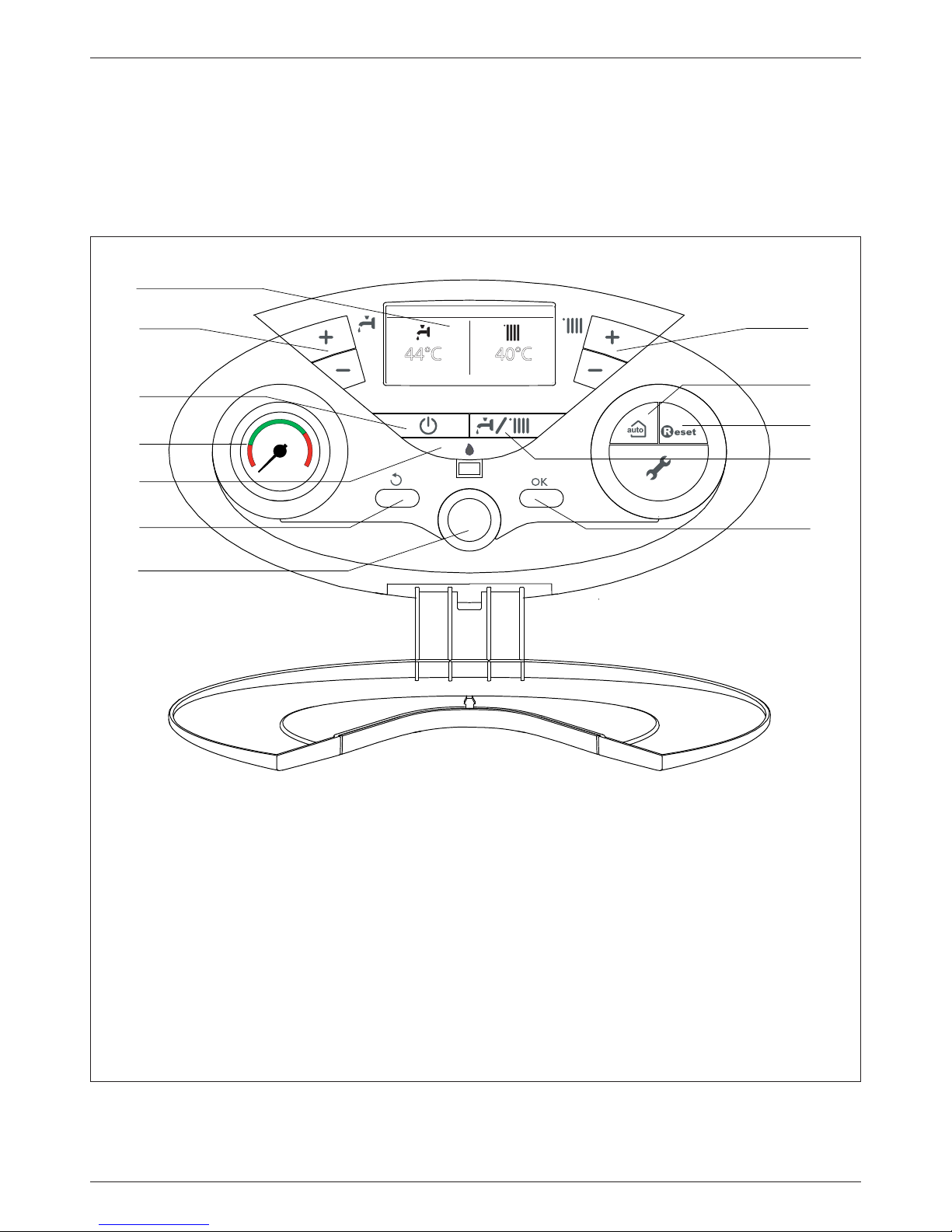
Pannello comandi Pannello comandi
24/01/2011 12:25
44°C 40°C
1
2
3
6
5
4
7
12
10
11
9
8
ATTENZIONE
L’installazione, la prima accensione, le regolazioni di manutenzione
devono essere e ettuate, secondo le istruzioni, esclusivamente da
personale quali cato.
Un’errata installazione può causare danni a persone, animali o cose,
nei confronti dei quali il costruttore non è considerato responsabile.
WARNING
Installation, rst ignition and maintenance work must be performed
by quali ed personnel only, in accordance with the instructions
provided.
Incorrect installation may harm individuals, animals or property; the
manufacturer will not be held responsible for any damage caused as
a result.
Legenda:
1. Display
2. Tasti +/- regolazione temperatura acqua sanitaria
3. Tasto ON/OFF
4. Idrometro
5. Led blu - segnalazione presenza amma
6. Tasto ESC (Back)
7. “Encoder” programmazione
8. Tasto OK
9. Tasto Mode
Selezione modalità di funzionamento caldaia)
10. Tasto RESET
11. Tasto AUTO (Attivazione Termoregolazione)
12. Tasti +/- regolazione temperatura riscaldamento
Legenda:
1. Display
2. Domestic Hot Water adjustment button +/-
3. ON/OFF button
4. Pressure gauge
5. Flame detected Blue LED
5. Esc button (Back)
6. “encoder” programming knob
7. Ok button programming key
9. MODE button
(Operation mode selection summer/winter)
10. RESET button
11. Auto button (To activate Thermoregulation)
12. Heating temperature adjustument button +/-
Page 6

6
manuale d’uso user’s manual
Display Display
01/01/2000 00:00
40°C 70°C
Modalità riscaldamento
Temperatura impostata riscaldamento
XX °C
Heating operation set
C.H. set temperature
Modalità riscaldamento attivo
Temperatura impostata riscaldamento
XX °C
Heating operation active
C.H. set temperature
Modalità sanitario
Temperatura impostata acqua calda sanitaria
XX °C
D.H.W. operation set
D.H.W. set temperature
Modalità sanitario attivo
Temperatura impostata acqua calda sanitaria
XX °C
D.H.W. operation active
D.H.W. set temperature
Temperatura esterna
(attivo con sonda esterna collegata - option)
XX °C
External temperature (°C)
(only with external sensor connected)
Segnalazione errori
con indicazione codice e descrizione
ALERT
Error wsignals
The display show the code and description
Funzione AUTO attivata
auto
AUTO function activated
Funzione Comfort attivata COMFORT Hot Water Comfort activated
Sonda solare collegata (optional)
(set display: boiler complete - see user’s menù)
Solar temperature probe connected (option)
(set display: boiler complete - see user’s menù)
Segnalazione presenza amma con indicazione
potenza utilizzata
(modalità display: caldaia completa - vedi menu utente)
Flame detected with indication of power used
(set display: boiler complete - see user’s menù)
Pressione impianto - bar
(modalità display: caldaia completa - vedi menu utente)
1.3 bar
Digital pressure gauge
(set display: boiler complete - see user’s menù)
Testo descrittivo
(modalità display: caldaia completa - vedi menu utente)
Riscaldamento
Central Heating
Text displaying operation and informations
(set display: boiler complete - see user’s menù)
Page 7

7
user’s manualmanuale d’uso
Predisposizione al funzionamento
Se la caldaia è installata all’interno dell’appartamento veri care che
siano rispettate le disposizioni relative all’entrata dell’aria ed alla
ventilazione del locale (secondo le leggi vigenti).
Controllare periodicamente la pressione dell’acqua sul display e
veri care, in condizione di impianto freddo, che questa abbia un
valore tra 0,6 e 1,5 bar. Se la pressione è al di sotto del valore minimo
il display segnalerà la richiesta di riempimento. Provvedere al tramite
il rubinetto di riempimento posto sotto la caldaia.
Se il calo di pressione è molto frequente è probabile che ci sia una
perdita d’acqua nell’impianto. In questo caso è necessario l’intervento
dell’idraulico.
Procedura di accensione
Premere il tasto ON/OFF , il display si illumina.
Inizia la procedura di inizializzazione,
indicata dalla barra.
Al termine sul display vengono visualizzate
le temperature impostate per il riscaldamento
e l’acqua sanitaria (con gurazione display:
caldaia base).
Viene inoltre richiesto l’impostazione della
data, ora e lingua. Procedere come indicato al
paragrafo MENU UTENTE.
Selezione modalità di funzionamento
La scelta della modalità di funzionamento viene e ettuata tramite il
tasto MODE 9:
Modalità di funzionamento
Display
Inverno
riscaldamento + produzione acqua
calda ad uso sanitario con indicazione
delle temperature impostate
01/01/2000 00:00
40°C 70°C
Estate
solo produzione acqua calda ad
uso sanitario, con indicazione della
temperatura impostata
24/01/2012 12:00
40°C
Solo Riscaldamento
GENUS PREMIUM EVO SYSTEM
(bollitore escluso)
24/01/2012 12:00
70°C
01/01/2000 00:00
40°C 70°C
Initial operating procedures
If the boiler is installed inside the apartment, make sure that all
provisions relating to the air inlet and room ventilation (in compliance
with current legislation) are respected.
Check the water pressure on the display regularly and make sure that
the gure is between 0.6 and1.5 bar when the system is cold. If the
pressure is just under the minimum value the display will request a
lling procedure.
Re-establish the correct pressure by using the lling valve..
If the pressure drops very frequently, there may be a water leak at
some point in the system. If this is the case a plumber should be
contacted.
Ignition procedure
Press the ON/OFF button on the control panel to switch on the
boiler.
The display shows the initialisation procedure indicated by the bar.
Once the procedure is completed, the display
will visualise the temperatures set for the
central heating and domestic hot water circuits
(display con guration: boiler base).
It’s also required to set the date, time and
language. Proceed as indicated in paragraph
USER MENU.
Operating mode selection
Use the MODE button 9 to select the desired operating mode.
Operating mode
Display
Winter
heating + hot water production for
domestic use with set temperature
01/01/2000 00:00
40°C 70°C
Summer
only hot water production for domestic
use with set temperature
24/01/2012 12:00
40°C
Only Heating
GENUS PREMIUM EVO SYSTEM
(Exclusion of Indirect Cylinder)
24/01/2012 12:00
70°C
L’accensione del bruciatore viene segnalata dal led blu 5. The ignition of the burner will be signalled by the blue LED 5.
Page 8

8
manuale d’uso user’s manual
24/01/2012 15:22
40°C 72°C
24/01/2012 15:22
40°C 70°C
01/01/2000 00:00
44°C
Regolazione temperatura sanitario
GENUS PREMIUM EVO
È possibile regolare la temperatura dell’acqua
sanitaria premendo i tasti 2 +/-; si ottiene una
temperatura variabile da 36°C a 60°C.
Il valore prescelto viene visualizzato sul
display lampeggiante.
Domestic hot water temperature
adjustement
GENUS PREMIUM EVO
It is possible to set the temperature of
the domestic hot water by pressing the
buttons 2 a temperature may be obtained
which varies from 36°C to 60°C.
The value set previously will ash on the
display.
Interruzione riscaldamento
Per interrompere il riscaldamento premere il
tasto MODE 9, dal display scompare il simbolo
. La caldaia rimarrà in funzionamento
estivo per la sola richiesta di acqua calda
ad uso sanitario, indicando la temperatura
impostata.
Switching o the heating
To switch o the heating, press the MODE
button 9; the heating operation symbol
will disappear from the display.
The boiler remains active only for the
production of domestic hot water,
indicating the set temperature.
Switching o the boiler
To switch o the boiler press the ON/OFF
button
, the display will switch o .
The Anti-frost Function is allready active.
ATTENTION!!
Switch o the boiler completely by
switching the external electrical switch to
the OFF position. Shut o the gas valve.
Regolazione riscaldamento
È possibile regolare la temperatura dell’acqua
di riscaldamento premendo i tasti 12 +/-, si
ottiene una temperatura variabile da 20°C a
45°C (impianti basse temp.) o da 35°C a 82°C
(impianti alte temp.).
Il valore prescelto viene visualizzato sul
display.
Adjusting the heating
It is possible to set the temperature of the
heating water by pressing the buttons 12 +/-.
The temperature that may be obtained.
which varies from 20°C to 45°C (low
temperature) or 40°C to 82°C (high
temperature).
The value set previously will ash on the
display.
OFF
Procedura di spegnimento
Per spegnere la caldaia premere il tasto ON/
OFF
, il display si spegne.
La funzione antigelo è attiva.
IMPORTANTE!!
Per spegnere completamente la caldaia
portare l’interruttore elettrico esterno in
posizione OFF. Chiudere il rubinetto del gas.
24/01/2012 15:22
40°C 70°C
Regolazione temperatura sanitario
GENUS PREMIUM EVO SYSTEM
collegata ad un bollitore esterno attraverso un
Kit ARISTON - optional
In caso di collegamento ad un bollitore
esterno con un Kit ARISTON, è possibile
regolare la temperatura dell’acqua sanitaria
premendo i tasti 2 +/-, si ottiene una
temperatura variabile da 40°C a 60°C.
Il valore prescelto viene visualizzato sul
display lampeggiante.
Per escludere il bollitore è su ciente premere il tasto MODE e
selezionare la modalità Solo Riscaldamento.
Domestic hot water temperature
adjustment
GENUS PREMIUM EVO SYSTEM
with an external tank connected- option
It is possible to set the temperature of the
domestic hot water by pressing the buttons
2 a temperature may be obtained which
varies from 40°C to 60°C.
The value set previously will ash on the
display.
To exclude the tank, select operating mode Only Heating.
Page 9

9
user’s manualmanuale d’uso
Funzione COMFORT
L’apparecchio consente di massimizzare il comfort nell’erogazione di
acqua sanitaria tramite la funzione “COMFORT”, che mantiene caldo
lo scambiatore secondario (o bollitore esterno) durante i periodi di
inattività.
Per attivare la Funzione Comfort procedere come segue:
- premere il tasto Ok per accedere al MENU UTENTE
- premere il tasto OK per accedere al MENU COMPLETO
- ruotare l’encoder e selezionare “Impostazione acqua calda”
- premere il tasto OK per accedere
- ruotare l’encoder per selezionare Comfort
- premere il tasto OK per accedere alla funzione, il display visualizza
Disabilitata (Impostazione di fabbrica)
Temporizzata
(Attiva per 30 minuti dopo un prelievo sanitario)
Sempre attiva
- ruotare l’encoder per selezionare la modalità prescelta,
esempio: Sempre attiva
- premere il tasto OK per attivare la funzione, il display visualizza
“Funzione comfort impostata a Sempre Attiva
Quando la funzione è attiva sul display si illumina la scritta
COMFORT.
COMFORT Function
The boiler allows the ‘comfort’ level for the output of domestic hot
water to be increased through the “COMFORT” function.
This function keeps the secondary exchanger (or external tank) warm
during the periods in which the boiler is inactive.
To activate the Comfort function proceed as follows:
- press the Ok button to access to the User’s Menu
- press the OK button to access to the Complete Menu
- turn the encoder to select “D.H.W. Settings”
- press the OK button to access to the sub-menu
- turn the encoder to select Comfort,
- press the OK button, the display shows
Disabled (Factory setting)
Time based (Comfort function Active for 30 minutes
after a D.H.W. request)
Always active
- turn the encoder to select the required comfort working mode,
example: Always active
- press the OK button, the display shows
Comfort function set to Always active
When the function is enabled the text COMFORT appears on the
display.
24/01/2012
COMFORT
16:03
40°C 70°C
Page 10

10
manuale d’uso user’s manual
Appliance shut-o conditions
The boiler is protected from malfunctions by means of internal
checks performed by the electronic P.C.B., which stops the boiler
from operating if necessary. In the event of the boiler being shut o
in this manner, a code appears on the control panel display which
refers to the type of shut-o and the reason behind it.
Two types of shut-o may occur:
Safety shut-o
This type of error is “volatile”, which means that the boiler starts up
again automatically as soon as the problem which caused the shuto is removed.
The display shows the code and the error description.
“Fault 110 - Send Probe Damaged”
In fact, soon as the cause of the shut-o disappears, the boiler starts
up again and continues to operate normally.
If the boiler still indicates a safety shut-o , switch it o . Make sure the
external electric switch is in the OFF position, shut o the gas valve
and contact a quali ed technician.
Safety shut-o due to insu cient water pressure
In caso di insu ciente pressione dell’acqua nel circuito riscaldamento
la caldaia segnala un arresto di sicurezza.
The display shows “Fault 108 - Filling Needed”.
The system may be restarted, re-balancing the value, by using the
lling valve.
If the re-balancing request is performed on a frequent basis, switch
the boiler o , bring the external electric switch to the OFF position,
shut o the gas valve and contact a quali ed technician to check for
any leaks of water.
Condizioni di arresto dell’apparecchio
La caldaia è protetta da malfunzionamento tramite controlli interni
da parte della scheda elettronica, che opera se necessario un blocco
di sicurezza. In caso di blocco viene visualizzato sul display del
pannello comandi un codice e la relativa descrizione che si riferisce al
tipo di arresto ed alla causa che lo ha generato.
Si possono veri care due tipi di arresto.
Arresto di sicurezza
Questo tipo di errore è di tipo “volatile”, ciò signi ca che viene
automaticamente rimosso al cessare della causa che lo aveva
provocato. Sul display viene visualizzato il codice e la descrizione
dell’errore.
“Errore 110 - Circuito aperto o cortocircuito sonda mandata
Non appena la causa dell’arresto scompare, la caldaia riparte e
riprende il suo normale funzionamento.
Se la caldaia segnalerà ancora l’arresto di sicurezza, spegnere la
caldaia. Portare l’interruttore elettrico esterno in posizione OFF,
chiudere il rubinetto del gas e contattare un tecnico quali cato.
Arresto di sicurezza per pressione insu ciente acqua
In caso di insu ciente pressione dell’acqua nel circuito riscaldamento
la caldaia segnala un arresto di sicurezza.
Sul display appare il codice error
e
108
108
- Riempi impianto
E’ possibile ripristinare il sistema reintegrando l’acqua tramite il
rubinetto di riempimento posto sotto la caldaia.
Se la richiesta di reintegro dovesse essere frequente, spegnere la
caldaia, portare l’interruttore elettrico esterno in posizione OFF,
chiudere il rubinetto del gas e contattare un tecnico quali cato per
veri care la presenza di eventuali perdite di acqua.
Blocco di funzionamento
Questo tipo di errore è di tipo “non volatile”, ciò signi ca che non
viene automaticamente rimosso.
Sul display appare il segnale di allerta con il codice errore e la
descrizione.
In questo caso la caldaia non riparte automaticamente e potrà essere
sbloccata solo tramite la pressione del tasto
.
Il display visualizza “Reset in corso” e a seguire “Errore risolto”.
Se dopo alcuni tentativi di sblocco, il problema si ripete è necessario
far intervenire un tecnico quali cato.
Operation shutdown
This type of error is “non-volatile”, which means that it is not removed
automatically.
The display shows the code and the error description.
To restore normal operation press the
button on the control
panel.
The dispay shows “Reset in progress” and then “Fault solved”.
If the problem manifests itself again after several attempts to reset
the appliance, contact a quali ed technician.
Errore 108
Riempi Impianto
ALERT
Fault 108
Filling Needed
ALERT
Errore 110
Sonda RISC Difettosa
ALERT
Contatta il Centro assistenza
Fault 110
Send Probe Damaged
ALERT
Call the technical service
Errore 501
Mancanza fiamma
Premere il pulsante Reset
ALERT
Fault 501
No flame detected
Press the Reset button
ALERT
Reset in corso Reset in progress
Errore risolto Fault solved
Page 11

11
user’s manualmanuale d’uso
Importante
Se il blocco si ripete con frequenza, si consiglia l’intervento del
Centro di Assistenza Tecnica autorizzato. Per motivi di sicurezza, la
caldaia consentirà comunque un numero massimo di 5 riarmi in 15
minuti (pressioni del tasto
).
Nel caso in cui il blocco sia sporadico o isolato non costituisce un
problema.
Important
If this shutdown occurs frequently, contact an authorised Technical
Service Centre for assistance. For safety reasons, the boiler will permit
a maximum of 5 resets in 15 minutes (5 presses of the RESET button);
at the 6th attempt within this 15-minute period the boiler will shut
down and may only be operated again after the electricity supply
has been disconnected. If the shutdown is occasional or an isolated
event, this is not a problem.
Tabella Errori per Blocco di Funzionamento
Display Descrizione
1 01
Sovratemperatura
5 01
Mancanza amma
1 03
Circolazione Insu ciente
1 04
1 05
1 06
1 07
1 08
Circolazione Insu ciente (richiesto reintegro)
3 05
Errore scheda
3 06
Errore scheda
3 07
Errore scheda
Sicurezza antigelo
La caldaia è dotata di una protezione antigelo che provvede
al controllo della temperatura di mandata della caldaia: se tale
temperatura scende sotto i 8°C si attiva la pompa (circolazione
nell’impianto di riscaldamento) per 2 minuti.
Dopo i due minuti di circolazione la scheda elettronica veri ca
quanto segue:
a- se la temperatura di mandata è > di 8°C la pompa si ferma;
b- se la temperatura di mandata è > di 4°C e <
di 8°C la pompa si attiva per altri 2 minuti;
c- se la temperatura di mandata è < di 4°C si
accende il bruciatore (in riscaldamento alla
minima potenza) no al raggiungimento
dei 33°C. Raggiunta la temperatura il
bruciatore si spegne ed il circolatore
continua a funzionare per altri due minuti.
La protezione antigelo è attiva solo con la
caldaia perfettamente funzionante:
- la pressione dell’installazione è su ciente;
- l’interruttore bipolare esterno è in posizione ON;
- il gas viene erogato;
- la caldaia non segnala alcun errore.
Operation shutdown error table
Display Description
1 01
Overheating
5 01
No ame detection
1 03
Flow Check Failed
1 04
1 05
1 06
1 07
1 08
Filling Needed
3 05
PCB Fault
3 06
PCB Fault
3 07
PCB Fault
Anti-frost Device.
The anti-frost function acts on the central heating ow temperature probe, independently from other regulations, when the electrical supply is
turned on.
If the primary circuit temperature falls below 8°C the pump will run
for 2 minutes.
After the two minutes of circulation ( xed) the boiler will check the
following:
a) if the central heating ow temperature is > 8°C, the pump stops;
b) if the central heating ow temperature is
between 4 and 8°C, the pump will run for
another two minutes;
c)
if the central heating ow temperature is <
4°C, the burner will re (heating position)
at minimum power until the temperature
reaches 33°C, the burner will go out and the
pump will continue to run for two minutes.
If the ow temperature remains between 4-8°C
the pump will continue to run for two minutes
for a maximum of 10 times unless a temperature above 8°C is detected in the central heating ow, after this the
the burner will re. If lockout is caused by overheat the burner is kept
OFF.
The anti-frost device activates only when (with the boiler operating
correctly):
- the system pressure is correct;
- the boiler is electrically powered;
- there is a supply of gas.
8 °C
3 °C
8 °C
3 °C
Page 12

12
manuale d’uso user’s manual
Impostazioni Utente
Premere il tasto di
programmazione Ok per
accedere al Menu Utente.
Per accedere ai menu o ai sottomenu premere il pulsante OK.
Per muoversi all’interno dei menu o dei sottomenu ruotare l’encoder.
Per variare un valore impostato, ruotare l’encoder.
Per memorizzare premere il tasto OK.
Per uscire o tornare indietro premere il tasto ESC.
User Settings
To access to the User’s settings
press the OK button, the display
shows:
Press the OK button to access the menu and the sub-menu.
Turn the encoder to navigate into the menu and the sub-menu.
Turn the encoder to change the setting of the parameters.
Press the OK button to save the new settings.
Press the ESC button to exit until the normal display screen is restored.
Encoder
Tasto ESC
ESC button
Tasto OK
OK button
Impostazione acqua calda
Impostazioni schermo
Guida
Impostazione riscaldamento
Impostazione lingua display
L’impostazione della lingua viene e ettuata dal menu UTENTE,
procedere come segue:
- premere il tasto O
K, il display visualizza il Menu completo
- premere il tasto O
K, per accedere al Menu completo
- ruotare l’endorer per selezionare “Impostazioni schermo”
- premere il tasto O
K per accedere al sotto-menu
- premere il tasto O
K per accedere al sotto-menu “Lingua”
- ruotare l’encoder per selezionare “Italiano”
- premere il tasto O
K sul display compare “Lingua selezionata
italiano”
- premere il tasto E
SC per uscire dal menu.
Set Language display
To set the Display Language, access the User’s Menus and proceed
as follows:
- press the OK button, the display show Complete Menu
- press the OK button, to access the Complete Menu
- turn the econder to select “Screen settings”
- press the OK button, to access the sub-menus
- press the OK button to access the sub-menu “Language”
- press the OK button to select “English” the dispaly show “Selected
language English”
- press the ESC button to exit the menu.
Impostazione Data e ora display
L’impostazione della data e dell’ora viene e ettuata dal menu UTENTE
- premere il tasto O
K, il display visualizza il Menu utente
- premere il tasto O
K per accedere al menu
- ruotare l’encoder per selezionare “Impostazioni schermo”
- premere il tasto O
K per accedere al sotto-menu
- ruotare l’encoder per selezionare il sotto-menu “Data e ora”
- premere il tasto O
K per accedere al sotto-menu
- premere il tasto OK per accedere alla modi ca del giorno
(lampeggia)
- ruotare l’encoder per impostare il giorno
- premere il tasto O
K per conferma
- ruotare l’encoder per selezionare il mese
- premere il tasto O
K per accedere alla modi ca del mese (lampeggia)
- ruotare l’encoder per impostare il mese
- premere il tasto O
K per conferma
- ruotare l’encoder per selezionare l’anno (lampeggia)
- premere il tasto O
K per accedere alla modi ca dell’anno
- ruotare l’encoder per impostare l’anno
- premere il tasto O
K per conferma
- ruotare l’encoder per selezionare l’ora
- premere il tasto O
K per accedere alla modi ca dell’ora (lampeggia)
- ruotare l’encoder per impostare l’ora.
- premere il tasto O
K per conferma
- ruotare l’encoder per selezionare i minuti
- premere il tasto O
K per accedere alla modi ca dei minuti
(lampeggia)
- ruotare l’encoder per impostare i minuti.
- premere il tasto O
K per conferma
- premere il tasto E
SC per uscire dal menu.
Set the time and date
To set the Time and Date , access the User’s Menus and proceed as
follows:
- press the OK button, the display show Complete Menu
- press the OK button, to access the Complete Menu
- turn the encoder to select “Screen settings”
- press the OK button, to access to the Screen settings
- turn the encoder to select “Time and Date”
- press the OK button, to access the sub-menus
- press the OK button to enable to set the day (the number ashes)
- turn the encoder to set the day
- press the OK button to con rm
- turn the encoder to select the month
-
press the OK button to enable to set the month (the number ashes)
- turn the encoder to set the month
- press the OK button to con rm
- turn the encoder to select the year
- press the OK button to enable to set the year (the number ashes)
- turn the encoder to set the year
- press the OK button to con rm
- turn the encoder to select the hour
- press the OK button to enable to set the hour (the number ashes)
- turn the encoder to set the hour
- press the OK button to con rm
- turn the encoder to select the minutes
- press the OK button to enable to set the minutes (the number
ashes)
- turn the encoder to set the minutes
- press the OK button to con rm
- press the ESC button to exit the menu.
L’accesso e la modi ca dei vari parametri viene e ettuata
attraverso il tasto OK e l’enconder (vedi gura).
The various parameters can be accessed and modi ed using the OK
button and the encoder (see g. below).
Menu completo Complete Menu
Page 13

13
user’s manualmanuale d’uso
Utente - MENU COMPLETO User’s - COMPLETE MENU
Impostazione
riscaldamento
Central
Heating
Settings
Impostazione temperatura
riscaldamento
C.H. Setpoint temperature
Temperatura impostata Zona 1
Set ow temperature Zone 1
Regolabile dal pannello di controllo tasti 12
Adjust on the control panel - buttons 12
Temperatura impostata Zona 2
Set ow temperature Zone 2
Attivo con Modulo gestione zone collegato
Active only with Multi-zone module
Temperatura impostata Zona 3
Set ow temperature Zone 3
Attivo con Modulo gestione zone collegato
Active only with Multi-zone module
Impostazione
acqua calda
Domestic Hot
Water settings
Temperatura setpoint acqua calda
D.H.W. Setpoint temperature
Regolabile dal pannello di controllo tasti 1
Adjust on the control panel - buttons 1
Funzione Comfort
Comfort function
Disabilitata
(impostazione di fabbrica)
Disabled
(factory setting)
Ruotare l’encoder per selezionare la funzione
e premere OK. Sul display comprare la scritta
COMFORT - vedi pag. 6
Turn the encoder to select and press the OK
button. The display shows COMFORT - see page 6
Temporizzata
Time based
Sempre attiva
Always active
Impostazioni
schermo
Screen Settings
Lingua
Language
Ruotare l’encoder per selezionare la lingua e premere OK
Turn the encoder to select the language and press the OK button
Data e ora
Time and Date
Vedi paragrafo Impostazione data e ora - pagina 12
See paragraph Set time and date - page 12
Schermata iniziale
Home screen
Caldaia base
(impostazione di fabbrica)
Boiler base
(factory setting)
Ruotare l’encoder per selezionare e premere OK
Turn the encoder to select and press OK button
Caldaia completa
Boiler complete
Luminosità in standby
Brightness in standby
Ruotare l’encoder e premere OK
Turn the encoder and press Ok button
Retroilluminazione
Backlight
Selezionare il tempo (minuti) ruotando l’encoder e premere OK
Turn the encoder to select the time (minutes) and press OK button
Temporizzazione schermata
iniziale
Home screen timing
Selezionare il tempo (minuti) ruotando l’encoder e premere OK
Turn the encoder to select the time (minutes) and press OK button
Page 14

14
manuale d’uso user’s manual
Schermata iniziale
- impostazione di fabbrica - caldaia base
L’impostazione della schermata iniziale viene e ettuata dal menu
UTENTE.
Per modi care la schermata iniziale procedere come segue:
- premere il tasto O
K, il display visualizza Menu Completo
- premere il tasto O
K, per accedere al Menu Completo
- ruotare l’endorer per selezionare “
Impostazioni schermo”
- premere il tasto OK per accedere alle impostazioni
- ruotare l’encoder per selezionare schermata iniziale
- premere il tasto O
K per accedere alle impostazioni dello schermo
- ruotare l’encoder per selezionare la modalità caldaia completa
- premere il tasto O
K per memorizzare la scelta
- premere il tasto ESC per uscire dal menu.
Home screen
- factory setting - Boiler base
To set the Home Screen , access to the User’s Menus and proceed as
follows:
- press the OK button, the display shows Complete Menu
- press the OK button, to access the Complete Menu
- turn the encoder to select “
Screen Settings”
- press the OK button, to access the “Screen Settings”
- turn the enconder to select “Home screen”
- press the OK button, to access to the “Home screen”
- turn the enconder to select “Boiler complete”
- press the OK button to store the setting
- press the ESC button to exit the menu.
Caldaia base Caldaia completa
40°C 70°C
La modalità base visualizza:
- data e ora
- modalità di funzionamento
impostata
- temperature impostate
- Funzione COMFORT
- Funzione AUTO
40°C
70°C
0,7 bar
Stand-by
La modalità completa visualizza:
- data e ora
- modalità di funzionamento
impostata
- temperature impostate
- Funzione COMFORT
- Funzione AUTO
- pressione impianto
- testo descrittivo operazioni
caldaia
- indicazione accensione
bruciatore
- sonda solare collegata
Boiler base Boiler complete
40°C 70°C
In Boiler base con guration the
dispaly shows:
- time and date
- the set operating mode
- the set temperature
- Comfort Function
- Auto Function
40°C
70°C
0,7 bar
Stand-by
In Boiler complete con guration the dispaly shows:
- time and date
- the set operating mode
- the set temperature
- Comfort Function
- Auto Function
- digital pressure gauge
- text displaying operation as
information
- Flame detected with
indication of power used or
indication
- solar temp. probe connected
Page 15

15
user’s manualmanuale d’uso
Tasto AUTO - Attivazione Termoregolazione
La funzione A
UTO consente di adattare il funzionamento della caldaia
alle condizioni ambientali esterne ed alla tipologia dell’impianto in
cui è installata.
Consente di raggiungere nella maniera più veloce il comfort
ambientale senza inutili sprechi di denaro, energia, e cienza
riducendo notevolmente l’usura dei componenti.
Contattare un nostro tecnico quali cato che provvederà
ad informarvi sui dispositivi collegabili alla caldaia ed a
programmarla in base all’impianto.
Nelle normali caldaie infatti, la temperatura dell’acqua negli elementi
scaldanti viene normalmente impostata ad un valore elevato (7080°C) garantendo un riscaldamento e cace nelle poche giornate
fredde dell’inverno e rivelandosi esuberante nelle tante giornate
meno fredde tipiche delle stagioni autunnali e primaverili. Questa
consuetudine comporta fenomeni di eccessivo riscaldamento degli
ambienti dopo lo spegnimento del termostato con conseguenti
sprechi di energia e condizioni di scarso benessere ambientale.
La nuova funzione A
UTO prende il ”comando” della caldaia e sceglie il
miglior regime di funzionamento in base alle condizioni ambientali,
ai dispositivi esterni connessi alla caldaia e alle perfomance richieste
(decide in continuo a che potenza funzionare in base alle condizioni
ambientali e alla temperatura dell’ambiente richiesta).
24/01/2012 15:38
44°C 38°C
auto
auto auto
Cambio gas
Le nostre caldaie sono progettate sia per il funzionamento con il gas
metano che con i gas GPL.
In caso si renda necessaria la trasformazione, rivolgersi ad un tecnico
quali cato o ad un nostro Servizio Assistenza Tecnica autorizzato.
Manutenzione
La manutenzione è essenziale per la sicurezza, il buon funzionamento
e la durata della caldaia.
Leggere quanto riportato al paragrafo Manutenzione del manuale
“Istruzioni Tecniche per l’installazione e la manutenzione”.
Tutte le operazioni e ettuate vanno registrate sul libretto di
impianto.
Auto button - Temperature adjustment activation
The AUTO function enables boiler operation to be adapted to
environmental conditions and to the type of system it is installed on.
Comfortable temperature is reached inside the room in the quickest
way possible, without wasting money, energy or e ciency, while
substantially reducing the amount of wear experienced by the
components.
Your installer will advise you on the devices connectable
to the boiler and will program it according to the system.
In normal boilers the water temperature inside the heating elements
is usually set to a high value (70-80°C), thereby ensuring e ective
heating during the few really cold winter days. It then becomes
excessive on less cold days (of which there are many) more typical of
the autumn and winter seasons. This leads to excessive room heating
after the thermostat has been switched o , resulting in energy waste
and uncomfortable conditions inside the room.
The AUTO function “takes control” of the boiler and selects the best
operating regime based on environmental conditions, external
devices connected to the boiler and the performance required. It
constantly decides at which power level to operate based on the
environmental conditions and the room temperature required.
Change of gas type
Our boilers are designed to function either with Natural Gas (methane) or L.P.G. gas. If you need to change from one gas to the other,
one of our Authorised Service Centres must be contacted to convert
the appliance.
Maintenance
Schedule an annual maintenance check-up for the boiler with a
competent person.
Correct maintenance always results in savings in the cost of running
the system.
Failure to arrange an annual service for the appliance will invalidate
the second year of the manufacturers guarantee.
Page 16

Ariston Thermo SpA
Viale A. Merloni, 45
60044 Fabriano (AN)
www.aristonthermo.it
info.it@aristonthermo.com
Servizio clienti
199 111 222
Costo della chiamata al telefono fisso: 0,143 Euro al minuto in fascia
oraria intera e 0,056 Euro in fascia oraraia ridotta (IVA inclusa)
420010434700 - 290612
 Loading...