

Page 1
VehicleSecuritySystem
VSS1
System Setting Guide - English
Page 2

EN
Dear Customer,
You will nd in this guide the information and operations necessary in order to
– Conrm installation of the alarm system.
– Activate/deactivate some features.
– Diagnose the last 3 causes of alarm.
If you need any information about the usage of the alarm system, please refer to the owner’s
manual of the alarm system.
VSS1 1
Page 3

EN
Programming mode
This function allows to enable/disable various system options and to retrieve information from the
system.
To enter programming mode you have to follow the procedure below:
• First you must enter the programming mode.
• Then, you can select the function you want to edit by counting the number of times you close
the door.
• Once you have nished in that mode, you can select another one, or exit by waiting for
30 seconds, or by turning the key to ON and OFF again.
1 Start of procedure
Alarm system has to be in disarmed state, and all doors closed.
Enter programming mode
For remote control key cars:
– Insert the key into the ignition.
– Turn the key to IG ON position 5 times (IG OFF -> ON) within 0 s.
– Final key position: IG ON, Alarm status light (LED) is on for 30 s.
For Smart key Entry cars:
– Have the smart key inside the vehicle.
– Without pressing the clutch, press the start switch until IG ON status has been reached
5 times (IG OFF -> ON) within 0 s.
– Final start switch status: IG ON, Alarm status light (LED) is on for 30 s.
Note:
– If IG OFF-> ON is operated more than 5 times, you have to withdraw the key from the ignition
and repeat the above procedure.
VSS1
Page 4

EN
3 Select the programming mode
Within 30 sec, select the programming mode by performing the following number of door open/
close operations; (counting the number of closures).
One: Buzzer ON/OFF (see paragraph .8)
Two: Automatic doors lock ON/OFF (see paragraph .3)
Three: Alarm memory conrmation (see paragraph .5)
Four: Installation conrmation (see paragraph .9)
Five: Additional car horn ON/OFF (see paragraph .6)
Nine: Passive arming ON/OFF (see paragraph .4) (Not available for Belgium).
4 Conrmation of programming mode
Turn the key or press the start switch to reach the OFF position, (IG ON -> OFF) to enter selected
the programming mode.
Note:
– The selection is conrmed by hazard lights ashing and the buzzer beeping the same number
of times as the above number of door open/close operations.
– To restart from point 3 you have to turn the key to the ON position (IG OFF -> ON).
Now you must choose the functionality you want.
5.1 Modify the settings
Close door count:
One: Buzzer ON/OFF.
1) Open and close the door one time within 30s (Alarm status light (LED) will turn ON).
Once: Buzzer OFF.
Twice: Buzzer ON.
) Turn the key (IG OFF > ON > OFF).
The LED will turn OFF and the hazard lamps turn ON the same number of times as the
door open/close operations.
3) Turn the Key to ON within 30 seconds to restart from point 3).
Two: Automatic doors lock ON/OFF.
1) Open and close the door two times within 30s (LED will turn ON).
Once: Automatic door locks OFF.
Twice: Automatic door locks ON.
) Turn the key (IG OFF > ON > OFF).
The LED will turn OFF and the hazard lamps turn ON the same number of times as the
door open/close operations.
3) Turn the Key to ON within 30 seconds to restart from point 3).
VSS1 3
Page 5

EN
Five: Additional car horn ON/OFF.
1) Open and close the door ve times within 30s (LED will turn ON).
Once: Horn OFF.
Twice: Horn ON.
) Turn the key (IG OFF > ON > OFF).
The LED will turn OFF and the hazard lamps turn ON the same number of times as the
door open/close operations.
3) Turn the Key to ON within 30 seconds to restart from point 3).
Note:
– This activation is not possible on all car models.
Nine: Passive arming ON/OFF.
1) Open and close the door nine times within 30s (LED will turn ON).
Once: Passive arming OFF.
Twice: Passive arming ON.
) Turn the key (IG OFF > ON > OFF).
The LED will turn OFF and the hazard lamps turn ON the same number of times as the
door open/close operations.
3) Turn the Key to ON within 30 seconds to restart from point 3).
5. Diagnostic mode
Close door count:
Three: Alarm memory conrmation.
1) Open and close the door three times within 30s (LED will turn ON).
) When a door is opened within 30s (LED ON) from the selection of the setting mode.
The system will indicate the last alarm triggers by the number of hazard lamp
ashes and buzzer beeps (0.35s. ON/OFF - seconds pause between the different
indications).
One: Volumetric sensor
Two: Additional sensor (e.g. inclination sensor)
Three: Doors
Four: Boot
Five: Bonnet
Six: Ignition
Seven: Battery tampering (disconnection)
Eight: Cobra Bus tampering.
Note:
– After indication, if the door is closed and reopened within 30s, the alarm memory indication
will activate again.
– Turn the Key to ON within 30 seconds to exit diagnostic mode.
4 VSS1
Page 6

EN
Four. Installation conrmation.
1) Open and close the door four times within 30s (LED will turn ON)
The system can conrm the correct installation.
) When an intrusion is detected, Alarm status light (LED) and hazard signals blink for
detection time.
3) If any other alarm trigger is detected (opening door, boot, bonnet, additional sensor)
The alarm status light (LED) and the siren buzzer will turn ON continuously while the
trigger is present.
Note:
– The installation check mode is terminated after 5 min. or by turning the car key from OFF to
ON position.
On exit from installation check mode the Alarm status light (LED) will turn OFF and the siren
buzzer and the hazard signal lamp turn ON twice.
Turn the Key to ON within 30 seconds to exit the diagnostic mode.
6 Exit from programming mode
30 seconds after no operation (all new data will be stored)
or
turn the key to OFF position from point 3) with no door open/close operations.
VSS1 5
Page 7
EN
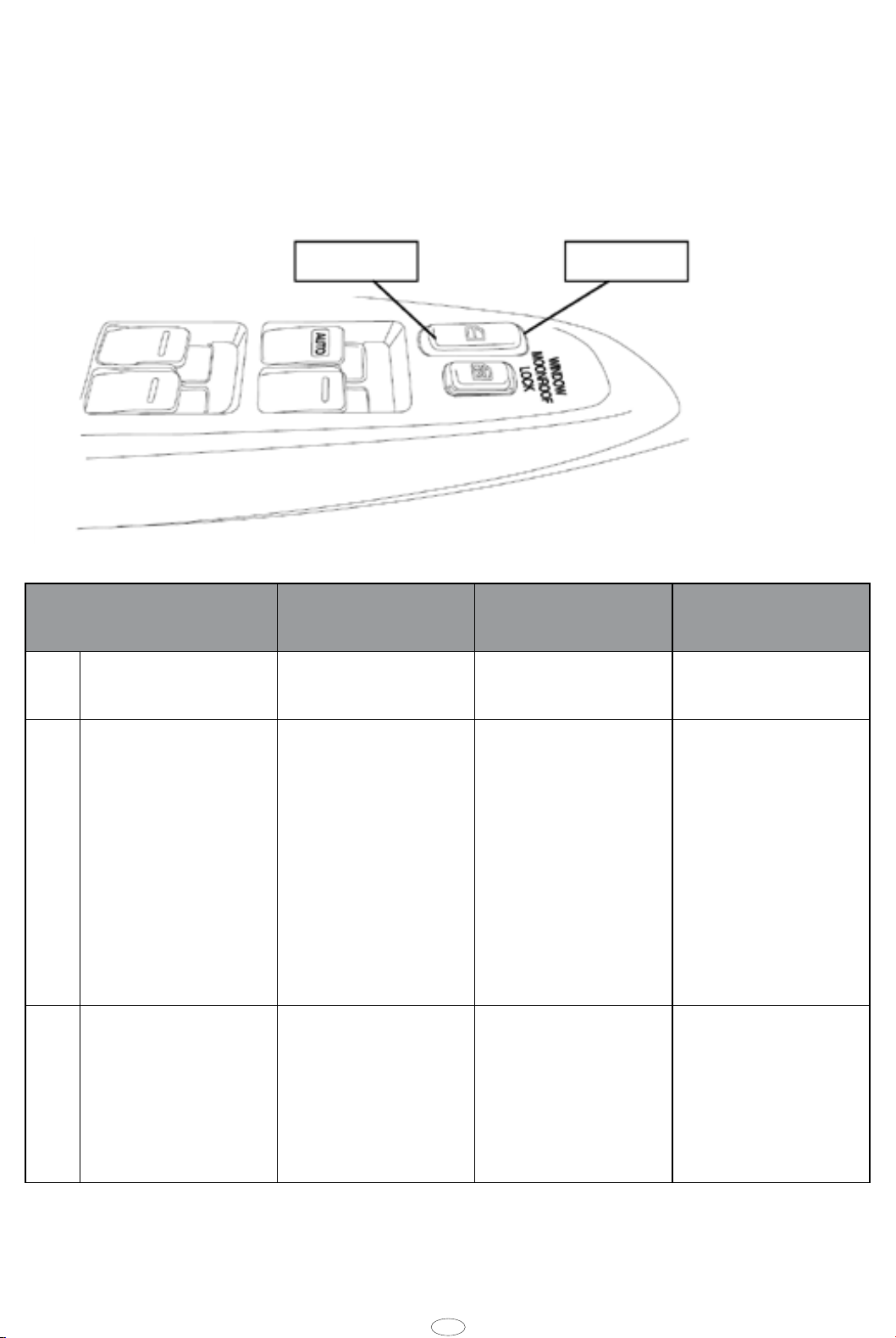
7 Arm without intrusion sensor
If you have to lock the car with somebody inside (passenger, children, dog, …), you must
deactivate the Intrusion Sensor.
Central Door Lock
(Located on the driver’s door)
UnlockLock
Activation steps Hazard light
indication
1Open the driver’s
door.
Operate the Central
Power Door Lock
switch to the
lock and unlock
positions 3 times
with the driver’s
door open. (Interval
between each press
should be less than
5 seconds).
3Close all doors,
bonnet and boot,
then lock the car by
remote control or
smart key within 5
minutes.
Flashes once.ON for 30 seconds,
–––
–LED indication
Alarm status
light (LED)
will ash rapidly
for 5 minutes, or
until you arm the
system.
then start ashing.
Buzzer
beeps sound
when the sensors
are deactivated.
–
NOTE:
– The interior sensor is deactivated for 1 use only. On the next arming the interior sensor will be
activated again.
6 VSS1
Page 8

EN
8 Garage mode
If you have to bring your car to your authorised retailer and do not want to provide the remote
controlled key, you can deactivate the alarm system for a limited period of time.
During garage mode, all the alarm system functions are inhibited.
This mode has to be manually activated by following this procedure:
1. Disarm by remote control.
. Insert the key into the ignition and turn to IG ON.
3. Open and close the door 7 times within 30 seconds.
4. Turn the key to IG OFF.
The hazards will ash once (conrmation).
After 5 engine starts, the garage mode will be cancelled. The hazards will turn on twice.
VSS1 7
Page 9

www.toyota-europe.com
Publication no. ASM 000 009-0
 Loading...