

Page 1
PROGRAMMING THE REMOTE CONTROL
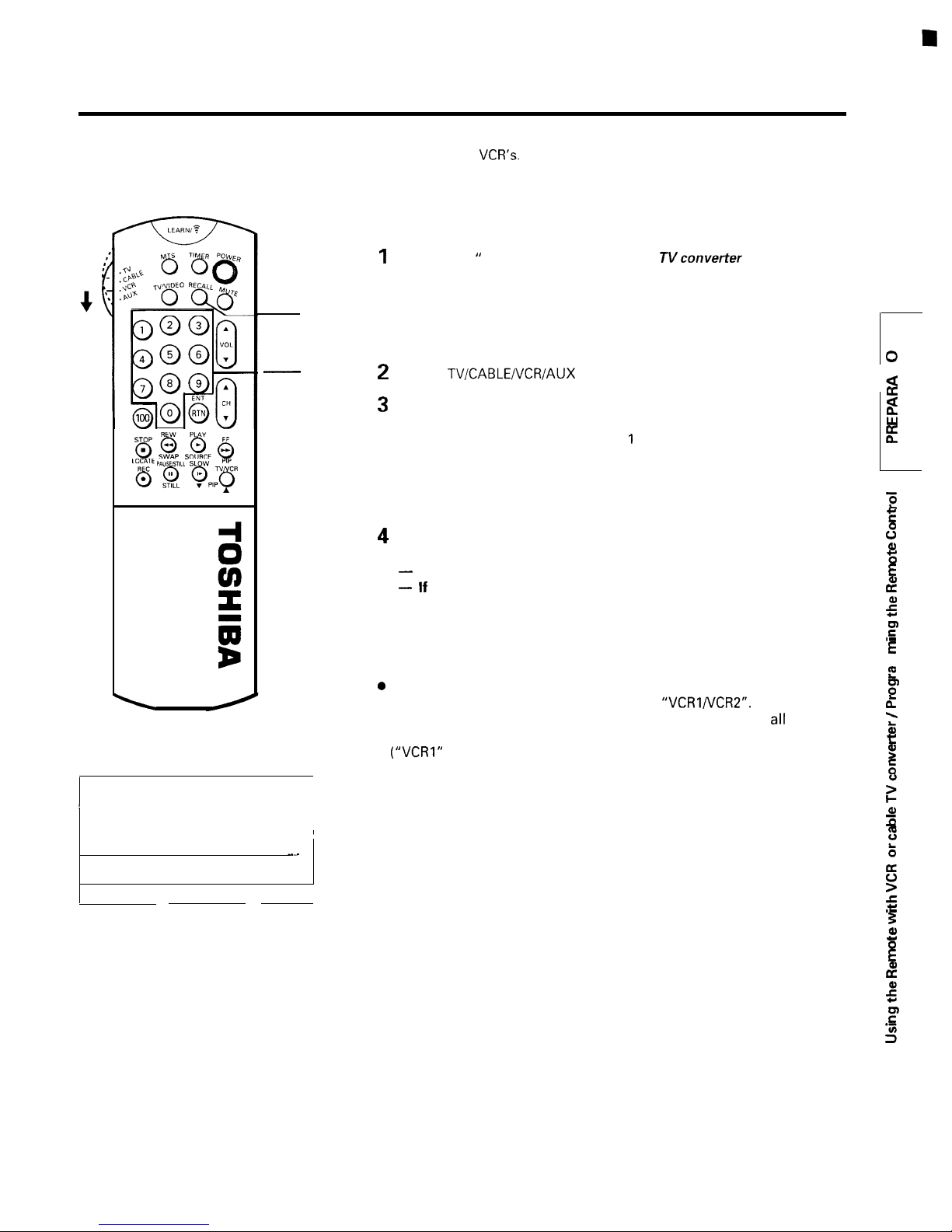
l This Remote Control is preprogrammed to operate TOSHIBA VCR’s.
l To use VCR’s other than Toshiba models (or Cable converter), perform the following procedures before operating.
gip
CH
TO CONTROL OTHER BRANDS OF VCR’S AND CABLE TV
CONVERTERS
Refer to the
VCR code table” (or “Cable
code table”) on
pages 16 and 17 to find the code number that corresponds to the
brand name of your VCR (or your converter).
RECALL
If more than one number is listed, try each one separately untit you
find the one that works.
Number
Set the
switch to VCR (or CABLE).
Hold d
own RECALL while pressing the Number buttons for the three
digit code number for your brand of VCR (or converter).
The transmit indicator tights up for
second when the programming
is completed.
When an operation error has occurred, the indicator blinks.
Press RECALL again to reset.
Point the Remote Control at the VCR (or at the converter) and press
POWER to test the code number.
If the right number was entered, the VCR should turn on.
If the VCR does not respond to the Remote Control, repeat steps
1 to 4 with another code number.
Notes:
l You have to reprogram the Remote Control when you change its
batteries.
codes. These VCR’s have a switch labeled
If your VCR has this kind of switch, and does not respond to
the code
numbers for your VCR brand name, set the switch to another position
or “VCR2”) and reprogram the Remote Control.
For future reference, write the
code you used.
VCR CODE:
CABLE CODE:
2
i=
E
Page 2
PROGRAMMING THE
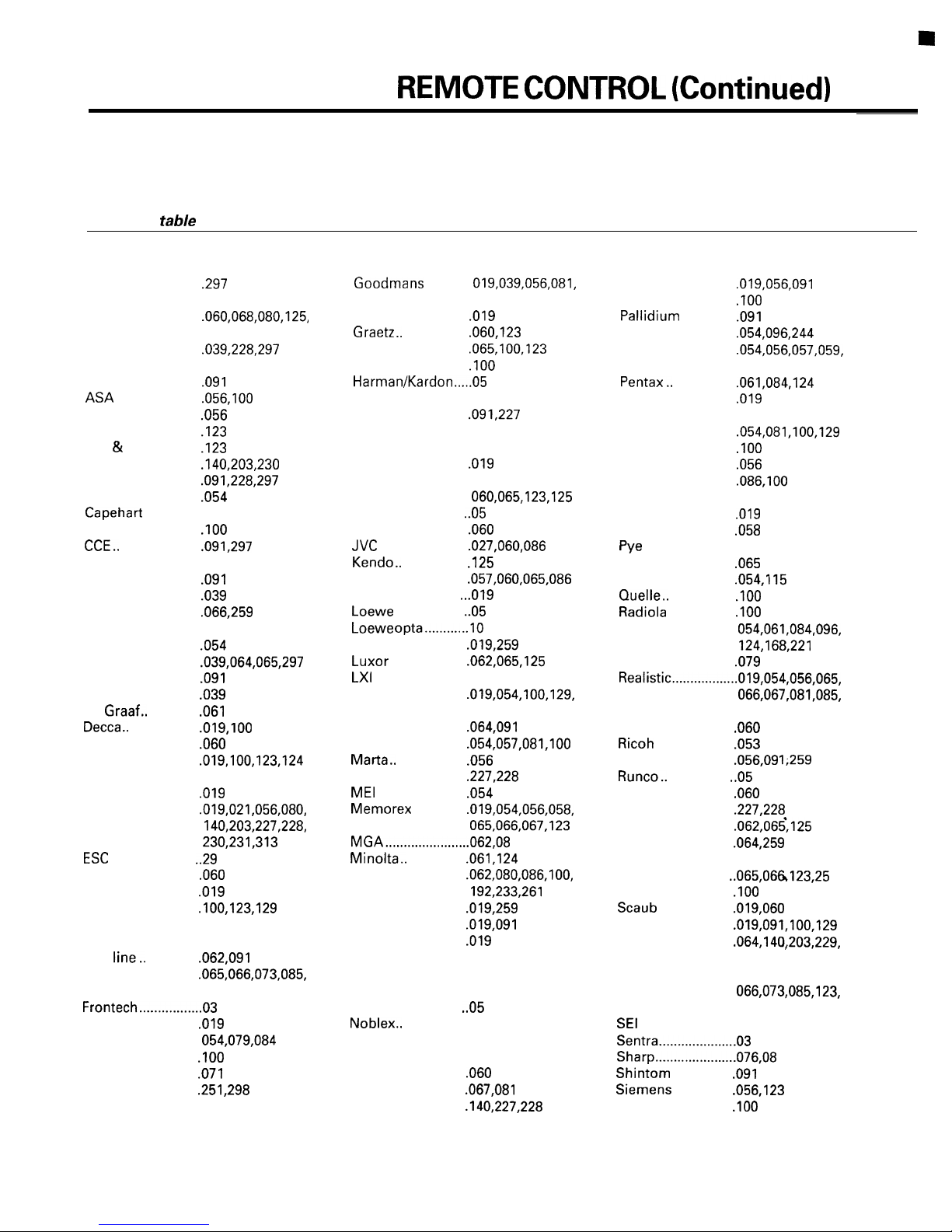
l The code numbers listed below are the newest ones at the time of printing. New code numbers may or may not have
been added since printing.
VCR code tabie
BRAND NAME
Aiko ....................... .297
Aiwa ...................... ,019
Akai .......................
Atba.. .....................
Amstrad
Anitech
Audiovox
Baird......................
Bell
Broksonic.. ............
Bush ......................
Canon .................... .054
Carver.. ..................
CGE
Cimline.. ................
Condor .................. .039
Craig..
Crown .................. -297
Curtis Mathes ....... .054
Daewoo.. ...............
Dansai
Daytron ................. .039
De
Dual....................... .060
Dumont
Dynatech.. ............. ,019
Electronic.. ............ .019
Emerson.. ..............
Ferguson.. ............. .060
Fidelity
Finlandia
Finlux
First
Fisher ....................
Funai
GE
GEC
General ................. .071
Go Video..
Goldstar..
................ ,019
..................
.......................
.............. .056
Howell..
............... ,039
...................... .091,297
......................
.................... .066,259
...................
..............
.................
....................... ..29
.................. .019
...............
...................
..............
.....................
...........................
.......................
.............
.............
CODE NUMBER
261
......
..019
..019.061,100,123,
124
123
..056.05 7
BRAND NAME
.............
Gradiente.. ............ .019
.................. .060,123
Granada.. ..............
Grundig.. ...............
Hem.. .....................
Hinari..................... .091,227
Hitachi.. ................ ..019.060,061,084,
Imperial.. ............... .019
Interfunk.. .............. ,100
ITT ..........................
....................... ..05
JCL
Jensen.. ................. .060
........................
.................. .125
Kenwood.. .............
Lloyd
...................
...................
....................
Logik..
.....................
Magnavox.. ...........
Manesth
Marantz..
................
...............
...................
...................
Matsui
..............
7
Mitsubishi .............
MTC.. .....................
Multitech............... .019,091
Murphy
NEC
Neckermann ......... ,100
9
Nikko .................... ..05
Nokia
Nordmende .......... .060
Optonica ............... .067,081
Orion
................
................. .019
......................
...............
....................
.....................
CODE NUMBER BRAND NAME
Osaki ..................... .O’I9,056,091
09 1,297
7
,091
124
4
6
0
056
168
Otto Versand ........ ,100
Panasonic .............
Penney..
Perdio..
Philco
Philips ...................
Phonola.. ............... ,100
Pilot
Pioneer..
Portland
Proline..
Pulsar..
Quartz..
Quasar..
RCA ........................
RCA Unified.. ........ .079
Rex
Roadsta r................ .056,09
.................. .019
....................
.......................
..................
..........................
..................
..................
..................
........................
.....................
.................
Saba
......................
Saisho
...................
Salora..
0
Samsung..
Sansui
Sanyo..
SBR
Schneider.. ............
Scott
..................
..................
.................
........................
Lorenz........ .019,060
......................
..057.059,060,069,
086
6
...25 9
Sears
....................
..........................
..060.065,123,125,
259
Sinudyne..
CODE NUMBER
...............
................
061,259
.................
,054
................ .086,100
................ ,039
................. .019
100
.................
123,259
8
............. .064,259
..060.08 6
9
231
..054.056,061,065,
124
100
9
1
................
................
.............
Page 3
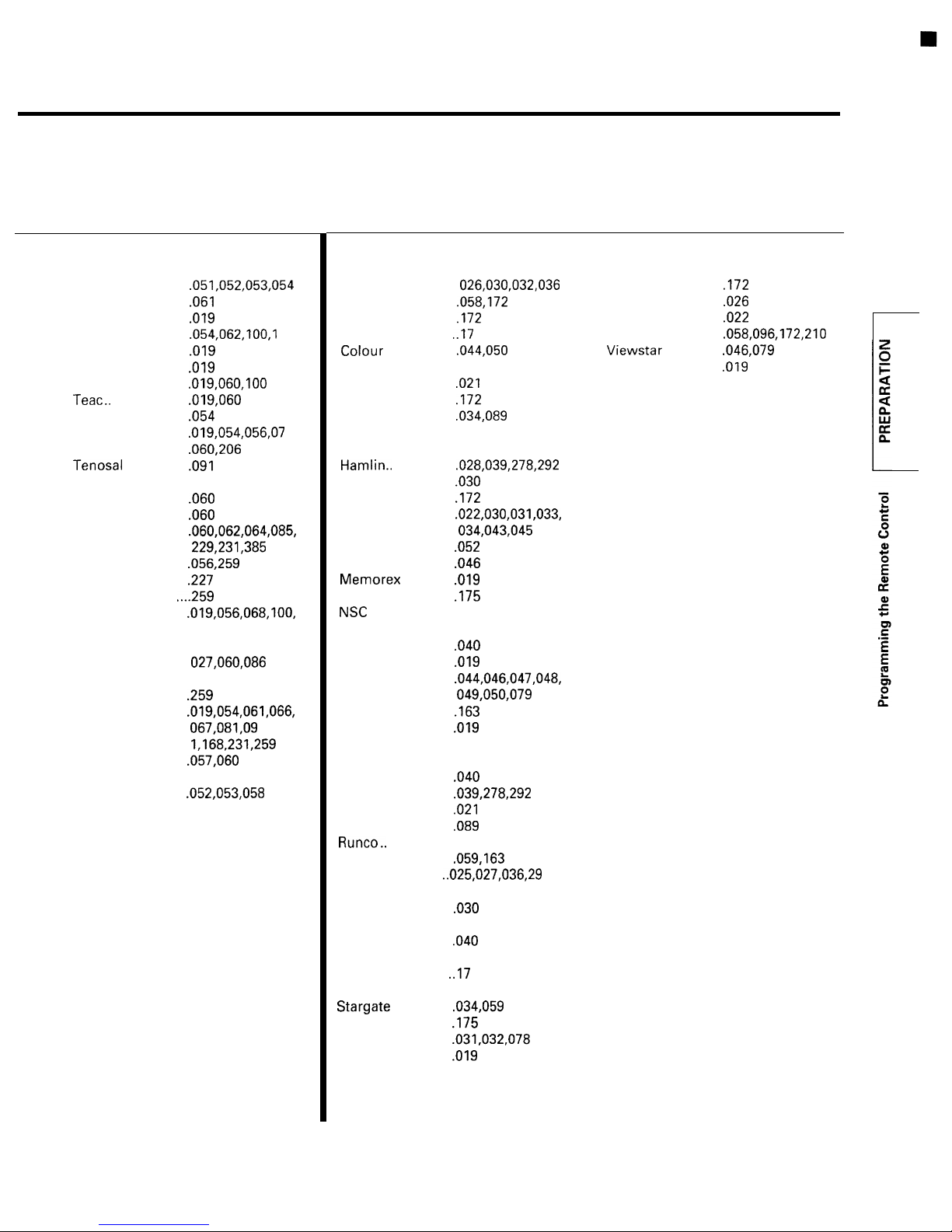
Cable TV converter code table
BRAND NAME
Sony..
....................
STS........................
Sunstar..
Sylvania ................
Symphonic
Tashiko..
Tatung..
Technics
Teknika..................
Telefunken ............
Tensai.....................
Thomson...............
Thorn.. ...................
Toshiba
Totevision .............
Triumph
Unitech.. .............
Universum ............
Vector Research.
Victor......................
Video
Videosonic ............ .259
Wards....................
Yamaha..
Yoko
Zenith ....................
................ .019
................ .019
.................
.....................
................ .054
.................
.................
................ .227
Concepts..
...............
.......................
CODE NUMBER
........... .019
019
125
.
..057.05 9
.
..059.08 0
259
29
BRAND NAME CODE NUMBER BRAND NAME CODE NUMBER
ABC ........................
Archer
................... .058,172
Century
Citizen ..................
Comtronics
Eastern
Garrard..
Gemini
1
General
Hitachi
Jasco..
Jerrold..
Macom
Magnavox..
Movie Time
Oak .........................
Panasonic
Paragon..
Philips
Pioneer..
Pulsar .................... .019
PVP Stereo
RCA
Regal
Regency
Rembrandt..
Samsung..
Scientific Atlanta.
Signal
Signature..
SL Marx..
Sprucer
Standard
Starcom
STS........................
Tocom..
Toshiba
.................
2
.........
Voice
............
059,079
..................
................
.................. .034,089
Instrument..
....... ,030
.................
................... .030
...................
.................
..................
........... .046
.............. .019
..........
........................
............... .019
...................
................ .163
Visual
Matrix......02 2
.............
089,175
026,038
.......................
.....................
................
.......... .089
.................. ,029
.............
.................... -034,059
............ .030
............... ,059
................. .040
Components
....
4
................ -022,034
................ .034,059
.................
................. -019
6
Unika
..................... ,172
United Artists
United
Cable.. ....... ,022
Universal
Zenith..
...............
................
..................
........026
Page 4
REMOTE CONTROL (Continued)
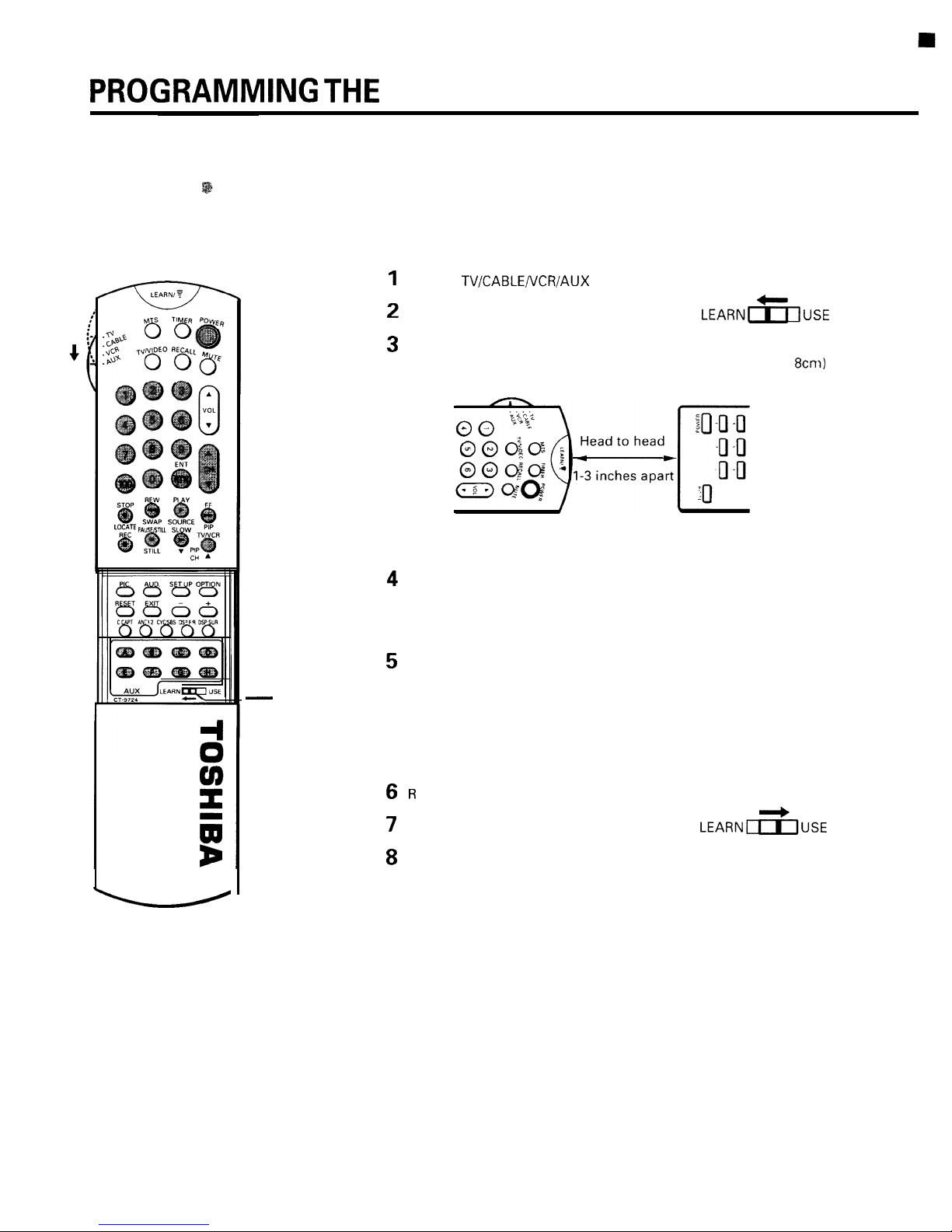
l This Remote Control is capable of learning operating codes from most infrared remote control transmitters. You can
control the functions of your TV and a variety of video/audio equipment with the supplied Remote Control only.
l The 31 buttons
can be used as Learning buttons.
LEARN-USE
switch
TO LEARN OPERATING CODE OF ANOTHER REMOTE
CONTROL
Set the
switch to “AUX”.
Set the LEARN-USE switch to “LEARN”
Place the supplied Remote Control and the remote control transmitter
to be learned, head to head approximately 1 to 3 inches (3 to
apart.
Supplied Remote Remote to be
Control
learned
Hold down the button to learn on the supplied Remote Control for
about 1 second
until the LEARN indicator lights up.
When you press a button other than a Learning button,
the
indicator
will blink.
Hold down the function button to be learned on the remote control
transmitter for about 3 seconds until the LEARN indicator goes off.
Note:
If the LEARN indicator blinks, the supplied Remote Control
cannot learn the operating code or an error has occurred.
Try steps 4 and 5 again.
epeat steps 4 and 5 for other function keys.
Set the LEARN-USE switch to “USE”.
To check your programming, operate the appropriate equipment with
the supplied Remote Control. If the equipment does not operate as
expected, repeat steps 3 to 7.
If needed, try changing the distance between the two remote controls,
Page 5
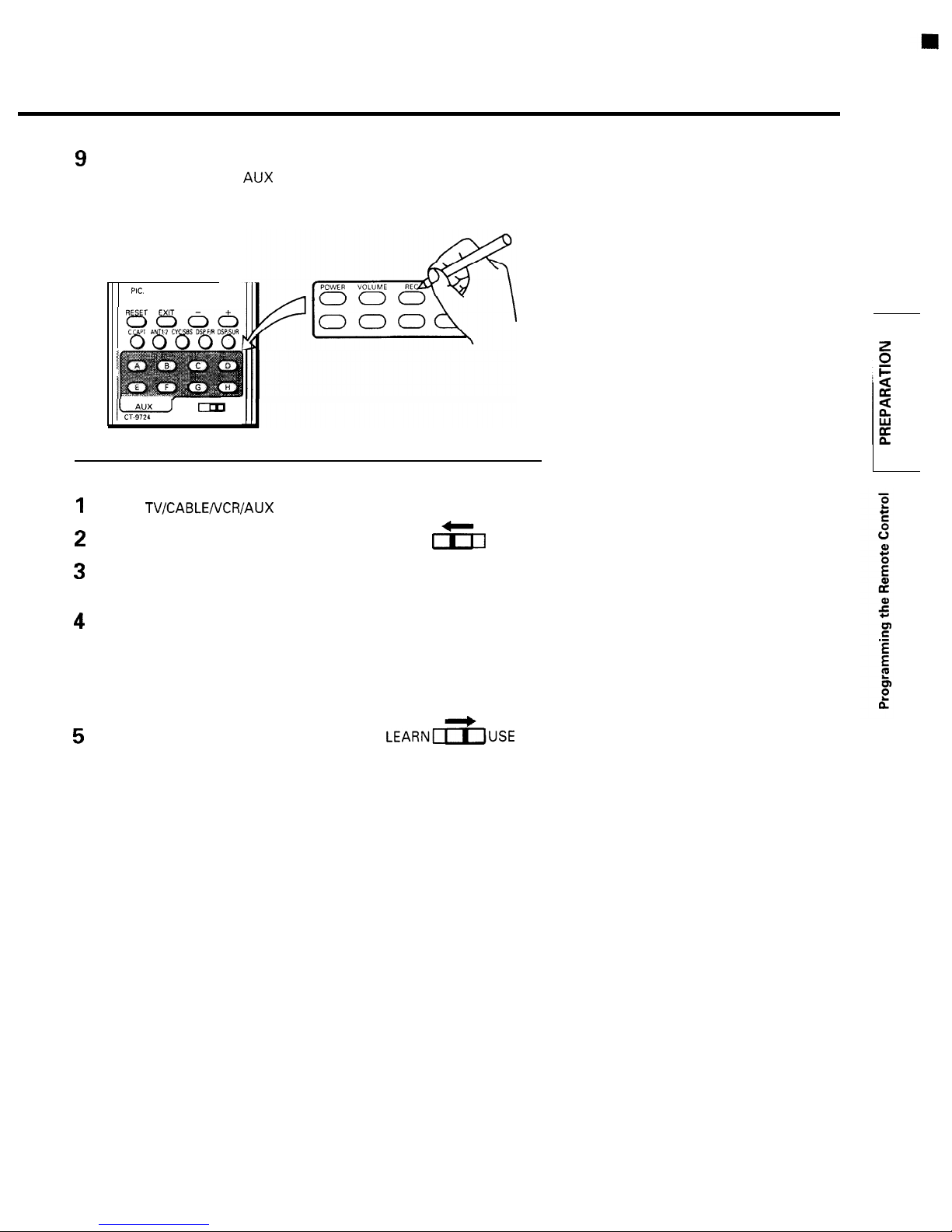
Attach th
e supplied template to the Remote Control to enter the
function names of the
buttons you have programmed.
Use a ballpoint pen etc. to write the function names.
AUD. SET UP OPTION
0000
LEARN
USE
TO CANCEL THE LEARNED OPERATING CODES
Set the
switch to AUX.
Set the LEARN-USE switch to LEARN.
LEARN
USE
Hold down the button of the function to cancel on the Remote Control
for about 1 second until the LEARN indicator lights up.
Hold down RECALL and RESET at the same time for about 6 seconds
until the LEARN indicator goes off after blinking.
Note:
You cannot cancel the programming if you release the button
while the indicator is blinking.
Set the LEARN-USE switch to USE.
 Loading...