

Page 1

USER MANUAL
dBucket Delay
®
Page 2
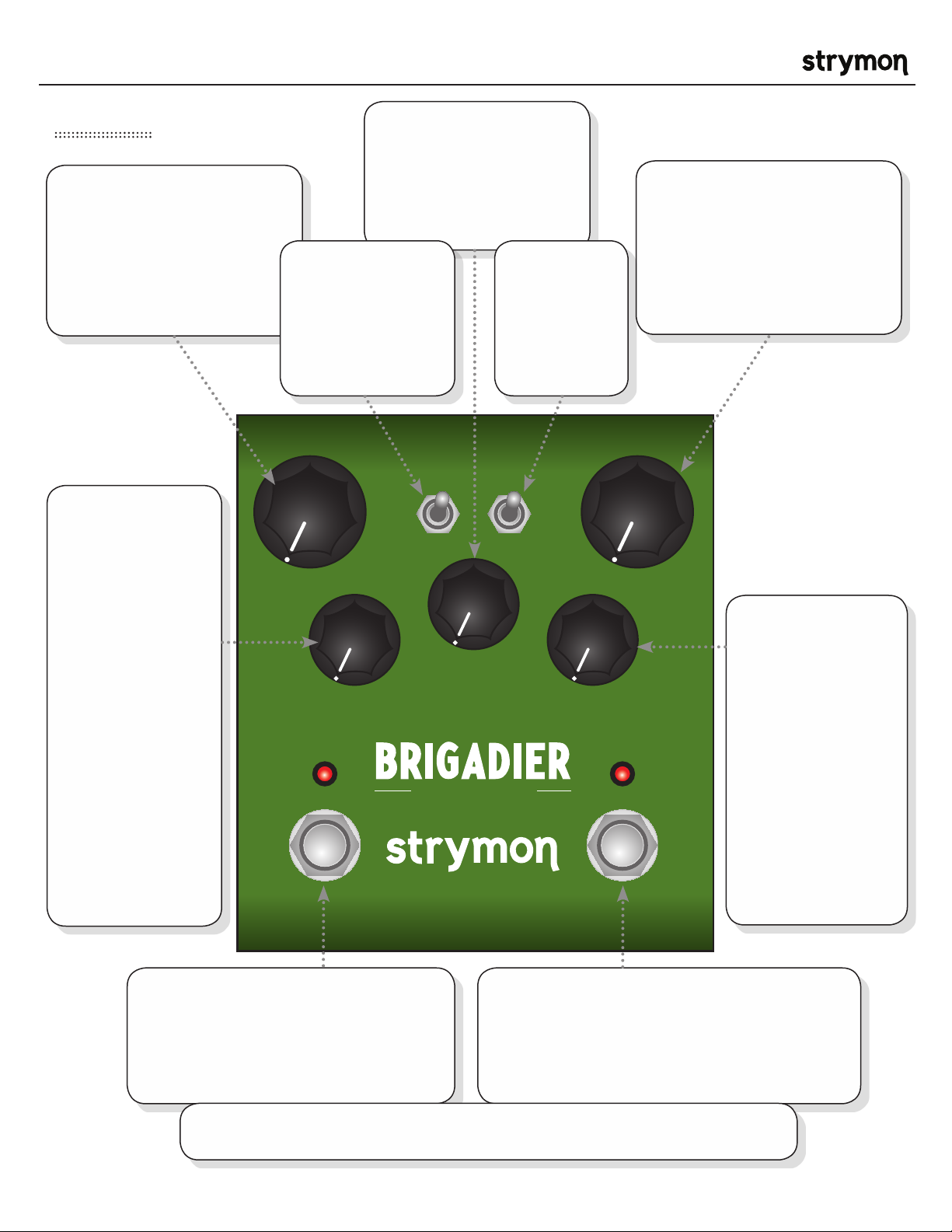
Brigadier - dBucket Delay User Manual
®
Front Panel
TIME: Controls the delay
time according to the selected
delay mode. Delay clock
is continuously variable so
that turning it while repeats
are happening can produce
interesting pitch effects.
BUCKET LOSS:
Controls the
amount of bucket
loss at each stage
in the dBucket
algorithm, from no
loss at minimum,
to full noisy loss at
maximum. Set to
3:00 to get maximum
distortion loss with
just a hint of noise.
Increasing from 3:00
adds more noisy
loss. TIP: Hold TAP
and BYPASS while
turning the knob to
adjust the filter for
darker or brighter
repeats (see pg 5 for
more info).
REPEATS: Varies the
number of repeats from
one to runaway oscillation.
When set to 3:00, a
sustained infinite repeat is
achieved without runaway.
MODE SWITCH:
Controls the delay time range
by adjusting the number of
dBucket ‘chips’ in the delay.
Short mode ranges from
40ms to 400 ms, med from
100ms to 1000ms, and long
from 500ms to 5s
MODE
short
med
long
dBucket delay
TAP
REPEATS
TAP SWITCH:
Changes the tap
subdivision between
quarter notes,
dotted eighth notes,
and eighth note
triplets.
quarter
dot
triplet
MODBUCKET LOSS
BYPASSTAP
®
MIX: Controls the balance of dry
signal and wet signal from 100%
dry at minimum to 100% wet
at maximum. The mix occurs
entirely in analog. Set to 3:00 to
get a 50/50 mix.
MIXTIME
MOD:
Adds LFO modulation
to the delay time.
Modulation is off at
minimum setting. The
modulation speed is
slow in the first half
of the knob, and fast
in the second half of
the knob, increasing in
intensity as the knob is
turned clockwise.
TAP FOOTSWITCH:
Tap quarter notes to set the delay time.
The TAP LED will flash to indicate the
tempo. TIP: Holding the tap footswitch will
result in infinite repeats.
TIP: Hold down BYPASS and TAP while turning the MIX knob to achieve a +/- 3dB
boost or cut when the pedal is engaged (12:00 on the Mix knob is unity gain).
BYPASS FOOTSWITCH:
Engages and disengages effect. Bypass mode is
true bypass by default. LED on indicates that the
effect is engaged. TIP: Hold the bypass footswitch
during power up to change the bypass mode to
analog bypass with trails (delay persist).
pg 2
Page 3

Brigadier - dBucket Delay User Manual
Rear Panel
®
INPUT
High impedance
mono input.
EXP
RIGHT OUTLEFT OUT
Stereo outputs.
Use LEFT OUT
for mono signal
output.
9VDC
+
-
Standard 9V DC center
negative power input.
250 mA available
current required.
Connect a standard TRS
expression pedal for continuous
control over any selectable knob
parameter. To select the knob
controlled by the expression
pedal, hold the TAP footswitch
during power up. The first knob
turned is then then assigned
to the expression pedal. The
maximum position the knob
is turned up to becomes the
expression pedal “toe down”
maximum value.
pg 3
Page 4

Brigadier - dBucket Delay User Manual
MIXTIME
short
med
long
MODE
TAP
quarter
dot
triplet
In Depth: Delay Modes
®
The 3 modes in Brigadier give you 3
different delay pedals in essence. Each
mode has a delay range that is determined
by the number of dBucket ‘chips’ in the
delay. The short mode has delay times
ranging from 40 to 400ms. The medium
mode adds another dBucket ‘chip’ for a
delay range between 100ms and 1000ms.
The long mode adds even more bucket
stages to achieve delays ranging from
500ms to 5 full seconds.
One thing you’ll notice as you turn the Delay Time knob to
around 3:00 or greater (in any mode) is the clock artifacts
that arise due to the slower clocks used to achieve the
longer delay times. This is independent of the Bucket loss.
In fact, it is more noticeable with zero bucket loss because
higher bucket loss can serve to overshadow some of
those clock artifacts. In the short mode, you’ll hear these
artifacts strongly at 400ms delay. If you want a cleaner
sounding 400ms delay, you can go to Med mode, where
you’ll hear the clock artifacts strongly at 1s. If you want a
cleaner 1 second delay, you can go to Long mode where
you’ll hear the clock artifacts strongly at 5 seconds.
The short mode recreates the
earliest single-chip analog
bucket brigade pedals that
are great for slap back, leads,
and runaway sci-fi sounds.
The medium mode achieves
the longest analog bucket
brigade delay times currently
available. And, long mode goes
far beyond what is physically
possible with analog bucket
brigade chips.
pg 4
Page 5

Brigadier - dBucket Delay User Manual
MIXTIME
REPEATS
short
med
long
BYPASSTAP
MODBUCKET LOSS
MODE
TAP
quarter
dot
triplet
In Depth: Filter control
TAP
MODE
short
med
long
quarter
dot
triplet
MIXTIME
®
darker brighter
( FILTER )
REPEATS
dBu cke t d ela y
MODBUCKET LOSS
®
To adjust the Filter
control, hold the TAP
and BYPASS switches
while turning the
Bucket Loss knob.
BYPASSTAP
Filter Control: The filter control on the
Brigadier allows the delay repeats to be
either darker or brighter depending on
preferece. 12:00 is a neutral filter setting.
Turning the filter counterclockwise makes the
repeats darker and they will get progressively
darker with each repeat. Increasing the
bucket loss will darken the repeats even
further. Turning the filter clockwise makes
the repeats brighter by applying a ‘post’ high
shelf EQ to the wet signal.
pg 5
Page 6

Brigadier - dBucket Delay User Manual
Sample Settings
®
MODE TAP
short
med
long
quarter
dot
tripl et
short
med
long
MIXTIME
REPEATS
MODBUCKET LOSS
Rockabilly Vintage
MODE TAP
short
med
long
REPEATS
Ambient Clean
quarter
dot
tripl et
MIXTIME
MODBUCKET LOSS
short
med
long
Lead Enhancer
MODE TAP
quarter
dot
tripl et
MIXTIME
REPEATS
MODBUCKET LOSS
MODE TAP
quarter
dot
tripl et
MIXTIME
REPEATS
MODBUCKET LOSS
MODE TAP
short
med
long
quarter
dot
tripl et
MIXTIME
REPEATS
MODBUCKET LOSS
1 Second Vibrato 5 Second Fun
MODE TAP
short
med
long
quarter
dot
tripl et
MIXTIME
REPEATS
MODBUCKET LOSS
June Echo Triplets
( Tap in quarter notes and you will hear repeats as dotted eighth notes. )
MODE TAP
short
med
long
quarter
dot
tripl et
MIXTIME
REPEATS
MODBUCKET LOSS
MODE TAP
short
med
long
quarter
dot
tripl et
MIXTIME
REPEATS
MODBUCKET LOSS
( Tap in quarter notes and you will hear repeats as eighth note triplets. )
pg 6
Page 7

Brigadier - dBucket Delay User Manual
Features
• Hand Crafted dBucket Algorithm
• Super Low Noise, high performance A/D and D/A Converters
• Premium analog front end and output section
• Analog dry path for a zero latency dry signal that is never converted to digital
• High Performance DSP
• Bucket Loss control to control the amount of loss that occurs at each stage of the dBucket
• 3 delay time modes (short: 40-400ms, medium: 100-1000ms, long: 500ms-5s)
• 3 Tap Tempo modes (quarter, dotted eighth, and eighth note triplets)
• Stereo Output
• Expression pedal input with selectable control over any knob parameter
• +/- 3dB adjustable analog boost or cut when effect is engaged
• Tap Tempo footswitch
• Rugged & Lightweight Anodized Aluminum Chassis
• No-Nonsense User Interface
• Bypass selectable between True Bypass or Analog Bypass with “trails”
®
Specifications
Input Impedance 1Meg Ohm
Output Impedance 100 Ohm
Signal to Noise 115 dB typical
A/D & D/A 24-bit 96kHz
Frequency Response 20Hz to 20kHz
Max Input Level +8dBu
DSP performance 1596 MegaFLOPS
Bypass Switching True Bypass (electromechanical relay switching)
or Analog “trails” Bypass (selectable)
Dimensions 4.5” deep x 4” wide x 1.75” tall
Power Supply
Input Voltage 9VDC Center Negative
Required Current 250mA
pg 7
Page 8

Brigadier - dBucket Delay User Manual
Strymon Non-Transferrable Limited Warranty
Warranty
Strymon warrants the product to be free from defects in material and workmanship for a period of one (1) year
from the original date of purchase. If the product fails within the warranty period, Strymon will repair or, at our
discretion, replace the product at no cost to the original purchaser.
Exclusions
This warranty covers defects in manufacturing discovered while using this product as recommended by
Strymon. This warranty does not cover loss or theft, nor does the coverage extend to damage caused by
misuse, abuse, unauthorized modification, improper storage, lightning, or natural disasters.
Limits of Liability
In the case of malfunction, the purchaser’s sole recourse shall be repair or replacement, as described in the
preceding paragraphs. Strymon will not be held liable to any party for damages that result from the failure of
this product. Damages excluded include, but are not limited to, the following: lost profits, lost savings, damage
to other equipment, and incidental or consequential damages arising from the use, or inability to use this
product. In no event will Strymon be liable for more than the amount of the purchase price, not to exceed the
current retail price of the product. Strymon disclaims any other warranties, express or implied. By using the
product, the user accepts all terms herein.
®
How to Obtain Service Under this Warranty
For North American customers: Contact Strymon through our website at http://www.strymon.net/support for
Return Authorization and information. Proof of original ownership may be required in the form of a purchase
receipt.
For International Customers: Contact the Strymon dealer from which the product was purchased from in order
to arrange warranty repair service.
Strymon® is a division of Damage Control®, LLC.
REV B
pg 8
 Loading...